#arma3_troubleshooting
1 messages · Page 136 of 1
 merry terrace
 steady hawk
🤔
merry terrace
yeah idk
steady hawk
No “Anything” please. I said PRECISELY
merry terrace
showcase,king of the hill,tdm
ill try yo take a video and show you,
to*
nvm

imma try it like this
 shut socket
Turn your overall tf down
merry terrace
How low
steady hawk
6k is apparently overpowered
merry terrace
1072 good?
steady hawk
IDK if it matters on your issue
merry terrace
ight turned it off
imma try a showcase also for some reason it keeps saying deleted files are removed everywhere and when i got to restore it i have go keep doing it when i load into a showcase
go*
steady hawk
When and says what? PRECISELY
merry terrace
when i load into showcase-vehicles it says ^ and when i go to restore the file its called wepon. Something
merry terrace
give me a min im reloading it bc it keeps crashing

thats the one and i keep having to restore it
steady hawk
OneDrive?
merry terrace
Yea
steady hawk
Arma 3 not really supports OneDrive. Use your internal Drive to save your profile folder
merry terrace
how?
steady hawk
Launcher > Parameters > All Parameters > Profile Folder and put anywhere you want
merry terrace
this pc?
steady hawk
Yes
 steady hawk
Make sure the Profile Folder entry is filled and checked the checkbox
merry terrace
it is
merry terrace
ok
 remote mauve
I had to reinstall my arma tools since my BankRev was messed up, and now I get this error when I try to open texview2. I already tried verifying integrity

Nvm, I forgot to load Arma 3 Tools back up
merry terrace
still is fucking up
 candid brook
hi guys mic not working in game, works fine in discord
any idea?
everyother game works fine
steady hawk
candid brook
hi guys mic not working in game, works fine in discord
Read the recently answered my post in #arma3_questions
candid brook

@steady hawk this also helped
in advanced audio settings
changed from default > my headset option
thanks though
 rain bolt
Hey guys, i needed help with my FPS, im a new ARMA3 player and ive got a decent rig. GTX1660Ti and i7 3rd gen. I get very low fps and whne i check usage my CPU is being used 97-100% and GPU is barely being used, i really need a fix the game gets unplayable at times, ive seen some game performances with a 1660ti and i5 on youtube and they get 100+ fps, pls help
 weary sky
- use the auto-detect graphical settings, those are the best
- lower view/object distance
- lower/disable PiP
And don't follow stupid guides on Steam or elsewhere which break your game...
rain bolt
bruh i tried the autodetect, it straight took me to ultra
i've tried so hard seen so many tutorials including some Arma.cng and nvidia control paanel
anything to reduce cpu usage? cuz GPU not being used at all
 loud oriole
@wary scaffold ask here if it doesnt help
rain bolt
i ask him?
loud oriole
He has a problem with CBA verison mismatches
he's reinstalled it multiple times and removed it himself from file explorer, etc.
Tried armaholic and other download sites fof=r the mod but doesn't work
rain bolt
MOD?
 wary scaffold
ya
wary scaffold
all good
rain bolt
and all i know is im getting crap fps and CPU is being overused like 100%
leaving me at 25 to 30 fps
:/
wary scaffold
all good dude
rain bolt
can u help me lel
i really dunno what to do, i tried doing the cng file in the notepad but didnt help
my specs
GTX 1660Ti, i7 3rd gen, and 8gb ram
bruuh ;-;
loud oriole
just start an onlyfans
loud oriole
:3
wary scaffold
yea dude it says "only 80 or 70%" its a fucking lie and half
2060ti with 16gb of DDR3 and i7 3rd gen
best frames i get in the shit is like 26 or 23
get RAM
IT HELPS
rain bolt
shit
roger ill do it
but how do people with shiiter specs than me get better fps :9
😦
 small tangle
Some of my friends are having problems where if they open the map they cant do anything else and need to be kicked/alt+f4
anyone got any solutions
 wise barn
@rain bolt your FPS is exactly what to expect with your specs
 tough dock
Anyone know how to fix arma crashing when loading into servers?
wise barn
rain bolt
wise barn
<@363060168235155468> your FPS is exactly what to expect with your specs
ah should i get more ram then?
wary scaffold
ya
get 16gb or 32gb of DDR4 ram
thats the good stuff
little pricey though but worth plus your future proofing yourself for future game with 32gb of Ram
rain bolt
i might pick up like
4x 8gb DDR4 rams when i can
rn i only have 2 ddr4 4gb rams
also also i joined a deathmatch server yesterday how do we deploy into the game after we select all our gear and weapons and all?
people kept coming and joining the firefight i just stood there in the lobby lol got kicked couldnt figure out how to
 coral otter
Bottom right, you should have a "Ok" button or something
rain bolt
no i didnt :/
 cyan hearth
hey, my friend has this issue, and what is weird, that its popping up for him, when he is trying to play the new CDLC Prairie Fire with us

from what i know, theres now Bo 105 heli in Vietnam, or? Its from Global Mobilization, we have no idea why is it popping up, when he wants to play Vietnam
even weirder, he owns all DLCs (no compabilities downloaded) and he tried to redownload both CDLCs, still the same error
steady hawk
Apparently the error shows he doesn't load GM
cyan hearth
but you dont need to load GM, when you play that coop campaign in Nam or?
because none of us did, and it works for us
rain bolt
yooo y'all i kinda fixed the fps issue, go to task manager, and set priority to high for arma
just try
i jumped from 30 fps to 70-80 real quick
and i got some settings on ultra too now seems to be perfectly fine ^-^
steady hawk
cyan hearth
but you dont need to load GM, when you play that coop campaign in Nam or?
Did he do anything with GM? Like, move EBOs, folders, whatevers
cyan hearth
steady hawk
Did he do anything with GM? Like, move EBOs, folders, whatevers
no, he also tried reinstalling the whole thing, but still the same issue
steady hawk
Make sure he didn't move EBOs. The error says he's using GM file without launching the entire GM
Like, did he move files into somewhere like Arma 3\Addons or Arma 3\<DLC folder>\Addons? This will cause “force load anyways”
cyan hearth
steady hawk
Like, did he move files into somewhere like `Arma 3\Addons` or `Arma 3\<DLC fold...
he had @woven monolith folder next to the GM folder, for some reason, he just tried deleting it, trying it again now
well, same issue again
steady hawk
Search EVERY Addons folder and make sure there's no gm_bo105.ebo. Easiest way to check it is just scan the entire Arma 3 folder
cyan hearth
steady hawk
Search EVERY Addons folder and make sure there's no `gm_bo105.ebo`. Easiest way ...

delete all?
cyan hearth
arma3/gm/addons
cyan hearth
and one is in arma3/addons
steady hawk
That's the issue
 steady hawk
What the heck...
Those gm files must belong to actual GM\addons folder
And what's inside in GM\addons?
cyan hearth
steady hawk
And what's inside in GM\addons?
 steady hawk
Okay, disregard what I said about Servers. Remove ALL GM files in Arma 3\Addons, try not to remove ones in Arma 3\GM\Addons
cyan hearth
OK
 storm hemlock
anyone get chat input lag?
Experiencing keyboard input lag for chat (for all servers) where it also types in what i pressed on the keyboard like movement buttons and all after some time. this also seems to affect map movement aswell(i can't move the map cursor or the map much faster than before). Ive researched about input lag fixes for arma 3 but all of them just talk about general keyboard and mouse lag acting on the game rather than chat and map specific only
i can get a video of it if you guys want
cyan hearth
steady hawk
Okay, disregard what I said about Servers. Remove ALL GM files in `Arma 3\Addons...
works now, thx a lot for help
wise barn
rain bolt
ah should i get more ram then?
it's not a question of more RAM, but rather better RAM
3200MHz CL14 or 3600MHz CL16
 iron ingot
Whenever I’m on a loading screen or in the map my screen always glitches out with green stuff going everywhere on and off, it goes onto my second monitor which has nothing on as well. Anyone know what might be the problem?
 uncut trellis
could be hardware overheating
iron ingot
It only happens on loading screens and the map tho
shut socket
May be your monitor LEDs are burning out
iron ingot
It only happens on arma and my second monitor is 2 months old
wise barn
switch to fullscreen windowed mode
uncut trellis
oo are you alt tabbing out of the game?
 spark glade
Is units still down?
 grim tinsel
if you see red text in the arma launchers dashboard, yes
shut socket
It likes ram
 shut crow
uncut trellis
oo are you alt tabbing out of the game?
shut crow
uncut trellis
oo are you alt tabbing out of the game?
So that’s not just a me problem
Alt tabbing nukes my game but occasionally it dies on its own
uncut trellis
yes alt tabbing from fullscreen mode does not quite work
if you need to alt tab you need to play in borderless window mode
rain bolt
wise barn
it's not a question of _more RAM_, but rather _better RAM_
3200MHz CL14 or 3600M...
oh damn
can you pls gib a link i have no idea what those are sorry for being annoying
wise barn
it's pretty easy.
look up RAM, sort by speed (3200/3600MHz) and latency (CL14/16)
don't mix RAM or upgrade it. if you buy, buy whole sets (8/16/32/64GB) and kick the old out
spark glade
shut crow
Alt tabbing nukes my game but occasionally it dies on its own
Arma 3 is pretty unstable anyway, I sometimes crash randomly aswell its just part of the experience
rain bolt
wise barn
don't mix RAM or upgrade it. if you buy, buy whole sets (8/16/32/64GB) and kick ...
ye i was thinking ill kick out the old DDR4 4 gb sticks and get like 4x 8gb DDR4 sticks
make it 32gb
 tough spear
can someone help me install quiksilver's invade and annex? its on a dedicated server and it would just be easier to use a vc pls pm me if you can help
shut crow
uncut trellis
if you need to alt tab you need to play in borderless window mode
Does that have the taskbar at the bottom?
tough spear
can anyone help me set up this server?
 fringe salmon
Hey, I've set up a self hosted server via the "Host Server" button, how do I add mods to the session?
I've selected the scenario I want to play but I want to add mods to it
uncut trellis
it will run the mods you have enabled when you start the game
but also most missions are designed with a set of addons to be used on them so you usually cant just add stuff to them without some editing
shut socket
tough spear
can someone help me install quiksilver's invade and annex? its on a dedicated se...
For all those people who find it more convenient to bother you with their question rather than to Google it for themselves.
 mint venture
why is units down ffs
grim tinsel
mint venture
why is units down ffs
because it runs on a potato
 oak lintel
Hi, anyone knows a workaround on @rich yoke MaskChecker when getting a OutOfMemory Error? (on a ~790MB MaskFile)

SourceCode seems to point to this line:
 steady hawk
What the error says, exactly? @solemn pewter
 solemn pewter
 steady hawk
Your game is corrupted. Try to verify the game
solemn pewter
I got it off steam though???
 cedar crown
...Apex... terrain... Tanoa corrupted. Yeah, verify.
steady hawk
It could
 foggy marten
no like verify the integrity of game files
solemn pewter
Where do I verify it
cedar crown
It's just a corrupt download for some reason, that can happen even on Steam.
Library, right click the game.
grim tinsel
solemn pewter
Where do I verify it
google can tell you
solemn pewter
Manage?
cedar crown
It's in... options... Local files.
foggy marten
ok so go to your library, right click the game, click properties, local files and verify
solemn pewter
Do I have to redownload the entire game? Because I had it downloading throughout the entire night which lasted a good 7 hours.
solemn pewter
Kk
steady hawk
Only few minutes
foggy marten
yup
solemn pewter
But if it is corrupted. Will I have to redownload the entire thing?
steady hawk
Nope. It will automatically redownload corrupted files, not the entire
solemn pewter

 foggy marten
yup
solemn pewter
I'm go take a shit brb
foggy marten
just wait till that finishes
cedar crown
TMI.
foggy marten
?
cedar crown
Too much information
foggy marten
oh
 solemn pewter
It's downloading it again
foggy marten
what the game?
foggy marten
like the ENTIRE game?
 novel grove
Ive been testing out some of the new planes and helicopters for the new Vietnam dlc
though for some reason in the phantom I cannot select any of the bombs nor can I drop them
anyone know how to fix this
 frigid hamlet
Try manual fire mode @novel grove
 rain mortar
it says arma 3 has exited in an unusal manner with exit code: 0x0000dead -
i have tried unistalling and reinstalling seemed to do nothing
ive also restarted my pc still nothing
 quaint jewel
what does it tell you before the "0xdead"
 wise barn
how far have we come that people don't even remember anymore how to take screenshots........
novel grove
frigid hamlet
Try manual fire mode <@!255133593762791424>
How do i use that
frigid hamlet
Scroll wheel, manual fire, then try CTRL-RMB to dive bomb targets
rain mortar
@quaint jewel
 rain mortar
Ok mate thanks
novel grove
frigid hamlet
Scroll wheel, manual fire, then try CTRL-RMB to dive bomb targets
thanks
hopefully this works
 crude nimbus
today i donwload the game and is not launch
have anyone what to do
wise barn
you need to be more specific
crude nimbus
when i launch the game the game is not working i am stuck to the loading screen and the game crash
fringe salmon
does anyone know how to fix this? Someone told me that the servers are down but this error is already there for weeks. So i don't think that the servers are down anymore. I also can't join any units anymore.
 crude nimbus
wait a minute
fringe salmon
wise barn
<@456226577798135808>
units site is down atm
for how long?
fringe salmon
no i mean, how long are the servers already down
wise barn
oh, ok
wise barn
@fringe salmon since friday i think
fringe salmon
ok thx
crude nimbus
is that what you want
wise barn
@crude nimbus
no, a screnshot of the error message window please
 wise barn
go to ..\documents\Arma 3 or ..\documents\Arma 3 - Other Profiles and delete all files that end in *.Arma3Profile

close the launcher first
then run the launcher via steam again, then the game via launcher
wise barn
do you have those folders?
crude nimbus
i am could find arma 3 folder only on steamapps
wise barn
so you have no arma related folders in your documents folder?
crude nimbus
no
wise barn
go to ..\Steam\steamapps\common\Arma 3 and run the arma3_x64.exe and tell me what happens
crude nimbus
it is not working
sorry i was wrong i think it is work
no i just have a black screen
wise barn
did you run the exe directly?
crude nimbus
yeah
wise barn
run it again and wait for a bit
crude nimbus
on exe
wise barn
yes
crude nimbus
it worked
crude nimbus
yes
wise barn
ok, up next:
crude nimbus
in the second time
wise barn
check your documents folder now if there are any arma related folders
wise barn
ok, open it and make a screenshot please
 wise barn
yes
wise barn
now you can create your profile when you click the person icon on the top right corner of the main menu. once done, follow the getting started guide
!gettingstarted
 rustic eagleBOT
If you're new to playing Arma, its recommended to have a read of #info_help_tips and especially the getting started guide (https://community.bistudio.com/wiki/Arma_3_Getting_Started).
Those resources will provide you with a good way to learn the basics of playing Arma 3 in both single- and multiplayer.
wise barn
have fun 😉
mint venture
BI needs to update their servers ffs units is down for the 4th time this week
wise barn
¯_(ツ)_/¯
 river knot
how to change currently loaded magazine in the rifle by using virtual loadout menu?
shut socket
Can't. With the ACE one you can, don't post the same question twice
wise barn
@river knothow about keeping it to ONE channel, wait and not crosspost it. thanks
river knot
it's in one channel now, thanks
 scarlet gyro
Anyone has an issue when the whole pc hard freezes on alt tab
tried most of the stuff like updating, right now I am verifying game files for good measure. I dont really want to go windowed since it lowers my fps, any help would be appreciated
shut socket
Its a known thing, but windowed usually makes it less likely to crash
uncut trellis
borderless window mode allows you to play fullscreen and alt tab
normal fullscreen is prone to crashing
scarlet gyro
but that hard that it freezes the pc and the only option is to restart the whole computer-?
shut socket
Yea it happens
shut socket
Yea, arma is an unstable game
scarlet gyro
I do have 700 hours on but it still gives me headaches
 limpid rune
hi all, i try to join friend in a modded party, and i have this message
 shut socket
Update ace
limpid rune
how can i make that 😅 ?
shut socket
Repair it in the launcher
limpid rune
okayy thanks
shut crow
uncut trellis
if you need to alt tab you need to play in borderless window mode
Dw just moving this down here to remember :D
tough dock
is there any way to prevent arma from crashing when i tab out, sometimes when i tab out the app dosent responds and i cant tab back in but i still hear the game and all that shit so if anyone could help me with it it'd be appreciated
 wise barn
@tough dock
select fullscreen window mode in the arma video settings
 bright sparrow

Hey guys, i am the only one getting this error joing a server

reinstalled all addons and it still doesnt work.. any thoughts?
wise barn
@bright sparrow
don't use the ingame server browser. use the launcher server browser to join servers
bright sparrow
wise barn
<@!394967078320341002>
don't use the ingame server browser. use the launcher ser...
that doesnt help either
wise barn
it will prompt you to load or even download missing mods
bright sparrow
yeah i tried that but it is no good
wise barn
you are clearly loading a mod that is not accepted by the server. the launcher clearly prompted you to unload it
 hardy light
Having a issue when i try to launch the game with SOG prairie fire, launches and gets stuck in black screen
 woven verge
I get this error upon attempting to download Arma III "D:/SteamLibary/steamapps/downloading/107410/BattlEye/BEService.exe", not quite sure what this means as I was just attempting to download the game for the first time, I've tried clearing my download cache, restarting, what should I do?
bright sparrow
hardy light
Having a issue when i try to launch the game with SOG prairie fire, launches and...
tried verifying integrity?
bright sparrow
woven verge
I get this error upon attempting to download Arma III "D:/SteamLibary/steamapps/...
send screen if possible


 humble wagon
@woven verge did you verify your Arma 3 steam files? that mostly fixes this problem (Steam - > right click on Arma 3 -> Properties -> local files -> click on: check integrity game files).
woven verge
Yes, still seems to be broken
humble wagon
Could be a small thing but maybe restart steam and try to download again, after that i hope maybe someone else can help out (bed time for me).
@woven verge I also came across this on steam on a google search: https://steamcommunity.com/discussions/forum/1/1458455461474727488/

 dapper gorge
so a friend and I tried to host a private server. but we cant find each others servers. Its is not displayed in the server list. Even after waiting for 2 minutes for the list to be fully loaded. we tried it for 3-4 hours.
we tried:
-disabling firewall
-port forwarding in router and firewall (uPNP enabled)
- making the IP static
- launching as admin
- direct connect via browser and over steam
when I use his IP and try to connect the game does nothing. it just closes the Direct Connect Tab and Im back in the server browser.
Trying to join from steam results in "server not responding" and directr joining from the launcher resulty in the game being stuck at the ARMA3 Logo on game launch.
I read quite a few reports of people having the same issue especially after the DLC Update a few days ago. But nowhere was a solution to be found so I try my luck here.
 eternal temple
One message removed from a suspended account.
tough dock
wise barn
<@!333634502653902869>
select fullscreen window mode in the arma video settings
ty it worked
tough spear
hey guys zues does not work in my game i even tried it in the tutorial and when i press y nothing happens!
same for enemy ping it seems pings have stopped working
so what should i do?
anyone?
uncut trellis
@fringe salmon I see you have spammed multiple channels with this. Please clean up after yourself and check out #rules
tough spear
hi guys my zues is not working ive tried pinging him and it does not work ive tried restarting my game uninstalling and re installing un plugging my keyboard in and out but still nothing happened ive also tried re binding the keys and still got nothing please help me as this has gone on for about 2 hours
uncut trellis
are you trying to enter zeus mode?
tough spear
yes
uncut trellis
are you designated as zeus on the server?
tough spear
it doesnt even work in the scenario ive been able to ping last weekend
uncut trellis
is it your own scenario?
tough spear
no, the one made by bi
i was also able to use the enemy ping today but now i cant
ive tried googling and nothing helped
what should i do?
???
okay well i guess im gonna go to bed.
 gilded parrot
somehow this happened and idk how to fix

occurred when i tried joining the trailer park, than it said something about addons and keys, sent me to Steam > Steamapps > Common > Arma 3 > AoW > some folder.
i deleted it, and it sent me to Steam > steamapps > ... > mark, i deleted it, nothing happened.
so i deleted the addon folder, and accidently pressed delete, and i cant find where to get it/how to fix
uncut trellis
you have broken your whole game install
gilded parrot
nice
uncut trellis
alright
did not know that
for the future. not a good idea to go deleteing game files
that never fixes things
uncut trellis

oak lintel
@opal sage Hey, i tried your Mask Color Calculator - very helpfull tool. The only issue i found is i cant double click on the wrong tiles to open the tile info. Any idea on how to solve this?
gilded parrot
uncut trellis
use steam game file verify to fix it
finally done
 opal sage
oak lintel
<@!230321755166605316> Hey, i tried your Mask Color Calculator - very helpfull t...
opal sage
oak lintel
<@!230321755166605316> Hey, i tried your Mask Color Calculator - very helpfull t...
i will try to reproduce, it bin a while since i used it
 quartz pike
Units has been down for 4-5 days for me, is this just me?
grim tinsel
thats normal
 golden narwhal
Is anyone else having issues with mods from the steam workshop not being downloaded? They are not even being added to the launcher at all.
 winged nebula
 humble wagon
@winged nebula you selected bluefor, server balance warns you to switch to the opfor side at the server role selection menu.
 ashen spade
can anyone help with this , ive tried all the fix's i can find , validated , uninstalled and reinstalled the mods several times , used a3l and vanilla launcher , deleted the keys just keep getting the error

 static wyvern
Get the html modlist, why are you joining servers that don’t have one distributed
You can’t simply join servers with “your” build of the lists
 shut swan
steam workshop failing to update
grim tinsel
k
mint venture
whats going on with the servers like seriously, units and crap been down for awhile
humble wagon
Yes units is down now for a few days now...... i hope it will be sorted soon again.
grim tinsel
units being down is normal on the weekends
the potat that it runs on cant handle the weekend players, and since the sog cdlc got the player levels up its props down because of that
 rain pecan
Am i allowed to ask about my Hotas here or is that crossposting
 high kayak
Anyone that could possibly help me out with battleye? I already tried reinstalling it but it just keeps giving me this error when i try to connect to my server
 humble wagon
rain pecan
Am i allowed to ask about my Hotas here or is that crossposting
humble wagon
rain pecan
Am i allowed to ask about my Hotas here or is that crossposting
Yes this is the spot! Personally cant help you tho as i dont use that.
rain pecan
Can anyone help with setting up a T.16000 Hotas flight stick and throttle? Im new to this
humble wagon
high kayak
Anyone that could possibly help me out with battleye? I already tried reinstalli...
high kayak
ahh my bad. Thought this was the place to ask
tough spear
Is there a way to get the uss freedom from the jets dlc in zues mode?
 finite pollen
So after the new arma update some accessories like optics and muzzles spawned in a lootcrate does not have any pictures and does not attach to any weapon. Weapons, launchers etc. work fine. Just accessories that are bugged. Same optics/muzzles works fine when directly spawned or in a crate from a mission. Any ideas?
 warm olive
Hey guys, My game crashed and i got an error code "0x0000005 status_access_violation". I own a copy of the Ultimate Edition with GM DLC. This was the first time 130+ hours that i encounter this crash. As a matter of fact, this is my first ever Arma crash. Can anyone help me out on this? Thanks.
wise barn
if it's your first crash, ignore it
if it repeats often over a short period of time, this is where you can be concerned
warm olive
Can we delete the "Arma 3" cache folder located in App Data\Local?
wise barn
why would you do that?
warm olive
Its creatin dumps and eating me SSD
wise barn
those are called RPT (report) files and are crucial for error checking. you could turn it off in the launcher under Parameters -> All Parameters -> Advanced "No Logs"
but this is not recommended
wise barn
👍
fringe salmon
My friend has just bought and downloaded Arma 3.
He was gonna play some 16+2 official Zeus with me, but when
loading the official servers by the ingame server browser, he only saw
37 servers, all of which were DLC servers.
He has ran a steam file integrity check, nothing seems to be wrong on there
Battleeye is Up, running and working,
and when searching for official servers on the launcher, he had the same results?
any idea what the issue is, and how to fix it?
humble wagon
@fringe salmon If he does not have the official DLC's it should let him enter and play on the server with only the vanilla content and he only has restrictions that if he wants to use "DLC content" (or the map Tanoa) that will be impossible for him, in (DLC) vehicles he should be able to join in the vehicle as passenger just not as driver/pilot/co-pilot/gunner.
fringe salmon
humble wagon
<@456226577798135808> If he does not have the official DLC's it should let him ...
none of the servers that don't require a DLC (Altis, Malden, Stratis) show for him
only the SOGPF and Tanoa servers are showing
humble wagon
Thats weird, you could check direct IP: you search a server on the launcher and give him the IP of the server he can join.
uncut trellis
@fringe salmon does your friend have the SOGPF dlc?
wise barn
@cursive juniper
you're better off asking in #server_linux then
 cursive juniper
Ah sorry, didnt spot that channel. Thanks!
wise barn
np
cursive juniper
Dont think there are any linux experienced people on I guess.. Got a shot at the problem?
wise barn
no clue 'bout linux servers. give it some time
 exotic thorn
apparently nobody can hear me in mp servers, and i have tried running steam as administrator and that hasn't worked
my microphone has worked on everything except for arma 3
wise barn
@exotic thorn
your mic mustr be set as default input device in your windows sound settings
exotic thorn
wise barn
<@!526619702210854912>
your mic mustr be set as default input device in your win...
if you're talking about the settings application, there is no default setting and it is set to my microphone
if you are talking about steam, i tried setting that to default and it did not work
unless i need to restart arma 3
still isn't working

 wise barn
it's my device.
your mic must have the green checkmark
exotic thorn
it does
 olive zinc
Every time after a little while in-game i lose all audio in-game but when i alt tab i can hear YouTube just fine, whats the problem
hardy light
In SOG me and my friends cant seem to kill any enemies
steady hawk
olive zinc
Every time after a little while in-game i lose all audio in-game but when i alt ...
- No crossposting #rules
- Check the in-game Audio Options
olive zinc
Damn ok
fringe salmon
My in game voice also does not work
quartz pike
The arma 3 units website is taking a while to load for the past 5 days, and my unit is not showing up.
Is this still just me?
quartz pike
fringe salmon
My in game voice also does not work
Change it via steam.
Just go to friends, click the Options gear, then voice.
Input is mic, Output is speaker
Also, another issue i run into, is sometimes when i (or a friend) host a server from UPNP, it does not show up in the server browser.
Some notes:
- Firewall does not block it
- UPNP works, we get no error message
- Direct connecting just brings me/him to the server browser
- UPNP is Enabled
- I can not find a patter, sometimes it works, sometimes it does not.
 near hollow
Hello
A lot of us in our group get the long wait to get connected to the lobby and the server rpt gets spammed with player without identity
We all use the arma 3 units system for our shoulder patches.
Our game server is from GTX Gaming
Anyone have any ideas what it could be?
 pale solar
Why can’t I click play for my Anizay Outbreak on scenarios
fringe salmon
Weapons aren't making sound when scoped in, why could this happen?
Sound works fine otherwise, only mod I'm using is RHS, which I suppose could be the culprit, but my friends hear it fine
tough spear
does anyone have expierience with the CUP mod? i want to change the rate of tracers come out of the c-ram
 lucid talon
im having an issue with Achilles i havent been able to fix at all and cant tell whats causing it
any support modules from reinforcements all the way to simple animations wont place
grim tinsel
insert use ZEN instead here
lucid talon
i can even have it selected and open up the interact menu for ai
lucid talon
grim tinsel
insert *use ZEN instead* here
your joke has completely gone over my head
grim tinsel
a common answer to achilles problems is to use ZEN instead
lucid talon
zen?
grim tinsel
google 'arma 3 zen'
lucid talon
yeah no from what im seeing its missing key features i need
loadouts are helpful
but i need my reinforcement and artillery systems
 tiny marsh
I woke up this morning to find Arma 3 uninstalled from my computer, but it is still taking up storage and I can't reinstall it. What is this? It worked fine yesterday.
wise barn
reinstall it on the same location as it is now. steam will see the files and just do an error checking which seems like a full download
fringe salmon
some of my downloaded scenarios are nowhere to be seen?
i cant find them in my scenarios
this happens to majority of my downloaded ones but not all of them
 glossy cedar
Hi im trying to set a multiplayer local game with friends i searched a yt vidd on how to do it and i did everything but however my friends arent seeing it in the server browser
 quiet harbor
Hey guys google has failed me but when ever i play online i can load in the game fine but within the first 3 min the game will crash with no warning i have my drivers updated and what not and i have reinstalled arma but i haven't made any progress hope you guys have a better idea than me
 cloud gyro
Anyone having problems with zen on maps like nam or abramia?
steady hawk
Untick showScriptError parameter in Launcher or play unbroken game. If you're in Eden, out of luck
 lethal breach
Good night / Morning / Afternoon, I've just gotten this render issue and I don't seem to know how to fix it. I've tried looking online but I can't seem to match the description of the issue with others that people have had.

 uncut trellis
@lethal breach is this a mod map?
and are other mods in use?
does it happen without mods?
lethal breach
uncut trellis
<@!312207323579940886> is this a mod map?
Tembelan, I have other mods yes, and it has happened outside of Tembelan, and haven't tested/gotten the issue without mods (as far as I remember)
uncut trellis
then its one of your mods breaking the game configs most likely
lethal breach
first time it's happened in months, could it be?
uncut trellis
usually when mods are involved, mods are the problem
lethal breach
most likely yes, do mods cause issues immediately or do they take time? I've been using this map for about >2 weeks now and haven't gotten the render* issue
uncut trellis
usually immediately. but perhaps its some other mod
Only thing you can do is to test without any mods, then with just the map and whatever it requires
and then with the other stuff yougot
lethal breach
I'll try that
Now that I remember I do remember I somehow managed to fix the render issue a while back, but small brain can't recall how
lethal breach
uncut trellis
usually immediately. but perhaps its some other mod
I went to get something to eat, came back and issue seems to either have
a) fixed itself (¿¿¿¿)
b) fixed after I unloaded 2 mods (worldflagpatches + GRAD Slinghelmet)
uncut trellis
could be problem with your gpu too I suppose. or its the mods you have but it affects only certain weather conditions
 lavish hollow
hello, I'm here because I have some trouble in building dedicated server.
I made it running and can launch mission, but only when persistent = 1 is set in CONFIG_server.cfg.
if I set it to 0, it still launches and runs according to the control panel, and can be connected from clients but it stays in "Establishing connection…"or something on top left and cannot launch mission or excute command.
I've copied config from the one of Exile server so it could be the problem, but I've no idea what it is.
Any idea why it's not working?
oh, and the server's information says it's running a mission that is previously running in the server even after I restart the server.
 pine kite
quartz pike
Also, another issue i run into, is sometimes when i (or a friend) host a server ...
pine kite
quartz pike
Also, another issue i run into, is sometimes when i (or a friend) host a server ...
Have you tried port forwarding without setting the UPnP thing. Usually that just works.
pine kite
glossy cedar
Hi im trying to set a multiplayer local game with friends i searched a yt vidd o...
Make sure you have port forwarding set up in your router. UDP ports 2302-2306 need to be forwarded to the IPv4 address of your computer (192.168.x.y or 172.16-32.x.y or 10.x.y.z) And your computer firewall must allow incomming traffic on those ports too.
glossy cedar
pine kite
Make sure you have port forwarding set up in your router. UDP ports 2302-2306 ne...
How would I do that#
pine kite
Find a manual for your router. Ask you ISP if they supplied it to you. Hope you can find tutorial videos for your specific brand/model router. The values you need to enter have already been given by me. Except I don't know what specific IP your computer has.
The later you can find if you execute the following command in a ('DOS') Command windows: ipconfig
If your computer has wifi or other network connections then you might find multiple " IPv4 Address. . . . . . . . . . . : 192.168.???.??? "
fringe salmon
Hi people
I have a problem with gaming experience and computer performance here
I feel like it is not fluent enough when shooting at fully automatically modes
Like it kinda lags, when you shoot, the screen freezes for a short period of time
I think my computer is good enough, 16gb ram
But I am using a hard drive, I mean the game is installed on a hard drive
Would that be the problem
When I use the same hard drive to transfer data
It is super fast, like 150 mb per sec

 red prism
Can anyone help with Task Force Radio?
 shadow estuary
red prism
Can anyone help with Task Force Radio?
shadow estuary
red prism
Can anyone help with Task Force Radio?
You are probably best served joining their own Discord and asking there.
red prism
shadow estuary
You are probably best served joining their own Discord and asking there.
Any idea what its listed under? Tried searching but no luck
red prism
shadow estuary
https://discord.gg/CUWgSnve
Thank you very much
 shy tusk
hey all. I have a question. I downloaded the zip file for Lythium Liberation (from the official site) and I am trying to load it on Editor. However, I am getting an error, that the scenario requires content that has not been installed, even though I believe I have loaded everything needed. Could anyone provide any help with that? Thank you
 grim tinsel
make sure jbad is loaded
shy tusk
it is, that's why I am confused :/
quartz pike
pine kite
Have you tried port forwarding without setting the UPnP thing. Usually that just...
Sorry for late response.
Issue seemed to be fix, i think my regular, and 5G wifi are diffrent routers is all
fringe salmon
So i Use the X56 HOTAS but the collective only goes up when the HOTAS is at the 50% or higher position. anyone know the fix for this?
pine kite
quartz pike
Sorry for late response.
Issue seemed to be fix, i think my regular, and 5G wif...
Yes, Phone internet is usually less open. Providers don't always allow all ports through.
 dense whale
@wise barn Thanks for the reply. I cleared most of the errors but now Mikero ProjectPBO is returning 'Permission denied'
wise barn
is your game still running in the background?
wise barn
make sure nothing in the background is running. "permission denied" usually happens if an arma process is still running
also, check your packing logs and the output files
dense whale
thank you. restarting my pc and will let you know
wise barn
i'm off to bed now, maybe smb else can take over
dense whale
thank you. no dice on the restart btw
wise barn
well, permission denied basically means that pboProject is trying to write new files to a location that it has no write rights. either temporarily (background process blocking access), or permanently (write location needs higher permission).
as said, check your packing logs and output files for clues.
posting a picture of the CMD window might even help others to find the issue.
gn8
dense whale
doesn't seem to be a permission issue...still able to complete other PBOs
 proven mirage
any ideas how to fix mod signature missmatch on a server your trying to join
dense whale
@proven mirage download the right mods
proven mirage
using the a3 launcher to download the mods for the server hope this fixes it not the a3 launcher but dumb luck
fringe salmon
hello
Does anyone knew why if i played arma 3 for too long/use too many sfx (i.e rocket barrage,etc.) it always freeze my OS and forced me to restart everytime. Does anyone know how to fix this? if my spec is a concern my spec is: Ryzen 3 2200G stock, GTX 1050 Ti, 8 GB RAM.
fringe salmon
extra note: this happen when i upgrade to 1050 Ti and the auto settings.
 slim pelican
Hello, I am having trobule loading into the game. It is Status_Access_Violation. I have the zip folder for the troubleshooting
grim tinsel
slim pelican
Hello, I am having trobule loading into the game. It is Status_Access_Violation....
create a feedback tracker ticket please 👍
warm olive
@brave hawk No matter what I do, i just cannot embark on that MH 9 Hummingbird. I can deploy cargo, Rearm and Open its inventory. Please take a look at my current loaded mods. I really don't think any of these will disrupt the campaign. I can do everything else but embark.
 brave hawk
warm olive
<@!137855151120711680> No matter what I do, i just cannot embark on that MH 9 Hu...
brave hawk
warm olive
<@!137855151120711680> No matter what I do, i just cannot embark on that MH 9 Hu...
y u ping me
don't - load - mods
period
 tame storm
yeah if anyone would be kind enought to help me and drey we would be very thankful we have been trying for 20 hours
warm olive
brave hawk
don't - load - mods
Sorry. I wont be of trouble to you again. Thanks for the reply.
 wheat wind
I have an problem with joining my friend's priv. lobby
 hollow terrace
Can anyone help me with my mission params? I only play official combat patrol and setup the parameter for respawn tickets and wanted to set them to 100 but they are unlimited now
// MISSIONS CYCLE
class Missions {
class Mission1 {
template = MP_CombatPatrol_02.Stratis;
difficulty = "Regular";
class Params {
class BIS_CP_tickets
{
title = $STR_A3_combatpatrol_params_18;
values[] = {5, 10, 20, 50, 100};
texts[] = {"5", "10", "20", "50", "100"};
default = 100;
};
};
};
class Mission2 {
template = MP_CombatPatrol_01.Altis;
difficulty = "Regular";
class Params {
class BIS_CP_tickets
{
title = $STR_A3_combatpatrol_params_18;
values[] = {5, 10, 20, 50, 100};
texts[] = {"5", "10", "20", "50", "100"};
default = 100;
};
};
};
};
also in the mission parameter section ingame the number it shows is just empty
 patent flint
Since a few patches, i am not able to use my Joystick to control Tank turrets. I thinks it's since 2.00 before i was able to controll the turret, binding the Joystick to the Aim UP/DOWN/LEFT/RIGHT View input. Is there a way to fix this? Shooting works fine and flying.
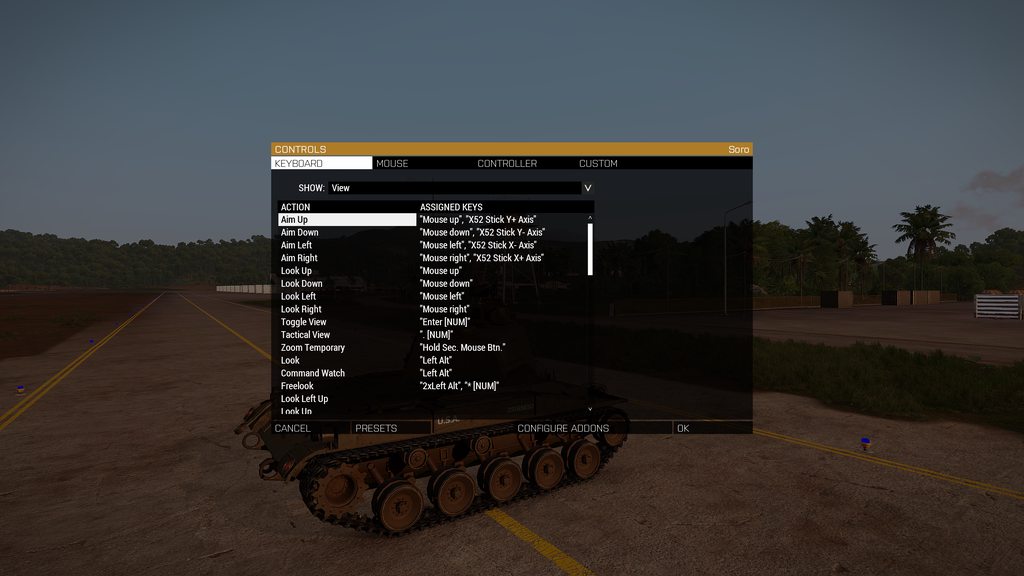 patent flint
hollow terrace
Can anyone help me with my mission params? I only play official combat patrol an...
patent flint
hollow terrace
Can anyone help me with my mission params? I only play official combat patrol an...
Try it this way
class Missions {
  class CombaPatrol1 {
    template = "MP_CombatPatrol_02.Stratis";
    difficulty = "Regular";
    class Params {
      BIS_CP_tickets = 100;
    };
  };
  class CombatPatrol2 {
    template = "MP_CombatPatrol_02.Stratis";
    difficulty = "Regular";
    class Params {
      BIS_CP_tickets = 100;
    };
  };
};```Will do thank's for the answer, first i got..
hollow terrace
Works perfect, thanks alot @patent flint now i can change objective and anything else
 tight fable
I'm sure this isn't the first time, but what do you guys do after you reboot from a glorious windows update and steam says LOL ArmA III is not installed, and you have no HDD space to install it, because its already installed... Restarting did not help, I can path to the game executable and run it, but is there a way to force steam to recognize the game is installed? Adding that I also updated my video card drivers (NVIDIA) unsure if that's a potential cause as well...
 cold lichen
Hey folks! Sorry if this has been asked... I have been fighting with this for the entire afternoon and google has not given me any clear answers:
I am attempting to set up my A3 Dedicated server to run the new SOG DLC.
The server runs just fine when I don't attempt to run SOG.
When I do run SOG anyone attempting to join fails with:
Session lost - Verifying PBO failed: vn\addons\emm.ebo
If I run the server with no validation it seems to work just fine with the exception that I get the notification:
Version mismatch! Server: 1.01.006305, client 1.01.006333
I have tried running the App_update yada yada and have updated everything through SteamCMD. At least I think I did.... Any thoughts?
patent flint
Did you verify your Server and Client files?
Because there was also an Update today for SOG PF
cold lichen
I ran this in the CMD: app_update 233780 -beta creatordlc validate
I am sorry I am kinda new to this stuff so I am still learning how to work with the SteamCMD. The difference between Verify/Validate are lost on me ATM.
patent flint
to be fair the emm.ebo even don't exist on the dedicated Server build as far as i see only on my local installation. I was just show
cold lichen
So it sounds like I just need to wait until it gets updated, then update my server files?
patent flint
What settings did you turn on to verify files?
cold lichen
I am semi-ashamed to admit I am using TADST ATM because I was struggling to get my stuff to work. So I am just using the UI selectable V-0 -1 or 2 in TADST.
I appreciate your patience btw Sancron! Thanks for taking the time to help!
patent flint
What are you using right now? verifySignature 1 or 2?
cold lichen
I am using 0
patent flint
Make sure it's set to 2 since 1 is depricated
cold lichen
If I use 1 or 2 then nobody can connect.
patent flint
Ok that's strange, i was just test my Server that's using the latest patch and has verifySignature=2; running
cold lichen
I think I will try updating again.. It's possible my timing was off today... Maybe the patch came out literally just after I did my update.
cold lichen
PST?
 plain sluice
probably a common problem, but I'm brand new to arma 3 to play on an antistasi server my friends enjoy
I have no weapon firing sounds, yet get bullet impact sounds
What's that about?
patent flint
plain sluice
probably a common problem, but I'm brand new to arma 3 to play on an antistasi s...
Has you or your friend a mod loaded that the other one hasn't loaded? That's the only reason where i personally was notice such a bug in some cases
plain sluice
patent flint
Has you or your friend a mod loaded that the other one hasn't loaded? That's the...
ill report back if that ends up fixing it or not, thanks for your consideration
 slate prawn
I've got a minor issue with arma III not letting me join at all. Trying to connect to a friends server that auto diconnects me with no warning.
 oak coral
G'day. I've been trying to get a dedicated server setup but im having troubles getting the mods i want to add to work. the server itself will show up in the server list but it wont say that there's any mods working and im a bit confused as to why. I have read and watched a couple of things to get the mods working, but im just really not sure if im doing it right. If someone has some free time to go through some troubleshooting with me, it would be greatly appreciated
fringe salmon
oak coral
G'day. I've been trying to get a dedicated server setup but im having troubles g...
Retrace your steps
Look at whatever video you were using and go through everything
oak coral
Im wondering, most the videos i have watched, have said to drop the @ folders into the root directory of the server, then to add a line into the .bat that im using to start the server that points to those folders, is that correct?
 plucky wagon
Any ideas why my gunshots are so dang quiet? I can barely hear them everything else is good but gunshots I've reinstalled 3 times loading with and without mods checked audio settings
steady hawk
Try in empty mission only you
fringe salmon
oak coral
Im wondering, most the videos i have watched, have said to drop the @ folders in...
Well. Try that?
oak coral
I have, but it still doesn't register that there's mods on the server
fringe salmon
weird
oak coral
I have also added the keys into the keys folder in the server directory
also, just to clarify, does the server console tell me if its running mods, or will it just tell me when im looking at the server in the server browser?
wait, can i not have spaces in the mod folder names?
oak coral
I have also tried to use the TADST program, but have since started from scratch following the official wiki for server hosting but when browsing the server in arma launcher, it still says no mods, then when i log into the server, it'll just go to a blank screen where i can hear water and such, but can't do anything
i am also trying to get antistasi to work as my mission, and it keeps saying "Mission Antistasi-Altis-2-4-1.altis read from bank." constantly in the console
oak coral
So i actually got it running, but i can't find where to change my difficulty settings, where is that supposed to be located?
or am i a doofus, and its supposed to be in the server config after the missions bit
 unique ruin
I can't connect with friends to have a private multiplayer match.
If we try to join steam says that the server is not responding.
I read about the whole Port Forwarding thing and tried a few tutorials on that but due to my narrow knowledge of network stuff I couldn't get it to work. Is there anybody here who could help us out on this one?
slate prawn
I found out my issue...arma 3 was showing the correct account in server side, but in the main menu, it was registering me as a new user. Fun.
steady hawk
It's ACE
 unique frigate
Hi, does anyone know here why BIS Group Managment breaks for me when I save and exit and when I load to a saved mission
when pressing U it doesn't open up
while for my friends it works fine every time
 smoky pine
steady hawk
It's ACE
smoky pine
steady hawk
It's ACE
i have ace running with arma
 waxen brook
Hey, can anyone help me figure out the root cause of the Arma 3 status_access_violation error? I've driven myself crazy trying to figure it out and went as far as to do a full system restore. Even after a fresh install I get the error and I'm immediately kicked from any server I join. It's getting a little frustrating.
It's on and off for some reason, I never had this issue before and now around 80-90% of the time this error pops up.
 wild saddle

https://community.sogpf.com
so in the unit i am in we use the s.o.g dlc and a few of us use the compatibility mod and now we cant join the server (server is up to date with the dlc update from yesterday https://community.sogpf.com/threads/392-Discussion-Hotfix-v1-01-006333 but the compatability mod is not up to date with the hot fix so now me and like 10 people in the unit...
anyone can help me?
i know this might not be the right channel but
humble wagon
@wild saddle don't know who made the mod but if a update gets released it takes some time before a mod-maker can also adjust his mod to the latest update. Don't know if the mod maker is in this discord but best is to check the steam workshop page replies and see if the mod-maker gave an eta on a fix.
wild saddle
humble wagon
<@371200108219465729> don't know who made the mod but if a update gets released ...
you mean comments?
humble wagon
Yes and there will probably be a lot of messages if the mod stopt working so you need to scroll over a few pages.
 humble wagon
Guess everyone just have to wait a little bit more before the mod gets a update.

 humble wagon
👍
 pliant rapids
is there any way to fight this error when uploading/updating mission in Steam Workshop?

of course, steam cloud is turned on and i'm not on the steam beta branch
grim tinsel
No fix known at the moment afaik, see https://feedback.bistudio.com/T158403 @pliant rapids
wise barn
@pliant rapids
go to steam:
steam -> preferences -> cloud
and check if the cloud stuff is activated
might help
nvm, already mentioned in the ticket
pliant rapids
Yeah, it’s activated
it happened before in Steam Beta branch, i guess this Beta was moved into stable branch
wise barn
seems random since i have no issues publishing content
pliant rapids
through eden or publisher?
pliant rapids
publisher works for me too, but it can’t publish mission, only mod (?)
pliant rapids
yeah, publisher is not working for missions

 exotic blade
pliant rapids
yeah, publisher is not working for missions
exotic blade
pliant rapids
yeah, publisher is not working for missions
The same thing has happened to me, how can i update it from the game?
pliant rapids
exotic blade
The same thing has happened to me, how can i update it from the game?
No way atm
i guess everyone who will try to publish mission will encounter this, it's only matter of time
BI should release a hotfix for this
 quaint jewel
read the message that came before that one
The one with the red warning sign, telling you something important

 wraith schooner
do you have one drive?
quaint jewel
Its some windows 10 onedrive issue
wraith schooner
it's missing
got the same error sometime ago
just install onedrive or reinstall it
 celest comet
wraith schooner
got the same error sometime ago
celest comet
wraith schooner
got the same error sometime ago
how you fix the error?
celest comet
wraith schooner
just install onedrive or reinstall it
ok
celest comet
wraith schooner
just install onedrive or reinstall it
thenk you bro the game trun on
wraith schooner
no problem
 plain mauve
So, i can't remove the mod since it's a vehicle mod (we really need it)
grim tinsel
plain mauve
~~So, i can't remove the mod since it's a vehicle mod (we really need it)~~
wat
 civic crane
Other games allow
uncut trellis
Arma local hosting works only through IPV4 type internet connection
some ISPs hand out IPV6 connections by default
civic crane
How can I fix it?
uncut trellis
Well first make sure you got all the right ports forwarded correctly
civic crane
Yeap
uncut trellis
if that does not work you may need to ask you ISP what type of connection you got
civic crane
Ahh need ipv6 support
patent flint
Since a few patches, i can't use my Joystick (X52 Pro) to control a turret of a tank/ifv/apc (aiming). Is this a Bug and i need to make a Bugreport or maybe an issue on my end?
 charred root
I'm having an issue that is a regular annoyance. Basically, my game will suffer prolonged lag spikes that last anywhere from three to ten seconds in length and just totally lock me down. It happens sporadically enough that I can't pin down the actual cause. Happens more often on some maps, doesn't happen at all on others, so I'm concerned if it's a hardware issue on my part, or just something I need to tweak in the game. It's also worthy to note that it happens pretty much whenever it wants. Walking down a road to an objective? Bam, lag. Helicopter spinning up? Lag. Standing around in a field hanging out for 10 minutes? Lag.
My computer (unfortunately a laptop that I bought while in the Army back in 2017) has an Intel i7-6500U, NVIDIA GeForce 940MX, 12GB DDR4, and a 1TB HDD. It seems to run everything else pretty fine, and this issue has only shown up in the last six to eight months. I run Arma 3 on pretty much low to medium on everything, and turn off a lot of effects and whatnot. Running the game on the lowest settings doesn't seem to help the issue though.
Here are some examples from last night while playing Mike Force.
Example 1
Example 2
Example 3, a significantly longer spike
 pearl sorrel
Quick guess. Cooling, Not enough RAM or RAM @ (2400 etc), HDD (SSD is best).
Just googled your GPU, which isnt a proper GPU more like a GPU chipset for a laptop; which from what ive seen even "gaming" laptops arent great for arma.
What settings have you got on for Video? Loading textures at a too high setting can cause the lag you are experiencing.
charred root
Video I usually leave on medium so I can at least render things and not be the guy who doesn't render foliage for an advantage.
I was considering it to be a cooling issue, as it only began happening after I really started playing Arma a lot more with a Unit.
pearl sorrel
charred root
Video I usually leave on medium so I can at least render things and not be the g...
Arma like most games base their graphics settings on a "average computer" aka custom your settings to suit your computer. play with settings find what works best.
Mods can cause massive issues with lag, not just because of extra textures and units but loading mods and the computer accessing mods whilst ingame.
Check your running temperature whilst playing (if you can)
Also check how much work your CPU, GPU and Disk are doing
If disk is shooting up while the lag occurs then it'll be you needing an SSD.
charred root
I've played around with the settings and editing a few files to improve performance, but even running the game as low as possible still seems to have the issue persist.
The lagspikes in the video are also much different than ones I experience when stuff gets loaded in. These spikes kind of "stutter" whereas the spikes caused by mods and tons of stuff totally freeze everything up.
I'll definitely see if I can check my temps though. Thanks for that!
pearl sorrel
Cooling, RAM, SSD. is what id do. (Other than buying a mid tower instead of a laptop that is lol)
charred root
Literally what I had in mind lmao. Haven't forced myself to make the jump to a tower though since I only really use the computer to play with my group of friends in the Unit. Normally play on console otherwise. Might have to do it though because these spikes are beyond frustrating.
Thanks for the help!
pearl sorrel
Thats fine! I like to try and make sure people actualy understand the issue rather than just shouting about needing ram.
Luckily, most of arma loads on CPU more so than GPU. Which is why i think SSD is the bottleneck in that area 🙂
humble wagon
@static wyvern your profile is in "my documents" I presume? Do you have "one drive" running on the background making backups? That could be the 1 placing the files back.
I had a issue with a other game constantly moving back my mods after I deleted them(also located in "my documents") turned out that the cloud of one drive put them back in place everytime, untill i deleted them from my cloud online.
brave hawk
also, the "main profile" (named after your Windows account) cannot be deleted
static wyvern
I know about the main profile, but I can't delete another called WhyTheLongFace. The reason I think it's acting funny is steam cloud(?) but that shouldn't save profiles I wouldn't think
fringe salmon
I'm having an issue with guns not making sound when firing in first-person, as well as vehicles not making any sound while driving them in first-person?
fringe salmon
Yo anyone know how to fix the huge fps drops i keep getting in cities and forests? (firefights as well)
 hard locust
I use a laptop and it's not that bad for me,
in firefights though it's awful so i can do with a hand too on the FPS drops lol
hard locust
Yea its same with me, what modpack are you using?
fringe salmon
by mod packs u mean like all the mods or?
hard locust
like are you modern or OPTRE?
hard locust
Modern is the better for me, it's not as drastic, but with OPTRE it's worse
hard locust
I'll do some digging for us my guy see what we can do
I don't play single only multi
fringe salmon
Does anyone know how to add a static admin list to my dedicated server’s config file so I don’t have to #login every time I join?
I can’t find the command anywhere and it didn’t come as default
 frank apex
fringe salmon
Does anyone know how to add a static admin list to my dedicated server’s config ...
frank apex
fringe salmon
Does anyone know how to add a static admin list to my dedicated server’s config ...
You can add a list of admin Steam ID's to your server.cfg file
https://community.bistudio.com/wiki/server.cfg#Server_Options
They will still need to login with #login but they don't need to enter a password.
There is still the limit of only 1 admin logged in at a time.
frank apex
fringe salmon
so no way to auto assign?
Auto assign in what sense?
fringe salmon
Automatically logged in as admin, instead of having to #login each time I join @frank apex
frank apex
You can't
fringe salmon
I'm also having an issue with a single mod on the dedicated server where it says I'm missing the key needed to sign my mod with the server's (AntiStasi Vietnam) even though it works fine with the Apex version
both of the mods are put in the MPMissions folder
I see, I'll do it your way, thank you
I asked the AntiStasi Discord about this but they sent me here
I'm getting the error "vietnam.ebo is not signed with a key accepted by this server"
wise barn
@fringe salmon never put mods in the Mpmissions folder on your server. If not already there, create a dedicated folder called "mods" in your server root folder and have all mods there
Also, every mod you run on the server should have a keys folder within. Copy those keys to the keys folder in your server root folder
wise barn
According to a lot of people I'm rather the opposite, but still helpful at times 😉
 earnest heart
fringe salmon
Yo anyone know how to fix the huge fps drops i keep getting in cities and forest...
earnest heart
fringe salmon
Yo anyone know how to fix the huge fps drops i keep getting in cities and forest...
Cities and forests unfortunately are a known engine limitation... e.g. Apex DLC terrain Tanoa's Georgetown is known to be one such spot
 sick matrix
Hello, we're having this issue on one of the servers I'm in. If someone accidentally disconnects their steamid stays ingame preventing them from joining. Can't find any fixes on google, does someone know a fix?
fringe salmon
earnest heart
Cities and forests unfortunately are a known engine limitation... e.g. *Apex* DL...
oh alright ill try avoiding them ,thanks
 fervent stream

why
i have all the mods it lists downloaded
both on the server and the mission
my dedicated server has been giving me nothing but shit since I purchased it and this is just the latest issue it's had
it just seems like every time we solve a problem, another shows up
pearl sorrel
earnest heart
Cities and forests unfortunately are a known engine limitation... e.g. *Apex* DL...
Georgetown, like any other big built up area (Fallujah im looking at you!) is dreadful for this
quaint jewel
fervent stream
i have all the mods it lists downloaded
downloaded is not enough, you also have to load them on the server via start parameters
quaint jewel
well it says you didn't
fervent stream
we have tons other mods
and it's just those mods specifically
well they are
i dunno if i did anything wrong, i am fairly new to dedicated servers
 quaint jewel
maybe mod foldername is incorrect
fervent stream
i thought that too but it seems to be the same
one mod was different, so we changed it and it worked
the rest seem to be the same
pearl sorrel
Arma has an issue with spaces, capital letters etc.
Rename all your modfolders to be one word, or underscored
RHS AFRF becomes rhsafrf or rhs_afrf
More than likely youve missed, or the server is having issues folder names
fervent stream
i checked what mods are being loaded

it seems to be loading the mods it's telling me aren't there
pearl sorrel
Have you edited the mission file recently?
Cus it might be looking for files which have changed name.
Mission looks for modname_tank2
But a recent update mightve changed or removed this i.e modname_factionname_tank_O
fervent stream
i made sure to save the mission, re-export it, and put it in the server mpmissions folder using the exact mods on the server
pearl sorrel
I think Ive just seen the issue
its looking for @ 3cb factions
and its including the @ as part of the search.
In the above image its the only one listed with an @
fervent stream
ah
yes
that would make sense
so do i place it in there as @@robust sparrow factions?
lol whoops
pinged some guy
pearl sorrel
hence my spacing lol
pm me your server load string
and ill check it just to make sure
uncut trellis
filepatching is not really recommended for MP stuff
 icy canyon
Does anyone know a fix for this. i have verified my files. reinstalled my mods. verifired my files again. and i dont know what else to do

 hot lantern
icy canyon
Does anyone know a fix for this. i have verified my files. reinstalled my mods. ...
hot lantern
icy canyon
Does anyone know a fix for this. i have verified my files. reinstalled my mods. ...
Are you the server admin or are you joining a server?
fringe salmon
why does it say "You were kicked off the game. (Battleye: PublicVariable Restriction #8)" each time i try to join a match
i just bought arma and i have no clue what i am doing
fringe salmon
fringe salmon
why does it say "You were kicked off the game. (Battleye: PublicVariable Restric...
i restarted my pc and the same message is occuring
i have no idea whats wrong the internet doesnt even provide anything
uncut trellis
@fringe salmon you will need to show the error
tame storm
hey can someone help me how can i make a lobby for my friend and i bc we wanna play apex protocol toghter with no randomes joining
fringe salmon
uncut trellis
<@456226577798135808> you will need to show the error
Aight let me start my arma up
Ignore the fact that I took a photo on my phone but yeah @uncut trellis

This is what shows everytime I join a matcj
Like
I select a squad and everything
Then click play
Then after loading
It shows that
uncut trellis
Does any other server work?
fringe salmon
Nope
Its the same thing for every server I enter
That has battleye
I want to play on official servers though and all of em have battleye enabled
So
steady hawk
BattlEye is mostly enabled for every public servers, since it is a anticheat software. No need to blame it
hot lantern
There's a setting in the launcher for battlEye, try checking that
wise barn
Then reinstall Battleye
 vale forum
just gonna bump my issue again
fringe salmon
wise barn
Then reinstall Battleye
How do I do that, doesnt battleye just download with arma?
wise barn
@vale forum
Bumping helps you nothing.
Verify your game installation
wise barn
@fringe salmon idk, ask Google
fringe salmon
lol
vale forum
Im trying to figure out why trying to host a multiplayer game is impossible, and also why I cant run any custom missions over a dedicated server
Theres no errors that are notable for either, the only error I got was for the second issue, simply saying "mission not found"
.-.
wise barn
When a vanilla mission works, but a custom made does not, what do you think has issues?
vale forum
I can run the custom one through singleplayer
Through both scenario select and mission select
But multiplayer refuses to work for me
For any custom missions
wise barn
You can not play custom single player missions in multiplayer
vale forum
So how do I make a custom multiplayer mission?
vale forum
Yeah im aware
I did all that through the editor, this isnt my first time making maps
Im just wondering if I missed something
wise barn
Once you have set up your custom MP mission, you also have to export it as such in the editor. The exported mission will then be available in your game root folder in the MPMissions folder as a PBO file
vale forum
Yeah did that
Doesnt want to show up for my dedicated server mission list
Also a side note, the 3D editor wont show up for my dedicated server either
It only lets me select vanilla missions
?
Think I may have found the issue, but I'm not entirely certain as it pertains to another issue I was having
Is BattlEye required to play custom maps in multiplayer?
vale forum
I have BattlEye off for my server
If that matters
I spent like 4 hours looking through google for an answer, couldnt find one
Most people dont host dedicated servers it seems
wise barn
put this in your servers MPMissions folder.
how do you tell the server to launch missions?
via server.cfg?
vale forum
Yeah
wise barn
post your class Missions to pastebin.com and share the link here
vale forum
Pastebin
Pastebin.com is the number one paste tool since 2002. Pastebin is a website where you can store text online for a set period of time.
wise barn
class Missions
{
    class Mission1
    {
        template = TestBaby.Tanoa;
        difficulty = "regular";
        class Params {};
    };

    class Mission2
    {
        template = MP_Testmission.Stratis;
        difficulty = "regular";
        class Params {};
    };
};```try this, with my mission also being in the servers MPMissions folder
vale forum
Trying it now
9:31:03 Can't find a mission collection / mission with template name: 'TestBaby.Tanoa', skipping to next mission.
9:31:03 Player Admin connecting.
9:31:03 Can't find a mission collection / mission with template name: 'MP_Testmission.Stratis', skipping to next mission.
Same issue as before
wise barn
seems like you are using a wrong folder on your server

 wise barn
yes, you need to have it in the servers MPMission folder, not your game
wise barn
running a dedi server -> use the dedi server installation folder structure.......
wise barn
does it work?
wise barn
👍
 split dune
Ayo I'm trying to set up TFAR but the website is down 
grim tinsel
split dune
Ayo I'm trying to set up TFAR but the website is down <:Sadge:742433497242664980...
you dont need the website to set up tfar
split dune
how do i acquire the teamspeak plugin
grim tinsel
its included in the workshop download
split dune
oh ok ty
 zenith sparrow
hi guys i really need help with an issue in the game, i can't start the game every time i start the game it gives a black screen and do not start and in the task manager it says not responding and i tried some of the fixes on youtube and none of them worked so can anyone please walk me through that issue i will be so greatfull
uncut trellis
have you verified the game files on steam?
pearl sorrel
zenith sparrow
hi guys i really need help with an issue in the game, i can't start the game eve...
Sounds like either, you are tabbing while it loads thus making it enter an unresponsive state or this can happen when you try to launch into a server, but the server is down
If verifying files doesnt fix it; that is
zenith sparrow
uncut trellis
have you verified the game files on steam?
yes
zenith sparrow
pearl sorrel
Sounds like either, you are tabbing while it loads thus making it enter an unres...
i don't know but i waited for so long last time more than 30 min still nothing
uncut trellis
has the game ever worked?
zenith sparrow
yes i've player almost 120 hours
zenith sparrow
i stopped for a while and when i got back it didnt work
zenith sparrow
uncut trellis
could be you need to reset your profile
how ?
uncut trellis
dont have the info at hand.
its somewhere in the user\appdata folders
I recall it should come up with simple google search
something like "delete arma 3 profle"
uncut trellis
well perhaps you need to contact BI tech support
we are all just users like yourself here
 minor arrow
So Im having an issue with frames in vehicles, specifically cars
I get 120fps On the ground, But as soon as I enter a car my frames drip to aroun 16
wise barn
mods?
minor arrow
Im using a 3090 and a 5950x and Ive changed the settings and nothing changes
No mods
But it happens on mods aswell
wise barn
usb audio device?
wise barn
plug in phones directly to your PC, remove USB audio device, try again
wise barn
yes
minor arrow
alright so ive plugged headphones through the small dongle, the issue is that isn't practical for me as the wire is too small
Or is that the only fix
wise barn
for testing, have no digital audio device between your onboard soundcard and your headphones
wise barn
no idea then other to verify your game installation via steam
wise barn
it often used to be related to USB audio devices, and the fact that MS 🦆ed up a lot in relation to that with the 2017 creators update for windows
 blazing quarry
this is happening with every game i try and join

 summer pollen
when i try to join my server all i see is this

i can type in chat
but nothing happens
pearl sorrel
summer pollen
when i try to join my server all i see is this
Have you checked your server for issues?
summer pollen
where and how
pearl sorrel
what do you mean.
Please dont tell me you just bought a server and left it without checking it out and configuring it?
Because; usually web interfaces tend to have a good way of showing you what you need to know.
Some even have good ways of reporting errors on the main page.
summer pollen
oh no it's a dedicated server
i didn't use a provider
also i think the issue stems from a lack of pbo file
pearl sorrel
yes, if you havent given it a mission to load; that might be an issue....
summer pollen
yeah haha
it's been a looong time since i've last hosted a server
i did this before back when i played antistasi but completely forgot that the pbo file was required
and since we're using a custom mission i just swapped in the mission folder from mpmissions on client arma and called it a day haha
terrific, this has solved the problem!
pearl sorrel
👍 
summer pollen
any idea why the server might not be using the correct difficulty?
the mission itself has a custom difficulty
this is the mission
summer pollen
okay the mission works
but the mission is setup to have a save point
that the mission can be restarted from
but that does not work in multiplayer
any idea why?
fringe salmon
Im still getting this error, even after redownloding the entire game and redownloadinf battleyee

I dont know what it is
It shows whenever I join a match
I select my squad leader thing or whatever
Click "ok"
Then it fully loads
And does this
Im new to the game so I have no idea what I am doing wrong
I asked the other day but no one seems to know
fringe salmon
Shit nvm I got it to work finally
 agile rampart
Hey, my arma 3 game shows up as uninstalled but all my game files are still there and it works when i launch it from the exe


is there any fix for this??
steady hawk
Tried to restart Steam?
agile rampart
I have
steady hawk
Does your drive that has Arma 3 recognized by Steam?
agile rampart
Yes
I hit install and it says "discovering existing files"
huh
that seemed to fix it
strange
steady hawk
Seems Steam does Steam
agile rampart
I just got steam'd
 rough vigil
hi, can anyone help with an error i get launching?