#arma3_troubleshooting
1 messages · Page 132 of 1
 wise barn
 proven trellis
i can not uninstall dor some reson can not see it on the remove list
wise barn
wise barn

 steady hawk
Activate HTUNE_OBJECTS MOD or whatever. I don't know the MOD so 
 glass pasture
Anybody willing to take a look at my .rpt? For some reason whenever I try to switch to my new missionfile it just switches back to my old one :/
 grim tinsel
glass pasture
Anybody willing to take a look at my .rpt? For some reason whenever I try to swi...
grim tinsel
glass pasture
Anybody willing to take a look at my .rpt? For some reason whenever I try to swi...
If you share it someone might have the time to take a look
 last kite
So, I have been experiencing issues with the campaigns part of the game. Its been working for what 2 years now, but recently whenever I click on "campaigns" the game crashes. It sends me back to the launcher. Everything else works, multiplayer, showcases etc. but anything under "Campaigns" I cant access. Has anyone had a similar problem or know what to do? I saw some people on reddit that had similar or the same issues...
 native iris
@last kite Have you tried verifying the game files?
last kite
yes
 mellow yarrow
Im getting a Bluescreen when trying to launch with BattleEye. (SYSTEM_THREAD_EXCEPTION_NOT_HANDLED)
Windows is freshly installed
wise barn
the usual:
- updater ALL drivers. don't let windows do it, do it manually. got o the manufacture website and download the latest drivers there. (Mainboard (chipset, audio, ethernet / wifi, ect), GPU, additional hardware)
- uninstall and then reinstall Battleye
- if this didn't work, reinstall vcredist 2013
- if this didn't work, update BIOS
- if this didn't work, get some gasoline and a lighter
"but it's a fresh install..."
do it again
 subtle parrot
anyone know what le fuq dis is?
 wise barn
when is this occuring?
subtle parrot
while trying to open my game
 slim mortar
arma 3 even crashed after starting a singlepalyer session
slim mortar
I've played it before, but why it doesnt work now?
 fresh quest
slim mortar
I've played it before, but why it doesnt work now?
fresh quest
slim mortar
I've played it before, but why it doesnt work now?
When it crashes there is a button for making a crashreport, you get some files there, go to the feedbacktracker, make ticket and attach the crash files
 slate epoch
Hey guys. I've been getting the Status_Access_Violation Crash when loading into any server. Sometimes it instant crashes when loading into the character other times I can walk around for a few minutes but It always ends up crashing. A List of things I've done to try and fix the problem. Updated Drivers both with windows and manually at manufactures' websites. Reinstalled Visual C++ 2013, Reinstalled Directx, Reinstalled the game three times, lowered resolution and graphical settings, run windows memory diagnostics with no errors found. I've had people read through the rpt logs and they have found nothing which can point them in a direction at all. So just putting this here to see if anyone had any other ideas.
 quaint jewel
have you made a feedback tracker ticket yet?
 night eagle
What the hell is Hitune Objects and how can I fix it?

It's not in workshop.
No one can join the server in my unit.
slim mortar
fresh quest
When it crashes there is a button for making a crashreport, you get some files t...
lets see if its gona help
slate epoch
I have not yet dedmen
 obtuse skiff
Keep getting this message when I start a mission in the editor. Please help 😖
 obtuse skiff
ohh okay thanks
 uncut trellis
like it says in the message too 😉
obtuse skiff
Gotcha 😆
grim tinsel
Huh, seems odd that acre wouldnt be compatible with werferlingen yet tho
 fringe salmon
hi
for some reason arma audio just decides to stop working
not a hardware issue
works is in every other application
this just started happening for the first time
steady hawk
Arma 3's audio uses Windows' default audio output device (so far. Probably next update contains some improvement about this). You should do a double-check audio device. Also, USB headset?
fringe salmon
yes usb headset
steady hawk
Then unplug it
fringe salmon
ok
 frank apex
obtuse skiff
Keep getting this message when I start a mission in the editor. Please help 😖
frank apex
obtuse skiff
Keep getting this message when I start a mission in the editor. Please help 😖
Have a read of this old issue about GM & ACRE
https://github.com/IDI-Systems/acre2/issues/995
TL:DR: You must load the optional @acre_sys_gm that provides map compatibility.
Which is avaliable in the optionals folder inside the ACRE mod folder.
fringe salmon
steady hawk
Then unplug it
I unplugged it and plugged it back in
dosnt fix the issue
steady hawk
Unplug it. Not plug it again
steady hawk
Then you're good to go
TLDR, Arma 3 has some hiccup with USB Headset. If you plugged it and Arma 3 had some weird issue, the headset is the issue
steady hawk
You can say so maybe
fringe salmon
for sure
its a mainstream headset that works in every game and app except for arma
steady hawk
Whatever you say, you can't use USB Headset and play Arma 3 the same time
wise barn
In regards to usb headset issues: it's in fact Microsoft who screwed up big time with the 2017 creator's update
fringe salmon
arma 4 tbh
steady hawk
Why you said arma 4 tbh suddenly and suddenly
 clever forge
help, when I try to join a server something pops up and says "battleye initialization failed"
steady hawk
Enable BattlEye from Launcher
clever forge
I did
steady hawk
Relaunch the game
clever forge
I did
steady hawk
Bohemia Interactive Forums
Hey just looking for some help. I am looking to get back into arma3 but cannot join any servers with battleye because of this error Battleye initialization failed. Things i have tried -Deleting and reinstalling arma 3 -verify the integrity of game cache -delete battleye service arma3 and reinstal...
 steep sedge
Hi when I try to upload the mod to the workshop I have this error, any solution? error steam error code:16, Error code:1, Error message: STEAM_API_DLL TODO
 strong apex
it might be a steam issue, the workshop has been offline a couple of times lately
 ruby bluff
Hi, i've got the same issue ! When i try to upload mod on the workshop i've got this error :
 grim tinsel
Hm make sure that that visibility setting is correct @ruby bluff
Also whats in that mod?
ruby bluff
Didn't work when i changed visibitly, also it's a private map from a friend with some made self props.
uncut trellis
Map or mission?
ruby bluff
Map
But someone a few lines above said he has the same problem so i think it's general ?
I tried to upload an another addon and I tried to update another ones, but the problem still remaining
wise barn
Wait and retry later / in an hour. Steam most likely has some issues
ruby bluff
Ok thanks, I will try later 😉
strong apex
I've made a small mod to test adding modules to Zeus and SP and Hosted MP work perfectly. Only my mod is loaded, it's single class inheriting from Module_F.
However, on a **DEDICATED **server, the module isn't showing up in the zeus interface. Mod is confirmed loaded on the server, checked with debug console getLoadedModsInfo. The client and server mod hashes match.
Now here comes the weird part.
I decided to load CBA_A3 just for the heck of it, along with my test mod. Suddenly my mod shows up. My mod is not in any way, shape or form dependent on CBA_A3.
So to get my mod to show up on the dedicated server I have to load an unrelated mod. Why?
If you have any insights pls @ me, I'm trying my best to understand this problem.
ruby bluff
Hi, when i tried to upload / update an addon on the workshop there is this error :

It's been a day now that I have this error, 2 friends tried to upload an addon and it is working for them but not for me.
I tried to upload / update different addons but it doesn't want to work
wise barn
lemme guess, you had some stuff removed by authorities lately?
wise barn
reinstall steam
ruby bluff
Ok thanks, i will try
ruby bluff
It didn't work, i reinstalled steam and arma 3 tools, got the "Item publishing failed" with the same error :/
ruby bluff
steep sedge
Hi when I try to upload the mod to the workshop I have this error, any solution?...
Hi, Did you found a solution for your problem ?
steep sedge
no ghost
steep sedge
ruby bluff
Hi, Did you found a solution for your problem ?
I tried everything and there is no way, I am on the steam discord asking and nobody gives an answer, only that a ban of 15 days of the workshop is capable for some reason but they do not give a way to verify it
ruby bluff
Yep, same i tried everything, but i saw some topics with people who had the same problem (in 2018), they upload addon in 2020 so i think they resolve the problem, i will try to contact them
steep sedge
ok, if you have a solution, leave it written here
fringe salmon
game effects audio suddenly got quiet and there is a mute icon on the right side of screen
help
 manic sage
you muted in game audio?
steady hawk
It's a MOD. You can search your MOD list for it
 formal zephyr
Does anyone know how to fix this I've already tried quite a few things, but nothing has worked so far..
 steady hawk
No info has given. Give us more
 cerulean lance
formal zephyr
Does anyone know how to fix this I've already tried quite a few things, but noth...
cerulean lance
cerulean lance
formal zephyr
Does anyone know how to fix this I've already tried quite a few things, but noth...
cerulean lance
Unable to join servers. Game freezes the second I join any CFG Or Vanilla Server. Any suggestions?
Fresh OS Install, issue was pertaining before i decided to wipe everything. Drivers Etc are up to date. .RPT Doesn't show me much.
Am able to join Unit's server but no others.
fringe salmon
@cerulean lance try verifying game files/ repairing mods relating to your units server
late reply lol just noticed
cerulean lance
fringe salmon
<@!499999099966324778> try verifying game files/ repairing mods relating to your...
All good! Using a REPO, so repairing isn't an option.
OS Is less than 2 days old, Verified BE .exe's, Nothing in MPCache
fringe salmon
My AI squads in Zeus keep getting in and out of their helicopter repeatedly when they should stay in the heli
Any ideas?
When they get out, they get back in again, then get back out again
Deleting and respawning the ai fixes it, but why is it happening to start with?
Please ping me when/if you reply so I get a notification while I'm Zeusing
 next hazel
Everytime I start up arma, it's stuck on initializing addons
nevermind, it just takes time
native iris
next hazel
Everytime I start up arma, it's stuck on initializing addons
Amount of mods? Hdd/ssd?
 lilac turret
 steady hawk
...And?
steady hawk
Just load RHSUSAF
lilac turret
there is no mod called that
grim tinsel
lilac turret
there is no mod called that
there is
 warped flax
So, I tried downloading the PBO manager, but when I try to download it it only downloads this wierd text file:
grim tinsel
warped flax
So, I tried downloading the PBO manager, but when I try to download it it only d...
 thats a 7z file, you can unpack it
warped flax
how?
grim tinsel
google can tell you
warped flax
k, thx
steady hawk
For all those people who find it more convenient to bother you with their question rather than to Google it for themselves.
grim tinsel
^
steady hawk
Also I don't think you can redistribute like that. Remove the file is better
 brittle lion
Anyone else having issues with jet tgp POINT locking onto vehicles? For me its only working like 50% of the time or less. Its so frustrating.
 nimble oracle
Ran into an issue tonight with my group where we could not unload unconscious players from vehicles via ace interact. Seemed to work intermittently with cars, not at all with helis. The players reported getting shot into the sky, the doors would open but they wouldn't get out, weird stuff. Restarted mission, then server, tried different mission. Still same issue. I'm guessing its either a mod conflict or something wrong with the cba settings but I have no idea. Anyone run into this before?
wise barn
@nimble oracle
Best to ask on ACE slack
 pearl umbra
Any way to get a crashreport when the game just freezes and hangs?
Can't seem to play for more than 30 minutes at most, before the game just freezes and hangs, pinning two cores at 100%
@formal zephyr Did you buy Art of war DLC?
wise barn
@pearl umbra
mods?
wise barn
fullscreen or windowed fullscreen?
pearl umbra
Either
wise barn
keep it windowed fullscreen
some error messages hide behind the game screen and get closed with the game on a violent shutdown (alt+f4. others)
wise barn
@pearl umbra
what GPU do you have?
pearl umbra
6800 XT
wise barn
ooookay...
keep a very close eye on the temperatures, especially the junction temp.
stock AMD fan curve sucks hard and once the junction temp reaches +90°C, funny stuff starts to happen
had similar issues with the 5700XT
pearl umbra
Its not the GPU
pearl umbra
I have been using it since launch, had 0 issues until Art of war was released
Temperaturs are in 70-80 range
wise barn
core or junction?
pearl umbra
both
Just now, 74 core, 82 junction game frooze
Game does something strange
Pushing two cores to 100%, just before it frooze GPU usage went form the usual 40-50% while playing to 100%
850w platinum powersupply, memmory at very conservative XMP settings, no OC on CPU or GPU, only PBO enabled on CPU
No issues at all in other games (planetside 2, kerbal space program, wargame for example)
wise barn
remove AoW for testing
pearl umbra
I don't think it is the DLC itself, but the update
When I do get crashsdumps it is errors in rendering part of the game
Clouds or lighting usually
I'll try removing the DLC, but can I play multiplayer ons ervers that use the DLC without it?
wise barn
yes, you still can play the servers
pearl umbra
Nope, didn't change anything
pearl umbra
Wonder what the hell Arma is trying to do
GPU usage jumps from the usual 30-40% to 100%, and cpu usage to 100% on two cores, and stays there until I kill the game
fringe salmon
I am a member of a certain unit and the unit owner lets the members host their own side operations. I have been hosting antistasi about 2 months ago. At that time i had access to the game options menu after loging in as admin and picking the missions and pressing custom difficulty. But since i wanted to return to hosting antistasi the option is not available anymore. I asked the owner about any changes and he said he did not change anything. Is there any server option that will revert me access to the game options menu?
pearl umbra
@fringe salmon Should be available o role selection screen at missions start if you are logged in as admin
fringe salmon
pearl umbra
<@456226577798135808> Should be available o role selection screen at missions s...
nope does not appear
pearl umbra
What if you change the mission to fx. warlords, still no options?
fringe salmon
nope
pearl umbra
There should be options/parameters in warlords, are you sure you are logged in as admin?
fringe salmon
i think you misunderstood me
i can se the parameters of the pbo
i have a problem with customising custom difficulty settings
pearl umbra
The arma ones or antistasi ones?
fringe salmon
wait one

the red marked options does not appear on the server
after loging in as admin
pearl umbra
Thought that was only for hosting yourself, afaik on a dedicated server you set the difficulty in the config
fringe salmon
but i was able to set the difficulty like a month ago
also the windows does appear for the owner of the server when loging in as admin exactly the same way as me
im guessing its because under all of the missions it says that they are uploaded by him
pearl umbra
I don't know then, maybe there is an option in the config to enable/disable it or something
fringe salmon
yea thats what im searching for but i think im too stupid for that
thanks for the help
 rare kayak
Hello fellow Armaplayers. One of my Friends has a wierd problem in Arma 3. His game becomes brighter and brighter and than crashes...
formal zephyr
pearl umbra
<@!351372297711517696> Did you buy Art of war DLC?
No, I did not.
fringe salmon
Hello, i have a problem when i am zooming the scope on the top of the arco or rco it is always zooming in and out does someone have a fix for this?
 thorn saffron
i have a question my in game mic wont work in any server the mic works in teamspeak and discord but when i key it up in game nothing comes out
wise barn
make sure that your mic is set as default input device in windows settings
 spice spear
My friend has a minor problem with the game every time he turns it on, the game crashes after a few seconds.
RPT LOGS:
The game will not show any error, only freezes and falls to none of the other 40 users it does not happen .. 😦
grim tinsel
spice spear
The game will not show any error, only freezes and falls to none of the other 40...
does the game show an error message when it crashes?
spice spear
nop
spice spear
just that the game crashes and is in windows without any message
if it showed an error then I would try to find it first ..
quaint jewel
no .mdmp file?
 fringe salmon
Hello, i have a problem when i am zooming the scope on the top of the arco or rc...
fringe salmon
fringe salmon
Hello, i have a problem when i am zooming the scope on the top of the arco or rc...
.
spice spear
mdmp file:
https://we.tl/t-plzZSe5ia6
 gritty crypt
Getting a "Kicked from game: Battleeye Query Timeout" on my own server today. Ping is good... any ideas what would cause this? Is Battleeye just lagging today?
 regal canyon
ok so im in the eden editor, gave myself zues but whenever it try and add like a modules, like make something an ace arsenal, it wont let me click it
like im clicking it but its not actually doing anything
its doing that for every other module in zues
and i can place units
okay its not working with any modded modules, it works with other modules like weather change
 elder mist
When i try to play arma it crashes I don't know if its my mods or just my game. My friends play with the same mods and have no issue could someone help
grim tinsel
elder mist
When i try to play arma it crashes I don't know if its my mods or just my game. ...
make a feedback tracker ticket with your crash logs please
fresh quest
gritty crypt
Getting a "Kicked from game: Battleeye Query Timeout" on my own server today. Pi...
Hetzner?
gritty crypt
@fresh quest I have a dedicated server.
fresh quest
is it rented?
gritty crypt
It's in a datacenter
fresh quest
or a private one?
gritty crypt
not Arma-specific.
fresh quest
i know, Hetzner is renting dedicated server
fresh quest
gritty crypt
It's in a datacenter
what company?
gritty crypt
OVH Canada
wise barn
oh... one of the lucky ones. OVH france is kind of a hot topic atm
wise barn
"hot topic" 😉

U.S.
A fire at a French cloud services firm has disrupted millions of websites, knocking out government agencies' portals, banks, shops, news websites and taking out a chunk of the .FR web space, according to internet monitors.
uncut trellis
They got the best firewalls
fresh quest
Their service is lit
 weary sky
I'm sure their problems can't be solved by #arma3_troubleshooting anymore 🤣
 fallen hound
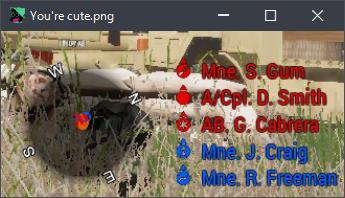
In an unit I'm in, I'm missing the radar and the list of players that I'm in the same group with ,any ways to fix that?
grim tinsel
fallen hound
In an unit I'm in, I'm missing the radar and the list of players that I'm in the...
do you mean the radar/list in the bottom middle of the screen?
thats a mod
fallen hound
Yep yep!
grim tinsel
if you have the mod and it isnt showing you props arent part of the group
if you are check your addon options
fallen hound
It's related to a problemw here I can't see the chat either, I am part of my group,
What mods do I have to check?
grim tinsel
props dui
fallen hound
Talking about this in particular
https://i.imgur.com/N5zleYz.png
 grim tinsel
fallen hound
It's related to a problemw here I can't see the chat either, I am part of my gro...
grim tinsel
fallen hound
It's related to a problemw here I can't see the chat either, I am part of my gro...
try disabling stream friendly ui in the game options
fallen hound
It's disabled, does it require me to restart the game?
grim tinsel
it should be disabled
thats what caused me to not be able to see chat at one point at least
 quaint jewel
spice spear
mdmp file:
https://we.tl/t-plzZSe5ia6
quaint jewel
spice spear
mdmp file:
https://we.tl/t-plzZSe5ia6
Uhm. Interesting and weird.
Possible fixes.
Start arma with startparameter -world=empty or -malloc=system
both cna be selected in Arma launcher
 uncut trellis
you dont seem to have correct mods loaded
fringe salmon
uncut trellis
you dont seem to have correct mods loaded
how
grim tinsel
fringe salmon
how
you'll have to use a few more works than that
fringe salmon
should i just reanstall the mods?
 jaunty cedar
hi, I'm participating in a PvP campaign with up to 80 players logged into the server. There's no AI around but the server averaged 17 fps during the last battle. Any ideas/howtos to debug such an issue? I've learned it could be the basic.cfg network config or really any script that runs. The path to debug this further is not really clear to me, as I cannot setup a test mission with 80 players for checking it out.
it's a Ubuntu 18.04.5 LTS (GNU/Linux 4.15.0-96-generic x86_64) system with released 2.02 64bit server binary
gritty crypt
@jaunty cedar assuming you're running modded, you may want to try things like https://community.bistudio.com/wiki/diag_activeScripts in debug console (also diag_activeSQFscripts). I've used that to determine when and which mods are running amuck with scripts that aren't great for multiplayer.
For example, Nimitz works great in large multiplayer for me but F18 with interactive cockpit resulted in a lot of lag last time I tried it in large multiplayer! Most I've gotten a server to without getting constantly below 30FPS server sidewas 100 players. and then at 120 players it was unplayable.
Other things to look at are increasing server spec and keeping low network latency (having a good ping requirement, etc).
quaint jewel
"Any ideas/howtos to debug such an issue?" profiling binary, diag_captureFrame
it will show where the frametime goes to
jaunty cedar
@gritty crypt thanks, it's a modded server, but close to Vanilla basically, e.g. none of the heavily scripted mods like F/A-18E/F have been added
@quaint jewel ok, guess we need to do a training session with two dozen people on profiling binary then and see where the time disappears. Thanks!
quaint jewel
only needs profiling on server.
only where you want to diagnose
and need debug console access to run script on server
jaunty cedar
ok
 silent spoke
Hi i have a problem
uncut trellis
Yes
silent spoke
My sound is broken in arma
E.g. in 3rd person i can hear shots only on the left side
uncut trellis
also your nickname is poopy as it cant be pinged easily. you dont make yourself favours with the special characters
silent spoke
Me?
uncut trellis
you probably have some fancy surround sounds or something like that turned on for your headsets
yes
silent spoke
uncut trellis
you probably have some fancy surround sounds or something like that turned on fo...
Its only in arma i cant change it in arma
uncut trellis
no you change it in windows sound settings
silent spoke
My name is better now xD
silent spoke
uncut trellis
no you change it in windows sound settings
Ok i´ll try it
silent spoke
uncut trellis
no you change it in windows sound settings
So what do i need to change exactly?
Bc in other games its normal
And its not really fun with broken sound
Help? XD
silent spoke
I got a mic and normal headphones
But they cant use stereo i need mono but in arma its laggy
The voice is normal on both sides but shooting is weird
Does somebody else have an idea?
Ok nvm its because my interface
 wintry grail
got a problem with key binds. After a reinstall of my whole system the key bindings won't save. I can bind them but they are not saved in the profile. so next start everything is reset. checked already if the files are read-only, negative. Any other ideas?
fresh quest
check the profiling branch iirc there was some fix recently
wintry grail
will do , thx
quaint jewel
but it was only broken on profiling/dev branch
quaint jewel
are you on latest version? 147447 has it fixed. From last week
wintry grail
yes i am in this one
quaint jewel

wintry grail
😩
 green jetty
I was wondering since i have a AT&T router that doesnt support uPNP does that mean i cant host ?
fresh quest
uPNP is just replacing port forward, if you have port forward you can do that manually
green jetty
for some reason though i have 2302-2305 UDP opened and it still wont allow me
ruby bluff
@steep sedge Hi, Bohemie fixed the issue with the publisher 😉
steep sedge
ruby bluff
<@!133717814421880832> Hi, Bohemie fixed the issue with the publisher 😉
Hi Ghost, was it a bohemian problem that did not allow us to update them?
ruby bluff
I don't know, i send a email to the bohemia support and they said it was fixed
steep sedge
ok, thx
uncut trellis
if you got huge amount of mods then perhaps
if you dont, you could try restarting steam
 vestal birch
ah okey
 warped token
My armas audio is fucked
I cant hear gun shots but I can hear the impact
All the other sounds are loud some are really quiet
and when im in a car I can only hear the engine in third person
fringe salmon
Good Evening i got a problem with the Arma Virual Zeus.I am building a MP Mission for my Team and wanted to implement me as the Zeus. I placed the Game Master Module and the Zeus Logic Module gave the Zeus Logic the Name Zeus and wrote that in the Owner Field of the Game Master Module. Every Time i start the Zenario as MP i get the Error "[BIS_fnc_setCuratorAttributes] Zeus is not a Curator". I then added "Zeus assignCurator ZeusModule;" in the Init field of the Zeus Logic but nothing changed. I did not find any solution on google so pls help.
Thanks in Advance.
 grizzled totem
how come my i cant lock onto my target? its just stuck like that
 green jetty
does anyone have a problem getting their AT&T router to port forward?
 earnest heart
grizzled totem
how come my i cant lock onto my target? its just stuck like that
earnest heart
grizzled totem
how come my i cant lock onto my target? its just stuck like that
#1: What are you trying to lock onto them with?
#2: If it's the Macer air-to-ground missile (AGM)... are those vehicles moving?
grizzled totem
earnest heart
#1: What are you trying to lock onto them with?
#2: If it's the Macer air-to-gro...
they are still and it is a macer
earnest heart
grizzled totem
they are still and it is a macer
That's probably your issue... no engine running = no heat signature for the Macer's seeker to be locked onto
 abstract sonnet
how do i launch arma3diag_x64.exe with mods i have dev branch and use launcher but it dosent work
arma3diag_x64.exe
steady hawk
From Explorer, directly
abstract sonnet
yh i can run it but how do i get it to go with mods running it directly dosent allow for mods
steady hawk
Use startup parameters
abstract sonnet
its not an option
steady hawk
It's the option
You can use bat files like I do
start "" "F:\SteamLibrary\steamapps\common\Arma 3\arma3diag_x64.exe" -nosplash -world=VR -profiles="F:\Games\A3Profile" -mod="!LocalAddons\@PLP_BaseFuncs";"!LocalAddons\@PLPShortcut";
 fast sable
I have very low FPS when using my hotas. Otherwise above 60. This is the hotas: PC Game PXN-2119II USB-interfac
 south silo
Hey guys, for some reason today when I booted up Arma 3 there are no servers in the server list and I somehow havent purchased any map, even the free ones. So now I can't play on any server or even use the editor. I tried to verify my game cache and nothing changed, anyone know a fix?
fringe salmon
my game just wants to be reinstalled no idea why ^^
i mean im fine with it i just dont know why exactly
quaint jewel
south silo
Hey guys, for some reason today when I booted up Arma 3 there are no servers in ...
connection with steam doesn't work. Maybe try restart stema or computer
 thick crown
Having an error code 16 when updating my mod on the workshop. First time i'e gotten this issue, anyone know a potential solution? Tried to verify cache and reinstall no fix
weary sky
LMGTFY...
Restart Steam and try again?
quaint jewel
many people reporting the asme. some steam side issue
 rocky pelican
is it normal my arma is not loading anything ace related?
also says i need to start a mission to configure mods while i am playing a scenario...
uncut trellis
do you have ACE mods enabled in the launcher?
rocky pelican
yes, usual ones like ace compat, acex etc
 graceful blade
Files D:\Steam\steamapps\common\Arma 3!Workshop@CUP Terrains - CWA\addons\cup_terrains_cwa.pbo are not signed by a key accepted by this server. To play on this server, remove listed files or install additional accepted keys.
Any Idea why this is happening despite the Server and player both has those keys in his key folder.
wise barn
maybe the mod is corrupted
weary sky
In that case his version is corrupted. Simply use the 'repair' function in the launcher (RMB on mod, click on repair) to fix the mod locally.
graceful blade
Ah, thank you so much!
 sacred swallow
weary sky
In that case his version is corrupted. Simply use the 'repair' function in the l...
sacred swallow
weary sky
In that case his version is corrupted. Simply use the 'repair' function in the l...
Hey, I'm @graceful blade 's friend. I did that, and it still doesn't work. Now it seems that it's not just CUP Terrains, but also RHS that isn't working.
weary sky
There were several updates in the past week, so try to repair all mods (should just flash for a moment if nothing is needed)
Had the same problem a few days ago, seems that Steam has some problems with their API regarding updates
 sullen canopy
hey ihave a problem w mods one day i opened my arma and all the mods were corrupted i repaired them all individually and now when i try install a mod it says not installed the mod path is not set and the game wont launch either
sacred swallow
weary sky
There were several updates in the past week, so try to repair all mods (should j...
I repaired every mod that I could, it still has the same issue
Just with a different .pbo file now, with RHS
I fully reinstalled the mods too, still the same issue
deleted the !workshop files too
I really need help here because I reinstalled these files completely, several times now
and it's still giving me the same issues

 sacred swallow
I'm going to leave this here in case it might help somebody in the future. If you have the same problem, don't try repairing mods, that doesn't work. Try verifying integrity of game files via steam, as that seems to have been what fixed it for me? I honestly have no clue, I just tried it now and it worked
wise barn
both work, depending on the issue
fringe salmon
how do i stop this massive menu
 quaint jewel
video options, display, interface size
fringe salmon
thank you
 meager drum
Hi, I set up a dedicated server with a friend, and we were trying to play but we keep running into the issue that his cars keep exploding or making other cars explode by doing small things like driving around and bumping something at not high speed or possibly due to some lag or small desync.
Is there any way to fix this? Perhaps some mod or script that would help?
I am running antistasi with ace, rhs and a bunch of other mods, although none should impact that.
meager drum
TLDR: How to stop cars from blowing up?
weary sky
TLDR don't crash your car 😅
fringe salmon
You can reduce the number of incidents by modifying their waypoints with the slowest speed and making them stick to roads with careless/safe and putting waypoints on the road. Alas the pathfinding for vehicles is pretty buggy so I only know how to reduce the incidents from a scripting point of view you can't eliminate the problem.
Larger areas of patrol are a good idea as well, they gives them more space to act and turn in. All this is stuff mission maker has to do to improve things however as vehicles do just suicide in the game at the moment and if you have enough of them its really obviously happening very frequently.
meager drum
weary sky
TLDR don't crash your car 😅
sometimes that is unavoidable due to lag spikes, "dont crash your car" is not a solution, as sometimes a slight touch is enough for it to blow up
meager drum
fringe salmon
Larger areas of patrol are a good idea as well, they gives them more space to ac...
you mean that for the AI right? The problem is happening with my other human player. I dont get those sort of problems very often, but for some reason it happens to him constantly. Sometimes he tells me that his vehicle moved in the wrong direction and then blew up. Might be lag or desync?
fringe salmon
Ah sounds like desync issues, they may have a bunch of packet loss on their internet. There isn't a lot that can be done without repairing the problem with their connection. Arma seems to cope well enough with high pings but packet loss often causes severe problems with players warping.
Or the server is overloaded and that needs addressing too.
meager drum
fringe salmon
Ah sounds like desync issues, they may have a bunch of packet loss on their inte...
Thanks, that gives me something to look at. Do you know how can I check if the player is being desync'ed?
grim tinsel
stereoscopy ?
Yeah I know
I just dont know what you mean in terms of arma
do you mean the linux port?
afaik the linux port is old and dead and shouldnt be used anymore
you can find out more in #linux_mac_branch
If you're gonna behave like that I can also just not try answering at all
create a ticket on the feedback tracker if you think something is broken
fringe salmon
meager drum
Thanks, that gives me something to look at. Do you know how can I check if the p...
Their ping will usually go up in the map under the players list. There isn't anything directly in the game i know of that tells you about packet loss, typically we see it on teamspeak which reports the amount currently.
 brave hawk
!purgeban @fringe salmon 60d name-calling
grim tinsel
 hi lou
 pallid krakenBOT
brave hawk
!purgeban <@456226577798135808> 60d name-calling
pallid krakenBOT
brave hawk
!purgeban <@456226577798135808> 60d name-calling
*PewPewPew!!*
RIP @thin halo
brave hawk
a short-lived presence.
grim tinsel
 Did he just join today or?
brave hawk
00:33:50 ago
grim tinsel
Oh wow, I wonder if that might be a new highscore in terms of people that actually ask a question
fringe salmon
He is right as well about the bug, Nvidia stereo vision doesn't work anymore by the way. Nvidia 3d does not work, not sure when it got broken but its been a while. One of my community members noted it a while ago, I think it is already in the feedback tracker.
 knotty karma
So I've had the urge to play the campaign recently. I got through the prologue just fine, but when I go to east wind, there is no play button. The only buttons are the replay and revert buttons. When I press the replay button, it takes me back to a save in the prologue. I already tried reverting the campaign and replaying the last mission multiple times as well as using the endmission command. Any help would eb appreciated

 hallow mantle
hello i iam stuck on this screen whenever i want to join my friends lan server with mods does anyone have an idea why this is happening?
(a month ago worked everything perfectly fine)
 pearl umbra
My game keeps freezing after at most 30 minutes of gameplay after Art of war update, anyone seen anything similar or have ideas on how to fix?
grim tinsel
pearl umbra
My game keeps freezing after at most 30 minutes of gameplay after Art of war upd...
do you get a window in the launcher showing a crash report?
 shut socket
Does it do this everywhere?
pearl umbra
I've only tried in mutliplayer, but happened both on populated server and one with not a lot going on
shut socket
I know my arma sometimes freezes for 1-2 minutes, are you sure you aren't just disconnecting
pearl umbra
No it freezes completly
Pins two cores at about 100%, so it is doing something
And pins the GPU at 100% for some time until the Radeon tool complains that something is not responding
Had no issues at all before the Art of War update
Tried without XMP running, disabling PBO, rolling back drivers etc. doesn't help
pearl umbra
Well I played for 1-2 hours without issues, then after I installed art of war game started crashing
I used to get crash reports, but after the arma updates after that the game freezes instead of crashing
Seems pretty clear to me that the game is hanging somehow, but I don't know if there is any way to force it to make a crash report? I think BattleEye blocks creating a dump through task manager
I also see textures flashing after the update
Kinda looks like lighting, as if the birghtness goes all the way up on the textures or something
shut socket
I would say validate files, try it again in multiplayer, if that doesn't work try disabling battleye and playing in singleplayer for a bit
pearl umbra
I have tried validating and running with art of war disabled in steam
shut socket
I haven't really had any issue like this, so you might need to wait until somebody else can help you, I wish I could
pearl umbra
Think it has something to do with the lighting that was changed with art of war
Because that is what caused the crashes when the game actually crashed and generated crash reports
I see the lighting glitch out in game, for example this frame
 shut socket
Might want to try messing around with your lighting settings then
pearl umbra
has no sahdows / darkness
Then next frame it looks normal:

Some shadows blink between frames as well
 vivid apex
Hi guys, getting the follow error on a server im trying to setup
Have tried reinstalling it on server side and on my own side
 grim tinsel
vivid apex
https://media.discordapp.net/attachments/449657569057964053/824738846314987540/u...
grim tinsel
vivid apex
https://media.discordapp.net/attachments/449657569057964053/824738846314987540/u...
you need to add the .bikey file to the servers keys folder
vivid apex
I've done that, but CUP terrain maps has two of them
i've tried different combinations and nothing worked so far
Maybe i need to delete the old bikey in the server ánd my library? ill try that
 loud dome
Im using GeForceNow to play ARMA on a MAC - it works great. Only recently - when i launch the game on GFN it begins a 28GB update file on steam in the background - as soon as that update completes, the game just closes. What could be wrong here?
wise barn
does that happen every time?
 ornate sentinel
Can anyone help me?
 steady hawk
Help what?
ornate sentinel
I am trying in making a mod that adds an aug.
The textures seem to work fine, but in first person you can't see them on the rifle you are holding
steady hawk
The texture isn't assigned in the FPP
ornate sentinel
how do i do that?
steady hawk
Just the same with you do in the TPP models -> #arma3_model
ornate sentinel
I don't think i follow
uncut trellis
Looks like you don't have textures assigned to the model in first person view lod.
 winter moss
This is driving up a wall. For some reason, without changing anything, Arma 3 damage is screwed and everyone dies with 1 shot. So a pistol vs level 4 body armor = 1 shot. Going crazy trying to figure out why, have ACE, CBA, and some other mods
ornate sentinel
winter moss
This is driving up a wall. For some reason, without changing anything, Arma 3 da...
How do I assign it and where do I find materials that tell me how to?
Can't find anything myself
steady hawk
Don't ping someone with completely unrelated topic
knotty karma
knotty karma
So I've had the urge to play the campaign recently. I got through the prologue j...
Is anyone able or willing to help me?
knotty karma
perhaps theres a way to delete the campaign saves, but im not sure how to do that so I would need someone to walk me through it
 warm marsh
I fucked up and deleted all the data for GM
How do I get it back?
Or like reinstall GM?
grim tinsel
warm marsh
Or like reinstall GM?
try right clicking gm in the launcher and clicking repair
warm marsh
Oh
shut socket
knotty karma
perhaps theres a way to delete the campaign saves, but im not sure how to do tha...
If revert doesn't work, try doing it on a diffrent profile
knotty karma
you know what, I havent tried that yet
Thank you, it worked. I completely forgot about the profile thing
 median dragon
every time i join a server it gives me an error that says (you where kicked from the game battleye game restart required). ive restarted my game and pc multiple times and uninstalled and reinstalled arma two times can anyone help
idk what to do
ive even looked up videos
hello
median dragon
yea i already did that my b
wise barn
mods?
median dragon
i dont have any mods
wise barn
a shot in the dark:
- go to
..\documents\Arma 3 - backup all files that end with
*.Arma3Profile - delete the originals
- restart the game
pearl umbra
@uncut trellis doubt it is an issue with the GPU, I had no issues since I got it in october until art of war, I have tried using a much older driver which I am certain I had no issues with, yet that didn't change anything
median dragon
thanks ill try that
pearl umbra
@median dragon Do you have BattleEye enabled in the launcher?
median dragon
umm idk how wou8ld i tell
pearl umbra
In the launcher at the side there is a battleye tab
pearl umbra
Yes
median dragon
should i check the box
pearl umbra
Yes, you need to enable it to play on servers which require it
median dragon
ok thanks ill try it
fringe salmon
battleeye client not responding, this is on a dedicated server which is vanilla?
i have tried reinstalling battleye and no luck just keep getting booted
weary sky
regal canyon
its not letting me place any modules that are modded
Make sure the GM Module has the setting to allow all addons
regal canyon
would that be in addon options?
wise barn
game master module attributes
it's a dropdown menu
it says something like "add all addons (including unofficial)"
or similar
regal canyon
is it like a keybind or is it in the menus?
 split moat
In the mission editor
 eager reef
anyone else having problems with arma units or is that just me?
split moat
There's always a problem with arma units
eager reef
damn
regal canyon
split moat
In the mission editor
is the mission editor the eden editor? i dont know/remember alot of this stuff its been a while since ive played arma
and this is what is showing up when i spawn in idk if thats important
 steady hawk
Nope. Do what you've told
regal canyon
????
steady hawk
What audiocustoms said
regal canyon
its been happening for a while, its not just now, ive tried multiple times to get help but nothings working
steady hawk
Before rant, make sure it allows all addons
split moat
regal canyon
is the mission editor the eden editor? i dont know/remember alot of this stuff i...
Yes, when you are making the mission, when you place the zeus (game master) module, you can double click it to edit it and change the attribute for allowed addons
split moat
regal canyon
and this is what is showing up when i spawn in idk if thats important
Looks like you have the zeus fps mod loaded
regal canyon
split moat
Yes, when you are making the mission, when you place the zeus (game master) modu...
ok that worked thank you
split moat
I'd lookup setting up a zeus module on YouTube on specifics on how to get it configured
wise barn
so, it took a 3rd guy telling you the same stuff until you finally did it...
well done
split moat
Such is life, anyone here run their own server and could help me track down an access_violation error?
regal canyon
wise barn
so, it took a 3rd guy telling you the same stuff until you finally did it...
wel...
i didnt know what tf you guys were saying and i thought it was something in the menus... i didnt think it was just double clicking the actual zues module
 smoky rain
 regal canyon
you guys were saying to go to certian menus n shit and i didnt know how to get there
wise barn
@smoky rain
and where is the cheat menu?
steady hawk
And where is the cheat menu? I see only Zeus interface
wise barn
that's zeus......
not a cheat menu
look in your key binds for something like zeus interface or so
wise barn
👍
steady hawk
regal canyon
you guys were saying to go to certian menus n shit and i didnt know how to get t...
If you're simply not aware of it, you just need to ask help to get there, not rant
regal canyon
i was asking for help, like i said, you guys were saying to go to certian menus, i didnt understand, i didnt know how to ge there and the thing shadblade said pretty much told me how to get there
steady hawk
I mean the attributes menu. You didn't even said you're not aware of it
 tiny pewter
does anyone know why, when i tell a vehicle to drive in editor, it won't drive in a straight line?
warm marsh
grim tinsel
try right clicking gm in the launcher and clicking repair
Didn't work
Think it only does it for mods
uncut trellis
tiny pewter
does anyone know why, when i tell a vehicle to drive in editor, it won't drive i...
pathfinding tries to find best rout
 proud turret
Arma units down?
grim tinsel
proud turret
Arma units down?
ye every weekend
wise barn
The units server is kind of my new clock.
Since covid and not getting out of the house much, I tend to forget what day it is. But once the units server is down I know it's weekend
winter moss
Sorry to butt in. Arma 3 Ace 3.12.6, out of nowhere, handles all damage as 1 hit on kill. Level 4 armor vs leg shot = insta death, even with damage reduction script. Did anyone have this issue?

Ace Medical turned off or on, Damage Reduction on/off, same bug.
No othe rmods except CBA
shut socket
That would be an Ace problem, check your ace settings, and armor doesn't protect your legs unless it is on your legs
grim tinsel
winter moss
https://www.youtube.com/watch?v=D5fLnEKxwr4
I recommend asking on the ace slack
fringe salmon
question when i get in a vehicle my friend cant see me when i get out of the vehicle on his screen i stay in the helicopter or any other vehicle pls how do i fix this stupid bug
 leaden edge
Hey guys, I am testing the helicopters in the game.. when I use full thrust, it starts malfunctioning in the air and crashes.. is it normal?
A weird thing is that if I shutdown the heli then turn on the again, after engine stopped, heli turns into a fireball at speed of light and game freezes
 scenic tendon
Problem: all my loadouts have disappeared. Something that might be in connection to it is that when I landed at the main menu it game me the first time ‘welcome to arma’ message, and my menus are orange for some reason.
What I mean by 'orange menus'
 scenic tendon
From my memory I remember the menus as always being green
grim tinsel
scenic tendon
Problem: all my loadouts have disappeared. Something that might be in connection...
your profile props got corrupted
 violet pumice
Can you undo a save in the eden editor? I went to play a mission I was making to test it but it bugged out. It went to start the mission but the place object menu (when you double left click) popped up and it saved. I loaded the mission and now everything is gone
I really hope you can because I put a lot of work into this mission and it would be a real pain to have to re-make it
uncut trellis
you cant
tiny pewter
does anyone know how to get rid of the mouse in splendid?
backspace gets rid of the hud but not the mouse
scenic tendon
grim tinsel
your profile props got corrupted
That makes sense, my computer lost power in the middle of playing arma earlier in the day. The loadout thing isn’t too bad, I had been needing to clean some of them out anyway lol. Is there a way to get rid of the orange menus? It’s not much but it still annoys me.
shut socket
tiny pewter
does anyone know how to get rid of the mouse in splendid?
Wdym?
 strong lynx
is there a way to change crouch keybinds in arma 3
shut socket
Yea, check controls > Infantry Movement
strong lynx
Awesome thanks
tiny pewter
shut socket
Wdym?
in the splendid camera, is there a button to hide the mouse cursor
 ruby moon
tiny pewter
in the splendid camera, is there a button to hide the mouse cursor
ruby moon
tiny pewter
in the splendid camera, is there a button to hide the mouse cursor
which is?
guys im having a problem where if i open splendid camera while operating an aircraft the camera crashes and is very buggy like i cant properly do anything and when i try and exit it doesnt let me so i have to full exit to the eden editor. can someone help me
tiny pewter
ruby moon
which is?
I dont understand, i'm asking if there is a button to hide the mouse cursor
ruby moon
ohok sorry
tiny pewter
no worries
tiny pewter
planning on filming so would need ther to be no cursor, i heard obs has an option to not capture the cursor so fingers crossed ig?
uncut trellis
yeah that works I think
fringe salmon
scenic tendon
That makes sense, my computer lost power in the middle of playing arma earlier i...
Game Options/Colors pick a green one
scenic tendon
fringe salmon
Game Options/Colors pick a green one
That worked, thanks!
fringe salmon
i mean yeah its not that hard to find,kinda disappointing you did not even check honestly
 grim tinsel
 dim tinsel
formation marker iirc, as in where you should be in the formation
 jade python
Anyone remember how to put the ace Arsenal ina. Crate in game
 left wolf
@jade python
• In game with Zeus :
While being Zeus (Curator) in game . . . Put down an object (ammo box for example) then search for 'arsenal' in the search box, top right. Drag that arsenal icon onto the object.
• In Eden Editor :
To use ACE Interaction . . . Put this into an object's INIT field:
[this, true] call ace_arsenal_fnc_initBox;
 frozen needle
Can someone give me a hand with an issue im facing? Whenever i press anything in arma, my screen goes black for a second and then goes back to normal.
I have a feeling its to do with this

because its never happened before this issue started appearing
steady hawk
Probably corrupted CUP Terrains - Core. Repair it
wise barn
exactly what he said 👆
 wise barn
restart steam and retry
steady hawk
No need to post the same shot again just to say you're getting the same ¯_(ツ)_/¯ Repair every CUP Terrains maybe, also
frozen needle
steady hawk
No need to post the same shot again just to say you're getting the same ¯\_(ツ)_/...
Sorry 😅
Alright ive repaired all of them and restarted steam, lets see what happens
Nope, same error
steady hawk
Weirdo. Just in case does vanilla return no errors?
frozen needle
Im gonna try that now
So i have zero mods loaded and its giving me an addon error -_-
wise barn
what error?
frozen needle
Addon 'Task_Force_Radio' requires addon 'CBA_Main'
steady hawk
Do you have any suspicious pbo in your addons folder (including DLC/expansion folders) by any chance?
frozen needle
not to my knowledge, just been using a mod preset that works for every other member of my unit
steady hawk
Sounds like you did accidentally. Search for pbos on every addons folder
wise barn
did you ever manually add something to your arma 3 root folder?
frozen needle
not to my knowledge 😄
wise barn
like, adding something to ..\Steam\steamapps\common\Arma 3\Addons
frozen needle
Ive been working on my own mod, and added it locally through the launcher
but that shouldnt matter right?
wise barn
hell, it does matter 😄
wise barn
the path i just posted is the rood addons folder for all arma game pbos that get loaded automatically at startup. as soon as you add something to it (which you should not at all circumstances), the game launches it at startup, no matter what
frozen needle
whether its loaded or not?
frozen needle
alright
frozen needle
its unchecked
frozen needle
unchecked
frozen needle
i believe everything in there is unchecked aside from Show Script Errors
and yeah, DLC
wise barn
you can uncheck showScriptErrors, unless you are a scripter, modder or missionmaker
steady hawk
Show Script Errors just shows script errors in-game, not somewhere else
frozen needle
I write scripts so its handy 😄
wise barn
idk
steady hawk
No verify only detects missing/corrupted, not added
frozen needle
alright
Im curious though
if that was the problem
why has it only started now?
wise barn
we don't know if that was/is the issue.
it could be tho
what we know is, using that ini file is a violation for ToS / EULA and usually causes a ban
well, remove it and verify your game installation
we'll see what happens
frozen needle
Doing that now, its saying its aquiring 2 files
alright. let me try launching vanilla and see if it helps
Its still giving me the TFAR addon error
wise barn
looks like something is pretty 🦆ed up
steady hawk
Did you tried to check unnecessary pbos?
wise barn
go to ..\Steam\steamapps\common\Arma 3\Addons and look for TFAR addons
steady hawk
Or just maybe search by tfar in the root folder
frozen needle
there are some task force files in the default arma directory for some reason
wise barn
oh boy...
frozen needle
task_force_radio_pipe_x64.dll
and
task_force_radio_pipe.dll
wise barn
any cup files?
frozen needle
no CUP files
be honest with me, is it easier to reinstall the entire game at this point 😄
wise barn
we'll see...
how many files in total are in the arma addons folder?
wise barn
6 more than it should have
sort by names and look for files that have a prefix like TFAR_ or task_force_
 slow abyss
RPT log should list all the loaded files along with tags which ones are official
wise barn
delete them
frozen needle
372 items
wise barn
good. now vanilla should not prompt any errors
frozen needle
lets try loading it up 🙂
frozen needle
Yep, no errors
and i dont add to it, im pretty sure thats the task force mod thats doing that :/
wise barn
it is not
wise barn
black screen?
frozen needle
Im not sure how to put it
wise barn
i thought you get the CUP error
frozen needle
that too
Interacting with anything in arma, menus, moving, eden editor, causes my screen to go black for a second and only turn back on when the game has stopped "updating" things on the screen
So it can only ever show a still picture, not anything moving
wise barn
are you running the game in full screen, or full screen windowed?
frozen needle
Full screen windowed
actually ive figured out what that might be just now
Driver update
wise barn
always good to have them drivers up to date
frozen needle
Theres a chance its not, but its the easiest thing to start with i suppose
wise barn
what are your PC specs?
frozen needle
and yeah its only just been released i think, driver booster was scheduled to start today
Ryzen 7 3800x CPU
32GB DDR4 @ 3600MHz RAM
5700XT Red Devil GPU
and i have arma stored on an M.2 SSD
those are the main specs, i doubt you need to know my power supply 😄
wise barn
5700XT Red Devil GPU
oh...
did you ever edit your fan curve?
frozen needle
I have not
wise barn
well, another issue (maybe not related to your current, but still an issue):
your junction temp will go above 90°C which causes fragmentation and blackouts quite frequently.
make a custom curve so your junction temp never rises above 80°C
frozen needle
i got the DevilZone app, does that let me do fan curve etc, or is it BIOS?
 frozen needle
Yeah i have that, not sure if it lets me adjust fan curve. Ill have a look at that later, im sure youtube has something
 gentle charm
msi afterburner is what I use for messing with fan-curve
wise barn
YT has it, i'm sure. if not, google does for sure
wise barn
gentle charm
*msi afterburner is what I use for messing with fan-curve*
nope, go stock software first
frozen needle
i just restarted my pc too
lets see if arma is blackscreening now
good thing is, im not getting any errors for vanilla
wise barn
a small step for man...
wise barn
depends on what i'm doing
frozen needle
because my friend has this exact same system and is getting 90Fps with all mods, im only getting around 45-50
Hooray! no black screens!
those darn drivers
😄
wise barn
👍
still keep an eye on your junction temps
for my FPS:
i get all, from 15 to 120
depending on mission, server, mods. if i'm debugging / modding or gaming
frozen needle
For my radeon settings i have this currently, i never see it go above 85 degrees but like you said, ill try to get that down
 frozen needle
wise barn
depending on mission, server, mods. if i'm debugging / modding or gaming
frozen needle
wise barn
depending on mission, server, mods. if i'm debugging / modding or gaming
Makes sense i suppose 🙂
wise barn
old man on tanoa, it can drop to 20ish FPS in the larger cities
debugging CUP Warlords on chernarus 2020 with ~300 AI can kill it to 25ish FPS
debugging and no AI on takistan ? +80FPS
¯_(ツ)_/¯
frozen needle
ahhhh my favorite map - chernarus. Why? because it goes boom easily 😄
wise barn
ok, so no errors and flickering in vanilla anymore?
frozen needle
Nope 🙂
wise barn
next up:
load CUP Terrains - Core and Maps next. nothing else
frozen needle
alrighty
wise barn
good
btw, don't load ace compat addons if you don't run ace
(just seen it in your last error msg screenshot)
frozen needle
yeah well we use ace a lot so its in all of my presets haha
wise barn
ok, that's fine then (as long as you run ace)
load up all the mods you need and go for a testrun
frozen needle
No errors 🙂
wise barn
looks like you're good to go then
frozen needle
Thank you so much man 🙂
wise barn
no problem
frozen needle
Next up, buying DLC 😄
wise barn
exactly 😉
 storm canyon
is there a way to get object builder running without needing to use arma3p?
right now it crashes because Invalid module. Missing link to InitPluginModule function (127)
i've tried reinstalling that stuff, mounting p drive and reinstalling bulldozer but it doesn't work
https://pmc.editing.wiki/doku.php?id=arma3:tools:setup-p-drive i tried following this but it would bloat my drive with every extracted pbo
there is also no mapdisk.bat to replace, and every forum thread asking about it is just a dead end
 gleaming mulch
Alright, so I have issue of when [Space bar] or [middle mouse button / mouse 3] when pressed twice, will now fire the equipped weapon... checked the controls and addon options for infantry controls and weapon controls, but everything is normal. Please assist. Edit: the issue seems to have resolved itself after the scenario was given more time to run (at least 7 minutes), and issue disappeared...
uncut trellis
@storm canyon object builder should run without arma3p. buldozer might not.
and to be honest you need that extracted data to make properly working mods
so best to free up some space
or change where you mount the P drive from to drive with more space
or look into the non extracting alternatives.
storm canyon
uncut trellis
<@!138214496823934976> object builder should run without arma3p. buldozer might ...
it can start, it just crashes when i try to load a model, argh i guess i'll just do that
uncut trellis
what model is that
you cant open binarized models
as i models from the game data or from mods
that is also forbidden
storm canyon
i think that should cause a different error from Invalid module, no?
uncut trellis
what model are you trying to open?
storm canyon
sigh nvm, i was trying to open the arma 3 sample models with it but it works when i directly open them in the file explorer instead of through the object builder
uncut trellis
how did you try to open them?
 latent locust
Hi, I am getting spammed with this error message on dedi server whenever shooting starts, number of error message seems to correlates to shots fired. google does not give me any clue, wonder if here people knows it or at least what kind of mods might cause it
15:02:22 Ref to nonnetwork object 21b7ffdcb80# 1199421: <no shape>
15:02:22 Ref to nonnetwork object 21b7ffdcb80# 1199421: <no shape>
15:02:23 Ref to nonnetwork object 21b7ffdcb80# 1199421: <no shape>
15:02:24 Ref to nonnetwork object 21b7ffdcb80# 1199421: <no shape>
15:02:26 Ref to nonnetwork object 21b7ffdcb80# 1199421: <no shape>
shut socket
Might be a mod issue, might want to repair the mod and/or repair arma
 unkempt shard
having trouble starting the game.
tried with addons, without addons, same message shows up and it stops the launch process. anyone know what this is?
 latent locust
shut socket
Might be a mod issue, might want to repair the mod and/or repair arma
latent locust
shut socket
Might be a mod issue, might want to repair the mod and/or repair arma
run out idea what mod could be the cause...
Does not seem to really affect performance but would like to make sure
shut socket
If you have any mods that change models or add guns/vics check those too
Also, does it matter which gun(s) is fired
latent locust
nope seems any gun fire will trigger that. maybe RHS?
shut socket
What about vic guns?
latent locust
vic?
shut socket
Vehicle
latent locust
yes it triggers too
shut socket
Do guns still do damage
latent locust
all gameplay wise seems normal
just the gunshot spam error message, and FPS goes down when a lots of fire but not sure if it is caused by the spam or not
shut socket
You could try removing RHS, but I don't know. If somebody has a client side mod that adds guns ask them to remove it
latent locust
no that just me connecting to the server, so it should be the same mod list.
 mild grotto
Hello, I am running in to an issue where every time my arma 3 launches the internet on my computer goes out. I have tried lowering the max pings from 5000 to 250 but that hasn't helped, has anyone ran in to a weird issue like that? I have attempted to port forward as well
shut socket
That sounds like your router isn't that good.
mild grotto
It could be that, except my internet on my phone and my roommate's computer doesn't go out when I boot the game
uncut trellis
@latent locust is there a custom mission running?
and if yes, have you tried just some empty scenario with just you in it
could be some sort of mission script or module that is broken
 lean cape
can i get some help from someone about modding? i saved the crash report and just need to find which mod is causing it
uncut trellis
only real way to see what mod is problematic is test them with method of elimination
lean cape
so theres no way to check the crash report and see the cause?
lean cape
i got a winrar file filled with diff files and reports and stuff
 uncut trellis
well just turn them on few at a time and see where it breaks
lean cape
alright
latent locust
uncut trellis
<@!379237495495327744> is there a custom mission running?
thx for trying to help me solve it. turns out to be lambs danger that cause this.
tested mod by mod
latent locust
#arma3_troubleshooting message
according to lambs dev, this is caused by doSupress.sqf, and it requires BI to fix it. so anyone here knows how to supress these messags?
steady hawk
Help with what?
slow abyss
The save is probably from an earlier game version. You will need to revert to the start of the mission.
quaint jewel
or get dedmen to make that web tool he wanted to make to upgrade savegames to new game version
slow abyss
How would a tool like that work? Simply change the game version in the save and hope for the best?
 mint needle
@grim tinsel Here one issue, this is where the Mod Id's go off the page

Had to zoom out, looks like its only limited amount you can have
grim tinsel
ah ok, just looks like meh website design
quaint jewel
slow abyss
How would a tool like that work? Simply change the game version in the save and ...
ye
 mint needle
How do I do that because I dont know how to
grim tinsel
and then you need to go into each mods folder on the server and copy the '.bikey' folder of the mod into the servers 'keys' folder
grim tinsel
mint needle
How do I do that because I dont know how to
google can propably explain it better than me
mint needle
Could you send me a link, I honestly dont know anything haha
weary sky
https://www.google.com/ 🤷♂️
Or check the Support section of the hosting you use, which usually explains how to do all that
 wheat jay
Any idea why my server will reach "reading mission" then close leaving ```
2021/03/31, 20:59:03 Wrong init state
2021/03/31, 20:59:03 Client: Nonnetwork object 1e11b400.
?
 night eagle
I haven't made any modpack changes since the last time I've opened the save file.
night eagle
wise barn
repair the mod
how?
wise barn
via launcher
 wise barn
that's unfortunate
night eagle
 wise barn
restart steam and the launcher, then try again
if this doesn't work, #channel_invites_list has a link to the ace slack
night eagle
Ty.
shut socket
It does that sometimes for me when I'm not connecting to internet
fringe salmon
i've been getting serious stuttering, from ~.5 seconds up to ~20 seconds, and i have no idea whats causing it
my cpu and gpu are around 50% usage and my ssd is barely being used
shut socket
Check mods
fringe salmon
none installed
wise barn
SSD or HDD?
fringe salmon
ssd
fringe salmon
fringe salmon
none installed
loaded*
wise barn
fringe salmon
ssd
sorry, missed that in your initial post
wise barn
do you have an USB audio device?
fringe salmon
several yes
wise barn
just a theory...
use analog for testing
wise barn
theory not confirmed then
night eagle
Installing a radio right now, where do I find the init.sqf and Description.ext?
 night eagle
@wise barn I'm sorry, I'm a bit dumb but how do I add those, I'm a bit confused.
wise barn
first off, do you have file extensions visible?
https://sawtoothsoftware.com/resources/knowledge-base/general-issues/how-to-show-file-name-extensions-in-windows-explorer
I do not see the file name extensions when I look at my files in Windows Explorer. How do I turn this on?
@night eagle

 wise barn
as i said, you have to create them.
make a new text file and rename it from description.txt to description.ext
same goes for the init.sqf
 wanton patrol
Does anyone might know how to fix this error. It happens every time try to start up Arma 3 with the GLOBAL MOBILIZATION DLC it give me the error 0x0000DEAD. I tried everything from deleting the DLC,MODS, and game
steady hawk
More info please. Did you have any MODs with it? Vanilla? Vanilla + GM?
wanton patrol
just vanilla I tried deleting the DLC and reinstalling same with the game too
steady hawk
Try to verify your game
wanton patrol
I tried that too
steady hawk
You got the error when the game's launching?
wanton patrol
yeah
it only happens when i try to launch with the DLC on if i take it off it works
steady hawk
If you contacted them just a few hours ago, of course you won't get anything since it's still an early morning
wanton patrol
no they just told me to verify my game cache too but it just tell me it been validated but the DLC still does not work
 open trellis
I've got a problem, i installed arma went to luncher pressed play and arma immediately came up with error. I tried few times then i reinstalled arma and steam but it doesn't work and i keep getting same error:(
Error exite code is 0xC000007B - STATUS_INVALID_IMAGE_FORMAT idk maybe this will help identify a problem. Help please
 astral coral
Hey, so as mentioned up in #arma3_scripting, having some trouble on my server- my console keeps spitting this error and I'm not sure what's causing it
Addon 'CUP_Afghan_Data' requires addon 'CA_E'
Already reinstalled CUP Terrains Core and CUP Terrains Maps
Any ideas?
Update, so I unloaded CUP terrains and CUP core and it works just fine, might be corrupted, but open to suggestions
wise barn
run CUP Terrains - Core and CUP Terrains - Maps only for testing
astral coral
Aha, found the issue, CUP Core is entirely missing from server files despite the web conssole saying it installd
astral coral
Got it fixed
 wanton veldt
We've recently been having an issue with the vanilla Arsenal where players can load saved loadouts regardless of arsenal restrictions, leading to a couple sad community mission makers
any one seen this before?
shut socket
You might be able to use an ace arsenal, otherwise I don't think so. I was just playing with one yesterday and has the same thing
 meager sedge
Hey so im in a match and people cant seem to hear me
uncut trellis
if you are using the in game voip, you are possibly on the wrong communications channel
meager sedge
how i change the channel?
uncut trellis
@fringe salmon please use just 1 channel
if you have questions, ask the question, dont wait for someone to say they are here
fringe salmon
and I keep having a hard time joinning servers
uncut trellis
if you have error messages, please take a screenshot and post it here
uncut trellis
well you probably can but there may be no one to watch
fringe salmon
when I try to make a screen shot it doesn't work
I was just hoping someone would have the answer
uncut trellis
what does not work when you try to make a screenshot?
and no, your explanation is not enough to understand the problem


 weary sky
The mod got installed on the client (your PC), no idea if that mod needs to be running on the server
night eagle
Ah, ok. Another question. Whenever I right click to zoom in or cntrl and right click my gun cants to the left and the laser turns on.
How do I fix it?
wise barn
check your key bindings / key mapping
night eagle
@wise barn This is happening, no one knows why. sending me insane.
wise barn
as i said, check your key binding / mapping
night eagle
Just did, know what mod would do this?
wise barn
idk... at least one of the +1000 available on the workshop
night eagle
it's 2.
night eagle
It's only happening to me out of my unit and we have the same mods.
wise barn
did you even bother to read my last posts?
night eagle
I did, I'm looking at my mapping rn
Just reset my keybinds, did everything. Nothing happened.
 trail storm
Anyone know why arma, whether playing vanilla or with mods will crash, or sometimes when an addon or the game updates will uninstall 27 or 30gb of itself? Frequent issue my friends having
shut socket
No idea, I've had that happen too. I do find that with steam if you delete the game through file browser and verify files it will take like 75% space for some reason.
And for some reason it works with like every game
 gritty kettle
So, I am trying to run a mission using a headless client attached to my server. We have run about half a dozen missions now with the headless client module (I'm using ACE3 and ACEX) with the ACEX Headless options set up appropriately.
I have not noticed much of an improvement in performance, either in the expected increased framerate or in AI complexity.
I have been reading around and have come across a command called a setGroupOwner or some such - we make our missions manually in the editor, placing specific units in specific places for a more hand-crafted feel. Could someone please assist me in finding the correct init to use to 100% ensure that the AI placed in editor are transferred to ownership of the headless client?
 digital nacelle
Elevated permissions are required to run DISM.
Use an elevated command prompt to complete these tasks. any one know how to do this please?
0xC0000135 - STATUS_DLL_NOT_FOUND I have this issue and re install did not help
 keen cave
Anyone know why a steam mod keeps reverting back to an older version? It’ll work for a little bit, than just revert itself on our server
wise barn
@digital nacelle
Reinstall vcredist for 2013
keen cave
Like when i update a mod, it just reverts back to a super old save
 nimble tide
can someone PLEASE help me. If I try to host a server locally some missions just dont want to open at all I hit play and it stays on the mission select screen
Even on some missions i could open before now I can't
weary sky
missing mods which are required for those missions?
You can check the log files (.rpt) to see the actual reason
nimble tide
ok thanks
i dont know what the fuck i did but i guess arma likes fixing itself from time to time
 drowsy forum
wise barn
<@231570332673245184>
Reinstall vcredist for 2013
drowsy forum
wise barn
<@231570332673245184>
Reinstall vcredist for 2013
Reinstall x86 or x64
or whatever the arm is
bc I have the same problem
wise barn
we live in 2021... nobody runs a 32bit system (x86) anymore 😉
digital nacelle
@wise barn thank you much appreciated
 frigid crow
Does anyone know if there's an issue with using the vehicle respawn module on helicopters on the USS Liberty deck? We've had 2 missions where so far where a respawning helicopter got instantly destroyed and were instantly a new spawns and also blows up? (Despite there being a delay in the respawn of the vehicle)
Clip of such singularity:
https://www.twitch.tv/nytemyre/clip/AgitatedConcernedPastaShazBotstix-Z2j0F6nCahaaG_Ju
 digital nacelle
need some help please Try changing the Memory Allocator you are using (default: "tbb4malloc_bi" - try "system" on Windows 7 and later) how do I do this?
steady hawk
Lead to Arma 3 Launcher > PARAMETERS > ALL PARAMETERS > Memory allocator (64-bit)
digital nacelle
@steady hawk ty sir
 hearty ridge
steam isnt recognizing any of my installed mods and is trying to redownload them, any idea how to fix it ?
wise barn
let it run
steam hickup
it doesn't DL the mods again, just verifies the integrity which seems like a download
 kind zealot
hi how to fix this ? please
 uncut trellis
Sounds like one of your mods is broken
uncut trellis
kind zealot
hi how to fix this ? please
I don't think you can do anything about that except report to the mod makers Id you can figure out which mod it is.
fringe salmon
Where would I find people to help with server issues
uncut trellis
depends on the issue. there are few Server_ channels down at the Multiplayer Servers category