#arma3_troubleshooting
1 messages · Page 103 of 1
 grizzled willow
 near pendant
Anyone with the "Veteran" tag on the right side bar?
grizzled willow
^^^ Read again 😂
near pendant
I'm not picking up on what you're laying down lol
There is no moderator tag, and I can't find an appropriate channel which is why I asked
near pendant
Ah. Thank you
grizzled willow
Got there in the end
 wild dragon
This problem occured when the new update released, idk if this makes any sense (RPT log):
22:14:02 [XEH]: I_G_Offroad_01_F does not support Extended Event Handlers! Addon: enoch
22:14:02 [XEH]: Land_PortableDesk_01_animated_base_F does not support Extended Event Handlers! Addon: enoch
22:14:02 [XEH]: DeconShower_01_base_F does not support Extended Event Handlers! Addon: enoch
22:14:02 [XEH]: DeconShower_02_base_F does not support Extended Event Handlers! Addon: enoch
22:14:02 [XEH]: SCBACylinder_01_base_F does not support Extended Event Handlers! Addon: enoch
22:14:02 [XEH]: Offroad_01_military_covered_base_F does not support Extended Event Handlers! Addon: enoch
22:14:02 [XEH]: I_E_Offroad_01_F does not support Extended Event Handlers! Addon: enoch
22:14:02 [XEH]: I_E_Offroad_01_covered_F does not support Extended Event Handlers! Addon: enoch
22:14:02 [XEH]: Tractor_01_base_F does not support Extended Event Handlers! Addon: enoch
 grim tinsel
Yikes official errors
grizzled willow
Kellleys Island?
 bitter trout
Can Anyone Help with mods? i have A few Installed and most of the Weapons with Bolt Action Donèt work anyone know why (Admin)
grizzled willow
What do you mean "don't work"
bitter trout
The bolt will slide back of fourth if i hold left mouse button but wont load a round to shoot
grizzled willow
What mod is it?
bitter trout
its CUP weapons
and NIArms
the only snipers that really work are the vanilla ones for some reason
grim tinsel
Does it work fine if you only click once instead of holding?
bitter trout
nope
grizzled willow
You might need this compatibility patch https://steamcommunity.com/sharedfiles/filedetails/?id=1400569717
grizzled willow
And make sure your CBA is up to date
bitter trout
what is CBAÉ
grizzled willow
CBA is a mod that a LOT of other use, highly recommended https://steamcommunity.com/workshop/filedetails/?id=450814997
@fringe salmon #contact_discussion
grim tinsel

 fringe salmon
👏
grim tinsel
It is
bitter trout
Ah I have CBA
grizzled willow
Indeed 😆
grim tinsel
I can remember the perfect song for this, but its in german
Its about the singer needing a certain form , and being sent from department to department and from government office to government office
grizzled willow
#JustARMAthings 🤣
bitter trout
@grizzled willow Nope i installed it and it still doesnt work
grizzled willow
Try using them one at a time to see which one is causing it
bitter trout
like each gunÉ
grizzled willow
No, each mod, try them one at a time
grizzled willow
Other verify game cache, try repair mod from the launcher
bitter trout
okay
just weird because it seems like it is just some mods not all
hmmm is like the rifle is only manual loading but doesnt work
grizzled willow
That's all I can think of right now, just make sure all your mods are up to date run CBA and verify game cahce, that's the extent of my troubleshooting
 ember dune
since the contact update, every loadout i have that uses modded items appears as "contain items not part of the arsenal* (even in VR Arsenal) and no loadout can be loaded. any way i can fix this for our server?
grim tinsel
@ember dune Yep its been reported and might be fixed with the next hotfix (heh fixing the fix)
And Dedmen already created a fix for TFAR, I dont know about other mods though
ember dune
thank you
 vernal swallow
Having an issue starting up my arma
says Blocked loading of file 'D:\Steam\steamapps\common\Arma 3\dxgi.dll'
With an application error of it being unable to start correctly
grim tinsel
something is blocking the loading of a file arma requires
vernal swallow
Any suggested response to fix it
grim tinsel
try to find out whats blocking it
vernal swallow
Gotcha
 rough marten
I got gifted the ArmA 3 Contact DLC a month ago from a Twitch Streamer, when Contact came out yesterday, i tried to play the Campaign. The main menu popped up, i had the option to launch the DLC. It allows me to go to that Main Menu, however, i go the Campaign and instead of it saying "Play", it says "Purchase". The DLC is activated through the launcher and it's 100% installed. Any solutions?
 placid abyss
I hope this is right place to ask, my game randomly does this and performance drops harder than a brick, any fix?
https://cdn.discordapp.com/attachments/533549727648710657/604683877486821396/unknown.png
it looks like im tryna play cold war assault
 quaint jewel
3fps "bug"
you game runs out of memory and tries desperately not to die
are you running 64bit?
might be some bad mod
what I wonder tho is... why is that radar dish in the background still so high quality 🤔
placid abyss
Uhh, how do I check?
placid abyss
32
 uncut trellis
Do you have 64bit windows/system?
 velvet plinth
Ever since the contact update we've had a few people who can't join the server because of "Mission terminated becasue DLC content required". The server and mission don't use contact content that are not part of the free base game upgrade (2 objects are used as far as I know).
They all have the game fully updated. Verified cache as well. It doesn't happen to everyone but it seems to be growing.
Anyone else experience similar issues?
 tender stirrup
My Arma's still freezing, but I've observed one particular thing. If I run my game with Battleye enabled it's freezing, but if I disable Battleye and then run Arma it works good, even the 64bit version. I've scanned my PC using Kaspersky, sadly it didn't help. So far I did everything mentioned in this thread https://feedback.bistudio.com/T82802. What should I do? I really want to play multiplayer.
quaint jewel
maybe kaspersky interferes with BE
tender stirrup
I uninstalled Kaspersky and nothing changed, I still get freezes after holding a key for longer than a second
 patent sparrow
Does anybody know what the fix is for the data file is too short error?
quaint jewel
verify files in steam
patent sparrow
Did that
Seems that the first time I exported the mission to mp it was about 20kb smaller than is should have been
This is on a dedi btw
 late tapir
bleh i was gone 3 years, now im back and my game still runs at 20-30fps in every coop scenario and even in some single (like the new contact mission)
 opal oar
could anyone help me with solving the issue with my game crashing
 wise barn
@opal oar
most of the players/user that could help are located in europe, and it's almost 4AM here (+/- 1h)
patience...
opal oar
i am being patient lmao
 humble oriole
So just to add some detail to what's going on with KingKong's problem:
- He can get into Arma but when he joins a server it crashes
- If I understood him correctly he can get into SP missions but then they eventually crash too
- He doesn't have any mods loaded
opal oar
correct
quaint jewel
send me one crashdump (mdmp) please. Pack it in a zip archive to make it ALOT smaller. K thx see ya later
quaint jewel
@opal oar USB headset?
 sly flame
When Im playing arma 3 contact dlc, I dont get the slider ui so I cant advance in my missions
could anyone help??
grim tinsel
slider UI?
quaint jewel
Try without it @opal oar
crash in audio processing is usually caused by USB stuff which Arma doesn't handle well
opal oar
ok ill try that
grim tinsel
That might be your FOV settings
wise barn
jep... FOV issue... revert to original
 primal slate
arma.exe crash when a friend grabs the radio emitter pistol next to jack during contact's tutorial. Anyone ?
 thorny meteor
Q: Whenever I switch profiles on ArmA 3, my Screen Size goes to "small" and I have to restart the entire game to get it back to normal.
Also, all my settings reset, atleast Audio do.
 loud wadi
hey, I'm having an issue where my server won't load a mission because "Can't find a mission collection / mission with template name: 'test123.altis', skipping to next mission." even though the mission is definately in that folder. See screenshot https://imgur.com/a/1KXS3ej
 gilded bane
Ive made some live feed cameras they work perfectly fine however after a short time the screens jsut go black, this only happens to me and i have no reason as to why
 mossy stream
I'm having the issue of drones sometimes just starting to ignore the waypoints I give them. Heli drones just hover in place, plane drones always go back to the same heading and altitude. Anybody know how to fix this?
Until now I just had the issue in multiplayer sessions.
BTW I don't mean new dlc drones, but "old" ones.
grim tinsel
@loud wadi what does the mission cycle part of your server.cfg look like?
Also has loading the normal folder worked before? Iirc the normal thing is to pack the folders into a pbo and load that
 echo nimbus
So anytime I fly a plane for an extended period of time on the official Warlords server, I get a CTD that says Status_Stack_Buffer_Overrun
fringe salmon
every time i launch arma 3 i get a error that says "the cloud file provider is not running". how do i fix this?
and the error code is 0x0000DEAD-
loud wadi
@grim tinsel don' t use a mission cycle, I select the mission after connecting on the server
 knotty ravine
Need helps with TFAR Beta
Wondering if I need to specifically do something server side besides adding the mod to the server
LR keeps not workin
grim tinsel
Okay then thats quite weird, tried the pbo thing? @loud wadi
define not working @knotty ravine
grim tinsel
Hm
knotty ravine
Previous issues that didn’t exist when we used not the beta version
grim tinsel
Actually, are the backpack LR's working fine?
And I assume the pilots are using the vehicle LR's?
knotty ravine
Yep
grim tinsel
Hm
knotty ravine
The backpack lrs are spotty
grim tinsel
I've seen this before, I cant remember how it was fixed
knotty ravine
I’ll always have to ask if someone checked my last but nothing was apparently said
Even though I heard
The radio beep
grim tinsel
Hm
I'll ask some people I know about it, and when he's here Dedmen can props help aswell
knotty ravine
Danke :).
grim tinsel
Gerne doch
loud wadi
@grim tinsel got it working now, turns out you have to unpack the mission.pbo, put all of that in another folder, pack that folder as a pbo and rename it to missionname.mapname.pbo
Wish that was documented somewhere
the correct format for missions that is
grim tinsel
It should give you the correct mission format when you export it to mp
grim tinsel
you can put them into the editors save location and then export them
but that seems like more effort than needed
You can just grab the misisonfile from your workshop save location
quaint jewel
@knotty ravine your radios probably have different encryption codes. You can just set all 3 codes to the same value in the settings.
 grim tinsel
@knotty ravine check the TFAR global settings in the addon options
knotty ravine
Ok, will try it asap
grim tinsel
define 'broke all the mods'
 patent vapor
The contact update?
I Got a weird bug where it says to pay to play a map (like DLC maps) but it's on mods
Though it is solved by going into arsenal then leaving arsenal
quaint jewel
@fringe salmon access violation crashes? with or without mods?
can you send me one mdmp (in a zip file) ?
RPT files are in %localappdata%/Arma 3
fringe salmon
@quaint jewel no mods, pm'ed. cant upload here
 tepid frost
Anyone ever have the advanced flight model lock itself on, on a dedicated server? I’ve tried adding forceRotorLibSimulation = 0; to the description.ext in the kp_liberation.Malden.pbo but that’s having no effect.
 fierce kelp
have you disabled it in your game settings?
= 0 keeps the clients settings
= 1 force enables it
= 2 force disables it.
https://community.bistudio.com/wiki/Description.ext#forceRotorLibSimulation
fringe salmon
@grim tinsel almost all of my steam workshop mods went corrupt after an update, and reinstalling them wont fix
local mods work though
tepid frost
@fierce kelp only place I’ve found a file like that is inside the kp_liberation pbo, am I missing something?
I added it to the description.ext but that didn’t seem to have any effect. Although I am very new to all this and may not have added it to the correct line.
tepid frost
Tried adding it to the Configs lines of the server, it’s still showing that AFM is on in the launcher.
fringe salmon
I’ve tried adding forceRotorLibSimulation = 0;
That’s like saying “do nothing” If you want to force it you need 1 or 2
quaint jewel
Can't you just "move" it via steam? instead of remove and reinstall
and what do you mean by "can't remove"? steam doesn't let you uninstall??
 regal oracle
uhhh when I press uninstall, it doesn't uninstall.
quaint jewel
what does it do instead?
regal oracle
update...
And I do not have enough storage left over on my internal drive so, yeah, can't wait until its done.
because it will never get done
quaint jewel
oh so it refuses to delete while it's trying to install an update 🤔
maybe just delete the game directory manually
and then tell steam to uninstall
uncut trellis
also disable automatic updates
 sharp elm
tried to uninstall it from Windows Settings? (apps&Features)?
 mighty pier
@regal oracle iirc, it downloads it first before applying it so, you get swell of used disk space which is eventually freed. If you are low on space, uninstall first, then install.
Oh, sorry, just scrolled down....
Glad you're sorted anyway
tepid frost
@fringe salmon that’s actually exactly what I want, is for the players to choose. But for some reason, without me changing anything as far as I know, in the server browser in the launcher it’s showing that it’s on advanced.
fringe salmon
Dunno if you can change it dynamically or even as mission option on startup
fringe salmon
I've made a Bohemia account and I want to link it to my steam account. But it appears my Steam account is already linked to an existing Bohemia account. The thing is, I can't remember the username of this existing Bohemia account and all the email addresses I know of don't give any password resets either.
I'd even delete the unit I made for Arma 3 and remake it with the existing linked account...IF I know what that account was!
Is there any way I can unlink the Bohemia account from the Steam side? Any other solution? Would suck if I can't even find out which accounts are linked and there's no way to undo this.
uncut trellis
contact bi support
fringe salmon
yea..., I guess it's that time
 final panther
Is anyone having strange issues with the Laws of War campaign starting when attempting to start the Contact campaign? I only found one person with a thread on the Steam community with no answers so seems to be a very rare thing to happen. Just bought Contact today and am loading it via the Play Contact button on the launcher with no mods loaded
 knotty cape
never seen that one, try verifying cache. you should also only have started contact from the launcher, so that no mods have loaded.
final panther
I've verified cache and as I said I am infact starting contact from the launcher with the fancy new black "Play Contact" button 😛
I tried unticking Laws of War in Steam's list of DLC under Arma 3 to see if it would work if I uninstalled LoW, but it doesn't really feel like uninstalling at all
 pallid topaz
I am having a problem with Steam being stuck on Updating Arma 3... it says "Download stopping..." but it never "stops". Now I can't update any of my other games. Anyone know how to fix this?
Is there any way to fix this without completely uninstalling my game?
wise barn
@final panther
there is only one other known case of this on here. BI devs already know about it, but not sure what they are up to with it
@pallid topaz
restart steam maybe?
check your free disc space
pallid topaz
Already tried both of those things, good ideas though
I am thinking maybe it has something to do with workshop content
is there away to unsub from all workshop items?
final panther
@wise barn Thank you ❤ I'll just have to wait and hope they find a solution then, glad to see they're aware of it atleast
wise barn
i can't remember where i read it, but i think a temp solution mentioned something to forcefully remove the LoW stuff from your install folder.
i'm really not sure what it was and how
but there is hope 😄
 teal halo
So my linux dedicated server's AI that spawn with the mission are standing still with their guns down and magically shooting me. has anyone seen that before?
they wont move, they just shake bake and forth with their guns in the down position and shoot me but their muzzleflash comes from normal height and it kills me
AI spawned in later work fine
civies work fine
wtf?
wise barn
@teal halo
#server_linux
teal halo
thanks
 pallid portal
I get this Error every time i want to load a save, with the Mods ace and cba, I tried installing them from the web instead of the steam workshop but it did not helped. Has someone a idea how to solve this problem? I am using the Proton version from Arma 3
wise barn
verify game data via steam
pallid portal
does not help
knotty cape
is battleye having problems?
im seeing a lot of players being kicked off the official zeus server i am on
nobody seems to be able to stay connected except me
 vapid hearth
Anyone know how to get the raw mission files from a steamworkshop downloaded mission to host it on a dedi?
...\Steam\userdata\-youruseridhere-\ugc\referenced
found it
 viscid jay
Hi everyone, so a few weeks prior to the release of contact and 1.94 i setup a dedicated server on a separate machine from the one i use to play arma.
Today i launched SteamCMD and ran app_update 233780 validate to try and update the server. It told me that it had updated successfully and so i quit SteamCMD
but when i run the server i still get 1.92 at the top of the server window and my server doesn't show up in the launcher or allow direct connections.
Any ideas of what i can do? I do not have a ton of experience with arma 3 servers so any help is appreciated!
quaint jewel
do you run normal server binary? not performance nor profiling?
Multiple people seem to have the issue of the server not updating correctly
last guy had his game installed into different directory by steamCMD, have you double checked install directory?
viscid jay
im not totally sure what you mean by not performance nor profiling. i use TADST to configure the server and mods.
the steamcmd executable is in the same folder as the server.
quaint jewel
if you don't know what I mean then that means youre running the normal server binary
do you have a "enoch" folder in arma folder?
viscid jay
there is no enoch folder in the server folder
quaint jewel
then it's not updating at all
maybe it installs to a different directory, dunno what TADST does there
viscid jay
yeah couldnt find anything else arma related on the server.
is there a way to force steamcmd to install to a certain directory
viscid jay
cheers ill have a go at forcing the directory then updating and report back
viscid jay
@quaint jewel The forced directory seems to have worked well
thankyou very much for the help
much appreciated
quaint jewel
what you mean create a server
at which point exactly does it freeze
then it should ask you to select port and name
and then you press OK
and then it should present you with a list of missions and asks you to select one
I assume you get stuck in a loading screen and mission list doesn't show up?
does the game fully freeze? aka windows telling you it's frozen?
have you installed any missions from the workshop? or did you put any into your games MPMissions folder?
If it were a CBA issue then I'd expect that to happen to more people
 round lance
Did you actually download the correct version of cba or...?
Could try the workshop version of CBA if you haven't already.
Because....?
grim tinsel
 pirated arma version?
round lance

round lance
I'm calling Captain Miller himself right now
 round lance
Anyways though
If CBA is causing problems it could be the whole cracked thing
I dunno if CBA bothers to check if files are legit, but most likely not.
grim tinsel
accurate representation of this discord whenever we see a pirated copy
(/s)
But ye @weak ravine I recommend coming back and asking for help (if you still need it then) when you've got a legit copy of arma
@round lance Its props just an outdated version of arma not compatible with that version of cba
grim tinsel
I cant remember the exact rules
round lance
And how if you need an updated crack copy of arma you should look at scene groups?
grim tinsel
at wat
 grim tinsel
oky 
round lance

grim tinsel

quaint jewel
explains why it wasn't working for him
grim tinsel
Ye
fringe salmon
Imagine not wanting to fork out 3 10 euro bills for a game you can easily put 1000 hours in.
For 3 cents an hour you shouldn't be messing with cracks and cracked servers filled with hackers spamming cyrillic jibberish.
round lance
Some people aren't interested in the game as most.
And plus, people cracking games on multiplayer usually do it to play it privately, not go on public servers.
fringe salmon
On every Arma 3 Server my game crashes after after an indeterminate time and freezes. The Sound is in a loop. Have to change to another desktop to open the task manager to close the game. The game shows as inactive in the manager? anyone a idea? Had Yesterday much malware on my Pc and removed it via MWB. But the crashes continue
grim tinsel
And i can definetly confirm that you can very easily put in 1k hours
@fringe salmon Are you using a USB headset?
fringe salmon
I'm using a cheap headset with 2x 3.5 and a usb port for the led
grim tinsel
led?
fringe salmon
LED (on the Headset) ^^
grim tinsel
Oh LED? As in a light?
fringe salmon
yes
fringe salmon
no, just a freeze but today my launcher crashed and from that i had a log
grim tinsel
Hm okay, check if that log says anything relating to the crash
fringe salmon
can't really read the log but it says something like Fehler 0x80070718 – Not enough quotas available to process this command
Fehler=Error
Do you have any ideas?
fringe salmon
battleye bluescreened my pc, "Caused by BEDaisy.sys"?
game required a restart because it fucked up then this happens
quaint jewel
battleye
oh. I'm again only reading half of the messages 😄
would need to contact their support about it... Good luck with that :/
one of the reasons why I stay away from BE
 radiant parcel
Anyone know why BattlEye keeps reinstalling itself when I launch a different game that uses BattlEye? For instance, I could be playing Arma 3, and then play... say R6, and BattlEye has to reinstall itself. It does this pretty much everytime as well.
quaint jewel
!issuewarning @uncut sierra crossposting
 pallid krakenBOT
Done.
 mint venture
Hey can someone give some help? i'm trying to upload the emblem of my unit, but it doesn't appear ingame, this is weird because my other 2 units emblems work fine, i even tried to upload the ones i use for those on my current unit and they dont work either.
 clear ledge
Anyone know what is the optimal speed for pitching up and down? ( dogfighting )
are these accurate? https://forums.bohemia.net/forums/topic/203824-jets-performance-tests/
Also for gun runs as A164 Wipeout should i even touch my flaps? Should i keep them straight, down or at the lowest position? What advantage does that give me? What speed should i maintain for gunruns
round lance
Flaps do what you should expect, reduce your speed and allow easier maneuvering.
Speed for gun runs is personal preference, but generally make sure you're slow enough to be able to pull up and not crash.
Make sure you have the airbrake assigned to a key in order to slow yourself down on dives for gunruns.
Also A-164 isn't for dogfighting, as it's the jet with the slowest acceleration and turns in the game.
You're better off just popping AA missiles and getting out of enemy range, or getting ground forces to assist.
 timber talon
Alright friends, I need help with my settings
Im getting ~40 fps with a Ryzen 3700x and a 2080ti
Idk if that sounds right but I would think it would run better
Considering I got the same with my old 1800x
 sharp shale
Anyone know why when ever I try and go on a server (not public one) battle eye kicks me off after 5 mins saying its not responding for some reason
or the game will freeze on "Receiving data ..."
fringe salmon
@timber talon Then you have a sufficient machine. Drop the object view distance, object quality and terrain down a bit in the settings, they are limited on the CPU and that is where the game ultimately struggles on high end machines. A object view distance down as low as say 1500 and object/terrain quality of high will both help.
round lance
also FPS varies between multiplayer and singleplayer.
@sharp shale server needs to restart the mission then, if other people are having these issues too on the same server.
sharp shale
ahh okay thanks, wanted to just make sure it was a server issue, then something I could just fix myself
round lance
if it's a specific server that has this issue, then yes, it's a server-side issue.
fringe salmon
It isn't necessarily a server side issue, but it might be caused by that server and the game it is running. High player or AI count is bad, lots of client scripts also bad and leaking of lots of other objects not cleaned up can all contribute. It is the client that is breaking but it is the server hosting that game, an important distinction because you can impact to some extent with settings locally how much that impacts you.
timber talon
I was playing the Contact campaign and I got that
round lance
I mean being stuck on receiving data is a thing that happens on pub zeus too, regardless of the AI count or players...
Only thing that fixes it is a mission end.
And it usually locks servers down since everybody who tries to connect gets a "client not responding" from battleye if they wait it out or if they just restart their game.
sharp elm
If I want to start a server (local Host) I got all the time this error: https://gyazo.com/25b15aa74a5dc74230de27f012289cb8
un-installed the game and reinstalled (takes a freaking long time because all the mods i got in the workshop.. lol) but.. with No mods, No DLC's still not working. 😦
Well... 0x0000DEAD lol
sharp elm
No mods.. No DLC
 marble plaza
hmm
oh i see only workshop mods which are disabled
well i would recommend a validation but you've basically tried that
i might guess it's a localisation issue, what's your region?
marble plaza
how about deleting Arma folder in documents?
that often helps, although you want to back it up first
 cobalt zodiac
I just woke up and all of my mods have been deleted and are starting to reinstall, what just happened?
uncut trellis
Probably a steam bug.
quaint jewel
@sharp elm check that you have Arma 3/Addons/3den.pbo
fringe salmon
Any ideas why my arma freezes and i have to create a new desktop to close my game? already reinstalled my game
arma 3 gives me no crash logs
checked my drivers via driver booster and my graphics driver is actual
fringe salmon
sfc /scannow and chdsk no errors found, no virus and malware found
on ssd and hdd arma 3 crashes
marble plaza
how often does this happen?
arma just crashes sometimes
i've learned to live with it
fringe salmon
sometimes after 5 minutes and sometimes after 1-2h
fringe salmon
I'm trying to install CBA. So I copied the keys in to the keys-directory.
However, I now got this message:
grim tinsel
Install CBA on a server I assume?
grim tinsel
Also you cant post images directly, you gotta upload them somewhere and then post the link here
fringe salmon
grim tinsel
Can you post a picture of your keys folder?
grim tinsel
Try downloading CBA from here and using these keys https://github.com/CBATeam/CBA_A3/releases
fringe salmon
Thats the version I'm using 😄
grim tinsel
Also make sure that the version of CBA on the server and on your machine are the newest one
Yeah but sometimes steam corrupts downlods or doesnt necessarily download everything correctly
fringe salmon
They are both just downloaded from github
grim tinsel
hm oky
grim tinsel
?
fringe salmon
I added them via this button
grim tinsel
Ye I know, I was assuming you used the steam workshop
fringe salmon
Ah okay
Also CBA doesnt appear in the expansions list on the lower right.
Maybe thats the problem?
grim tinsel
Sorry, expansion list in the lower right?
grim tinsel
Ah, I dont know how accurate that is
sharp elm
@quaint jewel Yes, is present. size 2.843 KB
sharp elm
@quaint jewel https://gyazo.com/402222779444dce4137fe8a4ca339cd9
 green oyster
So I’m trying to launch Arma 3 from the Mac branch on steam and it just keeps showin the first loading screen, when that completes it crashes.
What’s causing this?
 magic plinth
Me and my friend need a little help. Me and him play Zeus together through the "Host a server" option on the friends tab he can host a server just fine but whenever I try to host the server it doesn't work. I have turned off firewall and still doesn't work. We play with mods if that helps with anything.
round lance
Port forward and disable uPNP
magic plinth
How would I go about port forwarding?
 neat stump
uncut trellis
neat stump
uncut trellis
@neat stump best to ask in the toolbox BI forum thread
Or was that just a statement
fringe salmon
Hi guy, i have one problem with controllers relevaton.
I plug in and out usb, restar Arma or PC. Dont have reaction no periferics appear on list.
fringe salmon
No reason all blank no controllrrs
wise barn
don't pull controlers while the game is running then.
plug in controler, wait for it to be initialized by windows, run the game
fringe salmon
On windows all controllers appear full funtionally
I plugin, standby and make balancing. After start arma bit no reations
wise barn
what controllers are we talking about?
fringe salmon
I teste all usb
fringe salmon
😭
 chrome current
Does the controller work on a different pc? Does any other controller work with this pc?
fringe salmon
I need test all controller on another PC bit dont have sense, all controller its broken?
I tink its one problem of arma
On windows its all ok
I can use and tare all
 compact tree
Hello so im having kinda a problem with steam/arma
When i am downloading a mod that is like 200mb its good and downloads
but then i tried downloading some CUP mods that were like 6gb
and right at the end it cancels
right when it finished it cancels
I have vertified game files
i have space on my PC
wise barn
what cup mods?
compact tree
The core one
 delicate elm
Terrains
compact tree
core terrains and so on
delicate elm
From the size
wise barn
how much free space do you have?
grim tinsel
you know someone has played arma too much when they know a mod by its size
compact tree
on my C drive i got 20gb and on my D drive i got 112 left, i have arma downloded on the D drive with my workshop content going there aswell
wise barn
hmmm... no idea
delicate elm
Me neither... using Steam launcher to download?
compact tree
Yeah i changed it from my country to my neighbor country and i cleared the cache but it wont seem to do the trick
grim tinsel
good old cache-clearing advice, for when you have no clue at all how to fix it
Steam Support might know something I guess?
compact tree
where do i go into arma 3 technical issue?
grim tinsel
Btw as a sidenote you can also download cup via your browser,it doesnt fix the problem but it lets you play with cup while you work on fixing it
compact tree
Does it work with multiplayer aswell?
grim tinsel
Its the same CUP as on the workshop
compact tree
aight
I will unsub and try again later and then i will see if it will download a file about the same sice
size"
 dark jolt
I seem to be having random missing texture issues (either 70's style Tron solid colors, or just whacky pale/white color replacements that almost seem intentional) when connecting to at least one server, specifically vehicles. The vehicles affected seem to change randomly in each log in, and the vehicles affected show up as normal in eden editor. Any ideas what might be going on here?
wise barn
@cinder igloo
best to ask this in #arma3_terrain channel. those folks are the nerds for this
 cinder igloo
thx
wise barn
@cinder igloo
delete or mark your post here to avoid confusion please
fringe salmon
Goodmorning i make test and Arma3 dont visualize controllers in any mode. I need insert this mamually in name.Arma3.conf its possible any send me this file with any controller data?
fringe salmon
Ok i look in FSX and dont is one problem of Arma3 all simulator and game dont recognize controllers. ty
its a Steam problem?
round lance
Steam doesn't handle controller detection.
If both FSX and ArmA can't detect it, then it's a controller problem.
fringe salmon
i solved with total Unistal and reistall Steam
@round lance its a Steam problem i solved with reinstall Steam Client
 tropic zenith
Does anyone know how to fix this, it's on my little brother's pc. It says: session lost - verifying pbo failed: enoch\addons\functions_f_enoch.ebo
quaint jewel
Arma hotfix just released
the server he's trying to join probably didn't update yet
the update released 30 minutes ago
tropic zenith
Makes sense, ty

 hasty vine
Looks like there are issues with old PBOs not getting cleaned up again server side in /addons/
 gusty snow
PBO not verified
then something withe echo
@hasty vine
I can't get into Livonia servers despite owning the DLC
 fading cloak
Looking into it @hasty vine
 weak bramble
It might be dependant on how server admins are updating. If you let Steam cmd update server directly it might not remove deprecated (if any) files? I always download full server files, then delete folders on server and copy paste across
 tight wadi
our server is not Steam updated - always manually only, when judged necessary/safe/beneficial
weak bramble
Mainly for Inch ^^
quaint jewel
the file was replaced tho, not removed/added 🤔
fading cloak
Its suspected to be Steam glitching, we will give it a couple of hours to see if it sorts itself out. We'll monitor it though.
fringe salmon
From what I can see most KOTH servers are running 194145903
weak bramble
My KoTH is on 145977, but I forgot to update requiredBuild 😭
fringe salmon
is this it? ArmAKotH.com King of the Hill v13 - EU#1 Malden INFANTRY - MGT
 wraith elk
Trying to join a official sever with no mods loading and getting a error:
Session lost - Verifying PBO failed: enoch\addons\functions_f_enoch.ebo
I've already tried to verify game files and nothing came up, anyone know a fix?
grim tinsel
No fix yet, its something to do with the hotfix that was just released
wraith elk
10-4
fringe salmon
which official server you are trying to join?
tight wadi
@fading cloak updated our server and everything is just fine - people can connect.
The problem was just that the server was not updated to the hotfix.
 azure root
Hi eveyone!
I'm having some troubles loading up Contact.
I pre-ordered Contact as I make missions and wanted to start making a mission in preparation for release, and it went great. However, upon release, I have not been able to play the Contact campaign, or load into contact servers.
I always get met with "mission terminated due to missing DLC" despite it being loaded in the launcher, reinstalling the DLC multiple times, and verifying my game files about 3 times now.
Any help would be greatly appreciated
*I can still access livonia and the assets in the mission editor
fading cloak
Are you launching it with the blue "Play contact" button?
azure root
yeah
i've tried both running it through the blue "Play Contact" button, and via the normal play button with the optional DLC loaded.
In both cases I can still access all assets in the editor, but cannot launch the campaign
it loads the map and the text box "Nathan - your editor here..." screen, then as soon as the compass appears at the top of the screen, it cuts off to main menu with the "Mission Terminated due to missing DLC content" text
compact tree
So files that are about 4-6gb wont download for me. I can start it until it goes to 100% at that point steam will say download canceled
any ideas?
I at cleared my download cache
i have vertified arma 3
round lance
change download region, check your disk drive for anything faulty, etc.
fringe salmon
i have problem where my arma launches and everything the loading of files and more... And then when the game opens its stuck on black screen it doesnt work with our without mods have reinstalled arma and more things done but cannot find solution. please help
round lance
also scan your pc for malware
@fringe salmon try 32-bit if you're running 64-bit, and vice versa.
compact tree
I changed my download region, it made it go a little bit faster but not make it work, how do i scan for malware and how to i check my hardrive?
fringe salmon
I tried 32
round lance
scan with anti-virus softwares
and checking your hard drive you need special software for it
fringe salmon
me?
compact tree
any recomendation?
round lance
actually don't need special software just follow this https://etc.usf.edu/techease/win/hardware/how-do-i-scan-my-hard-drive-for-errors/ @compact tree
it's old but follows the same steps
@fringe salmon and same result?
fringe salmon
ye
round lance
does anything else give you problems, or is it just arma?
fringe salmon
arma
round lance
could try verifying files
fringe salmon
did it
round lance
fully reinstalling the game, as in uninstalling then deleting any left-over files?
fringe salmon
yep
round lance
hmmm
 lunar sequoia
did you check the report (rpt) file ?
round lance
yep, could check that too.
round lance
when arma crashes or anything the launcher gives an error message
should be able to save a report
fringe salmon
where does it save?
I close it with task maneger because i tried once leave arma on for night and it didnt get pass the black screen in 9 hours
lunar sequoia
typing %localappdata%\Arma 3 into Explorer address bar will take you to the correct folder too
fringe salmon
Which file now?
lunar sequoia
the latest one with a .rpt extension
you can open in a text editor or upload to pastebin.com if you want someone to look at it
lunar sequoia
yeah where-ever is convenient for you
compact tree
@round lance I scanned both my hardrives but found no errors
compact tree
Yeah everything is suppose to go to my D drive that has 100gb left and my C drive has 20
round lance
that was to @compact tree
fringe salmon
XD
round lance
@compact tree your whole steam folder is in D drive?
compact tree
My steam library and workshop items go there
compact tree
I might try that later, i would need to download over 200gb again :I
round lance
just make a backup of your stuff, and put them back in after you install steam again.
compact tree
yeah, aight i shall try that later
round lance
but this might not work, so let me see if i can find alternatives aswell
compact tree
Thanks!
grim tinsel
you can reinstall steam without deleting your games
compact tree
No, steam says that if you uninstall steam you uninstall your games, but if you do a backup its good
lunar sequoia
@fringe salmon are your gpu drivers etc all up to date?
fringe salmon
Should be yeah
 honest sorrel
whats with the error message when joining official servers?
lunar sequoia
@fringe salmon did you also verify game files in steam ?
honest sorrel
"verifying PBO failed : enoch\addons\functions_f_enoch.ebo
fringe salmon
I did
grim tinsel
known issue @honest sorrel
honest sorrel
so, hotfix incoming for the hotfix?
grim tinsel
heh maybe
lunar sequoia
@fringe salmon did it work before or is this a fresh install? keep in mind a hotfix just got released on steam
fringe salmon
it worked like 5 days ago
lunar sequoia
so this is with the hotfixed arma?
fringe salmon
I think so yes
delicate elm
I have three servers updated with no connection issues.
lunar sequoia
@fading cloak seems @fringe salmon is having a different hotfix issue to the current known one.
HenryToday at 15:12
i have problem where my arma launches and everything the loading of files and more... And then when the game opens its stuck on black screen it doesnt work with our without mods have reinstalled arma and more things done but cannot find solution. please help
his rpt: https://drive.google.com/open?id=18xRF94iWDu9byVEsrR8TXwouYJ2eh_wS
fringe salmon
maybe try to delete .cache file
lunar sequoia
yeah its worth a try
lunar sequoia
it will be in your arma 3 install directory
E:\SteamGames\steamapps\common\Arma 3\cache.ch for you
lunar sequoia
do you have system files and file extensions hidden?
fringe salmon
No
 gloomy ginkgo
@honest sorrel We are encoutering the same problem since todays hotfix
what branch are you using?
 humble pike
it seems to be that a a signature of one contact dlc does not match the bi signature?
maybe possible workaround is to disable verify signatures until the problem has been resolved by bi
round lance
that's NOT a good idea
unless you're hosting a private server.
in the context of servers like the official ones or such, however...
fringe salmon
@lunar sequoia We could do either teamviewer or discord call if you want.
mybe im wrong on something
 solid nova
Okay. I'm having an issue, had it all night and I still cannot fix it.
Come earlier I had my server visible using the ArmA 3 Server Files in the steam tools section on a server account (as I don't want to use my normal one for serverside things as it'll be on a TV pc that multiple people will have access to)
At the start it showed up in server list but kicked the player no matter what, giving the error in the log as: Game version mismatch, even though I know this is not the case as the server AND client were running the same version which was crosschecked.
Now come today I've reinstalled everything, the server starts up, but its not visible in server browser and I am unsure of what to do next. I'll attach a pastebin log file.
https://pastebin.com/xLwedpCa sorryforextendingthechat
lunar sequoia
@fringe salmon cache.ch can also be found in your %localappdata%\Arma 3\DataCache\cache.ch or in your profile folder which will be in your documents folder \Documents\Arma 3 - Other Profiles\<profile>\DataCache\cache.ch
fringe salmon
Found it
lunar sequoia
sweet
lunar sequoia
leave it a minute or two and see what happens
fringe salmon
Ok
lunar sequoia
did you also check your profiles folders for the file?
fringe salmon
Negative
lunar sequoia
check there too :>
fringe salmon
I cant find profile thingy
lunar sequoia
it'll be a folder, if its not there its one less thing to check
fringe salmon
What is it?
fringe salmon
Well i cant find the folder
lunar sequoia
try restarting your arma if it is still at the same screen
fringe salmon
Just restarted it changed to black screen
lunar sequoia
so back where you were before 😒
wraith elk
I think the servers are working again
humble pike
@wraith elk what leads you towards this thinking
wraith elk
I use to get the big bad error when I joined a server but now I'm in a official server doing stuff
humble pike
im gonna verify
wraith elk
I didnt
lunar sequoia
@fringe salmon Since we've tried all the common stuff and known issues relating to your problem I guess you will have to file a bug report on the feedback tracker: https://feedback.bistudio.com/
grab your newest rpt file and add it to your issue on the tracker too
fringe salmon
Well not everything 😄 We can get in discord call i sharescreen you say bad or good 😄
solid nova
Arma 3 | A3 | true | true | NOT FOUND | Could this possibly be my problem 🤔
lunar sequoia
I need to go afk to do some things, like cook dinner, file the report and then the issue is logged to devs
fringe salmon
how?
delicate elm
Nope. That's standard
fringe salmon
How can i add something there do i need to make profile?
lunar sequoia
top right there is a star icon menu, you will find the option to submit an arma 3 bug report there
delicate elm
@solid nova ^^
solid nova
So it should do that, thats one crossed off then. Now I'm more confused
fringe salmon
@lunar sequoia Private Bug report?
lunar sequoia
just a normal one, the private thing is more for security issues
fringe salmon
Reproducibility
what does this mean 😄
fringe salmon
done
lunar sequoia
is FlixThaHood you?
fringe salmon
Yes
lunar sequoia
k, ill add comments saying what we tried to resolve
fringe salmon
rgr
solid nova
I fixed my issue it seems, idk how. But I did.
round lance
Hey, the arsenal got broken again.
you can load whatever loadout you want now, just as before.
regardless of what contents there are in the arsenal.
wise barn
is it re-broken that it works as before, or is it broken-broken?
round lance
you can load whatever loadout you want
regardless of what the arsenal wants you to use.
compact tree
Okay so i tried cause 3rd times the charm to download my mods again but of course didnt work
Could i get some help backing up arma cause ima reinstall steam
round lance
even modded loadouts can be loaded, though the items they contain(if they do not exist in base arma) won't show.
compact tree
cause im shit with computers
compact tree
aight ty
uncut trellis
@round lance is that vanilla or mod related problem? whats your test case currently?
round lance
Literally loading up vanilla a few minutes ago, putting down an arsenal with just ammo set up to be grabbed, and then looking at the loadout list.
Aswell as being told by a person that arsenals are broken like this on the official servers.
And by that i mean people on those servers said the arsenals are "fixed again"
compact tree
fixed the issue, i needed to reinstall steam thanks lads
compact tree
okay yeah the issue is not fixed
knotty cape
some people are having issues where they seem to have the wrong versions of mods
I had them unsubscribe through the launcher then resub
but they still seem to have the wrong version. is there an A3 cache?
compact tree
A3 cache?
knotty cape
some kind of arma 3 cache
something that might be caching keys or signatures or mods
 sand violet
can someone help me with the fact that the servers wont show up? period? i saw them at one point, said 1152 servers at one point now none show up, yes i checked my filters, yes i checked my firewall, yes i checked my internet, they still, arent, there, ingame or in launcher
wise barn
@sand violet
same here, i guess steam issues
sand violet
EEH
 proven bloom
There is a reddit thread with a bunch of folks having the same issue @sand violet @wise barn https://old.reddit.com/r/arma/comments/cmyohl/anyone_else_having_server_browser_issues_since/
 drowsy current
i see some mods are getting corrupted by unknown reason
especially CBA , RHS dev , JSRS etc
even if repair them then steam auto update them afterwards and becomes corrupted again
knotty cape
its happening to a LOT of people @drowsy current
something happened with the hotfix or since then
i literally just now had all of my mods corrupt.
and it's probably something busted with steam's workshop API.
im working with another guy where his entire hidden !Workshop folder and all the junctions in it disappeared.
but they are still present in his workshop in the steamapps\workshop folder
knotty cape
i also am completely unable to join the majority of servers, it gets stuck in the join screen.
knotty cape
... alright
well then
now my other games are also redownloading all workshop content.
drowsy current
oh 😵
knotty cape
lol steamworks is broke
it keeps trying to download workshop mods for the games i listed.
lol
mfw i forget to tell a guy to show hidden files.
his workshop and junctions are fine.
 rain widget
hi
an update
has made me reinstall all my mods
and now it says they are all corrupted
aaaaaaand now its reinstalling all the mods again
wat a mess
 blissful bramble
Yeah, steam being a pain in the ass today. It doesn't even re-download them it seems. Just moves them to the 'Temp' folder in the workshop for a bit and reinstalls them back to the 'Content' folder
rain widget
any fixes?
and is it worth using up my internet to reinstall the mods?
or just wait till a fix
blissful bramble
For me, I just killed steam ASAP, then deleted the temp folder. Then ran repair on any mods that the launcher said are corrupted and it redownloads those
 trail coral
"let's break their mods so they have to play our campagn/warlords"
lots of players reporting this issue
weak bramble
@radiant hawk read up, happening Steam wide
 radiant hawk
cheers
weak bramble
I honestly thought my Steam Workshop SSD had died
grim tinsel
 We know
fringe salmon
are they fixing em?
grim tinsel
I dunno, I'm not steam
fringe salmon
how long does it take for feedback tracker to help me fix my isue?
uncut trellis
Depends on the issue.
fringe salmon
mybe we can try fixing it here?
uncut trellis
If its something that can be reproduced then it might get fixed sometime.
fringe salmon
uncut trellis
Have you ever been able to run the game?
fringe salmon
yes
uncut trellis
Have you considered reinstalling windows? A bit drastic measure but maybe there's something messed up there.
fringe salmon
Havent and not planning since i have alot of stuff on pc thats for my life and job.
uncut trellis
Reinstall does not necessarily mean you need to wipe it. But yeah it's not a sure solution anyway.
quaint jewel
tried running in windowed mode?
fringe salmon
Duno how
quaint jewel
I think there should be a startparameter in Arma Launcher, under Parameters
uncut trellis
are you using any other launch paramters
fringe salmon
No have tried launching with paramters
weak bramble
@fringe salmon close everything, then open a run cmd using Winkey +R, enter "%userprofile%\AppData\Local\Arma 3\" and delete everything in that folder and try again
fringe salmon
is
uncut trellis
also @fringe salmon how long have you waited for it to go through the black screen?
fringe salmon
once 9 hours and it dint go
uncut trellis
alright that should be enough.
fringe salmon
😄
uncut trellis
are you installing it to same place every time?
fringe salmon
Do i need to verify my game?
uncut trellis
can you install it to another drive?
fringe salmon
I can i can transfer it to different drive
uncut trellis
that would be worth to try
fringe salmon
after this try i will transfer to hdd 😦
uncut trellis
is it on external or internal drive now?
uncut trellis
any chance you have blocked something with firewall/antivirus that Arma cant the run properly
fringe salmon
IF it blocks anything it shows and avast and something 360 and then normal windows one
uncut trellis
are you launching battleye
fringe salmon
no its automatic
uncut trellis
could try turning that off
fringe salmon
okay
quaint jewel
Try renaming the MyDocuments/Arma 3 folder, or moving it to the desktop
uncut trellis
also have you tried plugging out your controller
fringe salmon
Uhm i just got the controller the game didnt work before it but i can try..
Still doesnt work
trail coral
what you shall do is clean reinstallation of A3
fringe salmon
I did it
trail coral
not just uninstall it but delete all folders associated with it
trail coral
you did it including deleting the A3 folder in documents?
fringe salmon
Yes
uncut trellis
have you tried the different memory allocators?
and runnig wiht splashcreen and such turned off?
trail coral
if you really did it, then I can only suggest updating your drivers, especially videocard
fringe salmon
Havent tried and everything should latest mybe not drivers but everything else is up to date
uncut trellis
worth trying the drivers too
compact tree
I think i have found out a solution to my problem.
I need to download my mods manualy and not put a modpack into my game and auto sub
uncut trellis
quite possible
quaint jewel
Heres Steam issue on reddit https://www.reddit.com/r/Steam/comments/cn1dts/steam_keeps_redownloading_workshop_mods_multiple/
 lofty lion
Completed the Arma 3 mission Crossing Paths in the Survive episode and returned the Maxwell. Saved and exited the game. Upon rebooting into the campaign menu where you see all of the missions you completed, at the bottom of the list is Crossing Paths and under that Maxwell, suggesting that I should be able to pick up where I left off upon returning to Maxwell. However, upon attempting to resume game I get booted into the middle of Crossing Paths where the AAF start to attack FIA and the weapons stash. Tried this twice and the same thing keeps happening! I have to play this mission again?
lofty lion
😑
Fixed it!
Click Revert on Maxwell in campaign menu, NOT Resume
Must have loaded my manual save I last made in Crossing Paths
azure root
Hi eveyone!
I'm having some troubles loading up Contact.
I pre-ordered Contact as I make missions and wanted to start making a mission in preparation for release, and it went great. However, upon release, I have not been able to play the Contact campaign, or load into contact servers.
I always get met with "mission terminated due to missing DLC" despite it being loaded in the launcher, reinstalling the DLC multiple times, and verifying my game files about 3 times now.
Any help would be greatly appreciated
*I can still access livonia and the assets in the mission editor
UPDATE: I just reinstalled Arma and the DLC, and it still is not working.
Any advice would be greatly appreciated
fringe salmon
Hi, I'm having problems on my dedicated server, for some reason Ace isn't working, all it's setting are being overwritten by the server and it's medical and even driving aren't working at all, and I can't access the server settings(I'm logged as Adm), it's just unaccessible
I looked over Reddit and BI forums but I couldn't find anything
Another problem I'm having atm is RHS not working as well, it's units and vehicles don't show up in the Zeus interface, not even in the 'empty' section
On single player everything works just fine, I even hosted a server to play with my friend to test thing and it went just fine
I'm also using Achilles and MCC, but apart of some missing modules on the list(nothing important anyway), they both are working just fine
grim tinsel
Make sure the mods are activated correctly
fringe salmon
Yes, they're, I even put then in the correct load order on the commandline
grim tinsel
Can you share your commandline?
fringe salmon
1 sec
-port=2542 -Autoinit -MaxMem= "-mod=@CBA_A3;@MCCSandbox;@Achilles;@Ace;@RHSUSAF;@ACECompatRHSUSAF;@RHSAFRF;@ACECompRHSAFRF;@RHSGREF;@ACECompRHSGREF;@RHSSAF;" -profiles=ARMAHOSTS -config=ARMAHOSTS\server\server.cfg -cfg=ARMAHOSTS\server\basic.cfg "-name=armahosts" -Server
quaint jewel
-MaxMem= that parameter is invalid
what does "can't access the server settings" mean exactly?
fringe salmon
im not on my computer rn, but i can access addon settings
but the tab with server setting is just unclickable
it says i need to be a server admin
but i'm logged as an admin
quaint jewel
latest CBA version? arma update might've broken it
fringe salmon
everything is updated
 fair river
azure root
fair river
azure root
hey, so, for some reason, whenever I join a server it tells me that the contact .ebo's are not signed by the server. I have not checked the contact dlc to be loaded and I'm just trying to play on Vanilla servers.
I've gone from not being able to play contact, to contact not wanting to turn off, any advice?
grim tinsel
Can you post a picture of your DLC tab just to make sure ?
Also I recommend verifying the files using steam
azure root
will do 😃
grim tinsel
Also also does the error show just with one server or multiple?
azure root
good question, so far Ive just tried to keep at the same one, as I wanted to see if anything changed if I tried different things
I'll give some more a go
grim tinsel
Oky, could be a server side problem
 frosty crypt
Fixed my issue, the arma launcher apparently couldn't tell what was installed and what wasnt, manually checking each mod and downloading ones it thought were downloaded but werent fixed the issue
grim tinsel
oky
grim tinsel
Its disabled on this discord for normal users as a spem protection thing, you'll have to upload the picture to a website like imgur and then post the link to it here
azure root
ive only just reinstalled the game and the dlcs as of half an hour ago :/
 sinful island
Hmm.
azure root
4075641, if thats the right place to see the build
sinful island
Right click on the EXE -> Properties -> Details. The version should be listed there.
sinful island
Seems like you are up to date. It does this with any server?
azure root
yeah
just about to try another to check again
yep, official servers too
might've just solved it
on my parameters a custom command line was running: -mod=contact
azure root
seems so 😂
quaint jewel
well the server is telling you it doesn't allow you to join with contact
what's the question?
sinful island
The question is: How many incorrect parameters does it take for you to not be able to enter any non-contact servers?
He already found the answer.
sinful island
Just get global banned?
grim tinsel
heh global bans
trail coral
How many incorrect parameters does it take for you to not be able to enter any non-contact servers?
great question
Soon, in order to join a server a general user will have to go through a good amount of steps which he has no way to know until he read guides and eventually end up in troubleshooting channel
oh wait, "soon" is already here
grim tinsel
oh god please no
 worldly hound
So odd one, we recently turned on BIKEYS for our server, one of our members gets kicked after about 10-15 minutes in game for random base arma pbos, he bought contacts dlc today, but had verified his game twice (or so he says, no one can 100% say for sure), but any one else every had this issue? https://clips.twitch.tv/FamousSpikyStorkBCWarrior
Clip of it happening, and here is another time it happened to him https://i.gyazo.com/thumb/1200/bc752a87975b7e5d05c6f98be4205f4d-jpg.jpg
grim tinsel
isnt that the norm?
fringe salmon
anyone can tell me if the steam workshop problem is still present ? inbe4iredownloadallmodsandgetthebugagain
grim tinsel
I heard its fixed
 desert isle
@trail coral There is only one step needed and that is through the built in Arma Launcher. Find the server, click join, then:
https://i.imgur.com/XWFLJ4h.png
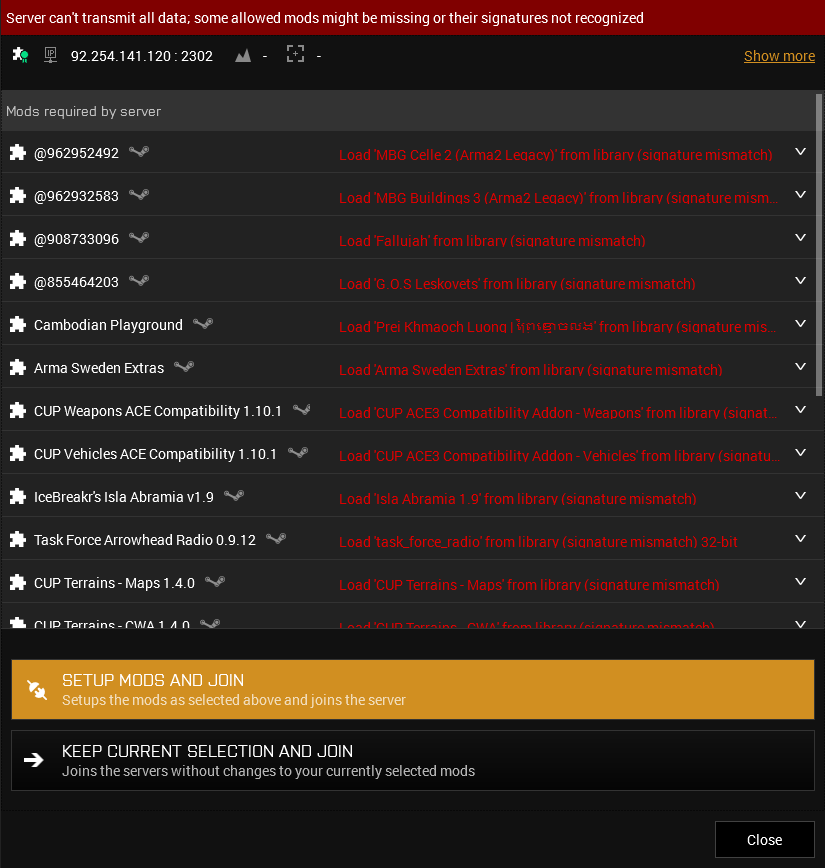


The required mods will then be acquired/removed/updated as needed, Voilà!
 prisma prawn
hey um yesterday i saw that arma had a 9 gb update and i downloaded it but when i came back today it said i had another 8gb update and when it was downloading, the size of the update increased all the way to 23 GB. is something happening?
i recently bought the contact dlc
please tag me because i wont be able to see otherwise
 meager tapir
Got an issue where the ACRE intercom UI "Crew(R/T)" is in the middle of my screen instead of next to my "vehicle status" window
quaint jewel
known bug introduced with last arma update
meager tapir
tried doing so, but it doesnt let me "select" the UI box
 sullen kayak
can any one help im getting this error when trying to do a 21gb update on arma
looked for the file nad its not there
sinful island
Do you have enough disk space on the drive?
sullen kayak
21.3gb req i hafvfe 25.4gb
the file its saying is corrupt ive deleted thats not worked and even tried full re install and no joy
then when it fails i aft to start the full 21.3gb download again
sinful island
That's still pretty tight on the disk space available.
sullen kayak
ill remove some stuff dude see how it goes
sullen kayak
just looks like this i dont know what the hell is going off it says 21gb out 21 gb updated
sullen kayak
at to fully delete every thing off my pc to do with arma and do full reinstall its worked but got 110 mods to download now >.<
sullen kayak
no sound though guys?
what do you think it could be ive tried unplugging plugging head set back in, volume mixer tried more or less every thing
 spare geyser
@fringe salmon
Its take longe time to load Arma 3
Its an old issue
So wait for it when loading and dont push any botton
 tropic yarrow
@sullen kayak if your audio device changed while running arma you have to restart
otherwise, make sure your playback device is correct in windows.
fringe salmon
can someone open my rpt file and tell me whats causing access violation
quaint jewel
RPT doesn't tell you that
fringe salmon
what will
delicate elm
And Dedmen ofc
fringe salmon
yet dont bother fixing it because arma
uncut trellis
you runninf mods?
delicate elm
yet dont bother fixing it because arma Well, if you send the crash dump and RPT to Bohemia they will look at it and if necessary fix "it"
fringe salmon
how do i do that
quaint jewel
if you can reproduce with latest #perf_prof_branch then grab the report (you can create one in arma launcher) and send it to dwarden
but only on latest perf/prof
delicate elm
(1) The RPT file does not contain information to determine the reason for an ACCESS VIOLATION crash. (2) If you have the crash dump for a crash you can submit it in the Feedback Tracker located at https://feedback.bistudio.com.
Read this "How to Report Game Crash" first though https://feedback.bistudio.com/w/ft_a3_howto/gamecrash/
fringe salmon
@quaint jewel should i pm the zip to him?
pallid topaz
Hey guys can someone PLEASE help me Arma 3 is stuck on "Stopping download" in steam, its' clogging up my whole queue, I have tried everything I could think of, it will not let me uninstall Arma 3, is this a known issue?
if I try to uninstall it it crashes my steam to desktop
Ok, I uninstalled it thru windows, that seems to have fixed my queue issues, but it looks like it's happening with other games too. I guess it's just a weird steam issue
quaint jewel
@fringe salmon yes, as i said tho, only latest perf/prof
 normal rover
Hi Guys, I'm struggling to load a saved game from a singleplayer scenario. Getting a "too many virtual memory blocks requested" error...
I'm running the following mods: CBA_A3, CUP, ACE + Extensions, RHS USAF, RHS AFRF, MLO Collection, Enhancement Movement, MCC Sandox 4, ShackTac User interface, C2 Command & Control
Please help
normal rover
Oh alright. When is the next versions of CBA and ACE going to be released?
rough marten
Im still having issues with that Contact DLC. Unsure what the issue is and i cant find a solution to the problem.
Steam says it's downloaded and checkmarked, ArmA 3 Launcher says it's owned and checked, go into ArmA 3, attempt to use the map or go to the Campaign's and it says i need to purchase the content