
#arma3_troubleshooting
1 messages · Page 50 of 1
 stiff peak
 muted drift
I often find myself using mods that end up giving me "No entry bin ".model"" errors on dedicated servers. is there any way to force the mission to run inspite of the error being present? I know that if you try enough times it'll let you skip config errors. It just takes so long to track down the troublesome entity that prevents launch every time.
 uncut trellis
muted drift
I often find myself using mods that end up giving me "No entry bin ".model"" err...
uncut trellis
muted drift
I often find myself using mods that end up giving me "No entry bin ".model"" err...
not possible. broken mods like that should be skipped imo
muted drift
awesome suggestion. too bad you can't know whats broken beforehand every time.
uncut trellis
true
but mission making is unfortunately bit hit and miss like that with mods
and unfortunately quality varies
 fading pulsar
If server related you could try class AdvancedOptions { ignoreMissionLoadErrors = true: }; in config
@muted drift
muted drift
fading pulsar
If server related you could try ```class AdvancedOptions
{
ignoreMissionLoad...
in which config?
fading pulsar
Server config
muted drift
still persists
fading pulsar
Then yeah... better mod 😉
It does load mission if config errors exist tho
 high salmon
You can try DCO soldier fsm as an alternative
Covers basically the same as LAMBS, but acts a bit differently
You might be running into knowledge stuff, since enemy knowledge is shared within a squad, but not between squads iirc
stiff peak
high salmon
You can try DCO soldier fsm as an alternative
Covers basically the same as LAMBS...
what ai mods combo is best rn
high salmon
Depends on what you want, and how much performance you have to spare
stiff peak
high salmon
Depends on what you want, and how much performance you have to spare
i wanna fight asysmetric warfare opponents, and i can afford losing performance, in return for good gameplay
 pine kite
@stiff peak Better use this one, it is the official No Medical mod from the ACE team. Enable together with ACE itself, not instead. https://steamcommunity.com/sharedfiles/filedetails/?id=3053169823
 stiff peak
ah i see okay thank ui
 wise egret
pine kite
<@892806699113648150> Better use this one, it is the official No Medical mod fr...
wise egret
pine kite
<@892806699113648150> Better use this one, it is the official No Medical mod fr...
ayo
I had no idea
stiff peak
is zeus game master best mod for controlling multiple platoons? @pine kite
high salmon
stiff peak
i wanna fight asysmetric warfare opponents, and i can afford losing performance,...
Try LAMBS or DCO, with CF_BAI added
Haven't tried CF_BAI much, since it's somewhat performance heavy, basically it's supposed to make AI use raycasting for view checks more completely
AI mods can make the AI harder to control in Zeus, I think LAMBS can affect the AI waypoints, not certain about DCO
stiff peak
Hmm thank you ill keep this in mind
uncut trellis
honestly Arma is not designed for that scale of combat
pine kite
stiff peak
is zeus game master best mod for controlling multiple platoons? <@41875568966238...
Zeus is a DLC, not a mod. And it is a way for a player to spawn or control things in real time. Potentially for both sides. I don't know if it is the best way. I don't really use Zeus all that much or intensive.
uncut trellis
the AI does not have that kind of understanding of strategy or tactics
stiff peak
thats fine, i only wanna control like 2 platoons max at a time you know?
stiff peak
but zeus game master can make things easier
stiff peak
thats okay
uncut trellis
ok then
aslo further questions can go to #arma3_questions
where I pointed you already earlier
stiff peak
in zeus can u like go fps on a unit and play? or just only control
uncut trellis
dont branch into multiple channels
stiff peak
oh sorry i was facing some issues
 delicate elm
Anyone else seeing a weird graphics glitch on some wire fences when viewed at certain angles in sunlight. Tested on Altis and Livonia with the same results. Happens most reliably when the fence is near a building and only from certain angles.


I guess it might be an intended sunlight reflecting effect but it looks awful in game
Get the same effect when using CUP's wire fences too
uncut trellis
looks like alpha background bleed 🤔
delicate elm
Yeah, the effect is seen only on the parts of the fence where the building is behind... like this:
 uncut trellis
alpha sorting issue then perhaps
delicate elm
Just trying to isolate whether it's a me graphics glitch or whether others can see it in game and I need to open a ticket?
I think it only happens when the fence is near a building, have not replicated it on fences a couple of metres away No, I can but you have to be in a much more exact position to get the effect... as opposed to when close to the building when it happens over a wider angle of view. In this shot if I move an inch either way it disappears
 uncut trellis
I think its a graphics glitch. maybe problem in the model
delicate elm
As I say, happens with CUP's A2 industrial fence and ARMA 3's vanilla equivalent (and with other wire fences too)... 🤔
This would be the CUP one on Chernarus 2020
 delicate elm
Thanks Goat, ticket created: https://feedback.bistudio.com/T189824
uncut trellis
probably same A2 model source 😄
could be texture needs to have 1 bit alpha instead of smooth one or the model needs alpha sorting done
typically that kind of white is connected with alpha sorting and that it dont render the depth order correctly
delicate elm
👍
 meager pawn
delicate elm
Anyone else seeing a weird graphics glitch on some wire fences when viewed at ce...
meager pawn
delicate elm
Anyone else seeing a weird graphics glitch on some wire fences when viewed at ce...
Very recently started being an issue.
delicate elm
I've seen this for some time now. Also I once had an effect like it when it was raining on Chernarus 2020, but not related to buildings behind the rain - was weird and put it down to just a glitch
 pallid ruin
is there anyone who could help me with this problem i cant download any mods or delete anything been trying to fix this for atleast 2 hours now i just want to play

 steady hawk
 restive sequoia
meager pawn
Very recently started being an issue.
restive sequoia
meager pawn
Very recently started being an issue.
Not recently for me, was always an issue for years.
meager pawn
Might be because I switched PCs
 icy ferry
Hello, I have problem with my server tonight. Everything was going well, but suddenly no one was receiving any information from the server. However Task Force was still working and the TeamSpeak hosted on the machine had no problem. I didn't see any particular errors in the logs. I had to restart the Arma 3 server for things to return to normal. Do you have any idea where this might be coming from ?
 solar oriole
someone please help me before I lose my mind. no matter what settings I change my P drive refuses to stop mounting based off my C drive.

 high salmon
Try adding a folder to D: to become the actual P drive
 austere aspen
can someone help me with the status access violation error? the 0000005 variant?
 umbral narwhal
That's a generic crash. You'd need to be specific about the circumstances in which it happens, for a start.
austere aspen
well it happens when im shooting
umbral narwhal
Every time you shoot? Regardless of which weapon?
austere aspen
no its not very specific. sometimes its 30min afdter playing and sometimes 10min in. always in a gunfight tho.
but yes regaardless of weapon
umbral narwhal
Particular modset, or doesn't matter?
austere aspen
alotr of mods. kinda. maybe 20 with antistasi
tried reinstalling directx,verifying files,reinstalling redistributables,windows system repair and updating drivers
umbral narwhal
Playing with other people on the same server & same mods?
austere aspen
no alone
umbral narwhal
Drop everything except required mods (probably Antistasi, CUP maps, RHS) and see if that helps.
austere aspen
umbral narwhal
Drop everything except required mods (probably Antistasi, CUP maps, RHS) and see...
i may have fixed the issue by removing jsrs
 keen ember
So I cannot complete the ''Mysterious Cache'' side mission in East Wind campaign, it's the one where you have to find the crate with AA weapons on this island. Problem is the crate with the AA weapons dont ever spawn for me in the building with thetripwire and landmine, just the other two crates with the .50 cal sniper rifles and the one with suppressors and optics.
umbral narwhal
Are you running the stable branch with no mods?
 olive obsidian
hey having this issue since this morning when all was good lastnight
10:50:33 BattlEye Server: Script Log: #0 PLAYERNAMEHERE (xxxxxxxxxxxxxxxxxxxxxxxxxxxxxxxxxxxxxxxx) - #38 "s_functions_mainscope";
10:50:33 };
10:50:33 (group bis_functions_mainscope) setgroupid [localize "str_dn_modules"];
10:50:33
10:50:33
10:50:33 if (!is3DEN) then
10:50:33 {
10:50:33 fnc"
 quick finch
Hey, can anybody help me, i just can't rearm at Topolia in the Arma 3 campaign, what should I do?
keen ember
umbral narwhal
Are you running the stable branch with no mods?
if you mean if im playing the game vanilla, yeah
 molten vapor
who knows whats causing this
(aceax_arsenal_initialVirtualItems select 1),
(aceax_arsenal_initialVirtu>
16:22:34 Error position: <select 1),
(aceax_arsenal_initialVirtu>
16:22:34 Error select: Type HashMap, expected Array,String,Config entry
16:22:34 File z\aceax\addons\arsenal\functions\fnc_filterVirtualItems.sqf..., line 8
when ever i try use ace arsenal when in eden or zeus but doesnt do it when im in main menu
pine kite
keen ember
if you mean if im playing the game vanilla, yeah
He also meant whether it is default install or Profiling/Performance branch. (or developer branch)
keen ember
pine kite
He also meant whether it is default install or Profiling/Performance branch. (or...
Erm maybe...? I just play this on steam but from the launcher. Do you mean the arrow pointing down next to the play button on launch?
sorry I just dont know what the performance branch is
''play without mods and optional dlc'' it says
umbral narwhal
There's a blue guy around who knows East Wind pretty well. Hopefully he'll show up.
pine kite
keen ember
Erm maybe...? I just play this on steam but from the launcher. Do you mean the a...
No, There is a beta tab in the properties of Arma 3 in Steam. With that you can choose to run a different version of the game. (many other games can have such different version choices) If you never looked at that then it's ok. Performance/profiling version may not even be relevant to your issue. But it is a pre-release containing fixes for the next game update version, but not fully tested. So it might contain some instabilities. Best is to rule that out.
 late sentinel
hey guys!
I'm having issues pairing my good old t-flight X hotas with Arma. I know it's working, it works in other sims, shows up in the control panel, but simply wont show up in the controller menu. I am gaming on mac using the AS native on a 2020 m1 air
keen ember
pine kite
No, There is a beta tab in the properties of Arma 3 in Steam. With that you can ...
Ig I would have to wait for the ''blue guy'' John mentioned to hop in
pine kite
I guess. I would have no clue about your issue.
keen ember
umbral narwhal
There's a blue guy around who knows East Wind pretty well. Hopefully he'll show ...
Who's the blue guy exactly out of curiosity?
umbral narwhal
I don't remember.
keen ember
:/
 mental river
molten vapor
who knows whats causing this
(aceax_arsenal_initialVirtualItems select 1),
(a...
mental river
molten vapor
who knows whats causing this
(aceax_arsenal_initialVirtualItems select 1),
(a...
What's your Arma version?
 tame drum
Is this where I would ask about a arma 3 dedicated server issue? (AI on mike force are refusing to engage some or all players seemingly at random, issue for some reason only cropped up yesterday)
umbral narwhal
Stable or performance branch? Headless clients or not?
tame drum
stable with 3 HCs
interesting note I disconnected the HCs and then relaunched them and so far at least they appear to be engaging again
issue is a bit inconsistent
server fps is pretty stable at 47 so I dont think the ai performance is degrading, and AI appear to be moving properly aswell, issue seems to be them actually seeing the players as threats
 placid thicket
my arma 3 has from nowhere started to stop when loading a game, even the loading when going from the editor to vehicle editor takes forever now (around 30 sec)
Is it possible to find where the issue is? in some kind of report?
steady hawk
Likely you just load up absurd amount of Mods
placid thicket
steady hawk
Likely you just load up absurd amount of Mods
Is there a easy way to see which one except enable/disable one by one?
steady hawk
Or half by half
placid thicket
it was a crappy script I've made 
pine kite
tame drum
server fps is pretty stable at 47 so I dont think the ai performance is degradin...
I hear that multiple HC can actually choke the networking between HC, server and clients. Make sure you actually need as many and cannot do with just 1 or 2. Also, there is #server_admins , #server_windows , #server_linux and #headless_client for server or headless clients related issues.
molten vapor
mental river
What's your Arma version?
Latest
molten vapor
molten vapor
who knows whats causing this
(aceax_arsenal_initialVirtualItems select 1),
(a...
still havent figured how to fix it
 tiny wasp
Anyway I came to post If anyone has came across an Issue In Arma3 where the respawn button does not work for the player after so many deaths?
Seen documents online that explained when the server Is under heavy load someone noticed this would happen to players. Its very strange, They will die but the respawn button and all options will be greyed out. It forces them to go back to lobby and re select a role to solve the Issue.
If anyone found a fix I would lreally love to know about It. Thank you.
austere aspen
Hi guys. I'm trying to use the Anzio anti material rifle mod in antistasi and it works fine but when it goes in the arsenal I'm not able to click it and it goes invisible. Is there a way to fix this or is that mod just cooked for antistasi?
late sentinel
late sentinel
hey guys!
I'm having issues pairing my good old t-flight X hotas with Arma. I kn...
.
tame drum
pine kite
I hear that multiple HC can actually choke the networking between HC, server and...
understood I will try reducing the number of HCs, just weird the issue cropped up two days ago ive been using the server with that configuration for almost a year now
umbral narwhal
Is this one of those providers that runs the HCs as 32-bit?
 hushed cave
Anyone know how to change the server bandwidth ? , i think its causing my to lose connection form the server , i have a good ping around 70 to 85 max 90 , but my bandwidth is higher then other players.
 turbid basin
So recently ive been getting these random white bushes on some maps. I've tried everything I can think of, AA settings, Drivers, unistalling and Reinstalling the lot. Does anyone know why these might be occuring?


 waxen sail
missing or corrupt texture file? I'd check your RPT for errors on missing textures
uncut trellis
could be multiple mods touching same texture messing it up
turbid basin
waxen sail
missing or corrupt texture file? I'd check your RPT for errors on missing textur...
How do I check the RPT?
waxen sail
!rpt
 rustic eagleBOT
Arma RPT
Arma generates a .rpt log file each time it's run, which contains a lot of information like the loaded mods, or any errors that appear, this log file can be very useful for troubleshooting problems.
To get to your RPT files press Windows+R and enter %localappdata%/Arma 3
Additionally see the wiki page for more info: https://community.bistudio.com/wiki/Crash_Files
To share an rpt log here, please use a website like https://pastebin.com/ (Set expiry time to 1 week or less) to upload the full log, that way the people helping you can take a look at it and try to figure out the problem you're having together with you.
Note: RPT logs can hold personal information relevant to your system, the game or others.
steady hawk
Wild guess suggests you have Winter 2035
uncut trellis
oh winter version of the plants! good idea
turbid basin
waxen sail
!rpt
thx
turbid basin
steady hawk
Wild guess suggests you have Winter 2035
what do you mean?
steady hawk
A Mod
turbid basin
I dont tho
 bronze river
turbid basin
So recently ive been getting these random white bushes on some maps. I've tried ...
bronze river
turbid basin
So recently ive been getting these random white bushes on some maps. I've tried ...
you have winter altis map loaded
or not
turbid basin
steady hawk
Then try to load less Mods to find out some faulty
Yeah thats my plan tomorrow. Load the map in isolation then add more mods till it breaks
 mossy ruin
so im using the FGM-148 javelin and i use quite a few mods (mostly for vehicles) and ace. when i use the white phosphorus nvg in the javelin and hold the "T" button to lock target the screen goes completely white until i let it go. anyone know why?
steady hawk
State ALL of Mods and if you use, CDLCs too
steady hawk
Creator DLC
And anyways, try to reduce Mods and find which something could be the faulty
We also don't know which Javelin you talk about
mossy ruin
mossy ruin
so im using the FGM-148 javelin and i use quite a few mods (mostly for vehicles)...
Cba3
Weapon event handler framework
Cup weapons
Operation trbuchet
Only war
Zues enhanced
Rhsusaf
Enhanced movement
Cup units
Legion studios base
Improved melee
Tiow2
Eden objects
Scifi support plus
Cup terrains core
Cup terrains maps
Bthbc terrains core
Ehanced movement
Falluhjah
Csa38 czech army mod
Ifa3ao lite
Blastcore base
Afghanistan map
Utility helicopters
Bwmod
Fire support plus
Air wepon systems
Enhanced missle smoke
Pook arty pack
Arma 3 aegis
Rhspkl
Rhsgref
Rhssaf
Cup terrains
Fa18 super hornet
Mrb air visibility
Ace
Cup terrains
Su35 flanker
Av8b harrier
Ea18 growler
Addition air weapons
Military aviation
Sfp swedish force pack
A10 warthog
Cup vehicles
B61 nuke
F15 slam striker
F14 tomcat
Napalm munitions
Rhsterracore
Alright ill try that
 fallen fulcrum
Hi I’m trying to save and exit my mission but it won’t let me exit out I tried looking for the answer online but the website is down so I’m asking here
 quaint jewel
!purgeban 695844729463504897 0 steam scam spam
 pallid krakenBOT
quaint jewel
!purgeban 695844729463504897 0 steam scam spam
pallid krakenBOT
quaint jewel
!purgeban 695844729463504897 0 steam scam spam
*fires them railguns at @rocky axle* Ò_Ó
zaggert#0000 now has 2 infractions.
pallid krakenBOT
quaint jewel
!purgeban 920356066594803763 0 steam scam spam
*PewPewPew!!*
RIP @minor oxide
nita_.catalin#0000 now has 2 infractions.
hushed cave
hushed cave
Anyone know how to change the server bandwidth ? , i think its causing my to lo...
.
uncut trellis
turbid basin
okay i fixed my bushes
what was the problem/solution?
turbid basin
uncut trellis
what was the problem/solution?
Winter Tanoa
 swift sundial
Hey so im having this odd MP issue where if I host everything works fine but my friend doesnt see me. We have tried direct connect and friend server browsing. I dont know if I need to setup port forwarding since ive never had to and it works fine for my other friends but its just my one friend that cannot play.
umbral narwhal
You need to setup port forwarding unless UPNP works. And it may not work anyway depending on your internet connection.
swift sundial
I use UPNP and I dont get anything like errors or warnings
also
is there any bad things that could open up if I setup port forwarding?
umbral narwhal
Not really. You forward specific ports. Unless there's something listening on those ports in your PC then nothing happens.
 junior ether
Anyone able to help me? I just got a new copy of ARMA after not playing it for 5+ years, but whenever I try to launch it it crashes and I get this error.
I tried deleting my ARMA profile folders in Documents but everytime I launch ARMA it brings those same profiles/cfg back and I get this error and "Error Compiling shader PSSSpecularAlpha"

No mods installed, haven't done anything but launch it as soon as it finished downloading. I've also verified game integrity on Steam
steady hawk
Delete dta folder and try verify again
junior ether
steady hawk
Delete dta folder and try verify again
Unfortunately I still get the error
steady hawk
Then maybe delete addons/data_f.pbo and verify again
Ultimately, you can really try to remove these arma3 related exe
junior ether
steady hawk
Then maybe delete addons/data_f.pbo and verify again
Tried that as well, unfortunately it still continues. Is there a way to permanently to remove the Arma profiles in Documents? They keep reappearing even after deleting and I assume it might be related
junior ether
steady hawk
How do you run Arma 3?
Windows 11 on Steam
steady hawk
And Arma 3 Launcher?
junior ether
Yeah
steady hawk
Are you sure all startup parameters are disabled?
junior ether
Nothing is turned on on parameters
steady hawk
What is the Launcher and Game version? IIRC you can check in Launcher's gear icon or somewhere
junior ether
 steady hawk
Should be fine
Try Steam and change Beta to Profiling or Development (just to be sure)
junior ether
steady hawk
Try Steam and change Beta to Profiling or Development (just to be sure)
Tried both versions and the same errors come up after the "Initializing addons" when booting up
steady hawk
Then I guess you have an unofficial PBO somewhere
junior ether
I'll try to do a clean wipe and reinstall it, hopefully that'll fix it
junior ether
This is my addons folder
 steady hawk
Hold on, I'm not on PC rn
steady hawk
junior ether
This is my addons folder
Do you have any files that has no _f_ in file name?
junior ether
A few
 steady hawk
You have a wrongly made Mod
junior ether
Only other ones apart from 3den
 steady hawk
It doesn't matter
steady hawk
junior ether
Only other ones apart from 3den
Guess that's a no
Any Mod can be broken if the Mod is wrongly configured or corrupted
So it doesn't matter. Just unload the faulty Mod
Especially recently installed ones
junior ether
steady hawk
Guess that's a no
Yeah I couldn't find any others without _ f_
steady hawk
At this point I know how it can happen but I don't know what is causing
Maybe try to delete addons folder and try your luck in verify
junior ether
steady hawk
Maybe try to delete addons folder and try your luck in verify
Tried and it didn't work.
Although I found launching arma3.exe directly works, but if I try to do the same process through the launcher I get those 2 errors
steady hawk
...Are you sure Arma 3 Launcher is launching that arma3.exe properly?
Are you sure you have no more than one Arma 3 installs?
junior ether
steady hawk
Are you sure you have no more than one Arma 3 installs?
I've checked through all my files in Wiztree, don't see any other installs of ARMA on my pc
Is there an option/command to ensure the launcher uses the default steam arma3.exe?
 opal plaza
junior ether
Anyone able to help me? I just got a new copy of ARMA after not playing it for 5...
opal plaza
junior ether
Anyone able to help me? I just got a new copy of ARMA after not playing it for 5...
I got the same error on win7 machine wih DEV version but buldozer starts enyway so I was not digging for it yet but I supose the reason is in folders bin in your P drive
junior ether
opal plaza
I got the same error on win7 machine wih DEV version but buldozer starts enyway ...
I'll try digging around that and see if anything works, thank you
opal plaza
when I had last problems with run buldozer on win7 I replace bin folder files by arma3 folder orginal files and it was help so maybe this time reason is also there ..... I will check it for you today when i get some free time in work 🙂
steady hawk
A Mod can make the game broken. So yes
quaint jewel
That exit code says you should refer to the error message that was shown to you
quaint jewel
junior ether
Anyone able to help me? I just got a new copy of ARMA after not playing it for 5...
You are launching game without mods?
Upload your RPT file
!rpt
rustic eagleBOT
Arma RPT
Arma generates a .rpt log file each time it's run, which contains a lot of information like the loaded mods, or any errors that appear, this log file can be very useful for troubleshooting problems.
To get to your RPT files press Windows+R and enter %localappdata%/Arma 3
Additionally see the wiki page for more info: https://community.bistudio.com/wiki/Crash_Files
To share an rpt log here, please use a website like https://pastebin.com/ (Set expiry time to 1 week or less) to upload the full log, that way the people helping you can take a look at it and try to figure out the problem you're having together with you.
Note: RPT logs can hold personal information relevant to your system, the game or others.
placid thicket
the last days I started having some issue with ACE, all my saved "Loadouts" gets wiped and it empty when I restart the game.. never had such problems before, anyone know whats up with that?
I havent changed any settings or got any new mods
pine kite
Saved loadouts are stored in your profile profilename.vars.arma3profile file. If that is wiped or otherwise overwritten then something is messing with that file. Or Arma 3 is not able to properly save it. It could be OneDrive messing with your files (renaming it or not properly synchronising it) or you crash/kill the game while it is still running. Or you have changed the profile in game to another, meaning it can't find the loadouts you are expecting.
In the case of OneDrive, either uninstall it entirely if you don't need it for work/school-stuff. Or look at the pinned message in this channel to disable it only for Arma 3 related folders.
If you changed your profile ingame then you might not have the same savegames, or different profilename and avatar face, or different keybinds for it.
The first screenshot makes that obvious. The second seems unrelated at first sight.
ACE has compatibility mods built in for RHS. It could be that the RHS you are using is an older version. Or you have a modpack with an older version of ACE or RHS. Or is this perhaps related to a mod based on RHS.
NO, ACE already has the needed compat addon since some version ago.
Getting older ace compat addond would make it out-of-date.
opal plaza
Yep ACE change whole config in so many parts that it is like other game at last, so if any depending addon change somethig what is not updated in other and by the way arma get updates too the effect for mod mix can be unexpected 😦 not nice digging on it.
BTW not all mods have dependency correctly made and you can get class errors just beacouse someone forget to connect dependency mods (or those mods are not actual anymore)
pine kite
Yeah, only the popular mods have compat mods made for them be included in ACE. Your obscure faction mod based on RHS from 3 years ago probably doesn't have the needed compatibility mods updated for it in ACE, nor included in the latest release.
opal plaza
but always is solution - you canmade your own compat mod (if you know how of course 🙂
 pale wind
could be that you edited mission and left vertical mode or snapping off
 wise egret
pale wind
could be that you edited mission and left vertical mode or snapping off
wise egret
pale wind
could be that you edited mission and left vertical mode or snapping off
Nah, thanks tho I figured out the problem
quaint jewel
junior ether
https://pastecode.io/s/5fw06cg2
13:14:33 C:\Program Files (x86)\Steam\steamapps\common\Arma 3\enoch\dta\bin.pbo - 146373
13:14:33 C:\Program Files (x86)\Steam\steamapps\common\Arma 3\enoch\dta\core.pbo - 129618
13:14:33 C:\Program Files (x86)\Steam\steamapps\common\Arma 3\enoch\dta\languagecore_f.pbo - 148706
delete these. And search your game folder for "dta" folders, there should be only one, in game main folder
junior ether
quaint jewel
> 13:14:33 C:\Program Files (x86)\Steam\steamapps\common\Arma 3\enoch\dta\bin.pb...
That worked! My god thank you so much I spent like 6 hours trying to figure this out 😂
steady hawk
Ahh, totally forgot them
 rain copper
i have a problem

when i open arma
i've reinstalled the game and verified it
installed visuals redis and net again
umbral narwhal
It's telling you exactly what the problem is. arma3launcher.exe.config is corrupted.
It's probably a file that the launcher can recreate on its own, so try renaming it first.
high salmon
You have circular dependency in the mods you are using
One of your mods is broken, and can't be run with one of your other mods
!rpt
rustic eagleBOT
Arma RPT
Arma generates a .rpt log file each time it's run, which contains a lot of information like the loaded mods, or any errors that appear, this log file can be very useful for troubleshooting problems.
To get to your RPT files press Windows+R and enter %localappdata%/Arma 3
Additionally see the wiki page for more info: https://community.bistudio.com/wiki/Crash_Files
To share an rpt log here, please use a website like https://pastebin.com/ (Set expiry time to 1 week or less) to upload the full log, that way the people helping you can take a look at it and try to figure out the problem you're having together with you.
Note: RPT logs can hold personal information relevant to your system, the game or others.
high salmon
If you just read the rpt, you can probably find which mod has the error
rpt is just a text file with a different extension
 potent current
my friend have this problem even run the game without any mods,is this normal?
steady hawk
No. But your friend MAY did move a PBO into the game folder
rain copper
umbral narwhal
It's telling you exactly what the problem is. `arma3launcher.exe.config` is corr...
did
 upbeat spire
So i had this spamming in RTP on the server yet i dont know why anybody know what this might be ? I tried searching on google but to no avail.
 fair kestrel
https://epochmod.com/forum/topic/44224-ref-to-nonnetwork-object-3c14f900-984738-wf_barracks_eastp3d/

Epoch Mod Community
Hi! Ref to nonnetwork object 3c14f900# 984738: wf_barracks_east.p3d Log generated /1 sec (lag generated) RPT log
rain copper
when i open arma
i've reinstalled the game and verified it
installed visuals redis and net again
deleted launcher files

 little totem
For anyone stuck on
Unrecognized configuration section startup
We realized it's only the launcher that's broken, and no matter what we did we were unable to fix it, so to get the game running anyway we just skipped that step entirely by using this steam launch parameter
%command% -noLauncher
If you want to change game launch settings like the core count and all, you can still do it by passing it as flags iirc (listed here https://community.bistudio.com/wiki/Arma_3:_Startup_Parameters)
 crude copper
I've tried everything and watched all the YouTube videos and still can't get me mic to work people can't hear me but I can hear them please help🤣
uncut trellis
crude copper
I've tried everything and watched all the YouTube videos and still can't get me ...
usb or 3.5 analog mic?
crude copper
Bluetooth so I guess USB lol
crude copper
uncut trellis
usb or 3.5 analog mic?
Bluetooth so I guess USB lol
It's my default mic on everything and checked the game settings and still nothing
uncut trellis
lot of people have had issues with similar thing.
bluetooth usb
so its probably some sort of hardware incompatibility
crude copper
So I have a aux port on my mic should I just run a cable to it
uncut trellis
could try Id suppose. Im just guessing its incompatiblity since pretty much everyone with this problem seem to have bluetooth usb dongle setup
beyond that I got no clue
crude copper
Bro I just bought the game and haven't even played it and just been fucking with my mic for the last 2 hours
uncut trellis
 its unfortunate. but seems like there are werid problems with such microphones lately
high salmon
It's not USB mic in general, since I use a USB soundcard and have no issues (except for Windows occasionally changing to the HDMI audio out, rather than my soundcard)
uncut trellis
not usb in general
but im fairly sure everyone with this kind of issue has had similar mic/headphones
 hearty spindle
I reinstalled arma 3 and unsubbed to all workshop mods, but when i opened the launcher after the reinstall it still shows whole of the earlier mod list that i had. What to do to delete it?
hearty spindle
hearty spindle
I reinstalled arma 3 and unsubbed to all workshop mods, but when i opened the la...
The reinstall is on a different sdd than the earlier install. Game cache verification did not help.
high salmon
hearty spindle
I reinstalled arma 3 and unsubbed to all workshop mods, but when i opened the la...
Could be retained preset files
Preset files are in `%localappdata%\Arma 3 Launcher\Presets
You may want to back up those files before deleting, if there are any presets you care about
The launcher also remembers the last modlist you used
pine kite
Steam saves the mods in a different place than where it installs the game. Look in any Steam folder on your drives. I installed Steam in a custom folder and then the mods ended up in here: C:\Games\ Steam\steamapps\workshop\content\107410 Your path may be on a different drive, but similar end of the path. Normally unsubscribing would remove those mods. But maybe not straight away. A Steam reboot might be needed.
The mod list presets do not matter if the actual mods are no longer there. I am sure you can delete those presets from the Launcher menu.
hearty spindle
I deleted the launcher preset folder and then verified game cache and that solved my problem. Thank you for help!
 cloud geyser
hi guys, a relatively easy question i think.
for whatever reason, i simply cannot change the magnification of variable zoom scopes
i have rebinded multiple times, turned off all mods too
 waxen sail
What did you re-bind? Because I think the control to change variable zoom is not there - I'm pretty sure it's View > Zoom In or View > Zoom In Temporary which is Numpad + or 2nd Mouse Btn respectively
cloud geyser
waxen sail
What did you re-bind? Because I think the control to change variable zoom is not...
i will check it out. my friend said that was his key to zoom in, might have bad info
cloud geyser
waxen sail
What did you re-bind? Because I think the control to change variable zoom is not...
alright, so the keys you mentioned are about zooming in the screen unscoped, i'm talking about variable zoom optics. so for example, i am stuck at 2x magnification on a 2-4x magnification scope, and i'd like to be able to move from 2x magnification to 4x magnification
https://youtu.be/L_r46AAVf3A?si=gDnZCPSf5xjYXjCD
you can see what i mean in the first second of this youtube video. i am using the exact same scope as his for reference
►Follow my Twitch! https://www.twitch.tv/operatordrewski
Subscribe for more videos :D ► https://bit.ly/2QEpFh5
►Support my videos on Patreon! https://www.patreon.com/OperatorDrewski
►Follow my Twitter! http://www.Twitter.com/OperatorDrewski
►Follow my Facebook! http://www.Facebook.com/OperatorDrewski
►Follow my Instagram! http://www.Instagram....
waxen sail
cloud geyser
alright, so the keys you mentioned are about zooming in the screen unscoped, i'm...
Just confirmed that the Zoom In key under View is ALSO the key for switching to a higher magnification on a variable zoom scope, with Zoom Out being the inverse. By default those should be bound to Numpad + and Numpad -. If those two are not working you should first check for any conflicts on other keybinds, try binding it to something else, and beyond that I'm not sure, maybe a deeper issue
keen ember
keen ember
So I cannot complete the ''Mysterious Cache'' side mission in East Wind campaign...
.
steady hawk
- Do you have any Mods?
- Did you restarted the Scout mission?
 slim locust
does anyone know if AMD smart access memory might degrade Arma 3's performance?
because 12fps in a (not very heavy) singleplayer scenario should not be happening with a 5800x3d
 fringe salmon
i know its been a long time did you find a fix
bronze river
slim locust
because 12fps in a (not very heavy) singleplayer scenario should not be happenin...
try lowering the view range to 1400
and have you tried to turn it off?
slim locust
bronze river
and have you tried to turn it off?
yeah no change
slim locust
bronze river
try lowering the view range to 1400
I've tried changing all manner of graphics
but for some reason I still get weird frame drops that seem to be kind of normal
I'm not thermal throttling either
 cursive reef
fringe salmon
i know its been a long time did you find a fix
cursive reef
fringe salmon
i know its been a long time did you find a fix
Full reinstall + steam fresh install
I think
Never knew what the problem actually was in the end so 😭
fringe salmon
cursive reef
Full reinstall + steam fresh install
thanks it worked#
uncut trellis
slim locust
but for some reason I still get weird frame drops that seem to be kind of normal
what kind of drive is the game installed on? internal? external?
is it a laptop?
might the game be accidentally using integrated gpu instead of the proper gpu?
 rain river
slim locust
but for some reason I still get weird frame drops that seem to be kind of normal
rain river
slim locust
but for some reason I still get weird frame drops that seem to be kind of normal
Sounds dumb but try turning off Nvidia Shadowplay, if you have that on at all..
keen ember
steady hawk
- Do you have any Mods?
- Did you restarted the Scout mission?
No, but I only restart to the last save. Should I try to restart the entire scout mission?
steady hawk
Try it because your "missing ammobox" is (likely) already saved into your save already
keen ember
ok
slim locust
rain river
Sounds dumb but try turning off Nvidia Shadowplay, if you have that on at all..
I have an AMD graphics card
slim locust
uncut trellis
what kind of drive is the game installed on? internal? external?
internal SSD, and the 5800x3d doesn't have integrated graphics
high salmon
Are you running anything sucking CPU or GPU power at the same time?
slim locust
nope
my cpu usage if anything is abnormally low if anything
usually around 15-20%, and that includes other processes
and even the main 2-4 cores that the game runs on barely get used
high salmon
How many AI are present in the singleplayer scenario?
And do you only have frame drops in it, or are there also frame drops in a near-empty Zeus scenario
slim locust
the frame drops seem to be more or less random, usually there's only a couple of squads. Anywhere urban immediately kills my framerate down to 40-50fps without ai
bronze river
so is it a laptop?
bronze river
go to Windows and search graphic setting, and see if the app using that graphic card or not
 slim locust
it's using my graphics card
uncut trellis
do you play in fullscreen or borderless fullscreen?
do you have any fancy GPU control panel enhancements enabled
slim locust
uncut trellis
do you play in fullscreen or borderless fullscreen?
I play borderless because of my multi monitor setup, but I've tried fullscreen and there's no difference
slim locust
uncut trellis
do you have any fancy GPU control panel enhancements enabled
I've also messed around with that and it hasn't made any difference either
umbral narwhal
Have you tried turning off the other monitor?
 finite dew
Hi, anyone has a solution to "Connecting failed", i cant connect to my dedicated server on arma3, i can see it in the server list but i cant connect to it, i already unlocked ports 2302-2306 in OVH, aswell added them in firewall as tcp/udp inbound, enabled the rules, allowed arma3 trough firewall, any other clues?
umbral narwhal
Bit curious. If you can see the server then 2303 should be working.
Connection only requires 2302 UDP to work.
finite dew
TCP: 2344-2345, 27015, 27036. UDP: 2302-2306, 2344, 27015, 27031-27036.
i unlocked all those ports, both on server and in ovh firewall
i can see the server but not matter what i have connecting failed
umbral narwhal
Dumb test: Change the server base port to 2303 and see if it works.
umbral narwhal
Does the OVH firewall have any settings for SPI, flood protection, that sort of thing?
finite dew
Yes, i have GAME firewall, where i can add games and ports to unlock AND Edge Network firewall where i can add all sorts of protocols and ports
i have tried disabling the firewall completly, server is visible yet i still cannot connect.
20:18:52 Cannot open C:\Steam\steamapps\common\Arma 3 Server\TADST\default\OfficialServersCache\list.json
20:18:52 Canceling the list loading process, the load of the file failed: C:\Steam\steamapps\common\Arma 3 Server\TADST\default\OfficialServersCache\list.json
20:18:52 Initializing Steam Manager
i found this in .RPT
umbral narwhal
Shouldn't matter. That list should only be used on the client side.
finite dew
I tried googling, using chatgpt, i tried everything to my knowledge, reinstalling the whole entire server, removing and re-adding ports, i tried installing arma3 server trough cmd, trough steam gui- i loaded it up using TADST, using FASTER, i tried doing it with working altislife file, as empty server aswell, i downloaded directx from june2010, i downloaded net framework from 2015

Idk, am i missing smth?
 wise jewel
finite dew
TCP: 2344-2345, 27015, 27036. UDP: 2302-2306, 2344, 27015, 27031-27036.
i unlo...
wise jewel
finite dew
TCP: 2344-2345, 27015, 27036. UDP: 2302-2306, 2344, 27015, 27031-27036.
i unlo...
Unblock ports 2302-2308 not 2302-2306 via GAME firewall.
I understand what the wiki says, however we run OVH and the only way connections will work is with 2307/2308 open as well.
finite dew
I'll check that out when I'll get home and let u know, thanks :>
wise jewel
On another note, do you run with a failover IP as well?
If you do, you also have to allow the game firewall through that. If not, ignore this message
 dusty cradle
Hey I have an issue where most of the OPFOR factions only show up as a Russian rifleman in CUP gear. It isn't every OPFOR faction, and only effects some of the mod factions...but this character model isn't one I can even find in any of the factions I have installed. The CUP mod rifleman doesn't have the same gear.
How do I fix this? I can't even figure out what the problem really is and scouring the web hasn't been helpful at all.
keen ember
steady hawk
- Do you have any Mods?
- Did you restarted the Scout mission?
So I restarted the mission and finally made it again to the island, the crate where the AA weapons are supposed to be still isn't there and cant complete the mission. Do I have any other options?
steady hawk
Verify your game or forget that side mission
keen ember
steady hawk
Verify your game or forget that side mission
Already tried that, look do you know any ''blue guy'' here who is familiar with the East Wind campaign?
steady hawk
I don't know what you talk about
keen ember
umbral narwhal
There's a blue guy around who knows East Wind pretty well. Hopefully he'll show ...
@steady hawk
steady hawk
Still
keen ember
according to a meticulous google search there is this thing that someone tried that apparently worked...
steady hawk
You may want to give us some screenshot if you're still trying your luck
keen ember
steady hawk
You may want to give us some screenshot if you're still trying your luck
House where the two booby traps are. One is a tripwire, the other a proximity mine.

https://gyazo.com/6bbb9cfd12004028e246bf2f28cac28b 2nd floor of building, on or near that table on the left there is supposed to be a crate with the AA launchers
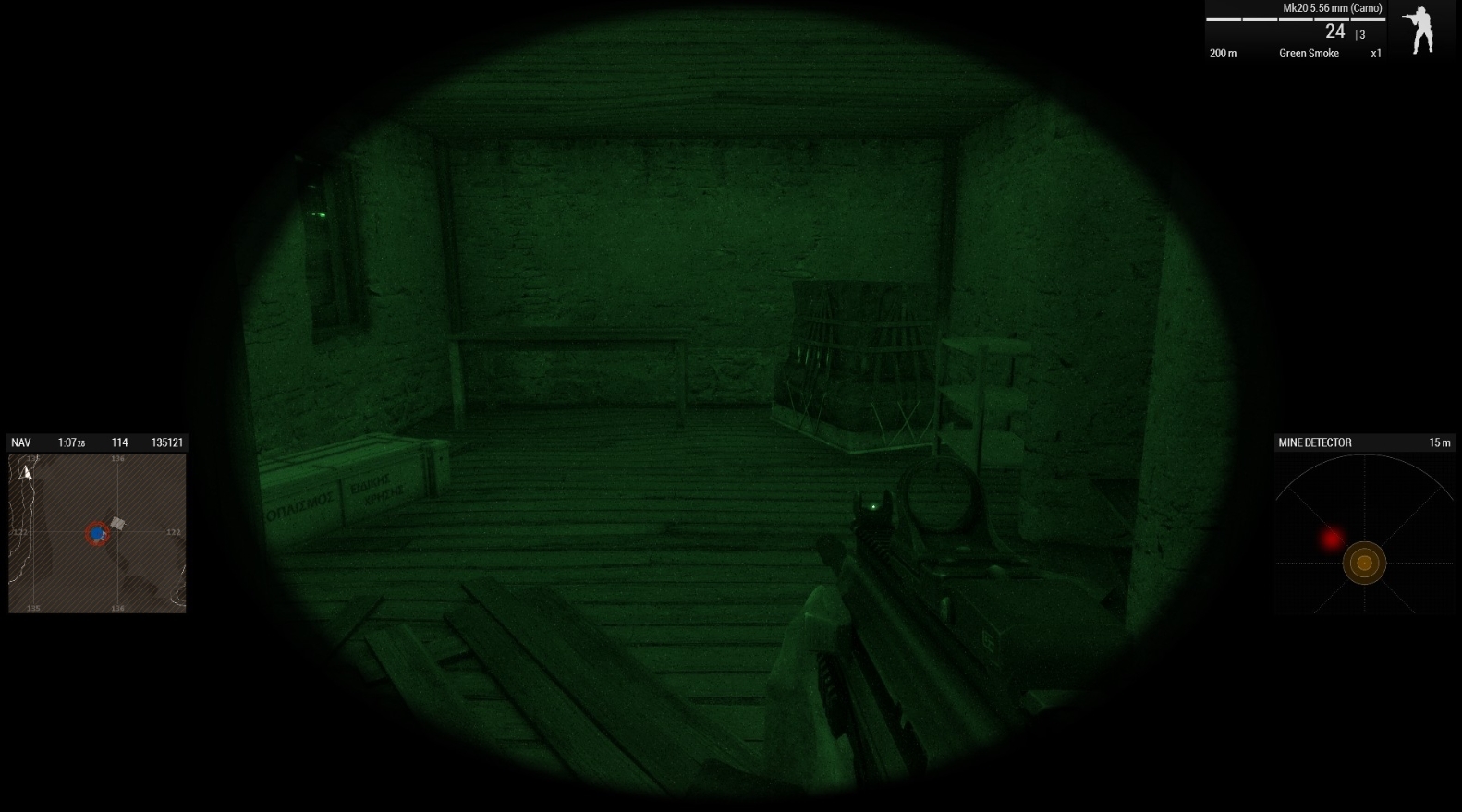
the other two just have weapon accessories and anti-material rifles
The 2nd photo btw was after I set off the tripwire from a distance. Someone in a steam thread mentioned that it might be possible that detonating the mines could despawn the crate but I doubt it. Especially after lobbing a frag into this room and the two other crates remained unscathed
steady hawk
It spawns pretty finely to me 🤔
keen ember
apparently its a rare bug
and i just happen to be one of the unlucky few having to deal with it
pine kite
finite dew
I tried googling, using chatgpt, i tried everything to my knowledge, reinstallin...
For future reference. Don't trust ChatGPT. Even if you are at your wits end trying to fix this. It makes things up if it doesn't know. It is just a syllable/word-predictor. It doesn't actually know stuff. It will happily apologise if you confront it with it's mistakes and do as if nothing happened while preparing to make their future assumptions.
pine kite
keen ember
Already tried that, look do you know any ''blue guy'' here who is familiar with ...
Blue guys gave the veteran role. It just means they are recognised as having gone beyond the call of duty in supporting/being in service to the community by helping, testing, modding, scenario creation, etc. Apparently John remembers someone with deep knowledge or experience of the Eastwind campaign, but only that he is also a veteran but no name. That is however no guarantee that any blue guy can make a difference to your problem.
keen ember
pine kite
Blue guys gave the veteran role. It just means they are recognised as having gon...
I see.
Also, I set out to RtB to start another patrol and return to the island, it worked! The AA systems spawned!
Ig thats the only way to fix the issue
dusty cradle
guys please this issue is killing me
i cant use most of my OPFOR factions and part of INDFOR

pine kite
What scenario is this about? Custom created in the Eden Editor? Which mods are those factions from?
dusty cradle
pine kite
What scenario is this about? Custom created in the Eden Editor? Which mods are t...
Just making my own in editor, I have Eden installed as well. The mod mostly effected is RHS expanded but almost entirely on the OPFOR factions. The issue effects parts of other mods too without the same dependencies, even ones that just depend on Western Sahara compatbility data. I don't have a list, but strangely even outside of the OPFOR factions it effects, even in the BLU and INDFOR sections it still replaces them with the same Russian rifleman in arid camo, that I can't find a single example of in any of the mods I have.
This weird stand in has only CUP and original Arma kit, mostly CUP kit, but the gear they have isn't the same as any of the rifleman in these mods.
uncut trellis
dusty cradle
Just making my own in editor, I have Eden installed as well. The mod mostly effe...
Such an issue sound like some mod(s) break the main config
Could be single mod or could be some combination of mods that won't work together
dusty cradle
how do i go about troubleshooting this?
quaint jewel
Remove mods till the issue disappears
to find which mod causes it, then report it to the mod author
 pseudo island
dusty cradle
379 mods.....
pseudo island
dusty cradle
379 mods.....
disable last half > check for issues > yes? issue is in last 190 mods, if not its in first 190, then keep splitting it in half
sometimes a bit difficult with dependencies but its pretty fast
cloud geyser
waxen sail
Just confirmed that the `Zoom In` key under `View` is ALSO the key for switching...
I’ll take a look thanks
pine kite
dusty cradle
379 mods.....
Sorry, that mistake is on yourself. Start small.
 hot sapphire
Hey all, I had to uninstall then reinstall arma on my computer recently, and now it says all my mod files are corrupted. Do i have to unsubscibe and resubscribe to them? Or is there a faster/better way to fix this issue? @ me if you have any thoughts, and thank you
high salmon
hot sapphire
Hey all, I had to uninstall then reinstall arma on my computer recently, and now...
Verify files might work
If not that, then repairing the mods in the launcher should work (have to start each one individually)
hot sapphire
I'll give it a try, thank you!
 light orbit
friends getting this error has reinstalled arma still gets it any ideas?
he cant even get to the launcher it ctd as soon as he hits play
 worn kiln
Hey question for all, has arma 3 recently started hiding mods you subscribed to on the launcher?
pine kite
If the mod creator didn't obey the rules then they might have been banned, yes.
worn kiln
pine kite
If the mod creator didn't obey the rules then they might have been banned, yes.
They have not been baned
One dude Ik and he has been busy irl for the past 3 months this happened today
The other it happend with was remove stamina
Also it's weird like mod is still subscribed to
pine kite
If you subscribed to things on the workshop, but can't find them in the launcher, then they were probably scenarios or compositions. They don't show in the launcher.
worn kiln
Just refuses to appear in launcher till I resubscribe to it
worn kiln
pine kite
If you subscribed to things on the workshop, but can't find them in the launcher...
No these are mods
Like remove stamina ik for a fact is a mod
pine kite
Yes, I guess. Check the mod page on the workshop then. See if you are still subscribed. My bet is on thick fingers and accidentally deleting them from the list. (and unsubscribe in the process)
Otherwise you may have faulty drive.
finite dew
wise jewel
Unblock ports 2302-2308 *not* 2302-2306 via GAME firewall.
I understand what the...
Well, i figured it out but still thanks for help, problem was apparently a game firewall itself, i added the ports trough edge network UDP/TCP protocols and it works, no clue why but ports in game firewall make it that u are unable to connect LOL
quaint jewel
light orbit
friends getting this error has reinstalled arma still gets it any ideas?
Verify that that file is there
 light orbit
That's the thing though he reinstalled and verified twice
pseudo island
light orbit
That's the thing though he reinstalled and verified twice
Could still be missing for lots of reasons. Antivirus could be quarantining it for no reason etc
So verify its actually there
hot sapphire
high salmon
Verify files might work
If not that, then repairing the mods in the launcher sho...
That fixed it. Thank you!
 heady moon
Hey guys, why did my Arma 3 crash?
I was playing Antistasi, any help is appreciated 🥺
pine kite
C0000005 ACCESS_VIOLATION is a very generic error code which could have many causes external to Arma 3. So hardware/drivers/operating system burping. https://community.bistudio.com/wiki/Arma_3:_Unusual_Process_Exit#0xC0000005_-_ACCESS_VIOLATION
heady moon
Right, I need to update my nvidia drivers. Thanks!
 gaunt wraith
What defoq this mean
steady hawk
If you mean something with autogen.hpp, broken config
gaunt wraith
steady hawk
If you mean something with `autogen.hpp`, broken config
ErrorMessage: Include file z\ace\addons\main\script_macros.hpp not found.
yur
how fix
steady hawk
Maybe fix ACE or don't load broken Mod
gaunt wraith
steady hawk
Maybe fix ACE or don't load broken Mod
ok now how fix ACE
steady hawk
Launcher, right click Ace, Repair
gaunt wraith
and yay time to find out which mod is brokey 😎
umbral narwhal
Well, it has "vtx" in the prefix.
gaunt wraith
umbral narwhal
Well, it has "vtx" in the prefix.
yea u see the issue is 0 idea what that means
steady hawk
Hm maybe
gaunt wraith
i is no tech boi
umbral narwhal
That means the broken mod is probably called something relating to "vtx".
steady hawk
It may stands for an abbreviation
umbral narwhal
The module it adds is called "ace_viv". Maybe some vehicle-in-vehicle stuff.
gaunt wraith
steady hawk
Maybe fix ACE or don't load broken Mod
thing is it's doing it on my server server so gotta try fixing ace there 😎 fun times
gaunt wraith
umbral narwhal
The module it adds is called "ace_viv". Maybe some vehicle-in-vehicle stuff.
there is the whole of Two mods diff in this list to one that worked yesterday
umbral narwhal
But yeah, z\ace\addons\main\script_macros.hpp is a valid path for ACE so it's either not loaded or loading in the wrong order.
gaunt wraith
JBAD and Sehreno
gaunt wraith
umbral narwhal
But yeah, `z\ace\addons\main\script_macros.hpp` is a valid path for ACE so it's ...
I hate arma sometimes man
umbral narwhal
You probably just typo'd the command line when you added the two extra mods.
gaunt wraith
@3den Enhanced;@CBA_A3;@ace;@CUP Weapons;@CUP Units;@Hatchet Framework - Stable Version;@GGE Core;@Zeus Enhanced;@USAF Mod - Main;@Enhanced Movement;@Remove stamina;@CUP Vehicles;@Hatchet H-60 pack - Stable Version;@ACE 3 Extension Animations and Actions;@ACE Interaction Menu Expansion;@ACSTG AI Cannot See Through Grass;@Advanced Sling Loading;@African Factions for CUP;@Automatic Warning Suppressor;@BackpackOnChest;@BiBo's European Insignia Pack;@Community Factions Project CFP;@CUP Terrains - Core;@CUP Terrains - Maps;@Deformer;@DUI - Squad Radar;@Enhanced Movement Rework;@Fire Support Plus;@Freestyles Crash Landing;@GGE Captive Animations;@GGE NVG Animation;@Global Ops Terrains;@Gruppe Adler Trenches;@Hatchet H-60 - ACE Tail Number;@RHSUSAF;@HMDs MOD;@HMDs - RHS;@ILBE Assault Pack - Rewrite;@LAMBS_Dangerfsm;@LAMBS_RPG;@LAMBS_Suppression;@Military Gear Pack;@No More Aircraft Bouncing;@RE CUP Terrains;@Real Engine;@Reduced Weapon Sway;@Remove stamina - ACE 3;@Swim With Any Uniform;@Task Force Arrowhead Radio BETA;@Ultimate Flag Patches - UFP;@Ultimate Music Collection - UMC;@USAF Mod - Utility;@USAF_AC130_BETA;@USP Gear - Core;@USP Gear - Uniforms;@Wildfire AUX;@WMO - Walkable Moving Objects;@Jbad;@Sehreno;
that's the thing i didn;t i dont think 💀
@umbral narwhal@steady hawk
Server host had to reinstall Ace from the looks of it
never had that before
must've had a botched update or smth
umbral narwhal
happens
 ivory thicket
Can somebody help me? Playing modded Antistasi Ultimate on development brach with self hosted server. To this time everything was okay, today I started getting 0xC0000005 - STATUS_ACCESS_VIOLATION crashes while action is starting in the scenario. Graphic drivers are updated, tried all molloc options and still crashes. One note that I'm having low disc C free space so it could make some problems? (New drive is already ordered). Here are crash logs
Also I have undervolted GPU but as I said, had no prolbems with Arma 3 or any other games until this day
 astral adder
My arma 3 player profile not showing in game or on documents even after making new one is there anyway to fix it?
 uncut trellis
astral adder
My arma 3 player profile not showing in game or on documents even after making n...
uncut trellis
astral adder
My arma 3 player profile not showing in game or on documents even after making n...
its inside your user folder
or in a folder inside your user folder
but also could be onedrive messes it up
waxen sail
ivory thicket
Can somebody help me? Playing modded Antistasi Ultimate on development brach wit...
Have you tried rolling back to stable?
ivory thicket
waxen sail
Have you tried rolling back to stable?
No because fps in Antistasi on stable are killing all my desire to play Arma 3 😆 But I'll try propably...
ivory thicket
As I assume, multithreading is still a thing only on development?
steady hawk
And Profiling
ivory thicket
steady hawk
And Profiling
Do you think that profiling is more stable then dev?
steady hawk
More or less, but less than Stable Branch
ivory thicket
I'll try it eventually since I think dev is getting daily updates and I assume that an dev update have broke something in my game
Nothing changed on my pc, no changes in modlist etc. Until yesterday was fine And suddenly game started to crash
steady hawk
Profiling, especially recent days broke a lot
pseudo island
ivory thicket
I'll try it eventually since I think dev is getting daily updates and I assume t...
dev is a weekly update(and we sometimes skip), not daily. and we do decide to push dev builds with known crashes since they are dev builds and not intented for production use
placid thicket
I have created a mission that I've exported to multiplayer
I can start it and play on LAN, saving and exit, without any problems
But, when I want to play it again and choose "RESUME" (according to the picture) I get a really weird error that I can't pass
I haven't even restarted the game, just saving and exit the mission and then choose to resume...

 pseudo island
placid thicket
I have created a mission that I've exported to multiplayer
I can start it and pl...
pseudo island
placid thicket
I have created a mission that I've exported to multiplayer
I can start it and pl...
you dont have the same mods loaded as when you made/last played the mission, ACE specifically
and fow_weapons
placid thicket
But thats weird cause I havent restarted the game, and certinly not removed any mods, just saved -> out to game menu/MP menu -> want to resume
And I have never used the FOW mod haha
And since it was no problems at all to start (and play) the mission in LAN, it makes it even more weird
ivory thicket
pseudo island
dev is a weekly update(and we sometimes skip), not daily. and we do decide to pu...
Okay, understadable! Do you think that switching to profiling could resolve the issue and still having the multithreading?
pine kite
ivory thicket
Can somebody help me? Playing modded Antistasi Ultimate on development brach wit...
Why do you play on develoment branch? It is pretty bleeding edge and probably hasn't been fully tested for stability. Play stable/main branch instead. Or the profiling branch if other players insist on wanting the performance enhancements for multithreading.
Anyway, that error code can be due to issues on your system too. Not only caused by Arma. https://community.bistudio.com/wiki/Arma_3:_Unusual_Process_Exit#0xC0000005_-_ACCESS_VIOLATION
ivory thicket
pine kite
Why do you play on develoment branch? It is pretty bleeding edge and probably ha...
I did not know that multithreding works on profiling branch, I thought it was only on development
quaint jewel
ivory thicket
Okay, understadable! Do you think that switching to profiling could resolve the ...
We know about a crash on development branch, that's most likely the one you're having.
Profiling got that crash too, but it was reverted after a few hours there.
Dev won't get fixed till next week
ivory thicket
quaint jewel
We know about a crash on development branch, that's most likely the one you're h...
Thanks for claryfing! Appriciate that 👍🏻
pine kite
ivory thicket
I did not know that multithreding works on profiling branch, I thought it was on...
Yeah, people learning it from short-sighted gaming-news sites copying it over from each other. Never fully investigating that those were little upgrades to FPS and multithreading was happening all along the years. Just not as efficient. (And the limitation development branch give: can't play with other branches in multiplayer.)
ivory thicket
pine kite
Yeah, people learning it from short-sighted gaming-news sites copying it over fr...
As you said, I learned it from gaming-news sites I'll try the profiling branch, hope that performance would be simmilar to dev but more stable
steady hawk
I actually see about 10 better FPS in YAAB, but it still doesn't mean you will have solid 60 FPS 247, still it's an improvement
pine kite
Sure. But those news report did make it like it was a totally new thing for Arma 3.
A short peek on Windows Taskmanager would have shown that Arma 3 does stuff on all available cores since years and lower versions ago. Just one core is peaking making it the bottleneck.
 jolly wagon
Hi guys, I have a problem where I am at the end of my idias.
Simply put, my **MIC **is **not working ingame. **
It works everywhere else, steam discord and other games.
Relevant system info,
Platform: Win10
USB audio interface: Rresonus AudioBox USB 96
CPU: AMD 5800x
GPU: AMD 7900xtx
Motherboard: MSI x570 meg unify
Windwos on NVME SSD
Game on Diferent Sata SSD
can give more information if needed.
To check if it works, I joined different servers and used the in-game auto-adjust to see if it was set to maximum.
I have tried so many things.
Windows privacy settings (allow aps to use the microphone)
Changing the audio format:
can be set higher but not lower.
2 channel, 16bit 44100HZ
2 channel, 24bit 44100HZ
2 Channel, 16bit 48000HZ(Current Setting)
2 Channel, 24bit 48000HZ
Disable all other audio devices
Disable All Other audio controls
Disable Mods/Optional DLC
Checked Default device
Checked Windows Updates
Checked in-game microphone sensitivity
Checked keybind fpr push to talk(Name shows in game for chat)
Enabled and disabled windows audio enhancements(Now off)
Allow applications to take exclusive control of this device turned off and on(Now off)
Run Game Exe as admin
Running steam as admin
Reinstalling Audio Drivers
Verified Game Files
 worthy mason
Hello, does anyone know why my multiplayer server slots havent been showing up on my dedicated server? This is urgent, i'd appreciate any help.
quaint jewel
Most likely the server log is printing an error when you load the mission
quaint jewel
jolly wagon
Hi guys, I have a problem where I am at the end of my idias.
Simply put, my **M...
 red inlet
worthy mason
Hello, does anyone know why my multiplayer server slots havent been showing up o...
red inlet
worthy mason
Hello, does anyone know why my multiplayer server slots havent been showing up o...
The mission was most likely made with addons that arent present on the server
I.e you spawn an RHS unit but RHS isnt loaded on the server - no slots, even if the units arent part of the slots
Had the same issue one too many times when a zeus mixes up a modpack they use to make the mission with the one loaded on the server
jolly wagon
quaint jewel
https://discord.com/channels/105462288051380224/1331375608495607881 Like this?
Sounds like it im going to check rpt log and see what i get when im home monday.
 reef moth
Can someone please help me how I can change my Fov
fringe salmon
i have been having an awful lot of trouble hosting and having my friends join
i have port forwarded and switched between upnp and not upnp i've switched between the ports (which have been forwarded as stated) and everything else
pine kite
reef moth
Can someone please help me how I can change my Fov
Steam Guide for FOV increase in Arma 3. https://steamcommunity.com/sharedfiles/filedetails/?id=1731376270 Be warned, your aiming accuracy may suffer. It can mess with the aiming cursor position.

Default ARMA 3 FOV is claustrophobic as it it's only 70°. However it can be changed and I highly recommend doing so....
pine kite
fringe salmon
i have port forwarded and switched between upnp and not upnp i've switched betwe...
It could be possible that your internet provider has a kind of network setup that prevents this from working. If they use Carriergrade NAT then you might be out of luck. It is also quite hard to troubleshoot that.
Even if you succesfully implemented port forwarding on your side. But you provided no example of what you did. We will have to assume what you did was the correct thing.
fringe salmon
pine kite
It could be possible that your internet provider has a kind of network setup tha...

Tried a couple times between UDP/TCP removed the port rangse and went with just 2302 a couple times
Had the FWD to port the whole range
Lots of trying no luck
pine kite
fringe salmon
Seems good. Now make sure your firewall on your server computer also accepts incomming internet traffic to Arma 3 server.
fringe salmon
pine kite
Seems good. Now make sure your firewall on your server computer also accepts inc...
Now how do i go about doing that
pine kite
I don't know what your firewall software is. There are many software companies that make 3rd party firewalls.
 kindred nimbus
for some reason I can't interact with stuff in vehicles
can get in a turret (machine gun on a tank) and fire it but can't move it around
can't use cameras/sensors etc
kindred nimbus
false alarm... my binds were empty... somehow
fringe salmon
pine kite
I don't know what your firewall software is. There are many software companies t...
Windows defender
umbral narwhal
Go to firewall settings, advanced, inbound rules. Check there are two in there (UDP, TCP) for arma3_x64.exe or whatever exe you're using.
Because Arma has a lot of exes, you may have like 16 entries in there :P
swift sundial
hey so my friend lives in new york and he isnt able to connect to my server. It says connecting then it disconnects him without saying anything. Now forwarding and upnp is on and firewall for him is allowing the game. my other friend that lives in the WA including me is able to connect with no problem. This has happened before and there was not a fix online. Any help appreciated
umbral narwhal
Try again with neither of you loading any mods.
fringe salmon
I got four of these rules in here and they look like this
 umbral narwhal
expand the program column.
fringe salmon
The two in the middle with the private profiles are arma3_x64.exe
umbral narwhal
We don't know which profile you're on.
Firewall rules are different for public vs private. Windows tends to default to public these days.
In Win10 you set that with settings -> network -> properties (per network device).
Win11 is different IIRC, don't have it handy.
fringe salmon
umbral narwhal
Firewall rules are different for public vs private. Windows tends to default to ...
It was public and private excluding domain but I just added domain
I've never been on this menu before so I'm flying by wire right now
umbral narwhal
Pretty sure you're not gonna be on a domain.
It's probably just CGNAT anyway. See if you can find your WAN IP in the router config.
fringe salmon
This is the rest of the crap on the big list if it means anything
 light orbit
any ideas?
 umbral narwhal
ACE bug probably. They had an update or two recently.
Also stop shooting petros :P
fringe salmon
Looks like CGNAT. It's over.
light orbit
umbral narwhal
ACE bug probably. They had an update or two recently.
so reinstal ace real fast should maybe fix it?
umbral narwhal
Doubt it, unless you haven't updated in the last day.
pine kite
fringe salmon
Looks like CGNAT. It's over.
Then you may be able to convince your buddies to install vpn-like private network apps like Hamachi/Zerotier/Radmin to connect your all locally across the internet. You all need that setup to join together.
If that doesn't work then you need to rent a server online for Arma 3.
light orbit
pine kite
Then you may be able to convince your buddies to install vpn-like private networ...
Radmin honestly was the easiest to do for any game thay requires lan because it's literally click and play
@fringe salmon
pine kite
I wouldn't know which is better. I just heard other people using it to circumvent port forwarding or CGNAT issues. Never used it myself.
 vital chasm
When I try to save/load any of my loadouts in the virtual arsenal, I just get this error message, can anyone help?
ctrl...`
Error Generic error in expression
File A3X Tunctions_t_bootcamp\ Inventory\fn_arsenal.sqf..., line 3138```That's all it shows in the .rpt file, is there another way I can view the error messages?
 umbral narwhal
That's better than your pasted text. Means _inventory isn't an array, I would guess.
That's read from the profile, specifically bis_fnc_saveInventory_data. I guess it got corrupted.
You could wipe it with profilenamespace setVariable ["bis_fnc_saveInventory_data", []]; and then it would at least work again.
A non-script fix would be to create a new profile, but that'll reset everything else as well.
vital chasm
Yeah, using any different profile allows me to save/load loadouts again, it's just that one profile that's causing this issue.
It might have something to do with me exporting loadouts using OPCOM
 willow jolt
Hi everyone, a specific issue for KP Liberation games where Arsenal does not show gear. Anyone know how to resolve?
umbral narwhal
Any gear?
swift sundial
Hey so im making a mission and I want a drone to circle around the FOB the problem is, is that I dont know how to make it circle around this certain area for the whole time. Is there some code I need to paste in? (Eden editor)
nvm seem to got it
umbral narwhal
(Loiter waypoint)
 weary plover
is this where u go when ur new to the game and know nothing?
steady hawk
No. Tutorial is
 river fox
Is there a way to increase fps, without the automatic view distance mod for official vanilla servers?
waxen sail
adjust your settings, upgrade your hardware
 tough goblet
i need help no matter what no mods or mods installed my UAV terminal disappears after 4 secs
DM me if u can help
steady hawk
I said ask it, and post details too. There is only "the mission or some Mod might did something wrong" answer for now
fringe salmon
this may not be the right channel for it but i'm using an adjustable scope in game that goes between 3-9x and it seems i can only use 3x or 9x
light orbit
how do i in any capacity make players NOT appear on the map with a white triangle because ive done every custom setting under the sun and it will not remove them
umbral narwhal
White triangle sounds like a mission feature.
high salmon
fringe salmon
this may not be the right channel for it but i'm using an adjustable scope in ga...
Which scope from which mod?
fringe salmon
the m14 one from sog prairie fire
high salmon
Some have continuous zoom, some only have specific zoom settings
Don't have prairie fire, so I can't check it
umbral narwhal
The only continuous zoom I remember anywhere is the ShortDot in CUP. Feels like it's rare at least.
high salmon
Nightstalker has it as well, but I rarely ever use it in intermediate zoom
TOTT optics has a few short dot scopes as well
 oak slate
Hey just a quick question, making a modded mission in arma3 using TeTeTe3's FA-18 Super Hornet BETA mod, and I'm trying to make it so players can't use the side sensor panel (mostly don't want the radar), is there anyway to disable it or hide it without hiding your whole HUD?
 lime sphinx
oak slate
Hey just a quick question, making a modded mission in arma3 using TeTeTe3's FA-1...
lime sphinx
oak slate
Hey just a quick question, making a modded mission in arma3 using TeTeTe3's FA-1...
can probably be done by messing with https://community.bistudio.com/wiki/enableInfoPanelComponent a bit 
oak slate
mmm I somehow disabled every one off the side panels but the sensor (radar) panel which is the main one I wanted gone lmao
lime sphinx
oak slate
mmm I somehow disabled every one off the side panels but the sensor (radar) pane...
(vehicle player) enableInfoPanelComponent ["left", "SensorDisplay", false];
(vehicle player) enableInfoPanelComponent ["right", "SensorDisplay", false];``` seems to work for me in editor Okay, so when I try launching the game with mods it makes a ding noise when I click to see if it's working the game how do I fix it I tried restarting my PC that didn't seem to work I just removed the mods again that didn't work what do I do to fix it?
 misty widget
isnt there a way to check all game files to see if all game file are there
whats it called umm
shoot i forget
pseudo island
misty widget
whats it called umm
"verify integrity of game files" in steam library > Arma 3 > Properties > Installed Files
misty widget
yes thats it thx m8
so i would disable all mods and then do that check @fringe salmon
he must of left
maybe he got it fixed
fringe salmon
I did that still giving me the same error
misty widget
did you do the check
fringe salmon
What check?
misty widget
read up there a few lines
fringe salmon
I did verify still giving me the same problem
misty widget
did u disable all mods and do the check
fringe salmon
Yes.
misty widget
i dont know what this ding sound is i never heared that ding im my life
fringe salmon
Ok
misty widget
that ding sound is most always a real bad erra in windows i think
fringe salmon
I see even if there was a error I didn't see any window pop up saying there's an error
misty widget
yes thats strange
fringe salmon
Ye
misty widget
how much HD space do you have left
fringe salmon
200gbs.
misty widget
ok,,,,
fringe salmon
Ye
pseudo island
So no popups at all?
next, press windows key + r, type %localappdata%\Arma 3 and press enter
check if there is any Arma3_x64<date here>.rpt files or mdmp/bidmp files
pseudo island
make sure you check the date, only care about the newest one
fringe salmon
K
misty widget
or just go here C:\Users\your name\AppData\Local\Arma 3 he he
fringe salmon
Kk
pseudo island
fringe salmon
K
well are there any files there called that?
misty widget
yes you can see all the files there where the RPT file is
fringe salmon
Hold on
misty widget
sure m8 np
as a matter of fact my RPT file is way small my game works so great and fast other then all the checks it does
love this game
dam i must go Golfing soon and i want to help
yes sir iv checked the RPT file all the time when i was learning Arma since way back in OFP
if OFP even had a RPT file i don't remember
so i wounder did @fringe salmon your game ever work correct befor you downloaded mods, did you ever try the default game or did you go right to mods
fringe salmon
Like I said I tried the game with, and without mods and it didn't work.
misty widget
C:\Users\your name\AppData\Local\Arma 3
pseudo island
send the latest one
fringe salmon
Huh?
misty widget
open the latest file and read it
fringe salmon
Which one...
pseudo island
the file name has the date/time and windows shows the time too, just copy it(the file) in this channel
misty widget
yes i think so
fringe salmon
Okay, now what? Lol
misty widget
hold on till we read it
fringe salmon
Kk
pseudo island
Apparently you started a mission yesterday... so the game did work
fringe salmon
.. Yes but not through the launcher when I want to use my mods
pseudo island
lets start from the start...
when you disable ALL your mods and launch the game the game starts up properly?
fringe salmon
I'll do it again... Will not work though..
Still having the same problem
Makes a ding when I click..
After trying to launch
misty widget
8 CPU,s ? holy shit
pseudo island
How did you install your mods?
you don't seem to have any mods loaded in that RPT but it gives errors for a bunch of mods
fringe salmon
My game is finished may as well face facts
misty widget
no no its ok m8
misty widget
yeah you seem to have lots of erras for mods but i dont see where the mods are in stalled
how
fringe salmon
God damn Anticheat wasn't installed
misty widget
how did you fix it
misty widget
lol ok m8
fringe salmon
Hey quick question Scott
misty widget
yes ?
fringe salmon
Would you be interested in joining my squad for Arma III?
misty widget
i wont put mods in my clean Arma 3 game
fringe salmon
Ah okay gotcha..
misty widget
i used to play with all kinds of mods back in the day
fringe salmon
I see..
misty widget
but i got sick of all the erras and capy stuff
misty widget
rgr m8
fringe salmon
Ye
Well would you still be interested in joining without mods?
If so I'll add you 🙂
misty widget
see i can make anything happen in Arma 3 no mods needed
fringe salmon
Kk kewl
misty widget
yup with the help of others that is
fringe salmon
Nice.
I have 2 others who's willing to play
They have the game can I invite them to the server?
misty widget
ok 1st ? is what is yout age i need to know
fringe salmon
29
misty widget
ahh ok cool you passed that 1 he he
misty widget
you bet m8 any time i can
fringe salmon
Hell yeah 😎
misty widget
or if i even know how that is
fringe salmon
Agreed
misty widget
so its all fixzed now
misty widget
cool man Awsome
fringe salmon
You've been a big help broski
misty widget
you bet
fringe salmon
I appreciate it
Thanks for welcoming to the server too.
With help, and open arms etc
misty widget
well i didnt do much
fringe salmon
Yeah but what you did helped 😎
misty widget
oh thx crumble did all the work
fringe salmon
Oh yeah @pseudo island thanks as well.
fringe salmon
Lol
misty widget
so now thats 19 things i got right in Arma 3 and counting woohoo
pseudo island
No thanks
misty widget
you can try but ,,,,,
fringe salmon
Try what? 😅
misty widget
you can try to add people its up to them if they exsept
fringe salmon
Ah okay well I don't really know anyone just trying to build a squad
misty widget
yes we know m8 it ok
fringe salmon
Kk 😎
misty widget
see most of us older guys have so much work to do we really can join a squad
fringe salmon
I gotcha
Thanks for joining mine I'll let you meet the rest of the gang shortly whenever you're free
misty widget
you may not want me after you hear what my age is
fringe salmon
Uh what's your age 😅
misty widget
64
fringe salmon
Holy shit.
misty widget
yup
fringe salmon
I respect that you still play games man!
misty widget
hell yeah man i love it
fringe salmon
Once a gamer always a gamer 😎
fringe salmon
Yeah, I don't mind the age gap. As long as you're serious about playing it's no problem
Also nice.
misty widget
hell yeah im all in to it
fringe salmon
Bitching
fringe salmon
Right lol
misty widget
not smoken drugs but smoken hot under fire like in the shit
fringe salmon
Lol Ye 🤣
misty widget
im a vet from the US Air Force
fringe salmon
Thank you for your service! 😎
misty widget
you bet my brother
fringe salmon
Hell yeah man. Are you off today?
misty widget
yes i must go golfing and take evryones money he he
fringe salmon
🤣🤣🤣 Kewl 😎
misty widget
i shoot like 1 under par most times
misty widget
ok cool and i can host some of my missions as well ok m8
fringe salmon
Yes no problem.
misty widget
where you from m8
fringe salmon
I'm from Florida.
misty widget
yup off the hook awsome
misty widget
if you play my missions they will load on your pc and you can see how i do stuff
fringe salmon
Ok cool 😎
fringe salmon
Ok cool.
fringe salmon
Nice
misty widget
i think i made like 2000 missions now omg
misty widget
im only as good as all the help i got from all the great people here in discord
fringe salmon
Nice
misty widget
yes in the editer
misty widget
see scripting is like GOLF i fail more then i suceed
fringe salmon
Do you have steam Scott?
misty widget
yes
fringe salmon
Add me on steam, RancidDoom23
 restive inlet
Has the deformer mod been removed / delisted from workshop or am i stupid
high salmon
restive inlet
Has the deformer mod been removed / delisted from workshop or am i stupid
Looks to still be there
Was a bit hard to get to though
https://steamcommunity.com/sharedfiles/filedetails/?id=2822758266
 restive inlet
yea its there but not just by searching its not able to be searched for on my servers steam workshop intergration or without finding it as a dependancy
high salmon
Don't know
I also couldn't find it through the creators workshop items, which was strange
Might be he changed it to hidden on the workshop or something
restive inlet
ah
 high salmon
Hmm
Removed then, and when I looked it was in the process of being removed
Best solution is probably TerrainLib, which would have to be run in the mission startup scripts
 somber tartan
i have a problem when i try to edit player loadout in arma 3 my game crashes and i get this error message
Warning: preNLOD format in object
edaly_items_assets1\ui\edaly_item_water_bottle_empty_01_f.p
aa.
umbral narwhal
You have a corrupt mod. Remove or repair it.
somber tartan
How do I find out which one it is
steady hawk
"edaly" suggests what it could be
 raven kettle
I'm having a battleye issue where upon joining an antistasi server after about 30 seconds I get the message 'You have been kicked [Battleye: Client not responding] and am booted and I can't find a consistent solution online. I've tried reinstalling both arma and battleye entirely, restarting my steam, pc, router, checking my mods, trying to disable battleye, restarting the server, as well as other other miscellaneous hail marys and nothing has fixed it. Uninstalling battleye from the 3 file directories it's at on my pc, verifying the integrity of files to reinstall it, then restarting the server worked for a little bit but I crashed after about 40 minutes and the error began popping up again.
 brave thunder
Hey all, i am having an issue with the action menu (scroll menu or whatever you want to call it). Just 3 days ago I was playing fine, me and a mate were doing some testing for a mission i am making. And we had no issues what so ever. The next day we went to do some practice of heli inserts and for what ever reason, i could not get into the heli. I tried the vanilla action menu, and I tried ACE interacting on the heli, going to get in and selecting a seat, the menu just disappears and nothing happens. Oddly enough if my mate gets out of the heli i can get into it... So i tried re logging into the server no changes. Then i reloaded the game. That was fine until it wasn't.
Yes, i have verified my game files and yes we are using mods. Like 35 of them, but as i mentioned earlier it was working the day before the game hasn't updated, none of the mods have updated and i cant figure it out. Also for my mate there was no problems at all.
If anyone has any ideas please throw them my way.
Cheers Daxtor.
umbral narwhal
raven kettle
I'm having a battleye issue where upon joining an antistasi server after about 3...
Turn off battleye on the server.
just battleye=0; in the server.cfg
raven kettle
I can't turn it off since I'm not the server owner I'm just trusted with some admin stuff on it
umbral narwhal
Can all other players play on the server fine?
raven kettle
Yes, just me having the issue
umbral narwhal
Can you play on any other battleye-enabled servers?
raven kettle
Yeah, what's weird is it only does it on the antistasi server
umbral narwhal
As against?
raven kettle
I can join other servers with different modlists just fine that also have battleye
I run the exact same mods as everyone else and even did a complete fresh reinstall of my antistasi modlist 3 times
umbral narwhal
Antistasi does have quite a bit of data spam on launch. Might just be too much for whatever connection you have, and the battleye packets are getting dropped.
raven kettle
I've been playing on the server fine for weeks up until just a few days ago
umbral narwhal
Ultimate doesn't have Community's hat fix, IIRC, so if your modset has a lot of hats then the init spam is pretty nuts.
raven kettle
Why would it only just be giving me this error then? My antistasi list has all the standard mods I have that work for those other servers too.
umbral narwhal
Not using a VPN are you?
raven kettle
Nope
raven kettle
Was testing it some more and oddly enough if I join the server directly from the launcher it works fine but if i load up the game then join from the in-game server browser the issue persists
 humble comet
I been experiencing this weird fps drop for no reason using pref branch / stable
https://www.youtube.com/watch?v=8YzGzJmN_-Q
 keen ember
I'm playing the ''Defend Houdan'' mission in the Cold War Rearmed III mod, my gunner in my M60 tank just wont fire at enemy tanks. He'll occasionally shoot at infantry with his coaxal machine gun but when I target a tank, all he'll do is just stare at it with the main gun and not fire even when I have em on engage or order fire (left ctrl + left mouse)
What do?
uncut trellis
keen ember
What do?
theres key that makes him fire
they dont fire the main gun without your input
when you are the commander
keen ember
Are you referring to holding ctrl and clicking fire? Cuz ive tried that
 balmy kraken
how do you stop the repetitive steam ticket check failed and being kicked off with no other message
balmy kraken
got 0xC0000005 - STATUS_ACCESS_VIOLATION
 cunning willow
Any ideas for why someone might not be able to join a server? blank server lobby for the client
if the server doesn't have battleeye, do the clients still need to agree to battle eye thing?
uncut trellis
cunning willow
if the server doesn't have battleeye, do the clients still need to agree to batt...
users can start game wihout battleye but generally yes the user agreement still got to be accepted
theres is no downside in accepting it
steady hawk
cunning willow
Any ideas for why someone might not be able to join a server? blank server lobby...
If the issue is empty lobby it is, verify you have all required Mods. Mod mismatch sometimes silently wipes the lobby
rustic eagleBOT
Arma 3
To host a server or a game session locally, you need to make sure first that your WAN address / external IP uses the IPv4 protocol!
Check your router’s status page in the settings to confirm. (If in doubt, ask your ISP, Websites like “whatismyip.com” give you a false positive!)
Local servers and games can not be hosted on an IPv6 network, or IPv4 via DSlite tunnel!
https://www.avg.com/en/signal/ipv4-vs-ipv6
Once you have confirmed that your connection uses the IPv4 protocol, you need to manually open / forward the ports 2302-2306 UDP (https://community.bistudio.com/wiki/Arma_3:_Dedicated_Server#Port_Forwarding)
See your router’s manual on how to do that, or ask google: “<your router model> + port forwarding”
 silent juniper
My eden editor camera keeps getting stuck when I load into my scenario with a civilian spawn module
heady moon
Hey guys, I'm using CUP mods in Antistasi but when I go into Zeus I cannot see any of the CUP factions - is there a fix?
 high salmon
Probably the Zeus module is not set to include all addons, both official and unofficial
heady moon
How do i set it to include all official and unofficial addons?
high salmon
If you have the mission in a format that you can open in Eden, then just find the zeus module and change it to use all
I can't find all of the stuff for adding more items during runtime, this is part of it: https://community.bistudio.com/wiki/Arma_3:_Curator#Unlocking_Addons
The ZEN mod might have a way to unlock addons, don't remember
balmy kraken
got the weirdest stuff happening to me, every time i load into my unit server it puts me in a permenant sitting animation and then if i knock myself uncon it makes me spam prone to stand and then makes me swap my weapon and sometimes just randomly makes me float
umbral narwhal
mods
balmy kraken
i tried an animation mod a few days ago, not currently loaded though
high salmon
balmy kraken
i tried an animation mod a few days ago, not currently loaded though
Clear the animation cache maybe?
Method is delete the contents of %localappdata%/Arma 3/AnimDataCache
Don't know if it would work though, doesn't hurt anything though
balmy kraken
i figured it was something to do with the anims_f.pbo or something like that
just deleted and verified
 winter moon
I have a problem with a file I have on my server where it puts AI units into the sky shortly after they spawn in and they just float there see pic above for what I mean

or below I guess
umbral narwhal
Is this your mission?
winter moon
yeah
im guessing its something to do with either tha map or the file as I have tested another mission I have on my server that is on altis and it doesnt do it but it just started happening within the week
 naive depot
My laptop is plugged into a somewhat flighty outlet, likes to come unplugged if anything touches it. Unfortunately this resulted in my laptop dying before I could plug it back in while Arma 3 was open. I've now lost all profile data across all profiles on my system and am hoping and praying someone knows a fix
umbral narwhal
Hmm. It shouldn't corrupt or lose any profiles other than the one it was accessing.
naive depot
is there a way to at least restore the one I was using?
naive depot
I still have access to all missions I've made, it just treats my profile as if it's new
is that a symptom of corruption?
umbral narwhal
Yes, that's normal.
naive depot

umbral narwhal
As far as I can tell, if Arma detects profile corruption on launch it just wipes the thing.
No notification anywhere, just immediate data loss.
naive depot
I really shouldn't be surprised but somehow I am
Well I guess that's years of stuff gone :/
winter moon
any ideas on what might be causing it?
keen ember
keen ember
I'm playing the ''Defend Houdan'' mission in the Cold War Rearmed III mod, my gu...
bump?
 sage violet
I am stuck. I am using the orbat faction creator feature from the alive mod to create some custom factions using RHS units. I followed the instructions for the faction creator, and it works great for making one faction. Problem is, if I make a second faction using the same method it will only load one of the two upon game start, depening on load order. I cannot for the life of me figure out what I need to do to run both custom factions at the same time. I tried putting both addons into one mod and that does not work, I signed them both and that doesn't work either. Help!
pine kite
naive depot
Well I guess that's years of stuff gone :/
Take that as a cue to make daily backups.
 gray fiber
hey so im running a liberation arma 3 server and i wanna add the reaction forces DLC to it.
i followed all the steps provided by the server provider in order to get it going, wich was sucessfull.
the problem now is that when trying to have my friends (non DLC Owners) join, they get a crossed out play button.
they all downloaded the Data compability pack provided by the creator of the DLC, wich states that non DLC owners should use it to be able to join servers utilizing the DLC.
i tried trouble shooting it in various ways, with none being sucessful.
im hoping someone here may be able to tell me what the issue may be
steady hawk
Sounds like second report about this @drifting stirrup
pine kite
If they load the required mods, with that CDLC compatibility mod, then they should still be able to direct connect to your server. The launcher Join button seems to expect that if you host it with the CDLC that it will play on the terrain or something. And need it.
gray fiber
so just direct connect?
pine kite
Worth a try.
gray fiber
might aswell
gray fiber
steady hawk
Sounds like second report about this <@235232762188005386>
so im not the only one facing this? lol
 drifting stirrup
steady hawk
Sounds like second report about this <@235232762188005386>
drifting stirrup
steady hawk
Sounds like second report about this <@235232762188005386>
i really can't say anything about it. we didn't do anything fancy, just reuploaded cdlc data to the workshop.
pine kite
Reaction forces does not come with a terrain. So there is no reason why they couldn't join a server if they have the compatibility mod.
steady hawk
Which Arma 3 version you play?
gray fiber
drifting stirrup
i really can't say anything about it. we didn't do anything fancy, just reupload...
well like i said man i tried a dozen things to trouble shoot it but it just wont budge
drifting stirrup
and those users have the compatibility data?
pine kite
I've seen this issue with other people trying to join Antistasi Community servers that play on vanila or modded terrains but use the CDLCs for gear/factions. And people try to join with compatibility mods for non-buyers. They are stopped with the crossed out join button. So I think this is more of an Arma 3 or Launcher general-quirk.
gray fiber
yes, i even had them redownload it twice, ran the server without other mods and nothing but the reaction force content on a vanilla map. nothing worked
drifting stirrup
i dont even know how we should test for this.
gray fiber
well like valen just said, you guys might not be able to do anything abt it if this is the case for other CDLC stuff too
drifting stirrup
join button in the launcher is crossed out? what about the ingame server browser?
gray fiber
havent actually tested that
drifting stirrup
i never used the launcher for joining a server, so have even less experience with that
gray fiber
neither did i tbh lol
steady hawk
steady hawk
Which Arma 3 version you play?
What about this
gray fiber
i did just reset the server back to its former state so i can get back to you on that tomorow after reconfiguring it and trying to have them join that way
where can i check that? sorry i missed your message there
server says it runs on 2.18
steady hawk
Launcher, top right gear. Or simply, Stable/Profiling/Development
pine kite
People see this:
 gray fiber
Game version: 2.18.152405
gray fiber
pine kite
People see this:
exactly that
steady hawk
Hm so Stable?
gray fiber
ye
gray fiber
not few days, today for me and server version is the stable build too
gray fiber
idk, when did people start reporting abt it is when it began
havent really read if there is any more people having the issue
im honestly just sitting here losing my mind at this point
gray fiber
we use HAVOC if thats what you mean
steady hawk
Let's say, something very ultimate option
Can you host a server (dedi or local) yourself and can people join?
gray fiber
i would have to try that, getting a dedi set up gets a bit complicated for me sometimes but i can try
steady hawk
At this point, my theory is something on HAVOC (Host Havoc you mean?) is doing wrong
Otherwise... you use any Mods?
gray fiber
a couple
steady hawk
Name them?
gray fiber
but like i said i even tried running it with the mods off, vanilla game mode and map only with nothing else other than the Data Compability mod
gray fiber
steady hawk
Name them?
the big ones would be ACE3, RHS, CUP Weapons, SMA, like 3 DCS type module air vehicles and the rest is small quality of life improvements
steady hawk
Get rid all of them and test. Of course with RF
gray fiber
yeah i did that before
gray fiber
gray fiber
but like i said i even tried running it with the mods off, vanilla game mode and...
like i stated here
sorry if im being unclear
gray fiber
you mean the people not able to join (my friends) should unload the mods on their side too?
because that was done too. kinda thought its a no brainer so i told them to do it
pseudo island
gray fiber
you mean the people not able to join (my friends) should unload the mods on thei...
so server is using the creatordlc branch and has only rf in the mods startup parameter?
client only has RF compat mod loaded?
gray fiber
pseudo island
so server is using the creatordlc branch and has only rf in the mods startup par...
yes
steady hawk
I am making a theory where ANY Mod made a bad change
I have no clue if a Mod can do anything with licensing though
gray fiber
yeah i was abt to say i dont think thats possible. but you would know better than me
but yeah man. ive given up for today, im too tired to keep trying rn
ill try again tomorow and if i find anything out i will let you guys know incase it may help in any way
winter moon
winter moon
I have a problem with a file I have on my server where it puts AI units into the...
figured out the problem. Make sure you have the HC and server command lines are correct and match the mod folders. Dagger Island had the folder change form beta at the end to not having it and server still had the beta file and was using that in its command line the HC cause i did a full mod list reinstall didnt have the beta. Using the same command line for both meant the HC didnt have the map and was causing the AI to float after they got off loaded
 cold thicket
Hi everyone !
I have an issu with the connection to dedicated arma serv, I can join other server but not our serv, and there is no error message, any idea ?!!!
 narrow parcel
Does anybody know how to fix the issue of not being able to connect to A3 servers?
waxen sail
Not without more specifics, could be anything
narrow parcel
My pc isnt the best but i have all my graphics on low
cold thicket
In my case, I get no response when I ping the hosting server, but I can connect to team speak on this same machine and other a3 serv hosted elsewhere ,
I don't have any firewall blocking or anything
There's no logic...
waxen sail
graphics settings probably won't affect connection
Ping/traceroute the servers you're trying to join, can you reach them?
any errors on join in your RPT?
narrow parcel
it only says it cant connect
i dont have any dlcs installed
could that be an issue?
waxen sail
I doubt it, do the servers you're joining require DLC?
keen ember
keen ember
I'm playing the ''Defend Houdan'' mission in the Cold War Rearmed III mod, my gu...
Okay, so it turns out I have to select an ammo type first (ctrl+F)
I really wish the base game wouldve told me this 🙄
gray fiber
@drifting stirrup @steady hawk @pseudo island so after ive tried a couple more things and reseached it heavily it seems like its some type of design issue with the launcher as everything ive read about it states that the only way to make it work with a Compability Data pack is by joining via the ingame server browser.
same issue seems to apply to all Comp Data packs according to the stuff i found via google and it did indeed work for us when we used the ingame browser.
just not gonna work for us since that would require any new or removed mods to be downloaded and removed manually by others
 full night
gray fiber
<@235232762188005386> <@122565573384208384> <@1316774446240890990> so after ive ...
full night
gray fiber
<@235232762188005386> <@122565573384208384> <@1316774446240890990> so after ive ...
Expeditionary Force CD works. I did not test others than EF and RF.
gray fiber
Well RF is the one not Working for us and apparently many More
 errant stone
https://streamable.com/calde8 hi how to fix this issue?

the missile goes throughj the building and doesnt explode
 past mist
Hello, I've a issue with my Arma... Since two days, I didn't have any sound on the game, but it's working for others programs. I did all I saw on the internet, but I'm lost now...
stiff peak
Hey I have an artillery mod and when i enable other mods the dispersion goes to like 2500 whilst in vailla its like 300, how to see what changed it
pine kite
errant stone
https://streamable.com/calde8 hi how to fix this issue?
You might be too close. Move further back and test again. I agree that something should have exploded. But the building was probably within collisions check distance.
 frail apex
Anyone have any idea why my helmets shadow is flickering like that?
Visual settings for context

 misty spruce
Hey guys I need help, I need to speak to a Zsu conflict admin some reason I can't join any of the games and the only ones with decent ping I can play on
 copper hedge
Anyone able to explain why the game loading screen gets frozen on a black screen
Here's how it goes
- Launches game launcher
- Gets to dashboard where you select your mods or servers
- Hits play
- Game launches gets to a black screen and the steam menu shows with its shortcut keys to show over lay, this is where it freezes
Things I've done
- Cleared Cache
- Updated Driver
- Restarted Pc
- Cleared all mods
- Un-installed Game (now reinstalling)
What should I do next??
rustic eagleBOT
Arma RPT
Arma generates a .rpt log file each time it's run, which contains a lot of information like the loaded mods, or any errors that appear, this log file can be very useful for troubleshooting problems.
To get to your RPT files press Windows+R and enter %localappdata%/Arma 3
Additionally see the wiki page for more info: https://community.bistudio.com/wiki/Crash_Files
To share an rpt log here, please use a website like https://pastebin.com/ (Set expiry time to 1 week or less) to upload the full log, that way the people helping you can take a look at it and try to figure out the problem you're having together with you.
Note: RPT logs can hold personal information relevant to your system, the game or others.
copper hedge
copper hedge
Anyone able to explain why the game loading screen gets frozen on a black screen...
No i can not get a recording either to send or screenshot, the wifi inside the barracks in not that great
steady hawk
Post one if you have one
copper hedge
steady hawk
Post one if you have one
It doesn't provide a error code, it just freezes and that's it
It's not a crash but it is a failure to launch
steady hawk
It doesn't matter. We might need it
copper hedge
steady hawk
It doesn't matter. We might need it
When it reinstalls and it fails again, I'll be sure to send it. Wont be until tomorrow though, preciate you boss
 thick osprey
So anyone have any good solutions for no entry .model error?
steady hawk
Unload a broken Mod
thick osprey
Ok, and how would I find said mod?
pseudo island
thick osprey
Ok, and how would I find said mod?
Check the RPT file and look for any mods throwing errors
!rpt
rustic eagleBOT
Arma RPT
Arma generates a .rpt log file each time it's run, which contains a lot of information like the loaded mods, or any errors that appear, this log file can be very useful for troubleshooting problems.
To get to your RPT files press Windows+R and enter %localappdata%/Arma 3
Additionally see the wiki page for more info: https://community.bistudio.com/wiki/Crash_Files
To share an rpt log here, please use a website like https://pastebin.com/ (Set expiry time to 1 week or less) to upload the full log, that way the people helping you can take a look at it and try to figure out the problem you're having together with you.
Note: RPT logs can hold personal information relevant to your system, the game or others.
 weak aurora
 gaunt spire
is anyone willing to help. i am trying to learn how to set up a server for my friends and i to play on and create a mission that we can chill and play around in nothing to scieruse. but iv watched every youtube vidieo i could find and nothing is working for me. i must be missing something or doing something wrong. please help. we can even talk on discord i just need help please. i want to undersand this.
 quartz berry
gaunt spire
is anyone willing to help. i am trying to learn how to set up a server for my fr...
quartz berry
gaunt spire
is anyone willing to help. i am trying to learn how to set up a server for my fr...
Are you local hosting, do you own a physical personal server, or a service? Try watching and reading stuff related to that and specify your set-up and specific problem so people can help you.
gaunt spire
quartz berry
Are you local hosting, do you own a physical personal server, or a service? Try ...
i am hosting through a dedicated server. i have read and watched every video i could find. its not creating the missing I'm having problems with its the mission not loading. when i go to the server it says mission loading error.
quartz berry
gaunt spire
i am hosting through a dedicated server. i have read and watched every video i c...
Is it yours or a service?
 dusky parcel
Running into an issue where players in multiplayer will often get stuck in a swimming animation of they land in water with a parachute
 silver moat
Is it just me, or have Countermeasures completely stopped working on the latest profiling build?
I even tried making a missile's CMimmunity 0.1 and it ignored my flares
umbral narwhal
specifically the latest profiling build? No other recent ones?
silver moat
umbral narwhal
specifically the latest profiling build? No other recent ones?
I take that back, not a profiling problem. Likely ACE + profiling I think
umbral narwhal
Did you test with stable branch?
silver moat
umbral narwhal
Did you test with stable branch?
Yes, testing on the stable branch was how I identified that there was an issue. But now I think it's an ACE problem in conjunction with the profiling build. I just tested vanilla profiling without issue.
Confirmed it to be ACE
silver moat
And RHS. What the hell. I'm just gonna go and pull my hair out in the corner and try to troubleshoot this thing.
 blazing sluice
anyone ever set up a headless dedicated server on linux? im not sure the wiki page has been tested in a while
ah, nevermind, looks like my issue was with free disk space
silver moat
https://www.youtube.com/watch?v=-A6f7VtEYe4
This was with the profiling branch, ACE and RHS mods loaded, using the ZSU-35 and UH-80.
I don't know what is causing the problem, but for whatever reason it's ONLY with the profiling branch and those two mods loaded. Just ACE or just RHS with the profiling build, or ACE / RHS with the standard build and CM works fine.

This is with the profiling branch of ArmA 3, CBA, ACE, & the RHS suite; utilizing vanilla assets, the UH-80 Ghost Hawk and ZSU-35 Tigris.
full night
I switched to the client profile version recently, due to severe FPS drop on Lythium Escape Coop mission on LOSOS' server, everyone did actually so might be AI load on the server side, but anyways, now I am missing fire, smoke and spark particles when vehicles explode.
I see the burnt husk but no active fire or smoke.
AFAIK, this is occuring on CO10 Escape mission builds 1.10 via online servers. I will test further on other servers and report back.
umbral narwhal
There have been several reports of particles going missing on recent profiling versions, but no consistent replication.
pine kite
blazing sluice
anyone ever set up a headless dedicated server on linux? im not sure the wiki pa...
Anyway: #headless_client (and I guess #server_linux would have that kind of talk)
gaunt spire
Is there anyone on here willing to help. I am renting a server for my buddies and I to chill and play on. Iv uploaded the mods as per the instructions and all YouTube videos Iv found, Iv built a very simple mission in eden as per all the videos Iv found, BUT NOTHING IS WORKING AND I CANT FIND OUT WHY. I must be doing something wrong or missing something. Is anybody willing to help ma learn this.
uncut trellis
gaunt spire
Is there anyone on here willing to help. I am renting a server for my buddies an...
can you explain but more on what where the problems start?
also have you tried getting it run without mods first?
just to get the basics done and running
gaunt spire
uncut trellis
can you explain but more on what where the problems start?
So I have made a very simple (and I mean very simple) mission. I only put in a couple vehicles, helicopters, a respawn point, put in a couple guys for my self and my friends and added Zeus and an arsenal.
The server I rented: I uploaded the mod list we are using and as far as I can tell, all the mods have downloaded to the server.
I have uploaded 2 missions that Iv made to the mpnission folder on the server (I did not change anything with the pbo).
When I log in to the server in the game. Mission one, shows no spots to join in/select to join game. And the other mission showes slots to join in but when you do join it kicks you out due to missing mods or something.
Attached are two pictures if it lets me send them.