#arma3_troubleshooting
1 messages · Page 33 of 1
 merry glade
 uncut trellis
how are you playing?
merry glade
single player eden editor
uncut trellis
SP/MP/some mission from workshop
merry glade
no missions
uncut trellis
you would have to set your characters identity to one that has tattoos
merry glade
i did that
uncut trellis
but?
merry glade
it shows tattoos in the editor, but whenever i last used it it didnt when i played it
uncut trellis
are you trying to use some special character?
like Miller?
or just "basic rifleman"
merry glade
uhh, id have to get in the game and check, im letting my mods download since my pc was having a brain anurism
merry glade
uncut trellis
or just "basic rifleman"
special character i believe
had a puzzle beside it
merry glade
ah, so thats why it wont work?
uncut trellis
puzzle piece would indicate something from a mod
merry glade
idk if it even works or doesnt, my game crashed so dealing with that atm
merry glade
uncut trellis
puzzle piece would indicate something from a mod
correct
ill show a picture when im in game to further help
and ill also test to see if it works in the first place
uncut trellis
so that character/unit might be set up so that it dont work with the editor identity setting
merry glade
oh dang, thats sad
uncut trellis
try some vanilla basic rifleman or something like that as the initial unit
merry glade
alr
merry glade
will do
 silver latch
0xC0000005 STATUS_ACCESS_VIOLATION
Anyone got a fix for this, Cant do anything
 steady hawk
The error itself tells nothing but “hey your game has crashed”
Things like what you've done, Mods, etc... line pinned post, is the thing you need to tell
silver latch
Ah right I see
I havent got any mods rn so I dont think its that
Want me to crash my game agin show you the whole report?
I dont even get a crash report now...
 rustic eagleBOT
Arma RPT
Arma generates a .rpt log file each time it's run, which contains a lot of information like the loaded mods, or any errors that appear, this log file can be very useful for troubleshooting problems.
To get to your RPT files press Windows+R and enter %localappdata%/Arma 3
Additionally see the wiki page for more info: https://community.bistudio.com/wiki/Crash_Files
To share an rpt log here, please use a website like https://sqfbin.com/ to upload the full log, that way the people helping you can take a look at it and try to figure out the problem you're having together with you.
Note: RPT logs can hold personal information relevant to your system, the game or others.
silver latch
I cant seem to get that Sqf bin to work
steady hawk
You can either just upload the file here or pastebin
steady hawk
So is this a reproducible issue? Everytime you play KOTH?
silver latch
Every time
 umbral narwhal
That's 32-bit Arma. Don't use 32-bit Arma.
steady hawk
It still is 32 bit
silver latch
I looked it up and it said to run it in 32 and administrator
steady hawk
Any particular reason to run in 32?
silver latch
Looked at a video mate honestly
steady hawk
What video?
 steady hawk
There is no one and only way to fix STATUS_ACCESS_VIOLATION. Don't rely on such video that doesn't state what exactly was the issue
Also don't -noLogs too
silver latch
Yeah never had this issue before, so wasnt too sure
Also why dont I seem to be getting crash logs anymore?
steady hawk
Because of noLogs?
silver latch
See maybe that would make sense
Imma try crash it again. see if I can get a proper log for you
umbral narwhal
That RPT kinda looks like you're missing some bits of model data, but I don't know what's normal for KotH
I'd do a steam verify on Arma though.
silver latch
That was the first thing I did and it was still having issues
umbral narwhal
Did you close the launcher first?
silver latch
Yeah
Just crashed it so lemme find that report
How do I know which rpt is the newest one
I think its this one
umbral narwhal
Just sort by modified date.
silver latch
It is that one the time lines up
umbral narwhal
Can I have one more x64 crash RPT?
Need to check if it's crashing in the same code each time, but x86 and x64 have different code.
silver latch
Crash my game again or find one from when my game was working?
umbral narwhal
crash it
umbral narwhal
Same location. Someone from BI will need to check the .mdmp.
silver latch
That sounds very complex
Would it be easier if I was to uninstall the game and reinstall it?
steady hawk
Uninstall and reinstall usually does nothing special
silver latch
Ah man, so what you two seem to be saying is that im royally fucked
steady hawk
Also are you sure it only does happen in KOTH?
steady hawk
All Arma 3 servers or all KOTH servers you mean?
silver latch
All servers
steady hawk
Okay I think I need to assume you mean all Arma 3 servers
You can't play on official servers too?
steady hawk
Then time to drop mdmp and sit patience I guess
silver latch
steady hawk
It's RPT not MDMP
silver latch
I cant add that one as its over 50mb
silver latch
What do I do on there?
steady hawk
Or Google Drive or smth
 golden nova
create a ticket, describe your issue, upload the mdmp as an attachment, that's how it is usually done
or what polpox said
silver latch
Google drive and drop it in this discord channel?
steady hawk
Drop the link yes
silver latch
Google Docs
I really need to head to sleep, but thanks so much for helping me. I would have been completely lost and given up if it wasn't for you two.
 uncut trellis
 stoic anchor
possibly problem caused by mods
 uncut trellis
probably something is wrong version/old
 sterile cove
Do you know why I can't customize the addon option?
steady hawk
stoic anchor
Usually caused if you have a lot of scripts can slow the game's script process so it can make such things slower
steady hawk
sterile cove
Do you know why I can't customize the addon option?
In what sense? What do you see/what you expect/what you got?
sterile cove
steady hawk
In what sense? What do you see/what you expect/what you got?
I can't edit "the mission's settings" is like obscured
steady hawk
Which screen you exactly mean?
sterile cove
steady hawk
Which screen you exactly mean?
It's weird. In the main menu I can't edit the mission settings and in the editor the ability to edit vcom disappears
Options>addon options>Mission
steady hawk
And are you in a mission? SP or MP?
sterile cove
I can't load, import, customize
sterile cove
steady hawk
And are you in a mission? SP or MP?
No, in sp
steady hawk
Does a tooltip say something about it?

Okay please don't rely on a DM when I'm not the only one who can answer
You say you can't import and causes this error? Well I'm not sure because I nearly nothing about CBA but how do you do that?
umbral narwhal
You can't edit CBA mission settings because they're stored in the mission and CBA doesn't have write access to it.
client and server you can edit directly, because those are stored in the profile.
 tough zephyr
hey yall im havin issues with my arma 3
i cant see server lists due to it saying steams offline even though ive launched the game via steam
and secondly my battleeye just wont let me launch the game and keeps saying that its exited the game in a unusual manner
oh and the game wont launch without battle eye for some reason
uncut trellis
tough zephyr
oh and the game wont launch without battle eye for some reason
Ry verify game files through steam.
!steamverify
rustic eagleBOT
Steam file verification process:
Right Click on game -> Properties -> Installed Files -> Verify Integrity of game files
Arma 3
Steam Workshop Mod repair process:
Open Launcher -> Right Click on mod -> Repair
The first process will automatically verify Steam Workshop items as well.
 inner hornet
Session Lost - Verifying PBO failed cup_weapons_backpacks.pbo
makes no sense that it is not working
hasnt been updated in years
server and client has the same everything
What else could cause this?
Just got done talking to the CUP team, they said maybe try here
Works fine if I delete just this pbo off client and server
does not work with it on
all other cup pbos are fine
golden nova
Fault address: 87BFCB64 01:0131BB64ll D:\Program Files (x86)\Steam\steamapps\common\Arma 3\Arma3_x64.exe
file: Ad%20Hominem%20[Aegis]%20-%20[SP] (__cur_sp)
world: Malden
Prev. code bytes: 83 C4 20 5B C3 CC CC CC CC CC CC CC 48 83 EC 28
Fault code bytes: 0F B6 81 14 03 00 00 84 C0 78 17 48 0F BE C0 48``` does this error code ring any bell to anyone? I think it's tied to a specific sound of one of vanilla AT launchers because i keep getting crashes whenever a sound mod is used, be it JSRS, DynaSound or AMZ. quaint jewel
error codes useless
golden nova
inner hornet
inner hornet
Session Lost - Verifying PBO failed cup_weapons_backpacks.pbo
makes no sense tha...
Anyone got an idea? Got an op in 4 hours.
umbral narwhal
inner hornet
Session Lost - Verifying PBO failed cup_weapons_backpacks.pbo
makes no sense tha...
Data rotted on the disk, I guess. Server data doesn't matter btw. Message just tells you that the client data doesn't match the key.
quaint jewel
golden nova
Physx hand grenade somehow has a F'ed physics geometry LOD.
During a building destruction.
Or rather.. doesn't have any mesh at all?
A physx grenade without a model?
I can't see which grenade it is in that dump. "SmokeShell" so a smoke grenade either hand grenade or UGL.
A full dump would tell which one exactly it is
golden nova
I have the 9 gig one but not sure if it's "the fullest" because I had to kill it through task manager to not brick my pc. I'll try to generate it once again if this one is not readable or something, gimme a sec
although it makes me wonder how can a sound mod trigger a grenade mesh-related crash, this does not occur if I don't run any of the sound overhauls
quaint jewel
If you can reproduce, you probably already know which grenade it is
Sound mods often modify configs. Maybe it breaks a config and the model entry doesn't work anymore
golden nova
thing is it's not me throwing it, it's during some AI battle in a scenario.
quaint jewel
RPT might tell about the missing model
golden nova
quaint jewel
Physx hand grenade somehow has a F'ed physics geometry LOD.
During a building de...
quaint jewel
zip compressing it would've helped alot
golden nova
quaint jewel
zip compressing it would've helped alot
sorry, I got used to flex with my fast internet 
https://drive.google.com/file/d/1aUca2vejn1ASjI6nbvz008n9bgzL4jdZ/view?usp=sharing compressed, google shouldn't cut it into parts
quaint jewel
The other download is almost done. Just 2 minutes left
quaint jewel
golden nova
https://drive.google.com/file/d/1CjX5pX6vCjScZIzqbREOJJ8yK0YxAVqT/view?usp=shari...
Mh it refuses to open that.
Yeah all my tools refuse that file, seems broke
golden nova
I'll try to get the game to crash again later today and give Arma a bit more time to generate it then
quaint jewel
Arma will exit itself when the dump is done
 silver cypress
this might be unrelated but Ive seen an RPT error regarding shotSmokeX shells, usually happens when theyre submunitions
it will complain that the model has 'zero mass' when it does have mass
golden nova
@quaint jewel https://drive.google.com/file/d/1IznuMGqF5GCo0RC7E3VM490GON55IPwC/view?usp=sharing this one should work now, Arma closed itself, it's compressed too
Google Docs
 lament flint
so my scroll menu is appearing on my top left corner
happend out of no where and idk how to fix
umbral narwhal
I guess if you're running perf branch then setting -maxmem would put a cap on the full dump size.
umbral narwhal
lament flint
happend out of no where and idk how to fix
Remove mods
 pine kite
That, or dirt hiding in your mousewheel causing bad clicks.
 fringe salmon
why every single time i try to play in person i keep getting the error file ace_tracers.pbo is outdated but yet when i go to look for that file it just like doesnt exsist

It looks like it’s an optional file in the ace folder so I went and deleted the optional file folder in hopes of fixing it
umbral narwhal
Paste your most recent client RPT.
fringe salmon
umbral narwhal
Paste your most recent client RPT.
yeah bud ima need a tourtourial on that
lol
umbral narwhal
C:\Users\[username]\AppData\Local\Arma 3
AppData is a hidden folder so you may need to enable those.
 umbral narwhal
Yes.
fringe salmon
umbral narwhal
21:55:44 D:\SteamLibrary\steamapps\common\Arma 3\!Workshop\@ACE Tracers\addons\ace_tracers.pbo - 3.16.3.79
You are specifically loading a mod called ACE Tracers.
fringe salmon
umbral narwhal
You are specifically loading a mod called ACE Tracers.
i really apreciate it brother sorry for my stupidity
umbral narwhal
you'll probably have another three similar errors after that.
Your modlist is a disaster zone.
22:00:37 [ACE] (common) ERROR: File ace_fieldmanual.pbo is outdated.
22:00:37 [ACE] (common) ERROR: File ace_irlight.pbo is outdated.
22:00:37 [ACE] (common) ERROR: File ace_advanced_fatigue.pbo is outdated.
22:00:37 [ACE] (common) ERROR: File ace_tracers.pbo is outdated.
How do I fix those
umbral narwhal
Looks like you're running three different versions of ACE.
@Ace but EXTREMELY Based
@ace singleplayer
@ace
Might be more, that's just what I spotted.
fringe salmon
umbral narwhal
Might be more, that's just what I spotted.
Because I’m trying to get rid of the advanced medical shit
And the based one removes it I think
umbral narwhal
That's possible but I don't know which version that's for, and the other two will definitely fight.
 patent kettle
There's an official optional that disables medical.
fringe salmon
patent kettle
There's an official optional that disables medical.
Where?
patent kettle
On our workshop.
fringe salmon
Link?
umbral narwhal
 patent kettle
Load only that and official one. Not any shitty repackages
fringe salmon
patent kettle
Load only that and official one. Not any shitty repackages
Ok thank you
fringe salmon
patent kettle
Load only that and official one. Not any shitty repackages
should i use this one instead?
 patent kettle
Do they look official to you? All our uploads are on acemod account.
fringe salmon
patent kettle
Do they look official to you? All our uploads are on `acemod` account.
oh my bad
fringe salmon
patent kettle
Load only that and official one. Not any shitty repackages
my game just black screens now
pine kite
fringe salmon
Because I’m trying to get rid of the advanced medical shit
Since ACE 3.16 they have their own ACE No Medical submod. Load regular ace mod and make sure to subscribe and enable that Ace No Medical made by acemod team.
fringe salmon
pine kite
Since ACE 3.16 they have their own ACE No Medical submod. Load regular ace mod a...
i just did that
pine kite
Nevermind, I'm late
fringe salmon
yeah
 trail niche
hey guys
a budy of mine has a bug : as a helicopter pilot, whenever he opens TFR menu or ACE menu, his chopper goes down
I did a bit of google search, and the only post I found about it is 3 years old, and the only solution it has is to use advanced flight model
when he does, the bug goes away, but he'd rather use the basic model
any of you has any idea how to fix it ?
(for more details, it hapens whatever the mission is, and the other pilots do not have this problem ; he does not use any extra mod than the others)
 weary sky
Sounds like a keybind issue, where the heli controls are similar to what TFAR and/or ACE are using
pine kite
Same idea.
trail niche
he checked that, said it's not the case, that was my first guess
hum both use ctrl tho ... I'm gonna recheck
weary sky
CTRL is used in TFAR for radio and in ACE for interaction menu.
It's also the lower collective key for helicopters 🤷
trail niche
Yes you are right that's why I'll recheck with him tomorrow
But one thing seems odd, if it is the case then why would the advanced flight model works ?
- it would be pretty common for pilots to experience such a keybind problem and I hardly found anything on the net about it
Plus none of the other pilots of the team told him about it or had the problem themselves
fringe salmon
umbral narwhal
https://steamcommunity.com/sharedfiles/filedetails/?id=3053169823
Hey man after I turned off all of the ace mods other then ace and ace no medical my game will just go to a black screen forever like whenever i tried loading to the main menu it just went to an indefinite black screen
uncut trellis
fringe salmon
Hey man after I turned off all of the ace mods other then ace and ace no medical...
best to first turn off all mods
then make sure game starts and runs
then add mods in small sets to see where it breaks
fringe salmon
😭
quaint jewel
lament flint
happend out of no where and idk how to fix
You can move it in the Gameplay options. There is a thing for adjusting position and size of UI elements
quaint jewel
golden nova
<@90532520101183488> https://drive.google.com/file/d/1IznuMGqF5GCo0RC7E3VM490GON...
"SmokeShellVehicle" class
Inherits from "SmokeShell" "a3\weapons_f\ammo\smokegrenade_white_throw.p3d"
model= config entry, is indeed empty.
The normal vanilla A3 config code for that is
    class SmokeShellVehicle: SmokeShell
    {
        soundFly[]=
        {
            "A3\sounds_f\dummysound",
            0.1,
            1
        };
        effectsSmoke="EmptyEffect";
    };
Which means it would inherit the model, from SmokeShell.
A mod you have overrides it to be empty.
The only mod that edits it is "WarFXPE_Weps" from "@Bullets_Hit" mod.
I actually have a WarFXPE version laying around. Ref #warlords_discussion
And the version I have, doesn't edit that config.. So you have some broken Blastcore version loaded?
The config class SmokeShellVehicle. Has 3 entries. soundFly, effectsSmoke and model.
The first two are from vanilla. So really the only thing Blastcore adds to it, is to remove the model. Which crashes the game
golden nova
quaint jewel
"SmokeShellVehicle" class
Inherits from "SmokeShell" "a3\\weapons_f\\ammo\\smoke...
From effects side I have that Bullets_Hit mod and Photon VFX that might be somehow tied to either Blastcore or Real Engine but don't think that's it a broken version. And for whatever reason I get this error only when having AMZ Sounds loaded along, if I disable them while still having the effect mods loaded, I do not crash, tried this a couple times. So a coincidence?
quaint jewel
Well I wrote exactly what mod it is, down to the pbo.
And what config class the issue is. So open the mod and look 😄
If something sets model="" in there, thats bad
My Blastcore version that advertises itself to be "fixed of all the config errors/mistakes" doesn't do that in config. But yours does. 🤷
uncut trellis
good old overwrites 😅
golden nova
yeah removing bullets_hit seems to help. But I still wonder why I can run it but with no sound mods...
uncut trellis
maybe conflict with inheritances when 2 things edit same classes
both doing different things
 hard sleet
Does anyone know how to fix 0x0000DEAD? I've been having it for a month now and I cannot play the game
I have uninstalled and reinstalled, doesnt change. I got no mods enabled
golden nova
!steamverify
rustic eagleBOT
Steam file verification process:
Right Click on game -> Properties -> Installed Files -> Verify Integrity of game files
Arma 3
Steam Workshop Mod repair process:
Open Launcher -> Right Click on mod -> Repair
The first process will automatically verify Steam Workshop items as well.
golden nova
sometimes reinstalling a game doesn't make Steam download the missing files or libraries.
are you on win11?
steady hawk
Disable OneDrive. As it's pinned
golden nova
rustic eagle
and this?
steady hawk
When it does throw the error? Any messages before the DEAD?
hard sleet
Yes
It is in swedish tho. But it says that there is some sort of issue with cloud storage
I'll try to get it again and translate word for word
steady hawk
Cloud File Provider something is always related with OneDrive
steady hawk
Make sure you REALLY disabled, restart your PC too
hard sleet
Ok.
hard sleet
steady hawk
Make sure you REALLY disabled, restart your PC too
It is I think
I unlinked it
I managed to fix it. I reinstalled Onedrive, unlinked it, and then deleted it again
Thanks for the help yall
pine kite
"OneDrive to rule them all, OneDrive to find them, OneDrive to brick them all and in profile corruption bind them."
 west barn
having problems loading server with this anybody know how to fix?
 umbral narwhal
@quaint jewel Getting a lot of server crashes on stable with a GM modset. Could you take a look?
umbral narwhal
west barn
having problems loading server with this anybody know how to fix?
That's a magazine from the Western Sahara CDLC.
west barn
Ah so I need to load up that? Is that a mod or expansion ?
umbral narwhal
It's a CDLC
expansion I guess? :P
How you load it depends on your server provider.
umbral narwhal
hard sleet
Does anyone know how to fix 0x0000DEAD? I've been having it for a month now and ...
0x0000DEAD is Arma intentionally shutting down due to a previous error. That's the one you want to paste if you need help.
west barn
umbral narwhal
That's a magazine from the Western Sahara CDLC.
no chance u know what its from like vehicle or weapon?
west barn
No entry 'bin\config.bin/CfgMagazines.LIB_US_TNT_4pound_mag'.
sorted last item now got this anybody recognise this item?
is there a way to find it on server and get rid of it
umbral narwhal
LIB is IFA
 tribal cipher
I really hope someone can help me out, im trying to make a simple convoy but my Ai Cars just refuse to move to my waypoints.. I tried different waypoints. I set them to save but nothing. Hope someone knows how to fix this!
umbral narwhal
patent kettle
~~it's not, it's IFA Liberation != IFA (Iron Front)~~
Not sure what you mean. The stuff in IFA3 (Iron Front) all uses the LIB prefix.
patent kettle
Maybe I got it confused, but there was "second" ifa, mb
umbral narwhal
tribal cipher
I really hope someone can help me out, im trying to make a simple convoy but my ...
What's the setup? You have an editor mission with a car and a waypoint?
tribal cipher
umbral narwhal
What's the setup? You have an editor mission with a car and a waypoint?
yea, i just want my car to move along a road to then get ambushed by my squad. But when i start my mission the car just stands still and does nothing
umbral narwhal
And you spawned it with the stock driver?
tribal cipher
yea
umbral narwhal
Try moving the car slightly.
tribal cipher
i did in zeus. I also tried to set new waypoints in zeus but still nothing
it just refuges to do anything
umbral narwhal
hmm. There are a lot of ways to break AI driving but placing with stock crew generally works.
The driver's the only unit in his group?
tribal cipher
yea
umbral narwhal
And the waypoint's not really far away or on the other side of a bridge?
tribal cipher
nope just a couple hundret meters
umbral narwhal
have you ever got any vehicle to move?
Like plonk one down in zeus and right-click.
tribal cipher
yea in another editor session a hour ago
tribal cipher
umbral narwhal
Like plonk one down in zeus and right-click.
wait i try
tribal cipher
Ok a lot of weird trying around and i somehow got it to work, i cant realy explain how but it makes sense in my head 🤣 still thanks for the help @umbral narwhal
quaint jewel
umbral narwhal
<@90532520101183488> Getting a lot of server crashes on stable with a GM modset....
Can't see. Some bad string was passed to string compare. But can't see which, or from where it came
silver cypress
patent kettle
Maybe I got it confused, but there was "second" ifa, mb
Yeah there's 'liberation' which is unaffiliated and it uses IFA3_ prefix... lmao
the LIB_ prefix in IFA3 is carried over from ironfront retail/standalone
 north spire
Me again…. I am asking this place since it’s my last resort.
For the past couple months I have been getting access violation errors when I try doing couple of my units modlists enabled it worked out a few times 1 crashes at a time per op zeusing was a horrible time crashes happened after 20+ minutes tops. After awhile it happened to the point where it happens upon booting up Arma 3 with said mods and just CTD. I did a full factory reset and a fresh W11 reinstall on my pc and the problem still persists. Arma boots up fine without mods which sucks tremendously… I did a full scan on my PC hardware is fine memory is fine storage is fine…
This is my pc specs
GPU: 4090
CPU is i9 13900KF
Ram is 64 DDR5
I have 2 4TB m.2 devices…
I am at a complete loss on what to do and I fear I may just have to stop playing Arma 3 at this rate sadly.
uncut trellis
north spire
Me again…. I am asking this place since it’s my last resort.
For the past coupl...
what is the exact error message you get
north spire
 golden nova
!rpt
rustic eagleBOT
Arma RPT
Arma generates a .rpt log file each time it's run, which contains a lot of information like the loaded mods, or any errors that appear, this log file can be very useful for troubleshooting problems.
To get to your RPT files press Windows+R and enter %localappdata%/Arma 3
Additionally see the wiki page for more info: https://community.bistudio.com/wiki/Crash_Files
To share an rpt log here, please use a website like https://sqfbin.com/ to upload the full log, that way the people helping you can take a look at it and try to figure out the problem you're having together with you.
Note: RPT logs can hold personal information relevant to your system, the game or others.
north spire
I think I have that in my drop box somewhere.
golden nova
find this and post it here. If there's nothing, you might want to get an mdmp file and wait until a dev can browse it
but no matter what PC you have, shitty mods or shitty scripts will still make you crash, I assume you already tried running game with no mods and - another assumption - it works just fine, only with your "modpack" the process kills itself?
north spire
Yup basically.
Everyone else is fine with the mod set
I’ll have to get the file report once I am home, it happens upon start up now days.
silver latch
Hey ive had this issue for about 4 days now, and im not sure what to do, im also really bored without arma...
Every time I join a server it crashes, editor seems to be fine and official servers also crash.
Ive tried everything to fix it, Reinstall, run in admin, remove all mods, clean up on my PC. ect ect, however its the same issue
I have all the crash logs and mdmp if anyone wants to see. I really need my arma to work so I can continue on my videos and cinematics.
https://drive.google.com/drive/folders/1HMlPcz48nEO_BCwu0V1QPH6TkJTcpkFS?usp=sharing - 5 Arma Reports.
If anyone can fix it I will be very grateful. Not having arma for days is a struggle
uncut trellis
silver latch
Hey ive had this issue for about 4 days now, and im not sure what to do, im also...
What's the crash message?
north spire
Not the only one.
silver latch
Yeah That error code tho could mean absolutely anything.
uncut trellis
there are few listed in the unusual process exit wiki page (pinned messages) with some possible solutions
which can be tried out
if you got usb headset Id maybe try without that plugged in too.
silver latch
Nah ive had arma for years
This is just something thats randomly occurred
ive just come on aswell and it reminded me of another thing that whenever im not in a vic I am constantly doing different animations and I cant walk
^ and thats in editor
uncut trellis
mods?
silver latch
I can give that a go
uncut trellis
also try deleting the animation cache
silver latch
How would I go about doing that
New profile seemed to stop it from crashing right away, Animations are still fucked tho
So maybe that animation cache could work
Nevermind I lied, it crashed
uncut trellis
best to post the crash files to BI bug tracker. They have means to see more closely what is the source off the crash
silver latch
How long do they usually take to respond?
Ive had one open since Tuesday
Just seems that all the other ones above mine get answered
uncut trellis
I dont really know. You can also post the link to the ticket here in case a dev who can look into it sees it at right time of the day 😅
silver latch
Where do you want me to put the link, just in this channel?
uncut trellis
silver latch
Where do you want me to put the link, just in this channel?
yeah
silver latch
That should be the one. Hopefull a dev comes through and sees it, cus im so extreemly bored
uncut trellis
🙏
silver latch
Thanks for your time tho mate, Much appreciated
north spire
Okay I am home but Sqbin link isn't working anyone have any other sites?
north spire
Yeah doing it right now.
I am new to all of this sorry but, I got the info pasted what's next?
Am i doing basic rpt or some of the other ones?
golden nova
the goal is to show us the content of any latest RPT file to see if there's anything about these crashes.
north spire
Yes, but I am new to pastbin but I am having a hard time figuring out how to get a sharing link.
golden nova
paste the text, click "create new paste" button at the bottom, copy the link that you're on
north spire
Got it.
https://pastebin.com/gMJRCADP This is the basic so far.
Pastebin
Pastebin.com is the number one paste tool since 2002. Pastebin is a website where you can store text online for a set period of time.
golden nova
this one does not tell anything unfortunately
actual RPT should be in your %LocalAppData%\Arma 3, take the newest one. Also make sure you didn't have "no logs" enabled in launcher parameters because it does what its named
north spire
All righty
Yeah... I think I found the actual large RPT?
Pastebin
Pastebin.com is the number one paste tool since 2002. Pastebin is a website where you can store text online for a set period of time.
The rest of the list is just long.. mods i guess?
lament flint
so one of my friends is have the Connecting Failed bug
and nothing they do fixes it
golden nova
north spire
The rest of the list is just long.. mods i guess?
just paste the whole file if this is only an exceprt
fringe salmon
keep getting this error, no mods tried redownloading and verified game files
 uncut trellis
fringe salmon
keep getting this error, no mods tried redownloading and verified game files
uncut trellis
fringe salmon
keep getting this error, no mods tried redownloading and verified game files
it is a very common nondescriptive error but some possible solutions might be listed in the unusual process exit wiki page you can find in the pinned messages
 stray ore
If I host a LAN game in my Windows 11, my Windows 10 can see the LAN game name in Server Browser. If I host the LAN game in my Windows 10, the Windows 11 cannot see this LAN game name in Server Browser. Any tips?
 narrow nimbus
Anyone here that uses project hatchet & boxloader? Looking for a fix to prevent creates from colliding with the helo when unloading
narrow nimbus
stray ore
If I host a LAN game in my Windows 11, my Windows 10 can see the LAN game name ...
had this yesterday - port forwarded and allowed perms through firewall.
stray ore
Found the root cause, a eureka moment!! My Windows 10 Network Profile is "Public". And from its associated description, it said the PC is hidden from other devices on the network. When I check in the Network Profile the "Private" option, my Arma3 LAN hosting is now visible to my other Windows 11 laptop.
 hardy loom


 brave hawk
hardy loom
uncut trellis
brave hawk
hardy loom
uncut trellis
usually means your windows have some broken/missing part that you need to reinstall for the game to wrok
hardy loom
uncut trellis
usually means your windows have some broken/missing part that you need to reinst...
me?
hardy loom
okay
 abstract forge
@hardy loom Did you try them?
Verify the integrity of the game cache using Steam.
Re-install DirectX.
Uninstall the Visual C++ 2013 Redistributable package (both x86 and x64 version), restart your computer and install the package again using this version (do not use the Repair function).
Run the Windows System File Check tool to repair corrupted system files.
To identify the precise DLL that is causing an issue.
Download a 64-bit version of the Microsoft Dependency Walker and open arma3_x64.exe with it. The libraries with a red icon are the corrupted ones.
Download a 32-bit version of the Microsoft Dependency Walker and open arma3.exe with it. The libraries with a red icon are the corrupted ones.
hardy loom
im reinstalling
uncut trellis
reinstalling what exaclty? 😅
hardy loom
everything
uncut trellis
thats not in the fix list
hardy loom
uncut trellis
usually means your windows have some broken/missing part that you need to reinst...
.
its fine 500mbs
done in 7 mins
abstract forge
hardy loom
its fine 500mbs
Was that what stream thought was broken and unverified?
hardy loom
abstract forge
Was that what stream thought was broken and unverified?
no im saying thats the download speed
uncut trellis
hardy loom
.
 abstract forge
Because there is an easy button to verify files
uncut trellis
these things in the circle are the known common fixes for that particular error
hardy loom
uncut trellis
i know
hardy loom
abstract forge
Because there is an easy button to verify files
did that
uncut trellis
if you do wrong things those wont help
uncut trellis
the problem is not in the game files
abstract forge
You can do it your way but we’ve said what fixes it for Arma.
uncut trellis
those are what cause the issue
abstract forge
They wouldn’t be given if they didn’t work
uncut trellis
you MAKE SURE THOSE WORK
then other ideas can be tried to figure out
if you dont listen to the help you are given
hardy loom
im doing that shi dw
uncut trellis
you will find no help here
hardy loom
uncut trellis
you MAKE SURE THOSE WORK
system file check doesnt work (the first step where im supposed to enter a command which opens a command window doesnt appear), integriy files dont work
how do i reinstall direct x
uncut trellis
hardy loom
how do i reinstall direct x
you should be able to find the link to that in the wiki page Lou linked
 ashen marten
so ive noticed using the faster.exe breaks the game in regards to building a server, but ive built one using steamcmd, and it runs and is in working order, but i cant for the life of me figure out how to add all my addons into the server
hardy loom
uncut trellis
you should be able to find the link to that in the wiki page Lou linked
this is all to complicated i aint a computer wizard
i have no clue how to uninstall half the stuff
and reinstall it
uncut trellis
hardy loom
this is all to complicated i aint a computer wizard
then you just need to follow the instructions

open this link

then click here
as starting point
then you can use google for help too
 hardy loom
uncut trellis
then you can use google for help too
hardy loom
uncut trellis
then you can use google for help too
thats how to download
not uninstall
lovely it cant even run on my pc
pine kite
You are not supposed to be able to uninstall DirectX since Windows 8 or so I believe. Never the less, sometimes it breaks. But you can still reinstall it through that download/executable.
uncut trellis
cant run what?
hardy loom
uncut trellis
then you can use google for help too
i went to this link and installed all three files
uncut trellis
hardy loom
i went to this link and installed all three files
youre not supposed to install all of them
just the one that fits your computer
likely the x64 exe
hardy loom
uncut trellis
likely the x64 exe
alright it works
its installed
now what shall i do
uncut trellis
try if the game runs
hardy loom
uncut trellis
try if the game runs
with battleye?
pine kite
You can try either.
uncut trellis
with battleye
pine kite
It's not supposed to be descending. It's supposed to remain static in the center of the screen. 😉
hardy loom
i know
i was making it dramatic
yo what the fuck
am i playing roblox
nah what the fuck
am i playing milk man dani
pine kite
Dunno, I expect you to know what you click on
pine kite
I have no clue what you are blabbering about. Show screenshots if things are not looking correct.
 hardy loom
uncut trellis
with battleye
hardy loom
uncut trellis
with battleye
help
brave hawk
please don't share your personal life as this is offtopic, thanks
brave hawk
hardy loom
this aint no bootcamp
!gettingStarted
hardy loom
brave hawk
please don't share your personal life as this is offtopic, thanks
i aint gay
rustic eagleBOT
Arma Reforger
To get started with Arma Reforger it is recommended to play through the tutorial, which provides a simple overview of the basic features of the game.
Arma 3
If you're new to playing Arma 3, it is recommended to have a read of #info_help_tips and especially the getting started guide (https://community.bistudio.com/wiki/Arma_3_Getting_Started).
Those resources will provide you with a good way to learn the basics of playing Arma 3 in both single- and multiplayer.
pine kite
hardy loom
this aint no bootcamp
It sure does
pine kite
The bootcamp, yes.
brave hawk
play a bit, and you will realise what it is
pine kite
Don't argue with it, do what he says.
 pine kite
There is nothing but Pi in my life.
brave hawk
pine kite
There is nothing but Pi in my life.
@grim tinsel, fyi
pine kite
No, either the Pi^e or 3.14something.
uncut trellis
🥧
brave hawk
March 14th
 grim tinsel
pine kite
There is nothing but Pi in my life.
grim tinsel
pine kite
There is nothing but Pi in my life.

pine kite
brave hawk
March 14th
In my case the Pie comes a week earlier.
brave hawk
pine kite
In my case the Pie comes a week earlier.
HBD soon™? 👀
pine kite
It's on the horizon, yes.
abstract forge
hardy loom
this aint no bootcamp
There’s a campaign to play, you’d learn a lot about vanilla Arma through that.
After that my experience with Arma has mostly been joining units for operations or finding servers for mp game modes like KOTH and warlords.
 old flame
Hello people, I keep having a problem with arma 3, sometimes when playing on a server, when I collide with another another player, my arma just crashes, any ideas?
abstract forge
old flame
Hello people, I keep having a problem with arma 3, sometimes when playing on a s...
What did you already try?
old flame
Mmmm, playing with the graphic settings and parameters in launcher
Beyond that, not a lot
uncut trellis
probably some sort of weird mod bug
 safe basin
I have an issue that appears to be client side only. and appears to effect a few people in my unit but not all. We will be playing for about 30-45 mins at around 20-30 FPS, but then slowly the FPS drops, until it hits about 1-2 and then the game crashes, if you are able to abort the mission and re-select your slot and get back in etc. it fixes the issue. for about 30-45 more mins before it happens again. I also noticed when this starts to happen trees and such will flicker in and out at the edge of the draw distance much more than ussual. here is my client side RPT file. I noticed some isntances of MovesType <SomeMove> load time" taking almost 2000 ms in some cases so wondering if that may be related also the reading map data from cache message. I honestly have no clue what could be causing it, which is why I am pretty desperate for some help. Maybe just need to remove LAMBS and then other mods one by one till it runs good, but yeah.
umbral narwhal
That's running out of memory.
safe basin
umbral narwhal
That's running out of memory.
I have 64 gb of ram though, but maybe runnning out of video ram. Or maybe hard disk space?
umbral narwhal
Arma caps to 4GB by default. Either use -maxmem to increase or use the profiling build which has different rules.
 next zealot
Is it -maxmem= or -maxMem= or either or
golden nova
doesn't matter
 crude swallow
I can't find it
 hidden shore
@crude swallow No its a windows setting, google how to increase your paging file size
How much ram do you have?
crude swallow
16GB DDR4 3200MHZ
crude swallow
hidden shore
<@1007029297594241165> No its a windows setting, google how to increase your pag...
I think I already done that for Tarkov actually
so I think this is in vain
I'll see
hidden shore
Setting that amount of ram in the arma properties might help too
crude swallow
yes I did but at the same time EFT is installed on my other drive
crude swallow
hidden shore
Setting that amount of ram in the arma properties might help too
should I still do that although I removed the mod that caused it?
hidden shore
Its not a bad idea, but its unlikely the problem will continue if you dont use UIE.
UIE swaps the textures of all uniforms so it uses a fair bit of memory, the error just means that its out of memory, happens if you are in proximity to a lot of units
crude swallow
hidden shore
UIE swaps the textures of all uniforms so it uses a fair bit of memory, the erro...
which is what happens
I dunno if to continue using it if I do what you're telling me to
hidden shore
What size is your paging file?
crude swallow
hidden shore
What size is your paging file?
5 seconds ago it was nothing (on the drive I got Arma 3 installed) and now it's 16000-24000
same as my main drive
hidden shore
Oh, you dont need it on multiple drives
crude swallow
nvm I can't it says if I do I will overwrite something and it's a .sys file so it's a big no no
I'll doo 15000-16000 then
hidden shore
If you have an ssd put it on there, but you just need one paging file
crude swallow
actually I overreacted it would overwrite anyway
crude swallow
hidden shore
If you have an ssd put it on there, but you just need one paging file
both my OS and seconadry drives are SSD
Arma 3 is on my secondary one
okay set it to 15000-24000
thank you
hidden shore
It doesnt matter where the files are, you just need a paging file somewhere on the computer
crude swallow
okay
 vapid whale
ive put down a respawn point and set it up but whenever i start the scenario it says its disabled
safe basin
How sure should i be its a mem leak. I dont see any out of men logs in the rpt. Also some players necer have an issue while others do, and im sure we all have more than 4gb of ram
At this point ild be willing to like pay a consultant to come and help me make my shit performant. When i hop on say antistasi servers i get 60 fps. My ops i get like 20 or lower
crude swallow
hidden shore
It doesnt matter where the files are, you just need a paging file somewhere on t...
The crashing is gone thank God and you but when I use UIE I still get the severe LOD
know why is that?
It's not as bad now it's the crashes I was concerned about but I like UIE and I don't get why is it like that now
also yes, they happen when my game lags a lot and with a lot of units nearby
I am testing this on one of my screw around missions in eden
crude swallow
hidden shore
UIE swaps the textures of all uniforms so it uses a fair bit of memory, the erro...
seems like it affects everything as well
wait...
This is YOUR mod?
Yeah it shows you're the author, what a coincidence lol
hidden shore
Haha ya, very coincidental
crude swallow
hidden shore
Haha ya, very coincidental
Can you check and fix what's causing this?
It's only your mod that is the culprit in this situation
safe basin
umbral narwhal
That's running out of memory.
Did you say its running out of mem based on my description or was there something in the rpt you saw indicating the problem?
crude swallow
safe basin
I have an issue that appears to be client side only. and appears to effect a few...
you don't get DX11 OUT OF MEMORY issue?
hidden shore
crude swallow
Can you check and fix what's causing this?
Lack of memory is whats causing it, Its been confirmed and the fix with the paging file was added to the description of the mod a few weeks ago
crude swallow
if you do, press windows + x, go to systems, then advanced settings then in advanced tab you go on performance on the drive you got A3 installed on allocate around about 90% of your RAM (make it in like 15000 mb if you got 16gb)
crude swallow
hidden shore
Lack of memory is whats causing it, Its been confirmed and the fix with the pagi...
the crashes have been fixed thank you for that
but the severe LOD
can you do anything about it?
and also changing texture quality out of the sudden
hidden shore
How many units are in proximity to you? And are you using the low preset in the cba settings for UIE
crude swallow
I don't remember a door texture being so smudgy 50 seconds ago
if you can't and it is really a memory issue then I understand
crude swallow
hidden shore
How many units are in proximity to you? And are you using the low preset in the ...
I don't even know there was a preset
all I know is I selected the 4028x4028 texture option
hidden shore
crude swallow
all I know is I selected the 4028x4028 texture option
in the cba uie settings?
crude swallow
yes
hidden shore
Ya thats the problem
switch it to 1024
the description of the mod says that anything beyond 2048 will result in massive performance issues
hidden shore
haha, now you know, mod descriptions often hold many answers ;)
crude swallow
I can keep using your addon then
crude swallow
hidden shore
the description of the mod says that anything beyond 2048 will result in massive...
shall I use it at 2048 then?
or you recommend not to?
hidden shore
give it a try, if its not performing very well then use 1024, I recommend 1024 as there is the smallest increase in impact compared to vanilla
safe basin
crude swallow
you don't get DX11 OUT OF MEMORY issue?
No what i need help with is i can play fine for about 30 to 45 mins then after awhile the game gets more and more framey. Then things off in the distamce will flicker a ton. Then fps drops to about 5 or so. If you abort and re select slot at this time it fixes it for another 30 mins or so. If not it drops to less than 1 fps. And gamr crashes. Sometimes its hard to even abort the game. You hit escape and it take about 1 min at least to open the menu. I have no idea whats to do or how to fix it other than alot of testinf and removing mods :(. Im thinking it may be lambs cause seems to happen when the AI "wakes up" or reacts to bluefor.
safe basin
safe basin
No what i need help with is i can play fine for about 30 to 45 mins then after a...
This also doesnt happen to everyone. Some people never have a problem. Others do. So i figure its client side, but cant find the common thread yet
 hallow thunder
hiya! i have a tiny problem where i cant scroll message history with page up/down no matter what i do, is there a way to rebind it maybe?
 worn sleet
hello guys can someone expertised help me with a issues on UPnP please? dm me if u can i will be gratefull
fringe salmon
how do i disable fautige and stamina in ACE?
btw there is no advanced Fatigue option
WTF I JUST WANTED TO DOWNLOAD A MOD
 umbral narwhal
safe basin
Did you say its running out of mem based on my description or was there somethin...
umbral narwhal
safe basin
Did you say its running out of mem based on my description or was there somethin...
Description. That's why the objects flicker in and out.
If you're having trouble with your mission but not Antistasi then that's not a great sign for your mission though. Non-vanilla Antistasi uses a lot of different assets and so has high memory usage.
Memory usage depends a lot on graphics settings, and some people run perf/profiling branch, so it's not unusual for only some players to have issues.
 timid oak
Hello, I have a problem with my Arma 3 Tools, my interface has problems that prevent me from working

 umbral narwhal
Looks like it doesn't like your dpi settings much.
timid oak
umbral narwhal
Looks like it doesn't like your dpi settings much.
Ok, do you have the solution to fix this problem ?
umbral narwhal
Not really. Is this some sort of ultra-high resolution display?
pine kite
Do not increase the DPI screen size above 100%
 umbral narwhal
You might be able to workaround it per-application.
Right-click, properties, compatibility, "Change High DPI settings".
trail niche
fringe salmon
how do i disable fautige and stamina in ACE?
there is no ACE option to turn completely it off, use another mod for that

Arma 3 Discover the best community content Get the most out of Arma 3 with Steam Workshop. Find and install player-created scenarios and mods, or create your own and upload it directly to Steam. Learn More
fringe salmon
trail niche
there is no ACE option to turn completely it off, use another mod for that
well like when i go to virtual arsenal all my guy does is just constantly pant and groan even tho i have mods that disable fatigue and stamina
trail niche
fringe salmon
well like when i go to virtual arsenal all my guy does is just constantly pant a...
no idea how to fix that, had that bug myself a couple times, not that much of a bother, and not sure it's ACE related
fringe salmon
trail niche
no idea how to fix that, had that bug myself a couple times, not that much of a ...
like i just wanna create a person yk with the mf aggressivly panting
😂
hallow thunder
hallow thunder
hiya! i have a tiny problem where i cant scroll message history with page up/dow...
boop
golden nova
what message history. The in-game chat?
timid oak
umbral narwhal
Right-click, properties, compatibility, "Change High DPI settings".
There is no compatibility
 hallow thunder
golden nova
what message history. The in-game chat?
hallow thunder
golden nova
what message history. The in-game chat?
yup
timid oak
umbral narwhal
Right-click, properties, compatibility, "Change High DPI settings".
Ok thanks you the problem is fixed
worn sleet
hello guys can someone expertised help me with a issues on UPnP please? dm me if u can i will be gratefull
golden nova
hallow thunder
yup
eh it's probably hardcoded. If you can't browse the messages then either you don't have the chat selected, you're using the streamer mode or have a mod that overwrites that functionality
golden nova
worn sleet
hello guys can someone expertised help me with a issues on UPnP please? dm me if...
you can describe your issues here instead of reposting the same question, spamming it won't help you
worn sleet
well that s it man that s the issue
i have upnp enabled on my router
but it s still not working in game
i will send a picture rn
 uncut trellis
then it wont work. try portforwarding
and make sure your internetconnection is compatible
worn sleet
 uncut trellis
(as in of IPV4 type)
worn sleet
tried that too
it dosent work
i cant show the rest cause my ip is in there
but i can show the left side
 uncut trellis
your ip does not matter
worn sleet
oh ok
uncut trellis
but you internet connection type
 uncut trellis
yes well I dont think its shown in your router
its something how your internet service provider connects you
I dont know the details
!localhost
rustic eagleBOT
Arma 3
To host a server or a game session locally, you need to make sure first that your WAN address / external IP uses the IPv4 protocol!
Check your router’s status page in the settings to confirm. (If in doubt, ask your ISP, Websites like “whatismyip.com” give you a false positive!)
Local servers and games can not be hosted on an IPv6 network, or IPv4 via DSlite tunnel!
https://www.avg.com/en/signal/ipv4-vs-ipv6
Once you have confirmed that your connection uses the IPv4 protocol, you need to manually open / forward the ports 2302-2306 UDP (https://community.bistudio.com/wiki/Arma_3:_Dedicated_Server#Port_Forwarding)
See your router’s manual on how to do that, or ask google: “<your router model> + port forwarding”
uncut trellis
the first link should explain it
uncut trellis
no thats no it
worn sleet
i am soo dumb funded with this
 worn sleet
OH
my bad
shit
ok i will read the first link and will try to do it if it dosent work i will be back here, i know you dont want me too be back here but you are the only guys that can help me out
uncut trellis
no no we do try to help
it just may be we cant be of assistance
if your connection is not the kind that can host
worn sleet
so if it s not IPv6 IPv4 what can it be hosted on?
golden nova
you need a static ipv4 address. Either call your ISP and ask if they can set it for you/you can buy it for a (monthly) fee, otherwise you can use VPNs like Hamachi/Radmin or buy a hosting
worn sleet
hamachi is used for LAN hosting right?
golden nova
yup, it's lan over vpn
worn sleet
i tried that too=)
connected with my friend on the same hamachi server, created a lan server but it didnt popped up for him
he couldnt see it
golden nova
maybe try radmin instead of hamachi, the former received less complaints in my group
worn sleet
ok but when i install it i need to do something with the firewall to let the connection go through or something?
cause we never did that on hamachi either
golden nova
I never had to touch either firewall or windows defender when I hosted through radmin
just create a network, have your friend join, host a server without enabling upnp and it will show up in the LAN tab.
worn sleet
ok
golden nova
I think there are youtube tutorials for it too.
worn sleet
i will try that tommorow i guess, too late today
ye i watched all of em with upnp/hamachi
i will check radmin too tommorow
thanks man! hope it works
fringe salmon
So I bought arma 3. Played for some time today then closed the game and now im trying to join a server and this keeps coming up.

I joined a different server and it works now?
pine kite
timid oak
There is no compatibility
Not for that short cut. But perhaps the actual executable. I don't know where that is located, but it must be somewhere.
pine kite
worn sleet
Only the 2nd one is strictly needed. I don't know if you have a teamspeak server or something that needs one of them. But whatever other ports that are commonly mentioned are actually outgoing data. Those don't need to be port forwarded.
pine kite
worn sleet
ok but when i install it i need to do something with the firewall to let the con...
Probably yes. But best is to look up the documentation for Hamachi itself.
 opaque marsh
Hi All.
I've setup BattlEye on my Liberation server with RCON via BEServer_x64.cfg
It seems to be all okay and my RCON can log in just fine.
However none of my clients nor I can actually connect to the server, it comes up with BattlEye Initialization Failed.
Looking at my RPT for both my client and server it seems to be a generic ish error.
Does anyone know BattlEye?
umbral narwhal
Is the server free to send outgoing traffic to battleye ports?
opaque marsh
Yes
umbral narwhal
I recall people having trouble connecting with battleye due to timeouts but that should work situationally.
You have the full Arma port range open? One of those ports is battleye specific.
opaque marsh
I don't think it's timeouts, as it happens nearly instantly.
The BattlEye port is 2306 according to the Dedicated Server page which is open to the server
umbral narwhal
I assume the clients are loading battleye...
opaque marsh
Yes
I can connect to other servers with BattlEye
Just not my own
Which makes me know it's a me issue
But where 😅
umbral narwhal
What did you set the RCON port to?
(just checking it's not overlapping with Arma ports)
opaque marsh
2301 (Default BE RCON)
I've set my unmodded test server to 2401
Same issue
RCON can connect just fine, but not clients :/
umbral narwhal
There are two servers running on the same machine?
opaque marsh
Not currently. But typically there would be.
We've gone down to one server after wanting to get BattlEye implemented
umbral narwhal
Out of ideas anyway. Knowing Arma there are some gotchas that a handful of people know and everyone else dodges by luck and/or cargo culting.
umbral narwhal
Repost in #server_admins anyway, maybe you get lucky.
opaque marsh
👌
 ornate leaf
Warning Message: No entry '.rcc_recoil22f'.
Warning Message: '/' is not a value
Can someone give me an answer how this error is getting created ? I assume a config trys to inherit without having access ?
steady hawk
A faulty Mod/config does. Can't tell what does this from this very limited line of error
steady hawk
You may want to figure what is RCC here
Or just check the pinned, cut the Mod list half and see if it does
ornate leaf
I know what mod it is
 scarlet saffron
ornate leaf
scarlet saffron
ornate leaf
That dosent fix the problem
Im trying to fix the problem in the config
I actually have an idea
safe basin
umbral narwhal
If you're having trouble with your mission but not Antistasi then that's not a g...
Well the anti is anither mod pack. But other than lambs, and hatchet mod most other things are either small, or just cosmetic.
steady hawk
Small or cosmetic or something don't mean it cannot consume your hardware
umbral narwhal
Yeah, worst common mod for perf is Bloodlust.
pine kite
opaque marsh
I don't think it's timeouts, as it happens nearly instantly.
The BattlEye port i...
Is your server located at home? Behind the router? If then, did you also port forward UDP port 2306?
opaque marsh
pine kite
Is your server located at home? Behind the router? If then, did you also port fo...
Hi. Yes I did
pine kite
And also open in the firewall for incomming?
opaque marsh
I sure did
pine kite
Ok, then I am out of leads.
 safe basin
I was wondering. if I posted my mission and my mod pack would any one be willing to help me find ways to make it more performant or to avoid big lag spikes etc. I know its alot, but I feel like my missions are always non performant and I don't know why exactly
umbral narwhal
How many AIs and vehicles do you have in your mission?
 woeful marten
quaint jewel
Can't see. Some bad string was passed to string compare. But can't see which, or...
woeful marten
quaint jewel
Can't see. Some bad string was passed to string compare. But can't see which, or...
would the fulldump of a replicated crash be helpfull? i had replicated the crash locally but according to john there is surprisingly nothing in our verbose logfile that would explain it. I would send it to you but it's 12 Gb or so large
quaint jewel
7z pack it, it compresses quite well.
I don't know
it could. The dump I got ended a bit too early.. earlier than I would expect, as if something else is corrupted.
A full dump might corrupt at the same spot and not tell me any more
safe basin
umbral narwhal
How many AIs and vehicles do you have in your mission?
Let me see if I can pull a screen shot for you here shortly
safe basin
umbral narwhal
You're going to make me count dots in your screenshot? :P
Well should give you a rough estiame, but I can also give a count as well once I get in there, its less than 100 though I am pretty suire
umbral narwhal
quaint jewel
it could. The dump I got ended a bit too early.. earlier than I would expect, as...
I sent a zip with three dumps. Did they all have the same issue?
woeful marten
but they where all from the server i got some from localhost with profiling branch
quaint jewel
umbral narwhal
I sent a zip with three dumps. Did they all have the same issue?
Don't remember. Probably
safe basin
umbral narwhal
You're going to make me count dots in your screenshot? :P
So I counted and I have roughly 200 units, about 30 of them are loaded into a truck however, also have a few civilain presense mod spots as well each with a max of 5 civs set to spawn. is that like way too much to have loaded at once?

Wondering if there is a way I need to set things up such that units only spawn when player is within a specific distance perhaps?
and if 200 at once is too much, whats like the standard ammount one should be aiming for in terms of number of units on the mission at once.
also maybe 10 unocuipied vehilces I didn't count as well
woeful marten
uploading the dump will take me a couple of minutes
umbral narwhal
I dunno, 200 isn't bad. Antistasi can certainly go higher.
Although Antistasi also blocks Lambs :P
safe basin
right I am worried Lambs in the issue, and I guess I can try a mission without it. just wish there was something i could find in the logs pointing to the issue, but nothing has shown yet.
cause it seems to get worse when the AI "reacts" or "wakes up"
umbral narwhal
That's generally true.
quaint jewel
woeful marten
uploading the dump will take me a couple of minutes
Getting back to work will take me half a day
woeful marten
the zip is 2 Gb large dm you the link or drop it here in channel as i uploaded it to my own nextcloud?
quaint jewel
DM probbers
woeful marten
done 🙂 thx for looking into it again hope you have a great evening 😄
ornate leaf
steady hawk
You may want to figure what is RCC here
        class unconsciousrevivedefault : Unconscious {
            file="a3\anims_f\data\anim\sdr\dth\pne\stp\ras\rfl\adthppnemstpsraswrfldnon_1.rtm";
actions = "";
            forceAim=1;
            speed=-2;
            InterpolateTo[]=
            {
                "UnconsciousOutProne",
                0.2,
                "UnconsciousOutKneelLauncher",
                0.2,
                "Unconscious",
                0.02
            };
};```actions = ""; was the issue
that config overwrite was in my mod and caused like 10k rpt entries
 tardy pawn
is someone know what can cause the cracking sound from this video ? We are using latest TFAR beta
https://www.youtube.com/watch?v=3VE0IKUf9dM&
 golden nova
not sure what tfar has to do with it. It's either JSRS or Dynasound audio bug, I rarely get it when driving or being close to certain vehicles, mostly vanilla pickups. There's also a chance your audio card got fried a bit.
 ocean cosmos
never had it running dynasound
quaint jewel
It could be incoming TFAR transmissions and somehow the beep/boop files are corrupt?
pine kite
There are 3 pops at the end. Not sure if those are gunshots in the distance. But if you want to get any meaning full answer, show us your mod list.
stray ore
Issue is: If not video recording, my gun's firing sound is ok. But when during recording, my gun's firing is muted whereas all the rest sounds are ok.
 distant frost
Hello !
Ive made a host antistasi server for myself yesterday now i cant find it in servers not on internet neither on recent any tips ?
uncut trellis
distant frost
Hello !
Ive made a host antistasi server for myself yesterday now i cant find i...
where/how did you make it?
distant frost
Just in the launcher host server with a vid of soldiergaming
woeful marten
if you do it with "Multiplayer" --> "Host Server" then your Local Client is the Server, there is no Server anywhere Setup, Savegames are also saved locally. If you want to continue your game just open the Server again and load the save
distant frost
Oke thank you verry much man ive searched for ages and joined just my regular server instead
pine kite
Yeah, set the server to LAN and then you can play Antistasi (The Mod) as mp session. No need for other networking stuff.
It becomes trickier if you want others from the internet to join you.
vapid whale
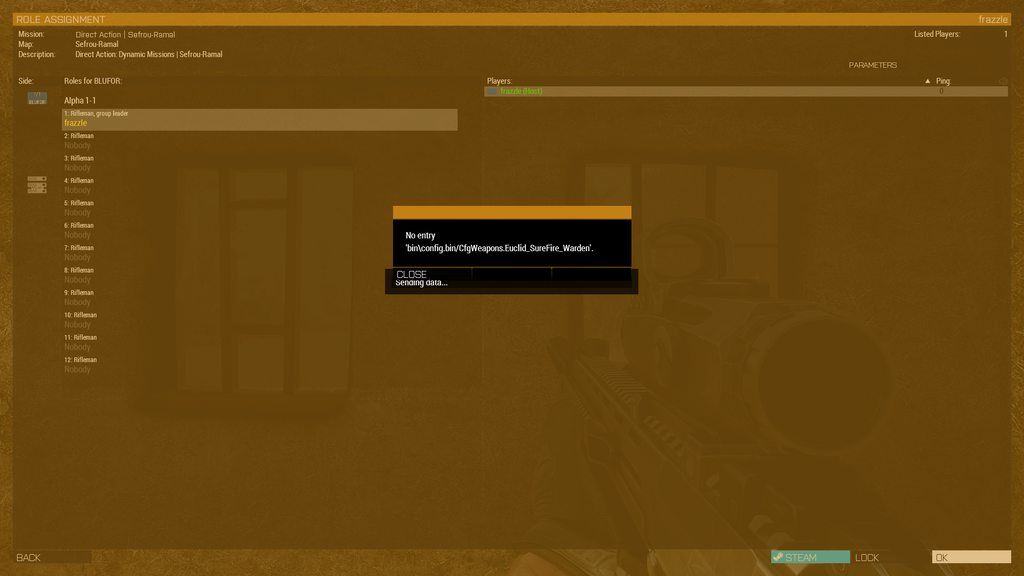
im trying to play the direct action mission with INDIBI2 but im just stuck on "sending data" and theres a no entry error that i cant close, these errors have always popped up for every other mission but havent ever broken anything but for this mission its impossible to close the error https://imgur.com/a/b8l9yhk
 uncut trellis
vapid whale
im trying to play the direct action mission with INDIBI2 but im just stuck on "s...
uncut trellis
vapid whale
im trying to play the direct action mission with INDIBI2 but im just stuck on "s...
you may be missing some required mods or got some broken mod
umbral narwhal
@quaint jewel Re the vest-on-head crash, we're using setUnitLoadout.
woeful marten
i kinda like that name 😅
stray ore
I'm getting "No entry: bin\config.bin\CfgWorlds/Chernarus_Winter.description" after I added mods "3CB Faction" together with "New Esseker" map. Prior to that, I don't have this problem with "3CB Factions" mod. Any tips?
uncut trellis
stray ore
I'm getting "No entry: bin\config.bin\CfgWorlds/Chernarus_Winter.description" af...
whatever has chernarus_winter has broken config
stray ore
uncut trellis
whatever has chernarus_winter has broken config
how to check who has chernarus_winter? On its own, "3cb factions" is fine. But now, "new esseker" has this issue. Prior to mixing these two, both of them are fine
uncut trellis
could be something related to new esseker since its map config
stray ore
uncut trellis
could be something related to new esseker since its map config
Yes, I believe so. It feels like it. I click repair, the prob still there
uncut trellis
yeah its some sort of config conflict that reapair wont fix
stray ore
uncut trellis
yeah its some sort of config conflict that reapair wont fix
An unsubscribe will auto-delete the files in hard drive, right?
Seems like, "new esseker" has reputation of bugs like this. I should have pick the "esseker fixed"
uncut trellis
should
vapid whale
uncut trellis
you may be missing some required mods or got some broken mod
it only happens with this mission
 lime swift
Hi, I just can't join servers without the launcher
When I try to join a server it gives me an error if it's via the game. However, when it's via the launcher, it works
And I can't host
I've already contacted support and done their solution but it still doesn't work
uncut trellis
lime swift
When I try to join a server it gives me an error if it's via the game. However, ...
you cant join servers with different modlists loaded at least
so joining through the launcher is recommended so it can set up stuff to load for you
lime swift
That's not really the problem, because in all my hours it's done this to me overnight.
uncut trellis
what the error you get?
though we here might not really know any more than what BI support knows
lime swift
uncut trellis
though we here might not really know any more than what BI support knows
I'll tell you when I've launched my game I'll try it in a few minutes.
But the support suggested this:
"Hello,
these might seem obvious, but please make sure that:
-
You have software firewall turned off or have correctly set up an
exception for both Steam and the game. -
You run Steam as Administrator:
- Exit Steam.
- Right-click on Steam icon.
- Left-click on "Run As Administrator".
- If the problem persists, reboot your computer and try the procedure again.
If none of this helps, please send us the following:
The dxdiag report of your computer for checking
(no sensitive personal information will be collected):
- Press WinKey + R.
- Type 'dxdiag' (without the quotes).
- Press Enter.
- In dxdiag window, click on 'Save All Information' button.
- Send me the resulting file as email attachment.
The msinfo report of your computer for checking (no sensitive personal
information will be collected):
- Press WinKey + R.
- Type 'msinfo32' (without the quotes).
- Press Enter.
- In MSINFO window, click on 'File' in the upper menu.
- Click on 'Save' button.
- Send me the resulting file as email attachment.
And your RPT file:
Press WinKey + R and paste this directly into the window that appears:
%userprofile%\AppData\Local\Arma 3
then press Enter. You should be taken directly to the folder where arma 3 RPTs
are stored. Please reproduce your issue and send us the latest RPT file.
Please send these 3 files in one message and do not zip/rar them.
Best Regards,"
uncut trellis
have you sent the rpt logs for them to look?
lime swift
uncut trellis
have you sent the rpt logs for them to look?
yes :
"Hello,
please unsubscribe from all mods on Steam Workshop and try clean reinstallation
of Arma 3:
- Uninstall the game.
- Download and install CCleaner (https://www.piriform.com/ccleaner) and
scan/fix your registry. - Make a backup of Arma 3 folder in Documents.
- Delete both Arma 3 folders in Documents and Steam:
\Users*YOUR USERNAME*\Documents\Arma 3
\Program Files (x86)\Steam\SteamApps\common\Arma 3
- Reboot your PC.
- Run Steam as Admin, download the game.
- Try to run Arma 3 (without mods).
This should fix your issue.
Best Regards,"
Try CCleaner Professional for free. Clean up your PC automatically and increase your performances and online privacy.
(his answer)
and I did it but nothing
uncut trellis
Id suppose you can share your latest rpt here too in case someone spots anything
and the error you get
but Id suppose those are the basic steps to take
lime swift
yes
a lot of people say it's about the connection or the ports, but I haven't changed anything and it used to work
uncut trellis
if its router ports, then your ip on the router might change and portforwads get lost
etc
so could look into that too
lime swift
So when I join a server I get a load (with a picture of a vanilla map) with the menu noises staying in the background and "connection failed."
lime swift
uncut trellis
if its router ports, then your ip on the router might change and portforwads get...
I don't understand the connection port system
rustic eagleBOT
Arma 3
To host a server or a game session locally, you need to make sure first that your WAN address / external IP uses the IPv4 protocol!
Check your router’s status page in the settings to confirm. (If in doubt, ask your ISP, Websites like “whatismyip.com” give you a false positive!)
Local servers and games can not be hosted on an IPv6 network, or IPv4 via DSlite tunnel!
https://www.avg.com/en/signal/ipv4-vs-ipv6
Once you have confirmed that your connection uses the IPv4 protocol, you need to manually open / forward the ports 2302-2306 UDP (https://community.bistudio.com/wiki/Arma_3:_Dedicated_Server#Port_Forwarding)
See your router’s manual on how to do that, or ask google: “<your router model> + port forwarding”
uncut trellis
just joining servers should not requrie anything special
steady hawk
@gloomy summit
 steady hawk
Just use this channel for A3 troubleshooting
And reinstall Visual C++ 2013 and DirectX
 steady hawk
I don't know where do you see that
 gloomy summit
 gloomy summit

This article lists the download links for the latest versions of Visual C++ Redistributable packages.
gloomy summit
steady hawk
Why don't you just post the link though
Thanks for the information, it worked
 final rose
hi, sorry if this is in the wrong channel but on our server we had the yellow dot on left click in the map disabled, now we want to re-enable it but cannot find the string/command, etc. Just curious if anyone knew?
UPDATE: i have since learned this is an ACE option - i know non vanilla but any help would be appreciated
^ feel free to @ me or reply
steady hawk
What do you mean by "yellow dot" and "map disabled"
final rose
when in server we used to be able to single left click and hold down when in map and a sort of cursor would show
we had since disabled this feature and cant re-enable it
 void swallow
final rose
hi, sorry if this is in the wrong channel but on our server we had the yellow do...
void swallow
final rose
hi, sorry if this is in the wrong channel but on our server we had the yellow do...
Verify your addon options have ACE map pointing enabled
final rose
yeah, i feel stupid... i was looking into this for my unit under the presumption it was a vanilla thing (too much time playing modded)
as soon as i went into settings it clicked in my head
sorry for taking up time and thanks for all the help

 olive depot
Any ideas what may cause this error?

 upbeat spire
olive depot
Any ideas what may cause this error?
upbeat spire
olive depot
Any ideas what may cause this error?
Try repairng your zeus enhanced mod on launcher.
olive depot
upbeat spire
Try repairng your zeus enhanced mod on launcher.
strangely enough though, I've just noticed zeus enhanced isnt loaded in the preset? I'll give it a go either way
olive depot
upbeat spire
Try repairng your zeus enhanced mod on launcher.
yeah didn't work unfortunately
if it helps, this is the preset I've been having trouble with. Only effects this preset too...
ocean cosmos
are you actually trying to load zen
olive depot
no, I'm not
wait, forgive my ignorance, but what is zen again?
*edit - like what function does it even add over the vanilla zeus?
steady hawk
upbeat spire
Try repairng your zeus enhanced mod on launcher.
This?
upbeat spire
19:30:33 ErrorMessage: Include file x\zen\addons\main\script_mod.hpp not found.
19:30:33  ➥ Context: Preprocessing file: x\zen\addons\compat_ace\XEH_preStart.sqf at 1
Include Stack:
- x\zen\addons\compat_ace\XEH_preStart.sqf:1
- x\zen\addons\compat_ace\script_component.hpp:3

19:30:33 Application terminated intentionally
19:30:33  ➥ Context: Preprocessing file: x\zen\addons\compat_ace\XEH_preStart.sqf at 1
Include Stack:
- x\zen\addons\compat_ace\XEH_preStart.sqf:1
- x\zen\addons\compat_ace\script_component.hpp:3

ErrorMessage: Include file x\zen\addons\main\script_mod.hpp not found.
``` this is the error that is giving him but i dont see zen loaded witch is wierd by some other mod is using it.could it be one of the pose mods?
upbeat spire
You have a local mod: Surfaces AIO myb is that what is adding it.
steady hawk
I haven't and couldn't check your preset rn but it said one of PBO/Mods require what you don't have. Try to remove half of your preset and see if it does, like pinned. Or, just look up your "local" Mods
olive depot
upbeat spire
You have a local mod: Surfaces AIO myb is that what is adding it.
That's just a ground surface texture mod, dw, that's not the cause.
I shall trouble shoot until I find the cause. Cheers for your help fellas
upbeat spire
olive depot
That's just a ground surface texture mod, dw, that's not the cause.
I shall tro...
i mean you could just load Zeus Enhanced and Zeus Enhnaced ace compact and see if it gives you the error 😄
olive depot
upbeat spire
i mean you could just load Zeus Enhanced and Zeus Enhnaced ace compact and see i...
Yeah I booted the game a few minutes ago to test that, and indeed it works, but it's just strange because I've never had that error on this preset until recently.
All's good
steady hawk
Same preset never means same content forever
olive depot
steady hawk
Same preset never means same content forever
true, most on this list are dead mods though, so my guess is that maybe one of the newer ones had an update, and the author didn't link zen under dependancies?
steady hawk
No clue
One thing I can say is don't run Mods you don't need or don't know what it does
quaint jewel
umbral narwhal
<@90532520101183488> Re the vest-on-head crash, we're using setUnitLoadout.
Can you link the code that builds the loadout array?
pine kite
final rose
yeah, i feel stupid... i was looking into this for my unit under the presumption...
There is tactical ping, which can be disabled in dificulty options. So your presumption was waranted. It just doesn't look like a yellow dot, but more like a marker with small orange circle in it I believe.
pine kite
olive depot
strangely enough though, I've just noticed zeus enhanced isnt loaded in the pres...
If it is not loaded, then scripts in the mod cannot be found, obviously.
north spire
Think I fixed my issue, did a fresh OS install increased the memory limit in the game and it boots up just fine with mods enabled.
umbral narwhal
quaint jewel
Can you link the code that builds the loadout array?
Sure, but I don't see why you'd want to read it:
https://github.com/official-antistasi-community/A3-Antistasi/tree/unstable/A3A/addons/core/functions/Templates
The author of the broken faction put a vest in a helmet array so the code was just following that.
 crude harness
how i fix this?
 uncut trellis
crude harness
how i fix this?
uncut trellis
crude harness
how i fix this?
some mod is broken
disable mod that causes the error
preferably also report error to the mod maker for fixing
silver cypress
arma fxp
 wicked lichen
All the unit invites show as expired links for me in #communities_arma3. Would someone have suggestions for how to fix this?
crude harness
anyone knows why arma spawns different soldiers than it shows
 uncut trellis
crude harness
anyone knows why arma spawns different soldiers than it shows
uncut trellis
crude harness
anyone knows why arma spawns different soldiers than it shows
is it always or is it random?
mods can have mistakes in them
crude harness
it is always
uncut trellis
crude harness
it is always
probably just a mistake in the mod
wrong picture on wrong unit
crude harness
it is like on 10 factions spawns this exact skin
golden nova
3CB factions works exactly like that
vapid whale
im using the INDIDBI2 mod with direct action but whenever it autosaves it just says "write failed data is empty" any ideas?
vapid whale
crude harness
it is like on 10 factions spawns this exact skin
3CB factions has its own random loadout system
it shows up as a default unit in the eden editor but when you load in it randomizes the loadouts
uncut trellis
vapid whale
im using the INDIDBI2 mod with direct action but whenever it autosaves it just s...
sounds like such error could mean its not set up correctly. Id recommend asking the maker of the mod for info on what it means though
 indigo bridge
@crude harness that indeed doesn't sound correct. It could be a mod conflict. I'd suggest trying it again with just 3CB Factions, cba_a3 and the RHS dependencies and see if the issue remained. Although we use a 'stock' unit for each faction that first appears in Eden, the loadout of the unit is randomized at mission load so that the units will be similar but different. The eden preview image is likewise a snapshot of that randomization so won't always match the final unit you see in the mission but it will be similar. However, 10 factions should not be showing that exact skin.
 hybrid root
Hello. I need some help getting Arma III to launch. I bought the game awhile ago and I haven't been able to play it because of the STATUS_ACSESS_VIOLATION error. Each and every time I boot the game.
(I haven't even managed to get to the main menu of the game.)
Here is my last arma iii game crash log.
quaint jewel
hybrid root
Hello. I need some help getting Arma III to launch. I bought the game awhile ago...
Your AMD graphics driver is crashing.
Maybe needs to be updated?
Also the steam overlay waas just initializing there. Maybe try disabling that in the steam settings
 fresh jetty
Anyone had issue with arma3 creating a new profile at start even though i have certain one selected.
The issue ONLY happens if the name has a number infront. With an arma 3 unit i'm in, my name is 2LT R. Kartsa. However, that chosen as the default on to start with, it just creates a profile called just "2LT".
This doesn't happen with for example if the name is "SGT R. Kartsa"
narrow nimbus
Anyone here on acre that has encountered drop outs? Only thing I can find in rpt is
[ACRE] (sys_core) WARNING: START SPEAKING: acre_player [pilotlead_3] could not find a player with ID: 104 33:48, Speaking Type: 0
can i disable it
vapid whale
crude harness
can i disable it
Why would you need to?
The load out is random when you get ingame
 distant ibex
can anyone help me rq

 pseudo slate
small square with nato flag in corner of screen with number, how do i get rid of it or atleast hide
trying to film stuff first person
umbral narwhal
Those kill counters that show up after you enter zeus? Not sure that's listed anywhere. You'd have to play guess-the-ID.
 tough crane
I am getting an error : shaders not valid (mismatch of exe and data?) is there an easy fix for this?
tried deleting CFG file and re-launching hasnt worked for me
currently re-validating cache but cant find any 'fix' that doesnt require re-downloading 112gbs
umbral narwhal
You mean validating Arma?
If that thinks it needs to download 112GB then something has gone badly wrong with your install.
trail niche
Arma is more or less 40 GB, so validating Arma even in the worst case wouldn't need to download 112GB
isolate the one mod that throws the error, and if you don't have any try to validate Arma files
steady hawk
Having CDLC results 100+ gigs
north spire
^^
golden nova
about 147GB
trail niche
did not take that into account ... my bad
 gentle acorn
hi all looking for some help,
our dedi arma 3 server has been crashing conistantly every sunday night during our second opoeration of the week around the same time.
We have preformed a clean install and strill having issues. Can anyone help us understand why or to help with a solution?
Have RPT and the crash is an access violation, we launch the server via fastr
woeful marten
i have with all the mods and cdlcs currently 150 Gb of arma installed
 limber drift
Does anyone know why ai jets in my game taki on the runway extremely slow. They will like move a couple inches and then stop. They just keep repeating this all the way till on the strip.
 woeful marten
no need for ping tho
north spire
Right… Still getting the access violation error after everything I have done…. Right now I have the crash logs up and there’s multiple rpt logs I am wondering which ones do I need to share?
 drowsy gale
Trying to load onto a mission and getting a error saying the server is missing "compositions_a3" does anyone know what mod this is
Our server guy didn't key a mod and we don't know which one
north spire
I don't know what to do anymore...
My error is the access violation thing and I don’t know what log to post here
umbral narwhal
Is this a crash immediately on launch, or some time later or what?
north spire
umbral narwhal
Is this a crash immediately on launch, or some time later or what?
As of right now little in. I can get past the mian menu and join my unit operation but it just CTD after a few moments.
This is what I have in the reports and dumps.

Was told to use the allocator but IDK if that's the case

This is my specs if it helps at all.
 umbral narwhal
General troubleshooting rule is to untick everything from parameters.
Setting system memory limit might be required in some cases but not if you're crashing that early.
north spire
I’ll try that I guess, right now I am running windows memory diagnostic test
 meager jolt
Hey y'all, relatively new user, still getting comfortable with the massive array of controls. I'm having a problem with what I think is called the "High Command" mode, in what I think is a specific context:
TLDR - downloaded a few mods that run with IFA, primarily got into Arma 3 to do WW2 milsim stuff. I unpacked a PBO of a Steam Workshop scenario that I was interested in messing with. When I test the scenario, I find that I can only control the squad that is originally attached to me, and I cannot seem to control anyone through High Command controls when looking at the map.
Totally new to many of these systems so I may have messed something up. Any feedback?
umbral narwhal
High command is something that needs to be set up specifically by the mission.
meager jolt
Yea I gather that you have to link some things together. The initial state of the scenario in Eden Editor shows 4 infantry squads and a single vehicle that are all subbed to the high command module attached to the player characterb
umbral narwhal
You pressed ctrl+space to switch command modes?
meager jolt
I was also having an issue with that. I noticed that that key combo didn't seem to do anything. I saw that the "app button" (windows button I assume) also engages command modes
When I press that key, the reticle in my center screen turns into a red circle, but doesn't seem to do anything beyond that
I downloaded C2 in an attempt to work around the issue but I didn't get any further, so I disabled that add-on so that I can focus on troubleshooting the vanilla command mode
umbral narwhal
That sounds like you're running ACE?
Do you actually get a visible command bar at all?
Like the units in your squad listed at the bottom left.
meager jolt
No
And yes I am running ACE
I'm about to open it back up and see what I can do. Should I peruse the ACE settings?
I'm specifically running ACE single player
umbral narwhal
winces
whatever. ACE turns the command bar off by default. You need to turn it back on in ACE settings. Somewhere.
meager jolt
Just did, gonna give it another shot
north spire
umbral narwhal
General troubleshooting rule is to untick everything from parameters.
Did That, was in Rene and editor creating a fort and accidentally spawned in a big prop and the game CTD..
Now it’s CTD every few mins now.
What logs do I need to put into paste bin to show you guys?
 hidden wasp
So I came across an issue recently.
ARMA 3 isn't letting me change my profile name any longer, and when I go to just edit the file and do it that way (as some articles suggest) it says the folder is in use / open in another program (and yes, this is with ARMA closed / not running).
Anyone have any experience with this issue before?
golden nova
do you hhave OneDrive enabled?
golden nova
it backs up Documents folder causing issues with Arma, and not being able to edit that stuff is one of them
either disable backing up of Documents or just get rid of the app
hidden wasp
Checking to see if that resolved it - will advise.
umbral narwhal
That one doesn't even get to the mod table, and you're loading a giant pile of mods including banned stuff.
north spire
I'm sorry for all of this I am just trying to find out where in the notes I am supposed to look I don't mean to break any rules here.
umbral narwhal
The logs won't usually tell you much about crashes. Even when they're complete.
uncut trellis
youll need to submit the crash log and minidump to the feedback/bug tracker so BI tech people can take a look
only thing we can perhaps advice on is the crash message you get
umbral narwhal
I'd usually suggest narrowing down the crash first, like checking whether it triggers without mods.
 opal snow
can i ask about dedicated server problems here?
golden nova
yeah but usually it's best to figure out dedicated server issues with your dedicated server provider
opal snow
hmmmm maybe i worded it wrong
not a problem with the server itself, but mods
i'm trying to use a few mods but it says the keys are bad
specifically this
and this one
north spire
uncut trellis
youll need to submit the crash log and minidump to the feedback/bug tracker so B...
Yeah, I did that just now, I am not expecting to hear back tbh.
golden nova
opal snow
i'm trying to use a few mods but it says the keys are bad
assuming you are 100% sure the keys of the mods and ones on your dedi are okay, then then the signatures were generated for a badly-made mod and it's up to the author to fix that
or you can play with no signatures
 heady pewter
Everytime my game comes up with this error
I cant send imgs but it says
Exit Code: 0XC0000005 - STATUS_ACCESS_VIOLATION
umbral narwhal
on startup or what?
uncut trellis
heady pewter
Exit Code: 0XC0000005 - STATUS_ACCESS_VIOLATION
there is a wiki page about common unusual process exit messages like this and possible fixes in the pinned messages. check that out for tips on how to solve the 00000005
if those are of no help then drop a new message here
heady pewter
umbral narwhal
on startup or what?
When about too load in
 rare dirge
- Blocked loading of file 'D:\SteamLibrary\steamapps\common\Arma 3\version.dll error: 0xc000009a
uncut trellis
rare dirge
- Blocked loading of file 'D:\SteamLibrary\steamapps\common\Arma 3\version.dll e...
maybe dont do piracy
rare dirge
literally isnt piracy
uncut trellis
it is


 uncut trellis
the dll is
uncut trellis
delete it
rare dirge
 uncut trellis
disable onedrive
rare dirge
you da goat