#arma3_troubleshooting
1 messages · Page 30 of 1
 graceful lodge
 steady hawk
Well then it is most likely because you enabled OneDrive
Have you restarted your computer after you disable
graceful lodge
I even deleted onedrive
graceful lodge
steady hawk
Have you restarted your computer after you disable
I have
steady hawk
I have never heard of a case that disabling OD doesn't fix that
Make sure you've disabled that
graceful lodge
I disabled it and then when that didn't work i just uninstalled it
 violet pumice
Having an issue where trying to launch arma with mods doesn't load the mods properly. Sometimes it will load mods that aren't selected, or it won't load any mods at all and the only "mod" that appears is a generic "Arma" mod.
When having a similar issue in the past, where mods I didn't have selected were being loaded, it was because some mods got "stuck" in my mods and parameter files settings in the launcher, but both of them are clear.
Upon checking the parameters using wmic process where "name='arma3_x64.exe'" get commandline | clip, I found that not only are extra mods being added, but the -mods parameter is being cut off.

I've tried just setting the mods and parameter settings in the launcher to just 1 to see if maybe trying to overwrite those values would resolve some of the issues but they did not.
I can tell from some of the mods being loaded, that it's trying to use some of the parameters I use for developing mods with HEMTT, as it's launching with some developement parameters and mods.
violet pumice
The issue happens whenever I launch arma through the command line (.bat files, HEMTT, etc.) instead of the launcher
 uncut trellis
do you have mods added to steam commandline?
you can also see what the game starts with on the RPT log file
!rpt
 rustic eagleBOT
Arma RPT
Arma generates a .rpt log file each time it's run, which contains a lot of information like the loaded mods, or any errors that appear, this log file can be very useful for troubleshooting problems.
To get to your RPT files press Windows+R and enter %localappdata%/Arma 3
Additionally see the wiki page for more info: https://community.bistudio.com/wiki/Crash_Files
To share an rpt log here, please use a website like https://sqfbin.com/ to upload the full log, that way the people helping you can take a look at it and try to figure out the problem you're having together with you.
Note: RPT logs can hold personal information relevant to your system, the game or others.
uncut trellis
afaik theres 2 ways mods can slip in. They are manually saved into the games on files ie arma 3\addons or one of the other vanilla pbo folders
or one of the commandlines have them starting
steady hawk
Honestly the first one is not a case if the game detects a "Mod"
Random PBO within addons will not be detected as a Mod, no?
violet pumice
uncut trellis
do you have mods added to steam commandline?
Nothing in the steam launch options either
violet pumice
uncut trellis
afaik theres 2 ways mods can slip in. They are manually saved into the games on ...
Just vanilla addons in Arma 3\Addons, didn't see anything in any of the others.
I did notice that hemtt added a folder with the developer versions of my mod(s), but given that other mods are also being loaded I don't think that's the sole cause
 umbral narwhal
RPT is your friend anyway
violet pumice
umbral narwhal
RPT is your friend anyway
As in for checking where they're loading from?
I already know where they are, just the steam workshop folder (steamapps\workshop\content\107410\workshopID), but I haven't been able to figure out why
umbral narwhal
Yeah, just paste the RPT.
It'll tell you exactly where each addon is loading from if you read it closely.
 hushed gulch
what is this hud thats showing all people? idk how but I accidentaly turned it on
 steady hawk
It's called High Command. I don't recall what keybind right now, you can check the keybinds
hushed gulch
Tysm
 bronze river
steady hawk
It's called High Command. I don't recall what keybind right now, you can check t...
bronze river
steady hawk
It's called High Command. I don't recall what keybind right now, you can check t...
Should be numpad .
steady hawk
Guess you wanted to ping him instead
 pine kite
violet pumice
Having an issue where trying to launch arma with mods doesn't load the mods prop...
pine kite
violet pumice
Having an issue where trying to launch arma with mods doesn't load the mods prop...
If the -mod= command is being cutt off then it is likely that there are spaces in the foldernames somewhere. Encapsulate the entire -mod= string with "double quotes".
violet pumice
pine kite
If the -mod= command is being cutt off then it is likely that there are spaces i...
It's occuring when I launch the game through the launcher, I have no control over it
 worldly mantle
Anyone know why in aircraft and tanks my weapon hud display on the top right is no longer showing?
uncut trellis
worldly mantle
Anyone know why in aircraft and tanks my weapon hud display on the top right is ...
got mods?
 stuck stratus
is it a must to have UPNP enabled when hosting a server? at uni and cant change settings, port forwarding isnt possible
 ocean cosmos
you wont be able to local host on uni wifi
stuck stratus
meaning i cant host a server for friends to join?
umbral narwhal
There's no NAT hole punching. You either need working port-forwarding, working UPNP or a working VLAN.
stuck stratus
vlan?
umbral narwhal
virtual LAN. Like a private VPN.
stuck stratus
ah alr
umbral narwhal
zerotier or hamachi are common methods.
But they often don't work for various reasons.
worldly mantle
uncut trellis
got mods?
yeah, a few but not many. Only just happened and not added anything so could be an update. Will track through them 😦
pine kite
Very likely your university blocks certain ports. At the very least ask them in what way you can do port forwarding for UDP ports 2302-2306 in their network.
But you are probably better of getting those virtual lans working, or rent a cheap server and share the cost.
 primal orchid
I need help. My arma 3 launcher isn't working. Every time I launch, it said corrupted configuration and I don't know what to do
 umbral narwhal
Delete the arma3launcher.exe.config file from the Arma program folder.
It doesn't contain anything important and it'll rebuild it if it's missing.
primal orchid
I did, same problem
umbral narwhal
You failed. Possibly windows quietly blocked you.
primal orchid
How?
primal orchid
I fucked up. I tried undo the windows update but it just reset the whole pc. Now I need to take it to geek squad to fix it
 fallow remnant
Have people been able to make Arma 3 work correctly with variable refresh rates? On my 165 Hz monitor with gsync, the game seems to force the monitor to 60Hz even with vsync off in game. Not sure what's going on.
fallow remnant
So it seems this only happens when A3 is full-screen. In borderless windowed it's fine.
Which is fine by me, since I use the latter usually.
 alpine jungle
hey guys, can someone help me out? I'm getting some graphics artifacts on ArmA 3 which I've assumed is because of mods. However, I've been removing mods and cannot seem to isolate the problem.
The artifacts in question often manifest as blue squares or simply transparent squares. Just hoping someone has ideas.
steady hawk
Are you sure this is not a mission specific issue?
alpine jungle
I'm getting this error on Tanoa and the CUP modded terrains
Also, running ALIVE and ACE3
It's interesting as my friends are getting the same artifacts
steady hawk
Not sure if it does answer my question
alpine jungle
I mean, I'm getting it over multiple missions. So yes, I think it isn't a mission specific issue.
steady hawk
I've been removing mods
What does this mean then? Vanilla or “minimum” Mods?
alpine jungle
It could be an ALIVE mod issue, since all those missions are running alive modules, but I've not seen any complaints otherwise
alpine jungle
steady hawk
> I've been removing mods
What does this mean then? Vanilla or “minimum” Mods?
I'm running ACE3 and ALIVE + CUP
rustic eagleBOT
Arma RPT
Arma generates a .rpt log file each time it's run, which contains a lot of information like the loaded mods, or any errors that appear, this log file can be very useful for troubleshooting problems.
To get to your RPT files press Windows+R and enter %localappdata%/Arma 3
Additionally see the wiki page for more info: https://community.bistudio.com/wiki/Crash_Files
To share an rpt log here, please use a website like https://sqfbin.com/ to upload the full log, that way the people helping you can take a look at it and try to figure out the problem you're having together with you.
Note: RPT logs can hold personal information relevant to your system, the game or others.
steady hawk
Please post this
alpine jungle
Okay. Waiting for the game to finish validating files and gonna try to test again
My problem right now is that I feel like I don't have a consistent way to replicate the issue.
It just seems to occur ocassionally when under fire
uncut trellis
most likely some sort of mod issue
 agile swallow
May someone please help me, On my dedicated server, after dying a couple of times, almost equal to the amount of roles in the server the respawns run out, is there anyway to fix this? thank you.
 marble fiber
Hi! I have an issue, I can constantly hear my character making loud breathing / panting sounds and don't know how to get rid of it?
pine kite
Don't load to much stuff on you. Don't get hurt. Don't run too much.
marble fiber
I'm literally stood still
pine kite
What are you carrying on you?
marble fiber
Nothing, I'm playing as a Zeus unit
pine kite
And what sort of mods are you using for it.
marble fiber
I have about 300 lol, I'm using the same mods as I previously used on my old PC and never had this issue until I reinstalled them on my new one
pine kite
🤷♂️ 300 is too much to keep track of issues. Mods can affect stamina. Updates can change how mods work out. Too many variables this way.
If you load a rocket launcher on your back, carry a machine gun, have loads of ammo on you, then you are likely overloaded to begin with. Lack of stamina takes it's effects immediately.
marble fiber
I have absolutely nothing, I'm a zeus unit..
pine kite
Zeus can mindcontrol a unit. Unit still has it's stuff on it.
marble fiber
While I'm not controlling anyone I mean
pine kite
No clue then.
agile swallow
update on my issue the whole spawn disappears after dying quite a few times
violet pumice
marble fiber
Hi! I have an issue, I can constantly hear my character making loud breathing / ...
If you never found the cause for you're issue, you're probably using https://steamcommunity.com/sharedfiles/filedetails/?id=2129532219 or https://steamcommunity.com/sharedfiles/filedetails/?id=825172265.


Actually I don't think that first one adds breathing sounds, not at my pc to confirm.
ocean cosmos
immerse doesnt
violet pumice
Hm, I'll have to double check what mod(s) I know add breathing. Could've sworn is was immerse though.
 mellow mesa
Project SFX 100% adds breathing, which can be disabled in addon settings
violet pumice
Having an issue where the Arma 3 Publisher tends to just get stuck on "Publishing content to Steam Workshop". The mod is seemingly published fine, given that there is a new workshop item for it and looks correct when downloaded.
 hasty knoll
i have problem with error 0xc000007b can anyone help me out
pine kite
This may help (if you get it with Arma 3) https://community.bistudio.com/wiki/Arma_3:_Unusual_Process_Exit#0xC000007B_-_STATUS_INVALID_IMAGE_FORMAT
hasty knoll
yes i have the problem with arma 3
didnt work
i guess the game is broken and trash asf
pine kite
Nope, if others play it fine, then it's not broken. Something you did, or your system did, or happened randomly on your system made it fail.
Verify the game throuhg Steam, reinstall that Visual C++ Reditibutable for 2013, reinstal DirectX. Something always works. Restart your system. Then something allways starts to work.
hasty knoll
i reinstalled DirectX and i tried lot of other things and nothing didnt happe
hasty knoll
pine kite
Verify the game throuhg Steam, reinstall that Visual C++ Reditibutable for 2013,...
i tried all of them non of them didnt work
violet pumice
ocean cosmos
known issue happens all the time
Just making sure I wasn't missing something, thanks
hasty knoll
Idk anymore what I should try
marble fiber
@violet pumice @mellow mesa Thankyou so much, disabling the coughing in the sfx mod fixed it!!
violet pumice
👍
worldly mantle
Anyone have issues with AA specialists not firing manpads? AI only seem to target aircraft when i take out a MANPAD. Otherwise they just watch it
uncut trellis
worldly mantle
Anyone have issues with AA specialists not firing manpads? AI only seem to targe...
got mods?
that sounds like it might be a mod issue
 dark grail
For some reason this is my main menu (using the SOG PF default menu mod) - and the multiplayer button doesnt work so I cant launch a server to play with my friends. Whats going on here?
 rustic eagleBOT
Steam file verification process:
Right Click on game -> Properties -> Installed Files -> Verify Integrity of game files
Arma 3
Steam Workshop Mod repair process:
Open Launcher -> Right Click on mod -> Repair
The first process will automatically verify Steam Workshop items as well.
dark grail
well I know the DLC works without the mod, but I want to run PF to use its modules
uncut trellis
use them where?
dark grail
In the mission editor.
dark grail
Yes i know. But I am doing some modern stuff with my group and dont want us to go through PF menu screen, however I still want to launch the PF Mod so that I can use the modules when mission making, which is where the mod comes in to play.
uncut trellis
dark grail
Yes i know. But I am doing some modern stuff with my group and dont want us to g...
now that I think about it the menu mod is obsolte and the option to turn off the menu has been incorporated into the dlc under options
dark grail
Oh awesome - thank you
 zenith plume
does anyone know what causes this problem with names being too large for dui squad radar? https://imgur.com/a/JxvgnBW
dark grail
My friend is having trouble finding my server in the browser tonight for some reason - so were going to try direct connect via ip. Where can I find the exact IP to send him?
umbral narwhal
google "what's my IP". It won't work though.
 drifting oracle
so i have this problem here where whenever i try to join this specific server with direct connect, the role assignment screen is blank. notice how the OK button is highlighted as if i have a role selected, in which i do not since i can't get a role in the first place. when i do press it, i am stuck on "Receiving mission file: 0kb/0kb" until i get automatically kicked for inactivity. furthermore, i can join other servers completely fine, roles appear INSTANTANEOUSLY for them (official servers, a 2nd server from this group of people, karmakut, friend-hosted servers).
no clue what's causing this. this has been a month-long struggle and the group of people i'm with have run out of ideas.
 umbral narwhal
When you say "2nd server from this group of people", what are the similarities and differences between them?
drifting oracle
one uses less mods
for reference the first server uses 190 mods and 3 CDLCs
2nd server uses 180 mods and the same 3 CDLCs
hasty knoll
Is there anyway how to fix this?
 steady hawk
When this happens?
hasty knoll
When I try to play the game
steady hawk
Okay post more info like pinned post
hasty knoll
It load up nicely server and as soon as the game opens it then there is the error
steady hawk
Okay please re-read what I said and follow. Please provide MORE info
 wind flare
Mic not working ingame ? Tried all possible fixes and still the mic doesn’t work .
hasty knoll

 molten vapor
Anyone able to Help with https://github.com/acemod/ACE3/issues/9656

GitHub
Issues: I dont have a Try/Preview, First Person Bug and Freezes after selection of Helmet or anything else Mods: Unit Mods {CBA is installed] Note: Ask me for anything else
 nova elm
Try the ACE discord: https://discord.gg/FVkgwggNcZ
worldly mantle
uncut trellis
got mods?
Yeah but I stripped them all and still have the issue 😦 maybe I need to remove DLC?
steady hawk
You cannot really remove DLCs, unless you meant Optional (Creator) DLCs
pine kite
zenith plume
does anyone know what causes this problem with names being too large for dui squ...
Doesn't it have settings for font size or something in the Addon Settings for it?
worldly mantle
steady hawk
You cannot really remove DLCs, unless you meant Optional (Creator) DLCs
yeah i meant CDLC's. Doing some playing around with the mods now.
worldly mantle
worldly mantle
yeah i meant CDLC's. Doing some playing around with the mods now.
weird, seems to be intermittent but orbat created units don't seem to fire using there AA weapons even though there is ammo
uncut trellis
worldly mantle
Yeah but I stripped them all and still have the issue 😦 maybe I need to remove ...
Do you mean AI in your squad or AI just alone?
Best to explain how you try to use them in detail
worldly mantle
uncut trellis
Best to explain how you try to use them in detail
Both in squad and alone. When i switched on Orbat override it seems to work find. Must be a config error causing it.
uncut trellis
Possibly yes
 wheat ginkgo
hello everyone! so my friend is facing a problem. Yesterday we where playing a Liberation RX scenario and when he was operating a BMP, he pressed some key possibly, or a combination, and he muted every sound thats in game, when in-vehicle. when he exits, he can still hear everything, but whenever hes in a vehicle (be it air/ground/sea) theres no sound, nothing. Is that a mod confliction? is it a super secret keybind? i dont have that issue, same mods, same scenario. (if anyone has a solution, please @ me)
pine kite
Just curious, but why is your friend not posting about this issue himself? Man-in-the-middle conversations never work out well.
wheat ginkgo
pine kite
Just curious, but why is your friend not posting about this issue himself? Man-i...
true, was hoping that it'd be an easy "hey, try this" fix, and that it wouldnt require him to join the server, etc. not that its a hustle, but you get me.
umbral narwhal
IIRC Liberation has some built-in situational volume control in the UI but I wouldn't know about the keybinds.
You could at least check whether he has the same issue in a different scenario.
pine kite
Is that even a saved setting? Does it reproduce when rejoining/reconnecting to the server? I am unaware of any vanila mechanic about this. So best list any mods you are using, otherwise it is guessing-game to narrow this down.
 inland goblet
My friends can't see my game I turn on upnp and the ports are allowed in the router we all use the same mods we tried base game too no luck any solutions?
pine kite
Don't use UPnP together with manually port forwarding in your router. It conflicts.
Mods have nothing to do with it. It's either:
- your portforwarding wasn't done correctly. UDP protocol port range 2302-2306 to your serving computer IPv4 address locally.
- your firewall doesn't allow packets for Arma 3 through those same ports, or at all.
- your ISP provides you an internet connection type that prevents you succesfully portforwarding Carriergrade-NAT. (likely the public IPv4 address that your router thinks it has (WAN/internet address) is different from what IPv4 address whatsmyip.org gives you when you visit it.)
Make sure he searches the name you gave to your server in the Internet tab of the Launcher's serverbrowser.
 steady idol
how do you login as admin on your server (Non Port forwarded)
and how do you change the map
nvm were good
pine kite
If you localhost from within the game then you are the admin.
If it is a dedicated server you just join. And use the chat menu to write #login youradminpassword. Which would be configured in the server config file. Or alternatively you can specify your SteamID64 number in the same file with the line admins[] = { "<UID>" };
Then you only need to write in chat #login https://community.bistudio.com/wiki/Arma_3:_Server_Config_File
molten vapor
anyone know why when i launch any type of map even base game maps i crash?
steady hawk
Please provide more info like the pinned post
 dusky niche
got this flickering on chenarus redux, what seem to be the problem and how can i fix it?
uncut trellis
dusky niche
got this flickering on chenarus redux, what seem to be the problem and how can i...
Could be the mods and stuff you run
Or most likely is.
uncut trellis
How about reshade?
uncut trellis
Could be. Atoc might be bugging
dusky niche
atoc?
uncut trellis
Treee/grass shading thing
Could also be bug in gpu driver
Try if it also happens on livonia
Since those trees are likely from there
dusky niche
uncut trellis
Since those trees are likely from there
Shot the tree and the flicker disappeared?
pine kite
Who knew lead posioning was actually a cure.
steady hawk
People who's legal age to drink alchools
Actually, it is better to unload EVERY Mods except the crucial ones to check if there is a faulty Mod
dusky niche
pine kite
Who knew lead posioning was actually a cure.
haha this game has it janks
dusky niche
steady hawk
Actually, it is better to unload EVERY Mods except the crucial ones to check if ...
ight
dusky niche
steady hawk
Actually, it is better to unload EVERY Mods except the crucial ones to check if ...
nope, still happens
steady hawk
What is your current Mods?
dusky niche
Cup: Terrain and Chernarus Redux
steady hawk
Then make sure if it is not an ATOC issue as HG said
dusky niche
steady hawk
Then make sure if it is not an ATOC issue as HG said
Yep, tried every ATOC settings
steady hawk
Did it ever happened before?
dusky niche
steady hawk
Did it ever happened before?
In some CUP Terrains yeah
and Kunduz, Afghanistan Terrain a few bushes
dusky niche
dusky niche
Shot the tree and the flicker disappeared?
looking at this, is there perhaps a mod that could replicate a tree being shot by a bullet when loading up a terrain
pine kite
Needs "CUP Terrains - Core", not just "Cup Terrains"
wheat ginkgo
Hey everyone! last night i presented a friends' issue here about a LRX vehicle sound mute situation. For anyone who might have this issue in the future and comes here for a chat search, ( LRX / Liberation RX / LiberationRX ) it was a lrx earplug issue, custom keybind 12 is the keybind thats responsible for it!
thanks Valen and John Jordan for your responses!
uncut trellis
wheat ginkgo
Hey everyone! last night i presented a friends' issue here about a LRX vehicle s...
Thanks for reporting back!
dusky niche
pine kite
Needs "CUP Terrains - Core", not just "Cup Terrains"
Oh yea sorry, CUP Terrain core, forgot to wrote core there
 hard kiln
Hey i could use some help with my mods. These are my installed mods:

The problem i'm having is that i can't open the addon options menu
it says i have to be in a mission (which i am in editor) and i tried downloading an older version etc but i don't know what else to try
 steady hawk
One thing I want to ask is why you're using no Workshop Mod
hard kiln
I took the mods from skymods
steady hawk
And for what reason?
hard kiln
I want to learn manual modding
uncut trellis
hard kiln
I want to learn manual modding
There isn't really any benefit to that. Workshop is the most reliable source for mods that are kept up to date. Random mod with random versions from interwebs are far more prone to have issues
hard kiln
uncut trellis
There isn't really any benefit to that. Workshop is the most reliable source for...
Oh alright
uncut trellis
Your list also seems to have lot of mods that might affect same things. So they probably conflict with each other.
hard kiln
Okay ty
hard kiln
uncut trellis
Your list also seems to have lot of mods that might affect same things. So they ...
like what tho
hard kiln
I'm gonna do that rn
I only enabled bloodlust and CBA and got this

Same error with only cba
steady hawk
Install CBA from Workshop
steady hawk
Can you open up Debug Console and execute: sqf productVersion?
steady hawk
Why you're using 2.12?


 pastel turtle
how can i play multiplayer with my friend? i start a server but they cannot join
 versed garnet
Hello Guys,
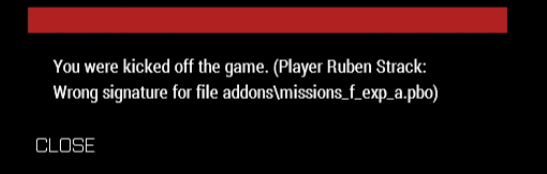
i have a Problem with my Game. I am always kicked from the server as soon as I can select the spawn point. Maybe one of you can help me. Thank you very much! https://i.imgur.com/nIK5Z8N.png
I have already checked my game for errors
 uncut trellis
versed garnet
Hello Guys,
i have a Problem with my Game. I am always kicked from the server as...
uncut trellis
versed garnet
Hello Guys,
i have a Problem with my Game. I am always kicked from the server as...
that file must be corrupt since it does not match the online signature.
try deleting it and then verify game files so its downloaded fresh
versed garnet
unfortunately the problem still exists
 fringe salmon
But why does my problem happen
 umbral narwhal
What happens if you run arma3_x64.exe directly from the program folder?
pine kite
steady hawk
Why you're using 2.12?
Theoretically he could have set it to the Legacy branch (current version -1). But if he left in a hurry then it is suspect indeed.
steady hawk
He admitted he pirated the game in my DM
pine kite
I'm just saying. current -1 version isn't immediately an indication of piracy. If it was 2.10, then yes.
 sonic aurora
 steady hawk
Just tried. It works on my end so let's try to find what is the faulty
But I actually can't think up what can do this
What about other Steam Workshop missions?
sonic aurora
Well i downloaded multiple missions before that they all had same problem.
I tried turning off firewall, Restart pc. They didn't work
Maybe I did something wrong tho.
steady hawk
Well, I actually see this error message for the first time
sonic aurora
There some people on internet having this problem too. But i couldn't find solution on youtube or anywhere
Here is another scenario

I will try verifying files
I still have the problem
Btw i reinstalled the game after long time
I think last time i played this game was year ago
And i could play scenarios i downloaded
pine kite
Where is your operating system user account stored? Normal place on the C-drive? Or on a USB stick or USB connected drive? Or are you perhaps using OneDrive that is close to full?
sonic aurora
C Drive
pine kite
Yeah, I'm grasping at straws here too. I don't know why Arma or your OS could think there isn't enough space to store the scenario. Which is usually tiny compared to mods.
sonic aurora
Do missions displayed here?

Or in MPMissions
Because i dont see any files here? Maybe that is the problem
Is there any website i could download scenarios or missions and put files on here?
steady hawk
This is not where a WS mission goes
 scenic lark
Hey i need help for somereason my Zeus GM doesnt launch when i press Y i downloaded RTS Zeus Wargame and Zeus Enchanced when i enter editor my addon option menu doesnt show anything like nothing at all and i keep getting error message as file Jac_arma_WARGAME/DATA/SCRIPTS/JAC_WARGAMEMAIN.SQF lINE 3025 ERROR Undefined variable in expressions
Or if not that then something like CBA_Xen
Idk what is causing this problem it worked fine untill i got Spearhead 1944
 pine kite
sonic aurora
Because i dont see any files here? Maybe that is the problem
pine kite
sonic aurora
Because i dont see any files here? Maybe that is the problem
subscribe to scenarios in the workshop. They will either show up in the single player scenario menu, or if they are for multiplayer server use then they will show up in the list when you have chosen the terrain it is for.
scenic lark
I reinstalled game and just entered normal thing, but like for some reason when i use now Zeus GM and click RMB to like edit in Zeus GM the RMB button just doesnt react at all like did Bohemian Interactive delete option for RMB in eden editor for Zeus or what
 unreal furnace
Performed all steps in the following:
https://www.getdroidtips.com/arma-3-wont-launch-pc/#13-Reset-Arma-3
https://arma3.com/launcher/troubleshooting
https://www.drivereasy.com/knowledge/fix-arma-3-crashing-issues/
I have also tried the following (included in some of the above)
- Restarted multiple times
- Verified file integrity multiple times
- Configured arma3.exe, arma3_64.exe, steam.exe, and arma3launcher.exe to run as administrator.
- Reinstalled Arma 3 multiple times
- Disabled all mods (unsubscribed from workshop and deleted Workshop folder in steamapps/common--during uninstallation)
- Reinstalled Steam
- Reinstalled and repaired all C++ Redistributables, .NET, and DirectX
- Reinstalled BattleEye
- Performed a clean boot
- Turned off Windows Firewall and Microsoft Defender
- Shut off power switch and disconnected power cord and allowed to rest.
- Launching with -safemode parameters, resetting launcher settings to default and disabled hardware acceleration (and with enabled).
After trying each time, I received the same error with no variation whatsoever.
I can play the game fine (without any mods) from arma3_64.exe in common/Arma3, but cannot launch from the Steam app itself. I receive the same error when trying to start up arma3launcher.exe in common/Arma3. I am currently trying to play with a fresh install of Steam and Arma 3, not subscribed to any mods on the workshop. Not sure what to do at this point--I appreciate any and all help.

Arma 3 | Official Website
Arma 3 Launcher Troubleshooting.

Arma 3 keeps crashing in the middle of the game? Youre not alone! Many players are reporting it. But the good news is that you can fix it...

Get Droid Tips
2013’s ARMA 3 is an open-world military tactical shooter video game that seems quite real, developed & published by Bohemia Interactive. It’s available
pastel turtle
does anyone know which mod causes that menu on the top left appear when i press tab

 golden nova
Start from not installing stuff you can't even care to learn what it does, will make it easier to debug any future issues
pine kite
unreal furnace
Performed all steps in the following:
https://www.getdroidtips.com/arma-3-wont-l...
Are you on Linux or a Mac system by any chance?
 young karma
Does anyone know whether reforger works with XLR microphones? I've got the correct device set up as my windows default but it won't work in reforger
steady hawk
This is A3 channel
sonic aurora
pine kite
subscribe to scenarios in the workshop. They will either show up in the single p...
I already did and they show in scenarios but when i try to launch them it says operation cancelled not enough disk
pine kite
Did you move your Arma 3 install folder or mods elsewhere?
steady hawk
As Valen suggested what about OneDrive?
sonic aurora
I don't use OneDrive
pine kite
I have no clue where that screenshot of some MPmission folder actually is. The full path isn't visible. so hard to say why nothing is there.
But that error message of not having enough disk space is a clue that your install is incorrect in some way. Make sure you do a disk integrity check.
If that is ok I would try to perform a full Arma 3 uninstall and wipe Arma 3 from any Steam folder you can find on your drives. Make sure you Shutdown Steam app, the launcher and the game and remove left over files and folders for it. Then try a reinstall and give it enough time to install.
sonic aurora
Ok i will try that
pine kite
The place where you would expect Arma to be in your Steam folders:
Arma 3 install: somedrive:\Steam_install folder\steamapps\common\Arma 3
mods: somedrive:\Steam_install folder\steamapps\workshop\content\107410
User profile folders: 'Documents\Arma 3' and 'Documents\Arma 3 - Other Profiles'
Useraccount Appdata folders: C:\Users\$USERNAME$\AppData\Local\Arma 3 and C:\Users\$USERNAME$\AppData\Local\Arma 3 Launcher
I just noticed there are additional files for the launcher in C:\Users\$USERNAME$\AppData\Local\Bohemia_Interactive
young karma
steady hawk
This is A3 channel
Description says "discuss problems with Arma games" and there's no reforger troubleshooting channel. I posted in hardware before and was referred here. Is there any place I can ask for help instead?
steady hawk
young karma
Turns out I'm blind. I checked like 3x, thank you
steady hawk
Please fix the description @tiny imp
 paper cairn
Yo I keep getting this problem .
It happens only when I play the contact dlc, my fps just drops down to like 10 fps while I normally run about 60 fps
steady hawk
- Reduce view distance
- Prey
pine kite
Or what campaign mission/scenario/custom editor made on Livonia? what happens in it when it goes 10FPS. Mods?
paper cairn
Just the arma contact dlc with no mods, I just join in and the fps drops
pine kite
Another server then? (as you "join something")
steady hawk
Contact DLC is not really meant to be played in MP anyways
pine kite
Well, guessing as to the reason isn't really profitable. If you list your settings, and system specifications it might be easier to say some reason. See if it is caused by high disk activity by having taskmanager open in the background and switch to the performance tab when this happens.
Also, the autodetect button usually gets you the best settings for your performance.
paper cairn
Ryzen 5 5600
16 GB Ram
RTX 3060 12 GB VRAM
500GB nvme
Running arma on ultra setting with a constant 60fps
Changing the graphics doesn’t change the fps at all
uncut trellis
paper cairn
Ryzen 5 5600
16 GB Ram
RTX 3060 12 GB VRAM
500GB nvme
Running arma on ultra ...
what view distance?
paper cairn
Where can I see that?
uncut trellis
in the video settings
paper cairn
Under visability my overall is 3800
pine kite
Halve that. You usually can't see far anyway with those trees.
paper cairn
Will do
pine kite
And in the single player campaign scenario the effects will limit that even further often.
paper cairn
Nah still just sitting around 10 fps
 manic mango
yo, im trying to join this one server and this error comes up every time, btw im new so idk anything
 uncut trellis
manic mango
yo, im trying to join this one server and this error comes up every time, btw im...
uncut trellis
manic mango
yo, im trying to join this one server and this error comes up every time, btw im...
either you dont have correct mods or that particular server is set up broken or your mods are broken.
Typically mods wont be at that path
manic mango
i dont have any mods, but idk what mods i need
sonic aurora
Hello. I have problem with arma 3 setting.
uncut trellis
manic mango
i dont have any mods, but idk what mods i need
use the launchers server broswer to join servers so it can set up mods for you on launch
sonic aurora
Whenever i change my settings after i restart the game it resets itself
uncut trellis
disable or uninstall onedrive
manic mango
ohhh
uncut trellis
it messes up the profile saving
sonic aurora
And sometimes when i leave setting tab my hud becomes so large that i cant even see plane ammo etc.
sonic aurora
uncut trellis
disable or uninstall onedrive
Are you answering my question or his?
manic mango
thats normal for most settings
uncut trellis
sonic aurora
Are you answering my question or his?
yours
sonic aurora
I dont even have onedrive
uncut trellis
then something else locks up your profile file
you can try creating a new profile in the main menu
and see if that saves correctly
sonic aurora
I searched up google it says check "read only" your profile file
where is that
Maybe i can do that
If i make new profile is my progress saved on multiplayer servers?
uncut trellis
sonic aurora
If i make new profile is my progress saved on multiplayer servers?
no
those will stay with the first profile
but just try the new profile and if it works
sonic aurora
uncut trellis
but just try the new profile and if it works
lol i can't even open new profile
when i launch game i see its deleted
i dont know why buy my Arma 3 is cursed i can't even open scenarios, change settings
host server
uncut trellis
then something is locking your user files where the profile files are saved
sonic aurora
Where is my profile files
uncut trellis
in your windows user files
 uncut trellis
should be in you user\documents folder
 worn jungle
sonic aurora
in my user files and appdata?
worn jungle
sonic aurora
in my user files and appdata?
My Documents\Arma 3\
My Documents\Arma 3 - Other Profiles\ProfileName\
*.Arma3Profile
sonic aurora
There is no Arma file on my documents
uncut trellis
do you have Arma 3 from steam?
sonic aurora
Yes
rustic eagleBOT
Steam file verification process:
Right Click on game -> Properties -> Installed Files -> Verify Integrity of game files
Arma 3
Steam Workshop Mod repair process:
Open Launcher -> Right Click on mod -> Repair
The first process will automatically verify Steam Workshop items as well.
sonic aurora
i did that 2 times
when i couldn't launch scenarios
i had setting reset problem too
still having same problem since then
Maybe redownload is the way
uncut trellis
if you dont have the profile folders in your user documents then it has not installed correctly
most likely all your issues are related to this
why it happens I dont have any idea
sonic aurora
How to like download arma 3 clean
Like deleting all arma 3 files
then downloading it back
Because i didnt had this problem back then when i first bought the game
fringe salmon
Help

Please
now
Also why does my Anti-Virus say that Arma 3 might be a virus despite getting it from Steam
pine kite
sonic aurora
Like deleting all arma 3 files
Like I wrote before, uninstall through Steam. Then shut them all off, and manualy remove leftover folders: #arma3_troubleshooting message
pine kite
fringe salmon
Also why does my Anti-Virus say that Arma 3 might be a virus despite getting it ...
Stupid Anti-virus that doesn't trust Battleye? It runs as a service in the operating system. You can disable the Battleye in the launcher, has it's own tab with a check mark. But some servers require it.
fringe salmon
pine kite
Stupid Anti-virus that doesn't trust Battleye? It runs as a service in the opera...
Battleye is off and it says some „unauthorized change“ of a file made my anti-virus go crazy but I found nothing odd or changed
pine kite
Tell it to make an exception about Arma 3 if you can. At least you know where the issue comes from, your Antivirus.
fringe salmon
Ok, now I will restart the game and see if it was fixed
fringe salmon
pine kite
Tell it to make an exception about Arma 3 if you can. At least you know where th...
Didn’t work, either something is deadly wrong and remained unchecked or can a mod have something to make my anti-virus go crazy?
fringe salmon
Windows Defender
uncut trellis
cant say I have heard it flaggin arma files before
but you should be able to set exclusion rules for it
fringe salmon
uncut trellis
cant say I have heard it flaggin arma files before
I think something really bad happened because even tho I turned it off it still could detect the threat and it also doesn’t show up to the defence history
Idk what tho
uncut trellis
 dont know.
sonic aurora
pine kite
Like I wrote before, uninstall through Steam. Then shut them all off, and manual...
I did them all now im waiting for download
I hope it works
 jovial saddle
steady hawk
I have never heard of a case that disabling OD doesn't fix that
jovial saddle
steady hawk
I have never heard of a case that disabling OD doesn't fix that
Friend of mine has the same issue, we uninstalled OneDrive together and no changes, we reinstalled Arma 3 completely with no effect, anything else he can try?
Sorry for that ping!
umbral narwhal
Depends. How technical do you want to go?
jovial saddle
umbral narwhal
Depends. How technical do you want to go?
I work in IT, he doesn't. Hit me.
I found an article giving me these steps, worth a try?
Create folder named test on another drive than C drive
Start Arma 3 Launcher
Go to Parameters>All Parameters>Advanced>Profile folder
Tick Profile folder and select folder test on your drive which you have created already
Click on Play button in Launcher and game should boot into main menu in default settings
Quit game
Copy files from C:\Users\mehdi\OneDrive\Documents\Arma 3 into YOUR DRIVE:\test\Users\NAMEOFYOURGAMEPROFILE\
Game should start with your settings and savegames if you click on Play in Launcher
That's the one.
jovial saddle
Oh, easy! We'll try this, thanks
So I'm assuming problem is Arma's trying to find file that doesn't exist?
umbral narwhal
Problem is Windows doing something horrible, probably.
jovial saddle
Windows being Windows
umbral narwhal
Arma is just defaulting to %user%/Documents/Arma 3
umbral narwhal
Yeah, used to be you could remove the thing and then it was fine.
jovial saddle
⭐ Windows 11 ⭐
umbral narwhal
But it's possible that Microsoft has progressed in the natural direction of fucking things up even more.
Oh yeah, if you don't care about your current profile data then you can skip the copying.
Not sure where it puts Arma3.cfg with a custom profile folder though.
jovial saddle
umbral narwhal
Oh yeah, if you don't care about your current profile data then you can skip the...
Last time Arma worked for him was 4 years ago, he doesn't care haha
Maybe include a link to https://feedback.bistudio.com/T139766 in that FAQ in case disabling onedrive doesn't work
umbral narwhal
"Other drive" is a bit excessive too. Creating a new folder in the C root should be fine.
sonic aurora
pine kite
Like I wrote before, uninstall through Steam. Then shut them all off, and manual...
After i reinstall the game should i directly launch the game or do anything before that?
jovial saddle
umbral narwhal
"Other drive" is a bit excessive too. Creating a new folder in the C root should...
He's getting stuck at "Loading Core Configs".. anything that needs to be in said test folder?
jovial saddle
Back to Google I go!@
umbral narwhal
Well, I just tried setting "profile folder" to an empty folder and Arma started fine.
I guess it could be complaining about lack of Arma3.cfg though.
Ah no, it makes a fresh one in the default user folder, so not that.
jovial saddle
What if we manually add an empty profile?
umbral narwhal
shrugs
I really don't know what that error means, and BI are not going to tell you.
pine kite
sonic aurora
After i reinstall the game should i directly launch the game or do anything befo...
Doing a system restart often does wonders. But probably can start the game immediately from the launcher.
umbral narwhal
My instinct is that it's not a profile problem at that point though.
 half oak
Good afternoon, everyone. I need some help. When trying to open the config editor in the editor, DEV-client crashes to the desktop. And so on all the time. The client has been reinstalled. I can send you the log and dump file. If it is necessary to send additionally to someone from developers in private messages or to mail, I can send it there
umbral narwhal
@half oak Does it work in stable?
jovial saddle
umbral narwhal
I guess it could be complaining about lack of Arma3.cfg though.
There's also a lack of Arma3.cfg in his test folder, It doesn't even get that far
umbral narwhal
What's the error you get on startup with the default profile folder?
pine kite
half oak
Good afternoon, everyone. I need some help. When trying to open the config edito...
It's best to make a ticket on the Bohemia Feedback tracker site and upload those files. https://feedback.bistudio.com/
umbral narwhal
Might be best to notify in #dev_rc_branch
pine kite
Ok, yeah, that one probably better.
half oak
Stable crashed too
sonic aurora
pine kite
Doing a system restart often does wonders. But probably can start the game immed...
 umbral narwhal
half oak
Stable crashed too
umbral narwhal
half oak
Stable crashed too
With all mods disabled?
jovial saddle
umbral narwhal
What's the error you get on startup with the default profile folder?
We're giving it a good ole' reinstall. I presume there's more happening but I want to see what happens on a fresh reinstall without OneDrive
pine kite
sonic aurora
In that case, make sure you have restarted your system.
half oak
umbral narwhal
With all mods disabled?
No. But my development team and I would like to know why the crashing is happening. We use the dev client a lot and we don't understand why
umbral narwhal
But you said it crashes with stable too.
half oak
With our mods, yes. I forgot to describe that my mods are used
umbral narwhal
Ah right, someone wrote some very broken config and you want a clue.
Good luck with that.
You could try throwing an mdmp at dedmen.
unreal furnace
pine kite
Are you on Linux or a Mac system by any chance?
nope
half oak
Thank you, I'll try to go in person
umbral narwhal
Personally I'd remove chunks of config until it stops crashing.
sonic aurora
pine kite
In that case, make sure you have restarted your system.
same problem
You said profile file needed to be in user/documents right?
but i dont see any arma3 file in there
umbral narwhal
Is there anything in %user%/onedrive/documents? :P
pine kite
unreal furnace
nope
All I can think of is removing that last mentioned path (or rename it) and letting Steam verify it again. #arma3_troubleshooting message As it seems to contain configuration files for the launcher. I've never seen that error before. Hardly any for the launcher actually. If it doesn't go away then you better ask the professionals at Bohemia Interactive.
sonic aurora
i just got blackscreen
i wanted end task with task manager but i couldn't see
but i could press windows buttons
and restarted pc
pine kite
black screen isn't a blue screen. That is hopefull.
 trim nest
Hello everyone, I needed a little help, I previously ran my server with TDAST with more than 30 mods using this command line in cfg MaxCustomFileSize = 10240; and everything was going great now I decided to use FAST but I can't put the more than 30 mods can anyone help me thanks
sonic aurora
pine kite
black screen isn't a blue screen. That is hopefull.
I googled that problem
I went into local files of Arma 3 and started arma3.exe with administrator
i can now launch scenarios
but i dont know settings will save
uncut trellis
running the game as admin should give it access to admin locked files and folders (your user files)
so likely yes
usually you should not need to do that
but if your windows is set up in the way that it prevents the game access then you may just need to always do that
sonic aurora
umbral narwhal
Is there anything in %user%/onedrive/documents? :P
No
sonic aurora
uncut trellis
but if your windows is set up in the way that it prevents the game access then y...
Can i join multiplayer server and host server with that?
uncut trellis
probably
umbral narwhal
trim nest
Hello everyone, I needed a little help, I previously ran my server with TDAST wi...
Wrong parameter. It's steamProtocolMaxDataSize. I don't think TADST supports it so you'd need to edit server.cfg manually and run as-is.
sonic aurora
uncut trellis
probably
i cant it say battleye restart required
sonic aurora
pine kite
black screen isn't a blue screen. That is hopefull.
i think we solved it
my setttings are now saved
and i can launch scenarios
uncut trellis
👍
excellent
can you describe what you had to do? incase someone else has same issue
sonic aurora
i just changed arma3.exe properties ticked run this program as administrator
and played some scenarios
then leaved game
my windows(troubleshoot i think) said do you need fix this app and gave me 4 choices
1 one of them was this app needed permission to the files
i ticked it now its solved
jovial saddle
umbral narwhal
What's the error you get on startup with the default profile folder?
STATUS_APPLICATION_HANG
Even after reinstall
uncut trellis
sonic aurora
i ticked it now its solved
excellent. thanks!
jovial saddle
umbral narwhal
What's the error you get on startup with the default profile folder?
BOOM! FIXED IT
So, profile onto C:/ drive instead of D:/ fixed it, thanks for your help
umbral narwhal
If D is a hard drive then the spin-up delay might be problematic.
trim nest
umbral narwhal
Wrong parameter. It's steamProtocolMaxDataSize. I don't think TADST supports it ...
for me with TDAST it works with the command line I mentioned

 pine kite
sonic aurora
i just changed arma3.exe properties ticked run this program as administrator
pine kite
sonic aurora
i just changed arma3.exe properties ticked run this program as administrator
It could be that Arma 3 tried to install the battleye client or some other thing but didn't success as it wasn't in admin level or something. See if it fails when you untick that as administrator. (As I find it strange that this is required, I have never had to tick that. Maybe only once ages ago, but definitely not every time I play.)
sonic aurora
pine kite
It could be that Arma 3 tried to install the battleye client or some other thing...
i dont want to risk again and redownload game my internet speed is 2mb/s
pine kite
A tick in the shortcut shouldn't require you to redownload everything. But fair enough, time to play you have.
 lean basalt
After I disabled vsync, my propeller on GPU goes nuts during restart and first minutes of the game. Rtx3070 8gb. Shouls I be worried?
unreal furnace
pine kite
All I can think of is removing that last mentioned path (or rename it) and letti...
yeah I have no idea at this point
pastel turtle
golden nova
Start from *not* installing stuff you can't even care to learn what it does, wil...
i looked through every single addon description and none mentioned anything related to this
 exotic crater
could anyone help me with this
 steady hawk
Unload the bad Mod
steady hawk
"My faction Mod"?
exotic crater
Yeah? I updated my faction mod and it started this error
steady hawk
Then write a working config
pastel turtle
best advice
umbral narwhal
lean basalt
After I disabled vsync, my propeller on GPU goes nuts during restart and first m...
If you're not using vsync then I'd strongly recommend using a frame-rate cap.
 somber zodiac
Why do all the vehicles in my convoy just randomly stop following me while we are getting shot at? I checked and every time that did happen none of the drivers or anything got killed so that is not why. Any guesses anyone?
 tropic hinge
Is there any reason why ARMA would keep running even after closing the main game and after trying to force it to stop from the Steam launcher?
steady hawk
Do you mean Arma 3 itself or Arma 3 Launcher?
somber zodiac
Is there anyway to keep the gunners and drivers in vehicles to not disembark when I hit disembark? I want everyone else who is not a gunner and driver to exit the vehicle. Any answers? Thanks.
steady hawk
Don't select gunners and tell others to disembark
sonic aurora
Hello. I have problem with mods, When i activate the mods arma 3 won't load it's stuck in loading screen.
But when i deactivate it runs normally.
What can i do to play with mods.
 spiral fractal
sonic aurora
What can i do to play with mods.
spiral fractal
sonic aurora
What can i do to play with mods.
Try loading one mod at a time and see if it’s a specific mod conflict issue
tropic hinge
steady hawk
Do you mean Arma 3 itself or Arma 3 Launcher?
The ARMA 3 launcher
I have a workflow where I run HEMTT and cuz of hardlink stuff it automatically updates the PBO of a mod i'm testing
or it's supposed to. For some reason closing ARMA 3 itself sometimes still leaves the process running unless I go to close the launcher itself
This means that I can't properly build the PBO without closing both ARMA 3 and the launcher, but this doesn't seem to consistently happen
Notably I'm always to build just fine if I open the launcher first but actually open ARMA 3
Additionally even after closing the launcher sometimes ARMA keeps running for a minute
Alright it just takes a while for the ARMA 3 process to stop even after closing the program (waiting a bit works even with the launcher open) but I don't know if I had this issue before
 sacred python
input reactions get slower and slower throughout the mission.
@sonic aurora try loading just one mod at a time, or...have you added or removed a mod midway through a mission? Often time this will render the current mission unplayable (unloadable)
sonic aurora
sacred python
<@410462762792386589> try loading just one mod at a time, or...have you added or...
Fixed thanks.
sonic aurora
spiral fractal
Try loading one mod at a time and see if it’s a specific mod conflict issue
Thanks.
 velvet sage
mod manager just says "initializing mods managment" and when I launch the game it launches without mods
fringe salmon
when i start the game this pops up first time starting the game so i dont know what its about

and then this

 mental river
fringe salmon
when i start the game this pops up first time starting the game so i dont know w...
mental river
fringe salmon
when i start the game this pops up first time starting the game so i dont know w...
repair your game
rustic eagleBOT
Steam file verification process:
Right Click on game -> Properties -> Installed Files -> Verify Integrity of game files
Arma 3
Steam Workshop Mod repair process:
Open Launcher -> Right Click on mod -> Repair
The first process will automatically verify Steam Workshop items as well.
fringe salmon
mental river
repair your game
worked thanks bro
 subtle orchid
How to fix such issue, after about 60 minutes of gameplay this is happening (related to https://feedback.bistudio.com/T177325):
https://www.youtube.com/watch?v=quYDJgQGXh4
pine kite
subtle orchid
How to fix such issue, after about 60 minutes of gameplay this is happening (rel...
I would start to look at your GPU or CPU temperatures.
subtle orchid
pine kite
I would start to look at your GPU or CPU temperatures.
What do you mean, they are all good
 feral yacht
I got a bug that I cant see the aim thing in the middle plus the third person is not working
 pine kite
subtle orchid
What do you mean, they are all good
pine kite
subtle orchid
What do you mean, they are all good
Is that just your game doing that? Or the server you play on?
feral yacht
its the game
subtle orchid
pine kite
Is that just your game doing that? Or the server you play on?
Please see the ticket, it's happening for all the players on the server after a while (60-90 minutes), game restart will fix it
pine kite
Hold on, you two talking about the same issue?
subtle orchid
no
pine kite
subtle orchid
Please see the ticket, it's happening for all the players on the server after a ...
All at the same time? Or after 60-90 minutes after each individual player comes along? If you all come on the server at the same time, it's likely the server.
feral yacht
So is there any answers valen
pine kite
feral yacht
So is there any answers valen
I don't know, doesn't have to be a bug. Could be you have difficulty settings to Veteran.
subtle orchid
pine kite
All at the same time? Or after 60-90 minutes after each individual player comes ...
no, for one player its after 50 minutes, for another 60, for another 90 minutes
feral yacht
maybe
feral yacht
subtle orchid
no, for one player its after 50 minutes, for another 60, for another 90 minutes
I stayed the game afk maybe thats why
subtle orchid
feral yacht
I stayed the game afk maybe thats why
I'm not talking about your issue
pine kite
Yeah, Angel, don't get both issues mixed up.
feral yacht
sorry
pine kite
feral yacht
how do i change it
Stop the scenario you are playing, change the difficulty settings, start playing it again.
feral yacht
its campgain
subtle orchid
feral yacht
its campgain
pine kite
Campaign is still a set of scenarios. Stop it, change difficulty, get back at it.
feral yacht
o i did it thanks
pine kite
Veterans are expected to not need a cursor or 3rd person view. 😉
subtle orchid
@feral yacht the faster you play without cursor and 3rd personv view the better
feral yacht
btw
I got problem
I dont know how to get full screen on arma 3
like
I was on full screen this whole time
now its just little window
pine kite
You have the option to set graphics to Fullscreen Windowed.
uncut trellis
also alt+enter switches between fullscreen and windowed mode
 viscid patrol
Hello o/. I'm having a persistent issue as of late and would like some help with it if possible.
Current Specs:
GPU: Nvidia GeForce RTX 3070 Ti Mobile
CPU: 12th Gen Intel(R) Core(TM) i7-12800HX 2.00 GHz
RAM: 2x8gb 4800Mhz
Whenever I'm on a multiplayer server (modded), it will randomly say "Player is starting to lose connection" before fully disconnecting me with the red chain symbol in the bottom right. However, when I go to rejoin, it will only show me a loading screen for a few seconds before booting me out again without a warning message. When I try to join from the launcher itself, it will load but stay stuck on the Arma logo screen - in which I can press 'esc' to go back to the home screen with all the gamemodes and such.
Interestingly enough though, no one else in my Arma group has had these issues, and we all use the same mod list HTML, so it seems highly unlikely that a mod would be the source of this problem (since it's limited solely to me).
So far, I've tried all these solutions.
-Resetting modem/router.
-Closing Steam/Arma fully.
-Erasing MP_Cache in %appdata%.
-Reinstalling Arma 3 from scratch.
-Limiting mods.
-Renaming Arma directory to create new directory upon load.
And a slew of other potential fixes.
I've also read somewhere that it could be a case of server connections getting wonky with teamspeak and whatnot. But despite closing everything and restarting my PC, the issue still persists.
There is no rhyme or reason to this issue. It occurs randomly.
umbral narwhal
Secondary issue is probably that the server isn't sure that the client dropped, and so it's waiting for a long timeout.
Initial cause could be a VPN (don't run Arma over a VPN), PC->router networking or router->internet networking. No relevant information provided.
 stray bear
For some reason my Arma 3 workshop stopped downloading, have no clue why it happened after I uninstalled like ifa and fow and tried downloading new mods but it just doesn't show up in the downloads section have no clue why, it works on other games that has the workshop but not a3
Is there anything I could do?
nvm I just changed my beta participation and its fixed
 stone sigil
Is it a known problem that if you put on other clothes from your backpack, they are invisible to others, but visible to yourself?
If you put the originals back on, everyone can see the originals again 👀
 drowsy apex
hello , im trying to join a server it says connection failed , i can join other servers and play but the one server my friend is playing only one ic ant connect to it
i was playing it early then i left and wanted to play back it says connection failed i tried deleting profiles and verify no fix
ocean cosmos
stone sigil
Is it a known problem that if you put on other clothes from your backpack, they ...
make a repro and put ticket in #arma3_feedback_tracker
 vocal kiln
this is antistasi plus, but for some reason non of my saves are popping up no matter what i do, idk if its arma, the mod, or my pc, but i cant figure out whats going on
 pine kite
vocal kiln
this is antistasi plus, but for some reason non of my saves are popping up no ma...
pine kite
vocal kiln
this is antistasi plus, but for some reason non of my saves are popping up no ma...
Are you using OneDrive, or do you still have it installed by default. it can mess up your Arma 3 profile as it sometimes doesn't sync well.
Also, I understand Antistasi Plus and Ultimate when used on linux have an issue with saving to the profile vars-file. (where the persistent saves are stored). Community version of Antistasi shouldn't have that issue.
Also, if you don't do a persistent save, or if you don't wait for the automatic save interval and you shut down the session then nothing is saved.
vocal kiln
pine kite
Are you using OneDrive, or do you still have it installed by default. it can mes...
one drive?
pine kite
Microsoft OneDrive, cloud storage.
vocal kiln
its installed by default i think
pine kite
Yes, and it messes up your profile on occasion. Unless you uninstall it.
vocal kiln
how does one unistall it?
pine kite
Simply uninstall it in the Apps page of Settings afaik.
fringe salmon
0x00000DEAD unknown on startup, whaaat the fuuuck
it says fault is at kernelbase.dll
also this ig

error beforehand is include file hlc_core\script_mod.hpp not found
steady hawk
Try vanilla first then
steady hawk
It was not really
Then you want to find a faulty Mod. HLC indicates is maybe related to NIArms
fringe salmon
steady hawk
It was not really
well the error involved a mod so naturally running without would work
im troubleshooting rn, loading 10 mods at a time till a problem occurs
 wanton scarab
any idea why this server is failing and not being able to connect?

 umbral narwhal
Are you trying to use upnp in the server.cfg or something?
wanton scarab
umbral narwhal
Are you trying to use upnp in the server.cfg or something?
upnp? i dont belive so but i will check
it was set to 1 i set it to 0 yet same problem
umbral narwhal
Does it still throw that createPeer error?
wanton scarab
yes it still is throwing a create peer error
umbral narwhal
Dunno then. Never seen that one before, figured it was UPNP.
vocal kiln
what command would i need to use to fix a vehicle?
wanton scarab
umbral narwhal
Dunno then. Never seen that one before, figured it was UPNP.
if the router wasnt port forwarded at all and i had upnp on would that maybe do something
wanton scarab
umbral narwhal
If you're on CGNAT then it's all useless
if i was would that affect more then just arma servers?
umbral narwhal
It'd affect anything that lacked NAT hole punching.
wanton scarab
so arma and would that also stop teamspeak?
pine kite
If your teamspeak server is also running from behind your router. Likely.
pine kite
wanton scarab
any idea why this server is failing and not being able to connect?
I don't know what that first screenshot is from, but you only need to port forward the top UDP ports. The rest is outgoing and usually already open.
 supple brook
Anybody knows what might be the problem?
uncut trellis
supple brook
Anybody knows what might be the problem?
most likely some broken mods
supple brook
Because it’s only happening with like RHS uniforms and stuff like that
Non modded uniforms
ocean cosmos
how many mods are you running
pine kite
RHS uniforms are modded uniforms. by definition.
supple brook
pine kite
RHS uniforms are modded uniforms. by definition.
yeah i know that, the problems is with american uniforms only tho i tested on russians and other units and there is no problem
pine kite
Then your issue is with mods related to RHS USAF I guess. Mods that are dependant on it and don't seem to work along. I suggest you post a proper full modlist that you used to start the editor with. Otherwise it is just a guessing game what you have and what does an oopsie.
 shell tide
Has anyone else been having vehicles that keep exploding infinitely?
kinda like cooking off but never ends
Its been happening to me and the guy I play with for a few months now, very loud and annoying, specially since the explosion still does damage
I dont think its a mod doing it since we've had it happen with just vanilla CSLA dlc, and also not the dlc since its happened with just CUP loaded
uncut trellis
shell tide
Its been happening to me and the guy I play with for a few months now, very loud...
its a mod
I dont believe vanilla has that kind of feature
shell tide
like its not actually cooking off
just looks like it
its just the vehicle keeps exploding infinitely, i could probably get a clip of it
this is what we were playing with today for example, where it happened with every single time any vehicle would get destroyed
+csla dlc

but yeah I think we had this happen with no mods
sometimes with helicopters they keep exploding up like a rocket
 uncut trellis
make sure you dont have some accidental extra mods running from command line
or from being installed into the games own addon folder amongst the game pbos
and make sure you both have same mods and no localt FX mods or stuff like that
pastel turtle
how can i improve performance? 2070 super, i9900k 64gb of ram, getting 20 fps in multiplayer sog and 15 in spearhead1944
uncut trellis
desktop or laptop?
pastel turtle
desktop
uncut trellis
have you tried autodetect settings?
you should definitely be getting more than that
pastel turtle
yeah
i even lowered the autodetect settings
did i just lose silicone roulette or something
uncut trellis
its possible you have some GPU enhancements on that eat lot of fps in Arma
Arma is rather old game and many latest tech enhancements are way incompatible
umbral narwhal
@pastel turtle Can you run the benchmark mission "YAAB" through with display settings set on standard?
No mods of course.
 orchid kite
ok
I have ALWAYS had this issue
does anyone else have 1 or 2 people get out of a transport at the mission start, all the time, no matter what?
I want a mission to start with people in a transport, being brought somewhere, and let out of it. But EVERY time, no matter what, one or two people get out instantly and are left behind
doesn't matter if it's the vehicle's crew or a different unit
someone always gets out
steady hawk
You always want to check if is a Mod issue or not
orchid kite
I have no mods
steady hawk
Then make sure if is a mission issue
uncut trellis
make sure you dont have over capacity in the vehicle
orchid kite
If it’s over capacity would it let me put someone inside?
Because the people are definitely inside the transport
 chrome current
lock the vehicle. players aren't smart.
 quaint jewel
fringe salmon
0x00000DEAD unknown on startup, whaaat the fuuuck
quaint jewel
fringe salmon
0x00000DEAD unknown on startup, whaaat the fuuuck
0xDEAD means you just clicked away a critical error message box.
quaint jewel
fringe salmon
error beforehand is include file hlc_core\script_mod.hpp not found
That says HLC_Core is missing. Which is part of NiArms. You are missing a mod that is required by another mod
 pine kite
 feral crest
Hello, i can't play Arma 3, every time when i start game, show me some error.
feral crest
Hello, i can't play Arma 3, every time when i start game, show me some error.
Most common solutions to such error codes: https://community.bistudio.com/wiki/Arma_3:_Unusual_Process_Exit#0xC0000135_-_STATUS_DLL_NOT_FOUND
uncut trellis
the page above suggests few possibilities for 135 error
feral crest
i knoww, but i don't know fixx
uncut trellis
do the things the page suggests
 brave hawk
!steamVerify
rustic eagleBOT
Steam file verification process:
Right Click on game -> Properties -> Installed Files -> Verify Integrity of game files
Arma 3
Steam Workshop Mod repair process:
Open Launcher -> Right Click on mod -> Repair
The first process will automatically verify Steam Workshop items as well.
umbral narwhal
It's 95%+ the VC2013 one anyway. And you can skip the uninstall step.
pastel turtle
umbral narwhal
<@711249043224789104> Can you run the benchmark mission "YAAB" through with disp...
yeah one sec
 umbral narwhal
Is that with the full "standard" preset in display settings? Not just the option in YAAB?
umbral narwhal
yeah.
 umbral narwhal
Well, that's as much as I get. Which is pretty bad considering that I have a 4790 and you have a 9900k.
Check memory speed/timings.
pastel turtle
rip
 celest badger
Is there a way to grant Zeus to a player from Web Console?
pine kite
Webconsole? There is no such thing in Arma 3. If you mean to manage servers, then maybe contact the server hoster. But I doubt it. There is no reference to make certain players Zeus-capable in the serverconfig. Only to become server admins in the game.
 kind ivy
Greetings, I would like to ask for your help.
I recently purchased and am playing Arma 3 without mods on my macbook pro. But during the game itself, it breaks and turns off periodically with different intervals. And it doesn't just break, it causes some critical error that causes my macbook to reboot.
The situation is like this, I can play the game calmly and without any warnings my macbook reboots, after turning on it displays a system crash report.
I would also like to add that in all other games that I ran on my laptop, such a problem did not occur.
This happens both on the test for apple silicon and on the usual through rossetta environment.
My laptop has an m1-pro processor and 16 GB of RAM, and macOS Sonoma
golden nova
kind ivy
Greetings, I would like to ask for your help.
I recently purchased and am playin...
#linux_mac_branch and provide these crash logs there, too.
wanton scarab
pine kite
If your teamspeak server is also running from behind your router. Likely.
so then its not likley thet im behind a CGNAT as my TS server seems to be working fine
and would port forwarding more then needed cuase the problems?
pine kite
If teamspeak is working fine behind your router port-forwarded then Arma is also going to be ok.
You want to port forward as few ports as possible for security reasons. There is nothing more to open for Arma 3 than 2302-2306 UDP. The others ports people usually do are outgoing anyway, those are almost certainly already open.
celest badger
Hi, all mod related pages of the briefing notes at the start of the games suddenly disappeared and only come out when starting the mission

I only see those vanilla ones
Missing those from CBA, TFAR and other mods..
Any idea how to bring them back?
uncut trellis
celest badger
Any idea how to bring them back?
most likely something overwrites them from other mods
 lavish vault
How do I create or join Unit if I keep getting "an error occurred while performing the requested operation arma units" message on webpage?
golden nova
lavish vault
How do I create or join Unit if I keep getting "an error occurred while performi...
You wait until the service goes back fully online again.
 amber night
my friend cannot join due to these errors
 umbral narwhal
Get him to load the same mods that you're loading.
amber night
umbral narwhal
Get him to load the same mods that you're loading.
except that that is what we've been doing for months including today
except that it randomly stopped working
umbral narwhal
sighs
If he's loading more mods than he's intending to (Lambs, old RHS compats etc) then he should be posting here, not you.
amber night
umbral narwhal
If he's loading more mods than he's intending to (Lambs, old RHS compats etc) th...
he isn't though
he has the same mods as me
umbral narwhal
Whoever took that screenshot is loading Lambs and old ACE compats.
amber night
and even then, that doesn't change much
amber night
he downloaded the mods today from steam so how is that possible
he already had them on a hard drive which is now in a dump so it's really hard for the mods to not be new
umbral narwhal
get him to paste his client RPT here.
amber night
is the units service still down?
 golden nova
amber night
is the units service still down?
golden nova
amber night
is the units service still down?
Does it load for you? If it doesn't then it's dead.
 cunning wing
amber night
is the units service still down?
cunning wing
amber night
is the units service still down?
Confirming, still down.
 broken igloo
What do I do when I've been killed in Arma 3 and I'm basically stuck and can't do anything. Hitting ESC doesn't bring up the menu, hitting U doesn't bring up the switch unit menu.
It won't even play the usual killed by info thing, I'm stuck looking down at the floor
golden nova
Kill the process with alt f4, unless your pc does not react to any input, then just hold the power button for a few seconds to shut down the computer.
Then verify the mods you're using and/or the mission you are playing because apparently someone used the command to disable user input during "death".
broken igloo
That's what I had to do. alt tab out and end task. The game wasn't frozen, the battle was continuing I was just dead and staring at the floor lol. No input at all.
 limpid tusk
is there a dedicated channel for proxy chat teamspeak help?
steady hawk
Well the server you're on is about Arma server, not Teamspeak
#offtopic_software or you can ask in their server/forum/support somewhere
 lyric hollow
When I connect to a multiplayer server, the server fades to blank and freezes the window, any ideas?
 dire holly
does anyone know if one of these mods are bad?


if you do ping me and let me know cuz im going to bed
steady hawk
As I said you're the one who test
And we don't know how bad it is
Check pinned for good method to test
 proper eagle
hi, i need some help. me and a group of friends started an antistasi server but one person seems to be stuck on Receiving Mission File (0kb/0kb). We are hosting the server on LogMeIn Hamachi, we tried hosting it normally but it still doesn't work. We made sure all the mods are correct, even the DLCs we were using. Any kind of help would be much appreciated :)
 steady hawk
What about other missions?
proper eagle
Also the same
umbral narwhal
That's kinda normal for vlans.
It won't be anything to do with the mods, just a networking issue.
Best the guy can do is make sure he's not running any other VPN software or 3rd-party firewalls.
proper eagle
Tried everything, still cant. even tried changing maps. might be just his internet thanks for the help
 granite cobalt
it says for every terrain that I need to purchase it even though it is base game content

it also says this for workshop maps
steady hawk
!steamverify
rustic eagleBOT
Steam file verification process:
Right Click on game -> Properties -> Installed Files -> Verify Integrity of game files
Arma 3
Steam Workshop Mod repair process:
Open Launcher -> Right Click on mod -> Repair
The first process will automatically verify Steam Workshop items as well.
steady hawk
Try to verify your game
granite cobalt
steady hawk
Try to verify your game
👍
granite cobalt
steady hawk
Try to verify your game
Didn't work unfortunately
steady hawk
Probably you can refer this conversation
granite cobalt
steady hawk
Probably you can refer this conversation
Do I need to reinstall arma?
steady hawk
No
Or, I'd rather say, unlikely
Also uhh, make sure you haven't ever moved any PBO files somewhere to somewhere
granite cobalt
No I have only installed workshop mods
steady hawk
Try vanilla first, after all
granite cobalt
steady hawk
Probably you can refer this conversation
What does he mean with "Deleted everything from steam"
granite cobalt
How?
steady hawk
Search
steady hawk
Then you might need to dig up further
granite cobalt
I'll try reinstalling
granite cobalt
 silver cypress
restart steam
silver cypress
restart steam
Thanks
dire holly
steam kinda sucks ngl
 mighty plover
I have many mods loaded into the game, and yesterday I wanted to use GPS coordinates in the game, but I noticed that when I turn on the map, it does not show the GPS data, and when I want to turn it on using keyboard shortcuts, nothing happens. Is it possible that some mod has broken the GPS in the game?
uncut trellis
it is possible
uncut trellis
mighty plover
I have many mods loaded into the game, and yesterday I wanted to use GPS coordin...
simplest way to test is to run the game with no mods and check in simple editor mission (with unit that has GPS) that it works right
mighty plover
uncut trellis
simplest way to test is to run the game with no mods and check in simple editor ...
ok, thanks for your reply. I will try to force GPS with a script. And if it doesn't work, I will do as you wrote
pine kite
Gps 'mfd' display requires having a gps/drone terminal item in you inventory slot. Similar to the map display being 'disconnected' when you don't have the paper-map item slot filled.
pine kite
Try it, test it. I wouldn't even know where to use/set it.
 steel dune
Dont know what to do here but i've been trying to get this to work for weeks and i've tried just about everything why is my publisher giving me this error everytime i try to open it?

Opened it heaps of times after it says "it will be reseted" but nothing changed and it just shows the error again
its quite frustrating
 viral river
i keep getting this access status violation error and it crashes my game. I am trying to play Antistasi but this keeps happening. I tried to change to 32 bit and lower graphics to the lowest but even that didn’t work. Any suggestions anyone? I was redirected here when i was looking for answers
steady hawk
STATUS ACCESS VIOLATON tells nothing, really, other than "hey your game has crashed"
And anything can be the responsibility
Even the game itself or the mission
 remote brook
I am very much an Arma III newbie. I n addition to the main game I have downloaded a number of DLCs and a number of mods from Steam. Prairie Fire and APEX are a couple of the DLCs I downloaded. I played a scenario from APEX last week. Since then whenever I load Arma III it defaults to Prairie Fire and I cannot find a way to access Apex or any other DLC for that matter. Grateful for any advice.
steady hawk
Launcher > DLC > Unload SOGPF. Also all Official DLCs are loaded no matter what
viral river
steady hawk
Even the game itself or the mission
I see, what is the solution to this then?
im gonna try the same what this guy did, hope it works.
viral river
Stopped the crashing but performance was awful and the trees and buildings in the distance started “flickering”
uncut trellis
viral river
Stopped the crashing but performance was awful and the trees and buildings in th...
from pinned messages https://community.bistudio.com/wiki/Arma_3:_Unusual_process_exit
check if there is any tips on how to solve the one you get
remote brook
steady hawk
Launcher > DLC > Unload SOGPF. Also all Official DLCs are loaded no matter what
Thanks - that worked.
broken igloo
What would cause the 3den editor to be extremely laggy and glitchy? I'm talking like 10-15 fps, the undo button not working at all, and attributes being extremely slow to load and just everything in general being slow, but then when I play the game it's smooth as butter like 50-60 fps
 paper knoll
This is a bizarre one, and I'm sorta at a loss with it.. Has anyone seen helos just clothesline themselves on nothing at all?
I had only seen it the once prior, but we played an op yesterday where they just kept flipping themselves into the ground and mass cas/destroy helos. These are RHS MH-60.
Odd how attachments are blocked in a troubleshooting channel...
I wouldn't even know how to go about troubleshooting this, there's seemingly no rhyme or reason to it.
uncut trellis
paper knoll
Odd how attachments are blocked in a troubleshooting channel...
you need to complete #✔role-selection
paper knoll
thanks
dire holly
almost found the problem mod

its either the minecraft cammies or the bwi blah blah blah blah pack
i hope it isnt the minecraft cammies
oh... oh no
it is the cammies 😔
devastated
uncut trellis
surprised meme mods cause issues?
pine kite
The smaler the list, the quicker it is to narrow it down. Group dependancy mods together and take those out. Check if the error occurs. (i got lost in what your issue is. Though i have no clue about those mods anyway.) If it doesnt happen, its in the group of mods that got removed. Then test by seperating base-mod and dependant mod.
uncut trellis
 uncut trellis
likely been broken the whole time 😅
pine kite
Long time no update is asign of conern. But no true indication of being the cause. It might simply be unaffected by all the updates toArma 3 since.
umbral narwhal
viral river
i keep getting this access status violation error and it crashes my game. I am t...
You're not still in 32-bit are you?
dire holly
dire holly
still devastated because minecraft cammies
im glad it wasnt gun jesus tho

 viral river
im gonna try the same what this guy did, hope it works.
viral river
viral river
im gonna try the same what this guy did, hope it works.
I did this but now the cities and trees in the background flicker and i have massive performance loss
uncut trellis
sounds like GPU driver issue
massive one
try to see if your drivers got any pending updates
and also try deleting your A3 profile so it refreshes
dire holly
dire holly
DAMMIT
went on a tiny mod purge and fixed it easily, couple bad mods gone and now it's fixed
 viral river
uncut trellis
sounds like GPU driver issue
viral river
uncut trellis
sounds like GPU driver issue
I got this laptop like a month ago
RTX 4060
Shouldn’t be the problem but sure ill update it through GFE just incase
viral river
uncut trellis
and also try deleting your A3 profile so it refreshes
How can i do this?
 cursive roost
Hey folks. Having some issues loading into my community's arma 3 server after I switched the performance branch. I can load into editor etc just fine, no issues at all
When I attempt to load into the server, I get through the slot selection screen, passed a pop up error message (had this for months, no problem), and then I crash with a Status Access Violation
After looking at my RPT I see the following:
19:27:21 [ACE] (repair) INFO: UK3CB_TKM_O_BRDM2_UM: hitfuel_left no selection: using armorComponent Hit_Fuel_Left
19:27:21 [ACE] (repair) INFO: UK3CB_TKM_O_BRDM2_UM: hitfuel_right no selection: using armorComponent Hit_Fuel_Right
19:27:21 [ACE] (repair) INFO: UK3CB_TKP_O_UAZ_Open: usespare no selection: using armorComponent wheel_2_2_hide
19:27:21 [ACE] (advanced_ballistics) INFO: Starting Terrain Extension [cells: 66049] [world: takistan]
19:27:21 [ACRE] (sys_data) INFO: Data Sync Requested.
19:27:21 Error: Cannot create custom post effect(type: 5), PE with same priority(400) already exist.
19:27:21 Post process effect creation failed
19:27:21 [ACRE] (sys_core) INFO: Map Load Complete: \ca\takistan\takistan.wrp with radio signal code 4
=======================================================
-------------------------------------------------------
Exception code: C0000005 ACCESS_VIOLATION at FD15EAA3
cpu:  Intel(R) Core(TM) i7-8700K CPU @ 3.70GHz
graphics:  D3D11, Device: NVIDIA GeForce RTX 2080 Ti
resolution:  2560x1440x32
``` Any ideas? Many thanksIf it works fine in stable then that's probably one you should send to dedmen.
(you will need to find the .mdmp file)
cursive roost
I got it sorted, was a malloc impl choice. Using windows allocator for memory wasn't happening, so switching back to tbb4malloc fixed it
Unrelated, any suggestions on changes to my params for improving performance? i7 8700k processor, 32Gb RAM
 pine kite
Not with those settings. But iirc Nanner/Knightin has a youtube video that helped a bit.
Never limit memory. You always want it to let it have what it needs. Setting an upper limit doesn't help
 uncut trellis
dire holly
Zeus module is broken
uncut trellis
dire holly
Zeus module is broken
this is some mod that has bad config
celest badger
Hi, I'm experiencing a lot of desync in my last games. I took a look at the RPT and there's a lot of these messages:
21:21:01 Error: Object(2 : 2687) not found
How can I identify those objects?
Also these:
21:37:16 Server: Network message 432b7 is pending T_97
What are those about?
 supple sigil
I'm trying to join a friend's session, but I get stuck on the loading screen. however, if I move and try to shoot I can hear myself in the game doing so. why does that happen?
amber night
amber night
my friend cannot join due to these errors
still have this error
@supple sigil is the guy with the error
supple sigil
ok psyop
 native lichen
Hi, i been playing in the same server of my clan the last 2 months without problems, but yesterday i enter to check the mods, all fine, a few hours later it didnt showing up, not changes in my PC, router or server. All the other players can join but i doesnt shows to me.
I tried run as admin, check ports, join by external pages tha shows servers, by a steam friend, in "A3Launcher", load the mods and try direct connect from the game and the launcher, but i cant join.
Tried join others servers and all ok, but i cant even see my clan server
Any ideas? Some of you had the same problem?
umbral narwhal
Restart your PC and router, then try again.
native lichen
Yea, we did it all yesterday like 10 times, my PC/Router and the server, no changes
somber zodiac
Does anyone know how to edit the features of the bloodlust mod created by Xorberax? Here is the mod: https://steamcommunity.com/sharedfiles/filedetails/?id=667953829
 uncut trellis
somber zodiac
Does anyone know how to edit the features of the bloodlust mod created by Xorber...
uncut trellis
somber zodiac
Does anyone know how to edit the features of the bloodlust mod created by Xorber...
If there are any editable options they usually are in the mod options menu
The workshop page also has link to the makers discord where you could ask directly.
somber zodiac
uncut trellis
If there are any editable options they usually are in the mod options menu
Thank you, and where would find that again?
 lilac turret
got a problem where hide terrain object module isnt working
it’ll hide it in editor but as soon as you start it in multiplayer or singleplayer everything reappears
 craggy python
what this
 quaint jewel
That file mentioned there is broken/corrupted
you could try fixing it by opening it in notepad, but most likely you'll have to delete it
umbral narwhal
It's probably that bug where it writes RPT into the profile again.
You might just be able to delete the added lines. I forget whether it's an append or an overwrite.
 north spire
Dumb question is this error because of running out of memory?
 umbral narwhal
short answer: It can be, but usually isn't.
north spire
It’s on and off at times, I am wondering if it’s because of the view distance or the graphics I have.
umbral narwhal
Assuming that you're running the x64-bit exe and you didn't disable virtual memory then it shouldn't be capable of running out of RAM.
General hardware instability will generate 0xC0000005 errors as well.
north spire
umbral narwhal
Assuming that you're running the x64-bit exe and you didn't disable virtual memo...
Not home atm but where would virtual memory be at?
 steel locust
Vanilla game no mods; deleted user profile in docs, verified files thru steam, fully reinstalled game, and checked layout settings. For some reason my hud includding my ammo and stance are missing. The squad hud works fine tho. Any solutions?
no hud issues in vehicles
 umbral narwhal
What do you have difficulty set to?
steel locust
Regular
I'm going to delete the appdata files for Arma to see if this fixes anything
umbral narwhal
And under "personal awareness"?
steel locust
everything was enabled
umbral narwhal
And you're playing locally, not on a server or someone else's host?
steel locust
yes
umbral narwhal
Because that is completely normal for veteran difficulty settings.
steel locust
I'll see if a complete wipe of the local files and a reinstall fix this and I'll write back
lilac turret
got a problem where hide terrain object module isnt working
it’ll hide it in editor but as soon as you start it in multiplayer or singleplayer everything reappears
uncut trellis
steel locust
I'll see if a complete wipe of the local files and a reinstall fix this and I'll...
Try making a new profile
 vague smelt
Two days ago arma3 started suddenly lagging so much , playing with 40FPS but performance seems no more than 6 FPS even zooming view could freeze it for seconds , tried the following with no success:
1- Check resources monitor , no major problems all are in acceptable percentages
2- reinstall DirectX
3- Change game parameters even with low Graphics settings it did very slight performance but didn't work
4-Created a new profile
5-update and reinstall graphics driver
6- system restore
7-fix some errors in windows logs , didn't know if it's related to it or not but no success
8- read arma3 logs , nothing notable for me 😦
9- changed to profiling , also didn't work
Any idea what could be the problem for it ? the game doesn't crash , only freeze when there is a lot of processing like zooming view
this low performance can be noticed too in the Menu before even logging in a server with small cuts in graphics
golden nova
If you are subscribed to any compositions or scenarios try unsubbing all of them, it might be Steam trying to fetch some data and goes into a long, almost infinite loop
steel locust
uncut trellis
Try making a new profile
fixed it by just deleting local files in appdata
 quiet bough
can someone help me fix my arma 3 files ive been trying for days from verifying to reinstalling
steady hawk
That's your job not ours
If you want to ask for troubleshoot an error post the info
Your post contains nothing useful
quiet bough
Arma 3 will not let me completely load into a server i get to the team pick screen and it shows no teams or players. if i press ok it loads 0 kb of data then freezes on the receiving data bar. sometimes it says it failed to load because of create vehicle restrictions #1. ive deleted the game and reinstalled. verified files. deleted all files then verified. deleted all files and unistalled the game. deleted all user files. nothing will fix it. I was playing fine a week ago.
a simple more info would of been fine btw.
you know what i fixed it carry on....
 jaunty shale
trying to set up a custom antistasi server for me and a friend...
we are connecting through ZeroTier (because port forwarding didnt work,.... with ZT we can connect).. when he hosts, it works flawlessly, instant connect, no problems
when i try to host, first he couldnt connect.. fixed
now we are stuck in the role select lobby.. for me it works, but his lobby is blank
i already added firewall exceptions for arma3.exe, arma3server.exe, the x86 versions, etc....
i figured out that if i manually put him in a role, it shows up for him
but when i started the game, i spawned on altis, as its supposed to be, but he spawns on stratis and cant leave the map screen
for me though he stands right beside me and is shown to be connected...
we have the same game version, same mods, same mod load order,...
is it possible that my steam game launch arguments commands thingy is a culprit? ive already disabled the profiling beta, didnt help
any thoughts? ideas? its getting frustrating
somber zodiac
Hi can anyone let me know of a code that i can use that make the AI stand in one position and only stand up? I tried putting that code below but it wouldn't work. The AI wouldn't would move which is good but they wouldn't stay standing
this disableAI "PATH";
this setunitpos "UP";
 slender fossil
does anyone have any fixes for Task Force Arrowhead Radio/Willing to help me run through it?
i'm not sure whats going wrong where, will be able to go much more in depth if i'm told what issues could be
steady hawk
You need to tell what is the issue or nobody can help
slender fossil
i don't know what the issue is i guess i can't put it in teamspeak 3 addons
steady hawk
“I guess”?
slender fossil
i don't know what the issue is i can't figure it out so that's my closest guess
steady hawk
Don't guess. Tell us “what is wrong”
You think something is wrong and this is why you're here no? Then tell us what is wrong
slender fossil
i'll try to find what's wrong and get back to here
steady hawk
Guess you haven't understand what I say here. Tell us what is wrong. What is your error. Nobody can guess
uncut trellis
slender fossil
i'll try to find what's wrong and get back to here
write down what you do and expect to happen and then what actually happens
start from "you subscribe to the Task Force Arrowhead Radio (BETA!!!) on steam"
 golden vale
slender fossil
i don't know what the issue is i guess i can't put it in teamspeak 3 addons
golden vale
slender fossil
i don't know what the issue is i guess i can't put it in teamspeak 3 addons
put it ? you need to launch the plugin file like an application and install it you dont "put it" in addons you install it
so if you are still strugling to figure it out here is a quick tldr on how to set it up
- subscribe to tfar
- open tfar mod folder
- in there open the folder named teamspeak
- open the teamspeak plugin file
- install said plugin
and you are done
To verify if the plugin is installed either check your addons or connect to any teamspeak server and press on your name it should show the tfar plugin on the right hand side
and final reminder it is a Teamspeak 3 plugin make sure you dont have Teamspeak 5 installed
slender fossil
ok so i just went through everything i installed TFAR_win64.dll and when i try to open it, it says "this file does not have an app associated with it for preforming this action"
golden vale
you dont need to launch the dll but the .ts3_plugin
steady hawk
More like there is no need to try to launch a DLL whatsoever. Any DLLs does not work when you double click it
golden vale
so iirc the tfar mod folder had the folder teamspeak and inside the teamspeak folder there was a file and another folder named plugin you dont need to open the plugin folder but launch the teamspeak file
im doing this of the top of my head so i might be wrong on the exact names of the folders
slender fossil
my apologies the person who sent me a guide and it was wrong i'm incredibly new to this sorry guys
golden vale
its all good this isnt even the worse i've seen someone struggle with the tfar plugin
steady hawk
Nobody told you to apology after all
golden vale
a member of my unit accidentally set the .ts3_plugin file to be always opened with notepad++ so that was a fun struggle to sort that mess
vague smelt
golden nova
If you are subscribed to any compositions or scenarios try unsubbing all of them...
thanks for ur response , I unsupscribed from everything/ Mods, Scenarios , maps ... , a slight enhancement but still I feel it's using a non compatible graphics files, maybe some dlls but not sure whats the issue
golden nova
I get these lags or stutters every now or then but they eventually go away, if I get too annoyed I simply unsubscribe from everything on workshop (save your favourite mods as presets and export thehtml files through launcher) and then reinstall the game, suddenly it starts working like a fresh new one. Gives me peace of mind for a couple months
dunno about wrong dlls, assuming you didn't mess with the files and/or you are not on win11 there shouldn't be any issues there. If you have set up custom parameters in launcher you can bring them back to default too
mental river
vague smelt
thanks for ur response , I unsupscribed from everything/ Mods, Scenarios , maps ...
If your system has an integrated graphics card, make sure the game is not running on that GPU.
try running the game without using the launcher too (run the exe directly). It could be a Steam problem
 strange latch
Hi, I ran into a problem letting AI drive over the map (Total of 4 Waypoints). They AI will after some minutes get stuck on a spot, switching between a waypoint at [0,0,0] and the current waypoint. But no waypoint other than "Move" was added 4 times on map coordinates... Any ideas?
 gritty onyx
Hey, my fellow scripter friend asked whether a "sudden server lag after 150-200 minutes" has been fixed yet
According to him also vanilla servers suffered from the issue about two years ago still
Another question he had was that has the diplomacy with civilian side been fixed? civilian side can't be configured in a proper way to be hostile/friendly against other 3 rest sides (direct quote)
pine kite
north spire
Not home atm but where would virtual memory be at?
If you don't know what it is, then you can't have disabled it. So don't touch it now. (But in Windows 10: Advanced Systems Settings\Advanded tab\Performance Settings Button\Advanced tab\Change button. As said before, don't touch if it isn't broken.
pine kite
steel locust
I'll see if a complete wipe of the local files and a reinstall fix this and I'll...
Temporarily change the name of the folder inside Appdata\RoamingOrLocalOrWhatever. That is equivalent to deleting it as the game or launcher searches in a specific foldername and not being able to find it. Or creates it when nothing is found. Delete the newly created one and rename back the older one if test showed it made no difference.
umbral narwhal
gritty onyx
Hey, my fellow scripter friend asked whether a "sudden server lag after 150-200 ...
How bad a symptom are we talking about?
somber zodiac
Does the waypoint “transport unload” make all ai units disembark from a vehicle once they reach that way point?
umbral narwhal
No, only passenger groups.
Actually not sure about the exact rule, but if you have a crew group and a cargo group you use transport unload to make the cargo group get out.
The waypoint to make the crew get out is GET OUT
 mossy moth
How do I redownload my arma 3
steady hawk
Reinstall in Steam
gritty onyx
umbral narwhal
How bad a symptom are we talking about?
Quite bad, the FPS used to drop to single digits or near it. According to him the issue existed also on official servers
somber zodiac
umbral narwhal
The waypoint to make the crew get out is GET OUT
Thanks
jaunty shale
jaunty shale
trying to set up a custom antistasi server for me and a friend...
we are connect...
bump
umbral narwhal
You're on your own once you use VLAN software. They're very complicated technology and won't work correctly with all clients. If it doesn't work then you can try a different one (eg. hamachi or radmin).
 dry osprey
Well hello lads. Apparently whenever I load into my friends server my arma launcher unexpectedly closes.. is there a reason my arma keeps crashing? (This is modded
steady hawk
Please refer to the topmost pinned post for examples of “more info”
amber night
I am playing on antisasi and whenever I try to change my gear in the arsenal I have a problem, as when I exit the loadout doesn't get changed
amber night
edit: the arsenal only works for the brief amount of time in which mods are still not active. what on earth could it be?
I have arsenal extension installed btw
uncut trellis
Sounds like some incompatible mod. Turn off mods and add them in in small batches to test what works
pine kite
Premade gear/loadout templates don't work anyway if they were made outside of the Antistasi arsenal. As you will likely not have acquired the neccessary gear. It will need to be looted first. Only make loadout saves for the save state/ arsenal content you are currently playing.

 amber night
pine kite
Premade gear/loadout templates don't work anyway if they were made outside of th...
amber night
pine kite
Premade gear/loadout templates don't work anyway if they were made outside of th...
that wasn't the problem but I fixed it anyways
pine kite
Fair enough, but it doesn't hurt to consider it.
amber night
ok that's not good either

 narrow wave
Hey, need help with hosting on my PC
I Port forwarded a few months ago and it was fine till yesterday and suddenly my friends couldn join/see me anymore
i port forwarded 2302-2306 UDP
umbral narwhal
amber night
I cannot access the inventory of a vehicle
Arma is very picky about where you're standing for vehicle inventory.
 gray flicker
anyone know how to remove this from screen?
 umbral narwhal
Remove the broken mod or disable "show script errors" in the launcher.
somber zodiac
Could anyone please explain to me how I can attach objects to vehicles? I tried doing it and I watched a few tutorials but the object I am trying to a humvee just falls on the ground and wont go on the humvee. please someone help me
celest badger
Can't get rid of these errors in my server rpt, how can I identify that object?
Server: Object 2:8114 not found (message Type_125)
umbral narwhal
Those are just normal-for-Arma.
Like a network message about an object can arrive after an object has been deleted on a machine.
There's a server.cfg parameter to hide them if you're worried about log bloating.
 carmine sandal
Looking for what to do about this bug! Steps to repeat:
Start mission on a dedicated server that has a playable unit.
Join the game in a player slot, noting the group name.
Example: Alpha 1-1.
Verify your group once in game via scripting.
Example: group player; (returns "C Alpha 1-1")
Change your group via scripting.
Example: [player] joinSilent (createGroup civilian);
Verify that you have a new group name after changing it via scripting.
Example: group player; (returns new group name, such as "C Alpha 2-1")
Disconnect from the server.
Reconnect to the server, join the player slot that has the original group name.
Example: Alpha 1-1
You become a seagull.
The role selection screen doesn't update with the new group names, therefore, it seems to attempt to spawn you into a player slot which no longer exists.
My practical issue is that after my mission starts, I want to be able to add or remove playable units to/from my group, even if it's just once.
I have 100 playable units in the editor, each of which is the only unit in their group.
I want to be able to change it to 25 4-man groups, 50 2-man groups, or any other variety I need.
How do I accomplish this?
drowsy apex
is there a way to fix remove those jagged edges i know turning off anti aliasing and aa & pp fix it but it makes the game not looking good , i have nvidia gpu
i have a 1920x1080 monitor
steady hawk
Post pics