#arma3_troubleshooting
1 messages · Page 7 of 1
 timid brook
 steady hawk
What is unclear?
 steady hawk
I said what is unclear for you, not for me
 pine kite
Don't hold right mouse button, just click once.
 upbeat glen
Do you want the entire thing, or just a certain part
Because if you want the entirety, I'll have to DM you a doc link
 pearl sorrel
Or use this: https://pastebin.com/
Pastebin
Pastebin.com is the number one paste tool since 2002. Pastebin is a website where you can store text online for a set period of time.
So anyone from here can see it and add input.
 simple frigate
Launched a mission with contact on, found out the vehicle and weapon info is not there. Using the advanced heli flight model brought the vehicle info back. (note 1: i was sitting in the gunner seat when took the screenshot; note 2: the weapons still work)

 umbral narwhal
Can you connect to any other servers?
pearl sorrel
 fringe salmon
Can anyone recommend me a good multiplayer server?
fringe salmon
Can anyone recommend me a good multiplayer server?
This definitely isn't the right place for this... check channel descriptions before posting 🙂
upbeat glen
pearl sorrel
Or use this: https://pastebin.com/
Pastebin
Pastebin.com is the number one paste tool since 2002. Pastebin is a website where you can store text online for a set period of time.
 mental badge
Hi I keep having issues with the battle eye service ? I disable mods , and it always says it won't initialize. I'm a new player, it's been a week and I haven't been able to play online , any suggestions ? I'm new to comp gaming fyi
pine kite
You may need Administrator elevation of permissions ( to run Arma 3 as administrator) for it to properly install the battleye service. Just run it once, don't play multiplayer while the game is run as administrator.
fringe salmon
how do i fix this? Its been like that everytime i try to update it and everytime i do it stays on this

is there any way to fix this?
 frigid epoch
fringe salmon
how do i fix this? Its been like that everytime i try to update it and everytime...
frigid epoch
fringe salmon
how do i fix this? Its been like that everytime i try to update it and everytime...
just pause the update from steam, and you'll be able to click on "play game"
 uncut trellis
check if you have huge amount of mods that need updating
and if you dont need the mods, unsubscribe
then verify game files in steam library
!steamverify
 rustic eagleBOT
Steam file verification process:
Right Click on game -> Local Files -> Verify Integrity of game files
Arma 3
Steam Workshop Mod repair process:
Open Launcher -> Right Click on mod -> Repair
The first process will automatically verify Steam Workshop items as well.
uncut trellis
@fringe salmon
fringe salmon
uncut trellis
<@456226577798135808>
i got the problem dealt with!
fringe salmon
uncut trellis
<@456226577798135808>
how do i fix this?

i clicked refresh and nothing happened
uncut trellis
fringe salmon
how do i fix this?
no idea what this is
pine kite
Yeah, don't recognise this either. Where did you make that screenshot from? Arma game client? Steam? Arma 3 Launcher? Powershell terminal window?
 brave imp
What problem is this?
 pearl sorrel
Well error is in NR6 guessing thats the NR6 HAL mod.
brave imp
Well, this is how I set up everything
 pearl sorrel
Yehh. Better asking for support at that mods' discord (if they have one)
pine kite
brave imp
What problem is this?
More specifically, code tries to divide by zero some how. Causes a result that would be infinity so impossible for code to represent. The shown code is clipped so no clue how exactly. But it shows the line number of the file. So if it is your code, investigate that. If it is not your code/mod, report it to the mod/code writer. And get rid of said mod from your game/server to never have it again and continue with your mission.
 lime sphinx
trying to access higher than array boundary results in "Zero divisor" as well, iirc
steady hawk
Fox? 🦊
 glass saddle
ok, large page support, yae or nae?
 chrome gate
Right, so battle eye has been blocking ace .dll files for some reason
Stuff i've tried so far:
Reinstalling arma & ace [DOESNT WORK]
Uninstalling battle eye -> restarting my pc -> installing battle eye -> restarting my pc [DOESN'T WORK]
Verifying the integrity of my files [DOESNT WORK]
Restarting steam multiple times [DOESNT WORK]
Any solutions?

only reason im asking here is because it seems like its a issue on my end
 golden nova
you reinstalled ace, but did you try deleting these dlls and repairing mod through launcher?
steady hawk
Yeah it is possible to fail verify/repair. You can remove em and retry
chrome gate
steady hawk
Yeah it is possible to fail verify/repair. You can remove em and retry
doesnt work
 teal lark
Have this popping up when I insert a 75th Ranger unit from a mod, I tried to ask the mod owner but they don't respond at all, this has to do with patches and I was hoping if someone knew what patch mod to grab or whatever

 spice spear
Hello, a year ago I had a working squad.xml now I have restored it from the original file.. it works normally on the web but does not show the logo in the game .. idk why..
xml, dtd, xsl, css and logo.paa, logo.png correctly configured in one folder..
https://ravens-regiment.com/squad.xml
Has anything changed recently that would prevent it?
 light wren
Hello peoples, I just made an edit on my servers map and now I am getting this error.. Does anyone know how to fix this or find a fix for it? Thx in advance

I need help as fast as possible, as i need to fix this issue because my community wants to get ingame and play...
so if someone can help i will appreciate it a lot 🙏
 ocean cosmos
youve placed a broken model somewhere in the map that has no entry for .model
uncut trellis
light wren
I need help as fast as possible, as i need to fix this issue because my communit...
there is no fast help. but looks like a broken mode like broken mission
light wren
uncut trellis
there is no fast help. but looks like a broken mode like broken mission
Thats what i thought but like i just dont know what is it.. 😦
 floral stream
check your RPTs, maybe you find something
uncut trellis
!rpt
light wren
whats that
rustic eagleBOT
Arma RPT
Arma generates a .rpt log file each time it's run, which contains a lot of information like the loaded mods, or any errors that appear, this log file can be very useful for troubleshooting problems.
To get to your RPT files press Windows+R and enter %localappdata%/Arma 3
Additionally see the wiki page for more info: https://community.bistudio.com/wiki/Crash_Files
To share an rpt log here, please use a website like https://sqfbin.com/ to upload the full log, that way the people helping you can take a look at it and try to figure out the problem you're having together with you.
Note: RPT logs can hold personal information relevant to your system, the game or others.
uncut trellis

floral stream
Goat, why are you helping people. Shouldn't you be working?
light wren
floral stream
Goat, why are you helping people. Shouldn't you be working?
I think u caught him in 4K 👀 🤣

 uncut trellis
light wren
https://tenor.com/view/power-legendary-reverse-card-econowise-reverse-card-legen...
uncut trellis
light wren
https://tenor.com/view/power-legendary-reverse-card-econowise-reverse-card-legen...

dont try that crap here 😛
floral stream

 steady bobcat

light wren
uncut trellis
dont try that crap here 😛
My bad
uncut trellis
😜
teal lark
Having in issue where the insignias show up on the character in editor mode, but it doesn't show up in gameplay mode
Editor Mode

Gameplay Mode

Any idea how to fix it? I would like them to show up on the character in the game
uncut trellis
teal lark
Any idea how to fix it? I would like them to show up on the character in the gam...
how do you set them?
teal lark
uncut trellis
how do you set them?
I go to Attributes then to Idenity then select an Insignia
uncut trellis
this is probably some modded unit? it could be it or some other mod interrupts the behavior. Does other insignias work?
teal lark
It's the uh
3CB British faction units
And yes I can wear other insignias but they also don't appear when playing as a character
ocean cosmos
teal lark
And yes I can wear other insignias but they also don't appear when playing as a ...
do you have loadout randomisation enabled in the attributes of the unit
teal lark
ocean cosmos
do you have loadout randomisation enabled in the attributes of the unit
uhhh
Let me uh check
teal lark
ocean cosmos
do you have loadout randomisation enabled in the attributes of the unit
Where do I go to find that?
ocean cosmos
teal lark
Where do I go to find that?
attributes, scroll to the bottom
teal lark
This?
 ocean cosmos
teal lark
still don't show in game
ocean cosmos
teal lark
still don't show in game
what does this return when you run it in debug console?
private _insigniaClass = [player] call BIS_fnc_getUnitInsignia;
systemChat str _insigniaClass;```it'll give you a systemchat message which will tell you if the insignia is being overwritten or if its an issue with the uniform
teal lark
Mk give me a minute
Nothing pops up
Now my screen-view in eden is frozen when I move around it doesn't move just sits there in same view
gahhh I feel like I'm having tons of issues all at the same time
ocean cosmos
Certainly sounds like it -- are you sure you're playing as the unit which has the randomisation etc disabled?
teal lark
Aye
ocean cosmos
How many mods are you running? Just 3cb?
teal lark
Do I paste it in this
 teal lark
I got dozens of mods running from ACE to, 3CD to RHSUSAF and some other RHS stuff, including Bloodlust, Dongro's Air Operations, etc
ocean cosmos
And make sure you're playing as the unit too ^^
But if nothing appears that just means it's being overwritten by something
teal lark
Yeah nothing appears
ocean cosmos
Means something's overwriting it with nothing then, you tried with just 3CB?
teal lark
I'll exit the game and move some mods from running in inactive
ocean cosmos
launch with just 3cb and dependencies and try on a vr map with just that unit
teal lark
mk
It appears
definitely something is interfering with it, I might know what it is
So I removed anything that has to do with equipment and some maps and I kept all the other mods running

It could be the Hendrix US Army Vest, the USP Gear and Uniforms AIO
its all fixed
Now I just need to figure out why the eden camera freezes after leaving the gameplay
ocean cosmos
if it freezes for a second or two then thats normal but anything longer isnt
 steady hawk
Repair CBA I think
steady hawk
Also F12 is always your friend to take a shot
I'm suspecting that there is a "modpack" in your Mods list that has an outdated CBA
 mild lynx
Is there a way to make it not outdated
ocean cosmos
unload it
steady hawk
I don't know. If it is a modpack, unload it
mild lynx
ocean cosmos
unload it
Then I load it back?
steady hawk
Unload. Do you know what modpack is?
steady hawk
You don't know what modpack is? Or what it causes?
ocean cosmos
Unload half, if it works then the other half is broken, load half of that half so on and so forth
Or just search through your !Workshop folder for CBA pbos
teal lark
Does anyone know what mod I need to get for this or if I am missing a mod
 pine kite
mild lynx
I don't know
pine kite
mild lynx
I don't know
Modpacks are a single mod someone made with many other mods thrown together in one, often in with the ruse 'to make it easier for people to download/apply them'. Or try to hide that one or more of them are used illegally. Reuploading mods from creators that didn't approve of it is illegal anyway. So avoid them.
It also makes you dependant on the reuploader to keep those mods updated more frequently. As each one can update at any one random date, and the mod pack goes out of date quicker the more mods it contains.
 native venture
Hi everyone. I'm having a problem with Arma 3. After been playin for a while, every time i close the game, it returns to the desktop, and after around 15s, it freezes my PC and I have to reboot it, and some times it turns my game profile to default, having to assign all the keybinds and graphic settings and all that again. It happens with and without mods.
pine kite
teal lark
Does anyone know what mod I need to get for this or if I am missing a mod
It references RHS, and a huey UH-1. So I guess RHS USAF.
You can move a tad faster when holding a binocular instead of a rifle. So I guess the same with a small hand pistol. Seems like a feature rather than a bug.
teal lark
pine kite
It references RHS, and a huey UH-1. So I guess RHS USAF.
Which I have installed, I sent a bug report to the RHS team so hopefully they will actually respond
steady hawk
Most likely because a loaded faulty Mod
 amber hearth
apologies if this is a stupid question but first time playing arma and every time i boot the launcher i get this alert and its annoying af should i just allow arma through my av?

 delicate agate
(Can't send pictures for some reason)
**Every time I attempt to run a map called AL Salman 2.0, I get this warning. I am running CUP Terrains Core, no other Terrains. **
Warning: preNLOD format in object
ca/structures_e\wall\wall_l\wall_l_mosque_2_ep1.p3d
I already tried repairing CUP, but it would just start and turn off. I unsubscribed and resubscribed, and it downloaded almost instantly. No clue what that's about. Problem still persists. Any Ideas?
Every time I attempt to redownload or Repair both mods, its instant. Don't feel like thats normal. Don't think I've ever had an issue like this in over 1000 hours of this game
delicate agate
uncut trellis
Do you run other mods?
Yes, but I've run a few tests without them and I get the same results either way.
uncut trellis
Have you tried disabling everything else but the map and its requirements?
delicate agate
uncut trellis
Have you tried disabling everything else but the map and its requirements?
That's what I mean. I could try it again, but I got the same results when I did. Give me a moment let me check again.
delicate agate
uncut trellis
Do other cup maps work?
CUP Terrains Core is loaded. Not CUP Terrains Maps. Core only contains files as a dependancy mod for other CUP maps.
uncut trellis
The problem could be in Al salman too if it has packed in A2 objects
delicate agate
uncut trellis
Is Al saman one of cup maps or separate?
Al Salman is a separate mod with CUP as a dependency.
delicate agate
uncut trellis
The problem could be in Al salman too if it has packed in A2 objects
I attempted to repair it to see what happens. It was basically instant, even though my internet should be slow enough to make me wait for a download. Give me a moment.
delicate agate
I unsubscribed from it and redownloaded it. Same instant download for some reason.
Tried to run it right now, same issue.
delicate agate
uncut trellis
Not always at least.
It seemed to always have. Where would I delete it manually then?
uncut trellis
Try unsub then start launcher so it updates the file management and or restart steam to refresh the file structure
delicate agate
uncut trellis
Try unsub then start launcher so it updates the file management and or restart s...
One sec then.
delicate agate
uncut trellis
Try unsub then start launcher so it updates the file management and or restart s...
Okay wait I think I got it to actually start properly redownloading CUP. I'll update you once its done. Might take a while.
uncut trellis
🤞
 glacial berry
Anyone have any ideas, all maps need pruchasing. i have done a fresh wipe with no mods and its still there.
I have uninstalled it about 3 times now
uncut trellis
glacial berry
Anyone have any ideas, all maps need pruchasing. i have done a fresh wipe with n...
have you verified game files on steam?
have you manually installed mods to Arma 3\ folder?
non steam workshop mods
delicate agate
uncut trellis
🤞
Alriight it was fixed. I had to restart Arma's launcher and unsubscribe again. From there I waited till it started actually downloading the files, and it began working fine. Thank mane
pine kite
amber hearth
apologies if this is a stupid question but first time playing arma and every tim...
Your Antivirus, or Windows itself (but I don't recognise this window), protects the OneDrive/Documents folder. That is where Arma keeps 2 folders for your profile and savegames and stuff. So yes, it is best to allow that through your Antivirus.
Then you no doubt have a mod interfering with it. Strafing, or walking up a steep hill under an angle helps to move forwards a bit more fluidly. But you also make a longer path, negating the speed. I don't know what else could cause it.
 light wren
https://cdn.discordapp.com/attachments/939233588933709927/1038526736415068240/im...
light wren
light wren
https://cdn.discordapp.com/attachments/939233588933709927/1038526736415068240/im...
every time i join my server it kicks me out and says this
does anyone know how to fix it ?
 wary latch
Receiving this when joining servers using 'Zeus Enhanced' - 'Zeus Enhanced ace3 Compatibility' mods.
It doesn't seem to affect actually joining the server or playing. But I have yet to play a public server that uses the ace interaction menu, so I wonder If I am missing something.
It seems that I need to load ace, but the servers in question don't allow it to be loaded. Is this because the server is using their own version of ace etc? (New player)
 uncut trellis
try joining the server via launcher server browser so it can tell you what mods you need
wary latch
I did, It says I need ace loaded as a dependency. When trying to join with ace loaded, the sever has it listed as an unaccepted mod.
uncut trellis
perhaps they then run some old version
ocean cosmos
quite possibly a version of ace with no medical
wary latch
I was thinking that
I haven't found any servers that run the ace interaction menu. So I didn't know if I was missing out or if its just diasabled.
uncut trellis
its just part of ACE
wary latch
Thats what I mean. I haven't got to use the interaction menu in a MP server just SP. I assume most servers reserve its use for private OPs just for convenience to the public.
wary latch
I'm at a loss then.
I'll ask the server specifically. They'll understand their mods better than I.
uncut trellis
that is really the best way
 versed mist
Got someone with an interesting issue -
For whatever reason, when trying to connect to the server - it puts him into an infinite loading screen.
pearl sorrel
versed mist
Got someone with an interesting issue -
For whatever reason, when trying to con...
When you say infinite, have they actually left the computer alone to wait and see if it loads, or is it "its not loaded within 2-3 minutes thus infinite"?
Internet speed and even HDD/SSD speeds will vary loading times. Bad Internet + poor HDD write speed means long loading.
 onyx warren
Broken mission file: Help!
Recently KAT medical updated, and since it has caused an error in the mission file on our dedicated server.
“Dependent on DLC that is missing Kat_misc”
I have unloaded KAT medical mod, opened the mission within Eden editor, and used 3den to force load the mission without KAT, therefore removing any trace of KAT items on the map or in arsenals. After which it loads to the server box fine and runs. However the second I add any KAT items to the ace arsenal, it gives me that message again and causes the mission to fail to initialize.
I have made sure the server mods are updated to reflect the KAT update, as well as my own when editing the mission file.
I am trying to figure out what might be causing this to happen. When the mission without KAT is loaded to the server, and in Zeus, you can place down an arsenal with all KAT items and it runs fine. But not when they are in arsenals when the mission is uploaded. Please help!
versed mist
pearl sorrel
When you say infinite, have they actually left the computer alone to wait and se...
27 minutes on a 82kb mission.
Yeah, I'm comfortable saying infinite.
pearl sorrel
versed mist
27 minutes on a 82kb mission.
Yeah, I'm comfortable saying infinite.
Still. internet and hdd speed could be the cause?
have you asked them about that?
versed mist
pearl sorrel
Still. internet and hdd speed could be the cause?
Doubt it. He has a better rig and connection speed than i do.
pine kite
Check the RPT file of both sides (client and server). Is the scenario even running properly? Are any mods missing?
!rpt
rustic eagleBOT
Arma RPT
Arma generates a .rpt log file each time it's run, which contains a lot of information like the loaded mods, or any errors that appear, this log file can be very useful for troubleshooting problems.
To get to your RPT files press Windows+R and enter %localappdata%/Arma 3
Additionally see the wiki page for more info: https://community.bistudio.com/wiki/Crash_Files
To share an rpt log here, please use a website like https://sqfbin.com/ to upload the full log, that way the people helping you can take a look at it and try to figure out the problem you're having together with you.
Note: RPT logs can hold personal information relevant to your system, the game or others.
pine kite
On dedicated servers those RPT files are somewhere in the server Arma 3 root folder structure. And if on linux, they might not exist at all as the messages are pushed to stdout/stderr and not saved to file.
And if the server is started with the -nologs commandline parameter the the RPT file is also not created. So you'll never know the reason.
fringe salmon
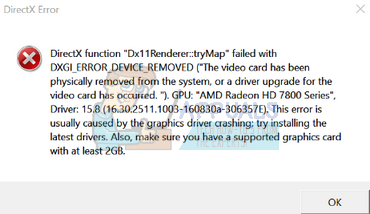
D3D ERROR DXGI REMOVED
Or something like 0001x-Dead
i get this whenever i boot up arma
Every time I factory reset it works for a good day then it starts crashing again...
pine kite
Make sure to let Steam repair/verify Arma 3 through the properties of it in the Steam app.
!steamverify
rustic eagleBOT
Steam file verification process:
Right Click on game -> Local Files -> Verify Integrity of game files
Arma 3
Steam Workshop Mod repair process:
Open Launcher -> Right Click on mod -> Repair
The first process will automatically verify Steam Workshop items as well.
fringe salmon
pine kite
Make sure to let Steam repair/verify Arma 3 through the properties of it in the ...
done this alrdy
pine kite
Remove the game entirely and reinstall. Or install Microsoft Visual C Redistributable 2013 and/or DirectX. See if that helps.
Your code I've seen reported here multiple times, but does not exist in this list of known error codes. I think because it is a code caused by the operating system rather than Arma 3 itself. So I suggest not to do a factory reset just for the fun of it. https://community.bistudio.com/wiki/Arma_3:_Unusual_process_exit
 wide wedge
does anyone know the issue with cup maps 2.0? whenever i open chernarus and move around too fast/load too many objects (seemingly) my screen freezes for like 4 seconds then crashes. I have tried the cup website but it is down.
Version 2.10.149954
Version 2.10.149954
Fault time: 2022/11/06 19:56:32
Fault time: 2022/11/06 19:56:32
Fault address:  2A4EEE13 01:00DDDE13ll D:\SteamLibrary\steamapps\common\Arma 3\Arma3_x64.exe
Fault address:  2A4EEE13 01:00DDDE13ll D:\SteamLibrary\steamapps\common\Arma 3\Arma3_x64.exe
file:     Ukraine
world:    cup_chernarus_A3
file:     Ukraine
world:    cup_chernarus_A3
Prev. code bytes: 24 18 89 54 24 10 55 41 55 48 8B EC 48 83 EC 38
Prev. code bytes: 24 18 89 54 24 10 55 41 55 48 8B EC 48 83 EC 38
Fault code bytes: 0F B7 01 48 89 7C 24 28 0F B7 79 02 4C 8B E9 4C
Fault code bytes: 0F B7 01 48 89 7C 24 28 0F B7 79 02 4C 8B E9 4C
=======================================================
=======================================================
this is what rpt shows, ive had this problem for a long time and it does not seem to be related to the mods loaded (apart from the cup ofc)
fringe salmon
pine kite
Remove the game entirely and reinstall. Or install Microsoft Visual C Redistribu...
how do I reinstall visual c direct x stuff?
pine kite
Google for the download. It's Microsoft own stuff, so make sure to get it from a link from them.
Microsoft Visual C++ Redistributable 2013 (only need to install the x86 and x64 file. The vcredist_arm.exe does nothing to your system for Arma 3) https://www.microsoft.com/en-us/download/details.aspx?id=40784

Microsoft Download Center
The Visual C++ Redistributable Packages install run-time components that are required to run C++ applications that are built by using Visual Studio 2013. For an updated version of these redistributable packages, see KB 3138367.
fringe salmon
yeah still
 pine kite
Something caused your GPU driver or something for it to crash or DirectX can't use it anymore. Reinstall drivers for it might help.
This list of possible solutions also address this. I personally have not had this happen again since I performed # 5 on this list: https://appuals.com/fix-dxgi_error_device_removed/#:~:text=The error “DXGI_ERROR_DEVICE_REMOVED” usually occurs,graphics card%3B hence the error.
Appuals.com
The error “DXGI_ERROR_DEVICE_REMOVED” usually occurs when your graphics card isn’t able to run on your computer properly. The computer momentarily loses
fringe salmon
im gonna go to bed, I'll work on it in the morning thank you.
uncut trellis
wide wedge
does anyone know the issue with cup maps 2.0? whenever i open chernarus and move...
Cup website moved to new address a while back and they have discord too. Try with cup stuff only, you got a lot of other mods there too
wide wedge
uncut trellis
Cup website moved to new address a while back and they have discord too. Try wit...
As I said I’ve tried with only cup
Does the rpt contain any useful shit that you can make out or not really?
uncut trellis
wide wedge
As I said I’ve tried with only cup
You didn't say so in the message and the rpt preview showed multiple mods. Can't look into the rpt right now, am busy with stuff
 hexed thorn
fringe salmon
yeah still
hexed thorn
fringe salmon
yeah still
I've had this on my previous computer, then I decided to buy a new computer and it still showed up...
hexed thorn
I still have the issues but since I changed it from 64 bits to 32 bits, it doesn't crash anymore. Now it starts randomly going to 2 frames per minute, but I can still save the game and restart
pine kite
32 bits can only handle so much mods because of memory limits. That might also explain the 2 frames per minute if the memory dries up.
hexed thorn
I was playing vanilla arma with no mods when it happened
pine kite
Just saying, 32 bits isn't something you want for the long run if you do want to use (larger/more) mods at some point.
 lament abyss
I´m running a mission with friends on my server, some of them have the problem that they can zoom in on a scope but can´t zoom out anymore. We tried spamming Num - but it did nothing. Even a rejoin doesn´t fix it. The control binding are set Zoom out is correctly set to Num -. It happens on scopes and vehicle turrets. I don´t know what causes it and hence don´t know how to fix it. I never had the problem and others never had aswell. Only some people
pearl sorrel
lament abyss
I´m running a mission with friends on my server, some of them have the problem t...
sounds like a mod issue. try in vanilla.
 cold aspen
Hey, I'm trying to upload a scenario to Steam but it gives me the following message, any help?
Unable to upload file to steam cloud
golden nova
Enable steam overlay maybe
uncut trellis
lament abyss
I´m running a mission with friends on my server, some of them have the problem t...
Perhaps some mismatch of mods
fringe salmon
hexed thorn
I still have the issues but since I changed it from 64 bits to 32 bits, it doesn...
Ok, so I changed to 32bit but now my reshade wont work sadly. And thats the only reason why I really play arma lol.
I changed it to 64bit now its working
im so confused
nvm
I crashed when I enabled reshade effects
uncut trellis
could very well be your reshade settings or install being broken
but for reshade issues youll have to talk to its maker
fringe salmon
my game is crashing at night the screen is frozing, but is just at night when is day don't crash just night, can someone help me please?
uncut trellis
fringe salmon
my game is crashing at night the screen is frozing, but is just at night when is...
got mods? if yes, turn them off and try
fringe salmon
uncut trellis
got mods? if yes, turn them off and try
ok
fringe salmon
uncut trellis
got mods? if yes, turn them off and try
the game don't freeze without mods
but with mods the game freeze
ocean cosmos
fringe salmon
but with mods the game freeze
easiest way to check unload half the mods you use with freezes
if it still happens, unload half the mods you have loaded and test again.
if it no longer happens, the issue is with the other half of mods. load that half, then unload half and test. if it happens, issue is with the other half.
so on and so forth
uncut trellis

ocean cosmos
an explanation like that could really do with being a bot command
fringe salmon
ocean cosmos
easiest way to check unload half the mods you use with freezes
if it still happ...
ok
thank for help i will try
 uneven mortar
Guess I have to reinstall Arma 3.
Least I can put it on my SSD now and load in faster.
Apparently it will take 8 hours to install with my doo doo water 2 MB/s internet speed 😢
 hazy crescent
Loaded up Arma3 and It Says I haven't played before?
I retryed the loading and it is still the same
Okay
so9
It says I haven't played before
Yet all my progress is saved
uneven mortar
6 hours later I'm 60% done with the download.
lime sphinx
well, i've got my "200 hours in game" achievement roughly at 800 hour mark 🤷♂️
uneven mortar
Launcher hours, main menu hours, loading in hours.
They all add up. Especially if you put your PC onto sleep but have the launcher still open.
lime sphinx
i'm pretty sure at least 400 of those were with the 3DEN open, but whatever
teal lark
Having an issue where the editor camera freezes and I can't turn it or move at all I can only like move objects in view and insert/delete I cannot move the camera at all. Occurs after leaving the gameplay playing as a unit for me
uneven mortar
80% done.
Love my ISP taking over 8 hours to download 65 gigs 😐
golden nova
teal lark
Having an issue where the editor camera freezes and I can't turn it or move at a...
Sounds like Zeus issue, not an editor one. You sure you're not getting your cam frozen when you remote control a unit in Zeus?
And if you use mods like Achilles or any other there's nothing you can do about it at all, Arma just causes your og unit to loose "connection" with your Zeus module probably, can't troubleshoot things when we don't know your issue details
teal lark
golden nova
Sounds like Zeus issue, not an editor one. You sure you're not getting your cam ...
It's not zeus though it's editor when I leave the gameplay from going as a unit to go back to editor
golden nova
if you use any mods, run your game with none and see if it works - if you can go back to editor without that bug it means you had a broken mod loaded
teal lark
Alright
I'll have to do it when I wake up since its 4 AM here I need to get some sleep
 languid dagger
Did the A3 AI break recently?
They seem to be really weird about getting into vehicles; either they don't get in or they leave people behind.
steady hawk
Most unlikely. If it is broken, most likely a Mod does
languid dagger
steady hawk
Most unlikely. If it is broken, most likely a Mod does
Saw it while running vanilla.
AI seems to be weird when it's supposed to get into player controlled vics. Saw it when trying to load up the wounded in the tac ops mission pack involving the AFV (steel pegasus, I think).
Same issue seemed to be popping up in some scenarios as well, though those were modded.
 toxic inlet
languid dagger
Saw it while running vanilla.
AI seems to be weird when it's supposed to get in...
toxic inlet
languid dagger
Saw it while running vanilla.
AI seems to be weird when it's supposed to get in...
Could you video/ make a repro mission in VR with vanilla content? That would make it a lot easier to look into.
languid dagger
toxic inlet
Could you video/ make a repro mission in VR with vanilla content? That would mak...
Don't really have the skill or know how to make a mission.
But I can tell you the specific point in vanilla where I found it, and I'll try to make a video (never done that before) when I have some time.
The mission itself is part of the Tac Ops DLC (Steel Pegasus), where you have to go to and load up wounded in your Marshall IFV. The wounded pretty much don't enter into the IFV at all unless the player enters and exits the IFV (sometimes needing to do so repeatedly).
pine kite
languid dagger
Did the A3 AI break recently?
They seem to be really weird about getting into v...
They often can't get in if there are objects obstructing their pathing. Move the vehicle a bit forward to make immediate room.
languid dagger
pine kite
They often can't get in if there are objects obstructing their pathing. Move the...
Tried all of that
At one point I had them all lined up and following me; they just wouldn't get into the vehicle till I got out.
golden nova
languid dagger
Tried all of that
At one point I had them all lined up and following me; they j...
I've experienced that too but it's been there for years (at least from 2019). Are you sure you haven't killed a civilian or did some blue on blue?
languid dagger
golden nova
I've experienced that too but it's been there for years (at least from 2019). Ar...
Nope.
Seems to just be broken.
Saw something similar in a scenario where I load up troops as well; always left a guy outside who never got in.
umbral narwhal
languid dagger
Did the A3 AI break recently?
They seem to be really weird about getting into v...
What's new there? :P
If it's one guy who refuses then he's probably trying to get in the same seat you're in.
Are you using the get in order when outside or inside the vehicle?
golden nova
umbral narwhal
If it's one guy who refuses then he's probably trying to get in the same seat yo...
I constantly see this in Callsign Minotaur campaign, if you are with your initial crew in the vehicle and you order an lately-assigned support team (that is in your group), they will not get into your vehicle as long as you are in it. Once you leave it, they will take the free seats except the one you've been in because you gave the order while being inside, so they won't take it
if you would be outside from the beginning and ordered that team to get inside, they will take seats including the commander seat
umbral narwhal
Is there any distinction between this support team and standard squad mates?
golden nova
it's a standard CSAT group I think, they are standing at some place and once you drive there, they are joinSilented to your team. Same faction, same side
sometimes one or two will get in while you're in the vehicle, otherwise they will just wait until you get out so they can take the passenger seats. If they wait like that and you drive around they will run behind you trying to get to the "get in" position but without actually walking towards the vehicle doors
 indigo summit
Hello, whenever I load into a online server my game does this and stays like this. Any help?
 umbral narwhal
Regardless of which server?
indigo summit
umbral narwhal
Regardless of which server?
Yep any server
umbral narwhal
But if you just start Arma without connecting it loads fine?
indigo summit
umbral narwhal
But if you just start Arma without connecting it loads fine?
Without connecting to a server yeah.
umbral narwhal
Restart (not shutdown/power on) your PC. Restart your router. Try disabling any third party firewalls if that doesn't work.
indigo summit
Ty
 unreal jacinth
I get this error when I try to join my dedicated server that's hosting on another pc. how can I fix this

 craggy robin
curious question, I'm using ACE3 atm and zeusing a few sessions
we're running into issues with the CSAT units with the light combat fatigues from the western sahara CDLC are basically invulnerable 50% of the time
sometimes they'll die like most AI will, but sometimes they'll straight up take no damage
anybody else having this issue?
uncut trellis
Mods causing issues.
 bronze river
yep addressed in WS Discord
#901047449098006559 message
 hollow frigate
Just got arma, anyone knows why this game is only using like 30-40% of both my cpu/gpu?
tried some different settings/startup args without luck
bronze river
arma 3 is well known to be CPU heavy than GPU, so may want to increase the graphic
golden nova
because it's using one core
hollow frigate
but none of the cores is at 100%
hollow frigate
that sucks
umbral narwhal
On some CPUs the main thread bounces around between cores so it never reads as 100%.
indigo summit
We have made some progress, but now it's stuck on this and this only. Help?

Could it be from the amount of mods I have? Because I have a lot.
uncut trellis
indigo summit
Could it be from the amount of mods I have? Because I have a lot.
you must join a server with just the mods the server allows
uncut trellis
if they are not set to load they should not matter
indigo summit
I deleted the ones I dont use Ill let you know the outcome
uncut trellis
dunno if having huge amount of compositions might
in case you have those
have you tried joining one of the BI official servers?
native venture
native venture
Hi everyone. I'm having a problem with Arma 3. After been playin for a while, ev...
Solved. I bought a new PC.
 sleek sky
Im a bit thrown away.
So i placed 50 AI and couple of mortar strikes on altis while AI fires on me, absolutely fine, no lag no nothing.
Now i did the same on livonia and my Frames drop to 10-15 frames when the mortars hit. i cant think of a logical reason on why this would happen
I rum 64GB DDR4 Ram, a Ryzen 7 5800x and i have a GTX1070 if someone needs that info
I guess livonia just isnt really the "best" map for the Real virtuality engine, since all the cDLC maps, and altis, stratis malden, tanoa and so on run absolutely flawlessly but when taking into consideration the amount of trees on livonia its no wonder 😅
umbral narwhal
For what it's worth, this is normal, and no-one seems to know exactly why :P
I would guess there's something about the tree objects that makes either the AI pathfinding or vision tracing extremely slow.
bronze river
umbral narwhal
I would guess there's something about the tree objects that makes either the AI ...
huh interesting i remember Dwarden said that AI in Livonia uses tree for cover quite well
 supple crystal
Stuck on receiving data, joining my own server.
- Everyone else connected fine
- Same server and same mission file I played yesterday without issue
- Verified game data
- Deleted mission cache.
After deleting the mission cache it downloads the mission file 100% and then resets to receiving data and does nothing....
pine kite
Might be usefull to look into both the server and client rpt log file, focussing on the time you tried to join.
And see if there is a mismatch of mods. Might be you enabled a mod in the mean time.
supple crystal
Everything's loaded fine, I think it's that thing where even though you select a role, ping/packet loss issues stop you from actually loading into the slot properly
spice spear
Is it possible to add a mod sub-structure somehow?
(
└📁@MyModName
⠀└📁Addons
⠀⠀└📁ModPart1
    └ Pbo files..
⠀⠀└📁ModPart2
    └ Pbo files...
```)no. why would you?
spice spear
a lot of mods have their sub-mods to fix various bugs some mods sometimes require another 4 mods for it to function properly viz. RHS-ACE compatibility etc.. And the more loaded mods, the worse the fps etc...
As a result, I wanted to include these smaller 1Mb mods in one larger mod that would be loaded as a whole, but for possible future updates, I wanted to structurally keep order in that mod so that I could possibly update or delete parts of it..
without having to go through like 90 pbo from different mods... (The mod would of course remain private because the steam workshop does not allow such mods to be published publicly..)
uncut trellis
not possible as far as I know. make mod presests for launcher. easy couple of clicks switching
ocean cosmos
The number of individual mods loaded really doesn't influence fps that much, if at all
ocean cosmos
indeed, which wont change by just shifting the pbos into the same mod
 night yarrow
pls help

 fair goblet
i keep getting a black screen ONLY when i go into the campign of Contact...
 rose sleet
I still don't get why since the update my game video is stuttering about every 3 seconds with a FPS drop of 50%.
On Malden it goes away after a little a while but on Altis it does not stop. Very frustrating.
I can barely play, whatever are the settings.
I7-11900K (non OC), MSI RTX3060 12Gb, 64 Gb DD4-2666, dedicated 1 Tb SSD NVMe 2, MSI B560M PRO-VDH.
ocean cosmos
are you running any mods
 rustic eagleBOT
Steam file verification process:
Right Click on game -> Local Files -> Verify Integrity of game files
Arma 3
Steam Workshop Mod repair process:
Open Launcher -> Right Click on mod -> Repair
The first process will automatically verify Steam Workshop items as well.
fair goblet
pine kite
Verify your install via Steam:
i did this for my black screen issue
i get in and can see the gun im holding and the mag and stamina but cant see the world
i can open the map and everything
 obsidian arrow
!steamverify
rustic eagleBOT
Steam file verification process:
Right Click on game -> Local Files -> Verify Integrity of game files
Arma 3
Steam Workshop Mod repair process:
Open Launcher -> Right Click on mod -> Repair
The first process will automatically verify Steam Workshop items as well.
obsidian arrow
Im gonna do it in a bit
fair goblet
pine kite
Are you using mods?
no and ik im just saying to try and get help
supple crystal
@pure elm Hi 👋
Having some issues with your SRV Lynx
In dedicated MP (Using ACE) its not showing in the Zeus menu, and after unfolding the M240, no one can mount the M240 (can still stow it though)
fringe salmon
Can someone help me.. My Arma 3 been looking like this. No vegetation, no leaf's and bushes. I already rolled back my driver and disabled ATOC, DID a clean installation of Arma 3, still no luck. (All mod/dlc maps)
 steady hawk
Video Settings > Terrain
 sinful coral
so im trying to use Elietness but everytime i try to open it it says this

plz @ me if you have an answer
rose sleet
ocean cosmos
are you running any mods
With or without does change anything.
steady hawk
sinful coral
so im trying to use Elietness but everytime i try to open it it says this
You should to install it from Bytex directly
https://mikero.bytex.digital/Downloads
fringe salmon
steady hawk
Video Settings > Terrain
do I set it in ultra?
pine kite
Autodetect is usually best. (higher settings shift the processing to the GPU rather than CPU. If you set lower settings you punnish the CPU that already has a tough time processing Arma with single core focussed processing)
steady hawk
Any value than Low is enough
fringe salmon
no luck
uncut trellis
First make sure you load no mods.
fringe salmon
do I also remove my reshade?
fringe salmon
Fixed it the mod causing it was TFL extras
 rigid locust
So I’ve got an issue whenever I play on a server now, my TS keeps popping up saying it’s not connected, happens every 20-30 seconds or so. No idea what’s causing it or how to fix it. I redownloaded TS, checked the TFAR mod and validated all arma files
ocean cosmos
Did you load the tfar plugin for ts3
rigid locust
ocean cosmos
Did you load the tfar plugin for ts3
Yeah. It’s been running fine for the last year but after the latest arma update fkr DLC it’s seemed to have fucked it
ocean cosmos
Did you update the plugin
rigid locust
ocean cosmos
Did you update the plugin
Yep. It’s the latest version, the same that everyone else is running, 1.-1.0.328
 midnight abyss
Hello. I have problem in Arma 3. I bought this game 10 months ago. First 3 months I didn't had problems with lags in game, because I set graphic to low. I joined a multiplayer group so I had to install a big modpack for game. Now I wanted to play singleplayer and I have big problems with lags. I can't play singleplayer and I can't use Eden editor, because I have a lot of lags. Sometimes I can't start the game. How I fix this problem?
ocean cosmos
rigid locust
Yep. It’s the latest version, the same that everyone else is running, 1.-1.0.328
In that case I would recommend asking the tfar discord as they're more likely to know than us
 cunning sierra
sinful coral
so im trying to use Elietness but everytime i try to open it it says this
cunning sierra
sinful coral
so im trying to use Elietness but everytime i try to open it it says this
It says you did not install the depbo dependency
midnight abyss
Hello. I have problem in Arma 3. I bought this game 10 months ago. First 3 months I didn't had problems with lags in game, because I set graphic to low. I joined a multiplayer group so I had to install a big modpack for game. Now I wanted to play singleplayer and I have big problems with lags. I can't play singleplayer and I can't use Eden editor, because I have a lot of lags. Sometimes I can't start the game. How I fix this problem?
pine kite
Don't repeat the same issue in multiple channels in the same day. Stick to one. This one seems fine. But at the very least state the modpack you are using. And try without the modpack. So unload them in the launcher.
 runic mural

When I open Arma 3 server, it does this.
also what's the difference between reforger and a server.
golden nova
Reforger is a different Arma game.
runic mural
golden nova
Reforger is a different Arma game.
and the question before?
pine kite
That wasn't a question. But what do you want to do with it?
golden nova
runic mural
and the question before?
idk, it tells you in that readme file what to do, "Usage" section. If it doesn't start then look up tutorials on YT.
runic mural
pine kite
That wasn't a question. But what do you want to do with it?
How do i go onto the actual game.
Arma Server.
alright.
golden nova
Arma Server is not a game, it's for hosting servers.
you open arma3.exe or anything similar depending on what type of your OS is.
runic mural
what is the Arma game
pine kite
A server seperate from the game to be specific (dedicated servers)
golden nova
You're trolling, right?
pine kite
The thing that starts when you press play in Steam.
pine kite
That is the launcher. You start the game from that (helps to load mods and select DLC and load into other servers.)
runic mural
pine kite
That is the launcher. You start the game from that (helps to load mods and selec...
Steam.
?
pine kite
How did you buy Arma 3?
midnight abyss
pine kite
Don't repeat the same issue in multiple channels in the same day. Stick to one. ...
But the Arma 3 multiplayer group, where I been, they have a own installer for the modpack, so I didn't installed the modpack from steam, but from multiplayer group's own website, and in launcher it not show the modpack. I have lags in Arma without the mods too
pine kite
Suspicious, either you bought it, or a gift by someone, or piracy.
pine kite
runic mural
Steam.
So you do know what Steam is.
runic mural
pine kite
Suspicious, either you bought it, or a gift by someone, or piracy.
It's free on steam..
pine kite
nope it's not: https://store.steampowered.com/app/107410/Arma_3/

Experience true combat gameplay in a massive military sandbox. Deploying a wide variety of single- and multiplayer content, over 20 vehicles and 40 weapons, and limitless opportunities for content creation, this is the PC’s premier military game. Authentic, diverse, open - Arma 3 sends you to war.Key Features in Arma 3Altis & StratisDefeat your ...
Price
$29.99
Recommendations
175637
Metacritic
74
runic mural
pine kite
nope it's not: https://store.steampowered.com/app/107410/Arma_3/
Where is the arma3.exe
thingy
Oh..
I got the server thing.
not the actual ...
AHH!
pine kite
The dedicated server is indeed free of charge. But you can't play with it.
They have different ID numbers
sinful coral
steady hawk
You should to install it from Bytex directly
https://mikero.bytex.digital/Downlo...
i did
sinful coral
cunning sierra
It says you did not install the depbo dependency
no idea what that means
i installed it from mikero.bytex and then what do i do
 uncut trellis
 neon helm
how to get weapons into a helicopter
neon helm
how to get weapons into a helicopter
you will need to explain what exactly are you trying to do and where. editor, some SP mission, in MP or something else? The picture does not explain your situation
 jagged warren
does anyone else have zeus only show a select few (if entered through Eden)
pearl sorrel
select few?
pine kite
neon helm
GUYS PLEASE
No need to get impatient too. Someone will respond when they can make sense of your question, AND have the answer to it. What HorribleGoat wrote!
 mint kiln
Yo so my scroll wheel menu doesn't work. I press the space bar and scroll down and nothing pops up.
golden nova
look at the object you want to interact with, scroll to choose an option and confirm it with Spacebar (or Middle mouse button or whatever you've binded for that action), if you're looking at the object and no menu or action in the center of your screen shows up, you can't interact with it
 dapper seal
Hey everyone,
Question. I have a Dedicated server with some mods on it, and i've schrinken it already to only CBA, and CUP Terrains and MCC.
When i'm spawning OPPFOR AI all the clients are dropping to 1 fps for 3/4 seconds, and when its spawned back to normal. i stopped playing arma 3 in 2021, and i had no problems with it at that time, but now i do have this issue
How can i troubleshoot this, and is it a common problem or?
Sorry for my rusty english.
golden nova
how many AI are you spawning at one time?
golden nova
does it happen when you load up vanilla game (no mods) and spawn the same amount of AI?
dapper seal
golden nova
does it happen when you load up vanilla game (no mods) and spawn the same amount...
gonna check.
golden nova
you could look into your RPT file to see if spawning stuff causes errors that could be logged to that file, from the stuff you listed I would suspect MCC as it's a framework that is pretty clunky and has many useless features that have broken many missions I attended
!rpt
rustic eagleBOT
Arma RPT
Arma generates a .rpt log file each time it's run, which contains a lot of information like the loaded mods, or any errors that appear, this log file can be very useful for troubleshooting problems.
To get to your RPT files press Windows+R and enter %localappdata%/Arma 3
Additionally see the wiki page for more info: https://community.bistudio.com/wiki/Crash_Files
To share an rpt log here, please use a website like https://sqfbin.com/ to upload the full log, that way the people helping you can take a look at it and try to figure out the problem you're having together with you.
Note: RPT logs can hold personal information relevant to your system, the game or others.
dapper seal
need to go to work now, come back on it later!
mint kiln
golden nova
look at the object you want to interact with, scroll to choose an option and con...
It's the action menu. Like I need to put a charge on the helo but it's not opening
 thorny bay
There my issue come again... im a geforce now player and while installing mods on launcher, the launcher seems just to randomly exit while installing these mods and i cant basically play
uncut trellis
that may be something you have to talk to GFN support for
thorny bay
I did
They just said we dont support mods and we dont cate
Care
I have never had issue like this
uncut trellis
it may be something is broke in GFN end
thorny bay
Idk
uncut trellis
but if they dont offer any support for that there isnt much to do
thorny bay
Im trying to launch it rn
It downloads fine right now
But it may crash
Im on steam window to see how it goes
Like the geforce now turns off the game or the game just itself turns off
mint kiln
With the action menu with the scroll wheel and space bar. I'm trying to do the Blackfoot mission campaign and I'm supposed to put a charge on it but it won't let me. The action menu isn't working
 tropic geyser
rustic eagle
tropic geyser
rustic eagle
This might solve the problem I was about to start typing but would this log errors within the scroll wheel menu not doing the option you selected?

I can do that too armabot
 pine epoch
how do I fix this

 delicate elm
pine epoch
how do I fix this
delicate elm
pine epoch
how do I fix this
Load the Global Mobilization DLC too?
pine epoch
thank you
 young flare

why does my ai keep on falling back even though ive given them a move marker to move to? why do they not want to raid the compound and i how can i make it that the enemy ai detects the raiding ai when they actually detect the compound or are very near it? can somebody explain? this is very frustrating.
young flare
umbral narwhal
Not sure what you mean with the second part.
Just the ai loves doing long range battles and absolutely hate cqb lol
 urban mason
how do i go about readin a .rpt?
||have a couple conflicting mods and tryin to figure out why||
umbral narwhal
Generic crash. Matters more when and where it happens.
 agile quail
serbia and like now and like 5 minutes ago
umbral narwhal
sighs
umbral narwhal
Like if it's a few seconds after you start the game and happens every time, that's very different from having a one-off crash half an hour into a KoTH session.
umbral narwhal
Fix your roleplaying?
agile quail
hw do i fix 0xC0000005 - ACCESS_VIOLATION
umbral narwhal
What were you doing when it happened?
umbral narwhal
Single player, no mods?
umbral narwhal
Single player, no mods?
umbral narwhal
Run a steam verify on Arma.
Could well be hardware issues though.
@urban mason The RPT won't necessarily tell you anything. Depends what sort of conflicts you're talking about.
urban mason
umbral narwhal
<@326221775786737665> The RPT won't necessarily tell you anything. Depends what ...
3CB and mrh when loaded give you an infinite loading screen
when trying to getting into a mission
umbral narwhal
What about with a blank mission?
urban mason
umbral narwhal
What about with a blank mission?
yea
tried it with nothing but them loaded and still does
pine kite
urban mason
how do i go about readin a .rpt?
read it like just about any text file. Notepad from windows you can use. But 3rd party app Notepad++ is better.
!rpt
rustic eagleBOT
Arma RPT
Arma generates a .rpt log file each time it's run, which contains a lot of information like the loaded mods, or any errors that appear, this log file can be very useful for troubleshooting problems.
To get to your RPT files press Windows+R and enter %localappdata%/Arma 3
Additionally see the wiki page for more info: https://community.bistudio.com/wiki/Crash_Files
To share an rpt log here, please use a website like https://sqfbin.com/ to upload the full log, that way the people helping you can take a look at it and try to figure out the problem you're having together with you.
Note: RPT logs can hold personal information relevant to your system, the game or others.
fringe salmon
Why does steam of my friend not keep the track of arma 3 hours, it usually just says that he played for 1 minute(when in game), even tho he played for more
golden nova
fringe salmon
Why does steam of my friend not keep the track of arma 3 hours, it usually just ...
it's Steam problem not Arma no? Hour counting is done on the Steam server-side so either he messed up app privileges or Steam has broke something for someone again
 proud basin
arma 3 stops responding at the start screen when the steam overlay in the bottom right turns on (edit: i turned off a modpack and it worked again. ignore this)
 dapper seal
But did you restart steam
 rich mantle
the boheimia support doesnt even let me send anything
dapper seal
Because sometimes steam is glitching out🤣
rich mantle
yes
ive got a copy of the troubleshoot
fs
cant even send it
too big
got a idea
dm
can anyone help
and why doesnt the support even work just crashes when i try to send
golden nova
rich mantle
too big
here's your answer probably
go to the feedback tracker site and upload it there, should have no file limits https://feedback.bistudio.com/
and restart your steam and/or pc
rich mantle
thank you
fringe salmon
3den Editor Freezes on loading map, this didn't happen this early morning. I unindtalled the most recent mod, but the problem still persists. I don't know what to do at this point.
golden nova
load eden without mods and see if issue persists, if it's gone, start adding your mods one by one until it freezes again and you'll know what is causing that
fringe salmon
golden nova
load eden without mods and see if issue persists, if it's gone, start adding you...
still freezes without mods. my eden has always worked until i installed one mod today (removed It already, but my Game gets stuck at the map loading screen)
that's happening to me too, suddenly eden IS not working for any map anymore. How did you fix?
rich mantle
might just refund arma done with it , nothing is working
could someone take a look at the report
rich mantle
I’ve downloaded it to a external hard drive
uncut trellis
rich mantle
I’ve downloaded it to a external hard drive
Whats that?
 low sapphire
Keep getting status access violation however did get the game to run smooth this morning for an hour before I had to close it
keep getting status access violation
pine kite
If the mod is not unsubscribed then it keeps returning. Simply deleting the file will make steam redownload it.
pearl sorrel
low sapphire
Keep getting status access violation however did get the game to run smooth this...
TFL mods are like that. Wanna try playing without ripped assets?
Also you have unnamed mods, presumably more bad mods...
So unload all these and try again.
low sapphire
ill try it I just get pissed off that mods will work for months then one day outta the blue you cant get your game to work. Arma is the only game I ever have consistent troubles with and I got GTAV LSPDFR heavily modded
pearl sorrel
Yes. Because GTAV and Arma 3 are totally comparable games.. 🙄
 quaint jewel
rich mantle
I’ve downloaded it to a external hard drive
quaint jewel
rich mantle
I’ve downloaded it to a external hard drive
Not according to your logs... according to the logs its installed to your Desktop
fringe salmon
fringe salmon
that's happening to me too, suddenly eden IS not working for any map anymore. Ho...
for anyone who's trying to find an answer about 3den not loading, i fixed it by rebooting my computer.
 storm shale
I'm unable to update workshop mods using Publisher with the following error: https://imgur.com/a/GjhVzqj
Has anyone dealt with this before?
quaint jewel
Thank steam for generic almost useless error messages 😄
Did you only change files? no text or description or image?
Maybe some file is too large (I think you'd reach pbo limits before you get to that 🤔 )
Maybe some newly added file contains invalid characters in the name (I don't know what that might be)
storm shale
No special characters, description was changed. Pbos are all under like 200mb and I've seen bigger than that.
I can try updating without updating description
not updating the description doesn't work
storm shale
2022-11-17 09:55:18,789 [ERROR] 1 (:0): Publisher.PublishProgressViewModel.<PublishItemExecute>b__19 - Publisher.SteamAsyncOperationFailedException: Steam error code: 8, Error code: 1, Error message: STEAM_API_DLL TODO
is my error message literally TODO
bruh
quaint jewel
yush 😄
steady hawk
TODO: fix 😄
storm shale
i'm glad its funny for you guys 😢
pine kite
The files for the mod preset are located in C:\Users%username%\AppData\Local\Arma 3 Launcher\Presets
See if you can delete it manually when the launcher and the game is shut down.
 odd flicker
i got a problem, whenever i start/join a mp server and start the mission i die and have to respawn without even knowing why, any fixes?
mods:
ACE
AVSR
FOW
CBA
CUP Terrains
IFA3 AIO
Ironfront arma 3 ace patch
zeus enhanced
zeus enhanced ace patch
TFAR
"https://steamcommunity.com/sharedfiles/filedetails/?edit=true&id=2889699976"
my own mission for my unit,

Steam Workshop: Arma 3. Collection for 1st Battalion 6th Marines Unit Arma 3
odd flicker
figured what it was, its something like "respawn on start" in description.ext. but idk how to find/edit it
umbral narwhal
description.ext is just a text file in the root of the mission.
odd flicker
i only have sqm
golden nova
then create that file and add respawn line to it
the "Respawn/Revive" category is what you should be interested in
 neon briar
fringe salmon
that's happening to me too, suddenly eden IS not working for any map anymore. Ho...
neon briar
fringe salmon
that's happening to me too, suddenly eden IS not working for any map anymore. Ho...
basically go to your addons folder on the the documents and delete everthing cause its prob a corrupted map you have worked for me
odd flicker
golden nova
then create that file and add respawn line to it
problem is, how do i add it to my mission. rn my server runs the mission from a PBO file
golden nova
if that's your own mission than you have the original files no? and you exported it to a PBO
if not then open that pbo with pbomanager and extract that mission, edit the Description file there, pack it back with pbomanager and upload on your server
odd flicker
golden nova
if not then open that pbo with pbomanager and extract that mission, edit the Des...
all i get when i open the file is sql
golden nova
ask the person who made that mission to edit the Description.ext file for you then
odd flicker
i made it 😂
golden nova

odd flicker
yeah
hold on
no..
well ehm, basically when i exported the file i exported as MP which only adds the sqm file, i didnt export as mission/sp which added description..
lime sphinx
Attributes - Multiplayer and under respawn template there is a checkbox for "Respawn at start" then
I mean in editor before exporting
odd flicker
nvm i was just dumb, first time creating a missing so yeah i fixed it
fringe salmon
neon briar
basically go to your addons folder on the the documents and delete everthing cau...
I had to reboot my computer. Thanks for your advice, btw.
 zealous ledge
my arma has been doing this for a while. Usually it freezes on the main menu and i close it and reopen it and it eventually unfreezes, now it freezes permanently
i cant click anything or do anything
ive unsubscribed from most of my scenarios
it works when i put it into 32 bit but when i try to use eden its really buggy
all the textures go low poly and i get a super low framerate.
I dont know if its a mod, or what but it wasnt like this a couple of weeks ago

heres my title screen if it helps
majority of my mods can be seen on the bottom of the screen
umbral narwhal
That's an awful lot of mods.
zealous ledge
do you know of any mods conflicting with the current version of the game?
and i never have figured out that cfg error
umbral narwhal
You can figure some of those in the RPT if you enable debug mode.
pine kite
!rpt
rustic eagleBOT
Arma RPT
Arma generates a .rpt log file each time it's run, which contains a lot of information like the loaded mods, or any errors that appear, this log file can be very useful for troubleshooting problems.
To get to your RPT files press Windows+R and enter %localappdata%/Arma 3
Additionally see the wiki page for more info: https://community.bistudio.com/wiki/Crash_Files
To share an rpt log here, please use a website like https://sqfbin.com/ to upload the full log, that way the people helping you can take a look at it and try to figure out the problem you're having together with you.
Note: RPT logs can hold personal information relevant to your system, the game or others.
umbral narwhal
No point anyway, not like you can fix someone else's mods.
umbral narwhal
The config error probably isn't related to your freeze issue.
Config errors are dead common and mostly harmless.
umbral narwhal
Nah, that probably won't tell you what's breaking either.
zealous ledge
its awfully short
umbral narwhal
Your best bet is to do a binary search on your modlist. Disable half of them, see if it works.
If it does, enable half of the rest. If it doesn't, disable half of what's enabled.
Repeat until you find the broken mod.
zealous ledge
wait
i think i found something
12:49:18 [ACE] (common) INFO: Extension version: ace_artillerytables: 3.13.0-f5aa320
12:49:19 No alive in 10000 ms, exceeded timeout of 10000 ms
exceeded timeout
maybe i could find a way to extend that timeout window
im gonna disable ACE
pine kite
ACE 3.13? Looks like an ancient ACE. It's 3.15.something now.
3.13.0 is from January 1st 2020.
 neon flame
Im currently having issues downloading 2 mods from the steam workshop using TC Admin both mods when downloading get to the same point everytime and throw this https://gyazo.com/1c1faafb260c9fc684d630568c334778
Ive tried reuploading the mod to the steam workshop as a completely new item yet that didnt work, and Ive also tried some very old arma mods ive uploaded a good time ago and those didnt work either however another persons mod which is newly added to the workshop downloads fine? This issue is also happening on my other server now. I know I can upload via FTP but ideally I want to avoid that as it doesnt solve the problem with TC Admin...
If anyone has any suggestions that would be appreciated.
zealous ledge
pine kite
ACE 3.13? Looks like an ancient ACE. It's 3.15.something now.
so i just download new ace?
well thats the version of the artillerytables
i have ace 3.15
so it seems that ace is having trouble loading in
well, Its .dll files.
is there anyway i can change the timeout threshold for the addons?
lime sphinx
https://community.bistudio.com/wiki/arma.RPT#No_alive_in_10000
No alive in 10000
Usually when you have a while loop that's having to execute a lot of times without stopping or sleep.
though
zealous ledge
where can i find the fix tho
15:05:25 [ACE] (common) INFO: Extension version: ace_fcs: 3.8.4-ef4d289
15:05:25 No alive in 10000 ms, exceeded timeout of 10000 ms
heres the error im getting now
pine kite
Try the repair option when you click the 3 dots on the line for ACE in the launcher MODS tab. That should verify and download anything that is missing.
Or shut down Arma 3, the launcher, Steam. Then you can locate the ACE mod folder via SteamLibraryfolder\steamapps\common\Arma 3\!Workshop\@ace, and delete whatever is inside it. Then restart Steam. Let it verify the game. Then start the launcher, it should download any missing parts of ACE, which by now is all of it.
Fixing the timeout by extending it isn't a solution. If 10 seconds isn't enough, what is? The timeout is an indication something else isn't working correctly.
zealous ledge
ill try that
zealous ledge
it took a fat minute to verify so i think something was missing
stupid windows defender
pine kite
In before this is because someone stuck ACE in a bad private modpack.
lime sphinx
and 3.13.0-f5aa320 extension versions seem to match what i get in my install for all extensions (artillerytables and fcs included), 3.8.4 looks extra suspicious
lime sphinx
wait, i'm missearching
pine kite
umbral narwhal
That's an awful lot of mods.
May I remind you ( @zealous ledge ) that you had a whole bunch that is still unknown to anyone but you.
lime sphinx
at least 3.8.4-ef4d289, 3.12.0-8ddde18 and 3.13.0-f5aa320 are present 🤦♂️
pine kite
It never should, but it ends up always being so.
lime sphinx
like, you're two clicks away from checking. Just run the game without mods 🤷♂️
pine kite
Ok, scenarios could also be bad/outdated.
pine kite
You are only playing 1 scenario. Unsubbing from others makes no sense.
I presume you know which one you are choosing. Right?
zealous ledge
i always play editor lol
i never play scenarios
i saw that having extra scenarios reduces preformance
pine kite
In that case, it's your problem to fix which mods you need for which scenario. Unsubbing scenarios then won't do you much good.
Only use the mods which you actually need. Don't be lazy and keep them enabled. Unload them for every different scenario.
zealous ledge
making progress
its allowing me to click out of the cfg errors in the main menu and then it stops responding
ok
i figured
out
LOL
i left a mod on
that is a vehicle pack
that has 800 vehicles
im beginning to thinl
think
that that is whats happening
5gb mod
uncut trellis
what mod is that?
 zealous ledge
i think there is alot of cars there
uncut trellis
they are not very well made most of the time
lime sphinx
umbral narwhal
Your best bet is to do a binary search on your modlist. Disable half of them, se...
"just disable some of your goddamn mods and check" was proposed at least 2.5 hours ago already 🤷♂️
uncut trellis
😅
pine kite
You wanna be bloaty? Or a lean mean fighting machine?
zealous ledge
i wanna be tyler durden
lime sphinx
then cook some soap from all that fat. Instead of loading it into the game 🤷♂️
pine kite
zealous ledge
i wanna be tyler durden
Never heard of him before (the character). But Fight Club Wiki describes him as a non-bloat kinda person.
uncut trellis
the problems you have likely have nothing to do with the size of mods
but with mods that are made poorly and are full of errors
uncut trellis
yes thats what I mean by poorly made mods
pine kite
Probably because of those errors.
zealous ledge
it has 5 star rating tho
uncut trellis
means nothing
zealous ledge
we will see
so its not the vehicle pack
im gonna disable more mods
i have confirmed that ACE is the problem, its causing my game to freeze up
i also had old version of NIarms
ocean cosmos
Dont use old versions of mods
zealous ledge
i disabled the old niarms and a bunch of mods and its till not working
what
the freak
delicate elm
ACE is the problem I am sure that it isn't... maybe with all the other bloat ofc...
zealous ledge
im gonna attempt
project 34 bit
32
im thinking i have some mods that IM GOING to play with and they arent entirely compatible with 64 bit
uncut trellis
bit detph has nothing to do with mods
64 bit allows the game to use more computer resources
disable all mods
then enalbe some you want to use
and see if that works
if you insist using all your mods there isnt anything that can be done about this issue
 shadow raptor
Whenever I boot up the game, my audio settings reset to default (max) anyway to fix this?
 snow kettle
Hello, I'm In A Fighter Jet, And Every time Another Jet Shoots The Missle, I Dont Hear The Tone For It.
Does anyone know how to fix it ?
steady bobcat
snow kettle
Hello, I'm In A Fighter Jet, And Every time Another Jet Shoots The Missle, I Don...
audio settings, i think it's the radio volume thing for it
snow kettle
It's all the way up
snow kettle
I fixed it.
 crystal grotto
anyone not able to update CBA? it says it isn't on version 3.15.7 even though its meant to be 3.15.18 and its the correct version and I've repaired it and reinstalled and uninstalled it yet nothing I also updated all mods that use it
It says I'm on version 3.12.0 and it's also the official steam version
I've also completely restarted my pc and nothing
pine kite
shadow raptor
Whenever I boot up the game, my audio settings reset to default (max) anyway to ...
Are any other profile settings getting reset too?
shadow raptor
pine kite
Are any other profile settings getting reset too?
No. I use my main and I have a spare that I dont use whos settings are all default
pine kite
shadow raptor
No. I use my main and I have a spare that I dont use whos settings are all defau...
I mean are any keybinds and video settings, difficulty settings getting reset to default? Could be this is caused by your profile getting corrupted somehow.
 lavish sleet
My arma crashes every single time I try to edit or create/delete a profile, my existing profiles have also all disappeared except for my main one that appears on start-up. I don't know how to fix this at all
 merry igloo
anyone know how to fix this?
 umbral narwhal
@merry igloo You need to paste the error that pops up before that one.
lavish sleet
umbral narwhal
<@580557799663337472> You need to paste the error that pops up before that one.
I don't think I get an error maybe I do though
steady hawk
lavish sleet
I don't think I get an error maybe I do though
John didn't mentioned you
 worldly mantle
I am having a lot of trouble with my game I did a fresh start reinstalling it And All my mods are Corrupted And i also have a problem With the SOG DLC. This is Happening but the SOG DLC is not Loaded in.
 lavish sleet
steady hawk
John didn't mentioned you
lavish sleet
steady hawk
John didn't mentioned you
I was kind've asking if I needed a error message too
pine kite
worldly mantle
I am having a lot of trouble with my game I did a fresh start reinstalling it An...
It is loading the SOG DLC. The menu proves that. Let's first start the game without any mods. Is that working as it should? then start adding mods piece by piece while checking if they produce errors or funny things happen in the game.
pine kite
lavish sleet
I was kind've asking if I needed a error message too
Maybe some clues are provided in the RPT log file that the game generates. Though it is kinda cryptic at times. Secondary profiles are stored in a seperate folder: Documents\Arma - Other profiles
Maybe you forgot to look there.
!rpt
rustic eagleBOT
Arma RPT
Arma generates a .rpt log file each time it's run, which contains a lot of information like the loaded mods, or any errors that appear, this log file can be very useful for troubleshooting problems.
To get to your RPT files press Windows+R and enter %localappdata%/Arma 3
Additionally see the wiki page for more info: https://community.bistudio.com/wiki/Crash_Files
To share an rpt log here, please use a website like https://sqfbin.com/ to upload the full log, that way the people helping you can take a look at it and try to figure out the problem you're having together with you.
Note: RPT logs can hold personal information relevant to your system, the game or others.
 uncut canyon
After changing the server machine, we started to experience constant client crashes. They happen just out of the blue in the middle of the mission being played. We cannot understand the reason and how to solve it. Are there any specific launch options or something we can try?
pine kite
Yeah, remove -noLogs if it is enabled. Otherwise you don't get RPT files.
uncut canyon
pine kite
Yeah, remove -noLogs if it is enabled. Otherwise you don't get RPT files.
We have .rpt, but it crashes with an Exception code: C0000005 ACCESS_VIOLATION error under a variety of conditions.
golden nova
then check your RPT because exception code doesn't mean anything most of the time.
this one is specifically generic.
 ornate marsh
anyone know thr reason on why i cant use the eden editor? i reinstalled the game twice and it still wont let me use the editor
lime sphinx
how does "can't use the eden editor" look? No button? No reaction when clicking the button? Crash when trying to open?
lime sphinx
have you tried creating a new user profile in game and opening editor with it?
uncut canyon
golden nova
then check your RPT because exception code doesn't mean anything most of the tim...
We don't understand the exact cause of the .rpt crash. Along with the logs, .mdmp and .bidmp files are created, but we don't know how to read them.
golden nova
uncut canyon
We don't understand the exact cause of the .rpt crash. Along with the logs, .mdm...
we neither, because we can't see what you have on your PC, so let me quote the bot
To share an rpt log here, please use a website like https://sqfbin.com/ to upload the full log, that way the people helping you can take a look at it and try to figure out the problem you're having together with you.
uncut canyon
golden nova
we neither, because we can't see what you have on your PC, so let me quote the b...
I couldn't upload the log to the website from the link, so here's one
https://drive.google.com/file/d/1MjSjsQlgVbCbpz9VCviHclZcKHIOe3cN/view?usp=sharing
low sapphire
this error has kept me from playing for months however the weird thing is that sometimes I can play and sometimes I cant, I was able to play for about 45 minutes the other day and havent been able to play as every time I load into editor my game crashes
Theres no file llisted after the fault address in the RPT
pearl sorrel
@low sapphire I have already told you
golden nova
low sapphire
this error has kept me from playing for months however the weird thing is that s...
well solution is to not load half of the workshop, your PC probably crashes because of ram leak or simply cannot handle that amount of broken mods.
pearl sorrel
golden nova
well solution is to not load half of the workshop, your PC probably crashes beca...
fyi TFL is loaded.
ocean cosmos
thats also probably why
golden nova
💀
pearl sorrel
ocean cosmos
45 minutes without seeing a tfl item
sees a tfl item
crashes
golden nova
uncut canyon
I couldn't upload the log to the website from the link, so here's one
https://dr...
same solution for you probably, you use weird mod packs that probably contain pbos that either overwrite themselves or other mods update and your modpacks break them.
RBCCore and all that stuff - get rid of it, use normal mod presets.
you even managed to put Veteran mod there. bruh. I wonder how were you even able to play at all with it enabled along other mods
pearl sorrel
Also love that "no fault is listed" despite the massive amount of 3cb mod missing error spam.
4.5mb in less than 10 minutes
uncut canyon
I do not think that the reason is in our mods, because on the old machine for several years with the same assembly of mods there were no problems, they only appeared on the new one.
golden nova
all errors are about your mods, not your machine, so it is still your mods fault.
ocean cosmos
uncut canyon
I do not think that the reason is in our mods, because on the old machine for se...
if it works fine with no mods the issue is your mods
uncut canyon
ocean cosmos
if it works fine with no mods the issue is your mods
How am I supposed to determine this if it happens somehow randomly a few hours after the server starts up?
ocean cosmos
uncut canyon
How am I supposed to determine this if it happens somehow randomly a few hours a...
by running the server for a few hours with no mods
uncut canyon
And I will not put 150 people on the server without mods for the test.
golden nova
but you don't need half of the workshop for a single mission.
Your server crashes because it cannot handle the RPT spam, network gets clogged with messages.
ocean cosmos
uncut canyon
And I will not put 150 people on the server without mods for the test.
if youre trying to run that many people with that many mods and think theres nothing wrong with it then we really cannot help you
golden nova
and RPT spam is caused by broken mods that are either old or aren't compatibile with each other, what is very common when you start up a server with ~100 mods including several maps and modpacks.
uncut canyon
golden nova
but you don't need half of the workshop for a single mission.
Are we supposed to make a new build every day and have 1000 compatibility mods for different combinations of them?
ocean cosmos
let alone mods that havent been updated in half a decade
ocean cosmos
uncut canyon
Are we supposed to make a new build every day and have 1000 compatibility mods f...
no, you're supposed to not run that many mods 🤦
golden nova
uncut canyon
Are we supposed to make a new build every day and have 1000 compatibility mods f...
if you have a scenario, load ONLY mods that are used by that scenario, if you play in multiple settings then keep multiple bat files on your server or use an admin interface like FASTER. Loading up everything suprisingly puts more work on your server and significanlty rises up the chance of your bare metal go dead during playtime.
and having modpacks instead of using mod presets like a normal person is asking for server issues.
uncut canyon
ocean cosmos
no, you're supposed to not run that many mods 🤦
Our missionmakers combine different content from our build, we can't rebuild them every day and force the players to download them over. We have a permanent community and have been playing for over 7 years.
golden nova
struggle with the connection issues then, this is as simple as it is 
ocean cosmos
uncut canyon
Our missionmakers combine different content from our build, we can't rebuild the...
do. not. use. 100+. mods.
that is your issue, if you are going to continue to argue with people trying to help you remedy this we will simply not help you
golden nova
also if you've been here for more than 7 years than you do know how to have multiple .bat files for handling different scenarios.
pearl sorrel
Also, you already have 3 different "modpacks", not sure how having anymore that use the same mods would be an issue
For reference: https://www.red-bear.ru/index/ustanovka_sborki/0-9
golden nova
and if you don't know what does your RPT say and we know, then it leaves you little place to argue with what is the actual problem, you know?
uncut canyon
Played normally for 6 years, crashes started on a new machine a month ago - the assembly of mods is to blame. OK.
ocean cosmos
yes it is
in fact... old machine might've had rpt creation disabled thinking about it lol
golden nova
also mods update pretty frequently, at least more than once per 6 years.
uncut canyon
golden nova
also mods update pretty frequently, at least more than once per 6 years.
Thanks for the information, after all, we didn’t think of collecting people who monitor mod updates and their compatibility in 6 years.
golden nova
uncut canyon
Thanks for the information, after all, we didn’t think of collecting people who ...
you wouldn't have connectivity issues if they maintained compatibility.
¯_(ツ)_/¯
ocean cosmos
the only thing that could help is disabling rpt creation but thats pretty poor practice on a server
golden nova
I told you what is written in the RPT and how to fix this, either cope with that information and start using multiple bat files or keep it that way and struggle without snuggle.
disabling RPT may help but well, just because you don't look at the problem it doesn't mean it's not there.
low sapphire
pearl sorrel
fyi TFL is loaded.
that is another issue because it is not loaded
ocean cosmos
Yeah, disabling would only fix if the RPT spam is causing the issues
low sapphire
I promise I personally went through and unloaded mods I thought could be the problems
ocean cosmos
low sapphire
I promise I personally went through and unloaded mods I thought could be the pro...
dude, it says it is loaded on your rpt. it is loaded.
if youre going to argue with people who are trying to help you and know what theyre talking about i wouldnt be surprised when they stop helping
low sapphire
Ok ill Screenshot the launcher for ya
I have no reason to lie
Im just saying why would the rpt say its loaded if its not
ocean cosmos
doesnt matter what the launcher says, you have 3 modpacks loaded
you have tfl pbo files loaded somewhere
low sapphire
how can I unload them if theyre not in the launcer
ocean cosmos
by not loading 3 modpacks..?
low sapphire
I gotta dig through the addons files?
ocean cosmos
correct
low sapphire
theyre not in the launcher
uncut trellis
If rpt says its loaded, its loaded. You have set it up to load in command line or somewhere else.
low sapphire
I used to have 3 private mod packs installed they were removed from the main directory
I cant find any TFL related mods in the addons folder
uncut trellis
Or you have installed mods in Armas own folders where they get automatically loaded with the games own pbos
And tfl is banned crapshoot
pearl sorrel
Might be a good idea to remove all the Ukraine war mods, they look like they would contain such items
uncut trellis
Please delete
low sapphire
pearl sorrel
Might be a good idea to remove all the Ukraine war mods, they look like they wou...
actually I think youre right the helmets were TFL
uncut trellis
We will not debug tfl issues further here since its banned content for stealing models all over the place.
low sapphire
Yeah idk anything about people stealing shit I was given a link to download mods for a server and I did it
However I think people being upset about modded content in a video game is stupid
uncut trellis
We advocate for people's rights to their work
low sapphire
Like you were not hired by BI to create content so you did it outta your own free will
Being commissioned is one thing
just making content is another
ocean cosmos
low sapphire
Yeah idk anything about people stealing shit I was given a link to download mods...
that sounds like frankly the most stupid thing you could ever do
low sapphire
Ok
ocean cosmos
you got given a link for server mods and trusted it to load them onto a machine you pay for let alone your personal computer..?
ocean cosmos
certainly seems like it when youve been arguing with everybody here about what we know is true 🙂
low sapphire
I know whats malware and whats not
uncut trellis
This topic has run its course. No need to argue further
low sapphire
👍
low sapphire
all the Ukraine mods are gone and now the games crashing but giving no error report or I just get an inifinite black loading screen after trying to load into editor I'm guessing somehow one of these PBOs in my addons folder is somehow connected to TFL maybe even tho its not named anything similiar so my last ditch effort is gonna be to uninstall the addon folder and verify game files
Im just confused how the game will load with no mods and play fine but somehow no matter what mods I load it crashes, and I never used to have any problems with arma until a few months back
golden nova
does it crash if you load a single RHS mod?
low sapphire
testing it rn
RHSUSAF
It loaded up fine idk what the problem is the only shit I had loaded up the last time I crashed was RHS stuff, Ace, Polpox stuff, and a couple animation mods from the workshop for a total of like 30 mods
ocean cosmos
probably the animation mods then..?
low sapphire
im just gonna go through mod by mod and find the problem its annoying af but I miss making artwork on here
golden nova
#screenshots_arma is for artwork
pine kite
low sapphire
how can I unload them if theyre not in the launcer
Either they are hidden as part of a modpack. Or somehow those mods have been listed in the launcher parameter tab to be loaded explicitly as mods or servermod, while not being listed in the mods tab of the launcher.
low sapphire
I got the game to load and play with a single RHS mod loaded

What are those random Numbers?
ocean cosmos
bad mods
low sapphire
this is the new report
golden nova
low sapphire
What are those random Numbers?
these are workshop IDs, the one you highlighted on screenshot is RHSUSAF Ace compat
low sapphire
is that causing the issue?
golden nova
steamcommunity.com/sharedfiles/filedetails/?id=773125288
not alone because they are official compats, but they may be broken by other mods.
KKA3 extension is old and obsolete
ocean cosmos
my ace compats dont come up as just numbers
golden nova
perhaps there is another mod loaded with the same name or something, and the workshop one is displayed with ID instead of name
btw you don't need ace compats for making screenshots, not need ace at all
low sapphire
ill try it without kka or ace
ocean cosmos
if theres one of the same name then that could be causing issues as its probably an older version
low sapphire
You think RHS has been updated to be compatible with ace and maybe its obsolete?
ace compatable is obsolete*
golden nova
https://steamcommunity.com/id/acemod/myworkshopfiles/?appid=107410 here's the official ACE account with original ace + original compats, anything outside of that list is unofficial and might be broken


 ocean cosmos
no, your mod names are coming up as numbers which they should not be doing, so a mod/s is interfering with them and is quite likely an older version of the compat
low sapphire
golden nova
https://steamcommunity.com/id/acemod/myworkshopfiles/?appid=107410 here's the of...
I checked those are the Mods I have installed and loaded
low sapphire
So I found the mods that were listed as numbers and at least 2 of them are working mods with no known issues so I have no idea why theyre crashing my game I just unsubscribed and resubscribed im gonna try them again now
low sapphire
those mods somehow still load up as a workshop ID even tho their is no known issues and theyre being used by other people idk I've completely reinstalled arma, I reinstalled all my mods just a week ago, I've tried so much just to be able to playa fun arma experience
ocean cosmos
your mods are the issue, you need to unload all the dodgy mods that dont come from reputable authors and then restart
shadow raptor
pine kite
I mean are any keybinds and video settings, difficulty settings getting reset to...
One time, I tried opening ace interaction and it froze my game. I then had to hard -shutoff my PC and all my settings were reset. I rebound all my controls and tweaked all settings, but the only thing that keeps resetting is my audio
 foggy bison
Can't lauch the game from the launcher how do i fix this?
 uncut trellis
foggy bison
Can't lauch the game from the launcher how do i fix this?
uncut trellis
foggy bison
Can't lauch the game from the launcher how do i fix this?
you are missing some windows parts. check whats listed here and make sure you have everything https://community.bistudio.com/wiki/Arma_3:_Unusual_process_exit#0xC0000135_-_STATUS_DLL_NOT_FOUND
 ionic sorrel
When starting the server (HC) such trouble. Why does it form a march with wrong dashes? They should be the opposite!
Pastebin
Pastebin.com is the number one paste tool since 2002. Pastebin is a website where you can store text online for a set period of time.
Linux Ubuntu
fringe salmon
how do you find out what the incompatible mod is
golden nova
you read the file paths listed near errors and compare mods from your mod preset to learn whether one is broken or more than two are incompatibile with each other
why the rpt though, what is your actual issue
 novel grove
im getting an error saying member already defined....
golden nova
where?
I assume you have loaded mods, because you didn't care enough to be at least slightly specific about your issue.
Check the classname or file path or whatever was shown to you, if this is your mod it means you have a classname listed twice somewhere in your config. If this is not your mod, it means you're using duplicated or broken mods
 warped heron
Help, I'm having the issue where SFX only plays in my left ear, but radio/OST plays in both.
I'm using a headset connected by jack into PS4 controller connected by USB (I can hear audio normally in pretty much every other game).
golden nova
have you tried connecting your headset to the pc directly? Arma doesn't like handling sound for USB devices
warped heron
I don't have any (functioning) headset jack slots.
I have a few missing PCI drivers that I couldn't get from the manufacturer website, mostly Intel™️ ones.
steady hawk
L by default
zealous ledge
its not activating
where can i find the keybind in the controls menu?
i can switch the laser mode but cant activate it
steady hawk
Common > Headlights On/Off
zealous ledge
this is for weapon lasers too?
steady hawk
Yes
zealous ledge
because if so its not activating even with vanilla units
steady hawk
If you use ACE, IDK
zealous ledge
and i have the laser set to vis
steady hawk
I do not know what it is
zealous ledge
ill just turn my ACE laser pointer off
 zenith pecan
Привет всем, у меня появилась проблема с Батлайном.
И у меня вылетает на серверах где установлены моды и требуется тимспик.
Из за частых вылетов на серверах, я пишу вам о своей проблеме. Что делать в этой ситуации?
Hi everyone, I have a problem with the Battleline.
And it crashes on servers where mods are installed and teamspeak is required.
Due to the frequent crashes on the servers, I am writing to you about my problem. What to do in this situation?


 mental river
zenith pecan
Привет всем, у меня появилась проблема с Батлайном.
И у меня вылетает на сервера...
mental river
zenith pecan
Привет всем, у меня появилась проблема с Батлайном.
И у меня вылетает на сервера...
hello. do you have that problem on all servers? or only the ones with mods and teamspeak?
 frank tangle
Can I get help with this happening on the Arma 3 menu
 pine kite
I've seen this screen before, but don't know the exact cause or solution. Good chance is your install is bugged. Then verify the game through Steam. Or if that doesn't solve it, then you may have mods conflicting with eachother or the game. Start unloading them one by one to find out which no longer causes that issue.
zenith pecan
mental river
hello. do you have that problem on all servers? or only the ones with mods and t...
Only where there are mods.
 topaz field
i have been trying to fix this for 4 days i tried everything verfiy and delete the game and i did everything
this is the report
frank tangle
pine kite
I've seen this screen before, but don't know the exact cause or solution. Good c...
I basically went through and deleted the addons folder to free space not realizing that the addons folder is different then the workshop folder, but thanks for the help mate
uncut trellis
That contains pretty much all the games own files yeah
pine kite
A Steam verify of the game files should get that back. But yeah, Mods for Arma 3 form Steam are stored elsewhere. And not even in the hidden folder !workshop. That is just a kind of shortcut-folder. It contains the links to actual folders where mods are stored in the Steam Workshop download repository on your drive.
lime sphinx
*junctions that are kinda-like-links-but-not-exactly
pine kite
I know, wanted to put it in laymens terms.
pearl sorrel
topaz field
i have been trying to fix this for 4 days i tried everything verfiy and delete t...
having -nologs
doesnt help us :/
also this: #arma3_troubleshooting message
topaz field
pearl sorrel
having -nologs
doesnt help us :/
ok thanks for reply
steady hawk
 gaunt hound
how do i solve this?
gaunt hound
how do i solve this?
What is "this" you mean?
gaunt hound
steady hawk
What is "this" you mean?
i solved it, it was my response time on my monitor
 rain adder
hey does anybody know why proximity chat doesn't work in arma 3
 leaden summit
Hello, I have a problem when I play with friends and it is that they can't hurt the AI but they can hurt me
 prime mist
When I am in the supply network mission, my game is frozen except my cursor. It had happened twice so how do I solve this?

I can't tab out from it either.
Even if I do, the computer still thinks I am in arma (cursor still visible). I cannot click on anything.
 mental river
prime mist
When I am in the supply network mission, my game is frozen except my cursor. It ...
mental river
prime mist
When I am in the supply network mission, my game is frozen except my cursor. It ...
verify the game data to make sure it's not corrupted
rustic eagleBOT
Steam file verification process:
Right Click on game -> Local Files -> Verify Integrity of game files
Arma 3
Steam Workshop Mod repair process:
Open Launcher -> Right Click on mod -> Repair
The first process will automatically verify Steam Workshop items as well.
 dry osprey
help?
 pine kite
That is probably not Arma 3 error. Explain more about how this happend and when.
And what does the textfile on your desktop say?
Nevermind, that is the same version number as the Arma 3 Launcher. The rest of the questions still are valid to be answered first.
low sapphire
Got a question about why I cant find a !workshop folder in my Arma 3 main directory even with show hidden folders turned on
Im looking for a problem causing working mods not to work and show up as numbers and it may be because their are duplicate files in the folder but I cannot find the folder
steady hawk
Where actually do you look? Even though most unlikely the number of folders there can cause any issues when you don't load them
low sapphire
Im looking in my games main directory their is no spot for workshop files their but in my steam files their is a workshop folder with workshop mods from every game I own
My Enhanced artwork supporter is one of the mods that loads with its steam ID and causes my game to crash
I know their is nothing wrong with the mod and cup files should not cause any issues loading with it either
steady hawk
Let me rephrase, what is the address of your folder you're looking for?
low sapphire
I just want to know where to find my workshop mods for Arma 3
in my files
I read that you should have a !workshop folder in your games main directory
I do not
steady hawk
Once again, where is the folder you search right now?
And what does this mean?
My Enhanced artwork supporter is one of the mods that loads with its steam ID and causes my game to crash
low sapphire
I'm asking where are my mods located in my Arma 3 main directory
 lime sphinx
sigh just click into the address bar on top and add "/!Workshop" to the address 🤷♂️
golden nova
they aren't in your main directory, they are in ..\Steam\steamapps\workshop\content\107410. !Workshop is just a shortcut catalog, you can't modify anything there.
lime sphinx
but any manual tinkering with steam/launcher managed folders is a sure way to misery
golden nova
if you want to view the !Workshop folder, go to ..\Steam\steamapps\common\Arma 3 and in View settings check "show hidden elements".
but again, deleting folders from there will not delete mods.
low sapphire
so is their no way for me to find these files in my main directory because that workshop file that should be there isnt there
I have show hidden files turned on
However even after revalidating the game files that folder isnt there
lime sphinx
attempt 2
just click into the address bar on top and add "/!Workshop" to the address 🤷♂️
low sapphire
lime sphinx
attempt 2
> just click into the address bar on top and add "/!Workshop" to the a...
I tried brother
nothing comes up
steady hawk
Isn't it backslash \ BTW?