#arma3_config
1 messages · Page 122 of 1
 hearty sandal
 narrow swallow
Is it possible to have hiddenSelectionsTextures apply to a magazine model in a groundWeaponHolder?
 wintry tartan
A magazine is a different part than a weapon. I don't think it's impossible
 steady beacon
maxleadspeed in cfgmagazines is that in m/s or kmph?
 hot pine
ms
 torn coral
I am currently trying to import a shotgun I have previously put into game and convert it into working in a pistol slot, other than class names and inheriting class name (from Rifle_Base_F to Pistol_Base_F) I have not changed anything but it is doing some funky stuff with the characters arms, the handAnim I am using is handAnim[] = {"OFP2_ManSkeleton","\rhsusf\addons\rhsusf_c_weapons\anims\rhs_hand_m590.rtm"}; inheriting from RHS (until I can do one of my own), when using the Rifle Base it looks like https://i.gyazo.com/577c277dfde2d9079977ccdee497157f.png but when I use the Pistol base it does this: https://i.gyazo.com/128b297d35317dbd4948b260f8e43561.png is there a fix for this or is it just an Arma limitation?
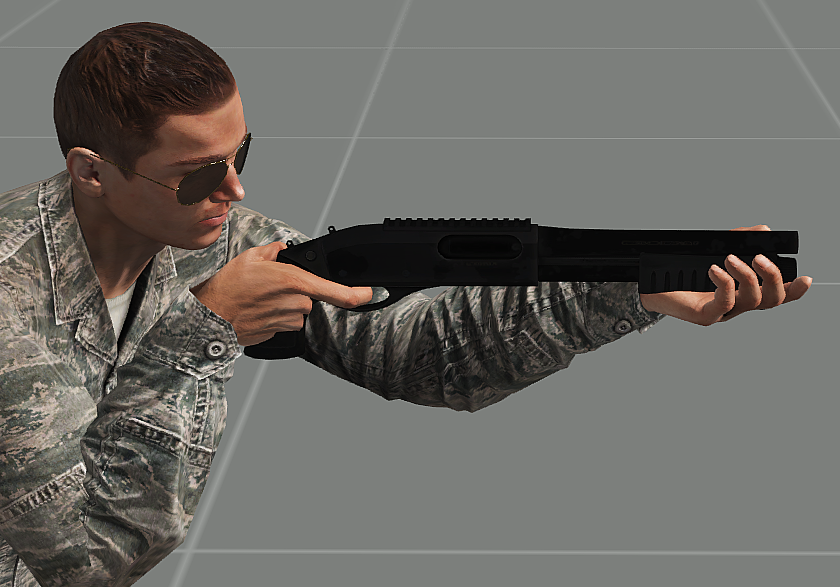
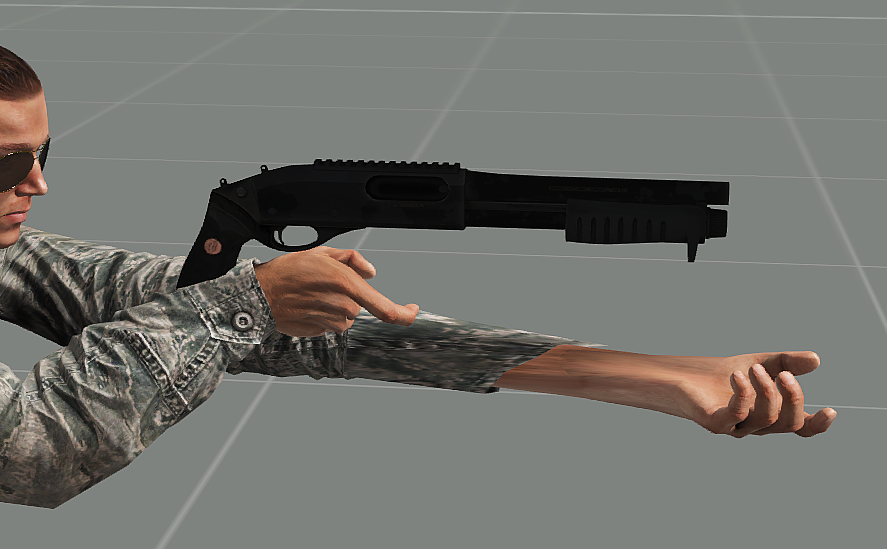
 untold temple
Pistols use a different animation system so a .rtm made for a rifle wont directly work on a pistol
steady beacon
thanks reyhard
 high osprey
narrow swallow
Is it possible to have `hiddenSelectionsTextures` apply to a magazine model in a...
high osprey
narrow swallow
Is it possible to have `hiddenSelectionsTextures` apply to a magazine model in a...
if you get it working give us a shout 😄
I also could do with the same thing, but doesn't seem to work the same way it does for weapons
high osprey
hearty sandal
what is it you are trying to do 😄
This animation was supposed to rotate the head of a missile as it changes direction, since this is how it steers.
If direction doesn't work as a source I'd be happy enough settling for another as an analogue, but since I did manage to get direction to hide or unhide the part in certain setups I was starting to think it might work
hearty sandal
For that it might work in theory but could indeed be its not a available for munitions
high osprey
fair enough. It's one of the smaller details that likely wouldn't even be noticed so I'll probably ignore it or use time or random or some such as an alternative.
Thanks again!
hearty sandal
Yeh it's only really observable in videos.
Airplanes do have the different steering components though so those could work too
high osprey
https://community.bistudio.com/wiki/playSound3D
@molten silo can't you call this?
untold temple
high osprey
This animation was supposed to rotate the head of a missile as it changes direct...
aileron, elevator and rudder sources work for missiles if you want it to animate when it's steering. Consider how planes steer and make anims for the head of the missile accordingly
high osprey
still don't understand the timer animation source apparently
class hideFlame { type = "hide"; source = "time"; selection = "flame"; sourceAddress = "clamp"; minValue = 0; maxValue = 3; hideValue = 0.5; unhideValue = 1.5; };
I just want a thing to hide when the thing starts and unhide after x seconds
But no matter how I set it up it always seems to be either always hidden or always unhidden
 strange egret
time starts at mission beginning and continues increasing as mission goes on...
wrong source for your desire
hot pine
@high osprey look for init and thrust time on model config page https://community.bistudio.com/wiki/Model_Config
high osprey
hot pine
<@726880949484257320> look for init and thrust time on model config page https:/...
hell, wish I'd spotted that earlier. thanks 
 raven knot
if my rotatable commander hatch not on my main turret, can i still use class commander optics under class main turret, or is it better if make a new turret?
strange egret
no you should make a new turret. Turret structure should match skeleton structure
hearty sandal
Yes
strange egret
to use optics , or to be considered commander it needs a turret. cant have a passenger be a vehicle commander
 shut fulcrum
Does anyone know how to Blacklist/Whitelist ViV objects in the config?
https://community.bistudio.com/wiki/Arma_3:_Vehicle_in_Vehicle_Transport#Transport.2Ftransported_vehicles_and_parameters
specific vehicles can be blacklisted and therefore can't be loaded, done with config parameter
I cant find any examples.
untold temple
Dunno if it's just a poorly worded way of saying what canBeTransported does
shut fulcrum
hmmm. OK i was after a way to black list everything but a limited number of pallets and boxes on the HAM trucks.
strange egret
isnt dimensions and mass limit good enough ?
shut fulcrum
not really. the stuff i want is ISO container size. But Its a special type of connector
strange egret
you could eject it by script if it isnt the right type - not as "nice" but should work
untold temple
Since boxes etc. don't come with a vanilla action to load them anyway (only drivable vehicles do), I suppose you could set the trucks to _veh enableVehicleCargo false at init and unlock the cargo carrying ability with what ever action you are adding to load the containers
shut fulcrum
hmmm ok either way im going to end up with scripting arent I. :/
strange egret
aye. Also, why not use attachTo if its just a simple container anyway?
shut fulcrum
im trying to use as little scripting as possible and attachto has mp issues apparently
so im exploring all options before going too far down the scripting road (that im not comfortable with)
strange egret
only attachto issue i know is that attached object is forced to use same simulation step as the parent
but if you attach container to truck, its irrelevant
shut fulcrum
yeah
just wanted to explore options
and given how the VIV page is worded the ability to blacklist classes via config would of been helpful so i asked
untold temple
@hot pine The KrAZ PMP and BMK-T carriers we have in RHS can only carry those specific objects, right?
hot pine
sort of - ViV is disabled by default and then those specific vehicles can be loaded by action
so it's scripted solution
untold temple
Ah, like what I proposed above them
shut fulcrum
k thanks
ill have a proper look at the scripting when i come to it later - thanks all the replied
(someone ideally needs to change the wording on the VIV page) 😉
untold temple
specific vehicles can be blacklisted and therefore can't be loaded, done with config parameter -> parameter to prevent vehicles from being transportable even if their size and mass would normally allow them to be carried by transport vehicles clear enough?
strange egret
keep it simple - "disables possibility for this specific vehicle to be transported / loaded on other vehicles"
 sullen fulcrum
can't get my head round a mod I'm making, I keep getting EOF encountered
hearty sandal
means config error
raven knot
so i added a 2nd turret for my rotatable commander hatch, turns out i have 2 gunner slot now. does commander setting must be in class commanderoptics?
what is it that add the 2nd gunner? it supposed to be gunnerless
strange egret
please post config to pastebin or similar service
raven knot
only the turret part for easier reading
just added primaryGunner and primaryObserver. just found out about it. haven't tested it yet
strange egret
yes you need primaryObserver on the comnmander turret.
However, what makes you think its a "2nd gunner" ? The name when you enter the vehicle? if so, you can simply rename that
gunnerName="Commander";
raven knot
because now i have 1 commander and 1 gunner on my commander turret and 1 gunner on the main turret
then i assume i will need to define commanding=1 andcommanding=2 accordingly?
strange egret
that too yes, but its only for AI - nothing to do with your issue
Line 33 in the pastebin -> you define a new Turret for the COmmanderturret
class Turret in the vehicle is where all turrets are. If you define a turret inside a turret you stack it on top basically
since you inherit from CommanderTurret, it is already a functional turret (except all memory names etc is incorrect), and then you add one on top with class turrets{ class CommanderOptics
-> Remove L31 to L34 (and the corrseponding brackets and semicolons at the bottom)
change "class CommanderOptics: CommanderOptics"
to
"class CommanderOptics: NewTurret"
in L140 -> enter a new line below that and write
"class CommanderOptics:CommanderOptics{};"
because turrets are not passed down the chain if you redefine class Turrets
L139 & L29 "class Turret: Turrets" <- must be "class Turrets: Turrets"
raven knot
ahh okay ill try that and see how it turns out
raven knot
this inheritance stuff still making me confuse 😫
strange egret
turrets are special, they will not "transport over" if you define "class Turrets:Turrets{};"
raven knot
i see. so if you dont need it you still need to define it
strange egret
yeah - unless the child vehicle doesnt have a class Turrets on its own - then it will transport over 1:1
raven knot
so was my base inheritance class correct?
for gunnerless commander turret, i would still need class commanderOptics right?
or it can be any name?
raven knot
ah okay, i might as well use commanderturret for better understading
on my wheels part, i somehow fixed it by redrawing the tracks, but now there is an issue where the tracks will "jerk" to the ground when i start moving the apc. (speed 0 to higher). it's like the initial power that took the vehicle to move was so high that tracks goes into the ground and bounce up again
strange egret
not sure what you mean by that
 gilded jungle
where in the config can i make APC float in the water?
raven knot
is there any way we can set the smokelaunch position and direction with multiple position?
oh my english
gilded jungle
@raven knot Your english is good.
strange egret
raven knot
is there any way we can set the smokelaunch position and direction with multiple...
nope, unless you script it
raven knot
i see. anyway, https://imgur.com/a/VvcgXdZ now have 2 commander for commander turret and 1 gunner for the main turret
strange egret
post config again
hearty sandal
the commander turret is on top of the main turret yes?
raven knot
no
on top of the hull, just like driver hatch. actually it is a rotatable hatch
for commander
hearty sandal
alright then the setup seems ok.
you need to check your apcs config in ingame config viewer to see where it puts the third turret
raven knot
what do you mean by "where"
hearty sandal
where in the config the extra turret is
so you can start tracing where it gets inherited from
raven knot
i need to find it by it's class name? in this case. CommanderOptics
hearty sandal
no just open up the APCs config in config viewer
and see what kind of turrets it has
raven knot
yes i opened config viewer. just not sure what to look for
didnt see anything turet related
strange egret
class turrets -> if you see 2 then it means one has a subturret
Line 13 - L17 - that doesnt look like vanilla? Dont put that in the Tank_F class. You are overwriting vanilla class properties that way, adding a new turret
strange egret
Line 21 - remove that, at best case it does nothing, at worst case you inherit a subturrets from the main turret
hearty sandal
that is likely what is happening now
raven knot
line 21 is from sample, but with class CommanderOptics; in the class Turrets bracket, i simply remove the class commanderoptics
strange egret
never change base classes (Tank_F) - they need to match what they actually are. class CommanderTurrets doesnt exist in Tank_F to my knowledge
raven knot
i see okay then
strange egret
and Line 21 - you only should inherit what you actually need, because it can lead to bad surprises
if you dont want to have mainturret having turrets itself - dont call it in the base class
raven knot
but line 21 is from Tank_F, i thought dont change anything from vanilla class?
main turret is called on the public class
strange egret
dont change (add new /modify things) - but leaving out classes you dont want is ok.
Inside class mainturret in your vehicle (so >=L138) , add a line "class Turrets {};" -> that redefines the class and removes any maybe unwanted inheritances
you could also check config of (i think) CSAT tracked apc - or was it wheeled? That has a turret, and a commander that is not child of the main turret. For reference.
You can extract the config from the game pbos - or use an AllInOne Config
All in One config dumps and instructions to make one - check this thread: (always check last pages):
https://forums.bohemia.net/forums/topic/191737-updated-all-in-one-config-dumps/
Bohemia Interactive Forums
Here is the All in One Config for Apex, as of June 11th stable branch update (1.62.137494).I will be updating these periodically and will include dumps with some of the larger and more popular mods. All of these will be view able from this directory, dependent on what game version the dump was on...
@regal gate ^worth a pin
 regal gate
strange egret
All in One config dumps and instructions to make one - check this thread: (alway...
regal gate
strange egret
All in One config dumps and instructions to make one - check this thread: (alway...
if you say so 😛
hearty sandal
oh lou has the power to pin tooo!!
strange egret
the mighty needle
raven knot
okay now i have proper slot 1 commander and 1 gunner
now i gotta fix my model cfg since i change vanilla's skeletons and model :p
oh now when i enter my apc as commander, it uses the gunner's proxy, how do i set it to use another proxy?
strange egret
proxyType="CPGunner"; //proxyType= "CPCommander" //proxy has to be named according to this (proxy:Gunner.XX or proxy:Commander.XX)
proxyIndex=1; //the .XX number of proxy
it doesnt matter if you use Gunner or Commander for proxy name (as long as its one of the two) - the rest is done via the index
and since thats prob the next question - you can set which LOD to use for each turret seperately
LODTurnedIn = 1000; //1000=Gunnerview; 1100=Pilotview; 1200=Cargoview; -1 = default LOD
LODTurnedOut = 1000; //can define different view lods for turned in/out mode
raven knot
thanks a lot guys
 rough hatch
I have a vehicle with a turret that has 2 seats, one is the gunner that actually controls the elevation and rotation of the turret and the other is like a assistant gunner which kinda just sits there but doesn't actually do anything, both have a freelook view and a sighted view, my problem is that the assistant gunner's freelook view does not follow the turret, it always sits looking towards the front of the vehicle no matter how the turret is rotated
the sighted view is fine since its memory point is locked to the turret
hearty sandal
is his turret seat nested inside the main turret?
rough hatch
you mean in the config? no it's defined alongside the main turret
rough hatch
so you mean try making it a sub-turret of the main turret? like you would with a commander seat?
hearty sandal
yes
rough hatch
alright, I'll try that
hearty sandal
that way it inherits the main turrets movement
strange egret
in config and in model.cfg, mind
rough hatch
that didn't seem to help, the assistant gunner's regular view is still locked forward
I have a MainTurret that controls everything, then that has sub-classes for CommanderOptics and the CoGunner
and the CoGunner's freelook does not follow the turret
oh wait nevermind
my problem is that before I had some other issue with the assistant gunner camera not working right so I had put a dummy weapon on him, but that seems to actually have been causing that issue
I made him have no weapon and now it's just fine
follows the turret and all
then one other thing: how do I make a turret seat default to freelook? now it defaults to view locked forward and you have to press the freelook key to look around
strange egret
i dont think you can do that. You can only completely disable optic
 pallid sierra
whats the difference in a .inc file and a .hpp file? they look subjectively the same from me looking through the Old man versions
untold temple
no difference really
.hpp or .h is by convention supposed to be for the header of a .cpp files where you are calling a bunch of commonly used macros/defines that will added in the header of the .cpp and referenced throughout the body of the .cpp file. And a .inc would be just general purpose includes that you have separated from the .cpp file for ease of access or readability
but functionally there is zero difference. You can use .hpp, .h, .inc and other extensions as you see fit with the #include preprocessor. They're all just renamed .txt files really
 upbeat valley
{
    class Rev_vending
    {
        units[]={"USB"};
        weapons[]={};
        requiredVersion= 1.03;
        version= 1.14;
        fileName = "louis_usb.pbo";
        author = "Louis";
    };
};

class MyMod
    {
        requiredAddons[] =
        {
            "A3_EditorDatapack"
        };
        requiredVersion = 0.1;
        units[] =
        {
            "USB"
        };
        weapons[] =
        {
        };
    };

class CfgMagazines
{
    class CA_Magazine;

    class rev_inv_usb: CA_Magazine
    {
        displayName="USB";
        scope=2;
        mass=.5;
        author="Louis";
        picture="\USB\Icons\USB_icon.paa";
        model="\USB\Objects\USBDrive.p3d";
        descriptionShort="A USB";
    };
I believe ive written my config file, whats the next step? ive tried packing it into a PBO but it doesnt appear to get added
hearty sandal
well your cfgmagaziens does not have closing };
class mymod is not used at all
its example for what goes into cfgPathces
and what are you packing the addon with?
@upbeat valley
 strong shuttle
I wonder if PboProject would have returned an error, because it's broken all over
hearty sandal
yes
upbeat valley
Im using PboProject, and if its broken all over, thats because ive never written a config before.
strong shuttle
but it shouldn't pack with that config, so I'm surprised you can test it
hearty sandal
does pboProjectg give any errors?
@upbeat valley less playing cyberpunk if you want this solved 😛
upbeat valley
Ahhh using my status 😂
upbeat valley
hearty sandal
<@!391945456156016641> less playing cyberpunk if you want this solved 😛
Im not actually on it haha, if youll look carefully, it says 2088, not 2077
hearty sandal
Im this close . to falling a sleep so we have maybe 10 minutes
upbeat valley
Im using something called Mikero's tools
hearty sandal
yes thats good
pbo project has the console screen that tells you if it fails or succeeds etc
does it give you any error messages when you pack your pbo?
upbeat valley
God its been ages since i tried it, no file specified and i forgot how to 😂
upbeat valley
No problem
hearty sandal
for future debugging, its always easier if all possible details of a problem are provided with the issue report.
saves also time from the people helping when they dont have to dig for it.
so its also polite
😛
upbeat valley
Okay, thanks for the heads up 😄
hearty sandal

upbeat valley
Is the AddonBuilder tool any use? or is it preferable to use Mikero
strong shuttle
use Mikero's Tools if you want to prevent problems
upbeat valley
wow im an idiot, i downloaded Makepbo, but not pboProject.
raven knot
just download all of the mikero tools. you never know when you might need it
upbeat valley
Yeah good point 🙂
I tried packing, im getting
'"rapify -PenW "USB\config.cpp" "P:\temp\USB\config.bin""
'rapify' is not recognized as an internal or external command,
operable program or batch file.'
knowing how new i am at this, its probably the simplest fix ever
😂
strong shuttle
yup; download and install ALL the tools from that page 😉
upbeat valley
wow there IS one called rapify 😂
lets try again 😂
i downloaded rapify why is it still giving me the same error?
 glacial spear
not sure if this is cfg or script but on the apache mod im having issue were when flying over groups of rocks im gettting massive fps drops
if anyone has any idea what cfg might do this or scritp
hearty sandal
Neither. Its question for the mod maker.
 grand zinc
strange egret
All in One config dumps and instructions to make one - check this thread: (alway...
grand zinc
strange egret
All in One config dumps and instructions to make one - check this thread: (alway...
"and instructions to make one " btw diag binary has script command to dump out 🙃
hearty sandal
Just tried it out last night. Works great!
raven knot
cfgModel, what is sections that we are supposed to inherit and add? is it memory point? or what? i don't get it
my commanderturret is not rotating i suspect it has to do something with bad model.cfg
hearty sandal
sections are selections on the model that have special features like the camo selections that work with hiddenSelections system
if your turret does not rotate you probably dont have correct bones defined for it or correct named selections for it in the model
untold temple
no, you only need them for parts that change texture
raven knot
anything special that is not bone
oh
i have to recheck for the 4th time now for the spellin and all but it still does not rotate.
this is what i have in my animation class
class CommanderTurret
{
type="rotationZ";
source="commanderTurret";
selection="commander_turret";
axis="commander_turret_axis";
animPeriod=0;
minValue="rad -360";
maxValue="rad +360";
angle0="rad -360";
angle1="rad +360";
};
and cfgvehicles' class turrets
body = "CommanderTurret";
animationSourceBody = "commanderTurret";
cfgskeleton on my apc base class
"commander_turret","",
"hatch_commander","commander_turret"
Some parts like muzzle flash proxies, helicopter rotors, lights etc. are also in the sections array, because they are hidden by game engine features that basically set them to have an invisible texture
hearty sandal
Do you check if the animations work in buldozer?
Body and source should not be the same
raven knot
im following main turret's setting which have the same body and source name. i didnt check in buldozer. i didnt know i could check animations in buldozer
high osprey
anyone know the property that controls the size of the wireframe box around a vehicle placed in the editor?
raven knot
if im not mistaken the memory point is named bbox_1_1_pos, 1_2 2_1 and 2_2
high osprey
so the three memory points control the h/w/d?
high osprey
oh i get you
literally just draw a box with memory points
"bbox_1_2_pos", "bbox_1_1_pos", "bbox_2_1_pos", "bbox_2_2_pos"
According to https://community.bistudio.com/wiki/selectionNames
Thanks!
raven knot
yeah but which one is height is width idk
high osprey
Not sure, so I'm going to try the age old method of 'guess and see what happens' :/
hearty sandal
bbox_x_y_pos are for defining the size of the vehicle for "vehicle in vehicle" cargo function
the box in editor is defined by the bounds of the model
so all lods combined and box that envelopes all of them
high osprey
hm
oh I guess that makes sense. The box doesn't fit at the moment because the 'model' is \A3\Weapons_F\DummyItemHorizontal.p3d which has a fixed bounding box
Guess i need to find a smaller container to inherit from
high osprey
So i have a 'vehicle' which is a dummy container with a launcher in it right?
So that in editor you can just place the launcher on the ground
But i used DummyItemHorizontal so the bounding box was way bigger than the item
So now I'm going to change the model out for model = "\A3\Weapons_F\DummyLauncher_Single.p3d"; and hopefully that will fit better
hearty sandal
well it will always be
because the dummy item contains a proxy
the bb in editor does not matter at all
high osprey
i just wanted it look neater :<
hearty sandal
cant
high osprey
ah well, i tried. Thanks again
strange egret
grand zinc
"and instructions to make one " btw diag binary has script command to dump out �...
yes, on the last thread page users will find this info 😉
raven knot
hearty sandal
bbox_x_y_pos are for defining the size of the vehicle for "vehicle in vehicle" c...
ohh thats what its for, i thought its the editor's bounding box
anyway, how does one check animation in buldozer?
hearty sandal
middle mouse click changes animation source, wheel the animation phase
there are also keyboard equivalents you can check from dozer key list
raven knot
i cannot see, my texture does not shows up
but it does rotate
maybe its has to do with my commander being able to freelook without holding alt button?
hearty sandal
check for typos
raven knot
maybe because my 2nd turret missing something that mainturret inherits
hearty sandal
do you inherit form newTurret for your 2nd one?
hearty sandal
ye
raven knot
okay solved it. i need turretFollowFreeLook = 2; for weaponless turret
 stoic lily
what dose it do exactly?
raven knot
If 1, turret is slaved to the gunners viewdirection in freelook. When values is set to 2, it is possible to control turret on weaponless turrets. Value 1 is used in Attack Helicopters for example.
stoic lily
so for commander positions without MGs for example?
raven knot
i dont know, maybe countermeasure does not count as a weapon
smoke is working fine
by the commander
which is the 2nd turret's gunner
rough hatch
is setting up a static object, like a building to switch to a wrecked model after being destroyed different from doing it on a vehicle? I have a proxy in the main model wreck lod but it either just dissapears when destroyed or stays on the same regular model
hearty sandal
yes its made through config
rough hatch
like with a class DestructionEffects?
hearty sandal
yes
rough hatch
I have a Ruin1 class in there with simulation "ruin" and type pointing to the wreck model path
that didn't seem to work
are there any examples out there?
oh the samples has one, duh
well my config seems to be done the same as the sample but it still just stays as the regular model
does there need to be something very specific in the main or wreck model for it to work?
now I've got it so it doesn't stay behind, but now it just goes down through the ground but no wreck appears in its place
even tried now to copy the destroyed building model from the samples and replace all the models in the LODs with my own and it still does not appear
raven knot
so i found there a problem using turretFollowFreeLook = 2;, now it control the main gun too.
 molten silo
https://sqfbin.com/yeseqepusofelofagone it says
n File P:\Delta_tats\config.cpp: circa Line 32 rap: missing inheritence class(es)
In File P:\Delta_tats\config.cpp: circa Line 32 rap: missing inheritence class(es)
what does this mean so I know for future?
hearty sandal
you have classes you try to inherit from but they dont exist anywhere
molten silo
ok I got the classes down but now Its saying I have a duplicated class but I dont see any repeats... https://sqfbin.com/yeseqepusofelofagone
line 41 is apparently my repeated class
hearty sandal
if it says you have repeat class then you have repeat class
I suggest using notepad++ or some other text editor that can do code highlighting and has better search tools
molten silo
im trying to find out which one it is but im not able to figure it out
molten silo
so how should I go about making it so the files for my arm tats know which head to attach to?
sullen fulcrum
how can I put viper helmet thermal and night vis on normal goggles
hearty sandal
you would need to create a new addon for that. And that would contain a config file where you create the new item with the properties you want.
sullen fulcrum
I used to have a pair in basegame which is why I was wondering if its possible
useable anywhere
sullen fulcrum
nono it isnt that
It is the default nato nvg goggles, except it functions as if it was viper
it has full view thermal and full view nv
hearty sandal
well if base game does not have one now then nothing short of a mod can add such
and modded items do not work on MP unless server runs the mod
rough hatch
hearty sandal
did you change the destruction type?
type in the destructionEffects entry points to the wreck model
and I didn't change simulation type so it is whatever House_F defaults to
raven knot
door animation must be done through .rtm? and how do i make you can only enter "ride in back" only after the rear door has been opened?
rough hatch
door animation are done in model.cfg, you can check the sample house model in the A3 samples
and for the ride in back, that would probably have to be scripted
 gloomy python
Hi, I'm trying to make a skin pack mod for m16 from RHS USAF and i got a problem
I made a config like that:
class CfgPatches { class kb_M16A4_green { units[] = {}; weapons[] = {}; Version = 0.1; requiredVersion = 0.1; requiredAddons[] = {"A3_Characters_F_BLUFOR","A3_Weapons_F_Rifles_MX","rhsusf_weapons","rhsusf_c_weapons","rhsusf_weapons2"}; }; }; class rhs_weap_m16a4_carryhandle; class cfgWeapons { class class kb_M16A4_green : rhs_weap_m16a4_carryhandle { baseWeapon = "KB_M16A4_GREEN"; displayName = "M16A4 (green camo)"; scope = 2; hiddenSelections[] = {"camo1","camo2","camo3","camo4"}; hiddenSelectionsTextures[] = { "\custom_ar15_skins\data\m16a4_co.paa", "\rhsusf\addons\rhsusf_weapons\mag_proxies\data\pmag_black_co.paa", "\rhsusf\addons\rhsusf_weapons\m4\data\m4acc_co.paa", "\rhsusf\addons\rhsusf_weapons\m4\data\kacrailcover_co.paa" }; }; };
And wen trying to run Arma with my mod louded i'm getting Error which goes like that:
in config.cpp in 14 line founded 'k' insted of "{"
and i don't know wat is wrong because i can't see any 'k' in any line
(Sory for my bad Eanglish)
rough hatch
I don't see any "k" either but you do have class twice in the weapon
class class kb_M16A4_green
that is around like 14 too
oh yeah that's probably the k from kb_M16A4_green
gloomy python
o thanks
rough hatch
the line numbers it gives aren't always exactly right, it might be off by a line or two
raven knot
rough hatch
door animation are done in model.cfg, you can check the sample house model in th...
alright, but how to trigger it? what's the config name?
rough hatch
wait what kind of doors are you talking about, on houses or vehicles or what?
raven knot
vehicle's door. i did said ride in back and rear door. sorry for not being clear
hearty sandal
@raven knot explain again pls. What you wanna do?
raven knot
i have a class ramp in my animation class in model cfg to open my rear door. im not sure how to activate it. i'm reading userAction. but still thinking on how rhs made their vehicles the door need to be fully open then only you will get into the passenger slot
hearty sandal
they possibly hide/unhide the passenger get in memory points
I think there may also be unused vehicle door functionality but off the top of my head cant say if I remember right
raven knot
i see. anyway, i at least am trying to figure out how to open the rear door first
rough hatch
I seem to recall there being some property for a cargo animation source
might be cargoDoors?
I think it might be array where each element is an animation source for each cargo seat
so if you just have like a rear door, you'd just have that be an array of a single animation source
I'm not sure if that's how it works but maybe try that?
hot pine
CargoDoors array + driverDoor & gunner Door (in turret)
raven knot
hot pine
CargoDoors array + driverDoor & gunner Door (in turret)
thank you dude! it works now
molten silo
https://sqfbin.com/akenoyelakabugesemik
Truncated file. Missing one or more};. Error starts near token 'ACE_SelfActions' :
In File flb_headgear\config.cpp: circa Line 246 EOF encountered
Ive been trying to trouble shoot for about 20 mins and I cant seem to figure out the issue.
strong shuttle
please count the amount of class XXX { and };, because they don't match
and you forgot to close line 27
hearty sandal
would be good idea to check out some coding practices, like when creating a class namedSomething you always also create the opening and closing brackets {};
molten silo
When I close line 27 and make sure that anything opened is closed i get the same error for a different line... but im positive the line is closed
hearty sandal
it is not
if the error is there
problem is, you might have open bracket somewhere way up that messes it up
so you have to check everything
raven knot
i think the "{" on L28 is your problem. and you need to close L27
add ; on L27 and delete the open brack on L28
hearty sandal
no that L28 needs to be closed
not deleted
since its inheritnace chain
so far those classes are not used at all though so they are obsolete
~~@raven knot ~~remove 28 and 27 @molten silo ❗
raven knot
my bad, its on the same column
hearty sandal
keep code clear of obsolete parts
raven knot
just use notepad++ you can see where the bracket open/close when you click on a bracket. it will highlight it
molten silo
so I deleted 27 and 28, it says
In File flb_headgear\config.cpp: circa Line 27 Expected class {
hearty sandal
read up a little please
strong shuttle
just adding or removing stuff won't solve anything... you have to make sure the configs and config entries are correct, and everything is opened and closed correctly
hearty sandal
cfgweapons and cfgvehicles are never closed for example
go through each bracket 1 by 1
and each class
 ripe dove
Can anyone recommend good config parser? I would like to batch process some old configs (even OFP ones). I tried https://github.com/BrettMayson/Config2JSON and all mentioned ones in README in there without luck. Usually those parsers can't handle for inline comments, non-string values, ...
strange egret
i think people in #arma3_tools might be more the ones that could answer (remember rules for crossposting though)
raven knot
how do i make a gunner proxy rotate along with the turret? i tried giving it a name and define it as a bone with the turret being the parent. it didn't work. i have also tried using usePip = 2. didn't work too
hearty sandal
making it part of the turret selection should be enough
molten silo
https://sqfbin.com/mohidojuhufumopiluze
My items arent appearing in the Arsenal selection menu but Im getting no errors when packing the pbo
raven knot
i'll try grouping it together with otocvez and see if it works
okay the body now follows the turret, not the face
byt face, i mean what player see
molten silo
@hearty sandal So then should I add the class names under CfgPatches?
molten silo
ok so that didnt work
https://sqfbin.com/iwafimorenewonukupow I have no clue whats going on but I still cant see it in arsenal
raven knot
molten silo
https://sqfbin.com/iwafimorenewonukupow I have no clue whats going on but I stil...
jsut wondering why is your folded variant is on scope=0? and everything has almost the same setting, why not just inherit from you "MC" variant and change things that different from MC
molten silo
because I dont want my folded to be in the arsenal
since ill be using ACE interaction to switch from unfolded - folded
raven knot
i see. but still tho, you can make your code cleaner by inheriting, those settings that are the same
molten silo
probably true but i’m just trying to make it show up in arsenal rn since for some reason it won’t
raven knot
have you tried it without the ace settings?
molten silo
no not et
i can try now tho
@raven knot I ran it with the ace interact out of my cfg still not coming up in arsenal
raven knot
molten silo
<@!782197099910922251> I ran it with the ace interact out of my cfg still not co...
weird. wait for the experts i guess
molten silo
guess so lmao
raven knot
how do i make my gunnerview rotate alongside with my turret? the body rotates fine, but my screen does not follow.
ended up, when i direct my turret at the backside, im like a guy with no neckbone.
im talking about 1st person view turned in
molten silo
https://sqfbin.com/iwafimorenewonukupow I have no clue whats going on but I still cant see it in arsenal
hearty sandal
normal arsenal or ace arsenal
you mentioned you use ace for something
that can perhaps mess things up
hearty sandal
are you sure you are running your pbo?
raven knot
https://imgur.com/a/cP71wEE body following turret rotation. face is not. now can see inside the neck
hearty sandal
perhaps lacking gunner view configs
raven knot
i do have viewgunner class
class ViewGunner: ViewGunner
                {
                    initAngleX = -9;
                    initAngleY = 0;
                    initFov = 0.9;
                    minFov = 0.25;
                    maxFov = 1.25;
                    minAngleX = -65;
                    maxAngleX = 85;
                    minAngleY = -150;
                    maxAngleY = 150;
                    minMoveX = -0.075;
                    maxMoveX = 0.075;
                    minMoveY = -0.075;
                    maxMoveY = 0.075;
                    minMoveZ = -0.075;
                    maxMoveZ = 0.1;
                };
};
nvm solved it by usepip=2; duhhhh
raven knot
does LODDriverTurnedOut does not work with value 1? first resolution LOD, my driver keep getting to another view lod instead of reso lod
raven knot
not sure, either cargo or pilot
it says in config viewer LODDriverTurnedOut = 1;
but i dont get my reso lod
strange egret
do you have driver proxy in the lod you want him to appear? i assume yes, but just to be sure
raven knot
but my commander and gunner dont have this problem
hot pine
= 1 is treated as old, default behaviour
raven knot
lemme recheck
hot pine
or maybe it was 0
hot pine
I remember it was something really dumb
raven knot
yes i do have the proxy
strange egret
whats your first LOD in p3d? 0 ? or 1?
raven knot
0
molten silo
@hearty sandal yes im positvie im running my pbo. should I pack it to a seperate file and try again?
strange egret
then use 0
raven knot
trying 0
ah okay that did the job. its working now
thank you
im wondering why my commander and gunner can get the first reso lod using value 1 and driver can't
strange egret
arma 🤷♂️ 🙃
you could experiment placing a red box in res LOD 1, to see if you actually see resLOD 1 or resLOD 0
raven knot
i see.
and the other day i told about my wheel bounce when i start moving and you didn't understand, here's a video of it https://youtu.be/59lvhmE2NO8
hot pine
ah yes, 1 means default for turrets
strange egret
the model.cfg animation for the suspension is inverted. If physx wheel goes up, your visible wheel goes down. Flip it around
molten silo
ok so im not sure what going on but I still cant see anything in arsenal
did I do something wrong in my config?
molten silo
??
hearty sandal

strong shuttle
I'm not an expert on it; but you could try to remove:
modelSides[] = {6};
allowedSlots[] = {801, 901, 701, 605};
``` from the configs, and see if that causes any issues.

I know what they do and they look OK, but I also noticed that using one wrong value can make them unusable...So I got it working finally but the only issue is my ace interaction is not there at all
strong shuttle
btw... those ACE interactions won't work either...
- classnames in conditions and statements don't match the classname you use in CfgWeapons
- the folded variants have a scope of 0, this also sounds wrong (since they can't be used)
molten silo
for the folded I dont want them in arsenal I just want it used through interaction.. so using it that way couldnt I keep it on 0
strong shuttle
scope = 1;
scopeArsenal = 0;
otherwise you can't access them at all
Did you read the wiki at all? Because half of the stuff is explained on there, and the other half doesn't make sense unless you know what you're doing...
molten silo
I read it but I must have that part
 little phoenix
hey so im interested in learning how to create arma mods but i have 0 clue on what to do. The model part isn't the problem but what i do once i have the model that is the problem. I have 0 clue on where to go from there and all the the tutorials i find are either very outdated or just 2 complicated for a new person to understand. Any advice?
 tardy tiger
class CfgPatches
{
    class myAddon
    {
        units[] = {};
        weapons[] = {};
        requiredVersion = 1.78;
        requiredAddons[] = {"Extended_EventHandlers"};
    };
};

class Extended_PostInit_EventHandlers
{
    myAddon_Post_Init = "myAddon_Post_Init_Var = [] execVM 'init.sqf'";
};
Can someone point out the error in this config?
I have init.sqf in the same directory at config.cpp.
init.sqf contains a simple while loop which outputs "Hello world".
According to the report file, the mod is being loaded in by the launcher but I don't think init.sqf is being loaded because nothing is happening.
Note that myAddon is just a temporary class name whilst I try and figure out how addons work.
strong shuttle
little phoenix
hey so im interested in learning how to create arma mods but i have 0 clue on wh...
The config part is the easy part, next to making it a mod.
However the part to make a 3D model into a proper P3D file is the "hard" part, as in; easy when you have the workflow, hard when you don't know how. Luckily are there some good tutorials and tools available on how to do that, which can be found in #arma3_model
Of course, it can get very complicated (vehicles etc.), but starting with something simple is always better to get used to all of it.
hearty sandal
@little phoenix what do you mean outdated? most of the methods are still valid even from earlier Arma titles
strong shuttle
tardy tiger
```cpp
class CfgPatches
{
class myAddon
{
units[] = {};
...
change to
class Extended_PostInit_EventHandlers
{
    init = "myAddon_Post_Init_Var = [] execVM 'init.sqf'";
};
or
class Extended_PostInit_EventHandlers
{
    class myAddon {
       init = "myAddon_Post_Init_Var = [] execVM 'init.sqf'";
    };
};
PS: no idea how to do it properly without CBA, but both methods should work
little phoenix
hearty sandal
<@!268690418361696257> what do you mean outdated? most of the methods are still ...
idk might have jjust been looking at the wrong videos then but i will take another look
 slim halo
why videos?
little phoenix
strong shuttle
The config part is the easy part, next to making it a mod.
However the part to m...
oh lmao i thought this was the hard part. I want to try and work my way up to vehicles.
slim halo
there are also "text" guides
strong shuttle
slim halo
why videos?
because podcasts are too new 🤣
little phoenix
slim halo
there are also "text" guides
yea im looking at the pinned msgs now
hearty sandal
there are very little in way of full "how to make X" type tutorials
but you will need to waddle your way through the "too complicated" stuff
as therea are things that just are complicated
tardy tiger
strong shuttle
change to
```cpp
class Extended_PostInit_EventHandlers
{
init = "myAddon_Po...
The first method didn't work; I'm trying the second one now.
tardy tiger
strong shuttle
change to
```cpp
class Extended_PostInit_EventHandlers
{
init = "myAddon_Po...
The second method didn't work either.
Are there any other methods? I'd like init.sqf to run after mission start.
strong shuttle
like I said; I only know how it works with CBA XEH: https://github.com/CBATeam/CBA_A3/wiki/Extended-Event-Handlers-(new)
alternative you can use https://community.bistudio.com/wiki/Arma_3:_Functions_Library#Attributes (postInit)
slim halo
tardy tiger
The second method didn't work either.
that's because your mod requirements are incorrect:
requiredAddons[] = {"CBA_Extended_EventHandlers"};
the second method that @strong shuttle posted was correct
also make sure the path to init is correct
strong shuttle
if CBA is used; otherwise running it though CfgFunctions is the better alternative
tardy tiger
slim halo
also make sure the path to init is correct
init.sqf is in the same directory as config.cpp
slim halo
yeah just use CfgFunctions
tardy tiger
slim halo
that's because your mod requirements are incorrect:
```cpp
requiredAddons[] = {"...
I changed it to this and it still somehow didn't work. I'll try CfgFunctions.
Does this CfgFunctions look correct?
class CfgFunctions
{
    class myTag
    {
        class myCategory
        {
            file = "!Workshop\@MyAddon\addons\init.sqf";
            class myFunction {
                preInit = 0;
                postInit = 1;
                preStart = 0;
                ext = ".sqf";
                headerType = -1;
                recompile = -1;
            };
        };
    };
};
Well it doesn't work so there must be something wrong
hearty sandal
where are you putting this?
why your file path is like that?
is this a mission thing of addon config thing?
tardy tiger
hearty sandal
is this a mission thing of addon config thing?
Addon config
hearty sandal
then that path wont work
tardy tiger
I expected %ROOT% to be game root
tardy tiger
oh
hearty sandal
it sees inside your pbo
tardy tiger
so what would an example of a path be
hearty sandal
check arma configs
I expect you to have P drive and the tools and development environment set up
tardy tiger
my init.sqf is inside addons which is inside @MyAddon
tardy tiger
hearty sandal
I expect you to have P drive and the tools and development environment set up
oh, i don't
hearty sandal
:L
hearty sandal
it represents the root of the game engine
when you create folder structure there and pack that into pbo
the structure stays the same
you can look up this discords history for tips on setting that stuff up
PMCwiki and/or ArmaDocs tutorials have guidance too (though they are more terrain building directed the tools isntall is the same)
you can make addons without it too if you know what to do
but I dont know much about that and the tools are designed for use with P drive
tardy tiger
ok i'll get a P drive setup
slim halo
tardy tiger
```cpp
class CfgFunctions
{
class myTag
{
class myCategory
...
no it's all wrong
first of all, you didn't even bother to change the my... stuff?
second of all, the path is wrong (it should be defined inside myFunction class as "MyAddon\init.sqf"")
third of all, it seems you didn't even pack the mod, so you have to use P drive (and -filePatching must be on, but I've never done it so not sure if it works)
tardy tiger
slim halo
no it's all wrong
first of all, you didn't even bother to change the `my...` stu...
I have now got the P drive setup. It's showing me the game engine root.
tardy tiger
I'm still confused on how the file path works. afaik, the file path should point to the .pbo which is somehow in the game root
Does the pbo get moved and extracted to the game root upon loading?
strong shuttle
when doing it properly, the root will exactly the same as the path on your P drive
 opal crater
Does not matter where the pbo is on the drive.
tardy tiger
How do I use my P drive to help me?
The base folders include a3 and dll. Is that correct?
And I've also got buldozer_x64.exe
opal crater
You develop your addon on p drive
tardy tiger
Ok I've put my addon on the P:\ directory now
Should mod.cpp and config.cpp go inside the addons folder or outside?
opal crater
\yourTag\yourModName\addons\yourPboName\config.cpp
At least when using CBA/ACE conventions.
could be shortened to:
\yourModName\addons\yourPboName\config.cpp
or
\yourModName\yourPboName\config.cpp
tardy tiger
And then where do I point the Arma 3 packaging tool? To yourModName or addons?
tardy tiger
opal crater
or
`\yourModName\yourPboName\config.cpp`
and yourModName should have an @ in front of it right?
and hence so should the pbo once packaged?
opal crater
no
tardy tiger
why do all the folders in !Workshop have that
opal crater
Because in it's the name of the folder which contains the mod.
It's not related to packing at all.
If anything it's related to output folder where you pack TO
tardy tiger
should I binarize or no
opal crater
You should, otherwise arma will have to do it every time it starts.
And this slows down the game startup a LOT
tardy tiger
It still isn't retrieving the file. I'll show you the directory structure and config.cpp.
config.cpp:
class CfgPatches
{
    class myAddon
    {
        units[] = {};
        weapons[] = {};
        requiredVersion = 1.78;
        requiredAddons[] = {};
    };
};

class CfgFunctions
{
    class myTag
    {
        class myCategory
        {
            class myFunction {
                file = "MyAddon\addons\MyAddon\init.sqf";
                preInit = 0;
                postInit = 1;
                preStart = 0;
                ext = ".sqf";
                headerType = -1;
                recompile = 1;
            };
        };
    };
};
(Yes, I haven't changed the class names still but I just want to get the files themselves working before I do that.)
Directory tree:
P:
  -> MyAddon
    -> addons
        -> MyAddon
          -> config.cpp
          -> init.sqf
    -> keys
    -> mod.cpp

  -> @MyAddon
    -> addons
      -> MyAddon.pbo
I'm using Arma 3 Tools from Steam.
tardy tiger
Ah ok
opal crater
#arma3_config message HG mentioned PMCWiki here, basic setup of pboProject is described here I think.
Addon builder can support pboprefix files but I won't tell you anything about that as it will only confuse you more right now.
raven knot
strange egret
the model.cfg animation for the suspension is inverted. If physx wheel goes up, ...
i dont get what you meant by flipping it around.
pallid sierra
so having trouble. I'm trying to access shared resources (like music) from my campaign's WIP folder while in a particular mission in the editor. I have tried both making CfgMusic at the campaign level, and a CfgMusic that references the files using ..\. My VSC seems to find the files and doesn't error in both description files, but nothing will happen when called while testing in the editor environment.
i guess I just need help setting up shared resources that work while in the editor testing instead of having to pack the whole campaign fully then running it from the campaign folder in arma root.
hearty sandal
shared resouce? as in a pbo?
raven knot
i think he meant a core pbo and accessing them from another pbo
but i think he didn't use pbo, just userdir folder
pallid sierra
my folder setup is just open folders in missions atm...
\missions\allthemissionshere
\music
\sounds
\sharedscripts
\configs
and say I'm on mission 02, i can't seem to access the campaign's root folders for music and stuff, even through different types of configs I've rewritten
hearty sandal
you sure cfgMusic can be defined in a campaign?
pallid sierra
what i've been doing is just taking the classes, then adding them with includes on each individual campaign description
using #include ../../configs/musicclasses
But then the music classes have to point outside of the root mission folder too so that's a problem
raven knot
why not make a pbo for your shared resources? and access from that pbo?
opal crater
Campaigns are supposed to be developed inside addons afaik.
pallid sierra
Okay but is there a way to easily build and test in the editor.instead of having to rebuild it every time you want to test something?
raven knot
test it in the same folder as your shared folder first?
tardy tiger
@opal crater Thank you for your help. I have got it working after packaging it using pboProject. Is pboProject supposed to move other files such as mod.cpp or does it just take care of generating the .pbo?
 remote salmon
Quick question, So I have all my texture files setup in my rvmat, how do I attach the rvmat to my model?
opal crater
pallid sierra
Okay but is there a way to easily build and test in the editor.instead of having...
Filepatching, diag_mergeConfig
 winter rain
@remote salmon in OB, select your model and press E
First line is your texture path + texturename.paa
Second line is your shader path (rvmat) yourname.rvmat
Blender I dont know 😅
raven knot
in blender (object mode), select material > assign _co texture and set rvmat path under arma toolbox material settings.
 junior folio
Does anyone know if there are any guides on how to correctly setup a physx config for a vehicle?
hearty sandal
Not much no. BI forums have few topics on it.
junior folio
I saw this https://forums.bohemia.net/forums/topic/155974-tutorial-creating-custom-engine-gearbox-and-suspension-vehicle-config/ but it said it was outdated is any of it still relevant
hearty sandal
Likely some.
raven knot
how do i attach the driver proxy's hand to the steering?
raven knot
thank you\
oh wait i did this, already have drivewheel, the proxy hand actually animated according to the steering wheel but the hand is not actually on the drivewheel
hot pine
you have to create rtm animation then
raven knot
ah okay gotta look into that
strange egret
raven knot
i dont get what you meant by flipping it around.
change values between offset0 and offset1
 paper path
they havent allowed anything from the .ebo files right?
paper path
well crap. guess ill have to do it via configViewer then
strong shuttle
it's just annoying for packing mods with Mikero's Tools... since the files need to be there...
could make mockups, but that's too much work...
hearty sandal
... just make the placeholders xD
opal crater
but that's too much work...
it's literally an empty file that you need to create xD
hearty sandal
#info_help_tips got some pointers, generally its good idea to play the tutorials and showcases/campaign to get a hang of the gameplay
 raw osprey
Hello everyone, I've got some scripting experience on arma3 but am totally new to the config.cpp stuff. However it seems that there's no scripting alternative for adding in custom markers that are multiplayer compatible so I found my way here to ask what would be the method of doing so. I'd love to get some links that explain how it works and perhaps a couple beginner hints.
opal crater
raw osprey
Is there a way to define mission path or does this needs to be a addon?
 north bronze
How to stuck a action into the units config?
so, whatever unit that spawns has that action in it. it can be also a vehicle.
winter rain
@north bronze
Adding in config UserActions
 ancient hatch
does anyone know what I need to put to get custom faces in my mod, the faces have already been made and pack into PAA
 covert pasture
Ask if you can help me, I am looking for a way to make the loading screens and menu of my mod always load and not of the other mods, is there any way to put it priority?
sullen fulcrum
So I have added insignias to the config, but I get an error whenever I place my units down. The insignia shows up but the unitRandomisation.sqf throws an error which refers to unitRandomisation.sqf thus only the insignia shows up without any randomisation (random facewear, helmet,vest). I have tried for several days, and I just cannot find anything to fix this. I would be very thanful for some advice.
I can send a section of the config code related to this if requested.
sullen fulcrum
anyone?
covert pasture
Any have idea about how can add text on the footer of the main menu ? i already have a custom background but i dont found how to add text
covert pasture
sorry is not the footer is in the line about the owned dlcs
wintry tartan
covert pasture
sorry is not the footer is in the line about the owned dlcs
You wanted to make something more than a puzzle piece?
covert pasture
wintry tartan
You wanted to make something more than a puzzle piece?
I am making a new main menu changing the background and removing the spotlights but when using other mods I have a mod that is always stepping on what I declare, so they have a text above the mods loaded that is not in the image because in a moment I managed to step on the image and followed the text
wintry tartan
Not really sure what you mean. Can you post an image via imgur or something?
covert pasture
yes give 5 min i will open arma
covert pasture
wintry tartan
Not really sure what you mean. Can you post an image via imgur or something?
https://imgur.com/e61688F here is
wintry tartan
Wow das'a lot of MODs... Wanted to remove that Order On The Chaos one?
covert pasture
yes
wintry tartan
Then you need to do: Go to Config Viewer, Check RscDisplayMain (IIRC) and check what MOD does declare the string. If you found it, use delete command in your config so it can be removed, plus you need to declare the MOD in requiredAddons[]
covert pasture
yeah but there i have a problem because the mod is obfuscate and i cant get the info
wintry tartan
It won't in Config Viewer
covert pasture
wintry tartan
It won't in Config Viewer
ok I'm going to try and if I have a problem I'll write it here
 echo kelp
is it possible to change the main menu music?
wintry tartan
Yes and No. Not by config but mission
 brazen merlin
not sure if this is really a config question, but .... is i possible to replace the map icons that get added by buildings? for example gas station, church, etc
i would like to change the icons, but i only want to change them in my terrain
wintry tartan
It's rather GUI thing. IIRC it's possible to change it on the Map GUI, but not sure there's posibility to do it only in a certain map. Maybe duplicate Map GUI and show/hide only for the map?
brazen merlin
can i add my own? i'm reading up on https://community.bistudio.com/wiki/Map_Symbols right now, but it doesn't explicitly say it
note: i am using custom buildings, so i can easily change the map property in the model
hm. config looks good. seems i should just try and see what happens
stoic lily
the boxes you cant
brazen merlin
hardcoded?
stoic lily
yep. unless you can convince Dedmen otherwise 😉
probably too difficult to change tho as these are baked into the wrp during binarization
so making it dynamic as with the map symbols is probably not that simple
brazen merlin
stoic lily
yep. unless you can convince Dedmen otherwise 😉
too scared to try again
what about the class name stuff? can we add icons like that manually, independent of buildings?
for examples the hills show up as icons on the map
" New types may be added provided they are defined in game/addon configuration." hmm
winter rain
brazen merlin
" New types may be added provided they are defined in game/addon configuration."...
defined in Geometry LOD property map = rock
winter rain
ah ^^
brazen merlin
ok, location names is not a good alternative, as these icons are visible at (almost) all times
big sad
grand zinc
brazen merlin
not sure if this is really a config question, but .... is i possible to replace ...
yes
brazen merlin
how?
grand zinc
Look at CfgMarkers
find the correct classname for it
well it will be a map marker. that gets bigger when you zoom out
but..
its the symbol ¯_(ツ)_/¯
brazen merlin
sure, but that's not what i wanted to do :p
brazen merlin
i already added it as markers
brazen merlin
as kju said, it apparently gets baked into the wrp based on model parameter
grand zinc
Yeah they do. But not sure how engine processes these 
brazen merlin
takes the icon config from class RscMapControl then
grand zinc
Aww
brazen merlin
so basically it seems like these icons are somewhere hardcoded and it won't detect new ones. dunno.
sullen fulcrum
So I have added insignias to the config, but I get an error whenever I place my units down. The insignia shows up but the unitRandomisation.sqf throws an error which refers to unitRandomisation.sqf thus only the insignia shows up without any randomisation (random facewear, helmet,vest). I have tried for several days, and I just cannot find anything to fix this. I would be very thanful for some advice.
I can send a section of the config code related to this if requested.
sullen fulcrum
really helpful community..
grand zinc
Glad you're happy with our support.
slim halo
sullen fulcrum
So I have added insignias to the config, but I get an error whenever I place my ...
instead of posting your question again, post the full error.
and for the record:
I can send a section of the config code related to this if requested.
you're the one asking, so you should already provide all relevant information, otherwise people typically ignore your question
slim halo
use ```cpp
sullen fulcrum
slim halo
use \`\`\`cpp
Dear Leopard. What do you mean by that? I'm kinda new into modding/coding. Cheers.
slim halo
sullen fulcrum
Dear Leopard. What do you mean by that? I'm kinda new into modding/coding. Cheer...
I mean here on discord, to add syntax highlighting to what you posted
see the pinned messages in #arma3_scripting if you don't know what I mean
sullen fulcrum
class EventHandlers : EventHandlers {
            class CBA_Extended_EventHandlers : CBA_Extended_EventHandlers_base {};

            class ALiVE_orbatCreator {
                init = "if (local (_this select 0)) then {_onSpawn = {_this = _this select 0;sleep 0.2; _backpack = gettext(configfile >> 'cfgvehicles' >> (typeof _this) >> 'backpack'); waituntil {sleep 0.2; backpack _this == _backpack};if !(_this getVariable ['ALiVE_OverrideLoadout',false]) then {_loadout = getArray(configFile >> 'CfgVehicles' >> (typeOf _this) >> 'ALiVE_orbatCreator_loadout'); _this setunitloadout _loadout;[_this, 'USP_PATCH_IRN_ARMY_GROUND_FORCES'] call BIS_fnc_setUnitInsignia call CFP_main_fnc_randomizeUnit;reload _this};};_this spawn _onSpawn;(_this select 0) addMPEventHandler ['MPRespawn', _onSpawn];};";
            };
        };
        ALiVE_orbatCreator_owned = 1;
        ALiVE_orbatCreator_insignia = "USP_PATCH_IRN_ARMY_GROUND_FORCES";
@sullen fulcrum what about the error?
sullen fulcrum
a second.
slim halo
@sullen fulcrum
Also I see 3 issues with your sqf code:
- Using sleep and waitUntil in unscheduled environment (MPRespawn EH)
- This part is wrong:
[_this, 'USP_PATCH_IRN_ARMY_GROUND_FORCES'] call BIS_fnc_setUnitInsignia call CFP_main_fnc_randomizeUnit;
- This loop may never terminate:
waituntil {sleep 0.2; backpack _this == _backpack};
and a suggestion: for robustness, use params not something like _this = _this select 0
sullen fulcrum
Whenever I add this line of the code to the init config, it throws this error; the insignia shows put the randomisation script not.
Hold on uploading error
grand zinc
yes.
makes sense that the randomziation script doesn't work because as Leo said, that script line is definitely wrong
wrong arguments to the randomizeUnit function
grand zinc
from where did you get it?
slim halo
sullen fulcrum
but how? this is from CFP
you have to provide arguments to the function
grand zinc
I googled and found it here http://alivemod.com/wiki/index.php/Advanced_Tutorial
slim halo
@sullen fulcrum ```sqf
[_this] call CFP_main_fnc_randomizeUnit;
but that says [_this] call CFP_main_fnc_randomizeUnit; which seems correct, yours doesn't
slim halo
in other words separate the two statements with a semicolon and add the argument part
sullen fulcrum
that will fix it?
slim halo
no
sullen fulcrum
I am trying to upload the screenshot of the error
slim halo
remove the loop too (or at least spawn it in the EH and add a time limit so it can terminate after a few seconds)
sullen fulcrum
 slim halo
@sullen fulcrum do everything I told you above
grand zinc
That is just what leo already told you
sullen fulcrum
okay, going to try. Really thankful. Have been trying to fix this for 3 days. Not kidding.
Jesus christ I am trying to figure out what you mean and cannot come to a conclusion. I am sorry If I sound annoying but as I said guys I am really new to this. I'm on my first year in IT and we start coding in python lol. C++ seems so complex.
grand zinc
This is SQF not C++ 🙂
[_this, 'USP_PATCH_IRN_ARMY_GROUND_FORCES'] call BIS_fnc_setUnitInsignia call CFP_main_fnc_randomizeUnit; no
[_this, 'USP_PATCH_IRN_ARMY_GROUND_FORCES'] call BIS_fnc_setUnitInsignia; [_this] call CFP_main_fnc_randomizeUnit; yes
sullen fulcrum
lol I don't even know what language it is. Brackets put it into C++ automatic
let me try that out
by the way, everything I do in CfgVehicles you have to redo in config.bin right? Atleast what I have been doing since It looks CFP does it that way.
grand zinc
config.bin is generated from config.cpp
sullen fulcrum
God Bless you! It is working! However now the unit insignia seems also randomised since it doesn't apply to every unit 😦 .
lol that's why they say fixing a bug opens a doorway to more bugs.
sullen fulcrum
damn it's so easy?
slim halo
🙄
sullen fulcrum
lol It is for you guys. This error have been fucking with me for 3 days. And you could litteraly fix it within 60 seconds. No matter how many redditing I did, guides I read and videos I watched.
[_this] call CFP_main_fnc_randomizeUnit [_this, 'USP_PATCH_IRN_ARMY_GROUND_FORCES'] call BIS_fnc_setUnitInsignia;
what I am doing wrong now?
it says missing ; but I wrote the ; after insignia...
sullen fulcrum
Yes dear Leo but I reversed and wrote randomizeunit first and then insignia as you see.
slim halo
sullen fulcrum
Yes dear Leo but I reversed and wrote randomizeunit first and then insignia as y...
How many times (and where) do you see the ;?
sullen fulcrum
sorry man I gotta lay down the weed
I see it now.
God Bless y'all @grand zinc & @slim halo.
Cheers.
molten silo
https://sqfbin.com/becofuhizekewifotine so I was just finishing up my vests trying to do hidden selections and for some reason not all of my selections actually work (mag_pouch , dump_pouch , tomgroup_03, and holster) did I do something wrong in the config?
wintry tartan
First: Inherit is always your friend, no need to write the same config all over the place
molten silo
but so far how do the hidden selections look?
bc for some reason the names lod above do not change even though I have file paths for them
wintry tartan
If some of them don't work, I assume it's model side
molten silo
any common issues?
wintry tartan
Simply didn't defined the selection? I don't looked to the model so IDK
molten silo
would it help if I send Screenshots of my lod?
wintry tartan
Maybe maybe not
wintry tartan
No it doesn't. Make sure they define those polygons for sure, double check time
molten silo
ok so the only ones that work are camo one and camo 2
no clue what i did wrong
I deleted the LOD and redefined them with the same names
didnt work
hearty sandal
Why do you have that many separated selections? And are they also part of the camo selections?
Mesh can have only 1 hiddenselection. If you have overlapping selections it will break
 meager trail
Hello, how could I change the Arma 3 OTAN Turret Radar Range? I'm tring to heredate all from B_Radar_System_01_F and only change the correct property (range[]) but my config knowledge is limitated.
AS far as i know this is wrong right?
        class Turrets : Turrets
        {
            class MainTurret : MainTurret
            {
                class Components : Components
                {
                    class VehicleSystemsDisplayManagerComponentRight: DefaultVehicleSystemsDisplayManagerRight
                    {
                        defaultDisplay = "SensorDisplay";
                        class Components
                        {
                            class EmptyDisplay
                            {
                                componentType = "EmptyDisplayComponent";
                            };
                            class MinimapDisplay
                            {
                                componentType = "MinimapDisplayComponent";
                                resource = "RscCustomInfoMiniMap";
                            };
                            class SensorDisplay
                            {
                                componentType = "SensorsDisplayComponent";
                                range[] = {8000,16000,32000,2000,4000};
                                resource = "RscCustomInfoSensors";
                            };
                        };
                    };
                };
            };
        };
Turrets : Turrets can't be done, but I don't understand why
hearty sandal
what do you mean turrets : turrets cant be done?
pastebin the full config and link it here
meager trail
ok, Do you mean something like this?
class Turrets;
class Turrets : Turrets
    ...
okok, thx for your help
meager trail
Yes I use PboProject, but the errors only are shown when I load the addon in Arma 3
or there is some other way I'm missing
hearty sandal
odd. I would think it would not pack that
raven knot
is there a gunner version of HeadAimDown?
strange egret
what do you mean?
raven knot
i wanted my gunner camera pan a bit down but it seems HeadAimDown does not for inside turret scope. it works for driver
echo kelp
covert pasture
yeah but there i have a problem because the mod is obfuscate and i cant get the ...
You can use config viewer 73 from this mod https://steamcommunity.com/sharedfiles/filedetails/?id=1387934106 to bypass obfuscated stff
hearty sandal
obfuscated stuff.. sounds like life mods hiding their shady business
covert pasture
echo kelp
You can use config viewer 73 from this mod https://steamcommunity.com/sharedfile...
thx i will try it in a few minutes now
covert pasture
echo kelp
You can use config viewer 73 from this mod https://steamcommunity.com/sharedfile...
ok i can pass the obfuscated for the config but i dont know how can get the class Name from that pbo to add as requiredAddons in my pbo
hearty sandal
do you really need to use the obfuscted mod?
covert pasture
hearty sandal
do you really need to use the obfuscted mod?
for now yes, we are looking for a alternative
hearty sandal
ah the opposition stuff
covert pasture
we are going to work on ending the campaigns in the related maps to remove it
but meanwhile we need it
in December we already removed the other opposition
 stark ibex
Im trying to set up a car but it doesnt shift at all. It just accalarates and is revving out non-stop. I've trown diffrent gearboxes at it, used standard defined gearboxes but nothing works. htMax = 2724; fuelCapacity=30.4; transportSoldier=4; differentialType="all_open"; tf_isolatedAmount = 0; hideWeaponsDriver = true; hideWeaponsCargo = true; maxSpeed=200; enginePower=260; peakTorque=520; torqueCurve[]= { {0,0}, {0.185,0.85000002}, {0.34999999,0.99000001}, {0.5,1}, {0.75,0.99900001}, {0.85000002,0.755}, {1,0.62699997} }; terrainCoef=3.8; wheelDestroyRadiusCoef=0.75; extCameraPosition[]={0,0.89999998,-6.1999998}; antiRollbarForceCoef = 0; antiRollbarForceLimit = 0; antiRollbarSpeedMin = 0; antiRollbarSpeedMax = 0; frontBias = 1.5; rearBias = 1.5; centreBias = 2.5; class complexGearbox { GearboxRatios[]= { "R1", -0.75, "N", 0, "D1", 4.4840002, "D2", 2.872, "D3", 1.842, "D4", 1.414, "D5", 1, "D6", 0.74199998 }; TransmissionRatios[]= { "High", 4.1110001 }; gearBoxMode="auto"; moveOffGear=1; driveString="D"; neutralString="N"; reverseString="R"; };
hearty sandal
@stark ibex use pastebin.com to paste your config instead of here. makes it easier to read
and then put the link here
also have you used the sample cars config as example?
stark ibex
I've tried many things. This car is in a pack of many who all use a general base class that works fine. This one just seems to be the odd one out for no reason. I've used the example config, I used what it originally inherited it from, replaced it with setting from another car. It just doesn't make any sense
hearty sandal
pack of cars does not sound promising
if you have no control over the model then its quite pointless try to figure out the physx
as a lot of things alos rely on the model to be done right to work right
strange egret
🚓 i sense life stuff...
narrow swallow
What could be wrong with this?
#define GLUE(A,B) A##B
In File circa Line 40 #Define bad label
safe to assume that is the define in line 40?
narrow swallow
Yes
raven knot
is gunner fov defined in class gunnerview? is that why HeadAimDown wont work?
molten silo
hearty sandal
Mesh can have only 1 hiddenselection. If you have overlapping selections it will...
all my selections are defined to specific areas and are not overlapping in any way. i have so many bc there is different pouches and things that have different camos on my vest
if in each selection every face has the same texture shouldn’t they work as intended?
hearty sandal
yes, the overlapping hiddenselections is what breaks it
like having camo or camo2 in all of them
next time tho. keep model related question on the model_makers channel
grand zinc
narrow swallow
What could be wrong with this?
```cpp
#define GLUE(A,B) A##B
In File circa Line ...
nothing
 gray dirge
https://community.bistudio.com/wiki/Arma_3:_Main_Menu does anyone have an addon template that does what is described on this page?
I don't understand how it works. Is it possible to simply create an addon that overwrites the default setting?
class CfgWorlds {
    class Enoch {
        cutscenes[] = {"MyWorldScene"};
    };
};

class CfgMissions {
    class Cutscenes
    {
        class MyWorldScene {
            directory="\mainmenu\scenes\mainmenu.enoch";
        };
    };
};
something like that
gray dirge
thank you @opal crater i certainly don't understand something
is it a way to force it as a default scene on arma ?
i saw also that some dev success to play a video instead of scene
 midnight scaffold
Hi guys,
I have a problem with textureSources and animationList.
In the virtual garage I have can see my texture but when I select it, the square doesn't become white and when I exit the customization screen my choice is not remembered. Same issue with the animation list.
stoic lily
@gray dirge requiredAddons to make sure your config is active/overwriting BI definitions/configs
gray dirge
@stoic lily kju yes it seems to be that cause i m currently checking and it seems it doesn't overwrite the cfgworlds definition
i simply check with Stratis definition
stoic lily
Bohemia Interactive Forums
Whats up everyone! I need help with a project i been working on and off on since 2015, the code is not mine, just the videos. The original code comes from a member of the Alive mod team who created a code where you can put a video on the main menu of the game. Now in 2015 when i was building IFA3...
for video play in main menu
gray dirge
thank you @stoic lily i look that
molten silo
creating a texheaders.bin
</end header>
Writing data blocks...
..............................................................................................................................................................................................................................................................................................................................................................................................................................................................................................................................
cannot write to file
"tfl_vests.pbo not produced due to error(s)"
Just got that error can I get some help?
no clue what it means
wintry tartan
Try to check the output
molten silo
like how for helmets we use ItemCore
molten silo
wintry tartan
Try to check the output
issue was pc space all fixed
narrow swallow
Is this define just a bad idea and therefore pboProject forbids it?
#define GLUE(A,B) A##B
https://sqfbin.com/xeveqocokivakicihiba Im getting this error
<rebuilding units[]= and friends>...
class Uniform_Base;
panther_sof\config.cpp: config.cpp uses external classes but has no RequiredAddons to say where they are.
How do I make it so my uniforms are not trying to attatch to a Unit but instead make them uniforms that just belong in arsenal?
wintry tartan
requiredAddons[] is always required. Use a3_data_f_oldman_loadorder
molten silo
<rebuilding units[]= and friends>...cfgPatches.panther_SOF.weapons[]= has been altered
panther_sof\config.cpp
1 File(s) copied
panther_sof\data\bdu\gloves_smdi.paa
1 File(s) copied
panther_sof\data\Boots\ASOLO.paa
1 File(s) copied
so I did that but now I get this error
not exactly sure what to do never seen this before
wintry tartan
What exactly is the full error?
wintry tartan
Try to Full Build
molten silo
wdym
wintry tartan
Check -C Full Build
wintry tartan
Yes
molten silo
have you ever seen that error before?
wintry tartan
IDK, maybe maybe not, don't remember
What EXACTLY is appeared to the output txt file?
molten silo
I will get you the whole thing on an SQF in one sec
something else is packing right now
thats the output
wintry tartan
Try to put every uniform class names to weapons[]
molten silo
panther_sof$PBOPREFIX$.txt
1 File(s) copied
panther_sof$PREFIX$
1 File(s) copied
panther_sof\BIS_AddonInfo.hpp
1 File(s) copied
rapify Version 1.85, Dll 7.96 "config.cpp"
class CfgPatches
{
class panther_SOF
{
units[]={};
weapons[]={
class g3cut;
In File panther_sof\config.cpp: circa Line 7 Spurious ; in array
thats the whole output
should I have dones "," instead of ";"
wintry tartan
Yes, ; is illegal in an array
molten silo
so only , between classes
wintry tartan
weapons[]={
    g3cut,
    g3cut_OD,
    g3cut_Tan,
    g3cut_McTan,
    g3cut_TanMc,
    g3cut_McOD,
    g3cut_ODMC,
    g3cut_ODTAN,
    g3cut_tanod
};```You didn't
molten silo
oh shit
https://gyazo.com/52e7e11afc0e1e5534c6cbb71029a997 wait no Yea I put that in then I got the error above
I indented and same error
wintry tartan
Indent? No indent means something in compile. Remove class in weapons[] I mean
molten silo
oh lmao willl do
molten silo
and do I just add what I have in my CfgMods
wintry tartan
Read what it says
molten silo
https://sqfbin.com/imeyabufoviyujuvonud yea it didnt work...
does this go into my mod pbo or does it go into the directory of my main mod like where the addons folder is
 placid jay
mod.cpp goes into the folder where the addon folder is
wintry tartan
^ Not the pbo itself
strong shuttle
🤦♂️ read that page, it's actually written what the exact location must be
grand zinc
narrow swallow
Is this define just a bad idea and therefore pboProject forbids it?
```cpp
#defi...
no
slim halo
Maybe you have a "hidden" character there?
 acoustic pulsar
Any idea how to remove the microphone part from the Arma military cap model? It has a different texture for the microphone, but doesn't seem to have a hiddenselection that applies it, but I read something on the contrary.
of*
hearty sandal
you cant
narrow swallow
slim halo
Maybe you have a "hidden" character there?
I've tried typing it out completely. It seems ok when it's in certain places like PREP and fnc_, but not in script_ files. Very confused.
hearty sandal
what says error?
also use pastebin
or add cpp syntax highlight to this
and is that last 3 }; part of it or not?
@gloomy stratus
this is confusing paste
pls fix
raven knot
can we set passenger's LOD? i couldnt find the code for it
wintry tartan
Not sure the question but pretty sure it's p3d side
raven knot
seems like the passenger isn't assigned to any of the LOD
raven knot
yes i do
hearty sandal
then that is what it should use
hearty sandal
in what way does it not work
raven knot
https://imgur.com/a/HgooPbC
the proxies is visible tho
when turned in, it is not at the proxy's position
oh okay found the problem, it needs to be named cargo01,cargo02,etc. i named it cargo1,cargo2....
hearty sandal
yep
sullen fulcrum
What would I add to a config to make a gun be disposable, a.k.a one shot and you can't reload or something to that effect
Like how RHS does the disposable launchers
opal crater
Or use CBA disposables framework.
hearty sandal
theres turnedin and out actions that define the turnedin and out stances
sullen fulcrum
opal crater
Or use CBA disposables framework.
Thank you mr
raven knot
hearty sandal
theres turnedin and out actions that define the turnedin and out stances
alrighty
raven knot
can i access the vanilla turn out script?
hearty sandal
its not a script
its a engine feature
there are eventhandlers for it though I think
so by access you mean what?
raven knot
i mean i want to add something to it
like maybe when turning out, also animate an object like raising the driver's seat something like that
hearty sandal
theres animation sources for that
raven knot
so i just need to use the same source right?
hearty sandal
check the model.cfg wiki for details I think theres some line about it
molten silo
https://sqfbin.com/apomaxodiginemonovoc Im getting IdentityTypes errors on the main menu when I open up arma
everything works but the erros are annoying and i dont want them there
 cobalt merlin
Who has UAS?
hearty sandal
How is that config making related? @cobalt merlin
you are perhaps in wrong channel/server
cobalt merlin
I'm getting to it.
I want to increase the range of the WP grenades that are part of UAS @hearty sandal
hearty sandal
so its a mod
you would have to make a config patch mod then
it is loaded after the UAS mod
cobalt merlin
uh
hearty sandal
since you are not the owner of the mod
cobalt merlin
the creator of the mod
was DMing me
because I asked him if it could be done
he told me how
lol
hearty sandal
well I'll let him sort it out then as he likes
cobalt merlin
he's not available all the time
hearty sandal
you may need to wait then
 regal jacinth
How do i add a full crew to a tank? the tank im using has 5 seats but i can only occupy driver, gunner and hull gunner
hearty sandal
you can try scripting command to move in more crew. But if seats are not available then it likely is not build correctly and you should contact the mod maker to fix it
regal jacinth
it has the seats, it just fill what seats are left with the OG crew
hearty sandal
yes well its not really something you jump in to out of the blue
regal jacinth
well the PBO's are just a mess, is there no "add 2x units to this vic" considering i just need a Commander and a Loader
 echo ingot
Hey guys, anyone know if minTotalDamageThreshold value is a percentage of the armor or the hit damage as applied by ammo?