#arma3_config
1 messages · Page 57 of 1
 jagged valve
 finite bronze
Question, is there a way to creat a system so people can type their own name on the vechile in mission maker without having to make a new texture for the vechile?
 hearty sandal
finite bronze
Question, is there a way to creat a system so people can type their own name on ...
hearty sandal
finite bronze
Question, is there a way to creat a system so people can type their own name on ...
yes
 wintry fox
You could use a ui on texture
hearty sandal
👆
wintry fox
Tldr:
- Make a display
- Set original texture as background image control
- Create new text control and set player's name as text
finite bronze
does anyone ahve a tutorial on this or a wiki or is it a "figure it out" kinda thing?
hearty sandal
finite bronze
does anyone ahve a tutorial on this or a wiki or is it a "figure it out" kinda t...
do you want to make a guess? 😅
 tacit zealot
Is there a way to force-limit an active sensor's (radar) range? Like, if the radar has a listed range of 6 km, and the target has a target size of 2, it would show up at 12 km, but I want to put in a hard limit.
 stiff fog
finite bronze
Question, is there a way to creat a system so people can type their own name on ...
stiff fog
finite bronze
Question, is there a way to creat a system so people can type their own name on ...
If you didn't want to go the way of using the UI as a texture, you could simply use a procedural texture to make some text from a string supplied by the user https://community.bistudio.com/wiki/Procedural_Textures#Text
 toxic solar
for sound file paths like in sound shader, when there is no file extension is it assuming .wss by default? if not what happens if I have the same name but ones .wss and others .wav
wintry fox
toxic solar
for sound file paths like in sound shader, when there is no file extension is it...
Pretty sure Arma always assumes wss
So if you have "...\sound" in config, but don't have a sound.wss you just get a missing file error
toxic solar
wintry fox
Pretty sure Arma always assumes wss
So if you have "...\sound" in config, but d...
ah cool
 dull bolt
I'm looking to create animals that do not move around, but maintain any animations they might do while idle
I don't see any difference between static 1 and static 2. I would expect idle animations to play for static 1, while keeping the chicken in position, but this isnt happening
 balmy sable
CfgMovesRabbit_F >> Actions >> RabbitActions
Err, well, replace Rabbit with Hen.
If you wanted to do it cleanly you could create a new stopped state (inheriting from the old one) and then create a different action table (e.g. "CockFrozenActions") for that state that didn't allow it to move.
Then the chickens would act normal until you switchMove'ed them into your new state, at which point they would be locked in place.
dull bolt
For the first class (static 1), I didn't overwrite the moves class, so I shouldn't need to do that, right?
balmy sable
Blowing away the moves class would stop it from doing anything at all (if it's even legal).
dull bolt
If by blowing away you mean making "", I only did that for the second class
 pliant trench
does anyone know what sets the 'constraint' for deploying a weapon? Currently when I deploy my custom weapon the character sinks into the ground without a bipod and when deploying a bipod it lets the character rotate too far clipping to the ground pretty severely
 shell vessel
does anyone know where 'RscOptics_LaserDesignator' is defined in?, which pbo do i need to look at?
balmy sable
With which case, static 1 or static 2?
 tame raven
pliant trench
does anyone know what sets the 'constraint' for deploying a weapon? Currently wh...
tame raven
pliant trench
does anyone know what sets the 'constraint' for deploying a weapon? Currently wh...
The memory point for the bottom when no bipod is equipped is called "bipod" but iirc there isn't a way to make it less able to turn
dull bolt
just hen and cock
balmy sable
You're blowing away superclasses with that config.
There's probably stuff back from CfgMovesAnimal_Base_F that are going missing.
When you do:
class Default
In your ED4_CfgMovesHen_F_A3, it creates a new empty Default class with only actions and collisionShape in it.
class CfgMovesHen_F
{
class Default;
class StandBase;
class DefaultDie;
class States;
};
class ED4_CfgMovesHen_F_A3: CfgMovesHen_F
{
class States: States
{
// ...
};
};
Would be closer to what you want.
But in any case you probably want to edit the actions.
Otherwise your walk actions will still be telling A3 to search the state graph for paths that no longer exist because you've removed them (I assume you want to change the connectTo/interpolateTo's.
balmy sable
Classes within existing classes will merge (e.g. in CfgMovesHen_F), classes in new classes (e.g. your ED4_CfgMovesHen_F_A3) will always be new and empty.
So if you did (in your ED4_CfgMovesHen_F_A3):
class States { }
It won't inherit anything, it'll be empty.
Hence the "States: States".
dull bolt
balmy sable
It might not be a good idea to drop the superclass entries in States unless you're sure you don't need them.
class States:States
{
class Hen_Stop: StandBase
{
connectTo[] = {"Hen_Stop",0.1};
interpolateTo[] = {"Hen_Eat",0.1,"Hen_Eat_Down_Pose",0.1,"Hen_Die",0.1};
};
Is the most conservative way.
And having states that don't exist still mentioned in actions might be bad (at the very least I'd expect .rpt errors)
The issue with the above though is connectFrom and interpolateFrom's.
 faint spruce
In the sound class of the config of the Blackfoot, i see sound[] = {"A3\Sounds_F\vehicles\air\noises\heli_alarm_rotor_low",0.223872,1,20};
I assume the last number is for the range but what are the other numbers for ?
Could it be volumeFactor and spatialBlend ?
dull bolt
I have no idea where to go from here
The hen_stop doesn't look right to me either
why is the only connection itself?
wintry fox
faint spruce
In the sound class of the config of the Blackfoot, i see ```sound[] = {"A3\Sound...
It's {"file", volume, pitch, maxDistance}
File is obviously the path, volume is 0-5, not sure the limit on pitch, and maxDistance is max distance (meters) that the sound can be heard from
faint spruce
wintry fox
It's `{"file", volume, pitch, maxDistance}`
File is obviously the path, volume i...
i see, thank you
faint spruce
Why in configfile >> "CfgVehicles" >> "B_Heli_Attack_01_dynamicLoadout_F" >> "Sounds" >> "SlingLoadUpExt" >> "sound" there is sound[] = {"A3\Sounds_F\vehicles\air\noises\",1.25893,1,500}; ? Its not pointing on a sound
balmy sable
interpolateTo's are connections too.
connectTo's are used when animations are designed to play from the last frame of one to the first frame of the other.
Animations that don't have the exact same pose at the edges have to be interpolatedTo, though.
(and also when an animation can be interrupted it is done with interpolation)
 rancid minnow
Question about CfgFunctions if anyone has a moment to help an addon noob such as myself.
balmy sable
Best to just throw your line in and leave it in until you get a bite, Imperator. 😉
 molten musk
faint spruce
Why in ```configfile >> "CfgVehicles" >> "B_Heli_Attack_01_dynamicLoadout_F" >> ...
molten musk
faint spruce
Why in ```configfile >> "CfgVehicles" >> "B_Heli_Attack_01_dynamicLoadout_F" >> ...
You want get that array ?
getArray(configFile >> "CfgVehicles" >> "B_Heli_Attack_01_dynamicLoadout_F" >> "Sounds" >> "SlingLoadUpExt" >> "sound")
nope i'm just asking why the sound name is A3\Sounds_F\vehicles\air\noises\ I think this is an error
rancid minnow
Im having some issues with finding the exact path that I should put down for a function... the details are in the Pastebin below:
http://pastebin.com/9JJGCrvB
balmy sable
If z/legion-tactical ends up in the pbo/pbo prefix then it needs to be in path= too
balmy sable
I'd recommend something more like this though:
P:\leg\leg_safestart\main\scripts\fn_moduleSafeStart.sqf
Where "leg" is whatever your tag is.
pboProject would be given P:\leg, and spit out log_safestart.pbo
rancid minnow
Okay, that makes sense ... and pboProject?
balmy sable
And yeah, the path= in pastebin would need to have "z\legion-tactical\addons\main\scripts...".
rancid minnow
Mikero's tools, pboProject, right 😃
balmy sable
Paths in addons aren't relative to the addon; A3 merges your config.cpp into the master config.bin and for most things doesn't really care where the config entries came from.
Yeah, pboProject is worth using because you can't really mess up paths with it, and it does a huge number of lint checks that will otherwise have to be fixed by you starting the whole game and finding out something doesn't work. 😉
rancid minnow
Alright, well thats going to save me some grief!
Moving from working with Mission Based Configs sometimes to do this - is a bit of a mind shift.
So @balmy sable If im using Pbo project, the file structure should be a little flatter... so as per you recommended leg_safestart would be the holder for the entire addon project - main would be one of many pbo's this project would consist of, which would contain config.cpp and files within that are used by that particular PBO?
balmy sable
leg_safestart would be the .pbo name
rancid minnow
okay, thanks.
molten musk
faint spruce
nope i'm just asking why the sound name is ```A3\Sounds_F\vehicles\air\noises\ `...
In int has sound, but why not in ext.
When it's used?
faint spruce
molten musk
In int has sound, but why not in ext.
When it's used?
its supposed to be used during slingload
 native wharf
Hello, sorry, was wanting to make a custom beret mod for arma 3 but i dont know what key points i need to do,
so far i have a folder with a; .p3d model, .paa texture and have attempted a config.cpp file
if anybody know how i could really use the bullet points of what i files i need to put in the mod folder that'd be incredibly helpful
 lapis jacinth
native wharf
if anybody know how i could really use the bullet points of what i files i need ...
lapis jacinth
native wharf
if anybody know how i could really use the bullet points of what i files i need ...
you need to make your config.cpp (use some a3 sample) in which you define both model and texture paths and make it a pbo 😄
 lapis jacinth
Sound good yes
You might need this
class H_beret_02; //base class
    class your_beret_classname: H_beret_02
    {
        scope = 2;
        author = "YourName";
        displayName = "YourBeretNameInGame";
        picture = "\path\to\your\inventory\icon.paa";
        model = "path\to\your\file.p3d";
        hiddenSelections[] =
        {
            "camo"
        }; //the cmao define in your p3d and called in your model.cfg
        hiddenSelectionsTextures[] =
        {
            "\path\to\your\beret\texture.paa"
        };
};```thanks man
 viral dragon
If you use the BI Addon Builder, make sure you set its options to include p3d and paa files
native wharf
lapis jacinth
You might need this
```c++
class H_beret_02; //base class
class your_beret_c...
the code one of my friends gave me was this, but its seeming not to work, sorry to bother but can you se any issues

specifically this is the error
 lapis jacinth
native wharf
the code one of my friends gave me was this, but its seeming not to work, sorry ...
lapis jacinth
native wharf
the code one of my friends gave me was this, but its seeming not to work, sorry ...
copy paste it here please
note for yourself, put cfgPatches before everything
native wharf
ah
class CfgWeapons
{
class H_Beret_02;
class atkas_beret : H_Beret_02
{
author = "Atka"; // Your name
displayName = "1Beret"; // The name that shows up in Arsenal
model = "beretmodel"; // path to your model in between the quotes
    };
};
class CfgPatches
{
class atkas_beret
{
author="Atka";
name="1Beret"; // Change this to whatever
url="";
requiredAddons[]=
{"A3_Data_F"};
requiredVersion=0.1;
units[]={};
weapons[] = {
};
};
};
lapis jacinth
class CfgPatches
{
    class atkas_beret
    {
        author="Atka";
        name="1Beret";
        url="";
        requiredAddons[] =
        {
            "A3_Data_F"
        };
        requiredVersion = 0.1;
        units[] = {};
        weapons[] = {};
    };
};

class CfgWeapons
{
    class H_Beret_02;
    class atkas_beret : H_Beret_02
    {
        author = "Atka";
        displayName = "1Beret";
        model = "atkas_beret\beretmodel.p3d";
    };
};```You'll also need to set an addon prefix in the Addon Builder options, for example atkas_beret, and then include that in the file path to your model, e.g. "atkas_beret\beretmodel.p3d"
 viral dragon
I would recommend doing this somewhere other than in your install directory. You don't want to have loose stuff lying around in there, or risk accidentally damaging actual game files.
native wharf
oh yeah, im using a deskstop folder i made for it
viral dragon
That addon source directory in the picture doesn't look like it's on your desktop
native wharf
yeah it bugs out when its not in the D: drive
viral dragon
Sounds odd but OK...so put it somewhere on your D: drive that is not in your game install folder
native wharf
ohp nvm its workin with my C: drive
 mortal dove
should also be editing this in a proper text formatter.
notepad isnt going to show these issues properly; as it only displays text not c++ formatting.
lapis jacinth
Hello got an issue about reflectors and terrain builder import: i've made my own fuel station and added reflectors as lamps, then I added the modded objet in terrain builder but the reflectors don't show up in game (unlike if i put it and load in mission). Any idea how to fix that?
hearty sandal
lapis jacinth
Hello got an issue about reflectors and terrain builder import: i've made my own...
probably no land_ class connection between terrain model and config. Or the p3d is set up with wrong simulation type in the model named properties
lapis jacinth
hearty sandal
probably no land_ class connection between terrain model and config. Or the p3d ...
Could you please give me a link to some documentations pls?
hearty sandal
wiki has page about land_ class
and I probably have explained it in the chat history if do bit of searching
lapis jacinth
great thanks
 stark forge
https://medal.tv/games/arma-3/clips/m7xlTkYET7cID9O_k?invite=cr-MSxpbkYsNTQzMDcwMjk5&v=11
anyone know how to fix

Watch Untitled - Copy by requavizzey and millions of other Arma 3 videos on Medal. #arma3
 wintry tartan
Fix what
 chilly tulip
I think it's a dedicated server running a custom mission, and there's a config error (CfgPatches.v_ssysm) when he tries to start the mission. I don't recognise the mod. Might be missing on the server or might just be broken.
 stoic nacelle
Another very strange problem
I've got a custom suppressor for a gun I've made, the problem is in multiplayer when someone shoots, no other player can see them shoot - no tracer, no shooting anim, no sound, nothing. Only bullet impacts
Anyone run into this kind of problem before?
 novel lava
thats usually what happens when people are running mismatched mods
stoic nacelle
Hmm, maybe?
My other guess is maybe its not happy about the lack of a model? Or maybe it's because I haven't defined a zasleh2 proxy in the weapon model
The weird part is the guns would work fine without the supressor
 dusk jungle
AR-2 Darter flies around 60kmh at top speed, what would be config values to make it go above that? Not acceleration but raise speed ceiling.
mortal dove
dusk jungle
AR-2 Darter flies around 60kmh at top speed, what would be config values to make...
maxspeed=100;
is the ar-2s config entry (I did test this and confirmed this value does reflect the speed in kmh (100kmh is 62mph).
 calm pilot
guys, what's the formula behind maxVerticalRotSpeed??
the horizontal one is ((360/X)/45)
does the vertical one follow the same?
calm pilot
I guess 360 gets replaced with the actual total angle of elevation
-5/+22= 27, so it would be ((27/X)/45)
 nimble sequoia
calm pilot
guys, what's the formula behind maxVerticalRotSpeed??
nimble sequoia
calm pilot
guys, what's the formula behind maxVerticalRotSpeed??
It's measured in radians per second.
So if you want 30 degrees per second,
= 30 * ((2 * pi) / 360)
= 0.52 radians per second
 brave crag
stark forge
https://medal.tv/games/arma-3/clips/m7xlTkYET7cID9O_k?invite=cr-MSxpbkYsNTQzMDcw...
brave crag
stark forge
https://medal.tv/games/arma-3/clips/m7xlTkYET7cID9O_k?invite=cr-MSxpbkYsNTQzMDcw...
You have a broken mod or addon with a missing config entry. If the mission works fine locally but not on server, you can try to disable the thing on server that stops the mission from loading if there is an error. I have fixed probably close to 60 mods with this issue in the past 2 years. Try batch searching "v_ssysm" in your mod folder to find the culprit.
 whole jacinth
How does the MFD PiP FOV value of the T-140 tank scale according to the gunner’s optical sight FOV?
I checked the config and it doesn’t seem to use any scripts to achieve this. So which config parameters are responsible for making this work?
 marble spire
What needs to be changed in the under‑barrel grenade launcher config so that grenades don’t fly so accurately?
I tried doing this:
class GrenadeLauncher;
class UGL_F: GrenadeLauncher
{
    aiDispersionCoefX = 6;
    aiDispersionCoefY = 16;
};
but it didn’t solve the problem at all.
chilly tulip
You mean for AIs or players?
That grenade launcher has extremely low dispersion, so even 6/16 isn't going to be very significant.
marble spire
chilly tulip
You mean for AIs or players?
for AI
chilly tulip
Try going like 10x higher.
I think the dispersion value for UGL_F is bugged. They set it on the weapon rather than the fire mode.
0.0002 is not even close to reasonable for an underbarrel grenade launcher.
AI inaccuracy is mode dispersion multiplied by weapon aiDispersionX/Y.
marble spire
chilly tulip
Try going like 10x higher.
class GrenadeLauncher;

    class UGL_F: GrenadeLauncher

        class Single: Mode_SemiAuto {
             aiDispersionCoefX = 5;
            aiDispersionCoefY = 5;
            dispersion = 0.003;
            aiRateOfFire = 5.0;
            aiRateOfFireDistance = 100;
        };
    };
Did I understand correctly what needs to be edited?
chilly tulip
Well, assuming that you mean the dispersion value there.
brave crag
Is there anything that can be done to make a vehicle heavy enough to not get flung back when hitting trees?
Like for example if someone intended to make a deforesting bulldozer or something
 wheat sluice
Pretty sure there's no way to directly set an object's mass via config.
If you have access to the model's MLOD, just increase the weight of the geometry LOD components to something in the >40~ish tonne category. If you don't have access to the model, then setMass is your only option.
Note that this won't prevent PhysX shenanigans like being blasted into space from happening. Your 40+ tonne bulldozer can still get Arma'd whenever the engine feels like it.
brave crag
wheat sluice
Pretty sure there's no way to directly set an object's mass via config.
If you h...
Yeah the last part is what I was afraid of lol
 pale edge
Im looking for someone who cna help with some Arma 3 warlrods issues i running into. Specifically with AI buying vics
toxic solar
since houses are "vehicles" can they have class turrets? like make them just seats basically?
chilly tulip
I would guess that the house sims just ignore the turrets class.
hearty sandal
toxic solar
since houses are "vehicles" can they have class turrets? like make them just sea...
No. While they are vehicles, they dont have that as part of their simulation if I remember right
 mortal pumice
Better off making the turret a separate vehicle that you can spawn with the building via script
 severe herald
what does this derive from?

setting the author property in the weapon in cfgweapons doesnt seem to change it
(this is on the bottom right in the arsenal menu when previewing a weapon)
chilly tulip
We have some questionable code that shows something similar. Uses bis_fnc_overviewauthor
severe herald
Thought it was a config setting
chilly tulip
I imagine that reads from config.
Ah, it uses this: format [localize "STR_FORMAT_AUTHOR_SCRIPTED",_author]
can stringtables do recursion? :P
wintry fox
severe herald
what does this derive from?
Author needs to be explicitly set
Inherited author shows Unknown Community Author in the vanilla arsenal/garage/etc. Probably so mods that inherit from BI classes don't show BI as the author
 sweet pecan
!sqf
 charred sealBOT
How to use SQF syntax highlighting in Discord
```sqf
// your code here
hint "good!";
```
↓ turns into ↓
// your code here
hint "good!";
well... i did set it 😂 nevermind - thought you meant only stuff inherited from vanilla classes - it is inheriting from my own class but i guess that also sets the default unknown
sweet pecan
charred seal
Do that apart from the sqf part.
 violet zodiac
Need assistance regarding static weapons config please.
Some RHS static weapons are very resistant to explosives. The KORD gets destroyed with 4 40mm grenades, while the M2 HMG takes over 15 40MM grenades (tested with the vog-25)
This is what i tried to do to fix it :
class CfgPatches
{
    class static_expl_dmg
    {
        requiredAddons[]=
        {
            "rhsusf_c_statics"
        };
        units[] = {};
        weapons[] = {};
        magazines[] = {};
        requiredVersion = 1.74;
    };
};

class CfgVehicles
{
    class rhs_m2staticmg_base
    {
        class HitPoints
        {
            class HitHull
            {
                explosionShielding = 300; // 300 is an extreme value to be 100% sure it works
            };
        };
    };
};
Unfortunately, when i load the game i get a popup window that says "addon 'rhsusf_c_m252' requires addon 'rhsusf_c_statics'" but allows me to load the game However, this config completely removes all static M2 units from the faction and the static gun itself.
https://pastebin.com/hsSFZnuc This is the original config file from RHS static weapons.
Pastebin
Pastebin.com is the number one paste tool since 2002. Pastebin is a website where you can store text online for a set period of time.
Yea sorry im not good at using discord i was looking for some sort of button for the code format thanks
sweet pecan
violet zodiac
Need assistance regarding static weapons config please.
Some RHS static weapons ...
You're not doing inheriting at all in the first place, so M2 stuff apart from what you're setting gets removed. https://community.bistudio.com/wiki/Class_Inheritance
 tender fiber
am i missing something? does deployedPivot = "bipod"; and hasBipod = true; only work for prone animation?
tender fiber
how do i determine where to rest the weapon, the tokens above only work for prone state, i have an weapon where the main 3D is slightly lower than the average center (it's a sort-of minigun), it currently gets inside the object when i rest the weapon on a ledge or something
toxic solar
https://community.bistudio.com/wiki/Config_Properties_Megalist#Thickness
for this, the thickness part, is there a case where the game will take LOS thickness into account?
like if I have a tank does angling my armor even matter?
toxic solar
very cool both links sorta contradict eachother
novel lava
toxic solar
https://community.bistudio.com/wiki/Config_Properties_Megalist#Thickness
for thi...
it does
calm pilot
hello folks, weird issue i came across
magazines[] = {MAG_6(TNO_30rnd_AK47_mag),MAG_4(TNO_1rnd_SPSH44_redx1_mag),MAG_3(TNO_1rnd_SPSH44_greenx1_mag),MAG_2(TNO_1rnd_SPSH44_whitex1_mag),"TNO_1rnd_SPSH44_yellowx1_mag","TNO_rgd5_mag","TNO_rdg2_smoke_white_mag","TNO_rdg2_smoke_blk_mag"};
respawnMagazines[] = {MAG_6(TNO_30rnd_AK47_mag),MAG_4(TNO_1rnd_SPSH44_redx1_mag),MAG_3(TNO_1rnd_SPSH44_greenx1_mag),MAG_2(TNO_1rnd_SPSH44_whitex1_mag),"TNO_1rnd_SPSH44_yellowx1_mag","TNO_rgd5_mag","TNO_rdg2_smoke_white_mag","TNO_rdg2_smoke_blk_mag"};
those are from a bit of my unit faction config, but somehow the "TNO_rdg2_smoke_white_mag" and "TNO_rdg2_smoke_blk_mag" have the following issue: their count in game is x0, but they are also infinite
whattahell is this black magic?
 kind blaze
I'm messing with a drift car; Any idea how to config a clutch hop after each gear to where you can feel the car shift or is that out of the realm of possibilities.
nimble sequoia
kind blaze
I'm messing with a drift car; Any idea how to config a clutch hop after each gea...
You'll need to experiment, but here are some ideas:
latency = 2; // time to stay in a gear
switchTime = 0.1; // time out of gear when shifting
thrustDelay = 0.5; // s, time from 0 to requested thrust``` lean bloom
if an Ammo runs out of timeToLive, does the projectile get deleted, or does it explode?
wheat sluice
Depends on the ammo's simulation.
shotBullet and shotShell just disappear. shotMissile and shotRocket go boom.
lean bloom
Hm, I assume that would also spawn any defined submunition?
wheat sluice
Screenie #1: 120 mm HEAT-MP-T shell, uses shotShell sim, disappears and does not deploy penetrator submunition after timeToLive = 0.5 expires.
Screenie #2: 155 mm Guided shell, uses shotSubmunitions sim, submunition technically spawns after timeToLive = 0.5 expires (see the Ifrit being locked onto by the 155 mm "missile" submunition).
Screenie #3: PCML missile, uses shotMissile sim, explodes but does not deploy penetrator submunition after timeToLive = 0.5 expires.
Screenie #4: 155 mm AT Mine shell, uses shotDeploy sim, submunitions successfully spawn AT Mines after timeToLive = 0.5 expires even though the shell didn't actually hit the terrain.
class CfgAmmo
{
    class ShellBase;
    class Sh_120mm_HEAT_MP: ShellBase
    {
        timeToLive = 0.5;
    };
    class Sh_82mm_AMOS_guided;
    class Sh_155mm_AMOS_guided: Sh_82mm_AMOS_guided
    {
        timeToLive = 0.5;
    };
    class SubmunitionBase;
    class AT_Mine_155mm_AMOS_range: SubmunitionBase
    {
        timeToLive = 0.5;
    };
    class MissileBase;
    class M_NLAW_AT_F: MissileBase
    {
        timeToLive = 0.5;
    };
};


 vale basin
Hey guys, would it be possible to have a helicopter shoot another missile it usually doesn't have access to?
For example, I don't want a heli to shoot an ACE missile it has access to, I want it to shoot another mod's missile
is this doable?
wheat sluice
vale basin
Hey guys, would it be possible to have a helicopter shoot another missile it usu...
You can use scripting commands like setPylonLoadout:
https://community.bistudio.com/wiki/setPylonLoadout
e.g. this setPylonLoadout ["pylons1", "PylonRack_Bomb_SDB_x4", true]; will give the To-201 Shikra access to GBU SDBs even though none of the Shikra's pylons allow for BLUFOR bombs like the GBU SDB to be mounted.
For config, you need to append the hardpoints[] array on the pylon magazine/weapon to include the ID(s) used on the aircraft's pylons.
e.g. changing the GBU SDB to be compatible on REDFOR jets like the To-201 Shikra will need the following changes applied to the magazine:
class CfgMagazines
{
    class magazine_Bomb_SDB_x1;
    class PylonRack_Bomb_SDB_x4: magazine_Bomb_SDB_x1
    {
        hardpoints[] = {"B_SDB_QUAD_RAIL", "O_KH25_INT", "O_KAB250_BOMB","O_KH58_INT"};
    };
};
You can also do the reverse and expand the elements in the pylon's hardpoints[] array. Simply add the ID of the rail to the pylon:
e.g. CfgVehicles >> O_Plane_Fighter_02_F >> Components >> TransportPylonsComponent >> pylons >> pylons1, appending hardpoints[]+={"B_SDB_QUAD_RAIL"};
This will give the To-201 Shikra's outermost wing pylon (station #1) access to GBU SDBs and any other pylon magazines that also share the same hardpoint ID of B_SDB_QUAD_RAIL.
 vale basin
wheat sluice
You can use scripting commands like `setPylonLoadout`:
https://community.bistudi...
vale basin
wheat sluice
You can use scripting commands like `setPylonLoadout`:
https://community.bistudi...
ok, give me a second because I'm very new to this stuff XD
If I discover the Pylon setting of an apache, I can give it to an MH-60 via the setPylonLoadout command, have I understood correctly?
wheat sluice
Yes. You can get the pylon name via the Config Viewer or just hovering your cursor over the dropdown list in the Pylon Settings menu.
viral dragon
Keep in mind that while you can give any pylon weapon to any pylon aircraft, that doesn't necessarily give the vehicle the FCS, cameras, or sensors required to effectively use the weapon
wheat sluice
Pretty much. But for most guided bombs/missiles, you can still lock on using the sensors on the munition itself. The lock on cone will just be a lot tighter since the sensor ranges on the munition are usually less/smaller than the sensors on the vehicle.
vale basin
viral dragon
Keep in mind that while you can give any pylon weapon to any pylon aircraft, tha...
I feard as much, but I want to try switching missiles, as the ones used by the heli mod are not working anyhow
lean bloom
wheat sluice
Screenie #1: 120 mm HEAT-MP-T shell, uses `shotShell` sim, disappears and does n...
I see I see.
I am wondering how could I set up a flamethrower tank without resorting to scripts.
So I was thinking whether I should do something like that, whereby cycling the weapon once it fires off a shell that explodes after t time, does AoE damage, and spawns another identical shell via submunition that keeps following the original trajectory. And this would keep cycling constantly.
This way the weapon should be dealing constant AoE damage along it´s firing trajectory, no?
wheat sluice
Might want to take a peek at how Spearhead does their flamethrowers. Can't check since I don't have it installed anymore, but they might have something that you could base your flamethrower off.
S.O.G.'s "flamethrowers" are really just grenade projectiles that look like fire, so theirs is probably not the approach you'd want to take.
Alternately, the other approach you could use is similar to what vanilla cluster shells/rocket munitions do to handle spawning multiple UXO + clusterbomb submunitions. That should in theory allow you to have projectiles that keep exploding, spawning another submunition that explodes and then spawns another submunition and so forth.
lean bloom

wheat sluice
To ensure that each subsequent submunition that gets spawned inherits the same velocity as the parent projectile, take a look into triggerSpeedCoef[] and submunitionParentSpeedCoef.
 loud ferry
Han anyone come across this on a multiplayer server? I host on hosthavoc and I’m getting these messages. Looks like it’s missing Ace but it’s not. I’m banging my head on the wall mentally 😂
 sweet pecan
loud ferry
Han anyone come across this on a multiplayer server? I host on hosthavoc and I’m...
sweet pecan
loud ferry
Han anyone come across this on a multiplayer server? I host on hosthavoc and I’m...
From the ACE server frequently asked help questions:
I am having problems with my Host Havoc server:
Host Havoc is a server provider that continues to have problems with broken mod installations. The common solution seems to be to uninstall and reinstall mods. Other providers seemingly do not have these problems at this frequency.
loud ferry
sweet pecan
From the ACE server frequently asked help questions:
> **I am having problems wi...
Interesting. I did that 3 times already. So weird. Thanks for the information
stoic nacelle
I've got this issue with a suppressor that's driving me nuts
In multiplayer, if anyone fires a gun with this custom suppressor it just doesn't play any firing anim for the other players (no recoil, no casing, no tracer, only bullet impacts).
I've tried running it on dedicated servers, player hosted servers, putting the suppressor on a vanilla gun, messing with the proxies, messing with the config, nothing works.
I am 100% certain everyone has the same and up to date mods too, I am completely out of ideas
chilly tulip
Have you tried putting more normal values into visibleFire etc?
stoic nacelle
Yep, nothing
loud ferry
sweet pecan
From the ACE server frequently asked help questions:
> **I am having problems wi...
Found out HostHavoc installed ACE3 empty. Thanks for the insight sir
 queen quest
Hello everyone, I am making a custom voice pack mod and seem to have some issues while writing config.cpp. My voices can be used in the arsenal and also assigned to other characters in the editor, but they cannot be used by the player. It seems to be overridden by the profile options in the main menu. When I check with "speaker player", it returns an empty field.

 bold edge
Has anyone got an idea on how i can hide parts of my tank ? I want to hide stuff like snorkel, sideskirts and stuff like that using the Eden Virtual Garage but can't make it work.
Model Cfg code
wintry tartan
https://community.bistudio.com/wiki/Arma_3:_Vehicle_Customisation
Is this what you look for
nimble sequoia
bold edge
Model Cfg code
config.cpp
{
    class hide_sideskirts
    {
        displayName = "Hide Side Skirts";
        author = "Vanguardist";
        source = "user";
        animPeriod = 0.000001;
        initPhase = 1;
    };
};```

model.cfg
```class hide_sideskirts
{
    source = "hide_sideskirts";
    type = "hide";
    selection = "hide_sideskirts";
    minValue = 0;
    maxValue = 1;
    hideValue = 1;
};```Thank you. Is ' animationList[] ={ ' also needed ?
nimble sequoia
bold edge
Thank you. Is ' animationList[] ={ ' also needed ?
That's used if you want to change the probability of the parts being animated (hidden) on spawn.
So if you have an early tank which never had sideskirts, you could use
{
    "hide_sideskirts", 1
};```
or a later tank, that almost always had sideskirts
```animationList[] =
{
    "hide_sideskirts", 0.1
};```Understood, i will try to test the animations. The main problem i had even though i had set some stuff in the config.cpp was that they did not even show up in the "components" section of the Eden Garage
nimble sequoia
Match the class name of the AnimationSource in config.cpp with the animation class name in model.cfg. And include the displayName and author parameters in the animationSource.
It gets slightly more complicated if you want to use a single "Hide Side Skirts" component in the VG, but which has to act on 2 or more animation classes (eg if you have left and right side skirts that could be independently hidden) - not impossible, uses the forceAnimate functions.
bold edge
Im pretty sure i wrote the code fine but nothing shows up in the Eden Garage. Im gonna send both code snippets from model and config respectively.
Model Cfg
Config
Also the parts in the model are included in the skeleton so no mistakes there.
What is the "Source" of the Animation class in the Model cfg ? Is it a memory point ?
nimble sequoia
You haven't added displayName and author to the config AnimationSource classes
bold edge
nimble sequoia
You haven't added displayName and author to the config AnimationSource classes
I thought that was only needed for the
class Attributes
{
class ObjectTexture
nimble sequoia
I've told you twice now, either believe it, try it, or don't.
bold edge
nimble sequoia
I've told you twice now, either believe it, try it, or don't.
You are right, sorry, and i did not mean it in a way to become irritating.
queen quest
Finally, I make it Thanks everyone help. Arma3 is so cool!

 blissful moon
Can you make something remote controlled but needing manual loading?
severe herald
what's the config value that dictates the circumstances under which an AI will equip a certain weapon? is it just cost? i wanna bsaically prevent them from ever equipping one specific type of weapon since im scripting that behaviour manually
 frozen bluff
Is it possible to config a single seat helicopter to use the pylon system? I tried with one and it didn't seem to recognize the pylons, even though they were in the config, so I assume the game engine won't allow it?
novel lava
severe herald
what's the config value that dictates the circumstances under which an AI will e...
it's an equation based on cost hit etc
wheat sluice
severe herald
what's the config value that dictates the circumstances under which an AI will e...
Best you can do is dissuade the AI by making the weapon's ammo have a high cost so that the AI won't spend its ammo on "cheap" targets, which then discourages the AI from equipping said weapon. You can also adjust the aiAmmoUsageFlags, as well as setting allowAgainstInfantry and airLock to 0 to restrict the AI from using the ammo against infantry and aircraft (respectively).
Tweaking the minRange, minRangeProbab, midRange, midRangeProbab, maxRange, and maxRangeProbab values in the weapon's firemodes also help so that the AI won't get into a situation where they want to swap to the weapon, since the criteria for what range that they can fire the weapon will never or almost always never have its conditions fulfilled.
 willow needle
Is this the correct channel for if I wanted to learn/ask questions regarding creation of an aux mod that contains adjustments to armor/health and damage values of units and vehicles?
hearty sandal
willow needle
Is this the correct channel for if I wanted to learn/ask questions regarding cre...
yes
👍
willow needle
For more context I am apart of a 40k unit and we utilize several workshop mods however a lot of them have crazy values requiring our medical settings to be extreme, certain weapons able to one shot some vehicles but require hundreds of rounds for another unit, and some vehicles being incredibly effective against some vehicles but unable to damage others. I want to compile those assets into an aux mod that has adjusted values for these things. Is that possible for me to do?
willow needle
hearty sandal
yes
I have a feeling I will be talking to you often.
hearty sandal
willow needle
For more context I am apart of a 40k unit and we utilize several workshop mods h...
it is possible yes. What you would be doing is a config patch mod that uses all the other mods as dependency through cfgPatches RequiredAddons Array.
That way your mod would load after the other mods and be able to override their configs
willow needle
Would you happen to know a tutorial in specific that would assist me or will I have to resort to figuring it out and asking questions?
hearty sandal
 hearty sandal
willow needle
Would you happen to know a tutorial in specific that would assist me or will I h...
hearty sandal
willow needle
Would you happen to know a tutorial in specific that would assist me or will I h...
theres wiki pages about config basics
theres sample mods at arma3 samples on steam
those can be starting points to study
I dont know if theres tutorial specifically for config setting up
willow needle
hearty sandal
Lmao, not what I expected but I’m sure it will make more sense when I get on my computer and check it out.
hearty sandal
willow needle
Lmao, not what I expected but I’m sure it will make more sense when I get on my ...
😄 its the basic gist of it
you can look at the samples configs for some idea too
willow needle
hearty sandal
I dont know if theres tutorial specifically for config setting up
We for the most part have a mod whose configs work well, would it be „easier“ for me to just look at their configs and then copy them over to the others I want it applied to?
hearty sandal
willow needle
We for the most part have a mod whose configs work well, would it be „easier“ fo...
no you will need to se this up
only after that can your mod properly overwrite other mods
then you can copy stuff into your config for alterations
but you will need to understand config structure and class inheritance
so start from small singular things to learn
willow needle
I’m going to hold off on more questions for now since I’m not able to view this stuff as I’m not home, thank you for what you’ve shared so far though.
hearty sandal
testing can be simple as trying to change name of a unit
just to get all the basic structure right
then trying to change name of 1 unit from 2 different mods
without breaking anything else
like inheritance structure of those classes
viral dragon
willow needle
For more context I am apart of a 40k unit and we utilize several workshop mods h...
Just a couple of notes:
- your new mod won't be actually containing the assets. It will just be overwriting certain parts of those assets' config.
- for most weapons, damage is controlled by the ammo config, not the weapon config.
hearty sandal
solid points
willow needle
viral dragon
Just a couple of notes:
- your new mod won't be actually containing the assets. ...
I’m sure the ammo config would have driven me crazy once I finally get to those, thanks for that information.
willow needle
viral dragon
Just a couple of notes:
- your new mod won't be actually containing the assets. ...
So does that mean in my hypothetical aux mod that has configured all of the values I want; in zeus/eden does that mean when placing any of the assets from any tab that my aux mod overrides, it has the aux mod values and not their original mods values?
Does that also mean if I were to have a tab in zeus/eden for my units name that contains our regiment number specifically , that tab would only be the different textures, not actual differently configured assets?
viral dragon
willow needle
So does that mean in my hypothetical aux mod that has configured all of the valu...
You can do this two ways:
- modify the existing config classes (all existing units, vehicles, weapons... will use the new config)
- create new config classes that inherit from the existing ones (existing items will be unchanged; new variants will be present)
In both cases, none of the original assets are actually present in your mod, because that would most likely be against the original mod's license. Your mod just contains new config that refers to the original mod for its files, plus any new textures you add.
willow needle
So the first method is what Goat had said where in my aux mod I just have configs that override all of the mods configurations, right? That seems way theoretically way easier for me to do.
 pallid sierra
i'm assuming you are using webknights 40k mods? if you have questions, you can ask him directly in his discord
willow needle
pallid sierra
i'm assuming you are using webknights 40k mods? if you have questions, you can a...
While we have some, they honestly aren’t the ones we have issues with, at least not enough to warrant me learning how to do an aux mod to configure their values.
finite bronze
Can't seem to stop this tanks wheels from sinking into the ground. As far as I know all my mem points and such are correct. I keep checking and can't find an issue with them. My spring strength is fine compared to my other tanks.
 hearty sandal
finite bronze
Can't seem to stop this tanks wheels from sinking into the ground. As far as I k...
hearty sandal
finite bronze
Can't seem to stop this tanks wheels from sinking into the ground. As far as I k...
Where's the wheel radius point compared to the track?
finite bronze
 finite bronze
hearty sandal
Where's the wheel radius point compared to the track?
finite bronze
hearty sandal
Where's the wheel radius point compared to the track?
like my usual tanks
the compression and droop is clearly working as you can see but the tank just feels off and sinks into the ground

I have 12 ground wheels total, tank is 60,000 mass and here is the config for them:
            {
                side="left";
                boneName="Wheel_podkolol1";
                center="wheel_1_1_axis";
                boundary="wheel_1_1_bound";
                steering=0;
                width=0.66;
                mass=150;
                MOI=10.83;
                dampingRate=180;
                dampingRateInAir=180;
                dampingRateDamaged = 1800;
                dampingRateDestroyed=18000;
                maxDroop=0.15;
                maxCompression=0.15;
                sprungMass=-1;
                springStrength=320000;
                springDamperRate=80000;
                maxBrakeTorque=37278;
                latStiffX = 0.95;
                latStiffY = 19.0;
                longitudinalStiffnessPerUnitGravity = 6300;
                frictionVsSlipGraph[] =
                {
                    {0.0, 0.60},
                    {0.25, 1.35},
                    {0.70, 0.70}
                };
};```Is the dampers animation distance 15 cm as defined in your config?
And I misunderstood your sinking into ground as your wheels clip into ground.
But the wheels work, the dampers just seem to give in too easy
finite bronze
hearty sandal
And I misunderstood your sinking into ground as your wheels clip into ground.
Bu...
I'll be doing an overhaul of memory points to make sure I didn't do anything major wrong. Will check when I can.
hearty sandal
Did you try adding more spring strength just to see if they hold up more?
finite bronze
hearty sandal
Did you try adding more spring strength just to see if they hold up more?
yeah, I made it like 650000 to see if it was that
I've made the alteration to geom and mems, possibly the bounds could have been clipping with something as well. and I also adjusted the Landcontact points to see if they were off
hearty sandal
finite bronze
I've made the alteration to geom and mems, possibly the bounds could have been c...
the crucial question. are you packing and running the right pbo?
or editing the right file 😅
finite bronze
hearty sandal
the crucial question. are you packing and running the right pbo?
Haha, yeah. I only got one with this tank in.
finite bronze
hearty sandal
the crucial question. are you packing and running the right pbo?
after my changes I can't tell if this is better or worse. The front is sinking but the back is not. XD
 hearty sandal
wheres the mass center?
finite bronze
Yeah, I redid the geom so looking at that now
I moved the tracks up in geom as well to see if that would stop clipping. I mean the centre of mass is not crazy.

I don't know if I'd expect such a radical dip forward from this.
going to make another thread so I do not clog up this channel.
Fixing Tank sinking
 coarse talon
So, I don't know if this is the right channel for it, but...
In a composition, you can edit the header.sqe to create a custom category for a composition, like I've done here.
What I want to know is how to made subcategories, like how in the normal faction section, you have NATO -> Men, NATO -> Tanks, etc.

Tried finding documentation on it, couldn't find anything.
wintry fox
coarse talon
So, I don't know if this is the right channel for it, but...
In a composition, ...
Not a thing for compositions iirc, though now I can't remember for sure off the top of my head
 arctic trench
coarse talon
So, I don't know if this is the right channel for it, but...
In a composition, ...
arctic trench
coarse talon
So, I don't know if this is the right channel for it, but...
In a composition, ...
Compositions dont have Subcategories, Are you looking to do it for units with config??
coarse talon
I was hoping that it was possible to do it with compositions with, I dunno, the config, but if it's not possible then I dunno.
arctic trench
YE comps only have 1 form of category then
faint spruce
What does spatial means in configfile >> "CfgSoundSets" >> "ACPC2_Shot_SoundSet" >> "spatial" ?
spatialBlend for the audio HRTF ?
molten musk
faint spruce
What does spatial means in `configfile >> "CfgSoundSets" >> "ACPC2_Shot_SoundSet...
faint spruce
molten musk
<https://community.bistudio.com/wiki/Arma_3:_Sound:_cfgSoundSets#spatial>
thanks, i forgot this page
 ember kiln
is there a way to fix this?
"bin\config.bin/CfgWeapons.rhs_acc_mk18_urgi_d"
im using the rhs additions rewrite (weapon mod) by smalldinosaur, greengoose, and copenhagen
requirements are rhsusaf, rhsafrf, rhsgref, and cba
it makes my mk18 urg-i look like this

 proven echo
Hey, how does one add factions to modules in the editor? Example, adding US Army to the skirmish module
ember kiln
nvm, i found the reason why
apparently, i was using the rhsusaf infantry and giving them the rhs additions weapons, but the rhsusaf hasnt been updated in years
 quaint dagger
I know its been a long time, and this is a long shot, but did you ever figure this out? I am running into the same issue.
 warm furnace
quaint dagger
I know its been a long time, and this is a long shot, but did you ever figure th...
warm furnace
quaint dagger
I know its been a long time, and this is a long shot, but did you ever figure th...
uffff
I think i deleted something in config
you need to find that pbo
also in rpt logs
quaint dagger
thank you 🙂
any lead is a good lead, I'll look into it
oh ew my discord autoconverts text to emojis
warm furnace
quaint dagger
thank you 🙂
any lead is a good lead, I'll look into it
few months ago so 😄
im already doing my own models so
quaint dagger
yeah, I appreciate you responding at all genuinely, I wasn't expecting it given that it was awhile back
thank you again
quaint dagger
warm furnace
im already doing my own models so
sick!
 pastel pivot
Hey, can I use magazineslot proxy on pistols or it's only for rifles and launchers?
wintry fox
pastel pivot
Hey, can I use magazineslot proxy on pistols or it's only for rifles and launche...
Yeah you can use it on pistols
pastel pivot
wintry fox
Yeah you can use it on pistols
It doesn't seem to work cause I've done everything properly and when loaded magazine doesn't appear
The same thing happens on Global mobilization flare gun
viral dragon
Well, maybe you didn't do everything properly then :P
Don't forget, the magazine also has to be set up to have a model displayed with proxies. Some magazines that weren't intended for proxy use (e.g. vanilla 7.62x51 mags) aren't configured for it and may not behave as expected.
pastel pivot
Yeah it wasn't xD
In magazine config
modelSpecial and modelSpecialIsProxy were missing
wintry fox
That'd do it
Was going to say most of our pistols have mag proxies, so it definitely works
 frosty jewel
Hey wanted to ask if anyone could either guide me on how or point me where I could learn how to config some arsenal items to be changed from facewear to nvg slotted?
 onyx wing
Question. Some vehicles have a scroll wheel option to change the loaded round type (ap to heat). First can someone share the location of how to get that to happen, then second could someone tell me how to modify an existing config to have new values?
Intent: we are playing with the SOG dlc and i wish to add all the colors of smoke to be able to be dropped by the pilot (and maybe even the copilot) instead of just red smoke. if its easier i would also like to roll in the cs, flare and grenade option into one weapon and you scroll wheel for the droppable you want.
wintry fox
onyx wing
Question. Some vehicles have a scroll wheel option to change the loaded round ty...
It should just show up if a turret's weapon has multiple magazines loaded
E.g. a tank's gunner turret having both HE and AP magazines
wintry fox
onyx wing
so i just need to add the cfgammo entry into the cfgweapons->magazines
You'd need to add the magazines to the pilot / turret config and the weapon config
onyx wing
question, how do you modify a defined class such as "cfgweapons >> vn_v_launcher_m18r >> magazines"
is it as simple as redefineing it or no?
hearty sandal
onyx wing
Question. Some vehicles have a scroll wheel option to change the loaded round ty...
the pilot window throw weapon is special bomb launcher that uses ammot that spawns different types of things as submunitions
viral dragon
onyx wing
question, how do you modify a defined class such as "cfgweapons >> vn_v_launcher...
You can overwrite it, or you can use += to add something to the array without explicitly setting the entire value.
If the weapon has magazineWells, you should add your magazine to the CfgMagazineWells class instead - it's more cross-compatible.
onyx wing
@viral dragon how do you overwrite the config file attributes? i have this but i get an error of member already defined. In short i just want to change the magazines and weapons on the helos without making a new vehicle.
    class vn_b_air_uh1d_02_06;
    class vn_b_air_uh1d_02_06 : vn_b_air_uh1d_02_06{
            magazines[] = {"vn_v_m18red_mag","vn_v_m18w_mag","vn_v_m18b_mag","vn_v_m18g_mag","vn_v_m18p_mag","vn_v_m18y_mag","vn_v_m61_mag","vn_v_m7_mag","vn_v_m127_mag"};
            weapons[] = {"vn_v_launcher_m18"};
};```never mind, you dont need to inherit the class in then change it,
wintry fox
onyx wing
never mind, you dont need to inherit the class in then change it,
You need to get what vn_b_air_uh1d_02_06 and have that as the parent class
E.g.
class vn_uh1d_base; // This is just a placeholder, you'd need to check in the config viewer
class vn_b_air_uh1d_02_06: vn_uh1d_base {
    // your changes here
};
If you did:
class vn_b_air_uh1d_02_06 {
    // ...
};
Then that is incorrect
onyx wing
can you explain why the second example is wrong real quick? is it because this overwrite of the config is not following the other addons structure?
this is my first time messing with configs like this. normally i do ui and scripts and dont touch models/units or worlds.
wintry tartan
No inherit = overwrite entirely, aka reset it
viral dragon
onyx wing
can you explain why the second example is wrong real quick? is it because this o...
As designed, vn_b_air_uh1d_02_06 inherits many of its properties from vn_uh1d_base (or whatever the base class is actually called). Things are defined in the base class, then everything derived from the base class can just inherit that, and only explicitly define any properties that are actually different.
Your config needs to acknowledge that inheritance structure when modifying the class, otherwise the game sees it as overwriting the inheritance with something else. If you put a different base class, you'd be changing it to inherit from that class instead of the one it's supposed to. If you put no base class, you're changing it to be a clean-slate new class that doesn't inherit anything, meaning the only properties in the class are the ones that are explicitly defined - and it's likely that most of the config is meant to be inherited.
 gusty scarab
Anyone know if it's possible to use a rocket as a submunition while still making it fall? I'm doing some funny things with the Nickel Steel Gyrojet
gusty scarab
Oh wait, I just had an idea.
I might need a model with mass :P
 crisp charm
All good it's my model
pale edge
when players sue the default arma 3 launcher to join my server, it doesnt automatically download mods for my server. There's the settings that says setup mods and DLCs. Instead it just connect them and disconnects them. Instead of the launcher automatically downloading the mods like it supposed to. Does anyone know why?
 gritty bough
stupid question anyone have a config for a default backpack?
 thick obsidian
gritty bough
stupid question anyone have a config for a default backpack?
thick obsidian
gritty bough
stupid question anyone have a config for a default backpack?
Not a stupid question at all 😂
Are you trying to make players spawn with a default backpack or edit the base config?
If you want, I can help you set up the config for it
gritty bough
thick obsidian
Not a stupid question at all 😂
Are you trying to make players spawn with a defa...
i just model'ed a backpack but i need to make sure im doing the model.cfg and config.ccp correctly (ive only made a hat yet)
^^"
@thick obsidian and ill gladly take the help
thick obsidian
gritty bough
^^"
gotcha since it’s a backpack you’ll want to make sure a few things are set correctly
in your model.cfg check that the skeleton is properly defined (usually inheriting from OFP2_ManSkeleton) and that the selections match what the game expects.
Then in the config.cpp, make sure the backpack class inherits from something like Bag_Base and that the vehicleClass, maximumLoad, and mass values are set correctly. Also double-check the hiddenSelections if you’re using custom textures.
Backpacks are a bit different from hats because of the storage config and how they attach to the player skeleton
If you want, send the config or model.cfg and I can take a quick look
gritty bough
thick obsidian
gotcha since it’s a backpack you’ll want to make sure a few things are set corr...
atm im trying to figure out how im suppose to do a 2nd item so i haven't started config'ing it
cause i have this and im not sure if im suppose the add on to the model.cfg and config.ccp or if i make another folder in the main project file and rebuild the files for the new item
 thick obsidian
gritty bough
cause i have this and im not sure if im suppose the add on to the model.cfg and...
thick obsidian
gritty bough
cause i have this and im not sure if im suppose the add on to the model.cfg and...
for a second item,
you can usually just add a new class in config.cpp and a new entry in model.cfg in the same folder, then rebuild the PBO. Only make a new folder if it’s completely separate keeping them together keeps it clean
gritty bough
thick obsidian
for a second item,
you can usually just add a new class in config.cpp and a new...
could u show me a example if ur able to?
i assume like this
 thick obsidian
You can see both backpacks are in the same config file so just add a new class for each item
same idea goes in your model.cfg: one entry per model then rebuild your PBO and both items show up
 hearty sandal
gritty bough
could u show me a example if ur able to?
hearty sandal
gritty bough
could u show me a example if ur able to?
you can also check out the arma3 samples on steam
especially the character example has classes for different equipment and the model.cfg is set iå for all of them

 mortal salmon
Modding help - Adding Ace Extended Arsenal to a re-texture pack
Hi i am creating a re-texturing mod for a unit and with all the variations i am doing i would love to add ACE extended arsenal to make it easier to manage in the arsenal, i have looked at the official documentation i have looked at others people code while integrating it, what tips do you guys have to approach the implementation, is there a guideline you follow, and what is the most practical solution, any help would be welcome, i am new to modding in arma 3 that's why i am starting with re texturing
thank you in advance
 clever creek
Anyone know what part of the config needs to be changed so the facewear I made doesnt randomly spawn on AI?
wheat sluice
clever creek
Anyone know what part of the config needs to be changed so the facewear I made d...
1. Remove the facewear ID from the identityTypes[] array in the soldier class in CfgVehicles:
e.g.
    class B_Soldier_base_F: SoldierWB
    {
        identityTypes[] =
        {
            "LanguageENG_F",
            "Head_NATO",
            "G_NATO_default"
        };
    };
becomes...
    class B_Soldier_base_F: SoldierWB
    {
        identityTypes[] =
        {
            "LanguageENG_F",
            "Head_NATO"
        };
    };
This will prevent most NATO soldier classes from spawning with random eyewear. Be aware that this can unintentionally affect any child classes that inherit from the same soldier class.
2. Remove the ID from the facewear's identityTypes[] array in CfgGlasses (the best method in your case):
e.g.
    class G_Shades_Blue: None
    {
        identityTypes[] = {};
    };
This will prevent the Shades (Blue) facewear from spawning on any soldier class since it no longer has any identities linked to it. It will only be worn if the config specifically equips it via linkedItems[].
 hollow bison
Can anyone tell what is the property for vehicle horn called in the config? Nvm found it as weapon
wintry fox
Making placeable versions of some of our explosives so I'm setting icons for them. Most of the vanilla icons seem obvious but not really sure what the GP one means. It seems to be the "default" and is used for a lot of different explosives
iconExplosiveAP - anti-personnel(?)
iconExplosiveAPDirectional - directional AP
iconExplosiveGP - ?
iconExplosiveAT - anti-tank
iconExplosiveUW - underwater mine
iconExplosiveUXO - uxo
Only thing I can think of it being is like "ground placed" as just a generic catch-all
viral dragon
"general purpose" maybe
novel lava
AP = anti personnel yeah
GP is for satchel/demo charges and the like
I think it's general purpose yeah
IEDs also use that icon
there's also iconExplosiveGPDirectional which is used by SLAMs
wintry fox
Makes sense
mortal dove
wintry fox
Making placeable versions of some of our explosives so I'm setting icons for the...
The images themselves lend some clues, but IMO i'd use the what the icon image is to 'describe' the explosive more so than the icon's name.
a3\ui_f\data\Map\VehicleIcons
AP a Dot with 'Ears'.
APdirectional is a Dot with a direction Arrow.
AT is a Dot.
GP is a Ring (aka circle without a filled centre).
GPdirectional is like APdirectional but with a Ring.
UW is like AP but with 3 'ears'.
a3\ui_f_orange\Data\CfgVehicleIcons
UXO is a dot with the letters UXO.
wintry fox
mortal dove
The images themselves lend some clues, but IMO i'd use the what the icon image i...
I know what the icons are design wise, that's not what my question was
 dry salmon
Modding help - Trying to make a Extended mag for the MC-10
Hi there. This is the first time im trying to make a "Mod" and hope you can help me get the rest of the way. I have used AI to assist me in making the mod. i have gotten to the point where i can find the mag in arma editor but it is not compatible with the MC-10 for some reason? When looking into the config file in Arma Editor everything is similar to the original 32 round mag except the mag count and mass has been edited.
Hope you can help me.


 copper hazel
Hi there, what can cause the UI of a turret to not be shown Right Top Corner ?
copper hazel
dry salmon
Modding help - Trying to make a Extended mag for the MC-10
Hi there. This is th...
you need your new mag to be included in the magazine section
dry salmon
copper hazel
you need your new mag to be included in the magazine section
Hi 😄 Thank you. Can you explain to me how to do that? 🙂
copper hazel
dry salmon
Hi 😄 Thank you. Can you explain to me how to do that? 🙂
not sure i dont make compatibility mods, but i advise you to not use the vn_ prefix as this is reserved for the sog prairie fire dlc
dry salmon
I see. Thank you 🙂
wheat sluice
dry salmon
Modding help - Trying to make a Extended mag for the MC-10
Hi there. This is th...
This is a very simple thing to mod in, and I'd suggest not using AI to do it because AI really doesn't understand how configs work and it has no access to the in-game configs either. Its knowledge base only comes from the BIKI and Youtube guides, and even then it isn't even accurate most of the time; you can search through this channel's history to get an idea of how many people got basic problems trying to "make" mods with AI.
Heck, your own post is a prime example of how rubbish the AI is at encoding. It didn't even tell you to do something as basic as adding the magazines to the MC-10's weapon class...
Ranting aside, as mentioned already, you need to append your new magazines to the MC-10's magazines[] array:
CfgMagazines:
class CfgMagazines
{
    class vn_mc10_mag;
    class vn_mc10_120rnd_mag: vn_mc10_mag
    {
        displayName = "120Rnd. MC-10 SMG Mag";
        count = 120;
    };
    class vn_mc10_t_mag;
    class vn_mc10_t_120rnd_mag: vn_mc10_t_mag
    {
        displayName = "120Rnd. MC-10 SMG Mag (Tracer)";
        count = 120;
        lastRoundsTracer = 120;
    };
};
CfgWeapons:
class CfgWeapons
{
    class vn_pps52;
    class vn_mc10: vn_pps52
    {
        magazines[] +=
        {
            "vn_mc10_120rnd_mag",
            "vn_mc10_t_120rnd_mag"
        };
    };
};
Note the use of the append operator (+=). This adds both of your 120-round magazines to the MC-10 without overriding magazines already defined in the array.
Also, one thing to keep in mind is that this method of defining magazines isn't the "modern" standard for weapon configs. For whatever reason, a lot of SOGPF's primary and secondary weapons don't use magazine wells (only a few like the M16/XM177 do use magwells), so you will need to use this old school approach whenever you want to include new magazines for a weapon.
If you've done everything correctly as above, your two magazines will be visible in the Virtual Arsenal:
 dry salmon
wheat sluice
This is a very simple thing to mod in, and I'd suggest ***not*** using AI to do ...
dry salmon
wheat sluice
This is a very simple thing to mod in, and I'd suggest ***not*** using AI to do ...
I have just tried what you are doing, and i still cant use the mags in the Virtual Arsenal. The config looks like this now.
// MC-10 Extended 120-Round Magazine Mod
// Compatible with SOG Prairie Fire DLC
// ============================================================

class CfgPatches
{
    class MC10_ExtendedMag
    {
        units[] = {};
        weapons[] = {};
        requiredVersion = 0.1;
        requiredAddons[] = {};
        magazines[] = {"MC10_Mag_120Rnd_9x19"};
        author = "Stu4rt";
        version = "1.0";
        versionStr = "1.0.0";
    };
};

// ============================================================
// Magazine Configuration
// ============================================================
class CfgMagazines
{
    class vn_mc10_mag;
    class vn_mc10_120rnd_mag: vn_mc10_mag
    {
        displayName = "120Rnd. MC-10 SMG Mag";
        count = 120;
    };
    class vn_mc10_t_mag;
    class vn_mc10_t_120rnd_mag: vn_mc10_t_mag
    {
        displayName = "120Rnd. MC-10 SMG Mag (Tracer)";
        count = 120;
        lastRoundsTracer = 120;
    };
};

// ============================================================
// Weapon Compatibility - link magazine to MC-10
// ============================================================
class CfgWeapons
{
    class vn_pps52;
    class vn_mc10: vn_pps52
    {
        magazines[] +=
        {
            "vn_mc10_120rnd_mag",
            "vn_mc10_t_120rnd_mag"
        };
    };
};```on the basegame R_230mm_HE wats the purpose of having a submuntion R_230mm_fly? Is it so that when the shell is coming down it will switch to R_230mm_fly which has that arty trail effect?
novel lava
toxic solar
on the basegame `R_230mm_HE` wats the purpose of having a submuntion `R_230mm_fl...
yes - if its what I think it is (the mlrs missile) the regular one has the missile rocket engine effect
and fly has it turn off
because its not an actual rocket and instead a shell it cant use the usual missile animations
viral dragon
dry salmon
I have just tried what you are doing, and i still cant use the mags in the Virtu...
I'm pretty sure the magazines[] array in CfgPatches doesn't matter much, but you do have the wrong magazine classname in it.
Your magazines are still using the vn_ prefix - you should find your own, like stu4rt_ or something, to distinguish your stuff from other mods.
You don't have SOGPF in your requiredAddons.
wheat sluice
dry salmon
I have just tried what you are doing, and i still cant use the mags in the Virtu...
Your requiredAddons[] in CfgPatches is empty. You need to have the right loadorder to tell the engine to load SOGPF first before your changes get applied:
requiredAddons[] =
{
    "loadorder_f_vietnam"
};
You are amazing! 😄 Thank you. it works now 😄 Im assuming i have to do the same if i want to make new mags for other guns aswell? How would i go about finding the correct class names for different guns? Just use the config in the Arma 3 Editor?
wheat sluice
Yep. Search through the Config Viewer to see how each weapon and its inheritance structure is set up.
SOGPF's classnames are always prefixed with vn_ (for main DLC content) and vnx_ (for Nickel Steel addon stuff).
The VA will also show the classname of weapons if you hover your cursor over the weapon.
Remember to pay attention to class inheritance. Your config must match the same structure as the original config unless you're deliberately overriding parent classes.
And don't forget to check if the weapon is using the old school magazines[] method or is using the new standard magazineWells[] method. Not all SOGPF weapons use the same setup.
dry salmon
I see. Would it be possible to change the Ammo type? Lets say i want to make a HE version of the slugs for the vn_izh54? Is there a website that has a database of the variables needed to be used? 🙂
wheat sluice
Replacing ammo types is fairly easy to do, but it does require a few more steps compared to just adding a magazine.
dry salmon
I see. I will have to play around with that. thank you very much for the info 😄 greatly appreaciated 😄
wheat sluice
Pay particular attention to the explosive, indirectHit, and indirectHitRange tokens in CfgAmmo (warheadName is optional since it's not super important for small arms ammo like this).
https://community.bistudio.com/wiki/CfgAmmo_Config_Reference#explosive
https://community.bistudio.com/wiki/CfgAmmo_Config_Reference#indirectHit
https://community.bistudio.com/wiki/CfgAmmo_Config_Reference#indirectHitRange
You'll also need to add blast FX to your HE shotshell so that there's explosion particles. And perhaps a mini-crater/scorch mark upon impact.
https://community.bistudio.com/wiki/CfgAmmo_Config_Reference#explosionEffects
https://community.bistudio.com/wiki/CfgAmmo_Config_Reference#CraterEffects
toxic solar
novel lava
yes - if its what I think it is (the mlrs missile) the regular one has the missi...
Oh okay excellent
 quaint flicker
I dont know what im doing wrong can someone look at these two files and tell me what code is messed up. the uniform is showing up in the uniform section but not actually showing up on the character
File path @21st_Armor\addons\21st_armor\data\textures\testarmor
ive been working on this for a week and cant figure it out
wintry fox
quaint flicker
I dont know what im doing wrong can someone look at these two files and tell me ...
You're not setting the model in the unit class, also use \ for paths
quaint flicker
wintry fox
You're not setting the model in the unit class, also use `\` for paths
dose it have to be the same model for the first section?
wintry fox
No, the CfgWeapons model is for when its dropped on the ground
You should save yourself a lot of trouble and just inherit from whatever CfgVehicles class sets up the uniform you're trying to retexture
Currently with that code, you're trying to retexture basic nato uniform
quaint flicker
wintry fox
Currently with that code, you're trying to retexture basic nato uniform
so something like this?
wait no
this is where im at now and still cant figure it out
wintry fox
I'm not really sure on the specifics of their mod
You could join their discord, they have a modding help channel
wintry fox
Back to my door ramblings from some time ago
I have a door that has two parts (left/right) and it opens with each part translating to the left/right respectively, but I'm not sure how I should name the selections to match vanilla. Is there a vanilla object that has a door that translates so I can look at it for reference?
This particularly matters to me because I'm making a breaching charge, so I want the naming schemes to match so it will work on things that match vanilla
Should I have three selections, door_1 that contains both doors and then like door_1_l and door_1_r?
viral dragon
Some of the wall gate objects have left/right doors that swing open. I think the Livonia barn buildings have left/right sliding doors.
shell vessel
Altis airport building has it too no?
toxic solar
Is it possible to set missile lock speed based on the ammo type and not the weapon it self?
mortal pumice
wintry fox
Back to my door ramblings from some time ago
I have a door that has two parts (...
I name it relative to the intended entrance direction
So looking at it face on from the direction you expect most to enter that doorway is your left and your right
Technically you can call the actual selections whatever you want, you just need the door animation source to be named in accordance with vanilla values for compatibility with the Eden options to open doors and things like Zeus enhanced
wintry fox
mortal pumice
Technically you can call the actual selections whatever you want, you just need ...
I care about the selection names for my breaching charge, as that gets the selection(s) it hits with a lineIntersectsSurfaces
mortal pumice
You could just call it door_1_1 and door_1_2 instead of worrying about left or right directions
wintry fox
It was just an example
wintry fox
Currently I'm requiring selections to be named door_X since that seems to be what vanilla uses. So I wanted to check vanilla if they had a selection that contains both parts of the door for double doors like that or if they just had like a door_1_l/door_1_1/etc
private _doorSelection = _selectionNames select 0;
if (toLowerANSI _doorSelection find "door" == -1) exitWith {}; // Hit a selection that wasn't a door

// Can't be combined since `[] select -1` is an error
private _door = parseNumber ((_doorSelection splitString "_") select -1);
if (isNil "_door") exitWith {};

_target setVariable [format ["BIS_disabled_door_%1", _door], 0, true]; // Unlock door
[_target, _door, 1] call BIS_fnc_door; // Open door
_target setVariable [format ["BIS_disabled_door_%1", _door], 1, true]; // Lock door to prevent being closed
There might be a better way than selection names, but I couldn't think of anything better at the time
wintry fox
shell vessel
Altis airport building has it too no?
Thanks for that
Looking at the selection names, seems like it uses door_1a and door_1b for the left/right doors respectively
Seems like a lot of the barns just use separate doors for each half of it, instead of a single for both
 hallow quarry
in arma 3 configs can you do X=X+10?
X being a variable like acceleration
I want to increase one from a plane but cannot find it in config viewer
wintry fox
You cannot
There's += but that's only for arrays, and only when modifying an existing class (iirc at least)
hallow quarry
how can you make a pylon show first before stuff on the array weapons
eg I have a gun pylon and want it to show up before any laser designator or anything else
wintry fox
I think the vehicle's weapons array is always shown first, haven't seen anything that changes the order
 narrow swallow
Could try script to add the laser after rearm
wintry fox
How do directional explosives work?
Looking at the claymore ammo I see explosionAngle = 60; but it seems to be set on a lot of other ammos that I don't think are directional. I saw another that had
I want the explosion to basically be focused downwards relative to the grenade since it's for a breaching so it will angled on its side the majority of the time
chilly tulip
I would guess that it's only taken into account for specific ammo sims.
I remember other things like that. Non-rocket/missile stuff with thrust & manuverability values.
wintry fox
Maybe
I had asked in ace without a response for a bit but someone suggested making/moving the explosion pos / dir points
chilly tulip
In my code I only use explosionAngle for "shotmine", "shotdirectionalbomb", "shotboundingmine" and "shotgrenade", but I forget what my reasoning was there.
It's possible that only one or two of those actually use it.
wintry fox
Is there a way to draw where an explosive is damaging?
Kinda like the projectile tracking in the arsenal mission
chilly tulip
I can't imagine there would be. Best you can probably do is surround an explosive with units and see what happens.
Telling the difference between a wedge and cone distribution would be tricky.
mortal pumice
wintry fox
Thanks for that
Looking at the selection names, seems like it uses `door_1a` an...
Just a thought on this, the airport doors would open together as they are automatic (in real life) so makes sense they are counted as the same door.
whereas the barn door would be manually opened on each side and because you can open each side independently it would make sense they are counted as separate doors entirely
wintry fox
Yeah it makes sense, I was just commenting on what I found when looking
novel lava
wintry fox
Is there a way to draw where an explosive is damaging?
Kinda like the projectile...
I just placed a bunch of units around the explosive
but yeah it's simulation based
if you want it for another simulation you can use a submunition and just triggerAmmo the mine on init
wintry fox
Makes sense, I'll try and mess with that
Never really messed with ammo config all that much, do you have an example for spawning the submunition below the explosive?
novel lava
submunitionInitialOffset[] = {0,-0.5,0}; iirc would spawn it 50 cm below the parent projectile
wintry fox
Oh neat
And that respects orientation right? So if it's placed on its side it'll still be relatively below the parent?
novel lava
https://community.bistudio.com/wiki/Arma_3:_Weapon_Config_Guidelines#Ammo_changes_on_fly_and_on_hit
submunitionDirectionType
in particular
do note tho SubmunitionModelDirection name is correct, it's based on the projectile model direction and shotShell for example does not update the models vector based on its velocity, it only does that if artilleryLock = 1 is set
so this can cause funky stuff if for example you are arcing a shot
wintry fox
Is SubmunitionModelDirection what I'd want in this case?
wintry fox
I don't think so
Basically looking to do this for my breaching charge
 novel lava
ah yeah
would be a lot easier if the 'front' was the 'bottom' of the charge
I think you'll just need to experiment with it tbh, autolevelling might be what you need
because what im' pretty sure will happen is:

with the red circle being the submunition, the arrow being it's direction (as it's inheriting from the parent)
now you could just fix this by having the explosive angle point behind itself
actually that wouldnt be right either as that's assuming the model front facing isnt towards the blue guy but instead directly up
wintry fox
Yeah it'd be rotated so the top of the explosive is facing blue guy
novel lava
yeah ok then the example init should work, if not its not hard to change it
just submunitionInitialOffset[] = {0,0,-0.5}; instead or something
which is 50 cm behind the projectile
wintry fox
Alright I'll give that a shot tomorrow then
Thanks kerc
 real bluff
How do I setup hidden selections on an object that doesn't have anything to put in a model config?
novel lava
what do you mean? it has something to put in the model config, the sections for hidden selections
 wispy patio
Do any of you know where identitytypes are located?
 scarlet oyster
What exactly are you looking for? Identitytypes are more of a "tag" system than a fixed global class.
wispy patio
Well, I'm looking as they where they're entered in the cfg, and what format - I'm trying to create a custom identity thingie so these guys I'm working on have the facewear I need them to
scarlet oyster
a3\characters_f\config.cpp line 15299, class CfgGlasses
wispy patio
Danke c:
hearty sandal
real bluff
How do I setup hidden selections on an object that doesn't have anything to put ...
need simple "empty skeleton" in cfgSkeletons and simple cfgModel class that contains the basic defintioins and sections array
 worn eagle
what is the diffrence between displayname and displaynameshort?
wispy patio
I think displaynameshort is used in fire mode stuff
wintry fox
Seems to be working, but is there a way to delay the submunition creation at all?
For the actual scripted breaching part I draw a line between two points but now its hitting the submunition
 wintry fox
novel lava
just `submunitionInitialOffset[] = {0,0,-0.5};` instead or something
wintry fox
novel lava
just `submunitionInitialOffset[] = {0,0,-0.5};` instead or something
Meant to reply to Kerc's message here
I lied, it doesn't seem to be respecting the orientation of the parent since it's pitched(?) 90 degrees here since it was stuck on the door. Still need to test more offset values
(Dot here is submunition spawn position)

Yeah it just needs to be 0, -0.5, 0, and it does respect orientation
shell vessel
hello, i would like to setup my gun to use 2 different handling animations based on whether a grip attachment is present or not
i saw that RHS and 3CB BAF mods have this setup but i couldnt figure out how to do it for my gun
help would be appreciated
wintry fox
shell vessel
hello, i would like to setup my gun to use 2 different handling animations based...
It needs a scripted solution, the way RHS and other mods do it are just checking if you have a foregrip attached and then change what weapon you have
novel lava
yeah you could change to alternative gesture but quite frankly that's a shit solution, just have a different weapon like RHS does
as the alt gesture would requirre you to playAction it and constantly refresh it when it gets cleared by reloads, throwing grenades, whatever random mod that uses gestures etc
 grave steppe
Looking for some help with NVGMarkers
I am looking at just having some IR "Collission Lights" that are always on. The below is the config entry I am using however it doesn't appear to work, I don't see any IR lights on the platform. The IR_Position refers to a selection of 4 vertices in the memory LOD of the Aircraft
class NVGMarkers
        {
            class IR_Position
            {
                name = "IR_Position";
                color[] = {0.01,0.01,0.01,1};
                ambient[] = {0.005,0.005,0.005,1};
                blinking = 0;
                brightness = 0.2;
                onlyInNvg = 1;
            };
        };
Is it possible to change a config value, at all, after getting to the main menu screen (aka after prestart)
If so how would one do it. With scripts. Or would you have to rewrite the file and reload it.
Or even better, can I get the client uuid, and do a if x in the config
 terse narwhal
I would have a small commission to do since I don’t understand anything about config files.
severe herald
terse narwhal
I would have a small commission to do since I don’t understand anything about co...
Unless youre strapped for time id highly recommend just going on the wiki and figuring things out - configs are much simpler than sqf - its just values you change
wintry fox
onyx wing
Is it possible to change a config value, at all, after getting to the main menu ...
There's the diag merge config file command, but it's not meant for production (and maybe only on the diag branch)
But tldr, no
terse narwhal
Unfortunately due to work problems I am always short of time, I should add grips in a rifle model that I have in my possession.
I have the proxy and the mod config but I don’t know how to combine them to make it work
(That’s clear I’m not practical about the subject for this I delegate to someone else)
hearty sandal
terse narwhal
Unfortunately due to work problems I am always short of time, I should add grips...
grips are part of the model not swap able via proxies
viral dragon
I'm attempting to modify the light parameters of a weapon-mounted flashlight. Pretty simple, I inherit most things from the vanilla flashlight and just change the light properties. I tested the light properties with a scripted reflector first, and got results I was happy with. However, when actually applied to a flashlight config, the result is a flashlight that doesn't do anything.
The flashlight item is appearing correctly in the game, can be fitted to a weapon, etc, it just doesn't light up. I can see the config in the config viewer and it's all present and correct. So one of the light parameters that I've changed must be...wrong, somehow, but I don't know how to begin to guess which one.
Any clues? (And any clues about why the same values would work on a scripted reflector but not this one?)
// mine
class FlashLight : FlashLight
{
  outerAngle = 55;
  innerAngle = 15;
  coneFadeCoef = 5;
  intensity = 2000;
  class Attenuation
  {
    start = 25;
    constant = 4;
    linear = 2;
    quadratic = 1;
    hardLimitStart = 25;
    hardLimitEnd = 35;
  };
};
// vanilla
class FlashLight
{
  outerAngle = 100;
  innerAngle = 5;
  coneFadeCoef = 8;
  intensity = 80;
  class Attenuation
  {
    start = 0;
    constant = 0.3;
    linear = 0.1;
    quadratic = 0.8;
    hardLimitStart = 27;
    hardLimitEnd = 34;
  };
};```Do ruins look for another classname with the 3D in:
class DestructionEffects: DestructionEffects
        {
            class Ruin1
            {
                simulation = "ruin";
                type = "3D.p3d";
                position = "";
                intensity = 1;
                interval = 1;
                lifeTime = 1;
            };
        };
?
terse narwhal
What could be the problem?
 tender fiber
you already have a
class MCCSPear.... in that same config
How doesLand_Cargo_HQ_V1_ruins_F knows to spawn when Land_Cargo_HQ_V1_F dies?
wintry fox
The ruins objec is technically unrelated, the DestructionEffects should just have a property with a file path for the ruin model
tender fiber
wintry fox
The ruins objec is technically unrelated, the DestructionEffects should just hav...
but when i select the ruined version it is actually the _ruins class
wintry fox
Huh interesting
tender fiber
right? my main theory it looks for another model with the .p3d model in type=""
which is less than ideal imo
wintry fox
I'd really hope it's not that lmao. I was just looking destruction effects two days ago or so and didn't see a class name so if you find what does it I'd be interested
Found this comment, not sure if it's correct or not
viral dragon
viral dragon
I'm attempting to modify the light parameters of a weapon-mounted flashlight. Pr...
Okay, I just tried using literally exactly the same values as the vanilla flashlight and still nothing. So now I'm big confused. There must be something wrong with my inheritance, I guess, but like......it looks right. It's all displaying correctly in the config viewer.
class ItemCore;
class InventoryFlashLightItem_Base_F;
class acc_flashlight : ItemCore
{
    class ItemInfo : InventoryFlashLightItem_Base_F
    {
        class FlashLight;
    };
};
class bravo_test_flashlight : acc_flashlight
{
    displayName = "Test Flashlight";
    class ItemInfo : ItemInfo
    {
        class FlashLight : FlashLight
        {
            outerAngle = 100;
            innerAngle = 5;
            coneFadeCoef = 8;
            intensity = 80;
            class Attenuation
            {
                start = 0;
                constant = 0.3;
                linear = 0.1;
                quadratic = 0.8;
                hardLimitStart = 27;
                hardLimitEnd = 34;
            };
        };
    };
};```
I know `ItemInfo` is inherited correctly because, well, the item parts of it are working and it can be equipped. `FlashLight` _appears_ to inherit correctly in the config viewer, but that's where things start not working, so _maybe_ it's wrong. But I don't see how.Okay yes, if I just inherit FlashLight like that but don't change anything it in it, it doesn't work, and if I remove everything inside ItemInfo, so I'm not explicitly mentioning the FlashLight inheritance, then it works. So I must be doing something wrong with how I'm inheriting FlashLight. But I'm still not really sure what I'm doing wrong with it. Especially since the game is apparently doing the inheritance and showing the inherited properties in the config viewer.
grave steppe
grave steppe
Looking for some help with NVGMarkers
I am looking at just having some IR "Coll...
Still struggling with this, anyone got any ideas?
viral dragon
viral dragon
Okay yes, if I just inherit `FlashLight` like that but don't change anything it ...
Looking at other mod items, none of them seem to inherit FlashLight, they all explicitly define all values themselves. So maybe the answer is You Just Can't Inherit FlashLight? Hilarious if true
real bluff
How do you setup changeable text on models like tail numbers?
wintry fox
It's probably just a procedural text texture or ui on texture
I think it might be through config, but mods can include compositions right?
I don't mean like the CfgGroups ones where its just like objects and some basic info like rank / relative position, I want to include things like module options, synchronized object connections, etc. in a mod if possible
wintry tartan
real bluff
How do you setup changeable text on models like tail numbers?
Which tail numbers?
real bluff
wintry tartan
*Which* tail numbers?
I found what I was looking for with PlateInfos
wintry tartan
Ah, car plates
real bluff
I got a problem where my objects load but the hidden selections wont take affect. It keeps using the base texture and wont apply the new texture on my second object. Could someone look at this code and see if I am doing something wrong?
    {
        class SimpleObject
        {
            eden=1;
            animate[]={};
            hide[]={};
            verticalOffset=0.382;
            verticalOffsetWorld=0;
            init="''";
        };
        maximumLoad=1000;
        class TransportMagazines
        {
        };
        class TransportWeapons
        {
        };
        class TransportItems
        {
        };
        class EventHandlers {
            class CBA_Extended_EventHandlers: CBA_Extended_EventHandlers {};
        };
        ace_dragging_canDrag = 1;
        ace_dragging_dragPosition[] = {0, 1.2, 0};
        ace_dragging_dragDirection = 90;
        ace_dragging_canCarry = 1;
        ace_dragging_carryPosition[] = {0, 1.2, 0};
        ace_dragging_carryDirection = 0;
        ace_dragging_ignoreWeightCarry = 1;
        ace_cargo_size = 2;
        ace_cargo_canLoad = 1;
        ace_cargo_noRename = 1;
        ace_cargo_blockUnloadCarry = 0;
        author="colemanerik";
        scope=2;
        scopeCurator=2;
        model="ep_mission_objects\smallCase\ep_smallCase.p3d";
        displayName="Small Case";
        picture="";
        icon="iconCrateAmmo";
        mapSize=1;
        faction="Empty";
        vehicleClass="ReammoBox_F";
        editorPreview="";
        editorcategory="ep_mission_objects_menu";
        editorSubcategory="equipment";
        destrType="DestructNo";
        hiddenSelections[]=
        {
            "camo"
        };
        hiddenSelectionsTextures[]=
        {
            "ep_mission_objects\Data\ep_smallCase_co.paa"
        };
    };
    class ep_smallCase_black: ep_smallCase
    {
        displayName="Small Case (black)";
        picture="";
        editorPreview="";
        hiddenSelections[]=
        {
            "camo"
        };
        hiddenSelectionsTextures[]=
        {
            "ep_mission_objects\Data\ep_smallCase_black_co.paa"
        };
}; ```You sure it has a hiddenSelection you can use?
real bluff
Pretty sure. I made the vertext group named camo, put it in the model.cfg. The object isn't assigned a texture in the model, just by the hidden selection so I know the first hidden selection is working as that texture loads. I put down the Small Case (black) and it justs uses the first texture and doesn't replace it with the black version.
wintry fox
Looking back into directional explosives because of an issue that popped up. It seems odd that the claymore will damage enemies in an arc in front of it and behind it. The side attack SLAM does the same thing.
Is there some way around this, or do directional explosives always damage in explosionAngle in front of and behind them?
And in case its relevant, my breaching charge deploys a submunition behind it, which causes issues when blowing a door open because the submunition's damage is being sent in all directions and I don't want that
chilly tulip
hmm. Is it symmetrical?
wintry fox
Honestly, it doesn't even seem all that directional
Unless 60 is a lot wider than I'm thinking it is
chilly tulip
How are they surviving sometimes? ACE medical?
wintry fox
Yeah
Actually, it might be ace's fragmentation system
I just checked and I had it enabled, and the units behind the charge had blood spots beneath them like they were hit but they took no damage
Hm, maybe not though
Tested again and got similar results from before
With ace frag off
chilly tulip
Looks fine now?
Looks like the fragmentation does 60 degrees correctly but in the opposite direction.
wintry fox
It's correct direction, I faced it south and units in the south died so
But yeah I checked with the person who did a lot of the frag rewrite and said directional explosives should be skipped. So seems like the claymore/slam weren't flagged correctly
 median orchid
Does the Vehicle in Vehicle framework only work for driveable vehicles? I.e you only get the option to load a vehicle when you're inside one as a player right. You can't just load any object from CfgVehicles etc?
wintry fox
median orchid
Does the Vehicle in Vehicle framework only work for driveable vehicles? I.e you ...
No you can load other objects
median orchid
Oh? I feel like I only get the option to load something when inside the vehicle I want to load
sweet pecan
median orchid
Oh? I feel like I only get the option to load something when inside the vehicle ...
I think you need to script an action to load other things.
median orchid
Thatll probably be what i do okay, thanks!
 stuck coral
Where abouts do I need to look for the 'standard' mfd that's in most vehicles?
The one with the small radar and vehicle info?
sweet pecan
stuck coral
Where abouts do I need to look for the 'standard' mfd that's in most vehicles?
T...
The displays that go on the side of your screen?
https://community.bistudio.com/wiki/Arma_3:_Custom_Info
tender fiber
is EPEVehicle diag working? i have a friend i recommended dev-branch for mod stuff say it wasn't working
diag_toggle "EPEVehicle";```
is it just a sqf out-put or is there visual feedback?Is it possible to have a object from inventory be displayed? I'm making a crate that opens in my mod and would like the first weapon on the list be displayed in the crate.
median orchid
tender fiber
is `EPEVehicle` diag working? i have a friend i recommended dev-branch for mod s...
Missing a semi colon there, but also you would be enabling it then toggling it to disabling it instantly.
tender fiber
median orchid
Missing a semi colon there, but also you would be enabling it then toggling it t...
yeah, that was just to show both, i'm not running it like that
i told them to run the first one, and then went looking here and asked him to try the second one, neither worked
never seen it used so idk if actually has visual feedback or if it is a .rpt thing, there's an Apollo message about EPEVehicle data output, so i'm thinking it might be just rpt stuff
median orchid
Running diag exe?
wintry fox
real bluff
Is it possible to have a object from inventory be displayed? I'm making a crate ...
There's showWeaponCargo = 1, it's whats used for ground holders
It may also need a memory point in the model, but I can't remember
Not sure how well it will work for a crate
real bluff
wintry fox
There's showWeaponCargo = 1, it's whats used for ground holders
It may also need...
Looking at the wiki for showWeaponCargo, there doesn't seem to be any other settings except for just true or false. I'll give it a try and see what happens
real bluff
Adverse effect, crate merges with the ground, has no geometry physics when a weapon is placed inside. When weapon is removed, geometry returns. I guess showWeaponCargo is not going to work.
wintry fox
Unfortunate
Other solution I've seen is to just have an animation for weapons/ammo/etc inside and then animating it based on if there's items in the crate or not
mortal pumice
real bluff
Is it possible to have a object from inventory be displayed? I'm making a crate ...
We’ve done exactly that in tcp with our weapon crates
We ended up having to create our own base class for it
Essentially it’s the ground, that we tell to be a tank for physics purposes and then we tell it to be a box again and it works mostly fine apart from sling loading
Old vid but it works for sure (opening anims for the roller doors are way more optimised now haha) https://gyazo.com/676e074145ef43a0956d368850cf4d33

@wheat flicker did the heavy work on the config 🙂
real bluff
mortal pumice
We’ve done exactly that in tcp with our weapon crates
That is a nice feature but realizing its more work then I want to do lol
mortal pumice
Haha, it’s not too complex of an implementation. just took some figuring out initially
stuck coral
Is there a common code blob for this screen setup? I seem to find it in loads of vehicles
 lean bloom
Is it possible to use a script command to replace the sound effect inside a soundShader used in a vehicle´s weapon? 🤔
viral dragon
Script command? No. That's only accessible through config.
You could make a mod that changes the sound shader's config or changes the weapon config to use a different sound shader.
lean bloom
Ah, unfortunate, thanks anyway
 undone wedge
hey guys i tried to change icons from default items, but not possible for me, any one have any idea
class CfgWeapons
{
    class ToolKit
    {
        picture = "\testing_icons\icons\toolkit_icon.paa";
    };
};
You need to include what ToolKit inherits from as well (probably ItemCore but not sure)
Currently you're telling Arma that Toolkit inherits from nothing, which breaks stuff
undone wedge
wintry fox
You need to include what ToolKit inherits from as well (probably ItemCore but no...
class CfgWeapons {
    class ItemCore;
    class ToolKit: ItemCore {
        picture = "\zapata_sistemamedico\icons\toolkit_icon.paa";
    };

    class Binocular: ItemCore {
        picture = "\zapata_sistemamedico\icons\binocular_icon.paa";
    };

    class ItemMap: ItemCore {
        picture = "\zapata_sistemamedico\icons\itemmap_icon.paa";
    };

    class ItemGPS: ItemCore {
        picture = "\zapata_sistemamedico\icons\itemgps_icon.paa";
    };
};
I'm sorry if I had it that way, I don't know why I sent it like that, but it doesn't act the way I want
wintry fox
What's your requiredAddons look like?
undone wedge
wintry fox
What's your requiredAddons look like?
requiredAddons[] = {"A3_Weapons_F_Items"};
wintry fox
Try using the actual loadorder addon, some other addon may modify it
#arma3_config message
 lament sluice
Is there a way to copy over stuff from linkedItems/Weapons/Magazines over to their respawn variants? It's very tedious writing these, and I was wondering if there was a macro or something similar to make it easier
wintry fox
Not really
lament sluice
darn
novel lava
you could probably make a macro that includes both the regular and respawn variants
so it'd just be THEMACRO(AnArrayOfCrap)
actually that might prove difficult due to the macro syntaxes
wintry fox
novel lava
so it'd just be `THEMACRO(AnArrayOfCrap)`
You'd have to make a version for each number of params
wintry fox
Part of macros I hate the most
I wish you could just THING((x,y)) to treat it as like one param or something
novel lava
cuz I don't think you can pass like
THEMACRO({"Gun","Gun2","Throw","Put"});
I think if you define another macro that has the contents it might work
narrow swallow
Is it something that can be put in a separate file for reuse via #include?
wintry fox
I mean you could, but then you have an hpp for each set of items
novel lava
like
#define LOADOUT Gun,Gun2,Throw,Put // probably need quote macro
#define WEAPONMACRO \
weapons[] = {LOADOUT}; \
respawnWeapons[] = {LOADOUT}; \
or something
wintry fox
Yeah you'd have to quote each item in loadout, so at that point just put normal double quotes yourself
 surreal scroll
Can someone explain why cluster munitions don't change the sound? I've explained everything correctly, but why isn't it working? I spent five hours trying to figure this out and broke my headphones out of anger. I beg everyone, please tell me what's wrong.
 pastel fog
surreal scroll
Can someone explain why cluster munitions don't change the sound? I've explained...
pastel fog
surreal scroll
Can someone explain why cluster munitions don't change the sound? I've explained...
Is case the issue?
All of your classnames are all lower case, which might be the cause of the issues
I honestly can't figure out what is case sensitive in configs, my solution has been to treat configs as case sensitive
Some stuff definitely is case sensitive, other stuff appears to not matter
Other note, you can use "A3_Data_F_Decade_Loadorder" as the required addon for all A3 vanilla included data, instead of listing every config separately
 subtle quartz
I require the gods help with something. 😅😭
So I have a barricade that is suppose to open up via user action. but it doesn't open it. Now IT DID open up. but all of a sudden it doesn't. It shows the action “Open barricades” when it supposedly opens and gives it the “close” option.
I can provide whatever needs to be shown. 😭
 wintry fox
subtle quartz
I require the gods help with something. 😅😭
So I have a barricade that is sup...
wintry fox
subtle quartz
I require the gods help with something. 😅😭
So I have a barricade that is sup...
You'd have to show the setup for the animation in your config (since it's presumably an animation source), model.cfg, and memory points / selection names
subtle quartz
wintry fox
You'd have to show the setup for the animation in your config (since it's presum...
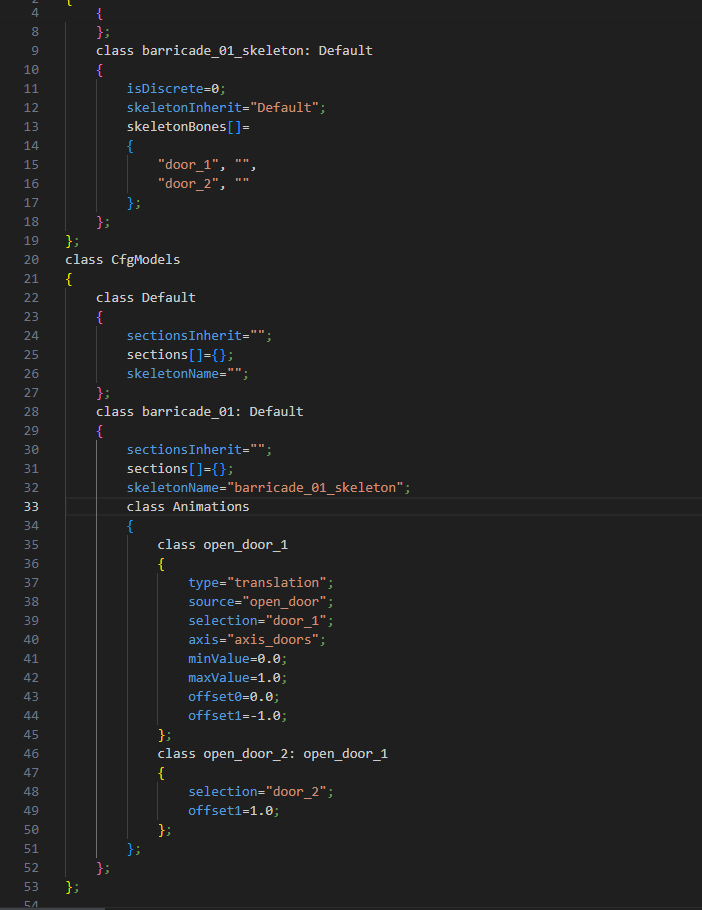

 wintry fox
Can you show the selections on your res lod?
subtle quartz
 wintry fox
Also, are you wanting to set this up as a vanilla door? Just checking since the naming scheme doesn't match
subtle quartz
Its just suppose to do this.

Now I had it working, But I switched models. and now it won't work.
Ima dm you the video of it working.
wintry fox
Only things sticking out to me is the source = "open_door" being lowercase and the selections not being in sections, but I don't think either of those matter
But if it the only thing you changed was the p3d, then that limits it
Would you be fine sending the p3d (here or dms) to check it?
subtle quartz
Yeah
wintry fox
Your axis_doors selection only has the right vertex selected

Geo lod is also missing the door selections
subtle quartz
Ooooohhhh
wintry fox
Geo lod shouldn't affect it visually, but the collision would still be there when opened
subtle quartz
Works. Thanks mate. ❤️ I owe you like 4 dinners. Hahaha
wintry fox
Lmao
Also the vanilla door thing I mentioned lets people use like the ZEN Door module + adds a property in Eden for people to open/close/lock the doors
Plus modders have an easy way to mess with it
wintry fox
It doesn't affect anything visually, just gives easy way for people to configure it. It's optional though, it's mostly just renaming things. E.g. naming the parts door_1a and door_1b instead of 1/2
subtle quartz
Ohhhhh
wintry fox
Write up on how to set up an object as a door with the vanilla system, for wider mod compatibility.
https://github.com/DartRuffian/Obsidian-ArmaModding/blob/main/Importing/Props/Doors.md

GitHub
Contribute to DartRuffian/Obsidian-ArmaModding development by creating an account on GitHub.
mortal pumice
Nice write up btw
wintry fox
Thanks, most of it came from you 
mortal pumice
😂
I do too much documentation at work to have the energy to do it for my hobby so it’s nice someone else did it for me haha
wintry fox
The parts at the bottom are currently private but once they're in release I can link to them on our public repo
Just giving people time to update comositions / mods
hearty sandal
wintry fox
Write up on how to set up an object as a door with the vanilla system, for wider...
lets put that up
 elfin egret
pastel fog
Is case the issue?
All of your classnames are all lower case, which might be the...
elfin egret
pastel fog
Is case the issue?
All of your classnames are all lower case, which might be the...
I'm writing from my second account: I don't know, on the same jsrs there is exactly the same scheme and everything works, but in my mod for some reason it doesn't, it doesn't see the replaced class, if it saw it, it would replace the sound with mine, I don't even know what's the matter, I'll try to connect the pddon that you advised
hearty sandal
elfin egret
I'm writing from my second account: I don't know, on the same jsrs there is exac...
please dont use multiple accounts here. tnx
pastel fog
elfin egret
I'm writing from my second account: I don't know, on the same jsrs there is exac...
@surreal scroll
All I can think of is you have a misspelled class someplace, or something missing from required addons
You can check with the in-game config browser to see if your code is actually loading as expected. The advanced developer tools mod has a faster config browser and some other useful tools
elfin egret
pastel fog
<@773993610659102781>
All I can think of is you have a misspelled class somepla...
Okay, thanks
wintry fox
What's the value to make submunitions copy the parents direction?
I may need to script it myself anyway because my explosive is going to be rotated to sit on a wall, but I want to make sure
wintry fox
submunitionDirectionType from https://community.bistudio.com/wiki/Arma_3:_Weapon_Config_Guidelines#Ammo_changes_on_fly_and_on_hit
 ashen chasm
"SubmunitionModelDirection" retains the parent munition's vector,
?
wintry fox
ashen chasm
> "SubmunitionModelDirection" retains the parent munition's vector,
?
Makes submunition rotated the same as the parent, as opposed to like auto leveling making it completely level but keeping the rotation (afaik)
I had to script what I wanted anyway because they don't seem to work properly if the parent is attached to an object
 round gulch
@wintry fox hey so, I packed the pbo on the addon builder with these paths. The only file inside the folder is the config.cpp with the code from earlier. I placed "@G36_60rnd_Compat" on the main Arma 3 folder, added the local addon via launcher, but the mags don't appear on the g36k mag list. I've rechecked the names of the ammo and the guns in the config viewer and everything checks out. Obviously there's something I'm doing wrong, maybe something newbies miss when starting to customize the game, but I really can't find what it is.
 round gulch
yeah sorry should've done it myself. It's now "Agux_G36_Compat[]" as you suggested instead of "magazines"
wintry fox
"@G36_60rnd_Compat" on the main Arma 3 folder,
Don't add your mod to the main arma folder, just adding the folder fromC:\ARMA 3 Mods\@G36_60rnd_Compatis enough (and then loading the mod in the launcher)
wintry fox
round gulch
yeah sorry should've done it myself. It's now "Agux_G36_Compat[]" as you suggest...
Have you verified your addon is loading?
You can pull up the magwell in the config viewer and see if your changes are present
round gulch
it appears on the menu screen on the bottom but ill check that
yeah mine doesnt appear in there

so it loads it but its not adding anything?
viral dragon
It wouldn't appear in that top-level list. You should find the CUP_556x45_G36 magwell and see if your Agux_G36_Compat array appears inside it.
(side tip: use Leopard20's Advanced Developer Tools mod, it makes the config viewer much easier to navigate)
 viral dragon
It's a little suspicious that there aren't any other magazine arrays in that magwell
Does the CUP G36 actually use that magwell?
wintry fox
You're modifying the wrong class then, if it used that magwell then there should be other arrays
round gulch
yeah there's no CUP magwells at all aside from the ak19. But then where would these be?

these are the ones I want the g36 to be able to load
viral dragon
Look at the G36's config and see what its magazineWells property actually contains
I've got a suspicious that you're going to find it's CBA_556x45_G36
viral dragon
Precisely.
You could also do this by making a new magwell and adding it to the G36 in addition to its existing magwell, but it would be better to use the existing CBA magwell, because then it applies to any other G36 that also has CBA compatibility.
Just a point of detail, which you are welcome to ignore, but the reason those magazines aren't normally compatible with the G36 is because its real physical magazine well can't fit them. It's a different shape to the STANAG 5.56 magwell, and also different to the Galil 5.56 magwell.
round gulch
yup, im well aware that it will probably look horrible. But I really want to have a g36 with 50 bullets for this personal project im doing :b
it works now, thank you very much

this means I can now have custom sizes of mags for all the weapons I need
I dont really know how to make the new well since im mostly vibe coding, you've done enough by helping me with the steps to do this
thanks to both of you 🫡
wintry fox
round gulch
I dont really know how to make the new well since im mostly vibe coding, you've ...
It's a simple as making a new class in CfgMagazineWells and adding what you want in it, though you would also have to modify the weapon config itself to make it use your magwell
E.g.
class CfgWeapons {
    class SomeGun_base;
    class SomeGun: SomeGun_base {
        magazineWell[] += {"Agux_556_magwell"};
    };
};

class CfgMagazineWells {
    class Agux_556_magwell {
        Agux_magazines[] = {...};
    };
};
aight, ill try that too later
round gulch
wintry fox
It's a simple as making a new class in `CfgMagazineWells` and adding what you wa...
Not only did I get this working but this made me realize I can change anything I want. I dont even need to choose specific mags that align to what I want, I can just inherit from a cool looking magazine and modify its ammo count.
real bluff
When doing the maxiumLoad for inventory space, is this in kg, lbs, or some other form of measurement?
wheat sluice
It's measured in Arma 3's fake mass unit, which is a mishmash of volume and weight.
Only slingLoadMaxCargoMass (and ViVT's maxLoadMass) actually takes into account the object's weight in kilograms. Everything else that's related to container capacity is measured in mass.
real bluff
wheat sluice
It's measured in Arma 3's fake `mass` unit, which is a mishmash of volume and we...
any conversion tools out there is is it all on guess?
wheat sluice
Vanilla values are (mostly) gamified and are tailored for gameplay balance rather than realism. Same applies to most mods and DLCs unless you're using ACE3, in which case I believe the ACE team have their own formula for it.
Someone in this channel probably has a formula too.
real bluff
I found 2 different conversion. 1kg = 22mass and 1kg = 14.5mass. One of these will work.
viral dragon
I believe ACE displays 1 mass as 0.1 lb (which comes out to about that 1kg = 22mass ratio)
 leaden sonnet
Could someone give me a hand with getting hiddenSelectionsTextures working on props? I've got some flags I want to put in game but dont want to have to use separate models for file size purposes.
Been modding for some time so know my way around it generally, tried using the regular hiddenSelections and hiddenSelectionsTextures to set the texture on my single selection but it wont have it at all
Generally pretty new to modding static objects so not sure if this is the correct way to go about it
hearty sandal
leaden sonnet
Could someone give me a hand with getting hiddenSelectionsTextures working on pr...
just retextured vanilla flags?
leaden sonnet
nah its a different model
configging them in myself but it doesnt seem to like changing the texture of the selection with hiddenSelectionsTextures
leaden sonnet
hearty sandal
just retextured vanilla flags?
^
round gulch
Any way to make a bullet go straight until it disappears with absolutely no curvature? I've tried a bunch of settings in the weapon and the ammo itself but it always falls down slightly
leaden sonnet
round gulch
Any way to make a bullet go straight until it disappears with absolutely no curv...
iirc even the star wars mod stuff has drop after a really long while
round gulch
So it's hardcoded
leaden sonnet
not sure, beena very long time since I looked at anything like that
hearty sandal
leaden sonnet
configging them in myself but it doesnt seem to like changing the texture of the...
is it set up as flag?
yo may need to do same thing as vanilla flags
but also hiddenselection requirements are listed in pins at #arma3_model
leaden sonnet
hearty sandal
is it set up as flag?
nah, just a static prop - Not looking to make it simulate it waving or anything of the sort
leaden sonnet
hearty sandal
but also hiddenselection requirements are listed in pins at <#105462541215358976...
On this, I assume I need a model.cfg for it to recognise the selections in effect? Dont have one atm and its just defaulting the texture it would seem
although not sure how that'd work with a prop seeing as it has no weights/bones
I suppose just like this? From the wiki

that's worked, not sure why I didnt really think of that sooner, cheers for the help though
 unique hound
i'm trying to create an 'auto-seeking' submunition to be fired out of an infantry weapon. the idea is basically smart rounds for an infantry weapon, auto-seeking any target in a cone in front of the user. as far as i can tell this should've been possible via config, but i absolutely can't get it to work. i found this on this post on the Discord and used it extensively as a reference, but the targeting just doesn't work. #arma3_config message
the submunition does spawn in properly, but just flies in a straight line and i'm at a loss as to what i'm missing since im not that well-versed with scripting/coding in general. i thought my fault might be in the link between flightProfiles in cfgAmmo and modes in cfgWeapons, but im not sure. autoSeekTarget and manualControl seem to make zero difference
i'd appreciate the help! attached my cfgAmmo excerpt and whatnot. if you reply please ping me since ill miss it otherwise
wintry fox
Anyone have an example of an object with a "hatch"?
I was saw that BIS_fnc_moduleDoorOpen exists and has an option to animate doors and hatches, and hadn't seen that before and sounds similar to the vanilla door system
hearty sandal
wintry fox
Anyone have an example of an object with a "hatch"?
I was saw that `BIS_fnc_modu...
hatch like a door on static object or hatch on a tank?
 rain scarab
Something with anim name like this I think, per the fn_moduledooropen.sqf:
_hatchAnimNameStart="Hatch_"; //<----------------------- Animation name for hatches is now set for all buildings to "Hatch_#HatchNumber_rot"
wintry fox
I know that, I was reading the code for it
I was wondering if it was similar to the door system, where there'd be a dedciated function for opening/closing them, an eden property, etc.
 coral obsidian
Hey yall, is anyone super well versed in the ejection seat framework?
sweet pecan
coral obsidian
Hey yall, is anyone super well versed in the ejection seat framework?
Just ask your question/say what you need and don't wait.
coral obsidian
does ejection seats need any named mem points to work? im trying to add them to helicopter based aircraft
hearty sandal
coral obsidian
does ejection seats need any named mem points to work? im trying to add them to ...
I think you need to script that
helicoper simulation did not have that built in
coral obsidian
i see
viral dragon
Ejector seats are a fully scripted system, they're not part of the engine/simulation even on jets.
They're added by a user action in config (for players) and a hit EH in config (for AI). Model memory points are required, as is some additional config on the aircraft to tell the functions what to use.
See: https://community.bistudio.com/wiki/BIS_fnc_planeEjection, https://community.bistudio.com/wiki/BIS_fnc_planeAiEject
coral obsidian
viral dragon
Ejector seats are a fully scripted system, they're not part of the engine/simula...
so if the model im using doesnt have pos_eject mem point, i could change that to a different mem point to make it work?
viral dragon
I guess
It looks like some animated parts are also needed in the model. You might have trouble if those aren't available, I'm not sure exactly how much it depends on them.
You can always find the function in the functions viewer to see what it does exactly.
coral obsidian
i see
i appreciate youre help, trying different mem points but it doesnt seem to work
hearty sandal
coral obsidian
i appreciate youre help, trying different mem points but it doesnt seem to work
which part does not work?
you dont get any action or action does nothing?
coral obsidian
i can eject but im just jumping out with no seat or parachute
worth noting that i am using ACE
which i think force allows ejection from helis
viral dragon
The documentation for BIS_fnc_planeEjection says you need to disable the basic ejection system in the aircraft's config
coral obsidian
viral dragon
The documentation for `BIS_fnc_planeEjection` says you need to disable the basic...
driverCanEject=1;
this one?
viral dragon
Requirments:
- Compatible aircrfat must have a config definition for all sub-sytems that will be invoked by this function.
1. Old legacy ejection must be disabled in aircrfat's cfgVehicles configuration.
driverCanEject = 0;
gunnerCanEject = 0;
cargoCanEject = 0;
coral obsidian
viral dragon
> Requirments:
> - Compatible aircrfat must have a config definition for all...
yeah, my dude still jumps out the side into a free fall
WAIT
I am close
i got it to kinda work
turns out i need to be moving quick and its coming up as a seperate ejection option
what happens when a model doesnt have a model.cfg? cause this is saying i need to add to one but theres no cfg i can add to

the seat is going to the mempoint that i told it to go to, but its getting stuck on that pont (ie its not becoming a seperate vehicle and sticking to the mem point)
hearty sandal
model.cfg controls animations
cfgSkeleton in modelc.cfg provides the bone structure
binarized p3d have the model.cfg written into them
it cant be altered
coral obsidian
balls
well i appreciate the help guys, i cant edit the model cause it aint mine lol
hearty sandal
you can tecnically still do a seat ejection but just not have the visuals on the vehicle
like hiding the seat
coral obsidian
oh?
coral obsidian
so when i hit eject, the seat appears on the mempoint but its "stuck" on the mempoint
does the visuals include being shot up?
worth noting the canopy is actually detaching from the main vehicle but not the chair
hearty sandal
the ejection seat chair is separate vehicle
its not the actual seat of the helo that detaches
hearty sandal
the motion animation is just visual to make it look like it shots up
viral dragon
hearty sandal
the motion animation is just visual to make it look like it shots up
Yes, but the function waits for the animation to complete before proceeding (line 283)
coral obsidian
viral dragon
Yes, but the function waits for the animation to complete before proceeding (lin...
is there a way to bypass it?
viral dragon
Yes, write your own function :U
coral obsidian

im way bad at scripting but i will give it my best lol
so it calls for BIS_fnc_planeEjectionFX it looks like all it wants in terms of animation is for the "Rocket_Flash_hide"
is that the only thing that hems it all up?
got it to work by deleting lines 270-272
 hearty sandal
👍
round gulch
how do I get rid of this annoying flash effect that appears randomly every few shots. I've overrided GunFire, GunParticles, GunClouds and it's still there. Anyone knows what the class/attribute is exacly? (ignore the mag gotta fix that later :b)
 sweet pecan
round gulch
how do I get rid of this annoying flash effect that appears randomly every few s...
sweet pecan
round gulch
how do I get rid of this annoying flash effect that appears randomly every few s...
Epic magazine
wintry fox
That looks like part of the muzzleflash
Like maybe it's getting distorted somehow, could just be me though
round gulch
no it's a special effect apart from the muzzleflash
I think that if you use a recoil compensator it also gives that effect. Not using a comp on this weapon of course
it flashes every few shots, the other shots have the normal muzzleflash
wintry tartan
You sure it's not a Mod that adds some effect?
round gulch
I dont have a mod that adds particle effects specifically no
wintry tartan
It does mean you're not sure about it. Remove ALL Mods besides the Mod you test
round gulch
thatsa good idea
yah still does it, its something on this weapon specifically, I just dont know what specific attribute it is
actually im dumb, it IS just the muzzleflash. For some reason it only appears every few shots and the rest of the shots just dont do anything
wintry tartan
Then it is just a part of the zasleh, then
round gulch
its a weird muzzleflash
wintry tartan
Are you making a Mod? Or testing some Workshop Mod?
round gulch
im making my own and inheriting from other mods, this one in particular is from the Niarms G3 mod
wintry tartan
Then it is what it is
round gulch
are muzzleflashes something you cant override at all?
wintry tartan
Almost all NIArms are open source so you can check that G3 model to see if it actually does
It is a part of P3D. Not can be done directly
mortal pumice
I think this is config related, but in my rpt when I or someone else starts up the game, there seems to be a pause between a muzzle and a UI element
12:21:38 Updating base class ->asdg_SlotInfo, by x\cba\addons\jr\config.bin/asdg_MuzzleSlot/ (original x\cba\addons\jr\config.bin)
12:21:38 Updating base class asdg_MuzzleSlot->asdg_MuzzleSlot_762, by x\cba\addons\jr\config.bin/asdg_MuzzleSlot_65/ (original (tcp\weapons\acc\muzzle\brake_65_01\config.bin - no unload))
12:21:38 Updating base class ->compatibleItems, by x\cba\addons\jr\config.bin/asdg_MuzzleSlot_65/compatibleItems/ (original (tcp\weapons\acc\muzzle\brake_65_01\config.bin - no unload))
12:22:52 Updating base class RscControlsGroupNoScrollbars->, by tcp\ui\config.bin/RscDisplayLoadMission/controls/Mission/ (original a3\ui_f\config.bin)
12:22:52 Updating base class RscControlsGroupNoScrollbars->, by tcp\ui\config.bin/RscDisplayNotFreeze/controls/Mission/ (original a3\ui_f\config.bin)
12:22:52 Updating base class RscDisplayLoadMission->, by tcp\ui\config.bin/RscDisplayLoadCustom/ (original a3\ui_f\config.bin)
For me its like a minute or so, but for others its 3 ish minutes, what im trying to figure out is if its the muzzle or the ui bit thats causing the longer loading times
viral dragon
It may just be loading config that doesn't update base classes. "Updating base class" is technically an error, not just a status message, and it's not displayed for every class loaded.
 grand zinc
mortal pumice
I think this is config related, but in my rpt when I or someone else starts up t...
grand zinc
mortal pumice
I think this is config related, but in my rpt when I or someone else starts up t...
This is game start?
#singleplayer message
Available on profiling exe.
This looks to be that there are very slow configs, between the brake config and the ui config.
Start profiling will show you the names of those
mortal pumice
Indeed on game start, will try with profiling thank you 🙂
So switched to profiling and put the launch param in and the issue doesn't occur on that beta -_-
same outputs
How odd
grand zinc
Profiling branch has multithreaded config parsing
It may not be as slow, but its probably still visible in the profiling data
mortal pumice
On non profiling it takes roughly a minute and a half between those two but on profiling its 1 second
And no new outputs between them
grand zinc
The profile trace file thats output, just look at it to see if the slow is visible there
wintry fox
Trying to make a smoke effect that spreads out over the ground, but having some issues. The smoke doesn't spread out evenly and focuses more towards the North East no matter which way the smoke is thrown. (White object in the picture is the smoke grenade)
Relevant parts from config viewer
angle = 0;
angleVar = 0.1;
ignoreWind = 1;
moveVelocity[] = {-0.5,0.1,-0.5};
moveVelocityVar[] = {1,0.1,1};
MoveVelocityVarConst[] = {0,0,0};
randomDirectionIntensity = 0;
randomDirectionIntensityVar = 0;
randomDirectionPeriod = 0;
randomDirectionPeriodVar = 0;
rotationVelocity = 0;
rotationVelocityVar = 0;
 pastel fog
wintry fox
Trying to make a smoke effect that spreads out over the ground, but having some ...
pastel fog
wintry fox
Trying to make a smoke effect that spreads out over the ground, but having some ...
Is moveVelocity[] = {-0.5,0.1,-0.5}; the issue?
With the -0.5 in x and y making it go northwest?
wintry fox
If they're positive its the same issue but SW, my assumption is that the speed is calculated like: speedX = mvVelocityX + random(0, mvVelocityVarX). My idea was to make the moveVelocity negative and double the moveVelocityVar to see if I could offset it
pastel fog
You'd need moveVelocity of 0 for it to not get weighted in any direction
Doing something with randomDirection might help with more even dispersal, depending on how you want it to disperse
toxic solar
is there away with pageup/pagedown for arty to make it increment slower? maxVerticalRotSpeed doesnt seem to effect but maybe im not noticing it
oh no wait it does, I just had it still too high
chilly tulip
Anyone know what the correct method is to determine the artillery turret of an artillery vehicle?
wintry fox
pastel fog
You'd need moveVelocity of 0 for it to not get weighted in any direction
Doing s...
Never saw your response
Ideally I want it to spread across the ground in a given area and only rise a little. I tried 0 for the moveVelocity but that just made a sphere of smoke and it didn't spread at all
round gulch
Any reason why a specific mag would be looking a certain way when on X gun but when I inherit that same mag for my custom weapon it's a completely different one?
I'm specifically inheriting "30Rnd_65x39_caseless_green" for the "arifle_Katiba_F". I want to put it on a modified version of the hk416cqb, this is the result:


to the game, that's supposedly the same mag...
hearty sandal
Does katiba use mag proxies
As in, is the magazine in katiba changeable
If not, it's part of the weapon model
And does not have shape as a magazine proxy
wintry tartan
If it visually doesn't change it, it doesn't
round gulch
so this is another "baked into the .p3d" moment?
wintry tartan
Yes
round gulch
guh
viral dragon
hearty sandal
And does not have shape as a magazine proxy
Sometimes mags do have proxy shapes even if they can be used in guns that don't use proxies.
In this case I kind of suspect the issue is that this mag does have a proxy model, but it's the wrong one because it's not expected to need one. It's probably inherited from the MX mags.
Usually if a mag doesn't have a proxy model at all, it's just invisible.
wintry tartan
Reaction Forces or Western Sahara alters it
round gulch
viral dragon
Sometimes mags do have proxy shapes even if they can be used in guns that don't ...
you mean it has like, a random proxy just to have one, but it doesnt use it?
viral dragon
round gulch
you mean it has like, a random proxy just to have one, but it doesnt use it?
The magazine has a proxy shape (probably inherited from the MX mags due to config structure, not specifically assigned). The Katiba doesn't have a magazine proxy and just uses a magazine that's part of the gun model, so the mag model is not usually actually visible, so it doesn't matter that it's wrong. When you plug it into a gun that does have a proxy, the magazine's proxy model is revealed.
You could change the magazine's config to point to a different proxy model, but there may not be a properly set-up Katiba magazine model in the files to use.
round gulch
aaah got it
no big deal was just looking for a black slim straight mag and that one looked perfect for the hk416. Ill have to search for another one
wheat sluice
The Katiba's magazine is just a 20-rounder 5.56 mm STANAG anyway. Why is it firing 6.5 mm caseless? Don't question BI's logic.
STANAG models are dime to a dozen, so there's probably dozens of free (and legit) models on Sketchfab that you could repurpose into a usable proxy.
real bluff
Is it possible to add to the selections in the model.cfg of an existing mod by making my own model.cfg using the same class names? Making a mod to go along with another mod but was wanting add to the hiddenSelections of the existing mod. The selections exist, just are not setup to be hiddenSelections.
novel lava
no model cfg is embedded in the p3d
real bluff
novel lava
no model cfg is embedded in the p3d
its a companion to the p3d. Do you mean you need the p3d along with the model.cfg for the model.cfg to be read?
pastel fog
wintry fox
Never saw your response
Ideally I want it to spread across the ground in a give...
I'd guess something like
moveVelocityVar = {1,0.1,1};
moveVelocityVarConst = {0.5, 0, 0.5};```
would be closer to a flat-ish, mostly circular spread
VelocityVar might need to be significantly higher for it to spread out properly
And I can't tell what the best balance between VelocityVar and VelocityVarConst would be
Reference I found said the config used {x,z,y} for the particle vectors <https://community.bistudio.com/wiki/Arma_3:_Particle_Effects>That seemed to mostly do the trick, thanks

 knotty sage
@worn eagle Yes, usually it's being used to display the ammunition used, in the top right corner of the screen (ex: 9x21mm).
novel lava
real bluff
its a companion to the p3d. Do you mean you need the p3d along with the model.cf...
when the model is binarised the model cfg is embedded in the p3d, it's only separate if unbinarised
 covert knot
heya, can anyone help me with this error? it would usually be from a mod but the olive bandana is a base game asset. some information if its helpful, i get this error when joining a server with one modpack and no matter what i do i cannot play, i use the same modpack on the same server with a different mission file and i still get the issue but if i restart my game it lets me play no problem. really confusing me, any help would be great
 wintry tartan
This error message is not as harmful as crashing/stop a mission
covert knot
it is i believe the reason i get stopped from joining, as i get to the role select screen, press a role and then continue, i get shown the picture of the map and then i get shot back to the role select screen with this error. every time no matter times i just reselect my role
wintry tartan
I implied you should think of broken/bad mission, rather than two lines of harmless error messages
!rpt
charred sealBOT
Arma RPT
Arma generates an .rpt log file on every run. This log file contains a lot of information like the loaded mods or any errors that appear, and can be very useful for troubleshooting problems.
To get to your RPT files press Windows+R and enter %localAppData%/Arma 3
Additionally see the Crash Files wiki page for more information.
To share an rpt log here, please use a website like https://pastebin.com/ (Set expiry time to 1 week or less) to upload the full log, that way the people helping you can take a look at it and try to figure out with you the problem you encounter.
Note: RPT logs can hold personal information relevant to your system, the game or others.
wintry tartan
This also
covert knot
ah rgr okay
 analog vessel
Hi, how do i merge multiple uniforms to variants (like so)?
I have a bunch of uniforms id like to merge so they dont take up so much space in the arsenal
Im guessing this is via ACE arsenal extended?
wintry tartan
Yes AFAIK
analog vessel
wintry tartan
Yes AFAIK
Any idea how to do it? Is it possible with just a config or does it need to be its own mod
Also hello polpox i love your mods :D
wintry tartan
I'm not an ACE or ACEX or something user. You may Google it
analog vessel
Google isnt helping
wintry tartan
 analog vessel
wintry tartan
It does
https://ace3.acemod.org/wiki/framework/arsenal-framework#9-custom-sub-it...
analog vessel
wintry tartan
It does
https://ace3.acemod.org/wiki/framework/arsenal-framework#9-custom-sub-it...
maybe im an idiot, i dont understand how this helps
this looks like its for categories for adding items to a backpack
wintry tartan
You can also lookup other Mods' config that does the categorizing thing
covert knot
wintry tartan
This also
had to break it down into two seperate due to the size lol https://pastebin.com/8rs98JXW
Pastebin
Pastebin.com is the number one paste tool since 2002. Pastebin is a website where you can store text online for a set period of time.
Pastebin
Pastebin.com is the number one paste tool since 2002. Pastebin is a website where you can store text online for a set period of time.
wintry fox
analog vessel
Im guessing this is via ACE arsenal extended?
Yes
wintry fox
analog vessel
Any idea how to do it? Is it possible with just a config or does it need to be i...
Yes it's done through config
See https://github.com/jetelain/AceArsenalExtended#sample

GitHub
Find easily your favorite gear within ACE3 Arsenal - jetelain/AceArsenalExtended
wintry fox
wintry tartan
It does
https://ace3.acemod.org/wiki/framework/arsenal-framework#9-custom-sub-it...
That's unrelated, that's like how ace sorts all medical items into their own panel on the right side
wintry tartan
I see
wintry fox
Nice
wintry tartan
Apologies then, don't ever texting while work
analog vessel
Now to do it to all of the 400 other CSOG uniforms....
May god bless Copilot for putting in the 400 configs
wintry tartan
covert knot
https://pastebin.com/mhGv990s
Just realized the bot hiccups and temp punished you. I don't know why it did
wintry fox
It's not random, it's based on what would still first appear in the list iirc
But no, you can't set what thing is equipped first
tacit zealot
Is there a way to set a minimum firing speed for an ammo class/weapon mode? For example, a particular missile has a launch envelope with a minimum firing speed of 600 km/hr, and I don't want the AI to attempt to use it at low speed or else it just doesn't have enough kinetic energy for its flight
chilly tulip
hmm. Most missiles don't exactly take long to get to 600 km/h...
What sort of weapon is this?
tacit zealot
I'm thinking more like what soviet bombers would fire - KSR-2, K-10, Kh-15, Kh-65, Kh-101, etc.
some like the KSR and Kh-65/101 cruise missiles are somewhat slow and don't have too much acceleration since they're just supposed to sustain speed
And the Arma physics system is wack, and when youre in free flight, drag will eventually make you fly backwards
chilly tulip
Unless you're both slow and very low I'd expect to level out.
tacit zealot
its mostly the Arma drag model I'm running into problems with, and the fact that Arma doesn't represent two-stage boost/cruise motors very well. I've had to sum the impulse of each stage and create a balanced thrust time according to the 100% for 75% of the time thrust curve
sweet pecan
Why couldn't it be like the base-game VLS cruise missile, which obviously works from a stand still?
tacit zealot
I just don't really like the way it flies. The missiles I'm trying to replicate (some of them) fly more like small aircraft so I've lowered their maneuverability. Also have to work out the tracking so it doesn't bleed too much speed trying to altitude-match in cruise mode
chilly tulip
Hmm, might be best off scripting some extra boost on launch.
Or maybe submunition :P
tacit zealot
Hmm, I think I have another clue.
According to the ammo config reference, the "thrust" is actually acceleration, so I've calculated that according to typical missile mass and engine thrust. For some reason, they're ending up slower than expected, more in the low subsonic range than high subsonic. I think it's either something with the drag model, or.. .wait.
Fuel has weight. Duh. I need to get the dry weight of these things as well and put that in the spreadsheet... I've been calculating acceleration based off full weight, not variable. Ugh time to bring out the full version of Newton's Second Law
chilly tulip
I think I calculated it once and thrust was just plain acceleration, and there wasn't any burn?
Although I might have been working with rocket rather than missile.
tacit zealot
well arma missiles don't change mass, but IRL they do, so my "realistic" acceleration calculations don't take that into account, so IRL they accelerate more than I calculated. Typical Arma missiles dont have to worry too much about that due to short burn time
chilly tulip
Super dumb way to do initial boost would be to just give it initSpeed.
would probably look quite bad though.
tacit zealot
Nah, these need it to get to their cruise or topdown altitudes. I also like seeing them separate from the plane and fly alongside, which is cool AF
Non-direct modes are my big problem for energy bleed, except for the Kh-15, which also isn't TopDowning properly, and in direct mode bleeds too much energy, so it really needs the parabolic trajectory
okay yeah, calculated average acceleration over the course of the boost phase and its looking a lot better, time to test it. I love spreadsheets
tacit zealot
Any clues on why TopDown isn't working for this ammo? The firemode is clearly working since I can select+fire, but the flight profile in-game isn't any different from Direct. Screenshot 1 is in-flight, screenshot 2 is low altitude attached to a static object, so it can't be anything to do with the plane's altitude being to high. I've also updated the minimum distance in the topDown config to match the descend distance, but no change.


 viral dragon
tacit zealot
Any clues on why TopDown isn't working for this ammo? The firemode is clearly w...
viral dragon
tacit zealot
Any clues on why TopDown isn't working for this ammo? The firemode is clearly w...
Isn't it ascendAngle and not ascentAngle?
toxic solar
what does negative alpha for color[] of particle effects mean?
analog vessel
hey, can anyone help me out with ace arsenal extended?
having a few issues with some private mods id rather not send here
tacit zealot
viral dragon
Isn't it `ascendAngle` and not `ascentAngle`?
...yes :|
novel lava
toxic solar
what does negative alpha for `color[]` of particle effects mean?
emissive
finite bronze
this is a dumb question as I always forget the answer but how do you disable turnout for things like the driver and gunners?

wait. as soon as I typed this I think i remembered the answer, it's forceHideDriver or something
hearty sandal
finite bronze
this is a dumb question as I always forget the answer but how do you disable tur...
also you can just not have the turned out actions
finite bronze
hearty sandal
also you can just not have the turned out actions
they were invis when I had no turned out action.
hearty sandal
then forcehidedriver is fine too
finite bronze
when I inherit the base tank to add more turrets to different versions I get a weird problem. The Commander is invisible. So I thought I might have to inherit the commander as well but that also does not work.
here is the base tank turret config:

here is the tank that inherits it turret config:

even on the base version for some reason it spawns and invis commander and then a normal gunner where the commander should be?
wait
how do I inherit from the mainturret without inheriting a commander turret?
wintry fox
Not config, #server_admins or #server_windows / #server_linux
wintry fox
finite bronze
how do I inherit from the mainturret without inheriting a commander turret?
Only turrets that are explicitly defined should be used, so only your TopTurret should be used currently
finite bronze
yes, sorry. I understand now and it works.
 grand comet
anyone know what unit config value controls the set of voices the game picks from for that unit?
wintry fox
grand comet
anyone know what unit config value controls the set of voices the game picks fro...
A unit can specify a voice in its identityTypes, and voices in CfgVoices can add themselves to those groups
So you'd have something like:
// CfgVehicles
class someUnit {
    identityTypes[] = {"LanguageFrench_F"};
};

// CfgVoices
class French01 {
    identityTypes[] = {"LanguageFrench_F"};
};
So Arma spawns the unit, looks at identityTypes, and grabs a language that's in the LanguageFrench_F pool. This also applies for faces and facewear
analog vessel
Hey, any idea why this has different colored text?

I dont recall doing anything to play with the text
(for context, this is an ace extended compat mod i made)
wintry fox
analog vessel
Hey, any idea why this has different colored text?
#arma3_scripting message
Don't need to ask in multiple channels
toxic solar
for an arty what makes it so that elevation can only be controled by page up/down when not using arty computer?
or actually
elevationMode = 3, it says its 1 and 2, how do you in game switch between modes 1 and 2?
oh wait I read that wrong
 timid osprey
Having an issue with a replacement config. Replaced the CUP Hellfires on the CUP MQ-9 Reaper with MELB Hellfires and vanilla GBU-12s. Works if you put down a new vehicle, however, if I use a rearm script or ACE rearm after all Hellfires and GBUs are expended, the ammo won't be rearmed. It works if you expend all but one round, but not if you spend all of them. Occurs on other aircraft where weapons have been replaced as well.
real bluff
Does hiddenSelection not work with _ca textures? I have an object that has a hiddenSelection and the _ca texture shows black where the transparency is but if I set the texture on the object in Object Builder, it works as is supposed to.
hearty sandal
real bluff
Does hiddenSelection not work with _ca textures? I have an object that has a hid...
original object needs to have transparency on that texture as well
rain scarab
JSRS 2025 puts its icon on everything that doesn't have an icon already. How can I prevent this or override this without having to modify it?

I assume its config related though its not clear where, sifting through
hearty sandal
rain scarab
JSRS 2025 puts its icon on everything that doesn't have an icon already. How can...
its likely altering shound configs of the terrains. nothing you can do about it
rain scarab
Got it. Ty
real bluff
hearty sandal
original object needs to have transparency on that texture as well
weird but works. I would think replacing a texture wouldn't matter about the transparency like other games but I guess Arma's engine is just weird like that.
hearty sandal
real bluff
weird but works. I would think replacing a texture wouldn't matter about the tra...
its optimization
object that is not expected to have transparency
vs object that is expected to have transparency
transparency not being meant to hide things
as it does not hide the mesh
just makes it transparent
thus making it far more expensive to draw
round gulch
Im trying to make a custom attachment that increases the bullet damage and its initspeed. For some reason its not changing neither, what am I missing:
    scope = 2;
    displayName = "barrel charger";
    picture = "\A3\weapons_F\Data\UI\gear_acca_snds_l_CA.paa";
    model = "\OPTRE_Weapons_Pistols\M6C\m6c_comp.p3d";
        class ItemInfo : InventoryMuzzleItem_Base_F {
        mass = 20;
        soundTypeIndex = 0;
        class MuzzleCoef {
            artilleryDispersionCoef = 1.0;
            initSpeed = 3;
            initSpeedCoef = 3;
            audibleFireCoef = 1.0;
            recoilCoef = 1.0
        };
        class AmmoCoef {
            hit = 5;
            visibleFire = 5;
            audibleFire = 1;
            visibleFireTime = 1;
            audibleFireTime = 1;
            cost = 1;
        };
        muzzleEnd = "konec hlavne";
    };
};```this should effectively triplicate the bullet speed and multipy the bullet damage by 5, but they remain the same
wheat sluice
Your properties are all over the place. Muzzle velocity (initSpeed) is handled in MagazineCoef, not MuzzleCoef. There's no such token for initSpeedCoef either:
            class MagazineCoef
            {
                initSpeed = 3;
            };
            class AmmoCoef
            {
                hit = 5;
                typicalSpeed = 1;
                airFriction = 1;
                visibleFire = 5;
                audibleFire = 1;
                visibleFireTime = 1;
                audibleFireTime = 1;
                cost = 1;
            };
            class MuzzleCoef
            {
                dispersionCoef = 0.8;
                artilleryDispersionCoef = 1;
                fireLightCoef = 0.1;
                recoilCoef = 1;
                recoilProneCoef = 1;
                minRangeCoef = 1;
                minRangeProbabCoef = 1;
                midRangeCoef = 1;
                midRangeProbabCoef = 1;
                maxRangeCoef = 1;
                maxRangeProbabCoef = 1;
            };
thank you I will try that
round gulch
wheat sluice
Your properties are all over the place. Muzzle velocity (`initSpeed`) is handled...
so the initspeed works, but hit doesnt change the damage at all, any idea why that could be?
 remote gulch
Hello! I'm trying to import a modular shelter similar to the military cargo houses in vanilla. Per the request of other members of the team, they want the stairs on the front to be toggled visible or not visible like the military platforms have from contact. The option shows up in game to hide the stairs but the stairs themselves stay visible. Has anyone done something like this that can tell me where I messed up or what I'm missing to making the stairs actually disappear?
Config.cpp section
class Land_3AS_Orto_Plut_Civ_House_Small_1: House_F
    {
        placement = "vertical";
        mapSize = 2;
        destrType = "DestructDefault";
        vehicleClass = "Structures";
        editorCategory = "3AS_EditorCategory_Orto";
        editorSubcategory = "3AS_EditorSubcategory_Houses";
        faction = "Prop";
        scope = 2;
        scopeCurator = 2;
        model = "3as\prop_orto_plut\CivilianBase\Models\Houses\3AS_Orto_Plut_Civ_House_Small_1.p3d";
        //editorPreview = "3AS\prop_orto_plut\CivilianBase\EditorPreviews\Land_3AS_Orto_Plut_Civ_House_Small_1.jpg";
        displayName = "Small Civilian Shelter 1";
        actionBegin1 = OpenDoor_1;
        actionEnd1 = OpenDoor_1;
        numberOfDoors = 1;
        armor = 300;
        eden = 1;
        class SimpleObject
        {
            eden=1;
            animate[] = {{"hitzone_1_hide", 0}};
            hide[] = {};
            verticalOffset = 0;
        };
        class AnimationSources
        {
            // Animation sources for doors
            class Door_1_sound_source
            {
                source = "user";
                initPhase = 0;
                animPeriod = 1;
                sound = "3AS_DoorSound1";
                soundPosition = "Door_1_trigger";
            };
            class Door_1_noSound_source
            {
                source = "user";
                initPhase = 0;
                animPeriod = 1;
            };
            class Door_1_locked_source
            {
                source = "user";
                initPhase = 0;
                animPeriod = 0.8;
            };
            class Stairs_Hide_Source
            {
                source = "user";
                animPeriod = 0.01;
                initPhase = 0;
            };
        };
        class Attributes
        {
            class Stairs_hide_source
            {
                displayName = "Hide Stairs";
                property = "Stairs_hide";
                control = "CheckboxNumber";
                defaultValue = 0;
                expression = "_this animateSource ['%s',_value,true]";
            };
        };
Model.cfg sections
class 3as_Orto_Plut_Civ_House_Small_1_skeleton: Default
    {
        isDiscrete=1;
        skeletonInherit="";
        skeletonBones[]=
        {
            "door_1", "stairs",""
        };
    };
class 3AS_Orto_Plut_Civ_House_Small_1 : Default
    {
        sections[]={};
        skeletonName="3as_Orto_Plut_Civ_House_Small_1_skeleton";
        class Animations
        {
            class door_1_rot
            {
                type="translation";
                source="door_1_sound_source";
                selection="door_1";
                axis="door_1_axis";
                minValue=0.0;
                maxValue=0.58;
                offset0=0.0;
                offset1=0.58;
            };
            class stairs_hide
            {
                type="hide";
                source="stairs_hide_source";
                selection="stairs";
                sourceAddress="clamp";
                minPhase=0;
                maxPhase=1;
                minValue=0;
                maxValue=1;
                memory=0;
                hideValue=1;
                unHideValue=-1;
            };
        };
    };
...could be yet another case of the token being ignored when the attachment is used by human players (based on dedmen's comment on this ticket):
https://feedback.bistudio.com/T167366
Give your muzzle attachment to an AI soldier and see if their damage values vs. an enemy target is amplified. If it is, then this yet another token that gets ignored only when it's in the hands of human players.
remote gulch
remote gulch
Hello! I'm trying to import a modular shelter similar to the military cargo hous...
nevermind i got it!
 sick zephyr
Any idea why the UI picture doesn't show up in the equipment but does show up in the arsenal?
I get this rpt error: 12:17:42 Warning Message: Picture equip\m\m_sgte\jaffa_grenade\data\nade_ui.paa.paa not found
even though the path in the cfg is: picture = "SGTE\Jaffa_grenade\data\nade_UI.paa";
again it WORKS in arsenal but DOES NOT WORK in the inventory
tame raven
sick zephyr
Any idea why the UI picture doesn't show up in the equipment but does show up in...
Needs a leading slash
 west schooner
I'm having an odd issue with the PilotCamera on a heli that I'm trying to improve the PilotCamera of.
The camera is working fine however its refusing to go into the point track mode when the camera is pointed at another vehicle with the stabilized camera mode enabled (the area track mode works fine).
I've managed to do this before with other helicopters, normally driverWeaponsInfoType="RscOptics_CAS_01_TGP"; does the trick however it doesn't seem to be working for me this time (given that I can still see the extra info that it normally applies to the targeting cam its definitely doing something). I think it may relate to the vehicle having a sensor suite however this heli already has the radar/ir/vis etc.
Any idea what I've missed?
chilly tulip
Anyone know where the random facewear on units comes from? Can't find any relevant documentation.
wintry fox
It is
Tldr stuff gets grouped into pools, unit config can specify pools to pull stuff from
chilly tulip
thx
round gulch
wheat sluice
...could be yet another case of the token being ignored when the attachment is u...
I see, that's annoying. But they DID fix the recoilcoef not affecting the recoil, since it changed for my custom weapon when I tested it with the custom attach. You think there's any hope of them fixing hit in the same way? AI being able to use these buffs is of no use to me for the project I'm making...
 sage wasp
whats the default vonCodec value on a a3server config file?
chilly tulip
According to https://community.bistudio.com/wiki/Arma_3:_Server_Config_File it's 1.
wheat sluice
round gulch
I see, that's annoying. But they DID fix the recoilcoef not affecting the recoil...
You can pray that one of the Live Ops developers (dedmen/KK) see it and work on a fix if they've got time. Otherwise, it's probably going to remain that way for the foreseeable future.
In the meantime, your only workaround is to use scripting to handle projectile damage. Maybe swap out the bullet with the 5x damage version in a similar way to how the vanilla T-100X railgun works, but that's beyond the scope of this channel and is better suited for #arma3_scripting.
round gulch
again, thanks
tacit zealot
in a HUD class, can a Draw entry be conditional based on specific classes being mounted to a pylon?
hearty sandal
tacit zealot
in a HUD class, can a Draw entry be conditional based on specific classes being ...
yes
 outer hazel
does anyone have any idea what "laserscanner=1;" do?
@timid osprey most likely because the magazine is still not empty
you'd have to remove all the old mags and add the new ones
brave crag
Is there a setting in config to adjust the character seating position in a vehicle, like for example if theyre floating above the seat?
hearty sandal
brave crag
Is there a setting in config to adjust the character seating position in a vehic...
no
that is handled by the vehicle crew proxy positions
and fitting made animation
brave crag
ah damn I was afraid that would be the case. Found a cool mod but the character floats above seat and their head even sticks out of the top 
Thank you
hearty sandal
brave crag
ah damn I was afraid that would be the case. Found a cool mod but the character ...
technically you could make a new animation and config patch the driver action to use your new better fitting animation
 potent idol
Hey guys dumb question make a asset selector it’s hard I wanna make a custom for Rhs on warlords
hearty sandal
potent idol
Hey guys dumb question make a asset selector it’s hard I wanna make a custom for...
Whats the question?
potent idol
Like I try to make my own warlords but with different assets like diferents tanks vehicles helicopters and planes
sweet pecan
potent idol
Like I try to make my own warlords but with different assets like diferents tank...
IIRC, you can make your own Warlords preset using a config in your description.ext. There's a few tutorials on the internet.
potent idol
It’s kinda difficult?
sweet pecan
potent idol
It’s kinda difficult?
No
 viral juniper
Hey there, just wondering if anyone could point me to a resource that will help teach me to make a mod that player a video for players when they first enter a server? Like an intro kind of thing
 vale basalt
viral juniper
Hey there, just wondering if anyone could point me to a resource that will help ...
viral juniper
vale basalt
viral juniper
Hey there, just wondering if anyone could point me to a resource that will help ...
viral juniper
Cheers, but I'm looking at specifically making an addon that plays an ogv on joining the server
Using cameras to create the intro is an impossability, as is having the necessary script in the missions pbo
vale basalt
viral juniper
Cheers, but I'm looking at specifically making an addon that plays an ogv on joi...
Ah - I had just woken up. 🤤
Should be doable using Extended_PostInit_EventHandlers.
You'll need to use BIS_fnc_playVideo andremoteExec it for JIP.
https://github.com/CBATeam/CBA_A3/wiki/Extended-Event-Handlers-(new)
https://community.bistudio.com/wiki/BIS_fnc_playVideo
https://community.bistudio.com/wiki/remoteExec
GitHub
Community Base Addons for Arma 3. Contribute to CBATeam/CBA_A3 development by creating an account on GitHub.
viral juniper
Absolutely peak, thank you!
 somber cloak
@outer hazel laserScanner = 1; /// if the vehicle is able to see targets marked by laser marker
outer hazel
thanks
somber cloak
laserTarget =1; I guess means if a weapon is able to target with a laser
outer hazel
it is one of the few things missing from the locking page on the wiki
somber cloak
I found it in samples_f/test_plane_01/config.cpp
wintry fox
viral juniper
Absolutely peak, thank you!
You don't need to remoteExec it, that would play the video for all connected players whenever any player joins
class Extended_PostInit_EventHandlers {
    class YourPrefix_playVideo {
        clientInit = "'\path\to\video' call BIS_fnc_playVideo";
    };
};