#arma3_config
1 messages · Page 47 of 1
 willow garnet
I've tried many different classes to inherit from but I just can't manage to get one working without using the FirstAidKitItem_base_f
 pastel fog
Not appearing might the ace arsenal stuff
There's a config entry to force it to appear in ace arsenal, on the ace wiki for the framework for ace arsenal
willow garnet
pastel fog
Not appearing might the ace arsenal stuff
There's a config entry to force it to ...
But even if I do an player addItem "GOL_Packed_HMG" it doesn't seem to add it either. I've even tried to inherit intelitems from ACE but 😄
Can't seem to get it right
class CfgWeapons {
    class ACE_ItemCore;
    class CBA_MiscItem_ItemInfo;
    class GOL_Packed_HMG: ACE_ItemCore {
        scope = 2;
        displayName = "Static HMG (Packed)";
        descriptionUse = "Packed HMG. Self-interact to deploy.";
        descriptionShort = "Static HMG (Packed)";
        picture = "\A3\Weapons_F\Items\data\UI\gear_Toolkit_CA.paa";
        model = "\A3\Weapons_F\Items\Toolkit";
        class ItemInfo: CBA_MiscItem_ItemInfo {
            mass = 50;
        };
    };
}
This seems to work, using CBA_MiscItem_ItemInfo
and ACE_ItemCore
willow garnet
It was right, it worked with something else. However I ran into another issue, when I select the dummy items from arsenal I can see the custom image of the class that I've made, but when I go into my inventory, its only text and no icon?
Is there like another property I've forgotten to assign or something? You know anything about that?
class CfgWeapons {
    class ACE_ItemCore;
    class CBA_MiscItem_ItemInfo;
    class GOL_Packed_HMG: ACE_ItemCore {
        scope = 2;
        displayName = "Static HMG (Packed)";
        descriptionUse = "Packed HMG. Self-interact to deploy.";
        descriptionShort = "Static HMG (Packed)";
        picture = "OKS_GOL_Misc\Data\UI\GOL_HMG_Packed.paa";
        model = "\A3\Weapons_F\Items\Toolkit";
        class ItemInfo: CBA_MiscItem_ItemInfo {
            mass = 50;
        };
    };
};
 hearty sandal
This is way too long to read. Make 1 item first so it's easy to read what you do. Once that works, add more.
Beyond that youll need to wait for others to give opinions too. I'm going to bed 😅
willow garnet
hearty sandal
This is way too long to read. Make 1 item first so it's easy to read what you do...
My bad 😄
willow garnet
I figured it out, backward slash missing on picture path.
Doesn't explain why it could be seen in arsenal I guess perhaps they look in different places because the path needs to be exact?
Either way, it works!
 wintry fox
willow garnet
Doesn't explain why it could be seen in arsenal I guess perhaps they look in dif...
wintry fox
willow garnet
Doesn't explain why it could be seen in arsenal I guess perhaps they look in dif...
Inventory treats picture = "..." and picture = "\..." differently. ACE just grabs the picture path and sets it in the UI
willow garnet
wintry fox
Inventory treats `picture = "..."` and `picture = "\..."` differently. ACE just ...
Thanks man! I got it, it now shows the icon 😄
wintry fox
Yeah no leading slash goes looking for like some specific path setup or something like that
 echo briar
Anyone know a method to force initWorld a value to upon returning to the main menu from a mission etc.
 stark cargo
Good evening, I need help with my mod, the AI does not engage my vehicle but flees. What could this depend on? Thanks in advance for your help.
 lean bloom
Ah please how should I rewrite this condition to point to, for example, slot "Cargo10" instead of "Commander"?

 vivid plank
hello everyone!
I ran into a bit of an issue while trying to retexture a modded vehicle. The problem is that no matter what I try the custom texture is only visible when inside the vehicle. From outside the default texture appears.
class CSLA_CIV_ADA1600VB;
    class CSLA_CIV_ADA1600Moldova : CSLA_CIV_ADA1600VB
    {
        scope = public;
        crew = "C_man_1";
        side = 0;
        faction = CIV_F;
        displayName = "Ada 1600 Moldova";
        author = "Dive";
        hiddenSelectionsTextures[] = {"pdrstuff\data\textures\lada_moldova_co.paa"};
        class textureSources
        {
            class Moldova
            {
                author = "Dive";
                displayName = "Moldova";
                textures[] = {"pdrstuff\data\textures\lada_moldova_co.paa"};
                factions[] = {};
            };

            class White
            {
                author = "Dive";
                displayName = "White";
                textures[] = {"csla_civ_veh\Lada\Data\lada_white_co.paa"};
                factions[] = {};
            };
        }
        textureList[] = {"Moldova",0.5,"White",0.5};
    };
Notice how on the first screenshot the hood is black but on the second it's white. But it's the same car with the same texture applied o_0
What am I doing wrong?

 wintry fox
lean bloom
Ah please how should I rewrite this condition to point to, for example, slot "Ca...
wintry fox
lean bloom
Ah please how should I rewrite this condition to point to, for example, slot "Ca...
If they're turrets, https://community.bistudio.com/wiki/unitTurret

 novel lava
getCargoIndex https://community.bistudio.com/wiki/getCargoIndex
lean bloom

hearty sandal
vivid plank
hello everyone!
I ran into a bit of an issue while trying to retexture a modded ...
youll need to report that to the author. the first person LOD of the model is likely missing the retexture selections
 silent acorn
how to get the property in a vehicle that a player can be healed next to it?

 wintry tartan
vivid plank
hello everyone!
I ran into a bit of an issue while trying to retexture a modded ...
wintry tartan
vivid plank
hello everyone!
I ran into a bit of an issue while trying to retexture a modded ...
Guess it's something for you @foggy spindle
 wheat sluice
silent acorn
how to get the property in a vehicle that a player can be healed next to it?
wheat sluice
silent acorn
how to get the property in a vehicle that a player can be healed next to it?
attendant = 1 will turn the vehicle/structure into a healing station.
But there's no config token for enabling proximity healing (unlike repairs/fuel/ammo). You'll need scripts for that.
silent acorn
wheat sluice
`attendant = 1` will turn the vehicle/structure into a healing station.
But ther...
thx me need only Getnumber (config) for condition
vivid plank
hearty sandal
youll need to report that to the author. the first person LOD of the model is li...
you mean the other way around, right? first person model does use hiddenSelection but 3rd person does not
wintry tartan
No
hearty sandal
vivid plank
you mean the other way around, right? first person model does use hiddenSelectio...
either that is wrong. from your description I understood the hood was the original color.
vivid plank
hearty sandal
either that is wrong. from your description I understood the hood was the origin...
I show the hood on the screenshot because it's the only part of the car visible from the first person perspective x)
But it means that the whole car has different textures when observed from inside vs outside.
From FPV the car has the custom texture. From TPV it has the default texture. The Third Person View texture seems to be bugged, hence why I'm wondering why the first person LOD would be bugged
hearty sandal
vivid plank
I show the hood on the screenshot because it's the only part of the car visible ...
then yes report that the 3rd person lods dont have the hiddenselections
 narrow swallow
To be clear you would not REpack the original mod's files. You would only pack your config patch. @hazy garnet
 devout plume
Hi, not sure if this is the right channel but whatever. I'm trying to make an Ace Arsenal Extended compatibility patch for Ample Camo Pack, and i'm using the config helper provided by the dev of Arsenal Extended, but whenever I try to load a .pbo, it seemingly does nothing. No config is generated, and it's just giving me a blank white screen. If anyone knows what i'm doing wrong, it would be appreciated
 wintry fox
devout plume
Hi, not sure if this is the right channel but whatever. I'm trying to make an Ac...
wintry fox
devout plume
Hi, not sure if this is the right channel but whatever. I'm trying to make an Ac...
You'd have to ask the person who made it
 hasty oasis
Anyone know what determines the names of AI units displayed at the bottom left command bar? (if you're a group leader). I was wondering if it's possible to have my custom unit classes use specific names rather than just the generic randomized names.
hearty sandal
hasty oasis
Anyone know what determines the names of AI units displayed at the bottom left c...
yes specific names are possible
 tame raven
I am trying to make AI strafe targets at will. It seems the vanilla Yak-130 is quite willing to do so to cars, but AI in my plane tend to just orbit over top of the target rather than line themselves up for a strafe. Has anyone else encountered-and-fixed this problem?
(To be clear, this is a modded plane with a modded gun with modded ammo)
hasty oasis
hearty sandal
yes specific names are possible
Cool! Any idea what I need to define for that? I can't really find anything on this specific subject trying to look it up. Is it something that needs to be defined in the unit class or somewhere else?
hearty sandal
tame raven
(To be clear, this is a modded plane with a modded gun with modded ammo)
I think first step you might do is to rule out the weapon by using same one that works with the vanilla plane
in case there is something funky in that config
tame raven
hearty sandal
I think first step you might do is to rule out the weapon by using same one that...
🙂
guess who rubber ducked herself into doing that while you typed
anyway you're right - it's likely ai fire modes
so very fixable!
probably!
Update: the ACE cas ammo I was inheriting from was the problem, evidently.
Lol, lmao even?
hearty sandal
🤔
tame raven
I'll dig into those subminition guys...eventually, and see what the cost and usage weirdness is
 balmy siren
Is it possible to specify facewear in a faction config for individual soldiers, instead of going the allowedFacewear route?
(not using any outside tools to do this, I prefer to do this by hand)
I see something about using identityType pools, would that be it?
balmy siren
How does setting up new identityTypes work in full? I cant find any examples on the biki
Like how would I ensure the eyewear/facewear is set in that portion of the cfg
hearty sandal
balmy siren
Like how would I ensure the eyewear/facewear is set in that portion of the cfg
unit identity facewear is set here
 balmy siren
So I can literally just drop eyewear classnames into the identityTypes field and it'll set that as the default pool of facewear?
hearty sandal
 hearty sandal
balmy siren
So I can literally just drop eyewear classnames into the identityTypes field and...
hearty sandal
balmy siren
So I can literally just drop eyewear classnames into the identityTypes field and...
no
as explained in the second picture
each item has these identity lists defined
balmy siren
I see what you mean now
hearty sandal
the list exist only if its defined in these identityType lists
they are not classnames or parameters elsewhere
balmy siren
So if I wanted to have say, the tactical glasses as the set eyewear, I would just have to create a cfgGlasses item with the existing class name where I set the identity that would be using it?
How do I set new identityTypes?
Sorry to ask a lot, I've looked through this but answers arent always very clear online
hearty sandal
balmy siren
So if I wanted to have say, the tactical glasses as the set eyewear, I would jus...
you could give the original glasses addition ot its cfgIdentities list
class theGlassesYouWantToUse
{
identityTypes[]+=
{
SlumDocsGlassesGroup,
100
};
};
balmy siren
thats what I mean, just declare the existing and it should fold the additions into the base class
hearty sandal
about like that
balmy siren
Okay, yeah, I see
hearty sandal
then in your unit you would use SlumDocsGlassesGroup in the units identityTypes
balmy siren
I appreciate it, Im able to finally understand it better
hearty sandal
👍
balmy siren
So, I created a separate .hpp to do all my faction specific bags, but I am getting
No entry 'bin\config.bin/CfgVehicles/CfgVehicles.side'
Im not sure what exactly is missing, if the single backpack entry requires a side even though it should auto inherit that, or what?
The bag as a result is unusable.
wintry tartan
You made CfgVehicles within CfgVehicles. Also post your config
balmy siren
Yeah I figured out how, I didn't think about the fact that it would be dragged in twice.
 oak beacon
hasty oasis
Cool! Any idea what I need to define for that? I can't really find anything on t...
hasty oasis
oak beacon
Look here
https://community.bohemia.net/wiki/Arma_3:_CfgIdentities
oak beacon
hasty oasis
Cool! Any idea what I need to define for that? I can't really find anything on t...
hasty oasis
oak beacon
Look here
https://community.bohemia.net/wiki/Arma_3:_CfgIdentities
Ah geez, I'm blind. Thank you!
hearty sandal
hasty oasis
Ah geez, I'm blind. Thank you!
grab something from the glasses list 
 polar thicket
Hey if anyone is around, I am looking for some help setting up a custom class in my Description.Ext?
hearty sandal
polar thicket
Hey if anyone is around, I am looking for some help setting up a custom class in...
it is best to just state the actual issue so people can respond when they see it
polar thicket
Understood, I am working on creating a custom BIS_fnc_addCommMenuItem and want to use it to have a truck fire a Titan NLOS missile using a command similar to the vanilla support request.
I took a look at https://community.bistudio.com/wiki/Arma_3:_Communication_Menu and I want to understand how to do it, I am getting there but struggling.
I copied this over
class CfgCommunicationMenu
{
class myArtillery
{
text = "Artillery Strike"; // Text displayed in the menu and in a notification
submenu = ""; // Submenu opened upon activation (expression is ignored when submenu is not empty.)
expression = "player setVariable ['BIS_SUPP_request', ['Artillery', _pos]];"; // Code executed upon activation
icon = "\a3\Ui_f\data\GUI\Cfg\CommunicationMenu\artillery_ca.paa"; // Icon displayed permanently next to the command menu
cursor = "\a3\Ui_f\data\IGUI\Cfg\Cursors\iconCursorSupport_ca.paa"; // Custom cursor displayed when the item is selected
enable = "1"; // Simple expression condition for enabling the item
removeAfterExpressionCall = 1; // 1 to remove the item after calling
};
class menu_comms_1
{
    text = "Menu Comms 1";
    submenu = "#USER:MENU_COMMS_1";    // will open submenu that is defined as global variable MENU_COMMS_1
    expression = "";
    icon = "";
    cursor = "";
    enable = "1";
    removeAfterExpressionCall = 0;
};
};
Please understand that I am new to this aspect of arma mission editing.
I am calling it from the mission Init.sqf file.
Here is what it looks like when you call it I guess?
private _supportHeli = [player,"Support_Request_CAS_Heli"] call BIS_fnc_addCommMenuItem;
_supportHeli = [player,"Support_Request_CAS_Heli",nil,nil,""] call BIS_fnc_addCommMenuItem; // don't show notification
polar thicket
@outer hazel, @wintry tartan, @placid jay
 placid jay
Why Ping
 outer hazel
who summons me? 
polar thicket
I got the right guy I hope, you did the 3den Enhanced? @placid jay
Hey @outer hazel , this config thing is killing me. I'm trying to understand.
I want to use the Titan NLOS the way you guys did in the campaign.
Using a custom support channel (0-8-1)
I found what I think I need in https://community.bistudio.com/wiki/Arma_3:_Communication_Menu
and I need to use https://community.bistudio.com/wiki/BIS_fnc_addCommMenuItem to call it right?
outer hazel
like the system we have in the campaign?
polar thicket
Yeah, that was great. You guys did awesome. Here's what I have now in the description.ext
class CfgCommunicationMenu
{
class NLOS Strike
{
text = "NLOS Strike"; // Text displayed in the menu and in a notification
submenu = ""; // Submenu opened upon activation (expression is ignored when submenu is not empty.)
expression = "private _target = laserTarget player;
if (!isNull _target) then {
Truck2 doTarget _target;
Truck2 fire "EF_Magazine_Titan_NLOS_2Rnd";
} else {
hint "No laser target detected!";
};"; // Code executed upon activation
icon = "\a3\Ui_f\data\GUI\Cfg\CommunicationMenu\attack_ca.paa"; // Icon displayed permanently next to the command menu
cursor = "\a3\Ui_f\data\IGUI\Cfg\Cursors\iconCursorSupport_ca.paa"; // Custom cursor displayed when the item is selected
enable = "1"; // Simple expression condition for enabling the item
removeAfterExpressionCall = 0; // 1 to remove the item after calling
};
""
class menu_comms_1
{
text = "Menu Comms 1";
submenu = "#USER:MENU_COMMS_1"; // will open submenu that is defined as global variable MENU_COMMS_1
expression = "";
icon = "";
cursor = "";
enable = "1";
removeAfterExpressionCall = 0;
};
};
outer hazel
we're working on a streamlined system to add that to third party scenarios too
polar thicket
Oh wow, that would be awesome!
outer hazel
if you want it right now polpox and @opal crater worked on the current integration so maybe they can give you some pointers, but i suspect it will be more convoluted than that
polar thicket
Probably, those guys are script wizards. I feel accomplished when I can do the simplest scripting correctly. This is my first foray into Cfg.
What does Private mean in the Cfg?
Under expression?
 regal gate
wintry fox
Private just makes a local variable private
regal gate
wintry fox
Private just makes a local variable private
in config, it means that it is not visible in config
wintry fox
Under expression
 wintry fox
Also those quotes are bad, you're not containing what you actually want
polar thicket
@wintry fox Which quotes? In the Expression?
private _target = laserTarget player;
if (!isNull _target) then {
Truck2 doTarget _target;
Truck2 fire "EF_Magazine_Titan_NLOS_2Rnd";
} else {
hint "No laser target detected!";
};
wintry fox
Yeah
No I mean in the actual config line itself, not the sqf you're trying to run. What expression is actually assigned to is ```
"private _target = laserTarget player;
if (!isNull _target) then {
Truck2 doTarget _target;
Truck2 fire "
Just have it call a function, and not paste your script into it
polar thicket
Oh, so I'll need to create a function and execvm right?
wintry fox
execVM'ing a function defeats the point of making it a function
Functions are compiled once when the game starts, execVM has to compile a script each time you use execVM
polar thicket
oh. FYI I didn't even finish high school. This is all VERY high level for me.
So what would I do instead of execVM?
wintry fox
Define it in CfgFunctions (See https://community.bistudio.com/wiki/Arma_3:_Functions_Library)
Then just do expression = "call TAG_fnc_whatYouNameItInCfgFunctions"
polar thicket
alright, I am looking into the function thing. Thanks for that!
Oh nice! So this means I can easily call it when I need it and use it again!
polar thicket
@wintry fox
So I put radioloop.sqf in "Scripts\radioloop.sqf" and placed
call compile preprocessFileLineNumbers "Scripts\radioloop.sqf";
into init.sqf
it seems unless I put radioloop.sqf in the mission root folder, it is unable to locate it in the Scripts folder or the folder itself.
wintry fox
Just use CfgFunctions
Your issue there is because of a missing getMissionPath, but you should just be using CfgFunctions
polar thicket
Okay so make radioloop a function as well. Understood.
wintry fox
Code blocks are backticks (`),i it's on the same key as tilda (~)
It's to the left of 1 on a us keyboard
polar thicket
Thanks for being patient. I'm learning all this.
Sweet! I did it! That makes it look a lot better.
wintry fox
If radioLoop is just calling say3D or playSound3D a bunch, you can just use a sound source and not have have some constant running script
polar thicket
@wintry fox So when I am making multiple functions, do I have to create a new entry like this?
class CfgFunctions { class BryceFunctions { class NLOS { class NLOSStrike { file = "functions\NLOS_Strike.sqf"; }; }; }; };
okay I was looping RadioChatter.ogg every 37 seconds with a sleep command.
wintry fox
class CfgFunctions
{
    class BryceFunctions
    {
        class NLOS
        {
            class NLOSStrike
            {
                file = "functions\NLOS_Strike.sqf";
            };
            class SomeOtherFunction
            {
                file = "functions\SomeOtherFunction.sqf";
            };
        };
    };
};
Got it! Is there a program or something I can use other than notepad that would make this easier? I vaguely remember something about that.
 chilly tulip
Well, usually you want to save yourself a lot of spam by moving the file attribute up one level.
wintry fox
polar thicket
Got it! Is there a program or something I can use other than notepad that would ...
VS Code's a pretty good one
chilly tulip
class CfgFunctions
{
    class BryceFunctions
    {
        class NLOS
        {
            file = "functions";
            class NLOSStrike {};
            class SomeOtherFunction {};
        };
    };
};
but then your files do need to start with fn_
polar thicket
So I would create a single file called functions that has all those scripts init?
So fn_functions.sqf?
wintry fox
functions\fn_NLOSStrike.sqf
Folder is called functions, file is named fn_whatever.sqf
polar thicket
Got it, so I'm not actually creating a single .sqf for all my functions, arma is just going to think of it all as one single file in this case?
file = "functions";
wintry fox
You'd have multiple .sqf files, one file for each function
file = "functions" is saying where your .sqf files are located
chilly tulip
If specified at higher levels, file specifies the folder path, not the file.
polar thicket
Oh! So it's telling arma where to look for those! Neat!
polar thicket
wintry fox
If radioLoop is just calling say3D or playSound3D a bunch, you can just use a so...
@dart, what did you mean "using a sound source?"
`hint "Radio loop is running!";
while {alive BaseStation} do {
BaseStation say3D "radioChatter";
sleep 37; // Adjust this based on your sound file length
};
`
Is radioloop.sqf
polar thicket
Okay, I was thinking there was an object ingame that did that, looking at it now!
wintry fox
You make your own object
polar thicket
Okay, so I need to define in description.ext the class under CfgSFX and then call it using this command?
Seems pretty straightforward.
I almost feel like i need to scrap the entire description.ext and start over! 😆
wintry fox
polar thicket
Okay, so I need to define in description.ext the class under CfgSFX and then cal...
You make a CfgSFX class, then a CfgVehicles class that points at the CfgSFX class
Then you use createSoundSource command with the CfgVehicles class
polar thicket
class CfgSFX
{
    class RadioChatter
    {
        sounds[] = { "sound0" };
        sound0[] = { "radioChatter.ogg", db-10, 1.0, 1000, 0.2, 0, 15, 30 };
    };
};
Actually, here's what I got
class CfgSFX
{
    class RadioChatter
    {
        sounds[] = { "sound0" };
        sound0[] = { "Sounds\radioChatter.ogg", db-10, 1.0, 1000, 0.2, 0, 15, 30 };
    };
};
db-10 should be in quotes
polar thicket
Ah! Because it's not a purely numerical value. It
has letters in there.
Neat! Thanks!
@wintry fox Alright I wrote the config, here's what I got
class CfgVehicles
{
    class Aegis_Land_Portable_Radio_01_olive_F
    {
        sound = "sound0"; // Reference the sound from CfgSFX
    };
};
Here's my newly written description.ext
class CfgSFX
{
    class RadioChatter
    {
        sounds[] = { "sound0" };
        sound0[] = { "Sounds\radioChatter.ogg", "db-10", 1.0, 1000, 0.2, 0, 15, 30 };
    };
};

class CfgVehicles
{
    class Aegis_Land_Portable_Radio_01_olive_F
    {
        sound = "sound0"; // Reference the sound from CfgSFX
    };
};
Does how I set up the description file matter? Do I neet to do it in a specific order?
polar thicket
@wintry fox
I'm gonna test it out now, can we look at the description.ext, fn_radioloop, and init.sqf for errors? Thanks so much again man! I really appreciate it! I have such a newfound respect for what you guys do!
wintry fox
polar thicket
Does how I set up the description file matter? Do I neet to do it in a specific ...
Order doesn't matter
polar thicket
class CfgFunctions
{
    class BryceFunctions
    {
        class NLOS
        {
            file = "functions";
            class NLOSStrike {};
            class radioloop {};
        };
    };
};

class CfgSFX
{
    class RadioChatter
    {
        sounds[] = { "sound0" };
        sound0[] = { "Sounds\radioChatter.ogg", "db-10", 1.0, 1000, 0.2, 0, 15, 30 };
    };
};

class CfgVehicles
{
    class Aegis_Land_Portable_Radio_01_olive_F
    {
        sound = "sound0"; // Reference the sound from CfgSFX
    };
};
fn_radioloop.sqf:
hint "Radio loop is running!";

// Function to loop radio chatter only while the object is alive

fnc_RadioLoop = {
    while {true} do {
        {
            if (alive _x) then {
                createSoundSource ["RadioChatter", getPos _x, [], 1];
            };
        } forEach nearestObjects [player, ["Aegis_Land_Portable_Radio_01_olive_F"], 1000];

        sleep 37; // Adjust timing for realistic intervals
    };
};
init.sqf:
[] spawn compile preprocessFileLineNumbers "functions\fn_RadioLoop.sqf";
You only need to create the sound source once
Also that code doesn't even run, because you're saving that code to a variable, fnc_RadioLoop but never calling it.
The whole file can just be:
hint "Radio loop is running!";

private _objects = (nearestObjects [player, ["Aegis_Land_Portable_Radio_01_olive_F"], 1000]) select { alive _x };
{
   createSoundSource ["RadioChatterSound", getPos _x, [], 1];
} forEach _objects;
This bit is still wrong as well
class CfgVehicles
{
    class Aegis_Land_Portable_Radio_01_olive_F
    {
        sound = "sound0"; // Reference the sound from CfgSFX
    };
};
Okay, I was using the BI example as a reference there. Am I misunderstanding? I thought Sound0 was defined by sound0[] = { "Sounds\radioChatter.ogg", "db-10", 1.0, 1000, 0.2, 0, 15, 30 };?
@wintry fox
I'm coming up empty handed here. What's wrong with it?
wintry fox
polar thicket
Okay, I was using the BI example as a reference there. Am I misunderstanding? I...
The CfgSFX is fine, but the CfgVehicles class needs to a unique class, not one from another mod. And the sound in CfgVehicles needs to be the class name in CfgSFX


Your CfgVehicles should be like:
class CfgVehicles {
    class RadioChatterSound {
        sound = "RadioChatter";
    };
};
Ah! I see the error now and what it's referencing in CfgSFX
balmy siren
Im having trouble finding header classnames for certain addons to put in the requiredAddons field, where can I find these names when working with things like CDLCs and other mods that I want to make my own dependent on without going through their .pbos or github reposits?
wintry fox
balmy siren
Im having trouble finding header classnames for certain addons to put in the req...
There's also the advanced developer tools mod, which has a much better config viewer and debug console.
It's config viewer also shows the addons that define a given class that you're viewing
https://steamcommunity.com/sharedfiles/filedetails/?id=2369477168
 polar thicket
@wintry fox Thanks for all your help today! Especially for that program! That works awesome! I finally did it and have sound from my base station ingame!
Crazy proud because I had to do it all from scratch.
@chilly tulip
Thanks to you as well! Teaching me how to use backticks and clean up my config helped a lot!
 worthy quiver
I have a question, is it possible to determine the order for cfgMarkers , and then I mean in-game, being able to control if they appear before / after the ArmA 3 default markers?
wintry fox
worthy quiver
I have a question, is it possible to determine the order for ``cfgMarkers`` , an...
The config itself is probably just loadorder, in-game (I assume you mean when placing a marker), it's probably either also loadorder or sorted alphabetically. Don't remember
narrow swallow
made a script to visualize AFM RTD GroundContacts

 balmy siren
class UNM_I_MANPADSOperator_F : UNM_I_RiflemanLAT_F
    {
        author = "SlumDoc";
        scope = 2;
        scopeCurator = 2;
        scopeArsenal = 2;
        identityTypes[] =
        {
            "LanguageENG_F",
            "Head_NATO",
            "G_UNM_Regular"
(2042)  };
        displayName = "MANPADS Operator";
        {
            "Aegis_UNM_arifle_M4A1_grip_ICO_PEQ_F",
            "hgun_Glock19_RF",
            "launch_B_Titan_olive_F",
            "Throw",
            "Put"
        };
        respawnWeapons[]=
        {
            "Aegis_UNM_arifle_M4A1_grip_ICO_PEQ_F",
            "hgun_Glock19_RF",
            "launch_B_Titan_olive_F",
            "Throw",
            "Put"
        };
        magazines[]=
        {
            "30Rnd_556x45_Stanag_red",
            "30Rnd_556x45_Stanag_red",
            "30Rnd_556x45_Stanag_red",
            "30Rnd_556x45_Stanag_red",
            "30Rnd_556x45_Stanag_red",
            "30Rnd_556x45_Stanag_red",
            "30Rnd_556x45_Stanag_red",
            "Titan_AA",
            "17Rnd_9x19_Mag_RF",
            "17Rnd_9x19_Mag_RF",
            "17Rnd_9x19_Mag_RF",
            "HandGrenade",
            "HandGrenade",
            "SmokeShell",
            "SmokeShell"
        };
        respawnMagazines[]=
        {
            "30Rnd_556x45_Stanag_red",
            "30Rnd_556x45_Stanag_red",
            "30Rnd_556x45_Stanag_red",
            "30Rnd_556x45_Stanag_red",
            "30Rnd_556x45_Stanag_red",
            "30Rnd_556x45_Stanag_red",
            "30Rnd_556x45_Stanag_red",
            "Titan_AA",
            "17Rnd_9x19_Mag_RF",
            "17Rnd_9x19_Mag_RF",
            "17Rnd_9x19_Mag_RF",
            "HandGrenade",
            "HandGrenade",
            "SmokeShell",
            "SmokeShell"
        };
    };

I have gone up and down through the rest of the config, what am I missing?
line 2042 is marked
wintry tartan
Missing weapons[] =
 silver lion
Hello hope everyone is doing well I have ran into a strange issue with i cannot find tge source for, the issue I'm question is a custom wire guided launcher on a tank turret that also has another gun. Most of it works but I keep getting a error that sends the rocket flying off to the right
 nimble sequoia
silver lion
Hello hope everyone is doing well I have ran into a strange issue with i cannot...
nimble sequoia
silver lion
Hello hope everyone is doing well I have ran into a strange issue with i cannot...
Have you made sure to model the weapon to be facing "left and parallel to the ground" in the p3d? that is, pointing to the front of the tank
silver lion
i fugured it out legit misspelled a damn name of one of the damn vert points
 blissful moon
Are there any tutorials on how to animate a landing gear on config?
Also tutorials on configuring aircraft in general. I have the sample plane and config and have roughly moved the memory and damage points to match my model (I had to add a few new engines).
I don’t really know what to do from here, especially regarding the cockpit
blissful moon
Also can I only have 2 engines?
The aircraft i have technically has 6 (3 big ones and 3 smaller ones)
 fallen compass
anyone know whats the difficulty configs for the official servers?
cause I was setting up the testbench for WLRedux
hasty oasis
hasty oasis
Ah geez, I'm blind. Thank you!
{
    _generalMacro="myGuy_F";
    displayname="myGuy";
    scope=2;
    scopeCurator=2;
    scopeArsenal=2;
    identityTypes[]=
    {
            "myGuy"
    };
};

class Man_A3: Default
{
    class Default;
    class myGuyface: Default
    {
        name="myGuy";
        displayname="myGuy";
        identityTypes[]=
        {
            "myGuy"
        };
    };
};


class CfgIdentities
{
    class myGuy
    {
        name="myGuy";
        face="myGuyFace";
        pitch=1;
        glasses="none";
    };
};```I must be SUPER blind because I still can't figure this out!
so, the above script works, I have a myGuy unit, who uses the myGuy face.
but he does NOT use the myGuy name after being placed in the editor. Even if I swap around the identityTypes to say, "Miller", a unit that will always have the generic name miller when spawned in editor, the name of the unit does not change in the group command UI and instead uses the generic AI names. Is there some other parameter that determines the name of units in the UI?
additionally, using setIdentity "myGuy" in the editor DOES change the name to myGuy like it's expected to. I have no idea how units like Miller always spawn with the name Miller unless there's some other parameter I'm overlooking
wintry fox
hasty oasis
```class myGuy_F: B_Soldier_base_F
{
_generalMacro="myGuy_F";
displaynam...
Not home so I don't have examples for identity stuff, but some quick notes:
_Fis a vanilla thing, arma 3's code name was Futura, hence the classes having _F. Having it in mods makes no sense- _generalMacro doesn't do anything, you can remove it
- scopeArsenal does nothing for units, you can remove it
Wait actually I do have a sample on github, I'll go take a look
wintry fox
hasty oasis
additionally, using setIdentity "myGuy" in the editor DOES change the name to my...
Yeah identities (as in CfgIdentities) need to be set manually via script
class DefaultEventHandlers;

class CfgVehicles {
    class B_Soldier_base_F
    class myGuy: B_Soldier_base_F {
        // ...
        class EventHandlers: DefaultEventHandlers {
            class yourPrefix {
                 init = "(_this select 0) setIdentity 'myGuy'";
            };
        };
    };
};
At a lower level, names are kinda odd. Units have a full name, first name and last name. I don't think it shows the full name unless you blank the other two.
identity only having "name" is kinda sus.
wintry fox
Because the first / last names are picked randomly from CfgWorlds, while CfgIdentities is intended for like specific characters. Having two properties is redundant
chilly tulip
So setIdentity blanks the other two, I guess?
wintry fox
Yeah setIdentity overwrites the genericNames
hasty oasis
wintry fox
Yeah identities (as in CfgIdentities) need to be set manually via script
```cpp...
Ahhhh so it needed an event handler. Thank you, it was driving me crazy that setidentity seemed to work, but my unit wasn't actually using the name I had set for it. (and thanks for the other tips as well, I've mostly just been using the official configs for refs)
wintry fox
hasty oasis
additionally, using setIdentity "myGuy" in the editor DOES change the name to my...
Also this is because the Miller units do the same thing that I wrote above, event handler to set the identity on spawn
(Which is also why CBA modifies those units, to add extended event handler stuff)
oak beacon
I am configging insignia for the first time and have ended up with what seems like a warping or stretching on one side of the insignia (example attached). This is not present in the insignia texture and I've since noticed it in other mods insignia. Is this something we just have to live with or something preventable?
 hearty sandal
oak beacon
I am configging insignia for the first time and have ended up with what seems li...
hearty sandal
oak beacon
I am configging insignia for the first time and have ended up with what seems li...
Probably problem with the model
vivid plank
Hello! I am trying to retexture a vanilla prop and I'm having an issue - the custom texture does not get applied. My config:
    class Land_Atm_01_F;
    class DIVE_atm_pdr : Land_Atm_01_malden_F
    {
        author = "Dive";
        displayName = $STR_atm_pdr;
        hiddenSelectionsTextures[] = {
            "pdrstuff\data\textures\atm_pdr.paa"
        };

        transportMaxBackpacks = 6;
        transportMaxMagazines = 32;
        transportMaxWeapons = 6;
        maximumLoad = 500;

        class TransportBackpacks{};
        class TransportItems{};
        class TransportMagazines{};
        class TransportWeapons{};
    };
I suspect that the problem is that in the parent class hiddenSelections are defined as such:
hiddenSelectionsMaterials[] = {};
hiddenSelectionsTextures[] = {};
Is there anything I could do to make my custom texture appear in this case?
hearty sandal
vivid plank
Hello! I am trying to retexture a vanilla prop and I'm having an issue - the cus...
those objects are probably not set up for hiddenselections
check its original config if it has those definitons
vivid plank
As stated, the original config has this:
hiddenSelectionsMaterials[] = {};
hiddenSelectionsTextures[] = {};
also the structure makes no sense
 hearty sandal
vivid plank
As stated, the original config has this:
```hpp
hiddenSelectionsMaterials[] = {}...
hearty sandal
vivid plank
As stated, the original config has this:
```hpp
hiddenSelectionsMaterials[] = {}...
how about hiddenSelectios[]?
or can you use setObjectTexture command on it in editor
thats another easy way to figure it out
vivid plank
ah yes I was in the process of changing the parent class, in my tests I was using Land_Atm_01_F for both.
Original config:
hiddenSelections[] = {};
hiddenSelectionsMaterials[] = {};
hiddenSelectionsTextures[] = {};
yep not possible to change it then
vivid plank
damn 😦
hearty sandal
static props usually are not set up with that
only some special cases have it
like stuff that is meant more for mission placement
ATM is a terrain object
vivid plank
are there any source files for the models of props available publicly?
hearty sandal
no
vivid plank
decompilers?
hearty sandal
not from arma3
hearty sandal
vivid plank
decompilers?
forbidden
vivid plank
oof
hearty sandal
ripping 0 tolerance
vivid plank
fair enough
hearty sandal
there are some stuff in the arma2 public released data (sample)
vivid plank
I was having such an easy time reskinning vehicles I was not expecting the props to be a problem 😄
hearty sandal
terrain placed objecs cant take retextures
so usually such objects dont have it
because they cant use it
and sure mission makers can liven up areas with small scale building
but mission is not really meant to make massive changes
vivid plank
hearty sandal
and sure mission makers can liven up areas with small scale building
me and the boys be making whole new neighbourhoods with streets and public transportation 😄
Deformer and the mods that unlock all assets are OP in this regard
hearty sandal
vivid plank
me and the boys be making whole new neighbourhoods with streets and public trans...
yesh well.
probably will end up with wonky things that dont actually update

like stuff baked into terrain itself
while you "can" do it
it dont mean it will work well
vivid plank
I mean the alternative is making a terrain from scratch, and just briefly looking at the tutorials it seems like a huge effort, especially the first time you'd do this. Can't modify existing terrains much either afaik because of ripping and licensing rules. So you basically have to build the whole thing from scratch.
Seems like a bit of an overkill if you just want to add a small neighbourhood to your favourite workshop map 🤷♂️
But I digress, as for the ATM I guess I'll just use a customizable banner to drape over the vanilla insignias 😄 that'd be good enough
Thanks for the help!
nimble sequoia
vivid plank
I mean the alternative is making a terrain from scratch, and just briefly lookin...
Word of advice, before you spend huge amounts of time populating and super detailing in singleplayer Editor, do regular multiplayer frame rate tests, as that sort of thing can bring servers down quickly.
oak beacon
hearty sandal
Probably problem with the model
Yes you're right, model issue. Tested now. This pic is exactly the same insignia treated very differently by different models, S&S on left, SOG-PF in middle, perfectly formed but postage stamp sized on CUP BDU. I'll just have to suck it up!
 hearty sandal
oak beacon
Yes you're right, model issue. Tested now. This pic is exactly the same insignia...
hearty sandal
oak beacon
Yes you're right, model issue. Tested now. This pic is exactly the same insignia...
if you got your own models there then you can fix the weighting of the patch and sleeve under it to be even
so it does not deform
 brave crag
Does armor = 1000; config entry have a limit? I'm trying to make something invincible
Or does it stop at 10,000
hearty sandal
brave crag
Does `armor = 1000;` config entry have a limit? I'm trying to make something inv...
does not stop but depending on how your thing is set up it might still take too much damage
it cant be invincible with just high HP
brave crag
hearty sandal
it cant be invincible with just high HP
Do rocks for example have a specific way theyre set up? Is this in simulation type
hearty sandal
normally one would use DestructNo destruction type
what is it you are making though?
(studying vanilla configs is useful)
brave crag
I made a map and baked in a ton of these trench objects come to find out their armor value is only 1,000 so they are vanishing when struck with artillery after 4-5 strikes
I will try making them set to a much higher level to at least sort of prevent it
hearty sandal
then those need damage=no named property
brave crag
I will give this a try thank you
hearty sandal
terrain objects need stuff set up in the p3d
as thats the primary place their properties are read from
brave crag
hearty sandal
as thats the primary place their properties are read from
Okay I do not want to edit that aspect since it is not my mod, I was hoping to make a config patch on mission side just to increase or disable damage
hearty sandal
brave crag
Okay I do not want to edit that aspect since it is not my mod, I was hoping to m...
then no can do
well maybe through damage eventhandler
but its hacky
brave crag
I will look at what you mentioned and try it, worst case I will go reference the base game trench objects
hearty sandal
preferably you contact the mod author and get them fix it
or scrap the models since they are not made right
using wrong made stuff is not worth it
brave crag
destrType = "DestructNo"; I think this will work actually since it appears they are using thingX as base class and did not define this so it must be set to default (destrType = "DestructDefault"; // = building)
hearty sandal
brave crag
`destrType = "DestructNo";` I think this will work actually since it appears the...

argh
chilly tulip
hearty sandal
using wrong made stuff is not worth it
lol
hearty sandal
just honest truth
vivid plank
nimble sequoia
Word of advice, before you spend huge amounts of time populating and super detai...
This here too many objects? how cooked are we? 😄

been working for weeks
majority of them are set to Local
nimble sequoia
Get some more liquid nitrogen to cool that server. 😉 Give it a quick MP test with a couple of players and your AI enemy, see how it copes.
vivid plank
oh we don't have a server, one of the players will be hosting locally.
We won't have many AI enemies either, it's a RP mission.
last year we did something similar but that one mission had maybe 50% less objects. Worked fine mostly.
nimble sequoia
vivid plank
last year we did something similar but that one mission had maybe 50% less objec...
Hopefully you'll be fine then. My experience is from server based with headless clients, hundreds of AI and 50-70 players.
vivid plank
that sound rough o_0 yeah we've got like 10 players and 10-20 AIs, but all local one one of the dudes poor PC
hearty sandal
with this amount of stuff Id test now and regret less later
this is likely to be heavy
pastel fog
vivid plank
This here too many objects? how cooked are we? 😄
If it's reasonable, you can convert at least some of the objects to simple objects, lower performance cost that way
Doesn't work for objects that need to do stuff though
 severe marlin
Guys
I have a question
"ContainerClass" is the Vest or backpack or uniform load
Right?
U type "supplyxxx";
So what's the max value?
wheat sluice
Do keep in mind that containerClass is only for vests and uniforms because they are classified as weapons (CfgWeapons). If you want to change the load capacity for backpacks, you need to define maximumLoad instead because backpacks are classified as vehicles (CfgVehicles):
For vests/uniforms:
class CfgWeapons
{
    class ItemCore;
    class Vest_Camo_Base: ItemCore
    {
        class ItemInfo;
    };
    class MyVest: Vest_Camo_Base
    {
        class ItemInfo: ItemInfo
        {
            containerClass = "Supply480"; // MyVest can store up to 480 "mass" units worth of items
        };
    };
};
For backpacks:
class CfgVehicles
{
    class Bag_Base;
    class MyBackpack: Bag_Base
    {
        maximumLoad = 1000;    // MyBackpack can store up to 1,000 "mass" units worth of items
    };
};
As for limits, 500 "mass" is the absolute maximum for vests and uniforms in vanilla A3. This is because vanilla A3 only has SupplyX classes defined up to Supply500. You can create more if you need higher values, though keep in mind that stamina limits mean that you probably won't be able to fit more than that anyway before you get slowed to a crawl.
 quartz rampart
I'm trying to reconfig a static weapon with a tank weapon and when I fire the static with the new weapon, it goes flying backwards. What controls the recoil or I guess force imposed on the vehicle/static when it fires?
vivid plank
pastel fog
If it's reasonable, you can convert at least some of the objects to simple objec...
yeah most of the objects have damage disabled + simulation disabled + simple object + local only
novel lava
quartz rampart
I'm trying to reconfig a static weapon with a tank weapon and when I fire the st...
severe marlin
wheat sluice
Do keep in mind that `containerClass` is only for vests and uniforms because the...
Thanks for info I used ContainerClass for backpack too and it's kinda worked
Also stamina disabled
wheat sluice
severe marlin
Thanks for info I used ContainerClass for backpack too and it's kinda worked
Als...
it's kinda worked
containerClassfor backpacks will not do anything. You are still using themaximumLoadvalue defined from whatever parent class that you're inheriting from.
    class B_AssaultPack_khk;
    class B_AssaultPack_TEST_containerClass: B_AssaultPack_khk
    {
        scope = 2;
        displayName = "Assault Pack with containerClass";
        containerClass = "Supply2" // Does nothing, backpack still has a maximumLoad of 160
    };
    class B_AssaultPack_TEST_maximumLoad: B_AssaultPack_khk
    {
        scope = 2;
        displayName = "Assault Pack with maximumLoad";
        maximumLoad = 2; // Reduces backpack capacity to only 2 "mass" units
    };
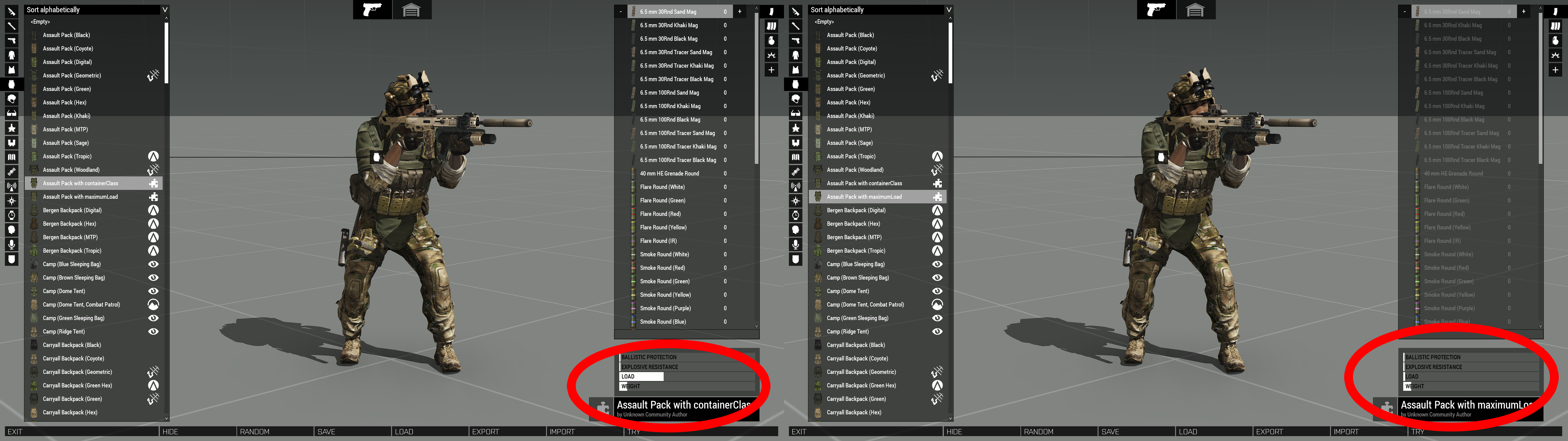
End result is this. The backpack that properly uses maximumLoad gets its capacity overridden to a capacity of 2 "mass" units whilst the backpack that uses containerClass remains unchanged and still has a maximumLoad of 160:
https://i.imgur.com/SPMZw08.png
 mighty urchin
vivid plank
This here too many objects? how cooked are we? 😄
mighty urchin
vivid plank
This here too many objects? how cooked are we? 😄
You may also try to disable simulation on some of the assets.
 tacit zealot
Copypasted this, so here's some context - I'm making a child class of the VT7 terrain which changes parameters like location, name, loading text, and (importantly) place names to be North American. It works, but now if I open the VT7 terrain after previously opening my custom version, the original map has my child class map's changes on it. (VT7 should have everything in Finnish, and this is obviously not Finnish)
Slight issue. Turns out that when you make a variant of a map to change something, it seems to override the original map when you open the variant. In screenshot, you can see I've loaded a mission on VT7 but it has my custom place names. Any way y'all know to fix it? I have unique world ID, classname, cfgPatches worlds[] entry.
I've noticed this with my variant of Virtual Reality that makes it grassy/snowy, but ignored that one - VR is normal until you open my custom one once, then whenever VR is opened it uses my custom one instead.
My guess is that it's related to the .wrp file but I can't do anything about that.

 quaint shuttle
how to create resiable module like HideTerrainObject?
 pseudo chasm
Is there any way to view uniforms with a “scope=1” setting in the editor without editing the config file (e.g. a list somewhere of all uniforms so they can be spawned in)?
 pastel bobcat
Is it possible to put a flashlight on the underbarrel slot do we think?
tacit zealot
You can even put one on the optic slot - GM did it
wintry fox
pseudo chasm
Is there any way to view uniforms with a “scope=1” setting in the editor without...
You can still add them via script
player addUniform "...";
that's funny, any clue how they did it?
tacit zealot
It's coded just like any other attachment with a different slot defined
pastel bobcat
that makes sense
 subtle dune
Hi guys, I hope I can borrow some smarter brains on an issue I'm having with my mod.
I'm modding the Protector 9 mm to have a semi-auto-only variant, but for some reason the AI still fires in full-auto with it when you get in close range. The following is what I've done
class SMG_05_F;

    class SMG_05_F_Semi: SMG_05_F {
        _generalMacro = "SMG_05_F_Semi";
        baseWeapon = "SMG_05_F_Semi";
        displayName = "Protector Semi 9 mm";
        modes[] = {"Single"};

        class Single {
            aiDispersionCoefX = 1.4;
            aiDispersionCoefY = 1.7;
            aiRateOfFire = 2;
            aiRateOfFireDispersion = 1;
            aiRateOfFireDistance = 500;
            artilleryCharge = 1;
            artilleryDispersion = 1;
            autoFire = 0;
            burst = 1;
            burstRangeMax = -1;
            canShootInWater = 0;
            dispersion = 0.00174;
            displayName = "Semi";
            ffCount = 1;
            ffFrequency = 11;
            ffMagnitude = 0.5;
            flash = "gunfire";
            flashSize = 0.1;
            maxRange = 250;
            maxRangeProbab = 0.05;
            midRange = 125;
            midRangeProbab = 0.7;
            minRange = 1;
            minRangeProbab = 0.3;
            multiplier = 1;
            recoil = "recoil_single_primary_3outof10";
            recoilProne = "recoil_single_primary_prone_3outof10";
            reloadTime = 0.067;
            requiredOpticType = -1;
            showToPlayer = 1;
            sound[] = {"",10,1};
            soundBegin[] = {"sound",1};
            soundBeginWater[] = {"sound",1};
            soundBurst = 0;
            soundClosure[] = {"sound",1};
            soundContinuous = 0;
            soundEnd[] = {};
            soundLoop[] = {};
            sounds[] = {"StandardSound","SilencedSound"};
            textureType = "semi";
            useAction = 0;
            useActionTitle = "";
            weaponSoundEffect = "";

            class BaseSoundModeType {};
            class SilencedSound {
                SoundSetShot[] = {"Rogue9_silencerShot_SoundSet","Rogue9_silencerTail_SoundSet","Rogue9_silencerInteriorTail_SoundSet"};
            };

            class StandardSound {
                soundSetShot[] = {"Rogue9_Shot_SoundSet","Rogue9_Tail_SoundSet","Rogue9_InteriorTail_SoundSet"};
            };
        };
    };
Here is the issue I have
nimble sequoia
subtle dune
Hi guys, I hope I can borrow some smarter brains on an issue I'm having with my ...
You are inheriting from the SMG_05_F, which in turn has as it's parent SMG_05_base_F.
That class has a class FullAuto mode.
So you could try adding class FullAuto {}; to empty it. (untested)
When you are in game, use the built-in config viewer to see what fire modes you have inherited in case there are others you are unaware of.
subtle dune
nimble sequoia
You are inheriting from the `SMG_05_F`, which in turn has as it's parent `SMG_05...
Thank you for responding. The issue is unfortunately still present after doing this. I can even check the AI in the debug console using weaponState , and the AI returns "Single" as its firemode.
nimble sequoia
subtle dune
Thank you for responding. The issue is unfortunately still present after doing t...
I haven't read through the code in detail, but are you sure that your "Single" is actually single shot for AI?
Could you inherit a single from somewhere else where you know it works, to check?
subtle dune
nimble sequoia
I haven't read through the code in detail, but are you sure that your "Single" i...
I'm positive. That's what has me stumped. Oddly enough that did uncover something for me, and it's the fact that this seems to be an issue only with the SMG weapons.
The AI seem to be pulling their firing behaviour from somewhere other than the weapon's CFG (I could be wrong)
nimble sequoia
subtle dune
The AI seem to be pulling their firing behaviour from somewhere other than the w...
Hmm, personal weapons aren't my area of expertise, hopefully someone else can make a suggestion.
subtle dune
I greatly appreciate you sharing your time with me either way.
hearty sandal
subtle dune
The AI seem to be pulling their firing behaviour from somewhere other than the w...
Are you testing your work with other mods on
subtle dune
hearty sandal
Are you testing your work with other mods on
Absolutely none
hearty sandal
subtle dune
Absolutely none
Good.
Check the magazine config too
Also AI can have separate firemodes that can have varied configurations
subtle dune
What should I be looking for in the magazine config?
I've noticed the separate firemodes that AI can use, but the issue has me lost as I've checked what firemode they'll be using with weaponState in the debug console, and it always returns as "Single".
wheat sluice
subtle dune
Hi guys, I hope I can borrow some smarter brains on an issue I'm having with my ...
Your aiRateOfFireDistance value is too high. The AI resorts to firing as fast as they can just like what a human player would do if they spammed left click, which gives the impression that they're firing on full auto even though they actually aren't.
Also, you really do not need to redefine the Single firemode like that. I would suggest that you slim down your config to this:
    class SMG_05_base_F;
    class SMG_05_F: SMG_05_base_F
    {
        class Single;
    };
    class SMG_05_F_Semi: SMG_05_F
    {
        baseWeapon = "SMG_05_F_Semi";
        displayName = "Protector Semi 9 mm";
        modes[]=
        {
            "Single"
        };
        class Single: Single
        {
            aiRateOfFire = 4;
            aiRateOfFireDistance = 0;
        };
    };
Note the two config values that were changed:
aiRateOfFire = 4; means that the AI will only fire once every 4 seconds with this firemode.
aiRateOfFireDistance = 0; means that this restriction applies at zero metres. Setting it to a higher value like 100 means that the AI will not be capped to firing only once every 4 seconds if their target is <100 metres from their location. But the 4-second-delay-between-shots limit will apply if they are located beyond 100 metres.
nimble sequoia
Quite sure drebin has the right answer there, as I suggested the single fire mode you created wasn't accurate probably.
Another suggestion would be that you name your new class with a prefix, as almost every mod does, to make sure it is unique.
example: val_SMG_05_F_Semi
wheat sluice
subtle dune
Many thanks guys, this was a huge help. I am not at all a programmer and this knowledge is super valuable.
I wasn't even aware that you could set up class inheritance of the firemode that way
 winter rain
Hey guys 👋
Is there a way to make vehicles and buildings having a simple armor and damage value?
Like as example Tank1 (Armor 1000), Tank2 Weapon (Damage 200) = 5 shots by Tank2 to kill Tank1 (doesnt mind where you hit Tank1), same for buildings.
Really hard to balance stuff with these many values of caliber, speed, AP/HE, explosive, submunition, penetration etc.
Cheers and have a nice week 🍻
novel lava
in theory if you set:
minTotalDamageThreshold = 0;
armorStructural = 1;
damage should be pure hit/armor
the SHOT/ammo needs to be explosive = 1; though to not lose damage due to speed loss
minTotalDamageThreshold might not be necessary but it needs to be kept in mind as if armor is set to high and its not adjusted you'll have stuff unkillable even though you want it to be killable just take a lot of shots
nimble sequoia
blissful moon
how do I set the radius of hitpoints for an aircraft?
In each hitpoints class, radius = 0.3; // metres
Default varies depending on the hitpoint class, usually in the range 0.1 to 0.5.
But save yourself the agony of trying to fill voids with hitpoint spheres and use the Tanks DLC improved armorComponent damage model, which means you often don't need more than 1 hitpoint per hit zone.
 jolly flint
Before I fail and feel sad, can I define the contents of uniforms and vests like I can for backpacks? I'm talking about using TransportMagazines & TransportItems
chilly tulip
I don't think so, otherwise some mod would have done it and I'd have had to cope with some disasters.
jolly flint
 lean bloom
Would it be possible to use the fired EH to create an artificial delay before firing? Say I used the EH to immediately delete the projectile, wait 2 seconds, and then spawn the projectile back in at the point it originated from?
Would this also somehow not breake ace guidance in case of guided projectiles?
hearty sandal
lean bloom
Would it be possible to use the fired EH to create an artificial delay before fi...
the railguntank has something similar set up to "charge" the weapon
so yes
how it would react with ACE
no idea 😅
wintry fox
It'd lose its lock at the very least, given that it would be set on the missile object
Yeah ace obviously stops the loop if the projectile is no longer alive / exists https://github.com/acemod/ACE3/blob/master/addons/missileguidance/functions/fnc_guidancePFH.sqf#L30
lean bloom
hearty sandal
the railguntank has something similar set up to "charge" the weapon
Yeah I have taken a look, I can´t make any sense of it, and it isnt quite what I need :/
 dense drift
I am trying to script a model replacement mod so it will replace model A from mod A, with model B from mod b, while keeping the changes as configured for model B which originally inherited from A.
I tried 3 ways -
- use a module that replaces classname A object with B object in mission and this works.
But I do not want to load a module and script it each time per mission. I Want it global as a mod.
- write a cfgpatches that is somewhat like this:
class CfgVehicles
{
class modelB;
class modelA: modelB
};
It does load model B in place of A, but the functionality is broken. Is this because is technically looping? ARMA Load ModA, configures modelA, loads modB, inherits and configures model B, then loads the patch which changes classname of modelB to A (which) creates a loop?
- rewrite the configuration of ModelB using the config.cpp of modelA and integrate the changes (example)
class CfgVehicles
{
class ModelB;
{details from ModelA except
details or parameters B1, B2, B3, etc...};
};
It does load model B in place of A, but the functionality is broken like option 2.
I am unsure how to get it to work without the module logic. Appreciate any guidance.
 trim thorn
so you want model B but you want all the same stuff as mod A
IE you have a m4 from mod A and you want to change the M4 to a mk18 model which is in mod B while keeping the same weapon stats from mod A
really what I would personally do is just make a new class and have it inherited mod A stuff and then just change the model and texture paths to the mod B stuff
so for you in the example 3
class CfgVehicles
{
class modelB: modelA
{
model= "modelB texture path)
hiddenSelections= "hidden selection of model B
hiddenSelectionTextures= "path to the textures for each hidden selections"
};
};
that should keep all the stuff from mod A/model A aside from the model and textures and you would have to do that for each model you want to change
@dense drift
little code snip I wrote might not be 100% right meaning missing some {} or whatever but you get the idea
dense drift
I got the above working but let say a mission uses ModelA classname. If I perform the above, I would now have classname ModelB: ModelA.
I want to replace all the modelA in game with modelB via a mod globally, instead of editing the mission each time changing all instances from A to B.
When I tried logics in 2 and 3, it DID replace the model but all functionality borked due to overwriting modelA classname?
hearty sandal
dense drift
I got the above working but let say a mission uses ModelA classname. If I perfor...
lets forget the theoretical and go down to actual example what you want to do
wintry fox
trim thorn
really what I would personally do is just make a new class and have it inherited...
class modelB: modelA
This is an updating base class error. You should just copy the inheritance ofmodelAand just change themodel,hiddenSelections,handAnim, etc.
Misread the "make a new class", and the same name from their examples implied that you were modifying the inheritance of another mod's class.
trim thorn
yeah I was confused reading your message I have done what I said many times to get what they are trying to do to work
trim thorn
dense drift
I got the above working but let say a mission uses ModelA classname. If I perfor...
so if you are again talking about a set of rifles you want to replace your best bet would be to create a mod and publish it and have everyone install the mod
like Goat said can you give like an exact example of what you are trying to do
dense drift
So I asked GPT 😄 It advised to create an array then run code to replace it at runtime. I am trying to replace the houses of Chernarus Redux with the CUP or Livonia ones to change the experience, and vice versa - swap CHR house into Livonia:
_classMap = [
["Land_ds_HouseV2T2", "Land_House2W02_F"]
]
// Function to replace class names globally
{
private _oldClass = _x select 0;
private _newClass = _x select 1;
// Replace all instances of the original class with the _dz_ version
{
    if (_x == _oldClass) then {
        _x = _newClass;
    };
} forEach allUnits; // Or all objects/vehicles
} forEach _classMap;
// Optionally: You can also replace class names of objects already placed on the map using the following:
{
private _oldClass = _x select 0;
private _newClass = _x select 1;
{
    if (typeOf _x == _oldClass) then {
        _x setVariable ["classname", _newClass]; // Change class at runtime
    };
} forEach allObjects; // Replaces objects based on class names
};
I put all this into inif.sqf, save it to a folder named addon.
config.cpp:
class CfgPatches {
class MyDZReplacerMod {
author = "Your Name";
name = "DZ Model Replacer Mod";
url = "Your Mod's URL (optional)";
requiredAddons[] = {}; // Any required mods, e.g., ["CUP_Core"]
requiredVersion = 1.0;
units[] = {};
weapons[] = {};
version = 1.0;
};
};
class CfgFunctions {
class MyDZReplacerMod {
class Init {
file = "addon";
class init {}; // This will load the init.sqf file
};
};
};
Folder structure but now get error it cannot find "addon\fn_init.sqf"
MyDZReplacerMod/
├── addon/
│ ├── init.sqf
├── config.cpp
└── README.txt
I create the MyDZReplacerMod.pbo by packing the "MyDZReplacerMod" folder, placed the pbo into its own "@MyDZReplacerMod\addons" folder, so config.cpp should be able to read the init.sqf nested in "addon" subdirectory but it does not. I am sure it is some hierarchy error.
Don't kill me. I am script illiterate but can understand basic top level logic. ELI5. Thx.
I did unpack the pbo to look at the classnames, could not copy and paste out of ED3N the full house configs, so I tried to create an inheritency to swap models, which it did BUT the houses broke. Doors are borked.
wintry fox
dense drift
So I asked GPT 😄 It advised to create an array then run code to replace it at r...
So I asked GPT
First mistake
dense drift
If I use Terrain module replacer, it works ... except for some sections where the model objects are not on the terrain, it is sitting on top of other objects so it gets sunken into the ground.
wintry fox
_x setVariable ["classname", _newClass]; // Change class at runtime
Yeah that's not how it works
dense drift
wintry fox
> So I asked GPT
First mistake
I am a code newb... apologies... not in our DNA... lol
wintry fox
Then just ask what your actual question is when you go to ask people, not what your hypothetical question is
dense drift
I just did right here - I am trying to replace the houses of Chernarus Redux with the CUP or Livonia ones to change the experience, and vice versa - swap CHR house into Livonia.
But at the same time, trying to understand the logic of SQF.
wintry fox
I know, I mean when you first asked it
dense drift
I learn through hands on, that's how I'm made. If I had to hit books to understand theory, then apply it, it would take years. But GPT explained it pretty well in plain English, despite wrong code syntax or logic.
wintry fox
It's completely wrong, what it gave you just flat out does not work
wintry fox
dense drift
If I use Terrain module replacer, it works ... except for some sections where th...
Never heard of a terrain module replacer, is that a vanilla module?
dense drift

It's AWESOME. Except some objects sinks or is misaligned if it was stacked up to create a bigger structures or needs at least XY directions adjusted, per terrain. So I wanted to create an replacement that just swapped models and kept the coordinates intact.
chilly tulip
You are back to script now anyway :P
dense drift
Plus it is mission centric, not global mod centric. You have to edit every mission with the model so yes, a global mod replacer would be better.
chilly tulip
nearestObjects + hideObjectGlobal + createVehicle should work. Might be expensive.
dense drift
chilly tulip
nearestObjects + hideObjectGlobal + createVehicle should work. Might be expensiv...
Per server on mission load or per client on login? If single instance run on start, it is acceptable.
chilly tulip
server on load is probably better for houses.
 rain mural
You could check out https://steamcommunity.com/sharedfiles/filedetails/?id=1883956552 for reference basiclly does what you want from CUP to Contact DLC buildings
 dense drift
rain mural
You could check out https://steamcommunity.com/sharedfiles/filedetails/?id=18839...
dense drift
rain mural
You could check out https://steamcommunity.com/sharedfiles/filedetails/?id=18839...
I probably will. I dun understand code so I need to ask GPT to explain it to me. 😄
hearty sandal
dense drift
I probably will. I dun understand code so I need to ask GPT to explain it to me....
Second mistake
please forget GPT from your life alltogether
dense drift
Grok or DeepSeek then?
wintry fox
No
If you have a question, just ask people
Not some AI that's going to give you garbage that's just flat out wrong.
Not to mention its many many ethical and environmental problems.
 pale dew
Heyo, question. I am working on a uniform, how would I make a model similar to the default Arma ones. Is it UniformModel="";
I have been trying to find a uniform model reference but have been coming up empty even with the samples
wintry fox
pale dew
Heyo, question. I am working on a uniform, how would I make a model similar to t...
Are you looking for like an example of a uniform's config or the model?
Because the sample should have a config example
wintry fox
Then check #arma3_model
If it's like an issue you're running into you can ask there as well, because I'm not sure what else you'd get other than just the samples on steam
wintry fox
It might be called like character or something
Been a while since I looked at them
pale dew
I thought it would be the character but wasn't too sure since there's like 2 or 3 of em with example, template etc
hearty sandal
pale dew
I thought it would be the character but wasn't too sure since there's like 2 or ...
not the templateRtm one
hearty sandal
pale dew
I assumed uniforms need a model.cfg is that correct
yes
same requirements as the pin for headgear in #arma3_model
pale dew
E
 sick python
class Turrets : Turrets
{
class CopilotTurret: CopilotTurret
{
weapons[] =
{
"PTF_weap_mastersafe",
"rhs_weap_laserDesignator_AI"};
magazines[] = {"rhs_LaserMag_ai"};
class OpticsIn: OpticsIn
{
class Wide: Wide
{
visionMode[] = {"Normal","Ti"};
directionStabilized = 1;
thermalMode[] = {0,1};
gunnerOpticsEffect[] = {"TankCommanderOptics1","BWTV"};
};
};
};
Can someone tell me how to make a turret camera full color
 sick python
Yes, This turrent config is black and White not full color
 wheat prawn
sick python
class Turrets : Turrets
{
class CopilotTurret: CopilotTurret
{
...
wheat prawn
sick python
class Turrets : Turrets
{
class CopilotTurret: CopilotTurret
{
...
Give the turret nothing but “Normal” vision and strip out any post-processing filters, just drop the thermal and BW ("Ti") effects.
hearty sandal
 dense drift
trim thorn
really what I would personally do is just make a new class and have it inherited...
dense drift
trim thorn
really what I would personally do is just make a new class and have it inherited...
So I compared the classnames and configs in CUP CORE to both INTERIORS FOR CUP and DS HOUSES, and both of the latter actually rewrite the entire config to use their models and details with the original classnames from CUP CORE. SO, I will have to merge the changes from my target to the base class and test it.
Besides notepad++ with SQF language plugin, any other tool recommended for side by side code comparison? Thanks! I know, stay away from LLM bots... 😄
 slow vortex
For Arma 3 base game units like the NATO Ammo Bearer, the backpack contains extra items, that mean in the config they define a new backpack to achieve this?
wheat sluice
slow vortex
For Arma 3 base game units like the NATO Ammo Bearer, the backpack contains extr...
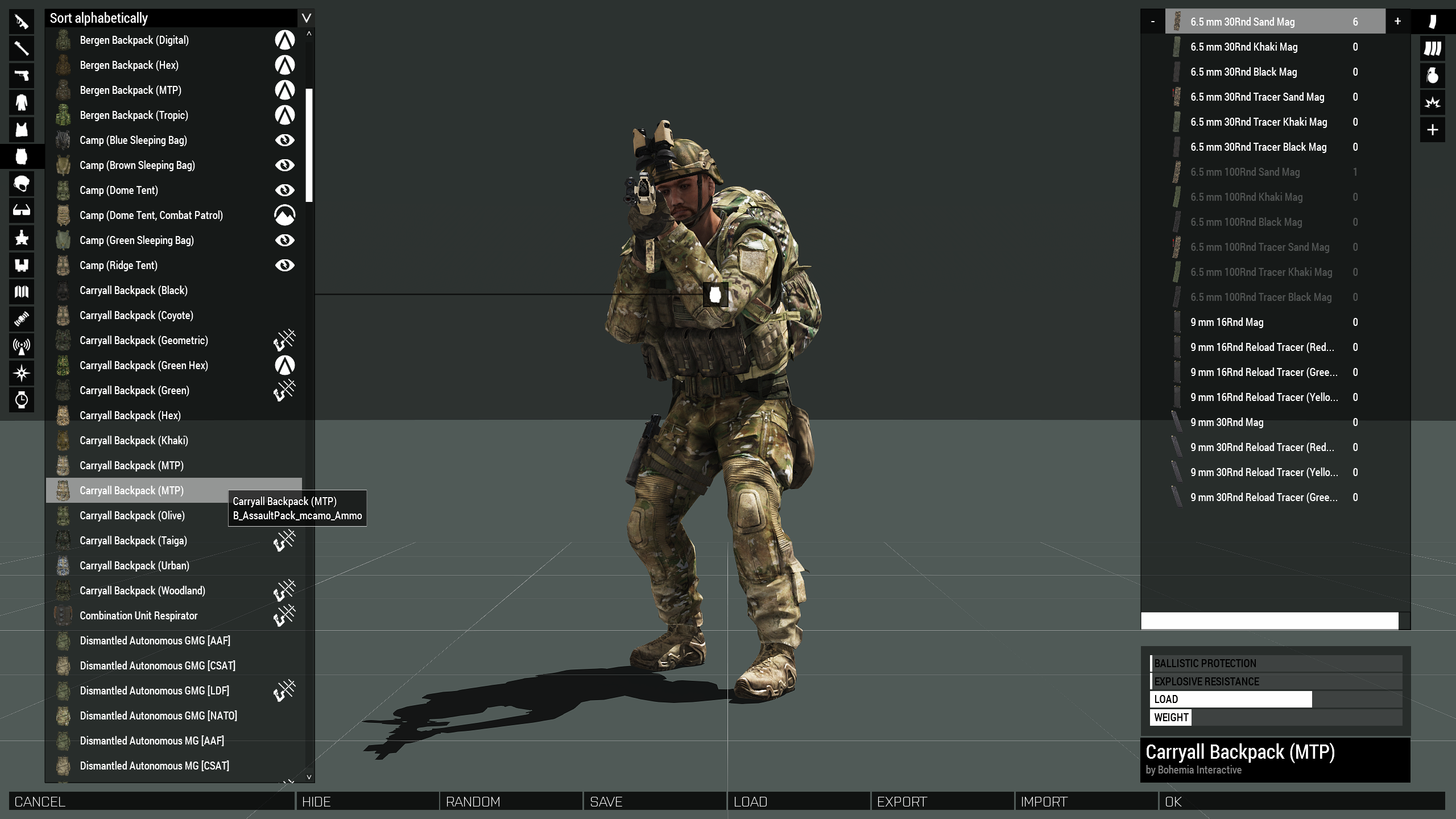
Yes. There are multiple hidden sub-variants for role-specific backpacks for that purpose (e.g. B_AssaultPack_mcamo_Ammo).
    class B_AssaultPack_mcamo_Ammo: B_Carryall_mcamo
    {
        author="$STR_A3_Bohemia_Interactive";
        _generalMacro="B_AssaultPack_mcamo_Ammo";
        scope=1;
        class TransportMagazines
        {
            ... preloaded magazines go here
        };
        class TransportItems
        {
            ... preloaded items go here
        };
    };
It's the reason why you can sometimes see duplicates of existing backpacks in the Virtual Arsenal if you attempt to edit the loadout of a vanilla unit that wears a pre-loaded backpack. They temporarily get "unhidden" until the backpack gets swapped into its base backpack.
https://i.imgur.com/L6A4z2r.png
 slow vortex
wheat sluice
Yes. There are multiple hidden sub-variants for role-specific backpacks for that...
slow vortex
wheat sluice
Yes. There are multiple hidden sub-variants for role-specific backpacks for that...
thank you so much
wintry fox
dense drift
So I compared the classnames and configs in CUP CORE to both INTERIORS FOR CUP a...
VS Code https://code.visualstudio.com/download and the HEMTT VS Code extension https://marketplace.visualstudio.com/items?itemName=BrettMayson.hemtt
 fast ruin
Does anyone know how to make subsonic rounds in arma “be subsonic”
wintry tartan
What is the point of the question? What is unclear?
pastel fog
If it's the supersonic crack you are trying to remove, then you need to set those sounds to null values or something that doesn't sound supersonic
wintry fox
These are all the super sonic crack sound properties (in ammo config)
soundSetSonicCrack[] = {};
superSonicCrackFar[] = {};
superSonicCrackNear[] = {};
class SuperSonicCrack {};
 rapid sparrow
Is it possible to create different rope types? (ropes with different textures and thickness)
narrow swallow
rapid sparrow
Is it possible to create different rope types? (ropes with different textures an...
Yes
rapid sparrow

Considering the ropeCreate function doesn't have a place to specify what class of rope is used, how would that work?
narrow swallow
It does take ropeType
wheat prawn
I dunno where to post this but I'll do it here and maybe you guys can point me in the right room after if I got the wrong one.
Anyways, I’m totally stuck on this and could really use a second opinion. I’ve got a small mod PBO called AIPathfinderImprovement.pbo with this structure. (Image 1)
My CfgFunctions in config.cpp looks like this (Image 2)
Despite seeing the files in my PBO, in-game I get: Script scripts/fn_findInteriorRoute.sqf not found
And running this in the debug console:
hint format ["fileExists: %1", fileExists "scripts/fn_findInteriorRoute.sqf"];
returns false.
Has anyone run into this before? Am I missing a step in the PBO layout or builder settings? Any advice would be hugely appreciated.
Also sorry again if im posting this in the potentially wrong chat.

 chilly tulip
If it's a mod then it'll have a prefix (forced to some default if not specified), and you'd need to include that in any file paths.
So yes, you are missing a step in the PBO layout and builder settings :P
See the addon prefix section here:
https://community.bistudio.com/wiki/Arma_3:_Creating_an_Addon
balmy siren
I'm having trouble finding info on how to add things like muzzles, lasers, and bipods to weapons. I tried going off the method I've seen in the regular arma 3 configs, but only my optic attachments show up.
    {
        magazines[]=
        {
            "30Rnd_556x45_Stanag_red"
        };
        class LinkedItems
        {
            class LinkedItemsOptic
            {
                slot="CowsSlot";
                item="JCA_optic_CRBS_black";
            };
            class LinkedItemsAcc
            {
                slot="PointerSlot";
                item="JCA_acc_DualMount_black_Pointer";
            };
            class LinkedItemsMuzzle
            {
                slot="MuzzleSlot";
                item="JCA_muzzle_snds_556_advanced_black";
            };
            class LinkedItemsUnder
            {
                slot="UnderBarrelSlot";
                item="JCA_bipod_04_black";
            };
        };
};```The attachments in LinkedItems need to be compatible with the weapon itself
Which I assume they are since you're inheriting from your own class, but just checking
balmy siren
These are all weapons from the same mod, and Graves' original mod has others like it that work (just not this exact configuration)
So I'm not sure what I'm missing
wintry fox
Are the items there available in those slots on the weapon?
balmy siren
Yeah
Other mods also work just fine
Two weapons in my mod work, but everything else is optic only.
 clever creek
Could anyone help me out in DMs with making a custom face config I'm having some trouble and need some understanding of it
wintry tartan
- Why DM
- Why don't ask it here
- Just ask it
clever creek
Well Id rather not hog up the channel with my problem but....
wintry tartan
This is the point of public channel. If you want to have less chance to solve anything, don't ask it publicly. That's not the case so you asked it here
clever creek
class Bacon_Bald: WhiteHead_15
{
displayname="Bacon";
texture="Omega_Heads\data\Bacon\Bacon.paa";
head="NATOHead_A3";
identityTypes[]=
{
"Head_Euro",
"Head_NATO"
};
author="Omega | Bacon";
material="\Omega_Heads\custom.rvmat";
materialHL="";
materialHL2="";
textureHL2="Omega_Heads\data\Bacon\hl2_Bacon_skin_co.paa";
textureHL="Omega_Heads\data\Bacon\hl_Bacon_skin_co.paa";
disabled=0;
};
Does this look correct for a head config?
wintry tartan
At least not a broken config. You are here to troubleshooting so tell your issue
clever creek
When I binerize and put in game it seems like the skin its referencing is too bright and doesnt match the head
wintry tartan
Screenshot?
wintry fox
clever creek
class Bacon_Bald: WhiteHead_15
{
displayname="Bacon";
...
Remove the leading slash in the material path
clever creek
I can't post sc
clever creek
wintry fox
Remove the leading slash in the material path
I will try that as well
wintry tartan
#rules react and #offtopic_bot_cmds verify to verify and get permission
clever creek
Something like this. I dont have another example currently

Is it a matter of the version of "bald" skin its referencing or is it the bald texture I am using to retexture with?
wintry tartan
No, and we can't tell how it is suppoaed to look instead without more reference
clever creek
I will get more reference but I have to head to bed now.
winter rain
novel lava
in theory if you set:
minTotalDamageThreshold = 0;
armorStructural = 1;
damage ...
Thank you 👍🍻
Ive tried it yesterday evening with 2 different buildings but i still got the problem (its a bit better) that i need for 1 building 3 direct hits and for the other 2 direct hits to destroy it. Both buildings do have the same armor value but the difference is its size.. does size also matter?
On vehicles i did no test yet with your example.
novel lava
...yes size does matter
found that out the hard way, bounding box effects it
when I was setting up the M2 static for spearhead we had weird shit happen where the M2 would take more damage than the MG42/MG34 statics despite having the exact same armor/hitpoints setup
and it was because the MG42 had a bigger bounding box because its proxies were full sized
so it took less damage
this came up again recently with the infantry models where some people (and some vanilla uniforms) were using the 'old' arma 2 geometry
giving them a larger bounding box and requiring different armorStructual to compensate
I forgot all about this until you mentioned it
novel lava
winter rain
Thank you 👍🍻
Ive tried it yesterday evening with 2 different buildings but i ...
long story short in such instances you'll probably have to do things the hard way, and tweak armorStructural to compensate. smaller geometry = takes more damage, so needs larger armorStructural
so basically will need to uh, try it and adjust, over and over. pain
winter rain
novel lava
so basically will need to uh, try it and adjust, over and over. pain
Ayy i was hoping to not go this way 😅
But looks like i have to, so got to spend a weekend in balancing stuff
Thanks man 👍🍻
 royal briar
hey, im trying to understand how recoil is calculated from here: https://community.bistudio.com/wiki/Arma_3:_CfgRecoils . my question is how is the magnitude calculated in muzzleOuter. is the final result like x - a / 2 + random a ?
wintry fox
I know nothing about missile config, what are some good references other than just the CfgAmmo reference?
My goal is to make an AA missile that explodes into submunitions that lock onto the same target
chilly tulip
There's a lot of submunition stuff in the middle of https://community.bistudio.com/wiki/Arma_3:_Weapon_Config_Guidelines
triggerDistance would be the starting point, I guess.
 rain scarab
wheat prawn
I dunno where to post this but I'll do it here and maybe you guys can point me i...
rain scarab
wheat prawn
I dunno where to post this but I'll do it here and maybe you guys can point me i...
Oh hey you're in here, I left a comment on your addon with a suggested fix for the missing paths
pale dew
Heyo got a missing head on a new uniform. But I have the head proxy bysta or something that I can confirm is a proper proxy, what vertex group might cause that issue. Also if I set the proxy to a manual head like the Greek one it goes in between the legs
hearty sandal
pale dew
Heyo got a missing head on a new uniform. But I have the head proxy bysta or som...
it has to be the proxy yes
not a model of a head
Id delete the proxy you got and copy it from the samples
wheat prawn
rain scarab
Oh hey you're in here, I left a comment on your addon with a suggested fix for t...
I'll have a look in a bit, just finished work. ^v^
pale dew
What part of the proxy? The path atm referenced from the sample is "P:\a3\characters_f\heads\bystra". The bystra is not the actual name since Im not near my computer
And whilst checking the proxy it says in ob that it's a proxy
pale dew
hearty sandal
Id delete the proxy you got and copy it from the samples
And also I have done that quite a bit
Could the base class or identityTypes[] cause any issues?
Both being copies from the samples
I'll look into the samples some more I guess
hearty sandal
Well Id guess sure if you somehow break the identity and it gets none assigned
pale dew
You are probably correct
tame raven
Does anyone know offhand where the mouse cursor lives in config? I have...an idea.
tame raven
Unfortunately, I found it.
This is the worst thing I've ever done.
 hearty sandal
🤣
 pallid sierra
Need iron sights with that
wheat prawn
rain scarab
Oh hey you're in here, I left a comment on your addon with a suggested fix for t...
Ah oki, thanks, I'll take a look into it and test the addon via a dev branch. This issue has been a real headache to deal with.
Granted this is my first addon ever made so I'm learning the ins and outs.
 rancid lotus
tame raven
it took me forty minutes and it's already on the workshop
rancid lotus
tame raven
it took me forty minutes and it's already on the workshop
Link? :P
wintry fox
rancid lotus
Link? :P
 rancid lotus
wintry fox
https://steamcommunity.com/sharedfiles/filedetails/?id=3485929460
rancid lotus
wintry fox
https://steamcommunity.com/sharedfiles/filedetails/?id=3485929460
Legend, thanks
I'm cackling
 dense drift
So I figured it out and now have the models slipstream in game, in terrains (used CUP MAPs) to verify working, BUT... it appears the models that replace CUP CORE have different origins so some are shifted on the Y axis (few units back) and on the Z axis (up or floating). Is there a way to set "relative" origin or position of the model when slipstreamed into the terrain in the config.cpp?
Or is this now a script or model question where we have to edit the model origins? I believe most models have some form or skeleton or bones to set their origin for placement. Unsure of ARMA exactly.

 narrow swallow
dense drift
So I figured it out and now have the models slipstream in game, in terrains (use...
narrow swallow
dense drift
So I figured it out and now have the models slipstream in game, in terrains (use...
You could try doing that in a script
wintry fox
 livid thorn
<:notlikemeowcry:724201124369793068>
livid thorn
<:notlikemeowcry:724201124369793068>
Make sure to remove workshop permissions too
Cut it off at the source
tame raven
wintry fox
Make sure to remove workshop permissions too
Cut it off at the source
oneachframe{
dart setobjectscale 0.01
};
Do it
 mortal pumice
Are dynamic view limits for cargo turrets no longer used?
I see in the comments it could be encompassed by the old limits inbounce but im not sure
class CargoTurret;
class Turrets : Turrets
{
    class CargoTurret_01 : CargoTurret
    {
        gunnerAction = "passenger_flatground_3";
        memoryPointsGetInGunner = "pos cargo RR";
        memoryPointsGetInGunnerDir = "pos cargo RR dir";
        gunnerName = "$STR_A3_TURRETS_CARGOTURRET_R2";
        gunnerCompartments = "Compartment2";
        proxyIndex = 2;
        isPersonTurret = 2; // this turret is able to fire both when turned in and out

        // Old view limits inbounce

        maxElev = 45;    // vertical limit for field of view
        minElev = -5;    // vertical limit for field of view
        maxTurn = 95;    // horizontal limit for field of view
        minTurn = -95;    // horizontal limit for field of view
        class dynamicViewLimits    // additional limits according to filled positions
        {
            CargoTurret_02[] = { -65, 95 };    // if CargoTurret_02 is filled, this turret cannot turn that much to negative way (limits from -95 to -65 degrees)
        };

        // New view limits inbounce

        class TurnIn // limits for gunner turned in
        {
            limitsArrayTop[] = { { 33.8208, -93.9616 }, { 40.8906, 66.5705 } }; // points for the upper curve
            limitsArrayBottom[] = { { -9.4643, -94.5753 }, { -8.3683, -67.6867 }, { -9.7173, 43.6372 }, { -10.1082, 78.9166 } }; // points for the lower curve
        };

        class TurnOut : TurnIn {}; // turn out uses the same limits as turn in this time
    };

    class CargoTurret_02 : CargoTurret {...}; // there is some second turret just to show the class name for dynamic limits
};
I believe if my understanding is correct the dynamic view limits were replaced with the automatic can't aim at friendlies while in the back of vehicles
wheat prawn
rain scarab
Oh hey you're in here, I left a comment on your addon with a suggested fix for t...
Gave the method a try, all I'm met with is this, even happens in the addon builder when I go to binarise the addon when packing it

 wintry fox
wheat prawn
Gave the method a try, all I'm met with is this, even happens in the addon build...
wintry fox
wheat prawn
Gave the method a try, all I'm met with is this, even happens in the addon build...
Yeah you have an error
No one's going to be able to tell you what's wrong unless you showed your config
wheat prawn
wintry fox
Yeah you have an error
No one's going to be able to tell you what's wrong unless...
Ask nicely next time and you'll get it. This is my current config.
 royal briar
requiredAddons missing []
chilly tulip
uh, two CfgFunctions, one incomplete?
royal briar
yeah the first one is not complete
chilly tulip
There's like 10 lines that shouldn't be there.
wheat prawn
So should I merge what I need into one clean block, is that it?
chilly tulip
I can't tell you exactly what to do because you pasted an image of a text file without any line numbers.
But I'm slightly puzzled how you wrote that much without seeing the obvious flaws here...
wheat prawn
chilly tulip
But I'm slightly puzzled how you wrote that much without seeing the obvious flaw...
I'm trying to make an ai pathfinding improvement mod, this is my first mod ever built, pardon me if it looks shoddy or whatnot.
chilly tulip
The odd thing is that it looks pretty sound and then you get to 10 lines of misplaced copypaste :P
wheat prawn
I think I see the problem looking at it now.
I overlooked that I’d left in the extra, empty class CfgFunctions stub and a few other small slip-ups. My main concern now is getting the addon to read the script files I left in there which it had trouble doing before.
Which I'm about to test now.
chilly tulip
It may well still fail to find the script files. That depends on your file arrangement and PBO prefix.
wheat prawn
Which is exactly what is happening now. That's all I need to figure out now.
chilly tulip
Do you have a prefix set in addon builder's options?
wheat prawn
No, it's blank.
chilly tulip
If your scripts are in the folder C:\ArmaBuild\AIPathfinderImprovement\scripts then your prefix should be AIPathfinderImprovement
wheat prawn
It's now set to exactly that.
Yep, that did it.
No missing script pop ups on game start.
chilly tulip
If you want to understand why then read this a few times: https://community.bistudio.com/wiki/Arma_3:_Creating_an_Addon
The prefix tells Arma where to put the PBO's files in the virtual filesystem.
wheat prawn
👍 Thank you so much for the help though. I'll be sure to refer to the wiki page on future addons.
Now it's a matter of fixing a wee script error which I'll post in the arma scripting channel unless you don't mind it here?
chilly tulip
Post in scripting
wheat prawn
Will do. Though the error doesnt seem to be popping up on my end anymore.
royal briar
how does arma count weapon damage? is it combination of "hit" from config and "initSpeed" ? because arsenal counts it like this: ```_statHit = sqrt(_statHit^2 * (_statInitSpeed max 0)); //--- Make impact influenced by muzzle speed
oh is that documented somewhere?
tame raven
Uhhh somewhere
royal briar
ok 🙂
tame raven
It might be in the damage description page somewhere
royal briar
ok thx, will be looking
 green verge
☝️ Any idea why having ```sqf
class LinkedItems
{
class LinkedItemsOptic
{
slot = "CowsSlot";
item = "VA_Original_Sight_Flip_Up_Sight";
};
class LinkedItemsMuzzle
{
slot = "MuzzleSlot";
item = "VA_M16_Suppressor";
};
class LinkedItemsAcc
{
slot = "PointerSlot";
item = "VA_M16_flashlight";
};
};
There makes the gun not appear...reading this: https://community.bistudio.com/wiki/CfgWeapons_Config_Reference#initSpeed=0 gave me question, how to handle init speed count if the initSpeed in weapon is zero?
wheat sluice
You get it from the magazine's initSpeed value.
royal briar
that's what im doing but if weapons initSpeed is negative its used as multiplier to magazines initSpeed so i guess in case of zero the multiplier is not used
novel lava
yeah 0 would be default aka initspeed in cfgmag
wheat sluice
It would just be magazine's initSpeed * weapon's initSpeed in that case.
novel lava
less than 0 is a multiplier, greater than an override
royal briar
and equal to 0 is no multiplier?
wheat sluice
Yep. Weapon's initSpeed = 0 means no multiplier, ergo the weapon's muzzle velocity will be determined by the magazine's initSpeed only (CfgMagazines value of 850 means that the weapon has a muzzle velocity of 850 m/s).
And just like Kerc said, a negative initSpeed value for the weapon means that it applies a multiplier to the magazine's initSpeed value (CfgWeapons value of -1.2 & CfgMagazines value of 900 means that it is 900 * 1.2 = weapon's final muzzle velocity value is 1,080 m/s).
On the other hand, a positive initSpeed value in the weapon means that the weapon's muzzle velocity is determined by the weapon itself (CfgWeapons value is 700 means that the muzzle velocity is 700 m/s; CfgMagazines value is ignored and no multiplier is applied).
Good example of this in practice with three vanilla weapons that use each system accordingly:
CfgWeapons:
MXC: arifle_MXC_F >> initSpeed = 720
SDAR: arifle_SDAR_F >> initSpeed = 0
Promet MR: arifle_MSBS65_Mark_sand_F >> initSpeed = -1.125
CfgMagazines:
MX's 30-round 6.5 mm magazine: 30Rnd_65x39_caseless_mag >> initSpeed = 800
SDAR's 20-/30-round 5.56 mm magazines: 20Rnd_556x45_UW_mag >> initSpeed = 270, 30Rnd_556x45_Stanag_green >> initSpeed = 920
Promet's 30-round 6.5 mm magazine: 30Rnd_65x39_caseless_msbs_mag >> initSpeed = 800
MXC's final muzzle velocity value -> 720 m/s (weapon value takes precedence)
SDAR's final muzzle velocity values -> 270 m/s when loaded with 20-round dual-purpose, 920 m/s when loaded with 30-round ball (magazine value takes precedence)
Promet MR's final muzzle velocity value -> 800 * 1.125 = 900 m/s (weapon applies multiplier to magazine)
https://i.imgur.com/O1SZN2J.png
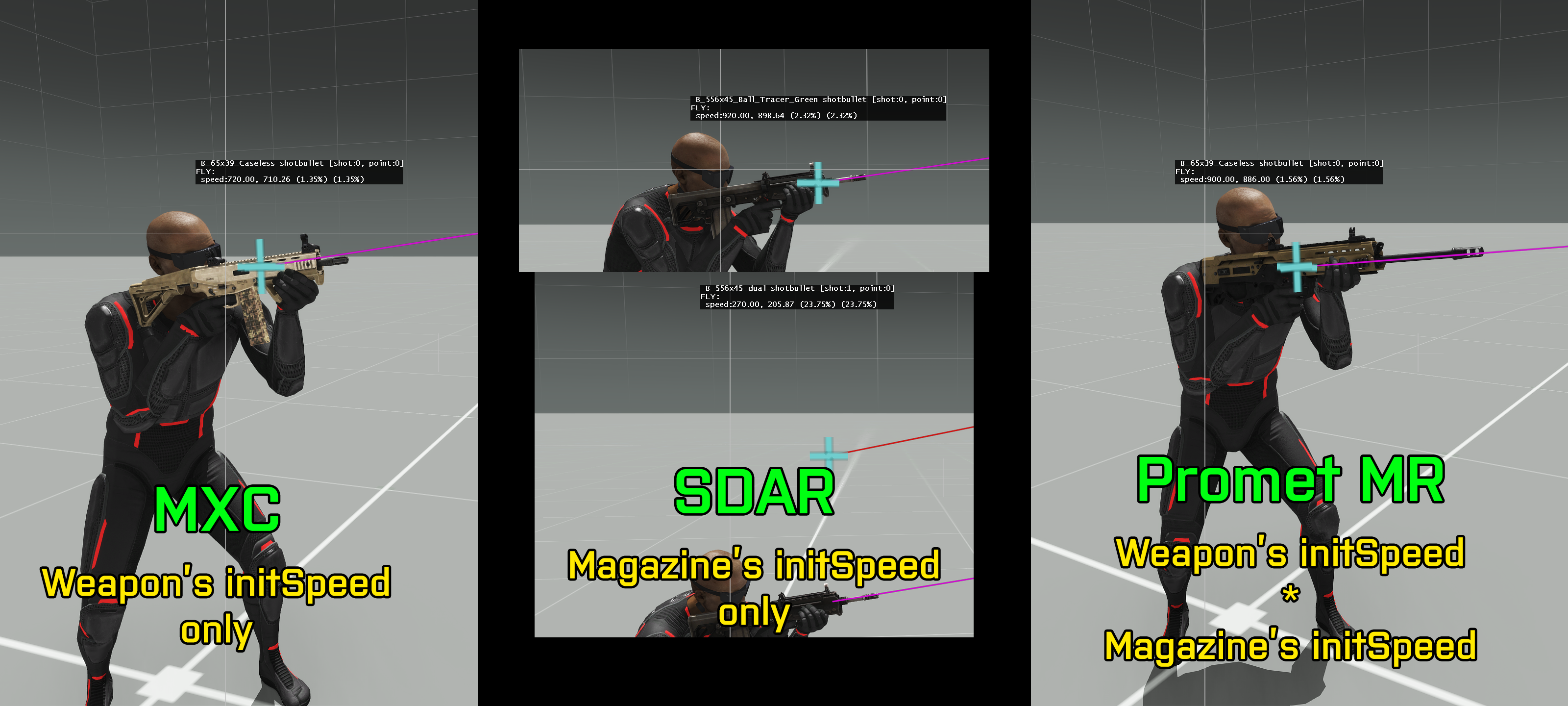 royal briar
gotcha thx
wheat sluice
Should note that this only applies to Arma 3. Older games used different systems:
- In OFP, muzzle velocity was determined in CfgWeapons (since CfgMagazines didn't exist back then).
- In A1/A2, muzzle velocity is determined in CfgMagazines only (CfgWeapons initSpeed is always ignored).
wheat sluice
green verge
- Try adding
baseWeapon = "val_cm4_G";to theval_cm4_Gclass. OpticsModesshould not be placed underItemInfo. If your aim is to have integral optics that can swapped out with a rail optic (e.g. anything in CowsSlot), then you should defineOpticsModesin the root of the weapon's class, not as a property ofItemInfo.
class val_cm4_G: val_cm4_base_F
{
    class OpticsModes
    {
        ...
    };
};
- You do not need to define
modelOpticsunless you intend to have a dedicated integrated optical sight for the weapon. Judging by the rest of the config, this does not appear to be the case so I would suggest omitting this line entirely since theRiflesuperclass already hasmodelOpticsset to a dummy value. ItemInfois not needed nor used for firearms. Get rid of it entirely.
 brazen merlin
does anyone know if engine temperature does something in the game? or is it just a fluff value?
brazen merlin
and where it's defined. max values and whatnot
nimble sequoia
brazen merlin
does anyone know if engine temperature does something in the game? or is it just...
Yes, engineTemp "works", I use it on vehicle gauges, with minValue 0 and maxValue 1. Mostly a cosmetic thing though, not entirely sure what a value of 1 actually means, other than guessing it's "the hottest it can get".
The oilTemp source is broken though.
brazen merlin
yeah, i just did some tests with class mfd and it seems the value goes as high as the scale i give it
if i set scale 100, it will slowly crawl up to 100 etc (based on 0-1)
value will go down again if engine is off
shame. was hoping there is some actual "simulation" based on engine damage, etc.. don't want to script that, it's not worth it
so it'll remain purely visual fluff
brazen merlin
yeah, i think so too
vivid plank
hi all! New to configs, I feel like I'm missing something.
My goal: Add a new Eden attribute to an existing object from a different mod.
What do we have: A KIF_Vesna_205 class defined in a different addon which I reference through requiredAddons.
What I've tried:
    class KIF_Vesna_205
    {
        class Attributes
        {
            class mtr_pdr_zakat
            {
                displayName="[Moldova] Zakat";
                property="vn_drmm_song_os_01";
                control="Checkbox";
                defaultValue="false";
                tooltip="";
                unique=0;
                expression="if (_value) then { _pl = _this getVariable ['tracks',[]]; _pl pushBack '%s'; _this setVariable ['tracks',_pl];};";
            };
        }
    }
What I expected to happen: A new checkbox appears in eden attributes.
What actually happens: The KIF_Vesna_205 object disappears from the game.
Suspicion: my config completely overrode, erased the original one.
How can I extend a class without removing everything from it?
brazen merlin
you are overwriting existing classes without inheriting?
vivid plank
brazen merlin
you are overwriting existing classes without inheriting?
I also tried this but it gave me an error
    class KIF_Vesna_205;
    class KIF_Vesna_205 : KIF_Vesna_205
    {
Right now the only working solution seems to be creating a **new ** class that inherits KIF_Vesna_205, but I want to avoid that if possible, I don't want to have two instances of basically the same thing in game
nimble sequoia
vivid plank
I also tried this but it gave me an error
```hpp
class KIF_Vesna_205;
cl...
Do you also have a CfgPatches { } class where you define the required addon which contains the KIF_Vesna_205?
Have you tried just changing the displayName initially, that being the most simple of changes?
class KIF_Vesna_205 : KIF_Vesna_205
{
    displayName = "Dive's Vesna";
};```yes to both, using this code results in "class already defined" error
nimble sequoia
vivid plank
yes to both, using this code results in "class already defined" error
Can you post your entire config.cpp please?
What software are you packing with? When do you get the error message?
vivid plank
nimble sequoia
Can you post your entire config.cpp please?
What software are you packing with? ...
I use addon builder from Arma 3 tools.
The building process succeeds, but I get the error message when starting the game.
As for the config, give me a sec, it's quite big, I'll extract the bits
nimble sequoia
vivid plank
I use addon builder from Arma 3 tools.
The building process succeeds, but I get ...
If it's big, make it small, like I suggested. Just a single name change and nothing else.
vivid plank
I mean there are lots of other things in the config unrelated to this
new vehicles, sounds etc
nimble sequoia
As you have an error which you want us to fix, but won't be showing all the code, how will that work?!
You can comment out everything unrelated or make a test copy.,
The first thing you need to find out is whether you are correctly bringing in the other mods vehicle class, and whether you can make a change to it, with nothing else potentially getting in the way.
 finite bronze
Hello there. I am having the front tank phyx issue.
When I have the dampener wheels in the pHyx done everything works and drives as expected. But when I had the front top wheels (the ones not touching the ground with the same config as the sample tank) the tanks only now goes to a speed of 5KM/h and will not go any faster.
Could someone please help me understand why?
 vivid plank
I am really not as much interested in fixing the error as learning the best practices/workflows so I could have a generalized approach.
I have already learned the workflow for "create a subclass and modify it to your liking", now I'm trying to see if there is approach for "take base class and modify it without creating a subclass".
Maybe it's just not possible at all, that's what I'm trying to figure out.
nimble sequoia
vivid plank
I am really not as much interested in fixing the error as learning the best prac...
General approach to bug fixing is to isolate the issue. When you've done that, and still have an error, we might be able to offer advice.
Addon Builder is also not the best tool. Try mikero's pboProject.
nimble sequoia
finite bronze
Hello there. I am having the front tank phyx issue.
When I have the dampener w...
Do you have the memory points for the leading wheel set-up like this?
Try moving the bound point closer to the axis by a little bit.
 finite bronze
yes
hmm, interesting idea about moving the bounding, thank you for the suggestion.
hearty sandal
also make sure the mempoint names match config
vivid plank
nimble sequoia
General approach to bug fixing is to isolate the issue. When you've done that, a...
I know about this approach, I've been programming in gamedev for years. As I'm onboarding into arma I am interested in learning general practices, not necessarily fixing this particular issue.
Let's just forget about all I wrote above, let me start my question from scratch.
One of the mods I'm using has a class
class Foo
{
    class Attributes
    {
        class FooCheckbox
        {
            displayName="This is a foo checkbox!";
        }
    }
}
I want to add another checkbox to be visible when inspecting an object of this class. I'm trying to do this in my submod:
class Foo
{
    class Attributes
    {
        class BarCheckbox
        {
            displayName="This is a Bar checkbox!";
        }
    }
}
**What I expect to happen: ** both FooCheckbox and BarCheckbox are visible
What actually happens: Only BarCheckbox is visible.
I think I'm fundamentally misunderstanding something about how Arma handles patching configs.
I've read this https://community.bistudio.com/wiki/Arma_3:_Replacement_Config_Tutorial but it's not very helpful in this case.
I therefore am asking for people experienced with arma configs to please share some info or point me towards some documentation that would be relevant to my case 🙏
hearty sandal
to replace or ammend a class you need to have the original configs cfgPatches class refered to in your configs cfgPatches header requiredAddons array. This whay your config is loaded after the original and can apply the changes you want
thats the base gist of it
vivid plank
this I have done
hearty sandal
some classes like turrets require the original inheritance tree also defined
this could need that too
vivid plank
hearty sandal
some classes like turrets require the original inheritance tree also defined
If we assume the declarations and requiredAddons are set correctly, what would the synthax be to ammend Attributes while preserving the original ones?
vivid plank
finite bronze
erm, Interesting
The achievement 😂
hearty sandal
if its already inheriting attributes from somewhere else that may need to be also defined in your parent class definitions
finite bronze
at this point I think the game is mocking me
hearty sandal
otherwise you may risk overwriting previous inheritances to no exist
nimble sequoia
finite bronze
erm, Interesting
Yes, quite typical of incorrect physx set-up, but could be p3d or config, or both.
I'd be looking at your physx config, Geo LOD (including mass and CofG), Geo Phys LOD and Memory LOD.
finite bronze
considering it's only when I add the new front wheel, I think it might be a config thing. Here is footage when I remove it from the phyx.
hearty sandal
did you rename the wheels so they are in order?
 hearty sandal
wheel_2_ for right side?
finite bronze
yep.
nimble sequoia
Don't recommend 0 droop and compression HG. 0.01 works much better.
hearty sandal
(I prefer to use R or L for clarity)
finite bronze
nah, still flies off into space
facinating isn't it.
my wheel class is probably an absolute mess:
Tank is 60000 mass.

 finite bronze
here is the phys geom
 finite bronze
hearty sandal
finite bronze
hearty sandal
I will try it now
hearty sandal
nimble sequoia
Don't recommend 0 droop and compression HG. 0.01 works much better.
the sample tank unfortunately has those 0
nimble sequoia
hearty sandal
the sample tank unfortunately has those 0
The samples are largely rubbish.
finite bronze
I think I've done well to say I got this far blind
nimble sequoia
finite bronze
here is the phys geom
Can you show the side view of the physx LOD?

 nimble sequoia
Make sure the tank tracks in the physx LOD do not come down as far as the highest point that they can reach under compression.
Reason: physx is config code based, you don't want physx p3d components getting in the mix
finite bronze
here is Geo lod with mass of 60000
 finite bronze
nimble sequoia
Make sure the tank tracks in the physx LOD do not come down as far as the highes...
finite bronze
nimble sequoia
Make sure the tank tracks in the physx LOD do not come down as far as the highes...
I'm pretty sure they are not high enough, let me show you the wheel mems next to it
nimble sequoia
finite bronze
I'm pretty sure they are not high enough, let me show you the wheel mems next to...
Just remove them for testing then. It won't be the solution though.
More likely to be config and memory points.
finite bronze
this is the wheels with the phy


objviously just two of the wheel mem, not all of them shown here
nimble sequoia
finite bronze
objviously just two of the wheel mem, not all of them shown here
For tankx, try setting sprungMass = -1; in class Wheels. Tbh there are quite a large number of things to suggest, it's not always the same mistake.
finite bronze
I know... this is day 3 of maybe 20 hours of solving the problem.
brazen merlin
getting ptsd from reading that tank track issue
check if all your wheels have the same size
the engine doesnt like wheels of different sizes
finite bronze
brazen merlin
the engine doesnt like wheels of different sizes
Like the mem distance from bounding size?
finite bronze
Interesting, I'll put into Blender and check it out
brazen merlin
keep in mind that physx wheel and visual wheel do not need to match
finite bronze
I know all the bottom ones do but maybe not the one I am trying to add
Yes, visual is purely animation
brazen merlin
also there is numberPhysicalWheels property, but dunno how important it is
maybe check if it says the number of wheels you have
other than that, things that have a huge influence on vehicle speed are the damper strength, rpm, torque settings, etc. it's quite a lot and you can do quite a lot wrong
finite bronze
Yeah, been playing with everything for eva
The fact it flies off into space is an interesting thing and most likely phyx or mem
brazen merlin
it can be wrong damper values
finite bronze
possibly
finite bronze
brazen merlin
it can be wrong damper values
we talking about? dampingRate=0.6; dampingRateInAir=0.6; dampingRateDamaged = 1.2; dampingRateDestroyed=2.0;
brazen merlin
springStrength and springDamperRate
wrong values there can make your vehicle very bouncy
and if it is very bouncy, it can happen that you fly into space if you crash into a rock
but generally tankx simulation is a very tough nut. took me weeks to understand it and there is still a lot that i don't know
you can fix issues in multiple ways and if you fix it the wrong way, you can introduce other issues
finite bronze
finite bronze
considering it's only when I add the new front wheel, I think it might be a conf...
yeah, but the issue is that the vechile drives fine. it is only when I add thoise front wheel that doesn't touch the ground
brazen merlin
2 new wheels can change the whole behavior
your sprung mass probably needs to be different, the other damper behaviors will need tweaking, i dunno
finite bronze
I know. I tried changing the values to reflect that as the wiki says but not much
let me make sure they all same size
brazen merlin
the fact that your vehicle cant get over 5km/h once you add the wheels tells me that it's probably related to wheel size or some physics geo is clipping into the ground
finite bronze
how do you calculate width?
is it just the width of that you want the wheels to be?
finite bronze
brazen merlin
all wheels need to have the same size
huh, I think this fixed it. I made sure in blende they were all equal distance including the front ones.
will need to do more testing but it isn't flying into space
oh yeah, that 100% fixed all my issues. My tank is finished. 😄
about 2 weeks of hard work I thought was gunu die due to 3 days of fixing these damn wheels
 ripe cargo
could anyone help me? I made a dedicated server but anytime I join im stuck here
 chilly tulip
Normal if you specified an empty mission cycle. Should be able to use #login and #missions from there. Wrong channel though, go to #server_admins or #server_windows.
ripe cargo
chilly tulip
Normal if you specified an empty mission cycle. Should be able to use #login and...
ty i will go there
subtle dune
Hi everyone, I've got a question about the uniforms. How would I give a uniform armor like the Tracksuit (Black) uniform has? Or like the CSAT uniforms?
I can't quite make out what in the cfg is giving them armor
ripe cargo
@chilly tulip i msg'd in there instead, if u wanna help that would be blessed cuz i feel like an idiot rn
ripe cargo
finite bronze
New tiny issue. My tank will not recieve hull component dmg. Like it's health will go down but no Hull to yellow, then red.
Things I have done: A Visual selection, Hullpoints in hit-points lod, a hitbox in firegeom lod.
here is my config:
            {
                armor=0.80000001;
                material=-1;
                armorComponent="hit_hull";
                name="hit_hull_point";
                visual="zbytek";
                passThrough=0.5;
                minimalHit=0.1;
                explosionShielding=0.2;
                radius=0.6;
};``` chilly tulip
If it's a different file each time then usually packet loss.
The signature checking process is extremely intolerant of packet loss. Maybe it expects response within 500ms or something.
 boreal adder
i believe it was the same every time
 sand light
Hi, i just thought of a new concept about reducing acceleration of tracked vehicle. In this concept, i multiply the mass of each wheeled in vehicle, including wheels in the track of tracked vehicle like tank or IFV. It looks more slower than usual. You can think this can be implemented in something?
 fair light
Hello👋 i need help. i have a path(configfile >> "CfgVehicles" >> "Land_u_Addon_02_V1_F") to the object, but i don't understand how to go to it right away. i entered it in the path, but nothing🤔 i can just manually follow these paths, but when there are too many of them...
 fair light
Hello👋 i need help. i have a path(configfile >> "CfgVehicles" >> "Land_u_Addon...
pale dew
fair light
fair light
Hello👋 i need help. i have a path(configfile >> "CfgVehicles" >> "Land_u_Addon...
pale dew
heyo!, im getting odd picture pathing, so for some reason i always get this prefix "equip\w\w_(my path to picture).paa" im not sure what could be causing it.
wintry fox
pale dew
heyo!, im getting odd picture pathing, so for some reason i always get this pref...
You need to have a leading slash in the file path
pale dew
dang really
wintry fox
E.g. picture = "\path\to\image_ca.paa";
pale dew
wait, is it linked to another path with default arma and not going to root.
wintry fox
No leading slash tells arma to look for a specific file structure, leading slash is for an exact path
Just add a \ to your path, that's all you need to change
pale dew
well. When you reference another base class it has a default application to a property. so presumably thats where the base class starts and because im not referencing root or \ its just adding onto the path. Thanks. :)
wintry fox
pale dew
well. When you reference another base class it has a default application to a pr...
?
If the error has the picture you set, then it's an error in your config
 toxic solar
im sure this is more on the config side as I am prositive the p3d stuff is correct, but wat do I need to change in class Wheels to make the suspension not so stiff and compress/droop properly?
this is geo lod as res lod ^
so I can see wat geo lods doing
nimble sequoia
toxic solar
im sure this is more on the config side as I am prositive the p3d stuff is corre...
Reduce springStrength, typically in the region of 25 to 100x the mass on each sprung wheel (sprungMass).
Ensure numberPhysicalWheels is set correctly and you have mass set on all Geo LOD components, with total mass accurate.
toxic solar
nimble sequoia
Reduce `springStrength`, typically in the region of 25 to 100x the mass on each ...
ahh yikes forgot numberPhysicalWheels, okay thats now set to 6
so sprungMass rn is 2066 (just copied the m-atv), since the vehicle is 8400kg, and 6 wheels it should be 1400?
nimble sequoia
toxic solar
so I can see wat geo lods doing
Don't confuse how the model looks cosmetically (what you see) versus what the physx is actually doing.
Cosmetically the amount the wheel moves is a multiplication of the axis length x offset values. This product should be equal to maxCompression and maxDroop in class Wheels. It's typical practise to set the axis length to 1m, then the offset0 and offset1 values can be the same as the compression and droop code numbers.
nimble sequoia
toxic solar
ahh yikes forgot numberPhysicalWheels, okay thats now set to 6
so sprungMass rn ...
Yes.
For that value, try springStrength = 70000; and springDamperRate = 9900;
toxic solar
I dont quite under the axis length to 1m part, I think I did the opposite of what your saying. RN the distance for the axis that goes up and down for damping is 0.06m and my offset0 and offset1 are -3 and 3
 toxic solar
nimble sequoia
Yes.
For that value, try `springStrength = 70000;` and `springDamperRate = 9900;...
toxic solar
nimble sequoia
Yes.
For that value, try `springStrength = 70000;` and `springDamperRate = 9900;...
why those numbers in particular?
springStrength = 50*sprungMass = 50*1400 = 70000?
ah the math for springDamperRate always trips me up
nimble sequoia
toxic solar
I dont quite under the `axis length to 1m` part, I think I did the opposite of w...
The amount the wheel will move at minValue is axis length x offset0.
And at maxValue it is axis length x offset1.
So you will have a movement of -0.18 to +0.18.
If you also set maxCompression and maxDroop to 0.18, that will be fine.
Personally I find it easier to set a 1m axis in the middle of the car and then the offset values exactly match the compression and droop numbers.
nimble sequoia
toxic solar
`springStrength = 50*sprungMass = 50*1400 = 70000`?
Yeah, 50 being a middle way point for typical car. Good place to start.
springDamperRate for a car is also whatever you want it to be depending on how the real car is set-up, but good starting values are
sqr root (sprungMass x springStrength)
toxic solar
Okay I will do that, when u say middle of car, do u mean like the actual middle or middle of the axel place (idk wat its called, the image )
 brazen merlin
actual middle of the model
since the axis only goes straight up/down, it doesn't really matter where it is i guess
nimble sequoia
toxic solar
Okay I will do that, when u say middle of car, do u mean like the actual middle...
Doesn't matter where you put it as long it's 1m long and vertical, but I put them in the middle of the model.
toxic solar
ah right yea, okay so which vertex would be the begining? bottom point? I have been doing this for model cfg since its easier
begin="axis_wheel_1_damper_start";
end="axis_wheel_1_damper_end";
also of note, there is only one axis for all wheels. not an axis for each 😄
toxic solar
brazen merlin
also of note, there is only one axis for all wheels. not an axis for each 😄
yeah idk why I was thinking that I have one up and down axis its 5 am 
toxic solar
toxic solar
ah right yea, okay so which vertex would be the begining? bottom point? I have b...
or rather when im in bulldozer as I increase the damper source, should the wheel go up or down?
nimble sequoia
 nimble sequoia
toxic solar
or rather when im in bulldozer as I increase the damper source, should the wheel...
nimble sequoia
toxic solar
or rather when im in bulldozer as I increase the damper source, should the wheel...
Wheel gets compressed upwards as damper goes from 0 to 1.
toxic solar
cool let me try
toxic solar
nimble sequoia
Yeah, 50 being a middle way point for typical car. Good place to start.
`springD...
idk where this was from but I saw a formula say like dampingRatio * 2 * sqrt(springStrength * sprungMass) and im like wtf is dampingRatio 💀
how does offset0/offset1 (and I guess maxCompression/maxDroop) have to be the same numbers? can droop say be 0.2 while compression is 0.18?
would that even make sense I guess 🤔
nimble sequoia
toxic solar
how does offset0/offset1 (and I guess maxCompression/maxDroop) have to be the sa...
Certainly, they can be different.
nimble sequoia
Your p3d should be modelled with the wheels at their natural (resting on ground) position.
Compression is upwards movement under load, and droop is how far they drop when car is lifted off ground. Can be quite different numbers, but typically modders make life easy on themselves by using the same.
The upwards compression movement is usually calculated/limited by how far before the tyre hits the wheel arch above.
toxic solar
yeah might have to make the axel a bit thinner cause RN it clips before even hitten the arch at the top LOL
Okay cool the vehicle feels a lot better, now next question, I think maybe this is a differential/enginepower issue but I would figure when the vic is like this it would move a bit faster then it is now with onyl half the wheels in contact?
nimble sequoia
toxic solar
yeah might have to make the axel a bit thinner cause RN it clips before even hit...
It's possible to have lots of "fun" with suspension, especially with weighted vertices. Here's an early dev test on the SOG: PF Dirt Ranger leaf spring suspension and steering arms.
https://imgur.com/a/751OPWs
 toxic solar
nimble sequoia
It's possible to have lots of "fun" with suspension, especially with weighted ve...
toxic solar
nimble sequoia
It's possible to have lots of "fun" with suspension, especially with weighted ve...
I have not had the fun of using weighted vertices, tho I imagien that time will come when theres like those coils for the suspension 💀
brazen merlin
nimble sequoia
It's possible to have lots of "fun" with suspension, especially with weighted ve...
i did something similar with our pickup, but kept it to a minimum, since nobody actually ever looks at this 😄
nimble sequoia
toxic solar
Okay cool the vehicle feels a lot better, now next question, I think maybe this ...
How fast does it go up the slope with all wheels in contact?
toxic solar
nimble sequoia
How fast does it go up the slope with all wheels in contact?
if I start at the bottom it goes like 10-15, if I get a running start it goes from 75 to around the same 10-15 💀
kinda funnie
nimble sequoia
So slower or same speed up ramp when wheels in contact / not in contact?
toxic solar
Yes when its half leaning its same speed as if its fully on
nimble sequoia
That physx didn't look very happy when it made contact. Can you show your Geo Phys LOD?
toxic solar
(also side note to all this, I am so sad reflector class needs everything to be same color and angle cause now I can have high beams on the side be different color or angle 😦 )
toxic solar
nimble sequoia
That physx didn't look very happy when it made contact. Can you show your Geo P...
hahah thats the neat part I dont have a geo phys lol 💀 only geo rn
nimble sequoia
toxic solar
hahah thats the neat part I dont have a geo phys lol 💀 only geo rn
That's a major mistake
toxic solar
Low key did not thnink I would need it now 💀
I thought geo phy was just for vehicle to vehicle collision?
nimble sequoia
Make a copy of your Geo LOD to Geo Phys.
Delete the wheels (and anything under the chassis).
Refind ComponentXX.
Re-test.
toxic solar
🫡
nimble sequoia
The wheel physics is largely code based in Arma.
So although the Geo Phys LOD is for physx collisions, you don't want any components that will interfere with the wheels/suspension.
toxic solar
Okay trying now
nimble sequoia
Example Geo Phys LOD - note no wheels and simplified geometry.

 nimble sequoia
Well done, that looks much better.
toxic solar
 ty
ty
I guess I can sleep 🙂
Might make sprintg daper rate a bit less so it feels more, springy?
but ty very cool
toxic solar
nimble sequoia
It's possible to have lots of "fun" with suspension, especially with weighted ve...
make a tutorial for this cause actually I imagine this could work for hydraulic stuff?
nimble sequoia
springStrength for how springy, springDamperRate for "speed" of damping
nimble sequoia
Now you have the basics working, you have the fun of tweaking until it behaves as you imagine it should.
Soft and wallowing like an American sedan, hard and reactive like an Italian sports car, rolling over in turns like a ... you get the idea
toxic solar
one day https://media0.giphy.com/media/v1.Y2lkPTc5MGI3NjExMWdrZTZvdWF3eXg2aWdwaW03ejB6YWZ1NXF1YXBmYmJrdGkwMm4zMyZlcD12MV9pbnRlcm5hbF9naWZfYnlfaWQmY3Q9Zw/XR90Pv6krEq2SduU5f/giphy.gif
I will do this

Okay one more question for the night, I dont quite understand the differences in the different differentialType types
"all_open", "all_limited", "front_open", "front_limited", "rear_open", "rear_limited"
nimble sequoia
toxic solar
Okay one more question for the night, I dont quite understand the differences in...
toxic solar
nimble sequoia
https://community.bistudio.com/wiki?title=Arma_3:_Cars_Config_Guidelines
so if my understanding of differentials is correct
all_open = the wheels can spin at different speeds?
all_limited = all wheels spin at same speed?
front/rear only that group can either spin at differnet speeds or at same speed?
nimble sequoia
More reading via google, such as
https://en.wikipedia.org/wiki/Limited-slip_differential
toxic solar
😮 oh deer I did not think it would come to this
ah I think I understand now and I had it backwards
nimble sequoia
Like all hobbies, or model simulations, you can take it to whatever level you fancy. Personally I deep dive to try to make the simulation behave as close to real life as possible, which involves researching the mechanics and performance of the actual vehicle in great detail and Arma doesn't do too bad a job if you understand all the various component parts.
toxic solar
 there was this one like 60's video that explained differntials that was really good nice and simple
 fathom cloak
Im trying to make a little something special for my unit, Vehicle textures, I already have the remade PAA done But how would I be able to get that onto the vehicle to be selectable in the garage? Sorry if none of that made sense the helicopter im currently working on is the UH1Y for RHS. if someone would be able to maybe walk me through it that would be great becuase I really do want to learn how to do this.
wintry fox
fathom cloak
Im trying to make a little something special for my unit, Vehicle textures, I al...
Check the textureSources part here
https://community.bohemia.net/wiki/Arma_3:_Vehicle_Customisation
fathom cloak
Thanks a bunch
 sage frost
hello friends, I'm having trouble properly understanding the class inheritance system in Arma 3, for example:
///This works, it makes a copy of B_Soldier_F and adds a property
class CfgVehicles
{
class B_Soldier_F;
class B_Soldier_F_Gato: B_Soldier_F {
    myproperty = "value";
};
};
///This works, it makes a copy of B_Soldier_F and adds a property to B_Soldier_F and another to GunClouds
class CfgVehicles
{
class B_Soldier_base_F;
class B_Soldier_F: B_Soldier_base_F {
class GunClouds;
};
class B_Soldier_F_Gato: B_Soldier_F {
    myproperty1 = "value1";
    class GunClouds : GunClouds {
        myproperty2 = "value2";
    };
};
};
///This no longer works, GunClouds and Table end up empty in B_Soldier_F, in B_Soldier_F_Gato they only show the properties I added
class CfgVehicles
{
class B_Soldier_base_F;
class B_Soldier_F: B_Soldier_base_F {
class GunClouds {
class Table;
};
};
class B_Soldier_F_Gato: B_Soldier_F {
    myproperty1 = "value1";
    class GunClouds : GunClouds {
        myproperty2 = "value2";
        class Table : Table {
            myproperty3 = "value3";
        };
    };
};
};
Sorry if this is not the right place, I’ve searched everywhere and tried many things and I still can’t understand how I’m supposed to do it. Thank you.
narrow swallow
It's breaking because you are creating a fresh B_Soldier_F.GunClouds instead of inheriting. You need to go one level further back.
sage frost
I understand, I made these attempts:
//// I tried inheriting from the same class and it didn’t work, it returns "undefined base class GunClouds"
class CfgVehicles
{
class B_Soldier_base_F;
class B_Soldier_F: B_Soldier_base_F {
class GunClouds : GunClouds {
class Table;
};
};
class B_Soldier_F_Gato: B_Soldier_F {
    myproperty1 = "value1";
    class GunClouds : GunClouds {
        myproperty2 = "value2";
        class Table : Table {
            myproperty3 = "value3";
        };
    };
};
};
//// I looked for the base class for GunClouds and that didn’t work either, in this code what happens is that GunClouds inherits values directly from WeaponCloudsGun and ignores the values from B_Soldier_F
class WeaponCloudsGun; /// I added it here because it's at the same level as CfgVehicles
class CfgVehicles
{
class B_Soldier_base_F;
class B_Soldier_F: B_Soldier_base_F {
class GunClouds : WeaponCloudsGun {
class Table;
};
};
class B_Soldier_F_Gato: B_Soldier_F {
    myproperty1 = "value1";
    class GunClouds : GunClouds {
        myproperty2 = "value2";
        class Table : Table {
            myproperty3 = "value3";
        };
    };
};
};
//// I also tried this code (even though it didn’t make much sense anymore), and here it returns "Member already defined GunClouds"
class CfgVehicles
{
class B_Soldier_base_F;
class B_Soldier_F: B_Soldier_base_F {
class GunClouds;
class GunClouds : GunClouds {
class Table;
};
};
class B_Soldier_F_Gato: B_Soldier_F {
    myproperty1 = "value1";
    class GunClouds : GunClouds {
        myproperty2 = "value2";
        class Table : Table {
            myproperty3 = "value3";
        };
    };
};
};
narrow swallow
It can be easier to just go forward instead.
class B_Soldier_F;
class gato_solder_base_1: B_Soldier_F {
class GunClouds;
};
class gato_solder_base_2: gato_solder_base_1 {
class GunClouds: GunClouds {
class Table;
};
};
class gato_solder_base_3: gato_solder_base_2 {
class GunClouds: GunClouds {
class Table: Table {
Myproperty3
};
};
};
Thank you very much, I had thought of something like this but I couldn’t see it so clearly in my mind — now I understand that I can create a class for each level I need to go down.
pallid sierra
anyone got a current config dump lying around? I don't want to hiccup my current workflow making my own.
wintry fox
pallid sierra
anyone got a current config dump lying around? I don't want to hiccup my current...
It's pinned
balmy siren
For the TI Vision Modes that are included in RF and Enhanced NVGs, how did they get the extra color overlays?
Like Purple on Yellow and whatnot
I want to add those vision modes to a vehicles but I cant find where the actual overlays are defined to get class names
wintry tartan
*EF
It is scripted
balmy siren
RF has additional NVGs as well but yeah EF too
If I wanted to add that to say the Leo 2, how would I do so, or where can I start looking to figure it out?
wintry tartan
Ahem disregard, you mean thermal? It is simply done in config
balmy siren
I figured that part out, I've added Ti already, but I want to know how to change the colors of the Thermal
For the commander view at least
Trying to start work on a Leo 2A-RC 3.0 cfg with some extra additions and want to include non black/white options.
hearty sandal
I recall there is wiki page about the colors
balmy siren
wintry tartan
https://community.bistudio.com/wiki/Config_Properties_Megalist#thermalMode[]
When you did the TNVG-Bs, what did you define the Purple/Yellow as? Would that just be 6 for the mode if I'm using RF as a requirement?
Or did you have to script it in?
wintry tartan
Engine defines 6 is that scheme
balmy siren
Any idea where that is originally defined?
balmy siren
As in where the thermal modes are originally defined
wintry tartan
There is no config definition. It refers to one PNG image that is stored in one of dta PBOs
balmy siren
Ah okay
royal briar
can you reload mod changes without restarting arma?
wintry tartan
Check pinned
royal briar
ah its only for diagnostic. thx
wintry tartan
Only for modders 😎
 cobalt topaz
Hello Everyone, can anybody please point me in a right direction why this is happening (gunner standing)?
 nimble sequoia
cobalt topaz
Hello Everyone, can anybody please point me in a right direction why this is hap...
nimble sequoia
cobalt topaz
Hello Everyone, can anybody please point me in a right direction why this is hap...
The pose that the gunner in a turret uses is controlled by these config parameters:
gunnerAction =
gunnerInAction =
cobalt topaz
nimble sequoia
The pose that the gunner in a turret uses is controlled by these config paramete...
Hi Apollo, thank you for replying, would there be any specific ones used for the gunners or co-pilots?
narrow swallow
If the seat is the same as the pilot, use the same one
cobalt topaz
narrow swallow
If the seat is the same as the pilot, use the same one
Perfect, thank you!
 fading tree
I am not sure if this is the right place to post this, but I need help. I am trying to script config my GPS model in the GPS slot. I put the type in 611 in the config.cpp it only uses the radio slot. I've seen some mods do that and I'm wondering how they did it.
    class MyGPSMod {
        units[] = {"My_GPS_Item_ground"};
        weapons[] = {"My_GPS_Item"};
        requiredVersion = 1.0;
        requiredAddons[] = {"A3_Data_F", "A3_Weapons_F"};
    };
};

class CfgWeapons {
    class ItemCore;
    class InventoryItem_Base_F;
    class ItemGPS;

    class My_GPS_Item: ItemGPS {
        scope = 2;
        scopeArsenal = 2;
        displayName = "Custom GPS";
        author = "YourName";
        picture = "p:\MODS_List\Tablet\icon\black.paa";
        model = "p:\MODS_List\Tablet\data\tablet.p3d";
        descriptionShort = "Custom handheld GPS device.";
        hiddenSelections[] = {"camo"};
        hiddenSelectionsTextures[] = {"p:\MODS_List\Tablet\textures\Tablet Texture_co.paa"};

        class ItemInfo: InventoryItem_Base_F {
            mass = 5;
            type = 611;
        };
    };
};

class CfgVehicles {
    class Item_Base_F;

    class My_GPS_Item_ground: Item_Base_F {
        scope = 2;
        scopeCurator = 2;
        displayName = "Custom GPS (Ground)";
        author = "YourName";
        vehicleClass = "ItemsElectronic";
        editorCategory = "EdCat_Equipment";
        editorSubcategory = "EdSubcat_Electronics";
        model = "p:\MODS_List\Tablet\data\tablet.p3d";
        hiddenSelections[] = {"camo"};
        hiddenSelectionsTextures[] = {"p:\MODS_List\Tablet\textures\Tablet Texture_co.paa"};

        class TransportItems {
            class My_GPS_Item {
                name = "My_GPS_Item";
                count = 1;
            };
        };
    };
}; ```Your paths shouldn't start with p:, they should start with the pbo's prefix btw
Groundholders (your CfgVehicles bit) also shouldn't specify a model or textures. A ground holder is just an invisible container that has your item in its inventory
I would try just inheriting the ItemInfo from ItemGPS (and remove the type property), not something I've messed with but there might be some other stuff in there
devout plume
Not sure if this is the right channel, but how would I go about making a new custom faction, specifically without using ALiVE's ORBAT creator?
devout plume
neat, thank you! And i'm assuming it's compatible with modded equipment?
trim thorn
yep can use any mod/s with it just look it up on the workshop and load it into your mod list and follow the video
only thing is you would need to know a little bit about making a mod but that is simple enough
devout plume
i just use the mod compiler that's in the Arma 3 Tools, right?
trim thorn
that or if you have a pbo manger you can pack it that way as well there is a few ways to go about it
devout plume
oh yeah i have one installed
trim thorn
then you can do the following
MyCustomFaction (folder)
addons (folder)
MyCustomFaction (folder)
config.cpp
just pack the MyCustomFaction folder in the addons folder into a pbo and then you can test by adding it as a local mod in you launcher
fading tree
wintry fox
Your paths shouldn't start with `p:`, they should start with the pbo's prefix bt...
What do you mean by Groundholders? Also this is what I got so far, not sure this is what you mean for scripting it?
    class Tablet {
        units[] = {"My_GPS_Item_ground"};
        weapons[] = {"My_GPS_Item"};
        requiredVersion = 1.0;
        requiredAddons[] = {"A3_Data_F", "A3_Weapons_F"};
    };
};

class CfgWeapons {
    class ItemGPS;

    class Tablet: ItemGPS {
        scope = 2;
        scopeArsenal = 2;
        displayName = "Custom GPS";
        author = "YourName";
        picture = "/Tablet/icon/black.paa";
        model = "/Tablet/data/tablet.p3d";
        descriptionShort = "Custom handheld GPS device.";
        hiddenSelections[] = {"camo"};
        hiddenSelectionsTextures[] = {"/Tablet/textures/Tablet_Texture_co.paa"};


        class ItemInfo: ItemGPS {
            mass = 5;
            type = 611;
        };
    };
};

class CfgVehicles {
    class Item_Base_F;

    class My_GPS_Item_ground: Item_Base_F {
        scope = 2;
        scopeCurator = 2;
        displayName = "Custom GPS (Ground)";
        author = "YourName";
        vehicleClass = "ItemsElectronic";
        editorCategory = "EdCat_Equipment";
        editorSubcategory = "EdSubcat_Electronics";
        model = "p:\MODS_List\Tablet\data\tablet.p3d";
        hiddenSelections[] = {"camo"};
        hiddenSelectionsTextures[] = {"p:\MODS_List\Tablet\textures\Tablet Texture_co.paa"};

        class TransportItems {
            class My_GPS_Item {
                name = "My_GPS_Item";
                count = 1;
            };
        };

    };
}; ```Your thing in CfgVehicles is a ground holder
It's just an invisible container that has your item in its inventory
So you shouldn't change teh model / textures of it
(textures don't do anything, but the model shouldn't be changed)
fading tree
so the ground holder is the reason why I cant play it in the GPS slot or is this a different issue?
wintry fox
Different issue
fading tree
oh okay, so I just need to do is get ride of model?
wintry fox
I meant like:
class ItemCore;
class ItemGPS: ItemCore {
    class ItemInfo;
};
class YourPrefix_Tablet: ItemGPS {
    class ItemInfo: ItemInfo {
        mass = 5;
    };
};
The model, hiddenSelections, and hiddenSelectionsTextures
fading tree
wintry fox
The model, hiddenSelections, and hiddenSelectionsTextures
ohh okay
what the different between Itemcore and ItemGPS
wintry fox
ItemCore is just a generic base class, but it's what ItemGPS inherits from so it's needed there
That "opens up" the ItemGPS class so you can inherit from its ItemInfo class
wintry fox
fading tree
Also do I need the "type"
Shouldn't, since that would be set in the GPS's ItemInfo
fading tree
wintry fox
Shouldn't, since that would be set in the GPS's ItemInfo
okay, so something like this then.
    class Tablet {
        units[] = {"My_GPS_Item_ground"};
        weapons[] = {"Tablet"};
        requiredVersion = 1.0;
        requiredAddons[] = {"A3_Data_F", "A3_Weapons_F"};
    };
};

class CfgWeapons {
    class ItemCore;
    class ItemGPS: ItemCore {
        class ItemInfo;
    };

    class Tablet: ItemGPS {
        scope = 2;
        scopeArsenal = 2;
        displayName = "Custom GPS";
        author = "YourName";
        picture = "/Tablet/icon/black.paa";
        model = "/Tablet/data/tablet.p3d";
        descriptionShort = "Custom handheld GPS device.";
        hiddenSelections[] = {"camo"};
        hiddenSelectionsTextures[] = {"/Tablet/textures/Tablet Texture_co.paa"};

        class ItemInfo: ItemInfo {
            mass = 5;
            inherits GPS slot from ItemGPS
        };
    };
};

class CfgVehicles {
    class Item_Base_F;

    class My_GPS_Item_ground: Item_Base_F {
        scope = 2;
        scopeCurator = 2;
        displayName = "Custom GPS (Ground)";
        author = "YourName";
        vehicleClass = "ItemsElectronic";
        editorCategory = "EdCat_Equipment";
        editorSubcategory = "EdSubcat_Electronics";


        class TransportItems {
            class Tablet {
                name = "Tablet";
                count = 1;
            };
        };
    };
};```Yeah, just remove that inherits GPS slot from ItemGPS part, as that's going to give you an error
fading tree
it gives me a error:

I thought it would be name coreection but it wasnt and not sure what to do from this part and not sure why.
fading tree

I thought so to but it gives me this error
when I use a forward slash, it goes through with no problem until I go into editor to place it down.
wintry fox
fading tree
They should be backslashes, looks like your pbo prefix is MODS_LIST?
fading tree
yes
fading tree
ohhh
i thought I didnt need that
OMG THAANK YOU, I been fighting this problem for so long
fading tree
chilly tulip
https://community.bistudio.com/wiki/Arma_3:_Creating_an_Addon
Thank you for this link, this will help me understand more
toxic solar
I have a gunner whos proxy faces to the of a vehicle but obv the turret is facing forward, like miniguns on blackhawk. In game the gunner is facing forward, what do I need to have him face 90 left/right while the gun is still facing forward. Proxy is in correct direction
nimble sequoia
toxic solar
I have a gunner whos proxy faces to the of a vehicle but obv the turret is facin...
Do you want the gunner and his gun to face 90 left in game?
 coral knoll
Im not sure where this actually belongs so im putting it here.
what could cause a vest to not appear when equipped, but appear when on the ground
toxic solar
nimble sequoia
Do you want the gunner and his gun to face 90 left in game?
Just gunner, so like this I hope my state of the art image helps 🙂
 wheat sluice
coral knoll
Im not sure where this actually belongs so im putting it here.
what could cause ...
wheat sluice
coral knoll
Im not sure where this actually belongs so im putting it here.
what could cause ...
No \a3\characters_f\proxies\equipment.p3d proxy defined in the uniform model?
Or the vest itself doesn't have uniformModel defined and/or uses a dummy empty model (under the vest's ItemInfo property)?
nimble sequoia
toxic solar
Just gunner, so like this I hope my state of the art image helps 🙂
Face the gunner proxy right and don't include it in the turret rotation selection. There may be some issues to deal with due to this configuration but they'll become apparent as you test.
narrow swallow
toxic solar
Just gunner, so like this I hope my state of the art image helps 🙂
ViewGunner ...AngleY properties
coral knoll
wheat sluice
No `\a3\characters_f\proxies\equipment.p3d` proxy defined in the uniform model?
...
sorry for the late reply, went to sleep
it would appear when I was copying the path for the itemInfo I didnt rename it from just model ffs
thank you
toxic solar
nimble sequoia
Face the gunner proxy right and don't include it in the turret rotation selectio...
I do have this, guy is facing to the left/right (I have two turrets on either side). not included in turret rotation selection. but alas in game head is turned towards front while body is correct direction . Also dont know if this matters but this is a helicopter

 toxic solar
narrow swallow
`ViewGunner ...AngleY` properties
toxic solar
narrow swallow
`ViewGunner ...AngleY` properties
no luck with this either 😦
class ViewGunner: ViewGunner
{
    initAngleY = -90;
};
still facing forward
this is how it looks when I free look to the left, head looks like its off center?
 narrow swallow
toxic solar
no luck with this either 😦
```cpp
class ViewGunner: ViewGunner
{
initAngle...
narrow swallow
toxic solar
no luck with this either 😦
```cpp
class ViewGunner: ViewGunner
{
initAngle...
My left facing guy
initAngleY = 90;
minAngleY = -60;
maxAngleY = 240;
 serene jetty

 hearty sandal
serene jetty
hearty sandal
serene jetty
maybe classes in wrong place
or no inheritance and thus missing parameters the engine expects
or you overwrite/blank out something from vanilla config
what is it you try to do?
serene jetty
oh okay i understand im gonna send you everything about the mod
hearty sandal
serene jetty
oh okay i understand im gonna send you everything about the mod
sorry I cant really fix it for you
youll have to simplify it yo see what works
and then add things back to see what breaks it
serene jetty
lol i was meaning that i will just send you what i can so u can tell me whats the problem with the bug
hearty sandal
serene jetty
lol i was meaning that i will just send you what i can so u can tell me whats th...
Just send it here.
and also good to explain what you try to do
serene jetty
okay im sending here
C:\Program Files (x86)\Steam\steamapps\common\Arma 3@TheFlamesOfInsurgencyCommandAndControl
C:\Users\dread\Documents\ArmaMods\TheFlamesOfInsurgencyCommandAndControl
"C:\Users\dread\Documents\ArmaMods\TheFlamesOfInsurgencyCommandAndControl\functions"
"C:\Users\dread\Documents\ArmaMods\TheFlamesOfInsurgencyCommandAndControl\videos"
"C:\Users\dread\Documents\ArmaMods\TheFlamesOfInsurgencyCommandAndControl\config.cpp"
"C:\Program Files (x86)\Steam\steamapps\common\Arma 3@TheFlamesOfInsurgencyCommandAndControl\Addons"
"C:\Program Files (x86)\Steam\steamapps\common\Arma 3@TheFlamesOfInsurgencyCommandAndControl\Addons\TheFlamesOfInsurgencyCommandAndControl.pbo"
"C:\Program Files (x86)\Steam\steamapps\common\Arma 3@TheFlamesOfInsurgencyCommandAndControl\ui"
hearty sandal
these paths wont really mean much
please explain what you try to do
stoop
these are paths where the files are on your computer
they dont matter
serene jetty
hearty sandal
please explain what you try to do
My goal is to have a video playing in the background of the Arma 3 main menu.
I want it to replace the default static image or scene, so when the game launches, the player sees a looping video in the background behind the menu interface.

that the video
 hearty sandal
thanks. Now youll need to wait incase anyone has ideas on if you are even close
serene jetty
okay im waiting
trim thorn
I might be dumb and not able to find this but is there a function or some way for me to check to see if the AI can see a player
I am trying to basically do a thing where when the player fires their gun and if the AI can see them then something happens.
Thoughts on how best to go about this or suggestions for code is greatly appreciated. (note that this will be packed into a mod to work for any mission not just a single mission file)
please ping or dm me btw
hearty sandal
trim thorn
I might be dumb and not able to find this but is there a function or some way fo...
you can check knowsabout
via script command
trim thorn
so something along the lines of like this
player addEventHandler ["Fired", {
if (eastAI knowsAbout player) then {
_spotted = true;
} forEach allUnits;
if (_spotted) then {
    hint "You were spotted firing your weapon!";
};
}];
wintry fox
 trim thorn
ya know thats an amazing idea just trying to make sure im on the right track is all
wintry fox
Looks fine, assuming eastAI is actually a thing
trim thorn
I think it is from what I was seeing if not then I would just need a way to kind of filter out bluefor and opfor AI which I saw on a reddit post of someone doing something kinda like what I am doing and someone said to use eastAI
wintry fox
Can use BIS_fnc_friendlySides
Maybe something like this?
player addEventHandler ["Fired", {
    params ["_unit"];
    private _friendlySides = _unit call BIS_fnc_friendlySides;
    private _units = allUnits select { !(side _x in _friendlySides) };

    if (_units findIf { _x knowsAbout _unit } > -1) then {
        hint "You were spotted firing your weapon!";
    };
}];
about to try out the code I posted but if that doesnt work then I will try that
wintry fox
trim thorn
I think it is from what I was seeing if not then I would just need a way to kind...
It's something you would have to define
It was likely just an example
trim thorn
this is a whole like undercover thing im trying to like piece together
trim thorn
wintry fox
It was likely just an example
possibly tho IF I remember right it was said to just use that but not sure
wintry fox
Then they are wrong
Because there's not some random global variable for eastAI
trim thorn
¯_(ツ)_/¯
hence kinda why I was asking for some help
yeah no that didnt work I am putting this code btw in the initplayerlocal.sqf so I hope that is correct
chilly tulip
There's a missing space in that code, should be _unit call not _unitcall
trim thorn
ofc I saw that after I launched the game lol
attempt 3
is there like a library of all the functions and shit for arma 3?
wintry fox
There's the function viewer in game
chilly tulip
There is also a debug console that you can use to test code like that without even leaving the mission.
trim thorn
good to know for both
I knew aobut the debug console but just not too sure of like the how to use side of it
chilly tulip
Paste code, hit local or server :P
And then get Advanced Developer Tools because it's better.
btw if you reload a mission in the editor then it reloads the functions too. Actually just returning to the editor might be sufficient.
Reloading was probably the GUI config requirement.
trim thorn
@wintry fox get that when putting it into the init.sqf within the mod
 chilly tulip
ah yeah, knowsAbout returns a number.
wintry fox
trim thorn
<@400337254989430784> get that when putting it into the init.sqf within the mod
Oh knowsAbout returns a number, never used it
Just do like _units findIf { _x knowsAbout _unit > 1 } > -1
It returns a number from 0..4 based on how much the AI knows about the target
chilly tulip
> 1.5 is good otherwise it'll return true for some counter-intuitive cases.
probably doesn't matter here though.
trim thorn
yeah idk what the different numbers mean basically end goal is gonna be to have it remove the players undercover status if the AI sees them fire a gun later down the line further going into the idea of killing a member of the same side as the AI or forces friendly to the AI so yea
right now slowly trying to get things to work
alright cool now is there a way to make hints go away faster?
cause it is now working but trying to test kind of some different situations so want hints to go away quicker plus wouldn't want the hint staying up for as long as it does
wintry fox
trim thorn
alright cool now is there a way to make hints go away faster?
Just another hint after X amount of time
hint "blah blah";
// x seconds later
hintSilent ""; // hide hint
oh lol I forgot to hit enter this morning before work
Okay idk how but I got it moslty working, guess I needed to edit Viewoptics as well, and usePip=2 instead of 1, maybe that was the main thing but yeah ViewGunner too


 hearty sandal
severe marlin
hey guys
hearty sandal
severe marlin
hey guys
youll need a chfVehicles groundholder entity that has the equipment in it
severe marlin
hearty sandal
youll need a chfVehicles groundholder entity that has the equipment in it
i kinda added ground holder but didnt worked