#arma3_config
1 messages · Page 35 of 1
 hearty sandal
though I doubt most new modders even know about it 😅
the importance of TAG_ing ones work is a bit lost
 pastel tusk
Ah fair enough
Makes me worried to use just AET/aet for sure.
Well the tag isn't claimed there, I'll do so just in case but yea def wish people used it as an official or known thing
Ah gotta get approved for that, wonder if the admins on it are still active xd
 placid jay
You can still register tags
pastel tusk
placid jay
You can still register tags
Nope, needs admin approval

 gleaming sentinel
Thanks, ill try that. -2 does exclude the server, this is fine since I only want it running locally on clients. And the function contains addAction code, so its local code.
Edit: making those modifications alone didnt resolve it, I've got a workaround for it going now, but still annoying that I cant figure this out
 brave sentinel
https://forums.bistudio.com/topic/186721-config-for-new-zeus-modules/ - If someone could have a look at this. Thanks.
placid jay
The changes I suggested had nothing Todo with the issue. I was just pointing out the correct data types
placid jay
gleaming sentinel
Thanks, ill try that. -2 does exclude the server, this is fine since I only want...
I'd say there is something wrong with your function code.
gleaming sentinel
Ah ok, the code within the function works fine when run during runtime manually, it also works fine from the remoteExec with in singleplayer. It just doesnt seem to execute fromt the jip queue on a dedicated. The only exit statement within the code is a (!hasinterface) line
 molten musk
gleaming sentinel
Ah ok, the code within the function works fine when run during runtime manually,...
molten musk
gleaming sentinel
Ah ok, the code within the function works fine when run during runtime manually,...
Have you tested if you just
If (_value) then {
     _this remoteExec ["yourFunction",-2, true]
}
And check in function.
Or
if (_value) then {
    _this call yourFunction
}
Where does all attributes expression be called?
On server only?
I'm different way.
I add current value to object if changed and in postinit call x function and get values and add / do stuffm
gleaming sentinel
molten musk
Have you tested if you just
```
If (_value) then {
_this remoteExec ["yourF...
attributes expression is called on server only, I have tried both above things. I have it working with it called from initPlayerLocal with a wait to make sure things are defined, it works in both sp and mp and Im happy with it, thanks for the suggestion though!
 lusty niche
Can anyone help me with finding the code you need to add to a vehicle config to add TFAR LR to it?
gleaming sentinel
lusty niche
Can anyone help me with finding the code you need to add to a vehicle config to ...
lusty niche
gleaming sentinel
<https://forums.bohemia.net/forums/topic/192096-how-to-make-backpack-a-tfar-lr-r...
Thank you very much.
 finite aspen
anyone have a clue why this code won't give my autocannon a semi auto fire mode?
{
    class CannonCore;
    class autocannon_Base_F: CannonCore
    {
    };
    class autocannon_30mm_CTWS: autocannon_Base_F
    {
    };
    class autocannon_30mm: autocannon_30mm_CTWS
    {
    };
    class autocannon_30mm_edit: autocannon_30mm
    {
        autoFire=0;
        modes[]=
        {
            "player",
            "close",
            "short",
            "medium",
            "far"
        };
        class player: Mode_SemiAuto
        {
            autoFire=0;
        };
    };
};```the vehicle I'm trying to put this in can see the changed cannon, but the cannon itself is still full auto which I'm trying to get rid of
 nimble sequoia
finite aspen
the vehicle I'm trying to put this in can see the changed cannon, but the cannon...
nimble sequoia
finite aspen
the vehicle I'm trying to put this in can see the changed cannon, but the cannon...
Are you building with something like pboProject that provides error checking, specifically on the inheritance tree?
finite aspen
nah I'm using the basic addon builder, can't figure out how to setup pboproject
gives out some random errors that I don't know what they mean
nimble sequoia
So the issue is possibly that you are not defining where the class Mode_SemiAuto is coming from - something that pboProject would tell you about. It's well worth taking some more time to get a tool like that set up if you intend doing more than the odd bit of modding.
 hard chasm
can't figure out how to setup pboproject
then ask here because enough ppl here are expert at using it.
finite aspen
nimble sequoia
So the issue is possibly that you are not defining where the class Mode_SemiAuto...
oh yeah I defined it earlier, but the issue is, it's not changing fire modes at all, even though I have the semi auto one defined and all, it still keeps the automatic one
and I'm completely clueless because it should be a fresh weapon, not overriden by anything else
 carmine crypt
Im still struggling with this:
Anyone have an idea how to prevent certain mods from deleting spotlight, that is deleted using following code:
class RscStandardDisplay;
class RscDisplayMain: RscStandardDisplay
{
enableDisplay=0;
delete Spotlight;
class controls
{
delete Spotlight1;
delete Spotlight2;
delete Spotlight3;
delete BackgroundSpotlightRight;
delete BackgroundSpotlightLeft;
delete BackgroundSpotlight;
delete SpotlightNext;
delete SpotlightPrev;
};
class ControlsBackground
{
delete MouseArea;
};
};``` opal crater
you would need a mod that loads before the one that does the deletion, and that mod would need to add a new class that depends on the class you want to prevent from being deleted.
class RscStandardDisplay;
class RscDisplayMain: RscStandardDisplay
{
    class Spotlight;
    class MY_SpotlightNoDelete: Spotlight {};
};
then the mod doing what you've posted above will not be able to delete Spotlight class and RPT warning will be logged about that.
carmine crypt
just inheriting whole RscDisplayMain wouldn't work?
opal crater
no why would it help there, the code you've posted removes the classes inside the display class.
opal crater
opal crater
you would need a mod that loads before the one that does the deletion, and that ...
carmine crypt
Taught it would prevent another mod form wrecking havoc inside.
Also how would one guarantee a certain mod loads before any other?
Okay, that answered it, thanks~
opal crater
less required addons/depending on stuf that loads earlier.
or no required addons at all.
 grizzled canyon
is there actually any way to integrate nvg into a helmet like the Pilot Helmet (Nato)
or is it limited to that helmet specifically?
id assume its in the config youd find it
 lime mesa
anyone know if it’s even possible to make new ammunition simulations?
like shotBullet and shotFlare and whatnot
pastel tusk
Hello again :D
Quick question. When it comes to using stringtable.xmls in different addons. Would it cause any issues if 2 different addons have the exact stringtable.xml? Or, is there a way to only have a single stringtable.xml rather than one in each addon?
hearty sandal
pastel tusk
Hello again :D
Quick question. When it comes to using `stringtable.xml`s in dif...
stringtable can be in a single separate addon that other addons use
pastel tusk
hearty sandal
stringtable can be in a single separate addon that other addons use
How would I go about setting that up?
Or rather accessing it from different addons
hearty sandal
look at how arma language pbos are set
pastel tusk
 0:22:48 Item STR_aet_mp_author listed twice
 0:22:48  ➥ Context: z\aet_mp\addons\music\stringtable.xml
 0:22:48 Item STR_aet_URL listed twice
 0:22:48  ➥ Context: z\aet_mp\addons\music\stringtable.xml
 0:22:48 Item STR_aet_mp_author listed twice
 0:22:48  ➥ Context: z\aet_mp\addons\sounds\stringtable.xml
 0:22:48 Item STR_aet_URL listed twice
 0:22:48  ➥ Context: z\aet_mp\addons\sounds\stringtable.xml
I mainly ask because I noticed this in the rpt.
pastel tusk
hearty sandal
look at how arma language pbos are set
Alrighty, will take a look. Thank you.
So I see how they are set but I'm unable to see how they're used in another PBO. Is there another specific PBO I should look at? 😅
hearty sandal
as far as I know it should just read it from the stringtable once its compiled
it happens on game start
when the game builds up all the configs from the loaded pbos
pastel tusk
Ah so pretty much just use the string class/name and it should work
 wintry fox
grizzled canyon
is there actually any way to integrate nvg into a helmet like the Pilot Helmet (...
wintry fox
grizzled canyon
is there actually any way to integrate nvg into a helmet like the Pilot Helmet (...
subItems[] = {"YourNVGClass"}
hard chasm
stringtable xmls are held in plain vanilla pbos, they are NOT addons and read immediately at engine load time from the dta folder. in the case of user xmls they load when the folder they're in is accessed during config aggregation OR during mission load, as and when appropriate
i am not sure if csv also remains interpretable in arma3 but dayz reverted to csv because the bloat in xml was ridiculous. I have also not tested when xml in the raw (eg no pbo) is usable.
being alphabetical in nature, they would benefit greatly if the pbo is lzss compressed. (again, not tested)
 lofty zealot
@brave sentinel np
 wheat sluice
hard chasm
i am not sure if csv also remains interpretable in arma3 but dayz reverted to cs...
wheat sluice
hard chasm
i am not sure if csv also remains interpretable in arma3 but dayz reverted to cs...
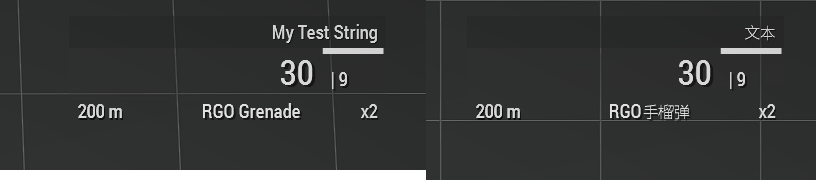
CSV still works fine:
Language,English,Chinese,Chinesesimp
STR_Test_MyTestString,My Test String,文本,文本
 hard chasm
very good to know. thank u. will test here if lzss is available.
and btw, the engine handles notans. Korean/Japanese/Chinese universal fxy fonts.
 wintry tartan
notans? Noto Sans you mean?
 lament mist
Does anyone know what causes a train track to generate a red line on the map?


Things I tested:
- Revised the configuration of the class of the way that works.
- Try to inherit the properties of the class.
- Check the p3d (For testing more than anything else).
- Copy the config that works and modify the model.
PS: the example are tracks from the ATS Mod that have nothing, they only inherit the class of the game object and they are set by MAP. NOT BY MISSION
hearty sandal
lament mist
Things I tested:
- Revised the configuration of the class of the way that works....
its a p3d property. cant do anything about that if youre not the original author of the p3d
 wide hollow
Do I have to make a mod an addon with a signature just to test if it's working? It seems that my PBO prefix doesn't work unless there is one
hard chasm
a mod is a collection of pbos
eact pbo has at least one addon, sometimes more
there is NOI relationship between an addon name nor a pbo name. (some exceptions to this.
a prefix has no relationsp to these things.
a signature is only used for mp play and has no relationship to any of the above. get you terms right, then ask a sensible question.
wide hollow
hard chasm
a prefix has no relationsp to these things.
a signature is only used for mp pla...
yikes, alright
i'll just ask chat gpt- it doesn't gatekeep
wintry tartan
ChatGPT is not a reliable source you can rely on even. Especially Arma modding
What you really need to do is just elaborate and/or tell more exact issues
hard chasm
model=prefix\some\where;
texture=prefix\somewhere\else;
if you're using addon builder you set it's prefix in options to match the 'prefix you're using above
the addon NAME you're using is set in confg.cpp cfgpatches.
the name of the pbo is irrelevant in all cases.
rename any bis pbo to 'elephant.pbo` the game will not even hiccup
 fleet adder
I'm having a bit of trouble trying to figure out what limits the AI engagement ranges for main turret weapon on tanks, I'm using the 120mm mbt vanilla cannon as parent for the gun + adjustments required for my needs and after going back and forth between animation battles and config for rotation and elevation adjustments I finally made it so that the AI was able to at least properly aim at enemies (players using the gun works just fine).
The AI currently engages fine in the <300m range against other armored and infantry targets, however, it just straight up refuses to engage things further away or that are above/below the unit in elevation ranges when they should be well within the actual gun elevation constraints set up in config (+/- 35deg).
Is there anything I should be on the lookout for or is there any advice on what could be causing this?
nimble sequoia
fleet adder
I'm having a bit of trouble trying to figure out what limits the AI engagement r...
When trying to troubleshoot this kind of multi-facetted issue (weapons/turrets/ai), best to simplify as much as possible for testing.
So I'd recommend you switch to using the vanilla 120mm cannon as your weapon and find out whether that alters anything. If it does, it may be your modded weapon fire mode set-up for AI is missing something.
fleet adder
nimble sequoia
When trying to troubleshoot this kind of multi-facetted issue (weapons/turrets/a...
I did try and similar issues were present.
Originally the gun config I had didn't let AI engage >100m because of model+animation shenanigans that Goat helped me figure out in regards of angle0 and angle1 for X and Y rotations.
After doing this changes AI was able to look at enemies properly but basically went and had a staring contest until I made the config use the vanilla class which they then begun engaging at the distance mentioned, the only diference right now from vanilla config is basically the angle contraints for X and Y rotations in config and the corresponding mem point to define the position of the gun.
 worthy briar
Hey!
I'm running into a issue, I'm getting alot of errors in my .RPT, in regards to a drone I'm making.
"Get matrix of physx actor is not valid! Object: drone, RDF_RQ20, Local"
The only thing in can find on it is some old bug reports.
I'm thinking that is a config related issue - anyone able to point me in a direction?
hearty sandal
worthy briar
Hey!
I'm running into a issue, I'm getting alot of errors in my .RPT, in regar...
Is it tiny?
Does it have valid geometry lods?
What do you do to get that error
lament mist
hearty sandal
its a p3d property. cant do anything about that if youre not the original author...
Which property is it? I have the original p3d
hearty sandal
"map" controls what a thing looks like
when baked on terrain
there is a wiki page for named properties you can check out
 still vale
how do i change this logo
 nimble sequoia
By buying this game? 😉
 still vale
what
wintry fox
He's joking
wintry fox
still vale
how do i change this logo
Check out RscDisplayMain (I think that's the right class)
still vale
wintry fox
Check out RscDisplayMain (I think that's the right class)
where
wintry fox
The class, in the config viewer
wintry fox
Dialogs are just defined at the config root, they're not defined in any specific class
still vale
what
wintry fox
Which part is confusing
wintry fox
You need to modify the config class for the main menu, and change the text (which is also used for pictures) of the logo
still vale
where
wintry fox
You have to make a mod that will do that
There's not just some file you can go change yourself
wintry fox
Text = "\path\to\yourPicture_ca.paa" in the control for the logo
still vale
man this path's are already for the back ground
wintry fox
Okay, you asked about the logo
Just look at the controls in-game and see which one has the logo
still vale
cant you just send me the block and i will just replace the path
wintry fox
No, because I don't know it
hearty sandal
still vale
cant you just send me the block and i will just replace the path
Please stop asking people do the work for you
you have been pointed to the right direction
you have to do the legwork yourself
still vale
Dud i do the hard work my self most of the time sometimes i dont find it
No one here needs to help me if they dont want
hearty sandal
please dont put people in the position they have to tell you no.
still vale
👍
hard chasm
@still valeyou've already been told which rscClasses you need to look in. the rest is up to ypu, using a smattering of common sense and watching what changes when you make alterations. Why are you expecting others to do the hard workl for you?
if people here knew the answers they would already have mentioned more than they have done.
 sullen fulcrum
Flag backwards on one side
https://cdn.discordapp.com/attachments/937101549061161000/1286224473569099786/ArmA_3_Screenshot_2024.09.19_-_00.15.50.19.png?ex=66ed2163&is=66ebcfe3&hm=59d6fab04bbd27b572bd4f03e0f9dd3bc4a6c0df86947c6834c5601f7495ca5c&
https://cdn.discordapp.com/attachments/937101549061161000/1286224507580710984/ArmA_3_Screenshot_2024.09.19_-_00.16.42.69.png?ex=66ed216b&is=66ebcfeb&hm=98186bff2c1db385852a73e4726507786052e135db1767df64ed04b333dabf93&

 sullen fulcrum
my dumbass was using the Asym 🤦♂️
 arctic trench
👋 Is it possible for ViV To move with an animation??
Tried attention the ViV points to the animation bone doesn't work, So wondering if its evenpossible
 nimble sequoia
arctic trench
👋 Is it possible for ViV To move with an animation??
Tried attention the ViV p...
nimble sequoia
arctic trench
👋 Is it possible for ViV To move with an animation??
Tried attention the ViV p...
That's a good question. I haven't tried it, but my initial guess would be "no", expecting the ViV memory points to be static, as is the case with a number of other features (MarkerLights? although this might have changed recently??).
 grand zinc
No.
Viv objects are attached to a position, they can't be attached to a bone
MarkerLights indeed, is supposed to have changed recently. There were problems with it, I don't remember if it was solved.
grand zinc
Yes, MarkerLights will be in 2.18
arctic trench
grand zinc
No.
Viv objects are attached to a position, they can't be attached to a bone
F, We tried.
AttachTo it is and some fancy script
grand zinc
doesn't need fancy script. attachTo can attach to a bone.
Well unless you mean the attachTo itself is the fancy script
Mh I wonder
There are new eventhandlers for ViV loading.
I think, you can detect that a ViV loading happened, and re-attach the object, attaching it to a bone.
I think the engine will still consider it ViV attached (If you never actually detach it), so the action menu ViV unloading should still work
arctic trench
grand zinc
There are new eventhandlers for ViV loading.
I think, you can detect that a ViV ...
@toxic solar
arctic trench
grand zinc
There are new eventhandlers for ViV loading.
I think, you can detect that a ViV ...
Gottcha, We'll look into it then, cheers man
Another question, What defines ladders rotation??? I've done everything as make new memory points, tried rotation them, and no matter what i do Im still 180d to the Ladder
 hard chasm
ladders[]={{start1,emd1}.{start909,end909}};
there's also added paramaters that I am undfamiiar with
{"Ladder_1_start","Ladder_1_end",2.5,"Ladder_1_action"}
fairly sure that 2.5 is the radius for detecting
 ashen chasm
may (or may not) be depending on start/end mempoint pair having a bit of a slope (not totally vertical) 🤔
https://forums.bohemia.net/forums/topic/168241-accurately-rotate-memory-points-in-o2/?do=findComment&comment=2628890 here's similar claim from 2014
hard chasm
flashpoint used sloping ladders at 30 degree angles with no loss in using them.
aaah a;ll glory to the milkman who beat ladders senseless in his cranes.
the ladders in trees were often masked by the branches. perhaps that's a reason for the new stuff.
arctic trench
hard chasm
there's also added paramaters that I am undfamiiar with
`{"Ladder_1_start","Ladd...
ye it is
arctic trench
ashen chasm
<https://forums.bohemia.net/forums/topic/168241-accurately-rotate-memory-points-...
I wish it was this cause then it be an easy fix
but they are at the exact same position
Idk, Ill re do the mem point by copying and posted the bottom one and dragging it up, well see where this gets us
Ye 100% not that, Still backwards man
ashen chasm
arctic trench
but they are at the exact same position
well, they should not be 🤷♂️
hearty sandal
arctic trench
but they are at the exact same position
ladder points need to have tiny offset that then defines the ladders direction
even if its just 1 millimeter or even less
 tidal rose
Hey guys, when I open the underbarrel slot menu in arsenal, the magazine from my own weapon gets removed. Does anyone know anything about this problem ?
or rather when I attach the Bipod
hearty sandal
tidal rose
or rather when I attach the Bipod
Some sort of mod problem
 probably the weapon has some bug
arctic trench
ashen chasm
well, they should not be 🤷♂️
Ahhh, Misread it as they shouldnt have a slope, my bad
Ye well then that's prolly the issue
Yea now i feel kinda stupid cause that makes sense, However 1st time doing ladders so lmao
 arctic trench
hearty sandal
ladder points need to have tiny offset that then defines the ladders direction
arctic trench
hearty sandal
ladder points need to have tiny offset that then defines the ladders direction
Cheers man
Yourself and Artemoz coming in clutch for me :)
 frozen bluff
tidal rose
frozen bluff
tidal rose
If I had that problem myself, I'd help, but I never ran into that one.
fleet adder
fleet adder
I did try and similar issues were present.
Originally the gun config I had did...
^ So following up on this, how does AI aim in turrets?
Do they use the gunBeg and GunEnd points to create an axis in order to raycast?
Is this relative to another point like gunnerOptics, Zamerny, gunPos inside the turret model/selection?
Im still trying to figure out whats up with my vehicle and why AI refuses to use the full range of elevations
nimble sequoia
fleet adder
^ So following up on this, how does AI aim in turrets?
Do they use the gunBeg a...
What simulation type is the vehicle, and can you show your turret config, along with side view of vehicle/turret/gun in Cargo/Gunner LOD, relevant points in Memory LOD and model.cfg skeleton/animations for the turret.
fleet adder
nimble sequoia
What simulation type is the vehicle, and can you show your turret config, along ...
TankX
and yeah I can share info later today
fleet adder
nimble sequoia
What simulation type is the vehicle, and can you show your turret config, along ...
model.cfg turret definition + additional items that move using the same controller source:
//Turrets-------------------------------------------------------------
        class mainTurret // Horizontal Rot
        {
            type="rotationY";
            source="mainTurret";
            selection="BODY_U";
            axis="BODY_U";
            memory=1;
            sourceAddress="clamp";
            minValue="rad -360";
            maxValue="rad 360";
            angle0="rad -360";
            angle1="rad 360";
        };

        class mainGun // Vertical Rot Arms gun center gun
        {
            type="rotationX";
            source="mainGun";
            selection="ARM_L";
            axis="ARM_L";
            memory=1;
            sourceAddress="clamp";
            minValue="rad -360";
            maxValue="rad 360";
            angle0="rad -360";
            angle1="rad 360";
        };

        class mainGun_Gundown_Rot_BodyGun: mainGun // Vertical Rot center gun
        {
            selection="BODY_GUN";
            axis="BODY_GUN";
            minValue="rad -360";
            maxValue="rad 360";
            angle0="rad -360";
            angle1="rad 360";
        };

        //JPGuns (Rocket Bay)
        class mainGun_Gunup_Rot_JPGuns: mainGun
        {
            type="rotationX";
            source="mainGun";
            selection="JPGUNS";
            axis="RAILS_F";
            memory=1;
            sourceAddress="clamp";
            minValue=0;
            maxValue=1;
            angle0="rad 0";
            angle1="rad 47 * 1.0";
        };
        class mainGun_Gundown_Rot_JPGuns: mainGun_Gunup_Rot_JPGuns
        {
            axis="RAILS_B";
            minValue=-1;
            maxValue=0;
            angle0="rad -47* 1.0";
            angle1="rad 0";
        };
Skeleton definition
fleet adder
nimble sequoia
What simulation type is the vehicle, and can you show your turret config, along ...
Turret definition in the vehicle
hearty sandal
Since this is rather unconventional vehicle I would perhaps suggest stripping down all non turret related to have clean board to work with
fleet adder
hearty sandal
Since this is rather unconventional vehicle I would perhaps suggest stripping do...
yeah, i will be preparing a canvas model tomorrow to redefine the skeleton+selection for a separate testing version and see how each weapon behaves separately in regards of aiming
hard chasm
if you insist on usimg FULL_UPPER_CASE you deserve all that befalls you.
you don't have any means of noticing #defines when you use them.
fleet adder
hard chasm
if you insist on usimg FULL_UPPER_CASE you deserve all that befalls you.
Ill make sure to clean up after this
nimble sequoia
All needs simplifying to debug and get rid of CAPS unless they're macros.
Also don't see the p3d screenshot requested.
But some oddities immediately standing out include the axis memory points having the same name as the turret/gun selection
axis="BODY_U";```
should be
```selection = "mainturret";
axis = "mainturret_axis";```
and having axis as bones is not normal
```selection="JPGUNS";
axis="RAILS_F";```
```skeletonBones[]=
{...
"RAILS_F","BODY_U",```
This is dubious
`angle0="rad -47* 1.0";`
simplify to `angle0="rad -47";`

Remove this for testing `stabilizedInAxes = 3;`
Check your turret class has this (or ideally explicitly define it)
```animationSourceBody = "mainTurret";
animationSourceGun = "mainGun";```
For testing, change turret to
```minTurn = -360;
maxTurn = 360;```nice synopsis there. Take his good advice.
 deep roost
anybody know what is the name of the identity types for Persian heads and Farsi voices?
nimble sequoia
deep roost
anybody know what is the name of the identity types for Persian heads and Farsi ...
Persian Head
identityTypes[] = {"Head_TK"};
identityTypes[] = {"Head_TK_camo_arid"};
identityTypes[] = {"Head_TK_camo_lush"};
identityTypes[] = {"Head_TK_camo_semiarid"};
Farsi voice
identityTypes[] = {"default", "Head_USMC", "Head_USMC_CO", "Head_USMC_Camo", "Head_USMC_CO_Camo", "Head_Default", "Head_Special", "LanguagePER_F"};
hard chasm
Persian heads and Farsi
look for pushtun or Dari which are the spoken languages there.
deep roost
thanks
on a similar vein do you know how to change default identity name? I assumed it would be attached to the head type
hard chasm
not me
nimble sequoia
deep roost
on a similar vein do you know how to change default identity name? I assumed it ...
Identity name, as in the display name shown in game?
If yes,
displayName = "Your New Head Name";
fleet adder
nimble sequoia
All needs simplifying to debug and get rid of CAPS unless they're macros.
Also d...
Sure, out of the stuff mentioned what comes as most obvious to me rigth now is the animationSources inside turret config as its explicitly missing. I didnt have the p3d files at hand yesterday since #workPc haha but I can get the ss today + the changes mentioned in today.
deep roost
nimble sequoia
Identity name, as in the display name shown in game?
If yes,
`displayName = "You...
well specifically I'm looking for a way to change which pool of names an AI will get when placed in the editor
 tame raven
Is it possible to have a different weaponInfoType for different muzzles of a gun? I've been trying to get a gun that has a scope and a rangefinder attached to it to work (ie, you have to swap muzzles to use the rangefinder and can't shoot while it's on) and the weaponInfoType on the second muzzle just doesn't seem to do anything
hearty sandal
tame raven
Is it possible to have a different weaponInfoType for different muzzles of a gun...
gut feeling is no.
rangefinder would typically be part of the scope
which has its own infotype
but perhaps you could add stuff to swap visibility inside the weapons infotype according to what muzzle is selected
tame raven
That's what I was thinking - it would've been way easier to just stick the vorona rangefinder on another muzzle though lol
fleet adder
nimble sequoia
All needs simplifying to debug and get rid of CAPS unless they're macros.
Also d...
uh, actually, changing the turret rotations parameters DID something this time around,
When AI shoots facing forward fire angle offsets DOWN, but when shooting backwards fire angles offsets UP, however, around 95-105 deg turning to either side from the front, AI is actually able to shoot at enemies without missing 😮
Maybe I have an issue on my constraints/model definitions?
Ever heard of something similar happening?
hearty sandal
fleet adder
uh, actually, changing the turret rotations parameters DID something this time a...
are all the parts weighted 100% to the bones moving them?
constraints etc in blender do not translate into Arma
fleet adder
hearty sandal
are all the parts weighted 100% to the bones moving them?
its what im going to verify in a minute, just finished up cleaning all the misnomers with the axis stuff in memory lod and model.cfg
fleet adder
nimble sequoia
What simulation type is the vehicle, and can you show your turret config, along ...
Side Lod0 and view-gunner lods

 fleet adder
Side Lod0 and view-gunner lods
fleet adder
fleet adder
Side Lod0 and view-gunner lods
Geometry in case its relevant too
This is the only one which actually changes in the shapes of the guns used, they are larger in the X axis
 wintry tartan
...Why you have a unbinned P3D of a third party Mod
fleet adder
because i asked for it to patch it?
wintry tartan
Do you mean you got a permission to get the source?
fleet adder
yes, from CHK
wintry tartan
Okay then
fleet adder
im not planning to reupload anything that is not necessary if possible, but judging by the issues presented most likely p3ds are required to be replaced.
 pastel fog
I'm trying to make a series of muzzle brakes that reduce the recoil of a gun
I've successfully added it to the muzzle slot, with a model
But recoilCoef in the config for the muzzle brake doesn't seem to do anything
I tested values from -1.0f to 3.0f
None of the values had any effect on the recoil
How are the recoilcoef and recoilcoefprone supposed to work?
fleet adder
hearty sandal
are all the parts weighted 100% to the bones moving them?
yes, all parts are weighted to the bones correctly
fleet adder
nimble sequoia
All needs simplifying to debug and get rid of CAPS unless they're macros.
Also d...
and lastly, relevant mem points
 nimble sequoia
fleet adder
and lastly, relevant mem points
nimble sequoia
fleet adder
and lastly, relevant mem points
I don't see anything glaringly wrong with the p3d LOD's except for those CAPS selection names.
Some further suggestions for narrowing down:
- use 2 memory points for each of the turret and gun rotation axis, as it looks like you have just 1
- change the animation type from
rotationXandrotationYto justrotationin all places it occurs - for some reason your Object Builder isn't showing a background LOD overlay so can't see how memory points align (usually first res LOD will be in faint yellow)
- why is there a proxy in the Memory LOD? very unusual, potentially wrong
- what selections are
gunBegandgunEndpart of? (copy and paste those memory points into a new LOD and look at selection names) - should bemaingun zamernyis normally spelled with ayat the end, not a v- try removing LOD property
autocenterfrom anywhere it occurs
fleet adder
nimble sequoia
I don't see anything glaringly wrong with the p3d LOD's except for those CAPS se...
Yeah, sorry figured out how to use this thing with the background option, here, with res0 as background.
Mempoints for gunBeg and gunEnd are grouped now with gunnerOptics into arm_l, in the rest of the lods arm_l is the selection that rotates the whole arm structure
zamerny has a y indeed, paint decided to cut the text box haha
 nimble sequoia
fleet adder
Yeah, sorry figured out how to use this thing with the background option, here, ...
nimble sequoia
fleet adder
Yeah, sorry figured out how to use this thing with the background option, here, ...
arm_l is your maingun selection I believe, so that should be correct. But double check that is the only selection they are part of, don't assume.
fleet adder
yes, I just created that selection so im sure.
Autocenter only occurs in geometry lod currently.
nimble sequoia
fleet adder
yes, I just created that selection so im sure.
Autocenter only occurs in geomet...
No - copy and paste them into a new LOD and check, you're still assuming and it's critical
Delete the autocenter property completely
Confirm you tested without stabilisation
nimble sequoia
Test whenever you like, lol. I've given you a list of things to try, so if you've done all of them, yes, a test would be natural.
fleet adder
Not good yet. I shall do the changes suggested for the rotations and the axis paired up and report back tomorrow.
I also just noticed that my startup position for the vehicle slighlty tilts forward from the waist front, maybe dampers/center of gravity could be contributing with this aiming error?
Thanks for your time today
 unkempt helm
Hello all, quick question about vests. I've made a couple of vests that have different carrying capacities however when in-game it simply states "Load = None" and I'm unable to store anything inside them. I assumed this is an issue with the "containerClass = "SupplyXX";" being set wrong as described on the wiki though all are fine. The reason this is strange is I have two vests with the SAME Supply (just different models) though only one of them works. Last note all my defined Supply are in increments of 10
hearty sandal
unkempt helm
Hello all, quick question about vests. I've made a couple of vests that have dif...
probably typo somewhere in your config
unkempt helm
hearty sandal
probably typo somewhere in your config
They're copy & pasted from the working ones, only change is model & the definition
unkempt helm
Which is my point, they're identical yet only one works
hearty sandal
copypaste can produce errors if you dont actually copy right stuff or paste in wrong place
and you have a problem
so claiming its good is pointless
because if it was, it would work
unkempt helm
I'll send a screenshot in a minute of two entries, maybe you can see something I can't
unkempt helm
    {
        scope = 2;
        displayName = "[No.61][Musketry Order - Green] Rifleman P37 Webbing Type 1";
        picture = "";
        model = "\Webbing\Vest\InfRiLiGr1.p3d";
        hiddenSelections[] = {"Webb","Webb2"};
        hiddenSelectionsTextures[] = {"\Webbing\Data\Webb_CO.paa","\Webbing\Data\Webb2_CO.paa"};
        class ItemInfo: ItemInfo
            {
                uniformModel = "\Webbing\Vest\InfRiLiGr1.p3d";
                        hiddenSelections[] = {"Webb","Webb2"};
                        hiddenSelectionsTextures[] = {"\Webbing\Data\Webb_CO.paa","\Webbing\Data\Webb2_CO.paa"};
                containerClass = "Supply50";
                mass = 50;
                armor = "0.0";
                passThrough = 0.0;
            };
    };
    class InfRiLiEx1: Vest_Camo_Base
    {
        scope = 2;
        displayName = "[No.61][Musketry Order - Experienced] Rifleman P37 Webbing Type 1";
        picture = "";
        model = "\Webbing\Vest\InfRiLiEx1.p3d";
        hiddenSelections[] = {"Webb","Webb2","Band"};
        hiddenSelectionsTextures[] = {"\Webbing\Data\Webb_CO.paa","\Webbing\Data\Webb2_CO.paa","\Webbing\Data\Bando2_CO.paa"};
        class ItemInfo: ItemInfo
            {
                uniformModel = "\Webbing\Vest\InfRiLiEx1.p3d";
                        hiddenSelections[] = {"Webb","Webb2","Band"};
                        hiddenSelectionsTextures[] = {"\Webbing\Data\Webb_CO.paa","\Webbing\Data\Webb2_CO.paa","\Webbing\Data\Bando2_CO.paa"};
                containerClass = "Supply60";
                mass = 50;
                armor = "0.0";
                passThrough = 0.0;
            };
    };
It's my first time working with vests so I probably have done something wrong, though as I said there's no real difference between them that I can spot
hearty sandal
unrelated but you dont seem to have a mod project folder or mod tag_ in your setup
unkempt helm
I'm unsure what you mean, most of what I learnt is by analysing various configs so I'm not sure on the terminology
wheat sluice
Goat's referring to this:
https://community.bistudio.com/wiki/OFPEC_tags
hearty sandal
maybe its dying good practice more and more new folks dont seem to use it
basically it ensures your classnames and files are uniquely named and also bundled together if config viewer is used
wheat sluice
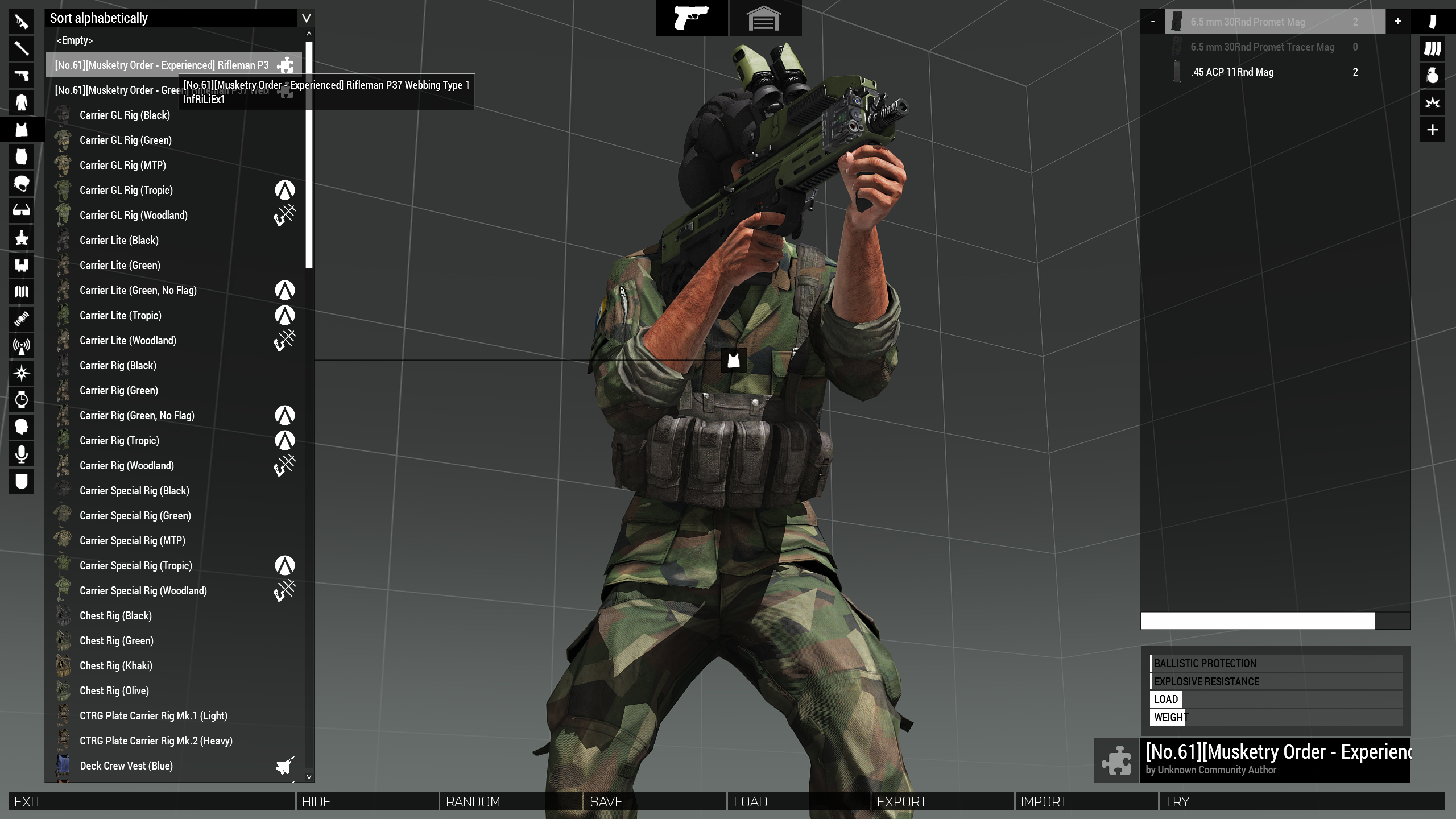
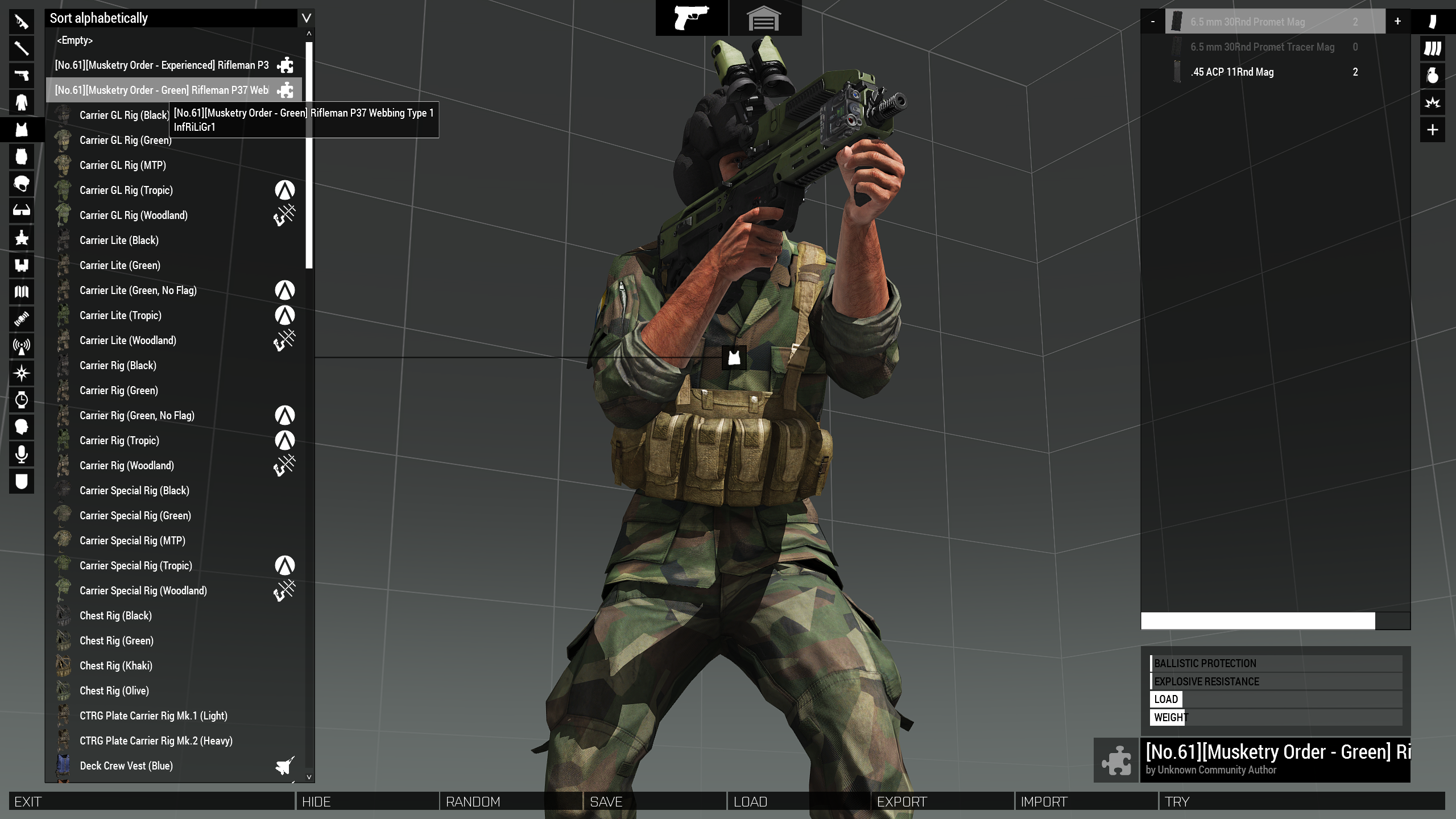
As for your config, I don't see any issues. Both vests have working containers in my test run:
https://i.imgur.com/ehBpf8Y.png
https://i.imgur.com/5SQQAuj.png
So it seems like it might be to do with your inheritance not being set up correctly or you have another mod overriding how the inventory system works.
 hearty sandal
or mistake somewhere else in the config that breaks it even if these happen to look right
how is the pbo packed?
wheat sluice
class CfgWeapons
{
    class ItemCore;
    class Vest_Camo_Base: ItemCore
    {
        class ItemInfo;
    };
    class InfRiLiGr1: Vest_Camo_Base
    {
        scope = 2;
        displayName = "[No.61][Musketry Order - Green] Rifleman P37 Webbing Type 1";
        picture = "";
        model = "\a3\characters_f\common\equip_chestrig_light.p3d";
        hiddenSelections[] =
        {
            "camo1"
        };
        hiddenSelectionsTextures[] =
        {
            "\A3\Characters_F\Common\Data\equip_chestrig_khk_co.paa"
        };
        class ItemInfo: ItemInfo
        {
            uniformModel = "\a3\characters_f\common\equip_chestrig_light.p3d";
            hiddenSelections[] =
            {
                "camo1"
            };
            hiddenSelectionsTextures[] =
            {
                "\A3\Characters_F\Common\Data\equip_chestrig_khk_co.paa"
            };
            containerClass = "Supply60";
            mass = 50;
            armor = 0;
            passThrough = 0;
        };
    };
    class InfRiLiEx1: Vest_Camo_Base
    {
        scope = 2;
        displayName = "[No.61][Musketry Order - Experienced] Rifleman P37 Webbing Type 1";
        picture = "";
        model = "\a3\characters_f\common\equip_chestrig_light.p3d";
        hiddenSelections[] =
        {
            "camo1"
        };
        hiddenSelectionsTextures[] =
        {
            "\A3\Characters_F\Common\Data\equip_chestrig_blk_co.paa"
        };
        class ItemInfo: ItemInfo
        {
            uniformModel = "\a3\characters_f\common\equip_chestrig_light.p3d";
            hiddenSelections[] =
            {
                "camo1"
            };
            hiddenSelectionsTextures[] =
            {
                "\A3\Characters_F\Common\Data\equip_chestrig_blk_co.paa"
            };
            containerClass = "Supply60";
            mass = 50;
            armor = 0;
            passThrough = 0;
        };
    };
};
I do use ACE but I'm not sure how much that changes things on that front
unkempt helm
hearty sandal
how is the pbo packed?
Addon Builder
wheat sluice
Not sure how ACE3 runs its inventory mechanics, so you might want to look into their documentation to see if they require any unique ACE3-only tokens.
 pure apex
I'm not sure if I'm finally loosing it, but I'm having a issue that all optics are over-zeroed for a modded gun I added, so the SMG Holo seems to be zeroed for 200, instead of 100 and I can't for the life of me figure out why that is happening and I cant seem to find a solution just googling around, trying any other modded weapon or vanilla weapon and the same optics doesnt reproduce it
wheat sluice
Post your config on pastebin or something?
pure apex
Pastebin
Pastebin.com is the number one paste tool since 2002. Pastebin is a website where you can store text online for a set period of time.
its pretty much just the default test rifle config with the ugl removed and the AI fire modes while trying to see if anything fixes it
hearty sandal
unkempt helm
I do use ACE but I'm not sure how much that changes things on that front
it may be best to develop mods without any additionals used while testing
wheat sluice
pure apex
its pretty much just the default test rifle config with the ugl removed and the ...
You said you tested with the vanilla Mk17 Holosight right? It's zeroed for 200 metres so that's normal and that's the one you're using in your pre-defined attachment class:
    class Test_weapon_01_holo_pointer_F: Test_weapon_01_F /// standard issue variant with holo optics and laser pointer
    {
        class LinkedItems
        {
            class LinkedItemsOptic
            {
                slot = "CowsSlot";
                item = "optic_Holosight";
            };
            class LinkedItemsAcc
            {
                slot = "PointerSlot";
                item = "acc_pointer_IR";
            };
        };
    };
If you want to use the SMG Holosight (which is zeroed for 100 metres) then you need to use optic_Holosight_smg.
...I also see ACE tokens in there so see if ACE is changing anything.
pure apex
wheat sluice
If you want to use the SMG Holosight (which **is** zeroed for 100 metres) then y...
I'm manually testing in the virtual arsenal with picking out the holosight optic, so the Test_weapon_01, instead of the predefined
and its just that one specific weapon with that issue, any vanilla weapon with the same scopes doesnt have the issues, so its definitely something with the model or the config and I'm honestly stumped as to what it may be
wheat sluice
Is there a reason why your weapon's discretedistance[] array only has {0} defined?
(not that it's related)
pure apex
changed that while trying things out to see if anything influenced it, before i had it at 50,100,150,200
wheat sluice
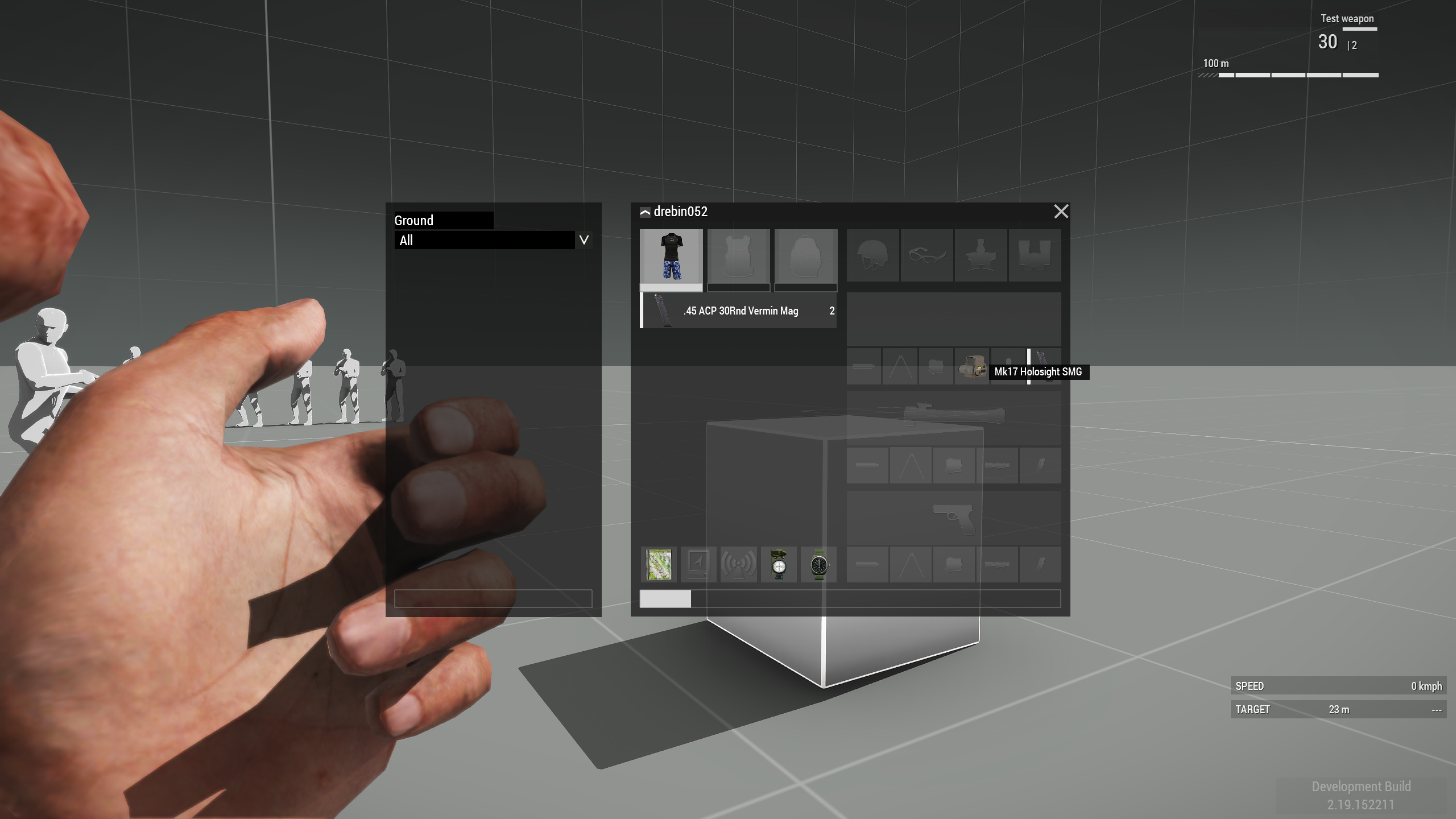
...can't replicate it. I tested with and without ACE3 running and the weapon zeroes correctly to 100 metres with the Mk17 Holosight SMG attached:
https://i.imgur.com/VVzaT5O.png (no ACE)
https://i.imgur.com/8kuHBER.png (with ACE3)
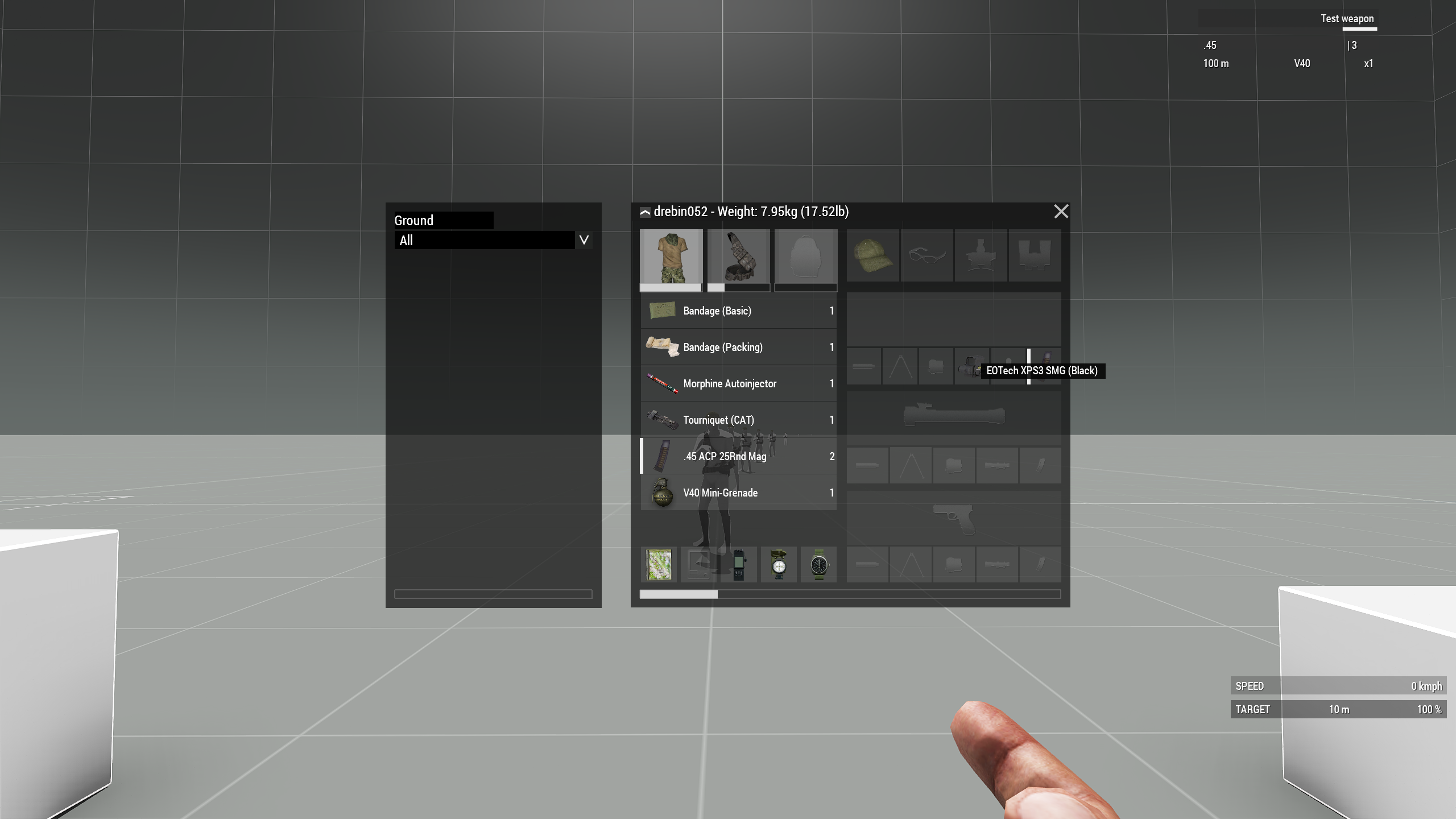 pure apex
it does show the right zero distance, but when i aim onto the target ~100m away, the cross hair is visibly above the target while the aim-in is exactly on the target
I'm just going to see if redoing the model in objectbuilder fixes it, maybe i messed up somewhere, there's barely any modern tutorials on getting models into Arma
 peak horizon
hello team
No entry 'bin\config.bin/RscDisplayMain/controls/TitleSing
leplayer.textureNoShortcuť'.
What is the way to solve such a problem?
hearty sandal
peak horizon
No entry 'bin\config.bin/RscDisplayMain/controls/TitleSing
leplayer.textureNoSho...
well yes fix your config so the thing isnt missing
or dont touch those classes at all 😅
peak horizon
of course, you're right
fleet adder
pure apex
I'm just going to see if redoing the model in objectbuilder fixes it, maybe i me...
i mean, yeah, short concise tutorials are NOT a thing for arma, or for any BI game in general (LOL), but pretty much everything that exist is still valid. Most of them explain a whole ordeal just because it expects for you to not know anything at all so they can kick start you, which, once you do, you can more or less navigate everything except obscure problems (like the AI aim misalignment in certain vehicle ejem >.>)
pure apex
fleet adder
i mean, yeah, short concise tutorials are NOT a thing for arma, or for any BI ga...
Yeah, i was checking out a tutorial for adding a vehicle, but decided I'd rather stay with weapons for the time being, i dont generally mind long tutorials, but the quality is very early 2010s youtube and sometimes parts just seem to go missing in the middle of the tutorial series, so its kinda weird to follow, but i more or less learned SQF by breaking things until they worked like i wanted, so just gonna keep trying 
 digital herald
Hello, I am trying to apply a custom voice.
The voice itself works I can select it on a unit and it will use the voicelines however the unit will not spawn with that identity type.
I have tested a different identity type on that unit and it works with that one. Can anyone see what Im missing?
class CfgIdentities {
    class Male01ENG;
    class Aux_95th_Identity_B1: Male01ENG {
        name = "B1 Battledroid";
        glasses = "None";
        face = "AUX_95th_B1_Face";
        nameSound = "";
        speaker = "Aux_95th_Voice_B1";
        pitch = 1;
    };
};

class CfgVoice {
    voices[] += {"Aux_95th_Voice_B1"};

    class Base;
    class Aux_95th_Voice_B1: Base {
        displayName = "B1 Battledroid";
        protocol = "RadioProtocolENG";
        identityTypes[] = {"Aux_95th_Identity_B1"};
        icon = "";
        scope = 2;
        directories[] = {
            "\z\AUX_95th\addons\voicelines\B1\",
            "\z\AUX_95th\addons\voicelines\B1\"
        };
    };
};
 ivory trench
is there any strange things i need to do to make a replacement config mod work in the contact platform?
 umbral dome
How do I make a specific particle only happen if it's at a certain altitude? For example, if a grenade explosion triggers dirt kicking up, or dust clouds, but I don't want that to happen when a grenade explodes in the air for example, past a certain height, for example above 2 meters?
fleet adder
fleet adder
Not good yet. I shall do the changes suggested for the rotations and the axis pa...
Update:
No, center of gravity modification and damper tweaking did not fix the aim offset. Whoever the vehicle is front-low heavy and that explains why it tilts forward slightly, offsetting the CoG by 2 units using
test1 setCenterOfMass [0,-2,0];
``` makes the vehicle straighten up dramatically.Hi Odyseus, did you ever find out what was the issue?
Im stuck in a similar situation
 nova scarab
Nope, never found the solution for that issue
fleet adder
nova scarab
Nope, never found the solution for that issue
undestandable, thanks for your answer
hard chasm
maybe its dying good practice :blobdoggoshruggoogly: more and more new folks dont seem to use it
They very quickly learn the error of their ways . So called ofpec tags are not optional, they are mandatory. even bis use them with _f
if some hairy chested idiot claims he doesn't use them, you wont hear from him again when a fellow fool calls his stuff 'elephant' too.
it's part of lesson 1.01 in mod making, so constantly seeing this error with beginning modders, doesn't mean we''re being ignored.
wintry fox
_F in class names is from Arma 3's internal name, i.e. Futura (#enfusion_scripting message), which is unrelated to adding a prefix for modded classes. BI (probably) doesn't prefix their own classes because it's the standard content.
hard chasm
they postfix. Same thing if you aren't aware of the logic behind it. they're ensuring there can only ever be one helicopter_f in the game irrespective of oem addons
 lethal shuttle
what causes the error "value is not an array"
might be something to do with my uniform configs, but cant figure out what it is
hard chasm
bad stytax on your part.
array[]= { whatever };
you have stated an array by using [] but failed to supply it with {curly braces};
ps; it always helps an answer if you say where this message came from. hemmtt, pboProject, addon builder. or the game itself
lethal shuttle
oh right, it is in my game when i spawn a unit
hiddenSelections[] = {}; could this cause this kind of error?
wintry tartan
No
What mikero tried to say is “post your entire error, do not summarize, if you can post your source config even”
lethal shuttle
right mb
wintry tartan
This, seriously is, troubleshooting 101, for EVERY error you got
lethal shuttle
Pastebin
Pastebin.com is the number one paste tool since 2002. Pastebin is a website where you can store text online for a set period of time.
Pastebin
Pastebin.com is the number one paste tool since 2002. Pastebin is a website where you can store text online for a set period of time.
it could be from one of these two
first one is config.cpp, second one is cfgVests.hpp
wintry tartan
Are you seriously going to post your actual error or not
 wintry tartan
What about RPT
lethal shuttle
wintry tartan
 ➥ Context: bin\config.bin/CfgVehicles/PTNI_Rifleman_Malvinas.PTNI_Rifleman_Malvinas
->Last modified by: PTNI_units <- bin\config.bin/CfgVehicles/PTNI_Crewman_Malvinas.PTNI_Crewman_Malvinas
->Last modified by: PTNI_units```Where is `PTNI_Rifleman_Malvinas`class CfgVehicles // Character classes are defined under cfgVehicles.
{
class I_soldier_F;
class O_officer_F;
class PTNI_Rifleman_Malvinas : I_soldier_F // Define of a new class, which parameters are inherited from B_Soldier_base_F, with exception of those defined below.
{
author = "Dyson H"; // The name of the author of the asset, which is displayed in the editor.
vehicleClass = PTNI_Men_Malvinas;
genericnames = PTNI_GenericNames;
side = 1;
faction = ptni_faction;
identityTypes[] = {"LanguageGRE_F","Head_Asian","NoGlasses"};
scopeCurator = 2; // 2 = class is available in Zeus; 0 = class is unavailable in Zeus.
displayName = "Rifleman"; // The name of the soldier, which is displayed in the editor.
uniformClass = "U_PTNI_Malvinas"; // This links this soldier to a particular uniform. For the details, see below.
hiddenSelectionsTextures[] = {"\ptni_units\Data\ptni_malvinas_CO.paa"};
weapons[] = { "PTNI_SS2_V2", "PTNI_Pistol_01_F", "Throw", "Put" };
linkedItems[] = {PTNI_PASGT_Headgear, PTNI_Vest_Rifleman, ItemMap, ItemCompass, ItemWatch, ItemRadio}; // Which items the character has.
magazines[] = {"30Rnd_556x45_Stanag","30Rnd_556x45_Stanag","30Rnd_556x45_Stanag","30Rnd_556x45_Stanag","30Rnd_556x45_Stanag","30Rnd_556x45_Stanag","30Rnd_556x45_Stanag","30Rnd_556x45_Stanag","30Rnd_556x45_Stanag","30Rnd_556x45_Stanag","16Rnd_9x21_Mag","16Rnd_9x21_Mag","16Rnd_9x21_Mag","HandGrenade","HandGrenade","SmokeShell","SmokeShellGreen","Chemlight_green","Chemlight_green"};
editorPreview = "\ptni_units\Data\EditorPreviews\ptni_rifleman.jpg";
};```What about PTNI_Crewman_Malvinas
lethal shuttle
    class PTNI_Crewman_Malvinas : PTNI_Rifleman_Malvinas
    {
        displayName = "Crewman";
        weapons[] = { "PTNI_SS2_V5", "PTNI_Pistol_01_F", "Throw", "Put" };
        linkedItems[] = {H_HelmetCrew_I, V_BandollierB_blk, ItemMap, ItemCompass, ItemWatch, ItemRadio};
        magazines[] = {"30Rnd_556x45_Stanag","30Rnd_556x45_Stanag","30Rnd_556x45_Stanag","30Rnd_556x45_Stanag","30Rnd_556x45_Stanag","30Rnd_556x45_Stanag","16Rnd_9x21_Mag","16Rnd_9x21_Mag","16Rnd_9x21_Mag","HandGrenade","HandGrenade","SmokeShell","SmokeShellGreen","Chemlight_green","Chemlight_green"};
        editorPreview = "\ptni_units\Data\EditorPreviews\ptni_crewman.jpg";
};```pass this config and it's hpp thru pboProject, OR, lint button in eliteness Or rapify.exe on the command line. Any one them will locate typos
large walls of text are difficult to troubleshoot. use the halve and halve again rule to narrow down to THE problem
lethal shuttle
eliteness says theres nothing wrong with it

and pboproject doesnt seem to show any errors?
 nimble sequoia
lethal shuttle
nimble sequoia
lethal shuttle
Warning Message: Value not an array. in my experience often comes from broken inheritance, resulting in empty classes.
Can you go in game and then find your PTNI_Rifleman_Malvinas class in the config viewer, and check that it's there and has all the entries it should have.
lethal shuttle
I checked through config viewer, everything that is added/edited in my config.cpp for PTNI_Rifleman_Malvinas seems to be in the config already. If that is what you're asking
the rest should be a part of I_soldier_F
nimble sequoia
lethal shuttle
the rest should be a part of `I_soldier_F`
Yes, but are the parts of I_soldier_F also in your class PTNI_Rifleman_Malvinas? Are they present in the config viewer?
hearty sandal
lethal shuttle
i checked both configs's classes
What you cfgpatches look like
lethal shuttle
class CfgPatches
{
class PTNI_units
{
author = "Dyson H";
requiredVersion = 0.1;
requiredAddons[]=
{
"A3_Data_F_AoW_Loadorder"
};
units[] = {"PTNI_Rifleman"};
weapons[] = {};
};
};``` nimble lodge
Question, I did retexture of basegame glasses, however now the retextured glasses keep spawning on civilians.
Will adding
identityTypes[] =
        {
        };
stop that, or do I need to add some identity?
 silent acorn
nimble lodge
Question, I did retexture of basegame glasses, however now the retextured glasse...
silent acorn
nimble lodge
Question, I did retexture of basegame glasses, however now the retextured glasse...
Can add "None" or nothing.
Create a class that inherits one of the existing civil ones and rewrite only identityTypes[] in it
Put it in the editor and check how it works.
nimble lodge
silent acorn
Can add "None" or nothing.
Create a class that inherits one of the existing civi...
Just did, left it empty, checking if it worked
 brazen merlin
is it just me or does fireLightIntensity etc. not do anything in weapon classes?
i've set it to 0, but ingame i can't see any change at all
fleet adder
nimble sequoia
Test whenever you like, lol. I've given you a list of things to try, so if you'v...
Thanks for all the support, I finally found the issue.
It was inheritance shenannigans for the type of guns being used.
The test I originally did was still using a weapon not intended for turrets in this model i was having issues with.
Turns out plane weapons, turret weapons and helicopter weapons all work different from one another.
Now if you excuse me i need to glue back my hair.
nimble sequoia
fleet adder
Thanks for all the support, I finally found the issue.
It was inheritance shen...
Literally my very first suggestion lol
#arma3_config message
But I'm not sure I agree with you - weapons such as machine guns are the same, regardless of what vehicle they are placed in, and a turret is a turret. Obviously machine guns, cannons, missiles, rockets are all different and the right simulation type needs to be selected.
But very glad to hear you got it working, that's a great result.
fleet adder
shotFromTurret defines what memory points are used for origin and alignment. It the value its 0 the origin is calculated from barrel start and alignment from viewgunner position, if value is 1 the origin is calculated from barrel origin and alignment is calculated using barrel end. Same with helo weapons but in array form
nimble sequoia
fleet adder
shotFromTurret defines what memory points are used for origin and alignment. It ...
shotFromTurret is very uncommonly used.
It wasn't present in the turret config you posted or I would have flagged it immediately, so not sure why that was?
fleet adder
nimble sequoia
`shotFromTurret` is very uncommonly used.
It wasn't present in the turret config...
The config provided was only from the turrets sadly, didnt post the gun config itself, maybe we could have avoided a couple of days back then haha. But I did try using the original mbt weapon and it was partially working, so I disregarded those changes since it was still not the expected result. That was before I added Zamerny mempoint so maybe why i didnt notice since the gun was still shooting way low but better than it was originally was.
 fast ruin
Does anyone know if it’s possible to edit the Xian to make it behave more like a helicopter then a vtol? Yes I know vtols can work as helicopters
 iron hare
Yo, I am pretty new to the whole modding scene of arma 3 and I am currently trying to replace the Arma 3 logo on both of these screens with my unit logo, Is anyone able to help out? so far all I have been able to figure out is getting my unit logo in the top left of the first image.

 wintry tartan
class RscPicture;
class RscTitles
{
    class SplashArma3
    {
        class Picture: RscPicture
        {
            text = "a3\data_f_mod\Images\mod_overviewPicture_co.paa";
        };
    };
};

class RscStandardDisplay;
class RscActivePicture;
class RscDisplayMain: RscStandardDisplay
{
    class Controls
    {
        class Logo: RscActivePicture
        {
            text = "a3\data_f_mod\Images\mod_overviewPicture_co.paa";
            onLoad = "";
        };
        class LogoApex: Logo
        {
            onLoad = "(_this select 0) ctrlshow false";
        };
    };
};

class RscPictureKeepAspect;
class RscControlsGroup;
class RscDisplayLoadMission: RscStandardDisplay
{
    class controls
    {
        class LoadingStart: RscControlsGroup
        {
            class controls
            {
                class Logo: RscPictureKeepAspect
                {
                    text="a3\data_f_mod\Images\mod_overviewPicture_co.paa";
                };
            };
        };
    };
};
class RscDisplayNotFreeze: RscStandardDisplay
{
    class controls
    {
        class LoadingStart: RscControlsGroup
        {
            class controls
            {
                class Logo: RscPictureKeepAspect
                {
                    text="a3\data_f_mod\Images\mod_overviewPicture_co.paa";
                };
            };
        };
    };
};
class RscDisplayStart: RscStandardDisplay
{
    class controls
    {
        class LoadingStart: RscControlsGroup
        {
            class controls
            {
                class Logo: RscPictureKeepAspect
                {
                    text="a3\data_f_mod\Images\mod_overviewPicture_co.paa";
                };
            };
        };
    };
};```This should do, at least give you the ideathx
hard chasm
@iron harem folowing on@wintry tartan's excellent writeup, the lesson here is that in order to be succesfull >you< have to take the time to study (most of) the rscXYZ code to discover how and what the gui panels actually do and which ones to modify. There are so many of them that no-one has simple answers.
you also need to be aware the rsc was introduced for the Elite xBox. Many of the rsc's are deleted during engine load as being irrelevant.
That's actually lesson 101 to know what you'e looking at is actually valid.
i could suggest looking at the rsc used in cwr2 which transformed those displays to look like the original flashpoint. Not suggesting you do that yourself only that cwr2/3 can be mined extensively. I miss Tim Dittmar (T_D) every day. I also reccommend the Vietnam DLC from SOG? i think it's called. In both cases almost anything you want to do is in the borders of the cwr2/3/sog code.
 reef shore
wintry tartan
```cpp
class RscPicture;
class RscTitles
{
class SplashArma3
{
c...
reef shore
wintry tartan
```cpp
class RscPicture;
class RscTitles
{
class SplashArma3
{
c...
while on this topic, do you know the classname for the special version of the main menu logo (golden arma3) that appears when you complete the minigame thing when theres a sale? i cant seem to find it
wintry tartan
Not sure about it. Probably scripted
reef shore
wintry tartan
Not sure about it. Probably scripted
Ok
How does the game know if theres a sale going on? Is the game version updated everytime theres a sale to include the main menu minigame?
Or does the game automatically check for a steam sale at every launch
lethal shuttle
lethal shuttle
```sqf
class CfgPatches
{
class PTNI_units
{
author = "Dys...
I'm still looking for a solution to this if anybody has an answer 🙏
wintry tartan
Then post your ENTIRE config
lethal shuttle
weapons[] = {"PTNI_SS2_V2", "PTNI_Pistol_01_F", "Throw", "Put"};``` you mean this?the throw and put?
wintry tartan
PTNI_SS2_V2 and PTNI_Pistol_01_F don't exist
grand zinc
wintry fox
`_F` in class names is from Arma 3's internal name, i.e. Futura (https://ptb.dis...
The important thing is that the name is unique. Whether you do that with a prefix (like generally all mods) or a suffix (Vanilla content) doesn't really matter.
Prefix is easier for sorting, because when sorted by classname, same mods contents will be together
lethal shuttle
wintry tartan
`PTNI_SS2_V2` and `PTNI_Pistol_01_F` don't exist
my bad, when you said entire config, I didn't think every single config that I have for the mod, I thought just the config.cpp that has PTNI_Rifleman_Malvinas. I have multiple PBOs
how would i combine multiple config.cpps then
wintry tartan
I defined those two weapons and it now removes the errors. I don't know what config you have other than that
Combine multiple configs? Just post multiple config.cpps, then
lethal shuttle
the PTNI_SS2_V2and PTNI_Pistol_01_f are in 2 diff configs so i will post them both
wintry tartan
Where is your recoil
wintry tartan
Where is cfgRecoilsLegacy
lethal shuttle
wintry tartan
No error to me
lethal shuttle
so whats causing it then 
wintry tartan
¯_(ツ)_/¯
lethal shuttle

honestly i am almost certain it was caused by the first config, because it started to appear while i was editing that particular config
placid jay
What tool are you using to build it?
lethal shuttle
notepad ++ and then pboproject
brazen merlin
does anyone know if we have diagnostics options for the advanced flight model?
trying to read up on it on the wiki, but can't seem to find anything about that
hearty sandal
@nimble sequoia you remember if there was anything for that?
lethal shuttle
ok, so im moving on to another physx question
With my tanks physx the current px gear is stuck to 1 when best gear shows 2 (in the live debug menu)
I've tried "rpmratio" and "effective" for changeGearType and it makes no difference.
When using a default vehicle it works and current px gear changes with rpm.
brazen merlin
check your wheels config
not being able to go above gear 1 sounds like something with your wheels is broken
 regal patrol
brazen merlin
check your wheels config
regal patrol
brazen merlin
check your wheels config
we've compared it to another vehicles and it doesn't look outlandishly different
brazen merlin
and all the wheels are the same size?
if i remember correctly, all wheels need to have the same size, else there can be physx issues
looking at your config, the moi seems surprisingly low considering how incredibly high your springStrength is
i'm not sure if any of the vanilla vehicles ever have such high values there
regal patrol
brazen merlin
looking at your config, the moi seems surprisingly low considering how incredibl...
We have lowered it and unfortunately didn't make a difference.
regal patrol
brazen merlin
and all the wheels are the same size?
@lethal shuttle seems to think so.
brazen merlin
the issue with those values is that they all kinda play into each other
what i would do is to find a vanilla vehicle with the same amount of wheels, then check its mass and adjust your vehicle mass to a similar value. then take over the vanilla vehicle wheel config (damper strength etc), and see what happens
there likely will still be issues, but i feel like it might be easier to just go from there
regal patrol
brazen merlin
what i would do is to find a vanilla vehicle with the same amount of wheels, the...
We will check. What confused me is that the best gear value is changed properly according to efficiency but the Current PX gear is not updated to match best gear.
lethal shuttle
in addition, i am wondering if the sprockets also need to be also the same size as the other wheels? it is a tank
regal patrol
brazen merlin
it's just for physx config, visually it can be different
@lethal shuttle showed me some stuff in the blender file; is there a seperate physx config file for this?
regal patrol
brazen merlin
yes, all the same size
Also, wouldn't that break a lot more than just the gearbox changing?
brazen merlin
no idea, but i'd say gearbox is the worst
the reason is that the wheels block each other / break / get stuck, or something like that
that's why you can't increase your speed
i'm almost sure i've read something about it on the wiki
 coral knoll
Any obvious reasons the ammoHit eventhandler wont trigger? Theres no submunition, hit is 1, And im hitting a person, yet it wont output anything
nimble sequoia
brazen merlin
does anyone know if we have diagnostics options for the advanced flight model?
Not that I'm aware of.
When I reworked all the SOG:PF heli's AFM's I did it in live test sessions with a real heli pilot so we could do rapid alteration/test loops. I don't think fine tuning features such as ground effect could be done purely on the numbers as there's so much "feel" to it.
brazen merlin
what about damper position and length etc?
nimble sequoia
brazen merlin
what about damper position and length etc?
You mean the RTD groundContacts?
brazen merlin
yea
also interesting, my helicopter explodes if the gears are up and try to do a belly landing
seems that the helicopter always explodes when touching something unless you touch it with dampers
nimble sequoia
In AFM only, or SFM too?
I'll send you some info in DM as it's probably of interest to only 2 people in the world 😉
regal patrol
brazen merlin
that's why you can't increase your speed
We can increase the speed, we can drive normally in 1st gear, its about shifting up in gear thats the problem
regal patrol
The efficiency of 2nd even numerically surpasses 1st and displays best gear as 2nd; but it refuses to switch
nimble sequoia
regal patrol
The efficiency of 2nd even numerically surpasses 1st and displays best gear as 2...
Unfortunately for you, there are a large number of possible problems which could be causing the issue with the tank, or in fact, several in combination.
So it's not easy to point at the solution without experimentation.
However, if I was to start with something it would be to remove this line
changeGearType = "rpmratio";
and change to
changeGearMinEffectivity[] = {0.95, 0.15, 0.95, 0.95, 0.95, 0.95, 0.90};
I'd also question your gearbox ratios as being very low, and your engine power/torque are very high.
Your springStrength and springDamperRate are also off the charts.
regal patrol
nimble sequoia
Unfortunately for you, there are a large number of possible problems which could...
As mentioned in the original post, we already tried changing the GearType to "effictive" which to my understanding references the Gear effectivities for switching?
Is removing the line any different than using changeGearType = "effective";?
nimble sequoia
regal patrol
As mentioned in the original post, we already tried changing the GearType to "ef...
According to the config dump of the vanilla game code, a valid entry is "rpmratio" or no entry.
There are no occurrences of "effective".
regal patrol
nimble sequoia
According to the config dump of the vanilla game code, a valid entry is `"rpmrat...
@lethal shuttle !!! this probably
regal patrol
nimble sequoia
According to the config dump of the vanilla game code, a valid entry is `"rpmrat...
According to the config dump of the vanilla game code
Where do I find this? I was looking at some online documentation but that didn't feel up to date at all.
lethal shuttle
i can give
nimble sequoia
regal patrol
> According to the config dump of the vanilla game code
Where do I find this? I...
 dreamy granite
Quick question, I have something that I'm working on and I'm curious if there is a way to utilize or create a pylon type system to be able to change out weapons. An example (I don't want to give away too much info on what I'm working on at this point in time) would be having a vehicle with a crewable 240B on it and then a way to switch it out, either via an interface in mission or a attributes panned in the editor, for a M2
regal patrol
lethal shuttle
With my tanks physx the current px gear is stuck to 1 when best gear shows 2 (in...
update:
We were able to fix the issue by adjusting the torque curve and removing some lines of code which did not appear in the all-in-one config.
frozen bluff
dreamy granite
Quick question, I have something that I'm working on and I'm curious if there is...
What I can tell you is no, you cannot. It has to be set with the model itself and so on, so you can't have a "pylon" for a crewable weapon. It's either a 240 or an M2. I mean you'd have to have an anim maybe, but I doubt it. But I have never seen this type of setup, and I'm sure the experts can agree.
lethal shuttle
regal patrol
update:
We were able to fix the issue by adjusting the torque curve and removin...
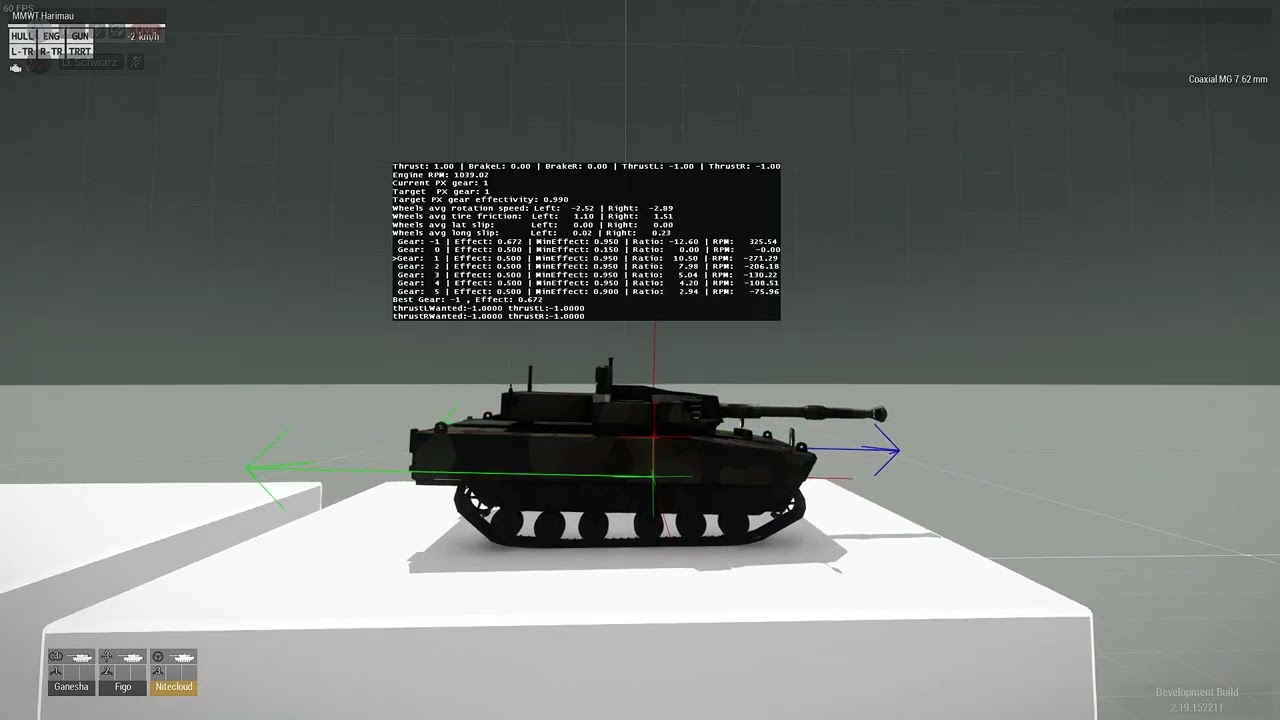
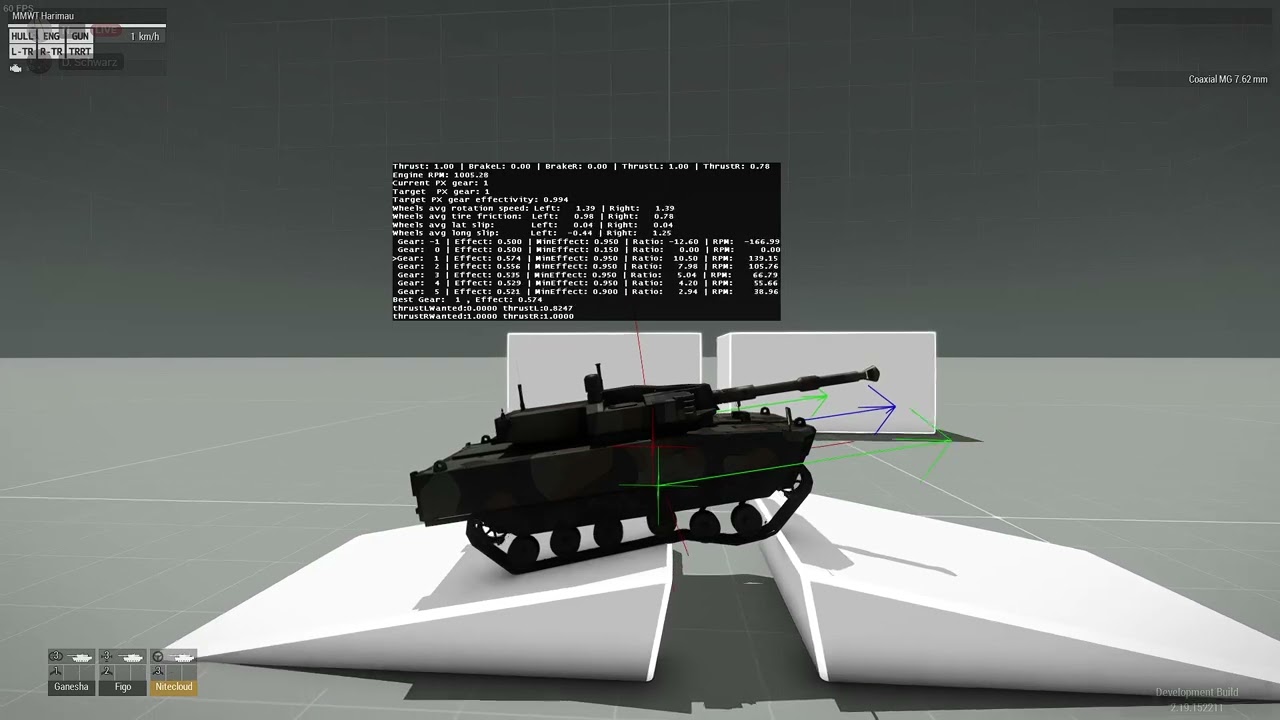
so with that, we also have another unrelated issue in which the wheels do not respond well to bumps and jagged surfaces. I'm not sure if it has something to do with memory points or the wheels parameters in the physx. I have 2 videos show. would appreciate any help
 lethal shuttle
nimble sequoia
lethal shuttle
so with that, we also have another unrelated issue in which the wheels do not re...
lethal shuttle
nimble sequoia
lethal shuttle
so with that, we also have another unrelated issue in which the wheels do not re...
First of all, design your track mesh to have vertices directly under each wheel.

Second, set your damper axis to a length of 1m

Third, match your damper animations to the physx config values
 fast ruin
Are helicopter airframes hard coded into the p3d file or could I take a plane p3d file and make it act like a helicopter?
hearty sandal
fast ruin
Are helicopter airframes hard coded into the p3d file or could I take a plane p3...
each lack things that the simulation type expects
so yes in theory
but practically likely not
fast ruin
Ah okay.
 ivory barn
quick question
for a config cfgVehicles init function in a unit, does the init run locally on every client plus server or just server?
hard chasm
every
lethal shuttle
thanks, i found that that the problem was i had the tracks mesh for the PhysX geo LOD. That fixed the problem, but now the whole physx.hpp has to be changed again because of this
nimble sequoia
lethal shuttle
thanks, i found that that the problem was i had the tracks mesh for the PhysX ge...
As we discussed before, skipping learning the basics will in my opinion lead you (and probably those helping too) to waste lots of time redoing stuff when your preferred brute force method fails. Track and wheel physx are all config based on memory points so placing objects in the Geo Phys LOD in the wrong place will break it.
lethal shuttle
I was aware the that physx geo LOD is config based. It was just an oversight from my part
nimble sequoia
The Geo Phys LOD is not config based - it still controls collision between physx objects.
But the physx of the tracks and wheels is config based, so should not be interfered with by the Geo Phys LOD.
lethal shuttle
Yes thats what i meant
 leaden jolt
hey, i am making a smg mod but even though i have magazine and gun script done well gun does not fire when click left mouse button
i am wondering what could cause this problem?
hearty sandal
leaden jolt
hey, i am making a smg mod but even though i have magazine and gun script done w...
as I mentioned paste your config here and maybe someone can take a look
you config is likely wrong in some way
leaden jolt
alr
 half zenith
Hey @wintry tartan i wanted to know how to make compats for maps to change their lighting ex. your vr lighting on altis or livonia lighting in altis for example
lethal shuttle
so what i found out while changing physx values is that the physics would apply the same value of a line that i put in, even if I would remove that line later
it doesnt go into a "default" value
it takes the latest value that was put in the vehicle, even if that line is removed
I am wondering if that is actually the case or I am just going crazy?
or is that only an issue if you use diag_mergeConfigFile?
nimble sequoia
If you remove a change it will revert in the config to the inherited value. Check by looking at the in-game config viewer.
The only times this seems to "break" is when you have a pre-saved mission with an asset placed in Eden that has been changed, and then sometimes it seems to need deleting/replacing before the changes occur.
wintry tartan
half zenith
Hey <@122565573384208384> i wanted to know how to make compats for maps to chang...
You can just check my config
reef shore
Yo who knows which pbo contains the space invaders main menu minigame thing that appears during sales
reef shore
Thanx man
 kind crest
Hey I dont know if this is the right place, but where can I edit the game's loading screen tips ?
Or replace them with my own
hard chasm
rscMainPanel
kind crest
hard chasm
rscMainPanel
I cant find it, where is it located ?
kind crest
I'll do that, thanks
hard chasm
if my memory is corrent it even says 'loadscreen'.
it's difficlut to be accurate about these things because a lot of rsc uses the delete class where the class was only intended for the Xbox Elite.
wheat sluice
Do you mean you want to change the texts that get shown whenever you're loading a terrain? Those are actually stored in CfgWorlds (specifically in the loadingTexts[] array).
e.g. if you want to change the texts for Altis then you'd remove/replace the stringtable entries:
class Altis: CAWorld
{
    loadingTexts[]=
    {
        "$STR_CfgWorlds_MyStringtableEntry_00",
        "$STR_CfgWorlds_MyStringtableEntry_01",
        "$STR_CfgWorlds_MyStringtableEntry_02",
        "$STR_CfgWorlds_MyStringtableEntry_03"
    };
};
...where STR_CfgWorlds_MyStringtableEntry_00, _01, _02, etc. link to your stringtable.xml/.csv with all the text.
kind crest
wheat sluice
Do you mean you want to change the texts that get shown whenever you're loading ...
Thats exactly what I want to do
How would I even begin to link it to different texts ?
loadingtexts only has "dev1" with nothing editable in it
Unless i need to use the pbo manager to edit it
wheat sluice
Unless i need to use the pbo manager to edit it
Do you know how to create a replacement addon? PBO Manager is a tool for packing pbo archives, not for editing.
I'd suggest reading the tutorial firsts. Once you've gotten the gist of how to create an addon, you can create your own custom config to replace the loading text strings used by a terrain.
https://community.bistudio.com/wiki/Arma_3:_Creating_an_Addon
https://community.bistudio.com/wiki/Arma_3:_Replacement_Config_Tutorial
You can also read up on how stringtables work here:
https://community.bistudio.com/wiki/Stringtable.xml
This will be needed once you start replacing the loading screen texts.
kind crest
I appreciate the help, will dive into these now
hard chasm
@kind crestsorry for my misread, my quick glance thought you were trying to alter the images.
kind crest
hard chasm
<@1079845874479407276>sorry for my misread, my quick glance thought you were try...
I am actually trying to alter the text, such as tips and flavour about the map
found the files that contain them too, now i just need to extract, edit and repack it
hard chasm
apologies anyway, i did not mean to mislead you.
kind crest
hard chasm
apologies anyway, i did not mean to mislead you.
Oh no worries, you gave me some good directions to start
While you're here, which tool can I use to repack pbo files ?
My modding capabilities are very small and the only way i can manage is to alter the original files, but its no bother as i will be playing sp campaings anyway
Oh i figured it out, and the edited loading screen tips work!
Thank you @hard chasm and @wheat sluice both, this went smoother than I expected
hard chasm
which tool can I use to repack pbo files
PboProject. It accepts prebinarised assets such as p3d but ensures the prefix is correct and that all file references exist too
lethal shuttle
none of my vehicles appear in zeus, despite having scopecurator = 2???
heres one vehicle's config
also, it only appears on zeus if i have it spawned from the editor
molten musk
lethal shuttle
You have defined in CfgPatches your units [] = {} array?
lethal shuttle
class CfgPatches
{
    class PTNI_APC
    {
        // List of units defined in this "PBO"
        units[]=
        {
            "B_PTNI_APC_01_F",
            "B_PTNI_APC_01_GUN_F"
        };
        weapons[]={};
        requiredVersion=0.1;
        // because we are using references to this addon, our test car should not be loaded if A3_Soft_F is not present
        requiredAddons[]    = {"A3_Soft_F"};
    };
};```yes here it is
 orchid delta
In a vehicle config, which lines are defining the amount of fuel in the tank and the "trunk" capacity ?
Edit : I found the answer. For those who might be interested, it's MaximumLoad and fuelCapacity
hard chasm
Sorry to pounce on you, do not use FULL_IPPER_CASE. it is reserved for #defines, without this rule neither you nor anyone else can detect a macro when you use them Ignore this advice and regret it later.
lethal shuttle
i fixed it, that still hasnt resolved my issue though
nimble sequoia
lethal shuttle
none of my vehicles appear in zeus, despite having `scopecurator = 2`???
When you placed the Game Master module in your mission did you remember to set this parameter?
 lethal shuttle
that was it, thanks
how is it that other mods like RHS do not need tp set the parameters like this?
lethal shuttle

im so confused, this happens when I binarize the PBO. But when I use diagmergeconfig, the error wont show up and the recoil is how i intend it to be???
i have a few more config issues to fix, my mod is almost done, and now its just bugs like these that ive been ignoring for the past year
wheat sluice
The CfgRecoils classes that you're using are not meant to be defined in the firemodes, hence why the engine's complaining about it not being an array.
https://community.bistudio.com/wiki/ArmA:_Armed_Assault:_CfgRecoils
Recoil definitions in the firemode must use the legacy format. But in your case, you only need to define the recoil token in the root of the weapon class (not within the firemodes):
class PTNI_SS2_V2_Base: Rifle_Base_F
{
  ...
  recoil = "ptni_ss2_recoil";
  ...
};
that worked, thanks!
 acoustic lark
How would I go about swapping an M2 with a TOW in a ground vehicle turret, both functionally and visually?
wheat sluice
You can't change the model's appearance without access to the p3d. Only Reforger allows you to do this with its prefabs system but Arma 3 does not have that capability, unfortunately.
As for the config? Just swap the turret weapons and magazines. For instance, using this config will change the loadout of the FV-720 Odyniec IFV so that it uses an M2 HMG instead of its 30 mm autocannon:
    class I_E_APC_tracked_03_base_F: APC_Tracked_03_base_F
    {
        class Turrets: Turrets
        {
            class MainTurret: MainTurret
            {
                class Turrets: Turrets
                {
                    class CommanderOptics: CommanderOptics
                    {
                    };
                };
                weapons[]=
                {
                    "HMG_M2_Mounted"
                };
                magazines[]=
                {
                    "100Rnd_127x99_mag_Tracer_Red",
                    "100Rnd_127x99_mag_Tracer_Red",
                    "100Rnd_127x99_mag_Tracer_Red",
                    "100Rnd_127x99_mag_Tracer_Red",
                    "100Rnd_127x99_mag_Tracer_Red",
                    "100Rnd_127x99_mag_Tracer_Red",
                    "100Rnd_127x99_mag_Tracer_Red",
                    "100Rnd_127x99_mag_Tracer_Red",
                    "100Rnd_127x99_mag_Tracer_Red",
                    "100Rnd_127x99_mag_Tracer_Red"
                };
            };
        };
    };
You may also need to make sure that GunParticles are emitted from the right memory point (if present). If the vehicle has MFDs defined, you may also need to tweak them so that info gets shown properly on the terminals.
But as mentioned, you can't change the model's appearance so it will still appear as a 30mm autocannon even though it fires a .50 cal HMG. Changing the appearance will only be possible if you have the original p3d MLOD and can swap out parts of the mesh.
hearty sandal
Typically different weapon system like that are set up as different models.
If creating new models
acoustic lark
Thank you, @wheat sluice !
@hearty sandal Nah, I'm just trying to use existing models and combine them so to say
hearty sandal
acoustic lark
<@150949769953411072> Nah, I'm just trying to use existing models and combine th...
that is not possible
wheat sluice
In that case, you could always try combining a static TOW turret with attachToRelative. Hide the turret on the original vehicle (if possible) and lock the turret seat so that you can't get into it and can only hop into the static TOW. Or use an unarmed version of the vehicle and chuck the turret onto there.
It'll probably look like some frankenstein abomination but it's the best you can do without access to the MLOD. Can even merge the objects together into a composition to make it spammable in the editor + Zeus. 
hard chasm
one interesting aspect of this is in flashpoint .bis used a single 5t truck (and a companion Russian Ural) which would 'display' as a refuel vehicle, a repair vehicle, an open top and a covered one simply by hiding/showing the respective textures. it was also used in arma1 and 2
tidal rose
Hey guys, with my uniforms, sometimes incorrect textures are applied to individual HiddenSelections, or they become invisible. This only happens in multiplayer, and even then, only for certain people. If it's helpful, the uniforms are customizable via ACE Arsenal-Extended.
In this example, the pants texture was missing, but the other players could see it.
 digital herald
Does anyone know if its physically possible to have a UGV that has a non ai turret on it? Along the lines of the MALP with an MG on top

 ebon pivot
tidal rose
Hey guys, with my uniforms, sometimes incorrect textures are applied to individu...
ebon pivot
tidal rose
Hey guys, with my uniforms, sometimes incorrect textures are applied to individu...
Happens sometimes if unit is using an insignia
tidal rose
ebon pivot
Happens sometimes if unit is using an insignia
Even if there is no insignia selection in the model ?
ebon pivot
There being no insignia selection may be why it's invisible instead of the texture of the insignia actually
It's an aceax bug
ashen chasm
i believe i've seen similar bugs on mod-free servers
ebon pivot
I only know it happens with usp uniforms with aceax where if you join after someone has an insignia on then their pants texture becomes the texture of their insignia
Don't know why it's always the pants...
wheat sluice
digital herald
Does anyone know if its physically possible to have a UGV that has a non ai turr...
Yes. Use the dontCreateAI token and make sure the turret seat is accessible to human players/has the proper get in and out memory points.
For instance, you can make the Pacific NATO UGV Stomper RCWS have a human-controlled turret seat while the "driver" stays manned by the AI:
https://i.imgur.com/c9WwfSX.png
    class B_T_UGV_01_rcws_olive_F: UGV_01_rcws_base_F
    {
        class Turrets: Turrets
        {
            class MainTurret: MainTurret
            {
                dontCreateAI = 1;
                gunnerForceOptics = 0;
                hideWeaponsGunner = 0;
            };
            class CargoTurret_01: CargoTurret_01
            {
            };
        };
    };
(pay no attention to my floating unit; it's because the UGV Stomper's model is meant to hide the crew proxies since they're not supposed to be visible)
 digital herald
wheat sluice
Yes. Use the `dontCreateAI` token and make sure the turret seat is accessible to...
digital herald
wheat sluice
Yes. Use the `dontCreateAI` token and make sure the turret seat is accessible to...
awesome thank you
peak horizon
hi all
No entry 'bin\config.bin/CfgVehicles/missile_launcher_Stand_x3/Turrets/turret1.primaryGunner'.
wintry fox
peak horizon
No entry 'bin\config.bin/CfgVehicles/missile_launcher_Stand_x3/Turrets/turret1.p...
The error tells you, there is no entry for a specific config entry.
I.e. it's missing, if you have a bunch, it's usually bad inheritance
peak horizon
class CfgVehicles {
class StaticWeapon;
class missile_launcher_Stand_x3 : StaticWeapon {
displayName = "Ayyash 250 Missile Stand x3";
model = "test\objects\missile_launcher_Stand_x3.p3d";
side = 0;
faction = "OPF_CSAT";
vehicleClass = "Car";
scope = 2;
class Turrets {
class turret1 {
gun = "missile_launcher_Stand";
gunPos = "tur1";
body = "tur1";
minElev = -10;
maxElev = 30;
minTurn = -180;
maxTurn = 180;
initTurn = 0;
initElev = 0;
gunner = "player";
};
};
    class AnimationSources {};
    class EventHandlers {
        init = "_this select 0 enableUAV true;";
    };
    weaponClass = "Missile Stand";
    maxSpeed = 100;
    armor = 100;
    transportMaxWeapons = 3;
    transportMaxMagazines = 12;
    class UserActions {
        class Reload {
            displayName = "Reload";
            position = "useraction";
            radius = 5;
            condition = "this canUse 'reload'";
            statement = "[this] execVM 'test\Functions\reload_script.sqf'";

        };
    };
};
};
help me please
hearty sandal
peak horizon
help me please
Your turret inheritance is not set up so you dont get the basic parameters
compare yours to the tank sample config from arma3 samples on steam

 hearty sandal
peak horizon
hearty sandal
peak horizon
turret config is still same
youll have to learn to look into ready configs as reference
peak horizon
hearty sandal
youll have to learn to look into ready configs as reference
But here it is not a tower, it is just a missile carrier and I want to use it as a launching weapon.
hearty sandal
peak horizon
But here it is not a tower, it is just a missile carrier and I want to use it as...
well its still a turret
it just aims up and down
although AI might not know how to use it very well.
whatever you want to do still has to be made in the way engine accepts it
peak horizon
I'll try
pastel fog
acoustic lark
<@150949769953411072> Nah, I'm just trying to use existing models and combine th...
There are some scripted compositions in the workshop that supposedly replace the turret of a tank with a different turret.
Those might help with making something equivalent as a composition
I haven't tested any of them and don't know how they work though
It might only be applicable to certain combinations of turrets and vehicles, or use a very janky implementation
It still wouldn't be a true turret replacement in config and model
hearty sandal
pastel fog
There are some scripted compositions in the workshop that supposedly replace the...
likely wont work.
Those compositions rely on possibility to hide parts of the vehicles and then attach them together
there are a lot of possible issues and most likely there are no fitting turrets to use as doorguns
acoustic lark
pastel fog
There are some scripted compositions in the workshop that supposedly replace the...
I've tried searching through the workshop but didn't find any, unfortunately
Any for what i'm tryiing to do I mean
 mossy hound
Rightyo, so I've google searched high and low for answers to this, and I've come up empty, so here goes:
Piggybacking off of the eventhandlers and code format from a campfire to create a static radio prop that plays music through an action via action menu. In doing so though, it still retains the 'light fire'/'put out fire' action tags in the menu. Is there any ability to rename that to read something like 'turn on radio'/'turn off radio'?
wintry fox
mossy hound
Rightyo, so I've google searched high and low for answers to this, and I've come...
That would be via scripting, not config (i.e. #arma3_scripting).
You could try turning it into a simple object or remove the existing actions
mossy hound
wintry fox
That would be via scripting, not config (i.e. <#105462984087728128>).
You could...
I'm doing this via a new object created in a config file.
Part of a small asset mod pack.
Hence why I thought the config discussion would be the place to ask.
pastel fog
acoustic lark
I've tried searching through the workshop but didn't find any, unfortunately
Here's one of them, but it uses 2 objects, and extensive scripting to work
Probably not what you are looking for
https://steamcommunity.com/sharedfiles/filedetails/?id=2803391293
 hearty sandal
mossy hound
Hence why I thought the config discussion would be the place to ask.
hearty sandal
mossy hound
Hence why I thought the config discussion would be the place to ask.
Don't inherit the fire. Use some other prop or house_f.
lethal shuttle
trying to get the AAF short sleeve model to work, but in-game it only shows the full-sleeved version?
    class U_PTNI_Malvinas_shortsleeve : U_I_CombatUniform_shortsleeve
    {
        author = "Dyson H";
        scope = 2;
        displayName = "Combat Fatigues (DPM) (Rolled-up)";
        picture = "\ptni_units\Data\UI\icon_malvinas.paa";
        hiddenSelectionsTextures[] = {"\ptni_units\Data\ptni_malvinas_CO.paa"};
        class ItemInfo : ItemInfo
        {
            uniformClass = PTNI_Rifleman_Malvinas_Short;
        };
};```That's the CfgWeapons item.
What's your CfgVehicles look like for this uniform (PTNI_Rifleman_Malvinas_Short)?
Inheriting from U_I_CombatUniform_shortsleeve does not automatically make your uniform share the same model when worn (only the dropped item + its weight/storage container stats).
lethal shuttle
class PTNI_Rifleman_Malvinas_Short : PTNI_Rifleman_Malvinas
    {
        scope = 1;
        scopeCurator = 0;
        vehicleClass = PTNI_Men_Malvinas;
        uniformClass = "U_PTNI_Malvinas_shortsleeve";
        hiddenSelectionsTextures[] = {"\ptni_units\Data\ptni_malvinas_CO.paa"};
};```its also inherited from one of my classes
class PTNI_Rifleman_Malvinas : I_soldier_F    // Define of a new class, which parameters are inherited from B_Soldier_base_F, with exception of those defined below.
    {
        author = "Dyson H";            // The name of the author of the asset, which is displayed in the editor.
        vehicleClass = PTNI_Men_Malvinas;
        genericnames = PTNI_GenericNames;
        side = 1;
        faction = ptni_faction;
        identityTypes[] = {"LanguageGRE_F","Head_Asian","NoGlasses"};
        scopeCurator = 2;                    // 2 = class is available in Zeus; 0 = class is unavailable in Zeus.
        displayName = "Rifleman";        // The name of the soldier, which is displayed in the editor.
        uniformClass = "U_PTNI_Malvinas";                            // This links this soldier to a particular uniform. For the details, see below.
        hiddenSelectionsTextures[] = {"\ptni_units\Data\ptni_malvinas_CO.paa"};
        weapons[] = {"PTNI_SS2_V2", "PTNI_Pistol_01_F", "Throw", "Put"};
        linkedItems[] = {PTNI_PASGT_Headgear, PTNI_Vest_Rifleman, ItemMap, ItemCompass, ItemWatch, ItemRadio};                // Which items the character has.
        magazines[] = {"30Rnd_556x45_Stanag","30Rnd_556x45_Stanag","30Rnd_556x45_Stanag","30Rnd_556x45_Stanag","30Rnd_556x45_Stanag","30Rnd_556x45_Stanag","30Rnd_556x45_Stanag","30Rnd_556x45_Stanag","30Rnd_556x45_Stanag","30Rnd_556x45_Stanag","16Rnd_9x21_Mag","16Rnd_9x21_Mag","16Rnd_9x21_Mag","HandGrenade","HandGrenade","SmokeShell","SmokeShellGreen","Chemlight_green","Chemlight_green"};
        editorPreview = "\ptni_units\Data\EditorPreviews\ptni_rifleman.jpg";
};```what exactly do i need to do then?
wheat sluice
You need to define the short sleeved model in your CfgVehicles class. Your parent class (PTNI_Rifleman_Malvinas) inherits from I_soldier_F which uses the unrolled uniform model (ia_soldier_01.p3d). As a result, your short sleeve uniform class (PTNI_Rifleman_Malvinas_Short) also inherits the same model because you did not redefine it.
In order to give it the proper model, add the model token in PTNI_Rifleman_Malvinas_Short and use this path for the short sleeve AAF Combat Fatigues:
model = "\A3\Characters_F_Beta\INDEP\ia_soldier_02.p3d";
got it to finally work. I did use that line, but on the uniform class instead of the units class. Thanks alot!
 neon cargo
how do i fix this error
 molten musk
neon cargo
how do i fix this error
molten musk
neon cargo
how do i fix this error
From your code? Or some mod?
If that is mod then you need contact to author of mod.
Otherwise you could share your current code
add_defense_waypoint
not mine using kp liberation
 muted flame
Hey can somebody help me with this script? Trying to make a new radio using TFAR but its not even making the item to begin with, any help is appreciated thanks. Also please don't just link me the wiki, I've already read over the parts I'm confused about but it don't understand
im so confused and have been told like 3 different things on how to code this
wintry tartan
What exactly you're trying, or errors even
wintry fox
muted flame
Hey can somebody help me with this script? Trying to make a new radio using TFAR...
You're trying to put dialog config, i.e. the class background part in your item config, that's not how that works. You're also inheriting from a non-existent class, there is no RscBackPicture class defined in CfgWeapons.
Also manually defining CfgMods does nothing, it's been broken since like Arma 1.something
You also have a bunch of macros, but they aren't used anywhere at all in your config
And QUOTE is completely undefined there
muted flame
I decided to just do them all manually
I don't understand the files it wants me to make so just ganna do them one by one
wintry fox
Doing them manually or not has nothing to do with your core issue
wintry fox
You're trying to put dialog config, i.e. the
class backgroundpart, in your item config, that's not how that works. You're also inheriting from a non-existent class, there is noRscBackPictureclass defined in CfgWeapons.
 wintry fox
No, you don't
There is not a class called RscBackPicture defined in CfgWeapons.
You're referencing it, but the game will not find a class with that name, and instead will create an empty class and inherit from that
RscBackPicture is a class that is created in TFAR, and exists only as a root class (i.e. not defined in any other class).
 wintry fox
Yes, but you're trying to reference a class called RscBackPicture in CfgWeapons which does not exist
You're already referencing it outside of CfgWeapons, so I don't know why you're doing it again
muted flame
so just delete it then
also another thing being, is I don't see the item, is there something wrong with the code or was the pervious stuff also a cause for breaking it
wintry fox
You don't see the item because anprc152_radio_dialog is a dialog, not a class in CfgWeapons
wintry fox
Yes
You can also just look at TFAR's github as well
https://github.com/michail-nikolaev/task-force-arma-3-radio/blob/master/addons/handhelds/anprc152/CfgWeapons.hpp#L1
muted flame
I got confused looking at it so I just decided to ignore it when I didn't understand a majority of what they are doing
wintry fox
There's a decent bit of macro usage, I would stay away from it if you don't know how it works
muted flame
I literally am just trying to make a new radio, that uses a new image instead of the realistic looking one, using the 152 as a reference
wintry fox
But you almost certainly will want to macro all of the different radio versions, you don't want to write out 1000 classes by hand
wintry fox
muted flame
I literally am just trying to make a new radio, that uses a new image instead of...
Yes, but you are still making a new radio, which comes with a lot of steps
muted flame
wintry fox
But you almost certainly will want to macro all of the different radio versions,...
I found a mod of someone who already did it, just going to ctrl+c and ctrl+v and then replace his class names with mine
wintry fox
It's probably still macro'd and you're just looking at the already processed output
muted flame
wintry fox
It's probably still macro'd and you're just looking at the already processed out...
 wintry fox
Anyways, are the buttons for your custom background in a different position than the default 152?
muted flame
this is how it looks, is that macro'ed out?
muted flame
wintry fox
Anyways, are the buttons for your custom background in a different position than...
nah its litterally just overlayed
wintry fox
Yeah
I work on that mod, it's macro'd
 wintry fox
muted flame
nah its litterally just overlayed
wintry fox
muted flame
nah its litterally just overlayed
Then you save yourself a lot of trouble fiddling with button positions
class anprc152_radio_dialog {
    class background;
};
class TAG_yourRadioDialog: anprc152_radio_dialog {
    idd = <someNumber>; // ID for your specific dialog, you can just pick some big number
    onUnload = "['OnRadioOpen', [player, TF_sw_dialog_radio, false, 'TAG_yourRadioDialog', false]] call TFAR_fnc_fireEventHandlers;";
    onLoad = ""; // Base class uses this to set a night time image, you can just leave it empty
    class background: background {
        text = "\path\to\your\image_ca.paa";
    };
};
Should be it for the dialog
wintry fox
muted flame
this is how it looks, is that macro'ed out?
If you'd like, I wrote my own macro and also a python script to generate radios for tfar
We're doing a big rewrite on that mod
muted flame
wintry fox
```cpp
class anprc152_radio_dialog {
class background;
};
class TAG_yourRadi...
?
 muted flame
wintry fox
If you'd like, I wrote my own macro and also a python script to generate radios ...
muted flame
wintry fox
If you'd like, I wrote my own macro and also a python script to generate radios ...
I mean, I jsut need the easiest way to put this in cause I'm an idiot when it comes to coding for arma, I only know basic shit
wintry fox
Dialogs aren't defined in any specific class, they sit outside on their own
muted flame
 wintry fox
Remove the < and > around the number
And also rename the class, and also the class name in the onUnload part
muted flame
this yeah?
 wintry fox
Yeah
The class name for the dialog itself and the class name in that onUnload should be the same
muted flame
Gotcha, so just fill out the correct stuff for the .paa and it should be fine just like this?
 wintry fox
You need to make your radio point to your custom dialog
So just add tf_dialog = "HL_YourRadioDialog" in your radio config
You can also remove the background stuff in your item, since that's it's own class
muted flame
wintry fox
You can also remove the background stuff in your item, since that's it's own cla...
gotcha
@wintry fox So I got it to work in game and show up, problem is now I gatta do the full macro thign now for it to officially work yeah since UI doesn't really work and it just spawns in another 152 in my inventory when I try?
wintry fox
Yep
muted flame
Any advice on how to do the full macro thing? I'm very stuck on the steps for that
wintry fox
muted flame
<@400337254989430784> So I got it to work in game and show up, problem is now I ...
I would reccomend putting TFAR's macros into a separate file, that way half of your config isn't just the macros
Then #includeing it
muted flame
wintry fox
Then `#include`ing it
what does that mean
muted flame
wintry fox
I would reccomend putting TFAR's macros into a separate file, that way half of y...
like, make a .hpp and just put it in there and don't chang anything or
wintry fox
Yeah, just for organizational purposes
So you'd have like:
// config.cpp
#include "macros.hpp"

class CfgPatches {
    // ...
};

// ...
// macros.hpp
// TFAR macros here
oh okay cool
muted flame
wintry fox
So you'd have like:
```cpp
// config.cpp
#include "macros.hpp"
class CfgPatches...

GitHub
TeamSpeak integration for Arma 3. Contribute to michail-nikolaev/task-force-arma-3-radio development by creating an account on GitHub.
I just copy and paste this right
wintry fox
Yeah
You'll also need to add this at the top of the file
#define QUOTE(var1) #var1

so like this
wintry fox
Should be fine yeah
Now you can just do the TF_RADIO_IDS macro
Which is just the base class and the displayName
muted flame
wintry fox
Now you can just do the `TF_RADIO_IDS` macro
like, change where it says "TF_RADIO_IDS" to the "idd" I used for my dialog?
wintry fox
No, that's just the macro name that makes all 1000 radios
You'd just do like TF_RADIO_IDS(House_lirus_152_Radio,[HL] Imperial Communicator Device)
muted flame
wintry fox
You'd just do like `TF_RADIO_IDS(House_lirus_152_Radio,[HL] Imperial Communicato...


says something is wrong with my config when I changed those macro names
what the heck
wintry fox
You want to use those as the arguments, not change the macros themselves
Leave the macros file as it is
Under your radio class, add the TF_RADIO_IDS(House_lirus_152_Radio,[HL] Imperial Communicator Device)
muted flame
wintry fox
You want to use those as the arguments, not change the macros themselves
uh like this?
 wintry fox
Not in the class, after it
muted flame
uhhhhhhhhhhhhhhhhh
wintry fox
That would make a bunch of radio classes inside your current radio
 wintry fox
Yes, and don't forget the underscore at the end
muted flame
wintry fox
Yes, and don't forget the underscore at the end

gotcha, i'll try this then
muted flame
wintry fox
My bad, semicolon
uh
 wintry fox
Did you undo your changes to the macros
muted flame
wintry fox
Did you undo your changes to the macros
yeah
the only thing i added to macros was the** #define QUOTE(var1) #var1 **thing
wintry fox
Could you show where you include that micros file at and show the macros file in full?
Not sure why it'd error like that unless there
muted flame
wintry fox
Could you show where you include that micros file at and show the macros file in...

does it need to go in data?
wintry fox
Can you show your config.cpp file?
muted flame
#include "macros.hpp"

class CfgMods
{
    class Mod_Base;
    class Lirus_Armory: Mod_Base
    {
        name="Knight House Lirus Radios";
        author="Hancock";
        tooltip="Knight House Lirus Radios";
        tooltipOwned="Knight House Lirus Radios";
        overview="Knight House Lirus Radios";
        hidePicture=0;
    };
    author="Hancock";
    timepacked="1726183152";
};

class CfgPatches
{
    class Lirus_Radios
    {
        units[]=
        {
            "B_Soldier_base_F"
        };
        weapons[]=
        {
            "House_Lirus_152_Radio"
        };
        requiredVersion=0.1;
        requiredAddons[]=
        {
            "tfar_core",
            "tfar_handhelds"
        };
        version="0.1.0";
        name="Knight House Lirus Radios";
        author="Hancock";
    };
};
class anprc152_radio_dialog
{
    class background;
};
class HL_yourRadioDialog: anprc152_radio_dialog {
    idd = 42069; // ID for your specific dialog, you can just pick some big number
    onUnload = "['OnRadioOpen', [player, TF_sw_dialog_radio, false, 'HL_yourRadioDialog', false]] call TFAR_fnc_fireEventHandlers;";
    onLoad = ""; // Base class uses this to set a night time image, you can just leave it empty
    class background: background {
        text = "\Lirus_Radios\data\ImperialRadioDevice.paa";
    };
};
class CfgWeapons
{
    class RscBackPicture;
    class TFAR_anprc152;
    class House_Lirus_152_Radio :TFAR_anprc152
    {
        displayName="[HL] Imperial Communicator Device";
        descriptionShort="Wrist Mounted Comms (8 channels)";
        picture="\Lirus_Radios\data\ImperialRadioDeviceIcon.paa";
        tf_dialog = "HL_YourRadioDialog";
    };
    TF_RADIO_IDS(House_lirus_152_Radio,[HL] Imperial Communicator Device);
};
I have no idea
I was wrong about the semicolon at the end of your TF_RADIO_IDS macro, apparently it's done in the macro itself
But I don't think that would cause addon builder to fail?
muted flame
wintry fox
I was wrong about the semicolon at the end of your `TF_RADIO_IDS` macro, apparen...
I removed the semicolon
still faield
is it cuz im binarizing?
wintry fox
No, you definitely should be binarizing
I have no idea what's wrong there
It builds fine with hemtt, which is way more strict than addon builder, but fails with AB on my end as well
muted flame
wintry fox
I have no idea what's wrong there
It builds fine with hemtt, which is way more s...
so what should I do
can you send me the hemtt thing you built to see if it even works
muted flame
frick
im ganna see if it even loads up
if anything, I guess I just download this hemtt program because like, idk whats wrong
and you are THE GUY and you don't know whats wrong so I think thats the easiest way
wintry fox
It's a completely different build system than Addon Builder, and does require some knowledge
muted flame
frick
wintry fox
It might be something with TFAR's macros, since I'm pretty sure Dedmen uses hemtt for it
muted flame
so what now? Am I kinda just stuck
wintry fox
Could use the macros I made
They're simpler, since I just made each use of the macro make a single radio
muted flame
wintry fox
Could use the macros I made
They're simpler, since I just made each use of the m...
yeah sure
anything to get this to work haha
wintry fox
Replace your whole macros.hpp file with this:
#define DOUBLES(var1,var2) var1##_##var2
#define QUOTE(var1) #var1

#define HANDHELD_RADIO(name,item,id) class DOUBLES(item,id): item { \
    scope = 1; \
    displayName = QUOTE(name id); \
    tf_prototype = 0; \
    tf_radio = 1; \
}
do I keep the "TF_RADIO_IDS" thing in my config.cpp
wintry fox
You'll replace it with something else
muted flame
gotcha
wintry fox
I'd reccomend making a separate folder for the actual radios, since it's quite long at 1000 lines
Personally I made a folder called cfg and then name each file after the radio
So like this:

Here's that file
I figured I'd just find and replace all of the names / classes for you
muted flame
wintry fox
Here's that file
I figured I'd just find and replace all of the names / classes ...
so just put this in then
not In but next to my .hpp file
grand zinc
wintry fox
It might be something with TFAR's macros, since I'm pretty sure Dedmen uses hemt...
Hemtt didn't exist back then, tfar is build with old mikero version
wintry fox
Yeah I looked at the github and didn't see a hemtt folder
And also the missing quotes around strings
 wintry fox
muted flame
added this
wintry fox
muted flame
added this
You'll want to replace your TF_RADIO_IDS with that include line
grand zinc
wintry fox
Here's that file
I figured I'd just find and replace all of the names / classes ...
You only need to set tf_prototype/tf_radio/scope once. Repeating it for every radio is a waste. TFAR does the _1 manually, and inherits everything from it.
grand zinc
muted flame
```cs
#include "macros.hpp"
class CfgMods
{
class Mod_Base;
class Lirus...
class background: background {
That is wrong, background doesn't inherit from background.
It inherits from RscBackPicture
muted flame
wintry fox
You'll want to replace your `TF_RADIO_IDS` with that include line
wdym TF_RADIO_IDS?
wintry fox
The macro in your CfgWeapons
grand zinc
muted flame
wdym TF_RADIO_IDS?
 wintry fox
So it'd be like:
class CfgWeapons
{
    class RscBackPicture;
    class TFAR_anprc152;
    class House_Lirus_152_Radio :TFAR_anprc152
    {
        displayName="[HL] Imperial Communicator Device";
        descriptionShort="Wrist Mounted Comms (8 channels)";
        picture="\Lirus_Radios\data\ImperialRadioDeviceIcon.paa";
        tf_dialog = "HL_YourRadioDialog";
    };
    #include "imperialCommunicator.hpp"
};
That's his custom dialog
He's creating a new dialog that inherits from the 152's, so it inherits the background class of the 152's
grand zinc
Yeah, it inherits "background" class from the TFAR one. But it changes the inheritance
wintry fox
No it doesn't
Oh wait I think I skipped a class in the inheritance
Controls are in some class controls aren't they
grand zinc
no
wintry fox
Am I thinking of huds?
I vaguely remember some ui thing being like:
class Something {
    class controls {
         // ...
    };
};
The original is
class anprc152_radio_dialog {
  class background: RscBackPicture {
    text = QPATHTOF(anprc152\ui\152.paa);
  }
}
So the patch would be
class anprc152_radio_dialog;
class RscBackPicture;

class customClass : anprc152_radio_dialog {
  class background: RscBackPicture {
    text = "other path";
  }
}
so change the background inheritence and i'll be fine then or?
grand zinc
wintry fox
I vaguely remember some ui thing being like:
```cpp
class Something {
class ...
controls can be a class, or an array of strings of classnames. The array variant is very rare
wintry fox
grand zinc
The original is
```
class anprc152_radio_dialog {
class background: RscBackPic...
No, that's inheriting from RscBackPicture, not the 152's background, which is his intention
Doing:
class anprc152_radio_dialog {
    class background;
};
Does not touch the inheritance of anprc152_radio_dialog. It solely references the background class
muted flame
};
class anprc152_radio_dialog
{
    class background;
};
class HL_yourRadioDialog: anprc152_radio_dialog {
    idd = 42069; // ID for your specific dialog, you can just pick some big number
    onUnload = "['OnRadioOpen', [player, TF_sw_dialog_radio, false, 'HL_yourRadioDialog', false]] call TFAR_fnc_fireEventHandlers;";
    onLoad = ""; // Base class uses this to set a night time image, you can just leave it empty
    class background: background {
        text = "\Lirus_Radios\data\ImperialRadioDevice.paa";
    };
};
class CfgWeapons
{
    class RscBackPicture;
    class TFAR_anprc152;
    class House_Lirus_152_Radio :TFAR_anprc152
    {
        displayName="[HL] Imperial Communicator Device";
        descriptionShort="Wrist Mounted Comms (8 channels)";
        picture="\Lirus_Radios\data\ImperialRadioDeviceIcon.paa";
        tf_dialog = "HL_YourRadioDialog";
    };
    #include "imperialCommunicator.hpp"
};
This ^ didn't seem to work, like it shows up and its not replacing it anymore but the image isn't changing. Is that a problem with the texture pathing or
wintry fox
If there was a class inside of background you wanted to reference, doing:
class anprc152_radio_dialog {
    class background {
        class someInsideClass;
    };
};
would break inheritance, because you're now making background inherit from nothing
grand zinc
muted flame
```cs
};
class anprc152_radio_dialog
{
class background;
};
class HL_yourRa...
If it were a problem with pathing, you'd see no image, instead of it staying the old
muted flame
so what would be the problem
grand zinc
You can look in ingame config viewer, look at your dialog class, and see if it looks correct
look at the background class there, and see if your text path is in there
muted flame
uh gotcha, I'll check it out one second
 grand zinc
Yeah look inside your dialog class
not the item one
tf_parent there is wrong, that needs to be changed too
TFAR will replace your radio with a normal 152
muted flame
grand zinc
Yeah look inside your dialog class
uh, wdym by dialog class
muted flame
 grand zinc
and in there, the background subclass, is the "text" there correct?
createDialog "HL_yourRadioDialog"
And then try this script, to make sure it actually opens your dialog, and check how it looks
muted flame
grand zinc
`createDialog "HL_yourRadioDialog"`
And then try this script, to make sure it ac...
nothing comes up
grand zinc
huh
 grand zinc
but your background class there is correct?
No its not
Show your code again for the ui class that you have now
muted flame
class anprc152_radio_dialog
{
    class background;
};
class HL_yourRadioDialog: anprc152_radio_dialog {
    idd = 42069; // ID for your specific dialog, you can just pick some big number
    onUnload = "['OnRadioOpen', [player, TF_sw_dialog_radio, false, 'HL_yourRadioDialog', false]] call TFAR_fnc_fireEventHandlers;";
    onLoad = ""; // Base class uses this to set a night time image, you can just leave it empty
    class background: background {
        text = "\Lirus_Radios\data\ImperialRadioDevice.paa";
    };
};
class CfgWeapons
{
    class RscBackPicture;
    class TFAR_anprc152;
    class House_Lirus_152_Radio :TFAR_anprc152
    {
        displayName="[HL] Imperial Communicator Device";
        descriptionShort="Wrist Mounted Comms (8 channels)";
        picture="\Lirus_Radios\data\ImperialRadioDeviceIcon.paa";
        tf_dialog = "HL_YourRadioDialog";
    };
    #include "imperialCommunicator.hpp"
};
class anprc152_radio_dialog
{
    class background;
};
class HL_yourRadioDialog: anprc152_radio_dialog {
    idd = 42069; // ID for your specific dialog, you can just pick some big number
    onUnload = "['OnRadioOpen', [player, TF_sw_dialog_radio, false, 'HL_yourRadioDialog', false]] call TFAR_fnc_fireEventHandlers;";
    onLoad = ""; // Base class uses this to set a night time image, you can just leave it empty
    class background: background {
        text = "\Lirus_Radios\data\ImperialRadioDevice.paa";
    };
};
->
class anprc152_radio_dialog;
class RscBackPicture;
class HL_yourRadioDialog: anprc152_radio_dialog {
    idd = 42069; // ID for your specific dialog, you can just pick some big number
    onUnload = "['OnRadioOpen', [player, TF_sw_dialog_radio, false, 'HL_yourRadioDialog', false]] call TFAR_fnc_fireEventHandlers;";
    onLoad = ""; // Base class uses this to set a night time image, you can just leave it empty
    class background: RscBackPicture {
        text = "\Lirus_Radios\data\ImperialRadioDevice.paa";
    };
Try this, like I originally said
and inside
class House_Lirus_152_Radio
Add the entry
tf_parent = "House_Lirus_152_Radio";
muted flame
grand zinc
and inside
`class House_Lirus_152_Radio`
Add the entry
`tf_parent = "House_Liru...
gotcha, trying now
muted flame
grand zinc
and inside
`class House_Lirus_152_Radio`
Add the entry
`tf_parent = "House_Liru...
Brings up the 152 again, but if I run the code, it brings it up in a super small box
 muted flame
I mean, it looks like the image
grand zinc
look in your inventory
do you still have your radio there?
or was it replaced by a normal 152
grand zinc
mh that should be tf_parent though
muted flame
Yeah no idea
grand zinc
maybe typoed or pasted into the wron place?
muted flame
class anprc152_radio_dialog
{
    class background;
};
class anprc152_radio_dialog;
class RscBackPicture;
class HL_yourRadioDialog: anprc152_radio_dialog {
    idd = 42069; // ID for your specific dialog, you can just pick some big number
    onUnload = "['OnRadioOpen', [player, TF_sw_dialog_radio, false, 'HL_yourRadioDialog', false]] call TFAR_fnc_fireEventHandlers;";
    onLoad = ""; // Base class uses this to set a night time image, you can just leave it empty
    class background: RscBackPicture {
        text = "\Lirus_Radios\data\ImperialRadioDevice.paa";
    };
};
class CfgWeapons
{
    class RscBackPicture;
    class TFAR_anprc152;
    class House_Lirus_152_Radio :TFAR_anprc152
    {
        displayName="[HL] Imperial Communicator Device";
        descriptionShort="Wrist Mounted Comms (8 channels)";
        picture="\Lirus_Radios\data\ImperialRadioDeviceIcon.paa";
        tf_dialog = "HL_YourRadioDialog";
        tf_parent = "House_Lirus_152_Radio";
    };
    #include "imperialCommunicator.hpp"
};
Mh yeah, looks right 🤔
grand zinc
and valdiating in in-game config viewer, you can also see that it matches what you put into your config?
Your paa's are wrong btw, all valid paa's need to have a suffix, usually _co or _ca (That must be set before its converted into a paa). But that would just cause visual issues, not the case here, yet
muted flame
never used that but I can try that too
grand zinc
That's not the issue with the UI being small though. And also not with the radio being replaced with wrong one
muted flame
grand zinc
and valdiating in in-game config viewer, you can also see that it matches what y...
want me to chekc the dialog or the actual radio
grand zinc
just check everything
muted flame
grand zinc
just check everything
the parent didn't change
let me try rebuilding the mod
 muted flame
grand zinc
Your paa's are wrong btw, all valid paa's need to have a suffix, usually _co or ...
muted flame
grand zinc
Your paa's are wrong btw, all valid paa's need to have a suffix, usually _co or ...
I changed the .paa to be a _co now, but it didn't seem to fix the issue
grand zinc
what size is your paa?
what does your background class look like inside config viewer?
grand zinc
its correct size
muted flame
oh okay cool
muted flame
grand zinc
what does your background class look like inside config viewer?
where is that at
grand zinc
inside your dialog class
grand zinc
muted flame
there, and then subclass from it
I assume the xywh in your background class are wrong.
Because the inheritance is not working either way
muted flame
 grand zinc
yeah.
muted flame
I mean I didn't touch them, do I have to make new ones?
grand zinc
    class background: RscBackPicture {
        idc = IDC_ANPRC152_BACKGROUND;
        text = "\Lirus_Radios\data\ImperialRadioDevice.paa";
        x = 0.0377135 * safezoneW + safezoneX;
        y = -0.682247 * safezoneH + safezoneY;
        w = 0.246984 * safezoneW;
        h = 1.6863 * safezoneH;
        moving = 1;
    };
use that as your background class
wait
grand zinc
muted flame
```cs
class anprc152_radio_dialog
{
    class background;
};
class anprc152_rad...
I told you to replace.
But you didn't remove this part
class anprc152_radio_dialog
{
class background;
};
class anprc152_radio_dialog;
class RscBackPicture;
class HL_yourRadioDialog: anprc152_radio_dialog {
    idd = 42069; // ID for your specific dialog, you can just pick some big number
    onUnload = "['OnRadioOpen', [player, TF_sw_dialog_radio, false, 'HL_yourRadioDialog', false]] call TFAR_fnc_fireEventHandlers;";
    onLoad = ""; // Base class uses this to set a night time image, you can just leave it empty
    class background: RscBackPicture {
        text = "\Lirus_Radios\data\ImperialRadioDevice_co.paa";
        idc = IDC_ANPRC152_BACKGROUND;
        text = "\Lirus_Radios\data\ImperialRadioDevice_co.paa";
        x = 0.0377135 * safezoneW + safezoneX;
        y = -0.682247 * safezoneH + safezoneY;
        w = 0.246984 * safezoneW;
        h = 1.6863 * safezoneH;
        moving = 1;
    };
};
class CfgWeapons
{
    class RscBackPicture;
    class TFAR_anprc152;
    class House_Lirus_152_Radio :TFAR_anprc152
    {
        displayName="[HL] Imperial Communicator Device";
        descriptionShort="Wrist Mounted Comms (8 channels)";
        picture="\Lirus_Radios\data\ImperialRadioDeviceIcon_co.paa";
        tf_dialog = "HL_YourRadioDialog";
        tf_parent = "House_Lirus_152_Radio";
    };
    #include "imperialCommunicator.hpp"
};
so like this
muted flame
wait don't I change the IDC
grand zinc
idc = IDC_ANPRC152_BACKGROUND;
->
idc = 67676;
muted flame
any reason in specifc why those numbers or
muted flame
oh gotcha
muted flame
grand zinc
Those are the numbers that TFAR says they should be

I mean
its there
but too small
and buttons are in the wrong area
grand zinc
I think the proper way for inheritance might be
class RscBackPicture;
class anprc152_radio_dialog
{
    class background: RscBackPicture {};
};
class HL_yourRadioDialog: anprc152_radio_dialog {
  class background: backgound {
    text = "\Lirus_Radios\data\ImperialRadioDevice_co.paa";
  }
}
ooor..
class RscBackPicture;
class anprc152_radio_dialog
{
    class background: RscBackPicture {};
};
class HL_yourRadioDialog: anprc152_radio_dialog {
  class background: RscBackPicture {
    text = "\Lirus_Radios\data\ImperialRadioDevice_co.paa";
  }
}
You could experiment if either of these works.
Or you could just leave what you have now which is just fine to keep it like that.
I don't get why the image size would change. You now have copy-pasted the background position from the original, it should be same.
And your image size is the same..
See, this is why trying to do UI in Arma is so horrible 😄
muted flame
grand zinc
why the hell is this different
?
grand zinc
        x = 0.0377135 * safezoneW + safezoneX;
        y = -0.682247 * safezoneH + safezoneY;
        w = 0.246984 * safezoneW;
        h = 1.6863 * safezoneH;
->
        x = 0.0138687 * safezoneW + safezoneX;
        y = -1.28145 * safezoneH + safezoneY;
        w = 0.335981 * safezoneW;
        h = 2.2902 * safezoneH;
/tableflip I copied you the 154 coordinates, instead of the 152
(╯°□°)╯︵ ┻━┻
wintry fox
grand zinc
I think the proper way for inheritance might be
```
class RscBackPicture;
class ...
You don't need the class background: RscBackPicture {}; It's the same as just doing class background;
grand zinc
We tried that, it emptied out the class and threw error about no "type" entry
wintry fox
At least in every other case I've done it
That's weird
Is there anything different about UI inheritance, like there is for turrets?
grand zinc
Yours will work if the parent is
class background: background {};
And you keep the same "parent" name.
But in this case the parent is
class background: RscBackPicture {};
If you then do background: background, you change the parent class, which makes it a new class, and not an edit to an existing one
muted flame
grand zinc
If you then do background: background, you change the parent class, which makes ...
It worked
im crying
 grand zinc
Okey now never touch it again or it'll break 🤣
muted flame
LITERALLY
is there a way to change the color of the text or is that ganna be also aids
muted flame
frick
grand zinc
class RscEditLCD;
class anprc152_radio_dialog
{
    class edit: RscEditLCD {};
};
class HL_yourRadioDialog: anprc152_radio_dialog {
  class edit: RscEditLCD {
    colorText[] = { 1, 0, 0, 1 };
  }
}
or
class RscEditLCD;
class anprc152_radio_dialog
{
    class edit: RscEditLCD {};
};
class HL_yourRadioDialog: anprc152_radio_dialog {
  class edit: edit {
    colorText[] = { 1, 0, 0, 1 };
  }
}
merge these into the existing things you have
if the text completely disappears, then the inheritance stuff is wrong
muted flame
class anprc152_radio_dialog;
class RscBackPicture;
class RscEditLCD;
class anprc152_radio_dialog
{
    class edit: RscEditLCD {};
};
class HL_yourRadioDialog: anprc152_radio_dialog {
  class edit: RscEditLCD {
    colorText[] = { 1, 0, 0, 1 };
  }
}
class HL_yourRadioDialog: anprc152_radio_dialog {
    idd = 42069; // ID for your specific dialog, you can just pick some big number
    onUnload = "['OnRadioOpen', [player, TF_sw_dialog_radio, false, 'HL_yourRadioDialog', false]] call TFAR_fnc_fireEventHandlers;";
    onLoad = ""; // Base class uses this to set a night time image, you can just leave it empty
    class background: RscBackPicture {
        text = "\Lirus_Radios\data\ImperialRadioDevice_co.paa";
        idc = 67676;
        text = "\Lirus_Radios\data\ImperialRadioDevice_co.paa";
        x = 0.0138687 * safezoneW + safezoneX;
        y = -1.28145 * safezoneH + safezoneY;
        w = 0.335981 * safezoneW;
        h = 2.2902 * safezoneH;
        moving = 1;
    };
};

class CfgWeapons
{
    class RscBackPicture;
    class TFAR_anprc152;
    class House_Lirus_152_Radio :TFAR_anprc152
    {
        displayName="[HL] Imperial Communicator Device";
        descriptionShort="Wrist Mounted Comms (8 channels)";
        picture="\Lirus_Radios\data\ImperialRadioDeviceIcon_co.paa";
        tf_dialog = "HL_YourRadioDialog";
        tf_parent = "House_Lirus_152_Radio";
    };
    #include "imperialCommunicator.hpp"
};
like that then?
grand zinc
Merge into your existing ones
muted flame
class anprc152_radio_dialog;
class RscBackPicture;
class HL_yourRadioDialog: anprc152_radio_dialog {
    idd = 42069; // ID for your specific dialog, you can just pick some big number
    onUnload = "['OnRadioOpen', [player, TF_sw_dialog_radio, false, 'HL_yourRadioDialog', false]] call TFAR_fnc_fireEventHandlers;";
    onLoad = ""; // Base class uses this to set a night time image, you can just leave it empty
    class RscEditLCD;
    class anprc152_radio_dialog
    {
        class edit: RscEditLCD {};
    };
    class HL_yourRadioDialog: anprc152_radio_dialog {
      class edit: RscEditLCD {
        colorText[] = { 1, 0, 0, 1 };
      }
    }
    class background: RscBackPicture {
        text = "\Lirus_Radios\data\ImperialRadioDevice_co.paa";
        idc = 67676;
        text = "\Lirus_Radios\data\ImperialRadioDevice_co.paa";
        x = 0.0138687 * safezoneW + safezoneX;
        y = -1.28145 * safezoneH + safezoneY;
        w = 0.335981 * safezoneW;
        h = 2.2902 * safezoneH;
        moving = 1;
    };
};

class CfgWeapons
{
    class RscBackPicture;
    class TFAR_anprc152;
    class House_Lirus_152_Radio :TFAR_anprc152
    {
        displayName="[HL] Imperial Communicator Device";
        descriptionShort="Wrist Mounted Comms (8 channels)";
        picture="\Lirus_Radios\data\ImperialRadioDeviceIcon_co.paa";
        tf_dialog = "HL_YourRadioDialog";
        tf_parent = "House_Lirus_152_Radio";
    };
    #include "imperialCommunicator.hpp"
};
like this then?
grand zinc

class RscBackPicture;
class RscEditLCD;
class anprc152_radio_dialog
{
    class edit: RscEditLCD {};
};
class HL_yourRadioDialog: anprc152_radio_dialog {
    idd = 42069; // ID for your specific dialog, you can just pick some big number
    onUnload = "['OnRadioOpen', [player, TF_sw_dialog_radio, false, 'HL_yourRadioDialog', false]] call TFAR_fnc_fireEventHandlers;";
    onLoad = ""; // Base class uses this to set a night time image, you can just leave it empty
    class background: RscBackPicture {
        text = "\Lirus_Radios\data\ImperialRadioDevice_co.paa";
        idc = 67676;
        text = "\Lirus_Radios\data\ImperialRadioDevice_co.paa";
        x = 0.0138687 * safezoneW + safezoneX;
        y = -1.28145 * safezoneH + safezoneY;
        w = 0.335981 * safezoneW;
        h = 2.2902 * safezoneH;
        moving = 1;
    };
    class edit: RscEditLCD {
      colorText[] = { 1, 0, 0, 1 };
    };
};
and then the colorText[] is based off of the same shit cfgMarkers use yeah?
like color wise
like the Marker Color Classes
muted flame
grand zinc
```cpp
class RscBackPicture;
class RscEditLCD;
class anprc152_radio_dialog
{
...
 grand zinc
so that's the wrong way to do inheritance, maybe the other works
muted flame
i'll try it
muted flame
grand zinc
so that's the wrong way to do inheritance, maybe the other works
other way breaks a lil bit
 muted flame
wow that fixed it, I really am dumb
grand zinc
but if you did the first way also like that, it should've also been broken
 grand zinc
Is that the edit: edit one now?
you could also give it a darker background color
Just like colorText but with colorBackground but that might look bad
muted flame
grand zinc
Is that the `edit: edit` one now?
yeah
grand zinc
You are also only at 0.8 green, so 1.0 would be brighter
grand zinc
muted flame
yeah
So then probably this for the background
class anprc152_radio_dialog
{
class edit: RscEditLCD {};
class background: RscBackPicture {};
};
and then also background : background inside your UI class.
And then you don't need to copy the coordinates
grand zinc
muted flame
the background is like what
background is background.
Behind the whole thing, a rectangle
muted flame
eh I won't change that then, cause I like the background being that screen
ganna try upping it 1 and if it doesn't come out good, I'll just revert to black
muted flame
grand zinc
background is background.
Behind the whole thing, a rectangle
any way to change the "C1", more specifically the channel number color or is it also the same process
grand zinc
Same way, but
class channel_edit instead of class edit
muted flame
grand zinc
Same way, but
`class channel_edit` instead of `class edit`
class RscBackPicture;
class RscEditLCD;
class anprc152_radio_dialog
{
    class edit: RscEditLCD {};
};
class HL_yourRadioDialog: anprc152_radio_dialog {
    idd = 42069; // ID for your specific dialog, you can just pick some big number
    onUnload = "['OnRadioOpen', [player, TF_sw_dialog_radio, false, 'HL_yourRadioDialog', false]] call TFAR_fnc_fireEventHandlers;";
    onLoad = ""; // Base class uses this to set a night time image, you can just leave it empty
    class background: RscBackPicture {
        text = "\Lirus_Radios\data\ImperialRadioDevice_co.paa";
        idc = 67676;
        text = "\Lirus_Radios\data\ImperialRadioDevice_co.paa";
        x = 0.0138687 * safezoneW + safezoneX;
        y = -1.28145 * safezoneH + safezoneY;
        w = 0.335981 * safezoneW;
        h = 2.2902 * safezoneH;
        moving = 1;
    };
    class edit: edit
    {
      colorText[] = {0.00, 1.00, 0.00, 1.00};
    };
    class channel_edit : channel_edit
    {
        colorText[] = {0.00, 1.00, 0.00, 1.00};
    };
};
missing one part, at the top
muted flame
like this
class anprc152_radio_dialog
{
    class edit: RscEditLCD {};
    class channel_edit: RscEditLCD {};
};
```?👍
muted flame
gotcha, thanks so much for the help, I really appreciate it. Time to use this knowledge for future endeavors

 thick sage
Greetings folks! A quick question, has anyone ever tried enabling user actions on civilian helicopter M-900 ( "C_Heli_Light_01_civil_F" ) ?
No matter what I do, I am unable to get them to show in the user action menu, even after enabling them in the configs and removing anything in the condition parameters that might disable them.
The ones above are the already implemented ones that exist in the game, modified to make them available.
I also created this to see if it would work, but no success.
    class Heli_Light_01_base_F : Helicopter_Base_H {
        class UserActions {
            class openLFDoor {
                displayName = "Open Left Door";
                position = "driver";
                radius = 4;
                condition = "(vehicle player == this) && (this doorPhase 'DoorL_Front_Open' == 0);";
                statement = "this animateSource ['DoorL_Front_Open', 1];";
                onlyForPlayer = 0;
            };
            class closeLFDoor {
                displayName = "Close Left Door";
                position = "driver";
                radius = 4;
                condition = "(vehicle player == this) && (this doorPhase 'DoorL_Front_Open' == 1);";
                statement = "this animateSource ['DoorL_Front_Open', 0];";
                onlyForPlayer = 0;
            };
            class openRFDoor {
                displayName = "Open Right Door";
                position = "driver";
                radius = 4;
                condition = "(vehicle player == this) && (this doorPhase 'DoorR_Front_Open' == 0);";
                statement = "this animateSource ['DoorL_Front_Open', 1];";
                onlyForPlayer = 0;
            };
            class closeRFDoor {
                displayName = "Close Right Door";
                position = "driver";
                radius = 4;
                condition = "(vehicle player == this) && (this doorPhase 'DoorR_Front_Open' == 1);";
                statement = "this animateSource ['DoorL_Front_Open', 0];";
                onlyForPlayer = 0;
            };
        };
    };
Nevermind, the issue is in (vehicle player == this) being in (), it needs to be out. -_-
This is the reason why I lose my hairline.
lethal shuttle
Once again asking about my value not an array error. Which seem not yield any answers last time

this is the last large bug before my mod is in a release state
nimble sequoia
lethal shuttle
this is the last large bug before my mod is in a release state <:notlikemeowcry:...
You're running at least 15 extra mods during debug, that's crazy. Reduce it down to your mod plus only it's dependancies and test again.
Also...
10:27:36 Strange convex component10 in ptni_tank\ptni_tank.p3d:geometry
10:27:36 Strange convex component09 in ptni_tank\ptni_tank.p3d:geometryPhys
10:27:36 Strange convex component10 in ptni_tank\ptni_tank.p3d:geometryPhys
10:27:36 Warning: Convex component representing Track_L not found
10:27:36 Warning: Convex component representing Track_R not found
10:27:36 Warning: Convex component representing Slide not found
10:27:36 Duplicate HitPoint name 'HitTurret' in 'PTNI_Tank_Base_F'
10:27:36 Duplicate HitPoint name 'HitGun' in 'PTNI_Tank_Base_F'
10:34:59 PTNI_Pandur: indicator_com_smoke_1 - unknown animation source smoke_source
10:34:59 PTNI_Pandur: indicator_com_smoke_2 - unknown animation source smoke_source```thanks for pointing that out, but id like to focus on this error first though (unless that is what causing the error)
nimble sequoia
That file has the same name?
nimble sequoia
Can you do a "full" build of your mod with pboProject and show the packing and bin logs please?
lethal shuttle
are you talking about combining all my configs into one?
nimble sequoia
You have multiple pbo's, ah...
do you know which of them is causing the error? If so, build that one
lethal shuttle
last time i asked here. it showed in the rpt that it was in one of the pbos, although im not sure why in this rpt it doesnt show
i think its because i switched back to standard branch
nimble lodge
Question, passthough for armor. does 0 mean no damage passes and 1 all damage passes, or another way around?
lethal shuttle
checking mod.cpp...
ok
scanning for pbos to make....
Processing \ptni_units...
<scanning files to pack>
............................
</endscan>
<MakePbo...>
config.cpp:compiling...

<rebuilding cfgworlds>
Data\EditorPreviews\B_PTNI_APC_01_F.jpg:loading...
Data\EditorPreviews\B_PTNI_MRAP_01_F.jpg:loading...
Data\EditorPreviews\ptni_at.jpg:loading...
Data\EditorPreviews\ptni_autorifleman.jpg:loading...
Data\EditorPreviews\ptni_crewman.jpg:loading...
Data\EditorPreviews\ptni_grenadier.jpg:loading...
Data\EditorPreviews\PTNI_Leopard.jpg:loading...
Data\EditorPreviews\ptni_officer.jpg:loading...
Data\EditorPreviews\PTNI_Pandur.jpg:loading...
Data\EditorPreviews\ptni_rifleman.jpg:loading...
Data\EditorPreviews\ptni_sl.jpg:loading...
Data\EditorPreviews\PTNI_Tank_Base_F.jpg:loading...
Data\EditorPreviews\ptni_tl.jpg:loading...
Data\EditorPreviews\PTNI_Truck.jpg:loading...
Data\EditorPreviews\PTNI_Truck_Ammo.jpg:loading...
Data\EditorPreviews\PTNI_Truck_Fuel.jpg:loading...
Data\EditorPreviews\ptni_unarmed.jpg:loading...
Data\ptni_AD_CO.paa:loading...
Data\ptni_AD_Officer_CO.paa:loading...
Data\ptni_malvinas_CO.paa:loading...
Data\ptni_malvinas_Officer_CO.paa:loading...
Data\ptni_raider_CO.paa:loading...
Data\ptni_raider_Officer_CO.paa:loading...
Data\UI\icon_AD.paa:loading...
Data\UI\icon_AD_o.paa:loading...
Data\UI\icon_malvinas.paa:loading...
Data\UI\icon_malvinas_o.paa:loading...


Prefix = ptni_units

writing header entries..
checking rapification...
config.bin is rapified (good)

writing pbo header...
Writing data blocks...
File written to C:\Program Files (x86)\Steam\steamapps\common\Arma 3\Project TNI\addons\ptni_units.pbo
</MakePbo>
Job(s) completed in 0secs on Sun Sep 29 11:15:02 2024
``` PBO Project didnt show muchthis is where i suspect the error is located
nimble sequoia
nimble lodge
Question, passthough for armor. does 0 mean no damage passes and 1 all damage pa...
1 = all damage passed through
nimble sequoia
lethal shuttle
this is where i suspect the error is located
Why is the packing log empty?
lethal shuttle
was one of the output log settings that i put wrong
last time I was debugging with polpox, it showed in the RPT that the problem was on the class PTNI_Rifleman_Malvinas
although couldnt find anything about it
nimble sequoia
Can you show your pboProject Warnings and Errors options page please?
lethal shuttle
figure this was something about it,
 nimble sequoia
What version is that? Latest free is 3.91
lethal shuttle
3.57
nimble sequoia
It's possible that installing the latest will find the error during build, as it has more checks in place.
lethal shuttle
i will download that oone
nimble sequoia
There's an all-in-one installer or get it manually, along with the accompanying dll's etc
 nimble sequoia
Mikero tools has it's own discord to help with that
 lethal shuttle
anyone? 👉 👈 🫠
hearty sandal
could be faulty rvmat too if I recall right
lethal shuttle
there is no rvmat in this pbo
hearty sandal
lethal shuttle
there is no rvmat in this pbo
then Id guess best way to debug is to reduce parts until it works with no error then add pieces back in small batches so you can easily manage testing
lethal shuttle
well thats gonna be fun
my mod is 600 MB in total, almost all of it custom assets
hearty sandal
how can you not have any rvmats in there?
lethal shuttle
thats only one pbo, which according to the RPT, the error is in that particular pbo
that pbo in particular does not have rvmats
anyway i found the culprit
weapons[] = {"PTNI_SS2_V2", "PTNI_Pistol_01_F", "Throw", "Put"};```its this line thats causing the "value not an array" error
lemme see which one of the first two weapons is the exact problem
hearty sandal
PTNI_SS2_V2 is in all caps so maybe its regocnized as a macro?
though its in "" so it should not be?
lethal shuttle
im making them all lower caps just in case

now this is a new error
in pboproject
hearty sandal
you can turn off that warning or turn off warnings are errors
its a best practice thing with macros
hard chasm
File written to C:\Program Files (x86)\Steam\steamapps\common\Arma 3\Project TNI\Addons\addons\ptni_units.pbo
</Make
why are you creadting an addons\addons ?
pboproject clearly states it wants the output MOD folder
lethal shuttle
just fixed that
i reinstalled pboproject a few hours ago, so had to redo the output folder location
hard chasm
above dos screen is a warning. it is only an error because the panels says to make ireport it that way.


