by any chance anyone know wat dust, rough, friction and restitution in bisurf does?
wiki page for this stuff is ahhhhhhhhhhh big empty 🙂
https://community.bistudio.com/wiki/Config_Properties_Megalist#restitution
#arma3_config
1 messages · Page 28 of 1
 hard chasm
@fast ruin . Your config tree, and construction, is fine and certainly necessary, but with the following issues:
*it makes no sense at all to say scope=0; That prevents any of those classes being selectable in the game editor AND in sqf.
*the inherited classes eg (B_Heli_Transport_01_F, and 2F) need the requiredAddons[]= to name the addon they live in.
You don't state what the problem is. So 2nd guessing you is not a good option.
 novel lava
 toxic solar
and I guess while I am here, higher values for `deflection` causes more deflecti...
toxic solar
and I guess while I am here, higher values for `deflection` causes more deflecti...
it's a multiplier on the ammos deflection value yeah
 fast ruin
hard chasm
<@851841476400382083> . Your config tree, and construction, is fine and certainl...
fast ruin
hard chasm
<@851841476400382083> . Your config tree, and construction, is fine and certainl...
Thanks I’ll try that.
toxic solar
novel lava
it's a multiplier on the ammos deflection value yeah
oh okay cool
ty
gonna put like 10 and see how wild things get
Okay rsc question, so if I want to have a scope show its magnification level I all I would do is make a class under RscInGameUI and have a control element with idc=180. Now in config viewer I saw that there is CA_AmmoCount,CA_MagCount and CA_AmmoType (idc's of 184,185,155). I tried to do the same logic with the zoom magnification elemetn but it didnt show up when aimming down scope. Is it possible with those or is there something else I must do?
 livid trail
I am trying to create an ATGH round fired from a static weapon that would fly wherever the sight is looking. Any pointers where I should go?
I looked at how RHS does it with Metis and it seems to have something to do with Components -> SensorManagerComponent
And the weapon itself has something with laser. Is this is correct direction to be looking in?
 wheat sluice
SACLOS doesn't require sensors. Only two tokens are needed to enable the behaviour:
manualControl = 1 enables SACLOS.
maxControlRange = x sets the maximum distance (x being in metres) at which you can still maintain control of the missile until it stops responding to your targeting and just flys until it hits something or self-destructs if timeToLive expires.
You can also use cameraViewAvailable = 1 if you want to allow the gunner to activate a live camera feed from the missile's seeker.
Only time you'll need sensors on the missile is if you want to add alternate/backup guidance methods. That'll need a Components property >> SensorsManagerComponent >> Components and the required sensor component:
NVSensorComponent for locking onto IR strobes/grenades
LaserSensorComponent for locking onto laser spots from laser designators/markers
IRSensorComponent for locking onto 'hot' infrared targets
VisualSensorComponent for locking onto targets based on their physical appearance (doesn't require target to be 'hot')
ActiveRadarSensorComponent for locking onto targets with the help of an active radar
PassiveRadarSensorComponent for locking onto targets that emit radiation (target needs to have their active radars toggled on)
Optional components:
DataLinkSensorComponent will let your missile have NLOS/BLOS capability in conjunction with one or more of the above sensors components
ManSensorComponent for locking onto humans only (as opposed to ground/air vehicles)
 tender ferry
Hi all, just moving from another thread to be more relevant. I am trying to modify/patch tiny config issues for surface dust effects. I've found the class names in the config (one example out of three classes):
class tem_suursaariv_hiekka_Surface: Default
{
files="tem_suursaariv_hiekka_*";
rough=0.1;
grassCover=0;
dust=0.1;
soundEnviron="gravel";
character="tem_suursaariv_hiekka_Character";
soundHit="hard_ground";
maxClutterColoringCoef="1.5f";
maxSpeedCoef=0.75;
surfaceFriction=1.75;
lucidity=4;
impact="hitGroundSoft";
};
I changed the dust to 0.1 from a higher value, but I am now not even sure that is enough. What actually dictates the size/particle density of dust effects on terrains in this context?
tender ferry
tender ferry
Hi all, just moving from another thread to be more relevant. I am trying to modi...
The problem is due to the dust effect being too large/long and causing a sandstorm even when units stand still on the ground.
And the final question is how to properly utilize my changes and create a working "patch" mod that I can publish in the workshop or use in my own missions?
 grand zinc
You probably found it in config browser ingame?
In the bottom of the browser, it shows the path to the config
it'll end in >> "temsuursaariv_hiekka_Surface"
you need that whole path.
tender ferry
I unbinned the pbo and edited the config in text editor
But ok I can go ingame and get the full path that way, I guess? what could be the next step after that?
grand zinc
you could also get the path in a text editor
follow all the class'es
Probably just CfgSurfaces?
tender ferry
Ok when I have all those found, what's next? How do I make a mod out of that haha?
sorry I'm just new to this stuff
 strange egret
does anybody remember if there was a full damage description how/what hitpoint damage is dealt to units in Arma in the BIKI? I remember seeing some formulas but i can't for the frak of me find it. I'm not looking for VBS damage, as that doesnt seem to be the same.
grand zinc
you basically reproduce the class tree structure, in a minimal way
send me the path of the classes to get to your value
tender ferry
configfile >> "CfgSurfaces" >> "tem_suursaariv_hiekka_Surface" >> "dust"
configfile >> "CfgSurfaces" >> "tem_suursaariv_vaaleahiekka_Surface" >> "dust"
configfile >> "CfgSurfaces" >> "tem_suursaariv_polku_Surface" >> "dust"
configfile >> "CfgSurfaces" >> "tem_suursaariv_kallio_Surface" >> "dust"
configfile >> "CfgSurfaces" >> "tem_suursaariv_path_Surface" >> "dust"
afaik, the dust values need to be set to 0.1. but I am not entirely sure if "dust" is the only parameter here that causes teh dust cloud on surfaces
grand zinc
To make a config patch you also need to keep in mind the parent of the class. In your case its very easy though as I assume they all inherit from "Default" ?
So you would do
class CfgSurfaces
{
  class Default;
  class tem_suursaariv_hiekka_Surface : Default
  {
    dust = 0.1;
  }
  class tem_suursaariv_vaaleahiekka_Surface: Default
  {
    dust = 0.1;
  }
  class tem_suursaariv_polku_Surface: Default
  {
    dust = 0.1;
  }
}
For all your changes. Then you need to add a CfgPatches, with requiredAddons set to the addon that you are modifying's CfgPatches classname.
You know how to edit configs so I assume you know how CfgPatches works
tender ferry
Okey, thanks a lot! I will tinker with this but there is now hope the map maker will produce a fix quicker than I can make a mod haha. Thanks a lot!
 sullen fulcrum
How do I change a weapons ROF in the config.cpp? Really confused. Anyone have a sample config.cpp I can imitate from?
 tame raven
sullen fulcrum
How do I change a weapons ROF in the config.cpp? Really confused. Anyone have a ...
tame raven
sullen fulcrum
How do I change a weapons ROF in the config.cpp? Really confused. Anyone have a ...
It's defined per fire mode with reloadtime, the time between shots in seconds
Easy enough to convert to a rate of fire, just do 60/ROF
Arma 3 samples has a sample weapon in it with all the information you seek as well.
livid trail
wheat sluice
SACLOS doesn't require sensors. Only two tokens are needed to enable the behavio...
I see, thanks for the info!
Do I need to inherit from a rocket or something? Currently I am inheriting from ShellBase and it does not seem to be functional
wheat sluice
Yep. You need to inherit from MissileBase since those tokens only work with the shotMissile simulation.
livid trail
copy that
wheat sluice
Would suggest taking a look at how the vanilla Titan AT (M_Titan_AT) missile is set up. It has IR homing + SACLOS by default.
wheat sluice
Alternately, for a SACLOS only missile, take a peek at the Vorona's HE/HEAT missiles (M_Vorona_HE/M_Vorona_HEAT).
ace?
livid trail
yeah, ace
livid trail
wheat sluice
Alternately, for a SACLOS only missile, take a peek at the Vorona's HE/HEAT miss...
Ah, didn't know those are in game lol.
Pretty much what a need. An ATGM HEAT round
wheat sluice
I suppose ACE3 simulates spalling? That's a different thing altogether I'm afraid.
Nothing in vanilla has that kind of behaviour
livid trail
Yeah, I don't care about that. It was just throwing errors I can't deal with when I inherit from titan
tame raven
Iirc ace spalling is an experimental feature you can turn off in settings
livid trail
Eh, ace is being fucky even with M_Vorona_HEAT. I assume it's just missing some config stuff for the calculation.
Thanks for the help!
 dreamy granite
class CfgPatches
{
class 6b47_KAF
{
units[]={};
weapons[]={};
requiredVersion=1;
requiredAddons[]=
{
"A3_Characters_F"
};
};
};
class CfgVehicles
{
class HeadgearItem;
class H_HelmetB;
class 6b47: H_HelmetB
{
scope=1;
author="Crook";
displayName="6b47 KAF";
model="6b47\6B47.p3d";
hiddenSelections[]=
{
""
};
hiddenSelectionsTextures[]=
{
"6b47\textures\6B47_Helmet_KAF_co.paa"
};
};
};
I cannot figure out why this helmet isn't showing up in the game, this is a retexture of Rusfed 2022 mod (with permission)
I've been trying to figure this out for the past couple of days with no success and I just can't figure it out anymore
wheat sluice
You've set scope to private (1) so naturally it isn't going to show up.
Secondly, your CfgPatches is not correct (requiredAddons[]). You need to put the name of the CfgPatches being used by the mod that you're retexturing the asset from.
You also haven't listed the helmet in your CfgPatches weapons[] array.
tame raven
Also helmets are CfgWeapons
wheat sluice
And lastly, your hiddenSelections[] doesn't have a selection name defined so your texture isn't overriding anything.
tame raven
Unless you're talking about a ground holder
wheat sluice
^ that too.
tame raven
Also if it's a retexture you probably should just inherit from the parent mod helmet
dreamy granite
So for CfgPatches weapon section what do I have to put for that? Just helmet?
wheat sluice
The name of your helmet class 6b47.
dreamy granite
oh okay
tame raven
Assuming that's the name of the patch
dreamy granite
And do it the sme way it's set up for the requredAddons? bring it down then " on either side?
tame raven
It's supposed to require whatever patch you're inheriting from, which may be 6b47 or could be something else
dreamy granite
it is 6b47
tame raven
https://community.bistudio.com/wiki/Arma_3:_Characters_And_Gear_Encoding_Guide
Here, read this whole article then come back with questions
wheat sluice
class CfgPatches
{
    class 6b47_KAF
    {
        units[] = {};
        weapons[] =
        {
            "6b47"
        };
        requiredVersion=1;
        requiredAddons[]=
        {
            "NAME_OF_ADDON_YOU_INHERIT_FROM"  // Replace NAME_OF_ADDON_YOU_INHERIT_FROM with the CfgPatches name of the addon that you're inheriting the model from
        };
    };
};
I don't know what the Rusfed 2022 mod uses for its CfgPatches so you will have to find that out for yourself.
Either unpack the pbos and debin the mod's configs or use the in-game Config Viewer to find out.
dreamy granite
I've been going through PBOs to figure it out
Thank you so much though, this has halped me so much

it would be 6b47 for the CfgPatches correct?\
each seperate peace that he did has a CfgPatches name tied to that piece
wheat sluice
Not sure why they'd make all of their addons be named as 6b47 but meh...
Yes. Put 6b47 in your addon's requiredAddons[] array.
tame raven
Their helmet is probably not prefixed either so I'd check that to be sure
dreamy granite
Okay it's sowing up, only problem now is it's the normal texture not the retexture. Hiddenselections states camo, I'm going to try one thing quick to see if it fixes it
okay no it's still showing up with the default camo for it instead of mine, I renamed the root folder incase it was casusingto pull incorrectly
tame raven
Did you read the article
dreamy granite
I did, but it's not making much sense to me
I just realized I was missing the scope, would that prevent the camo from applying to it?
On a retexture I've seen from a unit I ran we used camo1 would that be the case here?
 wheat sluice
scope will not affect it in this case because you inherit it from H_HelmetB (which is already a public class).
You will need to find out if the model from Rusfed 2022 is even retexturable to begin with.
My guess is that they (the original model maker) didn't set up hiddenSelections on the model.
If you've got Mikero's Eliteness tool installed, you could use it to "open" the model and get information about its selections.
dreamy granite
You mean hidden selections as in the physical texture .paa's?
wheat sluice
No. As in selections defined within the model.
dreamy granite
oh okay
wheat sluice
The selections ("camo", "camo1", "camo_1", etc.) are all defined in the model.
dreamy granite
sorry I misread, it's 11pm where I'm at currently so i'm getting a bit tired
wheat sluice
If it isn't set up then you can't retexture the model unfortunately.
That being said...there is always the option of hex editing the model's texture paths but that's frowned upon.
dreamy granite
If this one wont work, I'll just go to RHS again, even though I really liked the quality of the models from this one
dreamy granite
We will see if I get an answer from him, if I don't I'll suck up my pride and go with plan B. Sucks I'd have to do textured AGAIN but I'd rather get it working
 midnight spire
hey guys just setting up a nitado server for me and some friends we have been using it for a while doing evannex and it was great but we wanted to stitch it up for a bit and play some RF air control but I'm having some issues the MP mission name is already where it needs to be in the config files just replaced the evannex one but i cant remember what else i need to add in for files and i cant seem to find anything online so if anyone knows a link/video that could help or if someone would be willing to hop in a call for a couple minutes that would be amazing
 chilly tulip
midnight spire
hey guys just setting up a nitado server for me and some friends we have been us...
chilly tulip
midnight spire
hey guys just setting up a nitado server for me and some friends we have been us...
That's it for missions. You just FTP the mission PBO into the server's mpmissions folder, and change the name in the mission cycle in config.
Wrong channel though. That's #server_admins, I guess.
midnight spire
ah my fault didnt even see that lol
livid trail
wheat sluice
I suppose ACE3 simulates spalling? That's a different thing altogether I'm afrai...
Ok, the ACE error is related, but unrelated.
The issue is that if I fire the ATGM magazine, it's like nothing ever fired. No round is created, nothing. ACE throws an error because the _projectile does not exist.
Any idea what might be causing this?
wheat sluice
That's an ACE3 thing unfortunately. Can't help you there. :/
 hollow turret
its maaagic
livid trail
wheat sluice
That's an ACE3 thing unfortunately. Can't help you there. :/
No no, it's not. ACE is just throwing errors because the projectile never existed.
I think it might be because the weapon I am using is of base "CannonCore" and not "LauncherCore". Is that a possibility?
I am also shooting dumb rounds, so I am using that one. Do I need two weapons in the turret to be able to do this?
wheat sluice
CannonCore works just fine with shotMissile projectiles otherwise it wouldn't be possible to load and fire gun-launched ATGMs (Rhino MGS and MARUK missiles being one such example).
Can you post your full config?
You don't need to split gun-launched ATGMs into their own weapon by the way. That approach was needed back in Arma 2 but not in Arma 3.
livid trail
wheat sluice
`CannonCore` works just fine with `shotMissile` projectiles otherwise it wouldn'...
everything atgm related is in this one https://github.com/ilbinek/TBD-Mortars/tree/main/addons/100mm/tbd_mortars_100mm_round_atgm
 lofty zealot
wheat sluice
lofty zealot
wheat sluice
Where's your weapon class for this 100mm missile? I see magazines and ammo for it but not weapons.
The only CfgWeapons classes that I can see is an artillery table item and replacement configs that add magazines to existing mortar weapons. Nothing for your 100mm ATGMs though.
 inland karma
good morning, where can i find a guide to create fully customized inventory item?
 royal briar
inland karma
good morning, where can i find a guide to create fully customized inventory item...
royal briar
inland karma
good morning, where can i find a guide to create fully customized inventory item...
its not hard, I use this code to add new inventory items ```
class CfgMagazines
{
/extern/ class CA_Magazine;
class FoWConsumable : CA_Magazine // Base class for easier editing (not necessary)
{
scope = 2;
count = 1;
mass = 5;
displaynameshort = "Consumable";
isConsumable = true;
satisfy = 0.5;
};
class FoWMealCan : FoWConsumable
{
displayName = "Meal"; // inv & ground
picture = "\fow\client\images\nutrition\BakedBeans.paa";
//displaynameshort = "Meal";
model = "\A3\Structures_F_EPA\Items\Food\BakedBeans_F.p3d";
descriptionShort = "Takes away hunger"; // inv desc
mass = 5;
satisfy = 0.75;
isFood = true;
};
};```
inland karma
royal briar
its not hard, I use this code to add new inventory items ```
class CfgMagazines...
im very new to this so idk where to put the code, maybe in a item.hpp file? and then use "#include "item.hpp"" in description.ext to call it?
royal briar
inland karma
im very new to this so idk where to put the code, maybe in a item.hpp file? and ...
sorry my bad forgot to mention it goes to config.cpp of your addon
inland karma
if i want to only add to a single mission, i put it on description.ext?
royal briar
inland karma
if i want to only add to a single mission, i put it on description.ext?
no you must create an addon
inland karma
royal briar
no you must create an addon
alright, thanks now atleast i got something to start with
 fallen orbit
Hi, I’ve got a very weird problem where my crew access points seem to be thrown off the proper location. In one case, the entry point was elevated twice the height of the vehicle (you pretty much need a ladder to access the vehicle). It’s the same problem on the default car config if I replace the model even with an extremely simple one containing only the access points, one block res lod and groundContact Lod
Please can anyone help?
 shy knot
fallen orbit
Hi, I’ve got a very weird problem where my crew access points seem to be thrown ...
shy knot
fallen orbit
Hi, I’ve got a very weird problem where my crew access points seem to be thrown ...
Either no get in / out memory points or they’re faulty
fallen orbit
That’s the thing. They are there. Everything was working fun until I moved the proxy. How could they be faulty please?
 faint spruce
fallen orbit
That’s the thing. They are there. Everything was working fun until I moved the p...
faint spruce
fallen orbit
That’s the thing. They are there. Everything was working fun until I moved the p...
The center of origin of the animation you're using as driverAvtion must correspondd to the origin of the proxy
dreamy granite
does anyone have the tutorial page for the hiddenselections for doing textures? I'm trying to figure out the range for a retexture I'm working on and I'm going to try to see if I can hardball to figure out which one is correct
fallen orbit
faint spruce
The center of origin of the animation you're using as driverAvtion must correspo...
That makes so much sense!!! Thank you. I’ll give that a shot
 tribal pewter
Hey everyone: I'm trying to modify the ammo type of a tank's turret and am running into an error that I'm having a hard time understanding. Would anyone be able to help me out?
I put my config.cpp in a thread on the above message. The error I'm getting when I try to place the tank in eden is:
Error: No entry 'bin\config.bin/CfgVehicles/M2A4R/Turrets/MainTurret.maxHorizontalRotSpeed'.
If I comment out the class Turrets within my tank class, the error goes away but, obviously, it's just a standard base-game tank that's renamed.
My question is, why is my tank class not inheriting all of the details from the base-game class? I feel like I'm fundamentally missing something, but I'm not sure exactly what. Surely I don't need to completely redefine the Turrets and MainTurret classes?
shy knot
tribal pewter
I put my config.cpp in a thread on the above message. The error I'm getting when...
Incorrect inheritance
You need to add Turrets and MainTurret class imports to the MBT you’re inheriting from
So,
Class X
{
Class Turrets
{
Class MainTurret;
};
};
tribal pewter
shy knot
So,
Class X
{
Class Turrets
{
Class MainTurret;
};
};
Sorry, I'm a bit confused by this. I already have:
class CfgVehicles
   class X
      class Turrets
         class MainTurret
which is what it seems like you're saying is required. Or are you meaning something like:
Do you mean I need another definition of Turrets and MainTurret outside of my primary vehicle class?
class CfgVehicles
   class Turrets
      class MainTurret
   class X
      class Turrets
         class MainTurret
Or something else entirely that I'm just not picking up on?
shy knot
tribal pewter
Sorry, I'm a bit confused by this. I already have:
```
class CfgVehicles
clas...
class X
{
class Turrets
{
class MainTurret;
};
};```Then, inherit from Turrets and MainTurret respectively
class LandVehicle;
    class Tank: LandVehicle
    {
        class NewTurret;
        class HitPoints;
    };
    class Tank_F: Tank
    {
        class Turrets
        {
            class MainTurret: NewTurret
            {
                class Turrets;
            };
        };
        class HitPoints;
        class CargoTurret;
        class ViewPilot;
        class ViewOptics;
        class RCWSOptics;
        class ViewCargo;
        class HeadLimits;
    };
    class MBT_01_base_F: Tank_F
    {
        class HitPoints: HitPoints
        {
            class HitHull;
            class HitFuel;
            class HitEngine;
            class HitLTrack;
            class HitRTrack;
        };
        class Turrets: Turrets
        {
            class MainTurret: MainTurret
            {
                class Turrets: Turrets
                {
                    class CommanderOptics;
                };
            };
        };
};```Inheritance tree example
 limber citrus
Hey peeps anyone know how to replace a grenades explosion sound effect? Trying to do a thingy
I've already got as far as having my own grenade ingame, however when trying to replace the sound it makes while exploding I came across
explosionSoundEffect=
And the entry there leads down a rabbit hole of soundsets and soundshaders and other scary things
shy knot
limber citrus
Hey peeps anyone know how to replace a grenades explosion sound effect? Trying t...
You can either give it a specific audio file, or use a sound set
limber citrus
shy knot
You can either give it a specific audio file, or use a sound set
the explosionSoundEffect? I tried just throwing an ogg file in there but that didnt seem to work and it just did the normal sound
 tall zenith
Im trying to make a Campaign, Its showing up but the missions are not whats wrong?
class Campaign
{
name = "Catching Criminals of War";
firstBattle = Mission;
disableMP = 1;
enableHub = 1;
briefingName = "Catching Criminals of War";
author = "Bigmike";
overviewPicture = "\campaigns\General\overview.paa";
overviewText = "You are an East Wind Veteran looking for some CSAT War Criminal who killed his entire Squad that wanted to Surrender and Fled to Malden. ";

class MissionDefault
{
    lives = -1;

    lost = ;
    end1 = ;
    end2 = ;
    end3 = ;
    end4 = ;
    end5 = ;
    end6 = ;
};

class Mission
{
    name = "Part 1";
    cutscene = ;
    firstMission = FindingtheRat;
    end1 = ;
    end2 = ;
    end3 = ;
    end4 = ;
    end5 = ;
    end6 = ;
    lost = ;

    class miss1: MissionDefault
    {
        end1 = miss2;
        lost = miss1;
        template = FindingtheRat.Malden;
    };

    class miss2: MissionDefault
    {
        end1 = miss3;
        lost = miss2;
        template = GeneralViktorKravoski.Malden;
    };
};
};
 latent monolith
howdy all so ive made a config adjusting the ROF of a Weapon but when i try to get said weapon in game its not showing?
What am i missing?
class CfgPatches
{
    class Hermes_Weapon
    {
        author="Papafox";
        units[]=
        {

        };
        weapons[]=
        {
        "HeavyPhosphor"
        };
        magazines[]=
        {
        "PhosphorAmmoTin"
        };
        requiredVersion=0.1;
        requiredAddons[]=
        {
            "mech_weapons"
        };
    };
};

class Mode_SemiAuto;
class Mode_Burst;
class Mode_FullAuto;
class SlotInfo;
class MuzzleSlot;
class CowsSlot;
class PointerSlot;
class UnderBarrelSlot;
class PointerSlot_Rail;
class CfgMagazines
{
    class phosphorus_mag;
    class PhosphorAmmoTin: phosphorus_mag
    {
        scope=2;
        scopeArsenal=2;
        scopeCurator=2;
        displayName="Phosphor Ammo Tin";
        picture="\Hermes AVRE\weapon\Fulcrum.paa";
        ammo="phosphor_round";
        count=1000;
        tracersEvery=1;
        lastRoundsTracer=100;
        descriptionShort="Large Ammo tin for the Vehicle mounted Heavy Phosphor gun";
        mass=40;
    };
};

class CfgWeapons
{
    class Phosphor_Carabine_admech;
    class HeavyPhosphor: Phosphor_Carabine_admech
    {
        displayName="[55th] Heavy Phosphor gun";
        descriptionShort="A vehicle mounted Phosphor gun with increased fire rate and rate of fire";
        magazines[]=
        {
            "PhosphorAmmoTin"

        };
        hiddenSelections[]=
        {
            "camo"
        };
        hiddenSelectionsTextures[]=
        {
            "\Hermes AVRE\weapon\PhosphorCarbine.paa"
        };
        class FullAuto: Mode_FullAuto
        {
            sounds[]=
            {
                "StandardSound"
            };
            class BaseSoundModeType
            {
                closure1[]={};
                closure2[]={};
                soundClosure[]={};
            };
            class StandardSound: BaseSoundModeType
            {
                soundSetShot[]=
                {
                    "WBK_DM_Bolter_SoundSet"
                };
                begin1[]=
                {
                    "\Hermes AVRE\weapon\PhosphorCarbine.ogg",
                    1,
                    1,
                    1800
                };
                soundBegin[]=
                {
                    "begin1",
                    1
                };
            };
            soundBurst=0;
            reloadTime=0.02;
            dispersion=0.00034999999;
            minRange=2;
            minRangeProbab=0.30000001;
            midRange=500;
            midRangeProbab=0.69999999;
            maxRange=2000;
            maxRangeProbab=0.050000001;
            aiRateOfFire=1;
            aiRateOfFireDistance=250;
        };
    };
};
Sorry, I'm still just really not sure how to make use of this. I get that this is the default inheritance tree for a tank, but how do I structure this such that I can inherit from a pre-made tank? I'm trying to pull from the base-game tank B_MBT_01_TUSK_F, so it already has Turrets>MainTurret defined. My goal is that I want to modify it without totally rewriting the entire class.
shy knot
tribal pewter
Sorry, I'm still just really not sure how to make use of this. I get that this i...
I’ve told you many times
shy knot
tribal pewter
Sorry, I'm still just really not sure how to make use of this. I get that this i...
Inheritance needs the turrets and main turret class inside your import
Should simply be
class B_MBT_01_TUSK_F
{
class Turrets
{
class MainTurret;
};
};```You're editing an internal class so it wont copy over until you do this
Then inherit from Turrets and MainTurret
 fading abyss
Guys, someone can help me with a config issue? im new with this
I'm trying to make a retexture of a helmet and made a config for the new helmets, packed into addon and loaded but the helmets doesn't show up in the arsenal
This is the config I tried:
 tribal pewter
fading abyss
Guys, someone can help me with a config issue? im new with this
I'm trying to m...
tribal pewter
fading abyss
Guys, someone can help me with a config issue? im new with this
I'm trying to m...
Try adding
weapons[] = {"JG_6B27_cover"};
to your CfgPatches.
https://community.bistudio.com/wiki/CfgPatches
fading abyss
like this?
 tribal pewter
Yessir, try that.
fading abyss
Ok
fading abyss
I tried that and didn't work, thanks anyways, I'll keep searching
 wintry tartan
scopeArsenal maybe?
shy knot
Yeah, missing scopeArsenal 2
hard chasm
I can't for the life of me understand why a class X is involved when declaring (or using) Turrets. Perhaps class Some_vehicle might make better sense (if that was the intention), but as it stands it would appear to anyone that this is the actual config tree of cfgvehicles.
 dusk jungle
Anybody knows what logic decides if shot is broadcasted over the network or not? I know shotBullet broadcast only if your camera is few km away from the shooter, but I remember this also happening with smoke launchers shotCM, they weren't broadcasted over network if camera was far away from it and no smoke screen was created, but it doesn't seem to be a case anymore, no matter how much I tested it
Was shotCM importance upped recently or something and its always broadcasted now?
shy knot
hard chasm
I can't for the life of me understand why a class X is involved when declaring (...
Used X as a placeholder lol
hard chasm
What on earth is a placeholder when it comes to turrets? It's little wonder so many people have no end of trouble with this due to lack of accurate info.
standby for an accurate template. a.k.a. config skeleton.
hard chasm
class CfgVehicles
{
    class All;
    class AllVehicles : All
    {
        class NewTurret//this is the core of ALL turret classes
        {
            class ViewGunner : ViewOptics {    };
            class TurretSpec {};
            class Turrets {};
            class ViewOptics {};
            class TurnIn {};
            class TurnOut : TurnIn {};
        };
    };
    class Land : AllVehicles {};
    class LandVehicle : Land {};
    class Tank : LandVehicle
    {
        class Turrets
        {
            class MainTurret : NewTurret
            {
                class Turrets
                {
                    class CommanderOptics : NewTurret {};
                };
            };
        };

    };
    class APC : Tank
    {
        class Turrets : Turrets
        {
            class MainTurret : MainTurret {};
        };
    };

    class Air : AllVehicles {};
    class Helicopter : Air
    {
        class Turrets
        {
            class MainTurret : NewTurret
            {
                class TurretSpec : TurretSpec {};
            };
        };
    };
    class Ship : AllVehicles
    {
        class Turrets
        {
            class MainTurret : NewTurret {};
        };
    };
};```At the risk of another lashing, I need to ask yet another Dumb Question(tm). I've spent hours trying to comb through examples in different mods and read up on the wiki, but I'm still hitting a brick wall.
When inheriting from an external base class/external base child class, do I need to explicitly call out in the skeleton every parameter that I want to inherit or only those that I want to modify? It seems like when I'm trying to apply the skeleton to the external base class, it's overwriting everything with empty definitions.
chilly tulip
In general you only need to predefine classes that you want to change. And you make sure that you put the right stuff in requiredAddons.
grand zinc
I wouldn't expect so.
As its physx, maybe you could set mass to zero and hope it ignores gravity?
novel lava
physx grenades go to sleep eventually and then they'll float so you can put something under it ... lol
or just attachTo if you're bothering with that
 placid jay
Has anyone used -preprocDefine=SOME_MACRO yet?
#ifdef SOME_MACRO
  testProperty = 0;
#endif
Doesn't seem to work
\Arma 3\arma3_x64.exe" -skipIntro -noSplash -showScriptErrors -debug -preprocDefine=SOME_MACRO
Startup parameters in .rpt appear to be correct
chilly tulip
Documentation says it adds CMD__ to the macro name if it's not present already.
placid jay
Thanks past R3vo for ignoring that big Yellow box 
placid jay
chilly tulip
Documentation says it adds `CMD__` to the macro name if it's not present already...
Cheers
 trail wraith
@strange egret Is this what you are looking for? https://community.bistudio.com/wiki/Config_Properties_Megalist#damageResistance
 brazen merlin
if i'm trying to add headlights to my vehicle and i have all stuff in reflectors class, aggregateReflectors, memory points, and selections in view lod accordingly.. but ingame the (drone) ai won't enable the light.. what could i have forgotten?
is there some other vehicle class property that i have to set?
 nimble sequoia
brazen merlin
if i'm trying to add headlights to my vehicle and i have all stuff in reflectors...
nimble sequoia
brazen merlin
if i'm trying to add headlights to my vehicle and i have all stuff in reflectors...
If the AI is in a turret, you may need the class Reflector inside the turret class.
nimble sequoia
OK..usual other factors are the headlights being incorrectly included in some other section such as camo, or not included inside the model.cfg sections[]
brazen merlin
the thing is, i know the game recognises the light, because my light selection disappears on the vehicle.
but for some reason it cant be turned on
it's not included in the camo selection either
and it is in sections array in model.cfg
nimble sequoia
Do you have an emissive and also a volumetric? Neither come on?
brazen merlin
yea
nimble sequoia
Can you make it a player seat and try it manually?
brazen merlin
if i comment out everything in the reflector class, the selection shows up on the model
hm. can try i guess
nimble sequoia
just to discount some funky AI business
brazen merlin
if i find out how to make it a player seat 😄
nimble sequoia
not blocked behind any geometry?
double check spellings on memory points v config and direction is pointing right way
brazen merlin
yeh, spelling is correct and geo is fine too
nimble sequoia
have you tried removing aggregrate reflectors?
brazen merlin
no, will do in a minute
heh
ok, i made myself the pilot. L enables the light just fine
so the issue is somehow related to it being a uav
nimble sequoia
good to know the model is ok then, but that's a weird problem
brazen merlin
cant see anything in rpt log either
nimble sequoia
What do you have for nightVision =?
brazen merlin
nightVision = 0;
nimble sequoia
UGV Stomper AI puts on lights ok
nimble sequoia
Is yours a land vehicle or aircraft?
nimble sequoia
Does the pilot think they're landing lights and switch them off at certain height?
brazen merlin
is that a thing in arma? 😄
flight height doesnt seem to have an effect
i've also set dayLight=1 for lolz but no change either
are reflector names hardcoded? like, do they need to be left_l, etc?
brazen merlin
yeah, sadly
maybe i should turn one of the helicopters into a uav and see if landing lights work
nimble sequoia
Could be simulation type as we know that helicopter lights work with AI pilots
brazen merlin
simulation = "helicopterrtd";
brazen merlin
seems like
ok, i have to hit the bed. half the night is already over.
maybe i'll spot something tomorrow
dusk jungle
Started looking into vehicle smoke grenades and oh boy its underdeveloped. Boat smokes make 0 sense, they just fall under water and do almost nothing. Grenades themselves render weirdly.

 dusk jungle
Grenade burning sounds is not MP-compatible (only owner hears it)
brazen merlin
i continue with my light endeavour and noticed this on the falcon drone 😄

white marker light is shifted
brazen merlin
ok, i just turned my light into a marker light - that works without issues. good enough for what i need and uav light behavior is the same anyways
novel lava
Yeah marker lights cant be animated
so you end up with stuff like that drone if parts can move
strange egret
@trail wraith hm not quite. I am looking for something that describes how the "hit" value will actually cause damage vehicles (how much damage will occur when bullet with hit=x and speed=y will damage vehicle with armor=a, resistance=b, etc... hits the target)
 quartz rampart
I'm trying to get this diag command to work to edit an turret array diag_recordTurretLimits true;. But every time I try it, I get an error.
diag_recordTurretLimits |#|true;' Error Missing ;
grand zinc
quartz rampart
I'm trying to get this diag command to work to edit an turret array ``diag_recor...
Are you running the diag executable?
quartz rampart
I switched to the development branch via betas. Then launched A3 as normal, does it not launch like that?
 untold temple
No there’s a special .exe to run
nimble sequoia
quartz rampart
I switched to the development branch via betas. Then launched A3 as normal, does...
 toxic solar
Okay I have hitpoints config question time. So I have a machiengun turret with a shield, now I want it where any damage to the shield doesnt destroy the turret but if the main body of the gun is destroyed then the whole turret should be destroyed (like it should not be able to shoot anymore). This is the config I have
class HitPoints
{
    class HitGun
    {
        simulation="Default";
        armorComponent="hit_maingun";
        name="hit_maingun_point";
        armor=-100;
        minimalHit=1;
        radius=0.097248;
        passThrough=1;
        visual="maingun";
        explosionShielding=0.4;
    };
    class HitShield
    {
        simulation="Default";
        armorComponent="hit_shield";
        name="hit_shield_point";
        armor=-100;
        minimalHit=1;
        radius=0.097248;
        passThrough=0;
        visual="-";
        explosionShielding=0.0;
    };
};
now tbh idk why I have the armor to -100 I kinda just followed some existing definitions to start with, so maybe that is causing issues?
shy knot
toxic solar
Okay I have hitpoints config question time. So I have a machiengun turret with a...
Armor component corresponds to fire geo piece. Name to hitpoint name in hitpoint LOD. Could set the shield as just a piece in fire geo to stop projectiles instead of hitpoint entry?
toxic solar
shy knot
Armor component corresponds to fire geo piece. Name to hitpoint name in hitpoint...
if I dont include class hitshield, then hitting the shield causes the turret to destroy
so if its just class hitgun, then hitting shield = turret dies
shy knot
Maybe uncouple the shield from main gun and link it via model.cfg?
toxic solar
shy knot
Maybe uncouple the shield from main gun and link it via model.cfg?
the firegeos are seperate meshes, and they are linked in model cfg in skeleton
hahah I got it
added hithull to the root of the vehicle, added hitgun and hitturret to the turret class, turret inherits of gun, added hitshield for the shield that has 0 passthrough and it all works as intended
dusk jungle
Trying to make better vehicle smoke screen and so far its only worse, looks okay-ish over distance, but its transparent when you zoom in


Anyone good with cloudlets/particles to advise?
nimble sequoia
dusk jungle
Anyone good with cloudlets/particles to advise?
We made a nice custom smoke screen in SOG:PF for the T-54 which might be of interest:
vn_smokegen_v_14_mag
vn_smokegen_v_ammo
https://imgur.com/sAwWd8Z
#839818528685424660 message
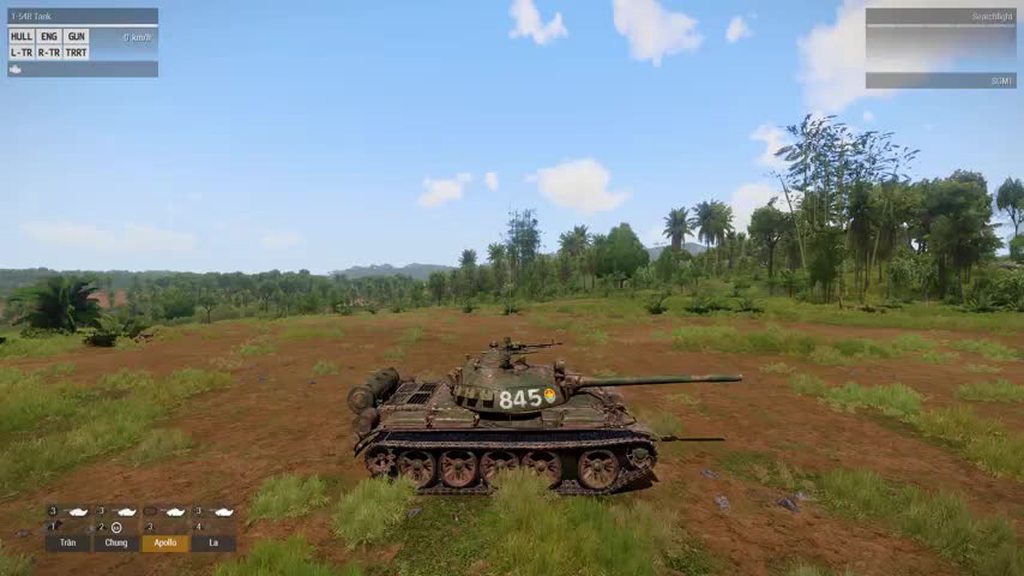 dusk jungle
nimble sequoia
We made a nice custom smoke screen in SOG:PF for the T-54 which might be of inte...
dusk jungle
nimble sequoia
We made a nice custom smoke screen in SOG:PF for the T-54 which might be of inte...
Thanks, looks cool! I'll check out your configs, but in general it looks like using small particles is the only way to go.
From what I gathered the issue is particle culling, large particles look better at distance you can have less of them but as soon as you have camera near them of zoomed on them, most get culled away making large smoke particles useless.
I remember particle culling was bugged back in the day (fixed 1m distance from camera?) then it was changed to cull by particle size, I guess this made large particles useless near camera 🤔
(This bugged culling was the reason for no bullet casings in first person for some time)
Current culling also makes it advantageous to stand inside smoke because you can see others while they can't see you.
 worn pond
Hey guys, i am trying to make a faction mod. What I want to do is to have an optional section/soft dependency where if you load another mod a faction will show up. Unfortunately when I tried that it gives me warnings.
wintry tartan
Do you mean you want cpp skipWhenMissingDependencies = 1;
worn pond
wintry tartan
Do you mean you want ```cpp
skipWhenMissingDependencies = 1;```
mmm yeah, but will that make it so that you won't see the faction until you load the mod? When i try to do that the faction is still there but the units obviously have missing dependencies, which is weird
wintry tartan
Hard to say without your exact goal/current config
worn pond
alright, I'll try for a workaround
wintry tartan
...Well, I've tried to imply please describe more
worn pond
I know, I'll send over the config.cpp later i'm currently doing something else lol
hard chasm
You might try _has_include
add factions
#endif```Well yeah, __has_include is one way. Another is skipWhenMissingDependencies
worn pond
hard chasm
You might try _has_include
```#if _has_include("some\file\in\some\mod)
add fact...
So let's say for SOG Prairie Fire, I have to direct it to the VN in the arma root folder?
wintry tartan
You can't binarize the config if you use former, you can in latter but this method will prevent to load EVERY config in the file
If you want to have two parts: load it anyways and load it if the corresponded Mod is loaded, you can use multiple config.cpps
worn pond
can I just make multiple PBO's? maybe faction1.pbo containing the config.cpp without the need for the soft dependency, and faction2.pbo needing it
hard chasm
(you can have multiple addons in the same pbo, because each config.cpp has a cfgPatches)
worn pond
hard chasm
(you can have multiple addons in the same pbo, because each config.cpp has a cfg...
please elaborate I'm smooth brained
wintry tartan
Folder A - config.cpp
└Folder B - config.cpp
And pack Folder A, you have two config.cpps in a PBO
hard chasm
my_pbo\addon1
my_pbo\addon2
etc
worn pond
ah i see, thanks guys i'll come back with updates later
hard chasm
(polpox is more accurate btw)
 atomic yoke
I'm trying to config a retexture on the Guerrilla Leader uniform (U_BG_leader) but it keeps displaying a standard Nato uniform in game, any idea what I'm doing wrong?
 somber cloak
using incorrect hiddenselection?
worn pond
I have an issue. When I load one config.cpp file it shows me an error message that says: /cfgWeapons.kfc_sp_fwa_ar15_645_a2: Member already defined. My other config files don't have this issue. Should I send the config.cpp file here?
I tried to delete all of cfgWeapons and then it does the same, but this time it's for the cfgVehicles category. I believe the whole thing's broken. I just wanna know why
I think I just somehow screwed the config.cpp file. I'll just make another one
atomic yoke
Might be, but then again I don't know why it's using a Blufor uniform when I direct it to the guerrilla uniform. This is the first retexture and config I've done, so I'm half learning half guessing.
 shy obsidian
Hi guys
I'm new to ARMA modding and I am developing external augmented reality controllers for ARMA3 and thus I want a complete aim and move decoupling as well as remove any artificial movement added for realism (like sway and recoil). The latter is the easier and has been handled, and while the aiming deadzone is good option for aim/turn decoupling but the players run and walk is still coupled with the aim. i.e. everything is fine for me until the player moves and disturb the aiming prior to walk.
I think a possible solution would be modding a man unit vehicle so that it moves without playing any animation. I tried setting the vehicle's "moves" attribute to moves = "NoDefaultMoves"; I was rewarded with a player statue that does not move at all 🙂
Even after reading the documentation I'm still wondering if moves and animations are the same thing at all. also wondering if disabling the player animation of the walk and run would disable the skeletal moves of the arms while running, or maybe it would disable running altogether, no clue really.
Is there a way to make a player that translates when walking or running without any movement of the arms and body so that aiming and walking can be controlled independently?
if you think also this is not the best place for this question please advise, maybe the animation makers section?
Thanks all
 hearty sandal
shy obsidian
Hi guys
I'm new to ARMA modding and I am developing external augmented reality ...
hearty sandal
shy obsidian
Hi guys
I'm new to ARMA modding and I am developing external augmented reality ...
Movement is tied to vector speed saved in animation
So you need animations
What you want to do may need to be done fully without using any of the existing simulation types
Just floating camera, floating weapon and script spawned ammunition maybe.
What you want to do is highly ambitious in RV engine
shy obsidian
hearty sandal
Movement is tied to vector speed saved in animation
ohh, you are already going over my head. I was thinking of something simpler. do you think If I redefined CfgMovesMaleSdr just as in https://forums.bohemia.net/forums/topic/167580-animation-explanation-of-the-magic-behind/ and redefined AmovPercMevaSlowWrflDf in animations somehow to disable it would work?
or if I understood your "movement is tied to vector speed saved in animation" would this means I have to define a new animation that actually moves forward but not play around or sway?
Or didn't I get your cue "highly ambitious in RV engine" yet 😉
Bohemia Interactive Forums
Having received a lot of PMs regarding setting up animations, I decided to start up this thread to try and explain all the magic stuff behind it. I will try to keep this post updated with all the variables and examples but I would prefer being asked questions here in public so that i can explain ...
 grand glen
Hello! Making a personal mode for myself and some friends using someone else's mod as a base (Re-coloring Spartan armor from Operation Trebuchet, not publishing). I've got the pbos and turned the config to a cpp but I'm ABSOLUTELY lost and could really use some help. Since the Spartans use custom models and bones and the armor system is a bit odd It's a lot more complicated than re skinning normal human stuff. So I've got all the tools I need, I'm not asking for compiling help or packing or unpacking. I just need someone to hold my hand so to speak and maybe personal help might help more than the wiki or youtube videos. They're just not translating to what I'm currently doing.
 lethal shuttle


can someone please help me with this because im going crazy it says it's missing a }; at this line, but it seems to be just fine
chilly tulip
"Error starts near the token 'CfgWeapons'". Doesn't include it in the paste.
Just dump the whole file into pastebin tbh.
lethal shuttle
Pastebin
Pastebin.com is the number one paste tool since 2002. Pastebin is a website where you can store text online for a set period of time.
here it is
chilly tulip
That paste is clearly missing the trailing } ?
but your previous pic wasn't, so I'm not sure what you're doing.
lethal shuttle
sorry, i edited a little bit of the code at the start (unrelated to teh problem)
the error code still persists

though now it says the line is at 186 (because the code is longer)
lethal shuttle
huh strange
im not sure whats causing it, im just copypasting it straight from notepad++
perhaps i could send you the config.cpp straight here?
chilly tulip
feel free
lethal shuttle
chilly tulip
maybe just try it with a carriage return after the last line.
That used to be a requirement for some C compilers.
lethal shuttle
could you tell me in layman's terms please? i dont know what carriage return is
chilly tulip
Click on end of last line. Press return.
Currently you have the terminating bracket on the last line. You want the last line to be empty.
lethal shuttle
unfortunately im still having the error
heres the funny thing

if i do it like this
then it works, but then there would be error messages in game
i dont know how thats the case
chilly tulip
PTNI_Rifleman_TL_Malvinas in CfgVehicles is missing its terminating bracket.
lethal shuttle
thank you so much, it worked!
grand glen
good catch
chilly tulip
Wasn't sure if Notepad++ had bracket-matching features, but it does. If you click on a bracket then it'll also highlight the matching opening or closing bracket. You can use that to check where you screwed up.
You can do the same thing in VS Code.
hearty sandal
shy obsidian
ohh, you are already going over my head. I was thinking of something simpler. do...
You would need new animations yes if you want to disable all visual movement.
But you would still need to keep the weapon animations and poses so gun is kept pointed at tight direction at right place.
Deep rabbit hole ypu are looking into I'm afraid
hearty sandal
grand glen
Hello! Making a personal mode for myself and some friends using someone else's m...
We don't support such
It's not private when you share it with friends
grand glen
Could I get help then not share it with friends?
hearty sandal
If you do retexturing you don't need any of the original files. Just a texture and a config to put your new texture in use
hearty sandal
grand glen
Could I get help then not share it with friends?
No that would be blatant lie
Don't be a dick
hearty sandal
Taking someone's stuff is already a dick move
grand glen
Then how do people make their own reskins for stuff without having the files?
idk man
hearty sandal
One paints new file, makes config that uses new file through hiddenselections
grand glen
I'm just trying to learn this shit
hearty sandal
No need for repacking original files
grand glen
I can find something else if that makes you feel a little bit better
hearty sandal
No it dont
If you do it the proper way there is no issue
And you can even share it since it don't need the original files to be included
They are read from the original mod
hearty sandal
You don't need that either
You just declare the original config as required Addon and your new config will be read on top of it when your new mod and the original mod is loaded
grand glen
I don't fully understand
do the items involved not need to be in the new cfg?
Their CFG is setup differently from your basic bohemia stuff
I need help figuring out their CFG
so I can make my own
with custom textures
I dont see the fucking problem
sorry for asking
hearty sandal
It's the same thing as any other unit and uniform
You don't need any of the fancy bits
Since those will be provided by loading optre as required addob
Just classname of the unit and uniform as parent
grand glen
but if they use a separate model AND the armor itself calls onto other pieces of gear such as kneepads I don't know how that works
hearty sandal
And your new class with hiddenselections pointing to your new textjre
hearty sandal
grand glen
but if they use a separate model AND the armor itself calls onto other pieces of...
They may be separate items
Or they just have their own textures
grand glen
I cant tell
theres a lot more going on that the normal CFG's Im used to
I couldnt figure it out
I tried checking their CFG to see what I was missing and I'm even more confused
hearty sandal
grand glen
I tried checking their CFG to see what I was missing and I'm even more confused
Like I said you don't need any extra bits
How does the suit work in game? That's how you know if you need more than one part
They don't add any new item types
You just need same hiddenselectiontextures
Or same amount in same order
For new textures
grand glen
So would that replace textures or add a new items with new textures if I just put the textures in a new CFG
hard chasm
class myclass : original_class
{
    change whatever gives you a thrill
};```Ahhh I think Im starting to get it
I dont need a weapons list in my CFG since thats included in the required addon
worn pond
how do I stop the eyewear randomization on units? I'm making a historical faction and seeing fancy 2035 eyepros just don't click
atomic yoke
I can't even get the standard Independent Officer's uniform working now. is anyone able to look at the config template I'm using?
 sudden patrol
Have a mod with a historical faction, and use it as the base
worn pond
I guess I have East Germany, but then the Soviets would be speaking German
how do I change the language spoken by the units then?
sudden patrol
What are you using to make the faction?
If Alive ORBAT, then you can simply select a voice at the bottom of the loadout selector
worn pond
sudden patrol
If Alive ORBAT, then you can simply select a voice at the bottom of the loadout ...
drongo's config generator
sudden patrol
In that case, I have no idea
 lean bloom
Hello, I have a bit of an odd one. Why do the lines on my optic render so strangely in-game?
I made all of them 1 pixel thick in Gimp, but in-game some lines are fainter while others are more sharp. When I increased the thickness to 3 pixels it did not really fix the issue, but rather some lines seemed to render as 2 pixels thick while others as 3 pixels thick.
Is this some Arma-related thing?
 hearty sandal
possibly screen resolution thing
or texture resolution thing
what resolution texture did you make? and whats your screen resolution?
lean bloom
The texture is 2048x2048, my screen is 1920x1080
Which is a bit odd, since I made all my other optics textures the same size, and I haven´t really encountered such an issue before
this one is the same size, albeit the lines are 3 pixels, but there are no issues.
Though idk if it can be related to the fact that the lines are vertical instead of horizontal
 hearty sandal
it may be. screen resolution squished the texture down
you could try how it looks as lower resolution
lean bloom
Mmm, okay, I will check
 glossy flax
Hey guys, I have a unit randomization script which randomizes the units gear. That script works fine. However, I'd like the equipment to stay how it is when the unit was spawned. That means, the script is not supposed to reapply new gear when the mission is loaded in the editor or was tested.
The issue is, that when I have my script assign the gear in the 3DEN editor, the gear is not saved in the mission.sqf. I noticed that because the unit is always appearing with the default loadout when I reload the mission or when go back into the editor after testing the mission.
My script is run from an Extended Init Eventhandler. In there I call the script and it applies the gear. I know that there is the Code save3DENInventory but it just not saves it and I feel like its because I run the script from my config. (Running save3DENInventory [(get3DENSelected "object" select 0 select 0)] while having the unit selected in the editor OR opening and closing the ACE Arsenal does save the gear to the mission.sqm)
Does anyone have any idea how I can fix my little issue. I know its a fairly specific but somewhat odd question but maybe someone has a quick idea.
(This is basically how my script looks: https://github.com/IndeedPete/staf-mods/blob/master/Source/%40STAF_PMC/addons/staf_pmc_main/fnc/loadout/fn_gear_contractor.sqf but be aware, I'm not the best scripter  )
)

GitHub
Dank Mods. Contribute to IndeedPete/staf-mods development by creating an account on GitHub.
(on a second look, might not entirely fit into this channel...hope that is fine though)
placid jay
Are you sure the XEH is running in Eden?
glossy flax
class Extended_Init_EventHandlers {
  class STAF_contractor {                                               // Classname of the unit with randomized gear
    class STAF_contractor_init_eh {
      init = "[(_this select 0)] call STAF_PMC_fnc_random_gear;";
    };
  };
};
Basically calling the whole script like this inside the CfgEventhandlers.sqf. It "works" just not the inventory saving part....however, pretty sure that it has something to do with the way I'm calling the script. Just don't know a better way
 frozen bluff
Does anybody knpw the sound file for the Hummingbird? I'm maybe looking to make an AH/MH-6 and want to use the Hummingbird sounds
The particular .hpp file actually,
If one exists
placid jay
glossy flax
```
class Extended_Init_EventHandlers {
class STAF_contractor { ...
Add a debug print to see if this runs in eden editor.
faint spruce
frozen bluff
Does anybody knpw the sound file for the Hummingbird? I'm maybe looking to make ...
a3\air_f\heli_light_01\config.cpp this file contains the config of the hummingbir, just copy the sound config
 swift yacht
Question, how would I change the armor values of an existing uniform? I want to change the armor levels of the CSAT pilot suit and Granit suit to match other uniforms.
hard chasm
{
class my_uniforms
{
units[]= blah
blah;
RequiredADDONS[]={where the uniform is};
};
};
class cfgVehicles
{
class existing_uniform;
class my_uniform:existing_uniform
{
change whatever you like
};
};```
If you don't understand the above, study extracted bis configs until you do. The above is lesson 101 that no- one else needs to teach you. frosty bolt
does anyone here know if there is anything to be done about the inconsistent vertical spacing of fonts in arma 3? (including custom fonts). maybe there is some config entry i can add to adjust for it?
 west rover
Hi there. Is there a way to make multiline description in tooltip for cfgWeapons or cfgVehicles? I need to use very long description and I want to make it easier to read. Googling didn't help - all topics are about hints.
dusk jungle
west rover
Hi there. Is there a way to make multiline description in tooltip for `cfgWeapon...
descriptionShort = "Caliber: 5.56x45 mm STANAG<br />Rounds: 30<br />Used in: TRG-20, TRG-21/EGLM, Mk20/C/EGLM, SDAR, SPAR-16/S";
```Vanilla stuffwhat you see in inventory when hovering over item
west rover
Thank you. Didn't know this supports HTML
dusk jungle
Its stuctured text, very much more limited than html
lethal shuttle
{
    class InventoryItem_Base_F;
    class ItemCore;
    class B_AssaultPack_blk;
    class B_Carryall_blk;
    class B_Kitbag_rgr;
    class PTNI_AssaultPack_AD: B_AssaultPack_blk
    {
        author = "Project TNI";
        displayName = "Assault Pack (AD)";
        hiddenSelectionsTextures[] = {"\ptni_helmet\Data\ptni_assaultpack_AD.paa"};
    };
    class PTNI_AssaultPack_malvinas: B_AssaultPack_blk
    {
        author = "Project TNI";
        displayName = "Assault Pack (Malvinas)";
        hiddenSelectionsTextures[] = {"\ptni_helmet\Data\ptni_assaultpack_malvinas.paa"};
    };
    class PTNI_CarryPack_AD: B_Carryall_blk
    {
        author = "Project TNI";
        displayName = "Carryall Pack (AD)";
        hiddenSelectionsTextures[] = {"\ptni_helmet\Data\ptni_carryall_AD.paa"};
    };
    class PTNI_CarryPack_Malvinas: B_Carryall_blk
    {
        author = "Project TNI";
        displayName = "Carryall Pack (Malvinas)";
        hiddenSelectionsTextures[] = {"\ptni_helmet\Data\ptni_carryall_malvinas.paa"};
    };
    class PTNI_KitBag_AD: B_Kitbag_rgr
    {
        author = "Project TNI";
        displayName = "Kitbag Pack (AD)";
        hiddenSelectionsTextures[] = {"\ptni_helmet\Data\ptni_kitbag_AD.paa"};
    };
    class PTNI_KitBag_Malvinas: B_Kitbag_rgr
    {
        author = "Project TNI";
        displayName = "Kitbag Pack (Malvinas)";
        hiddenSelectionsTextures[] = {"\ptni_helmet\Data\ptni_kitbag_malvinas.paa"};
    };
    #include "cfgVests.hpp"        /// sample vest is defined in a separate file to make it cleaner
};```why does this lead to the parent CfgVehicles (the backpacks) to dissapear along with the new class the editor???
Pastebin
Pastebin.com is the number one paste tool since 2002. Pastebin is a website where you can store text online for a set period of time.
here is the full code
chilly tulip
I don't get it. Why is this CfgWeapons?
lethal shuttle
you just answered it i think
i forgot backpacks are CfgVehicles
and i put it under CfgWeapons
glossy flax
placid jay
Add a debug print to see if this runs in eden editor.
I tested that (didn't mention it though). No message is showing...I just don't get it because the script clearly gets applied since the equipment is applied.
 raven snow
Hey guys, so I have two mods I made recently, one is an ALIVE faction and the other a music mod
The problem is that for some reason, the music mod just refuses to work when I have the faction mod on
My own mods that have nothing in common seem to just be incompatible with each other
The PBOs are differently named too
 frozen bluff
faint spruce
```a3\air_f\heli_light_01\config.cpp``` this file contains the config of the hum...
frozen bluff
faint spruce
```a3\air_f\heli_light_01\config.cpp``` this file contains the config of the hum...
Thanks
 silent depot
Quick questions about vehicle configs, since I'm kinda just winging it 'till something works, but:
• Can a Vehicle work with just one tire or would it need a ghost tire for stability or some other workaround?
• Are UAV and regular vehicles too different or are they mostly the same?
chilly tulip
Not an expert, but I suspect the answer to 1 would depend heavily on whether it's a physX vehicle or not. On the second point I don't think they're much different. UAVs are just vehicles with AI crew units.
silent depot
Got, I'll see if I can get it working later, thanks
wheat sluice
There are a few extra tokens + mempoints on the model that you'll need for drones:
isUavmust be set to1- Memory points for
uavCameraDriverPos,uavCameraDriverDir,uavCameraGunnerPos,uavCameraGunnerDirneed to be defined so that you can see PIP displays of the driver and gunner AI views in the UAV Terminal and/or panels
But aside from these, they're functionally same as regular vehicles.
toxic solar
I cant seem to find the documentation for this but for vehicle turrets what does optics = 1; mean?
hearty sandal
silent depot
Got, I'll see if I can get it working later, thanks
Yes needs more wheels as far as I know
untold temple
toxic solar
I cant seem to find the documentation for this but for vehicle turrets what does...
On weapons it defines whether the weapon is using 2D modeloptics and doesn't render the weapon. It's set to 0 when using ironsight type 3D sights
Might just be legacy stuff for turrets. Or might have the same function and not render the vehicle when looking through optics
toxic solar
untold temple
On weapons it defines whether the weapon is using 2D modeloptics and doesn't ren...
oh okay so just boolean
untold temple
Might also affect fire modes since there are AI firemodes that behave differently when using optics vs ironsights
 zealous pier
hey, whenever i put a ai from zeus it spawns with a parachute mask which belongs to my mod. what do i need to write inside config to prevent that?
i guess its something about identityTypes but idk what to type there
toxic solar
untold temple
Might also affect fire modes since there are AI firemodes that behave differentl...
well isnt that opticType
fallen orbit
Hi guys. I’ve been working on a mod that requires me to make changes to the ammo and mags for a rifle and a vehicle cannon but even though I assign the newly created mag to the weapons using custom weapon classes by the way they somehow still pick the default mag and ammo type but will little or no ammo inside
I used the sample weapons add on as guide. Does anyone know something I’m missing please
hearty sandal
fallen orbit
Hi guys. I’ve been working on a mod that requires me to make changes to the ammo...
maybe you got a typo somewhere
or you did not make your new ammo compatible
or you try to put wrong type of ammo in wrong kind of weapon
or could be probably many other things
fallen orbit
@hearty sandal thanks for your response. I redefined the ammo inheriting values from the one that already works. In another test, I barely changed a thing. Instead of giving a missing ammo error it keeps loading the old ammo even when I deleted it
hearty sandal
fallen orbit
<@150949769953411072> thanks for your response. I redefined the ammo inheriting...
what type of weapon do you try to change
lets start from there
fallen orbit
Sample rifle
The goal is to create an ammo that changes to a signal flare on impact (on another soldier)
Preferably attaching itself to the soldier
dreamy granite
Does anyone know how to find what the hidden selection is supposed to be for a uniform camo? I've put in "camo" and "camo1" but neither are working
wintry tartan
If you're just trying to retexture something, there is near to zero points to redefine hiddenselections
dreamy granite
Well I have tried leaving it blank and only having the hiddentextureselection changed as well as defining the hiddenselection and nothing is making my texture show up in game, it's still the base defult texture
wintry tartan
Leave it blank ({}) is a redefine
hearty sandal
dreamy granite
Well I have tried leaving it blank and only having the hiddentextureselection ch...
Delete the hiddenselections line and only have the hiddenselectionsTextures
That way you inherit them from the original class
 spiral monolith
how can i set a side for my faction i'm making
dreamy granite
hearty sandal
Delete the hiddenselections line and only have the hiddenselectionsTextures
I still don't have my texture showing up on the helmet
It's still showing up with EMR
"Addons\6b47_KAF\textures\6B47_Helmet_KAF_co.paa" Should this be how the path for the hiddenselectiontextures should be? or do I not need the Addons part
I really don't get what I'm doing wrong at this point
class CfgPatches
{
    class 6b47_KAF
    {
        units[]={};
        weapons[]=
        {
            "6b47"
        };
        requiredVersion=1;
        requiredAddons[]=
        {
            "6b47"
        };
    };
};
class CfgWeapons
{
    class HeadgearItem;
    class H_HelmetB;
    class 6b47: H_HelmetB
    {
        author="Crook";
        weaponPoolAvailable=1;
        displayName="6b47 KAF";
        model="6B47HELMETS\6B47\6b47.p3d";
        hiddenSelections[]=
        {
            ""
        };
        hiddenSelectionsTextures[]=
        {
            "Addons\6b47_KAF\textures\6B47_Helmet_KAF_co.paa"
        };
        class ItemInfo: HeadgearItem
        {
            mass=30;
            allowedSlots[]={901,605};
            uniformModel="6B47HELMETS\6B47\6b47";
            modelSides[]=
            {
                "TCivilian",
                "TWest"
            };
            hiddenSelections[]=
            {
                ""
            };
            class HitpointsProtectionInfo
            {
                class Head
                {
                    hitPointName="HitHead";
                    armor=7;
                    passThrough=0.5;
                };
            };
        };
        ace_hearing_protection=1;
        ace_hearing_lowerVolume=0.30000001;
    };
};
- What's your PBO's prefix? I can see three possible names but none of them have anything in common ("6B47HELMETS", "6b47", "6b47_KAF").
- Does the model support retextures in the first place? Are its selections actually defined within the model?
hard chasm
@dreamy granite EVERY file reference in bis (with the sole exception of #includes) are \hard\references to the root of the disk drive.
Addons\6b47_KAF\textures\6B47_Helmet_KAF_co.paa
this is your attempt to get at a file in another pbo.
what you need is the PREFIX of that pbo and so:
some prefix\textures\6Bblah
@wheat sluice says it better than me.
dreamy granite
wheat sluice
1. What's your PBO's prefix? I can see three possible names but none of them hav...
So 6b47_KAF is what my helmet is called. 6B47 is the CfgPatches designation, the model name I forgot to remove from the lines. I'm not 100% sure if it supports retextres, when I asked the maker of the mod for permission to retexture he told me yes, but never mentioned if it was possible to retexture or not
wheat sluice
Yeah but what's your PBO prefix? It should look like this:
https://i.imgur.com/AAXgVjH.png
As for whether the model supports retextures, I'd suggest grabbing Mikero's Eliteness in that case. You can check the model's model.cfg with Eliteness to verify if it has the neccessary selections. Or you can use a hex editor to check the model too but that's less straightforward compared to Eliteness.
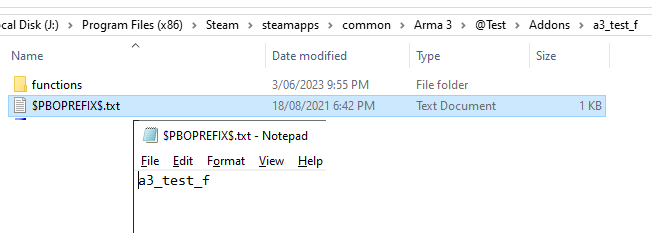
Going by my example above:
- My CfgPatches name is Test_F
- My PBO prefix is a3_test_f
You need to know the latter so that the path to your texture is being referenced correctly.
dreamy granite
I don't have a prefix file in the mod file
I just have the Addons folder
then in there its just the 6b47_KAF.pbo
wheat sluice
In that case, get rid of the "Addons" part in the path and reference it only like this:
"\6b47_KAF\textures\6B47_Helmet_KAF_co.paa"
But this still won't solve your issue if the model doesn't have the right selections. You'll need to find that out or else your retexture won't work.
dreamy granite
where is the best place to download Eliteness?
wheat sluice
From Mikero's website:
https://mikero.bytex.digital/Downloads
dreamy granite
Do I need to download everything from there and install it all?
wheat sluice
...been a while since I installed it but IIRC only DePbo.9.45.0.22 is needed?
@hard chasm should know since they're the developer 😛
dreamy granite
how do I know if I can retexture it?
class CfgModels
{
    class Default
    {
        sections[] = {};
        sectionsInherit="";
        skeletonName = "";
    };
    class 6B47:Default
    {
        skeletonName="OFP2_ManSkeleton";
        sections[]=
        {
            "camo"
        };
    };//</Modelclass>
};//</CfgModels>
There's the selection name in sections[].
camo is the name of the selection.
dreamy granite
found it as you were typing
wheat sluice
Now in your own config, put "camo" in the hiddenSelections[] array.
hard chasm
@dreamy granite
"Do I need to download everything from there and install it al"
yes. and the aio installer will do all of that for you automatically
dreamy granite
hard chasm
<@216987355192492032>
okay thanks
dreamy granite
wheat sluice
Now in your own config, put `"camo"` in the `hiddenSelections[]` array.
still a no go
hard chasm
first let's establish that your prefix\ is ok
wheat sluice
^
hard chasm
extract the pbo contents. apart from other things you will get a $pboprefix$.txt
dreamy granite
//<'6B47.pbo' properties via Mikero's dos tools, dll version 9.45>

prefix=6B47HELMETS\6B47;

Mikero=DePbo.dll.9.10;

version=24011702;

//PboType=Arma Addon;

//</properties>
thats the one from the mod
Am I using the wrong prefix in the config?
or should it be 6B47HELMETS\6B47
hard chasm
yes
dreamy granite
so this?
 hard chasm
it is also extremely foolish to use FULL_UPPER_CASE. It is indicative of someone not knowing what they're doing. caveat emptor
6B47HELMETS\6B47
is not the name of the addon
it is not the name of a weopon either. I reccomend you study any of the bis configs to understand how the glue fits.
there is no magic button here, it is all basics 101 that you have to learn.
dreamy granite
I've rebuilt this config multiple times based off the guide and nothing has been working
hard chasm
for sure and certain. As said, you really do need to study a bis config for your sanity.
dreamy granite
the only thing that has remotely working is having the 6b47 in there which calls the correct model, however my texture will not be put on it
this has been almost a month and a half of me working on this
hard chasm
you are focussing wrongly on the finish line rather than getting started
getting the texture woking is the least interesting bit. you need to get the basics down. just like every one else has had to do.
dreamy granite
Then what am I supposed to do to measure progress and learn? I am a project based learner, reading things and hoping they stick doesn't work for me, I have multiple learning disabilities
fallen orbit
@hearty sandal I did a test where the only change made to the magazine was the descriptions and it was assigned to the weapon. You were right about the problem being from my ammo. The issue of the old ammo showing up was a result of my saved mission scenario. I had to return to load out for it to update properly.
hearty sandal
fallen orbit
<@150949769953411072> I did a test where the only change made to the magazine w...
👍
It's often the simple things
hearty sandal
dreamy granite
Then what am I supposed to do to measure progress and learn? I am a project base...
Then unfortunately this will take more time to figure out. There is very little in way of exact "how to do X" guides for Arma3
dreamy granite
I think I'm going to shift it back to RHS then, there are plenty of retexture mods that I can use as a framework that function the same
nimble sequoia
dreamy granite
I think I'm going to shift it back to RHS then, there are plenty of retexture mo...
If starting out in Arma modding, I'd recommend retexturing a vanilla A3 asset first.
That way you can use the All-in-One config dump to help build your code, don't have to worry about bringing in external modded classes with unknown characteristics, or worry about breaking license agreements.
Once that works, move on to retexturing a mod that has kit which interests you.
And from there, get into modifying (with permission), or creating your own, models.
dreamy granite
I've done vanilla assets before, I got those down no issue. That's why I'm trying to diversify. Plus RHS gives you rights to retexture minus select USAF assets.
nimble sequoia
dreamy granite
I've done vanilla assets before, I got those down no issue. That's why I'm tryin...
IIRC they don't actually give permission for retextures, but do "tolerate" it, except as you say on certain named assets which are forbidden.
nimble sequoia
dreamy granite
I think I'm going to shift it back to RHS then, there are plenty of retexture mo...
You can load up the game with RHS running. Open the in-game Config Viewer (I recommend you also subscribe and run Leopards free Advanced Developer Tools from Steam), find the class name of the thing you want to retexture, and check out it's hiddenSelections[] to see what is available.
Many modders use Mikero's tools, rather than the A3 Steam Tools. So download them, set up a p:\ drive to work in, unpack the A3 data to p:\a3 and use pboProject to build your mod.
dreamy granite
I got most of the stuff together for arma three I just had the CFG wrong
dreamy granite
got it in game
I think the previous mod I was working on is just done weird, I may try it again after doing this one to get it working
lethal shuttle
Where can I start with creating AI voice prompts? Information wise
hearty sandal
lethal shuttle
Where can I start with creating AI voice prompts? Information wise
There isnt really much in way of specific resources like that
generally just understanding how configs work and tracing how different parameters connect to different classes and files does the trick
hearty sandal
lethal shuttle
Its very rarely done with mods, i just wanted to see how its done
best reference is the all in on config dump you can search through
 rapid crystal
trying to make a create which can be airdropped via parachute. However, I am running into an issue where the parachute fails to attach to the create when it is dropped out of the aircraft. Is there something that has to be done in the config for this? I do have the memory points for 'slingloadcargo1-4' and 'slingloadcargox'.
hearty sandal
rapid crystal
trying to make a create which can be airdropped via parachute. However, I am run...
is the crate physX object?
how do you try to activate the parachute?
nimble sequoia
Static Weapon config template (related to a question from Papafox in Model Makers):
https://hastebin.com/share/amakuguluf.kotlin
hard chasm
luvly
latent monolith
nimble sequoia
Static Weapon config template (related to a question from Papafox in Model Maker...
amazing thanks amigo!
lean bloom
Is there any way I can make my turret be fully controlled by mouse (elevationMode - 0), but also retain the option of changing elevation with PgUp and PgDwn (elevationMode - 1) at the same time?
I have a mortar with direct fire capability that requires mouse handling to be precise enough in direct fire mode, but since it is a mortar it would also be good to be able to use PgUp and PgDwn to change the elevation when not engaging in direct fire mode.
fallen orbit
Hi guys, I’m here again with another strange problem. My units model.cfg animations just won’t work even though they all worked before. I thought perhaps the problem was from the p3d file but I export the same base model to another unit it that unit works. I also tried assigning the same animations to another unit also works
Are there any commonly known reasons for animation failures I may have missed
shy knot
fallen orbit
Are there any commonly known reasons for animation failures I may have missed
Cfgmodels class name not the p3d name
fallen orbit
I’ve tried this one. It’s precise
hearty sandal
fallen orbit
Hi guys, I’m here again with another strange problem. My units model.cfg animati...
unit or a vehicle?
and the name of class and p3d are the connection
do you have spaces or special characters in the classname/p3d name
fallen orbit
Weird thing is it worked even when I used a different p3d file (which has the same skeleton)
I’ve checked the memory Lod, even geometry Lod. I’ve replaced the whole model. It’s so strange I can’t even pinpoint the location of the problem. Model, p3d, config, I don’t know. All the tests seem to show these areas work fine which in fact tallies with the fact that it all worked fine before.
The only main changes I made was to the p3d file and an FFV turret class.
hearty sandal
fallen orbit
The only main changes I made was to the p3d file and an FFV turret class.
do the animations work in OB buldozer?
thats the first thing you need to confirm
as that tells you if the p3d and model.cfg connects
fallen orbit
My bulldozer is messed up. Can’t use that for now. The same animations are being applied on a mother unit in the same class(same mod and same model just without a turret). And it works perfectly. Even including the turret animations for which it lacks the necessary visual selections
hearty sandal
fallen orbit
My bulldozer is messed up. Can’t use that for now. The same animations are being...
fix that
thats where the the debugging starts
cant work right with broken tools
shy knot
Is there any config values for smoke to obscure/mess with certain targeting systems?
Or block vision of the AI?
 paper flume
Quick question, does anyone know how to stop the default randomization of Vehicle skins within a faction config? I really don't want to resort to
this [setVariable ["BIS_enableRandomization", false]; ];```this setVariable ["BIS_enableRandomization", false];```Thank you for the correction, I'm hoping there's a better way than messing with the init
wintry tartan
Like what
paper flume
I have no clue, that's why I was asking
I didn't think it was possible so I was just checking
wintry tartan
I mean the code is simply is just a line of SQF code. It can be done anywhere before the randomization has been done
paper flume
wintry tartan
I mean the code is simply is just a line of SQF code. It can be done anywhere be...
I'm doing it within the faction config
paper flume
Gotcha, so I'd do something like this
class MSF_Training_MI_Hilux_M2: CUP_B_Hilux_M2_BLU_G_F
  {
    class EventHandlers {
       init = "this setVariable ["BIS_enableRandomization", false];";
    };
    faction="MSF_Training_Training_Forces";
    side=3;
    displayName="Hilux M2";
    hiddenSelectionsTextures[]={"cup\wheeledvehicles\cup_wheeledvehicles_hilux\data\v2\body_camo_3_co.paa","cup\wheeledvehicles\cup_wheeledvehicles_hilux\data\v2\hilux_casemate_co.paa"};
    crew="MSF_Training_Militiaman_1";
    typicalCargo[]={"MSF_Training_Militiaman_1"};
  };
class MSF_Training_MI_Hilux_M2: CUP_B_Hilux_M2_BLU_G_F
    textureList[]= {"InsertTextureListNameIWantHere"};
    animationList[]= {InsertAnimationListNameIWantHere"};
    faction="MSF_Training_Training_Forces";
    side=3;
etc...```This worked btw, thank you for the help @wintry tartan
fallen orbit
hearty sandal
fix that
True I'm just not sure how to do that. I've tried. Is there a link for a standalone installation?
fallen orbit
@hearty sandal and @shy knot Problem solved!!! The psd actually didn't match with the CfgModels class. It did when I earlier set it up but I erroneously changed it at some point. I had made it match the vehicle class instead which is quite similar but not exact. Thanks Guys.
I'm working on a simple melee weapon, does anyone have an idea on the best way to approach this?
fallen orbit
The idea I have is to make a pistol based weapon, and trigger an attack animation when the player fires the weapon. I would then fire an empty weapon with a very short range, zero gravity and a large indirect hit range and damage.
I'm also studying Webknight's dark horses mod but can't make much sense of it.
hearty sandal
fallen orbit
True I'm just not sure how to do that. I've tried. Is there a link for a standal...
No but buldozer basically is just the Arma3 exe. Simplest way to get it to work I know is to not use the arma tools launcher to mount P drive but a simple Subst command bat file that mounts P where you want it to be mounted from, then set up P drive A3 data with Mikeros Arma3P and it will also set up the tools to use Arma3 exe as the buldozer source
fallen orbit
hearty sandal
No but buldozer basically is just the Arma3 exe. Simplest way to get it to work ...
Thanks. Please how exactly do I set up this bat file and what’s the command
hearty sandal
fallen orbit
Thanks. Please how exactly do I set up this bat file and what’s the command
fallen orbit
Thanks
 lucid inlet
maybe someone can shed some light on how i can do this.
so, inside the weapons_f on arma 3 addons folder, you can find those, they are the tracer models and textures, and basically every weapon (including modded ones), use them.
So, a quick way to make guns use a new tracer model/texture, would be to replace those models and textures with the new one.
How can i do this?
 lucid inlet
right now, all i have is this:
 hearty sandal
lucid inlet
maybe someone can shed some light on how i can do this.
so, inside the weapons_...
hearty sandal
lucid inlet
maybe someone can shed some light on how i can do this.
so, inside the weapons_...
you want to overwrite the actual model or make a config that replaces it via new path in the tracer model parameter
lucid inlet
hearty sandal
you want to overwrite the actual model or make a config that replaces it via new...
overwrite
hearty sandal
you would need to use pboPrefix to have same folder structure in your pbo as in A3 data so the the file overwrites the existing one
lucid inlet
how can i make it?
lucid inlet
nvm, i kind of found how it works
Getting this error now

does .p3d break when you copy or rename it?
hearty sandal
no should not matter
lucid inlet
hearty sandal
no should not matter
what could be so the model can't load then?

would i need to specify on the prefix for it to overwrite the models somehow, or this way it should work?
 shy knot
lucid inlet
shy knot
lucid inlet
All a3 p3ds are binarized. Meaning, you can’t access them. And if you even did, that would be a one way trip
hearty sandal
shy knot
All a3 p3ds are binarized. Meaning, you can’t access them. And if you even did, ...
hes replacing them with self made ones, its alright but I dont remember all the details about how to add a replacing pbo
fallen orbit
Hi, I'm trying to trigger a script on a weapon (I've set a number of hint messages to let me know when this happens ) but it doesn't seem to work. The same method works on my vehicle mods

Is this wrong?
hard chasm
@lucid inletYour prefix is correct for what you want to do. you must make the original addon you are replacing a requiredAddon of yours.
you also must replace every p3d, not just the changes you might like to do.
I can't answer why you got that missing message but it should be obviious to you that the folder you make needs to be in the same P:\location as the original.
you also need to have your own config with a simple cfgPatches.
 tacit zealot
can texture sources be set with a scope = 1;? I have some outdated texture sources I want to hide, but don't want to potentially break anything.
hard chasm
it's a strange question because textures alone aren't relevant to scope
shy knot
tacit zealot
can texture sources be set with a `scope = 1;`? I have some outdated texture so...
Texture sources correlates to vehicle garage camo. Need to either hide or remove the code
lucid inlet
hard chasm
<@257257960810479617>Your prefix is correct for what you want to do. you must ma...
i already have a cfgPatches
Im no't sure about the P:Location though, since i'm not using the p:drive
 wintry tartan
If this is in your config, it's pretty wrong because:
A3_Weapons_Fis a vanilla addon that you cannot useA3_Weapons_Fis required to loadA3_Weapons_F
lucid inlet
would changing the class name work then?
wintry tartan
Maybe maybe not
lucid inlet
i made it based on this one, it's from a mod that replace some textures
 hard chasm
you've already been told you can't have the same addon name as an existing one.
if you're not using a p: drive, how are you ensuring YOUR p3ds need to be in the same folder as the prefix (eg location)
wintry tartan
Or simply use your prefix
lucid inlet
hard chasm
if you're not using a p: drive, how are you ensuring YOUR p3ds need to be in the...
i just made the same structure of folders
hard chasm
where?
lucid inlet
hard chasm
where?
 wintry tartan
It's not. It's located in a3\weapons_f\data\bullettracer
lucid inlet
isn't the prefix to know where it should overwrite?
wintry tartan
Isn't that what you wanted to do?
lucid inlet
well, yeah, it should overwrite the tracers files on the weapons_f.pbo inside the addons folder on my arma 3 installation. (C:\Program Files (x86)\Steam\steamapps\common\Arma 3\Addons\weapons_f.pbo)
basically, i want to replace the files that are here, with the ones of the mod.
 wintry tartan
lucid inlet
wintry tartan
lucid inlet
Okay then this folder... is this what you pack? And how do you pack?
lucid inlet
i'm using pbo manager, i tur the weapon_f folder in a new weapon_f pbo

it seems that the mod is almost working, except that it can't load the models
wintry tartan
Multiple issues:
- PBO Manager
- That's not the correct way to overwrite a folder in PBO
pboprefix should be a3\weapons_f\data\bullettracer and your folder should have what's inside
lucid inlet
this is my prefix...
 lucid inlet
oh, maybe i found the issue... i forgot to convert the png's into .paa
 wintry tartan
Your parent Data and bullettracer folder, that's not something where it should be
Also where is your config.cpp
hard chasm
@lucid inlet for a first attempt at this your doing very well BUT you need to use the proper tools to do so. PboManager doesn't rebinarise configs or rvmats and def not p3d
also, there's no such thing as a cfgPatches.cpp in bis
wintry tartan
In vanilla there is a3\weapons_f\Data\bullettracer\tracer_green.p3d now it's gone but a3\weapons_f\Data\bullettracer\Data\bullettracer\tracer_green.p3d
lucid inlet
wintry tartan
In vanilla there is `a3\weapons_f\Data\bullettracer\tracer_green.p3d` now it's g...
oh, i kinda of get this
lucid inlet
hard chasm
<@257257960810479617> for a first attempt at this your doing very well BUT you n...
what would be the best tool to create the PBO? the addon builder on A3 tools?
hard chasm
addon breaker will crash if there's any prebinarised p3ds
wintry tartan
You're asking that to the author of pboProject
hard chasm
basically, you're on the right track but you have to make a mirror image of what was already there eg the p3ds aren't where other addons expect to find them.
lucid inlet
now it worked 😄

all of this, for orange tracers
well, with this now, i already understand how to other replacements now, will be very useful for my 4k texture pack project.
thanks guys
 coral knoll
Once more returning with my magical deleting the editorcategory problem.
class UU_Gunship: HL_CMB_Gunship
    {
        displayName="[UU] Gunship";
        editorSubcategory="UU_Aircraft";
        faction="WBK_HL_Combines";
        delete EditorCategory;
        class Turrets: Turrets
        {
            class MainTurret: MainTurret
            {
                body="mainTurret";
                gun="mainGun";
                stabilizedInAxes=2;
                gunBeg="usti hlavne";
                gunEnd="konec hlavne";
                memoryPointGun="konec hlavne";
                memoryPointGunnerOptics="gunnerview";
                commanderCanSee=31;
                selectionFireAnim="MuzzleFlash";
                isCopilot=1;
                gunnerAction="Heli_Attack_02_Gunner_SettleIn";
                gunnerInAction="Heli_Attack_02_Gunner_SettleIn";
                minElev=-41;
                maxElev=5;
                initElev=0;
                minTurn=-45;
                maxTurn=45;
                initTurn=0;
                weapons[]=
                {
                    "HL_CMB_Gunship_PC",
                    "Missile_AA_03_Plane_CAS_02_F",
                    "ACE_gatling_20mm_Comanche",
                    "Laserdesignator_mounted"
                };
                magazines[]=
                {
                    "HL_CMB_1620Rnd_PC",
                    "HL_CMB_1620Rnd_PC",
                    "HL_CMB_1620Rnd_PC",
                    "2Rnd_Missile_AA_03_F",
                    "2Rnd_Missile_AA_03_F",
                    "ACE_500Rnd_20mm_shells_Comanche",
                    "ACE_500Rnd_20mm_shells_Comanche",
                    "Laserbatteries"
                };
            };
        };
    };
Heres my config, the delete editorCategory; section just ends up setting it back to HL_CMB_F
nimble sequoia
coral knoll
Once more returning with my magical deleting the editorcategory problem.
```cpp
...
Some info missing...
You're inheriting some modded class called HL_CMB_Gunship that presumably has an EditorCategory = parameter set on it, which you do not want in your new class UU_Gunship?
The delete keyword can delete a "classname" (if that class has no derived children). It doesn't "blank-out" a parameter though, so won't work as you've written it.
There are no instances in the A3 config dump where EditorCategory is left blank, so one might assume that you should just set it to a cfgEditorCategories classname of your choosing, either one that already exists or by creating a new one.
coral knoll
I do infact not want it on my new class
is there a way to just set it to null, I'd rather not set everything thing to a editorcategory, instead just make these use the faction
nimble sequoia
coral knoll
I do infact not want it on my new class
is there a way to just set it to null, I...
You can try EditorCategory = ""; but not sure if it's allowed. As I said, all A3 assets with an editorCategory have it set to something.
EdCat_Default will put it in "Other".
coral knoll
Tried setting it to "" it just puts it in a blank section
nimble sequoia
Looking at vanilla aircraft, they don't have an editorCategory, just an editorSubcategory.
So perhaps it's been added incorrectly into the class of the thing which you are inheriting.
Are you the author of HL_CMB_Gunship with ability to change it? Or could you inherit a vanilla A3 plane instead as your base?
hard chasm
The delete keyword can delete a "classname" (if that class has no derived children). It doesn't "blank-out" a parameter though, so won't work as you've written it.
@nimble sequoia I bow to your experience here. A few years back, Dedman advised me, via the source code, that the delete worked on variables too. I took that at face value and never tested it. It's now on my todo list.
nimble sequoia
hard chasm
```The delete keyword can delete a "classname" (if that class has no derived chi...
It didn't delete variables for me in my experiments, but I also only tried it on a small random subset, as a caveat.
fallen orbit
Hi, I've setup a FFV turret but the gunner isn't visible in 3rd person view. Is this a problem from the model or my script
lucid inlet
how can i start the diag.exe with a mod?
 chilly tulip
Easiest to rename it to the filename of the 32-bit exe and then run that from the launcher.
but you can batch-script it instead in the usual way.
hearty sandal
windows shortcut with launch parameters written into it works too
 slim halo
lucid inlet
how can i start the diag.exe with a mod?
slim halo
lucid inlet
how can i start the diag.exe with a mod?
Regarding the batch/shortcut method, you can start the ordinary exe from the launcher, get its command line using either Process Explorer or Task Manager, and apply it to your shortcut/batch (for task manager, you should go to Details, right click on the column names and click on Select Columns and enable the Command line option, then Ctrl+C on Arma3_x64.exe)
lucid inlet
so, i used "C:\Program Files (x86)\Steam\steamapps\common\Arma 3\arma3diag_x64.exe" -mod=@SKAt5 and it loads, but don't load the mod
chilly tulip
Where's the mod located?
lucid inlet
it appears as loaded, but i can't se the changes the mod should do on the diag version
 lucid inlet
chilly tulip
Where's the mod located?
lucid inlet
chilly tulip
Where's the mod located?
it's a local mod, currently in a folder on my desktop
chilly tulip
Arma won't look on your desktop.
lucid inlet
i need to put it on what folder then?
chilly tulip
The program folder. Wherever the executables are.
Bear in mind that it can look on your desktop if you give it an absolute path, but relative paths are relative to the exe.
lucid inlet
i put in on the game folder, now it's working
nimble sequoia
fallen orbit
Hi, I've setup a FFV turret but the gunner isn't visible in 3rd person view. Is ...
Do you have the appropriately indexed gunner proxy for the FFV turret in the resolution LOD's as well as the Pilot/Cargo/Gunner LOD's?
fallen orbit
I don't have a cargo nor gunner LOD. I assume this means I should set "UsePilotLod" to true. I do have the proxy index set the the avialable proxy which is indeed present in all the resolutions
nimble sequoia
fallen orbit
I don't have a cargo nor gunner LOD. I assume this means I should set "UsePilotL...
If you have an FFV gunner then you'd best create a LOD for him (either Gunner or Cargo), as usually it will be optimised differently to the Pilot LOD.
fallen orbit
fallen orbit
I don't have a cargo nor gunner LOD. I assume this means I should set "UsePilotL...
gunnerUsesPilotView I meant
fallen orbit
nimble sequoia
If you have an FFV gunner then you'd best create a LOD for him (either Gunner or...
The nature of the vehicle is such that, there's no difference. There's only space for one person actually.
I only added the FFV so the driver can fire from the vehicle while driving
nimble sequoia
Put this in your turret class then:
lodTurnedOut = 1;```If the pilot moves to the gunner turret he won't be able to drive.
Unless you create an AI pilot
fallen orbit
nimble sequoia
Unless you create an AI pilot
I did just that.
fallen orbit
nimble sequoia
Put this in your turret class then:
```lodTurnedIn = 1100; // -1 ...
Thanks. I'll try this
atomic yoke
Thanks for the offer to help, but I managed to fix it! All the problem was was me being an utter prune and forgetting to change the unit that the new unit calls from.
fallen orbit
@nimble sequoia Hi, I tried that. Didn’t work
shy knot
fallen orbit
<@273596087229480970> Hi, I tried that. Didn’t work
LODDriverTurnedIn
nimble sequoia
He said it was FFV so must be a turret class.
fallen orbit
shy knot
LODDriverTurnedIn
It’s a gunner not driver
nimble sequoia
How many player proxies do you have in the vehicle?
fallen orbit
One
fallen orbit
I’m using “hasDriver =1 “
nimble sequoia
The driver will be a Driver proxy and the FFV will be a Gunner proxy
shy knot
fallen orbit
It’s a gunner not driver
Change to gunner then
fallen orbit
Tried That too
fallen orbit
@nimble sequoia I created a new proxy. One for cargo, since I already had one for the gunner and tried changing the proxy index to both of them but no joy in either cases. Here's script:
 nimble sequoia
Can you post entire config.cpp and also screenshot res LOD proxies in Object Builder showing proxy selections (hide object mesh if you wish).
fallen orbit
Thanks @nimble sequoia for helping me out with this. Many thanks.
nimble sequoia
Solution for anyone following/interested, was to correct the proxyType from CPCargo (inherited) to CPGunner (used in LOD's).
fallen orbit
Please does anyone know how to a turret use the gunner camera? The default on the soldier as if there was no turret I mean.
silent depot
Do headgears also need a model.cfg or is only needed for more complex models with moving parts?
nimble sequoia
gunnerOpticsModel = "\A3\Weapons_F\empty.p3d";
gunnerOutOpticsModel = "";
nimble sequoia
silent depot
Do headgears also need a model.cfg or is only needed for more complex models wit...
Yes they do. Check the A3 samples, Test_Character_01
silent depot
Will do, thank you
coral knoll
nimble sequoia
Are you the author of `HL_CMB_Gunship` with ability to change it? Or could you i...
Sorry for the super late response. I am not. And the original authors are no longer updating the mod the base class comes from
tacit zealot
Is it possible to make a user action associated with a vehicle weapon? For example, on any otherwise unmodified vehicle (whether containing the weapon by default, by pylon, or by script), if the certain weapon class is selected, a user action becomes available?
hearty sandal
tacit zealot
Is it possible to make a user action associated with a vehicle weapon? For exam...
Yes such thing can be checked by the condition
fallen orbit
nimble sequoia
`gunnerOpticsModel = "\A3\Weapons_F\empty.p3d";`
`gunnerOutOpticsModel = "";`
This seems to affect the optics model on the screen. I’m talking about FOVs influenced by the ViewGunner class
shy knot
fallen orbit
This seems to affect the optics model on the screen. I’m talking about FOVs infl...
That’ll be the ViewOptics class
livid trail
Would be someone willing to jump into a quick call with me and Tklama to help us with damaged textures and destroyed model. We have no idea, tried almost everything and are not sure what we're missing at this point
fallen orbit
shy knot
That’ll be the ViewOptics class
Yeah I just don’t know the content of the class. All the samples I see seem to create only vehicle views
nimble sequoia
livid trail
Would be someone willing to jump into a quick call with me and Tklama to help us...
I'm available for a short while if you still want a call?
livid trail
nimble sequoia
I'm available for a short while if you still want a call?
Seems like Tklama went outside to release the anger. What other times would you be available?
nimble sequoia
Can't say really, I'm super busy, but here for a few minutes at the moment.
livid trail
nimble sequoia
Can't say really, I'm super busy, but here for a few minutes at the moment.
ok I got him here, we are in general voice
livid trail
nimble sequoia
Can't say really, I'm super busy, but here for a few minutes at the moment.
Thanks man, it all works great now! Really appreciated, now the painful addition of that into our previous mods 😄
faint spruce
I have a question, if i use the Cabin class to add light in a vehicle, will this light appear in ViewPilot LOD ?
nimble sequoia
faint spruce
I have a question, if i use the Cabin class to add light in a vehicle, will this...
What do you mean by "Cabin class"? There are class CompartmentsLights which only show in interior LOD's.
faint spruce
nimble sequoia
What do you mean by "Cabin class"? There are `class CompartmentsLights` which on...
Hmm CompartmentsLights so, i was just reaing this page and i read about a cabin class https://community.bistudio.com/wiki/CfgVehicles_Config_Reference#Embedded_ClassNames
How do i use CompartmentsLights ?
nimble sequoia
faint spruce
Hmm CompartmentsLights so, i was just reaing this page and i read about a cabin ...
I'm not sure if that page is relevant to A3. There are no occurrences of class Cabin in the A3 config dump.
nimble sequoia
faint spruce
How do i use CompartmentsLights ?
Bohemia Interactive Forums
Hi, I will post this because i havent found so much info related to class compartmentsLights. I have been helped by reyhard on the Arma 3 Discord. - Requieres the points to be defined in the model.p3d Memory LOD. - Requires compartments defined for all: driverCompartments = Compartment1; cargoCom...
faint spruce
nimble sequoia
https://forums.bohemia.net/forums/topic/232313-class-compartmentslights-config-b...
Thank you very much 🙂
faint spruce
Is there a way to make a MFD visible underwater ?
The MFD fades out with submarine depth. At 300m depth, you can't see anything anymore even with compartmentslights. Apparently lights doesn't affect MFDs
hearty sandal
Might not be.
the deep depth lighting keyframes are super dark
they probably are not designed with deep diving in mind 🤔
faint spruce
Hmm i see, so instead of using MFDs, i should better use textures and hiddenselections
Thank you, as always 🙂
hearty sandal
they might work better
what color do your MFD elements use?
are they emmissive at all?
faint spruce
hearty sandal
what color do your MFD elements use?
Here is the MFD config for the colors:
                color[]={0.83999997,0.86000001,0.83999997};
                alpha=0.5;
                enableParallax=0;
                font="LCD14";
                class material
                {
                    ambient[]={1,1,1,1};
                    diffuse[]={1,1,1,1};
                    emissive[]={1000,1000,1000,1};
};```yeh that should keep them glowing 😅
unless the terrain lighting really messes it up
faint spruce
I have a problem with CompartmentsLight, here is the config:
                                                class Cabin {
                        color[] = {100, 100, 830, 1};
                        diffuse[] = {0, 0, 5, 1};
                        ambient[] = {0, 0, 5, 1};
                        intensity = 15;
                        size = 10;
                        /*innerAngle = 90;
                        outerAngle = 165;
                        coneFadeCoef = 1;*/
                        point = "oc_light";
                        direction = "oc_light_dir";
                        /*hitpoint = "";
                        selection = "";*/
                        useFlare = 1;
                        flareSize = 1;
                        flareMaxDistance = 600;
                        dayLight = 1;
                        blinking = 0;

                        class Attenuation
                          {
                            start = 5;
                            constant = 1;
                            linear = 1;
                            quadratic = 1;
                            hardLimitStart = 1;
                            hardLimitEnd = 10;
                          };
                    };```
When the veehicle doesn't move everything is ok, but when the vehicle starts moving, the light dissapears sometimes like it was blinking at slow rate. Why ?I hope i'm not gonna have to create the lights myself then add a script to refresh them
nimble sequoia
faint spruce
I have a problem with CompartmentsLight, here is the config:
```C++
...
Bad config - for example, there's no direction = point for a CompartmentsLights.
Here's an example:
{
    class Comp1
    {
        class Light01
        {
            point = "light_interior_1";
            color[] = {30, 10, 10};
            ambient[] = {5 ,0, 0};
            intensity = 2;
            size = 0;
            useFlare = 0;
            flareSize = 0;
            flareMaxDistance = 0;
            dayLight = 0;
            blinking = 0;
            class Attenuation
            {
                start = 0;
                constant = 0;
                linear = 1;
                quadratic = 70;
                hardLimitStart = 0.5;
                hardLimitEnd = 0.7;
            };
        };
    };
};```It doesn't change anything, the light is still blinking
nimble sequoia
Copy and paste my code in. Change mem point name obviously.
faint spruce
nimble sequoia
Copy and paste my code in. Change mem point name obviously.
The light blinks when i move
nimble sequoia
Can you show a screenshot of the memory point in the memory LOD, with the View Cargo LOD in the background?
faint spruce
nimble sequoia
Can you show a screenshot of the memory point in the memory LOD, with the View C...
What ? The memory point has to be in the memory LOD and the ViewPilot ??
nimble sequoia
Object Builder shows the first res LOD by default as a background image. Change it to View Pilot.
faint spruce
nimble sequoia
Object Builder shows the first res LOD by default as a background image. Change ...
I don't understand
How could i possibly tell object builder to take ViewPilot LOD as first resolution LOD ??
 nimble sequoia


The aim of this is to see where you have placed the light memory point, and then whether it is behind or close to geometry.
And what's oc_light.001? Best get rid of that.
faint spruce
nimble sequoia
It's not doing anything when i click on "Show at background"
faint spruce
nimble sequoia
The aim of this is to see where you have placed the light memory point, and then...
The viewpilot position is inside the geometry of the hull
The positiion of the memory point is necessarily inside the geometry of the hull, i don't have the choice, it's a submarine
The problem is it shouldn't be a problem
The submarine has a control center
The control center is inside the submarine

But it shouldn't cause ny blinking
nimble sequoia
How far away is the proxy that is looking at the light?
faint spruce
nimble sequoia
How far away is the proxy that is looking at the light?
Check by yourself the result https://www.youtube.com/watch?v=G-Y5Yc27ky4 The proxy 2m away

The light doesn't blink when i don't move
hearty sandal
faint spruce
Check by yourself the result https://www.youtube.com/watch?v=G-Y5Yc27ky4 The pro...
if you put it in the center what then?
nimble sequoia
Can you post the full code of the class CompartmentsLights {} again please
faint spruce
hearty sandal
if you put it in the center what then?
Give me a second
faint spruce
nimble sequoia
Can you post the full code of the class CompartmentsLights {} again please
                class CompartmentsLights
        {
            class Comp1
            {
                class Light01
                {
                    point = "oc_light_center";
                    color[] = {30, 10, 10};
                    ambient[] = {5 ,0, 0};
                    intensity = 2;
                    size = 0;
                    useFlare = 0;
                    flareSize = 0;
                    flareMaxDistance = 0;
                    dayLight = 0;
                    blinking = 0;
                    class Attenuation
                    {
                        start = 0;
                        constant = 0;
                        linear = 1;
                        quadratic = 70;
                        hardLimitStart = 0.5;
                        hardLimitEnd = 0.7;
                    };
};```Did you change the memory point selection name to "oc_light_center" as well?
faint spruce
nimble sequoia
Did you change the memory point selection name to "oc_light_center" as well?
i just changedd it to test what HorribleGoat is asking me
The name was "oc_light"
nimble sequoia
He didn't mean change the name, but move the light to the center of the compartment (I guess)
I've made boats with underwater compartments which use these lights, and they don't blink.
faint spruce
hearty sandal
if you put it in the center what then?
When i put the light in the center of the room i just on't see it, i don't know why
hearty sandal
was this in firts person/pilot view?
faint spruce
hearty sandal
was this in firts person/pilot view?
yes
Did you change the memory point
faint spruce
I tweakedd the light a bit so i can see it, i placed it in the center but the light still blinks. See by yourseft: https://www.youtube.com/watch?v=4BGVc0jvvQI

I don't see any reason for this light to blink
As you can see on the video, when i don't move, the light doesn't blinks
And by the way, as you can see on the video, the seats doesn't have texture. When i compile the modd with pboProject, it says the uy map is incorrect. Any reason ?
faint spruce
I also tried to create a light with createVehicleLocal and attach it to the point but the light also blinks with the same rate with the other light. Weird
faint spruce
hearty sandal
are you under water?
Not in the video, you can see i'm at surface. But it also happens underwater
The problem is i cannot replace the MFDs with textures if don't have a stable light....
 ebon pivot
isnt there something in config that determines how audible a sound is to ai for firemode?
hearty sandal
ebon pivot
isnt there something in config that determines how audible a sound is to ai for ...
yes buts afaik its only property of the suppressor items
ebon pivot
you can do integral suppression in guns cant you
or does the base game one just do quiet config
hearty sandal
ebon pivot
or does the base game one just do quiet config
as far as I know yes 😅
ebon pivot
FFFFFFFFFFFFFFFFFFFFFFF
hearty sandal
and it has quiet ammo I think
ebon pivot
😦
ok ill just cut my losses on that one for now
next question; do you know if theres a seperate config property for reload anim underwater or something
The Guy Is Not Animating Underwater
works fine on land
hearty sandal
the reload may need to be added into swimming actions
or you mean just walking under water?
ebon pivot
hearty sandal
the reload may need to be added into swimming actions
it'll be this (its a base game reload tho afaik)
reloadAction = "ReloadMagazine";
where's swimming actions gonna be? 😅
novel lava
yeah they added a thing for attachments to modify audible etc but didnt add it to weapons
so the only way to do an integrally suppressed weapon and have it behave right is for it to have its own magazines/ammo
gotta do it A2 style
ebon pivot
this is too old for me i was 5 when a2 came out
ebon pivot
thank you muchly
novel lava
iirc reloadMagazine is the old magic handwave from A2 era which is a full body animation
which is probably why it doesnt work with swimming
swift yacht
So I have a problem where I am making a config to replace the uniforms and equipment of CSAT troops with less futuristic gear from Aegis and Atlas, however while the equipment is replaced on the units, the subeditor categories for all the units are set to default (SF and Urban units being put in the standard men category). It also messes with the naming of the New QRF units from reaction forces and even removes some of the backpacks. I have the required addons and units setup in cfgpatches, so I don't really know whats wrong, this especially annoying as I did the same thing before without any of these issues.
shy knot
swift yacht
So I have a problem where I am making a config to replace the uniforms and equip...
Inheritance incorrect or not adding all needed gear
swift yacht
Yea turns out I got the base class for the affected units mixed up, all good now.
toxic solar
recoil in the firemode class is like incorrect correct? huh maybe I could have said that better
wintry tartan
Urm what
shy knot
Don’t worry, I have trouble understanding him too
chilly tulip
He's probably asking whether the recoil is read from the weapon class or the mode. I don't know personally.
CfgWeapons documentation suggests it's read from the mode.
ebon pivot
it is from the mode
 cloud saddle
It's from the weapon class.
 urban cargo
I have to set up lot of textures to setup and was wondering if you can make a common file path and then add on to it, something like this:
common_path = "z\my_mod\addons\my_addon\data\picture\

class1{
  picture = common_path + "type1\picture1.paa"
};
class2{
  picture = common_path + "type1\picture2.paa"
};
Use a macro define
#define PICTURE(x) picture = z\my_mod\addons\my_addon\data\picture\##x##.paa;
Then you'd just type PICTURE(type1\picture1), PICTURE(type1\picture2) etc.
or #define PICTURE(x,y) picture = z\my_mod\addons\my_addon\data\picture\##x##\##y##.paa; to use PICTURE(type1,picture1) if you prefer @urban cargo
faint spruce
Is the dayLight property working for compartments lights ? I've made several tests and it doesn't seem to be working
faint spruce
faint spruce
I tweakedd the light a bit so i can see it, i placed it in the center but the li...
After some tests, i figured out the light blinking issue only happens on ships longer than 100m long. I made two submarines of 75 and 90m long and they don't have the light blinking issue. I think that's something that deserves to be reported.
nimble sequoia
faint spruce
After some tests, i figured out the light blinking issue only happens on ships l...
It's already fairly common knowledge that any single object over 100m is liable to break in multiple ways iirc.
faint spruce
nimble sequoia
It's already fairly common knowledge that any single object over 100m is liable ...
Well, it's not supposed to. The geometry, the fire geometry and the roadway have been splitted into multiple objects. Every limit has been respected.
Only the LODs with no limits are more than 100m long
nimble sequoia
We told you that if you made it too big that things would likely break. Things broke. If you want to push limits, don't be surprised by odd results.
hearty sandal
faint spruce
Well, it's not supposed to. The geometry, the fire geometry and the roadway have...
How do you combine them?
Because attachto removes collision
If they are separate
And if you use proxies, then they all get added into the master model. They are not separate
faint spruce
hearty sandal
Because attachto removes collision
Yeah, i know i'm looking for using lineintersectSurfaces and SetVelocityModelSpace to simulate the collisions myself. But the collision works by default for units
faint spruce
hearty sandal
And if you use proxies, then they all get added into the master model. They are ...
All the proxies and everything is in the main model. Onlythe extra geometry, fire geometry nd roadway is in separate p3d. You don't need to put the turrets in separate model, keep everything in the main model. On you've attached them, you can use a while loop or eachframe event to synchronise the geometry of the turrets with the main model
faint spruce
hearty sandal
Super heavy then
Not more than default game collisions system actually. I'm going to make it more simple.
But, by the way, attachTo doesn't disable collisions with units. It does not disable the fire geometry neither
hearty sandal
yea byt typically the collision with objects is the thing
faint spruce
As long as there will be no patch on the compartmentslight so we can see the light during day and as long as lights do not affect MFDs, i'm afraid there is no other way to drive a submarine at 800m depth but to wear thermal goggles if you want to see the screens
Fortunately, it will not be a problem for me, on my servers, thermal vision will be limited to 200m and night vision to 350m
faint spruce
Why is this turret not showing up ballistic Computer action ?
class MaingunTurret: NewTurret
            {
                gunnerCompartments="Compartment1";
                gunnerName="Naval gun operator";
                proxyType="CPGunner";
                proxyIndex = 7;
                LODTurnedIn = 1100;
                LODTurnedOut = 1100;
                turretInfoType = "RscOptics_MBT_01_gunner";
                gunnerOpticsModel = "\A3\weapons_f\reticle\Optics_Gunner_02_F";
                body = "mainturret";
                gun = "maingun";
                animationSourceBody = "mainturret";
                animationSourceGun = "maingun";
                animationSourceStickX="mainturret";
                animationSourceStickY="maingun";
                gunBeg = "maingun_beg";
                gunEnd = "maingun_end";
                memoryPointGun = "maingun_beg";
```soundServo[] = {"A3\Sounds_F\vehicles\armor\noises\servo_best", db3, 1, 40};
maxHorizontalRotSpeed = 1;
maxVerticalRotSpeed = 1;
minElev = -40;
maxElev = 60;
initElev = 0;
minTurn = -360;
maxTurn = 360;
initTurn = 0;
outGunnerMayFire = 1;
inGunnerMayFire = 1;
commanding=-1;
ejectDeadGunner=0;
memoryPointGunnerOptics="maingun_view";
weapons[]=
{
"mortar_155mm_AMOS"
};
magazines[]=
{
"32Rnd_155mm_Mo_shells"
};
gunnerAction="passenger_generic01_foldhands";
gunnerInAction="passenger_generic01_foldhands";
gunnergetInAction="GetInLow";
gunnergetOutAction="GetOutLow";
enableManualFire = 1;
usePip = 1;
showgunneroptics = 1;
Laser=1;
stabilizedInAxes=4;
gunnerForceOptics=0;
startEngine=0;
hasGunner=1;
hideWeaponsGunner=1;
showAllTargets = 2;
gunnerCanSee = 31;
radarType = 2;```Arty computer? Inheritance or missing/incorrect config values
faint spruce
shy knot
Arty computer? Inheritance or missing/incorrect config values
Which inheritance ? Which value ?
novel lava
need artilleryScanner = 1 in the vehicle
base config
elevationMode = 3; is usually a good idea too in the turret
faint spruce
novel lava
need artilleryScanner = 1 in the vehicle
I already done this, but anyway, i figured out the artillery computer is only showing up for the commander of the ship and not for the artillery gunner. Is this normal ?
novel lava
no - you can definitely have it show for the gunner
off hand I can't remember what governs this
do you have primaryGunner = 1; set in the gunner turret?
and similarly 0 for the commander
faint spruce
novel lava
and similarly 0 for the commander
When i do this, no one has artillery computer
But i doubt i would have worked. I could have many artillery turrets in one vehicle
novel lava
yeah sorry I don't know what governs it the I assumed it was the primaryGunner setting that allowed for it, multiple having access to it I'm unsure is possible
all I know is that spearheads calliope artillery variant the gunner has it, commander doesn't. same with the artillery statics
faint spruce
Well, i placed the turret of the artillery canon in first position in the config and now the artillery turret has the computer. That's sounds weird to me, what if i have many artillery turrets ?
toxic solar
I guess config related but I have the following error in rpt log that I am not really sure how to resolve
UiEx procedural texture syntax error: 'Unknown property' at -> 'uniquename:"testname...'
 ➥ Context: #(rgb,2048,4096,1)uiex(display:"testrsctest",uniquename:"testname",viewportx:0,viewportw:2,bgcolor:"#000055ff")
UiEx procedural texture syntax error: 'Unknown property' at -> 'viewportx:0,viewport...'
 ➥ Context: #(rgb,2048,4096,1)uiex(display:"testrsctest",uniquename:"testname",viewportx:0,viewportw:2,bgcolor:"#000055ff")
UiEx procedural texture syntax error: 'Unknown property' at -> 'viewportw:2,bgcolor:...'
 ➥ Context: #(rgb,2048,4096,1)uiex(display:"testrsctest",uniquename:"testname",viewportx:0,viewportw:2,bgcolor:"#000055ff")
UiEx procedural texture syntax error: 'Unknown property' at -> 'bgcolor:"#000055ff"'
 ➥ Context: #(rgb,2048,4096,1)uiex(display:"testrsctest",uniquename:"testname",viewportx:0,viewportw:2,bgcolor:"#000055ff")
in p3d I have the texture as
#(rgb,2048,4096,1)uiex(display:"testrsctest",uniquename:"testname",viewportx:0,viewportw:2,bgcolor:"#000055ff")
which is more or less a copy of example from https://community.bistudio.com/wiki/Procedural_Textures
so I am not sure wat to do. I have tried
#(rgb,2048,4096,1)uiex(display:testrsctest,uniquename:testname,viewportx:0,viewportw:2,bgcolor:"#000055ff")
but no dice
hearty sandal
faint spruce
Well, i placed the turret of the artillery canon in first position in the config...
It may not be designed to work with multiple artillery turrets because nothing in vanilla game has/needs such
faint spruce
hearty sandal
It may not be designed to work with multiple artillery turrets because nothing i...
I'm not sure but doesn't OPTRE have vehicles with multiple artillery canons ?
shy knot
No, we don’t

 faint spruce
hearty sandal
possibly how much elevation the gun has
faint spruce
hearty sandal
possibly how much elevation the gun has
artilleryCharge etermines how far the ammunition goes, artilleryDispersion the precision but i have no idea about what ddetermines the margin
class Cannon : Mode_SemiAuto {
            displayName = "Cannon";
            sounds[] = {"StandardSound"};

            class StandardSound {
                begin1[] = {"A3\Sounds_F\arsenal\weapons_vehicles\cannon_155mm\sochor_155mm_distant", 2.51189, 1, 1500};
                soundBegin[] = {"begin1", 1};
            };
            reloadSound[] = {"A3\sounds_f\dummysound", 1, 1, 20};
            reloadTime = 0.5;
            minRange = 0;
            midRange = 4000;
            maxRange = 8000;
            aiRateOfFire=1;
            aiRateOfFireDistance=8000;
            minRangeProbab=0.0099999998;
            midRangeProbab=0.0099999998;
            maxRangeProbab=0.0099999998;
        };

        class Single1 : Cannon {
            displayName = "Single - Short";
            artilleryDispersion = 0.5;
            artilleryCharge = 0.22;
            minRange = 0;
            midRange = 4000;
            maxRange = 8000;
        };

        /*class Single2 : Single1 {
            displayName = "Single - Medium";
            artilleryCharge = 0.3;
        };*/

        class Single3 : Single1 {
            displayName = "Single - Long";
            minRange = 8000;
            midRange = 11000;
            maxRange = 15000;
            artilleryCharge = 0.48;
};```Here is my config for the fire modes
maxElev = 60;```Here is the gun elevation, i think it's enough
faint spruce
scope = 1
faint spruce
hearty sandal
possibly how much elevation the gun has
Actually you were right, the min distance is determined by the gun elevation. 60 is not enough, 85 is better
Thank you as always 🙂
shy knot
hearty sandal
In Arma the artillery is simplified in that way
Things go up, things go down
faint spruce
Bohemia is right, that's how artillery actually work, it depends of the explosive charge of the projectile and the elevation of the canon
hearty sandal
Yes. but the ballistics of artillery are very simple, no airfriction etc
shy knot
Only thing that effects arty is dispersion
tacit zealot
does the sensor system work well with having multiple sensors of the same type on a vehicle? I'm thinking of using two separate active radar sensors to represent how detection and tracking ranges differ on radars, but I've tried a similar thing on other vehicles to represent both an IRST and a TGP, and the game only seemed to use whichever I defined first in the config.
hearty sandal
Cant recall any example of such at least 🤔
 undone patio
I've been working on rechambering the p90 to a different mythical caliber. But the old magazine still shows up as compatible even though the weapon has only the new magwell instead of the old one.
class Weapon_SX90_black : SMG_03C_TR_black {
    displayName = "Sx-90";
    magazines[] = {"50rnd_SX90"};
    magazineWell[] = { "SX90_Magwell" };
Are you inheriting the old mag well at all in your new one
undone patio
The magwell isn't inherited but the magazine is. Do I need to fully copy everything out of the old magazine instead of inheriting it?
shy knot
Shouldn’t have to
undone patio
I wonder if the old mag has a magwell def in it...
hearty sandal
I dont think it was ever upgraded for magwell
undone patio
literally just me pasting the inherited mag instead of the new mag into the magwell def
hearty sandal
it didnt have magazine proxy either did it?
undone patio
I promise I have more than 1 brain cell
hearty sandal
undone patio
I promise I have more than 1 brain cell
sus
undone patio
(I have 2 but 1 is listening to music and the other wants a donut)
wheat sluice
hearty sandal
it didnt have magazine proxy either did it?
BI was...inconsistent when they implemented magwells. Not all vanilla weapons use it but those that do have it don't necessarily have magazine proxies enabled:
- M320 LRR (
LRR_base_F) -> no mag proxy but it does support magwells (M320_408). - ADR-97 (
SMG_03_TR_BASE) -> no mag proxy, no magwells defined. - Mk200 (
LMG_Mk200_F) -> no mag proxy but supports magwells (Mk200_65x39). - Rahim (
DMR_01_base_F) -> no mag proxy but supports magwells (Rahim_762x54). - Katiba (
arifle_Katiba_Base_F) -> no mag proxy but supports magwells (Katiba_65x39). - Type 115 (
arifle_ARX_base_F) -> no mag proxy but supports magwells (Katiba_65x39). - SPAR-17 (
arifle_SPAR_03_base_F) -> no mag proxy, no magwells defined.
While I can understand why they didn't bother upgrading the models for some weapons, it doesn't make much sense in the case of the Katiba + Type 115 since they explicitly share the same magazines even without mods loaded.
wintry tartan
It technically based on a consistency that they won't change how it looks over the current look actually. But yes, it's very inconsistent
wintry tartan
Speaking of inconsistency please allow to have retexturable weapon accs 
wheat sluice
dedmen sorcery needed.
toxic solar
wintry tartan
Speaking of inconsistency please allow to have retexturable weapon accs <:gun_th...
no I enjoy having 10 p3ds of the exact same scope 
hearty sandal
toxic solar
no I enjoy having 10 p3ds of the exact same scope <:sunglasscry:1035030759880269...
is not same scope if it has different colors
toxic solar
hearty sandal
is not same scope if it has different colors
my apologize ur right
how silly of me
hearty sandal

wintry tartan
scope = 2;
done
toxic solar
for https://community.bistudio.com/wiki/GUI_Tutorial#Controls_Config
what types in that table below allow onDraw to work? I noticed that type =0 doesnt work, and that type = 101 does work. I could also be doing something very wrong
 drifting skiff
I'm getting an
File PB_Main\config.cpp, line 1211: Config `"` after 1
Error, which i cant figure out what is causing.
(Propably something dumb im missing)
Heres the code around that part;
            class Camo1: Camo
            {
                displayName = "Camo #2";
                author = "$STR_RHS_AUTHOR_FULL";
                textures[] = {"\rhsafrf\addons\rhs_a2port_air\su25\data\camo\su25_body1_camo1_co.paa","\rhsafrf\addons\rhs_a2port_air\su25\data\camo\su25_body2_camo1_co.paa"};
            };
            class Camo2: standard
            {
                displayName = "CDF";
                author = "$STR_RHS_AUTHOR_FULL";
                textures[] = {"\rhsafrf\addons\rhs_a2port_air\su25\data\su25_body1_cdf_co.paa","\rhsafrf\addons\rhs_a2port_air\su25\data\su25_body2_cdf_co.paa"};
            };
The { after "Camo2: Standard" line is line 1211
EDIT:
With a repacking of the .bpo, it changed the error from line 1211 to 1210, "class Camo2: standard", is line 1210
 molten musk
drifting skiff
I'm getting an
```File PB_Main\config.cpp, line 1211: Config `"` after 1```
Err...
molten musk
drifting skiff
I'm getting an
```File PB_Main\config.cpp, line 1211: Config `"` after 1```
Err...
Are you sure those cause issue?
you could /* */ that part and be sure that your issue is there.
I do not see anything wrong there.
What program do you use to pack?
drifting skiff
molten musk
Are you sure those cause issue?
you could /* */ that part and be sure that your ...
hmm yeah it apparently isn't those line cause if i remove them the error just moves to earlier point
i use pboproject
EDIT: i managed to find the issue, it was a missing "," many lines below
hearty sandal
yeah sometimes a missing thing affects a large area of code
tacit zealot
Anyone have a better description of the sensor config parameter groundNoiseDistanceCoefficient than what the sensors config reference provides? From the relation it states, it is suggested that lower values indicate a better radar (planes have to get a lower altitude percentage to stay hidden), while I've noticed that the more advanced radar in the F/A-181 has a value of 0.2 vs the To-201's 0.1, and when I set it to 0.9 to test an air-to-ground radar, it seemed like my performance was improved.
 vast tartan
Does anyone know how you would go about moving something into negatives in a TranslationX animation?
shy knot
vast tartan
Does anyone know how you would go about moving something into negatives in a Tra...
Maybe try setting min and max values in your model.cfg to negative
untold temple
Or just make a memory point axis in your model and use translation instead of trying to use the relatively obsolete translationX
tacit zealot
Another radar question -
Is there any way to allow radars to track ground targets while still allowing low-flying aircraft to get lost in ground clutter when flying close to the ground?
Besides adding a second radar sensor with a max altitude of like 1 meter, ground detecion capability, and removing ground detection capability from the "main" radar
hearty sandal
vast tartan
Does anyone know how you would go about moving something into negatives in a Tra...
insert negative number
also it is better to use just translation and give it axis in memorylod so you can control direction and distance more easily
vast tartan
Yeah, I ended up doing that
I've got it working in Model Viewer, but I'm running into an issue trying to link the animation source
vast tartan
I've got 2 Animations, Case and Case2 which both link to the same selection Case_Top.
And I have this in the config:
        class AnimationSources {
            class Case_Top {
                displayName = "Open/Close Case";
                source = "user";
                animPeriod = 1;
                initPhase = 0;
            };
        };
also make class for that animationSource in the config.cpp animationSources class
"user"
vast tartan
Then in-game, if I need that animation to only go to a specific value
Would you just use _object animate ["Case_Top", 0.282];?
I've worked with single object sources (doors, hide, etc) but not with multiple, trying to understand how they work together.
hearty sandal
use command animateSource
that runs all animations controlled by that source
animate animates single animtion class
vast tartan
Gotcha.
So if you used animate, in my case, you'd need to do it for both Case, and Case2
hearty sandal
yes
hearty sandal
animateSource is better for performance
hearty sandal
vast tartan
Where as with animateSource, you'd just call it on Case_Top, and it's linked
yes
tacit zealot
Might just be having a brainfart, but any ideas why my linebreak isn't working in a pylon description? When I hover over the pylon in the pylon manager, the <br/> is shown as text instead of a line break.
 wintry tartan
IIRC \n
tacit zealot
Any ideas why a missile with both a 16km air/ground radar sensor which ignores clutter effects as well as a datalink sensor will only work on aircraft with datalink enabled? Both aircraft I have tested have ground-detecting radars, and are able to lock up the intended target well within range.
If I take the aircraft that's not working, and enable both Data Link Send and Recieve, the missile works as intended. Are missiles only allowed to have one kind of sensor or something? Even if so, the radar is defined first!

 nimble lodge
tacit zealot
Any ideas why a missile with both a 16km air/ground radar sensor which ignores c...
nimble lodge
tacit zealot
Any ideas why a missile with both a 16km air/ground radar sensor which ignores c...
I am literally just being a newb here, but could it be that spacing is a problem? in the Wiki, it shows stuff as "1+2" and not as "1 + 2". I am just shooting in the dark
nimble sequoia
nimble lodge
I am literally just being a newb here, but could it be that spacing is a problem...
Top marks for trying to help, but in this case, no, spacing doesn't matter.
 humble mortar
Hey totally new here are there any quick guides on just how to format correctly? Like software needed etc. Just trying to make a small weapon systems compat mod.
faint spruce
humble mortar
Hey totally new here are there any quick guides on just how to format correctly?...
Download Arma 3 Tool, Arma 3 Sample, Blender and Arma 3 Toolbox. For the rest, there are many tutorials on Youtube
humble mortar
Ty ^^
I'll also ask just in case I'm wasting my time no one has made a compat mod for firewill, USAF and vanilla aircraft?
nimble lodge
faint spruce
Download Arma 3 Tool, Arma 3 Sample, Blender and Arma 3 Toolbox. For the rest, t...
Sublime is nice for configs and scripts
hearty sandal
Im not sure if we can support this question due to it being used in conjunction with ripped asset fallout mods that are banned
nimble lodge
hearty sandal
Im not sure if we can support this question due to it being used in conjunction ...
Ahhhh I see, fair point
hearty sandal
Id really recommend dropping use of that crap.
hard chasm
ditto
humble mortar
When you have a file structure like this where would you get the info you would typically find in a config.cpp?
 hearty sandal
humble mortar
When you have a file structure like this where would you get the info you would ...
hearty sandal
humble mortar
When you have a file structure like this where would you get the info you would ...

its bin when its binarized into pbo
humble mortar
I see and is there a way to make it readable?
hearty sandal
yes
you should find info on that with little googling. Im heading off so cant go into details
humble mortar
Yea I found it Arma 3 tools right?
I just didn't realise the .bin was the same thing
hearty sandal
👍
humble mortar
Ty ^^
hard chasm
Use derap.exe or eliteness in my tools or bis tools\cfgconvert to get a config.cpp
a better altertnative is to simply use extractpbo.exe in my tools which converts all param files back to plain text.
dreamy granite
dos anyone have the link for adding VIV for planes?
dreamy granite
I haven't done anything for vehicles, but I want to add it for an IL-76
hearty sandal
dreamy granite
I haven't done anything for vehicles, but I want to add it for an IL-76
if it does not have model set up for it you cant
dreamy granite
the aircraft or the model going into it
hearty sandal
the aircraft
if its not your mod then you cant add it
or actually you can use coordinates too
so you can
lean bloom
Hello, could someone please point me to the correct resource to look into when it comes to spawning / creating custom particles, such as when I open the breech of an artillery piece?