#arma3_config
1 messages · Page 23 of 1
 gentle axle
 wintry tartan
Greys out in where?
gentle axle
wintry tartan
Greys out in where?
Bottom extensions bar in main menu, and in editor
wintry tartan
Can you post a pic?
(Preferred in jpg or clopped one, Idon't want to consume my mobile network)
gentle axle
 wintry tartan
And in Editor?
gentle axle
 wintry tartan
This could mean something is wrong on your tex
wintry tartan
Texture of course
- resolution
- texture name
- bit depth of your soure image
Make sure are all correct
gentle axle
Lemme adjust the image size. I am thinking back to when I used not appropriate dimensions and had something similar happen on a uniform
wintry tartan
Well what is your current resolution
wintry tartan
Well yes
It doesn't matter how big it is unless it is not power of 2
What about other questions
gentle axle
Texture name lines up. I didn't have the ca/co extension at the end previously, but that didn't change anything. The BI guide shows not having it, but most of the mods I cross referenced did have a ca, so it's on there now
How would I check the bit depth?
wintry tartan
Property of your image via explorer
Also texture name should be corrected BEFORE convert to PAA
gentle axle
Well, one of two things fixed it. Either the aspect ratio being too big, or changing the name before I coverted it
Thank you so much for your help!
wintry tartan
It kinda sucks if you don't really know what exactly fixes that 😄
gentle axle
I at least learned the files need to be named before I convert them, which may or may not help me with other problems in the future
wintry tartan
Yeah, actually converting into PAA does not mean just changing name but will try to optimize into the type. So name before convert is important
 drifting skiff
do i have something in wrong place again?
 wintry tartan
You may have one. We barely can pinpoint what it was if we have no config
drifting skiff
woops yeah
Pastebin
Pastebin.com is the number one paste tool since 2002. Pastebin is a website where you can store text online for a set period of time.
(couldnt fit code into post)
 shy knot
drifting skiff
https://pastebin.com/5Js2Zp0K
shy knot
drifting skiff
https://pastebin.com/5Js2Zp0K
Could lower this by 90% via proper inheritance tbh
drifting skiff
K
shy knot
You can honestly just inherit from the mag and change what you need
 nimble sequoia
It's recommended that all new classes you create have a suffix tag unique to you to help prevent mod incompatibilities;
Eg. class kar_30Rnd_556x45_AK_M855A1 {...};
What is the rest of your code? The config.cpp and how you are calling cfgMagazines
shy knot
Instead of CA_Magazine
drifting skiff
heres the whole thing
18:26:49 Warning Message: No entry '.picture'.
18:26:49 Warning Message: '/' is not a value
18:26:49 Warning Message: No entry '.scope'.
18:26:49 Warning Message: '/' is not a value
18:26:49 Warning Message: Error: creating magazine  with scope=private
18:26:49 Warning Message: No entry '.displayName'.
18:26:49 Warning Message: '/' is not a value
18:26:49 Warning Message: No entry '.displayNameShort'.
18:26:49 Warning Message: '/' is not a value
18:26:49 Warning Message: No entry '.nameSound'.
18:26:49 Warning Message: '/' is not a value
18:26:49 Warning Message: No entry '.Library'.
18:26:49 Warning Message: No entry '.libTextDesc'.
18:26:49 Warning Message: '/' is not a value
18:26:49 Warning Message: No entry '.type'.
18:26:49 Warning Message: '/' is not a value
18:26:49 Warning Message: No entry '.count'.
18:26:49 Warning Message: '/' is not a value
18:26:49 Warning Message: No entry '.maxLeadSpeed'.
18:26:49 Warning Message: '/' is not a value
18:26:49 Warning Message: No entry '.initSpeed'.
18:26:49 Warning Message: '/' is not a value
18:26:49 Warning Message: No entry '.reloadAction'.
18:26:49 Warning Message: '/' is not a value
18:26:49 Warning Message: No entry '.modelSpecial'.
18:26:49 Warning Message: '/' is not a value
18:26:49 Warning Message: No entry '.ammo'.
18:26:49 Warning Message: '/' is not a value```
this is whats in .rptAre you using a p: drive and packing with mikero's pboproject? If not, that would help you find the issue.
drifting skiff
i have packed the cfg magazines with pbo project, but not all other pbos
nimble sequoia
Those rpt entries indicate a broken inheritance
shy knot
Yeah, you’ve got a lot of stuff in your config you don’t really need
drifting skiff
well its apparently not that file anyway so off i go to hunt
 somber turtle
i was hoping some one could help me for a quick sec
i was wondering why my functions dont apear to show in the funciton viewer
class CfgFunctions {
    class W41_functions {
        tag = "W41";
            class Settings {
                file =     "Fnc";
                    class AddonOptions {
                        preinit = 1;
                    };
            };
            class box {
                file =     "Fnc";
                    class Box {};
                    class box2 {};
                    class box3 {};
            };
    };
};
the file paths are correct but every time i launch the game i cant seem to find them in the view or even my tag
somber turtle


 hearty sandal
are those your filenames?
somber turtle
ya
somber turtle
 somber turtle
no, i mean kind of
hearty sandal
thats probably the problem then
somber turtle
its more me being lazy and putting the mod all in 1 build instead of building 10 different pbo
its name/addons/addons.pbo
hearty sandal
pbo path means nothing
the project sturcutre on P
dictates the internal engine folder structuring
as in what gets packed inside the pbo
somber turtle
yes and even when i set it to just fnc it still dose not show
hearty sandal
thats how files are read in engine
look into your pbo and see what you pack into it
and preferable set up proper development environment and use proper packing methods
 undone patio
Is there a way to add a pilot cam to a helicopter that doesn't normally have it at an arbitrary point on the model?
Say, just for instance, could you add a pilot observation cam to the inside of a ghost hawk or something
( I have a sensible place to put it, but I need to emphasize I don't have the memorypoint system to work off)
hearty sandal
undone patio
Is there a way to add a pilot cam to a helicopter that doesn't normally have it ...
no
nimble sequoia
You need a memory point for the position of the camera. However, if you specify one that doesn't exist, it probably defaults to the "model centre", which might actually be exactly what you're looking for. So you could try adding a camera through config with a dummy memory point and see what you get?
undone patio
nimble sequoia
You need a memory point for the position of the camera. However, if you specify ...
Could you theoretically manipulate the result? Like, x position +[0,0,0.5]?
nimble sequoia
You might be able to animate a memory point (sometimes yes, sometimes no), but in this instance you don't have a point to animate, just a default to centre, so no.
hearty sandal
even animating would require access to the model.cfg before binarizing to write the animation classes
 steel moss
Hello guys. I have problem same as this guy has https://www.reddit.com/r/armadev/s/6kmvFLQHBY . My script not found, despite i placed it in config in cfgFunction. I tried many paths variations, i tried making $prefix$ in pbo. Nothing helps, it just not founding my script. I made simple addon, with one script in function folder, and config in pbo where i define script, and then i add this mod as local to arma 3 . And i literally tried every variants on wiki for cfgFunction. HELP
Reddit
Explore this post and more from the armadev community
wintry tartan
- How is your config
- How is your source folder structure and files
- What software you use to pack it into a PBO
- It is
$PBOPREFIX$not$prefix$
steel moss
wintry tartan
1. How is your config
2. How is your source folder structure and files
3. What s...
- Im far from pc now, but i have smth like this:
CfgPatches { ...
class DGMscripts {....
cfgFunction {
DGM {
scripts {
file = "DGMscripts\function"
class scriptName {};
CfgVehicles {
Other mod stuff....
P.s. i wrote it shortly skipping class and close {
-
Mod structure:
Mod folder (this i add as local mod) / addons / DGMscripts.pbo / config.cpp and function folder / fn_scriptName.sqf -
Arma 3 tools, this default tool.
-
I know, i tried both
If you need screenshots, I'll be able to make them after half a day only
And dont worry cfgVeh stuff works ok
wintry tartan
Cannot tell without actual code and structure. Also Addon Builder IIRC doesn't accept $PBOPREFIX$ but you need to set the prefix manually
steel moss
Mod located in arma folder / my mod / mod itself
steel moss
wintry tartan
Cannot tell without actual code and structure. Also Addon Builder IIRC doesn't a...
Ok i write you when I'll get home and make screenshots. What do you mean set prefix manually?
wintry tartan
There

Also copy directly is also a thing too, are you sure your SQFs are included properly
wintry tartan
FileBank is not Addon Builder
wintry tartan
Even though FB can make a PBO, but you at least should to use AB instead
steel moss
Ok. I'll try making with addon builder. Do i need keys if i just testing? And in this list of files i need to put sqf?
wintry tartan
Keys does nothing to do unless you do something in MP servers
steel moss
Ok
And last thing. When i write this script in cfgFunctions i can just call it from my config?
wintry tartan
Don't really follow what you mean. Cannot tell exact yes or no without your actual code, as I said
steel moss
Ok, thanks
drifting skiff
hiya, me again, im still getting cfgmagazines error;
https://pastebin.com/XLxtCyXs
and also it is now saying it cannot load textures even though paths correct and files correct
Pastebin
Pastebin.com is the number one paste tool since 2002. Pastebin is a website where you can store text online for a set period of time.
wintry tartan
What error and what file is missing
drifting skiff
wintry tartan
*What* error and *what* file is missing
woops sorry,
error:
11:48:58 Warning Message: No entry '.picture'.
11:48:58 Warning Message: '/' is not a value
11:48:58 Warning Message: No entry '.scope'.
11:48:58 Warning Message: '/' is not a value
11:48:58 Warning Message: Error: creating magazine  with scope=private
11:48:58 Warning Message: No entry '.displayName'.
11:48:58 Warning Message: '/' is not a value
11:48:58 Warning Message: No entry '.displayNameShort'.
11:48:58 Warning Message: '/' is not a value
11:48:58 Warning Message: No entry '.nameSound'.
11:48:58 Warning Message: '/' is not a value
11:48:58 Warning Message: No entry '.Library'.
11:48:58 Warning Message: No entry '.libTextDesc'.
11:48:58 Warning Message: '/' is not a value
11:48:58 Warning Message: No entry '.type'.
11:48:58 Warning Message: '/' is not a value
11:48:58 Warning Message: No entry '.count'.
11:48:58 Warning Message: '/' is not a value
11:48:58 Warning Message: No entry '.maxLeadSpeed'.
11:48:58 Warning Message: '/' is not a value
11:48:58 Warning Message: No entry '.initSpeed'.
11:48:58 Warning Message: '/' is not a value
11:48:58 Warning Message: No entry '.reloadAction'.
11:48:58 Warning Message: '/' is not a value
11:48:58 Warning Message: No entry '.modelSpecial'.
11:48:58 Warning Message: '/' is not a value
11:48:58 Warning Message: No entry '.ammo'.
11:48:58 Warning Message: '/' is not a value```

and missing file its complaining about is all the texture .paa's (ARM1.paa for example)- Are you sure your CfgMagazines errors are caused by this config
- Your PAA textures should follow name conventions (suffix): https://community.bistudio.com/wiki/Texture_Map_Types
- Make sure your folder structure is correct
drifting skiff
- Error only appears with this loaded
- I've tried this and it made no difference
- It is
wintry tartan
- When the error pops out
- You still should, BEFORE you convert into PAAs
- What folder you pack (as in your local computer's address), and which software you use to pack it into PBO
drifting skiff
- Main Menu
- Ok
- What you mean what folder? (P:\ArmaRetex_ARM1 ?), and PBOproject
wintry tartan
- I'm asking because I cannot repro with your config (besides textures and models)
- Yes I meant that. Do you have a specified PBO prefix?
drifting skiff
2; No, dont think so, do i need to?
wintry tartan
Check pack log your pboProject produces. What it says about prefix?
drifting skiff
Then make sure ArmaRetex_ARM1\data\ARM1.paa is properly included into your pbo
drifting skiff
textures are appearing again but the cfgmagazines is still giving error
steel moss
hey. I need someone to explain me : i want to make an "object specific attribute" to all drones at all sides (blue, red, green). Can i just create smth like this :
class TempEnt {
class attributes {
//attributes...
and then this temp class inherit for all classes of drones like this?
class B_UAV_01_F : TempEnt {}; for example...
I read wiki but i still cant get it if all the drones parameters will be saved and it will be shown in editor.
hearty sandal
steel moss
hey. I need someone to explain me : i want to make an "object specific attribute...
no
that would break the original inheritance they have
steel moss
hearty sandal
no
so i need to define attributes for every drone?
hearty sandal
breaking all of the classes
if they share a common drone base you can add it there
steel moss
i have seen in other mod where guy made smth like this:
class CfgVehicles {
class Air;
class Helicopter_Base_F: Air {};
class UAV_01_base_F: Helicopter_Base_F{
class EventHandlers;
};
class UAV_06_base_F: Helicopter_Base_F {
    class EventHandlers;
};

class B_UAV_06_F: UAV_06_base_F {
    class EventHandlers: EventHandlers {
        class lethalDarter {
            init = "script';
        };
    };
};
dont know if that inheritance structure is real but sure you could do something like that
steel moss
i just need to understand that if i do smth like this:
class O_UAV_01_F: B_UAV_01_F {};
will class O_UAV_01_F change all its properties to class B_UAV_01_F? will it save its side property?
hearty sandal
steel moss
i just need to understand that if i do smth like this:
class O_UAV_01_F: B_UAV_0...
I would not recommend that
it may be best to just keep all their iheritance as is
as messing with that is bound to break something
if not straight away, then with other mods
youll get it done faster if you just add it to each UAV class
instead of trying to figure out a shortcut
steel moss
wouldnt it be too messy and unoptimised?
hearty sandal
no
you could add it through helicopter_base
if its not a problem to add it to other helicopters
although not all uavs probably use helicopter base
since there are plane uavs too
so yeah best to add it to each class that needs it
there arent really that many anyway
steel moss
well, it will have many string fr, cuz im adding it to other mode drones too...
hearty sandal
well adding them to the actual classes is still the surest way to get it right
you cant really change the inheritances anyway
and even if you could, you would still need to do that to each class
so simplest to just do it to each class you want to affect
steel moss
but im just thinking about that each drone have its 3 versions with different sides, and i could just inherit like this:
class O_UAV_01_F: B_UAV_01_F {
side =
}
isnt it? i think it might be the only differnce...
hearty sandal
no
if its not the original inheritance, then its likely to break stuff
dont mess with the original inheritance
steel moss
ok thx
steel moss
can i call function in some vehicle class using " class EventHandler { init = " if some statement is true?
class vehicle {
class EventHandlers: EventHandlers {
class smth {
init = "if (var == true) then {call}";
};
}
}
 whole spoke
hello, I'm trying to hide players vehicle position, I un checked the options from the mission editor and I changed the config of the helicopter to enableGPS = 0, but it seems it only doesn't allow it to display in the panel hud. Anything can be done about this? Or is it hardcoded for what it seems...
 unkempt helm
Asking here as I'm sure it's a config issue. I've created a 3D model and brought it in-game. Everything is working however it will only use one texture despite having different textures. So say its a blue hat, when I add another hat that is red it still shows as blue. Sorry if that doesn't make sense. Does anyone know why this is ?
hearty sandal
unkempt helm
Asking here as I'm sure it's a config issue. I've created a 3D model and brought...
needs hidden selections be set up in p3d, in model.cfg sections array and in config
hearty sandal
whole spoke
hello, I'm trying to hide players vehicle position, I un checked the options fro...
its a difficulty setting in mission
whole spoke
hearty sandal
its a difficulty setting in mission
I unchecked show map and show GPS in mission editor, I still can see where I am in the map
 calm pilot
Hei peeps, i got a two barrel weapon in my turret, what should i do in order to have a dual/twin weapon? So that when i fire a single shot, two bullets exit my gun end position?
hearty sandal
calm pilot
Hei peeps, i got a two barrel weapon in my turret, what should i do in order to ...
high speed burst of 2 shots
calm pilot
hearty sandal
high speed burst of 2 shots
Ok, so i suppose it’s not possible to do it in a somehow low rate of fire weapon like a german flak?
hearty sandal
calm pilot
Ok, so i suppose it’s not possible to do it in a somehow low rate of fire weapon...
next option would be make the guns pylons instead
pylons can be linked to fire together and they can have their own ammo
but alos 2 round burst on 2 round magazine would work
and then control the fire rate with magazine reload
calm pilot
hearty sandal
next option would be make the guns pylons instead
Mm ok, it’s the same principle used for rocket pods? Or is there something i can look up for this?
hearty sandal
calm pilot
Mm ok, it’s the same principle used for rocket pods? Or is there something i can...
yes and missiles and such on planes/helos.
pylons should work the same way on land vehicles too
the pylon weapon itself can be invisible even. just contain the memorypoints for shot directions and effects etc
but you can also have teh muzzleflash in it if I remember right
dont think there is much to read about it though
calm pilot
Ok ok, will look up on some plane cannons if i can find, it is basically a flakpanzer coelian turret so maybe plane cannon proxy system should work at this point
hearty sandal
yeah you can use any gunpod for testing purposes and to just get the pylons work
then make your own weapon after that
😄 you can even make it use rocket pods if you like xDDD
calm pilot
Yeah i have tested my own custom weapon on it already, but was a one shot weapon so it wasn’t really the optimal solution
calm pilot
hearty sandal
😄 you can even make it use rocket pods if you like xDDD
I have a Rheintochter pod to configurate too after this 😂
So definitely useful stuff working on pods already
shy knot
@calm pilot Give them both muzzle begin and end points and link them in config
 umbral dome
Does anyone know what causes the issue with FFV when a player tries to reload, the camera does a little twitch, the reload sound plays, the magazine is removed from the inventory, but the weapon doesn't get actually reloaded and the animation doesn't happen\
hearty sandal
umbral dome
Does anyone know what causes the issue with FFV when a player tries to reload, t...
ffv actions probably are not correct (inheritance issue) and the FFV does not actually have the reload action
umbral dome
Yeah I thought it was inheritance too, but I'm getting inconsistencies, sometimes I can reload, sometimes I can't, all the seats of this truck are inherting from "CargoTurret" from "Car_F" right now
hearty sandal
but what gunner action do you use?
is it vanilla action or custom?
are other mods involved?
best to turn off all unnecessary mods to rule out them breaking stuff
unnecesseary meaning anything thats not needed to test the FFV position
umbral dome
One is SOG Praire Fire, the rest are vanilla, I'm gonna fool around with the mods now and check if any of them could be causing this, there is some animation mods about they could possibly interrupt the animation, maybe that's the issue
Currently it acts as if you don't have a reload animation for the weapon basically in some seats
hearty sandal
that would indicate the action for realod does not exist for those FFV action sets
a lot can go wrong in those if mods mess stuff up
calm pilot
shy knot
<@603241667000270867> Give them both muzzle begin and end points and link them i...
Mm haven’t thought about that. Gonna try now, thanks
shy knot
calm pilot
Mm haven’t thought about that. Gonna try now, thanks
It’s basically how the base game AA is done. Both guns have separate konec and usti points. Then linked via config
You can do quite a few separate barrels for a single weapon
We’ve got a 4 barrel autocannon in OPTRE
Not sure what the limit is though
calm pilot
My guns have already separate konec and usti points, but a single gun beg and gun end
shy knot
calm pilot
My guns have already separate konec and usti points, but a single gun beg and gu...
Konec is where the bullet spawns. Usti is direction
You can set the memoryPointGun value into an array
calm pilot
shy knot
You can set the memoryPointGun value into an array
Isn't it like this?
 calm pilot
Oh right, got it
shy knot
[] signals an array
calm pilot
ofc i need to put my mem points within the {}
calm pilot
shy knot
Yeah
YES, i'm glad with the results i got, i was missing the array trick and the correct use of commas. Thanks heaps buddy
umbral dome
hearty sandal
a lot can go wrong in those if mods mess stuff up
Found the issue, the problem is when I'm using only Spearhead 1944 and SOG Praire Fire, FFV reloading is glitched from vehicles like the M54 Cargo Truck, guess I'll head over to their Discords and report it, it's not an infrequent combo of CDLCs
Edit: It's just Spearhead 1944, I tested a bit later.
drifting skiff
drifting skiff
hiya, me again, im still getting cfgmagazines error;
https://pastebin.com/XLxtCy...
Still having error with this code, if someone can help
drifting skiff
drifting skiff
woops sorry,
error:
```11:48:58 Warning Message: No entry 'bin\config.bin/CfgMag...
error is this
(textures are ok now)
steel moss
Please, can someone who knows explain me this: if i set an a variable via attribute class in some object class
class obj {
class attributes {
class myAtt {
....
expression= "_this setVariable ['%s',_value];";
How do i get this variable in script?? I have script defined in cfgFunctions, and i set postInit = 1 , but in script where i write _var = param[0]; gets _var as postInit string. how do i get this variable???? Or how to call this script in right way??
Even if i call script in this attribute it doesn't get this variable
 cedar creek
How do I approach a bicycle config? What is important to take into account? Just use the sample car config and change it accordingly?
drifting skiff
you could take a look at rhs/cup bicycle configs as well
drifting skiff
how would i go on about looking for the culprit file of an error like this;
configSourceAddonList (configFile >> "CfgVehicles" >> "CfgWeapons")```This script should reveal which addon did that mistakeyo, thanks a lot, this is ran ingame?
wintry tartan
Yes
calm pilot
wintry tartan
```sqf
configSourceAddonList (configFile >> "CfgVehicles" >> "CfgWeapons")```Thi...
Mm same script would work for model cfgs i suppose? You know, if i might encounter a “no model entry error”
wintry tartan
Model cfg is not accessible ingame
drifting skiff
considering the answer i get is ["Anim_f_n"] i have no idea what file that is
wintry tartan
configSourceModList (configFile >> "CfgVehicles" >> "CfgWeapons")```How about this insteadthanks!
 hybrid ingot
Hello, im trying to figure out how to do some very basic things in arma moding so i started with trying to make a retexture of a vest from the mod ICP (Imperial Conquest Project), i was following a guide given by the moding team of ICP but at this point i dont know why my retexture is not showing up in game. if anyone could help that would be great.
class cfgWeapons
{
    class IC_CAD_FlakArmor_green;

    class IC_428th_FlakArmor_green: IC_CAD_FlakArmor_green
    {
        author="Rodar";
        scope=2;
        displayName="[428th] Flak Armor (green)";
        hiddenSelections[]={"Camo", "camo1", "camo2","holster"};
        hiddenSelectionsTextures[]=
            {
                "",
                "\My_Retextures\textures\428th_flakarmor_green_co.paa",
                "",
                ""
            };
    };
};
Texture pathing correct?
 shy knot
You’re really using documents as your source folder location 💀
Should be full path
Without the drive letter
Also, your folder structure is incorrect
hybrid ingot
shy knot
You’re really using documents as your source folder location 💀
should it not be?
hybrid ingot
shy knot
Also, your folder structure is incorrect
i see, i followed the insructions that i was given for it so i guess they were bad instructions lmao
shy knot
You need a source folder without the @
shy knot
hybrid ingot
i see, i followed the insructions that i was given for it so i guess they were b...
Folder structure should be this:
My_Retextures > data > texture files
Then you pack your source folder into the addons folder of your local mod
shy knot
Preferably. If you have a P drive, put it there
hybrid ingot
i only have one drive
shy knot
Have you not setup your p drive?
hybrid ingot
im going to be real with you, i dont know what a p drive is
hybrid ingot
yes
shy knot
Open that up
You should see work drive
I think it’s called work drive
Something like mount work drive
You can specify the location of your p drive. But default is a copy of your c drive
hybrid ingot
mount the project drive?
shy knot
Yeah
That should mount the p drive
Be sure to also extract game data
You’ll need that to reference any A3 files
hybrid ingot
ok i have a p drive now
hybrid ingot
shy knot
Be sure to also extract game data
what do you mean by that
shy knot
hybrid ingot
what do you mean by that
You should also see extract game data where mount the p drive was
hybrid ingot
 shy knot
Top left on other
shy knot
Extracting game data is just so you can reference a3 files in your mods config
It’s needed for like 90% of modding
Also, if you use PBOProject, it’ll work with it
hybrid ingot
this is what my p drive looks like now
 shy knot
Now, I’d recommend fixing your folder structure
 shy knot
@ indicates local mod. Should be My_ICP_Retextures > data > texture .paa’s
hybrid ingot
what folder does the config go in?
hybrid ingot
would it be a problem if my config is a .cfg?
shy knot
Yes
Configs need to be .cpp
.cfg is for model.cfg
That’s another reason your retextures aren’t showing
Your config doesn’t exist
In technical terms
 shy knot
Yes
hybrid ingot
does the last one need to be texture files or can it be just textures?
shy knot
Though, you could simplify it further by removing the texture_files folder
Data is where all texture files go
And any other files that aren’t .cpp, .hpp, .cfg or .p3d
hybrid ingot
i assume the name of folders in data dont matter and are just for organization?
shy knot
Yes and no. It’s for organization yes. But also for pathing
hybrid ingot
right
i just mean as long i put the path right in config the folders in data can be near anything
shy knot
Now that you have a .cpp and proper folder structure, be sure to change the pathing and try packing that
wintry tartan
Usually you can start the path with the slash or not so it doesn't really matter, usually
shy knot
Usually
wintry tartan
Somewhere you recognize
As actually an addon (more like a Mod) can be anywhere Arma 3 (or Launcher) can recognize
hybrid ingot
and how do i get the mod in the launcher so i can load it
wintry tartan
Drag and drop the Mod (not PBO)
shy knot
hybrid ingot
where should the packed (pbo) go?
Create a local mod folder called @(input some name here)
Inside that @ folder create another folder called addons
hybrid ingot
ah ok
shy knot
Pack your source folder using addon builder into your addons folder
Load local mod through launcher
Launch a3
 feral thunder
so im having an issue which i really dont know where to even ask but i have a plane that originally didnt have pylons on it. Flew fine and everything but after i added pylons and i start the engine to fly the plane it jumps from 0 to 483648 km/h and i just dont move until i turn on auto vectoring or i turn the engine on and off. i have its maxspeed set to 850 as shown in the config picture but i dont know if this is just like a import bug or a config issue that i messed up on


 north sluice
Is there a hard limit to the amount of wheels that can be on a car?
nimble sequoia
north sluice
Is there a hard limit to the amount of wheels that can be on a car?
9 physx wheels per side
undone patio
Does anyone know if it's possible to get turret stabilization working for passengers instead of only pilots?
nimble sequoia
undone patio
Does anyone know if it's possible to get turret stabilization working for passen...
Any turret can be stabilised.
stabilizedInAxes = 3;```The configs say this, but reportedly there are issues with actually getting it to work
I wonder if they did the latter option and forgot the former
nimble sequoia
They work fine.
undone patio
I'm betting they did the stabilizedinaxes but didn't do directionstabilized
nimble sequoia
You might be putting them in the wrong place. If you want an optic mode stabilised, place the config parameters inside the optic class.
north sluice
so you could have non physx wheels?
nimble sequoia
north sluice
so you could have non physx wheels?
Yes, there are some tricks you can play in certain circumstances.
north sluice
model.cfg tricks? or in actual config
nimble sequoia
model.cfg
steel moss
Why i cant get variable which i set in expression of checkbox control in attributes of class??? But i can get variable from edit control...
 molten musk
steel moss
Why i cant get variable which i set in expression of checkbox control in attribu...
molten musk
steel moss
Why i cant get variable which i set in expression of checkbox control in attribu...
From eden attributes?
                    class super_variation {
                        displayName = "My variation attribute";
                        tooltip = "My variation tooltip";
                        property = "TAG_super_variation";
                        expression = "_this setVariable ['TAG_super_variation',_value]";
in function/ or where you want.
Make sure that object is avaible and
_unit getVariable 'TAG_super_variation';
Depens where, might need user set global. Not sure
steel moss
molten musk
From eden attributes?
```sqf
class super_variation {
...
Yes eden. Wait if i want to get variable from checkboxs expression, i need to getVariable called by property? Or by class of myAttribute? Because i get the variable from edit control expression by the name of its class
molten musk
Like, if _value true , call your function?
steel moss
Like from your exampel i write
Expression = "setvariable supervariation"
Not tag_super_variation
steel moss
molten musk
Like, if _value true , call your function?
No, i mean setting variable
molten musk
Yes. You need set that.
You can check with
allVariables myObject;
How it saves that.
expression = "_this setVariable ['%s',_value];"
this didnt work on under cfgEden , but under object own attributes it works.
So that why i use
expression = "_this setVariable ['TAG_super_variation',_value];
And do not know can you save in class to your variable.
steel moss
molten musk
Yes. You need set that.
You can check with
```sqf
allVariables myObject;
```
H...
Thx
 sullen fulcrum
Does anyone have the picture/meme thing that had several steps to finding and fixing errors. It showed how to check your RPT and what to look for.
I am looking to share it with some friends or maybe an easy guide. I’m tired of looking at everyone’s reports lol
hybrid ingot
what channel would be correct for asking about how to make placeable units?
hearty sandal
hybrid ingot
what channel would be correct for asking about how to make placeable units?
what does placeable units mean exactly?
hearty sandal
so just a unit 😅
hybrid ingot
yea
hearty sandal
are you looking to make a new unit with new model or new unit using existing models?
hybrid ingot
um i think existing models, as ive been doing some retextures and i want to make units that have the equipment i textured
whole spoke
Hey, sorry to bother again with the same issue: trying to NOT display player vehicle position on the map, I tried changing vehicle config to enableGPS = 0, but doesn't help and disabling all the options of showing map and GPS in mission editor, didn't change. So if I truly want to do this, doing my own mod changing map config, rscmap, can it be done that way? I never played with those configs
umbral dome
I'm having an issue with FFV 'Turned Out' aiming angles. What determines how much you can look around as a crewman FFV when turned out, I have this in my 'MainTurret'
    minElev=-8;
    maxElev=15;
    initElev=10;
    minTurn = -360;
    maxTurn = 360;
    initTurn = 0;
    maxOutElev = 40;
    minOutElev = -40;
    initOutElev = 0;
    minOutTurn = -90;
    maxOutTurn = 90;
    initOutTurn = 0;
Is there something else that controls the angles of turning and elevation of aiming. It seems like they're limited roughly to the turret turning, at least elevation wise.
hearty sandal
umbral dome
I'm having an issue with FFV 'Turned Out' aiming angles. What determines how muc...
there is a separate aim zone array
dont remember the exact name for it off the top of my head
but if you check out some vanilla FFV turret config you are likely to find it
unkempt helm
hearty sandal
needs hidden selections be set up in p3d, in model.cfg sections array and in con...
Strange, I have done that but the issue is the same
hearty sandal
unkempt helm
Strange, I have done that but the issue is the same
explain the issue again?
unkempt helm
hearty sandal
explain the issue again?
So I've got a uniform that has 2 variants in texture (both being separate uniforms) however they both use the texture defined in O2
hearty sandal
unkempt helm
So I've got a uniform that has 2 variants in texture (both being separate unifor...
typo somwehere
like hiddenSelectionTextures missing S
or filepaths dont match maybe
unkempt helm
hearty sandal
like hiddenSelectionTextures missing S
hiddenSelectionTextures and not hiddenSelectionsTextures ?
 unkempt helm
Paths are definitely correct, spelling is correct I believe too
unkempt helm
hearty sandal
hiddenSelectionsTextures
Would you mind looking at the config and seeing if there's anything glaringly obvious ?
hearty sandal
you can paste it to pastebin.com and link that here. I might be able to take a peek or someone else could
unkempt helm
Pastebin
Pastebin.com is the number one paste tool since 2002. Pastebin is a website where you can store text online for a set period of time.
It's a short config by the way, just two glasses/nvgs
hearty sandal
unkempt helm
https://pastebin.com/sHs1SNMk
and there is a selection called camo in the model?
 hearty sandal
unkempt helm
hearty sandal
unkempt helm
is the model actually in it?
unkempt helm
hearty sandal
is the model actually in it?
Yeah, when clicking on camo it highlights the whole model
shy knot
unkempt helm
Yeah, when clicking on camo it highlights the whole model
Is camo one texture sheet
hearty sandal
if its glasses it better be xD
unkempt helm
shy knot
Is camo one texture sheet
What do you mean?
hearty sandal
try take out the \ in front of your paths
shy knot
unkempt helm
What do you mean?
When you select camo and press E, is it using one texture paa
unkempt helm
hearty sandal
try take out the \ in front of your paths
I'll give it a go
unkempt helm
shy knot
When you select camo and press E, is it using one texture paa
Yeah
unkempt helm
hearty sandal
try take out the \ in front of your paths
No dice I'm afraid
Could it be a problem with the model.cfg?
shy knot
unkempt helm
Could it be a problem with the model.cfg?
Is camo in your sections array
unkempt helm
shy knot
Is camo in your sections array
(I changed it all to Camo1 by the way)
class CoatArms : ArmaMan
{
sections[] =
{
"Camo1"
};
Strange twist, if I change the texture path in O2 and name the model something else then the texture does change, though it would mean new models for each bloody texture
hearty sandal
glasses and hiddenselections should work
unkempt helm
I know they should, which is why I'm at a loss here; everything seems fine
 rose island
im not sure were to ask but this seems like my best shot, i am currently attempting to add retextured uniforms into the game and, while they work when using the setobjecttexture, im having a hardtime having them appear in the arsenal. Im pretty sure its the config, since this is my first mod i have really no clue how to do it. Im hoping somebody here can assist me.
 dusk jungle
rose island
im not sure were to ask but this seems like my best shot, i am currently attempt...
dusk jungle
rose island
im not sure were to ask but this seems like my best shot, i am currently attempt...
You'll need your new retextures uniforms to be new classes for them to appear in arsenal as new items
rose island
thank you for responding. I started from scratch with my config using the proper guides so we shall see how that goes
nimble sequoia
umbral dome
I'm having an issue with FFV 'Turned Out' aiming angles. What determines how muc...
{
    limitsArrayTop[] = {{40.0, -90.0}, {39.8, 90.0}};
    limitsArrayBottom[] = {{-14.41, -89.1}, {-26.9, 89.8}};
};
Isn't this a "difficulty" setting? ie not related to individual vehicle configs
Maybe you can use a transparent map icon?
whole spoke
Maybe there are difficulty settings I don't know about, but I tried them, both description.ext and mission editor
Well what I mean by player position is the two perpendicular lines that center on the player
nimble sequoia
whole spoke
Well what I mean by player position is the two perpendicular lines that center o...
Can you show a screenshot of these lines on the player position?
whole spoke
It doesn't let me upload any image I don't knwo why
hearty sandal
whole spoke
It doesn't let me upload any image I don't knwo why
you have not completed verification at #✔role-selection
whole spoke
ohh sorry
calm pilot
Aight fellas, i'm still struggling with the missing textures of my muzzleflash not showing up (muzzleflash looks like it's there, since there is the light/halo of it, but it misses the actual flame) and since i run out of tests and ideas (and i want to keep my mental health, or what's left of it) i will share my config cpp and my model cfg in the hope someone can help me. Visually the issue is the exact one like showed in 0:15 seconds in this eggbeast's video here https://www.youtube.com/watch?v=fWUFodCTHYY CONFIG CPP https://pastebin.com/ttxsMmwf MODEL CFG https://pastebin.com/WKK4KHzV

this shows the BTR_m18 with working pk muzzle flash
then the non-working BTR_m40 with non-working pk muzzle flash
then the non-working BTR_mortar with non-working pk muzzle flash
Pastebin
Pastebin.com is the number one paste tool since 2002. Pastebin is a website where you can store text online for a set period of time.
Pastebin
Pastebin.com is the number one paste tool since 2002. Pastebin is a website where you can store text online for a set period of time.
Now i'm gonna go out and touch some "glass" literally 🍺
shy knot
calm pilot
Aight fellas, i'm still struggling with the missing textures of my muzzleflash n...
Zasleh not apart of any other selections?
calm pilot
shy knot
Zasleh not apart of any other selections?
Shouldn’t be, gonna check it
 restive tinsel
Repost from: scripting channel
#arma3_scripting message
Still does not work and IDK why.
 wintry tartan
I think you also need hiddenSelections in ItemInfo too
wintry tartan
Well it is actually added very late (I mean about 5 years ago?) and, dunno, somewhat did in a weird way
restive tinsel
I mean I tried out every logical way, HST in iteminfo both in iteminfo but who would have thought of having HS outside and inside of iteminfo. I am going mad. xD
wintry tartan
I actually don't know which actually has the responsible to retex a NVG
calm pilot
shy knot
Zasleh not apart of any other selections?
Nope, just zasleh
 warped perch
calm pilot
Nope, just zasleh
warped perch
calm pilot
Nope, just zasleh
Any cargo/ffv turrets in your vehicle?
calm pilot
Yes
calm pilot
warped perch
Any cargo/ffv turrets in your vehicle?
4 cargo proxies
Would that somwhow break the zaslesh? Even if the cargo can’t shoot?
warped perch
calm pilot
4 cargo proxies
Are they defined as CargoTurret classes or just cargo proxies?
calm pilot
warped perch
Are they defined as CargoTurret classes or just cargo proxies?
Cargo turrets
As shown in the config i posted
warped perch
Try adding selectionFireAnim = ""; to your CargoTurret_01 class
calm pilot
warped perch
Try adding `selectionFireAnim = "";` to your `CargoTurret_01` class
Alright 👌🏻
calm pilot
warped perch
Try adding `selectionFireAnim = "";` to your `CargoTurret_01` class
Nothing. I'm starting to think it might be related to my custom weapon itself: since it is basically an inheritance from cannon core and spe antiair cannon base, and it also uses shotshell mags which inherits from spe flak mags. Because every other custom weapon or other weapons that i made or inherit from mgs/bullets have always worked. I might try into changing the main gun inheritance class and test if it works. I even added the hide/unhide animation into the model cfg, but no success has been registred
 novel lava
can try changing zasleh to something else
some other turret might be messing with it (cargoturret was a good suggestion)
like rename the selection to idk 'muzzleflash' and then set selectionFireAnim = "muzzleFlash" in the mainTurret
the spe flak38 is shotBullet so selectionFireAnim etc works fine
calm pilot
Ooh ok, that is a good thing then, I thought it was shotShell
calm pilot
novel lava
like rename the selection to idk 'muzzleflash' and then set `selectionFireAnim =...
Alright thanks kerc, will try to rename zasleh into muzzleflash
nimble sequoia
calm pilot
Alright thanks kerc, will try to rename zasleh into muzzleflash
If you want to zip up all the project files and DM me a link to them, I'll take a look for you.
calm pilot
nimble sequoia
If you want to zip up all the project files and DM me a link to them, I'll take ...
Sure, let me see how it goes with that suggestions and i will hit you up in dm if that's ok 👍🏻
 gilded jungle
I wasn't sure where to post this. Figure I would start here. If a trigger is launching early. Could that be a possible config issue in a mod? If so what should I look for to fix those definitions?
 pallid sierra
trigger for what
gilded jungle
arma editor generic triggers, blufor present, ect.
pallid sierra
that probably won't be a config issue. that's a scripting issue, potentially they have the trigger's condition wrong or an early timeout.
you'll have to find out the trigger's statements
either in the mission file of what you are playing, or they created the trigger by script somewhere
 winter oak
how do i set weapon reload times so a rocket doesnt shoot like a machinegun
calm pilot
winter oak
how do i set weapon reload times so a rocket doesnt shoot like a machinegun
Personally don't know about rockets yet but "reloadTime " and "burst" is what i use for mgs and such
calm pilot
calm pilot
Aight fellas, i'm still struggling with the missing textures of my muzzleflash n...
Alright fellas, good news. Thanks to the big hand of help by Apollo, the issue was solved: the muzzleflash was present and was always there, but it was permanently hidden because the animation source didn't existed. So the fix was within the model cfg one. Thanks to Apollo and the other buddies in here who tried to solve the puzzle!
hearty sandal

 arctic trench
So i know there is BIS_fnc_exportEditorPreviews for exporting previews for CfgVehicles but is there something for CfgWeapons?
nimble sequoia
arctic trench
So i know there is ``BIS_fnc_exportEditorPreviews`` for exporting previews for C...
If your weapons are in certain pbo's you can specify just them for output.
arctic trench
using the editor preview?
nimble sequoia
// All objects in specified addons
[nil, "all", [], [], ["A3_Armor_F_Slammer", "A3_Air_F_Heli_Heli_Transport_03"]] spawn BIS_fnc_exportEditorPreviews;
wintry tartan
I don't think that is the question, making icon for CfgWeapons, no?
arctic trench
wintry tartan
I don't think that is the question, making `icon` for CfgWeapons, no?
Icon is what shows in arsenal correct? or is that picture?
wintry tartan
Well depends on your goal
arctic trench
i want to create arsenal icons for a bunch of custom stuff and wanted to know how arma did it, cause surley it wasnt all traced out and applied
 wintry tartan
Ah well, that is picture
Usually they are really handmade, or made by some macros actually - either way, it does require quite a lot
wintry tartan
I recall I made one script for my older Mod, but not sure where it is or it should work for your usage
wintry tartan
About half a year ago of script/Mod
It does like this


It is only made for my very specific Mod so may not work for your usage after all
arctic trench
omg thats perfect, i really hope it works
 orchid delta
Is there an "example" config for clothing retextures ?
I'm trying to make my first retextured uniform, but I have no clue how to do it. I guess it's similar to a vehicle retexture, but yeah. If someone can redirect me to such an "example" config or where to find good up to date tutorials on how to do it myself, it'll be of great help !
drifting skiff
you could download and look at arma 3 samples
sample files/configs made by bohemia
orchid delta
That's what I did, but I must be blind, I don't see anything about uniforms
I see stuff for animals, boats, cars, fonts, planes, plants, etc, but no uniforms
wintry tartan
If you have a texture and the thing you stuck on is just config, post yours
orchid delta
The texture ?
wintry tartan
No, config
orchid delta
I don't have a config
That's the thing
I don't know what a uniform config should look like
I only have the texture rn
wintry tartan
An uniform is made with two parts: CfgWeapons and CfgVehicles
Let me fetch official example
wintry tartan
Actually it does have too much than just for a retex
orchid delta
What should I remove ?
wintry tartan
class CfgWeapons
{
    class U_B_CBRN_Suit_01_Wdl_F: Uniform_Base
    {
        author = "$STR_A3_Bohemia_Interactive";
        scope = 2;
        displayName = "$STR_A3_C_CfgWeapons_U_B_CBRN_Suit_01_Wdl_F0";
        picture = "\a3\Characters_F_Enoch\Uniforms\data\ui\icon_U_B_CBRN_Suit_01_Wdl_F_ca.paa";
        model = "\A3\Characters_F\Common\Suitpacks\suitpack_original_F.p3d";
        hiddenSelections[] = {"camo"};
        hiddenSelectionsTextures[] = {"\a3\Characters_F_Enoch\Uniforms\Data\CBRN_Suit_01_Wdl_CO.paa"};
        DLC = "Enoch";
        class ItemInfo: UniformItem
        {
            uniformModel = "-";
            uniformClass = "B_CBRN_Man_Oversuit_01_Wdl_F";
            containerClass = "Supply30";
            mass = 45;
        };
    };
};

class CfgVehicles
{
    class B_CBRN_Man_Oversuit_01_Wdl_F: B_CBRN_Man_Oversuit_01_MTP_F
    {
        author = "$STR_A3_Bohemia_Interactive";
        _generalMacro = "B_CBRN_Man_Oversuit_01_Wdl_F";
        uniformClass = "U_B_CBRN_Suit_01_wdl_F";
        hiddenSelectionsTextures[] = {"\a3\Characters_F_Enoch\Uniforms\Data\CBRN_Suit_01_Wdl_CO.paa"};
    };
};```Just fetched from config dump, and of course not a complete config/working configOh, so it's really close to a vehicle retexture config !
wintry tartan
If you know how to do such, yeah, not so far from that
orchid delta
Yeah
So if I just replace CfgVehicles and CfgWeapons in the A3 Samples config I'm good to go ?
(I of course have to replace classnames and stuff, but for a base config)
wintry tartan
class CfgWeapons
{
    class U_B_CBRN_Suit_01_Wdl_F: Uniform_Base
    {
        scope = 2;    // of course you need to do this in order to show in Arsenal
        picture = "\a3\Characters_F_Enoch\Uniforms\data\ui\icon_U_B_CBRN_Suit_01_Wdl_F_ca.paa";    // icon in Arsenal
        hiddenSelections[] = {"camo"};
        hiddenSelectionsTextures[] = {"\a3\Characters_F_Enoch\Uniforms\Data\CBRN_Suit_01_Wdl_CO.paa"};    // does this do anything anyways? I forgo
        class ItemInfo: UniformItem
        {
            uniformModel = "-";
            uniformClass = "B_CBRN_Man_Oversuit_01_Wdl_F";    // this declares which CfgVehicles entry has the responsible to show if you wear
            containerClass = "Supply30";
            mass = 45;
        };
    };
};

class CfgVehicles
{
    class B_CBRN_Man_Oversuit_01_Wdl_F: B_CBRN_Man_Oversuit_01_MTP_F
    {
        hiddenSelectionsTextures[] = {"\a3\Characters_F_Enoch\Uniforms\Data\CBRN_Suit_01_Wdl_CO.paa"};    // this should declare "vehicle" part of uniform, aka if you wear this, you'll see this
    };
};```Oh wait my last example lacks the most important part
Fixed, and apparently it still is just a (not working) example
orchid delta
class DefaultEventhandlers;

#include "cfgPatches.hpp"

class UniformSlotInfo;

class CfgVehicles
{
    class B_CBRN_Man_Oversuit_01_Wdl_F: B_CBRN_Man_Oversuit_01_MTP_F
    {
        hiddenSelectionsTextures[] = {"\a3\Characters_F_Enoch\Uniforms\Data\CBRN_Suit_01_Wdl_CO.paa"};    // this should declare "vehicle" part of uniform, aka if you wear this, you'll see this
    };
};
class CfgWeapons
{
    class U_B_CBRN_Suit_01_Wdl_F: Uniform_Base
    {
        scope = 2;    // of course you need to do this in order to show in Arsenal
        picture = "\a3\Characters_F_Enoch\Uniforms\data\ui\icon_U_B_CBRN_Suit_01_Wdl_F_ca.paa";    // icon in Arsenal
        hiddenSelections[] = {"camo"};
        hiddenSelectionsTextures[] = {"\a3\Characters_F_Enoch\Uniforms\Data\CBRN_Suit_01_Wdl_CO.paa"};    // does this do anything anyways? I forgo
        class ItemInfo: UniformItem
        {
            uniformModel = "-";
            uniformClass = "B_CBRN_Man_Oversuit_01_Wdl_F";    // this declares which CfgVehicles entry has the responsible to show if you wear
            containerClass = "Supply30";
            mass = 45;
        };
    };
}; ```This is good ?
 unkempt sun
Hey so I've been trying to make a faction, and uniforms I'm using for them are from Military Gear Pack (the simpel edit) and it's been biting me in the ass.
https://steamcommunity.com/sharedfiles/filedetails/?id=2871002081&searchtext=simpel
-
The units are inheriting from a CSAT rifleman, which isn't really the issue, the issue is that when I place them down in the editor they show that they are wearing the csat uniform, but in the arsenal (both ace and BI) it says they aren't wearing anything
-
I'm not getting any errors, and when I check the arsenal it shows all the uniforms I'm trying to use -- so the mod is being loaded
class O_Soldier_F;
class CLASS(O_Rifleman_F): O_Soldier_F {
    dlc = QUOTE(prefix);
    scope = 2;
    curatorScope = 2;
    genericNames = "RussianMen";
    identityTypes[] = {"LanguageRUS_F","Head_Russian","Head_Euro","Head_Enoch","G_RUS_SF"};
    faction = QCLASS(B_KardishevFront);
    weapons[] = {"arifle_AKM_F", "Throw", "Put"};
    respawnWeapons[] = {"arifle_AKM_F", "Throw", "Put"};
    magazines[] = {R6("30Rnd_762x39_Mag_F"), R2("SmokeShell"), "MiniGrenade"};
    respawnMagazines[] = {R6("30Rnd_762x39_Mag_F"), R2("SmokeShell"), "MiniGrenade"};
    linkedItems[] = {"CUP_V_O_SLA_M23_1_OD", "CUP_G_RUS_Balaclava_Ratnik", "ItemMap", "ItemCompass", "ItemWatch", "ItemRadio"};
    respawnLinkedItems[] = {"CUP_V_O_SLA_M23_1_OD", "CUP_G_RUS_Balaclava_Ratnik", "ItemMap", "ItemCompass", "ItemWatch", "ItemRadio"};
    Items[] = {R4("ACE_elasticBandage"), R4("ACE_packingBandage"), R2("ACE_quikclot")};
    RespawnItems[] = {R4("ACE_elasticBandage"), R4("ACE_packingBandage"), R2("ACE_quikclot")};
    uniformClass = "milgp_u_g3_field_set_tropentarn_mcalpine";
};```

this is the basic config for the rifleman for the faction, everything is working just fine, except for the uniform. I'm not sure what could be goin on as I've made a bunch of other units with this config (not using MilGP) and it's worked just fine. shy knot
unkempt sun
Hey so I've been trying to make a faction, and uniforms I'm using for them are f...
shy knot
unkempt sun
Hey so I've been trying to make a faction, and uniforms I'm using for them are f...
class OPTRE_Ins_DME_Contractor: OPTRE_Ins_DME_Soldier_Base
    {
        displayName = "Contractor";
        scope = 2;
        scopeCurator = 2;
        uniformClass = "U_C_HunterBody_grn";
        weapons[]=
        {
            "Throw",
            "Put",
            "OPTRE_M6C"
        };
        respawnWeapon[]=
        {
            "Throw",
            "Put",
            "OPTRE_M6C"
        };
        Items[]={"OPTRE_Biofoam"};
        RespawnItems[]={"OPTRE_Biofoam"};
        magazines[]=
        {
            MACRO_MAG_x4(OPTRE_8Rnd_127x40_Mag)
        };
        respawnMagazines[]=
        {
            MACRO_MAG_x4(OPTRE_8Rnd_127x40_Mag)
        };
        linkedItems[]={"OPTRE_h_PatrolCap_Brown"};
        respawnLinkedItems[]={"OPTRE_h_PatrolCap_Brown"};
};```uniformClass = "U_C_HunterBody_grn";```
I see you're using the same line as I am, but the issue comes with that the uniform won't actually show up on the person
```sqf
uniformClass = "milgp_u_g3_field_set_tropentarn_mcalpine";
^my line
shy knot
unkempt sun
```sqf
uniformClass = "U_C_HunterBody_grn";```
I see you're using the same line...
Then either the uniform class name isn’t correct or there’s another issue
You’re overwriting the CSAT rifleman
There’s a chance it’s the class name
unkempt sun
yeah someone I knew gave me a new class name to inherit from, and it's worked perfectly
so problem solved
 fading fog
Hey guys, I am currently working on a config to improve vehicles, like RHS Btr, Mi-8 etc configwise for my faction. Currently I am wondering if it is possible to add a Laserdesignator (and/or/ Camera in general) to an existing Air Vehicle in General (Mi-8 (noose mounted specifically needed)) via config. Thanks in advance !
shy knot
fading fog
Hey guys, I am currently working on a config to improve vehicles, like RHS Btr, ...
Doing retextures and config edits to vehicles, you’re limited to what you can do. You’re stuck with existing points on the model. You can add in a laser designator weapon through the weapons array
 fleet adder
is it possible to have an animation/gesture played per shot or is that something that has to be handled using cba forcefully?
hearty sandal
fleet adder
is it possible to have an animation/gesture played per shot or is that something...
it can be scripted without CBA too but there is no engine feature for that
fleet adder
hearty sandal
it can be scripted without CBA too but there is no engine feature for that
Perfect, a Fired event handler it is then. Thanks
hearty sandal
yeah I believe thats good place to work with it
undone patio
Hey, with CfgHQIdentities, I read that I can change the identity of an HQ by using the stringtable.xml. Does anyone know if that can work in a description.ext or does it have to be part of an addon
hearty sandal
where did you read that 😅
stringtable is used to create translations
as in a thing is named with a stringvariable that corresponds to stringtable and in the stringtable there are list of possible translations for that word or sentence
shy knot
undone patio
Hey, with CfgHQIdentities, I read that I can change the identity of an HQ by usi...
Stringtables are for creating translations of strings
undone patio
Right, I read on the forums that you can use a stringtable to re-translate the string that normally is, say, "Papa Bear", to be something else
hearty sandal
well you can also just change the line or add new ones
both likely need to be mods though
hearty sandal
copy paste one existing one, change what you need
 gleaming sentinel
Hi, I'm trying to make a custom flag marker, but its squished when placed. For some reason cfgMarkers entries dont show up in the config viewer with dev tools, and im finding very little online examples. Any help would be appreciated!
hearty sandal
gleaming sentinel
Hi, I'm trying to make a custom flag marker, but its squished when placed. For s...
what resolution did you use?
gleaming sentinel
hearty sandal
what resolution did you use?
512x256

 gleaming sentinel
😭 I could have sworn I checked, ugh thankyou
hearty sandal
👍
drifting skiff
way to do a "model switch" with a config?
meaning have a railless model, and when you add a scope you get the one with the rail
hearty sandal
drifting skiff
way to do a "model switch" with a config?
meaning have a railless model, and whe...
there are some animation sources that can be used to hide or move parts of model and I recall there is one for scope too
 marble badger
drifting skiff
way to do a "model switch" with a config?
meaning have a railless model, and whe...
marble badger
drifting skiff
way to do a "model switch" with a config?
meaning have a railless model, and whe...
hasOptics for animsource
hide/unhide on the named selection that has the rail
drifting skiff
talking about 2 different p3d files now, not just a selection hiding
wintry tartan
No, that is not really possible without very scripted solution
And if there is a way, that means you still need to prepare two classes
drifting skiff
hmm, thats a shame but thanks
marble badger
Scripted solution would be adding an event handler that would fire on scope attach/detach then swap weapons and adding that to weapon init
Also afaik that adds the exploit of refilling the mag whenever you swap scopes as you can't spawn half filled mags in weapons
If its just the rail you're swapping selection is the way
hearty sandal
marble badger
Scripted solution would be adding an event handler that would fire on scope atta...
I think its possible to save the ammo state too 🤔
marble badger
you can save it, loading/setting it back is the issue I believe
wintry tartan
setUnitLoadout is one way to save someone I guess 🤔
marble badger
wintry tartan
`setUnitLoadout` is one way to save someone I guess 🤔
I was going to point to the wiki for it having documenting the issue
only to see you're the one to document & fix the issue
marble badger
hearty sandal
https://community.bistudio.com/wiki/addMagazineAmmoCargo
is this able to add the mag to the rifle, guessing setUnitLoadout would also run into the same issue of not being able to add to the rifle directly
wintry tartan
Well setOpticsMode is now a thing already
But anyways are very scripted and dumb solution
marble badger
fully agree, but doing dumb stuff just for the fun of it is a great way to learn stuff imho
would I have learned rust and JSON API if not for the shock collar mod? probably
but I learned it better and faster for it
wintry tartan
Be dumb is sometimes simply better than try to be smart 🤔
drifting skiff
nvm
warped perch
can animation sources be used to hide components of fire geometry?
 coral knoll
It possible to remove a vehicle's editorCatagory? A vehicle im trying to inherit of off uses it and i wanna use the faction class instead
hearty sandal
coral knoll
It possible to remove a vehicle's editorCatagory? A vehicle im trying to inherit...
I think it's mandatory to have
coral knoll
So theres no way to replace it with a faction class instead?
hearty sandal
No don't think so. Where would it go in the editor list then
coral knoll
A faction from CfgFactionClasses?
hearty sandal
You have both
In blue for list you got multiple factions and inside the factions the categories
Etc
coral knoll
Just to make sure, we're both talking about editorCategory
hearty sandal
coral knoll
Just to make sure, we're both talking about `editorCategory`
Not sure really
You have side, blufor, opfor etc
You have faction/editorCategory like Nato,csat,aaf
And sub categories like tank, man, planes
And as far as I know you need all of them for the list to work
coral knoll
Some units/vehicle dont have a editorCategory so it goes off the faction class, which works
if a class has both it goes off the editorCategory
again thats if the editorCategory doesnt exist
 wheat sluice
coral knoll
Some units/vehicle dont have a editorCategory so it goes off the faction class, ...
wheat sluice
coral knoll
Some units/vehicle dont have a editorCategory so it goes off the faction class, ...
I find that hard to believe because if you don't have a subcat defined it flat out won't appear at all.
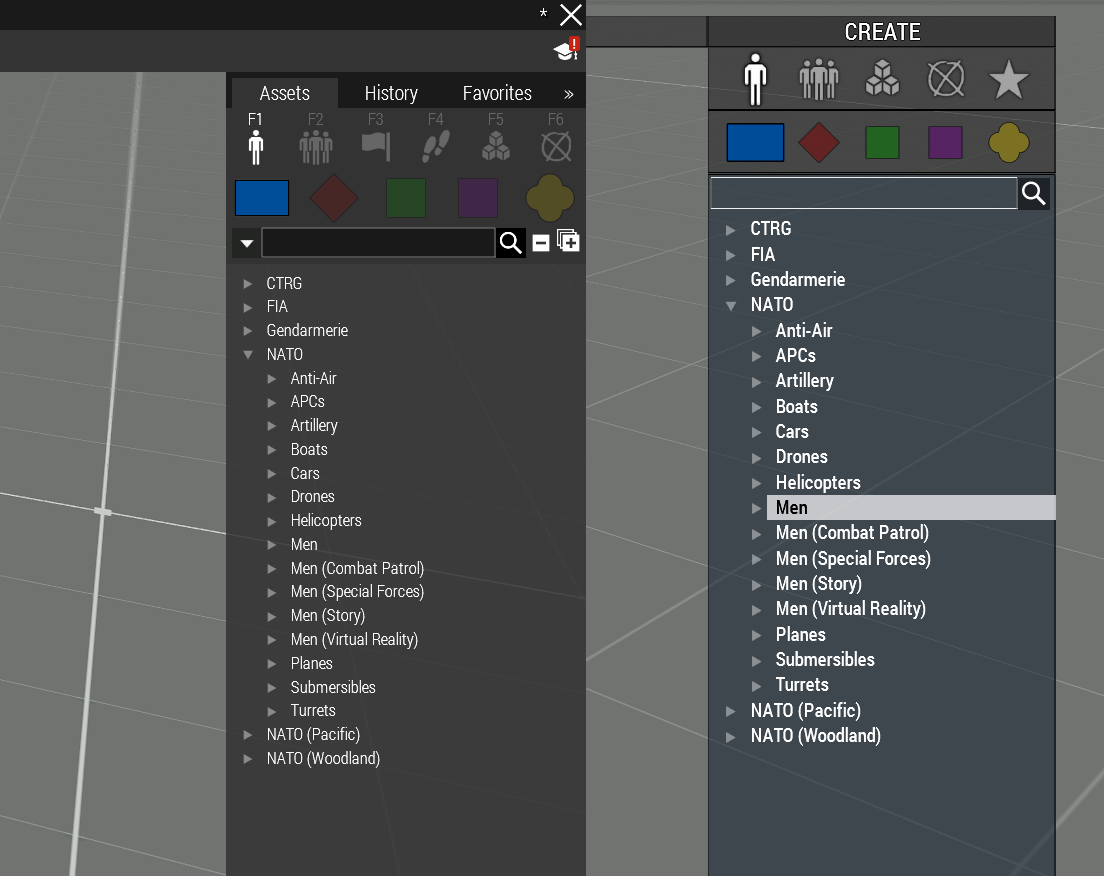
Setting this for instance...
    class MBT_01_base_F: Tank_F
    {
        editorSubcategory = "";
    };
...makes all NATO tanks not be listed in Eden or Zeus. The engine will also correctly report an error about a non-existent classname from CfgEditorSubcategories.
https://i.imgur.com/UgMbwUF.png
The only classes that lack subcats are the superclasses that will never appear anyway (like All, LandVehicle, etc.) so it doesn't matter if they don't have the editorSubcategory token defined.
 wintry tartan
Well Zeus assets detection is somewhat done in a strange way - the fact that somehow CfgPatches is required to have your asset there also suggests
coral knoll
Not a fucking SUB category
the actual category
The wiki refering to what im talking about
        // CATEGORY
        // Two ways how to set it exist. When both are present, editorCategory has priority.
        editorCategory = "MyCategory"; // Class from CfgEditorCategories. Usually used for props.
        faction = "MyCategory"; // Class from CfgFactionClasses. Usually used for characters and vehicles.
Yeah, but you missed this part of the comment:
Usually used for props.
coral knoll
the issue is the vehicle im inheriting off of uses it, god knows why
And i cant get rid of it, setting it to an empty string just hides the vehicle
wheat sluice
Just override the value?
coral knoll
creating a value equal to the faction moves the faction and hides parts of it
wheat sluice
What's the mod that you're inheriting from?
coral knoll
Half Life 2: Echoes of the Resonance cascade
wheat sluice
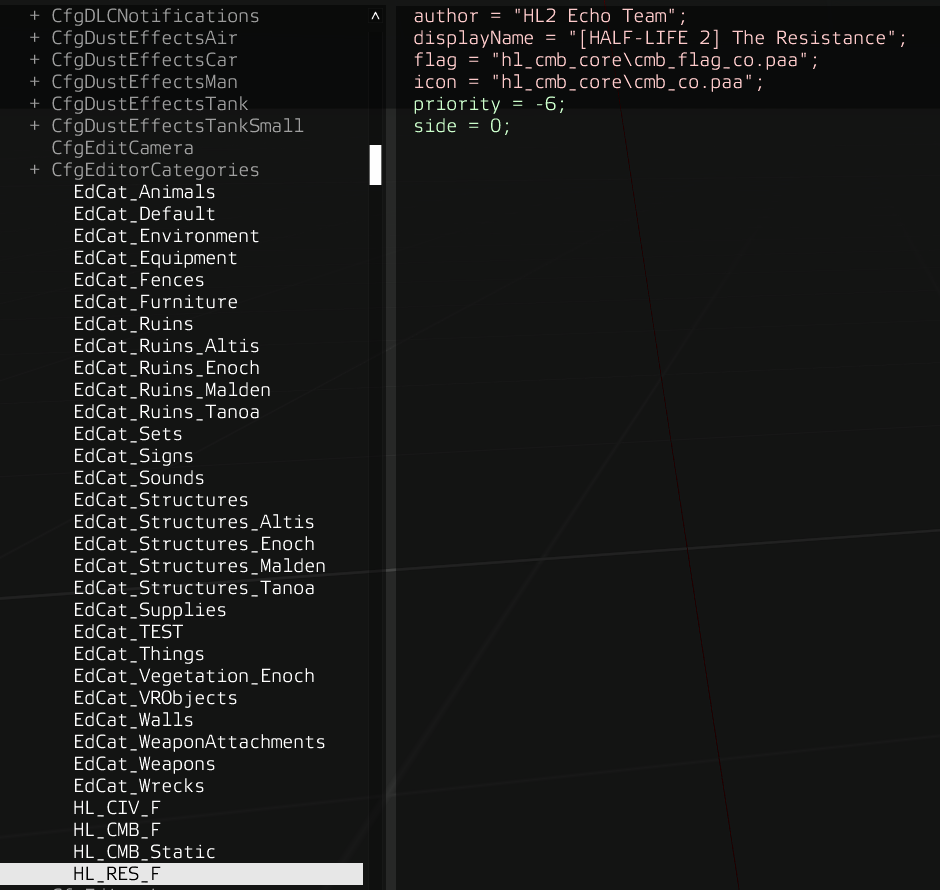
Ok...whoever made this mod just decided to put the cart before the horse.
I see why you're having issues. For whatever reason, the author defined their faction in CfgEditorCategories instead of CfgFactionClasses.
The only workaround here is to redefine your own "faction" in CfgEditorCategories and then override the class' editorCategory token with your own.
Why people do this I will never understand...
https://i.imgur.com/kfnSPg2.png
 wheat sluice
No wonder commenters on the mod page are reporting compatibility issues with RIS, ALiVE and all the others...all the modmakers needed to do was follow convention and use CfgFactionClasses...🤦♂️
coral knoll
Shame the mod makers refuse to update their mod even to fix stuff like this
novel lava
there's a reason why a lot of mod makers ask you to only report bugs when only using their mod - and its because there's an AWFUL lot of mods out there that are so broken that they break other mods by simply existing in your modline
especially older ones that havent been updated in a long time
coral knoll
Generally the mod is fine with standard mods, just stuff that relies on pulling cfgFactionClasses wont work because it doesnt exit
wheat sluice
novel lava
especially older ones that havent been updated in a long time
The funny part is that it's a mod that was made in 2019.
If it was a 2013 or pre-2015 mod I could understand, but this is long after the Nexus Update with the 3DEN additions to configs, so not much excuses for the modmakers to not follow convention.
novel lava
its usually a case of doesnt know any better, 'what works, works' etc
coral knoll
this is also the 2nd version of this mod. released in 2018
Sadly not knowing better is often the case in 90% of bad configging work
warped perch
enabling canHideGunner for turnin/turnout on my cargoturrets causes me to no longer be able to ads with my gunner. Any encounter this before?
 narrow swallow
warped perch
enabling canHideGunner for turnin/turnout on my cargoturrets causes me to no lon...
narrow swallow
warped perch
enabling canHideGunner for turnin/turnout on my cargoturrets causes me to no lon...
Probably the default state has changed so you need to swap the values for gunnerOpticsModel and gunnerOutOpticsModel
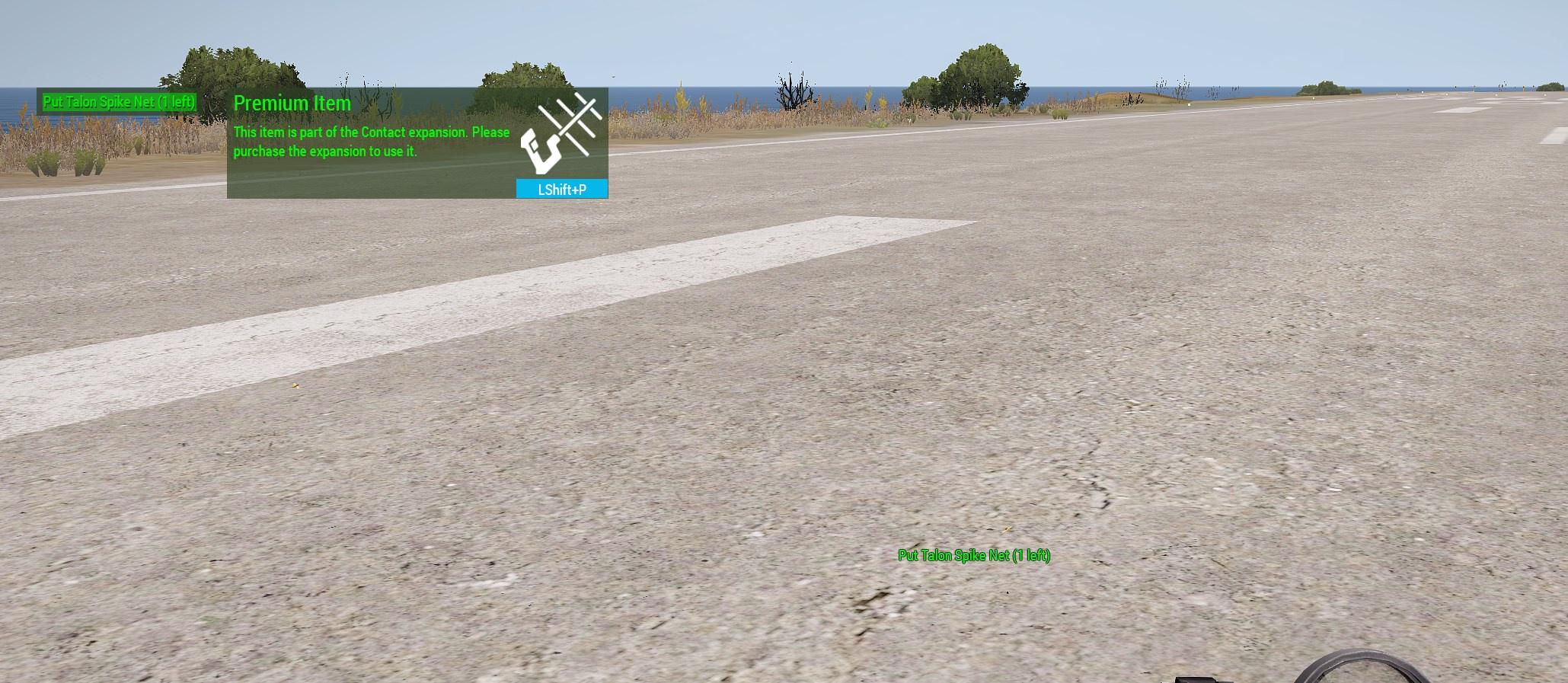
Where would the DLC requirement be set for an explosive?
Trying to figure out why this person sees a Contact requirement for my mine https://github.com/ampersand38/tire-deflation-device/tree/main/addons/main
#singleplayer message
https://i.imgur.com/9EOklgE.jpeg
 warped perch
Is there a way to make it so that when a player enters a cargoturret slot in a vehicle they are turned in?
 opal crater
narrow swallow
Where would the DLC requirement be set for an explosive?
Trying to figure out w...
opal crater
narrow swallow
Where would the DLC requirement be set for an explosive?
Trying to figure out w...
you're using contact DLC model
appId is baked into p3d and wrp`s for DLC stuff.
narrow swallow
Much appreciated.
narrow swallow
warped perch
Is there a way to make it so that when a player enters a cargoturret slot in a v...
I think that's done by isPersonTurret 1 or 2
 lament sluice
I can't really figure out vehicle inheritance for crew. What's the minimum amount of stuff I would have to put in just to replace a crewman?
hearty sandal
lament sluice
I can't really figure out vehicle inheritance for crew. What's the minimum amoun...
Crew or gunner?
lament sluice
I mean gunner, commander, and other misc positions. I'm trying to make a version of the m113 acav from sog for another faction that has a commander and 2 gunners
classname is like vn_b_armor_m113_acav_04 to be more specific
hearty sandal
lament sluice
I mean gunner, commander, and other misc positions. I'm trying to make a version...
Gunners need full turret inheritance tree to the parent class defined as it is in the original config.
Only then when you don't break the turret can you swap the gunnertype
I recall we have an example at sogpf discord for something like that
nimble sequoia
lament sluice
classname is like vn_b_armor_m113_acav_04 to be more specific
{
scope = 2;
scopeCurator = 2;
displayName = "your_APC";
crew = "your_soldier";
class Turrets: Turrets
{
class commanderTurret: commanderTurret {};
class mg1_turret: mg1_turret
{
gunnerType = "your_soldier";
};
class mg2_turret: mg2_turret
{
gunnerType = "your_soldier";
};
class mg3_turret: mg3_turret
{
gunnerType = "your_soldier";
};
class cargoTurret_12: cargoTurret_12 {};
class cargoTurret_13: cargoTurret_13 {};
class cargoTurret_14: cargoTurret_14 {};
class cargoTurret_15: cargoTurret_15 {};
};
};``` teal sluice
I wonder. The thermal configs for the Slammer UP. Are they bound to the model itself or is it configurable? I have a color blindness problem and the thermal hurts my eyes, sadly. So I want to create a new config with the other thermal variant.
nimble sequoia
teal sluice
I wonder. The thermal configs for the Slammer UP. Are they bound to the model it...
What do you mean by "thermal configs"?
The visual image of how the Slammer vehicle looks when viewed through a thermal viewer is controlled primarily by a thermal texture (baked in to the rvmat's in the model and not changeable), and some config entries
htMax = 180;      // Maximum half-cooling time (in seconds)
afMax = 100;      // Maximum temperature in case the model is alive (in celsius)
mfMax = 8;        // Maximum temperature when the model is moving (in celsius)
mFact = 1;        // Metabolism factor - number from interval <0, 1> (0 - metabolism has no influence, 1 - metabolism has full influence (no other temperature source will be considered)).
tBody = 150;      // Metabolism temperature of the model (in celsius)
I mean the green thermal instead of the grey thermal. I want to replace the green one with like the one from the T-140 as example.
nimble sequoia
How are you seeing this thermal image?
teal sluice
nimble sequoia
How are you seeing this thermal image?
What do you man exactly? How I see the Slammer UP thermal? Well, it's green. But I cannot see red through it. Also after some time it hurts my eyes.
nimble sequoia
Where are you when you see the thermal image? Are you outside the vehicle? Inside it? In which seat? In an optic view?
teal sluice
nimble sequoia
Where are you when you see the thermal image? Are you outside the vehicle? Insid...
Ah, yes. Sorry. Gunner seat.
nimble sequoia
Ah I see, you're talking about thermals available when using the gunner's optics mode.
teal sluice
nimble sequoia
Ah I see, you're talking about thermals available when using the gunner's optics...
Yes
nimble sequoia
You need to write a config mod that changes
thermalMode[] = {2,3};
to
thermalMode[] = {0,1};
inside class Turrets { class MainTurret {class OpticsIn {class Medium/Narrow/Wide {} }}
teal sluice
Oke, found that config. Is there a way to inherit the OpticsIn? I tried to inherit CommanderOptics once but I struggled with the double Turrets config (Turrets - MainTurret - Turrets - CommanderOptics) on tanks.
nimble sequoia
teal sluice
Oke, found that config. Is there a way to inherit the OpticsIn? I tried to inher...
Maybe something like this:
    class MainTurret: MainTurret {
        class OpticsIn: OpticsIn {
            class Medium: Medium {
                thermalMode[] = {0,1};
            };
            class Narrow: Narrow {
                thermalMode[] = {0,1};
            };
            class Wide: Wide {
                thermalMode[] = {0,1};
            };
        };
        class Turrets: Turrets {
            class CommanderOptics: CommanderOptics {};
        };
    };
};```Gonna try it. Thank you!
lament sluice
nimble sequoia
```class your_APC: vn_b_armor_m113_acav_04
{
scope = 2;
scopeCurator = ...
thanks so much! This is assuming that I also define all of this in the original m113 config?
drifting skiff
is it possible to hide underbarrel/attachmentrails the same way you can hide optic rails?
hearty sandal
drifting skiff
is it possible to hide underbarrel/attachmentrails the same way you can hide opt...
Kinda but there is no underbarrel weapon slot. So those weapons are typically separate p3ds
It's OK to have separate variant P3ds
drifting skiff
yeah ill do it that way then propably
 delicate cypress
question for the helicopter magicians;
I'm running into an issue where a modded helicopter, when crewed by AI and given a movement waypoint, keeps perfectly horizontal. The issue with that is that the AI keeps giving it power so the helo keeps climbing and never climbs back down.
So, is there a config entry that defines how much tilt the AI use? It works fine when players are pilots but renders the helicopter useless with AI.
I'm talking about basic flight model
cyclicForwardForceCoef did not seem to make any difference
hearty sandal
delicate cypress
question for the helicopter magicians;
I'm running into an issue where a modded...
Is it suppose to fly like helicopter?
Or is it something unconventional
delicate cypress
its a regular heli
hearty sandal
delicate cypress
its a regular heli
There was a bug at one point that made vanilla copters do the same or at least something similar. Buut can't remember what the reason was
 tight ginkgo
Hello. How can I replace the model of the vehicle after destruction?
hearty sandal
tight ginkgo
Hello. How can I replace the model of the vehicle after destruction?
It needs wreck config
delicate cypress
hearty sandal
There was a bug at one point that made vanilla copters do the same or at least s...
Unfortunate, if anyone knows please let me know
tight ginkgo
class My_Test_Car_Unit
class My_Test_Car_Wreck
tight ginkgo
hearty sandal
It needs wreck config
destrType?
class My_Test_Car_Unit: Car_Base
{
  ...
  destrType = "My_Test_Car_Wreck"
  ...
};
Compared to the sample helo how is yours centered and where's the mass center?
delicate cypress
hearty sandal
Compared to the sample helo how is yours centered and where's the mass center?
Well, im not the original author, so if that's defined in the p3d I'm afraid I can't change it
tight ginkgo
hearty sandal
It needs wreck config
How do I do this?
tight ginkgo
hearty sandal
Compared to the sample helo how is yours centered and where's the mass center?
Classes should be named
Veh_Test_Base
Veh_Test_Base_Wreck
?
nimble sequoia
tight ginkgo
How do I do this?
In config.cpp, in your vehicle config, set
destrType = "DestructWreck";
In your vehicle model .p3d, create a Wreck LOD and place a proxy triangle on the origin. The proxy should contain the path to your wreck model .p3d.
 latent monolith
howdy people so im trying to get a simple facewear item in game and it was working fine yesterday but now when i pack it gives me this

ive checked for copied articles nothing to be found
and usually with this right the last few lines of code are what is wrong with the pbo
nimble sequoia
latent monolith
and usually with this right the last few lines of code are what is wrong with th...
Was that built with the "-Log and Screen" option to get maximum error messages?
When binarise crashes it's usually a "bad" p3d. Something like degenerated faces in one of the LOD's.
latent monolith
nimble sequoia
Was that built with the "-Log and Screen" option to get maximum error messages?
ill check
latent monolith
nimble sequoia
Was that built with the "-Log and Screen" option to get maximum error messages?
i cant see anything
 lucid inlet
so, i want to create a replacement mod, that will replace the altis satmap layers with the ones inside those folders.
How can i make the config for this work? i tried looking into how some mods did it, but couldn't understand.

 viscid cobalt
is there a way to make humming bird/littlebird be able to carry heavier cargo like those cargo crates
nimble sequoia
viscid cobalt
is there a way to make humming bird/littlebird be able to carry heavier cargo li...
You can write a config mod to overwrite their max carry load with:
slingLoadMaxCargoMass = 15000; // value in kg
or if you want to publish it for others to use, create your own helicopter class, inherit from the littlebird, and change the carrying capacity.
 rocky nexus
Finished mymodel cfg a bit ago, now stuck on the config. what do I put for the class : none parts? Just the class I defined in the model.cfg and leave the none? (facewear config)
gleaming sentinel
if you arent inheriting from anything then you dont put anything
nimble sequoia
It would be an unusual class to not inherit though, so likely you should be
gleaming sentinel
Looking at the provided cfg though it does look like they use "none" as a defualt class, what an odd name for it
rocky nexus
gleaming sentinel
Looking at the provided cfg though it does look like they use "none" as a defual...
Yeah, I was looking through some other configs for reference, and some of them have other names instead of none, so I wasn't sure
gleaming sentinel
Its likely they need something specific from those other classes, you can just use none though
rocky nexus
and the class before the semicolon would be inherited from the model cfg still right?
nimble sequoia
Not from the model.cfg no
Configs are separate from the model.cfg, which only defines the skeleton bones, animations and sections (typically hidden or texture changing parts)
This is what the BI class None contains in CfgGlasses {}
{
    name = "None";
    model = "";
    identityTypes[] = {"G_RUS_SF", 50, "G_CIVIL_aidworker", 200, "G_CIVIL_man", 150, "G_CIVIL_paramedic", 520, "G_CIVIL_constructionworker", 220, "NoGlasses", 1000, "G_NATO_default", 300, "G_NATO_casual", 550, "G_NATO_pilot", 1000, "G_NATO_recon", 595, "G_NATO_SF", 300, "G_NATO_sniper", 1000, "G_NATO_diver", 0, "G_IRAN_default", 1000, "G_IRAN_diver", 0, "G_GUERIL_default", 595, "G_HAF_default", 595, "G_CIVIL_female", 655, "G_CIVIL_male", 670, "g_Rangemaster", 0, "G_IRAN_officer", 500};
    displayname = "None";
    picture = "\A3\Characters_F\data\ui\icon_g_aviators_CA.paa";
    mass = 1;
    scope = 2;
};
Ah gotcha. I was thinking it was the class at the bottom of the model cfg (ex: "myvest" in the sample character model cfg) that went before the semicolon. So in that case, what would I put before it, or does it not matter what I put?
rocky nexus
rocky nexus
Ah gotcha. I was thinking it was the class at the bottom of the model cfg (ex: "...
where one person put "class Balaclava_tan: None", I'm not sure what I'd put as the balaclava_tan part
nimble sequoia
The classname in model.cfg must match the p3d name you are using for the model
The classname in config.cpp can be anything you like, except it's best practise to use a myTag_ prefix.
So if I was making a new tan balaclava based on the BI class None, I'd call it:
apo_balaclava_tan: None {}
hearty sandal
lucid inlet
so, i want to create a replacement mod, that will replace the altis satmap layer...
you would have to path them the same inside the pbo and your config needs to have the original pbos as reuired addon to load after them
 frosty inlet
where would i go to make a faction without orbat
anytime i try to use orbat to make a faction i can never make the units have a different look each time i spawn one and i was told that doing that in orbat isnt possible
if i worded that confusing then for example making a unit spawn with a helmet then spawning the same unit and having him spawn with a hat or a shemagh and such
wintry tartan
What do you mean by orbat here
frosty inlet
alive faction creator
wintry tartan
And what exactly is your goal? I'm not sure how ALiVE works but if you just want to make a "faction" that can be used in Eden, just do it in config
frosty inlet
well thats exactly what i want thank you
calm pilot
Hey guys, what’s the parameter that controls the smoke density in the cfg Cloudlets? And one last thing, what kind of color code i need to look at for reference when in need of changing the smoke color?
Nevermind found a bohemia wiki page on it
hearty sandal
calm pilot
Nevermind found a bohemia wiki page on it
calm pilot
hearty sandal
<:praise_the_sun:720699473218764861> <:praise_the_sun:720699473218764861> <:prai...
 lucid inlet
hearty sandal
you would have to path them the same inside the pbo and your config needs to hav...
lucid inlet
hearty sandal
you would have to path them the same inside the pbo and your config needs to hav...
if i understood, it should be something like this? still doesn't work though.
 hearty sandal
lucid inlet
if i understood, it should be something like this? still doesn't work though.
hearty sandal
lucid inlet
if i understood, it should be something like this? still doesn't work though.
does your folder structure inside the pbo match the original folder structure?
might also need pboprefix stuff
but Im no expert in that, I dont really do replacement stuff
lucid inlet
it's like this currently
 hearty sandal
lucid inlet
it's like this currently
hearty sandal
lucid inlet
it's like this currently
yeah this means nothing
I mean what you have inside the pbo
lucid inlet
only the surface files, since i just want to replace them currently
 hearty sandal
ye I dont think thats how you should have it
you are just adding a bunch of files right now
 glacial spear
i need help trying to figure out a way to connect a reflectors class to a hide animtion, somehow direct connection of proxy by connecting the lights to a selection in lod and hiding that
i know its doable as the h-60 mod does it
nimble sequoia
glacial spear
i need help trying to figure out a way to connect a reflectors class to a hide a...
You can't hide a class reflector. The way I've done it is to set it's hitpoint damage to 0 or 1.
glacial spear
nimble sequoia
You can't hide a class reflector. The way I've done it is to set it's hitpoint d...
i cant pin it down exactly but, by linking mempoint with skeleton to a lod item, i seem to be able to do it, i just trying to make a new lod item to do it with
nimble sequoia
The problem is that a hide animation only moves the mem point or object vertices to [0,0]
hearty sandal
hiding in essence is scaling the mesh into 0 space at object origin.
nimble sequoia
so you'll get a nice glow coming from near the middle of your object
 glacial spear
ooh, i could transoform the mempoint for the relfector into [0,0,-99999999999]
so evan if the aircraft some how rotates to be above the terrain, its in fucking infinity, highly unlikely to ever be seen
that being said im messing around with a mod that is using a hide animation on a reflector and the light is nowwhere to be seen
nimble sequoia
or just switch it off using it's hitpoint
glacial spear
nimble sequoia
or just switch it off using it's hitpoint
i already do that, but it fucks up if someone start messing around in invulnerability
novel lava
glacial spear
ooh, i could transoform the mempoint for the relfector into [0,0,-99999999999]
this does indeed work
although I havent tried it with reflectors I've done it with cabin lights
 royal briar
Im using eliteness to check if my pbo has the nesessary .paa files but when I depo it there's only script files. still the game finds the .paa. maybe glitch in eliteness? that or I dont understand how addon builder works (NVM)
calm pilot
Any reason that explains why the fx effect and particles start to shows from the middle of the model? Almost like if the "source point" of the effect isn't configured. I couldn't find anything that tell me how to specified the position if not the "position" token, which is an array of numbers though, just 0,0,0.


Ofc i'm talking about Cfg cloudlets
hearty sandal
calm pilot
Any reason that explains why the fx effect and particles start to shows from the...
I am fairly sure there is a memorypoint for them
I'll have to check some references though when I remember
calm pilot
hearty sandal
I am fairly sure there is a memorypoint for them
Yeah i’m convinced of it too, unless it is something to put aside as a “gun particle effect” with the position and position dir memory points configured, i have no clue of how to achieve it. I may try this way, make it as a second effect aside the vanilla MRLS_Fired gun particle effect
hearty sandal
hmm well looks like our missiles dont have any more points for the effects at least
thers only rocket axis for making it spin
 calm pilot
hearty sandal
thers only rocket axis for making it spin
calm pilot
hearty sandal
thers only rocket axis for making it spin
I have my rocket axis too, but ironically is centered. Sounds stupid but, i might try in moving it to the right 🤷🏻♂️
sullen fulcrum
Can someone please share a simple static model config
wintry tartan
Just look up ingame config
sullen fulcrum
None of the ones ive found work
sullen fulcrum
class CfgPatches
{
class CivilWar
{
units[] = {};
weapons[] = {};
requiredVersion[] = 0.1;
requiredAddons[] = {};
};
};
class CfgVehicles {
class Static;
class CivilWar : Static {
scopeCurator = 2
scope = 2;
model = "\Wall\Walls.p3d";
displayName = "Fort Wall";
faction = "Empty";
vehicleClass = "Small_items";
};
};
trying to make a staic wall prop
doesnt show up in zeus
 chilly tulip
You missed a semicolon on scopeCurator.
wintry tartan
https://community.bistudio.com/wiki/CfgPatches
Also CfgPatches
sullen fulcrum
chilly tulip
You missed a semicolon on scopeCurator.
lol im a little dum
chilly tulip
requiredVersion shouldn't have the array specifier
Not sure what else is required in CfgPatches.
wintry tartan
CfgPatches needs to have list of vehicles in order to have in Zeus
sullen fulcrum
thanks I'll try now
 jolly igloo
Hey I'm having trouble getting a inherited gun with new attachments to work, config looks like this
class cfgWeapons {
    class CUP_arifle_M4A3_black;
    class M4A1_SF: CUP_arifle_M4A3_black
    {
        class LinkedItems
        {
            class LinkedItemsOptic
            {
                item = "CUP_optic_ACOG_TA01B_Black";
                slot = "CowsSlot";
            };
            class LinkedItemsAcc
            {
                item = "CUP_acc_ANPEQ_2_Flashlight_Black_L"";
                slot = ";
            };
            class LinkedItemsUnder
                           {
                                  item = "";
                                  slot = "UnderBarrelSlot";
                            };
        };
    };
};```I don't understand what you expected that to do.
LinkedItemsAcc has nothing in item and an item in the slot var? LinkedItemsUnder has nothing in item.
Also class class at the top.
If you don't want anything in a slot then just don't define it. Because you're redefining LinkedItems the inheritance won't be a problem.
jolly igloo
chilly tulip
If you don't want anything in a slot then just don't define it. Because you're r...
okay let me try fixing it real quick 🙂 I'll get back to you asap
Still not working for me 🤷♂️ ```
class cfgWeapons {
class CUP_arifle_M4A3_black;
class M4A1_SF: CUP_arifle_M4A3_black
{
    class LinkedItems
    {
        class LinkedItemsOptic
          {
            item = "CUP_optic_ACOG_TA01B_Black";
            slot = "CowsSlot";
          };
        class LinkedItemsAcc
          {
            item = "CUP_acc_ANPEQ_2_Flashlight_Black_L";
            slot = "PointerSlot";
          };
       };
};
};
What's not working?
jolly igloo
it shows up like this

should look like this if the config above was working if I'm not mistaken
 chilly tulip
How did you equip the unit with it?
jolly igloo
In the screenshot I used the editor
But the config entry in CfgVehicles look like this
    {
        author = "Blackburn";
        scope = 2;
        scopeCurator = 2;
        displayName = "Rifleman";
        side = 1;
        faction = "BB_US_2001";
        editorSubcategory = "BB_Men_SF";
        identityTypes[] = {"NoGlasses","Head_NATO","LanguageENG_F"};
        genericNames = "NATOMen";
        editorPreview = "";
        uniformClass = "CUP_U_B_BDUv2_gloves_DCU_US";
        linkedItems[] = {"CUP_V_B_RRV_Scout2","CUP_H_PASGTv2_NVG_DCU","ItemMap","ItemRadio","ItemCompass","ItemWatch","CUP_NVG_PVS14"};
        respawnlinkedItems[] = {"CUP_V_B_RRV_Scout2","CUP_H_PASGTv2_NVG_DCU","ItemMap","ItemRadio","ItemCompass","ItemWatch","CUP_NVG_PVS14"};
        weapons[] = {"M4A1_SF","Throw","Put"};
        respawnWeapons[] = {"M4A1_SF","Throw","Put"};
        magazines[] = {"CUP_30Rnd_556x45_Stanag","CUP_30Rnd_556x45_Stanag","CUP_30Rnd_556x45_Stanag","CUP_30Rnd_556x45_Stanag","CUP_30Rnd_556x45_Stanag","CUP_30Rnd_556x45_Stanag","CUP_30Rnd_556x45_Stanag","CUP_30Rnd_556x45_Stanag","CUP_HandGrenade_M67","CUP_HandGrenade_M67","SmokeShell","SmokeShell","SmokeShellRed"};
        respawnMagazines[] = {"CUP_30Rnd_556x45_Stanag","CUP_30Rnd_556x45_Stanag","CUP_30Rnd_556x45_Stanag","CUP_30Rnd_556x45_Stanag","CUP_30Rnd_556x45_Stanag","CUP_30Rnd_556x45_Stanag","CUP_30Rnd_556x45_Stanag","CUP_30Rnd_556x45_Stanag","CUP_HandGrenade_M67","CUP_HandGrenade_M67","SmokeShell","SmokeShell","SmokeShellRed"};
        backpack = "CUP_B_AlicePack_OD";
    };
copy paste format came out weird in the code box
chilly tulip
Seems plausible. You'd need someone who actually works with this stuff.
wheat sluice
Make sure you are referencing the right slot when you create weapon classes with pre-defined attachments.
Mods like CUP and RHS tend to use their own slots (as opposed to those used in vanilla like CowsSlot, PointerSlot, etc.).
In this case, CUP uses these slot names for the optics, side and underbarrel slots on their M4A3 (CUP_arifle_M4A3_black):
- CUP_PicatinnyTopMountM4 <-- for optics
- CUP_PicatinnySideMountM4 <-- for side rail attachments
- CUP_PicatinnyUnderMountM16 <-- For underbarrel attachments
- MuzzleSlot <-- For suppressors
So if you want to customise the side slot, it should look like this:
class LinkedItemsAcc
{
    item = "CUP_acc_ANPEQ_2_Flashlight_Black_L";
    slot = "CUP_PicatinnySideMountM4";
};
Your CfgVehicle's setup is fine, by the way. The only issue here is in CfgWeapons since your pre-defined attachments are referencing slots that aren't used in CUP_arifle_M4A3_black.
warped perch
Noticed that RHS CargoTurrets (specifically the stryker's) turn in/turn out is controlled by scripting. Does anyone know the reason for this?
 neon bronze
Can I just make any .cpp config to modify CfgVehicles to modify a vehicle class
hearty sandal
neon bronze
Can I just make any .cpp config to modify CfgVehicles to modify a vehicle class
config.cpp is the name of the config file that the game reads from a pbo yes
neon bronze
Ok
So I created a config.cpp
that included #include "cfgHunterKiller.hpp
cfgHunterKiller.hpp says
class CfgVehicles
{
    class MyTankB
    {
        ace_hunterkiller[] = {{{0}, 1}, {{0,0}, 3}};
    };
};
that would work?
wheat sluice
So long as your header file is in the same directory as the config.cpp, then yes, it'll work. The engine will binarise your config at runtime when it's loading.
wheat sluice
warped perch
Noticed that RHS CargoTurrets (specifically the stryker's) turn in/turn out is c...
Not an RHS dev but from what I can see it's for a few things:
- Play a custom turn in/out animation instead of the generic animation used by all vehicles
- For crew positions on armed Strykers, the "turrets" are actually FFV seats that allow for swapping to the actual weapon turrets via scripting when turned out (like swapping between the LRAS3 sensor suite and M2 HMG "turrets" on the M1127 variant)
warped perch
wheat sluice
Not an RHS dev but from what I can see it's for a few things:
* Play a custom tu...
Thought it was related to some issues that CargoTurrets have when implemented in WheeledAPC_F such as still being able to fire and camera being positioned in seat as it locks/unlocks turret. May be unique issues to my config though.
nimble sequoia
warped perch
Noticed that RHS CargoTurrets (specifically the stryker's) turn in/turn out is c...
We also use that method in several of the Creator DLC's as it allows the gunner to remain "turned-out" on the externally mounted weapon, whereas the default behaviour is for all crew to immediately turn-in during combat.
steel moss
Does the eden attributes of object statements executes localy on every machine or only on server then should be sent to others? Like if i set there some variable : this setvariable ["var", var]; this command (defined in config) is executed on every player localy on mission start, or on server?
drifting skiff
if my guns bolt is not moving enough during reloading animations, do i need to change maxValue or something?
hearty sandal
drifting skiff
if my guns bolt is not moving enough during reloading animations, do i need to c...
when you use translation type animation combiend with 2 point axis to define direction that axis point pairs distance between each other is also the range of movement between 0 and 1 offset values. so if your offset would be from 0 to 2 it would be twice the distance between the axis points
I personally like to make the axis distance exactly how far I want a part to move
hearty sandal
the axis points being in the memory lod
maybe called something like bolt_axis
and in the model.cfg animation axis = "bolt_axis"
drifting skiff
yeah thats what im doing, wasnt moving (atleast in model viewer) enough, but ill see
hearty sandal
drifting skiff
yeah thats what im doing, wasnt moving (atleast in model viewer) enough, but ill...
what you see in buldozer should represent it 1:1 with game
so if it does not move enough (and you use the axis points for direction and distance) you can just move the axis points to right length
hearty sandal
drifting skiff
point(s), so it should have 2?
yes
you can see examples of axis points in the sample weapons memory lod too
wintry tartan
Basically start pos and end pos, the order is important too
 zinc oak
anywhere here familiar with making custom HUDs? I am trying to incorporate the Blackfish VTOL HUD icon that shows the state of the rotor blades (i.e. vertical, horizontal or in between) into a pre-existing custom HUD to assist Osprey pilots knowing the state of their rotors. Identifying the actual entry dealing with the small icon in the Blackfish config is proving tricky though.
wintry tartan
Just to make sure you meant HUD as in the green one, not the User Interface right?
drifting skiff
hearty sandal
yes
well that explains a lot actually
drifting skiff
how does a trigger_axis work? sample model doesnt, ave a trigger
wintry tartan
A particular axis that is named in a very particular name does not do anything special
drifting skiff
i am talking about a weapons trigger, how does its axis work cause the sample file doesnt have a trigger
wintry tartan
And well, the answer is still the same. Every axis does work in the same principle. Rotation animation does work using the pivot (axis) you define in memory LOD
zinc oak
@wintry tartan apologies, yes. I meant the green HUD on the pilot helmet display showing information about the aircraft.
wintry tartan
Just blame the one who started to call interface HUD 
I guess try to use diag_mergeConfigFile over and over again to see which one represents that
hearty sandal
drifting skiff
i am talking about a weapons trigger, how does its axis work cause the sample fi...
same way as any other axis. you make 2 points that define at what point and to what direction a thing rotates

 drifting skiff
aw, you are the best thanks
now just to fix stretched shadows 
 drifting skiff
oh huh, ill just copy my geometry lod over pretty much
very exciting to be this close to the end, final hurdle is just aligning irons/eye pos
hearty sandal
just make sure the shadow mesh does not poke out of the visual mesh.
it can be a lot thinner in many parts
only the silhouette of it really matters
drifting skiff
hearty sandal
just make sure the shadow mesh does not poke out of the visual mesh.
ah, so that it is smaller than the actual mesh?
hearty sandal
yes
all shapes can be heavily simplified
and small bits dont need to have shadow at all
drifting skiff
very cool thanks!
zinc oak
@wintry tartan @opal crater Thanks, I'll give that a try / do some reading. 🙂
drifting skiff
does arma 3 samples store sound configs for weapons somewhere?
just looking for reload and shooting sounds, the ones that akm and ak12 use but their own configs dont seem to have them
hearty sandal
drifting skiff
does arma 3 samples store sound configs for weapons somewhere?
just looking for...
many of vanilla weapons inherit their sounds from a base class
I recommend getting "all in one" config file for easier tracking of classes and their inheritance connections
drifting skiff
ah, interesting, so its all about finding the base class?
hearty sandal
usually
teal sluice
I have the feeling that I'm doing somewthing wrong. I try to inheritate the base classes of the RHS M1A2 with use of the Hierarchy Viewer of Advanced Dev Console to make the thermal view white but every time I have the bug that the guns of Commander/Loader are "shooting". This is my code.
class Optics_Armored;
class Optics_Commander_01: Optics_Armored {
    class Wide;
    class Medium;
    class Narrow;
};
class CfgVehicles {
    class All {
        class Turrets;
    };
    class AllVehicles: All {
        class NewTurret {
            class Turrets;
        };
    };
    class Land: AllVehicles {};
    class LandVehicle: Land {
        class CommanderOptics: NewTurret {
            class ViewOptics;
        };
    };
    class Tank: LandVehicle {
        class Turrets {
            class MainTurret: NewTurret {
                class Turrets {
                    class CommanderOptics;
                };
            };
        };
    };
    class Tank_F: Tank {
        class ViewOptics;
    };
    class MBT_01_base_F: Tank_F {};
    class rhsusf_m1a1tank_base: MBT_01_base_F {};
    class rhsusf_m1a2tank_base: rhsusf_m1a1tank_base {};
    class rhsusf_m1a2sep1tuskid_usarmy: rhsusf_m1a2tank_base {};
    class rhsusf_m1a2sep1tuskiiwd_usarmy: rhsusf_m1a2sep1tuskid_usarmy {};
    class rhsusf_m1a2sep1tuskiid_usarmy: rhsusf_m1a2sep1tuskiiwd_usarmy {};
    class rhsusf_m1a2sep1tuskiiwd_usarmy_white_thermal_base: rhsusf_m1a2sep1tuskiiwd_usarmy {
        scope = 0;
        class Turrets: Turrets {
            class MainTurret: MainTurret {
                class Turrets: Turrets {
                    class CommanderOptics: CommanderOptics {
                        class OpticsIn: Optics_Commander_01 {
                            class Wide: Wide {
                                thermalMode[] = {0, 1};
                            };
                            class Medium: Medium {
                                thermalMode[] = {0, 1};
                            };
                            class Narrow: Narrow {
                                thermalMode[] = {0, 1};
                            };
                        };
                    };
                };
            };
        };
    };
    class rhsusf_m1a2sep1tuskiiwd_usarmy_white_thermal: rhsusf_m1a2sep1tuskiiwd_usarmy_white_thermal_base {
        scope = 2;
        displayName = "M1A2 Test";
    };
};
I tried to search here in Discord but I didn't found anything, sadly.
wintry tartan
What do you mean by "shooting"? The muzzle flash is there regardless you do or not?
teal sluice
wintry tartan
What do you mean by "shooting"? The muzzle flash is there regardless you do or n...
Yes, correct.
I can enter the turrets, but they wont really work. So I assume the inheritance I did is broken. But I actually don't know how. I did it like this with Vanilla tanks and it works actually
wintry tartan
It probably because the config considers you're inheriting Tank's config, not the RHS one
teal sluice
I also tried to start the inheritance in MBT_01_base_F and rhsusf_m1a2tank_basebut with always the same result.
shy knot
You always start inheriting off the last class in your inheritance tree
teal sluice
I tried to inheriate on different positions to inheritate. rhsusf_m1a2sep1tuskiiwd_usarmy would be the last class I inheriate from, and even starting with that down the tree it didn't worked.
 dusk wolf
So i want to change a picture in main menu just for funsies and this is the config i got so far:
class CfgPatches
{
    class MyAddon
    {
        name = "Main Menu Addon";
        author = "Legion";
        url = "http://xkcd.com";
        requiredVersion = 1.60;
        requiredAddons[] = { "A3_Data_F_Decade_Loadorder" };
        units[] = {};
        weapons[] = {};
        skipWhenMissingDependencies = 1;
    };
};

class RscPicture;
class RscTitles
{
    class RscDisplayMainMenuBackground
    {
        class controls
        {
            class Picture: RscPicture
            {
                 text = "MyAddon\thoob.paa";
            };
        };
    };
};
The picture and config.cpp are in the same mod folder. How would i refrence the picture so it loads in main menu currently this gives me picture not found error.
wintry tartan
That means your texture path is wrong
drifting skiff
EDIT: All fixed 🙂
dusk wolf
wintry tartan
That means your texture path is wrong
If my mod is @@My_Test_Mod > Addons > TestMod.pbo
And in testMod.pbo i have paa picture and config.cpp what path should i give it i am confused ?
wintry tartan
If you don't have PBOPREFIX, it is "TestMod\thoob.paa" then
dusk wolf
wintry tartan
If you don't have PBOPREFIX, it is `"TestMod\thoob.paa"` then
Thank you very much.
hearty sandal
teal sluice
I tried to inheriate on different positions to inheritate. `rhsusf_m1a2sep1tuski...
Make sure your required addons in cfgpatches is listed right so your config loads after the stuff you inherit from
teal sluice
hearty sandal
Make sure your required addons in cfgpatches is listed right so your config load...
Yep, already had that in mind from reading it somewhere before but sadly this also wasnt the solution for me 😦
sullen fulcrum
Hey all. Got a little issue I can't wrap my head around. In my vehicle config I have the hiddenselections defined as they appear in the config viewer of the vanilla version. However the textures won't apply. (Paths are correct). This is the snippet. Anybody got an idea what makes them not apply?
    class NAF_Vector_NFPG: B_LSV_01_unarmed_F
    {
        author=NAF_Author;
        displayName="Vector";
        //editorPreview="\NAF_Vehicles\ui\NAF_Vector_NFPG.jpg";
        scope=2;
        scopeCurator=2;
        side=1;
        faction=NAF_Faction_10;
        crew=NAF_Crew_01;
        typicalCargo[]={};
        vehicleClass="";
        hiddenSelections[]=
        {
            "Camo_1",
            "Camo_2",
            "Camo_3",
            "Camo_4"
        };
        hiddenSelectionsTextures[]=
        {
            "\NAF_Vehicles\data\vector_g_1.paa",
            "\NAF_Vehicles\data\vector_g_2.paa",
            "\NAF_Vehicles\data\vector_g_3.paa",
            "\NAF_Vehicles\data\vector_g_adds.paa"
        };
    };
paste from the vanilla config viewer data: hiddenSelections[] = {"Camo_1","Camo_2","Camo_3","Camo_4","camo_launcher","camo_tube"};
wheat sluice
Check if your hiddenSelectionsTextures are being overriden by the vehicle's TextureSources.
Seeing as how you're inheriting from the vanilla Prowler, this is very likely the issue why your custom textures aren't appearing. If so, you'll need to add your own class to it (TextureSources) and make sure you override the textureList[] array.
sullen fulcrum
Ooooh. gotcha. That makes sense. Hindsight.. Thanks man! Appreciate it ♥
undone patio
I'm a little confused about inheritance.
So, the Kajman's base unit implements pilotCamera
This is inherited by the DynamicLoadout version.
How do I rig this inheritance correctly to have the required classes editable by my unit?
    class Heli_Attack_02_base_F;
    class Heli_Attack_02_dynamicLoadout_base_F : Heli_Attack_02_base_F {
        class Turrets : Turrets {
            class MainTurret;
        };
        class pilotCamera {
            class OpticsIn {
                class Wide;
                class Medium: Wide;
                class Narrow: Wide;
            };
        };
    };
(My unit extends the dynamic loadout version.)
I guess I don't understand how to properly inherit when it "skips" a unit
as the dynamicloadout version doesn't bother to redefine the pilotcamera
hearty sandal
undone patio
as the dynamicloadout version doesn't bother to redefine the pilotcamera
what class do you want to inherit exactly?
undone patio
the pilotcamera, I think I got it
I just wasn't inheriting it correctly in my unit
I forgot to pilotcamera : pilotcamera
undone patio
if I had a nickel for every time I went "this should be working, why isn't this working" and the answer was "you didn't actually type the simple thing you needed to set it off"
I would go buy a burger
hearty sandal
nom
shy knot
Speaking of burgers, I made 2 tonight for dinner 😋
undone patio
Okay, next thing. This missile sits too far forward on the pylon. Is there any way to offset it?
wintry tartan
It's a model thing
undone patio
mmk, will edit
 ebon pivot
the contact scientist uniforms have the classnames the wrong way around for the formal/informal 2 uniforms
displeases me greatly
 wintry wolf
Hi everyone. Anyone have ideas how to change language soldiers speak trough config?
hearty sandal
wintry wolf
Hi everyone. Anyone have ideas how to change language soldiers speak trough conf...
has to do with their identities
neon bronze
Hello! I am getting an error with my commander seat, I don't know which class the CommanderOptics are suppose to be and end up creating two turrets.
when I do Class CommanderOptics: CommanderOptics it yells at me to define it.
But Class CommanderOptics: NewTurret creates a double turret
How do I define CommanderOptics
hearty sandal
neon bronze
How do I define CommanderOptics
you need to define things you inherit in the parent class
drifting skiff
this is just math; but is there some calculation that i can use to easily determine what is the correct firerate number?
cause i mean the reloadtime 0.001 whatever is not very specific
wheat sluice
drifting skiff
this is just math; but is there some calculation that i can use to easily determ...
60/desired RPM
i.e. if you want to calculate ROF of 800 rounds per minute, you would use this equation: 60/800 = 0.075
0.075 would be the value you use for reloadTime.
You can also use the reloadTime value to get its exact (or closest approximate) cyclic ROF.
i.e. 60/0.075 = 800
reloadTime = 0.075; equates to an ROF of 800 rounds per minute
wintry tartan
Alternatively, you can just put 60/800 and let the game calc
 toxic solar
When pressing T to zero the merkavas main gun, what determines how long it takes to lay the zero? its like 1 second ish or so
drifting skiff
wheat sluice
**60/desired RPM**
i.e. if you want to calculate ROF of 800 rounds per minute, ...
thanks!
and didnt know the game can calc on its own huh
toxic solar
toxic solar
When pressing T to zero the merkavas main gun, what determines how long it takes...
ah I am guessing FCSZeroingDelay, that didnt show up in the docs on targeting config reference
novel lava
yeah that's what does it
calm pilot
Hey peeps, i'm working on another aa missile and i was wondering how can i make its ammo a "proximity fuze" one. I've found that this line exists "proximityExplosionDistance", but couldn't find where it is supposed to be used, cfgAmmo perhaps? And is it all i need?
nimble sequoia
calm pilot
Hey peeps, i'm working on another aa missile and i was wondering how can i make ...
Yes, it goes in class CfgAmmo {};
Check out the code for class M_Titan_AA in the config viewer to see what else might be of interest.
calm pilot
Hey peeps, any chance someone is able to spot the following problem? My aa system will lock the target on Radar but won't actually fire. I looked up at the Centurion aa system we got from Jets cdlc and builded this config
shy knot
calm pilot
Hey peeps, any chance someone is able to spot the following problem? My aa syste...
If it won’t fire, check that the weapon and ammo exist
calm pilot
shy knot
If it won’t fire, check that the weapon and ammo exist
Yep, they are there
shy knot
calm pilot
Yep, they are there
Did you apply it to the AA?
shy knot
calm pilot
Yep, they are there
Your weapon has no magazine array
calm pilot
shy knot
Your weapon has no magazine array
line 237, isn't it there?
shy knot
calm pilot
line 237, isn't it there?
Have you piloted it yourself? Does it say there's a round loaded?
calm pilot
shy knot
Have you piloted it yourself? Does it say there's a round loaded?
It's an autonomous vehicle, ai use it, is not supposed to be manned by players or crew. Is there a way i can check that by me?
shy knot
calm pilot
It's an autonomous vehicle, ai use it, is not supposed to be manned by players o...
Control it via zeus
 acoustic talon
I am trying to make an artillery piece more accurate because players complained about it.
For this I created the following config.cpp and tested it with diag_mergeConfigFile.
When running getNumber on the path to artilleryDispersion I can see that the value has changed.
But the game is somewhat broken afterwards:
- does not display large bits of the Zeus asset tree
- can not make the artillery piece editable for Zeus anymore
- crash to desktop when opening the config viewer
Can someone tell what I am doing wrong?
calm pilot
shy knot
Control it via zeus
I will check it 👍🏻
acoustic talon
acoustic talon
I am trying to make an artillery piece more accurate because players complained ...
Hm when I don't test it with arma3diag_x64.exe and diag_mergeConfigFile
but build it with hemtt and directly test it with hemtt launch the configuration change works as intended (without any subsequent weird behaviour)
So might just be a problem with the diagnostics tools. 🤔
viscid cobalt
does anyone know what ill need to get started on editing a pre existing file (rhs specifically) to change a weapons range ie iglas, stingers, zu33?
chilly tulip
You would need to learn how to create and build mods. It's fairly complicated: https://community.bistudio.com/wiki/Arma_3:_Creating_an_Addon
viscid cobalt
damn i thought it would just be a simple change of a line inside notepad+++ ;/
calm pilot
shy knot
Control it via zeus
Yep, it does have ammo
wintry tartan
What is pixel overlay
opal crater
It's part of model optics
wintry tartan
Technically overwrite the entire folder in some way is possible, but if you can in config that's the way you should to take
Can't recall which is the thing you mean and how it works right now though
opal crater
You can overwrite optics model
Via config
Idk how much of the UAV optics is drawn as UI and how much is in model as texture tho
And I'm assuming the LCD screen overlay is in the optics model
It could be in the optics resource/controls too. Idk can't open game rn
Doesn't matter
You need to make the game not use the overlay, not replace a file
You simply don't simply override a file
Modding doesn't work like this
wintry tartan
wintry tartan
Technically overwrite the entire folder in some way is possible, but if you can ...
The way to overwrite the entire folder requires to copy and paste the entire folder, so it is going to be a unreasonably big PBO, if you do after all
Depends on the thing you actually wanted to replace. I'm not sure as well because I'm not available to check which is the thing/config right now
Original config location doesn't matter
chilly tulip
Hmm. What happens if two PBOs have the same file at the same path? First one loaded or last?
I know Arma lets you do it because that's what happens when people load two different Antistasi mods :P
wintry tartan
chilly tulip
I know Arma lets you do it because that's what happens when people load two diff...
Last one. Mods like Winter 2035 does
chilly tulip
So you could override a file? Just put the dependency in CfgPatches and use the same prefix+path.
wintry tartan
Yes
Technically... nobody should do it unless you have a reason
My last post is not about how reasonable your reason is
novel lava
you could just try replacing the model optic with an empty.p3d
and you'll see how much of the drone UI is UI and how much of it is model optic
like
modelOptics = "\a3\weapons_f\Reticle\optics_empty.p3d";
or: Optics_Generic_empty_F
dusk wolf
Question does anybody know how i can change the Arma 3 Logo in Main menu ?
And how to find those values my self.
wintry tartan
class RscDisplayMain: RscStandardDisplay
{
    class controls
    {
        class Logo: RscActivePicture
        {
            text = "\a3\Ui_f\data\Logos\arma3_shadow_ca.paa";
        };
    };
};```It gives me Undefined base error. RscStandardDisplay how would i define that ?
wintry tartan
Just class RscStandardDisplay;?
dusk wolf
wintry tartan
Just `class RscStandardDisplay;`?
Yea that fixed it big thanks, question how would i get those values on my own. Like how would i find them ?
wintry tartan
Just look it up in Config Viewer. Or you can export the entire game's config via this into a text file: https://community.bistudio.com/wiki/diag_exportConfig
dusk wolf
wintry tartan
Just look it up in Config Viewer. Or you can export the entire game's config via...
Big thanks again. and the last question would be what would be the config file path for the main main ?
wintry tartan
What?
dusk wolf
wintry tartan
What?
Never mind i had a brain fart. I figured it out again big thanks.
Ok so i have another question. I am unsure how to fix this. So i have a custom logo in main menu background picture. That works fine. But when i enter in Eden editor and go back out to main menu. My background picture is now a camera in the world that i was last in eden. Is there a way for me to force it to be a picture and not the camera in world ?
wintry tartan
It is because your intro mission in the map is undefined
dusk wolf
wintry tartan
It is because your intro mission in the map is undefined
And how would I fix that or is that one of the things. It is what it is ?
wintry tartan
Not sure what you mean. If it is the world/island that you didn't make, it is not your concern/responsibility?
dusk wolf
wintry tartan
Not sure what you mean. If it is the world/island that you didn't make, it is no...
Sorry you got me confused there. Basicly all i want is to disable camera in mein menu for background and i just want to show custom picture every time i go in eden editor on a map and back to main menu.
wintry tartan
I guess you just want to make a fullscreen picture in RscDisplayMain?
dusk wolf
wintry tartan
I guess you just want to make a fullscreen picture in RscDisplayMain?
Here is what i am talking about i would like so when i am back in mein menu so it loads just the picture.
wintry tartan
I understand well. Is there a reason why you don't just make a fullscreen picture in the background?
 opaque garden
wow that logo is something
dusk wolf
wintry tartan
I understand well. Is there a reason why you don't just make a fullscreen pictur...
Yea well there would be. I dont know how. I am gonna assume you mean this ?
class RscDisplayMain: RscStandardDisplay
{
    class ControlsBackground
    {
        class Picture: RscPicture
        {
            text = "GIF_MAIN\GIF_Logo_512x512.paa";
        };
    };
};
Basically yes
dusk wolf
I currently have it like this:
//Change the background picture in the main menu.
//make sure parameters on launcher: showStaticMenuBackground is enabled.
class RscPicture;
class RscTitles
{
    class RscDisplayMainMenuBackground
    {
        class controls
        {
            class Picture: RscPicture
            {
                 text = "GIF_MAIN\GIF_Logo_512x512.paa";
            };
        };
    };
};

class RscStandardDisplay;
class RscActivePicture;
class RscDisplayMain: RscStandardDisplay
{
    class controls
    {
        class Logo: RscActivePicture
        {
            text = "GIF_MAIN\GIF_Logo_512x512.paa";
            tooltip = "GIF MAIN";
        };
    };

    class ControlsBackground
    {
        class Picture: RscPicture
        {
            text = "GIF_MAIN\GIF_Logo_512x512.paa";
        };
    };
};
``` And still the picture when you go in and out of eden editor it goes to camera instead of background picture.There a way to delete parts of a vehicle config? not like give it an empty string or 0, Actually remove it
calm pilot
calm pilot
Hey peeps, any chance someone is able to spot the following problem? My aa syste...
So, regarding this, firing works only if player take control of it and the target is on camera, so i may have two culprits here: gunner view rotation (camera is still, not moving. But even with helicopters hovering in front of the camera view, ai uav crew won't fire) and maybe the fire modes (the only one available is the "LoalDistance") ? Adding a player fire mode will maybe fix the ai not firing? You guys are free to hand me some suggestions while i make further tests 👌🏻
hearty sandal
calm pilot
So, regarding this, firing works only if player take control of it and the targe...
Try giving it all vanilla weapons to see if it is weapon related issue
 grand zinc
acoustic talon
I am trying to make an artillery piece more accurate because players complained ...
grand zinc
acoustic talon
I am trying to make an artillery piece more accurate because players complained ...
diag_mergeConfigFile is a diagnostic/experimental command. It was built for internal use, it might very well crash even if you do nothing wrong
dusk wolf
dusk wolf
Here is what i am talking about i would like so when i am back in mein menu so i...
Hi guys i am sorry i dont want to spam this channel but i am still stuck on this i have no clue how to stop main menu background going from static picture to camera in the world ?
calm pilot
hearty sandal
Try giving it all vanilla weapons to see if it is weapon related issue
Found the problemo
irLock="true"; in the cfg ammo was somehow necessary, despite being radar guided


 hearty sandal
hmm, is that same for vanilla missiles?
calm pilot
Not really. Had the same kind of issue with another aa missile before this
actually got to look up at one of the clv config and compare the values. Strangely enough i did not spot that in the vanilla centurion cfg i used
drifting skiff
My UI pic for a weapon shows up in Arsenal, but not in player inventory?
undone patio
Importantly, this is patching an existing gun.
class MGunCore;
   class Mode_FullAuto;
   class M134_minigun: MGunCore {
       class LowROF: Mode_FullAuto;
   };
   class GUA23A: M134_minigun
   {
       displayName = "ARK-23/A Heavy Autocannon";
       reloadTime = 0.04999999;
       modes[] = {"LowROF"};
       class LowROF: Mode_FullAuto
       {
           reloadTime = 0.04999999;
       };
   };
};```

This generates the following errors:
- No entry <thisgun>/LowROF.textureType
- the gun stops being full auto and becomes click once to fire once
- it *doesn't use ammo*So I've clearly misunderstood something about inheritance
undone patio
Figured it out. That last one should be LowROF: LowROF instead of Mode_FullAuto.
drifting skiff
drifting skiff
My UI pic for a weapon shows up in Arsenal, but not in player inventory?
im propably missin something, but i cant figure out what
nimble sequoia
undone patio
Figured it out. That last one should be `LowROF: LowROF` instead of `Mode_FullAu...
class CfgWeapons
{
    class MGunCore;
    class M134_minigun: MGunCore
    {
        class LowROF: Mode_FullAuto;
    };

    class GUA23A: M134_minigun
    {
        displayName = "ARK-23/A Heavy Autocannon";
        reloadTime = 0.04999999;
        modes[] = {"LowROF"};
        class LowROF: LowROF
        {
            reloadTime = 0.04999999;
        };
    };
};```
Note position of `class Mode_FullAuto;`...... I see but I don't understand why
is it just because it's a property independent of weapons?
drifting skiff
i can have proxyselectios move as skeletonbones in model.cfg right?
drifting skiff
what do you mean, inside
i have a rail on top of MG feedtray cover, and i ofc need the proxy sight to move with the opening of the cover as well
 civic sierra
undone patio
is it just because it's a property independent of weapons?
civic sierra
undone patio
is it just because it's a property independent of weapons?
I believe it's just as simple as where you have your class Mode_FullAuto, you've got it inside class MGunCore rather than having it as a base class meaning that when class LowROF tries to inherit from class Mode_FullAuto it doesn't 'see' it where it's expecting to see it. You'll want anything like modes or sensor templates on the same level as things like CfgPatches or CfgWeapons
novel lava
drifting skiff
what do you mean, *inside*
proxies can be an entire model so by inside, I mean inside the proxy p3d. In the case of a weapon attachment
just assign the proxy to the same bone as the cover
drifting skiff
ah cool, thanks
undone patio
civic sierra
I believe it's just as simple as where you have your `class Mode_FullAuto`, you'...
Okay, that's tremendously helpful
thank you
civic sierra
No worries 
nimble sequoia
undone patio
thank you
Not exactly. You had it inside CfgWeapons {} (not inside MGunCore), but if you check the in-game config viewer or an All-in-one config code dump, you'll find Mode_FullAuto is defined outside of CfgWeapons, so you need to reference in that way too.
undone patio
Yeah, you've both helped me solve a major issue in another config I couldn't figure out
fleet adder
when packing a mod, is there any file size limit for PBOs?
I had an issue yesterday in A.B. regarding packaging related to the hash not being obtainable.
Mikero's did pack but when launching the game the hash didn't match the expected value according to the game (xxxxx0 - xxxxx1 expected).
The issue was solved after removing a "duplicate" chunk of the mod that was not being called into config but was being packed.
I want to believe it was either size or folder name.
wintry tartan
2 gigabytes
fleet adder
I see, thats gonna be a problem. Thanks
ebon pivot
pack into multiple pbos, its pretty easy
hearty sandal
thats a hefty pbo 
make sure you are not accidentally packing any source files like tga/png into it
fleet adder
hearty sandal
make sure you are not accidentally packing any source files like tga/png into it
no no, all good on that side, the texture files are quite heavy, its a very modular texture experience so its not really size friendly
fleet adder
you are not wrong, I tried to compress as much as possible thing that were not so often retextured anyway, but alas
fleet adder
i might change format size for smaller components though, that should help quite a bit
fleet adder
ebon pivot
just organise them properly
this is easier said than done, at that point I might just separate the stuff by category instead, otherwise Im gonna spend like a month just changing paths in file xD
ebon pivot
ctrl+shift+h go brrr
fleet adder
i know, thats why I say it
 atomic vale
What is the easiest way to create a custom Faction?
drifting skiff
from experience, just reverse engineer a mods faction file
hearty sandal
drifting skiff
from experience, just reverse engineer a mods faction file
vanilla configs work just as well for learning material.
drifting skiff
that is true as well
i just like looking at some mods files because some people just have really neat tricks for stuff
hearty sandal
however looking for easy way in Arma modding is not going to go far 😅
Id suppose easy way would be setting up new loadouts in editor
maybe saving as compositions
anything config related gets complex enough that I would not put that into easy category
 autumn crater
Anyone know if it's possible to have one gunner in a vehicle control 2 separate turrets?
I.E. if the gunner aims in one direction, two separate model selection on separate axis will turn.
I imagine the weapon could just be done as second weapon (switching with F).
shy knot
autumn crater
Anyone know if it's possible to have one gunner in a vehicle control 2 separate ...
You could maybe link them to both MainTurret/mainGun. Though, best bet would be two gunners
drifting skiff
im more interested in what kinda vehicle is that even? and would it need 2 seperate axis if it all turns at the same time?
shy knot
drifting skiff
im more interested in what kinda vehicle is that even? and would it need 2 seper...
If you position the memory points right, you can get them to work
hearty sandal
fictional stuff often has such setups