#arma3_config
1 messages · Page 4 of 1
 last cedar
 hearty sandal
last cedar
Ah! thx, I'll look for that. Really hoped there was more comprehensive documenta...
hearty sandal
last cedar
Ah! thx, I'll look for that. Really hoped there was more comprehensive documenta...
dont we all
 faint spruce
Does anyone have an idea about how can i make a character able to aim and use his weapon when inside of a CorgoTurret ?
last cedar
faint spruce
Does anyone have an idea about how can i make a character able to aim and use hi...
"FFV turrets" or "FFV seats" might be a good search term, I think? (FFV = Firing From Vehicles)
I do not know details, but I came across this yesterday
Different question, in CfgUIGrids, the pattern for variables is
class Variables {
  VARNAME[] = { { X, Y, W, H }, A, B };
};
What are A and B for?
When I see them defined they're usually a cell size, like GUI_GRID_W/H, but they do not see to do anything. At least I've not seen any effect yet.
faint spruce
Which parameter determines the position of the gunner in a CargoTurret ?
 shy knot
faint spruce
Which parameter determines the position of the gunner in a CargoTurret ?
shy knot
faint spruce
Which parameter determines the position of the gunner in a CargoTurret ?
Nothing Config wise. It’s all done through proxy
 jade turret
hello any helpers out here?
 wintry tartan
...With what?
jade turret
i'm creating a config for a heli but i have a problem (its my first time doing a config btw)
 fair hearth
Anyone here know much about the 'radar' displays in the left and right panels?
I.e. VehicleSystemsDisplayManagerComponentLeft/Right
I think I should have inherited all of this info plus the sensors in SensorsManagerComponent from the Vanilla Wipeout (or what ever it's called.)
However, when I pan the TGP camera about, the 'radar' display doesn't update the cones where the TGP is looking like the vanillla plane.
Any ideas what causes this / what I've missed to ensure this works?
jade turret
i cant post pictures in here
jade turret
wintry tartan
...With what?
can i dm you?
wintry tartan
Why?
wintry tartan
Well, in case you don't know, you've done two do NOT's in IRCs.
- Do not ask to ask, just ask.
- Do elaborate than “I have a problem”
 harsh hamlet
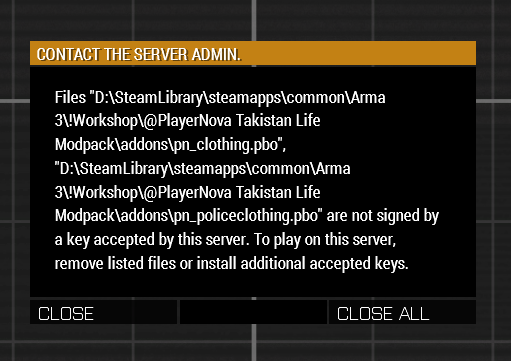
Guys, im having an issue. I've signed some files with a server key and its accepted on every other files, but when I try to join my server, 2 addons aren't taking the key despite using the same key as the other files, any helpers?
wintry tartan
¯_(ツ)_/¯
 jade turret
lol you can post pictures
wintry tartan
Which software you've used to pack the pbo?
harsh hamlet
PBO manager
hearty sandal
jade turret
ill ask someone else
the way the cahnnel works is you post the details of your issue here and people answer if they know
wintry tartan
Oh that's why
Do NOT use PBO Manager to pack
Use at least Addon Builder from Arma 3 Tools to pack
 hearty sandal
to post pictures, you have to post the link to it, direct embed does not work for regular users
wintry tartan
Also, in case you don't know, a PBO cannot have more than 2 Gigs or will fail to sign silently. I don't think it is a case this time though
jade turret
hearty sandal
the way the cahnnel works is you post the details of your issue here and people ...
alright i'll explain
hearty sandal
and you may need to verify yourself at the bot channel 🤔
dont remember if that was requirement
jade turret
https://media.discordapp.net/attachments/1037534430455136316/1038052266567016508/image.png
So camo1 is "PW_A3\dara\Monarch_BW_01.paa"
But what if camo1 has 4 textures to fit on that one vehicle?
 wintry tartan
A selection can have one texture, nothing more or less
 jade turret
oh alright, those names like camo1 can be named anything actually?
hearty sandal
they are selections on the model
wintry tartan
No, a model defines camo1, the exact name should be used
jade turret
so how would i get those names on a model to use it in the config?
hearty sandal
check the original config
wintry tartan
For what purpose? If it is just a retexture, you don't even need to think about it
jade turret
wintry tartan
For what purpose? If it is just a retexture, you don't even need to think about ...
oh alright
so last question
the original config is a BIN file, how do i convert it to CPP
hearty sandal
for retexture you need to just inherit the original class to get all the stuff from it to your new config class that you dont need to change
also retexturing is making a new mod, not altering the original
wintry tartan
An official integrated way is CfgConvert
jade turret
alright, thank you for the help you both, i'll try to make this mod
wintry tartan
But EVERY loaded config in game is always readable in in-game Config Viewer
jade turret
ye
shy knot
Is there a formula for degrees a second for turret traverse?
 nimble sequoia
shy knot
Is there a formula for degrees a second for turret traverse?
nimble sequoia
shy knot
Is there a formula for degrees a second for turret traverse?
It's in radians per second. There are 2 pi radians in 360 degrees.
 tawdry coral
One of the mods I have uses stuff from another mod. One of which is a helicopter. The mod has it's own version of pilots, so the crew is set as such. crew = "NewPilot"; however in game, the driver is 'NewPilot' but the gunners are still old units.
nimble sequoia
tawdry coral
One of the mods I have uses stuff from another mod. One of which is a helicopter...
You also need to define the gunnerType in the Turrets classes.
For example:
crew = "NewPilot";
class Turrets: Turrets
{
    class MainTurret: MainTurret
    {
        gunnerType = "NewGunner";
    };
};```ah, that makes sense 😅
gunnerType is the unit I want in there?
nimble sequoia
Yes, a man class.
tawdry coral
if it's left to "" would it just use the crew of what ever is the current class?
seperate question, is there a way to go back a page in the config viewer? xD
nimble sequoia
tawdry coral
if it's left to `""` would it just use the crew of what ever is the current clas...
Not sure. The NewTurret has gunnerType = ""; so it's possibly not invalid, you'll have to try.
tawdry coral
wait- where would turrets be? 😅
nimble sequoia
tawdry coral
seperate question, is there a way to go back a page in the config viewer? xD
Subscribe and use Leopard's Advanced Developer Tools on Steam - it replaces the config viewer in game with a much better one.
nimble sequoia
Steam Arma 3 workshop, search
tawdry coral
is it client side? Or will I get in trouble for using it on a server? (I can see myself accidently loading it xD)
either way, I'ma use it, but ya know :P
nimble sequoia
General rule, don't load any mods that the server doesn't tell you are ok.
Sensible server owners will have bikey checking enabled which will prevent anyone joining with disallowed mods.
tawdry coral
that's fair
tawdry coral
hia again 😅
So I'd want to do:
class NewHeli : OldHeli {
  ...
  class Turrets : Turrets {
    class MainTurret : MainTurret {
      gunnerType = "NewMan";
    };
  };
};
yea?
That'd make it so it was ONLY changing the turret's man right?
 ashen chasm
if you define all parent classes correctly, then yes
tawdry coral
someone else has defined OldHeli and it's turrets, and that file is a bin
oh actually maybe I should also ask
Is it ok to make something using someone elses stuff like this? 😅
Assuming I will have dependancies and credit and stuff
ashen chasm
you can always browse all loaded stuff via in-game config editor
tawdry coral
oh yea I know.
 fiery anvil
Been having trouble with my Space Marine helmets and setting up other colored variants of them
The 2nd variant always just uses the texture of the 1st one and never what it's supposed to use
hearty sandal
fiery anvil
The 2nd variant always just uses the texture of the 1st one and never what it's ...
does the first one use custom texture or the one defined in the model?
fiery anvil
hearty sandal
does the first one use custom texture or the one defined in the model?
When you ask "defined in the model" do you mean the one I set in Object Builder in the "camo" section?
hearty sandal
yes
though techincally its the opposite way, you set the camo selection to the faces that have that texture
camo selection comes second
and surface can have texture even without camo selection
nimble sequoia
tawdry coral
That'd make it so it was ONLY changing the turret's man right?
Yes, although you will also need some lines before what you have posted to make the OldHeli class and it's turrets available.
As long as your NewHeli has a unique class name (usually each modder or team has a tag, that they put before all their classes, such as uk3cb_newHeli) then your mod requires the existing mod as a pre-requisite and just creates new classes built on it.
There may be some mods that put exceptions on this, so check their license first, but most are happy for you to build on or modify, through code, as long as they are kept as a workshop pre-requisite and not ripped/repacked.
 teal sluice
Can someone explain me this:
In my mpmission I have several GUI settings definied in description.ext. Some went to RscTitles, some are directly into description.ext - why is it?
 kindred viper
What value do I need to change to simply move a part of an MFD/HUD of a vehicle in a certain direction without breaking its dynamic movement?
There's an aircraft which has an incorrectly centred impact point - it points above where the impact actually is. However the MFD itself shows the correct range to where said impact point should be, just not the visual part of it. I want to write a compat that fixes this
 hallow quarry
do we know how much does +25 in armor does. I want to make a vehicle variant and the original has 150 in the "armor =". So I would like to know how much strocnger it would be with 175 armor
hearty sandal
hallow quarry
do we know how much does +25 in armor does. I want to make a vehicle variant and...
The armor value is the hitpoints of the thing. It does not make the armor stronger. Armor penetration properties are baked into the models firegeometry through penetration materials
hallow quarry
οk
so is there a way to calculate in game what will happen
like the vehicle will survive an extra missile
hallow quarry
like a damage calculator
ashen chasm
with the damage calculation spread over at least half a dozen places with not all of them readily available from the game (or game files)? I kinda doubt it, tbh
hearty sandal
Missiles often have far more power than needed for a kill so I don't think armor is the place to do such change. It would also affect other weapons. You may want to look into setting up some sort of damage eventhandler
hallow quarry
oh ok
 worldly crag
Hello to everyone. I'm not a coder but I'd like to find the way to calculate the distance, for each armament (boms/rkt) where a man can stay having minimal damage from indirect hit. I don't know whereto find specific data for each bomb/rkt. I found something here https://community.bistudio.com/wiki/Arma_3:_Damage_Description#IndirectHit but I'm strruggling getting along. a little help please? Thank you in advance
hearty sandal
whats the usecase? It sounds like rather complicated calculation and im not sure if one can even reasonably do so.
perhaps there is some other way to do what you need it for @worldly crag
worldly crag
the use is aimed to find the the minimum distance to stay safe, during a CAS mission, when a bomb hit the target and friendlies are around. Does it make any sense?
hearty sandal
well given that the situation is always moving and even if one calls a strike to X spot that is safe way away, people can move into the danger zone before the strike hits. so that kind of accuracy may not really be worth the effort
worldly crag
Yeah sure . But this is the worst situation. However, we need to start from a certain range. Do you know how to calculate it or where tables of indirect range are for all weapons are?
hearty sandal
I dont and there are no ready tables for that
You can never make it safe as bombs and rockets never hit that accurately either.
worldly crag
weapons accuracy is another important variable but for my purpose I will not take it into consideration assuming that it will always hit the given point.
I know that it is a painful process but I want to go for it. is there any wiki page where to find the list of "cgfAmmo" for each weapon?
hearty sandal
no
dont think so
you can parse such data out of the config with scripting commands
worldly crag
ok thank you so much
 rustic cape
I'm trying to understand the mod support feature of enableDebugConsole
I think if it accepts 2 as a value, it probably also accept 1
but where are we supposed to add this parameter ?
since it is supposed to go in a signed addon, it is not supposed to go in mod.cpp
sooooo.... CfgPatches ?
rustic cape
that is unusual
is there other parameters using this same technique ?
how would be handled multiple mods having this parameter with different values ? Keeping the most permissive one ?
 grand zinc
rustic cape
is there other parameters using this same technique ?
grand zinc
rustic cape
is there other parameters using this same technique ?
yes. Just look at a config dump
grand zinc
rustic cape
how would be handled multiple mods having this parameter with different values ?...
the last loaded mod wins
ashen chasm
highlander.jpg
hearty sandal
 hallow quarry
is there a way to turn the MLRS into a mobile sam
hearty sandal
hallow quarry
is there a way to turn the MLRS into a mobile sam
In theory giving it a new type of weapon that uses AA missiles and sensor capability to lock them on yes.
 tacit zealot
Is it possible to have a weapon with a permanently attached muzzle device not built-in to the model? i.e. it has a sound suppressor attachment that the player cannot remove
hearty sandal
Yes no
 novel lava
...it is? i thought you had to build it into the weapon model to achieve that
hearty sandal
Oh true correct I read the question wrong
tacit zealot
My first thought was that there might be something that "locks" the suppressor slot, similar to how Fighter Pilot helmets have an integrated NVG, but that system is quite different.
shy knot
tacit zealot
Is it possible to have a weapon with a permanently attached muzzle device not bu...
You can and sort of can not. The best thing to do is to make the weapon only use a silenced sound
tacit zealot
Funny thing is - I'm doing the opposite. I want to use a magazine-swapped AK-12 (Apex) and a long suppressor for the barrel to make a fake SVD
shy knot
You can make the suppressor be the only option for the muzzle or make a new class that inherits from the AK and make it have the suppressor by default
tacit zealot
That was my plan to make it default, but that means I need to disable removing it
shy knot
Not sure if that’s possible tbh. Though, I haven’t looked into doing that
hearty sandal
Could perhaps be done through inventory eventhandlers but it's a bit hacky.
shy knot
So, I have a vehicle, it works and everything. The only issue I'm having is that when you place it down in eden, it shows one color but then randomizes to another color
Anyway to stop that so it remains on the color it was spawned as?
hearty sandal
it might inherit a property to do so
shy knot
hearty sandal
it might inherit a property to do so
Could it be the function init vehicle?
hearty sandal
could be. check the vehicles config in game config viewer to see what it has eaten
 stray sage
shy knot
So, I have a vehicle, it works and everything. The only issue I'm having is that...
stray sage
shy knot
So, I have a vehicle, it works and everything. The only issue I'm having is that...
That happens with all assets depending on their config(incl. vanilla assets, commonly can be seen on civilian cars). The reason of difference is because, each time vehicle is created, it goes through a randomization(separately in 3den and on mission start if there is no 3den attribute to manipulate the particular feature of the vehicle, which would be specifically changing the feature after this randomization is done). If you do not want it to happen, you should use
_vehicle setVariable ["BIS_enableRandomization", false];
If you want it never to happen, since it is your vehicle, you could write it into init function of your vehicle and it should be working. If you want particular feature to not be randomized such as color but still keep randomization on animations like hideAnims, then I believe you would need to write a tiny script and config for 3den interface to store the randomized color in 3den and preserve it on mission start.
If this does not solve your problem, then it is probably something else.
 viral dragon
I'm making a simple config mod to switch around some weapon sounds. I have not done this before but I've got it mostly working. However, one entry is giving me trouble:
https://pastebin.com/dPytacPt
In this weapon, I'm overriding the soundSetShot property in the StandardSound property of the Single fire mode. This works fine for other weapons I'm doing the same for. But for this weapon, it generates an error:
No entry 'bin\config.bin/CfgWeapons/US85_MAAWS/Single.SilencedSound'.
Here's the thing: the weapon I'm modifying does not have aSilencedSoundproperty. None of the weapons it inherits from have that property. I know a lot of weapons do, but the original weapon does not, and it did not cause this error before I modified it. Yet, as far as I can tell, I've done nothing to make it think it needs that property when it didn't before. So...I'm confused.
ashen chasm
class BaseSoundModeType {}; always looks sus. Is your intention to clean the contents of that class there? 🤔
viral dragon
I mean, I guess? I just copied that from the JSRS config.
As far as I can see, that class is empty in all cases anyway. (Before I modify it, I mean)
ashen chasm
maybe try to add sounds[] = {"StandardSound"}; into the class Single so it doesn't search for default silenced sound then? 🤔 At least vanilla MRAWS seems to redefine that
and the root Mode_SemiAuto you inherit from defines sounds[] = {"StandardSound","SilencedSound"}; so that's probably where it comes from
viral dragon
The original US85_MAAWS Single class already does that. Shouldn't that be inherited since I don't change it?
As it turns out, no, it is not inherited. My mod is just resetting every property to the Mode_SemiAuto default. That's...bad. I guess it means JSRS is also doing that but that's their problem.
So how do I only insert my modified properties without having to manually write out every property that the original class changes from its parents?
ashen chasm
well, when i test that on my machine (although with merging the config in diag branch) it doesn't seem to rewrite that 🤔 Maybe the loading order is in play here somewhere as well?
viral dragon
I don't really know enough to diagnose that
My mod's requiredAddons includes the addons I'm changing and using sounds from. That should mean my mod is loaded after them...I think.
ashen chasm
yes, it should
viral dragon
Okay, I looked at the other classes I'm changing, and this MAAWS class is the only one that's affected by this. All the others retain their other original properties.
ashen chasm
maybe it has some other inheritance path or something?
like Single being redefined at US85_launcherBase or US85_Launcher_AT level?
leading to class Single: Mode_SemiAuto jumping over that?
as in: it can have no definition in US85_MAAWS config at all and still show up there because it's present in some parent class 
viral dragon
It looks like US85_MAAWS:Single is inherited unchanged from US85_Launcher_AT:Single, which is where the changes are actually made. I don't want to make my changes at the US85_Launcher_AT level, because that would affect other weapons that inherit from it.
ashen chasm
like, for the vanilla, if you enter configfile >> "CfgWeapons" >> "launch_MRAWS_sand_F" >> "Single" into the debug console, you get bin\config.bin/CfgWeapons/launch_MRAWS_base_F/Single output
then you probably need to define US85_Launcher_AT:Single base class, then inherit your Single from that Single 
into something like ```hpp
class US85_launcherBase;
class US85_Launcher_AT: US85_launcherBase
{
class Single;
};
// MAAWS
class US85_MAAWS: US85_Launcher_AT
{
    class Single: Single
    {
        class BaseSoundModeType {};
        class StandardSound: BaseSoundModeType
        {
            soundSetShot[] = {"Launcher_MRAWS_Shot_SoundSet","Launcher_MRAWS_Tail_SoundSet"};
        };
    };
};```
can I make markers for a mission?
 mortal dove
tawdry coral
can I make markers for a mission?
mortal dove
tawdry coral
can I make markers for a mission?
wdym can you?
tawdry coral
sorry. I was wondering why drawIcon wasn't working and was thinking I had to make the texture be in the config or something for it to work. I got it to work however! Thank you ^^
To the AI, Helipads are a special thing that actually is prefered to land on compared to just random ground, right?
How does a helipad become a helipad? I assume something in the config tells the game the object is a helipad?
hearty sandal
it tied to the parent class
all classes under/child of the "default helipad" class
tawdry coral
what is the default class? HeliH?
hearty sandal
dont remember off the top of my head but that sounds familiar
tawdry coral
Maybe CUP is overwriting it then? Idk-
hearty sandal
no they are not
tawdry coral
wait why is this-
Parents: All, Static, Building, NonStrategic, HeliH, Helipad_base_F <- Config Viewer for the vanilla invisible helipad.
HeliH is apparently from addon "CUP_CAMisc"
ashen chasm
the same config can be define in multiple addons. HeliH is present in base 🤷♂️
CUP touches it - CUP shows as the last addon modifying it
tawdry coral
Well, another thing shows A3_(something I forget what 😅 ) and also another addon
so- huh
hearty sandal
many mods do that for one reason or other. it does not matter
for the AI behavior the heliH is the starting point of "this is helipad" detection
 ebon pivot
Is there a mode for CfgGlasses that lets you keep diving facewear on above and beneath water?
 iron wagon
so after some time being away from Arma, I received an error report from a user that my mod comes out with errors on the main menu, and checking myself I found out that it seems my mod now removes all weapons from the game
the error report in question https://pastebin.com/fgwE9WtE
Pastebin
Pastebin.com is the number one paste tool since 2002. Pastebin is a website where you can store text online for a set period of time.
ebon pivot
iron wagon
the error report in question https://pastebin.com/fgwE9WtE
show the config entry for CfgWeapons/arifle_MX_ACO_pointer_F.nameSound'
ashen chasm
looks like some base class got rewritten/cleared/deleted, tbh
ebon pivot
yup
iron wagon
I dont have a config entry for arifle_MX_ACO_pointer_F
iron wagon
I have an entry for Rifle_Base_F
class Rifle_Base_F
{
class GunParticles;
class WeaponSlotsInfo;
};
ashen chasm
well, there you go
ebon pivot
youve not done the inheritance properly for that
ashen chasm
any { without : breaks inheritance 🤷♂️
ebon pivot
you need to find the base class of Rifle_Base_F and inherit Rifle_Base_F from that
class baseclass;
class Rifle_Base_F: baseclass
    {
     class GunParticles;
     class WeaponSlotsInfo;
};```should be roughly how it looks with baseclass replaced with whatever the base class of rifle base is
ashen chasm
seems to inherit from Rifle in vanilla
also that WeaponSlotsInfo looks kinda sus, given that vanilla definition of it is inside Rifle as well and Rifle_Base_F doesn't do anything explicit with it
iron wagon
thank you both, that solved the problem
 tender rain
Anyone know how to make rhs foregrips work on a custom weapon
ashen chasm
For starters you need to have 3 weapon models and classes
And then some property magic to make foregrips point to a proper "sibling" class
And maybe an event handler, but i'm not sure about that
🤔 or maybe the magic actually uses hardcoded classname suffixes, i need to actually chech
ashen chasm
okay, a bunch of extra classes and some properties seem to do the trick: https://sqfbin.com/xapigohejiceziyubiqo
ashen chasm
or i guess you can just add RHS grips into the compatible items list of the UnderBarrelSlot on your weapon (if they aren't already there) if you don't need RHS functionality of changing the weapon class to match the equipped grip (they seem to use it to change the recoil config)
 pallid magnet
Heya palls, i'm considering the possibility of making a mod much like those "eden editor extended objects" types that make it so hidden assets show up in the browser to place down. I'm trying to have the Saigon Embassy from SOG PF. It's possible to spawn a functional one using createvehicle but it's a hassle to then add objects inside/carve out the ground for the basement by loading in the mission every time I make changes.
I'm very much so a script kiddie but I've made configs for stuff like retextures/insignias/music addons. Would that be within my grasp?
I unpacked PBOs of similar mods to see how they pulled it off but I can't seem to get a readable format out of them.
Many thanks for any help!
 opal crater
class whateverIsTheParentClassOfEmbassy;
class embassyPartN: whateverIsTheParentClassOfEmbassy {
  scope = 2;
};
that's basically all you need, just with proper classes.
ashen chasm
the question actually sounds more about multi-object building/object. Kinda like vanilla carrier
or maybe i'm misreading again
hearty sandal
pallid magnet
Heya palls, i'm considering the possibility of making a mod much like those "ede...
its better to create it with scripting as that way you might be able to position it exactly
the reason why its not included in editor is because its not really properly usable without exact alignment
which the editor does not have easy tools for
ashen chasm
well, center object + function(s) to create/update the building around it would work as well. Just like carrier :3
opal crater
yeah
hearty sandal
yeh we just did not have time to set that up
opal crater
Or make it snappable to eachother like Contact platforms
I disagree scripted way is better.
The best way is scripted in editor ;P
hearty sandal
its better from my point of view since I have no time to make any fancy upgrades like that for the DLC 😜
pallid magnet
hearty sandal
its better to create it with scripting as that way you might be able to position...
Yeah as I was told, I understand that 100%
I've used multi-part assets with eyeball alignment/using the translation tools and it's definitely playable. I'm not looking for perfection and I prefer being able to place assets inside in a convenient manner
opal crater
but we're talking mods here ^^
hearty sandal
mods can do only so much in this case as some features might need adding of named selections to the model
opal crater
I don't see need for that in this case.
Snapping can be done with positions in model space
Object that moves other parts with itself carrier style, the same
hearty sandal
Im not against that 😄 but I still believe it needs some points that dont exist to work
at least for easy offset calculation
ashen chasm
big brain move: aling origins of the parts to usable/snappable grid
hearty sandal
nope
they are designed for Terrain use only
and no changes to centering can be done so the map dont break
and well, there isnt really much time to do anykind of changes at all
ashen chasm
nah, it's kind of a joke, since for already existing and delivered assets it'd obviously require to redo the models and everywhere they're used
hearty sandal
the way they are placed for the terrain project the aligning is easy. such tools just dont exist in mission making
pallid magnet
opal crater
```cpp
class whateverIsTheParentClassOfEmbassy;
class embassyPartN: whateverIsTh...
Think I'm too dense to get this working as nothing shows up and the attribute stays 1 in config viewer 
class CfgVehicles;
class land_vn_embassy_01_01: CfgVehicles {
  scope = 2;
};
class land_vn_embassy_01_02: CfgVehicles {
  scope = 2;
};
this is completely wrong
the embassy classes are subclasses of CfgVehicles
class CfgVehicles {
  class properParent;
  class land_vn_embassy_01_01: properParent {
    scope = 2;
  };
};
You can get the parent class of the embassy from config viewer.
pallid magnet
Thanks for taking the time to show me!
tacit zealot
Can I make a missile's guidance start at time after launch? initTime only is when the motor ignites, but I want the missile to track after that.
pallid magnet
So I went ahead and tried declaring the parent class which I think is the 1st entry in here? Then, inheriting from it to set the attribute. No luck with that though 
class CfgVehicles {
  class Land_vn_building_town_base;
  class land_vn_embassy_01_01: Land_vn_building_town_base
  {
    scope = 2;
  };
};
 tacit zealot
Make sure your cfgPatches is set up with the proper required addons?
 summer parrot
Not sure where to put this--I'd like to make a new weapon and ammo type, specifically a smart micromissile that either tracks an IR laser or body heat, with variable effects like AP, HE, and micronuke skinned as selecting some metamaterial nonsense.
For 'simplicity' I think I'd like it to be compatible with the Type 115's underbarrel
pallid magnet
I've read about this yeah... That's what I got on but it's really a shot in the dark at this point
class CfgPatches
{
    class EmbassyModTest
    {
        requiredAddons[] = {"structures_f_vietnam_04"};
    };
};```

From what I've read in this https://community.bistudio.com/wiki/Class_InheritanceGot it working after adding the correct addon entries instead of what I just posted, I'm pretty sure this was the issue. Thanks!
hearty sandal
👌
 delicate cypress
need a bit of help here
i cant embed pics here damnit
1s
https://cdn.discordapp.com/attachments/273493768336965644/1041032398630047825/image.png so in this pic i've used POLPOX's artwork tool to convert to simple object a hemet and "turned on" one of the headlights

is there any way of showing or hiding those "selections" via config?
as in, is there a way I can use that "light_r" name to show the light on or off (only the texture change, I dont want to actually cast light) in the config?
https://cdn.discordapp.com/attachments/273493768336965644/1041033083622785074/image.png now the reason Im asking is because a mod im working on uses these selection things to change the logo of the vehicles depending on the branch

 agile sequoia
In an old Huey mod, the copilot can fire rockets but not the pilot. How do I transfer firing ability to the pilot?
Quite sure there's a config entry I've missed after looking around
delicate cypress
delicate cypress
https://cdn.discordapp.com/attachments/273493768336965644/1041033083622785074/im...
the thing is, that while the logos are defined in the hiddenselections, they are not defined on the "texture" part of the config.
hearty sandal
delicate cypress
https://cdn.discordapp.com/attachments/273493768336965644/1041033083622785074/im...
showiing and hiding the light selections in config for what purpose/ by what condition?
and depends a lot on how the model is made
delicate cypress
hearty sandal
showiing and hiding the light selections in config for what purpose/ by what con...
so basically, the mod im working on has logos for each branch. However those logos for some reason are not hiddenselections. But they somehow can be shown and hidden with the simple object viewer
Ideally, the vehicles of each branch should have their different logos
I'd like to know if its possible to hide/show components (not animations!) like in the simple object viewer via config so I can get the correct icon on the correct faction
hearty sandal
what the simple object viewer does is toggle animations
so those parts should have animations you can toggle via config too
delicate cypress
I tried doing it via AnimationSources, but only the ones on the "Animations" tab worked
the ones in the "selection" did not. I don't know if I need to use a different thing than AnimationSources for those
hearty sandal
no but likley the component system overwrites what you do in animation sources
delicate cypress
is there any way of overiding the component system?
hearty sandal
should be possible to set whatever combination you want as default for each class
delicate cypress
hm. How would I go about it?
Again, ive gotten stuff to appear and disappear with the AnimationSources but this seems to be beyond me
animationList ?
shy knot
agile sequoia
In an old Huey mod, the copilot can fire rockets but not the pilot. How do I tra...
Switch the weapons around
agile sequoia
I'm not too experienced, so I'm not sure which config entry controls that aspect. And goes without saying it doesn't have dynamic loadouts
shy knot
agile sequoia
I'm not too experienced, so I'm not sure which config entry controls that aspect...
There should be a weapons[] line in there
nimble sequoia
How do you change the size of the icon displayed under an asset in the Eden Editor?
It doesn't appear to be mapSize as using values from 0.1 to 1000 made no difference to the icon size.
tawdry coral
Im not sure, but mapSize might be how zoomed in before it is no longer seen? But not sure... 😅
 burnt oracle
Hey so i guess it's here i should ask my question.
So i've seen a few mod modifying the principle interface (idk how is it in english i mean the first interface where you choose to go MP or SP or editor.) I would like to add our unit logo wich would link to our server if you click on it. Does anyone knows how to do that ? I can't find anything on internet..
tawdry coral
nimble sequoia
How do you change the size of the icon displayed under an asset in the Eden Edit...
Is there a size x and size y by chance?
hearty sandal
burnt oracle
Hey so i guess it's here i should ask my question.
So i've seen a few mod modif...
The main menu can be altered via config modding yes. I don't think there is any specific tutorial for that but if you can look up the right config classes to study from the games configs you might be able to figure it out.
 long marsh
hi.
opal crater
burnt oracle
Hey so i guess it's here i should ask my question.
So i've seen a few mod modif...
burnt oracle
opal crater
<https://github.com/ArmaForces/Mods/blob/master/addons/main_menu/CfgMainMenuSpot...
would you explain it to me as if i was 9 yo. ?
Cause i'm really bad at config sadly :/
opal crater
Sorry but no, I'm not in a mindset to explain basics right now. Maybe someone else will be kind enough. 
mortal dove
opal crater
<https://github.com/ArmaForces/Mods/blob/master/addons/main_menu/CfgMainMenuSpot...
omg. there is more than I can do, to purge vanilla content ❤️
 slate viper
Tell me, is there a way to edit the config and apply the settings without restarting the game?
hearty sandal
slate viper
Tell me, is there a way to edit the config and apply the settings without restar...
there is merge config and filepatching that work with the diagnostic exe from dev branch
slate viper
hearty sandal
there is merge config and filepatching that work with the diagnostic exe from de...
How can I run this correctly?
hearty sandal
slate viper
How can I run this correctly?
the wiki pages for the commands should explain how they are used
 echo cedar
when defining weapons for a faction do i use the same class with multiple units?
class DSF_arifle_MSBS65_F: arifle_MSBS65_F
  {
    displayName="Officer"; // From here
    scope=2;
    class LinkedItems
    {
      class LinkedItemsMuzzle
      {
        slot="MuzzleSlot";
        item="";
      };
      class LinkedItemsOptic
      {
        slot="CowsSlot";
        item="optic_ico_01_f";
      };
      class LinkedItemsAcc
      {
        slot="PointerSlot";
        item="acc_pointer_IR";
      };
    }; // To here
// Repeat here?
  };
does not compute
weapon class is a weapon class. It's not constrained to a unit or faction. Multiple units from multiple factions can use the same weapon in their default loadout.
renaming a weapon to "Officer" seems... questionable
echo cedar
ashen chasm
renaming a weapon to "Officer" seems... questionable
yea that didn't register till you mentioned it. fixed now,
 fair oar
Maybe someone here can help me, I tried to make a hidden selection change over an custom attribute in 3den, so that I wont clutter the Texture selection with different registration number variations. What I did is basically run setobjecttexture over the attribute selection.
All works fine when I spawn the unit (a SOG Huey in this case - but I feel like this is a general question and not SOG specific) and I can change the decal in my attributes tab and it stays persistent on mission startup.
But, if I select another color variation over the arsenal, that overwrites my Attribute, I can change it again in 3den but on mission startup it get's overwritten again, it feels like the arsenals texture selection runs after my attribute.
Is there a way to circumvent that?
This is the config I added to my inherited Heli class
 sullen fulcrum
You guys give me pain especially cup config
fair oar
fair oar
Maybe someone here can help me, I tried to make a hidden selection change over a...
Adding postInit = 1; seems to do what I want here, but I don't know if that is an elegant solution?
 wind fog
How do i make helmets, vests and guns placeable in the editor as objects? i did it awhile ago on another mod, but ive forgetton how
tawdry coral
how would I make a sign config wise-
Inherit from House_F? What goes into the requiredAddons?
A3_structures_f?
OH WAIT
 molten musk
wind fog
How do i make helmets, vests and guns placeable in the editor as objects? i did ...
tawdry coral
molten musk
wind fog
How do i make helmets, vests and guns placeable in the editor as objects? i did ...
tawdry coral
i forgot I had to put the existing object at the top 😅
hearty sandal
first pinned message has the A3 full required addon name
 ionic warren
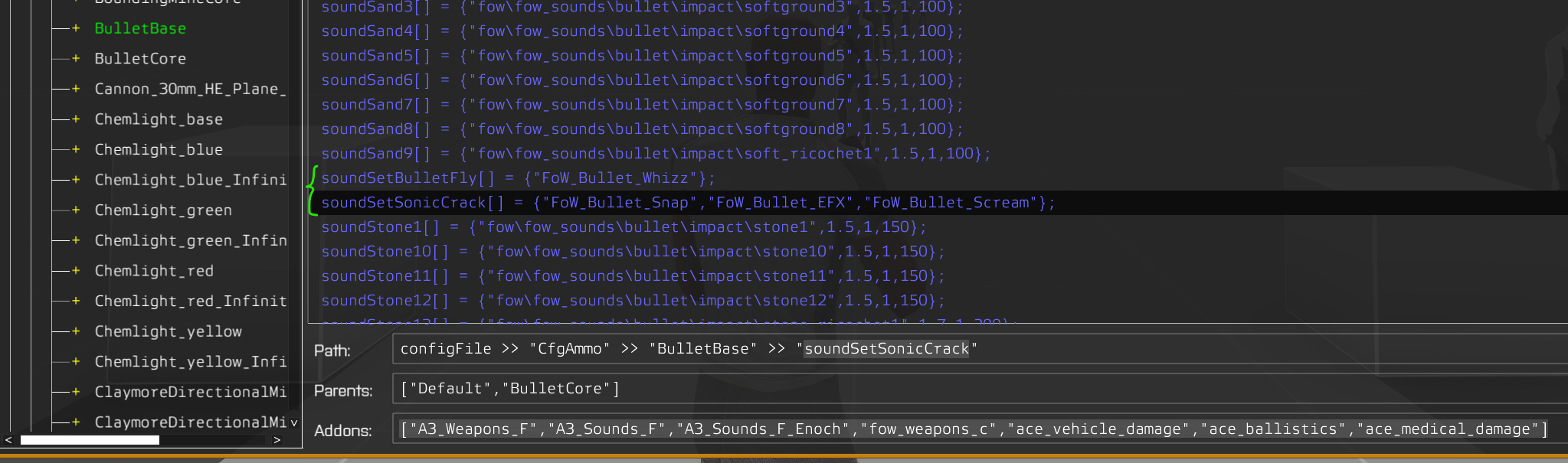
How can I basically undo a config from a mod?
I want to not have this config on soundSetBulletFly and soundSetSonicCrack
 ashen chasm
i doubt merging config is revertible. Or preventable. So i can only assume re-applying proper values afterwards is the way. Or modifying the offending mod if you have the access to its sources. Or removing the offending PBO if mod author is a sensible person and moved the overrides to a separate config and PBO.
ionic warren
Could I perhaps just recreate the bulletBase config he created, but omitting the those values?
And putting that .pbo as a requirment, so it loads after
ashen chasm
only replacing the properties in question should be enough
ashen chasm
🤷♂️ load without the offending mod, get the values that work for you
ionic warren
I'll check, but I think this is blank on BulletBase
ashen chasm
vanilla is hpp soundSetBulletFly[]= { "bulletFlyBy_SoundSet" }; soundSetSonicCrack[]= { "bulletSonicCrack_SoundSet", "bulletSonicCrackTail_SoundSet" }; if my dump isn't derped
ionic warren
ashen chasm
vanilla is ```hpp
soundSetBulletFly[]=
{
"bulletFlyB...
For bulletBase?
interesting
yep, that's right
I'll see if I can do the thing, thanks
hearty sandal
We don't harass people here.
 calm pilot
Hi folks, i don’t know where to post this question: where can i find some good tutorial on how to create a faction mod without using alive orbat?
 stuck nest
Would it be possible through config editing to make the camera under the aircraft of the FA 181 wasp 2 in jets dlc have stabilization on the pilot camera?
wintry tartan
Yes, but doesn't have the stabilized camera already?
stuck nest
let me try again and make sure it wasn't a fluke
wintry tartan
It can be enabled/disabled by a key that I don't remember rn
stuck nest
i'll check under controls first before proceeding
ctrl +T seems to have did it, disregard ty @wintry tartan
wintry tartan
Better safe, better safe
stuck nest
I had absolutely no idea that was an option, been messing with jets for a few months now even, i feel silly, thanks lol
wintry tartan
No worries. It happens when it happens
hearty sandal
calm pilot
Hi folks, i don’t know where to post this question: where can i find some good t...
undortuntalely like with many specifc things, there are not tutorials for that. It comes down to understanding how config works and then looking into how vanilla configs are made and then recreating that in your mod as you want to make it
calm pilot
hearty sandal
undortuntalely like with many specifc things, there are not tutorials for that. ...
Yes i’m seeing some of this stuff between mods, especially checking GMX factions made by the GM team
Alright then, so i will have to slowly figuring out how to do
 unreal heron
hearty sandal
We don't harass people here.
unreal heron
hearty sandal
We don't harass people here.
Wa? What did i say
hearty sandal
unreal heron
Wa? What did i say
something related to someones profile picutre. Best to always consider twice what you write if you cant remember
sullen fulcrum
unreal heron
Wa? What did i say
Heisenberg grindset
shy knot
I setup my turret the exact same as a previous one and in third person, the view will rotate. But, it won't in first person
shy knot
Nvm
echo cedar
G'day all
How do i get an item thats in a players inventory to add an addAction to the player with the item?
i have an item config that is setup and the item is ingame, now i want it to add a addAction to the player which will call a script added by another mod
shy knot
echo cedar
G'day all
How do i get an item thats in a players inventory to add an addActio...
EventHandler I think
 wintry fox
How do you add the faster swimming to a uniform?
Like the vanilla wetsuits for example
Like what all would you add to the config
I've been looking at some uniforms from a mod and they all have this uniformType = "Neopren"; line. Googling that brought up a type of rubber that's used in swimsuits, is that it?
 wheat sluice
Yes.
    class U_MyUniformClass: Uniform_Base
    {
                ...
        class ItemInfo: UniformItem
        {
                        ...
            uniformType = "Neopren";
                        ...
        };
    };
Specifically you add it to the ItemInfo class.
wintry fox
Alright cool, saved me just compiling the mod just to see if that was it lol, appreciated!
hallow quarry
is there a place where I can find the aggressor helmet config
shy knot
hallow quarry
is there a place where I can find the aggressor helmet config
Config viewer in game
shy knot
hallow quarry
I may need some help to find the hidden selections tho
Should be listed as hiddenSelections[]
It’s alphabetical
 vagrant idol
then there are no hiddenselections for that helmet
ashen chasm
O_o what for, though? If the config isn't set up for hiddenSelections, the model isn't likely to support them either
wheat sluice
The Avenger Helmet (H_HelmetAggressor_01_F.p3d) only uses one selection (camo). It's the same for the variant with a cover (h_helmetaggressor_01_cover_f.p3d).
You can find its config in A3_Characters_F_Enoch_Headgear. Its config.cpp is located in Enoch\characters_f_enoch\headgear.
hallow quarry
I also have another question when making a uniform based on the vanilla one who do I call in cfgVehicles
cause I know I need the entity both in cfgWeapons and vehicles
nimble sequoia
Ghost Busters
 north sluice
Is there a way to edit the speed at which base arma sources play?
For example im trying to link an animation to the wheelL and wheelR sources of a tank but it plays too quickly for my liking.
Ive tried toying with the physX to make wheel rotation slower and attempting to inherit from the base sources but to no avail
hearty sandal
north sluice
Is there a way to edit the speed at which base arma sources play?
For example i...
is itt for the actual wheels or some other part
shy knot
north sluice
Is there a way to edit the speed at which base arma sources play?
For example i...
Either wheel MOI or edit the rad value
north sluice
hearty sandal
is itt for the actual wheels or some other part
Actual wheels. I want to apply an animation that plays in lieu if the track animatioms
north sluice
shy knot
Either wheel MOI or edit the rad value
Rad value of the individual wheels?
shy knot
north sluice
Rad value of the individual wheels?
Dont you have wheel animations in the model.cfg?
class wheel_koll1
            {
                type="rotationX";
                source="wheelL";
                selection="koll1";
                axis="";
                sourceAddress="loop";
                minPhase=0.5;
                maxPhase=1;
                minValue=0.5;
                maxValue=1;
                memory=0;
                angle0=0;
                angle1=-6.283185;
};```Not quite. I used the animTocfg blender tool to export animations for bones so they are all direct translations of bones
hearty sandal
north sluice
Not quite. I used the animTocfg blender tool to export animations for bones so t...
that is meant for more elaborate animations
wheels and most other engine driven animations should be done with procedural animation classes like in the samples
you will never get the wheel rotation match with direct translation
north sluice
Gotcha, will adapt it then
nimble sequoia
north sluice
Actual wheels. I want to apply an animation that plays in lieu if the track anim...
If you're referring to the speed at which the tracks rotate on tanks, then you adjust this uv animation with the config parameter tracksSpeed. Assuming you have the physx wheels correctly defined (wheelCircumference), you will get a perfect match between wheel rotation over the ground and tracks that follow in synchronisation.
north sluice
nimble sequoia
If you're referring to the speed at which the tracks rotate on tanks, then you a...
Thanks! the wheelCircumference was the thing I was looking for. It wasnt on the wiki so glad to have found it
nimble sequoia
Yeah, physx uses purely code values for it's calculations.
 icy coral
im running into a problem with our APC atm, It only starts firing at enemy Vehicles if they are really close to Target 30m or closer. Weapon and Ammo is all inheriting from Vanilla. What makes it completly strange is that it fires normal on Air Units there the Range doesnt matter really. Any Ideas ? i also already tried just giving it Vanilla Weapon and ammo but same problem with that.
 lime knot
Any tips on changing the arma character model? Going from a human to a more "robotic" model that players can spawn in? Keeping the same form and animations but change the physical shape itself.
shy knot
icy coral
im running into a problem with our APC atm, It only starts firing at enemy Vehic...
Have you edited the firemodes at all
wheat sluice
hallow quarry
cause I know I need the entity both in cfgWeapons and vehicles
You don't need to reference the vanilla uniform classes directly in most cases. It's simpler to just create your own custom uniform class in CfgVehicles instead and set the scope to private so that the dummy uniform class won't be visible in Zeus or the editor. The advantage of this approach is that it gives you more control over the uniform's attributes and minimises the risk of conflicts with other mods if they happen to replace or inherit the same things from vanilla.
So, for example if you wanted to make a custom version of the NATO Combat Fatigues that has zero weight then:
    class U_B_MyCombatUniform: Uniform_Base
    {
        author="Gamenator";
        scope=2;
        displayName="Combat Fatigues [NATO] (MTP, Light)";
        picture="\A3\characters_f\data\ui\icon_U_B_CombatUniform_mcam_ca.paa";
        model="\A3\Characters_F\Common\Suitpacks\suitpack_universal_F.p3d";
        hiddenSelections[]=
        {
            "camo"
        };
        hiddenSelectionsTextures[]=
        {
            "\A3\Characters_F\Common\Suitpacks\data\suitpack_soldier_blufor_co.paa"
        };
        class ItemInfo: UniformItem
        {
            uniformModel="-";
            uniformClass="Uniform_B_MyCombatUniform";
            containerClass="Supply40";
            mass=0;
        };
    };
...where Uniform_B_MyCombatUniform is the name of your custom uniform class in CfgVehicles.
In CfgVehicles...
    class Uniform_B_MyCombatUniform: B_Soldier_F
    {
        scope=1;
        scopeCurator=0;
        uniformClass="U_B_MyCombatUniform";
        // blah blah blah all your uniform visual stuff goes here like wounds, hiddenselections, etc.
    };
Needs custom robot looking character model.
icy coral
shy knot
Have you edited the firemodes at all
No like I said I also tried it with a vanilla weapon and ammo as entry and it still had the problems. It tracks the target but doesn’t shot
icy coral
No it’s pointing normal direction
It’s weird, turret config looks fine, Ai aims at the target but just doesn’t shot. If a player is gunner everything works normal
nimble sequoia
icy coral
It’s weird, turret config looks fine, Ai aims at the target but just doesn’t sho...
What is the armor value of your vehicle? Try lowering it.
icy coral
Will Check that later when I’m at my pc
hearty sandal
icy coral
It’s weird, turret config looks fine, Ai aims at the target but just doesn’t sho...
Is the gunner proxy also aligned with it?
icy coral
Yes will check it again but should be
icy coral
armor is 450 so shouldnt be that
icy coral
will do
nimble sequoia
just a hunch, might not work
icy coral
didnt change anything :/
still tracking the target but not shooting
gunner proxy is aligned to turret
ifrit was 400m away, vehicle doesnt shoot but tracks it, ifrit is 30m infront of the vehicle and blasts it.
with a enemy heli in the air it doesnt matter, the apc is shooting at it even if its 400 meters away
nimble sequoia
It's to do with relative cost/threat/armor values of targets and weapons
icy coral
i lowered the cost of ammo to 1
to check if he fires then but no
The vanilla apcs are engaging just normal
 hoary mirage
So I'm trying to create a config for some custom uniforms for my unit and I'm running into an undefined base class "UniformItem" whenever I try to load it, I've defined the class and everything, and google turned up nothing useful
class CfgPatches {
    class TFF_Uniforms{
        units[] = {
            "TFF_Rifleman_Winter"
        };
        weapons[] = {};
        requiredVersion = 0.1;
        requiredAddons[] = {
            "A3_Characters_F",
            "A3_Characters_F_Exp",
            "A3_Data_F",
            "A3_Data_F_Exp"

        };

    };
};

class CfgVehicles{
    class B_CTRG_Soldier_F;

    class TFF_Soldier_Winter_Base : B_CTRG_Soldier_F{
        author = "Task Force Fenris";
        scope = 0;
        displayName = "Rifleman";
        uniformClass = "TFF_Uniform_Winter";
        faction = "TFF_Faction";
        vehicleClass = "TFF_Men_Winter";
        hiddenSelectionsTextures[] = {"TFF_Uniforms\data\Field\Winter\TFF_Uniform_A_Winter.paa"};
    };

    class TFF_Rifleman_Winter : TFF_Soldier_Winter_Base
    {
        author = "Task Force Fenris";
        scope = 2;
        displayName = "Rifleman";
        uniformClass = "TFF_Uniform_Winter";
        hiddenSelectionsTextures[] = {"TFF_Uniforms\data\Field\Winter\TFF_Uniform_A_Winter.paa"};
    };
};

class CfgWeapons
{
    class Uniform_Base;
    class UniformItem;

    class TFF_Uniform_Winter : Uniform_Base {
        author = "Task Force Fenris";
        scope = 2;
        displayName = "TFF Field Uniform A - Winter";
        picture = "\A3\characters_f_exp\BLUFOR\data\ui\icon_U_B_CTRG_Soldier_F_ca.paa";
        model = "\A3\Characters_F\Common\Suitpacks\suitpack_original_F.p3d";
        hiddenSelections = {"camo"};
        hiddenSelectionsTextures = {"TFF_Uniforms\data\Field\Winter\TFF_Uniform_A_Winter.paa"};

        class ItemInfo : UniformItem {
            uniformClass = "B_CTRG_Soldier_F";
            containerClass = "Supply40";
            mass = 40;
        };
    };
};
you miss [] in the uniform config definition. Sounds strange, but fixing that seems to allow the config file to load in my testing
as in hiddenSelections[] and hiddenSelectionsTextures[]
and uniformClass = "B_CTRG_Soldier_F"; in "CfgWeapons" >> "TFF_Uniform_Winter" >> "ItemInfo" should point to "TFF_Rifleman_Winter" instead
hoary mirage
I'll try that, thanks
hallow quarry
I want to add the ones from cup
shy knot
hallow quarry
I want to add some scopes on the Promet
Create either a custom promet or override the base one and add scopes
wintry fox
Can only one unit correspond to a uniform class?
I have two units that have "BNA_KC_Uniform_Trooper" set as their uniformClass; however, only one is showing up in the Eden Editor. Is it because they both have the same uniform class or is it possibly because of another error?
shy knot
wintry fox
I have two units that have `"BNA_KC_Uniform_Trooper"` set as their `uniformClass...
Uniform class corresponds to what uniform that unit is wearing
wintry fox
That's what I had presumed, but when I had two units who both had the same uniform, only the first appeared
The uniform that the first unit is wearing does have an ItemInfo class that has a uniformClass that specifies the unit that wears it, is it because of that?
wintry fox
shy knot
Uniform class corresponds to what uniform that unit is wearing
Would I just have to make a copy of the uniform and override the ItemInfo class to give it a different uniformClass?
I work on this mod with another developer, who had done most of the work that is currently in the mod before I joined. I noticed that the textures for each uniform are also set in the unit's class, instead of the uniform class itself, is that normal?
shy knot
wintry fox
Would I just have to make a copy of the uniform and override the `ItemInfo` clas...
You need to edit anything you want changed
So, if it’s inheriting from the previous uniform, it’ll have the same item info
wintry fox
Alright, that's stuff I knew already (been doing a bit of configging already), but hadn't come across having multiple units wear the same uniform yet
I noticed that the textures for each uniform are also set in the unit's class, instead of the uniform class itself, is that normal?
Was also curious about this, as this seems odd to me if this is how uniform textures are set normally or if this was just a choice by the other developer
I guess I had just done something wrong, as the new unit has the uniform and is working properly
vagrant idol
    class FakeMagazine;

    class GH_DummyFood: FakeMagazine
    {
        author = "honger";
        scope = 2;
        scopeArsenal = 2;
        displayName = "[GH] DummyFood";
        picture = "\vn\weapons_f_vietnam\ui\icon_vn_prop_drink_01_ca.paa";
        model = "\A3\Structures_F_EPA\Items\Food\BottlePlastic_V2_F.p3d";
        icon = "iconObject_circle";
        descriptionShort = "A bottle you can drink out of.";
};``` why isn't this showing up in Arsenal? What do I have to add to make custom magazine appear there? Do FakeMagazines have hardcoded the visibility parameter so it's impossible to overwrite them?I can spawn the magazine through console so there are no errors, it simply does not show up in Arsenal
ashen chasm
the arsenal seems to filter out magazines with type = 0, find a proper value for that, i suppose
both 1 and 131072 seem to place newly created item into the "All magazines" category in Arsenal
vagrant idol
alright, thx
ebon pivot
Is there any way to make units keep their NVGs and/or backpack appearing on their head when not in use in a vehicle?
 outer wyvern
Hello, Is my editorPreview config correct? if my mod structure like this
editorPreview = "\MP_Group_M_faction\MP_GroupM_Data\ptl.jpg;"
└📁@MyModName
⠀└📁Addons
└ MP_Group_M_faction.pbo
⠀└🗒️config.cpp
⠀└📁MP_GroupM_Data
└ 🖼️ ptl.jpg
hearty sandal
No
shy knot
outer wyvern
Hello, Is my editorPreview config correct? if my mod structure like this
```edi...
Needs to be off your source folder
wintry fox
Hello it's me again
I was setting up the inventories for some units in config.cpp, and the other developer I work with created some shortcuts to use when giving multiple of the same item, like this:
#define ITEM_2 (a) a, a
#define ITEM_3 (a) a, a, a
#define ITEM_4 (a) a, a, a, a
#define ITEM_5 (a) a, a, a, a, a
#define ITEM_6 (a) a, a, a, a, a, a
#define ITEM_7 (a) a, a, a, a, a, a, a
#define ITEM_8 (a) a, a, a, a, a, a, a, a
#define ITEM_9 (a) a, a, a, a, a, a, a, a, a
#define ITEM_10(a) a, a, a, a, a, a, a, a, a, a
I added the #defined ITEM_10 line, but it appears to only give 9 of whatever item is substituted for a.
My first question is, is there a better way to do something like this besides this large block? If not, is there a reason as to why it only gives 9 of whatever item instead of 10? I checked their uniform and vest (these particular units did not have a backpack, and still had plenty of space) and they only had 9 of the given item
Looking again, it appears to only be with ammo, and not other items, so I think it may be adding the magazine to the gun, hence why there's 9 in the bag and 1 in the gun itself
wintry fox
Yeah that's what is was
 somber fiber
Hi, how i can tweak a vehicle mod to make them more "bulletproof" in the window area ?
hearty sandal
somber fiber
Hi, how i can tweak a vehicle mod to make them more "bulletproof" in the window ...
unfortunately its tied to the material used in the models glass parts and cant be altered
you could create invisible blocks with whatever material you deem necessary and attachTo them over the windows in vehicles init eventhandler
somber fiber
hearty sandal
you could create invisible blocks with whatever material you deem necessary and ...
Thanks for the answer. I have to look a it 😉
hearty sandal
a bit hacky way but should work
wintry fox
How can you inherit from classes defined in a header file?
I used a header file to reduce the number of lines in my main config.cpp file; however, I still want to inherit from those classes. I added an #include header.hpp at the top of my file (which is also a header file) but when launching the game, it gives a "Preprocessor failed with error - Invalid file name(empty filename)" warning.
When googling the warning, I found this page that says that it's caused from having an include in a header file:
https://epochmod.com/forum/topic/37470-warning-message-preprocessor-failed-with-error/
Realized I was just dumb and didn't put the filename in parenthesis, but I'm now getting an error saying that a class is already defined, but it's only defined once throughout any of my files
hearty sandal
wintry fox
Realized I was just dumb and didn't put the filename in parenthesis, but I'm now...
quest completed! 👍
and it is somewhere twice if it says it is
you just did not find it yet
the problem of include is that these can be difficult to find
try notepad++ and find in files tool
wintry fox
I use VS Code, which has the same tool, and these are the only two results. One of which being the file that it is defined in, and the second being cfgPatches

The line that it says the error is on doesn't even make sense. It says the error is on line 19 of rank_units.hpp, but this is line 19

@hearty sandal do you have any ideas?
hearty sandal
whats the exact error and where does it pop up?
wintry fox
Happens after clicking play

I made sure that all of my files were saved and recompiled the pbo to see if maybe I just forgot to do that, error still occurs
Bit more info on some files
rank_units is just a header file that defines a unit for each rank (in an Arma unit) that can be placed in Eden/Zeus.
// rank_units.hpp
class BNA_KC_Unit_CR: BNA_KC_Unit_Trooper
{
  // unit inventory, items, etc.
};

class BNA_KC_Unit_SCT: BNA_KC_Unit_Trooper
{
  // unit inventory, items, etc.
};
// more units below here, but you get it
There's a file called custom_units that defines units for people who have custom helmets and armor, which uses the classes from rank_units as a base.
// custom_units.hpp
#include "rank_units.hpp"  // File containing all of the rank unit classes
class BNA_KC_Unit_Keeli: BNA_KC_Unit_CMD
{
  // custom armor, helmet, etc.
};
header file isnt really a Arma construct. a HPP file can be named anything and can be included pretty much anywhere
even the file extension can be anything. HPP just have been adopted for convenience sake
include in arma context means the file is injected into where ever it is included in at runtime
and if you have same class name twice somewhere they will conflict
so somewhere in the config.cpp together with the included files that class appears twice
if you want debug on packing stage Id recommend using Mikeros tools and PboProject from there
wintry fox
Ah I see, I primarily use Python, so I was more in the mind set of how import works
hearty sandal
Arma syntax is more C++ style if I recall right, but not really same either
but yes, pythons import is very different
wintry fox
Yeah rank_units is included the in the main config.cpp file. After removing the include at the top I realized I was kind of back at my original problem. Took another look at my config file and realized that custom units is included before the ranks, hence the undefined error
The joys of programming
Anyways thank ya Goat! Appreciate the help, you guys here are always super helpful for scripting / config making / Arma-ing
hearty sandal
wintry fox
Anyways thank ya Goat! Appreciate the help, you guys here are always super helpf...

echo cedar
what is this reffering to.
No Entry 'bin\config.bin/CfgWeapons/iteminfo.scope'
im also getting:
No Entry 'bin\config.bin/CfgVehicles/ItemCore.side'
hearty sandal
You've created vehicle classes called iteminfo and itemcore and they lack entry side.
 sacred gate
Hi. I have a like a garage gate. Currently I'm just hiding this, but I've seen, that there is an animation type, where the texture just gets smaller like the bottom of the gate just "pressing" into the upper half. Has anyone an idea how this animation type is called?
 upper sluice
hearty sandal
Arma syntax is more C++ style if I recall right, but not really same either
upper sluice
hearty sandal
Arma syntax is more C++ style if I recall right, but not really same either
Arma's language is just Arma isnt it
Similar to a few things but not quite the same?
hearty sandal
yes
upper sluice

ashen chasm
flashbacks of inserting intermediate hidden base class to have inheritance chain deep enough to actually be able to edit the deeply nested subclass
upper sluice
I would like to add two reserve racks/magazines of missiles to a plane, how is this handled? I'm not seeing documentation on how reserve magazines are handled at all, and google is no help
Looking at another vehicle, it looks like I just repeat the entry into magazines[]?
hallow quarry
does anyone know the cfgvehicles needed to reskin the aaf officer uniform and the aaf pilot coveralls
hearty sandal
you can open the config viewer to a specific units config in the editor and see their class
hallow quarry
what shall I be looking for specifically
cause I put I_Soldier_universal_F and I_officer_F
first had textures messed up and second didn't change the uniform
hearty sandal
you create new classes instead of try alter the original ones
check the wiki for config inheritance page and the character encoding guide
hallow quarry
ok
upper sluice
How do you adjust time between bursts when doing a burst weapon?
Do reloadTime in both the weapon and the burst classes?
wheat sluice
reloadTime only needs to be adjusted in the weapon's Burst class.
 crimson charm
Trying to look up how to add extra entry to a vehicles texturesources. Not really finding much luck. Trying to add a custom skin for an aircraft to be available at the "apperences" entry.
I am trying to apply it to the Phantom4 with base classname: vn_air_f4c_base.
As the SOG dlc already have the config with textureSources I was trying to add it with:
class CfgVehicleTemplates
{
  class vn_air_f4c_base;
  class vn_air_f4b_base_custom: vn_air_f4c_base
  {
    class textureSources
    {
      // This texture source will be available for every defined factions
      class custom_skin
      {
    // Display name of the texture
    displayName = "custom_name";
    // Author of the texture
    author = "author";
    // Paths to the texture files, in the same order as the hidden selections
    textures[] = { "data\vn_air_f4b_ext_01_co.paa" };
    // This source should be available for the following factions
    factions[] = {"B_MAVC"};
      };
    };
  };
};
But it doesn't seem to work. Any help appreciated. Essentially trying to make a custom skin that can be selected and applied via the virtual garage "apperences" tab.
 gleaming sentinel
crimson charm
Trying to look up how to add extra entry to a vehicles ``texturesources``. Not r...
gleaming sentinel
crimson charm
Trying to look up how to add extra entry to a vehicles ``texturesources``. Not r...
It looks like your texture path is wrong, it should look like this textures[] = {"\PBONAME\data\vn_air_f4b_ext_01_co.paa" };
hearty sandal
configCppFolder\data\texturename_co.paa might be better since pboname does not necessarily say anything to new folks,.
crimson charm
gleaming sentinel
It looks like your texture path is wrong, it should look like this `textures[] =...
I had it packed into a template to test. hence the path.
But when testing and checking the config viewer my entry does not appear as one of the texturesources on the baseclass.
I assume the config entry would show even if the path is wrong, when looking in the config viewer.
upper sluice
wheat sluice
*reloadTime* only needs to be adjusted in the weapon's Burst class.
Just saw this, so if I am intending to have the rounds come out rapidly but have like a 3.5s pause between bursts, I would be using this implementation?
hearty sandal
upper sluice
Just saw this, so if I am intending to have the rounds come out rapidly but have...
this is not as easy to do as the weapons dont have feature for cooldown between bursts
is it a hand held weapon or vehicle weapon?
hearty sandal
in vehicles this is done by simply having magazine the size of the burst and handling the cooldown with magazine reload
upper sluice
Thats what I feared, and what me and my partner kinda inferred looking at vanilla burst patterns
hearty sandal
then you will need to do more scripting to disable firing in certain conditions
upper sluice
Considering the use case of the weapon, its just not worth the effort
I'll look into that for my next project though, trying to make an aircraft fire from all four barrels at once on CD
The Lascannon was just done so that one of our members had something he enjoyed to practice texturing on
hearty sandal
there are few ways multi shot things work just fine
upper sluice
Have you touched the AOD Xiphon much?
hearty sandal
no, just seen pictures
upper sluice
It has four LC barrels so the intent is to add a burst that shoots all four, and a full auto that shoots at 4x the current semi rate.
It looks like one of those simple yet semi-complicated projects
Since I dont want the burst spammable
More than likely it'll just be a separate weapon and I'll just call the magazines heat sinks
hearty sandal
vehicles are bit easier for that stuff
 pallid sierra
what can I use in a config string to do a line break?
hearty sandal
was it \
pallid sierra
I should say visible line break, \ usually is just for code organization... This is what I'm doing currently
    class hyp_armaRespawn
    {
        title = "/*------------------------------------------------------------------\
            $STR_HYP_PARAMS_ARMARESPAWN_MENUTITLE\
            ---------------------------------------------------------------------*/";
        texts[] = {""};
        values[] = {""};
    };
I tried \n but it errors out
just trying to make things to break up the params menu
pallid sierra
I'm not, thats why i was wondering if you could lol
it might require single line
but anyways, it looks like it won't pull in that string like that anyways and I have to add the /*----- stuff to the string table itself
unless i do some sort of macro to combine them?
 heavy marlin
Hey Ansible2, id love to get in contact with you to ask a few questions about how the HEV patch functions behind the scene, to help us replicate the effects of your patch for our new pods.
 modest compass
How can I get the front of the car to lift when I step on the gas?
There is damper animation, but what should I pay attention to in the config?
hearty sandal
front of the car to lift?
damper animation is for contact with gound
why would the front lift?
nimble sequoia
It's correct that the front of the car should lift during acceleration, due to the torque generated by the wheels on the ground.
If you see no lift, or "dip" when braking hard, your damper spring strengths in class Wheels {} might be too high.
 modest compass
hearty sandal
https://tenor.com/view/car-gif-9237329
modest compass
hearty sandal
https://tenor.com/view/car-gif-9237329
No problem 😂
 karmic fjord
does anyone know how to add a overlay on goggles like is done with by the blindfolds in contact?
cheers
vagrant idol
karmic fjord
does anyone know how to add a overlay on goggles like is done with by the blindf...
https://community.bistudio.com/wiki/Arma_3:_CBRN#Facewear_Overlays
"YourLayerName" cutRsc ["RscBlindfold", "PLAIN", -1, false]; //Overlay on
"YourLayerName" cutText ["", "PLAIN"]; //Overlay off```oh wait, misread your message - you would have to define your overlay in config and then use same thing as the code above
karmic fjord
cheers
vagrant idol
https://community.bistudio.com/wiki/Arma:_GUI_Configuration here's everything about rsctitles, yours would probably require to have the text parameter declared with picture path
 gilded jungle
is it possible for an npc to be a driver and a turret gunner? with the gun set to 360 degrees?
nimble sequoia
Drivers can have weapons but they're not separately steerable from the vehicle.
NPC's can be drivers and turret gunners.
 velvet laurel
Not sure if this is the right channel for this, but I am trying to make a custom custom skeleton. I think I've got it mostly correct but I'm sure there's something I've either missed or am doing incorrectly. When I have the config all written up, it shows up like this in game. The model just doesn't load in. I have tried it on a different skeleton and it does load in (incorrectly though as there are some shared and non-shared bone names, see pic 2). Pic 3 is the model in object builder and how it should look. any advice/points/ideas?


 sullen fulcrum
@ebon pivot Out of these which would be classnameparent ["O_MBT_02_base_F","MBT_02_base_F","Tank_F","Tank","LandVehicle","Land","AllVehicles","All"] the first one is the actual classname and the parent would be MBT_02_base_F?
ebon pivot
O_MBT_02_base_F is the classname of your vehicle? Shouldn't be
Should be O_MBT_02_cannon_F
then parent is the base_f
so should look like
class CfgPatches {
  class yourfantasticmod {
    author = "you";
    requiredAddons[] = {
      "A3_Data_F_AoW_Loadorder"
    };
    requiredVersion = 1;
  };
};

class CfgVehicles {
  class O_MBT_02_cannon_F : O_MBT_02_base_F {
    hiddenSelectionsTextures[] = {"yourmod\data\tex1.paa", "yourmod\data\tex2.paa", "yourmod\data\tex3.paa"}
  };
};```Thank you so much ill let you know if i get it working. Currently at the point where i thought i understood what i was doing now slightly more lost than i was before
ebon pivot
welcome to modding in arma 3
all this should be inside a config.cpp, which should be inside a folder named @yourmod which contains a data folder with tex1.paa, tex2.paa, tex3.paa
sullen fulcrum
now if i wanted to reference a classname from a mod say RHS how would i tell it the directory to check @ebon pivot
ebon pivot
sullen fulcrum
now if i wanted to reference a classname from a mod say RHS how would i tell it ...
Same thing, just add the rhs pbo name to requiredAddons
You'll need to look in the mod files for that or use advanced developer tools config viewer instead
sullen fulcrum
So i already have a config and a bunch of assets can i add it to the same mod as my patch mod? Wait one and ill send a block and let me know if you think itll work
ebon pivot
Yes though it'll add a dependency on the rhs mod
sullen fulcrum
class B_G_Offroad_01_F;
    {
        crew = "Custom_Uniform_TShirt";
        side = 1;
        scope = 2;
        faction = "SBR_Faction";
        displayName = "SBR Offroad 4x4";
        hiddenSelections[] = {"Camo"};
        hiddenSelectionsTextures[] = {"SBR_Addons\Data\offroad_base_co.paa"};
        class EventHandlers
        {
            init = "(_this select 0) setVariable [""BIS_enableRandomization"", false];";
        };
};```needs to inherit from its parent class
class B_G_Offroad_01_F : parentclass like with the tank
sullen fulcrum
class B_G_Offroad_01_F : B_G_Offroad_01_F
ebon pivot
You can just place in 3den and right click and select find in config viewer
sullen fulcrum
Can i send my whole config? It started as a template and im working off it a bit, everything seems to work but the vehicle skins
idk if im allowed to send files
    class LandVehicle;
    class B_G_Offroad_01_F;
    class B_G_Offroad_01_armed_F;
    class B_MRAP_01_F;
    class B_MRAP_01_HMG_F;
    class B_Heli_Light_01_F;
    class Custom_Offroad_F: B_G_Offroad_01_F
    {
        crew = "Custom_Uniform_TShirt";
        side = 1;
        scope = 2;
        faction = "SBR_Faction";
        displayName = "SBR Offroad 4x4";
        hiddenSelections[] = {"Camo"};
        hiddenSelectionsTextures[] = {"SBR_Addons\Data\offroad_base_co.paa"};
        class EventHandlers
        {
            init = "(_this select 0) setVariable [""BIS_enableRandomization"", false];";
        };
    };
    class Custom_Offroad_HMG_F: B_G_Offroad_01_armed_F
    {
        side = 1;
        scope = 2;
        crew = "Custom_Uniform_TShirt";
        faction = "SBR_Faction";
        displayName = "SBR Offroad 4x4 (HMG)";
        hiddenSelections[] = {"Camo"};
        hiddenSelectionsTextures[] = {"SBR_Addons\Data\offroad_base_co.paa"};
        class EventHandlers
        {
            init = "(_this select 0) setVariable [""BIS_enableRandomization"", false];";
        };
    };
    class Custom_Hunter_F: B_MRAP_01_F
    {
        side = 1;
        scope = 2;
        crew = "Custom_Uniform_TShirt";
        faction = "SBR_Faction";
        displayName = "SBR M-ATV MRAP";
        hiddenSelections[] = {"Camo1","Camo2"};
hiddenSelectionsTextures[] = {"SBR_Addons\Data\hunter_base_co.paa","SBR_Addons\Data\hunter_adds_co.paa"};```At least i dont get why theres classes at the top instead of one by one? I should just delete all tat and add the class before each vehicle or ?
class O_MBT_02_cannon_F : MBT_02_base_F {

So the parent is the second one in MBT_02_base_F?
sullen fulcrum
Update got it working I wasn’t understanding what a parent class was
Added a new t100 in the editor. The base texture file but separating the textures in hiddenselextionstextures with “tex1”,”tex2”,”tex3” and defining hidden selections as the same but camo1 2 and 3 above it
fair oar
Is the personal NVG being hidden while in a vehicle hard-coded, or can I maybe configure it to be shwon regardless? (preferably on the NVG not on every vehicle)
wintry tartan
AFAIK it is hardcoded. Nothing you can do
fair oar
I was expecting that answer, but hoping for another.
hearty sandal
It is unfortunate since a lot of mods have made use of the nvg slot for various apparel pieces.
Was there a vehicle config parameter for hidenvg? Or was it in animation config? Or do I remember completely wrong? It could be useful to have a live command to control that if wanted and possibly on the item level too.
wintry tartan
I've tried to find the same solution before, and apparently was no luck
hearty sandal
Do nvgs display on the ATV?
wintry tartan
Don't think so
Ehh, now it turns out I was confused with something else
showNVGDriver = 1;
showNVGCargo[] = {1};```Quad bike does have this, sorry for the confusion @fair oarOh yeah now I remembered, I was looked for the way to show backpack in a vehicle... it actually is impossible unlike NVG
fair oar
So that's a vehicle parameter?
wintry tartan
Yup
fair oar
A bit more inconvenient, but works for my purpose. Thanks for the help.
wintry tartan
Yeah it is nice to overwrite this param entirely, but... anyways
ebon pivot
Its due to physics collisions performance costs iirc
Only open top vehicles will have it enabled by default and even then most don't
vagrant idol
so backpacks are intentionally disabled in vehicles only because they would clip through the seats?
hearty sandal
Most likely
vagrant idol
😬
 abstract crypt
I could use some advice on weapon sounds if anyone has any to give. I am working on my own gun and for most part i have based the config on the GM6 Lynx. The weapon works, it shoots and all that good stuff 😄 My only problem at the moment is that i can't hear the shot and i am not sure why. I tried to have my own custom sounds for it but couldn't get it to work. Then i wanted to test it with the vanilla sounds and basically copied the entire GM6 CfgWeapons config but still no sound.
Interestingly all the other sounds seem to work like bullet impact, reload sound etc.
Can anyone point me in the right direction?
ebon pivot
show config
abstract crypt
the cfgweapons?
ebon pivot
yes
abstract crypt
sec
ebon pivot
chances are youve not done your inheritance properly
abstract crypt
abstract crypt
ebon pivot
chances are youve not done your inheritance properly
I somewhat thought that too, but this is basically a copy paste of the vanilla config for it where i just replaced GM6 mostly with M82A2
ebon pivot
GM6_base_F >> Single >> StandardSound >> soundSetShot[] is missing there
I believe it needs a CfgSoundSets entry for each one unless you want to reuse the GM6 ones
abstract crypt
For right now i would be content to just reuse the GM6 ones to simply get it working. Then i can always add something custom later when i understand how it all works.
abstract crypt
ebon pivot
I believe it needs a `CfgSoundSets` entry for each one unless you want to reuse ...
I assumed that by inheriting everything through whats setup on the vanilla GM6 that this would work, no?
ebon pivot
Look in config viewer to check if that's your issue 🤷
abstract crypt
ebon pivot
Look in config viewer to check if that's your issue 🤷
That did it, thank you very much! It was indeed a soundset that was missing. You got any clue why this info isn't visible in the config file itself?
ebon pivot
defined in A3_Sounds_F from the looks of it
 reef shore
yo bros how do you define different reload anims for different mags on the same weapon?
wheat sluice
Add reloadAction to the magazine itself:
    class 150Rnd_556x45_Drum_Mag_F: CA_Magazine
    {
                ...
        reloadAction="GestureReloadSPAR_02";  // Uses the SPAR-16S's unique reload animation
                ...
    };
Rinse and repeat for each unique magazine.
reef shore
thanx
 little pawn
Reposting from #arma3_scripting after being told this would be the correct channel
Im looking at a old mod years out of maintanence that looks cool but none of the stuff spawns in zeus
What kind of code would that faction be missing to let is be usable in zeus?
Its already fully working in eden
nimble sequoia
Check if the class names are included in CfgPatches { units [] = "..." }.
 zenith mortar
hello I have gotten a new pc and for some reason now whenever I pack the pbos for my mod I get this error...I have reinstalled arma 3 tools and verified game files and it makes no difference
18:18:07: Convert model 5th-Scorpion-AUX\5th_Armor\MK4\Model\MK4.p3d -> P:\temp\5th-Scorpion-AUX\5th_Armor\MK4\Model\MK4.p3d
18:18:07: <model = "5th-Scorpion-AUX\5th_Armor\MK4\Model\MK4.p3d">
18:18:08: </model>
18:18:08: Cannot read registry HKEY_LOCAL_MACHINE/Software\BIStudio\BinMake
18:18:08: Cannot read registry HKEY_LOCAL_MACHINE/Software\BIStudio\BinMake
18:18:08: Cannot read registry HKEY_LOCAL_MACHINE/Software\BIStudio\BinMake
18:18:08: Cannot read registry HKEY_LOCAL_MACHINE/Software\BIStudio\BinMake
18:18:08: Cannot read registry HKEY_LOCAL_MACHINE/Software\BIStudio\BinMake
18:18:08: Cannot read registry HKEY_LOCAL_MACHINE/Software\BIStudio\BinMake
18:18:08: Cannot read registry HKEY_LOCAL_MACHINE/Software\BIStudio\BinMake
18:18:08: Cannot read registry HKEY_LOCAL_MACHINE/Software\BIStudio\BinMake
18:18:08: Cannot read registry HKEY_LOCAL_MACHINE/Software\BIStudio\BinMake
18:18:08: Cannot read registry HKEY_LOCAL_MACHINE/Software\BIStudio\BinMake
18:18:08: Cannot read registry HKEY_LOCAL_MACHINE/Software\BIStudio\BinMake
18:18:08: Cannot read registry HKEY_LOCAL_MACHINE/Software\BIStudio\BinMake
18:18:08: Extensions:
=== Binarize end: MK4.p3d ===
hearty sandal
zenith mortar
hello I have gotten a new pc and for some reason now whenever I pack the pbos fo...
The registry reading thing would have always been there. It does not affect anything
tawdry coral
How is something told to allow you to breath under water. Is it vestType = "Rebreather";?
zenith mortar
hearty sandal
The registry reading thing would have always been there. It does not affect anyt...
yeah but it wasnt there before
and now i cant pack my PBOs
nimble sequoia
zenith mortar
and now i cant pack my PBOs
I've always had those "Cannot read registry" messages, and CAN pack pbo's. So they're not related.
Look in the pboProject binlog for more information about what is wrong with your mod.
wheat sluice
tawdry coral
How is something told to allow you to breath under water. Is it `vestType = "Reb...
Yep. Add that token to the vest's ItemInfo class and it'll give the wearer unlimited air capacity underwater.
little pawn
nimble sequoia
Check if the class names are included in CfgPatches { units [] = "..." }.
They are all there, still struggling to find what the exact error is
wheat sluice
Try adding scopeCurator = 2; to each of the classes or whichever public class is the parent.
 queen viper
some vehicles can be seen in editor but not in zeus, where in config do i have to change that?
wintry tartan
Make sure your units/vehicles are in CfgPatches >> units[]
queen viper
wintry tartan
Make sure your units/vehicles are in CfgPatches >> units[]
hmm
like some vehicles does show, but some don't
It's retex from rhs
tawdry coral
I am stumped-
class CfgFunctions
{
    class ratchet
    {
        class ratchet_elevator
        {
            tag="ratchet";
            class elevator_handling
            {
                file = "ratchet_stuff\elevator";
                class elevatorInit{};
            };
            class elevator_ui
            {
                file = "ratchet_stuff\elevator";
                class elevatorUI{};
            };
            class elevator_teleporting
            {
                file = "ratchet_stuff\elevator";
                class elevatorTeleport{};
            };
        };

        class ClockStuffs
        {
            file = "ratchet_stuff";
            class InitClock{};
        };
        class RandomLoadout
        {
            file = "ratchet_stuff";
            class selectRandomLoadout{};
        };
        class MarkerStuff
        {
            file = "ratchet_stuff";
            class InitNewMarker{};
        };

        class InvincibleThing
        {
            file = "ratchet_stuff";
            class forceIMS_Invincible{};
        };
    };
    class ratchet_internal
    {
        class RandomLoadoutInternal
        {
            file = "Loadouts";
            class initLoadouts{};
        };
    };
};
elevator scripts are not being found-
Oh wait, Script 'ratchet_stuff\elevator' not found so I need it to have the script name too?
why didn't the others need that? Like, InitNewMarker
which I named wrong, not camelCase, woops, but oh well xD
ashen chasm
"File" on function class points to specific file. "file" on category class points to folder that contains files
tawdry coral
elevator_teleporting is a catagory and ClockStuffs isnt?
oh, other way around
but still, one is and one isn't?
ashen chasm
ratchet is TAG, ratchet_elevator is category, elevator_teleporting is function, elevatorTeleport is some undefined whatever?
ClockStuffs is category, InitClock is function, no whatevers within
tawdry coral
So- uh- I guess the thing I have is actually not for description.ext-
ashen chasm
CfgFunctions is 3 levels deep everywhere
tawdry coral
class CfgFunctions
{
    class TAG
    {
        class Category
        {
            class myFunction {};
        };
    };

    class TAG_WeaponManagement
    {
        tag = "TAG"; // the function will be named TAG_fnc_myOtherFunction
        class Category
        {
            class myOtherFunction {};
        };
    };
};
oh-
I am smart xD
I've jsut realized in the example, TAG_WeaponManagment is not under TAG
ashen chasm
by the looks of it ratchet_elevator with all its contents should be moved directly to CfgFunctions
tawdry coral
I thought the thing was under the TAG.
Oop, I put an extra \ while we were talking. x3
ah yes, now it's the normal "path\to\XEH_arsenalInit.sqf" not found error ^.^
which is annoying and idk what it's from, but it keeps me from loading a mission, alt tabbing out while it loads, and clicking in and accidently firing a nuke at friendlies 😅
actually, I wonder if there's a way to fix that- to scripting chat
ashen chasm
in every mission or only in some specific one?
tawdry coral
what, the error?
 pure bobcat
Hi, Im having issues adding smokes (countermeasures) to a boat.
They were supposed to appear in the commander seat, and they do, but when Im pressing C to deploy, it only subtracts ammunition and does nothing else.
I do have the TransportCountermeasuresComponent in the class Components listed.
I recently did it in the exact same way in a car mod and it worked perfectly fine, copied over the code and checked the spelling/naming hundreds of times at this point. No idea why the smokes wouldn't deploy.
My countermeasures have a custom muzzleEffect defined in cfgAmmo. When I call it directly as a function from the debug console, the smokes pop up, so clearly the actual ammunition is not getting deployed at all. Any ideas why this would happen?
molten musk
How do i define module to show in curatormode?
sullen fulcrum
Need help converting a texheader.bin to a cpp or editing the texheader inorder to do retextures i do not own Miikero nor have used it. Any information about it will help online fourms are usless ive searched a lot
nimble sequoia
sullen fulcrum
Need help converting a texheader.bin to a cpp or editing the texheader inorder t...
Rather than trying to debinarise a mod, which may not be legal, you can simply open the asset (eg vehicle, weapon) in game using the Config Viewer to see all of it's config entries.
Better yet, install Leopards Advanced Developer Tools from Steam, to improve the Config Viewer.
Then search for hiddenSelections[] to see the names of the selections which can be retextured.
You can ask the mod's author if they would provide you with a template to help in re-texturing.
sullen fulcrum
Now not sure where to ask this one but I’ve been trying to make a bikey and it keeps just giving me a bisign?
The private key is in the DS folder and the other bisign is in the mod folder generated from addon builder
nimble sequoia
sullen fulcrum
The private key is in the DS folder and the other bisign is in the mod folder ge...
This video tutorial might be of use: https://youtu.be/iq4iJOmz8s4

This tutorial will show you how to sign your addon or mod for Arma3. I will walk you step by step through acquiring the tools, locating the folder, creating a private key, checking the keys, signing your addon or mod, and verifying that everything works and is legitimate.
Below are the timestamps for each step:
...
molten musk
molten musk
How do i define module to show in curatormode?
Hi, got this work.
I didn't find any example etc from wiki.
How do I define rscdisplay when curator placed/ doublecliked.
curatorInfoType = "RscDisplayAttributeModuleNuke"; // Menu displayed when the module is placed or double-clicked on by Zeus
Do i config that like normal rcsdisplay GUI?
grand zinc
sullen fulcrum
Need help converting a texheader.bin to a cpp or editing the texheader inorder t...
You don't miss with texheader at all ever, so youre doing something wrong
 tardy geyser
Hello, I have a problem on my weapon's iron sight, after define ironsight parts on weapon and copy backsight_axis and foresight_axis from arma 3 sample into memory LOD, I put this in model.cfg
class BackSight_optic
{
type="rotation";
source="hasOptics";
selection="backsight";
axis="BackSight_axis";
memory=1;
minValue=0;
maxValue=1;
angle0=0;
angle1=1.570796;
};
(same as foresight)
and both sights rotation in correct angle, But they also "fly away" from weapon itself, even change position everytime I remake both axis in memory LOD, it's anything wrong?
nimble sequoia
tardy geyser
Hello, I have a problem on my weapon's iron sight, after define ironsight parts ...
Try adding the memory points for the axis (eg BackSight_axis) to the selection for the gun movement (otochlaven ?).
tardy geyser
nimble sequoia
Try adding the memory points for the axis (eg BackSight_axis) to the selection f...
Tried, and the sights still fly away.
nimble sequoia
Do they rotate correctly in Buldozer when adjusting only the animation source "hasOptics"?
If yes, is there another animation source which causes them to "fly away"?
tardy geyser
hmm....yes, they rotate correctly in Buldozer, but I don't found any animation that cause sights fly away
hearty sandal
How are you packing it into a pbo?
Flying away means no axis is found or axis is in wrong place
tardy geyser
using addon builder
hearty sandal
As it defaults to model 0,0,0 coordinate
nimble sequoia
It sounds like there is an animation using an undefined axis ... Ah ninja'd by HG
Check whether your sights are included in any other named selections
tardy geyser
nimble sequoia
Check whether your sights are included in any other named selections
ah, they are included in another named selections when texture the model. I will try it out
hearty sandal
Hiddenselection texturing selections are fine. Only multiple animation selection cause conflict
nimble sequoia
More accurately, are the objects included in any other selections that are bones in the skeleton? Things like camo and zbytek should not be bones, just sections[]
hearty sandal
That yeah
tardy geyser
nope
but I found trigger's movement not right in Buldozer. I will delete other axis to check how it works
nonono....not working, and iron sights now fly to my character's leg
nimble sequoia
I'd recommend you use a consistent case when naming selections and axis points, either all lower case, or camel-case. So backsight and backsight_axis.
OB can get confused if both exist in a p3d. eg camo and Camo
You changed something not related to your iron sights, but now your sights animate differently?
tardy geyser
nimble sequoia
You changed something not related to your iron sights, but now your sights anima...
I deleted nearly all axis, but the iron sights still fly away when a optic attached. And it's very late here, I need to go for sleep, anyways thanks for the help.
sullen fulcrum
grand zinc
You don't miss with texheader at all ever, so youre doing something wrong
Hadn’t build my mod into an addon before so I was super confused when I saw it
sullen fulcrum
So the issue is that video finishes with a bisign not a bikey how do I get a bikey
hearty sandal
tardy geyser
I deleted nearly all axis, but the iron sights still fly away when a optic attac...
Are you sure you are editing correct model.cfg or correct classes inside a model.cfg
nimble sequoia
sullen fulcrum
So the issue is that video finishes with a bisign not a bikey how do I get a bik...
sullen fulcrum
Oh I see they are in the folder.
pure bobcat
pure bobcat
Hi, Im having issues adding smokes (countermeasures) to a boat.
They were suppos...
anyone? ;_;
hearty sandal
pure bobcat
anyone? ;_;
if I remember right tanks needed some eventhandler to be correctly set up or inherited for smokes to work. could be same thing (boats might not have it by default so you may need to look into tank configs)
OR
Worst case boats cant have smokes at all
molten musk
Still doesn't get how to configure rcsdisplay for module (which active when placed or double clicked by Zeus), tested basic dialog and rcs
pure bobcat
hearty sandal
OR
Worst case boats cant have smokes at all
the default minigun speedboat does though
hearty sandal
then you may need to verey carefully compare the 2 to figure out the difference
or iherit from the boat where it works so you get all the same data and parts for it ready
pure bobcat
hearty sandal
or iherit from the boat where it works so you get all the same data and parts fo...
the weird part is, even when I just inherited the config from the original boat, the default smokes didnt want to work either
hearty sandal
perhaps it needs deeper inheritance tree to properly get all the properties and not overwrite any vanilla inheritance
pure bobcat
hearty sandal
perhaps it needs deeper inheritance tree to properly get all the properties and ...
Ive attached a fired eventhandler which checks for the muzzle and runs the script, works perfectly now
hearty sandal
pure bobcat
Ive attached a `fired` eventhandler which checks for the muzzle and runs the scr...
👍 gud gud, that I recall powers the counter measures
 nimble lodge
anyone got any idea why vehicles arent showing up in zeus? https://pastebin.com/7DXezHf8
Pastebin
Pastebin.com is the number one paste tool since 2002. Pastebin is a website where you can store text online for a set period of time.
I put their classes in units[] and scope is =2
pure bobcat
hearty sandal
👍 gud gud, that I recall powers the counter measures
Yeah previously I used the muzzleEffect in my CfgAmmo, but since it didn't work, I just attached the fired event to it, seems fine now
hearty sandal
nimble lodge
I put their classes in units[] and scope is =2
scopecurator = 2?
nimble lodge
hearty sandal
scopecurator = 2?
It seems they have scopecurator = 2
hearty sandal
perhaps zeus is set to not show modded stuff?
nimble sequoia
Where is class tdar_factions {} defined?
nimble lodge
hearty sandal
perhaps zeus is set to not show modded stuff?
I am using zeus thats created by ace, it should show everything, it shows some vehicles that I added to that faction long ago in seperate config both in zeus and eden
nimble lodge
nimble sequoia
Where is `class tdar_factions {}` defined?
Seperate config
class CfgFactionClasses
{
    class tdar_factions
    {
        displayName="Trident Defense And Research";
        priority=8;
        side=2;
        icon="MF_Uniforms\icon.paa";
    };
};
Is your pbo called MF_TDAR_Vehicle_Stuff.pbo?
nimble lodge
nimble sequoia
Is your pbo called `MF_TDAR_Vehicle_Stuff.pbo`?
No, file itself is called MF_TDAR.pbo
Inside of it are many folders (Vehicles, uniforms, etc) each containing a config.cpp (bin after its done)
vehicles folder contains this config which I pasted, and also a couple other folders for 2 other aircraft that I made long ago but decided to transfer it to this mod. Those aircraft seem to be working fine and do show up
I hope it doesnt have to be all lower case or smth?
molten musk
So I got the curator module's rcsDisplay working, but I don't understand what I need to set the current display to and how I can get it to run the function with certain values.
so how do I assign certain values to the function that this performs?
 little phoenix
hi im not sure if this is the right place but when building with mikeros tools i keep getting this error
<rebuilding units[]= and friends>...cfgPatches.RHICC.units[]= has been altered
cfgPatches.RHICC.magazines[]= has been altered
cfgPatches.RHICC.ammo[]= has been altered
adjusting for any obfuscated pbos that might affect this file...
it wont let me build at all
any ideas?
little phoenix
fixed HPP files were being excluded
molten musk
You should post your cfg (use www.sqfbin.com if that is long)
No1 cannot help wo content
 proven ocean
Hello, I've been trying to retexture RHSUSAF Fast helmet with multicam cover (photo 1), but my results was messed up and it has headset, but it shouldn't (photo 2). Also my config looks like this:
   class lmu_opscore_mc_cover: rhsusf_opscore_mc_cover {
       author = "Baseinu valytojas";
       displayname = "LITHUANIAN MULTICAM COVER FAST HELMET";
       hiddenSelections[] = {"camo1","camo2"};
       hiddenselectionstextures[] = {"\rhsusf\addons\rhsusf_infantry2\gear\head\opscore\data\opscore_co.paa","\lmu_uniforms\Data\fsc_mc_co.paa"};
       hiddenSelectionsMaterials[] = {"\rhsusf\addons\rhsusf_infantry2\gear\head\opscore\data\fs_cover.rvmat"};
       model = "\rhsusf\addons\rhsusf_infantry2\gear\head\opscore\opscore_cover";
       picture = "";
   };```
Can someone help me to fix this?
P.S. this simillar config worked on retexturing RHSUSAF Mich helmets
 nimble sequoia
proven ocean
Hello, I've been trying to retexture RHSUSAF Fast helmet with multicam cover (ph...
nimble sequoia
proven ocean
Hello, I've been trying to retexture RHSUSAF Fast helmet with multicam cover (ph...
Firstly, go in game and find the rhsusf_opscore_mc_cover in the config viewer. Verify that it's entry for hiddenSelections[] does indeed have both "camo1" and "camo2". If it only has a single entry, then you are trying to retexture it incorrectly.
Secondly, you only specify one rvmat in the hiddenSelectionMaterials[], whereas, if there are two selections, there should also be 2 rvmats.
agile sequoia
what config entry within a vehicle determines its size in the a3 world?
shy knot
agile sequoia
what config entry within a vehicle determines its size in the a3 world?
Vehicle scale? None. That’s p3d stuff
proven ocean
nimble sequoia
Firstly, go in game and find the `rhsusf_opscore_mc_cover` in the config viewer....
Thank you very much! Didn't knew about the config viewer in game at first lol. This helped a lot!
agile sequoia
shy knot
Vehicle scale? None. That’s p3d stuff
but then there are some of these mods that turn a vanilla ship or air into giants..
shy knot
agile sequoia
but then there are some of these mods that turn a vanilla ship or air into giant...
That’s done via EH or script
 potent loom
any idea what can be causing this?
 hearty sandal
potent loom
any idea what can be causing this?
hearty sandal
potent loom
any idea what can be causing this?
What exactly is this?
potent loom
hearty sandal
What exactly is this?
when you fire the missiles do that the trajectory
always, doesnt matter if its locking a target or just fire them with out a target
hearty sandal
Perhaps something wrong with the missile memorypoints
Maybe they don't exist or they don't follow the turret or they are wrong in config
hearty sandal
you class components at the end there is totally outside of everything
 arctic sparrow
hearty sandal
you class components at the end there is totally outside of everything
arctic sparrow
hearty sandal
you class components at the end there is totally outside of everything
i've never done a plane before, could you help me??? Here you are ??? and insert where you need and I will learn from your example ?? please
hearty sandal
No, I have to work. Look how the samples from arma 3 samples on steam are set up.
arctic sparrow
ok io try 🙂
 digital pier
Hello getting my feet wet with mod addons ...
Trying to wrap my brain around addon functions how to go about doing them.
I see references to class CfgFunctions {}, but, for instance, using ACE, cargo addon as an example, I do not see where this is defined.
https://github.com/acemod/ACE3/tree/master/addons/cargo
Are the functions automatically compiled? Or with preInit/postInit? And so on...

GitHub
Open-source realism mod for Arma 3. Contribute to acemod/ACE3 development by creating an account on GitHub.
vagrant idol
digital pier
Hello getting my feet wet with _mod addons_ ...
Trying to wrap my brain around a...
arctic sparrow
please help how to find the lines with this error??? 😦
 nimble sequoia
arctic sparrow
please help how to find the lines with this error??? 😦
nimble sequoia
arctic sparrow
please help how to find the lines with this error??? 😦
Post the config.cpp on hastebin.com and put the link here so we can see your code.
arctic sparrow
nimble sequoia
Post the config.cpp on hastebin.com and put the link here so we can see your cod...
ok thx
this is my erroe, how i can repare this ??? https://hastebin.com/hobotijere.kotlin
Hastebin is a free web-based pastebin service for storing and sharing text and code snippets with anyone. Get started now.
ashen chasm
lines 47-50 don't make any sense sqf class Components; { class Right; };
nimble sequoia
Yep, that's the error
ashen chasm
        class Reflectors
        {
            class Right;
        };```here's the original
*from A3 Samples*thx i try 🙂
ashen chasm
so move class Components; either above Reflectors or below the entirety of it 🤷♂️
arctic sparrow
but this is a radar component for a helicopter, if you type reflection it will work?
arctic sparrow
ashen chasm
so move `class Components;` either above Reflectors or below the entirety of it ...
ok mata
 static tulip
i want to config my mods so that only certain weapons/equipment/vehicles are actually loaded, but don't know how
and btw you might have to explain this to me like im 5 because i dont know how to do any of this lmao
wintry tartan
While I ain't available to teach you A to Z rn, you need to install Arma 3 Tools from Steam and launch it
Not the best tool to develop, but should work
grand zinc
So you don't know how to create a mod or a config?
I can show you how to hide other mods weapons with a config snippet, but can't teach you all the other stuff on the way there
arctic sparrow
hi , can any of you help me in adding sensors and radar to the helicopter ??
I don't know what I'm doing wrong, because I keep getting an error while packing the addon 😦
molten musk
arctic sparrow
I don't know what I'm doing wrong, because I keep getting an error while packing...
Start by pasting your current configuration, I'd say no one will see it without it 😃
arctic sparrow
molten musk
Start by pasting your current configuration, I'd say no one will see it without ...
ok 🙂
molten musk
And what error you get
arctic sparrow
ashen chasm
```sqf
class Reflectors
{
class Right;
};```...
I tried it and it didn't work :(, it works for me in airplanes but not in helicopter 😦
Hastebin is a free web-based pastebin service for storing and sharing text and code snippets with anyone. Get started now.
ashen chasm
sigh why are you doing this to yourself?
line 423 of your snippet. class Components : Components. Where is it supposed to get the parent "Components" from, it isn't defined/imported anywhere?
the closest "Components" in the inheritance path of "C_Test_Heli_01_unarmed_F" would be all the way down in "Air". So for this to work you'd need to start defining base classes all the way down at "AllVehicles"
can be somewhat automated with this script snippet, i suppose. Define your new vehicle class without the "Components", load the config into the game, run the snippet on your classes "Components" property/subclass - the snippet output would contain a full-depth working inheritance tree (that you'd need to merge with what's already in your config by hand) sigh
arctic sparrow
ashen chasm
can be somewhat automated with this script snippet, i suppose. Define your new v...
ok thanks for your help i will try it 🙂
 tender folio
anyone know why a carx vehicle just wouldnt move at all? engine comes on but movement inputs dont seem to change rpm at all, wheels dont even try to spin, and vehicle stays completely still. Gone through physx config a few times now but nothing I change seems to influence it at all.
physx.hpp (for ref this is a very small, very light vehicle about the size of an RC Car)
https://sqfbin.com/azakajedeyoyenusuhed
obviously can provide p3d details and full config if needed
hearty sandal
its probably too small to work
tender folio
I'm a bit confused as I've looked to other mods with similarly sized vehicles and copied most of their values to test and just cant seem to get mine to move
hearty sandal
try higher weight
tender folio
hearty sandal
try higher weight
to be clear, do you mean higher weight in the geo lod? or higher weight in the wheel cfg?
hearty sandal
start with the geometry mass and see if that does anything
and then adjust wheels and springs accordingly
nothing happening could indicate simulation does not start at all
shy knot
CarX could have some sort of minimum required weight to get going
tender folio
okay bumping up the mass from 100 to 200 seemed to fix it
so yeah carx seems to have a minimum mass somewhere between the two
static tulip
grand zinc
So you don't know how to create a mod or a config?
I can show you how to hide ot...
if you can dm me some easy to understand instructions that would be cool
hearty sandal
Unfortunately there are no simple easy to understand way to do what you want. it can be quite a big task to create a all covering compatiblity addon
static tulip
im not making a mod, i just want to config existing ones
i want to use a good deal of mods for something but don't want to load in like every vehicle or weapon
especially the vehicles, because those really slow down the game's loading if there's too many
is there a way i can simply go into the files and just change 1s to 0s to disable stuff
nimble sequoia
Simple answer is no. Arma is a highly customisable, but complex sandbox, and as such even basic modding is beyond the comprehension of those with 5-year old minds.
In order to speed up loading times, disable all DLC's or mods for which you do not need their content, put the game files onto a fast SSD, or wait a few seconds longer than you'd like.
hearty sandal
static tulip
is there a way i can simply go into the files and just change 1s to 0s to disabl...
👆 this. all changes like that needs additional mod to be built to contain the changes.
 rancid lotus
Hey, so- anyone here familiar with PBOProject and able to help me out with errors I'm having with #include?
So, our unit/unit mod team have been working to switch over to using Mikero's Tools/PBOProject instead of AddonBuilder (a long overdue switch, I know)
We're in the process of editing our mod files to be likeable to PBOProject, however we're having a persistent issue when it comes to #include files
(Can't paste screenshots here but I'll try to describe)
TL;DR, PBOProject simply does not want to find #include files, even though the paths are correct
We've tried everything- triple-checking the paths, editing the contents of the files, even adding in a $PBOPREFIX$ file to see if it'd help
We've got P Drive set up and mod files ported there (input/output for PBOProject)
nimble sequoia
Perhaps include a screenshot of your work folder/sub-folders that you are building, along with the relevant config snippets that have the #include.
Also any error messages that pboProject outputs - from the binlog.
@rancid lotus ^
outer wyvern
Is there a simple way to insert a hpp script from a mission into the mod so that it is available in all missions?
rancid lotus
nimble sequoia
Perhaps include a screenshot of your work folder/sub-folders that you are buildi...
Managed to sort it out on my own- might come back to it later though 😅
Anyways, we're having a new error now- none of the image files are being seen by PBOProject, even though they're clearly there
rapWarning: missing file(s)*****
\41st_ODST_Internal_Assets\41Dress\icons\markers\marker.hpp circa Line 17: \41Dress\icons\41stLogo.paa
\41st_ODST_Internal_Assets\41Dress\icons\markers\marker.hpp circa Line 29: \41Dress\icons\modular\Ship1.paa
\41st_ODST_Internal_Assets\41Dress\icons\markers\marker.hpp circa Line 45: \41Dress\icons\modular\1-1.paa
\41st_ODST_Internal_Assets\41Dress\icons\markers\marker.hpp circa Line 57: \41Dress\icons\modular\1-2.paa
\41st_ODST_Internal_Assets\41Dress\icons\markers\marker.hpp circa Line 69: \41Dress\icons\modular\1-3.paa
\41st_ODST_Internal_Assets\41Dress\icons\markers\marker.hpp circa Line 80: \41Dress\icons\modular\2-1.paa
\41st_ODST_Internal_Assets\41Dress\icons\markers\marker.hpp circa Line 92: \41Dress\icons\modular\2-2.paa
\41st_ODST_Internal_Assets\41Dress\icons\markers\marker.hpp circa Line 104: \41Dress\icons\modular\2-3.paa
\41st_ODST_Internal_Assets\41Dress\icons\markers\marker.hpp circa Line 116: \41Dress\icons\modular\1-4.paa
\41st_ODST_Internal_Assets\41Dress\icons\markers\marker.hpp circa Line 128: \41Dress\icons\modular\1Plt.paa
\41st_ODST_Internal_Assets\41Dress\icons\markers\marker.hpp circa Line 139: \41Dress\icons\modular\2Plt.paa
\41st_ODST_Internal_Assets\41Dress\icons\markers\marker.hpp circa Line 150: \41Dress\icons\modular\1Coy.paa
\41st_ODST_Internal_Assets\41Dress\icons\markers\marker.hpp circa Line 162: \41Dress\icons\modular\S-3.paa
[etc.]
Any clues what could be causing it?
hearty sandal
rancid lotus
Any clues what could be causing it?
Is that the same absolute path on P drive?
rancid lotus
hearty sandal
Is that the same absolute path on P drive?
Which one?
hearty sandal
The folder structure
hearty sandal
rancid lotus
Basically, it's P:\41st_ODST_Internal_Assets\41Dress

your missing this folder from the path
rancid lotus
Do I need that for the config texture references?
Does PBOPrefix affect that in any way?
hearty sandal
I dont use pboprefix since I let pboProject take care of that
so dont know if the checking takes that into account
arctic sparrow
hi :), could any of you send me a sample model.cfg for vheeled APC?? PLEASE
rancid lotus
hearty sandal
your missing this folder from the path
Yep, that worked! Just needed to do as 41st_ODST_Internal_Assets\41Dress
Out of curiosity, just to save me having to go in and change every single individual texture path
hearty sandal
arctic sparrow
hi :), could any of you send me a sample model.cfg for vheeled APC?? PLEASE
its same as car but has more wheels
rancid lotus
Is there any way to point PBOProject towards just a root of 41Dress, instead of 41st_ODST_Internal_Assets\41Dress?
I.e. via PBOPrefix?
I'm still getting the hang of all this
Don't mind changing all texture paths individually, buuuut I reckon it'll save me a lot of time and hassle
arctic sparrow
hearty sandal
its same as car but has more wheels
ah ok thanks, that's what i thought 🙂
hearty sandal
rancid lotus
Don't mind changing all texture paths individually, *buuuut* I reckon it'll save...
youll have to ask in MikeroTools discord or check if its said in the documentation, pboprefix stuff has always been a bit mystery to me
rancid lotus
hearty sandal
youll have to ask in MikeroTools discord or check if its said in the documentati...
Wilco!
Thanks for the help
rancid lotus
We managed to figure it out, but we're getting a new error with our .paa files
icons\Apollo.paa: Error. AlphaFlag value is not 1 or 2. is -255
dll's pbo_Make failed with 'Error(s) detected'
</MakePbo>
41Dress.pbo not produced due to error(s)
Job(s) completed in 18secs on Thu Dec 8 21:32:55 2022```@hearty sandal Any ideas...?
hearty sandal
rancid lotus
<@150949769953411072> Any ideas...?
no suffix so probably texture is not converted correctly to paa
if it has transparency _CA is used as suffix most commonly
rancid lotus
Gotcha, okay
nimble sequoia
Apollo.paa, ahem.
hearty sandal
😅
 gritty rune
trying myself against PIP for a LSO platform monitor on Nimitz eventually. First step fails, a cube with a PIP texture. No picture is displayed, config is: ```cpp
class CfgVehicles
{
class ThingX;
// class JS_JC_FA18E;
class ttt_cube_pip: ThingX // JS_JC_FA18E
{
displayName = "Cube PIP";
model = "\ttt_cube_pip\cube.p3d";
scope = 2;
// side = 1;
class RenderTargets
{
class OppositeCubeSide
{
renderTarget = "rendertarget0";
class CameraView1
{
pointPosition = "pip0_pos";
pointDirection = "pip0_dir";
renderQuality = 2;
renderVisionMode = 0;
fov = 0.7;
};
// BBoxes[] = { PIP0_TopLeft, PIP0_TopRight, PIP0_BottomLeft, PIP0_BottomRight };
};
};
};
};
I'm unable to look at your p3d, but have you set the texture on one of the exterior faces as #(argb,512,512,1)r2t(rendertarget0,1.0) and remembered to UV map it?
gritty rune
nimble sequoia
I'm unable to look at your p3d, but have you set the texture on one of the exter...
I hope this is done, I definitely set two faces to rendertarget0 and I smart uv unwrapped it in blender
nimble sequoia
Assume the two faces are in the same plane, like tri's making a rectangle?
gritty rune
no, separate faces, I first tried to make a 'display', then this did not work, so I put a side of the cube as rendertarget0 as well. Looks in blender like:
 nimble sequoia
Which two faces are the rendertargets?
gritty rune
normals look ok to me in blender and ob
the small one and the bigger one behind it
#(argb,256,512,1)r2t(rendertarget0,1.0)``` is assigned to the face(s)Simplify to only 1 face. Remove the UV.
In OB, look at the rendertarget face (view, look at face).
Go to UV window. Unwrap to make UV. Resize to fill width of UV space.
256,512? try 512, 512
gritty rune
no joy, I must fail very fundamentally
I copied the F18 mirror in, black, hmm
now all pip faces are black, maybe something I misunderstood on the camera pos and dir?
pip0_pos and pip0_dir

left is pip0_pos, right is pip0_dir
nimble sequoia
Pip faces - plural? Did you try my suggestion?
gritty rune
let me change the p3d, sorry
nope, I left only the mirror of the F-18 in the scene, and it's black. It's working on F-18 though. Anything needed for model.cfg maybe? Does it need to be a bone?
nimble sequoia
no
gritty rune
ok, they are bones in f-18 so they can be hidden, mirrors turned
nimble sequoia
They shouldn't be bones (but you can include the selection in another bone) or sections[]. Don't include them in hiddenSelections (camo) or damage (zbytek).
 gritty rune
thanks for the drawing!
nimble sequoia
Well I'm sorry about it! but I don't have a PC at the moment, as it blew up and I'm waiting for a replacement!
gritty rune
nimble sequoia
Well I'm sorry about it! but I don't have a PC at the moment, as it blew up and ...
good luck that it arrives soon!
it seems my blender uvmap never makes it to the p3d?
hearty sandal
nimble sequoia
Well I'm sorry about it! but I don't have a PC at the moment, as it blew up and ...
im sensing some Arma Tools withdrawal symptoms
hearty sandal
gritty rune
it seems my blender uvmap never makes it to the p3d?
are there multiple uvsets in the model?
gritty rune
ugh ogh, seems there are two uvmaps overlapped
gritty rune
hearty sandal
are there multiple uvsets in the model?
not intentionally
hearty sandal
could be th surface unwrap goes to the wrong uvset
gritty rune
well, seems I happily unwrapped the geo lod
nimble sequoia
My initial gut feel is that you had a UV issue, I still think that's likely the cause.
gritty rune
most likely, the face stays black even now
 livid trail
Hey there, does anyone have any experience with https://community.bistudio.com/wiki/diag_exportConfig ?
I switched to dev build, got the blue dev in the launcher, but can't seem to run that command, getting a missing ; exception
hearty sandal
livid trail
Hey there, does anyone have any experience with https://community.bistudio.com/w...
how do you try to run it?
livid trail
hearty sandal
how do you try to run it?
diag_exportConfig ["F:/Projects/configs/rhsafrf.cpp", configFile];
Tried even with \ as windows uses but no luck
I do run it in eden when map is loaded, hope that is not the problem
hearty sandal
no running from eden is good
livid trail
And I am on Dev Build, according to the version in main menu
hearty sandal
and you run it from the debug console yes?
livid trail
yes
Tried both vanila console and Advanced Developers Tools, but don't expect there to be a difference
hearty sandal
try starting the game and run it live
livid trail
willco
only loaded mods are rhsafrf and advanced dev tools for info
hope I don't need a mounted drive or anything like that
hearty sandal
it is possible it cant access your F drive.
nimble sequoia
Does he need to run the diag .exe?
livid trail
nimble sequoia
Does he need to run the diag .exe?
Looked, can't find it.
But I am on dev build according to the version in the main menu
nimble sequoia
If you're on dev build it's in the same folder as the normal .exe
livid trail
oh, found it
missed it due to it having different icon 
ranaming it to arma_x64.exe and running normally from launcher is valid right? (Don't want to handle mods manually through cli)
nimble sequoia
nooo
Actually, I'm not sure how to run it through the Launcher, as I use A3Sync which makes changing the exe easy
livid trail
I use a3sync to look at rpt live 
I am a workshop enjoyer
nimble sequoia
livid trail
Alright, it worked, thank you!
 vagrant basin
Got a build failed message telling me that on line 324 a / was encountered instead of =.
Having trouble seeing what it's referring to
https://pastebin.com/7ezGMRJf
Pastebin
Pastebin.com is the number one paste tool since 2002. Pastebin is a website where you can store text online for a set period of time.
nimble sequoia
typicalCargo[] = {rpg2k_ca_crewman"}; missing an opening ", line 325
vagrant basin
nimble sequoia
` typicalCargo[] = {rpg2k_ca_crewman"}; ` missing an opening ", line 325
Thank you, that fixed it. Time to see if it actually did what I wanted it to.
hearty sandal
livid trail
Alright, it worked, thank you!
👍 All in One config is excellent reference
livid trail
Yeah, trying to add CSW to uaz ags, hope I'll manage
I might be back sometime tomorrow for more help
sullen fulcrum
How do you go about building an Arma 3 script mod / textures?
Is there any references for this?
And how do you test it?
I want it to use CBA_A3
livid trail
sullen fulcrum
How do you go about building an Arma 3 script mod / textures?
I started with browsing already done open sourced addons/mission frameworks and learned from that
vagrant basin
Got another failed build. It says "Undefined base class 'cwr3_b_uk_fv4030'" Which is strange, because I believe that's correct. It also weirdly mentions line 263, which concerns a different vehicles entirely.
https://pastebin.com/RPY1EwS5
Pastebin
Pastebin.com is the number one paste tool since 2002. Pastebin is a website where you can store text online for a set period of time.
nimble sequoia
vagrant basin
Got another failed build. It says "Undefined base class 'cwr3_b_uk_fv4030'" Whic...
Is the base class cwr3_b_uk_fv4030 definitely in one of the requiredAddons[] because I don't see any vehicles listed?
vagrant basin
nimble sequoia
Is the base class `cwr3_b_uk_fv4030` definitely in one of the requiredAddons[] b...
I don't think it's a problem with that. The vehicle has been in my addon this whole time and has worked fine. Have no idea what's suddenly causing a problem.
nimble sequoia
You have no idea, but you still don't want to check?
vagrant basin
Don't worry, I'll double check. Will especially ask the CWR guys about it, since they made the vehicle
gritty rune
back on my PIP problem. I just found out, calling a SQF PIP function works fine: sqf ["rendertarget0", f18] call BIS_fnc_PIP;
the pic of the f18 center is shown on the face
I guess I can then just add that to the init scripts, but somehow it doesn't sound right
ashen chasm
vagrant basin
Got another failed build. It says "Undefined base class 'cwr3_b_uk_fv4030'" Whic...
i've seen such an error being shown because of wrong syntax in the class above. Just like your hiddenSelectionsTextures = {..." in line 262 :3
vagrant basin
ashen chasm
i've seen such an error being shown because of wrong syntax in the class above. ...
Thank you, that fixed it 👍
sullen fulcrum
How would I add a require dependency group?
I need it to support the IVAS mod, the ACE3 and TFAR as requirements
wintry tartan
requiredAddons does
 keen oyster
so im trying to modify the 12.7mm APDS rounds
and I dont actually know how to get into the config files
i got arma 3 tools, but have no idea how to use them
i just got the tools to fill up the project drive i believe
keen oyster
hmmm, in order to make it explode on impact (aka not deflect or overpen), i reduced the caliber and had it make a submunition, only issue is that i havent made a custom one so its using a 120mm tank penetrator 😂
gonna have to fix that
keen oyster
i think that bit broke it, undoing the submunition 🤣
 remote salmon
Hey, wondering if anyone can help me. I am working on a custom handgun but using a template to help me bring the first iteration in-game. I am using blender and the plugin to merge it the easiest however since a texture is linked on the original every time I remove the original it refuses to export. Here is the last remaining texture on the model to fix my issues however I can't locate where it is on the model. https://gyazo.com/121449b6e50e2d6d368d63c68b9fbc95 Is there any easy way in object builder to just remove all textures?


 hearty sandal
remote salmon
Hey, wondering if anyone can help me. I am working on a custom handgun but using...
hearty sandal
remote salmon
Hey, wondering if anyone can help me. I am working on a custom handgun but using...
Yeah just rename that entry with empty new name
remote salmon
hearty sandal
Yeah just rename that entry with empty new name
I feel like an idiot, thank you lol
hearty sandal
👍
 dusk kelp
Do anyone of you know how to set item to take less place in inventory? At the moment one of medical items from one of the mods takes too much and doesn't allow medic to have other backpack than Bergen. Is it possible to downgrade the needed inventory space of an item somehow?
Addon depends on ace and cba if that matters
wintry tartan
It should be mass parameter
dusk kelp
Sadly it's only about weight of an particular item
Not the space it needs in eq
Well, other item which have similar mass parameter takes less space than the item of trouble
wintry tartan
In Arma 3 weight means the space the item going to occupy in inventory
dusk kelp
Ah, then it's strange that items which gave same value have different place they needs
arctic sparrow
hello to you 🙂 , could someone help me where to enter model.cfg and config cpp. hiddenSelectionsTextures[] = ??
hearty sandal
in config.cpp. you can find examples in the Arma 3 samples
arctic sparrow
hearty sandal
in config.cpp. you can find examples in the Arma 3 samples
yes I know, but I do as it is and it doesn't work :(. When I send you here what I have written in config.cp and model cfg, will you help me where to enter it?
wintry tartan
We should be able to help you
hearty sandal
you also need the selections for hiddenselections defined in the model.cfg Sections array
in the samples you can find "camo" selections in the p3d, in model.cfg sections and in config.cpp hiddenselections
arctic sparrow
Hastebin is a free web-based pastebin service for storing and sharing text and code snippets with anyone. Get started now.
I already know where to put it in config.cpp, but I don't know where to define tow mdel.cfg 😦
hearty sandal
open one of the sample model.cfg and find a sections array with "camo" defined in it
arctic sparrow
ok :), maybe i can do it 🙂
and the last question, can I also specify in config.cpp class textureSource ??
hearty sandal
arctic sparrow
and the last question, can I also specify in config.cpp class textureSource ??
yes
sullen fulcrum
How do I set up the radar so that it only sees vehicles with an active radar?
keen oyster
tonight im going to try to make new ammo for the revolver
feels kinda left out as it uses .45 ACP like some of the other pistols but only has 6 rounds, making it a poor choice
vagrant idol
rhino has higher initial velocity and 2x better penetration depth than ACP-C2, so even with same base damage it will deal higher % of it to armoured units
but yeah different calibers are always welcome (as long as it's not some Universal Ammo System adding 1000s of them  )
)
keen oyster
vagrant idol
rhino has higher initial velocity and 2x better penetration depth than ACP-C2, s...
ooh that's good to know
keen oyster
vagrant idol
but yeah different calibers are always welcome (as long as it's not some Univers...
🗿
im going to see if i can find out why my adding submunitions to a bullet the other day caused everything to self destruct. If i can solve that then i think i could do some really cool things with the Rhino
i got APHE 12.7mm working last night
i think ill try for some sort of explosive round on the rhino too 🤔
either something where it bounces a few times, exploding each time it bounces, or does some sort of initial hit and then explodes a second later? or maybe just a straight up explosive round that has a lower projectile velocity.
keen oyster
how do i make a gun use custom bullets?
im trying to make the revolver able to fire 2 type of bullets, so i made another type of ammo (copy paste and rename of the .45 ACP cylinder ammunition) and changed the gun's config to let it accept the new type as well. I dont, however, see where the magazine actually defines what bullets it uses.
ok i think i found it
 chilly tulip
@keen oyster That's just ammo in the magazine config?