#arma3_editor
1 messages · Page 61 of 1
 solid zealot
 keen jolt
it doesn't do anything
solid zealot
do to testing it
solid zealot
keen jolt
it doesn't do anything
wait what?
_respawnsRemaining = missionNamespace getVariable ["my_playerRespawns", 3];
_respawnsRemaining = _respawnsRemaining - 1;
if (_respawnsRemaining < 0) exitWith {
  ["Initialize", [vehicle player]] call BIS_fnc_EGSpectator;
};
my_playerRespawns = _respawnsRemaining;
i should have used that one?
keen jolt
yes
just make a file called onPlayerRespawn.sqf in your mission folder
and put that code in it
solid zealot
keen jolt
just make a file called `onPlayerRespawn.sqf` in your mission folder
already did it
how do i test it?
keen jolt
respawn 3 times
solid zealot
keen jolt
Did you close the server?
that might be
quick question
cursing is allowed?
not to insult
keen jolt
Do you have to? 
solid zealot
keen jolt
Do you have to? <:meowsweats:707626030613135390>
to myself
dw
how do i close it
can't remember
man
i'm so rusty
i hate it
keen jolt
Just go back to eden
solid zealot
keen jolt
Just go back to eden
and then
how do i close the sv
been a year since i don't do this
keen jolt
Go back to main menu
But no need. Just start the mission again
solid zealot
keen jolt
Go back to main menu
But no need. Just start the mission again
seems to not work neither
 mellow juniper
how do i run animations globally? i need Acts_Abuse_abuser and Acts_Abuse_abusing animations
keen jolt
solid zealot
seems to not work neither
Put a sleep 0.5;and a systemChat "spectator"; in the exitWith part (above that function call)
See if you see any message at all
 acoustic yew
mellow juniper
how do i run animations globally? i need `Acts_Abuse_abuser` and `Acts_Abuse_abu...
acoustic yew
mellow juniper
how do i run animations globally? i need `Acts_Abuse_abuser` and `Acts_Abuse_abu...
switchMove
solid zealot
keen jolt
Put a `sleep 0.5;`and a `systemChat "spectator";` in the exitWith part (above th...
where?
mellow juniper
im using this switchmove "Acts_Abuse_abuser"; in init of the unit. it works in singleplayer, breaks in mp
acoustic yew
have you tried it from debug
init might be calling the animation before the engine is able to show it to you
mellow juniper
acoustic yew
have you tried it from debug
no
mellow juniper
acoustic yew
init might be calling the animation before the engine is able to show it to you
tho it worked in sp
acoustic yew
try it in debug console
mellow juniper
works if with "server exec"
acoustic yew
isn't that what you want?
acoustic yew
mellow juniper
how do i run animations globally? i need `Acts_Abuse_abuser` and `Acts_Abuse_abu...
if you run it on the server the animation will be global
if the animated unit is owned by the server*
mellow juniper
how can i run it on server
acoustic yew
for players you have to execute it on the player's end
mellow juniper
remoteExec?
acoustic yew
mellow juniper
how can i run it on server
there are lots of ways, you can use a server only trigger
mellow juniper
so cond is "true" and then just play animation on activation?
acoustic yew
yeah
mellow juniper
kk
solid zealot
also @keen jolt what's a funtion call?=
_respawnsRemaining = missionNamespace getVariable ["my_playerRespawns", 3];
_respawnsRemaining = _respawnsRemaining - 1;
sleep 0.5;
systemChat "spectator";
if (_respawnsRemaining < 0) exitWith {
  ["Initialize", [vehicle player]] call BIS_fnc_EGSpectator;
};
my_playerRespawns = _respawnsRemaining;
@keen jolt you've meant the code like so?
acoustic yew
i dont think you gotta tag leopard so much he'll come back
 rotund comet
if compositions place modules, they pull fresh updated ones, right? they do not contain old modules from older mod versions?
 prisma oyster
acoustic yew
i dont think you gotta tag leopard so much he'll come back
prisma oyster
acoustic yew
i dont think you gotta tag leopard so much he'll come back
maybe one more ping would work?
prisma oyster
solid zealot
i feel gilty bevause of answering text with a ping
it's ok @solid zealot
hue hue hue 😁
keen jolt
solid zealot
```sqf
_respawnsRemaining = missionNamespace getVariable ["my_playerRespawns", 3...
No. Put them under the exitWith line
Tho that would work too
solid zealot
keen jolt
No. Put them under the exitWith line
you sure
keen jolt
Yes
solid zealot
what i've did was manually respawnning 3 times
and seemed to not work properly
because i could more than those 3 times
keen jolt
solid zealot
what i've did was manually respawnning 3 times
At the very least it should show you the systemChat message
solid zealot
keen jolt
At the very least it should show you the systemChat message
how do i check it/see it
keen jolt
It shows "spectator" at bottom left corner
Also as others said stop pinging me with every message...
solid zealot
keen jolt
Also as others said stop pinging me with every message...
ok, sorry, it automatically is turned on on pinging when you respond a message like this
_respawnsRemaining = missionNamespace getVariable ["my_playerRespawns", 3];
_respawnsRemaining = _respawnsRemaining - 1;
if (_respawnsRemaining < 0) exitWith {
  sleep 0.5;
  systemChat "spectator";
  ["Initialize", [vehicle player]] call BIS_fnc_EGSpectator;
};
my_playerRespawns = _respawnsRemaining;
test of this one, so leopard, the result should be that i wouldn't manually respawn rigth?
keen jolt
The result should be that after 3 respawns, you see a message at the bottom left corner saying spectator, and you going in spectator mode when you respawn
solid zealot
keen jolt
tickets?
allow me to explain, how sould be the respawning settings placed so this whould work
ah ok
it doesn't
^ah mate, sorry for the ping
ffs
keen jolt
For now just try the script. After 3 respawns you should see a message. If not you probably didn't set up the script properly
solid zealot
keen jolt
For now just try the script. After 3 respawns you should see a message. If not y...
then it seems to not be setter up properly
keen jolt
Have you enabled file extensions in Explorer?
solid zealot
keen jolt
Have you enabled file extensions in Explorer?
i do
want to see a picture?
keen jolt
Yes
solid zealot
keen jolt
Yes
may dms be fine for you?
keen jolt
Yes
keen jolt
So what did you expect?
solid zealot
keen jolt
So what did you expect?
to just drop dead and not see my respawn
you can even control the player
keen jolt
solid zealot
to just drop dead and not see my respawn
Idk about the ways you can disable the respawn.
But one way is just removing the respawn points from the player
I'm not sure, but maybe BIS_fnc_respawnTickets can disable that too
Yeah
Use that one
solid zealot
keen jolt
I'm not sure, but maybe BIS_fnc_respawnTickets can disable that too
ik, the problem is to make it Individual
not as a group
unless ther'es a way to make a respawn system where you onyl respawn afer X ammount of time or your whole squad dies
 tacit zinc
I would like to trigger a Spawn AI module when a sector is captured. I tried a couple of different triggers but the units synced to Spawn AI keep spawning at the start of the game instead of when the sector is captured. What trigger should I use to enable the module?
For example I tried
Sector -> Logic Unlock -> Trigger BLUFOR -> Spawn AI module
and
Sector -> Trigger seized by BLUFOR -> Spawn AI module
acoustic yew
At this point it may be easier to write a function and call that instead
keen jolt
you should be able to create the module using your trigger
or whatever it was you were using
 worn tendon
hey guys, i cant seem to find the info i'm looking for... i'm very very new to mission making etc and was wondering if someone could tell me how i go about getting a hint to display a countdown for a trigger?
Example: Player walks into a trigger with the timeout set for 10 seconds, i'd then like a hint to show whilst theyre in the trigger area to do a visual countdown via a hint or something similar to show that progress is being made (want to avoid people getting confused as theirs no visual countdown initially)
tacit zinc
keen jolt
you should be able to create the module using your trigger
I figured it out, I needed to sync the module to the trigger instead of the other way around 😅
 glossy ledge
Anybody know a way I can disable ai movement for a set period of time?
solid zealot
solid zealot
unless ther'es a way to make a respawn system where you onyl respawn afer X ammo...
back to this
the issue is that you yet respawn
and after that you go to the spectator mode
 leaden flax
glossy ledge
Anybody know a way I can disable ai movement for a set period of time?
leaden flax
glossy ledge
Anybody know a way I can disable ai movement for a set period of time?
A few ways. Depends what you mean in terms of disabling ai movement? Do you want them to hold a specific location (but still be reactive) or make them completely unreactive for x period of time?
glossy ledge
leaden flax
A few ways. Depends what you mean in terms of disabling ai movement? Do you want...
Completely inactive
leaden flax
glossy ledge
Completely inactive
Okay, the easiest way would be to store the AI objects in an array
The following code would disable the units:
AIToDisable = [];

{
  _x disableAI "move";
} forEach AIToDisable;
To re-enable the units, you would do:
AIToDisable = [];

{
  _x enableAI "move";
} forEach AIToDisable;
So to bring it together (in a simple, easy to use and understand method) do:
[unit1, unit2 etc] spawn {
  {
    _x disableAI "move";
  } forEach _this;

  sleep 30;

  {
    _x enableAI "move";
  } forEach _this;
};
You can replace the sqf sleep 30; with sqf waitUntil {condition};
glossy ledge
thanks
solid zealot
btw
what does sleep 0.5; mean?
also, what can cause a a player to spanw with a loadout that has nothing to do with the one they were supposed to wear?
^the diference is that the loadout is neither the one loaded, nor the one that the one that was modified wears
keen jolt
solid zealot
what does sleep 0.5; mean?
Wait 0.5 second
solid zealot
keen jolt
Wait 0.5 second
btw,. how do i solve the issue with that script
because it allows you to respawn
but when you do it
you appear again in spectator
if there was something more similar to an individual ticket system
leaden flax
You have to load all editable objects. Right click anywhere and you should be given an menu option to 'view editable objects' or something along those lines. You then can select 'All Map Objects' and then Okay and it should then add all placed down map objects to Zeus
 round meadow
What would be the perfect length of downtime between objectives? Either I make my downtime too long or too short, struggling to find a balance, can any experienced mission dev share some advice.
acoustic yew
round meadow
What would be the perfect length of downtime between objectives? Either I make m...
depends on your mission pacing. I don't do respawns so I like to give the players a few minutes to breathe between objectives by putting very limited enemy ai in between locations
 haughty verge
solid zealot
ik, the problem is to make it Individual
haughty verge
solid zealot
ik, the problem is to make it Individual
you CAN use that function to do individual spawns
leaden flax
Ohhh I misunderstood you. You mean on the right hand side where you can spawn / select units, correct?
leaden flax
Oh so it happens on liberation?
leaden flax
Yeah I know what you mean
Basically Liberation prevents you from spawning AI, vehicles etc in via Zeus
It's an intentional feature
solid zealot
lol, arma 3 can't see my mission folder, how do i fix it?
solid zealot
haughty verge
you CAN use that function to do individual spawns
i guess, but i don't know how to code
 rough drift
I don't think it is possible, however, I want to ask anyway. Is it possible to edit a mission in the editor but have any changes made by the players such as their position and loadout synced back into the mission without resetting ?
rough drift
Saves can go back into the editor? (I'm getting back into Arma3 editing after many years away, forgotten half the stuff)...
prisma oyster
nope, a save file is tied to a mission file
so if you want players to be at their location when they left last session, either use save/load (if possible), or use a database & save/load system in the mission
(or server's namespace but it can be painful too)
rough drift
Yeah got you. Wanting to do it an MPMission. So that I can continue to edit the mission file in a persistant mission but keep the locations and loadout info. Possible using database and still being able to edit?
prisma oyster
I think so
rough drift
Thanks dude.
 worldly nacelle
hey, does anyone know where is the option that allows you to spawn compositions ? did they move it?
 jovial owl
compositions can be found to the right hand side f2, props or custom tab if you have a workshop composition
worldly nacelle
oh yeah, thanks man
jovial owl
np 😉
i got a question and not sure where to ask it but i take it this can be the best place for it?
im setting up custom flag poles with "SetFlagTexture" and im wondering how to get a png on it to get holes in the flag but pngs dont work and i can change them in paa so idk
prisma oyster
jovial owl
np 😉
i got a question and not sure where to ask it but i take it this can be ...
paa plz 🙂
jovial owl
hm, oh....... the fu.... ok Paa converter works now, first of it didn't 
prisma oyster
I prefer TextureViewer to PAA Converter though
good thing it worked! 🙂
tacit zinc
Is it possible to get the Virtual CAS Provider to work with mod aircraft? I have the falling planes on call in issue, but I would like to avoid an ACE dependency in my mission which is why I don’t use Simplex
 jaunty turret
Hey had some questions about if it was possible to change a Edit Terrain Object module to run locally.
 keen marsh
For zeus. only vanilla assets available. how do i put mods in zeus editor?
 supple holly
keen marsh
For zeus. only vanilla assets available. how do i put mods in zeus editor?
supple holly
keen marsh
For zeus. only vanilla assets available. how do i put mods in zeus editor?
Put down the Game master module with an Eye on it. Then Double click it and go to Default Addons and select All Addons including unofficial ones.
 safe ledge
Hello, I want to make my 2nd and 3rd waypoints so that they activate on a trigger so that I don’t see them on my screen until that trigger is activated, any help?
 stone sphinx
Quick question, opinions on Zeus missions with ALiVE
acoustic yew
bad
that's the short answer
long answer is ALiVE encourages lazy mission making and should be used sparingly imo
I've been invited to arma nights where they just ran with automatically generated mission tasks and it did not feel respectful of players' time
 hollow brook
Hi, is it possible to set multiple trigger owners?
 lethal beacon
stone sphinx
Quick question, opinions on Zeus missions with ALiVE
lethal beacon
stone sphinx
Quick question, opinions on Zeus missions with ALiVE
HAL for OPFOR
ALiVE for civs
these two compliment each other rather nicely with HAL being a ruthless commander at times
ALiVE making civz react nicely
And stuff like LAMBS giving them some extra girth
 weak gale
if i disable the simulation of an object that i want to display a texture on with setObjectTexture, will the texture show up normally in multiplayer? i recall having an issue where simple objects wouldn't show custom textures in multiplayer, although they did in the editor.
 quick shuttle
so im trying to set a trigger to complete an objective when three separate mi48s are destroyed, but i dont know how to link all three of them to the trigger. they all have a different variable name and ive tried writting the expressions these two ways:
!alive MI481, MI482, MI483
and
!alive MI481
!alive MI482
!alive MI483
but neither of them work, it's probably very obvious what im missing, but i cant figure it out
 past sun
quick shuttle
so im trying to set a trigger to complete an objective when three separate mi48s...
past sun
quick shuttle
so im trying to set a trigger to complete an objective when three separate mi48s...
The first one will not work because there is no syntax that alive command takes like 3 parameters but it only takes 1... so it is faulty...
The 2nd one is right but they are 3 separate lines so you need to connect them(wont work because you did not use semicolon ";" to separate each operation, but would only activate if and only if MI483 is dead because it is the last line that will be checked) ... You want condition to return true once all 3 are dead thus you want to connect them using && (and) operator:
if MI481 dead AND if MI482 dead AND if MI483 dead; activate...
https://community.bistudio.com/wiki/a_%26%26_b
https://community.bistudio.com/wiki/and
Both are doing the same work ^
quick shuttle
past sun
The first one will not work because there is no syntax that alive command takes ...
so if i put an "and at the end of the first 2 lines itll work?
past sun
quick shuttle
so if i put an "and at the end of the first 2 lines itll work?
yes
there are other ways to write it as well of course but the most simple version is this way for starters ofc.
quick shuttle
past sun
there are other ways to write it as well of course but the most simple version i...
worked like a charm, i appreciate it
keen jolt
weak gale
if i disable the simulation of an object that i want to display a texture on wit...
Texture has nothing to do with simulation
But setObjectTexture is local
 ebon quiver
I noticed recently that editor compositions appear in Zeus. When i adjust these compositions in the editor, the changes do not reflect in zeus when I try to spawn them.
stone sphinx
lethal beacon
HAL for OPFOR
ALiVE for civs
Thanks!
Also, to all of you who work with .paa files, you are stronger than I. I could not for the life of me get anything in that area to work.
prisma oyster
stone sphinx
Also, to all of you who work with .paa files, you are stronger than I. I could n...
it's "easy" as long as you keep them in 2^m × 2^n, e.g 256×512, 1024×64, 128×128, etc
stone sphinx
Oh, fuckin hell. I had thought it was something like needing to be 256×256 or such
Welp, I always have next week for the Intel. @prisma oyster do you know a good video for incorporating ace Intel photos and regular photos into mission?
 glossy sierra
Is there a way to create mission dependency?
I am aware that some mods create dependency when they are used in editing/exporting but I have a few that aren't creating dependencies and I would like them to.
I am unable to put down anything to create a dependency the usual way.
glossy sierra
Wasn't aware i could do that tbh 😂
Ill try it!
 mighty creek
acoustic yew
https://community.bistudio.com/wiki/Mission.sqm#addons
mighty creek
acoustic yew
https://community.bistudio.com/wiki/Mission.sqm#addons
so we can also delete dependencies ? cool
 bronze peak
Yeah, but it can get funky... always back your sqm's up before you tamper.
mighty creek
bronze peak
Yeah, but it can get funky... always back your sqm's up before you tamper.
casually removes the cup dependency from a cup map
bronze peak
Casual removals are the best removals.
Honestly, I recommend you just don't unless you really know what you're doing.
mighty creek
bronze peak
Honestly, I recommend you just *don't* unless you really know what you're doing.
yeah I was joking don't worry
bronze peak
Especially since you can also get rid of dependencies by merging the mission onto a fresh file.
 manic narwhal
hi guys
sometimes while i zeus, some annoying red lines appear on screen. any fix or workaround?
bronze peak
mighty creek
changes group names
Not variables though. Not as far as I know
bronze peak
manic narwhal
hi guys
sometimes while i zeus, some annoying red lines appear on screen. any fi...
Please elaborate on description. Also, what mods?
mighty creek
bronze peak
Not variables though. Not as far as I know
yep
manic narwhal
bronze peak
Please elaborate on description. Also, what mods?
Zeus enhanced
bronze peak
manic narwhal
Zeus enhanced
Just the one? Also, describe issue closwr
stone sphinx
@glossy sierra Boy I just fell in love with your work. Thank you for the Generals Compositions.
glossy sierra
stone sphinx
<@741353089684209735> Boy I just fell in love with your work. Thank you for the ...
Thanks but they're incredibly crude lol
stone sphinx
I'm glad to see someone who enjoys the universe
 winter nymph
how do I make the Independent faction fight blufor in zeus/editor
stone sphinx
Go to attributes>general
 dim jay
Hey I’m trying to create a description.ext file for sound triggers in my scenario, but when ever I convert the blank txt file to ext this pops up
" can not open file C\Users\Owner\OneDrive\Documents]\Arma 3 - Other
dim jay
It’s the halt command
acoustic yew
 wind raptor
dim jay
Hey I’m trying to create a description.ext file for sound triggers in my scenari...
wind raptor
dim jay
Hey I’m trying to create a description.ext file for sound triggers in my scenari...
Are you using the method described here: https://community.bistudio.com/wiki/Introduction_to_Arma_Scripting#File_Creation ?
 small vector
Is there any way to copy equipment classnames while in the arsenal?
There's the export option, but that has a lot of rubbish I don't need
acoustic yew
small vector
Is there any way to copy equipment classnames while in the arsenal?
what kind of equipment specifically? just weapons or items as well?
I don't think there's a way to click and ctrl+C like in the config viewer
but when you click a weapon for example your player automatically holds it so you can do something like copyToClipboard str primaryWeapon player in a keydown event handler for example
small vector
Worn equipment (uniforms, vests, etc) and weapons are the priority. I’m trying to assemble a whitelist for the KP liberation arsenal.
acoustic yew
oh that shouldn't be too hard
give me a minute
findDisplay 46 displayAddEventHandler ["KeyDown", {
    private _key = _this # 1;
    if (_key == 41) then {
        private _classnames = [
            primaryWeapon player,
            handgunWeapon player,
            uniform player,
            vest player,
            backpack player
        ];
        copyToClipboard format (["%1 %2 %3 %4 %5"] + _classnames);
        systemChat "Copied data!";
    };
}];
toss this in the console and you're good to go. tap ~ and it'll copy the classnames to your clipboard
small vector
Thank you so much!
I assume that I can also remove things I don't want from the part of?
   handgunWeapon player,
   uniform player,
   vest player,
backpack player```yeah hold on i'll do you one better
but you can remove stuff from that list yes
hm
display46 event handler not working in arsenal 
if i check allDisplays it says -1
[missionNamespace, "arsenalOpened", {
    private _display = _this # 0;
    _display displayAddEventHandler ["KeyDown", {
        private _key = _this # 1;
        if (_key > 58 && _key < 65) then {
            private _idx = (_key - 59);
            private _selection = [
                [primaryWeapon player,"primary weapon"],
                [handgunWeapon player,"handgun"],
                [secondaryWeapon player,"launcher/secondary"],
                [uniform player,"uniform"],
                [vest player,"vest"],
                [backpack player,"backpack"]
            ] select _idx;
            _selection params ["_classname","_type"];
            if (_classname == "") exitWith {systemChat format ["No %1 found.",_type]};
            copyToClipboard str _classname;
            systemChat format ["%1 Copied to clipboard!",_classname];
        };
    }];
}] call BIS_fnc_addScriptedEventHandler;
anyway for some reason I can't get it to work while in the arsenal but with this code you can back out of the arsenal and press the function keys to copy the corresponding classnames in quotes and ready to paste in your code @small vector
EDIT: works in arsenal 🙂
I'm going to need someone smarter than I to explain that to me
small vector
Woah, that's really cool, thanks again!
acoustic yew
sorry it doesn't work while in the arsenal, that kind of defeats the purpose of going through classnames quickly
I'm assuming the game does something to stop other inputs from working while in the arsenal, I'll look into exactly what because this might be useful code to share
small vector
It's still a lot faster then by hand
small vector
is that just launcher player
acoustic yew
secondaryWeapon player
small vector
alright
acoustic yew
edited the block ^
just added +1 to the range of keys and threw it on the list
in case it's hard to understand it from my sheer lack of comments
small vector
Got it!
dim jay
wind raptor
Are you using the method described here: https://community.bistudio.com/wiki/Int...
yes it just tells me that the file cannot be opened, ive tried sevral times
acoustic yew
dim jay
yes it just tells me that the file cannot be opened, ive tried sevral times
have you tried moving the file to your desktop or something first
that directory might require permissions to modify
dim jay
acoustic yew
have you tried moving the file to your desktop or something first
It just won’t open
I would send a pic but I don’t know how on discord
acoustic yew
you have to dm it to me with this server
acoustic yew
acoustic yew
```sqf
[missionNamespace, "arsenalOpened", {
private _display = _this # 0;
...
@small vector updated the code block so it works in the arsenal
it's pretty useful 👀 im keeping this snippet around
small vector
acoustic yew
<@456970415634382848> updated the code block so it works in the arsenal
Wow, that's great. Why doesn't ArmA come with something like this, it's so useful!
acoustic yew
beats what we had in arma 2
 modern brook
hi guys
I tested it to make slides with ace mode, I watched a lot of videos, I applied them all, but unfortunately it does not work, can anyone guess why?
acoustic yew
modern brook
hi guys
I tested it to make slides with ace mode, I watched a lot of videos, I a...
modern brook
unfortunately, it doesn't work.
I tried every way but it doesn't work, I did the exact same thing.
acoustic yew
modern brook
unfortunately, it doesn't work.
can you send the arguments you use for the function
modern brook
acoustic yew
can you send the arguments you use for the function
the photos?
acoustic yew
what arguments are you calling the function with
[[object1, object2], [controller1], ["images\image1.paa", "images\image2.paa"], ["Action1", "Action2"], 5, "My Slides", 1] call ace_slideshow_fnc_createSlideshow;
``` this is the example, what did you writeoh sure give me a second
 uneven leaf
how would i go about restricting a player slot to admin only
or certian players, i have an open world server with zeus set to #adminLogged, however i want a specific role for people running zeus to use which is a civilian so they wont get shot
bronze peak
Add ZEN into the modpack. Zeus can hide himself that way and become invisible.
You can also switch the side of individual units, so if that floats your boat more, you can switch your side to Civilian on the fly.
bronze peak
It was a simpler alternative. There is a way to whitelist slots, but it would be infinitely easier to just use what ZEN already gives you for that purpose.
acoustic yew
uneven leaf
how would i go about restricting a player slot to admin only
https://community.bistudio.com/wiki/endMission you can have this run locally if the uid doesn’t match your whitelist
acoustic yew
on mobile so can’t write code properly but if you make initPlayerLocal.sqf and write
params ["_player"];
private _whitelist = [17285736272847,173749573758];
if (side _player == civilian) then {
if !((getPlayerUID _player) in _whitelist) exitWith {endMission "LOSER"};
}
Ideally though this check would be made serverside for security
I'll write something later if no one else does @uneven leaf
uneven leaf
ok
acoustic yew
uneven leaf
ok
//initServer.sqf
private _adminUIDs = [];
uiNamespace setVariable [ART_adminUIDs,_adminUIDs];
//Functions/whitelist/fn_checkWhitelist.sqf
//SERVER ONLY
params ["_playerUID","_client"];
private _adminUIDs = uiNamespace getVariable [ART_adminUIDs,[]];
if !(_playerUID in _adminUIDs) then {
    "LOSER" remoteExec ["endMission",_client];
};
//initPlayerLocal.sqf
params ["_player"];
if (side _player == civilian) then {
  [getPlayerUID _player,clientOwner] remoteExec["ART_fnc_checkWhitelist",2];
};
//description.ext
class CfgFunctions
{
    class ART
    {
        class whitelist
        {
            class checkWhitelist {};
        };
    };
};
i don't work with public servers or anything but I think this is the secure way to do it
your array of admin UIDs goes in the [] in initServer.sqf
i have to go now someone will probably say something if I'm wrong
glossy sierra
glossy sierra
Wasn't aware i could do that tbh 😂
Ill try it!
tried this.
Cant view it, its a mess of NUL & STX
https://gyazo.com/8d64bcea96bcc5bc7fa36112a02550d8
leaden flax
glossy sierra
tried this.
Cant view it, its a mess of NUL & STX
https://gyazo.com/8d64bcea96b...
Its binarized so you won't be able to inspect it like that unfortunately
 quiet plume
what, "mission.sqm"? CfgConvert from Arma 3 Tools can debin it
P.S. or you can just untick the "Binarize config" when saving (or in mission general attributes iirc)
glossy sierra
Had a feeling it nay be that. Thanks.
modern brook
hi guys
Does anyone use the simplex support services mod, if anyone does, can anyone explain how to do a logistics airdrop?
solid zealot
How can i disable alt+right click teleport?
acoustic yew
solid zealot
How can i disable alt+right click teleport?
context? I think that might be a mod
solid zealot
acoustic yew
context? I think that might be a mod
with ACE 3 , when i alt+rigth click, with the map open, it teleports me into the coordinates
acoustic yew
solid zealot
with ACE 3 , when i alt+rigth click, with the map open, it teleports me into the...
when?
solid zealot
acoustic yew
when?
in single and multiplayer games
acoustic yew
does it happen with only ace and cba loaded?
solid zealot
acoustic yew
does it happen with only ace and cba loaded?
both
solid zealot
acoustic yew
no other mods?
with RHS, JSRS and main mods
but it happened with other mods still
acoustic yew
have you tried without any mods loaded
does it happen with one mission or every mission
because that's not an ace feature afaik
solid zealot
acoustic yew
does it happen with one mission or every mission
with no mods nothing happened
acoustic yew
now try with just ace/cba
solid zealot
acoustic yew
now try with just ace/cba
doing that imo
solid zealot
acoustic yew
now try with just ace/cba
yup, it happens as well
with alt-P
*alt+rigth click
acoustic yew
fresh mission file?
solid zealot
acoustic yew
fresh mission file?
as well
literally made a new scenario, went to the preview
to play it in single payer mode
and got teleported
acoustic yew
are you sure you have no other addons loaded
does it happen on other people's servers?
solid zealot
acoustic yew
does it happen on other people's servers?
no
solid zealot
acoustic yew
are you sure you have no other addons loaded
no
only ace3 and CBA3 because it is mandatory
seems it was a feature or soemthing
acoustic yew
but you said it doesn't happen when you don't have mods loaded at all?
i suspect it will still happen if you just load cba
solid zealot
acoustic yew
i suspect it will still happen if you just load cba
ok, if so, how do I fix it?
acoustic yew
i wish i could confidently say I knew the answer but I'd reinstall cba in case a file got written over somehow
solid zealot
acoustic yew
i wish i could confidently say I knew the answer but I'd reinstall cba in case a...
yup, w/ only CBA happens as well
solid zealot
Ok, so the problem is cba, but doesn't matter if i restore it,it keeps teleporting me
 gaunt hawk
hello everyone, I would like some help, I am creating a multiplayer mission, PvE, on the Chernarus 2035 map, I would like to make the vehicle wrecks disappear, perhaps using the Hide Terrain Object module, could you tell me how to do it? thank you.
 golden aurora
gaunt hawk
hello everyone, I would like some help, I am creating a multiplayer mission, PvE...
golden aurora
gaunt hawk
hello everyone, I would like some help, I am creating a multiplayer mission, PvE...
Just put Hide Terrain modules on all of the vehicle wrecks you see.
You place it down on the ground where the wrecks are.
gaunt hawk
golden aurora
Just put Hide Terrain modules on all of the vehicle wrecks you see.
I wanted to create a single module that would involve the whole map, but which limited itself to making only the wrecks disappear. for example, place the module and enter only the wrecks classnames.
golden aurora
gaunt hawk
I wanted to create a single module that would involve the whole map, but which l...
You're gonna have to check #arma3_scripting then. Those guys could give you an answer probably. Because if you were to do this without scripting then you'd have to place a Hide Terrain Object module on every wreck, which is just annoying.
You can ask your question there.
 grand trout
Is it possible in the editor, without scripts, to make an AI spawn with a completely random loadout? As in, each time I start the mission, the AI will have a completely new randomised loadout?
acoustic yew
grand trout
Is it possible in the editor, without scripts, to make an AI spawn with a comple...
this will be easier to accomplish with scripts
 dim kindle
anyoneknow why my artillery support thing in editor either says "invalid range" or is grayed out and wont fire?
i need a fix, help pls ty
grand trout
acoustic yew
this will be easier to accomplish with scripts
Belive me, I'd've been significantly more dangerous if I knew how to include a script into a mission.
 plain gale
dim kindle
anyoneknow why my artillery support thing in editor either says "invalid range" ...
plain gale
dim kindle
anyoneknow why my artillery support thing in editor either says "invalid range" ...
target is out of range?
dim kindle
plain gale
target is out of range?
ive tried it on all rangers
mid
far
near
it just wont wokr
dim kindle
editor
dim kindle
got it working.. had to place art out of map bounds 💀 .
 vestal perch
what artillery?
you got some very tiny map?
😅
some maps can be entirely inside minimum range of some artillery pieces
solid zealot
is there any reason as why may I spawn in a loadout diferent from the one i've had for a unit
?
acoustic yew
solid zealot
is there any reason as why may I spawn in a loadout diferent from the one i've h...
is it a respawn
solid zealot
acoustic yew
is it a respawn
what do you mean?
at least for me, what is happening is that i'm using a survivor entity right?
but when i spawn
or start the game
it appears with the original loadout, thought i've modded it
or changed the original loadout
acoustic yew
Are you using a respawn system or spawning where the unit is placed? Have you reproduced this without mods loaded?
solid zealot
acoustic yew
Are you using a respawn system or spawning where the unit is placed? Have you re...
with mods rn
acoustic yew
afaik this is not normal behavior and a mod could be interfering
does it happen with ai as well
solid zealot
no
solid zealot
acoustic yew
does it happen with ai as well
no, it seems to only happen with the player
acoustic yew
with no mods?
solid zealot
acoustic yew
with no mods?
well, check it in another scenario
it seems to work now
weird AF
but where i want it to work it doesn't
ok
got it fixed (somehow kek)
glossy sierra
solid zealot
weird AF
Are you adjusting the respawn conditions? Either in game or via description.ext
solid zealot
glossy sierra
Are you adjusting the respawn conditions? Either in game or via description.ext
yeah, it seemed like
glossy sierra
Here, this is what i use.
respawnOnStart = -1;                                 //-1 = Spawn at eden-pos incl EDEN loadout, 0 = Spawn at eden-pos
                                                                                                 and run respawn script*,
1 = Respawn & choose respawn location```and then if you want players to respawn with their modded kit rather than anything else..
(Link to drive with Description.Ext, OnPlayerKilled/Respawn, fn_initPlayer) https://drive.google.com/drive/folders/1Q12y_9rvW3YegMcQ1oUyF3uCSpefmJGR?usp=sharing
solid zealot
glossy sierra
and then if you want players to respawn with their modded kit rather than anythi...
dw, i've fixed it
but one question
_respawnsRemaining = missionNamespace getVariable ["my_playerRespawns", 3];
_respawnsRemaining = _respawnsRemaining - 1;
if (_respawnsRemaining < 0) exitWith {
  sleep 0.5;
  systemChat "spectator";
  ["Initialize", [vehicle player]] call BIS_fnc_EGSpectator;
};
my_playerRespawns = _respawnsRemaining;
i've had a issue w/ that script, that when it went as a expectator, it even allowed you to respawn in a indifenied ammount of times
how can i modify it in order to make it so you can't do anything but expectate if you don't have any respawn left
 steep hawk
I am having this issue where there the on activation part of movement waypoints happen a waypoint before they are suppose to. Is this a bug or a setting? It is strange because it was working as expected, and while editing it just switched to making the scripts happen before.
For context: (#3Move has the "On Activation" script to delete the jet.)
Expected: #1Move → #2Move →#3Move → Jet gets deleted
Actual: #1Move → #2Move → Jet gets deleted
 digital ledge
How do I make it so an AI only follows a move waypoint if a trigger is activated? I tried searching it up, but nothing has worked.
glossy sierra
digital ledge
How do I make it so an AI only follows a move waypoint if a trigger is activated...
Hold. Then sync to a trigger
digital ledge
digital ledge
How do I make it so an AI only follows a move waypoint if a trigger is activated...
any help???
 low quest
digital ledge
any help???
low quest
digital ledge
any help???
how are you spawning the AI?
digital ledge
what?
low quest
the AI
low quest
lol i understand, hang on buddy, this might get long winded
digital ledge
are you asking how I am placing down the troop?
digital ledge
sorry i am not native to english
low quest
or placing them because that matter
low quest
a spawn group using scripting has to be found differently than a group that was placed down
low quest
yes
digital ledge
ok
how do i fix?
sorry if i seem rude
i have been trying to fix this for a while
low quest
ok first you need to name all the AI groups you have placed down on the map
digital ledge
what???
what is ai group?
you mean like
alpha 1-1
alpha 1-2
stuff like that?
low quest
double click on the squad leader of the AI and youll see at the vary top theres a spot call variable name. you need to put somthing in that box, for each squad leader
low quest
the group of AI is the squad
low quest
just one?
digital ledge
yeah, just to test this out
well not just to test it out
idk how to say it in english
low quest
ok double click on him and youll see the same thing
low quest
yeah and a variable is anything you want to call it
low quest
the trigger needs be to set up. how are you making the trigger go off?
low quest
i dont know that
digital ledge
its going off if someone on the opposite team is in the space of the trigger
the size of the trigger is 5, 5, 1
low quest
ok so where do you want the AI to go?
digital ledge
to the waypoint
which i assigned them to
and i connected the waypoint to the trigger
but it does nothing
digital ledge
ok
where do i find the empty one?
in the markers tab
nvm i found it
ok now what?
low quest
alright so now you need to put this on the trigger in the on activation box
name of the AI addWaypoint [name of the empty marker,0];
name of the empty marker setWaypointType "MOVE";
digital ledge
ok
digital ledge
low quest
name of the empty marker setWaypointType "MOVE";
do i also do that in the activation box for the trigger?
low quest
yes
dim kindle
any1 here a good eden editor?
low quest
anytime man
low quest
ok so in the activation box put
_group1 = group name of the AI;
_gpwaypoint = _group1 addWaypoint [name of empty marker,0];
_gpwaypoint setWaypointType "MOVE";
digital ledge
low quest
ok so in the activation box put
_group1 = group name of the AI;
_gpwaypoint = ...
wait so it needs me to make a group?
low quest
no it needs you to get the group of the AI
digital ledge
i still dont get what that is
do i just put it as the variable name
of the troop
low quest
so basically your getting the group of the AI and making a waypoint for that group then setting that waypoint to a move waypoint
digital ledge
what is the group of the ai
what does that mean
do you mean like
a squad
like when theres multiple soldiers and there is a guy leading them
low quest
no ill show you what the group looks like
low quest
ok so in game when you hit the escape in the box called execute but theaigp = group name of the AI;
digital ledge
?
low quest
ok so what i mean by in game is you are able to look around with your character
and the AI guy your trying to move is supposed to be moving
low quest
right, hit the ESC key and pause the game
low quest
yes
digital ledge
i just want the guy to move
i am hoping to publish this
on steam workshop
i dont think the people who might play this
know that they gotta do this
low quest
ok so just put what i told you to put in the triggers on activation box
digital ledge
what is a group though??
like what does it mean
name of group
is the one guyh
considered a group?
low quest
no
digital ledge
oh
digital ledge
how
low quest
the way i showed you
low quest
no
digital ledge
what do i put?
can you tell me comand
or somethign
i dont get this shit
are you sure there isnt a more simple way
that doesnt require this stupid shit
low quest
this is what need to be put in the triggers on activation box
_group1 = group name of the AI;
_gpwaypoint = _group1 addWaypoint [name of empty marker,0];
_gpwaypoint setWaypointType "MOVE";
digital ledge
that i am not english enough to understand
digital ledge
low quest
this is what need to be put in the triggers on activation box
_group1 = group n...
wtf is a group name of ai
what does that mean
do i just put whatever
low quest
ok hold on
digital ledge
can you explain
low quest
what is the name of the AI your trying to move
digital ledge
ambush1
low quest
ok
_group1 = group americansoldier;
_gpwaypoint = _group1 addWaypoint [ambush1,0];
_gpwaypoint setWaypointType "MOVE";
low quest
yes
digital ledge
ok
low quest
hang on
acoustic yew
!code
 formal muralBOT
How to use SQF syntax highlighting in Discord
```sqf
// your code here
hint "good!";
```
↓
// your code here
hint "good!";
if you aren't aware
low quest
i wasnt thank you
_group1 = group americansoldier;

_gpwaypoint = _group1 addWaypoint [getMarkerPos "ambush1",0];

_gpwaypoint setWaypointType "MOVE";
it shows an error
can i send you the screenshot in dm's?
i cant post images here
low quest
sure
acoustic yew
low quest
```sqf
_group1 = group americansoldier;
_gpwaypoint = _group1 addWaypoint [getM...
acoustic yew
getMarkerPos takes a string
low quest
yeah i know im just not thinking
 lofty tundra
Hi, sorry if this is an obvious one. But when testing a mission in Editor and going Play > Play in Multiplayer, and then returning to the Editor, the server remains running in the background. For a full shutdown of the server I've been running my mission in single player where it gives an option to shut down the running multiplayer server. From there I close the single player game and the server is shut down.
Is there a command that'll just do this in the debug menu without having to go through all of that?
small vector
I’m not sure if this is the best place to ask this, but can I somehow view the raw damage values for weapons? I want to know how different grenades from various mods actually compare to each other.
bronze peak
...config viewer may offer such knowledge.
Otherwise, configs themselves, I'm afraid.
solid zealot
is there any way to make a capture point gamemode where the game is determined if you hold 3 capture points by a determined ammount of time
this made by sectors
 sinful zenith
Can one set the position of the in-3den camera via script?
Like if someone says "look at these coordinates" can I somehow put that into script to get exact same view as they had
past sun
sinful zenith
Can one set the position of the in-3den camera via script?
Like if someone says ...
You can get 3den camera with: https://community.bistudio.com/wiki/get3DENCamera
I believe by examples provided you can set position/dir etc etc of it.
There is also https://community.bistudio.com/wiki/move3DENCamera
 vocal pike
hello do you guys know how can increase the visibility in the editor mode on multiplayer? Every time I play on multiplayer editor I cannot see much while flying.
 cinder glade
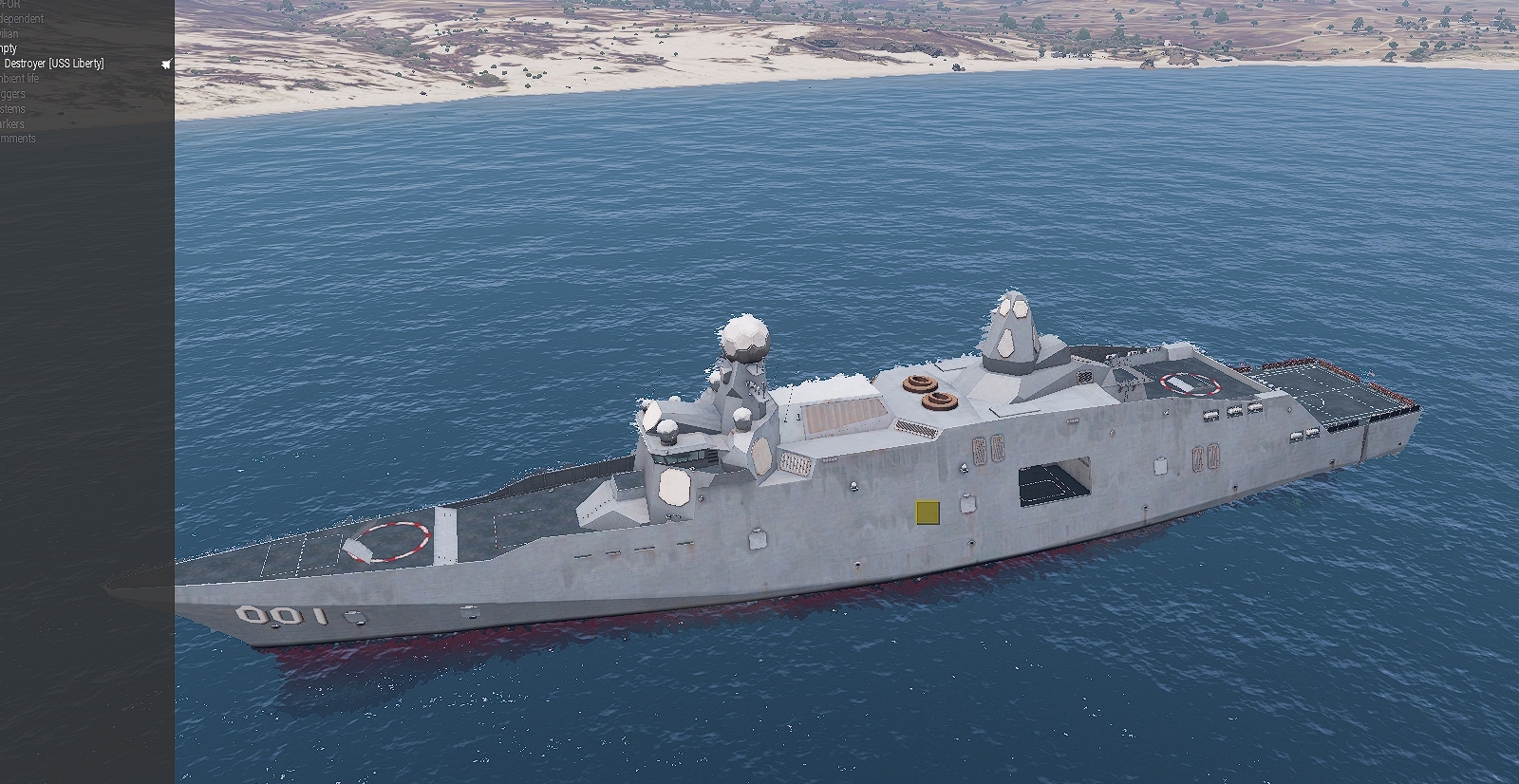
how do i spawn the uss liberty with weapons? when i spawn it in eden it just spawns like this https://i.gyazo.com/a3227e395b22b6cbc70abf7d9810aedf.jpg
 past sun
cinder glade
how do i spawn the uss liberty with weapons? when i spawn it in eden it just spa...
past sun
cinder glade
how do i spawn the uss liberty with weapons? when i spawn it in eden it just spa...
You can find weapons of it in BLUFOR > NATO > Turrets
 earnest siren
Can I make a sequence of waypoints, activated by a trigger, repeatable?
for context: players respawn in a helicopter, said helicopter is loitering outside of the AO.
I have a trigger that activates an "unload" order to a predetermined LZ. The trigger is activated by any players presence in the aforementioned helicopter.
After unloading, the helicopter returns to it's original loiter.
I would like this sequence to be repeatable, is it as simple as making the trigger repeatable. Do I need to add a "cycle" waypont? I feel like either would be way too easy for Arma standards...
acoustic yew
If it's a repeatable trigger you might as well just script the waypoints
Especially if it's just unload>loiter
earnest siren
acoustic yew
If it's a repeatable trigger you might as well just script the waypoints
I've never had to script a waypoint before, and after reading the biki I'm none the wiser. Do you have experience with addWaypoint and the like?
acoustic yew
yeah it's pretty straightforward, you use addwaypoint to create it and there are commands to edit the type
earnest siren
the example on the biki said: _wp = _grp addWaypoint [position Player, 0];
I don't understand the "_wp = _grp" bit, as I'm a novice at scripting. Nor do I understand where to put the coordinates lol
I'm afraid it'd misunderstand the X-axis as the centre, and the altitude as the radius
acoustic yew
_wp is to store the return for addwaypoint, you use _wp later to modify the waypoint
_grp is the group you add the waypoint to. It's just like how you add waypoints to a group in the editor. You can set a variable for a group in the editor or use a command to retrieve the group in-game
_wp and _grp are examples of local variables
earnest siren
so if the variable were heli1, I'd change _grp to heli1, correct?
acoustic yew
yeah
earnest siren
that's super helpful. thank you
acoustic yew
yw
earnest siren
as for the coordinates, do I put them in like [{12345,12345,12345}, 0] ?
acoustic yew
no don't use {}
earnest siren
"?
earnest siren
okay, that makes a lot more sense, thanks!
acoustic yew
https://community.bistudio.com/wiki/SQF_Syntax#Brackets a lot of people new to sqf use brackets wrong, here's what they do
earnest siren
that's a good read, I'll have a look. Thank you
 ember nacelle
Hello,
Does anyone know how to read that mortar scope / sight ?
https://www.zupimages.net/up/22/19/ep5i.jpg
Thanks in advance

- What kind of Azimut unit is it ==> (MILS Toggle with ace) ✅
- What is TRV under range ? ❓
- What is REL under elevation ?❓
acoustic yew
ember nacelle
Hello,
Does anyone know how to read that mortar scope / sight ?
https://www.zup...
if you rangefind through the scope REL will tell you what your elevation should be to hit something at that distance
at least in vanilla
 modern plover
ember nacelle
Hello,
Does anyone know how to read that mortar scope / sight ?
https://www.zup...
modern plover
ember nacelle
Hello,
Does anyone know how to read that mortar scope / sight ?
https://www.zup...
I hope you like doing math and trig
 drifting eagle
So, I'm trying to make a helicopter tried to land in a spot I wanted, but for some reason they just land whenever the squad I put in the helicopter spot an enemy? And it just randomly lands in spots before it even got to the transport unload waypoint, I set up the AI to be careless, and an invisible helipad.
Does the result of the helicopter land because of the squad in that helo?
(They're in separate groups)
 agile ingot
you can attach the waypoint to the pad, just drag the WP over the object icon of the helipad. Without a pad the AI picks a spot themselves near the WP.
drifting eagle
That's the problem though, I did
I'm in school rn so I'll try to give me clarification
Once I'm home
 keen swallow
Anyone ever tried to use Eden in a remote desktop?
When I use right click to turn the camera, it just rotates chaotically. Is that a known thing?
Gameplay works just fine
prisma oyster
keen swallow
Anyone ever tried to use Eden in a remote desktop?
When I use right click to tu...
known
you can use numpad as an alternative
keen swallow
Thanks!
 mild obsidian
How do I make a local trigger?
past sun
mild obsidian
How do I make a local trigger?
Ticking the Server Only in trigger attributes creates a trigger local to server only. If you need triggers local to player, scripting is the way to go.
 fleet lava
Hello !!
Ive got a question regarding the Ace slideshow module. Despite having all variable names correct it seems that i can not Ace interact with my ''controllers''. Is there something im missing ??
fleet lava
Using this https://ace3.acemod.org/wiki/framework/slideshow-framework.html on an object wont let me ACE interact with it either.
 leaden prawn
Hi, how do you sett a random next map?
modern brook
hi guys
I want to design a task and in the middle of this task the screen will go black and my team will wake up to another hour in another place can I do all this?
modern brook
do you have a video about it or can you tell me how to do it.
acoustic yew
modern brook
do you have a video about it or can you tell me how to do it.
singleplayer or multiplayer?
modern brook
multiplayer
acoustic yew
modern brook
multiplayer
everyone on the server or just one group?
modern brook
We are already 7-8 people, so there is already a scenario, but I want to do it without spoiling the scenario here.
acoustic yew
modern brook
We are already 7-8 people, so there is already a scenario, but I want to do it w...
what? I'm asking if you want everyone on the server to be teleported or just one group of players
//skipHour.sqf
if !isServer exitWith {};

private _endPosATL = [0,0,0]; //teleport position in ATL format
private _units = allPlayers;  //units to apply
private _hours = 1;           //hours to skip

[0] remoteExec ["BIS_fnc_fadeEffect",_units];
sleep 5;
skipTime _hours;
{ _x setPosATL _endPosATL } forEach _units;
sleep 5;
[1] remoteExec ["BIS_fnc_fadeEffect",_units];
you can just slap this in a .sqf in your mission directory and use execVM to spawn it
glossy sierra
any ideas as to why objects that have setObjectScale arent working on my server?
They work and scale correctly on a local hosted but not on our server
sinful zenith
Probably typical locality issue, setObjectScale has local effect-ish
modern brook
acoustic yew
what? I'm asking if you want everyone on the server to be teleported or just one...
As a player I meant just a group but I want the AIs to stay stable.
modern brook
acoustic yew
```sqf
//skipHour.sqf
if !isServer exitWith {};
private _endPosATL = [0,0,0]; /...
I'm checking it now, thank you for your help
acoustic yew
modern brook
As a player I meant just a group but I want the AIs to stay stable.
let me rephrase again. Are there any players on the server you do not want to be affected by this script? if not, what I wrote should work
glossy sierra
sinful zenith
Probably typical locality issue, setObjectScale has local effect-ish
how do i resolve this?
modern brook
acoustic yew
let me rephrase again. Are there any players on the server you do not want to be...
no just us , by the way, can I put some texts on the screen when the screen goes black while this time is passing?
modern brook
acoustic yew
with `cutText` yes
Thanks again, I'll try them all and get back to you.
modern brook
acoustic yew
```sqf
//skipHour.sqf
if !isServer exitWith {};
private _endPosATL = [0,0,0]; /...
Where exactly do I have to assign it to a trigger?
acoustic yew
make a text file in your mission root
paste the code in
rename it to skipHour.sqf
in a server-only trigger you can write execVM "skipHour.sqf"
and if it doesn't do what you want you can edit the file
 thick dune
Is there a way to remove the stats from the MP debriefing screen where it shows "your kills" and etc?
supple holly
thick dune
Is there a way to remove the stats from the MP debriefing screen where it shows ...
Attributes 》Multiplayer 》uncheck the show player score box
thick dune
that disables the list of kills that are shown when you abort? Talking about this one
https://cdn.discordapp.com/attachments/853384127818760192/974440820096774165/unknown.png
 fleet lava
Anyone know why Arma keeps adding "" to line of code in the mission.sqm ???
I got this on a laptop for a slideshow [[briefingscreen], [brieflap], ["images\briefing\acid1.jpg", "images\briefing\acid2.jpg"], ["Action1", "Action2"], 0, "My Slides", 1] call ace_slideshow_fnc_createSlideshow;
but when saving the mission file it changes to this in the mission.sqm
[[briefingscreen], [brieflap], [""images\briefing\acid1.jpg"", ""images\briefing\acid2.jpg""], [""Action1"", ""Action2""], 0, ""My Slides"", 1] call ace_slideshow_fnc_createSlideshow;";
plain gale
Because it's saved as string. Nothing to worry about.
fleet lava
@plain gale But the latter makes it stop functioning though, i have to go back to the mission.sqm, remove the extra quotation marks to make it work again ingame. But as soon as i save and go back ingame i get an error showing up.
plain gale
You don't have to, the engine will automatically compile it back to what it was before
 latent fog
I have a question
I am making a mission where my guys drive past some dead soldiers and civilians. But when I put them down in the editor, they go into a knocked out pose instead of a ragdoll. (They are still technically dead though.) I have figured out that this is because I am too far away from them when the mission starts. Any way to prevent this?
acoustic yew
latent fog
I am making a mission where my guys drive past some dead soldiers and civilians....
I've never actually gone and figured out how ragdolls work, but one solution is to kill the units with a trigger. Another (esp if you have ace loaded) is to use switchMove to pose the corpses in static animations
latent fog
ohh right i could just use a trigger thank you
acoustic yew
be sure to test behavior on dedicated
 chilly cave
Hi,
Is there a function that allows you to place a variable on an area in the editor, so that the objects of the base mapping, in this area, are in godmod (damage disabled)?
bronze peak
Double click on the object, Special states, Enable damage
chilly cave
I know that, thank you.
Read what I said, I'm talking about "base mapping" so what I can't modify myself, hence my request to make an area where we could disable the damage.
quiet plume
"base mapping" as in pre-placed map objects?
chilly cave
Yes that's right, the buildings already placed on a map.
quiet plume
well, for the single buildings there is a module (Environment -> Edit Terrain Object) that can be used to disable the damage.
As for the areas - i can't think of any non-#arma3_scripting solution, sorry
chilly cave
I just saw this indeed, but it seems to be for one object at a time?
Thanks for the info anyway!
 inner notch
hi, does anyone know how to add flares to a vehicle?
bronze peak
chilly cave
I know that, thank you.
Read what I said, I'm talking about "base mapping" so wh...
Yeah, attention to detail... not my strong suit lately. At least you found out.
 warm cove
Whenever I load up a mission (duws)and go into Zeus for the first time I have all my addons(factions,modules etc)then if I save and exit and return into the mission some of the modules or factions will disappear from Zeus . Anyone have a fix?(Don’t know if this is the right chat for this if not let me know and I’ll remove this comment)
stone sphinx
Hey guys, do any of you know of a way to script an AI to shoot itself? Need it for a campaign element in an upcoming operation
acoustic yew
stone sphinx
Hey guys, do any of you know of a way to script an AI to shoot itself? Need it f...
you can add a "fired" event handler that deletes the projectile and adds damage, then forceWeaponFire to make the ai shoot
 twin flame
what is the command to spawn a arsenal?
keen jolt
twin flame
what is the command to spawn a arsenal?
["Open", [true]] call BIS_fnc_arsenal; will give you full arsenal
 hybrid dove
Hi, I'm so sorry for killing the mood, guys I think I need a little help to implement an animation an add a little more dept to my single player mission
I used a trigger and object init for the think but I'd like to have a custom animation like in vanilla arma, so far I'm with
**init item:
this addAction ["Pickup Virus_Samples","deleteVehicle Virus_Samples"];
trigger condition:
!alive Virus_Samples;**
keen jolt
hybrid dove
Hi, I'm so sorry for killing the mood, guys I think I need a little help to impl...
you mean custom animation for "picking up" the item?
if so, go to animation viewer, find the animation you want (it's most likely under Stand and Misc), and play it as this addAction ["Pickup Virus_Samples","_this#1 playMoveNow 'animation_name'; deleteVehicle Virus_Samples"];
replace animation_name with the actual animation name
hybrid dove
keen jolt
you mean custom animation for "picking up" the item?
Yeah
It will work with the this ?
keen jolt
hybrid dove
It will work with the this ?
yeah. just follow what I said above
@hybrid dove actually try this. if it works it's a lot simpler (no need to look for animation name):
this addAction ["Pickup Virus_Samples","_this#1 playActionNow 'PutDown'; deleteVehicle Virus_Samples"];
also I don't know why you use a trigger for this
it doesn't need a trigger
hybrid dove
I used the trigger to synch it with the task state
keen jolt
hybrid dove
I used the trigger to synch it with the task state
You don't need a trigger to set the task state
You can just use the function BIS_fnc_taskSetState, which is way faster than looping with a trigger
 pliant plaza
anyone know a good parade mod?
hybrid dove
keen jolt
You don't need a trigger to set the task state
thanks
 bold estuary
anyone know a way to hide grass in a speciefied area?
hide terrain object works for trees but not grass
grass cutter object is too small
i need to cover a wide area
keen jolt
bold estuary
grass cutter object is too small
try setObjectScale on it
keen jolt
bold estuary
thats my last resort lol
there's no other way
grass cutter is a decal. that's why it can hide the grass
bold estuary
damn
theres actually 1 way
turn terrain quality to low 
but that removes grass everywhere

 drowsy nova
I'm trying to close the door of an LAAT for a picture, does anyone know how to do that?
 quartz spade
bold estuary
i need to cover a wide area
quartz spade
bold estuary
i need to cover a wide area
You would need multiple grass cutters. Either:
- Manually place them all
- Use 3DEN enhanced's placement tool to place them in a large grid
- Script a function to cover a large area by placing grass cutters in a grid
 rich basin
can I get a # for general
 long dune
I'm having problems setting up a mission using zeus modules. It seems like when i have a Set Costs - Soldiers & Vehicles module it removed most of the placeable objects from my zeus interface, so i cannot place any modded cars or most modded units
 tame crypt
bold estuary
anyone know a way to hide grass in a speciefied area?
tame crypt
bold estuary
anyone know a way to hide grass in a speciefied area?
{
if(
markerShape _x == "RECTANGLE" &&
toLower _x find "grasscutter" == 0
) then {
if(isServer) then {
_sin = sin markerDir _x;
_cos = cos markerDir _x;
markerSize _x params ["_mw", "_mh"];
markerPos _x params ["_mx", "_my"];
for "_i" from -_mw to _mw step 7 do {
for "_j" from -_mh to _mh step 7 do {
createVehicle ["Land_ClutterCutter_large_F", [_mx + _cos * _i + _sin * _j, _my + -_sin * _i + _cos * _j, 0], [], 0, "CAN_COLLIDE"];
};
};
};
deleteMarkerLocal _x;
};
} forEach allMapMarkers;
This should use any map markers you named «grasscutter» and turn it into an array of your small cutters. Change the shape if you dont like rectangles.
Put code into Init.sqf
plain gale
If you put it into init.sqf you might wanna wrap it all into isServer
 rapid kraken
bold estuary
but that removes grass everywhere
rapid kraken
bold estuary
but that removes grass everywhere
it's not a loss tbh
grass in arma just makes you worse than the ai and nothing else
and is even bad on performance
jaunty turret
bold estuary
anyone know a way to hide grass in a speciefied area?
Ya grass cutter is the only way you’ll just have to use thousands of them but if you have them set as a simple object they have a negligible impact on performance.
 junior gust
hey guys, i am missing a lot of modules in my zeus, is there a way to add them all to be available all the time?
 supple rampart
How can I create an objective for the player?
 uneven shore
Heyo, I want to lightly edit a scenario/showcase to add an ACE arsenal and maybe a Zeus slot. Where can I find a tutorial for that? tyia
tacit zinc
supple rampart
How can I create an objective for the player?
Look up tasks
 scarlet crystal
uneven shore
Heyo, I want to lightly edit a scenario/showcase to add an ACE arsenal and maybe...
scarlet crystal
uneven shore
Heyo, I want to lightly edit a scenario/showcase to add an ACE arsenal and maybe...
https://www.youtube.com/watch?v=OFxozTL8YJI - ACE arsenal
https://www.youtube.com/watch?v=yu00twuFOdg - Zeus slot
Most of the time you can type in google or youtube and you'll find dozens of solutions
 white moth
yo anyone know how to get it so on mission start players don't go straight to the respawn screen?
 near cipher
Does anyone know if it is possible to delete/hide default placed markers on the map? I have changed a location of where a fuel station was before. But i want to remove the marker aswell if possible
acoustic yew
Don't quote me on this but I think it's baked into the map itself
Unless you're referring to markers placed by a mission
near cipher
ahh and i am assuming that you cant change that
 sacred briar
Can someone tell me if I'm being dumb?


None of the textures are working, they're all converted using the Arma3Tools ImageToPAA tool
Found it, nevermind, I was being dumb. Thought you needed the first
Spoiler alert, you don't 😅
earnest siren
question: when using the timer on a trigger. Are they seconds in game time, or seconds in real time?
tacit zinc
white moth
yo anyone know how to get it so on mission start players don't go straight to th...
Create a new file in the mission folder, ‘description.ext’
Type this line with notepad or a code editor;
respawnOnStart = 0
white moth
tacit zinc
Create a new file in the mission folder, ‘description.ext’
Type this line with n...
Thanks
 tardy burrow
hello,
there is probably i very simple solution but i dont seem to find it.
what term can i use to manipulate the whole composition instead of "this" for each object individually? as in "this DisableAI "PATH"" for example?
tacit zinc
I spend the previous night trying to get sectors to work, I managed to get them unlock in order and split (like first capture A, then B and C unlock at the same time) but now I would like to merge (like D unlocks only when B AND C are captured) but I can't get it to work
I think I tried every synchronization order with triggers, AND logics and unlock logics but nothing works, D unlocks either never or directly after B or C is capped
Example of my layout: https://media.discordapp.net/attachments/616737832429551666/977920574401708052/20220522150302_1.jpg?width=1202&height=676
What should I do to make sector D only available when B AND C are capped?

Image is just an example, I tried many variations between B, C and D
modern plover
tardy burrow
hello,
there is probably i very simple solution but i dont seem to find it.
wh...
Under unit attributes with 3den Enhanced, there will be options to disable certain AI scripting, PATH being one of them
 wild lichen
i have a question since i dont know where this would go
how would i make a flag for a faction?
tacit zinc
wild lichen
how would i make a flag for a faction?
Do you need it for a mission?
tacit zinc
Ah then I would look up Arma tools, locate the pbo with a flag in it, copy the flag and replace the flag texture @wild lichen
If you look up retexture tutorial you should find plenty examples
wild lichen
tacit zinc
Ah then I would look up Arma tools, locate the pbo with a flag in it, copy the f...
which is the directory for the flag?
tacit zinc
@wild lichen I have zero experience with retexturing but if I look up the file path on the wiki it’s A3\Data_F\Flags
wild lichen
alr
supple holly
wild lichen
how would i make a flag for a faction?
tacit zinc
tacit zinc
I spend the previous night trying to get sectors to work, I managed to get them ...
Sometimes one is thinking much to complicated, put an and line in the trigger condition and it worked
 civic mango
Hi when I try to start the mission with rotated objects, it goes into a different position. This is supposed to cover and be a roof. How do I fix this
I can't send a picture through here but basically I made petroglyph walls be roofs/ceilings for some ruins, but they snap back to their original position (sideways) when the mission starts
 main axle
Anyone know how to set a mission's date to be further in the future than 2050? I tried using the Moon Phases tool (from 3DEN Enhanced I think) but checking in-game revealed it was still 2050
plain gale
use the setDatecommand
uneven shore
How to open or edit scenarios and such? Is there a special tool or something I have to do in the editor?
prisma oyster
uneven shore
How to open or edit scenarios and such? Is there a special tool or something I h...
nothing, just open Eden then Ctrl+O or top-left File > Open 🙂
uneven shore
Where are those files? I want to lightly edit a shoothouse I got off the workshoop 🙂
prisma oyster
uneven shore
Where are those files? I want to lightly edit a shoothouse I got off the worksh...
cannot edit a downloaded mission without author's permission I believe?
uneven shore
Its says they don't care what you do with the mission?
Re-editing/Re-publishing :
If you wish, you have my permission to re-edit and to re-publish the mission, I totaly support that with this mission
I want to re-edit, why is it so damn hard to find a straight answer
prisma oyster
if so, then you can find the mission's pbo somewhere in the %appdata% directory I believe, extract it and place it in your Eden Editor directory so you can open it 🙂
uneven shore
extract it? what file type to what type or where? What is the %appdata% folder? Where my mods and such are downloaded? Or...?\
prisma oyster
I am not sure off the top of my head where missions are downloaded
the PBO files can be extracted with Arma tools
uneven shore
gotcha, is there a good vid or tutorial for the arma tools app?
prisma oyster
you can browse Youtube - there is no official doc for it AFAIK
civic mango
civic mango
Hi when I try to start the mission with rotated objects, it goes into a differen...
Can someone still help me with this
glossy sierra
For custom markers, how do I change the default text colour? atm my markers' text is white.
glossy sierra
prisma oyster
I am not sure off the top of my head where missions are downloaded
the PBO files...
%appdata%\Local\Arma 3\MPMissionsCache
As for steam missions, they are located inside documents\arma 3\saved (or if you have multiple profiles its, documents\arma 3 - other profiles\profilename\saved)
 vast citrus
Hi I am wondoring how to make it so that after I complete a task your next task is to make it do you have to get in a heli and then it sets off whith other helis setting of as well
keen jolt
vast citrus
Hi I am wondoring how to make it so that after I complete a task your next task ...
that needs some scripting (depending on how you want to do it)
 quasi rain
How do I change a team/squads callsign in the editor for MP missions, for example in the player slot select screen to change where it says alpha 1-1
keen jolt
quasi rain
How do I change a team/squads callsign in the editor for MP missions, for exampl...
double click on the group (or right click on the group and select attributes) and edit the callsign there
quasi rain
keen jolt
double click on the group (or right click on the group and select attributes) an...
figured it out, had to put the element leaders name as for example platoon leader@Delta 7-1
 sacred schooner
Hey I'm using the Key Frame Modules which is working fine, it's just resetting an objects scale back to 1 when the animation starts.
Is there a way to keep the objects scale somehow?
supple holly
sacred schooner
Hey I'm using the Key Frame Modules which is working fine, it's just resetting ...
Dont know will this work but try putting down invisible helipad directly bellow the object that is scaled. Give it varaible name like h1. Then on the object that you want to scale put this in init field:
this attachTo [h1];
this setObjectScale 0.1;
Oh damn you're right animating another object would probably fix that
could rescale all attached objects but I doubt it let me try
 twin gale
i created a mission for testing purposes, place 4 AIs and gave them the 'Playable' checkmark. when i launch from Editor it lets me choose 4 spawn options, but when i copy-paste the .sqm file to my dedicated server it always has 0 slots
what did i miss 🤔
Maximum number of players has been reached at 0 doesnt even let me connect
 lament otter
clafghan gone...?
acoustic yew
twin gale
i created a mission for testing purposes, place 4 AIs and gave them the 'Playabl...
dedicated servers show zero slots when mods are missing
also you should export as pbo
 gilded lotus
i’m trying to make squad B ambush squad A, squad A is moving from they’re original position, i cannot figure out any way to make squad B follow squad A, they just go to the spawn position of squad A rather than finding them further down the path. Any way to make this work?
 reef lintel
attach a move waypoint/search and destryo waypoint to the leader of the target squad
you can see if its attached if theh waypoint is a bit greyed out/dotted iirc
reef lintel
gilded lotus
i’m trying to make squad B ambush squad A, squad A is moving from they’re origin...
.
sacred schooner
Ok back on the Timeline keyframe thing. It works fine in single player, but not on a dedicated serve. Is there a trick to getting it to work on dedicated servers?
it will just stay in the starting position then snap to the last when the timeline ends
 sullen crest
Does anyone have sound script for dedicated servers
Atm I’m using Say 3D
but doesn’t work on dedi
keen jolt
sacred schooner
it will just stay in the starting position then snap to the last when the timeli...
What kind of object is it? Is it a static object?
prisma oyster
sullen crest
but doesn’t work on dedi
https://community.bistudio.com/wiki/say3D
meaning: plays the sound on the machine you call say3D, and only this one
 bold estuary
tame crypt
{
if(
markerShape _x == "RECTANGLE" &&
toLower _x find "gras...
bold estuary
tame crypt
{
if(
markerShape _x == "RECTANGLE" &&
toLower _x find "gras...
Thanks!!
supple holly
sacred schooner
Ok back on the Timeline keyframe thing. It works fine in single player, but not ...
Try remoteExec https://community.bistudio.com/wiki/BIS_fnc_timeline_play myb that will work i dont know if even keyframe animations are aviable in multiplayer
sacred schooner
keen jolt
What kind of object is it? Is it a static object?
Sorry for the late reply, yeah it's just a standard prop. It's from a mod but it's just a prop you drag out like a fence or barricade, it doesn't have anything specials with it, I haven't done anything to it's special states or whatever they're called too (like disable simulation) , all default.
sacred schooner
supple holly
Try remoteExec https://community.bistudio.com/wiki/BIS_fnc_timeline_play myb tha...
Yeah I had [timeline] call BIS_fnc_timeline_play; in a SQF that got remote executed but no luck
keen jolt
then it's obvious why it doesn't work properly
static objects have a very slow sync rate
and afaik their velocities are not synced either
sacred schooner
oh is there anyway to set up an exception to make it update faster or?
or are objects doomed to not work in MP with keyframes?
keen jolt
sacred schooner
or are objects doomed to not work in MP with keyframes?
pretty sure normal objects work fine
static objs don't
sacred schooner
oh hmmm, I think it is just a normal object I didn't know there was different types. I was just trying to make it clear it wasn't anything complicated like a house
sacred schooner
right, how can i tell the difference?
keen jolt
simulation in configViewer
sacred schooner
ah right
the thing I'm moving probably is a static object then
is there a way to change it without making a new mod?
keen jolt
sacred schooner
the thing I'm moving probably is a static object then
if it's a house yes:
 sacred schooner
I'll boot up and take a look rn
sacred schooner
keen jolt
if it's a house yes:
actually yes it's simulation is house
wait no that's the default thing the config opens to??
nope my mistake
that's just it parent
keen jolt
sacred schooner
wait no that's the default thing the config opens to??
right click on the object
then select find in config viewer or whatever it is
sacred schooner
yeah my bad I just got mixed up I did do that all good
I just didn't see the first line said parent and thought that was what I was looking at
configfile >> "CfgVehicles" >> "Land_SC_sefrigate2" has a simulation of house.
keen jolt
sacred schooner
configfile >> "CfgVehicles" >> "Land_SC_sefrigate2" has a simulation of house.
then yeah it's static object
if you can make your "animation" without that keyframe tool you can just move the object locally for each client
(by making local copies of it)
sacred schooner
I've got a script for basic rotations that loop infinitely using _this setDir (getDirVisual _this + 0.1); but not moving it's position.
Any idea where I should start looking to do what you're saying?
keen jolt
well you should create a local copy of the object first. for that script all you need is its position and type of the object
then you can do:
_obj = _type createVehicleLocal _pos;
which has to be done for each client
also do you need those objects in any special way?
as in assigning a global variable to them to, e.g. check something in a trigger?
sacred schooner
uh no nothing like that it's just for a decorative animation of a gun platform going offline.
anything to do with global variables is done with other triggers doing stuff like missionNamespace setVariable ["PART1", true, true]
keen jolt
sacred schooner
uh no nothing like that it's just for a decorative animation of a gun platform g...
okidoki then doing it that way will be fine
sacred schooner
keen jolt
then you can do:
```sqf
_obj = _type createVehicleLocal _pos;
```
Haven't seen createVehicleLocal before though, that's really helpful thanks
keen jolt
do you need them to animate from the start of the mission?
sacred schooner
no it's playing near the end, the one I had set up was a simple 6 second thing
keen jolt
also since they're just decorative you might as well create them as simple objects instead:
_obj = createSimpleObject [_type, _pos, true];
true, would that help with the keyframe timeline working on a dedicated server?
keen jolt
no. the point was that when you make an object local it no longer has to sync, so its movement will be smooth
but I haven't messed around with that keyframe thing so I'm not sure how to pass the keyframe animation data to the function or whatever it is it uses
none of those keyframe modules have any functions
sacred schooner
yeah it's a bit wack, I was going off this
https://www.youtube.com/watch?v=quZLaLGfHU4
sacred schooner
1:30 - 3:30 is all the critical info I was taking from it.
The animation itself is the the gun part of a gun platform going from aiming up at the sky to aiming at the ground
keen jolt
is that all you're making with those the keyframe tools?
keen jolt
ah I don't have scion conflict
sacred schooner
oh right wasn't expecting you to test it lol don't worry
it's a simple one keyframe thing with the gun just moving diagonally down and rotating downwards
just not sure how I'd animate something like that without keyframes
keen jolt
are you familiar with matrices and vector math?
keen jolt
I don't think you can learn them from google 😅
sacred schooner
probably not in as much time as we have right now lol
keen jolt
sacred schooner
probably not in as much time as we have right now lol
anyway, if you show me a video of how the object moves and your 3den setup I can write it for you
sacred schooner
hang on one sec I'll upload a quick vid
sacred schooner
keen jolt
anyway, if you show me a video of how the object moves and your 3den setup I can...
but also this was for an op we ran today, we worked around the issue with just having a big enough explosion to cover the gun in smoke and just had a trigger that show/hid the gun part that was aiming up with another that was aiming down.
Was asking about this more for future attempts at animating things which would probably include stuff like doors, static ships, bit's of machinery and so on.
I'm extremely appreciative of the help but unless what you're planning on very kindly working out for me, can help me understand and manipulate to use for other scenarios in the future I won't have much use for it and don't want to waste your time.
The second replay of the animation always ends up playing incorrectly too so at the end when it goes to reset it'll look weird in the video (actually no on second view it seems to skip a bit of the way in to the animation on the first play then plays the whole thing properly the second time weird, though the first play back is actually what I wanted and seem to get when testing in single player and local host)
(video was private, it's unlisted now whoops)
keen jolt
sacred schooner
(video was private, it's unlisted now whoops)
yeah was about to say that lol
keen jolt
sacred schooner
but also this was for an op we ran today, we worked around the issue with just h...
can you also take a screenshot of the local axis of that moving part?
select the part in 3den and press 2
 keen jolt
sacred schooner
https://cdn.discordapp.com/attachments/966532090726334575/979774105488330862/unk...
keen jolt
sacred schooner
https://cdn.discordapp.com/attachments/966532090726334575/979774105488330862/unk...
that's 3
(rotation widget)
sacred schooner
oh yeah whoops lmao
keen jolt
I meant the translation widget
sacred schooner
global or local? or does it not matter
keen jolt
local
sacred schooner
 keen jolt
ok gotcha
sacred schooner
yeah not the best place for the pivot point for what I'm doing haha
sacred schooner
I'm assuming I'm looking at doing stuff like this?
https://community.bistudio.com/wiki/setVelocityTransformation
keen jolt
sacred schooner
I'm assuming I'm looking at doing stuff like this?
https://community.bistudio.co...
that's possible too yeah
sacred schooner
Was seeing too the wiki mentioning simple objects having better sync rates so ill try that out too when I'm on next
keen jolt
I've currently written the script tho
sacred schooner
Oh damn
sacred schooner
I did say that's going pretty above and beyond but if I can figure out how to manipulate it a bit that would be really great. I've got another thing coming up where we want vehicle that's a simple object burrow up out of the ground which this would be perfect for
keen jolt
onEachFrame {
    if (isGamePaused) exitWith {};
    _obj = myObj;
    boundingBoxReal _obj params ["_c1"];
    _c1 params ["_x1", "_y1", "_z1"];

    _a = diag_deltaTime * 10 * accTime;
    _t = [
        [1, 0, 0, 0],
        [0, cos _a, sin _a, 0],
        [0,-sin _a, cos _a, 0],
        [0,0,0,1]
    ];

    _m1 = [
        [1,0,0,0],
        [0,1,0,_y1],
        [0,0,1,0],
        [0,0,0,1]
    ];
    _m2 = [
        [1,0,0,0],
        [0,1,0,-_y1],
        [0,0,1,0],
        [0,0,0,1]
    ];

    _vy = vectorDirVisual _obj;
    _vz = vectorUpVisual _obj;
    _vx = _vy vectorCrossProduct _vz;
    _pos = getPosWorldVisual _obj;
    _m0 = matrixTranspose [
        _vx + [0],
        _vy + [0],
        _vz + [0],
        _pos + [1]
    ];

    _m = matrixTranspose (_m0 matrixMultiply _m1 matrixMultiply _t matrixMultiply _m2);

    _vy = _m#1 select [0,3];
    _vz = _m#2 select [0,3];
    _pos = _m#3 select [0,3];


    _obj setPosWorld _pos;
    _obj setVectorDirAndUp [_vy, _vz];
}
so for now just test it
replace myObj with the variable name of that gun thing
then run it in debug console
if it works I'll tell you what to do with it next
basically it should rotate your object nonstop according to that video
sacred schooner
Incredible thank you so much for this, I've had to jump off my pc as its 2:30am but ill give it a go first chance tomorrow and play around with it and get back to you with the results.
keen jolt
sacred schooner
Was seeing too the wiki mentioning simple objects having better sync rates so il...
does it?
pretty sure simple objects have the same sync rate as static objects
keen jolt
sacred schooner
Incredible thank you so much for this, I've had to jump off my pc as its 2:30am ...
it's ok. didn't mean test right now lol 😅
prisma oyster
I don't believe such are allowed so no
 vale mason
Only for multiplayer? Or is there no fall out mod
keen jolt
vale mason
Only for multiplayer? Or is there no fall out mod
https://community.bistudio.com/wiki/Intellectual_Property#Other_Intellectual_Properties
Bethesda doesn't allow it
vale mason
Oop thank you
vale mason
keen jolt
https://community.bistudio.com/wiki/Intellectual_Property#Other_Intellectual_Pro...
Ah makes sense
What mod should I download for editor
 ember garden
Im trying to use the spawn ai module, anyone know how to get the ai to sync to high command when spawned?
 small patrol
What?
 wet cypress
Has anybody had an issue with hatchet H-60 mod? My vehicle interaction key is not working. I’ve tried changing it to a different button and even primary mouse click. I can use scroll wheel to turn everything else on but I can’t turn on the engine or access the checklist menu because it requires the interaction button (default is “F”).
prisma oyster
wet cypress
Has anybody had an issue with hatchet H-60 mod? My vehicle interaction key is no...
Reforger or Arma 3? This channel is also about Arma 3 Eden Editor
prisma oyster
ok 🙂 well, maybe #arma3_questions then
 worthy cairn
How do I place a car with its headlights already on?
prisma oyster
You don't, but you can script it
worthy cairn
How?
prisma oyster
worthy cairn
Do I just put that in the init?
this setPilotLight true
```for a SP mission 🙂(if it doesn't work, ping me as it might need a little init delay)
worthy cairn
Thanks it worked
 tired cove
Hey all, I'm having an issue where none of my editor-set attributes are reflecting on my mission ie allow manual respawn. I'm worried that my mission.sqm is corrupted after I copied it from another mission folder. I am also having an issue where zeus/blufor tracker work just fine in the editor but seem to be completely disabled on my dedicated server and think that both issues are related. Any input would be greatly appreciated, thanks!
acoustic yew
tired cove
Hey all, I'm having an issue where none of my editor-set attributes are reflecti...
you can save a copy of a mission in the editor
i think it's just file > save as
tired cove
I just remade the mission file then set the attributes manually and am still having the issues.
Editor options are not reflecting onto my mission both on local and on my dedicated and zeus is also not working on my dedi but is working on local. 😦
acoustic yew
if you uncheck the box to binarize the scenario file you can open the sqm
tired cove
Yea that's how I originally copied the mission file but at this point is seems like that's not the issue as I started on a fresh mission.sqm and my edits are still not showing, I worry now that my game files are corrupt or something.
acoustic yew
you've tried without mods loaded?
tired cove
not yet, I'll give that a try in a fresh mission and get back 👌
Whoa this is strange. So I made a fresh, barebones test mission on Altis and am still not seeing attributes being reflected. 😮
acoustic yew
are you sure you're clicking OK instead of pressing escape or cancel
if so, verify game files through steam and try again
if that doesn't work consider reinstalling i guess
when you say "attributes being reflected" what do you mean
 hardy solstice
worthy cairn
How do I place a car with its headlights already on?
hardy solstice
worthy cairn
How do I place a car with its headlights already on?
Alternatively use R3vos 3den enhanced 👍 which should imo be base game stuff lol
acoustic yew
why install a mod instead of pasting in one line in the init
tired cove
Just verified game files and everything is 100.
By "attributes being reflected" I mean I go to Attributes -> Multiplayer -> Respawn, Choose "Respawn On Custom Position" then check the "select respawn position" ruleset but unfortunately I am not seeing any respawn dialog and just get dropped where the unit was place in editor. I have also tried adding a respawn but still no avail.
hardy solstice
acoustic yew
why install a mod instead of pasting in one line in the init
Because you shouldn't be using the editor without it 😂😂😂 it adds too much functionality to the base editor bud it makes mission making so much easier
acoustic yew
apparently i've been doing things wrong!
no i've used it, i prefer writing sqf and having more control that way
hardy solstice
That's fine but for those who don't have SQF Knowledge eden enhanced is a must imo
Good old R3vo
acoustic yew
imo SQF knowledge is the must here but to each their own
hardy solstice
You shouldn't have to have SQF knowledge to play around in the editor
All I was saying was eden enhanced helps with the stuff commonly used and puts it into the base editor I.e. lights on/off tweaking ai traits and skills with sliders etc etc
acoustic yew
i'm sure it's useful if it helps your workflow but that imo that doesn't make it an essential part of mission making when the same things can be accomplished with very little code along with more freedom to tailor to your community. For example, why go through and check a box on each unit to have gun lights when you can write one line of code to give every unit a gun light on server init and forget about it (without giving your mission a mod dependency), it's really not a hard thing to do unless you have a phobia of scripting
originally wrote in a bunch of opinions about mission making styles but decided against starting an argument in that regard lol
hardy solstice
no i dont have any intention of arguing im merely saying those who do not wish to learn SQF and want to use editor to make fun simple quick missions eden enhanced is a good tool thats all lol
ps eden enhanced doesnt leave any mod footprint
acoustic yew
hardy solstice
ps eden enhanced doesnt leave any mod footprint
don't you have to load up the mod to edit the mission
i don't disagree that it's a useful tool, but I disagree that it's essential
 fiery sandal
I have very important (for me) question
Can i copy map object?
I can’t find uh-60 wreck like this

 vale mason
Nope found a fall out mod
acoustic yew
fiery sandal
I can’t find uh-60 wreck like this
you can search by classname in eden editor (might be a CBA thing?) if it's not there you can use createVehicle or createSimpleObject
keen jolt
fiery sandal
I can’t find uh-60 wreck like this
wrecks are in CfgNonAIVehicles
tho I guess for you doing it as Real Artisan Foods said is easier
keen jolt
acoustic yew
you can search by classname in eden editor (might be a CBA thing?) if it's not t...
only createSimpleObject is possible (using the model)