#arma3_texture
1 messages · Page 51 of 1
 harsh jolt
i have used photoshop wrong this entire time then lol
 silver gull
pastebin.com <- upload config there and post link
 full quarry
photoshop has nothing to do with it
harsh jolt
okay
full quarry
hiddenSelection is a part of the model that is defined so that its texture can be repathed in the the config class of the object
and retexturing is done with new texture files and config that creates or alters object class that then uses those new texture files in its hiddenSelection part
full quarry
yes this looks correct
though you should not have spaces in your folder names
folder name\ -> folder_name\
full quarry
usually underscores are used instead yes
harsh jolt
good to know
question before i go
i change how much i can store in a clothing item such as a vest or a uniform by changing "containerClass = "Supply70"; correct?
full quarry
yes
harsh jolt
and for the helmet issue, is that an RVMAT thing?
harsh jolt
its in its own folder so i right click the folder and use PBO manager
full quarry
ah
manager is the worst
Id suggest using pboProject. but it will also require P drive setup
so it can check your paths
full quarry
some texture probably is wrong shaded or somesuch
harsh jolt
can you give me the link for pboproject
harsh jolt
oh i found it
full quarry
PMCwiki has steps for P drive and tools setup
harsh jolt
when i load into the virtual or ace arsenal it says it cant load the helmet nohqq texture
harsh jolt
in the config i cant find it
 brazen moat
Can anybody help me find the pbo file of the Combat Helmet Black, not the Enhanced one but the standard one with no attachments or headsets? i looked at characters_f_epa.pbo but there i only find the enhanced combat helmet there
i am looking for the helmet in the top row, second from left
basically
full quarry
best place to check is the helmets config
harsh jolt
it was in the RVMAT wrong file path
full quarry
hiddenselectiontexture path will tell where the texture is
brazen moat
full quarry
hiddenselectiontexture path will tell where the texture is
forgive my ignorance, i am not that experienced, my friend is the one actually configging everything into our unit mod, i am just looking for a texture to turn it into a png, edit and send it to him
brazen moat
full quarry
best place to check is the helmets config
i am not aware what you mean by this
full quarry
your friend probably could help you out with that if he knows more about configs
the ingame config viewer can be used to browse the helmets config and the texture path used for it
harsh jolt
it keeps saying it cant load the nohq thing
im lost
im gonna pasetebin my rvmat and you can see
idk what im doing wrong
brazen moat
full quarry
the ingame config viewer can be used to browse the helmets config and the textur...
uhhh
i think im fucked
full quarry
well it just means that one might be using the default texture
check the other ones too
their textures are likely in the same place
brazen moat
I think hes talkin to me
full quarry
indeed
harsh jolt
yeah my bad lol go ahead
brazen moat
full quarry
check the other ones too
Ill try that in a sec
full quarry
harsh jolt
https://pastebin.com/deGusNrn
your stages got wrong textures in them
harsh jolt
?
full quarry
 harsh jolt
and i fix this by?
full quarry
putting correct texture path to correct stage
like NOHQ in stage 1
and not stage 4
P:\A3\Data_F\ contains many default rvmats for reference
inlcuding super shader I screenshotted above
harsh jolt
is that all i needed to fix?
brazen moat
full quarry
check the other ones too
all of them are the exact same
with the blank
my friend kinda warned me that the arma 3 config viewer might be not helpful
i do thank you for trying though, anything else you can think of?
if not, like i said thanks in the first place for all else
full quarry
well then checking the model path can lead to the textures
model = "path\to\model"
and textures are usually in "path\to\data\texturesAreHere"
 fervent portal
Is there any particular order I should have the _as, _nohq, and _smdi layers in Photoshop to get the best look for a retexture?
full quarry
no
they can be used as mix in but none of them will really produce the same details as original texture has
fervent portal
Yeah, that's a given
harsh jolt
if i wanna have a helmet or vest stop more bullets do i change "armor = "3*0.4" or "passThrough = 0.5"
full quarry
probably armor
full quarry
idunno, bigger better Id wager
I think there may be a wiki page about those somewhere 
 pallid radish
this might be a dumb question, or in the wrong channel so please let me know where to ask instead:
i am trying to make a mesh's texture for a custom model have a modifiable alpha channel. the only thing i could find online was from 2014 about making the texture into a 32-bit .tga with an alpha channel, then converting it into a .paa
i have basically no idea what that means, and the only information i could find on the community wiki is the literal meaning of the _ca extension
 frozen blade
define modifiable alpha channel
 nocturne lake
When you save the file for conversion to .paa, save it as .tga and a popup will appear asking you whether you want it saved as 24 bit or 32 bit etc. Choose 32 bit if your texture has an alpha channel and be sure to include _ca at the end of the filename. Then when you use the tools to convert it to .paa, it should format it correctly
If you need to be able to edit the alpha for future use, you need it as a separate layer set you can copy-paste into the alpha channel when you're done editing it. AFAIK you can't have a layer stack only for the alpha in photoshop etc.
harsh jolt
is there any good non confusing way i can make my own templates to texture a new uniform?
full quarry
Im gonna go ahead and guess, no. Making a template out of existing texture is like climbing into tree backwards
normal texturing process uses all kinds of layering which is combined into single texture and reversing that is not simple task
harsh jolt
so whats a good way to re texture something
 void gale
im not sure if this is more of a model or texture question but is it possible to overwrite an rvmat of a model without changing the model? I have a model that I am using from another modand would like to change the thermal texture for it but cant change the rvmat because the model points to their mods rvmat if i understand how this all works
nocturne lake
hiddenSelectionsMaterials (and script equivalent setObjectMaterial) is used to change .rvmats, but it's not very reliable
full quarry
harsh jolt
so whats a good way to re texture something
People often use the supporting material textures like normalmap and ambient shadow texture etc to overlay details on new texture. It can have decent results but basically it comes down to practice with whatever paint program you use and how you understand different techniques you can apply to redraw a texture
without a template with separated layers for detaisl and shading and such there isnt really much choice but to do the manual work
harsh jolt
wheres a good place for me to find templates?
full quarry
theres a topic about them on BI forums
and some are included in the Arma 3 Sample model package on steam
full quarry
those are models
not templates
there is a texture template folder somewhere in there
harsh jolt
ill take a look
void gale
nocturne lake
hiddenSelectionsMaterials (and script equivalent setObjectMaterial) is used to c...
that worked thank you 🙂
harsh jolt
full quarry
and some are included in the Arma 3 Sample model package on steam
for these sample items can i just path the config to the sample folders with the files? or do i have to find an a3 folder model
full quarry
you would need to use the corresponding model from A3 data
or what are you doing exactly?
harsh jolt
i used the sample texture template re textured a helmet and im kinda lost on the pathings. do i use the a3 pathing and find the model or can i use a path like this "E:\Steam\steamapps\common\Arma 3 Samples\Addons\Test_Character_01\A3_headgear_example"
full quarry
A3 pathing
the samples are just reference models
and if you for some reason would want to pack them, you would need to put them in correct folder on P:
harsh jolt
so i can find the models in a3?
full quarry
yes
hidden selection config refers to original model
and then just uses config entries to replace its texture
harsh jolt
legend
harsh jolt
could i have someones help with something?
full quarry
just write down the problem and someone usually answers
harsh jolt
its not necisarilly a problem
i wanna make my own texture template for a CTRG uniform but dont know really where to start
full quarry
perhpas check you the template files that are available and try to mimick how they are built
if you have 0 knowledge of image editing that may take some effort to learn whatever program you end up choosing
harsh jolt
well the thing with the vanilla templates is that theyre really complex and sizeable i just want something simple
full quarry
well just got to wait incase someone has some ideas
harsh jolt
no problem
harsh jolt
if anyone is familiar with texture templates i could use some help currently
 vernal sage
harsh jolt
i wanna make my own texture template for a CTRG uniform but dont know really wh...
vernal sage
harsh jolt
i wanna make my own texture template for a CTRG uniform but dont know really wh...
If you're referring to CTRG's Stealth Uniforms from Apex, you can simply reuse the NATO Combat Fatigues' texture as a template.
They more or less use the same UV with only minor exceptions like the collar and wrist.
If you want to replicate the grid pattern effect that the Stealth Uniforms have, you can just overlay the Red/Green channels of the normal (u_b_ctrg_soldier_f_nohq.paa). Needs a little bit of tweaking to get the same amount of detail properly though.
Oh, and if you grab a template online for the NATO uniforms, make sure you check if the template is from 2013 or post 2014.
The earlier ones from 2013 need to be "fixed" because they lack the insignia patch that was introduced in Bootcamp.
 finite spire
stupid question but why can't i open a TGA file in texview 2?
frozen blade
you should be able to
finite spire
do I have to setup the P: drive properly first or I just open texview 2 from arma3tools and open the texture from there?
 ancient parrot
is the texture 8 or 16 bit? (the file source, not what it is saved out as) also does it follow the power of two?
finite spire
it's 1024x1024 but idk how to check how many bits it has in paint.net
now I have saved it as 8bit png but it still can't open
ancient parrot
does the file contain color information? Is it RGB color and not greyscale?
finite spire
RGB i believe
full quarry
Where is it saved from?
Tgas from gimp need compression turned off on save or they will not work for example
harsh jolt
vernal sage
Oh, and if you grab a template online for the NATO uniforms, make sure you check...
legend thank you where can i get the nato uniform templates? just from somewhere on google?
 fringe lark
Not exactly sure where this should go so posting here: Finally got my first mod loaded into Arma3 but when I equip my headgear I get "Cannot load texture a3+mgr+\textures\redmaskwip_CO.paa." additionally no mesh pops up either, not sure if that happens if the texture is bugged. Is this a config issue? RVMat issue? Issue with just the texture? Everything looks fine in Object Builder. I get no errors when using pboProject if that matters at all.
full quarry
sounds like the texture is not packed into the pbo
or it the engine does not like your foldernames with the + in it
harsh jolt
i keep getting an error involving "b_soldier_f member already defined"
full quarry
you have 2 same name classes
harsh jolt
wdym
full quarry
class samename {};
class othername {};
class samename {}; <<-- BAD
full quarry
remove the other samename class or give it unique name
read up on config inheritance on the wiki
full quarry
those are not the same thing
harsh jolt
im confused
harsh jolt
im quite lost lol
so i change the classes to different Character models ingame
im lost on what to change still
could you tell me which one i change and what i should change it to
ive been trying to fix this for like 5 hours now
harsh jolt
me trying to make it unique
full quarry
you are breaking the class inheritnace when you change eveything unique
you make only our new class unique
there is also a character encoding guide on the wiki
try that
and yes it can take some time to figure out how configs work
harsh jolt
pian
pain
i am lost as hell lol
i havent been this confused in my weeks worth of learning
So i change class to a model thats ingame?
full quarry
I dont know what you mean by that
harsh jolt
what would i change of these? https://cdn.discordapp.com/attachments/806300977333272596/933903212409393202/unknown.png

 grand warren
class PARENT;
class CHILD : PARENT
{
    foo;
};```holy hell tank you i understand now
now my main issue is no uniform is loading lol
my character goes into his underwear
harsh jolt
couldnt tell you whats wrong
im just trying to retexture my uniforms
i have a woodland and desert camos
on the uniforms neithershow up but on the helmets it works fine, theres a woodland and desert camo as there should be
grand warren
have a look here...
this is a sample folder structure and config template i made for vehicle retextures.
it might help you to understand some basics that then can be transferred to uniforms
https://gitlab.com/CUP_Public/cup-public-repo/-/tree/master/retexture config template/ABC_CUP_Retextures
harsh jolt
yes
wait
what files should be in P drive
and pboproject hasnt worked for me so i still use pbomanager
full quarry
ah
thats your problem then
your folder structure is probably wrong
pboProject "does not work" if you have errors
which is why it should be used
as then you dont have to ask "why my stuff does not work"
it already tells you
you have errors
cant work if you have those
harsh jolt
pboproject isnt set up
for me
what files should i have from my P: drive?
i dont get the error when i load in now, but my uniforms still dont load at all
full quarry
harsh jolt
what files should i have from my P: drive?
everything that goes into the pbo
but honestly
harsh jolt
even my custom texture files?
full quarry
do the tools setup right
this is you asking the channel stuff that pboProject tells you
full quarry
harsh jolt
even my custom texture files?
especially those
how else can they be loaded from the pbo if they are not in it
harsh jolt
ive just had them like this
in the PBO
under there own folder
so i put my custom files under where the textures are originally in my P drive?
harsh jolt
ill give it a go
 lethal condor
Show us the config
harsh jolt
whole thing?
lethal condor
That's better
lethal condor
Roughly checked it. Follow what the error says and fix it
harsh jolt
the error is on the black screen or is it in a file somewhere
lethal condor
Former
lethal condor
Remove the semicolon in the array in line 5
lethal condor
And crunch
harsh jolt
where in P do i put it?
full quarry
P:\YourProject\yourStuff
harsh jolt
same error
full quarry
well you got to fix errors in the config too
harsh jolt
i did
lethal condor
If it returns an error you didn't
full quarry
or you fixed something else
pboProject does not lie
if it says there is error in there, there is errror
full quarry
missing files means they dont exist in your p drive in that path
lethal condor
So you didn't set up the P properly
harsh jolt
or i need to change paths
full quarry
do you have A3 data unpacked on your p drive
harsh jolt
yeah?
full quarry
then perhaps there is a typo in the path
harsh jolt
i put P: in front of the folder right?
harsh jolt
so not this P:\Vortex Security Clothing?
harsh jolt
idk if i am dumb or not
changed the pathing with _ instead of spaces, it seemed to have gottwn further but still didnt complete
full quarry
do you have that file on your P:\A3 folder?
harsh jolt
i will double check
it worked after i re pathed it
thank you both a lot, im VERY new to all of this
full quarry
its alright. pboProject makes it easier
harsh jolt
ive just always used pbomanager
i didnt even know pboproject existed
the uniforms still dont load
full quarry
could be your uniform is locked to indep faction and does not work on blufor
harsh jolt
i have a blufor uniform
none of them work
independant or blufor
no idea waht this error is
full quarry
Class custom shirt lacks parameter simulation thta defines what type of thing it is. So likely it has bad inheritance parent class
Or no class at all
harsh jolt
B_soldier_F01 then B_soldier_F
finite spire
full quarry
Tgas from gimp need compression turned off on save or they will not work for exa...
ah this fixed it, thanks
is there a way to test a helmet retexture without writing configs for it, the same way you test vehicle textures?
full quarry
no
harsh jolt
@full quarry im out of the house so i cant fix my issue now but last night you said something about my tshirt class lacking inheritence
how would i fix that?
full quarry
adding proper inheritance probalby
sorry I just cant do the work for you
got my own stuff to do
harsh jolt
no worries the help is very appreciated
 whole haven
Hello! Can someone help me understand why my RVMATS have this weird reflection on them in certain lighting? For this P3D, there is no shadow LOD, only 1 resolution LOD, I'm simply testing out textures. They are super shaders, and I'm using the titanium fresnel.
harsh jolt
anyone know how id fix a .simulation error with my uniforms?
full quarry
you can add simulation = man; in there
but likely you will be missing many other parameters too
harsh jolt
that fixed the simulation but now when i try to use them it had a .accuracy errror
full quarry
I know. but Im going to head to sleep. Did you read the wiki page about config inheritance yet? on how the parent class stuff works?
again you have named parent class something of your own
B_Soldier_F02
this does not exist
in the main vanilla config
so it lacks everything you want to be in it
harsh jolt
so i change class Custom_Uniform: B_soldier_F02
full quarry
no
B_Soldier_F02 is wrong
there is no such class in existence
so you can not iherit the required things from it
harsh jolt
B_soldier_F_01
full quarry
no
thats still your own invention
when you inherit
you use the original classnames
form vanilla config
harsh jolt
b_soldier_01
harsh jolt
thats in A3 on my P
that also didnt work, should i check a vanilla config and see how its setup?
full quarry
vanilla or the sample character yes should be the first stop to go to
or the character encoding guide on wiki
fringe lark
Once again not sure where to post this so putting it here. I made a mask in Arma3, with textures. Despite this, when equipped it is white, and slightly see through. I do not have any error pop ups when equipping it either. Lack of error has me pretty stumped, before I was getting "cannot load texture" but all I had to do was change the file path.
EDIT:
Just opened it in Object Builder, textures no longer show up even though before they did. Going to mess with it and see if that works.
fringe lark
fringe lark
Once again not sure where to post this so putting it here. I made a mask in Arma...
It was my RVmat, it was all types of fucked. Also all my LODs were inside out except one of them. Had to remake most of the p3d from the ground up after blender inport and had to redo all my filepaths in my configs but it works! Textures and all! Next to make is a uniform.
harsh jolt
im having trouble with one of my uniforms it wont load any model but my other uniform loads fine, everything but this one unfirom works and i dont know why any ideas?
harsh jolt
fixed it
fringe lark
Not sure why but when I export my model to Object Builder the textures are not properly apply. I am building my model in blender by joining different parts of a uniform together so they make one model. I am making sure they all have the same UV map name, in Blender the textures look fine. In Object Builder the texture only applies to one part of the model, such as just the forearm, or one of the hands. Other than making sure they share the same UV map name is there anything else I need to do so the texture applies to the entire model?
 tulip peak
When modifying helicopter textures, I can load all textures modified in a single player test mission, how ever even though I have retextured the rotor blades visually in the jpeg, they still show up as the only unedited item on the helicopter, is there another call that I need for this to recognize the texture file for the blades?
 hollow horizon
Depends on the helicopter model. It might have the rotor blades as a proxy, since usually the "normal" blades are replaced by the blurred blades at a certain speed
tulip peak
I believe the proxy blades show as the edited texture when up speed but sitting still they are still the dull base color, it is the rhs uh1y
hollow horizon
Hmm, Reyhard or someone else from RHS would know, then. As I said, it depends on the model, some have them both integrated and just hide one or the others, some use proxies.
tulip peak
is there a call for a proxy like, object useojbecttexture (#, File); or similar that I just do not know about
hollow horizon
No, as a rule proxies cannot be easily retextured, only under certain circumstances, and that needs to be done via config. There is no method for scripting this.
whole haven
What is a good set of texture channels for SMDI map to export from substance painter?
These are my current settings
https://gyazo.com/3e007b79c9992f9823b247f756240d86
 leaden wraith
heyo, does anyone know what the pbos in the arma addons contain the rangemaster's paa/p3d and such?
 foggy torrent
tulip peak
<@!105548653594193920> any suggestion for this?
foggy torrent
tulip peak
<@!105548653594193920> any suggestion for this?
Blur blades have to be proxies
 dense peak
Hello! is there something wrong with my rvmat or the quality of my images? the opacity of my camonet has a lot of blurish white edges, any solution for this?
this is my rvmat
https://pastebin.com/xZ5zK2E9
hollow horizon
Is your base texture a PNG? Depending on the method the image was generated, the pixel data might or might not be pre-multiplied. Most of the time .tga files give better results
dense peak
I exported from substance painter as png then converted in arma tools as .paa
hollow horizon
Hmmm... TBH, I never exported transparency from Substance
dense peak
hmm maybe i use higher resolution instead ?? hahah
hollow horizon
I don't think that will help. It's probably the color channel not being premultiplied with the background. You might try to load the texture info a paint program and re-save it as TGA and try that
dense peak
I'll try that thank you
nocturne lake
tulip peak
When modifying helicopter textures, I can load all textures modified in a single...
Static rotor blades can't be in a retexture selection if the helicopter uses the game's native hideSelection method for switching between static and blurred rotors. The two sections overlap and conflict so rotor hiding stops working. It can be worked around by replacing the engine method of replacing the static rotors by using an animation instead. But it's not standard practice for helicopters - particularly those ported from Arma 2. And as others said, the blurred rotor texture is often a proxy so not usually retexturable
ancient parrot
dense peak
Hello! is there something wrong with my rvmat or the quality of my images? the o...
Did you try sorting the net to top in the face properties menu?
harsh jolt
Anyone have a good way of compressing files?
full quarry
@harsh jolt what files?
harsh jolt
i wanna make my mod smaller but cant find a good way of compressing them if its possible.
full quarry
there is none
 bronze gyro
use a lower resolution lol
fervent portal
Don't use 4k textures, use 2k
 shadow gale
Anyone here do Texturing for units?
fervent portal
I've made a texture mod for my unit
shadow gale
is there any good helmets that are easy to texture not very experienced in it but want to get a start or something
fervent portal
Well, my unit is an OPTRE unit, so, those helmets are pretty simple, other than that, it's easier to just get stuck in
shadow gale
Yeah, i done OPTRE one but i got a modern unit going
bronze gyro
shadow gale
is there any good helmets that are easy to texture not very experienced in it bu...
if ur doin vanila helmets just geta texture template
dense peak
ancient parrot
Did you try sorting the net to top in the face properties menu?
sorry i have trouble understanding this one could you rephrase it heheh
frozen blade
@dense peakhe means alpha sorting
dense peak
ohh i see, i havent learn that yet i'll watch some tutorials to understand further
thank you for your time and patience
bronze gyro
i think you must use _ca prefix also when converting if u have transparency
tulip peak
So if I make a texture for one of the rhs helicopters, how does it have to be packed so that it is recognized on a server or garage menu?
full quarry
your new config and new texture and your mod uses RHS as dependency
you do not pack anything from RHS
packed with proper addon maker like pboProject
or addon builder if you feel adventurous
 olive pawn
Does smdi override specular settings?
full quarry
No. It modulates it
olive pawn
I see, so extreme shine is the fault of how I made the smdi?
full quarry
Very likely
olive pawn
Got it, thank you.
 worldly shore
Good day. I'm trying to retexture some uniforms but TexView2 isn't opening. Could anyone please help me? It shows this error when I try to open it on the Arma 3 Tools thingy on steam.
Missing registry entry
HKEY_LOCAL_MACHINE/Software\BIStudio\TextureConvert.
Verify application is installed correctly.
Thank in advance!
bronze gyro
Reinstall tools?
worldly shore
bronze gyro
Reinstall tools?
Have tried that multiple times unfortunately it doesn't work
full quarry
have you ever started the tools launcher?
as that is what writes the registry stuff on the first start
 violet flax
I'm having some trouble importing my texture for the rangemaster belt
class KD_Rangemaster_belt: V_Rangemaster_belt { author="ADN, Aiden"; scope=2; displayName="[ADN] KD Rangemaster Belt"; picture="AidenUniforms\logo.paa"; hiddenSelections[]= { "camo" }; hiddenSelectionsTextures[]= { "AidenUniforms\clothing\gang\KD_belt_co.paa" }; };
This is what I put under CfgWeapons, but when I load up the game its just the rangemaster belt with the default / vanilla texture
 umbral swallow
This is how I made my own re-skin of it, I think it's the Rangemaster belt at least, but I'm not inheriting the same base class straight:cpp class Vest_Camo_Base: ItemCore { class ItemInfo; }; class masa_belt_poliisi: Vest_Camo_Base { author="$STR_A3_Bohemia_Interactive"; _generalMacro="V_Rangemaster_belt"; scope=2; weaponPoolAvailable=1; allowedSlots[]={901}; displayName="Varustevyö (Musta)"; picture="\A3\Characters_F\data\ui\icon_V_Belt_CA.paa"; model="\A3\Characters_F\BLUFOR\equip_b_belt"; descriptionShort="$STR_A3_SP_NOARMOR"; hiddenSelections[]= { "camo" }; hiddenSelectionsTextures[]= { "\masa_fdf_vanilla\data\vests_POLIISI_CO.paa" }; class ItemInfo: ItemInfo { uniformModel="\A3\Characters_F\BLUFOR\equip_b_belt"; containerClass="Supply40"; mass=5; hiddenSelectionsTextures[]= { "\masa_fdf_vanilla\data\vests_POLIISI_CO.paa" }; }; };
violet flax
Ah, thanks. I'll give it a shot:)
umbral swallow
make sure you include that Vest_Camo_Base with the ItemInfo in it, was missing on the first iteration 😅
violet flax
It worked, thank you so much 🙂
dense peak
how do i maximize my textures even if i hit low settings texture, like for example this rhs ambrams tank still has a good texture even whem low settings
ultra settings
https://imgur.com/a/nevgkOo
low settings
https://imgur.com/a/f8cml1w
i exported my texture from substance painter as tga 4096x4096 8 bit dilhetr then when opening it in bulldozer it automatically converts it to paa but when i get it in game and hit low text its much more of a lower quality than abrams from rhs or vanilla
any tips?
full quarry
I think you should not be so concerned about it. Nothing you c an really do about it. Texture mipmapping especially on 4k textures just means they turn very low quality
dense peak
ahh thats so sad 😦 but thank you bro
full quarry
Low settings are low quality, it's in the name. And 4k shows only on ultra. You could try 2k textures
dense peak
Copy that will try to make it to 2k textures, thank you
fervent portal
If I want to retexture the Modular Carrier GL Rig, where would I find those textures?
umbral swallow
You mean the Livonian Defence Forces one? I'd bet it's in characters_f_enoch.ebo, which you can't open for now. Arma 3 Samples in your Steam Library also contains some stuff from the Contact DLC, in .psd files.
fervent portal
Why can't we open the LDF ones?
full quarry
they are locked
umbral swallow
hmm, doesn't look like the Modular Carrier GL Rig is in Samples.
fervent portal
full quarry
they are locked
Yeah, but, why are they locked?
umbral swallow
to prevent people from just making all that DLC content into a mod to bypass the whole buying the DLC part. Well, that'd be the most extreme form of abusing it.
full quarry
Pretty much this. Why does it matter tho why it is. Cant do anything about it
in case the template is not released you can also draw the texture on your screen in game and take a screenshot
not the greatest way but pretty much only possibility if the file is in ebo and no template is available
lethal condor
You can see through it because are PBOs in Dev-Branch FYI
bronze gyro
umbral swallow
to prevent people from just making all that DLC content into a mod to bypass the...
does this mean people can make other DLCs that are now PBOS as mod then?
full quarry
bronze gyro
does this mean people can make other DLCs that are now PBOS as mod then?
Now that is just silly even to ask
 harsh inlet
hey anybody happen to have retexture templates for the gorka from contact?
umbral swallow
bronze gyro
does this mean people can make other DLCs that are now PBOS as mod then?
Can, as in may, or as in be able to? Well, I think the answer to both is still no. But it's possible to make re-skins of the DLC stuff that aren't in .ebo, like I did with the Gripen and the F-181.
bronze gyro
umbral swallow
Can, as in may, or as in be able to? Well, I think the answer to both is still *...
Well if you already cant make the pbo’d dlcs as mods then why did they need to make EBO?
full quarry
I think this line of questions can be directed to BI directly. No point speculating such decision here
 tawdry moon
where can i get the pbo manager?
full quarry
tawdry moon
where can i get the pbo manager?
you do not want pbo manager
its not correct tool for modding
tawdry moon
alright which tools am i suppose to use, sorry new to this and wanting to do texturing
umbral swallow
Addon Builder found in Arma 3 Tools in your Steam Library. You own them automatically if you own Arma 3. I use TexView 2 for conversion .paa and .png, since you want to do textures. Pal2Pac was weird and buggy for me. Also CfgConvert for converting Config.bin into Config.cpp, so you can edit it with Notepad++ or something, or rather copy from original configs. Notepad++ is GNU and free, highly recommended, not part of Arma Tools.
tawdry moon
sweet thank you
umbral swallow
I never binarize my own configs so I can catch the errors better if any.
full quarry
one can use Mikeros toolset so it can catch the errors before binarizing
whole haven
Hello! I have a question, so the F-117A's cockpit glass has multiple colors and can change and very, depending on which angle you look at it. Is that possible to recreate in ARMA with some multimaterial magic?
 rare dove
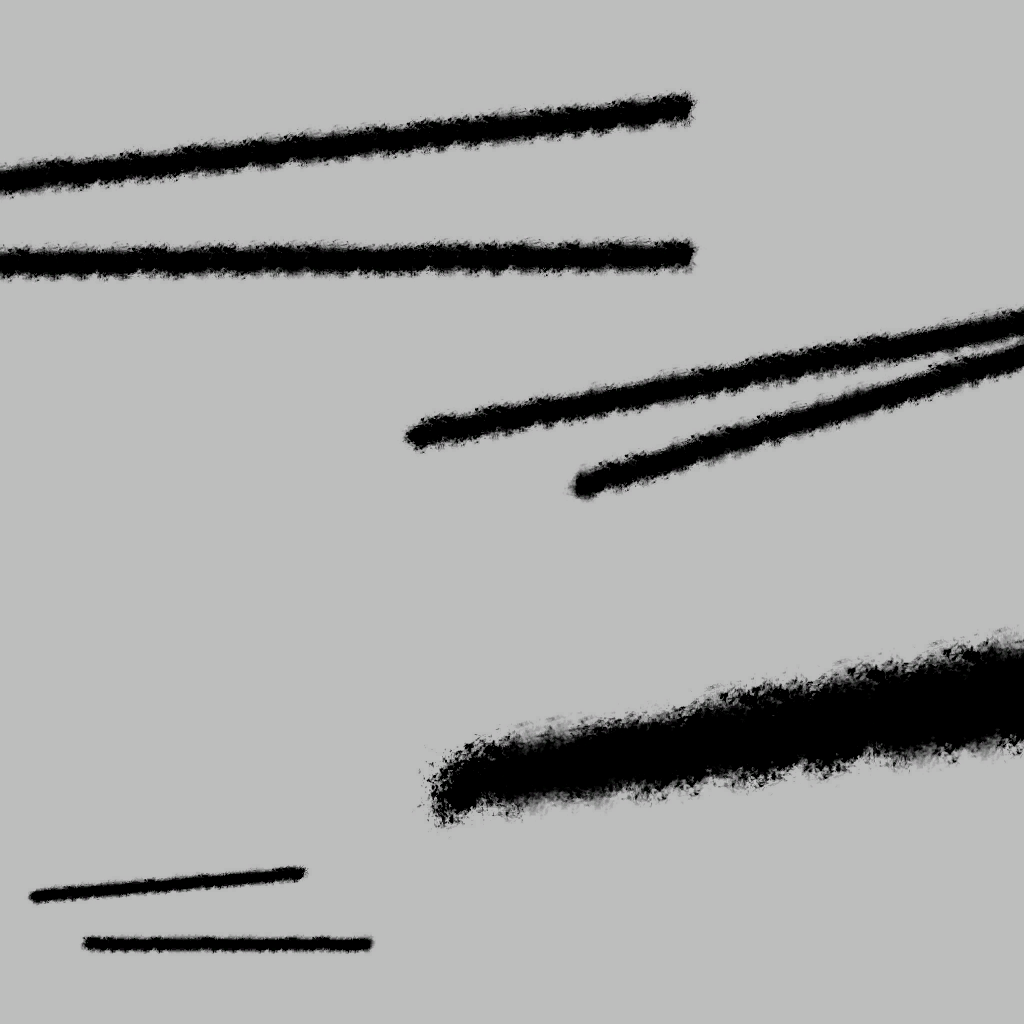
hi, when trying to convert this basic _dt png file to paa, the black strokes turn white. Is there any way to leave them black, e.g. that the area is darkened instead of getting lighter? The source png is https://tetet.de/arma/arma3/texture_dt.png
 rare dove
nevermind, even when the paa is black, it turns the area lighter in game. Needs a different approach
 merry marten
Hello, I'm having trouble taking a png nor jpg image and putting it into Texview2 without the background being white. I tried png but gives me a error failed to load and jpg opens but has white background. I looked it up and the solution I found didn't help me in my case
bronze gyro
Try tga
merry marten
ok
merry marten
bronze gyro
Try tga
said failed to load file
bronze gyro
Is it 2^x, 2^y resolution
merry marten
I don't know
frozen blade
find out
bronze gyro
Well find out lol
merry marten
Idk how. confused what you mean
bronze gyro
What is the resolution of the texture
merry marten
512x512
frozen blade
merry marten
Hello, I'm having trouble taking a png nor jpg image and putting it into Texview...
jpg does not have an alpha channel
frozen blade
both png and tga can have or not an alpha channel
what is the depth per channel of png/tga?
and how many channel are you exporting these as
and from what software
merry marten
let me check something
Figured it out
basically when I create a new blank image my settings are messed up or something and it breaks textview
I opened another file that works and copied it into it and saved and it worked fine
something with my settings when creating a new image
merry marten
I messed with the settings along time ago and it has been off since pretty sure I'm using the wrong my color
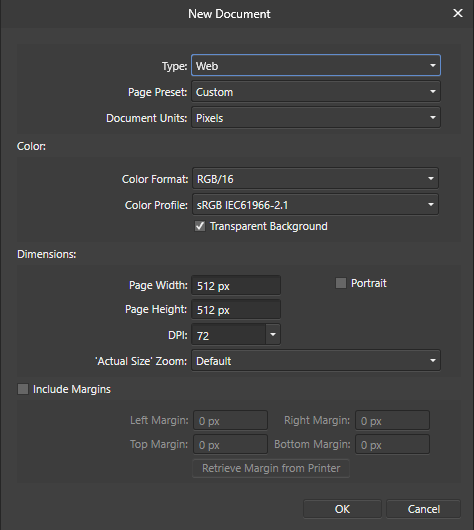
I'm using an almost clone of photoshop so things will be off but theses are my settings for new documents
frozen blade
what does RGB/16 means? 16bit per channel is not supported by texview
does this PS clone has a product name?
 golden peak
Does anybody know a good tutorial on how to make a DT texture?
Running into a few issues
full quarry
there are not really tutorials for it
what kind of issues you have?
and in what shader?
and have you looked what existing DT textures are like as reference?
golden peak
@full quarry yes i m using a few as reference. My problem is that every time i try to make one my dark spots are white and ny white are dark.
golden peak
rare dove
hi, when trying to convert this basic _dt png file to paa, the black strokes tur...
Is this thing pretty much.
frozen blade

GitHub
Substance Painter export presets for Arma 3. Contribute to MoonieFR/SubstanceToArma development by creating an account on GitHub.
please pin^^
frozen blade
lethal condor
As you wishh
danke
 celest obsidian
oh I have to check if the metalrough preset is up to date (I had voluntarily inverted some channels to exaggerate the shiny aspect of the SMDI)
 compact galleon
fringe lark
Not sure why but when I export my model to Object Builder the textures are not p...
compact galleon
fringe lark
Not sure why but when I export my model to Object Builder the textures are not p...
Probably your UV unwrap ? Select everything you want in one texture set in edit mode and unwrap again. Scale/position them properly on the UV map before texturing and exporting. This will tell the engine where to place which texture.
harsh jolt
Does anyone know how id change my color format? my patches show up in wrong colors.
 untold lintel
Not sure if this is the right place to ask; what size is my "picture" supposed to be for Arsenal/Inventory images of the item?
Think I got it with 512x256
full quarry
check vanilla files for reference
 clear quartz
Hi there. I am attempting to make an RVMAT however I can't find out what different stages do
hollow horizon
That's actually not specific for rvmats but rather for the shader used. Which, if in doubt, will be super shader
 velvet horizon
Anybody Who Has Time To Teach Me To Retexture Something, My Teacher Requires A Lot Of Patience
frozen blade
velvet horizon
Anybody Who Has Time To Teach Me To Retexture Something, My Teacher Requires A L...
lethal condor
Resolution?
 rare cedar
2048x2048
lethal condor
How did you convert?
rare cedar
I put the _as at the end and then I use "ImagetoPAA"
lethal condor
Can you show the original texture before the convert just in case?
lethal condor
Hmm never seen such shrink
lethal condor
Did you tried to convert manually via TexView?
hollow horizon
tga or png?
rare cedar
png
hollow horizon
Try saving as TGA, maybe there is some weird transparency in it
rare cedar
it works, I have to put it in PNG => TGA and then put the _AS to finally put it in PAA
full quarry
What did you use to convert it? Where is it saved from
Suffix needs to be put in the source file yes
 spring crescent
im making some patches and they show up with white texture around where the alpha stuff is, how do i remove this?
hollow horizon
If you use PNG, switch to TGA
full quarry
and make sure your alpha channel is clean
and preferably dont have white background color under the alpha
spring crescent
how do i see if my alpha channel is clean?
whole haven
Anyone have any ideas on how to make multicolor glass that changes color in certain lighting / angles? I don't believe it's possible but I could be wrong, just want to double check 🙂
full quarry
whole haven
Anyone have any ideas on how to make multicolor glass that changes color in cert...
not possible
ancient parrot
You kind of can.
add some tint to the glasses color map, then in the rvmat change the specular to a color, change the diffuse to a color, and change the ambient to a different color. It probably won't have the exact effect you're looking for but it will change colors.
Oh! and you can also try a custom environment map
 zenith mulch
Any reason why I have these white lines?
https://imgur.com/a/b0s0X1W
lethal condor
How's your texture?
lethal condor
Can you show the UV lines on the diffuse?
lethal condor
Hmm UV seems really fine. What is the rvmat?
zenith mulch
ambient[]={1,1,1,1};
diffuse[]={1,1,1,1};
forcedDiffuse[]={0,0,0,1};
emmisive[]={0,0,0,1};
specular[]={.16,.16,.16,0};
specularPower=100;
PixelShaderID="Super";
VertexShaderID="Super";
class Stage1
{
    texture="x\fuel\fuel_bottle_nohq.paa";
    uvSource="tex";
    class uvTransform
    {
        aside[]={1,0,0};
        up[]={0,1,0};
        dir[]={0,0,0};
        pos[]={0,0,0};
    };
};
class Stage2
{
    texture="#(argb,8,8,3)color(0.5,0.5,0.5,0.5,DT)";
    uvSource="tex";
    class uvTransform
    {
        aside[]={1,0,0};
        up[]={0,1,0};
        dir[]={0,0,0};
        pos[]={0,0,0};
    };
};
class Stage3
{
    texture="#(argb,8,8,3)color(0.0,0.0,0.0,0.0,MC)";
    uvSource="tex";
    class uvTransform
    {
        aside[]={1,0,0};
        up[]={0,1,0};
        dir[]={0,0,0};
        pos[]={0,0,0};
    };
};
class Stage4
{
    texture="x\fuel\fuel_bottle_as.paa";
    uvSource="tex1";
};
class Stage5
{
    texture="x\fuel\fuel_bottle_smdi.paa";
    uvSource="tex";
    class uvTransform
    {
        aside[]={1,0,0};
        up[]={0,1,0};
        dir[]={0,0,0};
        pos[]={0,0,0};
    };
};
class Stage6
{
    texture="#(ai,64,64,1)fresnel(1.3,7)";
    uvSource="none";
};
class Stage7
{
    texture="x\fuel\fuel_bottle_co.paa";
    useWorldEnvMap="true";
    uvSource="tex";
    class uvTransform
    {
        aside[]={1,0,0};
        up[]={0,1,0};
        dir[]={0,0,0};
        pos[]={0,0,0};
    };
};
oops
that's a little big
Figured it out, forgot to transfer the files to the right dir
full quarry
That would indeed do it. 😅
spring crescent
do i need to convert my .png to .tga and then convert it to a .paa?
frozen blade
.paa converts just fine from both .png and .tga if files are setup correctly
spring crescent
yea im having the issue where some insignia show a white border in mp
first i found that i should rename the .paa files from ..._co.paa to ..._ca.paa but im not sure if that works if my OG files are png
frozen blade
what's the bit depth?
spring crescent
8bits/channel
full quarry
Make sure the color under the transparency is not white
spring crescent
its see through
full quarry
Yes but in some situations it will still bleed through
Not on the transparent part but at the edge of the visible part
Like what you got going
spring crescent
i dont believe i have anything white in the insignia
the layer style uses white as highlights but thats set on 25% opacity
full quarry
If you open the. Paa in texview it can show what it has saved as colors. Even under transparency.
What gets Saved under transparency depends on your save to png/tga settings.
spring crescent
the .paa doesnt show any white borders when i look at it
full quarry
I know, it wouldn't. That's not what I meant.
When you move mouse around texview window it shows pixel info at the left bottom
spring crescent
oh yea i think i see what you mean
there are sudden white pixels when i mouse around the outside yea
but nothing really around the border
nocturne lake
Set texView to RGB mode instead of RGBA, it'll show you the background colour
When creating any texture with transparency, you need to pad the colours of your texture for a few pixels outside of what you want the final image to look like, and make a proper alpha mask for the transparency instead of just relying on transparent background
 vague wharf
who do i talk to to get permission to reteture rhs and/or usp assets?
frozen blade
vague wharf
who do i talk to to get permission to reteture rhs and/or usp assets?
rhs - me, but everything is already explained on our eula page
vague wharf
Yea, i read through that but for my own safety i still try to get written consent, you know how people can be
 round ermine
literally everything but 3 models are fair game regarding RHS
retexture wise
i believe there is also a readme txt file that tells you which ones you cant retexture iirc
@vague wharf
vague wharf
Yea, i got with him
 modern vapor
I'm struggling with creating textures for Art of War canvas objects (eg Canvas_01_F , Canvas_01_Landscape_F etc). Square textures get warped. Textures with transparent borders get less warped, but sometimes their colors are inverted. And each canvas works with different sized textures. This tutorial illustrates what's probably going wrong:
https://community.bistudio.com/wiki/Retexturing_with_setObjectTexture
The Art of War addon is still in .ebo, so I cannot access the default textures.
Does anyone have, or know an example of working samples of textures for these objects?
 uncut sentinel
Im trying to make a texture for the AmmoBox_F
Is there a UV Map I can follow, getting the squares at the top to be accurate is slow
full quarry
Uv maps are not available, you can likely find the original texture in the game files to be used as reference
uncut sentinel
full quarry
Uv maps are not available, you can likely find the original texture in the game ...
Thanks, yea the base texture hasnt got any defining areas
full quarry
Then it's trial and error I'm afraid
uncut sentinel
Maybe I can see the spec map and get it from there
 queen shard
How can I make textures? Trying to make an aircraft just straight up olive dab green
full quarry
if you mean retexturing, you would have to open up the original texture and draw over it/edit it to make it look like what you want
also you would need config for the new texture
compact galleon
Anyone know what could cause my outfit to be all black in game instead of my camo pattern ?
looked at the RVMAT, doesn't look out of the ordinary to me
compact galleon
bump
full quarry
no need to bump. people see it already and will answer if they got some ideas
my guess is that you got bad pathing somewhere
dense peak
Hello, sorry i have to ask it again, but is there a way how to make my tank texture in high quality even though when i set my texture quality low in settings in game? i've been observing vanilla have that ability mbt_01 for example texture looks pretty good even though in low settings in game.
here are some of the possibilities i think i have a problem with but i dont know the which is the problem:
I only used 0 custom LOD instead of 5 or 10?
I should bake my highpoly with my low poly in substance painter?
i should export it as 4k/8bit tga instead of 4k/8bit png?
My rvmat is wrong?
PS Im willing to upload my work so you guys can check what is the problem, im using substance painter
dense peak
How do i open my .pbo files?
grand warren
you use your original unbinarized / unpacked source data
@dense peak
dense peak
im stupid mate ya gonna have to dumb it down lol
grand warren
if it's your PBO, you at some point had source data where you created the PBO file from
dense peak
no i want to retexture the regular black beret
so idk what to do
this is my first time
grand warren
a baret from the vanilla game?
dense peak
yeah
like the normal black one with nowt on it
nowt means nothing if ur not a geordie from the UK
dense peak
Thanks
grand warren
so, if you gonna dive into modding, do it properly.
first, install the arma 3 tools, launch them once and open addon builder once. you then never start the tools via steam anymore, only directly from the installation folder if needed.
next, you prepare the notorious "P Drive" and install mikero's tools also listed here.
https://pmc.editing.wiki/doku.php?id=arma3:tools:setup-p-drive
once the P drive is up and running, execute arma3p.bat. this will extract all available all arma 3 game data to your new p drive
dense peak
thank you mate
grand warren
you can also find some helpful modding information on the PMC wiki, like this
https://pmc.editing.wiki/doku.php?id=arma3:texturing
vernal sage
You can grab the texture for the regular beret (with no flash) in the following directory:
a3\characters_f\common\data
headgear_beret01_co.paa is the default black texture.
For the NATO/CSAT beret with a flash on the front, it's stored in a3\characters_f_epb\blufor\data with the base texture being headgear_beret02_co.paa
 zenith estuary
Hey, so I need for the contact dlc the nohq for the vests and the helmets. did anyone have this stuff?
lethal condor
zenith estuary
Hey, so I need for the contact dlc the nohq for the vests and the helmets. did a...
Wait till 2.08 or download Dev-Branch. They're already PBO'd
lethal condor
Wait till 2.08 or download Dev-Branch
modern vapor
zenith estuary
Hey, so I need for the contact dlc the nohq for the vests and the helmets. did a...
You can try this function. https://forums.bohemia.net/forums/topic/195216-how-do-i-find-the-in-game-icons/?tab=comments#comment-3101819
I used it to find a specific game icon .paa, but it actually spits out config paths of almost every ingame texture (including stuff from Art of War that is locked in .ebo).
zenith estuary
lethal condor
> Wait till 2.08 or download Dev-Branch
I have downloaded the dev-branch but its still ebo
lethal condor
contact is EBO yet, enoch is PBO
zenith estuary
lethal condor
`contact` is EBO yet, `enoch` is PBO
ah okay I see thank you so much
zenith estuary
modern vapor
You can try this function. https://forums.bohemia.net/forums/topic/195216-how-do...
thx for your help
queen shard
Would y’all say retexturing is hard?
grand warren
it depends on yor 2D skills and knowledge of the software you are using
 dim shoal
Is there a source of detailed overlays for vanilla vehicles (Hemmit in particular) or will I just have to unpack the PBOs and work them backwards
round ermine
he means templates, probably
dim shoal
One with all of the detail but the colour is removed from the majority of the model. It just that if I go using colour to alpha I'll lose any of the coloured details
umbral swallow
I've used GIMP's color to alpha and not lost any detail. Just gotta switch the layers to Legacy mode. It's by far the best method if you have a single-color texture available.
 whole tree
Hey guys, how can I retexture the parade uniforms when the uniforms themselves are in an ebo? I got the template from the Arma 3 Samples
Just having issues finding the path is all
 nocturne prairie
anyone knows why in the shadow my normalmap is gone? rvmat with "Multimaterial". In the light is all fine
nocturne prairie
is the normal only in light visible? 😟
nocturne lake
Yes. That's why people add lighting to the diffuse texture
nocturne prairie
Lightning to the diffuse? What you mean? Maybe you add highlights on the position from normal in the diff map?
Or this? Diffuse[]={0.9,0.9,0.9,1}; but this is working?
full quarry
he means people add little bit of shading/shadows in the color texture
nocturne lake
using the ambient occlusion bake with 50% opacity and multiply blend, and doing a curvature map bake with overlay blend to add some edge highlights usually does the trick
I'd also recommend applying the ambient occlusion over your specular map (smdi green channel) if you want more definition
nocturne prairie
thx. i try it
 west steppe
I need help, im trying to retexture the paas in a pbo but when i try to use make pbo it says the paas are missing
full quarry
you dont retexture paas in pbo
you create a new pbo with the new paas int it
you dont mess with other peopels pbos
@west steppe
west steppe
What i mean is im trying to use my own textures on the model but its not working
i got past that bit but not i cant use pbo project because it is failing with texheaders.bin
creating a texheaders.bin
debug trap (you shouldn't see this)
data\Navy_Heli_Transport_02_F_body.paa:debug trap (you shouldn't see this)
debug trap (you shouldn't see this)
detex: debug trap (you shouldn't see this)
texheaders.bin failed
</MakePbo>
makepbo failed: texheaders.bin failed
ArmaReTex_Merlin.pbo not produced due to error(s)
Job(s) completed in 0secs on Sun Mar 6 14:04:39 2022
full quarry
yes you are not doing this right
west steppe
How should i do it? I have the file unpacked and im trying repack and put the addon into my own file
full quarry
you do not repack someone elses pbo with your stuff in it
west steppe
why?
 west steppe
Its not ip theft its for my own enjoyment
 west steppe
dropkick
 patent patrol
Anyone know if there is any meaningful performance difference between supershader and multimat?
 cobalt tide
Hey, quick question on the U_B_survival_uniform can you texture the t shirt and the bottoms or just the bottoms?
frozen blade
patent patrol
Anyone know if there is any meaningful performance difference between supershade...
it is all in regards to section count, it is for bulidings, yes
especially when numbers add up
patent patrol
Yeah. I know keep section count low when we can. But was just wondering if there is any real difference between those two shader types perf wise.
full quarry
should be just in the sense of sections like pufu said, 1 multimat can show 4 different surface types with less sections than what 4 supershaders could
trade is the possiblity to have very different shinyness etc on the surfaces
 finite pawn
Hey, so
Tryna find the texture map of the AAF tank the kuma/leopard
How in gods name do i find it
full quarry
when you set up modding environment (P:) drive correctly you would get the arma 3 data unpacked on your drive and you would be able to browse the files and find that particular texture set
or there might be ready template for it in the Arma 3 Samples on steam
or on the BI forums mayhaps
vernal sage
cobalt tide
Hey, quick question on the U_B_survival_uniform can you texture the t shirt and ...
Yes. It has four selections set up for all the main parts of the model (camo, camo1, camo2, camo3):
camo = gloves + pants (a3\characters_f\blufor\data\clothing1_co.paa)
camo1 = wetsuit boots (a3\characters_f\common\data\diver_suit_nato_co.paa)
camo2 = flippers (a3\characters_f\common\data\diver_equip_nato_co.paa)
camo3 = undershirt (a3\characters_f\common\data\basicbody_green_co.paa)
You'll want to add a custom path for camo3 to modify the shirt's texture.
vernal sage
finite pawn
Tryna find the texture map of the AAF tank the kuma/leopard
The Kuma's textures are stored in the armor_f_epb pbo. Look inside the mbt_03/data folder for its textures.
To modify the colour of the thermal dampening nets, you'll have to take a look inside armor_f.pbo. The data folder has multiple textures prefixed as "camonet_" which you can use as an example to work off on.
 flint pivot
Okay, I know this is a VERY broad question, and it could be many things, but what parameters in an RVMAT could cause my dark tan texture to come out looking almost bright pink? I've adjusted several parameters with no change.
Also, buldozer is showing it as being just fine, it's only once binarized and in game that this happens.
full quarry
flint pivot
Okay, I know this is a VERY broad question, and it could be many things, but wha...
link pictures
possibly you dont have correct resolution on the texture or correct texture suffixes in use or the rvmat is somehow else buggy
buldozer default lighting differs from the in game lighting so that can be a factor too
lighting is infact defined for each terrain so its not same everywhere
full quarry
try.
what character are you trying to use?
b_soldier_survival_F so this character
uniform item is just the item in inventory or on ground
the unit is the character you see when the uniform is worn
cobalt tide
ive tried uniformContainer player and doesnt work either
im using that script command
full quarry
and as far as I can see it does not have more more than camo hiddenselection
player/unit/vehicle/object is the correct target when you try to use setTexture commands
but as far as I can tell that uniform has only 1 camo selection
cobalt tide
yeah, im just trying to texture the survival fats and it doesnt want to allow me to put the layer on the top part
cobalt tide
ah yeah i kinda figured that i was just wondering if there was any other way without mods, but thank you for your help
full quarry
nope
in theory it might be possible to enable those other hiddenselections via modded character
flint pivot
full quarry
link pictures
Pictures incoming:
Only just realized I can't post pictures here...uhh...give me a minute
full quarry
yeh just upload them somewhere and paste link here
full quarry
well you do have red tint in the color. but also I think your rvmat does not quite work right
perhaps missing or bad normalmap texture
and no AS texture
and possibly wrong overall rvmat settings
or no rvmat at all
flint pivot
I made an RVMAT using JDtools RVMAT tool, and the normalmap is applying I know because it includes a logo on the side of the gun.
I don't have an AS texture
full quarry
I can only recommend manual rvmat writing myself. have not ever tried external tools for that
your normalmap might not be fitting for arma and you will need AS texture
have you named the textures correctly before conversion to .paa
as in with _CO _NOHQ suffixes
flint pivot
Yup, I followed the guide
Oh, one thing I did do oddly that might be it, I applied my base color as the primary texture in object builder instead of including it in the RVMAT as a _CO, I just realized that.
full quarry
no that is the correct way to do it
normally color textures are not defined in rvmat
is your rvmat set up as supershader type?
flint pivot
Not sure, this is my first time doing an RVMAT, how would I check?
full quarry
open it in text editor
there are also blank examples in the P:\A3\Data_F\ folder if you got P drive set up
flint pivot
I've got it open in my text editor, and I've been tweaking it before seeking help (which made no difference) but I'm asking what would I look for that would indicate whether it is a supershader
full quarry
this part dictates the used shader types
 flint pivot
Then yes, it would appear that the RVMAT tools set it to those
full quarry
could be because you dont have full set of required textures that it looks odd.
also Arma lighting does require somewhat darkened textures for them to look right
where did you make the textures in?
and how is the normalmap made?
and what does it look like
flint pivot
I've been working with a modeler on CGtrader, I believe he used substance painter. I'm not sure how the normals were made, but I can show you
full quarry
ah that is always a bit tricky business if you are not the one in control of the process
flint pivot
True, but he's made a lot of stuff for ArmA 3 specifically before, so I'd bet more-so that it's something on my end
full quarry
Arma normalmaps need to be done in -Y format so that their directions are right. so that may need tweaking.
Id say take the default supershader from the A3\data_f\
make a copy of it and apply your textures to correct stages
and try that
you can easily identify what stage uses what texture from the texture = "" line
flint pivot
Gotcha
I'm still pretty sure that the normalmaps direction is correct, as it's lining up right on the model in-game, but I'll try using the default RVMAT code
full quarry
its not about lining up
its about color channels being correct in the image
if your guy knows his stuff, then it could be right
flint pivot
Oh, I misunderstood what you meant by directions
Right, well I'll try the default supershader and see how that goes, thanks for the help as always
flint pivot
Well, curiously I'm now getting the exact opposite problem, wherein it is pitch-black
full quarry
if it goes black there is wrong paths and it cant find texture
flint pivot
Fixed it, it was exactly that, but now it's just back to the bright texture as before. Is there a parameter on the RVMAT that will just darken it generally?
full quarry
no thats not good idea as that might cause it to work poorly in different lighting conditions
Its better to be done on texture level
you can compare your texture files to the arma textures and see if there is a lot of difference in saturation and lightness
 flint pivot
Appreciated, I'll see if just modifying the original base color texture works
full quarry
do also note that to get good looking textures in Arma some shading is often baked into the textures themselves
flint pivot
I darkened the base color textures, it's looking a lot better now
You are also now in the "special thanks" section for my mod, because you have helped me so many freaking times
full quarry

flint pivot
I've now applied this knowledge to all of the guns in my mod, (bar one).
Two however are having a very odd "static" effect showing up on half of their body. It's only appearing on ONE section, but it's consistent.
 true peak
Hey guys im making a terrain and a frind got a problem that after i edited some thing that he needs to purchase the map to open it in the editor like an DLC Map
dose someone know what could cause this
the same thing applies on the standard maps like altis, stratis and so on
he needs to buy them too now xD
frozen blade
true peak
Hey guys im making a terrain and a frind got a problem that after i edited some ...
- wrong channel
- what have you edited
- which terrain? you said you are making a terrain
true peak
@frozen blade i think we found the issue
it had to do with the client now everything works
but thank you for the help ❤️
full quarry
0 days since bad lifemap sources been mentioned
 shrewd shard
Hey i was wondering what could cause my textures to go way too bright?
dependant on the map it will either go extremely bright upclose and for example on tanoa when i go far it also goes really bright
the sun has a crazy amount of effect on the texture
i can upload pictures if it helps but basically where ever the sun shines it goes bright as hell
full quarry
bad rvmat settings, wrong kind of textures, wrong method in texture making
no proper bleeds in textures -> white/light background mipmaps the texture poorly
lot of options
possibly all affect it
flint pivot
I don't know nearly as much as Goat, but in my recent experience with a similar issue I messed with the specularpower parameter on the RVMAT and it mitigated it, usually lower worked better depending on the texture.
full quarry
specular values can indeed blow out very easily over the maximum the shader draws so to speak
shrewd shard
Alright thank you ill mess around with it tomorrow and see if i can fix it
Additionally is it possible to liveload rvmats in devbranch?
full quarry
yes
 slender bramble
Is there any way to solve transparency culling issues? Namely, this: https://cdn.discordapp.com/attachments/244119488826441729/951691854930382928/unknown.png
Note how the transparent face on the front is occluding the transparent face behind it. How do I prevent this from happening? Is there perhaps a way to use alphatest instead of linear blend?

?file=Arma3-helmet-combathelmet.png)


 slender bramble
Yeah, the texture resolution's shit. I have to run the game at very low texture settings due to memory issues. But it's two overlapping 'hair cards', and the key thing to note is the 'borders' around the one in front where only beyond them can you see the one behind it, and that is visible at any setting
full quarry
perhaps wrong shader type or bad alpha channel
or duplicate faces
or not alpha sorting of the faces
slender bramble
No, it's sorting correctly, otherwise the face in the back would be drawn on top of the one in front. The issue is the transparent faces are writing to the depth buffer
full quarry
what shader does their rvmat have?
and what is it
can you take a better picture
and perhaps a picture of what you would expect it to look like
and is this a retexture?
slender bramble
Nvm I think I found what I was looking for; renderFlags[]
Putting AlphaTest128 into it does exactly what it sounds like it would, discard fragments with alpha below 128 and draw fragments with alpha above 128 with no blending
flint pivot
Hold the phone...you can LIVELOAD? Is it just RVMATs? How do you even do that? Just have devbranch loaded instead of the main branch?
lethal condor
Dev-Branch has a Diag exe, which can do that
full quarry
Diag exe and filepatching
flint pivot
This changes everything
full quarry
It is quite useful yes
 snow bay
Hey there. I've just started messing around with substance painter, and I can't get the export presets to appear in the "Export Textures" menu, I put them in Documents\Substance 3D Painter\shelf\export-presets
celest obsidian
snow bay
Hey there. I've just started messing around with substance painter, and I can't ...
Stupid question: Did you try to restart your software after putting your export preset in "export-presets"?
The presets should appear in "output template" when you try to export your textures.
celest obsidian
oh, I didn't even know that export presets could be imported from this menu 😭
I just updated the README on Github to add this import method. Thanks for the tip!
 wheat hatch
Should i make textures before grouping my vehicle and making vertex groups
full quarry
it can be useful as you might find errors you need to fix
wheat hatch
So making vertex groups before
full quarry
both ways work pretty much the same
making textures first might save a bit of time if you need to alter mesh and then remake vertex groups
 onyx dune
So I want to start and maybe make some textures, but I don't know where can I find them, I mean folder etd.
Someone can help?
 cunning flare
super simple getting started right away setup:
\Steam\steamapps\common\Arma 3\Addons\characters_f to find textures
create a mission
pop a .png in there
use player setObjectTexture [0, "whatever.png"]; and apply texture
cunning flare
You need some kind of software to unpack the .pbo files, id reccomend getting the entire Mikeros tool suite
and download arma 3 tools from steam if you havent already
onyx dune
cunning flare
super simple getting started right away setup:
\Steam\steamapps\common\Arma 3\Ad...
Also what about Vechicle textures? Same?
cunning flare
Some of them use several textures. The 0 in [0, "whatever.png"]; is what is referred to as a hiddenSelection texture, 0 being the current selection. So if your vehicle uses several textures like for example a tank that has one texture for the main body and one for the turret you will have to apply them separately. Some vehicles only use one texture though so you dont have to worry about that with every single one
If you want to experiment with texturing helmets and vests you will have to learn how to set up an addon.
cunning flare
onyx dune
Also what about Vechicle textures? Same?
But to answer your question, yes, its pretty much the same
dense peak
Is there a contact Gorka template available?
 pulsar gazelle
hey so anyones got an easy way to find the selection for when im doing setObjectTexture? its the number in [0, "whatever.jpg"]
also second, if i were to retexture rhs, where would i go about finding the base texture to retexture in the first place?
 mystic cypress
Is there a step by step guide on setting up live loading rvmats?
lethal condor
Live loading, as in reload once when you edit it?
If so, just use Diag exe. You just need a Dev-Branch and a special exe
full quarry
You need just the diag exe. It works with stable install too.
But I don't think there is any steb by step guides on that
 frigid escarp
you also need to load unbinarized p3d, dont you?
full quarry
Mm yes I think so.
mystic cypress
Many thanks, i’ll have to give it a go today
Does any material work need to use the unbinned model to update?
I repacked it just replacing the rvmat files and it didn’t seem to update? But using setObjectMaterial and local files did
full quarry
I dont think you can use filepacthing with retexturing
it applies only for models you make
and have the non binarized p3d for
retexturing uses different workflow from "from scratch" work
mystic cypress
Yeah I figured the materials were probably baked in
Is it best to symlink from P:/ into armaroot to work with diag64?
 unique merlin
Do you have tipps for sources of good textures for free or very cheap?
full quarry
Textures of what?
Textures. Com offers low resolution downloads for free tokens and I Don think their prices are bad for paid stuff either.
But it depends a lot on what kind of surfaces are you looking for
 balmy kestrel
I'm having trouble converting my PNG to PAA
I successfully converted three other images perfectly, but the last one shows up as a transparent silhouette in-game
It's a mostly purple logo, it looks fine in TexView and is 512x512p
umbral swallow
Are you absolutely sure it's 512x512?
not 513x512?
What's the texture and the object you're applying it on?
balmy kestrel
TexView says it's 512x512, I also edited it before to be so
I'm trying to apply it on the big billboard or the 1x1m user texture
in ACE Interactions menu, via the tagging framework, the icon and tag are also transparent
I'll post the image soon
umbral swallow
most of these channels don't allow us mortals to post images, but you can PM me?
hollow horizon
@balmy kestrelMaybe your PNG is 16 bits per channel?
hollow horizon
@foggy solsticeCheck #creators_recruiting I suppose that is more appropriate
 foggy solstice
hollow horizon
<@!341261647819571201>Check <#292271129303842817> I suppose that is more appropr...
foggy solstice
hollow horizon
<@!341261647819571201>Check <#292271129303842817> I suppose that is more appropr...
Thank you
umbral swallow
Textures are simple enough that anyone could do it. All you need is TexView 2 included in Arma 3 Tools for conversion, and any graphics program.
...assuming we're talking about re-skinning existing textures/objects here.
foggy solstice
umbral swallow
...assuming we're talking about re-skinning existing textures/objects here.
Yes we're trying to play a antistasi mod where it's all food and we play as gingerbread men fighting off the BBFL (Baked bean foreign legion) so we are trying to change skin texture to baked beans
foggy solstice
It's a cool mod. It turns trees into the peppermint sticks and houses into bread. You shoot the frosting squeezers as guns
umbral swallow
But yeah, you can use anything like PhotoShop or GIMP to draw/edit .png files and then convert to/from .paa with TexView 2 (it can do it both ways). Photoshop is the most popular, but I like GIMP cos its FREE and excellent for re-skins. If you set a layer to Legacy - mode and then use Color To Alpha, the results are 1:1. Order doesn't matter, you can set layer mode before or after.
 dry rapids
Ahoy, is there any way to amplify the MC in a multimaterial? The MC texture looks fine in blender but when ingame or in buldozer its one third the intensity. You can barely see it. Is there a setting in the rvmat for this?
full quarry
No, need to edit the alpha or color intensity of the MC texture
dry rapids
Alright, thanks horgo
 hardy heath
Been trying to retexture the RHS UH-1Y for a couple of hours
From what I realize, I have an exterior texture file and an interior texture file. When I modify the interior texture file, the blades won't change color (these are on the interior .paa file) Any reason for this? Are the blades' texture somewhere else? Also, how would I go along making retextures of all of the variants (armed/unarmed/mg only)
Sorry if my question is too long, I've been at this for hours now with little to no progress
umbral swallow
@hardy heath I've made re-skins of those UH-1Ys and AH-1Zs! Can't answer the question about those rotor blades cos I was just happy they stayed the same.
I just re-skinned the textures and made simple basic configs for different factions. I did re-paint some of the interior areas too, to match.
hardy heath
About those interior areas...
I made a whole recolor of them. From the chairs to the metal in itself. I think ALL of it was on that int .paa file
However, after my recolor, ONLY the chairs seem to have said recolor applied
Everything else is the same.
What files did you modify in order for them to work? Also anyone else who has made retexturing of these UH-1Ys if you have any input on this please let me know
hardy heath
@frozen blade ...sorry for the ping I've been cracking my head with this for many hours now and I'm done, what do you know about this?
full quarry
Changing stuff in the paa might not help if all parts of the model are set up with hiddenselections
Them being the thing that enables config retexturing
frozen blade
hardy heath
<@!105574759248437248> ...sorry for the ping I've been cracking my head with thi...
most likely not everything is setup for hiddenselections
hardy heath
Yeah... so I figured already :(
frozen blade
hardy heath
Yeah... so I figured already :(
use feedback.rhsmods.org to request additional hidden selections
hardy heath
thank you!!!
frozen blade
hardy heath
thank you!!!
it isn’t a bug, it’s a feature request. mark correctly
frozen blade
no, edited that for you
hardy heath
Thank you, sorry for the error
nocturne lake
Rotor blades don't work if they use hiddenSelectionsTextures, unless the model is changed to use workarounds instead of the game's default rotor behaviour
hardy heath
nocturne lake
Rotor blades don't work if they use hiddenSelectionsTextures, unless the model i...
How do I do this?
dense peak
hey can anyone help me make some textures for a plane?
i just wanna add a few ingame skins and post it on the workshop for me and my friends to use
i know how to do texture editting, but im unfamiliar with arma 3's modding
 livid knot
Would people here be able to help me out with hidden selections/rvmats and stuff? I made a vest and I want to add a patch to it, but I dont want to have to go back and edit the heightmap and stuff. Is there a way for me to apply more than 1 hidden selection to a mesh, and have both use seperate rvmats? Or in this case one of them doesnt use an rvmat
full quarry
livid knot
Would people here be able to help me out with hidden selections/rvmats and stuff...
Edit heightmap? Wut? You can check sample character I think it has a separate insignia patch.
 idle peak
Hi Community, does anyone know if there has been any change since the last update on how to create PAAs or PBOs. I'm using TexView2 and PBO Manager, but the packaging doesn't seem to be correct anymore, it gives me errors. Maybe I make mistakes, but I don't think so. Thank you in advance 😉👍
umbral swallow
PBO manager hasn't been a viable PBO packager for years. You need to use Addon Builder, or you'll start getting shit like server kicking off anyone trying to join.
TexView 2 is still they way to go tho. And PBO manager can still be used to unpack PBOs, too!
idle peak
umbral swallow
PBO manager hasn't been a viable PBO packager for years. You need to use Addon B...
Ah cool, thank you for the info and thank you for the speed of your response... That explains it 😀👍
umbral swallow
Also, I don't like to binarise my configs, there's no relevant gain in performance/load times and I like getting better error feedback when trying to launch instead of packaging failure with the errors buried somewhere deep.
But yeah, if you still keep getting errors after switching to Addon Builder, check your configs.
livid knot
@full quarry Hmm, I see what they did in the samples, using a separate piece of geometry to apply the patch to... I was hoping to avoid this since ive done this in the past to poor results clipping etc. I was attempting to just apply the texture in a 2d format to the mesh
full quarry
livid knot
<@!150949769953411072> Hmm, I see what they did in the samples, using a separate...
I don't think that's a real thing
livid knot
full quarry
I don't think that's a real thing
Damn, alright thanks for the help!
 soft oracle
Hey guys, i've been doing some research to make my first multimaterial rvmat and i'm puzzled about one thing in particular which is making the mc texture, what is the best way to make one? So far i've made the mask, currently working on the dtsmdi, i know i could use a procedural mc but i really wanted to learn how to properly make one.
full quarry
I paint may MC textures manually
depends what kind of look you want but I've found manual paint to be most reliable way to make it interesting
you can generate all kinds of crunge if you like but its not as simple as it sounds either
livid knot
HorribleGoat ive taken your advice and made a mesh for my patch, it works fine, but the texture appears black in game... Ive tried it with other textures and they work fine. The unwrap of the mesh is correct and the normals are good as well. The texture shows up correctly in texview as well, so it appears to be working in a .paa format. Hidden selections nor applying it in OB make it work.... Anyone have any ideas?
full quarry
you got some broken rvmat on it perhaps
or your path to the paa in the pbo is not right
livid knot
full quarry
you got some broken rvmat on it perhaps
I wasnt using an rvmat, it should wor without one though right? Also path is fine
full quarry
did you apply the texture on the p3d?
livid knot
I tried that, came out black as well
full quarry
textures need always be assigned to the model
hidden selections are only for making alternative variants
livid knot
Hmm, other parts of the model are only using hiddenselections for textures
full quarry
things like surface transparency are saved into the p3d faces on binarization
how are you packing your pbo?
livid knot
Arma default tools
celest obsidian
I will soon share a multimat project for beginners on github. There will be a P3D, a RVMAT, a Blender project, 2 smart materials and an export preset for substance painter. Can't tell when but soon.
soft oracle
full quarry
depends what kind of look you want but I've found manual paint to be most reliab...
well i want to use it to apply damage to a vehicle in dayz, there's hardly any info about it on the modders discord and all roads lead to arma. What i don't understand is how to make the texture when i already have a co that will handle the color information, from what i understood the mc handles the intensity of whatever i apply via the co?
soft oracle
celest obsidian
I will soon share a multimat project for beginners on github. There will be a P3...
this would be incredibly helpful 😄
full quarry
livid knot
Arma default tools
then its all possbile your paths dont work right. addon builder does not check for paths
livid knot
full quarry
then its all possbile your paths dont work right. addon builder does not check f...
They 100% work, I tested other textures in the same path, and I copy pasted the name of the texture. Ill try using a basic rvmat and seeing if it fixes anything
livid knot
Hmm rvmat didnt fix it
full quarry
maybe you dont save the texture with proper suffix
_CA for transparent things
or you overtwrite it in hidden selections
livid knot
hmm I didnt have a suffix on it, right now the mesh is being overwritten by whats in hidden selections, which is correct. Trying with a _co suffix rn
The suffix did nothing... ill try _ca I guess
nope, _ca does nothing either
full quarry
Im worried you dont have this kind of basic stuff in order. I have no more ideas atm.
livid knot
I think you're right, something seems wrong with the actual texture or somethin. Thanks again for all your suggestions!
When I load it in game it flashes briefly at the start the correct texture, then just pops to black lol
full quarry
that sounds like you are overwriting it with hiddenselection
 carmine marsh
Why do some old .paa files get a LOT smaller when I open them in texview 2 and save them again? Am I changing the format when doing this or what is going on? Like from 2.7mb to 40kb
full quarry
perhaps they get converted and compressed again?
carmine marsh
Something like that probably. Not that its a bad thing, I am just wondering if this would mess up the texture ingame. Not noticing any difference in texview, though for some textures the color average might change very slightly. Very interesting...
full quarry
if it recompresses theres likely less colors on it and the quality gets reduced
tis definitely not recommended course of action to do this
carmine marsh
I zoomed onto individual pixels though and saw 0 difference in texview, though I don't know if texview accurate represents the textures as they are in game
full quarry
not quite. up to you to decide what works for you though
carmine marsh
Perhaps its not worth the risk of something breaking. Talking about potentially 10+ years old .paa files here, probably anything is possible with these museum worthy files...
idle peak
umbral swallow
Also, I don't like to binarise my configs, there's no relevant gain in performan...
No me either I don't binarize my sqm for practicality but packaging in PBO is an obligation for the mod to work correctly it seems to me ?
idle peak
full quarry
and you should not be writing sqm anymore either
How so? I'm not sure I understand
full quarry
SQM is the old scripting language/syntax. Arma uses SQF
idle peak
full quarry
SQM is the old scripting language/syntax. Arma uses SQF
Ah yes ok, correct. When I talk about SQM I necessarily mean the mission file which is necessarily a .sqm
That's what I wanted to say, I don't binarize it either to have faster access with Vscode for example and to modify the init of an object (if I have placed one in my mission) without as much need to open arma and the eden editor
full quarry
when youre making stuff thats fine. the final release build should be binarized though
idle peak
full quarry
when youre making stuff thats fine. the final release build should be binarized ...
Completely agree too, when there is no more bug or other and everything is clean, I binarize 😌🙏
idle peak
full quarry
when youre making stuff thats fine. the final release build should be binarized ...
Seen when binarizing we gain almost half the volume, just for that it's good... After like the Bohemia advice, I avoid being at more than 30000kb
ancient parrot
livid knot
hmm I didnt have a suffix on it, right now the mesh is being overwritten by what...
Does your starting texture contain transparency?
Not the texture being swapped to, the one assigned before it does that.
idle peak
full quarry
when youre making stuff thats fine. the final release build should be binarized ...
After to be able to get to this volume it is that we have already loaded well anyway
idle peak
ancient parrot
Does your starting texture contain transparency?
Not the texture being swapped...
Oh interesting, transparency? The also not sure to understand well? But yes I have transparency in my texture indeed
idle peak
ancient parrot
Does your starting texture contain transparency?
Not the texture being swapped...
Damn, you don't answer me sorry 😉
livid knot
ancient parrot
Does your starting texture contain transparency?
Not the texture being swapped...
The current setup is the mesh in object builder does not have a texture, it is empty. The texture is applied in hidden selections only (I tried it with putting it on the model and that didnt work either)