#arma3_texture
1 messages · Page 49 of 1
 dense peak
Aight. I wasn't sure whether or not the conversion tools also handle any sort of compression of some sorts.
 full quarry
do note that for compression etc to be done right you will need to use correct texture suffixes
at least with the default tools
dense peak
Interesting. I never heard of that before
full quarry
It is meantioned here quite often 
dense peak
I-I never looked in here until I actually started doing texture work, which was like.. 4 days ago.

 dense peak

 crimson shuttle
Good evening dear community, I hope I am in the right topic here. My problem occurs when I'm trying to edit an inital .fbx file exported as a p3d file and loaded into object builder. The export from blender is happening without any problems (I'm using the Arma 3 Tools for Blender), but when I load the model into the object builder it's being displayed completely broken. Oh and as an additional info, if I am importing the fbx directly into the Object Builder it looks all perfectly fine Here are some pictures, so you can better understand what I've done: Screenshot from Object Builder: https://ibb.co/z4kxN6q Screenshot 1 from Blender: https://ibb.co/9vpDVZf Scrrenshot 2 from Object Builder: https://ibb.co/3pqccPz
Thank you in advance for your replies
 nocturne lake
Need to set a path to o2script folder in the Blender plugin
crimson shuttle
Ok, how can I do that ? where is this o2script folder even ?
nocturne lake
Depends where your Arma tools are installed. For mine it's \Steam\SteamApps\common\Arma 3 Tools\ObjectBuilder\O2Script.exe
 orchid oak
crimson shuttle
Ok, how can I do that ? where is this o2script folder even ?
orchid oak
crimson shuttle
Ok, how can I do that ? where is this o2script folder even ?
Your arma tools object builder folder, you set it on addons preferences
crimson shuttle
Ok I found the folder and the exe, but where do I find the addons preferences (in Blender) ?
orchid oak
Edit, preferences i think
Then addons
And search for arma toolbox
It should have somewhere in there for you to paste the path
 grizzled pasture
I would have a question about darkening the textures. Most of the times, I just set brightness to -50 in photoshop and call it a day. I would like to darken it properly, so in-game it will have an exact colours that I want. It will be used for HUD thingy that won't be affected by sunlight, searchlights etc.
full quarry
wdym darken it properly?
grizzled pasture
What I see in .PAA is not what I see in-game, because in-game it is much brighter.
For example if I take a texture that has only this color: #13662c.
When I load it up in-game, I won't have the same color - I will end up with the brighter variant.
What I want is a systematic way how to darken the texture file so when I load it up in-game, it will be #13662c.
Is it understandable or am I missing something? 😅
full quarry
Im not sure if you can have such
different lighting conditions affect it differently
or perhaps explain more about how you want to use it
grizzled pasture
There won't be any.
full quarry
is it on a model or a ui element?
grizzled pasture
UI element
full quarry
then those should not be affected by light
grizzled pasture
Strange. It somehow affects it. Maybe I'm doing something wrong elsewhere, but I thought maybe this could be an issue.
Here is the link to the picture of how it looks. Above is the in-game result, at the bottom is the original(Not an actual intended texture, just for the demonstration):
https://imgur.com/a/lBBuAL6
Wait a second... Why is it the other way around? Why is the in-game result darker?
full quarry
how do you draw it as UI element?
grizzled pasture
class YSA_RscPicture
{
    access=0;
    type=0;
    idc=-1;
    style=48;
    colorBackground[]={0,0,0,0};
    colorText[]={1,1,1,1};
    font="PuristaMedium";
    sizeEx=0;
    lineSpacing=0;
    text="";
    fixedWidth=0;
    shadow=0;
    // x, y, w, h with position values - don't want to take much of the vertical space
};

class ysa_sheet_test
{
    idd=1775154;
    movingEnable="true";
    onKeyDown="_this call fnc_ysa_sheet1";
    objects[]={};
    class controlsBackground
    {
        class mainPicture: YSA_RscPicture
        {
            idc=1210;
            text="\ysa_sheet_test\img\sad.paa";
            // x, y, w, h with position values - don't want to take much of the vertical space
        };
};```I've also tried using .JPG - no effect, other than it is looking better in terms of artefacts.
grizzled pasture
None.
full quarry
since it does not have _suffix It may use some poor default conversion
hence the artecfacts
grizzled pasture
full quarry
also how did you make teh .paa?
For the PAA - Using the dreaded ArmA Tools and the ImageToPAA
full quarry
thats fine
how many colors does it have?
as in you got those color blobs
are they smooth edged or solid colors
what Im thinking is if the image conpression messed it up
if you had too many smooth shades in it
grizzled pasture
Oh I see. There are more colours than the desired 3.
full quarry
possibly
grizzled pasture
I will try it with one color only.
full quarry
also you could try suffix dx5
there is a conversion config file too in the armatools
that has all the other options it can use
and well you can make your own combinations too
grizzled pasture
Ok.
 rare lake
there is nothing dreaded in imagetopaa, have converted millions of PNGs with it.
grizzled pasture
It seems to be working when comparing it side by side. Thank you @full quarry 👍🏻.
full quarry
👍
 spark shore
is there any online repository of the arma 3 data files?
I need to check a texture and I can't afford to reinstall the whole game where I am
or I guess I could just ask here
does anyone know how BI devs handled the edges of rooftops in most buildings?
specifically talking about ceramic tiled roofs
since its a 2D texture and not 3D tiles I was curious how they are capped off
spark shore
https://i.imgur.com/CSUSnm6.png
this is the only way I can think
basically a 2D front view of the end edges
but I'm still missing something to make it feel right
 ancient parrot
the width would be the same on the front view, you're relying on the angle of the roof to provide the perspective. The only thing that is missing is that the area under the tiles facing front would be dark to suggest a shadowed area
spark shore
mhm I think I can do that
ancient parrot
spark shore
I'll test
full quarry
The roofs like that are often mesh so no need for trickery or the end is hidden by a board
 severe rune
spark shore
is there any online repository of the arma 3 data files?
I need to check a textu...
severe rune
spark shore
is there any online repository of the arma 3 data files?
I need to check a textu...
That would violate the EULA... so.. I sure hope there isn't
spark shore
full quarry
The roofs like that are often mesh so no need for trickery or the end is hidden ...
just referencing the vanilla houses who are a flat plane
full quarry

the vanilla buildings are indeed simple in that regard
and not quite that accurate
 bleak lily
full quarry
bleak lily
full quarry
aah, it is always nice to see some good old OFP imagery, what a nostalgia 🙂
ancient parrot
Not quite that old, but techniques have changed quite a bit in the 8 years
spark shore
https://i.imgur.com/83M0hXt.png
still quite can't get it right
 spark shore
oh so I should make a full 90° angle
full quarry
the end part should be just the ends of the tiles
spark shore
mh I'll ad some ledge there to narrow it
ancient parrot
Why slope the roof more sharply so that the end becomes thinner?
spark shore
also an option I guess
 silent leaf
Not sure if this right chat for this but I apologize if its not, but im looking for someone who can texture uniforms as in like markings, or just any design in general on uniforms. If you can please DM me please
 grand warren
@silent leaf
#creators_recruiting is the place to ask
silent leaf
Ah ok, thank you
spark shore
https://i.imgur.com/GL1yKe1.png
made some progress
tried blending the stone and the tiles so it looks better
what do you think
 copper bane
does anyone know where to access the CDLC textures?
full quarry
You can draw them on screen with dialog scripts and screenshot.
dense peak
if I reuse arma 3 textures from dlc like brick, concrete and such will it require the dlc for people to use my mod?
crimson shuttle
Hello guys, sorry for my many questions but I am on my last step of my 3d model and still have one (hopefully last) problem: the weapon overall now looks how it should, it's just that it's too light (especially the scope). I've noticed that in blender by turning the strength of my normal/map to 10.000 solves the problem in Blender. Is there any way I can increase/change the strength of my normal map in material editor / texview or smth. like that ?
orchid oak
crimson shuttle
Hello guys, sorry for my many questions but I am on my last step of my 3d model ...
What do you mean by too light?
full quarry
dense peak
if I reuse arma 3 textures from dlc like brick, concrete and such will it requir...
Yes/depends on dlc
dense peak
Contact dlc?
 latent magnet
Is there any way of moving an RVMAT without having to manually rewrite the paths?
full quarry
Mikeros toolset has a thingy for that. Otherwise, no.
You can manually run a batch rename in notepad++ though for example
latent magnet
full quarry
Mikeros toolset has a thingy for that. Otherwise, no.
I assume it's the paid version of Mikeros tools, correct?
full quarry
Dunno. Don't remember the differences
crimson shuttle
orchid oak
What do you mean by too light?
Sry for the late answer, I meant that in blender when the normal map is at 10.000 strength the texture has the correct color (darkish to black) but with normal map strength put on 0.000 it looks like in the base color texture light grey
and the latter is the case in arma, altough I've loaded the NOHQ (maybe it's just the way arma renders things ?)
I kind of managed to fix it however, by darkening the base texture itself
 floral seal
hi all,
I'm wearing the DLC Sniper Ghillie and i'm getting this bug at a super long distance.
https://cdn.discordapp.com/attachments/674256805970313257/877605636500750356/unknown.png <--- it's bright green at a certain view distance.
full quarry
@floral seal this is not bug reporting channel
floral seal
just wondering if its a texturing issue so i can fix it myself but okay thanks 🙂
full quarry
if its vanilla textures then no you cant fix those
 whole haven
what's the workflow for multiple UV maps? i have 2 extra, is that allowed in arma ?
i am making panels with letters on them
full quarry
different textures can all have different uvs
UVsets between same surface you can have 2
whole haven
perfect, my problem is that from substance painter to exporting tga's, i cannot seem to get the UV's to line up at all, does OB do this for me or...?
full quarry
you may still have your uvsets spread to more than the allwoed 2 and all basic textures go into the first uvset anyway
the second one can be enabled on different material textures in the rvmat file
whole haven
so there is uvSource = "tex1", is that technically my 2nd uvmap?
whole haven
do i put tex and tex1 in an array? uvSource[] = {"tex", "tex1"};
orchid oak
whole haven
do i put tex and tex1 in an array? uvSource[] = {"tex", "tex1"};
No
You can only have one uvsource per stage
whole haven
which stage should I use then?
spark shore
https://i.imgur.com/MFG7zqq.png
made more progress
I feel like the illusion of a ledge works now
orchid oak
whole haven
which stage should I use then?
Pastebin your rvmat
Are you using supershader?
whole haven
yes i am using super shader 😄 https://paste.ee/p/9V2Uj
orchid oak
whole haven
yes i am using super shader 😄 https://paste.ee/p/9V2Uj
Is there a reason why you deleted the other stuff inside the stages?
whole haven
that's what i usually have for all my rvmats, the others didn't make sense to add unless u have more insight as to something else i could add
whole haven
do u mean like what stages do I want to use for my 2nd uv map?
orchid oak
Yes
whole haven
well they are letters on panels, so i would assume one that keeps color and good saturation
whole haven
am I? because all I want is my separate Uv map to apply on top of my texture in game
it's all set out on blender
orchid oak
Do you mean a different diffuse?
whole haven
o
orchid oak
(Tiling microdetail on surface)
What I personally used 2nd uvs in arma for is stuff like 1 UV Set/Diffuse, SMDI, NOHQ. 2 UV Set/ADSHQ (lightmap)
You can use the _MC map to overlay color on top of the original diffuse
whole haven
really?
orchid oak
Yes
whole haven
does it keep transparency?
orchid oak
Yep, depends on the alpha of the _mc
orchid oak
Just remember, _MC is a whole different texture
whole haven
yeah I'm aware, I have whole texture maps set out
2 sets of 4k textures with all of the detail
orchid oak
Oooof
whole haven
but there wont be 2 on 1 surface
orchid oak
Don’t use 4K
Unless you have a very good reason
4k only loads on Ultra tex settings
whole haven
i can always scale it down, ill see how detail goes, and oh
orchid oak
And obvs 2k mipmap looks worse than original 2k
whole haven
i didn't even know that. lol
orchid oak
Only vanilla stuff that uses 4k textures afaik is some dlc jets i think
whole haven
Well I'm trying to go for detail mainly, it doesn't seem to impact framerate for now (I have a few 4k textures) but I want to see how that will turn out for lower end pc's, and also when i have scripts running on my aircraft
so I presume that 2k might be a better way
orchid oak
What 4k textures are you using?
whole haven
well for the outside body and main metal parts on the interior
everything else is 1024 or 2k
orchid oak
Have you looked into using a tiling texture maybe?
whole haven
Ya know, that's not a bad idea, i have looked into tiling before, does it lessen load?
I thought it was just a different way to texture
I just use seamless textures i whip up in photoshop
orchid oak
Well, you could use it for the main metal parts or stuff like that
You could get away with a tiling 512 or 1024
Instead of 4k
whole haven
yeah for real, i didn't even think of that hahaha. Yeah i will for sure change that up
as far as the outside body goes though, i think that's the only texture that needs 4k tbh
but even the landing gears are 2k so
just the outside paint
orchid oak
Try to bake as many small textures you can
So you reduce section count
If you have 4 512 you can bake that into 1 1024
orchid oak
No
https://blendermarket.com/products/simplebake---simple-pbr-and-other-baking-in-blender-2 this is what i personally used
You bake textures together
whole haven
Okay!!!! thats pog, wow, thank you very much man
i might drop 12 dollars hahaha
seems worth it anyways
to just have
orchid oak
Np
Make sure the rvmats are roughly the same
Like you can’t bake something emissive with something not emissive due to an emissive map not existing in arma
whole haven
Roger ;3
 atomic jolt
do any of you guys know someone who has retextured the art of war dress uniform? my guys are having trouble with getting it in game
grand warren
looks like a config issue.
this might help a bit. configs are commented
https://gitlab.com/CUP_Public/cup-public-repo/-/tree/master/retexture config template/ABC_CUP_Retextures

GitLab
Public data repository of the Arma 3 CUP (Community Upgrade Project) mod.
atomic jolt
mmmmmm, not quite, they say they checked out that page tho it isn't what they are looking for, it would quite help if someone who has done this with these uniforms to compare notes
grand warren
if they can't get it in game, it's a config issue
class ORIGINAL;
class NEW : ORIGINAL
{
  FOO
};```We can get it ingame, but it's not going on the model that we want, the texture is being projected onto some combat uniform
grand warren
you used the wrong original class then
post your config on pastebin.com and share the link here
grand warren
units[]= has to list your units (4mr_Dress_Pvt) not vanilla units
cfgVehicles:
to many unneeded base classes listed, you only need class B_Officer_Parade_f;
cfgWeapons:
to many unneeded base classes listed, you only need class Uniform_Base;, class ItemInfo; and class Uniform_Base;
other than than, i see nothing out of the ordinary
atomic jolt
alrght, we'll give it a try
atomic jolt
grand warren
``units[]=`` has to list your units (4mr_Dress_Pvt) not vanilla units
cfgVehicle...
same issue happening
grand warren
currently busy, will look into it later
 smoky quail
Anyone know of any template packs(Whiteboards, banners, billboards) that are still up?
 short sorrel
Guys, I'm doing a retex on a vest, and I was wondering whether it is technically possible to hide part of the vest with a transparent texture?
I've used transparent textures with the user texture -object succesfully, but now as I'm trying to hide the annoying little part from the carrier rig it just shows as black.
nocturne lake
Only when the parts are individual hiddenSelections
Which is not the case on that vest. Or most others, since it's bad for performance to divide models into many sections
atomic jolt
grand warren
currently busy, will look into it later
https://pastebin.pl/view/59dee212 they rewrote it again yet same result
 undone jewel
hey ive been wanting to re-texture the CTRG stealth uniform to russian surpat for my mislim unit but im not sure how. i know how to unpack pbos and export paa files and whatnot but im not sure how to go about overlaying the camo and what to do afterwards. any help or advice would be appreciated!
undone jewel
My main question is how you would set up rolled and unrolled versions
 obtuse shuttle
Hi, I'm VERY NEW TO re-texture and I have a problem is when I finish that and After that I have to sign that for upload to server that I am playing. The problem is I can't sign to addons (.PBO) anyone occurred a problem like this before please advise.
orchid oak
undone jewel
hey ive been wanting to re-texture the CTRG stealth uniform to russian surpat fo...
Google how to retexture arma 3
orchid oak
undone jewel
My main question is how you would set up rolled and unrolled versions
hiddenselections, but ^
 wicked crane
I don't know if anyone else using Photoshop for creating textures has noticed or whether the problem is only on my side.. But just yesterday when I opened Photoshop there was an announcement about discontinuing the 3D support (or something the like) that's been in Photoshop for years. I think the announcement said that this 3D stuff will be available in Substance later on.
Now, imho Photoshop has had this neat tool under Filter section (in 3D->Generate Normal map) which I have at least used to create normal maps from the textures I've been working on. But come yesterday and this 'announcement' I noticed that the normal map tool I mentioned there seems to be completely borked now. I at least can't use the tool at all anymore because every time I try the tool "glitches" strangely and only way to get Photoshop back in working condition is to restart it completely.
Even if Adobe's intention was to discontinue this certain tool's support I didn't think they were in such a hurry to apparently intentionally break its functionality
edit: here's the announcement that seems to pop up now and then when opening Photoshop https://imgur.com/a/JL1A9D9 Says "Many 3D features are not working properly" well duh they did work before a recent update but now doesn't. Sure won't work if you go and intentionally break them. Makes one wonder why didn't they just rip the 3D functionalities right out.
 frozen blade
because they bought substance
wicked crane
That. "And the crowd went wiiiild."
So, are there programs that can be used to create normal maps as "easily" as with Photoshop? Perhaps any free-to-use. Wouldn't want to start paying for Substance on top of PS
frozen blade
tbh, PS never did it properly
https://quixel.com/mixer
https://substance3d.adobe.com/documentation/sp31/substance-player-2294742.html

Quixel
Simple and quick creation of anything you can imagine. Create photorealistic, tileable, materials in seconds with powerful mixing and painting.

Substance Player is the native viewer for Substance visualization and available free of charge.
Drag and drop Substance material (.sbsar files or .sbs files) into Substance Player, tweak with easy-to-...
wicked crane
frozen blade
https://quixel.com/mixer
https://substance3d.adobe.com/documentation/sp31/substa...
Thanks for suggesting these. I'll certainly check them both out.
I've myself used PS so far and never have looked for any other alternatives. Well, now is the best time
 silver gull
if you have a heightmap, then you can just use the nvidia normalmap plugin - at least thats what worked for at least a decade. Not sure if adobe "fixed" that plugin too to be non functional
apart from that - check out ndo2 (legacy) from quixel. To my knowledge its free to use, and you can still download from quixel (but you have to search for a link)
Thats a PS plugin too, not sure if fancy new photoshop wortks with it either... but ndo2 is much better than the simple normalmap plugin
wicked crane
silver gull
apart from that - check out ndo2 (legacy) from quixel. To my knowledge its free ...
Thanks for these as well. The more possibilities the better. Though like you mentioned, Adobe might have already "fixed" those.. but I'll be sure to check out
 celest obsidian
wicked crane
That. *"And the crowd went wiiiild."*
So, are there programs that can be used to...
celest obsidian
wicked crane
That. *"And the crowd went wiiiild."*
So, are there programs that can be used to...
Quixel Mixer, Substance Alchemist, Substance Designer or Blender.
Mixer and blender are free. The substance suite is not.
celest obsidian
Ah yes, I forgot Substance Player. I didn't know it was free though. ^^
whole haven
how would i go about applying my texture to this uvset? https://gyazo.com/3bd785dd8e8acea49867db367a076bd3
silver gull
what is that model, what is it that you want to do and where did you get the model from?
whole haven
its the f117a, it's my own model that im making and have been for months now, and I just want to apply textures to the UVSets
Basically, I have all the textures for the panels and the gauges, and want to apply them on top of the textures i have already, they are already UV mapped as u can see https://gyazo.com/b5c70ea41c21fdc95c9e62d604176051
orchid oak
whole haven
Basically, I have all the textures for the panels and the gauges, and want to ap...
Apply it on arma toolbox in blender
whole haven
Ooo where is the option to do that
whole haven
https://gyazo.com/da25c9dbd9ed161b750c2f0ea4c1ecca this? I already have all of these mapped. I'm talking about the different UVlayers and applying a texture to said UVlayer
well, uvsets
nocturne lake
You can only apply different uvsets in the .rvmat materials using the uvSource parameter tex, tex1 etc.
_co texture has to be in UVSet0
whole haven
may i ask, i am aware of uvsource, but i do not understand how to actually get the texture data that i want to use for the panels and apply it
like png I want to use, it's already converted into a .paa, just dont know where to put the texture path, because i am also using another texture for it
nocturne lake
As I said, you can only use a second UV set for materials. _nohq, _smdi, _as, _mc as defined in the .rvmat stage. Not for texture path (_co)
If you're applying a texture to it, you need to move the UVs to set 0
whole haven
Well, the set 0 texture is already applied, set 1 is what i want a texture applied to, i think you may be answering the question i am just not understanding fully
I know that = tex1 is what i want to apply it in game, but i want the actual texture path for my separate, transparent overlay
nocturne lake
At best you can try assigning the overlay texture as a _mc map through .rvmat and use uvSource
whole haven
that's what i was thinking 😄
nocturne lake
You cannot apply two different _co textures to the same polygon
whole haven
yeah that's what im figuring out, myke towers already told me about MC textures, so i'm pretty sure that will work
it was just about me figuring out how to actually get a path in OB, thanks man
appreciate ❤️
nocturne lake
If it doesn't work you'll have to make a duplicate of the mesh you want the transparent overlay to apply to, move the UVs to set0, apply the transparent texture as a _ca through the texture field, and set it with a higher z-bias
whole haven
i think its working!!!!
silver gull
whole haven
Well, the set 0 texture is already applied, set 1 is what i want a texture appl...
are you sure you need different UV sets to achieve what you want?
For cockpits, layering alpha maps on top of the base texture is common practice. That means you have different sections each with its own UVset 0
UV set 2 isnt usable in Arma, even though Objectbuilder may show it
whole haven
how do i layer an alpha map?
i do have 2 textures, the MC works for the 1st one, but the 2nd layer set doesn't work like u said
silver gull
no, its simply meshes on top of each other
e.g. cockpit panels (the metal rectangles of the modules) with metal texture. And on top you put a simple plane with an alpha texture for the label texts -> so that text is high res, but you wont need a gazillion pixels like you would if you would want to map the entire cockpit panels onto the same texture (with steel + the text)
glowing dials are made in the same way
you have regular textured dial. And then another plane in front of it with an emissive alpha texture
if you are the one with the F117, then im pretty sure i have already told that a few weeks ago
atomic jolt
so, does anyone know why this is happening? we're using the art of war caps and a BI template
https://gyazo.com/289c9bb589bfac77c2d1e2981b975280
for some reason the normal art of war cap doesn't have this square around the US's eagle logo thing, but ours does
 frigid escarp
full quarry
atomic jolt
for some reason the normal art of war cap doesn't have this square around the US...
frigid escarp
full quarry
atomic jolt
for some reason the normal art of war cap doesn't have this square around the US...
Have you saved your texture with transparency and converted it to. Paa with correct _CA suffix in the original file
atomic jolt
Yep
ancient parrot
are all of your textures following the rule of 2?
texture sizes
2-4-8-16-32-64-128-256-512-1024-2048-4096
full quarry
Could also be the cap itself does not support transparency
ancient parrot
is the alpha channel set to allow transparency or is it pure white (opaque)?
atomic jolt
we figured it out, there was an error on the BI template, we just removed the background and that fixed it
 harsh inlet
anybody happen to have a decent sample of italian vegetato?
spark shore
looks like the apex shader is broken with the newest version of substance
any way to fix that?
 runic basin
are there any rules for the retexturing of vanilla arma contenc?
severe rune
Be responsible
runic basin
?
bleak lily
runic basin
?
Maybe this could help: https://www.bohemia.net/community/game-content-usage-rules
It doesn't mention retexturing specifically, but it says:
Q: Can I reverse engineer or modify your game files?
A: You may not reverse engineer or hack our games to access the content you want to make items from or to change the game’s functionality.
...does that answer your question? i am not sure, but it seems to me that it basically says "no, you can't".
Although, if you can make a new texture from scratch, and put in on the model without editing the original P3D (or if that specific file came with a license that allows it), then i'd say you can.
Ie. if you can achieve the re-texturing by editing existing RVMAT file (unless it is binarized - i have no idea if unbinarizing rvmats is allowed - unbinarizing p3ds isn't, so... but you can unbin configs and use what you find in them, so... probably ok), or via config, or via in-game scripting, then yes.
Actually, few days ago i did edit some original A3 diffuse texture and normal map, to remove bullet holes from them.
And i did that after somebody here told me to do it, and nobody raised even one eyebrow, so i guess it is allowed.
But a clear answer would be nice, would be nice to know if i can use it, or not.
But regardless of whether altering original textures is allowed or not, if your case of re-texturing requires you to modify original P3D file, then you can't, because you are not allowed to edit the P3D.
orchid oak
bleak lily
Although, if you can make a new texture from scratch, and put in on the model wi...
yes, debinarizing rvmats is allowed, bohemia even provides you the tool to do it.
and yes, you can modify the original a3 textures, but you cannot debinarize anything
bleak lily
orchid oak
and yes, you can modify the original a3 textures, but you cannot debinarize anyt...
What if somebody edits a p3d without debinarizing it?
orchid oak
bleak lily
What if somebody edits a p3d without debinarizing it?
there is no way to modify a p3d without debinarizing it
bleak lily
orchid oak
there is no way to modify a p3d without debinarizing it
of course you can, for example, you can change texture/rvmat paths, and more - it all just depends on how tech savvy the person is.
orchid oak
bleak lily
of course you can, for example, you can change texture/rvmat paths, and more - i...
do you mean hiddenselections?
bleak lily
...but i guess that would fall under the word "hack", so not allowed i think.
bleak lily
orchid oak
do you mean hiddenselections?
no i mean hex editing the content of the actual p3d file.
orchid oak
ah right, well that wouldn't be allowed i assume
thought you meant more as in modifying/manipulating the mesh
whole haven
https://ibb.co/vVW7rKn why do my textures look like this in the sunlight?
full quarry
without knowing what you tried to use as textures, because you made them so. To me it looks like you are using some repeating pattern texture that is way too strong and way too large scaled
whole haven
im more or less focused on the weird shading, it like highlights my NOHQ maps, or my AS maps, do you believe if i up scaled that UV then it would help fix the shading issues?
or it that more or less something i'm doing wrong in the .paa's?
full quarry
have you baked the textures or are you trying to use tiling textures?
whole haven
alright ill give it a shot, it's most of my model that does that with lights
it shines wayyy to bright, thanks goat boi ;3
full quarry
could be your vertex normals are booped
or you dont have sharp/soft edges set up right
or your rvmat is boobed
or your textures are boobed
or combination of above
whole haven
it mainly brings out the NOHQ map way to much, i have noticed with different vertex shader id's that it helps a little bit, but I do want super shaders for most of the textures in the cockpit that are noticeable, can you further explain what boobed means?
full quarry
replace with your favourite swearword
whole haven
ahhhh, see, i was thinking that too, with my AS map
full quarry
and yes you will want to use superShader
but you must not break it by removing stuff
it needs all teh stages and whatnot it has
whole haven
the stages are there, it's more or less just the way it's rendering. You wanna take a look at my rvmat file? https://paste.ee/p/k8It3
i'm wondering if there is anything noticeable that would cause that issue
full quarry
youve set diffuce to all 2s, that will blow up your color, and ambient to 0.25, that will break AS and specular to all 1s, thats probably gonna break specularity
whole haven
my idea with diffuse was to make it more of a flat color, and the ambient and AS to reduce the brightness
was i going about it wrong?
full quarry
yes
whole haven
what do you recommend i should set those values to?
full quarry
defaults
and then edit your textures
though the tiling textgures wont really work for that
whole haven
well i can always re export the tga's from substance painter but with different values
i'm sure i can figure it out
full quarry
you really should bake the textures
whole haven
should i bake them in blender?
full quarry
anywhere you like
full quarry
do note that for baking you will need uvset0 to cover 1 UV space only
whole haven
so in other words just one uvset?
full quarry
no
stage 2 DT for example can be used with uvset1 to overlay a tiling detail texture over the baked texture
whole haven
Alright, ill see how it goes :3
 primal needle
howdy, will this serve as a good tutorial on how to retexture a uniform and stuff or is it kind of outdated (considering it has been posted 6 years ago)
https://youtu.be/qZoI7f0ApSI
just wanna know so i dont spend hours tryna learn smth thats being done in a diff way today
 rare lake
oneliner; download gimp and mikeros tools. use extractpbodos to open a pbo and texview2 to open paa and convert to tga/png. open tga/png in gimp, edit like crazy. use texview2 to convert tga/png to paa. done 😉
primal needle

grand warren
you start by creating a proper working environment:
- install arma 3 tools
- create p drive
- download and install listed mikero's tools
- run arma3p to extract arma 3 game data to your p drive
https://pmc.editing.wiki/doku.php?id=arma3:tools:setup-p-drive
severe rune
runic basin
?
Using the original texture as a template -> ok
Painting over the original texture -> generally tolerated (not allowed, tolerated) if you use it only in Arma and non-commercially. But BI still owns that content so if you do bad things with it (like use it for terrorism or whatever) they still can get back at you.
Modifying game models -> big nono
runic basin
Thanks
 chilly pulsar
I'm trying to emulate this texture for preview objects being placed in Exile:
https://imgur.com/3ef9HGv
Mine:
https://imgur.com/cIsThwq
I haven't worked with transparency yet and don't know how to set up my rvmat to create the effect.
My rvmat: https://pastebin.com/eAnQRd6v
Application in config:
class CfgVehicles {
class BSF_IronWall_Preview_Base: Exile_Construction_Abstract_Physics
    {
        hiddenSelections[]= {"camo"};
        hiddenSelectionsMaterials[]={\BSF_Community_Addon\addons\BSF_IronWall\data\BSF_Object_Preview.rvmat};
        hiddenSelectionsTextures[]=    {"#(argb,2,2,1)color(0.7,0.93,0,0.6,ca)"};
    };```
Any help is appreciated as always.you could try setting the procedural alpha value 0.6 lower
like 0.3
and you should not really need to swap the material on it
since the original already works
actually since the original already works, why do you want to change it 😅
or is it a new object?
if its a new object, then you need to give the p3d also a transparent texture (file or procedural)
otherwise you cant give it transparent texture in the hiddenselection
chilly pulsar
full quarry
you could try setting the procedural alpha value 0.6 lower
This is a new object. Are you saying that the transparent texture needs to be applied in the p3d itself? I thought that hiddenSelectionsTextures[]= {"#(argb,2,2,1)color(0.7,0.93,0,0.6,ca)"}; would accomplish that.
full quarry
yes
when object is binarized it gets flagged as solid drawn or transparent drawn type
and that does not change in live game
so the type of texture you want on it, has to be on it initially
chilly pulsar
Will that impact the objects solid textures applied after it is placed?
full quarry
you will want 2 separate objects
chilly pulsar
The Exile objects refer to the same model. It gets that texture before being placed and then a solid texture is applied when static.
chilly pulsar
Actually, I just checked and was mistaken. They actually are using a different model. Thanks for the info. Now I have to decide whether it's important enough to me to copy 100 models.
full quarry
yes. as the placeholder model should not contain anything but the simple representation of the main model
no geometry or any special stuff
it should be as simple as possible
chilly pulsar
full quarry
it should be as simple as possible
I just experimented with it and it works as desired. Do you know of a way to batch edit p3d's? I pinged mikero but he may not see it until tomorrow.
full quarry
well in theory you could do it in O2 script
but Id wager if you are not familiar with it, its faster to process the files manually
rare lake
dep3d command line -DLnn delete physical lod nn, but no idea if that would do what you want.
full quarry
that could perhaps work
chilly pulsar
rare lake
dep3d command line ``-DLnn delete physical lod nn``, but no idea if that would d...
Any idea what the syntax might be? I've tried 30 variations of:
DeP3d -DLnn-Geometry P:\p3d\BSF_IronWall_Low_Preview.p3d
DeP3d -DLGeometry P:\p3d\BSF_IronWall_Low_Preview.p3d
DeP3d -DLnn [Geometry] P:\p3d\BSF_IronWall_Low_Preview.p3d
DeP3d -DLnn [-lod=Geometry] P:\p3d\BSF_IronWall_Low_Preview.p3d
DeP3d -DLnn -lod=Geometry P:\p3d\BSF_IronWall_Low_Preview.p3d```
With no luck.i would say a neon pink retexture of anything would fall under the terrorism clause
rare lake
I think the parameters are delete physical lod and the nn would be number. sorry don't know, havent used that parameter before.
chilly pulsar
ok, thanks
 visual agate
hey @ancient smelt, any updates on the SP thing with the generic error?
 ancient smelt
visual agate
hey <@!108104195504144384>, any updates on the SP thing with the generic error?
ancient smelt
visual agate
hey <@!108104195504144384>, any updates on the SP thing with the generic error?
If you're getting an error with the latest versions of SP, this might fix it:
visual agate
cheers will have my boys take a look
ancient smelt
Wait, didn't I give you this already? 😁
ancient smelt
You were going to let me know how it went, if everything seems fine I'll stick this one on Github too. 😉
visual agate
i thought i did?
ancient smelt
(I'm a bit pressed for time)
visual agate
seems like discord may not have actually pinged you over it
ancient smelt
Mmm, I didn't see any pings. 😦
ancient smelt
That one is for SP 7.2.1, and since they seem to go to special efforts to make shaders neither backwards nor forwards compatible, if you're using an earlier version of SP you might need to use the shader on Github.
(Also, if I don't respond to a ping on here feel free to PM me.)
 magic pagoda
so, im trying to texture a ifrit and add it into a config, but it doesnt seem to be working
    class custom_Ifrit_: O_MRAP_02_F
    {
        _generalMacro = "O_MRAP_02_F";
        side = 0;
        scope = 2;
        crew = "SCPContainment_MTFOperator";
        faction = "SCPContainment_Subclass_Staff_Opfor";
        displayName = "[MTF] MRAP";
        hiddenSelections[] = {"Camo1","Camo2"};
        hiddenSelectionsTextures[] = {"scp_mod\textures\ifrit\Ifrit_scp_main.jpg","scp_mod\textures\ifrit\ifritext_main.jpg"};
    };
``` this is the ifrits configjpgs arnt used. you need to look at the texture naming rules pinned in the channel.
magic pagoda
visual agate
jpgs arnt used. you need to look at the texture naming rules pinned in the chann...
It works for everything else or is arma just that picky?
 viscid coyote
So I'm doing a re-texture on one of the base game uniforms but when i load the game, in the main home screen. It gives me the error
No entry'bin\config.bin/CfgVehicles/cfgweapons.scope'.
I have no idea how to fix it, send help lol
 lethal condor
- Post config
- It is certainly configured pretty bad
- CfgWeapons is not a CfgVehicles entry
viscid coyote
lethal condor
1. Post config
2. It is certainly configured pretty bad
Can I pm it to you?
viscid coyote
Ok. I think I got it actually
whole haven
what is the value to increase darkness of the rvmat?
whole haven
i adjusted the color map on one of my .paa's but i think my smdi or AS map makes it gray instead of dark gray
full quarry
could be SMDI blowing up the shinyness
whole haven
also, i was told that arma can do height maps? is that true?
nocturne lake
parallax map? Only works on terrain textures
orchid oak
whole haven
also, i was told that arma can do height maps? is that true?
it can do normal/nohq maps, but not straight up height
 ionic glen
hey so i make a skin for my rp group and im currently on the hunter hmg where can i find the vanilla texture pattern for the mounted turret ?
grand warren
afaik the turret has no hiddenSelectionTextures
therefore can not be retextured
@ionic glen
grand warren
lemme doublecheck
ionic glen
- question i have on the door a text and on the otherside its mirrored can i change that somehow so you can read it normaly from both sides ?
grand warren
looks like it got added
{
    "\A3\soft_F\MRAP_01\data\MRAP_01_base_CO.paa",
    "\A3\soft_F\MRAP_01\data\MRAP_01_adds_CO.paa",
    "\A3\Data_F\Vehicles\Turret_CO.paa"
};```nice thx the 3 line was missing for me
grand warren
pacific green from the apex DLC
{
    "\A3\soft_F_Exp\MRAP_01\data\MRAP_01_base_olive_CO.paa",
    "\A3\soft_F_Exp\MRAP_01\data\MRAP_01_adds_olive_CO.paa",
    "\A3\Data_F_Exp\Vehicles\Turret_olive_CO.paa"
};```it helps to look at the configs by using the config viewer
ionic glen
config viewer ? im new to all this
grand warren
place an object in the editor
right click
find in config viewer (or so)
ionic glen
grand warren
looks like it got added
```hiddenSelectionsTextures[] =
{
"\A3\soft_F\MRAP...
so i have this open and for the future where can i find these lines
grand warren
click on a random line
hit "h"
cursor jumps to the first config entry that starts with the letter "h"
scroll a little
then you'll see hiddenSelectionsTextures[]
ionic glen
hiddenSelectionsTextures[] = {"\A3\soft_F\MRAP_01\data\MRAP_01_base_CO.paa","\A3\soft_F\MRAP_01\data\MRAP_01_adds_CO.paa","\A3\Data_F\Vehicles\Turret_CO.paa"};
found it thx
grand warren
🤘
ionic glen
thank you so much for your help
ionic glen
Another question the dirt / Dust has to big Pixel but if i try to make it smoth it Looks like censor any Tipps?
 ember wasp
One message removed from a suspended account.
One message removed from a suspended account.
ember wasp
One message removed from a suspended account.
full quarry
where did you save it as png?
ember wasp
One message removed from a suspended account.
full quarry
program
ember wasp
One message removed from a suspended account.
full quarry

Id suppose you could try resaving it as png
or tga
or try imageToPaa
instead of texview
or perhaps your tools install is not complete
ember wasp
full quarry
Id suppose you could try resaving it as png
One message removed from a suspended account.
One message removed from a suspended account.
full quarry
 ember wasp
full quarry
https://tenor.com/view/goat-scary-animal-crazy-animal-scary-goat-wtf-gif-5548755
ember wasp
full quarry
https://tenor.com/view/goat-scary-animal-crazy-animal-scary-goat-wtf-gif-5548755
One message removed from a suspended account.
full quarry
Rvmat
 warm loom
Dunno if I'm doing something wrong, but I've got a little grass/bush model thing I'm working on to be able to use between the tracks of dirt roads. I wanted it to react to wind, so just using clutter was out of the question
Anyhow, something I noticed is that if in my p3d> face properties > lighting & shadows is set to position, and I set mainLight="sun" in my rvmat, it's actually flipped
And light will be cast onto the texture opposite of where the sun's direction is
Maybe I have something setup incorrectly
Little image to explain it easier I suppose
Maybe that's a trait with using position though
full quarry
You should not need to mess with those
warm loom
@full quarryWhat's the proper way to get that effect if you don't mind me asking
full quarry
Vertex normals and treecrown shaders I recall. I'm fairly certain vanilla objects don't use the features anymore and they are remnants of old methods
warm loom
hmmm
ember wasp
full quarry
Rvmat
One message removed from a suspended account.
warm loom
I still don't get why the directional light would be flipped
Very curious lol
Just mysterious left over stuff I guess
full quarry
warm loom
Very curious lol
That would be my guess
full quarry
ember wasp
One message removed from a suspended account.
Sorry no, I unfortunately don't have time for private help
ancient parrot
full quarry
https://tenor.com/view/goat-scary-animal-crazy-animal-scary-goat-wtf-gif-5548755
full quarry
ancient parrot
https://tenor.com/view/scream-omg-holy-crap-holy-shit-wtf-gif-5018722
Goat stuff. :D
dense peak
ember wasp
One message removed from a suspended account.
https://cdn.discordapp.com/attachments/566060230824165383/881615039453343815/cdbrickwall.rvmat
Here's my example rvmat
As for a normal map, arma 3 reads them weird, you'll have to invert the green value (y axis) on the normal map for it to show right. Best way to do that is open the normal map in photoshop, select the green channel and hit ctrl+i to invert it. Lastly save the normal map as filename_NOHQ so arma reads it as a normal map.
silver gull
warm loom
I still don't get why the directional light would be flipped
do you maybe have a normal map in OpenGL format or something like that? (idk much about vegi stuff). Maybe its a simple flip of a normal channel
ember wasp
silver gull
do you maybe have a normal map in OpenGL format or something like that? (idk muc...
One message removed from a suspended account.
ancient parrot
Opengl and directX reads the green channels inverted from the other, very common.
ember wasp
One message removed from a suspended account.
full quarry
ember wasp
One message removed from a suspended account.
What is "this"
ember wasp
full quarry
What is "this"
One message removed from a suspended account.
grand warren
you're not gucci, you're Otto The Enclave Trap
ember wasp
One message removed from a suspended account.
full quarry
as flat texture, it looks like a texture. 😄 you do seem to have details etc in correct looking places
harsh inlet
nice
full quarry
but would have to see it in game to say more
 torpid lance
Is there a guide on making an object's texture transparent?
severe rune
Whether a polygon is transparent or not is stored inside the model itself, which you cannot modify
So if the object didn't originally support transparency, you cannot add it with a retexture
full quarry
torpid lance
Is there a guide on making an object's texture transparent?
👆 this and also for retexture or original work?
torpid lance
Orginal model
full quarry
then alpha channel in your texture would do it
you need to save it in a file format that supports alpha transparency and convert it to .paa with correct texture suffix in its name
torpid lance
So in substance painter just export it with an alpha texture and name it _ca?
full quarry
possibly
but also you should not combine solid textures and transparent textures on same file
as that breaks the solid parts
torpid lance
So like two diffrent rvmats?
full quarry
depends on what you are making but often different textures use different rvmats too yes
silver gull
_ca if you absolutely need 8bit alpha (beware: 8bit alphas do not receive shadows -> looks odd)
_co if you can use 1bit alpha
 open egret
Tools for handling/editing RVMATs?
I have some binarized rvmats I just need to edit the filepaths in.
I used the Arma tools CPP converter to access the data, but now I'm stuck with a .rvmat.cpp that the game doesn't recognize, so I'm unsure what I need to use.
open egret
Managed to sort my life out with the file extentions, but I'm still having issues with the RVMAT pointing to the OLD mod root folder, and not being able to find the nohq.paa's in the new folder.
full quarry
open egret
Managed to sort my life out with the file extentions, but I'm still having issue...
what models are you working on if you got binarized rvmats?
 odd bluff
Hello,
I've just started getting into making textures today and the lighting on my uniform is very odd. Can anyone help?
Screenshot: https://media.discordapp.net/attachments/656953401070059541/882267161920421919/Arma_3_31_08_2021_15_11_49.png?width=1202&height=676
However this only happens on the model, everything is fine when i use setObjectTexture.
odd bluff
No
full quarry
are you messing with the rvmat?
odd bluff
Yes
full quarry
then that would be the cause
my guess is you either used broken rvmat or your normalmap is bonkers
odd bluff
I'm currently taking an RVMAT from the game files and putting it in the folder, would that fix it?
full quarry
perhaps.
odd bluff
Are RVMATs essential for re-texturing?
full quarry
no unless you are changing some texture used in there
full quarry
if you dont change anything in it, you can just inherit the hiddenselectionMaterials config stuff from the original parent
no need to mess with them at all
odd bluff
Alright i was following a tutorial, thanks again
full quarry
was it from youtube?
odd bluff
Yes
full quarry

odd bluff
full quarry
<:crycat:755748365639352330>
Should i not be following tutorials?
odd bluff
Can you recommend any other methods for learning texturing?
full quarry
well there are few topics on it on BI forums I suppose. Retexturing is quite a bit different from texturing original models since you are restricted by the existing textures setup
trial and error pretty much
odd bluff
Okay thanks i'll see if i can find any.
ancient parrot
and generally speaking you only touch the rvmats if you need something to be more or less shiny
 desert heath
Ik how to texture clothing but the format for the guns always confuses me what’s the best way to learn
frozen blade
learn what?
desert heath
How to texture guns compared to clothing
I’ve looked at gun templates before that are in separate files idk if it’s the same just have to color each file separately or what
But
Yeah
full quarry
All models are textured same way
Do you speak of texturing new models or retexturing old models?
desert heath
Retexturing
Idk
Ig I’m just slow when it comes to the guns it’s hard to tell which side it will actually go on for me
Like especially with the hand guard
full quarry
you can use uvChecker texture to take screenshots and compare to the texture sheet to find where what parts of the texture belong to
 balmy rampart
i don't know if this is the right channel, but i want to get into retexturing items, specifically retexturing an armband from a mod
full quarry
balmy rampart
i don't know if this is the right channel, but i want to get into retexturing it...
This is. The other one was not.
You can look up BI Forums for info on retexturing
And the channel chat history here
desert heath
What’s the best way to learn about the confit you have to do after texturing a gun
Or retexturing
full quarry
step 1 learn how configs work by reading BI wiki about them,
step 2 find topics on retexturing on BI forums or discord history
step 3 open up sample weapons config from Arma 3 Samples on Steam to see example syntax
Step 4 combine all above knowledge to a new config
dense peak
Hey guys ive been trying to make a map makrer mod and have been able to make the pngs into paa but for some reason whilst i can see the names of the markers in game when i drag them onto the map I cant see anything
dense peak
I've correctly formatted them to be 512 by 512 and have labelled them with the name mapmarker_cross_CA
I heard that CA was needed as a suffix to apply the alpha map to the actual texture
they've already been converted into PAA files
full quarry
how do you pack the pbo?
latent magnet
How does one go about creating the AS map from an AO map? Is it something done in the color channels?
nocturne lake
No need to do anything. Tools will remove the channels it doesn't need so long as the texture is properly named with an _as suffix
latent magnet
Oh, awesome!
full quarry
depending on what it looks like in live game you might sometimes need to adjust the levels
 gleaming quiver
hey, y'all. I've just started my first attempt at retexturing, and I'm getting a "cannot load texture" error:
https://i.imgur.com/HFO0goT.png
my config looks like this:
https://i.imgur.com/rmWDLFt.png
and my file structure looks like this:
https://i.imgur.com/XLUS1P8.png
(this screenshot taken with the pbo unpacked, I'd pack the 'NAT_AirVehicles_UH60M' folder into a pbo ofc)
my textures are in paa format and are both 4096x4096px
I've been using PboManager to pack the addon
I've p much tried everything that I could find online, and everything seems to be correct, so I have no idea why it continues to do this :u
full quarry
Pbo manager is the first mistake. Its not proper addon making tool.
You probably don't have P drive setup judging by that folder structure
And frankly I'd like to shoot the people who have somehow managed to infuse this ridiculous folder structure as normal.
@ folders and addons folders do not really belong to the internal folder structure
grand warren
@gleaming quiver
Follow this
https://gitlab.com/CUP_Public/cup-public-repo/-/tree/master/retexture config template/ABC_CUP_Retextures
GitLab
Public data repository of the Arma 3 CUP (Community Upgrade Project) mod.
 olive pawn
how can I reduce paa compression artifacts?
full quarry
sometimes you cant
and have to figure out a way to reduce amount of colors in your texture
sometimes that can beam splitting it into 2
olive pawn
I just realized the DXT options have this issue, ARGB8888 does not. The file saves to paa as DXT1, is there a way to force it to save as ARGB?
full quarry
do you use correct texture suffix on your filenames?
the suffix controls what compression is used in the conversion from tga/png to paa
also use tga or png as file format
in case youve done silly and used jpg
olive pawn
its in png and marked as _co at the end.
full quarry
is it very colorful/lot of gradients
olive pawn
its a camo BDU with a green armband. I assume pretty much uniforms n such default to DXT1?
full quarry
yes
olive pawn
Gotcha, well that sucks. Just have to deal with it.
full quarry
you could name the source file with _dxt5 suffix and convert that
or check the convert rule cfg thingy for other options
or reduce colors
 vocal copper
does anyone know where i can find the menu mouse cursor graphic?
nevermind, found it. thanks everyone.
full quarry
😅 👍
 limber basalt
Shot in the dark but does anyone have a template for these books?
or any resource like : https://community.bistudio.com/wiki/Arma_3:_Art_of_War_Artwork_Textures for this stuff
latent magnet
I'm having an issue where my _co textures don't convert properly. When applied in game, they have a static/grain effect and are semi transparent (you can see the outline of objects behind it). I've had this issue before but that was when the texture didn't have the proper suffix. What else could be causing this issue?
full quarry
Your Co texture contains transparency. Remove that
latent magnet
How do I check for that?
full quarry
Remove alpha channel from it
 molten spire
limber basalt
Shot in the dark but does anyone have a template for these books?
molten spire
limber basalt
Shot in the dark but does anyone have a template for these books?
whats the classname?
limber basalt
I found them! thanks though, here it is if anyone in the future needs it! https://i.imgur.com/lYjJq4Q.png
latent magnet
full quarry
Remove alpha channel from it
My textures are pngs and do not seem to have alpha channels. I'm not sure what else to to try.
full quarry
alright so no alpha in the source file 👍
how about what _suffix you use to convert to .paa
does the model have rvmat?
if yes, what shader type the rvmat has?
and if you remove textures and rvmat hows it work?
latent magnet
I used _co for the texture, rvmat pixel and vertex shader is Super.
I'm not sure if it's because of the lighting but I cannot recreate the problem in Bulldozer
full quarry
its related
does it happen when there is no texture or material applied
if no
does it happen if only texture is applied
latent magnet
When it has no texture or material, the problem goes away.
When it has no material and just texture, the problem goes away.
full quarry
then sounds like there may be some issue in the rvmat
try assigning the default super shader from P:\A3\data_f\
latent magnet
I applied it without any edits and the issue persists. Another thing of note is I have other variants of the object with _ca textures applied and they seem to work fine.
latent magnet
Other variants using hiddenselections. The base model uses a _ca texture.
latent magnet
So I would need to make a separate model for _ca and another for _co?
full quarry
yes
latent magnet
That fixed it. Thanks!
harsh inlet
don't know where to ask this, but does anybody know how to extract enoch pbos?
lethal condor
You can't
harsh inlet
huh
full quarry
Pbos extract like any other
harsh inlet
yes, but they're not in my arma 3 directory
lethal condor
wat
full quarry
Ebos cant be extracted
full quarry
harsh inlet
yes, but they're not in my arma 3 directory
Yes they are. You are looking into wrong folder
harsh inlet
weird, so how do other people get the files?
full quarry
What files?
harsh inlet
for textures, etc. from contact
lethal condor
Textures are easy. Just use GUI element
You have the “extractor” that named Arma 3
full quarry
If its stuff in pbos, they extract the pbos, if it's stuff in ebos they screenshot the textures from scripted dialog screen in game
lethal condor
I have. But dedicated for my environment
harsh inlet
alright, i'll have to see if i can figure this out on my own then
dense peak
Any idea how to get rid of this weird artifact when making transparent textures?
https://cdn.discordapp.com/attachments/566060230824165383/887093561361829908/20210913175243_1.jpg
some of my objects get that sky/background color when looking through transparent parts
full quarry
alpha sorting
full quarry
assuming the said uniform supports retexturing, you would find its original texture, pain your changes over it and then make a addon with that new texture and a config to a new uniform class that inherits from the old one and then in the hiddenselection part it uses your new texture
 elfin frost
i actually don't know how to make an addon
and also, how do i check if it supports retexturing
full quarry
if hiddenselections work on it/it has hiddenselections defined in its config
elfin frost
It's a cup uniform, where can i get the texture?
full quarry
if you set up development tools and P drive development environment you would then be able to aslo unpack CUP data to find the texture
full quarry
 little notch
Hello there. Any Arma 3 modders in here that can help me out? Im looking to upload custom patches into my arma game of pictures that ive made. Anyone can lead me in the right direction to learn how to do it?
lethal condor
Insignia or clan tag?
little notch
lethal condor
Insignia or clan tag?
Insignia
little notch
lethal condor
https://community.bistudio.com/wiki/Arma_3:_Unit_Insignia
Ive tried this an still not working
lethal condor
Without looking an actual product/config/situation can say nothing
 hardy remnant
little notch
Ive tried this an still not working
hardy remnant
little notch
Ive tried this an still not working
I can put an example config for an insignia mod in here when I get home today. I’m off work today so I can get to my PC around 4ish
hardy remnant
class CfgPatches {

    class classnameofpboormod
    {
        units[] = {};
        weapons[] = {};
        requiredAddons[] = {};
        version = "1.0.0";
        author[]= {"Your Name Here"};
        authorUrl = "Steam Link";
    };

};

class CfgUnitInsignia
{

    class insignia_classname
    {
        displayName = "Name In Arsenal";
        author = "Your Name";
        texture = "path to your .paa file";
        textureVehicle = "";
    };

};
@little notch Edit that and place it in your config file.
Make sure you convert the pictures to a .paa via ArmA Tools, and don't fully path it for your PC. The file path should start in the specific file that the PBO will be packed into, then from there to your .paa.
Example of pathing
texture = "titan_patches\data\TitanCompanyIcon.paa";
 wraith cloud
Model makers! Id like to get into custom texturing models (with the original creators permission of course) and was wondering what softwares and files ill need in order to do so? Completely new to this and am looking forward to getting into it!
hardy remnant
I highly suggest substance painter and photoshop, also you will need arma 3 tools.
Substance painter is good for making base textures on a model, if you’re just doing retextures of currently made assets (with permission from the creator plus license terms) then you only really need photoshop
But substance painter is also good for both ways.
silver gull
you cant use substance painter if you dont have direct access to the raw source model (not the p3d).... well ok you can use it, but then you can only draw on a flat plane
hardy remnant
^
I meant more like that sorry
I mainly just keep it photoshop since I have been doing stuff with it for years
 astral garden
Is their a folder with just all of the vehicles in one base colour
Just like a grey or black or whatever instead of the vehicles with camo, some vehicles being green etc.
Can't really do overlays if all vehicles have different colours.
viscid coyote
Anyone know how i can get rid of the Unit patch or squad patch on the right shoulder? I just did a re-texture of a uniform and the patch makes it look like shit.
grand warren
right shoulder is usually reserved for the clan tag (the logo used in units.arma3.com or a squad.xml). this area is defined in the model itself and get's filled automatically with a logo if a player uses the arma 3 unit feature in the launcher > parameters > arma 3 unit for example.
@viscid coyote
you might be able to overwrite it with BIS_fnc_setUnitInsignia adn a transparent square image in your retexture config. i've never tried it tho
https://community.bistudio.com/wiki/BIS_fnc_setUnitInsignia
 nova breach
Hello troops, don't suppose anyone has a working link to the old PSD template packs found on Armaholic please? I have the Arma 3 Samples pack, which meets my needs for vests, but no uniforms (AFAIK, I may be overlooking them). I would love to get my hands on the IND, FIA and Syndikat uniform .PSD templates for a little project with my friends. TYVM in advance 
balmy rampart
what are the primary tools needed to retexture clothing and items in arma 3?
severe rune
Arma 3 Tools (TexView), Arma 3 (to check your changes) and some kind of image editor
nocturne lake
notepad
balmy rampart
@severe rune thank you!
olive pawn
Is there a way to stop see through halo's from forming when two user textures overlap?
nvm, Alphatest128 in the rvmat fixes my issue!
 steel talon
Am I just dumb or is the Taru temperamental? I can't seem to get a mod to work with a retexture of the Taru, works fine if I change the textures in Eden but config must be wrong:
class CfgPatches
{
class DOZ_HELI
{
units[] = {"doz_taru"};
requiredAddons[] = {"A3_Air_F_Heli_Heli_Transport_04"};
weapons[] = {};
};
};
class CfgVehicles
{
class O_Heli_Transport_04_F;
class doz_taru: O_Heli_Transport_04_F
{
_generalMacro = "O_Heli_Transport_04_F";
scope = 2;
side = 1;
faction = "BLU_F";
displayName="143rd Logistics Mi-290 Taru";
crew = "B_crew_F";
hiddenSelections[]= {"camo1","camo2"};
hiddenSelectionsTextures[]= {"dlb\dlb_dozette_taru\dozette_taru\data\heli_transport_04_base_01_Grey_co.paa","dlb\dlb_dozette_taru\dozette_taru\data\heli_transport_04_base_02_Grey_co.paa"};
typicalCargo[] = {"B_Helipilot_F"};
availableForSupportTypes[] = {"Drop","Transport"};
};
};
Like it packs fine and appears in Eden as a vehicle but doesn't have the retexture, just the classic CSAT hex
lethal condor
https://community.bistudio.com/wiki/Arma_3:_Vehicle_Customization
Did you filled textureSources part?
steel talon
No
lethal condor
Perhaps try it
 pseudo tendon
Not sure if this should go in here or #arma3_config;
When making items for Arsenal (guns/vests etc.) how do you make the UI images, is it done using the same method as the UI images for eden/curator?
full quarry
I believe its quite free form anything goes thing
pseudo tendon
The only solution I currently have is placing them all and taking screenshots by hand 
full quarry
you can probably create a script to automate it
 sweet summit
good evening everyone anybody know where i can find the texture suit of the dlc arma 3 art of war charity pack
sweet summit
@lethal condor yes it is the formal suit that I am looking for but I it is not where to find it
full quarry
did you check if it has been mentioned on the #art_of_war_discussion
 snow bay
This is a big wide/big question, but was wondering. Where do you guys generally look for base-textures? I'm working on some shoot houses walls, and need a black concrete "tile" texture, looked around a bunch but can't find anything good enough.
 azure matrix
Hey, did I understood that right? I can only use one texture/uv for my object? Only one UV set is supported by Arma 3? I am modeling a boat and want to texture it, but only the first UV set is showing the texture and now I read that only one UV set is supported? Thanks in advance
nocturne lake
Texture can only be assigned to the first UV set. If you have multiple textures they all need to be in the same UVset but different texture/material assigned
At least 2 UVsets per model are supported but only materials files (normal map, macro texture etc.) can be assigned to the 2nd(+) UVset. It's done via .rvmat
azure matrix
Ok nice, so I unwrap my whole object to one UV, paint it, and assign the texture to the object. And for the glass (also unwrap in the same uv?) I use the tutorial glass from the pmc wiki. So do not paint the glass but assign the given textures and rvmat on it?
Do I also need to unwrap the created proxies?
nocturne lake
The triangles? No
full quarry
azure matrix
Ok nice, so I unwrap my whole object to one UV, paint it, and assign the texture...
You can assign multiple textures on single model and have all of them use the same first uvset
The overlap does not matter because the mesh parts use different textures
azure matrix
so I just overlap the different uv maps and assign the textures to the mg and glass? I have one extra for the mg turret and the glass
full quarry
Yes
azure matrix
wut nice will try it 😁
azure matrix
Nice, it is working! was searching hours for solving the problem...
odd bluff
Hello, what's the purpose of an smdi file?
 fierce frigate
anyone happen to know how to retexture the tires, fenders, and rollcage on the jeep? I have the texture but I'm stumped on where to or how to apply the texture
full quarry
what jeep?
full quarry
you would need to create a config mod that contains a config file that creates a new class of the jeep which uses hiddenselections to retarget the textures
unless those parts can not be retextured
full quarry
did you inherit from the original vehicle class?
fierce frigate
yes
full quarry
perhaps those parts cant be retextured?
full quarry
have you tried in game with the setTexture command if those parts can receive a textures
full quarry
then those parts cant be retextured
fierce frigate
damn
fierce frigate
full quarry
then those parts cant be retextured
I appreciate the help
full quarry
pass it forward 
 tender nimbus
hello cool texturers, I was wondering if you guys had some advise on how to retexture RHS assets. I think its pretty impressive how RHS has seams and pockets in certain uniforms and i just thought it would be a shame if i had to cut out all those cool details. Also just lesser known tips and tricks in general would be great 😁 im quite new to this and i want to absorb as much info as i can
 spark lava
I would love to know more too are there any guides that you would recommend? I am mainly looking to retexture some RHS assets for my own personal usage.
 arctic fiber
how do i retexture. ping me.
spark lava
frozen blade
also read - http://www.rhsmods.org/page/EULA
website down?
frozen blade
seems so
spark lava
frozen blade
seems so
Well I've managed to load the page. I am sure that it fall under re textures and I am not even planning on making it public. Strictly for my own personal use in my missions which are not public.
frozen blade
spark lava
Well I've managed to load the page. I am sure that it fall under re textures and...
define “public”. will anyone but yourself make use/have access to these?
 obtuse current
rare lake
obtuse current
rare lake
Sanchez: congrats on terrain release. put the release announcement with description to #production_releases
spark lava
frozen blade
define “public”. will anyone but yourself make use/have access to these?
No literaly just me
frozen blade
:)) cheers, usually people consider/missuse "personal" as not publicly not available, but distributed privately
in that case, you are all good
we do not provide templates because most assets are done directly in 3d painting sculping software such as substance/quixel/zbrush
obtuse current
@rare lakeSorry, and thanks
dense peak
hey, i'd like to create some vehicle skins. i have a reskin made already, but i'd like to know if there's any tool i can use / method to test it out on the vehicle's model
full quarry
you create a mission in editor, save it and copy the texture into the mission folder and use setTexture script commands to apply it on a model
dense peak
okay, thanks
dense peak
i have the texture in my mission file but i can't seem to figure out how to get it to apply to the vehicle. i've tried multiple commands but it doesn't change the skin
any idea what i could be doing wrong? the texture is the correct file type. maybe my commands didn't have the correct syntax but i'm unsure
nvm, figured it out. had to assign a variable name
dense peak
i'm trying to retexture a tank but there's a vent on the side that i can't seem to get the object texture for
is there another command to check the textures used? or am i gonna have to do some diggin
 pale bough
if you have the debug menu, you could use getObjectTextures cursorObject and then just look right at the thing you want textures from
dense peak
okay i'll try that
still just gives me the tank's textures. i have replaced all of the ones that get listed, but this vent is still on the side unaltered
it's a modded tank so it could potentially just not be giving me all the proper objects i guess
yeah i ended up finding it. just wasn't listing properly
dense peak
well, i found the texture but now i realize i can not apply the texture to the vent without referencing the object
this vent is part of a single vehicle object (m109a6 from rhs), but it's not referenced when i get the tank's textures
full quarry
if its not part of a hiddenSelection you can not change it
dense peak
a hidden selection is a different skin variant, right? i am new to this
the m109 has two selections for camo, woodland and desert and the panel does change on both
ah actually it doesn't
alright then that's probably it. thank you for the help
ancient parrot
frozen blade
we do not provide templates because most assets are done directly in 3d painting...
substance painter has a photoshop export tool, it keeps all of the layers used there (even if you opt out of sending anything but diffuse/albedo and one layer does not have those, still sends).
You just have to give a while then copy all layers into a new photoshop file so it gets the correct color profile, however some layer values may change, overlay is particular bad about it.
frozen blade
@ancient parrotwell aware, but the PS export tool was not available from the start of that substance painter existance, it was a plugin, now is embededed since adobe owns it
which means each artist needs to go back and export PS files for everything done in substance. no export for quixel former tools (not sure if the current ones have such PS export)
ancient parrot
I thought the whole quixel suite built on photoshop?
frozen blade
it was yes, but irc the layers were not really usable once quixel was closed for instance
and going back and opening these older projects in a software that has evolved to a completely different product is not something easy to achieve
as such, maybe some templates for newer products can be made, not really for older ones
ancient parrot
Aaah, completely understandable, especially with those older projects.
 lilac wraith
Does anybody know what the rules on messing with Unsung textures are? I'd probably use them privately, with no distribution, which is good, but what if I wanted to use them in a mission or op?
full quarry
You probably need to ask from Unsung team. Link to their discord is in the #channel_invites_list
my gut feeling is that they too allow retexturing but best to ask from them directly
lilac wraith
thanks.
dense peak
i am trying to retexture another RHS vehicle. everything works fine except that when i apply the retexture to the mounted gun, the uv map goes out of alignment.
could it be because of the filetype for the texture? or is this unsolvable outside of manually uvw mapping the model
nocturne lake
which vehicle? Most of ours don't have the mounted weapons retexturable
dense peak
it was the RG33
i was trying on the USMC one but i switched to the US army variant and it worked out fine
nocturne lake
They have two different turrets
USMC one has a MCTAGS type turret and the Army ones have the OGPK
dense peak
ah okay that's probably why
nocturne lake
MCTAGS texture is in the Cougar pbo somewhere IIRC
dense peak
oh awesome. thank you
nocturne lake
Ah, seems not. rhsusf\addons\rhsusf_rg33l\data\mctags_co.paa
dense peak
oh ok i see it now
both that and the other turret paa were listed in the object textures so it was throwin me for a loop
lilac wraith
What are the different Arma 2 licensed data packages? I see something called
"ALDP_A2OA_PBOs_DPL_APL_part2.zip" I know it's from Arma 2: Operation Arrowhead, but is there any way to tell what's in it?
grand warren
content (PBOs) are listed here
https://community.bistudio.com/wiki/Arma_Licensed_Data_Pack
lilac wraith
oh, didn't see the content list. Thanks a lot!
grand warren
👍
lilac wraith
Saved me like 10 gb
 limber plank
backpacks being "shiny" if you change their hiddenSelectionsMaterials, is this a known issue?
normal --> https://gyazo.com/16f571bfd6d1ff6ed94de23a1be4d02a
altered --> https://gyazo.com/3580ebf353e4eb5e8fd3c073505b35f0
since CUPdate added hiddenSelections to the BAF backpacks, I'm making a flagless version, need to change the normal map to get rid of the flag imprint
full quarry
Swapping rvmat does not quite work
Or you messed up the values/supporting texture paths
limber plank
hmm
rvmat is identical to the original just pointing to edited _nohq instead
i will mess around with the normal map some more and see if I can solve it
crossing my fingers that its an issue on my end and not an arma quirk
full quarry
Swapping materials is known to break
limber plank
😔
limber plank
opened it in photoshop, selected the area, did content-aware-fill then saved as .paa
i have a photoshop plugin for saving as paa
will try saving as .tga and converting with texview, see if that changes anything
full quarry
How did you pack the new rvmat and paa into pbo?
limber plank
I'm using hemtt
shelving this for the night, gonna go to sleep. If you have any advice or suggestions, please @ me
 fleet fjord
is it at all possible to retexture the buttons on the parade uniform?
full quarry
you cant test what parts of a uniform are retexturable by using setObjectTexture command
fleet fjord
full quarry
you cant test what parts of a uniform are retexturable by using setObjectTexture...
yeah i tried that
full quarry
if the buttons are not part of any hiddenselection then they can not be retextured
fleet fjord
that sucks
 vernal sage
You can retexture the buttons on the Parade Uniforms. Problem is that they use their own rvmat (paradeuniform_decorated_01.rvmat) so you need to obtain/replicate that somehow and replace the linked nohq.
It's the same thing for the belt buckle.
fleet fjord
vernal sage
You can retexture the buttons on the Parade Uniforms. Problem is that they use t...
I'm using the US model, belt buckle isnt a consideration for me
so how can i go about doing this
vernal sage
No idea. I think there's a way to dump info about the rvmat through the editor but I don't recall the exact method.
The nohq on the other hand is easy to "extract". Just using the GUI Editor and take a screenshot of it.
lethal condor
No not really. You can't extract the exact texture cause of some limitations regarded to nohq format
 vital prairie
Hi guys, is there anyone that can maybe help me with taking a specific CUP uniform and retexturing it?
I got the uniform but im trying to get the specific code out of the config file but with no luck
Maybe someone knows a easier way of retexturing the cup uniforms?
Well coding it let me rather put it that way, thats where i am stuck at the moment
dense peak
I am trying to find the UAV Bag to retexture but I cant find it AT ALL????????????????????? Any idea????
vernal sage
dense peak
I am trying to find the UAV Bag to retexture but I cant find it AT ALL??????????...
It depends on the model that you're basing your retexture on. If it's the original vanilla model that doesn't have any UAV parts sticking out of it, you need to look for its texture + model in drones_f.pbo (look inside the UAV_01 folder).
For the backpack that has parts of the AL-6 Pelican or Demining Drone, their models are in supplies_f_orange.pbo (bags folder).
The "new" textures for the UAV backpack with parts of the AR-2 Darter attached to it is also in that same folder.
full quarry
When you want to retexture a thing you can look it up in config viewer to find its filepaths
dense peak
ok thanks! I will look it up there, thank you.
 left horizon
Having a weird issue where setobjecttexture simply stopped working on the Huron
Anyone else have this issue or is it just a weird me thing?
 analog robin
I'm having an issue getting a texture to load onto a model, and I'm not sure what I'm doing wrong. The item shows up in the arsenal and the model is correct, but the texture is not applied at all. Linked the code for it below
https://pastebin.com/FsH2zkcP
limber plank
analog robin
I'm having an issue getting a texture to load onto a model, and I'm not sure wha...
that specific model does not have hiddenSelections defined, so you can't retexture it :/
analog robin
Agony
limber plank
i know
analog robin
I found a texture template for it too which is really strange
limber plank
ok
try inheriting from I_C_Soldier_Para_2_F
it uses the same model (but is a syndikat guy from apex) and has hidden selections defined, though it is made from two separate textures
analog robin
So would I need two textures for mine?
Or could I just point the game at the texture I want to replace and just leave the second field blank?
limber plank
possibly. It uses the jacket from the texture i believe you have, and the pants from another model
im not sure why, but it does
the two textures are a3\characters_f_exp\syndikat\data\u_i_c_soldier_para_2_f_1_co.paa and a3\characters_f_exp\syndikat\data\u_i_c_soldier_para_2_f_2_co.paa
analog robin
Honestly I don't want to know
Having a model but being unable to retexture is kinda scuffed

 safe pendant
can we change the underwear texture with the setObjectTexture command?
vernal sage
AFAIK not without a custom config.
The problem is that BI (to this day) never fixed Underwear_F's config and corrected its hiddenSelections to use "camo" instead of "camo1", which doesn't exist as a selection for the basicbody.p3d model.
You'll need to either derive a custom nakedUniform class from Underwear_F or manually patch the class' hiddenSelections array yourself.
It's the reason why its assigned EventHandlers script (randomize.sqf) never works in-game. It's supposed to randomly give people different coloured undies ranging from black, brown, blue, green or the default grey colours.
 unreal flume
Hey all, quick question, i just retextured some helmets, and i wanted to check them out ingame, but i'm not sure I understand how exactly i use the "SetObjectTexture" command on only the helmets of the unit?
vernal sage
setObjectTexture can only be applied to uniforms. It doesn't work on vests, headgear or weapons.
You'll need to make your own dummy classname to test it.
unreal flume
Oh god
 zinc otter
Making some textures for aircraft but finding them a bit crispy, is there a way to use a larger texture file to fix the issue or is it more a of a hard set resolution?
full quarry
what resolution have you made them in currently?
and is this for retexturing or making new model?
zinc otter
retexturing, and 2048
zinc otter
yes to both
full quarry
well you can use 4K texture yes
but just upscaling it wont really make any difference
and it will work only on ultra texture settings
can you explain what you mean by crispy?
 rare igloo
Does anyone know how to make a texture for a custom patch?
full quarry
They are usually made by drawing in whatever is your choice in image editors/paint programs
rare igloo
I already made the patch, what I need to know how to do is use it in a server so that the members of my crew can use it during ops.
full quarry
You can make it into an addon/mod or possibly make it your unit patch
 abstract holly
is it possible to do selectively emissive areas using a texture rather than creating a hidden selection?
or am i limited to what i can create separate selections for in object builder?
i.e say i wanted emissive LED dots on the side of a square "electronic box", the model is a simple cube, so i can't really create hidden selections for just the lil dots
 stray relic
Make the dots from simple mesh planes (5/6 sided) placed on the surface of the object underneath. Give those objects the emissive rvmat.
zinc otter
full quarry
but just upscaling it wont really make any difference
yeah I don't mind cleaning it up, thanks for the clarification. as for crispy, its like the original 2k texture was upscaled
limber plank
rare igloo
I already made the patch, what I need to know how to do is use it in a server so...
look into CfgUnitInsignia: https://community.bistudio.com/wiki/Arma_3:_Unit_Insignia
If you want the patch added on a per-mission basis, use description.ext.
If you want to make an addon so your group will always have access to it, use config.cpp and look into building an addon
 novel silo
hey all, I used an emissive texture to make glowing sign like picture→ https://media.discordapp.net/attachments/320896410876772352/900179297665450074/20211020_092753.jpg
but the light is too strong, and it made texture too vivid.
I just make it more dull like this→https://encrypted-tbn0.gstatic.com/images?q=tbn:ANd9GcTSmGCj1fggXZfvZM6TzVHjlagjfz9bdT9PtA&usqp=CAU
So, to fix this material, What I should?
To adjust emissive value can solve this issue?
Or I have to make an alternative of _em texture as like _ads, _mc, or _mask?
full quarry
what shader did you sue @novel silo
full quarry
super makes emissife on whole surface. you would need the superext or whatever it was that uses the emissive texture (how windows light up at distance at night in take off helicopters)
if you use super then you would need to also separate the parts you want to be emissive to separate mesh that has the emissive surface
and adjusting the emissive values on the rvmat adjusts the glowing power
Also I would advice agains using licensed trademark names. Make your own Arma versions like Pipsi etc in Arma
novel silo
Cool, I've never heard about superext shader. Is BI wiki gives me more information or looking something another better than BIwiki?
Of course I am careful when it comes to naming
full quarry
It may not be documented anywhere. but you might find its explanation in the chat history of maker channels here.
severe rune
left horizon
Having a weird issue where setobjecttexture simply stopped working on the Huron
Vehicle initialization script (including texture) is moved to postInit now.
So if you setObjectTexture in init script in editor, the vehicle init script will run after that and reset the texture.
Ref #arma3_feedback_tracker message
spark shore
hey anyone knows how to make opacity work in spec gloss on substance painter?
full quarry
some sort of alpha channel thingy likely
spark shore
assumed so
added the opacity channel but it doesn't work
it just snaps to 100% transparent after a certain treshold
 ocean river
to bad that BIS doesn't support PBR.
full quarry
PBR did not exist when Arma 3 came out
😛
well the theory did exist but there was not practical use yet then
ocean river
full quarry
PBR did not exist when Arma 3 came out
I hope they upgrade in the near future.
any news on when ? by any chance? lol
grand warren
There will be no PBR in arma 3
severe rune
There will be no PBR in arma 3
Well depending on what you consider as "in arma 3"
https://steamcommunity.com/sharedfiles/filedetails/?id=1720529762 This thing is semi broken and unfinished, but technically its PBR


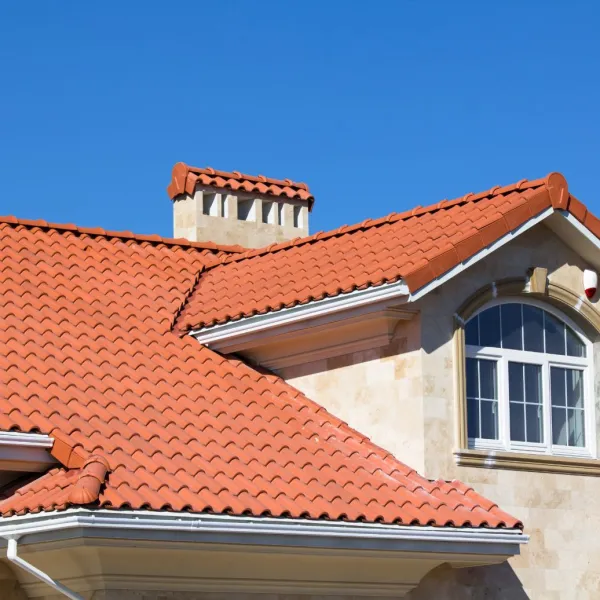


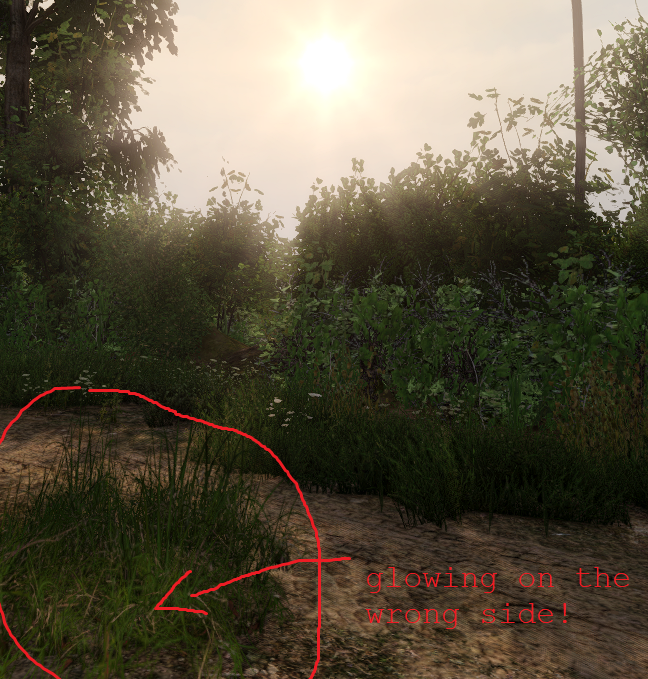


 ocean river
Yeah I guess we're gonna have to wait another 10 years haha
 hardy atlas
severe rune
> There will be no PBR in arma 3
Well depending on what you consider as "in arma...
hardy atlas
severe rune
> There will be no PBR in arma 3
Well depending on what you consider as "in arma...
Other than dielectrics being borked in shadows it seems like it works pretty well to me. Got IBL, normals and everything which is pretty neat.
severe rune
A big problem is also how Arma does ambient lighting.
They basically just Add color onto existing objects, which won't really work with PBR. I think thats the main issue
hardy atlas
Yeah, I guessed it was probably something to do with ambient lighting. Idk the limitations or details of working with Arma though so I unfortunately am no help 😂.
All I know is Supershader is doodoo and pays no respects to the conservation of energy
So it would not surprise me
 worthy bay
Wanting to create textures from scratch. Can anyone help me get started? like show me some links. I have been searching for something good for like a month
full quarry
Texture for what?
full quarry
Those 2 are very different processes. For making new models I'd perhaps recommend looking up how highpoly to lowpoly workflow goes
Retexturing on the other hand is pretty much jus painting over the existing texture and packing that with appropriate config as a new addon.
 rugged stream
Does anyone have any backups of the photoshop templates for the vanilla uniforms? All my go-to download pages for them went down with Armaholic.
 bold kayak
Is there a channel where I can ask for someone to make me uniforms for my unit? I pay
full quarry
#creators_recruiting @bold kayak
 warm skiff
hi i have a problem with a _ca texture in game it's not transparent but in O2 yes 0_o
https://ibb.co/T0jj1Yr - O2
https://ibb.co/bH194Nf - In game
(pictures)
i've tried to delete the glass in o2 and re create but same problem
full quarry
does it have rvmat?
and is the transparent part separate texture or same texture as the rest of the magazine?
 pale lake
Good Evening,
I'm once again needing some help
I have a vest from operation trebuchet, and when I try to use the custom selections a chunk of the armor goes missing
grand warren
sounds like wrong texture path
pale lake
not the issue as it recolors the vest part but then the rest of the model is missing.
pale lake
fixed it
warm skiff
full quarry
does it have rvmat?
Yes i have an rvmat and its a separate texture and face
warm skiff
so i've repack my pbo and now it's good wtf
 open juniper
Anyone know how to hide the headset from the CapPatrol model ?? Using config??
vernal sage
You can't hide it. There's no selection for it because it isn't defined as one.
You'd have to manually get rid of the headset in the model. For obvious reasons, that isn't possible at this time until BI releases sample MLODs.
open juniper
Ahh thats unfortunate
 livid knot
Does anyone know which folder the rvmat's for bullet hits are?
ah ive found it, nevermind
full quarry
👍
abstract holly
what effects thermal transparency? for example the glass of my cockpit for my helicopter, some other aircraft you can see right through the glass but with mine when you use thermal nvg's its opaque
..can i use that _ti i think its called TI layer with alpha?
ah okay alpha in the TI is something else
full quarry
glass should be always blocking TI as far as I know
are those vanilla aircraft you talk about?
abstract holly
no, i have no idea what causes it but some aircraft are thermally transparent
like the cockpit glass is
what controls if TI is blocked?
full quarry
all surfaces block TI as far as I know
abstract holly
is see theres a NoTIWrite flag in the rv mat flags