#arma3_texture
1 messages · Page 3 of 1
 timid dome
 full quarry
can you show what it looks like textured in blender?
full quarry
can you show what it looks like textured in blender?
it doesnt have alpha setup but
 full quarry
timid dome
it doesnt have alpha setup but
full quarry
timid dome
it doesnt have alpha setup but
can you set yp the alpha too?
timid dome
i uh, actually am unsure how so i'll take a look at a tutorial and do it
full quarry
if you use the default BSDF shader with nodes you can plug the alpha from the texture nodes output to the shaders alpha input
and then you will need to turn on alpha blending in the materials settings
 timid dome
aha, thank you
 full quarry
you can play with the different blend modes to see what shows it best
 full quarry
always good idea to model this stuff possibility to check the placement live
now I was mistaken earlier and the placement does match what you got here
so main thing would be to test the treecrown shader rvmat for the leaves
and play with the alpha sorting for the mesh strips to get them not occlude each other
full quarry
VertexShaderID = "TreeAdvNoFade";```yep thats what im lookin at then, do i need a MCA file or would a regular CA work
full quarry
CA is for applying the texture in texture slot
in rvmat MCA can be used to give it ambient occlusion (alpha channel) and color difference (color channels)
full quarry
also the ambient, diffuse etc parameters have special functions in treeAdv shader
there is a wiki page that goes over the tree shader
timid dome
ohh okay
full quarry
timid dome
guessing i can make a substance export for that
most likely yes
timid dome
i'll take a look
timid dome
just clicked MC is the same thing thats used in multicmats
full quarry
pretty much
 wide oar
hello, how would i go re-texturing a vehicle?
for example, i want to make a winter texture for the M-ATV, but just replacing the base texture with the new one in the image editor just gets rid of normals, ambient occlusion, etc etc. what image editor should i use to do that, or is there any other way?
full quarry
wide oar
hello, how would i go re-texturing a vehicle?
for example, i want to make a wint...
sometimes people have made and released templates for easy color replacement that keeps the details intact on separate layers
no image editor makes that any easier so its all about learning how image editing is done and spending the time to get good results
 upper thicket
I suppose this is texture related, but how would I go about making a scope texture where the different lines match up at the correct range. Like how on the MAAWs rocket launcher the lines for 200,400,600,800 and 1km are matched up with the ballistics of the rocket
timid dome
Hey so i got my "branch" textures working for my helmet, but they dont work in shadows

im using the treeadv shader if its any help, im kind of lost as to why its doing this
full quarry
You'll need to play with the ambient, diffuse parameters perhaps
timid dome
do they affect the "in shadow" lighting?
full quarry
Yes.
full quarry
timid dome
do they affect the "in shadow" lighting?
Try copying the parameters off some existing bush
timid dome
already done so, it was one of the livonia bushes
full quarry
And it gives this?
timid dome
yep, im actually starting to wonder if its my shadow lod
full quarry
Could be
timid dome
i dont think they need to be modelled on the shadow lod, the planes i used for the leaves
 eternal solar

 dense peak
Hi, aney one here know how can i retextuer rhs uniforms and vehc
 fresh pelican
dense peak
Hi, aney one here know how can i retextuer rhs uniforms and vehc
fresh pelican
dense peak
Hi, aney one here know how can i retextuer rhs uniforms and vehc
You take the _co.paa, convert it to the.png with text2view, edit it to whatevever with any photoshop program, convert it back again
And then you gotta code it
 soft silo
Does anyone here use adobe substance? I've been trying to find some tutorials on using it for arma 3 however no luck
timid dome
what part are you stuck on?
timid dome
soft silo
Does anyone here use adobe substance? I've been trying to find some tutorials on...
^ i use it
 deep hearth
I'm entirely new to doing texture work, so I hope this is the mostly correct place to ask for some points in the right direction.
I am trying to do a retexture of a model, but I need to replace it's nohq. I have the replaced nohq but I don't know how to make it get "called for" in the config or otherwise.
I wish I knew the correct wording for what I'm asking so I apologize ahead of time for not being too well versed.
 frozen blade
depending on what model you are trying to modify that might work or not
 narrow gazelle
deep hearth
I'm entirely new to doing texture work, so I hope this is the ~~mostly~~ correct...
narrow gazelle
deep hearth
I'm entirely new to doing texture work, so I hope this is the ~~mostly~~ correct...
you can try to use getObjectTextures on the object, if this return [] you cant make a texture and "apply" it to the thing.
At least as far as i know
in case it returns you an array of textures, you can do it, both texture and rvmat
 sullen vapor
You can create a new rvmat and assign it via hiddenSelectionsMaterials
the rvmat would contain a reference to your new NOHQ
 low helm
do people here use 3dsmax for previewing textures on objects?
 twin bane
rarely (for me anyway). usually in 3Do/Marmoset or similar. there is an ArmA .glsl shader for substance painter floating around.
low helm
what instead then...?
twin bane
sry tried to edit quickly :P
low helm
:D
twin bane
or just throw it in OB and run Buldozer /shrug
low helm
i guess i will have a look at marmoset then
second question, any ideas how to improve plain plastic (LAW72) textures, been stuck with this fo a week or so?
twin bane
at the end of the day it comes down to your .smdi map and .rvmat, between the two lies all the power.
i'd reference current in-game models for relative .rvmat info. (use Eliteness from Mikero, actually use all of his tools, starting with ArmA3P..)
after that about all you need to understand is how RV utilizes the channels in the .smdi map and you're good to go. https://community.bistudio.com/wiki/Super_shader
low helm
thanks, i have tried to figure out how rvmats work in the past but i guess i have to take it much seriously for now on
twin bane
it's a very important piece of the puzzle for sure.
 silver gull
best look at vanilla weapons/stuff, the texture color values they use for spec and gloss and rvmat values
dense peak
Hi guys, ineed some one how can help me with retextuer scripts
dense peak
fresh pelican
And then you gotta code it
Got stucked with code stuff i have no idea how to code it....
soft silo
dense peak
Got stucked with code stuff i have no idea how to code it....
What do you need help with
dense peak
I have the textuer ready i just need to do more camos like on 3cb faction @soft silo
soft silo
So you need your textures to work?
dense peak
yep
soft silo
You can ask config questions in #arma3_config
 livid cedar
Hi , I am trying to retexture some weapons from the DLC Contact , since they are .ebo files I can't view how they look ingame , is there any way to do so?
p.s I got the paa files from Arma 3 Samples
 lethal condor
If you can't see it ingame, why you would want to retexture?
livid cedar
I want to see how it looks in game because I am retexturing it and I wanna see how my work came out.
lethal condor
I still don't know why. If there is no way to see in game, there is no point to Mod the game. What exactly you're trying?
livid cedar
I am trying to retexture the ak12 , ofcourse you can see it ingame but because it's from a ebo file I can't pack the paa and upload so I could see how my work looks like ingame
lethal condor
What...
full quarry
You can see them in game if you create config that uses your new texture through hiddenselections
lethal condor
- AK12 is from Apex
- If you mean AK12 variants from Contact, are already PBO'd
- That's not how a retexture works
- More like that's not how a Modding works
full quarry
You don't replace original files when you retexture
livid cedar
lethal condor
1. AK12 is from Apex
2. If you mean AK12 variants from Contact, are already PBO'...
Well , I got my paa files from Arma 3 samples because I wanted to retexture the AK12 variant from Contact
livid cedar
full quarry
You don't replace original files when you retexture
That's what I've been doing because I can't do config files ^^
lethal condor
Then learn to do config
livid cedar
There's no good guides out there , I've tried and failed in the past
lethal condor
Even if there is none, you can ask
livid cedar
Teach me Senapi ? 
lethal condor
Bohemia Interactive Forums
Evening, I am having some trouble with config file. I am trying to retexture some default game uniforms and other gear (keep in mind I have no idea what I am doing) and I ran into few problems: 1. Both vests when I spawn them are default color tan variants and not retextured variants. (CSAT Harne...
livid cedar
Thanks 🙂
 vital jasper
Good afternoon everyone, So this is abit of a DayZ question but should be the same anyway for arma 3. In general we were curious how BI makes their satmaps? To us the tree's are like a brush type that is used, but we were curious about the fields for farmers that they look so realistic, and not just copy pasted from google maps. Any info would be helpful thankyou.
 full quarry
vital jasper
Good afternoon everyone, So this is abit of a DayZ question but should be the sa...
full quarry
vital jasper
Good afternoon everyone, So this is abit of a DayZ question but should be the sa...
There isn't really any info on exact BI methods
 celest obsidian
vital jasper
Good afternoon everyone, So this is abit of a DayZ question but should be the sa...
celest obsidian
vital jasper
Good afternoon everyone, So this is abit of a DayZ question but should be the sa...
you can watch this video and see if you find any useful information

Follow the process of creating Livonia, the latest Arma 3 terrain released in June 2019 as part of the Contact DLC, from the first experimental steps to the polished environment tailored to cater to the story experience and customers' expectations. The talk explains the methods used by Bohemia Interactive to build large game worlds, to blend aut...
 fossil quartz
So I made a new texture for the base game BDU trousers and I can't seem to change the Arsenal Icon. Anyone run into this before? I added my icon image as a 600x600 pt png (before importing) and set the icon under SCR_UniversallInventoryStorageComponent. The name and discription changed like I wanted, but the arsenal icon doesn't change. Anyone know why this isn't working?
full quarry
fossil quartz
So I made a new texture for the base game BDU trousers and I can't seem to chang...
mayhaps #enfusion_texture ?
fossil quartz
full quarry
mayhaps <#976231628785475624> ?
Oh my bad, wrong group
 glass terrace
vital jasper
Good afternoon everyone, So this is abit of a DayZ question but should be the sa...
glass terrace
vital jasper
Good afternoon everyone, So this is abit of a DayZ question but should be the sa...
BI probably bought ortophotos to get better quality results anyway. Both in Arma 2 and Arma 3 maps you can see non-existent features (no models placed) in the satmaps. They could use little as just basic Photoshop tools like stamp tool to make fields and forests, but probably there is more to it.
soft silo
Is ambient shadows map (_as) the same type of map as ambient occlusion in rendering?
 gusty yarrow
Hey does anyone here know how to create road textures?
full quarry
soft silo
Is ambient shadows map (_as) the same type of map as ambient occlusion in render...
Yes.though only certain color channels are used depending on if you make us as, ads or adshq
 solar grail
Question about ImageToPAA or TexView 2 tools:
when converting png/jpg to paa i've noticed that sometimes red color is replaced with blue.
How does one combat that?
lethal condor
What's the resolution of it?
solar grail
1024x1024
lethal condor
Bit depth?
full quarry
if you have a lot of colors some may get cropped out on compression
also dont use jpg. it adds artifacts
png or tga
and use correct texture _suffix
solar grail
bit of a background why jpg was used: i have 2 images both screenshots from ingame showing the capture targets, taken via F12.
One of the images converts just fine, other gets blue hue
solar grail
lethal condor
Bit depth?
32
solar grail
full quarry
and use correct texture _suffix
what do you mean by that?
full quarry
texturename_co.png/tga and so on for different type of textues
lethal condor
full quarry
as that affects what conversion rules are used
full quarry
lethal condor
https://community.bistudio.com/wiki/Texture_Naming_Conventions
https://community...
👆 this
solar grail
gotcha, so for example if i just wanna add texture to billboard via setObjectTexture _no would be used?
Also why do these images appear normal in TexView but only become bluish ingame?
solar grail
yeah im aware it has to be ^2
full quarry
bluish tint in game is usually due to wrong resolution
solar grail
thanks, ill give these things a try
solar grail
Welp, you were right, for some reason windows shows 1024x1024 in img properies, but gimp shows 1023x1024 😐
full quarry
dun dun duuuuun
 tight pulsar
Hey guys. I have some experience making missions/scripting with SQF but I'm a complete noob when it comes to models/textures in Arma.
There is an APC in a mod that I wish to add a custom skin to. Can it be done within my mission, like you can do with retexturing flags? Or do I need to create a separate addon for that? If so, can I use the original mod assets, or do I need to ask mod authors for source files of some sort?
lethal condor
Is it a mission exclusive skin/texture?
tight pulsar
currently yes, though I'm considering figuring out how to make it a proper addon later on
full quarry
tight pulsar
currently yes, though I'm considering figuring out how to make it a proper addon...
you can do it in mission with setObjectTexture scripting
tight pulsar
full quarry
you can do it in mission with setObjectTexture scripting
I figured that might be possible, thx!
The remaining problem is how do I get my hands on the original texture to make my adjustments to?
full quarry
you can unpack the local pbo you got to get the .paa and convert it to png/tga
edit and convert back to paa and put in your mission folder
tight pulsar
thank you, that worked!
There seem to be other textures marked with _sa and _smdi, as far as I understand these are different maps for the material. I'll try to figure out how they work, wiki seems to have good info on that.
full quarry
tight pulsar
There seem to be other textures marked with _sa and _smdi, as far as I understan...
if you are only chaning colors you only need the _CO texture
the rest are used through RVMAT
which you likely dont want to touch at this stage
tight pulsar
full quarry
if you are only chaning colors you only need the _CO texture
There seem to be a glossiness aspect on the original model which makes certain details remain slightly visible despite change in color due to the fact that those regions still have higher reflectivity
tight pulsar
full quarry
which you likely dont want to touch at this stage
I'm ready for the challenge, I work in gamedev so most related fundamental concepts I know well enough 😄 I'm just not very familiar with Arma modding in particular
 naive elk
I try to convert 64x64 png file to paa with ImageToPAA, but it keeps failing. Does anyone know the cause or the solution to this problem?
lethal condor
As HG said, what bit depth?
naive elk
There are three images, 1160, 744, 594 bytes each.
Oh, you mean the bit level, not the size?
That's all 8 bits
lethal condor
IIRC paa has some issue with certain depth, try 16bit
naive elk
Do you know how to convert an existing 8-bit image to 16-bit?
lethal condor
Your paint software may have one
naive elk
The only program I have is Clip Studio, but this program does not have a conversion function...
full quarry
naive elk
The only program I have is Clip Studio, but this program does not have a convers...
you have paint in windows for sure
or you can get gimp for free
 stray relic
Or paint.net for free, which is a little easier to use than GIMP maybe but less powerful.
naive elk
The image I was trying to convert was an image that could not be converted to 16 bits. This is completely over...
naive elk
I somehow came up with a way to convert the bits by copying and pasting the same image. But I definitely saved the image as 16 bits, but the file shows 64 bits...
soft silo
naive elk
I somehow came up with a way to convert the bits by copying and pasting the same...
Are you saving the file or exporting it?
naive elk
exported. And When I imported the image from an 8-bit new task file and saved it, it became 32 bits, and I converted it into ImageToPAA and it succeeded. The problem has been solved, but I don't know what's going on...
naive elk
If the size of the image to be used as a marker on the map is a high-resolution image like 2000x1000, how does it show on the map?
full quarry
still small unless you set its scale to be big if I recall right, also you have to use power of 2 resolution
 grand prism
Anyone have experience using blender to make textures for a new model and exporting it from blender? I see most tutorials export uvmap as FBX and use substance painter instead for texturing, then exporting into .pngs for PAA conversion.
Haven't been able to find tutorial going through the motions in blender.
Or can recommend any other tools for the job that is free to use.
 next lion
grand prism
Or can recommend any other tools for the job that is free to use.
next lion
grand prism
Or can recommend any other tools for the job that is free to use.
you can get substance painter for free (student license) by stating you're a student using it for educational purposes, just search up "how to get substance painter student license" on youtube and or google
next lion
grand prism
Or can recommend any other tools for the job that is free to use.
In this video you'll learn how to get Substance Painter 2019 (as well as Substance Designer and Substance Alchemist) 3D painting and texturing software for free directly from Allegorithmic on a 3 year student license. This is the full version - you do not need a crack or a dodgy serial number!
Please like and subscribe if you found this useful :...
personal recommendation
along as you're not using substance for commercial reasons you abide by their student license use policy
grand prism
oh nice. Did not know that. I am actually working in qualified educational university, so might be actual eligble that way
in any case, will definetly give that a go then
Cheers!
 ocean monolith
hey is there a way to make the lighting on ob better i have done all the stuff form the pin but as i rotate the object around the lighting just gets very odd
rotating the object changed its color


 mild olive
next lion
you can get substance painter for free (student license) by stating you're a stu...
mild olive
next lion
you can get substance painter for free (student license) by stating you're a stu...
I think that the process has changed since that video was made. Pretty sure you now need a verifiable student ID.
full quarry
ocean monolith
rotating the object changed its color
pinned messages
ocean monolith
full quarry
pinned messages
are you talking about the real lighting cause this is with that on
full quarry
looks like it may be bugged again
ocean monolith
i found a typo in my line one sec
ocean monolith
full quarry
looks like it may be bugged again
mine cant seem to load the land.paa
full quarry
so will need to refresh the P drive data
have you set up P drive with mikeros arma3p?
full quarry
the method Ive posted there might not work with arma tools way of setting up P drive and buldozer
ocean monolith
full quarry
the method Ive posted there might not work with arma tools way of setting up P d...
what would be missing?
full quarry
arma tools creates a copy of arma3 exe as buldozer exe on P drive and does things for file access
beyond that I dont know what yould be missing exactly as I have not used that method of P drive setup for nearly 10 years
ocean monolith
i can set it up with mikro it just wont let me put it in the drive i want
ocean monolith
full quarry
when it asks for drive you should put in P
its more the files location then the drive its self
full quarry
you need P drive mounted
and then hit P as arma3p asks what drive to extract to
not where to create folder to make P drive from
it asks what drive you use as the development drive
commonly P:
ocean monolith
ik but im saying i cant changed where the folder that the p drive is made from with out it not working
full quarry
do you have P drive mounted?
ocean monolith
will do
ocean monolith
full quarry
and it uses the mounted P drive
thanks for that it works now, but it dose seem to still have the lighting issue tho. ik you just said yours's is as well
full quarry
yeah no luck so far on getting it work again
full quarry
ocean monolith
thanks for that it works now, but it dose seem to still have the lighting issue ...
actually got it working
did you add world = stratis to the startup command line in OB settings?
 ocean monolith
full quarry
did you add world = stratis to the startup command line in OB settings?
ocean monolith
full quarry
did you add world = stratis to the startup command line in OB settings?
yes
full quarry
does your commandline run arma3 exe? or arma3_64bit exe?
though now that I tested both should work
ocean monolith
it was ruining 32 now that i changed it to 64 it has he clouds and everything
thank you
full quarry
👍
it may be you need to run the actual arma3.exe once to get it working
I did that just before I figured out I had forgotten to add the world= stratis line xD
but both exes work now
Unfortunately dont have absolutely solid steps on that 😅
grand prism
mild olive
I think that the process has changed since that video was made. Pretty sure you ...
Yeah. There is a full form with submission of proof as student or employee id. Together with address, email and name stuff.
Says it takes between 24-48h to verify and complete.
So not as easy as once we're, but still seems possible if you are student or personel at qualifying educational place.
 livid knot
I'm trying to solve a similar issue that lost had in the conversation above, I did everything but update my arma version in the P drive, so I went ahead and did that. Originally I set up my P drive with arma tools, this time though I used arma3p. Now on trying to open buldozer it fails, giving this error:

None of those files are in my P:\ drive, I guess they just didnt install? Is there something I did wrong, or a way to fix it?
livid knot
Ok i've corrected all of those errors apart from buldozer.exe, now when I try and open the viewer I get Shaders not valid (mismatch of exe and data?)
after I click "ok" on that error, another pops up saying attach failed, no viewer found.
Im using this line for my viewer
S:\steam\steamapps\common\arma 3\arma3_x64.exe -buldozer -name=Buldozer -window -noLand -exThreads=0 -noAsserts -world=stratis -worldcfg=stratis -cfg=buldozer.cfg
unfortunatley the arma 3 tools launcher setup and setting up tools with your won P drive mounting and Arma3P are not very compatible
running Arma3P should be all that is required
but some settings in Arma3 Tools may conflict
 wanton vine
Hey all, trying to find out how to replace the texture for this decal on the Y-32. I've found the texture file in the atlas air_f_exp pbo VTOL_02_signs_CA.paa and VTOL_02_signs_ghex_CA and I've also looked through the named selections on the model but cant seem to figure out which one this is.
 lethal condor
It is baked, not a selection
lethal condor
Indeed
 valid portal
anyone here that has good realistic reshade preset?
full quarry
valid portal
anyone here that has good realistic reshade preset?
please use single channel for questions thanks.
valid portal
full quarry
please use single channel for questions thanks.
yeah my bad did not know which channel i was supposed to ask
full quarry
valid portal
yeah my bad did not know which channel i was supposed to ask
#arma3_questions is the place to start, if you do move the question, do remember to delete the old one
 shy bridge
Hello friends :)
I've been trying to texture a few patches for our unit on some CUP vests, but unfortunately it's come out to look a bit like a sticker, moreso than a "patch".
This has only been textures, and has no additional models slapped on top
(Please do not mind the inverted patch/name tag :D)
Any tips on how to make it less of a sticker, and more of a patch? Thank you kindly 💙


 vernal sage
You'd have to edit the normal map (the texture that ends in _nohq) and probably tweak the specular map too (_smdi). Once you've done that, replace the vest's .rvmat with your own that has paths to your edited maps instead using hiddenSelectionsMaterials.
e.g.
Config
    class your_CUP_vest_retexture: parent_CUP_classname
    {
        hiddenSelectionsTextures[]=
        {
            "\youraddonpath\your_custom_texture.paa"
        };
        hiddenSelectionsMaterials[]=
        {
            "\youraddonpath\your_custom_material.rvmat"
        };
    };
Material
[...]

class Stage1
{
    texture="\youraddonpath\your_custom_normal_texture_nohq.paa";
    uvSource="tex";
    class uvTransform
    {
        aside[]={1,0,0};
        up[]={0,1,0};
        dir[]={0,0,0};
        pos[]={0,0,0};
    };
};
class Stage5
{
    texture="\youraddonpath\your_custom_spec_texture_smdi.paa";
    uvSource="tex";
    class uvTransform
    {
        aside[]={1,0,0};
        up[]={0,1,0};
        dir[]={0,0,0};
        pos[]={0,0,0};
    };
};

[...]
 severe rune
dir[]={0,0,0}; should be dir[]={0,0,1};
shy bridge
vernal sage
You'd have to edit the normal map (the texture that ends in **_nohq**) and proba...
Holy...I see. Is there any guide/documentation on how to "tweak" the normal and specular maps? This is my first time afterall, so i'm not the most adept in these things unfortunately.
But thank you kindly for the config though, that'll be extremely helpful :)
vernal sage
I should note that in the case of the rvmat, you only need to copy the one CUP is using for the vest and then only change the paths. Changing the other settings is only required if you want to manually adjust the settings individually (like the diffuse RGBA, etc.)
As for normal maps, PMC Editing Wiki has a pretty indepth explanation of how they work in RV:
https://pmc.editing.wiki/doku.php?id=arma:texturing:normal_maps
It's a guide made for Arma 1 but the basic principles have not changed even for Arma 3.
 light wagon
So quick question, does anyone have a template for that stealth combat helmet from apex?
light wagon
Or know where I might get one?
 coarse haven
Double-checking my own insanity, I can use multiple multimats, right? I can't think of a reason why not, but I'd rather be safe than sorry.
full quarry
coarse haven
Double-checking my own insanity, I can use multiple multimats, right? I can't th...
you can yes
coarse haven
Cool beans, now to continue UVing.
 upper gale
Is it known what AVGCTAGG (average color tag) is used for in PAA textures? Is it used for background? 🤔 Or is each pixel multiplied by this color? 🤔
full quarry
upper gale
Is it known what AVGCTAGG (average color tag) is used for in PAA textures? Is it...
upper gale
full quarry
https://community.bistudio.com/wiki/PAA_File_Format#Taggs
sure, but there's no info how is that used, what exactly happens with this color
upper gale
writing OFP PAA renderer
full quarry
you might get best answers to questions related to such at #arma3_tools I believe. but do mention the use case of OFP renderer as that is likely very relevant to what you do
upper gale
ahh, thanks
 fluid phoenix
Is there a specific environment and settings to replicate accurate A3 colors in Substance? Doesn't need to be 100% but even 90% similar would be fine.
 leaden bobcat
Trying to do a light retex of the MSBS Grot and its variants to make a grey pattern, but the modified textures aren't applying, they just auto-revert to green. Why does this happen?
 forest comet
Hey, just kinda wondering if any texture is free to retexture a couple uniforms for me! We can discuss extra details in DM’s it would be greatly appreciated
 void oak
hey sorry to reply to such an old msg but i am having a similar question to the one you were asked here.
where could i get the texture template? like to make my own i would need to have the template so i could know where im colouring what?
full quarry
void oak
hey sorry to reply to such an old msg but i am having a similar question to the ...
you can extract textures from the game pbos or sometimes you can find ready made layered templates on the internet
void oak
okay ill see what i can find
 light path
Hello everyone, I'm looking for assistance for what I'm doing wrong? This a config to make 2 new textures for the CSAT APR and 2 new textures for the CTRG
vernal sage
In CfgWeapons, your uniforms are not referencing the right classes in CfgVehicles:
    class RUC_corp_up_u: Uniform_Base
    {
        author="Foley";
        scope=2;
        side=0;
        displayName="$STR_A3_RUC_Recon";
        picture="";
        model="\A3\Characters_F\Common\Suitpacks\suitpack_universal_F.p3d";
        hiddenSelections[]=
        {
            "camo"
        };
        hiddenSelectionsTextures[]=
        {
            "\Custom_Mask\Data\RUCblack.paa"
        };
        class ItemInfo: UniformItem
        {
            uniformModel="-";
            uniformClass="RUC_corp_up_u"; // <-- RUC_corp_up_u in CfgVehicles
            containerClass="Supply40";
            mass=40;
        };
    };
    class RUC_corp_u: Uniform_Base
    {
        author="Foley";
        scope=2;
        side=0;
        displayName="$STR_A3_RUC_Recon";
        picture="\Custom_Mask\Data\RUCblack.paa";
        model="\A3\Characters_F\Common\Suitpacks\suitpack_universal_F.p3d";
        hiddenSelections[]=
        {
            "camo"
        };
        hiddenSelectionsTextures[]=
        {
            "\Custom_Mask\Data\RUCblack.paa"
        };
        class ItemInfo: UniformItem
        {
            uniformModel="-";
            uniformClass="RUC_corp_up"; // <---- RUC_corp_up in CfgVehicles
            containerClass="Supply40";
            mass=40;
        };
    };
And in CfgVehicles, your uniforms need to reference back to the items in CfgWeapons:
  class CfgVehicles
{
    class B_Soldier_base_F;
    class RUC_corp_up_u: B_Soldier_base_F
    {
        scope=1;
        side=0;
        picture="\Custom_Mask\Data\RUCblack.paa";
        model="\A3\Characters_F_Exp\BLUFOR\B_CTRG_Soldier_01_F.p3d";
        uniformClass="RUC_corp_up_u"; // Include uniformClass token that references back to the item in CfgWeapons
        hiddenSelections[]=
        {
            "Camo",
            "insignia"
        };
        hiddenSelectionsTextures[]=
        {
            "\Custom_Mask\Data\RUCblack.paa"
        };
    };
    class RUC_corp_up: B_Soldier_base_F
    {
        scope=1;
        side=0;
        picture="\Custom_Mask\Data\RUCblack.paa";
        model="\A3\characters_F\BLUFOR\b_soldier_01.p3d";
        uniformClass="RUC_corp_u"; // Same thing here, also reference back to the item in CfgWeapons
        hiddenSelections[]=
        {
            "Camo",
            "insignia"
        };
        hiddenSelectionsTextures[]=
        {
            "\Custom_Mask\Data\RUCblack.paa"
        };
    };
};
By the way, your requiredAddons[] array in CfgPatches can be simplified to just one value "A3_Data_F_AoW_Loadorder":
class cfgPatches
{
    class RUC_APR_Retex
    {
        units[] = {};
        weapons[] = {"RUC_corp_up_u"
        "RUC_corp_u"
"G_AirPurifyingRespirator_02_Foley_F"
"G_AirPurifyingRespirator_02_Drew_F"};
        requiredVersion = 0.1;
        requiredAddons[] = {
                    "A3_Data_F_AoW_Loadorder"
        };
    };
};
Unfortunately after doing al lthat it doesn't appear it have made a difference
Edit: Realized I forgot the _Co that I added so I'll try that again, but the masks(APR's) still aren't showing up. I had them working at one point and I don't know what I did wrong
2nd Edit: Nope still don't know what's wrong


 vernal sage
light path
Unfortunately after doing al lthat it doesn't appear it have made a difference
...
vernal sage
light path
Unfortunately after doing al lthat it doesn't appear it have made a difference
...
Try this config. All four items work for me:
https://i.imgur.com/eJuBUg5.png
Be sure to replace the #(argb,8,8,3)color(0.80,0,0,1.0,CO) lines with the path to your textures and displayName with entries from your stringtable. I simply used a flat colour for demo purposes since I don't have access to your textures.
I would suggest that you don't pack your config.cpp directly into the pbo without running it through a binariser like CfgConvert or an addon packer like Mikero's MakePbo. It'll help pick up any issues that you might have in your config.
Oops, forgot to post the pastebin. https://pastebin.com/7xp8Hn6k
Pastebin
Pastebin.com is the number one paste tool since 2002. Pastebin is a website where you can store text online for a set period of time.
light path
Ok Going to give it a shot in a moment just taking a short break(been at it for 7 hours now so I think you're about to save me life)
soft silo
light path
Ok Going to give it a shot in a moment just taking a short break(been at it for ...
ill take a look at this
whats not working again?
@light path found your issue
your Units in CfgVehicles and Uniforms in CfgWeapons cannot be the same classname

// CfgVehicles Template
class x_unit: Civilian_F //Or whatever base class your are using
    {
        author="Timmy Taliban"; // Your name here
        _generalMacro="Civilian_F"; // Whatever base clase
        scope=2; // Whatever you want
        displayName="UNIT NAME HERE"; // Don't forget unit name
        nakedUniform="U_BasicBody";
        uniformClass="x_uniform"; // Make sure that the CfgWeapons Class Entry matches "x_uniform"
        model="\a3\characters_f\Civil\c_poloshirtpants.p3d"; //Make sure model is right one
        hiddenSelections[]=
        {
            "Camo"
        };
        hiddenSelectionsTextures[]=
        {
            "your\path\here" // Don't forget to name the .paa with "_co" at the end
        };
    };
*/


// CfgWeapons Template
class x_uniform: Uniform_Base
    {
        author="Timmy Taliban";
        scope=2;
        displayName="UNIFORM NAME HERE"; //Uniform Name Here
        picture="your\path\here"; // Don't forget to name the .paa with "_icon" at the end
        model="\A3\Characters_F\Common\Suitpacks\suitpack_blufor_diver";
        class ItemInfo: UniformItem
        {
            uniformModel="-";
            uniformClass="x_unit"; // Make sure the CfgVehicles Class matches the "x_unit"
            containerClass="Supply20";
            mass=40;
        };
    };
*/
ref the above
hope this helps

celest obsidian
fluid phoenix
Is there a specific environment and settings to replicate accurate A3 colors in ...
You would have to create a new shader and an hdri
light path
@soft silo @vernal sage I tried both of your solutions and they both worked for me, I appreciate you guys so much!
 orchid oak
Hoy! anyone here able to help me out with RVMAT creation?
I've got an aircraft modelled and ready to test, my main quarrel is the RVMAT system. mainly how to go from blenders submaterials into the mat and what setup is required.
I come from using cryengine 3s MTL system so there might be some mental conflict there in my head
cheers
full quarry
orchid oak
Hoy! anyone here able to help me out with RVMAT creation?
I've got an aircraft m...
Nothing from blenders own materials transfer over.
Simples way to assign texture and material paths for A3 is to use the Armatoolbox addon as it has a separate Arma path dialogs in the blender material tab where you can set a path to texture and rvmat to be written on export to p3d
Rvmat itself is a text file you need to write (examples can be found in the games files) it contains shading parameters, what shaders are used, what technical textures the shaders use (stages)
orchid oak
got it thanks, already running the tools so I'll take a look. bit annoying but its better than no textures 😄
one last question, are RVMATs needed for every single material? eg aircraft_diffuse, aircraft_spec, aircraft_normal in a single RV then the same for aircraftInterior_diffuse etc etc in another?
full quarry
orchid oak
got it thanks, already running the tools so I'll take a look. bit annoying but i...
the split is between surfaces
so a surface has a texture and a material
dont confuse it with blender material setup where you have different procedural materails per surface type
orchid oak
bit confused here, how is a surface defined? in my head I see that as the material slot of texture but it seems a bit contradictory to what you just said 😄
sorry if I'm being an idiot here
each colour here being a surface?
 full quarry
orchid oak
each colour here being a surface?
full quarry
orchid oak
each colour here being a surface?
is this a highpoly with procedural materials or lowpoly with baked textures?
orchid oak
lowpoly baked
full quarry
then its each of the baked textures equals one arma color texture and material pair
path to color (_CO / _CA) texture goes into the texture slot and path to rvmat (contains reference to normalmap, specularmap, etc) goes to the material slot
orchid oak
alright got it! Cheers man 🙂
 sweet summit
hello everyone I have a problem with the texture of my map for example at the level of the water I must have sand and instead it puts me wheat does anyone know where it could come from please?
orchid oak
Deleted my last, problem solved.
Not really a problem but any advice on specular/glossy surfaces would be much appreciated. can't seem to get this looking in any way similar 😄
running the Arma Export preset for substance


I guess the main question is how would I go about filtering out the blue from reflections
full quarry
orchid oak
I guess the main question is how would I go about filtering out the blue from re...
It may be its coming from reflecting the sky.
You can try tweaking the specular settings and reduce blue channel specularity
Also the grey might need to be darker from color to be more real metal like.
What kind of normalmap does it have?
Is the goal to have it as shiny metal surface?
orchid oak
hoping to achieve a similar look to this, cutting the shine and going for a faction specific skin is also an option but this looks really cool 🙂
messed around with the spec blue channel a bit but to no avail.
Normal map is exported with the metal rough arma preset for substance

I think my model is a bit scuffed, I really don't know what else to change I've completely removed smoothing groups and custom split normals but it hasn't changed anything
when I roll upside down the textures lose all shine while when I'm upright they're waaay too shiny so I can't figure out how to balance the spec to look good in both situations.
basically stuff isn't shading right on my geometry
celest obsidian
orchid oak
I think my model is a bit scuffed, I really don't know what else to change I've ...
The MetRough export preset makes your SMDI very shiny by default. You can tweak the SMDI itself with Photoshop/GIMP if you want but you also need to change (lower) your specular values in your RVMATs.
orchid oak
would that affect the general lighting of the model? messing with spec values here so textures aren't right but its super dark on this side, if I roll upside down then its the polar opposite. I really don't think textures could mess it up that bad

you can see the pylons lighting correctly
in CE this usually happens in the scale of the model is negative or the normals are flipped but everything checks out
 orchid oak
that would be incredible, I did notice a similar effect on some rocket pods from CUP. I guess I really just don't understand the RVMAT params enough to correct it
EG whats the purpose of stage 3 in this case:
class Stage3
{
    texture = "#(argb,8,8,3)color(0,0,0,0,MC)";
    uvSource = "tex";
    class uvTransform
    {
        aside[] = {1,0,0};
        up[] = {0,1,0};
        dir[] = {0,0,0};
        pos[] = {0,0,0};
    };
};```
is there a reason to have the "texture" assigned if its not pointing to an actual texture. I'm figuring its a placeholder for a map I'm missingMC is a overlay color texture that can be used in various ways
those procedural values can be used as sort of neutral defaults
orchid oak
hm alright, so at the current value is it actually doing anything? whats confusing me is the purpose of stages, is stage 1 reserved for normal maps, do I need all the stages etc
 orchid oak
ah fuck that looks good
full quarry
orchid oak
hm alright, so at the current value is it actually doing anything? whats confusi...
a rvmat to work right it needs all the stages that the set shader uses
different shaders use different stages so it varies how many stages are present and what textures they need
orchid oak
would it be better for me to create the RV through obj builder as opposed to just pasting the textures in there & tweaking values? obj builder shows a completely different result to ingame tho (same w bulldozer, its completely cursed)
any way to look at the RVMAT for the MiG over there? guessing its EPBOd because of CDLC
full quarry
orchid oak
would it be better for me to create the RV through obj builder as opposed to jus...
Ive never used the OB material maker so I dont know how well that would work.
orchid oak
I can't bare to use those tools, really janky for me
full quarry
you may want to look into the OB real lighting guide I have in the pinned messages too
orchid oak
yeah I'll take a peak at that right now, cheers for the help so far man!
full quarry
orchid oak
any way to look at the RVMAT for the MiG over there? guessing its EPBOd because ...
we provide texture and rvmat samples for sogpf stuff here:
https://drive.google.com/drive/folders/1PEysMQdyYnems9iK2jLvMTEGKhwIgD8l
The mig package specifically is here:
https://drive.google.com/drive/folders/1anPaeNS7GKOB75FfEd9LD3MqkVUbNAv7
orchid oak
sweet, thanks
full quarry
with the lighting set up working the dozer view should be very close to in game view

what you will find out is that the color of the mig is very dark

because thats how metal is without the shine
orchid oak
good point, I wasn't too confident in armas ability to shade like that when I first textured it. just because I hadn't seen it done yet
I might be an idiot here but I can't figure out the right way to run the bulldozer lighting script. using win + r runs it fine but then I gotta open geometry. feels like a dumb question sorry
full quarry
win + r?
orchid oak
run command
orchid oak
run the A:\SteamLibrary\steamapps\common\Arma 3\arma3_x64.exe -buldozer -name=Buldozer -window -noLand -exThreads=0 -noAsserts -world=stratis -worldcfg=stratis -cfg=buldozer.cfg
😄
full quarry
thats for Object builders buldozer start path
orchid oak
lmao ahh
orchid oak
tried the launch options and all that couldn't think of anything else lol
full quarry
 orchid oak
good news, it works and I've overcomplicated it yet again. bad news, its scuffed


depending on the angle the lighting gets destroyed
gonna run the TOD script and see if it helps
full quarry
reset your rvmat to defaults
use the default_super from p:\a3\data_f\
as base
then apply your normalmap into it and take a screenshot
 full quarry
🤔 what does it look like without the normalmap?
orchid oak
still does the same thing, hmm
orchid oak
yeah
full quarry
you sure its applied on the model?

 full quarry
do you model in blender?
orchid oak
yeah
full quarry
did you use the toolbox p3d export?
orchid oak
yeah, with RVs and Textures setup in the material section
 full quarry
do you have the o2script.exe path set up for the toolbox in the addon settings?
 orchid oak
alright all set up now, what'll that change for the tools?
orchid oak
ah yeah, pretty useful 😄
was staring at the option too but brain didn't recognise it
remade the shadow/fire geometry paired with the o2script file path seems to have done the trick, still a couple artifacts on the canopy and shit but eh. hopefully the textures will display correctly ingame now, much appreciated man, was on the verge of giving up temporarily. spent 6 hours looking for why my textures weren't displaying and it was purely because I had the wrong UV set, then after that they looked terrible and the shading was off 😄
couple things still shading off, gonna make my shadow geometry smaller than the mesh and see what happens, still have those jank textures applied but this is promising, thanks again

 quaint spire
orchid oak
couple things still shading off, gonna make my shadow geometry smaller than the ...
quaint spire
orchid oak
couple things still shading off, gonna make my shadow geometry smaller than the ...
you sure you are using the right type of normal map? the panel lines on the body look inverted
orchid oak
not too clear on normal map types for arma, in that pic I've jacked the map up to max just to test so it'll look a bit fucked either way, swinging it in the opposite direction wouldn't be too hard if thats what you mean
A good bit of the shading issues I think is due to my shadow proxy
full quarry
orchid oak
A good bit of the shading issues I think is due to my shadow proxy
Arma uses y- in normalmap so typically you need to invert the green channel unless you specify nor. Almap export to be y-
full quarry
orchid oak
A good bit of the shading issues I think is due to my shadow proxy
Shadow lod does now affect shading, it just creates cast shadow
orchid oak
will give the normal flip a check a bit later thanks, Seems that something related to the shadow LOD was breaking it, when I deleted the LOD and checked the model it was shading correctly
gotta take a small break from the MiG for a few hours
 silver adder
They are simply a 1k/2k/4k tiling texture
 blissful jolt
This is some super advanced stuff, so I'm sorry to mess with the conversation!
But I'm having some issues with my re-textures. It's saying no problems with the config (other then a missing files alert), however when I pack it and load it into the launcher, I still can't see the addons in game? Anyone know what I'm doing wrong?
congfig.cpp:
class CfgPatches
{
    class 5th_gear_garrison
    {
        units[]={};
        weapons[]={};
        requiredVersion=1;
        requiredAddons[]={};
    };
};
class UniformSlotInfo
{
    slotType=0;
    linkProxy="-";
};
class CfgVehicles
{
    class B_Soldier_F;
    class rhsusf_army_acu_uniform;

    // UNIFORMS

    class ODOM_acu: rhsusf_army_acu_uniform
    {
        scope=2;
        displayName="B. Odom";
        scopeArsenal=2;
        faction="rhs_faction_usarmy_d";
        author="Monklie";
        _generalMacro="ODOM_acu";
        uniformClass="ODOM_acu_uniform";
        hiddenSelections[]=
        {
            "camo1",
            "camo2",
            "camo3"
        };
        hiddenSelectionsTextures[]=
        {
            "10thACU\data\ODOM.paa",
            "10thACU\data\acu_ocp2_co.paa",
            "rhsusf\addons\rhsusf_infantry2\acu\data\rhsusf_uniform_acu_03_ucp_co.paa"
        };
    };

    class SILVA_acu: rhsusf_army_acu_uniform
    {
        scope=2;
        displayName="J. Silva";
        scopeArsenal=2;
        faction="rhs_faction_usarmy_d";
        author="Monklie";
        _generalMacro="SILVA_acu";
        uniformClass="SILVA_acu_uniform";
        hiddenSelections[]=
        {
            "camo1",
            "camo2",
            "camo3"
        };
        hiddenSelectionsTextures[]=
        {
            "10thACU\data\SILVA.paa",
            "10thACU\data\acu_ocp2_co.paa",
            "rhsusf\addons\rhsusf_infantry2\acu\data\rhsusf_uniform_acu_03_ucp_co.paa"
        };
    };

    class MAKO_acu: rhsusf_army_acu_uniform
    {
        scope=2;
        displayName="S. Mako";
        scopeArsenal=2;
        faction="rhs_faction_usarmy_d";
        author="Monklie";
        _generalMacro="MAKO_acu";
        uniformClass="MAKO_acu_uniform";
        hiddenSelections[]=
        {
            "camo1",
            "camo2",
            "camo3"
        };
        hiddenSelectionsTextures[]=
        {
            "10thACU\data\MAKO.paa",
            "10thACU\data\acu_ocp2_co.paa",
            "rhsusf\addons\rhsusf_infantry2\acu\data\rhsusf_uniform_acu_03_ucp_co.paa"
        };
    };

    class OBRIEN_acu: rhsusf_army_acu_uniform
    {
        scope=2;
        displayName="R. O'Brien";
        scopeArsenal=2;
        faction="rhs_faction_usarmy_d";
        author="Monklie";
        _generalMacro="OBRIEN_acu";
        uniformClass="OBRIEN_acu_uniform";
        hiddenSelections[]=
        {
            "camo1",
            "camo2",
            "camo3"
        };
        hiddenSelectionsTextures[]=
        {
            "10thACU\data\OBRIEN.paa",
            "10thACU\data\acu_ocp2_co.paa",
            "rhsusf\addons\rhsusf_infantry2\acu\data\rhsusf_uniform_acu_03_ucp_co.paa"
        };
    };
};
If this isn't the problem, anyone know what could be?
full quarry
blissful jolt
This is some super advanced stuff, so I'm sorry to mess with the conversation!
...
how do you pack it?
blissful jolt
I just used PBO manager.
Arma 3 -> Addons -> @10thACU -> Addons
10thACUPBO
full quarry
arma 3\@yourmod or anywhere else really
workshop can add localmods from anywhere
and yes most A3 related videos are total crap
and the people who made them never seem to want to correct them
blissful jolt
Thank you so much!
Is that the only issue, from there can I use the launcher parameters to test out the uniforms?
full quarry
missing files is not good indicator of config validity. yours look like it could have right things in right places but didnt really go through it line by line
blissful jolt
full quarry
missing files is not good indicator of config validity. yours look like it could...
That's what I war thinking, but when I looked at similar pack it gave a similar warning.
 full quarry
if you are referring to files from some mod the programs cant check for your config path validity unless you unpack those mods on your P drive
blissful jolt
All of them should be unpacked within the data file other then the RHS addons.
The RHS uniform is file pathed to the RHS addon.
 umbral hemlock
is there a quick way to test a model retexture other than running the game? is it with object builder or something else?
full quarry
umbral hemlock
is there a quick way to test a model retexture other than running the game? is i...
no
retexture is done by config and files and typically model source files are not available
umbral hemlock
or alternatively, run a minimal version that loads faster
full quarry
quickest way is to put them in mission with different file names so they get live loaded again
umbral hemlock
maybe?
full quarry
although some things like vests and helmets and weapons cant be done like that
so sometimes just need to pack the pbo and run the game again
lethal condor
Diag exe is the fastest
 idle saddle
I'm looking for a texture expert that wants to help me and my friends with re-texture some vehicles
full quarry
idle saddle
I'm looking for a texture expert that wants to help me and my friends with re-te...
 unkempt panther

I'm a bit confused as to why my ambient occlusion is white, unless that's a reflective effect
full quarry
unkempt panther
I'm a bit confused as to why my ambient occlusion is white, unless that's a refl...
Hard to say not knowing anything of the process that has led up to this
unkempt panther
Just something I made in Blender and exported to substance painter
Did my materials and a bit of painting before baking textures and it came out like that
It's my first model outside the Blender donut
full quarry
👍 With the additional details let's hope some can give advice
unkempt panther
You guided me on the path, Goat. It's your fault.
full quarry
I can put people on the path, where that path goes I can't say. 🙏
unkempt panther
That way lies madness
quaint spire
unkempt panther
https://media.discordapp.net/attachments/933197432173522944/1086180466157174854/...
If it's a smart mat, could be that it is using AO for wear/ grime
unkempt panther
Perhaps it's because the 2 smaller objects are going through the larger one?
unkempt panther
Ok, I used a boolean modifier in Blender to fuse my objects and now the texture looks fine
full quarry
unkempt panther
Ok, I used a boolean modifier in Blender to fuse my objects and now the texture ...
good call. if they were floating that indeed can cause unexpected results
unkempt panther
full quarry
good call. if they were floating that indeed can cause unexpected results
No, they were clipping into it
I thought it would be fine since everything behind it wouldn't be visible. God help me
full quarry
right thats what I meant, that they were not connected mesh
 idle patrol
I want to customise some helmets, are there any good resources that would help me learn how to do it
frozen blade
idle patrol
I want to customise some helmets, are there any good resources that would help m...
customize in what sense?
idle patrol
frozen blade
customize in what sense?
Paint a pilot helmet
full quarry
idle patrol
Paint a pilot helmet
so a retexture type of deal.
Basically what you do is you find either a template file made for that helmet that is a neatly layered image file of the texture of that object OR you get the original texture file from the games files to be used as a base AND you edit it in your choice of image editor to look as you want and then package that up as a new addon (a config file + your new texture)
idle patrol
Ok thanks
full quarry
idle patrol
Ok thanks
👍 and as a side note, retexturing is done with the texture file only, the models are not accessible for stuff like 3D painting and the orginal files are not repackaged with you new texture. The original files are just referenced through the config from their original locations
unkempt panther
So, I've got my model all set, but I've got this weird effect along the curves here

Perhaps it just doesn't have enough edges?
full quarry
actual screenshot might be better this is a tiny and dark picture
windows snipping tool is very good for that
 unkempt panther
Well, it's only on the curves so I figured it would be fine
But someone on another server offered me a solution that I have to try when I get home
full quarry
unkempt panther
But someone on another server offered me a solution that I have to try when I ge...
k. 👍 just I could not see what the issue was
 placid sinew
Do any environment artists have any tips for taking image captures of things like grass and tree limbs?
Want to go out and grab some images of the foliage i want to use for my terrain but dont really know where to start
Thees tons of stuff online about doing so for ground textures and walls but I've yet to see something good for taking images for things that have a high degree of transparency
 pulsar gazelle
hey guys, im just starting out rn, learning how to retexture, and im trying to do one for RHS's 6b45 so i can blend it in with stuff from another mod, left is the sample i need to get to, right is RHS's retexture, what should i do in photoshop to get there?

im thinking of simply playing with color balance since hte texture itself is fine
pulsar gazelle
i think i got pretty close, its not seemless, but when its clothing, as long as i get the colors right, i should be fine (could be a little darker, actually)
 pulsar gazelle
i think i got pretty close, its not seemless, but when its clothing, as long as ...
pulsar gazelle
pulsar gazelle
i think i got pretty close, its not seemless, but when its clothing, as long as ...
the textures only blended well in certain lighting conditions 💀
fuck
well i give up XD
soft silo
pulsar gazelle
well i give up XD
Ya different material properties might be tricky
pulsar gazelle
soft silo
Ya different material properties might be tricky
yeah, this is probably why asset retextures usually use assets from the same mod (i didn't do that :p)
oh well, it's already close enough, so that's good enough for me
full quarry
placid sinew
Thees tons of stuff online about doing so for ground textures and walls but I've...
greenscreen or equivalent can save a lot of manual cleaning.
otherwise its just manual cleaning and colorbalancing to fit game environment
quaint spire
placid sinew
Want to go out and grab some images of the foliage i want to use for my terrain ...
Overcast days are ideal to get 3d scans, leafs and other such things can simply be scanned in a document scanner
unkempt panther
Ok, my issue hasn't been resolved and I'm completely stumped as to how I can solve this, so I'm offering up a couple of screenshots showing this weird effect across my model.


I Triangulated the mesh before unwrapping and exporting to Substance Painter, but when I applied the textures in Blender, this is what I'm seeing
full quarry
unkempt panther
I Triangulated the mesh before unwrapping and exporting to Substance Painter, bu...
what exactly is the problem again?
😅
this thing?
 unkempt panther
Yeah
full quarry
do you by any chance have double faces there on both sides of the mesh
check your mesh face normal directions
or maybe its problem with your blender material on its own
unkempt panther
Maybe it wasn't high poly enough before I exported it?
full quarry
did you check the face directions?
unkempt panther
Yeah, my normals are fine. I had to flip them because my exported model was backwards when I first opened it in SP
full quarry
did you make sure you dont have double faces pointing inside?
Blender by default would render both sides
unless backface culling is turned off in material
also solid view has separate setting for it
full quarry
so it does not draw the wrong side of face
blender by default draws both sides of face as that can be beneficial for image rendering
but games rarely waste resources on that
so best to turn backface culling on so you can see where you have faces going wrong way
also problem could be your unwrap
or it could be your blender material doing something weird
unkempt panther
There are some gaps in my model. Maybe that's the problem?
But they're in the back so idk
full quarry
unkempt panther
There are some gaps in my model. Maybe that's the problem?
have you checked all the things mentioned?
did you try making a new material and applying the texture there?
if your material in blender is broken?
did oyu check the texture for those parts if the effect is in fact present on the texture?
which would indicate uv mapping issue
also have you baked only color texture or also normalmap?
check both textures for artifacts
unkempt panther
I'll have to do it when I get home from work
unkempt panther
Initially, I didn't have the normal imported to the model because it was quite glossy in Blender. Importing it reduced the effect somewhat, but not fully. And the model has gloss that I don't want, but I'm not sure that matters for importing to arma. Correct me if I'm wrong.
I did a few things with my model, including re-meshing it from the initial template. The thing that seems to have worked the best is actually to decimate the model down to a lower poly count.
full quarry
unkempt panther
Initially, I didn't have the normal imported to the model because it was quite g...
I still suspect bad uvmapping that overlaps
 sharp spade
need help with using Eliteness and extracting PBO files. When I try to extract the PBO files with Eliteness a message "Error" pops up and nothing happens
full quarry
sharp spade
need help with using Eliteness and extracting PBO files. When I try to extract t...
why do you use eliteness and not extractpbo?
and what pbo is it and what do you need to extract?
sharp spade
I wanted to try retex uniforms and saw a guide which used Eliteness.
Retex uniforms from S&S mod
for personal use
full quarry
well eliteness has kinda been the wrong tool for that for ages.
I know people making guides mean well but man there are some odd methods out there 😅
sharp spade
I found a PBO Extractor in Arma 3 Tools should I use that one?
full quarry
sharp spade
I found a PBO Extractor in Arma 3 Tools should I use that one?
well sure. but I did give you the name of the tool extractPbo (its part of the mikero toolset you have installed with eliteness)
 sonic dagger
Hi ! I'm making a museum on my server, where I will be showing players' art. I finally understood how to change the art in the frames, with the help of this page : https://community.bistudio.com/wiki/Arma_3:_Art_of_War_Artwork_Textures
But I also want to make custom labels to go with it, but I can't find any layout for those, do you know if it exists (and if so, where can I find it) ?
full quarry
sonic dagger
Hi ! I'm making a museum on my server, where I will be showing players' art. I f...
what do you mean by layout?
sonic dagger
Stuff like this

 real torrent
hey guys, I'm looking to track down Firewill's F-22 template and I was wondering if anyone here has it by any chance? I've only come looking here due to the fact that the original google drive link to the template is broken
lethal condor
sonic dagger
Hi ! I'm making a museum on my server, where I will be showing players' art. I f...
In order to find, go check AoW pbos
sonic dagger
How do I do that ? I'm a complete beginner
 plush orchid
sonic dagger
How do I do that ? I'm a complete beginner
plush orchid
sonic dagger
How do I do that ? I'm a complete beginner
go to where ever you downloaded steam and look for a file path something like this
D:\Steam\steamapps\common\Arma 3\AoW\Addons
sonic dagger
I'll do that, thanks !
livid knot
There are plenty of tools that can open non obfuscated pbo's, I use Addon Manager personally
 gleaming pewter
@real torrent check dms
 worthy shard
anyone able to make some textures for me willing to pay$
lethal condor
real torrent
I'm having a shadow bug when I apply custom rvmats to Firewill's F-22

and the second I spawn another F-22 the shadows correct themselves
 lethal condor
My phone's got issue to load the pics, but most likely are a model issue not your fault, and you can't alter it than report it to the author
Also apparently applying custom rvmat can cause several issues like can't have proper damage materials
real torrent
yeah idk
full quarry
the model has an issue that the author will need to fix
real torrent
it's not a problem with the F-22 skins that come with the F-22 mod itself
full quarry
most likely the shadow lod contains camo selections
lethal condor
A "but" doesn't apply into the issue
real torrent
ah well
that's a shame
some of the details are in the diffuse map anyway so it's not too big of a deal
real torrent
I added some of those indented panels the F-22 has since the effect is missing/too subtle on the original
the AO for the indentations is in the diffuse

would've been nice to have the normal map working too but oh well
shit happens I guess
 valid cloak
Learning how to make custom things for my unit, working on outfits at the moment, I have made a patch that goes on a flash on the sleeve, is there a tool to convert the image to look like an embroidery patch? I’ve seen others do it but no sure how to yet myself, if anyone could point me in the right direction I would appreciate it 👍
I have images to show what I mean but can’t post them for some reason
full quarry
valid cloak
I have images to show what I mean but can’t post them for some reason
you will want to complete the #✔role-selection

 sonic dagger
I mean, you can find empty "cloth" textures. You just have to remove the black background in photoshop, and put the image on the empty "cloth"
soft silo
valid cloak
Into one of these
What photo editing software are you using?
You can probably find answers easier by looking at Photoshop/editing tutorials than here
ocean monolith
valid cloak
Thanks, I want to figure out how to turn this
i can do it for you if you would like but you can use substance sampler
valid cloak
ocean monolith
i can do it for you if you would like but you can use substance sampler
I’ll have a look at it after work, if I have no luck I’ll send you a message, thanks for the pointer 🫡
 wispy sun
What are the steps to follow to get a _SMDI texture through a _CO
livid knot
Do you mean create an _SMDI texture?
wispy sun
yes
livid knot
Thats a texture representing the specular value of the mesh. The red values is the diffuse map, the green is the secular map, and the blue is a multipler (between white and black).
You cant "extract" it or something from the co texture, its an entirely seperate texture
 cinder steeple
Hi guys, how can i export a uv map but just the selection from Object Builder?
ocean monolith
valid cloak
I’ll have a look at it after work, if I have no luck I’ll send you a message, th...
Did you get a chance to mess around with it?
I'm going to be making a patch tmmr if you want me to I can quickly do yours
 tranquil mason
I figured this was the channel that fit the best, but I am unable to convert texture files to .paas using ImageToPAA
I even tried exporting textures from a different project and converting those but every single time I get an error saying that the files failed to move (error attached).
This seems to only be a problem with the ImageToPAA software, as I'm able to use the website by gruppe adler to convert them just fine.
Attached are also the first textures, but it seems to be happening with any file


I am using Substance Painter to texture these, and these are my export settings
 lethal condor
- Resolution?
- Try to get rid of spaces
3 Follow the name conventions (suffix)
Also AFAIK some bit scale won't be accepted by paa
tranquil mason
lethal condor
1. Resolution?
2. Try to get rid of spaces
3 Follow the name conventions (suffi...
- 2048x2048
- Spaces haven't been an issue before, but I did test it, same result
- Not entirely sure what you're meaning by that
- The bit depth (if that's what you're meaning) is set to 24 but I see no option to change it
 lethal condor
- Check the pinned, PuFu one
- IIRC 24 have some issue. If you have an option to change upon the export try 8 or 16
tranquil mason
Didn't realize you were meaning like the _co, etc. prefixes
Which preset would I use, I assume the "Arma 3 Super (SpecGloss)" one?
lethal condor
Super is pretty much used almost everywhere
tranquil mason
I tried using that preset but I still get the same error
Still not seeing a way to change the bit depth.
I've been able to export textures before and convert them with no issue, but I don't know why it's happening now
Okay it must've just been a weird permission error
I tried exporting them from a different folder and it worked perfectly fine
lethal condor
🤔 Wonder what kind of issue
valid cloak
ocean monolith
Did you get a chance to mess around with it?
I'm going to be making a patch tmm...
Ye I have it a go, I don’t have photoshop because I’m poor so used GIMP, was a bit BTEC but was happy for first one lol, I will send you some pngs and I will keep practicing
valid cloak
ocean monolith
Did you get a chance to mess around with it?
I'm going to be making a patch tmm...
My fist attempt lol

Color’s are very bright on the wings and ship
 snow kelp
Is there a reason BI didn't release texture templates for the Tanks DLC vehicles?
snow kelp
It's almost impossible to reskin the Rhino, and without being able to put the model in Substance Painter, it's pretty damn hard to add a camo to
full quarry
snow kelp
It's almost impossible to reskin the Rhino, and without being able to put the mo...
most likely there were nobody to make the templates at the time (they are not really part of normal art creation workflow and have to be made separately)
and yes camo addition is often very difficult due to uvmapping of models being optimized and not made with 2d repainting in mind
these are the challenges every retexturer faces
snow kelp
I suppose, but you think they'd at least make the templates after release, and put them into the samples
I don't mind the UV mapping being optimised, I can work with that, it's just impossible to recolour or add a proper camo because there's no separate layer with all the details, wear, and dirt
full quarry
snow kelp
I suppose, but you think they'd at least make the templates after release, and p...
it still needs someone who knows how to do those be available
snow kelp
Well we gotta be able to edit the textures somehow
full quarry
snow kelp
Well we gotta be able to edit the textures somehow
manual painting and creating ones own templates has been a thing for over a decade
BI provided templates are relatively new thing in the history of the series
 median anvil
I need some tips on retexturing the Military Aviation Fiat G91. In the ending texture you can see noticeable blothing (don't really know the name of it) around some stuff that doesn't really show up in photoshop. Also how can reduce the size of a logo and retain details or at least a decent quality?
blotching example
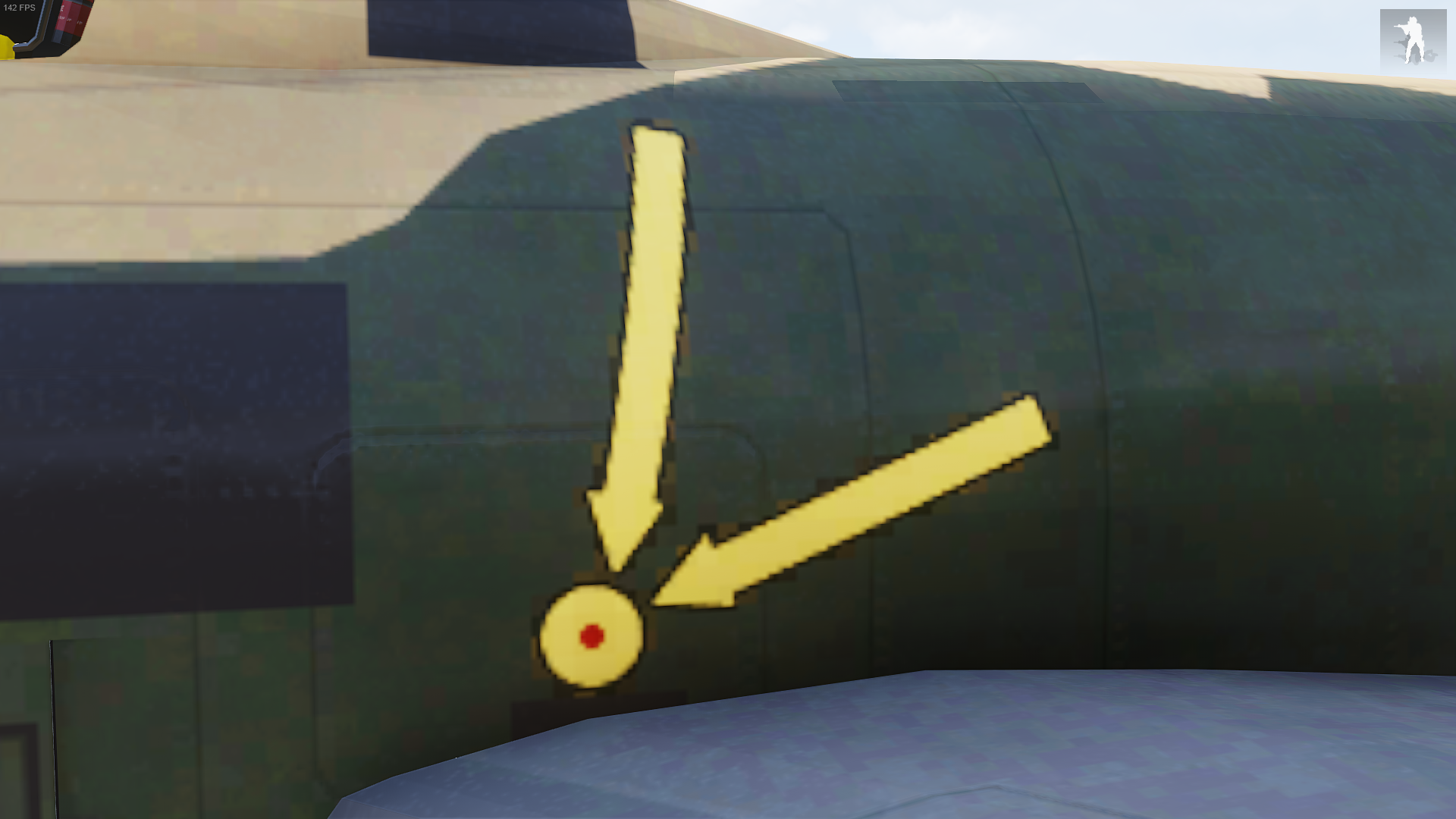
around the yellow arrow and circle

example of the unit logo that when i make it smaller just looks like crap
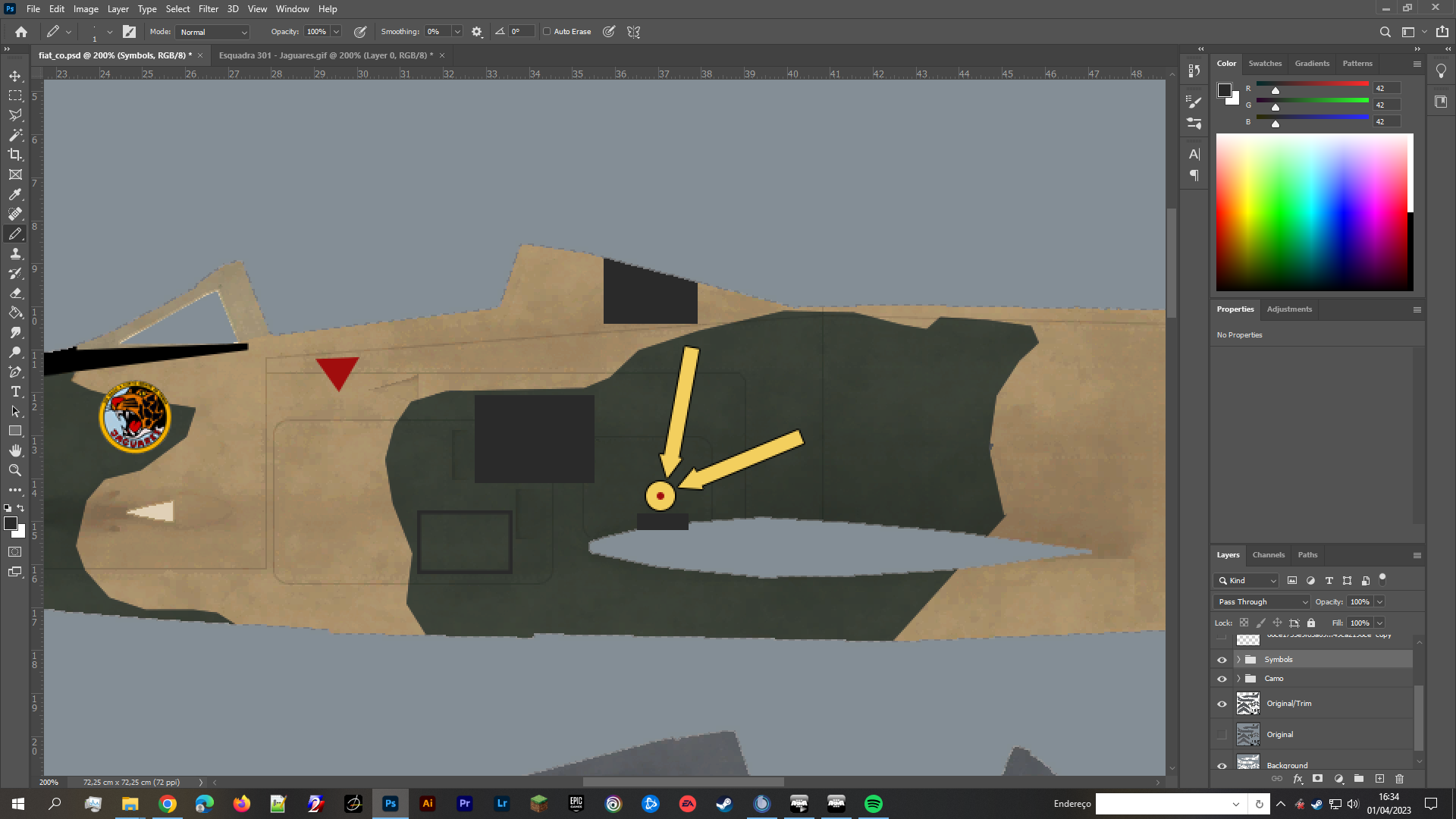
this is how it looks in PS
full quarry
well first problem comes from the game textures getting compressed so when you have a lot of colors some of them get reduced adn can lead to artifacting
median anvil
Any way to get around that?
full quarry
no
well try to use solid colors more
next thing is the pixel resolution. if there just isnt enough pixels small details like small text in decal is just impossible
median anvil
res is 2048x2048
full quarry
if a plane is made in decal friendly way that decals are separate see through pieces on the model that can use high resolution images in small areas then you have a chance to have crisp decals
median anvil
oh
full quarry
yeah 2k cant really hold that kind of detail in that small area
you can try going 4k but it might not work much better
median anvil
👍 thx for the help
 hallow jay
I am not quite sure what I am doing wrong, but all my models seem to have the consistent issue of becoming very "flat" once they are in shadows. For example this random ammo box seems to look okay-ish in sunlight, but the moment I place it in shadows it goes awry. So it goes from sort-of perhaps looking like a wooden box to looking like some sort of a flat plastic box.
I am not quite sure what the issue might be, but I would guess it is probably Substance related?


 patent patrol
Normals are very light dependant in game.
So as soon as something is not directly lit the strength of the normal map strength falls off very quickly.
Personally I make an AO map based off of the object's normal map and then apply some of that over the top of my diffuse, to help fake the depth when not directly lit.
hallow jay
hmmm, understandable, I will give it a try, thanks
livid cedar
Hi , I made a golden retexture of different weapons and I am having issues with the .rvmat file tryna make it more glossy and golen like , can anyone explain how to do so? thanks 🙂
livid knot
livid cedar
Hi , I made a golden retexture of different weapons and I am having issues with ...
You could try just increasing the specular value at the top of the rvmat file, might give the effect you're looking for
 gusty dove
Does anyone else have a problem with Bi Tools installation? My Windows 10 blocks it, says it's a dangerous
full quarry
gusty dove
Does anyone else have a problem with Bi Tools installation? My Windows 10 blocks...
BI tools?
where did you get them?
 deft bolt
How would one go about setting up Substance Painter export settings for a _dtsmdi map. Is it the same as a regular smdi?
gusty dove
full quarry
where did you get them?
full quarry
gusty dove
https://community.bistudio.com/wiki/BI_Tools_2.5
Are you going to mod Arma2?
gusty dove
full quarry
Are you going to mod Arma2?
i wanted to make retexture for Arma 3. guides says that i need it
full quarry
You found some old likely obsolete guide then. Arma 3 tools are on steam
gusty dove
full quarry
You found some old likely obsolete guide then. Arma 3 tools are on steam
so it's same thing basically?
full quarry
No Arma 3 tools are for Arma 3 and more up to date
 wooden anchor


i have isolated this issues for the texture files of the mod
anyone have any idea on how to fix
(i dont want to have to remake the paas)
lethal condor
How you pack the pbo?
wooden anchor
lethal condor
How you pack the pbo?
Mikros tools
PBO project
addon builder does the same
lethal condor
Do you know which file is the faulty?
wooden anchor
im having a friend pack the pbo and see if its my files or if im stupid
no clue
but thats like a quarter of a Gb
so its probably multiple files
lethal condor
250MB sounds fine though...?
wooden anchor
sorry, but what do you mean by that?
lethal condor
PBO has filesize limit, though the limit is about 2 gigs
Are your tools up to date?
lethal condor
🤔
 blazing kelp
Is there anything that I can do to fix white fringing/outline on _ca .PAAs?
On photoshop the image has literally no white outline when I place a black layer underneath
full quarry
blazing kelp
On photoshop the image has literally no white outline when I place a black layer...
picture?
blazing kelp
I rather not post it, sorry. But I think i got it. Photoshop default feathering was causing issues. I learning how to cut an selection and leave absolute hard edges
full quarry
:L
 tropic crater
If I'm separating parts of say, a vehicle texture, is it better to cut/paste parts into their own empty layers? Or duplicate the original layer multiple times and use a layer mask on each?
full quarry
tropic crater
If I'm separating parts of say, a vehicle texture, is it better to cut/paste par...
I suppose whichever you set up faster
Dont think there is much difference
 shell moat
Are there any way to change the image in the inventory for an item in a MP Mission maybe via a config (without mods, like changing the image in your inventory, that is shown when you have a map) ? Like in the picture
 full quarry
shell moat
Are there any way to change the image in the inventory for an item in a MP Missi...
full quarry
shell moat
Are there any way to change the image in the inventory for an item in a MP Missi...
no
shell moat
full quarry
no
ok
 wild current
so, i've made a simple vehicle retexture that i'm applying using the setObjectTexture function in the editor, how would i go about making it into an actual skin i could apply using the garage?
soft silo
wild current
so, i've made a simple vehicle retexture that i'm applying using the setObjectTe...
You're going to have to write a config file and then load it as a mod  check out #arma3_config
 carmine marsh
Is there anything I can do to make my unit logo glow less ingame, or is that simply impossible with the lack of additional textures?
Edit for clarification: talking about the clan unit logo from Arma 3 Units
dense peak
Does anyone know if I can texture objects with blender nodes or does it have to be from UV?
 mint hare
arma talks textures and UV maps (no more than 2 of those) 
dense peak
So wich is the best way to do a good texture¿
full quarry
dense peak
So wich is the best way to do a good texture¿
I'd recommend reading about texture baking.
 near warren
Making a scifi panel for an info stand. I think it looks pretty good so far :D

 ornate sequoia
please tell me what to do if the windows inside the car are always black (nothing is visible)
 ornate sequoia
but if you break the glass, then everything is visible
 ornate sequoia
I removed glass1-6 and everything became without glass at all. t.h yes, I think it's rvmat
gleaming pewter
is your texture see through?
even a little bit is okay, or you can use this #(argb,8,8,3)color(1,1,1,0.8,CO)
i believe there is a arma glass rvmat a3/data_f/glass_veh.rvmat
ornate sequoia
a3/data_f/glass_veh.rvmat
gleaming pewter
yes indeed
 worldly parrot
Hey !
If i create a PBO with some images in PAA, can i call them in an PC to display the image ?
I would like to reduce the mission folder size
full quarry
worldly parrot
Hey !
If i create a PBO with some images in PAA, can i call them in an PC to di...
that is how mods work
but you would have to run the mod and also others playing the mission would need the mod
worldly parrot
Okay so it will be a client mod. So in the texture text box i'll just have to do like NameOfThePBO\images\image.paa ?
full quarry
if that is the folder structure inside the pbo then yes that is the principle how it should work
worldly parrot
Thanks a lot !
 stable swallow
wild current
so, i've made a simple vehicle retexture that i'm applying using the setObjectTe...
stable swallow
wild current
so, i've made a simple vehicle retexture that i'm applying using the setObjectTe...
making it a seperate pbo and some config wizary
stable swallow
gleaming pewter
that will be either a texture or rvmat issue
always convert textures with an alpha channel with _ca instead of _co
 mighty crest
Another new site that has come up that I am beginning to use is http://episcura.com/ has some good HDRI stuff as well.
Huge Free Library of CG Textures, HDRI, and Snapshots
 jolly lantern
Is anyone here super skillful in texturing and making custom outfits? I’m not at all good at it, and there’s a custom outfit I want in the game for myself for a unit I’m in. I’d be willing to pay if necessary, DMs are open for anyone interested.
full quarry
jolly lantern
Is anyone here super skillful in texturing and making custom outfits? I’m not at...
we have #creators_recruiting for such questions!
 marble bramble
So I have a blender model, how would I texture it? Assume I know absolutely nothing about texturing 😅
full quarry
marble bramble
So I have a blender model, how would I texture it? Assume I know absolutely noth...
is it a model you made?
marble bramble
Yes
full quarry
texturing and modeling go hand in hand really
so next step would be you want to learn about UV mapping
and possible highpoly to lowpoly texture baking workflow
depending on what kind of model you have made
marble bramble
It's just a 300 face model, I could make a lowpoly version by just removing the bevel modifiers on some parts
If I remove them it goes down to like 60 faces :P
Can I just texture it in blender?
I've found this tutorial, but if you have one that's better suited for ARMA modding I'd gladly use it

In this Blender tutorial I will show you how to do UV Unwrapping for Beginners.
● Setup texture Maps Tutorial: https://youtu.be/V8ZRp3J64x8
● Easy Texturing Method Tutorial: https://youtu.be/LtAE3JtCsRA
● Wood Texture link: https://polyhaven.com/a/rough_wood
● Help support the channel:
Patreon: https://www.patreon.com/ryankingart
Gumroad: http...
full quarry
marble bramble
Can I just texture it in blender?
you can start with that yes
and you can do texturing in blender too but the blender material does not transfer into the game
you will need set of textures to use
mild olive
Do I need to use arma3diag_x64 to use filepatching properly?
Right now I am loading an addon from "P:\z\NCA\addons". I have an unpacked addons folder in "...\steamapps\common\Arma 3\z\NCA\addons".
I can make changes to the unpacked textures in the arma directory, but need to restart the game for them to change.
Looking for any advice on how I can better set up filepatching if anyone has any.
mild olive
lethal condor
You need to have diag exe
Thanks for the help. I don't think I fully understand, could you expand on this please.
lethal condor
Filepatching ... use files outside of PBO
Reload on the fly ... well what it says
Diag exe ... available in Development Branch of the game
mild olive
Got it working. Thanks for the help
real torrent
there was no template available for firewill's super hornet so I guess I'm making my own template

unfinished as you can see
full quarry
👍
 rich dawn
Anybody here familiar with rvmats? Haven't really messed with them too much. I have a flat color texture assigned to my model via object builder, but I'd like to make it emissive, any advice on how to do this?
full quarry
you would crank up the emissive values of a rvmat
or use one of the vanilla emissive ones from the A3 files
rich dawn
Ahhh I see. I'll take a look then. thanks!
full quarry
if your P drive is set up right you should find those in P:\a3\data_F if I remember right
rich dawn
Hey figured it all out, was actually a lot easier than I thought. Thanks for your help dude!
ornate sequoia
how to find the technology config?:)))
lethal condor
What technology config?
ornate sequoia
maybe there is a team somewhere or look at it somehow. Because I have a mod, but I do not know where the config is, I need some data from it
ornate sequoia
lethal condor
What technology config?
config.cpp cars
lethal condor
In config viewer?
lethal condor
Literally I have no idea, since I don't know which car
ornate sequoia
I know where the 3d model is, all textures, etc., but I have no idea where the config itself is, it's probably in the left mod file at all

does the model specify the same configuration path ?
lethal condor
What exactly you need?
ornate sequoia
lethal condor
What exactly you need?
config, I need it, for an example in creating my own
lethal condor
Wait, I thought you want to do something with textures after this channel
ornate sequoia
yes, I need a config that would then be created correctly on my own (because I need an example of the correct configuration), it seems to me that we have moved away from the original topic, I asked for some command to search for a config, like :
copy To Clipboard getText (configFile >> "cfgVehicles" >> "I_mas_BTR60" >> "picture");
only for config search
full quarry
What's the helmet from?
full quarry
ornate sequoia
yes, I need a config that would then be created correctly on my own (because I n...
You are on wrong channel, #arma3_config is the place for config questions
 ebon totem
ty, I'll remove it, since i got it resolved
full quarry
ebon totem
ty, I'll remove it, since i got it resolved
Just so you know editing the game models or models from mods without permission is forbidden.
vernal sage
Download Arma 3 Tools on Steam. TexView2 comes with the toolkit.
 quartz cave
Hey not to bother anyone but has anyone tried to retexture parachute
full quarry
quartz cave
Hey not to bother anyone but has anyone tried to retexture parachute
they might not have hiddenselection defined
quartz cave
full quarry
they might not have hiddenselection defined
its weird, I 100% have it defined in similar ways to my other texture stuff but its not working with these parachutes for some reason
full quarry
parachutes might not support it then
come to think of it I tried that recently and yeah had the same result.
but it was with custom parachute so I just did a second model with different texture on it
quartz cave
full quarry
come to think of it I tried that recently and yeah had the same result.
So after picking apart a mod called TCGM Parachutes
I am seeing they are adding in the actual models in and then adding textures to those files. I guess thats the route I need
quartz cave
Thats unfortunate, guess I gotta learn how to do that as well
full quarry
there might be one in the Arma2 sample files from A2
mint hare
class ParachuteBase: Helicopter
mint hare
just a random funny from the config. No real meaning
quartz cave
ah
 crude talon
Hello guys, new here, hoper i'm in the right thread. Quick question, i made for my custom scenario some posters and infoboard assigning texture to some object and it works fine. All image are 2:1 ratio, jpg format. SOME of this texture/images do not load properly: they are black and load only the the camera/player come closer.
Any help? Thank you in advance ❤️
full quarry
jpg is not proper texture format.
preferably you would use png or tga as source file and convert to .paa so it loads faster in game
also resolution needs to be in power of 2
so 512, 1024, 2048 and so on
so 2:1 ratio texture could be 1024x512 or 2048x1024
and you would likely use _co name suffix for correct paa conversion
crude talon
@full quarry your help is very precious, thank you. I didn't understand this .paa conversion: isn't it a simple format conversion?
-edit-
Ok, i understood the suffix matter link for referece https://forums.bohemia.net/forums/topic/146270-how-do-i-save-an-paa-as-jpg/
Thank you!
Bohemia Interactive Forums
Hello. how do i save an paa file into Jpg? When i search on the forum i cant really find how to do that
quartz cave
has anyone added custom textures for usp in the past? Struggling a bit with this
gusty dove
i don't know what happened but PBO Manager can't extract pbo files, when i extract it into folder, folder is empty
full quarry
what pbo are you trying to extract?
gusty dove
full quarry
what pbo are you trying to extract?
characters_f.pbo
full quarry
maybe it broke or it extraced them somewhere else
gusty dove
i tried to extract in right in the addons folder with a pbo name given to folder, and tried to extract in on the desktop as well, most of the times folder is impty or has only 1 json file in it
PBO Manager broken?
full quarry
your install might be broke yes.
gusty dove
full quarry
your install might be broke yes.
reinstalling didn't help, what helped is removing the program then downloading older version (1.4.1) from developer github page
 harsh jolt
gusty dove
characters_f.pbo
harsh jolt
gusty dove
characters_f.pbo
why dont you just extract all arma data on P Drive?
make sure ur P Drive is mounted and then click "project drive management"

then click "extract game data"
low helm
^^Thank you!
near warren
how do I get preview images for glasses
full quarry
near warren
how do I get preview images for glasses
Make a screenshot
near warren
oh so there's not something like BIS_fnc_exportEditorPreviews for that?
full quarry
Don't think so. And even that just takes a screenshot
near warren
full quarry
Don't think so. And even that just takes a screenshot
It makes it so there is a special background
full quarry
sure
near warren
ah yea, looking at the code, seems like it only does vehicles, thus not weapons >> glasses vv
wait-
 stuck wolf
So I make quite a few skins for vanilla servers and the servers I provide for typically upload it into the server themselves.
I wanna make a workshop that shows off my skins but I dont know how to do it. Can anyone give me a hand
Its all quite a bit complex for me
full quarry
what do you mean by workshop in this case? steam workshop page?
stuck wolf
ill grab an example

How they do this
Im dumb as a rock and dont get how they do it
stuck wolf
The screenshots I can do that fine. Im on about being able to upload it and then have people download it and play with and preview the skins for themselves
As currently I have to send them screenshots and or stream my game to them
full quarry
so you mean view the skins in the game garage?
full quarry
right well that would reguire config work to add appropriate config classes for them and add them to the garage list of the vehicles
stuck wolf
Ah that all sounds kinda difficult
full quarry
well it can be a lot of work and fair bit to learn if you dont know any of it.
stuck wolf
Ah I think ill just have to stick to what I do right now
As much as its inconvenient. I have over 200 designs for owners to pick through and im sure thatl take ages and be a pain to import into the game like that
full quarry
some time at least yes.
stuck wolf
Yeah I would need someone to help me with that
cant find any videos online
Well if anyone wants to help me and show me how to do it. feel free to shoot me a DM
full quarry
there arent really much in way of videos about config work
stuck wolf
Yeah I couldnt find a thing
full quarry
the information is usually as text
you would need to start from basic understanding of config and how to read it and then look up the vanilla game configs on how its made
and repeat that on your own configs
theres millions of things that can be done as mods so there are no explanation for everything
full quarry
well that requires the above mentioned work
quartz cave
Does anyone know how to texture USP files?
full quarry
quartz cave
Does anyone know how to texture USP files?
Same way any other, draw a texture, create config that uses usp class a base and uses your texture through hiddenselections and pack that with your new texture into pbo.
frozen blade
quartz cave
Does anyone know how to texture USP files?
check first if license allows it
 floral fiber
You cannot extract the usp pbos as they're obscufated or however its spelt
 fallen cloud
You're still able to get the textures without unpacking the PBO via the GUI-Viewer, make sure that you don't violate the USP license by doing so and reuploading your edits. Considering the files are obfuscated, you may not be allowed to do so, best to check in with the devs.
 little remnant
I'm having a debate over PAA's vs Jpeg (jpg)
in 2023, is there any need to convert to paa anymore?
 stone steeple
little remnant
I'm having a debate over PAA's vs Jpeg (jpg)
in 2023, is there any need to conv...
stone steeple
little remnant
I'm having a debate over PAA's vs Jpeg (jpg)
in 2023, is there any need to conv...
following this up with the misson file was 64mb and cut it down 30mb with converted them to jpgs
full quarry
little remnant
I'm having a debate over PAA's vs Jpeg (jpg)
in 2023, is there any need to conv...
always convert to paa
stone steeple
why
full quarry
otherwise the game has to do it on runtime and jpg is super crap quality
stone steeple
the quality is same but the file are smaller ?
stone steeple
bad form?
full quarry
but youre not base arma server. you are distributing non base files through a mission
full quarry
I give up
stone steeple
full quarry
I give up
so use paa or save 30mb on misson file by using jpgs?
stone steeple
full quarry
do as you feel works I suppose
nah becuase my boss is say no but i'm saying hes wrong and i'm trying to win an argument
stone steeple
yeah owner
full quarry
ye life thing..
stone steeple
yeah
full quarry
anzus?
little remnant
Why the hell you calling me boss?
I'm going by the wiki
It says performance increases
By not using clientside mods it makes it easier for the player to get in.
stone steeple
i'm saying the performance increases is outweigh by the optimized size of the mission file
 knotty sparrow
So in dayz if you want to use env.paa on part of your gun you just edit the green channel of the smdi and anything that's white the env is applied to and anything that's black is left alone. Is it the same in arma becasue I can't seem to get it to work
full quarry
knotty sparrow
So in dayz if you want to use env.paa on part of your gun you just edit the gree...
you can adjust the specularity of a pixel that way if that is what you mean
but could also be dayz rendering does something different with it
knotty sparrow
basically I want to make all bolts on the gun gold (but not just yellow through texture)

like here the blue is using blue_env.paa file
and all I did was make everything white in green channel that I wanted to be blue (env_blue.paa_
having issues with this in arma it's doesn't apply the env.paa anywhere on the gun
full quarry
It does not really work quite like that in either of the games even though visually it may seem so
but also I dont really have the juice to explain how arma lighting works
rich dawn
This is a bit of a nebulous question - any of you guys familiar with blender's "flat" viewport shader mode? it doesn't calculate any lighting, and just uses the base color of a scene. Is this an effect that can be imitated in an rvmat?
full quarry
rich dawn
This is a bit of a nebulous question - any of you guys familiar with blender's "...
No not really. Don't think there is suitable shader for that.
rich dawn
full quarry
No not really. Don't think there is suitable shader for that.
Ah I figured, thanks for the heads-up.
 rose minnow
Anyone here using Substance painter (1.6) having trouble saving/loading the project?
if I load it crashes
 nocturne badge
i use obj seems to save the uv better some times it does freak out and freeze for me same as designer
rose minnow
i mean saving/loading the project as a whole
 full quarry
whats the full line from the rvmat
 outer needle
ambient[]={0.9, 0.9, 0.9, 1};
diffuse[]={1,1,1,1};
forcedDiffuse[]={0,0,0,1};
emmisive[]={0,0,0,1};
specular[]={0.30, 0.30, 0.30, 1};
specularPower=64;
renderFlags[]=
{
    "AlwaysInShadow"
};

PixelShaderID="Super";
VertexShaderID="Super";

class Stage1_base
{
    texture=""; //Nohq.paa
    uvSource="tex";
    class uvTransform
    {
        aside[]={1,0,0};
        up[]={0,1,0};
        dir[]={0,0,0};
        pos[]={0,0,0};
    };
};

class Stage2
{
    texture="a3\weapons_f\data\DetailMaps\Metal_detail_DT.paa";
    uvSource="tex";
    class uvTransform
    {
        aside[]={0,7,0};
        up[]={7,0,0};
        dir[]={0,0,0};
        pos[]={0,0,0};
    };
};

class Stage3
{
    texture="#(argb,8,8,3)color(0,0,0,0,MC)";
    uvSource="tex";
    class uvTransform
    {
        aside[]={1,0,0};
        up[]={0,1,0};
        dir[]={0,0,0};
        pos[]={0,0,0};
    };
};

class Stage4_base
{
    texture=""; //as.paa
    uvSource="tex";
    class uvTransform
    {
        aside[]={1,0,0};
        up[]={0,1,0};
        dir[]={0,0,1};
        pos[]={0,0,0};
    };
};

class Stage5_base
{
    texture=""; //smdi.paa
    uvSource="tex";
    class uvTransform
    {
        aside[]={1,0,0};
        up[]={0,1,0};
        dir[]={0,0,0};
        pos[]={0,0,0};
    };
};

class Stage6
{
    texture="#(ai,64,64,1)fresnel(1.5, 3.0)";
    uvSource="none";
};

class Stage7_base
{
    texture=""; //co.paa
    uvSource="tex";
    class uvTransform
    {
        aside[]={1,0,0};
        up[]={0,1,0};
        dir[]={0,0,0};
        pos[]={0,0,0};
    };
};
This is a base material, all the actual textures are on each model rvmat
full quarry
might be simplest to nab the default one from the P:\a3\data_f\super_default.rvmat
outer needle
class Stage6
{
    texture="#(ai,64,64,1)fresnel(1.5,3.0)";
    uvSource="tex";
    class uvTransform
    {
        aside[]={1,0,0};
        up[]={0,1,0};
        dir[]={0,0,0};
        pos[]={0,0,0};
    };
};
it liked it like this xD
but well
ty goat
full quarry
ah yeah well it was a bit incomplete 
outer needle
the thing is i was trying it with that same structure before and it was giving me an error too
maybe a typo that i didnt notice
full quarry
thats usually the case yes
rose minnow
Yup
Happens everytime i load
Doesnt matter of brand new clean project with no mesh
 stoic tendon
There are any burnt corpse texture available? My mission is far from realist or milsim or role play, so no one will be ofended with a burnt unit.
full quarry
dont think there are no
stoic tendon
sad, i will try to make one
 zealous niche
stoic tendon
There are any burnt corpse texture available? My mission is far from realist or ...
zealous niche
stoic tendon
There are any burnt corpse texture available? My mission is far from realist or ...
look into webknights flamethrower redux thingy. it should have something like that. also iirc webknight doesnt care at all if his stuff is copied and reused.
stoic tendon
zealous niche
look into webknights flamethrower redux thingy. it should have something like th...
Thanks a lot! I will find hin and his mod at the Workshop!
full quarry
even if he allows reuploading, making mods dependencies is still the correct way to use files from other mods so every mod does not have same files
stoic tendon
I will contact hin, if can't i will do a more or less texture. Don't want to use a full mode just to use a texture.
 floral seal


 mighty crest
@rose minnow On what OS? Windows 10 have you tried with and without UAC and turn off anti-virus, etc?
 frosty pumice
where can i find uniform texture templaters in .psd (photoshop) form? specifically CSAT uniforms
knotty sparrow
any reason why changing a texture of a weapon would mess with the muzzleflash?
knotty sparrow
frosty pumice
where can i find uniform texture templaters in .psd (photoshop) form? specifical...
Arma 3 Samples has some psds check there
lethal condor
- The model is not done properly
- Your replacement is not done properly
Since we don't know what is the situation we can't say much
lethal condor
knotty sparrow
any reason why changing a texture of a weapon would mess with the muzzleflash?
^
We don't know what “a weapon”, “a texture”, “mess” and “muzzleflash” mean exactly
knotty sparrow
It's the pk from exile mod when using default texture it's fine but when you replace it the muzzleflash just stays on
Figured it out tho the model is messed up
rose minnow
win 10 indeed
frosty pumice
can anyone please tell me where I can find the co and nohq texture for the LBV harness? I cannot find it anywhere in the game files.
timid dome
frosty pumice
can anyone please tell me where I can find the co and nohq texture for the LBV h...
clothing_co and tech_co, it uses the two CSAT uniform textures/helmet texture
frosty pumice
hmm okay i will check it out
 fickle forge
Hello guys please who can help me arma 3 mods
full quarry
fickle forge
Hello guys please who can help me arma 3 mods
Depends on what you need help with?
 brazen hatch
What the best template on substance painter for arma 3 ?
soft silo
brazen hatch
What the best template on substance painter for arma 3 ?
its been a while since i opened substance. what PBR presets are there?
frozen blade
brazen hatch
What the best template on substance painter for arma 3 ?
legacy spec gloss (non PBR)
frosty pumice
where can i find the nohq for the NATO/CSAT crew helmets?
vernal sage
frosty pumice
where can i find the nohq for the NATO/CSAT crew helmets?
characters_f.pbo -> blufor -> data
a3\characters_f\blufor\data\armor1_nohq.paa
If you want the Soft CSAT helmet that was added with the Tanks DLC, it's in the following archive:
characters_f_gamma.pbo -> guerrilla -> data
a3\characters_f_gamma\guerrilla\data\h_tank_unzip_f_nohq.paa
frosty pumice
alright thanks
brazen hatch
frozen blade
legacy spec gloss (non PBR)
that made all my guns look like bordelands one on substance
i kind like it
 south gazelle
hey im trying to retexture a tank but it has 2 CO files, how would i locally test the 2nd one? the first one works fine however doing the same command and changing the jpg name to the turret file it goes on the hull instead
lethal condor
What exactly you do? Terms of command
south gazelle
 lethal condor
Change 0 to 1
frosty pumice
is there a faster way to find noHQ .paa textures? I know you can find the CO with the configviewer, but what about nohq?
lethal condor
Most likely the same place with the CO
frosty pumice
yeah sometimes they do, but most of the time they're in an entirely different folder with a completely diff name
atm, im trying to find the nohq for the ifrit turret
lethal condor
a3\data_f\Vehicles\Turret_NOHQ.paa
lethal condor
You can check the rvmat
 upbeat cradle
Hello all, recently added a "Glasses" item to the game however the texture is not loading. The config is fine (I believe) but everything is linked to where it should be, no corrupted files just at a bit of a loss what else it could be. I've tried all I can find online but no success, any help would be greatly appreciated
rich dawn
I asked this a few weeks ago but I'm still pretty stumped as to how to get around this. Is there any way to make the texture on my model render as - or at least close to - "shadeless"? Similarly to this video: https://www.youtube.com/watch?v=OYPKXI3dFr4
Today, but popular request - I share a super quick and easy way to make your textures and image textures SHADELESS in Blender 2.8 Eevee !
If you'd like to help support my channel, please consider making a donation! It helps more than you know ✔ https://www.paypal.me/2kai
▶️ DOWNLOAD MY FREE "asTro" GFX PACK: (coming soon)
▶️ FOLLOW ME:
✔ You...
I'm working with an imported mesh from another game, and unfortunately due to how the model is it just doesn't look good with the usual arma shading unless the texture is rendered in this way. Only thing is I'm unsure if it's possible to do anything like this within arma.
full quarry
rich dawn
I'm working with an imported mesh from another game, and unfortunately due to ho...
most of the time using models from other games is strictly forbidden. Do you have a permission to use it?
 torn pilot
Small question regarding texview 2. Is there a file size limit? If so, what is it?
full quarry
have seen it open files of few 100mb
problems usually are not size
but wrong file format or save settings
@torn pilot
lethal condor
And/or the resolution
full quarry
👆
torn pilot
ah ok, thanks
trying to open a 2048x2048 png in texview and its spewing out an error. Works with other files so Im not sure what the issue is. I shall try some magic
lethal condor
Bit depth? IIRC there're some problematic depth
full quarry
needs to be 8bit/per channel
rich dawn
full quarry
most of the time using models from other games is strictly forbidden. Do you hav...
I did indeed get written permission to use it. Unfortunately, the person who made it has no clue how to work around this either. Which is a given I guess, since I'm pretty sure the issue here is just working around arma's shaders rather than anything with the model itself.
full quarry
there is no such shader as far as I know at least.
rich dawn
Yeeeeah I was kinda worried about that, geh. It's a fairly stylized model so it only looks decent under certain shading conditions.
Might be out of luck on this one
torn pilot
So I've been wanting to have some mod items retextured. I had a friend of mine whos experienced with texture edits retexture the helmet and send it back to me as png. However, Texview 2 constantly spits out the error "Error loading file (path to file)" for unexplained reasons. Would anyone here know a solution?
full quarry
torn pilot
So I've been wanting to have some mod items retextured. I had a friend of mine w...
either its wrong resolution or wrong bit depth png that texview cant open
torn pilot
its exactly 2048x2048. Bit depth I have no clue about. I was able to open one of his other retextures just fine so eh... Im clueless
full quarry
open it in image editor and save it again perhaps
gimp for example can tell and change bit depth
torn pilot
I shall give that a try
I just changed the size to 1024x1024, saved it and then changed it back to 2048x2048. Not sure why but it works now
weird though
severe rune
i repacked Amples Camo pack to use for my unit
🤔
 mint hare
You may:
- Use the contents of this mods PBOs (textures, models) in your addon under the APL-SA license.
though
severe rune
Use the contents to make a new mod != slightly edit and repack mod
You may not:
Reupload this mods PBOs to steam workshop.- Use the same PBOPrefix, Class names, or file paths
- Upload "repacks" of this mod that would conflict with this mod.
- Upload modified versions anywhere if your PBOs are mangled/encrypted/obfuscated. Keep it free and open.
While you're violating the authors license, you won't get help here
mint hare
i was trying to point towards "make your own mod (with or without APCACP dependency)" with too few words
 shell rock
severe rune
> i repacked Amples Camo pack to use for my unit
🤔
shell rock
severe rune
> i repacked Amples Camo pack to use for my unit
🤔
It's Unlisted, and not shared to the public, as requested by the author.


"Repack" Was a poor choice of words
severe rune
workshop upload (even if unlisted) are different than a private repository
If you have a specific agreement with the author then it would be fine, but this seems fishy
shell rock
🤷♂️
 waxen shoal
Hello all, I come bearing a substance painter question. I've got a SmartMaterial Preset with my folders and layers, generators and matfx/filters, etc that I use as a baseline for texturing new models. Problem Im encountering on the new armor model Im working on, is the edgewear generator will not apply as it has been on the others, and Im stumped for what the cause may be.
it has:
-identical layer, structure, and settings as the other .spps where its working fine
-achieved no result through any modifications of the layer styles or settings on the generator
-can definitively tell its the edgewear gen itself not applying as the working armor looks the exact same as the new with it turned off
I have tried rebaking the meshmaps with what I believe to be the correct settings, but I wouldnt even consider myself an advanced user yet. Any help or insight is greatly appreciated
waxen shoal
might have just stumbled on it, noticed these are highlighting the hard edges, did our modeler goof somewhere?

 zenith mulch
waxen shoal
Hello all, I come bearing a substance painter question. I've got a SmartMaterial...
zenith mulch
waxen shoal
Hello all, I come bearing a substance painter question. I've got a SmartMaterial...
should have read that through
dense peak
Hi. How can I automatically add scuffs on the corners?
 livid knot
@dense peak Look up "generators" in regards to substance painter on google
waxen shoal
zenith mulch
should have read that through
yeah I’m banging my head against the wall. Another dev was able to add edgewear to it on his iteration of the .spp with the same bake settings and .fbx used
it shows the curvature is defined
it just… won’t apply it to said curvature/edges, it will apply the grunge effects from the gen just fine as you tweak the settings too
waxen shoal
1st is the new armor I’m working on, 2nd and 3rd are the one where it’s working fine. can see the 2nd armor looks just like the first with the edgewear turned off
tweaking all the settings on the gen or layer styles does nothing, it adds grunge to the armor but can’t seem to find edges


 snow kelp
Does anyone know if Firewill has a discord?
 versed nacelle
snow kelp
Does anyone know if Firewill has a discord?
versed nacelle
snow kelp
Does anyone know if Firewill has a discord?
Not that I know of, but his email address is in the description on the mod workshop pages. So if you want to contact him, that's most likely the best way to do so.
snow kelp
Fair enough
Might as well ask while I'm here, does anyone have a better template for the F/A-181? The official one has the markings on the same layer as the detail
rose minnow
ok it might have been that the mesh was 3ds
seems like obj gets saved and loaded fine :(
mighty crest
humm, interesting. That sounds weird. But you may be on something there. I only use obj and not 3ds. I will try it and see if I get issues.
 potent yoke
Heyyy, any pro skinners out there?
I got 100 hours and I’m currently playing ‘Antistasi’ with 14 other pals.
We all use ‘Scientist uniform’, the white set.
Is it possible to reskin the texture, without too much hazzle? I dont want to make an addon-uniform and have to get the server owner to add new mods and stuff.
Can I just make it on my client, so only I can see the new texture - and send the folder to those who wants to use it?
I have alot of experience in FiveM/GTA (7k hrs), with 4 years of Photoshop and 3DS Max.
full quarry
potent yoke
Heyyy, any pro skinners out there?
I got 100 hours and I’m currently playing ‘An...
No it would have to be on server
Unless server does not verify files