#arma3_animation
1 messages · Page 18 of 1
 desert raven
and yes you will need to weight the armor too for it to animate
think of all wearable equipment as unique characters
you will just have to tweak the weighting manully
 torpid star
that's why i suggested skin wrap in 3ds max a few days ago. it gives you a really good base to work from, if you aren't experienced with weighting. i think i weighted some halo stuff for someone a long time ago doing it like that. i just copied the weight from the arma character (aka underwear dude) and then corrected the armor parts by hand. seemed to wrok well iirc
there's no real shortcut though
desert raven
Yeah I usually start like that in Blender too.
 somber grail
@torpid star ok I'll look at max again. I uninstalled it yesterday due to space on my c drive and not getting familiar with the software. Maya seems a little more intuitive for me to use. That's just my preference.
Appreciate there's no real short cut, I'm just looking at how it works and what does and doesn't work. With various ways being available to do things, I'm trying to find a way that suits me that I can understand while there's a lack of documentation.
desert raven
weighting characters is very much documented though and Im sure there are tutorials for that in general
adapting the general techniques to mach Arma requirements is just a small extra step
somber grail
Understandably. But there is a lack of documentation in regards to arma anims was what I meant.
Bit frustrating but it means things take longer to get worked on. Plus finding the time in between real life.
desert raven
yes the Animation side is rather more tricky and the learning curve from 0 to basic understanding how it works is rather steep
somber grail
Nail on the head.
desert raven
I studied it for like a year before I was comfortable enough to start dabbling with it properly
I may be a couple of steps up from basic understanding but still theres a lot I dont quite get
somber grail
Tbh, there isn't alot of documentation on creating new arma character from scratch.
If any at all.
desert raven
Indeed
somber grail
It's all retexuring etc.
desert raven
which is why I poked around configs and compared them to available examples and made tests and connections on how things work
desert raven
making the model and such is really just trivial part of the whole complex thing that is a full working custom sized/formed character
somber grail
Well tbh, after playing about with the third model I now have, it will pretty much be a case of rigging it. Then exporting it. If I can at least get it to a point I can use the default anims, i,'ll be happy with that
I got as far as retexuring an underwear unit in predator colours lol.
Just looks weird with a human head. Lol
torpid star
@somber grail i'm pretty sure all major 3d apps can do what the skin wrap modifier does. i just lack the proper terms for those. copying weights from one to another mesh basically
what is the functionality you are looking for for the predator? if you want all major features of the arma humans then you need to follow that skeleton. you can however also use some trickery, if the functionality is very limited.
for Ruppertle's raptors i did some nasty (probably not optimal) stuff to make things way more easy for me. i basically added all the new bones he has to the main arma skeleton so i could use all the existing config side without RPT spam while using a totally new skeleton. it's a bit hacky but it's much faster to get simple creatures ingame that need all the human engine features but not all the anims and weapon functionality. instead of basing them on the rabbit for example.
in addition i set up my own action set that exists inside the giant spaghetti cluster fuck that is the human animation config but is seperate in terms of anim transitions.
it's hard to explain, if you don't how how stuff is set up.
desert raven
@torpid star that sounds fun xD
torpid star
once you know how it works, it's very fast
desert raven
true. I used the man movesCfg as a base for my custom animations too but I cleaned it up to pretty much bare bones (commented out .rtm paths, removed cutscene stuff etc)
somber grail
Ideally as it's humanoid. If I can at least get it to default character status first then the rest can follow in time. I'm not too bothered about custom anims atm. As long as the player can use it as a unit to start with. Some custom mission of the predator have some neat menu functions and abilities. But they can be looked at at a later date.
 sterile ice
@desert raven how's your rig working? Just got files from Macser, haven't tried exporting into arma yet but it seems pretty good so far
Want me to send you the files?
desert raven
mine seems to work but sure I could compare them!
Macser might have a lot better insight on what ther face rig needs
drop me a DM @sterile ice
somber grail
@torpid star that's pretty much where I want to get too.
 deft fern
is there some safe way to mirror animation?
so i.e. get in anim would start from left side instead of right
 drowsy nymph
Rotate 180 around the Y axis?
with pin at 0,0,0
though that wouldn't swap left/right leg/arm movements
just the position of approach
sterile ice
Anyone any idea why my doors are opening instantly? They just jump to open state
model.cfg https://hastebin.com/tulazipizu.scala
config.cpp https://hastebin.com/jicaganule.scala
deft fern
wrong sources
i.e. source "Door_1_rot" doesn't exist
btw: I would recommend using animateSource instead of animate
@sterile ice
sterile ice
Thanks, What's the difference between animate and animateSource? @deft fern
torpid star
@deft fern how much access to the source do you have?
deft fern
animation source or source code? 😄
torpid star
source of the anim you want to mirror
deft fern
I have .rtm
using mirror in object builder caused inverted faces in anim
and this caused character shrinking
torpid star
hm. did you try switching selection names from left to right after mirroring?
also. is it a static anim?
deft fern
no, it's get in animation
torpid star
i was thinking mirroring the model itself and then switching the names. but not sure if that would even be allowed in terms of UI. can you copy one key frame from one p3d file to another?
desert raven
Id take the animation out of OB into Blender and do it there
 fluid lodge
I can't wait for the bust with expressions...😩
desert raven
Oh yeah the rig @sterile ice got from Macser is great
I had a made a few errors in recreating mine
sterile ice
I've talked to him, hes reworking it a bit to make it even better
desert raven
👌
 ruby hill
@deft fern What kind of mirroring are you looking for? I presume transforming a getIn from the left side to a getIn from the right side?
Any kind of negative scaling will not solve this, as you're looking for swapping the move. Where the left hand goes, now the right hand goes.
The only way to properly do it is via full sources (.rtm is not a good start for this) and retarget the animation. with swapped target names. That might produce useable results.
sterile ice
@fluid lodge idk, probably, if not then I'll ask him if I or @desert raven can post it
fluid lodge
👍
 frozen fable
Weird question: I have a animation where my char puts his hands up, is there any easy way to keep his hands up (So to just keep displaying the last frame) without making another config and animation to transfer into?
sterile ice
@frozen fable I don't think so, easiest way to do this would be deleting all frames except for the last one of ur anim and export it as rtm and make a Config with low speed and looped
frozen fable
@sterile ice Ah okay. Thanks for the enlightening anyway
 regal dawn
Anyone know where I would be able to find a swing animation for an axe/pickaxe?
 somber aurora
DayZ?
 crimson granite
For whatever reason I can't seem to get my weapon's built in bipod properly pivoting around the axis - it's as if the axis doesn't exist. I've defined it with a named selection in the memory LOD, with the right reference in the model.cfg CfgModels definitions for the bipod animation, autocenter=0 set on the memory, geo and visual lods, but for whatever reason it animates as if the axis is about a meter below the ground
Are there any gotchas that I might've missed first time trying this? model.cfg = https://hastebin.com/ibewocumiv.scala - FIXED - beautifully, after troubleshooting for half a day, it was the difference between "autocenter " and "autocenter"
 pastel solstice
Any one knowws the default hand pistol animation?
ruby hill
AmovPercMstpSrasWpstDnon
pastel solstice
anf its route in A3 folder
 compact ravine
P:\a3\anims_f\data\Anim\sdr\mov\erc\stp\ras\pst
of coruse you could always just search for AmovPercMstpSrasWpstDnon.rtm given you are looking for an animation.
pastel solstice
thanks!
 floral oak
any ideas why i cant edit my fingers anymore in 3ds max with the cat rig ?
i can still edit the normal Handmovement but not the fingers
floral oak
-solved / animation layer was Switched but i dont know why
regal dawn
Im trying to make a pickaxe, the only problem I have is that when I swing the pickaxe it doesn't do the animation, anyone that maybe has a config/model.cfg as example? im really clueless about this
regal dawn
I thought that it would maybe have something to do with the skeleton?
sterile ice
You just need to put an model.cfg with the basic skeleton in the same directory as ur rtm files.
One sec
regal dawn
Hmm, for some reason that still doesn't work :/
desert raven
where have you done the animation?
regal dawn
I haven't done the animation myself, I took it from an other addon, I guess that might be a problem
regal dawn
problem is that its from and old mod and no clue who actually did the animation rip
desert raven
dont use ripped animations.
 tawny mango
lol
 zenith token
if you have no clue who did it, then why the fuck are you using it in the first place?
no permission -> no use. Simple as that
crimson granite
Are there any available launcher rtm animation files? I saw a video tutorial referencing the igla.rtm from Arma 2 but not sure how to source it.
ruby hill
Arma2 source files? They were released as APL-SA
crimson granite
I downloaded them earlier on and tried to search through them but couldn’t track it down. Will have another go this eve
ruby hill
Igla doesnt have custom hand anim.
Looks like only the RPG7V had one.
\ca\weapons_E\Data\Anim
M3 Carl Gustav too, and I think the smaw too. But I cant find that in there
tawny mango
arma 2 reused a bunch of anim between guns
if I'm not mistaken te m24 hand anim was used like 6 times
crimson granite
Nailed it. Downloaded the wrong data. Cheeeers
frozen fable
Hey maybe this is a dumb question but i started getting into making gestures and play them with "playAction" and usually stopped them with "switchAction ''". However it suddenly stopped working on my 3 frame animation. Config: https://pastebin.com/vx1Kz9mL Tldr: I have a 3 frame animation that works with playAction however when i use switchaction to try and cancell the animation it does nothing (i tried most of the other ones like switchmove playactionnow and more as well)
desert raven
you might want to share the paste link and not link to pastebin.com
and how are you using the switchAction?
have you changed anything else about it?
does it target right character for example
frozen fable
@desert raven Oh god i dont know how that one slipped, the correct link is in now and this is a quick video of me using it and it failing to work as intended: https://www.youtube.com/watch?v=Vwck2L-1eEU&feature=youtu.be
deft fern
have you tried making 1 second non looped gesture?
in editor I'm usually using playAction "gestureNod" to terminate gesture
frozen fable
@deft fern Your a life saver thanks mate! "gestureNod" worked
 stiff obsidian
hey how would I make a knife hand animation for all the NCOs in Arma?
 naive hemlock

LMGTFY
 strong monolith
@stiff obsidian The same as any other weapon handAnim? Or do you mean like an attack gesture
strong monolith
then just do it the same as a normal weapon handAnim
strong monolith
Ive done it before on a mock melee weapon
strong monolith
not hard at all with the blender rig
tawny mango
playing a gesture after every shot takes a bit extra that can't be configged yea?
scripted
tawny mango
yh
else it's just a gun that shoots like 1-2m distance, unless ur doing it another way
strong monolith
Anyone here had trouble getting pboProject to binarize .rtm's with a custom skeleton?
I cant get this handAnim .rtm to not explode on my character here https://steamuserimages-a.akamaihd.net/ugc/930437282869930918/58366C7C84E7632852C50AF85B2DD1781139A609/
And yet... it packs all the character animations fine
desert raven
do you have a model.cfg for it next to it/ named yourRTMname.cfg?
actually that looks a lot like scaling issue
is the skeleton the animation is made with 1, 1, 1 scale?
@strong monolith
strong monolith
You mean, is it made at the same size as the skeleton in blender?
And no, I have model.cfg next to the rtm animation SplinterRifle.rtm
desert raven
no is the armature object scaled?
desert raven
does the custom skeleton have all the same bones as default Arma sceleton
strong monolith
Yeah
desert raven
ok so it default ofp2manSkeleton should work just fine with it
if you load up the rmt in OB on your character does it look alright?
strong monolith
Yeah, it does
I guess I can pack it with the normal man skeleton and just change the pivot model path?
desert raven
mm no if your model is set to use your custom skeleton
but you could try naming the model.cfg next to it SplinterRifle.cfg
do you pack the rtm with the character?
or separately?
strong monolith
Its in the weapon pbo in a folder called anim
It's worked like that on normal man weapons for me before, so I dont think that should be an issue
desert raven
are there other animations with different skeltons?
because that wont work I think
you will need each skeleton rtms separately
strong monolith
there's only that one rtm in the whole pbo
desert raven
but other skeletons yes?
strong monolith
For the rifle yea
desert raven
you got latest subscriber pboProject?
what does it say when you pack it?
it should say something about what skeleton it finds for the RTM
strong monolith
"Bis binarize failed to binarize some or all rtm. There was no skeleton to be used."
Ok, thats something
It also said it was still using OFP2_manskeleton to pack the rtm
desert raven
try the nameOfRTM.cfg
but the problem very likely is there when it says it failed to binarize it
strong monolith
Same issue with model cfg having the rtm name
desert raven
the rtm is saved directly from Blender?
strong monolith
The free one
desert raven
or well yes it should default to the ofp2 if it cant use anything else
aa the free one does not have the fix I think
strong monolith
I see
desert raven
strong monolith
does that NameOfRtm.cfg have any special settings in it?
 snow seal
how would one go about fixing the odd shifting from reload gesture to hand animation when making a custom reload animation?
(Look at the last half of that gfy to see what I mean)
strong monolith
Where the gun pops up and to the left?
snow seal
yeah
strong monolith
If you ask me it looks fine, but I would go about it the simple way by animating the end of the reload anim to go closer to the handAnim position
snow seal
the end of the reload anim is the hand anim
its not major
just not sure whats causing it
strong monolith
I think it's being affected by the main animation for the guy at the end, but I could be wrong.
deft fern
what are you IK curves?
ruby hill
Check if you may have the pelvis bone in your reload anim's mask.
sterile ice
@snow seal I always remove the last few frames, that are not important, so the switch between the reload anim and back to handanim looks normal and more natural. Of course you need to time it correctly.
snow seal
Ik curves I just yanked from vanilla Weapons
Is there any documentation on those config values?
snow seal
            file = "\optre_weapons\sniper\data\anim\srs99c_reload.rtm";
            looped = 0;
            speed = -5; //-4
            mask = "handsWeapon";
            headBobStrength = 0.2;
            headBobMode = 2;
            rightHandIKCurve[] = {};
            leftHandIKCurve[] = {};
            leftHandIKBeg = 0;
            leftHandIKEnd = 0;
            rightHandIKBeg = 0;
            rightHandIKEnd = 0;
theres my anim config
i changed the IK stuff to see if it would have a noticeable effect but it did not
also, does anyone know where one could find a rig to make prone animations?
sterile ice
Afaik there's a sample in toadies catrig for 3ds max
desert raven
if you got mikeros subs tools you can deRtm the vanilla ones and import them on Macsers rig
with that one rtm import plugin on git
 nimble flare
tbf even some of the vanilla reload gestures are not as smooth as they could be, so I wouldn't worry too much about it
I ended up getting my gestures' transition to look alright by doing a lot of trial and error
 supple sable
Has anybody successfully got a custom gesture animation working on a custom model/skeleton? Its more the smooth transition i have problems with. The model part which got animated via gesture (mask part) starts inside the model and is deformed so its start very tiny and grows to normal size, then starts the gesture anim. I dont have problems with selfmade arma rig gestures for humans.
torpid star
@supple sable sounds like it could be lack of a pivot model. just guessing by the sound of it
strong monolith
@supple sable Yes, I have https://i.gyazo.com/06865d14620647de31cf3842a5003446.gif I would say to look at the mask and the settings like 'leftArmToElbow', if not, maybe pivots. Ive been having trouble with pivots and ragdolls myself at the moment.
supple sable
@torpid star @strong monolith i didnt had a pivot model, i now added one but it didnt fix the problem, i checked the mask setting again and looks fine to me (gesture animation is playing fine, its just the transition causing problems), here is how it looks ingame
 manic marlin
@supple sable Maybe a problem with "connectTo[]" or "interpolateTo[]" for that animation.
supple sable
@manic marlin Gesture animations dont use connectTo / interpolateTo
torpid star
maybe the gesture system relies on some bone with a unique name. wouldn't make sense but you never know. i'd make sure to have the root and world root ones (or whatever the f they are called) in there to be safe
@strong monolith is that a custom skeleton? looks like the default one with custom model. just curious
zenith token
enlarged human essentially - slightly proportionally changed
strong monolith
@torpid star What KJ said. 7/8 ft tall super soldier, with a way broader chest than a normal man
@supple sable This is a shot in the dark, but does your ragdoll work fine on that model? It could maybe be related to it somehow.
 crisp berry
so seems BI messed up AcinPknlMstpSrasWrflDnon
for players: https://feedback.bistudio.com/T76860
for AI they get stuck in it too (at times?) hence people started to use this scripted workaround:
    if (animationState _unit == "acinpknlmstpsraswrfldnon") then {
        _unit playMoveNow "amovppnemstpsraswrfldnon";
    };
    _unit addEventHandler ["AnimChanged",{
        params ["_unit","_anim"];
        if (!isPlayer _unit) then {
            if (_anim == "acinpknlmstpsraswrfldnon") then {
                _unit playMoveNow "amovppnemstpsraswrfldnon";
            };
        };
}];```now can we fix this config wise instead? luckily it looks fairly simple - the immediate relevant config parts:
https://pastebin.ubuntu.com/p/44d4KTvB2f/
its probably not correctly rewired from my limited cfgMoves understanding
manic marlin
@crisp berry This will fix that for players, I haven't tested it on ai though. Just have to add the six tact lines below to the class.
class MoveWithInjuredManDraggerRfl: MoveWithInjuredManDragger    ///add the the 6 lines below to this class
        {
            TactLB = "AcinPknlMwlkSrasWrflDb";
            TactRB = "AcinPknlMwlkSrasWrflDb";
            TactB = "AcinPknlMwlkSrasWrflDb";
            PlayerTactLB = "AcinPknlMwlkSrasWrflDb";
            PlayerTactRB = "AcinPknlMwlkSrasWrflDb";
            PlayerTactB = "AcinPknlMwlkSrasWrflDb";

        };
Here's the pastebin with it added to the right class. it starts on line 46.
https://pastebin.com/a3x46yjP
manic marlin
Here's a mod and config file incase anyone wants to use/test it out. It works for the player but I haven't tested it out on ai units.
https://www.amazon.ca/clouddrive/share/fJ5zP4Tqd0vxbiLhRvRtifJYIvtyUooGU6eh5xsj9ZF
crisp berry
@manic marlin thank you! your fix certainly make sense in general as BI forgot to define these actions (and some others). however i cant quite follow if you are actually fixing the said issue, or actually another one
nimble flare
any blender gurus around who could help me out with Macser's ArmaRig? I've debin'd and imported the default unarmed standing pose (AmovPercMstpSnonWnonDnon) onto the rig, but because I had to disable the IK constraints for it to load, I now can't move/rotate any of the bones
desert raven
you can, just not with the constraints
nimble flare
oh? how do I do that?
desert raven
in pose mode select bone and move/rotate it. This is of course more prone to strange poses
the import however makes each frame a keyframe
which in turn makes editing an exsisting animation pain in the buttocks
nimble flare
hmmyeah, I gathered as much
the problem I'm having atm is I can now rotate the bones that I can see, such as the spine ones or the fingers, but not the upper/lower arms or legs
which I guess is because those bones are hidden?
desert raven
macsers rig has custom shapes enabled on the rig
strong monolith
I would think so
desert raven
you can turn those off to see the default shapes
nimble flare
I'm still struggling with this interface - where could I do that? 😅
nevermind, found it!
desert raven
nimble flare
yeah, just found it 😄
desert raven
👌
nimble flare
now to figure out the keybinding to select all bones, so I don't have to do this for every single one, heh
nimble flare
doesn't look like it
oh well, I'll do it manually
some shapes aren't bad, such as the spine ones
regardless, thanks for the help 👍
nimble flare
yeeaaaaah... I'm not going to do this work again anytime soon, lol
I'll probably make a template for a couple base animations, like the default idle stances, and go from there
at this point I'm not sure whether it'd be more work to apply the RTM onto the template A3 soldier and load some gun and launcher proxies onto it, then use that as a reference model inside Blender (which I've done before)
the animation transition wouldn't be 100% perfect but at least I'd have IK
desert raven
you could have a second armature with no import and constraints intact and match that with the imported pose on the first armature
would ge a lot closer perhaps
or when youre done with your animation copy if from the constrained one to the unconstrained one so that the firsrt frame is kept intact
since the bones are the same their positions should transfer
or keyframe new constraints on the import armature to follow the constrained armature after frame 2
nimble flare
how exactly does that work though? wouldn't it break the constraints of the 2nd armature (which still uses IK)?
because the IK handle thingies, those dummy bones, they won't move anywhere right?
desert raven
Ik and such are just limits how much teh bones rotate/move
nimble flare
hmm
nimble flare
I see
well, sounds like it'd be worth a shot
now to figure out how to do any of what you described, lol
(mostly the "transfering animations from one armature to the other" part)
nimble flare
damnit, I knew I shouldn't've sold my last goat
manic marlin
@crisp berry Just thought I'd try and see if i could fix the issue after i seen you post about it.
fluid lodge
@desert raven Do you know if Macser is already working on the bones of the face?
desert raven
if @sterile ice cant find his I'll pack it up when I get a chance.
right now. I just want my map to pack so I can go to sleep
fluid lodge
Ok. No prob, thanks man
crisp berry
@torpid star would you please check the said anim stuck issue above and give your advice. ty! (starts at "kju - Last Sunday at 11:28 AM")
sterile ice
@fluid lodge I can send you the files once I'm home. 7 hours to go :)
Maybe @desert raven is faster...
fluid lodge
would be great @sterile ice
sterile ice
Just came home, gimme a few minutes
fluid lodge
@sterile ice, @desert raven Apparently it is not possible to apply expressions on the faces because of the limitations of the Arma3 engine, macser said for pm.
"The engine will probably not see the face animation. As it's a different class. Much like hand anims. The bones would be there in the rtm. But the engine would likely not use them"
sterile ice
Not sure how to understand this, I have to try around myself, but I don't think it's impossible
desert raven
the question is can there be more of these https://community.bistudio.com/wiki/setMimic
fluid lodge
🤔
desert raven
also depends on what kind of facial animations the goal is
 tired depot
I don't see why not. But facial animations are more likely defined in CfgHeads. As in, the ones that use rtms. Mimics are config based from what I know of them.
So the values would be manually entered in the config for your custom class. Then be called via setmimic.
Although I've never tried it myself, I assume the face animations would be called by the same commands used for other rtms.
fluid lodge
someone has cfgheads config?
desert raven
its in the unpacked arma3 data
tired depot
But how would it be called? Presumably switchmove would run on the full character. But would running the facial animation then override that? And cause a mess?
zenith token
for anyone looking to do animation in max - milos makes some pretty nice videos about CAT rigs and general animation things https://www.youtube.com/channel/UCg9aqIQp3EMn9sJP8JQyJ7w
tired depot
Does that mean Max users finally have a decent solution for getting animations into the game? I understand it's been fairly awkward so far.
tired depot
Regarding importing rtms in Blender. What ever rig you use is going to be fiddly, if you want to edit the sequences. It might be better to try setting up a rigify rig, as it's got IK/FK switching built in. But you'd probably have to remove some keys in any case. Using either the dope sheet or the curve editor. What you're dealing with essentially is mocap.
zenith token
cat rig is just functionality in max to do rigs. Not anything to do with exporting
tired depot
Ok. I see.
fluid lodge
tired depot
If people are to help they'll need to know what you're doing. And what you've tried. The image doesn't tell people much. For anyone reading, it's an rtm being called via setmimic. Not something I thought would work personally. Mimics appear to be config based procedural animations. 🙂
desert raven
animations can go wrong in so many places. Pretty much you have to now explain exactly what you have done so we might debug the process.
fluid lodge
Oh, forget to write, in fact I did but I did not send lol
Basically what I did is an expression in the face with Blender with Armarig from Macser
https://cdn.discordapp.com/attachments/304469241678266379/458784497693884427/unknown.png
fluid lodge
In that I am, I am with the phone and I have to translate everything. If you allow me, I come home and explain well.
Sorry for my very bad English
desert raven
its not bad at all. but yeah sure take your time
fluid lodge
👍
fluid lodge
The first thing I did was export in .rtm from blender and then package with Addon Builder from Arma 3 tools with their respective config.cpp
I have created a folder "@test", inside it create another one called "Addon", copy the .pbo to the latter and launch the game. that is all
fluid lodge
ohhh
but I never had problems, I made several static animations without any problem.
Maybe the bones of the face are more complex?
desert raven
xD got to applaude your enthusiasm going for something really hard like this
pboProject
actually
make sure your stuff is set up right so we are on the same page
fluid lodge
Thanks, I like to do things well. There are many users who use static animations for photos, and they would really look good with expressions on their faces.
interesting configuration just to make expressions. I think I'll put it aside for a while.😅
 zinc hound
Deleting the Anims_F folder from the P:/ drive helped solve the RTM issues with AB for me.
torpid star
@crisp berry is that the civilian panic stuff?
crisp berry
do you refer with "that" to the stuck in anim issue discussed a few days ago?
torpid star
yea
crisp berry
@torpid star it should be dragging wounded (AcinPknlMstpSrasWrflDnon)
https://community.bistudio.com/wiki/AnimationTitles
https://community.bistudio.com/wiki/ArmA2:_Moves#Acin...
https://forums.bohemia.net/forums/topic/162014-animation-list-most-of-them/
torpid star
oh. is that the old issue? pretty sure i made a fix for the frontline mod. you should ask them for it
it's half addon half script though since you need to switchmove iirc
 austere orbit
(hope this is the right place)
Anyone here know how RHS got those hands on their doorguns on the CH-47?
austere orbit
Aah oke,
tired depot
You can do rough static rtms with the official BI tools too. But it's not exactly user friendly.
 gusty wagon
Hi i make some animation (fix and not fix) but for a cargo rtm and driver rtm is the same things for a fix animation ?
Thx
desert raven
what is this fix animation?
sterile ice
He probably means a static anim
 minor valley
Hey, looking for someone to make a reload animation for a weapon. DM if interested.
frozen fable
Is there any way to only allow a pistol to be showed in a animation without extensive scripting?
 white juniper
What is the minimum I need to make a model.cfg animation work?
I'm trying to let a "static" object rotate around it's own Z axis constantly.
currently I have this in model.cfg
    class wolflogo_small_rotating: wolflogo_big {
        class Animations {
            class rotatyThing {
                type = "rotationZ";
                selection = "Shape1";
                source = "time";

                axis = "";
                memory = 1;
                minValue = 0;
                maxValue = 1;
                sourceAddress = "loop";
                angle0 = 0;
                angle1 = "rad -360";
            };
        };
    };
I tried letting the CfgVehicles class inherit from ThingX, Thing, Car_F. but they don't rotate.
I used the ACE tripod as example which has SQF controlled animation and it inherits from ThingX.
 zealous stone
memory = 0 ; for no axis this will rotate to model center
white juniper
No change for Thing and Car_F
I copied that memory=1 and axis="" like that from biki/bisim wiki
desert raven
theres bone for the "Shape1"?
white juniper
nope.
desert raven
needs bone in the skeleton
class CfgSkeletons
{
    class thingySkeleton
    {
        isDiscrete = 1;
        skeletonBones[]=
        {
            "Shape1",""
        };
    };
};```class CfgModels
{
class yourRotatingThingy
{
sectionsInherit = "";
sections[] = {};
skeletonName = "thingySkeleton";
class Animations {};
};
};
yeiii 👏 👏 👏 the empty bone at the end was important ^^
Is there an easy way to lower the speed of the animation? Like right now I'm using time source. Is there a simple way to make it slower?
Like for faster I just double angle1 so that it will make 2 rotations instead of one.
desert raven
yeah adjusting the angle should work
white juniper
But as expected if I halve the angle.. It rotates half with same speed as before. and then snaps back
desert raven
ah true
soo you will need to adjust the phase
or actually the maxValue
try 0.5 and 2
white juniper
yep maxValue 4 worked fine
desert raven
👌
crimson granite
Question time! Following Toadie's 3DSMax catrig tutorial, importing FBX of animation plays back fine
https://i.imgur.com/4842Yjh.png
If I then export matricies, save the RTM and then re-import it on to a regular template file I have set up for hand poses it looks obviously whacked like it's a scaling error or something (but it's not as they both appear at the same size) https://i.imgur.com/V9ovyhB.png
And it looks totally messed up in game
Like spaghetti fingers
I'm quite stumped. Any ideas?
(and as a bonus, here's how it looks ingame) https://i.imgur.com/oa6oVTw.jpg
also noticing it's only affecting the left hand for some reason
desert raven
something in your rig is not scaled right possibly
zenith token
dont know much about cat rig, but i know that you can mirror skeleton bones from left to right and vice versa. So Maybe test to copy right to left to fix the issue with the rig and then redo the left arm animation? Or maybe you can even save the anim of the left arm from the CAT dialog - i know cat rig lets you do some stuff like that
torpid star
@frozen fable requires a config to patch anim class in question. this is the parameter inside each anim class inside class States inside CfgMovesX: https://community.bistudio.com/wiki/CfgMoves_Config_Reference#showHandGun
 glacial charm
Hello guys,somebody can help me with animation?
sterile ice
I guess that's what this channel is for. Just ask your question ^^
white juniper
zenith token
^is for a life server...
sterile ice
Why always so negative about life servers? At least it seems like their are doing something themselves and not just steal it.
naive hemlock
yeah, they are doing configs themselves
because that needs to be done in order to get the mesh that (i think) is not theirs ingame
sterile ice
Yea, of course we don't know if the model is stolen... But you don't have to be negative about them all the time. How would you know that PuFu? Did you ask him? If not then you don't have the right to say that.
white juniper
Well. Let's take a step back and look at the context in other channels.
sterile ice
I can totally understand that there's hate against life servers, I know most of them are just stealing, but if there's nothing that indicates that this guy is a bad guy, why be negative? There are also alot of life servers who are doing "everything" themselves
naive hemlock
ok let me rephrase - i am (personally) 100% confident that model is not make by this particular bloke
sterile ice
Aight
white juniper
#ip_rights_violations a life server stealing stuff. #arma3_model a guy trying to bring something he didn't make into the game. Who also plays on a life server.
curriously the same one that is talked about in #ip_rights_violations
If you go around a full day. And have everytime you meet someone doing something life being someone who is stealing stuff..
It's easy to just not care anymore.
naive hemlock
@sterile ice so while you are right to say that i cannot 100% sure that he is using someone's elses model, i am also pretty confident that he is
in any case, you are free to help him figure out his animations, just like i am free to ignore all these people
and yes, i have yet to see a single fucking life server that does everything by themselves, from scratch
prove me wrong
white juniper
Vanilla ser... no wait.. Life Framework is from tonic
sterile ice
Alright, look up DustyRoadsRPG and RealLifeRPG, those are the only life server I've worked with, both seem to be Completly legit so far
DustyRoads isn't using Tonics framework.
naive hemlock
real life RPG you say:
https://realliferpg.de/2018/06/10/84-endlich-update/

Nachdem sich das Mod Update die letzen Wochen immer wieder verzögert hatte, haben wir es diese Woche dann endlich gemacht. Was es alles spannendes Neues gibt, erfahrt ihr jetzt in diesem kurzen Update Blog.
white juniper
Depends on how you take PuFu's "everything". ReallifeRPG is using mods made by other people.
naive hemlock
yeah, 100% certain these meshes are made in house
sterile ice
I should be more specific, I don't know if all of them did everything from scratch, but they have permission
naive hemlock
ahhhahahhahahhahahahahhhhaa
sterile ice
Afaik...
naive hemlock
yeah, "permission"
white juniper
They didn't ask me for permission. But they also don't need to.
sterile ice
So it's fine, isn't it?
naive hemlock
do tell me all these car meshes are made in house
[3:44 PM] PuFu: prove me wrong```But even like.. "You have a nice car model. Can we get permission to use that"
"yeah sure"
But that guy stole the model. you just didn't know
So no proof shown yet ^^
sterile ice
Idk, not gonna back them. All I can tell, is that those ppl behind the server seem to be very competent and they indeed did models themselves which I've seen in a livestream. But I cant tell for all of them
naive hemlock
i am also well aware of dusty roads, yes, they do a lore more stuff inhouse than other
yet, not everything
show me such a stream
white juniper
Same for RealLifeRPG. I know there are doing way more in house than others. But still... way more than 0 isn't that hard
naive hemlock
where they create 3d meshes
sterile ice
I've seen one, so far. I don't work with them atm
naive hemlock
you are either very very optimistic, or simply don't wanna admit certain facts
in any case, this went really oftopic for this channel
white juniper
Also...
https://realliferpg.de/2018/06/24/85-wm-und-mods/
"model gifts from the community" they accept gifts from random people. It's not fine if a thief gives you the stuff he stole
sterile ice
I don't think this discussion will end... Imo you shouldn't be instantly that negative and spread hate against them without proof.
white juniper
But yeah. No need to go into this further. There are very few life server's that don't steal stuff. That alone is enough to just assume the average right from the start.
sterile ice
I totally agree, but spreading hate isn't the solution
naive hemlock
let me put it this way -there are no life servers that involve cars that have made these cars themselves
as in NONE
white juniper
like you assume everyone around you committed a crime while you are in a prison.
If you are in a police department meeting you assume no one commited a crime. Simple.
Same with life servers. Most people steal. So you assume by default that everyone does. Unless proven otherwise.
naive hemlock
so please spare me the politically corectness. again, feel free to help with info anyone you like
i will not
sterile ice
Aight
 grand escarp
hi guys, i have a rather "out there" question
is it possible to have a unit animated in such a waay that he could be standing on the side of a vehicle and able to use a PDW of sorts?
sterile ice
@grand escarp You mean Firing from Vehicles?
somber aurora
@grand escarp you could use attachTo, but you would be stuck in one direction
desert raven
FFV could work for that
drowsy nymph
Not sure it FFV can work the way he wants, which I assume is one hand holding on the vehicle and the other operating the weapon. Since FFV uses the normal weapon anims for the upper body
drowsy nymph
They're zero fun to make. Even with pasting over
zenith token
talking about FFV - when using the vanilla FFV anims, is there something else i need to do? I have a normal weapon turret, and when the gunner turns out he should use FFV.
That works, but when i exit the vehicle he is stuck in the ground in the FFV pose for some reason. Config snippet:
https://pastebin.com/b6mzGNBF
ruby hill
Making the FFV anims for the Mog truck was rather fun actually, just tedious if you want to cover all weapons and seats.
drowsy nymph
I did some for our Cougar MRAP just the other week. Simply loading one dertm'd anim, straightened the legs to reach the seat then copying and pasting over the now static legs to every frame of all the other FFV anims in the set
pain in the backside
floral oak
any chance to get the cfgmoves of the M320 Reload animation ?
grand escarp
mmmm ok, well something to look into later down the track
desert raven
@floral oak they are in the vanilla animation configs
floral oak
Ok thanks but i fixed my problem with help of mond already, but still thanks.
desert raven
👌
 tawdry merlin
blender, armarig_v6_2, steams arma tools
zinc hound
Looks like they're doing the thriller
Rename or move your Anims_F folder from your P:\A3 drive see if that helps
tawdry merlin
how would removing it from pbo packing be helpful?
zinc hound
It was in a bugtracker. And I tested it and it worked for me.
I was having the same exact issue
desert raven
would still advice using mikero tools (free ones are enough)
zinc hound
^ This. However, Mikero's tools are not quick and dirty like AB. So be prepared to encounter tons of errors if you haven't been too careful with your configs and such. Which is actually helpful in the long run.
tawdry merlin
why would there be a official arma modding toolkit if it cant work with animations?
this makes no sense
desert raven
they can but you got to get all conditions right
and it does not tell you anything
witch is why its simpler to point people to use mikeros tools that work easier
because no one has time to explain what all has to go right with AddonBuilder
also mikeros tools have documentation how to set up rtm packing right
you dont want to use it thats your call
crisp berry

possible to disable/replace the flinching anim or is this some engine hardcoded behavior?
seems only PhysXParams tweaking possible
regal dawn
Hey guys, Anyone familiar with importing FBX Animations into O2/Object Builder I am having an issue with the animation it seems to be distorting and forcing the model into the ground. I Think its correctly rigged, Ive never done this before for Arma and finding info on the porting process seems to be scarce.
desert raven
upload some screenshots in imgur or somewhere else you can link here
both of what they look like in game and in OB
also what do you make the animations with?
and what do you pack them with?
@regal dawn
regal dawn
One moment.
Import from FBX: https://i.gyazo.com/b66a065077e3c69ad07699b7a983f63c.mp4
Imported to model in O2: https://i.gyazo.com/e5ce7abfca815f05afb6cad46bff378c.mp4
Ingame: https://i.gyazo.com/390909a1f7330831d1cd302348ff0bda.gif
desert raven
and what do you create the animation with?
regal dawn
It was A Mocap then opened Motionbuilder using the FBX template in samples then rigged to that.
desert raven
uuf dont know anything about transferring mocap data into RTM
it kinda looks like scale and or bone axis are transferring all wrong
what do you pack the rtm with?
regal dawn
addon builder and what is the best import method to import full animation into RTM? Might just scrap it and start over.
desert raven
well I use solely Blender to animate my stuff. It has a addon called FHQtoolbox that exports directly to RTM and has not failed me once
also addon builder has trouble with RTMs
so it for that (and everything else addon packing related) I would suggest using Mikeros toolset and PBOproject in there to pack PBOs
the toolset also contains a pretty good info documentation about rtm packing with the tools
regal dawn
Thanks for the info, Really appreciate it I will look into doing it blender
desert raven
theres FHQ toolbox thread on BI forums and also Macsers Armarig for Blender that many use for creating and exporting animations
the Armarig also has BIforum thread and one or the other had some YT tutorials on how the process goes
regal dawn
Sounds like plan it looks have much more info then this https://community.bistudio.com/wiki/FBX_to_RTM
desert raven
yeah dont think I've heard anyone using that
regal dawn
Yeah the tool didnt work at all for me. so yeah alright thanks again appreciate it.
desert raven
good luck!
ruby hill
I use FBX2RTM exclusively and it works
The key note on that wiki page outlines the problems everyone is having with it:
Use MoBu 2009. Other versions probably work too, but they are not tested. However, Mobu 2015 has been tested and does not work with FBXtoRTM.
This line however only mentions the issue indirectly. The exact cause for this is that FBX2RTM was not updated to use newer FBX libraries
Older MoBu versions spit out older FBX versions still compatible with the FBX2RTM
Blender is able to export these, too.
The issue you are seeing with deformed treeple is that you derive your RTM from a bad skleleton. If you export the .rtm from that it will not construct the .rtm file correctly, as it assumes a wrong bindpose (Difficult to explain, it does a "guesswork" on your mesh for bone centers that arent correct)
You'll have to export your mesh using the uniformly weighted dummy character looking like this if you wish to create usable .rtm via O2.
https://i.imgur.com/rOLXhi7.png
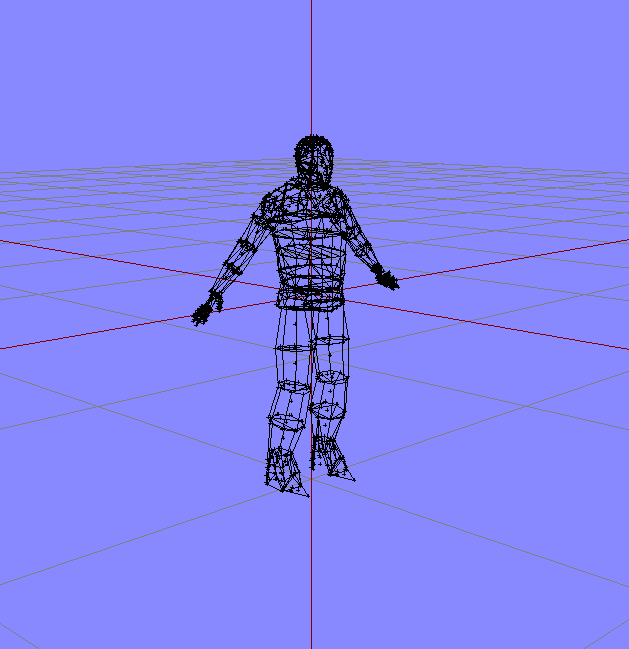
Since that is generally more hassle than use, FBX2RTM is the way to go.
You can also export you animation as FBX on a mesh of uniformly sized cubes with explicit single bone weighting. That will also allow O2 to generate correct .rtm files.
desert raven
Mondkalb to the rescue! Now that I read that I rember you mentioning you use it xD
ruby hill
Uniformly cubed charcter example:
https://i.imgur.com/YSMbrd5.png
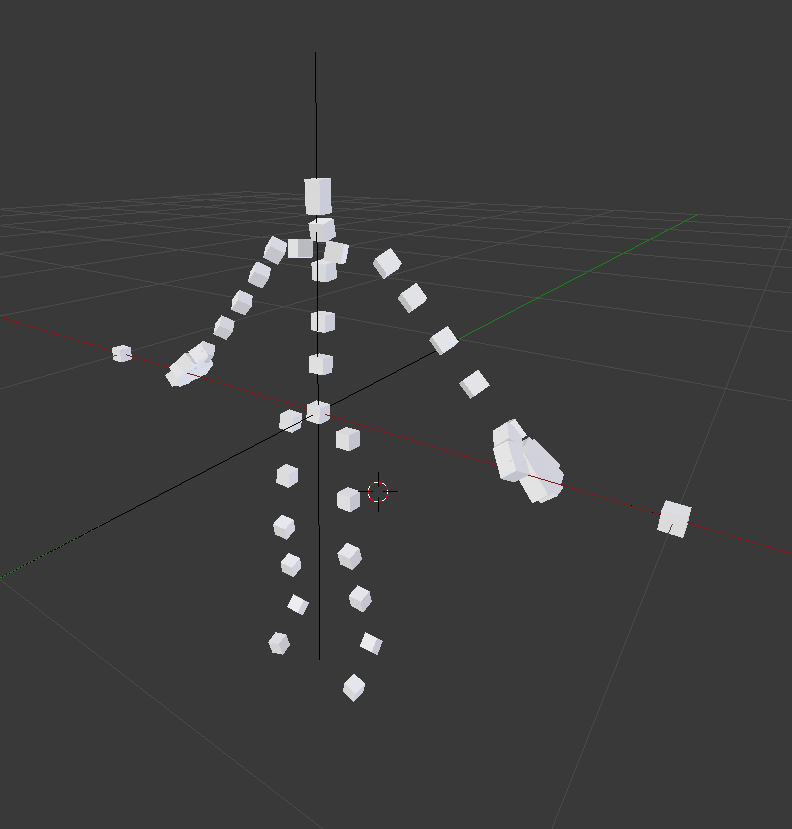 sterile ice
@regal dawn ^ Sorry if you read the above already, I thought pinging you is a good idea as you haven't replied yet
ruby hill
Haha, I love that half of Vespa's HowTo is on how to deal with MoBu's shitty constraint stack 😄
sterile ice
Wait, what's Mobu?
regal dawn
@ruby hill Thanks I looks like ill need to get a copy of Motionbuilder 2009 if want to use this method then I did try converting the fbx to a older version but is made things much much worse for me.
ruby hill
What MoBu version are you on?
regal dawn
2012
ruby hill
Up until ~2015 i think there is an FBXConverter from Autodesk that lets you convert FBX
The Autodesk® FBX® Converter Archive
Convert it to FBX 2009 or 2007 and it will work
regal dawn
Yeah just tried that it made the fbxtortm.exe crash
ruby hill
Make sure input and bindpose are of same type
regal dawn
Ill try again. see if i can get it working
regal dawn
My just Fbx2Rtm.exe seems to crash every-time not sure whats going on. ill take another crack at it tomorrow at least I know its possible now. Thanks for the info @ruby hill
 tired needle
Rawr-Tech: You wouldn't happen to have access to Modo would you?
 topaz robin
Hello, need some assistance if anyone is available. Working on a custom weapon for the first time and have run into some problems with the handanim. I've looked through the channel and seen a couple of cases of this happening and it sounded like it was related to it either using the wrong skeleton or something wrong with scaling? But I'm not really sure how to go about fixing it.
Skeleton should be "OFP2_ManSkeleton", model.cfg was taken from the A3 samples and is sitting next to the rtm. Pbo Project says it's using the correct skeleton. I originally exported the rtm from object builder and had the same problem, the current rtm was exported from blender and looks fine when I open the sample male.p3d in OB and select the rtm. Anyone have any ideas or suggestions? https://imgur.com/a/utqK0Sj
disregard I'm a dumbass
path to the file was typoed
desert raven
@topaz robin 👍 😄 It happens
topaz robin
Would anyone have any idea why an animation would look different between bulldozer and in game? Having trouble with animating the charging handle on my weapon, it animates back, up to lock, back down again and forward. It rotates around an axis inside the bolt but the problem is it looks fine in bulldozer but in game it's like the axis is somewhere completely different (maybe even at the origin?). Not really sure what's going on https://cdn.discordapp.com/attachments/190842789980798977/468480305498423306/unknown.png
https://cdn.discordapp.com/attachments/190842789980798977/468479749388238859/unknown.png
            {
                type="rotationX";
                source="reloadMagazine";
                axis="charging_handle_axis";
                selection="charging_handle";
                memory=true;
                minValue=0.25;
                maxValue=0.3;
                angle0=0;
                angle1=-0.7;
            };
            class charging_handle_down:charging_handle_up
            {
                minValue=0.8;
                maxValue=0.85;
                angle0=0;
                angle1=0.7;
};```do you have autocenter = 0 set in the model? named properties panel
topaz robin
don't believe so
compact ravine
set it, rebin and check 😃
topaz robin
in the geometry lod?
compact ravine
yea it will be ok there 😃
compact ravine
autocenter=0
some model classes are placed according to automatic object centre (cars)
this property sets that position to 0.0.0 from .p3d file will be used. It is often used for proxies.
tyvm
compact ravine
np
topaz robin
probably never would have worked that out lol
compact ravine
yeah it is not obvious unless you have came across it before,. autocenter or the lack of has no doubt been the loss of many a hair follicle over the years
i set it as a default param in my models
minor valley
Hello, does anyone have the old ArmaRig for Blender (BVH Version ? )
not the v6 version
compact ravine
@minor valley have you tried sending macser a pm on the BI Forums? I am fairly sure he will still have a copy someplace.
tired depot
I saw no point in keeping them. I won't tell you not to try it. But I doubt it'll solve your issue. 🙂
regal dawn
Hi does anyone know if using modified vanilla .rtm in a mod is allowed?
im trying to trim walking animations but don't wanna run into licencing issues
sterile ice
@regal dawn Arma 3 Eula:
As a Subject to the Grant of License herein above, you may not, in whole or in part, copy, duplicate, reproduce, translate, reverse-engineer, modify, disassemble, decompile, derive source code, create derivative works based on the Program.... ```So it's now allowed, but I'm not sure if there's no exception for stuff like this. You could send an email to the Support and ask politely :)
regal dawn
@sterile ice thanks!
 nimble arch
is there any good tutorials out there for creating custom hand animations for weapons in object builder ?
nimble arch
then i am fucked i don't use blender 😛
desert raven
well you can use OB sure
the RTMsamples contain a p3d with a character dummy that can be used for animations
nimble arch
ok well the only animation i have manged to do so far look messed up what do think it could be that i made wrong ?
desert raven
possibly
nimble arch
its 3 phases the normal t-stance and then the idle animation for the hands while holding it
desert raven
do you have the weapon bone there?
nimble arch
that i don't have
and i have never heard of that bone 😄
do i create that bone inside OB with an proxy ?
nimble arch
ok so how do i set the weapon bone for my weapon then is part of the memory to show where all the points is
desert raven
the weapon bone start point is the 0,0,0 of the weapon model
nimble arch
ok
nimble arch
got it working thanks HorribleGoat 😃
desert raven
👌
compact ravine
Is their a special position requirement for gesture animations? I have my A/T pose set as first frame, animation when rigged as CfgMovesBasic plays fine player on surface. When they are configured as CfgGesturesMale it moves to the 0,0,0 local coordinates and goes into the ground. Probably something daft I'm overlooking, if anyone can shed some light that'd be sweet.
desert raven
what BlendAnims group do you gestures use?
if pelvis is in it, that would move the whole character
as thats the skeletons first bone
compact ravine
ahh yeah that could be it, was just using BodyFull til i got it rigged
desert raven
that would be my guess yeah
compact ravine
I'll give it a bash and report back
desert raven
👍
compact ravine
probs just make my own blend class till i sort it out
yep that seems to have fixed it, thanks a bunch 👍
desert raven
👌 Splendidos!!
glacial charm
Zdravím je tu nějaký Čech kdo se vyzná v animacích,předem děkuji)
sterile ice
@glacial charm you might want to learn English, otherwise you'll have a hard time doing anything modding related.
But to answer your question, I personally don't know any Czech guy who could help you. What you could do if you don't speak English is, just translate your question via Google translator and hope it does its job halfway decent and post it in here.
glacial charm
@sterile ice sorry for that but my english so really bad,its strange i know so many languages bhut no english((( so about my guesstion,i want find some peoples who making animation,i want help how to start what software use and another) thank u guys for ur help
sterile ice
What software do you use? Blender, 3ds Max, Maya or Cinema 4d?
 slow raptor
hello, where can i found any links or docs to get starting with animation making ?
desert raven
have you chosen what program you want to use? basically there are not much in the way of Arma specific animations so you will have to first choose a program to use (Blender for example) and find tutorials on how skeletal animations are made in it and then apply that knowledge into the Arma specifics
slow raptor
im used to C4D but i can try Blender, but the lack of docs fear me lol
desert raven
I have no idea if C4D could do and cant remember anyone saying they use if to make animatios for Arma. Blender has huge amount of generic tutorials on many topics, animations included
white juniper
it should be able to export fbx animations just like 3ds max
desert raven
then sure why not
white juniper
I know it can. But i never actually tried it out
desert raven
then startingpoint should be "how does C4D animation tools work"
slow raptor
definitively
naive hemlock
lol c4d
 blazing panther
Do Arma 3 reload animations with mocap
desert raven
reload them how?
drowsy nymph
I think he means using mocap to create animations for reloading magazines on weapons
desert raven
aaa possibly possibly
naive hemlock
another lol
zenith token
mocap with kinect propably even so that's +1 lol ^^
blazing panther
Yea, I'm sure its possible somehow haha
ruby hill
Possible: yes? Practical: Not at all
zenith token
you are quicker doing it by hand than trying to clean up all the jittering from the data...
ruby hill
the posture of your reload anims will have to match those of the A3 ones anyway.
That alone means a lot of post mocap fudging that you might as well skip it
 noble urchin
so im a total n00b at animation, my guy ingame looks like this after exporting my rtm https://steamuserimages-a.akamaihd.net/ugc/972100583045862018/E4CE6405AE8BADA9224E264516AEC9E5C309C24B/
it doesn't look like that in Oxygen or Blender so im kinda confused :p
the keyframes show up in oxygen/object builder but nothing happens to him ingame, he just has spaghetti arms. I noticed the duration doesn't match whats in the config either
zenith token
handanim hand positions are relative to weapon bone. If you leave weapon bone at default position, this happens.
drowsy nymph
I didn't think it was intended as a handanim because he's loading it in the animationviewer?
zenith token
it may not, but certainly something related to handanim is interfering because this is clearly hands beeing placed relative to default weapon bone position
noble urchin
ah ok maybe that has something to do with it
why is only one hand screwed up then and not both? xd
ah ok maybe that has something to do with it
the gun is on the left side and the launcher is on the right in object builder
the gun is on the left side and the launcher is on the right in object builder
this animation is literally just making the guy move his arms up and down
its sloppy but getting something in at the moment is more important than making it look good
wonder if it has to do with the dotted outline of where his arms were to start with in blender...
drowsy nymph
does the anim have left/rightHandIKCurve turned off?
noble urchin
i believe so
its not a hand anim at all
im also blender noob so that might be my problem, testing theory at the moment
drowsy nymph
yeah, but if IK isn't turned off, the game might still try to use handanim
depending on what kind of animation it is
noble urchin
there is no IK stuff in my config for it
drowsy nymph
doesn't mean you haven't inherited it
noble urchin
right
will try disabling it and see if that fixes
is this the parameter i'm looking for? rightHandIKCurve[] = {1};
leftHandIKCurve[] = {1};
ok some progress now, that fixed my spaghetti arms problem, thanks @drowsy nymph
grand escarp
hey guys, anyone able to help me understand WTH is going on with my anim? ive attempted to animate the rear side door on a C-130, problem ive got is getting the rotation to work correctly with the translation and not spinning out like a spin top
desert raven
drop your model.cfg into pastebin and link here
desert raven
this is from A2?
grand escarp
think so, in the process of udating and fixing it
yep definatly the one from arma 2
grand escarp
ive added that in, none of the doors infact a lot of it didnt work. im trying to have that door translate in, then translate up and rotate at the same time
it is doing that but the rotation is doing laps of the hull between the tranlate up
desert raven
i dont quite understand
do you mean the rotation animation plays at the same time the door 2 translation?
and where exactly does it do it?
in buldozer?
grand escarp
haha yeah, ive tried all sorts of different combos but nothing
desert raven
actually its the both door2_2 animations
because they are now affecting the same selection
and they are running at the same time because they have the same source
but
the setup is wrong
only 1 animation should be affecting 1 selection
and if there needs to be chained animations like this
only the last animation in the chain will use the selection of the part you want to animate
in this case door_2_2
"door_2_2","",
"door_2_2_slide","door_2_2",
"door_2_2_rotate","door_2_2_slide",
"door_2_2_damagehide","door_2_2",```this is the skeleton setup of your door
door_2_2 bone moves everything connected to it
and same goes for each bone in the hierarchy
so you animate the slide bit with selection door_2_2_slide
grand escarp
ahhh so rotate should be directly connected to door_2_2 instead of slide
desert raven
no
you should have door_2_2_rotate selection in the model
so that each of these bones would affect it
the slide animation will use the slide selection
and rotation animation uses the rotate selection
and they all work together
grand escarp
ok that makes sence, ill slap that together and see how it works out
grand escarp
eh never really did learn by reading but will have a look anyway
grand escarp
hmm dont know if that worked, certainly seperated the selections but still spining like a nut job, will have a read of that link and see if it sheds any light
desert raven
too much to write at 5am to explain it more throughoutly. 😛
think about the turret for example
there is a animation for both the turret
and the gun
and the turret animation moves the gun part too
but the gun does not move the turret when it moves up and down
so the bones and animations are chained
but if you remove the turret selection the gun will still move
with the turret animation
so there can be animations without selections
and the last one in the chain can be the visible one
the skeleton you define in the cfgSkeletons is what enables this
the first bone moves all others connected to it
the next bone all that come after it
and so on
but each bone must have only 1 animation
which means each selection must have only 1 animation affecting them
but you can have multiple animations affecting visible part of the model if they are all chained
@grand escarp if that makes any more sense to you xD
grand escarp
yep makes absolute sence, think i need to go through everything again and try again 😃 fun times
desert raven
you can separate each animation to have its own source first
so you can adjust each move separately
and when they all work as you want you can put them under 1 source so they animate together
desert raven
👌 good luck
regal dawn
When a unit gets in as a passenger of a vehicle I note their animation does not change. Is that an intentional feature or a bug?
regal dawn
All vehicles I have tested (jackals, ifrits etc) and in the animation event handler I attached to the unit.
Specifically AnimChanged
desert raven
So animations do work they just dont fire eventhadlers?
regal dawn
They definitely sit in the vehicle, but the animation reported to the animChanged handler didn't change, was what it was as they got in (walking, standing, running etc)
desert raven
possibly getIn action does not trigger animChanged as getIn/out has its own eventhandlers
regal dawn
So I should listen to those as well then. OK that makes some sense. Oddly though the driver does get an animChanged update.
desert raven
might you tell the reason why you need it?
regal dawn
I use it in CF_woodland to ascertain the stance, speed and other attributes of the movement to determine how loud the wood cracks should be. I fixed a bug last week where they were playing in vehicles and tracked it to the passengers and found the the animChanged wasn't being called so my exclusions didn't work. I will likely add the sounds to vehicles but when I do it I'll want the sound to be placed at the wheels not the passengers.
zenith token
How to build a rig from already skinned fbx file (in max): https://www.youtube.com/watch?v=G47NnPXsPHM
torpid star
👍🏻
 green grail
Sorry if this is an over-asked problem, but I did some research on it and haven't been able to find any clear answers. Recently ive been trying to get into custom weapon/reload animations. Ive been using ARMAtools for Blender. I followed a guide series by Hope Johnson on youtube (https://www.youtube.com/watch?v=RxdLKuGFJoA). Im pretty confident I followed it to a T. However, upon exporting the animation to .rtm, placing within the asset folder, and binarizing, I get some interesting results in game (shown below). I was wondering if anyone could offer any help. Thank you in advance! https://gyazo.com/267c702a02f9e53ac673538a6d093cc4
green grail
^^^^ These are two pictures of it working in OB2 (yes its a practice anim of him flipping someone off lol)
https://gyazo.com/bcd91ea58f931c2215cc890a6f0f1a37 -T-Pose at -0.5
https://gyazo.com/190445589c8d92748754d2d86f61e669 -0 and 1 pose
Currently its just a static pose
green grail
And this is after i added the model.cfg from RTMexamples in the samples folder https://gyazo.com/b9f6ce35a84ef9cb39abd0e8cb72f0d5
green grail
And another of OB2 where it shows the weapon proxy point is in the correct position with the anim https://gyazo.com/82b58736abe2c61a5b580534f9412cd1
desert raven
@green grail what do you binarize it with?
green grail
As in what do i use? or what model.cfg is binarized with it?
im using addon builder at the moment
desert raven
the whole pbo with the rtm yes
addon builder is notorious of getting rtm binarization wrong
green grail
should i try mikeros stuff?
desert raven
not just try but use always is my recommendation
green grail
lets try then, one moment
green grail
going to have to try again tomorrow, but i will get back to you
desert raven
good luck
green grail
@desert raven So I went and binarized with Mikeros stuff. No more strange positioning / artifacting.
But. My animation still isnt there.
Its just him holding the rifle in a slightly different way that he does compared to the default MX animation i was using.
when in the animation hes clearly holding the middle finger out
Let me try to mess with it a little bit
Got it to work!!!
Thanks a ton @desert raven
Now to figure out reload animations lol
desert raven
👌
 safe sleet
Is it possible to use an RTM for an ammo belt on a weapon?
ruby hill
No
sterile ice
I'm having some trouble in my Animation, in Blender my Animation works just fine, I animated the bones (rotations) and I "moved" the Pelvis (transition). Sometimes only the transitions is used when imported into Object Builder and sometimes only the rotations are used. Any idea why and how I can make both work?
ruby hill
How are you generating your .rtm?
Or do you import an entire .fbx straight to O2 with anims?
sterile ice
I'm not even generating an rtm, I import the animation via bvh into o2. I also tried importing the fbx, but I had the same issue
desert raven
@sterile ice get the Blender Toolbox and export directly to .rtm
sterile ice
Alright, I'll try, thanks
desert raven
saves you a lot of trouble
sterile ice
I'm not animating in Blender, I just used it to concert fbx to bvh as I had trouble with other methods before. Probably not the most efficient way :P
sterile ice
Nope, when I load the fbx, then only the translation is used, but no rotation of the bones. When loading the exact same fbx back into my 3D software, then the animation works just fine.
sterile ice
I've been trying to import this animation from a different skeleton.
So possible
I'm gonna try around a bit more, maybe I can get this to work somehow.
desert raven
what kind of different skeleton
sterile ice
I uploaded the skeleton on a website and they applied an animation to it.
It basically is the A3 Skeleton
desert raven
well you use unconventional methods so hard to say where it goes wrong
Blender .RTM export could work for your favor
sterile ice
yep, exactly. I can't try the blender method rn, will try this tomorrow.
desert raven
good luck
sterile ice
thank you
pastel solstice
:3
sterile ice
Is there a way I can attach the Weapon Bone to the Right Hand and it moves along without actually animating the weapon bone itself?
desert raven
in Blender?
yes
look up bone constraints
there are quite a few different methods how to do it
sterile ice
Alright, thank you.
desert raven
just about everything can be keyframed too in Blender
so you can activate and deactivate different constraints at different stages of the sequence
Blender got pretty nice animation tools imo
or at least they have started to make sense to me xD
sterile ice
Well, I'd say it's absolutely user unfriendly lol
I'm trying to rotate my weapon bone, pressed R, moving my mouse. What the heck is going on? That's not how I'd like to rotate my gun, is there an axis rotate tool in Blender?
Only used it for converting formats
Okay, I somehow managed to rotate it like I wanted it to be, I'm good now 😛
desert raven
yeah there are but they might not open up right away for a someone who is accustomed to other programs 😄
tired depot
Use the rotation widget if you're just gettng used to it. You shouldn't need to specify a pivot point though, if you're using a skeleton. Those are inherent in the bones. Are you usng FK, or IK?
sterile ice
HorribleGoat helped me already in pm :) Thanks tho
sterile ice
Anyone any idea why the animation loops? By loops I mean it does my animation and returns back to standard pose and then does the animation again and returns again.
It should do the animation and stay like this.
These are my config params
            actions = "NoActions";
            canPullTrigger = 0;
            connectAs = "";
            connectFrom[] = {};
            connectTo[] = {};
            disableWeapons = 1;
            enableBinocular = 0;
            enableMissile = 0;
            enableOptics = 0;
            equivalentTo = "";
            forceAim = 0;
            headBobMode = 0;
            headBobStrength = 0;
            interpolateFrom[] = {};
            interpolateTo[] = {};
            interpolateWith[] = {};
            interpolationRestart = 0;
            interpolationSpeed = 1;
            looped = 1;
            mask = kka3_UpperBodyNoRArm;
            minPlayTime = 0.5;
            preload = 0;
            ragdoll = 0;
            relSpeedMax = 1;
            relSpeedMin = 1;
            showHandGun = 1;
            showItemInHand = 1;
            showItemInRightHand = 1;
            showWeaponAim = 0;
            soundEdge[] = {0.5,1};
            soundEnabled = 1;
            soundOverride = "";
            speed = 1;
            static = 0;
            terminal = 0;
            Walkcycles = 0;
            weaponIK = 1;

            leftHandIKBeg = 1;
            leftHandIKCurve[] = {0, 1, 0.1, 0, 0.8, 0, 1, 1};
            leftHandIKEnd = 1;

            rightHandIKBeg = 1;
            rightHandIKCurve[] = {1};
rightHandIKEnd = 1;```It's a Gesture btw
deft fern
because of looped = 1; ?
sterile ice
nope, if set to 1 then the animation will loop, if set to 0 then it only plays once.
I want it to be played and stay there, so loop 1 is correct. It works perfectly like this for my other Gestures.
But for these Gestures the hands are attached to the rifle and won't go off
drowsy nymph
if the hands are attached to the rifle, it's because of the IK curve
deft fern
Not sure if gestures supports transition to another anim but you could try to split anim in 2 parts
        class RHS_D6_Pilot_Init: Crew
        {
            file = AnimP2\rhs_para_d6_init.rtm;
            interpolationSpeed=1;
            speed = -3.5;
            looped = 0;
            connectTo[] = {"RHS_D6_Pilot",1};
            interpolateTo[] = {"RHS_KIA_D6_Pilot",1};
            variantsAI[] = {"RHS_D6_Pilot",1};
            variantsPlayer[] = {"RHS_D6_Pilot",1};
            variantAfter[] = {1.5,1.5,1.5};
            useIdles = 0;
            leftHandIKCurve[] = {0};
            rightHandIKCurve[] = {0};
        };
        class RHS_D6_Pilot: Crew
        {
            file = AnimP2\rhs_para_d6.rtm;
            interpolateTo[] = {"RHS_KIA_D6_Pilot",1};

            speed = 0.066519;
};``` I have done something like that for parachutesI'm gonna try around with the IK curves.
The transition in my Gesture isn't even in the animation, it seems like Arma plays the animation then stops and plays it again
sterile ice
I can't seem to fix it, still the same issue.
I need my animation to loop, but it also loops the transition, which isn't in the rtm itself.
I either cannot detach the left hand from the weapon but it loops like I want to, without constant transitioning between hands on weapon and my animation, or I enable WeaponIK and the hand goes off perfectly but then transitions back to the weapon and back to the animation.
torpid star
@sterile ice you need to take a close look at interpolateTo, interpolateFrom, connectTo, connectFrom. last two might be more important
it's been a while but those arrays determine how your animation is connected to the animation tree or more like maze
sterile ice
@torpid star theres nothing in there, still the same issue
gusty wagon
Hi i know how to make basic animation with blender (reload, gesture etc) but i dont know how to create a animation for moving ? Can you help me please ? Thanks 😃
torpid star
@sterile ice you should try with something in there then 😉
i think if you put the same animation into connectTo that could help with looping
sterile ice
🤔
I'll have a look at it thanks
@gusty wagon what do you mean by moving? Isn't a reload animation also a "moving animation"?
torpid star
"same" animation meaning the animation itself. so it connects to itself. it's been a while i've been messing with anim configs though. generally it's good to look for a vanilla example that has the desired behavior. there are some anims that even have loop in their name in the cutscene category. look at the config of those.
sterile ice
Alright, I'll try around a bit and let you know if I fixed it with this
gusty wagon
@sterile ice moving animation is how the player move, running etc
drowsy nymph
Such animations require xStep yStep etc. named properties to tell the game how far the units moves
sterile ice
And you probably want to do this with Motion Capturing to make it look smooth.
desert raven
wellll... its not necessary per se. And requires investment in equipment. One can do fluid movement animations manully too.
its another thing if you already got access to whats needed
torpid star
what's the latest on editing vanilla animations? would it be allowed to edit them to make them usable for a custom melee system or are they all still off limits?
desert raven
Im counting no-one will strike my conversion process down so hopefully in Arma use is ok
torpid star
hm. i don't get it. i mean they are of zero use in other games pretty much. but i guess it's still a reupload of data. pretty crippling approach though in terms of modding. i kind of get it with weapons since they are "easy" to throw into other games and create value. but this is a bit much. anyways. will have to think about it before i invest time.
desert raven
dont think theres could even be an official answer ¯_(ツ)_/¯
torpid star
to quote a great statesman: "...sad"
ruby hill
I'd say reusing them within arma is no issue.
The animation data stored within .rtm could definitely be reused in other games. But its mostly stopping at the question: "Why?"
Also, not many game engines allow for plug and play animation expansion the way arma does.
I edited a few vanilla walk anims for my heavy machinegun thing







 torpid star
oh yea that one. is it released?
torpid star
it's needed. very much so. please release
oh was going to ask. i can't remember which channel it was discussed in. but that issue with uniforms and skeleton mismatch on custom skeletons. is that triggered by missing bones or is already a different skeleton class name enough?
desert raven
its fixed
ruby hill
No idea what it was, but I assume it was related to a fucky bone index mismatch. BI fixed it a bit after I released the legomen.
torpid star
so what happens now, if you pick up an ofpManSkel uniform with a character with another skeleton?
nothing at all?
ruby hill
No idea, havent tested it since then. I would assume either its not shown or it is added to 0,0,0 of the chracter and doesnt animate.
desert raven
mm it did not crash at least
on my womanskeleton
but I may have lacked the proxy for it so nothing was visible anyway
ruby hill
I'll quickly test it with the lego men
desert raven
thanks!
ruby hill
time to sub to it on the workshop...
ruby hill
It would be cool if they could flop around
desert raven
but since these are polyplanes, chances on making them flop are quite low 😄
ruby hill
You could look into using model.cfg type anims
tie it to clockHour24
so that at night they fold up or so
ruby hill
So, I tested the skeleton mismatch. It simply doesnt add the item.
So you get a naked dude
Trees are instanced, so it shouldn't be an issue
frequent=1 takes care of forcing that. But ultimately cold hard data is needed to tell if it does or doesnt 😄
desert raven
hmm might look into that then!
I already got glowing flowers that open up at night 😄
ruby hill
Thats pretty neat. Also tied to clock anim source?
torpid star
sorry for pestering. but are you saying it replaces your lego man with a naked/underwear arma dude?
ruby hill
Ah, should've been clearler
It replaces it with the default character model defined for that vehicle
for A3 humans its the guy in underpants
for the lego dude its yellow pants
torpid star
cool. thx. i'm asking because i use a method where i add the new skeleton to the existing arma skeleton to get an easy way to avoid rpt spam and keep most functionality. was wondering, if that is bad in anyway. like perhaps too many bones --> performance impact
ruby hill
Too many bones do impact the performance.
I dont recall the explanation exactly, but it does split too many bones into extra draw calls
and the first split happens at 64
torpid star
hm. i should go an count then 😄
torpid star
because it's a great and easy pipeline without many headaches to get new characters ingame
also. @ruby hill are trees instanced, period? like even if created as real entity via createVehicle commands or even createSimpleObject?
torpid star
i still have this dream of making trees react to seasons. could be done via replace at mission start. sorry...pretty offtopic now i think
k thx
desert raven
@torpid star I would say no can do for the seasons
if you got like a million trees and try to create those in game
ruby hill
we moved that to terrain_makers 😛
gusty wagon
Hummm and how you animate the player with the gun ? I animate with blender and the toolbox i know how yo create static animation but walk ? In blender its possible ? Or just with Object Builder ? Thx
desert raven
@gusty wagon
these control the movement vector (direction/speed) of an animation
they are the same as step and Xstep value that can be given to a animation in OB.
gusty wagon
How we use it ?
desert raven
well that is a long story that I dont have time to write down right now. So either someone else can pitch in or you look it up on the forums.
I dont know any guides to do this so you got to do some research
gusty wagon
Okay thanks 😉
tired depot
If your armature has a master control bone, you would use that to cancel out any motion before you export. You input the distance traveled by the armature into the "Rtm Motion Vector " field, on the appropriate axis. This tells the engine how far to move your character for the duration of the sequence.
gusty wagon
Hi its me, again ... i search to make an animation (surrender here) who can walk But where we cannot have weapons in hands nor who flies, that it disappears. In the config I managed to be able to work with hands on the head but weapons are always present... here its my config file = "\Edaly_Anims\Edaly_Anime\rtm\Surrender.rtm"; speed = 1; looped = 1; preload = 1; mask = "RightAndLeftArm"; disableWeapons = 1; disableWeaponsLong = 1; showWeaponAim = 0; canPullTrigger = 0; duty = 0.2; limitGunMovement = 0; aiming = "empty"; aimingBody = "empty";
Thanks you guys !
 crude pendant
Hey. does anyone have a "must do" for different animation ? (can't move, like surrender, or doing animation until keybinds or dies, ...), i'm struggling getting an animation done 😛
desert raven
dont think anyone has written down such a guide
crude pendant
well, is there any documentation / smt to fix my problem ?ü
desert raven
no idea because you have not explained your problem
and there is about this much -> . of animation documentation
so its pretty much the hardest thing to do in Arma
crude pendant
Allright, so my problem is :
My animation, in animation viewer work fine; 4 s clip; long enough, anyway, the problem is, when i try to play it (playMove SwitchMove, or even a loop) the animation is not playing, like my guy is just putting his gun in the back fast, then 0.2 seconds later taking his gun back (like a very rapid switch). Idk why it's not working. any idea ?
desert raven
what have you packed the animations with
what did you make it with
and how did you export it to rtm
and what kind of config have you made for it
crude pendant
config.cpp : https://pastebin.com/xf5fpEnt
Did everything with blender (got the basic file, rig and gun, from this video : https://www.youtube.com/watch?v=kMt3xKUXAuI&t=0s&list=PLd1OWPWWOtfG0ASEgyND_2EzDlhm65HqW&index=2)
Used bohemia plugin for blender (rtm frames, etc...)
desert raven
ok so Macsers Armarig and FHQ toolbox. The guy should probably have linked to each individual program instead of reuploading them again.
crude pendant
should i show you in game what's happening ?
desert raven
dont think that would help but also cant read that guys comments as they are in french
crude pendant
i can translate
basicly, my "animated movement", is the anim_dab_anime
That's the one who should be moving
desert raven
                                                                // -10000000000.000000 = Une animation fixe, qui ne bouge pas
// Si la vitesse est entrée en tant que nombre positif, cela signifie qu'elle ```this part im interested in
desert raven
alright
crude pendant
class zenyo_anim_dab_anime: CutSceneAnimationBaseSit
{
looped = 1;
file = "Dab_On_Them\rtm\testDavidXD.rtm";
mask = "handsWeapon";
speed = 0.25;
minPlayTime= 0.95;
InterpolateTo[] = {"AmovPercMstpSnonWnonDnon", 2};
};
desert raven
so is your animation a full body animation?
or just hands?
because that animation plays only on the hands
due to the mask it uses
mask = "handsWeapon";
you said theres only some hand movement if I recall right
crude pendant
Yes, just the hands
desert raven
in game
crude pendant
Look :
desert raven
👀
crude pendant
Animation viewer : https://www.youtube.com/watch?v=jFtBPmBTAsM&feature=youtu.be
Animation in game (With SwitchMove) : https://www.youtube.com/watch?v=WEEmj2GIr2Q&feature=youtu.be
desert raven
ok so the problem could just be that youre trying to put "dab" into Arma.. 😛
crude pendant
xD yeah, i wanted to try animation, and a friend of mine is pretty boring with dabbing, so i wanted to troll him.
crude pendant
yeah it is reversed, is this the proble m?
crude pendant
Oh okay xD
desert raven
looks painful
crude pendant
yeah the rig was pretty bad, i couldn't move correctly the elbow or stuff like that
desert raven
no no you dont get to blame the rig
the rig is awesome
this is a user error 100% 😄
crude pendant
Oh okay so i'm bad xd
desert raven
but not what causes the issue in game
crude pendant
before that i used csgo rig and it was different
desert raven
yes rigs usually are
and sure Macsers rig is just one way to constrain it
but thats another matter
to rule out your own animation try pathing some vanilla .rtm on there
crude pendant
😅 what do you mean by that 😅
desert raven
file = "Dab_On_Them\rtm\testDavidXD.rtm";
replace this with path to some Arma 3 animation
crude pendant
oh
desert raven
and try if that plays with your config
since youre doing animations
what are you packing them with?
crude pendant
file = "a3\anims_f\data\anim\sdr\dth\pne\stp\ras\rfl\adthppnemstpsraswrfldnon_1.rtm";
packing ? u mean, exporting right ?
i'll try with the path to see
desert raven
no when you make it into a pbo
is called packing or binarization
Arma toolset offers the Addon Builder
desert raven
alright good choice
crude pendant
well can't pbo it bc the files is not in the mod folder, should i copy arma 3 default anim and put it in my mod ?