#perf_prof_branch
1 messages · Page 42 of 1
 inland dew
 quaint flame
true
inland dew
also pay attention to the GPU load (HDR normal 8 bit), it increases to almost 100% when he's shooting (probably due to smoke/particles), but when he stops shooting, GPU load goes back to like 40% (RTX 2070)
but when he changes HDR from normal (8 bit) to HDR very high (32 bit), GPU load remains at 80-90+ % all the time, even when he doesn't shoot
and when he starts shooting from ZU-23-2 with HDR very high (32 bit), GPU load is bottlenecking (100%)
in A3, when you look at water, FPS goes down
@quaint flame check this
FPS difference when looking at water vs terrain/ground )))
https://www.youtube.com/watch?v=ln5nomoRMdo
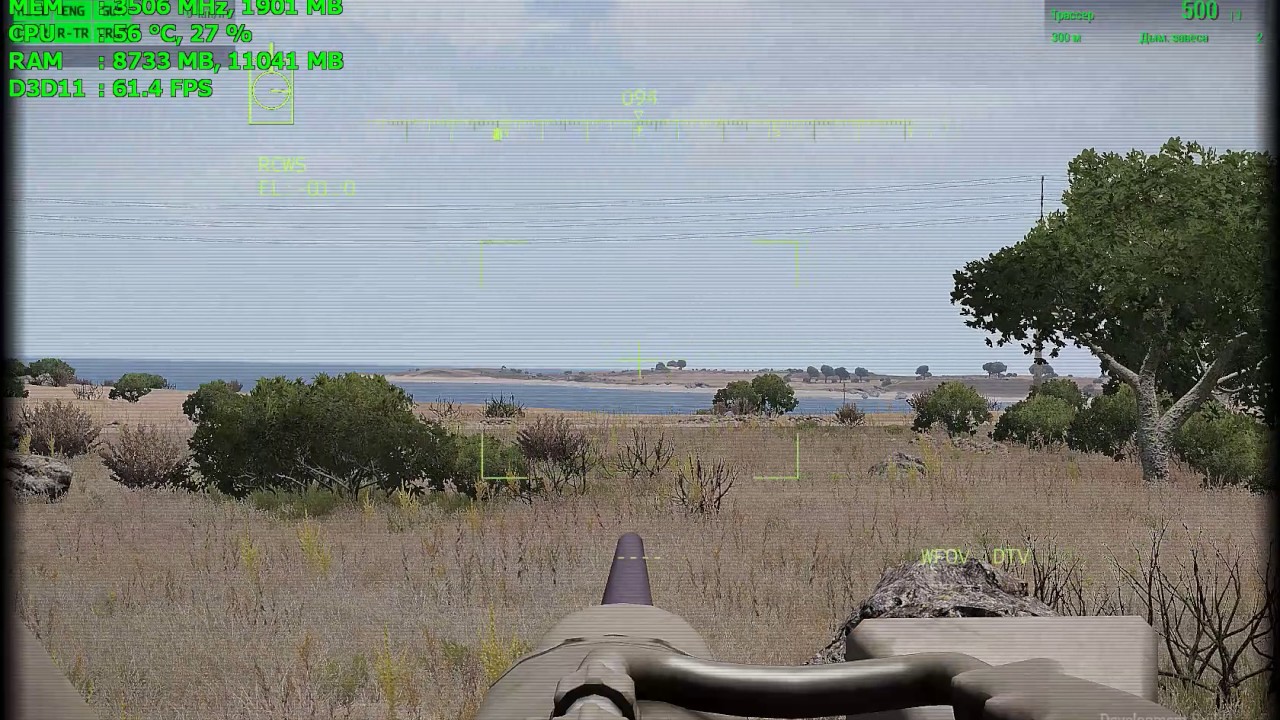
Falling FPS 25-30, when the optical sight looks at the surface of the water.
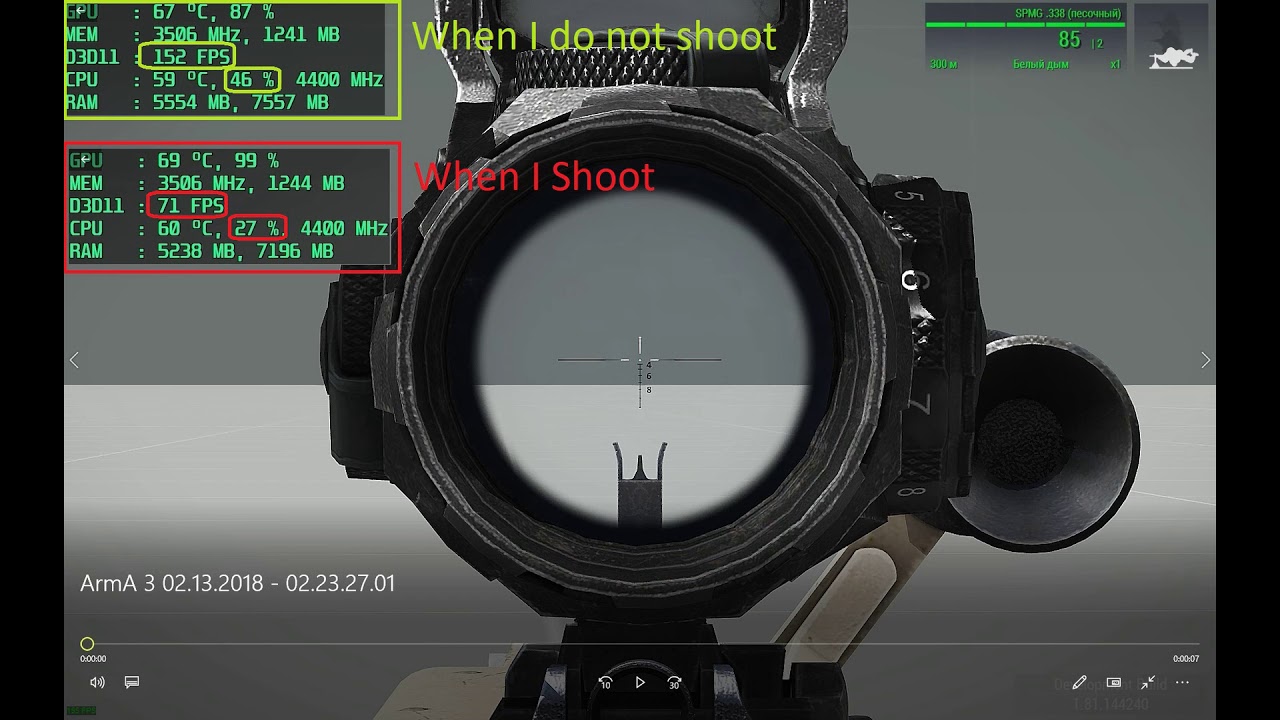
FPS when shooting )))
https://www.youtube.com/watch?v=pPjKDIYdPM0
 autumn timber
FPS difference when looking at water vs terrain/ground )))
That's rather "FPS difference when looking at water vs sky"
Not saying water is not at fault here, but looking at the sky makes you render 0 objects so it's not a fair comparison
inland dew
autumn timber
> FPS difference when looking at water vs terrain/ground )))
That's rather "FPS ...
no, you can see him turning the turret and looking at the terrain, not pointing into the sky
so you watched only few secs of the vid but already respond...
autumn timber
I disagree. There is not enough time for the FPS to stabilize when he's turning
And obviously, I watched the full video 😒
inland dew
autumn timber
I disagree. There is not enough time for the FPS to stabilize when he's turning
even if he was looking/pointing all the time only at the same place of the terrain/ground, FPS would still have been much much higher vs. looking at water
 whole cloud
I wanted to do a minigun shooting test and see what i can do there, maybe
quaint flame

 hasty steeple
@whole cloud how do I run profiling branch in one of Arma 3 officical Vanilla server?
How does one run profiling branch?
 silk pewter
good ol' "skip the first minute" rule funnily applies 😄
hasty steeple
Will this work on vanilla servers will I be able to join Vanilla servers?
hasty steeple
Thanks guys much appreciated
whole cloud
baseline: 5-10fps
better sensorList multithreading: 5-15fps
Disable non-local AI visibility: 39-42fps
Better clutter multithreading: 40-43fps
pre-calculating interpolated renderposition multithreaded: 47-49fps
That is with 2300 AI units on the other side of the map.
silk pewter
weeeeeeeeell… good job really!! 👍 👍
 pallid pebble
👀 fancy
whole cloud
and all in one neat script command.
giveMoreFPS 0-4
 restive pilot
lol plz don't tell me that'll be an actual command 🤣
whole cloud
Well it is an actual command for me right now 😄
silk pewter
code fix
giveMoarFPS
also 0-4 can be directly written -4
😄
this code review was provided to you by Lou Montana \©, free of charge
 worldly badge
#community_wiki time!
pallid pebble
whole cloud
and all in one neat script command.
`giveMoreFPS 0-4`
giveMoreFPS 1000 #when
 plucky lichen
Will there ever be a fix for tabbing out game freeze?
restive pilot
what freezes? 
I tab out of the game all the time. no freezes or crashes (for me at least)
 shrewd moss
It also happened to me and some friends a few times, I've also read on steam about a guy with similar problems. I think is because we ay in full screen and not borderless. I should some testing 🤔
restive pilot
I use fullscreen too
restive pilot
shrewd moss
It also happened to me and some friends a few times, I've also read on steam abo...
just out of curiosity, does it happen in missions that have custom icon drawing (drawIcon3D to be exact)?
 night mulch
It used to happen to me too on fullscreen, never happened after i switched borderless
whole cloud
its a pretty low priority when you have a simple workaround by just switching to borderless
shrewd moss
restive pilot
just out of curiosity, does it happen in missions that have custom icon drawing ...
That's above my knowledge 😅 I don't know much about scripting, we only play trgm2 or dynamic recon if that's of any help. Haven't noticed any particular moment that correlates with the freeze
whole cloud
Ah I found why disableRemoteSensors doesn't do much.
It disables the sensors (sensors is a seperate system) but it doesn't disable AI targetting and visibility checks (the really expensive stuff).
Sensors is only the second most expensive thing
pallid pebble
Yeah tab-crashing has been an off and on problem for me for a while too
whole cloud
17:49:30 Tried to AccessTargetList for non-local AI group while non-local targetting is disabled!!!!
17:49:30 ➥ Context: [] L1 ()
[] L1 ()
<- Trigger "Condition" name "166157: <no shape>" at [3742.488037,21.239992,7466.449219]
script errors inside trigger code will now tell you which trigger
 quaint flame
Nice
@pallid pebble What's the status of the Project Dedmen cloning project? We need to clone him asap. Don't tell me it's still not working, as the last time.
pallid pebble
quaint flame
<@!159639570638438401> What's the status of the Project Dedmen cloning project? ...
Funding got pulled from it after the 'the weird one' incident happened 
quaint flame
NOOOOO
pallid pebble

quaint flame
Moves fundings for Enfusion to cloning project 😛
restive pilot
he looked good to me 
pallid pebble
quaint flame
*Moves fundings for Enfusion to cloning project* 😛
 I guess you could propably speed up enfusion with a bunch of dedmens working on it
quaint flame
😮
 empty goblet
quaint flame
<@!159639570638438401> What's the status of the Project Dedmen cloning project? ...
empty goblet
quaint flame
<@!159639570638438401> What's the status of the Project Dedmen cloning project? ...
sorry, the answer to this classified question can be provided only by BlackBox Project administrator ... {checking clearance}
... clearance 404 ... initiating ICE purge of unauthorized witnesses {3...2...1...}
 pallid pebble

quaint flame
Perhaps I am onto something:
dedmENFUSION 😮
pallid pebble

empty goblet
shortlib result ddmfzz
quaint flame
Easy fix: Post results quicker, such as moar fps
 empty goblet
i can offer more work to check, like low FPS while looking at lot of players in MP whose are in the view frustrum
empty goblet
whole cloud
let me guess, the oxygen check is active 24/7 even while on the ground not in water under sea level ?
quaint flame
on a map without water
whole cloud
empty goblet
let me guess, the oxygen check is active 24/7 even while on the ground not in wa...
Yeah I had that idea.
But, the check also handles oxygen regeneration when you are above water for potentially a short time
If I remember right this was used for sound simulation.
Probably to make.. eh.. dunno actually.. I guess to play some sound on a unit if its on low oxygen.
But.. That check doesn't make much sense to run for a unit thats 7km away from you 
Ahh its weekend now, stop making me think 
empty goblet
while suffocating on the bottom of sea, nobody can hear your scream 🤣
hmm unless some gasp for air (the water surface short notice) ... or gurgling while suffocating w/o oxygen but that shall be near vicinity
whole cloud
I thought about optimizing sound stuff. But I already got it down from 26% to 12%, thats good enuff for now
empty goblet
could be, now imagine #perf_prof_branch message and all those dozens (hundreds) players 🔊 whistle  and do other noises
whole cloud
my mind has been cleansed of these paranoical thoughts
silk pewter
restive pilot
he looked good to me <:blobdoggoshruggoogly:748124048025714758>
that was the issue! 😄
restive pilot
yeah he looked too good 🤣
 mellow lark
whole cloud
Ahh its weekend now, stop making me think <a:popcat:772661840324984862>
mellow lark
whole cloud
Ahh its weekend now, stop making me think <a:popcat:772661840324984862>
Time for pizza and beer, you deserve it! (but please give us more fps)
restive pilot
I think you meant 1.000?
quaint flame
LouMontanaMode = 1; // Prevent tanks from advancing. Disables forward gear
😄
silk pewter
quaint flame
```sqf
LouMontanaMode = 1; // Prevent tanks from advancing. Disables forward gea...
you little…!!
LouMontanaMode = intercepts Discord UI to send you read the wiki when you are about to ask a simple question 😄
 cyan prairie
Haha well that command needs to be super optimised to run at -1ms
whole cloud
1ms? 
whole cloud
dreams of multithreaded atomics and SSE vectorization
sees SQF script hiding behind a functor
wakes up bathed in sweat 
restive pilot
🥵
 minor silo
DLSS(Dedmen Learning Super Sampling) 3.0 when?
 gritty wasp
giveMoreFPS 0-4
for TvT games only 3-4 will have effect (because there is no AIs)?
gritty wasp
restive pilot
I tab out of the game all the time. no freezes or crashes (for me at least)
let me guess. He is talking about -pause in single player?
gritty wasp
i can offer more work to check, like low FPS while looking at lot of players in MP whose are in the view frustrum
sweet dreams.
Also would be nice not to have "avalanche"(object syncing?) effect on mass building destruction. One bomb can cause 0 server fps until half of the players are disconnected due to ping threshold
 plain trout
@gritty wasp are you talking about 20-30 people? Try turning of shadows and look at your fps. At least when I see it is often a graficcards limit
shrewd moss
If the new improvements regarding the optimization are proven stable and safe enough in the upcoming weeks, would you consider pushing a 2.08 earlier, even though with fewer fix and features than usual updates? My impression is that performance is one (if not "the") of the main complaints among the community. I think that seeing an update with those improvements, even if one smaller than usual, would make tons of people happy
But I'll understand if you want to wait more, one thing that Arma taught me in these years is patience 😅
whole cloud
would you consider pushing a 2.08 earlier
no
If you want performance updates sooner, just run profiling branch. Like what this whole channel is about
you don't need a game update for that
restive pilot
shrewd moss
If the new improvements regarding the optimization are proven stable and safe en...
2.06 is not even out yet and you want 2.08?! 
pallid pebble
restive pilot
2.06 is not even out yet and you want 2.08?! <:meowsweats:707626030613135390>
2.12 #when 
 ripe escarp
3.00 when
 regal gulch
God, if 3.00 ever comes out, I want highly improved flight physics, such to the point to allow better air-to-air refuelling mods, which instead of the plane model just being attached, you have fly up to the basket and keep the probe there to refuel
also would love some ai update. The ai not being able to fly at a pretty constant height is annoying. Even I can stick to within 50m of 1000
restive pilot
regal gulch
God, if 3.00 ever comes out, I want highly improved flight physics, such to the ...
Arma has been EOL for quite some time so big changes won't happen anymore
pallid pebble
regal gulch
God, if 3.00 ever comes out, I want highly improved flight physics, such to the ...
Ah you remind me of the peeps whining about 2.00
regal gulch
I'm not complaining, I just think there's room for improvement. The flight model isn't amazing, and I think Bohemia have it in them to do better.
And, of course, arma's an infantry combat game
not like only infantry, but it seems to be majority infantry by a little bit
night mulch
when arma4
quaint flame
😩
 feral harness
4rm4
cyan prairie
One day gents..one day... that magnificent reveal will come. Hang in there 🤓
regal gulch
Honestly, I'm willing to wait if it's worth it. For instance, real world terrain like vbs4 would be worth it
On second thought though, another 2 years might be a bit too much
 upper sierra
smh i'll wait for arma 5
 fickle geyser
Will we get 2.06 prof branch today or should I switch to stable for now?
cyan prairie
I think dedmen said in the rc channel that it's still waiting to be pushed out to steam or something
So I am assuming yes
 rose moth
We are working on it now, but due to our pipelines it cannot be done instantly. Optimistic ETA is 1h.
whole cloud
In case you want to watch the ongoings live: https://steamdb.info/app/107410/history/
restive pilot
whole cloud
v0 today
btw will there be a dev branch update as well?
whole cloud
I don't expect one?
Last one was last week, and there wasn't really anything new since then
restive pilot
I want gibMoreRAM 
whole cloud
Thats not ready anyway
cyan prairie
Are these real commands lol
whole cloud
giveMoreFPS yes (depending on where you play Arma), gibMoreRAM no
👀

2.06.148230 new PROFILING branch with PERFORMANCE binaries, v0, server and client, windows 32/64-bit, linux server 32/64-bit
- Sync with 2.06 main branch
- Some profiling branch exclusive performance tweaks that were in 2.04 are still present
whole cloud
whole cloud
2.06.148230 new PROFILING branch with PERFORMANCE binaries, v0, server and clien...
gritty wasp
So no more fps for now?
whole cloud
All the previous performance improvements are still present
quaint flame
So I guess we should run some benchmarks pre v2.06 perf and after?
What would be a good one to test these changes?
whole cloud
2.06 v0 will probably be on par with 2.04 v17
quaint flame
So the big changes are not yet in it?
whole cloud
v0 is always just sync with main version
gritty wasp
whole cloud
All the previous performance improvements are still present
I’m not about 2.04 optimizations but objects interators and fancy command
whole cloud
I don't understand that?
gritty wasp
Never mind. That is what I expected as answer
v0 is always just sync with main version
empty goblet
yes but also contains usually some updates from previous main profiling, which weren't transferred to new stable (it was always like that)
it depends how many left-overs were there from previous profiling but generally you better with v0 than on main branch
 mossy anchor
I was testing out my compositions and it would appear that the Y-32 and Taru camo isn't working anymore when you place them with the chosen camo does anyone else have the same issues?
whole cloud
Btw the v0 changelog
- Some profiling branch exclusive performance tweaks that were in 2.04 are still present
Was wrong, its more than some and also some non performance tweaks and stuff, I looked at the wrong thing when I wrote that, and now I don't want to fix it anymore :u
Everything that was in 2.04 profiling changelogs but didn't appear in 2.06 main changelog is still present
 snow rapids
I see there is a new error in town Units data acquisition timed out. Unit information will be unavailable - no further info in RPT though
18:06:03 Connected to Steam servers
18:06:03 Download of the list of servers has failed: https://www.bistudio.com/export/servers/official -> /var/steam/.local/share/Arma 3\OfficialServersCache\tmp.json
18:06:41 Kozak uses modified data file
18:06:42 Player Kozak connecting.
18:06:42 Player Kozak connected (id=76561198006048027).
18:08:02 Roles assigned.
18:08:02 Reading mission ...
18:08:02 Starting mission:
18:08:02  Mission file: dynamic_operations (__cur_mp)
18:08:02  Mission world: altis
18:08:02  Mission directory: mpmissions\__cur_mp.altis\
Yeah I think before that it would freeze the game or something. Now it just times out after a certain time that can be adjusted in server config.
whole cloud
its not an error
Before you would get stuck and be unable to connect to your server, now it times out and lets you in
Prof v1 ETA tomorrow.
I had to move some things to v2 to not hit the 2000 char discord message limit
restive pilot
whole cloud
Prof v1 ETA tomorrow.
I had to move some things to v2 to not hit the 2000 char d...
post 2 messages or more if you have to 😛
empty goblet
whole cloud
Prof v1 ETA tomorrow.
I had to move some things to v2 to not hit the 2000 char d...
you know you can attack the file instead right? 😉
or ... run it thru minify
whole cloud
refuse
 kindred radish
Ill just leave half the fixes out of my changelogs 🤷♂️
whole cloud
Fixes are the essence of profiling branch, the bone under the meat, the distilled highly concentrated sweat of community and developers combined into one magnificent cocktail of desire and licentiousness, I cannot leave them out
snow rapids
whole cloud
Before you would get stuck and be unable to connect to your server, now it times...
In my case it wasn't a hang before patch, but rather complete failure to download Units data. I take it "timeout" here generally means "failed to download"?
Does not matter though, just curious
whole cloud
Timeout means it waited long enough for the data and instead of preventing you from joining the server, it just gives up and lets you join the server without your units data
feral harness
whole cloud
I'll look at it tomorrow
Might be related to AIII-54628
whole cloud
Yes QA confirmed it only happened with the same specific vehicles
We could test that in profiling branch companion mod
 astral raptor
I may have found an issue or bug that relates to the Zeus compositions, I posted it in #zeus_discussion but might as well link it here. #zeus_discussion message
whole cloud
Thanks noted down, but probably not gonna get to that soon
whole cloud
2.06.148309 new PROFILING branch with PERFORMANCE binaries, v1, server and client, windows 32/64-bit, linux server 32/64-bit
- Added: Instigator parameter to setHitPointDamage/setHit/setHitIndex script commands
- Added: Log context for trigger scripts (script errors in a trigger will tell you which trigger they were for)
- Tweaked: regexFind now does not print an error when startOffset is bigger than the string length (it will now fail silently)
- Tweaked: Mission/Object Event Handlers are no longer recompiled when added
- Tweaked: Steam download priorities when downloading Compositions / Scenarios
- Tweaked: AI now do not check if units have their gunlights enabled (for visibility checks) during bright daytime
- Fixed: Number plate fonts were set incorrectly - https://feedback.bistudio.com/T159583
- Fixed: Debriefing stats not rendering if they were the first visible debriefing panel
- Fixed: Crash on listbox drag-and-drop operations - https://feedback.bistudio.com/T160277
- Fixed: When a UAV was disassembled with its rotors spinning, the engine sound would remain active - https://feedback.bistudio.com/T80507
- Fixed: SQF Bytecode crash when trying to read an empty file
- Fixed: Helicopter sound could get stuck and continue playing while the helicopter was gone
- Fixed: createDialog was not working on a briefing screen - https://feedback.bistudio.com/T160422
- Fixed: MDF of the Mora was showing the vision mode incorrectly - https://feedback.bistudio.com/T127823
- Fixed: Various potential audio-related game crashes and audio glitches
- Fixed: MDMP files sometimes not being written to disk when the game crashes
- Fixed: TrackIR head rotation during infantry movement was greatly amplified
- Fixed: AI could see units emitting IR flashlights even without nightvision
- Fixed: Picture-in-Picture textures not always properly updating their resolution when PiP quality is changed
- Fixed: The irLight property was not working in CfgLights
whole cloud
whole cloud
2.06.148309 new PROFILING branch with PERFORMANCE binaries, v1, server and clien...
And a ping dump for people who are interested in this
@leaden herald @vagrant zodiac @clever roost @rain hazel @median cipher
fickle geyser
Do we have commands for PiP view distance? 
whole cloud
no
fickle geyser
2.08 🙏?
whole cloud
FT ticket
whole cloud
And also update to the Profiling branch companion mod: https://steamcommunity.com/sharedfiles/filedetails/?id=2419451036
- Removed obsolete stuff
- Fixed edit vehicle appearance function in 3DEN was not always working as expected ( @meager flare, @mossy anchor that should fix the Zeus composition stuff too)
 vale shoal
- Fixed: Helicopter sound could get stuck and continue playing while the helicopter was gone finally!
this also removed the rotor blades in the sky? they were still there when the helicopter got deleted and the sound was present
 vagrant zodiac
whole cloud
And a ping dump for people who are interested in this
<@!216558902769221632> <@!...
vagrant zodiac
whole cloud
And a ping dump for people who are interested in this
<@!216558902769221632> <@!...
Hope to be able to test TrackIR and IR light fixes over the next couple of hours. Will report back
 meager flare
whole cloud
And also update to the Profiling branch companion mod: https://steamcommunity.co...
meager flare
whole cloud
And also update to the Profiling branch companion mod: https://steamcommunity.co...
ayyy thanks a bunch!
 leaden herald
whole cloud
And a ping dump for people who are interested in this
<@!216558902769221632> <@!...
leaden herald
whole cloud
And a ping dump for people who are interested in this
<@!216558902769221632> <@!...
Thank you for not forgetting 🙏
fickle geyser
whole cloud
FT ticket
vagrant zodiac
whole cloud
And a ping dump for people who are interested in this
<@!216558902769221632> <@!...
OK - running this update with the Profiling companion mod. (Wasn't sure if this was necessary for these updates/tests so used it just to be sure.)
All IR lights I've played about with seem to behave exactly as expected now. AI don't react to players that have IR lights on if they don't have NVGs themselves.
One note is that AI with NVGs don't necessarily react instantly to players turning on IR lights depending on distance, stance etc. But I think this is basically like pre-2.06 behaviour with normal lights so this is to be expected. (Just a note for players that are interested in this kind of thing.)
Track IR motion for infantry I don't think has gone back to exactly how it was pre 2.06. But range of motion now seems to be a much more sensible 165ish deg. (It might have been a touch over this pre 2.06?) Sensitivity feels a touch higher than pre 2.06 from what I can remember but I've not back to backed it and I don't think is particularly significant if it is different.
Great work on these fixes. Are they likely to stay only as part of the Performance Branch or is there likely to be a hotfix to the main branch?
rose moth
We'll decide after the weekend whether a critical hotfix is needed, or we'll cover by having Profiling Branch available until the next main branch update. There's a chance we'll do a smaller update relatively sooner than 2.04>2.06, so that is a factor in our planning. Every update - no matter how small - has not insignificant overhead.
vagrant zodiac
Understood. Just trying to workout how much persuading I have to do with the guy that runs our server to persuade him to run the profiling version on the server so the AI respond correctly to IR lights!
Once again, HUGE thanks to all you guys (and girls?) that are still tweaking away at the game we all love and making it even better.
whole cloud
profiling branch also has some experimental server performance improvements, and more are coming soon. So its always good to run it 👀
mossy anchor
I tried out the vehicle appearances with the Y-32 and Taru seems to work in 3DEN when editing them but when attempting to place them as a compositions it returns them to their original appearance.
 fervent chasm
why have i never noticed this channel?
anyway thanks dwarden
but i guess since the change cna no longer be traced, its not fixable
all i know is that change was added to the last arma 3 update
whole cloud
You can download old 2.04 profiling branch builds from google drive.
If you can find out which build that issue was introduced in, we can maybe narrow it down to half a dozen or so changes
 spiral pond
- Fixed: Helicopter sound could get stuck and continue playing while the helicopter was gone
is this limited to helicopter or also potentially fixes it for tanks?
whole cloud
That issue exists for tanks?
No it was a helicopter simulation specific fix
but tanks might have the same issue
leaden herald
Installed & using the performance branch, still experiencing the composition stutters
upper sierra
Drones had the engine sound issue if you pick them up before you let their engines completely shut down.
spiral pond
whole cloud
but tanks might have the same issue
copy. will make a demo mission and put on FT
leaden herald
whole cloud
2.06.148309 new PROFILING branch with PERFORMANCE binaries, v1, server and clien...
Does the Steam branch have this latest version, or should I use the drive link instead?
whole cloud
Steam branch always has latest version
leaden herald
I can link the steamworkshop logs and make video demonstration again, but it's identical to before
Checking right now to see if it takes the same amount of time too
whole cloud
No need then. But if you recheck the log files, it should no longer abort old downloads
leaden herald
It's not the aborting of downloads that was the issue - that happened 2 times for the 400+ compositions I had
The issue seems to come from constant queuing on steam
Also - even that still seems to happen
[2021-10-08 17:52:27] [AppID 107410] Download item 2324079786 requested by app
[2021-10-08 17:52:27] [AppID 107410] Starting Workshop download job (requested item 2324079786 )
[2021-10-08 17:52:27] [AppID 107410] Download item 2324081632 requested by app
[2021-10-08 17:52:27] [AppID 107410] Update canceled: Priority (Suspended)
autumn timber
upper sierra
Drones had the engine sound issue if you pick them up before you let their engin...
It's just been fixed.
- Fixed: When a UAV was disassembled with its rotors spinning, the engine sound would remain active
Btw many thanks for fixing this bug. It was so annoying to have to wait needlessly 🙂
leaden herald
I assume I'm using the right branch when my launcher looks like this?
https://cdn.discordapp.com/attachments/524960828139765761/896064496236372108/unknown.png
whole cloud
yes
leaden herald
Just making sure it's not my error
 patent dome
Launcher, top right corner is a settings dropdown menu
leaden herald
Bottom right, its 148309
patent dome
Ah, okay
leaden herald
2.06.148309
patent dome
Yea, that is the latest
leaden herald
First [2021-10-08 17:52:27] [AppID 107410] Download item 2341004195 requested by app
Last [2021-10-08 18:01:29] [AppID 107410] Finished Workshop download job : No Error
I have 323 Compositions unlike last time, so 542 / 323 = 1.678
1.7 seconds of lag per composition (no change)
fervent chasm
whole cloud
You can download old 2.04 profiling branch builds from google drive.
If you can ...
thanks for that, where can i get it form google drive?
fervent chasm
ty
empty goblet
those official servers runs now #perf_prof_branch build 2.06.148309 server
Warlords 48 players
5.62.127.2:2302
5.62.127.2:2402
Warlords 44 players
85.190.155.163:2302
85.190.159.15:2302
85.190.157.230:2302
Warlords Redux
85.190.155.161:2302
Zeus with zeusCompositionScriptLevel=1
37.10.126.70:2302
Zeus with zeusCompositionScriptLevel=2
5.101.164.123:2302
5.101.164.123:2402
5.101.164.123:2502
5.101.164.123:2602
37.10.126.70:2402
more servers will be added after missiondEnd cycle e.g.:
85.190.155.53:2302
empty goblet
empty goblet
those official servers runs now <#105466848958513152> build 2.06.148309 server
W...
 gentle atlas
The TrackIR issue seems to be fixed. 90° movement in the TrackIR app preview correlates to 90° in game movement again.
vagrant zodiac
whole cloud
And a ping dump for people who are interested in this
<@!216558902769221632> <@!...
Confirmed the IR lights work as expected on MP server as well
vagrant zodiac
I take it there should be no issues with with the number of headless clients 2.06.148309 server can run?
We normally run 3 but don't seem to be able to connect more than 1 since updating to this perf build. Not sure this is the cause or whether there's something else gone wrong but thought I'd report it in case it is related.
whole cloud
Shouldn't
autumn timber
Hey! So since the Profiling Branch Companion Mod looks like it's here to stay, could the launcher be modified to stop marking it as a "mod not allowed on server"?
It's a tad annoying to have to select "keep loaded" each time you want to connect to a server
whole cloud
unlikely
the launcher should detect that its using the a3 bikey, and that the server allows the a3 bikey
autumn timber
Well, from what I can see, the mod is signed with the a3 key, and the server I'm testing on does have a3 as the allowed signature:
https://www.battlemetrics.com/servers/arma3/289255
So maybe there's a bug somewhere? Unless I misunderstood what you said
whole cloud
yes, should but doesn't
autumn timber
Ticket?
 boreal wigeon
autumn timber
Hey! So since the Profiling Branch Companion Mod looks like it's here to stay, c...
boreal wigeon
autumn timber
Hey! So since the Profiling Branch Companion Mod looks like it's here to stay, c...
I've added it as an -mod= parameter in the launcher, so I don't even have to think about it.
But just checked it on my server, tells me that it isn't allowed as well.
meager flare
i'm not very well versed in arma development
what purpose does the profiling branch serve exactly?
autumn timber
autumn timber
meager flare
i'm not very well versed in arma development
what purpose does the profiling bra...
Experimental performance improvements in the performance binaries (that are alongside the profiling binaries)
meager flare
is the stuff that gets added to it expected to be added to the main branch?
autumn timber
One day, yes. Not necessarily to the next release, so you may sometimes have to wait for months for them to be released.
The performance binaries are compatible with the main branch though, so you get these performance improvements (and sometimes also bugfixes) "for free"
meager flare
will public servers allow me to use the prof branch?
autumn timber
Yes, that's why I said they are compatible. They probably won't even know that you do
meager flare
oh nice
vagrant zodiac
Discovered another Track IR bug with 2.06
- As an infantry player, once a bipod is deployed, head rotation is hugely restricted - it seems Track IR head rotation results in a head translation from side to side in game
- Alt Mouse still gives normal head rotation.
whole cloud
Maybe I should just go for the ugly duct-tape fix instead of trying to fix this properly 😄
 clever roost
here's the fix, don't bipod
 rain moth
Will profiling branches be updated with today's CDLC hotfix as well? 🙂
Looks like game client is actually updated but not server
 civic palm
Hello, server files were updated along with the client. There should be an update available.
Other branches will get the update shortly.
Profiling branches have been updated @rain moth
rain moth
Can confirm I got the new SOG PF depot manifest for client profiling branch
Need to verify server profiling branch manifest references
nvm, that branch shouldn't have a reference to the SOG PF depot 😄
All good 👌
whole cloud
2.06.148349 new PROFILING branch with PERFORMANCE binaries, v2, server and client, windows 32/64-bit, linux server 32/64-bit
- Added: Steam Rich Presence
- Added: GPU driver version logging to RPT
- Added: Server config option to dump log when a player has an excessively large message queue size (AdvancedOptions >> queueSizeLogG)
- Added: Log context for which scenario had a description.ext parsing warning
- Added: Log message with context for when a script tries to create a group when the group limit was reached
- Added: Debug log message with context for when a script tries to getVariable on objNull/grpNull
- Tweaked: Performance improvement (sound positions)
- Tweaked: Performance improvement (grass clutter flattening)
- Tweaked: Performance improvement (AI flashlight checking)
- Tweaked: Performance improvement (AI sensor updating)
- Fixed: Game not generating freeze reports on freezes
- Fixed: Map outside color was dark blue on terrains that have outside terrain synthesis disabled
- Fixed: Crash when getSensorTargets is performed on an empty vehicle - https://feedback.bistudio.com/T161282
- Fixed: TrackIR head movement
if you don't want to use the Steam branch, the files are also available for alternative download here:
https://drive.google.com/drive/folders/15p9j7C2nHUt6NoVfChX4YFuqzFXzblJh
whole cloud
whole cloud
2.06.148349 new PROFILING branch with PERFORMANCE binaries, v2, server and clien...
plain trout
will the improvements work of I join a non-perf server?
restive pilot
no (some of them will tho)
restive pilot
they can be server-side too
plain trout
if they were client side, the changes should work?
whole cloud
plain trout
will the improvements work of I join a non-perf server?
yes, the ones listed here yes
plain trout
so not on our own modded one I guess
whole cloud
I just told you they work
plain trout
/o\
 elder torrent
whole cloud
> baseline: 5-10fps
> better sensorList multithreading: 5-15fps
> Disable non-lo...
elder torrent
whole cloud
> baseline: 5-10fps
> better sensorList multithreading: 5-15fps
> Disable non-lo...
So I gave it a quick test, and unfortunately I'm not really seeing any performance improvement. I tried to loosely approximate what you did in this post by putting just under 2000 guys on the salt lake on Altis and putting my player on the opposite side of the map and both on stable and performance I'm getting a wildly fluctuating 5-15fps. It looks like the "Disable non-local AI visibility" you mentioned isn't in the latest branch but it looks like most of the other improvements you mentioned are in so I expected some difference.
Granted, I can do logging to be absolutely sure, but the frametime spikes i'm seeing in my realtime graph are so wild it'd be hard to parse through the data.
Would there be a better way to test for these improvements?
whole cloud
It looks like the "Disable non-local AI visibility" you mentioned isn't in the latest branch
Correct
In your test the AI was non-local, so you tested on a dedicated server.
And you compared the prof build to non-prof?
The major thing was the non-local AI visibility. That one wasn't done in the build.
The other fixes were everything that became apparent after that
elder torrent
I was comparing prof to non prof, although only done singleplayer, i can quickly do dedicated, but I figured the other performance improvments like the AI flashlight and AI sensor would work on singleplayer or is that not the case?
whole cloud
They work on singleplayer
but the impact of all the other general AI code that runs for local AI is way too high
the non-local AI visibility also doesn't have any effect in singleplayer because all AI's are local.
elder torrent
Makes sense. What is the "Disable non-local AI visibility" anyways? Is it something like this mod https://steamcommunity.com/sharedfiles/filedetails/?id=2565965887 But more efficient and in engine?
I've been running it for a while now and I've found it to be very useful, and while there is the annoying issue of AI popping in and there is an impact to server framerate, at least with my hardware I've found that in cases with lot's of AI on the client I can go from 30fps to 50fps and sometimes even higher, and the impact to server framerate isn't enough to affect gameplay (usually goes from 60 down to as low as 40ish depending on the situation).
whole cloud
Is it something like this mod
Yes, with way less problems than that mod causes and way more efficient
elder torrent
Does it still have the AI popping in? To me that seems like the biggest issue.
gritty wasp
Can I get more info about logging option. Is it boolean?
whole cloud
What logging option, -debug?
whole cloud
elder torrent
Does it still have the AI popping in? To me that seems like the biggest issue.
It doesn't have anything popping in because it doesn't hide anything
gritty wasp
Queue size G
whole cloud
Its a number in bytes
if message queue size of a player (or whole server, don't remember) is bigger than it, it dumps it all out to file
gritty wasp
Ok. And I assume it is not human readable without bi tools. Or just hex editor?
whole cloud
its normal text, but you won't understand it
BI can read it if you report some bug where some excessive queue was caused
gritty wasp
Ok thanks
 charred lava
- Added: GPU driver version logging to RPT
Is it the server logging this on player connect?
whole cloud
wuht
rain moth
it's logged on client start
empty goblet
whole cloud
wuht
he probably wants to kick all the players with obsolete drivers, manually 😁
rain moth
maybe he hates nvidia
17:32:35 DX11 - Initializing DX11 engine.
17:32:35 DX11 - Using DXGI adapter 0 (detected in config).
17:32:35 DX11 - Using DXGI adapter 0.
17:32:35     - adapter description : NVIDIA GeForce RTX 3080
17:32:35     - adapter vendor ID : 4318
17:32:35     - adapter device ID : 8710
17:32:35     - adapter subsys ID : 2276462659
17:32:35     - adapter revision  : 161
17:32:35     - dedicated video memory : 1977614336
17:32:35     - dedicated system memory : 0
17:32:35     - shared system memory : 4249665536
17:32:35     - driver version : 47212/r470_00
Those AMD drivers
rain moth
you could force ATOC to be disabled for clients 😛
charred lava
#TeamGreen
whole cloud
We are waiting till AMD has a properly fixed driver
rain moth
its been released?
whole cloud
Yeah we know
empty goblet
or blacklisting all those onboard gpus ... oh wait... that's all you can buy those days 😆
charred lava
rain moth
you could force ATOC to be disabled for clients 😛
I know some Exile server admins had issues with people, they used a modded solution, is there another way?
 silk summit
whole cloud
but the impact of all the other general AI code that runs for local AI is way to...
silk summit
whole cloud
but the impact of all the other general AI code that runs for local AI is way to...
Regarding that and also: "- Tweaked: Performance improvement (AI sensor updating)", would a command to reduce the distance Ai units perform that "Sensor Updating" or perhaps just a GVAR like "this setAiSensorMaxRange 500;". And that command/GVAR sets the max distance for the Ai unit view/hearing/radar/radio etc sensors. I don't know the current max range of each individual sensor but if I make a close quarter scenario maybe I don't need the full range and I gain some frames in the mean time?
whole cloud
No, No.
silk summit
whole cloud
No, No.
Just to clarify, the proposed command can only lower the value, not set it higher than what they are currently.
Another option is for you to set the sensor updating based on current FPS, so it is dynamic and if the FPS is low it starts toning down the sensors capabilities... just brainstorming a little bit, every frame counts in Arma
whole cloud
Sensors are not updated every frame.
Sensors already have distance checks in them.
All your ideas don't make sense to do
restive pilot
whole cloud
2.06.148349 new PROFILING branch with PERFORMANCE binaries, v2, server and clien...
btw these improvements are not in dev branch yet right?
whole cloud
No
silk summit
whole cloud
Sensors are not updated every frame.
Sensors already have distance checks in the...
And is there a way to modify those "distance checks"? via mods/scripts?
restive pilot
mods yes
silk summit
whole cloud
No, and there is no reason to do so
What if I wanted to make a "Blind people Olympics" scenario? 🤣 Just kidding, gotcha, sorry for bothering so much, I am done for the day 🙂
whole cloud
use disableAI if you want AI units to not spot things
silk summit
whole cloud
use disableAI if you want AI units to not spot things
I want them to spot things, but just 10 meters in front of them
Some other games have a AiViewDistance and AiViewConeAngle param that is why I was asking, If I make a metal gear scenario then the enemies should be almost blind and also have a 30 degrees view angle 🤣
There are hacky workaround ways to achieve what I am saying in A3, it is just that an engine way is always better and sometimes it is just a matter for making a local variable global and available/modificable 😉
elder torrent
Tried to do some more tests of the latest performance improvements, but couldn't get a meaningful performance difference on my system, either with 56 AI or 8 AI. I'm guessing I would need a different situation for it to show, but I tried to go for repeatability of results.
Got a couple screenshots for anyone curious, just AI in a field, and it is running on local multiplayer so when I paused it to show the version number it's still running simulations.
Can't wait to test the "Disable non-local AI visibility" though. Looks like it could be one of the biggest performance improvements to Arma in years.
whole cloud
either with 56 AI or 8 AI
It won't be noticable below ~200 AI's
Some of the improvements only run with >512 vehicles because under that it doesn't make sense.
and it is running on local multiplayer
When you are simulating all the AI's (as you are in local MP) that will already pull your FPS down so far that you won't be able to notice the improvements
elder torrent
512 vehicles that's pretty insane, can't imagine a scenario with that many that doesn't run in the single digits.
whole cloud
I get past that threshold on every mission I play every weekend ¯_(ツ)_/¯
elder torrent
on the field simultaneously? I'm guessing some kind of huge whole map mission with like 100 players and a few hundred ai or something.
whole cloud
Nah just a normal 30 player coop mission
patent dome
I assume by vehicles you mean anything from CfgVehicles?
whole cloud
Vehicles yes.
so everything spawned in editor/zeus thats not simple object
Ammoboxes, coke cans, AI units, triggers, modules
elder torrent
Ok that makes a hell of a lot more sense then.
restive pilot
Some of the improvements only run with >512 vehicles
which ones?
elder torrent
I was thinking you guys were doing a slightly scaled down battle of kursk or something lol
whole cloud
restive pilot
> Some of the improvements only run with >512 vehicles
which ones?
sound positions
and.. one more thing, don't remember
whole cloud
Engine stuff related to sounds and positions
or alternatively
multithreading the render visual state interpolation before sounds are processed
elder torrent
Gave a retest with 256 AI. I'm not really any difference on a local host or dedicated when comparing between branches, and I do have headroom in my hardware, so I'm not sure what's going on.
What kind of performance differences have you guys been seeing at BI between vanilla and this perf branch?
whole cloud
In my last coop playtest last week I had a +5fps with ~150 AI's and including the non-local visibility thing
42 to 48 when enabling all tweaks mid game
elder torrent
Looks like the non-local visibility is really the bottleneck then. I'm guessing these tweaks can't do much without it. I'm curious, what hardware do you run Arma on? I run on a I7-6700K@4.6GHz/GTX 1080/32 GB DDR4@3466Mhz and a 2TB SATA ssd
empty goblet
44 players warlords, with several hundreds AI oscillating between 50 and 150 fps
 hexed hound
So far on USE01 Warlords server, I didn't got any issue with vehicle despawning. Getting 50 fps gameplay and its smooth so far.
empty goblet
ye, well, we need to get it full and long running ... then then we will see
the best for such testing are UK servers, they don't restart after everyone leaves
also they got way more free cores so that's why they on 48 players
anyway on next restart cycle i will set everywhere FT to owned-sectors only
whole cloud
Looks like the non-local visibility is really the bottleneck then.
Yes. As I said its the biggest thing.
The other were the next biggest after that was done
elder torrent
Right, yeah I just wanted to do some testing and get some hard numbers for comparison. Figured I'd share my results here.
gritty wasp
Will this sound and position improvements boost fps on tvt games when you can define where are most of enemies by fps drop?
whole cloud
sound stuff scales with number of objects.
More objects, more impact
in every game
grass clutter scales with number of things that flatten grass.
Maybe only Units? In my test it was only units (2000 AI's :D) but I think it wasn't only units there was something else, dunno what and dunno if that had much impact before this tweak
The AI stuff obv scales with number of AI units
silk summit
whole cloud
grass clutter scales with number of things that flatten grass.
Maybe only Units?...
Are stutters related to Ai and Objects one of your priorities too?
silk summit
whole cloud
Stutters?
You know when the game freezes for half a second or more... could also be called sudded FPS loss I guess
whole cloud
Ah yes.
Yes, I would call that a "freeze" and not a stutter.
Stutter is more like, 30 milliseconds to maybe 200ms
silk summit
Remember when I asked if you had any reports of stutterings/freezing when hitting Ai units, well it is related to the famous big stones "Objects", I have a repo mission uploaded to the last comment here: https://feedback.bistudio.com/T160213
whole cloud
This is still present yes? there was a AI pathfinding related freeze that I fixed half a year ago
silk summit
whole cloud
This is still present yes? there was a AI pathfinding related freeze that I fixe...
This one only happens when Ai units are near those large rocks, In the VR mission I placed 12 "Long Rock (Limestone)" and 10 "Tall Rock (Limestone) and it was enough to cause considerable stutters and even freezes, don't know if it is related to their Pathfinding since there are other reports of stutterings just by driving vehicles nearby (Player driven not Ai driven)....
In the demo mission all you need is to shoot any Ai and you will get the freezes 100% of the time each time you hit a bodypart
whole cloud
I've put the ticket on my todo
silk summit
whole cloud
I've put the ticket on my todo
Thank you
whole cloud
Make sure all the info you just told me is also in the ticket, I won't find this discord convo when I get to it
silk summit
whole cloud
Make sure all the info you just told me is also in the ticket, I won't find this...
It is! I will add further info if I find any
 pale mica
Was there anything added to the server .exe in this last Arma3 update that could increase rubber banding?
I'm getting constant rubber banding with less than 100 AI on the server
feral harness
Is your question for perf prof branch specifically? @pale mica
pale mica
Yes, I'm using the perf branch
feral harness
So between previous perf and last you suddenly developed constant rubber banding? @whole cloud
pale mica
I can't pinpoint exactly when it started. It was after the 2.06 update
And yeah, I'm now not exactly sure it's related to the perf .exe
It happens when there is like a handful of AI local to the server. Then all AI local to it AND players will rubber band. AI on the HC are fine
This is basically what's going on. Those choppers are server local
Server FPS is 30+
empty goblet
actually that is just like air vehicles issues with A2 and A2OA, you got such stutter rubber banding while e.g. flying (your or formation) over the southern basin
it was combination of 3 factors, zero optimized models of the reed, too many objects and failure to properly update position transit
the last one problem was everywhere and caused the usual óh your plane all of sudden skipped ahead and back 150m and collide with teammates and we all die
the faster the object moved (yay jets) the worse
can you try formation of jets flying ?
pale mica
It's not just with helis. AI that's local to the server also has the same issue. And players...
I have managed to produce a version of the same mission without the issue. Right now I'm going by process of elimination to find out what is causing this.
Another clue is the stutters you see on the video. I'm having those stutters on my PC, and I suppose the same is happening on the server, and this is what is causing the rubberbanding. This other version of the same mission has no stutters on my end.
The real interesting thing is that we played this same mission before with no issues like this.
@empty goblet
fickle geyser
oof

is this stuff going to be fixed in BI scripts? Otherwise -debug is kinda unusable due to log spam 
EG Spectator is generating a lot of this.
feral harness
fixed in scripts…unlikely, it it not a bug, maybe this particular logging can be reduced @whole cloud
fickle geyser
feral harness
fixed in scripts…unlikely, it it not a bug, maybe this particular logging can b...
fixedimproved
as clearly it's considered abnormal usage as it's logged ;)
whole cloud
It was introduced to help troubleshoot a warlords issue, didn't expect such major spammyness but yeah offskies.
Will just remove the variant that already has a default value then.
The non-default value returns nil which can be unexpected
empty goblet
whole cloud
It was introduced to help troubleshoot a warlords issue, didn't expect such majo...
it's useful not just for Warlords ... but everyone and everything 🙂 ... about the repeated spam, best is to keep previous values in buffer and if it repeats more than e.g. 10 times then just add value with the count
whole cloud
Not as easy with context, context is only evaluated when the logging is done, it isn't available previously.
So without doing the logging, you don't really know whats inside it.
And you would want to log different contexts, seperately. Because they are seperate errors
empty goblet
q, anyone get random client crashes (when sounds of firefight / explosions and hit effects (including particles) are happening in your vicinity ?
mellow lark
empty goblet
q, anyone get random client crashes (when sounds of firefight / explosions and h...
I've definitely had it happening in the past, but I don't really play anymore so not sure how relevant it is
iirc, it was often the things you described causing X client to suffer immense performance loss (regardless of hardware), then game freezing seconds later
empty goblet
ye i get it from time to time, so good to know i might be not only one ...
if anyone else gets it, please remember, we need the mdmp, bidmp, rpt files from the moment of crash, for analysis
 deft raptor
so, how do i actually run the profiling commands on a multiplayer server?
like as a client?
do i have to use zeus or something to run the command on myself?
is there a way to trigger them somehow without needing admin / zeus access?
i mean i guess i could make a mod to add a cba keybind to the profiling commands 
i think a better way to word this question would be: is there an alternative to executing the sqf commands to trigger the profiling?
restive pilot
deft raptor
do i have to use zeus or something to run the command on myself?
use debug console...?
deft raptor
so, i tried a mod which enables the debug console, but when i execute the commands nothing happens
restive pilot
do they even work in MP?
deft raptor
debug console? i have no idea, the mod makes the debug console physically appear
however even simple sqf like hint "hi"; does nothing
idk if debug console needs to be enabled serverside or something?
restive pilot
deft raptor
however even simple sqf like `hint "hi";` does nothing
which mod is that?
deft raptor
#include "BIS_AddonInfo.hpp"
class CfgPatches
{
    class Enable_Debug_Console_2
    {
        units[]={};
        weapons[]={};
        requiredAddons[]={};
        requiredVersion=0.1;
        author[]={"M9-SD"};
    };
};
//delete enableDebugConsole;
enableDebugConsole = 2;
its the worlds simplest mod
and it does make the console appear
restive pilot
deft raptor
http://steamcommunity.com/sharedfiles/filedetails/?id=2000131738
why not just start an MP scenario from Eden?
deft raptor
but it doesnt appear to actually let me execute sqf
because i'm trying to debug "real" server performance issues which only occur with lots of people on
i.e while playing an actual mission
restive pilot
deft raptor
however even simple sqf like `hint "hi";` does nothing
sounds to me you might have a lot of scripts in the scheduler
deft raptor
i probably do, there are a lot of mods
restive pilot
deft raptor
i probably do, there are a lot of mods
try a better mod that's not affected by the game's scheduler:
https://steamcommunity.com/sharedfiles/filedetails/?id=2369477168
deft raptor
we've historically had playable 30~ fps, with 60~ big mods, but something recently is causing periodic huge fps drops
i'm trying to use the profiling branch to narrow down whats causing the fps drops, so i can alter the modlist / inform zeuses on what not to use, etc
i'll try that mod instead, thanks
if this doesn't work i guess i could try making a "profiling UI" mod that gives you simple buttons to execute the commands
that doesn't seem to be working either
diag_captureFrame 1; is supposed to pop up the diag window right?
restive pilot
deft raptor
`diag_captureFrame 1;` is supposed to pop up the diag window right?
does hint "hi" work now?
deft raptor
it does
restive pilot
deft raptor
`diag_captureFrame 1;` is supposed to pop up the diag window right?
yes
but not sure if it works in MP
according to the wiki it seems it should
deft raptor
hint "Executing Profiling";
diag_captureFrame 1;
diag_captureFrameToFile 2;
so i ran this in the advanced dev tools thing
i saw the hint
but no diag popup
and i dont see a file in my %localappdata%\Arma 3 folder that looks... profile-y
restive pilot
¯_(ツ)_/¯
deft raptor
maybe the server needs to be on the profiling branch or something?
restive pilot
dunno. maybe. wait for Dedmen to respond. he should know
deft raptor
yeah apologies for phrasing the question such that it sounds like i have no idea what sqf is lol  i've used the profiling branch a bunch for working on singleplayer code optimization of my mod
but i've never been able to use it "in a real scenario" to diagnose an entire modpack / gameplay experience
restive pilot
deft raptor
i probably do, there are a lot of mods
I just gave this a test and it seems like the scheduler has nothing to do with this btw. it should've worked no matter how many scripts you've spawned... 
deft raptor
like the commands work in editor
i see all da profiling info
but when i go join a server it just does nothing
i can only guess its some kind of protection
and that i need either admin access or like, the server needs to be on the profiling branch
idk
whole cloud
deft raptor
```sqf
hint "Executing Profiling";
diag_captureFrame 1;
diag_captureFrameToFile ...
The capture to file is overwriting the normal captuer
so you say you want to just write to file, so it doesn't popup the ingame UI
whole cloud
deft raptor
but when i go join a server it just does nothing
Keep in mind that the server verifies your debug console access
even if its visible to you, command executions are still piped through the server, and if you are not authorized, you cannot use it
deft raptor
whole cloud
even if its visible to you, command executions are still piped through the serve...
so i cant run clientside profiling commands unless the server allows?
deft raptor
but the hint worked?
whole cloud
then it should work I guess maybe
I think it might be a good idea to use the new modded keybinding to add profiling keybinds to profiling branch via the companion mod
deft raptor
you mean make a mod?
yeah i was considering that
just a cba keybind to log to file
with a cba setting to set the parameters like n frame and slow frame time
tho, using the advanced dev tools mod
i can locally execute sqf, the hint works
 edgy comet
Are you actually running the profiling .exe?
deft raptor
but running single commands like diag_captureFrame 1; does nothing
yes
i both see the "profiling" green banner on the launcher
and i can run the commands singleplayer
well, they work singleplayer
afaik i'm successfully executing the sqf, its just nothing happens when im on a mp server
whole cloud
deft raptor
just a cba keybind to log to file
We now have native modded keybinding 😄
deft raptor
tho i'm doubtful it'd solve my issue, because:
in singleplayer, using this adv dev tools mod, i run hint "test"; diag_captureFrame 1; and it both does the hint and shows me the diag
in multiplayer, using the exact same method, i see the hint confirming that sqf is executing, but i see no profiling info
i've tried captureFrame, captureSlowFrame, and the capture to file one
copy pasting the examples from the wiki, setting the time to 0.01
but nothing seems to work while in mp
ooooh analog event handlers?
i'm getting side tracked but does that mean we could use sqf to assign an axis to vtol axis 
whole cloud
deft raptor
i'm getting side tracked but does that mean we could use sqf to assign an axis t...
not sure what the last thing means, maybe?
I haven't tried profiling branch in a while, but it would be weird if its broke in MP
restive pilot
I'm not sure if the action allows analog input?
nope, it's incremental, so you can't make it analog
deft raptor
idk why but i now cant even get it to work in single player
with no mods loaded, in a "play in multiplayer" eden editor session, diag_captureFrame 1; in the debug console, local execute, diag_captureFrame [#]1; Error Missing ;
can i not use the launcher to start the profiling build?
ah okay idk how that happened but my binary got put back, i had renamed the profiling binary so that the launcher would use it but it undid
oooooooooooooh thats why it... okay i'm just being trolled by steam
it works in mp now..
steam put my renamed file back so it was launching the non profiling binary
i wish there was just an option in the launcher to select the profiling exe
is there documentation anywhere on what the "abbreviated names" translate to in the profiling window? i'm not sure what some of them are
night mulch
Really like the steam rich presence, however would there be a way to turn it off?
fickle geyser
Streamer mode in game settings
night mulch
fickle geyser
Streamer mode in game settings
In steam or in arma3?
fickle geyser
Arma
night mulch
Ok thank you
snow rapids
Current profiling branch - Zeus modules which spawn a menu (e.g. "Gun run" fire support) do not spawn it and consequently are broken. Reproduced in MP, server - arma3serverprofiling_x64 on Linux, client - "regular" binary from profiling branch
spiral pond
getVariable called on null object
 ➥ Context:     [] L578 (A3\functions_f\initFunctions.sqf)
    [] L53 (A3\functions_f\Modules\fn_initModules.sqf)
    [] L58 (A3\functions_f\Modules\fn_initModules.sqf)
    [] L63 (A3\functions_f\Modules\fn_initModules.sqf)
    [] L64 (A3\functions_f\Modules\fn_initModules.sqf)
    [] L64 (A3\functions_f\Modules\fn_initModules.sqf)
what to make of this ?
restive pilot
spiral pond
```sqf
getVariable called on null object
➥ Context: [] L578 (A3\functions_f...
Added: Debug log with context if getVariable is called on a null object or group - FT-T153041
spiral pond
yep i am aware - but what to make of that case here
fn_initModules runs automatically, doesnt it?
feral harness
it is not final, patience
spiral pond
copy
empty goblet
anyway it might be true that some fnc might miss sanity checks on variable or object existance
 fathom ocean
anyone else having issues making the taru spawn black with compositions? ive tried with eden enhanced inits on one of the script lvl 2 servers as well as other servers
whole cloud
There is an issue with modified vehicle camo and zeus compositions yes
whole cloud
2.06.148373 new PROFILING branch with PERFORMANCE binaries, v3, server and client, windows 32/64-bit, linux server 32/64-bit
- Tweaked: Potential performance improvement (non-local AI targeting)
- Fixed: Rich Presence flag did not work in mod configs
- Fixed: Weapons of the same kind with a different ammo count got counted as the same weapon in a container in getUnitLoadout - https://feedback.bistudio.com/T127850
- Fixed: Crash when creating rope between a vehicle and itself - https://feedback.bistudio.com/T161256
- Fixed: Potential crash caused by a performance improvement
- Removed: getVariable on null object/group debug logging if a default value was provided or if unscheduled
if you don't want to use the Steam branch, the files are also available for alternative download here:
https://drive.google.com/drive/folders/15p9j7C2nHUt6NoVfChX4YFuqzFXzblJh
ping @iron saddle @fiery meteor
 hexed verge
i once agian need to ask if linux x86 version if fine if it is one build number below 2.06.148373
patent dome
What do you mean? Is it revision 148372?
hexed verge
posted one is 148374 my server reports 148373
patent dome
148373 is the correct one, I guess Dedmen made a typo


 feral quiver
Is there a way to run performance binaries on the server along side the creatorDLC branch, through steam?
I can manually download the binaries and put it inside the server install, but doing it automatically would be nice.
 violet elbow
If you have a license for the base game, you can set the game to profiling branch and simlink the server .exe to the server install
feral quiver
The server is in a separate machine, and I use steamcmd to get the server updates. My current workaround is downloading both branches separately and then copy over the binaries into the server folder. But, if there was a branch that did both it would be super cool. I was just wondering if there was a way to run both creatordlc and that long string of letters for performance together?
violet elbow
AFAIK no, you can't checkout two branches with steam at the same time.
Binaries are being uploaded separately again, though. See the Drive link above with the changelog.
rain moth
You can fetch and apply the profiling depot on top of cdlc branch
hexed verge
how may i ask?
rain moth
Windows client: download_depot 107410 249503
Windows server: download_depot 233780 233784
Linux server: download_depot 233780 233785
whole cloud
Manually is probably the easiest way 😄
Btw we found out that all previous linux profiling builds, had all the profiling branch exclusive performance improvements disabled. 🥳
But thats fixed now with v3
 tawdry gazelle
I thought we wont have linux server updated anymore...
empty goblet
tawdry gazelle
I thought we wont have linux server updated anymore...
you mismatching that with A2OA ... tho i still want that 1.64 linux server done ...
whole cloud
tawdry gazelle
I thought we wont have linux server updated anymore...
What a crazy idea
feral harness
Linux server is love, Linux server is life
silk pewter
clients, on the other hand… 
whole cloud
The Profiling branch Companion mod has been updated!
Fixed Editor init script setObjectTexture being overwritten by the 2.06 postInit changes.
So you can again use setObjectTexture normally without manually adding a delay.
You can download it here: https://steamcommunity.com/sharedfiles/filedetails/?id=2419451036
You can also run it without Profiling branch.
whole cloud
whole cloud
The Profiling branch Companion mod has been updated!
Fixed Editor init script s...
leaden herald
Any news on the compositions workshop-download lag?
whole cloud
no
A bit of lag in the main menu is also not the highest of priorities. Especially not when I cannot reproduce and trying to get a repro going is alot of effort
 obsidian relic
it also happens in editor and while playing so i wouldnt call it "a bit of lag in main menu" but thankfully it disappears after few minutes so its not that important
whole cloud
Btw profiling now has all the AI improvements.
The last one will detect when it might cause problems and disable itself, it will log in RPT if it disabled itself.
If anyone notices any unusual AI issues on profiling branch then do tell.
Also if you notice better performance (Coop vs AI)
spiral pond
"AI improvements" ? i guess you mean your performance tweaks with remote AI?
leaden herald
obsidian relic
it also happens in editor and while playing so i wouldnt call it "a bit of lag i...
It's based on how many compositions you have, so for me it's up to 10 min, which is unfortunate when I crash and have to rejoin an OP
feral quiver
Having an issue with the performance branch arma3server_x64.exe when opening 2 HC one after another in quick succession. Tried giving it a minute gap between one opening and the other starting using a batch file (.bat), When I reverted back to the release version of the server exe, it works just fine.
If I close the 1st HC, then the second one continues to boot up. So, when one instance is open, the second instance is unable to start.
 hushed seal
You need to give them different profile directories
feral quiver
never needed to before today. From what I could see it takes the name of the HC client placed on the map, but its not even starting now, when it used to before.
 pallid island
Performance boost on server or local (or both)?
feral quiver
the performance binary on the dedicated server the one obtained by using that long string as beta code.
hushed seal
feral quiver
never needed to before today. From what I could see it takes the name of the HC ...
It only happens on performance branch, main for some reason doesn't care
If you go through my messages in here I've explained the solution a bit more in depth
whole cloud
You shouldn't need that on profiling branch actually, because the signature checking cache (which is whats causing the problem for you probably) should be disabled there
hushed seal
Been the exact opposite in my experience, I can run multiple HCs with the same command line on the main branch but can't on prof branch.
feral quiver
Same
 white dock
Hi, have been playing around with High Command & it seems to cause a number of errors. It had worked as of the 26/09/21 but now it reports the below errors. https://imgur.com/Lsa67EA . This happens in both modded and vanilla Arma 3. In game, it has been set up as per the wiki ; https://community.bistudio.com/wiki/Arma_3:_High_Command
Error only occurs during multiplayer mission when selecting a character not the High commander player.
As soon as the feedback tracker site lets me log in, will report it there.
 glad nexus
white dock
Hi, have been playing around with High Command & it seems to cause a number of e...
glad nexus
white dock
Hi, have been playing around with High Command & it seems to cause a number of e...
Iirc, I have seen these errors popping out way before 2.00 , I believe there is an edge case unhandled that causes these errors. That being said, I hadnt noticed any issue with the gameplay when I had witnessed. But of course cant say anything accurate about that.
spiral pond
Tried to AccessTargetList for non-local AI group while non-local targeting was disabled! Engine will now enable non-local targeting which will hurt clientside performance.
is this some debug from the new remote AI optimizations?
whole cloud
Yes as I mentioned before, this "feature" disables itself if it detects that its needed to be running
things like knowsAbout or nearTargets script commands do that
restive pilot
whole cloud
things like knowsAbout or nearTargets script commands do that
does it return an empty value (e.g. [] for targets) the first time it's called after it was disabled?
 trim ether
I'm experiencing an odd issue with the sync of overcast between the server (running the perf build) and clients. A couple of weeks ago the server and client were in perfect sync, but now the client seems to lag significant behind the server, taking approx twice as long to execute any changes. So a 20 min overcast change on the server, is seen on the client as 40 mins. Changes to the rain are still perfectly in sync.
whole cloud
restive pilot
does it return an empty value (e.g. [] for `targets`) the first time it's called...
it might yes
 maiden sequoia
What i need to do, or not do, to keep AI performance improvements allways on?
You say it can turn it self off.
upper sierra
If a script calls for a check on any of the features the performance improvements disables.
maiden sequoia
I hope i don't use any of those features, and if i use i hope i can remove it. There is a list of what i can't use to keep it on?
whole cloud
knowsAbout, nearTargets and similar script commands
and some engine things may also require it, though I think I got most of them out. Mainly the script commands.
The script commands can be used, just not used incorrectly (argument needs to be local)
maiden sequoia
Thanks, i understand. I'm ok them.
@whole cloud there is any way to know if the improvements are on or off?
whole cloud
default on.
If you get
Engine will now enable non-local targeting which will hurt clientside performance.
in RPT, then its off till game restart
violet elbow
whole cloud
default on.
If you get
> Engine will now enable non-local targeting which will ...
game restart, or mission restart?
maiden sequoia
Great if more improvements like that can be done: "Don't use this unusual stuff and get more performance".
maiden sequoia
After client join the server it get imediatly the message: "Tried to AccessTargetList for non-local AI group while non-local targeting was disabled! Engine will now enable non-local targeting which will hurt clientside performance.".
elder torrent
Is it in client rpt or server rpt, or both?
 merry shuttle
I only have it in the client RPT, shows up shortly after mission start. Seems it only makes sense for missions without AI.
spiral pond
https://community.bistudio.com/wiki?title=Arma_3:_Sound:_SoundControllers&curid=18209&diff=293867&oldid=292564
@feral harness can you confirm these are not exposed to vehicles? if so, can this be expanded please - the biggest issue is rain impact sound when you are in a vehicle while you made it look like snow 🙂
whole cloud
maiden sequoia
**reveal** function is allowed?
no, Any AI targetting stuff related to targets and knowsAbout values can only be done on local AIs
whole cloud
violet elbow
game restart, or mission restart?
game
whole cloud
merry shuttle
I only have it in the client RPT, shows up shortly after mission start. Seems it...
Its intended for missions with AI, thats the whole improvement.
whole cloud
maiden sequoia
After client join the server it get imediatly the message: "Tried to AccessTarge...
Then something needed it. I don't know whats specific to your mission ¯_(ツ)_/¯
merry shuttle
Well, then it can only be for quite simple AI handling. Means missions with AI groups and simple waypoints and nothing else. As soon as you you do a target check (players only) it's over.
restive pilot
maiden sequoia
After client join the server it get imediatly the message: "Tried to AccessTarge...
a simple AI mod like LAMBS can trigger that
whole cloud
merry shuttle
Well, then it can only be for quite simple AI handling. Means missions with AI g...
As soon as you you do a target check (players only) it's over.
Not if you do the target check where AI is local.
knowsAbout already says its local only, but many people use it non-local and it just so happens to work, because of this huge performance issue with clients re-doing all the AI calculations that only the server should be needing.
It certainly works in my modset and my missions, if you run mods that do "bad" things, it will not work. Thats why I added the automatic disabling, to not break these mods.
feral harness
spiral pond
<https://community.bistudio.com/wiki?title=Arma_3:_Sound:_SoundControllers&curid...
env so far only. I want to discuss how best to do this for snow while the work is still in progress
silk pewter
feral harness
env so far only. I want to discuss how best to do this for snow while the work i...
btw, yearTemp? (not yearTime?)
feral harness
no, time similar to daytime
0..1 time of the year
can target season, month , day or even hour
 maiden sequoia
@whole cloud since the server have all AI info, i can use knowsAbout in the server even non-localy?
dedicated server
whole cloud
since the server have all AI info
It doesn't. Only the machine that owns the AI unit has it
maiden sequoia
I understand, but i have all ai in the dedicated server, so i'm ok to use non-local knowsAbout on server?
whole cloud
That doesn't make sense
if the AI is local to the server, and you use knowsAbout on server. Then its local...
maiden sequoia
I mean, the server don't have the performance gain, right?
whole cloud
it does, if there is also AI running on non-server, like a HC or a Zeus player
maiden sequoia
Ah, thanks.
maiden sequoia
whole cloud
That doesn't make sense
_AI knowsAbout _player
whole cloud
Ah. Only the AI that you ask whether it "knows", needs to be local
When you walk up to a person and ask them "do you know X" you don't need X to be standing beside you, you only need the person you are asking
maiden sequoia
👍
maiden sequoia
merry shuttle
I only have it in the client RPT, shows up shortly after mission start. Seems it...
Same here (dedicated server), i was using only reveal function, no mods, i removed all reveal (they are not vital) and i get the message on client right after connecting.
No message on server.
I don't use any of those:
knowsAbout
nearTargets
reveal
targetKnowledge
targetsAggregate
targetsQuery
forgetTarget
findNearestEnemy
getHideFrom
whole cloud
I don't use any of those:
Also not in any mods?
whole cloud

Then I need to re-check it I guess.
Do you have AI's in your players group at mission start?
maiden sequoia
No
whole cloud
Ok I'll retest it next week maybe
maiden sequoia
Player + AI groups never happens. Also players machine never host AI, but they can host agents.
Thanks.
feral harness
restive pilot
so you meant yearTime then?
oh yeah sure it’s Time 👍
hushed seal
launching multiple HCs with the same command line isn't working on perf branch, it works on main.
whole cloud
You're supposed to give them different profiles.
That way their profileNamespace also won't conflict
hushed seal
whole cloud
You shouldn't need that on profiling branch actually, because the signature chec...
Mentioning it because I remembered this. So it seems it IS enabled and not disabled like stated.
whole cloud
Enabled is the default state. If I remember I'll check tomorrow
trim ether
This is a follow-up to my previous post re desync of Overcast. I've now tested this on a server/client (perf builds) with no mods, a mission that has no assets (only a single player) and default mission settings (overcast set at 0.2). The only non default setting is permitting access to the debug console.
Running the following on the server via the console
[] spawn {
   while {true} do {
      sleep 1;
      missionNamespace setVariable["server_overcast", overcast, true];
   };
};```
and observing `overcast` and `server_overcast` in the watch window.
When I issue the following on the server
```sqf
1200 setOvercast 1;
The client and server overcast values diverge rapidly. Both climb but at different rates.
I get the same result if I issue the setOvercast command globally.
As I mentioned in my original post, this was not the behaviour 3-4 weeks ago.
feral harness
hosted or dedicated?
trim ether
dedicated
feral harness
I will check tomo
trim ether
thx 🙂
feral harness
is dedicated server on the same machine?
trim ether
nope
feral harness
I cannot check that but I will set up dedi environment on one PC
trim ether
I get exactly the same result if its a dedi on the same subnet and one in central europe (with a 20ms ping), so I doubt its net related
feral harness
Have you tesed it on the same PC?
trim ether
nope, because the problem did not exist on a remote server 3-4 weeks ago, so I was trying to replicate the problem as close as possible to my previous known condition
feral harness
OK
trim ether
It looks like the issue is with the client, as the rate of change of the value on the server looks approx correct to make the value of 1 after 1200 secs. The client's climb rate is far to slow.
Incidentally the rain and fog change rates appear to be ok.
elder torrent
I was always under the impression that weather changes didn't apply that quickly with setovercast. At least one of the comments on the wiki says it, but it's very time consuming to test for sure. https://community.bistudio.com/wiki/setOvercast
empty goblet
elder torrent
I was always under the impression that weather changes didn't apply that quickly...
depends what you set as the transit time before setOvercast , if it's 0 it's immediate
trim ether
@elder torrent that is correct, but this is a different condition. With the bug the desync is so extreme that if you set a change of overcast from 0% to 100% over an 1-2 hour period, the players will experience rain from a total clear sky. Once the server gets to 50%+ there is a chance of rain, but the players are likely still only around 5% overcast.
empty goblet
but ofc you need to keep in mind the forceWeatherChange;
also there is problem of the cloud system, which may desync vs setOvercast, especially when setTimeMultiplier is used
i discussed it with dd and kk and we will look into that next week, about the simulWeatherSync usage (serverside or must be invoked on each client)
and there is another problem, you need either wait for the 5m time sync tick or force serverTime sync cause that overcast/cloud cover relate to it
because atm. it feels to me like this
- server-side
setTimeMultiplierhttps://community.bistudio.com/wiki/setTimeMultiplier setOvercast(before or after) https://community.bistudio.com/wiki/setOvercast (don't forget to adjust the overcast timeTo with the actual TimeMultiplier )
may causes desync on the simulWeather cloud vsserverTimehttps://community.bistudio.com/wiki/serverTime vs client's time (which is periodically synced to client, afaik each 5m)- so there is way to force the
ServerTime-sync from server to client viaestimatedTimeLefthttps://community.bistudio.com/wiki/estimatedTimeLeft - then invoke the
simulWeatherSync(at each client) https://community.bistudio.com/wiki/simulWeatherSync
atm. it seems the simulWeatherSync is localEffect but maybe it would be worthwhile to make it server global to invoke the sync similar to eTL and fWch
would make it easier to ensure proper cloud state instead of crafting script functions to keep it in sync
thus if now the (set overcast) overcastForecast values are changing differently on client and server, we got even more headache to deal with
trim ether
One of the concerns for me (even prior to the latest issue) is ensuring that the weather is sync'd reasonably well across all players, particularly if one or more are JIP. We have had occasions where a mission with some extreme weather conditions, is seen very differently by each client. So any work on improving the potential de-sync would be very welcomed. Thanks.
empty goblet
in short, the complexity is mp proper sync of [overcast, fog/fogparams), rain, wind (strength, force, direction, gusts), waves, lightings, rainbow,humidity,ambientTemperature] all those as actual and theirs forecast and then also cloud cover (simulWeather)
and i'm sure i forgot something 😁
generally i would prefer that any change to anything-weather-related server side would invoke appropriate sync with all clients (actual and ofc always on jip)
whole cloud
is this weather desync overcast stuff actually new in a recent profiling branch build?
trim ether
@whole cloud Overcast was working correctly 3-4 weeks ago. I cannot give you the exact perf version. But could narrow it down, if it would help ?
whole cloud
It would help.
I assume its already bad in perf v0 then?
We had a big game update inbetween so... that wouldn't narrow it down by much
trim ether
@whole cloud I've checked the server logs and believe that overcast was working in a mission we ran on the 9th Oct. The server was using the perf build. I hope that helps narrow down the search space.
whole cloud
When did we release the update? I don't remember :D
 fickle spade
8.10 and the next 12.10
patent dome
8.10 was v1, I guess.
fickle spade
whole cloud
That's a good sign then.
Ill try to remember to check it tomorrow
Just realized I could just look at pinned messages
fickle spade
maiden sequoia
Dedmen, will you look at the AI optimization on the next week?
whole cloud
maybe
mossy anchor
Seems to be a issue with the grey camouflage for the Y-32 as it unable to be saved as a composition though the Hex is working normally.
whole cloud
do you load the profiling branch companion mod? it has a fix for camouflage
silk summit
mossy anchor
Arma 3: Fix bugs and new bugs arrive
That is pretty normal for such complex game where most systems are interconnected
mossy anchor
silk summit
That is pretty normal for such complex game where most systems are interconnecte...
Yep which makes it a pain to fix some issues as it can cause more problems from fixing certain things sadly
mossy anchor
Also unsure if this issue related to the perf branch but it would seem trying to spawn a unarmed prowler in both Zeus and the Editor will instead spawn a Prowler HMG (This goes for NATO, NATO Pacific and CTRG prowlers)
whole cloud
are you using the profiling branch companion mod?
can you check if the same doesn't happen without the mod?
mossy anchor
Will do and now I seen the same with the Qilin
Seems like it's the mod as they are now spawning normally
feral harness
Well, technically the Prowler and Qilin postInit params are wrong, the hide turret animation should be part of bis_fnc_initVehicle call, so I just reverted the nice animation check I added, in case there is community content that also copied bad config.
whole cloud
too many problems but your mum ain't one
 knotty moth
🤨
obsidian relic
i know its kinda dumb question but do i have to change start line from common\Arma 3 Server\arma3server_x64.exe" to "arma3serverprofiling_x64"?
hushed seal
obsidian relic
i know its kinda dumb question but do i have to change start line from common\Ar...
not if you want to use performance binaries.
Once you switch to perf/prof branch the "normal" .exe becomes the perf one and you'll get the additional profiling.exe
maiden sequoia
@obsidian relic you can rename arma3serverprofiling_x64.exe to arma3server_x64.exe
empty goblet
feral harness
Well, technically the Prowler and Qilin postInit params are wrong, the hide turr...
wait if they copied bad config what would happen with your animation check in place?
obsidian relic
hushed seal
not if you want to use performance binaries.
Once you switch to perf/prof branc...
cheers
patent dome
maiden sequoia
<@!279306154654302208> you can rename **arma3serverprofiling_x64.exe** to **arma...
You'll only want to do that if you need the profiling, the default .exe is already the performance one.
feral harness
empty goblet
wait if they copied bad config what would happen with your animation check in pl...
nothing, removed it
some battles cannot be won
maiden sequoia
The future possible AI optimization is marginal, like +1 or +2 fps on clients, or is more significative than that? For a server with 300 AI units, for example.
👀
silk pewter
maiden sequoia
The future possible AI optimization is marginal, like +1 or +2 fps on clients, o...
significant to clients
maiden sequoia
I can't wait to test that... 🦧
restive pilot
I don't think the difference was huge for 300 AI
maiden sequoia

tawdry gazelle
I personally never dreamt anything about greatly performance gain... 🥲
I always tell my people: to get over 30 fps, go and get a better PC; to get over 60 fps, go to bed and have a good dream. 😅
whole cloud
maiden sequoia
The future possible AI optimization is marginal, like +1 or +2 fps on clients, o...
With 2000 AI's it makes the difference between literally unplayable and ~40 fps
with 300.. eh, still improvements but if its really noticable not sure
maiden sequoia
I thought 300 AI was too much!
silk pewter
Dedmen using NASA computer confirmed
violet elbow
More AI = More FPS obviously
vagrant zodiac
Discovered a rather odd bug with the Arma 3 Profiling Branch Companion.
(Running this with the Performance binary.)
If you go into the editor and try to place down an unarmed Prowler, you always get the armed variant.
Not sure how many other vehicles it seems to upset the Turret layout on. Only just discovered this a few minutes ago having suspected it was something else in our modpack doing this and eventually traced it down to this!
 random isle
vagrant zodiac
Discovered a rather odd bug with the Arma 3 Profiling Branch Companion.
(Running...
random isle
vagrant zodiac
Discovered a rather odd bug with the Arma 3 Profiling Branch Companion.
(Running...
try this first
    [
        _vehicle,
        nil, //variant
        [] //animations
    ] call BIS_fnc_initVehicle;
Sorry - not 100% sure I follow what you mean with that. Running that in the debug console just returns False.
For info, this bug affects the Qilin as well but I've not found any other vehicles yet that it affects.
random isle
that functions turns off randomization run it after you create the veh
vagrant zodiac
Ah - ok.
Seems to make no difference. Still get the armed variants being spawned when placing the unarmed variants
hushed seal
Not sure how many other vehicles it seems to upset the Turret layout on. Only just discovered this a few minutes ago having suspected it was something else in our modpack doing this and eventually traced it down to this!
I had this happen with the Turkish faction mod!
patent dome
vagrant zodiac
Discovered a rather odd bug with the Arma 3 Profiling Branch Companion.
(Running...
It was also found by our QA already, fixed and released on the dev branch. We'll have to wait for dedmen to update the companion mod with the fix.
Correction, will be on this weeks dev branch, which will likely be ready tomorrow.
whole cloud
wanted to update that today but didn't have time, maybe tomorrow
 stark falcon
Tried to AccessTargetList for non-local AI group while non-local targeting was disabled! Engine will now enable non-local targeting which will hurt clientside performance.
is this something new to profiling branch? (I can't find anything about it)
fickle geyser
yeah
When you're trying to access sensors on AI of non local AI it will re-enable remote sensors.
stark falcon
hmm, it happend 4 minutes into the mission, right after someone put a dog down, lol
fickle geyser
This is perf branch optimization. So you're just loosing the optimization. It's not getting worse than it is by default on stable.
stark falcon
seems like it was this https://github.com/Crowdedlight/Crows-Zeus-Additions/blob/main/CrowsZA/functions/fn_animalFollow.sqf that caused it
whole cloud
Does it say which line?
I didn't test Agents
 charred holly
https://github.com/johnb432/ACE-grenades-in-hatches/blob/main/addons/main/functions/fnc_dropGrenade.sqf
I'd like to remedy the same type of issue, but I'm not quite sure how to approach it. Any suggestions?
patent dome
charred holly
https://github.com/johnb432/ACE-grenades-in-hatches/blob/main/addons/main/functi...
Make sure that you have the correct locality when using knowsAbout
https://discordapp.com/channels/105462288051380224/105466848958513152/902476473317863484
charred holly
patent dome
Make sure that you have the correct locality when using `knowsAbout`
https://dis...
Well yes, but I can't do that and get a return value, as it would be remotely executed where the AI would be local.
I guess I could use setVariable of knowsAboutand broadcast it over the network, but I'm hoping there is more of an elegant solution.
whole cloud
if you have no alternative, then just do that and not get the performance improvement.
I will try to change it up and make it per-group, so if it disables itself it will only disable for groups at a time, instead of outright everything.
hushed seal
whole cloud
if you have no alternative, then just do that and not get the performance improv...
That would be sweet, or maybe a startup command to just enable it (mod breaking be damned?)
whole cloud
While I already do that for my unit.. thats probably a bad idea
Don't want to deal with all the "its broke"
hushed seal
If you keep the startup param only in this channel 👀
Everyone in here should know the risk. But I can see why that would produce to much work.
whole cloud
vagrant zodiac
Discovered a rather odd bug with the Arma 3 Profiling Branch Companion.
(Running...
fixed now
mossy anchor
whole cloud
fixed now
Just checked seems like it works but editing the camo then saving it as a composition then placing it doesn't
whole cloud
Zeus compositions right?
mossy anchor
I believe so
random isle
whole cloud
if you have no alternative, then just do that and not get the performance improv...
Hi, is it same use case for forgetTarget
maiden sequoia
Thanks Godus i just use reveal here and there, i don't use any AI mod and mostly let Arma do everything about AI behaviour.
mossy anchor
Just did a double check on the Prowler and Qilin unarmed showing weapons seems like they all work with all camos in zeus, working no matter what they looked like in the Eden Editor though that still shows the wrong versions.
 iron saddle
I had different freeze since two days (I am on the last perf since the date of release of the v2). First I thought it was my computer but I have notice today :
- during 1h no freeze
- starting to freeze randomly and it become slowly unplayable
- I switch back to main branch and no lag appear on the same server, sadly it was mainly during the briefing
But I notice that my arma was stuck at 2.5Go of RAM on perf and then when I switched to main branch the RAM used go to 6Go
whole cloud
rpt's are useless. If freeze then need freezedump
iron saddle
I know and already checked and no freezedump was generated
I am still not sure if it is a problem coming from the perf
Just give a feedback in case somebody see the same behaviour
iron saddle
I found those FROZEN3.mdmp from yesterday
I didn't find the corresponding rpt so I can't remember if it was just me messing with A3
whole cloud
18:10 frozen0 was during setUnitLoadout, creating new items, loading models and textures and animations for the whole loadout
frozen1 same, frozen2 also loading data from disk, but terrain textures this time.
18:32 frozen0 createVehicle, loading model from disk
frozen1 waiting for disk processing, frozen2/3 same.
So all disk access related issues, a simple read from disk shouldn't cause a long freeze
restive pilot
it's AV's fault...
empty goblet
or the i/o threading on reads has some issues
i wonder, what OS, which branch of the OS (e.g. LTS, stable or insider) and what CPU
maiden sequoia
His HD/SSD is in trouble?
iron saddle
I will try to play for one week with main branch and then one week with perf. If nothing happen on both it may be just a temporary hardware issue
Does frozen are generated even if you close A3 by killing the process?
whole cloud
no
iron saddle
I need to close A3 by exiting it?
whole cloud
you need to wait ~30 seconds (I don't remember the actual time, I think it was 30) for it to create freeze dump, and then kill it manually
maiden sequoia
How can i open a mdmp file?
restive pilot
maiden sequoia
How can i open a **mdmp** file?
you can't really see anything useful in it without the pdb
you should send it to the devs
autumn timber
👆 but, technically, the answer to your question would be "with Visual Studio", if you really want to know
maiden sequoia
👍
We have a crash for years in our mission, on the map. No mods, just a mission. We tried many things: from writing a syntax check code to check everything show on map to redoing all the map icons system. No problem was found, and keep crashing on map sometimes. Most of the times it freeze everything and don't generate a crash dump, some players need to force restart their computer.
Eventually it generate a crash dump.
restive pilot
maiden sequoia
Eventually it generate a crash dump.
make a ticket on feedback tracker
empty goblet
maiden sequoia
We have a crash for **years** in our mission, on the map. No mods, just a missio...
yes, make Arma 3 Feedback Tracker ticket, with the mission, include the .rpt , the .mdmp and .bidmp from moment of crash , please compress all this it into .7z archive
whole cloud
2.06.148478 new PROFILING branch with PERFORMANCE binaries, v4, server and client, windows 32/64-bit, linux server 32/64-bit
- Tweaked: Log network message type on "message * is pending"
- Tweaked: Don't render volumetric flashlight cone in first person
- Fixed: Crash if vehicle gets deleted during Slingload Waypoint
- Fixed: Mine being instantly armed if the closest vehicle to it is another mine
- Fixed: Editor script fields not displaying errors correctly
- Fixed: playSound disableAttenuation parameter not working properly
- Fixed: When too many IR Lasers were in the scene, only the furthest would be rendered instead of the nearest
- Fixed: Potential crash caused by a performance improvement
if you don't want to use the Steam branch, the files are also available for alternative download here:
https://drive.google.com/drive/folders/15p9j7C2nHUt6NoVfChX4YFuqzFXzblJh
whole cloud
whole cloud
2.06.148478 new PROFILING branch with PERFORMANCE binaries, v4, server and clien...
whole cloud
it now logs the type of the network message that is pending, previously it would log a message ID but thats useless
spiral pond
ty
hushed seal
whole cloud
it now logs the type of the network message that is pending, previously it would...
😍
empty goblet
it's useful cause you got those RPT entries of network message pending + increasing # each second but not exactly what message it was
whole cloud
I don't know if knowing what message type is really useful though, but atleast more useful than literally nothing
 full nova
how big is the new prof_branch update?
random isle
250 mb is what my steam client said last time
whole cloud
Its only one or two exe files, so should be about 140MB I think?
mossy anchor
Just wondering what the situation on the grey camouflage issue with the Y-32?
whole cloud
Zeus compositions or editor general, I keep forgetting what you mean
if zeus composition then no work done
mossy anchor
In the editor it displays the green hex inside of the grey camo when placing down a saved composition.
restive pilot
I think it's caused by the recent changes to object init...
(you have to wait a frame or two before applying camo and stuff to an object)
mossy anchor
Nope just did a check on public zeus hex works normally while the grey camo doesn't
whole cloud
That should already been fixed in profiling branch companion mod
And that same fix will land in next game update
mossy anchor
I currently using the mod
whole cloud
Ah so not a difference between editor and editor preview, but using eden compositions inside eden?
mossy anchor
It applies the camo when you select it in the Editor when using the vehicle appearance but once saved then replacing it returns it to the Green Hex and attempting to put back on the grey camo appearance doesn't work and when in Zeus server is the same result with it returning to the Green Hex camo.
maiden sequoia
maiden sequoia
We have a crash for **years** in our mission, on the map. No mods, just a missio...
I was running the game in a window and the crash generated a dump, i have 2 dumps. Like i say above, we are having that for years in a mission, no mods. It happens on map when it is drawing the textures first time:
https://drive.google.com/file/d/1tyheB3flZNQ96v9dUnZgbKyjNuSFdNIi/view?usp=sharing
https://drive.google.com/file/d/11WyDfJSqwHSpLKdslJRPKIeQBB9KJ5w2/view?usp=sharing
Can a dev take a look please?
empty goblet
ye i got some crash too but i forgot i was running the previous profiling at my client
empty goblet
maiden sequoia
I was running the game in a window and the crash generated a dump, i have 2 dump...
we will ... thanks for sharing
whole cloud
I'll try to remember tomorrow
maiden sequoia
Thanks a lot! But... i was using stable branch on the crash, sorry. Anyway, this is happening for years.
whole cloud
if anyone has a AMD gpu and has issues on latest profiling, please ping me right away
whole cloud
maiden sequoia
I was running the game in a window and the crash generated a dump, i have 2 dump...
There are no crashdumps in your reports, the RPT just ends.
mellow lark
whole cloud
if anyone has a AMD gpu and has issues on latest profiling, please ping me right...
I've had issue with FSAA for ages. Any setting causes extreme performance drop (without being gou bound), I already reported it here somewhere I think, with screenshots
This is seperate from the atoc issue fixed a while ago
maiden sequoia
@whole cloud i have a NVidia. I noticed those crash dump was really small, but i got the files from the Arma 3 crash windows. Something went wrong on generating them.
Thanks for looking at it.
maiden sequoia
i believe not, but just to make sure: there is any change on V4 about the AI optimization?
whole cloud
no
empty goblet
AI oddities i'm observing so far (client at 148478, server at 148478):
- (random) detection issues e.g. local AI (under control of player) vs remote AI (server-side control)
- (random) for AT soldiers ignoring self / orders to fire at server-side AI vehicle
- (random) AI ordered to mount weapons ignoring enemy server-side AI next to them even at < 15m range
- (random) AI knows about player (not AI he leads) even thru terrain/object geometry (including tree viewblocking volumes on the treetop and bushes)
- (random) server-side AI knows about other server-side AI, players and players (but not player'ss AI) even thru terrain/object geometry (including tree viewblocking volumes on the treetop and bushes)
- (random) instant reaction time (AI has no delays on recognize source / target type / threat level and returns fire directly on player)
- (random but most likely always) when player fires AT launcher at AI vehicle (server-side AI)
e.g. at vehicle which is e.g. APC just driving on road, never encountered before, from hideout,
the APC REACTs instantly before the rocket hit it (<150m) and instant snap-in at player the the turret and fire, killing the player before the rocket hit kill the vehicle - (random) prolly just same as the one above it, all units in vicinity of fired launcher become aware (knowsabout) about the shooter precious position no matter where is it in relation to them (e.g. inside bushes&trees, behind building or on other side of hill/terrain geometry) and keep the awareness even if the shooter breaks los with them and hide elsewhere and lay down
not saying those all new / related bugs ... it's just more ... obvious to encounter
maiden sequoia
🦧
maiden sequoia
whole cloud
There are no crashdumps in your reports, the RPT just ends.
A player had the map crash and his dump file is fully complete! Here is it:
https://drive.google.com/file/d/1EwMfm2CsjrgSlpEb0AfrMy0WojBFc4QT/view?usp=sharing
@whole cloud
whole cloud
😁

Thats a old bug that I already fixed twice and thought the last fix was finally good....
Well....
whole cloud
Can someone confirm to me that TrackIR head movement works correctly ingame? after i fixed it in october?
Its still broken on 2.06 stable
maiden sequoia
whole cloud
Thats a old bug that I already fixed twice and thought the last fix was finally ...
It, maybe, can be fixed on 2.08? 🐥
whole cloud
maybe
maiden sequoia
Dedmen, can i avoid some function or situation to don't have this crash?
Players says they never had that crash on some servers, may be those servers don't "trigger" the bug.
whole cloud
I think it's related to too many markers/symbols on map
To many different types of symbols
maiden sequoia
I made the mission draw everything on map with drawIcon, even circular areas, this was my try to fix the problem.
Indeed on this mission there are MANY icons (drawIcon different images) on the map... An admin that sees everything can have more than 1000 icons.
maiden sequoia
Dedmen, i already win the day, but just asking. It's possible to increase the number of setFeatureType 2 objects? I'm using it to dynamically show important players stuff above viewObjectDistance, like bases, but i'm doing magic to not go over the 200 objects limitation. And worse is that the original buildings on map that have feature 2 count as part of those 200 objects, leaving less than 100 to me.
gritty wasp
If limit is shared between config and script applied features I think this will lead to situation when more objects will be displayed at terrain view distance even if you don't want and FPS will die. Maybe separate limit will help
whole cloud
everything is possible, doesn't mean it will be done
tawdry gazelle
Hi, does Perf Prof branch update wtih yesterday's Main barnch update? I got no updates on server and my players cant join with their client in main branch, says a vanilla pbo signature mismatch.
 hollow shadow
whole cloud
Can someone confirm to me that TrackIR head movement works correctly ingame? aft...
hollow shadow
whole cloud
Can someone confirm to me that TrackIR head movement works correctly ingame? aft...
We have several people in our group who use trackIR and are on profiling - everything appears to be working perfectly
tawdry gazelle
hollow shadow
We have several people in our group who use trackIR and are on profiling - every...
That's strange... I thought this kind of minor hotfix shouldn't have pbo file changed... I'll check it out. 
maiden sequoia
Players, including me, had a ...marks_f... pbo signature problem, but i updated the server and everything was ok then.
...marks_f... may be the map crash fix?
feral harness
no
tawdry gazelle
maiden sequoia
...marks_f... may be the map crash fix?
Yes, this is the exact same issue with my players. I've currently switched my server back to main branch and the issue has gone.
random isle
tawdry gazelle
Yes, this is the exact same issue with my players. I've currently switched my se...
same here, had to re-run update
that fixed it
tawdry gazelle
maiden sequoia
...marks_f... may be the map crash fix?
I thought this could be a pbo of Marksman DLC.
So we can draw the conclusion that performance profiling branch is not updated with the main branch, right?
random isle
tawdry gazelle
So we can draw the conclusion that performance profiling branch is not updated w...
thats is not correct, i just ran update with the perf branch tag and it fixed the problem
tawdry gazelle
random isle
thats is not correct, i just ran update with the perf branch tag and it fixed th...
emmm……That should be normal because the client and server was updated yesterday...😅
random isle
ya but not for this kind of updates
tawdry gazelle
yep they may literally changed something...👀
rain moth
Most branches got updated yesterday
random isle
is there any notification system when update scheduled, might help server owners be ready
tawdry gazelle
In most cases it will goes to rc branch first, and before pushing it to main branch, dwarden and dedmen may talking about it at the discord channel, but not this time.
 fossil stirrup

 silk pewter
Hi new, I'm dad!
whole cloud
tawdry gazelle
Hi, does Perf Prof branch update wtih yesterday's Main barnch update? I got no u...
https://steamdb.info/app/233780/history/ Profiling branch was indeed updated
whole cloud
random isle
is there any notification system when update scheduled, might help server owners...
#announcements, https://dev.arma3.com/
Mh, there is sadly no RSS feed 
And this time no #announcements were posted 
snow rapids
FWIW, there is RSS for "main" branch updates https://arma3.com/loadDev?feed=rss
In theory should be filterable by type (SPOTREPs) but this bit doesn't work: https://arma3.com/loadDev?type=spotrep&feed=rss
Ref: https://dev.arma3.com/post/sitrep-00083
rose moth
tawdry gazelle
That's strange... I thought this kind of minor hotfix shouldn't have pbo file ch...
This was a bit of mix between Western Sahara CDLC platform support and a few 'hotfix' candidates from 2.06. It only contained very select merges, definitely not all of Dev + Prof. We generally indeed prefer not to touch data for these small updates, due to these Steam update woes, but a few things were better to get addressed until 2.08 (2022).
gritty wasp
I hope “snow” features of 2.08 will be available during calendar winter
trim ether
I'm curious if anything came of the investigation into the weather system, and the broken overcast sync between client/server ?
whole cloud
Afaik there was no investigation
empty goblet
ye just me with 'workaround' solution but afaik you already seen it
trim ether
I did not see a workaround solution, that worked. As far as I can tell the overcast sync broke in Sept, regardless of how long you wait at mission start
kindred radish
Anyone experiences worse server perf than before the last update ? (highly modded, high player scenarios) 🤔
patent dome
You mean you are experiencing worse performance with v4 than with v3?
 versed yoke
After the last update, with many mods loaded and owning the profiling branch companion mod, i crash always after like 30 or 40 seconds after getting on the scenario
actually, disregard, it's not because of the profiling branch
as far as i think?
maiden sequoia
Do you made some test to find if it's a specific mod?
whole cloud
If you have crashdump (mdmp) then make ticket on FT or send to me directly and I can tell whats crashing
maiden sequoia
Dedmen, about crash dump, you was able to take a look on the map crash bug?
whole cloud
don't know what you mean
maiden sequoia
Oh my...
maiden sequoia
maiden sequoia
A player had the map crash and his dump file is fully complete! Here is it:
http...
Dedmen ☝️
maiden sequoia
whole cloud
Thats a old bug that I already fixed twice and thought the last fix was finally ...
☝️
whole cloud
whole cloud
Thats a old bug that I already fixed twice and thought the last fix was finally ...
I already told you
maiden sequoia
You really told nothing.
whole cloud
I think it's related to too many markers/symbols on map
To many different types of symbols
random isle
@whole cloud getting hc crashes on pref, want me to pm you the dump file ?
whole cloud
ye
maiden sequoia
whole cloud
> I think it's related to too many markers/symbols on map
> To many different ty...
Those are the mission icons, not that much: https://imgur.com/AaC7IFZ
whole cloud
"not that much".
No very much, much.
random isle
whole cloud
"not that much".
No very much, much.
Does that apply to global markers or local as well
 nocturne obsidian
i would assume locally would impact has once a players trys to reloads them individually everytime they open a map
random isle
nah they get synced all the time, doesn't matter if map open or not
maiden sequoia
Most of the markers used on the map, in the image i posted, if not all, are local. I'm getting the crash for years.
random isle
we probably have 200-300 markers no crashes
maiden sequoia
This is a lot of marks.
random isle
80% of them dont move just change color
silk pewter
maiden sequoia
Most of the markers used on the map, in the image i posted, if not all, are loca...
try the same amount with vanilla markers perhaps?
maiden sequoia
I use 100% images located on the mission.
silk pewter
maiden sequoia
I use 100% images located on the mission.
…how?
random isle
oneachframe as well 😄
silk pewter
maiden sequoia
I made the mission draw everything on map with **drawIcon**, even circular areas...
indeed
random isle
Description:
Draws an icon on the map. This command needs to be called every frame, preferably using the onDraw UI Event Handler. Some useful icons can be found in configfile >> "CfgVehicleIcons".
Problems:
Since command has to be drawn on each frame, performance can be degrade!
Says all there ......
silk pewter
so I would say, yes, it's a lot for drawIcon but Dedmen may tell you better what is to be expected
random isle
i dont even use that for showing player icons
maiden sequoia
I have the crash for years, before and after using drawIcon.
random isle
get rid of drawicon
silk pewter
maiden sequoia
I have the crash for years, before and after using drawIcon.
I did not get that sentence?
maiden sequoia
silk pewter
I did not get that sentence?
Move all to drawIcon was a try to fix the problem. Before that i used createMarkerLocal mostly.
 maiden sequoia
May be just a few drawIcons already cause the problem.
Add the icons to a mod instead of getting then from the mission can help?
random isle
maiden sequoia
Add the icons to a mod instead of getting then from the mission can help?
take this to #arma3_scripting please
maiden sequoia
Ok. Thanks for all the help.
maiden sequoia
random isle
```
Description:
Draws an icon on the map. This command needs to be called ever...
Erm... performance is good. No problem on that.
60 fps on map
Also low performance <> crash
random isle
my best guess is you spamming scheduled environment with updates that run on each frame for ton of markers
silk pewter
but yeah, #arma3_scripting (or #arma3_troubleshooting)
maiden sequoia
I will make a ccooffee 😂
whole cloud
random isle
Does that apply to global markers or local as well
its icons, not markers specifically.
whole cloud
maiden sequoia
Add the icons to a mod instead of getting then from the mission can help?
No. Are you drawing icons in draw3D EventHandler, like you should? Or are you doing it in EachFrame eventhandler?
2.06.148560 new PROFILING branch with PERFORMANCE binaries, v5, server and client, windows 32/64-bit, linux server 32/64-bit
- Added: Script warning messages when trying to add/remove a Music Event Handler and providing an invalid event name
- Removed: Ability to load mines into Vehicle-in-Vehicle cargo in Eden Editor
- Tweaked: Improved Vehicle-in-Vehicle loading/unloading performance especially when many objects are in the cargo space
- Tweaked: Potential performance optimization when attaching static objects
- Fixed: Mission, 3DEN, Music, UserAction Event Handlers could skip some handlers when handlers are deleted while executing - https://feedback.bistudio.com/T161871
- Fixed: Config Entity Event Handlers were ignoring their returned value
- Fixed: Mission Event Handler arguments were not stored in savegames
- Fixed: Possible game freeze when running inside Proton
- Fixed: Control and Display Event Handlers could execute the handler code twice when handlers are deleted while executing
- Fixed: Music Event Handlers were not saved in savegames
- Fixed: allowedHTMLLoadURIs was not working if the provided URI was not lowercased - https://feedback.bistudio.com/T161958
- Fixed: Sound simulation did not stop when entity simulation was disabled - https://feedback.bistudio.com/T161266
- Fixed: The tooltip did not show for custom listboxes created over the gear display - https://feedback.bistudio.com/T162052
- Fixed: Modded keybinding category sorting issue if a mod is loaded before the base game
Note: Due to the config entity Event Handler fix, it is possible that there are broken mods which return faulty values in their Config Event Handlers, but never noticed that because they were ignored.
For example the Intercept Mod always returns true on all Config Event Handlers. This caused the player to be unable to open the Inventory. Intercept has been fixed now. If you notice other such issues please tell me immediately.
whole cloud
whole cloud
2.06.148560 new PROFILING branch with PERFORMANCE binaries, v5, server and clien...
gritty wasp
random isle
i use createMarkerLocal no issue for 200-300 markers
I think you did not read what dedmen said. I think main word was “too many TYPES of markers”. You use one type 200 times.
whole cloud
whole cloud
2.06.148560 new PROFILING branch with PERFORMANCE binaries, v5, server and clien...
Main menu campaigns menu is broken, there are issues with UI, we'll upload new build and change the version number in about ~2 hours
fickle geyser
What caused the issue? Config EHs now respecting the return values?
whole cloud
Files on google drive were updated now to the new version 148560 fix is only relevant for clients, server doesn't matter.
whole cloud
fickle geyser
What caused the issue? Config EHs now respecting the return values?
Which issue you mean, crashing?
fickle geyser
whole cloud
Main menu campaigns menu is broken, there are issues with UI, we'll upload new b...
☝️
whole cloud
No, that was a mistake in "Fixed: The tooltip did not show for custom listboxes created over the gear display"
The campaign mission list managed to delete itself while trying to load 😄
Because we have a ctrlDelete in a script, that normally doesn't do anything/is ignored because its invalid.
But a bug introduced in that fix made it actually delete stuff..
So now that script is back to trying to delete controls that it shouldn't delete, and its deletion request being ignored. All is well now :thisisfine:
 naive osprey
Would there be a reason for the new Profiling update to add a Draw3D event handler as well as a (display #46) KeyUp a few seconds into a mission?
I made a custom variable/event handler/whatever scanner as an anticheat and people who use the new build keep flagging for it.
whole cloud
no prof doesn't do that
but prof rewrote all of eventhandlers, how are you detecting the new handler?
naive osprey
I basically just add an event handler then remove it, and use the return number as a comparative number to check in a few seconds to see if it matches. I do this for a bunch of different events. Would rather not go into too many details about it in a public chat, but I've never had an issue with it, only with the new build unfortunately.
whole cloud
I'm not sure if it was mission or object...
One of the eventhandler types would reset the id to 0 if you clear all handlers. That was fixed it now keeps the nextID intact
naive osprey
I've completely disabled the use of clearing all event handlers
Cheaters LOVE to use it so
whole cloud
Yeah mission and ctrl/display eventhandlers were affected by that, if you cleared them the ID would reset to 0.
so add, clear, add -> before 1, now 2
If you just detect the number incrementing, then something is adding some EH inbetween
https://community.bistudio.com/wiki/diag_allMissionEventHandlers are you using this to get the count?
Ah well that doesn't work if the EH already removed itself
Well we don't add any new EH's, just rewrote the EH processing internally. If the EH id increments, something did add a handler
naive osprey
Hm.
naive osprey
I figured out the issue. If I remember correctly, Arma never used to increment the event handler if the code was set as {false} (which is what I was using). Now that this behaviour was fixed/changed, it increments properly.
I'm not entirely sure what is actually happening behind the scenes, but running
_draw = addMissionEventHandler ["Draw3D", {false}];
removeMissionEventHandler ["Draw3D",_draw];
via script would (seemingly) return 0 if there was not a previous event handler on the main branch. Now it seems to uniformly increment itself regardless.
Completely my oversight, and thank you for the help @whole cloud
whole cloud
huh. interesting
Well that behaviour doesn't make sense so good that its fixed now 😄
naive osprey
I figured out what ACTUALLY was happening. If you remove all the previous event handlers, the index of the event handler would revert back to 0. Not sure why, but I tested it with Draw3D. Doesnt seem to happen on profiling, so that makes me happy atleast :D
whole cloud
I figured out what ACTUALLY was happening. If you remove all the previous event handlers, the index of the event handler would revert back to 0
Thats what I told you above, twice 😄
or tried to atleast
naive osprey
Yeah... I just uhhh.... Didnt understand that
To be fair though, you were referencing removeAllDisplayEventHandlers and removeAllMissionEventHandlers where I was selectively removing them with different commands. I guess I just misunderstood, my bad and thank you for fixing it :D
whole cloud
I'll try to make that more obvious in the changelog
maiden sequoia
whole cloud
No. Are you drawing icons in draw3D EventHandler, like you should? Or are you do...
I'm using ctrlAddEventHandler with Draw:sqf (findDisplay 12 displayCtrl 51) ctrlAddEventHandler ["Draw",{call FNC_mapDrawEH;}];
FNC_mapDrawEH is the function that have all the drawIcon calls.
 thorny pumice
got a bug, objNull setVehicleCargo cargo is broken on profiling. Still returns true as if it succeeded but nothing happens. vehicle setVehicleCargo objNull still works as intended
thorny pumice
video of the above bug https://www.youtube.com/watch?v=C3DUFj0f6Ys
feral harness
@thorny pumice Thanks for reporting, should be fixed in the next update
 strange badge
Had an issue last night on a Linux server with people connecting, 2/17 people were unable to connect. The RPT had ... is connecting but never the connected message. Other people joined before and after them, I disconnected and was unable to reconnect. Nothing in RPT about it.
whole cloud
set up arma units timeout?
between connecting -> connected, Arma does steam verification and squad info downloads.
If arma units is offline and it timeouts.. it doesn't let players in until the timeout elapsed (default 30 seconds)
restive pilot
whole cloud
set up arma units timeout?
is that a server setting?
whole cloud
ye
strange badge
whole cloud
between connecting -> connected, Arma does steam verification and squad info dow...
They waited much longer than 30 seconds with no luck, it was fixed by a server restart
silk pewter
funny
I seem to be able to crash the game on a singleplayer editor save operation
digging
whole cloud
crashdump tomorrow
maiden sequoia
@whole cloud @empty goblet here is another 2 crash dump from the crash in map, no mods:
https://drive.google.com/file/d/1Dh07LBO4EyQgKi2uLCqz1_WtKyVAsUEA/view?usp=sharing
https://drive.google.com/file/d/1uGBCRnRE0B0rHhQdpo-O3AxxH7px88sE/view?usp=sharing