#perf_prof_branch

1 messages ยท Page 39 of 1

hearty haven
#

~~Not sure where I should send suggestions, but

My teammates was shocked as they changed my documents/arma3.cfg refreshRate=60 to 144, they updated monitor, but they played arma before, so config did not update with this one setting

Devs should implement refresh rate in in-game graphics settings~~

https://feedback.bistudio.com/T157135

cyan prairie
#

Ah okay thanks

gritty wasp
hearty haven
#

not sure about vsync

whole cloud
#

2.02.147374 new PROFILING branch with PERFORMANCE binaries, v2, server and client, windows 32/64-bit, linux server 32/64-bit

  • Fixed: Art of War DLC was not handled fully in Steam-based server browsing (this also affected Creator DLC servers)
  • Fixed: Field Manual 3D objects were sometimes rendered as pure white shape
  • Fixed: CTD in the SCENARIOS menu in case a mod deleted vanilla category entries
  • Fixed: CTD if there were errors in a file in the user profile directory and the user name contains a whitespace followed by "S" - FT-T156988
  • Fixed: The in-game official servers list not loading if the cache directory was not yet present
quaint flame
#

Fixed: Field Manual 3D objects were sometimes rendered as pure white shape
Wow, this is finally fixed. I started to believe it was intentional ๐Ÿ˜„

whole cloud
#

was a funneh bug. It ever working was actually a bug, it was supposed to always be broken ๐Ÿ˜„

quaint flame
#

For me, I has always been broken

#

There are a few assets missing, I guess that's intended?

whole cloud
#

not intended, but not my business

quaint flame
#

Let me rephrase that. There are a few entries which are missing their 3d object

whole cloud
#

That should be config problem

rose moth
quaint flame
#

Alright, thanks ๐Ÿ™‚

rain moth
#

does profling include todays patch changes as well?

#

I'd guess so since we're back to v0 ๐Ÿ˜„

whole cloud
#

see the changelog ๐Ÿ‘€ yes

#

oof

empty goblet
merry shuttle
#

Interesting...

Dedmen#7: Group without leader, GE CU Unit
whole cloud
#

Thank you!

#

That's good

empty goblet
#

as the binaries and librares are on the dropbox and google drive ... someone asked me what those files are in the same folder
secured_steam_server_libraries_6246211_linux_x86_64.zip , secured_steam_server_libraries_6246211_linux_x86_32.zip

#

well that's what the steam_secure_binaries_readme.txt says : ```
read #1st post from Valve staff
https://steamcommunity.com/discussions/forum/14/2974028351344359625/

then in simplified how-to

close running Arma 3 server binary

overwrite obsolete default binaries with new secured ones

then add into OS (operating system) environmental variables

STEAM_GAMESERVER_A2S_INFO_REQUIRE_CHALLENGE=1
STEAM_GAMESERVER_RATE_LIMIT_200MS=25

start Arma 3 server

for authors of 3rd party tools who query game servers read also
https://developer.valvesoftware.com/wiki/Server_queries#A2S_SERVERQUERY_GETCHALLENGE

enjoy your server being more secure, stable, less traffic and CPU cycles wasted etc.```

whole cloud
#

2.02.147396 new PROFILING branch with PERFORMANCE binaries, v3, server and client, windows 32/64-bit, linux server 32/64-bit

  • Added: SQF Bytecode support
  • Added: Ability to configure audio output device via the settings
  • Tweaked: Steam client libraries were updated to the latest version (to support recent opt-in security enhancements for server admins - https://steamcommunity.com/discussions/forum/14/2974028351344359625/)
  • Tweaked: Performance optimization for handling map markers
  • Fixed: Crash when deleting marker in the MarkerCreated Event Handler - https://feedback.bistudio.com/T157170
  • Fixed: Crash in the scenarios menu with subscribed Workshop scenarios that have an incomplete filename

Note: This update comes with an experimental companion mod that adds new UI components for the audio settings menu and also includes SQF Bytecode for most vanilla functions.
You can download it here: https://steamcommunity.com/sharedfiles/filedetails/?id=2419451036

Known Issues:

  • Selecting the last available audio output device will crash the game
  • Some languages are missing text on buttons
hushed seal
#

No more restarting Arma to change audio devices? Thank you!

pallid pebble
autumn timber
# hushed seal No more restarting Arma to change audio devices? Thank you!

If that's what I think then I'd be delighted. There have been numerous times when I had to restart Arma simply because I have managed to plug my USB headphones out by mistake
(and I didn't even bother creating a ticket for that because who am I kidding? No one will work on that if there are more important issues to fix)

autumn timber
#

Now the question is whether the device will be autodetected and the list updated, because plugging the headphones out effectively makes the sound card disappear

#

...or even if it doesn't update, maybe plugging it again will simply make the same sound card appear again so it will work again anyway - will have to test this one later

whole cloud
#

The companion mod adds a refresh button

autumn timber
whole cloud
#

yes

autumn timber
#

Great! ๐Ÿ‘

whole cloud
#

it should. Someone tell me if it works

merry shuttle
#

Works, I can connect with the companion mod just fine

quaint flame
#

Switching audio device crashed my game. Want the report via dm @whole cloud ?

whole cloud
#

:U Yes.... I thought I tested every case ๐Ÿ˜„

pallid pebble
whole cloud
#

ye

quaint flame
#

Also

#

In your config

#

text="STR_A3_RscDisplayOptionsAudio_CA_TextOutputDevice";

#

did you omit the $ on purpose?

autumn timber
#

and also includes SQF Bytecode for most vanilla functions
What does that actually mean?
Does that read as "includes additionally optimized SQF Bytecode" or is it just that they are in bytecode form for testing?

quaint flame
#

They are in bytecode

whole cloud
#

I think it was on purpose as translation isn't there yet and it would just display empty string

autumn timber
#

Yes, but the Arma engine is perfectly able to generate that bytecode since 2001 ๐Ÿ˜‰ so my question is what does that entail ๐Ÿ™‚

autumn timber
#

Okay, thanks! ๐Ÿ‘

whole cloud
quaint flame
autumn timber
#

Hmm... Interesting I thought that it was using bytecode all the time, just that the bytecode wasn't exposed to the end-user ๐Ÿค”

whole cloud
#

nope

#

Bytecode is a "new" intermediary format

torpid river
#

how many core fncs are bytecode with the addon?

quaint flame
#

997

#

counting scripts as well

#

no

#

997 functions

torpid river
#

nice

quaint flame
#

scripts are 38

lone geyser
#

hi! i have a little problem. my system language is ru and i can't see any localized text of buttons.

whole cloud
#

I included only the major functions_f, and excluded all still ebo'ed DLC things because reasons.
Its just to make sure everything works as it should before going further

silk pewter
whole cloud
#

words. What do they mean. think_turtle

silk pewter
#

ask Mason wait, wrong sentence

lone geyser
whole cloud
#

Bytecode loads faster, bytecode based scripts also execute faster because I left the still very experimental optimizer enabled

rose moth
quaint flame
whole cloud
#

No changes concerning what Language Arma will use think_turtle

autumn timber
quaint flame
#

๐Ÿ˜„

#

I would not mind, I like sqf ๐Ÿ˜›

lone geyser
whole cloud
#

Did you just switch to profiling branch? or were you using the previous profiling branch version already?

#

What is the problem, your game suddenly being in a different language. Or it being in the same language as always, just some button texts having disappeared?

lone geyser
#

i was on a previous version. and game was updated automatically. it was the same language as always. i see only tooltips.

whole cloud
#

Very interesting ๐Ÿ˜„

#

Can you send me your latest RPT via DM?

#

!rpt

frozen tundraBOT
#
Arma RPT

Arma generates a .rpt log file each time it's run, which contains a lot of information like the loaded mods, or any errors that appear, this log file can be very useful for troubleshooting problems.

To get to your RPT files press Windows+R and enter %localappdata%/Arma 3

Additionally see the wiki page for more info: https://community.bistudio.com/wiki/arma.RPT

To share an rpt log here, please use a website like https://sqfbin.com/ to upload the full log, that way the people helping you can take a look at it and try to figure out the problem you're having together with you.
Note: RPT logs can hold personal information relevant to your system, the game or others.

lone geyser
rose moth
#

I would normally suspect some Steam depot confusion from the branch switching. Perhaps try to go back to default branch, restart Steam client, then try Prof again?

whole cloud
#

Can reproduce notlikemeow

pallid pebble
#

Whoops

neon pond
#

Ayayay

quaint flame
#

All languges with special letters

whole cloud
#

RPT looks clean

rose moth
#

Thanks @lone geyser, since we have a repro, we'll see what's up.
It may take a little while, so in the mean-time you may need to use main branch (or English).

lone geyser
#

ok. thx! ))

whole cloud
#

We can't fix before thursday ๐Ÿ™ƒ

merry shuttle
#

So it does pick up the sqfc file when there is also a sqf file with the same name, right?
(I just modified your script compiler a little bit so I can compile my own files to sqfc; it only doesn't like includes ๐Ÿ™‚ )

whole cloud
#

yeah

rapid cradle
#

Is there a info how much faster *.sqfc and *.sqfa are?

quaint flame
#
Result:
0.069 ms

Cycles:
10000/10000

Code:
[player, 1, 150, 3, 0, 20, 0] call BIS_fnc_findSafePos;


Result:
0.0718 ms

Cycles:
10000/10000

Code:
[player, 1, 150, 3, 0, 20, 0] call BIS_fnc_findSafePos;
#

Dunno if correct.

autumn timber
#

@whole cloud I can confirm that plugging out and in my USB headphones works now ๐Ÿฅณ
(I just need to then switch to another device and switch back)

One issue I've noticed is that the devices seem to be listed wrong (the text description doesn't match the actual devices)

#

https://i.imgur.com/Z6FVFPE.png

What works is the Default value and the last entry (Realtek High Definition Audio).
What should be working is the Default and the first entry (Plantronics)

whole cloud
#

"(I just need to then switch to another device and switch back)" refresh button also reinitializes the audio output

#

Do they get reordered when you press refresh, and then close and reopen the audio options?

autumn timber
autumn timber
whole cloud
#

I think selecting the last one doesn't work at all currently

autumn timber
#

Well, it's the one that works for for me ๐Ÿ˜› (besides "default")

#

Btw another thing (a minor issue but still) is that the launcher keeps telling me that the companion mod is not allowed on the server and I have to force keeping it in.

This may require some small changes in the launcher, to detect that it's signed with A3 and so it doesn't want to unload the mod.
Could come in handy, in the future, if you want to release that companion mod to the broader public, or, I dunno, if a CDLC would like to do the same with their mod, for example ๐Ÿ™„

whole cloud
#

Yes just checked, selecting the last item in list is bugged and will/should crash. Just like R3vo crashed

whole cloud
#

The biggest impact is the params in the script functions.
A large function that uses many slow commands (like findSafePos) won't become much faster

autumn timber
#

I double- and triple-checked and the audio devices selected in the game don't match the behavior in windows' mixer.
(and as a bonus: the last menu entry works for me instead of crashing the game - I'm not mad for that part, actually ๐Ÿ˜„ )

Do you want an FT ticket for that?

shell wyvern
#

If we've got SQF Bytecode support now, I wonder how long it'll be before we see a compiler that targets it?

autumn timber
#

I've already suggested writing an LLVM backend but was told that BI uses a stack-based VM and LLVM is compatible with register-based VMs so no chance for that ๐Ÿ˜ฆ

#

But if that were possible, imagine the possibities: you write C++ code, and it gets compiled to SQF Bytecode ๐Ÿ˜

whole cloud
whole cloud
#

Are you sure its not just off by one?

autumn timber
#

Any way I can debug the thing? Maybe it's because these are USB headphones that I can plug and unplug?

autumn timber
whole cloud
#

because its not taking the default into account

#

and selecting the last item will reset to default or crash

autumn timber
#

No, wait, i got that wrong

#

They show as the first of 4 and selecting the last plays the sound correctly

#

and selecting the last item will reset to default or crash
So would that mean that none od the entries will produce the sound and the only reason that it plays something is because it resets to default? ๐Ÿค”

whole cloud
#

Again, the last is bugged, I just fixed that code

#

maybe just wait till fix and see if its better then

autumn timber
#

Yeah, i get that, but in that case , it would mean that it only plays the sound when "default" is set, and not the actual device

autumn timber
whole cloud
#

which one of your devices are supposed to be working?

#

first after default, and last?

autumn timber
#

No, just the first after default, Plantronics. ONLY that one

whole cloud
#

Just think of what happens when everything is off by one.
first is default
second is third
fourth is fith
last is error

#

yeah due to the off by one, you cannot select the first item after default

autumn timber
#

I can try plugging regular headphones into random sockets, but tbh it's been literal years since I haven't used the other outputs

autumn timber
#

Waiting for the fix to be released, then ๐Ÿ™‚

whole cloud
#

The language bug thing will be fixed with tomorrows update :3
And the audio device off by one too

silk pewter
#

for (int i = 0; i < count _listBox.items -1; i++) // current fix

whole cloud
#

that was the old fix

#

that i forgot in one place

silk pewter
#

the infamous -1, reflex of many and nightmare of everyone

merry shuttle
#

bis_fnc_holdActionAdd doesn't work when I use Arma 3 Profiling Branch Companion Mod

#

Without the mod it works as expected

whole cloud
#

any script errors in log?

merry shuttle
#

Nope, nothing in the rpt, no errors at all

#

The action shows up but it doesn't start, no matter if I press mouse wheel or space

quaint flame
#

For me it works fine

torpid river
#

Seems to work for me with a super basic action, but action wouldnt show if script was exiting from an error before that right?

whole cloud
#

Bytecode can cause some problems that trigger script errors. But it shouldn't cause silent errors

#

Unless SQF-VM has a unnoticed compiler error, which is pretty unlikely

merry shuttle
whole cloud
#

2.02.147419 new PROFILING branch with PERFORMANCE binaries, v4, server and client, windows 32/64-bit, linux server 32/64-bit

  • Added: Config parameters to control whether a vehicle GetOut direction is opposite of its GetIn direction
  • Fixed: Crash when selecting the last available audio device
  • Fixed: Languages using Unicode characters were not rendering text correctly
  • Fixed: Crash when placing a marker without the OK button being present - FT-T157299

Notes:

  • Please pay attention that you are facing the correct/expected way when leaving a vehicle. Normally facing away from the vehicle, except some static turrets.

Note: This update comes with an experimental companion mod that adds new UI components for the audio settings menu and also includes SQF Bytecode for most vanilla functions.
You can download it here: https://steamcommunity.com/sharedfiles/filedetails/?id=2419451036

rose moth
#

This update should fix your languages @lone geyser

thin wyvern
#

Still need companion addon?

whole cloud
#

yes

#

Didn't mention it again as nothing changed. But it will be needed till 2.04 release

thin wyvern
#

Thanks

autumn timber
#

I just noticed this so it would be good if someone else could confirm: when I'm on the profiling branch and I place a marker on the map, hovering my mouse on that marker doesn't show the marker owner (me). When I switched back to the main branch, it started showing the owner again

whole cloud
#

already fixed yesterday

#

fix early-ish next week

autumn timber
whole cloud
#

Next time ping spam me about such issues ๐Ÿ˜„

#

(Only applies to Stack ๐Ÿ‘€ don't spam me if you're not Stack)

autumn timber
#

lol, okay ๐Ÿ˜‚

quaint flame
#

Time for a new name then ๐Ÿ˜„

autumn timber
raven delta
#

Is anyone having poor network performance with the new performance branch?
Lots of desync on the server?

raven delta
#

Thats a shame. Ever since updating to the newest version we have had massive desync problems - I have just formatted our server and reinstalled windows.

lone geyser
#

our server is on a stable version, but clients are on a performance branch. ๐Ÿ˜•

whole cloud
#

@raven delta any custom basic.cfg settings on server?

mellow lark
#

I saw a message a while ago about updated default basic.cfg settings but I can't seem to find them on the wiki yet. Any plans on updating them there?

whole cloud
#

they are for testing on profiling branch.
Will get to wiki if it makes it into the normal build

raven delta
whole cloud
#

get rid of MaxBandwidth.
And your server has a 8gbit/s connection? that doesn't sound right

raven delta
#

I would get rid of it but I believe that FASTER may add it back, Iโ€™ll check though.

I have just realised itโ€™s 8000mbps....
Blame @hushed seal

silk pewter
#

Blaming @hushed seal

whole cloud
#

Also Arma min bandwidth is signed 32bit integer which means max possible value is 2147483647 or 2147mbit/s
Your number is too big for 32bit integer. It will wrap around and mess up and result in NEGATIVE -589.9mbit/s

#

that miiiight explain your desync issues

quaint flame
#

๐Ÿ˜ฎ

whole cloud
#

If you're setting such garbage values, shouldn't be surprised about desync and issues meowtrash

raven delta
#

....I wish I knew that before having to cancelling the previous two operations meowfacepalm

I shall adjust them when I reinstall everything again :)
Thank you for the help!

whole cloud
#

Maybe worth to note on wiki that the maximum possible minBandwidth is 2gbit/s and that one should never go over that

raven delta
#

Itโ€™s a 1gig connection to the box anyway, but good to know!

quaint flame
#

Offtopic but now that I see that MaxBandwidth = 10000000000; . Is there support for delimiters for better ledgibility like in Python e.g 1_000_000_000 ?

whole cloud
#

you can write 1e10 for 10gbit
1e9 for 1gbit
1e8 for 100mbit

#

you should be able to, never tested that

quaint flame
#

Good to know.

hushed seal
#

I might have missed some zeros...

rain moth
#

only 2147 Mbit/s, what about us with better connections? think

#

We did a joint op yesterday with mixed clients between public and perf with the latest perf server and all mitigations enabled, haven't heard any complaints

#

I'm glad Valve whitelisted localhost for server queries, no immediate need to update our manager ๐Ÿ˜„

hushed seal
raven delta
#

I think it may have...
notlikemeowcry

whole cloud
#

FASTER probably should check for unreasonable values.
or atleast let you enter in mbit/s, its a GUI right?

hushed seal
#

FASTER is the one who gave these values ๐Ÿ˜„

raven delta
#

...thatโ€™s a valid point

torpid river
#

so what you're saying is that FASTER just wants to go too fast

feral harness
whole cloud
#

I don't know if config parser reads it as 64bit. If it reads it as 32bit then the first value we get will already be wrong

feral harness
#

worth checking

pallid island
#

has anyone else had problems with seeing the name of the person who drew on the map?

autumn timber
pallid island
#

Ah! Okay thank you! blobcloseenjoy

whole cloud
#

tomorrow

fickle spade
#

It is interesting to know - has someone reached at least a 100 Mbit bandwidth on their server? Why it is needed to configured such a high values for MaxBandwidth?

autumn timber
#

I guess it may happen if there is a mission rotation and the new mission is 10MB, and 100 players have to fetch it at the same time
(unless these limits don't work with mission downloading)

hushed seal
#

well our server managed to upload 7GB in about 60 minutes... (50 players)

fickle spade
hushed seal
#

that was with minBandwidth=2gbit

#

(should have been =200mbit but I can't count)

fickle spade
hushed seal
#

I'm thinking KAT-Medical rewrite caused it

whole cloud
#

2.02.147447 new PROFILING branch with PERFORMANCE binaries, v5, server and client, windows 32/64-bit, linux server 32/64-bit

  • Added: Audio option to configure the volume reduction on the map screen while inside vehicles
  • Added: _local parameter to all marker Event Handlers
  • Added: "affectedByWind" CfgAmmo entry for flares to let them be affected by wind speed (off by default)
  • Tweaked: Experimental FPS improvement in areas with many objects and active particle effects
  • Fixed: Player names not showing when hovering over map markers
  • Fixed: CfgFunctions not found error in Eden Editor - https://feedback.bistudio.com/T154708
  • Fixed: Game option changes were not always saving into the user profile
  • Fixed: When using deadzone, the aim would sometimes autocenter when zoomed - https://feedback.bistudio.com/T119242
  • Fixed: Units that were assigned to a custom channel would not delete properly - https://forums.bohemia.net/forums/topic/232760-ghost-objects/?tab=comments#comment-3430900
  • Fixed: Issues when trying to drag uniforms/vests from a dead body into a backpack container

Notes:

  • Please provide feedback on the map screen volume reduction. It's limited to a 25-100% range and only works while inside vehicles.
  • Please run benchmarks and compare FPS of profiling v4 to profiling v5 and see what effect this experimental improvement has.
  • You can now properly take uniforms from dead bodies and put them into your backpack. Therefore also taking uniforms out of backpacks lying on the ground and directly equipping them or putting them into your own backpack should work too.
    If you notice any problems with inventory operations, like moving uniforms/vests around, please report that immediately.

Note: This update comes with an experimental companion mod that adds new UI components for the audio settings menu and also includes SQF Bytecode for most vanilla functions.
You can download it here: https://steamcommunity.com/sharedfiles/filedetails/?id=2419451036

quaint flame
#

Question about the Map Volume reduction. The tooltip says it reduces game's volume except Music. Does it also affect radio voices etc?

#

Also, the Map Factor only affects sound while in first person view, not third person

#

Furthermore, since the value is limited from 25 to 100, so should the slider. Otherwise players might expect the volume to be 0 when the slider is all the way to the left, because that's how all the other sliders work.

#

Also, missing space between output device and map factor

#
  • Please run benchmarks and compare FPS of profiling v4 to profiling v5 and see what effect this experimental improvement has.
    Would YAAB work?
pallid pebble
#

I mean it sorta makes sense, but still looks weird

quaint flame
#

what arrow?

#

The drop down arrow?

pallid pebble
#

left/right arrow

#

of the things above

#

I guess there's an argument to be made that the thing thats actually changing (the white bar that moves) should be the point that the device change thing alignes to

#

but Shrug dunno just looks off to me

quaint flame
#

Nah, it's like this everywhere

autumn timber
#

I agree with Pi but I'm not sure if it's worth the hassle of fixing

quaint flame
#

No one noticed the missing ":" ๐Ÿ˜‰

#

Also, the deadzone fix is really nice. I can finally use it again

pallid pebble
#

since you mention that, I like the idea of the deadzone but its always too annoying to use for me

quaint flame
#

Give it a try. After a while it feels so much more natural and you can aim quicker ๐Ÿ˜›

#

So I tested the inventory a bit and it seems that switching uniforms/vests, packing them into backpacks etc. works fine.

autumn timber
kindred radish
#

Just tested with a dead NPC uniform. I couldn't drag a empty uniform into backpack. I had to equip it first and then drag it into backpack from uniform slot. (Modded arma tho, not sure about vanilla)
With my dead player body it worked

whole cloud
whole cloud
quaint flame
#

yes

whole cloud
quaint flame
whole cloud
quaint flame
#

I did test it like that as well and worked fine

whole cloud
#

I noted all the issues you reported for later

quaint flame
#

Okay great.

feral harness
merry shuttle
warm pollen
merry shuttle
#

No

warm pollen
#

I need to check my setup, last time i tested it was about 50fps (same CPU)

merry shuttle
#

I can switch between Silent, Balanced and Extreme Performance (MSI Board), and the benchmark was done with Extreme Performance

warm pollen
#

I have a Asus CH8 Hero, with PBO cranked up and Voltage adjusted slightly

whole cloud
#

different mods?, new yaab version that displays the game version correctly?
Needs comparison with last performance build 2.02.147419 to properly be able to compare
Since 2.02.147374 we also had bytecode and map maker improvements that could also cause a improvement. Though bytecode only works if you load the companion mod.
And map markers shouldn't play that big of a role in yaab?

warm pollen
#

thats stable andd latest perf branch, same settings no companion mod

inland dew
#

I see it's YAAB 1.02 and not 1.00 anymore

#

So YAAB received an update

warm pollen
#

Yeahvlike 1 week ago

queen owl
#

The only meaningful change in the latest version should be that the around 200 previously randomly placed props around the town are now placed in the editor.

#

The random spawning created stuff that would clip and glitch with map objects.

#

Hopefully eliminating that didn't increase the fps that much.

warm pollen
inland dew
#

So it's not a bug when I see random objects that are not part of the village at different places???
I wanted to report this to you a long time ago already

queen owl
#

yeah it was intentional, although a bad design choice

warm pollen
# merry shuttle

Im highly interested in settings and hardware, i get max 46 to 47fps

inland dew
#

Because I've seen so often objects that have nothing to do there where they are and sometimes they collide, fly and stuff explodes

#

And this must certainly influence results

merry shuttle
whole cloud
#

I think v4 isn't on dropbox sadly

inland dew
#

I don't understand this companion thing

#

How to enable it

whole cloud
#

its a workshop mod

#

you load it same as any other mod

inland dew
#

Ok

#

Nothing else to do other than enabling it?

whole cloud
#

yeah

inland dew
#

It should convert stuff and thus increase perf?

whole cloud
#

yeah, most basegame script functions, slightly

inland dew
#

I don't even know if YAAB is a good test for companion

#

Don't think so

#

Not much going on there

whole cloud
#

The new performance improvement is not about scripts, its about rendering and object count and particle effects

cold vale
#

YAAB is a good test of the rendering/engine hit of using a bunch of assets, its a much more realistic representation of perf in a MP session than typical benchmarks

inland dew
#

But how are we supposed to compare to previous perf version if there is no possibility to revert to the previous one?

whole cloud
#

Heh well

#

I didn't expect the old version to not be on dropbox yet

quaint flame
#

Yeah, that's unfortunate ๐Ÿ˜„

inland dew
#

I've benched in YAAB like 3-5 days ago extensively, 5-10 runs and saved, at same settings, to have a good idea of min and avg FPS. But don't know if it was already v4 or v3

quaint flame
#

I also tried with 2500 objects but no perf gain or loss

whole cloud
#

I changed things around.
Engine would wait for object rendering to finish before doing particle/sound calculations.
it now does particle/sound while object rendering is still working in the background

#

Just particles won't do much, just objects also won't

quaint flame
#

I tried both too ๐Ÿ˜„

#

nothing

whole cloud
#

its a mix. but YAAB has all of it

inland dew
#

Let me check it

queen owl
inland dew
#

Will do like 5-10 runs per Arma build. Need time )

#

Ded since I haven't launched Steam today, I should still have v4 in root folder?

autumn timber
#

Give us the manifest ID and we'll all be able to fetch the old version from steam ๐Ÿ™‚

inland dew
#

But it most probably won't let me launch with v4, saying there is an update and wait for update to finish in order to launch the game

rain moth
#

you can see the manifest ids on steamdb

autumn timber
#

But can you for passworded branches? I'm looking at it and only see manifests for 107411

rain moth
#

do you want the previous manifest id before I update? ๐Ÿ˜›

autumn timber
#

Give us the manifest ID
No! Why would I want it? ๐Ÿ™ƒ

whole cloud
inland dew
#

so, I've checked and yes, I've benched using YAAB with v4

#

perf is only the .exe?

whole cloud
#

yes

inland dew
#

so I can copy/save it elsewhere, so I can download v5 and after copy/paste v4 back, to test vs. v4

whole cloud
#

yeah

inland dew
#

will do this

whole cloud
#

Thanks salute

inland dew
#

since I'm not sure about YAAB, whether it was still 1.00 or already 1.02 when I benched

whole cloud
#

I hope the fix works well enough

inland dew
#

so no need for Companion?

whole cloud
#

no

inland dew
#

ok

warm pollen
#

at least for YAAB companion does not improve FPS for me more than the margin of error

autumn timber
#

@rain moth I can't find manifest information on my disk, where is it supposed to be? (I only have the manifest for the main branch, I think?)

whole cloud
#

yeah it won't.
SQF bytecode won't do much for scheduled scripts except speeding up game startup time

inland dew
#

hope the fact that I'm using CMA AVX2 won't affect the results v4 vs v5

autumn timber
#

I can't find manifest information on my disk
Okay, I know why: because I have switched to the main branch a few days ago ๐Ÿ˜ฆ
So I'm at your mercy to obtain that manifest ๐Ÿ˜ข

warm pollen
inland dew
#

no comments... )

#

you either have no Win10 Pro or don't know how to make CMA work )))

whole cloud
#

Ah I forgot, I wanted to add log message for pagesize to RPT, to see if large pages actually works

warm pollen
inland dew
#

you haven't, since there is no difference and even regression

#

but it's not about this here (offtopic)

whole cloud
#
Allocator: F:\Steam\SteamApps\common\Arma 3\Dll\tbb4malloc_bi_x64.dll [2017.0.0.0] [2017.0.0.0]
PhysMem: 24 GiB, VirtMem : 131072 GiB, AvailPhys : 4.2 GiB, AvailVirt : 131072 GiB, AvailPage : 21 GiB, PageSize : 4.0 KiB/2.0 MiB

That should help people.
First one is GetSystemInfo() dwPageSize, second one is GetLargePageMinimum()

inland dew
#

so it's 4 KiB

#

when using CMA it should then probably be 2.0/2.0 MiB

whole cloud
#

That value is not the real allocator value.
Maybe the allocator could do something different

#

Also I forgot to get LockMemory priviledge.
PhysMem: 24 GiB, VirtMem : 131072 GiB, AvailPhys : 4.6 GiB, AvailVirt : 131072 GiB, AvailPage : 22 GiB, PageSize : 4.0 KiB/2.0 MiB/HasLockMemory
doesn't change much for dwPageSize tho

#

Btw SQF script allocations don't use the memory allocator, they have their own

hearty haven
#

@whole cloud should server use "Arma 3 Profiling Branch Companion Mod"?

whole cloud
#

No need

hearty haven
#

also does queue matter for companion mod?

hearty haven
#

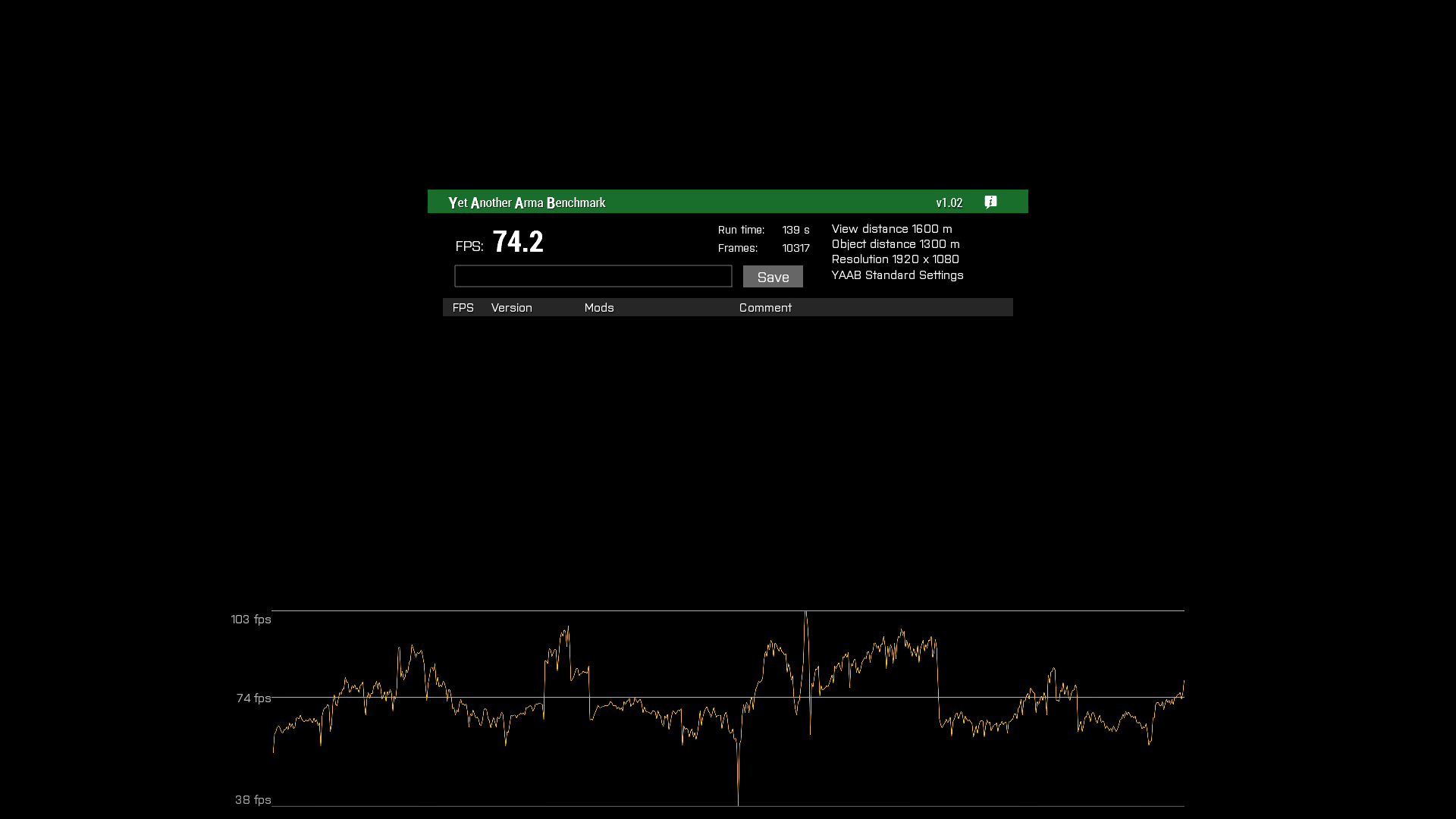
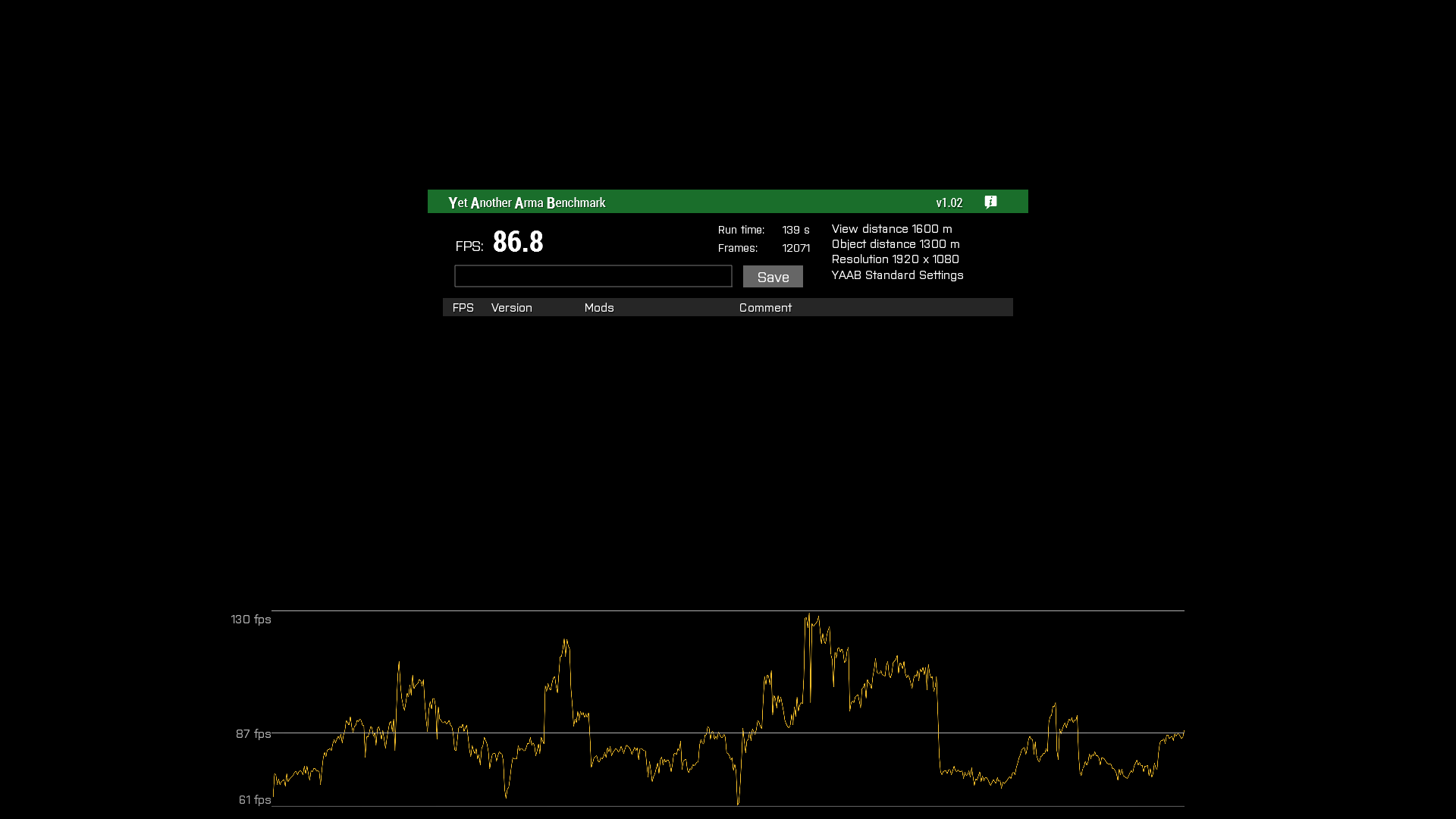
4x screen on perfomance branch:

whole cloud
bleak garden
#

My server can't find the directory of Art of War though it is on the latest version of perf. The folder aow is in the game directory and has all the necessary files.

#

Easiest fix was to move aow files into addons.

hearty haven
#

96 fps vs 91 fps +5fps(with companion mod)

#

Profiling+Companion

#

88 fps

inland dew
#

@whole cloud there is a clear FPS regression with V5 vs. V4. Look at avg. FPS, since min. and max. FPS are not very reliable in YAAB, due to how Arma works.
10 runs at same settings and nothing other than Arma and Steam running + PC restart before testing each perf version
average FPS of min., avg. and max. FPS of 10 runs per perf version

whole cloud
inland dew
#

no Companion used

whole cloud
inland dew
#

don't know if this can be interpreted as margin of error @queen owl ^^^
but I would say it's rather concluding, since I made 10 runs per perf version exactly to have the possible margin of error as small as possible

#

can't find Companion in ws

whole cloud
#

dedmenmiller's workshop

#

same as ArmaScriptProfiler or ArmaZeusCache

inland dew
#

ok

whole cloud
#

but it shouldn't make much of a difference

inland dew
#

I will test anyways

#

it's for v.5 only or v.4 as well?

whole cloud
#

I think bytecode was added in v4

inland dew
#

I test it in both then

#

YAAB

#

should I test v4 and v5 without CMA? maybe this it what affected results due to changes you made in v5?

#

or shouldn't matter?

whole cloud
#

CMA will probably make everything faster, and thus reduce the effect percentage wise

silk summit
inland dew
inland dew
#

No perf regression in 2.02 stable vs. 2.00 stable.
No perf regression in 2.02 v4 vs. 2.02 stable
Same or slightly better perf in 2.02 vs. 2.02 v4

#

2.00 (no CMA = Intel) | FPS 37.4- 61.7 - 91.3

#

2.02 (no CMA = Intel) | FPS 37.2- 63.4 - 95.1

#

2.02 v4 (no CMA = Intel) | FPS 37.1- 62.1 - 98.8

#

for me 37.4, 37.2 and 37.1 is margin of error, as well as 61.7, 63.4 and 62.1

#

2.02 v5 (no CMA = Intel) | FPS 39.2 - 63.8 - 106.6

#

39 FPS min. of v5 is definitely not 37 FPS min. of other builds (37.4+37.2+37.1/3)
64 FPS avg. of v5 is definitely not ~62.5 FPS avg. of other builds (61.7+63.4+62.1/3)
107 FPS max. of v5 is much higher than FPS max of any other builds

#

so no worries Dedmen

#

don't pay attention to my previous YAAB results using CMA AVX2 malloc when comparing v5 vs. v4

#

It's actually very difficult to benchmark Arma, due to how it works.
I haven't even removed some results that are too low or too high (outliers) compared to majority of the rest of results from testing the same build, which I could have done, for better consistency, since there are 10 results per build.
The more runs you do, the easier it is too recognise outliers/anomalies and simply eliminate them so they don't influence that much the end result(s).

  • as min, avg and max aren't always accurate, you most of the time have to rely on avg, but sometimes also on min, if avg is too different.
    Max is always a lot all over the place
inland dew
#

but 2.02 v5 + Companion is noticeably slower than 2.02 v5 without Companion
I've even benchmarked 2x10 runs with 2 PC restarts to be sure it's not something else

39.2 - 63.8 - 106.6 FPS | 2.02 v5 (no CMA = Intel)
vs.
36.1 - 59.1 - 93.3 FPS | 2.02 v5 + Comp (no CMA = Intel) test 1
36.8 - 59.8 - 94.6 FPS | 2.02 v5 + Comp (no CMA = Intel) test 2

#

2.02 v5 + Comp (test 1)

#

2.02 v5 + Comp (test 2)

mellow lark
#

What was wrong with the CMA results? Cma giving issues in the new build?

inland dew
#

Will check later

mellow lark
whole cloud
#

I also need to test in profiling diag_captureFrame if my change shows up correctly.
it should do sound processing instead of waitBG (waitBG is basically just game twiddling its thumbs and not doing anything)

hearty haven
mellow lark
#

Some gains haha

hearty haven
mellow lark
#

that's odd

hearty haven
#

Excuse me for stupid question, is that correct that i'm launched performance branch version?
https://i.imgur.com/zOCKVoj.png
Also not sure when and for how long, but CMA_AVX2 is battleye friendly for me

whole cloud
#

yes thats performance

hushed seal
#

Damn I need to switch to performance branch

hearty haven
#

if server will use performance+companion, will it help increase server fps?

hearty haven
#

alright, does it "server performance+companion"
needed to be tested at least?

whole cloud
#

not aware of any server performance improvements

#

besides startup time

#

ofc with companion mod some scripts might run faster. but you probably can't measure that at all

hearty haven
#

We'll try to play today small scenario with client perf+companion, if players give positive feedback overall,
i think we can play 230 players on friday night scenario with these tweaks

cyan prairie
#

Ok so I've caught up and still slightly confused

Shall I change from intel to CMA or what lol

hearty haven
cyan prairie
#

Ah okay

whole cloud
#

By the way for map volume reduction. Would be awesome if someone can test that it indeed doesn't affect VON or Music. It shouldn't.
It should basically only be 3D effects.

I'm 99% sure music works fine.
But not fully sure about VON, and thats the most annoying thing to test for me

quaint flame
#

Small heads-up. is3DENMod config property is not listed in the changelog

whole cloud
#

was something else listed? I think we listed in general and linked to the FT ticket?

quaint flame
#

I searched the last page of the forum post for 3DEN and nothing showed up

whole cloud
#

its in v1
Added: 3DEN warning message when attempting to edit a scenario which was saved using mods that modify 3DEN itself - https://feedback.bistudio.com/T154222

quaint flame
#

Ah sorry, misunderstanding. I was talking about dev branch changelog. Since it's already available on dev meowtrash

whole cloud
#

it should be, its listed on the internal dev branch changelog

#

Added: Warning message when attempting to edit a scenario which was saved using a modded Eden Editor - FT-T154222
was edited a bit from the original

quaint flame
#

Yeah great, can't find it if I search if 3DEN ๐Ÿ˜„

#

this internal/external name thing. Never do that again

inland dew
#

using map factor as infantry, volume with open map is lowered only in 1st person. in 3rd person it doesn't do anything

#

also had several crashes when changing sound source and refreshing. don't know if it's because I chose another source than default or because of pressing refresh

#

now it's not crashing when changing output or quickly pressing refresh several times

#

but it does crash sometimes and sometimes not

whole cloud
#

3rd person. yes known bug. fixed today.
if you have crashes when refreshing, please FT ticket

inland dew
#

it's with companion

#

without companion I also had the option to chose different output

#

even if the section had its old name and the arrow was pointing to the right and not to the bottom

whole cloud
#

Yep. I know. It replaces the sound sources thing

inland dew
#

without companion

#

and it crashed as well there

#

even without the refresh button, since it's only available with companion

#

without companion, there is no default, there is simply and empty black space and with possibility to press the arrow that point to the right to change the output

#

when I changed the output, it crashed (without companion and without refresh button)

#

lol, had my monitor speakers (DisplayPort) selected as output and VON volume 0
as soon as I changed VON volume from 0 to 100 - the game crashed (with companion)

#

after game restart it was Realtek speakers selected by itself and when I changed to default, the game also crashed

#

I still can hear players at same volume after lowering map factor as much as possible with map open in 1st person - no problem there

whole cloud
whole cloud
whole cloud
inland dew
#

So I should be able to change output even without companion?

whole cloud
#

Yes

#

its hard to catch all the crashes for device switching. They are basically random chances. Just need to find them all with time

inland dew
#

have narrowed everything down and what's very interesting is that no matter what I do in audio settings not being connected to any servers - no crashes at all

#

as soon as I connect to our server and do same changes with audio - it crashes

#

maybe no crashes offline, because no sounds played when changing output...

#

This is what was generated when it crashed, online:
Arma3_x64_2021-03-17_23-21-06.bidmp | Arma3_x64_2021-03-17_23-21-06.mdmp | Arma3_x64_2021-03-17_23-21-06.rpt

Is that what I need to submit on FT?

#

this is what it says in rpt:
23:27:21 Selected Audio Output: Realtek Digital Output (2- Realtek High Definition Audio)
Exception code: C0000005 ACCESS_VIOLATION at 58D9AB4A

Fault time: 2021/03/17 23:27:21
Fault address: 58D9AB4A 00:58D9AB4A Unknown module

Prev. code bytes: 00 00 74 15 48 8B 8F F8 00 00 00 48 8D 54 24 38
Fault code bytes: 48 8B 01 FF 90 C8 00 00 00 40 38 B7 20 01 00 00

whole cloud
whole cloud
#

Thanks salute

inland dew
whole cloud
#

no

#

the server plays absolutely no role in your local audio output

inland dew
#

updated the additional info of the ticket, in case it might help you somehow

#

thank you so much for this option! Now I can switch between my 3.5 jack headphones and optical cable speakers without the need to restart the game or to reconnect to the server

hearty haven
#

i updated 29' 2560x1080@75hz monitor to 34'3440x1440@100hz

silk pewter
#

you can raise that by editing arma3.cfg
e.g
refresh=60;
โ†“
refresh=144;
but in-game UI would be nice (or a start-up check at least?)

hearty haven
#

Documents\Arma 3\Arma3.cfg
refresh=75;

didn't updated automatically according to my monitor and i manually edited cfg

#

i bet there a bunch of players with config from 2013..
with 60 refresh rate and 240hz monitors meowsweats

silk pewter
#

oooh yes.
delete arma3.cfg sometimes, see the difference ๐Ÿ˜„

mellow lark
#

So why is that not in the in-game menu yet?

silk pewter
#

because reasons

mellow lark
#

Does the engine go mad when you change it on the fly :D?

silk pewter
#

๐Ÿฎ
PERHAPS

whole cloud
silk pewter
silk pewter
whole cloud
#

dunno

#

just need the correct idc, should be in resincl

#

wouldn't make sense if it didn't

silk pewter
#

some things are set in stone on startup like sound output deviceโ€ฆ

pallid pebble
#

Hm that reminds me of that one weird thing that was saved both in the profile file and somewhere else while the game was running

#

I cant remember right now what it was tho

hearty haven
#

FX-8350+1060 3gb+16gb ddr3

#

Before prof+companion user had below 30 avg on KOTH

#

now 40-50 quite stable

quaint flame
whole cloud
#

no

pallid pebble
quaint flame
#

I might have someone for you ๐Ÿ˜›

silk pewter
quaint flame
#

Who said it's me we are talking about

quaint flame
#

I won't blow his cover.

silk pewter
#

what will you blow then

quaint flame
#

..your head off if you continue with these jokes

hushed seal
#

do i need to change anything in the launcher to make sure it launches the performance branch?

#

Launcher itself has the nice band at the top left called "profilling"

whole cloud
#

no

#

performance is default

hushed seal
#

well my logs say its the stable build...

whole cloud
#

yes correct

#

but the version number matches last performance build

hushed seal
#

ah thx, then whats the perfomance.exe for?

whole cloud
#

its a normal stable exe, with some dev-branch changes

hushed seal
#

oh sorry meant the profiling.exe that you download after switching to profiling branch

#

ah okay, that explains why I got the dev build version watermark after launching that .exe through arma3sync

whole cloud
#

profiling has diag_captureFrame script command

hushed seal
#

so clientwise it runs like this?:
steam profiling branch: arma3.exe=perfomance branch
profiling.exe=profiling branch (perfomance+dev branch stuff+diag_captureFrame)

and server profiling branch like this?:
arma3server.exe=perfomance.exe
arma3server_profiling=profiling branch

Edited in case someone reads this

sorry for the questions buts its a bit confusing ๐Ÿ˜…

whole cloud
#

server stema branch also has performance

#

not stable branch

#

you don't need dropbox for anything

hushed seal
#

aaaah okay, thanks!

rain moth
#

arma3server(_x64).exe=performance with profiling branch

raven delta
#

Ah... wouldnโ€™t it make more sense for it to be as Mildly said? Just so you can make sure a server is running the right branch for example

whole cloud
#

sure?

#

I don't understand no?

raven delta
#

Normal branch : arma3server.exe
Performance : arma3serverperformance.exe
Profiling : arma3serverprofiling.exe

#

Just so you can be sure from a quick look that youโ€™re on the right one

whole cloud
#

I don't understand why you would want to use normal branch

#

If you switch to performance/profiling branch, you get performance/profiling binaries. As should be expected

raven delta
#

Well you wouldnโ€™t, but just so itโ€™s obvious maybe. I had no idea I was running the normal branch instead of the performance.
FASTER installed the normal one instead of the performance one by mistake and I had no idea as they are called the same - as I have been doing for months now meowfacepalm

whole cloud
#

If we rename it like you wrote, that would end up in 10 times more people accidentlly running normal branch even though they switched to performance branch and expected to get that

raven delta
#

Why so?

rain moth
#

the default now is if you use profiling branch you'll get performance binary

#

so anyone that opts into the branch is ready to go directly

#

otherwise ALL managers would need to change from default arma binary to performance, but only when using profiling branch

#

current solution is โค๏ธ

raven delta
whole cloud
hushed seal
#

up until today I thought that sentence

the default now is if you use profiling branch you'll get performance binary
meant that the profiling.exe was the perfomance.exe and you'd only get the profiling.exe from the dropbox ๐Ÿ˜„

#

yeah... should maybe just put it into some kind of documentation somewhere ๐Ÿ˜›

rain moth
#

it says "performance + profiling" and two of the exes are suffixed with "profiling" ๐Ÿ˜›

hushed seal
#

true....

hearty haven
#

bug with backpack(perf+comp+cma avx2)

whole cloud
#

Trying to take the RPG round from backpack into yours?

#

is that other user that had the backpack, also running perf?

hearty haven
#

[TAG]TwiD?
he was running performance only, no companion

#

he took rpg backpack from bot

whole cloud
#

Ah thats a bot.
Does the server run perf?

#

Maybe my backpack change isn't as multiplayer compatible as I thought

hearty haven
#

server running stable, not perf

whole cloud
#

maybe thats it then.
I'll try to do some more testing next week

hushed seal
#

got a odd bug:
in performance branch any headless client I launch after the first one gets stuck at "not responding" (as shown in task manager) and won't fully load.

whole cloud
#

are they using different -name= parameter?

#

different profile names?

hushed seal
#

nope, they're all running of the same profile

whole cloud
#

don't do that

#

they all want their seperate signature cache (will freeze until the other opens access to it), and profileNamespace

hushed seal
#

ah okay, changed the -profiles path for each of them so they use different ones, works now ๐Ÿ™‚

#

used to work in main branch

raven delta
#

that should be documented somewhere notlikemeowcry

hushed seal
raven delta
whole cloud
#

profiles path shouldn't be needed.

#

literally just -name=HC1

hushed seal
#

arma3server_x64.exe -client -name=HC1 -connect=127.0.0.1 -password=nope -nosound -port=2302 "-mod=MODS" -enableHT -limitFPS=120
are my launch arguments, second HC still fails to launch
(-name=HC2 on second one)

#

arma3server_x64.exe -client -connect=127.0.0.1 -password= "-profiles=E:\Arma3_Server\Arma3\Servers\_aaf3ce999caf4539b903336ded3830fc_HC2" -nosound -port=2302 "-mod=... works

rain moth
#

Cache lock is in profiles defined folder?

whole cloud
#

I thought so

#

Btw im working on removing the cache for HC.
Didn't finish it tho, might not make it

rain moth
#

โค๏ธ

inland dew
#

"Porting" CMA malloc onto Intel 2020 failed

#

I've benchmarked CMA AVX vs. CMA AVX2 and FPS is same or even slightly better with CMA AVX than with CMA AVX2

#

Now benching default CMA (SSE)

#

But still with lockPagesInMemory

autumn timber
#
  1. Get inside Strider GMG as driver
  2. Engine On
  3. Options -> AUDIO -> OUTPUT DEVICE -> REFRESH
  4. No strider engine sound anymore

Depending on if you're 1st/3rd or if you turned the engine using the mouse wheel or by starting to drive, not all sounds may be missing (or maybe it's down to chance), so you may try driving or just idling to (not) hear the engine.
@whole cloud

whole cloud
#

I noticed little bird sometimes misses some engine sounds for a few seconds. But they restart after a bit.
Strider engine sound doesn't come back within 10 seconds?

autumn timber
#

Nope ๐Ÿ˜ฆ

whole cloud
#

Oops.
But my little bird tests mostly worked :notlikemeow:
I assume it comes back when you turn engine off and on again.

autumn timber
#

Oddly, there is a difference between 1st and 3rd pers. view.
In 1st, if you disembark and get in again, the sound comes back.
If you do the same thing in 3rd person, it stays quiet

whole cloud
#

Probably playing different sounds.
The switch to different will restart it

autumn timber
#

I assume it comes back when you turn engine off and on again.
No it doesn't. Especially in 3rd person. I've tested with a Strider GMG and... I don't remember what else because that was while having a real game

#

The switch to different will restart it
Not sure what you mean by that but switching from 3rd to 1st enables the sound, but only because that one has never been silenced, as switching back to 3rd person will bring back the silence

#

Have a nice weekend ๐Ÿ™ƒ

#

Aaaaalsooo, while you're at it... ๐Ÿ˜

I managed to forget to plug my USB headset in before starting Arma today again ๐Ÿคฆโ€โ™‚๏ธ , so I refreshed the audio and it worked perfectly, so ๐Ÿ‘ for that.
Unfortunately, along with losing output because of no headphones, I also lost my input and hence couldn't speak to people over VOIP.

  1. It would be nice if the refresh button also refreshed the audio input
    or
  2. Maybe add the same set of widgets for audio input as this is sometimes problematic if you're using the PS3 Eye (which has an integrated microphone ๐Ÿ˜’ ) for headtracking and Arma may decide to use that microphone to record your sound instead of the microphone from your headset
whole cloud
#

Input is pretty hard actually.
It's done differently

autumn timber
#

I'm using Teaspeak Teamspeak to talk to my teammates so it's not that much of a problem (because it seems to handle plugging/unplugging the microphone correctly) but at least (1) would be good, to be able to talk to anyone on the server, without the need to restart arma

inland dew
whole cloud
#

Saying please doesn't change facts :)

autumn timber
#

@silk pewter ๐Ÿ˜›

#

I'm using TeaSpeak and I have TeaMates!

fickle geyser
#

TeaSpeak is actually a thing.

#

As for ps3 eye you can disable its microphone in windows if you're not using it.

autumn timber
# fickle geyser TeaSpeak is actually a thing.

I don't know which is more surprising:

  • That I believed you and started googling the thing
  • That you were actually telling the truth
    ๐Ÿค”

But anyway, that still doesn't solve my real issue of restarting the audio input in case I forget to plug the headset in before I start Arma or if I unplug it by accident, while playing.

fickle geyser
#

That you were actually telling the truth

hearty haven
#

Overall review from players(Perf+Companion)

If you are looking on firefight fps kinda the same as on stable,
but if you looking outside battle fps is nicely higher

timid snow
#

It is possible to export result of diag_captureSlowFrame from server?

whole cloud
#

yes. server writes it to a file

queen owl
#

In today's episode of "Is it PERF branch or just me?": hide terrain objects module produces an error and doesn't work when a mission is opened in the editor...

whole cloud
#

what error?

queen owl
#
if (_count > 0) then
{
priva>
17:22:26   Error position: <select _i;
if (_count > 0) then
{
priva>
17:22:26   Error select: Type Number, expected Array,String,Config entry
17:22:26 File A3\Modules_F\Environment\HideTerrainObjects\init.sqf [BIS_fnc_moduleHideTerrainObjects]..., line 182
17:22:26 Error in expression <t = (_module getVariable ["#counts",0]) select _i;
if (_count > 0) then
{
priva>
17:22:26   Error position: <select _i;
if (_count > 0) then
{
priva>
17:22:26   Error Generic error in expression```
#

A little correction, the error only appears if I open the module's properties.

quaint flame
#

Works fine on dev. Cannot test prof right now

queen owl
#

Worked well in the normal stable too. Switched back to PROF and the same problem

violet elbow
#

So, Map Factor setting is reducing sound outside of vehicles for me. Latest prof + companion.

whole cloud
#

so, to be clear, on foot, when opening the map?

violet elbow
hearty haven
patent dome
#

Is that performance loss explained by the performance branch or by the use of the AVX2 instead of AVX alloc?

hearty haven
#

seems like perfomance branch

#

not 100% sure because that isn't my test results

patent dome
#

Did a couple quick tests, stable also had about a 5-10% higher fps for me.

#

With intel TBB

autumn timber
whole cloud
#

no

whole cloud
#

So confusing both have positive and negative benchmarks for the change

whole cloud
inland dew
#

Useless runs without proper approach

patent dome
#

I did a few more runs today comparing Stable and Performance with the intel TBB. I consistently got around 40 fps on stable and 37.5-38 on performance. Performance v5 that is.

#

I haven't run with any other performance builds, so can't say if it is an issue with v5 specifically.

inland dew
#

Useless words...

#

No screens, not known how many runs per build, if anything else was running in the background and a lot of other things no concidered/mentioned

patent dome
#

Okay...

#

Only chrome open in the background, 4 runs consecutively per build, i7 7820x OCed to 4.6GHz, 980 ti at 1100MHz, -enableHT, -hugePages, -maxvram = 5120

#

Didn't get screens and didn't save the runs, but average fps never deviated more than .5 on either build.

inland dew
#

The environment must be as sterile as it gets, which it wasn't in your case and you touched launcher parameters you shouldn't and -hugePages doesn't even work

#

Forget your results

#

One can't rely on them

upper wigeon
#

yo, chill, he was just trying to help

patent dome
#

I'm sorry for trying to give some additional information/benchmark results. You can't trust a single system to provide you with all the answers.

silk pewter
#

I concur, please phrase it otherwise, thanks

inland dew
#

I will retest it all myself in the most correct way possible as soon as I can

patent dome
#

Why doesn't -hugePages work though? I haven't seen any post about it not working.

inland dew
#

Having other programs running in the background, touching parameters in the launcher, making only few runs per build and no screens and settings etc...

patent dome
#

If I run more tests in the future I will make sure to get that information.

autumn timber
#

It would make sense if someone would write down best practices when testing performance, maybe on the Biki, so that others can be referred to that page if they want to help

#

Would prevent wasting one's time

inland dew
#

The environment must be as sterile as possible when running benchmarks, so nothing influences results, since even running only Arma benchmark itself, without anything else running in the background already gives different results from run to run on the very same build

#

And thus, even without any other programs running in the background, you need te restart the PC before starting runs for each of the builds and record min, abg and max FPS of at least 10 runs. Better 12 runs

rain moth
inland dew
#

And then calculate the average of min FPS of 10-12 runs, average of avg FPS and average of max FPS

#

There are things that get cashed in paging file, RAM and vRAM

#

That's why a PC restart is needed

#

Also game restart if you have changed game video settings, after you applied them

patent dome
#

I stopped using the CMA malloc though, as I saw an increase in frametime spikes despite getting higher fps. Didn't think the spikes were worth it when I already get such low FPS that the improvement is only a couple frames.

inland dew
#

Having your usual stuff running in the background while benchmarking, running the benchmark few times per build and letting stuff being cached from previous runs and launching new runs just by changing the build or malloc is a big no go

#

I understand you wanted to help, but the way you proceeded makes your results inconsistent and thus not possible to use them

#

It only confuses the devs

pallid pebble
#

๐Ÿ‘

#

we got it

#

no need to keep going on about it

#

lets move on to something productive

#

thanks

inland dew
#

Agree

patent dome
#

I understand that, I was just taken aback by how you put that at first.

inland dew
#

Even when you bench Arma in the right way, due to how many things can't be hard scripted, there can be anomalies that one must be able to recognise and not take into account and this is also why 10-12 runs per build are needed.

And when I say 10-12 runs, I mean only adequate runs, once you eliminate/redo all the abnormal runs

autumn timber
#

Still, you've only written it here, which means that anyone coming to this channel tomorrow will have no idea that you want them to test it that way (unless you write it down in an easily accessible place).

Also wouldn't making use of already cached data reflect more the typical usage and performance for someone who has been playing Arma for one hour?
And if we want to get puristic, then restarting Windows may cause services marked as "delayed start" to start when you're benchmarking (or not) further affecting the results so I'm not really convinced that you really should restart EVERYTHING between tests, tbh

inland dew
#

Not after each run, but before testing each build

silk pewter
#

please someone make a Word document for an Arma benchmark tutorial I can then put on the wiki then pin it here ๐Ÿ˜‰

whole cloud
#

I'll leave the change in for now. As really on paper it should be providing a benefit, or be neutral.

#

But we won't release it in 2.04 to not mess things up :U

fast shore
#

first time I'm trying out the profiling branch. I've issued via debug console diag_captureFrame 20; on the server, and it wrote a file captureFrame-2064752-2021-03-22_20-18-05.log . Now what to do next?

whole cloud
#

You can run profiling branch locally. And run diag_captureFrame locally to open the capture UI. There you can import that text file from clipboard.
Or you just try to look at the textfile

#

Man it would be nice if there was a online converter from Arma format to google chrome profiling format

#

Someone should make that :u

#

"note that the test server runs perfectly fine with 50 FPS" yeah thats also what the output shows, perfectly fine at 50fps.
Wait till the server is struggling and then run it again.

#

btw you could also increase your server fps limit for more smooooth

fast shore
#

the test server is just for a small 2-10 people group, it never suffers. The battle server with the 70-80 people and 17fps, that's where the problem is

whole cloud
#

theres where you need to profile then

fast shore
#

yeah, I'm just testing now

#

so sLoop -> sleep 18 ms is the idle time and 2 ms it's doing something?

whole cloud
#

yes

#

it sleeps to prevent from going over 50fps

whole cloud
gritty wasp
hearty haven
#

Seems like holdactions don't work on perf+comp

if ((str(player) == "pilot1")or (str(player) == "pilot2")) then {

        [sam1,"<t color='#FF0000'>ะกะฑั€ะพัะธั‚ัŒ Oshkosh ะœ2 #1</t>",
        "a3\ui_f\data\IGUI\Cfg\holdactions\holdAction_hack_ca.paa",
        "a3\ui_f\data\IGUI\Cfg\holdactions\holdAction_hack_ca.paa",
        "(getPosATL sam1 select 2) > 50",
        "(getPosATL sam1 select 2) > 50",
        {},
        {},
        {["scripts\drop1.sqf"]remoteexec ["execvm", 2];},
        {},
        [],
        0.5,1,true,false] call BIS_fnc_holdActionAdd;
...
whole cloud
#

do they work on perf without comp?

#

That was already reported. Didn't have time to check

red dirge
#

is there any EH to catch server gracefully stopping?

#

ie: is there any way to save before kill -9 ?

whole cloud
red dirge
#

sorry. didnt notice wrong channel

autumn timber
whole cloud
#

That needs data change to fix

#

will be good on 2.04

merry shuttle
whole cloud
#

Thanks. That means its not a Arma issue.
It should also fix itself if you just remove the holdactions .sqfc file from the companion pbo.
Might be a SQF-VM issue then

#

I'll update the companion mod and remove the holdaction stuff from it in ~30 minutes an hour. That should fix it too

#

2.02.147473 new PROFILING branch with PERFORMANCE binaries, v6, server and client, windows 32/64-bit, linux server 32/64-bit

  • Tweaked: Map volume reduction in vehicles minimum value changed from 25% to 0%
  • Fixed: Crash caused by array insert script command
  • Fixed: Map volume reduction not working in 3rd Person Perspective
  • Fixed: setObjectScale on static objects (houses for example) not synchronizing properly in multiplayer
  • Fixed: Potential freeze at "Initializing Addons"
  • Fixed: Game crash when changing the audio output device in multiplayer with VoN being active - https://feedback.bistudio.com/T157418

Notes:

  • Please provide feedback on the map screen volume reduction. It should only work while inside vehicles.
  • If you notice any problems with inventory operations, like moving uniforms/vests around, please report that immediately.

Note: This update comes with an experimental companion mod that adds new UI components for the audio settings menu and also includes SQF Bytecode for most vanilla functions.
You can download it here: https://steamcommunity.com/sharedfiles/filedetails/?id=2419451036

whole cloud
autumn timber
#

Okay, I'll give you feedback when it's out

whole cloud
#

Investigating the issue with holdActionAdd.
Man look at this difference. These are the script instructions of holdActionAdd.
Bytecode optimized version on the left side.

103 lines of instructions just to make the array to be passed into params, were reduced down to one single push instruction.

Thats where a big part of the performance improvement comes from..

#

And stuff like this too. Instead of calling the objNull script command.
Just push a constant

pallid pebble
#

ConfusedDog thats too smart for me

whole cloud
#

but I can't find any problems with holdActionAdd bytecode.
besides the (valid) optimizations, i cannot see any differences.
Seems like @covert grove's SQF-VM compiles absolutely perfectly in relation to Arma itself ๐Ÿ‘

autumn timber
whole cloud
#

But I can absolutely reproduce the bug.
if I run bytecode holdActionAdd, I cannot activate it.
If I run normal holdActionAdd, it works.
wtf ๐Ÿ˜„

pallid pebble
autumn timber
#

That's not important in this case ๐Ÿ˜„ (seriously ๐Ÿ˜‰ )

whole cloud
#

AH! I think I found the problem... weird tho

quaint flame
#

103 lines of instructions just to make the array to be passed into params, were reduced down to one single push instruction.
That's awesome

whole cloud
#

Eeeeeeeek addAction code is always turned to string even if you pass code to it.
It passes that string along, and immediately compiles it back into code again and then stores the code for later reuse notlikemeow

quaint flame
#

๐Ÿ˜„

whole cloud
#

ahhh correction.

#

It stores it as "code" type, but its uncompiled code.
Meaning its recompiled before every execution, not once (Only if the code fails to compile, derp)

merry shuttle
#

Doesn't that happen with eventhandler code too? Recompile before every execution

whole cloud
#

I don't think so. they were fixed a while ago

merry shuttle
#

Ah ok

whole cloud
#

And theres the bug.
When it compiles that code coming from non-bytecode it has 20 instructions.
With bytecode it has 17 and the last 3 are missing.

The last 3 being bis_fnc_holdAction_scriptHandle = _this spawn {...}
Basically all of the hold action work is missing in the bytecode one ๐Ÿ˜ข
But atleast I can fix that, just need to find out how.
A bit weird considering the input assembly instructions are all correct.

covert grove
whole cloud
#

OH my god I hate this ๐Ÿคฃ

#

Non-bytecode left. Bytecode right.
meowfacepalm

#

Lets see if I can blame SQF-VM for that ๐Ÿ˜„ Probably not

autumn timber
#

It even optimizes out the };? ๐Ÿ˜„

hushed seal
#

quick question, scrolling through this channel it seems they're like a few new options for server.cfg and startup parameters?
Stuff like Added: server.cfg option to ignore errors that would otherwise abort scenario starts
or the -limitFPS (which is already in stable afaik).

Are they documented anywhere?

whole cloud
#

on their respective wiki pages
command line parameters and server.cfg

rain moth
hushed seal
#

ah there it was, thanks !

rain moth
#

limitfps is actually not in command line docs ๐Ÿ™‚

hushed seal
#

yeah.. was wondering if I'm missing out on any other new arguments that haven't made it into the wiki yet

whole cloud
hushed seal
#

thank you very much ๐Ÿ™‚ keep up the good work

fickle geyser
#

Too risky to touch the compiler?

whole cloud
#

they can be done

#

And I might merge some of these into base game if we get good results after experimentation with the open source optimizer.
So we first see that they are safe

covert grove
whole cloud
#

What u mean?

#

The bug was, you don't have the full string of CODE piece contents anymore.
So I wrote my own code to find the end of the CODE piece as offset in file.
But I did stoop and stopped at the first } after the last token instead of properly respecting nested call {call {lasttoken}}

covert grove
#

ahh

#

honestly ... who really bothers with having his/her code complete in there?
just reconstructing should be enough ๐Ÿคทโ€โ™‚๏ธ

whole cloud
#

Besides me probably noone needs that stuff inside the AST

whole cloud
#

companion mod is updated. I tested hold action should be good now.
Thanks for staying persistent @merry shuttle ๐Ÿ™‚

merry shuttle
#

Hasn't updated for me yet, seems Steam has some issues today.

whole cloud
#

it lists last update today. So it atleast went through to steam

pallid pebble
#

props just takes a bit

autumn timber
#

Also sometimes it helps to log out and log back in to Steam

merry shuttle
#

And works fine again, thank you Dedmen

cyan prairie
#

I'm on profiling branch

Has anyone ever encountered the bug of the carrier not being visible in the editor but visible in game??

Or is my mission.sqm corrupted?? Or do I just delete it and place another

#

Never had it before and only just went on profiling that's why I post here

rain moth
#

Are you using the companion mod?

quaint flame
#

It's visible for me in prof with comp mod.

mellow lark
#

This happens even in stable iirc

cyan prairie
#

Ah okay first time that it's occurred for me I panicked like hell

#

Was like noooo my mission!

cyan prairie
rain moth
#

at least its not the sqfc files then ๐Ÿ˜›

whole cloud
raven delta
#

Likewise over here, any idea what causes it?

whole cloud
#

but apparently its a "normal" occurence

cyan prairie
#

Hmm dedmen can fix it ๐Ÿ’ช

marble mason
#

One bug i would like to see tackled is the black screen Alt-tab bug.

autumn timber
#

Is there a ticket for that bug?

#

Because otherwise I wouldn't assume people know what you mean, let alone will start fixing stuff that you assume they know about. Personally I don't remember anything that could qualify as "the black screen Alt-tab bug" @marble mason

marble mason
#

Thought it was a well known bug as i have had multiple people in my community mention it to me as well as having it happen to my self: When Alt-tabing to desktop sometimes it will show a black screen and the window you alt-tabed to instead of the desktop. but i guess it is isolated to my community?

analog jolt
#

I believe it's a known issue, which can be fixed by running Arma in Fullscreen Windowed

marble mason
#

Then there is no way to go to desktop

analog jolt
#

Works for me ๐Ÿคทโ€โ™‚๏ธ

#

Simply press Win+D to go to the desktop

autumn timber
#

I seriously never had that and I'm playing Fullscreen non-windowed

marble mason
#

Eww Win+D minimizes all windows

#

not great

livid nymph
# queen owl In today's episode of "Is it PERF branch or just me?": hide terrain objects modu...

On the same map/mission, some members of our community saw the trees that were supposed to be removed by the Hide Terrains Module and others didn't see the trees.

I opened the map/mission in the editor and clicked on the module.

When I was running the performance exe I could see the tress and I had this pop-up error.
https://imgur.com/alnC4JW

https://imgur.com/c6GqyzA

When I was running the default exe I didn't see the trees and I didn't get the pop-up error.
https://imgur.com/CfpBJfz

quaint flame
#

Settings are still not saved on perf.

queen owl
#

kMan, yes that's the same issue. Still happens in the latest PERF build.

whole cloud
#

#counts looks like its a value from within the module properties?

queen owl
#

The count of affected objects which is displayed in properties.

whole cloud
#

QA cannot reproduce, I also cannot reproduce on my all-the-things build

queen owl
#

I can:
Open editor. Place the module. Save mission. Load mission.

#

The key is loading a saved mission

whole cloud
#

load mission! thats important?

queen owl
whole cloud
#

Its a profiling branch exclusive thing. So should be easy to find there are only half a dozen of these

#

aaah no its not. QA reproduced.
You need to double click the module after loading, that will trigger the script error

queen owl
#

Yeah. But also the hiding objects fails even without opening the properties and the visible error

#

While playing a mission for example.

whole cloud
#

2.02.147481 new PROFILING branch with PERFORMANCE binaries, v0, server and client, windows 32/64-bit, linux server 32/64-bit

  • Fixed car engine sounds not restarting when switching audio output device
  • Fixed possible freeze in main menu with single/dual core CPU (Didn't happen)

Notes:

  • Please provide feedback on the map screen volume reduction. It should only work while inside vehicles.
  • If you notice any problems with inventory operations, like moving uniforms/vests around, please report that immediately.
  • This update comes with an experimental companion mod that adds new UI components for the audio settings menu and also includes SQF Bytecode for most vanilla functions.
    You can download it here: https://steamcommunity.com/sharedfiles/filedetails/?id=2419451036
queen owl
#

Nope. The 147481 didn't fix it. ๐Ÿ˜‰

whole cloud
#

yep :u

autumn timber
#
  • Fixed car engine sounds not restarting when switching audio output device
    No more cheating. Sad. ๐Ÿ˜ฆ
whole cloud
night mulch
#

Update pushed on a friday ๐Ÿ˜ฎ

silk pewter
#

so he has plenty of feedbacks on Monday, everything is calculated ๐Ÿ˜Ž

gritty wasp
mellow lark
silk pewter
#

that's what Tuesdays are for

whole cloud
#

I found the module problem.
bis_fnc_moduleInit is undefined variable when you load a mission ๐Ÿคฏ

#

it was the CfgFunctions "not found" error fix for @quaint flame ๐Ÿ‘€

quaint flame
#

uff. I recently had trouble getting a module to work. Perhaps this is related as well

whole cloud
#

attributesChanged3DEN EH isn't added on mission load.
And some others too, connectionChanged3DEN , dragged3DEN

whole cloud
#

All fixed.
What is the next critical bug that I don't know about?

merry shuttle
#

Women are completely missing

#

๐Ÿ™‚

whole cloud
#

Thats a bug? I thought that was supposed to be.
Never saw a woman in my apartment yet

quaint flame
#

Maybe if you stop talking in c++ to them

whole cloud
#

Anyone still have any issues with saving game settings? keybinds and stuff?

merry shuttle
#

Yup, doesn't work

#

Can't change keybinds, language, etc

rain moth
#

was the freeze with single/dual core only on perf or public as well? client only or server as well?

whole cloud
#

perf-ish

#

I tested 2.02 main and also got freeze though later in main menu

rain moth
#

Had an issue with server getting stuck on init physx inside x86 qemu on ARM CPU gun_think

fickle geyser
#

Annoying when you're a content creator that uses it all the time like that. bloblgrimace

#

I guess it also might be a case of some EH not firing.

silk summit
quaint flame
fickle geyser
#

yep

quaint flame
fickle geyser
#

๐Ÿ™

quaint flame
#

It causes all sorts of weird stuff. Especially that little scrollbar near the center of the screen ๐Ÿ˜„

feral harness
merry shuttle
feral harness
#

Could you give me a concrete example of the key that doesnt save? I cannot reproduce with what I tried.

merry shuttle
#

User action 20

#

Just as an example

ashen timber
#

CautionSpecialProfilingAndTestingBranchArma3

#

Anyone know what this command does ?

mellow lark
#

It switches you to the profiling branch, with performance build by default

pallid pebble
#

^

ashen timber
#

Ok, does this give a performance boost ?

pallid pebble
#

it can

#

arma in steam -> properties -> betas -> code

mellow lark
#

Sometimes. But we're not talking about massive increases here

ashen timber
#

Is it known to make smoke more visible when your inside of it? Iโ€™ve always been told it, I play a lot of Altis life so

pallid pebble
mellow lark
#

What? By switching to perf branch?

#

No way

pallid pebble
#

^

mellow lark
#

It has to do with the particles setting most likely

ashen timber
#

Cheers guys

mellow lark
#

It's easier to see through smoke with a lower particles setting

#

because well they turn into huge squares almost

ashen timber
#

The smokes do?

#

Whenever I used the command before I experienced a lot of lag spikes as well, is there a thread I can look at which shows me what profiling does ?

pallid pebble
#

and the changelog pinned in thta channel

autumn timber
pallid pebble
#

oh

ashen timber
#

Lol all good, thanks guys

feral harness
merry shuttle
#

Yep, I'll try dev

feral harness
#

I dont know when the next version will come though

merry shuttle
#

No problem, I'll check steamdb

cyan prairie
#

ok this carrier invisible bug is happening EVERY time for me now on profiling branch
tried verifying files also
https://prnt.sc/10x4x7m (photo of the issue)
is there a ticket made for this?

whole cloud
#

Profiling branch might be next week.
When that saving bug is fixed then I'll definitely do one

vale shoal
#

were there any changes related to HCs?

#

having recently the issue, that the first connection with our HC ends like this:

16:04:53 > No message received for 86 seconds 16:04:58 > Connection with host has been lost. 16:05:10 Connecting failed. 16:05:10 > Player HC1 connecting 16:05:10 > Player HC1 connected

#

2.2.147.447 and also the latest performance branch build

#

startup path:

== D:\Servers\arma3\altis\a3altis-hc.exe -connect=127.0.0.1 -port=2402 -profiles=D:\Servers\arma3\altis\BEChc -mod=@BWMod;@CBA_A3;@AVMG;@Exile;@RHSAFRF;@RHSGREF;@RHSUSAF;@RHSSAF;@ReddnTanks;@3CB_Equipment;@3CB_Vehicles;@3CB_Units;@3CB_Weapons;@3CB_Factions;@RKSL;@A3XAI_HC;@obfusqf; -cpuCount=4 -hugepages -nosound -noPause -client -name=HeadlessClient -malloc=tbb4malloc_bi_x64

#

when the HC is connecting to the server, this stuff is printed to the RPT:

16:04:15 Server: Network message 18539 is pending 16:04:15 Server: Network message 18539 is pending 16:04:15 Server: Network message 18539 is pending 16:04:15 Server: Network message 18539 is pending

whole cloud
#

Can anyone confirm that options-game options menu opening is sluggish/slow ?

neon pond
#

is the latest perf build uploaded somewhere - meaning outside of steam

#

previous google drive folder has only build from 06.03

mellow lark
#

Try that

#

It's also in pinned messages

#

Link to the message

neon pond
#

still the old version

mellow lark
#

Oh well guess it is not uploaded yet then

#

What you can do however, is do it via Steam and copy the binaries

neon pond
#

ehm from where?

mellow lark
#

Switch to the performance/profiling branch

#

Copy the arma binaries

#

And switch back

neon pond
#

ye but i need a linux version

mellow lark
#

I see

#

Not sure then

#

Only fiddled with Arma on linux for a short bit

#

Doesn't seem like that perf client/server has any super important fixes though

#

But someone more knowledgeable about the perf/prof branch might be able to help you out

rain moth
#

steamcmd can download for other platforms than current

feral harness
# quaint flame Nope, it's super fast

go to eden, preview mission, esc, click options, click game. for me it takes maybe a second longer for it to open. to compare do the same but click on controls instead

fast shore
#

hi, on the performance problems we experienced in the PvP campaign 'OPT', we today used the profiling server branch for our training with ~20 people. Frames stayed stable above 50 (-70). When looking at the frames we captured, the nwSerSMT seems high: grep nwSerSMT *log captureFrame-7619-2021-03-28_20-48-41.log:nwSerSMT; 1.23842; 7.67434;"" captureFrame-7619-2021-03-28_20-50-15.log:nwSerSMT; 1.36646; 8.38408;"" captureFrame-7619-2021-03-28_20-56-52.log:nwSerSMT; 1.53642; 8.82813;"" captureFrame-7619-2021-03-28_20-58-48.log:nwSerSMT; 0.00000; 0.05355;"" captureFrame-7619-2021-03-28_20-58-48.log:nwSerSMT; 1.53357; 9.03294;""

#

is this something to worry about, especially when the player number goes up to 70+?

fast shore
whole cloud
#

well if your frames stayed high, despite having these high values there. Its probably nothing to worry about

quaint flame
#

@feral harness So I checked again and yes it takes a bit longer but it's only noticeable for me when I actively "look" for it.

#

That's why I probably didn't notice it before.

whole cloud
#

I cannot reproduce.
Game options taking slightly longer might just be related to it loading different data, like the UI colors and difficulty settings and such.

For me controls, video, game options are all the same, basically instant. No lag even noticable to my eyes

quaint flame
#

It's very minor

feral harness
whole cloud
#

@quaint flame filePatching enabled?

whole cloud
quaint flame
whole cloud
#

Most time is spent loading textures for checkboxes (difficulty menu) which all the other UI's don't have, and which -filePatching makes slower and thus more noticable.
And I can reproduce on 2.00, feels about the same as it does in 2.04

whole cloud
#

Each created checkbox while in 3DEN tries to load a texture from
"C:\\Users\\Dedmen\\Documents\\Arma 3 - Other Profiles\\dedmen\\dtaExt\\a3\\ui_f\\data\\gui\\rsccommon\\rsccheckbox\\checkbox_checked_ca.paa"
which obviously fails.
This applies to every checkbox created while you are in the editor (Every texture being loaded in fact)
This looks to be a old OFP relic.
I can fix it, but I'm not sure if I want to, and this is a pretty old issue. Also fixing this could cause serious backwards compat issues..
I'll improve file loading performance in 2.06 anyway, maybe that will make this too minor to even think about.

Why even invest time into such a ultra minor issue thats not new blobdoggoshruggoogly

silk pewter
#

finder keeper, it's your duty nao

feral harness
#

i can make a video before and after but I donโ€™t think there is a need

whole cloud
#

No repro for "a good second" freeze
I have 100ms max

#

And R3vo also said barely noticable

feral harness
#

what can i say, no file patching and only in 3den

#

are you testing on the same pc with fx 8 core?

#

I know r3vo has monster pc

whole cloud
#

yes

feral harness
#

it always had slight lag for me but it was tolerable, after that commit it got too long

quaint flame
gloomy oxide
#

guys. help. more message in rpt file

BEServer::finishDestroyPlayer

The file weighs 91 MB

merry shuttle
obsidian relic
#

perf server update?

whole cloud
#

It's already out? derpWolf

obsidian relic
#

yes i downloaded 36mb

whole cloud
#

I'll give changelog later, making food nau :u
The settings saving fix is the main thing

queen owl
#

How about the module init issue?

whole cloud
#

that too

#

I think think_turtle

#

its not in my changelog

#

2.02.147497 new PROFILING branch with PERFORMANCE binaries, v8, server and client, windows 32/64-bit, linux server 32/64-bit

  • Fixed: The language option sometimes failed to save (the changed language option would reset if the menu was accessed again before a game restart)
  • Fixed: Possible freeze in the main menu when using a single/dual core CPU
  • Fixed: Game options not saving properly (f.e. key bindings)
  • Fixed: HideTerrainModule not working properly after loading a mission in 3DEN
  • Reverted: Fix for "Issues when trying to drag uniforms/vests from a dead body into a backpack container"

Notes:

  • Please provide feedback on the map screen volume reduction. It should only work while inside vehicles.

Note: This update comes with an experimental companion mod that adds new UI components for the audio settings menu and also includes SQF Bytecode for most vanilla functions.
You can download it here: https://steamcommunity.com/sharedfiles/filedetails/?id=2419451036

whole cloud
#

I might be missing it in changelog. Don't wanna get on PC now, I'll check in an hour or so, but I fixed it and should've merged it into profiling

queen owl
#

I'll check in a minute as soon as this couch lets go of my ass

#

Hide terrain objs module works. No error in properties, objects hidden on mission load. ๐Ÿ’š

#

I suspected this might have been related to edit terrain obj module crashing/freezing the game, but that one's still there.

whole cloud
#

I only saw that ticket today.
I'll take care of it tomorroe

whole cloud
empty goblet
#

ok, v08 is now on my dropbox and google drive, sorry i wasn't able to upload the previous versions due to technical/time constraints

mellow lark
#

@neon pond ^

neon pond
#

thanks ๐Ÿ‘

summer timber
#

If I'm understanding this right, the arma3server_x64.exe when using steamCMD -beta profiling -betapassword CautionSpecialProfilingAndTestingBranchArma3 validate is the performance binary, and there isn't any addition steps or a different beta code for it. correct?

#

nvm, search in the channel answered that for me.

cyan prairie
#

I went back to stable and now the carrier shows up every time in the editor ๐Ÿ‘

whole cloud
#

Ah! That carrier not showing up issue would've also been caused by the "Fixed: HideTerrainModule not working properly after loading a mission in 3DEN"
In general 3DEN module eventhandlers/scripts didn't work properly if you load a mission while 3den is already open/ when you switch missions

hushed seal
#

Also happens to that frigate in editor FYI

whole cloud
#

but with profiling v8 that should be working again.
Atleast if it was caused by the 3DEN scripts thing

cyan prairie
#

Ill give it a test

whole cloud
#

2.02.147514 new PROFILING branch with PERFORMANCE binaries, v9, server and client, windows 32/64-bit, linux server 32/64-bit

  • Added: Secret Easter special
  • Fixed: RscEdit control not rendering text if a parent container is scrolled down but the control is at a Y offset - https://feedback.bistudio.com/T157448
  • Tweaked: Use CfgWorlds OutsideTerrain>>colorOutside on the map display if available

Notes:

  • Please provide feedback on the map screen volume reduction. It should only work while inside vehicles.
  • Pay attention to text rendering, if you see any Edit textbox control not rendering its text when you expect it to please report it. It shouldn't happen but better be safe.

Note: This update comes with an experimental companion mod that adds new UI components for the audio settings menu and also includes SQF Bytecode for most vanilla functions.
You can download it here: https://steamcommunity.com/sharedfiles/filedetails/?id=2419451036

quaint flame
#

Added: Secret Easter special
๐Ÿ˜ฎ

#

(Navigation Widget in Eden)

whole cloud
#

No.

quaint flame
#

hmm

#

Also, was the color changed outside the map in Eden Editor?
I swear it was black before

#
  • Tweaked: Use CfgWorlds OutsideTerrain>>colorOutside on the map display if available
    Guess that's related
whole cloud
#

yes

#

it now uses the color that the terrain wants

#

instead of just black

quaint flame
#

Nice

#

Any hint on that easier secret? ๐Ÿ˜„

whole cloud
#

You'll know it when you see it

quaint flame
#

But where? ๐Ÿ˜„

gritty wasp
weak panther
#

Try Stratis >> "Land_HBarrierWall_corridor_F" >> [-1333.6,5604.95,0]

pallid pebble
weak panther
pallid pebble
whole cloud
#

notlikemeow ๐Ÿ˜„

#

Seems like a wrong default value for a new config entry

#

easy fix

merry shuttle
#

I actually like it ๐Ÿ™‚

autumn timber
#

Wait, I honestly thought that it was on purpose because it's water

pallid pebble
#

meh looks a bit odd to me personally, dont like it

spiral pond
#

Seems like a wrong default value for a new config entry

    class DefaultWorld
    class CAWorld: DefaultWorld
    class Stratis: CAWorld
            colorOutside[] = {0.294118,0.333333,0.372549,1};
    class Altis: CAWorld
            colorOutside[] = {0.227451,0.27451,0.384314,1};
    class VR: CAWorld
    class Tanoa: CAWorld
            colorOutside[] = {0.227451,0.27451,0.384314,1};
    class Malden: CAWorld
            colorOutside[] = {0.227451,0.27451,0.384314,1};
    class Enoch: CAWorld
            colorOutside[] = {0.227451,0.27451,0.384314,1};
whole cloud
#

forceOutsideTerrainColor is default on I think.
Must've mixed that up while testing

hushed seal
#

performance branch in windowed mode minimises every time I click outside the window ๐Ÿ˜ฆ
Stable used to stay maximised.

ashen timber
#

Does profiling give you more audio options?

whole cloud
#

the performance/profiling branch currently does yes

ashen timber
#

Can you enhance the audio and change db etc?

whole cloud
#

uh, no

#

well, you can reduce your volume. If you understand that under "change db"

autumn timber
#

Added: Secret Easter special
Ummm... so what was that easter special that I missed? ๐Ÿ˜ฆ
๐Ÿฆ„

viral portal
#

In the serverlog/rpt: When clients try to execute a blacklisted funktion (like bis_fnc_execvm and others) would it be poss to also put into the log what client tried to execute it.

whole cloud
viral portal
whole cloud
#

Ah no, doesn't seem easy to get the players name or id

viral portal
#

I was thinking something like:

#

2021/04/06, 21:24:29 Unexpected network message, possible hacking attempt id=1565xxxxxxx, name='Nane', msgType=360

#

Where client id is showed

whole cloud
#

yes I know

#

don't have id nor name available

viral portal
#

Ok got it - just thought it would make "hunting" for certain clients would be easier - ๐Ÿ™‚

merry shuttle
#

@viral portal
The bis_fnc_execvm message is from initplayerserver.sqf which every client sends to the server (either via a BI function or from the engine). So if CfgRemoteExec mode is 1 it reports it and blocks the execution of bis_fnc_execvm (and initplayerserver.sqf)

whole cloud
#

If anyone still has bugs with the Map volume reduction, please ping me.
I heard about something weird with 3rd person but that should either be fixed or I couldn't repro it?

inland dew
#

I was driving a Quilin AT in mp Warlords yesterday in 3rd person and when I turned the engine off, the engine sound was still there