#perf_prof_branch
1 messages · Page 34 of 1
 whole furnace
Honestly king of the hill like (hostile takeover) servers suck
I can get 60 fps on a well optomized server
 trim ether
We had a 30+ person Op, with server running perf v00 and zeus' running perf v00. However, Zeus were continually crashing to desktop when they opened the map whilst in Zeus.
 whole cloud
@trim ether Known bug in 1.76. But as it is perf build. I'm sure Dwarden would be happy if you sent him the crashdumps
 woven loom
https://feedback.bistudio.com/T126671 @trim ether
We thought it was related to/getting triggered by F3's assign gear script, but more info and repro steps would probably be welcome
And crash dumps
whole cloud
People also messaged me telling TFAR is causing it. Not true! I blame Vanilla
woven loom
Haha
I do wonder if it's inventory related though, since I assume TFAR puts radios in the backpack?
(incredibly weird one regardless)
whole cloud
no we don't.
Even that shouldn't be related to crashes on Zeus Map. Atleast I see no connection
woven loom
I see. Yeah it's really strange.
And well ACRE2 does put radios in backpacks and people haven't reported connected crashes... 🤔
whole cloud
Radios are really just variables set somewhere. ACE in a custom Namespace. TFAR missionNamespace/custom namespace/on the Backpack.
Setting variables.. shouldn't crash the game 😄
And I can't think of anything that would connect opening Map in Zeus with Variables on Backpacks
woven loom
Hmm. What we saw with F3 was, using assign gear to modify inventory of Rifleman (AT) from all factions triggered a crash.
Otherwise there was none.
So... I dunno what to say 😅
And it only seemed to happen with slotted Zeus , not if it was forced later through script
trim ether
@woven loom Thanks. We'll attempt to recreate the issue and then see if its related to slotted Zeus
 empty goblet
1.76.142942 new PROFILING branch with PERFORMANCE binaries, v01, server and client, windows 32/64-bit, linux 32-bit server

Bohemia Interactive Forums
11 hours ago, Neviothr said:
		Why is it not available via Steam?


erm, it is
Possible fix for the Zeus issue? As you posted in #zeus_discussion I guess that's a yes.
empty goblet
we will see 😉
woven loom
zeus issue potentially fixed in the F3 case, i could not repro the crash. will wait for others to confirm.
 rapid raven
got memory usage 6gb to 4gb after use this perf build ( server )
of course zeus entered.
 viral portal
The crash from Zeus map is fixed for me with perf01
woven loom
zeus crash ticket is here btw: https://feedback.bistudio.com/T126671
if it doesn't crash pls update
 nocturne obsidian
already asked in zeus discussion, but i dont know if someone is there, so: do i have to install the server binaries for v01 to get rid of the zeus bug or is the clientside build sufficient?
 devout yacht
@nocturne obsidian iirc server perf is in the form of an executable. Just run that with your startup params instead of the arma3server_x64.exe
nocturne obsidian
its not my server, though. but i am in touch with the community and would like to know whats the quickest fix for this problem
devout yacht
Well you asked how to install the server prof build?
nocturne obsidian
no
devout yacht
At the moment stable does not have zeus fix afaik
nocturne obsidian
i wanted to know, if they have to use the server binary or the zeus the client binary
devout yacht
Oh i see.
nocturne obsidian
yes, but do they have to shut down the servers or is it just required for the zeus player to use the binary. thats what im not sure about
devout yacht
I would assume it would be the client one, as the zeus crash doesn't affect the server upon crash
nocturne obsidian
i see. i will tell them that. its the easier way anyways
thank you for your reply
devout yacht
Sure
empty goblet
the crash is on client, so mainly you need it on client but ofcourse you can use it on server too if possible (no reason to not to)
nocturne obsidian
they say its a hassle to update their servers. i dont know much about it. maybe they use some other methods to run their servers. but anyways, its good to know how to fix the zeus thing. tank you
empty goblet
well mainly those are client crashes so you don't need to worry that much about it as long as you want to fix the zeus crash
nocturne obsidian
100 fps server side confirmed. https://prnt.sc/gkrf32
 shell mountain
@nocturne obsidian woot?
nocturne obsidian
woot
whole cloud
@shell mountain see #server_windows
shell mountain
Tnx very much @whole cloud
mmmm interesting, but i guess fps limiting is a standard practice for stability...
wouldn't that have more fluctuations and influence other executions or desynchs? maybe dwarden can give us some tips
nevertheless having a server that drops a lot fps, maybe starting from 100 can improve,,, but im not sure... it will probably go under 50 anyway once is stuffed
wouldnt you agree?
whole cloud
If the server is loaded fps will go down ofcause.
I'm not sure how that impacts networking.. Because usually if the server is unloaded it sleeps in 10ms intervals with network processing mixed inbetween till it reaches 20ms frametime.
If you have less than 20ms frametime.. so.. over 50 fps.. this could actually improve networking performance.. Maybe..
This is all experimental stuff and has never been tested. Dwarden also doesn't know the impact of that
shell mountain
cool tnx for all the info and the binary ; ) will test immediately and report experience
nocturne obsidian
I am seeing a decrease in CPU load by 10% to 20% accross 2 different servers, seems very stable, less memory usage too. This is witchcraft. solid 91 fps 2 different servers , 1 Altis and 1 Takistan, mods have no impact. I'll ask my community to do some though testing for stability. But MAN! Awesome!
 broken scroll
Does anybody has a clue why diag_mergeConfigFile is not working for me? I'm on prof branch (01, 32 bit) and try to import a dialog into the game like this: diag_mergeConfigFile ["P:\test\addons\client\ui\Dialog.hpp"] but the class is not visible in config viewer after import and sometimes a script error occurs stating that I'm missing a semicolon somewhere. Does the config has to be included in an addon before I can merge it in again?
 stark canyon
is it in the PROF branch or just diagnostics dev?
Wiki:Command is only available when using Arma 3 Diagnostics Exe on Dev-Branch.
broken scroll
Oh, well that explains much
This is a bit misleading as the wiki page for the A3 Diagnostics Exe also points to this article here: https://community.bistudio.com/wiki/Performance_Profiling
Which is the performance build
whole cloud
Because diagnostics exe also contains performance profiling stuff
And no. That link is not performance build. It's prof only. half of perf/prof
broken scroll
quite funny that the dev branch is missing arma3diag.exe and only containes the x64 version. Already verified my game content twice
 abstract root
Just thought i would confirm the fix for zeus crash works, just ran a 4 hour mission no issues with a shitton of mods
 west sage
On the newest performance patch, can confirm mass battleye kicks are gone so far (been running for 2 days now) usually happens a couple of times a day. However the Server fps is quite low with this build, going down to about 9fps with 100+ players when usually getting around 15-20fps
whole cloud
usually 15-20 fps? you have a big problem there man ^^
below 20 is bad
I'd suggest taking profiling build and checking what's causing that
though 100+ players.. you probably won't be able to fix much
west sage
@whole cloud Does the profiling build show scripts that are slow? or just engine related functions?
whole cloud
both
https://community.bistudio.com/wiki/Performance_Profiling
It also shows each script VM and how long it ran that frame
west sage
also do you need the profiling client to monitor the server? or do you run the command serverside and it opens on the servers desktop?
whole cloud
it writes to a log file on the server
to get a visual representation of that log file you need to paste it on the clientside profiling UI
which you only get if you have profiling client
west sage
Ah right, thanks!
whole cloud
Stuff
woven loom
aye probably don't worry about it
whole cloud
@west sage parWorldSimulate particle simulation. Smoke grenades n stuff
 formal obsidian
So when is the patch?
whole cloud
what patch? @GySgt M. Muckbone#1327
stark canyon
are there notes on v02 i just cant manage to find or they arent posted yet?
 empty summit
dwarden pins any patch notes, then notifies everybody in most admin-addressed channels as soon as there's an update to this branch.
stark canyon
thats what i thought, but v02 is in the gdrive and i cant find any notes. he must be busy 👍
empty summit
it's not yet posted to steam, that's why
stark canyon
ahh, fair enough.
empty goblet
it's already on steam too, anyway it has only fix for cases when some our webservices are down which may break the game
empty summit
Dwarden, latest arma3profiling.exe is being flagged by AVG. I don't think it happened to me before
empty goblet
1.76.143044 new PROFILING branch with PERFORMANCE binaries, v03, server and client, windows 32/64-bit, linux 32-bit server
- multiple crash and stability fixes
details: https://forums.bistudio.com/forums/topic/160288-arma-3-stable-server-176-performance-binary-feedback/?do=findComment&comment=3235584
Bohemia Interactive Forums
11 hours ago, Neviothr said:
		Why is it not available via Steam?


erm, it is
if you encounter crashes please PM me, i would like to get RPT/MDMP/BIDMP files from moment of crash, thanks in advance
 boreal wigeon
@empty goblet or someone else that knows,
What does the two ms behind the objects mean? What's the difference between the first one and the 2nd one?
https://imgur.com/s71GzHD
whole cloud
@boreal wigeon first one is the time since frame start at which that profiling segment started
the second one is the time that was spent inside that segment
boreal wigeon
Ah k thx @whole cloud and that includes all the sub categories?
whole cloud
second value. yes.
 dapper kelp
Question, what do each branch do ?
empty summit
dev branch is a nightly, main branch is what you're supposed to use
and perf/prof branch has profiling tools to check your mod/mission performance
and sometimes it gets hotfixes not yet cleared for main branch
dapper kelp
i've seen somewhere the profiling branch has more tweaks than the performance one, is this true or does the profiling branch got any specific tools to test performance results?
empty summit
profiling and performance is the same branch
dapper kelp
alright
woven loom
different binaries though, profiling is slower and has some profiling tools
performance binary (default when you use the branch from steam) is stable + hotfixes, and what you should use if you are experiencing crashes with stable
whole cloud
profiling and performance have the same tweaks. Just profiling has profiling tools. See "performance profiling" on biki
woven loom
Note: Through the nature of a Profiling build they are not as performant as the normal release builds.
...from the biki
remember dwarden saying something similar
 unique rose
Any cluse why my server RPT is being spammed with the following since V03 proformance build
20:48:51 A null object passed as a target to RemoteExec(Call) 'reveal'
20:48:51 A null object passed as a target to RemoteExec(Call) 'reveal'
20:48:51 A null object passed as a target to RemoteExec(Call) 'reveal'
20:48:51 A null object passed as a target to RemoteExec(Call) 'reveal'
20:48:51 A null object passed as a target to RemoteExec(Call) 'reveal'
stark canyon
because ur trying to reveal a null object?
no sorry thats not right
its being remoteexeced to a null object 🤦 i get it too occasionally
whole cloud
@unique rose TFAR?
unique rose
yer i updated it yesterday also
whole cloud
1.0?
unique rose
yer
whole cloud
with ai_hearing? ^^
unique rose
yes
whole cloud
There you have your answer ^^ Not profiling build causing that.. I already tried to filter null objects out but somehow it keeps happening
unique rose
kk thanks ill remov eit for now
whole cloud
I'll be pushing a new update in an hour. I'll try some more to remove these messages
unique rose
very strange i can see you check for null in there
thanks for the info though was searching all my content for about an hour
whole cloud
exactly.. I'm not sure what else I could do.. I'm checking for null but somehow it still gets through...
well.. the server RPT is... Maybe the object is null on the server but not on the client? wtf
Also.. The server is saying it was executed... But.. if (!hasInterface) exitWith {}; //Only on clients That script doesn't run on the server
Update is out.. Dunno if that will fix it
woven loom
try if (isServer || !hasInterface) exitWith {}; to be more explicit?
whole cloud
That would break it on client hosted servers
empty goblet
1.76.143069 new PROFILING branch with PERFORMANCE binaries, v04, server and client, windows 32/64-bit, linux 32-bit server
- crash fixes (zeus related)
details : https://forums.bistudio.com/forums/topic/160288-arma-3-stable-server-176-performance-binary-feedback/?do=findComment&comment=3236634
Bohemia Interactive Forums
11 hours ago, Neviothr said:
		Why is it not available via Steam?


erm, it is
^ crashes on new build ? PM me those crash-dumps asap , ty in advance
 scenic knot
yep will send it soon
formal obsidian
After I download profiling branch v04, zues crash still occurred.
whole cloud
Are you also using profiling branch? Maybe launching wrong executable?
Please upload the crashdump. https://feedback.bistudio.com/w/ft_a3_howto/gamecrash/
You can just send it to me I'll take a look
@formal obsidian
formal obsidian
Let me check it out, I may not be starting with the correct exe. It maybe tomorrow before I can though.
 plush quarry
I'm using v04 perfromance and no crashes in zeus.
empty goblet
any crashdumps from 1.74.143069 over weekend and i still don't have them ? hit me with
empty summit
is hotfix compatible with perf branch?
empty goblet
it is, plus there is new perf now (1.76.143185)
empty summit
👍
empty goblet
1.76.143185 new PROFILING branch with PERFORMANCE binaries, v05, server and client, windows 32/64-bit, linux 32-bit server
- additional crash fixes
- in-sync with 1.76.hotfix (1.76.143187)
details: https://forums.bistudio.com/forums/topic/160288-arma-3-stable-server-176-performance-binary-feedback/?do=findComment&comment=3239147
note: it has more crashfixes than hotfix
Bohemia Interactive Forums
11 hours ago, Neviothr said:
		Why is it not available via Steam?


erm, it is
perf v05 1.76.143185 has more fixes than hotfix 1.76.143187 although version is older ?
empty goblet
@viral portal the profiling was prepared yesterday and autocompiled this morning, so hotfix just has higher build number (as being done later today)
but some of the fixes in profiling aren't considered stable enough to end in the hotfix
anyway, if you get crashes on both 185 and 187, just send them to me asap, so we can get newer profiling with fix 😁
boreal wigeon
@empty goblet my HC crashed over night, got dump files you interested in those?
running latest perf build.
 rapid cradle
@boreal wigeon Yes he is, send him private all RPT, MDMP, BIDMP files.
boreal wigeon
@rapid cradle he got to me via PM after that message. But he isn't sure if anyone got time to look through it as he's busy with other stuff.
But I send him it anyway.
rapid cradle
👍
empty goblet
tho those who asked about what are those sneaky profiling updates this week, one had the fix for #monitor under 64-bit and some crashfixes ...
if nothing breaks at friday i will try get the particles fix for client too
empty goblet
ye something not rendering properly in normal client binary but works fine in diag binary
trim ether
Is that where the particle system appears to be reset every few seconds?
 oblique panther
hi! just a heads up: Avast is kicking in on the last update. " arma3server.exe is infested with win32:BogEnt [Susp] "
 runic sphinx
Yeah it's been doing that for a while
empty goblet
lol, again ? really ... {enters Avast! communication waters and raises pirate flag}
devout yacht
Dwarden is a pirate now?!? Raiding the safe waters?!? Everyone! Look alive!
empty goblet
@oblique panther some questions :
what version (exact full build number) of Avast! ?
what version (full number again) of the detection set (VPS) ?
which of the binaries ? (only arma3server.exe ?)
manual download or via steamcmd or steam client ?
1.76.143261 new PROFILING branch with PERFORMANCE binaries, v06, server and client, windows 32/64-bit, linux 32-bit server
- crash fixes
- fix for 64-bit memory usage output of #monitor in server console
details: https://forums.bistudio.com/forums/topic/160288-arma-3-stable-server-176-performance-binary-feedback/?do=findComment&comment=3241164
woven loom
particles fix for client too
nice
 native ridge
The v06 x64 perf and prof clients are not in the google drive folder. Or if they are I can't see them.
stark canyon
v06 is a little off with the network usage on the monitor command https://i.imgur.com/87krE7F.png
40 players connected and it says nothing is going in and barely anything is going out.
empty goblet
hmm they are there and no issue i can see
 spiral trail
@empty goblet wrong "ice" 😛 -> @native ridge
native ridge
@empty goblet They appear to be there now
oblique panther
@empty goblet : Avast program version 17.7.2314 build 17.7.3660.226 / virus def: 171012-0 / defenitions: 5653572 - Cant find binary on the file since it autoupdated via steam.
ille tell you as soon as I find out
beeing raided, so Im kinda buissy now lol
empty goblet
thanks, i'm talking to Avast! staff they found some issues in depths of theirs backend 😉 not sure if fixed today but next week for sure
woven loom
thanks for the particles fix, dwarden 😃
 thin wyvern
That fix will be in v07 not in v06.
if nothing breaks at friday i will try get the particles fix for client too
From forum thread Annoying with vanishing particles ```Solved on the latest Dev-Branch, is the everything I can say.
yes, random particle disappearing seems to be fixed! ```
 chrome wadi
can you link the thread?
woven loom
i mean i could tell you that i'm running profiling branch, got an update today and then checked - and you could believe me...
empty goblet
btw. there is 07 already, it has the particles fix
woven loom
thank you 😃
empty goblet
1.76.143281 new PROFILING branch with PERFORMANCE binaries, v07, server and client, windows 32/64-bit, linux 32-bit server
- Fixed: Particles could disappear when looking at them ( https://feedback.bistudio.com/T119284 )
details: https://forums.bistudio.com/forums/topic/160288-arma-3-stable-server-176-performance-binary-feedback/?do=findComment&comment=3241407
Bohemia Interactive Forums
1.76.143281 new PROFILING branch with PERFORMANCE binaries, v07, server and client, windows 32/64-bit, linux 32-bit server
+ Fixed: Particles could di...
ty
thin wyvern
np 🙂
 worldly badge
Hello, I know this is a stupid question though, is Performance-Binaly can connect to Stable-Branch server?
devout yacht
@worldly badge yes
worldly badge
Thank you!
woven loom
RPT spam... https://pastebin.com/RPDgXLMi
devout yacht
@SuicideKing#6140 Come on now, you don't love tastey preserved meat? 😛
 cursive igloo
Did some extra logging get turned on in the profiling branch ? My rpt files went from 300k average to 170MB
devout yacht
Not that i know of, are you running mods? @cursive igloo
cursive igloo
Yea a pile, but I was before as well
empty summit
yeah, might be some errors from a mod
cursive igloo
..... I didn't say anything .. infinite script error loop from a mission.
devout yacht
🤦
devout yacht
:spy:
whole cloud
https://forums.bistudio.com/forums/topic/211626-arma-script-profiler/ also contains a quite readable guide on how to read the diag_captureFrame output.
woven loom
this is great, thanks!
 dreamy holly
Hello! And is there still a possibility to use diag_captureSlowFrame in ARMA 2 CO 1.63?
empty goblet
@Dimon#3425 i'm afraid that command was added only to specific debug/beta binary build for A2OA and not to usual stable or common beta builds
dreamy holly
Thanks. Specific debug/beta binary build for A2OA somewhere else to download?
 patent dome
https://pastebin.com/XNQ3Q8in Some RPT spam. Latest profiling build 1.76.143281, this does not happen in the stable branch. The first 29 lines should not even be there, the code that is part of is spawned, yet they are there.
 hardy wren
can some one giveme a hand? i'm doing the profiling but i have no idea what i see xD
whole cloud
As I posted above https://forums.bistudio.com/forums/topic/211626-arma-script-profiler/ has a somewhat explanation
The bars on top are the different threads.
You are only interested in the main thread. That's the one that goes all the way through.
hardy wren
@whole cloud this scripts it's only need to client side right?
whole cloud
scripts?
hardy wren
i mean the addon, intercept + profiling
whole cloud
yeah.
Gimme a couple minutes. I'll start Arma and walk you through that profiler log.... Or I'll try atleast
whole cloud
Your serverfps are at 50 and they could be at around 120 if you had them unlocked
hardy wren
ok
whole cloud
You won't find out what slows down your server. If you analyze what it does when it's not slowed down
whole cloud
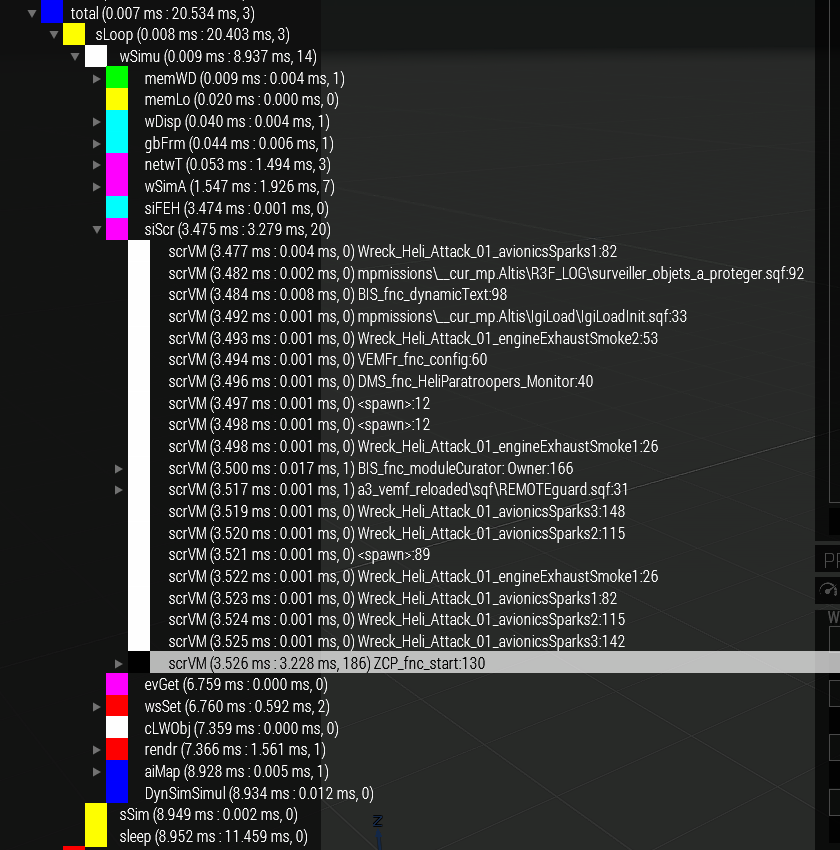
https://dedmen.de/sharex/Discord_2017-11-16_14-23-50.png
There is what's inside your main thread.
1.5ms of networking. 2ms of simulation (AI and vehicle movement and such)
and 3.2ms of scheduled scripts. Out of which 3.2ms are spent inside ZCP_fnc_start.
And then the server does nothing for 11.5ms (sleep) to make it not exceed 50 fps
I know that it is hard ^^ But that's how it works
hardy wren
yes i see
well i will try in local with no ppl to understand first how it works
so, i dissabled signatures verification
because those addons has no keys
and then i load intercept + profiling into client huh?
hardy wren
well yes if you want to test with online players
this will make me able to join with those addons without risk the server
untill i understand if you don have key verification ppl can join the server with "edited mods"
so they have a free cheating way :p
do i need to load intercept at server side or something?
hardy wren
ohh
whole cloud
What are you trying to do with it btw?
I won't profile scripts on the server.
hardy wren
ahh right
i don only need logs from server
then i join with intercept + profiles to check results xD ok
got it i guess
whole cloud
It's theoretically possible. At the end of a frame it copies results to your clipboard. You don't really have a clipboard on the server.
But I can make it write to logfiles like diag_captureFrameToFile
hardy wren
yes i did that
log to file
i did give a 10minutes of wait
[]spawn {
    sleep 600;
    diag_log "==================================================================";
    diag_log "INICIO DE CAPTURANDO FRAMES";
    diag_log "==================================================================";
    diag_captureFrameToFile 1;
};
1 frame it's enought?
whole cloud
Add a if (diag_fps < 20) or something like that
hardy wren
ohh good idea
whole cloud
and make it a while loop with like.. 5 minute sleep
1 frame could be enough. More are always better
hardy wren
what if i do
[] spawn {
    sleep 600;
    waitUntil { diag_fps < 20 };
    diag_captureFrameToFile 1;
};
captures just the first frame
which can happen when your server starts up and everything initalizes so...
hardy wren
so adding the sleep of 10 minutes
at 10 minutes everything should be already charged
@whole cloud one last question (for now) how do i open the profiler window with you script? 😜
whole cloud
same as in profiling binary
either run diag_captureFrame manually. Or the profiler will also call diag_captureFrame automatically
Everything is explained in the BIF post
hardy wren
@whole cloud got it thanks alot -> https://gyazo.com/6876cc66fe30663846fd752686af0372
i will wait to get the real log and will check it
and will read the entire post, because i still dont understand what is wrong or what is good there :p
hardy wren
@whole cloud do you mind to check that? -> https://pastebin.com/V2AcqZtR
i'm trying to guess whats wrong
i see ZCP is the only who took too much time
whole cloud
Gimme about an hour ^^
hardy wren
oki thanks
hardy wren
@whole cloud you mate, i'm waiting for you :p
whole cloud
Thanks for reminding ^^
hardy wren
ahh
whole cloud
That is after the server running for some time? ZCP_fnc_start is still taking up the full 3ms from the scheduler...
hardy wren
that log it's after 30minutes when server go lower than 20 fps
[] spawn {
    sleep 1800;
    waitUntil { diag_fps < 20 };
    diag_captureFrameToFile 1;
};
i did use that code
there was about 8ppl online, full activity
so you think ZCP it's broking the server FPS?
whole cloud
That script func is definetly not good. But that's not what kills your server.
There is a lot of networking going on in that capture too.
And the engine blocked for 20ms/60ms doing nothing because it was waiting for a job running in a different thread to finish
hardy wren
ok i'm understanding the 5% i guess so xD
how do i localize wth it's causing that waiting job
whole cloud
Find out what netSSM crUOC and mtPmj mean
nocturne obsidian
ZCP so chances are running exile or maybe epoch. Prob to many base parts on your server
hardy wren
Exile in this case, dont understand what you mean
nocturne obsidian
Find out how many objects your have on server i.e count allMissionObjects 'All'
Chances are your have over 8k of objects from people building bases on your server
whole cloud
Well I know how to turn that to <0.5ms easilly 😄
I'm kinda sad that I have so good ways to improve script performance.. But can't actually put it to use because all scripts that I run are already too fast
hardy wren
back
well i will try to find what those words means
and then i will try to figureout whats going on xD
hardy wren
wot, i just check again
ZCP is now normal
@whole cloud sorry but i cant find what those words mean
Find out what netSSM crUOC and mtPmj mean
hardy wren
ahh damn i thought you was sending me to learn myself xD
whole cloud
You can ask the devs if you want to 😄 I don't think you'll get an answer tho
hardy wren
so i'm fucked up¿? xD
@whole cloud you tell me that server is lock to 50 fps and i can uncluck to 150? :p
how? :p
whole cloud
so x64 prof is already there. Grab it and hav fun
whole cloud
Maybe a tiny bit but no
 silk knoll
Hi profiling experts,
i've just started playing with profiling, so question is: how to interpret the line like "scrVM....<spawn>:89", especially that <spawn>:89 part? Is it script handle #89 for VM, so lines with such a marker are executions in scope of single spawn/thread #89?
whole cloud
nope. 89 is the line number
It tells you that a script without a name (hence the default <spawn> name) was executing and either was at line 89 before it started or it stopped at line 89 at the end of execution
silk knoll
@whole cloud Then i'm confused with what i'm getting here -> https://pastebin.com/ft19NU6X
Lots of <spawn>:166, and single BIS_fnc_rankParams takes all 3ms (btw are those entries in scope of the function are VM opcodes?)
Another question regarding AS_fnc_localizar:61, if 61 - line number, then that makes no sense - code only has 24 lines - https://github.com/A3Antistasi/antistasiofficial/blob/master/AntistasiOfficial.Altis/Functions/fn_localizar.sqf
whole cloud
What "entries in scope of the function"
You call a function.. It could be that the line number is inside the fnc_location or BIS_fnc_nearestPosition. Really unreliable.
Something somewhere in some code somewhere calls BIS_fnc_rankParams and that's slow for some reason.
Profiling on scheduled scripts is not as easy as unscheduled scripts
You can use https://community.bistudio.com/wiki/scriptName to give a real name to those <spawn>
silk knoll
BIS_fnc_rankParams ->memAl, memFr, evGet etc (opcodes?)
whole cloud
Oh. No. memAl means memory allocation. Just generic.
evGet is resolving a script variable. Like getting the value out of a _myVar
You don't get that detailed profiling info out of the default Arma profiler
I think it just takes the best known name for the scripts.
So if you call BIS_fnc_nearestPosition from AS_fnc_localizar and the BIS function doesn't have a name it will just update the line numbers and use the name it already has.
Not really reliable at all
silk knoll
@whole cloud Are there any practices to make code more profiler friendly (like scriptName)? btw thanks for the hint
whole cloud
Is going to unscheduled an option?
If so https://community.bistudio.com/wiki/Performance_Profiling#Creating_your_own_subtree
You can profile these unscheduled parts in my Script profiler too. But if your scripts are made to be scheduled going unscheduled might not be easy nor good.
silk knoll
Current codebase relies heavily on scheduled env, that's the problem. Thanks for you help
oblique panther
My steam client downloaded something from perf prof branch and now it says "performing first time setup" is this something you pushed out @empty goblet or anyone who knows?
whole cloud
No. Steam pushed that
empty goblet
there was no profiling update i know of
oblique panther
wierd, I wonder what that was then
oblique panther
ok
 hallow yew
Have you changed Arma profile? @oblique panther
whole cloud
@hallow yew English please?
hallow yew
Ingame Arma character profile, thought that was plain enough!
whole cloud
Who are you asking that question to?
woven loom
i think raggamuffins won't get the ping if you mention on editing a posted message
whole cloud
I don't see how Steam downloading a net framework update has anything to do with him switching his Arma character profile.... @hallow yew ?
hallow yew
I pm'd him anyway now, I have seen it if a player changes their character profile ingame, it can sometimes break/corrupt some .net dependencies which auto download through Steam when it's next started. Also related to when all your Steam Workshop mods disappear. Only noticed it in the last 2 months or so
whole cloud
But.. I already said it was a global .net update from Steam... It was pushed to all games that use depend on that .net redist...
Right there. 2 messages before your first message today.
hallow yew
ok, nothing received here, so not Arma related then?
oblique panther
Thank you @hallow yew :wookieLove:
whole cloud
@Raggamuffins#5836 It's just Steam trying to update your .net framework. If it is unable to just go to Arma 3 directory and "CommonRedist" and install it manually from there.
woven loom
@whole cloud yeah I told him that in #arma3_questions or #arma3_troubleshooting , don't remember.
Seemed to be something about steam borking his .net install
 fair lagoon
starting to look into some profiling data with the arma script profiler, and i have a tree named "{call _x" - any advice on how i can start to track down what script that's really coming from?
data available here: https://pastebin.com/9zeqLxXi
also, what is the 3dSwp variable in the engine profiling stats?
whole cloud
3dSwp is 3D swap. Swapping the backbuffer to front
That scope is quite bad though. It contains a lot of other stuff besides that
The times in your script profiler report are kinda messed up.. It also captures multiple frames... interesting...
Please don't profile TFAR. It's so bad it hurts my eyes
For the {call _x you can't really do that much. I have never seen that.. That code is not in ACE or CBA or TFAR... I think..
It's just the first line of that script.. I could tell the profiler to display more than just the first line
fair lagoon
i'll try searching through some of our open source mods to see if i can find any scripts that start with that line. as for 3d swap, are there any performance settings that might make that process faster?
whole cloud
Don't think so.. besides reducing resolution
shell mountain
sorry guys no linux build for 1.78 yet right?
 random idol
I'm guessing the new performance build won't be further then two weeks out? 😉 i reaaaaly like the perf build :p
woven loom
@shell mountain if it didn't say so in the SPOTREP, then no
oblique panther
@whole cloud : I had to reinstall windows after last weeks issues with .NET beeing distributed via Steam. It broke a working stable Windows 7 system. Further Steam refused to help me and told me to talk to Microsoft. Running windows 10 now... 😛
 upbeat briar
All Steam does is run the .NET installer that Microsoft supply. So Steam was quite right to direct you to Microsoft.
oblique panther
@empty goblet : When selecting Perf branch in Steam, it starts downloading 8gb of data , even though I allready have that data downloaded. Just a heads up.
nocturne obsidian
@oblique panther dont think there is a perf build yet. So chances are you switched back to the previous arma version
oblique panther
ok, guess that might be the explenation
woven loom
Yeah, I had to switch from profiling branch to stable to get the update
unique rose
Dreaming of perf ZZZZZzzzzz.....
empty goblet
@unique rose well perf 0 for 1.78.profiling is already available (just sync with 1.78.main stable)
whole cloud
Why don't you notify us? ^^ I can finally get back to work then
unique rose
Info is power DW lol
empty goblet
it's not important w/o the BE fixes
unique rose
@empty goblet so the steam stable build is profileing version 1.78 as the standard exe?
as im not seeing anything in https://www.dropbox.com/sh/582opsto4mmr8d8/3BSy9PdRGm
 unique rose
So confused
whole cloud
Steam profiling branch now has profiling build that is in-sync with 1.78. No additional fixes or stuff
unique rose
arr i dont use steam profiling that prob why im baffled
empty goblet
see #dev_rc_branch
empty goblet
1.80.143752 new PROFILING branch with PERFORMANCE binaries, v00, server and client, windows 32/64-bit, linux 32-bit server
- sync with everything 1.78.x and 1.80.main
details: https://forums.bistudio.com/forums/topic/160288-arma-3-stable-server-180-performance-binary-feedback/?do=findComment&comment=3254378
Bohemia Interactive Forums
1.76.143281 new PROFILING branch with PERFORMANCE binaries, v07, server and client, windows 32/64-bit, linux 32-bit server
+ Fixed: Particles could di...
yay
empty goblet
ye it's 1:1 with main just was build before hotfix was
tho some claim they have faster loading times and better FPS with performance 1.80 than main 1.80... 
 silver roost
It's name says it all.. it would not be called performace build if it didnt make it faster.. come on.. get real..
unique rose
anychance of V2 with hotfix included
whole cloud
We'll I'd say we first have to wait for what v1 entails
unique rose
yer true but if we get V2 then it will fix the issues in V1 so ya
woven loom
but v00 already has the hotfix
whole cloud
giggle That was not bad
unique rose
i am hoping that giggle with at him as
ye it's 1:1 with main just was build "before" hotfix was
nocturne obsidian
I certainly don't test the performance builds all the time but every time I have done I couldn't find any performance difference of note so far. It has always been within margin of error for me over the past year or so. More than the performance build I use the profiling build to track down badly behaved scripts.
unique rose
perf defo has a diffrence if you monitor cycles per second
whole cloud
Performance started out as performance tests. But then it turned into a general test branch that's based on release instad of dev.
It get's performance improvements sometimes but rarely nowadays
nocturne obsidian
The profiling branch at least has proved exceptionally useful and I wish we had had it earlier in the games release cycle. But yes I think we are pretty much done with performance at this point and its mostly bug fixes.
whole cloud
I know of half a dozen script performance improvements. But BI didn't care when I reported that over a year ago and they still don't. As it's not really going to give you +10 fps or smth
nocturne obsidian
I mostly use it for our/mod stuff. Has made finding the culprit for odd performance problems easier at least. I suspect some of the early problems with performance will have been mods behaving badly. A long time ago but we found that ACE cost a lot of fps constantly just to be included. Nowadays I can see that whereas back then I found the difference between vanilla and modded and had to bisect all the mods to find the culprit
whole cloud
I made a crappy hard to use script profiler before. Now I made a nice much easier to use script profiler that needs the profiliing build.
Wish I wouldn't have wasted so much time back then
woven loom
surely the things learned when you made the earlier profiler would have come in handy this time?
whole cloud
Could have.. If I looked at it while making the new one...
woven loom
😄
random idol
@whole cloud are you going to release some of those fps unlocked binaries again btw?
woven loom
@random idol Dedmen doesn't work for BI, Dwarden does
random idol
@woven loom i know that however he had tweaked the binaries from last perf build to test for BI if there is changes running with fps unlocked to 200 instead of 50
devout yacht
@random idol SERVER FPS
random idol
@devout yacht yea i know don't worry it still gave me and my guys an fps boost of 10-15 fps
whole cloud
Planned yesterday. Unforseen stuff happened. Now planned for today. Should be there in an hour or so
whole cloud
done
oblique panther
funny with the "placebo" effect working LUL
random idol
Binaries unlocked my server to run at constant 452 FPS and CPS for the entirety of a zeus mission with 12 people and about 100 AI :p
i had constant 84 fps client side
silver roost
Interesting if that can work 😃 Would be happy to test 😃
whole cloud
@silver roost https://forums.bistudio.com/forums/topic/210492-server-fps-limit-testing If you look closely you might find a link to pre-patched binaries
silver roost
Thanks, 😃
random idol
@whole cloud the unlocked binaries that you have released are performance binaries are they not? I'm currently using them on our server but were having some server freeze ups and i'm wondering if it might be caused by the binaries.
random idol
coudl that cause issues when being used on a server?
whole cloud
Not known. That's why I'm testing that
hallow yew
I had no issues running performance binary with fps unlocked on 1.76, now I can't find the hex for fps in 1.80 perf branch 😦
whole cloud
I posted it in the BIF thread.. like always. Only for prof though. But there isn't a big perf difference
hallow yew
Was looking for 32 00 00 00 around the one you posted but not luck
whole cloud
you have to use the same binary as I did.
hallow yew
Yeah, i'm using the prof binary on my servers, just wanted to test on the perf binary to see if there was any difference, but its not at the same address
whole cloud
Finding the offset isn't that easy. And it differs between every version.
hallow yew
I guess I will make a cup of coffee and go hunting!
thin wyvern
Maybe this line in perf c0 74 66 83 3d 7e 1a c0 00 00 b9 32 00 00 00 b8
hallow yew
@Horus#8280 yep, found it
empty goblet
1.80.143830 new PROFILING branch with PERFORMANCE binaries, v01, server and client, windows 32/64-bit, linux 32-bit server
- Fixed: The 'Unknown enum value' errors would display incorrectly for the createAgent, createUnit, setVehiclePosition, createVehicle, getUnitTrait script commands
- FIxed: crashes related to physx/geometry lod
- Added: logging for BE packet issues
- Fixed: Enum 'Errors' & Eden Mission attributes
- Fixed: Some dynamic simulation presence issues
- Removed some obsolete code triggering false AV positives (e.g. from Avast!)
details: https://forums.bistudio.com/forums/topic/160288-arma-3-stable-server-180-performance-binary-feedback/?do=findComment&comment=3256105
Bohemia Interactive Forums
1.76.143281 new PROFILING branch with PERFORMANCE binaries, v07, server and client, windows 32/64-bit, linux 32-bit server
+ Fixed: Particles could di...
Nice change log for perf builds 😀
whole cloud
BE logging is nice!
Hopefully not so spammy as my TFAR logging so that everyone begs to be able to remove it 😄
empty goblet
it possible i missed some minor fixes/crash fixes but this must suffice
woven loom
BE logging won't run if BE isn't used on the server, i guess?
empty goblet
ye, but this isn't the BE logging we all waiting for ... that will be more likely in next profiling 😉
aka i will try get that one out before weeekend
woven loom
cool, thanks
nocturne obsidian
Does this fix the stuck in reloading animation bug for post mission launch created AI? The fixes to createUnit suggest maybe but I am not sure if that was the cause or not.
whole cloud
The relevant things are the ones that take up most time.
And you can guess most of that yourself
OnMsgCl On Message Client
memAl memory Alloc
nwCli networkClient
netwT networking
whole cloud
Could look it up.. But I'm just on my way to bed
Just playing with some life idiot in #general_chat_arma
I'd say multithread P.. something XD
or mutex
woven loom
Postmodern jukebox
whole cloud
I know it's one of those things to not care about
empty goblet
sadly no new profiling for the weekend, i'm sorry about that ...
if anyone gets crashes client or server on the 1.80.143830 binaries, please PM me downloads with rpt,mdmp,bidmp as soon as possible!
 trail wind
does the profiling exe has the performance tweaks as the performance exe?
woven loom
@empty goblet we had bunch of people crash due to BAD_MODULE_INFO, probably connected to the Supports module used in the mission. At least 2 of us with profiling branch didn't have issues, however. Will try and send you crash dumps if anyone sends them to me
 proud scaffold
what dose all this mean
whole cloud
Yes?
empty goblet
so, anyone got any new crashes for me ? (except those who already sent them in)
unique rose
only the ones that are from 2013 tbb related
empty goblet
today highly likely none but next day seems to have higher ratio of success
btw. if anyone of you sitting at 143830 crashdumps then send them to me asap if you want me try to get them fixed for theoretical hotfix 😉
whole cloud
I'm saldy only sitting on a couple dozen crashes I caused myself :u
empty goblet
ye, those i really do not want to know about 🤣
hallow yew
@empty goblet which is newer for server, perfV1 or hotfix? https://dev.arma3.com/post/spotrep-00078
 empty goblet
ofc hotfix
empty goblet
there is new profiling v02 (1.80.143968) with the BattlEye traffic logging , must use -netlog -belog together to generate the BElog! (not recommended on slow machine and HDD drives)
there is no point to use unless you have BE kick/timeout issues etc. and UNLESS the server has >20 fps
woven loom
(is the linux server and -netlog issue fixed?)
empty goblet
not sure what issue with linux, the server crash (i think it was windows) was fixed some time ago
1.80.143968 new PROFILING branch with PERFORMANCE binaries, v02, server and client, windows 32/64-bit, linux 32-bit server
- sync with everything 1.78.x and 1.80.main hotfix #2
- BattlEye traffic logging (not recommended for HDD/slow servers, must use "-netlog -belog" at once to generate BElog)
details : https://forums.bistudio.com/forums/topic/160288-arma-3-stable-server-180-performance-binary-feedback/?do=findComment&comment=3257534
Bohemia Interactive Forums
1.76.143281 new PROFILING branch with PERFORMANCE binaries, v07, server and client, windows 32/64-bit, linux 32-bit server
+ Fixed: Particles could di...
back when 1.78 dropped, linux servers would crash if started with -netlogs
(see old #server_linux messages)
we turned it off back then, haven't re-enabled
shell mountain
I still cannot use the headless client and it keeps segfaulting in loop on Linux. Is that still a common problem?
I just tried also latest perf but no luck : (
Did I miss something or its a known issue?
woven loom
Don't have that issue on our server so probably not common
maybe try #headless_client or #server_linux
woven loom
so with profiling branch (perf binary)
rpt spam
22:51:53 Class BrokenGlass2 destroyed with lock count 1
22:51:53 Class Glass_49_hitpoint destroyed with lock count 1 22:51:53 Class DestructionEffects destroyed with lock count 1
22:51:53 Class Door_1_sound_source destroyed with lock count 14
etc
a few thousand lines
whole cloud
constant spam or spam when you alt+F4 ?
whole cloud
It already logs tons of that stuff when you exit the game so I'd consider that "normal"
woven loom
when glass is destroyed etc
whole cloud
But it shouldn't mod game spam
woven loom
oh no not upon exit
whole cloud
Yeah that's definetly bug then
woven loom
It could be because of mods though
woven loom
I see
whole cloud
Normally engine unloads unused stuff from ram
That message complains that the stuff that was just unloaded was still being used
empty goblet
1.80.144071 new PROFILING branch with PERFORMANCE binaries, v03, server and client, windows 32/64-bit, linux 32-bit server
- Fix for broken turret locality in multiplayer
details : https://forums.bohemia.net/forums/topic/160288-arma-3-stable-server-180-performance-binary-feedback/?do=findComment&comment=3262183
Bohemia Interactive Forums
1.76.143281 new PROFILING branch with PERFORMANCE binaries, v07, server and client, windows 32/64-bit, linux 32-bit server
+ Fixed: Particles could di...
 jade mason
do i need to join servers with performance binaries to see perf improvements?
whole cloud
If you mean if you need the performance binary to have the performance binary then yes.
If you mean if the server also needs to have it then no.
I don't know of any performance improvements that are currently enabled in the performance binaries though
whole cloud
Yes.
As i said i don't think there are any performance improvements in the performance binaries currently
jade mason
i would only to fix the awful spiking when you zoom with the weapon
whole cloud
Get a faster hard drive or put the game onto a SSD
That's nothing that the game can just magically fix with some special magic performance binary
jade mason
i wonder why devs doesn't fix that
whole cloud
A game dev can't just fix your slow hard drive
jade mason
but 40 fps with gtx 1080 yes though
whole cloud
Just zoom in to preload that stuff. Then you won't have a spike when you zoom in the next time
or lower your graphics settings
jade mason
this game always had awful performance since its release date
whole cloud
I just zoom in and look around till the lags stop and everything finished preloading.
whole cloud
poor GPU usage? I can push my GTX 1070 to 100% load easily
woven loom
well, mirko's not wrong
Yes you can push it to 100% but a lot of the time it's much lower
let's not pretend the game isn't CPU bound
for example, earlier today i was told On my 1070 coming from 1440p to 4k I only lost 5 frames on average
whole cloud
It definetly is. But it's not like you can "just" fix that
woven loom
frames per second obviously 😄
yeah, it's not an easy fix
and definitely not something that will appear in a perf binary one day 😄
whole cloud
People always say Arma is poorly optimized. It's quite well optimized though. The engine is just not multithreaded
woven loom
yeah, i've had it run on an IGP
and a non-gaming laptop
it just doesn't scale upwards very well, because CPUs can only get so fast in terms of clock speeds 😄
 celest sparrow
 random isle
hi @celest sparrow
random isle
is this channel sol```What?
random isle
no mo perfs ?
whole cloud
What?
random isle
devout yacht
you aren't making any sense
random isle
🤔
hallow yew
The fps unlocked 64bit perf binaries are in here if anyone wants to test https://feedback.bistudio.com/F79242
random isle
@hallow yew they dont work
whole cloud
Details?
random isle
one sec i might me lying
random isle
nvm it works just takes like 5 more min for it to load up
 heady parcel
No load up time issues for me
random isle
how bout super high core usage on emtpy server
whole cloud
That would be kinda logical...
woven loom
haven't usually seen that though
whole cloud
Well your server doesn't usually run at 9000 fps does it?
woven loom
oh noes it's over 9000 😱
whole cloud
yes. yes.
nocturne obsidian
How much of a fps boost is provided by the performance builds?
whole cloud
0
empty goblet
actually tiny, because of that recent fix 😉
whole cloud
recent fix?
v2 was sync with 1.80
v3 fixed broken turret locality
empty goblet
v3
remember it got rid of some errors which were eating some tiny amount of performance 😉
nocturne obsidian
So not worth using it then?
whole cloud
If you could get a magical 10+ fps increase. Don't you think that would be in the release already? ^^
I won't give you what you want. So no.
It will fix some bugs though. Enough reason for me to use it
empty goblet
@nocturne obsidian it's worth using because of the fix
hallow yew
V3 is nice and stable, that's reason enough to use it imo
devout yacht
For some reason i always see on youtube "how to get 1000000 fps in arma 3", and just for kicks and giggles i watch it. Ends up being a lifer or exile player using perf binaries.
hallow yew
set game resolution to 284x160
nocturne obsidian
Wont unfortunately fix the issue, but be my guest and try it. The performance problem isn't graphics based for the most part
nocturne obsidian
@whole cloud I just downloaded all of the files from Google drive which it came out to 5 total. How would I go about installing them. The readme was particularly vague.
whole cloud
You take arma3client profiling
put the .exe into your game dir and rename it so that it replaces the original
or you just use the steam branch which would do it automatically
nocturne obsidian
Ok I'll roll with the steam branch since its automated kinda dont feel like messing with these
O cajt send pics. Any chance that you can send me a direct link to it by chance it throws me to a Wikipedia page unless i need to dig through. Sorry im not on top of things got 2 hours of sleep
Cant*
whole cloud
link?
You'd need the password for the steam branch
which is on the bif thread I'm sure
nocturne obsidian
O thats a bummer
O wait i see through steam is where the beta program can be accessed correct?
whole cloud
yes
nocturne obsidian
Looked all over the place for the beta password and didnt find anything
https://forums.bohemia.net/forums/topic/160288-arma-3-stable-server-180-performance-binary-feedback/
Bohemia Interactive Forums
NOTE: 1.80. PROF/PERF up! you don't need need new client on PERF/PROF server !
there is branch on steam you may use, but beware that sometimes data on...
BI really should just remove the password requirement
@nocturne obsidian im assuming the password is in the description?
Wait i think i got it
Yup thank Christ it went through
empty goblet
the password is some relict issue with old branch system , removal breaks the branch
otherwise we would do it long time ago
nocturne obsidian
If was me i would just break it on a update to arma and be done with it 😛
empty goblet
i will remember that for the EOL patch time
whole cloud
on perf/prof? Not dev?
 spiral pond
fixed. ty
 lone delta
Just quickly, can the prof branch give me indications on performance between mods?
whole cloud
yes. You can profile what's causing fps drops. So if one mod causes more drops than another. You can see it
lone delta
Awesome. I'm just wanting to compare 2 mods
How does the performance testing work? Do I need to make a mission?
whole cloud
https://community.bistudio.com/wiki/Performance_Profiling
You call https://community.bistudio.com/wiki/diag_captureFrame and it will show you why the last frame took as long as it did.
I don't think it will help much if you don't actually see FPS drops or the FPS difference
lone delta
What about comparing 1 on 1 vehicles?
whole cloud
Well. Place 1 vehicle and look at FPS counter. Place other vehicle and look at FPS counter.
The one that has lower FPS is worse, performance wise.
Don't need prof branch for that
lone delta
That is true. Anyway cheers for the info. I know people who say 1 mod is better than the other though that's just based on their FPS counter and was 'tested' in various missions
whole cloud
If you don't have the source files of the mod to look at. Then you can basically only compare the FPS counter.
lone delta
May I ask why do you need the source files?
What can you tell from the source files FPS test compared to a non source files FPS test
whole cloud
In the source files you can look how detailed the models are
more detailed == more demanding == lower fps/performance
You wouldn't do a FPS test if you had the source files
I think you can also check polycount without having the source files. But you'd have to compare each model.
And if you don't have like.. The same weapon or vehicle in both mods so you can directly compare that's not worth much
lone delta
Yea poly count is understandable. Also guessing LODs play a major part. You could have a high poly object with really good lods compared to a lower poly object with worse lods
chrome wadi
Indeed
nocturne obsidian
I don't under stand arms 3 anymore :(
whole cloud
@nocturne obsidian Please cut the spam/troll now.
 untold drum
someone has the code for steam for the branch? It's not in the list of pinned messages
nvm
just checked the first page of David's update thread
empty goblet
ok, anyone got some crashes for me from profiling/performance binaries or 1.82.rc ?
just slap me in PM in case i didn't react yet
empty goblet
i'm living the future obviously 
whole cloud
Maybe you are already counting in the mandatory hotfix release right after release when you notice everything is messed up ^^ Like with the last couple DLC's
empty goblet
i will not comment on that even if it was true 😇
 grim wren
wish perf binarys would release with new patch. pretty pleas Dwarden.
whole cloud
It's been out for 5 minutes now 😄
empty goblet
@grim wren it's too late in day for that, tomorrow
unique rose
^^YAY^^
empty goblet
and it should be now on 1.82 sync too
unique rose
any dropbox version?
 soft adder
We getting a perf build soon?
woven loom
well assuming there's a need for it
whole cloud
we already got a perf build according to Dwarden
I guess it's only on steam currently
grim wren
sry I am a bit late to say "thanks Dwarden" for your rapid effords to keep us up to speed.
empty goblet
new profiling published, has one server crash hotfix in it (zeus server related)
empty goblet
1.82.144658 new PROFILING branch with PERFORMANCE binaries, v00, server and client, windows 32/64-bit, linux 32-bit server
- sync with 1.82.main branch for profiling branch / performance binaries
1.82.144667 new PROFILING branch with PERFORMANCE binaries, v01, server and client, windows 32/64-bit, linux 32-bit server - hotfix server crash at zeus gamemode
details : https://forums.bohemia.net/forums/topic/160288-arma-3-stable-server-182-performance-binary-feedback/?do=findComment&comment=3283427
Bohemia Interactive Forums
I do have file uploaded here: https://feedback.bistudio.com/T128058
This is where I reported the error. My latest .rpt file is in the thread.
done @unique rose
woven loom
hotfix server crash at zeus gamemode - could you give more details about this?
empty goblet
just fix for random crash from official zeus server (it still can crash with other mod, just zeus was the one where it happened)
there're some other crashes already in analysis / fix queue but this was only one already 'fixed'
woven loom
oh so it shouldn't be a problem if a client enters zeus outside of the game mode?
i mean like on one our community made missions
empty goblet
it's crash fix so no idea what you mean, test it and see
woven loom
fair enough, thanks
unique rose
@empty goblet thanky thanks
what is the aim of is it any diffrent from the ones on stable steam branch?
1_82_other_windows_libraries_binaries.7z
empty goblet
just to avoid someone to have obsolete libraries for the client
empty goblet
there is new profiling 1.82.144685 with several crashfixes (terrain loading in editor and some vs missiles)
thin wyvern
@empty goblet Can you add that version on Dropbox?
empty goblet
later, atm. busy
thin wyvern
rgr..thanks 👌
empty goblet
1.82.144685 new PROFILING branch with PERFORMANCE binaries, v02, server and client, windows 32/64-bit, linux 32-bit server
- crashfixes for issues with terrain loading in editor and several related to missiles
details : https://forums.bohemia.net/forums/topic/160288-arma-3-stable-server-182-performance-binary-feedback/?do=findComment&comment=3285238
Bohemia Interactive Forums
I do have file uploaded here: https://feedback.bistudio.com/T128058
This is where I reported the error. My latest .rpt file is in the thread.
@thin wyvern done
whole cloud
Is it intended that https://community.bistudio.com/wiki/diag_lightNewLoad and https://community.bistudio.com/wiki/diag_setLightNew are available in profiling build?
Or are they also available in release build?
soft adder
is there going to be a code we can input into steam so we can download perf build that way?
whole cloud
yes
soft adder
im really bad at everything so i have no idea how to set up the build :DD thanks tho ^_^
whole cloud
CautionSpecialProfilingAndTestingBranchArma3 is the steam beta code thing
soft adder
if i use that will i be fine?
thin wyvern
@empty goblet 🍷
 fallen gull


 empty goblet
anyone got crashes 144685 ? if yes, send me the e.g. dropbox download (crash files in 7z) via PM
 spice tapir
sent
empty goblet
1.82.144709 new PROFILING branch with PERFORMANCE binaries, v03, server and client, windows 32/64-bit, included linux 32-bit server
- fix for proximity explosions for guided missiles```
details : https://forums.bohemia.net/forums/topic/160288-arma-3-stable-server-182-performance-binary-feedback/?do=findComment&comment=3286739
Bohemia Interactive Forums
I do have file uploaded here: https://feedback.bistudio.com/T128058
This is where I reported the error. My latest .rpt file is in the thread.
new crash files sent Dwarden
empty goblet
note: after weekend, if you get or got any crashes from 144709/144710 pm me those files as usual (not interested in any older build)
empty goblet
profiling was updated with sync to 1.82.hotfix, only data change as binaries are still same (both main and profiling are equal in that)
empty goblet
new profiling with some fixes and the AI vs fallen tree viewblock as bonus
thin wyvern
@empty goblet Add new PROF/PERF to Dropbox 🤓
empty goblet
1.82.144848 new PROFILING branch with PERFORMANCE binaries, v04, server and client, windows 32/64-bit, included linux 32-bit server
- some crashfixes e.g. while disconnecting
- AI no longer see thru fallen trees
details: https://forums.bohemia.net/forums/topic/160288-arma-3-stable-server-182-performance-binary-feedback/?do=findComment&comment=3294724
Bohemia Interactive Forums
I do have file uploaded here: https://feedback.bistudio.com/T128058
This is where I reported the error. My latest .rpt file is in the thread.
there you go @thin wyvern
 wanton lynx
Did I just see the v4 binaries get removed in front of my eyes @empty goblet ?
Nevermind, seems to have been a google drive glitch? Technology is wonderful
thin wyvern
Thanks 🍷 @empty goblet
hallow yew
perfV04 64 bit unlocked server exe up https://feedback.bistudio.com/F79242#100
empty goblet
new profiling rolling slowly in, it shall have attempt on fix for that sound related performance drop e.g. https://forums.bohemia.net/forums/topic/217328-arma-3-low-fps-and-degrade-over-time-because-of-sound-error-found-what-it-cause-ssadv-steps-to-reproduce/
Bohemia Interactive Forums
https://feedback.bistudio.com/T130564
Already posted on feedback, post on reddit and forum for visibility.


I found a way to reproduce this b...
1.82.144872 new PROFILING branch with PERFORMANCE binaries, v05, server and client, windows 32/64-bit, included linux 32-bit server
- attempt to fix sound related performance issue e.g. from ^
details https://forums.bohemia.net/forums/topic/160288-arma-3-stable-server-182-performance-binary-feedback/?page=91&tab=comments#comment-3298078
Bohemia Interactive Forums
I do have file uploaded here: https://feedback.bistudio.com/T128058
This is where I reported the error. My latest .rpt file is in the thread.
huzzah!
 golden jasper
Thanks Dwarden!
whole cloud
Quick test didn't reproduce the bug. But I need to do a proper test.
Tried to reproduce in MP with mate. He is on half his original fps and I'm back at 100%
golden jasper
Clarify was your mate using perf exe?
boreal wigeon
^Seems to fix it, we had half of our players use the perf build v5, they had no issues. Other half (no perf build) did have FPS issues over time, of course restart fixed it but permanent fix is better :P.
whole cloud
best bugfix this year huehue
empty goblet
now it needs just way more people to use that goodie 😉
empty goblet
posted it on reddit too just for sure https://www.reddit.com/r/arma/comments/8tcafd/performance_build_v05_182144872/

 uncut ore
I could not reproduce the bug either
boreal wigeon
Push it to stable 😉 easiest way for more people.
woven loom
probably wouldn't want to unless they're certain of side effects etc
 rocky quest
All praise Dwarden!
Out of curiosity, is there any more risky tweaks out there that could improve performance at the risk of stability available?
empty goblet
there are several possibilities but i doubt i get them approved but i will at least try
hallow yew
I found that removal of the hard 50fps server limit, arma 3 server starts up/waiting/setting up/playing a lot faster, but it doesn't offer any "in session" benefits
whole cloud
doesn't make sense in my book though
50 fps limit should only be in the main loop
which shouldn't influence start up time. The main loop only starts after the game is loaded
not sure if the main loop also runs in waiting/setting up states
 frozen holly
Hi! i tried perf V05 client x64 perf exe. Result: see ground: 60FPS, see horizontal: ~40FPS, see sky: 30FPS. (VD 4000)
original x64 exe: ground: 60, horizontal: 57, sky: 60
empty goblet
that's weird result considering there was no change in rendering
 mild pecan

frozen holly
i don't think its rendering problem. I got fps issue in online game only.
 cunning kite
Local? Or in a server
I think your fps is related to server fps, so low server fps makes your game run shite too
woven loom
it's not, unless the server FPS is below 20, in which case behaviour can't be guaranteed
frozen holly
my 3 test in max 5 mins intervall. And at same position. i started original exe then perf 5 and again original
i will test all perf exe
woven loom
which map?
was this an empty scenario or were there AI/other players?
were you looking at the same direction when looking horizontally?
frozen holly
dedicated server + CTI mission + altis + ~20-25 player with ais + same direction
woven loom
Which CTI mission?
frozen holly
"BECTI - Zerty/HTom/Yoshi_E 1.3.4.2" - on altis
cunning kite
Its not? Its what always has happened to me
empty goblet
@frozen holly it needs case (mission) where it can be reproduced by others
also both server/client runs the perf 05 ?
boreal wigeon
@empty goblet Haven't managed to get into the RC yet, but are the FPS fixes from v05 in the RC?
cunning kite
Hey @empty goblet , given you seem to be the guy for all this performance stuff, is there ever going to be something done to let the game utilize more threads? I mean I know how really hard that kind of stuff actually is, and things like headless clients are a thing, but can't that somehow be incorporated into the server code itself?
(and yes I know there are some options availible for threading, but they don't make too much of a difference when it comes to larger self-hosted missions (whenever hosted on their own pc or on a server)
woven loom
Maybe with Arma 4 ™
empty goblet
as dedmen said, no low level changes, unless it's performance gaining fix (like fix for the sound related bug/leak) or easy optimization
whole cloud
I still have a couple of easy performance optimizations up my sleeve 😉 But the end improvement is probably not worth the effort. And we already have simple workarounds for that
frozen holly
@empty goblet i will collect more information and test perf5 on server side too. need some days 😃
empty goblet
in case someone has crashdumps from 1.82 prof/perf v05 please do not forget to share those with us (DM me or via A3FT (just PM me url to ticket))
frozen holly
My bad fps caused by other program. I tested perf 5 client and no more 20fps bug.
Before this exe, i always lost fps after 20mins, but now i can get back 60 sometimes. AVG ~50 after more hours game and 0 crash. Thx, GJ.
empty goblet
what program @frozen holly ?
frozen holly
utorrent 😉 don't know why just need turn off and all ok
woven loom
probably disk i guess
woven loom
Repro steps?
random isle
ya shit ton of mods i tired to pm dwarden log but shitcord only takes 8mb max
woven loom
Maybe. For me usually one 42MB dump compresses to about 2MB iirc.
nocturne obsidian
I am trying ascertain what contributes to the following line out of diag_captureFrame output - visUA; 20.88727; 0.21092;"~~ 29.77 ms, 103x151"
Why is that 21ms on a client machine, what does it measure? What does the 103x151 refer to?
This is the root of the performance problem on clients in antistasi and I am trying to get an idea of how to fix it.
 high wedge
@nocturne obsidian Can you PM me on what you find out as well? We are running the official Antistasi server and today we have set up the perf build to capture some frames when our server performance drops to 2...3 FPS. But now we have to update it to the new arma version, hahaha, so no really slow frames captured yet, only one with 5 FPS but it's not so bad yet.
nocturne obsidian
I shall do my best
 fickle geyser
I'm interested too ^^
spiral pond
you guys know this page, right? https://community.bistudio.com/wiki/Performance_Profiling
you could ask Dedmen if he can look up the full name for visUA - not sure if its in the code though
vis = visual
aka some drawing stuff
whole cloud
Already did. Yes he knows
spiral pond
ok ty
whole cloud
also know what the 103x151 "means" but don't know what that what it means actually means
spiral pond
does the mission do some UI drawing?
maybe reyhard or Dwarden can get a list of the short names
whole cloud
it's not drawing. It's some visibility check
spiral pond
pretty sure BI has internally some list
whole cloud
That's exactly why BrightCandle asked here 😉
whole cloud
It is. Checks if objects are visible from origin and not hidden behind particles and other stuff
empty goblet
sync of profiling branch with 1.84 is now available on STEAM
 gusty mural
Noice
 brittle hamlet
for serrvers too?
empty goblet
ye i just didn't publish it on my dropbox/google drive yet, i will try do it tonight {can't atm}
brittle hamlet
ok
 autumn arch
Whatsup folks! How do I sync on Steam? There is a how-to guide available?
woven loom
autumn arch
Ty!!!
 oblique topaz
this profiling branch change the malloc and the exe file ?
oblique topaz
how to make the profiling exe start via launcher?
when i hit 'play' it start the normal arma3 exe
whole cloud
use the steam branch. Or replace your Arma3 exe with the profiling one
oblique topaz
ok
oblique topaz
wich malloc you guys use
whole cloud
default. Still waiting for Dwarden to send me that experimental beta test one 😉
Dedmen missunderstood and will compile his own malloc
empty goblet
note: there will be new server profiling branch today with some fixes and quality of life tweaks
patent dome
 Can't wait
oblique topaz
how to know if arma is using large pages ?
whole cloud
I heard "Process Hacker" can tell you
empty goblet
Process Hacker and VMMap
nocturne obsidian
Process Hacker 2 and VMmap don't explicitly tell you the page size, but they do show you the allocated sizes and that invariably contains some 4KB gaps if it is the normal small pages and if you are seeing allocations below 2MB then its not huge pages. That is what I gathered looking at Arma and other programs using these two tools.
I guess I was expecting it to be an obvious property that was just called out but it didn't seem to be (not that I found anyway).
oblique topaz
thanks
empty goblet
1.84.144930 new PROFILING branch with PERFORMANCE binaries, v00, server and client, windows 32/64-bit, included linux 32-bit server
- sync with 1.84.main branch
1.84.144943 new PROFILING branch with PERFORMANCE binaries, v01, server and client, windows 32/64-bit, included linux 32-bit server
- fixed command-line multiplication when using server.cfg setting missionsToServerRestart
- some quality of life tweaks
Bohemia Interactive Forums
I do have file uploaded here: https://feedback.bistudio.com/T128058
This is where I reported the error. My latest .rpt file is in the thread.
 topaz dagger
i miss the 64Bit Linux build 😄
empty goblet
it's lurking in the same pub as A2OA linux server for 1.64 EOL patch, at least that's what i heard 🤣
patent dome
What exactly are the quality of life tweaks? There are no details about it in the thread.
empty goblet
Chef's secret sauce
spiral pond
@empty goblet are these cmds still only in this branch or also in the stable now?
https://forums.bohemia.net/forums/topic/160288-arma-3-stable-server-184-performance-binary-feedback/?page=87&tab=comments#comment-3204941
empty goblet
@spiral pond should work in any branch afaik
spiral pond
ok cool. so could be added to https://community.bistudio.com/wiki/server.cfg, right?
whole cloud
Can't get huge pages to work. Launching Arma as Admin and I assigned that windows lock pages priviledge to myself.
Neither the BI tbb mallocs nor my self compiled ones ¯_(ツ)_/¯
Reading the TBB source.. hugepages is only allowed on Linux 🤔
And If I add the code manually to enable them on windows according to what Microsoft says.. Arma just crashes
Include the MEM_LARGE_PAGES value when calling the VirtualAlloc function. The size and alignment must be a multiple of the large-page minimum.
It probably crashes because of that second sentence
whole cloud
Ohhh crap it works. 2GB page size 🙈
thin wyvern
Config:
User is admin: yes
tSeLockMemoryPrivilege: ok
Using large pages
Init done

23:44:51:
Dumping stats (Exit):
    PageFaultCount: 27788006
    PeakWorkingSetSize: 3.674 gb
    WorkingSetSize: 992.973 mb
    QuotaPeakPagedPoolUsage: 1.103 mb
    QuotaPagedPoolUsage: 528.336 kb
    QuotaPeakNonPagedPoolUsage: 105.148 kb
    QuotaNonPagedPoolUsage: 74.398 kb
    PagefileUsage: 5.271 gb
    PeakPagefileUsage: 8.421 gb
CmaPerfMappedMemory: 5437194240
CmaPerfCallVirtualAlloc: 114
CmaPerfCallVirtualAllocLP: 459
CmaPerfCallVirtualFree: 220
CmaPerfCallMemTotalComitted: 1859178
CmaPerfCallMemTotalReserved: 0
CmaPerfCallMemFlushCache: 0
CmaPerfCallMemFlushCacheAll: 11
CmaPerfCallMemSize: 7039578714
CmaPerfCallMemSizeA: 102326576
CmaPerfCallMemAlloc: 3396889326
CmaPerfCallMemAllocA: 51163287
CmaPerfCallMemFree: 3396871460
CmaPerfCallMemFreeA: 51163287

Exit```?
thin wyvern
cma_x64.dll log
whole cloud
And why are you posting that here?
thin wyvern
You ask if A3 use Large pages...from this log game use it.
whole cloud
In my custom tbb allocator I use MinLargePageSize which windows gives me (2MB) and multiply it by 1024. (Because I made a typo and didn't bother fixing it)
in my other custom allocator today I use MinLargePageSIze directly
thin wyvern
Ok thx
whole cloud
Using 2GB allocations is not that "out of memory" friendly though :D
I only have 16GB ram and it's not enough
thin wyvern
I see that too. I have 16GB too but if I want to use -hugePages command I need 1GB PF minimum or game crash.
woven loom
hey dedmen have you seen all the job listings for enfusion and arma 4 😄
woven loom
off topic yeah
oblique topaz
@whole cloud can you share that malloc you use?
my 32 bit binary don't are starting as admin , what can it be ?
whole cloud
https://cdn.discordapp.com/attachments/477541272622727170/477820568540938250/tbbmalloc.dll
https://cdn.discordapp.com/attachments/477541272622727170/477835657465692170/rpmalloc.dll
These are both x64 only and require AVX2. They are experimental and not really tested.
oblique topaz
:c my cpu only support AVX
whole cloud
atleast they are compiled with AVX2 instructions enabled. Not sure if the compiler put AVX2 instructions into it.
I expect it did tho.
oblique topaz
confirm this is using AVX2 , don't start here
@whole cloud there a memory allocator called hoard , you know?
whole cloud
yep. That's on my todo list
oblique topaz
:B when you compile it , can you share and also compile a version for AVX
whole cloud
will do o7
oblique topaz
cool
empty goblet
@whole cloud he (horus) read your original lament question where you were unsure if the LP works 😉
anyway now that we know it still does it work it's more about tweaking the stuff we know (i gave you lot of material to think about for rest of summer 🤣 )
about the AVX2 you always need remember there still are players with CPU who don't have that like all AMD prior Zen and early i7,i5,i3 (ivy bridge, sandy bridge, westerme, nehalem ... aka first 4 generations of iCores)
whole cloud
Yeah. Even I don't. Don't even have BMI instructions on buldozer
empty goblet
so best is to produce specific compiled binaries for those cases (SSE4.x, AVX, AVX2, while AVX-512 is more out of question (only Intel latest CPus)))
@oblique topaz we covered TBB, Hoard, Lockless, Jemalloc, TCmalloc, rpmalloc, rlyeh and foonathan allocators (i don't think anything else has any relatively active forks or actual development)
e.g. Hoard is more likely out of question for games (strange performance and memory overhead behaviour)
oblique topaz
@Dwarden#6450 there any malloc with SSE4.x ?
whole cloud
x64
SS2 (I think.. Visual Studio is messing with me..)
woven loom
so best is to produce specific compiled binaries for those cases
would be nice if we could get some of that stuff 😅
let the launcher decide which one to run?
Although i guess third-party launcher devs would cry 😄
(don't know how much of a difference it would make though)
(i'm also way out of my depth here, so just take this as "pls gib performance things thnxbi" and carry on 😛 )
oblique topaz
@whole cloud dwarden cited sse4.x ,but in visual studio there only sse and sse2 ,you know how make a version with sse4.x then ?
Im curious now 👀 🤔
whole cloud
got the same question. I guess GCC can do it
empty goblet
sse2 should be enough , the difference for 4.1 unless specialized ops would be minimal, AVX may yield little better than SSE2 and then AVX2 again similar neglible
 rain moth
@whole cloud any quick benchmarks with Large Pages? 🙃
would be interesting to see
I guess it might be more a feeling of smoothness though
whole cloud
none. I'm not that good with benchmarking so I gave all the testing to BrightCandle
rain moth
😃
nocturne obsidian
I haven't started yet, been a little busy with our domain updates, but I have those 2 pencilled in for tomorrow and I'll run my hot spots in Altis and Tanoa alongside the infantry showcase and YetAnotherArmaBenchmark on the default and the two provided at the very least and all the while capture some Memory, CPU and GPU utilisation.
whole cloud
working set is only 3,44GB tho
Which allocator?
And -maxMem is not a hard limit. It's a soft limit and the game tries it's best to not go over.
I guess going to pagefile might count?
oblique topaz
in the print was using default one
rain moth
@nocturne obsidian any benchmarks to show? 😃
 mellow lark
What is the best malloc to use right now ?
whole cloud
Default afaik?
Would be kinda dumb if BI didn't make the best one the default.. right?
 plucky dust
Ehhh, that would be TBB right?
whole cloud
yeah
empty goblet
slaps @whole cloud we both know custom allocator is best ;)
hallow yew
@mellow lark default tbb4
mellow lark
I am using cma_x64 with largepages activated, Apparently it gives 3-5 fps more based on the benchmarks on the forum
whole cloud
how old are these benchmarks?
empty goblet
it's faster by bit, because large pages spare your cpu cache (less bloat with the tables)
i suspect default TBB4 we use has some crash / leak bugs (at least some unscientific testing shows newest custom built TBB is stabler  )
)
nocturne obsidian
Default is the fastest in my testing. Still putting together the results but default beat out the new allocators and the others shipped with it, the new TBB with hugepages was similar in performance.
whole cloud
TBB allocator atleast according to changelog didn't have performance improvements. So it should be about on par with the default one.
Though if you use the AVX2 variant it might be faster because the default one only has SSE tops.
empty goblet
like i said, i expect some bugs being fixed compared to the original
whole cloud
https://drive.google.com/drive/folders/1HomJlRkK9-eWRexqcqMMwtUsTjgr9BAq
Here is a link to all my allocators btw. Currently only tbbmalloc completly available in all variants. I'll get a rpmalloc one up too Last rpmalloc was crashy so I'll wait till I can look at it 😄
thin wyvern
Quick test - YAAB v0.99 standard test settings:
47,5 - CMA_x64
49,1 - Dedmen_AVX_x64
49,7 - Dedmen_SSE2_x64``` inland dew
no difference I would say
as running YAAB with everything already cashed in vRAM, RAM and pagin file after even 10+ runs and with the same allocator - I can get more than 2-3 fps difference
thin wyvern
Every run I start fresh..edit cmd file ( add new malloc ) and then start game.
I don't use launcher.
empty goblet
also @whole cloud told me the AVX is AVX2 so if you have older i3/i5/i7 you need bug him for AVX1 variant
whole cloud
I'm not sure if it actually did. I Visual Studio didn't recompile anything when I switched from AVX1 to AVX2. So I just used one as it seemed there was no difference. If it doesn't need to recompile it also doesn't add new instructions.
Wanted to ask "which dedmen allocator" but I just remembered I still didn't fix rpmalloc 😄
woven loom
If it doesn't need to recompile it also doesn't add new instructions.
might it affect what the user runs, though? like, if the machine sees and AVX2 flag on a non-AVX2 CPU, then it just ignores that stuff?
whole cloud
There is no AVX2 flag on a binary.
But it crashes as soon as it sees a incompatible instruction. But it doesn't care if a binary contains AVX2 instructions as long as you don't hit it
mellow lark
So it would be the best to use the sse2 with my i5 3570k ?
whole cloud
that CPU supports AVX and SSE.
We don't know what's "best" yet.
empty goblet
it's simple nonSSE < SSEn < SSEn+1 < AVXn < AVXn+1
now VS doesn't have SSE3,4 and several other compiling magic you can do with gcc but oh well
usually doesn't matte rmuch unless you actually need those extra instructions
whole cloud
--arch=native FTW.
empty goblet
that does apply just for the hardware you compile at not for 😃
whole cloud
Why should I care about anyone else if I can get more FPS for myself! 😄
woven loom
The question is, will Arma 4 support SSE4, AVX512 and real time ray tracing for dynamic shadows? 🤣
whole cloud
Probably not because we still have people playing Arma without even x64 support....
┬─┬ ノ( ゜-゜ノ)
mellow lark
@thin wyvern Isn't it odd that SSE2 is getting better results as AVX ?
AVX should be faster, and avx2 should definitely be faster
whole cloud
I'd say 0,6fps is within tolerance 😄
mellow lark
@whole cloud Any reason why my Arma does not even launch with the AVX malloc ?
I'm getting illegal instruction error
whole cloud
Maybe mine is AVX2 then 😄
mellow lark
Yeah that could very well be since avx2 launched with haswell right ?
thin wyvern
BE enabled?
mellow lark
Negative
mellow lark
yes
whole cloud
Can you PM me the .mdmp file from the crash? Should be in your RPT folder.
You might want to put it in a zip archive, will get the size down alot
mellow lark
rpt folder ?
whole cloud
WIN+R -> %localappdata%\Arma 3 -> Enter
empty goblet
@woven loom @whole cloud AVX512 is mess so unless it's adopted by majority and uniform it's meh
thin wyvern
See if you enable lock pages for that account https://docs.microsoft.com/en-us/sql/database-engine/configure-windows/enable-the-lock-pages-in-memory-option-windows?view=sql-server-2017
whole cloud
My allocators don't crash when locked pages isn't enabled. They show a warning
empty goblet
SSE4.x is supported by all modern CPU so that's yes
mellow lark
There is no .rpt files from today nor am I seeing any .mdmp files
whole cloud
SSE4.x is supported by all modern CPU so that's yes I tried temporarly enabling SSE2 support in TFAR. Just took a week till I got reports of a CPU not supporting it
empty goblet
ray tracing is more of question of performance, you can do DX12 ray tracing on any SM6 hardware already
whole cloud
How do you see that Arma is crashing? Message box or windows "stopped working" thingy?
mellow lark
Message box from the Arma troubleshoot thingy
whole cloud
what does it say about the crash?
mellow lark
Status illegal instruction
whole cloud
^ Ah!
thin wyvern
I'm getting illegal instruction error
whole cloud
But why 🤔
empty goblet
@whole cloud that's weird cause i can only imagine someone with Athlon XP or Via C3 to report that
whole cloud
I think it was even Athlon XP
empty goblet
so Barton and Mobile Athlon XP users come to mind but that running Arma 3 ? maybe for editor but gaming must be ultra low res low quality slideshow
everything else has SSE2
mellow lark
I am on 3rd gen 😛
whole cloud
@mellow lark exact same error with the SSE2 allocator?
whole cloud
doesn't matter yeah
Did you delete the AVX allocator? maybe Arma is still trying to use that for some reason
thin wyvern
2097152 😃
thin wyvern
Start game without launcher..with cmd file ```@ECHO OFF
START "ArmA3" /D "C:\Program Files (x86)\Steam\steamapps\common\Arma 3" "C:\Program Files (x86)\Steam\steamapps\common\Arma 3\arma3_x64.exe" -malloc=tbbmalloc_SSE2_x64 -hugePages
@exit```
woven loom
@empty goblet okay but maybe AVX2 then :p
mellow lark
@thin wyvern That just started the launcher after a while
whole cloud
I think there is a -noLauncher argument (not documented on biki :U)
thin wyvern
Add cmd file in A3 root folder, start steam and run game with cmd.
mellow lark
Still nothing
whole cloud
Wouldn't make a difference anyway.