#perf_prof_branch
1 messages · Page 28 of 1
 whole cloud
I fixed missing parts of the shutdown cleanup. We also got a internal 100% crash because turns out, if graphics init fails, we do the cleanup twice
Just.. don't upload it. As it says it is not usually needed
 plain trout
Ok. I have it packed and ready at 4GB…
whole cloud
If I see the small mini dump, I'll see if I need the info of the full one
 low venture
I'm having an interesting issue. I recently went from 7900X3D/6800 xt to 7900x3d/9070 xt, and my frames have actually gone down by 5 fps
On profiling branch, settings are everything but terrain and dynamic lights set to ultra, with those two on extreme. Render distance is 8k overall, 4k objects. At the main menu I'm getting 120-130 fps, but I load up YAAB and I get 27-45
the only launcher option I have selected is the large page support
the interesting thing is that my CPU and GPU both never go above 35% utilization the entire time
I should be getting all of the FPS ever
on a potentially related note every time I close the game I get a status access violation
 inland dew
hardware related stuff is either #hardware_vs_arma or #arma3_troubleshooting
status access violation is #perf_prof_branch related
whole cloud
Finally some activity 🤣
Fix is coming today
 whole cloud
The exit crashes are all the same.
After we shut down steam, we don't set a flag that steam is now disabled.
When we clean up the old 2D editor, it wants to note that its DLC info now belongs to appId 0 (I don't know why we do that), even though it already is 0 anyway.
It tries to check that 0 is a valid appid, doesn't work well when steam is gone.
This seems weird, that dlc info is never assigned anything other than 0... also we wouldn't need to check if 0 is valid as it never is, also why do we even change and check it, when it equals what was already set before.... That doesn't make sense to me.. But better not touch it, its too old. It might be fragile
Just one more thing, we actually have memory leak detection at shutdown. And we are leaking 64MiB.
Turns out, the memory profiler cannot catch it because its shut down before the engine shutdown, and also started up after quite a bit of the engine already loaded so it missed alot 😄
 opal hound
Is that why I always get
21:49:16 25705448 B not deallocated
changes all the time
23:16:29 39376584 B not deallocated is the highest I can see, most are lower though, about 8 digits long for a ~2h session
whole cloud
Ugh. It reports 64MiB leak to me, but profiler sees 12MiB leak. At least somethin.
Ah all the script commands infos are still there. They are not, but the profiler says they are :/
whole cloud
Okey all fixed.
Some leaks
- PBO Hashes (Is fine because they are only loaded once at game start and not cleaned up at exit, not really a leak)
- Some strings put in static variables (Partly lazy coding, partly performance enhancement. Not really a leak)
- Script commands (but only the "simple expression" context, So tiny, a todo for some other time)
- Performance improvement I did keeps list of all pbo prefixes and leaks it at shutdown.. todo..
- All the allocators for script values keep two pages allocated.. Ugh.
- the ogg video decoder leaks 133KiB 🤔 But we are properly shutting it down...
But this all is like 7MiB, not the 64 reported in RPT 
 whole cloud
Also SQFC good
Out of 1867 script compiles in vanilla.
1066 are SQFC for 700ms (Average 650us)
801 are SQF for 1970ms (Average 2460us)
 light cargo
gg
whole cloud
whole cloud
whole cloud
 whole cloud
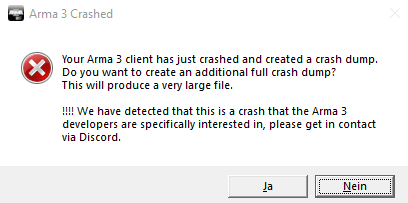
Btw still looking for that custom chat crash, that pops the message box with the !!!! 🫂
 solemn wyvern
just out of curiosity is it too much to ask for this diag feature in profiling? it would be cool, swapping branches everytime is quite annoying, and this is a great diagnostics feature to have all around i think, but i'll understand any reason not to

 carmine stump
still crashing on ext
 feral harness
whole cloud
Btw still looking for that custom chat crash, that pops the message box with the...
feral harness
whole cloud
Btw still looking for that custom chat crash, that pops the message box with the...
@dark carbon any crashes in Apex framework?
 indigo anvil
whole cloud
indigo anvil
whole cloud
Just had a crash-on-exit after a round on EU01 with Version: 2.20.153455 Do you want the minidump?
 proud cape
ive also had a crash on exit with v43
opal hound
Does it require using the new extra channels? apex I think only goes up to the previous limit
or if you know any repro steps at all I can try
feral harness
What new channels?
opal hound
I thought the limit on custom channels had been raised
whole cloud
feral harness
<@794878602494738442> any crashes in Apex framework?
Haven't seen any. But lots of people have noLogs
whole cloud
indigo anvil
Just had a crash-on-exit after a round on EU01 with Version: 2.20.153455 Do you ...
I want you to press submit in the crash reporter yeah, like every crash
whole cloud
opal hound
Does it require using the new extra channels? apex I think only goes up to the p...
No. Any custom channels
The limit was not raised
opal hound
I might be mixing up dev and prof changes. Will give it a run later and see what happens
feral harness
opal hound
I thought the limit on custom channels had been raised
It was, on dev
 restive turtle
whole cloud
Haven't seen any. But lots of people have noLogs
restive turtle
whole cloud
Haven't seen any. But lots of people have noLogs
thats cuz theres host services that recommend to turn noLogs on
its kinda reta.... but yeah
whole cloud
These are all client side crashes.
I guess for server hosters it might make sense to spare their SSD writes 😄
 opal hound
I'm pretty sure it was an old performance optimisation trick which was entirely placebo
whole cloud
If you have so much log spam that it affects your gameplay. You have bigger issues than your performance
opal hound
but my +1 fps!!!
 knotty wraith
how do I find out if my log is bigger than I need to be?
or how do I find out that my log has an impact on the players' game?
 patent sky
If there is nothing spamming the rpt hundreds of times per second it won't really matter, if there is...
well
You have bigger issues than your performance
knotty wraith
can the log affect this problem
18:43:50 Player Bizon:** Signature check timed out**
18:43:50 Player Bison disconnected.
Recently, many players have such a problem at the entrance, they can only enter on the third attempt.
 heavy galleon
whole cloud
These are all client side crashes.
I guess for server hosters it might make sens...
heavy galleon
whole cloud
These are all client side crashes.
I guess for server hosters it might make sens...
Thinking they use SSDs 
opal hound
No, to make it entirely clear we are joking about the logs affecting performance. It doesn't
I believe signature checks can be affected by network conditions on both end, after tweaking our network config to values that worked for us I don't think we've seen many if any signature check timeouts for a while
knotty wraith
I counted 250 lines in one second, the log in this interval looks something like this
21:33:53 Ref to nonnetwork object 20f5ceae800# 9370356: ig_guerrilla1_1.p3d UK3CB_ADE_I_AR
21:33:53  ➥ Context:     [] L1 ()
    [] L1 ()
    [] L30 (\x\cba\addons\xeh\fnc_init.sqf)
    [] L36 (\x\cba\addons\xeh\fnc_init.sqf)
    [] L35 (\x\cba\addons\xeh\fnc_init.sqf)
    [] L1 ()
    [] L28 (/z/ace/addons/medical_status/functions/fnc_initUnit.sqf)
    [] L29 (/z/ace/addons/medical_status/functions/fnc_initUnit.sqf)
 <-     [] L16 (server\FFA_FUNC_REINFORCEINFANTRY.sqf)
    [] L18 (server\FFA_FUNC_REINFORCEINFANTRY.sqf)
    [] L35 (server\FFA_FUNC_REINFORCEINFANTRY.sqf)
    [] L36 (server\FFA_FUNC_REINFORCEINFANTRY.sqf)
    [] L629 (server\ffa_func_spawnVehicle.sqf)
    [] L630 (server\ffa_func_spawnVehicle.sqf)
    [] L26 (server\ffa_func_createVehicleCargo.sqf)
    [] L21 (server\ffa_func_createVehicleCargo.sqf)
    [] L12 (server\FUNC_CreateUnit.sqf)

21:33:53 Ref to nonnetwork object 20f5cede000# 9370362: cup_u_bduv2.p3d CFP_I_TUAREG_Asst_Gunner_SPG_01
21:33:53  ➥ Context:     [] L1 ()
    [] L1 ()
    [] L30 (\x\cba\addons\xeh\fnc_init.sqf)
    [] L36 (\x\cba\addons\xeh\fnc_init.sqf)
    [] L35 (\x\cba\addons\xeh\fnc_init.sqf)
    [] L1 ()
    [] L28 (/z/ace/addons/medical_status/functions/fnc_initUnit.sqf)
    [] L29 (/z/ace/addons/medical_status/functions/fnc_initUnit.sqf)
21:33:53 Server: Object 2:46448 not found (message Type_100)
21:33:53 Server: Object 2:39691 not found (message Type_128)
21:33:53 Server: Object 22:124 not found (message Type_468)
21:33:53 Server: Object 22:123 not found (message Type_468)
if you are so concerned just test it yourself, -nologs vs with logs. but if you have so many logs/s it makes a difference you should probably fix whatever is causing it instead of just using -nologs as a bandaid ¯_(ツ)_/¯
knotty wraith
opal hound
turn report non-network objects on and get them fixed
How to turn it on?
whole cloud
opal hound
ask them if they are running a hard drive from about 1980
Disk speed doesn't matter anymore
whole cloud
knotty wraith
I counted 250 lines in one second, the log in this interval looks something like...
There is a -reportNonNetworkObject parameter on the profiling executable which will report these to me in a way that I cna fix them
 heavy vortex
Isn't that one ACE using setDamage in an EntityCreated event handler? Reported that months ago.
It is very spammy with -debug enabled.
 empty goblet
whole cloud
There is a `-reportNonNetworkObject` parameter on the profiling executable which...
empty goblet
whole cloud
There is a `-reportNonNetworkObject` parameter on the profiling executable which...
note: i still think it would be optimal to set this as true for profiling binary , same goes for dev branch , in short debug flag (while false for performance and main stable branch)
 hoary jolt
Anybody getting divide by zero errors with the current profile branch on game exit, even vanilla. I am using minmalloc. I've submitted the crash report(s).
 leaden relic
whole cloud
There is a `-reportNonNetworkObject` parameter on the profiling executable which...
leaden relic
whole cloud
There is a `-reportNonNetworkObject` parameter on the profiling executable which...
First time I've heard of the param, what's the extra info look like? Is it like what's in Dimon's message or was this just a normal script error?
 heavy vortex
That what it normally looks like with -debug. Replication case IIRC is to load ACE and create a unit.
whole cloud
leaden relic
First time I've heard of the param, what's the extra info look like? Is it like ...
extra info is a crashdump thats auto sent
 eternal kraken
got crash when closed, do you still need the big file?
heavy vortex
whole cloud
There is a `-reportNonNetworkObject` parameter on the profiling executable which...
Sent.
whole cloud
whole cloud
whole cloud
indigo anvil
whole cloud
What was the issue related to?
whole cloud
indigo anvil
What was the issue related to?
Crashes at exit
indigo anvil
whole cloud
Crashes at exit
that was the result. What was the cause? 🙂 (also: can verify it did not crash now just tested)
 void badger
Gremlins
indigo anvil
void badger
Gremlins
Ah here I was thinking it might have had been a memory corruption issue. Instead they were gremlins / krampus. Maybe 🎅 helped Dedmen fix it 🙂
whole cloud
indigo anvil
that was the result. What was the cause? 🙂 (also: can verify it did not crash n...
We had rare crashes on exit.
I found that we forgot some steps on cleanup so fixed it. But I fixed too much and other stuff wasn't expecting things to be cleaned up so early
 edgy chasm
Has anyone noticed keys not loading on latest profiling update with linux DS? I decided to try rebooting my LinuxGSM server, updated it to build 21054773 (2.20.153463), and stdout started off with the following: 4:04:07 SteamAPI initialization failed. Steam features won't be accessible! 4:04:07 WARNING! No bikey's were found in 'keys' folder. Please check, there should always be atleast one key for the base game. 4:04:07 Initializing stats manager. ... If I try to connect, with LogPlayerConnectionStates enabled: 4:04:16 Connected to Steam servers 4:05:44 thegamecracks uses modified data file 4:05:44 PlayerConnect: (1) Create thegamecracks, id 1165693370 4:05:44 ERROR: There is likely something wrong with your 'keys' folder, make sure it exists and contains atleast the basegame .bikey file. 4:05:44 Warning: Data compression error. Using a fallback option 4:06:14 IP Ban added to XXX.XXX.XXX.XXX for 0 seconds 4:06:14 Error verifying client data. Type=2 4:06:14 BEServer::finishDestroyPlayer(1165693370): users.get failed 4:06:14 Player thegamecracks disconnected. I checked my keys, tried deleting and revalidating to just have keys/a3.bikey, deleted and reinstalled, and ran ./arma3server_x64 without any parameters and the WARNING/ERROR still appeared, but eventually I thought to switch it to stable and that fixed it.
heavy vortex
@edgy chasm There was this one: #perf_prof_branch message
edgy chasm
hmm, let me try uploading v40 onto it then, one sec
stdout reports 2.20.153432 as expected, but the WARNING and ERROR lines are still present 
ah, v39 doesn't have the issue
heavy vortex
Well, that's actionable information at least :P
void badger
I'll double check my logs in the morning to see of we're still seeing that, I don't run keys so if it doesn't crash I'm already happy haha
restive turtle

NVIDIA 32-bit PhysX support added for some games with the latest 591.44 driver.
▶️ PC Specs
✅ CPU: AMD Ryzen 7 9800X3D
✅ GPU: NVIDIA MSI RTX 5090
✅ RAM: 6600 CL 26 FCLK 2200
✅ Motherboard: X870E Nova WiFi
✅ Monitor: Neo G8 32" 4K 240Hz
✅ PSU: NZXT C1500 Platinum ATX 3.1
✅ Storage: Samsung 990 Pro 4TB (x3)
✅ CPU Cooling: Heat...

whole cloud
edgy chasm
Has anyone noticed keys not loading on latest profiling update with linux DS? I ...
The code that scans for bisigns was rewritten, probably same for keys :/
Maybe something wrong with slash orientation
heavy galleon
 moment
I didn't notice, as it's been a while since I was running a server, but does the server still print the lowercase warning even though it's "semi-fixed" in perf/prof?
whole cloud
yes
whole cloud
Yeah the slashes was it, fix early-ish next week
proud cape
\ vs /
knotty wraith
knotty wraith
can the log affect this problem
18:43:50 Player Bizon:** Signature check timed ...
the assumption of the reason has been confirmed
I have one player who couldn't log into the server even once last month because the Signature Check timed out.
Many other players had this problem too, but they were able to log in somehow. But this player definitely couldn't log in.
Everyone noticed that the problems started on a new map, and that might be the reason.
So, as soon as me changed the map, the problem disappeared, and this player logged in immediately without any problems.
problematic map -https://steamcommunity.com/sharedfiles/filedetails/?id=836147398
new map - https://steamcommunity.com/sharedfiles/filedetails/?id=1282716647&searchtext=vidda
I'm probably writing in the wrong chat) It just so happened that I voiced the problem here
Same mission, same settings - the only difference is a different map
The second problem remains to be checked - the exclusion of a random file from signature checks


 fiery crescent
I have exactly the same X-Cam terrain in escape mission and no one reported this issue during the past 3 months. The only thing about this map is that it will take for ever to load on a mechanical drive.
knotty wraith
fiery crescent
I have exactly the same X-Cam terrain in escape mission and no one reported this...
The only thing about this map is that it will take for ever to load on a mechanical drive. - Well, that might be the reason.
 uneven bluff
There should be a way to preload WebBrowser huds.
Right now it takes about 0.1-0.5 seconds from when I initiate a dialog (for example) to get to PageLoad event firing. Then another few frames for the first Draw event.
When this happens on the higher end of that, players report it feels slow/sluggish.
If we can preload this hud, it would make everything feel better.
Unfortunately, since createDialog immediately takes away control from the user, we can't do this in the script at the start of a game and then just hide/show the control. 🙁 Maybe this requires changes to dialog creation, or maybe there's a way to preload the WebBrowser page and keep it in the background such that when we create the control, it is immediately loaded and starts drawing right away.
 spiral pond
knotty wraith
The only thing about this map is that it will take for ever to load on a mechani...
spiral pond
knotty wraith
The only thing about this map is that it will take for ever to load on a mechani...
The guy could try to preload the terrain via Editor or some mission before joining your server
 median belfry
Since high fps in the game will cause this issue, is there a possibility to limit the ingame fps to 144 when the webbrowser is open ? That would fix this issue, since I capped my fps it doesn't happen.
Also can you remove the limitation of web ui to be 60 fps since that didn't help
whole cloud
uneven bluff
There should be a way to preload WebBrowser huds.
Right now it takes about 0.1-0...
Too much effort
whole cloud
median belfry
Since high fps in the game will cause this issue, is there a possibility to limi...
I don't know why the issue happens. Maybe I just didn't do browser fps Limit correctly.
I don't even remember doing it at all
median belfry
whole cloud
I don't know why the issue happens. Maybe I just didn't do browser fps Limit cor...
Limiting browser fps might be helping , I recommend 140 fps. If it dosen't help I suggest limiting game fps while a webbrowser is open
 tawdry parrot
I've had two game freezes today, one right after the other, while playing SP in the editor. The game continued to run, but was unresponsive. Are game mdmp files valuable or does it have to be a memory dump from the Task Manager? Unfortunately even compressed, the system dump file is 4 gigs.
whole cloud
freeze mdmp's are valuable
tawdry parrot
Okay, I'll send them to you. Thanks.
 bold raven
Getting a generic "Session lost - Error verifying client data. Type=2" on one of my FASTER server profiles running the profiling build. Connection failed as well. RPT logs do not show any issues. Have checked my mods, but don't see any issues. They were previously working
Edit: i've recreated my FASTER profile for the server from scratch and it appears to be working - so probably discard this, but was quite hard to diagnose with the error being generic
knotty wraith
spiral pond
The guy could try to preload the terrain via Editor or some mission before joini...
is there a way to increase the Signature Check time?
whole cloud
sig check time usually takes under 1 second.
The timeout is 30 seconds
 uncut wagon
hey so, no way to know what all these network messages type really stand for?
knotty wraith
whole cloud
sig check time usually takes under 1 second.
The timeout is 30 seconds
but that's not enough for 30 seconds, let's say it takes a long time to load the map, mods, and there is no SSD yet.
I would like to be able to change these values on your server
feral harness
uncut wagon
hey so, no way to know what all these network messages type really stand for?
Those are for internal use, and even if you had this info would be useless anyway as the numbers can change
uncut wagon
feral harness
Those are for internal use, and even if you had this info would be useless anywa...
Gotcha, I just remmeber being spammed with those network messages
whole cloud
knotty wraith
but that's not enough for 30 seconds, let's say it takes a long time to load the...
I can make it configurable, but not this year
solemn wyvern
can we have diag_mergeConfigFile in profiling?
 feral harness
So people on the same server could have different configs loaded?
 uncut linden
Any chance this could make it into future versions? Had to use cycle to temporary enforce first person view
https://feedback.bistudio.com/T189083
spiral pond
feral harness
So people on the same server could have different configs loaded?
Originally it was available in "stable" branch in A2:OA. However MP would need special considerations - it was discussed back then too.
Like a flag making you unable to join another server, and only allow it at mission init. At least thats what i recall.
feral harness
A risk of the flag being memory edited?
spiral pond
cant judge if/how you could make it secure - more qualified people need to eval/judge that
plain trout
IIRC you can see if someone is in third person if you are observing the game?
whole cloud
solemn wyvern
can we have `diag_mergeConfigFile` in profiling?
noo
whole cloud
whole cloud
whole cloud
solemn wyvern
feral harness
So people on the same server could have different configs loaded?
yeah, that makes sense, it's just that it is really annoying having to swap to dev-branch for it, it takes a couple minutes to download, and after another couple of minutes to revert, it's inconvenient
solemn wyvern
whole cloud
noo
 empty goblet
solemn wyvern
yeah, that makes sense, it's just that it is really annoying having to swap to d...
empty goblet
solemn wyvern
yeah, that makes sense, it's just that it is really annoying having to swap to d...
you can always keep both, just do the download via steamcmd into separate folders
solemn wyvern
empty goblet
you can always keep both, just do the download via steamcmd into separate folder...
yeah, gotta figure out the space, because it'll be my 3rd arma in my computer counting P-drive
empty goblet
i know i know SSD are expensive but we aren't the ones to be blamed ... {points fimger to nearest AI balloon}
solemn wyvern
true
heavy vortex
Could restrict diag_mergeConfigFile to localhost servers & SP.
I imagine that covers 99% of the use cases.
whole cloud
heavy vortex
Could restrict diag_mergeConfigFile to localhost servers & SP.
And prevent you from switching to MP after you used it...
heavy vortex
Worst thing I can see here is that you'd have to make an error message :P
Although the connect/disconnect logging is so bad already that it hardly matters.
knotty wraith
plain trout
IIRC you can see if someone is in third person if you are observing the game?
in more detail
knotty wraith
uncut linden
Any chance this could make it into future versions? Had to use cycle to temporar...
I have written to you what is the option to get away from the cycle... but I didn't compare what was better)
uncut linden
knotty wraith
I have written to you what is the option to get away from the cycle... but I did...
Yours seems to be a working solution as well
||The only thing I would nitpick though is that you don't need getPos for distance2D
player distance2D LOCAL_FFA_BASEPOS would work as well||
knotty wraith
uncut linden
Yours seems to be a working solution as well
||The only thing I would nitpick th...
Forget about the details... I showed a different principle
uncut linden
And also that when I tried solving it via "KeyDown" I found that it first fires EH and only then switches the view (which is logical and expected), unfortunately that meant that I can not rely on it without doing spawn with delay
Anyway, thanks for showing another approach 👍
 autumn timber
whole cloud
autumn timber
whole cloud
v45
Any rough predictions as to when 2.22 may get released?
Is ditching 32bit in 2.22 still the plan? (because last time I read about it, it was just a "maybe we'll be able to")
 cerulean nacelle
The current v45 crashes to desktop with Spearhead CDLC loaded, as soon as you throw a grenade. Going back to v44 fixes it. Just put down a unit in the editor, pressed play and then "g". Just sent three crash reports. RobMcGunn3r noticed this on reddit, says it's only SPE grenades.
whole cloud
autumn timber
> v45
Any **rough** predictions as to when 2.22 may get released?
Is ditching 32...
Probably Q1
Steam is dropping 32bit too. So thats basically decided.
autumn timber
Cool beans! Thanks
whole cloud
yeah found the spe crashes, its the attachTo change
Fix either today or early tomorrow
whole cloud
They are attaching something with "followBoneRotation", to an object that doesn't have any bones
whole cloud
The custom chat channels crash is btw still happening.
I can see the reports, and they're getting a popup message box saying to get in contact but so far no-one did :/
One reporter wrote into message "request more info if needed"
But I don't know who you are 😢
 unborn urchin
whole cloud
They are attaching something with "followBoneRotation", to an object that doesn'...
unborn urchin
whole cloud
They are attaching something with "followBoneRotation", to an object that doesn'...
yeah we attach to a memorypoint on the grenade model
but I guess it doesn't need that, oops
whole cloud
Huh I just learned how building destruction in MP works.
Buildings are all local objects to each PC, because they are spawned from the terrain data.
For destruction, a global "destroyer" object is spawned on every client.
That destroyer object, animates the buildings destruction (sinking into ground) and then deletes itself when its done.
Just annoying when the building, is a local-only object, then we throw "ref to non-network object" because it tries to create a destroyer linking to that building, and the link cannot be transmitted.
setDamage handles local-only correctly, forceHitPointsDamageSync doesn't. Welp.
Thats all ref to non-network's fixed that I had. Was that the last? 🤔
heavy vortex
Did you do the ACE one?
whole cloud
I did all that I had reports for via the parameter
heavy vortex
setDamage in EntityCreated EH or whatever it was
whole cloud
I think thats probably the hitpoint sync, that is also in setDamage
 knotty plinth
whole cloud
Huh I just learned how building destruction in MP works.
Buildings are all local...
knotty plinth
whole cloud
Huh I just learned how building destruction in MP works.
Buildings are all local...
Not sure if you fixed this then.. the building does not get deleted.. it just sinks a bit down and ruin gets created and you got 2 objects of 1 for every destroyed building. okey this test is a bit older so i dont know if you fixed it already


 cloud sky
knotty plinth
Not sure if you fixed this then.. the building does not get deleted.. it just si...
cloud sky
knotty plinth
Not sure if you fixed this then.. the building does not get deleted.. it just si...
I think this behavior was changed at some point
whole cloud
I think that is by design
heavy galleon
Can't Wait for Dedmen to implement tunnels and
Suddenly
A house
knotty plinth
whole cloud
I think that is by design
Its just the building destruction effect itself, nothing to do with any kind of design, noticed it 4. January 2023 first time when i did my own platforms and did my GDI Walls around it to do a little base and Walls got destroyed and howered in the water.. so ive tried it with vanilla structures too if i did something wrong but its at least a bug (pics above).. i did not followed it if its already fixed cause i did my own destruction stuff.


 whole cloud
It is the design
feral harness
It should hide it under the surface but doing so above water might expose some sort of bug where it takes water surface as surface
knotty plinth
Okey, and already tested hovering above surface some meters and kill the structure if its get hidden? I think its supposed not getting deleted if someone wants to "repair" the destroyed structure, if deleted its gone right?
feral harness
yes it stays possibly for resurrection
heavy vortex
You can't delete map objects in general, can you?
knotty plinth
feral harness
yes it stays possibly for resurrection
Its good and also not good.. like ive mentioned you create 2 objects of 1 at least.. so big villages which get destroyed could do a perfomance impact (if hide does exclude it completly then not ofcourse)
But yeah if it gets deleted others want it to be resurrectable so you cant do it right for all.. keep it how it is i think
2 objects of 1 i mean if it has the ruins effect like Dam_T
heavy vortex
The odd thing is that it doesn't appear to hide the sunken buildings. Depending on how the renderer works that's a potential performance issue.
feral harness
You can hide map object and replace with non map object which you can handle delete
of course you can't really do it for every map object that would be mega silly, but for mission critical objects why not
knotty plinth
Isnt it also possible to delete with Object ID?
 kindred radish
Back when i tested for a event, a ruin was also globally simulated.
Had to disable sim again for ruins to get some perf back.
heavy vortex
Just tested destroying buildings in a 200m radius in Kavala and then hiding them. Does seem to have a perf difference (from hiding) but only 82 -> 85 fps.
knotty plinth
heavy vortex
Just tested destroying buildings in a 200m radius in Kavala and then hiding them...
Could you test if a building you destroy above surface (not water) like 100m sinks completly under surface or stays in the air while ruin gets created (if it has a ruin simulation), some dont have ruins aswell
knotty plinth
You put in 3DEN just a vanilla house ca 100m in the air and destroy it
heavy vortex
Looks like it always goes to around -100 regardless of starting altitude.
well, had -90 from +100 and -83 from +200.
Not sure why there's variation. Maybe it moves the thing per frame and stops when it's low enough.
knotty plinth
knotty plinth
Not sure if you fixed this then.. the building does not get deleted.. it just si...
So means this "bug" is still happening and happens also not only at water surface?
heavy vortex
What's the bug?
hmm, useEffects -> false also has the height variance. That's suspicious.
knotty plinth
heavy vortex
What's the bug?
It stops at any height and keeps pos there and doesnt get hide while ruin gets also created at old pos of structure (if structure has ruin simulation)
heavy vortex
90% of that is intentional behaviour?
Current question points are:
- Shouldn't the sunken building be hidden after falling? Saves a few frames.
- What are the rules for the sink height and are they broken for some cases?
knotty plinth
heavy vortex
Current question points are:
1. Shouldn't the sunken building be hidden after fa...
Thats what i mean and try to say with my images i did 2023
 fair swan
whole cloud
Huh I just learned how building destruction in MP works.
Buildings are all local...
fair swan
whole cloud
Huh I just learned how building destruction in MP works.
Buildings are all local...
Interesting. I remember a very long time ago there was an issue where if the mission was running for too long some players joined and saw buildings where others saw destroyed buildings
feral harness
fair swan
Interesting. I remember a very long time ago there was an issue where if the mis...
that was fixed quite a while back
fair swan
Yep it was at least 2 years ago we last had it happen
whole cloud
whole cloud
whole cloud
knotty wraith
//client
0 enableChannel [false, false];
1 enableChannel [false, false];
waitUntil{(channelEnabled 7) select 0};
2 radioChannelAdd [player];
setCurrentChannel 7;
//server
private _channelName = "RF+USA";
 private _channelID = radioChannelCreate [[0,0.749,1,1], _channelName, "%UNIT_NAME", [],false];
 if (_channelID == 0) exitWith {diag_log format ["Custom channel '%1' creation failed!", _channelName]};
 [_channelID, {_this radioChannelAdd [player]}] remoteExec ["call", [0, -2] select isDedicated, _channelName];
I haven't figured it out yet, but this code broke at some point in the prof update... If you log in to the server for the first time, a Spectator channel is created instead of the required channel.
If you log back into the server, everything works.
whole cloud
knotty wraith
```sqf
//client
0 enableChannel [false, false];
1 enableChannel [false, false];
...
@feral harness 🎄 🎁
We'll do another prof update on monday anyway, maybe we can get this fixed before christmas
feral harness
knotty wraith
```sqf
//client
0 enableChannel [false, false];
1 enableChannel [false, false];
...
when is this code executed?
is the client JIP?
feral harness
whole cloud
We'll do another prof update on monday anyway, maybe we can get this fixed befor...
there goes my weekend
knotty wraith
feral harness
when is this code executed?
initPlayerLocal.sqf, initServer.sqf
knotty wraith
I do not know the answers to your questions - a regular dedicated server
 foggy vine
Did the client join in progress while the mission has already started?
Or did the client join right as the mission started?
knotty wraith
the client joins after the server has been running for a long time

Удобный и быстрый фотохостинг - PIXSAFE. Альбом №134147.
Удобный и быстрый фотохостинг - PIXSAFE. Альбом №134157.
feral harness
so first join - wrong channel, second join - correct channel?
knotty wraith
feral harness
so first join - wrong channel, second join - correct channel?
yes
feral harness
ok thanks will check this out
whole cloud
Anyone noticed that headless clients don't disconnect from server when they're killed?
Seems like they don't have any timeout and stay on forever even when they're gone?
heavy vortex
"killed"?
They certainly used to trigger our disconnect logic when they crash, but I vaguely remember that this wasn't happening more recently.
But Armahosts finally stopped making us use 32-bit HCs so they don't crash much anymore.
whole cloud
I killed a linux one. Server started spamming about pending network messages, and HC stayed in playerlist for 5 minutes until I kicked it 😄
heavy vortex
Just checked locally (Windows, perf branch). PlayerDisconnected EH fired on server when I closed the headless client.
No pending network messages.
I guess hard process kill might have different behaviour to controlled close?
heavy vortex
...not on Windows, apparently. Still fired the disconnect handlers.
 deft oak
Working fine on Windows/153.157 (which I realize is ancient now). We kill the headless process via script and the event handler on the server handles all the detection/cleanup before it rejoins (for dev cycle testing). I'll update now and confirm it's still working.
deft oak
whole cloud
I killed a linux one. Server started spamming about pending network messages, an...
Can confirm, still closes/proper cleanup triggers on the latest.
feral harness
knotty wraith
```sqf
//client
0 enableChannel [false, false];
1 enableChannel [false, false];
...
what exactly are you trying to achieve with waitUntil{(channelEnabled 7) select 0};
all channels are enabled unless you disable them
setCurrentChannel 7;
will select nothing in this case, enabledChannel =/= existing channel
I am playing with your script and cannot find any problem. What was the version of the client you were having problem with?
feral harness
Well I cannot break it. Tried even to add player at the very early stages, just after player object becomes available upon joining, still no problem. What you describe that channels got mixed up very much seems like earlier bug that was fixed, hence the question what version is causing you problem
knotty wraith
feral harness
I am playing with your script and cannot find any problem. What was the version ...
OK, I'm going to go through all the latest versions now - I'll try to find out which version.
knotty wraith
feral harness
what exactly are you trying to achieve with ```waitUntil{(channelEnabled 7) sele...
I can't remember... but it seems to me that this was written in order, perhaps it was due to some problems during the tests, when you run the server and client on the same PC.
knotty wraith
feral harness
Well I cannot break it. Tried even to add player at the very early stages, just ...
this is broken in version 40, and everything works fine in version 39.
feral harness
knotty wraith
this is broken in version 40, and everything works fine in version 39.
thats right it would do that in 40, was fixed in 41 #perf_prof_branch message
knotty wraith
feral harness
thats right it would do that in 40, was fixed in 41 https://discord.com/channels...
I always update the prof to the latest version, the script no longer works in the following versions.
I created this channel only because the reds and blues are playing for the same side and so that they can talk in the same channel out of habit in blue when they used to play for the same side. Perhaps there is a reason for this - in the different sides of the players....
https://youtu.be/WUQU2Bhvq1I
it looks like this
 knotty wraith
so far, there are a couple of wishes on the topic: the ability to change the color of the channel - players do not like to use the common channel because the color is translucent and often no one sees it, and the second point is related to the fact that when you make two sides allies, there is no information about the teamkill between the parties
knotty wraith
feral harness
that was fixed quite a while back
is this about vanilla fences? Does this apply to mod buildings?
I have to constantly restore various fences on mod maps - because the bots don't have one, but the player does - and there's a constant squeal that someone killed me through the wall
Doors—open or not—are the same issue.
The player's door is closed, but the bot's is open: the bot kills the player through the door.
feral harness
knotty wraith
https://youtu.be/WUQU2Bhvq1I
it looks like this
what am I looking at?
knotty wraith
feral harness
what am I looking at?
I just showed on video how it doesn't work.
I can show you how it works on version 39
feral harness
Can I see now how it is supposed to work for comparison?
knotty wraith
feral harness
Can I see now how it is supposed to work for comparison?
Record a video at 39?)
feral harness
wait, can I see how it doesn't work in v >= 41? the one on video is < 41
knotty wraith
Should I remove it on the latest version of prof?
feral harness
remove what? your video shows old build with bug in it that was fixed already
knotty wraith
I apologize for the translator. Should I record the video using the latest prof version? (он слово переснять перевел как remove)
feral harness
The problem we are having is some mysterious crash that happens in chat message handling that we cannot get the dump for because people ignore message asking for it. Your client doesn't crash, but mixes channels, that was the bug we have fixed. But maybe there is more to it so this is why I am trying to repro your steps
feral harness
knotty wraith
I apologize for the translator. Should I record the video using the latest prof ...
yes please
knotty wraith
feral harness
yes please

and that's how it worked for version 39
https://youtu.be/NNQukc1nqPg
v.39
 feral harness
can I see the code where you select channel?
knotty wraith
feral harness
can I see the code where you select channel?
in private messages?Or here?
feral harness
up to you, just the snippet with setCurrentChannel
actually, there is one more thing we can try, do you think you can film the same on latest dev?
in case there are some changes that are not added to the prof
knotty wraith
To be honest, I've never run the dev version, and I'm afraid I don't even know how.
I can send you the whole mission to launch, but the mods there require ace, cup, rhs...
feral harness
Ok, I don't need to launch it just look up the code, send it if you can
knotty wraith
feral harness
Ok, I don't need to launch it just look up the code, send it if you can
sent in a private message
knotty wraith
feral harness
Ok, I don't need to launch it just look up the code, send it if you can
In the code you will see an attempt to solve the problem due to the fact that I tried to solve the code with the channel at the very beginning of the client init - but this did not give a result and I left it at the end as it was done originally
knotty wraith
I think I can guess what the reason is
Удобный и быстрый фотохостинг - PIXSAFE. Альбом №138162.
virtual slot
addMissionEventHandler ["PlayerConnected", {
    params ["_id", "_uid", "_name", "_jip", "_owner", "_idstr"];//SERVER_FFA_MAINBASE
    [_owner,_uid] spawn {
        params ["_ow","_uid"];
        private _var = missionProfileNamespace getVariable "TAG_MyMissionSidesave";
        if (count (_var select {(_x select 0) == _uid}) > 0) then
        {
            _sd = ((_var select {(_x select 0) == (_uid)}) select 0) select 1;
            _grp = createGroup (_sd call BIS_fnc_sideType);
            _type = call {
                if (_sd == 0) exitwith {"CUP_O_RUS_M_Soldier_Ratnik_Autumn"};
                if (_sd == 1) exitwith {"CUP_B_FR_Soldier_Assault"};
                "C_man_p_beggar_F"
            };
            _respos =
            call {
                if (_sd == 0) exitwith {getMarkerPos ffa_markspawn};
                if (_sd == 1) exitwith {getMarkerPos ffa_markspawnenemy};
            };
            _ap = _grp createUnit [_type,_respos, [], 0, "NONE"];
            [_ap] joinSilent _grp;
            waituntil {!isnull _ap};
            _ap removeItem "ACE_EarPlugs";
            [_ap] remoteExecCall ["selectPlayer",_ow];
            [false] call ace_spectator_fnc_setSpectator;
        }else{
            [_uid,_ow] spawn {
                params ["_uid","_ow"];
                waituntil {(allPlayers select {(getPlayerUID _x) isEqualTo _uid}) isNotEqualTo []};
                _unit = (allPlayers select {(getPlayerUID _x) isEqualTo _uid}) select 0;
                _pos = getpos _unit;
                _pos set [2,0];
                _unit setpos _pos;
                waituntil {sleep 1;(getpos _unit)#2 < 1};
                ["USA", "RF"] remoteExeccall ["ffa_func_callside",_ow];
            };
        };
    };
Dedmen, testing my Linux DS now- Headless Client is working better than it ever has before tbh. I am getting network message spam like you're reporting, but it clears up.
Started server, init Local HC, connected fine and logged successful connection with Ace Headless.
I started up a large scale AI firefight (LAMBS), all groups transferred over, killed the HC in the middle of it, and in 30 seconds the AI was back at it and headlessclient disconnected. Same firefight, booted up the HC again, in less than 3 minutes groups transferred over and kept going at it.
I probably shouldn't do that on my server though, it's swapping almost 4GB of RAM onto HDD storage 💀
feral harness
knotty wraith
```sqf
addMissionEventHandler ["PlayerConnected", {
params ["_id", "_uid", "...
there is PlayerSelected EH that has player object already
you can also add to channel from server side
knotty wraith
feral harness
you can also add to channel from server side
_ap = _grp createUnit [_type,_respos, [], 0, "NONE"];
[_ap] joinSilent _grp;
waituntil {!isnull _ap};
_ap removeItem "ACE_EarPlugs";
[_ap] remoteExecCall ["selectPlayer",_ow];
[false] call ace_spectator_fnc_setSpectator;
[0,[false, false]] remoteExecCall ["enableChannel",_ow];
[1,[false, false]] remoteExecCall ["enableChannel",_ow];
[2,[_ap]] remoteExecCall ["radioChannelAdd",_ow];
Yes, everything is working correctly - the problem is gone, thank you
foggy vine
Wrong channel
 pale carbon
idk if its specifically this branch or arma in general but it feels like starting the game with loads of mods is wayy faster now. 278 mods load faster now than like 150 mods from before
opal hound
well you can switch between the branches and time it but yes, there have been some improvements to load times on profiling
proud cape
solemn wyvern
can we have `diag_mergeConfigFile` in profiling?
how about diag_exportConfig in prof?
 stable wasp
just a question but, is supporting multithreading actually a plan for arma3 or never?
 ik it may be odd since the engine is old but not that much impossible no? many cpus will benefit from that
opal hound
Arma 3 is multithreaded
 silk summit
stable wasp
just a question but, is supporting multithreading actually a plan for arma3 or n...
silk summit
stable wasp
just a question but, is supporting multithreading actually a plan for arma3 or n...
There has always been some multithreaded components in Arma 3 but a few patches ago multithreading was taken to a whole new level. Many of us got +20 Max FPS while min FPS (ie Stutters) got reduced significantly
I understand you probably weren't following Arma 3's dev news for a few months at least
stable wasp
i mean. my fps in sp with not too much mods is good like 60-90 but not with high settings, read alot that 2025 has multithreading but still alot of posts say its not actually multithreaded yet like modern games thats why m confused
 heady plinth
read the blog post above for more information on it
cloud sky
stable wasp
i mean. my fps in sp with not too much mods is good like 60-90 but not with high...
Arma 3 is quite well optimized within the limits set by the game engine's architecture. There's Arma Reforger if you want to play a game with engine that is built around the concept of multithreading (among other things)
heavy vortex
Some elements of A3 are fundamentally single-threaded (notably SQF is never allowed to run in parallel), so it's never gonna be a game that sits there eating eight cores.
deft oak
cloud sky
Arma 3 is quite well optimized within the limits set by the game engine's archit...
Honestly Arma 3 runs drastically better than Reforger at this point for me at least. That does make sense though, Reforger has been in core feature development mode for a while and are probably do a good optimization pass. Meanwhile Dedmen has been dedicated for years to improving any performance we can possibly get out of A3.
cloud sky
deft oak
Honestly Arma 3 runs drastically better than Reforger at this point for me at le...
Yeah, Reforger fries almost any hardware you can throw at it 😄 (That's kinda what you get with the multithreading and other optimization improvements!)
Can only imagine how well it would run if the graphics etc. were on par with A3
stable wasp
well as long as arma3 is running fine in sp with few mods im happy ig
deft oak
stable wasp
<:blobcloseenjoy:700312018430722060> well as long as arma3 is running fine in sp...
Are you on the performance build?
deft oak
good good, just making sure
proud cape
heavy vortex
Some elements of A3 are fundamentally single-threaded (notably SQF is never allo...
this reminds me of unreal tournament where epic said unrealscript was single threaded
heavy vortex
The worst part there is that event handlers are fired inline by engine code. So every case where an event handler fires needs to stop almost everything and drop down to the single thread.
In most cases the events could be queued up instead, but that would change various undocumented behaviour.
whole cloud
void badger
Dedmen, testing my Linux DS now- Headless Client is working better than it ever ...
Thanks. Maybe something is messed up with my server.cfg timeout settings then. But I don't remember touching them
whole cloud
heavy vortex
The worst part there is that event handlers are fired inline by engine code. So ...
Not all of them, some are deferred. I think quite a few in entity simulation
knotty wraith
knotty wraith
```sqf
_ap = _grp createUnit [_type,_respos, [], 0, "NONE"];
[_ap] joinSilent _g...
It doesn't work... when one tested on the server, even the two of them, everything worked. I go in when there are a lot of players, it doesn't work anymore
whole cloud
whole cloud
whole cloud
heady plinth
nice. csat vtol could be fixed now 😄
 stark falcon
getting Warning Message: No entry 'bin\config.bin/CfgWorlds.' (not sure if related, I start with -world=empty)
fair swan
Often I am suddenly experiencing a short freeze when I get within a certain range of some infantry and I dont know what's causing it. Like if I drive past somebody theres a brief stutter when you get within 20-30 m of them it basically just freezes for less than a second then goes back to normal. I suspect some LOD issue but I wouldn't know for sure. It doesn't appear to happen when I change branches and only has happened while on perf branch playing in MP.
heavy vortex
could do a slow frame capture on profiling.
 supple rock
A heads up, a guy had his mic stop functioning in-game yesterday, possibly after an update since last time he played, but it was fixable by switching back to the stable executable.
heavy galleon
supple rock
A heads up, a guy had his mic stop functioning in-game yesterday, possibly afte...
and wasn't it fixed by restarting the game?
For example, the mic getting unplugged briefly, even by windows being a piece of shit, and arma then not recognising it?
And the restart, that had to happen, fixed it?
stark falcon
A few times I have seen the rpt just stop being written to (not using -nolog)
the last line is [CBA] (xeh) INFO: [11924,206.825,0] PreInit finished. nothing else posted after this
restarting the mission had no effect
heavy vortex
Does it stop the mission loading, or just the logging?
stark falcon
just logging, everything else works fine
supple rock
heavy galleon
and wasn't it fixed by restarting the game?
For example, the mic getting unplugg...
Several Windows and game restarts did not fix it, tried changing perms in Windows sound settings, changed input device, changed settings in Steam, Tried without Discord running, removed all Mods, changed PTT key, nothing worked. Then switched off of Profiling, started working, switched back onto profiling, stopped working, then back off of profiling, worked again.
whole cloud
stark falcon
getting `Warning Message: No entry 'bin\config.bin/CfgWorlds.'` (not sure if rel...
I know why. It'll stay till next year probably
I'll add to known issues
whole cloud
supple rock
Several Windows and game restarts did not fix it, tried changing perms in Window...
Please get me RPT of that Game start where it didn't work.
We log info about microphone startup
supple rock
Will get a hold of him, might take a few days 🙂
whole cloud
Test mic sensitivity in options menu or joining MP and trying to use VON is needed.
We switched to new microphone input system, which is supposed to be more resilient, not less :/
It will become Standard in next stable so we'll need to figure that out. I might need his help for testing in January
supple rock
Ok, that is good to know. I'll keep an eye out for others in our community, too.
 crystal haven
Any plans on improving the virtual garage so it can be used similar to how BIS_fnc_addVirtualItemCargo does when using parameters 4 and 5? And the how BIS_fnc_arsenal can effect only the target/player's arsenal data if specified.
As of right now I have to do this work around in order for it to behave like a vehicle whitelist that the player has purchased:
https://pastebin.com/w6kvvCe5

Pastebin
Pastebin.com is the number one paste tool since 2002. Pastebin is a website where you can store text online for a set period of time.
whole cloud
crystal haven
Any plans on improving the virtual garage so it can be used similar to how `BIS_...
No. Profiling branch gets no data changes
 static shore
only ts3server:? or will we be able to do allowedHTMLLoadExtensions? Both me and a few other friends have encountered an issue where the ts3server hook that is supposed to work, doesnt becouse of a newer installation of teamspeak and than downgrading pernamently breaking it. Would it be possible to have custom extension or at least some alternative like ts3connect: also allowed?
static shore
static shore
only `ts3server:`? or will we be able to do `allowedHTMLLoadExtensions`? Both me...
nvm this
fiery crescent
@whole cloud Sent you Server crash .mdmp
whole cloud
Cool. I hope you'll enjoy it.
stable wasp
i notice that my fps really goes down in cities. is there a fix for that?
 silk pewter
play in rural areas?
heavy vortex
better CPU :P
Generally the cities themselves aren't that bad, like I get 80fps in Kavala in the editor on my old junk vs 180fps in the open. But cities likely cost more for pathfinding and visibility checks as well.
median belfry
What costs the most performance is the number of objects inside your render distance.
It doesn’t really matter how many polygons an object has, the amount of objects in the render queue is what matters.
So one effective way to improve FPS in cities, especially when players can only move on foot or by ground vehicles, is to define zones that hide objects using hideObject true. This completely removes those objects from the render queue.
The important part is to pre cache the objects in each zone on client mission start. If you don’t, you’ll notice a small lag spike when entering a new zone.
Also limiting object render distance to something like 500 helps a lot as well, especially in dense urban areas
heady plinth
keep in mind that most houses already have occluders which hide everything behind them.
heavy vortex
The occluders themselves are probably quite slow. Hell, maybe slower than just throwing the things at the GPU for simple objects.
Render distance limit on the other hand is fast.
heavy vortex
As a sanity check, can someone else check this trivial repro on current perf branch:
- Start Arma without mods. Make sure -noLogs isn't present.
- Start the editor. Open any saved mission.
- Open the debug console from the editor, run
diag_log "Test". - Check that this diag_log (or any subsequent logging at all) is not present in the last RPT.
 timid coyote
@whole cloud Are you interested in this? https://i.imgur.com/fFYQ0r9.png
 whole cloud
timid coyote
<@90532520101183488> Are you interested in this? https://i.imgur.com/fFYQ0r9.png
whole cloud
timid coyote
<@90532520101183488> Are you interested in this? https://i.imgur.com/fFYQ0r9.png
Yes
Please send to @feral harness
But he's probably also off for Christmas rn so no hurry
But we desperately need that data yes
timid coyote
I'll send you both a download link once I uploaded it somewhere, it's about 3.3GB, a bit too much for Discord...
heavy galleon
even if you zip?
timid coyote
Even with the best compression algorithm in the world I don't think a full crash dump will fit into Discord's file limits 😄
light cargo
timid coyote
Even with the best compression algorithm in the world I don't think a full crash...
try it™
heavy galleon
pied piper would like to know your location
timid coyote
You should both have a download link
 naive osprey
heavy vortex
As a sanity check, can someone else check this trivial repro on current perf bra...
naive osprey
heavy vortex
As a sanity check, can someone else check this trivial repro on current perf bra...
You are correct, does not log in RPT when trying this on latest perf. It also lets me delete the RPT file with the game open, and will not create another
naive osprey
naive osprey
You are correct, does not log in RPT when trying this on latest perf. It also le...
Seemingly related to No entry 'bin\config.bin/CfgWorlds.', as shortly after that is run, it does not work. When I remove the -world=empty launch param, the error doesn't happen and the RPT works as normal
median belfry
heady plinth
keep in mind that most houses already have occluders which hide everything behin...
Still dosent remove them from render queue when I tested it
heavy galleon
I was knocked uncon (ACE loaded) yesterday few times when I took over UAV turret and I was laying on the ground. Never happened while standing.
Had no injuries, just uncon for a minute. Was anything in that code touched, before I start spending hours trying to recreate it? 
light cargo
what changed that windows 7 reports dll not found?
heavy galleon
the supported OS list 
light cargo
oh come on, what did break it?
i cant figure out even with debugger because i have the classic dll not found error message suppressed somehow
i see nothing wrong in dependency walker
opal hound
Try Process Monitor?
feral harness
timid coyote
You should both have a download link
I dont have
heavy vortex
naive osprey
Seemingly related to `No entry 'bin\config.bin/CfgWorlds.'`, as shortly after th...
Hmm, happens here with no extra command line params at all.
naive osprey
heavy vortex
Hmm, happens here with no extra command line params at all.
Are you using the performance or profiling exe? Steam or google drive?
Can try to match what you have, I'm currently using the profiling exe symlinked as the normal exe for easy windows pdb matching
static shore
I'm getting No entry 'bin\config.bin/CfgWorlds.' on vanilla profiling as well
timid coyote
feral harness
I dont have
Check your DMs, you probably need to accept the conversation
light cargo
opal hound
Try Process Monitor?
unfortunately that's hell and freezes too much to be usable
opal hound
...is that also W7 related? I use it for tracking down DLL hijacks
light cargo
opal hound
...is that also W7 related? I use it for tracking down DLL hijacks
it generally has had bad performance for me, especially when doing everything at once, hdd system
opal hound
You really don't make anything easy for yourself do you
feral harness
timid coyote
Check your DMs, you probably need to accept the conversation
Yeah can see it now thanks will download tomo
light cargo
opal hound
You really don't make anything easy for yourself do you
fixed the issue, it was xaudio_28.dll not able to be found inside dll/x64
which is weird because it was working at first/before
light cargo
audio isnt working at all on windows 7
light cargo
from rpt:
19:16:34 Error: Create XAudio2 device failed, error 8007007e
19:16:34 Warning: Audio device creation failed, attempt to create default audio:
19:16:34 SamplesPerSec: 44100, channels: 2
19:16:34 Error: Create XAudio2 device failed, error 8007007e```spam like this too
19:06:18 Sound: Error: a3\music_f_exp\music\ambienttrack01_f_exp.ogg: sSize 0```
19:09:28 Sound: Error: Multi-stream: Load failed, stream a3\sounds_f\characters\footsteps\water\water_run_hit_5.wss not found !!!
19:09:28 Sound: Error: Multi-stream: Load failed, stream a3\sounds_f\characters\footsteps\water\water_run_hit_4.wss not found !!!```
opal hound
28? Changelog says it was updated to 2.9
light cargo
opal hound
28? Changelog says it was updated to 2.9
i was told to put xaudio_29redist.dll as xaudio_28.dll
2.8 ships with windows 8
whole cloud
timid coyote
Even with the best compression algorithm in the world I don't think a full crash...
It doesn't but it'll go down to like 300mb
I will check the link in 3 weeks
Unless KK already got it by then
whole cloud
light cargo
fixed the issue, it was xaudio_28.dll not able to be found inside dll/x64
Xaudio is not in the games dll folder.
light cargo
whole cloud
Xaudio is not in the games dll folder.
but it worked before
whole cloud
The redist might load from game folder.
But we are actually not configured to use the redist
It wasn't changed since the update was done
whole cloud
Good luck running a unsupported OS
light cargo
again, the system is grandfathered and has a lot of software that will break on a upgrade
whole cloud
I don't think I asked
knotty plinth
i gave it up with Win7 so im now on Win11Pro 

But still using the Win7 rig for OB cause BI still did not fixed it to make it working properly with Win10 / Win11 
proud cape
i feel bad for windows 7, i was using it till like 6 months ago that i changed my athlon 64 X2 (your cue to laugh) for a ryzen 5700G, too bad windows 7 doesnt run on that
inland dew
starting from january there won't be any discussions about win 7 anymore
feral harness
whole cloud
It doesn't but it'll go down to like 300mb
it's 3.3GB zipped
feral harness
timid coyote
Check your DMs, you probably need to accept the conversation
You sent server dump, but if I am not mistaken we need client crash @whole cloud
timid coyote
It was a headless client that crashed
feral harness
timid coyote
It was a headless client that crashed
How did you get the dialog?
timid coyote
We have multiple arma servers and HCs running on a dedicated server, we're managing the servers and the HCs with Faster. When I RDPed onto our dedicated server, that popup was there and after creating the full dump, one of the HC windows closed. The logs and dumps were in the folder of that HC.
I can send you a screenshot of the whole desktop once I'm at home.
whole cloud
Headless client doesn't mean it's running on a headless.
Still has UI, and still is a client
feral harness
The exe is server_retail
empty goblet
if we had native A3 linux client we could just roll out on linux replacement for W7 and be done with it 😁 but that's still xmas wish
whole cloud
feral harness
The exe is server_retail
But it doesn't matter
proud cape
empty goblet
if we had native A3 linux client we could just roll out on linux replacement for...
my wish for this christmas... or the next
light cargo
opal hound
Acknowledge the rules <#368447657309634572> to send images afaik
some categories still don't have the permissions granted even after acknowledging
opal hound
One of the two roles we both have should enable it
timid coyote
Huh, I thought I did that when going through the onboarding process
timid coyote
thanks, it works now 👍
fair swan
fair swan
Often I am suddenly experiencing a short freeze when I get within a certain rang...
Coming back to this, I notice when the freeze happens the person who I get close to's gun turns white for a very brief moment
fair swan
Yeah I'm going to look into it now
Another thing is that I can't seem to use autopilot on some modded drones. But when I switch back to main branch they work just fine.
heavy vortex
Bisected that RPT logging death bug down to v38:
https://feedback.bistudio.com/T196576
Maybe related:
- Fixed: Freeze when opening Eden "Load Mission" dialog
autumn timber
What is the current state of the case requirements for filenames in mods on Linux?
I recall that something was changed but I don't remember if it's only on perf/prof or in stable (I think still the former?).
Also does that mean that there is no need to change filenames at all on Linux, anymore or are there still cases where that's mandatory?
The context is that my mod contains files with capital letters (and they are there on purpose) and some server tools insist on lowercasing everything, which breaks my mod. I want to know how to talk to the tools' owners about them removing force-lowercasing
heavy vortex
addons folder still needs lowercasing. Not sure about anything else anymore.
whole cloud
How does a mod require uppercase filenames :u
Linux experimentally supports non-lowercase pbo filenames.
It is not in stable, and no functionality is guaranteed.
Only official supported is all lowercase
autumn timber
whole cloud
How does a mod require uppercase filenames :u
CamelCaseLibraryFiles.so
Also, the whole python installation contains some of those files - haven't checked thoroughly how important they are, but there are a few of those out there
whole cloud
Well those are not PBO's
autumn timber
Yes, but the deploying software lowercasing everything changes these files anyway. Unless you weren't replying to me
autumn timber
whole cloud
Well those are not PBO's
And while I have your attention 🙃 , what's the upper/lower case status of the Arma requirements for the mods in perf/prof AND the regular release?
If I submit a PR lowercasing only things under addons/, am I fine or will this still cause some mods not loading?
whole cloud
autumn timber
Yes, but the deploying software lowercasing everything changes these files anywa...
Well then their software is shit and wrong
whole cloud
autumn timber
And while I have your attention 🙃 , what's the upper/lower case status of the A...
Keep PBO's lowercase. Not just in addons
And I don't know about bisigns
autumn timber
whole cloud
Well then their software is shit and wrong
That's not the best tactic to have your PR merged 😂
autumn timber
whole cloud
Keep PBO's lowercase. Not just in addons
Okay but what about things that are not pbos? I have mine lowercase so that's not my problem.
I'm trying to figure out what minimal set of files should that software force-lowercase
autumn timber
Since as the author decided to force-lowercase things, I'm guessing that they won't want to revert all of that just because one mod author (me) complained about that
whole cloud
I think we do extensions case sensitive
whole cloud
And the game doesn't load anything else.. mod.cpp I guess but whoever doesn't make that lowercase has some head issues to be checked
autumn timber
whole cloud
Keep PBO's lowercase. Not just in addons
Also, you got me confused a bit, here.
Are there any instances of PBO files outside of addons/ ? I thought that that's the only place where PBOs can be if someone wants them to be read 🤔
whole cloud
Yes dta folder for example
 ember owl
Love the Christmas trees and snow when booting profiling 
fiery crescent
Mary Christmas 🎄 and thank you for the support.
 nocturne obsidian
fiery crescent
Mary Christmas 🎄 and thank you for the support.
nocturne obsidian
fiery crescent
Mary Christmas 🎄 and thank you for the support.
Merry Christmas mate
 stable shore
fiery crescent
Mary Christmas 🎄 and thank you for the support.
stable shore
fiery crescent
Mary Christmas 🎄 and thank you for the support.
Merry Christmas
fair swan
whole cloud
Just hope people find the next one too 😄
Need Santa flying past on sleigh
whole cloud
Yeah! Feature creep it to the limit xD
hoary jolt
Merry Christmas ARMA and Profile team! Finally 60 FPS, barely! LOL
carmine stump
for christmas I want the mute button to also block text, not just voice.
long overdue..
proud cape
just unplug the internet if you cant stand its denizens 😆
 wise sparrow
Isn't loading keys from the bisign files supposed to be working on Linux DS as well? I was playing around with a Linux DS on a Ubuntu VM and it doesn't seem to load the keys. Added them manually and then it worked fine
whole cloud
wise sparrow
Isn't loading keys from the bisign files supposed to be working on Linux DS as w...
No
wise sparrow
Ahh bummer. Was it implemented in the first place?.. I thought I read it was at some point, but can't find it 😅
whole cloud
No I didn't
 lusty quiver
10 years ago, the perf prof branch was the hero I needed, running arma 3 on my amd athlon 2-core CPU. 
deft oak
Not sure which version broke it but something on the current profiling breaks simulWeather completely. Left is on stable, right is on profiling.
Both scenes are made running this command (I did customize the simulWeather though so it may not look quite like my stable screenshot):
setDate [2020, 9, 8, 11, 10];
0 setOvercast 0.45;
0 setFog 0;
forceWeatherChange;
simulWeatherSync;
setSimulWeatherLayers 10;


 sly ivy
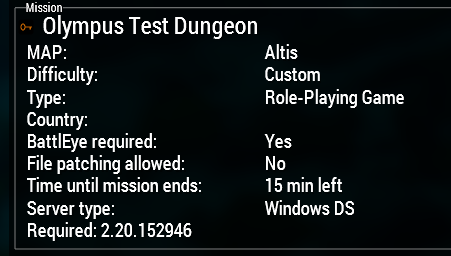
With the versions that are in #arma3_branch_changelog what one can i use from the 220perf as ive tried v47 and v46 and im getting a version lock on my server? Any information would be appreciated?
opal hound
What do you mean a version lock? All builds should be compatible with stable
sly ivy
When i go to join the server its got the X on the icon before the name and wont allow me to join and the version in the description on it is in red
foggy vine
"the" server = ?
sly ivy
foggy vine
"the" server = ?
?
 solar musk
@whole cloud
Hello, we are using a profile branch on the server, and when shooting with rapid-fire weapons on transport, the player experiences terrible desynchronization and a yellow chain appears. If you continue shooting, a red chain appears, the player is kicked from the server and cannot log in until they change their IP and restart Steam. No errors appear in the server or player's RPT logs. In the synchronization logs (new network logs), the player's values suddenly become 0 and he is kicked.
Do you have any suggestions as to why this might be happening?
 honest fulcrum
Does it happen if your server is not on profiling branch?
If yes, are you running ACE with advanced ballistics enabled? Try disabling that if it is.
solar musk
honest fulcrum
Does it happen if your server is *not* on profiling branch?
If yes, are you runn...
It seems like this happens in the non-profiled branch too, but it needs to be double-checked, ace_advanced_ballistics_enabled = false;
I mean that the problem arose earlier, then disappeared for quite a long time (appearing rarely), and now, after another update, it has become very frequent again. This time, I didn't think to return to the regular branch, but I'll try now.
foggy vine
What mods do you have?
foggy vine
sly ivy
?
What server are you talking about? Is it your server or some other public one?
naive osprey
sly ivy
Its my server
https://i.imgur.com/L9EANUo.png
Running latest profiling, able to join with stable.
Ensure you haven't overridden the requiredVersion in the server config file
https://community.bistudio.com/wiki/Arma_3:_Server_Config_File
requiredBuild = xxxxx;
Recommend not having it at all
 sly ivy
naive osprey
https://i.imgur.com/L9EANUo.png
Running latest profiling, able to join with stab...
sly ivy
naive osprey
https://i.imgur.com/L9EANUo.png
Running latest profiling, able to join with stab...
Thank you, ill look into this
ember owl
sly ivy
Anyone know why i would be getting this when im on v47 perf
is it the verifySign...
Honestly not sure as I've never seen the error but I am guessing so. Could probably verify by turning signatures off or adding yourself in admins[]
whole cloud
sly ivy
Anyone know why i would be getting this when im on v47 perf
is it the verifySign...
It can be that the client is too slow and times out
(The colors are randomly generated on each start, so everyone gets a unique scene)
sly ivy
whole cloud
(The colors are randomly generated on each start, so everyone gets a unique scen...
Hey do you know if the random objects that were spawned under the map in MP was fixed, it was a issue a long time ago but dont know if it was fixed?
whole cloud
I don't remember that issue
fiery crescent
@whole cloud My crash reporter keeps feeding your stats. I sent PM one to you that failed to auto submit. It seems like the AI is still causing server crashes as since I remember that it always was the cause in my case. Hope you find some time next year to chase it down.
whole cloud
And you're pinging me now, for what reason?
fiery crescent
Good point, time zone difference.
whole cloud
Like what purpose at all? To tell me I have a PM? Even though all PM's send me notifications and show a constant  in my list?
Also maybe have a read of our #rules again, especially the part about not pinging green people.
sly ivy
Hey Mate, quick question would you know anyways to spot to debug memory leaks in code?
whole cloud
no
sly ivy
oh sound then
cheers
do you know how to sort these?
 2:52:36 Server: Object 2:4724 not found (message Type_100)
 2:52:36 Server: Object 73:75 not found (message Type_128)
 2:52:36 Server: Object 16:169 not found (message Type_468)
 2:52:36 Server: Object 16:130 not found (message Type_468)
 2:52:36 Server: Object 16:71 not found (message Type_128)
 2:52:36 Server: Object 16:86 not found (message Type_128)
 2:52:36 Server: Object 73:75 not found (message Type_100)
No.
whole cloud
check the client RPT's for local object log things
Also this is #perf_prof_branch and not #random_tech_support_for_your_prof_branch_unrelated_shit
sly ivy
whole cloud
Also this is <#105466848958513152> and not #random_tech_support_for_your_prof_br...
oh cheers mate no worries where do i find #random_tech_support_for_your_prof_branch_unrelated_shit
whole cloud
#arma3_scripting for your scripting thing.
#server_admins for your server thing
sly ivy
sweet xoxo
 brazen oyster
New perf branch startup animation is 🎆
 gleaming aurora
very cool startup animation (just noticed it now :D
 fair swan
The fireworks on startup scared my dog, how rude!
Happy new year dedmen thanks for the continued support 😁
crystal haven
I'm having problems with the A3API.SendConfirm, I'm returning a json string but the UI is still waiting for a response. When I return a bool then it works but it doesn't pass the json string.
whole cloud
crystal haven
I'm having problems with the `A3API.SendConfirm`, I'm returning a json string bu...
The Arma eventhandler, and the Javascript API only handles bool indeed. That is intended.
You can send a ExecuteJS from within your script eventhandler to send anything
crystal haven
@whole cloud The wiki feels a bit deceiving with A3API.SendConfirm: Promise<string>;. Could the wiki page be updated to include this information so that other's may not get confused in the future as well?
 frosty heath
fair swan
Often I am suddenly experiencing a short freeze when I get within a certain rang...
frosty heath
fair swan
Often I am suddenly experiencing a short freeze when I get within a certain rang...
having a similar issue here, certain buildings/props/vehicles (especially visible on Mortain in sph44) cause major stuttering/microfreeze when loading in. I believe it's related to loading textures since lowering my textures settings solves it (to be clear, this isn't present on the main branch and my computer can handle it just fine on there at Ultra without this issue)
when I had this occur I was playing local hosted MP on profiling
double checked just now in singleplayer on profiling and regular, still occurs as I described on profiling
easy to recreate by just placing a unit and a zeus interface and doing a quick close fly down mortain's street
light cargo
frosty heath
easy to recreate by just placing a unit and a zeus interface and doing a quick c...
better reproduction would be a camera flyover
fair swan
frosty heath
easy to recreate by just placing a unit and a zeus interface and doing a quick c...
Yep I’ve just gotten used to it since I assumed it was a local issue related to my hardware or something. If you look closely you can see the textures vanished sometimes leaving their gin white for a split second during the stutter then it goes back to normal
frosty heath
this guy also mentioned it i think
whole cloud
deft oak
Not sure which version broke it but something on the current profiling breaks si...
Can confirm, Stratis airbase
Before vs After 😄
Whoops

 whole cloud
Huh that happened back in october
deft oak
whole cloud
Huh that happened back in october
I knew something looked off between profiling and stable but couldn't quite figure out what it was, until I did, then you can't miss it!
whole cloud
I broke the weather loading when switching terrain.
And also, weather is loaded twice during game start  . It reloads again with the same config even though it's already loaded.
whole cloud
solar musk
<@90532520101183488>
Hello, we are using a profile branch on the server, and w...
No. I don't have any problems with vehicle weapons. Maybe some mod doing something bad
whole cloud
crystal haven
<@90532520101183488> The wiki feels a bit deceiving with `A3API.SendConfirm: Pr...
whoops that's a typo. Its a bool not a string.
The result data is the result of JS confirm()
Its just a copy paste error beccause I copied the other functions from above there. The actual API isn't typescript, I have fixed the wiki. But I probably copy-pasted that mistake into other places
whole cloud
frosty heath
easy to recreate by just placing a unit and a zeus interface and doing a quick c...
Local host a server.
Mortain game master.
Create the player respawns
Teleport to north east of mortain, where the 4/5 roads come together.
Place unit via map view. Wehrmacht -> Scouts -> Assist. Squad leader. on the road in center of mortain.
Zeus camera fly towards the road through mortain.
I had a super tiny lag spike. Barely noticeable. Is that it?
freezes for less than a second
Yeah like 50 milliseconds?
whole cloud
Nah this doesn't make sense. Give me a proper repro with a real noticeable lag spike and I'll investigate it.
I get lag spikes when flying through mortain yes. Because my hard drive is slow and the building models are large and take a bit to load 
There is a bit in terrain loading, could maybe have some multithreading.
silk pewter
y u no ssd
restive turtle
Dedman this is such a odd request but how hard would it be to add polygon shapes?
For me id use it for natural shapes to city objectives in my gamemode
 quaint flame
What sort of? Draw2d, draw3d?
whole cloud
restive turtle
Dedman this is such a odd request but how hard would it be to add polygon shapes...
Polygon shapes already exist. K thx bye.
frosty heath
whole cloud
Nah this doesn't make sense. Give me a proper repro with a real noticeable lag s...
it was super noticeable for me especially when comparing on the other branches idk how else to display it then
maybe @fair swan has a more noticeable way
I could record it on my end on both branches but besides that ive got no idea
frosty heath
whole cloud
Local host a server.
Mortain game master.
Create the player respawns
Teleport to...
Were your texture settings at ultra? It's not visible unless your settings are pretty high. It's like the the game is struggling to load the highest texture LOD when you get close to a building or vehicle
as mentioned I know its not just my pc being shit since I checked on both branches
ill try to find a more visible repro
whole cloud
frosty heath
Were your texture settings at ultra? It's not visible unless your settings are p...
Should be. I can try to recheck tomorrow where game is also on SSD.
I would prefer a "load this mission in Eden, fly the camera along that road" repro. Which sounds like should be possible here
frosty heath
I'm loading onto profiling now so I can get you something more specific
I'll take a quick recording as well
whole cloud
Profiling exe a SFRAME cheat code capture might also grab it.
But I think it'd probably trigger in general because of all the loading, and not because of that one specific spike you want
light cargo
whole cloud
Should be. I can try to recheck tomorrow where game is also on SSD.
I would pref...
a nice alternative for reproduction would be a camera flyby intro loop, letting you focus on the capturing :)
whole cloud
I'd suspect it only happens on first flyby, when its first loaded. Afterwards its in cache?
light cargo
my thought as well
frosty heath
whole cloud
I'd suspect it only happens on first flyby, when its first loaded. Afterwards it...
yea it clears up after you load stuff in
but it comes back when you fly away
and fly back
it's especially bothersome traveling larger cities on modded maps like I experienced it with cup's zargabad 2025
got some videos of it i'll send in a minute
heavy vortex
Ok, I tried to replicate this on Mortain and it jittered hard and then completely froze a bit further down the road.
Also it locked Discord and closed the launcher, so I guess it's GPU-related.
heavy vortex
Not sure I want to try this again :P
VRAM usage was pretty high at last count, I think 6.4GB out of 8.
frosty heath
sent it over
sent one on regular/stable as well to show the difference with same settings
heavy vortex
Ok, stable did the same thing for me.
But I don't think ultra on Mortain is workable on my hardware.
frosty heath
if you want to take a look at how it is on my end I can send you the video
its pretty funny the comparison
heavy vortex
Might be a threshold though? Like if perf uses slightly more of something and falls off the edge.
The edge behaviour appears to be pretty catastrophic :P
Turn on a VRAM usage monitor and see what it says.
(Steam's one is workable)
frosty heath
I'll do that in a minute gonna finish something up
spiral pond
Mortain could be due to low cell size, object density (although our terrains team tried to optimize that as best as they could) and finally use of 4k textures for objects
frosty heath
spiral pond
Mortain could be due to low cell size, object density (although our terrains tea...
in my case I'm pretty sure its related to textures and I don't think its spearheads fault at all
it happens on every map I just used mortain because its the easiest to see in action for me
because it's completely fine on stable
spiral pond
just giving pointers what may trigger it
large textures or overall vram use could be involved
maybe the MT optimizations relate somehow
 dapper heron
@whole cloud any idea what could cause logs being written to the RPT to stop entirely? Works fine until I load my mission in EDEN, then all logging stops, engine and scripted. Not using -nologs, have tried with and without -debug.
ember owl
dapper heron
<@90532520101183488> any idea what could cause logs being written to the RPT to ...
It's a known issue- Dedmen commented this on a related feedback tracker 🙂
Its the "load mission" dialog. Loading the mission files in there is now multithreaded. But there was a race condition with temporarily disabling logging in there.
Fixed next prof/dev
dapper heron
ember owl
It's a known issue- Dedmen commented this on a related feedback tracker 🙂
> I...
Thank you mate
plain trout
dapper heron
<@90532520101183488> any idea what could cause logs being written to the RPT to ...
I had this happen when I used the debug parameter
 azure roost
With the latest profiling branch update, I've been getting consistent CTDs with this error: Access violation. Illegal write by 0x7ff6184d8c16 at 0x7ff6084c8c16
Longest it's gone without crashing is maybe 30 minutes? Sometimes it's 5 minute intervals, sometimes 10.
I don't get it on regular branch. It happens with and without mods loaded.
I have a NVIDIA Geforce RTX 3060 Graphics Card. Scouring the internet, it's been mentioned that it might be fixed by downgrading Nvidia drivers but that hasn't had any joy.
It isn't affecting others in my group, just myself. We're all on perf branch and all playing with the exact same modlist.
I know I've not provided much info but just initially wondering if this is a known issue? If it is, able to point me in the right direction.
patent sky
azure roost
With the latest profiling branch update, I've been getting consistent CTDs with ...
Did you submit the crash report using the crash reporter?
azure roost
patent sky
Did you submit the crash report using the crash reporter?
I have done on a few occasions yeah
fiery crescent
Dedicated server crash on latest perf.
Fault address: 8000A312 01:00009312ll C:\Arma 3 Server\Dll\tbb4malloc_bi_x64.dll
CrashReporter states successful upload, I can PM mdmp if needed.
Is this .dll multithreading?
plain trout
That DLL is the memory allocator.
Arma3 has always been multithreaded. It’s not optimized for MT as it’s an ancient engine so it benefits more from single core performance. Some dumb people turned that into arma doesn’t use multithreading and wrote about it.
whole cloud
fiery crescent
Dedicated server crash on latest perf.
Fault address: 8000A312 01:00009312ll C:...
no its not.
 snow rapids
@empty goblet You guys using distributed VCS (Git) or SVN/TFS? How do you support the long running branches - merges from "develop" branch? Just curious
whole cloud
Yall had a pretty chill christmas it seems. But what happened last Sunday 😄

 full nova
Microsoft perhaps with their windows update written by AI
 quartz rampart
btw is there a when we about we could get a update for the perf_prof branch so i can finally see my logs again 😛
heavy galleon
acting like you ever turn on the game anymore anyway 
whole cloud
quartz rampart
btw is there a when we about we could get a update for the perf_prof branch so i...
I would've said yesterday.
But we currently cannot make any builds due to issues that we're waiting to be fixed 🙂
quartz rampart
whole cloud
I would've said yesterday.
But we currently cannot make any builds due to issues...
ok thanks. 🙁 that means switching back to stable
quartz rampart
whole cloud
just dont open missions in eden 😄
debugging Eden Editor Modules and test them is maybe a bit hard with that 🤣
 charred holly
whole cloud
Yall had a pretty chill christmas it seems. But what happened last Sunday 😄
charred holly
whole cloud
Yall had a pretty chill christmas it seems. But what happened last Sunday 😄
Not particularly last Sunday, but I haven't been able to tab out of the game without it crashing when trying to tab back in. I believe this cropped up in the latest profiling branch, but I'm not sure. Switching from Fullscreen to Fullscreen window prevents the game from crashing.
Could also be due to OS
gleaming aurora
whole cloud
Yall had a pretty chill christmas it seems. But what happened last Sunday 😄
I had a server crash 3 times on Sunday , and have no clue as to why other then the same error…
Was only Sunday night for us though
fiery crescent
gleaming aurora
I had a server crash 3 times on Sunday , and have no clue as to why other then t...
I had one on Saturday and one on Sunday. Also 1 crash weekend before.
naive osprey
When testing changes in our server, I crash every 2nd game launch. Did quite a bit of testing on Sunday, so ¯_(ツ)_/¯
heady plinth
builds not possible? people leaving for christmas and in new year suddenly everything stops working? 😄
naive osprey
90% of the time I crash I still get the !!!! crash, if you are still looking for the dumps of them
 fair ore
whole cloud
Yall had a pretty chill christmas it seems. But what happened last Sunday 😄
fair ore
whole cloud
Yall had a pretty chill christmas it seems. But what happened last Sunday 😄
Huh, we also had an unexpectedly high number of crashes last weekend.
fair swan
Dur. Should have checked here first when I realized I had no logging abilities
whole cloud
A lot of players are having crashes when exiting the game. But I cannot reproduce that.
They must be doing something in-game that corrupts some memory, which leads to crash on shutdown, but I have no idea what it is.
Most of these are running the game for several hours, anything could've happened any time inside there :/
 fickle geyser
It always crashes for me when I exit from editor when working on Across the Fence gamemode.
whole cloud
fickle geyser
It always crashes for me when I exit from editor when working on Across the Fenc...
Game exit, while in Eden?
Alt+F4? Or window close?
heady plinth
i occasionally had crashes, but i dont have alt+f4 crashes with current dev-branch
fiery crescent
How about Server crashes?
whole cloud
Server has same on exit crash, but more rare
whole cloud
I found one person who just ran the game for two minutes.
They started, opened some mission in eden and exited and crashed.
I grabbed the same modset, and went to eden and shuffled some units around, no crash.
I can try grabbing across the fence and opening it in eden.
But I suppose you need to be doing something besides just opening a mission
whole cloud
fickle geyser
It always crashes for me when I exit from editor when working on Across the Fenc...
I tried
Load across the fence, move some units, spawn some new, edit some attributes, copy paste a bit, play preview, return to editor.
Alt+F4. No crash.
Whatever is causing the messup, I'm not doing it. But what is it
 elder adder
I think I had something like this happen on a mission recently, I think my hunch was it was related to some RHS GBU object placed (it resolved when i removed RHS and force loaded anyway)
whole cloud
This exit crash, and the radio channel thing are about 60% of the crash reports.
And if a user can get the crash by just going into editor, and exiting the game less than 30 seconds later, it must be reproducible in some way.
heady plinth
could it be some win11 related issue? 😄
whole cloud
No must be gamecode
Btw I see some people putting into crash message, that I can ask for more details.
But they never provide any contact info 😢 I don't know who you are, better put your discord name into it
 analog acorn
whole cloud
Btw I see some people putting into crash message, that I can ask for more detail...
analog acorn
whole cloud
Btw I see some people putting into crash message, that I can ask for more detail...
Maybe they're assuming the crash data includes their profile name. Might be worth putting a note somewhere in the reporter itself to say you need to put contact information manually.
autumn timber
Ninja'd. I was just typing the same thing. Maybe the crash window can mention the need to write some contact info
quartz rampart
whole cloud
Btw I see some people putting into crash message, that I can ask for more detail...
everytime i had a crash i wrote you a little love letter 😛
whole cloud
I don't remember seeing one 😢
whole cloud
autumn timber
Ninja'd. I was just typing the same thing. Maybe the crash window can mention th...
But then I need to compile my own I'm just using the enfusion one. I guess its time
opal hound
Just scrape the user's local web browser store for their email :^)
whole cloud
whole cloud
But then I need to compile my own <:notlikemeowcry:724201124369793068> I'm just ...
Then I can also add a message when the report failed to send (which it probably still does somewhat often if its too large)
Another task onto the todo list
whole cloud
whole cloud
This exit crash, and the radio channel thing are about 60% of the crash reports....
By last weeks pot of bolognese, I got it! I got it to crash.
Just load across the fence, start preview, and ALT+F4 while in preview
But nooooooo, thats a slightly different crash from the one I was looking for But maybe they're closely related enough
quartz rampart
whole cloud
I don't remember seeing one 😢
i think i send atleast 4 or so 🙁 so maybe it refuses to send them 😢
whole cloud
There is a max size limit set on server, and its quite.. not large.
And it fails silently if it fails. Not designed for our specialist market here
autumn timber
whole cloud
But then I need to compile my own <:notlikemeowcry:724201124369793068> I'm just ...
Ask the Enfusion people to add that message to the Reforger version, then! 😛
whole cloud
autumn timber
Ask the Enfusion people to add that message to the Reforger version, then! 😛
Hah poor Stack, so big ambitions
fickle geyser
whole cloud
I tried
Load across the fence, move some units, spawn some new, edit some attrib...
some of my crashes should be sent via crash reporter
ah you got it to crash, missed the msg.
But nooooooo, thats a slightly different crash from the one I was looking for
pls fix anyways

 vale shoal
Hello! Could I maybe ask for some information regarding crash with GUID 3d3ac83d-b07e-4730-9878-d649711b46d5? Server crashes happen rarely, only would like to know if it's not a script error. Thank you!
silk pewter
fickle geyser
> But nooooooo, thats a slightly different crash from the one I was looking for
...
"just fix everything, no need for a crash every time!"
deft oak
We get this crash when my 3DEN mod is loaded on exiting the game in profiling 100% of the time. DM me if we can help you track this down.
 olive oriole
Is there a way to force players to use profiling on a server? Similar to how if players dont have required mods they can't join?
opal hound
yes you can set requiredVersion
olive oriole
Appreciate it!
whole cloud
fickle geyser
> But nooooooo, thats a slightly different crash from the one I was looking for
...
notepad.p3d in a Object UI control.
The description.ext is unloaded first, the config referred by the UI control is gone.
The UI is closed after, it tries to clean up the config its referencing, but its already gone.
Simple fix, but not what I was looking for 😢
whole cloud
deft oak
We get this crash when my 3DEN mod is loaded on exiting the game in profiling 10...
Just send me the mod
 obsidian bough
Hi, I found an interesting bug.
Most modded UAVs switched to a red thermal vision filter.
The higher the zoom, the stronger and brighter the red filter becomes.
This issue does not exist on the stable branch.
Mods tested:
https://steamcommunity.com/sharedfiles/filedetails/?id=3475006113&searchtext=drone
https://steamcommunity.com/sharedfiles/filedetails/?id=3112310403&searchtext=mavic
https://steamcommunity.com/sharedfiles/filedetails/?id=3083949886&searchtext=orlan
https://steamcommunity.com/sharedfiles/filedetails/?id=3174823944&searchtext=zala


 patent sky
Most modded UAVs switched to a red thermal vision filter.
The higher the zoom, the stronger and brighter the red filter becomes.
are these 2 separate issues? or was that a decision by them to switch to a red filter?
obsidian bough
patent sky
> Most modded UAVs switched to a red thermal vision filter.
> The higher the zoo...
The point is that it should be a normal thermal vision,
but with profiling enabled it turns into what you can see on the screenshot.
patent sky
got it, so not intentional
empty goblet
Too much Bloom comic sketch but with red twist 🤣
whole cloud
Scripted post processing effects over night vision were not working due to an engine bug.
That was fixed.
These mods probably always added these filters, but never noticed they weren't working
But I can't find one in their configs or scripts 🤔
Ahhh I know
Ugh.
Its probably something like blur.
The blurred version is calculated from the thermal temperature data, not from the final thermal color output
But it must still be enabling some pp effect thats not enabled by default, why can I not find that 🤔
obsidian bough
whole cloud
Ugh.
Its probably something like blur.
The blurred version is calculated from th...
You’re right, all these drones have a certain amount of blur that increases with digital zoom.
whole cloud
Should be easy to solve, just a bit of render order shuffling
obsidian bough
But as far as I know, it is currently not possible to apply effects to thermal vision.
If that were possible, it would be great.
whole cloud
It should be.
Making them available is what triggers this bug. There was some rendering missing for them, but it should work from now on
 whole cloud
The Hound had the exit crash I was looking for, which is now also fixed.
When we clean up entity types cache, some types contain proxies.
When the proxy object is released, it also had a type, so it tries to release that type, which pushes it back into the cache, which we are currently cleaning. Womp womp.
Happened with a Flag pole this time, I assume most missions don't contain any so that doesn't appear often
empty goblet
hmm frozen server with 2026/01/23, 12:02:48 f16 Overflow on 2.20.153495
naive osprey
empty goblet
hmm frozen server with `2026/01/23, 12:02:48 f16 Overflow` on 2.20.153495
A cheater has been testing his client crashing yesterday/today, so he might have found a way to do it to server as well
Or maybe its unrelated, who knows
empty goblet
naive osprey
A cheater has been testing his client crashing yesterday/today, so he might have...
considering multiple servers got frozen i think that was the cheat
empty goblet
whole cloud
out of bounds object
got the full dumps, one is 45GB tho 🤣
silk pewter
Dedmen working extra this weekend
heavy vortex
how on earth do you get to 45GB?
silk pewter
64GB RAM and leaks? 😄
heavy vortex
I thought A3 was hard-capped to ~16GB.
 minor epoch
heavy vortex
I thought A3 was hard-capped to ~16GB.
minor epoch
heavy vortex
I thought A3 was hard-capped to ~16GB.
i recall some vague 8gb vram limit (which itself i doubt is true since im pretty sure i used more than that at one point) but i doubt the 16gb ram one as much
arma 3 has this odd case of inflated amounts of technical misinformation more than other games around forums and such (looking at 90% of multithreading forum posts lmao)
empty goblet
as long as there is memory i would prefer server to just eat it than crash when someone trigger some leak
heavy vortex
If you're running multiple servers on the same box then that would be bad, but there's always -maxmem.
empty goblet
ofc probably would be nice to have some periodic warning (when it happen first 4x the maxmem / maxFileCache and the value)
empty goblet
heavy vortex
If you're running multiple servers on the same box then that would be bad, but t...
which i sometimes use but again, you want server first be stable then deal with the leak
analog acorn
I mean if there's a leak then it's still going to run out of memory and crash, just...a little bit later
empty goblet
whole cloud
out of bounds object
speaking of memory/resource leaks, can you do e.g. custom dump similar to the one related to non ref network objects ?
heavy vortex
Depends on the magnitude. You can't run an Arma server with ACE longer than ~2 days anyway.
empty goblet
depends on setup and hardware :) takes while to burn thru 192GB of ram 🤣
heavy vortex
(people with fast clients start getting issues with slow progress bars)
empty goblet
tho today would be wiser to just resell that server into 4 pieces 🤣
 obsidian condor
heavy vortex
Depends on the magnitude. You can't run an Arma server with ACE longer than ~2 d...
obsidian condor
heavy vortex
Depends on the magnitude. You can't run an Arma server with ACE longer than ~2 d...
2 days, I restart mine every 4 hours 😭
heavy vortex
why? :P
obsidian condor
Just to be safe. Also at that point server fps starts declining a bit.
heavy vortex
Antistasi community servers have been pretty solid since they finally let us use 64-bit headless clients, so CBA_missionTime being a piece of shit is often the first problem.
obsidian condor
Cool. My server also has a possibility for a lot of AI on it depending on circumstances. Most I think was about 450 (more than half being agents)
light cargo
heavy vortex
If you're running multiple servers on the same box then that would be bad, but t...
-maxmem never works right in my experience
empty goblet
1.54.134396 profiling & performance v17 server and client, windows, linux (not yet)
- more error logging to narrow bug hunt
https://www.dropbox.com/sh/582opsto4mmr8d8/3BSy9PdRGm
 whole cloud
Another crash reports spike this weekend.
At the same time, reports that last TFAR update causes game crashes, but only when many units are around.
Only notable change is multithreaded lineIntersects. Easy workaround is to turn off object interception.
But don't know how I'll track down an issue that happens at random with 60+ players in MP
whole cloud
I'm seeing alot of AI related crashes on weekends too though, but fix for that is easy.
I think I did 🫂
Just waiting to be able to publish an update

There is ONE (and exactly one) server, running a old profiling version, spamming me with crashreports for a crash who's fix was released two days later.
 whole cloud
One server crashing alot on the same thing.
Somehow their terrain has no road network?
Look at RPT
-skipIntro -noSplash -cpuCount=12 -exThreads=7 -enableHT -malloc=system -maxmem=14000 -noLogs -world=empty -cpuCount=8 -exThreads=7
uh...
analog acorn
That's a recommended thing for faster initial loading...on a client. I assume it doesn't make any difference to a server with no main menu scene, but I feel like it shouldn't cause a crash.
Maybe they just copied the parameters from their client and didn't think about it too hard.
whole cloud
I think it could cause a crash, if you run a script to spawn a unit, while you have no terrain
don't know why a server would do that
whole cloud
Next weird crash which I have a few dozen of, from different users and client and server.
A 256 byte section of code, turns itself from Readable and Executable, to Readable only.
And then game fails trying to Execute its own code, because it doesn't have permission to execute it.
And the extra weird thing, they all stop at exactly the same instruction, 128 bytes into the 256 byte section.
Exactly in the middle?
There are other instructions before it though which it should've crashed at but didn't.
But its running a loop there and the crash happens at the first loop instruction.
But the whole loop is not executable, so that another part of the loop broke something, and then jumped back to its start wouldn't work either.
I've never seen something like this before.
Maybe its just an error in creating the crashdump and it's showing me false data, but I have like.. 50ish dumps of exactly the same.
I didn't even know the flags could be set on a 256 byte section, I thought the minimum size was 4096..
But all the dumps tell me that it's a 0x100 wide section 
The memory sections are just different, but why lol
Normal crash
+     7ff7`084b0000 7ff7`0a4dc000 0`0202c000 Image      [Arma3_x64; "C:\Program Files (x86)\Steam\steamapps\common\Arma 3\Arma3_x64.exe"]
+     7ff7`0a4dc000 7ff7`0a6c8a88 0`001eca88 Image      [Arma3_x64; "C:\Program Files (x86)\Steam\steamapps\common\Arma 3\Arma3_x64.exe"]
+     7ff7`0a6c8a88 7ff7`0aacb000 0`00402578 Image      [Arma3_x64; "C:\Program Files (x86)\Steam\steamapps\common\Arma 3\Arma3_x64.exe"]
This type of crash
+     7ff6`ee830000 7ff6`eeb98b96 0`00368b96 Image      [Arma3_x64; "D:\SteamLibrary\steamapps\common\Arma 3\Arma3_x64.exe"]
+     7ff6`eeb98b96 7ff6`eeb98c96 0`00000100 Image      [Arma3_x64; "D:\SteamLibrary\steamapps\common\Arma 3\Arma3_x64.exe"]
+     7ff6`eeb98c96 7ff6`eff31199 0`01398503 Image      [Arma3_x64; "D:\SteamLibrary\steamapps\common\Arma 3\Arma3_x64.exe"]
+     7ff6`eff31199 7ff6`eff31299 0`00000100 Image      [Arma3_x64; "D:\SteamLibrary\steamapps\common\Arma 3\Arma3_x64.exe"]
+     7ff6`eff31299 7ff6`f085c000 0`0092ad67 Image      [Arma3_x64; "D:\SteamLibrary\steamapps\common\Arma 3\Arma3_x64.exe"]
+     7ff6`f085c000 7ff6`f0a48a88 0`001eca88 Image      [Arma3_x64; "D:\SteamLibrary\steamapps\common\Arma 3\Arma3_x64.exe"]
+     7ff6`f0a48a88 7ff6`f0e4b000 0`00402578 Image      [Arma3_x64; "D:\SteamLibrary\steamapps\common\Arma 3\Arma3_x64.exe"]
The code section just hass two, 256 byte wide gaps inside it, that magically appear while the game is running 😢
Huh. Some of the crashes have two gaps, some only have the one
Ah got it.
On servers its only one gap, in the multithreading task execution. So once some MT task is executed, it crashes.
Clients always have two gaps, the second gap is over a function that gets called once per frame for rendering.
That is.... weird to say the least. Very interesting.
The only function that I know that can change the flags, will change it for a 4096 byte section, but here they are only 256 byte wide
7ff7`23748bf3 7ff7`23748cf3 0`00000100
And its not even aligned, how does a section start at 0xbf3 ☠️
knotty wraith
What should I do to make the server automatically send dumps?
whole cloud
knotty wraith
What should I do to make the server automatically send dumps?
Nothing
whole cloud
whole cloud
Another crash reports spike this weekend.
At the same time, reports that last TF...
Well I can run eachFrame all nearest terrain objects while flying through livonia, running 300-1500 objects per frame and not see any issues.
Where TFAR does at most 30.
 restive pilot
you should test it with 30+ clients 😛
whole cloud
But its just lineIntersects.
Shouldn't matter what it intersects to? :u
restive pilot
objects are not being simulated async while intersects are running right? what about MP messages?
or maybe more special cases like remote clients in vehicles, attached objects, etc.
hmm what if line intersects detects both an attached object and its parent, but they get intersected by different threads? 
doesn't it need to update their anims/bones or something?
whole cloud
objects are not being simulated async while intersects are running right? what about MP messages?
It is script, nothing runs parallel to script.
doesn't it need to update their anims/bones or something?
That's done using a stack buffer that stores the animated bones positions, the object itself is not changed.
Its neat that on retail, I can run 2000 intersects per frame and still run above 30fps 😄
whole cloud
fffffff 😄
All the big weekend crash spike, are tbbmalloc crashing
 whole cloud
The allocators freelist was corrupted.
Multithreading? No the allocator is supposed to be threadsafe, and has handled that for years just fine.
Only leaves a double-free or freeing an address that was never allocated 🤔 But it doesn't seem to be lineIntersect, my stress test would've found that.
I just need to run TFAR with address sanitizer in a big multiplayer match... Sounds... Basically impossible
autumn timber
Ask LeClair to organize one as part of promoting Arma 3 🙃
silk pewter
use ACRE
proud cape
use mimalloc
whole cloud
Specifically the freelist that's failing, is only used if an object is freed on a different thread, than it was allocated on.
which the lineIntersect does, but surely also lots of other things
But why can I not repro it.
Why are all crashes I see tbbmalloc. There is no mimalloc or system alloc.
restive pilot
maybe deleting a pointer multiple times? unless it's a bug in the allocator
Only leaves a double-free or freeing an address that was never allocated
I just noticed that you already mentioned this possiblity
whole cloud
I'd expect mimalloc to also get mashed up by that, and with how many people use it, should see at least one report
restive pilot
some allocators are more resistant to that I think?
but we recently had a similar issue in our game code with the Enfusion allocator. a pointer was being deleted multiple times and it corrupted the allocator free list
autumn timber
Yeah, I concur that a bug with such an impact in something like an allocator would be extremely unlikely
whole cloud
lol, found this in a report
"C:\SteamCMD\steamapps\common\Arma 3 Server\arma3serverprofiling_x64.exe" -par=ServerPack\Server_Config\ArmA2OA.par
file: [AHC]_260125 (__cur_mp)
world: juju_javory
I don't know which unit that is. I could use that mission file to repro that Eden server crash from sunday
naive osprey
whole cloud
Specifically the freelist that's failing, is only used if an object is freed on ...
For the record, I've seen a lot of crashes potentially related to ropes being created/destroyed. As far as I know thats what the recent cheater has been utilizing, unsure if it would relate to what youre working with though.
whole cloud
I haven't seen anything related to ropes
Heey, the first crash report where the alloc crash is inside lineIntersectsSurfaces.
But thats just random, any allocation may crash anywhere :/
But.. its the second crash I see today at the same place... The last wasn't in tbbmalloc I think..
Ah.. There is special handling about named components, which only runs for objects with skeletons. My stress test only got buildings.
But that runs single threaded..
spiral pond
whole cloud
lol, found this in a report
> "C:\SteamCMD\steamapps\common\Arma 3 Server\arma3s...
do you have more info on that server? could try to search via our EMM backend, or potentially Stack could even look into our logging
whole cloud
No that's all I have
spiral pond
5.9.65.93:2303 5.9.65.93 2303 2302 Arma3.gr Server
Mods: 107
False
Signatures: 0
False 76b43259 False 1 False False False False False False False False False False 2.20.152984 2.20 152946 0 32 1 coop Operation Green Oak juju_javory 0 3.40282e+38 3.40282e+38 True False False True Linux Linux 3 3 False False False 3 Selecting mission True 65545 -2147483648--2147483648 CENTRAL_EUROPE DE Jan. 26, 2026, 6:26 p.m. 0 False 90280416036228107 107410 3 17 Arma3 bf,r220,n152946,s1,i3,mf,lf,vf,dt,tcoop,g65545,h76b43259,f1,c-2147483648--2147483648,pl,e0,j3.40282e+38,k3.40282e+38,
is running the terrain atm
(as the only one)
whole cloud
Mh I found a way to filter by this specific freelist corruption tbbmalloc crash.
217 reports.
Since january first.
7 reports from 1st to 12th.
TFAR update was on the 13th.
8 on 14th
5 on 15th
7 on 16th
30 on 17th
39 on 18th
So since the TFAR update, it basically scales with playercount.
Another confirmation that it's something in TFAR
whole cloud
spiral pond
> 5.9.65.93:2303 5.9.65.93 2303 2302 Arma3.gr Server
> Mods: 107...
The server is running 153495, prof.
Or was yesterday
whole cloud
And "AHC" mods
https://www.battlemetrics.com/servers/arma3/35019516 I guess thats it
spiral pond
2.20.153495
 drifting swan
@whole cloud
Crash GUID: fd1a0a6a-4e19-4bdb-bd87-783d760d518d
Crash GUID: 3ac967d1-5743-4df0-ad36-951beef9efa5
Can you tell me if you know anything about these crash reports? It's the second weekend we haven't been able to play properly.
whole cloud
drifting swan
<@90532520101183488>
Crash GUID: fd1a0a6a-4e19-4bdb-bd87-783d760d518d
Crash GUI...
I saw them.
My analyzer cannot handle them because the executable was renamed, so I'm ignoring them
drifting swan
whole cloud
I saw them.
My analyzer cannot handle them because the executable was renamed, s...
Got it, I'll fix it on my servers.
whole cloud
how about no
 light cargo
is it possible to send a message back when detecting a old version crash?
whole cloud
No
light cargo
whole cloud
how about no
what are the blockers for implementing steam cloud for profiles?
whole cloud
light cargo
what are the blockers for implementing steam cloud for profiles?
Too large
silk pewter
what about just profile keybindings + saves, not missions and all?
whole cloud
saves also are quite large
light cargo
think you can increase the quota for such cases(?)
whole cloud
Saves can be several hundred MB.
Big bandwidth usage on users, and they likely don't even know its going on.
No ability to stop syncing outdated saves from previous game version that you cannot load anyways.
Profiles, you can have many profiles.
And if you have multiple PC's, you may not want your main profile to be overwritten from the other PC. But you can't choose.
Player can have multiple profiles on every PC. What if they have one with same name on both PC's, who gets overwritten?
We can ask the user what to do with conflicting files, but that is also a blocker.
light cargo
cloud overwrites local on launch, if it differs too much as a whole steam asks what to do
proud cape
honestly with the amount of work you have already steam cloud is not worth
heavy galleon
just let one drive backup it for you 
frosty heath
whole cloud
yes
were you ever able to get a look at the video I sent you?
empty goblet
whole cloud
fffffff 😄
All the big weekend crash spike, are tbbmalloc crashing
why not move from obsolete TBB4malloc to the Mimalloc? the source of the A3 compatible one is available @tawdry gazelle , we can keep the TBB4m in the data as alternative but switch to more modern default
whole cloud
frosty heath
were you ever able to get a look at the video I sent you?
Your DM is still on unread
whole cloud
empty goblet
why not move from obsolete TBB4malloc to the Mimalloc? the source of the A3 comp...
The only reasons I can think of is effort and licensing
whole cloud
It might make sense to compile like, a mimalloc with double-free detection that crashes the game at it.
So we can actually detect where it happens 🤔
https://github.com/GoldJohnKing/mimalloc/blob/Arma-3-v3.0.3-20250527/src/free.c#L384
But multithreading is involved here, and as far as I can see the double-free check only checks for threadlocal free's.
And it just silently ignores the double free, instead of alerting or excepting.
Which to me sounds like mimalloc should also get tripped up by it?
empty goblet
whole cloud
It might make sense to compile like, a mimalloc with double-free detection that ...
check the new updates on main mimalloc changelog, one of the entries says (in the 2 releases of 2026)
fixed potential buffer overflow in debug statistics, add API for returning allocated sizes on allocation and free.
there are many fixes but most of them not in depth explained especially in relation to v2 of mimalloc (only v3 details), so even if they didn't fix this type of crash, there might be more debug available in the new build
but in general, mimalloc seems to be less crashing than tbb4 (or just runs out of memory way later)
eternal kraken
my last YAAB run was in summer 2025 with my 3060 Ti and today i started YAAB with my new 9070 XT and discovered the ~30 FPS less. Anyone else with such a behaviour? I'm not sure if it is the GPU change, OS change from Win 10 to 11 or the current version. I will try to find and test an older gameversion in which i achived 135 fps with my 3060 Ti

 opal hound
you doubled your resolution
eternal kraken
with 9070 XT and 1920x1080 in fullscreen i also get only 108 FPS
see the excel table
or here see the screenshot

i need to get the version 2.20.152991 to test again with my 9070 XT
ok i testes it with 2.20.152991 and still ~30 fps less than with 3060 Ti

seems A3 prefers Nvidia GPUs
whole cloud
Different GPU, different driver, different driver-specific game optimizations (Note how Nvidia announces performance improvements in specific games every driver update)
I'd say it more like, Nvidia likes Arma 3 more than AMD does. So they invest more time into game-specific optimizations.
eternal kraken
yup, it really sems to be the GPU change from Nvidia to AMD and not related to the profiling branch, so i will stop it here because it has nothing to do with your great magic with optimizations. I only wanted to share my observations
patent sky
eternal kraken
my last YAAB run was in summer 2025 with my 3060 Ti and today i started YAAB wit...
exact same fps in 1440p and 1080p is kinda weird tho for the same gpu. feel like something else might be going on
Try checking adrenaline for any weird settings, it forces global settings for some stuff
and did you reinstall windows completely or just upgrade, and did u completely wipe all nvidia drivers from windows if upgraded?
inland dew
eternal kraken
seems A3 prefers Nvidia GPUs
amd is bad in non dx12 games. not a3 only.
very well known fact since forever
eternal kraken
i dont think so because if a gpu is used 50% at 1440p or 40% at 1080p should not be a big difference in frame output because the bottleneck is not the GPU itself.
My adrenaline settings should be ok and not have an bad impact on this scenario.
i did a fesh win 11 install and only used my 9070 XT with win 11
but like i wrote it seems it dont have to do anything with profliling itself
inland dew
well, at least that's not perf/prof specific problem at all
inland dew
patent sky
exact same fps in 1440p and 1080p is kinda weird tho for the same gpu. feel like...
cpu bound. that's normal for a3
patent sky
I'm aware, hence the lowered FPS by gpu change is weird.
as long as the GPU can keep up (which it clearly can) I wouldn't expect any performance differences
inland dew
i mean no fps difference 1440p vs 1080p
eternal kraken
in my point of view the problem seems to be like dedmen wrote, "Different GPU, different driver, different driver-specific game optimizations"
knotty wraith
eternal kraken
in my point of view the problem seems to be like dedmen wrote, "Different GPU, d...
and what video settings do you use? High, Ultra, Low?
I also have amd, I want to compare
eternal kraken
good point, i am sure i made also screenshots of my settings when i had the 3060 Ti, i will see if i find them to compare if i changed something in the settings with my 9070 XT but when i run YAAB i always press s to use Yaab standard settings, i will DM you screenshots of my currents Videosettings to avoid spamming this channel
knotty wraith
eternal kraken
good point, i am sure i made also screenshots of my settings when i had the 3060...
press s to use Yaab standard settings changes only three values (?), it doesn't change a lot of things from the configured ones - just textures
I'll give you two screenshots with low settings and pressed S and high ones with S.
empty goblet
eternal kraken
my last YAAB run was in summer 2025 with my 3060 Ti and today i started YAAB wit...
likely Windows 11 ... just switch to linux, something CachyOS alike 🤣 🤣
knotty wraith
Low
 eternal kraken
empty goblet
likely Windows 11 ... just switch to linux, something CachyOS alike 🤣 🤣
eternal kraken
empty goblet
likely Windows 11 ... just switch to linux, something CachyOS alike 🤣 🤣
i already prepare myself for that 😆
knotty wraith
High

I have a 7600xt
it's all with the S pressed in the benchmark.
so either there's something wrong with the 9070xt or the Arm3 doesn't care about the graphics card at all, as the 9070 xt is at least three times more powerful than the 7600xt according to YouTube reviews in other games
I copied all his settings - my result
i5-14600kf
 kindred radish
7800x3d + AMD RX 9060 XT + 32GB DDR5 6000 CL36 + Win 11
Ran 1080p first test first and then 1440p (both with standard settings as usual).
JEMalloc was selected for some reason (forgot to change from a test).
So i guess not the optimal performance.
 knotty wraith
well, there's only one reason - the emphasis on the processor
knotty wraith
Can you run the test again from 3060? It will be a masterpiece.
I'll be standing in line at the store tomorrow to buy it)
light cargo
proud cape
empty goblet
likely Windows 11 ... just switch to linux, something CachyOS alike 🤣 🤣
arch x86-64-v3 repos 💯
hoary jolt
eternal kraken
i already prepare myself for that 😆
Try running DXVK, turn OFF BattleEye because it does not like it, and compare. Basically ~ DX12 performance.
minor epoch
ah dxvk, even on an nvidia gpu on windows it does miracles when it comes to old games; it's pretty much mandatory for a dawn of war 2 mod i made (game is 32bit so the memory layoff to VRAM did wonders alongside the fps boost) - i tried it with arma and for some reason dxvk makes specifically arma refuse to run on my main monitor so never had the chance to test properly 🙁
heavy vortex
patent sky
I'm aware, hence the lowered FPS by gpu change is weird.
as long as the GPU can ...
In D3D11, drivers have to do quite a lot of work on the CPU side.
eternal kraken
It has nothing to do with the profiling branch but i would let you know that i have run YAAB with CachyOs Live Iso and also with Mint Live Iso and i get better FPS than with win 11 but not as good as with win 10. But the driver where also not the best and i took what the LiveOs environment offered me. I only like to share it with you. (the gameversion on my test was 2.20.153495
i wrote a wrong version in the excel table, sry )


 light cargo
eternal kraken
It has nothing to do with the profiling branch but i would let you know that i h...
light cargo
eternal kraken
It has nothing to do with the profiling branch but i would let you know that i h...
#hardware_vs_arma unless you're running the aforementioned branch with the performance executable
nocturne obsidian
10 min into mission start
Mods Exile only AltisMap Default malloc for testing
moved back to normal steam exe
perf builds crash again
fair swan
Hey all, has anyone had any issues with the garbage cleanup not working on perf branch?
edgy chasm
not for me, i've got two perf servers running missions with garbage collection configured, and they're picking up bodies and wrecks as usual
empty goblet
thanks @nocturne obsidian will look into that one
fair swan
Okay cool earlier today my server wasnt cleaning bodies for a good hour but it started working again
When a player left it wasnt deleting their body and there was no joke close to 60 bodies at the spawn lol
feral harness
how do you clean bodies? script or engine?
 swift drift
Are the errors in .rpt showing correctly?
Got a mod error [in development verison] on screen, rpt is clean, NoPause, Show Script Errors and Debug are turned on in launcher
Arma performance branch of course. Mods loaded only - ACE, CBA + in-dev mod
quartz rampart
swift drift
Are the errors in .rpt showing correctly?
No it is broken since a while(aka the last perf_prof update in December)
swift drift
quartz rampart
No it is broken since a while(aka the last perf_prof update in December)
Hope they fix it soon then. Really helps if you know, where exactly the problem is 😛
thanks
quartz rampart
Use stable ^^
Or don't open the mission selector in Eden. At least I think dedmen said that was what is causing it
silk pewter
feral harness
how do you clean bodies? script or engine?
Bleach
feral harness
You're tough, I use shampoo
fair swan
feral harness
how do you clean bodies? script or engine?
used to use script but switched back to engine when it was fixed a while back or whatever it was
just in description.ext or w/e
Someone posted this, but it was fixed by the time I got home and logged on
 feral harness
what are the settings you use
fair swan
feral harness
what are the settings you use
I'd have to check but it works fine now and has for several months. Only issue was yesterday for about an hour so maybe it was just the server. I'll drop them here later for you to take a look at
I think warlords has one in it too now that I think abt it
feral harness
So this pileup was the problem you reported initially?
fair swan
feral harness
So this pileup was the problem you reported initially?
Yeah. But by the time I logged in it was fixed, bodies were piling up
When somebody leaves, it leaves a carcass. Normally its gone in a minute or 2
feral harness
what is it, spawn camping spot?
fair swan
No main spawn. Where people often leave when they respawn after dying
feral harness
if player is present it may slow down removal, this is why I need to see the settings
fair swan
Mind you they were also staying in areas where others got killed, not just here
fair swan
feral harness
if player is present it may slow down removal, this is why I need to see the set...
Yeah I gotcha I will drop them here
feral harness
you can force carcass removal when player disconnects especially at the spawn
heavy vortex
Relevant documentation: https://community.bistudio.com/wiki/Description.ext#Corpse_and_Wreck_Management
fair swan
feral harness
you can force carcass removal when player disconnects especially at the spawn
Since its prob not perf related #arma3_troubleshooting message I put them here
feral harness
just ping me
heavy vortex
Sounds like you need a bit more spec on minPlayerDistance[]
feral harness
or some custom handling in handledisconnect EH
fair swan
Pretty sure the WL code does delete them. Maybe thats what went AWOL during the mission. Not uncommon for those scripts to bug out sometimes
 tawdry gazelle
whole cloud
It might make sense to compile like, a mimalloc with double-free detection that ...
tawdry gazelle
whole cloud
It might make sense to compile like, a mimalloc with double-free detection that ...
mimalloc might have same issues (as TBB), but overall, it has far fewer problems (both stability and performance). 😅
fiery crescent
Over past 4 or so weeks some players reported strange in game behavior. While playing, game crash with Status access violation. Then they try join server, land in lobby and not able to select player slot. Then Battleye time out comes after minute or two. At the same time other players can come and select player slot no problem. Server restart allows Affected player to select role slot right away. As far as I know players are on stable version. The servers are on latest performance version. I do not have their logs just discord reports. I wonder if anyone observed similar issue or has idea how to address/troubleshoot it. It is very sporadic and seems to happen to the same players when others never experience it.
opal hound
Yeah it's fairly well known, there are tickets open
whole cloud
Yeah BattlEye isn't handling timeout disconnect properly. Old news
 shell lion
fiery crescent
Over past 4 or so weeks some players reported strange in game behavior. While pl...
shell lion
fiery crescent
Over past 4 or so weeks some players reported strange in game behavior. While pl...
If your players has problems with Battleye Client not responding/Battleye Query Timeout, if they join the server they must wait 5-30 sec (depends on there connection/system) (with 30 sec it's saver) in the lobby, after this they can join the server.
I think it's a combination of server sync (heavy missions with lot of syncing), battleeye and player connection/system. If you press to fast the continue button in the lobby then they have this problem.
In my unit, no one have the problem if they wait some sec's in the lobby.
game crash with Status access violation, i don't know a fix.
opal hound
No, in this case you cannot press the continue button. and there's no way anyone is booting arma in under 30 seconds
heavy vortex
I believe the rule here is reconnecting within 120 seconds. If you wait longer then you won't have an issue. But once it's broken then it stays broken.
whole cloud
You need to stay disconnected long enough for BattlEye's internal timeout to catch
You can also use server side script to prevent people in this situation from rejoining
whole cloud
whole cloud
eternal kraken
is -reportNonNetworkObject still wanted?
solemn wyvern
whole cloud
Next weird crash which I have a few dozen of, from different users and client an...
if it helps fixing this, we could use a debug profiling branch with lots of verbose that people can run if they're running into problems and want to help, i have 2 users that constantly crashes every operation we made for the last 2 weeks, and from what i understood from our DM's seems to be related to this problem
whole cloud
eternal kraken
is -reportNonNetworkObject still wanted?
yes. But I haven't been keeping up with reports, high chance that it'd report something I already have
whole cloud
whole cloud
whole cloud
solemn wyvern
if it helps fixing this, we could use a debug profiling branch with lots of verb...
I don't even know how I would log it.
Something is happening that should be impossible
I don't know what to do.
It could be a bug in the dump file creation, that logs something that isn't actually there.
But the only other way would be keeping a live debugger attached to the game the whole time, to try to catch it happening directly. Instead of just writing a dump file.
But then I'd also need to analyze it live, which doesn't seem viable
I'm hoping a full dump would have more info, but that is just a guess/hope
solemn wyvern
is there a way to trigger the full-dump, because my users don't have the pop-up when it crashes
whole cloud
You're probably doing something wrong on setup.
If you sent me a normal dump (Where the fulldump didn't work but should've) in some way then I'll look at the RPT and see whats wrong
quartz rampart
2 perf branch updates in 1 day? 👀
heavy galleon
And only 1 hour and 14 minutes apart. The build pipeline must have grown in diameter
deft oak
whole cloud
You need to stay disconnected long enough for BattlEye's internal timeout to cat...
Last time we talked about this was before the holiday and you mentioned potentially reaching out to BE for a fix in the New Year. Any chance that's still the plan? Although, all the crash fixes in profiling will help people avoid the problem a lot more once they hit stable.
whole cloud
Probably someday
whole cloud
So far since last update, all the exit crashes are gone.
There is one server with a invalid CPU instruction..
Uh...
Wha?


Holy macaroni.
Its a bitflip

I found a bitflip in the wild lol
But they crashed 3 times. Their exe on their disk has a bitflip inside it. Amazing
restive pilot
btw Ded have you made changes to how animations work? I was testing the game during the Prologue missions and I noticed that animations (including lips) are very jittery
whole cloud
not conciously.
But, I think one of those missions already had a open ticket for sometimes jittery animations that I looked at last year
The one where they are standing around a whiteboard during a briefing scene, in camp maxwell?
restive pilot
I posted the vids in #dev_rc_branch
proud cape
you heard i people, bit flips are real
heavy vortex
They're not that uncommon but data is so much larger than code these days that most of them are harmless.
Most of them don't get written to disk either, although I suppose this one could be cached.
kindred radish
BE signature system also feels like constant bit flips are affecting it 
heavy vortex
I don't know about the BE signature system but Arma's signature verification kicks you out if you have any packet loss. Like it doesn't support retries.
silk pewter
whole cloud
I found a bitflip in the wild lol
what is that, solar influence or corrupted exe? 😄
heavy vortex
I used to figure that was bitflips but it isn't.
silk pewter
maybe it's because of all these helicopter flares
heavy vortex
Probability-wise it's more likely to be bad RAM timings or CPU overclock than cosmic rays. Generally you can't flip a bit on disk because the CRCs catch it.
accidental rowhammer also possible :P
whole cloud
Besides that, the most common crash on prof is now one I already fixed.
That was supposed to go into v50 for yesterday, but logistical issues 😢
whole cloud
If anyone knows https://steamcommunity.com/profiles/76561198120799364 please shoot me a DM. "1LT S. Mako" ingame name
I'd like to see their "mpmissions/TrainingMap.cfb_moosehead.pbo", if they didn't delete it yet

Got you bro, v50 bro 🫂

One server sent multiple crashes during game start.
AvailPhys : 903 MiB
Yeah no Arma 3 doesn't run with 900MiB of ram 😢
whole cloud
Found another
AvailPhys : 363 MiB
opal hound
got 3 chrome tabs open in the background
whole cloud
Crash happens like once per week.
While a soldier goes into water, its animations are somehow broken leading to game crash.
Common mod on all affected people, "Improved Melee System"
whole cloud
Also I'm still looking for [AHC]_260125 by "zeratulspc" Something in that mission is crashing Eden on start.
They are doing profiling captures, so I'd think they come by here
heavy galleon
whole cloud
Crash happens like once per week.
While a soldier goes into water, its animation...


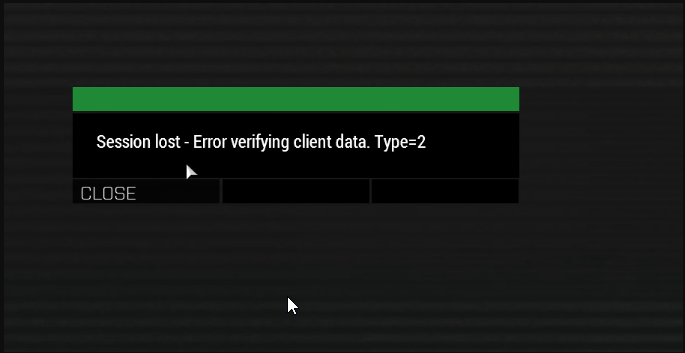 whole cloud
btw all prof changelogs are now also on wiki https://community.bistudio.com/wiki/Arma_3:_Prof-Branch_Change_Log_v2.20
(I know because I just remembered I forgot to put the last ones on there)
🤯
Someone, attached a boat. To a passenger, sitting inside the boat.
Whoever did that, please consider not doing that.
silk pewter
we have black hole simulation in RV now?
whole cloud
RV is not singularity safe
Also whoever made this obfuscation mess. 🖕
If you crash the game with that shit, I'll add safety checks and break all your obfuscation.
 naive osprey
whole cloud
Also whoever made this obfuscation mess. 🖕
If you crash the game with that shit...
naive osprey
whole cloud
Also whoever made this obfuscation mess. 🖕
If you crash the game with that shit...
ObfuSQF does it, as do most obfuscation methods to prevent people from just opening the mission file
whole cloud
They shall do it properly without crashing the game
naive osprey
Fair enough lmao
 vivid rune
whole cloud
btw all prof changelogs are now also on wiki https://community.bistudio.com/wiki...
vivid rune
whole cloud
btw all prof changelogs are now also on wiki https://community.bistudio.com/wiki...
Nice to have the changelog again
One improvement: change the order of entries so you haven't not to scroll every time when you open the site to see the newest one.
whole cloud
Yoris was looking for a way to link to the bottom most one, but didn't find a way.
Even if I swap the order, then the table of contents on the top is still in the way
the TOC can be moved to the side, but I don't want to deal with it
vivid rune
What? The TOC should reflect the topics in order of appearance in the text.
drifting swan
@whole cloud Crash GUID: 34ca1e15-8031-4bac-99ba-ed165cb7205e
check this, please
whole cloud
I asked AI what to reply to your proposal. It said to put a clown on it
whole cloud
drifting swan
<@90532520101183488> Crash GUID: 34ca1e15-8031-4bac-99ba-ed165cb7205e
check this...
 drifting swan
whole cloud
https://discord.com/channels/105462288051380224/105466848958513152/1465303780546...
drifting swan
whole cloud
https://discord.com/channels/105462288051380224/105466848958513152/1465303780546...
Is it known at this point what to do with this or not yet?
whole cloud
What was posted above is the latest info.
Someone is testing to reproduce it with a version that might have more info, but no results yet
vivid rune
If you would take this energy and put in to solve the actual thing...
heavy galleon
whole cloud
Also whoever made this obfuscation mess. 🖕
If you crash the game with that shit...
Can you just not do it anyway?
Not only does it serve no purpose at this point, as every half decend PBO tool can open it, but it just takes ages for the game to start/load with the no-bin and import everything method 
whole cloud
Its effort. Effort needs to be worth the effort.
So far its one crash, if I see more then I'll fix it. If not then not worth the effort
silk pewter
@whole cloud 🤡 🔨 👀
heavy galleon
whole cloud
Its effort. Effort needs to be worth the effort.
So far its one crash, if I see ...
So, if I create a crashing mission and start running it on all the servers I can get my hands on, I can tilt the weights in the right direction?
wait, the obfusqf someone mentioned is a subscription service, where you send your files to their server to be obfuscated
And they also sell a3 mods?  had no idea you can make money making mods
whole cloud
Hope this works
 drifting swan
whole cloud
Next weird crash which I have a few dozen of, from different users and client an...
drifting swan
whole cloud
Next weird crash which I have a few dozen of, from different users and client an...
One hypothesis that seems to fit the pattern:
The RX->R gaps don’t look like real OS page protection changes (0x100 bytes, not page-aligned), more like logical exec-region bookkeeping inside the process. They appear at runtime and consistently hit MT task execution on server and per-frame render code on client.
If something is doing runtime inline patching or integrity checks on hot-path functions and temporarily treating sub-ranges as non-exec / RO, a race with MT worker threads could explain why execution succeeds once and then NX-faults when looping back.
BattlEye could fit that profile. Just a hypothesis, but the size, misalignment and client/server split seem very consistent.
whole cloud
What
Runtime code patching, would still change the flags per page
Why would a integrity check turn a region non executable while it's executing?
Yes BattlEye is not present on server. And not all clients had BE either
fair swan
Is it normal to get a crash popup on perf branch when just closing the game
drifting swan
whole cloud
Why would a integrity check turn a region non executable while it's executing?
Im thinking it’s not a designed state, but a transient one - e.g. a race while patching / unpatching or updating some internal exec state tracking, where a sub-range briefly ends up in an invalid state while another thread is still running through it
drifting swan
whole cloud
Yes BattlEye is not present on server. And not all clients had BE either
Okay, thanks for sharing this. I didn't want to run servers without BE
whole cloud
drifting swan
Im thinking it’s not a designed state, but a transient one - e.g. a race while p...
I don't understand how that would work.
There is one bit for the whole page's execution flag.
How would that be half-set to only affect a smaller section of it
whole cloud
fair swan
Is it normal to get a crash popup on perf branch when just closing the game
No. Oops I guess 😭
drifting swan
whole cloud
I don't understand how that would work.
There is one bit for the whole page's ex...
What I meant by "sub-range" is purely internal/logical exec tracking inside the process, not the real OS page flag.
It’s possible that something in the engine or runtime temporarily treats a 256 B sub-range of a page as "non-exec" for hooks, inline patching, or integrity checks. If a thread hits it while it’s logically flagged, it can crash - even though the OS still sees RX on the full page.
whole cloud
How do you logically set a range to NX? I've never seen that before?
Like technically how would you do that?
The memory dump that was created says the OS thinks the small range is NX, not the full one
drifting swan
whole cloud
How do you logically set a range to NX? I've never seen that before?
Like techni...
Normally OS sets NX per 4 KB page, so the 256 B NX in the dump is probably just the debugger showing part of a page, or some kernel-level thing flipping RX->NX temporarily. The engine could also have its own "logical NX" metadata marking a sub-range as forbidden
whole cloud
drifting swan
Normally OS sets NX per 4 KB page, so the 256 B NX in the dump is probably just ...
How does "logical NX" work?
Like what API would one use to set that. I never heard of that.
drifting swan
whole cloud
How does "logical NX" work?
Like what API would one use to set that. I never he...
By logical NX I just mean internal engine checks or metadata marking a sub-range as temporarily non-executable. Its purely software-level
Today I'll try running the servers without XMP enabled and see if it affects the crashes
whole cloud
drifting swan
By logical NX I just mean internal engine checks or metadata marking a sub-range...
But HOW does that work.
How does Software do that, while the CPU on hardware level throws the NX exception, and the OS tells the crashdump writer that the region is NX?
drifting swan
whole cloud
But HOW does that work.
How does Software do that, while the CPU on hardware lev...
You can't really trigger a CPU NX on a small range from software alone. The 256 B NX in the dump is maybe the debugger just showing part of a page, or a temporary flip by some kernel-level component 🤔
whole cloud
But when dumping it iterates through regions.
It wouldn't see part of a region
whole cloud
@drifting swan I'm thinking you're just throwing AI slop nonsense at me, because nothing of what you say actually makes sense
drifting swan
whole cloud
<@277845661758783488> I'm thinking you're just throwing AI slop nonsense at me, ...
I'm really asking the AI to make a normal sentence, because English is not my native language
and of course such crashes have different versions OS?
this happens on one of my windows server 2019, but not on the other one
heavy vortex
Hmm. Even in the normal section map, the gap between the second and third sections is only 8-byte aligned. So I guess the debugger is showing something other than page boundaries.
heavy vortex
I would guess it's showing PE sections, but that doesn't get any closer to explaining why it's showing a couple of random 256 byte chunks.
heavy vortex
I suppose if a Windows API function was used to hot-patch the process it might update the section data? And then that would likely require setting any overlapped pages to NX temporarily...
whole cloud
heavy vortex
I suppose if a Windows API function was used to hot-patch the process it might u...
To hot patch, you either pause the process, or set the memory to RWX temporarily. You wouldn't set it to Read only temporarily.
And that still is minimum size of one page.
heavy vortex
Yeah I can't find any winapi function that matches that behaviour. And more direct hacks surely wouldn't bother touching the section record. So it's a puzzle.
fair swan
whole cloud
No. Oops I guess 😭
Its not every time but I see it a lot when I close my game. Mainly happens when I am frequently opening and closing the game in high frequency
I was editing a vehicle config and kept having to open and close the game and every few times it displayed that "do you want to send your crash report?" prompt
Next time I will click send lol
heavy vortex
Huh, first crash dump of mine that I checked also has the crash 0x80 bytes inside a 0x100 byte memory region. But that was a freeze dump...
So I guess it's the process of creating the dump that does it?
heavy vortex
Yeah, this one from perf has two 0x100 sections. I don't have a non-frozen mdmp for comparison.
swift drift
- Fixed: UAV could not be used by respawned player -> No more looking for a dead body of a player that had UAV terminal :{
indigo anvil
is there a way to fix xian never landing issue? seems to be an issue that is not universally occuring for every user (they just keep flying around the airfields on altis. issue is on EU01)
heavy vortex
Create simple replication mission, upload to feedback tracker, hope for interest.
Arma AI is such a disaster zone that without a straightforward replication case, no-one is going to look at it. And they probably won't look at it anyway.
patent sky
Especially with the vtol's lol
indigo anvil
heavy vortex
Create simple replication mission, upload to feedback tracker, hope for interest...
its the official EU01 warlords server on altis 🙂
heavy vortex
That is not a simple replication.
Gotta make things easy for devs otherwise they'll go fix something less annoying.
indigo anvil
heavy vortex
Gotta make things easy for devs otherwise they'll go fix something less annoying...
I'm a dev myself btw so I get the perspective 100% 🙂
light cargo
indigo anvil
its the official EU01 warlords server on altis 🙂
doesn't matter, create a replication of the experience isolated
frosty heath
whole cloud
Profiling exe a SFRAME cheat code capture might also grab it.
But I think it'd p...
I went back and did this real fast, should I select copy all and send in DMs or how should I go from here? I set the duration to 1 so it would only capture one of the bigger spikes, I can go back and do it with the default duration if necessary too
heavy vortex
Did you try a VRAM usage monitor?
because if my testing was anything to go by, the profiling is unlikely to say anything useful.
frosty heath
probably right
I did take a look with steams shit but I don't remember seeing a VRAM usage monitor
let me double check
heavy vortex
you'd need to change the "performance detail level" setting because it defaults to FPS-only.
frosty heath
I did, just looked back now and there is
I probably missed it on my first go around
should I just compare the VRAM usage on the flythrough in profiling vs on stable?
heavy vortex
Compare everything. But that was the obvious issue in my case.
frosty heath
oh there goes my game I think