#perf_prof_branch
1 messages · Page 22 of 1
 woven loom
 slender lagoon
which version of mimalloc you guys are using
 plain trout
slender lagoon
which version of mimalloc you guys are using
plain trout
slender lagoon
which version of mimalloc you guys are using
You need to use the latest release. The previous ones were lacking a feature the improved performance a lot
woven loom
Yeah no reason to not just get the latest
 scarlet jolt
Anyone ever run into a case where their GPU usage climbs to 100% and fps drops below 1? Seems to happen occasionally after tabbing out and back in, running in windowed borderless
 storm crag
I didn't see you post in #hardware_vs_arma but the best server CPU for an Arma 3 server will probably be either the 9800x3d or the 9950x3D
My unit is using a 7950x3D and without HCs, performance version of arma 3 and 70ish players. The peoples FPS starts dipping down to 10fps before the server goes below 100fps.
 drifting grove
storm crag
I didn't see you post in <#107058606205067264> but the best server CPU for an Ar...
drifting grove
storm crag
I didn't see you post in <#107058606205067264> but the best server CPU for an Ar...
What about the AMD EPYC 4004k series?
 fast hornet
threadripper and epyc could theoretically also be pretty good because of their massive caches.. but they lack in performance per core. Without running any tests i'd bet that the 9950X3D is the fastest overall.
but of course if you want to run more than 2 servers on a single system the epyc would probably win
drifting grove
whats better for it the cache or the per core?
fast hornet
hard to say.. arma loves big caches and fast memory, but it also loves single core performance. You'd have to grab an EPYC and a 9950X3D and run tests to really answer that. 😉
drifting grove
I use ovh I can see the intel xeon for the 3286/88 the amd ryzen 9800X or the amd epyc 4004k series
fast hornet
oh i just realized the epyc 4004 only have up to 16 cores as well.. thought all epycs have more
but they have less L3 cache.. so 9950X3D would win 100%
drifting grove
the highest I see is 24c
fast hornet
there should be EPYCs with 128 or more cores.. but maybe they didn't release the Zen4 versions of those yet
drifting grove
sadly ovh has not done those ones yet only see 24c which damn that cache is big
sorry i only know of ovh I know of others but have not looked into them
fast hornet
Hetzner has a dedi box with 48 cores, EPYC 9454P
drifting grove
I run arma 3 server and then other servers for friends and people
fast hornet
but it's pretty pricey
drifting grove
Yeah
also Idk if they are other countries
but so far the amd ryzen 7 5800x is doing decent with arma 3(and other games) problem is the SSD space(have HDD buut yeah) and planning to eventaully move to a better server just want to make sure what is good of if epyc is ok
fast hornet
we're pretty happy with Hetzner.. they offer systems in Finland and Germany (and i believe also the US lately?).
Had a degraded intel 13900 CPU in our dedi box that caused a lot of problems for us, but once we reported it they migrated our disks to a new system within 30 minutes. Was really impressive.
drifting grove
fast hornet
we're pretty happy with Hetzner.. they offer systems in Finland and Germany (and...
More of canada and US
for me since I live in the US
fast hornet
ah ok, no clue about US hosters really, i'm in germany
but in general, basically any modern CPU will be fine running your typical Arma 3 Server, even heavily modded, as long as you give it 8 cores/16 threads (or even less)
especially the perf versions, dedmen has been doing some miracle work over the last months in terms of script performance
drifting grove
the profiling is pretty good on it
Yeah
I been watching
my problem is East Asia War, 1937 has issues after the version 26 "EAW_Intros' as required addon 'WW2_SPE_Core_c_UI_MenuBackgrounds_c", yes I did report this on the mod page
so I am on that build
but still doing well so I am happy
fast hornet
we're on 152881 (should be v31?), zero problems so far
drifting grove
only that mod I seen but all others seem fine so idk
fast hornet
server is running on the first 16 threads. That's with ~40 clients at 60fps. Plenty of head room 🙂
 drifting grove
Nice
 inland dew
how about going to -> #hardware_vs_arma
 restive pilot
scarlet jolt
Anyone ever run into a case where their GPU usage climbs to 100% and fps drops b...
restive pilot
scarlet jolt
Anyone ever run into a case where their GPU usage climbs to 100% and fps drops b...
if you do drawIcon3d or other draw commands in an eachFrame loop instead of draw3d (or use a mod that does this), that's known, yes.
the game queues your requests until you're in the game, then draws them all at once, causing a game freeze when you alt+tab back in
scarlet jolt
Huh, good to know. I'll take a look at what might be doing it
 winter solar
sorry for dumb question, are the multi threading improvements on the Profiling branch or only on the Dev branch
 naive osprey
Both
 potent sparrow
fast hornet
threadripper and epyc could theoretically also be pretty good because of their m...
potent sparrow
fast hornet
threadripper and epyc could theoretically also be pretty good because of their m...
would be amazed if it wasn't, arma's performance on 7950X3D is stellar and the 9950X3D is a nice jump
 fading seal
Gave it a try and if anything it resulted in slightly less FPS
Could be a proton thing though who knows
woven loom
ah yeah don't know about that, i'm running it on native windows
woven loom
base mimalloc is by microsoft anyway so i assume there are windows optimizations in there?
 heavy vortex
If you don't specify a malloc then it loads tbb4malloc_bi by default. -malloc=system could well be superior since the MSVC version got a bump recently.
 foggy vine
-# Gotta try that out at some point
 whole cloud
whole cloud
fast hornet
whole cloud
whole cloud
whole cloud
fast hornet
syntax for -cpuAffinity is the same as this i suppose? https://learn.microsoft.com/en-us/dotnet/api/system.diagnostics.process.processoraffinity?view=net-9.0#system-diagnostics-process-processoraffinity
So e.g. 65535 / 0xFFFF / 1111 1111 1111 1111 for the first 16 threads?
And what's the syntax for -cpuMainThreadAffinity? 🙂
whole cloud
yes, same
fast hornet
so if i wanted to pin the main thread to lets say thread 4 it would be 1000? (0x8)
whole cloud
yeah but in hex, and depending on whether you start counting at 0 or 1
 silk pewter
I thought 0x00 was wrong?
whole cloud
Who said anything about 0x00
fast hornet
whole cloud
yeah but in hex, and depending on whether you start counting at 0 or 1
yeah, so 0x8 when counting from 0
whole cloud
🚪 👈
fast hornet
i'm guessing the automatic cpuCount runs after the affinity? So e.g. if i'd use -cpuAffinity=0xFFFF to restrict the server to the first 16 threads -cpuCount=16 would be redundant?
hm nope, the rpt still states all cores
restive pilot
fast hornet
i'm guessing the automatic `cpuCount` runs after the affinity? So e.g. if i'd us...
don't use both
fast hornet
guess it's just a cosmetic bug then
whole cloud
it depends in which order you specify the parameters 😄
if the RPT doesn't react to affinity, then I probably made a mistake and need to copy the argument handling to other place
fast hornet
seems the RPT output for the core count runs before the affinity .. probably just cosmetic 🙂
PhysMem: 31 GiB, VirtMem : 131072 GiB, AvailPhys : 28 GiB, AvailVirt : 131068 GiB, AvailPage : 32 GiB, PageSize : 4.0 KiB/2.0 MiB/HasLockMemory, CPUCount : 8
=====================================================================

15:07:02 Process affinity forced to 0xF (requested 0xF)
(0xF is the first 4 threads)
or maybe just change the affinity line to include the number of the actual used cores.. since the first line is technically correct for the system as a whole
Process affinity forced to 0xF (requested 0xF). cpuCount set to 4.
like that maybe
whole cloud
I think we log the message before we adjust the CPU Count. So when the RPT header is created it still has the old 
 gritty wasp
Does this build include fixes for network messages corruption?
whole cloud
no
 ember owl
whole cloud
ember owl
whole cloud
Apologies in advance if I am missing something, but where can I find out more on the spawn server-side script command? I checked the wiki to see if there was an alternate syntax or something but didn't see anything. Not sure if it just hasn't been updated yet or if I am looking in the wrong place.
whole cloud
its not on the wiki yet, but it works the same as the normal spawn, just in server-side scripts
ember owl
whole cloud
https://discord.com/channels/105462288051380224/105465701543723008/1372938209012...
Cheers I didn't even realize that channel existed- thanks for the help 🙂
whole cloud
Going down that bad cpu count logging, I found a age old bug in our logging system 
The first message, that is supposed to be written to RPT is
Warning: memory usage limited by a page file. Current limit ...
But, it is printed so early, that the rpt filename isn't even initialized yet, so it doesn't know where to write it 😄
 empty goblet
ok, -cpuMainThreadAffinity= seems to work , VERY useful ,
now you can ensure the main thread uses the best/free CPU core you have (server but also client)
or setup multiple processes of A3 sever / hc to use specific cores to avoid unwanted overlap hog
while leaving the rest of threads to be dealt with kernel or further affinity settings (via OS or via -cpuAffinity= )
empty goblet
empty goblet
ok, `-cpuMainThreadAffinity=` seems to work , VERY useful ,
now you can ensure ...
@whole cloud i assume we could have another parameter to tell the other 'extensive' threads created afterward to avoid that cpu ?
whole cloud
Yes but no
empty goblet
😦
but but then the magic isn't complete ... 🤔
-exclusiveMainThreadCore // except needed, threads affinity shall avoid main-thread's core
-xAudio2Affinity= // auto/manual
whole cloud
whole cloud
Going down that bad cpu count logging, I found a age old bug in our logging syst...
That blocked me from moving the affinity parameter up, because if I move it up there, I wouldn't be able to write log messages
But fixed nau
whole cloud
whole cloud
That blocked me from moving the affinity parameter up, because if I move it up t...
Correction, fixed now..
The kinda cursed things I need to create to fix things...
affinity masks 0 and 1 will now actually be ignored. (and all single-core settings)
Because the game cannot run on a single core anymore and I forgot to check that. So lou can now stop asking
18:54:05 Warning: memory usage limited by a page file. Current limit 21741 MB, wanted 24534 MB.
18:54:05 Increasing your page file size might improve game performance.
Now this message no longer gets lost. But seeing the hint of performance, just gives me fear that it'll lead to people configuring hundreds of gb large pagefiles
 spiral pond
The message appears in binarize logs - kinda always regardless the available amount. Does that make sense?
whole cloud
It is valid to a point, it limits virtual memory usage.
The wanted number, is 3/4's of your total system ram.
The limit is the page file size.
The game will try not use more memory than the page file allows for (actually not really sure why).
So a small page file does actually limit you.
But, we later on anyway limit to 16GiB. So that message popping at 21/24GiB is just nonsense.
 light cargo
beacuse its how the virtual memory in windows works? :)
for apps windows exposes them the virtual memory which is physical+paging, that's the true amount of memory available to the system
woven loom
fading seal
Gave it a try and if anything it resulted in slightly less FPS
cc @heavy vortex
I tried again, I could not replicate -- mimalloc is a good 16% faster than the windows system allocator on my system, and +6% faster than the default TBB4.
Also, game memory usage (Mem + cache) is 2GB higher for system allocator than mimalloc (5GB vs 3GB)
Windows 10, 7800X3D, 32GB DDR5-6000CL30, 4070 Ti.
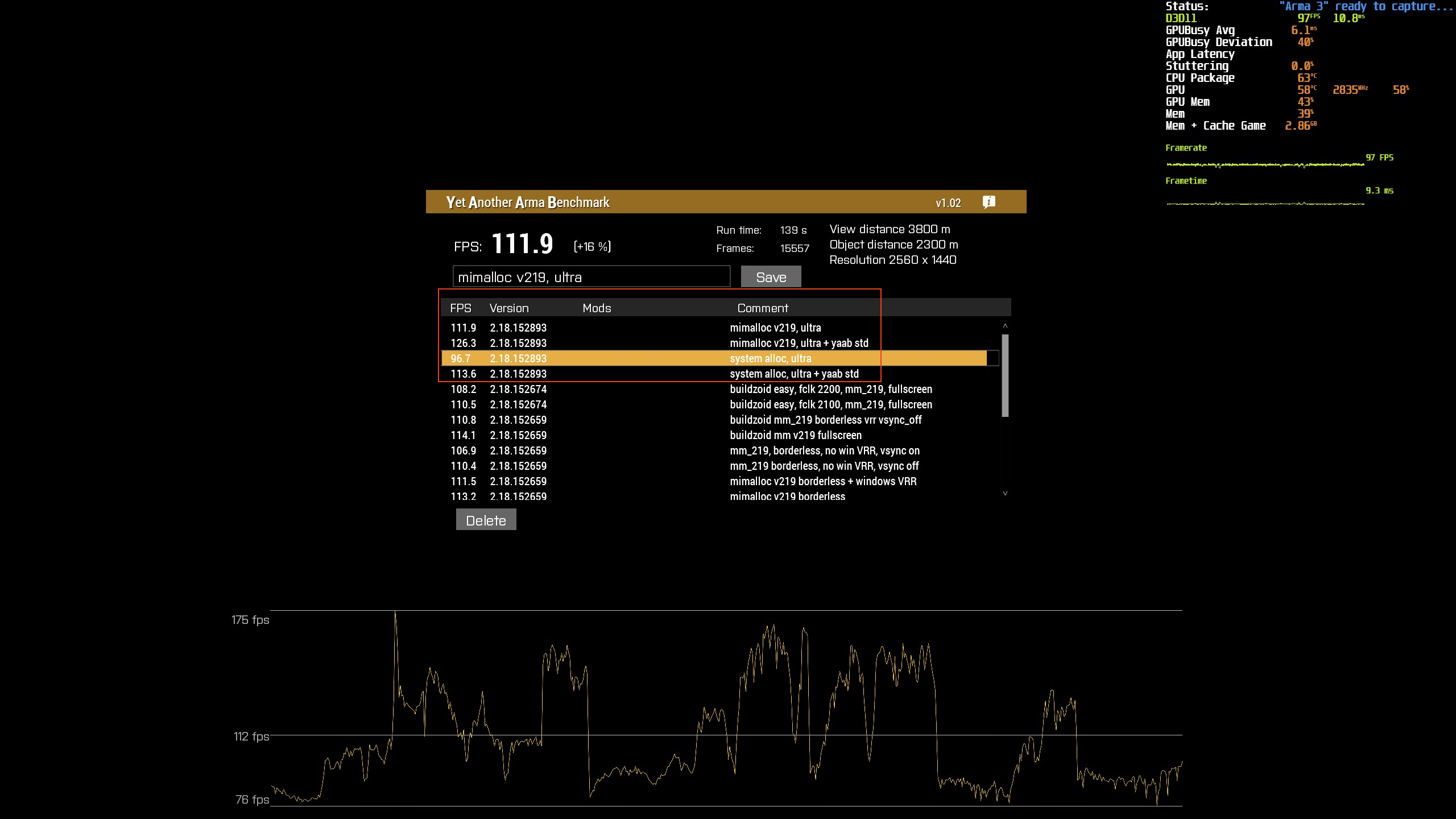
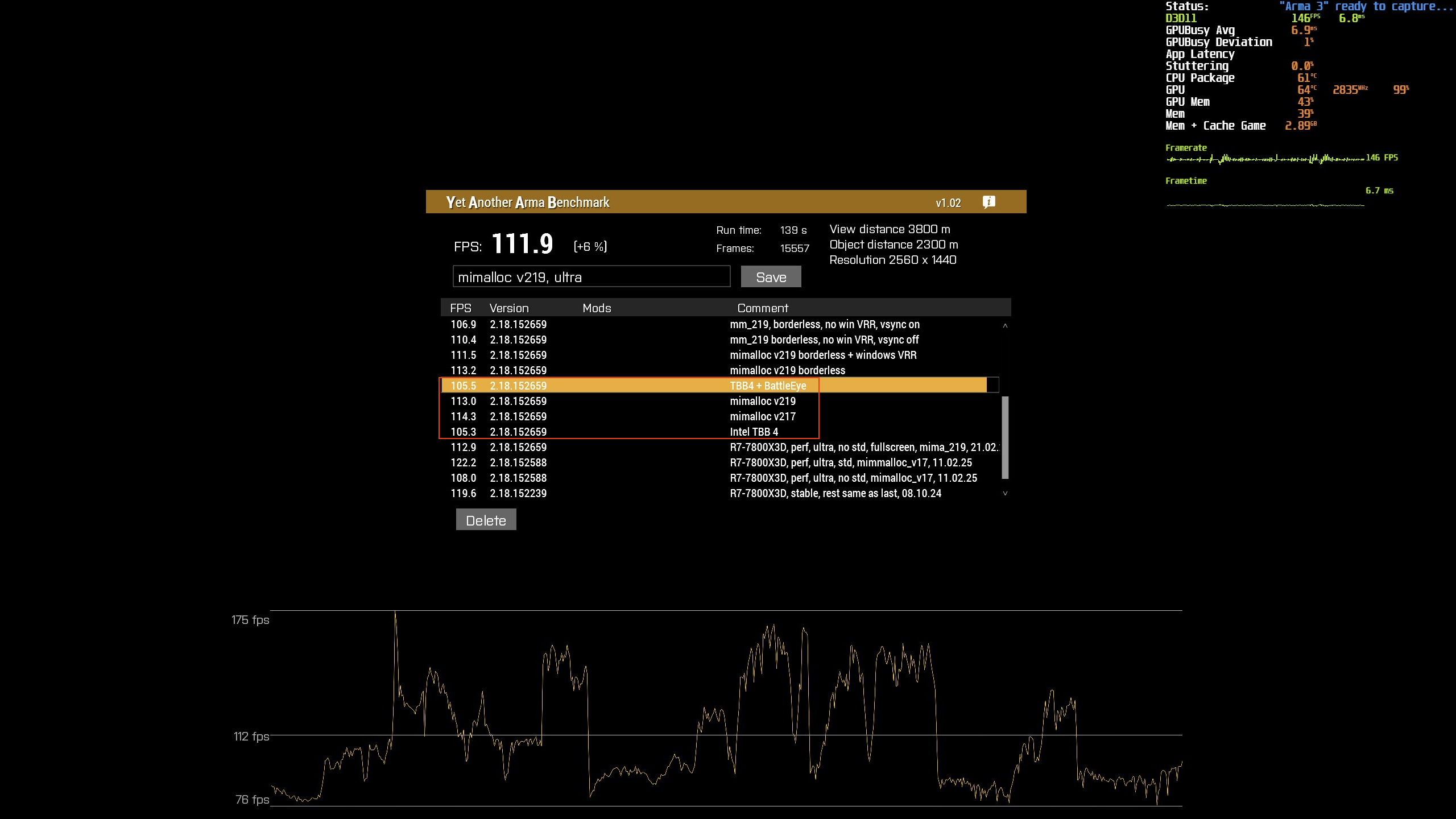
And this has been pretty consistent for months as you can see. 110-114 fps for ultra video preset when Arma 3 is run fullscreen.
I am also running gsync with a monitor refresh rate of 165 Hz so really high FPS get truncated in either case but imo this is more consistent
whole cloud
light cargo
for apps windows exposes them the virtual memory which is physical+paging, that'...
total = physical+paging.
But we do total=paging.
whole cloud
Back to the netcode struggles. And another "wait.. wtf" moment.
Message comes in.
if message is not too old, process it.
If deferred messages depend on the new message, process them all.
Thus, if message is too old, its not processed, but all other messages that were depending on the message that we never processed, are now being processed with their dependency being skipped even though we had it right there.
whole cloud
whole cloud
also getServerInfo is not available on prof.
I think because its server-side only, it would be safe to add though
 rough herald
Im on the RC branch 2.20 (was on the Profiling Branch a week ago, both have this issue). Not sure where else can i put this. All the forums and feedback tracker are down.
AI issue. If you set your squad to 'engage at will', and they are in combat. Command one of your men (for example a medic, to heal another member). A 3rd member will go into a 'supporting' state. And he will be stuck in this state permanently, not moving.
Even if combat has stopped, disengage is given and he has regrouped; the moment 'engage at will' is commanded this member will revert back to supporting.
whole cloud
#perf_prof_branch message This seems to have gone under
whole cloud
For reference, this is how many network packets a server sends, to one player on an empty map.
And only the pVIM ones are guaranteed messages.
A3 is so efficient that the netcode problems didn't matter much in low-activity gameplay 😄
Like one guaranteed message per second maybe?
fading seal
That's pretty quiet for a near-ish realtime-ish client server thing 😛
fast hornet
almost too quiet, even for an empty map and one client 😄
whole cloud
whole cloud
https://discord.com/channels/105462288051380224/105466848958513152/1344602235790...
Ah the joys of deleting yourself while you're still running code inside yourself.
And meanwhile also flipping around how a Finite state machine is supposed to work, by exiting a state from within the "should we exit this state" check 🤯
Its all held together by ducktape and prayers.
Usual state machine
AI Subgroup
  Update FSM
     IsCurrentStateDone()
     if yes then StateExit()
This one
AI subgroup
  Update FSM
    IsCurrentStateDone()
      Join unit into different subgroup
        Delete my now-empty subgroup while I'm inside it
          Delete my FSM while I'm inside it
            Call StateExit()
        Assign different subgroup to unit
    Yes the state is done, okey call StateExit... eh.. oh there is no exit because I don't exist anymore. Phew I'm pretty lucky that my memory isn't actually deleted yet otherwise I would be crashing :meowsweats:
  Oh, I deleted myself, phew, I'm lucky that I can run code on myself even though I shouldn't exist, but I should better exit now or I would be crashing :meowsweats:
After I fixed it in november
AI subgroup
  Update FSM
    IsCurrentStateDone()
      Join unit into different subgroup
        Mark my Subgroup to be deleted
        Mark my FSM to be deleted
        Assign different subgroup to unit
    Yes the state is done, But there is a mark to be deleted. Lets run the StateExit() now and exit.
  Oh I'm marked to be deleted, lets delete myself and exit without running any extra code.
The difference is that in the old F'ed procedure, StateExit would be called on the old subgroup, before the unit was switched.
After my fix, it would be called on the old subgroup, after the unit was switched. That made it see the subgroup is invalid and exit early without telling the wounded unit that the healing is done.
fading seal
Props to BI and you for putting resources into this btw 🫡
 median belfry
Regarding the stuttering issue for the webbrowser. I found the cause, its high fps. When I look on the ground and I get over 200 fps, then I open the webrowser ui, everytime it will lag like shit. But when my game is running below 200 fps it seems to be fine and the ui is running smooth.
storm crag
empty goblet
ok, `-cpuMainThreadAffinity=` seems to work , VERY useful ,
now you can ensure ...
I've just been using my powershell script that launches my server to achieve this 
storm crag
median belfry
Regarding the stuttering issue for the webbrowser. I found the cause, its high f...
sounds like your GPU isn't able to keep up then
median belfry
storm crag
sounds like your GPU isn't able to keep up then
I guess 3080 isnt enough 😄 I mean when I open it in chrome in the background it runs smooth as hell, it just in arma when I got high fps
storm crag
median belfry
I guess 3080 isnt enough 😄 I mean when I open it in chrome in the background it...
I mean just check task manager when you're getting the lag spikes, if the GPU is at 100% then your GPU isn't enough.
Although, it doesn't really track at 360fps looking at the ground I'm getting 36% usage.
median belfry
storm crag
I mean just check task manager when you're getting the lag spikes, if the GPU is...
runs normally at 65% and with high fps and web browser open 70%
storm crag
median belfry
runs normally at 65% and with high fps and web browser open 70%
What's the CPU usage? It should be pretty low it's arma 3
median belfry
around 20%
 storm crag
median belfry
you probably have the same issue 😄
storm crag
median belfry
you probably have the same issue 😄
I don't think so, but I don't think I fully understand what the issue is
median belfry
storm crag
I don't think so, but I don't think I fully understand what the issue is
Im referring to the webbrowser. context: #perf_prof_branch message
video seems to be deleted oopsie
But yea anyway, dedmen will know
storm crag
median belfry
video seems to be deleted oopsie
Yeah I saw that hence my confusion
 honest fulcrum
storm crag
I've just been using my powershell script that launches my server to achieve thi...
honest fulcrum
storm crag
I've just been using my powershell script that launches my server to achieve thi...
Would you be willing to share? Just curious for my own personal server hosting messing around lol
whole cloud
median belfry
Regarding the stuttering issue for the webbrowser. I found the cause, its high f...
Guess I'll add a 60fps limit to the Browser Updates then 🤔
60fps gotta be enough for everyone xD
But I need a repro to test.
Is the lagging reproducible by playing a YouTube video?
Or does it need to be css animations that are laggy?
I probably don't have time to build myself some animations just to repro this
woven loom
but dedmen how will i play 120fps ofp inside arma 3 web browser
whole cloud
Small bug in my "fast retransmit" stuff.
The fast retransmit is a bit too fast 😄 It is considering messages lost, and re-sending them, even if the message didn't have enough time to arrive at the other end.
Like 100ms round trip time.
0ms: Server sends packet, takes 50ms to arrive.
10ms: client sends a packet to server containing list of what it had received, which doesn't contain the latest packet which is still 40ms away.
50ms: Client receives the server's packet, all is good no loss.
60ms: Server receives the client's packet, see's that it says it didn't receive the last packet, so it resends it.
110ms: Client receives packet, see's its duplicated and discards it.
Whoops.
In practice not a big problem, just higher bandwidth usage of needlessly resending things that aren't actually lost.
storm crag
honest fulcrum
Would you be willing to share? Just curious for my own personal server hosting m...
I think it's on my GitHub although I'm not sure if I updated it. Either way it seems like you don't need it anymore.
empty goblet
whole cloud
Guess I'll add a 60fps limit to the Browser Updates then 🤔
60fps gotta be enoug...
100, 120, 144, 150, 165, 180 Hz monitors are common now ... so some high FPS may come handy when someone does something fancy in the browser ui element
whole cloud
Well not if it doesn't work
empty goblet
whole cloud
Well not if it doesn't work
sure, the real question is beyond what threshold it breaks or why
whole cloud
Its probably steam.
We have to stream the images from steam. Probably just doesn't like doing it too fast.
Mh actually that doesn't make sense. I thought maybe we request new images too often, but we never request images, steam sends them whenever it wants to
whole cloud
whole cloud
Small bug in my "fast retransmit" stuff.
The fast retransmit is a bit too fast �...
And another bug.
We put non-guaranteed messages, that we generally shouldn't care about whether they get lost, also into the retransmit queue.
The old code that checks for timeout, just drops non-guaranteed messages, and resends guaranteed ones.
For the fast retransmit I didn't check and we are now retransmitting even non-guaranteed messages 😄
But why do we even keep them in that queue if we only discard them later
All this stuff is not documented
I think we might be using that to determine "the oldest message for which we have not received an ACK yet". But, we don't care about the non-guaranteed ones being lost, so why do we care which is the oldest 
What's gonna happen if I just.. exclude them
whole cloud
But its nice to see that the fast retransmit does indeed work.
Client:
366.12716675    processData: Receive serial=915739
366.12719727    processData: message (915739) depends on another one (915738) - deferring
367.23004150    sendPacket: serial=701974
368.12271118    processData: Receive serial=915738
368.12286377    processVIM: pending message (915739) processed after (915738)
368.12289429    processData: Receive serial=915741
Server:
365.12344360    sendPacket: serial=915738
366.12715727    sendPacket: serial=915739
367.13189697    sendPacket: serial=915741
367.23034668    processData: Receive serial=701974
367.23037720    inputAcknowledgement resend fast serial=915738 recvTime -762 ackSendTime -0.241 latency 0.203
367.23040772    inputAcknowledgement resend fast serial=915741 recvTime -98 ackSendTime -0.279 latency 0.203
368.12210083    sendPacket: serial=915744
Client missed 738, and had to queue up 739 because its predecessor was missing.
Client also missed 741, but it doesn't even know about that yet, because 742 doesn't exist yet, it can't know that it missed something.
Client sends packet 974 to server, which contains a list of serial numbers that it recently received.
The server, see's that 738 and 741 are not in that list.
The server can see the client got 739, but not 738. So it knows its lost and resends it right away.
For 741, it determines based on last known ping-time, that it should've arrived 100ms before the client assembled the packet that it sent us. So it should've been in there if it wasn't lost (But it could also just be delayed beyond usual ping time). So it resends that too.
It correctly assumed that it was lost.
The server noticed that 741 got lost and re-sent a replacement, within just 99ms of when it was first sent out, and it would've been faster if the client had sent another packet earlier.
With the old netcode, the server would've waited 400ms (average latency * 3 + 400ms) + up to 50ms extra to resend it.
silk pewter
sooo… lightning fast network in 2.22? 😮
whole cloud
Lou missed the last month of chatter spam in here talking about how much higher the network bandwidths are now
silk pewter
I didn't, but I may have missed for which version it was planned 😄
whole cloud
not decided yet. But the code is in, so pulling it out again for 2.22 would be hard
 obsidian condor
 whole cloud
And I found my problem for #perf_prof_branch message
I wanted to fix it, by the client simply refusing to accept new messages, if the queue is too long.
It would refuse messages, fail to acknowledge them, the server would drop bandwidth until we catch up.
But I did the refusing wrong, instead of refusing new messages, I ended up refusing the old message that was lost and that we were waiting on.
So the thing we were waiting on never got through and we got stuck 🤣
whole cloud
Ah I found the problem of why we sometimes miss a message and fast retransmit is not catching it.
When we look for the oldest serial number for which to say "we received it" or "we did not receive it", we loop through the last 1024 messages, and find the oldest one that we did receive, even if there is a gap before it.
So if we missed one message 1023 messages ago.
We won't tell the other side that we missed it
But we will get forever stuck, waiting for the message, that the other side doesn't even know that we missed.
There is also a problem that if we receive the 1025th message, we just drop the information about the oldest one, which is also bad :/
Also the server doesn't stop sending.
If we keep receiving new messages, we will move up the window of messages we accept.
We will drop information about old messages we missed (so we will not tell server to fast-retransmit it to us), and we increase the minimum serial number we accept.
If the server sends us too many, that we bump the minimum serial number above the lost message, before we can receive a retransmission of that message...
We will refuse to accept all further retransmissions of it 💀
Although I guess.. I can just bypass that, if we refuse a message because too old BUT we are actually waiting for it, accept it anyway.. Why did I not get that idea sooner 😄
heavy vortex
If guaranteed packets are guaranteed, I'm not sure why there would be a window at all.
woven loom
Is it usual to have to do all this manually? Surprised there aren't libraries that handle the network transmission stuff and just give you the data...
whole cloud
woven loom
Is it usual to have to do all this manually? Surprised there aren't libraries th...
There are many libraries that do this.
heavy vortex
Maybe not so many back when it was written :P
whole cloud
heavy vortex
If guaranteed packets are guaranteed, I'm not sure why there would be a window a...
I assume mainly to protect against rogue packets.
If someone who isn't the game client, sends some packet to the server. They would need to guess the current window for their packet to be accepted.
 spiral thicket
I love u (that is all)
whole cloud
TCP is nice. When a message comes in, and there was no gap/loss before it, it bumps the minimum serial number.
Any message less than the minimum is discarded. Either it's rogue or it has already been received.
It has a window above the min, if the serial number is in it, it will be saved (for until the lost packet arrives). If the message is above it, it's dropped.
It only moves up the minimum, if all gaps are resolved.
But Arma, moves the minimum not based on whether all gaps are solved, it moves it based on what the maximum incoming serial number is based on a maximum number of packets between min and max.
If a new message comes in, that is (slightly) above the window, it doesn't refuse it.
It slides the window up, and drops the old stuff.
That is totally fine to do for non-guaranteed messages. We don't care if the old ones that we never received get forgotten about.
But if the old ones that we never received were guaranteed messages, we are F'ed because we now refuse the lost packet, even if it does come in after a while, and the next guaranteed messages all depend on it, wait for it, get stuck.
Still working on understanding how this all works
Problem is, we don't know if there are guaranteed messages, in the old ones we drop, because we haven't received them yet and serial numbers are shared between guaranteed and non guaranteed.
But easiest way is probably to note the oldest serial number, that someone is waiting on. And not bump our min beyond it.
Actually I think that's a easier solution than all the crap I tried for this bug...
But that doesn't work if between the last guaranteed, and the next, there are window size number of non-guaranteed messages. (We don't get told about the old dependency, until it's already gone).
But that's quite unlikely..
Well there could be packet loss, that strategically only hits guaranteed messages and increases the chance xD
Ah what a pain.
 real creek
-# we're a few weeks away from seeing dedmen appear in an IETF RFC
 vivid rune
Maybe he can implement this protocol as backup solution:
https://datatracker.ietf.org/doc/html/rfc1149
IETF Datatracker
This memo describes an experimental method for the encapsulation of IP datagrams in avian carriers. This specification is primarily useful in Metropolitan Area Networks. This is an experimental, not recommended standard.
 midnight oyster
@whole cloud if I already use a program like Process Lasso to assign CPU affinities and assign cores / threads, should I forgo any inputs to settings in the Arma Launcher concerning the same (CPU affinity and hyperthreading)?
whole cloud
You should set parameters to match.
At which point you could just stop using process lasso for it
at minimum the cpuCount must match
 hallow yew
v9 perf/prof available, only for those who still getting crashes (more logging/traps)
https://www.dropbox.com/sh/582opsto4mmr8d8/3BSy9PdRGm
woven loom
whole cloud
There are many libraries that do this.
So would it be too complex to replace the A3 system with an existing library?
silk pewter
woven loom
So would it be too complex to replace the A3 system with an existing library?
it's more like it would be too generic with not enough control on it I guess
also maybe it's indeed too intertwined with everything to split it adequately 😬
woven loom
Yeah that's fair 😅
heavy vortex
serial numbers are shared between guaranteed and non guaranteed
This seems like madness but I guess you can't fix it without breaking network compatibility.
 runic sigil
Completely separating the guaranteed and non-guaranteed queues seems like it would fix most of the issues
I'm not certain what issues with implementation that would introduce though
empty goblet
runic sigil
Completely separating the guaranteed and non-guaranteed queues seems like it wou...
that plus extra queue for the to-drop
runic sigil
Ugh
Netcode is complicated
Well, it should be better than the already decent old netcode
(I say decent, flawed and slightly buggy but mostly working might be a better description)
whole cloud
woven loom
So would it be too complex to replace the A3 system with an existing library?
No, probably not
whole cloud
runic sigil
Ugh
Netcode is complicated
Well, it should be better than the already decent old...
We are at a pretty good spot now.
The only issue is that there is too much in-flight data when you're at like above 50MB/s on one connection, such that when a packet loss happens then, it messes up the connection.
Unlikely to happen but I want it fixed to be safe.
Easy fix is to not allow too much in-flight.
But the limit is currently 1024 packets, which is too bandwidth limiting. But even 4x'ing that is maybe enough 
And due to how inefficiently the data storage was built, I can 2x it without any more memory usage 😄
 heavy galleon

 dense light
whole cloud
No, probably not
dense light
whole cloud
No, probably not
Famous last words 
 weak radish
How bad/hard/difficult could it possibly be?
-somebody who found out the answer is very
fast hornet
whole cloud
Still working on understanding how this all works <:meowsweats:70762603061313539...
no worries.. there's even plenty of network engineers who don't fully understand how e.g. window sizes and sliding window works in TCP together with latencies and so on and how packet loss and retransmits influence them. Especially when it comes to Long-Fat-Network (high bandwidth, high latency) issues that simply didn't exist when TCP and a lot of protocols using it were designed. 😉
 restive meteor
Another guy and I had 3 lockup's (which needed the Kill Task function from Windows Dev) last Sunday when running the Performance Branch. (Heavy modded of course). Reverting back to older or Stable was the only solution.
Didnt see anything in the changelog for the newest one about a fix for a crash. Anybody else had crashes as well? Were they gone with the newest version?
whole cloud
a freeze is not a crash.
Did you get freeze dumps? did the RPT's log anything?
If that happens you can also create a memory dump in task manager, that would probably let me see where it froze
 frosty heath
restive meteor
Another guy and I had 3 lockup's (which needed the Kill Task function from Windo...
frosty heath
restive meteor
Another guy and I had 3 lockup's (which needed the Kill Task function from Windo...
been having some freezes past few days but I'm playing heavily modded as well
heavy vortex
frosty heath
been having some freezes past few days but I'm playing heavily modded as well
Worth making the minidumps and sending them anyway. Good chance it's the same issue, and if not, it doesn't take Dedmen long to check.
frosty heath
at a different computer right now so I'll try and get it when I can if gruman doesnt send his
or if i reproduce it on this machine later today i can send that
heavy vortex
Well, unless it's still frozen you'd need to reproduce it again anyway. I don't think there's any automatic generation of dumps for a freeze. You have to do it manually with task manager while the task is still active.
frosty heath
I do remember seeing in my log folder a .mdmp with "frozen" in the name
 worn obsidian
@hallow yew chokebug logging too?
hallow yew
No idea, i'm not running it because Dwarden said it was for those still crashing on v8
 silent nest
We set it up on ours. Even with V8, they reported me some crashes on our Server :/
 hybrid fern
Has anyone noticed the oddity that with the latest updates began to disappear buildings, windows become impervious to grenades and so on?
https://youtu.be/ufjXwE0qqD8
Sometimes the damage from the same explosions goes through the building like it's not there.
Obviously the recent optimizations have caused some sort of glitch in the build models, that they don't have all shapes at the same time 🤔

 loud condor
Is the following still realistic for 2025 hardware, 1Gbit network and Profiling Branch Server.exe?
//basic.cfg
MaxBandwidth = 2147483647; // 2.1 gbit //or comment out, setting doesn't do anything
MinBandwidth = 25600000; // 25.6 mbit/5 zeros //not really relevant, do not set higher than your actual available bandwidth, also tested with 256000000 (256mbit/6 zeros)
MaxMsgSend = 64; //IMPORTANT setting, also tested with 48 but that comes with increased lag whenever a player connects, setting this to 128 or more has resulted in the server yellow chaining and not recovering on 16AA and Karmakut servers.
MaxSizeGuaranteed = 512;
MaxSizeNonguaranteed = 1024;
MinErrorToSend = 0.001;
MinErrorToSendNear = 0.01;
Command Line Arguments:
-hugepages -maxMem=16000 -malloc=mimalloc_v219_20250213 -enableHT -bandwidthAlg=2 -limitFPS=500 -loadMissionToMemory
Got this from: https://gist.github.com/MildlyInterested/5ecefd1ad75522eae1fa5e8f4b839fd3
 opal hound
loud condor
opal hound
loud condor
Ended up with this config based on 1500 - 96 = 1404 bytes, 180 average server fps when server full and objects spawned, 920 Mbps connection (1Gbit advertised, obv)
MaxMsgSend = 128;

// Packet sizing (aligned with MTU 1500)
MaxSizeGuaranteed = 1444;
MaxSizeNonguaranteed = 1400;

// Update fidelity
MinErrorToSend = 0.002;
MinErrorToSendNear = 0.001;

// File uploads
MaxCustomFileSize = 1024000;

// Bandwith
MinBandwidth = 0;
MaxBandwidth = "920Mbps";

class sockets {
    MaxBandwidth = "16Mbps";     // Per-client cap
    initBandwidth = "4Mbps";     // Supports weaker ISPs
};```

50-55 players, PvE Milsim - big mod list, players from EU+US and some weaker connections from further away or less developed countries.
Would love to hear feedback from others on these settingsthat maxmsgsend is too low
empty goblet
loud condor
Ended up with this config based on 1500 - 96 = 1404 bytes, 180 average server fp...
that msg and msng is wrong unless modified maxpacketsize to higher than default
loud condor
empty goblet
that msg and msng is wrong unless modified maxpacketsize to higher than default
Ended up going with 1024 on both accounts, with some advice from @naive osprey .
And indeed, Max Msg Send was a bit too low but no issues luckily during op last night. Would you advise 160, 190 or even 256?
Perhaps interesting for other users is the graph from last op. We visualized the #monitords data in MS Power BI. DM me if you want to see it, cant share images here.
whole cloud
You can send me link and I can post it here
 fiery crescent
Any ballpark stable release time frame? Or is it a forbidden question? In any way thanks for the hard work!
storm crag
fiery crescent
Any ballpark stable release time frame? Or is it a forbidden question? In any wa...
tbh the performance branch is pretty stable, but yeah asking a developer for an idea of a release date, is essentially asking for a developer to look into the future.
 tawdry gazelle
Hi fellas. I just draft-released new versions of mimalloc for Arma, here:
https://github.com/GoldJohnKing/mimalloc/releases/tag/Arma-3-v2.2.3-20250527
https://github.com/GoldJohnKing/mimalloc/releases/tag/Arma-3-v3.0.3-20250527
These versions are not fully tested yet. Any feedback is welcomed.
Note v3.x.x is still in beta state. It may neither be performant nor stable. You should prefer v2.x.x for now.

GitHub
Note
This version is not fully tested. Any feedback is welcomed. You may reach me on ARMA's Discord.
Changelog
Merge upstream changes v2.2.3, see https://github.com/microsoft/mimalloc#releases...

GitHub
Note
This version is not fully tested. Any feedback is welcomed. You may reach me on ARMA's Discord.
mimalloc v3.x.x is still in beta state. It may neither be performant nor stable. You should...
heavy galleon
Note v3. x. x is still in beta state. It may neither be performant nor stable. You should prefer v2.x. x for now.
Is the reason why I'll use it
tawdry gazelle
heavy galleon
> Note v3. x. x is still in beta state. It may neither be performant nor stable....
What a valor.
foggy vine
Best QA is public testing. Don't change my mind.
 gilded compass
Can someone explain to me what is the arma 3 Prof Branch is???
 worldly badge
tldr: beta version
woven loom
No data changes but tweaks to the exe, stable compatible with multiplayer
whole cloud
fiery crescent
Any ballpark stable release time frame? Or is it a forbidden question? In any wa...
Plan is weeks.
Reality is uncertain.
Schrödingers release.
whole cloud
gilded compass
Can someone explain to me what is the arma 3 Prof Branch is???
Dev branch, but compatible with stable branch servers.
Now please don't ask what dev branch is 😄
 rose moth
 charred pagoda
tawdry gazelle
Hi fellas. I just draft-released new versions of `mimalloc` for Arma, here:
http...
charred pagoda
tawdry gazelle
Hi fellas. I just draft-released new versions of `mimalloc` for Arma, here:
http...
Are they whitelisted by BattlEye already?
charred pagoda
charred pagoda
Are they whitelisted by BattlEye already?
Nope
whole cloud
charred pagoda
Are they whitelisted by BattlEye already?
There's a whitelisted version
charred pagoda

There is no significant difference between 219 and 223. 303 definitely shouldn't be used
weak radish
charred pagoda
Are there some HW specs to match the graph?
whole cloud
No more reports of particle effect issues since the last fix attempt. Is it really fixed?
whole cloud
loud condor
Perhaps interesting for other users is the graph from last op. We visualized the...

many numberos
 orchid mesa
whole cloud
No more reports of particle effect issues since the last fix attempt. Is it real...
orchid mesa
whole cloud
No more reports of particle effect issues since the last fix attempt. Is it real...
i haven't had the issue since v29, however one person i play koth with said they've still been experiencing it, but it doesn't last for as long (only 5-10 minutes as opposed to 30+)
i saw you said you've not been able to reproduce it - playing on c4g's koth server (US5) with rhs mods almost guaranteed it to happen every time with me and the majority of people i play with. not sure if that would be useful for you or not
whole cloud
I cannot play on a battleye enabled server and debug the issue
orchid mesa
ah okay
silk pewter
Dedmen banned by BattlEye Any%
hybrid fern
Addendum to this post #perf_prof_branch message
https://www.youtube.com/watch?v=O5r7xepLdbc&t=136s
 slender lagoon
tawdry gazelle
Hi fellas. I just draft-released new versions of `mimalloc` for Arma, here:
http...
slender lagoon
tawdry gazelle
Hi fellas. I just draft-released new versions of `mimalloc` for Arma, here:
http...
223 is about the same as 219, 217 is the best and 301/303 are the worst on my end
spiral pond
whole cloud
https://cdn.discordapp.com/attachments/817033375054430268/1376885944090628138/im...
does this mean at some point, it stalled/had a queue with 1/8 of the total G messages?
 whole cloud
It does not show you the total. It doesn't know the total.
That means there was a stall or spike of 5 mil messages.
whole cloud
hybrid fern
Addendum to this post https://discord.com/channels/105462288051380224/1054668489...
I remember we changed something with grenades and windows, but afaik that was quite a while ago @feral harness ?
But we changed how to identify windows, also around the same time and there was some trouble with merging it to profiling, maybe something went wrong there? But that would only be if that change was new for 2.20, I thought it was longer ago
Is the same issue on RC/Dev-branch?
 weak panther
whole cloud
I remember we changed something with grenades and windows, but afaik that was qu...
weak panther
whole cloud
I remember we changed something with grenades and windows, but afaik that was qu...
on dev grenades passing throw ok, cannot get behavior as in the video
whole cloud
Probably did something wrong when I manually merged it.
But that should not be new, that should atleast be months old
weak panther
ah, that window for that building bad
hybrid fern
whole cloud
I remember we changed something with grenades and windows, but afaik that was qu...
It's a problem now in the regular game, I just didn't know where to put it. This problem has been manifesting itself for months now.
weak panther
destroyed window still make hitGlass sounds, grenades collide with destroyed window
whole cloud
Well if its just a specific building. Then its probably not an engine issue
 sterile flume
hybrid fern
Addendum to this post https://discord.com/channels/105462288051380224/1054668489...
sterile flume
hybrid fern
Addendum to this post https://discord.com/channels/105462288051380224/1054668489...
In the dev branch too. in 2.16 too. and the problem is only with this house Land_i_Addon_02_V1_F https://youtu.be/1neYHLxSfcA
 hybrid fern
I've noticed weirdness with buildings in general... I feel like they sometimes lose their states. That is, sometimes they miss damage, as if a grenade explodes in a field, even though I am in a house. Sometimes the houses start missing and players run through the air.... I know this used to happen before, but it's happening quite often now.
whole cloud
Make a feedback tracker ticket about that house (if Trager doesn't already have one).
But if its in 2.16 and dev branch too, and specific to that house, then it has no relation to #perf_prof_branch
weak panther
~2 of 10 session in KOTH I find that players run in a building that I have completely disappeared for me but I was unable to reproduce on my server I don’t know how to get it
 feral harness
weak panther
~2 of 10 session in KOTH I find that players run in a building that I have compl...
feral harness
weak panther
~2 of 10 session in KOTH I find that players run in a building that I have compl...
@tribal pasture any sorcery with building hiding/locality?
 tribal pasture
🤔
Could be result of re-enabling scripted damage on buildings and using forceHitPointsDamageSync?
Knowing an exact server where this happens might help, I'll check out if they use that feature
feral harness
could be rendering issue @whole cloud ?
whole cloud
The invisible houses could be, but he's saying they miss damage, which wouldn't be just rendering
feral harness
Also says they disappear and people walk in air
Didn't understand about the miss damage though
tribal pasture
Init (before script spawned objects):
        {
            if(alive _x && {count getAllHitPointsDamage _x > 0}) then {
                _x addEventHandler ["HandleDamage", {call both_func_ehs_onHandleDamageBuilding}];
            };
        } forEach (game_hillPosition nearObjects ["House", _radius]);
EH:
both_func_ehs_onHandleDamageBuilding = {
    if(_this select 7 find "glass" >= 0) then {_this select 2} else {
        params ["_unit", "_selection", "_wanted_damage", "_from_vehicle", "_ammo", "_hit_index", "_from_unit", "_hit_class", "_is_direct", "_context"];

        if(isServer && {_context == 2 && {getObjectType _unit == 1}}) then {
            both_ehs_forceHitPointsDamageSyncBuildings pushBackUnique _unit;
        };

        private _old = if(_hit_index < 0) then {damage _unit} else {_unit getHitIndex (_this select 5)};
        _old + (_wanted_damage - _old) * settings_damageMultiplierToBuildingsInAO;
    };
};
both_ehs_forceHitPointsDamageSyncBuildings = [];
OEF:
    if(count both_ehs_forceHitPointsDamageSyncBuildings > 0) then {
        {forceHitPointsDamageSync _x} forEach both_ehs_forceHitPointsDamageSyncBuildings;
        both_ehs_forceHitPointsDamageSyncBuildings resize 0;
    };
Could you explain that missing damage thingy plz
tribal pasture
Latest perf could've broken something related to that damage sync?
whole cloud
latest wouldn't, we didn't touch it 🤔
tribal pasture
Same script resulted in described problem before forceHitPointsDamageSync was introduced


Either forceHitPointsDamageSync is still not enough for proper modified damage syncronization or something broke in recent perf builds related to that
All my tests showed that forceHitPointsDamageSync did fix the issue, we had it in use for like a year now
tribal pasture
hybrid fern
I've noticed weirdness with buildings in general... I feel like they sometimes l...
Any time frames when it started? Does it only happen if you're on perf?
hybrid fern
tribal pasture
Any time frames when it started? Does it only happen if you're on perf?
I try not to use perf build, but more research is needed here- maybe it happened during the tests, I don't remember exactly commander anymore ☺️
 empty plover
interesting that if you start Livonia from editor SP it loads 3-5 secs for me, but if you start it as MP it takes 15 secs from the briefing map screen to load. why such a big difference? its just editor MP without any units than player
heavy vortex
Might be that in MP it's maintaining the server (simulation, networking etc) from an early stage, which eats CPU that would have been used in SP for initialization tasks.
Doesn't mean that it couldn't be improved though. MP localhost mission start time does suck.
empty plover
yea lot of waiting time when you just want to test your mission in editor
heavy vortex
It's pretty grim for us because we don't support SP. Start mission with a typo and you have to wait 20 seconds before you can abort.
empty plover
yeah making MP mission too. but you could probably use ScriptError EH to cancel the loading if you wanted to
whole cloud
empty plover
interesting that if you start Livonia from editor SP it loads 3-5 secs for me, b...
Interesting question.
I haven't looked at loading screens much, besides the initial game start.
Zero optimizations done in there in my time
empty plover
it would be nice if improved, before next stable comes out 😉
whole cloud
Can probably do 🤣
charred pagoda
weak radish
Are there some HW specs to match the graph?
SSD + 14700K Stock + DDR5 6000Mhz (30-38-38-96) + 2k resolution + ultra settings + YAAB standard settings
charred pagoda
slender lagoon
223 is about the same as 219, 217 is the best and 301/303 are the worst on my e...
What a difference for you between 223/219 vs 217?
slender lagoon
charred pagoda
What a difference for you between 223/219 vs 217?
1-2 fps 4 in the best cases
charred pagoda
slender lagoon
1-2 fps 4 in the best cases
For me they are same

 pastel folio
whoa, perf branch for arma3 still alive? dwarden still working on it as well, cool
slender lagoon
charred pagoda
For me they are same
am using perf v14, maybe that has something to do with it?
perf and prof v14 are the most performant for me. what is your system specs?
charred pagoda
slender lagoon
am using perf v14, maybe that has something to do with it?
perf and prof v14 ar...
slender lagoon
thats one big beefy boy you have there, i have ryzen 5 5600
tawdry gazelle
slender lagoon
223 is about the same as 219, 217 is the best and 301/303 are the worst on my e...
That matches my expectation. 😅
tawdry gazelle
slender lagoon
am using perf v14, maybe that has something to do with it?
perf and prof v14 ar...
Since perf v21 dedmen has improved memory pooling of Arma, you may try if this brings v219 performs the same as v217.
woven loom
tawdry gazelle
Since perf v21 dedmen has improved memory pooling of Arma, you may try if this b...
Don't know vs 217 but still good performance vs system malloc and tbb4 #perf_prof_branch message
tawdry gazelle
woven loom
Don't know vs 217 but still good performance vs system malloc and tbb4 https://d...
yep that matches my expectation 
I expect dedmen's new memory pooling brings ≈10% performance gain than the old one, and mimalloc brings another ≈5% gain based on dedmen's.
woven loom
nice 😄
tawdry gazelle
by the way, I expect mimalloc brings ≈15% gain than old memory pooling method.
woven loom
well in my testing with recent performance binary, mimalloc itself seems to bring 10-16% gain vs other allocators. so yeah my results reflect what you say 
slender lagoon
tawdry gazelle
Since perf v21 dedmen has improved memory pooling of Arma, you may try if this b...
I tested on perf v32, V17 is still ahead by 1-2 fps and feels more stable overall and not just in yaab. sometimes performance difference can be very marginal but it feels smoother on my end.
inland dew
fps alone is not everything
 knotty wraith
I achieved the best result on 2.17 lock pages and using this instruction on enabling large pages in Windows
https://github.com/XenyxNZ/Arma-3-Performance-Guide#mimalloc
GitHub
A guide covering most proven methods for increasing performance in Arma 3. - XenyxNZ/Arma-3-Performance-Guide
spiral pond
Config array append with unsupported value type
from rpt. this seems new. any more info available?
 unkempt blade
Has anyone had significant crashing due to texture cashing since the May 13th prof update?
heavy vortex
How would you know if a crash was "due to texture caching"?
 obtuse bramble
unkempt blade
Has anyone had significant crashing due to texture cashing since the May 13th pr...
obtuse bramble
unkempt blade
Has anyone had significant crashing due to texture cashing since the May 13th pr...
If by loading any ACE arsenal associated loadout and seeing the textures pop-in rapidly 1 by 1, then yes. Especially when several people load it at once.
unkempt blade
heavy vortex
How would you know if a crash was "due to texture caching"?
We were able to do a shit ton of testing and nail it down to the texture loading portion of loading LODs in game
Just wondering if anyone has noticed an uptick in crashing since the update
unkempt blade
obtuse bramble
If by loading any ACE arsenal associated loadout and seeing the textures pop-in ...
We have noticed a severe increase as well associated with members running on Ultra specifically. We are still working our way through troubleshooting
heavy vortex
Did you send any mdmps to Dedmen yet?
obtuse bramble
unkempt blade
We have noticed a severe increase as well associated with members running on Ult...
I haven't gotten to that point yet, it works fine 8/10 times, but the 2/10 times are not easily replicated.
Sometimes it happends even opening the arsenal list of loadouts, but usually to ppl who aren't tech savvy enough to send me their mdmps or have regular crash issues.
This does seem to stop whenever ppl run Main branch though.
unkempt blade
heavy vortex
Did you send any mdmps to Dedmen yet?
Not yet, didn’t really want to bother him tbh lol and wanted to make sure it wasn’t a mod or client issue. But after replication with multiple clients and removing other factors it SEEMs to point to the update. But again it’s still inconclusive.
unkempt blade
obtuse bramble
Sometimes it happends even *opening* the arsenal list of loadouts, but usually t...
Same experience here, we even reverted back to a previous mod collection prior to the update and the crashes persisted.
Sucks your community is also having issues buts its good to know we aren’t to only ones lol
obtuse bramble
Yeah funnily enough, the insane startup speed offsets their main branch start/load-in times. So even if they crash 2x in 10min, they're willing to risk it over waiting a long time. Haha
unkempt blade
Fair lol
light cargo
just send the mdmps to dedmen, i dont think its really a bother ¯_(ツ)_/¯
also i suggest also enabling windows' crashdumps mechanism besides relying on a3's own dump handler
whole cloud
heavy vortex
Did you send any mdmps to Dedmen yet?
I haven't received any yet.
whole cloud
unkempt blade
Not yet, didn’t really want to bother him tbh lol and wanted to make sure it was...
Mods cannot crash the game. If its not corrupted files, then crashes are always a game issue
By not sending me the crash report you're just wasting time.
Maybe I could've fixed that for 2.20 release, maybe its too late now
median belfry
Did you find an solution regarding the web browser stutter problem ?
whole cloud
no, i didn't look at it
 fallow sky
unkempt blade
Has anyone had significant crashing due to texture cashing since the May 13th pr...
fallow sky
unkempt blade
Has anyone had significant crashing due to texture cashing since the May 13th pr...
yes, we got some crashes too when loading gears
 wheat sinew
It seems to be a local issue on profiling build, but maybe someone else has encountered this problem too when setRain command works for snow when using parameters like:
setRain ["a3\data_f\snowflake4_ca.paa", 4, 0.01, 25, 0.05, 2.5, 0.5, 0.5, 0.07, 0.07, [1, 1, 1, 0.5], 0.0, 0.2, 0.5, 0.5, true, false]; setRain ["a3\data_f\snowflake8_ca.paa", ...];
But it doesnt work when im using the texture:
"a3\data_f\snowflake16_ca.paa"
I’ve already verified the game files and even forced a redownload of the data_f archive, but that didnt help
 severe prairie
is it recommended for the server to run the performance version of the game?
 deft oak
severe prairie
is it recommended for the server to run the performance version of the game?
deft oak
severe prairie
is it recommended for the server to run the performance version of the game?
Very noticeable gains in server performance from the performance build
severe prairie
deft oak
Very noticeable gains in server performance from the performance build
and stability with many mods?
deft oak
severe prairie
and stability with many mods?
it can vary from build to build but many of the top communities are running the performance build on the server
opal hound
try it and see, for the most part yes but we don't know what your modset is or how it will play
deft oak
if you do experience instability from it, make sure to report it here to Dedmen
he's very much on top of any instability that pops up in the build
memdumps and frame captures help quite a bit so try and get some of those up front as well
 patent sky
https://dev.arma3.com/profiling-branch
just read the cautions to understand what the risks are
we publish builds with issues decently often but normally revert them quite fast when issues are reported
deft oak
Yes that too, they're very good about reverting when something breaking slips in. If you do use it on your live server I'd recommend two things:
- Follow this channel closely as everyone is very active here and you'll gets lots of insight into what's going on in each build.
- Wait a few days after each release before pushing it to your live server to see if any severe issues pop up. Typically there won't be anything particularly problematic that will last longer than 48 hours without a fix/reversion.
charred pagoda
Is it possible to disable these logs? For 2 hours it spammed me log file to 1.32 GB
opal hound
Yes, there's a noLogs parameter, but you should see what's spamming into your logs to cause that
 heavy vortex
battlEye=0;
woven loom
Some VRAM usage observations, on a 4070 Ti (12GB) while using GM assets with ultra texture quality. 1440p res. mimalloc v219.
I was just trying out the new GM assets in SP editor on Weferlingen.
VRAM usage can quickly climb to 70-80%, or 9.6 GB, but it started off at around 50% on an empty map (6GB). System RAM usage for the game+chache as reported by RTSS was around 3.3GB.
I saw the game flush VRAM eventually after this point, not sure what caused it, maybe deleting vehicles in the editor after testing the scenario.
I then tried to stress test by putting lots of GM vehicles in a small area, and flew the camera over them very quickly to force load all the LODs. VRAM climbed to 95% before going back down to 90%, and after switching to Tanoa and placing a single vehicle, it seemed to stay around 93% (so 11GB +/- 0.5). System RAM usage for just the game peaked at around 8GB. Some stuttering when flying over the vehicles quickly and when textures would load in, but my FPS is pretty high so I guess it's unavoidable.
No crashing though, which is great, but I do wonder how it would behave on GPUs with less than 12GB of VRAM? And I'm guessing Arma allocates 16GB between Sys RAM and GPU VRAM?
spiral pond
@woven loom does the same happen with SPE (Normandy/Mortain terrain + vehicles) [we use mostly 4k textures too]
woven loom
Oh, not tried that 😅
It definitely doesn't happen with vanilla
I can try with SPE though
 lime parcel
severe prairie
and stability with many mods?
lime parcel
severe prairie
and stability with many mods?
we've ran about 10 high player/mod count events on v26 and we haven't had any crashes with brilliant server performances
 fading vault
Im confused, which branch has the latest mulithread performance updated, performance profiling or development?
BI forums still nuked so no way to view the changelogs either...
 analog acorn
Both.
Perf/prof is used for up-to-the-minute latest changes, with the caveat that it must remain compatible with the stable branch in MP.
Dev branch is updated every few weeks, and contains changes from prof + non-MP-compatible changes, such as changes to config and assets.
Changelogs are posted here in these channels (see pins) as well as in the neighbouring #arma3_branch_changelog
fading vault
so if I dont care about mp, dev branch is still the way to go?
fading vault
analog acorn
Changelogs are posted here in these channels (see pins) as well as in the neighb...
Also thank you!
analog acorn
fading vault
so if I dont care about mp, dev branch is still the way to go?
Depends if you prefer faster updates or access to more changes.
At the moment the next update is also on the Release Candidate branch for immediate pre-release testing, so you could also use that.
fading vault
analog acorn
Both.
Perf/prof is used for up-to-the-minute latest changes, with the caveat tha...
I see branch updates are posted to rc, I am to assume dev branch is always rebase on top of rc/ perf profiling?
analog acorn
I don't know exactly how their internal change management works.
RC branch is only used when there is actually a Release Candidate build for an update that needs to be tested, in the 2-6 weeks before the update is released. It's feature frozen for testing, so it can end up being behind dev/prof as they make changes that won't be released until a subsequent update.
 fallen mirage
Is anyone using profiling branch on their server with good success?
I'm using the settings from here: #perf_prof_branch message
But the server still gets backed up with network message pending until we restart/close the server.
Is there a way for me to simulate players to test and tweak these settings without needing to get our entire player base on just to eventually cancel the event due to desync/lag?
Here is my basic.cfg for reference, the server has 100mbps upload and we average 35-45 players:
language="English";
adapter=-1;
3D_Performance=1.000000;
Resolution_W=800;
Resolution_H=600;
Resolution_Bpp=32;

MinBandwidth = 0;
MaxBandwidth = "100Mbps";
MaxMsgSend = 64;
MaxSizeGuaranteed = 1304;
MaxSizeNonguaranteed = 1304;
MinErrorToSend = 0.003;
MinErrorToSendNear = 0.01;
MaxCustomFileSize = 0;

class sockets
{
    initBandwidth = "1Mbps";
    MinBandwidth = "512kbps";
    maxBandwidth = "3Mbps";
};
increase your MaxMsgSend (default is 128) like 160, 256 or 384 will do fine
fallen mirage
Is there a way for me to test these values, ideally by myself, without needing to get all my players on?
fallen mirage
Also, is it reasonable for me to run a 40-ish player server with 100mbps up? Or should I be looking for additional bandwidth?
heavy vortex
Should be easily enough for A3.
Old rule was that it was impossible to get anywhere near 100mbps without running out of CPU. Dedmen might have fixed that but generally A3 doesn't send anywhere near that much data.
You can send arbitrarily large amounts of data via scripting... but you shouldn't.
fallen mirage
We do use a bunch of Hatchet H-60s, which are known to have lots of network traffic, but we're experiencing bottle necks (likely due to incorrect configurations) before any of our heavy network traffic producing assets are in use. It happens right around the 30 player mark, when we surpass that, we experience the backlog into desync.
I've set the MaxMsgSend to 256, hoping that it fixes the issue.
 kindred radish
fallen mirage
We do use a bunch of Hatchet H-60s, which are known to have lots of network traf...
kindred radish
fallen mirage
We do use a bunch of Hatchet H-60s, which are known to have lots of network traf...
Usually you set it lower if you have problems, not higher.
If you set it higher, there is even more traffic possible.
You can try to reduce this
MinErrorToSend            = 0.003;   // Minimal error to send updates across network. Smaller values can make units move smoother at the trade off of increased network traffic.
MinErrorToSendNear        = 0.01;    // Minimal error to send updates across network for near units. Using larger value can reduce traffic sent for near units.
Is there a way for me to benchmark this so I can change out the various values and get like a concrete measurement to see if I'm making things better or worse?
Cuz one person said to try making it bigger, and you're saying to make it smaller. I can do both, I just want to be able to measure the difference
kindred radish
#monitor command in the chat when you are logged in as admin
There you can see if G = Guaranteed messages and NG = Non-Guaranteed messages, "pile up".
rose moth
fading vault
so if I dont care about mp, dev branch is still the way to go?
Under normal circumstances Dev-Branch will be ahead, but currently the focus is on RC-Branch (and so Dev is somewhat behind). If you don't care about MP as you say, I would try RC. It contains almost all of the optimizations. It will automatically switch you to default branch once we release 2.20. Then you can always decide to go again to Dev or Prof.
whole cloud
wheat sinew
It seems to be a local issue on profiling build, but maybe someone else has enco...
But its only not working on profiling build? and works fine everywhere else?
whole cloud
fading vault
I see branch updates are posted to rc, I am to assume dev branch is always rebas...
dev branch is master/trunk, but we don't publish it that often (at most once per week)
profiling gets changes merged to it that would be compatible with stable clients, and is usually updated more often.
charred pagoda
empty goblet
increase your MaxMsgSend (default is 128) like 160, 256 or 384 will do fine
That can cause CPU overload
I've tried to play with MaxMsgSend on DS with 10700K. High values cause 100% CPU usage
empty goblet
charred pagoda
I've tried to play with MaxMsgSend on DS with 10700K. High values cause 100% CPU...
again depends what CPU and what server ...
charred pagoda
empty goblet
again depends what CPU and what server ...
Yes, as I mentioned it. On 10700K few cores overload on 100% that cause massive lags and desyncs. ~100 players online
I dont remember exactly, but it seems to be something like MaxMsgSend = 256
On profiling v25-27, maaaaybe
empty goblet
no issues with values between 128 to 384, on smaller and large servers ...
charred pagoda
empty goblet
no issues with values between 128 to 384, on smaller and large servers ...
What CPU?
empty goblet
charred pagoda
What CPU?
Xeon equivalent
kindred radish
highly differs depending on player count, AI count, missionObj count in general, and if some script is already badly affecting network it can be a tipping point in my experience.
These 200 player servers use 64
charred pagoda
kindred radish
highly differs depending on player count, AI count, missionObj count in general,...
Yes. Interesting that even stress test with max players and dozens of explosions per seconds and heavy scripts can't stress DS more, than just wrong basic config
fallen mirage
If it matters, I think there is a correlation between people connecting and the server lag in question. I notice the server's ethernet is used way more when someone connects, I assume this has something to do with them downloading the mission file and JIP sync. When many people try to connect at once is when we run into the issue, bare in mind that at this time there is nothing going on in the server, it's just people connecting and standing around; at this stage the CPU usage is minimal, yet the lag becomes unplayable. The players connecting get stuck in a "receiving mission data" screen, and for the players already in the server, everyone kinda just walks in place, etc.
heavy vortex
Do you have a very large mission file?
kindred radish
I saw this many times some years ago as admin, even with smaller missionfile < 2 mb, but a huge jip (over 13k entries).
But only for some clients, and if you kicked them from the server, the server instantly recovered.
heavy vortex
As far as I know the only multiplayer test method is loopback, but that only allows local players to connect so it's not very plausible for 30+.
Otherwise you'd need 30 copies of Arma.
fallen mirage
The mission file is a little over 1mb. We've been using mission files as large as 4mb regularly without issue on main branch for years; hell, sometimes I used to local host when our server went down and could support ~40 players with my personnel internet (also around 100mbps). I do think there might be a lot of JIP entries from how the Hatchet H60s manage aircraft state (iirc it's a lot of inefficient public variable calls, etc), but it still ran on stable, so I feel that it should run fine on performance given the proper settings, not to mention that these aircraft aren't even in use when the lag occurs.
I have noticed that once players start disconnecting, it catches back up, but ideally this issue would just not occur.
whole cloud
You could use profiling exe and capture a frame on the server when the lag happens.
That sounds like a fps spike lag, not a netcode lag (On netcode overwhelm, the players in-game would not be lagging around, as they are served round-robin style)
fallen mirage
Hm, im not too sure if it's fps lag. I've had task manager open to observe and I usually observe an ethernet spike while the cpu usage stays under 10%. The log runs without hiccups and is spammed with:
20:48:32 Server: Network message 11e01d2 is pending T_466
20:48:32 Server: Network message 11e01d2 is pending T_335
20:48:32 Server: Network message 11e0485 is pending T_137
20:48:32 Server: Network message 11e0485 is pending T_137```The playerbase is pretty frustrated hoping on to play only to have to cancel, so now I need a way to test without inconveniencing them, can I use something like this to simulate network traffic? #perf_prof_branch message
Or rather, I tried executing that script with #monitor 1 and #monitords 1 and the server console kept populating those debug messages at 1 second intervals, but my client would only populate a message like once every 5+ seconds.
Which kinda mimics the behaiviour I experience during a real scenario, where I can see people connecting and disconnecting on the server console in real time, but it takes 10+ seconds for those messages to appear in my client game chat.
I also followed this just thinking that it might give me hard metrics I can compare: #perf_prof_branch message
I created two seperate debugView logs where MaxMsgSend was 64 and 256, but both of them produce very similar looking graphs
I still want to switch my server to profiling branch, but my community has decided to shift our operations back to stable for now to ensure a smoother experience; so now one of the constraints while testing the settings is that I can only test with 1 player (myself), maybe I can convince a handful of people to hop on, but probably no more than like 6. The "crash" occurs when there are 30+ players connected and a bunch more try connecting at roughly the same time, so I'm not sure how to recreate that scenario now.
charred pagoda
fallen mirage
I still want to switch my server to profiling branch, but my community has decid...
Did you try profilling with default basic.cfg?
whole cloud
fallen mirage
Hm, im not too sure if it's fps lag. I've had task manager open to observe and I...
Are you sure your server has 100mbps?
Pending means that its sending messages to someone with too little bandwidth
I see you messed with the sockets class, I'd say stop doing that
default init/min/max are 250KiB/32KiB/2MiB.
You have 122/62/0.36
You are pessimising the max alot.
fallen mirage
The issue began when I was using the same basic.cfg as stable, then I had to scan through hundreds of messages here to see what to change, I can remove the sockets thing, but I have no reason to believe it would change anything (it was still "crashing" before I added it)
charred pagoda
The best config for my DS is:
MinBandwidth = 25600000;
MaxBandwidth = 700000000;
MaxMsgSend = 64;
MaxSizeGuaranteed = 512;
MaxSizeNonguaranteed = 1024;
MinErrorToSend = 0.001;
MinErrorToSendNear = 0.01;
class sockets{ maxPacketSize = 1370; };
Works without any issues on ~100 online.
My bandwidth is 800-900 Mbps.
As Dedmen said, you should not change sockets settings.
Maybe, I should not change even maxPacketSize parameter too
fallen mirage
What's the significance of MaxSizeGuaranteed? I set it to 1304 because I noticed a lot of people were using that value in the chat logs?
charred pagoda
fallen mirage
The issue began when I was using the same basic.cfg as stable, then I had to sca...
Stable doesn't support bandwidth as string. Did you changed it to numbers?
fallen mirage
Yes, let me post my basic.cfg from stable real quick
adapter = -1;
3D_Performance = 1.000000;
Resolution_W = 800;
Resolution_H = 600;
Resolution_Bpp = 32;

MinBandwidth = 25600000;
MaxBandwidth = 2147483647;

MaxMsgSend = 64;
MaxSizeGuaranteed = 512;
MaxSizeNonguaranteed = 1024;
MinErrorToSend = 0.001;
MinErrorToSendNear = 0.01;
MaxCustomFileSize = 0;```Note that this is on a normal providers box (serverblend), the bandwidth is not known to me, and they set MinBandwidth and MaxBandwidth for me. I'm trying to run a profiling branch server on my personal physical server, of which I know I get 1 gig down, 100 mb up.
But all the values in the third "paragraph" I got from here: https://gist.github.com/MildlyInterested/5ecefd1ad75522eae1fa5e8f4b839fd3#network-settings
 wheat sinew
whole cloud
But its only not working on profiling build? and works fine everywhere else?
wheat sinew
whole cloud
But its only not working on profiling build? and works fine everywhere else?
just tested this on the default version of the game, and it doesn't work there either 
whole cloud
wheat sinew
just tested this on the default version of the game, and it doesn't work there e...
That means its not important 😄
Feedback tracker ticket probably, with repro
empty goblet
fallen mirage
```language = "English";
adapter = -1;
3D_Performance = 1.000000;
Resolution_W =...
same, low MaxMsGSend, small MSG and MSGNG ...
at minimum go for MaxMsgSend = 128; MaxSizeGuaranteed = 1324; MaxSizeNonguaranteed = 1324; there is no point to have MMS smaller than default and to not use message size to max (that is for default engine maxpacketSize 1400)
but as long as you have good server cpu, you can use MMS value of 160, 256 or 384 fine (just depends on mission type, player count and available cpu power)
ofcourse if someone using limitFPS and now with the new profiling you have more than 100 or 250 fps then there may be time to limitFPS
ie, cough like certain server now runs 350fps with 50 clients and 850 with 32 clients
fallen mirage
empty goblet
same, low MaxMsGSend, small MSG and MSGNG ...
These settings are from stable branch work smoothly without issue for us, I just posted it for comparison. The profiling server has an i9-9900K, I've set the MaxMsgSend to 256 from 64, am setting the MSG and MSNG to 1324 now, and removed all the socket stuff.
empty goblet
fallen mirage
These settings are from stable branch work smoothly without issue for us, I just...
well you can keep socket stuff if you know what and why you use but i have no idea what value you had
empty goblet
empty goblet
ie, cough like certain server now runs 350fps with 50 clients and 850 with 32 cl...
ye i may for first time ever start to use limitFPS 🤣 to actually limit the server to like 250 fps 🤣
will see after Dedmen resolves that queue processing bug he still works on
fallen mirage
To be honest, I don't know what and why they are used. I'm just trying to get the server working smoothly, and I'd seen other people in this channel using it with profiling branch, so I figured that must be what I was missing; I was experiencing the issues before I made any changes in basic.cfg between stable and profiling. My socket settings were (100mbps upload with ~40 expected players max):
{
    initBandwidth = "1Mbps";
    MinBandwidth = "512kbps";
    maxBandwidth = "3Mbps";
};```well you could double the initBandwith and lower the minBandwidth to 1/2 or 1/4 for slower connections and that's it
going for higher values than that only matters if you know everyone has very fast stable internet
for our official servers i can't go way too crazy in some values (way too many clients on strange routers, modems or wifi or mobile networks)
fallen mirage
I think I'll just leave it at default as suggested by dedmen earlier. That leaves the only changes from stable to profiling being MMS, MSG, and MSNG.
I also removed MinBandwidth, I think I read somewhere in the channel last night that it's not used in profiling
empty goblet
fallen mirage
I think I'll just leave it at default as suggested by dedmen earlier. That leave...
well for example increasing initBandwith (while maxBandwith at least same value)
will help with speed of download mission etc.
(unless dedmen improved that )
but i had direct link between default and increasing it
(the download speed was like half of the iB))
but ye , start with what you changed , see if it runs fine and then decide what change further
for commandline on server i suggest add -setThreadCharacteristics -cpuMainThreadAffinity=0x0000000000000004 (2nd one will force the server to use for main engine thread the second physical core (with HT/SMT it means 3rd))
fallen mirage
#perf_prof_branch message
Dedmen mentioned here that network message pending means the server is sending messages that the client cannot handle, can I simulate this with one player (I don't think 30 players will hop on just for a test) by just spamming large public variables like from here: #perf_prof_branch message
I'll append the commandline with those two arguments.
empty goblet
@loud condor can give some experience feedback on his adjusted config , he had too low MMS / MG / MSG too
empty goblet
fallen mirage
https://discord.com/channels/105462288051380224/105466848958513152/1379518497721...
bad scripting is like that , also it depends if that also related to the queue processing bug / tweak still wip
fallen mirage
The server runs fine when there are less than 10 players, but it's "socially expensive" for me to ask 30+ players to hop on every time I want to test if the server will work or not; I've tested the values before with a group of like 6 players, the server runs great, we schedule an event, 30+ players hops on, the server lags out, and I have to apologize and cancel the event. I can only do that so many times.
empty goblet
fallen mirage
The server runs fine when there are less than 10 players, but it's "socially exp...
in that case just use the default 128 MMS but there is literally no reason to lower unless the scripting is 'terribly bad'
fallen mirage
Well, I'm not sure if it's a scripting thing (from a mission or mod), because the lag happens before we've begun the event, when people are loading into the server, loading kits at the arsenal, waiting, etc. We've not yet been able to even start the event.
empty goblet
in that case you need to fix and optimize the scripting not trying to throttle it on server low level network settings
empty goblet
fallen mirage
Well, I'm not sure if it's a scripting thing (from a mission or mod), because th...
again it could be combination of the lack of initBandwidth and maxBandwith , hence try the values i suggested
if your server and clients have the bandwith, use it it, modest increase is still notable in quality of life
fallen mirage
Of course, what I'm trying to do is test out the various values without needing to inconvenience a lot of players each time, so I want to simulate the traffic of 30 players without needing 30 people to all join the server at roughly the same time, if that makes sense.
Like, can I run 30 instances of arma in a "headless" mode, have it all connect to the server from the same machine (my machine), or something like that?
empty goblet
in theory yes but reality is always based on Murphy's law 🙂
fallen mirage
Hm, let me try something and get back
I'm going to try adding 30 headless clients to a mission file, and see if I can run one real client and 30 headless clients from my machine, to see if I can recreate the same conditions as a real event.
charred pagoda
loud condor
Ended up with this config based on 1500 - 96 = 1404 bytes, 180 average server fp...
is it your final config?
kindred radish
fallen mirage
Hm, let me try something and get back
I'm going to try adding 30 headless client...
I wouldn't waste my time, you need a realistic scenario
loud condor
fallen mirage
Well, I'm not sure if it's a scripting thing (from a mission or mod), because th...
@fallen mirage I I've had the same when I was on MaxMsgSend 64. Then I chatted with @empty goblet and others and now I got a config that works great for 50 average players in a fully modded milsim environment
loud condor
charred pagoda
is it your final config?
No, my final after two full ops 50+ and assistance of Dwarden is as followed:
MaxMsgSend = 256;

// Packet sizing (aligned with MTU 1500)
MaxSizeGuaranteed = 1324;
MaxSizeNonguaranteed = 1324;

// Update fidelity
MinErrorToSend = 0.001;
MinErrorToSendNear = 0.01;

// File uploads
MaxCustomFileSize = 1024;

// Bandwith
MinBandwidth = 0;
MaxBandwidth = "920Mbps";

class sockets {
    MaxBandwidth = "12Mbps";     // Per-client cap
    initBandwidth = "2Mbps";     // Supports weaker ISPs
};```

**Relevant details:**

**Server box:**
1GB/s Up/Down ISP
Processor: AMD Ryzen 7 7700 8-Core Processor, 3793 Mhz, 8 Core(s), 16 Logical Processor(s)

This was running 50 players spread throughout the map plus air units and uav's, 3 to 4 zeuses.
Heavy modded environment, with the usual big boys such as RHS, Ace, map was Northern Takistan.
Server FPS was averaging 200-250

**Parameters:**
-hugepages -maxMem=32000 -malloc=mimalloc_v219_20250213 -limitFPS=500 -loadMissionToMemory -setThreadCharacteristics
Process is set to "start /HIGH "" arma3serverprofiling_x64.exe ^ "Are the socket settings essential? I have only 100mbps up.
kindred radish
With 100mbps and 50 players i would do that, maybe MaxMsgSend = 256.
// SERVER NETWORK SETTINGS
MaxBandwidth              = "100Mbps";        // Servers available upload bandwidth.
MaxMsgSend                = 128;              // Maximum number of messages that can be sent in one simulation cycle.
MaxSizeGuaranteed         = 1324;             // Maximum size of guaranteed packet in bytes (without headers).
MaxSizeNonguaranteed      = 1324;             // Maximum size of non-guaranteed packet in bytes (without headers).
MinErrorToSend            = 0.003;            // Minimal error to send updates across network. Smaller values can make units move smoother at the trade off of increased network traffic.
MinErrorToSendNear        = 0.01;             // Minimal error to send updates across network for near units. Using larger value can reduce traffic sent for near units.

// PER CLIENT SOCKET SETTINGS
class sockets
{
    initBandwidth   = "1Mbps";    // Initial negotiated player bandwidth.
    maxBandwidth    = "2Mbps";   // Maximum bandwidth per player (Total Server bandwidth divided by number of players).
};
And keep in mind if you have other processes on the server such as TS3 server, measure how much bandwith that takes or do some research on it. But keep some headroom. Edit: Its why I have set it to 920mbps, although my settings are still very conservative and am tweaking it still each week.
kindred radish
If you up MaxMsgSend check server stats with #Monitor / #MonitorDS chat command.
That indicates if it's to much (G / NG message queues)
charred pagoda
loud condor
No, my final after two full ops 50+ and assistance of Dwarden is as followed:
`...
1GBytes/s or 1Gbits/s?
loud condor
charred pagoda
1GBytes/s or 1Gbits/s?
Gbit
whole cloud
fallen mirage
https://discord.com/channels/105462288051380224/105466848958513152/1379518497721...
Yes you can simulate that with public variable
Again, consider that your lag problems are not related to your networking config at all.
Use profiling binary to check what's causing lag spikes for you, keep an eye on your fps and min fps
Your problem, could happen if the server does something huge, freezes for a bit, then that huge thing spams network messages all at once.
whole cloud
fallen mirage
Like, can I run 30 instances of arma in a "headless" mode, have it all connect t...
You could but you probably don't have enough ram
knotty wraith
I'm not a pilot... but pilots say that after the missile hit the target, all other targets began to change status - as if they were not in direct line of sight...
they promise to make a video
heavy vortex
What's a target and what's a status, in context?
knotty wraith
heavy vortex
What's a target and what's a status, in context?
Well, according to the words, all targets have a status - line of sight and not line of sight
the marker on the target has its own brightness accordingly
after hitting one target, all relevant markers change their status to irrelevant
maybe this is related to the target switching fix?
uses mods: cup,rhs,ace
lime parcel
fallen mirage
Of course, what I'm trying to do is test out the various values without needing ...
we had the same sort of issue on our old linux server: if too many people were in too small a space, or a particularly large explosion happened, the server would just freeze/slow to a crawl and we'd get hundreds of thousands of network message pending.
This would happen to us when we passed 100 players, except for a few exceptions.
What we did to fix it was:
• upgrade server to a better one spec wise
• rework our framework by either shortening public variables as much as possible or eliminating them
• manage view distance so that its only 500 during warmup and like 1k for the first couple minutes, waiting for the squads to disperse (and generally have it pretty low throughout the mission
• have players spawn in with disabled simulation, and enable it on a random time up to 30 seconds
• provide admin with buttons that let them control view distance for every client and disable/reenable simulation to all players in order to give the server a change to recover
honestly i couldn't tell you if any of these steps are superfluous, and maybe upgrading the server was all that was needed, but i am confident they helped.
heavy galleon
lime parcel
we had the same sort of issue on our old linux server: if too many people were i...
that was ace issue 
well, if you mean old old linux, then it wasn't ace
fallen mirage
I'll try to get server FPS from #monitords but I have to say, once again, that the issue happens before we've had a chance to do anything. The zeus hasn't even placed anything down yet, everyone is just loading into the server. There are no explosions, no large event that could possibly throttle the server's CPU/performance.
heavy galleon
ace is few months back
lime parcel
heavy galleon
well, if you mean old old linux, then it wasn't ace
i did mean old old linux, the later one was just straight up crashes and not net msg pending
fading vault
this might be a dumb question but how does one access rc branch? I see only dev and perf profiling in the steam launcher?
heavy galleon
lime parcel
i did mean old old linux, the later one was just straight up crashes and not net...
yeah, that was before the frag rewrite, so not an ace feature  that came in later with millions of msges
patent sky
fading vault
this might be a dumb question but how does one access rc branch? I see only dev ...
RC is behind an access code, it can be found on the right sidebar here
https://dev.arma3.com/rc-branch

Arma 3 | Official Website
Experience true combat gameplay in a massive military sandbox. Authentic, diverse, open - Arma 3 sends you to war.
fading vault
patent sky
RC is behind an access code, it can be found on the right sidebar here
https://d...
Beast! Thank you
whole cloud
fallen mirage
I'll try to get server FPS from `#monitords` but I have to say, once again, that...
There is also #captureSlowFrame chat command. But it needs profiling binary on client and server.
You can run that in chat before Mission start, then start the mission, run into the problem, and it'll grab it.
You'd set it to sLoop, like 20ms, and capture the next 10 occurrences or so
fallen mirage
Slightly off topic, but how do I make steam/launcher run the profiling binary? I'm set to the profiling branch on steam, but launching the game as a client also shows just "arma3" on the taskbar instead of "arma3_profiling". Same with the task manager, it doesn't show the profiling binary being run, unless I'm just getting mixed up
opal hound
the actual _profiling .exe is a different thing, it's performance + some profiling tools
most likely you don't need to run arma3_profiling.exe unless you're tracking down something performance related
If you have the green banner on the launcher + correct version number then you're good to go
fallen mirage
sounds good 👍
whole cloud
fallen mirage
Slightly off topic, but how do I make steam/launcher run the profiling binary? I...
You can rename the exe's to swap them out
lime parcel
fallen mirage
I'll try to get server FPS from `#monitords` but I have to say, once again, that...
everything (except upgrading the server) in my list does little for fps, what it tries to improve is network
opal hound
what'd I say wrong
whole cloud
opal hound
what'd I say wrong
Most likely you don't need profiling.
Right after I tell them that they need profiling, and they ask how to get it
opal hound
ah so I'm just a moron, sorry
heavy vortex
Hmm. If clients aren't running perf branch and server tries to chuck 10mbit at them, is that a problem? :P
 olive silo
Could having a lower MaxMsgSend than your player count (e.g. MaxMsgSend of 128 and 150 players) cause issues? Or is that not a concern?
whole cloud
heavy vortex
Hmm. If clients aren't running perf branch and server tries to chuck 10mbit at t...
No.
The sending was problematic, not receiving
heavy vortex
Acks are tiny, right?
whole cloud
Well with packet loss receiving is slightly problematic, but I still didn't fix that on prof
whole cloud
heavy vortex
Acks are tiny, right?
Acks are generally squished into the next message that would go out anyway.
So there are no separate ack messages 🙂↔️
whole cloud
olive silo
Could having a lower MaxMsgSend than your player count (e.g. MaxMsgSend of 128 a...
MaxMsgSend might be per player?
It's a weird converluted mix.
whole cloud
heavy vortex
If you're alt-tabbed, are there still packets that clients regularly send?
Sure. Position updates don't stop just cuz you're tabbed out
heavy vortex
but you're not moving, right? :P
whole cloud
Yeah, but there's also time based error, idle animations
heavy vortex
What about mission download & JIP? Player object doesn't even exist at that point, does it?
whole cloud
If no messages sent for long enough, it'll generate a empty one
 edgy chasm
One of my functions that I'm running in scheduled environment randomly freezes the game for around 4 seconds, but I'm not sure what's causing it. This is the trace I recorded with diag_captureSlowFrame ["total", 0.5]:

Source code of above function:
https://github.com/Warriors-Haven-Gaming/WHFramework/blob/cf9e8a86748123f3f07338181881117fd8d09a0a/WHFramework.Altis/Functions/Missions/fn_msnSecureCaches.sqf
It's my first time looking at an Arma trace, so I'm not sure how to analyze it. Just guessing, could it be my use of nearObjects that's causing the freeze?
(apologies for interrupting yall's convo)
heavy vortex
holy shit, that selectBestPlaces
whole cloud
ArmaScriptProfiler with instruction profiling can tell you what script command is taking too long.
But I think that's broken at the moment
heavy vortex
just run each bit in debug console IMO :P
Pretty sure that selectBestPlaces is gonna be massive anyway.
precision 50 on worldSize
edgy chasm
i'd be surprised if that's the problem since i use it in other objectives without noticing any freeze, but lemme check that
heavy vortex
That's like 40k samples, sorted down to the best 100.
edgy chasm
40.8ms on my end
the checking of building positions isn't something i usually write in these functions, although it's also repeated in WHF_fnc_garrisonUnits which i've called with larger radii (500m-1km)
finding roads to place vehicles is also atypical for me, but i wrote that while this flaky issue existed
heavy vortex
Should probably move to #arma3_scripting
edgy chasm
oh oops, i thought it would have been better to discuss here
heavy vortex
Not unless the function is only slow on perf branch :P
or you've identified something in Arma that should be faster.
edgy chasm
hmm yeah, i haven't narrowed it down yet
ill trim this function and see if i can get an MRE
whole cloud
heavy vortex
hmm never mind, only 67ms on Altis.
67ms IF the whole map is already loaded in
Not if it also needs to load in terrain data and objects from disk
heavy vortex
The puzzle is that I can't replicate that even by switching maps and running it as one cycle.
woven loom
So i discovered Digital Foundry had done a tech analysis and optimisation video for Arma 3...the video is from 2018 but i think the actual analysis was done after Apex in 2016. Interesting thing that the presenter mentioned was that increasing the shadow draw distance reduces the shadow quality even on nearby shadows  could this be... fixed?
(Watch from approx 10:00)
https://youtu.be/VKm5HRPhChw

What does it take to join the ranks of Digital Foundry? As a bit of a holiday bonus, here's a look at the video Alex Battaglia submitted to demonstrate his PC tech credentials - a detailed analysis of Bohemia Interactive's ARMA 3!
Subscribe for more Digital Foundry: http://bit.ly/DFSubscribe
Join the DF Patreon, support the team more directly ...
 void badger
That's by design, shadow mapping goes way back
fallen mirage
Just had to cancel another event, probably my last attempt at trying to get profiling working serverside, but here were my findings for posterity. Server FPS remained at ~47 since it was started, until we called the event. There was nothing throughout the course of the event that would indicate an FPS issue. It never dipped under 40, the log continuously printed without gaps, and (like before) we hadn't left the base to begin the mission yet.
I was monitoring with DebugView using #debug UserInfo on, and saved the log to four files. dbgviewOP.log is the largest and longest log, I started it early on, and stopped it when I first noticed hiccups. dbgviewOP1, dbgviewOP2, and dbgviewOP3 all start when I noticed the "lag" getting worse or starting back up after dissipating. dbgviewOP3 ends after I cancelled the event, and everyone logged off: https://drive.google.com/file/d/1Zt8E-lbXI27I_H-DJRe5H78BEaX5G4ml/view?usp=sharing
I was opening these up in https://debuguserinfograph.arma3.io/ during the event, and noticed that almost all players were at 100 package loss at various points in the mission. Almost all the players have good internet, and I have no reason to believe that the package loss was actually caused by bad internet (teamspeak and everything else user network related was not affected).
The server log itself was spammed with Network message fa14bf is pending T_137, but I checked the server's hardware usage: the CPU never went over 10%, less than 20% of the RAM was being used the whole time, and less than 40Mbps of upload bandwidth was being used. The "lag" got worse as people connected and disconnected (we had around 30 players show up), consistent with the other times it occurred. I'm not sure what the issue could be at this point.
Google Docs
Here is a screenshot of the package loss graph to show what I was talking about above: https://i.imgur.com/CPdxcNK.png
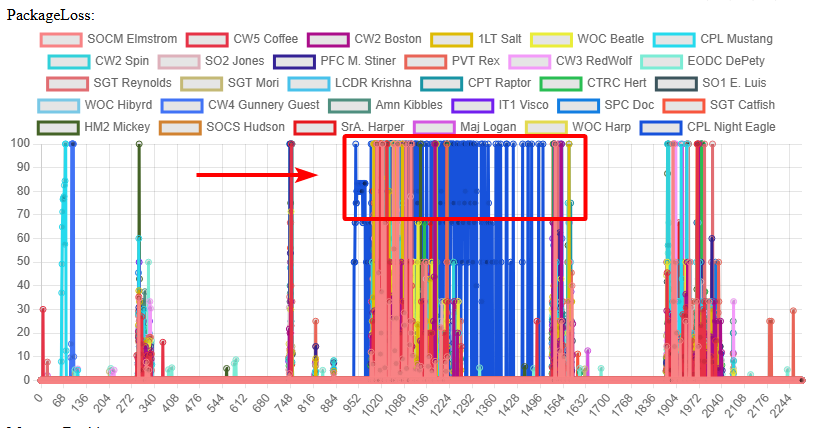 storm crag
fallen mirage
Here is a screenshot of the package loss graph to show what I was talking about ...
storm crag
fallen mirage
Here is a screenshot of the package loss graph to show what I was talking about ...
Are you using custom basic.cfg settings?
fallen mirage
Yes, the values that were recommended to me by many people above
storm crag
fallen mirage
Yes, the values that were recommended to me by many people above
wait did you post your boxes specs already?
fallen mirage
Yeah, it's a bit of a read, but this was my initial message. I was then recommended several tweaks, which I did, but I haven't noticed any improvement (or disimprovement for that matter). It just seems like nothing is changing: #perf_prof_branch message
storm crag
I kept it simple, after messing around with basic.cfg and a bunch of hosts I just use these settings:
MaxSizeGuaranteed=512;
MaxSizeNonguaranteed=256;
MinBandwidth= 8000000;
MinErrorToSend = 0.002;
MinErrorToSendNear = 0.01;
MaxCustomFileSize = 1310720;```those should basically be stock settings
@fallen mirage did you post the server specs though?
fallen mirage
Not really outside of bandwidth, but it's got an i9-9900K, 32GB of RAM, and a RTX 3080 Ti. For internet, it's got 1 GB down, and 10 MB up.
fallen mirage
storm crag
I kept it simple, after messing around with basic.cfg and a bunch of hosts I jus...
Are these for profiling branch? I have a very similar setup that has worked without fail on stable, but I'm trying out profiling right now, and the settings I used in stable aren't providing a smooth experience anymore.
storm crag
fallen mirage
Not really outside of bandwidth, but it's got an i9-9900K, 32GB of RAM, and a RT...
That's the server specs? 
storm crag
fallen mirage
Are these for profiling branch? I have a very similar setup that has worked with...
I use the same for both
fallen mirage
storm crag
That's the server specs? <:thonking:512084408581357588>
It's not a traditional node from a host, it's a physical machine I have (a spare computer)
storm crag
fallen mirage
It's not a traditional node from a host, it's a physical machine I have (a spare...
Yeah I was going to say that GPU is a bit much for a server machine
fallen mirage
Yeah, I wanted greater access to the machine to go through directories like %appdata% etc, which no host that I know of allows, so I'm opting to use a physical computer I can remote into and setup everything on.
storm crag
fallen mirage
Yeah, I wanted greater access to the machine to go through directories like `%ap...
I just use a bare metal server. I got a 7950x3D and I have full access to the machine, to the point where I can remotely image and even access the bios.
You can look for providers with remote kvm capabilities for that. That box isn't cheap though.
fallen mirage
Yeah, the main pull for our current server was that it was just one of our players' old computers, so he just mailed it over and I was able to set it up as needed free of charge.
The only hiccup so far has been this issue, but I'm gonna try going back to stable and see if that fixes things.
whole cloud
woven loom
So i discovered Digital Foundry had done a tech analysis and optimisation video ...
You're basically asking to add another render and shadow LOD.
Could be, but won't be.
woven loom
Fair enough!
whole cloud
fallen mirage
Just had to cancel another event, probably my last attempt at trying to get prof...
RPT to see the #monitor output would be useful too.
#monitor does not detect short lag spikes because they would average out.
You stopped dbgViewOP when you first noticed hickups.
Looking at that "RVExtensionArgs" immediately stands out.
Usually runs at 130-160 "ticks" whatever that is.
But at the end, where you say you noticed hickups, it logs as 3000+ ticks
That's why I asked for captureSlowFrame, I assume it would've shown here that you have a lag spike caused by an extension?
At 2830.93798828 Night Eagle gets a traffic spike.
He has no problem slowly flushing it out, but its quite slow.
Why? BWaae
Actual-, ping-, packetloss-based bandwidth growth
His packetloss is 0%, fine. According to packet loss, his bandwidth should increase.
But, his ping is too high, that reduces his network bandwidth. And its going quite low, making it take 5 seconds to flush out this small spike.
And immediately after it finished flushing it out, the next spike already comes in.
4.2 seconds later, it still hasn't finished that spike (1863 bytes left), the next spike comes in.
5 seconds later, it again hasn't finished it, 4977 bytes left, the next spike comes in which is even larger.
This keeps repeating, his backlog steadily increasing, while his bandwidth is still reducing due to ping. But by now the bandwidth has hit the min limit (256KBit/s / 32KiB/s, the default minBandwidth value)
Why is his ping bad?
Well its not bad in itself, but there was a huge ping spike..
At 2809.66625977 his ping went from 71 to... 0 ? And not just the actual, also the averaged one is dropped to zero?? The server just did nothing because ping getting better is good.
At 2815.33984375 his ping went from 0 to 67. Oh crap! A huge ping spike (Way off from the average)! Server is pulling the brakes, clearly something went wrong with their connection and we need to reduce bandwidth.
It takes over 150 seconds for whatever that was, to average back out
 heavy vortex
How does it measure ping?
whole cloud
heavy vortex
How does it measure ping?
My measuring how long an ACK takes to come back
heavy vortex
0 would mean that acks were received in the same frame as the packets were sent?
whole cloud
0 means something went wrong
At 2952, he drops out completely for 10 seconds (Why? RPT might show that he disconnected? For what reason?)
When he reconnects his averaged ping is fixed, his bandwidth goes up well.
But then few seconds later he has 100% packet loss. But that is "normal", the server is raising bandwidth sharply until it hits packet loss, to estimate how much bandwidth it has available to that client. It intentioally hits the ceiling and then regulates back down.
After regulating away from massive growth, it becomes steady, with just one packet being lost sometimes.
Then, at 3125 the player disconnects again? Why?
When they reconnect at 3254, we re-start that game of massive bandwidth growth until we hit the ceiling.
Again there is really little traffic going on, very few packets in flight. The server seems to not have much to send. (and if it only sends 1 packet, and that packet gets lost, the loss shoots up to 100%, but its just one packet, it doesn't mean much)
At 3619 traffic starts to pick up again.
3622 there is a spike, but he has high bandwidth and stable ping and no loss (one packet here and there, but because there is now traffic, thats very low percentage), that spike is gone after 2 seconds.
At 3653, another ping spike, but only from 59->120. But the server sees a problem and reduces bandwidth. But its enough to handle the traffic.
at 3670, the ping is back to normal, and server increases bandwidth again.
All the way up to 1.95mbit/s where it hits a ceiling. It does not go further, because the server doesn't have any more data to sent which it could use to estimate if that is fine or not.
3703 Night Eagle has a sudden ping spike from 60 to 9 and then 7 (That sounds a bit unrealistic..)
When it goes back up at 3783, the server interprets that as a spike (It shouldn't, its just a return to average, its fine)
This doesn't end up causing any problems though.
3998 is another ping to 0. Ping is only tested every 3 seconds. At 4000 new ping comes in, up to 107, ping spike.
fallen mirage
Here is the RPT https://drive.google.com/file/d/1r5M-URQ76u-GOlS5Z9W1wp1vghJUMlAy/view?usp=sharing
We did correlate the "lag" with Night Eagle's attempts to connect, he would get stuck at receiving info screen, it wouldn't move, so he would back out and try again, hence the multiple connection attempts.
Google Docs
But he's been able to connect successfully before, and we've seen the same behaivior from other players (who have otherwise had a good track record) earlier in the week. But it's the same pattern, at some point a player gets stuck on the receiving info screen, they back out and try again, and it lags again. It seemingly picks a random player each day, because this even happens to people with high speed fiber internet.
whole cloud
But again, its not a problem when looking at the actual message queues. The server doesn't have a problem getting out what it needs to get out.
And I already know that the bandwidth adjustment is crap.
The real problem, starts at 4310.
Ping is good, bandwidth is good. Suddenly packet loss comes in. But its not just a spike, it keeps increasing. Basically every packet going out is not coming back.
The retransmit queue is growing (the number after ackWait)
That almost looks like the issue I found where the connection gets stuck because its waiting for a lost packet, but when it comes in it refuses to accept it.
But just 20 seconds into the problematic zone the log cuts off
heavy vortex
20:58:56 NetMessage double-free detected
whole cloud
Oh I see, at the end when it gets bad, Night Eagle is only one of two players still left on the server. He probably alt+F4'd, which is why the loss is so high, his game is literally gone
fallen mirage
The log does cut off, but the next one starts no more than 5 seconds after I stopped the last one (spent writing out the filename again). I was having trouble loading large files into the graphing website, so I tried splitting it up to load it faster and see who was loosing packets, etc.
Yeah, Night Eagle had left the ACRE channel, but his character persisted in the server (I was the last to leave) for over 2 minutes before getting booted.
Infact, most people just ALT-F4ed (frustrations were high, it was the 3rd time this week they had to deal with it)
so that might sway the data a bit, not many people did a smooth disconnect
whole cloud
Looking at another user, Amn Kibbles.
Bandwidth constantly high, no loss, ping is good. There are some ping spikes from 117 down to 3 back up to 117, which triggers bandwidth reduction. But again, not actually a problem.
Everything is fine, until the end when loss ramps to 100% and they disappear.
Like.. I don't see any networking issues here
It could be that the server is lagging for non-networking reasons.
Which can cause it to just not send out any traffic. Which you would see as lag, but its not actually networking related.
That's why i wanted the capture slow frame's
fallen mirage
I'm not sure what's going on or what to do it diagnose it further either. With the new settings, I was able to verify that the server's bandwidth was nowhere near used all the way, I did use that #captureSlowFrames command but I'm not sure where the output would be saved
whole cloud
-par=modern_cmdline.txt
Note
18:43:53 setThreadCharacteristics can only be specified via command line, not in the .par file
18:43:53 profiles= can only be specified via command line, not in the .par file
#captureSlowFrames doesn't exist, its #captureSlowFrame, and it needs arguments.
The file would be saved next to RPT
https://community.bistudio.com/wiki/Multiplayer_Server_Commands shows how to use it
fallen mirage
I think I did #captureSlowFrame sLoop 20. But I think I may have ran it after I loaded into the mission, whereas you had asked me to run it before loading in, let me see if there is a corresponding file.
heavy vortex
18:52:13 Warn: 107.79 ms spent, NMT=Type_120
18:52:13 Server can't keep up, too many incoming network messages. Remaining in queue: 66
First one in the RPT. Not sure how normal that is.
whole cloud
Well for one it shows us there were definitely fps spikes. 108ms spent on one message..
fallen mirage
At that point (18:52:13) there are only 3 players in the server, myself and two other players. No zeus has logged in yet, but I had placed over 200 AI and spammed rocket artillery to see if the server FPS would go down.
For reference, if you check all the other Warn: messages, it's all roughly under 20ms
The first one is off because I was deliberately trying to overload it
heavy vortex
Isn't that still pretty terrible for one message?
I guess if you have ACRE dumping 16MB of SQF data...
fallen mirage
whole cloud
RPT to see the #monitor output would be useful too.
#monitor does not detect sho...
Coming back to this, if by RVExtensionArgs you mean Extensions like dlls, then the only thing I can think of is that we use cTab IRL, that I think uses an extension to send data to a webserver somewhere, but it's a mod we've been using for years and I doubt it would suddenly start causing enough lag to make the game unplayable: https://steamcommunity.com/workshop/filedetails/?id=2262009445
 heavy vortex
ACRE and ACE both use extensions at least.
hmm, wasn't there some perf issue with the Hatchet H-60...
fallen mirage
Yes, it's known that the Hatchet H-60s have insanely high network usage, but we didn't really get to use them all that much. We did get further than the last 3 attempts. We were able to leave the base, at least 1 H-60 was actively being flown, and 2 additional non-Hatchet aircraft were being flown when the lag was at it's worst.
But the last few times we had the same issues, we didn't even get to start the mission. I can post the RPTs for those if it would help, but the events aren't really fresh on my mind like tonight
whole cloud
server.cfg enablePlayerDiag = 1; would show who the pending network messages belong to.
-netLog would print even more detailed network logging, but its quite spammy.
-networkDiagInterval=5 would print a report of what network messages were sent every 5 seconds.
The pending messages indicate there is someone with a large backlog in their queue.
But I can't see that in the dbgView log.
There are a few, but they generally quickly dissipate.
Elmstrom has some spikes that take longer to handle, maybe long enough to log pending messages.
His bandwidth is constantly capped to minimum, his ping is above 130 even spiking to 250 (even though his minimum ping was 40ish)
Some of his spikes take 11 seconds to handle. The pending log timeout is 5 seconds. So its probably him.
raising the socket minBandwidth could compensate, by letting it not get low enough that its not sufficient anymore.
But thats more a hackfix than a real fix.
You could change the speed it adjusts the latency (default 6 seconds), so it recovers faster from ping spikes, and doesn't lower bandwidth as much (sockets minLatencyUpdate, set it as string like "3s")
You can also change what latency increase is considered "bad" vs "ok".
Deault is 220% rise in latency == greatest bandwidth reduction.
 whole cloud
fallen mirage
Coming back to this, if by `RVExtensionArgs` you mean Extensions like dlls, then...
whole cloud
fallen mirage
Coming back to this, if by `RVExtensionArgs` you mean Extensions like dlls, then...
A mod that uses extension on clientside,to show you stuff on your phone.
Why does that extension run on server? Seems a bug in the mod.
What is Hudson doing? Did he just stay in the lobby?
He has constant 0 ping?
fallen mirage
Our server is based in Texas and Elmstrom is a player from Norway, if that helps understand the high ping, etc.
The server is actually a spare computer that Hudson has, so he is technically connected over LAN.
I did have netlog enabled on my earlier attempts where we experienced the same type of "lag", but not for tonight (wish I left it on in hindsight), what would you be looking for in a netlog?
whole cloud
I don't know 😄
I'd know when I see it
 uneven kernel
Where'd you get the file that you put into https://debuguserinfograph.arma3.io/? apologies for the dumb/off-topic question
whole cloud
uneven kernel
Where'd you get the file that you put into https://debuguserinfograph.arma3.io/?...
#debug UserInfo on
fallen mirage
uneven kernel
Ty
whole cloud
I think this would fix your pending messages issues
class sockets
{
    MinBandwidth = "2Mbps";  // Server log indicates we need about 1900Kbps in high traffic situations. Lets just assume every client can handle it
    minLatencyUpdate = "2s"; // Recover faster from latency spikes, and don't let it lower bandwidth too far.
};
But I also think there is still something else going on that we're not seeing
fallen mirage
Should I remove the initBandwidth and maxBandwidth from sockets? Set to 1Mbps and 2Mbps respectively
fallen mirage
Yeah as per #perf_prof_branch message
whole cloud
yeah don't do that
20:41:11 Performance warning: SimpleSerialization::Read 'fza_audio_funchook' is using type of SCRIPT which is not optimized by simple serialization, falling back to generic serialization, use generic type or ask for optimizations for these types
That mod is bugged, its trying to send a spawned script handle, over network. That doesn't work
fallen mirage
gotcha, im just gonna set minLatencyUpdate and MinBandwidth per your suggestion.
Yeah, we're tracking that the AH-64D Apache Project is also a mod known for high network traffic, but we don't actively use it during events currently. It's still placed in the mission file though, hence the logged error.
whole cloud
Quite alot of config errors in your logs. Broken config classes.
Probably not that big of an issue, but its weird trying to use a magazine that cannot be used
I hoped the #monitor data would be printed to RPT
fallen mirage
Yep, we have an in-house modding team, but a lot of them are newbies and make rookie mistakes, if you see anything like 75th_, cag_, etc, it's an inhouse mod's config incorrectly created. I try to crackdown on it as I can, but outside of a little log spam, I'm not aware on any significant adverse effects on the server.
I actually have the log with the #monitor output, let me upload it to gdrive real quick
Google Docs
Just reiterating that the FPS drops around 18:53:43 are from me deliberately trying to do that with 100+ AI fighting each other and a bunch of rocket artillery
whole cloud
Around 21:29 when the players start disconnecting.
There are a few messages in the G queue, but not too many and they disappear quickly, that doesn't look like it'd be a problem.
The pending messages spam is annoying, but I think its just that one player with too low bandwidth. And he can handle the messages, it just takes longer than the threshold.
There does not seem to be a networking problem overall.
Also the pending spam might be a bit missleading.
There are 28 lines printed, but they all belong to the same network packet.
28 messages, were squeezed into one packet (maxSizeGuaranteed setting). And that one packet is pending. So you get 28 lines of log.
fallen mirage
I was inclined to say it was a network issue, because that's how it presented for the players (like desync). Where different players would be seeing different things (players, vehicles, and objects at different positions/players sliding around the floor or walking in place), and it "catch back up" inconsistently between the players instead of all at the same time.
Here is an example from tonight of what I'm trying to say: https://medal.tv/games/arma-3/clips/kqz2T5jfG2Z1CO4DT?invite=cr-MSxSdXMsMjA3NzY2MzM4
For the player on the right (Logan), there is someone standing right in front of him. But from the POV of the recorder, the person getting punched is actually further away. He's also not standing next to Logan for me (I'm standing next to him).

6 Views. Watch Long Range Punch and millions of other Arma 3 videos captured using Medal.
whole cloud
Yeah thats super weird.
Clearly something is wrong as positions are not synced.
But also clearly, networking is working. The animations happen instantly, the gun drop happens instantly.
And both the guy punching, and the camera, see it at the same time
fallen mirage
Yeah, I'm realizing that the video is a weird example; but previously, the person could go around damaging players/running around/destroying stuff but none of it would sync to other players until it "caught up", so from each player's perspective, everyone else was frozen/walking in place, and they could do whatever they wanted and no one else could see it, if that makes sense.
whole cloud
The difference could be.
Position updates are sent on demand based on error.
I thought animations are too, but not sure, it could be that animations are sent instantly when they change to a different one
fallen mirage
Maybe relevant also, that the player getting punched is in Norway, the player doing the punching is in Australia, and the server and recorder are both in the US.
spiral pond
@fallen mirage are you familiar with this page yet? https://community.bistudio.com/wiki/Performance_Profiling
fallen mirage
I've visited it a few times, but I think we're gonna take a break for profiling for a week or two before attempting again.
spiral pond
yep understandable. good effort so far 👍
for clients basic frame captures is easy to do; as admin you can do the server side ones too, plus more customized [unless you allow some client side console to all players too]
whole cloud
The latency update thing also works in stable, but there yo u need to give number in microseconds
Its probably also useful to have there, because the bandwidth adjustment will be the same
 turbid vortex
whole cloud
The difference could be.
Position updates are sent on demand based on error.
I t...
turbid vortex
whole cloud
The difference could be.
Position updates are sent on demand based on error.
I t...
Position updates are weird overall.
I use disableAI "PATH" and disableAI "ANIM" to then force some agents to run towards the player in a straight line(via playmove).
But this somehow messes up position updates for those AI - so when I turn that back on, it can teleport the agent way back.
So right after turning it back on I use Setdestination to current agent position and sleep a bit, before any other move to position commands.
Also when there are latency spikes - position updates always seem to suffer the most for any AI.
whole cloud
edgy chasm
One of my functions that I'm running in scheduled environment randomly freezes t...
I'll add a scope to selectBestPlaces, so you'll see it better in the future 😄
Yeah I can see the terrain load.
It first loads terrain, then it runs the search multithreaded.
At the far end there, you can see the threads spin up

I would say, run it once at game start, preload like 100 or 200 possible places for your thing, and cache them
light cargo
the low uplink could be the culprit too
 clever roost
whole cloud
> 20:41:11 Performance warning: SimpleSerialization::Read 'fza_audio_funchook' i...
clever roost
whole cloud
> 20:41:11 Performance warning: SimpleSerialization::Read 'fza_audio_funchook' i...
thats a slight oversight on my part i init the variable as a global
_heli setvariable ["fza_audio_funcHook", scriptNull, true];
but all other usecases are local
unless my understanding of this system is flawed and i cannot store it evan in a non-public variable
clever roost
fallen mirage
Yeah, we're tracking that the AH-64D Apache Project is also a mod known for high...
are network traffic is down significatly after the last update
thanks the the arma script profilers and network logging, it got a major overhaul
the majority of the entire mod runns localy on the clients machine, there isint much data to send over networks
what little is shared is basic flight data between pilot and copilot
that being said if you are encountering high network loads, we would appreshiate any diagnostic or logging info you have we can use to improve network performance
fallen mirage
Pardon me then, I know of the new update, but wasn’t tracking all the optimizations made. I do however still see this popping into logs regularly #perf_prof_branch message
knotty wraith
Does everyone know about the problem that you can't take anything from someone else's equipment when there is a fierce battle going on nearby?
whole cloud
clever roost
thats a slight oversight on my part i init the variable as a global
```sqf
_hel...
You can store it non-public, I think script handle is save/load safe. Just not network safe because script handles are local
clever roost
So I just need to undo the init being public, Evan though it’s just a scriptnull
 crystal haven
Found a possible bug with ctrlWebBrowser - mouse wheel scrolling works fine until you click and drag the scrollbar, then the mouse wheel stops working completely. Anyone else able to reproduce this or is it just me?
median belfry
Same for me
whole cloud
crystal haven
Found a possible bug with `ctrlWebBrowser` - mouse wheel scrolling works fine un...
which scrollbar, in-browser scrollbar, or Arma UI scrollbar?
If in-browser, then I probably can't do anything about it as I have no control over that part
crystal haven
@whole cloud In-browser scrollbar
whole cloud
No can do :sad:
The scroll events should still be sent to the browser, what you clicked on doesn't change that.
How the browser interprets them I can't change
Maybe it depends where the scrollbar is? In the outer layer of the sandbox, or in the inner layer (the iframe)
Clicking outside of the iframe might change focus and scroll a different element.
But still, it should focus the thing where you clicked on the scrollbar, so it should scroll that
crystal haven
It's within the iframe, I guess it's not the end of the world, I can always close the UI and open it again for the scroll wheel to work again, or not click on the scrollbar and drag it, but that'll make for some long scrolling if the webpage has a lot of items listed
whole cloud
You can also try in JS forcing the focus back onto some other element.
Or checking what element currently has focus, maybe that shows the problem somewhat
 wild flower
@empty goblet Hi, can you add a list of patch notes to the beta?
because it used to be available on the public forum and now it doesn't work
you can create a separate text channel
?
empty goblet
wild flower
<@94784638945337344> Hi, can you add a list of patch notes to the beta?
?
empty goblet
wild flower
you can create a separate text channel
also releases + changelog are as pinned messages in the channels
wild flower
thx
 harsh dove
Can someone tell me how do I know which performance version I have to put in my game according to my current game version? my version is 2.18.152405
heavy vortex
That's the stable branch.
I can't tell what you were aiming for from your question.
harsh dove
heavy vortex
I can't tell what you were aiming for from your question.
I want to enable multi-threading for ARMA by changing my stable branch to performance profiling branch. There is a pinned message with google drive link where all the files are placed. But I can't find one for 2.18.152405, there is 2.18.152472 there tho.
heavy vortex
Yeah you're misunderstanding. All 2.18 versions are theoretically compatible. 152405 is stable branch, higher build numbers are increasingly recent perf/profiling branch versions.
If you just want the most recent perf/profiling version on the client, the easiest way is to switch branch in steam. Right click, performance, betas.
harsh dove
heavy vortex
Yeah you're misunderstanding. All 2.18 versions are theoretically compatible. 15...
Oh, Got it. Thanks for clarifying.
weak radish
harsh dove
I want to enable multi-threading for ARMA by changing my stable branch to perfor...
Also, point of interest. The current Stable branch is multithreaded, just not to the same extent as the Perf/Prof, DEV or RC branches are
harsh dove
weak radish
Also, point of interest. The current Stable branch is multithreaded, just not to...
Aight, I am just testing something. Thanks a lot for updating me.
analog acorn
 vivid jacinth
Is this where I can ask how to unfuck my game
vivid jacinth
Is this where I can ask how to unfuck my game
The channel title might be an indication. This channel is for discussing the perf/prof branch.
Try #arma3_troubleshooting
vivid jacinth
yeah i have no idea what that is, all i saw was "perf" so i figured performance or something
obsidian condor
Under the ARMA 3 Branches section, not Reforger 🤣
vivid jacinth
thatd be why i couldnt find the correct channel, it just didnt exist for me, thanks
obsidian condor
Suspecting you don't want the ARMA 3 troubleshooting channel. Probably #reforger_troubleshooting
vivid jacinth
obsidian condor
Suspecting you don't want the ARMA 3 troubleshooting channel. Probably <#9761904...
nah it was arma 3
also thank you tho
that wasnt visible to me either
obsidian condor
Ah sorry. I was looking at your roles. Glad you found the one you needed though 🙂
 hearty tartan
Hi, I have a question , I've activated the performance profiling build in Beta and I do seem to get an extra 10-15% in terms of FPS. I am running on an i9-14900K, is there a way to select the number of threads to use, maybe force the game to use all 24 of them ?
 quaint flame
There are settings for that, but the general agreement is to not change them as the game will do it for you.
hearty tartan
@quaint flame could you please tell me where these settings can be changed from ?
hearty tartan
ah, perfect, thx 🙂
charred pagoda
hearty tartan
Hi, I have a question , I've activated the performance profiling build in Beta a...
I may be wrong but game uses maximum 16 cores - #dev_rc_branch message
crystal haven
I made an mock os a while back, still working on it, but now I'm also working on a phone, lol:


 tawdry gazelle
Anyone would like to implement a GC-based memory allocator(https://github.com/ivmai/bdwgc) for Arma 3?
Not for better performance, just for fun.
GitHub
The Boehm-Demers-Weiser conservative C/C++ Garbage Collector (bdwgc, also known as bdw-gc, boehm-gc, libgc) - ivmai/bdwgc
silk pewter
tawdry gazelle
Anyone would like to implement a GC-based memory allocator(https://github.com/iv...
thank you for volunteering! 😁
hearty tartan
charred pagoda
I may be wrong but game uses maximum 16 cores - https://discord.com/channels/105...
Any reason for this limitation?
silk pewter
hearty tartan
Any reason for this limitation?
the engine gets no benefits from more cores, only more overhead
 wraith drum
Hello ! where can i find last profilling binary for arma3 win ?
tawdry gazelle
Hi, anyone would like to benchmark rpmalloc against mimalloc to see if there are any differences in performance?

GitHub
Changelog
Merge upstream changes v1.4.5, see https://github.com/mjansson/rpmalloc/releases/tag/1.4.5 for details.
Update Intel® oneAPI DPC++/C++ Compiler to 2025.1.1.
Fine-tune compiling options.
...
opal hound
Yeah I can give it a try tomorrow
void badger
Can't post images still, but I'm getting:
mimalloc_v223 47.1 fps
rpmalloc 45.7 fps
Extreme settings, single-run, and just outside of error
tawdry gazelle
I got ~48.1 fps with custom settings, both of them. 😅
 tawdry gazelle
kindred radish
https://cdn.discordapp.com/attachments/1262108437517434890/1381903012057845760/i...
tawdry gazelle
kindred radish
https://cdn.discordapp.com/attachments/1262108437517434890/1381903012057845760/i...
What is your hardware spec? CPU and RAM frequency & latency?
kindred radish
tawdry gazelle
What is your hardware spec? CPU and RAM frequency & latency? <:blobcloseenjoy:70...
AMD Ryzen 7 7800X3D 8-Core Processor (max boost freq 5050 MHz)
32GB Corsair Vengeance RGB DDR5 6000 CL36, nothing changed only enabled xmp
CL 36 / tRCD 36 / tRP 36 / tRAS 76 / tRC 112
 static briar
I tried each allocator.
2.20.152926RC
default params (except malloc)
OS: Win 11
Video: Ultra 4K
CPU: Ryzen 7 3700X
GPU: RTX 5070
RAM: 2666MT/s 64GB
Ran YAAB three times for each allocator.
default/tbb4: avg. 36.1 / high 36.8 / low 35.4
system/win: avg. 36.2 / high 37.2 / low 35.3
JEMalloc: avg. 37.8 / high 38.0 / low 37.7
rpmalloc145: avg. 38.4 / high 38.8 / low 38.1
mimalloc223 avg. 38.2 / high 39.3 / low 37.6
mimalloc303: avg. 38.6 / high 39.4 / low 37.4
default/tbb4 with large page: avg. 38.5 / high 38.4 / low 38.4
 vivid reef
tawdry gazelle
https://github.com/GoldJohnKing/rpmalloc/releases/tag/Arma-3-v1.4.5-20250610
vivid reef
tawdry gazelle
https://github.com/GoldJohnKing/rpmalloc/releases/tag/Arma-3-v1.4.5-20250610
i guess that one isnt BE allowed yet?
whole cloud
crystal haven
I made an mock os a while back, still working on it, but now I'm also working on...
You know.. Life servers pay good money for phone things like that, that are much worse than what you made 😄
I also started building a phone chat app, for a hopefully part of ACE mod. But mine looks much worse 😄
crystal haven
It's all possible due to the ctrWebBrowser from you and whom ever else was involved. Then with some html, CSS, JavaScript and some time investment, lol. Lucky for them the OS and the Phone will be released with the source code to the public. But if they want specific features that they can't do themselves or find someone to do for them, then I'll be willing to do depending on what it is, and if I would charge for my time rendered.
whole cloud
Me implementing it and @rose moth for approving it 😄
silk pewter
Yoris: says yes
Community:
Dedmen in the background: -work you peon-
charred pagoda
tawdry gazelle
Hi, anyone would like to benchmark `rpmalloc` against `mimalloc` to see if there...
They are almost same for me. rpmalloc looks like more stable little bit
 slender lagoon
for me rpmalloc keeps crashing in yaab 
charred pagoda
slender lagoon
for me rpmalloc keeps crashing in yaab <:meowtrash:704672240721199235>
Did you check logs / crash dump?
 sharp sorrel
hello guys
is buying arma 3 worth it?
i am looking in buying it rn
cause i dont want to spend my money on a bad ga,e
game
whole cloud
Asking that in a channel full of Arma 3 fans will only give you one answer
sharp sorrel
also is there story ?
slender lagoon
charred pagoda
Did you check logs / crash dump?
Its not CTD, from time to time the game just stop responding
nothing usefull in the rpt
 thin wyvern
tawdry gazelle
Hi, anyone would like to benchmark `rpmalloc` against `mimalloc` to see if there...
thin wyvern
tawdry gazelle
Hi, anyone would like to benchmark `rpmalloc` against `mimalloc` to see if there...
Win10 5800X3D rpmalloc vs mimalloc 0 difference
tawdry gazelle
slender lagoon
for me rpmalloc keeps crashing in yaab <:meowtrash:704672240721199235>
Any dumps or logs? And what is your hardware spec?
edgy chasm
tawdry gazelle
Hi, anyone would like to benchmark `rpmalloc` against `mimalloc` to see if there...
seems to be slightly faster compared to mimalloc v213, but i'm getting a lot of variance in my results:
 woven loom
tawdry gazelle
Hi, anyone would like to benchmark `rpmalloc` against `mimalloc` to see if there...
woven loom
tawdry gazelle
Hi, anyone would like to benchmark `rpmalloc` against `mimalloc` to see if there...
mimalloc v223 = 108, 110, 109 fps
rpmalloc v145 = 108, 111, 108 fps
i'd say that it's very similar but maybe rpmalloc has more variance
I didn't do frame time testing or anything more complicated.
7800X3D, 32GB DDR5-6000 CL30, 4070 Ti
slender lagoon
tawdry gazelle
Any dumps or logs? And what is your hardware spec?
ryzen 5 5600 12gb ram 2400 cl16
empty goblet
tawdry gazelle
Anyone would like to implement a GC-based memory allocator(https://github.com/iv...
the real question is how this compares to mimalloc or rpmalloc
tawdry gazelle
empty goblet
the real question is how this compares to mimalloc or rpmalloc
no better, just for fun.
 crystal oasis
I keep crashing with perf branch, anyone else experience this?
Can’t find anything on log
heavy vortex
Get mdmp file, send to Dedmen.
olive silo
whole cloud
I think this would fix your pending messages issues
```
class sockets
{
Min...
Just a note, I don't think minLatencyUpdate is documented anywhere? Can't find any references to it
whole cloud
Correct, its not
 still umbra
Hey all, wasn't there Perf update some time ago improving AI driving? I used to check forums, but now they're under maintenance for a long while and i can not see any info. Did that update ever come to Stable release? My AI seems to love hitting trees/rocks, etc. on Stable, also will it ever get cured?
quaint flame
Anything driving related has long been merged to stable.
 restive turtle
still umbra
Hey all, wasn't there Perf update some time ago improving AI driving? I used to ...
restive turtle
still umbra
Hey all, wasn't there Perf update some time ago improving AI driving? I used to ...
i think Dedmen is pretty against working on the AI
unfortunately
we cant pay him enough i think 😭
still umbra
restive turtle
we cant pay him enough i think 😭
damn 😦 all i wish in arma 3 is AI being smart enough to actually use vehicles properly, especially making decisions while piloting. Hopefully ArmA 4 will be something groundbreaking.
empty goblet
restive turtle
i think Dedmen is pretty against working on the AI
no, don't distract dedmen ... for 2.22 let's dream first about wonders like Vulkan renderer and native linux client binary and finally also the compiled mimalloc and rpmalloc bundled with game as default 😁
 hexed yacht
empty goblet
no, don't distract dedmen ... for 2.22 let's dream first about wonders like Vulk...
hexed yacht
empty goblet
no, don't distract dedmen ... for 2.22 let's dream first about wonders like Vulk...
Only client linux binary? No server binary?
👉👈
opal hound
There already is a linux server binary
opal hound
what else would it be?
I believe it's just the client that has to be run under translation layers
opal hound
No you'd do it yourself in that case with Proton or WINE
hexed yacht
I just know it performs bad from my own experience
whole cloud
hexed yacht
Yeah but I doubt it's native
it is native
whole cloud
hexed yacht
Considering how bad performance is
performance is bad?
I have no issues with my server
 swift narwhal
hexed yacht
Considering how bad performance is
swift narwhal
hexed yacht
Considering how bad performance is
My linux server runs fine aswell
hexed yacht
Well it means I did something wrong 😦
restive turtle
empty goblet
no, don't distract dedmen ... for 2.22 let's dream first about wonders like Vulk...
for 2.23 can we dream of AI improvements then?
actually probably not even dream
fantasize
 stiff folio
So I was thinking of downloading Arma 3 for the first time but I read somewhere that most of the servers are dead?
heavy vortex
You are in the wrong place, but Arma 3 servers always were mostly dead. People set up a dedicated server for their unit/friends, and most of the time they're not using it.
Now if you wanted to play public PvP for some reason then you may have missed the boat with Arma 3. I wouldn't know.
stiff folio
Well nobody was responding in general so I figured I would try here so basically there is no point in getting Arma
I just heard that it was a popular mil sim type game so I thought I should ask about it before I got it
obsidian condor
There are still a populated pvp servers, see King of The Hill, and others. Also units to join. You will get an experience like no other game, including Reforger, can provide
opal hound
It depends what you want to do really, I wouldn't say servers are dead
 stiff folio
So not really the big milsim game I was seeing on tiktok and yt anymore huh?
obsidian condor
Yeah, I see ARMA 3 MILSIM units advertising for new members all the time on Twitter. And it is still the biggest, you know, actual MILSIM
heavy vortex
Arma's never been that big a game. Entry barriers too high for that. It just bubbles along.
Maybe Reforger will change that but it doesn't have the same scope yet.
obsidian condor
Yeah, the point is that the "big milsim game I was seeing on tiktok and yt" is still there and many of those people still run ops
obsidian condor
heavy vortex
Maybe Reforger will change that but it doesn't have the same scope yet.
Never will have either, or there would not be an ARMA 4 planned 🙂 Got to get that double cash infusion after all 😉
 pale fog
stiff folio
Well nobody was responding in general so I figured I would try here so basically...
pale fog
stiff folio
Well nobody was responding in general so I figured I would try here so basically...
I got it during Christmas and I've been loving it so far, the depth and possibilities of this game just keep blowing me away. So much to dive into. The base game, the expansions, the mods, the top tier community content. Most other combat games suddenly feel pretty bleak in comparison.
 crisp acorn
When was the last Perf Prof Branch update? I'm having difficulties to find the last changelog
 obsidian relic
crisp acorn
When was the last Perf Prof Branch update? I'm having difficulties to find the l...
obsidian relic
crisp acorn
When was the last Perf Prof Branch update? I'm having difficulties to find the l...
pinned messages
crisp acorn
oh thx
edgy chasm
crisp acorn
When was the last Perf Prof Branch update? I'm having difficulties to find the l...
they're also going to be posted in the new #arma3_branch_changelog message channel too
hexed yacht
heavy vortex
Arma's never been that big a game. Entry barriers too high for that. It just bub...
Wasn't it pretty big during pubg mod era?
whole cloud
v32 is the record highest number 
We strive to mess up more with the next one so we need to push more hotfixes and bump the number more often
 indigo anvil
whole cloud
v32 is the record highest number <:aviator:717748619796545677>
We strive to mes...
indigo anvil
whole cloud
v32 is the record highest number <:aviator:717748619796545677>
We strive to mes...
Just throw out the reasonable versioning system and replace it with "bigger number better" or "what year the code is supposed to be utilized the most"  ☢️ 👿
☢️ 👿
 hexed verge

 cloud sky
Pride versioning still rocks https://preview.redd.it/when-someone-asks-about-versioning-v0-ou8h9owirmme1.png?auto=webp&s=a5cc3885d81e4fa71e7aaf7899da51d50395d454
 whole cloud
v1 is prepared, but I need to do a MP test before publishing it, that might only go out tomorrow.
Note v29 and above are the latest netcode changes.
fast hornet
wait what, 2.20 is out?
vivid reef
all those performance tweaks and adding of multithread stuff of 2.20 were already in profiling or is there some extra thingy on top?
inland dew
I think some stuff isn't included in 2.20
whole cloud
vivid reef
all those performance tweaks and adding of multithread stuff of 2.20 were alread...
Some things are disabled in 2.20 stable. Nothing new
slender lagoon
what things
empty plover
what about getServerInfo?
patent sky
empty plover
what about getServerInfo?
 empty plover
oh cool you just updated the wiki. 🙂 but it wasnt listed in the changelog
patent sky
I mean it was this for the past few months, but yeah seems to be missing from changelog
 empty plover
alright good to know 🙂
vivid reef
whole cloud
Some things are disabled in 2.20 stable. Nothing new
no way to join servers with 2.18 prof anymore if once updated to 2.20?
or is there a backdoor? i get that error preventing me to join
 patent sky
there is no 2.18 prof legacy branch, so if you want to join a 2.18 server you would have to switch to the regular legacy branch

 patent sky
different data, could switch to legacy and then replace exe tho
vivid reef
isnt that exactly what i did?
i was on profiling branch in steam, updated to 2.20, replaced exe with the 2.18 one, but couldnt join because of pbo verification failed
patent sky
different data, could switch to legacy and then replace exe tho
so no, thats not exactly what you did
vivid reef
so i guess 2.20 changed also pbo
beta => none, then replace arma3 exe with the 2.18 one from above?
i doubt that will work.
vivid reef
patent sky
different data, could switch to legacy and then replace exe tho
didnt work, same pbo error
guess those players wont get end game bonus then 
patent sky
vivid reef
didnt work, same pbo error
So in steam you switched the branch to legacy, then replaced the exe (and steam dll's) in the game folder with the 2.18 ones from google drive?
vivid reef
Yes
we want to update servers but cant connect to properly end the round. but looks like we found someone who tricked steam to not update
whole cloud
I misslabeled the original getServerInfo thing in january
 frozen dew
what is going on with arma and why cant i join a single server after update
patent sky
frozen dew
what is going on with arma and why cant i join a single server after update
Because the servers need to update, also wrong channel
frozen dew
can i get the right on sorry
whole cloud
vivid reef
Yes
Are you sure.. Because you just wrote "beta => none" above.. Which sounds like you have none selected.
patent sky
and none = default = 2.20
legacy = 2.18
fast hornet
we have a few clients already, updated server to 2.20.152945 a few mins ago.. works fine so far 🙂
vivid reef
patent sky
and none = default = 2.20
legacy = 2.18
there is no legacy option
none, dev and profiling
patent sky
vivid reef
there is no legacy option
A Legacy Build Steam branch is available for advanced users. It contains the previous significant main branch version (2.18). It can be used to compare specific changes between major releases. The access code for this branch is: Arma3Legacy218
whole cloud
Please get the offtopic out of my channel.
If you want to troubleshoot your Arma, #arma3_troubleshooting
vivid reef
patent sky
> A Legacy Build Steam branch is available for advanced users. It contains the p...
oh. ty
 fair ore
whole cloud
Please get the offtopic out of my channel.
If you want to troubleshoot your Arma...
fair ore
whole cloud
Please get the offtopic out of my channel.
If you want to troubleshoot your Arma...
This channel is dedmen's house!
Also, good luck on the MP test lol
whole cloud
I just found out I don't need to test prof v1 because the things I changed, I'm pretty sure are actually not used
whole cloud
inland dew
is this still a thing?
> -perfFlags=noaivismt;noaicoro
yes
silk pewter
not on the wiki 😢
whole cloud
Shan't be
silk pewter
ah yes

 quaint marsh
nvidia filters not disabled this update?
silk pewter
this felt personal 😄
 whole cloud
I don't understand the question.
And what is the relation to #perf_prof_branch ?
Or did you just jump into some random channel?
opal hound
hahahahaha
quaint marsh
whole cloud
I don't understand the question.
And what is the relation to <#10546684895851315...
thats my bad ,rumor was you were disabling the use of nvidia filters this update
inland dew
quaint marsh
thats my bad ,rumor was you were disabling the use of nvidia filters this update
why ask if you can easily check that yourself?
also rumors > changelog?
quaint marsh
inland dew
why ask if you can easily check that yourself?
also rumors > changelog?
not tryna blow up this channel but in short, didnt know if it was in the works and not talked about, miserable playing against filters that give wall hacks, same problem cs2 had
 gusty viper
@whole cloud Very nice blog / OPREP ! Thank you
silk pewter
yep, just finished reading it. very nice, with good insight!
 autumn timber
Deprecated: 32-Bit support (not yet removed, but a future update may do so)
Deprecated: Windows 7 and 8 support (not yet removed, but a future update may do so)
What exactly does "deprecated" mean, here? Does it do some nagging in rpt files? Or is it a human-readable notification that it's about to go away in the (hopefully near) future?
quaint flame
I guess no more support
fast hornet
nagging would be great, just to piss off the one weirdo in here who keeps lamenting about how great Win7 is.. forgot the name
autumn timber
I was talking about the 32bit arch removal, btw. That's relevant to my interests
rose moth
autumn timber
> Deprecated: 32-Bit support (not yet removed, but a future update may do so)
> ...
For now it's mostly a warning to really check you're not accidentally running 32-bit.
A few in-game spots may have relatively subtle nags to run away from 32-bit.
Update 2.22 or later may simply have 32-bit not working (partially or fully), or even be removed.
obtuse bramble
Big salute to Dedmen and everyone involved with pushing this latest update!
autumn timber
A few in-game spots may have relatively subtle nags to run away from 32-bit.
Miller stops talking mid-sentence during a cutscene, and turns his head to the camera: "Oh my, look at you! Still running a 32-bit executable? What a shame, soldier 🙄 "
patent sky
fast hornet
nagging would be great, just to piss off the one weirdo in here who keeps lament...
permanent nag on the bottom right on the main menu (click does not remove the exclamation mark)
 heavy vortex
Yearly reminder that the vast majority of people running 32-bit are server hosts. Don't ask me why. They hate their users or something.
rose moth
heavy vortex
Yearly reminder that the vast majority of people running 32-bit are server hosts...
Their DS consoles will shout at them now 😇
fast hornet
heavy vortex
Yearly reminder that the vast majority of people running 32-bit are server hosts...
probably some of those one-click hosters where you just buy "slots" and you don't get to see anything technical... they probably never updated their VM script over the last 10 years 😉
inland dew
inland dew
is this still a thing?
> -perfFlags=noaivismt;noaicoro
I mean, do we still better use this or no need anymore?
whole cloud
I don't use them 🤷 I don't know why you would
median belfry
I got an weird bug with the update. Players who connect to the server sometimes dont get the inventory loaded. The face is getting loaded but the inventory via setUnitLoadout is not. I already wait if the player object exist.
_player setUnitLoadout a3s_Inventory; // Works only sometimes
_player setFace a3s_local_skin; // Works
what could be the cause ?
whole cloud
What update?
From prof v32 to prof v0 ? From prof to stable? is the issue also present on stable?
median belfry
stable 2.20
whole cloud
Why are you in #perf_prof_branch then 😢
median belfry
my bad
whole cloud
Probably #arma3_feedback_tracker
inland dew
whole cloud
I don't use them 🤷 I don't know why you would
well, several people here were reporting AI being somewhat blind for several hundred meters targets, not seeing/engaging them and problems reacting and commanding.
even Dwarden confirmed that
I also got reports from some of our players that their AI were kinda "blind" and not reacting
thus use of these commands since then
empty plover
empty plover
interesting that if you start Livonia from editor SP it loads 3-5 secs for me, b...
dedmen did you improve this?
whole cloud
empty plover
dedmen did you improve this?
no
whole cloud
inland dew
well, several people here were reporting AI being somewhat blind for several hun...
Well I am not aware of that
empty plover
whole cloud
no
any plans?
empty plover
nice 👍 (will do)
 pulsar wind
Will disabling CPU 0 still give you a smoother experience? since i can keep system processes on that and on my system CPU 1-11 will run the game?
inland dew
👆
empty goblet
whole cloud
this means 2.20 hotfix will be the la creme 😁
empty goblet
autumn timber
> Deprecated: 32-Bit support (not yet removed, but a future update may do so)
> ...
it allowed us also to 'clean' minimum requirements
sigh, need repro !
inland dew
and many many many more posts about strange stuff happening with AI since multithreaded vis check and coroutining
like knowing about stuff they shoudn't or not reacting to danger, although it's like in front of them
thus you introduced these commands, to disable visibility check mt and coroutining
empty goblet
rose moth
Their DS consoles will shout at them now 😇
actually, if there is demand, we may add extra popup button with '64-bit' instead of OK 😁
charred pagoda
we need to deprecate AI in Arma 2.22
empty goblet
charred pagoda
we need to deprecate AI in Arma 2.22 <:hmmyes:1147624204909433022>
or just stupid part of it 😁
heavy vortex
I've been running perf PvE for weeks now and haven't noticed any difference in AI responses.
empty goblet
inland dew
finally no 32 bit and win 7/8 🙏
7 still works ... just checked it, both in VM and native
empty goblet
heavy vortex
I've been running perf PvE for weeks now and haven't noticed any difference in A...
if you do, report and repro 😁
charred pagoda
heavy vortex
I've been running perf PvE for weeks now and haven't noticed any difference in A...
same, AI in SP are acting pretty... normally? is it MP specific issue?
inland dew
it's just that several people were reporting problems with ai since ai vis check mt and coroutining, thus dedmen introduced the commands to disable these improvements
and now he says he doesn't use them and no idea why one would and that he isn't aware of any of that 🤷♂️
so I'm confused...
whole cloud
People were reporting problems with AI since the game was released
heavy vortex
Point of the flags is to use them if you do have clear problems, to find out if it matter.
whole cloud
If I get a repro and something I can test, I can test it
The parameters were introduced to test if some AI bugs were caused by it (versus just being the normal usual old AI bugs) and because some things were bugged, for example crashing with lambs.
After that the known bugs were fixed, there should be no need for the parameter I was just too lazy to remove it
 chilly geyser
I get same issue with palyer setUnitLoadout _gear after update from v32 to v0 perf
inland dew
After that the known bugs were fixed, there should be no need for the parameter I was just too lazy to remove it
that's all I wanted to know, thx
heavy vortex
chilly geyser
I get same issue with ```palyer setUnitLoadout _gear``` after update from v32 to...
What issue?
 patent dome
@whole cloud Excellent OPREP 
whole cloud
chilly geyser
I get same issue with ```palyer setUnitLoadout _gear``` after update from v32 to...
inland dew
The parameters were introduced to test if some AI bugs were caused by it (versus just being the normal usual old AI bugs)
Actually all of the complaints about abnormal AI behavior or even simply lack of behaviour at all, that were reported here, were things that started to happen exactly after these changes, but all of them them were only live observations while on servers, no repros, obviously
many of them vanilla (no lambs), like many reports/observations from Dwarden
woven loom
Love the optimization article!
slender lagoon
I really enjoyed reading it, very informative and well written.
empty goblet
so, the reason the performance graph minimum wasn't over 30fps in 2.20 is because it lacks all the profiling goodness 😁
 final hearth
Really glad to see the passion behind the curtains, putting up with all the work to keep Arma 3 up to date and prolonging the lifespan :D
empty goblet
well i definitely miss the v32 features now 🙂 ... can't wait till v1
fast hornet
hm.. did the log entry for the http mission offering and download get removed? I'm sure it was there in the 2.18 perf builds
i can see that i'm getting the mission via http in a packet capture, but there's nothing about it in the log
empty goblet
fast hornet
hm.. did the log entry for the http mission offering and download get removed? I...
profiling 2.20 v0 == profiling 2.18 v28
profiling 2.20 v1 will be == profiling 2.18 v32
fast hornet
that's great, but i'm pretty sure the log entries were there from the beginning.. so from 2.18 v25 😉
empty goblet
fast hornet
that's great, but i'm pretty sure the log entries were there from the beginning....
erm @whole cloud ?
whole cloud
oops 😄
fast hornet
not a big issue, as i said the download works.. can see it in my packet capture. It just doesn't get logged 😄
whole cloud
But its server side only right? so doesn't matter we can just turn it off in prof too 😄
empty goblet
v1 can't come fast enough 😁
whole cloud
wait what do you mean?
The logs are gone?
Ah i didn't read
I'll take a look tomorrow.
We don't really need logs. The serverside logging was intended to be temporary, but I can see why you'd want them
fast hornet
server side btw., didn't check client logs yet as i usually have them disabled
empty goblet
whole cloud
I'll take a look tomorrow.
We don't really need logs. The serverside logging wa...
maybe make it option for server.cfg
logHttpsDownload
 empty goblet
fast hornet
https://tenor.com/view/puss-in-boots-shrek-please-beg-pretty-please-gif-96470469...
empty goblet
fast hornet
https://tenor.com/view/puss-in-boots-shrek-please-beg-pretty-please-gif-96470469...
darn, he is using ultimate kitty eyes spell
fast hornet
no one can resist the kitty eyes
 reef copper
@whole cloud and the rest of the dev team: splendid achievement with this massive update! What an excellent surprise! Thanks!
 mystic thicket
reef copper
<@90532520101183488> and the rest of the dev team: splendid achievement with thi...
mystic thicket
reef copper
<@90532520101183488> and the rest of the dev team: splendid achievement with thi...
Cannot agree more, So much good work has gone into this release.
heavy vortex
21:06:33 "Group O Alpha 1-1 knowsAbout 2801ca75600# 1780238: dummyweapon.p3d WeaponHolderSimulated changed to 4, was 0"
Enemies running visibility checks on weapon holders seems a bit unnecessary.
Do they actually use this information anywhere? I didn't think there was any looting logic except for player groups.
They don't seem to detect corpses though, only the weapons they drop.
charred pagoda
empty goblet
profiling 2.20 v0 == profiling 2.18 v28
So these features are gone until next profiling?
#arma3_branch_changelog message
empty goblet
i can't live w/o the -cpuMainThreadAffinity=0x0000000000000001 anymore {replace the value with whatever physical core is the best} 🤣
not just on client but also servers 
empty goblet
charred pagoda
So these features are gone until next profiling? <:meowsweats:707626030613135390...
ye, it's the day night of terror before tomorrow 🤣
fiery crescent
Thank you everyone involved for the hard work!
wheat sinew
Good job, thanks for this patch 
I hope in future patches we’ll also see the implementation of screen space shadows technology
 silk summit
wheat sinew
Good job, thanks for this patch <:coolfrog:1356650288529936597>
I hope in futu...
silk summit
wheat sinew
Good job, thanks for this patch <:coolfrog:1356650288529936597>
I hope in futu...
Oh God imagine Enfusion's Dynamic Lightning in A3... Peak RV
wheat sinew
silk summit
Oh God imagine Enfusion's Dynamic Lightning in A3... Peak RV
Yeah, but it seems that even screen space shadows will remain just a dream
silk summit
wheat sinew
Yeah, but it seems that even screen space shadows will remain just a dream <:not...
Who knows, there are still surprices left for all of us. These performance improvements caused massive surprise among the huge Arma 3 community not glued to this discord server
It is so nice to read about so many happy players now returning to A3 and those "I can't believe A3 now uses my hardware better" are specially sweet. I can't imagine how happy are the devs involved right now due to all this praise and happiness
 wide wolf

Watch bug? by AzaelJA21 and millions of other Arma 3 videos on Medal. Tags: Arma 3, Arma 3
i'm using cluster bombs, is this supposed to happen?
void badger
That's a really weird way to use cluster bombs, might wanna take additional concerns to some place like #arma3_questions
 grand spire
wide wolf
i'm using cluster bombs, is this supposed to happen?
grand spire
wide wolf
i'm using cluster bombs, is this supposed to happen?
You are flying too low. Release bombs over 200m in altitude
 viral axle
with the last update, it is recommended to disable the performance profiling?
runic sigil
At the moment, stable and perf-prof are identical as far as I know, so it doesn't matter
v1 of perf-prof for 2.20, will be different, and will probably have most or all of the changes from v28? to the end of 2.18 perf-prof
vivid reef
runic sigil
At the moment, stable and perf-prof are identical as far as I know, so it doesn'...
not exactly #perf_prof_branch message
 uneven bluff
Has anyone here used CT_WEBBROWSER and seen how it performs? I'm thinking of using it to offload map and gps icon draws.
woven loom
i think that's #dev_rc_branch relevant
uneven bluff
Thanks. I'll ask there.
 blissful plaza
wow dedmen banger post
i want them to see my appreciation but i do not want to ping intrusively either, what do i do


 blissful plaza
which
:petdedmen:
Clyde: This emoji doesn't work because it's animated. Discord Nitro can solve all of that, check User Settings > Nitro for details
tragic
man should not have to pay to pet dedmen
it is a basic human right
👋
quaint flame
This is what you can do.
 blissful plaza
saint dedmen of germany
empty goblet
 mode
mode
 tacit sun
what is the recommended malloc for 2.20? GJK malloc test in YAAB has slightly higher avg FPS (5-12%) but slightly lower min compared to default TBB. Haven't tested enough to see which has better 1% lows.
whole cloud
wide wolf
i'm using cluster bombs, is this supposed to happen?
- This has nothing to do with this channel
- I have no idea what "this" means.
Take it to #arma3_feedback_tracker probably
whole cloud
blissful plaza
i want them to see my appreciation but i do not want to ping intrusively either,...
Don't ping because I read everything anyway. But I'll ping you >:)
blissful plaza
:) thanks
whole cloud
🗒️ I'm delaying prof v1 to get in some hotfix changes. Still trying to get it later today but it might be too tight
empty goblet
whole cloud
🗒️ I'm delaying prof v1 to get in some hotfix changes. Still trying to get it l...
noooooooooooooo 
 plucky lichen

 whole cloud
whole cloud
whole cloud
whole cloud
whole cloud
I am hearing there might be a problem with throwing grenades at Trees, that problem probably also made it in here.
Please don't throw grenades against trees, they don't deserve it.
Also don't drive vehicles into tree's please
analog acorn
Tell that to the AI :U
fast hornet
Trees are evil. I still hear my bones cracking from A2 pine trees in my mind.
median belfry
Nature is fighting back
kindred radish
It's not only trees, also bushes, even the smallet ones xD
patent sky
Just don't drive into things :D
whole cloud
No time anymore to fix today, will be tomorrow in v2 (We're making good progress towards v64)
fast hornet
is that in 2.20 stable as well or just in v0 and v1 btw.?
whole cloud
v1, the physx things from changelog
fast hornet
kk
whole cloud
Did you know that every tree and bush and tent is attached to the ground by a breakable physx joint? 😄
kindred radish
In cars driver died, slightest impact and gone.
Just tried a slammer and a small bush, instant vehicle explosion 😆
whole cloud
Found the cause, when the tree is woken up, it notices it should actually be several kilometers away.
So it tries to plop itself back to where its supposed to be, shwoooop
empty goblet
whole cloud
I am hearing there might be a problem with throwing grenades at Trees, that prob...
what will happen ? sudden collapse of simulation ?
fast hornet
kindred radish
In cars driver died, slightest impact and gone.
Just tried a slammer and a small...
interesting.. for me every tree just falls over instantly on contact and it makes crash and wounding sounds.. but no dmg to the vehicle or the driver
oh, now one tree flung my car under the map, rotating like crazy.. and then i got ejected and the car is gone a second later 😂
that's new
ah no, the car is still there, just in the ground
hexed verge
- Changed: Increased memory limit for SimpleVM
oh hell yeah
 heady plinth
whole cloud
Did you know that every tree and bush and tent is attached to the ground by a br...
heady plinth
whole cloud
Did you know that every tree and bush and tent is attached to the ground by a br...
huh, so that's how toppling trees work
i always thought it was like "if damage = 1, rotate 90°" or something like that
hexed verge
they also took into account the direction of the vehicle coliding with them. the setDamage command even has a parameter of the damage source, which will be used to make the tree fall into the opposite direction.
fiery crescent
I experienced 3 server crashes since stable update. Dedi on stable. 1 crash per each server during past 16 hours. Each server is it's own dedicated hardware, no VMs. At this time I'm not seeking answers to why they crashed after stable update since they were not crashing before but if anyone experienced similar behavior? If it continues to crash I may submit a dump.
whole cloud
fiery crescent
I experienced 3 server crashes since stable update. Dedi on stable. 1 crash per ...
Why not submit a dump now?
fiery crescent
At work now
fast hornet
never tried stable tbh, went straight to v0 .. that worked fine for us for the last 24h. Just switched to v1.
 gritty trout
will a lot of the performance improvements that arma3 received recently find its way over to reforger?
analog acorn
Reforger uses a different engine. It's unlikely anything developed for A3 will be usable in Reforger.
This is more of a case of retrofitting pieces of Reforger's newer, better tech into A3, where possible. I think a couple of the optimisations in this update were specifically called out as being Enfusion tech.
gritty trout
oh nice, maybe we will see a resurgence in A3.. I have so many fond memories of A3
edgy chasm
Fixed: setUnitLoadout being silently ignored when switching weapons
doesisSwitchingWeaponstill work the same? i previously wrote a helper function in preparation for this, but i might need to tweak it slightly for this change
whole cloud
One performance improvement from Arma 3 made it to reforger, but that was years ago