#perf_prof_branch
1 messages · Page 16 of 1
 light cargo
 restive pilot
How recent are you talking about? (a year, a month, since vXX, etc)
 knotty wraith
I have one dream - to make the ability to automatically translate the chat in the game taking into account the localization of the client...
 indigo anvil
knotty wraith
I have one dream - to make the ability to automatically translate the chat in th...
indigo anvil
knotty wraith
I have one dream - to make the ability to automatically translate the chat in th...
probably could be done by an overlay + ocr
knotty wraith
it would open the borders...
indigo anvil
knotty wraith
it would open the borders...
The issue is: its the same kind of door cheaters are looking for 🙂
knotty wraith
you know how to inspire
knotty wraith
the whole point is probably how to install a Google translator - and how to send a message and how to get it back is achievable.
 leaden relic
You can already modify incoming chat messages, you could theoretically use an extension to translate the text
https://community.bistudio.com/wiki/Arma_3:_Mission_Event_Handlers#HandleChatMessage
 hybrid cradle
Yeah it'd be pretty easy
indigo anvil
leaden relic
You can already modify incoming chat messages, you could theoretically use an ex...
Sure if you can get a mod approved & whitelisted.
leaden relic
That can be done in a mission
knotty wraith
indigo anvil
Sure if you can get a mod approved & whitelisted.
It's enough to do this on the server side - you don't need battleye approval.
knotty wraith
hybrid cradle
Yeah it'd be pretty easy
you like to create useful mods - welcome)
leaden relic
hybrid cradle
It would however only work in global on dedicated servers
Why only global?
EH doesn't mention anything about it only working for global at least
 chilly geyser
I was send you couple reports with crashdumps on v16 with all active features aprox week ago.
light cargo
restive pilot
How recent are you talking about? (a year, a month, since vXX, etc)
at least has last/current stable got any features that were first in this branch?
 patent dome
Since this branch was created? Quite a few
hybrid cradle
(when dedmen remembers to merge them)
restive pilot
light cargo
at least has last/current stable got any features that were first in this branc...
Yes. When a bug is fixed or a new feature is added, it gets pushed to the dev branch. If it's compatible with stable, you might also see it in the perf/profiling branches too.
And finally these fixes get pushed to the next stable update.
So yeah. There's always new features/fixes in this branch that later might make it to the next stable
I don't remember anything specific from the last stable update tho. Did you notice a bug or something?
light cargo
ah, it feels unclear what from this branch actually went to stable, at least a lot of things did and did not with 2.18?
are MT feats going to be in 2.20 or not yet?
 analog acorn
Well you can just read the patch notes and see exactly what went to stable https://dev.arma3.com/post/spotrep-00115
light cargo
thanks
hybrid cradle
light cargo
are MT feats going to be in 2.20 or not yet?
probably not
using google and reading the changelogs isnt particularly difficult
 heavy vortex
I think simpleVM made it to stable in 2.18?
 whole cloud
Currently the perf changes are (most) flagged in a way where they wouldn't go to stable.
But that will probably change before the release
light cargo
gotcha
light cargo
hybrid cradle
using google and reading the changelogs isnt particularly difficult
sorry, i wanted a simple overview and thought it was easier to ask than search.
 peak hollow
https://forums.bohemia.net/forums/topic/140837-development-branch-changelog/?do=findComment&comment=3535941
Added: Replaced Real Virtuality multithreading system with Enfusion's version
Is this change now marged into main branch (2.18.152405)?
Bohemia Interactive Forums
7-3-2024EXE rev. 151510 (game) EXE rev. 151510 (Launcher) Size: ~71 MB ENGINE Fixed: Remains collector was not removing invisible dead characters from vehicle wrecks Added: Weapon holder support to the remains collector (WIP) Added: weaponholderManagerMode, weaponholderRemovalMinTime, weaponholde...
hybrid cradle
no, else it would be in stable changelog
it is not difficult to read the stable changelog
same with the performance changelog
peak hollow
@hybrid cradle Changing builds do not result in perfomance increase. After testing main, dev and perfomance profilling they produce same CPU load pattern. If anything changed it already in the main build. CPU Ryzen 7 5800x3D, 1800h in game
peak hollow
@hybrid cradle
Main:
https://cdn.discordapp.com/attachments/446769577872064532/1324214975451107338/image.png?ex=677756cc&is=6776054c&hm=749ccb9d842572cad0257b83e24f029414c903b32b2910bc003f617aeaba59c0&
Perf.proffiling:
https://cdn.discordapp.com/attachments/446769577872064532/1324216240784277534/image.png?ex=677757fa&is=6776067a&hm=cc3dee65041781bc9221a0bc80cb259b8df32bfe4f6d18e5b8c84e0b30db1c48&

 hybrid cradle
Looks about what is expected, wait for Dedmen to chime in
 ancient bane
peak hollow
<@451847101798678550>
Main:
https://cdn.discordapp.com/attachments/446769577872...
ancient bane
peak hollow
<@451847101798678550>
Main:
https://cdn.discordapp.com/attachments/446769577872...
Specs?
peak hollow
@ancient bane Ryzen 7 5800x3D 4.6Hz Rx 6600 OC core 2766 mem 1900 ( setting in game to low for CPU test ) 32 Gb 3600 ( Just tested main and get the same perf as on perf.prof)
peak hollow
@hybrid cradle -cpuCount=8 -exThreads=7 -enableHT
peak hollow
@hybrid cradle Same result (GPU is not bottlenecking CPU)
 naive osprey
peak hollow
<@451847101798678550>
Main:
https://cdn.discordapp.com/attachments/446769577872...
naive osprey
peak hollow
<@451847101798678550>
Main:
https://cdn.discordapp.com/attachments/446769577872...
That amount of performance change is expected. You can see the better 1% lows and frame time changes, along with better general FPS.
YAAB is mainly for AI and engine calculations, but does not include all the multithreading that Dedmen has blessed us with.
Afaik, nothing was changed (for performance) in terms of GPU calculations, and this is exactly the point with Arma. It's always been a CPU bound game. Giving us more leg room with CPU cycles makes anyone who actually cares about the game absolutely ecstatic.
Ryzen 5800X3D
Non-Profiling
https://i.imgur.com/RQHjc5P.png
Profiling - (Profiling exe, not Performance exe)
https://i.imgur.com/EtCB9HV.png
I have a server I develop for, and will always recommend profiling build as long as it doesn't cause crashes, as for our server it generates at least 30 FPS difference on clients, even more in some cases. The server itself is also a LOT more stable in terms of cycles with it.
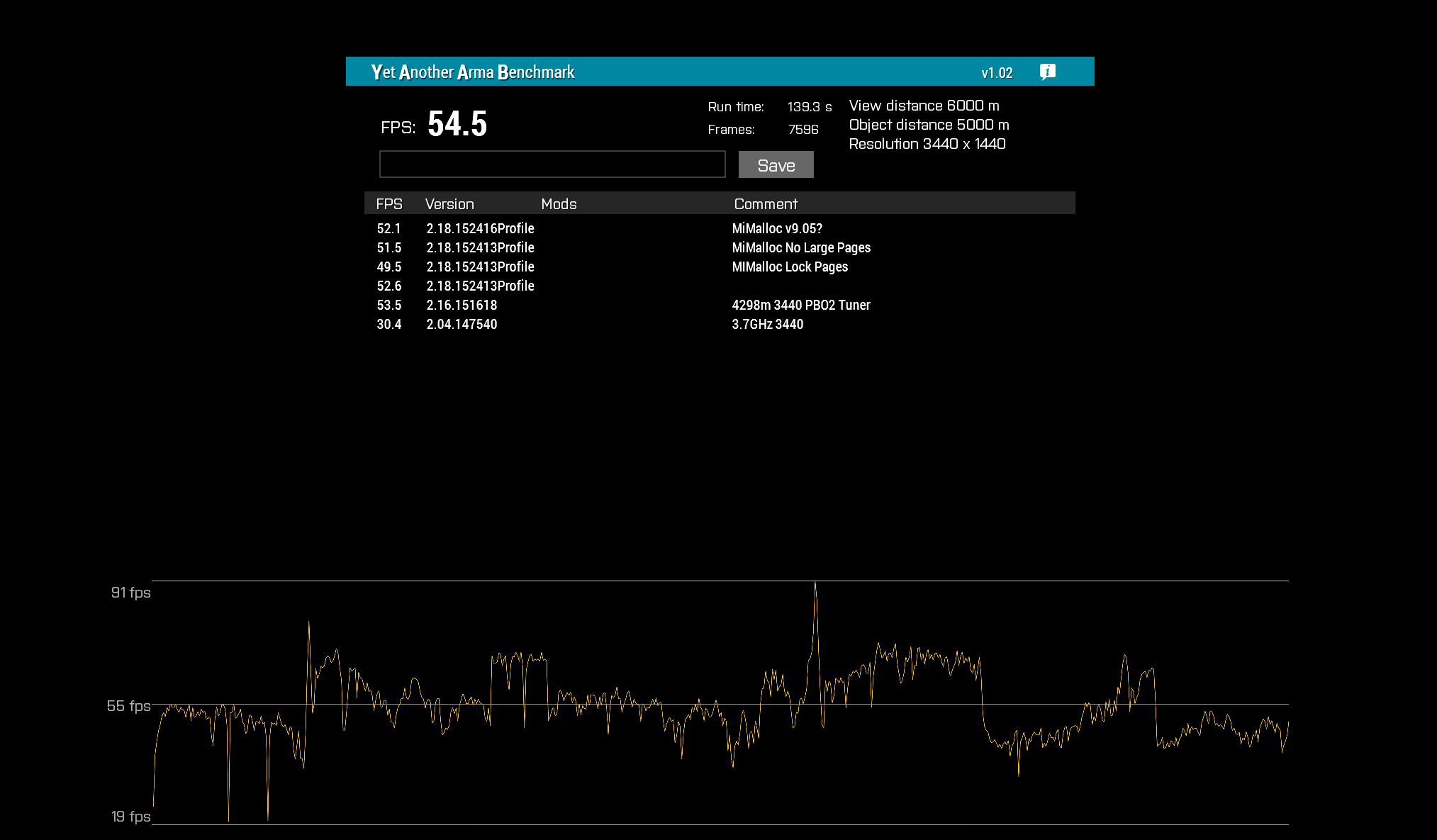
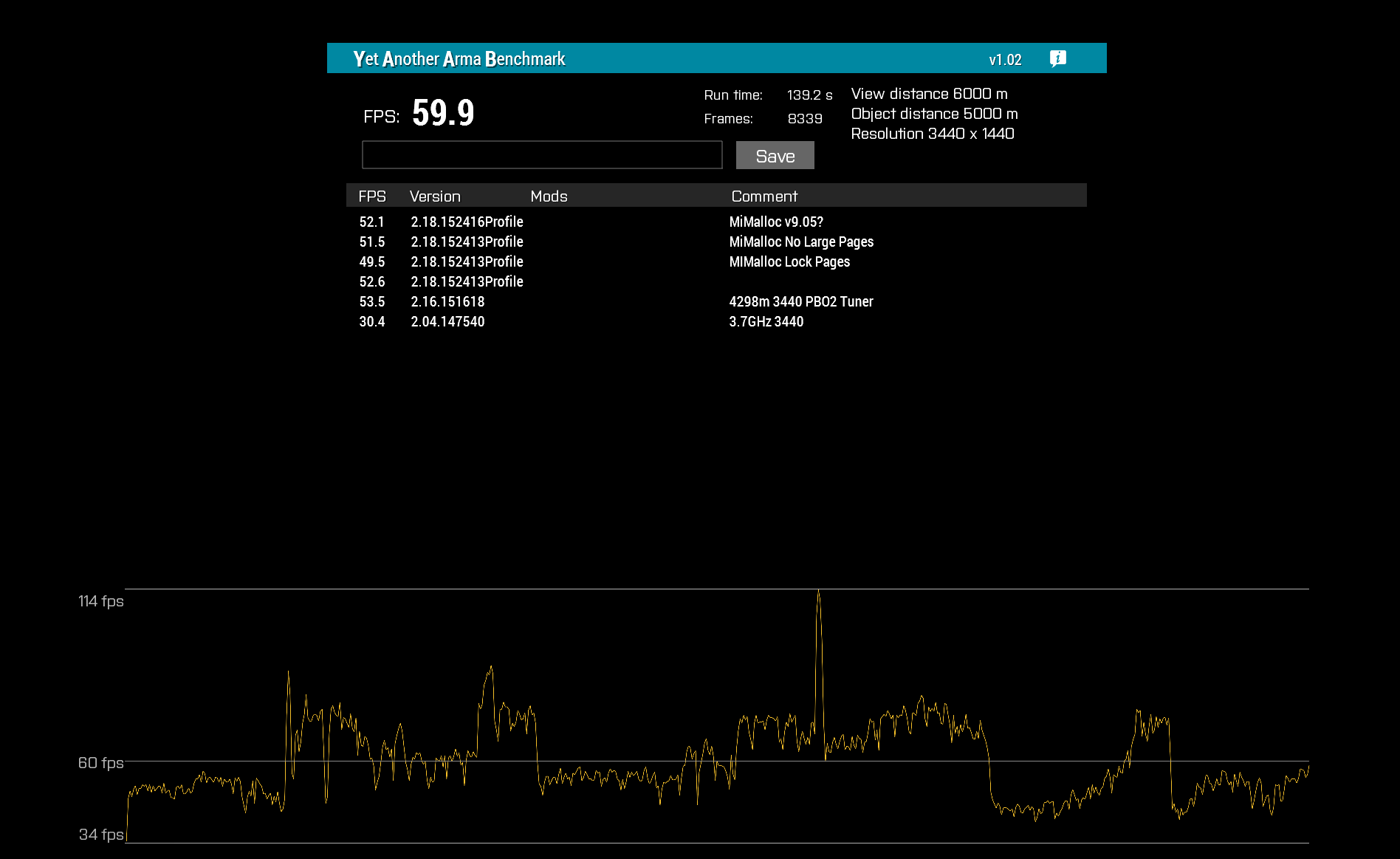 hybrid cradle
graph is much more important than the number when looking at benchmarks
it's not faster, it's just smoother
 woven loom
Use capframeX to see more detailed metrics like 1% low framerates and frame times... and anyway even if you're just looking at the fps number, run it at least 3 times otherwise the result you'll get won't be correct
 rose lily
Hi,
Going to switch over to the profiling build to get access to multi threading and the other performance benefits.
Is there a performance guide somewhere that goes step by step to optimize the game now on the current version of the profiling build?
Or, is it just as easy as switching to the profiling build and it all comes optimized out of the box?
 void badger
Switch to profiling build, disable all the parameter changes you make in the launcher
 inland dew
just switch
rose lily
Sweet thanks!
light cargo
people really need to stop using the specific cpu parameters that disable auto detection......
 real creek
There's lots of "optimization guides" that are just snake oil (or simply outdated)
rose lily
Ok, so I guess I should uncheck everything under advanced parameters such as “hyper threading” “memory allocator” “extra threads” etc?
 ashen helm
on perf? yes
if you have more than 32gb of ram you can try switching to goldjohnking's mimalloc, otherwise leave this stuff on default and let the game itself adjust whatever it needs
rose lily
Sweet thanks!
inland dew
ashen helm
if you have more than 32gb of ram you can try switching to goldjohnking's mimall...
more than 16*
woven loom
ashen helm
if you have more than 32gb of ram you can try switching to goldjohnking's mimall...
What Groove says. 32 sees benefits. In which case using large pages flag may also help (maybe it's called hugepages i can't remember)
@rose lily
 tawdry gazelle
I did a test on Arma 3's mimalloc, finding v207 performances better than v217 in YAAB. Anyone has the same results?
 harsh grotto
tawdry gazelle
I did a test on Arma 3's mimalloc, finding v207 performances better than v217 in...
harsh grotto
tawdry gazelle
I did a test on Arma 3's mimalloc, finding v207 performances better than v217 in...
something that was tested a long time ago, 209lp fps more than 207lp
 inland dew
tawdry gazelle
I did a test on Arma 3's mimalloc, finding v207 performances better than v217 in...
inland dew
tawdry gazelle
I did a test on Arma 3's mimalloc, finding v207 performances better than v217 in...
what's your cpu and how many yaab runs per malloc?
because if it was 1-2 runs per malloc, then one can't make any conclusions
1st run is loading textures, so fps is different from other runs
- ai actions randomness, thus different fps from run to run
so one should do like 6 runs per malloc, always discarding the 1st run, thus avg of 5 runs, avg of min fps and avg of avg fps
tawdry gazelle
I can constantly reproduce 5 fps differences between v210 and v212, even in the first run. Started from v212, mimalloc does not provide performance gain than default TBB. 
inland dew
what's your cpu
tawdry gazelle
12700KF
inland dew
other people have reported slightly higher fps on 2.14 vs. 2.12
inland dew
tawdry gazelle
I can constantly reproduce 5 fps differences between v210 and v212, even in the ...
2.12 5 fps higher than 2.10 or 2.10 5 fps higher than 2.12?
tawdry gazelle
2.10 is 5 fps higher than 2.12. And 2.12 does no difference between default TBB.
harsh grotto
according to my tests, 212 has almost the worst performance
tawdry gazelle
2.14 and 2.17 are also 5 fps lower than 2.10, 2.09 and 2.07...
harsh grotto
and 209 best
tawdry gazelle
harsh grotto
according to my tests, 212 has almost the worst performance
that matches my tests. I guess microsoft must have changed something between 210 and 212... 
inland dew
currently have no time to compare on my 14900ks
void badger
Is it time to rollback GJK?
inland dew
2.09 should be avoided, as some people were complaining, some time ago
although i haven't experienced any problems using 2.09
tawdry gazelle
maybe we should choose v207 as a both stable and performant option for now? 😅
inland dew
will test all of them, later
 glacial olive
If we wanted to test the new performance profiling branch for MT on the SERVER side, how would you recommend going about it? I.e. which .exe would you recommend installing and on which branch?
void badger
Grab latest perf binary from drive and backup stable exe
glacial olive
Gotcha. Has anybody done any testing on serverside benefits / impacts?
void badger
Just read through this channel's history and you'll see various reports lol
I think I rolledback to stable on my Linux box because I got two consecutive segfaults on latest version
tawdry gazelle
tawdry gazelle
that matches my tests. I guess microsoft must have changed something between 210...
Okay problem found. Microsoft has changed their default options, one of them makes a performance difference in Arma 3. 🤣
 fast hornet
will you release a "fixed" version of 2.1.7? 🙂
tawdry gazelle
fast hornet
will you release a "fixed" version of 2.1.7? 🙂
soon TM 🤣
inland dew
tawdry gazelle
Okay problem found. Microsoft has changed their default options, one of them mak...
so this concerns 2.12, 2.14 and 2.17?
 empty goblet
harsh grotto
something that was tested a long time ago, 209lp fps more than 207lp
empty goblet
harsh grotto
something that was tested a long time ago, 209lp fps more than 207lp
also stability plays role ... plus mimalloc really improved a lot since those
light cargo
tawdry gazelle
Okay problem found. Microsoft has changed their default options, one of them mak...
which are…?
tawdry gazelle
inland dew
so this concerns 2.12, 2.14 and 2.17?
Yep.
inland dew
tawdry gazelle
maybe we should choose v207 as a both stable and performant option for now? 😅
2.09 and 2.10 worse perf than 2.07?
tawdry gazelle
The performance drawbacks since mimalloc v2.1.2 should be solved. Please try mimalloc_v217_20250103.dll and let me know if there are any other problems. 
https://github.com/GoldJohnKing/mimalloc/releases/tag/Arma-3-v2.1.7-20250103
GitHub
Changelog
Fix performance drawbacks since v2.1.2.
Note
No other variants are provided at this time, as they do not differ a lot. If you find any issue, please let me know.
tawdry gazelle
inland dew
2.09 and 2.10 worse perf than 2.07?
Nope. 214 and 212 worse perf than 210, 209, 207 and older ones.
inland dew
tawdry gazelle
The performance drawbacks since mimalloc `v2.1.2` should be solved. Please try m...
no lock pages
light cargo
huh, should i update mimalloc?
inland dew
read the chat
tawdry gazelle
inland dew
no lock pages
I removed it, because it does not help improve performance at all, other than allocating pages but never use them.
inland dew
tawdry gazelle
I removed it, because it does not help improve performance at all, other than al...
so no need to use lock pages in memory for windows user anymore for fps to actually increase?
 eternal kraken
tawdry gazelle
The performance drawbacks since mimalloc `v2.1.2` should be solved. Please try m...
eternal kraken
tawdry gazelle
The performance drawbacks since mimalloc `v2.1.2` should be solved. Please try m...
lock_pages version?
light cargo
tawdry gazelle
I removed it, because it does not help improve performance at all, other than al...
yeah, whats the point of it unless you are a sadist who wants to run out of ram?
tawdry gazelle
tawdry gazelle
I removed it, because it does not help improve performance at all, other than al...
I may dig how to utilize 1GB huge pages, but not at this time. 😵💫
light cargo
too large of pages is painful for performance
like, it decreases performance because it has to go through such a large chunk of data
tawdry gazelle
inland dew
so no need to use lock pages in memory for windows user anymore for fps to actua...
Yes, I believe it is exactly the actual case for now.
inland dew
so only use the dll and no lock pages for windows user
 cloud sky
I'm confused. Doesn't the lock pages privilege also utilize large pages and thus also single translation buffer that makes the performance increase?
light cargo
it becomes a significant performance issue when you're on hdd or sata ssd
i think?
sorry for being wrong if that's the case
inland dew

light cargo
its fine as long as its in physical ram, once it starts to need to page those large chunks, performance is doomed
cloud sky
light cargo
its fine as long as its in physical ram, once it starts to need to page those la...
That's part of the point of lock pages privilege, it locks the memory pages into physical RAM so that they can't be moved to page file
light cargo
and it does impact fps a lot when it has to put memory in disk
will it cause an oom crash if it cant put the pages in ram?
cloud sky
light cargo
will it cause an oom crash if it cant put the pages in ram?
If you run out of physical memory, yes
tawdry gazelle
cloud sky
I'm confused. Doesn't the lock pages privilege also utilize large pages and thus...
Briefly, there are three kinds of pages: Normal (4KiB), Large (2MiB or 4MiB), and Huge (1GiB).
This time, mimalloc still uses Large ones, but not Huge ones.
light cargo
thank gosh, because 1gb is too much
related offtopic: minecraft has performance issues when gc'ing large amounts of ram with a larger max mem
cloud sky
tawdry gazelle
Briefly, there are three kinds of pages: Normal (4KiB), Large (2MiB or 4MiB), an...
Yeah. But as far as I'm aware, large pages and lock pages are interconnected in Windows (like that you can't have one without the other), but I might be wrong here
tawdry gazelle
tawdry gazelle
Briefly, there are three kinds of pages: Normal (4KiB), Large (2MiB or 4MiB), an...
Because Huge pages has different behaviors than Large and Normal one. The previous implementation of Huge pages could be wrong and does not help.
light cargo
i see
inland dew
so now it's 4kb?
light cargo
2 or 4mib
tawdry gazelle
cloud sky
Yeah. But as far as I'm aware, large pages and lock pages are interconnected in ...
Yes. But only huge pages are allowed to be locked on Windows, so they are almost the same thing..
cloud sky
tawdry gazelle
Yes. But only huge pages are allowed to be locked on Windows, so they are `almos...
That's interesting. I thought it applies to large pages too
inland dew
so large don't need lock on user then?
light cargo
when i have heavy use on the hdd it gets pretty bad to the point the whole console i/o freezes completely when its paging like hell and its hitting the display subsystem
tawdry gazelle
inland dew
so now it's 4kb?
Should be 2MB on Windows.
cloud sky
light cargo
when i have heavy use on the hdd it gets pretty bad to the point the whole conso...
It's called thrashing
light cargo
and this is why i stay away from SSDs
inland dew
thus no lock on user and even 16 gb ram is fine then
tawdry gazelle
inland dew
so large don't need lock on user then?
I found large pages unable to be locked in the memory. They can still be paged out.
tawdry gazelle
cloud sky
That's interesting. I thought it applies to large pages too
It's quite confusing. Microsoft's documents do not clarify that either...
light cargo
oof
inland dew
light cargo
and this is why i stay away from SSDs
or better stay away from this chat with all of your nonsense all the time
only writing for writing in this chat, as usual
light cargo
sorry ezcoo, i forgot to hit reply to your message right above
light cargo
inland dew
or better stay away from this chat with all of your nonsense all the time
only w...
hey, i know stuff sometimes, im trying
light cargo
light cargo
and this is why i stay away from SSDs
context: the message right above it
inland dew
tawdry gazelle
It's quite confusing. Microsoft's documents do not clarify that either... <:meow...
but since you're able to see that large still go to paging file, no need for microsoft documentation
cloud sky
light cargo
and this is why i stay away from SSDs
The page file is, well, file on your disk so SSDs can handle the page requests much, much faster than HDDs. Nowadays, I think that HDDs should be used for storage only if possible
tawdry gazelle
There are three docs related:
https://learn.microsoft.com/en-us/windows/win32/memory/large-page-support
https://learn.microsoft.com/en-us/windows/win32/api/memoryapi/nf-memoryapi-getlargepageminimum
https://learn.microsoft.com/en-us/windows/win32/api/memoryapi/nf-memoryapi-virtualalloc
They does not tell about locking. I am pretty confused, too. 😅

Large-page support enables server applications to establish large-page memory regions, which is particularly useful on 64-bit Windows.
Retrieves the minimum size of a large page.
Reserves, commits, or changes the state of a region of pages in the virtual address space of the calling process. (VirtualAlloc)
inland dew
so few weeks before it's whitelisted by be
light cargo
cloud sky
The page file is, well, file on your disk so SSDs can handle the page requests m...
it wears the ssd much quickly, write speeds went really down on my other system because the write cache is exhausted by paging and its almost running out of disk space
inland dew
you don't use mimalloc lock pages if you don't have 32 gb or more
if you do - your problem
light cargo
same with a3's -hugepages param?
cloud sky
light cargo
it wears the ssd much quickly, write speeds went really down on my other system ...
Modern SSDs don't really wear out that much, I think that it was a problem like 10 years ago. And usually it's good practice to leave some empty room for your SSD so that it has a chance to optimize its cells internally
light cargo
cloud sky
Modern SSDs don't really wear out that much, I think that it was a problem like ...
dont ssds have that reserved manufacturer space internally already?
cloud sky
light cargo
dont ssds have that reserved manufacturer space internally already?
Actually yeah, I think they do nowadays. I forgot 😄
light cargo
which is why they're a bit smaller than the claimed capacity
cloud sky
Anyways I think we can continue in #offtopic_hardware if necessary
cloud sky
tawdry gazelle
There are three docs related:
https://learn.microsoft.com/en-us/windows/win32/me...
Yeah, I tried to find info about it too and found/learned nothing useful 😅
inland dew
just don't do mimalloc with 16 gb ram or less
light cargo
i have 16gb but much less ram free because of applications running. so i should be fine using scheduled mimalloc, 8gb of ram could benefit too, no?
its fine to not use huge pages
regardless of the allocator it does feel like a3 just leaks ram even with the mem cap parameter
tawdry gazelle
From my test I am sure about several things:
- Using Large Pages (>=2MB) on Windows requires Lock Pages Privilege.
- Large Pages (>=2MB) actually helps reducing caching table size, which reduces CPU cache miss.
- mimalloc‘s does not actually lock pages in memory (because it is not calling
VirtualLock). Instead, it commits and reserves. - Reserved memory in mimalloc is for special use. Without specific implementation, they does nothing at all.
empty goblet
tawdry gazelle
Briefly, there are three kinds of pages: Normal (4KiB), Large (2MiB or 4MiB), an...
Large Pages actually helps the more memory is used especially because the caching table needed in cpu cache (l2/l3) is smaller
tawdry gazelle
tawdry gazelle
From my test I am sure about several things:
1. Using Large Pages (>=2MB) on Win...
@inland dew @cloud sky If that may solve your confusion? 😂
tawdry gazelle
empty goblet
Large Pages actually helps the more memory is used especially because the cachin...
Good point. Adding that.😆
empty goblet
also i don't recommend using that mimalloc with 8GB lock pages on systems with less than 16GB ram (more like 24 to 32)
mileage may vary based on OS, CPU, memory speeds etc. you can gain some % performance
also if you run multiple clients/ servers/hcs ... take in mind thats minus 8 per process plus other memory needed so you run out of memory fast
cloud sky
tawdry gazelle
From my test I am sure about several things:
1. Using Large Pages (>=2MB) on Win...
So, uh, what are the practical implications of this "commit and reserve" strategy? Like is there any difference between having and not having the lock pages privilege set?
empty goblet
it's simple run the non lock pages variant to get baseline performance (benchmark or w/e tests you deem needed) then do the lock pages and if there is no difference for you then forget about lock pages
empty goblet
tawdry gazelle
From my test I am sure about several things:
1. Using Large Pages (>=2MB) on Win...
does mm support statistics ouput which show large pages commits ? if i'm not mistaken it shall be capable to use LP and SP combined just fine
tawdry gazelle
cloud sky
So, uh, what are the practical implications of this "commit and reserve" strateg...
Not having lock pages privilege set will cause mimalloc unable to use >2MB pages.
cloud sky
Even the regular one? (Edit. the malloc I mean)
heavy vortex
I think 2MB+ pages are always locked. Windows simply won't page them out.
tawdry gazelle
empty goblet
does mm support statistics ouput which show large pages commits ? if i'm not mis...
It does have statistics output, but I failed to figure out how to receive that in Arma. (I have to write a single console program for test.)
tawdry gazelle
heavy vortex
I think 2MB+ pages are always locked. Windows simply won't page them out.
Yep, that's the arguing point. I see it still paging out without explicit calling VirtualLock. I am still thinking about better ways to prove it.
 smoky prawn
Howdy! Years ago I did a “performance” settings guide. Haven’t touched the settings since then. Do you recommend any new ingame settings with the current profiling branch or do I have to test my way there?
heavy vortex
hmm, maybe modern windows will page out large pages if the disk is fast enough.
Like they never said "we will never page out large pages". That's just how it used to work.
But anyway, that doesn't really matter. Locking was the means to the end (large pages -> reduced TLB spam) rather than vice versa.
So the question is what combination of settings is required to make Arma use large pages.
tawdry gazelle
tawdry gazelle
Yep, that's the arguing point. I see it still paging out without explicit callin...
And another thing is, theoretically, performance should not differs on systems with enough memory, as hot data should not be paged out. I see no essential of forcefully locking it.
cloud sky
heavy vortex
But anyway, that doesn't really matter. Locking was the means to the end (large ...
The performance would still suffer severely if game data was moved to page file and later needed by the game/engine 😛
heavy vortex
Probably still better than having to load new objects off disk from scratch.
Don't over-contend memory and windows won't do anything daft, anyway.
If you don't have enough memory for what you're trying to keep in memory then you have issues regardless.
tawdry gazelle
cloud sky
The performance would still suffer severely if game data was moved to page file ...
paging should be managed by Windows OS instead of by the game itself. so if os wants to page it out, there must be a convincing reason. 😅
cloud sky
Would be fun to know how Windows determines what data to page out and what not. AFAIK those algorithms are very sophisticated nowadays
tawdry gazelle
cloud sky
Would be fun to know how Windows determines what data to page out and what not. ...
*Refer to Leaked Windows Source Code 🤣
light cargo
smoky prawn
Howdy! Years ago I did a “performance” settings guide. Haven’t touched the sett...
if you followed a random performance guide, please uncheck the threads and cpu related parameters, autodetect is better. unfortunately most guides are like outdated or snake oil as it was said earlier.
just switching to performance exe will bring you the optimizations
smoky prawn
light cargo
if you followed a random performance guide, please uncheck the threads and cpu r...
Performance exe is the performance branch right?
light cargo
smoky prawn
Performance exe is the performance branch right?
profiling beta/branch on steam contains both performance and profiling exes. performance exe is the default and it replaces the regular executables
empty goblet
tawdry gazelle
*Refer to Leaked Windows Source Code 🤣
linux kernel programmer dying in laughter under table
smoky prawn
light cargo
profiling beta/branch on steam contains both performance and profiling exes. per...
Awesome! Thanks:)
 plain trout
any chance you can make hugepages version for the people that do have powerful enough systems..?
light cargo
plain trout
any chance you can make hugepages version for the people that do have powerful e...
see the earlier conversation above about why it was removed and all the related shenanigans
plain trout
I did and I understand your point. Some people here "might" be running a top-end system and like to see what these things can bring out of the game tough.
light cargo
at the cost of no performance gains?
plain trout
how about you care about your business
fast hornet
just ignore him.. he's running Win7 and is confused in other ways as well.
light cargo
fast hornet
just ignore him.. he's running Win7 and is confused in other ways as well.
im booted to win10 atm
inland dew
nobody cares. stop spamming here
fast hornet
wow, congrats for not actively being a threat for other people anymore.. until you boot back to your beloved ancient Win7
fast hornet
@tawdry gazelle the server seems to run fine with the new release btw. - client has to wait for the BE whitelist 😉
fast hornet
the server doesn't need the whitelisting even with BE enabled, only the client has the restrictions on what dll it is allowed to load with BE.
And yes ofc. it's a public server 🙂
 heavy galleon
fast hornet
the server doesn't need the whitelisting even with BE enabled, only the client h...
heavy galleon
fast hornet
the server doesn't need the whitelisting even with BE enabled, only the client h...
I am aware, wouldn't be able to run OCAP and other mods servside without that.
It's just most servers are closed communities, where people usually trust each other and often don't have even add-on signature on, so BE is really unnecessary in those cases.
light cargo
inland dew
nobody cares. stop spamming here
rude, im not even spamming
 autumn timber
BE really serves next to no purpose
Using BE serves the purpose of BE whitelisting the extension/allocator sooner so that you can use it with BE 😉
||Circular reasoning works because circular reasoning works because circular...||
heavy galleon
autumn timber
> BE really serves next to no purpose
Using BE serves the purpose of BE whitelis...
Not if you are not planning on using BE at all 
empty goblet
heavy galleon
I am aware, wouldn't be able to run OCAP and other mods servside without that.
...
sure that works in closed communities... just until someone decides to breach the trust
but then you don't need run public server at all no need to waste cycles on public query
indigo anvil
empty goblet
linux kernel programmer dying in laughter under table
Its actually a lot easier than it sounds (barrier of entry is low)
https://tldp.org/LDP/lkmpg/2.6/html/x121.html
heavy galleon
empty goblet
sure that works in closed communities... just until someone decides to breach th...
Heh, been there, done that. Boot that guy off.
(In other news, who want to cheat, will always find a way. BE or not)
fast hornet
we have 2987 active bans atm, most of them for cheating. So yeah.. the trust thing doesn't really work on a public server 
woven loom
tawdry gazelle
I removed it, because it does not help improve performance at all, other than al...
With older versions I found it helps performance when hugepages flag is enabled for the game, combined effect was around 10%
Would suggest testing with that combination (I am unable to test for the time being)
tawdry gazelle
heavy vortex
I think 2MB+ pages are always locked. Windows simply won't page them out.
You are correct. Windows always locks large pages in memory.
mimalloc only allocates large page if requested memory size is >= 16MiB. My test allocates 2MiB memory block was incorrect.
inland dew
tawdry gazelle
You are correct. **Windows always locks large pages in memory.**
`mimalloc` only...
so 2.17 lock pages incoming?
tawdry gazelle
Nope. It is not needed at all, because it is always locked.
heavy vortex
how often does Arma allocate blocks larger than 16MB?
tawdry gazelle
Not sure, trying to figure it out now.
tawdry gazelle
memory is magic
tawdry gazelle
I added a note telling why other variants are removed. You may check it if interested.
https://github.com/GoldJohnKing/mimalloc/releases/tag/Arma-3-v2.1.7-20250103

GitHub
Changelog
Fix performance regression since Arma-3-v2.1.2-20230427.
Note
Now mimalloc always tries to reserve Large Pages (up to 1GiB per page) when necessary, regardless of whether you toggle En...
tawdry gazelle
tawdry gazelle
You are correct. **Windows always locks large pages in memory.**
`mimalloc` only...
The >=16MB is not the only judgement... too complicated to analyze... guess i should trust expertise who designed mimalloc. 😅
 verbal remnant
How do I use perf prof branch to increase performance??
 worldly badge
Steam > Arma 3 > Property > Beta > Profiling Branch, but you won't magically improve FPS by 60
verbal remnant
Yeah ik
verbal remnant
worldly badge
Steam > Arma 3 > Property > Beta > Profiling Branch, but you won't magically imp...
Ty
analog acorn
Keep in mind that perf/prof is an experimental branch with frequent updates. Sometimes things can go wrong. If you're going to use it, make sure you keep track of this channel and the changelogs for the latest information.
 candid crag
how long until this branch is merged with the master
analog acorn
Unknown but likely not for a couple of months at least
tawdry gazelle
tawdry gazelle
The >=16MB is not the only judgement... too complicated to analyze... guess i sh...
I give up digging further... 😵💫
If anyone familiar to debugging a memory allocator and is willing to help, please let me know... 🥹
 mental crescent
I don't know if this is actually an issue or not since this is all I've done so far:
stable/v5->v6(+v16) performance binaries, CPU utilization seems to reduce from 100% on core 0 to ~90% and FPS is reduced from 247->230 (93%) in a static test looking over Kavala
plain trout
tawdry gazelle
I give up digging further... 😵💫
If anyone familiar to debugging a memory allo...
Thank you 🙂 appreciate the insights and work you do!
 feral harness
candid crag
how long until this branch is merged with the master
feral harness
candid crag
how long until this branch is merged with the master
if all goes well with the main branch update
 spiral thicket
Hey everyone, just checking -- the memory allocator I should currently be using is Gold's 2.1.7 above?
I also previously had to go through some shenanigans to enable lock_pages on windows home version, recently reinstalled windows. Do you think its worth reenabling locked pages? YAAB is at like 96 fps baseline performance branch right now on Intel allocator.
spiral thicket
Okay I see you (BE disable maybe helps too lol)
https://imgur.com/a/CzeL9nA
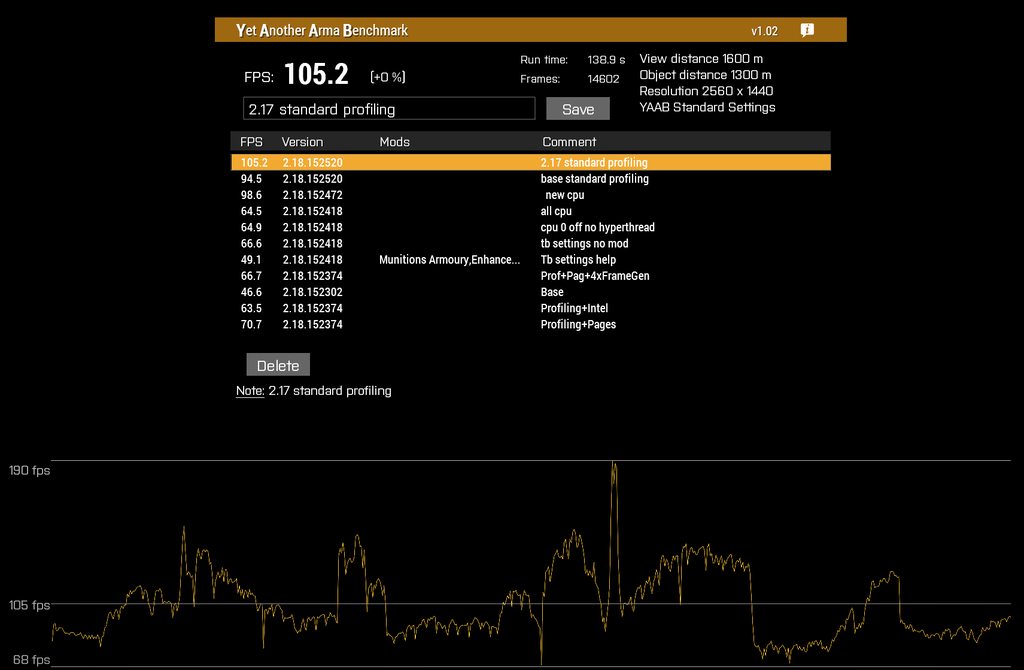
 autumn siren
How accurate is that Benchmark and what is it for?
SP missions with AI, MP missions with AI, or pure MP missions?
I assume SP with AI
analog acorn
It runs an SP scenario with AI. It can't really test MP because y'know, it's only running on your PC.
light cargo
yaab is sp with ai, there's a separate headless client benchmark mission that is "essentially yaab" on servers/hc
autumn siren
light cargo
yaab is sp with ai, there's a separate headless client benchmark mission that is...
I assumed its possible but too much hassle
light cargo
autumn siren
I assumed its possible but too much hassle
such benchmark mission is available on the workshop
autumn siren
Thanks
whole cloud
mental crescent
I don't know if this is actually an issue or not since this is all I've done so ...
reducing fps in very high fps scenarios is expected.
The multithreading adds overhead, if there is no actual heavy work there to be done, it makes performance worse.
But if you're already running >200fps.. who cares.
woven loom
mental crescent
I don't know if this is actually an issue or not since this is all I've done so ...
Looking at CPU utilisation is not very useful anyway, look at GPU utilisation, that's a far better measure/indicator of CPU bottlenecks/overhead.
inland dew
yeah, lower gpu load in % = higher cpu/ram perf bottleneck
mental crescent
woven loom
Looking at CPU utilisation is not very useful anyway, look at GPU utilisation, t...
I'm not sure how that would make a difference when testing the same game with the same settings where GPU util is already low?
mental crescent
whole cloud
reducing fps in very high fps scenarios is expected.
The multithreading adds ove...
Good to hear, thanks for the info
woven loom
mental crescent
I'm not sure how that would make a difference when testing the same game with th...
Difference is that CPU utilisation changes are more or less meaningless because of how much other stuff is going on in the background. Either you have a profiler or you might as well be looking at high level randomness in the game, OS and hardware schedulers, it probably isn't telling you much.
It's different from you writing your own simple program with and without multithreading and seeing a performance regression when all cores are loaded vs not. There's just too much happening in the middle in this case, so CPU utilisation changes may not mean much or what we think they mean. It's probably not replicable on someone else's system either without a lot of control on both ends.
GPU utilisation or GPU Busy (available from Intel Perfmon and programs that use it like capframeX) are far better indicators of what's going on.
Ultimately the whole goal of multithreading is to offload the "primary thread" so that the GPU can render faster without waiting on the CPU, so the GPU should spend a larger fraction of the frame time working. Which also means that on average GPU utilisation is higher and FPS higher. Hopefully it also means that frame times are smoother overall, because there is less waiting on the CPU at random times, but there's driver behaviour in the middle too.
So that's what's worth measuring on our end imo since that's the end goal for any of this: higher performance under various loads
I've spent many years logging CPU utilisation and it didn't tell me much apart from the fact that a single thread is loaded more than others... But exact percentages have changed over the years and were different for different CPUs, with sometimes little actual difference to Arma's performance characteristics
The only thing that varies wildly and consistently from scene to scene depending on how much load there is, is GPU utilisation and proportionally, FPS
inland dew
guess it's out of this chat scope
mental crescent
woven loom
Difference is that CPU utilisation changes are more or less meaningless because ...
To clarify my test:
Arma is the only thing running on those cores and the game is at 1024x768 (7950x3d+6900xt) resolution on the standard preset. GPU-busy times are spikier than my Reforger test but still significantly below frametime
After Dedmen's reply I thought to see how Reforger behaves and it's similar as v6.
Maybe I'm just not understanding your point so thanks for the reply 😅
inland dew
 weary sun
Also having this on a linux box, will get version number in a jiffy
Two crashes, last sunday and today, if a server has people connected to it for more than 20? Minutes the crash will occur, with our regular modlist, checking to see if it occurs with vanilla
void badger
What mods you running? Mine seemed to coincide with WebKnight mods
 languid snow
Is it possible that the AI group leaders have a bug where they spam target orders on targets they can't even see?
 crude sedge
languid snow
Is it possible that the AI group leaders have a bug where they spam target orde...
crude sedge
languid snow
Is it possible that the AI group leaders have a bug where they spam target orde...
I do believe I have also been seeing this in my SP campaign playthroughs. CW Rearmed for sure, and I think also in East Wind
They're like 'Attacking!' or 'Engaging!' like, 25x in a row like it's been getting stored in a buffer and then they just dump it into chat
I don't mean to change the subject but someone in general chat suggested I post this here:
Is anyone else having trouble with getting their PCML/Titan to fire top-down? I'm using the Perf branch for MT improvements and wonder if that could be it? I can switch back and test again if I need to...
Also mainly playing SP campaigns (East Wind again) : )
Forgot to mention, it just does direct fire even if top-down mode is selected
I thought it might be a range thing, so I tested on Resurgent West (tank battle at the end) and no matter what, they just go straight even towards the furthest target.
inland dew
crude sedge
I don't mean to change the subject but someone in general chat suggested I post ...
switch and test/compare
analog acorn
crude sedge
I don't mean to change the subject but someone in general chat suggested I post ...
Just a couple of things to be sure about:
- the PCML uses overflight top attack, not pop-up, so it will appear to fly basically level towards the target.
- I don't remember how the Titan's top attack profile interacts with its SACLOS guidance when unlocked. It's possible it doesn't top attack unless you have a lock, so check both.
 quaint flame
12:46:16 Warning: Cannot evaluate 'DIK_ENTER'
12:46:16  ➥ Context: chat.chat <- bin\config.bin/CfgDefaultKeysPresets/ArmaReforger.Mappings
->Last modified by: A3_Ui_F
This one seems new. Also I haven't seen the reference to Reforger before. Is that related to the change where additional function keys are supported now?
Also these (not sure if related)
12:47:10 Warning: Cannot evaluate 'IDC_CONFIG_IDCLBHISTORY'
12:47:10  ➥ Context:     [] L1 ()

12:47:10 Warning: Cannot evaluate 'DIK_ENTER'
12:47:10  ➥ Context:     [] L1 ()
The bug has been there for long time, the error reporting for it is new
We have a reforger keyboard layout, and that was bugged
 void canyon
Can you use the multi core patch on king of the hills servers? I'm mostly interested in flying small transport and rescue helicopters
 opal hound
What doesn't?
 craggy idol
the new performance thingy here, i have seen some videos of it working well
whole cloud
Its not magic. It improves some situations.
craggy idol
whole cloud
Its not magic. It improves some situations.
i just used the benchmark and the COF gray challenge where it usually feels horrible and there is no difference, thats why im like a bit disappointed
but maybe overall its better
ig gotta do more testing
whole cloud
check in main menu, bottom right the game version number, should be 520 at end
craggy idol
yes it is
whole cloud
🤷
heavy galleon
craggy idol
i just used the benchmark and the COF gray challenge where it usually feels horr...
Aren't you disappointed mainly because of the bullshit some people say like "170% better performance" and such?
craggy idol
heavy galleon
Aren't you disappointed mainly because of the bullshit some people say like "170...
no, im mainly disappointed cuz i dont get anything from it seemingly
whole cloud
how many fps are you getting in YAAB?
craggy idol
54 without launcher, 57 with parameters
got 59 without this exe with lockpages allocator
whole cloud
maybe gpu or memory limited. So the cpu improvements wouldn't help 🤷
Maybe #hardware_vs_arma has more ideas
craggy idol
seems kinda strange, my pc kinda beefy but idk, i feel like CPU is holding back may be
12400f is still kinda like not that bad
ill go in that channel
heavy vortex
Not actually sure what to expect with a 12400F. The only Intel results I see are for high-end stuff.
craggy idol
my video card is 7900GRE and iam starting to think that its just more powerful CPU-s fix the optimization itself tbh
heavy vortex
Hmm. If you have a 6C/12T CPU, does it use 6 or 12 threads by default?
whole cloud
6
craggy idol
whole cloud
6
and to fix that you have to enable the thread thingy in parameters right?=
whole cloud
enable hyperthreading would change it.
But why "fix", why is that a problem that needs a fix?
In my tests, hyperthreading enabled had worse results
craggy idol
damn, this thing is confusing af xd
so in an ideal world with that new perf exe. i shouldnt run any parameters?
heavy vortex
It's possible that reducing -cpucount further would help.
craggy idol
i disabled hyperthread and will try now, after ill try reducing cpu count
im almost fully convinced now its a cpu limitation
sadge
heavy vortex
Potential problem is that almost everything Arma does is memory/cache limited. In those situations some threading can help (CPU can at least do something while waiting for a cache miss) but every thread you add increases the contention.
Those are fancy-ass CPUs though. They should really have some threading benefit for any workload.
craggy idol
every like good fps benchmark i have seen is some x3d chip or high end intel one
so yea, i shouldnt expect more than 59 tbh
i was just hoping that maybe
heavy vortex
Well, the cache architecture on a 12400 is basically the same as a 12900k, except with fewer cores fighting for it. So in theory it should be good with six threads.
inland dew
whole cloud
enable hyperthreading would change it.
But why "fix", why is that a problem that...
can confirm 💯
heavy vortex
You do get a lower power budget though. Maybe that's an issue.
Modern CPUs don't tend to have a cliff edge like that though.
inland dew
low frequency and cache 12400f + low frequency and high timings ram says it all
no miracles for such hardware
heavy vortex
This isn't miracles. It's about getting any improvement at all out of multithreading some extra parts of the engine.
 minor geode
God bless us dedicated Arma players... we scrape and pray to squeeze 3 or 4 extra FPS out of a decade old game... and we love it.
 rare finch
@raix to identify what you are seeing with v6 multithreading, you should record both your CPU usage and GPU usage during the tests. If your CPU is pinned (multicore), then you do not have any additional CPU headroom and will not see better results. Noting that even in multi-threaded cases, the primary thread generally requires the most power. So if one core is pinned, then it is unlikely that you will get more performance. Then if your GPU is pinned, then you are unlikely to see a frame rate increase as you are using all you have.Now if you have room on your GPU and only one core of your cpu is pinned (or spiky), that is the usual case where multi-threading will help.
As for hyper-threading on Intel processors, it is generally advised to turn off (or not use) hyperthreading in gaming scenarios as the cpu power/frequency cap is lowered (overall) when using it. While when not using it, the CPU has a bit more top clockspeed and voltage.
craggy idol
rare finch
@raix to identify what you are seeing with v6 multithreading, you should record ...
so i did that
i cannot send pictures here though for some reason
prob blocked here
 plush dune
I think the results are gonna very a lot. On my fairly high end system I got no difference at 1440p with the ultra preset
79.2 FPS in dev branch vs 80.1 FPS in the normal stable
craggy idol
plush dune
I think the results are gonna very a lot. On my fairly high end system I got no ...
how high end we talkin about
it seems that the cpu just matters tbh
im pretty sure a 7800x3d with a 3060 beats my 12400f RX 7900GRE easily
even though video card diff is high
plush dune
I have a 7800X3D, with 32GB DDR5 6000 CL28 using buildzoid's timings, and a Sapphire Nitro+ 7800 XT.
real creek
craggy idol
im pretty sure a 7800x3d with a 3060 beats my 12400f RX 7900GRE easily
It definitely will, the game is very dependent on the cpu
#hardware_vs_arma
heavy vortex
4k 16x FSAA might turn in favour of the 7900GRE, yes :P
inland dew
plush dune
Okay, I just tested things in a real mission and with capframex
plush dune
ran the steelhead 1944 mission 3, made sure everything was the exact same from stable to dev branch, my average FPS went from 59 to 80.3, with 1% lows going down from 40.8 to 34.9.
craggy idol
i did high settings (reduced) and shadows disabled
without the branch 69.6 (nice) fps and without it its 68.3, maybe margin of error
minor geode
I thought the full multithreading update wasn't really going to be up until the 2.20 version, or is that only for "live" and the current 2.18 perf/prof versions have all the main multithreading fixes in place?
plush dune
Yet another arma benchmark won't show any difference at all really sadly, you gotta run a real simulation to take advantage of the new system
plush dune
minor geode
I thought the *full* multithreading update wasn't really going to be up until th...
you have to run the 2.19 dev branch to see the changes right now
hybrid cradle
Perf branch has multithreading changes
Simply, you're not getting more FPS. You're getting a more stable game
craggy idol
plush dune
Yet another arma benchmark won't show any difference at all really sadly, you go...
ye, ig so, it seems that i have higher 1% lows with the new exe
hybrid cradle
Do not launch with any """performance"""" parameters either
plush dune
Yeah, i cleared the launcher, only used skip intro videos
minor geode
hybrid cradle
Perf branch has multithreading changes
was going to say, the multithreaded updates are around physx and AI stuff, shouldn't increase FPS really, unless it can offload the AI to other cores or something, which can be an issue with too many AI in missions etc. but the biggest hit to FPS currently is draw distance.
plush dune
They said they replaced the entire multithreaded system with the enfusion version, so its a pretty big change
So it's not just what is being multi-threaded, they aren't using their old virtual reality system anymore in the dev branch
craggy idol
plush dune
Yeah, i cleared the launcher, only used skip intro videos
it makes it very bad for me
i lose alot of fps when i have some not enabled
minor geode
plush dune
They said they replaced the entire multithreaded system with the enfusion versio...
Where is the actual change or proposed change for the full multithreading update posted btw?
plush dune
minor geode
Where is the actual change or proposed change for the full multithreading update...
Bohemia Interactive Forums
7-3-2024EXE rev. 151510 (game) EXE rev. 151510 (Launcher) Size: ~71 MB ENGINE Fixed: Remains collector was not removing invisible dead characters from vehicle wrecks Added: Weapon holder support to the remains collector (WIP) Added: weaponholderManagerMode, weaponholderRemovalMinTime, weaponholde...
November 6th is where the big changes came in
ENGINE

Added: Replaced Real Virtuality multithreading system with Enfusion's version
Added: Asynchronous JIP queue processing
Added: Multithreaded JIP queue processing
Added: Multithreaded lights collection
Added: More multithreading into rendering
Added: Asynchronous AI and sound simulation
Added: Partially multithreaded AI simulation
Added: Multithreaded AI visibility calculations
Tweaked: Improved PhysX simulation performance, if many PhysX objects are in close proximity
They added a lot more too
minor geode
I meant more like was there a roadmap or anything posted for the future updates, not what was already done, sorry.
plush dune
Latest stuff is always gonna be posted in that thread. I think only one guy is working on this atm, and its experimental what he is doing
minor geode
yeah it's dedmen 😄
opal hound
Has someone made a video on the branch or something? Everyone seems to be calling it the multithreading branch
plush dune
some youtuber did a video on it that was a bit misleading, but nothing super solid
whole cloud
craggy idol
i lose alot of fps when i have some not enabled
Which parameters specifically make the big difference for you?
whole cloud
opal hound
Has someone made a video on the branch or something? Everyone seems to be callin...
Several videos on reddit, and some news website picked it up. Sadly most misslabeled as if we "added" multithreading
whole cloud
minor geode
was going to say, the multithreaded updates are around physx and AI stuff, shoul...
We do offload AI to another core now, but it doesn't do that much, maybe a percent or so
opal hound
Lovely
plush dune
Gains are real, nearly 20% more fps in actual missions, but the real gains are improved frametimes across the board
i can't post capframex captures here though since media uploading isn't allowed
whole cloud
#perf_prof_branch message There is mine from 3 months ago
did a couple more things since then, don't have a more current one
craggy idol
whole cloud
Which parameters specifically make the big difference for you?
enable hyperthreading
without it i instantly lose 7 fps on average
maybe its the allocator, ill test it now
maybe the lockpages allocator is like the reason or whatever lemme see
whole cloud
mimalloc gives +10 or more fps for some (on the >80fps range)
craggy idol
whole cloud
mimalloc gives +10 or more fps for some (on the >80fps range)
its only the allocator i can confirm
other parameters do nothing
only with allocator i get more fps
otherwise all the parameters kinda the same
plush dune
does the allocator change when running stable vs dev? I didn't set any parameters, I cleared them all when running my tests and went from 59 to 80.3 FPS.
opal hound
Only if you change it
It should just be your system allocator otherwise
 rugged robin
Does this branch have the multi threading update applied?
Interested in trying it out with some friends if so
plush dune
in the dev branch, not sure how well it works in multiplayer. you have to run your own server for it
rugged robin
plush dune
in the dev branch, not sure how well it works in multiplayer. you have to run yo...
That's not an issue, I've been hosting from my machine for my two friends when we play
whole cloud
opal hound
Only if you change it
It should just be your system allocator otherwise
default is intel tbb allocator
whole cloud
rugged robin
Does this branch have the multi threading update applied?
yes it does, and its compatible with normal stable branch servers
rugged robin
whole cloud
yes it does, and its compatible with normal stable branch servers
Thank you, Dedmen!
hybrid cradle
plush dune
in the dev branch, not sure how well it works in multiplayer. you have to run yo...
Stop making things up or trying to answer questions you don't know the answer to
plush dune
the dev version is 2.19, usually you can't join regular 2.18 version because of version mismatch
hybrid cradle
Please use your eyes and read. Thank you 🙂
plush dune
You CANNOT join and play on servers running the stable version...
inland dew
leave this chat, please
plush dune
You have to join a dev server, same version as the dev client. I just now tried, it doesn't allow you to join any
inland dew
you just joined today and spamming nonsense
plush dune
I have the game open right now, in dev branch, and cannot join any 2.18 stable servers because of version mismatch
hybrid cradle
a) they did not ask about dev branch
b) this chat has nothing to do with Dev branch
c) this branch has the multithreading changes
d) please go buy some prescription glasses or enable a screen reader
inland dew
plush dune
You have to join a dev server, same version as the dev client. I just now tried,...
here it's #perf_prof_branch and not #dev_rc_branch
plush dune
there are 4 dev servers, with 6 people playing, that I can join.
hybrid cradle
The amount of relevance Dev branch has here is the same amount you have here
Use your eyes, read the chat, realise you're wrong, leave. Please.
plain trout
#dev_rc_branch this is what you are looking for
 rain moth
congrats dedmen, arma 3 is finally mulithreaded, https://www.dsogaming.com/news/after-12-years-arma-3-finally-gets-cpu-multi-threading-support/
opal hound
me when I spread misinformation on the internet
rain moth
Thanks to the CPU multi-thread support, big battles will no longer make your high-end PC drop below 60FPS
that's a fact now I guess
plain trout
the magic number
plush dune
oh thanks guys, the dev branch was hidden under arma 3 branches by default in the server, didn't see it
hybrid cradle
this is either the worlds best ragebait or you genuinely need help reading
plush dune
I came here from the reddit post a month ago, that said the dev branch was required. ill try the performance branch now as well
hybrid cradle
this is hurting my brain
plush dune
craggy idol
it makes it very bad for me
i'm curious, what launcher options do you use? I've played with them in the past on my older system like around 2013, but not since then
void badger
rain moth
> Thanks to the CPU multi-thread support, big battles will no longer make your h...
Yup 100%, we'll never have to live with below 60fps ever again
inland dew
guys, move to #hardware_vs_arma to compare/discuss
knotty wraith
https://youtu.be/XYm11rBDss0
invisible bot - who else has encountered such a thing?

Personally, I myself observed that you can't see it closer, but if you move further away, you can see it.
 frozen gulch
interesting time stamp lol
 vale shoal
knotty wraith
https://youtu.be/XYm11rBDss0
invisible bot - who else has encountered such a thi...
vale shoal
knotty wraith
https://youtu.be/XYm11rBDss0
invisible bot - who else has encountered such a thi...
on perf? honestly not a single one. my team does Antistasi sessions almost daily for over a month and never saw this (server & clients on perf).. so I guess the AI was just below the ground
knotty wraith
vale shoal
on perf? honestly not a single one. my team does Antistasi sessions almost daily...
on perf
 vast siren
are you using ACE view distance? it's a longshot, but could be caused by the way that mod changes object loading?
ashen helm
knotty wraith
https://youtu.be/XYm11rBDss0
invisible bot - who else has encountered such a thi...
maybe post your mod preset so people don't have to guess.
knotty wraith
rhs+cup+ace
 random isle
its probbly HC shenanigans, just like trying to ram AI soldier that is local to HC sends your heavy tank to full stop, some times to the moon
its like there is massive lag between the 2
inland dew
hc is crap. stopped using it long time ago and server fps is very high still
no regrets
verbal remnant
How do I enable multi threading
verbal remnant
rain moth
> Thanks to the CPU multi-thread support, big battles will no longer make your h...
How enable?
opal hound
If you can't figure out how to enable it, do you really want to be running a bleeding edge branch?
random isle
inland dew
hc is crap. stopped using it long time ago and server fps is very high still
can still use for different systems that req heavy scans
inland dew
no hc - no problems
random isle
inland dew
no hc - no problems
ya i feel you lol
verbal remnant
opal hound
If you can't figure out how to enable it, do you really want to be running a ble...
Is it the dev branch?
opal hound
Dev branch has the multithreading tweaks yes, but it's not compatible with stable servers. Profiling is
verbal remnant
But does profiling have the tweaks?
vast siren
- all you need is to have the profiling build enabled. (to my understanding)
- first impressions are important. "I love warcrimes" gives weird vibes. at the very least leave our flag out of it brother 🍁
inland dew
offtopic
verbal remnant
vast siren
1) all you need is to have the profiling build enabled. (to my understanding)
2)...
Have you not heard of Canada in Ww1?
inland dew
keep your nonsense spam out of here
now, because of some "influencer" post about "magic" multi-threading, all kind of people come to spam here
vast siren
one would think the discord is the place to find information about the changes to the build
perhaps, educate us, rather than gatekeeping?
inland dew
clickbate title and text and despite hiding fps, one can clearly see it's nowhere near 60 fps real time, while him talking about not dipping below 60 fps ever
vast siren
what are you talking about?
random isle
run pref branch
verbal remnant
random isle
run pref branch
I am rn
vast siren
random isle
https://www.dsogaming.com/news/after-12-years-arma-3-finally-gets-cpu-multi-thre...
cool.
vast siren
verbal remnant
I am rn
then you have it
random isle
so then you have it its enable by default
opal hound
The only params are for disabling the tweaks
hybrid cradle
YES, PERFORMANCE BRANCH HAS THE MULTITHREADING TWEAKS
YES, DEVELOPMENT BRANCH HAS THE MULTITHREADING TWEAKS
YES, PERFORMANCE BRANCH WORKS ON REGULAR SERVERS
NO, DEVELOPMENT BRANCH DOES NOT WORK ON REGULAR SERVERS
PLEASE
frozen gulch
vast siren
what are you talking about?
the frame counter being on the very bottom right really hidden probs
 restive turtle
Click bait god
 sullen elk
I'm curious if I'm doing something wrong, cause testing the dev and profiling branches today I saw no meaningful difference in performance in YAAB compared to vanilla
worldly badge
"Meaningful" in this context is not meaningful. Your exact results are


 spiral pond
can someone ask Sams to make a "no AI" option for YAAB?
while it would make parts quite basic, yet would be better to see the MT improvements
spiral pond
alternatively a DS version (bonus: multiple slots for "shared perf testing" sessions)
in a2/oa, we had made a suite of different test scenarios for more diverse verification using autotest to run them in one go unattended
in a3 should be easier to do with more sqf commands. the most annoying part is the camera work tho
 tribal pasture
Looks like all remote vehicles report 0 velocity on latest perf build
whole cloud
since v7, we return physx velocity for physx vehicles. That could be it? but thats not just since latest build
tribal pasture
whole cloud
since v7, we return physx velocity for physx vehicles. That could be it? but tha...
Checked on carx and airplanex, always [0,0,0] on remotes
Only looked at it on latest build, no idea about others
whole cloud
@feral harness :harold:
tribal pasture

helicopterrtd too
yeah, looks to be all physx entities
productVersion => ["Arma 3","Arma3",218,152520,"Stable",false,"Windows","x64"]
heavy galleon
SFRAME is available in perf binary, right?
whole cloud
SFRAME, profiling a frame.. is not available in binaries that don't have profiling
2.18.152550 new PROFILING branch with PERFORMANCE binaries, v17, server and client, windows 64-bit, linux server 64-bit
- Tweaked: UGV follow range is now in increments of 10s instead of 100s
- Tweaked: Follow unit menu now has a cancel option to unfollow
- Fixed: uiSleep did not serialize properly
- Fixed: Snakes would open doors when entering houses - https://feedback.bistudio.com/T59444
- Fixed: Helicopter would not respond to a change of helipad during landing
- Fixed: Some of the player-emitted sounds were not audible in multiplayer - https://feedback.bistudio.com/T178500
- Fixed: SimulWeather would not reset on mission change
- Fixed: setSimulWeatherLayers would stop working after layers were set to 0
- Fixed: Countermeasure impact sounds were multiplied in multiplayer
- Fixed: UGV would not follow player from the UAV terminal - https://feedback.bistudio.com/T126283
- Fixed: Switching between UGV and UAV would break UAV gunner view
If you don't want to use the Steam branch, the files are also available for alternative download here:
https://drive.google.com/drive/folders/15p9j7C2nHUt6NoVfChX4YFuqzFXzblJh
🙂↔️
whole cloud
whole cloud
2.18.152550 new PROFILING branch with PERFORMANCE binaries, v17, server and clie...
heavy galleon
will switch to profiling bin then for the weekend
Fixed: Snakes would open doors when entering houses
 whole cloud
Also a crashfix for multithreaded animations, didn't mention that cuz meh (that was all the crash reports I got over christmas)
heavy galleon
This snake is sad now
https://youtu.be/8LFoPY6NFRg

inspired by https://www.youtube.com/watch?v=Nc_tOpEkZvI
https://www.youtube.com/watch?v=Bxc_55ur-J4
https://www.youtube.com/watch?v=fPmruHc4S9Q
Links:
Discord: http://discord.gg/kml
Twitter: https://twitter.com/kmlkmljkl
Patreon: https://www.patreon.com/kmlkmljkl
Have a question? Please check here before asking: http://kml.rocks/faq/
 unborn urchin
is the snake fix a fix for agents or something? just wondering because the rats in spearhead do it too
well I guess it can't be a data change seeing as its perf 🙃
woven loom
omg the snake one is so old 😄
worldly badge
Rabbits too
 somber plank
Poor snakes are gonna get stuck outside in the cold now 
unborn urchin
woven loom
omg the snake one is so old 😄
this isnt the first time it was 'fixed' too lol
although I dont think the first attempt ever worked
inland dew
fix to fix the fix of the fix
 silk pewter
I thought this was fixed in 2015 or something yeah 😄
whole cloud
unborn urchin
is the snake fix a fix for agents or something? just wondering because the rats ...
it is very specifically only for snakes. Other animals can still do it
ugh I forgot FT link for snakes one
knotty wraith
tribal pasture
Looks like all remote vehicles report 0 velocity on latest perf build
private _vel0    = velocity _veh;
        private _vel1    = _dir1 vectorMultiply (0.75*_velMax);
        private _dur    = _distanceTurn/vectorMagnitude _vel0;
12:07:27 Error in expression <5*_velMax); private _dur = _distanceTurn/vectorMagnitude _vel0; private _time0 => 12:07:27 Error position: </vectorMagnitude _vel0; private _time0 => 12:07:27 Error Zero divisor
✅
worldly badge
Literally unplayable
restive turtle
Dedmen fix!
analog acorn
whole cloud
it is very specifically only for snakes. Other animals can still do it
Do I even dare to ask why?
feral harness
whole cloud
<@643732735051169813> :harold:
change was October 24
whole cloud
yep in v7
feral harness
@tribal pasture https://feedback.bistudio.com/T185618 does this work for you or breaks?
feral harness
unborn urchin
is the snake fix a fix for agents or something? just wondering because the rats ...
no, snake_F specifically, all those agents are considered animalsoldier by the engine. I will add rats, dont remember if I have the dlc
What is the classname?
analog acorn
What about the vanilla rabbits?
feral harness
pretend that they can
rats and snakes are small enough to believe that they enter through under the door gap
if the same applied to rabbits they juts appear on the other side of the door magically. Unfortunately to stop them from going into houses will requite complete separate behaviour from animals which means massive overhaul with new testing, so not happening
woven loom
Animal soldiers in A4 confirmed
unborn urchin
feral harness
What is the classname?
SPE_Black_Rat
woven loom
feral harness
pretend that they can
Door breach via tactical rabbit
feral harness
gracias
analog acorn
Would it be practical to have a way for animal types to be flagged as "opens doors"/"doesn't open doors" in their config, rather than having to specify every applicable class on your end? Then you wouldn't have to update your list any time a CDLC wants to add millipedes or whatever, and mods could be supported too
feral harness
yeah an array with base types perhaps
I will test rats but won't add it, instead will add config entry so modders can add it
tribal pasture
feral harness
<@107672558320496640> https://feedback.bistudio.com/T185618 does this work for y...
Test with both latest server and client?
feral harness
yes please
unborn urchin
feral harness
I will test rats but won't add it, instead will add config entry so modders can ...
works for me, I was gonna suggest something similar
 restive mural
im new to arma 3
i cant figure out how to switch to sights/optics mode
instead of zooming in
 stray python
restive mural
i cant figure out how to switch to sights/optics mode
stray python
restive mural
i cant figure out how to switch to sights/optics mode
Ctrl + right mouse button
feral harness
restive mural
instead of zooming in
short right click - sights, long press - zoom. However this channel is not for these types of questions
void badger
whole cloud
Also a crashfix for multithreaded animations, didn't mention that cuz meh (that ...
That.... Might just be more important than you realize 😁
whole cloud
All the people who sent me crashes already know that anyway
void badger
I was unlucky in that I couldn't send crashes, so hopefully that does fix my issue
feral harness
tribal pasture
Test with both latest server and client?
Revision: 152560 next prof I guess
tribal pasture
feral harness
Revision: 152560 next prof I guess
Still didn't test that script, still needed?
feral harness
better wait until the prof
tribal pasture
👌
restive pilot
feral harness
no, snake_F specifically, all those agents are considered animalsoldier by the e...
instead of adding classnames, why not add a config value that is read by the game?
restive pilot
analog acorn
Would it be practical to have a way for animal types to be flagged as "opens doo...
looks it was already said
restive pilot
feral harness
I will test rats but won't add it, instead will add config entry so modders can ...
and you already said that's what you'll do. sorry
feral harness
Yes per class value is probably better
sullen elk
worldly badge
"Meaningful" in this context is not meaningful. Your exact results are
a reasonable request, here's the fps data from the benchmark in table form since I can't embed (Avg/Min/Max)
-
Stable
72.8/35/161
71.6/40/164
73.3/43/163 -
Dev
71.6/34/196
73.3/39/202
71.8/37/209
the 1 frame highs are notably higher, but again that's also just a single frame
turns out reading the rules helps with embeds, my bad

Here's the 3 runs on Profiling for completeness, as well as the fps graph from the last profiling run


 sage current
Figured i'd post my tests here as well incase it helps
Main Branch - 2.18.152405
Performance Branch - 2.18.152550 (PhysX Multi-thread update)
Dev Branch - 2.18.152501 (PhysX Multi-thread update)
CPU: i9-14900K (Latest Bios with fixes & Auto everything)
GPU: GTX 1080Ti 11GB
RAM: 64GB DDR5 @ 6400 MHz - 2 slots
Desktop and Game 1080p 120hz on 4K 165hz (120hz limited) monitor
Options Preset - Branch: FPS
Extreme - Main Branch: 47.9
Extreme - Performance Branch: 54.1
Extreme - Dev Branch: 54
Extreme w/ YAAB Standard - Main Branch: 95.7
Extreme w/ YAAB Standard - Performance Branch: 103.4
Standard - Main Branch: 114.3
Standard - Performance Branch: 120.7
void badger
sullen elk
a reasonable request, here's the fps data from the benchmark in table form since...
Impressive results, what's your specs?
sullen elk
void badger
Impressive results, what's your specs?
CPU 9800X3D, GPU RX 7900XT, RAM 96 GB 6000MT/s, SSD 2x 4TB WD SN850X
very overkill PC for gaming and video editing. DCS eats RAM like nothing else
void badger
sullen elk
CPU 9800X3D, GPU RX 7900XT, RAM 96 GB 6000MT/s, SSD 2x 4TB WD SN850X
very overki...
Yup figured that was your CPU.... Guess I know what I'm buying next 👀
sullen elk
it's a glorious CPU, just kinda curious why the dev/profiling branches have had little impact
void badger
Beats the pants off my 5900x in both branches
sullen elk
the big difference I saw on dev/profiling was that the highest frames were noticeably higher. I think it's the scene where you're looking up at the helicopters against an empty sky
that jumped from the ~160s to ~200
but the rest of the benchmark performs similarily
heavy vortex
hmm. ~72fps is really slow for a 9800X3D though. Are you using really high draw distance or something?
sullen elk
5000/3000 view/object distance respectively
heavy vortex
oh yeah, screenshots
still seems kinda slow. The dynamic objects in YAAB are all close anyway.
sullen elk
I'm planning on messing around with it a bunch after errands and lunch, don't really have anything else to do today
heavy vortex
Well, if you're putting the time in, do some runs at the standard preset. Usually use those for comparison.
Curious what you're doing to neutralize the MT enhancements though.
sullen elk
yeah same
normally I run with a bunch of parameters like exthreads and HT and huge pages, but I didn't use those for the series of runs today
part of me is mildly curious if I'm actually GPU limited somehow
sage current
heavy vortex
Well, if you're putting the time in, do some runs at the standard preset. Usuall...
As i've posted above i've seen %5.6 improvement for standard, %8.05 for extreme with YAAB standart option, %12.94 for extreme. Does that align with your tests? Also I tried to look into past posts for version 152375 improvements but couldn't find anything concrete besides %10-%30. Have you perhaps tested that too?
heavy vortex
I haven't got around to comparing the current version on any of my hardware yet. Just collecting reports.
sage current
hmm, ok
 fickle spade
Hm. Strange bot's movement on Linux server version 16926528... Some bots aren't moved, some moved with a moon-walk, some moved normally.
After rolling back to public branch all looks well
spiral pond
its been a while since i last looked into this - important to understand is that only certain parts could get optimized via MT/async
- for SP (and YAAB counts as such) the rendering (and vision calcs) MT optimizations only help so much, as there is still much else to calculate [AI, general unit+vehicle simulation, sounds, etc] (these usually amount to 50-80% of the frame time)
- for MP as client/player, the server takes care of most, and thus the rendering MT optimizations are a lot more impactful (especially if you are not a group leader with 10+ AI) [as the rendering accounts now for a lot more % of the total frame time]
- for DS the PX optimizations removed a big limiting factor [for vehicle intense missions]; besides that the MT for vision calcs also helps
there might be a few more optimizations with lesser impact I forgot now
for further optimization one would need look for potential in low level coding (ie collision checks)
whole cloud
for DS the PX optimizations removed a big limiting factor;
I don't think so. In most scenarios physx is not a limit because there usually isn't so much of it (except in your tank heavy scenarios)
SP also has visibility checks multithreaded for AI
A factor on longer running servers is probably the async JIP queue. The fuller the queue the slower the server used to get, not anymore
spiral pond
other than that the big chunks have to be done one by one after each other (network, unit+vehicle simulation, AI, sound, scripting) as one can influence the other or within (ie one unit another unit)
heavy galleon
I'll do some frame captures on weekend on a larger PvP.
Maybe it will show something. Also a good chance to learn how to read them
FPS goes down a lot with the number of clients.
If I open it locally and I am solo in a mission, I have very nice FPS, like 80+, but with other 100 or so clients, it goes down down (even to 30s)
spiral pond
ofc if you have very few vehicles, PX wont matter. from our testing 15+ -active- can be relevant (before the MT work)
plush dune
Did some more testing using the perf branch, the YAAB results are always 1-2% difference, but the gains in actual missions are anywhere from 10-20 fps improvements
YAAB doesn't have enough going on in it to see the differences, I suspect the AI count isn't high like in some missions. I was using the steelhead 1944 campaign to test
quaint flame
The Spearhead campaign runs quite a bit smoother with it.
sullen elk
heavy vortex
Well, if you're putting the time in, do some runs at the standard preset. Usuall...
The raw numbers are crazy, but no notable difference (except dev being.....slower???)
 real creek
you should exclude the first one and average over the 3-5 next. It's not the most consistant benchmark and has a lot of variance
sullen elk
yeah I noticed that
inland dew
 late blaze
dev branch for server not available https://gyazo.com/27a59a61bc740f5e57b97f74bbd5e645 do we use the client files for dedi server?
inland dew
late blaze
dev branch for server not available https://gyazo.com/27a59a61bc740f5e57b97f74bb...
 inner elbow
9800x3d v2.18.152550
 heavy galleon
Is it really time to upgrade?
I am getting like 75fps on 5600x 
vast siren
75 fps is pretty good imo
inland dew
whole cloud
2.18.152563 new PROFILING branch with PERFORMANCE binaries, v18, server and client, windows 64-bit, linux server 64-bit
- Added: Confirmation prompt for serverCommand when used without password
- Fixed: Sometimes unit follow arrows were not drawn correctly
- Fixed: Selected follow unit ranges were not highlighted in the menu
- Fixed: connectToServer did not support using domain names - https://feedback.bistudio.com/T159809
Note: Profiling branch contains experimental changes that can be unstable. Please report issues to developers, and consider switching back to stable / default branch if the issues are too severe.
If you don't want to use the Steam branch, the files are also available for alternative download here:
https://drive.google.com/drive/folders/15p9j7C2nHUt6NoVfChX4YFuqzFXzblJh
whole cloud
whole cloud
2.18.152563 new PROFILING branch with PERFORMANCE binaries, v18, server and clie...
If the confirmation prompt turns out to be too annoying, please tell.
I assume this applies to only very few people, and that they can deal with the occasional confirmation. If its too much then tell me why and we'll figure something out
silk pewter
@fickle dawn stop with the spam already.
knotty wraith
whole cloud
If the confirmation prompt turns out to be too annoying, please tell.
I assume t...
I don't understand how this will work...
whole cloud
A confirmation prompt is a prompt that shows up and which you need to confirm
knotty wraith
whole cloud
A confirmation prompt is a prompt that shows up and which you need to confirm
directly manually? or with a password it will work without my participation?
whole cloud
Its a message box, with a "Yes" and a "No" button
knotty wraith
whole cloud
Its a message box, with a "Yes" and a "No" button
and if so?
"parole" serverCommand "#restartserver"
also confirm manually?
whole cloud
No. As the changelog says, "when used without password"
It does not apply to the with password variant
knotty wraith
@whole cloud was this a temporary solution? will it ever be removed?
whole cloud
It will be changed once Enfusion fixes the bug in there, when that will be I don't know
knotty wraith
whole cloud
It will be changed once Enfusion fixes the bug in there, when that will be I don...
because server processor with this setting was not enough to work in tandem with the HC...
forced to connect HC from my user PC to help
But my question remains relevant: to fill the processor to 100% I need to run 3 HC on my PC, why can't I make one HC and load it to 100%?
sorry oftop (
I was forced because of 3 HC to write a script for distributing a new group to check FPS and choose who to give the new group to
FFA_HC_ARRAY = (allPlayers select { _x isKindOf "HeadlessClient_F"});
_code = {
      VAR_FPS_HC8 = diag_fps;
    publicvariableserver "VAR_FPS_HC8";
};
call {
    if (count FFA_HC_ARRAY isEqualTo 0) exitwith
    {
        FFA_HC = nil;
    };
    if (count FFA_HC_ARRAY isEqualTo 1) exitwith
    {
        FFA_HC =  (FFA_HC_ARRAY select 0);
    };
    if (count FFA_HC_ARRAY > 1) exitwith
    {
        _fps_hc= [];
        {
            VAR_FPS_HC8 = 0;
            [_code] remoteExec ["call", owner _x];
            sleep 2;
            _fps_hc pushback VAR_FPS_HC8
        } foreach FFA_HC_ARRAY;
        _max_fps = selectMax _fps_hc;
        _index = _fps_hc findIf {_max_fps isEqualTo _x};
        FFA_HC = FFA_HC_ARRAY select _index;
    };
};
if (!isnil "FFA_HC") then { FFA_HC};
because it doesn't work this way?
filling processor to 100% is not wanted, actually it's pretty unwanted
you running 3 HCs just added fuckton of overhead to your system, congrats on slowing it down
knotty wraith
heavy galleon
you running 3 HCs just added fuckton of overhead to your system, congrats on slo...
this is all an experiment - I am generally inclined to completely turn off the HC
Don't take this as a misconception - this is an attempt to understand the possibilities and how it will work in practice
heavy galleon
well, experiment or not, this is not the first time that you are "complaining" about not using 100% of the CPU
As I told you before, if you're using 100% of the CPU, the CPU is "overused" and doesn't manage to do all it needs to do. Bigger usage percentage does not necessarily means better performance. Even more at 100%, that will mean worse performance
knotty wraith
heavy galleon
well, experiment or not, this is not the first time that you are "complaining" a...
ah ok) 100% - I meant to load the processor at peak up to 99% (80-90)
sorry for not clarifying - I just expressed the idea incorrectly
heavy galleon
Try to go with cpu to 100% (or 99% even) and check the FPS on your HCs, then only use one HC and check the FPS...
Don't use CPU usage as a measurment for anything but to see if you're overloading your system
knotty wraith
that's not the point - let's take 2 HC - processor consumption is 50% +- 10
why can't I load 1 HC with 50% CPU consumption?
Is my question clear?
heavy galleon
Your question is "why does loading and running two entire instances take more CPU than loading only one".
I'll let you think about it
inland dew
knotty wraith
heavy galleon
Your question is "why does loading and running two entire instances take more CP...
yes, but 1HC cannot cope with the count of AI that 2 HC can do - why can't I expand the capabilities of 1 HC and cope with the count of AI*2?
by increasing the load on 1 HC
...
or vice versa: 1 HC has low fps with n count of AI, and 2 HC have twice as high fps with the same total count of AI
 full nova
Which Official server would be best to test the perf_branch?
restive turtle
knotty wraith
yes, but 1HC cannot cope with the count of AI that 2 HC can do - why can't I exp...
Mysteries of the universe
opal hound
Whichever ones you usually play, the performance gains are entirely subjective and you should see how they work for your own use case
Unless you mean testing a feature in which case you'll need to be more specific
full nova
i usually just testing performance on Offical Warlords but lately many of the players are using glitch or exploit to put stuff under the texture prolonging the server usual playtime and i bet the server fps already tank by then
inland dew
offtopic...
knotty wraith
give him discord admin Arma 😄
@whole cloud
and my HC stopped working from my PC...
whole cloud
whole cloud
knotty wraith
<@90532520101183488>
and my HC stopped working from my PC...
Jup got it, for now you need to downgrade your server back to v17
knotty wraith
whole cloud
Jup got it, for now you need to downgrade your server back to v17
my PC server_x 64 back to 17 too
from 18 also does not allow
 shell lion
Regarding the problem Massive FPS Drop at HC, from 17.11.2024, I have now found the problem that causes it.
Since v9, where I had noticed it, (with v5 and before v5, this problem did not exist yet) until now this problem exists.
Without PERF there is no problem (stable).
I have played through and tested many situations.
Now I can say with certainty that it is due to the affinity setting or if you want to set it (as indicated in the Arma Wiki Dedicated Server). This problem is new.
I sent the rest of the message to Dedmen, because it's a whole essay.
knotty wraith
shell lion
Regarding the problem Massive FPS Drop at HC, from 17.11.2024, I have now found ...
reveal the problem https://discord.com/channels/105462288051380224/105465015364018176
so that the @inland dew groove doesn't swear ...
knotty wraith
During all the time I used HC I understood one truth - no matter how much you achieve results in increasing the amount of online AI (500?)- there is one big point: each client still needs to work out this amount of AI and if it exceeds the capabilities of his characteristics - then naturally everyone is to blame except him the fact that the fps is low
whole cloud
knotty wraith
<@90532520101183488>
and my HC stopped working from my PC...
I think, if you run the HC on a PC that does NOT have steam running, then it might work.
Not worth testing though, I'll fix it maybe even tomorrow
knotty wraith
I didn't see anything significant in the update - just don't shoot me for that)
random isle
i think i am 2 version behind ill update my server and hc and test
 livid sonnet
heavy galleon
Is it really time to upgrade?
I am getting like 75fps on 5600x <:sadge:895283661...
livid sonnet
heavy galleon
Is it really time to upgrade?
I am getting like 75fps on 5600x <:sadge:895283661...
I can barely scratch 40 fps on my 5600x vanilla with every single bit of optimisation under the sun!?
 silk summit
livid sonnet
I can barely scratch 40 fps on my 5600x vanilla with every single bit of optimis...
silk summit
livid sonnet
I can barely scratch 40 fps on my 5600x vanilla with every single bit of optimis...
Yeah, my 5800X3D is 75 to 100 FPS depending on the map so that guy with a 5600X getting 75 is either playing at very low view distance or is using frame generation which helps quite a bit
 neat furnace
silk summit
Yeah, my 5800X3D is 75 to 100 FPS depending on the map so that guy with a 5600X ...
neat furnace
silk summit
Yeah, my 5800X3D is 75 to 100 FPS depending on the map so that guy with a 5600X ...
Can you use frame gen in arma?
inland dew
silk summit
neat furnace
Can you use frame gen in arma?
Yes, AMD via their software or Lossless Scaling app in steam
neat furnace
Oh so amd only?
silk summit
neat furnace
Oh so amd only?
No, do some research
random isle
whole cloud
Jup got it, for now you need to downgrade your server back to v17
no HC issues here on today pref
whole cloud
Might be that it works when steam is not running.
But the code looked like it would fill with random garbage in that case and still break 
random isle
that i cant test its running in docker container 😄
whole cloud
Gonna be fixed tomorrow anyway
 tacit frost
Hi. Today a bug appeared, which at least I see for the first time.
I assume that the problem is in the profiling branch simply because today this version was updated. Both wheels and tracks can with some probability fall into the textures and the vehicle lies on the bottom. With some probability, after some time, it again "stands on wheels" for a few seconds and falls again. I have not yet seen any patterns when exactly this happens.
After about 30 minutes from the start, this became widespread for me.
whole cloud
cars with wheels sometimes jumping around is not new, but its quite rare
random isle
whole cloud
cars with wheels sometimes jumping around is not new, but its quite rare
i see that alot esp with cup stuff, as well as their tracked vehicles do full 360 when hit uneven terrain
heavy vortex
The more common one I saw is disabled tracked vehicles jumping between two orientations, about 45 degrees apart.
Old bug though.
tacit frost
whole cloud
cars with wheels sometimes jumping around is not new, but its quite rare
No, they didn't jump, but became "intangible" to the surface, as a result of which all ground equipment becomes absolutely useless, since it cannot move while "chained" to the surface.
In my 5540 hours in Arma 3, I see this for the first time. Now I have disabled profiling and the bug has disappeared.
I can't attach a screenshot in this chat.
heavy vortex
I believe there's a thing you can do to gain screenshot-pasting permissions, but it doesn't seem to be adequately documented.
Maybe note 24 in #info_help_tips
tacit frost
heavy vortex
I believe there's a thing you can do to gain screenshot-pasting permissions, but...
Thank you:)
Unfortunately, I don't speak English at all. And I "don't see" a lot of things here until I manually translate them through a machine translator. So, it's not surprising that I managed to miss the bot.
inland dew
tacit frost
No, they didn't jump, but became "intangible" to the surface, as a result of whi...
upload to somewhere and post the link to the screen with the bug here
tacit frost
whole cloud
cars with wheels sometimes jumping around is not new, but its quite rare
Here it looks like this:
 tacit frost
inland dew
so sitting on the belly
tacit frost
inland dew
so sitting on the belly
Yep
heavy vortex
What's your setup? Localhost, DS + client or what?
tacit frost
heavy vortex
What's your setup? Localhost, DS + client or what?
Localhost
heavy vortex
Do all vehicles do this, or just the occasional one?
inland dew
he said none of that is observed on stable patch
just on perf
since he reverted to stable patch and everything's just fine
tacit frost
heavy vortex
Do all vehicles do this, or just the occasional one?
With any, but I haven't figured out yet on what principle. But it happens often enough to make the gameplay completely unplayable.
random isle
inland dew
only for this specific modded vehicle? only on latest perf? only in this specific spot of this specific map?
everything fine on stable or older perf? can you reproduce this any time?
happens with other vehicles in other spots of this map or on other map as well?
how about vanilla?
 storm flame
are you running realistic driving terrains by any chance?
random isle
inland dew
only for this specific modded vehicle? only on latest perf? only in this specifi...
not terrain specific, i haven’t seen this with vanilla addons, but happens frequently with cup assets
inland dew
cup only, thus modded, ok. vanilla is fine.
even on stable?
random isle
inland dew
cup only, thus modded, ok. vanilla is fine.
even on stable?
didn’t test that
i just saw that while playing and some one mention vehicles jump lol
inland dew
if it also happens on stable and only with cup, so modded, then it has nothing to do with perf builds changes
random isle
and this unit is local to hc, i dont even notice stuff like this any more 😂
 lucid turret
HOW TO ENABLE Multithreading Support?
whole cloud
lucid turret
HOW TO ENABLE Multithreading Support?
Go into Steam. Select Arma 3 and play. Multithreading support has been enabled for 11 years.
 gusty viper
If you want more multi-threaded things in Arma 3, also choose the perf_prof_branch in Steam.
whole cloud
2.18.152567 new PROFILING branch with PERFORMANCE binaries, v19, server and client, windows 64-bit, linux server 64-bit
- Fixed: UGV would continue following dead units
- Fixed: Headless clients could not connect to servers (since v18)
- Fixed: WebBrowser control's A3API did not work (some typo's in the JS code)
Note: Profiling branch contains experimental changes that can be unstable. Please report issues to developers, and consider switching back to stable / default branch if the issues are too severe.
If you don't want to use the Steam branch, the files are also available for alternative download here:
https://drive.google.com/drive/folders/15p9j7C2nHUt6NoVfChX4YFuqzFXzblJh
whole cloud
whole cloud
2.18.152567 new PROFILING branch with PERFORMANCE binaries, v19, server and clie...
 thin wyvern
silk summit
Yeah, my 5800X3D is 75 to 100 FPS depending on the map so that guy with a 5600X ...
thin wyvern
silk summit
Yeah, my 5800X3D is 75 to 100 FPS depending on the map so that guy with a 5600X ...
5600X can run game at that fps np #hardware_vs_arma message
opal hound
It doesn't look like that was ever released? What do you need that specific version for
 glass fossil
 mighty palm
could anyone upload the perf branch exe for ver 2.18.152405?
mighty palm
could anyone upload the perf branch exe for ver 2.18.152405?
That is the main version that you are looking for.
mighty palm
glass fossil
https://discord.com/channels/105462288051380224/105466848958513152/1317174977857...
thank.
you.
legend.
tawdry gazelle
Hi, anyone tested mimalloc v2.1.7-20250103 against pre-v2.1.0 to see if they performance similarly?
eternal kraken
tawdry gazelle
Hi, anyone tested mimalloc `v2.1.7-20250103` against pre-`v2.1.0` to see if they...
for me the newest version of mimalloc gives me the same good performance than the lock_pages versions before. i did not noticed any performance difference with pre 210 versions of mimalloc. so thank you for the newest mimalloc version and all your work GJK

 mint valley
to test the multithread, so I use the Development version or the Performance Profiling version?
somber plank
mint valley
to test the multithread, so I use the Development version or the Performance Pro...
Multithreading has already been in the game for years
The latest improvements are on dev and profiling
inland dew
dev is not compatible for multiplayer
mint valley
so there is the new multithreading also in the profiling version?
so what is the hype about this new multithreading if its been in game for years?
somber plank
The latest improvements are on dev and profiling
...
somber plank
mint valley
so what is the hype about this new multithreading if its been in game for years?
low tier copy paste "news"
some idiot read 1 patch note, took it out of context and made a "news" article
then a few other sites do what they do best and copy paste the article
mint valley
so its not really big news at all? why are some people reporting major framerate increase? is it a kind of digital placebo effect?
opal hound
There are performance improvements, but it's not like "turned on multithreading". Dedmen made a good summary of his work in a reddit comment
inland dew
multi-threading was further improved, not just introduced recently
mint valley
will have to find this reddit thread
somber plank

Reddit
Explore this conversation and more from the arma community
mint valley
cheers
inland dew
for further discussion it's better to continue in #hardware_vs_arma
plain trout
Still hoping the „world object“ multithreading from v6 makes it back. That was the most impactful version to version change I’ve seen/felt.
knotty wraith
plain trout
Still hoping the „world object“ multithreading from v6 makes it back. That was t...
they let us touch it and took it away 😄
heavy galleon
from 75~80 to 65 fps when I went from perf to prof, that is expected? 
silk pewter
profiling can take perf away (pun intended)
heavy galleon
OC my RAM, prof did not crash in yaab, perf crashes
plain trout
There is a good chance you made your ram slower while overlocking it. More frequency can lead to less performance. But that’s heavy #hardware_vs_arma territory
heavy galleon
 that's what I wanted to test, because when it defaulted to 2400 instead of 3333, it was clear as day something is wrong (at least in Tarkov). Thus why I wanted to test 3400, which seems to crash the game
opal hound
try 3200
plain trout
 wise sparrow
Seems like newest perf/prof got a bug that causes the multiplayer slotting to not work properly, eg. can't disable AI or deselect a role once selected. Tested on DS 2.18.152567 and works normally on stable
 runic sigil
Yeah, had something similar a couple of nights ago
I could select any role, but had to be in the role to toggle AI
Toggling AI for a role I wasn't didn't work at all
I was local hosting on latest perf, mission was a variant of DRO
I didn't think much of it at the time
whole cloud
Like you press the button, but nothing happens?
How do you deselect a role? Just click on yourself again?
wise sparrow
whole cloud
Like you press the button, but nothing happens?
Yep
wise sparrow
whole cloud
How do you deselect a role? Just click on yourself again?
Yes
whole cloud
Thanks, I'll fix it next week 
crude sedge
knotty wraith
they let us touch it and took it away 😄
Really?? When was this I wonder? World objects have always seemed to have the biggets impact on single player at least. Good lord if they ever nail down the performance on that, we'll be in heaven.
plain trout
there were issues with certain hardware
crude sedge
Well crap.
plain trout
and as I typed, it was v6, if you go on the google drive you can still test it
crude sedge
Well...dang, it probably won't have a bunch of the other improvements lately. I'll just keep my hopes up
plain trout
you will see a higher CPU utilization that usual, if your hardware is up to it
(or what ever the issue is)
 orchid void
YAAB
Pefo Branch
CPU- 5800x3d CO-30 PBO +200
GPU - 3070 1900Mhz UV
RAM 32GB DDr4 Quad channel 4 sticks tunnned to Max 3800MHz CL18
3440*1440
Standard settings
HT enabled, Memory Allocator CMA_x64, Large page support enabled
game set to run as Admin
102.1
Also tried all the other memory allocators, Mimalloc_v217 came closest with 100 fps
Only Second and third run avraged as first is always 2-3 fps slower
Even with standard settings, some sections were GPU limited !!! seen using RTSS
orchid void
naive osprey
That amount of performance change is expected. You can see the better 1% lows an...
Your results using a 5800x3d seem kinda low, have a look at my one i just posted recently
real creek
heavy vortex
He's running 6k/5k view distances.
naive osprey
orchid void
Your results using a 5800x3d seem kinda low, have a look at my one i just posted...
6-5K view distance as well as profiling exe, not the performance one that is default
orchid void
naive osprey
6-5K view distance as well as profiling exe, not the performance one that is def...
im using the steam - beta - (profiling - peformance profiling build) is that not the only 1 ?
opal hound
The profiling exe should be worse (if anything), it has extra profiling code for debugging
real creek
orchid void
im using the steam - beta - (profiling - peformance profiling build) is that not...
by the default that's the performance exe, there is another profiling executable
naive osprey
Basically only use it if you need to actually use the commands and extra info it gives, the performance exe is better for the general populace
crude sedge
I'll just be the one to come out and say it (please don't be mad at me), but every time I see someone ask about which .exe to use and I see the answers, it makes me 2nd-guess my own setup. In Steam I've gone to Properties -> Betas -> and have selected 'profiling - Performance Profiling Build' in the dropdown. There is also another option for 'development - Development Build'. But here now, Mysterypotatoguy says the 'profiling exe should be worse', and so should I go back to using the Development build? Or do I just need to rename an .exe somewhere?
I've really been holding off on asking about this because I figured maybe I was the only one being daft, but the answers here have been confusing
opal hound
right
The profiling BRANCH (also known as perf_prof or performance/profiling) has two .exes, arma3/arma3_x64.exe is a performance build with this branch enabled, arma3profiling_x64.exe is a profiling build which is the same build as performance with some extra code added for profiling functions
tl;dr don't run arma3profiling_x64.exe unless you specifically need to profile functions (probably not most of you)
plain trout
If you select the Performance/Profiling branch your arma_x64.exe gets replaced with the performance version. If you want to use the additional profiling features, you will have to replace the exe file or use that to start arma.
Dev branch is something completely different because it also includes changes that aren’t compatible with the current arma 3 version, unlike performance and profiling
opal hound
you don't need to replace the exe, there is a separate one
crude sedge
Okay, okay. So I leave my steam-beta-dropdown on Profiling - Performance Profiling Build, and then just make sure to continue using arma3_x64.exe for best performance. I see arma3profiling_x64.exe, and that must have been the thing you guys would mention and it would confuse me. I think! : )
naive osprey
TL;DR
Dev Branch -
development exe
Perf/Profiling Branch -
performance exe - (this is default and the one you want, dont do anything after selecting the branch in steam)
profiling exe - (this is for people wanted extra logging and statistics, only use this if you know what you're doing)
crude sedge
naive osprey
TL;DR
Dev Branch -
development exe
Perf/Profiling Branch -
performance exe - (...
Perfect
naive osprey
Thats my bad for bringing up the difference
crude sedge
You guys are awesome; thank you
inland dew
orchid void
YAAB
Pefo Branch
CPU- 5800x3d CO-30 PBO +200
GPU - 3070 1900Mhz UV
RAM 32GB DDr4...
this thread is not for that
continue here #hardware_vs_arma
if everbody will start to posts their full pc specs here and yaab results, then it will by like comments sections of yaab on steam
please - don't!
there is no need to post yaab results here
devs know the fps difference their game changes result in, because they've already tested it and shared their observations/notes here
no need to multiply that.
they know the results
 crystal haven
I was testing the WebBrowser Control in the dev branch late last night and noticed that the RequestTexture isn't able to load images, I followed the wiki, even tried loading an image from the mission directory using <img src="test_ca.paa" height="64" width="64"> and no image displayed.
However testing in profiling branch it does work
 fair ore
inland dew
there is no need to post yaab results here
devs know the fps difference their ga...
fair ore
inland dew
there is no need to post yaab results here
devs know the fps difference their ga...
Yeah
Useful info:
Crashes
Reproducible bugs that aren't in main
Not useful info:
Your yaab score
whole cloud
crystal haven
I was testing the WebBrowser Control in the dev branch late last night and notic...
Yeah smoool side note there #dev_rc_branch message
I broke it and only realized after the last dev-branch was packed. But prof was released after, it was just fixed in last prof update. next dev branch will also work again (unless I break it again till then)
Keep that webbrowser stuff in #dev_rc_branch, so its not too mixed with the performance stuff in here
crystal haven
@whole cloud Thanks for the response, I didn't see the dev_rc_branch channel, but now I do and I'll keep the webbroswer stuff in there
 crystal oasis
Where is this new 'Multithreading'? in Dev branch or performance branch?
opal hound
Multithreading is not new, just improved
The performance increases are on both dev and profiling branch, only profiling is compatible with stable multiplayer servers
 sly epoch
hello all. would like to test out the performance branch on my server? how would i go about this? or is the performance profile only needed for clients?
inland dew
sly epoch
hello all. would like to test out the performance branch on my server? how would...
sly epoch
ah ok. so its just a simple copy and replace the current arma3server_x64?
heavy galleon
Or use the steam beta
 regal lichen
Whats you guys’s opinion on DXVK?
There was some chatter about it in 2020 providing better performance for arma3
I haven’t tried it yet, will try it later and share benchmarks
light cargo
regal lichen
Whats you guys’s opinion on DXVK?
There was some chatter about it in 2020 provi...
 solar musk
Hello, I have an issue on the server related to placing objects using createVehicle, which is not being called on the server, and createVehicleLocal. As I understand, pre-made compositions loaded in Zeus are placed specifically via createVehicleLocal, and this causes an error: Server: Object 11:149 not found (Type_97 message), which floods the logs in a seemingly endless loop and reappears whenever a new player connects. Could this error lead to server freezing, FPS dropping to 0, or pushing all players to the red chain? For example, when I insert a large pre-made composition through Zeus, this definitely happens.
inland dew
solar musk
Hello, I have an issue on the server related to placing objects using `createVeh...
how is it related to performance branch section you're posting in?
solar musk
inland dew
how is it related to performance branch section you're posting in?
The problem with this error is that it affects server performance and I'm asking about it, but maybe I'm wrong and you can tell me the correct channel where to write it.
analog acorn
This channel isn't about performance in general. It's about the Performance/Profiling experimental branch of the game. Sometimes that includes discussion of performance, but really only in relation to changes being made on the perf/prof branch.
If your problem happens on perf/prof branch but not on stable branch, then it could be related to this channel. Otherwise, you might need to try #arma3_troubleshooting or making a ticket on the A3 Feedback Tracker (https://feedback.bistudio.com).
btw, I'm pretty sure composition placement does not use createVehicleLocal because that would result in the composition objects only existing on the machine that placed it. Maybe if the objects had "local only" set in their Editor attributes before saving the composition, but I don't even know if that actually applies when placing in Zeus, and most objects shouldn't have that set anyway.
solar musk
analog acorn
This channel isn't about performance in general. It's about the Performance/Prof...
Thanks
whole cloud
solar musk
Hello, I have an issue on the server related to placing objects using `createVeh...
As I understand, pre-made compositions loaded in Zeus are placed specifically via createVehicleLocal
No
Could this error lead to server freezing
No
FPS dropping to 0
If you get thousands of these lines spammed, maybe
pushing all players to the red chain
0 fps would do that.
heavy galleon
where is the .trace file created?
 fickle geyser
appdata, same as logs/crash dumps
heavy galleon
Not there 😦
I am however triggering freeze dumps this time 
holding ctrl and clicking on copy/copy all, notinhg
Fuck, I am getting a freeze for like half a minute, not able to get the trace file to be created.
But do I understand it correctly that Main thread takes 8.5s and file server async 5.5?

and again, if I do a "total" capture, it does not trigger... 
I'll wait for  to comment
whole cloud
heavy galleon
Fuck, I am getting a freeze for like half a minute, not able to get the trace fi...
You want the chrome .trace file?
heavy galleon
yes
whole cloud
Only on logSlowFrame.
If you want it in capture slow frame its ctrl or shift click to copy all button
heavy galleon
I did that and did not get created
however it was capture of shNew, becasue it did not get triggered on total (again)
whole cloud
:bigshrug:
whole cloud
looking at Arma allocate memory is so painful.
Every frame it allocates 600kb and frees it again. For the same buffer thats used every frame
13gb allocated and thrown away again over a minute
somber plank
Just download more ram smh
whole cloud
And the phsyx multithreading made it worse because every tiny physx job is a separate allocation
3 seconds, 17 thousand allocations
silk pewter
all fixed next perf right? right??
whole cloud
If we delay next perf till next week then yes 😄
fair ore
hell yeah!!!!!
heavy galleon
If it saves some valuable time 
But doing v++
light cargo
hmmmmm, i guess its impossible to fix the "mem leaks"
memory never goes down as you play for longer and longer is the problem
indigo anvil
whole cloud
If we delay next perf till next week then yes 😄
Dedmen walking? 🧟♂️ 🪦 🚶♂️➡️
 bold raven
Unsure if its been noticed by others, but when unloading bodies from vehicles using Ace the seat sometimes can't be entered afterwards. Playing with the profiling branch on dedicated server (client and server)
inland dew
bold raven
Unsure if its been noticed by others, but when unloading bodies from vehicles us...
and on stable?
 topaz basin
when is the new multi threaded coming to stable?
silk summit
topaz basin
when is the new multi threaded coming to stable?
We have been waiting 10 years for multi threading so who cares if its fully implemented in stable in a month or 3 months... it is coming and that in itself is good enough news for all of us
topaz basin
yeah but whats the delay for?
such a huge impact to the game, id assume devs wana push a release soon as possible
so im confused what they are waiting for
void badger
They were actually waiting for your confirmation that it was good to go
In all honesty, many big servers (I don't recall if they're official ( are already running perf branch anyway so it doesn't really matter if it's in stable branch or not, but the changes made are still recognized as unstable due to additional crashes and other bugs, so it's... NOT STABLE
They've got bigger fish to fry- like telling scripts whether Someone is switching a weapon or not, I guess
inland dew
maybe better to redirect speculations and non constructive talks to #general_chat_arma
 plucky field
inland dew
and on stable?
plucky field
inland dew
and on stable?
It also happens on stable, been happening on and off on our server. It's not a profiling issue.
inland dew
plucky field
It also happens on stable, been happening on and off on our server. It's not a p...
then better to create a ticket on feedback tracker and post that in #arma3_feedback_tracker and not here, since it's not perf/prof build specific
whole cloud
light cargo
hmmmmm, i guess its impossible to fix the "mem leaks"
What leaks?
I spent the last two days searching for leaks and couldn't find any.
whole cloud
light cargo
memory never goes down as you play for longer and longer is the problem
I literally just tested that yesterday.
Load Altis memory go up. Switch to different terrain, memory go back down to where it was before, then goes back up to load new terrain.
whole cloud
topaz basin
yeah but whats the delay for?
Testing? To make sure things aren't broken?
Currently afaik the Lambs issue is still not solved
whole cloud
topaz basin
such a huge impact to the game, id assume devs wana push a release soon as possi...
But why?
Everyone can already use it if they want.
Why would we hurry?
 gritty wasp
topaz basin
such a huge impact to the game, id assume devs wana push a release soon as possi...
gritty wasp
topaz basin
such a huge impact to the game, id assume devs wana push a release soon as possi...
Game is multithreaded for decades. There is no huge impact.
gritty wasp
whole cloud
What leaks?
I spent the last two days searching for leaks and couldn't find any.
Probably scripts in scenarios do something
 wild crow
whole cloud
Testing? To make sure things aren't broken?
Currently afaik the Lambs issue is s...
wild crow
whole cloud
Testing? To make sure things aren't broken?
Currently afaik the Lambs issue is s...
Could you provide some info about LAMBS issue?
whole cloud
Crashes
silk pewter
inland dew
maybe better to redirect speculations and non constructive talks to <#1054622880...
no, nowhere please - or outside of this Discord 😄
light cargo
whole cloud
I literally just tested that yesterday.
Load Altis memory go up. Switch to diffe...
the problem is when you dont unload/reload terrains, it just keeps growing and growing.
silk pewter
light cargo
the problem is when you dont unload/reload terrains, it just keeps growing and g...
provide repro
light cargo
silk pewter
provide repro
play on any terrain, observe ram for 1h+ after going places
dont leave, also reconnecting might not have much impact. imo it should cull/unload as you leave places alone
windows memory paging moment
oh and unrelated but acre and ts3 on top of that causes freezes as well
silk pewter
light cargo
play on any terrain, observe ram for 1h+ after going places
dont leave, also rec...
reconnecting
so in multiplayer perhaps yeah?
light cargo
silk pewter
> reconnecting
so **in multiplayer** perhaps yeah?
particularly multiplayer but also singleplayer, yes
silk pewter
unrelated but acre and ts3 on top of that causes freezes as well
unrelated indeed
silk pewter
light cargo
particularly multiplayer but also singleplayer, yes
how do you reconnect in singleplayer?
light cargo
silk pewter
how do you reconnect in singleplayer?
you dont unless you're running a ds :D
dw about that detail
woven loom
light cargo
the problem is when you dont unload/reload terrains, it just keeps growing and g...
For me this happens with VRAM not main memory
But also need to load various assets
light cargo
maybe vram is also affected in my case as well
but the main concern that makes it unplayable for me is the main memory
woven loom
Yes but we've established that your main memory has possible hardware issues from what I remember
Unless you've changed things
light cargo
woven loom
Yes but we've established that your main memory has possible hardware issues fro...
i've confirmed in other cases that my memory is working correctly
woven loom
i.e. it passes memtest?
light cargo
im booted to win10
more like, behavior in crashes and stuff like that is expected for me and other users (on other games)
woven loom
But you had errors in memtest
light cargo
it was a really long time ago anyways
silk pewter
and what does a fresh memtest say?
woven loom
Sorry my dude, it just muddies the waters if your hardware is potentially faulty
light cargo
it works stably so others reproducing would help a lot, i take it if others cant reproduce a symptom like this
even with -maxmem=2048 or 4096 it just skyrockets
so by this logic, vram issues may be faulty gpus in those other cases?
not many people have the scenario where the memory meets the requirements but have an hdd and are low on free ram due to other apps causing a ton of paging just for the game
woven loom
It could, but VRAM is often easier to fill so it should be more apparent in more games. Main memory address space might not get filled up and so you might not consistently trigger crashes.
But if there was an equivalent test like memtest for VRAM which showed there was a hardware problem, I would get it replaced first before worrying about software causing the crashes.
whole cloud
I don't really have the resources for "run the game for 1h+"
There are many reasons for usage increasing that don't need to be leaks.
For example the file cache is always kept full, even if no-one is actually reading the files in there.
Types of objects (from config CfgVehicles/CfgWeapons) always stay loaded after the first load, there is generally no need to clear them, though its possible to do it with a manual flush.
But these increases have an upper bound, after everything was loaded, nothing extra gets added.
Then you have things like scripts that could be filling some endlessly long array.
light cargo
i apologize for calling it a memory leak due to its apparent behavior of not unloading things
yeah, that upper bound limit is fairly high as far as arma 3 assets go
should i play normally with a profiler up to see what is hurting memory so bad?
thanks for your time and words, dedmen, i do genuinely appreciate it and im sorry for being a bit of an ass
whole cloud
You don't have access to a profiler which could tell you what is actually using memory.
Arma Script Profiler would show it, if it were script fault though
light cargo
oh, profiling exe doesn't have the necessary tools for this issue?
whole cloud
its for performance profiling, not for memory
light cargo
such thing is not on dev either?
hmmm, i'll see what i can do, something like drmemory perhaps? im not sure i know of memory profilers out there i can use to investigate this, certainly there're some free options
fair ore
Shouldn't you do a memtest first?
whole cloud
Dr. Memory will show you memory leaks left behind when the program shuts down. But as I said, most "leaks" are not actually leaks.
Like a script eternally extending some array is bad. But because all script memory is free'd before the game exits, it wouldn't show up in such a leak detector.
I think most of Arma's problems are not leaks at all, but rather "Oh we forgot that we don't need that thing anymore".
At Game exit, everything that is not truly leaked, will be cleaned up, even things that were forgotten earlier.
light cargo
yeah, i apologize for misperceiving it as a leak when it really isnt technically a leak
but you understand why i perceived it as such, right?
knotty wraith
I won't have time to translate enough to understand what you said here... in a nutshell - when is the next patch? 🙂 🤺
leaden relic
When it's ready
knotty wraith
bold raven
Unsure if its been noticed by others, but when unloading bodies from vehicles us...
because there is a blocked seat in the vehicle, and if your garbage collector removes the body from the vehicle, it will not open automatically and will remain closed
this is a feature of ace mod
ace_medical_engine_disableSeatLocking = true;
```cancels this featureHow infinite can one array be?
whole cloud
knotty wraith
How infinite can one array be?
I think 9 million entries?
whole cloud
knotty wraith
I won't have time to translate enough to understand what you said here... in a n...
Patches are very rarely announced 😄 Today it's not the case
silk pewter
wiki says 9,999,999 entries, sometimes 10M (since A3 v1.56)
light cargo
huh
silk pewter
SQF ones that is - IDK about C++ ones
knotty wraith
whole cloud
I think 9 million entries?
I have a virtual garage script, which I gradually expand its capabilities over time - an object, damage, fuel, weapons, equipment are entered into one array
when will the array break down? considering that the amount of equipment in the garage is unlimited
silk pewter
knotty wraith
I have a virtual garage script, which I gradually expand its capabilities over t...
see above
whole cloud
Ugh.
One second, at 32fps
32 thousand allocations total.
14 thousand allocations per second, for drawing water 🙃
6k per second for physx
5k per second for drawing terrain ground
still have some ways to go.
To find leaks, the tool records all allocations that happen. Its not fun when allocations are spammed alot. Gotta have to fix that stuff..
knotty wraith
and the key is how can I calculate that I have exceeded the limit?
silk pewter
count _myArray
knotty wraith
silk pewter
`count _myArray`
count all subarrays? right?
somber plank
knotty wraith
I have a virtual garage script, which I gradually expand its capabilities over t...
You will probably want to limit the array to a reasonable size yourself tho, I can't imagine an array with 9999999 entries performing well
knotty wraith
somber plank
You will probably want to limit the array to a reasonable size yourself tho, I c...
in fact, the problem is different... when I want to transfer this array to the server to save it in the database - somewhere there is a failure: or either in the database or remoteExec cannot transfer such a quantity of information over the network
whole cloud
knotty wraith
count all subarrays? right?
no just the main one
knotty wraith
I will still figure out where the transmission of information breaks down. The main thing is that I heard that there is essentially no array limitation.
Do I understand correctly that each array takes up its own amount of memory?
inland dew
offtopic - nothing to do with perf/profiling, as usual
#arma3_scripting
knotty wraith
@whole cloud
and the most important!)
  missionProfileNamespace setVariable ["TAG_MyMissionsave", myarrays];
  saveMissionProfileNamespace;
```will it be able to save such an array?)#arma3_scripting still ^.^
whole cloud
knotty wraith
<@90532520101183488>
and the most important!)
```sqf
missionProfileNamespace...
Stupid question.
Can variables be arrays, yes.
Can namespace store variables, yes.
Ugh
knotty wraith
whole cloud
Stupid question.
Can variables be arrays, yes.
Can namespace store variables, ye...
I guess the question was how much information could be stored missionProfileNamespace
whole cloud
There is no answer to that
 unreal sparrow
knotty wraith
I guess the question was how much information could be stored missionProfileName...
unreal sparrow
knotty wraith
I guess the question was how much information could be stored missionProfileName...
It'll work until it doesn't.
 sick arrow
When using CWR 3 with performance branch sometimes sound procesing job takes up to 3 sec and it lags game until it is done. It should be easy to reproduce. Take M113 go to first person and drive it i have 100% repro on this. I dont know if this is mod issue or branch issue.
whole cloud
from profiling data? what's the actual name of the section?
sick arrow
I can send you exact info ib about half hour
whole cloud
next week is fine too
put it in DM and it'll be in my backlog.
Also send me link to the mod thing
sick arrow
It is called something like US Engine Main
sick arrow
sent you dm 👍
 pliant spoke
Games still runs poorly on Profiling.
inland dew
ok
pliant spoke
Yeah, I am not a fan of seeing only 40-45fps.
 smoky ridge
pliant spoke
Games still runs poorly on Profiling.
smoky ridge
pliant spoke
Games still runs poorly on Profiling.
is that modded or no? have you run a YAAB?
inland dew
pliant spoke
Yeah, I am not a fan of seeing only 40-45fps.
what's your cpu model and ram speed/xmp?
smoky ridge
inland dew
what's your cpu model and ram speed/xmp?
apparently its a 5950x, with 64 gb of some sort of ddr4
plain trout
Doesn’t seem to be a profiling but more of a #hardware_vs_arma issue.
inland dew
perf build is less about more fps.
it's rather more about more stable/smooth experience
pliant spoke
smoky ridge
is that modded or no? have you run a YAAB?
I don't benchmark.
And yes, my game is modded.
pliant spoke
inland dew
what's your cpu model and ram speed/xmp?
These below specs vs Arma 3 still gives me about 41fps on Ultra.
CPU: AMD Ryzen 9 5950X
RAM: 64GB Corsair Vengeance LPX DDR4.
Board: Asus TUF Gaming X570 Plus WiFi.
GPU: Nvidia GTX 1080Ti 11gb
inland dew
inland dew
perf build is less about more fps.
it's rather more about more stable/smooth exp...
👆
no magic
i imagine you were expecting something like this 🫠
#perf_prof_branch message
pliant spoke
What?
No, I don't follow nanners videos.
I go with whatever settings the game gives me.
Along with Arma 3 Performance Extension.
somber plank
pliant spoke
Along with Arma 3 Performance Extension.
You are aware that only "works" when its running on a dedicated server right?
 raven sand
Any issues with the performance binary crashing at 1GB of memory usage on the process?
smoky ridge
pliant spoke
I don't benchmark.
Do a YAAB, with vanilla, one on stable and one on perf
smoky ridge
pliant spoke
I go with whatever settings the game gives me.
dont
woven loom
pliant spoke
These below specs vs Arma 3 still gives me about 41fps on Ultra.
CPU: AMD Ryzen...
Ultimately the only thing that will consistently keep you above 60 is an X3D CPU
But you can lower view distance too
The GPU is fine (although idk about 4K)
smoky ridge
woven loom
The GPU is fine (although idk about 4K)
1080 struggles on 4k
woven loom
yeah wouldn't be surprised (that's a 1080 Ti though)
smoky ridge
even so, its an old card
woven loom
my 1660 Ti is usually running at 50% utilization at 1200p because my 5775C holds it back
Anyway we don't know what resolution our friend here is playing at
But Arma is usually CPU limited before being GPU limited
But i do think 41 fps is on the lower end for that spec, because my much 5775C + 1660 Ti + DDR3-2133 system can do 30-40 fps in ultra @ 1200p in YAAB
And while playing normally (multiplayer, mission editor etc) it can be 50-70 or sometimes more
 vivid rune
Yeah but he is running a mod set and the fps number is not from YAAB. So we haven't something to compare, yet
woven loom
yeah true
inland dew
light cargo
can we have a option that culls more aggressively during game sessions for low ram users?
whole cloud
lower view distance, use the flush/superflush cheatcode
I thought about making 32bit automatically do a flush when you open pause menu.
But now that I saved 1GiB/400MiB of memory.. meh.
light cargo
oh well, so i need to do flushes often, thanks
can input cheat codes in multiplayer or...?
-flushonpause mayhaps?
whole cloud
Cheats work everywhere
light cargo
okay
pliant spoke
smoky ridge
Do a YAAB, with vanilla, one on stable and one on perf
The game won't run without mods.
pliant spoke
smoky ridge
dont
I think I'll stick you the games settings.
pliant spoke
woven loom
The GPU is fine (although idk about 4K)
Thought so, the 1080Ti is literally the goat.
pliant spoke
woven loom
Ultimately the only thing that will consistently keep you above 60 is an X3D CPU
My CPU will do the job with appropriate game settings just fine.
It'll just run on a single core and thread.
light cargo
light cargo
pliant spoke
The game won't run without mods.
uh huh, what are those essential mods then? ur full of cringe info
heavy vortex
light cargo
can we have a option that culls more aggressively during game sessions for low r...
Just set -maxmem to 4GB
light cargo
heavy vortex
Just set -maxmem to 4GB
doesn't help at all, a3 still consumes triple that
light cargo
idk, its over time that it happens unfortunately, even vanilla
whole cloud
pliant spoke
The game won't run without mods.
Can you please stop posting such crap. You're just trolling at this point.
Despite being told otherwise several times, you still state the game runs on single thread, that's just a lie.
pliant spoke
light cargo
uh huh, what are those essential mods then? ur full of cringe info
A modset by YouTuber Tonci 87.
Or any mods in general in this case.
As soon as I start the Prologue for example, the game crashes to desktop with no warning.
pliant spoke
whole cloud
Can you please stop posting such crap. You're just trolling at this point.
Despi...
Nope.
whole cloud
!mute 291916030257790977 2d intentional trolling
 solemn tartanBOT
whole cloud
!mute 291916030257790977 2d intentional trolling
solemn tartanBOT
whole cloud
!mute 291916030257790977 2d intentional trolling
Silence!! ò_ó
...
I keel u, @pliant spoke!! Ò_Ó
soulend281#0000 now has 3 infractions.
whole cloud
Mh, new user and already 3 warnings 🤔
 empty plover
such courage (jk)
light cargo
yea..... infact the minimum arma 3 requirement is dual cpu
light cargo
(they left, probs done the same before)
whole cloud
I have been informed, that apparently with the Hatchet h-60 helicopter, the waypoint following is broken on prof branch? Haven't heard about that before?
Anyone have experience or more info about that?
heavy vortex
Something I've seen with some ground vehicles is that they can brake too fast for a waypoint and fail to reach the completion distance. Not sure if that's possible with helis though. Also not branch-specific, but might be performance dependent.
restive turtle
anyone know why when i download arma3server profiling version for v19 i put it in my server etc and i get permission denied when trying to start it
void badger
You need to unblock it or enable executable
 solar root
Will the new milti-threading support benifit multiplayer game modes that don't use AI, such as KotH?
runic sigil
Most likely yes, but probably not as much as AI heavy scenarios