#perf_prof_branch
1 messages · Page 15 of 1
 harsh grotto
amm, this is not exactly what i wanted to see

 hybrid cradle
especially when this noticeable imo


 quaint flame
Put repro mission in the ticket instead of images..
hybrid cradle
this isn't zfighting 🙃
dunno if tree lods like this are being touched as iirc veteran already asked for it to be looked at historically
 vivid rune
My guess of the animation problem is that the animation plays as long as a some event says the animation is finished. The next animation starts to his specific time.
The only thing that not work well is that the stop event not runs with the animation time and ends too early.
 drifting swan
Also noticed some weird behaviour, where it looked like when looking through scope, I had lower res lods in the middle and higher res on the sides.
I confirm it. I always thought it was part of the "optimization"
harsh grotto
harsh grotto
amm, this is not exactly what i wanted to see
Oh, i found it, its an HDAO only problem
hybrid cradle
yeah HDAO is pretty fucked
 turbid vortex
hybrid cradle
especially when this noticeable imo
turbid vortex
hybrid cradle
especially when this noticeable imo
LOD issue in scopes and zooming in general is not a perf branch problem, it was always like that on live too. There are hacky ways to fix that, will upload mod when I have time.
hybrid cradle
i know
 plain trout
harsh grotto
amm, this is not exactly what i wanted to see
plain trout
harsh grotto
amm, this is not exactly what i wanted to see
Dude this is a heavy WIP channel and there things being worked on that haven’t been touched since the game came out. If you want things to be working, wait for 1 week after the 2.20 release.
harsh grotto
plain trout
Dude this is a heavy WIP channel and there things being worked on that haven’t b...
??? i meant that i wanted to repro zfighting, but i clearly didnt find what i wanted
 whole cloud
That is also z related, but its shadows. Which I don't care about 😄
 gusty viper
Did some simple tests there that involve shooting AI; seems LOD flickering thing is gone, indeed
 ashen helm
yeah LODs are popping correctly but now I can see units flickering again lol. Although this happens if I am alt-tabbed for a longer time or sitting in a single window within editor
whole cloud
Well darn me a macarroni.
I was annoyed that launching the game with many mods in debug mode takes extremely long, like 5 minutes or more.
So.. I added 4 lines of code.
And.. oops. Retail game now launches twice as fast

 silk pewter
how dare you, revert that right now!!
whole cloud
Configs are by default just arrays. And when you want to find an entry you linearly iterate over all entries and compare the name to the one you're searching for.
To fix that, we have a hashtable lookup index which we use. But that index was only initialized after all the mod configs were merged together.
So what happens if we initialize it before? Well.. You'd think if it were this simple, someone else would've already done this earlier. So.. What is wrong with it? I can't find anything, seems to work fine..

I needed 3 attempts to make a proper screenshot of this 😠
 void badger
Wondering if that or PhysX was cause for a couple crashes on my Linux DS, but I can't find any mdmps sadly
One crash was immediately after a helicopter crashed, another was with a webknight zombie placed and I tried to use #missions. Both Segfaults
whole cloud
I wonder who that is, x\enh is the config that takes the longest to parse.
Probably not binarized
 hybrid cradle
Try 3CB factions too 
whole cloud
That is in here
 whole cloud
okey all the 3cb together are 2.6 seconds (out of 5 total for all mods configs)
They just have many small ones so they don't show up as clearly
 spiral pond
gsEva at the end is (main) menu events?
whole cloud
its preStart
All the script functions compiling
quaint flame
whole cloud
I wonder who that is, x\enh is the config that takes the longest to parse.
Proba...
That's my mod and it's build with hemtt and binned.
whole cloud
Why is your config so big 🤔
spiral pond
whole cloud
its preStart
All the script functions compiling
ok. MT on that possible/meaningful?
whole cloud
There are no MT scripts
quaint flame
whole cloud
Why is your config so big 🤔
Good question. Could that be caused by custom fonts?
spiral pond
to MT the compiling of the functions to reduce the loading time more
captureFrame works now for HC
client
- Thread Main Thread
total; 0.02218; 17.52204;""
DS
- Thread Main Thread
total; 0.00000; 0.01426;""
total; 0.01457; 9.63554;""
sLoop; 0.01489; 9.61947;""
HC
- Thread Main Thread
total; 0.00000; 0.00796;""
total; 0.00811; 3.00074;""
cLoop; 0.00840; 2.98183;""
intended this way with cLoop not for client, but for HC only?
whole cloud
spiral pond
to MT the compiling of the functions to reduce the loading time more
The compiling is done by a script calling compile, and waiting for it to be finished before doing the next one
spiral pond
Changed: diag_captureSlowFrame and #captureSlowFrame now also accept the threshold as text with s/ms/us/ns/fps suffix
got a sample for that please
with diag_captureSlowFrame i cant get it to work
whole cloud
People complained about the parallax mapping effect on terrain.
When you crawl up a hill and you can see the sharp line infront of you.
Turns out, in 2015 we got a much improved version of it.
But the code stayed disabled in retail builds, pending making the height of the parallax effect configurable (which it also never was before), which was eventually apparently never done and then forgotten about.
There was a ticket to improve the effect, a disabled fix was implemented, the ticket was closed as completed, and no-one looked back at it again.
I could just enable this with a mod
quaint flame
But I remember that it got tweaked or at least mentioned in one of the change logs
So was that fake?
 empty goblet
two AI sides engaging each other ... AI patrols like 100 to 250 meters lil more distant from combat (which involves vehicles and machine guns) are walking like nothing is happening
spiral pond
whole cloud
https://discord.com/channels/105462288051380224/105466848958513152/1311710874745...
ok ty got it to work now. even 1ms for the "bad" total isnt reached often
whole cloud
quaint flame
But I remember that it got tweaked or at least mentioned in one of the change lo...
The big change was labeled as "done" in 1.50, but it never was
empty goblet
whole cloud
People complained about the parallax mapping effect on terrain.
When you crawl u...
220extras.pbo 
 honest fulcrum
I'd love to see a comparison between the two versions of the parallax
empty goblet
or just enable it flat out , give us cfg or commandline option -enableEverything 😁
hybrid cradle
uncomments everything
whole cloud
empty goblet
or just enable it flat out , give us cfg or commandline option -enableEverything...
Not possible
I can put it into my profiling branch mod thing, maybe I'll find the time soonish maybe potentially
 heavy galleon
whole cloud
okey all the 3cb together are 2.6 seconds (out of 5 total for all mods configs)
...
heavy galleon
whole cloud
okey all the 3cb together are 2.6 seconds (out of 5 total for all mods configs)
...
when I start my linux test server, 3CB takes the LONGEST of all.
It's a slow CPU ok disk VPS, it takes like 5 minutes to start 
It even get's stuck on one of the helies for like half a minute 
whole cloud
whole cloud
Configs are by default just arrays. And when you want to find an entry you linea...
Well I found one bug/missed thing with it, but it was a very easy fix 
 kindred radish
Some new errors i never saw before
Server with recent perf
18:28:50 Warning: Cannot evaluate 'Volume * Volume * 1.9 *  0.8'
18:28:50 Warning: Cannot evaluate 'Volume * 1.9 *  0.8'
18:28:50 Warning: Cannot evaluate 'Volume * 1.9 *  0.6'
18:28:50 Warning: Cannot evaluate 'Volume * 1.9 * 0.5'
yep, watching RPT
 feral harness
kindred radish
Some new errors i never saw before
Server with recent perf
```
18:28:50 Warning:...
feral harness
kindred radish
Some new errors i never saw before
Server with recent perf
```
18:28:50 Warning:...
mod?
kindred radish
feral harness
mod?
With mods loaded ye, -debug server param set, but no indicator (Context) from where the error comes in the rpt.
For other stuff it's shown (The Context part).
18:28:56 Warning: Cannot evaluate 'VIEW_CARGO'
18:28:56  ➥ Context: bin\config.bin/CfgVehicles/rhsgref_BRDM2_HQ.rhsgref_BRDM2_HQ
Yeah I noticed these were only printed into internal logs, not into RPT.
These are old, they just were not reported.
They should also now have context. Atleast on the ones I found with my modset
There are also a couple of these in vanilla.
I wonder where that Volume one is from, when its also missing context..
Probably some audio shader thing?
"Volume" is probably just not a non-existent variable.
feral harness
or it wants volume not Volume
whole cloud
I'd expect it to be case insensitive, but thats old stuff
feral harness
kindred radish
With mods loaded ye, -debug server param set, but no indicator (Context) from wh...
could be evaluation of sound controller, while as dedmen said case should not matter, it might have an odd bug somewhere
whole cloud
There is a "volume" config entry for sound controllers.
But the variable names for it do not have a "volume".
Probably just a modder assuming something and never noticing because we didn't log the error
feral harness
kindred radish
With mods loaded ye, -debug server param set, but no indicator (Context) from wh...
could you open that vehicle config and search for volume?
hybrid cradle
heavy galleon
when I start my linux test server, 3CB takes the LONGEST of all.
It's a slow CPU...
we also have same problem, from what i could tell by checking fileExists none of their configs are binarised - no 3cb factions and game runs significantly quicker
dedmen has our modpack tho and will do a profile tomorrow apparently
heavy galleon
3cb factions is not binned? 
whole cloud
I'd expect it to stand out alot more in my profiling if it were not binned
Okey well its taking up like half of config parsing time, but still only 3ish seconds, not too bad
hybrid cradle
i have checked with fileexists for a fair few of them
hence asking in #arma3_scripting
find out tomorrow ig
quaint flame
How do you check with file exists?
whole cloud
Why even fileExists, just open the pbo
hybrid cradle
is this that obfuscation that only breaks pbo manager because theyve thrown a single 1 or something
whole cloud
The config only contains #include "Ñ‚Ñ?ѓУбплђ" which is mikeros obfuscation
quaint flame
I see.
whole cloud
quaint flame
My mod had .bin and .cpp file
it tries .cpp first, only if it doesn't find it it will use .bin
So yes, issues.
honest fulcrum
The #include file which contains the real config contents is also not binarized and does not have any file extension as far as I can see
whole cloud
You cannot include a binarized file
 heavy vortex
empty goblet
two AI sides engaging each other ... AI patrols like 100 to 250 meters lil more ...
heavy vortex
empty goblet
two AI sides engaging each other ... AI patrols like 100 to 250 meters lil more ...
Not sure that's abnormal if they lack LoS. AIs can be pretty deaf.
whole cloud
Actually. Looking at the files the config.bin is also in there. But the name was obfuscated such that the game will never find it.
And it'll try the cpp first anyway
heavy vortex
Although everyone within 500m freaks out as soon as you fire an AT launcher.
 quartz rampart
whole cloud
Actually. Looking at the files the config.bin is _also_ in there. But the name w...
quartz rampart
whole cloud
Actually. Looking at the files the config.bin is _also_ in there. But the name w...
so you are telling me ace and cba and basically all mods build with hemtt are currently using the not binarized configs?
quaint flame
Sounds like it 🔥
whole cloud
Apparently
heavy vortex
ACE never did binarize.
quartz rampart
maybe time to swich that logic around
quaint flame
It's funny because I asked for a script today to remove none bin files after binning
void badger
And I thought HEMTT was the way forward hemhemhaw
heavy galleon
certainly more way forward than pboproject
kindred radish
feral harness
could you open that vehicle config and search for volume?
was a different error with the classname, no classname in the rpt for the volume error.
https://pastebin.com/ttH4vyBe
quaint flame
But I wonder. why load the cpp first instead of the optimized format
hybrid cradle
so my bitching about 3cb factions has been somewhat productive then 🍿
quartz rampart
heavy vortex
ACE never did binarize.
ACE did binarize. so that is BS.
whole cloud
 heavy vortex
It does now apparently.
heavy galleon
quartz rampart
so you are telling me ace and cba and basically all mods build with hemtt are cu...
I don't think I changed anything and I don't have config.cpp, only config.bin in my newest release
whole cloud
Surely I'm not missreading this.
if .cpp exists, use it. Else check for bin
quaint flame
yeah
heavy vortex
I did wonder if they'd changed it recently. Or maybe I misremembered.
hybrid cradle
i dont even write c++ and i know thats not right
quaint flame
It makes no sense though, except there is some reason I don't know
whole cloud
kindred radish
was a different error with the classname, no classname in the rpt for the volume...
He meant, do a all-in-one config dump with the mods you've loaded.
And then search the dump for "Volume" to find all entries that contain it
whole cloud
quaint flame
But I wonder. why load the cpp first instead of the optimized format
I wonder the same
heavy galleon
whole cloud
Surely I'm not missreading this.
if .cpp exists, use it. Else check for bin
wouldn't changing the order "fix" it?
Not sure about filepatching
hybrid cradle
change it, see if it breaks 🍿
quaint flame
Seems easy to test
whole cloud
filePatching could be a reason for cpp first, you want that in that case
quartz rampart
heavy galleon
I don't think I changed anything and I don't have config.cpp, only config.bin in...
yeah indeed... aaaahhh i know why. my pbo unpacking script automatically debins config.bin files
quaint flame
whole cloud
filePatching could be a reason for cpp first, you want that in that case
Then check if filepatching is enabled
whole cloud
I will not change that. Mods that have binarized configs have for decades only included the .bin file and excluded the .cpp
hybrid cradle
thats also just... a really simple thing anyway??
dont know why itd be written like that 
quaint flame
whole cloud
I will not change that. Mods that have binarized configs have for decades only i...
Fair point. Makes no sense to ship both files anyway
feral harness
kindred radish
was a different error with the classname, no classname in the rpt for the volume...
need to find out where this volume comes from in config
heavy galleon
tbh the entire mikero obfuscation is just pure nonsense
the moment we got tools that managed to open the PBOs and don't crash, it's just following the includes 
hybrid cradle
ya
feral harness
@kindred radish you could try searching CfgVehicles for Volume * Volume
kindred radish
feral harness
<@204170272872464384> you could try searching CfgVehicles for ```Volume * Volume...
One so far
"configFile" >> "CfgSoundSets" >> "Forest_Bg_Morning_01_SoundSet" >> "volumeFactor"
Addons: ["A3_Sounds_F_Enoch","green_sea"]
So it's the mod map "Green Sea"
volumeFactor = "Volume * Volume * 1.9 * 0.8";
volumeFactor is read as a normal config entry. Not a simple expression.
So it would use config namespace variables.
green_sea I smell mod
hybrid cradle
so just to check, no change to config.cpp vs config.bin handling?
spiral pond
is the MT and async jobs/tasks work final now, or still looking for anything worthy?
 whole cloud
most of it is done
nothing will be final for months
I'm not looking for suggestions like "could this be done MT" because in 99% of cases you have no idea what it actually does and the answer is no
hybrid cradle
can you multithread arma invaders /s
quaint flame
So dedmen, is there a way for me to find out why 3den Enhanced is loading so slow?
The config is small, there should be no reason for it to be slow.
gusty viper
Can we not MT @whole cloud to make him even faster?
quaint flame
We tried cloning once...
hybrid cradle
yeah we got a cease and desist from disney
 knotty wraith
hybrid cradle
is this that obfuscation that only breaks pbo manager because theyve thrown a si...
knotty wraith
hybrid cradle
is this that obfuscation that only breaks pbo manager because theyve thrown a si...
Check it out
https://github.com/winseros/pboman3
GitHub
The GUI tool to work with ArmA PBO files. Contribute to winseros/pboman3 development by creating an account on GitHub.
hybrid cradle
no
spiral pond

AI tanks not advancing to next sector on WLs (SPE + Normandy + 3k VD and DS)
if anyone runs WLs with perf branch, i'd be interested if you notice any change in AI pathfinding/getting to next sector in tanks
whole cloud
quaint flame
The config is small, there should be no reason for it to be slow.
350kb is small-ish 😄
spiral pond
(params: AI voting enable, 5s vote timer; max starting CP and 10x factor)
it seems DS no longer locked to 50 fps by default. can someone confirm that?
quaint flame
whole cloud
350kb is small-ish 😄
It might be the font I added
I will test tomorrow.
feral harness
kindred radish
One so far
```
"configFile" >> "CfgSoundSets" >> "Forest_Bg_Morning_01_SoundSet"...
Ah! It is possible that something like #define Volume 0.6 is missing or they just assume there is volume controller, there isnt
knotty wraith
I saw flickering, but not of individual elements of the equipment, but of the entire player
spiral pond
crtSchedW; 41.13700; 0.20498;""
3x job; 8.69981; 32.62608;"crtSchedM"
and
job; 41.33874; 0.00175;"ParallelFor SharedCleanup"
job; 41.33961; 0.00045;"crtSchedM sync"

crtSchedW is at the end of the green in the main thread
knotty wraith
knotty wraith
I saw flickering, but not of individual elements of the equipment, but of the en...
 whole cloud
spiral pond
crtSchedW is at the end of the green in the main thread
whole cloud
spiral pond
crtSchedW is at the end of the green in the main thread
Aw only small. I expected it to be the majority of the time 
Thank you!
hybrid cradle
Anecdotally, flickering is back... Only tested with 1 modpack right now but is in ace virtual arsenal tutorial mission so not very intensive either
hybrid cradle
Tested with another 2 modpacks, definitely back
empty goblet
heavy vortex
Not sure that's abnormal if they lack LoS. AIs can be pretty deaf.
that's something broken, AI shall have hearing, double time for explosions etc.
 analog acorn
Have you checked their skill settings (both server and scripted) specifically spotting distance and speed?
 stark falcon
hemtt shouldn't be including config.cpp inside the pbos, testing fileExists "\z\ace\addons\common\config.cpp" is false, so there shouldn't be any conflicts with config.bin?
quaint flame
Yeah. I corrected that.
whole cloud
hybrid cradle
Anecdotally, flickering is back... Only tested with 1 modpack right now but is i...
Its a different flicker though. Not lod's but instead the full object.
Thats the optimizations I had disabled, we had two flickers apparently
hybrid cradle
Ah
 gritty wasp
quaint flame
Fair point. Makes no sense to ship both files anyway
gritty wasp
quaint flame
Fair point. Makes no sense to ship both files anyway
Not every addon maker so educated. You should never rely on user mindfulness
ashen helm
when switching branches/exes I can still play on the same mission save right? Or should I expect any issues
whole cloud
yes, no
 normal hawk
I just noticed something with the performance branch. As I did some testing with the Spearhead 1944, looks like uniform hiddenselections are affecting underwear models and applying prio worn uniform texture to the underwear. https://www.youtube.com/watch?v=mzgFrZr3kIM
ashen helm
this underwear looks sexy now though, I'd say it's a feature /s
whole cloud
normal hawk
I just noticed something with the performance branch. As I did some testing with...
@feral harness
feral harness
normal hawk
I just noticed something with the performance branch. As I did some testing with...
which profiling version it started with?
 molten berry
hybrid cradle
Anecdotally, flickering is back... Only tested with 1 modpack right now but is i...
molten berry
hybrid cradle
Anecdotally, flickering is back... Only tested with 1 modpack right now but is i...
also anecdotally had flickering occur once in the editor but only for 10 seconds or so, then it stopped.
knotty wraith
but notice this flickering on all units at the same time... and not so annoying)
feral harness
whole cloud
<@643732735051169813>
These uniform changes cost me a lot of money...
knotty wraith
I'm going to ask a stupid question, but it's been bothering me since my first knowledge of Arma scripts... why does createvehicle eat up all the fps at once, dropping from 100% to 2%
hybrid cradle
entity initialisation
knotty wraith
What does it depend on? - access to the config and disk?
this is the heaviest and least optimized scriptcommand in all of arma
 opal hound
Yeah it will be, need to load the model from disk and into memory
I imagine it's faster on subsequent runs?
knotty wraith
all the last years I do only one thing how to respawn 200+ units at the same time (counterattack) so that there is no horror on the server and on the client
Just creating parachutes for 50-100 units at once turns the game into a turn-based strategy
opal hound
All 200 at once?
analog acorn
50-100 vehicles is a LOT. That causing crunch isn't bad optimisation, it's.......you're creating 50-100 new full entities in a single frame
knotty wraith
of course there are pauses of 5-10 seconds... but the whole point is that they should be on the spot at the same moment - simultaneous strike
and now you have to do it step by step, control the fps and only when there is free fps respawn the next squad
hybrid cradle
if you want to not have freezes while initialising 200 entities we're past the point of reason and into the realm of delusions now
not a single game in the world will let you even consider doing that
analog acorn
Vehicles and AI are one of the most expensive things to create. They have init scripts, randomisation, physics, brains, network sync, sounds, inventories, visibility checks....all of this has to be initialised and processed before they can be released into the world. Creating a large number of them is always going to cause a drag.
opal hound
For I&A they appear in waves, spawning reasonably far away. You could experiment with having a "cache" of units very far out and teleport them as needed, that might defer a chunk of the initialisation for AI and such, but I'm not too well versed on what initialises when for servers & clients
feral harness
normal hawk
I just noticed something with the performance branch. As I did some testing with...
Reproed, though it should have been fixed with the fix for VR entity, aparently it wasnt enough
knotty wraith
opal hound
For I&A they appear in waves, spawning reasonably far away. You could experiment...
yes, I did such an experiment: I created everything in advance, slowly, turned off the simulation and hid the units... but there are a lot of pitfalls and the fps is also noticeably constantly in the minus
You can't hide the helicopter blades))
as well as pylons
all this to say that it is impossible to optimize createvehicle?
 indigo anvil
@whole cloud Debug engine + Intercept crashes on latest profiling. Do you need crashdump?
gritty wasp
You can try to capture slow frame on createvehicle to check if there is something outstanding.
whole cloud
indigo anvil
<@90532520101183488> Debug engine + Intercept crashes on latest profiling. Do y...
yush
turbid vortex
knotty wraith
yes, I did such an experiment: I created everything in advance, slowly, turned o...
I spawn 150-200 zombies when players raid infestation zones. Spawn happens on server with 0.2 second delay in between spawns. No freeze.
knotty wraith
turbid vortex
I spawn 150-200 zombies when players raid infestation zones. Spawn happens on se...
I think creatunit is not createvehicle
turbid vortex
knotty wraith
I think creatunit is not createvehicle
ah, yes, createunit & createAgent, true.
indigo anvil
whole cloud
yush
Sent DM. Crashes on startup
knotty wraith
one createvehicle on an empty server can drop from 500 fps to 2 and naturally recover immediately
but a drawdown across the entire range of possibilities is something
turbid vortex
knotty wraith
one createvehicle on an empty server can drop from 500 fps to 2 and naturally re...
no matter what you create? What about scripted weapon holders?
aka "GroundWeaponHolder_Scripted" createVehicle position player;
I spawn lots of loot using that command, doubt it is that ineffective as that would wreck the server, though definetely haven't stress tested it to be sure.
harsh grotto
has it always been like this, or does it seem to me?
knotty wraith
ah - that's a flicker
https://youtu.be/HfG3KX7jb60
 whole cloud
harsh grotto
has it always been like this, or does it seem to me?
whole cloud
harsh grotto
has it always been like this, or does it seem to me?
If that is several kilometers away. Then it's normal
harsh grotto
kk
whole cloud
knotty wraith
ah - that's a flicker
https://youtu.be/HfG3KX7jb60
Ah yeah that one.
It's fixed again tomorrow. But I didn't figure it out yet. Maybe that optimization can just stay off
 tribal pasture
harsh grotto
has it always been like this, or does it seem to me?
tribal pasture
harsh grotto
has it always been like this, or does it seem to me?
Could be related
Looks like usual behaviour and probably depends on camera settings?
analog acorn
tribal pasture
https://feedback.bistudio.com/T180724
It might be because the vehicle is actually vibrating slightly from the recoil of firing, changing the camera's 3D distance from the object very slightly - slightly enough to cause Z-fighting at long distance. Whereas camera-only shake is "2D" or even doesn't really move the camera at all.
harsh grotto
tribal pasture
https://feedback.bistudio.com/T180724
its about fps, not about zfighting ( my video, )
tribal pasture
harsh grotto
its about fps, not about zfighting ( my video, )
Oh, no idea then
harsh grotto
whole cloud
If that is several kilometers away. Then it's normal
there are also fps drops at close range
harsh grotto
whole cloud
Low fps == capture slow frame
cant do this repro in single player, is there any way to activate it in multiplayer?
oh found command #captureslowframe
spiral pond
whole cloud
cheat code. chat command is only for server
spiral pond
possible to make scope string case insensitive for #captureSlowFrame and diag_captureSlowFrame please
harsh grotto
ohh, i wont be able to activate it on the official server since i need to be an admin, so i cant find out what the reason is
 woven loom
So is there a way to profile slow frames on the server when self hosting a mission, or are server and client too tightly coupled for that to work?
(i.e. it's no different to normal capture slow frame on the client)
 fair drift
i get that too
empty goblet
2024/12/04,  0:41:40 Ref to nonnetwork object 2949338: ugl_slug.p3d G_40mm_HEDP```
i wonder ... if this nonnetwork object spam does matter considering the server runs AI by itself and there are no network playersFRAME shall work if you use profiling binary https://community.bistudio.com/wiki/Arma_3:_Cheats#FRAME
whole cloud
spiral pond
possible to make scope string case insensitive for #captureSlowFrame and diag_ca...
No
whole cloud
harsh grotto
ohh, i wont be able to activate it on the official server since i need to be an ...
You can use the sframe cheat code. You don't need to be admin.
But it only works if fps drops below whatever I set for that thing
whole cloud
woven loom
(i.e. it's no different to normal capture slow frame on the client)
Server == Client when self hosting
empty goblet
so i noticed several crashes of 152462 server too 😦
 naive osprey
Been running 152462 since it came out - Significant network issues at 140 people, but that could be irrelevant to the actual profiling.
No FPS issues and no crashes so far
whole cloud
What kind of network?
Low server fps?
Log spam on server?
Desync?
Like too much traffic for network bandwidth, or too much compute on server due to networking, or too large backlog of messages not being sent out
Are you monitoring #monitords?
naive osprey
Full on desync (players, vehicles teleporting, FPS was fine, no drops). As I said, may not be relevant to profiling, was just noting. I do have a monitor though, one sec
Made a bit of a custom monitor while I was watching server to detect network perf.
Parenthesis values are peak values with #monitor 0.1
https://i.imgur.com/tLTCrTE.png
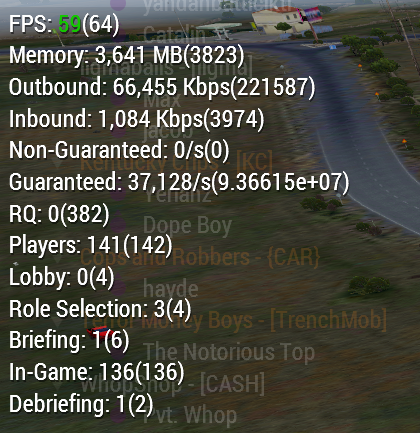
During the spikes of major outbound/peak, it seems its mostly during mission file downloads, but not the only time it peaks like that
I dont have any other info, as we upgrading our server box. After we do that, I will be running the diagNetworkInterval to get more info for you
Since I manually fixed the issues with vehicle smokes, we have a lot less network spikes aside from this, but I don't think that's profiling related.
spiral pond
potentially -networkDiagInterval=1 could bring some insights [but again the lack of context info makes it quite hard to pinpoint the info to events in a session]
naive osprey
spiral pond
potentially `-networkDiagInterval=1` could bring some insights [but again the la...
Yeah, I'm aware. Wasn't trying to report it, just noting it. My bad for bringing no info with it :/
Mainly was just letting know about no crashes.
spiral pond
naive osprey
Full on desync (players, vehicles teleporting, FPS was fine, no drops). As I sai...
is this some custom overlay? console log potentially could indicate network freeze/burst moment
naive osprey
spiral pond
is this some custom overlay? console log potentially could indicate network free...
Just an overlay with HandleChatMessage retrieving from output of #monitor
spiral pond
some scripted timestamp with fps logging to rpt might be useful too (in case anything else in rpt might relate to the low fps situation)
empty goblet
naive osprey
Full on desync (players, vehicles teleporting, FPS was fine, no drops). As I sai...
q, what's your MaxMsgSend value?
naive osprey
empty goblet
q, what's your MaxMsgSend value?
MaxMsgSend = 128;
Had it higher at one point, had more issues with it
spiral pond
diag_captureSlowFrame potentially could also provide more insights (on sLoop or if needed on the network scope[s] - its kinda a problem you can only have one scope capture active at a time)
empty goblet
ok, scratch that. what about MinErrorToSend and MinErrorToSendNear ?
naive osprey
empty goblet
ok, scratch that. what about MinErrorToSend and MinErrorToSendNear ?
MinErrorToSend = 0.002;
MinErrorToSendNear = 0.01;
well, you may try 0.0.01; on the METS too but i doubt that's case ... actually you may try higher MMS to 256 or 384 ... as the problem might be not sending enough messages now
empty goblet
naive osprey
```
MinErrorToSend = 0.002;
MinErrorToSendNear = 0.01;
```
can't dm you (gotta to love when admin can't dm user on same server)
toss me your basic.cfg as whole
naive osprey
empty goblet
toss me your basic.cfg as whole
language = "English";
adapter=-1;
3D_Performance=1;
Resolution_W=0;
Resolution_H=0;
Resolution_Bpp=32;
terrainGrid=50;
viewDistance=1600;
Windowed=0;

// Values are in BITS
MaxMsgSend = 128;

MinBandwidth = 104857600;

MaxSizeGuaranteed = 1024;
MaxSizeNonguaranteed = 1024;

MinErrorToSend = 0.002;
MinErrorToSendNear = 0.01;
MaxCustomFileSize = 0;

// Values are in BYTES
class sockets {
    // Packet MTU, keep lower than 1500 to not risk packet fragmentation, default 1400
    // 1444 used on official BI servers
    //maxPacketSize = 1444;

    // Initial negotiated client connection speed in bytes, default 32000 (256 kbit)
    // It seems that if too set high then clients with slow connection might have issues with joining.
    //initBandwidth = 32000; // 128 Kb

    // Minimal negotiated client connection speed in bytes, default 8000 (64 kbit)
    //MinBandwidth = 8192; // 64 Kb

    // Maximal negotiated client connection speed in bytes, default 2000000 (16 Mbit)
    MaxBandwidth = 4000000; // 1 Mb
};
Been testing out different values, removing, or adding things over the years just to check it out. May be wrong but ¯_(ツ)_/¯
Ill allow dms for the server tho gimme a sec
empty goblet
no need will answer here, you can try increase initBandwidth to shorten the time spent on mission downloading
ofc you may want to increase the maxBandwith with it
naive osprey
Ill put it on our server and get back to you; fingers crossed it does something for our issues 
whole cloud
The physx crashes are still there :/
whole cloud
naive osprey
Full on desync (players, vehicles teleporting, FPS was fine, no drops). As I sai...
G/NG are in bytes. Its also not per second, its the data currently waiting inside the queue.
Its the size of all messages, in every players queue (ready to be sent out, but not yet sent due to maxMsgSend and bandwidth settings) summed up
whole cloud
naive osprey
Just an overlay with `HandleChatMessage` retrieving from output of `#monitor`
uh thats smart. Thats a cool use of HandleChatMessage
desync with lots in the queue (38kb? in your image) would indicate too low maxMsgSend.
Your bandwidth looks to have plenty of headroom still.
low maxMsgSend would also be less of a problem, if the server could run higher fps than your 60. More frames, more batches of messages sent. And due to low maxMsgSend its nicely distributed across frames instead of potentially causing lag spikes
naive osprey
So I should unlimit the FPS? I was under the impression from a few years back that higher FPS would increase network throughput and send too many un-needed messages
I'll unlimit that if I misunderstood then, cool
whole cloud
The message sending is based on error (minErrorToSend) and that is influenced by time, not by number of frames
Well time and other error. If you have a script that eachFrame changes position of a unit, that unit would be re-sent each frame 😄 But that is probably not the case generally
empty goblet
whole cloud
The message sending is based on error (minErrorToSend) and that is influenced by...
hmm, influenced by time ... that bring me on ...
naive osprey
whole cloud
Well time and other error. If you have a script that eachFrame changes position ...
Definitely have nothing each frame for network, spent wayyyy too much time trying to optimize any kind of network commands 😂
But very good to know, will have a bunch of new thing to try. Hopefully our player pop gets a better experience after testing some of this lol
empty goblet
whole cloud
uh thats smart. Thats a cool use of HandleChatMessage
now only if handleMessage could fire on server too (unless we need whole new one like handleMessageServer for receiving chat)
spiral pond
empty goblet
now only if handleMessage could fire on server too (unless we need whole new one...
actually it does but only for system messages - edit: and global messages (#monitorDS not either - to be expected)
10:57:10 ["HandleChatMessage",[16,2,"","test uses modified data file",<NULL-object>,"","-1",true,false,1,0,[]]]
10:57:10 ["HandleChatMessage",[16,2,"","Player test connecting",<NULL-object>,"","-1",true,false,1,0,["$STR_MP_CONNECTING","test"]]]
10:57:10 ["HandleChatMessage",[16,2,"","Player test connected",<NULL-object>,"","-1",true,false,1,0,["$STR_MP_CONNECT","test"]]]

are these binary versions for internal use/decoding, or anything the community to do with them/learn from?
11:01:24 Server load: FPS 0, memory used: 950 MB, out: 0 Kbps, in: 0 Kbps, NG:0, G:0, BE-NG:0, BE-G:0, RQ:0, Players: 1 (L:0, R:0, B:0, G:1, D:0), JIP (T:0 Q:614)
is it normal/to be expected that the DS has 0 fps when a capture event happens?
empty goblet
spiral pond
actually it does but only for system messages - edit: and global messages (#moni...
ye because those are sent by server , what i mean it would be very useful to have EH which deals with received chat msg from elsewhere
spiral pond
empty goblet
ye because those are sent by server , what i mean it would be very useful to hav...
actually global gets picked up by DS and HC too - and systemChat (channel 16)
11:19:08 ["HandleChatMessage",[0,6,"Independent (test)","z",R Alpha 1-1:1 (test) REMOTE,"test","684182905",true,false,1,0,[]]]
analog acorn
whole cloud
gosh I found the physx crash
When multithreading it, it needs to stash some data, one element per wheel. Which is written into a provided buffer.
Pointer to an PxVehicleWheelConcurrentUpdate buffer of length nbConcurrentWheelUpdates
And that number is
This value corresponds to the number of wheels in the associated vehicle passed to PxVehicleUpdates.
The number of wheels the vehicle has
The buffer shall contain nbConcurrentWheelUpdates number of elements.
So for a vehicle with 6 wheels, we will have 6 entries in that buffer.
So how many elements does physx actually use?
It combines the wheels into blocks of 4, rounding up (so 6 wheels == 2 blocks of 4)
And then it accesses it in blocks.
So for a vehicle that has 6 wheels, it actually accesses the data for 8 wheels. And just ignores the last two after reading them.
Well.. Game crashes trying to read the 7th wheels data...
That's what I get for following the documentation 🤣
PhysX also has asserts checking the number you pass to it, but that assert also doesn't consider their own code and only checks for number of wheels, not for number of wheels in blocks of 4
hybrid cradle
So the solution is to remove all wheels
 somber plank
Hover cars when?
 worldly badge
Upcoming feature in 2025
analog acorn
somber plank
Hover cars when?
New CDLC: Blade Runner 2035
whole cloud
spiral pond
are these binary versions for internal use/decoding, or anything the community t...
These are for me, so I can see whats actually inside it when you have a big queue that we might want to optimize
whole cloud
spiral pond
> 11:01:24 Server load: FPS 0, memory used: 950 MB, out: 0 Kbps, in: 0 Kbps, NG:...
No. Also I don't know where that fps number comes from, it doesn't seem to work like diag_fps does
naive osprey
Well thats a healthy value in the networkDiagIntervalServer 😆
https://i.imgur.com/i7pnFQF.png
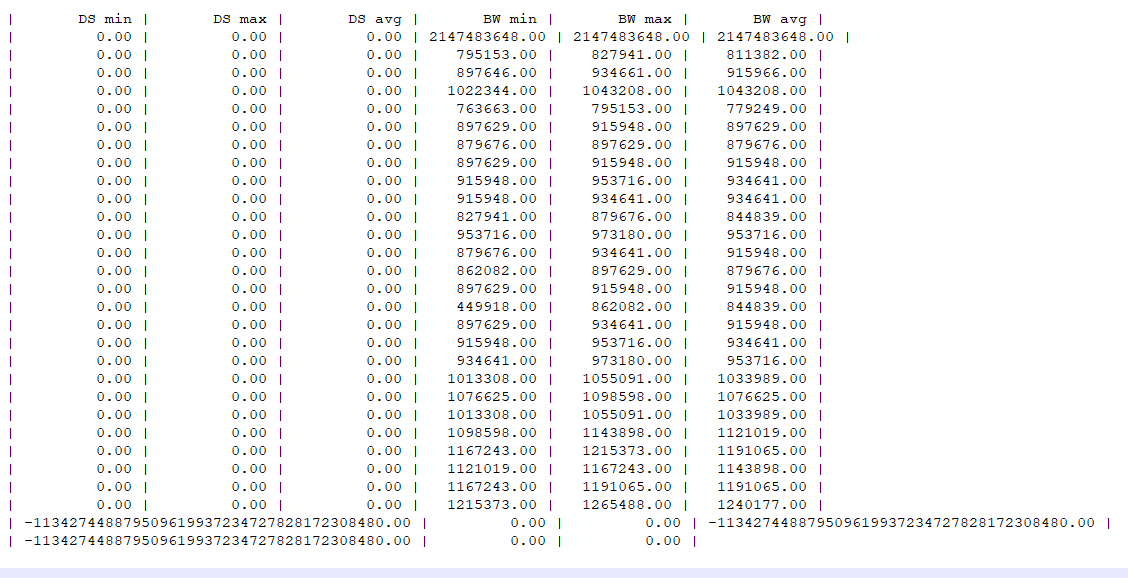 spiral pond
negative values are usually not a good sign 😛
naive osprey
Looks like it probably correlates directly to loading into the server?
Mainly happening within a few minutes of server launch.
https://i.imgur.com/cdaPNHS.png
 spiral pond

got a few of these too; plus a NaN here
negative values (of two different types) only in two sessions

 whole cloud
naive osprey
Well *thats* a healthy value in the networkDiagIntervalServer 😆
https://i.imgu...
whole cloud
naive osprey
Well *thats* a healthy value in the networkDiagIntervalServer 😆
https://i.imgu...
I think that's the default for newly connecting player that doesn't have data yet
yeah thats the "default" desync values.
Desync starts at maximum when someone joins the server
naive osprey
Makes sense
 fair ore
hybrid cradle
So the solution is to remove all wheels
fair ore
hybrid cradle
So the solution is to remove all wheels
return to old car simulation
whole cloud
2.18.152472 new PROFILING branch with PERFORMANCE binaries, v15, server and client, windows 64-bit, linux server 64-bit
- Tweaked: Improved game start speed
- Fixed: Crash in legacy non-PhysX car collision simulation (thanks to Moerderhoschi for the reproduction steps)
- Fixed: PhysX crash
- Fixed: Client -limitFPS was not working while rendering was active
- Removed: One rendering optimization (flicker again)
If you don't want to use the Steam branch, the files are also available for alternative download here:
https://drive.google.com/drive/folders/15p9j7C2nHUt6NoVfChX4YFuqzFXzblJh
whole cloud
whole cloud
2.18.152472 new PROFILING branch with PERFORMANCE binaries, v15, server and clie...
honest fulcrum
Wow, my load time with a heavy modpack went from 2:14.46 to 1:25.75, from hitting Play to being in the editor 
silk pewter
what is this rookie number? quick, add more mods!!
 clever roost
keep this up and we wont need arma 4
silk pewter
this is how what is known as the Great Internal Bohemia Battle (G.I.B.B) started
 spice dirge
you need something to play while your A3 modpack loads
clever roost
arma 3 remastered on a new engine would probably do better than an arma 4
silk pewter
nah
clever roost
chances are some crack head modder port all the a3 to a4 to remaster a3?
 full nova
sounds good but the rest of the dev are busy with A4
silk pewter
clever roost
chances are some crack head modder port all the a3 to a4 to remaster a3?
-1
full nova
assuming the LDP are real and exists sure there is a chance
analog acorn
clever roost
arma 3 remastered on a new engine would probably do better than an arma 4
It's the depth and customisability of the A3 sandbox and platform that's made it successful, not the specific assets. There's no point rehashing A3 - the new engine is the selling point for A4, might as well make some fresh content to showcase it.
* not saying the vanilla content is bad, but we'd still be here if it was a different setting. It's the engine that's the key component.
clever roost
its not the assets that im thinking on really, more the gameplay itself, i cant say very much against reforger mainly because i only tried it for an hour and didnt like it, but it immediately felt wrong
hybrid cradle
Yep, my modpack's load time is down to 1 minute from ~3 minutes at a guess
turbid vortex
After optimisation update it's only screen-space shadows, wet surfaces and volumetric particles - and we have A3 remastered.
A man can dream x')
Btw, load time is amazing now.
ashen helm
turbid vortex
After optimisation update it's only screen-space shadows, wet surfaces and volum...
this translates to "after optimization update it's only performance degradation [...]"
turbid vortex
ashen helm
this translates to "after optimization update it's only performance degradation ...
nah, Screen space shadows = better fps, and shadows literally cannot be worse than what they are now, due to how they affect lods. + A3 already uses screen space reflections, costs almost nothing 🪄
ashen helm
you listed three things. Volumetric particles is a framerate killer technology. Wet surfaces would look ass.
turbid vortex
ashen helm
you listed three things. Volumetric particles is a framerate killer technology. ...
gimme setSurfaceMaterial command and I show you:D But that's discussion for another channel
hybrid cradle
setObjectMaterial
turbid vortex
hybrid cradle
`setObjectMaterial`
doesn't work on roads/surfaces.
hybrid cradle
decal
 inland dew
so v15 finally good enough to update to it?
whole cloud
hopefully
indigo anvil
whole cloud
2.18.152472 new PROFILING branch with PERFORMANCE binaries, v15, server and clie...
seems like debugEngine/intercept is back in play
whole cloud
I didn't do anything :U
heavy vortex
whole cloud
G/NG are in bytes. Its also not per second, its the data currently waiting insid...
@silk pewter wiki material for you :P
indigo anvil
Had 3/3 startup/crashes with only CBA, +Intercept + DebugEngine mods enabled:
Version 2.18.152462
Fault time: 2024/12/03 13:52:22
Fault address: F594963B 01:000D863Bll \?\T:_prog_game\SteamLibrary\steamapps\workshop\content\107410\1585582292\intercept\BIDebugEngine_x64.dll
On 2.18.152472 its all fine
whole cloud
Thats not a prof matter, you can report that in the arma debug engine channel on my discord
gusty viper
V15 🙏 still rendering optimizations remain?
whole cloud
all the others are there
gusty viper
Gotten so used to the nice FPS already 😉
feral harness
normal hawk
I just noticed something with the performance branch. As I did some testing with...
Revision: 152473
harsh grotto
whole cloud
You can use the sframe cheat code. You don't need to be admin.
But it only works...
nah, i cant do it, sad, fps drops when you move the camera on the surface in lock mode, I wont be able to move the camera and write this cheatcode
whole cloud
thats the whole point of sframe
it only captures the next slow frame, not the current one
so run it before, then cause lag
 light cargo
whole cloud
Thats not a prof matter, you can report that in the arma debug engine channel on...
light cargo
whole cloud
Thats not a prof matter, you can report that in the arma debug engine channel on...
ooo whats the debug engine thing?
inland dew
who knows - knows
those who don't - don't
woven loom
Who knows - don't
 thin wyvern
- Fixed: Client -limitFPS was not working while rendering was active
Real FPS is -3 relative to what was entered in the startup parameter

Image arma3-x64-2024-12-05-02-04-20-235 hosted in ImgBB

Image arma3-x64-2024-12-05-01-57-48-763 hosted in ImgBB
inland dew
thin wyvern
Real FPS is -3 relative to what was entered in the startup parameter
for server, the default is 50 fps limit and for years, i never observed 49-50 fps
always like 48 and less
although the server can do way way more than that. so not because of hardware limitations, but due to how it works
whether correct or not, no idea
empty goblet
inland dew
for server, the default is 50 fps limit and for years, i never observed 49-50 fp...
ye that started post 2008 or 2008r2 might be some precision timer change by MS ... or at least i though it was OS related
whole cloud
light cargo
ooo whats the debug engine thing?
A script debugger.
"ArmaDebugEngine" on YouTube for a showcase of what it does
whole cloud
thin wyvern
Real FPS is -3 relative to what was entered in the startup parameter
Yeah won't fix
Maybe something to be noted on wiki.
It's not intended to be exact
 heady plinth
just add +3 to fps number 😄
light cargo
empty goblet
ye that started post 2008 or 2008r2 might be some precision timer change by MS ....
hmm what if you change mallocs?
hybrid cradle
That's not how that works
gusty viper
It's most definitely caused by the Windows timer. Use this tool to set the timer to 0.5 ms (instead of 1 ms) and you shall see the frame rate limiter hits the target correctly: https://vvvv.org/contribution/windows-system-timer-tool
vvvv
Little tool to check and modify the windows system timer.
If you want to know what this is about, you should read this article:
Windows Timer Resolution: Megawatts Wasted
The matter is in my opinion l

 knotty wraith
inland dew
so v15 finally good enough to update to it?
knotty wraith
inland dew
so v15 finally good enough to update to it?
but your tests would be interesting: vanilla, big online and HC available...ideal potential tester - аnd you're just waiting for something to happen )
analog acorn
knotty wraith
but your tests would be interesting: vanilla, big online and HC available...idea...
Some communities want stability rather than experiments that could cause problems for them. That's completely fair. Not everyone is here to play QA. Having to find the bugs the hard way, and then kick everyone off the server to roll it back, can be disruptive. Some people are willing to take the risk, but you can't blame anyone for not doing it.
knotty wraith
analog acorn
Some communities want stability rather than experiments that could cause problem...
I want to remind you that a broken exe can go to a stable version, because there were no complaints
and only specific servers can lose online, while vanilla popular ones are just a temporary jump in statistics!
heavy galleon
OMG DEDMEN THANK YOU SO MUCH
just updated our test server, restarted it... It took like a minute to start up (even with 3CB Factions), while normally it took like 5 minutes
now fix ace crashing servers 
ashen helm
why is ZU-23-2 truck detected as Zamak Transport (Covered) on perf branch? On stable it's detected fine

@heady plinth it's technically your vehicle, have you noticed anything similar
heady plinth
uh no idea
and why only on perf branch, even more no idea
it inherits from Truck_02_Base_F class
maybe there is some config property that needs to be changed
tribal pasture
Yeah this detection thing works up by traversing inheritance tree and with knowsAbout rising
gusty viper
gusty viper
It's most definitely caused by the Windows timer. Use this tool to set the timer...
@whole cloud Conclusion here, I think, is if Arma exec request .5 ms OS timer rather than 1ms, FPS limiter will work correctly. It may also alleviate crackling sound issues btw with tank engines, but not sure.
whole cloud
heavy galleon
now fix ace crashing servers <a:petdedmen:1265663372104306730>
if its not a linux server then send me crash dump :U
whole cloud
gusty viper
<@90532520101183488> Conclusion here, I think, is if Arma exec request .5 ms OS ...
conclusing is you have tested and that is a fact? or you think that is what it might be?
gusty viper
whole cloud
conclusing is you have tested and that is a fact? or you think that is what it m...
If I force windows system timer to 0.5 ms with above linked tool, then FPS limiter works correctly, at least. Normally exe should request desired timer resolution. I cannot change that, obviously 🙂
gusty viper
gusty viper
If I force windows system timer to 0.5 ms with above linked tool, then FPS limit...
Test with Slammer tank in Stratis air base: still audio crackle with tank engine with 0.5 timer, so no, that does not help. But FPS limiter works correctly 🙂
whole cloud
https://learn.microsoft.com/en-us/windows/win32/api/timeapi/nf-timeapi-timebeginperiod
Prior to Windows 10, version 2004, this function affects a global Windows setting. For all processes Windows uses the lowest value (that is, highest resolution) requested by any process. Starting with Windows 10, version 2004, this function no longer affects global timer resolution.
hah
gusty viper
Indeed sir
In older days the arma SHIFT-MINUS FPS thing worked correctly to 60 FPS
(Best here is if for FPS limiter not the OS timer is used but more precise timers.)
heavy galleon
whole cloud
if its not a linux server then send me crash dump :U
It is, already sent. It's the frag guaranteed queue thingie
whole cloud
ah right, you are down there
 ashen helm
I can see myself there too 
whole cloud
yeah we use timeGetTime as the global tick counter/time. but timeBeingPeriod should still be setting that to 1ms as it was previously.
Which should still make the fps limiter as accurate as it was before.
When millisecond was enough previously, why is it not enough anymore 🤔
I don't think I care enough for a fps limiter that has no need to be exactly exact, to use a undocumented windows function.
We have precise timers already, I'll just use them instead.
I checked using the methods.
Before we do timeBeginPeriod, the timer is already at 1ms, and after we do it, it still is at 1ms.
Setting higher precision wouldn't do much because we use timeGetTime to get the tick count, which anyway only has 1ms precision.
So also.. I could use higher precision timers, but not much purpose in it if we measure ticks in milliseconds anyway. That doesn't win us anything
I can use higher resolution only specifically for the fps limiter, but I really don't care about it being accurate. Its not made for that
gusty viper
One use case of accurate FPS limiter: trackir. Really needs to be set to 60 FPS to feel smooth. Can also be 30 of course but who wants that? Or 120 but no way in hell PC can manage. I use the NVIDIA FPS limiter for this purpose and that also works fine.
gusty viper
TrackIR 5 has a fixed poll rate of 120 HZ. So either game FPS / input process rate should be an whole division/mulitple of 120 or it will judder more or less you deviate.
Smoothing will hide the judder a bit, yes.
Anyway, going too much off topic here, sorry.
heavy galleon
is it? I would assume it just get's the most up to date position from it and uses it
I use opentrack+ai and feel no difference when I am juggling between FPSes
heavy galleon
whole cloud
ah right, you are down there
hoping not to tstay there too long 😄
 whole cloud
heavy galleon
hoping not to tstay there too long 😄
whole cloud
heavy galleon
hoping not to tstay there too long 😄
christmas is coming up, so... it depends on what you consider as long
whole cloud
spiral pond
is initMessagesRE missing?
 whole cloud
Since the output was changed its not
spiral pond
last time i had _initMessagesRE was 11th Nov - but only got to try it again since yesterday
heavy galleon
whole cloud
christmas is coming up, so... it depends on what you consider as long
Tomorrow 15:00 is late
knotty wraith
I can't test it with a large number of online players yet, but so far everything works, no complaints
empty goblet
light cargo
hmm what if you change mallocs?
unrelated
empty goblet
ashen helm
why is ZU-23-2 truck detected as Zamak Transport (Covered) on perf branch? On st...
what the, ye i seen weird stuff like this ... or AT crews refusing to engage APCs with clean LOS (ie with PML) after given target and fire (including the forced fire) order
whole cloud
Question is, is that actually new or is that just normal AI weirdnesses
empty goblet
i'm not sure at certain point , AI started to act weird and it went worse since MT code
it's like some of the line of sight checks aren't happening , and in some cases are ignoring foliage / buildings or AI somehow obtains awareness about user
whole cloud
Some sight checks being missed, is what I fear, it would fit into the changes. Its easy to turn that one off again and see what happens.
Maybe I can make it toggleable somehow
ashen helm
whole cloud
Question is, is that actually new or is that just normal AI weirdnesses
it does not happen on stable, happens on perf as I reported before - so it should be new to some extent
empty goblet
and you can end with situation like, AI group which is fine, engaging you with heavy MG and sniper rifle at 700m , you engage back and there is AI group walking under the flying projectiles of both groups, at ease mode, oblivious of what's happening at 250 meters, ignoring even missiles and explosions
so likely another issue is ignore/loss of detection of shot / hit / explosion / sound events causing got go alert
gusty viper
What is the repro @empty goblet for the AI issues you see? I’ve been playing some ‘nam missions recently on dedi server and AI is frankly performing better than it ever has. Without shooting through foliage, either.
empty goblet
gusty viper
What is the repro <@94784638945337344> for the AI issues you see? I’ve been play...
does both the client and server have 152472? because i observe those weird issues while playing just normal warlords (both on Livonia and Altis)
heavy vortex
You might need to get dedmen to add some debug logging. Vis checks per second report or something.
gusty viper
empty goblet
does both the client and server have 152472? because i observe those weird issue...
Yes, it’s my own dedi server running locally on the same machine, from the same arma3 directory
gusty viper
gusty viper
Yes, it’s my own dedi server running locally on the same machine, from the same ...
Will try some Altis Warlords to see if I can repro
 lethal forum
what servers can I join with profiling ?
naive osprey
lethal forum
what servers can I join with profiling ?
Any server that you can connect to with Stable
whole cloud
I seem to have gotten a repro for the lambs crash, and it very much is still present.
But as I have repro now it should be fixed by next week
lethal forum
naive osprey
Any server that you can connect to with Stable
thank you there was a KOTH server for profiling where did it go?
naive osprey
Running v15 - 152472 client crashed while just flying around. No idea why it happened, but maybe the dump will give some insight
https://www.mediafire.com/file/51o1oxe3jx5ndab/arma3profiling_x64_2024-12-06_01-38-06.rar/file
naive osprey
lethal forum
thank you there was a KOTH server for profiling where did it go?
Pretty sure it is a stress test server that only goes up when Dwarden feels like it? Not too sure to be honest
light cargo
lethal forum
thank you there was a KOTH server for profiling where did it go?
uh, offical servers are running performance branch, i believe
whole cloud
whole cloud
I seem to have gotten a repro for the lambs crash, and it very much is still pr...
Mh I have one crash happening with lambs and fixed that.
But I'm not getting any of the script errors that others have seen
void badger
What's the repro? I can test on my server
 whole cloud
Prof v16 will have command line parameters to turn off some features.
-perfFlags=nopxmt turns off physx multithreading (though I'm fairly sure all the bugs in it are fixed now
-perfFlags=noaivismt turns off the multithreaded AI visibility checks
-perfFlags=noaicoro turns off coroutines for AI simulations, I suspect thats the main issue with lambs
You can combine multiple with semicolon like -perfFlags=nopxmt;noaivismt;noaicoro
This is all temporary, will disappear again next year.
Questions are if disabling physx mt changes the behavior of the explosion flying vehicle in YAAB?
AI visibility for all the targetting and identification issues.
whole cloud
whole cloud
Prof v16 will have command line parameters to turn off some features.
`-perfFla...
hybrid cradle
You off on break after next week?
whole cloud
next week is last prof this year
full nova
Supportless til January after that
void badger
Quick lets put off crash testing until the 14th
knotty wraith
first HC crash... 😕
gritty wasp
whole cloud
Prof v16 will have command line parameters to turn off some features.
`-perfFla...
Did retest now. For me car that doing flip on explosion lands exactly same way as on stable. Somewhere near fence corner
gritty wasp
void badger
Quick lets put off crash testing until the 14th
Friday non-release day so only 12th
naive osprey
Running v15 - 152472 Server crashed. I wasn't on when it happened so I don't have any info, though we don't use any AI. Unfortunately the way we have our server set up, the server exe was renamed, so I do apologize for that.
https://www.mediafire.com/file/gi8j6om3s9jo4qb/arma3server_x64_2024-12-06_07-46-01.rar/file
 fast hornet
also had two crashes with v15 in less than 24h .. went back to v5 for now.
Sadly the server didn't write any memdumps
gusty viper
empty goblet
does both the client and server have 152472? because i observe those weird issue...
Played some Warlords against AI on Altis (Central). No issues observed - AI engages from far range (500-700) just fine. In fact, quite aggresively.
empty goblet
q, if you start Arma 3 (client or server, loaded in editor or mission) .... ) ... look at the list of active threads ( search for thread with highest relative % and tell me on which CPU core it is listed?
indigo anvil
isnt scheduling handled by the os?
empty goblet
indigo anvil
isnt scheduling handled by the os?
it is but on many systems it acts weird (like always placing the primary thread to the last core (irrelevant on affinity (ie you define half the cores and it's still the last one) or type of core))
indigo anvil
ahhh I see
light cargo
lol, yeah, i've seen weird stuff such as the OS setting the process priority to background for no reason or stuff like that
heavy galleon
it's because you're on Win 7 
empty goblet
light cargo
lol, yeah, i've seen weird stuff such as the OS setting the process priority to ...
it's more complicated , imagine you clean all possible programs and services out of cpu 2 and 4, you then setup affinity on cores 0,1,2,3,4,5,6,7 and that the process , it will end on 7, you remove any affinity flags and it ends on 15 etc.
literally the extremes are like, last available core, random available core, including SMT/HT ... got free physical gold/silver cores , OS will be like screw all and slaps it on logical and for sake of giggle, it will be core where something demanding runs already
naive osprey
Anyone happen to know what these Type_s are (Type_349 and Type_27)? 130-150 players with severe desync, seemingly linked to people joining the server and/or downloading mission file. Trying to pinpoint what the issue could be, and if I have a rogue command that's just spamming somewhere, or if its an internal message that I can't do anything about.
Network settings don't seem to change the issue at all, and with 110 players, sever has absolutely no issues.
Running v15, values found with -networkDiagServer = 5
Should probably be clear, not looking for answers to lag without more info, only what the Types_ are. Will be compiling everything I have on this situation later.
Server - Sent
Type                                     |          msg |     msg/s |            B |          B/s | avg. B
Type_349                                 |    281924103 |  53002.39 |  12223520940 |   2916317.50 |   43.4

Server - Sent
Type                                     |          msg |     msg/s |            B |          B/s | avg. B
Type_27                                  |     18937744 |  33783.62 |  10053549520 |  17934830.00 |  530.9
Type_349                                 |    290216767 |  34807.19 |  12678675488 |   1890030.50 |   43.7
out of curiosity, how large is the mission and is it after new mission release (ie the users don't have it already) ?
naive osprey
empty goblet
out of curiosity, how large is the mission and is it after new mission release (...
Mission is around 78MB due to some Christmas themed assets being added temporarily. The server DOES desync for longer when people are downloading the mission file, however even when I confirmed only one person was joining with the file already downloaded, it would still desync while they were connecting though I cant confirm exactly when it starts/stops.
Probably more than Arma was ever meant to handle
empty goblet
hmpf, that's like 1GB of data download (outgoing from server) just to fill server with players, increased initBandwidth value yet or still default ?
naive osprey
empty goblet
hmpf, that's like 1GB of data download (outgoing from server) just to fill serve...
Tried it with default, at 2MB/s, and 6 MB/s. Desync seemed to increase as the value went up
Also tried what you put here just hoping it was me being stupid, but the desync is about the same.
#perf_prof_branch message
empty goblet
naive osprey
Also tried what you put here just hoping it was me being stupid, but the desync ...
ye but for your amount of players i would decrease the maxMsgSend because server might be not able keep up to send/process that many
 pallid pebble
Hey peeps quick question, if I switch a dedicated server to perf/prof and then load the CDLCs via their compat data mods, the CDLCs should still work fine, no?
empty goblet
and for METS,METSN ... default value or double shall be enough because too large number may start to cause the visual sync errors as some point
lot of stuff changed and was optimized ... i still wish there was method where the engine would tell you that you need to increase or decrease the MaxMsgSend
naive osprey
Would be amazing, but one can dream
empty goblet
but from observation on the KOTH and WL official servers ... the too high MMS was causing issues so decreasing it to 384-512 range did a lot and for even largers severs 256 might be enough alongside with setting METS/METSN to default or just 2x worse of default
but again then you need to avoid to have too large METS/METSN because the updates aren't sent that often (but take in mind, each time there is guaranteed/important event the position is updated, so e.g. if unit fires)
in todays era of fast lines and low latencies some extra traffic isn't that hurtful ...
so the real question is why the mission transfer to clients and mission status update sync to clients causes issues, that was already optimized multiple times
the reason i think why decreasing MMS did help is because the servers run at quite high framerates (even before MT tweaks in past months), while in old times those servers struggled get past 30 fps
naive osprey
Very possible. We've got the server running around 240-270 FPS currently, so would make sense that the old settings wouldnt work properly
heavy vortex
What's the limiting factor then though? If the server's running at 200+ FPS then it's clearly not the CPU load, and I doubt the server is sending so much that it's hitting your bandwidth limits.
naive osprey
heavy vortex
What's the limiting factor then though? If the server's running at 200+ FPS then...
That's what I've been so confused about
naive osprey
pallid pebble
Hey peeps quick question, if I switch a dedicated server to perf/prof and then l...
Forgot to reply, I run an antistasi server for a few friends, and it runs profiling with the CDLC compat mods just fine while the players load the actual CDLC
pallid pebble
naive osprey
Forgot to reply, I run an antistasi server for a few friends, and it runs profil...
Oki thanku <3
heavy vortex
maybe it's sending unusually small packets and that's jamming something further upstream, but I wouldn't expect that to be a problem from users joining, because surely they get full-size guaranteed packets.
naive osprey
I've got a few captureSlowFrames and a full 6 hour diagNetworkInfo of when the issue doesnt happen and spikes of when it does, so I'll have to go through and try to identify which exact blocks are relevant to give some reference to one of the devs.
empty goblet
heavy vortex
What's the limiting factor then though? If the server's running at 200+ FPS then...
the server is just sending and processing too many events per cycle ... high fps doesn't mean it goes smoothly (hence the weird desync / jitter w/e)
good try out is then try cap the server e.g. at 100 fps and see if that helps or not (if you have avg fps higher than 100 etc.))
naive osprey
I'll be capping the FPS at 100 next server restart, but in the meantime I threw the potentially relevant logs together for today.
At low FPS - capture frame, JIP Queue, and logEntities.
Has NetworkDiagIntervalClient/Server for half the day, including times that network issues didn't happen, as well as times that it did (Can only confirm exact time at 16:20:13, but was semi consistent while players were above 120 or so)
Maybe it'll be useful for something, maybe not
https://www.mediafire.com/file/iafntiwscl9bmr1/Network_Logs.rar/file
spiral pond
@naive osprey did you check up+download from server via various means (outside the game) during the desync moments by chance?
also do you use custom chat channels? if so, in what way exactly?
also whats the restart cycle in hours?
whole cloud
naive osprey
Running v15 - 152472 Server crashed. I wasn't on when it happened so I don't hav...
Crsah happened during script call from Intercept.
And its not my intercept build, so it might be outdated
naive osprey
spiral pond
<@226159903356616705> did you check up+download from server via various means (o...
Monitoring it through resource monitor, looks about the same as in-game, hard to say exact peaks, but up to roughly 200Mb/s upload and ~12Mb/s download.
We use custom chats for many things.
Our side-chat is custom, along with a server wide custom chat. Voice not allowed. Few other uses as well.
As for restart cycle, we have 6 hour intervals for soft-restarts, and a hard restart every night. I manually hard restarted, and the desync was happening before and after the restart.
whole cloud
naive osprey
I'll be capping the FPS at 100 next server restart, but in the meantime I threw ...
Nice logs.
CaptureFrame issues
Server overwhelmed by incoming messages. In this case deleting objects?
Like, thousands of objects being deleted? But something is weird. Each of these deletions should go into JIP queue, except if the object that is being deleted doesn't exist or is already gone.
But you have the async JIP queue here, and its idle, there is nothing being processed by it. So.. overwhelmed by deleting objects that.. are already deleted?
Also the server during that framedrop, processed 98.2ms of network messages.
The hard time limit for "server can't keep up" is 100ms, it might've been hit but there is no RPT there
second captureFrame is exporting jip queue, done via script command which ended up needing 75ms
Next one.. uh... Server is spending 245ms processing messages
But one of them is sending mission file to a joining player. Most of the time splitting the mission file in segments.
How big is your mission?
spiral pond
naive osprey
Mission is around 78MB due to some Christmas themed assets being added temporari...
^
whole cloud
Yeah well, please don't do that uff
I think this will not convince me to add http mission downloads
naive osprey
whole cloud
Nice logs.
CaptureFrame issues
Server overwhelmed by incoming messages. In this ...
Would the deleting objects potentially be triggered by deleting local objects? Ones created with createVehicleLocal or createSimpleObject with the local flag?
As for mission file, I do plan on reducing that significantly soon
whole cloud
Then there is some physx messup, some init taking too long
Another mission file
another mission file
another mission file
another physx init thing
whole cloud
naive osprey
Would the deleting objects potentially be triggered by deleting local objects? O...
deleteVehicle, on a local vehicle. No I can't find how that would happen.
That stuff is protected and won't be send over network for local objects
 whole cloud
Your JIP queue could still be reduced.
You have alot of objects that I would say can be local-only, Land_Pier, and some Land_Wall segments and Land_Stone. They probably cannot be destroyed?
Not only do they need to be checked by server regularly, they also each use 2jip messages
naive osprey
spiral pond
what is that house_trunk variable to be sent almost 11 mio times over the sessio...
Can store inventory on house objects that people can buy. With a rework converting the item-array into a string, I may or may not have forgotten to fix the every-change-gets-synced, instead of combining the changes on menu close. I've fixed this about an hour or so ago when I saw that.
whole cloud
is your mpMessageDetails always so empty?
I'd expect alot more remoteExec's that that
naive osprey
whole cloud
Your JIP queue could still be reduced.
You have alot of objects that I would say...
Anything that doesn't need to have damage enabled or accessible you'd be correct, I also noticed that and will be going through that entire thing.
And as for that, I have no idea
 naive osprey
I try to combine remoteExecs if possible, im not sure why its empty
They are almost always empty
spiral pond
the timestamps are a bit strange overall
or did you touch the files when viewing them yourself before zipping?
whole cloud
The huge desync spikes that are not due to mission file transfer.
Are... millions of messages updating the units in radio channels
whole cloud
And they should also be going into JIP queue.
But I think we have no capture frame of the 16:20 one.
But the async jip queue would probably swallow it and keep the server from freezing there
knotty wraith
I could already be testing v16 - but we're wasting time on errors in poorly written code
whole cloud
how are you getting almost 300 million radio channel updates in 5 seconds.. what the hell are you doing.
(Divided by number of players though, so more like 2 million)
radioChannelAdd/radioChannelRemove script
spiral pond
must be not discard earlier updates, or some ever increase send by some means. mind sharing the script?
whole cloud
Also, the messaegs seem to all be originating from the server. Not from a client telling the server and the server redistributing it
spiral pond
https://community.bistudio.com/wiki/radioChannelAdd states global effect
naive osprey
I have no idea. There's a system that was created that allows for people to create player-player communications that looked cool a while back, and seemingly had no issues.
Will be completely removing that system if that's an actual issue.
If its coming from the actual server, I actually don't know what would do that
Ill have to go do a bit of digging
empty goblet
so i noticed one of the 2.18.152472 x64 windows server instances to just freeze ... like that
whole cloud
There are a couple cases where many come from clients.
But there it adds up
24051 incoming * 26 players = 625326
Server sending out 765761 messages
But then there are others when there are less than 2800 incoming, and server is throwing out 2.1 million.
If that were incoming, at 44 players that should be 48k incoming, it would definitely show in the log but doesn't.
So the origin must be the server
If you do it from script, you could add your own statistics
Jsut increment a counter and every few seconds log how many
each channel add/remove sends one message, then multiplied by player count
naive osprey
whole cloud
If you do it from script, you could add your own statistics
Jsut increment a cou...
Ill see what I can do, thank you
empty goblet
whole cloud
I think this will not convince me to add http mission downloads
blinks

you mean ... after being most voted useful server feature in legacy CIT and my archaic JIRA ticket ... it will happen ?
it's so old i forgot how old that request is ... probably as Arma 2 is , or maybe Arma 1 ...
spiral pond
does the server handle the mission transfer/send as part of the main thread, or async?
also does it use some % of network speed (upload) or max the client suggests?
i think to remember in a recent patch the max mission transfer speed was increased, wasnt it?
whole cloud
The server just pushes the whole mission into the send queue of that client.
And each frame it obeys maxMsgSend and clients bandwidth
i think to remember in a recent patch the max mission transfer speed was increased
The size of chunks was increased. Bigger chunks == fewer messages.
But I think that was reverted again because of corrupted/failed downloads on koth
spiral pond
ok thanks. does the mission transfer packets get lower prio vs other data to be sent?
in simple terms can multiple mission transfers impact the server simulation, or just JIPqueue could (till now)
empty goblet
hahaha https://community.bistudio.com/wiki?title=User:Dwarden/Sandbox&direction=next&oldid=27556
Revision as of 17:01, 9 January 2007
whole cloud
there is no prio
packets don't impact server simulation.
They are sent in separate thread
empty goblet
- Native support for GZIP, ZIP and 7-Z compressed files downloaded from external sources via engine forward feature (smaller = faster + lower bw hit at server)
real irony some of the https://community.bistudio.com/wiki?title=User:Dwarden/Sandbox from 2012 aren't still in-game
whole cloud
I never noticed these all being zeroes 😄

We print the number since last average calculation.
And the last average calculation, is done right before the logging.
So number since last average is always zero
empty goblet
whole cloud
I never noticed these all being zeroes 😄
borked ...
whole cloud
I can move the average calculation to after.
Then you get the message numbers from the last cycle, but the average numbers from the cycle before the last one
empty goblet
whole cloud
Yeah well, please don't do that uff
well i seen problems even with smaller missions which are several MB (sub 10) on large servers with 100+ users, so there is still something iffy with the download strain vs server smoothness
spiral pond

from what i can tell, these are cumulative values. i guess may also have their use to know, yet wouldnt be more relevant to know what was sent+received in the last interval?
whole cloud
Those are from last interval
wait
I thought they were, because total wouldn't make sense
it is 😮
msg is total, msg/s is interval.
That's confusing
Maybe that is total because of #perf_prof_branch message
It would otherwise always print zero :/
Well the average is calculated from the values.
So you can multiply average by seconds time since last, and get back to a total in interval
Storing the values from last interval would add another 8 bytes of memory usage though, per stat item.
But they are already only active on prof so probably fine to use more ram there
indigo anvil
whole cloud
There are a couple cases where many come from clients.
But there it adds up
2405...
"But then there are others when there are less than 2800 incoming, and server is throwing out 2.1 million." - that seems like an effective DOS 🙂
spiral pond
spiral pond
from what i can tell, these are cumulative values. i guess may also have their u...
so its:
- top 10 message in interval with most B/s
- sorted by B/s
- msg and B is total
- msg/s and B/s is interval
- avg. B is B/s divided by msg/s (roughly)
i guess having msgsInterval would easier to grasp and potentially also more relevant at first than B/s
spiral pond
spiral pond
like with those large numbers you could focus on the MB/B sent, yet more relatable would be number of messages to identify unique events or network messages to sent out, as well as trying to relate them to number of players/AI/entities
whole cloud
seems to be working

The player list thing is not sorted.
It should be by time of when player joined
The sent/received.. uh Are sorted by their average per second bytes. For some reason that sorting is configurable, but is never set to anything else
spiral pond

type27 is always that high. i guess its the mission transfer then. 18MB/s (on average for 60s). still couple of seconds for that 80 MB mission (on average)
interestingly its always 530.9 avg. B - seems the maximum possible(?)
whole cloud
the number and size of packets, depends on the mission file size
Same mission, same packets
The size per segment is hard coded limit. Around 512 with some headers
spiral pond
@naive osprey did you test by chance if a 2nd player could still join when a mission download was still in progress, or how that impacted the server and the 2nd downloading player?
naive osprey
spiral pond
<@226159903356616705> did you test by chance if a 2nd player could still join wh...
I did not test that with high player pop, no. It doesn't seem to have any effect with lower pop though.
spiral pond
i think to recall only in OFP or maybe till A1 mission sending could become a problem.
that said usually you tried to keep the mission size at least below 10 MB.
KOTH is fairly large too i think. would be interesting to know what 100-200 player events or game modes have these days.
back then for events (with 100+ players) you usually did a mission download session first and restarted the mission from briefing.
i dont have practical experience with large (100+) public servers
gritty wasp
After initBandwidth param was revealed we raised it from 32Kb/s and download speed became acceptable for ~3-5MB missions
empty goblet
whole cloud
The size per segment is hard coded limit. Around 512 with some headers
would be possible to get configurable option for that and make it e.g. 1024B+headers ?
spiral pond

is there any reason for the DS to also create a client log at the same time?

on the client this is always empty for me
whole cloud
empty goblet
would be possible to get configurable option for that and make it e.g. 1024B+hea...
Well we tried like 1100 and it randomly broke for only a few players. So it seems a bit risky.
Everything is possible.
spiral pond
vs server sample
 whole cloud
spiral pond
is there any reason for the DS to also create a client log at the same time?
whole cloud
spiral pond
is there any reason for the DS to also create a client log at the same time?
Server also has a client.
"Server" is just someone distributing messages.
"Client" is someone running scripts, simulating units
whole cloud
spiral pond
Var stats are filled when the server receives a variable message.
So they are only filled for server. I should not display that header if there are no vars ✅
Though I guess it might be useful to see, specifically what a client is sending out, for when you run diag interval on a player's client
But that's a bigger tweak, I won't do that now. Maybe some other time if I remember
spiral pond
last one on the log - server has always 0 sent msg/s and sent B/s (rec[eive works] and absolute values are always 0 as you already noted earlier today)

 fickle geyser
what was the online chrome profiler viewer thingy?
I forgot to bookmark it 💀
got it: https://ui.perfetto.dev/
empty goblet
so, AI just walked around me w/o killing me, another AI just engaged me thru hill and then AI tank driving around our vehicles not engaging 🤣
all looks fine with AI, until it doesn't
note: looking for more players at 00c server for testing large player count + more AI (than redux has) ... if you get time join, 85.190.148.53:2102
heavy vortex
whole cloud
there is no prio
If it's capped by maxMsgSend, doesn't that mean there's an implicit priority from the processing order? Or is that heavily randomised?
empty goblet
another observation when giving AI order to move within 20-50 meters at 152472 , it gives order move to 200 meters ?
and AI pathing is broken i get AI refusing to move on literally flat open terrain
gusty viper
empty goblet
and AI pathing is broken i get AI refusing to move on literally flat open terrai...
Do you get this with many ppl one the server? Or empty?
empty goblet
gusty viper
Do you get this with many ppl one the server? Or empty?
like 20 on server when that happened
gusty viper
Low fps on server?
Probably not right
(Just trying to see if I can replicate)
Also: you ordering AI as player (so AI units are on client) or Zeus?
empty goblet
FPS around 100, AI subordinate is on client, it's warlords
harsh grotto
sometimes i order a bot to attack someone but he is just ignores me, this is weird, but im not sure if it's because of performance. its like he doesnt see anyone at all
as an example, i drive into airbase on altis (hunter HMG for example, bot on gunner), select a target "T" in a line of sight of 10 meters, bot does not react to anyone at all, but i don't know how to repro, because it is VERY rare
stark falcon
The "Ok" button when changing languages is missing on profiling (restart conformation when closing setting menu)
the change gets reverted because you have to click cancel
 quaint flame
stark falcon
The "Ok" button when changing languages is missing on profiling (restart conform...
quaint flame
stark falcon
The "Ok" button when changing languages is missing on profiling (restart conform...
So it's not only me. I was unable to change resolution because of that
The RESTART NOW button is missing as well when changing display settings.
empty goblet
    {
        skillAI=0.25;
        precisionAI=0.125;
};``` the AI vehicles seems to not respect this but i'm not exactly sure whyfirst message goes out first.
maxMsgSend is distributed across players, it doesn't give priority to any one player
whole cloud
I could make a mod that adds http mission downloads
somber plank
orrrrr it could be added to the engine 
whole cloud
quaint flame
The RESTART NOW button is missing as well when changing display settings.
I have the button, but its in the wrong place 😄
 empty goblet
can someone please check if you have unit with single PathCalculated EventHandler, that it triggers normally or weirdly spammy repeatedly with same values n times / second ? https://community.bistudio.com/wiki/Arma_3:_Event_Handlers#PathCalculated
quaint flame
whole cloud
I have the button, but its in the wrong place 😄
Yeah. It was weird. I tried like 3 times and it would show. Then I restarted the game and it was all of a sudden visible.
That's why I didn't report it initially. Just thought it was something else
naive osprey
empty goblet
can someone please check if you have unit with single `PathCalculated` **EventHa...
I don't use that handler or AI very often, but I don't see any issues with its return or spamming testing it
I do know the calculatePath has a problem as on the biki, but probably isn't what you're talking about
whole cloud
stark falcon
The "Ok" button when changing languages is missing on profiling (restart conform...
But the old one, on stable branch is already wrong..
Its supposed to say "JETZT NEU STARTEN"
This is how it should look.. though the text is cut off, and we have no tooltips to show the full text on hover or smth..
I found the bug hiding the ok button, I could not reproduce the middle button missing.
It was too late for prof though.
 quaint flame
Should just be "NEUSTARTEN" but I guess there is no string for that already.
spiral pond
      <Container name="RscMsgBox3">
        <Key ID="str_a3_rscmsgbox3_ca_buttonok">
          <Original>Restart now</Original>
          <French>Redémarrer</French>
          <Spanish>Reiniciar ahora</Spanish>
          <Italian>Riavvia ora</Italian>
          <Polish>Uruchom ponownie teraz</Polish>
          <Russian>Перезапуск</Russian>
          <German>Jetzt neu starten</German>
          <Czech>Restartovat nyní</Czech>
          <English>Restart now</English>
          <Chinese>立即重啟</Chinese>
          <Portuguese>Reiniciar agora</Portuguese>
          <Korean>지금 다시 시작</Korean>
          <Chinesesimp>现在重启</Chinesesimp>
          <Turkish>Tekrar başlat</Turkish>
          <Japanese>すぐにリスタート</Japanese>
        </Key>
probably that one
light cargo
localization shenanigans at its finest XD
indigo anvil
"Hungarian Magyar" - Cannot be set in-game.
Edit arma3.cfg to use that language.
Interesting.
From the logs:
"14:07:29 Splash window: Specified language not found in splash messages: Hungarian
14:07:29 Unsupported language Hungarian in stringtable
14:07:29 ➥ Context: languageCore_F\stringtable.xml"
https://community.bistudio.com/wiki/Stringtable.xml
Are there any traces of it on main branch or its just optimized out in the perf/prof branch?
Ah found its a now bug:
#community_wiki message
whole cloud
2.18.152520 new PROFILING branch with PERFORMANCE binaries, v16, server and client, windows 64-bit, linux server 64-bit
- Added: Experimental flag command-line parameters to disable some performance improvements (only temporary)
- Added: Uniforms textured with setObjectTexture/Global will now show any custom texture inside WeaponHolders
- Changed: Some minor adjustments to networkDiagInterval logs
- Fixed: Possible AI crash
- Fixed: When taking uniforms off, modded content would apply the uniform texture to underwear
- Fixed: Network spam when deleting units (requires installation on clients)
If you don't want to use the Steam branch, the files are also available for alternative download here:
https://drive.google.com/drive/folders/15p9j7C2nHUt6NoVfChX4YFuqzFXzblJh
whole cloud
whole cloud
2.18.152520 new PROFILING branch with PERFORMANCE binaries, v16, server and clie...
knotty wraith
if you change from Russian to English, OK appears - you press it and the game turns off. You start the game again - English is set. It doesn't work like that with other languages - everywhere there is only CANCEL in the selection
whole cloud
Most 3 button message boxes will be broken the same way
knotty wraith
just letting you know about the peculiarity of installing English from another language.
empty goblet
whole cloud
2.18.152520 new PROFILING branch with PERFORMANCE binaries, v16, server and clie...
for those who searching related commandline params : #perf_prof_branch message
vivid rune
v16: still animation issues
empty goblet
i got several servers frozen 😦
empty goblet
happening on restart after missionEnd , triggered via missionsToRestart/Shutdown ... it feels similar to known rare bug ... but now it decided to be common
empty goblet
sadly it keeps repeating, reverting all servers to 152472
 silk summit
empty goblet
happening on restart after missionEnd , triggered via missionsToRestart/Shutdown...
silk summit
empty goblet
happening on restart after missionEnd , triggered via missionsToRestart/Shutdown...
100% repro sometimes makes the job to get it fixed easier so maybe it is a blessing in disguise
empty goblet
the problem that freeze doesn't produce dumps, so i take some full dump snapshots but ... it never helped enough before
silk summit
empty goblet
the problem that freeze doesn't produce dumps, so i take some full dump snapshot...
Ok, clearly not a blessing then
empty goblet
well, the freeze seems happen also mid game 2024/12/11, 1:32:01 Respawn failed - body disappeared 2024/12/11, 1:32:01 Setting invalid pitch 0.0000 for C Delta 2-4:1 REMOTE 2024/12/11, 1:33:50 NetServer::finishDestroyPlayer(548488901): DESTROY immediately after CREATE, both cancelled 2024/12/11, 1:33:50 BEServer::finishDestroyPlayer(548488901): users.get failed 2024/12/11, 1:34:37 NetServer::finishDestroyPlayer(1210395922): DESTROY immediately after CREATE, both cancelled 2024/12/11, 1:35:38 NetServer::finishDestroyPlayer(62818039): DESTROY immediately after CREATE, both cancelled 2024/12/11, 1:35:38 BEServer::finishDestroyPlayer(62818039): users.get failed 2024/12/11, 1:36:14 NetServer::finishDestroyPlayer(627908954): DESTROY immediately after CREATE, both cancelled ... 2024/12/11, 1:47:31 NetServer::finishDestroyPlayer(1549857758): DESTROY immediately after CREATE, both cancelled 2024/12/11, 1:47:31 BEServer::finishDestroyPlayer(1549857758): users.get failed then it spams the finishDestroyPlayer
whole cloud
vTune while frozen?
finishDestroyPlayer are probably all the players gone because they timeout-ed during freeze
whole cloud
I found a freeze in one of the manual dumps.
That bug has been in there for quite a while, engine was waiting for a async task, that wasn't set to allow waiting on it.
As long as the task finishes before we wait for it, its fine. But if the task takes longer, we can get stuck.
 restive meteor
Is there a particular version of the profiling branch that runs mostly stable? I tried the newest one last Sunday and couple Mods (Mostly the Dialogs) were not behaving as expected. (CTAB, TFAR). Was there a Stable one since V6?
whole cloud
If something is behaving unexpectedly. Please report it, otherwise it might never be fixed..
restive meteor
Well, its issues with Mods, which I assumed you would not really care about.
(Error Description: Opening / Closing the CTAB (Small View or the Big View) didnt happen on Keybindings. After 10-60 seconds it spammed multiple GUI's over each other. Same with TFAR Radio GUI. All this while sitting in a Hatchet H-60, which will cause even more Scripting Lag 🙂)
whole cloud
Arma is a game based around mods
H-60 causing scripting lag sounds likely. But keybinding handling should be unscheduled, which doesn't care about scripting lag and forces it to get done right now and not delayed 🤔
I'll take a look with TFAR later
feral harness
restive meteor
Well, its issues with Mods, which I assumed you would not really care about.
we would, especially if something broke after game changes
 shell lion
whole cloud
I found a freeze in one of the manual dumps.
That bug has been in there for quit...
shell lion
whole cloud
I found a freeze in one of the manual dumps.
That bug has been in there for quit...
Since I switched from Prof v7 to Stabel v, I often have the situation that the server goes down (about once every 3 days). At the beginning I still had crash dumps but now after about 2 weeks there is simply nothing at all.
At the time of the crashes there is nothing going on on the server (no players, no units etc.). HC keeps running. When we play in the evening, there are no problems.
I wanted to find out myself what the problem is, but I can't get any further.
Also, I can't say whether this problem has always been there since the last stable version was released, because I'm always on the perf branch straight away. Only at the moment the perf is a bit unstable (that's why I only activate it from time to time for feedback).
I can send you (dedmen) the latest crash dumps. You can't see anything conspicuous in the RTPs.
Maybe it has something to do with the anomalies that Dwarden mentioned.
whole cloud
The freezes that Dwarden is seeing, come from new code in prof
empty goblet
yep, but there is still that 'elusive' random freeze after missionsToRestart/Shutdown, that one predates those last months of MT code tweaks ... (tho i hope you fix it while fixing those new freezes 😁 )
empty goblet
shell lion
Since I switched from Prof v7 to Stabel v, I often have the situation that the s...
the thing is there're multiple crashfixes since stable in the profiling , unrelated to the MT code optimizing/tweaks
whole cloud
Bah tracking down this freeze was fun.
Normal behavior
Thread A: Submits a job.
Thread B: Starts executing the job.
Thread A: Wants to wait for the job to be done. Sees its running on Thread A, and waits on an event that Thread A will trigger once its done.
Thread B: Job is done, triggers event.
Thread A: Sees event trigger, wakes up, verifies that the event was for the job that we asked for, sees that job is done and continues.
But...
Thread A: Submits Job1. Job1 ends up running on Thread B.
Thread B: Inside Job1, submits Job2. Job2 ends up running in Thread C.
Thread C: Inside Job2, submits Job3. Job3 doesn't start yet.
Thread B: Wants to wait for Job2 to finish. It sees that Job2 is not done, to not waste any valuable cpu time, it checks if there are other jobs it can work on while waiting. Finds Job3 and starts it. Job3 is now also running on Thread B.
Thread A: Wants to wait for Job1. It sees its currently running on Thread B. So it waits on the event that Thread B will send once its done.
Thread C: Wants to wait for Job3 to finish. It sees its currently running on Thread B. So it waits on the event that Thread B will send once its done.
There are now two threads, waiting on the event from Thread B.
Thread B: Finishes Job3, and sets the event. But. Setting the event will only wake up ONE thread waiting for it.
Thread A: Is woken up by the event. Its waiting for Job1. But it sees that Job1 is still not done, the event must've been for someone else. Oh well. It discards the event, and again starts waiting on the event to trigger another time, that time hopefully telling it that Job1 has finished.
Thread C: Never received the event because only one thread was woken up, its still waiting on it. Even though Job3 is done.
Thread C: Waiting on Job3. Job3 is already done, it just didn't notice because it didn't see the event.
Thread B: Waiting on Job2 to finish, which is stuck on Thread C.
Thread A: Waiting on Job1 to finish, which is stuck on Thread B.
light cargo
huh
hmmm, on my constantly paging system i had to add -skipFreezeChecks to avoid minidumps wasting storage every time it freezes
whole cloud
gritty wasp
Did retest now. For me car that doing flip on explosion lands exactly same way a...
For me, it lands inside the fence, throwing it over.
On stable it just did a full 360° rotation and landed back on its wheels.
gritty wasp
PC dependant?
empty goblet
light cargo
hmmm, on my constantly paging system i had to add -skipFreezeChecks to avoid min...
client or server ?
light cargo
empty goblet
client or server ?
client mainly
empty goblet
ok, makes sense as it was working on client in past
light cargo
empty goblet
ok, makes sense as it was working on client in past
i havent checked if it broke
light cargo
light cargo
hmmm, on my constantly paging system i had to add -skipFreezeChecks to avoid min...
oops, sorry for botching the argument name, it's nofreezecheck apparently
 plain phoenix
there is no download for the new v16 on google drive
2.18.152515 new PROFILING branch with PERFORMANCE binaries, v16 - from forums
there is only 218_152472_v15 on the drive
whole cloud
We replaced v16 from 152502 to 152515 (And Mihal managed to try to download it from drive, exactly as we were doing it :D)
This contains fix for the "restart now "message box thing, but I messed up and the freeze fix didn't make it.
We'll do another replacement, either later today or tomorrow
plain phoenix
so... which one we can use on the op in the next hour sir?
somber plank
v16 :D
whole cloud
If you don't care about the freeze (its not new, it has been in prof since v6) then the current is fine.
Its a rare freeze afterall?
If you care about freeze then you'd have to go back to before all the performance things, you might aswell just run stable instead
It seems like the freeze fix will land today still, but it will be multiple hours
empty goblet
is cursed cause he gets the rare freeze often and the elusive legendary as common
silk summit
whole cloud
If you don't care about the freeze (its not new, it has been in prof since v6) t...
Going back to stable after tasting the "performance things" is like going back to Zendaya after dating Ana de Armas... I would rather just stay single
void badger
v5 for life 🫡
whole cloud
Hello peoples from the union of experimentalists.
We shall have completed doing a substitution of the erstwhile replacement to a new successor carrying the number 152517.
It ought to enclose the salvation for the missing restart button and the seldom coagulation in evoking progression.
whole cloud
whole cloud
Hello peoples from the union of experimentalists.
We shall have completed doing ...
vivid rune
517: It seems the animation stuck is still there but it feels a little bit better
vivid rune
🙂
whole cloud
Thank you for remining me 😢 I shall get to it someday I promise
vivid rune
Would love to to see that. It stops me from proceeding to play the campaign with the perf branch.
ashen helm
can this dynsim limitation be optional or just removed since we have all these performance benefits now?

lack of activation of objects is a bit troublesome because it looks like this system does not respect the sides of i.e. empty vehicles
empty goblet
bugger 152517 is still freezing, even on empty server with just AI fighting itself, reverting to 152472 {confirmed repeatedly, got multiple mini+fulldumps from the frozen process)
whole cloud
Well if I can't fix that event properly. I can turn the wait forever into a wait for a short time.
To get lag spike instead of freeze.
If the dumps confirm that it's still the same cause 😢
 nova chasm
Finally on 152517 the bug when reloading and disappearing magazines is fixed, now on KOTH RHS half-empty magazines get into the inventory, as it was before the 2.18 update.
whole cloud
The bug has been fixed long ago
It still happens when someone running an old Arma version that is not updated to the latest, joins the server. One person on old version messes it up for everyone.
Profiling didn't do anything on that, you're just lucky to catch a server where every player is up-to-date.
nova chasm
then maybe it's a lucky coincidence, but it's the first time it's happened recently.
feral harness
whole cloud
It still happens when someone running an old Arma version that is not updated to...
isPlayerNotUpdated player
whole cloud
does getUserInfo say which version the player is playing on?
I think the server gets told what version the player is running, but probably doesn't store it anywhere.
That might be something we could add to it
feral harness
would be easy to extend, dont think it has that info atm
whole cloud
I need it anyway when/if I implement http mission downloads. With that info we can do netcode change testing on prof branch
feral harness
there is productVersion but it is nular
light cargo
why?
whole cloud
Okey so.
The freeze as explained above.
The "Job2" part, is new in v16. Again more multithreading in AI now.
The freeze has always been there but has been extremely rare. With the Job2 thing newly added, the chance of hitting this edge case has become alot higher.
So, v15 should be mostly fine because its rare to happen, but the bug has been there since v6.
We're pushing another hotfix for v16 today, that gets rid of that event that it would freeze on.
Its not a proper fix but I don't have time to do the real proper one. And its likely that Enfusion team will do it till next year and then we can just take their tested proper ways.
This fix will cause slightly higher cpu load because the cpu will be spinning instead of sleeping, but all benchmarks should still perform the same.
I can actually use this to yield even better performance.
Previously with waiting on the event, it would take around 20-60us between a job finishing, and the thread waiting for it to finish waking back up.
Without any event, and just spinning on 100% cpu load, that delay goes down to 0-1us. But wasting electricity is not nice.
It might make sense to do this "hot" waiting on some specific places like in rendering, something to investigate next year.
This 100% cpu load spinning will not be in the hotfix so don't expect more performance, it will perform about the same as before, I won't explain why.
whole cloud
Thank you discord

Dear peoples. Another replacement has been done, up to 152520.
The solution to our worries shall be with us
pallid pebble
whole cloud
Dear peoples. Another replacement has been done, up to 152520.
The solution to o...

knotty wraith
Well, nothing helps me - bots occasionally run in place because of the fact that the fps on HC from 100 drops to 0 and back again.
-perfFlags=nopxmt;noaivismt;noaicoro - that doesn't help either.
spiral pond
@knotty wraith tried to create frame captures from HC for this with cLoop yet?
knotty wraith

look at the CPU peaks - I'm the only one on the server.
CPU spikes to 100%

 random isle
knotty wraith
random isle
knotty wraith
dude is that server 2003 ?
light cargo
random isle
dude is that server 2003 ?
2008 r2 most likely, the blue line in memory is from vista/7
random isle
his also out of ram
light cargo
random isle
his also out of ram
you dont know for sure, its probably paging it
random isle
paging to sata spin drive ...
light cargo
it would've already crashed if it wasnt paged
light cargo
random isle
paging to sata spin drive ...
could be an ssd, this is not 2013 anymore
random isle
if you rocking 2008 ur most likey on spin drive lol
random isle
knotty wraith
in run server and hc on latest pref full time on my cti server, i dont have this issue. check your hardware or mission maybe ?
light cargo
english moment
spiral pond
@knotty wraith the captures are 100 fps, ~20 and and ~15 fps. try with cLoop 100ms limit
knotty wraith
random isle
in run server and hc on latest pref full time on my cti server, i dont have this...
The mission has been running for a long time and there are no such problems on the stable version
spiral pond
20 fps looks like some pathfinding prob


15 fps mainly caused by 4 MH60S helos. i think Dedmen mentioned some problems with CUP helos?
that said not sure how reliable AI scopes are at this stage. tgSee - might be targetSee. some visibility check?
 knotty wraith
spiral pond
<@938448121325813792> the captures are 100 fps, ~20 and and ~15 fps. try with cL...
knotty wraith
spiral pond
<@938448121325813792> the captures are 100 fps, ~20 and and ~15 fps. try with cL...
That's how I run it: [["cLoop", 0.03]] remoteExec ["diag_captureSlowFrame", HC];
On the stable version, the HC fps is stable - there is no sagging.
https://imgur.com/a/KLo6Kwz
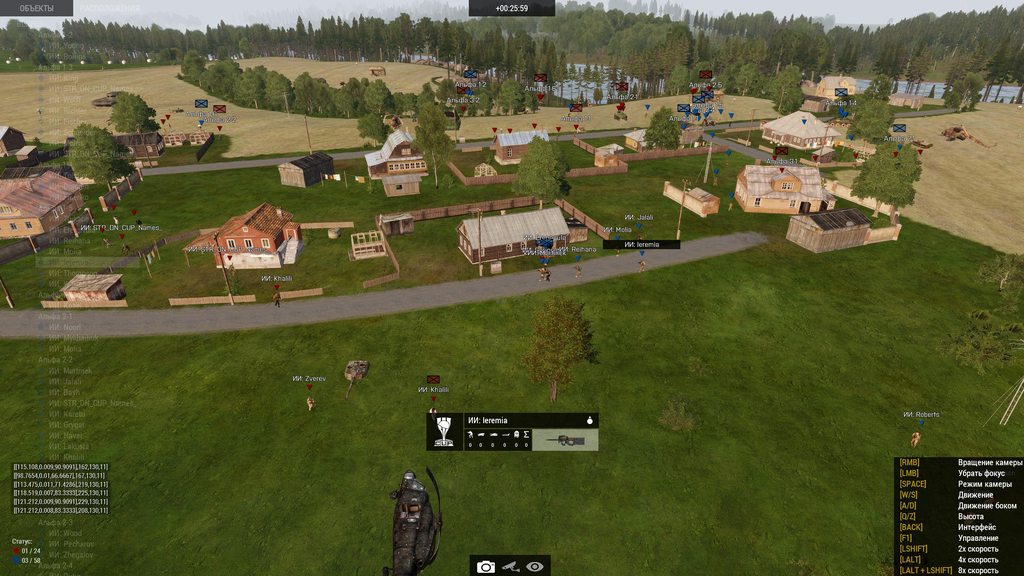
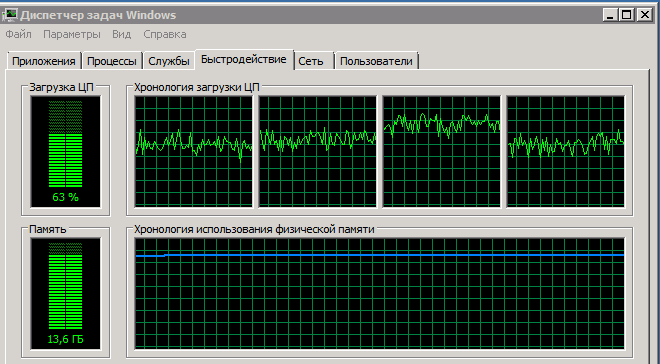 spiral pond
you can do this now:
[["cLoop", "100ms", 0, true, 100]] remoteExec ["diag_captureSlowFrame", HC];
note: this logs up to 100 captures. a capture event may slow down things to trigger another just from the capture.
if so, instead of 0 for 3rd parameter, try 1 or 10.
also a freeze/0 fps event could also trigger all/many of the 100 in one go
empty goblet
the CPU load-spikes are expected ... that's workaround against the freezes and seems to work
void badger
That's exactly what Dedmen said would happen
whole cloud
It should waste a bit more time.
But not spike to 100% for so long 🤔
The spikes would be very short, not so long
But as long as it doesn't freeze 👍
knotty wraith
spiral pond
15 fps mainly caused by 4 MH60S helos. i think Dedmen mentioned some problems wi...
hmm, maybe it is - and the delays are due to a certain class of vehicle. Now started the server - no problems so far
knotty wraith
spiral pond
you can do this now:
> [["cLoop", "100ms", 0, true, 100]] remoteExec ["diag_capt...
the endless spamming has begun captureframe
https://disk.yandex.ru/d/n9_FWflWIyn8zw


Найдётся всё
 knotty wraith
from my observations - the sags are clearly related to spikes on the processor
 spiral pond
                              tgNewS; 17.45933; 5235.55615;""
                                tgTrk; 5252.09375; 0.06913;""
                                  TrCxt; 5252.09375; 0.02515;""
                                  tgTrE; 5252.11963; 0.03043;"CUP_B_BAF_Soldier_AA_DDPM"
                                TrCxt; 5252.16504; 0.00242;""
                                tgTrE; 5252.16797; 0.00734;"CUP_O_TK_INS_Commander"
                                TrCxt; 5252.17871; 0.01224;""
                                tgTrE; 5252.19141; 0.00569;"CUP_O_RUS_M_Soldier_LAT_Ratnik_Summer"
                                TrCxt; 5252.20020; 0.00770;""
                                tgTrE; 5252.20801; 0.00507;"CUP_B_BAF_Sniper_AS50_MTP"
                                TrCxt; 5252.39648; 0.00865;""
                                tgTrE; 5252.40527; 0.00634;"rhsusf_usmc_marpat_d_engineer"
                                TrCxt; 5252.41602; 0.00785;""
                                tgTrE; 5252.42383; 0.00509;"CUP_B_HIL_Soldier_MAT_Res"
                                TrCxt; 5252.43213; 0.00914;""
                                tgTrE; 5252.44141; 0.00478;"CUP_B_GER_BW_Soldier"
                                TrCxt; 5252.44971; 0.01068;""
                                tgTrE; 5252.46045; 0.00497;"CUP_B_HIL_Soldier_MAT"
on the main thread

maybe its the AI job freeze Dedmen is working on - or sth else

2s - from the looks of it mostly from SAM target checks?
knotty wraith
spiral pond
2s - from the looks of it mostly from SAM target checks?
remove them to continue the test?
spiral pond

6s with crtSchedM and tgNewS again
most 150-300ms are asset loading (p3d/textures/anims) from unit/vehicle creation. so probably raise limit to 500ms
knotty wraith
spiral pond
most 150-300ms are asset loading (p3d/textures/anims) from unit/vehicle creation...
-fpsLimit?
spiral pond
[["cLoop", "500ms", 0, true, 100]] remoteExec ["diag_captureSlowFrame", HC];
afk now
whole cloud
spiral pond
maybe its the AI job freeze Dedmen is working on - or sth else
No, I have no idea what that is 😄
I blame the old OS
 cerulean nacelle
An object spawned with createVehicle does not show up as cursorTarget on perf/prof, it does on stable. Testing with a vehicle "C_Offroad_01_F" it still works. Did something change or does it need new syntax?
knotty wraith
ahahaha, I didn't even know it would work like that either.
createvehicle [“rhsgref_cdf_gaz66o”,getpos player]
heavy vortex
@cerulean nacelle Does cursorObject work?
whole cloud
Fnuy
I don't know of any change with cursorTarget.
If you give me a full repro, I'll take a look next year
heavy vortex
cursorTarget depends on the spotting logic, right? I remember it often having a few seconds delay versus cursorObject.
knotty wraith
spiral pond
> [["cLoop", "500ms", 0, true, 100]] remoteExec ["diag_captureSlowFrame", HC];
Найдётся всё
fickle geyser
cerulean nacelle
An object spawned with createVehicle does not show up as cursorTarget on perf/pr...
normal
cursorTarget relies on knowledge about the object
if you spawn it it might be delayed.
Fixed by reveal command, pressing T while looking at it or simply waiting.
cursorObject is unaffected by knowledge.
knotty wraith
fps drawdowns to zero on HC
https://disk.yandex.ru/d/TDyFHGvWHkoPZQ
Найдётся всё
heavy vortex
fickle geyser
normal
Wellll... if the delay is clearly different on perf then that might be a sign of issues. But yeah, some delay is expected.
whole cloud
Mh.. is it affected by the..
Like I made that change so static objects aren't target calculated by AI anymore. Maybe that could do it? If it would then I hate it
whole cloud
This change was also so long ago 😄
It's on my list now, I'll just turn it back on for players group.
Surely no-one uses cursorTarget from an AI unit to get a static object
fickle geyser
some action breaks in Zeus Remote Control
heavy vortex
keep it disabled for static objects and change the docs IMO :P
players-only probably does cover 99% of what people are doing with it though.
Which is mostly "not realising that cursorObject is better"
cerulean nacelle
I'll have a look, thanks.
fickle geyser
cursorTarget is basically the same as action menu targeting
if anything getCursorObjectParams is superior
whole cloud
Do it like the other AI optimizations, leave it off until you use it xD
But that would hold for like, 10 seconds
cerulean nacelle
cursorObject works (is not NullObject), but doesn't work for the script in question, which is a "player addaction ..." that checks for an object. Both cursorObject and cursorTarget work if I "player reveal object" it, but if I do that on spawn I guess it wouldn't work an hour or two later. But I didn't test that! I'll play around with it more.
Just changing the action around to "object addaction ..." instead of the player does work in my testing, but it was changed long ago because that wasn't reliable enough and prompted a 5-10s "dance" around the object, looking from all angles, spamming RMB and T 😄
 bold raven
Hey guys my arma rpt log is filled with "obsolete" just wondering if that's related to the perf branch as we are running it
light cargo
bold raven
Hey guys my arma rpt log is filled with "obsolete" just wondering if that's rela...
that makes no sense, why not paste it so we know what you're talking about?
also #arma3_questions
bold raven
Just wondering as I'd never seen it before in my logs, I'll post it when at home in arma3 questions. Cheers
gritty wasp
whole cloud
Dear peoples. Another replacement has been done, up to 152520.
The solution to o...
Drop 15, swap 25 and 20.
2025 CONFIRMED
empty goblet
heavy vortex
Which is mostly "not realising that cursorObject is better"
in this case it shall be easy to detect if the situation is where zeus or curator is active and switch to old behavior w/o the optimization (unless there is more efficient route to reach same result by new fnc)
empty goblet
whole cloud
Okey so.
The freeze as explained above.
The "Job2" part, is new in v16. Again m...
also so far the 152520 hold stable w/o freeze on all servers where it's active
spiral pond
knotty wraith
fps drawdowns to zero on HC
https://disk.yandex.ru/d/TDyFHGvWHkoPZQ
something is stalling the simulation. as you said its new since v6, could be related to Enfusion scheduler in a very specific way.
however unless you can replicate with latest/more modern server OS as Dedmen requested, or find others with the same prob (or try replicating with local DS/another DS), it doesnt look like to get investigated further.
hard to say if hardware (HDD/SSD, RAM, etc) or something else than OS could interfere here.
if upgrading your server OS isnt possible for now, I'd try with local DS or another DS machine.
the combo of large mods here (CUP+RHS), ACE3, custom terrain(s?) and the game mode (Evolution) could be an unique enough combo for a general problem with HC since v6 hasnt been noticed by others just yet.


 shell lion
@spiral pond you said: "general problem with HC since v6 hasnt been noticed by others just yet" - that's not really right. (you can see it here #perf_prof_branch message).
The problem is that I simply don't have the time to analyze more at the moment. So I can't say if the problem is still in the new perf branch. But I can give you infos of my system and server locations.
some infos:
- Win 10 Pro on my server newest versions
- Intel I9 - 10850K
- like i said in the post: system on CPU Affinity 0, server on 1-17, hc on 18-19
- server in EU (Germany)
- i don´t know Dimon KPblM, so my server has a complete self scripted other mission
- before v6 everything works for 4-5 years
- AI units are all running on the HC (99.8%)
- I use CBA,ACE,RHS,CUP Weapons, EH Movment, TFAR Beta, Client Mod from me (around 18-20 Mods)
- normal player count around 20-25 peoples, and 150-220 Ai units
- server running between ~40 - 250 FPS
- hc running between ~50 - 400 FPS
So I hope i find time next year or between the years to update my investigations in this problem.
cheers
spiral pond
shell lion
<@165398963648724992> you said: "general problem with HC since v6 hasnt been not...
thanks for speaking up too!
i'd advise to create frame captures from the HC and share them on here.
aka run DS+HC on perf branch, start HC with profiling exe, allow console in your mission/game mode and execute via CBA console on the HC:
[["cLoop", "500ms", 0, true, 100]] remoteExec ["diag_captureSlowFrame", HC];
or if you dont get any then with:
[["cLoop", "100ms", 0, true, 100]] remoteExec ["diag_captureSlowFrame", HC];
knotty wraith
spiral pond
something is stalling the simulation. as you said its new since v6, could be rel...
And how can I view captureframe files myself, so as not to waste your time?
Thank you very much - we will wait for anyone who has similar problems. I will try to test without HC.
shell lion
spiral pond
thanks for speaking up too!
i'd advise to create frame captures from the HC an...
I will do it when I have time. Thank you for taking so much time for this topic and for giving us feedback in general.
spiral pond
knotty wraith
And how can I view captureframe files myself, so as not to waste your time?
Than...
run profiling.exe, press left shift+numpad minus and type frame in main menu, copy the contents of the frame capture log and use paste button in the diag capture dialog.
use mouse and keyboard to navigate the scopes (ie mouse double click to expand or right arrow key - the latter also focuses on the longest scope automatically)
empty goblet
empty goblet
also so far the 152520 hold stable w/o freeze on all servers where it's active
in case someone want to test / experience profiling branch with 2.18.152520 ```
85.190.148.62:2302 Warlords Redux EU (100 players limit)
85.190.148.53:2102 Warlords XL EU (100 players limit)
85.190.148.52:2302 (same as above but AI is forced on autoinit with constant battle for both teams)
85.190.148.54:2302 Warlords classic EU 3rd person
85.190.148.58:2302 Warlords classic EU 1st person
109.230.214.46:2302 Warlords classic US east coast
37.10.126.66:2302 Warlords classic US west coast
also those servers runs the new GC (tho i added extra periodic check which sift thru simulated weaponholders and if they aren't in the GC then i add them) ...
i do wonder if we could take the GC and made custom rules variant (with {} block to return true) for objects / entities ...
then one could bend such new rule for other uses (mines , cockpits/seats , idle vehicles etc.)
spiral pond
in regards to HC issues - is there any public game mode with HC support that you can run without players on (persistent) or no active player involvement, but AI being active on their own? [preferably with no/few mods]
this way more could test HC with new MT optimizations to check for issues
 stray slate
Is there a ongoing dedicated server crash issue?
Our server is recently undergoing some weird smooth crash where players don't get red chain and able to walk, talk with each other but can't see other player moving.
This lasts even if I close server by clicking x. It seems the process is still there. The server lose its connection if I shut down the process.
Exe timestamp: 2024/12/10 10:08:30
Current time:  2024/12/13 20:04:39

Type: Public
Build: Profile
Version: 2.18.152502```ie as if there simple server-side mod/framework to use HC which can be easily drop-in?
empty goblet
stray slate
```Original output filename: Arma3RetailProfile_Server_x64
Exe timestamp: 2024/1...
update to 152520
stray slate
I guess we're gonna use stable server exe
Can you confirm that if there were such issues?
empty goblet
stray slate
I guess we're gonna use stable server exe
the 502 is obsolete in sense of the fixed bugs in 520, ie anything >152472 until 152520 was prone to freeze
stray slate
Ok thank you for the confirmation. I'll have to update it
@empty goblet I cleared cache and opt out from perf branch but the server is still 502. Is 502 a stable version?
Where can I check exact build number than 2.18?
 eternal kraken
hover over the exe file
 analog acorn
opal hound
Steam app properties, bottom right of the main menu, start of your RPT
analog acorn
opal hound
Steam app properties, bottom right of the main menu, start of your RPT
It's also in the Options menu at the top right of the Launcher
stray slate
eternal kraken
hover over the exe file
I meant the official version.
but those are also nice methods.
knotty wraith
spiral pond
something is stalling the simulation. as you said its new since v6, could be rel...
I'm afraid to rush, but I disabled all unnecessary mods - the server has been running for 3 hours already: so far everything is more or less normal\
 opal hound
What do you mean official version?
analog acorn
stray slate
I meant the official version.
That is the official version, just formatted slightly differently.
152.520 -> 152520
stray slate
How to tell whats newest version?
Like if I didn't update the game, I get lower number
opal hound
That's the build number
spiral pond
stray slate
How to tell whats newest version?
you check pins in this channel
analog acorn
stray slate
How to tell whats newest version?
For profiling branch, check the pinned messages in this channel.
For dev branch, check the dev branch changelog. (https://forums.bohemia.net/forums/topic/140837-development-branch-changelog/?page=62&tab=comments#comment-3536899)
For stable branch, uhhhhh well Steam should update you. If it doesn't, restart Steam.
empty goblet
stray slate
<@94784638945337344> I cleared cache and opt out from perf branch but the server...
well you wrote 502, which is revision that was removed ... 520 is different one, which is recent and last till January
empty goblet
stray slate
I meant the official version.
atm
2.18.152405 is main branch
2.18.152520 is profiling branch
stray slate
Thank you! So there should be no error in main branch. Right?
empty goblet
stray slate
Thank you! So there should be no error in main branch. Right?
it shall work, so far i had no server freeze and no crash which is good enough
stray slate
Ok thank you! Been downgraded to stable yesterday and experiencing no crash so far.
empty goblet
stray slate
Ok thank you! Been downgraded to stable yesterday and experiencing no crash so f...
i would suggest to try the 520 because if you were really using 502 then that build was removed 'silently' due to bugs
stray slate
feral harness
stray slate
Ok thank you! Been downgraded to stable yesterday and experiencing no crash so f...
That's great, but not helpful as we really need feedback on prof build performance as the changes we test here are the changes that will be added to stable in the future.
 weak panther
- Fixed: Sections of objects would stop rendering at specific camera angles
rev 152520 headgears placed in world disappears at screen bottom and left-down corner
- place in Eden Headgear_H_MilCap_ghex_F object
- look at this cap and move camera up
- object hide too early
https://youtu.be/jjdiS0fuGrk
 feral harness
looks like wrong offset, probably rudimentary fix when @whole cloud is back
 restive pilot
I also noticed it in YAAB with the terrain clutter btw
heavy galleon
Hmmm, is it possible that the perf on client stopped propagating vehicle deletions?
When I deleteVehicle locally, server still sees it, alive returns true 
heavy galleon
the entire deletevehicle behaviour is weird af
ok, well, mission maker set them as local only... 
feral harness
so all good then?
heavy galleon
Would say yeah
stark falcon
Matrix is not valid as physx transform! Object: 24a80465600# 2367833: dummyweapon.p3d WeaponHolderSimulated REMOTE, WeaponHolderSimulated, Remote
Unusual rpt msg, didn't notice any problems related to it, just posting in case it means something
inland dew
mods? no mods?
 real crypt
was there a big profiling update just now?!

 cloud sky
real crypt
was there a big profiling update just now?!
cloud sky
real crypt
was there a big profiling update just now?!
Maybe related to this #linux_mac_branch message
cloud sky
Yeah
somber plank
real crypt
was there a big profiling update just now?!
WS and RF updates
light cargo
cdlc updates, woot
heavy galleon
So VBS has Vulcan now 
I bet Arma doesn't want to stay behind much, right?
(Yes, I know they are separate companies)
whole cloud
heavy galleon
So VBS has Vulcan now <:kalm:835172599050272798>
I bet Arma doesn't want to sta...
We like being behind. Thank you very much.
heavy galleon
the important part is the much
full nova
well whenever Arma taking a step it covers a whole wide of stuff in 1 move (RV4 to ENFUSION)
and the whole competitors dying on their own
light cargo
...
 vale shoal
Hmm... I still observe issues with servers freezing. In the log I see a couple of "Server can't keep up, too many incoming network messages." messages, most values below 100. A hand full over 100 (but not as much as 200), only one over 1000.
Network settings:
MinBandwidth = 104857600;
MaxMsgSend = 128;
MaxSizeGuaranteed = 512;
MaxSizeNonguaranteed = 1024;
MinErrorToSend = 0.001;
MinErrorToSendNear = 0.01;
MaxCustomFileSize = 0;
inland dew
vale shoal
Hmm... I still observe issues with servers freezing. In the log I see a couple o...
current/latest perf?
vale shoal
inland dew
current/latest perf?
yes
inland dew
need to mention that next time, for understanding
vale shoal
It happens like, once a week I would say. I even thought it might be connected to some network messages I sent from or to client via server and vice versa, I also had the suspicion that it might be connected to the Exile FSM as something happened what shouldn't happen (and probably Exile didn't liked), but now this is also ruled out (and also fixed like 2 weeks ago) as it happned twice again.
spiral pond
run server with profiling.exe and -networkDiagInterval=60 -NetStrStatsExport -netLog
potentially also useful if possible:
[["sLoop", "500ms", 0, true, 100]] remoteExec ["diag_captureSlowFrame", 2];
vale shoal
wilco, will do that tomorrow and report back. any suggested changes in the network settings?
spiral pond
personally cant say. check #perf_prof_branch message and Dedmen's comments
potentially MaxMsgSend needs to be tweaked. seems to depend on server fps and player count. plus avoid very large mission download
vale shoal
Player count is in average at 15, up to 30 in prime time. Mission file is only around 2 MB
Will increase MaxMsgSend to 256 and MaxSizeGuaranteed to 1024 to see how the server behaves. I tested (on test server) once the values of Dwarden (he posted for the KOTH stress test I believe?) and the Server FPS dropped from 120 (FPS limit of the server) to 60 in average (empty server, only ~200 AI) so I reverted it back.
vale shoal
Also, but I don't really think it is related to profiling branch, but funny story about Windows:
We are using Windows Server 2022 Standard and I observed a funny thing. When I connect via RDP the CPU usage of all Arma 3 processes go up to average 30%, but when I maximize Task Manager they go down to 15%. But the problem is, that also the Server FPS will DRASTICALLY decrease to average 5-20 FPS. If I minimize/close Task Manager again, CPU usage raises but Server FPS go up to 80+. I never saw this happening in the past. So either Microsoft broke something again, or it is some weird profiling magic. But I guess it's Microsoft.
naive osprey
vale shoal
Hmm... I still observe issues with servers freezing. In the log I see a couple o...
Might be relevant. #arma3_feedback_tracker message
Had issues very similar to you, mass amounts of too many incoming messages, and removing all locally spawned ai/person objects reduced the issues drastically. Only network logging will tell what's going on exactly, but was worth the mention
vale shoal
naive osprey
Had issues very similar to you, mass amounts of too many incoming messages, and ...
Hm, thanks for the hint. There are not many locally (are we talking about client?) created objects~~, let's say 99% will be spawned through the server.~~
There is actually one system which uses createVehicleLocal and it is kind of a troublemaker, I'll monitor that.
whole cloud
vale shoal
Hmm... I still observe issues with servers freezing. In the log I see a couple o...
Not related to networking settings.
There is simply too much work coming in.
Some frame captures might help show the reason
whole cloud
vale shoal
Also, but I don't really think it is related to profiling branch, but funny stor...
Sounds like it lowers priority of background processes?
plain trout
We are having issues with explosions killing the server fps on linux stable. We managed to get to a repro situation and will look into getting better logging
shell lion
plain trout
We are having issues with explosions killing the server fps on linux stable. We ...
mayby you play with ACE?
If so look here I reported it. Disable ace_frag_reflectionsEnabled.
https://github.com/acemod/ACE3/issues/10483
plain trout
yeah we disabled that. not sure if it requires a restart to have full effect
heavy galleon
plain trout
yeah we disabled that. not sure if it requires a restart to have full effect
we even had full crashes because of frag, if you play with larger number of players, it is the most probable cause 
light cargo
vale shoal
Also, but I don't really think it is related to profiling branch, but funny stor...
very weird, i suggest increasing the priority, i usually see that setting to above normal makes it more resillent and less likely to get put in background priority
or keep rdp open somewhere, note that it uses cpu because its software rendering
vale shoal
light cargo
very weird, i suggest increasing the priority, i usually see that setting to abo...
The A3 process is already starting as /high just to make sure it gets everything it needs
vale shoal
light cargo
or keep rdp open somewhere, note that it uses cpu because its software rendering
Well no to let it open. RDP is only open when I actually need to analyze log files. I know there is a bug in Windows which triggers high CPU usage with RDP, it is as old as Windows Server 2008 R2. As soon as RDP is not open, and Task Manager not open, the whole system is stable. But connected via RDP and Task Manager maximized seems like everything go beserk. But I just wanted to mention it here, as only A3 processes eat up CPU usage. Probably also because of priority, I think.
light cargo
vale shoal
Well no to let it open. RDP is only open when I actually need to analyze log fil...
uh yeah, dont do that and instead check logs via samba/file sharing/other means
fast hornet
OpenSSH is natively supported on Windows by now.. you can even install it via Windows features. So you can just use SFTP.
light cargo
fast hornet
OpenSSH is natively supported on Windows by now.. you can even install it via Wi...
well the microsoft implementation is slightly limited than what the openssh project provides
fast hornet
maybe, but for SFTP it's perfectly fine 🙂
light cargo
ok
knotty wraith
where is the feedback about testing the build version, - only indirectly related comments 🤬
circus!
knotty wraith
in fact, there are few testers of all the game's capabilities here: it's either pvp 100 on 100, or sp for their own... I won't dig my own grave)
in fact, they told me how it should be: no need to worry - release a stable version - you can step aside and see what happens... those who are not even active will emerge
so - welcome 
didn't think about the fact that you are tearing something thin - you can laugh with the OS and come up with a reason for this)
Click the button - get a stable version 🌩️
vale shoal
spiral pond
run server with profiling.exe and `-networkDiagInterval=60 -NetStrStatsExport -...
Ok, so I recorded a whole session (4h) now. What I am gonna do with that? Send it to Dedmen?
whole cloud
Note all the timestamps where something notable happened
knotty wraith
any crooked hands in scripts can make a big delay - applause
spiral pond
vale shoal
Ok, so I recorded a whole session (4h) now. What I am gonna do with that? Send i...
drop files/link download in here - if anything sensitive, make a private FT ticket
empty goblet
just note, so far i didn't observe any freeze or crash ... so considering 152520 was workaround build, it does run well
full nova
hopefully it is, and no need to summon Dedmen from vacation
vale shoal
Well I had a crash on the server (152520) right after doing the profiling stuff yesterday (after a restart of the server, not while profiling) 😄 but already sent files to Dedmen
naive osprey
Haven't had many issues after updating to 152520, server performance still sits at our FPS limit of ~100, but does still get drops down to ~10-20 and subsequent network desync briefly when someone joins the server and starts downloading the mission file (Probably more in part to the mission file size at ~75MB)
Figured I'd note it as well, got a handful of capture frames with logs, and they all always roughly the same. Can post logs if requested, but I assume it has nothing to do with the game rather than our servers mission file.
https://i.imgur.com/kPAV3ZY.png
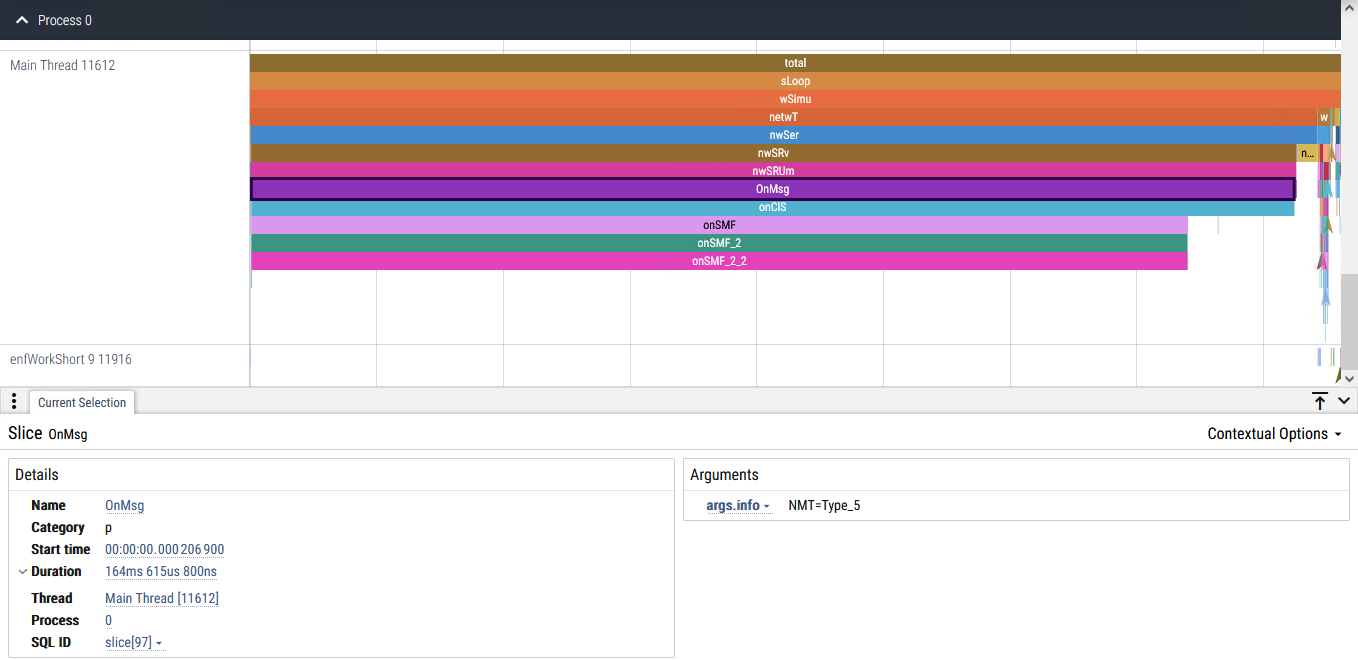


 spiral pond
@naive osprey always with type_5 message?
naive osprey
spiral pond
<@226159903356616705> always with type_5 message?
Yeah, always Type_5
whole cloud
naive osprey
Haven't had many issues after updating to 152520, server performance still sits ...
MF = Mission File.
Well that'll solve itself soon
void badger
Two floating point exceptions on linux host last night running 152520
knotty wraith
I decided to run the HC from my personal computer and connect it to the server - why does the HC use only 25% of the processor and have no effect - a miracle
what limits it?
I need to run 2 HC on my PC to load the processor to 80%
how does this even work?
heavy vortex
what's an NS?
heavy vortex
A headless client doesn't do anything unless you move units onto it.
And then it doesn't do very much :P
Well, technically you can run scripts on it too, but that's a less common application.
knotty wraith
.imagine i move units toHC when it is connected
what kind of manner of communication is this, as if with morons
heavy vortex
Well, with units, some costs are local and some are global.
Clients still have to simulate and render all units within range.
And often need to do target checks for them too (varies)
Pathfinding and AI decision making are probably local.
But then you're adding a lot of memory contention (if server or client is running on the same machine) and some server network overhead.
knotty wraith
I repeat the question once again -HC uses 30 percent of my PC's resources - the question is why? What is limiting it?
by re-launching the second HC - I achieve a result of 70-80 percent of the server load, why can't I achieve this with one HC?
heavy galleon
knotty wraith
I repeat the question once again -HC uses 30 percent of my PC's resources - the ...
Why would you want your HC to use 100% of CPU?
Where did the "it must use the entire CPU or it's wrong" mentality come from?
Imagine a word, where your HC finishes all the necessary calculations and only needs the 30% of your CPU time. Wow, imagine a world like that.
Now imagine a world where your HC doesn't finish all the necessary calculations in 100% of your CPU time. I don't really want to imagine a world like that
light cargo
knotty wraith
I repeat the question once again -HC uses 30 percent of my PC's resources - the ...
arma is a very unoptimized game and single threaded
hybrid cradle
light cargo
~~arma is a very unoptimized game and single threaded~~
have you been entirely oblivious to the past few months in this channel or something? stop talking about things you know nothing about, seriously. it makes you look stupid, wastes our time correcting you and makes other people think that lies are truth
every single part of the game that can be multithreaded is now (more or less) multithreaded and is optimised just fine
light cargo
i mean yeah, its a bandaged almost 30 years old engine. sorry. it still has its quirks and some parts are not MT'd yet still. but im glad there's progress on that
hybrid cradle
did you actually read what i said
heavy galleon
yeah, but you still tell a guy who pretty much complains that "his CPU is fast" with "it's unoptmised game"
light cargo
apologies for my behavior
heavy vortex
Note that an HC would use a good chunk of CPU time even if it was doing nothing productive at all :P
And if you had two HCs doing nothing useful, it'd be more than twice that.
woven loom
knotty wraith
I decided to run the HC from my personal computer and connect it to the server -...
Might want to discuss this in #headless_client if the answers here were unsatisfactory
 chilly geyser
Is HC stable on version 152520?
whole cloud
knotty wraith
I repeat the question once again -HC uses 30 percent of my PC's resources - the ...
Probably the default fps limit.
But increasing it serves no purpose in that case.
light cargo
ah yeah, i forgot about that
empty goblet
so ye, there is definitely something iffy about AIwith the 152520 ... we had case of semi-disabled mora (track immobile) the gunner was able rotate turret so fast and hit people in 360 degree radius while they were just running between rocks / houses (exposed for 1-3 seconds) , terminator style
the question is if it's the line of sight calculations or AI knowsabout all knowing
whole cloud
Nothing in AI code, can make a turret turn faster than it can turn
empty goblet
it's about the knowledge and reaction time, about units which never fired, never were seen by the AI until that moment
heavy vortex
Hmm. What was the range?
On stable the response time is pretty fast at ~100m with the vehicle group in combat mode. A couple of seconds maybe.
Much longer at 200m
Although at 100m they don't actually hit at a full sprint. I guess that's the turret tracking.
empty goblet
heavy vortex
Hmm. What was the range?
200 to 500 meters and i was just literally laying behind rock, went crouch and ran to other rock and the AI instant snap to target on me, then snap to target someone else and oscilated between players
ran 3 times between the rocks forth back to check if keeps tracking me even while firing on someone else and it id , then i ran out of luck
but it's damn hard to replicate this ... it's just happening en random
whole cloud
Well you can now just turn off the new ai visibility thing, and see if that changes it
woven loom
empty goblet
so ye, there is definitely something iffy about AIwith the 152520 ... we had cas...
Tbh vehicles being terminator like isn't new, but that's not to say there's not something new that's crept in
For many years, maybe even since launch, shooting a vehicle (or even damaging it with a remote explosive) reveals to the vehicle crew the exact position of the shot instigator
And their turret aim time was always faster and more accurate than human players, leading to very annoying situations where a vehicle could drive by at high speed and accurately shoot people
empty goblet
whole cloud
Well you can now just turn off the new ai visibility thing, and see if that chan...
it's quite interesting because when this doesn't happen, i had enjoyable firefight exchange with 5 patrols (different groups) at 700m w/o instant sniped
will test the switches later
fast hornet
woven loom
And their turret aim time was always faster and more accurate than human players...
I've seen things like players on quad bikes getting shot at and killed by static AI HMGs that were kilometers away and never interacted with the AI.. that never really changed over the years. So yeah, nothing new.
hybrid cradle
woven loom
For many years, maybe even since launch, shooting a vehicle (or even damaging it...
Remote explosive was fixed btw
knotty wraith
hybrid cradle
Remote explosive was fixed btw
as far as I know it has only been fixed in ACE
hybrid cradle
you know wrong
 hardy star
empty goblet
it's quite interesting because when this doesn't happen, i had enjoyable firefig...
hardy star
empty goblet
it's quite interesting because when this doesn't happen, i had enjoyable firefig...
Hi - please could you tell me how to use this switch? Thank you.
empty goblet
woven loom
For many years, maybe even since launch, shooting a vehicle (or even damaging it...
this is different because i did zero interaction with anything, way laying behind the rocks / houses outside the combat zone (others were fighting) ...
one of the things i noticed since the changes e.g. reloading AT launcher behind house sometimes trigger the vehicle to get knowsabout you (no LOS)
heavy vortex
The parts that are threaded may in some cases be too threaded.
gusty viper
Have there been recent changes that increased Z fighting? Seen some pretty bad cases recently.
 tepid matrix
any way to debug which model takes the most time to render? maybe in a way so I can identify it, edit it, and lower the quality
heavy vortex
The profiling doesn't record per-model rendering costs, IIRC. I guess you could go low-tech. Drop 10 of them into the editor, see if it hurts.
Profiling does have per-model simulation costs though.
tepid matrix
Yeah could be an option, my thing is a whole city (roleplay) so I don't know how to perform an accurate benchmark
Scripting wise everything is pretty cool
heavy vortex
This is your models?
tepid matrix
heavy vortex
This is your models?
Yes
Made by the team I am working on
We have models from a long time ago tho, made by people that did belong to us but eventually left because of personal circumstances, or just basically because roleplay sucks nowadays
heavy vortex
Place a 10x10 grid of buildings down in VR. Check frame rate from a few different ranges. Do the same thing with next building.
You can use a script for the placement.
might need more like 20x20 to make it dominant.
chilly geyser
knotty wraith
https://discord.com/channels/105462288051380224/105466848958513152/1314604409560...
Which features is stable right now?
whole cloud
All of them seem to be stable, except some unexplained AI behavior which might not even be a new issue
 stray prawn
noticed the AI aggressive behaviour also on the normal build (with last hotfix). players get instantly killed by AI while spotting them anywhere.The AI will target players even if they stay prone and don't move or fire at them.
light cargo
hmmm, what features from this branch has been promoted to stable yet?