#perf_prof_branch
1 messages · Page 14 of 1

 eternal kraken
of course, i am so dumb 😄 thank you
 quartz rampart
that actually more or less works in Linux 😄 you COULD mount a swap to google drive...
eternal kraken
so the total time of the mainThread only telling me how long all the processes needed in the actual frame and in best case the mainThread totaltime should stay below the frameTime for a smooth expierience? lets say 60 FPS -> 16,7ms per Frame so the mainThread totaltime should be below 16,7ms and when it needs the whole 16,7ms of the current frame than it couldnt do all the work in the current frame and transfer some work in the next frame. is this how it works?
 whole cloud
frameTime == main thread time
 spiral pond
eternal kraken
spiral pond
eternal kraken
ok
spiral pond
fps is an average over one second. not every frame within that second must be the same duration. fps just tells you how many it could compute for that specific second
usually the frames are in similar duration. but dont have to (ie "mini freezes" from specific events)
the frame capture is just one specific frame and what the engine had to compute in that one
for visualization of multiple frames after another you need a profiler like tracy

dunno if tracy does tell you the average min and max duration of a frame for example
well it does tell you mean and median for scopes. so if you look at the total scope, you kinda would get that
in tracy you can set a fps(?) limit. so it will visualize frames that last longer
that said i couldnt test everything fully as the frame count didnt work for me yet
eternal kraken
so for optimization findings i have to watch out for long time low FPS scenarios and then make a slowFrameCapture to find out what causes that
whole cloud
spiral pond
dunno if tracy does tell you the average min and max duration of a frame for exa...
I think it would if it weren't broken. It will also highlight slow frames
spiral pond
@eternal kraken do you mean engine related, or script (unscheduled)?
eternal kraken
engine releated
whole cloud
🚨 🚨 🚨
We replaced v11 with a hotfix (The freezing issue), bumping it up to 2.18.152431
whole cloud
whole cloud
🚨 🚨 🚨
We replaced v11 with a hotfix (The freezing issue), bumping it up to 2...
eternal kraken
diag_captureSlowFrame ["total", (1/diag_fps)] at long time( >5 sec) low FPS scenarios
spiral pond
eternal kraken
engine releated
in the end that depends mainly on Dedmen and what is meaningful and doable with reasonable effort.
in general terms i'd think what matters most is higher fps in general - this is what Dedmen focused on with the MT and async work
there may still be a few unknowns, yet Dedmen should know pretty much what is still feasible. atm it seems more about to ensure the existing optimizations from that dont cause issues.
the other element would be mini (or big) freeze events impactful and frequent enough (like the steam composition query thing)
and finally potentially still special situations like high player/AI/vehicle count, very long sessions (network/jip) and such things
as to what you personally can focus on. i'd say potentially what you notice in your MP(?) sessions to impact your fps most.
you can do "many" captures just to see if you can find something to stand out/happen often.
personally i am still trying to find a way to rather quickly flip through many (single) logged .tracy captures. the ingame ui is too many clicks to flip through many. and the Perfetto UI online view is fairly slow.
it seems one can chain multiple frames in the .tracy format, yet i didnt figure out yet how to do that exactly
eternal kraken
i alread thougt about while playing MP capturing in background with diag_captureSlowFrame ["total", 0.3, 0, true, 999]; that creates many capture logs which may be helpful but maybe not. filtering out the useful ones that isnt so easy. there where i thougt maybe it would be more useful to capute a single slow frame in long time low FPS scenarios while playing MP
 silk summit
Crashes, Frame drops and stutters (spikes) I believe are (and should) be the priority for the time being and until certain stuff stop dropping 50% of your FPS out of the sudden. Going from 60 FPS to 50 on some scenes is not felt as much as going from 60 to 30 for a few seconds and then going to 60 again only to go to 100 when looking at some direction and then frame drop again when turning, zooming or firing. That constant and sudden fluctuation of ups and downs of more than +/-30 FPS in difference is what hurts the perceived optimization of the game the most
 vivid rune
v11New: Arma freeze is gone. Animation stutter/cut offs still there and a lot of spikes (mission "Signal Lost/Eastwind Campaign").
spiral pond
to give you an example i am still trying to learn more about are vehicle explosions in SPE - partially due to our use of HD and hitPart events for a more advanced damage simulation, the engine creates at times a LOT of events (when penetration + submunition happens). yet there seems to be also a network sync component to it as in MP its far worse with 1-2s freezes
(rather) stable FPS is even more important than high fps (once you are above a certain FPS limit at least)
however FPS up and down swings can also have many reasons you cant really optimize. ie if you zoom in, the engine has to load a lot of model and texture data; or spawning in new entities (units/vehicles/objects) is also quite expensive due their "nature"
if all data would be loaded into memory (RAM and VRAM) it would help some of that, but thats not practical with the game data amount; plus potentially even OS/GPU/CPU/caches wont allow that in principle. before SSDs we use RAM drive for a while to reduce the game data loading times at least
spiral pond
eternal kraken
i alread thougt about while playing MP capturing in background with diag_capture...
to conclude for now: my idea was to build a system that does the filtering automatically, generate statistics and would identify common (enough) low frame scopes that may warrant attention - yet its quite a project, and the insights no longer relevant for A3 as it would require a lot more programmer resources (for far less gain what Dedmen achieved so far)
 opal hound
I have a trace from a stutter when loading the final LoD for Hatchet's H60 helicopters, is that something I would be able to get analysed? I think it's just the high detail but if it's something fixable on either end that would be great
whole cloud
How much of a concern is game startup time? With many mods it might easily take 30 seconds.
But IMO it doesn't matter because you very rarely start the game?
whole cloud
opal hound
I have a trace from a stutter when loading the final LoD for Hatchet's H60 helic...
No. If a model is complex, it takes a while to load. Not fixing that
 glass lagoon
you ever hear about net code?
i wonder if this is true, how exactly it gets estimated
 harsh grotto
glass lagoon
you ever hear about net code?
harsh grotto
glass lagoon
you ever hear about net code?
private ivan?
glass lagoon
according to which metrics
glass lagoon
harsh grotto
private ivan?
i am
harsh grotto
I wrote to you yesterday that even in life such situations can happen, you should not make excuses that you cannot kill anyone because of "netcode". As already mentioned, the bullet has a flight time, and sometimes this can happen. I would give mathematical calculations of how much time you have if you were shot at, even at point-blank range, to shoot back and you killed each other mutually, but I'm absolutely not up to you. Yesterday there was a performance version v9, it may happens when there are 120 people on the server, and this is not always because of "netcode", but because the server does not have infinite upload speed and need to synchronize everyone. That's why it's a stress-test server.
this conversation doesn't make sense anymore, because it's starting to turn into an offtop
 gritty wasp
Is it possible to stop offtop here?
 heavy galleon
whole cloud
How much of a concern is game startup time? With many mods it might easily take ...
heavy galleon
whole cloud
How much of a concern is game startup time? With many mods it might easily take ...
With how often it crashes, pretty often 
Also for mod dev, where you have a larger dependency tree, you might restart often ish.
whole cloud
heavy galleon
With how often it crashes, pretty often <:blobdoggoshruggoogly:74812404802571475...
It doesn't crash that often :poutcat:
I can fix the loading times by caching, if you load the same mods.
But if you edit mods like mod dev, that wouldn't work
 unborn urchin
semi-unrelated but regarding restarts
https://community.bistudio.com/wiki/diag_resetAnims
but for gestures as I'm pretty sure it doesn't work for them
 fickle geyser
game startup does not seem that much of an issue if you're on NVME
however it is not too great too, just counted, 35s to load into editor with SOGPF on 5900X
heavy galleon
whole cloud
I can fix the loading times by caching, if you load the same mods.
But if you ed...
If it isn't much of an issue.
When I crash it's luckily mostly while I am dead in spectator, but I did crash few times while alive.
Once even while flying a helo. Luckily it did not crash while I was loading back in 
whole cloud
fickle geyser
game startup does not seem that much of an issue if you're on NVME
The config merging is happening on single thread.
Even if Disk Speed isn't an issue
fickle geyser
I guess it has to be somewhat sequential
so kinda makes sense and making it MT is not that easy
whole cloud
I can't make it MT.
I can cache the end result
spiral pond
how much of game start is that part anyway? can we measure that?
whole cloud
After scripts are now bytecode.
It's the majority. At least with the amount of mods that I run
fickle geyser
Would it be possible to have a thread per mainroot config entry" eg. one for CfgVehicles, CfgWeapons etc..? 
 rain moth
until they depend on classes outside? 🤔
spiral pond
the engine already does compute a mod hash across all loaded modes, right?
if so, you could identify easily if you could reuse a cached config
whole cloud
Mh possibly. But there are tons of edge cases in config stuff
rain moth
muzzles being one example afaik
whole cloud
spiral pond
the engine already does compute a mod hash across all loaded modes, right?
if so...
Yeah that's the thinking
fickle geyser
would the whole cache be busted if you change single mod?
whole cloud
Yeah
fickle geyser
so people who could benefit the most (devs) would not benefit from it ;<
 stray slate
Do i join beta (perf branch) to get 431?
whole cloud
Well I could keep a couple caches. In case you alternate between modsets.
But definitely devs would not benefit
If you have 428 then you are already on that branch
spiral pond
Dedmen can you profile the root classes. potentially a handful will take the majority of time (ammo, magazines, weapons and cfgVehicles most likely)
whole cloud
I shall make an attempt
stray slate
How can I update to 431?...
whole cloud
stray slate
How can I update to 431?...
Let steam update it again. Verify game files maybe
Depends on how you installed it
 empty goblet
glass lagoon
you ever hear about net code?
empty goblet
glass lagoon
you ever hear about net code?
you need to realize netcode isn't all of the delays, ie just the travel time from you to the server but also processing on the server, same applies to the other client and then you have the roundtrip back to you
 heavy vortex
whole cloud
How much of a concern is game startup time? With many mods it might easily take ...
heavy vortex
whole cloud
How much of a concern is game startup time? With many mods it might easily take ...
In practice it's pretty important because it's such a struggle getting all your friends to start with the right mods.
empty goblet
for example Red Orchestra 1 and 2 simulate the travel time on bullets too including some ballistics and thus it was normal that some exchanges ends in demise of both parties
heavy vortex
Also for Antistasi testing it's often the limiting factor because I have to switch through several modsets.
But caching wouldn't necessarily help with either case.
empty goblet
glass lagoon
i wonder if this is true, how exactly it gets estimated
also you need to realize the event of enemy firing and you firing, from pov of server happened in past and thus it's likely when your opponent fired, it was at very similar movement you fired ...
now i'm not going to dismiss desync and lag, because that's exactly what we will try tackle with , especially the jittery desync over time
heavy vortex
Yeah, the client doesn't ask the server whether you're dead before it lets you fire the shot.
All your actions are speculative.
glass lagoon
you do understand that there is xonotic/nexuiz and there is this right?
heavy vortex
Honestly it's hard to tell how well Arma's netcode works because the perf is so bad :P
empty goblet
glass lagoon
you do understand that there is xonotic/nexuiz and there is this right?
and what free/opensource arena shooters have with anything ?
 inland dew
maybe better to stop offtopic here
empty goblet
heavy vortex
Honestly it's hard to tell how well Arma's netcode works because the perf is so ...
for example now there is 110 players on KOTH server and the server FPS is >200
heavy vortex
Yeah, but I'd be lucky to get 30fps on that server.
empty goblet
i doubt that because i get more FPS on my test legacy system which has W7 and quadcore i5 and only 2GB VRAM gpu
heavy vortex
I do wonder how many Arma PvP players even know about the grass displacement "bug". The one where you shoot people in the head on client and the server assesses it as a body shot.
CSGO players would have absolutely freaked out at that one.
empty goblet
yes it's way less what i get on 7800X3D but that is different story
heavy galleon
heavy vortex
I do wonder how many Arma PvP players even know about the grass displacement "bu...
most  there are some cool videos about it out there
On the other hand, (the worthy ones) PvP events manually force small terrain grid to try and prevent funny videos from appearing further
empty goblet
heavy vortex
I do wonder how many Arma PvP players even know about the grass displacement "bu...
it's not exactly bug, it was attempt to simulate grass layer on distance, so the visual body is sinked into terrain while the real body volume is above
heavy vortex
I'd consider it a bug that the server hitreg doesn't apply that calculation.
empty goblet
the early attempt was different, the game literally had 2nd layer of textures on distance which simulated grasss, that wasn't good either visually
heavy vortex
But it's marked as "won't fix" on FT so whatever.
empty goblet
heavy vortex
I'd consider it a bug that the server hitreg doesn't apply that calculation.
it does but there is difference where you see the target and where the bullet hits
let's hope in A4 long range grass and detailed medium to far textures detail (noise) is finally no more problem
heavy vortex
Hard problem if the server's doing its own hit calculation rather than verifying the client's one, I guess.
empty goblet
because then i finally be able to sneak and take potshots w/o anyone knowing what hit em 🤣 not even seeing the flash
on 2.18.152434 now : Warlords XL (so with AI) 85.190.148.53:2102 KOTH (no AI) 85.190.148.52:2102 Warlords Redux (less AI than XL) 85.190.148.62:2302
vivid rune
What A3 really needs is automatic mod keygen on mod release.
Now it is a mess because:
a) it is opt in, not mandatory/automatic. Not all mod creator see the need for that or the process is seen as too difficult.
b) there are tools out which create not valid keys. The discussion with the mod creator from such mods is so annoying and often not successful.
c) sometimes the mod creator forget to create new keys on update
spiral pond
probably the A3 publisher could make a key based on the modfolder name and a date tag if no bikey is present in the key folder
however depends how easily one could adapt the code for such. i think most A3 tools are in c# at least.
vivid rune
Or something like a "meta hash" over all different files hashes in the mod? So that client can compare with server? But this communication has to be secured.
 regal lance
empty goblet
for example now there is 110 players on KOTH server and the server FPS is >200
regal lance
empty goblet
for example now there is 110 players on KOTH server and the server FPS is >200
I wish you could share some optimization juice with the rest of us

 ashen helm
server FPS is not client FPS
regal lance
I`m well aware (in case you are replying to me). And yes, Server fps is where I was interested ^^
 woven loom
empty goblet
i doubt that because i get more FPS on my test legacy system which has W7 and qu...
woven loom
empty goblet
i doubt that because i get more FPS on my test legacy system which has W7 and qu...
I used to play with a system like that (except a 6GB GPU) and fps would routinely end up in the 18-26 fps range.
Had to overclock it to 4.6 GHz to keep it over 30 for longer periods 😄
 barren aurora
whenever i launch the performance branch my game just gets stuck on the arma 3 screen
 naive osprey
barren aurora
whenever i launch the performance branch my game just gets stuck on the arma 3 s...
naive osprey
barren aurora
whenever i launch the performance branch my game just gets stuck on the arma 3 s...
Have you made sure you're on the latest?
#perf_prof_branch message
empty goblet
woven loom
I used to play with a system like that (except a 6GB GPU) and fps would routinel...
ye but this is with new MT code 🤣 it helps bit even on such old system
 uneven kernel
barren aurora
whenever i launch the performance branch my game just gets stuck on the arma 3 s...
uneven kernel
barren aurora
whenever i launch the performance branch my game just gets stuck on the arma 3 s...
As in the splash screen? I had this issue too, try pressing escape a few times
Otherwise join a server from the launcher and disconnect
naive osprey
Using the most recent v11 Build 152431
Joining RHS Koth server with 4 mods loaded will crash the client after slot selection when joining the server. @RHSUSAF @RHSAFRF @RHSGREF @RHSSAF
https://www.mediafire.com/file/qapia2o2pgi5i6a/arma3profiling_x64_2024-11-21_01-13-50.rar/file
This crash does not happen on v9 Build 152413.
The client does not crash on other servers without mods.
whole cloud
At this pace we're gonna get to v50 before 2.20 releases 😄
 feral harness
like it's a bad thing
inland dew
whole cloud
At this pace we're gonna get to v50 before 2.20 releases 😄
there is no way back for you anymore 😏
only forward!
whole cloud
All the crash reports I got seem to be only happening with mods, mainly RHS USAF.
They use some specific animation thing that causes an issue.
Tbh it looks like it has always been broken, and just luckily worked before...
So far I got one RHS helicopter.
When the object is animated, it uses the altSurface animation source (Probably for some cockpit instrument), which is the altitude of the "road" surface (could be terrain, or a walkable building/vehicle at that position).
To fill in that animation source, it has to find where the next "road" surface at that position is.
So it finds objects at the position of the helicopter, which.. is the helicopter itself.
The helicopter happens to have a "road" surface on it as part of the model, so it needs to find at which position it is.
To find that position, it has to animate the helicopter. When animating it, it finds the altSurface animation source, to calculate that it needs to find the altitude of the "road" surface at its position...........
Previously, at the second step it would've seen "Oh, this object has already been animated, I will just use the information from last animation"
Even though the last animation was only half-complete, so it ended up using incomplete/wrong data. But it didn't get into this recursion loop.
That bug with using incomplete data was fixed so.. boom.
So how do I fix this, do I let it use incomplete data again? 
 winter brook
hi, who am i supposed to give reports to for crashes involving profiling? was having issues with Chernarus joining using profiling. other maps were fine
whole cloud
winter brook
hi, who am i supposed to give reports to for crashes involving profiling? was ha...
Me
But you probably just have the issue everyone else is having
winter brook
stack_overflow?
whole cloud
yeah
winter brook
bingo
 vivid bear
Im also getting a stack overflow error when joining a server, I select my role and hit continue to load it but it immediately crashes
harsh grotto
whole cloud
At this pace we're gonna get to v50 before 2.20 releases 😄
v11.20355 
you need to explicitly skip v12 so that users dont think about DirectX 12 
feral harness
whole cloud
Previously, at the second step it would've seen "Oh, this object has already bee...
So how do I fix this, do I let it use incomplete data again?
A config param go back to brokenstate?
whole cloud
That is not viable, there is also multithreading involved here, and checking a flag for that is too expensive
feral harness
or ask the mod creators to make an update
whole cloud
I'll just make it skip the object for road surface calculations. It would get same-ish end result, wrong incomplete data vs no data.
feral harness
looks like it is a specific mod related
whole cloud
The mod makers can't just remove the cockpit instrument animation, they need that
feral harness
dunno, at least add option to switch it back
whole cloud
RHS also won't update their mod to add that option, so even if we add an option they won't use it.
 hybrid cradle
is it only if its used in the flight instruments?
whole cloud
It happens when a vehicle, has a animation source that finds the roadway lod at its position and roadway LOD. It will find its own roadway lod
heavy galleon
whole cloud
RHS also won't update their mod to add that option, so even if we add an option ...
Maybe if you keep it broken, thus fixed, it will force RHS to update 
whole cloud
Ah RHS knew about this issue. Specifically because of that they made a hole in their roadway, so it would not be hit (but engine will still try to animate it, it only knows after animation that its not hitting it)
My fix will just ignore the object when it happens, so same end result.
whole cloud
This is a perfect example of fix one bug, create 2 new ones
inland dew
not exactly, since it doesn't concern vanilla
whole cloud
Mods are part of the game too
inland dew
if mods were done a certain way and not updated anymore, that's on them
whole cloud
No mods staying working is definitely on us
inland dew
so not fixing/improving stuff, just so mods don't break
if the workaround is fine, then ok
depends on how critical it is
whole cloud
Depends on how many mods it breaks. By now most mods are old, and probably most mods that will ever be made for A3, have already been made. We can't cut off the branch we're sitting on
inland dew
understandable
you just had to be born like up to 10 years earlier
to join bi that much earlier
to do all the stuff in like 2013
so people making mods would still be very active and redo/update their stuff
so we could still get all the fixes without workarounds
hybrid cradle
wrong chat ignore that
 restive pilot
whole cloud
All the crash reports I got seem to be only happening with mods, mainly RHS USAF...
restive pilot
whole cloud
All the crash reports I got seem to be only happening with mods, mainly RHS USAF...
what if you pass the helicopter as "ignore" parameter in intersection?
whole cloud
There is no ignore parameter in animation sources
whole cloud
2.18.152434 new PROFILING branch with PERFORMANCE binaries, v12, server and client, windows 64-bit, linux server 64-bit
- Added: Option to log remains collector entities into file
- Fixed: Crash when spawning some types of vehicles
If you don't want to use the Steam branch, the files are also available for alternative download here:
https://drive.google.com/drive/folders/15p9j7C2nHUt6NoVfChX4YFuqzFXzblJh
whole cloud
whole cloud
2.18.152434 new PROFILING branch with PERFORMANCE binaries, v12, server and clie...
 knotty wraith
v12
on an empty server I launched 10+ helicopters with troops, the server seemed to survive...
There is a twitch, but I think this is from spam chat information
the code used is like this
0 spawn {
ddd = true;
VAR_FPS_HC = 0;
_code = {
 VAR_FPS_HC =  [diag_fps,diag_deltaTime,diag_fpsMin];
 publicvariableserver "VAR_FPS_HC";
};
[_code] remoteExec ["call", HC];
//VAR_FPS_HC

while{ddd}do{
[_code] remoteExec ["call", HC];
sleep 0.7;
(str [ VAR_FPS_HC,round diag_fps, count allunits, count (vehicles select {count crew _x > 0})]) remoteExec ["systemchat", -2]

}}
working video
https://www.youtube.com/watch?v=1koTTnSi-mc

 short hollow
Getting crashes in the Virtual Arsenal, how can I provide report?
 uncut linden
whole cloud
2.18.152434 new PROFILING branch with PERFORMANCE binaries, v12, server and clie...
uncut linden
whole cloud
2.18.152434 new PROFILING branch with PERFORMANCE binaries, v12, server and clie...
Sad debug noises
Exception code: C0000005 ACCESS_VIOLATION at C793963B
...
Version 2.18.152434
Fault time: 2024/11/21 XX:20:29
Fault address:  C793963B 01:000D863Bll \\?\C:\Games\Steam\steamapps\workshop\content\107410\1585582292\intercept\BIDebugEngine_x64.dll
:sad:
whole cloud
short hollow
Getting crashes in the Virtual Arsenal, how can I provide report?
report file to me via DM
whole cloud
uncut linden
*Sad debug noises*
```
Exception code: C0000005 ACCESS_VIOLATION at C793963B
......
only since v12? not earlier? or when did you last try?
Send me that dump via DM please
uncut linden
whole cloud
only since v12? not earlier? or when did you last try?
Send me that dump via DM ...
Last try about an hour ago - it was all right.
Now Arma updated and crashes on startup.
Will send, thank you
 indigo anvil
whole cloud
2.18.152434 new PROFILING branch with PERFORMANCE binaries, v12, server and clie...
indigo anvil
whole cloud
2.18.152434 new PROFILING branch with PERFORMANCE binaries, v12, server and clie...
"Added: Option to log remains collector entities into file" - what is the name of the argument exactly?
whole cloud
indigo anvil
"Added: Option to log remains collector entities into file" - what is the name o...
Cheat code: ENTITIES_RC
Server command: #logentities_rc
Script: diag_remainsCollector -1
puts file into rpt folder
knotty wraith
so far so good
https://youtu.be/EY_6ziTRLpk
 whole cloud
short hollow
Getting crashes in the Virtual Arsenal, how can I provide report?
whole cloud
short hollow
Getting crashes in the Virtual Arsenal, how can I provide report?
You are running 2.18.152431
But the latest, with the fix for the crash you're having, is 152434 #perf_prof_branch message
short hollow
Oh! Perhaps I've misunderstood. Are updates not automatically pushed to Steam?
indigo anvil
whole cloud
Cheat code: ENTITIES_RC
Server command: #logentities_rc
Script: diag_remainsColl...
Thank you
short hollow
Never mind, I believe I left the A3 launcher up overnight and so Steam did not fetch the new version
spiral pond
Cheat code: ENTITIES_RC
how is this supposed to work? entities gets triggered first
plus underscore is annoying to type 😬
 analog acorn
short hollow
Never mind, I believe I left the A3 launcher up overnight and so Steam did not f...
analog acorn
short hollow
Never mind, I believe I left the A3 launcher up overnight and so Steam did not f...
Steam's been getting worse at proactively fetching updates even when you don't have anything running (or when you have something running that's supposed to allow background downloads...)
If you think you should have an update, but don't, try restarting Steam. (For mods, using Repair from the launcher will do.)
short hollow
Thank you for the advice! And thank you, Dedmen, sorry for wasting your time
whole cloud
spiral pond
how is this supposed to work? entities gets triggered first
maybe it doesn't work
@feral harness
feral harness
spiral pond
plus underscore is annoying to type 😬
what would you suggest for the word
should be suitable for both cheats and server command
spiral pond
remains or remainsC
feral harness
NTH?
spiral pond
nice to have - but nvm. can just use #missions instead
feral harness
you mean cheat is not working in mp?
spiral pond
yeah - probably was just meant for SP?
feral harness
When one need this in MP?
spiral pond
if you are stuck in briefing as continue button is disabled / anywhere when key input is disabled - forced to alt+f4
feral harness
i can probably enable it for briefing, it that enough?
spiral pond
no need. too special purpose
feral harness
so what you do if stuck?
spiral pond
#missions if still available - otherwise alt+f4 🙂
BI QA had also the prob of no continue button in debriefing with our MP campaign at times..
diag_remainsCollector -1
works both local (shows entities as remote) and on the server
can remains be local to clients? automatically or just when forced via sqf?

nice debug 👍
NTH: rename client to server when executed on the server
feral harness
remains remain where they died/created if player leaves server they will transfer to the server
i will change 'client' to 'machine'
spiral pond
[Feature request] Expand logging commands with runtime context
https://feedback.bistudio.com/T186156
this would also be very handy for non live debugging. without the mission context info, all these logs loose a lot of value
Min distance: 625
vs
"RemainsCollector setup: [disposalPeriod, managerMode, removeLimit, removeMinTime, removeMaxTime, minPlayerDistance, unit1, unit2....]"
["Corpses:",[10,1,30,60,300,25,..
["Wrecks:",[10,1,10,60,300,25]]
["Weaponholders:",[10,1,30,60,300,25,...]]
@feral harness how does this relate?
[viewDistance,getObjectViewDistance]
[500,[500,5]] on both client and server
feral harness
what diag_remainscollector -1 writes for the same mission?
knotty wraith
at the start of the server everything is just fine
https://youtu.be/BorTBjMO5YY
All you have to do is check online and time
my respects, Dedman
 knotty wraith
here is my problem with steam which was discussed above - it’s easier to show than to explain
https://youtu.be/GIqwyxkY62Q
 vivid rune
V12: Still animation stutter in Eastwind campaign.
#perf_prof_branch message
Can someone confirm this?
whole cloud
knotty wraith
here is my problem with steam which was discussed above - it’s easier to show th...
One of these was fixed but apparently there is another. Don't know if I'll fix it
knotty wraith
this can be corrected by restarting steam - I don’t stress about it
ahaha - not fixed by restarting
I just killed the update process manually
 minor geode
current prof build should be 434 on steam correcT?
whole cloud
yes
minor geode
ty
knotty wraith
flicker v12
https://youtu.be/SFPtRfDv9b4
 ashen helm
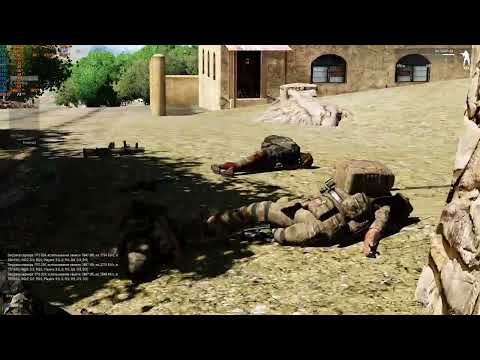
can confirm, with or without mods this is pretty visible and the more detailed is the LOD or texture the longer those unit elements hover over the actual body
eternal kraken
i also noticed this in v418 -> https://www.youtube.com/watch?v=0Mwe6AwEJf0
 knotty wraith
All that remains is to make it possible to edit the config via description.ext...
and all my wishes will be achieved)
hybrid cradle
Was having issues with certain parts of vehicles having lods change I believe(?) when partially occluded earlier... But was very tired so need to check after a nap, was with hatchet h60s so no vanilla repro atm
opal hound
Do you also get stutters with the final LoD of hatchet h60s?
knotty wraith
has it really happened and v7 has grown into v12 - the flight is excellent
I can’t imagine what you fixed there)
 vagrant zodiac
opal hound
Do you also get stutters with the final LoD of hatchet h60s?
vagrant zodiac
opal hound
Do you also get stutters with the final LoD of hatchet h60s?
That’s always been there on any branch, hasn’t it?
opal hound
Yeah I just wanted to confirm it happened for others. Very little chatter about it on hatchet channels
knotty wraith
HC dead
https://youtu.be/LIF9S3zJFxc
 indigo anvil
knotty wraith
HC dead
https://youtu.be/LIF9S3zJFxc
indigo anvil
knotty wraith
HC dead
https://youtu.be/LIF9S3zJFxc
probably dead because.. its headless you know 🙂
Sorry couldn't resist
empty goblet
knotty wraith
HC dead
https://youtu.be/LIF9S3zJFxc
crash or freeze ?
knotty wraith
empty goblet
crash or freeze ?
HC stopped responding, turned it off manually
empty goblet
knotty wraith
HC stopped responding, turned it off manually
i would suggest to take fullmemory dump of the HC process
knotty wraith
there was no crash, the HC itself did not die - there was no dump
he just stopped responding, fps on the HC is 0 and the bots are running in place
I started the HC manually, I’ll keep an eye on it - last time the newly launched HC didn’t last long
empty goblet
also note, it seems the GC bug (of not cleaning garbage) got fixed, somehow, silently, since 152431
spiral pond
is it possible mpMessageDetailsServer-DATE.log gets only filled if you run the server with -networkDiagInterval?
once i used it, i saw data logged to it; when removed again, the log remains empty essentially
knotty wraith
rolled back the server - the HC did not connect to the server
dusconnect HC
21:54:26 Player headlessclient is losing connection
21:54:31 Player headlessclient disconnected.
21:54:31 BattlEye Server: Player #0 headlessclient disconnected
connect HC
22:07:23 Player headlessclient connecting.
22:07:23 Player headlessclient connected (id=HC5364).
22:07:23 BattlEye Server: Verified GUID () of player #15 headlessclient
22:07:23 BattlEye Server: Player #15 headlessclient - Owner BE GUID: 8539e01499f87083b3a25eb30041261c
....
22:28:26 BattlEye Server: Ban check timed out, no response from BE Master
I have no more information for you
empty goblet
empty goblet
on 2.18.152434 now : ```
Warlords XL (so with AI)
85.190.148.53:2102
KOTH (no AI...
KOTH and Redux now on 2.18.152434
empty goblet
knotty wraith
I have no more information for you
like i said it needs snapshot of the state of the HC
knotty wraith
I'm already filming a video, tracking fps on HC, sending captureframe to Dedman...
I don't know enough English to understand exactly what else I have to do... It's easier for me to give you the server and see for yourself what's not working
 chilly geyser
knotty wraith
HC dead
https://youtu.be/LIF9S3zJFxc
chilly geyser
knotty wraith
HC dead
https://youtu.be/LIF9S3zJFxc
Same issue was in v9
knotty wraith
In a few days I'll try to make a trick and disarm the HC when it stops responding.
before creating units I will set a trap and if the HC stops responding, I will take the bots to the server and wait to see if the HCsomething like this can regain consciousness - without harming the game on the server
something like this
    VAR_FPS_HC1 = 0;
    _code = {
         VAR_FPS_HC1 = [diag_fps,diag_deltaTime,diag_fpsMin];
        publicvariableserver "VAR_FPS_HC";
    };
    waitUntil {
        if ((allPlayers select { _x isKindOf "HeadlessClient_F"}) isnotEqualTo []) then {[_code] remoteExec ["call", HC]; ffa_evo_allunitmax = 150} else {VAR_FPS_HC1 = [50]; ffa_evo_allunitmax = 100;FFA_FPSMIN = 20};
        sleep 2;
        ((round diag_fps) > FFA_FPSMIN && {VAR_FPS_HC1 isEqualType []} && {(VAR_FPS_HC1 select 0) > FFA_FPSMIN} && {count (allunits - allplayers) < 250}) ||  VAR_FPS_HC1 isEqualType 0
     };
    if (VAR_FPS_HC1 isEqualType 0) then {
        (allGroups select { side _x in  EVOR_var_SideEnemy && {count units(_x) > 0 }}) apply {
            if ((groupOwner _x) isNotEqualTo 2) then {

                _x setGroupOwner 2;
            };
        };
    };
then it will be interesting to check whether it is possible to kick the HC or even more - to make a restart, due to internal server commands
the most important thing is don't rush - and don't let it into the stable version of the game, after that we won't be able to play.
knotty wraith
and for amateurs like me, please clarify what I should do for reporting so that my testing capabilities give you complete information in all stripes
because everything is piled up: do this, do that, etc. I would like to see it step by step for dummies like me
here's the main one saying
ike i said it needs a snapshot of the state of the HC...
snapshot of the state of the HC - what is that?
Status snapshot in task manager? - sorry, but I need to explain this literally
spiral pond
what other game modes/events are using HC too? more reports should be helpful i think
not done yet, but some feedback or requests would be welcome: https://community.bistudio.com/wiki/Performance_Profiling
 silk pewter
Per-Frame Eventhandlers (PFH)
PFE? PFEH? 😄
also, let's try to make A3 content to this page https://community.bistudio.com/wiki/Arma_3:_Performance_Profiling and keep the old A2OA stuff in Performance_Profiling only - what do you say @spiral pond ?
knotty wraith
if to the very essence of the problem with the HC, then I think with my amateurish mind that on the HC side something accumulates, after which the HC simply stops responding and does not crash
 light cargo
silk pewter
> Per-Frame Eventhandlers (PFH)
PFE? PFEH? 😄
also, let's try to make A3 conte...
light cargo
silk pewter
> Per-Frame Eventhandlers (PFH)
PFE? PFEH? 😄
also, let's try to make A3 conte...
agreed
spiral pond
silk pewter
> Per-Frame Eventhandlers (PFH)
PFE? PFEH? 😄
also, let's try to make A3 conte...
the old page was largely useless and much of the current page is also valid for A2:OA
silk pewter
spiral pond
the old page was largely useless and much of the current page is also valid for ...
yeah I do not mean "revert back to old version" - but if there is a big overlap, then an A3-specific page may not be needed
Cc @quaint flame - do you think an A3-specific makes sense still?
spiral pond
like not all options are in A2:OA and you need to replace remoteExec with the old function, yet all the overall system and approach is the same. A3 "only" has more options (+tracy export) (+ the diag capture dialog has been visually improved)
silk pewter
thanks for the summary, I trust you on it (I did not check the page nor its history / A2OA/A3 difference!)
whole cloud
Can people even profile in A2OA? Are profiling binaries even available?
Ah the beta patches contain it
spiral pond
yeah Suma/Ondra made it available back then
whole cloud
*Only some of the beta patches contain it. The latest doesn't, or atleast no separate exe, the old wiki page didn't specify
light cargo
yeah that
spiral pond
i think only Sickboy, me and a few from the CIT (community issue tracker) crew did really use it in collab with Ondra/Bebul/Jirka
light cargo
can we have profiling exes posted for a2 in some big anniversary please?
spiral pond
possibly also Dwarden
whole cloud
I'm wondering if thinking about A2 data is even worth it, when its basically not available to be used except in some specific old outdated beta build
spiral pond
from what i understand Lou and R3vo wanted to keep it for historcal reasons? #community_wiki
light cargo
is there a big anniversary coming up anytime soon?
whole cloud
But the history is there anyway, just one button away
empty goblet
spiral pond
possibly also Dwarden
yep i did, was one of reasons there is split between profiling and performance
spiral pond
in A2:OA? 😄
light cargo
oa betas were performance exes?
empty goblet
light cargo
oa betas were performance exes?
no, it's but the experience with A2OA betas led to way we do it in A3 ... 😁
plus promise of more FPS always means more testers 
light cargo
empty goblet
no, it's but the experience with A2OA betas led to way we do it in A3 ... 😁
i see, btw would you temporarily host a2/oa servers for some significant anniversary event of those games?
or even tkoh xD
sorry for asking
 quaint flame
silk pewter
yeah I do not mean "revert back to old version" - but if there is a big overlap,...
quaint flame
silk pewter
yeah I do not mean "revert back to old version" - but if there is a big overlap,...
Of course
Except you wanna add "Only available in Arma 3" to every section
spiral pond
nice tidbit from the "old days" https://forums.bohemia.net/forums/topic/116740-resolved-flashing-rendering-artifact/?page=4&tab=comments#comment-1950012
PIX is still thing 😮 (low level GPU profiling) https://devblogs.microsoft.com/pix/gpu-captures/
https://forums.bohemia.net/forums/topic/134365-arma-2-oa-beta-build-98736-162-mp-compatible-build-post-162-release/?tab=comments#comment-2199390 only post I can find on profiling in A2:OA from Suma. from what i recall most info was post on CIT itself. i merged some to that wiki page
the late A2:OA were great, similar to Dedmen and KK efforts for A3 now. Ondra, Bebul and Jirka optimized, fixed and polish that RV engine version a huge deal back then. both performance (client) and AI numbers (server) were improve a great deal
knotty wraith
and what happened to Suma ? offtop
inland dew
no dayz -> no enfusion -> no reforger
knotty wraith
dayz became a big incentive - fact
spiral pond
knotty wraith
and what happened to Suma ? offtop
last offtopic: https://github.com/OndrejSpanel

GitHub
OndrejSpanel has 67 repositories available. Follow their code on GitHub.
knotty wraith
Forgive me... but I played Dayz for two years and was always thinking about how to transfer my mission from A3 to the Dayz engine (after that a mod for AI appeared), Dayz has an ideal client part for me: you just get high from looking at the character + everything else
- Chernarus is the most beloved
 random isle
umm with latest pref -limitFPS=60 stopped working for HC
 haughty dirge
is the latest update considered stable? or was it v9 that is still good to use
whole cloud
random isle
umm with latest pref -limitFPS=60 stopped working for HC
its running higher? or lower?
whole cloud
haughty dirge
is the latest update considered stable? or was it v9 that is still good to use
so far no crashes
haughty dirge
excellent, thank you for the hard work because the weekend begins now
random isle
whole cloud
its running higher? or lower?
higher, was at 360 ish
empty goblet
server 2.18.152434 , user running allowed client mod but not allowed RE
2024/11/22, 18:31:51 Scripting function 'bloodlust_onunithitpart' is not allowed to be remotely executed
2024/11/22, 18:31:51 >redacted< (>redacted<) tried to remoteExec a disabled function: 'bloodlust_onunithitpart'
2024/11/22, 18:31:52 Scripting function 'bloodlust_onunitexplosion' is not allowed to be remotely executed
2024/11/22, 18:31:52 >redacted< (>redacted<) tried to remoteExec a disabled function: 'bloodlust_onunitexplosion'
spam of this then
2024/11/22, 18:32:04 Server: Network message 8fc6a5 is pending T_466
2024/11/22, 18:32:04 Server: Network message 8fc6a5 is pending T_466
2024/11/22, 18:32:06 Server can't keep up, too many incoming network messages. Remaining in queue: 6501
2024/11/22, 18:32:06 In last 5000 miliseconds was lost another 2 these messages.
this what lag issue reported to me by players server got like frozen , the mod in question https://github.com/gnalvesteffer/BloodLust/blob/65153692116a9df9fa4db185c12858aad5eb09a2/%40BloodLust/Addons/BloodSplatter/Scripts/MultiplayerCompatibility.sqf
GitHub
That ArmA3 mod that adds all that gore. Contribute to gnalvesteffer/BloodLust development by creating an account on GitHub.
minor geode
random isle
umm with latest pref -limitFPS=60 stopped working for HC
which build? 2.18.152434?
random isle
minor geode
which build? 2.18.152434?
v12
empty goblet
empty goblet
on 2.18.152434 now : ```
Warlords XL (so with AI)
85.190.148.53:2102
KOTH (no AI...
i would say KOTH runs smoother than with previous build on 100 players ... will know more thru weekend
 runic sigil
How large is the download when switching to or from perf/prof branch in steam?
Approximate size is good enough
And can it cause any issues for my profile or settings in arma?
whole cloud
50mb, should not, generally doesn't, never heard of it
ashen helm
the only issue I found while switching between branches (or when perf updates) is that the launcher language changes to system's even if in the launcher options it's still English
light cargo
haughty dirge
is the latest update considered stable? or was it v9 that is still good to use
v9 was problematic, v5 was the last good before the current one
light cargo
runic sigil
How large is the download when switching to or from perf/prof branch in steam?
A...
its just exes not data, profiles remain compatible, that's the point of this branch
heavy vortex
empty goblet
server 2.18.152434 , user running allowed client mod but not allowed RE
> 2024/...
You allow Bloodlust on your servers?
That doesn't seem like a good idea :P
fickle geyser
xD took me 30s to find script injection in it
which servers do run it so I can test? 😈
opal hound
oh lol I see it
fickle geyser
don't run it on public servers, fun.
 opal hound
Hahaha
 marsh gyro
Has the profiling server build been updated in the past couple weeks? I normally run my server on profiling with no issues but past couple weeks have been having crashes and a lot of strange problems.
hybrid cradle
read the pins
marsh gyro
Yeah that explains it
hybrid cradle
as it often if not always does
 last burrow
One of the recent updates broke the JIP and global compatibility with setObjectTextureGlobal for users on PROFILING. If setObjectTextureGlobal is ran on another client or server the new texture is not observed on other clients who are using PROFILING branch. If a player who is on profiling uses setObjectTextureGlobal they will see the texture until they relog, the texture is visible to other players not on PROFILING.
naive osprey
last burrow
One of the recent updates broke the JIP and global compatibility with setObjectT...
I did notice a few strange issues with observing textures set from other clients/server on latest profiling via setObjectTextureGlobal. I can't confirm exactly, but these were live retextures on vehicles that werent players(didnt check players), not done by JIP. Will test when my power is back on.
I'm going to assume it is probably related to the recent player/container texture changes
knotty wraith
hmm, is this the reason why I have invisible bots - one player sees it, the other doesn't
feral harness
naive osprey
I'm going to assume it is probably related to the recent player/container textur...
shouldnt affect vehicles
feral harness
last burrow
One of the recent updates broke the JIP and global compatibility with setObjectT...
is the server on profiling?
last burrow
feral harness
is the server on profiling?
No, found it and tested it on multiple offical servers
 cloud sky
Btw, can Arma use large memory pages without admin privileges if "lock pages in memory" setting is enabled in group policy (and the account running Arma is included there)? I googled quite a bit and didn't find a clear answer
empty goblet
heavy vortex
You allow Bloodlust on your servers?
it was because Redux guys wanted to test it 🤣 well ... it's gone
empty goblet
cloud sky
Btw, can Arma use large memory pages without admin privileges if "lock pages in ...
it should because that is the whole point of the lock pages in memory gpolicy
cloud sky
empty goblet
it should because that is the whole point of the lock pages in memory gpolicy
Yeah – but does it really work without running Arma as admin? I tested it some time ago and large pages were being used only if I ran Arma as admin, despite of the lock pages privilege being enabled on non-admin users as well
I'm wondering whether it's a user error or not 😅
empty goblet
well does the process it's started from or the arma process contain the privilege flag ? because if it don't then it's problem of assigning the flag to the process (inheritance from the other process shall exist)
heavy galleon
@empty goblet quick question, what is the current stability of performance server?
Running an event tomorrow and would like to avoid angry players if it is prone to crashing
cloud sky
empty goblet
well does the process it's started from or the arma process contain the privileg...
I've been using mostly nssm to launch the server, not only but also because it lets you to choose the account for the process. I wonder if nssm itself somehow messes up the setting
heavy galleon
We've crashed way too often lately
empty goblet
heavy galleon
<@94784638945337344> quick question, what is the current stability of performanc...
no crash in 431 nor 434 at any server running it, yet
heavy galleon
empty goblet
no crash in 431 nor 434 at any server running it, yet
Ok, sounds like I'll risk it then.
empty goblet
cloud sky
I've been using mostly `nssm` to launch the server, not only but also because it...
also i think MS improved / change the way how the gpolicy works because recently if you add account, it adds machine identifier, while before it was often adding the account w/o the machineID , so maybe it just needs readd the local accounts
heavy galleon
(no one will come next time if it crashes again )
cloud sky
empty goblet
also i think MS improved / change the way how the gpolicy works because recently...
Hmm, interesting, have to try it out. Thanks for the tip!
empty goblet
heavy galleon
(no one will come next time if it crashes again <:copium:925376582980341791>)
always remember to deliver the logs+dump files to us
heavy galleon
empty goblet
always remember to deliver the logs+dump files to us
Always. It's just Linux, so dedmen don't like it
 lost knoll
Is it actually worth using the extra threads setting for File operations, Texture Loading and Geometry loading anymore?
 plain trout
Arma is doing that automatically
 clever roost
should really cull unused params that no longer apply
light cargo
empty goblet
it should because that is the whole point of the lock pages in memory gpolicy
what's the point of the huge pages command line argument then?
@tawdry gazelle hey excuse me, about mimalloc, is it a expected bug that arma 3 freezes when loading a mission with 2 cores when using mimalloc? i cannot reproduce this with default allocator
light cargo
oops
empty goblet
20:52:18 Player >censored<: Wrong signature for file a3\data_f\penetration\wood.rvmat
happened with ~135 players on KOTH server
same player was playing fine before and after that
 kindred radish
Signature kicks can be totally random, always had high ping / bad internet clients get constantly kicked due to that.
Everytime it was a different file, re-download / verify of game files etc (no difference).
Deleting Arma's appdata files solved it for a while for these clients.
It's some "netcode issue"
feral harness
last burrow
No, found it and tested it on multiple offical servers
I will have a look
knotty wraith
empty goblet
> 20:52:18 Player >censored<: Wrong signature for file a3\data_f\penetration\woo...
I just want to say - let them check the hash sum... 😏
empty goblet
knotty wraith
I just want to say - let them check the hash sum... 😏
ye but that one player keep playing just fine so this feels more like some message didn't reach server and he got kicked
might explain some of those random kicks
chilly geyser
Guys, v12 server is stable?
heavy vortex
So far, apparently.
whole cloud
Anyone else noticed something wrong with shadows?
Turn on shadows and fps drops to ~10, turn em back off and back up to 70+
 midnight oyster
whole cloud
Anyone else noticed something wrong with shadows?
Turn on shadows and fps drops ...
midnight oyster
whole cloud
Anyone else noticed something wrong with shadows?
Turn on shadows and fps drops ...
I thought shadows always worked like this?
whole cloud
plain trout
Shadow drawing distance isn’t fixed
Define what you mean.
I didn't have an issue with that, shadows off and whatever distance is set to didn't matter
whole cloud
midnight oyster
I thought shadows always worked like this?
yeah shadows drop like 10fps, but not drop from 70 down to 10
plain trout
The thing I mentioned a few months ago, that disabling shadows doesn’t disable shadow calculations.
If I turn on shadows with latest v11 I lose 50% fps and GPU goes to 100% on a 4090
whole cloud
But I tested that today and it worked.
You having alot more fps with shadows off, sounds like disabling shadows disables shadow calculations, so sounds like its working?
plain trout
Reducing shadow drawing distance enhances FPS even more tough
feral harness
naive osprey
I'm going to assume it is probably related to the recent player/container textur...
Yeah, it might misbehave if the clients/servers are mismatched. Going to add some backward compatibility but as long as not everyone is on prof, the new system wont work properly
hybrid cradle
Just had problem where CBA target events were absolutely refusing to work on latest prof... Relogging to see if it fixes it at all
weird as fuck, relog seems to have fixed it
feral harness
So if player on profiling sets texture on uniform, player not on profiling wont see the change. Player on profiling will see all the changes fine but player not on profiling can mess indexes, as before the changes. also server not on profiling will overwrite wrong index as before the changes.
We can revert uniform improvements after a bit more testing
rev 152440
empty goblet
funny ... one of official servers downloads some weird profiling mix instead of main branch, while steamcmd clearly defined to download main branch
harsh grotto
dedmen secretly hijacked the server
runic sigil
whole cloud
Anyone else noticed something wrong with shadows?
Turn on shadows and fps drops ...
Yeah, but not fps issues
Found a shadow view distance bug while playing the campaign,
At certain angles in a certain location , the shadow view distance becomes 0
Occurred in 1st person, 3rd person, and 1st person in a vehicle
(bearings 233 and 305 at south side of gridsquare 053172 of altis on the road)
Most noticeable as a bright flicker across the screen when looking around
Uncertain if this is a perf-prof issue or an old unnoticed bug, but noticed while using v12 (steam)
I am using mods, and will try to reproduce without mods later
I have screenshots, but can't post them in this channel
Didn't encounter extreme fps drops from shadows, just tested in the location above
Was some, but not significant, 60fps without, 50~45 with shadows very high and distance 120, ~30fps with shadows and shadow distance maxed
runic sigil
Occurred a couple of times in Gori base as well, not as severe, but still shadow flickering
Appeared to be specific objects not casting shadow, instead of shadow distance 0
Both times I was looking away from the sun
 gusty viper
I’m still seeing a lot of flashing uniforms, backpacks, weapons etc on soldiers. It looks a bit like LOD changing, but with the things snapping into place on the soldier…
gritty wasp
Issue that shadows keep compute something even if it is disabled can be easily checked in yaab.
For me
Disabled 100m - 95fps
Disabled 300m - 90fps
Disabled 1500m - 88fps
Disabled 3000m - 88fps
Probably it trying to get objects in radius even if that is not needed.
Maybe disabled setting should block slider and set value to minimum.
I don't have drop down to 10fps on shadows settings change, but it have 10fps impact
Disabled 100m 95fps
Any other setting 100m 86-88fps
On stable almost same behaviour but overall fps lower.
Std to ultra 68-69
Low 81 (on perf it gives no benefit)
Disabled 89
vivid rune
whole cloud
Anyone else noticed something wrong with shadows?
Turn on shadows and fps drops ...
If you start "Lost Signal/Eastwind Campaign" during the intro on the beach you can see the shadow of a tree near by. It switches back and fort between different appearances. It looks like it is "screen space shadow rendering": If the tree is inside the view the shadow is high quality. If the tree is not in sight the shadow switches to a different (low poly?) thing. Idk if this is related to the animation bug or your shadow thing.
All graphics option on extreme.
 lethal forum
I have had another effect from disabling shadows, a week ago I mentioned here that with 4090 5800x3d (5120x1440) on king of the hill my gpu would drop to 1000mhz in towns when there was alot of players or ingame. The last few days Ive noticed that my gpu never goes below 2500mhz in towns the lowest fps i would see wzs 52-55 fps. This morning I tried with just disabled shadows everthyhing ultra like usual and my gpu stayed at 2800mhz the whole playthrough never dipped below 75fps.
inland dew
something isn't right with shadows since the update with extreme settings
before that it always worked juste fine
lethal forum
all I know is disabling them keeps my gpu at 100% that never happened before on KOTH
 tawdry gazelle
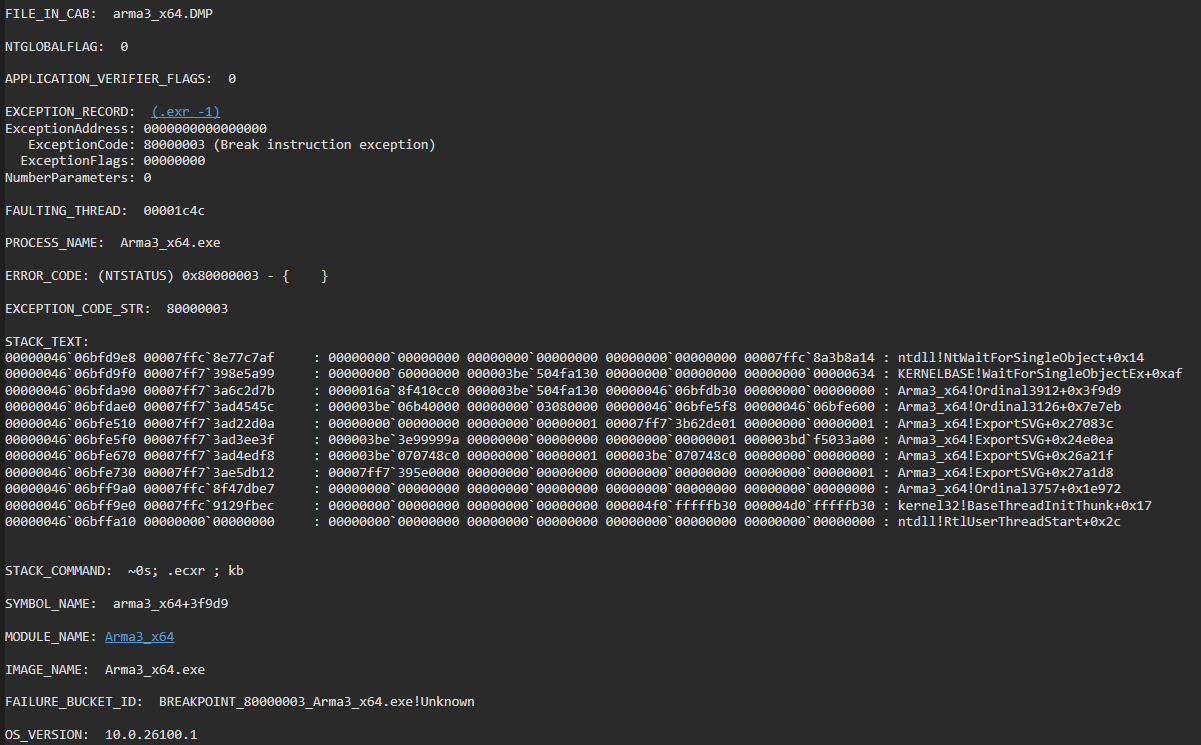
@whole cloud Hi, setting -cpuCount=2will cause game hangs forever after a scenario is loaded. Looks like a dead lock issue.
I am on Perf v12, so I am not sure if it also happens on default branch.
tawdry gazelle
tawdry gazelle
<@90532520101183488> Hi, setting `-cpuCount=2`will cause game hangs forever afte...
 knotty wraith
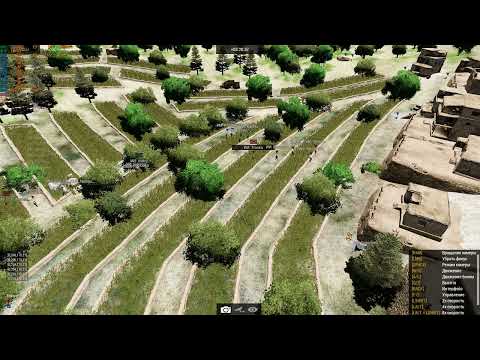
Don't you think that grass absorbs a lot of fps, although the very factor of the presence of grass in the game is a questionable fact, especially in a game with AI. Perhaps something can be fixed here?
https://youtu.be/1tS1FzhZV78
I have to notify the tool I use
#production_releases message
 heavy galleon
Where are core dumps on linux (server binary)? 
/var/lib/apport/coredump/ for reference
dedmen sending you a dessert for tomorrow
 plain pagoda
Throwing a question in here since I was pointed this way by the subreddit, will the server executable be gaining multithreading support as well once this setup hits the live version? Just curious as, while client-side performance is always good to have, my unit is really keen on whether or not we'll see some greater ability to scale up missions once this lands.
 void badger
It's kind of an unknown if any performance/profiling branch changes will hit live/release builds when new updates roll out. Might else well throw in the binary and unlock that performance now- it's good enough for KOTH servers
gritty wasp
plain pagoda
Throwing a question in here since I was pointed this way by the subreddit, will ...
Obviously it already has. Server and client share same algorithms.
plain pagoda
“Obviously” thanks mate, was asking because I didn’t know
plain pagoda
void badger
It's kind of an unknown if *any* performance/profiling branch changes will hit l...
Cheers for a helpful answer
quaint flame
So we did a playtest yesterday running the latest profiling on the server and clients and subjectively we had a much better experience playing the Operation Cobra campaign. While the frames weren't much better from what we can tell, the 1% low seemed better resulting in an overall smoother experience.
It also felt like the Ai was more responsive. Perhaps because the server has more time to do the Ai calculations.
On the other hand, scenarios that featured many vehicles didn't seem to improve much, if at all. I think that's to be expected as most time was spend on simulation ?physix?
The only issue we noticed was the weird behaviour of equipment on corpses. They were constantly changing their positions, moving up and then snapping back to their original position.
Edit: I personally had issue with Arma blackscreening if capturing a frame to file and tabbing out of the game. The game itself didn't crash but wouldn't recover. I will see if I can reproduce that in SP as well.
@spiral pond Anything you want to add?
spiral pond
For the DS as best as I can tell the PX3 MT is the most impactful optimization as in vehicle heavy missions, it was the limiting factor. Our DS remained all the time between 45-50 fps (max).
We were only 3-5 players, yet for SPE missions even a higher player count (up to 24 in campaign, and up to 6/10 for the scenarios) should not matter.
AI pathfinding for both infantry and vehicles seems to have worked better - especially infantry was very fast moving, also quick to act (the rare exception of AI being dump). I'd assume its a result of server can give AI full resources. A few other campaign missions of SPE would still be interesting to check out too.
On the client the render MT should be the most impactful (and to some extent other MT and async optimizations). Certainly helps to improve the fps a good deal.
That said the benefit is most relevant in non combat/busy situations - otherwise general simulation (units/vehicles/objects/etc), AI, sound have more influence over your overall FPS.
This is even more true in SP when your PC has to handle all simulations part.
So in simple terms in previously low fps situations, probably you wont see that much improvements, while in general you see a good boost.
Beyond that certain events like explosions and anything file loading seems most impactful on FPS.
One more notable thing to mention: Usually in PZKW the advancing mobile tanks have a bad time against the static defensive enemy tanks (aka not hitting or even target acquisition). This time the attacking tanks rolled over the defenders with ease. This would need further verification to confirm, yet it seemed quite different to before.
whole cloud
plain pagoda
Throwing a question in here since I was pointed this way by the subreddit, will ...
#perf_prof_branch also exists for server, and contains the same changes for server too. Whether these things will his stable at 2.20 is still to be determined
whole cloud
quaint flame
So we did a playtest yesterday running the latest profiling on the server and cl...
I think that's to be expected as most time was spend on simulation ?physix?
But physx is MT now, so if it was physx then it should be improved.
whole cloud
quaint flame
So we did a playtest yesterday running the latest profiling on the server and cl...
tabbing out of the game
There is a freeze when tabbing out that I probably can't fix (When GPU crashes, it freezes instead of throwing error and dying), just run windowed fullscreen please
whole cloud
tawdry gazelle
<@90532520101183488> Hi, setting `-cpuCount=2`will cause game hangs forever afte...
Thanks, fixed tomorrow
Shadow performance, the distance, and the LOD flicker issues are next focus. But tomorrow will have a build before I can get to them
hybrid cradle
we appreciate you
feral harness
quaint flame
So we did a playtest yesterday running the latest profiling on the server and cl...
about equipment, was it once for each corpse after some time after death or was it constantly for the same corpse? Some kind of equipment jolt was always present when containers were rearranged after death
eternal kraken
for me simple to reproduce. start arma 3, start eden editor, place player, place enemies, play as MP mission, kill enemies, see bug! -> https://www.youtube.com/watch?v=yOAbrR7nin0
 quaint flame
It was constantly. Even for units (not sure if dead) inside vehicles.
spiral pond
its proxy positions resetting or sth along the lines i think
happens headgear and backpack, for both alive and dead infantry, and crew in vehicles
it might related to LOD level changes, as it seems to happen at least most when you approach an object; tricky to say just visually
empty goblet
server weekend summary, several server crashes, likely related to physx ... dumps already by dedmen
weird jittery desync past 120 players on KOTH server
light cargo
tawdry gazelle
<@90532520101183488> Hi, setting `-cpuCount=2`will cause game hangs forever afte...
can always switch to stable :)
hybrid cradle
Damn no way
Gosh I'm shocked nobody else thought of that
What would we do without your contributions
light cargo
lol
spiral pond
Dedmen can a HC do a frame capture to file?
neither diag_captureFrame 1 nor diag_captureSlowFrame ["total", 0, 0, true, 1] via CBA console remote execution works (only for server and client+server respectively)
opal hound
Doesn't headless imply no graphics?
analog acorn
non-graphics things are also part of a frame in Arma
eternal kraken
spiral pond
Dedmen can a HC do a frame capture to file?
neither `diag_captureFrame 1` nor `...
have you tried it with a mod? "Headless Clients are excluded from signature verification, therefore any mod can be used with the "-mod=" option."
i dont have time to test it now but maybe you can try it
spiral pond
not following. the HC runs CBA_A3 and i can execute code on it.
the problem may just be the HC isnt set up to do frame captures (to file - as it has no interface, only to file makes sense)
eternal kraken
i totally understood, mod contains diag_captureSlowFrame ["total", (1/50), 0, true, 999]; i only want to help.
you will find a solution 🙂
spiral pond
(another problem mentioned before and made a ticket that all the logs lack mostly any context information - so it can be tricky to match to the source)
chilly geyser
One more bug. If server is perf or prof and player on stable then when the vehicle is repainted via setObjectTextureGlobal, the player’s texture color does not change
On perf or prof clients all ok
empty goblet
noticed server sometimes hangs (freeze) after #shutdown issued , after very long session
heavy galleon
chilly geyser
One more bug. If server is perf or prof and player on stable then when the vehic...
we actually saw something different
when vehicles had chosen skin through garage, it was "random"ish. Server perf, clients both (mostly perf I would say), some saw correct texture, some saw wrong (default) texture
Using setObjectTextureGlobal on it however fixed this issue and everyone saw it correctly
(I am just very midly angry, as I got shot down by pressumed friendly...)
feral harness
texture issues should be corrected in next perf
heavy galleon
good, now just gotta wait for the nightmares of my wingman shooting at me to stop.
cloud sky
We're testing an AI heavy mission (Warfare/CTI) with AI commanders. We're using 1 HC and offloading stuff to it as much as possible (both AI and scripts).
On stable branch, server FPS dropped by a lot during 12 hour match (from ~170 to ~40) and things started breaking near the end of test – this has been the case for years, rendering the whole mission basically unplayable.
With performance build, FPS has remained basically the same (~170) during the whole 12-hour match! I'm stunned by the difference 👍
cloud sky
Also, we're using mimalloc (the lock pages version), although I'm not 100 % sure whether the large pages flag is set or not by Arma. (Group policy has been edited to enable lock pages.) Server is using 16,5 GB of memory after 13 hours
whole cloud
gritty wasp
Issue that shadows keep compute something even if it is disabled can be easily c...
??
gritty wasp
Slider works.
Disabled 100m and Disabled 3000m gives different fps in yaab I didn't mean fps counter in menu
whole cloud
runic sigil
Yeah, but not fps issues
Found a shadow view distance bug while playing the camp...
Can't repro like that. Probably only in some fixed time/environment
harsh grotto
gritty wasp
Slider works.
Disabled 100m and Disabled 3000m gives different fps in yaab I did...
yaab does not consistently give the same FPS, maybe you are lucky, check 2-3 times
gritty wasp
harsh grotto
yaab does not consistently give the same FPS, maybe you are lucky, check 2-3 tim...
Yaab error is about 2 fps.
95 vs 88 far beyond error margin
harsh grotto
ill check
 pallid plover
Hello! Hows the multicore addition going? Is there an eta or somethimg?
whole cloud
vivid rune
If you start "Lost Signal/Eastwind Campaign" during the intro on the beach you c...
East wind/Signal Lost.
Intro at beach, I see tree nearby. You mean that disappering blob?
woven loom
gritty wasp
Yaab error is about 2 fps.
95 vs 88 far beyond error margin
Actually YAAB error can be within a few percent, not 2 fps, from my own testing
whole cloud
I can reproduce that same shadow blob disappearing, on 2.18 stable. That's not a new issue.
harsh grotto
gritty wasp
Yaab error is about 2 fps.
95 vs 88 far beyond error margin
I just checked 2 times, cant confirm, the difference in average fps is 0.8
whole cloud
eternal kraken
for me simple to reproduce. start arma 3, start eden editor, place player, place...
YouTube didn't like you killing people
 whole cloud
eternal kraken
for me simple to reproduce. start arma 3, start eden editor, place player, place...
whole cloud
eternal kraken
for me simple to reproduce. start arma 3, start eden editor, place player, place...
gritty wasp
woven loom
Actually YAAB error can be within a few percent, not 2 fps, from my own testing
Will repeat later tonight.
Obviously who will try to check should not press S on run
whole cloud
I found this though
whole cloud
spiral pond
Dedmen can a HC do a frame capture to file?
neither `diag_captureFrame 1` nor `...
Its supposed to
whole cloud
pallid plover
Hello! Hows the multicore addition going? Is there an eta or somethimg?
It is already there? For about a month now. You are in #perf_prof_branch channel.
eternal kraken
whole cloud
<:blobdoggoshruggoogly:748124048025714758>
maybe has something to do with the ingame settings, i will do some checks
eternal kraken
whole cloud
<:blobdoggoshruggoogly:748124048025714758>
have you started a fresh A3 game, you need a fresh gamestart to appear!
hybrid cradle
I had a handful of instances over two ops on the weekend where the building I was inside of disappeared on prof branch for a few frames - was running ~70 mods but was a vanilla building
eternal kraken
yes, when i start a3 and went into editor like shown in my YT video i see the bug, when i hit restart mission then no bug
hybrid cradle
Dunno if that's a known issue or not tho
pallid plover
whole cloud
It is already there? For about a month now. You are in <#105466848958513152> cha...
I mean in stable branch
woven loom
gritty wasp
Will repeat later tonight.
Obviously who will try to check should not press S on...
I can confirm your results so far though, and I think the reason is that shadows aren't completely disabled — there seems to be a fuzzy "spot" shadow below each character even when shadows are disabled. Need to see if it's just when extreme shadow distance is enabled.
Shadows disabled, 100m, 3 runs
87, 90.4, 91.4
Shadows disabled, 3000m, 2 runs (no restart)
80.6, 81.4
Same but after restart: 79.4
Just moving the shadow distance slider in the post scenario scene (with shadows disabled) causes a proportional change in FPS from ~92 @ 3000m to ~122 @ 200m or less (seems to be a very small 1 fps change from 5 to 200)
Turning shadows on to ultra on this post-scenario scene @ 100m drops the fps from 122 to ~117.
#dedmenplsfix
ashen helm
pallid plover
I mean in stable branch
then why are you asking in a channel for performance branch?
ashen helm
whole cloud
I found this though
this keeps happening with Enoch gates too
the shadow flicker issue can be technically avoided through increasing the shadow render distance, but the objects disappearing in peripheral vision is annoying. Possibly a few times I got stuck on a gate that would be invisible until I actually center my screen on it.
whole cloud
woven loom
I can confirm your results so far though, and I think the reason is that shadows...
ambient occlusion is different from shadows
 somber plank
eternal kraken
for me simple to reproduce. start arma 3, start eden editor, place player, place...
somber plank
eternal kraken
for me simple to reproduce. start arma 3, start eden editor, place player, place...
can repro this on prof as well, only happens first run of the mission
whole cloud
Just moving the shadow distance slider in the post scenario scene (with shadows disabled) causes a proportional change in FPS from ~92 @ 3000m to ~122 @ 200m or less (seems to be a very small 1 fps change from 5 to 200)
But why can I not reproduce that :/
That is exactly what was originally broken, and which I've fixed
woven loom
Weird! I'm on steam perf/prof branch
7800X3D, 4070 Ti, 32GB RAM, Win 10, variable refresh monitor
cloud sky
ashen helm
the shadow flicker issue can be technically avoided through increasing the shado...
Maybe it's quite old engine code? Exactly the same bug appears in Arma 2: OA/CO pretty often
MG nests, hangars, etc.
woven loom
cloud sky
MG nests, hangars, etc.
Light beams (from the light house), tank barrels...
pallid plover
ashen helm
then why are you asking in a channel for performance branch?
Sorry I have no idea how any of this works, I just wanted to know if there is an ETA for when the multicore feature is going to make it to Arma 3 stable or however the version you get when you first download Arma 3 for Steam is called.
hybrid cradle
no
there is no eta for anything making it from profiling/performance to stable
ever
somber plank
somber plank
can repro this on prof as well, only happens first run of the mission
seems to happen when it switches LOD, can cause it by zooming into causing the vest/belt to upgrade its LOD level
naive osprey
Flipping a coin is the best estimate you will get
pallid plover
hybrid cradle
no
understood, thanks
hybrid cradle
"maybe" with the next platform update. when is the next platform update? when its ready
dedmen may also forget to merge it (again)
whole cloud
Just last week I picked all the performance changes out and marked them so they cannot accidentally make it to stable.
We might even keep them #perf_prof_branch only for even next game update
whole cloud
The flickering I found on the beach scene, seems to be a performance improvement that is already supposed to be disabled.
Even with it disabled there must still be something wrong with it
somber plank
performance DLC
hybrid cradle
Multi threaded hearing aids
hybrid cradle
caused by code committed before i was born no doubt
cloud sky
whole cloud
This is 2.18 stable..
Looks exactly the same than in A2
hybrid cradle
so probably then
 spice dirge
i like how the boulder at the left disappears together with unrelated shadow on the right
whole cloud
The shadow on the right, is a tree on the hill on the left
The whole grid cell on the left disappears. Seems there is a cell border right infront of player there
Like here, there is a cell on the left, and all of it disappears, it probably thinks its not in view

Even weirder
 orchid mesa

whole cloud
I need a minecraft like chunk borders display. Surely that must already exist somewhere
spice dirge
like example at https://community.bistudio.com/wiki/getTerrainInfo or something?
whole cloud
yeah the land grids
silk pewter
whole cloud
I need a minecraft like chunk borders display. Surely that must already exist so...
ez, just use Enfusion for the terrain 😛
whole cloud
spice dirge
like example at https://community.bistudio.com/wiki/getTerrainInfo or something?
yep, just need to change the params a bit
Everything in the cells left of the house disappears, including the tree ontop of mountain there
Probably just a off by one error somewhere.
 whole cloud
Do you mean the flicker only happens one time, not repeatedly?
whole cloud
whole cloud
Do you mean the flicker only happens one time, not repeatedly?
People are reporting flickering to be so much of a problem that they are switching away from prof branch.
Surely that tiny bit of flicker that only happens once when a model LOD is loaded, isn't that. Or is that really all of it?
I can probably not reproduce that, because my object quality is on extreme and all these meshes are already loaded when I start that mission
hybrid cradle
I've had minor flickering on bodies etc but I have no idea what is actually causing it
Definitely not enough for the perf gain to not be worth it
whole cloud
Well I found where the issue is, we even have some debug image output in there.
Green dot is the camera position, and... turquoise? are the cells that are visible in camera.
Working is first, broken is second
In broke case, the cells left/right of camera, are excluded

 somber plank
Flicker is definitely more noticeable on prof but I wouldn't call it unplayable
stable: https://cdn.koekje.dev/kUNU6/yIgUdIko23.mp4/raw
prof: https://cdn.koekje.dev/kUNU6/GoqUTAwE66.mp4/raw
whole cloud
whole cloud
Well I found where the issue is, we even have some debug image output in there.
...
🤓
 whole cloud
somber plank
Flicker is definitely more noticeable on prof but I wouldn't call it unplayable
...
whole cloud
somber plank
Flicker is definitely more noticeable on prof but I wouldn't call it unplayable
...
The default mesh without animations is standing upright in a similar pose, so you barely notice it.
You see it alot more when they are laying down, because then the flickering model is standing upright. But still IMO barely noticable if it just happens once
ashen helm
it happens once per each unit you apprach.
so it kinda can go for a few hours depending on how a mission is designed
whole cloud
 vivid sky
Hello guys, is it possible that in the recent update had made the performance worse?
whole cloud
Everything is possible, but could you describe why you are asking?
vivid sky
vivid sky
Hello guys, is it possible that in the recent update had made the performance wo...
Before the update i had in benchmark an average of 127fps now i get an average of 97-94fps
whole cloud
The last update was v12, which had no performance changes
restive pilot
are you talking about the stable branch update?
somber plank
v13 actually 
1 minute ago
vivid sky
whole cloud
Everything is possible, but could you describe why you are asking?
Okay i didnt touch any settings so thats why i got curious
vivid sky
restive pilot
are you talking about the stable branch update?
Sorry i disnt say the update im meaning, its the v2.18 the profiler got some changes in that update no?
whole cloud
2.18.152442 new PROFILING branch with PERFORMANCE binaries, v13, server and client, windows 64-bit, linux server 64-bit
- Tweaked: Added option to diag_remainsCollector to return override times
- Fixed: Issues with changing Uniform/Backpack textures and JIP
- Fixed: Freeze with -cpuCount=2 (thanks Gold John King)
Known issue: Rare crash in PhysX (observed only on Dedicated Server)
If you don't want to use the Steam branch, the files are also available for alternative download here:
https://drive.google.com/drive/folders/15p9j7C2nHUt6NoVfChX4YFuqzFXzblJh
whole cloud
whole cloud
2.18.152442 new PROFILING branch with PERFORMANCE binaries, v13, server and clie...
eternal kraken
whole cloud
I can probably not reproduce that, because my object quality is on extreme and a...
tested again with object quality extreme and the bug is still there -> https://www.youtube.com/watch?v=sx1KphqvgCg
 whole cloud
This works too 😄
ashen helm

 plucky field
Had the same in a mission recently. Takistan, happened when I was peeking around a house. If I got too close to the house, but still able to see around the corner, everything would disappear - rocks, enemy soldiers. Moving a bit further away would show everything again, just like in the video.
empty goblet
whole cloud
I found this though
this is the bug i was getting with the 2 rocks and bushes at once ! (if you remember the pics i sent ya)
plain trout
If you go on a 32:9 screen this is also happening to clouds if you use the default zooming out toggle.
empty goblet
frustrum issue ?
empty goblet
knotty wraith
Don't you think that grass absorbs a lot of fps, although the very factor of the...
ye but is it all grass or specific types of grass doing it ?
empty goblet
somber plank
Flicker is definitely more noticeable on prof but I wouldn't call it unplayable
...
the flickering and lod edges z-fighting is really annoying over time (the longer mission runs) and also on destroyed / damaged structures and the more far it is ... (precision issues)
restive pilot
empty goblet
the flickering and lod edges z-fighting is really annoying over time (the longer...
Fun fact: if you place an object close to camera it gets worse because the game adjusts the near plane distance based on closest object
whole cloud
Welp easy fix, just turn on floating point precise mode, and the bug is gone 😄
whole cloud
eternal kraken
tested again with object quality extreme and the bug is still there -> https://w...
You can also reproduce this just in editor in VR.
Place unit (far away from camera), go to attributes and set them to be lying down.
Then slowly fly camera towards them.
But I placed about 20 units, I only get slight flicker on seems to be helmet goggles and nvgoggles and head model.
Only on the front two of all the units, and also only in one flyover
silk pewter
arma3.exe -noFlickering should do
 autumn timber
restive pilot
Fun fact: if you place an object close to camera it gets worse because the game ...
autumn timber
restive pilot
Fun fact: if you place an object close to camera it gets worse because the game ...
Woah! I finally understood why the issue (z-fighting) was especially visible when peeking through walls 🤯
whole cloud
@vivid rune Can you make a video of the animation stutter? I see nothing in Signal Lost.
empty goblet
whole cloud
Welp easy fix, just turn on floating point precise mode, and the bug is gone 😄
or just use logarithmic depth buffer and switch to higher precision 🤣
restive pilot
empty goblet
or just use logarithmic depth buffer and switch to higher precision 🤣
Yeah actually I think logarithmic z buffer is worth a try
whole cloud
In "Signal lost" (Kerry wakes up on the Beach of Altis) the stand up animation freezes if he put his left hand in the sand for a couple of seconds. After that it cut after some seconds to the next animation.
Cannot reproduce in v13 profiling
Or am I just not seeing it?
knotty wraith
empty goblet
ye but is it all grass or specific types of grass doing it ?
In my experience, any grass uses up fps. I haven't compared which one and how much.
whole cloud
empty goblet
or just use logarithmic depth buffer and switch to higher precision 🤣
Mh looking at that..
There is a bug in the code that selects what precision it uses for the depth buffer.
The (hand written...) for loop, was typoed and it iterates through a two element array using the length of a different array, thinking its a one element array.
When trying to select depth buffer, it has choice between a 16bit and a 24bit one. It only checks the 16bit and takes that one. Even though someone clearly put the 24bit one there thinking it could be chosen
quaint flame
plain trout
If you go on a 32:9 screen this is also happening to clouds if you use the defa...
Yeah Clouds are super Buggy
whole cloud
Is there some z-fighting repro to test? I don't know what to look for
Mh we have multiple depth buffer setups, one with clearly wrong code selecting 16bit, and another using 24bit.
Maybe 32bit would work too
restive pilot
When I extracted the depth buffer it was 24 bits, never 16
empty goblet
old article from 2009 when outtera guys fiddled with log Z buffer https://outerra.blogspot.com/2009/08/logarithmic-z-buffer.html
new article from 2012 where they massively tweaked it with benchmarks https://outerra.blogspot.com/2012/11/maximizing-depth-buffer-range-and.html
and some fixes for Z buffer https://outerra.blogspot.com/2013/07/logarithmic-depth-buffer-optimizations.html
Outerra tech blog.

Outerra tech blog.
Outerra tech blog.
empty goblet
knotty wraith
Don't you think that grass absorbs a lot of fps, although the very factor of the...
speaking of procedural grass https://outerra.blogspot.com/2016/01/procedural-rendering-performance-test-1.html 😁

Outerra tech blog.
quaint flame
whole cloud
Is there some z-fighting repro to test? I don't know what to look for
I guess that's easy to repro as it's omnipresent. If I find the time after work I could perhaps create a repro
It's very noticeable with binocs or scopes.
empty goblet
always headache
 whole cloud
Mh. When I disable the render optimizations that I thought are causing the flicker, the lod flicker still happens.
gusty viper
whole cloud
Mh. When I disable the render optimizations that I thought are causing the flick...
Phew!
Must keep those optimization, fps so nice!
hybrid cradle
Is it being disabled properly is the actual question
runic sigil
runic sigil
Yeah, but not fps issues
Found a shadow view distance bug while playing the camp...
Managed to reproduce this with the editor
Appears to be the same as the flicker object bug on the edge of a cell, just at this location it's the mountain ridge object which has a very large shadow that covers most of the screen
That combined with my particular view distances when I first encountered made it look like there were no object shadows with the bug
knotty wraith
as soon as I run [["sLoop", 0.03]] remoteExec ["diag_captureSlowFrame"] it immediately triggers on the server (
Does this mean that everything is bad?
https://disk.yandex.ru/d/8VZ-c4ceNUydTA

Найдётся всё
whole cloud
it means your server is running below 33fps. Doesn't necessarily have to be bad
spiral pond
 whole cloud
Specifically its at 25fps....
Ouch something is bad though
I found the flicker problem :/
In animation code, there was a
if (!isLODLoaded()) then skip;
Problem was, isLODLoaded(), other than the name says, did not check if a LOD is loaded. It also tries to load it if its not.
But loading it is not safe for multithreading, so I turned that into check into really just a check.
That means unloaded LOD's don't get animated, which is what you end up seeing, half-loaded un-animated meshes.
Its weird that they still render, when they are supposidely not loaded..
Mh, actually it doesn't just check and load the LOD.
If the LOD is already loaded, it checks if its textures are also loaded, and if not returns false.
I think thats what we see, thats why the flickering parts are black, the mesh is there but the textures aren't
We can animate a mesh without textures, but this makes us skip it even though it would be sufficiently ready to be used.. Chaos.
knotty wraith
whole cloud
it means your server is running below 33fps. Doesn't necessarily have to be bad
but the server does not work below 30 fps
whole cloud
but the server does not work below 30 fps
Why not?
The numbers you are seeing are just averages
it can still run average 300fps, with a single slow frame inbetween
If it triggers instantly, it looks like you regularly have fps drops, but only so few that it doesn't affect the average
spiral pond
sth different than here? #1301458792323743817 message
job; 2.13890; 0.00687;"crtSchedM"
job; 2.14759; 0.00062;"ParallelFor SharedCleanup"
job; 3.71338; 31.84542;"crtSchedM"
job; 35.58555; 0.00246;"ParallelFor SharedCleanup"
job; 35.58670; 0.00049;"crtSchedM sync"
whole cloud
Same thing, crtSchedM is unhappy
 whole cloud
Oh thanks, I didn't actually look that deep into it
spiral pond
@knotty wraith how many groups and AI units?
whole cloud
Something is weird.
Missing scopes maybe.
The code in there can cause the thread to suspend if the tasks on main thread take too long, so the OS scheduler may take a while to wake it up again.
If the OS suspends it and doesn't wake it up again, we would only see that as a big gap in profiling data. Which is, what we're seeing.
knotty wraith
spiral pond
<@938448121325813792> how many groups and AI units?
27, 136
whole cloud
Its super old windows server version, so its scheduler is probably not as good as modern one. Could very well just be OS fault
spiral pond
@eternal kraken could you try to run YAAB 2-3 times with this please: diag_captureSlowFrame ["crtSchedM",0.03];
 cedar turret
Hi. I was told in the feedback tracker to remind the devs in this channel to review my issue. I was requested a dump but nobody has yet looked into it. The URL is https://feedback.bistudio.com/T185482 . I'd be very happy if this issue is fixed and I can play the x64 version again on my old rig... It broke since the last update. The new x64 exe is apparently incompatible with old CPUs that were supported in the previous version before the current one.
gusty viper
whole cloud
I found the flicker problem :/
In animation code, there was a
`if (!isLODLoad...
Loading lod mesh and texture (so ready for animation) should become synchronized then?
whole cloud
My multithreading optimizations don't work when I can't multithread things
That change was made because loading LODs isn't safe
whole cloud
cedar turret
Hi. I was told in the feedback tracker to remind the devs in this channel to rev...
The code that is crashing for you, was removed in profiling branch, and will also be gone in 2.20.
So until next update releases next year, you can either run 32bit or profiling branch
gusty viper
Is there no option to just synchronize some critical section of code, not everything?
whole cloud
Yes, putting the lod loading under a mutex should work. That will probably be the fix.
But I have also done alot of changes after this was done, this might not actually be a problem anymore.
If there is nothing else loading models next to the animations, then it would be fine to just return it to how it was. And I think now there isn't
gusty viper
Ripgrep is your friend 😉
cedar turret
whole cloud
The code that is crashing for you, was removed in profiling branch, and will als...
Nice, I will wait for the next release. Then the issue might be closeable.
whole cloud
Something is definitely up with frame captures on HCs.
Dimon sent me (two I think) crashes of it crashing in the profiling, I think both were on HCs
Could also be the game just shooting itself because someone installed it in a folder called "ArmA3"
Ugh this shit again.
Someone decided its a good idea to use a signed int, for a number that can never be negative.
Guess what, something caused it to be negative, and despite there being checks for the number to be valid, they didn't consider that the number could be negative, and pass when they shouldn't.
heavy galleon
 I love this
imagine the number you are talking about being the number of guaranteed messages in queue
and thus server can recover when ace spams it with millions, but once it's too much, it goes to negative millions and and it goes 
knotty wraith
whole cloud
Ugh this shit again.
Someone decided its a good idea to use a signed int, for a ...
Did I do something wrong?
quaint flame
I actually wanted to make a repro for z-fighting but then realized how bad some objects have their LODs setup 
Like some walls and bushes disappear even if they are closer to the camera as similar entities behind them
whole cloud
Well I don't know how you are causing the number to become so large that it breaks.
But it crashing because of it is not your fault
heavy galleon
it was just ace and frag
quaint flame
Do you still need repro for z-fighting?
whole cloud
Well if we want to fix it. But then probably FT ticket route
quaint flame
https://feedback.bistudio.com/search/query/WcwqC2UhwN1q/#R Pick one
I picked one: https://feedback.bistudio.com/T100649
I'll upload a repro there.
whole cloud
I don't wanna look, maybe I'll pick one tomorrow
heavy galleon
I'll just ask, out of curiosity, the number of guaranteed messages is an unit, right?
whole cloud
heavy galleon
I'll just ask, out of curiosity, the number of guaranteed messages is an unit, r...
no
Atleast not in monitoring
Even our array lengths are signed int...
heavy galleon
server is ahead of time with -2,147,483,647 messages in the queue
given what I saw during the freeze and crash, is it plausible? 
heavy galleon
neither would I expect you to, it's late, time to go home and watch something interesting
knotty wraith
spiral pond
Dedmen can a HC do a frame capture to file?
neither `diag_captureFrame 1` nor `...
Dedmen, note this never worked on HC
whole cloud
I don't know what that means Ah right
Maybe thats why it overflows, because it never dumps out the data on... OH! Yeah I know now thanks
int _maxNumberOfScopes = 10000;
int _nextScope = 0;

AddProfScope()
{
int index = _nextScope++;
if (index < _maxNumberOfScopes) // Make sure index is not past end of our buffer
  InsertAtIndex(index); // Place into buffer at position
else
  InsertAtIndex(_maxNumberOfScopes-1); // Just replace last
}
Now you programmers and scripters can juggle out why this is F'ed up if no-one ever empties out the buffer.
eternal kraken
spiral pond
<@229661410483896320> could you try to run YAAB 2-3 times with this please: `dia...
i did 4 runs with it but nothing triggered
random isle
whole cloud
Something is definitely up with frame captures on HCs.
Dimon sent me (two I thin...
i also sent you 3 hc crash dumps
whole cloud
Yours are still on unread
 thin wyvern
I see that too but only on first run. To see that again you need to restart game 🙃
ashen helm
recent crash on perf while playing exceptional forzas, a bit modded but nothing related to physx so should be pretty clean, never had a crash on this preset
heavy galleon
I need to know, what did you do that you can send images here?  is it veteran+ only?
ashen helm
what messages? I can see you typing just fine
opal hound
File attachments
gusty viper
Let me express again what an absolute joy it is to play Arma3 in this state now, thanks to the perf_prof efforts! Just finished a Forgotten Few 2 mission on Cam Lao Nam at 60 FPS locked client-side (with own dedicated server running local). That simply was not possible before. AI very responsive too. Glorious!
heavy galleon
ashen helm
what messages? I can see you typing just fine
images/attachments - brain not braining for the last few days
ashen helm
ah then yes, it's veteran and above
woven loom
heavy galleon
I need to know, what did you do that you can send images here? <a:PU_PepeCryHand...
upload to imgur and paste the link to the image here
(no account needed)
empty goblet
heavy galleon
images/attachments - brain not braining for the last few days
fixed that (or not , wth channel not synced)
heavy galleon

chilly geyser
whole cloud
Well I don't know how you are causing the number to become so large that it brea...
I told you about this issue in pm 2 or 3 days ago. Absolutely same symptoms on HC
empty goblet
so, i seen somee weird stuff. AI got stuck in moving then warped until it fired back on me ... at 250fps server
chilly geyser
empty goblet
so, i seen somee weird stuff. AI got stuck in moving then warped until it fired ...
Another one issue with HC happen not a long time ago. HC just "freezes" and did not respond for any commands etc. AI, which handled by this HC freezes on one place and do nothing. When u try delete it via zeus or something nothing happens. Scripting commands via remoteExec still do nothing. After closing HC server drop yellow chain and close connection for any players
random isle
no HC issues here on pref except frequent crashes
light cargo
empty goblet
fixed that (or not , wth channel not synced)
ah um, i think we can let people upload stuff in the branches channels as long as its not abused, at least acknowledged rules role, or i guess veteran, i needed to post something
hybrid cradle
ok
empty goblet
something to someone else check with 152442 ... i observe AI capable to spot and track then kill players hidden behind rocks, inside houses w/o them actually moving for tens of minutes while prone ... (ie not expose to be visible to AI)
naive osprey
The setObjectTextureGlobal JIP changes were fixed with backwards compatibility and confirmed working opn v13, however setObjectMaterialGlobal still will not propogate over network to non-profiling clients.
hybrid cradle
Very strange thing I've noticed on profiling branch, the VR guys in the ace arsenal mission will be regular OPFOR VR Entities, when they should be straight up milkmen - I don't have time to investigate further but if this is an intentional thing then ignore me
Stable vs prof


This has only recently changed - in the past week maybe?
 real creek
||1st clue of the A4 ARG||
 vocal spruce
any word on that multithreading update announced a few weeks ago? haven't heard anything since
 nocturne obsidian
I Am Confused 😦 I Am Looking into those Multithreading and general performance Upgrades should I be on Perf or Dev for them?
quaint flame
Performance
vocal spruce
quaint flame
Performance
performance is profiling?
naive osprey
vocal spruce
performance is profiling?
Performance is profiling without the extra stuff for diag.
So yes
vocal spruce
is the multi threading update currently applied to it?
naive osprey
vocal spruce
is the multi threading update currently applied to it?
Some things are mutli-threaded yes.
quaint flame
vocal spruce
performance is profiling?
The branch is called Peformance_Profiling. It comes with two .exe files. The default one is the performance one. If you want additional profiling you would need to swap the .exe. Does that help?
vocal spruce
yea probably. i just enable it through the Steam properties so ive only ever used what it defaults to on there
quaint flame
Perfect
inland dew
naive osprey
The `setObjectTextureGlobal` JIP changes were fixed with backwards compatibility...
@feral harness
heavy galleon
vocal spruce
is the multi threading update currently applied to it?
Yes
feral harness
naive osprey
The `setObjectTextureGlobal` JIP changes were fixed with backwards compatibility...
I will need a little more context, is this regarding vehicles, backpacks or unit uniforms? The vehicles and backpacks should work between prof/stable 100% , unit uniforms both textures and materials cannot be 100% compatible with stable, this is why we will probably remove it from prof later on
 hallow lantern
With latest perf ( on linux server ), AI is ignoring all waypoints while with public branch it works fine, I'm the only one testing linux server with perf I suppose? 
cloud sky
cloud sky
We're testing an AI heavy mission (Warfare/CTI) with AI commanders. We're using ...
Is there a way to provide info about e.g. dedicated server process memory usage?
Something in our Warfare mission keeps reserving memory, and we're not sure whether it's mistake in scripting or an actual memory leak triggered by something in the mission and/or mods. With the GJK's mimalloc with lock pages enabled, performance stays high but memory usage keeps increasing (assumably because server process doesn't start to use the page file extensively so it avoids thrashing caused by it). After 12 hours the server's memory usage was indeed 16,5 GB and after ~15 hours it was already at 22 GB
empty goblet
empty goblet
something to someone else check with 152442 ... i observe AI capable to spot and...
another observation, AI vehicle is not aware of presence (crawled behind rocks/terrain elevation, approx 100 meters from vehicle) , reach AI corpse, open inventory, take AT from it == AI vehicle immediately aware of my position/presence
ezcoo, maybe try use the the mimalloc variant with scheduled collect ?
cloud sky
empty goblet
ezcoo, maybe try use the the mimalloc variant with scheduled collect ?
Guess we could try it. It would still be interesting to know what causes the increasing memory usage though
whole cloud
ashen helm
physx.
Seems it doesn't only happen on server then. But still seems to be very rare
empty goblet
whole cloud
physx.
Seems it doesn't only happen on server then. But still seems to be very r...
i may have more crashes , sec
ashen helm
is there anything more to it? Like whether it's just the game or one of the mods that could trigger it?
whole cloud
chilly geyser
I told you about this issue in pm 2 or 3 days ago. Absolutely same symptoms on H...
Yea, I got some DM's to catch up on. Might take me a few more days

 fair ore
whole cloud
Yea, I got some DM's to catch up on. Might take me a few more days
fair ore
whole cloud
Yea, I got some DM's to catch up on. Might take me a few more days
That reminds me I should dm you my cat
ashen helm
whole cloud
Yea, I got some DM's to catch up on. Might take me a few more days
I know half of these people, 1st one is a known scammer
whole cloud
hybrid cradle
Very strange thing I've noticed on profiling branch, the VR guys in the ace arse...
@feral harness that sounds like uniform textures
whole cloud
vocal spruce
any word on that multithreading update announced a few weeks ago? haven't heard ...
What word? Its been out for over a month in here
whole cloud
hallow lantern
With latest perf ( on linux server ), AI is ignoring all waypoints while with pu...
No, I also ran a mission on perf v12 last weekend and had no issues
vocal spruce
whole cloud
What word? Its been out for over a month in here
moving to the main branch
whole cloud
cloud sky
Is there a way to provide info about e.g. dedicated server process memory usage?...
ArmaScriptProfiler can show memory allocations done by scripts
whole cloud
vocal spruce
moving to the main branch
Main branch updates happen as they always do. 2 or 3 times per year. The last one was two months ago
whole cloud
ashen helm
is there anything more to it? Like whether it's just the game or one of the mods...
just the game probably
feral harness
whole cloud
<@643732735051169813> that sounds like uniform textures
afaik it only relevant to MP between prof and stable, but Ill check, how to repro @hybrid cradle ?
hybrid cradle
All I was doing was just using ace arsenal tutorials mission
Nothing beyond loading that
Was also happening on girlfriend's machine so it's not limited to mine
opal hound
Also seeing the same, I thought it was a mod causing it
whole cloud
only ace arsenal, not vanilla arsenal?
hybrid cradle
I didn't check that but iirc that one doesn't touch the textures of the vr entities?
Ace arsenal sets object texture on them to make them that colour iirc
...also may explain why I couldn't change the colour of the vr entity I was using for the ghost of osama bin laden
That was just doing setobjecttexture in the units init
opal hound
Also present in virtual arsenal
opal hound
hybrid cradle
Ace arsenal sets object texture on them to make them that colour iirc
I can't see this in their code, unless it's somewhere weird
opal hound
Is this what OPFOR VR objects usually look like? At first I thought this was something odd with the damage indications
hybrid cradle
White is normal with setobjecttexture
As in normal for the vr mission
Red is just regular vr entity
feral harness
What am I missing?
 whole cloud
Its supposed to be white, 2.18 stable 152405 in virtual arsenal
 eternal kraken
but they get red when you fire at them or not?
feral harness
whole cloud
Its supposed to be white, 2.18 stable 152405 in virtual arsenal
This is virtual arsenal?
whole cloud
Yes. Main menu, virtual arsenal, preview (or whatever the bottom right button says)
They get red when shot, so they need to be white first
fickle geyser
Sometimes I question if KK plays the game 😂
hallow lantern
whole cloud
No, I also ran a mission on perf v12 last weekend and had no issues
Yeah it’s something in perf that breaks lambs
Without lambs it works
whole cloud
repro plocks
feral harness
I'm trying to setObjectTexture on stable on VR entity, it doesnt work
opal hound
I can't find any existence of a relevant setObjectTexture in ACE3 codebase
I suspect the damage indications are doing something weird
feral harness
Ah, I was trying to set material, need coffee
spiral pond
arsenal "mission" does both:
p:\a3\functions_f_bootcamp\inventory\fn_arsenal.sqf
71         _unit setObjectMaterialGlobal _materialArray;
72         _unit setObjectTextureGlobal _textureArray;
75     _unit setObjectMaterial _materialArray;
76     _unit setObjectTexture _textureArray;
650             _sphere setobjecttexture [0,"#(argb,8,8,3)color(0.93,1.0,0.98,0.028,co)"];
651             _sphere setobjecttexture [1,"#(argb,8,8,3)color(0.93,1.0,0.98,0.01,co)"];
667                 { _center setobjecttexture [_foreachindex, _x] } foreach getobjecttextures _centerOrig;

p:\a3\functions_f_bootcamp\training\fn_target.sqf
54         _object setObjectTextureGlobal [0, _texture];

p:\a3\functions_f_bootcamp\vr\fn_vrhitpart.sqf
52             _target setobjectmaterial [_foreachindex,MAT_GREY];
115                     _target setobjectmaterial [_hitselections select _id,_mat];
133                             {_target setobjectmaterial [_foreachindex,_x];} foreach _materials;
135                             {_target setobjectmaterial [_foreachindex,MAT_GREY];} foreach _materials;
Has anyone ever before tried to capture a frame on a HC.
I think it never worked, the function that should run end of every frame, never runs on HC. I don't think this ever worked
server has sLoop, client has cLoop
the client loop code was missing the frame capturing code
 heavy galleon
whole cloud
Yea, I got some DM's to catch up on. Might take me a few more days
heavy galleon
whole cloud
Yea, I got some DM's to catch up on. Might take me a few more days
I am just the second biggest spammer 
whole cloud
Tadaa, HC.
Why are there two totals?
Because the total from the previous frame was still active when the next frame starts

@whole cloud #perf_prof_branch message
Please. Thank you
ashen helm
why are you pinging yourself, don't tell me you're going schizo because of Arma 3
silk summit
ashen helm
why are you pinging yourself, don't tell me you're going schizo because of Arma ...
Hopefully BI has a solid medical plan for employees, which includes top psychiatrists
Mission making alone is quite maddening can't imagine what touching the engine stuff and dealing with decade old spaguetti does to your brain
ashen helm
"injury not service-related"
silk summit
ashen helm
"injury not service-related"
🤣 🤣 😅 poor 
How is going mad not "Service-Related"? Just because there isn't visible blood?
heavy galleon
silk summit
Hopefully BI has a solid medical plan for employees, which includes top psychiat...
Hopefully dedmen doesn't live in the USA, but a civilised European country
random isle
silk summit
Hopefully BI has a solid medical plan for employees, which includes top psychiat...
dont need, you have t72 parked outside you just take that for spin to calm things down
silk summit
random isle
dont need, you have t72 parked outside you just take that for spin to calm thing...
True but he isn't at those offices I believe?
empty goblet
silk summit
Hopefully BI has a solid medical plan for employees, which includes top psychiat...
gets overworked then burned out, gives up on RV engine, moves on Enfusion 2.0 to fix Arma 4 then takes some year break for healing nerves to return for work on Arma 5 😁
silk summit
empty goblet
gets overworked then burned out, gives up on RV engine, moves on Enfusion 2.0 to...
You either give up young or live long enough to become a mad dev 🤪
PS: We won't be alive by the time A5 releases so why care  👴
👴
somber plank
silk summit
True but he isn't at those offices I believe?
Office? I don't think they let Dedmen out of the basement he's locked up in. he is in the Arma discord 24/7
silk summit
somber plank
Office? I don't think they let Dedmen out of the basement he's locked up in. he ...
🤣 maybe now that he is done with multithreading they will allow him to get some sunshine for a couple minutes
feral harness
Hehe after uniform changes one can use "U_C_Soldier_VR" as 0 capacity uniform


 silk pewter
Predator incoming
spiral pond

found a handy "key combo". while i knew already you could open a subscope with LMB doubeclick, if you hold also shift, it will select all the same scopes in the frame and list the stats (amount, total, max and average)
probably not of much practical value (to us), yet it allows you to get a better understanding of the low level scopes importance and durations; plus also is kinda of an "expand all subscopes" (instead of individual expanding)
above shows the "jobs" - basically and a bit simplified most of the optimizations Dedmen done visualized
vivid rune
silk summit
Hopefully BI has a solid medical plan for employees, which includes top psychiat...
If you look long enough into the code, the code looks into you...
light cargo
feral harness
Hehe after uniform changes one can use "U_C_Soldier_VR" as 0 capacity uniform
awesome! that supersedes the vr uniforms mods out there XD
feral harness
I have a couple of ideas but first need to fix current bug with VR. Perf/prof is so helpful finding these little things that would take ages to find on dev
gritty wasp
gritty wasp
Will repeat later tonight.
Obviously who will try to check should not press S on...
Did retest
Shadows disabled 5m (97.6 93.8 95.7)
Shadows disabled 3000m (89.8 88.9 89.4)
https://imgsli.com/MzIyMjYw
FPS higher but graph is noisier
cloud sky
Usually we mess up the code, but in Armaverse, code messes us up
light cargo
feral harness
I have a couple of ideas but first need to fix current bug with VR. Perf/prof is...
ohhh that's cool, how so?
whats wrong with dev branch? is it because dev are debug binaries whereas profiling is release or..?
analog acorn
Dev branch includes changes to data, not just the .exe, so it's not multiplayer-compatible with stable branch. As a result it's much less popular and you don't get the immediate testing from lots of people in live conditions.
Dev branch updates also have to go through (some) QA and can't be done so frequently.
light cargo
oh thanks for reminding me!
well, there could be a community that's dedicated to play in dev branch helping with qa
woven loom
There could be
But after 11 years of Arma 3 there still isn't so
 turbid vortex
gritty wasp
Did retest
Shadows disabled 5m (97.6 93.8 95.7)
Shadows disabled 3000m...
turbid vortex
gritty wasp
Did retest
Shadows disabled 5m (97.6 93.8 95.7)
Shadows disabled 3000m...
The way shadows work: Distance slider affects not only the shadow rendering, but also object LODs rendering. At shadow distance all objects will be rendering at their 1st LOD (the highest quality, like you are in close proximity).
So basicly you control the way objects LODs are rendered with shadow distance slider. Not only shadows themselves.
This is why you have FPS dump with shadows disabled in your test - because it still does affect LODs.
If there is going to be fix for that when shadows are disabled - Please don't break that behavior when shadows are on! (or add a command which will replace that behavior)
I use special script in my mod which ensures that all objects are rendered at highest quality when you zoom in via scopes/binoculars so you won't have to look at 2D objects when you're zoomed in. Have plans to release it as standalone mod, trust me it's game changing. The script utilizes setShadowDistance command: basicly checks how high you are zoomed in, and the higher your zoom - the higher the shadow distance is set. Resets to player settings when you quit scope.
P.S. If only there was a way to also make grass appear in a specified position, would also utilize that. Zooming in provides us so much extra perfomance we can use to make game look amazing at distance.
turbid vortex
turbid vortex
The way shadows work: Distance slider affects not only the shadow rendering, but...
Correction: did some more tests with shadows disabled. Slider still does affect lods, but with disabled shadows it does not necessary makes all objects render at 1st LOD. But I still see the difference in lods when I move the slider, especially when I use scope or bino.
Hope my info helps.
Thanks for amazing updates!
silk summit
I looks like dedmen will remain locked in BI's basement for quite a while more
runic sigil
Got a status access violation while playing east wind campaign with mods
Seems to be happening more often with perf/prof, but it may be due to mods
I can send minidump and bidmp if useful
I'm trying switching to GoldJohnKing's mimalloc, which was the only solution that made any sense on the wiki
heavy vortex
You may need more than one minidump.
 nova chasm
gritty wasp
Did retest
Shadows disabled 5m (97.6 93.8 95.7)
Shadows disabled 3000m...
nova chasm
gritty wasp
Did retest
Shadows disabled 5m (97.6 93.8 95.7)
Shadows disabled 3000m...
When shadows are disabled the shadow distance slider still adjusts the rendering distance of Ambient Occlusion (if enabled) and this may explain the difference in fps.
gritty wasp
People disable shadows to gain FPS as much as possible and achieve technical advantage over others. That is not obvious that it can still cause 10fps penalty if you did not set slider to <100m
plain trout
This was supposed to be fixed with 2.18 and it’s even in the changelog. IIRC it was even working at some point in the perf branch
https://feedback.bistudio.com/T175612 that’s the ticket I did for it
whole cloud
ashen helm
why are you pinging yourself, don't tell me you're going schizo because of Arma ...
So I remember tomorrow because I can mark my own message as unread and see the ping
ashen helm
oh
silk summit
ashen helm
oh
Actually that was what the psychiatrists told him to say
whole cloud
#captureslowframe total 5ms
diag_captureSlowFrame ["total", "5ms"]
That'll be a bit easier 😄
kju I checked into your thing with excluding scopes. That is not viable.
It combines all numbers of all scopes together, to check if threshold is exceeded. Trying to pull it back apart afterwards is too annoying.
So I can't do "total minus the time for wSim is greater than threshold" but I could instead do "total is greater than threshold and wSim is smaller than threshold2"
I could do "50fps" as time too, which just internally does 1s/number would that be confusing?
Because currently the capture slow are "when the number is larger than this", but fps would turn it to smaller
silk pewter
both
quaint flame
whole cloud
I could do "50fps" as time too, which just internally does `1s/number` would th...
Options are good
spiral pond
whole cloud
`#captureslowframe total 5ms`
`diag_captureSlowFrame ["total", "5ms"]`
That'll b...
thanks for looking into it!
the nice thing about the internal diag capture viewer is its speed to load/display the data.
i'd have two suggestion if feasible:
-
ability to export/expose the data to sqf land - turning the json export into an array should be simple, right? [this would allow a more advanced benchmark, yet also do other things within sqf land as well as extensions]
-
there is already a "Save Archive" and "Show Archived"/"Show Current" - if that could be made to support multiple entries, it would be allow viewing multiple easily, yet also avoid the stacked (and triggering "on itself") diag frame capture dialogs when using captureSlowFrame with continuousCounter
it would need some additional interface adjustments, but these could be done potentially also by the community, as well as a few other considerations related to it. however for now its about the feasibility in the first place.
TLDR: exposing the data ingame and some more interaction with the diag capture dialog would allow various things to be made by the community without further engine programmer time after that.
woven loom
nova chasm
When shadows are disabled the shadow distance slider still adjusts the rendering...
Funny enough we have one person that claims shadow slider affects LODs, and now ambient occlusion rendering...
nova chasm
woven loom
Funny enough we have one person that claims shadow slider affects LODs, and now ...
This is not a bug, it is useful when shadows are disabled but AO is enabled and its distance can be adjusted.
inland dew
perheps dedmen can add a slider for ambient occlusion in the video settings, to separate it from shadows, like objects are separated from terrain
this would solve the problem entirely
in my understanding
woven loom
I would love to have an LOD slider too — can't say I care about shadows/AO at a distance, but if LOD pop in, z-fighting etc can be solved by increasing the LOD distance, then that would be great
(I'm assuming it would have a memory cost though)
inland dew
woven loom
(I'm assuming it would have a memory cost though)
for sure!
 clear thistle
Hi guys just a quick one, is there anyway to raise/lower the new hunter LAAD antenna? or does it just perma stay lowered
seen in the trailer for the DLC that it can be extended
fickle geyser
wrong channel, Q/E (periscope keybinds like in vanilla Strider)
clear thistle
fickle geyser
wrong channel, Q/E (periscope keybinds like in vanilla Strider)
my bad mate sorry but thank you!!!
turbid vortex
inland dew
perheps dedmen can add a slider for ambient occlusion in the video settings, to ...
Or, easier solution would be to simply enforce shadow distance to drop to 0 when shadows are disabled.
For those who want higher quality - welcome to shadows turrned on.
New sliders would also need scripting commands too.
(On a second thought. LODs are probably the main reason why high distance shadows absolutely kill perfomance & separating them would be a step in optimization direction)
 normal kettle
Well yeah that explains why the shadow distance always had that big effect even if shadows itself were disabled. Thought it was just something going on that the game still needs to know something about shadow places. The LOD level makes sense a lot sense.
Not sure how much LOD affects CPU performance in other games. I think it's more GPU thing on many games, but I guess the amount of objects pushes it towards CPU? In Arma it looks to not really load GPU more, or at least the CPU is more of a bottleneck with the higher shadow distance.
heavy vortex
woven loom
I would love to have an LOD slider too — can't say I care about shadows/AO at a ...
Z-fighting is usually solved by using simpler LODs. It often happens when models are too complex at long distances from the camera.
inland dew
 granite stone
Not sure if it's intentional, but the human targets in the Virtual Arsenal don't change colour when hit while using the Profiling Build.
woven loom
heavy vortex
Z-fighting is usually solved by using *simpler* LODs. It often happens when mode...
Huh, interesting!
quaint flame
inland dew
🫠https://www.youtube.com/watch?v=Dq1ucG58D1k
Yea...that's a pain.
inland dew
3949 m distance
from uav
not my video though. just a player from our server asked if something can be done to fix that
gritty wasp
woven loom
I would love to have an LOD slider too — can't say I care about shadows/AO at a ...
It should not be sliders for everything. LODs hack in scopes should not be scripted it should be implemented in engine.
Disabled should disable
whole cloud
spiral pond
thanks for looking into it!
the nice thing about the internal diag capture view...
ability to export/expose the data to sqf land
It is all printed into a GUI, which is accessible to script. R3vo has already shown that by adding a filter to it. So technically its already exposed to SQF land.
whole cloud
inland dew
not my video though. just a player from our server asked if something can be don...
That is not just zfighting though.
Both the destroyed and the intact building models are rendering over eachother.
Usually the intact building model should be below the ground
inland dew
whole cloud
That is not just zfighting though.
Both the destroyed and the intact building mo...
destruction is disabled in our mission
so all buildings are 100% health
whole cloud
Ah I see they are just open because some triangles are cut away
 quaint flame
I have always wondered if this actually costs performance since it's constantly switching visibility state.
whole cloud
I think I found the physx crash. But I had no repro for it so we won't know until its deployed.
It'll take till monday though. So consider not running prof this weekend (Though the physx crash is very rare, I personally wouldn't worry about it)
whole cloud
whole cloud
`#captureslowframe total 5ms`
`diag_captureSlowFrame ["total", "5ms"]`
That'll b...
okey fps is coming, and also adding support for time of 0 which will check if the specified scope, appeared at all inside the frame
silk pewter
whole cloud
Ah I see they are just open because some triangles are cut away <:meowsweats:707...
is fix possible? :3
whole cloud
don't know
silk pewter
insert "dedmen fix" gif
whole cloud
vivid rune
^^ is this from Reforger? 
restive pilot
No it's Miller without the beard, and bald
knotty wraith
whole cloud
I think I found the physx crash. But I had no repro for it so we won't know unti...
testers are sitting without work... boring
vivid rune
knotty wraith
testers are sitting without work... boring
You mean that... we have... to really "play" the game?!?
knotty wraith
vivid rune
You mean that... we have... to really "play" the game?!?<:notlikemeow:7003118979...
I mean my bohemian addiction has reached a new level
and I feel hungry
spiral pond
whole cloud
> ability to export/expose the data to sqf land
It is all printed into a GUI, wh...
you can scrape the data from the tree view strictly speaking yes
however its not helpful the purposes outlined
light cargo
knotty wraith
I mean my bohemian addiction has reached a new level
what
woven loom
Bohemians are very pretty
midnight oyster
gritty wasp
It should not be sliders for everything. LODs hack in scopes should not be scrip...
If you have an NVIDIA graphics card, you can use an LOD bias to force simpler LODs to load at shorter distances in NVIDIA Profile Inspector.
hybrid cradle
I think they want the reverse 🙃
empty goblet
observing my AI squad engaging enemy thru folliage on Livonia (enoch) ... one of my AI is inside turret ... all of sudden enemy grenadiers decided to land 2 or 3 hits on the turret ... my AI flies into air does 3 or 4 full body length X pirouette and lands next to me ... his weapon and launcher lays on the turret place
heavy vortex
LOD bias only affects texture mipmap selection. Doesn't affect z-fighting.
(or geometry in general)
lethal forum
Hello Dwarden I have not seen the KOTH stress test server for the last few days will it be back up?
naive osprey
Kinda curious how long you could lock that stress test server with everyone having ifrits and hitting vehicle countermeasures at the same time
empty goblet
lethal forum
Hello Dwarden I have not seen the KOTH stress test server for the last few days ...
ask those behind KOTH
some issue with server lag and errors w/o further trace
server RPT: 2024/11/30, 17:37:28 Observer O Bravo 1-3:1 (username) REMOTE in cargo of O Bravo 1-3:1 (username) REMOTE; message was repeated in last 60 sec: 22971
client RPT 17:50:34 Observer O Bravo 1-3:1 (username) REMOTE in cargo of O Bravo 1-3:1 (username) REMOTE; message was repeated in last 60 sec: 87520
no antiflood warning, no other errors visible what would indicate cause, server lags for everyone until some users are dropped
empty goblet
i suspect this might be related to something UAV
kindred radish
Always had this error on a fully populated server, was always people in helicopters (with passengers) for me.
empty goblet
152442 AI is acting weird ... sometimes it just see thru any foliage including engage and then sometimes it just refuse to engage targets they see (especially AT and snipers, so range might be issue )
midnight oyster
hybrid cradle
I think they want the reverse 🙃
You can use the same tool to do the opposite too (force higher-quality LODs to render at longer distance).
midnight oyster
heavy vortex
LOD bias only affects texture mipmap selection. Doesn't affect z-fighting.
So the mipmap bit is not related to the geometric render issue that causes z-fighting? dang
 wicked gorge
cant disable crosshair, it just automatically gets turned on again...any workarround?
wtf I disabled the perf branch and started using normal one and still cant disable crosshair ffs
runic sigil
wicked gorge
cant disable crosshair, it just automatically gets turned on again...any workarr...
Change your difficulty to custom, then try again
I encountered the same thing when trying to turn off the crosshair in the campaign
wicked gorge
runic sigil
Change your difficulty to custom, then try again
I encountered the same thing wh...
it was already on custom, i had to go to the documents to change it manually
harsh grotto
is this the same as with the shadow flickering issue?
cloud setting - extreme
only extreme issue
harsh grotto
oh no, this is different, found a ticket, user mentioned it 14 months ago
turbid vortex
harsh grotto
cloud setting - extreme
anything higher than 192 value for clouds in config will bug like that. Extreme is currently set to 256 iirc in base game.
I use 192 for extreme cloud setting as a mod fix.
class CloudQuality { class Extreme { text = "Extreme"; value = 192; //224 and higher - bugs }; };
Probably due to old TrueSky version, which wasn't updated since release I guess:)
ashen helm
Not sure what is going on with the current perf build and what is happening to AI but a doStopped and doFollowed squad (when player is the leader at least) is stupidly blind to the point they will not shoot at anything in any proximity as long as idk, they get shot and survive the hit. Groups without player in them are not affected. On stable everything is just fine so I guess it's the multithreading issue? Something either is not calculated or is heavily delayed.
Also everything player is spotting is unknown, especially at night while wearing NVGs, targets are less than 300 meters away, spotting with normal scope or anything with higher zoom value. They are not being shown on the map either
repro - open altis, set time to night, place opfor squad with no NVG, place player with his squad around 1km away with NVG, order doStop to everybody but player, order doFollow to everybody but player, start walking towards the enemy while constantly forcing the spotting (with T by default iirc). On my end outcome is that every enemy is unknown, AI does not see anyone, then around ~300 meters 1 or 2 will say "ready to fire" but won't fire (I was checking if they can actually see anything or not with hold fire behaviour, but forced open fire + engage at will do nothing either, they just don't shoot), then opfor spots us and starts shooting with no response from the friendly AI until they get hit a time or two so the awareness raises to max or whatever.
I changed the spotting-related AI values to max along with general skill, on perf there's no difference, on stable they start seeing the enemy at around 800 meters.
inland dew
probably something with ai time limit, sensors, visibility check
 jagged swan
can we actually use headless client not only for calculating some ai jobs ? Does it make any sense to offload server in this way ? Maybe transfer to it some objects to let calculate simulation for it, dunno
opal hound
networking is comparatively mega slow, you can offload AI behaviour because it isn't as time-critical
 twin socket
jagged swan
can we actually use headless client not only for calculating some ai jobs ? Does...
twin socket
jagged swan
can we actually use headless client not only for calculating some ai jobs ? Does...
What is headless client
I’ve been wondering for a while
Seen it a lot
opal hound
It offloads some of the AI processing onto a different process, can also be hosted on separate machines and networked in
analog acorn
Specifically the name refers to it being a client that doesn't have an interface.
runic sigil
I've seen recommendations to have it in the same LAN network or on the same computer to minimize the latency between the headless client and the server
jagged swan
i'm asking also because I've read somewhere that it can provide better performance on large OP
whole cloud
ashen helm
Not sure what is going on with the current perf build and what is happening to A...
That sounds like AI visibility.
Which was broken like that before but my tests in campaign are working fine now 🤔
whole cloud
jagged swan
can we actually use headless client not only for calculating some ai jobs ? Does...
yes. You could for example transfer empty vehicles to it. But I don't know how to do that besides setting a AI that is on the HC as driver and waiting for the vehicle to transfer over
ashen helm
I don't remember having those issues in The East Wind. But when I do my own repro AI just goes 
whole cloud
runic sigil
I've seen recommendations to have it in the same LAN network or on the same comp...
Its not just a recommendation.
The server always assumes the headless client is local with unlimited bandwidth and zero ping
whole cloud
ashen helm
repro - open altis, set time to night, place opfor squad with no NVG, place play...
order doStop to everybody but player, order doFollow to everybody but player
How do I do that?
knotty wraith
whole cloud
yes. You could for example transfer empty vehicles to it. But I don't know how t...
this won't work?
https://community.bistudio.com/wiki/setOwner
ashen helm
whole cloud
> order doStop to everybody but player, order doFollow to everybody but player
H...
doStop (units player) - [player]. Not sure if the command has any effect on player but I wanted to exclude him anyway
trying right now though and I don't think it matters as long as it's the player's team that is doStopped/doFollowed. And player is leader
whole cloud
knotty wraith
this won't work?
https://community.bistudio.com/wiki/setOwner
Probably works
knotty wraith
whole cloud
Probably works
checked - it works
feral harness
ashen helm
trying right now though and I don't think it matters as long as it's the player'...
do you mean doStop (units player - [player]) Because what you wrote doesn't make sense https://community.bistudio.com/wiki/Order_of_Precedence
ashen helm
yeah sowwy
gritty wasp
whole cloud
yes. You could for example transfer empty vehicles to it. But I don't know how t...
If server now much more threaded is there any benefit to have HC locally?
Probably if host have two cpus they could be binded for different ones
whole cloud
ashen helm
repro - open altis, set time to night, place opfor squad with no NVG, place play...
When I do that, my own player announces in chat that they spotted first unknown and then infantry.
Then I run towards.
Number 4 says contact infantry 700m. Number 3 says Infantry 700m
My units start shooting at them.
They go into combat stance. The opfor without NVG duck down and go into either aware or combat stance, but they definitely know something is up.
whole cloud
gritty wasp
If server now much more threaded is there any benefit to have HC locally?
Simulation is still not threaded
doStop (units player - [player]);
(units player - [player]) doFollow player;
Just that in debug console
Oh wait, I have lambs enabled 😄
Vanilla. At around 600m my units say nothing, but they suddenly start shooting towards enemy?
And then they stop again.
At 400m unit 3 says contact infantry 400m, and my units start shooting
And at about 250-300m the enemy starts shooting back at us
eternal kraken
whole cloud
Simulation is still not threaded
would it be possible to implement an included HC and in every mission the engine starting to move the AI of the server with setOwner to the included HC Thread?
whole cloud
eternal kraken
would it be possible to implement an included HC and in every mission the engine...
Everything is possible. With enough time.
Will we do it? no.
whole cloud
whole cloud
And at about 250-300m the enemy starts shooting back at us
I'm testing on VR though, not Altis.
Also tested with normal v13 perf. Same-ish as my internal.
at about 400 they start shooting all of the sudden. At 400m 2 and 3 they report contact infantry.
They also shoot back fine
knotty wraith
eternal kraken
would it be possible to implement an included HC and in every mission the engine...
I think only the author should decide what to move to the HC
considering that there can be more than one HC
ashen helm
whole cloud
Vanilla. At around 600m my units say nothing, but they suddenly start shooting ...
this is my experience. Enemy 300 meters out, I start spotting them, player reports unknown contacts, no one is marked on the map, AI does not see them, no one is shooting, no "ready to fire" if ordered to hold fire. When I send them forward, around half a distance they start seeing targets, now some of them fire.


on stable they acquire targets already from my position
whole cloud
Retried on salt flats on altis.
My player spots unknown at 1km.
At about 600m, man
 feral harness
Hawk Eyes!
ashen helm
whole cloud
Retried on salt flats on altis.
My player spots unknown at 1km.
At about 600m, ...
does it change if you doStop and doFollow player unit too?
whole cloud
ashen helm
does it change if you doStop and doFollow player unit too?
contact infantry and starting to shoot at 400m
ashen helm
does this count as "something not yes I shall investigate thanks honger" or within margin of error
whole cloud
This counts as "I don't see any issue"
ashen helm
idk what's wrong with my game then
restive pilot
ashen helm
Not sure what is going on with the current perf build and what is happening to A...
Do you use playMove or playMoveNow on the units (or use a mod that does this)?
whole cloud
Weird thing is, I know the behavior you described.
From when visibility checks were completely broken and not working. Units wouldn't spot anything, unless they get directly hit by a bullet.
But, they are working fine for me
ashen helm
I use switchMove on player unit once, ~few minutes before messing with doStop/doFollow
Maybe it's bound to CPU then? More stuff being calculated on perf at once so everything else halts to keep up or whatever
just making up stuff
I know that too many groups or AI mods can cause units to react very late or no reaction whatsoever, 1st time I experienced this with GlobMob campaign few years ago
whole cloud
Can you do a
diag_captureSlowFrame ["visUU", 0.0001]
The visUU scope will say how many sensors it processed and whether it ran into its time limit
Don't know if that time is small enough
ashen helm
or this, I report the truck as an unknown and can tell AI to target it, but they wouldn't fire at it at all until I made them move this close
 ashen helm
whole cloud
Can you do a
`diag_captureSlowFrame ["visUU", 0.0001]`
The visUU scope will sa...
ashen helm
whole cloud
Can you do a
`diag_captureSlowFrame ["visUU", 0.0001]`
The visUU scope will sa...
will do
whole cloud
I needed one more zero in there.
I assume it could be possible that it says 0/N (limit hit). Which would make it break. But I give it 2 milliseconds of time, that shouldn't be happening


 ashen helm
or this, I report the truck as an unknown and can tell AI to target it, but they...
ashen helm
ashen helm
or this, I report the truck as an unknown and can tell AI to target it, but they...
...and they seem to be engaging the truck itself rather than people in them
whole cloud
ashen helm
thish is added with one more 0 too
well looks to be all fine
knotty wraith
I became curious - I launched it on the latest build without HC
what will all this result in...
ashen helm
whole cloud
well looks to be all fine
idk what's wrong then. I'll be releasing my mission on Workshop and will see if anyone else reports this weird behaviour on perf
hybrid cradle
Has anyone tried contact campaign with the prof tweaks yet btw
Does it run any better
quaint flame
I did
But I can't tell if it ran better because last time I played it I had a 10 years older CPU
gusty viper
hybrid cradle
Does it run any better
I did, it runs massively better. Just try the first mission running through the forest now - almost flat 60 FPS. This is on an 10700k CPU, not the latest & greatest.
hybrid cradle
Oh hell yeah maybe I should play it now
quaint flame
You should
whole cloud
Dimon your captures on low fps where it was spending alot of time in crtSched. v14 has a new crtSchedW scope, would be interesting if its in there
knotty wraith
whole cloud
Dimon your captures on low fps where it was spending alot of time in crtSched. v...
[["sLoop", 0.00]] remoteExec ["diag_captureSlowFrame"]; ?😅
even this gives immediate results
whole cloud
a 0 threshold on a scope that is present every frame, should give immediate results yeah
I mean whatever you did last time had the crtSched take up lots of time
knotty wraith
[["sLoop", 0.01]] remoteExec ["diag_captureSlowFrame"]; also gives results immediately
write what needs to be checked in the console - I will do it
server without HC is still alive
and I'm starting to wonder even more why the HC is needed
[["sLoop", 0.01]] remoteExec ["diag_captureSlowFrame"];
whole cloud
knotty wraith
write what needs to be checked in the console - I will do it
I don't know what you last did.
Whatever you had last time when you had that thing
knotty wraith
whole cloud
I don't know what you last did.
Whatever you had last time when you had that thi...
if what you require is not there now, I will restart the server with НС
and I'm implementing it [["sLoop", 0.01]] remoteExec ["diag_captureSlowFrame"];
I just don't think I understand what I should do, unfortunately
this fucking language threshold
whole cloud
The new thing comes in v14, which isn't released yet
knotty wraith
whole cloud
The new thing comes in v14, which isn't released yet
if this needs to be checked in v14 - I've been waiting for it for a week already!
whole cloud
2.18.152462 new PROFILING branch with PERFORMANCE binaries, v14, server and client, windows 64-bit, linux server 64-bit
- Added: Servers with no players now limit their FPS to 30 (regardless of -limitFPS parameter)
- Added: -limitFPS command line parameter now also works on client
- Added: Ability to configure remains collector force remove times in the server config
- Added: Returned one rendering optimization that was temporarily removed to investigate flicker
- Changed: diag_captureSlowFrame and #captureSlowFrame now also accept the threshold as text with s/ms/us/ns/fps suffix
- Fixed: Headless client would not report if connection failed due to allowedFilePatching or equalModRequired restrictions
- Fixed: snow parameter in RainParticles config did not work - https://feedback.bistudio.com/T185117
- Fixed: "LOD Flicker"
- Fixed: Sections of objects would stop rendering at specific camera angles
- Fixed: Could not capture frames on headless clients
- Fixed: Rare crash caused by PhysX multithreading
- Fixed: setObjectTexture stopped working with VR entity - https://feedback.bistudio.com/T155459
- Fixed: ignoreNoDamage mission option was preventing healing using a medkit - https://feedback.bistudio.com/T186874
If you don't want to use the Steam branch, the files are also available for alternative download here:
https://drive.google.com/drive/folders/15p9j7C2nHUt6NoVfChX4YFuqzFXzblJh
whole cloud
whole cloud
2.18.152462 new PROFILING branch with PERFORMANCE binaries, v14, server and clie...
restive pilot
Are all flickers fixed now?
quaint flame
LimitFPS for clients❤️
ashen helm
what about that jumping weapons and cars thingy?
quaint flame
Uhh and the missing sections are also fixed already.
hybrid cradle
time to fps limit to 60 and never unlimit it
gusty viper
Awesome! The testing shall commence 😉
whole cloud
@vivid rune
Can you also check if your flicker and animations issues are good now?
whole cloud
ashen helm
what about that jumping weapons and cars thingy?
There's also the weird thing in YAAB with the car flying too far. Don't know yet
inland dew
isn't that physics?
whole cloud
I am looking for a repro on the lambs danger crash.
It is something about units following some waypoints. But I cannot reproduce it by just bonking around with AI units, I need some repro mission.
gusty viper
-limitFPS=60 does not work here, client is going above . Is it supposed to limit the client rendering to 60 FPS? Should vsync be on / off?
hybrid cradle
will test that shortly myself too
knotty wraith
whole cloud
There's also the weird thing in YAAB with the car flying too far. Don't know yet
some previous builds - the car also flew far away
whole cloud
gusty viper
-limitFPS=60 does not work here, client is going above . Is it supposed to limit...
Well I didn't test it 🤣
oh oops I see, yeah doesn't work
It works on client when you are tabbed out, or have no terrain loaded in main menu 😄
gusty viper
Ah ok, intentional that way or bug?
whole cloud
Not sure now
I could just edit it to say headless client 😄 But then it would be a "Fixed"
knotty wraith
in my benchmark viewing history there is a victim - this dude and why his animation always freezes
 gusty viper
whole cloud
I could just edit it to say headless client 😄 But then it would be a "Fixed"
gusty viper
whole cloud
I could just edit it to say headless client 😄 But then it would be a "Fixed"
Would be great to have first class frame limiter in the client for lowest latency, but not top #1 prio I think
 drifting swan
- Fixed: "LOD Flicker"
omg. is this a ~15 year old bug?
hybrid cradle
no
drifting swan
ah. not this? https://www.youtube.com/watch?v=wzdMIKAnFHE
hybrid cradle
that is z fighting not lod flickering
empty goblet
hybrid cradle
that is z fighting not lod flickering
speaking of z-fighting, that 24-bit z-buffer is re-enabled in v14 (152462) ? @whole cloud
whole cloud
Not touched
empty goblet
whole cloud
Not touched
aww, log Z buffer would be interesting
whole cloud
Seems like we had two flicker bugs.
The one was fixed, and the other returned by the one optimization I turned back on?
vivid rune
whole cloud
<@550754723012149251>
Can you also check if your flicker and animations issues ...
Yes, it is still there.
whole cloud
:U
heavy galleon
I had tons of z buffer fighting on chernarus with distant trees.
Got video, can send once I am home.
Also noticed some weird behaviour, where it looked like when looking through scope, I had lower res lods in the middle and higher res on the sides.
But it's possible that I consider lower res what high res is supposed to be
fair ore
Flicker? I 'ardly knew 'er!
Also I test later, see if I still have flicker on my end
whole cloud
I don't need to see a video of zfighting, I need to reproduce it
hybrid cradle
im bored so ill update to latest and find a repro
do graphics settings matter in this case
whole cloud
they might
quaint flame
whole cloud
I don't need to see a video of zfighting, I need to reproduce it
You saw the ticket? I added video + repro mission.
vivid rune
I tested also vanilla (no animation stuck) and DevBranch (animation stuck).
hybrid cradle
pretty easy to reproduce in vanilla

go to kavala castle, get binoculars
objects on very high there, textures on ultra
whole cloud
quaint flame
You saw the ticket? I added video + repro mission.
I don't have the link on my todo
quaint flame
Let me scroll a moment
hybrid cradle
Can't really see any difference in graphics settings but I'm an idiot so
quaint flame
whole cloud
I don't have the link on my todo
https://feedback.bistudio.com/T100649#2710183 it's minor in the repro but it's 100% there.