#dev_rc_branch
1 messages · Page 23 of 1
 full sonnet
 harsh orbit
you can say in the ticket that it misses #include "defines.inc" on top
harsh orbit
full sonnet
thats indeed not ammo events :poutcat:
I know 😅
like I said, I thought you guys were working on 2.10 and that's why you were quiet... 
so I wanted my feature released before then to use it with ammo EHs...
 scarlet root
 full sonnet
we won't release a major update a month after the last one ^^
scarlet root
bis_fnc_holdAction_showIcon is defined in the same file, isnt it?
harsh orbit
scarlet root
not the one I see:
 scarlet root
[] L19 (A3\functions_f\HoldActions\fn_holdAction_showIcon.sqf)
but i dont have the latest A3 data extracted
harsh orbit
harsh orbit
not the one I see:
^ that's from latest data (dev branch)
scarlet root
so is it a separate file now? or do you have to include in each scope now?
harsh orbit
it has been moved to its own function it seems
scarlet root
alright
harsh orbit
but the define was forgotten
 winter crescent
2.10 is currently more likely in late summer, but it's really not confirmed yet.
full sonnet
does the LOD2 for lineIntersectsSurfaces even work?
I'm trying VIEW and FIRE on a car window.
FIRE hits the window, view doesn't.
If I put VIEW,FIRE it hits the window
If I put FIRE,VIEW it doesn't
I'd expect both to hit the window 😕
As if it ignores the LOD2?
harsh orbit
full sonnet
does the LOD2 for lineIntersectsSurfaces even work?
I'm trying VIEW and FIRE on ...
if the object has LOD1 it ignores LOD2
full sonnet
oof
harsh orbit
performance thing
full sonnet
annoying, I thought I could get both lods at once
harsh orbit
maybe add a new flag? 😅
full sonnet
You have to keep in mind that materials are not present in VIEW lod, so they will always be empty string there
 carmine juniper
Ah, that's why it does seem to ignore an LOD there...
harsh orbit
well I primarily needed the FIRE lod 
full sonnet
ye fire is fine
 harsh orbit
materials are not present in VIEW lod
wait so how does the game detect tree leaves for example? (reducing visibility I mean)
I'm not an object maker so I don't know how that works 😅
full sonnet
Tree's have FIRE
 harsh orbit
I mean AI visibility
full sonnet
Why would they need materials for that :u
harsh orbit
full sonnet
Why would they need materials for that :u
well if there's a surface property that reduces visibility having it would be nice 😅 (I'm still not sure how trees work and google is not helping, so sorry if that makes no sense...)
if not nvm...
harsh orbit
full sonnet
Why would they need materials for that :u
[ViewGeometry]
model must contain:
convex meshes
Components (selections Component01; component02 atd...)
only UVset 0
material (defines transparency)
https://community.bistudio.com/wiki/Arma_3:_Vegetation_P3D#.5BViewGeometry.5D
according to this page they do
full sonnet
🤔
I think that refers to texture
I return only the surface type, not texture/material
harsh orbit
oh right:
Models, which have property class=tree or bush are calculated as partly transparent by default (without any linked materials).
it's optional
Their "viewDensity" values are hardcoded...they can be overridden only by material used on Apex bushes called foliage_sparse and foliage_dense. Stacking two meshes, one smaller inside one bigger, both with foliage_sparse material proved to work very well on Apex bushed. It is causing edge of the bush to be gradually more transparent for the AI towards the edge of the model and still opaque in the center
harsh orbit
full sonnet
I return only the surface type, not texture/material
maybe material too if it exists 😅
I don't know if I might need it
I don't want to create another ticket if I do...
harsh orbit
full sonnet
I return only the surface type, not texture/material
there's no texture in those lods tho
they're not visible in the game anyway
full sonnet
Tell me next week when you test it
harsh orbit
ok. thanks
 unreal arrow
scarlet root
https://feedback.bistudio.com/T164353
unreal arrow
scarlet root
https://feedback.bistudio.com/T164353
On it
 ivory ridge
Hi,
dev Version Win Client is reporting Version 2.09.Something.
dev Version Linux Server is reporting Version 2.08.Something.
I can't connect with Win Dev Client to Linux Dev Server (over LAN). Is this the reason why?
harsh orbit
there's a dev Linux Server?
full sonnet
no, there isn't
ivory ridge
NVM is not for server. My fault
full sonnet
no, there isn't
full sonnet
Nightvision star sky
 harsh orbit
I never noticed that they weren't there 😅
full sonnet
Now 5 grown men in a boat in the dark in the middle of a ocean looking out for star constellations
unreal arrow
A long time ago in a galaxy far, far away....
harsh orbit
allObjects is so cool 
thanks @unreal arrow
btw does -1 mean 63? or does it just become unsigned int or something by the game?
-1 allObjects 0
seems to be the same as 63 allObjects 0
also are there more flags? or is 32 last?
nvm. looks like there isn't
full sonnet
Its a bitflag
Primary=1, //!< Normal object placed in Visitor, part of landscape
Network=2, //!< Road placed in Visitor, part of landscape
Temporary=4, //!< Temporary object (like tracks)
TypeVehicle=8, //!< Some entity added by game
TypeTempVehicle=16, //!< Temporary entity
LandDecal=32, // << Land decal
unreal arrow
Use 63 (1 + 2 + 4 + 8 + 16 + 32) to return objects of all types.
Techically this is not how it is done, the correct way is 1 | 2 | 4 | 8 | 16 | 32 but in this case the result is the same
unreal arrow
harsh orbit
`allObjects` is so cool <:meowawww:958330045213069312>
thanks <@643732735051169...
-1 should set all bits to 1 and therefore match any flag, but we are dealling with floats so...though it may work up to 32
full sonnet
the parameter is cast to int, so -1 float is converted to -1 int. Which has all bits set
unreal arrow
yeah
float 10111111 10000000 00000000 00000000
int 11111111 11111111 11111111 11111111
full sonnet
it doesn't use the float bits, it converts float to int
full sonnet
Also a story for the people who say Arma should be more optimized..
I want to use compute shaders to do something more efficiently, should be fine, compute shaders are old technology..
Compute shaders are Shader model 5, about 2012-2013 graphics cards, should be fine?
Arma minimum system requirement is shader model 4, and a graphics card from 2008.
Whatever I do, it also needs to work with a 14 year old graphics card.
So now I have the choice, implement two things that do the exact same thing, one the inefficient way for old hardware, and one the modern and more efficient way.
or do I only implement the inefficient way and use it for both old and new hardware :/
Or trick solution 3: Use something different for old hardware, where they get worse results but it will just about work, and just hope that everyone who actually plays the game has newer hardware and concentrate on that.
 mental fulcrum
I think raising minimum requirements happened in the history of video games quite a few times.
And it would be quite reasonable for game such old.
 halcyon moth
well, maybe on the basis that in practice the game kinda needs 2012+ hardware anyway.
Older stuff could maybe get through the SP campaign with a lot of suffering?
full sonnet
The minimum requirements listed very likely cannot play the contact campaign.
But noone tested it because we don't have such old hardware anymore 🤣
Well I have a GTX 275 still around 
mental fulcrum
Like honestly it would be the best to just bump the requirements... But I guess that's management decision.
full sonnet
Also btw, HDAO, the shadowy thingy has two implementations inside Arma already.
And it switches between them depending on if you have newer tech available.
The older one is probably worse in some way considering they felt the need to make the new one
mental fulcrum
Post out a message that 14 years old hardware (yikes) is not supported anymore and maybe create a legacy branch for anyone who would want to complain that they can't even play SP.
Majority of people will benefit. There's more to gain that to lose.
Like really, what can be played on 14yo GPU these days? Candy Crush? 
 mental fulcrum
Mhm, I want to see current Arma 3 version played on minimum requirements PC.
Pain and suffering 
But hey it probably launches just fine! 
full sonnet
I'd love to see it, and then hear that the game basically cannot run at all.
That makes the decision to change the requirements easier
mental fulcrum
You said contact won't run most likely, I wonder how Livonia or Tanoa alone runs on such old HW.
halcyon moth
Well, newer CPU and older GPU might work.
I had to downgrade to a GTX 670 after my card killed itself and it's fine for med-high A3. That's still a few card generations above shader model 5 though.
wonders
Are you allowed to do anonymous hardware surveys or would players need to tick a box?
mental fulcrum
halcyon moth
Analytics will help us with decisions such as the removal of redundant video options, proving that such options are indeed no longer in use
there we go :P
 tepid dock
mental fulcrum
<https://community.bistudio.com/wiki/Arma_3:_Analytics>
tepid dock
mental fulcrum
<https://community.bistudio.com/wiki/Arma_3:_Analytics>
I was about to suggest that you simply could use telemetry that you have (or modify the current telemetry to include such data) to prove that literally no one has launched Arma with such hardware within a month so literally no one will suffer from bumping the requirements up
 hollow basalt
FYI, dev branch doesn't launch on my PC.
Exception code: C000001D ILLEGAL_INSTRUCTION at 98E25192
If you want I got RPT and mdmp.
Stable version is 👍
PS. my PC is ancient.
full sonnet
hollow basalt
FYI, dev branch doesn't launch on my PC.
Exception code: C000001D ILLEGAL_INSTRU...
I want yes
^ See! thats what I'm talking about with minimum stuff :/
hollow basalt
I'm PM you.
cancel friend request. ill drop the link on the forums in a second.
sent PM msg on forums.
halcyon moth
What CPU is that out of interest?
hollow basalt
im too ashamed to share, sorry 😄 He'll know.
halcyon moth
pre-AVX? :D
hollow basalt
i guess
harsh orbit
full sonnet
Also a story for the people who say Arma should be more optimized..
I want to us...
Is adding new branches a no go?
As in a legacy branch for old hardware users so you don't break anything
full sonnet
no
harsh orbit
New branch for new hardware users?! 😛
full sonnet
I just said no
harsh orbit
:p means I wasn't serious
halcyon moth
I guess something like a Core i7-950 or OC'd i5-750 would run A3 semi-ok. 8MB cache, good memory throughput. Pre-AVX.
 lament crow
The old minimum requirements would run A3 at 10 Fps in most situations anyway. I say there is no problem upping them if that will translate in smoother gameplay for 90%+ of the current A3 players. Additionally, I play several games that supported Windows XP and even Windows 7 when they were released and now (after patches) only support Windows 8.1 and upwards so it is a very common practice
My oldest computer, an AMD FX 6400 + a Geforce 750 GT ran arma 3 at 20 FPS at most with all settings on low... the game looked so bad that it was impossible to spot Ai enemies in the distance. They were basically blurred dot pixels.
It was such a poor experience that I hated arma 3 for the first 2 years until I got proper hardware.
So those minimum system requirements that are set currently don't really do the game justice. It gets so much better after a couple of years of newer hardware
harsh orbit
Yeah I do agree. The recommended one is what I would really call "minimum A3 requirements"
Actual recommended specs is unbounded 🤣
lament crow
I think that the "minimum" should aim for hardware that would at least offer 30 FPS steady and minimum while the recommended should aim at 60 FPS steady... So yeah, the current recommended would offer that steady 30 FPSs in most scenarios.
harsh orbit
Actually it's good enough for 60 FPS in single player (at least the vanilla campaign)
lament crow
harsh orbit
Actually it's good enough for 60 FPS in single player (at least the vanilla camp...
Yeah vanilla is pretty forgiving, both in performance but also in not representing the true sandbox potential of A3. Now Old Man is a good example of the true Arma experience/potential so running Old Man at 30 fps should be the bare minimum in my opinion
And of course then came SOG and set a completely new standard even for Bohemia in terms of quality, content and sandbox experience
ivory ridge
If BI haven't a clause in his terms like "we can change hw recommandation if want" it would be a little problematic. Maybe a lessons learned for the next long running "game as a service". But i would say it is no problem to support parallel a newer technology if available.
For example if the game supports different directx versions.
So the "old" render path is still available but some development is only available in the new one.
Shader Model 5.0 is part of DirectX 11, right? So why not integrate this in the DirectX 11 render path of Arma 3?
 versed abyss
Solution 3 seems to be the way to go. Can't you do it with a launcher option? So even if the new shader isn't working for some hardware they can turn it off. And then based on bug reports. You can make an automatic setting that sets it off on not compatible hardware.
 rich pond
As far as I can tell, compatibleMagazines returns items with scope = 1 (I assume compatibleItems too)
Does anyone know if those commands return items with scope = 0 and if it returns items that don't exist?
halcyon moth
Potentially, yes.
if ( (getnumber (_magazineCfg >> "scope") isEqualTo 2) || _showHidden )
harsh orbit
halcyon moth
`if ( (getnumber (_magazineCfg >> "scope") isEqualTo 2) || _showHidden )`
they mean the command I think
not the function
halcyon moth
Oh, there's a new command? Explains the channel :P
harsh orbit
yeah
 frail wharf
which one of you are responsible for this?
https://community.bistudio.com/wiki/saveMissionProfileNamespace
 pallid cliff
@frail wharf if you mean the biki then #community_wiki
frail wharf
I mean the missionProfileNamespace itself
It will make persistent missions not performance nightmares
full sonnet
Killzone Kid made it
I guess this means we will get more Arma content in the TV news :/

 carmine juniper
Do you mean... better IR depiction?
full sonnet
harsh orbit
full sonnet
https://cdn.discordapp.com/attachments/508635914646323202/973491266224549888/202...
What is that? HDR in IR mode?
Or temperature tweaks?
full sonnet
Actual proper contrast/histogram equalization instead of the mess it was before
 calm wasp
currently IR is a nightmare, when looking for targets from altitude flying a jet.
I believe something was changed, without even mentioning it, because before one could see targets better
carmine juniper
Ahh. I always thought that's how it is
full sonnet
It didn't change, this is image from 2014 from Arma, and comparison with real FLIR


Its been like that since A3 release atleast, and I was told A2 as well
calm wasp
if that can be improved, it definitely should be, because it's a nightmare until now
full sonnet
I already did it. Its in polishing phase now, and I know its gonna happen so I'm starting to share screenshots now
carmine juniper
If, yeah, if I can have a request about this improvement, I'd love to see a sharpness filter on it. Perhaps with adjustable values. Like this pic, I somehow like this
https://i.ytimg.com/vi/QoD0BTMETZk/hqdefault.jpg

Or, is that an old IR camera?
harsh orbit
full sonnet
Actual proper contrast/histogram equalization instead of the mess it was before
I'm sure this change is gonna bring its own complaints
I've read people think that IR is too unfair
carmine juniper
No war is fair
carmine juniper
Fair enough
full sonnet
But there will be options for mods to adjust the OP-ness of their IR, mainly through resolution and noise
harsh orbit
I guess one complaint was that temperature doesn't affect IR properly
Or something like that
carmine juniper
So like modern (aka 10 years ago) IR tech too for like RHS or Arma 2 era?
full sonnet
Mods can now make noisy 640x480 IR, with digital or optical zoom
Or high tech 4k noiseless super IR (the default in vanilla, basically)
carmine juniper
Yeah sounds fair for 2035 IR
full sonnet
I showed an example of that here https://twitter.com/dedmenmiller/status/1522996841557676032
last image


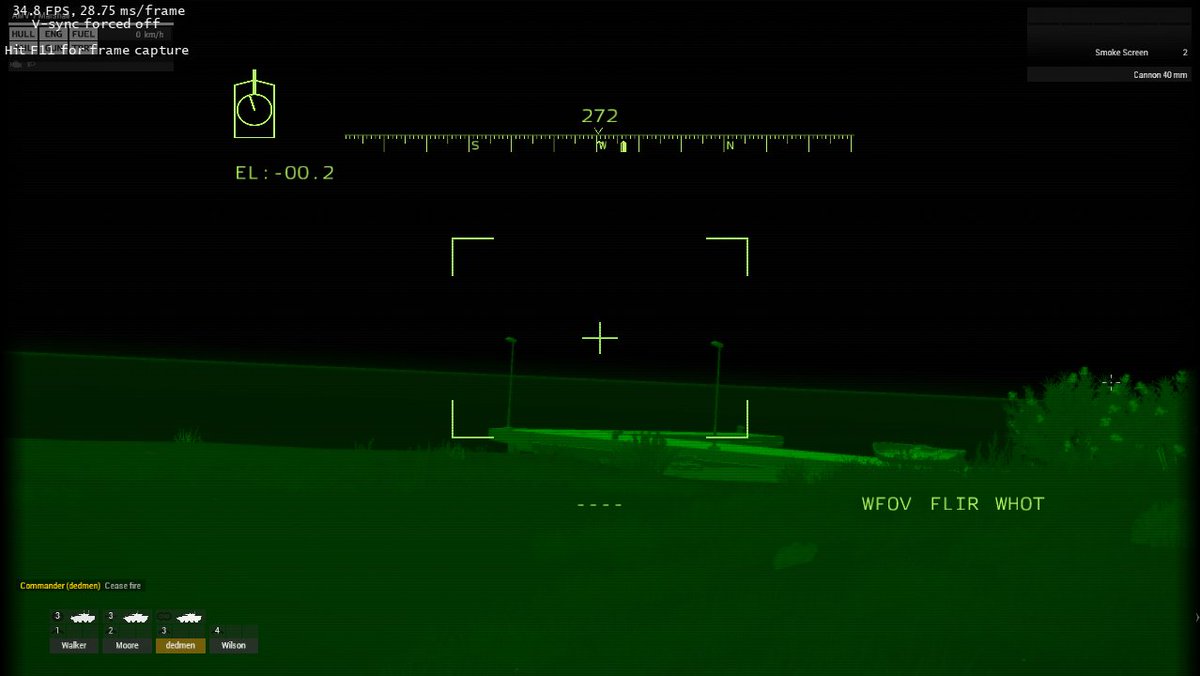
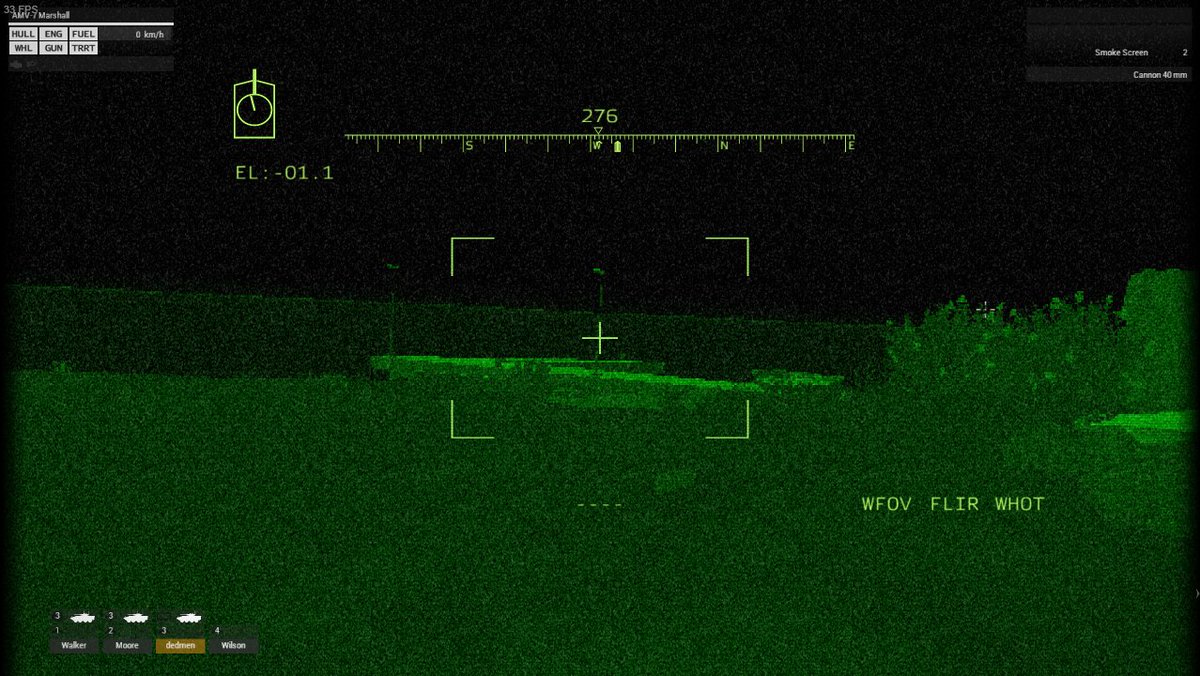
This is it now (slightly different spot)
 calm wasp
harsh orbit
I'm sure this change is gonna bring its own complaints
I've read people think th...
calm wasp
harsh orbit
I'm sure this change is gonna bring its own complaints
I've read people think th...
same as night vision allowing you to see stuff even 12 km away )))
unreal arrow
full sonnet
This is it now (slightly different spot)
dope
 cosmic crow
AAAAAHHHHH!!!!!
This is something I've dreamed about seeing since 2013, even made a ticket showing and talking about how the FLIR looked great and useful for targetting and scouting until the HDR kicked in and normalized the values. Seeing your efforts is very exciting.
full sonnet
Did you know that there are thermal footsteps?
No? Because you could never actually see them? oh! Well.
 full sonnet
cosmic crow
This is something I've dreamed about seeing since 2013, even made a ticket showi...
full sonnet
cosmic crow
This is something I've dreamed about seeing since 2013, even made a ticket showi...
The old system was, find center of temperature range, use arbitrary hardcoded value in -/+ and display that as range on screen
If temperature was not close to center, it was either pure black or pure white.
And even in the range, the - side of the hardcoded value was often lower than ground, thats why ground is so bright, and the + was so high that the range was so wide in total that only a small area in the middle got actual values
mental fulcrum
It's awesome you're improving it, but at the same it's quite sad (shame on you BI) that it was in such bad state for so long time.
Makes you wonder how much better the game could be with a bit more resources and love.
harsh orbit
full sonnet
Did you know that there are thermal footsteps?
No? Because you could never actua...
I don't like that objects are white too
they don't seem to be hot 😛
unless Arma has metal simulation 🤣
full sonnet
Yes I'll try to tweak that, but that has also always been like that
mental fulcrum
It depends on TI textures, doesn't it?
full sonnet
👣
 mental fulcrum
It would need changes in assets.
full sonnet
mental fulcrum
It depends on TI textures, doesn't it?
if they have some yes, many of these assets don't though I think.
Specifically stones are hot on terrain, they really shouldn't be, I think stone temp is decided in shader
 steel rune
sandbags
mental fulcrum
Stones actually do get hot, depending on climate ofc ;D
carmine juniper
We actually just need multiple Dedmens to fix entire Arma 3
mental fulcrum
full sonnet
Did you know that there are thermal footsteps?
No? Because you could never actua...
but it looks bit weird, like asphalt road should be hotter than concrete walls. If sun is shining.
 past socket
How is the clone program doing?
mental fulcrum
mental fulcrum
but it looks bit weird, like asphalt road should be hotter than concrete walls. ...
Also I doubt you would see footsteps on TI, on an asphalt road.
harsh orbit
mental fulcrum
Also I doubt you would see footsteps on TI, on an asphalt road.
he's barefoot ok? ()
full sonnet
mental fulcrum
but it looks bit weird, like asphalt road should be hotter than concrete walls. ...
The only input data we have there is the surface texture of the object.
We have to fake generate thermal data based on that.
In some places it works (for example terrain ground, looks really well. Bright/dark spots depending on the color of the ground texture), but on buildings its crap
mental fulcrum
sadge, maybe lower the values on buildings a bit? they glow a lot.
full sonnet
I cannot fix everything with limited resources. I cannot do any data changes.
I can only do programming stuff.
Yes, I want to try doing that. Thats up next after some cleanup
past socket
Also some vegetation is weird and it shines more than a tank with engine on.
That A3TI addon is doing some funky stuff by replacing the textures with pink colour. If vanilla thermals get improved, that will be great 😄
cosmic crow
full sonnet
If temperature was not close to center, it was either pure black or pure white.
...
This system went into effect shortly after the FLIR was activated, hence the strong values then going to mostly grey's?
full sonnet
The flir has latency with adjustment. I guess the first blip is just default 0 values
cosmic crow
Regarding the white objects, while it may not necessarily be realistic it would better discourage servers from disabling it.
I remember arguements about FLIR online being too good at finding targets, so many simply disabled it and used only NV at most.
full sonnet
If a objects color is close to this color, its cold.
If its not close to that color, its hot.
Makes sense for terrain textures, doesn't at all make any sense for rocks and houses.
Thats why terrain looks so good currently, that color fits well with terrain
And obviously doesn't fit for rocks and houses
 ivory ridge
What if multiple Colors can be defined. For example additional color grey for houses and rocks. Then the nearest color (green or grey) will be determined on the objects. Then translated for the grey things in a "equivalent green shift". Now grey things are also cold.
Mh "grey" would lay "on the way to hot"==white. So this would not work
Why not all things that not have "TI-Image" are considered as cold in a random range of some degrees?
full sonnet
Nevermind, the color doesn't seem to be the issue afterall
There is a variable in the shader that adds a temperature offset, thats used for impact craters and fire particle effects, to make them hot.
If I comment out that line..


 willow yacht
past socket
How is the clone program doing?
willow yacht
past socket
How is the clone program doing?
Make Arma open source 🔥
past socket
willow yacht
Make Arma open source 🔥
Soon™️ ? xD
full sonnet
Ahhhh.
All Multi shader (buildings, rocks) objects
add a hardcoded temperature offset of addTemp=ambientShadow*0.15
ambientShadow is the https://community.bistudio.com/wiki/Texture_Map_Types#LightMaps
green channel component of the AS map.
Its probably supposed to make self-shadowing objects properly shadow themselves.
But all it does here is make big bright
It should make shadowed areas a bit cooler.
What it does is leave shadowed areas as is, and make everything unshadowed about 2x as bright as it should be (well +0.15°C, but thats significant enough it seems)
cosmic crow
this only occurs on multi materials, it doesn't effect the _AS map of super shader?
full sonnet
nope, only multi.
I don't actually understand why Super shader doesn't do the same, it has ambient shadows too, it really should
Might just add it, will have to check on some vehicles/units how it looks
cosmic crow
This has nothing to do with thermal images (I think...) but is multi material also hard coded to use only the map assigned _env map and a default fresnel value? wondered this for a while since there is a fresnel & enviornment map stage in super shader but neither in multi.
full sonnet
I don't want to look that up now :harold:
Hm indeed multi has no env
in Super the lighting specular coef is fresnel*specular.g
in Multi the specularCoef is just SMDI.g
so no fresnel at all?
and env reflections in multi are just set to 0, so multi just doesn't reflect
cosmic crow
that would explain some things, thank you for checking
harsh orbit
speaking of shaders, did you up the shader model or is it a no go?
full sonnet
Lucky for you that Arma takes so long to start up 😄
full sonnet
harsh orbit
speaking of shaders, did you up the shader model or is it a no go?
Arma has shader model 4 and 5.
The new stuff only works on 5, so people with older GPU's will only get the thermal contrast I had last week.
Still better than before, but not optimal. And I just hope that basically noone will have such a old GPU
cosmic crow
collector item or backup?
full sonnet
both 😄
Theres also still a 8800GT in my parents attic.
I had it hung on my wall until I moved out.
I don't throw away my GPUs 😄
Hm.. All GPU's I've ever owned have had Arma ran on them
I guess trees are next..
But if I continue like this then our thermal imaging will only be a black/white rendering mode 😄

I really should do something based on sun angle, the side that sun shines on should be warmer than opposite side.. Feature creep
ivory ridge
I have a 6600GT in a running Athlon XP 3600+
cosmic crow
if it's a highly beneficial feature
unreal arrow
willow yacht
Make Arma open source 🔥
Someone tried this 10 years ago, it didn’t go well
full sonnet
Man this looks boring now
 calm wasp
full sonnet
Man this looks boring now
calm wasp
full sonnet
Man this looks boring now
but at least it's how it should be
full sonnet
man real life is boring
harsh orbit
full sonnet
Man this looks boring now
wasn't it like this before?
ivory ridge
how looks explosions/fire?
full sonnet
Those are the old trees.
I kinda prefer that visual effect of "too hot" trees
 harsh orbit
full sonnet
Those are the old trees.
I kinda prefer that visual effect of "too hot" trees
harsh orbit
full sonnet
Those are the old trees.
I kinda prefer that visual effect of "too hot" trees
this looks better imo
just make them a bit less hot 😅
full sonnet
I'll try with half as hot. The previous image was 1/4th as hot
ivory ridge
yeah it looks nice. But if you fly helicopter in night with TI low through forests it would be to easy i think
harsh orbit
for reference (random image from google...)
 calm wasp
full sonnet
I'll try with half as hot. The previous image was 1/4th as hot
calm wasp
full sonnet
I'll try with half as hot. The previous image was 1/4th as hot
although it might seam to look nice, there is a problem - hot trees/bushes are a problem for UAVs, helis and jets, when trying to spot infantry, since trees will hider a lot, infantry blending with trees
calm wasp
full sonnet
I guess trees are next..
But if I continue like this then our thermal imaging wi...
here you can see, that the soldier is as hot as trees/bushes, which is not how it should be.
such hot trees/bushes also make it possible to hide (only small?) vehicles/armor, provided vehicles/armor are in a (dense) forest, full of trees/bushes
cosmic crow
seems tricky given the trunks are much hotter than the leaves
full sonnet
We have different shader for trunk/leave I think.
So that should be doable
cosmic crow
So these are effecting the shaders from the top down?
full sonnet
White object in bright sunlight: 23.38°C
White object in shadow: 24.78°C
Black object in bright sunlight: 28.28°C
Black object in shadow: 24.78°C
One of these doesn't sound quite right 🤔
harsh orbit
full sonnet
White object in bright sunlight: 23.38°C
White object in shadow: 24.78°C
Black o...
well it depends when the object was placed in shadow 😅
calm wasp
I think that black stuff gets hotter in the sun that white stuff
harsh orbit
it also loses heat faster
full sonnet
Yes, it does.
But.. Its news to me that sun makes white objects become cooler than ambient
calm wasp
but that white stuff is hotter in the shadow than in the sun... no logic, for me
full sonnet
Ah this is annoying to fix..
Base terrain ignores sun shining on it, so its cold.
But objects on the terrain consider sun shining on them, making them hotter.
So you get bright white stone wall, on dark terrain
calm wasp
simply rewrite whole Arma 3 and that's it
full sonnet
Even more annoying.
Multi shader does not consider sunshine impact.
But Super shader does.
But buildings are Multi shader, but if you zoom out far enough, buildings switch to lower LOD, which then uses Super shader.
So you have the same object, that is not affected by sunlight when close up, but is affected by sunlight when you go further away 
Either add sunlight to everything, or remove sunlight from everything
calm wasp
full sonnet
Even more annoying.
Multi shader does not consider sunshine impact.
But Super sh...
I think it's same crap that a lot of players use when search for enemy, using thermals, even despite enemy having thermal suite
a lot of players know, that depending on the distance and/or zoom level of UAV, heli or jet camera, one's able to see a soldier, despite him wearing thermal suite
full sonnet
But soldiers are already super shader..
But maybe they switch to non-super at lower lod and that makes him change temperature?
calm wasp
full sonnet
But soldiers are already super shader..
But maybe they switch to non-super at lo...
no idea
I was found and killed many many times as infantry by a heli, despite wearing thermal sniper suite from Marksmen DLC and also CSAT thermal suite from Apex.
i then was told, that depending on distance or zoom level of the thermal camera in heli, one can see me no problem, despite my suite, from a very long distance
full sonnet
Gotta have to test that
calm wasp
there is also a problem with most if not all armor.
depending on distance or thermal camera zoom level, one can find almost any armor, since even if it never had its engine turned on, you can see the crew inside it very hot/white and thus find the tank or AA thanks to its crew inside
$must certainly be LOD problem?
full sonnet
Sounds like it
calm wasp
that's what most knowledgeable players have been doing for years to find (any) armor, thanks to its crew being white through armor itself
full sonnet
Seems like super shader is the only shader that actually does thermal correctly.
It interpolates between black/white lit/unlit and determines its temperature that way.
Most others just do okey airTemperature-0.1 to airTemperature+1.9 depending on what color I am, don't care if lit or not
unreal arrow
full sonnet
Those are the old trees.
I kinda prefer that visual effect of "too hot" trees
does it change during day/night?
full sonnet
Can't test now, but i assume they get darker/closer to terrain temperature
cosmic crow
Wouldn't the zoom level spotting be more related to the contrast of the thermals growing more and more intense as you move further? Similar to how if you get too close you can see the thermal details clearly but the background gets washed out
full sonnet
No, it's related to LOD levels switching
 teal snow
full sonnet
https://cdn.discordapp.com/attachments/508635914646323202/973491266224549888/202...
teal snow
full sonnet
https://cdn.discordapp.com/attachments/508635914646323202/973491266224549888/202...
man that fog barrier for view distance and the sudden cutoff to the sky
full sonnet
Well that's Arma for you, also for non -TI
full sonnet
Sky is black, fog is air temperature
The harsh line at top is horizon line, i will make that a bit smoother to fade out towards top
 rain parrot
I noticed setOpticsMode and getOpticsMode commands, are these supposed to work on vehicle optics also, or just on infantry weapons?
 formal cipher
For now just infantry optics. I'm working on a solution for turret optics.


 harsh orbit
full sonnet
aaa <:notlikemeow:700311897937018890>
harsh orbit
full sonnet
aaa <:notlikemeow:700311897937018890>
wasn't this supposed to be white hot?
tepid dock
Why is there such a big difference in the road's color (across its whole length) in the first screenshot?
full sonnet
tepid dock
Why is there such a big difference in the road's color (across its whole length)...
I think roads in general fade out after some distance, and instead of the road model you only see the terrain texture below it
air temperature is 21.8°C
but it makes the turned off tank only 21.0°C warm...
Because it thinks that white objects, in bright sunlight, should be 19.6°C
Because as everyone knows, when you shine light onto a white object, it cools down
When light shines onto black objects they go 21.8°C->25.3°C and heat up. Jup. sounds about right.
When light shines onto white objects they go 21.8°C->20.4°C and cool down.
Typical #Arma moment
tepid dock
Sounds like yet another "why has no one noticed it sooner? Oh, the difference was barely noticeable until a few days ago?"
full sonnet
Its actually in the world weather config
temperatureDayMax[] ={10,12,15,20,25,35,35,35,25,20,10,10};
temperatureDayMin[] = {-10,-6,-5,-1,5,6,7,10,5,2,-5,-10};
temperatureNightMax[] = {5,6,8,10,13,18,26,25,15,13,8,4};
temperatureNightMin[] = {-10,-10,-10,-5,0,4,5,6,5,0,-5,-10};
overcastTemperatureFactor = 0.4;
blackSurfaceTemperatureDelta = 5;
whiteSurfaceTemperatureDelta = -2;
It says white surfaces in light should be -2 relative to ambient temp
mh, Multi shader and rocks and trees are all withing -0.1,ambient,+1.9 range.
if I just make that range much wider, that may fix the issues with too bright/too dark objects, if the whole variance everywhere is higher
Messy
harsh orbit
full sonnet
Its actually in the world weather config
> temperatureDayMax[] ={10,12,15,20,25...
well it depends what terminology they use here. if it's from a thermodynamics pov, it's correct
a white surface can be cooler than the air around it
full sonnet
but it looks way incorrect. :poutcat:
harsh orbit
if it's literally white color it's not necessarily correct
harsh orbit
full sonnet
but it looks way incorrect. :poutcat:
in thermodynamics, a black surface is one that absorbs all radiation
white surface reflects it all
air also absorbs radiation
so white can be cooler, if you ignore air convection on the surface
maybe that's what they mean by white/black surface, not the color
full sonnet
Thats what they mean.
But still that makes a white object in sunlight, hotter than the same white object in shadow. With how the calculations work
so putting a realistic value that matches what was "meant", may not be the right approach if something further down the line doesn't use it like meant
Oh boy. Using the same black/white temperatures for all shaders (instead of just for Super) actually does make quite the difference
 harsh orbit
full sonnet
Oh boy. Using the same black/white temperatures for all shaders (instead of just...
harsh orbit
full sonnet
Oh boy. Using the same black/white temperatures for all shaders (instead of just...
looks way better
full sonnet
full sonnet
Livonia

SO much better
The buildings are still a bit off, but much nicer
full sonnet
Road is just the fade effect fading away to terrain.
Tree's calculate based on their color, maybe need to reduce the range for trees a bit
🤔

They are literally same color though, weird
 carmine juniper

 <- what we're doing

 full sonnet


Just increasing the variance makes buildings stand out less, even though they still do stand out
 steel rune
neat 🙂
full sonnet
Previously the contrast was calculated in 16 steps, now its at 512 :pog:
harsh orbit
RIP my FPS 😢
full sonnet
Nah fps is still better than before 😄
steel rune
50 ms/frame 😰
 tepid dock
He should go see a doctor and get a sick leave for today
 hollow basalt
Dedmen, any feedback on dev not launching on my PC?
harsh orbit
speaking of dev, no release today?
winter crescent
harsh orbit
speaking of dev, no release today? <:meowsweats:707626030613135390>
Nope: "logistical issues"
cosmic crow
full sonnet
ono he smoke, and they too cold now
Was that smoke or nitrogen
harsh orbit
I think he meant the smoke was too hot, and the tanks were too cold in comparison
full sonnet
Thats whitehot.
And its either engine exhaust or dirt thrown up because its trying to drive
full sonnet
hollow basalt
Dedmen, any feedback on dev not launching on my PC?
I forgot!
I now remembered.
POPCNT instruction, introduced with intel Nehalem in 2011
oops no missread, 2008.
AMD introduced it with K10 in 2007
Sadly our minimum system requirements only say "dual core cpu" but not which. So I cannot say "your CPU doesn't meet minimum spec" :/
Fixed next week, now this code just runs ever so slightly slower
Are you only using dev branch, or why did you not notice the same on #perf_prof_branch ?
hollow basalt
let me try perf.
prof crashed 😦
sent PM on forums with mdmp and rpt, both perf and prof. Prof was from steam, perf was from your Gdrive. Both crashed.
full sonnet
well if its same error then i fixed that
hollow basalt
full sonnet
Are you only using dev branch, or why did you not notice the same on <#105466848...
I was on stable and jumped straight to dev to try the nightvision thing. Only now tested perf_prof.
full sonnet
ah thanki
hollow basalt
Cool, man. I appreciate it 👍
full sonnet
almost feared I forgot to merge that one to perf
hollow basalt
Anyway, thanks.
 halcyon pewter
I'm sorry if I missed it, the Thermals looks great. Will there be also an option to use it in PiP mode?
full sonnet
it works the same in PiP ye
halcyon pewter
Great news! Thanks a lot
teal snow
hollow basalt
I was on stable and jumped straight to dev to try the nightvision thing. Only no...
is the thermal test stuff on dev?
 ivory falcon
I'm guessing no options for thermal blocking smoke?
teal snow
dosent it already?
hollow basalt
teal snow
is the thermal test stuff on dev?
Idk, I can't launch dev. But the nightvision thing i'm mentioning is the stars appearing with NV (I think that is already). AFAIK thermal is WIP.
teal snow
ooh, im gona check that out
harsh orbit
teal snow
is the thermal test stuff on dev?
not yet
full sonnet
ivory falcon
I'm guessing no options for thermal blocking smoke?
smoke already does that
full sonnet
1 or 2?

 calm wasp
full sonnet
1 or 2?
calm wasp
full sonnet
1 or 2?
2 of course
 trail aurora
1 FPS more in second picture 
full sonnet
inactive vs running engine, mh (ignore the trees)


We are loosing a bit of contrast on the terrain though, and I prefer the harsh contrast on terrain between grassy/sandy bits :/
Well that I like alot more, just the trees are too hot. These cold vehicles look pretty usable

that dude be hot tho
 full sonnet
I found a better way to do it, contrast limited histogram
Before/After

 carmine juniper
Seems betr
full sonnet
also quite reduces thermal OP-Ness now
 carmine juniper
Out of curiosity what if look up the sun/moon?
full sonnet
Don't know if sun is currently rendered :harold:
Or I think only the sun is rendered, but we don't have bloom effect so you barely see it.
I won't bother fixing that
full sonnet
I think I'll just leave it at this, and then we'll see what people think on dev branch next week
Off tank on left, on tank on right, with a bit of inf inbetween
 unreal arrow
makes me wanna play night missions
full sonnet
Livonian fields

 hazy umbra
@full sonnet how do tracers and explosions look?
full sonnet
full sonnet
Could be a bit hotter the smoke, and also some bloom but doesn't look like that'll happen
hazy umbra
Yeah bloom would be nice, also in normal NVG's... but if not in this life, then maybe in the next
harsh orbit
full sonnet
Shouldn't burning vehicle be hotter?! 😛
full sonnet
🤫
full sonnet
Mh that backpack on that unit looks a bit hot, lets debug that.
Okey the backpacks desired body temperature is.... 150°C... Yep.. Yep ok.. Well.
harsh orbit
full sonnet
Mh that backpack on that unit looks a bit hot, lets debug that.
Okey the backpa...
maybe a flare went off in his pack?
ivory ridge
If i look at your green image, I would say that not really hot things should a little bit more less "contrasty". So Terrain, Buildings and vegetation is more not so detailed and hot things like vehicle and men a little bit more white.
full sonnet
:confuseddog:
ivory ridge
this seems have more contrast on hot things
In the green picture the hot tank has nearly the same color as the building in the background
full sonnet
Yep, I know a solution for that, but don't want to invest the time to implement it.
Need to use a slightly different algorithm for the histogram equalization
ivory ridge
Yeah this are only my two cents. 🙂 Before as tank in urban area you haven't seen barely nothing from the structures only hot things. Now you can very good navigate in FLIR mode.
full sonnet
Why do humans have a configured skin temperature of 150°C
Like literally.
desired body temperature is 150°C, in config.
and mFact says how well they are able to keep control their own body temperatur
 halcyon moth
They look kinda cold on the thermals there, considering.
maybe it's a bug workaround :P
 analog fractal
Eh, 150 * .2 comes out to 30, maybe mFact = 1 implies perfect temperature control and thus setting mFact = 1 and tBody = 30 would make it so that body temp never changes from 30 and this was a weird workaround?
ivory ridge
I have a question: Would this influence the Viper-Camo things? There nearly as cold as ambient.
full sonnet
human maximum skin temperate temperature is
lerp (23.9°C, tBody, mFact * 1) (last 1 comes from the thermal texture, first value is ambient temperature including sun heating)
which comes out to 49.12°C max skin temperature
I really shouldn't try fixing that in the shaders, that needs to be fixed in configs
full sonnet
ivory ridge
I have a question: Would this influence the Viper-Camo things? There nearly as c...
Do all "Viper" units have that camo?
full sonnet
well they are definitely cold 😄
 ivory ridge
and backpack
harsh orbit
full sonnet
well they are definitely cold 😄
they are too visible
full sonnet
Yes definitely quite the difference.
That viper unit is roughly 25.2°C, and that normal unit on the right is 40°C, and terrain ground is 24.24°C
So the viper's thermal shielding is definitely very effective, compared to normal units
 harsh orbit
full sonnet
well they are definitely cold 😄
harsh orbit
full sonnet
well they are definitely cold 😄
 full sonnet
 ivory ridge
yes, because the "background" has no contrast at all
harsh orbit
ivory ridge
yes, because the "background" has no contrast at all
it's just terrain
and some rocks
full sonnet
If the ground would be at air temperature, they would still be.
But now ground is a bit cooler than air, because grassy
Here's clothes at exactly air temperature. the viper's thermal thingy is still perfect, it puts it to exactly air temp
 harsh orbit
full sonnet
If the ground would be at air temperature, they would still be.
But now ground i...
harsh orbit
full sonnet
If the ground would be at air temperature, they would still be.
But now ground i...
well they still stand out very badly...
full sonnet
:poutcat:
harsh orbit
it changes the game dynamics
full sonnet
I could make them colder, but then they stand out when they are infront of trees or buildings, or on concrete instead of grassy terrain
ivory ridge
can you make the viper temp more ground-adaptive? So on street has temp of street and on terrain temp of terrain?
harsh orbit
full sonnet
I could make them colder, but then they stand out when they are infront of trees...
the thing about current thermal is that no matter where you put them they're pretty much invisible
except in front of a hot thing ofc. like tanks or other units
cosmic crow
Huh, I always wondered what the biki meant when it said a 255,255,255 red channel ensures the sun metabolism is half the config value. Neat!
full sonnet
The shader doesn't know what they are standing on
full sonnet
harsh orbit
the thing about current thermal is that no matter where you put them they're pre...
Well yes because contrast in general is so bad that you can barely make out anything at all if it isn't like 40°C on a 25°C terrain
harsh orbit
thermals aren't supposed to have perfect contrast 
otherwise it breaks the game balance and everyone is gonna use them for everything
 full sonnet
They do have pretty good contrast though
 ivory ridge
Maybe that helps: Terrain not so cold, Viper more cold. If Viper stands on street. street is now a hot object. So viper can be seen like in front of hot tank or building
in vanilla viper are only on tanoa, right?
full sonnet
terrain hot
 ivory ridge
if you crank down viper temp a bit, the terrain hasn't to be so hot
harsh orbit
full sonnet
They do have pretty good contrast though
this is also very close to what it looks like in the game right now. (notice that the tree in both images is practically not visible)
I do agree that the contrast is a little too bad right now tho

but with your changes I feel like it's too good
ivory ridge
Another idea: Viper has only to work with vanilla assets. So optimize vanilla FLIRs to not see viper. 😛
harsh orbit
the problem right now is that the thermals are too good
I don't think they should be. otherwise there is no longer any reason not to use them
everyone's gonna use thermals the whole game
full sonnet
Everyone already says thermals are OP, even in the old completely broken way where humans are like sunlight on a dark background
formal cipher
The game is set in 2035, which has future tech
harsh orbit
this is more a matter of game balance
you can't change the game balance at this stage of development
people are gonna complain
I personally don't care because I don't play Arma in MP at all
but I'm sure those that do PvP will
full sonnet
Humans are much harder to make out now than before

I'd say this is alot less OP than before.
Its just, when close up, the viper units don't sink into background as much as they did before, which most players won't care about
tepid dock
I wonder about the number of "you broke the premise of my mission" complaints incoming 😉
harsh orbit
full sonnet
I'd say this is alot less OP than before.
Its just, when close up, the viper uni...
well try remaking that mission in APEX campaign where Vipers show up, see if you spot the vipers
I personally didn't see them in thermals when I played it
which made it a lot more challenging
I was using pretty much only thermals up until that point
if it still feels the same it's good, otherwise it's not
cosmic crow
it closer to some videos from more recent gen thermal optics
ivory ridge
if the viper blend more with terrain instead of other "hot" enemies, then there will be much harder to spot in non urban areas
ideally the temp should be between temp of terrain and maybe rocks?
full sonnet
harsh orbit
well try remaking that mission in APEX campaign where Vipers show up, see if you...
what daytime is that mission?
full sonnet
At night there is no sun heating

Theres two viper units
their bodies themselves are completely invisible at night, but their gun/backpack stand out :/
And it bright sunlight, they just heat up more than the ground and stand out
cosmic crow
Are the guns supposed to include some form of cooling like the suits?
ivory ridge
no i think not. there is no "active" cooling device
harsh orbit
full sonnet
At night there is no sun heating
date: [2035,8,13,0,8]
fog: 0.5
pos: [3373.59,5803.95,3.54963]

 full canyon
full sonnet
Humans are much harder to make out now than before
full canyon
full sonnet
Humans are much harder to make out now than before
If you wind down the intensity of the other stuff a bit more, that would be cool lol
That tree to be a bit hot
Or it just seems that way
harsh orbit
also I never noticed this but lasers are visible in thermals
is it still the case with your changes?
full sonnet
I didn't touch lasers, so probably
ivory ridge
I have set a viper on tanoa at night a if he look at you, you see his black vest. on leopards picture you see him from the side
harsh orbit
harsh orbit
also I never noticed this but lasers are visible in thermals <:meowsweats:707626...
I think they should be tho
IR lasers heat the air...
but is it that much? at most I guess it's only a few millidegrees
ivory ridge
BTW: If you shoot the gun, only the silencer heated up. So the gun itself is cool.
full canyon
harsh orbit
I think they should be tho <:thonk:700311400152825906>
IR lasers heat the air......
Easy answer is that a basic one couldnt, but the modern ones probably mostly can, even more so military grade devices
So it would make sense
calm wasp
full sonnet
Theres two viper units
don't forget about thermal sniper suit from Marksmen!
 grave viper
What about smokes?
At least some of them are IR transparent (diesel vapor)
https://youtu.be/BlacCQZpYe0
lament crow
I was testing the CUP searchlights and you can turn them on during daytime so the lights can emit flares during the day for a few patches now yet Arma 3's default flashlights don't have this functionality even thou the engine is capable now. Is that a config tweak that will come in a future patch or has that been scrapped altogether?
Just asking because on a previous conversation Dedmen told me that making the flashlights work during daytime was viable while the lights of the vehicles probably not (perhaps due to the amount of them?)
full sonnet
data and engine tweaks are two seperate things.
adding support for something is one thing, making vanilla use it is another
full sonnet
 full canyon
Tent?
full sonnet
There is a IR Masking tent
full canyon
Ah nice
full sonnet
Everything I do to adjust for this one specific Viper Armor just makes literally everything else worse
 cosmic crow
Is there a value that determines how much heat the AS puts out? always wondered why the AS acts as an inverted shadow map in flir, heating up what it touches as opposed to doing the opposite
full sonnet
Temperature depends on pixel color.
Black pixel in sun heats up more than white pixel in sun.
AS makes shadows, it makes pixels darker == pixels become hotter
Most thermal actually runs the normal shader (including colors and AS and reflections and stuff) and then applies a thermal shader on the output, which takes mainly the color the main shader put out, and tries to convert it into something thermal
full sonnet
in the right light, the sun effect looks quite nice
 full sonnet
I noticed sunlight direction didn't work on tanks..
The sun direction is provided as 0,0,0. No idea for how long this has been broken, but probably a very long time..
That means tanks (and other vehicles I assume) didn't receive any sunlight influence
its like digging in a sandbox at a playground, sometimes you grab into a syringe.
 unreal arrow
 mental fulcrum
Building destruction will awake nearby ragdolls?
ivory ridge
unreal arrow
Is that a meme or a bugfix? 😄
full sonnet
unreal arrow
These floating people is the most annoying thing ever!
Does it also work for statics? like a static M2 gun on a building?
 viscid onyx
Is that automatic or do missionmakers/modmakers have to make EHs to take advantage of the new wake functionality?
mental fulcrum
full sonnet
These floating people is the most annoying thing ever!
Does it also work for sta...
Ragdolls throwing tanks into space when you drive over infantry is more annoying :P
Or maybe it's groundholders, who knows.
full sonnet
its ragdolls
unreal arrow
full sonnet
These floating people is the most annoying thing ever!
Does it also work for sta...
just dead for now, tellme more
unreal arrow
mental fulcrum
Which have collision disabled in MP...
ragdolls have collisions while simulating
unreal arrow
viscid onyx
Is that automatic or do missionmakers/modmakers have to make EHs to take advanta...
automatoc, happens on every stage of building destruction
viscid onyx
N I C E
unreal arrow
could have been scripted with new awake functionality easily but it is better to fix it in the engine
full sonnet
I think if you just place a static M2 gun on, especially the big military container tower. And then setDamage 1 the tower the gun also stays floating
mental fulcrum
unreal arrow
ragdolls have collisions while simulating
Would be nice if they could not influence other physx objects, at least in MP.
As it's buggy AF.
unreal arrow
can you give me a simple repro?
ivory ridge
- place enemy soldier
- place tank and throve over enemy
- enjoy the flight (sometimes)
unreal arrow
so it is ragdoll vs vehicle?
mental fulcrum
It never happens when you want to test it.
Yeah ragdoll vs vehicle.
The best case is somewhat loaded dedicated server
player in a tank
remote AI
run over
50/50 fly or not
mental fulcrum
unreal arrow
i need ticket
mental fulcrum
yes
viscid onyx
I wonder if this is connected to the thing where you sometimes can't walk past dead bodies
it would be nice if that got accidentally fixed...
ivory ridge
full sonnet
Everything I do to adjust for this one specific Viper Armor just makes literally...
I would say Viper Armor has to be really good under specific circumstances (because of vanilla campaign mission):
- on Tanoa
- at night
- on terrain / non urban
- distance >100m
full canyon
mental fulcrum
Ragdolls throwing tanks into space when you drive over infantry is more annoying...
Since when is the new vic simulation in DayZ in place, cause it seems the same bug appeared in Enfusion too😂 ? Just cant get rid of it. Could be wrong tho.
mental fulcrum
unreal arrow
i need ticket
Do you actually play the game like in missions or only dev it? I do not want to sound offensive. But you see these kind of stuff just be playing the game
full sonnet
At night the viper units are really great.
 mental fulcrum
Like I've seen it dozens of hundreds of times...
full canyon
mental fulcrum
Do you actually play the game like in missions or only dev it? I do not want to ...
You talking about vics going to space?
ivory ridge
full sonnet
At night the viper units are really great.
Is there a way to reduce the influence of sunlight to the viper? It would make sense because the suit is active cooled.
full sonnet
yes, there is now a parameter to control light influence, but it needs to be configured in config
full canyon
Also, will the thermals get certain customization options like aperture? Or at least config-wise?
viscid onyx
full canyon
Also, will the thermals get certain customization options like aperture? Or at l...
It would be amazing to have thermal/NV quality (e.g. grain and resolution) as a difficulty setting or a per-vehicle script command (like disableTIEquipment) or something. I realise that's most likely out of scope though.
full sonnet
full canyon
Also, will the thermals get certain customization options like aperture? Or at l...
config has resolution and sensor noise
full canyon
Well im talking more about those things you might find in IRL thermal devices
ivory ridge
What if the viper has a TI Image that is not heterogen "hot" or "cold" but more like a "patchy" thermal signature like optical camo? So it would be harder to recognize the viper on different backgrounds and it breake the human "pattern regognization" of a human body.
full canyon
full canyon
Well im talking more about those things you might find in IRL thermal devices
Aperture to adjust your device to whatever environmental condition there is to see the best
full canyon
ivory ridge
What if the viper has a TI Image that is not heterogen "hot" or "cold" but more ...
Ayoo, dont pressure him too much or hell need emergency ramen😂
ivory ridge
full canyon
Ayoo, dont pressure him too much or hell need emergency ramen😂
I provide only different ideas for solving the problem. It is only brainstorming (or brainshitting?!?).
unreal arrow
mental fulcrum
https://feedback.bistudio.com/T164804
Thanks
mental fulcrum
Thank You for taking a look!
full canyon
It'd be very funny if after literal years the vehicle flight bug woulf be fixed just like that
calm wasp
full sonnet
its ragdolls
I've tested it and it's not ragdolls at all.
if you driver over a body with no weapon - everything is ok with your tank.
if you drive over a body with a rifle or at/aa - say goodbye to your tank
full sonnet
Driving over a body while its not in ragdoll state, doesn't give you ragdoll
It is ragdolls.
full canyon
Its rigid structures, like turrets etc
full sonnet
Happens especially often when unloading dead bodies from vehicles, as I think ACE sometimes unloads it under the vehicle and its ragdolling at that point and poof gone
full canyon
full canyon
Its rigid structures, like turrets etc
Those send you flying
Or other vics
full canyon
full sonnet
Happens especially often when unloading dead bodies from vehicles, as I think AC...
Well for some reasons, pretty often the body ragdolls have little to non impact
full sonnet
body ragdolls also kick over walls, because they have a very high mass
full canyon
If a body glitches with a vic, usually the body goes zoom and the vic perhapd jumps up a few inched
full canyon
full sonnet
body ragdolls also kick over walls, because they have a very high mass
Ok yeah, that I have seen
full sonnet
full canyon
If a body glitches with a vic, usually the body goes zoom and the vic perhapd ju...
or the body stays and the vehicle goes zoom
full canyon
Never seen that tho
Think the reason for it is that the body parts can move, but rigid structures cant, so theyre more risky to intertwine with
Good combo is a tank and a turret
Guaranteed space trip
Is this like an unfixable thing or is there a way to counteract it?
full sonnet
Well there is probably a reason why these issues have been there since ever and not been fixed yet
full canyon
Ok ok, what price?😂
tepid dock
full sonnet
Well there is probably a reason why these issues have been there since ever and ...
Same could be said about the IR thing that you're working on, or the "UAV going in circles" bug that has been present for as long as I remember that @unreal arrow fixed some time ago (love you! 😘 )
lament crow
full sonnet
data and engine tweaks are two seperate things.
adding support for something is ...
And are you planning on making vanilla flashlights use the engine functionality you added or will that new engine functionality be limited to mods as it stands now?
 foggy canyon
full sonnet
I think if you just place a static M2 gun on, especially the big military contai...
foggy canyon
full sonnet
I think if you just place a static M2 gun on, especially the big military contai...
Along a similar grain, objects will stay in place, such as sandbag walls.
viscid onyx
That's unlikely to change since objects like sandbag walls don't have physics to begin with, they're always fixed in place, and changing that would retroactively break a lot of missions.
unreal arrow
Some sandbags are EPE if I remember, however since there is BuildingChanged EH, one can delete all those non EPE objects from EH
grave viper
full sonnet
Happens especially often when unloading dead bodies from vehicles, as I think AC...
ACE does not choose where to unload. It’s just getin and moveout to seat with unconscious unit.
For me RHS BTR80 most commonly became space shuttle.
mental fulcrum
Happens with dead bodies too.
I recall getting in RHS UAZ, and the body that I replaced sent the vic into space.
harsh orbit
I've never seen a can of worms this big 😛
unreal arrow
unreal arrow
Some sandbags are EPE if I remember, however since there is BuildingChanged EH, ...
meh, all sandbag compositions are not epe, I thought I saw a single sandbag somewhere but couldn’t find it
 ocean tundra
whats epe
harsh orbit
PhysX
full sonnet
ACE has a single sandbag thats physics
 rigid warren
full sonnet
ACE has a single sandbag thats physics
rigid warren
full sonnet
ACE has a single sandbag thats physics
worst thing is that sandbag wall could collapse on you 😄 https://steamuserimages-a.akamaihd.net/ugc/288601701275510561/08B52CCFA2DA0BB6051B5ECBCAB862976212F93C/?imw=5
harsh orbit
so is there a dev update planned for this week? I'm still waiting for the "roadway" LOD crash fix
full sonnet
yes
unreal arrow
harsh orbit
so is there a dev update planned for this week? I'm still waiting for the "roadw...
Everyone is reforging
lament crow
unreal arrow
Everyone is reforging
Looks like the dozens of Reforger devs went into hiding and the little A3 devs remaining went to the rescue and into damage control mode...
Also funny is that it seems like they are having people who barely worked on the engine do their engine/modding documentations 🤣
🙃 BI will just never change
full sonnet
lament crow
Also funny is that it seems like they are having people who barely worked on the...
Most of the documentation is done by Lou
mental fulcrum
lament crow
🙃 BI will just never change
🙃 Valmot will just never change and write stuff without having any idea about the subject
harsh orbit
unreal arrow
Everyone is reforging
looks like someone wasn't 😛
@full sonnet

later crashed with unable to init directx11 error
full sonnet
ahhhhhhhhhhh
Can you send RPT
Are you running without mods?
can you check if dta/bin.pbo properly updated
harsh orbit
full sonnet
Can you send RPT
ticket or DM?
full sonnet
dm
tepid dock
harsh orbit
<@90532520101183488>
dev\futura\lib
I think that with the release of Reforger with the new engine and so on, you should rename that directory todev\pasta\lib
full sonnet
Reduced texture resolution in thermal mode so you cannot just read billboard text in thermal as if it is just a black&white image.
But the roads
 viscid onyx
You could reduce it a bit less? In principle, text being slightly visible makes sense because of darker/lighter surfaces having different reflective/radiative properties
full sonnet
Problem is its a lod offset from the auto calculated, so it gets more clearer the closer you get :sad: which looks crappier than if it just stays low all the way
lament crow
On a side note, don't you dare jump boat just yet Dedmen and KK! Until A4 our good old A3 still has lots of life in it!
frail wharf
I'm totally okay with billboards and graffiti being readable with this thermal revamp.
for billboards wouldn't it be possible to remove their textures whenever the player is in thermal?
like call setObjectTexture [0, "gray.paa"] on them
full sonnet
no, not possible, or not feasible
ivory ridge
streets normaly in grey/white to black tone. maybe handle all other colors different?
(mh dirt roads more brownish)
maybe different handling over orientation? (streets more flat, billboards vertical)
lament crow
frail wharf
for billboards wouldn't it be possible to remove their textures whenever the pla...
I don't even know what was wrong with the previous thermal... it was fine for all my players and never heard anyone complaining...
ivory ridge
Or maybe can Streetobjects are been identifed and handled different?
frail wharf
lament crow
I don't even know what was wrong with the previous thermal... it was fine for al...
It's not realistic as it could be
IRL thermals are way more usable than what we have currently
lament crow
frail wharf
IRL thermals are way more usable than what we have currently
Thank you for explaining, in that case I am very happy and grateful that this is getting improved 💯
 safe vale
The changes are much appreciated, having actual contrast and not such a basic implementation is a welcome addition.
This video has a few examples of the nuance real thermal sensors are capable of: https://youtu.be/dgd9YvGqlh0?t=8
tepid dock
Or this one, although it says "High Definition" which IMO seems a bit OP 😉
https://www.youtube.com/watch?v=H5FzvySG-uQ
frail wharf
Considering the game is supposed to have 2034 tech...
full sonnet
I can make it absolutely perfect and show the temperatures like they are represented in engine, but that sadly just looks shit 😄
lament crow
full sonnet
I can make it absolutely perfect and show the temperatures like they are represe...
Yeah you gotta find a balance, this is a game after all and gameplay/balance comes a little before realism...
teal snow
thermals in dev branch look 💯
PIP thermals are actualy usabel now
i take that back
it works but then seems to break in pip real quick
full sonnet
teal snow
it works but then seems to break in pip real quick
what do you mean by break? it stays single color full screen?
Night thermals are pretty crappy right now still
full sonnet
I made a change to clamp colors to distinct steps (something like 0.02°C steps)
and together with the reduced texture resolution, it looks kinda amazing on the terrain

Before noon that is.. oof.. (╯°□°)╯︵ ┻━┻
 teal snow
full sonnet
what do you mean by break? it stays single color full screen?
teal snow
full sonnet
what do you mean by break? it stays single color full screen?
In a mod I use the pip turns black after some time or a time skip does it instantly
hollow basalt
dev branch is working again (for me that is). Thank you Dedmen!
your screenshot though #dev_rc_branch message looks cooler than my game. I have somewhat big blobs on the larger stars. Wtf, they went away . Meh, nvm. Looks great 🤩
hollow basalt
Mhmm, idk how's the workflow between branches, but prof is crashing windows 10 on A3 boot. dev is ok.
formal cipher
Dev is just all commits and goes through qa. Prof consists of cherry picked commits without qa. There are even some pieces of code on prof that are disabled on dev.
If you can get any crash info, whether that be crash dumps from arma or from the windows event viewer, send them in #perf_prof_branch or directly on the feedback tracker.
hollow basalt
ok, ill send those to dedmen through PM on forums as I did the previous ones if you don't mind.
rigid warren
lament crow
I don't even know what was wrong with the previous thermal... it was fine for al...
you should try Arma 3 Thermal Improvement mod (A3TI)
formal cipher
hollow basalt
ok, ill send those to dedmen through PM on forums as I did the previous ones if ...
That is good too
past socket
rigid warren
you should try Arma 3 Thermal Improvement mod (A3TI)
Tho be ware that this mod is doing some funky stuff with texture replacement. For example texture of tank gets replaced by a pink one. Sometimes it stays replaced even after exiting the thermal imaging.
lament crow
past socket
Tho be ware that this mod is doing some funky stuff with texture replacement. Fo...
I guess I will just wait for Dedmen's implementation... also not a regular user of thermals so... I like my colors 🙂
teal snow
full sonnet
what do you mean by break? it stays single color full screen?
also the mod sets the pip texture every frame, not sure if thats relavent
past socket
lament crow
I guess I will just wait for Dedmen's implementation... also not a regular user ...
I've tried the mod only briefly, but seeing dedmen doing the magic, I'm happy that I won't have to use that mod and stick to the vanilla which will get insanely better 👍🏻.
lament crow
past socket
I've tried the mod only briefly, but seeing dedmen doing the magic, I'm happy th...
Yeah, having to rely on less mods is always better for both performance and for compatibility with BI's own missions.
Another mods out of our list are those trying to fix dead bodies staying mid air. KK fixed that 8 year standing issue and reached legendary status on my book. I swear that both him and ded can move forward A3 years when they wake up with the right foot.
full sonnet
teal snow
also the mod sets the pip texture every frame, not sure if thats relavent
Yes it is, that resets the pip data, and thus also the automatic constrast adjustment of the pip screen
lament crow
teal snow
also the mod sets the pip texture every frame, not sure if thats relavent
Another mod that is super popular but completely destroys performance and causes lots of issues is Walkable Moving Objects. Leopard literally made the mod unnecessary by a simple invisible model and a script command that is also very performance friendly. Sadly that fix will probably remain out of the player's hands
teal snow
full sonnet
Yes it is, that resets the pip data, and thus also the automatic constrast adjus...
yes that sorted it, sorry about that NVM, i can literaly cause black screen by changing my aspect ratio, or changing it fixed the black screen
all of this fuckyness may be caused by arma pip not liking anything other than 16:9 aspect ratio
teal snow
im ranting a bit but nothing i do stops it bricking black at some point
full sonnet
I also had a report that firing main gun in tank can brick it, still have to fix that
lament crow
rigid warren
you should try Arma 3 Thermal Improvement mod (A3TI)
Check this out: https://www.youtube.com/watch?v=2SaDfhnwEOg (Arma 3 compared to their real life counterparts), Including thermals
pallid cliff
Time to get some better particle effects 😄
lament crow
Is it true that having E-cores (Efficient Cores) enabled in the Intel 12th Gen processors hurts Arma 3 performance? I have read some comments that said that disabling the E-cores made their Arma ran at 30+ FPS compared to having those enabled...
steel rune
Depends on what your scheduler decides
grave viper
I can test if you describe methodology. Arma have so much pitfalls where I can lose fps despite core types.
Overall disabling e cores allow you get better overclock on perf cores and better ring(cache) overclock. Arma would like more cpu power. And 8 perf cores enough for almost everything
lament crow
I was asking because if that is the case, then perhaps the devs could include a fix so that Arma 3 does not consider the E cores and just uses the P (Power) Cores and so players don't have to manually disable their E cores everytime they want to play Arma 3.
steel rune
some changes were made to profiling branches but caused issues with windows server, so they were rolled back
halcyon moth
Also if you're running Win10, I don't think it knows the difference anyway.
lament crow
I am thinking that this is not as easy to resolve as adding an option in the A3 Launcher for players to "Check" which cores Arma 3 is allowed to use....
halcyon moth
It's kinda weird because most of the threads are fine on the E-cores. You just want to keep the main one on a P-core.
You can force affinity in task manager if you really want to, although it has that issue that you'd have to force all threads or none.
lament crow
Reminds me of the good old Need For Speed Most Wanted released in 2005, it hated the Hyper-threading cores and so if you disabled Hyper-threading in your BIOS you would get twice the FPSs
The difference being that Most Wanted was soon unsupported after release while A3 is still kinda supported. Specially regarding new technologies disrupting its playability/stability. I hope this gets resolved soon because I am planning on geting a 13800K when it releases 🙂
halcyon moth
I imagine it's fine on Win11, if you can stand that.
lament crow
halcyon moth
You can force affinity in task manager if you really want to, although it has th...
Yeah, it is kinda bad having to rely on external solutions to make the most of your very expensive hardware but that is the only way to get around it at the moment
lament crow
grave viper
I can test if you describe methodology. Arma have so much pitfalls where I can l...
I missed the part were you where willing to test it. Pretty easy actually. Run the YAAB benchmark with E cores enabled, record the FPS, then disable the E cores in your bios and do the test again. Post the FPS difference here. Done.
I have a 7th Gen i7 so I can't do it 😅
I wander if the difference in FPS will be so significant as the other guy said
full sonnet
teal snow
~~yes that sorted it, sorry about that~~ NVM, i can literaly cause black screen ...
What is repro for that?
Just have pip screen with thermal on it, go to video settings and change aspect ratio setting?
teal snow
full sonnet
What is repro for that?
Just have pip screen with thermal on it, go to video set...
yes
but i started on 21:9, PIP has never liked my ultrawide
full sonnet
Cannot reproduce changing from 16:10 to 16:9
neither 21:9
Maybe I somehow already fixed it, there will be some changes on this weeks dev branch
teal snow
maybe
is there also a way for you to fix how pip will take your aspect ratio and condense it into a 16:9 format, because when i use ultrawide it squished the image
full sonnet
pip really shouldn't do that, it renders a fixed resolution
mental fulcrum
but isn't it taking the fov into the account? They differ between aspect ratios IIRC
full sonnet
that might be yeah
ooh 🤔 right..
could fix but not sure if I want to go down another rabbit hole
teal snow
if its to big of a rabit hole dont bother
grave viper
lament crow
I wander if the difference in FPS will be so significant as the other guy said
For Win 10 seems like true. (tested on stable. Don't compare between OSes)
||
        min      avg     max
W10 p+e 34    60,2    85
W10 p+e 40    60,3    109
W10 p+e 38    58    97
W10 p+e 40    58,8    97
W10 p    42    67,2    113
W10 p    45    65,8    108
W10 p    42    65,2    103
W10 p    45    66,8    110

W11 p+e    34    63,5    96
W11 p+e    43    61,3    99
W11 p+e    38    59,7    91
W11 p+e    43    61,8    89
W11 p    34    63    100
W11 p    47    65,9    107
W11 p    41    64,4    91
W11 p    40    63,8    100
||
halcyon moth
How many p/e cores is that?
 modest token
@full sonnet I'm curious, how difficult would it be to create a profiling branch that captures timing data for user installed mods? I expect there are at least a couple mods out there that crater performance, yet people blame arma.
lament crow
grave viper
For Win 10 seems like true. (tested on stable. Don't compare between OSes)
||
``...
Super interesting, another very interesting finding is that Windows 10 under just the power cores runs better than Windows 11 on any combination.
And also that the difference on AVG between E-Cores enabled versus E-Cores disabled is ~10 FPS... Which is not a small margin. Going from a 300 USD GPU to a 800 USD GPU will only net you perhaps those extra 10 FPS which in turn will just be negated by Arma 3 not being E-Core "friendly".
lament crow
modest token
<@90532520101183488> I'm curious, how difficult would it be to create a profilin...
Many times that is the case. For example I measured that just by having the Ravage mod enabled it decreased my overall FPS in Arma 3 by 10 Frames. Also the map and the mission complexity can hurt performance so very often it is not just the mods but also a combination of those other factors.
grave viper
lament crow
Super interesting, another very interesting finding is that Windows 10 under jus...
I would not recommend compare between oses in my case. This is not clean sanitized installations. Different services and apps in background and different ssd drives
PS not sure that this is dev_rc topic
grave viper
modest token
<@90532520101183488> I'm curious, how difficult would it be to create a profilin...
You can use dedmen’s arma profiler
grave viper
halcyon moth
How many p/e cores is that?
12700k 8+4
unreal arrow
carmine juniper
Thought it's an old feature? 🤔
harsh orbit
carmine juniper
Thought it's an old feature? 🤔
RainParticles and setRain now both have ability to simulate snow. The last bit of immersion is muting birds and insects sounds during snow would be updated with next data update
carmine juniper
Hmm
winter crescent
To manage expectations: there will not be fully featured vanilla snow in A3. KK is only adding some foundational support for mods which may want to use it ❄️
unreal arrow
This ^^^^ 
unreal arrow
harsh orbit
> RainParticles and setRain now both have ability to simulate snow. The last bit...
That was long due since addition of snow param, didn have time to finish for 2.08, now you have it
 mystic sparrow
Strawberry snow it is then.
 ruby edge
Is the snow texture included in the game files ?
unreal arrow
no, but I’m planning to add a sample
full sonnet
stamp done. Day and night acceptable. Viper armor working well enough.

 harsh orbit
full sonnet
*stamp* done. Day and night acceptable. Viper armor working well enough.
harsh orbit
full sonnet
*stamp* done. Day and night acceptable. Viper armor working well enough.
did you fix the VR skybox? 😛
full sonnet
😠
Tomorrow
And that glitch that completely bricks vision and makes it all black or smth, I couldn't reproduce yet
harsh orbit
full sonnet
*stamp* done. Day and night acceptable. Viper armor working well enough.
btw shouldn't the grass color be closer to the ground color (a bit grayer)?
full sonnet
yes. But when I move things closer together, the histogram equalization code will just pull it apart again, but with more glitches and issues and weirdnesses especially when there are units in that area
lament crow
It looks at least 200 times better than before already! 👏
full sonnet
There will still be people who complain on release, hope it's not too many
lament crow
full sonnet
There will still be people who complain on release, hope it's not too many
It is impossible to fulfil everyone's expectations but knowing that you did your best given the time and source material constrains you were dealt with it is more than enough and anyone asking for more is just out of place. Hell I thought we wouldn't see this sort of meaningful updates to A3 at these stages and here we are still getting sweet unexpected gifts from you guys
teal snow
nice looking thermals
 hot wave
🎉
full sonnet
@teal snow I couldn't reproduce your issues, so I hope they are fixed in today/tomorrow dev branch update, if not then ping me
full sonnet
Some tweaking for error context for config errors
13:12:23 Error: test
13:12:23 ➥ Context: bin\config.cpp/Cfg3DEN/Compositions.test
->Last modified by: Dedmen_F_Test
now says which addon/mod touched it, thats a list of all addons that touched the entry, I think sorted by loadorder
teal snow
Just let us know when it’s live
winter crescent
IT'S LIVE ⏰
harsh orbit
is it normal that some tree leaves are black but some aren't?

and they look kinda weird up close
 full sonnet
I think its distance based.
Yes they look a bit weird.
But it adds variance, variance good
harsh orbit
full sonnet
But it adds variance, variance good
I somehow broke the thermals 🤣
now it's all black
and I can't go to normal
full sonnet
Ah the issue Rosd6 mentioned that I cannot reproduce
harsh orbit
full sonnet
Ah the issue Rosd6 mentioned that I cannot reproduce <:notlikemeow:7003118979370...
I can tell you what I did
let me see if I can repro first
even switching terrains doesn't fix it
I remember looking all the way up to the sky before it happened
full sonnet
The histogram slowly interpolates between old and current every frame, in order to have a smooth/slow adjustment effect.
The histogram never leaves your GPU so yeah switching terrains doesn't reset it.
I had one case where it would become NaN, but I added a NaN check to it and that fixed it for me :poutcat:
maybe it only happens in retail with optimized shaders Maybe it optimizes away the NaN check
harsh orbit
harsh orbit
I remember looking all the way up to the sky before it happened
yep that's the repro!
viscid onyx
harsh orbit
and they look kinda weird up close <:thonk:700311400152825906>
That sure is somethin'. I wonder if it's picking up some part of the model that's normally invisible, like an abstracted hitbox or something. Seems to match the "core" of the leaf clusters.
Not gonna lie, it looks.........bad. :|
harsh orbit
harsh orbit
I remember looking all the way up to the sky before it happened
@full sonnet did you try this?
make sure nothing else is in the view
just the sky
full sonnet
yes, after Rosd6 told me I tried that
full sonnet
viscid onyx
That sure is somethin'. I wonder if it's picking up some part of the model that'...
Its low res textures.
I can just turn that off and let it use normal textures, downside being that you can then read billboards and see pictures hanging on the wall as if it were just black/white vision and thats crappy
viscid onyx
Personally I would rather have mildly unrealistic readable textures than giant glowing blobs floating in the trees (given that it has to be one or the other and both can't be fixed at the same time). It makes it look like there's solid objects in there and really clutters up the view. Like, one is an aesthetic concern and one has a gameplay impact.
harsh orbit
full sonnet
yes, after Rosd6 told me I tried that
well the repro is correct tho
full sonnet
viscid onyx
Personally I would rather have mildly unrealistic readable textures than giant g...
Oki then I'll turn it back.
Wanted to test it and see feedback
full sonnet
harsh orbit
well the repro is correct tho <:notlikemeow:700311897937018890>
Then it must really be optimizing out my check. grr that check has a reason 😠
omg I googled it

A common HLSL pitfall is that isnan()/isfinite() calls often gets optimized away, because HLSL compiler uses some fastmath-ish optimization rules, i.e. assumes non-NaN, so isnan(<assumed non-nan>) = false. Here's a Shader Playground testbed to illustrate:
https://t.co/1ogpco1eoH
 Twitter
·
Twitter
·
Fixed for next dev
harsh orbit
full sonnet
https://twitter.com/_humus_/status/1074973351276371968
instead of NaN check why not put a bound on the value so that it never happens? (whatever it is you're doing, e.g. negative log or div by 0 that gives you NaN/infinite)
full sonnet
its a saturate now that will clamp it 0-1
I had the idea that if its NaN, it should instantly switch to target, instead of interpolating towards it.
but clamping it to 0 and interpolating from there will also work, just be a bit slower to get to target in the error case
I do lerp(old, new, deltaT)
Sometimes old becomes NaN, no idea why, deltaT and new can never be NaN...... Oh. Well I just figured out how it becomes NaN 😄
Mod compositions in PBO's
Maybe interesting for content mods like RHS/CUP, normal Eden compositions can be delivered together with mods.
 harsh orbit
full sonnet
Mod compositions in PBO's
Maybe interesting for content mods like RHS/CUP, norma...
harsh orbit
full sonnet
Mod compositions in PBO's
Maybe interesting for content mods like RHS/CUP, norma...
speaking of compositions, can you add a command that allows creating compositions?
in addition, can you think of a solution for getting all objects in a composition? (so that objects can recognize each other)
also where are compositions stored anyway?
full sonnet
in your my documents/arma3/compositions
full sonnet
Nowhere
only in files on disk
Which is why previously you couldn't add them via mods
Compositions don't stay together after placement, things don't remember what compositions they came from.
The most you get is when you have layer per composition enabled, so they all get put into the same editor layer
harsh orbit
harsh orbit
speaking of compositions, can you add a command that allows creating composition...
if there was a solution for this it would be very neat for scripted compositions
they typically need to "reference" other objects in the composition
viscid onyx
a solution for getting all objects in a composition? (so that objects can recognize each other)
This would be super useful for attachTo stuff. At the moment my workaround is to use a nearestObject to spot a "core" object, but I also have to wait for all the objects to be created because I don't know the creation order or when an init will be executed.
Being able to specify a creation order (or at least a first object) might be a useful alternative
harsh orbit
yeah currently people have to resort to many ugly tricks for scripted compositions...
harsh orbit
full sonnet
Compositions don't stay together after placement, things don't remember what com...
what about spawning them through a wrapper function that stores all objects into a variable (e.g. BIS_compositionParts) in a "core" object, as NikkoJT said?
or even in all objects? since the array will be a reference it won't cost much
viscid onyx
My absolute ideal would be to have all objects created first, frozen, then all the inits run, then unfreeze. Maybe with an extra "composition init" that runs after that as well, with an array of composition objects available as params. Guaranteed in that order. This would reduce the need for highly scripted workarounds to avoid physics disasters. I recognise that this is probably too much work/impossible, though.
full sonnet
harsh orbit
well what about spawning a composition multiple times?
I don't understand what you mean by that question
full sonnet
harsh orbit
if there was a solution for this it would be very neat for scripted compositions
You mean a Eden command, that says "here are the objects, put em in a composition" ?
Or you mean, a script command that spawns a custom composition, basically like zeus does it?
harsh orbit
full sonnet
I don't understand what you mean by that question
I don't know what I meant by that question either 🤣
full sonnet
thats trees without lowres textures then
 harsh orbit
full sonnet
Or you mean, a script command that *spawns* a custom composition, basically like...
harsh orbit
full sonnet
Or you mean, a script command that *spawns* a custom composition, basically like...
well a group of functions/commands for compositions, both for creating the composition and for knowing the objects that were created.
tho I guess that needs a config or something...
e.g
class CfgCompositions {
  class MyComposition {

  };
};
_coreObject = ["myComposition", _coreObjPos, _coreDir, _coreUp] call BIS_fnc_spawnComposition;
and then you could do this to fetch all objects:
_coreObject getVariable ["BIS_compositionParts", []];
that's kinda similar to how carrier parts work...
full sonnet
and billboards
 full sonnet
harsh orbit
well a group of functions/commands for compositions, both for creating the compo...
full sonnet
harsh orbit
well a group of functions/commands for compositions, both for creating the compo...
Creating composition with script no.
The zeus version of that is already very hacky
teal snow
full sonnet
and billboards
Still better
harsh orbit
full sonnet
Creating composition with script no.
The zeus version of that is already very ha...
but for mod compositions it should be possible, no?
because they have to be added in the config
class CfgCompositions {
  class MyComposition {
    #include "mod\compositions\MyComposition\composition.sqe"
  };
};
I looked at composition.sqe and it's very easy to create that using a function
I have an idea. what if you add a command that loads non-mod compositions as configs (similar to loadConfig)?
e.g. _compositionCfg = loadComposition "MyComposition"
which you feed to a function and it creates the composition for you:
_coreObject = [_compositionCfg, _coreObjPos, _coreDir, _coreUp] call BIS_fnc_spawnComposition;
Has the same issues.
The composition system was built for in-eden placement, not for live in mission placement
full sonnet
harsh orbit
I have an idea. what if you add a command that loads non-mod compositions as con...
loadConfig can already do that, doesn't need a extra command
harsh orbit
full sonnet
loadConfig can already do that, doesn't need a extra command
wait. it can load external files?
full sonnet
ah I missed the non- part
Overall too much effort, not worth will stay the answer unless I either have too much time to waste or some big idea that I didn't have while implementing the zeus composition stuff
harsh orbit
full sonnet
Overall too much effort, not worth will stay the answer unless I either have too...
well I can write the sqf functions for you if you want! 😛
then all you have to do is add the sqf commands
it should save you a lot of time...
harsh orbit
btw Ded, about the entityCreated event handler, was it supposed to be triggered for all objects?
e.g. it currently triggers for footsteps, bullet holes (craters), etc. so the frequency of triggers is too high imo
e.g. after a squad of 8 men has been running around for 10m it triggers ~100 times (some might've been due to insects spawning...)
viscid onyx
but what if I want to use it to detect every time a footstep is created in order to determine whether a unit has stepped precisely on a particular point with its left foot :D (https://xkcd.com/1172/)
harsh orbit
viscid onyx
but what if I want to use it to detect every time a footstep is created in order...
footstep marks are not created exactly where the foot lands 😛
full sonnet
harsh orbit
btw Ded, about the entityCreated event handler, was it supposed to be triggered ...
That is intended.
Maybe it makes sense to exclude crater and footstep? Who would be interested in that
harsh orbit
full sonnet
<:notlikemeow:700311897937018890>
That is intended.
Maybe it makes sense to exc...
I suppose adding another EH is out of question right?
e.g. entityCreated and objectCreated
entity one not triggering for craters and footsteps and insects (CfgNonAIVehicle things)
objects one triggering for all (like what we have now)
full sonnet
harsh orbit
I suppose adding another EH is out of question right? <:meowsweats:7076260306131...
yes :poutcat:
CfgNonAIVehicle things
uh, thats a nice idea
teal snow
so the overcast at 20% which i cant see in normal vision almost completely blocks thermal detail past 30 meters is this correct? my bad thats just render range
fog is interesting
honestly im loving running around as infantry with these thermals
night + overcast + fog = complete black
but without night its okay?
full sonnet
Fog actually should be stronger than it currently is, or dense fog atleast
Overcast reduces temperature variance, and night even more.
Things that are not heated like humans or vehicles just merge into the background
teal snow
fair enough, i love it
the fog after 50% cant be seen through, with base at sea level so i think its quite strong unless natural weather dosent reach 50%
teal snow
full sonnet
Overcast reduces temperature variance, and night even more.
Things that are not ...
Yh but should it ever be 0
harsh orbit
I was wondering about something. Is it possible to make the "HitPart" or "Deflected" event handlers work with grenades (and other throwables) too?
full sonnet
teal snow
Yh but should it ever be 0
yeah I tried to add some minimum, didn't work very well but I might try again
full sonnet
harsh orbit
I was wondering about something. Is it possible to make the "HitPart" or "Deflec...
If they currently don't then no
harsh orbit
If they currently did I wouldn't ask 😛
harsh orbit
but it would be fairly neat for altering the grenade bounce
they're too bouncy right now
 umbral orchid
ah thats a shame they dont but not all that surprising they're unique in that they're physx
compared to other projectiles
harsh orbit
yeah. but Epe EHs don't work on them either
halcyon moth
Would it be possible to... make grenades less bouncy? :P
past socket
halcyon moth
Would it be possible to... make grenades less bouncy? :P
There are mods for that on the workshop.
 royal spear
past socket
There are mods for that on the workshop.
royal spear
past socket
There are mods for that on the workshop.
Do you use a mod like that? Can you recomend? 😀
I found many about no 40mm shell bounce, but not for grenades.
frail wharf
Can we bother Dedmen and KilzoneKid to fix a ~~8 ~~9 year old bug here?
viscid onyx
If you want to re-up an FT ticket, #arma3_feedback_tracker is the place. Don't excessively spam people with pings about it, though. (Especially since it's outside work hours right now)
frail wharf
oh yeah, i was looking for that channel, so many chennels to look at here
I get lost sometimes
full sonnet
Last weeks thermal was kinda nice already tho
When you're inf on takistan atleast

UFF. Partially atleast
 harsh orbit
full sonnet
UFF. Partially atleast
harsh orbit
full sonnet
UFF. Partially atleast
this looks more realistic imo
well if thermals looked perfect, can you give me a reason why not use them 24/7?
when they're bad, you force the player to switch out of them every now and then and not cheat the whole time...
full sonnet
harsh orbit
well if thermals looked perfect, can you give me a reason why not use them 24/7?...
In my "perfect" image its harder to make out units than in the broken one.
In the broken one you have one clear color, only interrupted by brightly glowing units that stand out really well
teal snow
I agree that seeing the units shouldn’t be a focus of thermals but under fog and overcast terrain & foliage will almost never be the same temp as they generate different thermals
 dim pier
Hey, just out of curiosity, any idea when 2.10 will be releasing? 😅
We’re planning a project which will rely on a feature released in it
harsh orbit
late summer was the plan iirc
dim pier
Gotcha, okay
harsh orbit
winter crescent
2.10 is currently more likely in late summer, but it's really not confirmed yet.
yeah
dim pier
Sounds good 😅
Very excited for it to release
Especially setUnitFreeFallHeight
Been dying for it to be released :P
tepid dock
dim pier
Hey, just out of curiosity, any idea when 2.10 will be releasing? 😅
2.10.2022 😉
(this may or may not be the American notation)
harsh orbit
so it may already have been released?
tepid dock
May or may not ☝️🤨
full canyon
harsh orbit
well if thermals looked perfect, can you give me a reason why not use them 24/7?...
Well yes, but the point is that the other things have no thermal readings, which is wrong.
 near hedge
Well there is something off about the new thermals...
DTV: https://cdn.discordapp.com/attachments/402901169585782805/980276807041425478/20220529030625_1.jpg
WHOT: https://cdn.discordapp.com/attachments/402901169585782805/980276806521327656/20220529030623_1.jpg
harsh orbit
near hedge
Well there is something off about the new thermals...
DTV: https://cdn.discorda...
That's due to the low res textures
I guess it will be fixed in the next update
 brittle inlet
Dev eye
scarlet root
@unreal arrow i think I saw you looked into PX with dead bodies recently - will this also stop infantry/dead bodies interaction with vehicles/tanks receive insane acceleration/sky rocket at times? if not, is there a chance to something done about with a FT+repo steps?
 scenic gyro
harsh orbit
this looks more realistic imo
scenic gyro
harsh orbit
this looks more realistic imo
For me at least, 'realistic' is somewhere between those two images.
harsh orbit
scenic gyro
For me at least, 'realistic' is somewhere between those two images.
well that's sort of what I meant. it's "more" realistic than the first image, but it's still not good
harsh orbit
full sonnet
yes :poutcat:
> CfgNonAIVehicle things
uh, thats a nice idea
btw is the filter for footsteps/craters/insects gonna be implemented?
full sonnet
maybe next week
unreal arrow
scarlet root
<@643732735051169813> i think I saw you looked into PX with dead bodies recently...
will what stop?
viscid onyx
Bodies are supposed to not be "solid" as far as collisions with vehicles go. But sometimes they are solid, they clip into a vehicle while it's running them over, and Arma Space Program ensues. That's what they're referring to.
grave viper
Killzone_Kid, thank you for tooltips and icons in diary. For now all works as I wanted.
One question that trigger my OCD a little bit. Why tooltip rectangle have dimmed right border. Can it be fixed? Or this is just mine monitor render it that way?
calm wasp
viscid onyx
Bodies are supposed to not be "solid" as far as collisions with vehicles go. But...
@scarlet root @unreal arrow I've tested it a lot of times and, for me, it has nothing to do with bodies, at all.
it only occurs if a soldier has a weapon. with no weapon - no flight to the space, no matter the vehicle and no matter the number of times you roll soldiers over with it
harsh orbit
so I guess it's the weapon holder's fault?
scarlet root
possible too yeah

 scarlet root
class ThingX: Thing
simulation = "thingX";
class WeaponHolderSimulated: ThingX
thats why probably
willow yacht
calm wasp
<@165398963648724992> <@643732735051169813> I've tested it a lot of times and, f...
I would not be that affirmative: https://feedback.bistudio.com/T164804
calm wasp
willow yacht
I would not be that affirmative: https://feedback.bistudio.com/T164804
the vid from the ticket only proves what I wrote and what you've quoted.
pay attention next time, before answering while having no idea about the subject
harsh orbit
calm wasp
the vid from the ticket only proves what I wrote and what you've quoted.
pay at...
the 2nd video didn't have any weapons tho
calm wasp
harsh orbit
the 2nd video didn't have any weapons tho <:thonk:700311400152825906>
that's what I said - no weapons - no problems
harsh orbit
but there was a problem
tho I do see a weapon appear out of nowhere once the player is dead (must be player's, not the one that was run over)
calm wasp
harsh orbit
tho I do see a weapon appear out of nowhere once the player is dead (must be pla...
you can easily repro it all yourself in the editor, any time
roll over a soldier with vs. with no weapon, using a tank or similar
willow yacht
What veteran shown is that on dedicated server, rag doll may have collision when it should not as discussed here #dev_rc_branch message
May be there is also an other issue with weapon appearing in both environnement (singleplayer and dedicated server)
ruby edge
It's definitely not due to weapons, we have the same problems with zombies (Ryan Zombies) and they don't have weapons.
As someone already said, repro only possible on a loaded server.
Also worth to mention: It can also happen if you run over a already dead player/zombie.
So i think its not only rag-dolls
mental fulcrum
calm wasp
you can easily repro it all yourself in the editor, any time
roll over a soldier...
my second video uses Competitor unit which has no weapon.
full sonnet
ruby edge
It's definitely not due to weapons, we have the same problems with zombies (Ryan...
I also most often have the problem unloading unconscious bodies from a car, and unconscious don't drop weapons.
scarlet root
it seems to stem from poor networking handling of non-local objects
ragdolls just should be set to never emit force themselves
right now they just demolish anything they touch
full sonnet
Mod compositions in Eden is a go
 carmine juniper
Existing cat? 
full sonnet
Now just need to figure out why that composition that should have a blufor icon, has a red icon :/
steel rune
is there already a 🐱 in arma?? 
harsh orbit
pallid cliff
steel rune
is there already a 🐱 in arma?? <:catHiss:612310189349011457>
Catshark counts, yes?
harsh orbit
@full sonnet found a bug with thermals
btw those objects disappeared for good
switching thermals on and off or looking elsewhere doesn't bring them back
they do reappear in the day tho (that video was taken at night)
full sonnet
 harsh orbit
🪱🪱🥫 🪱 🪱
ocean tundra
2035 Thermal cloak paint 😂
full sonnet
new thermal update hopefully today with the textures thing fixed


 full sonnet
Read changelog please
harsh orbit
right. anyway, I've been getting a lot of crashes when I'm in thermal view now
something like DX device removed thingy
ivory ridge
I have set a viper on malden. The TI is now inverted? if you shoot, the silencer becomes black.
Edit: Yes, Viper TI is inverted.
full sonnet
harsh orbit
entity one not triggering for craters and footsteps and insects (CfgNonAIVehicle...
rhsusf_RQ11RAVEN flying drone is also CfgNonAIVehicles, and that one you would probably want to know about.
But collateral damage, that one is the only one I found that might be desired, the rest is indeed stuff thats usually not cared about and thats now ignored
full sonnet
ivory ridge
I have set a viper on malden. The TI is now inverted? if you shoot, the silencer...
can't reproduce
hot weapons are still hot
 ivory ridge
day Stratis
same place night 0:00 AM
silencer after shooting
Bunny
My graphicscard is pretty old. How can i check that DX11 is running?
near hedge
Viper Helmet only has Black Hot. So hot things are black and cold things are white. Looks about right
harsh orbit
ivory ridge
My graphicscard is pretty old. How can i check that DX11 is running?
what is the model?
harsh orbit
ivory ridge
It is Viper and you are right:
? I mean your graphics card model
ivory ridge
harsh orbit
? I mean your graphics card model
GTX 770m
harsh orbit
it's good enough for A3
and it does support DX11 and Shader model 5 (also supports 6)
full sonnet
" (also supports 6) " the article I found says it supports 5.1
harsh orbit
I have GTX 760m and it says 6.3:
 harsh orbit
ivory ridge
https://steamuserimages-a.akamaihd.net/ugc/1863940509059041886/DCDA0A1E9CBC6783F...
harsh orbit
ivory ridge
https://steamuserimages-a.akamaihd.net/ugc/1863940509059041886/DCDA0A1E9CBC6783F...
but mine doesn't look like any of those so not sure what's wrong
ivory ridge
If i changed the time, it makes some "Adapation" more than one time (looks like psydelic animation) and this is the result. barely no contur is visible
all weather on standard (clouds 30%)
full sonnet
The sky is at 0°C, so if its white, then white is cold and black is hot.
And the silencer is getting black, so that is indeed blackhot and everything is working fine
But I guess maybe in inverted mode the sky should still stay black? 🤔 Not sure how real TI thingies do that be white
ivory ridge
full sonnet
The sky is at 0°C, so if its white, then white is cold and black is hot.
And the...
yeah thats was my fault. I had not in mind that viper vision is in inverted TI.
But it is normal that at 0:00PM on Stratis there is barely nothing to see from the environment? is see only thermal contacts. the rest (contour of environment is nearly the same (see last picture from editor)
https://steamcommunity.com/sharedfiles/filedetails/?id=2815931126
full sonnet
If everything is samey temperature its hard to see contours, so yes.
This is old thermal stratis at midnight (summer) in 30% overcast
 full sonnet
This is the new thermal in exact same scene after a few seconds, and after 20 seconds
That must be that bug leopard mentioned, objects completely disappear outright, thats definitely bug
In only the first seconds while you are in thermal, it looks as it should, then it degrades and goes to shit. I never saw that before in my testing. Also the road is so broken, I also didn't see that before either


it is to be figured out and fixed, tomorrow
ivory ridge
it looks like after sun is gone there is no contrast anymore (between 19:00 and 20:00) Later 20:00 all one color
full sonnet
But in the first seconds before the histogram adjusts itself, it looks fine.
Just something wrong in histogram adjustment that it bricks itself
 steep gust
I would say that during the middle of the day and with a clear sky the changes currently in the Dev branch are incredible, however if you set weather to 100 or even just 50% at night, almost nothing is visible and it's worse than the original thermals were, if the histogram or whatever can be adjusted so thermals can be used at night it's would be incredible. I'm at work currently so can't post screen shots but I can send some later
full sonnet
The last image I posted is definitely bugged. all objects completely go away. In my testing the night contrast was better not sure what happens there.
harsh orbit
harsh orbit
right. anyway, I've been getting a lot of crashes when I'm in thermal view now <...
so I switched to stable and played around for a bit. no crashes. I also captured some shots from stable for comparison with dev
in stable, I can make out the trees and bushes individually (it's not perfectly clear, but you can make them out if you look close enough),
but in dev, everything is a gray mess...
on the plus side tho, I can make out the tree leaves against the pitch black sky
but they don't exactly help me navigate
the game crashed while I was recording the part 3 of the comparison, I was not in the mood to try again. I'll try again later 😅
but anyway, the point is that at the very least in that mission, the stable one seems better to me
full sonnet
but in dev, everything is a gray mess...
I already said multiple times that the adjustment is completely bugged
full sonnet
Yes found it.
How about...

And during day

and viper units are still great

Well sorry for that fuckup, gotta wait till next week then :harold:
Seems like the viper backpack is sometimes a bit twitchy tho
 harsh orbit
full sonnet
Well sorry for that fuckup, gotta wait till next week then :harold:
harsh orbit
full sonnet
Well sorry for that fuckup, gotta wait till next week then :harold:
Is the crash fixed too?
harsh orbit
full sonnet
Yes found it.
How about...
Everything feels hot
Shouldn't they be cooler, and the overall color close to gray? the terrain should be gray too. it's too cold; it definitely shouldn't be cooler than the rocks
harsh orbit
full sonnet
Seems like the viper backpack is sometimes a bit twitchy tho
Like the grass here. Its color is closer to what I mean
full sonnet
harsh orbit
Everything feels hot <:thonk:700311400152825906>
Shouldn't they be cooler, and ...
It is about 2 temperature steps above the terrain color.
The histogram equalization just pulls it apart alot. The difference is just 0.2°C
ivory ridge
full sonnet
It is about 2 temperature steps above the terrain color.
The histogram equalizat...
maybe make histogram equalization not so "perfect/tight". Add some offset to bring the colors especially at night a little more "together"
harsh orbit
full sonnet
It is about 2 temperature steps above the terrain color.
The histogram equalizat...
Well why not instead of max temp you use a minimum possible max (and similarly max possible min) so it doesn't vary so much?
full sonnet
wat
After equalization the brightness is equally distributed over whole 0-1 range.
Yes I can add a limit so it can only stretch in like 0.3-0.7 range, but that would cause issues with thermal imaging conversion textures, as that would essentially mean a big part of the range is just ignored
harsh orbit
full sonnet
wat
?
Isn't what you do like HDR? Where you read the min and max value then normalize?
full sonnet
I calculate temperature in 512 steps, and then spread the steps out, buckets with 0 elements are removed, everything else takes up appropriate percentage of range
harsh orbit
hmm I see
btw is it possible to just use the normal map (but not the textures themselves) so that, as you said, you can't read the signs and stuff anymore?
well I guess trees and grass are gonna be a problem tho
full sonnet
harsh orbit
btw is it possible to just use the normal map (but not the textures themselves) ...
due to how this was built a decade ago, waaay too much work, so no
full sonnet
Result:
1017 msCycles:
2/10000Code:
nearestTerrainObjects
[
[worldSize / 2, worldSize / 2],
[],
worldSize * sqrt 2 / 2,
false
];
uff sad.
Result:
950 msCycles:
2/10000
Ah much better kappa
full sonnet
Result:
6360 msCycles:
1/10000
Ah the joys of multithreading 😠
Average cpu utilization raised from 1 to 11 threads, but its 6 times slower still 🤣
harsh orbit
1 s is fine if you ask me 😅
no need to optimize further
give us new toys to play with instead! 
full sonnet
I'm working on new toys for me to play with 😠
Result:
966 msCycles:
2/10000
Hah, now its multithreaded and just as fast as non multithreaded 🤣
But now I moved the bottleneck to main thread.
so..
- Multithreading code is now ALOT more efficient if there are lots of results (from 6 times slower to about same speed as singlethread)
- The bottleneck on nearestTerrainObjects on whole terrain is allocating the script values, and because that cannot be multithreaded, its not worth multithreading it.
But atleast now I have nice tools to use in cases where the mainthread thing is not the bottleneck
From, to.
Red parts are the CPU waiting on stuff and idling and wasting precious compute time.
The bottleneck didn't change but atleast much better now

 harsh orbit
full sonnet
I'm working on new toys for me to play with 😠
harsh orbit
full sonnet
I'm working on new toys for me to play with 😠
you already have that toy at home! 😛
full sonnet
Man these leaked Supply entities causing "object not found" RPT spam are really something else.
In March I implemented detection for entity leaks and fixed a couple of these.
Turns out, the fix breaks inventory interaction, because while the entity is broken and leaked with zero references to it on the client, the entity with same networkId still has references on the server.
So if we delete the leaked entity that will cause error spam later on, we also delete it from the server, which still thinks its a valid container, and then we cannot take items out of uniforms because the server says "that container doesn't exist!"
This is starting to turn into a unfixable mess that will probably stay forever broken
Some parts of the inventory system reuse an item, other parts reuse an item on local side, but tell remote to delete the old one, and spawn a new one, other parts delete and create a new item locally, but tell the remote to reuse the old item and just move it 😠
ivory ridge
What are the reasons for leaks? Desyncs between Client/Server?
full sonnet
Deleting containers, like uniforms/vests
ivory ridge
Is deleting a container a normal behavior/feature of the engine or a bug?
full sonnet
removing a uniform is normal
halcyon moth
Hmm. Is a uniform not a permanent container? Like it's only a container temporarily when wearing it?
full sonnet
If you put it on the ground its contents need to stay, if you delete it they should go away.
Problem was deleting it will not delete the container.
New problem is, deleting the container when deleting it will cause network desync as for some things remote doesn't delete it but local does
ivory ridge
From your explanation it sounds that at some point client and server have different "ideas" "where" and if it still exists. That's the "leaking" thing? If yes, I would say, leaks can happen because the algorithm is faulty (e.g. server "forgot" to say client where container now is or if it still exists) or the communication between client and server is not robust enough.
(sounds like dedmen answer)
full sonnet
If yes, I would say, leaks can happen because the algorithm is faulty
yes, it is. Thats what i was trying to say
Seems like I will reintroduce the entity leaks, to keep the inventory system working
ivory ridge
Or maybe it is a good idea to go one step back and look on the problem from a more abstract view: Exists some documentation for the container algorithm?
full sonnet
No
it doesn't make sense to rewrite this so we'll just stay with the less impactful bug
ivory ridge
An other quick and dirty hack would be if a leak happened, the engine force some container synchronisation.
full sonnet
That sounds like a couple days or a week of work, not worth it
ivory ridge
pity (im Sinne von Schade)
lament crow
full sonnet
That sounds like a couple days or a week of work, not worth it
Won't making the "Container deletion event" Global in all cases instead of Local in some cases fix the issue? Or that would strain the server too much?
full sonnet
That would just make items randomly disappear unexpectedly
lament crow
full sonnet
That would just make items randomly disappear unexpectedly
Well, maybe instead of brainstorming we could just look at how reforger deals with the same issue. I am pretty sure that this inventory thing is fixed over there. No need to re-invent the wheel. I am pretty sure you can peak on how it is implemented there, right?
full sonnet
Reforger has a completely different inventory system, I don't know how you think thats gonna help in any way?
Its a completely different system, on a completely different engine with a completely different networking architecture
lament crow
full sonnet
Its a completely different system, on a completely different engine with a compl...
Yeah you are right, bad suggestion from my part. Feeling ashamed so gonna go for a while now 😅
full sonnet
I feel bad for wanting to share whats going on now
teal snow
the joys of watching this
lament crow
full sonnet
I feel bad for wanting to share whats going on now
Sharing is good, there are very knowledgeable people here that could give you actual "good" ideas regarding problem solving. Coding requires an incredible amount of imagination and creativity.
teal snow
harsh orbit
<@90532520101183488> found a bug with thermals
iv managed to do something similar, night with 0 overcast or weather, and the whole world fades to 1 colour
full sonnet
Yes i talked about that, known and already fixed internally
Also other known issue, church (every building with a bell) roofs aren't heated by sunlight direction 🍿
teal snow
full sonnet
Also other known issue, church (every building with a bell) roofs aren't heated ...
thats gods work there giving the residents of altis free AC
steep gust
With the recent addition of all other IR types to PIP I was wondering again about the currently disabled PIP chromatic aberration effect and whether that'd be something that could be looked at, would be really nice to have for dual render scopes and such 🥺🙏
full sonnet
currently disabled
What do you mean by that? That it exists but was disabled, or that you want it to exist but it doesn't
steep gust
"currently not working"
The array is apparently passed in the debug consol when I try BC it will inform about incorrect values and such. My guess is BI had problems implementing it due to stability issues (maybe?) And just disabled the engine from running the effect
full sonnet
ah thats seperate of thermals though :harold:
full sonnet
Doing it again 
count nearestObjects [[worldSize/2,worldSize/2], ["House", "Truck"], 10000];
Current: 112.889ms
Rect and direct sorting: 89.4167ms
Rect, direct sorting and MT: 51.7ms