#headless_client

1 messages · Page 1 of 1 (latest)

runic cobalt
runic cape
#

running HC through the profiling branch can have a positive effect on performance, or is there no difference?

#

Im using WH HC and this problem starts, when u set very low pause between sync AI with HC.

timid tangle
#

we're planning to rent a hosting service for a headless client, is 15usd/month for 1core, 8gb worth it?

amber raft
#

nah

humble dirge
#

i pay like 20 bucks for a host havoc server for our headless and it works great

#

maybe google their specs and compare?

#

we're running against covenant too in OPTRRE so even the plasma doesnt slow us down

frank sky
#

to get the benefits, the HC machine really needs to be running on same local network as Server machine

urban juniper
#

I been on a server which ran its headless clients on the same machine as the server. is that bad for performance?

keen vault
#

nope, if the server has enough unused cores and RAM left over.

lone knoll
#

How do I go about running 2 HC on the profiling branch in Linux

wind yoke
#

How many cores should I set the HC to?

wind yoke
#

I tested my HC on 2 cores vs not setting affinity. I could not notice any difference both in Server FPS and HC FPS

ruby wigeon
#

There won't be much difference typically.

#

Arma is basically one fat thread and a lot of tiny ones that rarely need more than a core between them.

#

If you're running multiple servers/HCs on one box then restricting them might give slightly more even performance, because most of the extra threads are involving in loading objects & map chunks from disk.

#

but maybe it's irrelevant with SSDs. Not sure.

keen vault
#

I've never set affinity and never noticed any issues, it might be relevant if you're looking to get that extra 1% to keep the server cores on the same CCX if running ryzen, I doubt it matters on intel much

heavy tiger
ruby wigeon
#

If you restrict them by setting affinity, it still spawns the threads, right?

#

The extra threads are all very part-time, IME, even on a server. What I'm not sure about is whether the main thread ever blocks waiting for them.

heavy tiger
#

yes
yes it does

fossil tulip
#

Which of the HC mods would you all recommend? Werthless or AceX? Or another?

keen vault
tropic lantern
#

i need help to create a server

whole crypt
#

Anyone know how blacklist the Headless Client from a specific side?

I have an ALiVE mission on SOG Prairie Fire and I have two issues. HC keeps taking CAS that is called via SOG Radio Support and ruining the CAS run. With ALiVE supports, it will keep arty from firing, CAS from hunting targets and transports will chase things they shouldn’t.

My main question is how can I blacklist the HC from touching BLUFOR and only be allowed to take control of OPFOR?

empty vortex
#

this setVariable ["acex_headless_blacklist", true];

#

I know acex is integrated now but it works for us.

whole crypt
primal blade
#

Hi,
i try to use -par parameter on Linux HC. It seems not possible, right?

slim lily
#

Also can you show your startup line and the contents of the -par file?

cunning sage
#

can confirm it works

#
$ cat par.txt
-client
-mod=helloworld
$ ./arma3server_x64 -par=par.txt

that tries to load helloworld mod

primal blade
#

I have only -mod in the txt

#

something like:
$ ./arma3server -client -par=par.txt

cunning sage
primal blade
#

i deleted the whole line and wrote it new

humble dirge
#

if a HC is trying to connect to your server and it gives out a no entry 'bin/config etc..... error, is that mainly a mod issue more then anything?

#

i get the same error when i open arma up due to the mod but it is something i just normally hit close on

ruby wigeon
#

depends what the rest of the message says.

#

Like there's a similar message for missing map config, and that's fatal.

humble dirge
#

a HC should if the module is there be able to connect with 0 mods on the server right? or does it HAVE to have a HC mod to handle it?

#

cause my HC is logging in and connecting as headlessclient. my name in the config is HC1 and the HC is named HC1 but it wont actually go into the slot

#

i should also say the map was done pure vanilla

keen vault
humble dirge
#

it connected fine before all of this. its service just shut down due to a mod issue i have to find

#

it has 0 mods on both servers

#

do i need at min a HC mod to handle the HC?

#

to connect and such i mean

humble dirge
#

so i named the headless HC1 in the config but when it connects it is named headlessclient and wont slot. any ideas?

#

0 mods

#

the module slot was named HC1 as well

keen vault
#

what you name your HC in the config doesn't matter

#

make sure your HC IPs is whitelisted in server.cfg

#

and the module slot needs a role name AND you need to set the variable

humble dirge
#

yeah the ip is whitelisted

#

both of those were set on the module

#

in fact to get the ip to work i even whitelisted it with my providers tech support so i know that is set

keen vault
#

? is your HC not local

humble dirge
#

it is in the same hub as my main server. it isnt a dedicated home machine or anything like that

#

like i said it was working fine but a mod was erroring it out and causing it to crash. i stripped the mods and now it wont connect but it sits there in the slot screen

#

TY BTW FOR THE HELP. IT IS SUPER APPRECIATED

#

woops

keen vault
#

idk what else to check really, check rpt of both server and hc

humble dirge
#

yeah. this not slotting is friggin weird man

keen vault
#

if its named headlessclient that means the server sees it correctly, you sure that mission worked fine previously?

humble dirge
#

yeah

#

on a diff map it connected as HC1

#

not headlessclient

keen vault
#

when you mean connected as do you mean as shown in the server console?

humble dirge
#

it says it is connected but it is sitting there like an unslotted player

keen vault
#

no I mean where you're getting the HC1 name from

humble dirge
#

well the command line is named that and it connected before on dingor with that

#

the module was named HC1 as well

#

should the module been named something else?

keen vault
#

the commandline name and the module name can be different,

#

are you able to view your server console windows or is it some webhoster?

humble dirge
#

we got it to work finally

#

we put one HC slot as headlessClient and the other as HC1 and it worked lol

#

anyone here this late use Werthles' ?

#

do i HAVE to do the kit setup and do all that configuring for it to work?

keen vault
humble dirge
#

@keen vault or anyone else. any idea why i cant use the server side settings when i am an admin with zulu?

keen vault
#

don't quite understand what you mean?

humble dirge
#

i cant change the server side settings for nzulu even though i am admin

#

i cant even change the mission settings. only client

humble dirge
#

theyre greayed out

#

like i wasnt logged in as admin

#

is host havoc known for being bad for HC?

keen vault
#

they all work the same

#

if they're greyed out make sure you#re admin, I've never had such issues with ZHC or any mod

humble dirge
#

yeah i am admin

urban juniper
#

Are you logged in as the admin at this moment in time via the #login yourpassword command

humble dirge
#

yes

urban juniper
#

Interesting

keen vault
#

restart your server

dusk radish
#

Also just checking you're not doing

#vote admin

limber grove
#

did headless clients change significantly in this update?

#

mine keep freezing at 0 fps

limber grove
#

yeah do headless clients work on linux at the moment at all?

#

mine all freeze after mission load.

#

I'm trying to rule out 100% that it's a mod incompatibility right now, but this is weird, I'm pretty sure these mods did work before..

#

yeah either this fps monitoring script doesn't work (and it definitely used to) or linux HCs don't work at all on this close to vanilla server. I'll cut out all non-essential mods and make sure it's not a mod incompatibility but something weird's up

limber grove
#

yeah with only CBA and ALiVE HCs are all at 0 fps

#

it could be an alive bug or a bug in my mission i suppose. I'll test some more and make sure it's not a problem with the mission

ruby wigeon
#

I'd suspect the fps monitoring. If it was really 0 fps then it'd get kicked, likely with some network error spam in the server RPT.

limber grove
#

one was kicked after some time

#

its worked quite well for a very long time

#

if someone with HCs could try this on windows I'd appreciate it

#

if something changed in the update that broke this script that's a lot less annoying than HCs just being broken

ruby wigeon
#

Nah, if the HC got kicked then that more or less settles it.

limber grove
#

@ruby wigeon I think only one got kicked, but do you have any suggestions for a vanilla mission with headless clients?

ruby wigeon
#

Well, if you run Antistasi on it then you'll certainly know whether the HCs are working.

heavy tiger
limber grove
#

copy that will try.

limber grove
#

@heavy tiger yep worked, thx

humble dirge
#

damn headlesses are tougher then i thought. switched from acex to zulu and now i cant even get it to slot

#

it slotted fine when acex was used so i know the mods and the command line are right

urban juniper
#

Linux or Windows?

humble dirge
#

windows

urban juniper
#

I thought ACEX was retired?

cunning sage
ruby wigeon
#

I don't think the mod has anything to do with the slotting? That's just having a headless client object in the mission and having the HC's IP in the server.cfg isn't it?

humble dirge
#

i have both of those in the mission

#

zulu doesnt wanna connect for some reason

dusk radish
#

The author replies on the steam workshop page

#

Get an rpt ready

#

General question for folks; what is the recommended AI mod that works well with Headless Clients (where many units are spawned in Zeus)

keen vault
#

we use ZHC

keen vault
humble dirge
#

we did

#

named 3 slots all diff and used a collection to ensure the mods were right

urban juniper
#

@humble dirge There is an easier way.

#

Just use a common modsparam.txt file

#

Then the mods all have a common reference point in the start up of the server.

#

-par=mods.txt

#

Then it knows where to find all your mods common.

#

I am pretty sure that you can have a single copy of mods as well.

#

I've personally done it, it didn't appear to cause problems because as far as I know ones modes are loaded they are read only anyway.

#

Nothing is written back to mods so just loading a single reference folder and config file works completely fine.

dusk radish
urban juniper
#

Pretty sure they do that in memory not on disk

wet sphinx
#

When i run the server + HC without setting affinity or priority, seen the HC always allocate less resources than the server, what make it have very low fps. If i use affinity, like 2 cores to server and 2 cores to HC (in a 4 cores CPU) HC fps is ok.
The HC have "notepad" priority or something like that?

keen vault
#

how many cores do you have in total? because 2 cores for the server isn't enough.

wet sphinx
#

I mean 4 logical CPU to server and 4 logical CPU for HC, considering hyperthead.

#

4 cores 8 trheads

limber grove
#

@heavy tigerjust an fyi that I'm getting that 0 fps for HCs again even with -cpuCount=2 as an arg

limber grove
#

going to try w/ just vanilla (or as close to vanilla as possible really) and see if I get the same issue

heavy tiger
limber grove
#

linux

#

0fps HCs is not consistent but the server does freeze pretty consistently

#

will verify that its not a mod issue first

wet sphinx
#

Server and clients with high FPS but HC with 12 FPS, this can hurt Arma 3 experience?

#

Other than make AI less responsible.

frank sky
#

@wet sphinx windows or linux?

wet sphinx
#

Windows

#

@frank sky☝️

#

If i'm not wrong i remember Dwarden saying that if ONE machine (clients, server or hc?) is bellow 20 fps, this can hurt the whole "system".

urban juniper
#

Yes due to talking back to the main thread. I assume?

wet sphinx
#

But people don't set affinity to server and HC so in many cases their HC run at a very low FPS.

#

Like server at 80 fps and HC at 15 fps.

urban juniper
#

Indeed.

#

But again even confining the CPU cores

#

I've done it as soon as the main thread 0 maxes out

#

HC's crap themselves

wet sphinx
#

I run everything i can on HC.

urban juniper
#

Problem is that main thread is constantly talking back to the HC

wet sphinx
#

Ah

urban juniper
#

I tested with 4 HC's and the thread choked itself

#

We had a 22 core server in that case.

wet sphinx
#

But do you set affinity or let OS choose that?

#

May be set more cores to the HC.

urban juniper
#

I forced the affinity.

#

Nope more cores to the HC still loaded down thread 0

#

It's some limitation with the engine itself.

wet sphinx
#

😬

urban juniper
#

I used to be an Arma 3 server admin. Long time ago.

#

I did testing on the side when no one was on.

#

I don't play Arma anymore the game is a disappointment to me in almost everyway now.

wet sphinx
#

😢

cunning sage
#

you don't need that many HCs anyway unless you have EXTREME amount of AIs

wet sphinx
#

At least is good to program to it. For hours and hours.

keen vault
#

both running at >100 FPS with players and AI

frank sky
wet sphinx
frank sky
#

noice

#

do load balancing stuff too?

wet sphinx
#

Do you mean change locality? AI and agents are always on HC.

frank sky
#

oh i meant if you have 3 headless client connected, do they split the AI

#

with 1 HC i still run most AI on server, maybe 65% AI still remain on server w 1 HC

wet sphinx
#

Hmmm. Noice.

#

500 AI is too much for just one HC?

#

Yes i allways used just one HC.

#

How many AI you have in total, running on server and HCs?

keen vault
#

we stay below 300 active AI, 150 on each HC, nothing on the server.

wet sphinx
#

Hmmm. So i have a design problem, never considered to use more than one HC. It's all tailored to one HC only or no HC at all. Good to know i still have room for better performance in case of servers with many cores, since some server have not so fast cores but have many cores.

ruby wigeon
#

Note that unless you're simulating AIs far from players, there's a limited point to adding more HCs because the limiting factor will be client performance.

keen vault
#

Depending on player count you'll still be limited by how fast your cores are, HCs are nice and all but they don't help if you're trying to run 100 player OPs on some old xeon 😅

wet sphinx
#

Also, on a 100, 50 or even 35 players server, there is not much room to disable AI simulation.

#

If players are all around the map.

ruby wigeon
#

Players being all around the map might be a good case for several HCs tbh.

wet sphinx
#

Ah, i understand.

keen vault
dusk radish
#

I tried multi HC with LAMBs but it; 1. Completely breaks group AI when dynamically transferred 2. Groups on different HCs dont even acknowledge each other

keen vault
dusk radish
#

Could you kindly share your cba settings? That is our combo too

wet sphinx
#

This is my idea for multi HC, when spawn AI just spawn it on the HC with less load.

dusk radish
#

Cant really do that with Zeus tho

keen vault
# dusk radish Could you kindly share your cba settings? That is our combo too
// ZHC Caching
force force zhc_dynsim_CycleDelay = 30;
force force zhc_dynsim_EmptyDist = 250;
force force zhc_dynsim_Enabled = false;
force force zhc_dynsim_GroupDist = 500;
force force zhc_dynsim_MoveMult = 1;
force force zhc_dynsim_Override = false;
force force zhc_dynsim_PropDist = 50;
force force zhc_dynsim_VehDist = 350;

// ZHC Settings
force force zhc_offload_badNames = "'ignore'";
force force zhc_offload_badTypes = "'rhsusf_m109d_usarmy','rhsusf_m109_usarmy','B_MBT_01_mlrs_F','B_MBT_01_arty_F','B_T_MBT_01_arty_F','B_T_MBT_01_mlrs_F'";
force force zhc_offload_CheckDelay = 5;
force force zhc_offload_CycleDelay = 10;
force force zhc_offload_debugGuids = "";
force force zhc_offload_DebugMode = 2;
force force zhc_offload_EmergencyOffloadDelay = 5;
force force zhc_offload_Enabled = true;
force zhc_offload_EnableRebal = true;
force force zhc_offload_EnableZeusHolding = true;
force force zhc_offload_OffloadDelay = 10;
force force zhc_offload_RebalanceDelay = 3600;
force force zhc_offload_StartDelay = 30;
force zhc_offload_StrtMsg = true;
force force zhc_offload_TransferLoadout = 1;
force force zhc_offload_Verbosity = 2;
force force zhc_stat_DebugRPT = false;
force force zhc_stat_DebugRPTForm = 0;
force force zhc_stat_EnableFPSCounter = true;
force force zhc_stat_RPTFreq = 15;

the _badTypes is to keep the artillery on the server for Drongos Artillery

dusk radish
urban juniper
#

AI on the HC tell them to move to a point so message goes from Zeus -> to HC

primal blade
#

Hi,
is there some parameter available to force a hc to reconnect after he has lost the connection to the host?

ruby wigeon
#

Not on Armahosts are you? :P

humble dirge
#

you guys ever have it where you use zulu and then remove it and now your mission files have 0 slots?

dusk radish
#

No slots is dependency issue, usually

#

Not sure how ZHC would add a dependency tho

ruby wigeon
#

Well, if you build a mission with a mod running, it tends to add it as a dependency...

#

Check the addons[]={} section in the mission.sqm anyway.

dusk radish
#

That's only true if youre adding data from the mod

ruby wigeon
#

I was wondering if it replaced the HC objects or something.

dusk radish
#

Didn't think ZHC will add data, I guess it does haha

ruby wigeon
#

I've seen false dependencies before, but I don't recall the context.

#

Maybe if you add something from that mod and then remove it.

humble dirge
#

ty. something def messed them up. redoing the files worked. i appreciate the advice

visual sable
#

what is the proper procedure of running the headless client on the same (server) machine as the server? if I remember correct HC requires you to be logged into steam client for it to work, but I also remember that if you have the steam client running when starting the dedicated server, it messes things up when you've used steamcmd to download and install the server?

#

do I start the server -> start and login to steam -> start hc?

cunning sage
visual sable
#

it says in all the wiki pages and dwardens post on BI Forums that the HC needs a valid A3 license

#

thats why I was confused about this

cunning sage
visual sable
#

Headless Client for ARMA 3 requires a valid active Steam account logged in to function (see Dwarden's post)

cunning sage
visual sable
#

above that

#

I copypasted the line

cunning sage
#

You need a valid steam account to download the server and HC files, not to run them

#

The account does not have to own Arma 3

#

You do not need to have Arma 3 purchased on the Steam account used here to download the server

#

From the the wiki page

visual sable
#

well then dont say it is required for the HC to "function"

#

that implies that you cannot run it without

cunning sage
#

It is not, only to download

#

HC works just fine without steam account after initial download

visual sable
#

alright well that answers my question anyhow, thank you for your time

cunning sage
#

Instead of download from steam you can upload the server files from your desktop pc, then your server wont need any steam files or accounts at all

visual sable
#

well we already have the files via steamcmd

cunning sage
#

Then you’re all set

west fog
#

We rent an arma server and an arma headless client through streamline servers. In the command line for the headless client would I need to only put mods that deal with AI or would I have to put every mod that’s loaded on the main server in the command line for the headless client. After connecting the headless client to the main arma server AI teammates no longer listen to commands.

cunning sage
#

all mods that the main server use as -mod=...

west fog
fossil tulip
#

Ideas on why a HC can join a server but won't slot up even when manually trying to move it to a HC slot?

ruby wigeon
#

IP not in headlessClients[]?

west fog
#

This is a piggy back question off of my question above. Originally I was told that I don't need to download all the same mods from the main server and just add the mods from the main server to the command line of the headless client. Is this the case or do I also need to have all mods from the main server also installed on the headless client server? Thanks in advance to anyone who answers!

ruby wigeon
#

If they're separate boxes then they both need to load the mods.

#

Well, they need to regardless, but if they're separate boxes then they'll be loading separate data too.

#

Some mods (usually admin stuff) specifically only need to run on the server.

dusk radish
#

You still need to tell HCs what mods to launch with, and specify the path to them

west fog
frozen flume
#

can i get a fun non serius server

ruby wigeon
#

Wrong channel.

fossil tulip
west fog
#

Renting a headless client server through streamline and currently have 8gb ram/1 cpu core. I guess my question is, is 1 cpu core enough?

ruby wigeon
#

It's... less than ideal.

west fog
# ruby wigeon It's... less than ideal.

Care to elaborate? I have the option of renting up to 4 cores on one headless client. I don’t want to over do it though and pay more than necessary. Is two enough?

ruby wigeon
#

Arma basically runs one thread full time and then a lot of others for object and map loading.

#

Total load is usually <2 cores, but it'll use more in short bursts, and it's not clear whether that causes blocking on the main thread.

west fog
#

Gotch yea, thanks!

ruby wigeon
#

On empirical evidence I can say that running DS + HC + client on 4+4 cores is a bit hitchy, although that's probably the three different processes trying to load the same stuff on seven threads at the same time, so maybe a different case.

keen vault
#

@west fog Idk how much you pay for these two "different" services but you might be nearing the the price point where its worth to just rent a whole dedicated server.

west fog
ruby wigeon
#

That doesn't make much sense to me because if the engine is offloading that sort of thing, it can logically handle some delay on it. This stuff was written for HDDs initially.

#

I'd have thought that as long as the worker threads could keep up overall then they'd never be blocking the main thread.

#

but maybe it isn't really async at all and the object/map loading calls have to complete before the next frame.

keen vault
#

There should be some collection of dedmens knowledge drops for server admins to read 😄

ruby wigeon
#

Yeah but the answers don't really clarify how the engine works. It ends up getting cargo-culted.

keen vault
#

Now thats a them I didn't know 😄

ruby wigeon
#

Like the implication is that you ideally have seven completely unshared cores per server/HC, even if they're 90% unused.

#

Because likely server & HC are going to be loading the same data at the same time, and all blocking on it.

#

but that's monstrous :P

keen vault
#

I wouldn't say unused but having that many available seems wise.

#

so 4 cores with hyperthreading for a server and two cores for a hc

ruby wigeon
#

HC would be doing at least the same work, I think?

#

Still needs to load all the objects, and any map near its AIs.

keen vault
ruby wigeon
#

hmm, I need to test with more players then :P

#

But I don't think any of the network processing gets offloaded anyway?

keen vault
#

no, but that was my point, server spends it time doing networking for 100 player, all HC does is being another player that runs AI.

ruby wigeon
#

AI potentially scattered around the map though.

keen vault
#

true but thats no different than a player being in zeus.

ruby wigeon
#

which does run extremely poorly IME :P

#

actually that's more network/distance update stuff.

#

hmm

#

Zeus depends heavily on where the camera is actually

keen vault
#

true, object count and god knows what, I'm kinda thinking that's also network stuff bogging it down

#

you're basically upping your view distance by being in zeus cam.

ruby wigeon
keen vault
#

they do, I remember there being an improvement in perf branch that disables that.

ruby wigeon
#

I guess they wouldn't have to load the fire LOD, because the fired EH only triggers near the camera off-server.

#

but then that's a lot of different cameras on headless clients.

keen vault
ruby wigeon
#

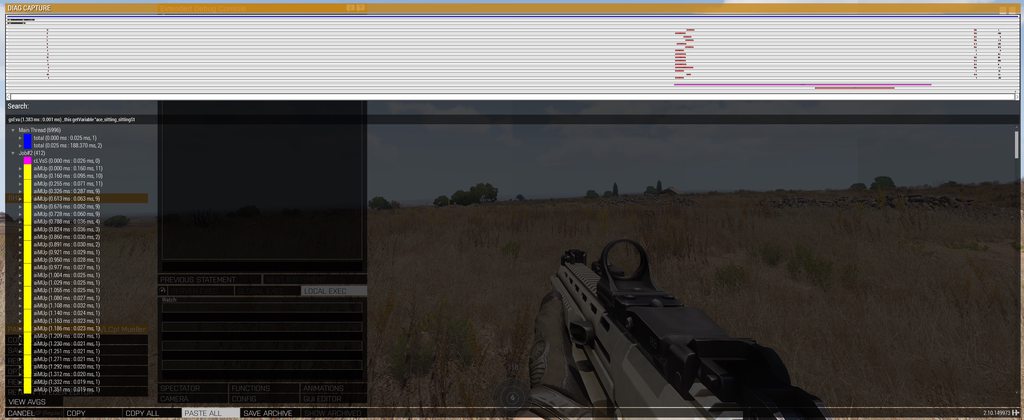
What's in the bottom two threads with large activity chunks towards the end?

#

And which branch is this?

keen vault
#

bigger chunk is the "SendMessagesThread", the smaller chunk below is the "Physx3Simulator"

ruby wigeon
#

huh, I guess it does multithread networking.

keen vault
#

only the sending bit it seems 😄

ruby wigeon
#

Apparently that's pretty expensive :P

#

I assume this is high player count?

keen vault
#

there's 126ms in this frame in main thread also related to networking 😄

ruby wigeon
#

brutal

keen vault
#

80 players, 150 AI or so active

ruby wigeon
#

wait, how long is the frame...

keen vault
#

189ms

#

yeah the sever was suffering

primal blade
# keen vault 189ms

Hi,
which "-bandwidthAlg=" Parameter have you running? Would be interesting for me to see how different modes would be effecting these timings.

vocal igloo
#

Been spending the afternoon trying to get my HC to work on my Linux server. The HC is connecting to the server fine and turns up in the player list, though isn't taking the slot. What's the steps to troubleshoot this?

keen vault
#

if they connect but don't take their slots its usually a mission issue since whitelisting works. Make sure your HC modules have variable names assigned

narrow whale
#

Having an issue on a dedicated server running a Liberation mission, specifically when using our headless client. Mission works fine (if a little chunky performance-wise) when the HC isn't connected. Upon connecting, it'll just spam out the following error (with different numbers) continuously, and due to the way Liberation handles spawning with HCs it means nothing spawns and there's effectively no combat. What would be the fix here? I can post both the modlines but I'm fairly sure I'm not missing any mods on the headless client. Will look again but if anyone knows a fix to this I'd be very appreciative of some help!
23:43:59 Client: Object 2:3940 (type Type_134) not found.

primal blade
narrow whale
narrow whale
#

If required I can post the mod commandlines, although I've specifically used a text comparison tool and there are no differences between them. The HC is also able to connect to the server and occupy the slot just fine so I wouldn't think it's a mod mismatch issue.

primal blade
narrow whale
#

The mission works and starts just fine with and without it, the issue is that the AI won't spawn (via Liberation) on the headless client due to that error. I can run the server without the commandline and everything works as intended, but obviously then we lose the performance gains.

primal blade
#

have you some ai mods running like lambs danger etc.?

narrow whale
#

Yes, we're running ASR AI3 and Server Side Smoke for Blastcore Edited. Both the headless client and the server is running these mods.

It's worth noting that on a different modset (using those same AI mods on both), there have been no issues with the headless client.

primal blade
#

i would suggest to start your server and hc without all mods. If this helps, then install the mods one by one with testing

keen vault
#

neither of the two should affect AI spawning in, it might do weird stuff once they are actually there ...

#

can you upload the HCs rpt?

narrow whale
#

Sure.

#

Uh, smallish issue, RPT is about 34MB and I don't have Nitro. Thoughts?

keen vault
#

upload it someplace else 😄

narrow whale
#

Uploading it now

keen vault
#

well unless your preset is using @17PF Gulf War Factions - Large for AI it should spawn in

narrow whale
#

It is, am I missing that?

ruby wigeon
#

1:55:58 @17PF Gulf War Factions - Large | @17PF Gulf War Factions - Large | false | false | NOT FOUND (Empty) | | |

keen vault
#

makes me so sad that I can't post pictures in here

#

and yeah, you're missing it

#

well, your HC is missing it

narrow whale
#

Certified fucking bruh moment, the webpanel for these two services downloaded mods onto the HC automatically once they were on the dedicated EXCEPT for that one

keen vault
#

I wonder if they also add -cpuCount=1 to your server startup line...

narrow whale
#

-cpuCount=4 actually

#

Before I go chasing anything else that's missing, did you notice anything else in that .rpt?

keen vault
#

nope not really

narrow whale
#

Alrighty, I'll give this a shot tomorrow. Thanks a bunch, really appreciate it

ruby wigeon
#

well, there's the cannot create object spam, but that's likely caused by the missing mod.

urban juniper
#

Is using a headless client on a local machine (running a server & client on localhost) going to add any benefit to AI? Will running a headless client allow AI to effectively use more cores (the server) to process and thus increase performance?

#

I have a 12 core system and I am curious if using a “headless client” on my local machine might let Arma improve performance by outsourcing AI to… itself 😄

timid lagoon
#

i'm running my server + 3 HCs all on 1 box

#

as long as the mission supports it

ruby wigeon
#

Server + HC + client on my 4790 makes the client a bit jittery :P

#

I think the trouble is that Arma does use a lot of cores in short bursts, so if they coincide then you can get very long frames.

#

On better hardware it might be acceptable.

dusk radish
#

So yes @urban juniper, the entire point of it is to untangle AI threading from server threading. The end result is usually better performance on both

lean kayak
#

If you are interested, I've been doing some benchmarks last night to determine the optimum performance in my setup and have documented the metrics and findings here: https://github.com/fbuchmeier/arma3-helm-chart/blob/main/docs/headless-client-benchmark/ARMA3 HC Benchmarks.md

You can see the difference between:

So for me, the most efficient setup is running the server on the faster of the two machines and a single headless client on the other one. There is no real benefit of using multiple headless clients in my scenario. This might be different for other missions or use cases.

I am still analysing the data and the conclusion should be updated soon.

GitHub

A Helm Chart for Arma 3, supporting distributed Headless Clients - arma3-helm-chart/ARMA3 HC Benchmarks.md at main · fbuchmeier/arma3-helm-chart

keen vault
#

interesting, seems like HCs are like SLI, only marginal improvements once you add more 😅
although I'm wondering if more HCs will improve each HCs FPS because the AI load will be more spread out

lean kayak
#

I'm currently only relying on the output of monitords 1 to get the server FPS, would this also work for the headless clients, maybe with another command?

And the scenario has about 215 active units, so more HCs might make sense when more units are active.

cunning sage
#

You can do more things than AI on HCs 🙂

#

statistics, anticheat, recording/AAR, mission logic, integration with third party services etc. anything to offload work from the server

keen vault
cunning sage
#

run the logic on the headless client, that's about it actually

ruby wigeon
#

You probably don't want non-AI HCs in the unlimited bandwidth list, otherwise it's unnecessarily eating server network load. Not sure what effect that option has though.

frank sky
#

can we see the source code for how the units are distributed/balanced

#

would like to see what % of AI are run on server vs HC

frank sky
# knotty rampart any tutorials on that?

there wouldn't be any tutorials on stuff like that. only a tiny subset of community modders need to consider things like this, maybe ~20 in total at this point in 2022

#

basically it is just running your server code in "initPlayerLocal.sqf" inside if (!hasInterface) then {0 spawn TAG_fnc_myOffloadedCode};

#

with server controlling it via public variables

knotty rampart
#

i see

gotcha, yeah i've always just been using a zeus mod to offload AI during the mission, havent been too keen on eden scripting unless necessary

frank sky
#

what zeus mod for offloading?

frank sky
#

there are a lot of things to consider when transferring AI locality

#

to retain 100% of the settings on transfer

knotty rampart
#

this one's workked the best for me so far

I also tried werthless' headless client, but that one doesnt have as many options

frank sky
#

a bad transfer would have, for instance, "garrisoned" AI on server offloaded to HC and suddenly start moving around, because they are not garrisoned on HC

#

garrisoned = "disableAI path"

knotty rampart
#

i guess its something one has to deal with if transfering mid-way through the mission rather than at the starrt

frank sky
#

yea, it is slightly tricky to properly transfer AI. most of the AI code is local

#

not shared over network

#

so "disableAI path" on server does not "disableAI path" on HC

#

when transferred to HC, they start moving

knotty rampart
#

i normally tend to avoid that problem by blacklisting groups that i want to run specific scripts, cause there's normally not that many that do so in my missions

frank sky
#

i have some HC offload stuff but it is not mod-portable

knotty rampart
#

honestly i'd love to have some script that makes it easy to offload a group to a HC on mission start and retain the scripts while doing so

#

as far as i've noticed you have to write a whole script to spawn the AI on HC with the script, rather than just having it placed in eden and trannsfered immediatelly

frank sky
#

yea its not much to do with mission start, imagine it like hot potato, where the AI is passed from machine to machine

knotty rampart
#

right

frank sky
#

machine it is running on does not sync all states with all other machines

#

so you need to manually sync the states on transfer

#

my stuff is a bit weird ... home brew 😄

knotty rampart
frank sky
#

but there is a 4 step process for HC transfer, several "hand shakes" where AI state info is synced before transfer

#

can see here. not the easiest to read IMO

knotty rampart
#

jesus that's massive

frank sky
#

this section for sync'ing states

knotty rampart
#

so this works out of the box when placed in mission and initialized?

frank sky
#

ultimately the states are shared via _grp setVariable ['QS_AI_GRP_HC_data',_grpData,[2,_QS_module_hc_ID]];

#

and then once transfer happens, new owner applies those states

#

"placed in mission" none of my stuff uses eden editor, just all SQF ... all dedicated server basically

knotty rampart
#

i meant as in placed as part of the mission .pbo compile, not literally placed in eden

frank sky
#

usually when i poste scripts here they get ripped apart and criticised, but ^ that is a working model for accurate HC transfer while retaining all the AI states -- like being garrisoned, etc)

#

ahh, yes

knotty rampart
#

from what you're telling me this would work way better than the mod i've been using since yeah - the main issue i have is AI scripts not being retained after transfer

frank sky
#

should all just work "out of box", up to infinite headless clients, however as @lean kayak says there is marginal gain to having more than 1, and i only put 4 HC modules in the editor

knotty rampart
#

yeah i've been perrsonally running 3HCs myself on my box

frank sky
#

we added in a Zeus offloader too , just pressing "shift + f4" on selected group to offload to server ... server can then turn around and offload to HC if its set up that way

knotty rampart
#

good stuff

#

you should make this into a mod on the workshop, i imagine a lot of people would find it useful

#

especially since the only other two mods that do this do not retain AI scripts

frank sky
#

anyways its probably not suitable for what you do, but its as close to a tutorial as i can give 😄 just a working model

knotty rampart
#

well im willing to give it a shot regardless

#

even with 3HCs - server always ends up being the bottleneck due to still having some AI on it to retain scripts, on top of the fact that it also has to calculate ace simulations and other jazz

frank sky
#

yea that is sort of inevitable. i found it not appropriate to transfer 100% of AI anyways, since you're then just over-burdening a weaker machine/cpu

#

i ended up leaving all vehicles on server, and all exotic stuff like fire support, since there is a blindness between server and HC .. the AI do not share enemy/targeting data over network

#

you can have a Server AI group in heavy combat with a HC AI group strolling by peacefully

knotty rampart
#

it makes sense tho

#

i always thought it was just arma AI being arma AI when there's a group just in safe mode relatively close to a group opening fire lol

frank sky
#

that too 😄

knotty rampart
#

you're practically fully doing multithreading on all 16 threads at that point with affinity applied

#

@echo off
start "arma3" /HIGH /AFFINITY 1555 "arma3server_x64.exe" -profiles=A3Master -name=admin -port=2302 -config=server.cfg -cfg=basic.cfg -loadmissiontomemory -world=empty -malloc=system -noLogs -hugePages -enableHT -exThreads=7 -maxMem=20480
start "arma3hc1" /HIGH /AFFINITY 2A "arma3server_x64.exe" -profiles=HC1 -name=HC1 -client -connect=127.0.0.1 -malloc=system -noLogs -hugePages -maxMem=12288
start "arma3hc2" /HIGH /AFFINITY A80 "arma3server_x64.exe" -profiles=HC2 -name=HC2 -client -connect=127.0.0.1 -malloc=system -noLogs -hugePages -maxMem=12288
start "arma3hc3" /HIGH /AFFINITY E000 "arma3server_x64.exe" -profiles=HC3 -name=HC3 -client -connect=127.0.0.1 -malloc=system -noLogs -hugePages -maxMem=12288
exit

#

^ that's my setup

#

i'll likely be ditching -enableHT based on what was said to me before tho

frank sky
#

i defer to daedalos re performance, i havent done any good data collection to compare what setup is best. just interested to see how AI are distributed in his testing

knotty rampart
#

yeah i'd like to see that too

frank sky
#

that mod (ZHC) does appear to try synchronising states

#

if the garrisoned AI start moving again tho, its because his "regarrison" function is not good

#
    _x forceSpeed 0;
} forEach units _groupMoving;
#
    _x disableAI "path";
} forEach units _groupMoving;```
#

is like the first, needs to look like the second

knotty rampart
#

hm

it might be conflicting with something else on my modlist then

the main culprits end up being - AI that was moving has stopped moving, and AI that runs scripts ignores scripts; and also (for webknight's mods for example) special AI breaking down completely

keen vault
knotty rampart
#

at least ace simulation being the biggest culprit for me

#

did a stress test with a stupid number of AI (like 800) and server FPS still died before HC fps using ace

without using ace - the FPS was actually relatively fine on both server and HCs

#

so it's largely dependent on what mods you're using

keen vault
knotty rampart
#

oh in that sense, yeah of course

#

sorry

keen vault
#

And yeah, in my experience the major limiting factor is basically all the networking and syncing the server has to do which sadly can't be offloaded.

frank sky
#

yea Ive been around "big AI missions" for awhile and my advice is to keep the total under ~150 for good performance, and try to keep the "AI in active combat" under ~75 at any one time

knotty rampart
#

it also seems to help to spread out AI combat over a large area (groups of 20vs20 AI for example spread out by a kilometer or so), not sure entirely why but it does seem to have an effect over having all the AI fighting in the same spot

frank sky
#

if your mission allows player aircraft, adding more anti-air will actually improve performance, since a simple flyover of enemy areas by a player will put more AI into CPU-intensive "combat mode"

#

retaining an infantry based front-line will allow the front lines to enter combat mode while the reinforcements are in CPU-friendly safe/aware ... but helicopters/jets flying over will put the reinforcements into combat mode prematurely

frank sky
#

so with all players and all AI in a small area, server is doing a lot of network sync'ing, this slows down everything including client fps

knotty rampart
#

sounds about right yeah

frank sky
#

the most performance efficient big gamemode is "Altis Life"

#

they managed to create a mode in which players enjoy being spread all over the terrain, very far from each other, extremely low player-density

#

ive added a comment to the ZHC mod asking them to tweak a couple lines for the garrisoned AI

knotty rampart
keen vault
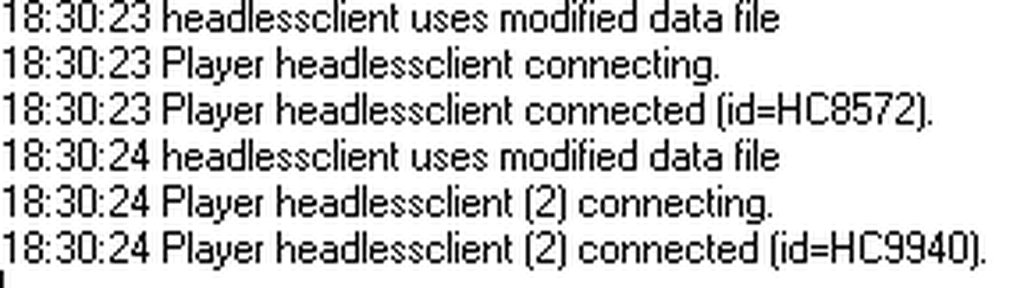
keen vault
knotty rampart
#

or at least "may"

#

well either way whenever there's an issue i usually put it back on when i need to debug

cunning sage
#

Logs are async since recent patch

knotty rampart
#

i see

#

i'll keep it on then

lean kayak
# frank sky i defer to daedalos re performance, i havent done any good data collection to co...

I can check this, what would be the easiest way to get this information? The Wertheles Benchmark I am using has a debug mode which displays information about all the connected headless clients, would this be sufficient? Like you can see in this screenshot: https://steamuserimages-a.akamaihd.net/ugc/442829120556689818/CE3AB8A71417B753583200CE3B5514918D652227/?imw=5000&imh=5000&ima=fit&impolicy=Letterbox&imcolor=#000000&letterbox=false

junior pike
#

I've just set up a HC on my game pc to run using the server.exe -client option

#

I can see its connecting in the log, and it's displaying the server welcome message

#

but I do not get a "connected" message on the server log, which I do see for players

#

How can I tell if the HC is successfully connected?

lean kayak
junior pike
#

Hmm so Im testing using Antistasi

ruby wigeon
#

in that case just hcarray

junior pike
#

I don't see the HC in the overview, and there's also a Load AI Info option ingame which states no HC connected

ruby wigeon
#

Which version of Antistasi?

lean kayak
#

On another note, does anyone know if it is possible to allow HC connections from a CIDR range instead of single IPs? I'm running a dynamic setup where I do not know the exact IPv4 address of a HC, only an IP range that the HC will select an IP from (https://community.bistudio.com/wiki/Arma_3:_Headless_Client)

So something like 10.42.219.0/24 would be great (to select all IPs from 10.42.219.0 to 10.42.219.255)

junior pike
#

2.5.4 Altis community version (might be 2.5.5 actually)

#

Hmm now I'm getting kicked of the server: You were kicked off the game. Steam authentication failed.

#

I'm trying to run the HC on the same pc I run my normal/GUI Arma 3 with

ruby wigeon
#

Do you have steam running?

junior pike
#

yes

ruby wigeon
#

Did you download the HC data using steamcmd?

junior pike
#

no, I'm just running the arma3server_x64.exe with the -client command

#

I did use steamcmd to set up a dedicated server on another pc

#

so to be clear: I have a slow dedicated server that is running AntiStasi. It's working, but slow.

#

I have a game pc which I'm trying to also run a HC on

#

while running Arma 3 at the same time

ruby wigeon
#

Are you already connected to the server with a normal client?

junior pike
#

yes

ruby wigeon
#

It's possible that it blocks that. You can't normally connect to a DS with two clients with the same steam ID.

#

Don't honestly know for HC + client though. Not something I've tried.

junior pike
#

so would using steamcmd help? I think I had to create a new Steam ID for the dedicated server

ruby wigeon
#

I don't know.

junior pike
#

ok, appreciate the help

#

Not getting the kick message anymore, but for some reason the HC doesn’t show up in the player list even though its terminal says Connecting and is receiving server messages

dusk radish
lean kayak
# nova dagger Only single IPs https://discord.com/channels/105462288051380224/1054650153640181...

Thanks, didn't think of the search, but will do so in the future! For now I am using Envoy as a reverse proxy for the UDP game ports and a dedicated Kubernetes Service that is not reachable from the internet to trick the game into thinking headless client connections come from localhost/127.0.0.1. Not an ideal setup, but I can prevent any unauthorized connection attempts on the network layer (Network policies) so it should be fine in this environment.

junior pike
lean kayak
#

I ran some more benchmarks today with Antistasi on Cam Loa Nam and performance only slightly (less than 10%) increased when adding a single HC. I did not see any significant increase when adding more than 1 (up to three) HCs. If you're interested you can find the data here:

Any tips on how to increase the utilization of HCs in Antistasi from a server admin perspective? The benchmark scene ran smooth with over 30 fps but during normal gameplay and with more activity it usually drops to less than 15 or in extreme cases less than 10 fps with only two players in the game.

keen vault
# lean kayak I ran some more benchmarks today with Antistasi on Cam Loa Nam and performance o...

To me it seems like you're not even FPS limited by AI but more so by other things running in the main thread that can't be offloaded, your FPS basically don't change at all...
Antistasi is coded with HCs in mind so if it detects them it should make the most effective use of them (spawning AI on them).
Having such low FPS with only one of two players seems kinda rough, whats your server hardware?

wet sphinx
#

No extra configurations needed to use HC(s) in Antistasi?
You can start HCs "on fly"?

ruby wigeon
#

Sure, just don't shut them down :P

lean kayak
keen vault
lean kayak
#

Ah, Memory Frequency 🙂 CPUs have a max core clock of 4,4GHz and 3,2GHz

#

My bad, was a little bit ambiguous as I was just reading another benchmark which stated that Memory Frequency actually had some impact on Armas performance.

keen vault
#

ah nevermind then 😄

#

have you tried unlocking FPS and seeing how high they get with only you on the server? not even hitting 45FPS in antistasi with only two players online seems odd.

lean kayak
#

ok, this was the norm for me, so I thought this was just how Antistasi and Arma where running on "modern" Hardware 🙂

And no, I am currently running with -limitFPS=100 to not consume unnecessary CPU resources when the server is idling (e.g. in the mission select screen).

I am going to quickly change this, startup Antistasi with one HC and see what happens.

keen vault
lean kayak
#

thanks, I suppose idling in the editor is much different from running a game of Antistasi on Cam Lao Nam. In the end I could not quickly remove the limit, but I've updated it from 100 to 1000 fps (10 000 broke the server and defaulted to 5 fps ^^). Overall there is no affect to the FPS curve when increasing the limit (which was what I suspected, as it only limits the number of fps): https://snapshots.raintank.io/dashboard/snapshot/4IsGUl7QC2cI5yyIsLVBpqW2v4sA2g0v

lean kayak
ruby wigeon
#

Major attacks run strictly on the server anyway. But I really don't know what you're doing to make your server FPS that bad.

#

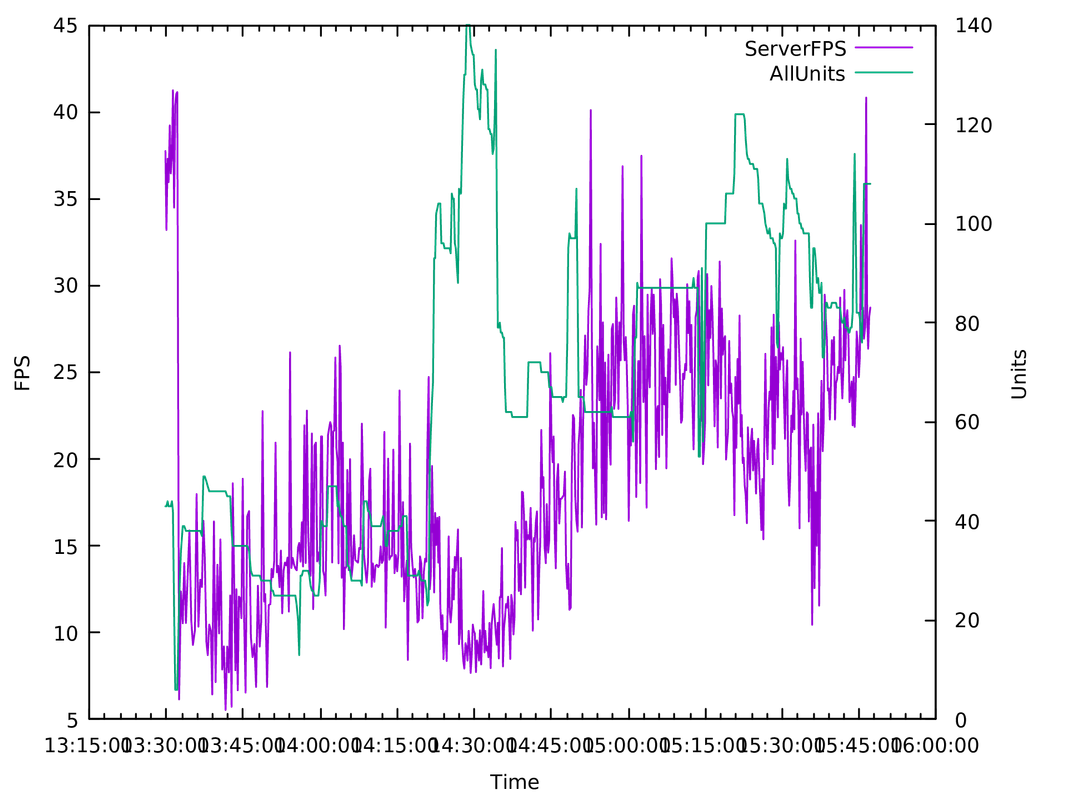
Can you graph AI count vs server FPS? Turn off the HCs.

#

Or send RPT, I can dig the information out of that.

lean kayak
#

That is a generous offer. I'll grab the logs (need to export them from loki first) and upload them for you.

Where can I find the information about AI count in the log stream? I can update my log parser to create a new metric based on this and then graph it together with server FPS.

ruby wigeon
#

Should be pretty obvious if you look at the RPT :P

#

It prints lines like this every 10 seconds by default:
9:13:57 2022-11-06 09:13:57:311 | Antistasi | Info | File: A3A_fnc_logPerformance | ServerFPS:19.0703, Players:1, DeadUnits:2, AllUnits:26, UnitsAwareOfEnemies:0, AllVehicles:34, WreckedVehicles:1, Entities:65, GroupsRebels:8, GroupsInvaders:0, GroupsOccupants:0, GroupsCiv:5, GroupsTotal:13, GroupsCombatBehaviour:0, Faction Cash:8640, HR:59, OccAggro: 1, InvAggro: 0, Warlevel: 3

lean kayak
#

ah great, thanks

#
{"log":"15:10:41 2022-11-06 15:10:41:021 | Antistasi | Info | File: A3A_fnc_logPerformance |  ServerFPS:24.9221, Players:4, DeadUnits:65, AllUnits:87, UnitsAwareOfEnemies:0, AllVehicles:246, WreckedVehicles:10, Entities:388, GroupsRebels:20, GroupsInvaders:8, GroupsOccupants:0, GroupsCiv:0, GroupsTotal:28, GroupsCombatBehaviour:10, Faction Cash:\u003cnull\u003e, HR:\u003cnull\u003e, OccAggro: 14, InvAggro: 38, Warlevel: 9\n","stream":"stdout","time":"2022-11-06T15:10:45.737629939Z"}
#

I'll get the logs, update the metrics and then we'll see

lean kayak
ruby wigeon
#

yeah there's something wrong with your server :P

#

You have a long patch there of ~20fps with 40 units. My 4790 does a couple of times better than that when localhosting.

empty vortex
#

Hello, recently our AI (vcom + alive) started glitching up and down when HC took over the ai groups.
I have no idea really what could be the issue as it has worked nicely before, anyone else got a hint?
I checked my .rpt for the server and I can see this:

12:35:42 [ACE] (headless) INFO: Present HCs: [HC_1,HC,HC_2] - Full Rebalance: false
12:35:42 [ACE] (headless) INFO: Groups Transferred: Total: 3 - HC1: 1 - HC2: 1 - HC3: 1

12:50:39 NetServer: cannot find channel #1141794155, users.card=15
12:50:39 Message not sent - error 0, message ID = ffffffff, to 1141794155 (HC)
12:50:39 ALiVE 6649.88 : 6891.58 - OPD DATA [1.14179e+009,"HC3868","headlessclient (2)",true,25,"1141794155"]
12:50:39 Server: Network message 618d02 is pending T_124
12:50:39 Client: Remote object 25:0 not found
12:50:39 [ACE] (headless) INFO: Removed HC: HC
12:50:39 NetServer: cannot find channel #431836214, users.card=14
12:50:39 Message not sent - error 0, message ID = ffffffff, to 431836214 (HC_1)
12:50:39 ALiVE 6649.97 : 6891.67 - OPD DATA [4.31836e+008,"HC2848","headlessclient",true,12,"431836214"]

ruby wigeon
#

Isn't ALiVE supposed to be managing the headless client stuff itself? You really don't want ACE headless to be fighting with that.

empty vortex
ruby wigeon
#

Pretty sure the ACEX headlesss stuff was merged more recently than two years.

empty vortex
#

Yes.
I can see in the .rpt that alive senses that ace-hc is active and that alive-hc is disabled automatically because of it.

#

So there is no fighting 😄

dusk radish
#

If not what are the glitches?

dusk radish
#

Hmm that would be a network thing wouldn't it?

empty vortex
dusk radish
#

Your HC is running off the same box, yes?

#

And you have monitored your server and HC frames, yes?

empty vortex
#

We have 3 HC on different servers

#

Last time we only used 1, it still didnt work. As soon as we disconnected the HC it worked instantly.

dusk radish
#

Yeah sounds like networking

empty vortex
dusk radish
#

simplest thing to try is putting HC on same server box

#

and monitoring fps on both server & HC

#

oh and run a network diag from your server

runic cobalt
#

Ok, so we have some issues with AI on HC's, ranging from not responding very well to player actions (eg. firing at them) up to massive lag spikes when AI is active or dying. Logs don't show a thing, we tried different methods of HC management, and doesn't seem to be reproduceable (other than happening on a regular basis).

#

Is this something people have noticed as well, or know about a solution (other than moving the HC modules around manually during a mission), or is there something else going on, because it does seem to get worse.

slim lily
#

I've recently implemented a HC move function in my groups framework as well. Also did some before and after testing by myself and with other players before finally pushing it. There is an definite improvement in reaction times. Especially when shooting near the AI.

#

My thinking as to why it might be, because similar to player clients they don't render stuff far away as well. So headless clients might get the same treatment. But that's just my thinking.

ruby wigeon
#

Position of the HC module does matter for the Fired event at least. It's possible that it also matters for built-in AI functionality or networking, but I've neither tested it or noticed anything obvious myself.

keen vault
#

Personally never had any lag spikes due to AI dying or firing, at least from what I can tell.

wind yoke
#

Arma is the quirkiest game.

tawny ledge
#

Is it possible for players to join and jump the line/take the spot of a Headless Client? Tonight is the first night I've ever used Headless Clients, but I am having a weird issue where people are getting kicked for CreateVehicle restrictions for HeadlessClient_F and then my HCs aren't able to connect and I have to manually reconnect them. I thought forceheadlessclient = 1; prevents this from happening -- does that still work in 2022 or is there a more modern way of doing it?

keen vault
tawny ledge
keen vault
#

Where does that get set?

tawny ledge
#

I think we solved it by forcing HCs to spawn as a different Group than players...but yiiiiiikes what a nightmare it's been trying to troubleshoot 😅

keen vault
#

What on earth are you doing? None of that sounds remotely like anything I had to do

fickle perch
tawny ledge
# keen vault Where does that get set?
                class Item0
                {
                    position[]={13239.08,16.010651,11685.795};
                    special="NONE";
                    id=0;
                    side="LOGIC";
                    vehicle="HeadlessClient_F";
                    player="PLAY CDG";
                    text="HC";
                    forceHeadlessClient = 1;
                    skill=0.60000002;
                };
keen vault
fickle perch
#

non-admins can't even see them

tawny ledge
#

Thanks, I can look into that too. I was just following the instructions I got from a Roaming AI mod that came with HC support called A3XAI. Didn't realize no one even knows what that setting was hahaha.

fickle perch
#

last repo activity 7 years ago meowsweats

tawny ledge
#

Yeahhh, Exile doesn't have the most active dev community these days lol.

#

But thanks for the heads up guys 🙂

keen vault
#

jesus 😄

#

best of luck

ruby wigeon
#

Antistasi headless client objects look like this:

class Item12
{
    dataType="Logic";
    class PositionInfo
    {
        position[]={9087.5674,3.273562,4646.6353};
        angles[]={6.262712,0,0.011372928};
    };
    name="hc";
    isPlayable=1;
    id=6458;
    type="HeadlessClient_F";
    atlOffset=0.025331974;
};
#

Looks like very different sqm version.

fickle perch
#

different indeed

mental copper
#

Any known issues with AI turning invincible after transferring to HC with ZHC?

dusk radish
#

In my experience theyre not invincible it's more that the hits dont register/sync

#

I think it means the network transfer messed up? I reduced issues by slowing down the rate of transfer and volume of transfer

timid tangle
#

how many cores/threads does 1 hc utilize? say i have 5800x, 1 server + 2 hc, how many cores should i 'activate' for each hc? (task manager affinity)

#

or do i just leave it on default

keen vault
fickle perch
#

Just like the base game/server. One heavy loaded main thread, some configurable number of side threads

timid tangle
glossy vector
#

So I got headless client connecting, not getting kicked, but it wont slot in. What could be the cause of this?

#

Further research I think it is a profile naming issuse, my default client is named headlessclient, the mission wants him named HC and further reading some people are saying that I cannot select profiles on linux? which is what I am running Headless Client from.

glossy vector
#

do I need to direct that to -profile=HC too?

#

despite putting -name=HC it is still connecting as headlessclient

#

idk its strange, it will connect sometime and then get kicked for steam authentication some times, despite changing nothing with the command line. I am not 100% sure when folder its pulling the profiles from despite designating it in the commandline, I am going to have to make my own mission and place a thing down it to see if I can get it to connect, I am using a default ALIVE mission right now for testing.

#

Ill come back to it after today, merry xmas !

keen vault
glossy vector
#

Yeah there are three

fathom bane
#

make sure it has the right mods loded

#

and even if it does make sure the mods on the headless client actually installed

urban juniper
#

What ever mods a client would have the HC must have

#

or the server will go into log spam meltdown mode

dusk radish
#

Not role select but in the actual mission preview

glossy vector
#

I'll have to check the mod string out, it doesn't get kicked sometimes is the weird thing, it connects and is fine.. The console says "loading profiles" and then it just does nothing, doesn't enter the slot or anything.. so I tweak the command line with the -name and -profile thing and then it keeps getting kicked.. that might server setting though something about kick people and timing them out when they lose connection enough or something. Idk what it is. sometimes it feels random when it stops working like one moment the commandline is working and the second it stop all together... despite nothing really changing.. I will check to see if HC is setup properly. Worse case, i just make my players load up werthles and start using that see if that works.

glossy vector
glossy vector
#

I figured it out, it was some thing really really dumb, everything else is set up right on the client side, I checked 100 times, so I figured I would check the server out and every time I went there I went mad looking for something misconfigured... in the server.cfg the parameter headlessClients[{xxx.xxx.xxx.xxx}]; was spelled headlessClient[{xxx.xxx.xxx.xxx}];

#

A 's' gummed this whole thing up lol

#

at least I learned alot about headless clienting along the way

glossy vector
#

Now I am running into the missions where it doesn't seem to want to load the mods. I've tried loading the mods in the batch file three ways -mod=X:\Arma3!Workshop\@mod or*** !Workshop\@mod*** and ye ole '@mod' Im still getting kicked from the mission becuase i am not loading at least one mod... I can connect HC to a vanilla mission with no mods.

#

its interesting... maddening, but interesting.

glossy vector
#

I just went through the launcher and it works fine. Everything is fine. Thanks for all the help <--- No sarcasm... seriously thank you to @urban juniper @fathom bane @dusk radish @keen vault @cunning sage

fathom bane
#

glad it works bro

trim socket
sullen aspen
#

Hey there. I’m currently renting a server from host havoc and I’m curious about HCs. Do I have to be renting 2 servers (1 for server, 1 for HC) or can I run server and HC on the same one?

keen vault
#

I'm assuming you're using their web interface so it would be the first option, if you have an actual dedicated server you can run as many as your hardware allows.

sullen aspen
#

Well I’m renting a server to run the maps and stuff. I just wasn’t sure if I had to pay for another server or if it was doable to it on the same thing

urban juniper
#

HC's use 1 core usually

#

If you confine it to 1 core that is the best idea.

sullen aspen
urban juniper
#

-exThreads=1 can be used on them specifically

heavy tiger
#

No need to use exThreads. That also turns off other extra threads that may be useful on HC.
It doesn't need a render thread yes, which is why it doesn't start one in the first place

urban juniper
#

Ah so the executable is smart enough to work it out now?

#

I still would personally core confine the HC

dusk radish
urban juniper
#

then you confine the HC to that core, giving it executive resource control on a single core.

inner fog
#

i got a small problem with my server. i edited a mission with VSM All in ONE and i cant get through lobby to connect to server because i have an error : no entry: config bin CFG Glasses / VSM_Balaclava_black_glasses_identityTypes
i started the server of course with all the mods
and im using TOPHES Dedicated server tool
is there no way to skip error messages in the tool?

cunning sage
#

either add the required mod or remove the dependency from the mission

#

there is this option in server.cfg but it is better to fix the real issue

class AdvancedOptions {
  ignoreMissionLoadErrors = true;
};
torpid sentinel
#

it's still an issue and there's been no progress so far

trim socket
#

i will investigate what's the holdup ...

inner fog
#

any idea why i cant join my server ?
i got all mods active but cant get past lobby:
No entry 'bin\config.bin/CfgGlasses/VSM_Balaclava_black_glasses.identityType
using TOPHES server tool
if cant solve the error is there no command for server tools that they skip errors ?

wise rampart
somber scroll
#

Hi Guys. I have a headless client running on my server. I wanted to test to make sure it was working (its joined to the server fine all looks correct, pretty sure its running)
When I tested it briefly and got around 20-30 ai running none were parsed to the hc when I checked the map board (Antistasi). I checked the RPC logs and it 'looks' like its doing stuff, I dont really know what a healthy headless client RPC file looks like though. Does anyone have any pointers for this?

keen vault
#

Unless you script it in there's nothing in your rpt file to indicate if a HC is "working" or not.

somber scroll
#

ah awersome thanks for that clarification

keen vault
#

E.g. liberation has some information on the map itself showing how many units are on the HCs and server

#

and for selfmade zeus missions you can use sth like Zulu Headless Client which comes with some debug function (marker on map and rpt)

somber scroll
#

Just one other question, I am using the FASTER server launcher, it has an option for headless clients. but doesnt seem to be that granular when it comes to adding paramaters for allocating just one CPU (to headless clients). Does this really matter? or should I just leave it to use the default of the server (4)

keen vault
somber scroll
#

amazing thats a quick answer that I have been looking hours online for

#

cheers

#

I have a 6700 (4 cores 8 threads) I should set as 8 cpus right?

#

I get abit lost with how the game sees threads vs cores

keen vault
somber scroll
#

oh? so dont even bother specifying how many cpus I have? just only tick the hyperthreading and ignore the rest

#

shweet

keen vault
somber scroll
#

ok sweet cheers man, thanks again for your help!

uneven igloo
#

To those that have a dedicated server through a provider how do you setup your headless clients for antistasi plus 2.0? Do you need to rent another server specifically for the HC?

keen vault
#

usually you pay a bit extra and they unlock the HC button for you in the web panel

uneven igloo
ruby wigeon
#

Separate server is ok but preferably in the same data centre at least.

#

An oddity there is that servers don't need a steam account with Arma 3 to run, but headless clients do.

cunning sage
#

no, it does not need that

#

it works the same way as the server

ruby wigeon
#

Hmm, what's the distinction? The executable used or the headlessness?

cunning sage
#

Using server binary with -client argument to start it as an headless client does not require a steam account to run

warped patio
#

hello would any1 be able to help me

slim lily
#

If you state your problem/issue maybe.

urban nymph
#

is it recommended to run headless clients on the same machine as the dedicated server?

cunning sage
#

Yes, assuming you have enough CPU and RAM for both server and headless client(s)

frank sky
ashen birch
#

hello how can I know the names of the vests for the folder because I want to rework the

slim lily
#

Uhh... not sure what you mean there @ashen birch. From what I am getting you want to retexture something, if so thats a question for #arma3_texture.

#

Also don't cross post your questions.

wind yoke
#

do we have any data to compare?

urban nymph
#

does the hc try to reconnect to the server if the connection is lost?

wind yoke
#

I mean, if the HC .exe is killed, if I start a new one, it should reconnect

#

if you pass the correct params

#

"-client -connect=127.0.0.1 -port=$port "

urban nymph
wind yoke
#

oh, I've never tried that.

urban nymph
#

turns out i can't run the headless client alongside the regular client since datacache\cache_lock is created

#

apparently it tries to reconnect twice then it stops connecting

#

im getting steam authentication failed when attempting to connect to the server

keen vault
#

And for the steam Auth thing you have to add the HCs IP to the headless IP setting in server.cfg

cunning sage
keen vault
#

ah yeah, I mean the -profiles .... argument

modern delta
#

I have two really aggravating server issues that I hope someone can help me resolve.

  1. Hosting A Server On (Server PC) Using Faster, Everything Starts fine.
    Reads the mission File, connects to battleye, etc...
    But when I try to connect to my server, I get the error;
    "You've been kicked off the game".
    No clue why this is happening as it has worked fine before.

  2. Running the server on (Server PC), once again, Using faster.
    I'm trying to use a Seperate PC on the same network (Headless PC) As the HC.
    No matter what I do, the HC only launches on the Server PC.
    No clue how to make it Run on the HC Machine.

Still really new to Hosting Dedi servers and I'm really struggling to figure these two issues out.
Mostly due to a lack of information on my specific problem.

#

Thanks.

urban nymph
keen vault
urban nymph
keen vault
#

how do you think normal servers run with multiple HCs? 😄

urban nymph
#

fair point

#

thanks

urban nymph
urban nymph
keen vault
urban nymph
#

i see

cunning sage
#

Use arma3server_x64

urban nymph
#

also for some reason arma3battleye waits on any arma3_x64.exe that's running even if it wasnt launched by itself eg: launcher's -server

keen vault
urban nymph
#

oh, do those have executable selection?

#

im using the first party launcher

keen vault
#

Yup

#

But don't use them unless you have to

urban nymph
#

why bi wouldnt put executable selector in their launcher?

keen vault
steel thunder
#

what kind of control of the server is necessary to use a headless client? we use Fragnet as our host, im not sure if we have the necessary permissions/access to the server to do everything

obsidian raven
#

Active SteamAccount afaik

trim socket
#

@obsidian raven not anymore, new HC uses arma3server.exe binary

languid tusk
#

You need enough perms to run another instance of the exe.
If it's using something like Cpanel, you'll have to talk to your provider.

cold trail
#

Can anyone think of any reasons a headless client would absolutely spam non-guaranteed message errors?

#

... Never mind. I think I see why. We've got a LOT of errors in our headless client logs

obsidian raven
#

Oh okay! Thx @trim socket

urban coral
#

I have a very powerful computer and was going through the process of setting up a headless client and local server to play single player DRO/other dynamic missions to increase performance by offloading the AI processing to another core

#

I went through the setup with FASTER, but my issue I'm running into is that whenever I try to launch missions, I keep getting kicked back to the mission lobby, and there's errors re: cfgBatch files from various mods. When I'm just playing in singleplayer offline however these errors are harmless. Is this different when doing a headless client and LAN dedicated server combo?

ruby wigeon
#

Don't try to set up a headless client until you have the dedicated server working, for a start.

sleek robin
#

is there a way to make headless clients listen to zeus better or just have more control over them just like using zeus without a headless client i used ZHC but it has a compatibility issue with ZEN and im not sure if its going to be fixed

#

also would having an ai mod like LAMBS mess stuff up because sometimes the ai dont want to follow the orders of zeus at all when under controll of the HC

keen vault
#

What IS shit tho is AI drivers on HCs 😄 We added a little eventhandler that blacklists all AI vehicles from being moved of the zeus' machine

sleek robin
#

when using the garrison function or the disable ai pathing feature through zen it will stop working/ let the ai go back to being ungarrisoned or they will get their pathing back whenever they are transferred over to the HC and start moving again the dev of ZHC said it shouldn’t be doing it but it is for some reason and I don’t know if he will or can fix it but ya the big thing I was asking is if thats just how using headless clients are like and there’s no real way to make it work flawlessly and if there are other alternatives to ZHC that allow the handing off of ai to have full control of them and whatnot

urban coral
#

@sleek robin I'm new to using an HC but how would an HC control zeus? Isn't HC not a player?

sleek robin
#

a HC is a separate server dedicated just to the functions of AI so ya not a player, it takes control of all the ai in a mission to help improve performance. The HC isnt controlling zeus but the HC is conflicting with the zeus when it comes to giving orders to squads or whatnot im not the best to explain but i hope that helps

keen vault
# sleek robin when using the garrison function or the disable ai pathing feature through zen i...

oh that, yeah that's just a general issue with how HCs work. AI that get transferred loose their short term memory so they forget whatever you told them beforehand.

We combat that by only telling AI to do stuff once they are transferred (and setting the rebalance timer to 1 hour so AI never get moved between different HCs). Using the debug overlay that ZHC provides really helps with that because you know exactly when the AI is transferred.

urban coral
#

Does anyone here know how to identify whether a mission has Headless Client support enabled? I'm trying to run DRO missions on a dedicated server but not sure if the HC is working as intended

#

My performance is good but still unsure

cunning sage
#

if the mission has a headless client slot/module then it should support it, otherwise no

urban coral
#

I'm able to connect to a DRO mission with an HC so I'm assuming it's working

cunning sage
#

if you login as admin you should see headless client slot that the hc joins, otherwise it is not working correctly

slim lily
#

Anyone has experienced their HC (on Linux) crashing on mission change? Only happens sometimes though, and it's just one random HC.
It's been happening for a while now and I don't really know what the issue could be.
The things it seems to crash on are always something along the lines of:
File profiles/headlessclient_3/home/headlessclient_2\headlessclient_2.Arma3Profile, line 22: '.w': 'ACK' encountered instead of '='
File profiles/headlessclient_1/home/headlessclient_3\headlessclient_3.Arma3Profile, line 18: '.': '‘X91' encountered instead of '='
It's always something in the Arma3Profile files.
And deleting the profiles data doesn't change anything as when it gets recreated it will just crash again on the same issue.

urban coral
rose burrow
#

hello

#

i am having a issue regarding headless clients acting as regular servers

ruby wigeon
#

Do you have -client in the command line for the HCs?

rose burrow
ruby wigeon
#

Then you should probably go ask the people who made the tool. I think they have a discord.

rose burrow
#

aaaah

#

okay

urban juniper
#

If I check off Headless Clients and provide localhost (127.0.0.1) as the headless client IP, will I be using other cores on my PC for AI processing?

#

for TADST ^

keen vault
ruby wigeon
#

TADST only has options to allow headless clients, as far as I can tell, not to run them.

smoky mulch
#

how do I know if a headless slot is selected by the client?

cunning sage
#

it will be shown as used by headless client in slotting screen if you're logged in as admin

obsidian raven
#

QuickQ: Is there any difference running an HC with the normal Client and running with the Server files? (except the active Steam Account)

pale widget
#

Server files are much smaller (I think no textures/sound), so I assume the ram usage should be lower

obsidian raven
#

hmm, good point

wind yoke
#

Did something change with this latest update regarding HCs?

#

I used to be able to run two servers with a HC for each

#

Now the second HC i boot up gets stuck on "loading core configs"

#

the netlog is basically a spam of:

#

295.325: 4:18:25 Waiting for 'C:\Users\admin\AppData\Local\Arma 3\DataCache\cache_lock' to be available

#

the HC RTP is empty

#

"SteamAPI initialization failed. " is the one and only log there (besides the header at the top)

#

same effect on both the normal and perf branches

cunning sage
wind yoke
#

that worked, thanks

#

strange that it was working without that before

keen vault
#

It was supposed to be always like that but only happened on perf branch, maybe 2.12 actually got it onto stable

cunning harness
#

Less overhead for transfering locailty if you spawn them on the HC

void saffron
#

Running the code local to the HC means some BE vulnerabilities have to be created No, HCs are special entities, you can't exploit that.

rough pumice
#

I am looking into setting up headless client on our server and had a few questions.

  1. Most guides on headless client say that you need to spawn AI via script. So if I want to run a mission via headless client, I cant place units via editor? I would need to set the ai to spawn via script only?

  2. Can you spawn AI via composition in Zeus? And if so, will it be just placing them like we do on normal dedicated server or is the process going so different?

keen vault
#

most guides are out of date, you can place units in the editor but they might forget what to do once they're transferred to the HC.

#

not quite sure what you mean with 2., AI placed by zeus stays on the local machine unless you use sth like ZHC or ACE HC to transfer AI to the server/HC

rough pumice
rough pumice
#

Like if I place an AI composition via zeus using those mods, AI will transfer to HC automatically?

keen vault
#

yeah, but AI might forget that they were garrisoned and they forget where enemies where (they loose their short term memory).

rough pumice
#

Aaah I see. Is there anyway to connect editor placed AI with the HC without script so other mission makers dont struggle with that complicated stuff?

ruby wigeon
#

I think waypoints are global at least, so editor missions might be ok-ish.

trim socket
#

you can easily create script-code to run in way it checks to run on HC only and thus can't be exploited via normal client

worldly canopy
#

Hey! I'm having an issue with my server.cfg. When I launch the server it auto deletes the ip address I put into the headlessclients setting

ruby wigeon
#

who runs your server?

worldly canopy
#

bisect @ruby wigeon

#

sorry for the long response

wind yoke
# rough pumice I am looking into setting up headless client on our server and had a few questio...

This framework has a module that transfers eden AI to the HC, along with some extra advanced AI features including state machines https://github.com/Global-Conflicts-ArmA/Olsen-Framework-Arma-3/releases/tag/1.1.2

GitHub

clicker sound array options
AI driver view positions, test set mode for mission makers
AO limit ANY/all sides fix
terrainGrid options for clients/HC
soft mission end function
anti ND disable quick ...

#

It's a bit complicated to use the headless AI module. DM if you need help

winter basin
wind yoke
winter basin
#

I mean eden placed yeah

wind yoke
#

but I don't get what you mean... If the AI was placed on eden then it's on the server

winter basin
#

aight

runic cobalt
shrewd prairie
#

When it comes to Headless Clients and purchasing servers for them. Does slot count matter? If my main server has 40 slots, will the headless client also need 40 slots?

normal frost
# shrewd prairie When it comes to Headless Clients and purchasing servers for them. Does slot cou...

Shortly put: Not really. I'm not sure how different slot based server businesses count the slots, but a single headless client (which is enough in 99 % of the scenarios) takes one slot only (at maximum) and possibly not even the single one. So you need 1 slot per HC instance (at max, probably 0). If you really want to optimize the price, it might be worth asking from the server business you're about to choose

shrewd prairie
normal frost
shrewd prairie
#

Thanks.

normal frost
# shrewd prairie Thanks.

Also I can't seem to be able to read anymore but if you're talking about only the HC connecting to server (and not any player like yourself), the needed slot count is always 1 (because I doubt server businesses will let you buy a server with 0 slots lol)

shrewd prairie
#

Yeah, I'm finding ways to save money and not have to pay for a full 40 slot server just so it can be a headless client.

normal frost
keen vault
#

depending on how much you're paying for 40 slots it might be cheaper to go with a dedicated server

normal frost
shrewd prairie
#

So, currently. I'm paying for a single 40 slot server and no headless client.

I was just thinking if I really needed to buy ANOTHER 40 slot server and make that the headless client for the main.

normal frost
#

If you don't want to get an actual bare metal dedicated server (and setup things yourself), just add an extra slot to the existing server (if there's even need for it in the first place, might just add the HC to existing server with current config)

shrewd prairie
#

So the current dedicated server itself will add its own HC? How does that work?

normal frost
keen vault
#

A dedicated server is a physical computer you rent in a datacenter that you have full control over.

shrewd prairie
#

How will I be able to launch the headless client? I'm not planning to host a headless client from my own machine. The dedicated server that I own currently isn't a VPS.

keen vault
#

Meaning you can have as many slots, servers and HCs as you want (as long as the hardware is good enough)

shrewd prairie
#

My game server is capped at 40.

#

Since we don't have that many people.

normal frost
#

Also there's the Arma dedicated server (the Arma server executable) and physical dedicated server (meaning the whole physical server machine)

keen vault
#

Yeah because you don't have a dedicated server, you have Arma Server as a Service thingy with a web interface and no control over what hardware your server runs on.

shrewd prairie
#

Then that's what I meant, sorry for the confusion.

keen vault
#

But to get back to your original question a HC either needs one slot or none at all depending on your provider. Most? offer HCs in their webinterface for an additional fee.

normal frost
#

Where's the current server located at (roughly)? If near or in Europe, I can recommend Hetzner, they even don't have a setup fee for many great servers atm. Just be warned about their billing system, it's a general mess and might cause some brain damage to you if things go wrong 😄 https://www.hetzner.com/dedicated-rootserver/matrix-ax

keen vault
#

Just ordered a new server from them yesterday 😄

normal frost
#

Dang, they got updated models too

keen vault
#

yup, got the new i5, moooar single core performance

normal frost
#

(Than the current i5 12500)

keen vault
spice swallow
#

Would my Server and Headless having the same IP but different ports mess things up when trying to connect a HC?

#

As far as I know everything else is solid and should work, so this is what im stuck on now.

keen vault
#

and a HC doesn't have ports per se, it connects to the server listening on your port

spice swallow
#

I am renting a server through Streamline, so I am not sure.

#

The IP of both the Server and HC are the same, ports are off by one number. I've set the server.cfg to accept the IP as a HC, no server password or anything. And for some reason it wont connect.

#

should I include the Port of the HC in the system.cfg?

spice swallow
#

Okay thats good so im OK there.

keen vault
#

make sure to include 127.0.0.1 aswell as whitelisted HC IPs

#

and ports should be the same, I'm assuming this is some web interface and the HC port is there to tell the HC on which port to connect

spice swallow
#

Cant in here, actually.

#

Basically my server port is 2312 and my HC port is 2322

#

You're saying they should be the same?

keen vault
#

I'm saying I have no clue what they mean with HC port

#

a HC doesn't have a port it listens on

spice swallow
#

Ah, then yes it probably is the web interface.

keen vault
#

it connects to a server running on a port, just like you

spice swallow
#

I see. That makes sense. I'm stumped then :/

I included the other IP with the headless IP in the server.cfg
Command line for HC is set up correctly as far as I can tell with appropriate mods,

Is there anything I am possibly missing?

keen vault
#

afaik no, your hoster should know what you need to set

#

anything else is just guessing what the fancy gui buttons actually mean

spice swallow
#

Yeah I followed a pretty simple setup guide thru the hoster and its givin me guff. Sorry to ask again but the IP of the server and HC being the same shouldn't be an issue, right?

ruby wigeon
#

No, that's normal.

#

In that case the sensible thing to do is have the HC connect to 127.0.0.1.

#

headless client should have -client and no -port

#

and -connect=127.0.0.1 and -password=serverpass

#

Profile name shouldn't be the same as the server.

shrewd prairie
#

Having an issue with my Headless Client where it just stops after the line "22:17:51 MovesType CfgMovesMaleSdr load time 2992.0 ms"

shrewd prairie
#

How was this fixed?

ruby wigeon
#

I think that's just what it looks like if you don't use -connect

#

Headless client loads and then doesn't do anything.

shrewd prairie
uneven sedge
#

Can someone help me find out why this string for my mods doesn't work for my headless client?

#

"-Mod=D:\40k@(TIOW) Space Marine Melee;D:\40k@Age of Darkness (v1.5);D:\40k@AI avoids prone;D:\40k@Armory of House Terryn;D:\40k@Greenskins;D:\40k@Grimdark Armory;D:\40k@Imperial Conquest - Warhammer 40k;D:\40k@Imperial Conquest- Weapon Rework;D:\40k@IMS- Warhammer; D:\40k@Inquisitorial Armoury; D:\40k@Kullervo's Warhammer 40000 Factions; D:\40k@LAMBS_Orkz; D:\40k@Re-Fortification Mod 40K; D:\40k@There is Only War Mod - Release 5 BETA; D:\40k@TIOW2; D:\40k@WBK Imperial Knights; D:\40k@Weapon Eventhandler Framework version 1.2; D:\40k@bc036's Invisible Backpacks; D:\40k@Blastcore Edited (standalone version); D:\40k@CBA_A3; D:\40k@Crows Zeus Additions; D:\40k@CUP Terrains - Core; D:\40k@CUP Terrains - Maps; D:\40k@Departmento Munitorum - Warhammer 40k; D:\40k@DUI - Squad Radar; D:\40k@Fire Support Plus; D:\40k@Improved Melee System; D:\40k@Interiors for CUP; D:\40k@JSRS SOUNDMOD; D:\40k@LAMBS_Danger.fsm; D:\40k@LAMBS_RPG; D:\40k@LAMBS_Suppression; D:\40k@No Weapon Sway; D:\40k@Project SFX- Remastered; D:\40k@Remove stamina; D:\40k@Task Force Arrowhead Radio (BETA!!!); D:\40k@WebKnight's Zombies and Creatures; D:\40k@Zeus Enhanced; D:\40k@Star Of Damocles - 40k Expansion Pack; D:\40k@Improved Craters; D:\40k@Ace but EXTREMELY Based; D:\40k@Advanced Vault System- Remastered; D:\40k@Advanced Vault System- SPACE MARINE Expansion; D:\40k@Armor Plates System; D:\40k@Armouries of Harakon; D:\40k@Burn 'Em Redux; D:\40k@Burn Em- TIOW; D:\40k@Erwins Terminators; D:\40k@LAMBS_Turrets; D:\40k@Narthecium; D:\40k@Project Primaris; D:\40k@Psykers and Chaplains; D:\40k@Remove stamina - ACE 3; D:\40k@Sci-fi Support Plus; D:\40k@HELLDIVERS; D:\40k@Zulu Headless Client (ZHC)"

#

Also sorry for the wall

ruby wigeon
#

Discord failpaste anyway

#

You have a space after a lot of the semicolons. Not sure that's allowed.

#

otherwise, check the mod loading table in the RPT. That'll tell you a lot about what's breaking.

bright dew
#

Hi Question. How many HC per mission would you guys suggest. And for IP

headlessClients[] = { "xxx.xxx.xxx.xxx", ... };
localClient[] = { "127.0.0.1", ... };

Can it be same Ip for each Client or do they have to differ from each other, if so what ip would go there server ip or local server ip ?

ruby wigeon
#

Ideally zero. HCs are trouble.

#

Otherwise I wouldn't go above two except for special cases. If you have enough active AI to benefit from more than that then the clients are gonna be struggling.

keen vault
heavy tiger
#

127 is auto added to local clients pretty sure

#

The IP of the client depends on what IP the client uses to connect
Dang now i want ipv6

chilly orchid
ruby wigeon
#

It certainly helps with server frame rate but not necessarily perceived performance.

#

As HC network data is having to pass through the server.

chilly orchid
#

Thanks! I have to admit I don't really get the part about the network traffic though... It would have had to get to the clients no matter what, right? Or are you talking about server performance degrading because the server gets additional network traffic because of the HC?

ruby wigeon
#

Additional latency. Even though the HC is (hopefully) on the same box, you essentially get an extra frame or two.

#

because both the HC and the server are only sending data once per frame, and they're not synchronised.

chilly orchid
#

That makes sense.

ruby wigeon
#

There is also a lot more network load on the server, which is mostly not a problem, but the worst case can be pretty bad.

bright dew
#

Question i see headless client connected on the server but when i check Virtual its not there more in picture is this how is suppose to look like or not ?
https://imgur.com/DZIC9C6

bright dew
#

Ok so i fix the problem. I didnt give them the name so that is why that happend.

tough wharf
#

Is there any advantage or disadvantage to running the headless client in 64 bit? My ArmaHosts server won't let me change it to 64, it runs in 32 only.

ruby wigeon
#

We started having a lot of trouble with 32-bit headless clients running out of RAM and crashing recently.

#

I suspect they were also vulnerable to the 5fps memory limit perf crash but never proved it.

winter basin
main hearth
#

Does anyone got a good Custom difficulty Template i could use for my Dedicated server?

main hearth
#

The Custom difficulty i added to my Server cfg isnt working

#

it change to custom difficulty but the setting i put doesnt apply

ruby wigeon
#

pastebin your profile file.

main hearth
ruby wigeon
#

uh, the profile is where the custom difficulty settings are supposed to be.

#

You normally paste them into the profile that's autogenerated by the server.

main hearth
#

TCAGame_Svc32537.vars.Arma3Profile

#

would it be that?

#

its what i found in Files Explorer tab of the server

#

It was inside a folder name Users

#

or i just add my profil file in that folder?

#

oh wait i see what you mean i think

#

yay it work thx

ruby wigeon
#

(it's the name.arma3profile, not name.vars.arma3profile)

mighty depot
#

Which HC mod is better? Zulu Headless Client or Werthles' Headless

runic cobalt
#

No idea which one is "better", but in my unit we use Zulu Headless Client without any issues.

slate sail
feral spire
#

Just recently got my first headless client set up which successfully connected, but I believe its getting stuck in the lobby before it could receive public variables
For context, ive got two servers in separate locations, one of which is hosting the Quiksilver Invade and Annex mission (1.3.5 modified), and both are running Windows

While the I&A mission was running, I started the HC which was able to run the mission pre-init functions, but afterwards it would land in one of two situations:

  1. The mission wouldn't recognize the HC and send an appropriate system chat + log entry
    https://github.com/auQuiksilver/Apex-Framework/blob/de84d08/Apex_framework.terrain/code/functions/fn_eventOnPlayerConnected.sqf
    The PlayerConnected mission event is what sends the message, so this event wasn't being triggered
  2. The mission would recognize the HC, but never transferred any of its AI
    In this case, the mission always reported a high local AI count:
    https://github.com/auQuiksilver/Apex-Framework/blob/de84d08/Apex_framework.terrain/code/functions/fn_AI.sqf#L867 sqf "HC AI Report (Server): Local units: 137 * Local groups: 49 * Local agents: 0"
    In the HC .rpt file I noticed that the active SQF scripts looked like this, as outputted from fn_hcCore.sqf:
    https://github.com/auQuiksilver/Apex-Framework/blob/de84d08/Apex_framework.terrain/code/functions/fn_hcCore.sqf#L77 sqf Headless Client FPS: 47 * Frame-Time: 0.021 * Active Scripts: [5,0,0,0] * Active SQF Scripts: [[""BIS_fnc_progressLoadingScreen"",""A3\functions_f\initFunctions.sqf"",true,570],[""Module Init"",""/temp/bin/A3/Functions_F/Modules/fn_moduleInit.sqf"",true,79],[""Module Init"",""/temp/bin/A3/Functions_F/Modules/fn_moduleInit.sqf"",true,79],[""QS_fnc_hcCore"",""mpmissions\__CUR_MP.Altis\code\functions\fn_hcCore.sqf"",true,77],[""QS_fnc_AI"",""mpmissions\__CUR_MP.Altis\code\functions\fn_AI.sqf"",true,32]] *
#
Headless Client FPS: 47 * Frame-Time: 0.021 * Active Scripts: [3,0,0,0] * Active SQF Scripts: [[""QS_fnc_hcCore"",""mpmissions\__CUR_MP.Altis\code\functions\fn_hcCore.sqf"",true,77],[""QS_fnc_AI"",""mpmissions\__CUR_MP.Altis\code\functions\fn_AI.sqf"",true,32],[""BIS_fnc_GUImessage"",""/temp/bin/A3/Functions_F/GUI/fn_guiMessage.sqf"",true,210]] *``` fn_AI.sqf is what handles transferring AI ownership and etc., but for the HC it was stuck on line 32: ```sqf
waitUntil {(missionNamespace getVariable ['QS_mission_init',FALSE])};``` I assume Quiksilver put this here to make sure all JIP variables came through as `QS_mission_init` is broadcasted exactly once at the start of the mission
Additionally based on the outstanding scripts `BIS_fnc_progressLoadingScreen` and `BIS_fnc_GUImessage` appearing, I'm guessing they are related to two common issues players have connecting to the server:
- The client would get stuck on "Receiving data" (never understood the cause)
- A prompt would appear indicating some class name was "not found" (players can run their own mods so this is expected)
I would guess that in the former situation PlayerConnected is not triggered, but regardless both prevent the client from getting past the lobby
Is it possible to work around this issue? I did try manually broadcasting QS_mission_init again which got fn_AI.sqf unstuck, but the server didn't automatically transfer any AI so I assume there are other JIP variables needed (I haven't looked further into it)
#

fwiw i connected the headless client to an empty server running the same mission and it had none of these issues, so i guess it's best if the HC is the first to connect?

frank sky
#

dm me your server/hc rpt logs

cosmic ingot
#

At what point does it make sense to add a 2nd HC? we currently use 1 and cap AI at 200.

humble dirge
#

Anyone here use armahost servers and their headless client service that comes with it?

humble dirge
#

not a big used HC?

keen vault
#

most people who use HCs rent dedicated servers and not pay per slot servers.

ruby wigeon
#

Antistasi Community uses Armahosts and their HCs but that's a sponsorship thing, so I'm not sure it's the same setup as customers would get.

keen vault
ruby wigeon
#

Community? Yeah.

humble dirge
#

so stick with like host havoc who runs sep hc and sep main?

humble dirge
#

so i apologize as i've asked this before WAY back. But, what is the best way to get a HC setup? I sort of forgot. I am happy to read whatever and all that so im not bother you all

keen vault
#

else

humble dirge
#

any idea why a HC takes forever to boot up and connect to the main server and then when it does it does the whole "connecting" then d/c dance?

#

like it is taking a really really long time to even try toi connect

ruby wigeon
#

Can't say I noticed much startup difference between HCs and anything else. Just depends how many mods you're loading.

humble dirge
#

the part in the server config that is headlessClients[] = {}......should that be at the bottom fo both the main server and the HC server config?

#

same question with localClient[] = { "127.0.0.1", ... };

keen vault
#

Afaik config can be structured in whatever way you want

ruby wigeon
#

I don't think there's any required order.

#

It's just data, not code.

humble dirge
#

but i need headlessClients[] = { "xxx.xxx.xxx.xxx", ... }; and localClient[] = { "127.0.0.1", ... }; in the server configs right? both HC and main?

#

ty btw for your time and replies 🙂

ruby wigeon
#

headlessClients[] is required. localClient[] is required for the headless clients to not suck.

humble dirge
#

headlessClients[] go in both server cobfigs right?

ruby wigeon
#

I don't know what you mean by "both HC and main?"

humble dirge
#

server configs

ruby wigeon
#

There is only one server. headless clients don't read server.cfg

humble dirge
#

the headless server i have still has a normal server.cfg in it

ruby wigeon
#

It won't do anything.

humble dirge
#

so ignore that and just put those in the main server.cfg?

#

and for the localClient [] one to make it not suck. do i use an actual local IP like that or do i use the connection IP for the HC server?

ruby wigeon
#

You'd need to use the HC's IP

#

Same as what you put in headlessClients[]

humble dirge
#

Gotcha. Thank you again

#

put those in at the bottom of the main server.cfg. not showing up now heh

ruby wigeon
#

If you have errors in the server.cg it may skip later stuff.

#

Check the server RPT.

humble dirge
#

13:03:26 ErrorMessage: File A3DS\server.cfg, line 68: .headlessClients: Member already defined.
13:03:26 Application terminated intentionally
ErrorMessage: File A3DS\server.cfg, line 68: .headlessClients: Member already defined.

ruby wigeon
#

You put it in twice apparently.

humble dirge
#

nope. Only one headless entry

#

i only did the headless and local we just talked about

#

nm

#

derp

#

hmm. damn thing wont even connect now heh

cunning sage
#

if you're running them on same box make sure they use separate profiles directory or they will run into the shared lockfile

humble dirge
#

so it doesnt matter at all about whats in the headless client server.cfg?

#

cause we stripped a mission down to ace and cba and they even moved the box and it still isnt showing up

ruby wigeon
#

You don't even specify -config for a headless client.

humble dirge
#

gotcha. ty

#

it is working so far. TY again for everyone's help

inner wyvern
#

Do headless clients need to use both -connect:xxx.xxx.xxx.xxx -port or can it simply use -connect xxx.xxx.xxx.xxx:port

ruby wigeon
#

It's -connect= not -connect:

inner wyvern
#

I understand, sorry I was typing that out on a phone, however can the port be specified using a colon or does it have to be a separate command

ruby wigeon
#

Normally people find it hard enough to get HCs working without searching for undocumented syntax possibilities, but feel free to try...

inner wyvern
ruby wigeon
#

Does it work with the known-working -connect -port syntax?

inner wyvern
#

negative, same result

ruby wigeon
#

I'm not sure if clients log anything to RPT on connection attempts anyway.

#

You should specify -name too. Not sure if there's a default for that.

#

won't be the problem though.

inner wyvern
#

would -name be the server name?

ruby wigeon
#

profile name.

#

-profiles is a folder that can contain multiple profiles with different names.

inner wyvern
#

ok, I got it. Like you said didn't help with the connect but that is good to know

ruby wigeon
#

Server does log connection attempts, at least in that crappy UI window it opens.

#

I don't think servers log those in the RPT either, which is kinda amazing.

inner wyvern
#

in the server.cfg the headless client

#

port does not need be to included?

#

Ok I got it to connect

#

either it was a port conflict, I had to separate the port using -port instead of a colon. I also had to use -name to specify which profile to use for the HC; and I had to add battleyeLicense=1; to the profile. It's hard to say

patent canyon
#

quick question: are headless clients incompatible with AI placed in the editor?

ruby wigeon
#

Not incompatible, but they'll be created on the server.

cunning sage
#

And can be transfered to a headless client

dark yacht
#

Has it always been the case that a mission file with headless clients placed down REQUIRES at least one headless client connected to the server for a player to be able to pick a slot? I swear this wasn't the case on our server yonks ago...

keen vault
#

Isn't required right now either.

ruby wigeon
#

I can't think of any way to require it even if you wanted to.

keen vault
dark yacht
#

I wouldn't have thought so, but it is happening with our server, they've always slotted up perfectly fine without anyone on the server but the above issue consistently occurs. Also, if you connect to the server before the HC connects, it too refuses to slot until you leave the server, then they slot up instantly. I think it may have something to do with our config, because I can replicate the issue with a dedi on my PC.

violet needle
#

hello