#arma3_terrain
5 messages · Page 290 of 1
 thorn prawn
 long roost
Right, now is clear why, thanks! I do not include the lightmap because it makes the sat map definitely too brighter
 gilded bough
So there are no other double templates in the tb error when it launches but instead it says a polygon is not simple
How can I fix that
gilded bough
It just keeps crashing when I try to save...
 shell magnet
polygon wont break it, try exporting your objects, delete the layer files themselves and not just in TB, then re import back in
 gloomy schooner
is there any way to set custom grid size? like 4096x8192 on terrain builder?
 cobalt egret
No
4k is max that works stable too
You will want to start at that resolution or smaller
8k won't work for beginner
gloomy schooner
damn
i exported whole data with 4096x8192 😢 seems like have to start from beginning, thanks anyway
 trim yacht
i just really wanted to take a second to thank all the people in this discord that have answered all the questions, and were always happy to help, lots of love guys 🤎
after a lot of hard work, and even more asking in this discord me and my mates were finally able to release our first map North Takistan
feel free to check it out and leave your constructive criticism 🤎
gloomy schooner
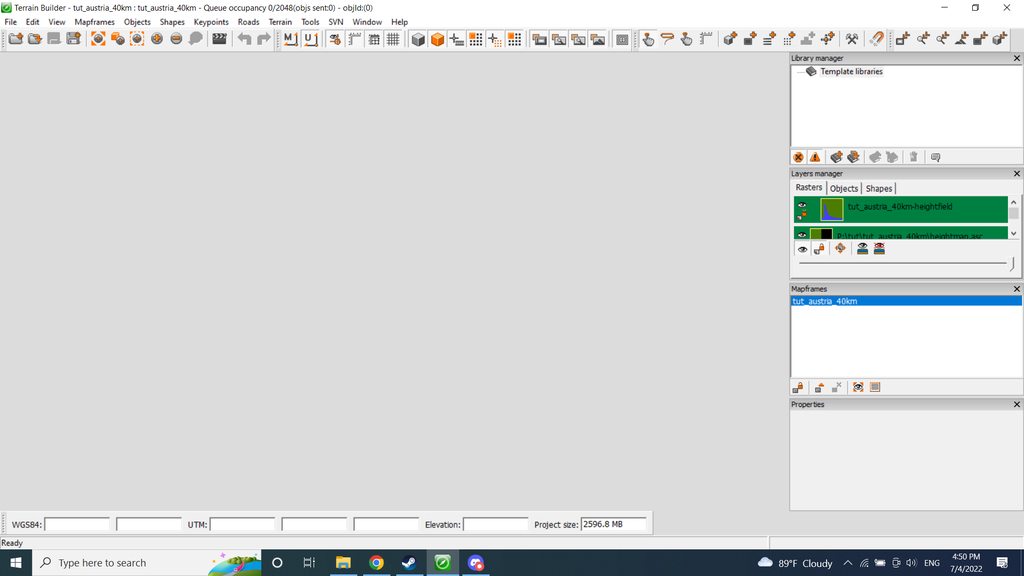
does anyone know what happened to my terrain builder? it just keep showing white screen
tried to re-install the program, create the new project and add keyframe - same white screen
gloomy schooner
nvm, delete the settings from %appdata% and now it seems like work

 shell magnet
😄
 golden dagger
out of curiosity can you lower the cloud ceiling via configs?
cobalt egret
yes
golden dagger
oh that gives me ideas, may I ask which configs i need to touch for that?
cobalt egret
the parameters maybe had "cloud" in the name
dont remember exactly
they typically are not altered so you might need to dig for them from the wiki for cfgworlds or the base world configs
 lilac basin
Before I expand on a clutter issue I have been having /for the past 3 hours/, do I need to do anything aside from building the pbo in pboProject to see my clutter written in my config.cpp? e.g doing anything in terrain builder?
cobalt egret
if your mask and layers.cfg is defined right then no
beyond that clutter is just config work
lilac basin
I am fairly baffled at this point. There's not much that can go wrong in my layers file, it's fairly simple as it is. It has 5 materials and I am only trying to add clutter to one of them
`
class Layers
{
class lato_grass_green
{
texture = "";
material = "lato\kaska\data\lato_grass_green.rvmat";
};
class lato_beach
{
texture = "";
material = "lato\kaska\data\lato_beach.rvmat";
};
class lato_dirt
{
    texture = "";
    material = "lato\kaska\data\lato_dirt.rvmat";
};
class lato_concrete
{
    texture = "";
    material = "lato\kaska\data\lato_concrete.rvmat";
};
class lato_rock
{
    texture = "";
    material = "lato\kaska\data\lato_rock.rvmat";
};
};
class Legend
{
picture = "maplegend.png";
class Colors
{
    lato_grass_green[] = {{ 160, 200, 90 }};
    lato_beach[] = {{ 230, 230, 120 }};
    lato_dirt[] = {{ 226, 207, 129 }};
    lato_concrete[] = {{255,255,255}};
    lato_rock[] = {{120,120,120}};

};
};
`
I am just trying to add more grass to the grass material
I've kept the other ones simple too:
class CfgSurfaces { class Default{}; class lato_grass_green_Surface: Default { files = "lato_grass_green_*"; character = "lato_grass_green_character"; soundEnviron = "grass"; }; //more surfaces };
class CfgSurfaceCharacters { class lato_grass_green_character { probability[] = {0.4}; names[] = {"lato_GrassGreen"}; }; //more surface characters };
And inside my map's class:
class Clutter { class lato_GrassGreen: DefaultClutter { model = "a3\plants_f\Clutter\c_Grass_Green.p3d"; affectedByWind = 1; swLighting = 1; scaleMin = 0.75; scaleMax = 0.9; surfaceColor[] = {0.431,0.475,0.267}; }; };
lilac basin
class Stage1
{
texture = "a3\map_data\gdt_grass_green_nopx.paa";
...
and:
class Stage2
{
texture = "a3\map_data\gdt_grass_green_co.paa";
cobalt egret
that would be the issue
youll need to copy the .paa to your folders and rename it to fit this files = "lato_grass_green_*";
you only need to copy the _co though
lilac basin
That's odd, before I added the clutter stuff the default clutter appeared fine
cobalt egret
you have overwritten the clutter class now with your own stuff
lilac basin
Okay, for the sake of it I have done both, so now it's
class Stage1
{
texture = "lato\kaska\data\lato_grass_green_nopx.paa";
class Stage2
{
texture = "lato\kaska\data\lato_grass_green_co.paa";
With this will I need to do any rebuilding in terrain builder, seeing as they use different paa's now?
I gave it a build and still no clutter on the grass at all
lilac basin
I'm gonna pack it in for tonight. I'm starting to lose track of the tweaks I do but ultimately nothing is seeming to work. I'll try again tomorrow. If anyone has any suggestions it'd be most appreciated!
golden dagger
cobalt egret
the parameters maybe had "cloud" in the name
regardless, thank you for the reply, I shall be hunting for it
shell magnet
lilac basin
I gave it a build and still no clutter on the grass at all
Because you changed the rvmat, you need to export mask in TB again
 rustic helm
After all these years since we’ve made the kastellorizo map (https://steamcommunity.com/sharedfiles/filedetails/?id=958987050), I’m currently on this island…
It is quite the experience to know most of the things of this island, knowing where you are just by looking at the surroundings, having actually never been here before. I guess this is one of the perks of terrain making I never thought of.
It’s quite surreal 😄 Has anyone experienced this before?
lilac basin
shell magnet
Because you changed the rvmat, you need to export mask in TB again
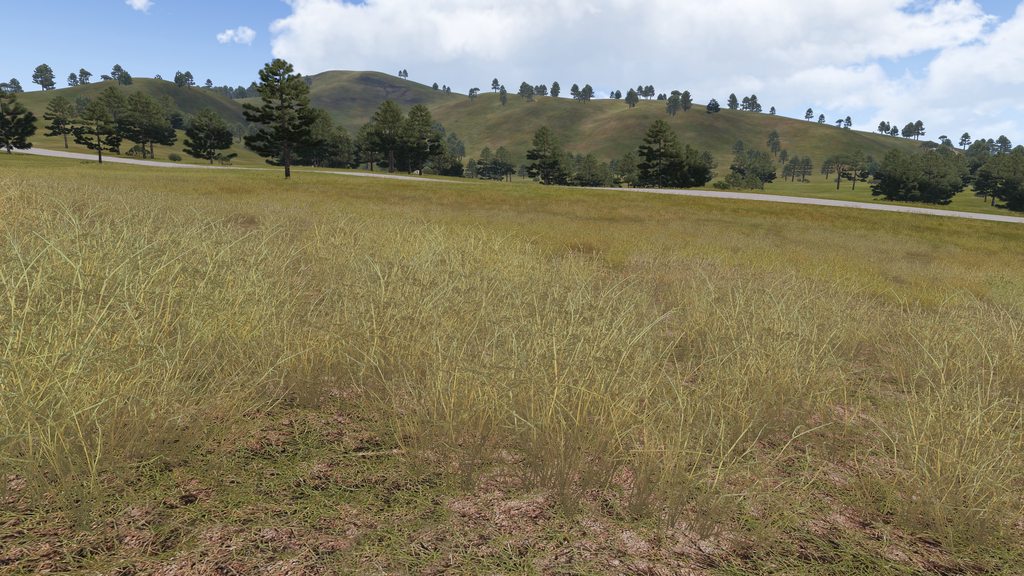
Worked like a charm https://imgur.com/a/SETMuWH - thank you so much!
 golden dagger
found the cloud height setting in
"CfgWorlds" >> "worldname" >> "SimulWeather" >> "DefaultKeyframe" >> "cloudBaseKm"
and the "Overcast" >> "WeatherX" classes which inherit from DefaultKeyframe. It seems i cannot lower the clouds, they currently seem to be at minimum 500 meters above the terrain.
not even setting the entry to -1 (values in KM) helps. anyone got some ideas?
cobalt egret
how low are you trying to put them @golden dagger
golden dagger
now at -10 yet still the same
cobalt egret
there could be a hardcoded minimum height
 astral jewel

golden dagger
(i did not even ping you and you showed up)
astral jewel
There is no minimum, the default is 4km.
But whatever you put in config is put right through
maybe there are multiple keyframes? did you set em all?
there is also cloudHeightKm
cloud_base_km; //< The base altitude of this cloud layer.
cloud_height_km; //< The height of the cloud layer, above its base altitude.
golden dagger
i do think so, SimulWeather >> overcast >> Weather1 (up to Weather6) i replaced all those values
cloudHeightKm = 10;
also overwritten all of that in every one of them
 astral jewel
Guess you gotta ask the Simul Sky folks 😄 https://docs.simul.co/ https://docs.simul.co/API/apicloudkeyframe.html#_CPPv4N5simul6clouds13CloudKeyframeE
Mh I hardcoded both values to 0.5, but on stratis the clouds are still at 3km
huh, when I load a terrain, the code that reads the config values isn't even executed 
golden dagger
the height got clearly changed, the original value was at like 2.7
(probably altis default, the map i am editing is fairly old)
and the clouds begun significantly higher
astral jewel
Mh. But I'm switching terrains in editor, and the config reading code doesn't run....
And also my game just froze
golden dagger
just rechecked with and without my config patch, yes the clouds start at around 3km up in the sky. with the config patch it is around 500
astral jewel
Maybe its only loading it once at game start, and not actually respecting terrain specific weather 
Actually I just restarted the game and my breakpoint still didn't trigger 
golden dagger

astral jewel

Ah.. If clouds video setting is set to low, it disables simul sky and doesn't load any of the config entries either
now I got clouds at 2km with very buggy rendering
golden dagger
i call that progress
 golden dagger
f
 lime lichen
good evening! im having issues with terrain processor, I load the the exported poly to it but it refuses to actually open.
shell magnet
Maybe you using the wrong type for the task in TP? You have lines, area and points
long roost
Hi folks, i don’t understand the reason why my clutter partially covers the roads. The clutter is the dry grass one..this is my first time seeing it.
shell magnet
try putting a surface under your road like concrete
good idea to do that anyway, as cars can bug out and not use road surface but one under it
 ruby torrent
Having an issue with the ground textures
the soil looks like this
https://cdn.discordapp.com/attachments/812421015753850911/994648885865758720/20220707195551_1.jpg
And this is the texture I'm using
https://cdn.discordapp.com/attachments/812421015753850911/994648886150967356/unknown.png


has anyone came across something like this?
cobalt egret
it gets shaded by your satellite image
ruby torrent
Is there a way to prevent that?
or do I edit the sat image with the average color of the texture?
or something entirely different
thorn prawn
The second.
Or make a ground tex that matches the sat colour.
Depending on which you want.
cobalt egret
did you import satellite texture again and regenerate the satellite layer tiles?
ruby torrent
yup
cobalt egret
ruby torrent
yup
what does your satellite image look like?
thorn prawn
Maybe it's radioactive?
ruby torrent
here's the sat image
https://cdn.discordapp.com/attachments/812421015753850911/994881141649723392/dc.jpg
 cobalt egret
The darker green is pretty good lightness, the rest is very bright
ruby torrent
tone down contrast over ps then?
and wouldn't that just lead to a bright soil look like the grass
rather than a flat orange llok
cobalt egret
Probably some desaturation could be good
And making light parts as dark as the green
 ruby torrent
Still orange
cobalt egret
I kinda have a feeling something is not updating in this process
ruby torrent
Deleted the layers, to make sure there's no overwrite error
can see the desaturated mask from far away
and it's only the that texture that has the problem
shell magnet
You sure rvmat is correct? You done _nopx https://community.bistudio.com/wiki/Arma_3:_Parallax_Map
ruby torrent
rvmat correct
nopx there aswell
long roost
Sorry guys, i have a question: is there a guide on how to use Plopper? I thought i could use it in order to work with detailed objects (like fences and what not)
shell magnet
no guide, but its pretty simple to work out
I use ObjectPlacementTBH instead of plopper, as I have less issues with it
cobalt egret
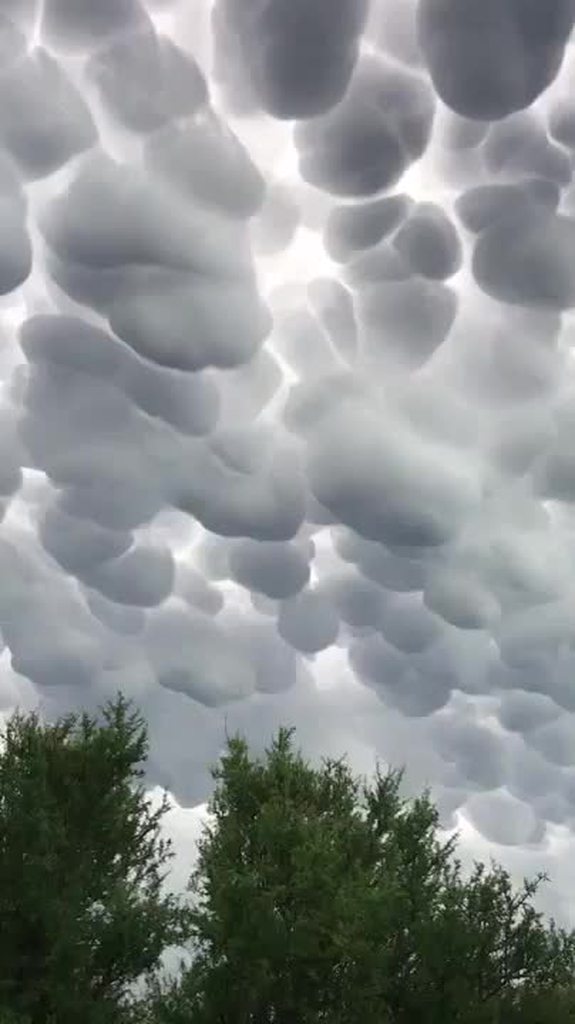
https://imgur.com/gallery/7F1xB3c Looks like @distant otter been messing with the real world cloud settings
 forest wedge
wtf🤣
cobalt egret
mammatus clouds apparently according to the imgur topic text
 craggy grove
yeh, saw it once in my life around here
reminds me that one time i saw a huge halo in the sky. i only noticed it because there was that pink light everywhere suddenly. so i went outside and saw it ... felt so weird, as if we were close to a huge planet. i was standing outside and looked at it the whole time it was there (probably 20 minutes or something). also more and more people came outside onto the street and looked at it as well. this probably also was a once in a lifetime event. i don't believe i'm ever going to see something like that again :x
it was like this, but much, much bigger. it filled the whole sky. https://img.marsnews.work/img/__Qf2AjLwojIjJCLyojI0JCLiADMwEzLcFzM3YjM1AjM3QTMvwFMvwFdi9FcwF2c3VmbvwVbvNmLn1Wa0dmLzdXZul2Lc9CX6MHc0RHaiojIsJye.webp
cobalt egret
Cool!
ruby torrent
long roost
Sorry guys, i have a question: is there a guide on how to use Plopper? I thought...
I'd suggest using Plopper for mask editing and mass object placement like "plopping" forests bushes rocks etc. For fine details use the 3den editor with the E2TB from workshop
cobalt egret
For finest details one use buldozer as its the only way to straight edit both terrain and object placement.
ruby torrent
Is there a way to lock objects position so it doesn't move as you edit the terrain
Ie. To fix the terrain around an object so its flush to it
cobalt egret
Yes
ruby torrent
Locking the layer?
cobalt egret
When buldozer is open there in a new attribute box in the object properties tab where you can select if object follows terrain or not
It's a drop menu, don't remember exactly what the text was
ruby torrent
Neat
cobalt egret
Basically it makes objects non selectable and keeps them in place. Some care needs to be taken though, sometimes it can bug if you work fast and you move an unelectable object in the tiny time frame it checks if the object can be moved or not
shell magnet
ruby torrent
I'd suggest using Plopper for mask editing and mass object placement like "plopp...
Zero reason to use Eden, plopper / placementtool can do it better
craggy grove
dunno, the e2tb export is pretty much idiot proof
i also use it for all small details, because i can't be arsed to switch to plopper stuff :>
lilac basin
I do currently have a bit of a blocker with my map. I have 279k trees, but only like 3.5k rocks, and TB's tool of placing rocks in a shape doesn't randomise them enough
I'll be sure to look in Plopper next time I am working on the map
cobalt egret
the TB object in shape creation is very bad tool
I dont think anyone really uses it
for generation, Terrain Processor can work
or SFlora if you want to use image masks
lilac basin
I fortunately had an image mask for the trees/rocks, but at the time I only used it for the trees, so wouldn't want to use it again for the rocks as I've already had a headache with many trees clumped together 😄
 sonic holly
Anyone here really good at Terrain Processor?
Or know any tricks for mass populating vegetations and large rocks?
Trying to populate hill but the steepness is making it really hard to use automation to fill the map.
cobalt egret
Steeps Hills are very tricky, usually better to place down stuff manually
shell magnet
Could use l3dt to make a mask of the steep places, then convert the image to shape with qgis etc
long roost
Guys how can i build/create an airstrip/airport in my terrain? I found this, but it is not what i am searching for at the moment https://armadocs.gitlab.io/terrain/03project/3config/airstrips/
Arma Terrain Documentation
cobalt egret
long roost
Guys how can i build/create an airstrip/airport in my terrain? I found this, but...
What are you missing exactly?
long roost
I want to create an airfield from scratch in my terrain.
long roost
I’ve found the runways in a3/roads_f, then placed them as object on the terrain..i guess this is what is supposed to do in order to make airfields
thorn prawn
"Make airfields" is somewhat vague.
cobalt egret
Airfield visually is just objects placed normally. Only thing that makes airfield an airfield for game purposes is the airfield config.
long roost
Yes, i read something about that airfield config
I will work on that config when i will finish placing the airfield objects
long roost
thorn prawn
"Make airfields" is somewhat vague.
I guess “build” could be the correct way to say it
shell magnet
Well you placed the objects, so now do config and it's done
long roost
Yes, of course
ruby torrent
Has anyone tested out world-machine as an alternative to L3DT?
cobalt egret
I believe some have mentioned it
any tool that can export heightmap in Terrain Builder supported formats can be used
L3DT just happened to become most used one back in the day when there were fewer of such programs and it was cheap and fulfilled the role well
 distant nimbus
does anybody have original (unbinarized) a3 folder?
with all selections in memory lods
cobalt egret
make what?
cobalt egret
well bruh
thing is
you dont
this is unfortunate
but just how it is
everyone else has managed
you will too
you can try things like Plopper for placing down walls and such
distant nimbus
i tried
but i prefer buldozer for main work
cuz sculpting and other things
but i like surface painter for some extra details (plopper unstable)
shell magnet
ObjectPlacementTBH 💪
distant nimbus
hah
oldman
but again about toggle snapper, i made selections for railways and its extremely usefull
much better than placing in editor
wanna this thing for fences and powerlines
shell magnet
I just use placement tool, quick and simple 🤷♂️
cobalt egret
distant nimbus
but again about toggle snapper, i made selections for railways and its extremely...
this is something you should not be able to do though.
since there is no access to the models.
we are all working within the same set of rules
distant nimbus
is it illegal to edit vanilla objects only for using on terrain builder on your pc?
cobalt egret
yes
distant nimbus
complitley bruh
shell magnet
the time you piss around doing all that, you could have just used another tool
distant nimbus
why i should use 3rd party tools when i already have vanilla thing which work better and contains in main workspace?
shell magnet
Well you said "dont wanna make it from scratch" 🤷♂️
distant nimbus
yep, but i look at this "work from scratch" like on workflow organization, so i prefer do it, then making workflow from scratch
 charred orchid
"Is this thing prohibited?"
"Yes."
"Okay cool, I did it anyways."
lilac basin
I'm looking to add a second grass clutter. I have already changed the mask via adding a second green, imported and exported the surface mask, converted into paa's and made a pbo but the grass did not change, it was the same regardless. I've since went back into the layers.cfg and specified each of the other grass colours so it doesn't mistake it and done a rebuild but it hasn't made any difference.
class Colors
{
lato_grass_green[] = {{ 140, 195, 80 },{120,190,80},{170,180,70},{170,190,80}};
lato_grass_green_forest[] = {{0, 255, 131}};
lato_beach[] = {{ 230, 230, 120 }};
lato_dirt[] = {{ 226, 207, 129 }};
lato_concrete[] = {{255,255,255}};
lato_rock[] = {{120,120,120}};
};
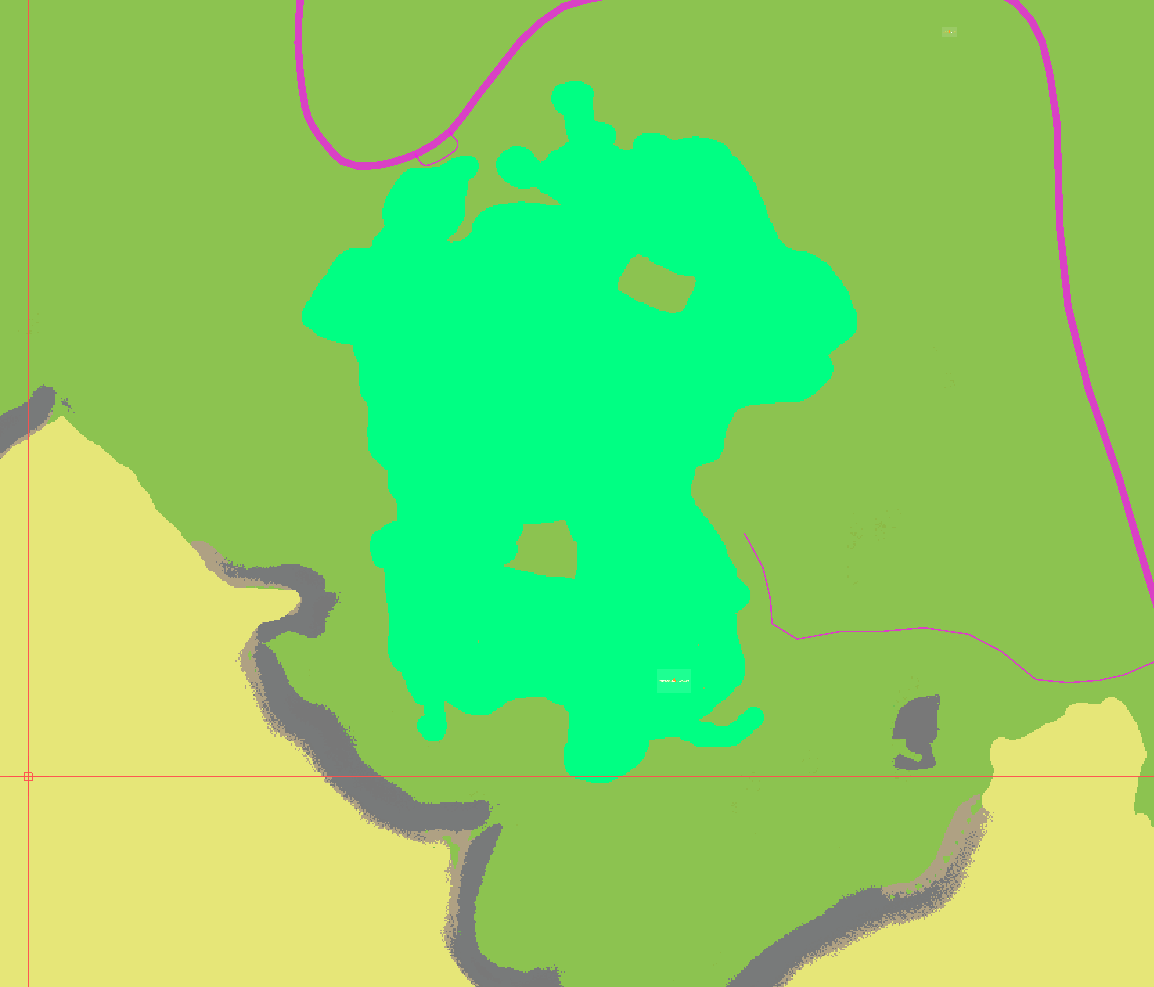
This is the area I have set up
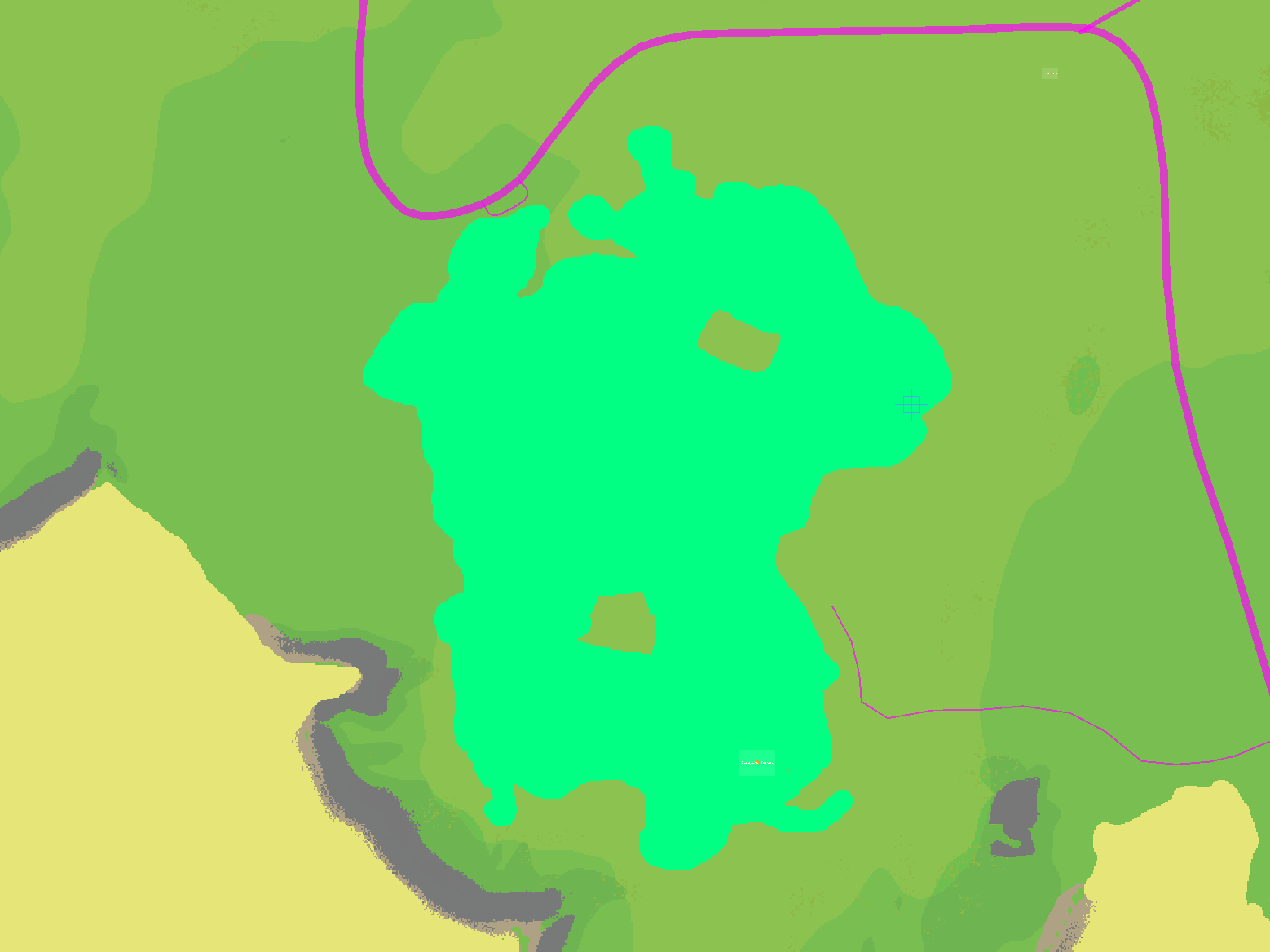
And the two rvmats I have are the exact same, and use the same textures
cobalt egret
you could be exceeding the 5 colors per tile limit
I count at least 7 colors in the view
lilac basin
I don't know, I haven't done anything overly complex, I haven't specified it to do something 5 times, let a lone twice
Is a tile 100m/100m?
lilac basin
 cobalt egret
your tile size is 512
and since your texture size is smaller than the actual terrain you have a loot less wiggle room
lilac basin
Okay, though still the image above is ~1km across so surely there aren't 5 in all of the areas
cobalt egret
you can easily have 7 colors in a tile in your picture
basically
you got too many grass
if you want variation on "same type of surface" like grass
you will need to plan the transitions very carefully
and if you want beach sand and idfferent under water sand you may want to start the underwater sand lot further from the shore
stuff like that

not gud
lilac basin
I see
The mask was generated by L3DT, so as it goes I don't need all of those grasses in the mask for the map
cobalt egret
and you probably should use 1m/px texture too
yes l3dt has no such restrictions
and no mechanic to limit them in way arma needs
L3DT can be used to create a basic mask
for example basic 5 materials
and the rest needs to be added more manually
I have a link in the top pinned message, the last one to pennyworths git that goes into more depth how the tiles work
lilac basin
I've went in any changed near all the greens in the area to the one most dominant. Is there anything else to consider before giving it another generate?
It's now like this - https://i.imgur.com/gbVHd36.png
 cobalt egret
no this looks good to try out
lilac basin
Just finished making another pbo and no dice. Leads me to believe there must be something wrong with my config
https://i.imgur.com/j92eBv5.png - this is the grass that I use on all of the map, and it is also currently in that newly greened area too
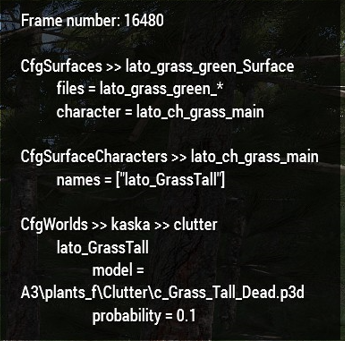
These are my surfaces. The first is the default one, the second is currently not used, and the third one is the one I am trying to get to work in that area
class lato_grass_green_Surface: Default { files = "lato_grass_green_*"; character = "lato_ch_grass_main"; soundEnviron = "grass"; soundHit = "soft_ground"; lucidity = 2; grassCover = 0.99; }; //more surfaces - potentially do not actually link aux to a character class lato_grass_green_aux_Surface: Default { files = "lato_grass_green_urban_*"; character = "lato_ch_grass_main"; soundEnviron = "grass"; soundHit = "soft_ground"; lucidity = 2; grassCover = 0.99; }; class lato_grass_green_forest_Surface: Default { files = "lato_grass_green_forest_*"; character = "lato_ch_grass_forest"; soundEnviron = "grass"; soundHit = "soft_ground"; lucidity = 2; grassCover = 0.99; surfaceFriction = 1.25; };
The only two things I can think of is that should I have the underscore for the lato_grass_green? Is that stopping the forest files being done because it is doing both?
Or the colour itself for the mask, should I try a completely different colour like blue?
lilac basin
Been working on it since to no avail. Added some more of the colour to other parts of the map and it doesn't show. I changed the main character to the new forest character and it changed the whole map, so isn't the character class, and the clutter classes show fine too
I even changed the lato_grass_green_forest to just lato_forest in case that was the issue, and still doesn't show unfortunately
cobalt egret
what are the filenames for the rvmat and the .paa?
lilac basin
for the main grass it is lato_grass_green.rvmat
for the forest it is lato_forest.rvmat
cobalt egret
do you export wrp after layer generation?
are you sure you are packing to right folder?
does old pbo get replaced?
is there any old pbo with different name that could overwrite new one
lilac basin
Yeah. Generate Layers, then use my png to paa bat, then exprt the wrp, then crunch in pboproject
As far as the process goes nothing is being changed, and I haven't changed any folders
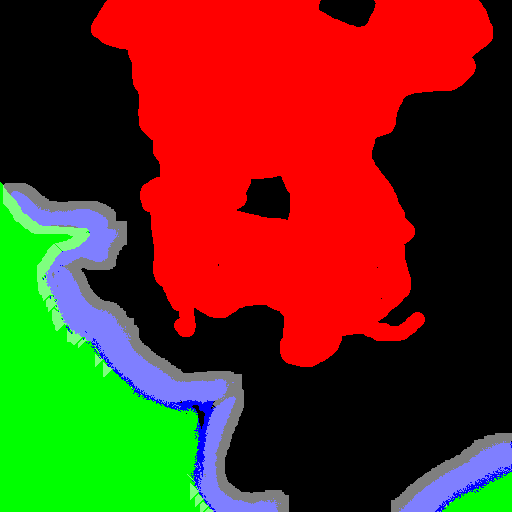
And I know it has the changes of the mask because the made png's show it - https://i.imgur.com/eK1aasd.png
 lilac basin
Here's my layer.cfg:
`
class Layers
{
class lato_grass_green
{
texture = "";
material = "lato\kaska\data\lato_grass_green.rvmat";
};
class lato_grass_green_urban
{
texture = "";
material = "lato\kaska\data\lato_grass_green_urban.rvmat";
};
class lato_forest
{
texture = "";
material = "lato\kaska\data\lato_forest.rvmat";
};
class lato_beach
{
texture = "";
material = "lato\kaska\data\lato_beach.rvmat";
};
class lato_dirt
{
    texture = "";
    material = "lato\kaska\data\lato_dirt.rvmat";
};
class lato_concrete
{
    texture = "";
    material = "lato\kaska\data\lato_concrete.rvmat";
};
class lato_rock
{
    texture = "";
    material = "lato\kaska\data\lato_rock.rvmat";
};
};
class Legend
{
picture = "maplegend.png";
class Colors
{
    lato_grass_green[] = {{ 140, 195, 80 }};
    lato_forest[] = {{0, 119, 255}};
    lato_beach[] = {{ 230, 230, 120 }};
    lato_dirt[] = {{ 226, 207, 129 }};
    lato_concrete[] = {{255,255,255}};
    lato_rock[] = {{120,120,120}};

};
};
`
The contents of lato_grass_green.rvmat and lato_forest.rvmat are identical because they use the same textures
lilac basin
Just to clarify, this is my lato_grass_green.rvmat which is the exact same content as my lato_forest.rvmat too, as I'd like them to use the same texture. Is the problem that they use the exact same .paa textures, and that were I to just copy/paste the same textures and rename them they'll be fine?
`ambient[] = { 1, 1, 1, 1 };
diffuse[] = { 1, 1, 1, 1 };
forcedDiffuse[] = { 0.02, 0.02, 0.02, 1 };
specular[] = { 0, 0, 0, 0 };
specularPower = 1;
emmisive[] = { 0, 0, 0, 0 };
PixelShaderID = "NormalMapDiffuse";
VertexShaderID = "NormalMapDiffuseAlpha";
class Stage1
{
texture = "lato\kaska\data\lato_grass_green_nopx.paa";
uvSource = "tex";
class uvTransform
{
    aside[] = { 10, 0, 0 };
    up[]    = { 0, 10, 0 };
    dir[]   = { 0, 0, 10 };
    pos[]   = { 0, 0, 0 };
};
};
class Stage2
{
texture = "lato\kaska\data\lato_grass_green_co.paa";
uvSource = "tex";
class uvTransform
{
aside[] = { 10, 0, 0 };
up[] = { 0, 10, 0 };
dir[] = { 0, 0, 10 };
pos[] = { 0, 0, 0 };
};
};
`
cobalt egret
copy paste and rename should work
ti would also look better with dedicated forest floor texture
lilac basin
I'll definitely look into a dedicated one once I have it working
Do I need to do the whole generate process again, or can I just crunch a pbo?
cobalt egret
new generation im afraid
lilac basin
Then for the best I shall wait until tomorrow. Thanks so much for your help!
 lilac basin
Like a charm https://i.imgur.com/ygviDrN.jpg


 lilac basin
A solid first step. I now need to find a right material for a forest, as well as clutter, and somehow making the sat map look like it is a forest too. The last one is gonna be the hardest as it is largely untouched
 robust charm
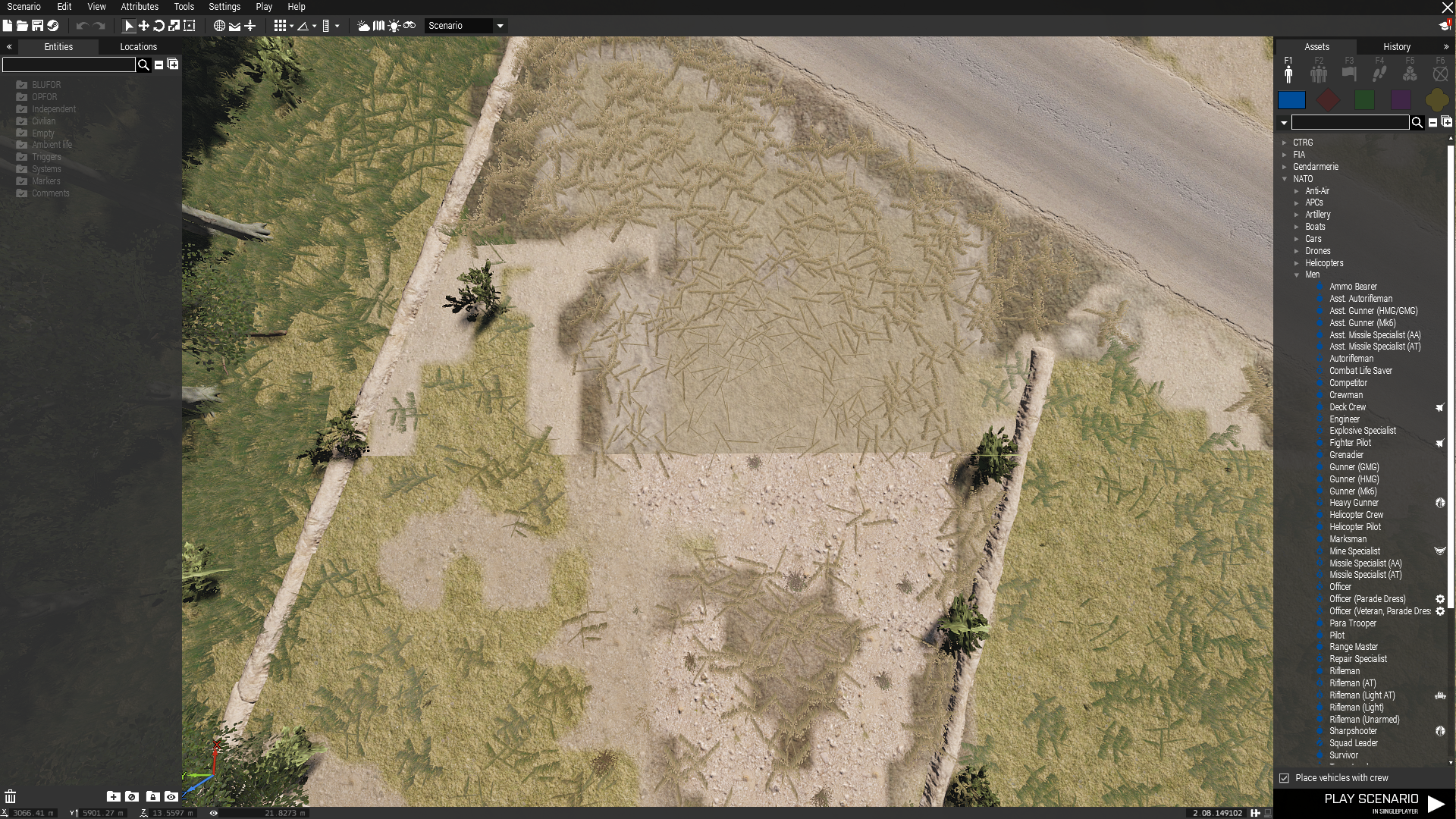
Hi All, any ideas what is causing this? https://imgur.com/Qpguuz8


 cobalt egret
robust charm
Hi All, any ideas what is causing this? https://imgur.com/Qpguuz8
cobalt egret
robust charm
Hi All, any ideas what is causing this? https://imgur.com/Qpguuz8
What are we looking at?
robust charm
the hard line on the mask / ground textures, its not like that in Photoshop but is showing like that in game
cobalt egret
Mask issues most of the time mean there are too many mask colors used in a tile
So excess is cut
You can scroll up a bit, I just explained it to Lato above
shell magnet
A3 puddle objects can cause weird hard lines like that for some stuff
but its most likely to be what HG said
also hard edges only for mask

 rough reef
Is there a list of Arma 3 vanilla buildings that can be completely destroyed? (Like most of the Altis, Stratis and Malden buildings)
I plan to work on a map in which every building is able to be destroyed
(If you know a list, fell free to hit me up in DMs!)
cobalt egret
rough reef
Is there a list of Arma 3 vanilla buildings that can be completely destroyed? (L...
No such list in public at least. You will just have to test it out.
 long mantle


 sharp shell
Whenever making a hole in the terrain, the surrounding terrain sinks down and isn't level with the surrounding landscape. Any idea why?
cobalt egret
sharp shell
Whenever making a hole in the terrain, the surrounding terrain sinks down and is...
Terrain is made out of mesh grid
The points connect to each other
So when you pull one down the connection to the next ones slope
The distance between the points is you cell size
And if you have large cell size, making holes can be difficult
sharp shell
Thanks bud
 forest cave
I want to make a Terrain
what should I learn first?
 void bough
forest cave
I want to make a Terrain
what should I learn first?
void bough
forest cave
I want to make a Terrain
what should I learn first?
This. Don't skip any parts, especially not the part where it tells you how to set up your P drive.
You can also check out the Atlas guide https://pmc.editing.wiki/doku.php?id=arma3:terrain:the-atlas-by-jakerod
 hushed prairie
cobalt egret
Steeps Hills are very tricky, usually better to place down stuff manually
hushed prairie
cobalt egret
Steeps Hills are very tricky, usually better to place down stuff manually
my respects go to the people that placed all the cliff rocks in Malden
I'm having to decide what 'rocks+cliffs' approach to use for one of my projects before I decide to systematically do it across the board on a 32kmx32km terrain manually ^^"
cobalt egret
hushed prairie
I'm having to decide what 'rocks+cliffs' approach to use for one of my projects ...
manual placement = best result 😅
hushed prairie
yeah, just thinking how dense/involved I want it to be, for it to be doable and consistent... and within a lifetime ^^"
craggy grove
that's why making a terrain takes months and not weeks :>
(or days like some think they can pull off)
hushed prairie
flashbacks of when I placed 7800 sidewalks for Bastek
getting an obsession with sidewalks being a stylistic choice wasn't a great idea, I make dumb choices
 nova cliff
craggy grove
that's why making a terrain takes months and not weeks :>
nova cliff
craggy grove
that's why making a terrain takes months and not weeks :>
or years 