#arma3_scripting
1 messages · Page 779 of 1
 warm hedge
 open fractal
arma won't let you make a global variable with an underscore in front
sqf variable syntax is TAG_myVariable for global variables and _myVariable for local variables
or leave out the underscore and just make it a word if you want to be chaotic with your global variables
Local variables won't persist into your event handler expression because that code is going to be called at a different time and place from the scope you're defining local variables in
 worthy igloo
      Phantomkeydown_0x893eq = (findDisplay 46) displayAddEventHandler['KeyDown','if (_this select 1 == 36) then {

        posATL = player modelToWorld [0,0,1];
        {
        ps1_Dsmoke = "#particlesource" createVehicleLocal posATL;
        } remoteExec ["bis_fnc_call", 0];

        ps1_Dsmoke setParticleParams [
           ["\A3\Data_F\ParticleEffects\Universal\Universal", 16, 9, 16, 0], "", "Billboard",
           1, 0.6, [0, 0, 0], [0, 0, 0.05], 0, 0, 7.9, 0.066, [0.5, 0.5, 0.5],
           [[0.1, 0.1, 0.1, 1], [0.1, 0.1, 0.1, 1], [0.1, 0.1, 0.1, 1], [0.1, 0.1, 0.1, 1], [0.75, 0.75, 0.75, 0.075], [1, 1, 1, 0]],
           [0.25], 1, 0, "", "", ps1_Dsmoke];

        ps1_Dsmoke setParticleRandom [0, [0.25, 0.25, 0], [0.2, 0.2, 0], 0, 0.25, [0, 0, 0, 0.1], 0, 0];
        ps1_Dsmoke setDropInterval 0.05;

        ps1_Dsmoke attachTo [player,[0,0,1]];

      };'];

      Phantomkeyup_0x893eq = (findDisplay 46) displayAddEventHandler['KeyUp','if (_this select 1 == 36) then {

      deleteVehicle ps1_Dsmoke;
      };'];
``` @warm hedge...And?
worthy igloo
it doesnt delete
also since the effect is created local when i attach it to player will it be attached to 1 player for all clients
?
or not attached
open fractal
it will only exist for the client on which you create it
 still forum
can't see any network message in there, it sets the whole weather so probably same as rain/wind
 meager granite
Thanks
 snow blade
Hey guys.... uh... I got this... sqf {_x removePrimaryWeaponItem ((primaryWeaponMagazine _x) select 0)} forEach (units thislist) and it's throwing errors at me. That I have an array whereas I need to have an object, group or side
I can't help but feel I'm doing the dumb somehow.
 little raptor
snow blade
Hey guys.... uh... I got this... ```sqf {_x removePrimaryWeaponItem ((primaryWea...
little raptor
snow blade
Hey guys.... uh... I got this... ```sqf {_x removePrimaryWeaponItem ((primaryWea...
units thislist
thisListis already an array of objects
snow blade
Yeah, I had a feeling, but it was refusing to work that way as well.
little raptor
what way?
little raptor
it should but the problem is that triggers fire once, and your thisList array probably doesn't have the unit you have in mind
snow blade
Uh... frig?
little raptor
anyway, the point is ditch the trigger
snow blade
Ditch the trigger, aye...
little raptor
or if you want to use a trigger you have to create a loop when it activates
snow blade
I mean, I can always brute force this for every unit in the mission, I guess.
I was just hoping to get the elegant solution.
little raptor
thisTrigger spawn {
  while {triggerActivated _this} do {
    {
      _x removePrimaryWeaponItem ((primaryWeaponMagazine _x) param [0, ""])
    } forEach list _this;
    sleep 1;
  };
}
try that
worthy igloo
@little raptor do you know why ```sqf
Phantomkeydown_0x893eq = (findDisplay 46) displayAddEventHandler['KeyDown','if (_this select 1 == 36) then {
    posATL = player modelToWorld [0,0,1];
    {
    ps1_Dsmoke = "#particlesource" createVehicleLocal posATL;
    } remoteExec ["bis_fnc_call", 0];

    ps1_Dsmoke setParticleParams [
       ["\A3\Data_F\ParticleEffects\Universal\Universal", 16, 9, 16, 0], "", "Billboard",
       1, 0.6, [0, 0, 0], [0, 0, 0.05], 0, 0, 7.9, 0.066, [0.5, 0.5, 0.5],
       [[0.1, 0.1, 0.1, 1], [0.1, 0.1, 0.1, 1], [0.1, 0.1, 0.1, 1], [0.1, 0.1, 0.1, 1], [0.75, 0.75, 0.75, 0.075], [1, 1, 1, 0]],
       [0.25], 1, 0, "", "", ps1_Dsmoke];

    ps1_Dsmoke setParticleRandom [0, [0.25, 0.25, 0], [0.2, 0.2, 0], 0, 0.25, [0, 0, 0, 0.1], 0, 0];
    ps1_Dsmoke setDropInterval 0.05;

    ps1_Dsmoke attachTo [player,[0,0,1]];

  };'];

  Phantomkeyup_0x893eq = (findDisplay 46) displayAddEventHandler['KeyUp','if (_this select 1 == 36) then {

  deleteVehicle ps1_Dsmoke;
  };'];
Don't ping someone randomly.
little raptor
why do you even write the EH code with ''?
write them with {}
{
ps1_Dsmoke = "#particlesource" createVehicleLocal posATL;
} remoteExec ["bis_fnc_call", 0];
that's wrong
in every way
- remoteExec == spawn
ps1_Dsmoke doesn't exist until the next frame
- that var is created on the clients but the particles are only created on the machine that calls it
and as POLPOX said just post your question. don't ping people
little raptor
snow blade
I mean, I can always brute force this for every unit in the mission, I guess.
who said anything about every unit in the mission?
snow blade
It's... The trigger covers the entire map a few times over.
little raptor
then definitely don't use a trigger for that
worthy igloo
little raptor
ps1_Dsmoke doesn't exist until the next frame
even after when I run deleteVehicle ps1_Dsmoke; it wont delete the effect(s)
is there anything that can halt your character in place while you are moving to stop/slow you down
 tight cloak
ahhh, tbh i usually use "systemchat" or "hint" followed by a format and then whatever i want to monitor, diag_log also exists for this too
it helps detect if something fired or not and what value it spat out if it did fire by didnt do as it should
 livid wraith
what would be an expected time for a server spawned objects position to update on clients ?
for some background, we have this weird problem with garrison units dropping to the ground when getting transferred to a HC. Even added a 30 sec delay for things to synchronize, but still they end up on the ground. works fine when keeping them on the server ....
i'm sure it depends on server load, but the server is running 30+ fps, with around 25-40 players, so should be able to sync a building pos to a local HC within 30 sec. ?
little raptor
expected time for a server spawned objects position to update on clients ?
should happen "immediately"
livid wraith
yeah, that was my understanding too, but we're seeing some really weird behavior
little raptor
livid wraith
yeah, that was my understanding too, but we're seeing some really weird behavior
can you post the code?
 brazen lagoon
How do you get if a vehicle has a GMG or HMG or some sort of mounted gun on it?
I guess the real goal is to try to see if I can select a motorized/mechanized vehicle given a faction. The way I'm doing it right now is looking in CfgGroups like this: ```sqf
_classes = "true" configClasses (configFile >> "CfgGroups" >> "INDEP" >> "IND_F" >> "Motorized");
_units = [];
{
{
_classname = getText (_x >> "vehicle");
if (_classname isKindOf "LandVehicle") then {
_units pushBackUnique _classname;
};
} foreach ("true" configClasses _x)
} foreach _classes;
_units```
little raptor
brazen lagoon
How do you get if a vehicle has a GMG or HMG or some sort of mounted gun on it?
by examining its turrets
brazen lagoon
that's just config >> "turrets" right
ill place one of these vehicles and take a look
little raptor
what config?
brazen lagoon
vehicle config class
little raptor
yes
brazen lagoon
CfgVehicles >> classname
ok
looks like CfgVehicles >> classname >> Turrets >> turret >> weapons
@little raptor I_MRAP_03_gmg_F has MainTurret with weapons weapons[] = {"GMG_40mm"};, is there a function or something that I can pass that weapon into or a config area I can look up in to figure out what type of weapon it is?
I think I just want to figure out if it's an MG, grenade machine gun, launcher, or something else
little raptor
idk about function
brazen lagoon
really even just if it's one of the first 3 or the last one..
little raptor
but you can extract that info yourself
brazen lagoon
what do you mean? Will GMG_40mm be in CfgWeapons or something?
little raptor
yes
and then you can check its mags
and from mags the ammo
and from ammo the simulation type
brazen lagoon
magazines[] = {"96Rnd_40mm_G_belt","96Rnd_40mm_G_belt"}; is already here in MainTurret, couldn't I do that? Get the magazine classname, look up in CfgMagazines?
brazen lagoon
right. so simulation = "ProxyMagazines"; isn't useful
little raptor
no
little raptor
brazen lagoon
right. so `simulation = "ProxyMagazines";` isn't useful
I didn't say simulation of mag
brazen lagoon
oh I need to get the ammo type, that's G_40mm_HEDP
little raptor
I said simulation of ammo
brazen lagoon
right. and then check in CfgAmmo or w/e
little raptor
CfgAmmo
brazen lagoon
yeah. CfgAmmo >> "G_40mm_HEDP" >> simulation is "shotShell"
a bullet is "shotBullet"
smokes are shotCM and then laser is laserDesignate
so I think if I just look for anything where ammo is simulation type "shotShell" "shotBullet" or "shotMissile" that should be sufficient
 drifting portal
I want to create a scan line that emits from the player, but I'm not sure which EH or command to use for this one
something like this:

I suspect its drawIcon3D
but how will I do it with that in this fashion?
little raptor
drifting portal
https://media.discordapp.net/attachments/956497695172862012/993910917953765436/V...
there's nothing suitable for that
you have to make a model
drawIcon3D passes through walls
drawLine3D doesn't but it's slow to draw all those lines
so model it is
little raptor
little raptor
drawLine3D doesn't but it's slow to draw all those lines
I forgot about drawLaser 
livid wraith
@little raptor very condensed:
private _hqGuards = [
    ["C_scientist_F",[0.323975,0.0537109,1.45875],199.572],
    ["O_Survivor_F",[2.35156,0.328125,1.45875],70.7494],
    ["O_Survivor_F",[-1.86084,-1.86035,1.46997],198.624],
    ["O_Survivor_F",[-2.42236,0.343262,1.45938],273.327],
    ["O_Survivor_F",[1.42261,-2.19727,-2.35505],294.069],
    ["O_Survivor_F",[1.97241,-1.96436,1.45875],137.965],
    ["O_Survivor_F",[-0.520508,1.48779,-3.43456],85.0303],
    ["O_Survivor_F",[1.60132,1.84766,-0.739902],202.458],
    ["O_Survivor_F",[-2.35815,2.02783,1.45946],115.942],
    ["O_Survivor_F",[1.5813,4.74658,-3.52052],82.671],
    ["O_Survivor_F",[2.72168,3.43555,-3.52052],350.453]
];

private _relDir = (random 360);

// HQ: Spawn base object ....
private _hqOrg = createVehicle ["Land_Bunker_01_tall_F", [0, 0, 0], [], 0, "NONE"];

_hqOrg setPos _hqPos;
_hqOrg setVectorUp [0, 0, 1];
_hqOrg allowDamage false;


// HQ: Spawn Guards ....
private _hqGroup = (createGroup _side);

_hqGroup setGroupIdGlobal ["AO-SubObj-GuardsHQ"];

{
    private _data = [_hqOrg, _x, _relDir, true] call spawnRelative;
    private _pos = (_data # 0);
    private _dir = (_data # 1);

    private _unit = _hqGroup createUnit ["O_Soldier_F", _pos, [], 0, "NONE"];

    _unit setDir _dir;
    _unit setPosATL _pos;

    _unit disableAI "PATH";
    _unit setUnitPos "UP";
} forEach _hqGuards;

_hqGroup setGroupOwner (owner HC);
spawnRelative is just a function to extract posATL relative to the object, tall bunker in this case
_hqGuards array is just positions and directions extracted with worldToModel etc
little raptor
so you mean it works fine without the _hqGroup setGroupOwner (owner HC); line?
livid wraith
yes
drifting portal
little raptor
there's nothing suitable for that
Yeah I suspected that too, well I guess I will leave the idea
little raptor
livid wraith
yes
did you try remoteExecing the function on the HC?
instead of doing _hqGroup setGroupOwner (owner HC);?
livid wraith
had that before, but wanted to move all execution to the server and then just hand off the AI to the HC
but yes, that worked fine
little raptor
well try some sleep before that line
maybe some delay can solve the problem
as it does most other network problems
 velvet merlin
is it possible to detect when VON is active? like checking for the presence of the UI element
livid wraith
will try and spawn the building at it's end position and just do a getPos/setPos to update dir, instead of spawning it at [0,0,0] too
 shut reef
tight cloak
ahhh, tbh i usually use "systemchat" or "hint" followed by a format and then wha...
shut reef
tight cloak
ahhh, tbh i usually use "systemchat" or "hint" followed by a format and then wha...
I was/am using those, but they're not necessarily ideal if you're not entirely sure what's going on in the first place xD
Really missing a real debugger
little raptor
velvet merlin
is it possible to detect when VON is active? like checking for the presence of t...
I guess key press is the only way
velvet merlin
hm this would be on the sender - not receiver. also not 100% reliable, is it?
 hallow mortar
velvet merlin
is it possible to detect when VON is active? like checking for the presence of t...
hallow mortar
velvet merlin
is it possible to detect when VON is active? like checking for the presence of t...
 upper fulcrum
Would it be possible to have an object upon destruction be replaced by a pick up-able item
say a computer getting replaced with scrap electronics and what not
 exotic flax
Most simple objects (like a computer) can't be destroyed, so it would be hard to replace it.
So probably the best method is to add an addAction to the initial object (eg. 'Pickup' or 'Scavenge'), remove the object, and return an other object to be picked up (and put in the inventory)
upper fulcrum
Oh would I be able to do that in the mod config?, i should probably state my intention here is basically to have a minable block
as in minecraft (dubbed arma craft for legality reasons) or that one fallout 4/nier minigaame
 agile pumice
Can someone explain to me how this code results with 2,1,2,1,2,1 being repeated on a loop with this code?
player addEventHandler ["AnimStateChanged", {
   params ["_unit", "_anim"];
   if ((_anim == "amovpercmstpsraswpstdnon" || _anim == "amovpercmstpsraswpstdnon") && (handgunweapon player == "GPLT_M320_F")) exitwith {
       player removeWeapon (handgunweapon player);
       player addWeapon "GPLT_M320_NF";
       systemchat "1";
   };

   if ((_anim == "amovpercmstpsnonwnondnon" || _anim == "amovpercmstpsraswrfldnon" || _anim == "amovpercmstpsraswlnrdnon") && (handgunweapon player == "GPLT_M320_NF")) exitwith {
       player removeWeapon (handgunweapon player);
       player addWeapon "GPLT_M320_F";
       systemchat "2";
   };
}];
surely the exitwith should prevent such behavior?
exotic flax
true, however the can get called multiple times in a row
Triggered every time an animation state changes. Triggered for all animation states in a sequence.
agile pumice
so, how can I reconstruct this to only trigger once per "action"?
the first being unholster, the second being holster
exotic flax
player addEventHandler ["AnimStateChanged", {
   params ["_unit", "_anim"];
   _inMyAnimation = _unit getVariable ["inMyAnimation", false];
   if ((_anim == "amovpercmstpsraswpstdnon" || _anim == "amovpercmstpsraswpstdnon") && (handgunweapon player == "GPLT_M320_F") && _inMyAnimation == false) exitwith {
       player removeWeapon (handgunweapon player);
       player addWeapon "GPLT_M320_NF";
       _unit setVariable ["inMyAnimation", true];
       systemchat "1";
   } else if ((_anim == "amovpercmstpsnonwnondnon" || _anim == "amovpercmstpsraswrfldnon" || _anim == "amovpercmstpsraswlnrdnon") && (handgunweapon player == "GPLT_M320_NF") && _inMyAnimation == false) exitwith {
       player removeWeapon (handgunweapon player);
       player addWeapon "GPLT_M320_F";
       _unit setVariable ["inMyAnimation", true];
       systemchat "2";
   } else if (_inMyAnimation == true) {
      _unit setVariable ["inMyAnimation", false];
   }
}];
Not tested, but in short it get the current state of inMyAnimation (true or false), and only execute the action when not in the animation yet.
If the unit is in one of the set animations it will set the state to true.
If any other animation is executed AND the state is (still) true, it will set it to false, basically resetting it.
Although I'm not entirely sure what you're trying to do here, because running all that code on every animation state change is terrible for your FPS
PS. not tested 😉
agile pumice
player addEventHandler ["AnimStateChanged", {
   params ["_unit", "_anim"];
   _inMyAnimation = _unit getVariable ["inMyAnimation", false];
   _unholsterArr = ["amovpercmstpsraswpstdnon","amovpercmstpsraswpstdnon"];
   _holsterArr = ["amovpercmstpsnonwnondnon","amovpercmstpsraswrfldnon","amovpercmstpsraswlnrdnon","amovpercmstpsnonwpstdnon_amovpsitmstpsnonwpstdnon_ground"];

   //copyToClipboard _anim;

   if (!_inMyAnimation) then {
       if ((_anim in _unholsterArr) && (handgunweapon player == "hgun_Pistol_Signal_F")) exitwith {
           player removeWeapon (handgunweapon player);
           player addWeapon "hgun_P07_F";
           _unit setVariable ["inMyAnimation", true];
           //systemchat "unholster";
        };

       if ((_anim in _holsterArr) && (handgunweapon player == "hgun_P07_F")) exitwith {
           player removeWeapon (handgunweapon player);
           player addWeapon "hgun_Pistol_Signal_F";
           _unit setVariable ["inMyAnimation", true];
           //systemchat "holster";
        };
    } else {
        _unit setVariable ["inMyAnimation", false];
    };
}];
with the above code: The holster function works, but when I try to unholster, it will attempt to unholster, add the other pistol, and reholster automatically
little raptor
else if
there's no else if
little raptor
agile pumice
```sqf
player addEventHandler ["AnimStateChanged", {
params ["_unit", "_anim"...
what do you want to happen then?
agile pumice
I want the sidearm to change to a flaregun after the holster animation completes, and I want the sidearm to change to a po7 when the weapon is unholstered
with this code:
player addEventHandler ["AnimStateChanged", {
   params ["_unit", "_anim"];
   _unholsterArr = ["amovpercmstpsraswpstdnon","amovpercmstpsraswpstdnon"];
   _holsterArr = ["amovpercmstpsnonwnondnon","amovpercmstpsraswrfldnon","amovpercmstpsraswlnrdnon","amovpercmstpsnonwpstdnon_amovpsitmstpsnonwpstdnon_ground"];

   //copyToClipboard _anim;

   if ((_anim in _unholsterArr) && (handgunweapon player == "hgun_Pistol_Signal_F")) exitwith {
           player removeWeapon (handgunweapon player);
           player addWeapon "hgun_P07_F";
           //systemchat "unholster";
        };

       if ((_anim in _holsterArr) && (handgunweapon player == "hgun_P07_F")) exitwith {
           player removeWeapon (handgunweapon player);
           player addWeapon "hgun_Pistol_Signal_F";
           //systemchat "holster";
        };
}];
``` the holster part works fine, but I can't unholster the weapon without it being holstered automaticallyso @exotic flax came up with the variable switch to prevent that
but I think that variable has to be changed in another eventhandler
little raptor
agile pumice
with this code:
```sqf
player addEventHandler ["AnimStateChanged", {
params [...
just change the AnimStateChanged to AnimChanged EH in that one
it should work
agile pumice
nope
little raptor
agile pumice
with this code:
```sqf
player addEventHandler ["AnimStateChanged", {
params [...
player addEventHandler ["AnimStateChanged", {
   params ["_unit", "_anim"];
    _unholsterArr = ["amovpercmstpsraswpstdnon","amovpercmstpsraswpstdnon"];
    _holsterArr = ["amovpercmstpsnonwnondnon","amovpercmstpsraswrfldnon","amovpercmstpsraswlnrdnon","amovpercmstpsnonwpstdnon_amovpsitmstpsnonwpstdnon_ground"];
    if ((_anim in _unholsterArr) && (handgunweapon _unit == "hgun_Pistol_Signal_F")) exitwith {
        _unit removeWeapon (handgunweapon player);

        _unit setVariable ["addWeapon", "hgun_P07_F"];
        //systemchat "unholster";
    };

    if ((_anim in _holsterArr) && (handgunweapon _unit == "hgun_P07_F")) exitwith {
        _unit removeWeapon (handgunweapon _unit);
        _unit setVariable ["addWeapon", "hgun_Pistol_Signal_F"];
        //systemchat "holster";
    };
}];

player addEventHandler ["AnimDone", {
    params ["_unit"];
    _add = _unit getVariable ["AddWeapon", ""];
    if (_add != "") then {
        _unit addWeapon _add;
        _unit setVariable ["AddWeapon", ""];
    };

}]
^ deletes the handgun on holster, doesn't add it back
little raptor
well I guess the AnimDone EH never completes then 🤔
agile pumice
not while the character is standing still
agile pumice
can we make this work?
player addEventHandler ["AnimStateChanged", {
   params ["_unit", "_anim"];

   _add = _unit getVariable ["AddWeapon", ""];
    _unholsterArr = ["amovpercmstpsraswpstdnon","amovpercmstpsraswpstdnon"];
    _holsterArr = ["amovpercmstpsnonwnondnon","amovpercmstpsraswrfldnon","amovpercmstpsraswlnrdnon","amovpercmstpsnonwpstdnon_amovpsitmstpsnonwpstdnon_ground"];

    if ((_anim in _unholsterArr) && (handgunweapon _unit == "hgun_Pistol_Signal_F") && _add == "") exitwith {
        _unit removeWeapon (handgunweapon player);
        _unit setVariable ["addWeapon", "hgun_P07_F"];
        systemchat "unholster";

        if (_add != "") then {
            _unit addWeapon _add;
            _unit setVariable ["AddWeapon", ""];
        };
    };

    if ((_anim in _holsterArr) && (handgunweapon _unit == "hgun_P07_F") && _add == "") exitwith {
        _unit removeWeapon (handgunweapon _unit);
        _unit setVariable ["addWeapon", "hgun_Pistol_Signal_F"];
        systemchat "holster";

        if (_add != "") then {
            _unit addWeapon _add;
            _unit setVariable ["AddWeapon", ""];
        };
    };
}];
currently doesn't work as expected
little raptor
agile pumice
```sqf
player addEventHandler ["AnimStateChanged", {
params ["_unit", "_anim"...
I just did a test with this
I don't think the problem is the code itself
it's the unholster animation
it fires too late
causing the unit to think he has no weapon
and he switches to rifle
player addEventHandler ["AnimStateChanged", {
   params ["_unit", "_anim"];

   if (getNumber (configFile >> "CfgMovesMaleSdr" >> "States" >> _anim >> "weaponIK") == 2) then {
       if (handgunweapon _unit != "hgun_P07_F") then {
           _unit removeWeapon (handgunweapon _unit);
           _unit addWeapon "hgun_P07_F"; systemChat "un"
       };
   } else {
       if (handgunweapon _unit != "hgun_Pistol_Signal_F") then {
           _unit removeWeapon (handgunweapon _unit);
           _unit addWeapon "hgun_Pistol_Signal_F"; systemChat "h"
       };

   };
}];
that's the code I tried
the unholster part fires too late
agile pumice
can we do some waituntil magic?
fn_switchCode = {
    params ["_unit", "_anim"];

    _unholsterArr = ["amovpercmstpsraswpstdnon","amovpercmstpsraswpstdnon"];
    _holsterArr = ["amovpercmstpsnonwnondnon","amovpercmstpsraswrfldnon","amovpercmstpsraswlnrdnon","amovpercmstpsnonwpstdnon_amovpsitmstpsnonwpstdnon_ground"];

    if ((_anim in _unholsterArr) && (handgunweapon _unit == "hgun_Pistol_Signal_F")) then {
        systemchat "unholster";
        _unit removeWeapon (handgunweapon player);
        waitUntil {(animationState player) in _holsterArr};
        player addWeapon "hgun_P07_F";
    };

    if ((_anim in _holsterArr) && (handgunweapon _unit == "hgun_P07_F")) then {
        systemchat "holster";
        _unit removeWeapon (handgunweapon _unit);
        waitUntil {(animationState player) in _unholsterArr};
        player addWeapon "hgun_Pistol_Signal_F";
    };
};


player addEventHandler ["AnimStateChanged", {
   params ["_unit", "_anim"];
   [_unit,_anim] spawn fn_switchCode;
}];
just forget about these arrays:
_unholsterArr = ["amovpercmstpsraswpstdnon","amovpercmstpsraswpstdnon"]; _holsterArr = ["amovpercmstpsnonwnondnon","amovpercmstpsraswrfldnon","amovpercmstpsraswlnrdnon","amovpercmstpsnonwpstdnon_amovpsitmstpsnonwpstdnon_ground"];
they're too limited. do it the way I did
agile pumice
alright
little raptor
there you go:
player addEventHandler ["AnimStateChanged", {
   params ["_unit", "_anim"];

   if (getNumber (configFile >> "CfgMovesMaleSdr" >> "States" >> _anim >> "weaponIK") == 2) then {
       if (handgunweapon _unit != "hgun_P07_F") then {
           _unit removeWeapon (handgunweapon _unit);
           _unit addWeapon "hgun_P07_F";
           _unit selectWeapon "hgun_P07_F";
       };
   } else {
       if (handgunweapon _unit != "hgun_Pistol_Signal_F") then {
           _unit removeWeapon (handgunweapon _unit);
           _unit addWeapon "hgun_Pistol_Signal_F";
       };

   };
}];
fixed
little raptor
little raptor
causing the unit to think he has no weapon
basically I just made the unit switch to his new weapon
agile pumice
works like a charm
little raptor
- much shorter and faster than before
agile pumice
thank you so much
little raptor
np
agile pumice
I was only using those 2 classes as examples, but I helped a buddy make a sidearm grenade launcher, and he wanted the folded sight version to be shown in the holster, and have it swap for the unholded sight version when they unholster it
incase you were curious about the application
little raptor
I figured it would be something like that yes 😅
agile pumice
would be nice to have a config setting for choosing a holstered model but alas
little raptor
I think there was something actually
Dedmen added something but I don't remember what
I'll dig
It was something else
agile pumice
yeah I was actually reading about those commands on the wiki
was looking for the config setting that enabled showing/hiding of the holstered weapon
 fresh crater
we have only 3 sizes of grass cutter tool can i get a bigger size area of effect
little raptor
fresh crater
we have only 3 sizes of grass cutter tool can i get a bigger size area of effect
did you try resizing them?
fresh crater
little raptor
did you try resizing them?
can i put something in the init to make it work
little raptor
if resizing doesn't work then no
fresh crater
little raptor
if resizing doesn't work then no
so is there another way to remove grass
in a specific area
little raptor
not that I know of
 winter rose
fresh crater
we have only 3 sizes of grass cutter tool can i get a bigger size area of effect
winter rose
fresh crater
we have only 3 sizes of grass cutter tool can i get a bigger size area of effect
spawn multiple (simple object) ones by scripting
fresh crater
winter rose
spawn multiple (simple object) ones by scripting
i tried it i set them to disable simulation and simple object but it still has performance impact
winter rose
I could cover an airport with little to no impact, through scripting
fresh crater
winter rose
I could cover an airport with little to no impact, through scripting
is there a difference between checking simple object and scripting it ?
winter rose
there shouldn't be… well, there might be (as in simple vs SuperSimple objects)
fresh crater
whats the code for that
winter rose
createSimpleObject
worthy igloo
how can I make this remoteExec
        if (isNil "sm_effect") then
        {
                  ps1_Dsmoke = createVehicle ["#particlesource", posATL ,[],0,"CAN_COLLIDE"];
                };
You won't be able to edit it in this way if you remoteExec it
As remoteExec won't return the object
Also why do you want to remoteExec createVehicle? That will create multiple vehicles depending on the number of players (4 vehicles if 4 players, etc)
You might be referring to createVehicleLocal
 sudden yacht
Was trying to get this command to work midgame. Help... ```mycurator setCuratorEditingAreaType true;
mycurator addCuratorEditingArea [4, position player, 1000];
particle is local
createvehiclelocal is needed for something that is already local?
open fractal
sudden yacht
Was trying to get this command to work midgame. Help... ```mycurator setCuratorE...
you should probably share what the issue is
drifting portal
worthy igloo
createvehiclelocal is needed for something that is already local?
yeah because
you better create it locally
I'm just not sure how you want to remoteExec this
can you send the full code with the bit where you add effects etc?
open fractal
worthy igloo
how can I make this remoteExec
```sqf
if (isNil "sm_effect") then
...
cleanest way is to define your particle effect as a function in description.ext and remoteExec that
also I don't know how the particle source object behaves but createVehicle is designed to send object info over the network so it's created globally which is not what you want to do
literally no downside to change it to createVehicleLocal while createVehicle might have a network impact to no benefit depending on how particle source creation works
meager granite
https://community.bistudio.com/wiki/merge
All key-value pairs from this HashMap are added to hashMap1. If a key from hashMap2 already exists in hashMap1, then its value is overwritten with the corresponding value from hashMap2
``` ```sqf
_hs = createHashMapFromArray [[1, 100], [2, 200]];
_hs merge createHashMapFromArray [[2, 300]];
_hs
``` => `[[1,100],[2,200]]`🤔
Doesn't primary syntax description imply it should overwrite by default?
meager granite
So its either command bug or wiki description stating the opposite
So, setting rain to 0 over time never makes it exactly 0
And with rain >0, humidity keeps rising
And you end up with cloudy weather without any rain yet everyone runs around squelching with their feet

You can't even force set 0 setRain 0 because any tiny changes are ignored, thanks Arma 
still forum
meager granite
Doesn't primary syntax description imply it should overwrite by default?
indeed wiki is wrong, overrideExisting is false by default, for both variants
meager granite
Kinda makes sense for merge to overwrite old values by default, if you ask me
worthy igloo
open fractal
literally no downside to change it to `createVehicleLocal` while `createVehicle`...
when i change it to local it doesnt work at all in mp or singleplayer
open fractal
worthy igloo
when i change it to local it doesnt work at all in mp or singleplayer
your syntax must be wrong
there's only one syntax for createvehiclelocal
worthy igloo
its just how i was doing re
        if (isNil "sm_effect") then
        {
           ps1_Dsmoke = createVehicle ["#particlesource", posATL ,[],0,"CAN_COLLIDE"];
        };


            ps1_Dsmoke setParticleParams [
               ["\A3\Data_F\ParticleEffects\Universal\Universal", 16, 9, 16, 0], "", "Billboard",
               1, 0.6, [0, 0, 0], [0, 0, 0.05], 0, 0, 7.9, 0.066, [0.6, 0.6, 0.6],
               [[0.1, 0.1, 0.1, 1], [0.1, 0.1, 0.1, 1], [0.1, 0.1, 0.1, 1], [0.1, 0.1, 0.1, 1], [0.75, 0.75, 0.75, 0.075], [1, 1, 1, 0]],
               [0.25], 1, 0, "", "", ps1_Dsmoke];

            ps1_Dsmoke setParticleRandom [0, [0.25, 0.25, 0], [0.2, 0.2, 0], 0, 0.25, [0, 0, 0, 0], 0, 0];
            ps1_Dsmoke setDropInterval 0.015;
``` this would appear for all clients?if i were to do
[ps1_Dsmoke,"ScudSmoke"] remoteExec ["setParticleClass",0,ps1_Dsmoke]; it would
but that one is too big
open fractal
open fractal
cleanest way is to define your particle effect as a function in description.ext ...
do this
particle effects are local so just remoteExec the whole script
and you should use createVehicleLocal
worthy igloo
open fractal
particle effects are local so just remoteExec the whole script
i did
[[],{
}] remoteExec ["spawn",0];
``` but BE filters get upset at thatand bis_fnc_call
open fractal
wait this isn't for your mission?
worthy igloo
is to use for a mission on official servers
little raptor
still forum
indeed wiki is wrong, overrideExisting is false by default, for both variants
for now I corrected it on the wiki to say not overwritten. but I also agree with Sa-Matra that overwriting by default makes more sense for the 1st syntax
not sure if it's ok to change now
 manic sigil
Does the _source param in the Hit EH refer to the vehicle/object that shot the unit, or to the type of projectile that did the damage?
winter rose
manic sigil
Does the _source param in the Hit EH refer to the vehicle/object that shot the u...
does the biki say?
manic sigil
Just 'object that caused the damage'.
This is another 'im stuck at work and had an interesting idea but cant test for a few hours' thing t_t
winter rose
I would guess the bullet/PhysX object, but to be confirmed
manic sigil
Because there is the _instigator param, but I feel thats meant to direct to the actual AI/player entity, not the vehicle they may be in.
winter rose
correct about this one (e.g drone pilot, etc)
@manic sigil you can still use HitPart if Hit doesn't cover your use case
manic sigil
Ah yeah, it does have a projectile param... may be worth digging in to, should _source fail me.
Been playing too much Ace Combat/Project Wingman, wanted to try my hand at a more lightweight spoof than Webknight's approach, mix in some Area 88/ U.N. Squadron danger damage model.
drifting portal
worthy igloo
is to use for a mission on official servers
zeus?
worthy igloo
drifting portal
zeus?
si
drifting portal
worthy igloo
```sqf
if (isNil "sm_effect") then
{
ps1_Dsmoke = cr...
my problem
with this is if that
the if statement doesn't work
then the other commands for setting the effect settings will get an invalid variable
you should place the rest of the code for setting the smoke code in the if statement too
and use createVehicleLocal
winter rose
Don't remoteExec local effects like that, indeed
smoke = local vehicle = write one function - will save you headaches (and hair, if any)
winter rose
oh
then
woopsie! :D
 tranquil jacinth
Hello everyone. There is a mission on a dedicated server, in which there is a Game Master module.
The problem is, at the initial launch of the mission, everything is fine, players can enter Zeus. Then, when entering during the game, these same players can no longer enter the Zeus mode.
Please tell what could be the problem?
Module Attributes -
Owner - 76561198804586035
Default Addons - All official addons
Forced Interface - No
 jade acorn
the problem is Arma, from what I have seen depending on what/how many mods you run and how long does it take players to join in progress the module gets "deattached" from zeus you assigned, so the module is still there but disconnected. If your Zeus has access to debug console he can use assignCurator to attach the module back
tranquil jacinth
jade acorn
the problem is Arma, from what I have seen depending on what/how many mods you r...
Ok, ty
 cyan dust
Good day. How can I preserve the orientation of the object after I used attachTo on it? 🤔
I've tried setVectorUp and setVectorDirAndUp but since after the attachment it becomes relative to parent object things are getting a little out of hand
hallow mortar
If you don't need memory point/bone following, you can use bis_fnc_attachToRelative
Alternatively you can use vectorWorldToModel to convert an absolute vector into a relative vector
cyan dust
hallow mortar
If you don't need memory point/bone following, you can use bis_fnc_attachToRelat...
Thank you, that's working all right👍
 clever dagger
Hey all 👋
I'm trying to set eventhandler "KnowsAboutChanged" on a local group but, no matter what I try, A3 throws an error stating that "KnowsAboutChanged" is an unknown enum value. I've tried setting the EH on both an individual unit as well as a group, both throw the same error as if "KnowsAboutChanged" is not a valid EH.
open fractal
clever dagger
Hey all 👋
I'm trying to set eventhandler "KnowsAboutChanged" on a local group ...
that event handler doesn't exist in stable yet
it's a 2.10 feature
clever dagger
open fractal
that event handler doesn't exist in stable yet
Ahh! That explains it 😮
Is there any similar alternatives?
I'm trying to make a mortarman fire on enemies as soon as the enemy is revealed to the AI.
open fractal
clever dagger
Ahh! That explains it 😮
Is there any similar alternatives?
I'm trying to make ...
i don't know if there are any event handlers that can do this yet but you can use a detected trigger or a knowsAbout loop
clever dagger
Yea loop was my first move but I worried about too many arbitrary loops based on the number of mortarman but now that I think about it, could just do a single loop that manages all OPFOR that are operating a mortar. Cheers, thanks 🙂
open fractal
clever dagger
Yea loop was my first move but I worried about too many arbitrary loops based on...
you can also consider checking for combat behavior and then getting target data
which would be faster than looping through knowsAbout for all the units
you can use targets (i just found out this command exists lol) and have the mortar fire immediately on whichever target meets your condition
clever dagger
Huge thanks for the input, I will give targets a try 🍻
agile pumice
There isn't a config "Whitelist" setting for handguns that can be holstered on a vest is there?
*stares @still forum"
still forum
no ping :U
agile pumice
sorry!
Reason I brought it up is that moving the "holster" offset memory point to match the holster on one vest might cause undesirable visual results on another vest
I figured a whitelist of vest classes in the WeaponSlotsInfo class of the handgun class would resolve the issue of the handgun looking right on one vest but not another
that was the fastest bot removal I've ever seen LOL
 fickle hedge
Is there anyway to "force" a clan logo on a player unit or a uniform? (I wanna set a texture on a player where the squad.xml logo usually goes)
warm hedge
Not in 2.08. In 2.10 you can with setObjectTexture
meager granite
Were selections added to CfgVehicles?
warm hedge
Nope, you can do setObjectTexture ["clan","blabla.paa"] for a special case
brazen lagoon
if I wanted to make units not hold formation when idle (just wander around a bit) is that possible?
hallow mortar
You could try using a Dismissed waypoint
 proven charm
when you run two remoteExecCalls to client will the order of those calls be same when it arrives to the client?
meager granite
Remote executions are queued and are therefore executed in the same order on remote clients
says in the wiki
proven charm
meager granite
says in the wiki
ok great, thx! I was looking at wrong wiki page (remoteExecCall)
worthy igloo
is it possible to attach something to a players head not like the point but physically attach it so when player looks down stay attached to head
hallow mortar
You need to use the memory point and follow bone rotation optional parameters for attachTo, as documented on the wiki page.
I do not recall the memory point name for the infantry head but you can probably find it with a bit of searching.
 quiet gazelle
is there a scripting command like drawLine3D where the line can be seen through objects?
still forum
You mean drawing a 3D line behind the object, and being able to see it through, no
quiet gazelle
yep thats what i mean :(
still forum
But if you know fov and camera position, you can just render it Infront of the object, and size and position it as if it were behind it
But that's quite a bit of math
Mh.. you only need to move two points closer to camera, doesn't even sound too hard
quiet gazelle
does fov even make a difference?
still forum
Get the points you want to draw.
Get their direction from camera, eh... cameraToWorld.. wrong name, don't know name of the command but it's there, in that direction but with a different distance
quiet gazelle
imma try that
still forum
positionCameraToWorld i think it was
quiet gazelle
that exists so probably
little raptor
quiet gazelle
is there a scripting command like drawLine3D where the line can be seen through ...
you can draw 2D lines on the screen (RscLine control)
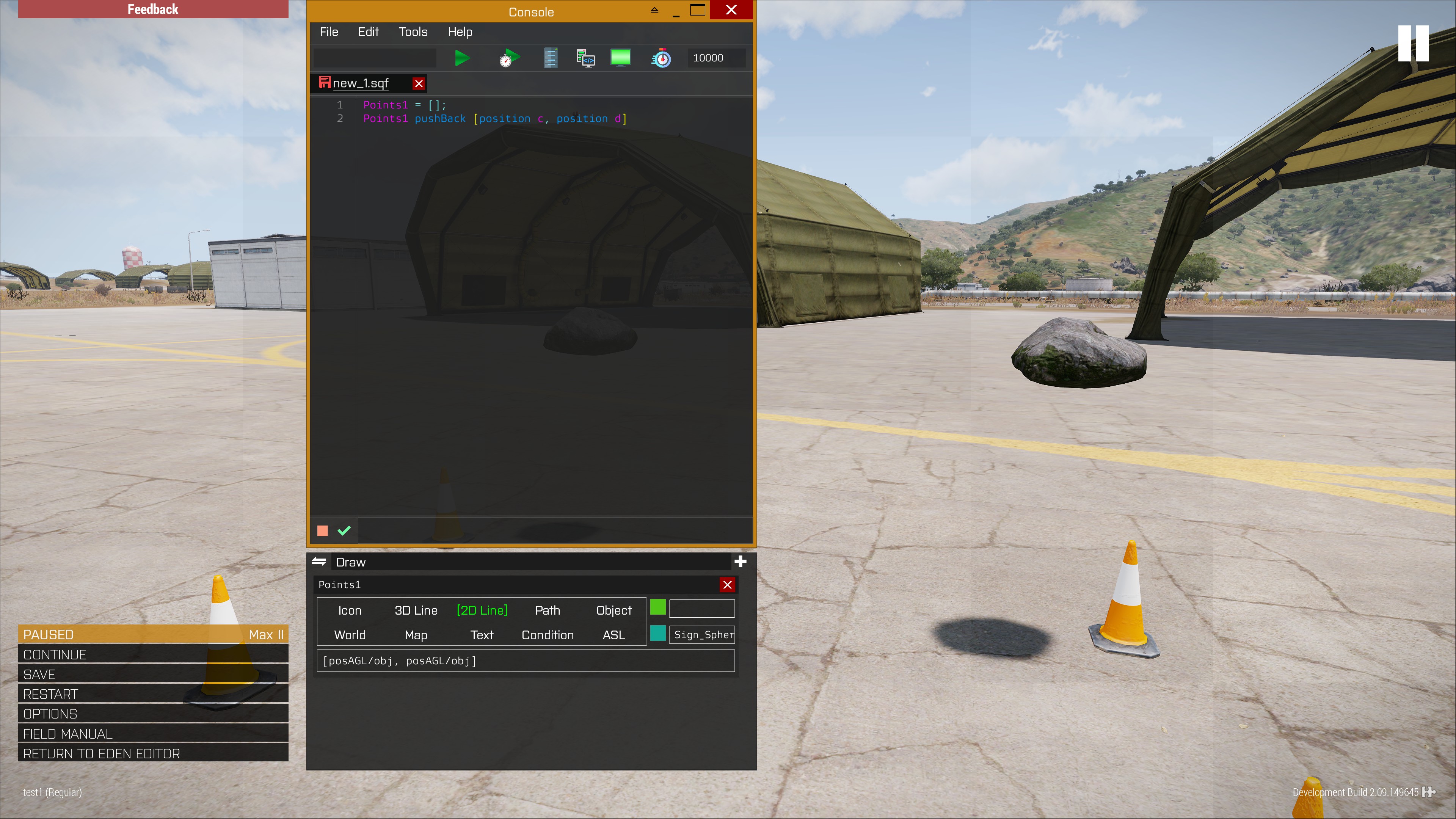
also my mod already supports this if you want to check it out:
https://steamcommunity.com/sharedfiles/filedetails/?id=2369477168
all you need is check 2D Line
 quiet gazelle
little raptor
quiet gazelle
little raptor
how do i give it the end points of the line?
little raptor
points1 pushBack [start, end]. start and end can be either positions or objects
you can change the variable names to whatever you want. in that image it's points1
quiet gazelle
 little raptor
don't use the position command 
quiet gazelle
little raptor
`points1 pushBack [start, end]`. start and end can be either positions or object...
i tried it without earlier
quiet gazelle
did that, so far no lines
little raptor
quiet gazelle
did that, so far no lines
you must at least check World
drifting portal
Which one is better for spawning mines?
1- Making a script that spawns mines across an area dispersed randomly (the mine objects will stay around for about 35 minutes before being deleted)

2-Or have a trigger on the wanted area spawn a mine in front of the player (trigger checks if player is in it every 2 seconds)  and the trigger remains on the mission for 35 minutes before being deleted
depends what you want to do exactly. I assume the latter is your goal (spawning mines in front of the player)
drifting portal
little raptor
depends what you want to do exactly. I assume the latter is your goal (spawning ...
Just deny a player from using that path
I want something that costs less performance
cyan dust
(spawning mines in front of the player)
Jeesh. What a dick move. I like it
 drifting portal
cyan dust
>(spawning mines in front of the player)
Jeesh. What a dick move. I like it <:ko...
drifting portal
cyan dust
>(spawning mines in front of the player)
Jeesh. What a dick move. I like it <:ko...
There is in fact a function for that by Bohemia lol
But I wonder which of the two options costs less performance to deny someone from taking that path for 35 minutes
little raptor
drifting portal
I want something that costs less performance
I prefer 2, as long as you only check 1 player
little raptor
they don't have a big impact
little raptor
especially for just 4 players
drifting portal
One area has 4 trigger at max I guess that's still good?
little raptor
4 players is pretty much no diff than 1
little raptor
drifting portal
One area has 4 trigger at max I guess that's still good?
yes
just make the triggers local
drifting portal
little raptor
just make the triggers local <:meowsweats:707626030613135390>
Oh, thanks for telling me that
I wanted to make them server side
Lol
little raptor
better make the players pay for it
drifting portal
little raptor
better make the players pay for it <:meowsweats:707626030613135390>
Idk
Because I want to put most of the load on the server
And make players only run what is only needed to be ran locally
little raptor
that's a bad idea
drifting portal
Like GUIs
drifting portal
little raptor
that's a bad idea
You talking about client host?
little raptor
I mean putting all the load on the server
drifting portal
What side effects will that cause?
little raptor
bad server performance = bad experience for everyone (e.g. desyncs)
drifting portal
Well
Isn't that dependent on how bad the script running is?
Like if you use a faulty loop
I'm focusing a lot on optimizing the script, will that matter for the server if runs it?
little raptor
drifting portal
Isn't that dependent on how bad the script running is?
I'm not talking about scripts. I mean in general
the more work you give the server to do, the slower it gets obviously
drifting portal
Yeah but if the work is lightweight in nature?
Btw I'm not arguing here, just trying to get the best combination for performance
little raptor
the point is not how lightweight or heavy something is.
if something can be done by the client more efficiently, do it on the client
in your mines example, you can just make the triggers check locally for only that player, and not the rest
drifting portal
Well I will include everyone
drifting portal
Yeah
drifting portal
little raptor
or all players + global
I'm talking about this
drifting portal
Repeatable
little raptor
drifting portal
Repeatable
that's not what I mean
drifting portal
Oh yeah
That's sound
Will make it local then
For 4 players
Also another question
I have an APS script
Active protection system
For tanks, it basically runs nearestObjects checking for missiles and rockets (forgot their parent name)
Every 0.03 seconds, is that best done on a server or client? (Only one tank uses it at a time)
little raptor
wherever the tank is local
drifting portal
And if client, how would I deal with them possibly disconnecting which will deactivate the script... Lol
drifting portal
little raptor
wherever the tank is local
It changes you know
Depending on who uses the tank
Locality changes
I hope I didn't ping you by that reply
little raptor
drifting portal
And if client, how would I deal with them possibly disconnecting which will deac...
local event handler
little raptor
drifting portal
It changes you know
you can check local _tank
little raptor
drifting portal
For tanks, it basically runs nearestObjects checking for missiles and rockets (f...
if 2.10 was out I'd advise to also check if a projectile is even coming towards the tank before running the script (or checking nearestObjects)
also does nearestObjects even trigger for ammo? 
iirc it didn't
open fractal
I've never seen it come up
little raptor
possibly disconnecting which will deactivate the script... Lol
your script won't work properly anyway. it's scheduled
drifting portal
little raptor
> possibly disconnecting which will deactivate the script... Lol
your script won...
Well it does work 3/4 of the time
Which is enough
I understand its very variable due to scheduler load
open fractal
have you actually been able to retrieve the projectile object without a fired handler
drifting portal
Pastebin
Pastebin.com is the number one paste tool since 2002. Pastebin is a website where you can store text online for a set period of time.
here check it out
because I can't answer your question about the object with clarity
sqfbin is down for me in case you wonder why I used pastebin
little raptor
{
            _Projectiles pushBack _x;

        }
        forEach((getpos _Vehicle) nearObjects[_x, _Radius]);
that's kinda slow
drifting portal
so just use object directly?
little raptor
also I just did a test and nearestObjects does work with projectiles but doesn't support types
little raptor
drifting portal
so just use object directly?
that's better yeah
drifting portal
alright what else can I improve?
little raptor
or getPosATL
drifting portal
doesn't nearObjects require AGL?
little raptor
it does
but on terrain ATL is the same as AGL
which is normally where you drive a tank
little raptor
it's still terrain
little raptor
I think nearestObjects has a bug, because it can't detect ammo classes
so for now just use nearObjects
_Projectiles = flatten(["RocketBase", "MissileBase", "ShellBase"] apply {_Vehicle nearObjects[_x, _Radius]});
either do that, or:
{
  _Projectiles append (_Vehicle nearObjects[_x, _Radius]);
} forEach ["RocketBase", "MissileBase", "ShellBase"];
both should perform similarly
the second one should be faster
drifting portal
thought of the second option honestly back then
but I was kinda sleep and forgot
thanks lol
open fractal
Could you also use the ammo type from the incoming missile handler
open fractal
I believe it does
I remember it firing when testing it with an rpg, I don't recall if it was modded though
drifting portal
open fractal
Could you also use the ammo type from the incoming missile handler
it only works for locked missiles if its a player firing
open fractal
Oh that makes sense, I tested it with ai
meager granite
Anybody knows of a space character that is thinner than regular space that Arma would support?
All unicode half-spaces and such are displayed as normal spaces
I can use a thin invisible image, but its not a solution for non-structured texts
 pulsar bluff
why tho
meager granite
To format thousands in numbers
1000000 -> 1 000 000
Normal space is too wide in some fonts\sizes
warm hedge
Can't you just use comma?
meager granite
I can, but thousands separator depends on a locale\country
And imo it looks worse with comma
warm hedge
What GUI elements/type you use?
meager granite
Lots of places, UI, menus
So far I ended up using tin invisible <img>, but that's not a solution for non-structured texts
warm hedge
Hmm. I just thought if you can make
1 000 000 but with invisible (#00000000) characters like |
meager granite
Yeah, same hacky solution as transparent <img>
warm hedge
That'd work also
meager granite
Using <img size='0.15' image='#(argb,8,8,3)color(0,0,0,0)'/> right now
warm hedge
8,8,3 part should represents x res, y res, mipmap so 1,2,1 to make the picture 1:2 X:Y picture
So possible to tweak easily?
meager granite
Tried that, structured texts display it as square for some reason
hintSilent parseText "a<img image='#(argb,1,8,3)color(1,0,0,1)'/>a" =>

Well, size is easier to tweak anyway
Instead of having to use power of 2 sizes
meager granite
The reason is: flat color procedural textures are always square and supplied width and height do no matter
yet power of 2 check is still applied
proven charm
i don't like this idea too much my self but you could create multiple RscText controls via script and put the numbers in those
little raptor
meager granite
Anybody knows of a space character that is thinner than regular space that Arma ...
it depends on the font. in some fonts like the monospace one everything has the same size
tho iirc JP chars were smaller
maybe try the Japanese space
meager granite
Tested with non monospace font, all unicode spaces are treated as usual space
There was one that was double space though
warm hedge
Are they? Thought it is bigger
meager granite
No half-spaces unfortunately
little raptor
warm hedge
Are they? Thought it is bigger
yes the JP space is bigger, but since the chars were smaller maybe it ends up being smaller in the game
warm hedge
[ ]<-half wide
[ ]<- full wide what Japanese would use... yeah I know what is the point
Aha
meager granite
Tried everything from https://jkorpela.fi/chars/spaces.html and then https://en.wikipedia.org/wiki/Whitespace_character
In computer programming, whitespace is any character or series of characters that represent horizontal or vertical space in typography. When rendered, a whitespace character does not correspond to a visible mark, but typically does occupy an area on a page. For example, the common whitespace symbol U+0020 SPACE (also ASCII 32) represents a bla...
Zero-width spaces work too btw
 lyric portal
I want to make infantry respawn on USS Freedom. Been trying a bunch of stuff I researched but they are not working or I'm doing them wrong so. How do I do this?
warm hedge
How wrong it is? Spawn at water line?
lyric portal
Yeah
warm hedge
How did you make the spawn?
lyric portal
I put a respawn marker as usual. respawn_west, placed it where I want the spawn to be at.
Then with what I've been reading I put this on init.sqf
_mrkr = getMarkerPos "respawn_west";
"respawn_west" setMarkerPosLocal [_mrkr select 0, _mrkr select 1, 25];
respawnObj = [missionNamespace, getPosATL respawnObj,"Respawn_Name"] call BIS_fnc_addRespawnPosition;
lyric portal
What’s this what it do?
little raptor
lyric portal
I put a respawn marker as usual. respawn_west, placed it where I want the spawn ...
are you sure the height of USS Freedom deck is 25?
also why do you move the marker locally?
remove local
oh nvm it's in init.sqf. it's fine
lyric portal
little raptor
are you sure the height of USS Freedom deck is 25?
Nope. I’ll try messing with the height and see what I get
little raptor
25 should be ok I just tested
lyric portal
lyric portal
I put a respawn marker as usual. respawn_west, placed it where I want the spawn ...
Ah alright. With this current method I’m still spawning on water
little raptor
lyric portal
Ah alright. With this current method I’m still spawning on water
don't put it in init.sqf
put it in each player's init field
init.sqf is scheduled and runs too late
warm hedge
https://community.bistudio.com/wiki/Arma_3:_Event_Handlers#MPRespawn
Perhaps use this EH to set the position
lyric portal
z1 addMPEventHandler ["MPRespawn", {[-464.031,-2795.113,101.611]}];
I added this onto the players init. Is that how it's supposed to be done? It's still spawning me on water.
little raptor
lyric portal
Ah alright. With this current method I’m still spawning on water
have you even selected respawn on custom position in multiplayer settings?
lyric portal
Yes
little raptor
then it should work because I just tested it
put a player on the deck
in 3den
then type ASLtoAGL getPosASL player in debug console and run it
(all of that in 3den. don't run the mission)
lyric portal
I got
[-489.913,-2775.2,23.5716]
little raptor
then 25 is the correct height
little raptor
lyric portal
Ah alright. With this current method I’m still spawning on water
do you spawn next to/under the carrier?
or in the middle of nowhere?
lyric portal
Under the carrier. Below the set spawn point
little raptor
lyric portal
Under the carrier. Below the set spawn point
which part of the carrier do you set the marker on?
show a screenshot
little raptor
@lyric portal anyway, just put that module exactly on the carrier surface, give it a name in 3den (e.g. respawnModule), then type:
"respawn_west" setMarkerPosLocal ASLtoAGL getPosASL respawnModule
```in init.sqfOk so I renamed the respawn module I put as reference as respawnModule. The marker is still there named respawn_west.
I put this on init.sqf
"respawn_west" setMarkerPosLocal ASLtoAGL getPosASL respawnModule
And respawned on dagger 2 (respawn name for respawnModule)
It's still spawning me on water
open fractal
lyric portal
Ok so I renamed the respawn module I put as reference as respawnModule. The mark...
why are you using both a marker and a module
lyric portal
Originally, I only used a marker. Now with the solution I thought it would be fine to have a marker and a module. I'll try it without the marker and just the module.
It's still spawning me on water
 granite sky
@rough dagger Figured it?
granite sky
I think you can look up the whole lot in config under the Throw weapon.
 rough dagger
Rgr mate, I'll look at that
granite sky
"vn_m18_purple_muzzle"
rough dagger
Thank you, sorry for clogging up the airwaves 😉
granite sky
yeah, it has an entry for every single grenade in the modset :D
Now to figure out exactly why quadbikes cannot drive over bridges...
open fractal
lyric portal
It's still spawning me on water
add a respawn delay?
lyric portal
open fractal
add a respawn delay?
It's currently at 4 seconds
little raptor
@lyric portal
deleteMarkerLocal "respawn_west";
createMarkerLocal ["respawn_west", [0,0,0]];
"respawn_west" setMarkerPosLocal ASLToAGL getPosASL this
that was the code I pasted in the init field, as you saw in the video
and as you can see it works
there's no need to create the marker. just place some object (in that video it was a user texture) and put that code in its init field
open fractal
is there a way to clear all cargo in eden without going through the properties in every vehicle?
_cars = vehicles select {_x isKindOf "Car"};
{
clearitemcargo _x;
clearWeaponCargo _x;
clearMagazineCargo _x;

} forEach _cars;
``` I tried this but it doesn't seem to work while in edennevermind shift+click seems to work for this
lyric portal
little raptor
there's no need to create the marker. just place some object (in that video it w...
Oh wow ok so, I used that, I disabled select respawn position and now it works. With it on it just keeps putting me on water. So that's pretty interesting. Thanks a lot.
 lyric portal
What did it do?
little raptor
position gives the position in AGLS format.
AGL means above ground level. That S means object surfaces.
so if you place the module on an object the Z is 0
and when you're on water, the Z value of 0 means at the water surface ofc...
now here's a trick
just get the module's Z coord, and offset its position. and it should work
so in other words, just place the player where the module is
little raptor
little raptor
then type `ASLtoAGL getPosASL player` in debug console and run it
run this
whatever the 3rd value is, add it to the module's Z
yep it works 🤣
@lyric portal 👆
anyway I asked the devs to fix this:
https://feedback.bistudio.com/T166485
not sure if they will (backward compat issue)
lyric portal
Interesting
Ok so, I put down the respawn module, ran debug, added z to module's z and guess what
It put me in water
little raptor
alternatively, just put this in the module's init field:
if (local this) then {
  this setPosASL (getPosASL this vectorAdd [0,0, ASLtoAGL getPosASL this#2])
}
Like ever deeper
little raptor
lyric portal
Ok so, I put down the respawn module, ran debug, added z to module's z and guess...
did you even put the player next to the module?
little raptor
little raptor
alternatively, just put this in the module's init field:
```sqf
if (local this) ...
anyway, just use this
it automatically adds the Z
 tame jetty
hi i am new can somebody tell me how i join a multiplayer mission in arma 3
little raptor
tame jetty
hi i am new can somebody tell me how i join a multiplayer mission in arma 3
this channel is for scripting questions. ask in #arma3_questions
tame jetty
thx
little raptor
@lyric portal do this then
put an empty object (like that user texture) on the position you want to spawn
put this in its init:
if (isServer) then {
    [BLUFOR, getPosASL this, "My West Respawn"] call BIS_fnc_addRespawnPosition
}
fixed the script. try it again
nvm
looks like that function is buggy as well
lyric portal
little raptor
```sqf
deleteMarkerLocal "respawn_west";
createMarkerLocal ["respawn_west", [0,0...
Looks like this here is the only thing that has worked so far for me
little raptor
lyric portal
Looks like this here is the only thing that has worked so far for me
try this too:
if (isServer) then {
 _marker = createMarker ["respawn_test", ASLToAGL getPosASL this];
 [BLUFOR, _marker, "My West Respawn"] call BIS_fnc_addRespawnPosition
}
in an object's init
lyric portal
Oh wow now that’s working too hah
little raptor
yeah whoever coded those functions was a noob
they all use AGLS positions
using markers was the only way to unfuck it
lyric portal
Hah well, I guess we’ve found the solution after like 6 hours. That was pretty awesome. Thanks a lot. My head hurts.
little raptor
lyric portal
Hah well, I guess we’ve found the solution after like 6 hours. That was pretty a...
if you want to do it for multiple respawn positions use this:
if (isServer) then {
    _markerID = missionNamespace getVariable ["lastMarkerID", 0];
    _marker = createMarker [format ["myRespawnMarker%1", _markerID], [0,0,0]];
    lastMarkerID = lastMarkerID + 1;
    _marker setMarkerPos ASLToAGL getPosASL this;
    [BLUFOR, _marker, "My West Respawn"] call BIS_fnc_addRespawnPosition
}
Thanks
little raptor
lyric portal
Thanks
actually I just noticed it uses ATL pos
if (isServer) then {
    [BLUFOR, getPosATL this, "My West Respawn"] call BIS_fnc_addRespawnPosition;
    deleteVehicle this;
}
try that
no need for markers
lyric portal
Works great as well
little raptor
little raptor
```sqf
if (isServer) then {
[BLUFOR, getPosATL this, "My West Respawn"] call...
yeah just use this
it'll be faster network wise
it also deletes the dummy object
lyric portal
Thanks
granite sky
granite sky
Now to figure out exactly why quadbikes cannot drive over bridges...
It turns out that the answer is telephone poles
 opal zephyr
Is there anyway to reference the players weapon as an object? Im trying to use attachTo with its memory points
warm hedge
No
little raptor
opal zephyr
Is there anyway to reference the players weapon as an object? Im trying to use a...
they're not objects
they're proxies
even if you could get the proxy object (which you sort of can, e.g. using cursorObject) it would be totally useless
warm hedge
#arma3_scripting message
You can do this trick
little raptor
here
little raptor
warm hedge
https://discord.com/channels/105462288051380224/105462984087728128/9698672938845...
it's not "sum it all"
you have to do a transformation as well
from bone coords to model coords
warm hedge
That's what I implied
little raptor
anyway, the code here uses the muzzlePos mem point
change it to whatever mem point you want
also that's just a quick script I put together for demonstration purposes
you should optimize it yourself (and don't use onEachFrame)
opal zephyr
Would have to use onEachFrame if I wanted to attach something to it though no?
little raptor
you will need an each frame loop, but don't use the onEachFrame command
use the mission EH instead
opal zephyr
kk
warm hedge
Do we need it?
little raptor
also make sure you do it locally
warm hedge
attachTo is enough isn't it?
opal zephyr
but the point is constantly being recalculated
little raptor
the weapon bone moves so no
warm hedge
You can attach it to the weapon bone and adjust it into the proxy pos
little raptor
you can but the attachTo command uses memory point LOD
which is inaccurate for characters
here's an example

when you aim up or down the attached object kinda "slides off" (I've attached a weapon to the player)
tho if that's not important you can ofc use attachTo
it'll be faster than the each frame code ofc
opal zephyr
what attachment are we looking at in that image?
warm hedge
Ahh
opal zephyr
oh I see it now
little raptor
the attached one is not aligned with the original
opal zephyr
What proxy did you attach it to?
 brisk lagoon
anyone knows a trigger that when a player reach/pass the trigger a smoke grenade is being thrown?
or spawned
anything like that?
little raptor
brisk lagoon
anyone knows a trigger that when a player reach/pass the trigger a smoke grenade...
createVehicle ["SmokeShellBlue", ASLtoAGL getPosASL thisTrigger] hideObject true
if you want it white remove Blue
P.S it's not for MP
 open hollow
there is a way to hide things without lose colition with it?
_obj hideobject true hide it, but also lose colition with it
little raptor
disableCollisionWith
collision can only be disabled between 2 pair of objs
e.g obj1 with obj2
ob1 with obj3
obj1 with obj4
little raptor
oh I read it wrong
little raptor
open hollow
like an invisible wall basically
there is an invisible wall obj
open hollow
im still trying to make the lidar thing usable lol
so hiding the objects may give me some more fps
open hollow
map objects
little raptor
hiding map objects doesn't give you much FPS
open hollow
little raptor
the perf problem was due to the drawIcon3D
yea... i know
open hollow
little raptor
hiding map objects doesn't give you much FPS
it does if you hide them all lol
but yea, there is no way to optimize this 
little raptor
not in SQF at least
open hollow
sqf is the only way to make the dots afaik 😦
lineintersectsurfaces works quite fast, so no frames are droped
little raptor
I mean the SQF language itself
lineintersectsurfaces works quite fast,
it takes ~0.005-0.08ms on average so it's not exactly light
little raptor
little raptor
I mean the SQF language itself
you can try intercept for example
which uses C++
open hollow
yea but the big performance hit its on drawIcon3D
open hollow
yea, maybe with an c++ extension to do it might help, since with sqf its slow af
maybe with a while loop, make it 2 or 3 times per second instaed of per freame
little raptor
that too works
little raptor
open hollow
maybe with a while loop, make it 2 or 3 times per second instaed of per freame
if it's scheduled the game will take care of it
just filter out the positions you don't want to draw
then pass the rest into an array
and draw them in the onEachFrame loop
open hollow
yea, ill try with that, it might help also some kind of "lod" filter that draws much less dots in the distance can work too
while didnt work, for some reason dots start to blink
i think its time to give up lol
little raptor
open hollow
while didnt work, for some reason dots start to blink <:notlikemeowcry:724201124...
I didn't say draw the dots in there. just use it as a filter
open hollow
little raptor
I didn't say draw the dots in there. just use it as a filter
i didnt
while {dots isNotEqualTo []} do {
    sleep 0.3;
    _newdots = dots select {
         _dot = ASLToAGL (_x select 0);
         _w2s = worldToScreen _dot;
         _w2s isnotequalto [] || (_w2s findif ({_x < 2 && _x > -1} ) isnotEqualTo -1)
     };
         screendots = _newdots;
};
while {condition} do {
  drawDots = allDots select {...};
  sleep 0.1;
}
and why would it flicker with that
open hollow
idk
little raptor
_x < 2 && _x > -1
that's too arbitrary
_w2s isnotequalto [] || (_w2s findif ({_x < 2 && _x > -1} ) isnotEqualTo -1)
that codition is wrong too
because of ||
it should be &&
also instead of that findIf use inArea
open hollow
yea im not sure how to be sure its on screen
little raptor
_x = safeZoneX;
_w = safeZoneW;
_y = safeZoneY;
_h = safeZoneH;
_screenArea = [[_x + _w / 2, _y + _h/2], _w/2, _h/2, 0, true];
_w2s isNotEqualTo [] && {_wts inArea _screenArea}
its an improvement... but far from playable lol
open hollow
little raptor
```sqf
_x = safeZoneX;
_w = safeZoneW;
_y = safeZoneY;
_h = safeZoneH;
_screenAr...
but this will help me alot in another project i have ❤️
little raptor
well yeah
the screen area filter might be better in the each frame loop
instead move the line intersection into the while
instead do a different filter in the while
e.g. create a grid system, each grid with a limited number of dots, e.g. 1000
and only draw the dots belonging to that grid
open hollow
here is the code if you want to give it a try
setViewDistance 10;
setAperture -1;

setAperture 10000;

dots = [];
fnc_lidar = {};

_x = safeZoneX;
_w = safeZoneW;
_y = safeZoneY;
_h = safeZoneH;
_screenArea = [[_x + _w / 2, _y + _h/2], _w/2, _h/2, 0, true];


fnc_lidar = {
    for "_" from 0 to 3 do{
        _direction = getCameraViewDirection player;
        _raw = eyepos player vectoradd (_direction vectorMultiply 30); // <-- Distance of the "laser"
        _pos = _raw vectoradd ([random [-1, 0 , 1],random [-1, 0 ,1],random [-1, 0 ,1]] vectorMultiply 10); //randomization of the laser
        _intersec = lineIntersectsSurfaces [eyePos player, _pos, player];
        if (_intersec isEqualTo []) then {continue};
        _intersec = _intersec select 0;
        _intersec pushBack (selectRandom [true,false,false,false,false]); // if its drawn when too far (didnt work well)
        dots pushBackUnique _intersec;
    };
};

removeAllMissionEventHandlers "Draw3D";
addMissionEventHandler ["Draw3D", {
    [] call fnc_lidar;
    {
        _x params ["_dotpos","_normal","","","_far"];
        _dotpos = ASLToAGL _dotpos;
        _dist = (getpos player) distance2d _dotpos;
        if ( _dist > 50 && {!_far}) then {continue};
        _color = vectorLinearConversion [0,30,_dist,[0,0.85,1],[1,0.5,0]] + [1];
        drawIcon3D ["\A3\ui_f\data\map\markers\handdrawn\dot_CA.paa", _color ,_dotpos , 0.03*1/(_dist/50)*(abs (_normal select 0)), 0.03/(_dist/50)*(abs (_normal select 1)), 45, "", 1, 0.005/(_dist/20), "TahomaB"];
    }foreach newdots;
}];


while {dots isNotEqualTo []} do {
        newdots = dots select {
         _dot = ASLToAGL (_x select 0);
         _w2s = worldToScreen _dot;
         _w2s isnotequalto [] && {_w2s inArea _screenArea}
     };
};
yea, can asociate the dots to the building thats hit, so iterate on them
little raptor
drawIcon3D ["\A3\ui_f\data\map\markers\handdrawn\dot_CA.paa", _color ,_dotpos , 0.03*1/(_dist/50)*(abs (_normal select 0)), 0.03/(_dist/50)*(abs (_normal select 1)), 45, "", 1, 0.005/(_dist/20), "TahomaB"];
your drawIcon3D is also very slow (also I don't get how the _normal is related to the size of icons)
little raptor
open hollow
yea, can asociate the dots to the building thats hit, so iterate on them
no I mean rectangular grids
based on the 2D position of the character
the grid can either be a preallocated array or hashmap
e.g.:
_gridData = _hashmap get [floor (_pos#0 / _gridWidth), floor (_pos#1 / _gridWidth)]
a _gridWidth of ~4-5 meters is good enough imo
open hollow
yea, that might help with far dots, but to be fair, the amount of dots needed to have a "clear" image like the gmod. its almost imposible to archive on arma, maybe on enfusion can be made
little raptor
well gmod is not written in scripts afaik
it's all based on Source SDK, fully compiled addons in C++
so ofc it's faster
 tough abyss
Gmod does have Lua scripting
Perhaps you could look at how they do it with that and replicate their process in SQF
open hollow
tough abyss
Perhaps you could look at how they do it with that and replicate their process i...
yea idk if can be unpacked like in arma
tough abyss
I would assume you can do so with the source SDK as Leopard said
Afaik source doesn't obfuscate or encrypt files so no reason you shouldn't be able to
 past wagon
https://imgur.com/a/Nx8vGCN
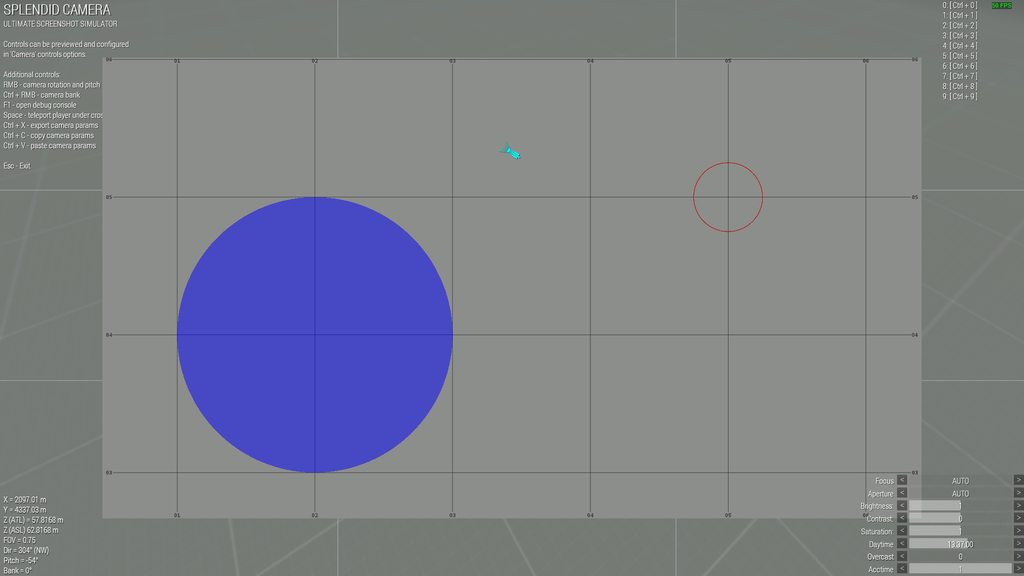
I'm trying to get the blue ellipse to morph onto the red ellipse on the map, and I'm using the script below. I don't see anything wrong with it and I'm not getting any errors, but nothing is happening on the map. The blue ellipse is "Zone" and the red ellipse is "NewZone". Does anyone know why it might not be working?
sleep 5;

_newSize = getMarkerSize "NewZone" select 0;
_oldPos = getMarkerPos "Zone";
_newPos = getMarkerPos "NewZone";

while {getMarkerSize "Zone" select 0 > _newSize && (getMarkerPos "Zone" distance _oldPos > _newPos distance _oldPos)} do {
    sleep 0.01;
    "Zone" setMarkerSize (getMarkerSize "Zone" - 0.1);
    getMarkerPos "Zone" params ["_x1", "_y1"];
    _newPos params ["x2", "y2"];
    _slope = (_y2 - _y1) / (_x2 - _x1);
    _degrees = atan _slope;
    _xDistance = 0.2 * (sin _degrees);
    _yDistance = 0.2 * (cos _degrees);
    "Zone" setMarkerPos [_x1 + _xDistance, _y1 + _yDistance];
};

 warm hedge
Yeah seems like your while never fires
tough abyss
getMarkerSize "Zone" select 0 > _newSize
(getMarkerPos "Zone" distance _oldPos > _newPos distance _oldPos)
past wagon
yeah
tough abyss
first condition meaning that we only loop while the size of the old zone is bigger than the size of the new zone
tough abyss
meaning the loop will end instantly if your old zone is already the same size or smaller than the new zone
tough abyss
okay then let's move on to your other condition
this is the one that's more confusing to me
past wagon
I want it to stop once it reaches its new position
or once it reaches its new size
and I think both should happen at the same time
tough abyss
well what your condition says is that you only want it to keep looping if the distance from the old zone to the old position is greater than the distance from the new position to the old position
which makes no sense, seeing as the distance from the old zone to the old position will always start at 0
ending the loop immediately
tough abyss
correct
tough abyss
no problem
warm hedge
Just figured out the same, if in doubt always print (hint or systemChat or something) for debug
tough abyss
it can be helpful to have a #define debug or similar that activates debug hint messages via #ifdef
past wagon
ok
warm hedge
So, the script itself, you wanted to make a linear transformation Zone to NewZone am I right?
tough abyss
I must say I'm a bit confused at your approach if that's what your goal is
as it'll never reach the new position if it hits its new size first
and the same thing could be accomplished with a simple lerp on the pos
warm hedge
linearConversion vectorLinearConversion I'd use, they're always your friends
past wagon
warm hedge
So, the script itself, you wanted to make a linear transformation Zone to NewZon...
yeah
warm hedge
Let's say, if I wanted to make the transformation in 5 seconds... let me write it ASAP
past wagon
ok
warm hedge
addMissionEventHandler ["EachFrame",{
    _thisArgs params ["_markerOld","_markerNew","_timePeriod","_timeNow"] ;

    _markerOld params ["_markerOld","_markerOldSize","_markerOldPos"] ;
    _markerNew params ["_markerNew","_markerNewSize","_markerNewPos"] ;

    _markerOldSize set [2,0] ;
    _markerNewSize set [2,0] ;

    private _timeNow = time - _timeNow ;
    _markerOld setMarkerPos vectorLinearConversion [0,_timePeriod,_timeNow,_markerOldPos,_markerNewPos,true] ;

    private _size = vectorLinearConversion [0,_timePeriod,_timeNow,_markerOldSize,_markerNewSize,true] ;

    _size deleteAt 2 ;
    _markerOld setMarkerSize _size ;

    if (_timePeriod < _timeNow) exitWith {removeMissionEventHandler [_thisEvent,_thisEventHandler]} ;
},[
    ["Zone",getMarkerSize "Zone",getMarkerPos "Zone"],
    ["NewZone",getMarkerSize "NewZone",getMarkerPos "NewZone"],
    5,
    time
]] ;```I just learnt vectorLinearConversion only accepts arrays with 3 elements unlike other vector commands...
@past wagon
past wagon
ok
tough abyss
sleep 5;

private _newSize = getMarkerSize "NewZone" select 0;
private _oldPos = getMarkerPos "Zone";
private _newPos = getMarkerPos "NewZone";
private _i = 0;
private _time = 5;

while {getMarkerSize "Zone" select 0 > _newSize} do {
    "Zone" setMarkerSize (getMarkerSize "Zone" - 0.1);
    private _curPos = vectorLinearConversion [0, 1, _i, _oldPos, _newPos, true];
    "Zone" setMarkerPos _curPos;
    _i = _i + 0.01/_time;
    sleep 0.01;
};
this would also work if you want to replicate the old behavior exactly except with vectorLinearConversion
_time lets you set how long you want the movement to take in seconds
past wagon
ok
past wagon
thanks
I will probably end up using one of those, but I still wanna make mine work just so I can learn from it
right now I'm confused as to why the ellipse is moving the in the wrong direction. Here is the updated script:
sleep 5;

_newSize = getMarkerSize "NewZone" select 0;
_oldPos = getMarkerPos "Zone";
_newPos = getMarkerPos "NewZone";

_oldPos params ["_x1", "_y1"];
_newPos params ["_x2", "_y2"];
_slope = (_y2 - _y1) / (_x2 - _x1);
systemChat str _slope;
_degrees = atan _slope;
systemChat str _degrees;
_xDistance = 0.2 * (sin _degrees);
_yDistance = 0.2 * (cos _degrees);

while {getMarkerSize "Zone" select 0 > _newSize && getMarkerPos "Zone" distance _oldPos < _newPos distance _oldPos} do {
    sleep 0.01;
    "Zone" setMarkerSize [(getMarkerSize "Zone" select 0) - 0.1, (getMarkerSize "Zone" select 0) - 0.1];
    getMarkerPos "Zone" params ["_x1", "_y1"];
    "Zone" setMarkerPos [_x1 + _xDistance, _y1 + _yDistance];
};
actually, nevermind. there's way too many problems with this anyway lol
tough abyss
Honestly I'm not sure why it'd be moving the wrong way, but probably better to understand that the way you're trying to do it is overly convoluted and learn the better way to do it
past wagon
yeah
tough abyss
esp. as the way you're currently trying to do it doesn't guarantee the markers will end up in the same spot since they're moving by rough increments
past wagon
yeah, true
tough abyss
and also this will evaluate false as soon as the old marker crosses the midpoint getMarkerPos "Zone" distance _oldPos < _newPos distance _oldPos which will stop the loop
as once it crosses midpoint it's no longer less far from its old position than it is from the new one
past wagon
yeah
tough abyss
if you need any help with vectors lmk, I've had to work with them a LOT for my current mod and in the past
past wagon
tough abyss
~~and also this will evaluate false as soon as the old marker crosses the midpoi...
actually, are you sure about that?
because the _newPos isnt the current position, its the one that its moving towards
past wagon
all good
although I have a bit of a problem with your script
the marker arrives at its new location before it is done shrinking, and then continues to shrink
tough abyss
Yes that will happen, I only replicated the way your script works, not improved it
if you want it to shrink in sync with movement I can make it do that
tough abyss
same system as the movement but with linearConversion instead of vectorLinearConversion as we'd be working with a scalar (normal number) instead of a position vector
past wagon
yeah
tough abyss
I would advise seeing if you can figure it out yourself, otherwise I can provide an example
this will help
minFrom and maxFrom can just be 0 and 1 respectively
minTo will be the original size of the marker
tough abyss
maxTo will be the size you want it to be (the size of the new marker)
you can set clip to true if you want, it won't matter
and then value is where you put _i
past wagon
ok
past wagon
will I need to do that for them to be in sync?
tough abyss
No, but the old while statement is no longer valid as we don't need to check if the size is right
past wagon
ok
tough abyss
basically how linearConversion works is this:
past wagon
sleep 5;

private _oldSize = getMarkerSize "Zone" select 0;
private _newSize = getMarkerSize "NewZone" select 0;
private _oldPos = getMarkerPos "Zone";
private _newPos = getMarkerPos "NewZone";
private _i = 0;
private _time = 5;

while {_i <= 1} do {
    private _curSize = linearConversion [0, 1, _i, _oldSize, _newSize];
    "Zone" setMarkerSize [_curSize, _curSize];
    private _curPos = vectorLinearConversion [0, 1, _i, _oldPos, _newPos, true];
    "Zone" setMarkerPos _curPos;
    _i = _i + 0.01/_time;
    sleep 0.01;
};
is this good?
tough abyss
seems to be but you don't actually have the _oldSize var defined
past wagon
yeah, got it
tough abyss
params["_minFrom", "_maxFrom", "_value", "_minTo", "_maxTo", "_clip"];
private _rangeFrom = _maxFrom - _minFrom; // Range of values to use for input
private _rangeTo = _maxTo - _minTo; // Range of values to use for output
private _progress = (_value - _minFrom) / _rangeFrom; // Fraction of _rangeFrom that _value is from _minFrom
private _newValue = _minTo + _progress * _rangeTo; // Output new value scaled from _minFrom to _maxFrom
if (_clip) then { // If _clip == true, clamp _newValue between _minTo and _maxTo
  _newValue = [_newValue, _minTo, _maxTo] call BIS_fnc_clamp;
};
this is basically how linearConversion works
vectorLinearConversion is more or less the same, just uses vector math
tough abyss
wonderful, glad it's working
updated my linearConversion example code to show what _clip does
tough abyss
No problem, glad I could help
past wagon
how can I do something like allPlayers not inAreaArray "Zone"?
I want an array of every player who isn't inside an area
warm hedge
!(... inAreaArray ...) <- sorry this is simply wrong
past wagon
ohhh
warm hedge
Uh, an array of every player who isn't in an area?
past wagon
I could do allPlayers - allPlayers inAreaArray "Zone"
past wagon
warm hedge
Uh, an array of every player who isn't in an area?
yea
warm hedge
Yeah your solution sounds feasible
past wagon
cool, thanks
tough abyss
@past wagon Small note but you can also use BIS_fnc_listPlayers instead of allPlayers to exclude headless clients
a small optimization, but helpful to know
tight cloak
PRIVATE _spawning = true;
PRIVATE _multiplication = 1.5;
    while {_spawning} do {
        systemchat format ["fnc_enemyspawn is running on %1", _spawning];
        //fetching all players in aircraft
        PRIVATE _playerPlanes = [];
        {
          if (isTouchingGround (vehicle _x) == true) then {
            _playerPlanes pushback [_x];
          };
        } forEach allplayers;
        //systemchat format ["%1", _playerplanes];
        PRIVATE _planes = [];
        {
              if ((_x iskindof "Air" && ((count (crew _x)) > 0) && (!isTouchingGround _x)) && !(typeOf _x == "Land_FLoodLight_F") && !(_x == player)) then {
                _planes pushback [_x];
              };
        } forEach vehicles;
        PRIVATE _planeCount = count _planes;
        PRIVATE _players = count _playerPlanes;
        PRIVATE _totalplanes = _planeCount - _players;
        PRIVATE _planesToSpawn = _players * _multiplication;
        PRIVATE _vehicle = selectRandom ["sab_fl_dh98", "sab_fl_hurricane_2"];
        if (_planesToSpawn > _totalplanes) then {
            for "_i" from _planesToSpawn to _totalplanes do {
                sleep 4;
                _plane = createVehicle ["sab_fl_hurricane_2", position planeSpawn_1, [], 0, "FLY"];
                _group = createGroup resistance;
                _unit = _group createUnit ["sab_fl_pilot_green", [0,0,0], [], 0, "FLY"];
                _unit moveInAny _plane;
                _wp = _group addWaypoint [position planeobj, 0];
                systemChat format ["%1 plane spawned", _plane];
            };
        };
    sleep 60;
    _planesToSpawn = 0;
    _totalplanes = 0;
};
the script if set to _spawning on if works fine, but it spawns infinite planes.
however this version doesnt spawn at all. meaning the error lies in this line:
if (_planesToSpawn > _totalplanes) then {
feel free to rip into it btw, i wrote it and its incredibly ugly but my first attempt at writing a large piece of sqf
hallow mortar
Some of your conditions for selecting planes are redundant. isKindOf "Air" inherently rules out being a floodlight or the player unit, so you don't need to check those as well.
You can simplify this a lot:
_planeClasses = ["B_Plane_CAS_01_dynamicLoadout_F","B_Plane_Fighter_01_F"] apply {toLower _x}; // replace with your classes
// alternatively do two planeClasses arrays with different classes for the player side and OPFOR
_allPlanes = vehicles select {(toLower typeOf _x) in _planeClasses};
_playerPlanes = _allPlanes select {isPlayer driver _x};
_aiPlanes = _allPlanes select {((count (crew _x)) > 0) && !(isPlayer driver _x)};
The simplification will remove it in this case, but when you're checking a boolean (true/false) value, you don't need to use a comparison like == true. Just return the boolean itself, in this instance (isTouchingGround (vehicle _x)) which will already be true or false. You're doing "return true if this returns true" when you could just do "return this", it's a redundant layer.
Again the simplification will remove this, but your pushBack is wrong. Instead of adding _x to the array, you're adding a new sub-array containing only _x. I don't think this is causing your problem because count doesn't care about that, but it would cause problems if you wanted to do other things with the array. pushBack _x instead of pushBack [_x].
tough abyss
Overall not horrible for a first time writing large amounts of SQF though :)
Main things I'd recommend mastering to write better code are the array operations, vector operations, and everything involving remoteExec
lots of helpful stuff for optimizing code
tight cloak
hallow mortar
You can simplify this a lot:
```sqf
_planeClasses = ["B_Plane_CAS_01_dynamicLoad...
can i still use ```sqf
count
_allPlanes, _playerPlanes, and _aiPlanes will each contain a list of planes. If you want to know the number of planes in a list, the best method is indeed to count the list of planes.
tight cloak
if i do something like _aiPlanes = count _aiPlanes
will that override its value entirely to the point it wont remember what it was even counting
hallow mortar
It won't overwrite until after it's finished counting. But it would be best to make the count a separate variable, e.g. _aiPlanesNumber, in case you need the list again later.
tight cloak
i mean its gonna be a loop thats going to evaluate every 60 seconds - its for dogfighting to keep spawning planes to keep up with the players killing them
so i dont see why id need the number again
hallow mortar
It doesn't cost you anything to make a separate variable, it helps keep your code readable (having a variable change type and purpose halfway is confusing) and it provides the option in case you decide you need it.
open fractal
why not use an entitykilled handler to tally planes?
tight cloak
open fractal
why not use an entitykilled handler to tally planes?
scale up and down with player count
people can join, leave etc and it scales accordingly
i felt an EH would get too complicated to track
hallow mortar
You could do that with an EH too. But a 60-second loop is a perfectly fine way of doing it, it gives a nice "wave" feeling so the combat isn't 100% intense at all times. That's not really the core problem here.
open fractal
sure, just a suggestion in case it's preferred over a loop
tight cloak
hallow mortar
You could do that with an EH too. But a 60-second loop is a perfectly fine way o...
PRIVATE _spawning = true;
PRIVATE _multiplication = 1.5;
while {_spawning} do {
    _planeClasses = ["sab_fl_dh98","sab_fl_hurricane_2","sab_fl_ju88a","sab_fl_a6m"] apply {toLower _x}; // replace with your classes
    // alternatively do two planeClasses arrays with different classes for the player side and OPFOR
    _allPlanes = vehicles select {(toLower typeOf _x) in _planeClasses};
    _playerPlanes = _allPlanes select {isPlayer driver _x};
    _aiPlanes = _allPlanes select {((count (crew _x)) > 0) && !(isPlayer driver _x)};
    _spawnedPlanes = count _aiPlanes;
    _playerPlaneCount = count _playerPlanes;
    _planesToSpawn = _playerPlanes * _multiplication
        if (_spawnedPlanes < _planesToSpawn) then {
            for "_i" from _spawnedPlanes to _planesToSpawn do {
                sleep 4;
                _plane = createVehicle ["sab_fl_hurricane_2", position planeSpawn_1, [], 0, "FLY"];
                _group = createGroup resistance;
                _unit = _group createUnit ["sab_fl_pilot_green", [0,0,0], [], 0, "FLY"];
                _unit moveInAny _plane;
                _wp = _group addWaypoint [position planeobj, 0];
                systemChat format ["%1 plane spawned", _plane];
        };
    };
    sleep 60;
};
revised version with your suggestions
tough abyss
and they're already all in lower case so you kinda did its job for it :P
tough abyss
missing ; on previous line
tough abyss
also I'm not sure where you're running this from but make sure it's a scheduled environment so the sleeps actually work
tight cloak
remoteexec
i tried using call but it just caused too many problems for me and im only executing this once
tough abyss
spawn would probably be more appropriate as it won't be replicating the script call to all clients
tight cloak
its just being evaluated on the server and server only
tough abyss
Ah, good, that works too
tight cloak
PRIVATE _spawning = true;
PRIVATE _multiplication = 1.5;
_planeClasses = ["sab_fl_dh98","sab_fl_hurricane_2","sab_fl_ju88a","sab_fl_a6m"] apply {toLower _x}; // replace with your classes
// alternatively do two planeClasses arrays with different classes for the player side and OPFOR
while {_spawning} do {
    systemChat format ["%1 Aircraft spawn loop", _spawning];
    _allPlanes = vehicles select {(toLower typeOf _x) in _planeClasses};
    _playerPlanes = _allPlanes select {isPlayer driver _x};
    _aiPlanes = _allPlanes select {((count (crew _x)) > 0) && !(isPlayer driver _x)};
    _spawnedPlanes = count _aiPlanes;
    _playerPlaneCount = count _playerPlanes;
    _planesToSpawn = _playerPlaneCount * _multiplication;
        if (_spawnedPlanes < _planesToSpawn) then {
            for "_i" from _spawnedPlanes to _planesToSpawn do {
                sleep 4;
                _plane = createVehicle ["sab_fl_hurricane_2", position planeSpawn_1, [], 0, "FLY"];
                _group = createGroup resistance;
                _unit = _group createUnit ["sab_fl_pilot_green", [0,0,0], [], 0, "FLY"];
                _unit moveInAny _plane;
                _wp = _group addWaypoint [position planeobj, 0];
                systemChat format ["%1 plane spawned", _plane];
        };
    };
    sleep 60;
};
this is the current version of it, except. nothing spawns?
tough abyss
Does the systemchat message go through?
tight cloak
it says the first line so its running
just not the spawn
nevermind, it does spawn - except only on the second pass
tough abyss
Could be that the first pass runs before there's any player planes
not sure when you're executing it though
tight cloak
moment the first plane flies off the carrier
initiates a start.sqf that kicks everything into gear
hallow mortar
Have it systemChat the value of each variable after its creation (including count variables). This will help identify which piece isn't working.
Er, actually just the count variables. Trying to systemChat a large array of planes wouldn't be too good
tight cloak
okay so - aside from it missing the first pass, it works as intended with a slight uh... interesting problem
sometimes the spawns of them overlap, causing a huge fireball that continues until one makes it out, and another etc until the number has been reached
tough abyss
that would make sense considering they have a set spawn point with 0 radius
tight cloak
how would i improve this?
tough abyss
_plane = createVehicle ["sab_fl_hurricane_2", position planeSpawn_1, [], 0, "FLY"];
that line
the 0 before fly is the radius param
then it'll spawn the planes within that radius of the spawn randomly
instead of at the exact spot
as for the first loop not working, I'm unsure
will continue thinking about it
tight cloak
radius fixed the other issue, thankyou guys for the help
i need to hit the hay, might be back with some more questions tomorrow
 wide stream
Hello, gents.
How do i remove radio racks from ACRE2 from vehicle?
I put this code in serverInit.sqf rn and it works for singleplayer, but i have no idea why it isn't working on dedi:
waitUntil {time > 0};
_radioRemoveVehs = [mrap_1, mrap_2, mrap_3, mrap_4];

{
    _veh = _x;
    [_veh, {}] call acre_api_fnc_initVehicleRacks;
    _racks = [_veh] call acre_api_fnc_getVehicleRacks;
    // [_veh, (_racks select 1)] call acre_api_fnc_removeRackFromVehicle;
    // [_veh, (_racks select 0)] call acre_api_fnc_removeRackFromVehicle;
    [_veh, (_racks select 1)] remoteExecCall ["acre_api_fnc_removeRackFromVehicle"];
    [_veh, (_racks select 0)] remoteExecCall ["acre_api_fnc_removeRackFromVehicle"];
} forEach _radioRemoveVehs;
hm
I'm not aware of the specifics of ACRE's scripts, but if I had to guess I'd assume it's something to do with how the racks are initialized in MP vs. SP
also just calling acre_api_fnc_removeRackFromVehicle should be sufficient as according to the ACRE docs it's supposed to be server exec only
and I'm assuming you mean initServer.sqf not serverInit.sqf
however based on what I'm seeing it should be logging any errors to the RPT file
so I'd go check that to see what's up
@wide stream
wide stream
tough abyss
however based on what I'm seeing it should be logging any errors to the RPT file
I'm doing it right now [)
Thanks!
tough abyss
no problem
wide stream
tough abyss
no problem
Oh, so acre_api_fnc_getVehicleRacks isn't returning any radio ID's if executed from server. Strange.
Will try to figure it out by my own. Thanks for reminding me about RPTs x)
 cobalt path
Is there a way to make player character move really fast? I wanted to make something like Raiden character using webhooks melee mod, but setAnimSpeedCoef doesnt seem to be doing much for players
winter rose
cobalt path
Is there a way to make player character move really fast? I wanted to make somet...
it should be the one; not accelerating top-body animations though
(e.g reloads remain the same)
cobalt path
well, doesnt seem to work for some reason, it did for like milisecond and went back to normal when I executed it in debug in editor for myself
little raptor
cobalt path
well, doesnt seem to work for some reason, it did for like milisecond and went b...
you have a mod that's forcing the anim speed
remove it
cobalt path
Could it be webknights melee?
little raptor
yes
cobalt path
okay so I will ask him instead gotcha
 tiny coyote
Is anyone familiar with the ticket system in arma 3? Im trying to set up the system so when there are 0 tickets left, the mission does not end and all other players may spectate. I have everything working expect the mission ends everytime the tickets hit 0.
 marsh trench
is there a way to know when a function called by "call" has finished?
i want to know when ["Preloading"] call BIS_fnc_arsenal exist so i can notify the player that preloading is completed.
granite sky
Well, a call is blocking, so it's finished once you get to the subsequent expression. Some called functions might spawn something internally but you can't know about that without reading the source.
 sour bolt
How would I go about making a script which will spawn and then subsequently kill one of each category of unit when launching the game? This is to fix Zeus which is broken with mod support, the idea is as follows:
I load up game --> Unit from AAF, Russia, PMC Wagner, Raven Security etc (all of those are different mods and so on) are placed down - one from each category, they are then destroyed and as placing one of each down makes it so Zeus actually lets me place a unit of each category down I can use Zeus properly. If that made any sense, if not I can re-explain my issue.
hallow mortar
_classesToSpawn = ["B_Soldier_F","O_G_Soldier_F"]; // replace with your classes
_spareGroup = createGroup west;
{
  _spawnedUnit = _spareGroup createUnit [_x,[0,0,0],[],0,"NONE"];
  deleteVehicle _spawnedUnit;
} forEach _classesToSpawn;```
You will need classnames for each unit you want to spawn. This script could be placed in initServer.sqf (maybe, not sure if that will do the thing with Zeus), or initPlayerLocal.sqf with a check to confirm the local player is the Zeus player.The better option would probably be to fix the problem with Zeus though
granite sky
I would expect this to work as an alternative, but I haven't tried it. Run as server:
{
    (allCurators#0) addCuratorAddons unitAddons _x;
} forEach ["classname1", "classname2"];
There is an option in the Zeus module settings in the Editor to enable all addons. This is set to "official addons only" by default, I think, so changing that should be the first step
granite sky
Yeah, if it's your mission then that's the easy way.
tough abyss
tiny coyote
Is anyone familiar with the ticket system in arma 3? Im trying to set up the sys...
From the BIS_fnc_respawnTickets docs:
If you use also EndMission respawn template, the mission will automatically end once tickets in all name spaces are exhausted.
So if you don't want the mission to auto-end, you're going to need to either artificially stop the tickets from running out or stop using EndMission
the latter is probably smarter unless you don't want that for some reason
also channel description should be if (question isKindOf "ScriptingQuestion") then {chat here}; smh
open hollow
i want to make a tp from one ladder to another to make an tunnel entrance.
like you "mount" it, start going down, and in the middle of it, you to another ladder, at same place
but i dont know how to "get in" in the new ladder
any ideas on how to do it?
little raptor
open hollow
any ideas on how to do it? <:notlikemeowcry:724201124369793068>
there's a ladder action
but if you want to get on the mid point of the ladder you have to use setVelocityTransformation
open hollow
little raptor
https://community.bistudio.com/wiki/Arma_3:_Actions#LadderUp
ill try with this, because i want something like a teleport in the middle
little raptor
I said use setVelocityTransformation for middle 
tough abyss
So you're trying to teleport from one ladder's midpoint to another ladder's midpoint to simulate a tunnel, yeah?
I'd run LadderOff to dismount the first ladder, then use LadderDown or LadderUp on the other ladder with the position param set to 0.5 to start at the midpoint
little raptor
positionNumber is a number defining the desired position (0 - bottom, 1 - top). All numbers in between get rounded towards 1 or 0.
can't
tough abyss
Oh of course
Eh at the very least I doubt you'd break anything by teleporting yourself by an offset after running LadderDown or LadderUp
 scenic shard
Im having issues with the setFog command. for some reason the fog gets changed to no fog at all after a like 5-10 sec.
so i have like 20% fog at mission start, set it to 50%, but it gets set to 0% for some reason...
I am running the command on server only
little raptor
scenic shard
Im having issues with the setFog command. for some reason the fog gets changed t...
do you use any mods?
also did you check manual in 3den environment attributes?
scenic shard
I have ace, cup and rhs
little raptor
ACE does modify weather
scenic shard
not sure what you mean with 3den, but I have changed the start and forecast sliders to be the same
little raptor
scenic shard
not sure what you mean with 3den, but I have changed the start and forecast slid...
3den = eden
editor
scenic shard
was it the sliders for fog you mentioned, or is "manual" something else you are referring to?
little raptor
looks like fog doesn't have a manual check mark. nvm
only wind, rain, waves, etc. had them
scenic shard
ah
little raptor
little raptor
ACE does modify weather
anyway, as I said, ACE enforces its own weather
scenic shard
ok, i will look into that and if its possible to change it
scenic shard
I did not find anything regarding this in their documentation, but have asked over on their discord.
However disabling the weather module completely did not fix the issue, so not ACE is the one messing with it
tough abyss
@scenic shard Are you messing with any other weather effects?
scenic shard
yes, I have set overcast to max, and override for rain (max), lightning (none) and manual wind as well
scenic shard
same thing with 0% overcast
tough abyss
hm
perhaps try debugging with
fogtest = [] spawn {
  while {true} do {
    hintSilent format ["Current fog: %1", fogParams];
    sleep 1;
  };
};
will hint the currently set fog parameters every second, should be able to easily see if/when the params get overridden
little raptor
maybe try forcing the weather to change first, then set the fog
forceWeatherChange;
0 setFog 1;
the loop shows that the change is working as expected, the start value is [0.26, 0.01, 0] and the value I set is [0.26,0.01,150];
but when i get close to the end it jumps to [0,0.01,150]
If I set my start value with forceWeatherChange; first and then start the transition with 10 setFog [0.26,0.01,150]; I get the same result
it does not bug out if i use 0 instead of 10 as transition time however
If i only run "forceWeatherChange;" all the fog gets set to 0 as well, so the same effect as the issue im having.
Does forceWeatherChange; run automatically after the setFog command or similar?
tough abyss
forceWeatherChange effectively forces the engine to immediately set the new weather without any regard for a smooth transition
essentially the same as setting 0 for the transition time but more directly at engine level
and no it doesn't run automatically as that would make the time setting redundant
so what you're saying is that it bugs if you do
10 setFog [0.26,0.01,150] but not if you do 0 setFog [0.26,0.01,150]
?
@scenic shard I just replicated your weather settings with ACE3 weather module running and CUP installed, fog works fine for me without any bugs when executed via debug console.