#arma3_scripting
1 messages · Page 778 of 1
 formal stirrup
 winter rose
move and doMove are not meant for that
 little raptor
 proven charm
doMove is so inaccurate...
proven charm
doMove is so inaccurate...
the problem is not doMove
the problem is building paths
AI in Arma can only move along fixed paths in buildings
you can't make them go wherever you want
in fact that's why they move so slowly
if they move fast and miss a turn they're screwed (+ the fact that they pass thru the building) 🤣
proven charm
@little raptor makes sense
I'm probably going to make a script that slides them in to place 😁
after moving that is
 brazen lagoon
if you have 2 objects is it possible to draw a raycast down from the object to figure out how to place it so that the two are flush (i.e. draw a line down from one object until it touches the second, and then move the first object down by that distance)?
little raptor
yes
brazen lagoon
do i just have to brute force it with lineIntersectsObject or whatever the function is
brazen lagoon
hmm. well i was thinking more like
little raptor
this
brazen lagoon
objects like a house where the boundingBox isn't really super accurate
little raptor
bounding box? what does placement have to do with bounding box?
brazen lagoon
no no this isn't placing items inside a building
I'm trying to place a flag on top of a building
brazen lagoon
so right now I'm getting building height with boundingBoxReal and placing the item on top of the building
but this is obv buggy because sometimes 0,0,height (relative to the building) is not actually on top of the building
(buildings will commonly not have anything at 0,0,height so it looks like the flag is floating)
brazen lagoon
so what i want to do is draw a line down from the flag and see how far i have to go down to intersect the actual house geometry
ok
will take a look and see then
what exactly is this doing?
little raptor
brazen lagoon
if you have 2 objects is it possible to draw a raycast down from the object to f...
what you said here
brazen lagoon
the first line makes sense. the second I'm confused by
little raptor
I use param in case the intersections are empty
in which case it throws _pos back at you
brazen lagoon
ahh ok ok.
little raptor
you could just use if
brazen lagoon
but doesn't this draw a ray up?
little raptor
I prefer param
little raptor
brazen lagoon
but doesn't this draw a ray up?
no
little raptor
you might want to pass the first obj (pole) as the ignoreObj1
brazen lagoon
right
OH
lineIntersects returns a bool. but lineIntersectsSurfaces returns positions
i see so this is (relatively) easy
little raptor
yes
brazen lagoon
ok ok cool thanks
little raptor
brazen lagoon
oh i see. you're drawing a line from 1m above and below the pod
you might want to put the second position a bit lower tho
for your flag
that script was designed for building positions, so I only lowered the _pos by 1 meter
brazen lagoon
right
 lapis ivy
Hello, has anyone used OCAP Replay? Need help.
 vague geode
Does anyone know how the Detected by-triggers work (as in what values exactly do they check etc.)?
I am asking because I have noticed that they don't seem to trigger when the reveal-command is used to reveal a unit and furthermore I'd like to know how much I can reduce the trigger interval before it starts adversely affecting the functionality of the trigger since for the purpose I use them for they don't need to trigger .5 seconds after a unit is detected, 10 seconds or so would be more than sufficient.
 copper raven
vague geode
Does anyone know how the *Detected by*-triggers work (as in what values exactly ...
copper raven
vague geode
Does anyone know how the *Detected by*-triggers work (as in what values exactly ...
did you try the alternative syntax of reveal? also
targetKnowledge and knowsAbout information only get updated on the PC where this command was executed.
https://community.bistudio.com/wiki/reveal
 jade acorn
how do I find what drone player is currently controlling? vehicle player works for assets crewed by the player, but what about remotely controlled?
copper raven
jade acorn
how do I find what drone player is currently controlling? `vehicle player` works...
jade acorn
copper raven
https://community.bistudio.com/wiki/getConnectedUAV probably
yeah this works, thank you
vague geode
copper raven
did you try the alternative syntax of `reveal`? also
> targetKnowledge and know...
Oh, the reveal-command works just fine but the trigger simply isn't getting triggered.
copper raven
vague geode
Oh, the `reveal`-command works just fine but the trigger simply isn't getting tr...
how's the trigger setup?
copper raven
vague geode
Oh, the `reveal`-command works just fine but the trigger simply isn't getting tr...
Place a trigger (500x500), opfor, detected by blufor, activation:
hint "activated"
Put opfor (o) and blufor (b) units on different sides
Run:b reveal [o, 4]
the above hints "activated" for me as soon as i run the reveal command, so you must be doing something wrong
 past wagon
how can I disable a specific firemode on a gun? in my mission, I have a Type 115, but there are no .50 cal mags available for it. I want to disable switching to that firemode for convenience. Can I just disable it, or is there a way to make it so it automatically switches to the next firemode whenever someone switches to it?
 exotic yarrow
Hello everyone, there is a mod that has this structure - (@MyAddon\Addons\myaddon.pbo myaddon.pbo.myaddon.bisign). There is also a dedicated server with myaddon.bikey in the Keys folder.
Problem - when connecting to the server, an error appears - "......\@MyAddon\Addons\myaddon.pbo" are not signed by a key accepted by this server Everything seems to be correct, the public key is on the server, but an error still appears. Please tell me what could be the problem?
 hallow mortar
past wagon
how can I disable a specific firemode on a gun? in my mission, I have a Type 115...
hallow mortar
past wagon
how can I disable a specific firemode on a gun? in my mission, I have a Type 115...
You can't change the basic properties of the weapon without a mod.
You could possibly add a user action event handler to detect when someone presses the cycle fire mode key, and then check whether the weapon they've just switched to is the Type 115 .50 muzzle, and if so use switchWeapon to change it back.
hallow mortar
exotic yarrow
Hello everyone, there is a mod that has this structure - `(@MyAddon\Addons\myadd...
Have you restarted the server since adding the key? Also this is probably best for #arma3_troubleshooting or maybe #server_admins as it's not a scripting question
 sudden yacht
_trg setTriggerStatements ["this", "hint 'trigger on'", "hint 'trigger off'"]; How do i do multiple statements for this single trigger?
```??? open fractal
;
 granite sky
use toString { //code goes here }, looks a lot less horrible.
open fractal
hint 'trigger on'; hint 'trigger on2'
granite sky
Equivalent:
_trg setTriggerStatements ["this", "hint 'trigger on'; hint 'trigger on2'", "hint 'trigger off'"];
_trg setTriggerStatements ["this", toString { hint 'trigger on'; hint 'trigger on2' }, "hint 'trigger off'"];
Interesting.
open fractal
alternatively ```sqf
_onActivation = toString {
hint 'trigger on';
hint 'trigger on2';
};
_onDeactivation = toString {
hint 'trigger off';
};
_trg setTriggerStatements ["this", _onActivation, _onDeactivation];
^^next step
 vital bough
I made a custom composition in the editor and set the init to different ambient animation scripts, but when I add the composition on a public Zeus lobby, none of the animations load. What am I doing wrong?
An example of the scripts in question:
if (isServer) then { [[this,"STAND_U2", "ASIS"],BIS_fnc_ambientAnim ] remoteExec ["call"] };
 warm vapor
Is there a way to define a function within a game logic and then access that function in other parts of the map?
To explain: I currently have a set of spawn scripts for helipads that create a set of vehicles, and allow vehicles at the pads to be rearmed, repaired, and refueled. These scripts all invoke a series of fairly similar functions - addAction to run spawn_vehicle.sqf with parameters for the vehicle and the spawn pad object name, repeated for each type of vehicle that pad is responsible for. The problem is that it makes the scripts non-portable. Every time I make a new mission, I have to copy the scripts into the new mission directory.
Ideally, I want to be able to embed this script in a game logic so that I can just run that one script from the spawn pad, and it will add all the actions for that pad. Like
"initializeCASPad" would set up the spawner with the AH-6, Apache, etc
"initializeTransportPad" would set up the spawner with the MH-6, MH-60, etc
Then I could just have a composition that has the logic in it, and I'm good to go
(The reason I don't just embed the script in the object directly is because if I decide to change the spawn script, I don't want to have to modify each individual spawner)
open fractal
vital bough
I made a custom composition in the editor and set the init to different ambient ...
why not just remoteExecCall the function?
open fractal
warm vapor
Is there a way to define a function within a game logic and then access that fun...
why does there have to be a game logic, why not define the function in description.ext so it's readily available?
warm vapor
That would have the same problem though - I'd need to hand copy the description.ext into every new mission file, and every time I rename a mission file
warm vapor
I do reuse the script, but in a perfect world I'd like to be able to make them portable. To make a composition I can just drop in a map and go
"Here's my working spawn pad"
open fractal
you can define a function in a global variable and call it elsewhere
the issue is that object inits are called in the order that they are placed, so it would be good practice to add a check to make sure the function is defined before it is called
[this,"CASPad"] spawn {
  waitUntil {!isNil "your_function"};
  _this call your_function;
};
something like this?
your_function = {
  params ["_pad","_type"];
  if (_type = "CASPad") exitWith {//code};
};
```etcScripts for use in Zeus and scripts for use in the Editor work in slightly different ways.
When a composition is placed in the Editor (i.e. exists naturally in the mission) the init is executed on all machines, and that isServer check is used to make sure things don't get duplicated by only running the script on the server.
However, when a composition is placed in Zeus, the init is executed only on the machine that placed it (i.e. the Zeus' machine). This being the case, the isServer check prevents the script from running because it is only being evaluated on a machine that is not the server.
warm vapor
Interesting, I didn't realize you could do that
vital bough
hallow mortar
Scripts for use in Zeus and scripts for use in the Editor work in slightly diffe...
Thanks for the explanation, I'm a little new at this so i appreciate the help. How would I get it to work on a public server then? Just remove the "if (isServer)"?
hallow mortar
Yes, remove the if (isServer) then { from the start, and the last }; from the end.
vital bough
Awesome works great, thanks for the help
 mild plaza
_jet = createVehicle ["B_Plane_Fighter_01_F", (getMarkerPos "marker_1"), [], 5, "FLY"];
player moveInDriver _jet;
closeDialog 2;
this is my script for spawning a jet. How can i add custom loadout to this. I want it to just have 4x SR AA missiles and 450rnd 20mm cannon
 meager granite
_jet setPylonLoadOut [11, "PylonRack_Missile_BIM9X_x2", true];
_jet setPylonLoadOut [12, "PylonRack_Missile_BIM9X_x2", true];
Something like this
mild plaza
where do i put that? under "_jet = createVehicle ["B_Plane_Fighter_01_F", (getMarkerPos "marker_1"), [], 5, "FLY"];" ?
also i want everything else removed
meager granite
set other pylons 1 to 10 to "" with same command
mild plaza
meager granite
set other pylons 1 to 10 to "" with same command
But where do i type that?
meager granite
After vehicle creation
mild plaza
meager granite
After vehicle creation
It works! Is there a way to completely remove pylon, so it doesnt show up other rockets with value 0
meager granite
diag_log weapons _jet; and then see what weapons there are in RPT
Then remove them with _jet removeWeapon "whatever";
There is probably a BIS_fnc_ command to do something like that, but I have no idea
 manic sigil
Would the curatorObjectPlaced event handler work fast enough, that you can drop an airplane spawn token anywhere on the map and have the created vehicle sent to a specific location, altitude, and added speed so it can more naturally 'fly in'? 🤔
 minor elbow
Hi ! I created a menu which allows players to rearm, refuel, open a virtual arsenal, etc, the problem is that it is displayed 15 times: https://www.noelshack.com/2022-26-2-1656424946-menuopen.jpg
I identified the problem: I placed 15 bots on the map and they all have the script in "Init". http://www.noelshack.com/2022-26-4-1656587764-virtual-arsenal.jpg
However, I don't know how to fix it

Noelshack.com
Vous avez des images? Envoyez-les et partagez-les super rapidement avec NoelShack!

Noelshack.com
Vous avez des images? Envoyez-les et partagez-les super rapidement avec NoelShack!
winter rose
minor elbow
Hi ! I created a menu which allows players to rearm, refuel, open a virtual arse...
However, I don't know how to fix it
don't place that in the init?
minor elbow
winter rose
> However, I don't know how to fix it
_don't_ place that in the init?
Where do I place it so ?
winter rose
e.g initPlayerLocal.sqf, a script file in the mission directory
minor elbow
winter rose
e.g `initPlayerLocal.sqf`, a script file in the mission directory
I removed from the init
if (ismultiplayer) then { this addEventHandler ["Respawn", {_this execVM "scripts\respawn.sqf"}]; } else { missionNamespace setvariable [(str player + "MenuOpen"), player addAction["<t color='#FF0000'>MenuOpen</t>", "scripts\menu\open.sqf"] ]; }
I already have a Respawn.sqf
_target = _this select 0; missionNamespace setvariable [(str _target + "MenuOpen"), _target addAction["<t color='#FF0000'>MenuOpen</t>", "scripts\menu\open.sqf"] ];
However, I don't have the menu anymore
 cunning oriole
Can you do setVariable onto a clothing item? - Trying to attach (unless it already exists) some kind of uniqueID to each piece of clothing
little raptor
cunning oriole
Can you do setVariable onto a clothing item? - Trying to attach (unless it alrea...
Item? No
Its container? yes
little raptor
Wat? Like I said, only the container object
cunning oriole
yeah sorry i was being unclear
I believe this will do what I want, need to test it but cheers
little raptor
manic sigil
Would the curatorObjectPlaced event handler work fast enough, that you can drop ...
What do you mean by "fast enough"?
manic sigil
little raptor
What do you mean by "fast enough"?
Would the unit be created at the token's location, possibly destroying it (e.g., placed under water) before the event handler could move it?
granite sky
Is there a command to get an AI's current attack target?
little raptor
getAttackTarget?
granite sky
thx, search was failing me
past wagon
What event handler would I use to check when a unit switches their weapon's fire mode, and what command can I use to forcefully change a unit's weapon mode?
copper raven
past wagon
What event handler would I use to check when a unit switches their weapon's fire...
https://community.bistudio.com/wiki/Arma_3:_Actions#SwitchMagazine for switching mode, for listening on it, probably https://community.bistudio.com/wiki/addUserActionEventHandler
 drifting portal
is the best way to check if a jet's altitude has changed is by a loop?
winter rose
drifting portal
is the best way to check if a jet's altitude has changed is by a loop?
…why would you?
drifting portal
winter rose
…why would you?
I want to add a low altitude warning
winter rose
drifting portal
I want to add a low altitude warning
then frequent check it is
meager granite

Anybody noticed issues with buildings randomly appearing invisible on their servers on JIP?
Been happening for quite a while, looking for bits of info why this might happen and if something scripted triggers it, or if its just an engine bug
I don't have anything special apart from few hideObjectGlobal used on list of map objects (far from this one)

Rejoined, one of the houses appeared back
Maybe not the exact fit for the channel, but probably most active one to ask
open fractal
minor elbow
I removed from the init
`if (ismultiplayer) then {
this addEventHandler ["Re...
'this' is not defined in initPlayerLocal
minor elbow
open fractal
'this' is not defined in initPlayerLocal
Thanks for your answer, how to define it ?
open fractal
minor elbow
Thanks for your answer, how to define it ?
See the params line it gives you on that page? Copy it to the top of your script and if you do it correctly your player object will be defined as _player
_player addEventHandler
little raptor
meager granite
I don't have anything special apart from few hideObjectGlobal used on list of ma...
I don't think hideObjectGlobal should be used on terrain objs
- terrain objs are local
- when the client joins, the terrain object may not have been streamed in yet
maybe try building a list of object IDs and share it with the clients instead 
meager granite
Isn't this what 3DEN terrain hider does?
Not 3DEN, meant BIS_fnc_moduleHideTerrainObjects that ModuleHideTerrainObjects_F uses
little raptor
not sure
meager granite
Just checked, there is an option for local delete which remoteExecCalls itself, including for JIP
meager granite
little raptor
2. when the client joins, the terrain object may not have been streamed in yet
Do you suggest that engine somehow may hide wrong object since proper one isn't streamed in yet?
I'm not sure about hideObjectGlobal correlation, just guessed that it may be involved
little raptor
meager granite
Do you suggest that engine somehow may hide wrong object since proper one isn't ...
no, if that happens it just doesn't hide anything
I'm not sure tho
maybe Dedmen can say what's wrong
meager granite
Well its not supposed to hide any of the houses in the city, all these are untouched without anything special

Also another building nearby, alive one with its ruins right inside it
Something is breaking with JIP and static buildings damage state
Type: Public
Build: Stable
Version: 2.08.149135
```server ^No repros, but I've seen this happen for a good amount of time now
At least a year
little raptor
no clue. maybe you should make a ticket
minor elbow
open fractal
See the params line it gives you on that page? Copy it to the top of your script...
Thanks, to be sure I make it right, I need to put params ["_player", "_didJIP"]; at the top of my script right ?
open fractal
yeah
granite sky
@meager granite We had a lot of hard-to-replicate trouble in Antistasi with the destroyed buildings saving code. Haven't had any since replacing JIP with a system where a connecting client specifically requests the list of destroyed buildings to hide locally.
meager granite
Fully scripted ruins?
granite sky
Well, destroyed buildings are recorded on the server with a BuildingChanged EH.
And then client init does this:
    "destroyedBuildings" addPublicVariableEventHandler {
        { hideObject _x } forEach (_this select 1);
    };
    // need to wait until server has loaded the save
    [] spawn {
        waitUntil {(!isNil "serverInitDone")};
        [clientOwner, "destroyedBuildings"] remoteExecCall ["publicVariableClient", 2];
    };
Written out of desperation though. Couldn't replicate anything.
meager granite
Thanks! Gonna have to make some kind of a crutch as well then.
 worthy igloo
is there a tool or something for getting object p3d paths just from their classnames?
open fractal
I believe you can use getText to get model path from cfgVehicles
https://community.bistudio.com/wiki/CfgVehicles_Config_Reference#model this might be it?
 warm hedge
Yes, more like this is how config works
 tight cloak
im unfamiliar with how "create unit" works entirely, its one of the few things remaining in my gap between zeusing and missionmaking via scripting.
ive read the wiki entry on it. but i was wondering if it would be possible to "lay out" a group of units that id want to spawn, fetch their group and essentially create a replica of the group at x location rather than creating the group and its units via classnames etc.
as i see on the wiki its via string, but does it accept an array or a way of feeding an array of strings into it.
a poorly written version of what id like to achieve with no sqf involved:
fetch x group/units - turn into array
spawn array of units in a group
if its not possible, ill just go through the manual way of typing it all out and bind them to an sqf and just call that while feeding the location of its spawn into the sqf
 opal zephyr
Its possible, give me a moment to type it out since im on mobile and Ill need to reference the wiki
opal zephyr
@tight cloak
This should work for you, there are more efficient ways of doing it that others here can show you, but its all I can do atm. Idk how you want to go about getting the group that you placed down, but you will put that group in "GROUP", and in the second half you can put whatever you want for the position. You'll need to put the second half that actually spawns the group in some kind of event
//this gets your group
_units = units GROUP;
_group =[];
{_group pushback (typeOf _×)} forEach _units;

//this duplicates your group
_groupCopy = [];
{_groupCopy pushBack (createVehicle [_x, POSITION, [], 0]) } forEach _group;
[_groupCopy] join group (_groupCopy select 0);
ill give it a whirl, ty for the help. mind if i ping you for help if i encounter issues?
opal zephyr
Sure, ill be boarding a plane very soon so don't worry im not ghosting you if I dont answer
little raptor
opal zephyr
<@183584140770279425>
This should work for you, there are more efficient ways o...
Don't use createVehicle to create units
little raptor
opal zephyr
<@183584140770279425>
This should work for you, there are more efficient ways o...
You don't need to make 2 arrays
You don't even need to make 1 array
It just needs a loop
Also what you posted puts all units at the same position
You should get the position of each unit relative to their leader, then apply the offset at the new position
And last but not least your join command syntax is wrong
Your left arg is an array of array of objects
Should be array of objects
opal zephyr
I've never had to create units before, forgot about createUnit. The 2 arrays is just due to my current skill level of sqf, along with the fact that if you dont have atleast one array then you cant save the group you want to copy, on the off chance that original group is killed or deleted than you could no longer place copies. The position thing I left to them to figure out based on wherever they needed to place it, they wouldnt spawn inside eachother though because that condition wasnt toggled. And whoops with the array, missed that one
Thankyou for the feedback though, hopefully Bassbeard got it figured out hours ago
 plush summit
Not gonna lie boys, just need a hand figuring an error when using this script : https://forums.bohemia.net/forums/topic/185764-squad-rallypoint-system/?tab=comments#comment-2933122
At the moment im putting the script in the initplayerlocal and im getting an error "Error undefined variable in expression: r1cooldown" Im very limited in my knowledge of scripting and I cant seem to find the solution to this error online so I am here, thanks!
Bohemia Interactive Forums
https:// Squad Rallypoint System https:// Written By Schadler.C _unit = _this select 0; _type = typeOf _unit; _unitPos = _unit modelToWorld [0,2,0]; _srpPos = [_unitPos select 0, _unitPos select 1, ((getPosATL _unit) select 2)]; _safeZone = getMarkerPos westSafeZone; _surface = surfaceNormal _srpPos; _search...
open fractal
that script is a mess
plush summit
its an old script so id assume it is pretty messy
Im yet to properly test it without the error so havent written it off yet, just need something that does what Squad does, thats the closest I can get without knowing what im doing
open fractal
It's poorly written, it might work if you define r1cooldown through r5cooldown with a value of something other than 1
though I can't look too hard at it right now
warm hedge
Reading someone else's code is always painful. Even if it is mine
winter rose
you from a month ago = different person altogether
plush summit
open fractal
It's poorly written, it might work if you define r1cooldown through r5cooldown w...
Yeah ill give that a go then mate, I appreciate any help to get somewhere, been racking my brain with it for 2 hours now Zzz
open fractal
Reading someone else's code is painful if they don't know what a function is
they copy-pasted the same string so many times too..
I shouldn't talk though my code has given people the same reaction before
plush summit
Still getting this error : https://imgur.com/a/h5vDMp7
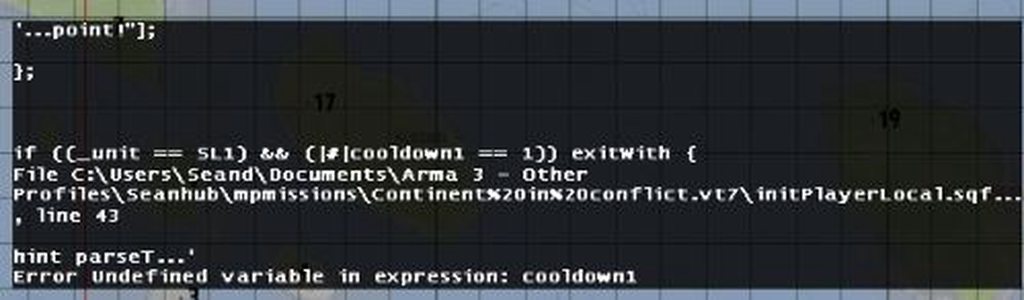
 exotic flax
cooldown1 variable doesn't exist
plush summit
So id have to define it?
exotic flax
problem is; you check the value of those variables, but only define later in the code
to be fair, I doubt the script ever worked correctly 🤔
plush summit
Hmm I see, alright ill see if I can figure out how to make it work by doing that
plush summit
Ah doesnt seem to be working still
Ill have to find something else out there that does the Squad like FOB and Rally point respawn
granite sky
this addEventHandler ["Killed", {
    params ["_unit", "_killer", "_instigator", "_useEffects"];
    _bomb = "SatchelCharge_Remote_Ammo_Scripted" createVehicle (getposATL _unit);
    _bomb setDamage 1;
}];
Could probably use the GBU as well but I haven't tried it.
Might need to use the long-form version of createVehicle with CAN_COLLIDE for exact positioning, although I suspect it doesn't make any practical difference here.
 terse tinsel
Is it possible to somehow do a script to extend the velocity in time, or to make the vehicle only move forward ??
little raptor
terse tinsel
Is it possible to somehow do a script to extend the velocity in time, or to make...
For player? Or AI?
terse tinsel
Ai
just aavp from cup and 3cb can not follow the direction of the road and I would like to manually make the vehicle move forward in the water 🙂
little raptor
Have you tried setDriveOnPath?
terse tinsel
little raptor
Have you tried setDriveOnPath?
yes mate, not working , still ai swims like crazy; p
so far I am patching it on velocity but it looks strange, because every now and then I have to make a waypoint with velocity 20
little raptor
You should move them using setVelocityTransformation then
It requires a loop that runs every frame
terse tinsel
little raptor
It requires a loop that runs every frame
could you do some simple example please 🙂
little raptor
I'm on mobile right now. But maybe someone else can show you
You can also look at the past scripts in this channel
I wrote several versions of them
That's one example
Another example
terse tinsel
thx mate 🙂 i try
 surreal crescent
Ello people, so I have this problem, I want a type of object (in this case a Key) that you can pick up, and once you've picked it up you have access to a door. This doesnt seem to work for me as I have searched around the whole internet, i have tested many things but nothing seems to work. Any help please?
exotic flax
The easiest would be a script which locks the door, and if you want to open it checks if the player has the key in his inventory.
That said, there are many solutions already created for this by the Life communities, so with some Google skills you should be able to find a fully working script.
tight cloak
so, a while back. i asked for help with a "man flak" script. a simple get current zeroing and spawn explosion when projectile reaches it. works perfectly. but now i need a similar thing however for turrets. and on turrets with no "zeroing"
this addEventHandler ["FiredMan", {
        params [
        "_unit",
        "_weapon",
        "_muzzle",
        "_mode",
        "_ammo",
        "_magazine",
        "_projectile"
    ];
[_unit, _projectile] spawn {
params ["_unit", "_projectile"];
  waitUntil {(getPosASL _unit vectorDistance getPosASL _projectile) >= currentZeroing _unit};
  "HelicopterExploBig" createVehicle (position _projectile)
 };
}];
is it possible to modify this so it triggers instead when the projectile is near any vehicles? trying to turn a turret into a flak gun essentially
tight cloak
little raptor
Should be array of objects
so to fix j3ffs code,
fetch offset of the group so they dont spawn in the same position, use createunit instead and what do you mean loop?
brazen lagoon
"HandleDamage" is persistent. If you add it to the player object, it will continue to exist after player respawned.
what does this actually mean? does this mean that if I'm adding HandleDamage to a player, I should do it in InitPlayerLocal?
tight cloak
its just as it says, if you put it on them it wont vanish upon respawn, it sticks. no matter how you assign it to the unit unless the unit is deleted / leaves then that player has the handledamage attached.
unit gets handledamage
unit dies and respawns
handledamage is still attached to the player
tight cloak
i mean thats one way of doing it sure
brazen lagoon
yeah, that's kinda just what I mean is that I don't want to do it over and over
            _handlerDamage = (_this select 0) addEventHandler ["HandleDamage", rev_handleDamage];
            _handlerKilled = (_this select 0) addEventHandler ["Killed", rev_handleKilled];
            (_this select 0) setCaptive false;
        }]] remoteExec ["addEventHandler", _unit, true];
``` :clueless:why would you do this if HandleDamage is persistent
tight cloak
initplayerlocal will put it on all players that join the server, also iirc you should technically avoid it? not too sure. id defer to a veteran or BI
brazen lagoon
yes I want all players to have this EH
tight cloak
Executed only on server when a player joins mission (includes both mission start and JIP). See Initialization Order for details about when exactly the script is executed.
This script relies on BIS_fnc_execVM and remoteExec. If CfgRemoteExec's class Functions is set to mode = 0 or 1, the script will never be executed. Therefore, initPlayerServer.sqf should be avoided. Use this method instead.
from the https://community.bistudio.com/wiki/Event_Scripts#initPlayerLocal.sqf
brazen lagoon
that's fine
tight cloak
initplayerlocal should still work tho
brazen lagoon
as a follow up, is setvariable persistent on players?
tight cloak
tight cloak
```sqf
Executed only on server when a player joins mission (includes both missio...
but if you have any issues with it, id wager its this
tight cloak
brazen lagoon
as a follow up, is setvariable persistent on players?
how so? if you mean a variable attached to a player and they die kinda thing?
brazen lagoon
yes
little raptor
brazen lagoon
as a follow up, is setvariable persistent on players?
afaik yes
brazen lagoon
if i do player setvariable
little raptor
never tested it tho. just saying according to user reports
tight cloak
did a quick browse and my findings are:
aslong as the unit upon respawn doesnt become a new unit, you should be fine
little raptor
tight cloak
so to fix j3ffs code,
fetch offset of the group so they dont spawn in the same ...
forEach loop
tight cloak
brazen lagoon
if i do `player setvariable`
if you tag it to the player it should work, just dont tag it to the unit
tight cloak
tight cloak
if you tag it to the player it should work, just dont tag it to the unit
@little raptor believe me, im as confused as you on that. only going off a forum thread
little raptor
tight cloak
perfect
I mean:
_newGrp = createGroup side _group;
{
  _offset = getPosWorld _x vectorDiff getPosWorld leader _x;
  _unit = _newGrp createUnit [typeOf _x, _pos vectorAdd _offset, [], 0, "NONE"];
} forEach units _group
I'm not confused
I don't understand what you mean
a player is also a unit (object)
tight cloak
im not too sure either, i think its going off "if a unit respawns as a new unit it breaks" like the variable stays on the corpse or something, id have to test the interaction to see what it means. although the situation may be different as the thread was referring to the variable name of the unit being lost upon death
little raptor
then what you meant was doing unitVar getVariable ...
but either way the var should remain
tight cloak
hmm
little raptor
but if you set the var on the corpse and try to get it on the new unit then ofc it won't work
tight cloak
i wish id never read this thread. all its done is confuse me
that might be what they have done then
just gonna repost this tho as its been buried #arma3_scripting message
little raptor
tight cloak
so, a while back. i asked for help with a "man flak" script. a simple get curren...
well first things first that script is wrong
because of using position
but as for your own question, it is possible, but there's no pretty way to do it
however way you go about it it's slow
because you have to search for nearby vehicles
little raptor
not really
I mean it's not too slow
but not good either
it'll be even worse if you do it like that script
the problem with that script is it's spawning a new code every time you fire
so if you fire a few dozen rounds you end up with so many scripts just clogging the scheduler
and robbing other scripts of their precious execution time
but then again if you try to do it unscheduled it'll ruin the FPS when there are too many rounds in the air constantly checking for nearby vehicles
tight cloak
is it not possible then without trashing the schedule?
little raptor
you can only spawn 1 code
tight cloak
so i have to find a way of doing it within one line
tight cloak
would it being precompiled work?
tight cloak
okay, sorry if im being slow, still not used to anything further than skin deep sqf
little raptor
well it's simple. just spawn 1 code, and process all projectiles in that code
projectiles = [];

fnc_loopProjectiles = {
  while {count projectiles > 0} do {
    {
      _x params ["_unit", "_projectile"];
      if ((getPosASL _unit vectorDistance getPosASL _projectile) >= currentZeroing _unit) then {
        isNil {("HelicopterExploBig" createVehicle [0,0,0]) setPosASL getPosASL _projectile};
        projectiles = projectiles - [_x];
      };
    } forEach projectiles;
    sleep 0.01;
  };
};

_blbla addEventHandler ["FiredMan", {
  ...
  _script = missionNamespace getVariable ["projectileScripts", scriptNull];
  projectiles pushBack [_unit, _projectile];
  if (scriptDone _script) then {
    projectileScripts = [] spawn fnc_loopProjectiles;
  };
}];
that was for your old script
for the new one you can use the nearEntities command and count the number of nearby vehicles
tight cloak
so change _blbla to whatever unit or array of units and slap the top section into a fnc, then modify the function to spawn the explosion when its near a vehicle?
little raptor
tight cloak
so change _blbla to whatever unit or array of units and slap the top section int...
yeah kinda
also I just typed that in Discord so there might be some errors I overlooked
tight cloak
little raptor
also I just typed that in Discord so there might be some errors I overlooked
ill tinker with it, but its a good starting point, thankyou for the help
little raptor
tight cloak
ill tinker with it, but its a good starting point, thankyou for the help
btw there is a slight chance of failure with that script that I overlooked
in other words, let's say that projectiles is indeed empty.
and the while loop terminates, but for some reason the script is not marked as terminated until the next frame
if that EH fires at that time, no new spawn will be created
I'm not 100% sure about this tho.
tight cloak
little raptor
if that EH fires at that time, no new spawn will be created
are we talking like the occasional missed round or complete cease of function?
little raptor
occasional missed round
but I'm not sure if it can happen. maybe I should ask Dedmen
tight cloak
little raptor
occasional missed round
if that happens, it wouldnt be the end of the world as players will be dogfighting enemy craft to notice potential flak not spawning
little raptor
ok. but still I'd say the chance of that happening is less that 0.1%
tight cloak
okay
drifting portal
Is there a place where locally executed script is logged?
winter rose
what
drifting portal
I'm wondering
If for example remoteExec a spawn
On a client
Will that get logged somewhere in client's PC?
[[], {
//script
}]remoteExec["spawn", (allplayers)#1];
Will script get logged on the second player somewhere on his PC?
open fractal
drifting portal
Will that get logged somewhere in client's PC?
diag_log
open fractal
drifting portal
I'm sorry, where do I find that?
it's a command that prints to the rpt
you put it in your scripts and it will log a line
drifting portal
open fractal
you put it in your scripts and it will log a line
Alright but I guess there is no way to see what script is executed on a client?
open fractal
no reason not to use diag_log though
drifting portal
open fractal
no reason not to use diag_log though
Well, the problem is if the script is lole 300 lines
One should just diag_log it using toString?
I thought you could for example find in a cache or something
drifting portal
My friend in his server got his screen messed up by RscText in the server, he thought there is a way to find which script was locally executed in a cache
warm hedge
[box,["g_airpurifyingrespirator_01_f"]] call BIS_fnc_addVirtualItemCargo```Does nothing for me. How can I add glasses/facewears to an arsenal object?make a wrapper function that takes code, remoteExec that instead, then you can do
[] spawn _code;
diag_log _code;
diag_log _thisScript might work too, not sure
meager granite
warm hedge
```sqf
[box,["g_airpurifyingrespirator_01_f"]] call BIS_fnc_addVirtualItemCargo`...
_x in _virtualCargo
The check is case-sensitive
G_AirPurifyingRespirator_01_F might work
warm hedge
Let me check
Ahh, it does. Strangely other Arsenal functions work even if I lowercased
Or, did I? Yeah I did lower cased other things like weapons
meager granite
    private _class = switch _type do
    {
        case 0;
        case 1: { configname (configfile >> "cfgweapons" >> _x) };
        case 2: { configname (configfile >> "cfgmagazines" >> _x) };
        case 3: { configname (configfile >> "cfgvehicles" >> _x) };
        default { "" };
    };

    if (_class == "") then { _class = _x };
Yeah, it doesn't fix casing for goggles
Because they're in CfgGlasses
warm hedge
Ticket worthy
warm hedge
It's good if we can contribute directly using so-called community involvement project 😩
meager granite
Well, some community members are now contributing directly, somewhat close.
 cobalt path
Question is there a way to assign a script to hotkey? Example: I need a picture to appear on players screen many times thoughout the mission. And instead of going to modules and doing "execute code, server" is there a way to assign that code to hotkey so I wouldnt need to do that all the time
meager granite
cobalt path
meager granite
https://community.bistudio.com/wiki/User_Interface_Event_Handlers#onKeyDown
 graceful prism
_player call function_name;
why this make error?
warm hedge
More info please
graceful prism
one sec
11:38:58 Error in expression <lowedAdmins) exitWith { };
_player call ASTORY_fnc_giveZeus;
};>
11:38:58   Error position: <ASTORY_fnc_giveZeus;
};>
11:38:58   Error Undefined variable in expression: astory_fnc_givezeus
server hosted on linux
when trying to launch mission in eden editor server, all works fine
warm hedge
Pretty self explanatory. ASTORY_fnc_giveZeus is not defined
Then please provide more context
graceful prism
description.ext
class CfgFunctions {
    class ASTORY {
        class Functions {
            file = "fnc";
            class giveZeus { };
        }
    }
}
and directory:
fnc\
    fn_giveZeus.sqf
?
meager granite
Are you sure you're running updated version of your mission?
graceful prism
yes
maybe, i'm using github and git pull
is there any solutions?
in eden editor's server all works fine, but on remote server it erroring
cobalt path
Question, this code
moduleName_keyDownEHId = (findDisplay 46) displayAddEventHandler ["KeyDown", "if ((_this select 1) == 57) then {_nul = [] execVM 'jump.sqf'};"]
It will execute jump.sqf when spacebar is pressed
which part of that code specifies "spacebar"?
 crude vigil
cobalt path
Question, this code
```moduleName_keyDownEHId = (findDisplay 46) displayAddEvent...
crude vigil
cobalt path
Question, this code
```moduleName_keyDownEHId = (findDisplay 46) displayAddEvent...
57 is specifying "spacebar"
https://community.bistudio.com/wiki/DIK_KeyCodes you can find all the values in here. (Look for 57 in Integer column for example)
cobalt path
Also is there a way to make jump.sqf to be executed server side?
warm hedge
remoteExec
little raptor
cobalt path
one more, I noticed those hotkeys dont seem to work in zeus?
because you're adding them to display 46
display 46 is the player display
the one for zeus is something else
I don't remember what it was
crude vigil
If my memory serves right, it is 312
cobalt path
oh okay thanks
btw is remoteexec suppose to look smth like this?
moduleName_keyDownEHId = (findDisplay 46) displayAddEventHandler ["KeyDown", "if ((_this select 1) == 71) then {_nul = [] remoteexec ['radioprofile1.sqf',0]};"]
granite sky
You can drop the _nul =
cobalt path
moduleName_keyDownEHId = (findDisplay 46) displayAddEventHandler ["KeyDown", "if ((_this select 1) == 71) then [] remoteexec ['radioprofile1.sqf',0];"] Like this?
granite sky
No, you still need the brackets.
If you wanted to reduce the brackets then the ones around _this select 1 can go.
oh, might not work anyway. Not sure if remoteExec can take a filename as a target.
cobalt path
I am sorry I might be dumb, but moduleName_keyDownEHId = (findDisplay 46) displayAddEventHandler ["KeyDown", "if ((_this select 1) == 71) then {[] remoteexec ['radioprofile1.sqf',0]};"] doesnt seem to work
granite sky
Yeah probably the filename problem.
 limpid charm
Hi is it possible to change specific difficulty setting on the server without restart? Lets say that i have running server with veteran preset and i want change friendlyTags to 1
granite sky
@limpid charm No.
limpid charm
are settings store somewhere as final?
limpid charm
granite sky
<@412978648543526924> No.
or whats the reason
cobalt path
@granite sky I doubt its file name problem because when I use this
moduleName_keyDownEHId = (findDisplay 46) displayAddEventHandler ["KeyDown", "if ((_this select 1) == 72) then {_nul = [] execVM 'radioprofile2.sqf'};"];```
it works perfectly, I am just sure that this only executes code locally meaning other players wont see itexecVM works with filenames. remoteExec probably doesn't. Has to already be a function or command.
You could prebuild the function with something like this, or use CfgFunctions:
TAG_fnc_radioprofile1 = compile preprocessFileLineNumbers "radioprofile1.sqf";
@limpid charm Difficulty presets are config, which is locked at startup.
Best you could do is flip between custom and veteran between missions.
limpid charm
ok, thanks
granite sky
@cobalt path You could also do [[], "radioprofile1.sqf"] remoteExec ["execVM", 0], but you probably shouldn't.
cobalt path
that does doesnt work
little raptor
granite sky
execVM works with filenames. remoteExec probably doesn't. Has to already be a fu...
yes
little raptor
granite sky
<@293402425170067456> You could also do `[[], "radioprofile1.sqf"] remoteExec ["...
execVM is also unary so no need for []
little raptor
cobalt path
that does doesnt work
what's the code right now?
cobalt path
little raptor
what's the code right now?
moduleName_keyDownEHId = (findDisplay 46) displayAddEventHandler ["KeyDown", "if ((_this select 1) == 72) then {["radioprofile2.sqf"] remoteExec ["execVM", 0];}"];
moduleName_keyDownEHId = (findDisplay 312) displayAddEventHandler ["KeyDown", "if ((_this select 1) == 71) then {["radioprofile1.sqf"] remoteExec ["execVM", 0];}"];
moduleName_keyDownEHId = (findDisplay 312) displayAddEventHandler ["KeyDown", "if ((_this select 1) == 72) then {["radioprofile2.sqf"] remoteExec ["execVM", 0];}"];```you can't put " in " without escaping it by doubling the quote
if you use some syntax highlighting you can tell why it's broken
 wicked roostBOT
How to use SQF syntax highlighting in Discord
```sqf
// your code here
hint "good!";
```
↓
// your code here
hint "good!";
moduleName_keyDownEHId = (findDisplay 46) displayAddEventHandler ["KeyDown", "if ((_this select 1) == 71) then {["radioprofile1.sqf"] remoteExec ["execVM", 0];}"];
moduleName_keyDownEHId = (findDisplay 46) displayAddEventHandler ["KeyDown", "if ((_this select 1) == 72) then {["radioprofile2.sqf"] remoteExec ["execVM", 0];}"];
moduleName_keyDownEHId = (findDisplay 312) displayAddEventHandler ["KeyDown", "if ((_this select 1) == 71) then {["radioprofile1.sqf"] remoteExec ["execVM", 0];}"];
moduleName_keyDownEHId = (findDisplay 312) displayAddEventHandler ["KeyDown", "if ((_this select 1) == 72) then {["radioprofile2.sqf"] remoteExec ["execVM", 0];}"];
yee
little raptor
cobalt path
```sqf
moduleName_keyDownEHId = (findDisplay 46) displayAddEventHandler ["KeyDow...
just write the EH code with {} instead of "" and it'll be fixed
example:
moduleName_keyDownEHId = (findDisplay 46) displayAddEventHandler ["KeyDown", {if ((_this select 1) == 71) then {["radioprofile1.sqf"] remoteExec ["execVM", 0];}}];
Okay I see, I will try one moment
little raptor
cobalt path
that does doesnt work
also next time instead of saying "it doesn't work" explain what doesn't work, and whether there are errors
cobalt path
will do thx, right now game insists its missing ;
little raptor
you had an invalid character in there

it's a hidden character 🤔
anyway:
moduleName_keyDownEHId = (findDisplay 46) displayAddEventHandler ["KeyDown", {if ((_this select 1) == 71) then {["radioprofile1.sqf"] remoteExec ["execVM", 0];}}];
that one should work
cobalt path
I am a bit confused by the invalid character thingy
it does work now
well
full code would be
moduleName_keyDownEHId = (findDisplay 46) displayAddEventHandler ["KeyDown", {if ((_this select 1) == 71) then {["radioprofile1.sqf"] remoteExec ["execVM", 0];}}];
moduleName_keyDownEHId = (findDisplay 46) displayAddEventHandler ["KeyDown", {if ((_this select 1) == 72) then {["radioprofile2.sqf"] remoteExec ["execVM", 0];}}];
moduleName_keyDownEHId = (findDisplay 312) displayAddEventHandler ["KeyDown", {if ((_this select 1) == 71) then {["radioprofile1.sqf"] remoteExec ["execVM", 0];}}];
moduleName_keyDownEHId = (findDisplay 312) displayAddEventHandler ["KeyDown", {if ((_this select 1) == 72) then {["radioprofile2.sqf"] remoteExec ["execVM", 0];}}];
I assume the bottom 2 lines also have invalid character
I am just confused how you spot it
little raptor
cobalt path
I am a bit confused by the invalid character thingy
what language do you type in?
I mean what is your input language?
little raptor
cobalt path
full code would be
```sqf
moduleName_keyDownEHId = (findDisplay 46) displayAddE...
I am just confused how you spot it
using a linter
little raptor
cobalt path
full code would be
```sqf
moduleName_keyDownEHId = (findDisplay 46) displayAddE...
moduleName_keyDownEHId = (findDisplay 46) displayAddEventHandler ["KeyDown", {if ((_this select 1) == 71) then {["radioprofile1.sqf"] remoteExec ["execVM", 0];}}];
moduleName_keyDownEHId = (findDisplay 46) displayAddEventHandler ["KeyDown", {if ((_this select 1) == 72) then {["radioprofile2.sqf"] remoteExec ["execVM", 0];}}];
moduleName_keyDownEHId = (findDisplay 312) displayAddEventHandler ["KeyDown", {if ((_this select 1) == 71) then {["radioprofile1.sqf"] remoteExec ["execVM", 0];}}];
moduleName_keyDownEHId = (findDisplay 312) displayAddEventHandler ["KeyDown", {if ((_this select 1) == 72) then {["radioprofile2.sqf"] remoteExec ["execVM", 0];}}];
removed the hidden chars
and plz don't say you actually code in Word
cobalt path
I use the same program I fuck around with configs with which is sublime
little raptor
for SQF either use Notepad++ or VSCode
I think sublime text plugins for SQF are too old
if you even use them
no there's a new one:
https://github.com/JonBons/Sublime-SQF-Language
cobalt path
thanks a lot, stuff seems to working perfectly as far as I can tell
and ye I had very old one
cobalt path
btw how do I find display? 46 is regular player
312 is suppose to be zeus cam, but it works only half the time
little raptor
312 is suppose to be zeus cam, but it works only half the time
it's not the cam. it's the Zeus interface
and you can only add the EHs when the display exists
little raptor
little raptor
```sqf
moduleName_keyDownEHId = (findDisplay 46) displayAddEventHandler ["KeyDow...
also something I didn't notice in your code: always return false at the end of keyDown event handler
cobalt path
Oh, why does it work tho
Well I am executing the code in zeus, so I assume zeus interface exists at the time of execution
little raptor
cobalt path
Well I am executing the code in zeus, so I assume zeus interface exists at the t...
then it should always work
also you might want to make sure you don't duplicate EHs
which you are now
cobalt path
oh
I might be
that being said, why didnt it work the first time, I did execute it in execute module in zeus enhanced
okay so 312 works if you execute it twice...
 neon swift
Hey trying to define a macro in my description.ext to be a random number between 0 to 23.
#define NUM {__EVAL(selectRandom [0,1,2,3,4,5,6,7,8,9,10,11,12,13,14,15,16,17,18,19,20,21,22,23])}
However I keep getting this error and I can't figure out why.
'(selectRandom [0|#|'
Error Missing ]
it looks like curly brackets don't belong? I could be wrong
Anyway stop using selectRandom for numbers
neon swift
anything else doesn't work
neon swift
oh that's way shorter
 modern meteor
Is there a way to count the number of enemy units which a player and the AI in his squad killed during a mission?
little raptor
modern meteor
Is there a way to count the number of enemy units which a player and the AI in h...
only manually
by adding killed EH to all enemies and recording the kills yourself
modern meteor
Right, if I use modules to spawn in enemies then there is probably no easy way to assign an EH to those enemies, right?
little raptor
modern meteor
Right, if I use modules to spawn in enemies then there is probably no easy way t...
if you have CBA you can use its object init EH
if not, you can loop over all enemy units occasionally, and if you haven't assigned a new EH to one yet, add the EH
modern meteor
I use CBA
Did not know they use any EHs
IS there any documentation how to use it?
little raptor
modern meteor
IS there any documentation how to use it?
modern meteor
Thanks a lot Leopard.
I am trying to build an EH which just adds 1 point to an existing variable if an OPFOR unit is killed.
OPFOR is spawned in dynamically during mission
Is there a _classname which covers all OPFOR units spawned at the beginning and during missioon?
little raptor
modern meteor
Is there a _classname which covers all OPFOR units spawned at the beginning and ...
there is not side specific class name
you have to add the EH for all soldiers
then check their sides
the base class for soldiers is CAManBase
modern meteor
["CAManBase", "killed", {execVM "scripts\unitkilled.sqf"}] call CBA_fnc_addClassEventHandler;```would something like this work?
brazen lagoon
[
    [
        ["Mission Accomplished!", "align = 'center' shadow = '1' size = '1' font='PuristaBold'"],
        ["","<br/>"], // line break
        ["Defense and escape successful...","align = 'center' shadow = '1' size = '2'"]
    ],  safeZoneX, safeZoneH / 2
] remoteExec ["BIS_fnc_typeText2", allPlayers];
``` is there a way to do this so that safeZoneX and safeZoneH execute on the players?or do I have to do something nasty involving setting those variables locally on the player and then reading that or something
modern meteor
modern meteor
would something like this work?
In unitkilled.sqf i would check for side. would that work?
little raptor
modern meteor
```sqf
["CAManBase", "killed", {execVM "scripts\unitkilled.sqf"}] call CBA_fnc_...
don't use execVM in event handlers...oof
little raptor
brazen lagoon
oh I guess I could just do this by wrapping w/ spawn.
make a function
brazen lagoon
yeah that's essentially the same thing
modern meteor
little raptor
don't use execVM in event handlers...oof <:meowsweats:707626030613135390>
so i would need to add an iff clause check inside the {}?
little raptor
what? I mean don't use execVM at all
modern meteor
yea, but how do i check for side and add a value to the variable if i don't call another script?
little raptor
there are other ways to execute a script
execVM is the worst way
plus what you write in {} is already a "script"
modern meteor
["CAManBase", "killed", {dmpCVP = dmpCVP + 1}] call CBA_fnc_addClassEventHandler;
little raptor
where's the side check?
modern meteor
yea, don't have that yet
little raptor
and where's the check if player or his group killed it?
modern meteor
first wanted to understand if the above would work before extending it?
little raptor
params ["_unit", "_killer"];
if (group _killer == group player && {[side _unit, side _killer] call BIS_fnc_sideIsEnemy}) then {
  dmpCVP = dmpCVP + 1
}
define a function and then call that code. if you use execVM you are telling the game to read a file instead of pulling a function from memory
modern meteor
oh, i see. so the whole code would look like this?
params ["_unit", "_killer"];
if (group _killer == group player && {[side _unit, side _killer] call BIS_fnc_sideIsEnemy}) then {
  dmpCVP = dmpCVP + 1
}
}] call CBA_fnc_addClassEventHandler;```yes
you also need an init EH probably
Init and InitPost events can execute code retroactively for already existing objects. This is useful when working with scheduled scripts like init.sqf or a postInit function defined in CfgFunctions.
your killed EH will not be added to existing units
you can do:
{
  _x addEventHandler ["killed", {call my_fnc_addKillScore}];
} forEach allUnits
my_fnc_addKillScore is that code
modern meteor
modern meteor
oh, i see. so the whole code would look like this?
```["CAManBase", "killed", {...
So I add this code to initPlayerLocal.sqf i guess?
modern meteor
little raptor
you can do:
```sqf
{
_x addEventHandler ["killed", {call my_fnc_addKillScore}...
Where would I put this code?
little raptor
init.sqf
little raptor
modern meteor
So I add this code to initPlayerLocal.sqf i guess?
wherever you want
as long as it's executed once
e.g init.sqf
modern meteor
little raptor
`my_fnc_addKillScore` is that code
ok
modern meteor
little raptor
`my_fnc_addKillScore` is that code
And what does this mean? Do I have to create another script file?
Not familiar with fnc
little raptor
have you never worked with functions before?
modern meteor
no
little raptor
then you better start
execVM is garbage
you can make functions in many ways
the easiest way is making a file that defines your functions and execute that file before everything else
e.g. in init.sqf:
call compile preprocessFileLineNumbers "scripts\initFunctions.sqf";
in initFunctions.sqf:
my_fnc_addKillScore = {
  params ["_unit", "_killer"];
  if (group _killer == group player && {[side _unit, side _killer] call BIS_fnc_sideIsEnemy}) then   {
    dmpCVP = dmpCVP + 1
  }
};
or you can put each function in its own file:
my_fnc_addKillScore = compile preprocessFileLineNumbers "scripts\fnc_addKillScore.sqf";
but the better way is using cfgFunctions
it might be a bit difficult to learn that one at first, but once you do it's even easier than the above method
modern meteor
understood. so compiling a function from init.sqf at mission start means that I can call this functions during mission?
little raptor
yes
modern meteor
Ok
modern meteor
Out of interest, why is it better than execVM?
little raptor
because the game doesn't have to recompile it every time
modern meteor
ah, i see
little raptor
modern meteor
Out of interest, why is it better than execVM?
execVM always recompiles the script.
and execVM code is always scheduled
using scheduled code in event handlers is a bad idea
modern meteor
functions execute parallel? even if another functions is currently executed?
little raptor
especially if that EH may trigger several times in quick succession
little raptor
modern meteor
functions execute parallel? even if another functions is currently executed?
nothing in sqf runs "parallel"
everything is sequential
modern meteor
ok, i try to put this together and report back. thank you!
little raptor
modern meteor
functions execute parallel? even if another functions is currently executed?
you might want to learn about the scheduler:
https://community.bistudio.com/wiki/Scheduler
it helps you write better scripts
modern meteor
Great, i will look into this. Thank you
modern meteor
little raptor
you can do:
```sqf
{
_x addEventHandler ["killed", {call my_fnc_addKillScore}...
Is that code correct?
little raptor
yes
modern meteor
ok
  _x addEventHandler ["killed", {call my_fnc_addKillScore}];
} forEach allUnits```the ;
not after allUnits?
when i add it to the init file
little raptor
modern meteor
not after allUnits?
if you put something after it you should
open fractal
modern meteor
```{
_x addEventHandler ["killed", {call my_fnc_addKillScore}];
} forEach allU...
can't you just add a mission event handler serverside?
you'd have to add a check that it's a unit and other entities aren't being counted
open fractal
plush summit
Ill have to find something else out there that does the Squad like FOB and Rally...
I took some inspiration from that weird script and made something that seems to work if you want it
does not require any variables to be set, just set up the files and it will automatically give squad leaders rally points
based on actual group leaders instead of cough rhs classnames
open fractal
is group ownership determined by the group leader?
if there is a group of players and the leader changes will the netID change as well?
open fractal
actually I'll just assume I'm better off generating an ID and setting it in the group varspace. Are netID's always going to be unique or do they get recycled?
granite sky
IIRC they're not recycled.
open fractal
I'll roll with that for now thanks
 broken forge
How would I go about converting this command line to use remoteExec instead of BIS_fnc_MP
[ [[0],"\pdb\functions\vehicles\fn_Server_setVehicle.sqf"],"BIS_fnc_execVM",false,false ] call BIS_fnc_MP;
remoteExec needs a function as target rather than a filename, so you'll need to deal with that first.
broken forge
@granite sky Thanks for the information I'll go ahead and start working on the conversion
granite sky
oh, this is a BIS_fnc_MP -> execVM anyway...
broken forge
I think I finished converting the scripts. This is my directory layout: PDB > PDB_Functions_F > Vehicle
Within the Vehicle Directory I have a folder call scripts which has the 6 script files in it. Then I have a fn_init.sqf within the Vehicle Directory.
Here is my fn_init.sqf: ```sqf
execVM "\PDB\PDB_Functions_F\Vehicle\scripts\getVehicle.sqf";
execVM "\PDB\PDB_Functions_F\Vehicle\scripts\getVehicleHitpointDamage.sqf";
execVM "\PDB\PDB_Functions_F\Vehicle\scripts\getVehicleInventory.sqf";
execVM "\PDB\PDB_Functions_F\Vehicle\scripts\setSingleVehicle.sqf";
execVM "\PDB\PDB_Functions_F\Vehicle\scripts\setVehicle.sqf";
execVM "\PDB\PDB_Functions_F\Vehicle\scripts\setVehicleInventory.sqf";
Here is my `config.cpp`: ```c
class CfgPatches {
    class PDB_Functions_F {
        addonRootClass = "PDB";
        units[] = {};
        requiredVersion = 1.0;
        requiredAddons[] = {"A3_Modules_F"};
    };
};

class CfgFunctions {
    class PDB {
        class Functions {
            mode = 2;
            jip = 1;

            // To Initialize PDB_FNC_Vehicle Function Open Init.sqf or InitServer.sqf & Add [] call PDB_FNC_Vehicle;
            class Vehicle {
                file = "\PDB\PDB_Functions_F\Vehicle\fn_init.sqf";
                description = "Script is Executed From The Init.sqf or InitServer.sqf";
            };
        };
    };
};
Would the BIS_fnc_MP command line now become this: [0] remoteExec ["Server_setvehicle"];
warm hedge
Check the pinned to see how it works
drifting portal
when using setVelocityTransformation with while loop (with sleep 0.01)
the object's movement lags on client side (not on the server side obviously)
what is the best way to run this command on server side and have it not lag on client side?
||Is it onEachFrame?||
meager granite
2022/07/02, 22:01:29 Warning Message: You cannot play/edit this mission; it is dependent on downloadable content that has been deleted.\na3_props_f_enoch_military_garbage
```What's the logic behind addon requirement stopping mission from loading ONLY if you create objects from non-listed addons during loading, but its completely fine if you do it during the mission?I'm pretty sure detection of required addons is based only on the generated list in mission.sqm, and since dynamic creation doesn't update that it just doesn't know about anything you add later. Less deliberate logic and more "that's just how it is"
meager granite
Yeah, feels like some ancient arbitrary requirement
Guess I gotta figure out how activateAddons works
drifting portal
Is there a way to check if player is locking onto something (with a missile)?
meager granite
Was no way back when I checked
Locked target is cursorTarget, but it doesn't mean player is really locking it
You'll also have to figure if player can lock at all (have weapon with locking in hands, etc.)
Wild guess would be to figure how locking is calculated by the engine so you can guess if locking was started yourself? Check weapon parameters, target visibility, position if locking button was pressed. Simulate what engine does.
Basically, nothing is easy
Unless there is an easier way now after many years
drifting portal
meager granite
Wild guess would be to figure how locking is calculated by the engine so you can...
Can't I use a combination of inputAction and cursorTarget or?
meager granite
IIRC cursorTarget might remain even if target is no longer visible, on screen, etc.
drifting portal
Well
meager granite
So locking won't actually happen
drifting portal
I was trying to add a minor feature so I won't go through the hassle of trying to figure that out, I will just discard the idea lol
Thanks
modern meteor
open fractal
can't you just add a mission event handler serverside?
This solution works perfect. Thank you!
little raptor
drifting portal
when using `setVelocityTransformation` with while loop (with sleep 0.01)
the obj...
If it's a slow simulation object, you should move it locally
And anything using scheduled environment can still "lag"
Because there's no guarantee that it runs when you want it to
So the "lag" problem you have could be because the scheduler on your server is not keeping up
graceful prism
hello! how to fix, when all functions library don't work on the linux server? In the edin editor mission works fine, all functions work
 9:48:12   Error position: <ASTORY_fnc_test;>
 9:48:12   Error Undefined variable in expression: astory_fnc_test
 9:48:12 File mpmissions\astory.Stratis\initPlayerServer.sqf..., line 16
description.ext
class CfgFunctions {
    class ASTORY {
        class Functions {
            file = "fnc";
            // class giveZeus { };
            class test { };
        }
    }
}
did you copy the files correctly to your server?
graceful prism
little raptor
did you copy the files correctly to your server?
yes
little raptor
graceful prism
yes
put this in initServer.sqf
_dump = {
    {

        if (isClass _x) then {
            diag_log text format ["%1 = class", _x];
            _x call _dump
        } else {
            diag_log text format ["%1 = %2;", _x, _x call BIS_fnc_getCfgData];
        }
    } forEach configProperties [_this, "true", true];

};

(missionConfigFile >> "CfgFunctions") call _dump
then check the server rpt
see if it shows your functions are there
also while you're checking the rpt check for other errors as well
graceful prism
little raptor
then check the server rpt
where i can find rtp file?
wicked roostBOT
Arma RPT
Arma generates a .rpt log file each time it's run, which contains a lot of information like the loaded mods, or any errors that appear, this log file can be very useful for troubleshooting problems.
To get to your RPT files press Windows+R and enter %localappdata%/Arma 3
Additionally see the wiki page for more info: https://community.bistudio.com/wiki/Crash_Files
To share an rpt log here, please use a website like https://sqfbin.com/ to upload the full log, that way the people helping you can take a look at it and try to figure out the problem you're having together with you.
Note: RPT logs can hold personal information relevant to your system, the game or others.
graceful prism
little raptor
nvm that only shows windows <:meowsweats:707626030613135390>
ok i have log file
and...
graceful prism
little raptor
see if it shows your functions are there
where it find, i don't see anything like functions name
only i have errors when i connected to server in log file
Warning: failed to init SDL thread priority manager: SDL not found
10:14:08 morioki uses modified data file
10:14:09 Player morioki connecting.
10:14:11 Player morioki connected (id=76561198452225193).
10:14:27 Error in expression <ayer call ASTORY_fnc_giveZeus;
};

call ASTORY_fnc_test;>
10:14:27   Error position: <ASTORY_fnc_test;>
10:14:27   Error Undefined variable in expression: astory_fnc_test
10:14:27 File mpmissions\astory.Stratis\initPlayerServer.sqf..., line 16
10:14:27 Error in expression <lowedAdmins) exitWith { };
_player call ASTORY_fnc_giveZeus;
};

call ASTORY_fnc>
10:14:27   Error position: <ASTORY_fnc_giveZeus;
};

call ASTORY_fnc>
10:14:27   Error Undefined variable in expression: astory_fnc_givezeus
10:14:27 File mpmissions\astory.Stratis\initPlayerServer.sqf..., line 13
@little raptor any fix?
little raptor
graceful prism
ok i have log file
did you run that code on the server?
little raptor
graceful prism
where it find, i don't see anything like functions name
I guess you did
well if you don't see anything it means no functions are defined in your description.ext
graceful prism
but..
it defined
class CfgFunctions {
    class ASTORY {
        class Functions {
            file = "fnc";
            class giveZeus { };
            class test { };
        }
    }
}
all defined
i opened Description.ext on server
and it works in eden editor
little raptor
graceful prism
and it works in eden editor
then the problem is related to the linux server maybe? I've never messed with that so idk
little raptor
graceful prism
only i have errors when i connected to server in log file
maybe try fixing that error first
that's one of the things that comes up when I google that error
graceful prism
-ip=${ip} -port=${port} -cfg=${networkcfgfullpath} -config=${servercfgfullpath} -mod='${mods}' -servermod=${servermods} -bepath=${bepath} -autoinit -loadmissiontomemory
start parameters
it can be problem with it?
-autoInit
Automatically initialize mission just like first client does.
Note: Server config file (server.cfg) must contain "Persistent=1;", if it is 0 autoInit skips.
Warning: This will break the Arma_3_Mission_Parameters function, so do not use it when you work with mission parameters, only default values are returned!
in the bohemia docs
little raptor
Dunno. Maybe ask in #server_linux
drifting portal
little raptor
If it's a slow simulation object, you should move it locally
but how would I do that, doesn't it have a global effect?
little raptor
the object should be local too
drifting portal
little raptor
the object should be local too
that will make it really hard to script then
because I'm attaching a global object to it
that will get dropped
little raptor
there is no other way
drifting portal
hmmm
alright I will send the code
starting from line 74
that's where setVelocityTransformation starts
I had the sleep duration at line 93 set to 0.01 previously
but it looks like when its set to 0.005 it looks like the vehicle is moving correctly without lagging on clients (script executed on server)
but the problem I'm facing is time dilation?
if I set _time = 15;
previously (sleep 0.01) it would finish the whole sequence in 15 seconds
now with (sleep 0.005) it would finish the whole sequence in 30 seconds??
by sequence I mean the movement of the object from start to end
I know the code is kind of long but I'm really trying to make something good here so help would be appreciated lol
little raptor
drifting portal
if I set `_time = 15; `
previously (sleep 0.01) it would finish the whole sequen...
ever heard the tale of floating points and their accuracy?
drifting portal
never
little raptor
I mean what on earth is this?
_time = _time - 0.005;
sleep 0.005;
not in sqf at least
little raptor
like I said before don't use while
drifting portal
little raptor
I mean what on earth is this?
```sqf
_time = _time - 0.005;
sleep 0.005;
```
_time is used to calculate the setVelocityTransformation _Interval,
_Interval = 1 - (_time / _OirginalTime);
little raptor
drifting portal
_time is used to calculate the `setVelocityTransformation` _Interval,
`_Interva...
that was a rhetorical question
drifting portal
little raptor
like I said before don't use while
but if I use onEachFrame
how would I be able to control how long it would take for the object to finish the 'course'
little raptor
using a timer
little raptor
drifting portal
not in sqf at least
instead of doing _time = _time - 0.005, you should define a start time
and subtract current time from it
then divide by expected duration. that'll give you the _interval
what you do right now is accumulating errors
drifting portal
little raptor
instead of doing `_time = _time - 0.005`, you should define a start time
well I'm kind of not understanding this fully can you showcase it with a simple script?
also how would I use oneachframe and timer, say if fps drops from 60 to 20 for whatever reason how would the timer still be accurate?
little raptor
_startTime = time;
...
_interval = (time - _StartTime) / _duration
when FPS drops the time interval becomes longer too
FPS is completely irrelevant
if your FPS drops the motion will get laggy again
drifting portal
little raptor
```sqf
_startTime = time;
...
_interval = (time - _StartTime) / _duration
```
so you reckon I should use this in oneachframe or while?
little raptor
doesn't matter where you use it
but if you intend to use it with onEachFrame the start time has to be global
drifting portal
oh so you are talking about local objects here?
little raptor
ofc don't use onEachFrame anyway
little raptor
drifting portal
oh so you are talking about local objects here?
no
you should use local objs anyway
if you're moving static objects with that code it'll be laggy when ping gets higher
because they don't have velocity
drifting portal
well what is the point of velocity parameters in setVelocityTransformation if they won't have velocity?
little raptor
doesn't matter
drifting portal
alright
little raptor
simulation is defined in the config
little raptor
you can create houses with createVehicle too
drifting portal
object is an airplane so it should be dynamic
little raptor
drifting portal
its an airplane
then it's dynamic
your problem is the script itself
drifting portal
oof
little raptor
not the object
drifting portal
little raptor
```sqf
_startTime = time;
...
_interval = (time - _StartTime) / _duration
```
so if I use this with while, what should be the sleep duration?
little raptor
whatever you want
but if it's too big it'll get laggy again
better use an each frame loop
drifting portal
since I tested 0.005 as not being laggy I will try that and see if I need to use eachframe
little raptor
(and not onEachFrame command)
drifting portal
yeah the EH
little raptor
drifting portal
since I tested 0.005 as not being laggy I will try that and see if I need to use...
it depends on the scheduler load
drifting portal
little raptor
```sqf
_startTime = time;
...
_interval = (time - _StartTime) / _duration
```
hmm alright but if I use your method here with eachframe
won't we create a lot of floats?
little raptor
wat?
drifting portal
because it will subtract each frame?
little raptor
and what do you think your while is doing?!
little raptor
drifting portal
won't we create a lot of floats?
I don't think you really understood my point.
when you did:
_time = _time - 0.005;
sleep 0.005;
first of all you assumed that when you use sleep it'll take exactly 0.005 seconds to the next iteration
what if the user was running at 10 FPS?
little raptor
second of all, you kept subtracting from _time and stored the result into _time
that was causing errors to pile up
drifting portal
Yeah I did that to make the while condition
_time >= 0
but floats are not funny
I guess global objects count as a mistake I made too?
little raptor
drifting portal
Yeah I did that to make the while condition
and now your while condition is simply time - _startTime < _duration
alternatively:
_endTime = _starTime + _dur;
while {_startTime < _endTime}
no
it just keeps counting while paused
proven charm
is disableCollisionWith the only disable-collision command?
little raptor
yes
proven charm
ok, is it supposed to work with man->building ?
little raptor
buildings are not PhysX objects
proven charm
thought so
little raptor
anyway, I made a ticket:
https://feedback.bistudio.com/T166409
would be nice if it's possible
proven charm
I'm making script that moves AI slowly to spot but there's some jittering as they move, probably from unit<->unit collision
proven charm
little raptor
anyway, I made a ticket:
https://feedback.bistudio.com/T166409
cool 👍
little raptor
proven charm
I'm making script that moves AI slowly to spot but there's some jittering as the...
do you use setDir?
and/or setPosXXX?
proven charm
little raptor
do you use setDir?
nah just setposATL
little raptor
well don't
it has nothing to do with collision
if you want to move objects smoothly use setVelocityTransformation like I told you before
or did I? 
proven charm
little raptor
or did I? <:thonk:700311400152825906>
uum I dont think so 😁
proven charm
little raptor
if you want to move objects smoothly use `setVelocityTransformation` like I told...
that's actually a good one, gona try it
little raptor
proven charm
that's actually a good one, gona try it
it'll work don't worry. been using it forever
the wiki had an example for ladder climb too iirc
proven charm
so am I supposed to call setVelocityTransformation in loop while increasing the interval?
little raptor
yes
proven charm
ok
seems to work 🙂
I just put unit's vectorDir & vectorUp as parameters
like this: ```_man setVelocityTransformation [AtlToASL _startPos, AtlToASL _stopPos, [0,0,0], [0,0,0], vectorDir _man, vectorDir _man, vectorUp _man, vectorUp _man, _m];
but the man plays fall animation and sometimes is left hovering
maybe something wrong with start/end positions?
Nvm, fixed it
works well, ty Leopard20 🙂
little raptor
proven charm
like this: ```_man setVelocityTransformation [AtlToASL _startPos, AtlToASL _stop...
if you intend to use that in MP also fill in the velocities
proven charm
little raptor
if you intend to use that in MP also fill in the velocities
no idea what to put there but this is for SP only
 cyan dust
Good day. Does anyone know why 'HandleDamage' EH is getting ignored if you're inside the vehicle and it gets destroyed? You just get instakilled. Is there any way to avoid it?
little raptor
proven charm
no idea what to put there but this is for SP only
_startPosASL vectorFromTo _stopPosASL vectorMultiply _speed
ok thx, I'll save that
little raptor
cyan dust
Good day. Does anyone know why 'HandleDamage' EH is getting ignored if you're in...
are you sure?
I'm pretty sure it worked before
proven charm
kinda curious why that isn't needed for SP?
little raptor
cyan dust
Good day. Does anyone know why 'HandleDamage' EH is getting ignored if you're in...
just tested and it works fine
little raptor
proven charm
kinda curious why that isn't needed for SP?
if you run it every frame it'll look smooth enough
in MP the object will look laggy due to ping
proven charm
little raptor
if you run it every frame it'll look smooth enough
ok, interesting
little raptor
if the object has velocity the game can "guess" its next pos
little raptor
proven charm
probably best to leave it as zero vector because I'm using it in EachFrame EH
vectorFromTo is fast
cyan dust
little raptor
just tested and it works fine
Tested in a new scenario and it works fine so far, thanks for taking a time to look into it, guess there is some problem on my side. Sorry to bother.
proven charm
little raptor
vectorFromTo is fast
its just that Idk to have as the _speed
 proven charm
hmmm im increasing the interval like this: _m = _m + 0.01;
not sure how the speed plays with that?
little raptor
proven charm
hmmm im increasing the interval like this: ```_m = _m + 0.01;```
I just had a discussion with TROALINISM not to do that
little raptor
little raptor
I don't think you really understood my point.
when you did:
```sqf
_time = _time...
here
instead of those, just use the duration you want the unit to "slide" there
little raptor
little raptor
```sqf
_startTime = time;
...
_interval = (time - _StartTime) / _duration
```
with this
proven charm
little raptor
with this
ok will switch to that
well it works now with the time, still don't understand the speed/interval relationship lol but anyway, thx Leopard 🙂
little raptor
proven charm
well it works now with the time, still don't understand the speed/interval relat...
speed is just how fast you want the unit to move
e.g. if you want the unit to move at 10 m/s:
_duration = (_startPosASL vectorDistance _endPosASL) / 10
and if you know the duration, e.g 2 seconds:
_speed = (_startPosASL vectorDistance _endPosASL) / 2
@little raptor ok, thx will try to figure that but math isn't my strongest side
Is this correct? _speed = 2; _interval = (time - _startTime) * _speed; _vel = (AtlToASL _startPos) vectorFromTo (AtlToASL _stopPos) vectorMultiply _speed;
I think this is it: _speed = 1 / 2; duration 2 secs
little raptor
proven charm
Is this correct? ```_speed = 2;
_interval = (time - _startTime) * _speed;
_vel =...
no
little raptor
little raptor
```sqf
_startTime = time;
...
_interval = (time - _StartTime) / _duration
```
interval is what I told you before
proven charm
little raptor
interval is what I told you before
yea i ended up using my own math..
little raptor
well your math is wrong
you're doing time * speed
i.e s * m/s which gives you m
meters, i.e distance. so it's not interval
proven charm
well I could have used better names for the variables
how about: _duration = 2; _mul = 1 / _duration; _interval = (time - _startTime) * _mul; _vel = (AtlToASL _startPos) vectorFromTo (AtlToASL _stopPos) vectorMultiply _mul;
proven charm
its just my math, that's what it is lol
proven charm
then I use that to multiply stuff
little raptor
(AtlToASL _startPos) vectorFromTo (AtlToASL _stopPos) vectorMultiply _mul;
you're multiplying a unit vector by Hz
it's not velocity
velocity is m/s (distance / time)
proven charm
if the script takes , let's say 4 seconds to run to interval 1 then wouldn't vectorMultiply 0.25 give you correct speed vector?
little raptor
no
proven charm
oh
little raptor
again, speed is distance over time
little raptor
proven charm
if the script takes , let's say 4 seconds to run to interval 1 then wouldn't vec...
what part of that has any "distance" in it?
proven charm
ok so i should be using vectorDistance?
proven charm
ok
so if I have the speed, how do you turn it into a vector?
_startPosASL vectorFromTo _stopPosASL vectorMultiply _speed ?
little raptor
yes
proven charm
ok
little raptor
proven charm
if the script takes , let's say 4 seconds to run to interval 1 then wouldn't vec...
P.S: remember that vectorFromTo is normalized
if it wasn't what you said was correct
proven charm
ah
little raptor
i.e
(AtlToASL _stopPos) vectorDiff (AtlToASL _startPos) vectorMultiply _mul;
so is this correct then: ```_duration = 2;
_mul = 1 / _duration;
_interval = (time - _startTime) * _mul;
_speed = ((AtlToASL _startPos) vectorDistance (AtlToASL _stopPos)) * _mul;
_vel = (AtlToASL _startPos) vectorDiff (AtlToASL _stopPos) vectorMultiply _speed;```
little raptor
no
_duration = 2;
_mul = 1 / _duration;
_interval = (time - _startTime) * _mul;

_vel = (AtlToASL _stopPos) vectorDiff (AtlToASL _startPos) vectorMultiply _mul;;
that would be:
_duration = 2;
_speed = (_startPosASL vectorDistance _endPosASL) / _duration;
_interval = (time - _startTime) / _duration ;

_vel = _startPosASL vectorFromTo _stopPosASL vectorMultiply _speed
nice
btw does it matter which variable goes first to vectorDiff?
I have _startPos vectorDiff _stopPos
little raptor
that's wrong
proven charm
ok so stoppos first
little raptor
yes
the vector should point to stopPos
kinda like when you do 2 - 1 it points towards 2 because the diff is positive
worthy igloo
is there any way to prevent a player from moving and looking around but still playing an animation
 fair drum
how exactly does CBA pull off a init class event handler scriptwise? I thought you had to create a config entry for those.
granite sky
Polling, IIRC.
tight cloak
_planes = [];
{
  (_x iskindof "plane" && ((count (crew _x)) > 0) && (!isTouchingGround _x));
  _planes pushback [_x];
} forEach vehicles;
_planeCount = count _planes;
systemChat format ["%1", _planeCount]; //debug purposes
trying to fetch all planes in the mission being used (just the number of them) and this is what i threw together. however it counts alot more than just planes, it counts things like floodlights too.
so:
is there a more efficient way of doing this,
should i just add an array of accepted classnames of planes
or am i doing something horrendously wrong?
and inb4 anyone says try:
_planes = "Air" countType vehicles;
systemchat format ["%1", _planes];
``` i did and it have even weirder resultsi either have 177 aircraft, or 45 according to the results.
i have 25 placed as a test
granite sky
err, the first piece of code is missing a conditional action.
granite sky
Not sure about the second one but it should count the same units as _x isKindOf "Air".
tight cloak
edited it:
_planes = [];
{

  if ((_x iskindof "Air" && ((count (crew _x)) > 0) && (!isTouchingGround _x)) && (!typeOf _x == "Land_FLoodLight_F")) then {
    _planes pushback [_x];
  };
} forEach vehicles;
_planeCount = count _planes;
systemChat format ["%1", _planes];
``` getting a weird error now. says error at !typeOf
type string, expected bool.
*why put a line about not being a floodlight?* because i outputted the array's entry. and its counting floodlights? so i wanted to exclude themtypeOf cannot be not'd. You need to not the bracket
tight cloak
perfect
that fixed it, completely works now
25 in the air, returns 25. put in 2 more, returns 27
for some reason it was counting floodlights
which is alarming as i didnt realise there was so many, so ill be shredding those now
tight cloak
warm hedge
typeOf cannot be not'd. You need to not the bracket
thanks for the help
warm hedge
Land_FloodLight_F did not inherit Air in vanilla. So perhaps it is a Mod issue
granite sky
not sure why it'd have crew either :P
tight cloak
Yeah I'm confused as to why it was counting floodlights, I'd assume it's something to do with alias' code as they are spawned via his searchlight script and I was super lazy having just slapped it via foreach vehicle's
 shut reef
Does anyone know of a good way to debug Ace interaction menus?
I'm trying to implement some, but they're proving frustrating, as they just fail silently
proven charm
kinda strange collisionDisabledWith keeps track of only one object the collision is disabled with
warm hedge
Because only one can be disabled
proven charm
warm hedge
Because only one can be disabled
hmm that's strange i was able to disable two man object collisions
warm hedge
https://community.bistudio.com/wiki/disableCollisionWith
More info here
proven charm
yeah thx was reading those
well for player object I can disable collision with any number of man objects
little raptor
shut reef
Does anyone know of a good way to debug Ace interaction menus?
I'm trying to imp...
what do you try right now?
I mean the code
 rough summit
Hi guys, i need take uniformClass from CfgWeapons class and write something, but this don't work 😦
private _vehicleClass = getText (configFile >> "CfgVehicles" >> format ["%1", uniform player] >> "ItemInfo" >> "uniformClass");
private _vehicleClass = getText (configFile >> "CfgVehicles" >> uniform player >> "ItemInfo" >> "uniformClass");```Oh well didn't noticed that it is CfgVehicles you wrote, CfgWeapons instead
modern meteor
Hello, what is the best way to count the number of enemy OPFOR units in a radius around the player?
little raptor
modern meteor
Hello, what is the best way to count the number of enemy OPFOR units in a radius...
nearEntities + side check or units east + inAreaArray
there's also nearTargets, but it only works with known enemies
modern meteor
Not sure if I am doing it right but I a create the following variable to define the radius:
enemyradius = [getPos player, 1000, 360] call BIS_fnc_relPos;```This is supposed to define the check radius
granite sky
It doesn't do anything like that. It just creates a position 1000m north of the player, very slowly.
granite sky
either of Leopard's first two suggestions work fine. For example:
units east inAreaArray [getPosATL player, 1000, 1000]
modern meteor
gotcha
granite sky
The nearEntities method is maybe better if the radius is very small.
drifting portal
is sqfbin down?
I guess I will use pastebin
Yesterday I was told to preferably not use while for setVelocityTransformation (as the object was lagging for clients), I tried using EachFrame EH, but it came with bunch of difficulties
https://pastebin.com/8CTwX1LK
Line 72 is where eachframe EH is added, if we go to line 91, it has the if statement for dropping cargo, problem is when the if statement is triggered, its triggered at least 10 times and 10 parachutes are created before its disabled by _IsCargoDropped bool, how would I fix that?
Pastebin
Pastebin.com is the number one paste tool since 2002. Pastebin is a website where you can store text online for a set period of time.
granite sky
Ditch the useless outer spawn before the addMissionEventHandler at least.
also you can pass args into a mission event handler.
if you use set on that args array then it's persistent, so that's one way of maintaining vars between eachframe runs.
alternatively you can setVariable on the plane or whatever.
drifting portal
granite sky
also you can pass args into a mission event handler.
how?
granite sky
it's because your isCargoDropped var isn't persistent across frames.
So I gave you options for making it persistent.
drifting portal
ah alright I will try that
I apologise for not reading properly because I'm kinda confused about it not being persistent
granite sky
_arr = [1];
_arr params ["_val"];
_val =2;
=> _arr is still [1]
Each frame, your params call is just pulling the original values from the array.
drifting portal
oh alright makes sense
modern meteor
granite sky
The nearEntities method is maybe better if the radius is very small.
Got it working. Thank you both!
drifting portal
thanks John
shut reef
little raptor
what do you try right now?
I was extending the Arsenal interaction to give quick access to the saved loadouts.
I got it working now, learned a lot, but with no real errors it was difficult to say why it wasn't working.
Main reasons: If statements were deemed empty they were not shown, which hid scope errors and other such things in the nested menu.


 tight cloak
shut reef
https://i.imgur.com/9Wivyjh.png
tight cloak
shut reef
https://i.imgur.com/9Wivyjh.png
post your code your using - would be a great help in terms of helping you
shut reef
tight cloak
post your code your using - would be a great help in terms of helping you
As I said, my code works now, I just wondered if there was a known good way to go about debugging it when sth goes wrong
 open hollow
i dont know if someone can find this usefull... but i made a lidar lol
performance is awfull 
An Lidar script based on this video:
https://www.youtube.com/watch?v=EPJhdmye9eE
performance is awfull, but fun to watch.
Pastebin
Pastebin.com is the number one paste tool since 2002. Pastebin is a website where you can store text online for a set period of time.
little raptor
open hollow
i dont know if someone can find this usefull... but i made a lidar lol
performan...
dots set [ASLToAGL _intersec , _color+[1] ];
you're creating 11 dots per frame
do you have any idea how big that hashmap is getting?
a hashmap is not something you modify every frame
especially not something that big
and you're modifying the hashmap while iterating over it: dots deleteat _dot;
which is wrong
open hollow
little raptor
> dots set [ASLToAGL _intersec , _color+[1] ];
you're creating 11 dots per fram...
yea because its too slow otherwise
open hollow
little raptor
and you're modifying the hashmap while iterating over it: `dots deleteat _dot;`
yea i did that to save the color, but at the end i didnt use it
little raptor
open hollow
yea because its too slow otherwise
that "11" is not the problem
the 11 per frame is
even at 30 FPS : 330 per second
open hollow
yea there is no way thats creating 330 dots per frame, so... yea ill remove it
little raptor
_w2s = worldToScreen _dot; if (_w2s isequalto [] ) then {continue}; if (_w2s findif ({_x < 2 && _x > -1} ) isEqualTo -1 ) then {continue};
I'm pretty sure if you just drew the points it would be faster
open hollow
i did that to not draw the points out of the screen
little raptor
I know
and not doing that is faster
your check is much slower than the drawing itself as far as I see
open hollow
to be fair... its like arround 20k dots per frame lol
little raptor
your check is written in SQF
it's not a compiled language
it's slow
just remove and test
open hollow
it work better, but 30/40 dots per frame is quite low
open hollow
yea lose a few frames with the filter, still this is far from usable lol, it was a fun project to try but arma cant handle it
meager granite
@still forum Does setFog send any network messages right away or fog synchronisation happens at later point?
Wondering if its safe to run it each frame on server side and not spam the network
open fractal
I am also curious about this
worthy igloo
{
        private _posATL = player modelToWorld [0,0,1];
        private _ps1 = "#particlesource" createVehicleLocal _posATL;

        _ps1 setParticleParams [
            ["\A3\Data_F\ParticleEffects\Universal\Universal", 16, 9, 16, 0], "", "Billboard",
            2, 1.5, [0, 0, 0], [0, 0, 0.05], 0, 0, 7.9, 0.066, [0.5, 0.5, 0.5],
            [[0.1, 0.1, 0.1, 1], [0.1, 0.1, 0.1, 1], [0.1, 0.1, 0.1, 1], [0.1, 0.1, 0.1, 1], [0.75, 0.75, 0.75, 0.075], [1, 1, 1, 0]],
            [0.25], 1, 0, "", "", _ps1];

        _ps1 setParticleRandom [0, [0.25, 0.25, 0], [0.2, 0.2, 0], 0, 0.25, [0, 0, 0, 0.1], 0, 0];
        _ps1 setDropInterval 0.025;
        } remoteExec ["bis_fnc_call", 0];

      _ps1 attachTo [player,[0,0,1]];
how can I delete this effect and any others created with this
warm hedge
Delete _ps1
worthy igloo
delete vehicle doesnt work
warm hedge
Doesn't work how? Seems like _ps1 is not defined outside the remoteExec
worthy igloo
on KeyDown the effect is there but on KeyUp its not deleted
warm hedge
IDK how you do. Post the entire
worthy igloo
 Phantomkeydown_0x893eq = (findDisplay 46) displayAddEventHandler['KeyDown','if (_this select 1 == 36) then {
      vehicle player hideObjectGlobal true;
      1 fadeSound 0.1;
      player setAnimSpeedCoef 5;
      player setCaptive true;
      playSound3D ["a3\data_f_curator\sound\cfgsounds\wind1.wss", player, false, getPosASL player, 0.3, 1, 0];

       {
        private _posATL = player modelToWorld [0,0,1];
        private _ps1 = "#particlesource" createVehicleLocal _posATL;

        _ps1 setParticleParams [
            ["\A3\Data_F\ParticleEffects\Universal\Universal", 16, 9, 16, 0], "", "Billboard",
            2, 1.5, [0, 0, 0], [0, 0, 0.05], 0, 0, 7.9, 0.066, [0.5, 0.5, 0.5],
            [[0.1, 0.1, 0.1, 1], [0.1, 0.1, 0.1, 1], [0.1, 0.1, 0.1, 1], [0.1, 0.1, 0.1, 1], [0.75, 0.75, 0.75, 0.075], [1, 1, 1, 0]],
            [0.25], 1, 0, "", "", _ps1];

        _ps1 setParticleRandom [0, [0.25, 0.25, 0], [0.2, 0.2, 0], 0, 0.25, [0, 0, 0, 0.1], 0, 0];
        _ps1 setDropInterval 0.025;
        } remoteExec ["bis_fnc_call", 0];

      _ps1 attachTo [player,[0,0,1]];

      };'];
      Phantomkeyup_0x893eq = (findDisplay 46) displayAddEventHandler['KeyUp','if (_this select 1 == 36) then {
      vehicle player hideObjectGlobal false;
      1 fadeSound 1;
      player setAnimSpeedCoef 1;
      player setVelocity [0, 0, 0];
      player setCaptive false;
      };'];
@warm hedge
warm hedge
_ps1 is not defined there
worthy igloo
publicVariable '_ps1';would work?
warm hedge
No. publicVariable won't do that for local variable
You need to use global variable or something to use this elsewhere
worthy igloo
      Phantomkeyup_0x893eq = (findDisplay 46) displayAddEventHandler['KeyUp','if (_this select 1 == 36) then {
      vehicle player hideObjectGlobal false;
      1 fadeSound 1;
      player setAnimSpeedCoef 1;
      player setVelocity [0, 0, 0];
      player setCaptive false;
      test = _ps1;
      publicVariable "test";
      deleteVehicle _ps1;
      };'];
``` it didnt wrkI don't understand
warm hedge
In the first place, publicVariable is for passing a variable to a computer to other computers, which means, multiplayer only thing. No need to do it only in your computer