#arma3_scripting
1 messages · Page 752 of 1
 stray flame
 hallow mortar
I don't have the game open in front of me so I can't tell you what the structure of CfgRadio is like. Judging by the file path, if there are subcategories it might be located in one related to Dubbing or to the Tanks DLC.
stray flame
sounds relevant
Right so the example for CfgRadio is
{
    sounds[] = {};
    class RadioMsg1
    {
        // display name
        name    = "";

        // filename, volume, pitch
        sound[]    = { "\sound\filename1.ogg", db - 100, 1.0 };

        // radio caption
        title    = "I am ready for your orders.";
    };
    class RadioMsg2
    {
        name    = "";
        sound[]    = { "\sound\filename2", db - 100, 1.0 }; // .wss implied
        title    = $STR_RADIO_2;
    };
};
and if I take it but then do
class CfgRadio
{
    sounds[] = {};
    class RadioMsg1
    {
        // display name
        name    = "";

        // filename, volume, pitch
        sound[]    = { "a3\dubbing_f_tank\ta_tanks_m02\019_eve_support_inf01_casualties_heavy\ta_tanks_m02_019_eve_support_inf01_casualties_heavy_ARINFANTRYA_0.ogg", db - 100, 1.0 };

        // radio caption
        title    = "I am ready for your orders.";
    };
    class RadioMsg2
    {
        name    = "";
        sound[]    = { "\sound\filename2", db - 100, 1.0 }; // .wss implied
        title    = $STR_RADIO_2;
    };
};
then in trigger I do
Man sideRadio "RadioMsg1";```welp
I heard a radio noice but
no message
also got a chat message
 warm hedge
Try the @ thing?
hallow mortar
I'm not sure why the example is like this, but the volume is set to -100 dB
probably change that to +0 or something
 coarse dragon
Custom radio?
stray flame
{
    sounds[] = {};
    class RadioMsg1
    {
        // display name
        name    = "";

        // filename, volume, pitch
        sound[]    = { "@a3\dubbing_f_tank\ta_tanks_m02\019_eve_support_inf01_casualties_heavy\ta_tanks_m02_019_eve_support_inf01_casualties_heavy_ARINFANTRYA_0.ogg", db - 2, 1.0 };

        // radio caption
        title    = "Radio Message Test 1.";
    };
    class RadioMsg2
    {
        name    = "";
        sound[]    = { "\sound\filename2", db - 100, 1.0 }; // .wss implied
        title    = $STR_RADIO_2;
    };
};
That worked
im impressed
now how do i remoteexec this
warm hedge
remoteExec is easy once you got the point. See the detailed explanation from Leopard20 in the pin
stray flame
its been a headache in the past
hallow mortar
Well, start with the pinned message, it is accurate
Also consider where this code is being executed, e.g. is it the result of an addAction, is it in a trigger activation statement, etc
 winter rose
stray flame
its been a headache in the past
winter rose
stray flame
its been a headache in the past
I coloured the examples recently to help understand it better 🙂
https://community.bistudio.com/wiki/remoteExec#Examples
winter rose
[<leftArg>, <rightArg>] remoteExec [<commandAsString>, <destination>] yes
stray flame
unintuitive but I will try to work with that
winter rose
see Example1 and colours (hope they help and don't confuse further)
stray flame
yes its helpful
winter rose
hint "Hello";
// becomes
["Hello"] remoteExec ["hint"];
``````sqf
unit1 setFace "Miller";
// becomes
[unit1, "Miller"] remoteExec ["setFace"];
```etcits like a strange reverse crossword
hallow mortar
Arma 3 commands are typically parameter1 command parameter2. In the case of remoteExec, you're taking that layout and moving it inside another level of that layout. So parameter1, parameter2 are now treated together as parameter1 relative to the new command which is remoteExec, and the old command becomes parameter2 relative to remoteExec.
stray flame
do you use remoteExec within the script or on the command calling for the script? (in this instance)
hallow mortar
hallow mortar
Also consider where this code is being executed, e.g. is it the result of an add...
This is important btw. If your code is being executed in a place that only happens on the local machine, like an addAction script, you do need to remoteExec to make it happen on other machines. On the other hand, if your code is being executed in a place that happens everywhere, like the activation statement of a non-server-only trigger that has a condition that's true everywhere, you don't need remoteExec because the command is already being executed on all machines.
stray flame
I think the script will be called apon from another script perhaps
or no, from a trigger
its going to be a serise of multiple sound files playing in succession
hallow mortar
Then remoteExecing the script as a whole is probably better because it reduces the amount of network traffic. Either would work, though.
stray flame
which I can either make happen in series using a custom script file playing individual messages with waiting inbetween, or just multiple triggers
so what I should do add remoteExec to Man sideRadio "RadioMsg1";
winter rose
stray flame
so what I should do add remoteExec to ```Man sideRadio "RadioMsg1";```
yep
!code
 wicked roostBOT
How to use SQF syntax highlighting in Discord
```sqf
// your code here
hint "good!";
```
↓
// your code here
hint "good!";
thats a relief
I cant imagine trying to fit remoteexec onto
{
    sounds[] = {};
    class RadioMsg1
    {

        name    = "HQ";


        sound[]    = { "@a3\dubbing_f_tank\ta_tanks_m02\019_eve_support_inf01_casualties_heavy\ta_tanks_m02_019_eve_support_inf01_casualties_heavy_ARINFANTRYA_0.ogg", db - 2, 1.0 };


        title    = "Radio Message Test 1.";
    };
};```
would be funYou don't ever need to remoteExec configs
hallow mortar
Configs aren't a script, they're like a reference library that's defined at the start of the mission.
hallow mortar
stray flame
so what I should do add remoteExec to ```Man sideRadio "RadioMsg1";```
That would work, but if you're planning to do a bunch of those in a fixed sequence, it would be more optimal to put those commands in a single .sqf file and then remoteExec that.
stray flame
it would be optimal for my mental health
winter rose
usually, a server-side executed script file that broadcasts what is needed 🙂
stray flame
hoo ive had to do some cursed things to go around having to toutch remoteExec in the past
like having the result of a "hold Action" be to teleport an object on the other side of the map so that setts of a trigger that then do the thing I wanted the hold action to do
hallow mortar
winter rose
usually, a server-side executed script file that broadcasts what is needed 🙂
Well, if the whole script is going to be exclusively commands that need to be remoteExec'd to everyone, I'd be inclined to just remoteExec the whole file from a server-only trigger, rather than doing a bunch of separate remoteExec broadcasts
stray flame
Life would be easy if wait worked within a trigger
winter rose
hallow mortar
Well, if the whole script is going to be exclusively commands that need to be re...
sure, if it's local effect only go for it and save the network 🙂
(even though, remoteExec'ing a file is not ideal, a function is better)
stray flame
now im conserned
hallow mortar
Sure, but I don't think getting into function creation for this one script is going to help the situation
stray flame
Correct?
[Man, "RadioMsg1"] remoteExec ["sideRadio"]
hallow mortar
stray flame
now im conserned
If you have a piece of code you're going to execute a lot or in a situation where performance is critical, you can save it as a Function. Functions are predefined code that can be easily referred to as if they were script commands, and because they're pre-cached they're faster than running plain code from a script file.
They're not too hard to do once you get the hang of it, but your script is only going to be run once per mission and there's not much to it, so you don't need to worry about making it a function. You could if you wanted to, but it's not going to be a problem if you don't.
stray flame
the thing is, I want to combo multiple lines of dialogue without the radio on/off noice between them
stray flame
stray flame
Correct?
```[Man, "RadioMsg1"] remoteExec ["sideRadio"]```
assuming this is correct, it would be something like
wait 5

[Man, "RadioMsg2"] remoteExec ["sideRadio"]

wait 5

[Man, "RadioMsg3"] remoteExec ["sideRadio"]```I don't think such a thing is possible unless you take all the lines and stitch them into one file.
stray flame
maybe I can somehow mute the sound for radio on/off
stray flame
stray flame
Correct?
```[Man, "RadioMsg1"] remoteExec ["sideRadio"]```
Also ima guess I did this one right
hallow mortar
stray flame
```[Man, "RadioMsg1"] remoteExec ["sideRadio"]
wait 5
[Man, "RadioMsg2"] remot...
This isn't correct because the command in Arma is sleep, not wait, and you need ; at the end of the lines
stray flame
ah
hallow mortar
If you're putting all this in a script and then running it from a trigger, make sure the trigger is set to Server Only. If it's global, the trigger will activate on all machines, all of them will run the script, and all of them will remoteExec to each other, resulting in duplicate messages.
stray flame
so should I skip on remotExec if its a server only trigger?
hallow mortar
That's not what I said
Is this script file going to only contain these sideRadio commands, or does it also do other stuff?
stray flame
only radio
well its ganna call for the RadioMsg from the CfgRadio, wait, then do the same thing again
hallow mortar
Okay, so you can either leave all your remoteExecs in place here and run the script file as normal, or, you can remove all your remoteExecs from the script file and then remoteExec in the trigger where the script file is referenced. i.e. ["yourscriptfile.sqf"] remoteExec ["execVM",[0, -2] select isDedicated];
It will work either way but there will be a bit of saving on network traffic with the second method
winter rose
hallow mortar
Okay, so you can either leave all your remoteExecs in place here and run the scr...
remoteExec 0
don't forget server-player 😉
hallow mortar
They mentioned way back at the start this was for a server, not local hosting
winter rose
I don't care, a mission should not be designed per server 😄
hallow mortar
Fixed :U

 tough abyss
could sqf [_veh1, _veh2] remoteExecCall ["enableCollisionWith", 0, _veh1]; be used to enable vechiles to collide with attached objects?
hallow mortar
That's the exact example from the wiki, so I'd say yes.
Bear in mind that enableCollisionWith is only used to undo the effects of disableCollisionWith. If a vehicle is not already affected by disableCollisionWith, then enableCollisionWith will have no effect.
 tacit tartan
Hey, quick questions what better to use to send vars over network
https://community.bistudio.com/wiki/publicVariable or https://community.bistudio.com/wiki/missionNamespace
 velvet merlin
how does one get the formation/commanding id from units in a group?
 crude vigil
velvet merlin
how does one get the formation/commanding id from units in a group?
crude vigil
velvet merlin
how does one get the formation/commanding id from units in a group?
https://community.bistudio.com/wiki/formLeader
If I understand your question right.
 drowsy geyser
any help please?
crude vigil
drowsy geyser
any help please?
You should manually calculate barrel position(or whatever position u got in ur mind) for that. There is no easy way afaik.. Depending on your exact need, you can try to use one of selections of unit as well but Id say it wont be as you hope it would be.
Although if you just want barrel position by any chance, to easily handle, I would simply create a dummy unit, add an event handler to fire event, check bullet location upon weapon fired, make it fire, record it, then delete this dummy unit and use wherever I want this laser...
velvet merlin
crude vigil
https://community.bistudio.com/wiki/formLeader
If I understand your question rig...
not quite unfortunately. like the number/index to use for F keys to select an unit in the group
hallow mortar
units _group seems like it returns in the correct order to use for that
crude vigil
velvet merlin
not quite unfortunately. like the number/index to use for F keys to select an un...
units command should be returning that properly? 
tough abyss
drowsy geyser
any help please?
i made a script using the same position for guns this position should work for most guns except might not be scaled close enough for some but might be weird when looking at things
 drawLaser [
  eyePos player vectorAdd [0.6, -0.2, -0.13],
  player weaponDirection currentWeapon player,
  [1000, 0, 0],
  [],
  0.05,
  0.05,
  -1,
  false
 ];
}];```if you loose units in the group, the ids dont get reordered
 little raptor
velvet merlin
not quite unfortunately. like the number/index to use for F keys to select an un...
little raptor
velvet merlin
not quite unfortunately. like the number/index to use for F keys to select an un...
I think you have to hack it:
params ["_unit"];
private _str = "";
isNil {
    private _varName = vehicleVarName _unit;
    _unit setVehicleVarName "";
    _str = str _unit;
    _unit setVehicleVarName _varName;
};

parseNumber (_str select [(_str find ":") + 1]);
so plain index from groups command shouldnt do
velvet merlin
little raptor
I think you have to hack it:
```sqf
params ["_unit"];
private _str = "";
isNil {...
interesting approach. ty
need to verify if that works tho with units joining a group or respawn 😬
little raptor
you have to get the muzzle end
needs vector math
if you don't know how I posted one in this channel once.
this
little raptor
velvet merlin
interesting approach. ty
need to verify if that works tho with units joining a g...
afaik it works fine. I copy pasted it from my mod.
the idea itself was KK's iirc
tough abyss
is it possible to use enablecollisionwith on an attached object?
little raptor
tough abyss
is it possible to use enablecollisionwith on an attached object?
if you want collision, instead of attaching the object, move it manually every frame using setVelocityTransformation
tough abyss
little raptor
no. attached objects have no collision
but what about with https://community.bistudio.com/wiki/enableCollisionWith
little raptor
hallow mortar
That's the exact example from the wiki, so I'd say yes.
Bear in mind that `enabl...
NikkoJT already explained to you
tough abyss
didnt see his reply my bad also comes up with a datastring error but i think i can fix that on my own
 ruby bronze
Got a script here for paradrop that works perfectly fine in editor testing, even on client MP, but it just will not work on dedicated server. Anyone willing to help me figure this out?
 steel fox
post the script so we can see what it is.
see #arma3_scripting message for details with postings a script.
ruby bronze
Cool here it is:
if (!isServer) exitWith {};
private ["_paras","_vehicle","_item"];
_vehicle = _this select 0;
_paras = [];
_crew = crew _vehicle;

//Get everyone except the crew.
{
    _isCrew = assignedVehicleRole _x;
        if(count _isCrew > 0) then
    {
        if((_isCrew select 0) == "Cargo") then
        {
        _paras pushback _x
        };
    };
} foreach _crew;

_chuteheight = if ( count _this > 1 ) then { _this select 1 } else { 120 };// Height to auto-open chute, ie 120 if not defined.
_item = if ( count _this > 2 ) then {_this select 2} else {nil};// Cargo to drop, or nothing if not selected.
_vehicle allowDamage false;
_dir = direction _vehicle;

ParaLandSafe =
{
    private ["_unit"];
    _unit = _this select 0;
    _chuteheight = _this select 1;
    (vehicle _unit) allowDamage false;
    [_unit,_chuteheight] spawn AddParachute;//Set AutoOpen Chute if unit is a player
    waitUntil { isTouchingGround _unit || (position _unit select 2) < 1 };
    _unit action ["eject", vehicle _unit];
    sleep 1;
    _unit setUnitLoadout (_unit getVariable ["Saved_Loadout",[]]);// Reload Saved Loadout
    _unit allowdamage true;// Now you can take damage.
};

AddParachute =
{
    private ["_paraUnit"];
    _paraUnit = _this select 0;
    _chuteheight = _this select 1;
    waitUntil {(position _paraUnit select 2) <= _chuteheight};
    _paraUnit addBackPack "B_parachute";// Add parachute
    If (vehicle _paraUnit IsEqualto _paraUnit ) then {_paraUnit action ["openParachute", _paraUnit]};//Check if players chute is open, if not open it.
};

{
    _x setVariable ["Saved_Loadout",getUnitLoadout _x];// Save Loadout
    removeBackpack _x;
    _x disableCollisionWith _vehicle;// Sometimes units take damage when being ejected.
    _x allowdamage false;// Good Old Arma, they still can take damage on Vehcile exit.
    unassignvehicle _x;
    moveout _x;
    _x setDir (_dir + 90);// Exit the chopper at right angles.
    _x setvelocity [0,0,-5];// Add a bit of gravity to move unit away from _vehicle
    sleep 0.3;//space the Para's out a bit so they're not all bunched up.
} forEach _paras;

{
    [_x,_chuteheight] spawn ParaLandSafe;
} forEach _paras;

if (!isNil ("_item")) then
{
_CargoDrop = _item createVehicle getpos _vehicle;
_CargoDrop allowDamage false;
_CargoDrop disableCollisionWith _vehicle;
_CargoDrop setPos [(position _vehicle select 0) - (sin (getdir _vehicle)* 15), (position _vehicle select 1) - (cos (getdir _vehicle) * 15), (position _vehicle select 2)];
clearMagazineCargoGlobal _CargoDrop;clearWeaponCargoGlobal _CargoDrop;clearItemCargoGlobal _CargoDrop;clearbackpackCargoGlobal _CargoDrop;
waitUntil {(position _item select 2) <= _chuteheight};
[objnull, _CargoDrop] call BIS_fnc_curatorobjectedited;
_CargoDrop addaction ["<t color = '#00FF00'>Open Virtual Arsenal</t>",{["Open",true] call BIS_fnc_arsenal;}];
};

_vehicle allowDamage true;
And to call the script I was trying this in a waypoint OnAct
0 = [dropship1, 100] execVM "eject.sqf"
I did not create this script, found it on the forums (it's old though)
steel fox
What effect does the code have on a dedicated? Just nothing?
ruby bronze
Correct. Nothing. Expected result is players all get booted out, they get a parachute, backpack is saved if they had one on. This happens just fine in testing.
winter rose
ruby bronze
Cool here it is:
```sqf
if (!isServer) exitWith {};
private ["_paras","_vehicle...
argh
for big chunks, please use https://sqfbin.com/ 😉
ruby bronze
Sorry  I will do that next time
steel fox
Does the mission pbo you are loading on the server have the eject.sqf file?
ruby bronze
Yessir, the eject.sqf file is in the mission folder
steel fox
and I assume the dropship1 is a vehicle that you name in the editor?
ruby bronze
Correct, a C-130 to be exact.
steel fox
Can you try calling the code without using the waypoint? and what waypoint are you using the onActiviation filed from?
ruby bronze
Just a standard Move waypoint. I could try that, let me see if I can make it work with a trigger
Same result. Calling it with a trigger works in editor testing, did nothing in dedicated server.
steel fox
doing global execution via debug console on dedicated it works fine for me
I'm testing the move waypoint rn
ruby bronze
Okay, interesting. Will wait for your test
steel fox
fully works on my end
ruby bronze
What the heck
steel fox
how are you putting the mission pbo on the dedicated server?
I am assuming your eject.sqf isn't being loaded or not present
or, is it a pbo at all
ruby bronze
I don't PBO
ruby bronze
But that hasn't been a problem before, I'm confused why with this script it wouldn't work without being PBO'd?
I'm going to try it real quick
coarse dragon
Does !alive need to be different for a Empty cannon?
steel fox
What do you mean by empty cannon and what are you try to achive with !alive?
coarse dragon
Unmanned anti tank gun.
I'm hoping to get it to complete the task
steel fox
you want a condition to evalute to true when the gun becomes or is unmanned?
coarse dragon
Destroyed
steel fox
!alive will be true for a destroyed object.
make sure to check if the object counts as destroyed. It might just be damaged
you can always use https://community.bistudio.com/wiki/getDammage with a threshold value for objects that are disabled/dammaged but look destroyed.
I am geussing this AT gun is from a mod?
coarse dragon
Wait.. conditions it needs to go in 😖
steel fox
I am assuming it is fixed?
winter rose
steel fox
you can always use https://community.bistudio.com/wiki/getDammage with a thresho...
damage > getDammage 👀
coarse dragon
If you assumed I was a idoit.. I would not argue lol
steel fox
winter rose
`damage` > `getDammage` 👀
I assume damage is prefered as its more concise? Just ctrl+f'ed to find a a command to get damage :)
or is it infact not an alias and is getDamage more inefficient?
winter rose
it is an alias and a typo fix
steel fox
ah alright. makes sense. Dammage is a classic though 
 full sleet
Hey quick question. I'm defining Loadouts in an .hpp file. I want to add specific items to a specific container, for example the Uniform, Vest or Backpack. But it seems that the only way to add items that way works with items[] = {};, which will randomly put items into the players inventory, depending on where free space is.
Is there a way to add specific items to a specific container? I tried using uniformItems[] = {}; and co, but I guess that's not implemented.
 fleet sand
Hi guys a simple question i just want to spawn a chicken and color it yellow Script is here:
// Spawn chicken
_chicken = createAgent ["Cock_white_F", getPosATL player, [], 5, "NONE"];
_chicken allowDamage false;

_chicken setObjectMaterial [0,"\a3\data_f\default.rvmat"];
_chicken setObjectTexture [0, "#(rgb,8,8,3)color(1,1,0,1)"];

// Disable animal behaviour
_chicken setVariable ["BIS_fnc_animalBehaviour_disable", true];

// Following loop
[_chicken] spawn {
    params ["_chicken"];

    // Force chicken to sprint
    _chicken playMove "Cock_Run";


    while { sleep 1; alive _chicken } do
    {
        _chicken moveTo getPosATL player;
    };
};
``` but for some reason
```sqf
_chicken setObjectMaterial [0,"\a3\data_f\default.rvmat"];
_chicken setObjectTexture [0, "#(rgb,8,8,3)color(1,1,0,1)"];
``` this dosent take effect at all is there a reason for this how can i trouble shoot this ?Execute the Setters on the next frame atleast
@fleet sand
[] spawn {
    // Spawn chicken
    _chicken = createAgent ["Cock_white_F", getPosATL player, [], 5, "NONE"];
    _chicken allowDamage false;
    // Disable animal behaviour
    _chicken setVariable ["BIS_fnc_animalBehaviour_disable", true];

    sleep 0.1;

    _chicken setObjectMaterial [0,"\a3\data_f\default.rvmat"];
    _chicken setObjectTexture [0, "#(rgb,8,8,3)color(1,1,0,1)"];

    // Force chicken to sprint
    _chicken playMove "Cock_Run";


    while {  alive _chicken } do
    {
        _chicken moveTo getPosATL player;
        sleep 1;
    };
}
Sorry for the delay. Putting the mission in PBO and then trying didn't change the result for me. I don't know what we could possibly be doing differently
little raptor
fleet sand
Hi guys a simple question i just want to spawn a chicken and color it yellow Scr...
does the object even support retextures?
fleet sand
https://i.imgur.com/ptiqdCZ.png @little raptor yes it does btw ty guys for your help
steel fox
np
coarse dragon
Trigger works
The Alive one
But my trigger to start the next task is refusing to begin
steel fox
ruby bronze
Sorry for the delay. Putting the mission in PBO and then trying didn't change th...
The script is fine and doesn't have locality issues. The server isn' running it for one reason or another
steel fox
coarse dragon
But my trigger to start the next task is refusing to begin
Is the condition correct and if its set to the funky sync mode, make sure it is synced properly
coarse dragon
It is set correctly I dunno what's wrong wih it
coarse dragon
triggerActivated task1compeleted;
steel fox
and the first trigger is named task1completed?
steel fox
is the first trigger set to repeated activation?
ruby bronze
steel fox
The script is fine and doesn't have locality issues. The server isn' running it ...
I tried doing what you did earlier, and just putting the code in the debug console and running it Globally, and nothing happened there either lmao. Does that help at all?
steel fox
the trigger named triggerActivated
steel fox
ruby bronze
I tried doing what you did earlier, and just putting the code in the debug conso...
Vanilla debug console?
ruby bronze
It says Extended Debug Console at the top
steel fox
Yeah it doesn't work. As it has comments
You didn't get an error because those are disabeld by default outside of editor
Check your servers rtp log
it might contain some errors about the eject.sqf
ruby bronze
Where should I look for that on a dedicated
Wait I might have found it
rpt file (if this is even the right one) has no mention of eject
steel fox
send me the pbo you are using , DM is fine
The issue turned out to be down to AssignedVehicleRole being a woncky command and furture more locality issue with inventory commands.
 raw oyster
hey looking into a script where it finds a class of a certain object, and it will place down a respawn next to it. Basically with the ace fortify script I want people to be able to build a certain object that will be a respawn. Can someone point me in the right direction?
steel fox
raw oyster
hey looking into a script where it finds a class of a certain object, and it wil...
You can use the objectDeployed eventhandler like this:
["acex_fortify_objectPlaced", {
    params ["_unit", "_side", "_object"];
    private _classes = ["OBJECT CLASS NAME", "OBJECT CLASS NAME"];

    if ((typeOf _object) in _classes) then {
        //make object a respawn here or spawn a respawn location at objects location
    };

}] call CBA_fnc_addEventHandler;
I personally don't know rn how to make the actual respawn, but this is the fortify specific code
raw oyster
epic that just goes under the init?
steel fox
yes
raw oyster
ty man
steel fox
Hey
raw oyster
didn't know ace had it's own thing
steel fox
Its not done yet
little raptor
steel fox
I personally don't know rn how to make the actual respawn, but this is the forti...
BIS_fnc_addRespawnPosition
raw oyster
@steel fox is there a way to have it offset the position?
steel fox
So they don't spawn into the object i geuss?
raw oyster
ye
steel fox
You could do something like this:
private _modelCenterOffset = [5,0,0];
private _respawnPos = _object modelToWorldWorld [5,0,0];
and to find an offset that works you can stand at the wanted position and then run this code:
private _playerPosASL = getPosASL player;
private _modelCenterOffset = _object worldToModel _playerPosASL;
_modelCenterOffset
ty
mid op zeusing would it basically look like:
["acex_fortify_objectPlaced", {
params ["_unit", "_side", "_object"];
private _classes = ["OBJECT CLASS NAME"];
if ((typeOf _object) in _classes) then {
    //make object a respawn here or spawn a respawn location at objects location
    BIS_fnc_addRespawnPosition
    private _modelCenterOffset = [5,0,0];
    private _respawnPos = _object modelToWorldWorld [5,0,0];
};
}] call CBA_fnc_addEventHandler;
steel fox
no
raw oyster
apologies still fresh to scripting
little raptor
steel fox
and to find an offset that works you can stand at the wanted position and then r...
worldToModel is AGL
little raptor
raw oyster
mid op zeusing would it basically look like:
["acex_fortify_objectPlaced", {
...
!code
wicked roostBOT
How to use SQF syntax highlighting in Discord
```sqf
// your code here
hint "good!";
```
↓
// your code here
hint "good!";
ofcourse it uses bloody AGL. So used to having everything wrapped to ASL. also blind 
raw oyster
["acex_fortify_objectPlaced", {
    params ["_unit", "_side", "_object"];
    private _classes = ["OBJECT CLASS NAME"];

    if ((typeOf _object) in _classes) then {
        //make object a respawn here or spawn a respawn location at objects location
        BIS_fnc_addRespawnPosition
        private _modelCenterOffset = [5,0,0];
        private _respawnPos = _object modelToWorldWorld [5,0,0];
    };

}] call CBA_fnc_addEventHandler;
neat
imma look into just keeping it simple with just a respawn for now, and using a invis helipad
steel fox
that also works
raw oyster
["acex_fortify_objectPlaced", {
    params ["_unit", "_side", "_object"];
    private _classes = ["OBJECT CLASS NAME"];

    if ((typeOf _object) in _classes) then {
        //make object a respawn here or spawn a respawn location at objects location
        [west, ???] call BIS_fnc_addRespawnPosition;
    };

}] call CBA_fnc_addEventHandler;
the class name would be the invis heli, but what would I put down in ???
steel fox
you also need an actual classname in OBJECT CLASS NAME
raw oyster
ye
steel fox
It needs to be the classname of the object that gets placed wiht fortify
raw oyster
epic ty
steel fox
then if you want the fortify object to be the respawn point, swap the ??? with _object
else you'll need to createVehicle a different object and use that inplace of the ???
raw oyster
["acex_fortify_objectPlaced", {
    params ["_unit", "_side", "_object"];
    private _classes = ["Land_HelipadEmpty_F"];

    if ((typeOf _object) in _classes) then {
        //make object a respawn here or spawn a respawn location at objects location
        [west, _object] call BIS_fnc_addRespawnPosition;
    };

}] call CBA_fnc_addEventHandler;
how's that?
steel fox
If your fortify template has Land_HelipadEmpty_F, this will work
steel fox
you can do ```sqf
[west, _object, "Forfity Respawn"] call BIS_fnc_addRespawnPosition;
or something else to give the respawn a namesee https://community.bistudio.com/wiki/BIS_fnc_addRespawnPosition for more info
raw oyster
it's prob just ace now instead of acex
steel fox
nope
raw oyster
oh?
steel fox
Its acex to keep compatibilty
steel fox
cool
raw oyster
[west, 10000,
    [
    ["Land_HelipadEmpty_F", 10]
    ]
] call ace_fortify_fnc_registerObjects;
["acex_fortify_objectPlaced", {
    params ["_unit", "_side", "_object"];
    private _classes = ["Land_HelipadEmpty_F"];

    if ((typeOf _object) in _classes) then {
        //make object a respawn here or spawn a respawn location at objects location
        [west, _object, "Forfity Respawn"] call BIS_fnc_addRespawnPosition;
    };

}] call CBA_fnc_addEventHandler;
this array indentation is killing me
 agile cargo
Is there something that can trigger a CBA EventHandler prematurely?
I'm having an issue where the event is being triggered out of seemly out of nowhere
 granite sky
Your own event?
granite sky
Doesn't seem very likely unless you accidentally gave it the same name as another event.
agile cargo
maybe the event reference table is not being cleared from the last mission
 clever radish
I have never had the error message "Error: Suspending not allowed in this context" - anyone else?
while {true} do {Tra_Swi_1 say3D "GenLoop"; sleep 1; };
 willow hound
Before the recent update the error message would have been Generic error in expression 😛
clever radish
willow hound
Before the recent update the error message would have been `Generic error in exp...
oh lel
 spiral temple
is there any way how I can figure out which function produces the error "tried to remoteExec a disabled function"? I clearly have no idea anymore, also set mode=2 in CfgRemoteExec.
 long sapphire
how would you re-enable a simulation for a group with a trigger? (The trigger is activating, but its not calling the disabled group)
little raptor
long sapphire
how would you re-enable a simulation for a group with a trigger? (The trigger is...
simulation or dynamic simulation?
simulation is per object, not group
long sapphire
Hmm, maybe thats my problem, I'm trying to use a trigger to reenabled a disabled group
little raptor
long sapphire
Hmm, maybe thats my problem, I'm trying to use a trigger to reenabled a disabled...
you have to loop over each member of the group and enable sim for them:
{
  _x enableSimulationGlobal true;
} forEach units myGroup
if you're doing it in MP you need to use enableSimulationGlobal
and your trigger must be set as server-only
long sapphire
Appreciate that, looks like i was using the wrong command entirely
little raptor
little raptor
~~and your trigger must be set as server-only~~
oh nvm looks like this is changed
you can call it locally as well
Since Arma 3 2.06 the command can also be executed client-side, with a local argument.
long sapphire
Thank you mucho
 graceful kelp
i need some help with MP locality, I have a script that transfers weapons between crew and it works in single player, and partially works in multiplayer
the issue is the ammo count
fza_ah64_pylonWassingpilot = {
    params ["_wasselect","_array"];
    _heli = vehicle player;
    _RocketWas = 0;
    _hellfirewas = 0;
    if (_wasselect == "rockets") then {_RocketWas = -1};
    if (_wasselect == "Hellfire") then {_hellfirewas = -1};
    {
        _x params ["_Pylonindex","_PylonName","_Assignedturret","_MagazineName","_ammocount"];
        if ("fza_agm114" in _MagazineName) then {
            _heli setPylonLoadout [_Pylonindex, _MagazineName, true, [_hellfirewas]];
            _heli setMagazineTurretAmmo [_MagazineName, _ammocount, _hellfirewas]
        };
        if ("fza_275" in _MagazineName) then {
            _heli setPylonLoadout [_Pylonindex, _MagazineName, true, [_RocketWas]];
            _heli setMagazineTurretAmmo [_MagazineName, _ammocount, _RocketWas]
        };
    } foreach _array;

    //remove weapons
    _heli removeWeaponTurret ["fza_agm114A_wep",[_RocketWas]];
    _heli removeWeaponTurret ["fza_agm114C_wep",[_RocketWas]];
    _heli removeWeaponTurret ["fza_agm114k_wep",[_RocketWas]];
    _heli removeWeaponTurret ["fza_agm114L_wep",[_RocketWas]];
    _heli removeWeaponTurret ["fza_agm114M_wep",[_RocketWas]];
    _heli removeWeaponTurret ["fza_agm114N_wep",[_RocketWas]];
    _heli removeWeaponTurret ["fza_275_m151_wep",[_hellfirewas]];
    _heli removeWeaponTurret ["fza_275_m229_wep",[_hellfirewas]];
    _heli removeWeaponTurret ["fza_275_m261_wep",[_hellfirewas]];
    _heli removeWeaponTurret ["fza_275_m257_wep",[_hellfirewas]];
    _heli removeWeaponTurret ["fza_275_m255_wep",[_hellfirewas]];
};
publicVariable "fza_ah64_pylonWassingpilot";

if (player == driver vehicle player) then {
    _wassing = "rockets";
    _turret = -1;
    _array = getAllPylonsInfo vehicle player;
    if (vehicle player turretLocal [-1]) then {_turret = 0;};
    [_wassing,_array] remoteExec ["fza_ah64_pylonWassingpilot", vehicle player turretUnit [_turret]];
    [_wassing,_array] call fza_ah64_pylonWassingpilot;
};
 hushed tendon
So I'm technically creating a composition from eden and this is what I've got so far but it seems like I'm running into an issue with _pos and also _objName for some reason.
Code:```sqf
_list = [];
_anchor = base;
{
private _anchorID = get3DENEntityID _anchor;
private _objType = _x get3DENAttribute "ItemClass";
private _objPos = _x get3DENAttribute "position";
private _anchorPos = _anchorID get3DENAttribute "position";
private _relX = (_objPos select 0 select 0) - (_anchorPos select 0 select 0);
private _relY = (_objPos select 0 select 1) - (_anchorPos select 0 select 1);
private _relZ = _objPos select 0 select 2;
private _relPos = [_relX,_relY,_relZ];
private _objAzi = vectorDir _x;
private _objRot = _x get3DENAttribute "rotation";
private _objName = _x get3DENAttribute "Name";
private _objInit = _x get3DENAttribute "Init";
//-- [Classname, pos[x,y,z], Azimuth, rot[x,y,z], Var Name, Init Code]
_list append [[_objType,_relPos,_objAzi,_objRot_objName,_objInit]];
}forEach (get3DENSelected "object");
copyToClipboard str _list;
**Example Output:**```sqf
[[["Land_TimberLog_01_F"],[scalar NaN,scalar NaN,-0.0430002],[0.602985,0.797752,0],any,[""]], ...]
First of all you can't use player like that in MP. If my information is correct player only works in local environments
crude vigil
hushed tendon
So I'm technically creating a composition from eden and this is what I've got so...
the line with append has missing "," between _objRot and _objName.
graceful kelp
hushed tendon
First of all you can't use `player` like that in MP. If my information is correc...
what like vehicle player?
hushed tendon
But it could be that one of the other commands you have is local and therefor not being broadcasted to other clients but I don't have that much knowledge on commands to know which one specifically
graceful kelp
im executing the script on both clients simulatiously
if (player == driver vehicle player) then {
    _wassing = "rockets";
    _turret = -1;
    _array = getAllPylonsInfo vehicle player;
    if (vehicle player turretLocal [-1]) then {_turret = 0;};
    [_wassing,_array] remoteExec ["fza_ah64_pylonWassingpilot", vehicle player turretUnit [_turret]];
    [_wassing,_array] call fza_ah64_pylonWassingpilot;
};
i grab the pilot info, and remote execute the script on the gunner and local execute the pilot at the same time
little raptor
graceful kelp
```sqf
if (player == driver vehicle player) then {
_wassing = "rockets";
...
does fza_ah64_pylonWassingpilot even exist on the other client?
little raptor
I hope you're doing this stuff for testing
graceful kelp
the script fires and works, but is an issuie with ammo count
little raptor
use functions library
hushed tendon
crude vigil
the line with append has missing "," between _objRot and _objName.
yep that's dumb of me and fixed the any I was getting but I'm not sure what is happening with this [scalar NaN,scalar NaN,-0.0430002]
little raptor
graceful kelp
turn it into a function then do it?
well that's one thing
hushed tendon
little raptor
use functions library
Could use TAG_fnc_name = compileFinal preprocessFileLineNumbers "file.sqf"; which I find is much easier and faster
graceful kelp
yes but when executed in an unsheduled enviroment at the same time on both clients the pylons swithc
its the tracking and setting of ammo count thats the issuie
the main issuie is, the rockets ammo is okay but the hellfire doubles
little raptor
graceful kelp
yes but when executed in an unsheduled enviroment at the same time on both clien...
as far as I see neither are unschd. but anyway that wasn't my point
the command has local effect
it has to be executed globally so everyone sees the result
not just the pilot and (I'm guessing) copilot
graceful kelp
not sure how to global execute
little raptor
also this command setMagazineTurretAmmo is semi broken according to the wiki
little raptor
graceful kelp
not sure how to global execute
remoteExec
little raptor
hushed tendon
yep that's dumb of me and fixed the `any` I was getting but I'm not sure what is...
it just means undefined variables
_objPos select 0 select 0
why are you doing 2 selects?
if it's a pos you need one 
crude vigil
little raptor
> _objPos select 0 select 0
why are you doing 2 selects?
that is how 3den is
it is correct
it throws everything into an array , no matter what.
little raptor
right because you can select multiple stuff at the same time
little raptor
hushed tendon
So I'm technically creating a composition from eden and this is what I've got so...
also if you're trying to "copy" your composition this is the wrong way to do it
graceful kelp
it dosent like it when there are mags with duplicate names
graceful kelp
not just that function
crude vigil
hushed tendon
So I'm technically creating a composition from eden and this is what I've got so...
how do you define "base" (2nd line)?
hushed tendon
crude vigil
how do you define "base" (2nd line)?
Base is the var name of the object
Found the issue
crude vigil
hushed tendon
Base is the var name of the object
is it the var name you enter on Variable name or thro debug console is the question
but well if u found the issue...
graceful kelp
fza_ah64_pylonWassingpilot = {
    params ["_wasselect","_PylonInfo","_heli"];
    _RocketWas = 0;
    _hellfirewas = 0;
    if (_wasselect == "rockets") then {_RocketWas = -1};
    if (_wasselect == "Hellfire") then {_hellfirewas = -1};
    {
        _x params ["_Pylonindex","_PylonName","_Assignedturret","_MagazineName","_ammocount"];
        _heli removeMagazinesTurret [_MagazineName,[0]];
        _heli removeMagazinesTurret [_MagazineName,[-1]];
    } foreach _PylonInfo;
    {
        _x params ["_Pylonindex","_PylonName","_Assignedturret","_MagazineName","_ammocount"];
        if ("fza_agm114" in _MagazineName) then {
            _heli setPylonLoadout [_Pylonindex, _MagazineName, true, [_hellfirewas]];
            _heli setammoonpylon [_Pylonindex, _ammocount];
        };
        if ("fza_275" in _MagazineName) then {
            _heli setPylonLoadout [_Pylonindex, _MagazineName, true, [_RocketWas]];
            _heli setammoonpylon [_Pylonindex, _ammocount];
        };
    } foreach _PylonInfo;

    //remove weapons
    _heli removeWeaponTurret ["fza_agm114A_wep",[_RocketWas]];
    _heli removeWeaponTurret ["fza_agm114C_wep",[_RocketWas]];
    _heli removeWeaponTurret ["fza_agm114k_wep",[_RocketWas]];
    _heli removeWeaponTurret ["fza_agm114L_wep",[_RocketWas]];
    _heli removeWeaponTurret ["fza_agm114M_wep",[_RocketWas]];
    _heli removeWeaponTurret ["fza_agm114N_wep",[_RocketWas]];
    _heli removeWeaponTurret ["fza_275_m151_wep",[_hellfirewas]];
    _heli removeWeaponTurret ["fza_275_m229_wep",[_hellfirewas]];
    _heli removeWeaponTurret ["fza_275_m261_wep",[_hellfirewas]];
    _heli removeWeaponTurret ["fza_275_m257_wep",[_hellfirewas]];
    _heli removeWeaponTurret ["fza_275_m255_wep",[_hellfirewas]];
};
publicVariable "fza_ah64_pylonWassingpilot";
if (player == driver vehicle player) then {
    _heli = vehicle player;
    _wassing = "rockets";
    _PylonInfo = getAllPylonsInfo _heli;
    [_wassing,_PylonInfo,_heli] remoteExec ["fza_ah64_pylonWassingpilot", 0];
};
so that might work then
hushed tendon
crude vigil
but well if u found the issue... <:meowtrash:704672240721199235>
I needed this instead and used 3den Enhanced to get the object ID
_anchorID = 16;
_anchor = get3DENEntity _anchorID;
Ty for the help
graceful kelp
The direct execution of call or spawn via remoteExec (or remoteExecCall) should be avoided to prevent issues in cases where the remote execution of call or spawn is blocked by CfgRemoteExec. It is instead recommended to create a function to be itself remote-executed.
i dont quite under stand this
little raptor
graceful kelp
```sqf
if (player == driver vehicle player) then {
_heli = vehicle player;
...
I don't think you should execute everything globally
just check their wiki pages, see which ones need to be executed globally (local effect), and which ones locally (local arg)
then group them into functions and remote exec them accordingly
graceful kelp
graceful kelp
The direct execution of call or spawn via remoteExec (or remoteExecCall) should ...
do i just need to make it a function then remote exec it
graceful kelp
little raptor
I don't think you should execute everything globally <:thonk:700311400152825906>...
i think its all local affect so local execute on those in the heli should do
 noble zealot
This example fromVelocity and toVelocity is correct? https://community.bistudio.com/wikidata/images/d/d3/setVelocityTransformation.jpg
The plane is going from [0,0,0] to [100,100,100].
It's velocity will allways be something like [a,a,a].
graceful kelp
would i need to exec on all crew seperately or could i just do the heli itself you think?
little raptor
graceful kelp
The direct execution of call or spawn via remoteExec (or remoteExecCall) should ...
you're not doing this so it's not relevant to you
it means this:
[_args, {}] remoteExec ["call", ...] //or spawn
ah okay
little raptor
noble zealot
This example fromVelocity and toVelocity is correct? https://community.bistudio....
the velocity doesn't have to be linear
so yes it can be correct
noble zealot
But what movement this plane will do? It will run a straight line from [0,0,0] to [100,100,100]?
little raptor
it doesn't run anywhere. it just interpolates the plane's new position/dir/up/velo based on the values you provided
but if you change the interval in a loop yes it'll move linearly
noble zealot
But if it will interpolat position, all velocities are already defined.
little raptor
like I said that's only true if the motion is linear
noble zealot
👍
little raptor
noble zealot
This example fromVelocity and toVelocity is correct? https://community.bistudio....
velocity is mainly intended for MP sync. it's not really needed in SP
tho I think it'll make the motion look smoother in SP too
graceful kelp
@little raptor Thanks for the help, it seems to work in Lan testing, gonna test mp asap
fza_ah64_pylonWassingpilot = {
    params ["_wasselect","_PylonInfo","_heli"];
    _RocketWas = 0;
    _hellfirewas = 0;
    if (_wasselect == "rockets") then {_RocketWas = -1};
    if (_wasselect == "Hellfire") then {_hellfirewas = -1};
    {
        _x params ["_Pylonindex","_PylonName","_Assignedturret","_MagazineName","_ammocount"];
        if ("fza_agm114" in _MagazineName) then {
            _heli removeMagazinesTurret [_MagazineName,[_RocketWas]];
        };
        if ("fza_275" in _MagazineName) then {
            _heli removeMagazinesTurret [_MagazineName,[_hellfirewas]];
        };
    } foreach _PylonInfo;
    {
        _x params ["_Pylonindex","_PylonName","_Assignedturret","_MagazineName","_ammocount"];
        if ("fza_agm114" in _MagazineName) then {
            _heli setPylonLoadout [_Pylonindex, _MagazineName, true, [_hellfirewas]];
            _heli setammoonpylon [_Pylonindex, _ammocount];
        };
        if ("fza_275" in _MagazineName) then {
            _heli setPylonLoadout [_Pylonindex, _MagazineName, true, [_RocketWas]];
            _heli setammoonpylon [_Pylonindex, _ammocount];
        };
    } foreach _PylonInfo;

    //remove weapons
    _heli removeWeaponTurret ["fza_agm114A_wep",[_RocketWas]];
    _heli removeWeaponTurret ["fza_agm114C_wep",[_RocketWas]];
    _heli removeWeaponTurret ["fza_agm114k_wep",[_RocketWas]];
    _heli removeWeaponTurret ["fza_agm114L_wep",[_RocketWas]];
    _heli removeWeaponTurret ["fza_agm114M_wep",[_RocketWas]];
    _heli removeWeaponTurret ["fza_agm114N_wep",[_RocketWas]];
    _heli removeWeaponTurret ["fza_275_m151_wep",[_hellfirewas]];
    _heli removeWeaponTurret ["fza_275_m229_wep",[_hellfirewas]];
    _heli removeWeaponTurret ["fza_275_m261_wep",[_hellfirewas]];
    _heli removeWeaponTurret ["fza_275_m257_wep",[_hellfirewas]];
    _heli removeWeaponTurret ["fza_275_m255_wep",[_hellfirewas]];
};
publicVariable "fza_ah64_pylonWassingpilot";
if (player == driver vehicle player) then {
    _heli = vehicle player;
    _wassing = "rockets";
    _turret = -1;
    _PylonInfo = getAllPylonsInfo vehicle player;
    if (vehicle player turretLocal [-1]) then {_turret = 0;};
    [_wassing,_PylonInfo,_heli] remoteExec ["fza_ah64_pylonWassingpilot", 0];
};
looks batshit crazy, but if it works
 undone dew
I'm having trouble with adding items to a container. _lootCrate is already defined but how do I pass it to the do {} code so that it will actually work? It removes the weapons/items but does not add anything currently
  case "LOOTCRATE":
  {
      removeAllWeapons _lootCrate;
      removeAllItems _lootCrate;

      for "_i" from 1 to 6 do {
          _itemType = selectRandomWeighted [
              "Item_FirstAidKit",1,
              "Item_Medikit",0.25,
              "ACE_personalAidKitItem",0.1,
              "Item_rhs_mag_nspn_green",0.5,
              "Item_rhs_mag_rgd5",0.25
          ];
      _lootCrate addItemCargoGlobal [_itemType, 1];
      };
  };
it's already passed as you wrote it
it's probably not defined
undone dew
hrm.. _lootCrate works on all lines except the for-loop
little raptor
undone dew
hrm.. _lootCrate works on all lines except the for-loop
what's not working?
undone dew
_lootCrate addItemCargoGlobal [_itemType, 1];
that line specifically, that's inside the for-loop
it should pick 6 random items and add them to _lootCrate
little raptor
undone dew
```sqf
_lootCrate addItemCargoGlobal [_itemType, 1];
```
that line speci...
your list of "items" is completely wrong
they're not items
they're objects
undone dew
ohhhh
 surreal peak
how do you remove the actual weapon turret from a vehicle? I've used this:
    this removeWeaponTurret ["UK3CB_L21A1_Rarden",[0,0]];
    this removeWeaponTurret ["UK3CB_L94A1_veh",[0,0]];
    this removeMagazinesTurret  ["UK3CB_6Rnd_30mm_L21A1_APDS_red",[0]];
    this removeMagazinesTurret  ["UK3CB_6Rnd_30mm_L21A1_HE_red",[0]];
to remove the ammo, however it is showing as an empty magazine ingame
I dont want to be able to select the turret
little raptor
surreal peak
how do you remove the actual weapon turret from a vehicle? I've used this:
```sq...
your turret paths are different
surreal peak
yup, just realised that 2 mins ago. Ty for answer anyway
 grim wing
does anyone know of a Ambient animal system that uses createAgent so its global for everyone?
 mellow blaze
I couldn't find anything on it with a good few searches, so I figured I'd ask here; Is the setUnitLoadout / Unit Loadout Array supposed to respect weapon attachments when using the "config" variant exported by 3DEN Enhanced? Example:
    {
        uniformClass = "U_O_R_Gorka_01_black_F";
        backpack = "TAC_BP_Butt_B2";
        weapons[] = {"CUP_arifle_HK417_12", "CUP_hgun_TT", "Throw", "Put"};
        magazines[] = {"ACE_M84", "CUP_8Rnd_762x25_TT", "rhs_mag_m67", "rhs_mag_m67", "rhs_mag_m67", "rhs_mag_m67", "rhs_mag_m67", "CUP_20Rnd_762x51_HK417", "CUP_20Rnd_762x51_HK417", "CUP_20Rnd_762x51_HK417", "CUP_20Rnd_762x51_HK417", "CUP_20Rnd_762x51_HK417", "CUP_20Rnd_762x51_HK417", "ACE_M84", "rhs_mag_m67", "rhs_mag_m67", "rhs_mag_m67", "CUP_20Rnd_762x51_HK417", "CUP_20Rnd_762x51_HK417", "CUP_20Rnd_762x51_HK417", "CUP_20Rnd_762x51_HK417", "ACE_M84"};
        items[] = {"ACE_Banana", "ACE_EarPlugs", "ACE_epinephrine", "ACE_Flashlight_XL50", "ACE_morphine", "ACE_splint", "ACE_tourniquet", "ACE_SpraypaintGreen", "ACE_SpraypaintRed", "ACE_packingBandage", "ACE_packingBandage", "ACE_packingBandage", "ACE_packingBandage", "ACE_CableTie", "ACE_CableTie"};
        linkedItems[] = {"TAC_V_tacv10_BK", "tcp_helmet_heavy_CAMO_HEX_URB", "G_CBRN_M50_Hood", "ItemCompass", "ItemWatch", "ItemRadio", "JAS_GPNVG18_Full_blk_TI", "rhsusf_acc_aac_762sdn6_silencer", "CUP_acc_ANPEQ_15_Flashlight_Black_L", "optic_Arco_AK_blk_F", "", "", "", "", ""};
};```Or will I have the joy of restructuring that to match the biki version? (Taken from the biki)
/* primary weapon */ ["arifle_MXC_Holo_pointer_F", "", "acc_pointer_IR", "optic_Holosight", ["30Rnd_65x39_caseless_mag", 30], [], ""],
...Hmm, never mind, I got it, I'm just going to use a different method instead because it jumbles up the inventories anyways. I'll share this with the 3den Enhanced devs and leave it here for those curious.
surreal peak
Why wont this work?
if (isServer) then {
    clearWeaponCargo this;
    clearItemCargo this;
    clearMagazineCargo this;
    clearBackpackCargo this;
    this addBackpackCargoGlobal ["B_Parachute",4];
};
Everything is cleared, but parachutes are not added
little raptor
surreal peak
Why wont this work?
```sqf
if (isServer) then {
clearWeaponCargo this;
...
clearWeaponCargo this;
clearItemCargo this;
clearMagazineCargo this;
clearBackpackCargo this;
you should use the global versions of these
also why do you even use the init for this?
you can change the container contents in 3den
surreal peak
little raptor
also why do you even use the init for this?
Because im lazy... which causes me to do more work
little raptor
if you ask me using 3den would be a lot faster
not just time wise but also perf wise
surreal peak
read: the mission template im using has these available for C/P
surreal peak
little raptor
if you ask me using 3den would be a lot faster <:thonk:700311400152825906>
not j...
Didn't work. I'm assuming it has something to do with the template im using so gonna check with them
yup... There was a checkbox I didnt know about which clears the inventory
noble zealot
little raptor
velocity is mainly intended for MP sync. it's not really needed in SP
tho I thin...
Thanks for your help, i found i was doing nothing wrong, the problem also happens with setVelocity.
The path have many curves and velocity is very fast. The way Arma 3 works make the remote path on other players differs a lot from the local path.
There nothing i can do about that.
I understand also that some things i called "Desync" is not Desync, it's Arma 3 wrongly predicting remote objects position.
little raptor
noble zealot
Thanks for your help, i found i was doing nothing wrong, the problem also happen...
yeah. that requires syncing acceleration, which the game doesn't do/have ofc
 brazen lagoon
@little raptor really? isn't that doable with setForce?
brazen lagoon
well i mean.. can't you remoteexec setforce
brazen lagoon
ah
little raptor
brazen lagoon
well i mean.. can't you remoteexec setforce
no. PhysX calculation is local
you can remoteExec it but only where obj is local
not globally
brazen lagoon
oh interesting
little raptor
brazen lagoon
oh interesting
actually according to the wiki what I said was only for units
but anyway, the PhysX calcs should be local (they're too expensive for network afaik)
but I could be wrong
brazen lagoon
right
i was thinking maybe if you set the same force everywhere it would be ok that its local.. but the frames of delay that network introduces means it'll still look different on different machines
fleet sand
Quick Question how would i add custom Map marker? This is what i have so far in InitPlayerLocal.sqf:
[] spawn {

waitUntil{!isNull findDisplay 12};

findDisplay 12 displayCtrl 51  ctrlAddEventHandler ["Draw",{
(_this select 0) drawIcon [
getMissionPath "Pictures\Ukraine_Flag.jpg",
[0,0,0,1],
getMarkerPos "flag",
0,
0,
0,
0,
0.03,
"TahomaB",
"right"];}];

};```you've set the size to 0. it won't be visible
fleet sand
little raptor
you've set the size to 0. it won't be visible
[] spawn {

waitUntil{!isNull findDisplay 12};

findDisplay 12 displayCtrl 51  ctrlAddEventHandler ["Draw",{
    (_this select 0) drawIcon [
    getMissionPath "\Pictures\Ukraine_Flag.jpg",
    [0,0,0,1],
    getMarkerPos "flag",
    (sizeInMeters * 0.15) * 10^(abs log (ctrlMapScale _ctrl)),
    (sizeInMeters * 0.15) * 10^(abs log (ctrlMapScale _ctrl)),
    0,
    0,
    0.03,
    "TahomaB",
    "right"];
    }];
};``` i have it like this and also i had size set to 24 24 nothing happend also i have a error witch says
`(_this select 0) #drawIcon[ Error Type String Expected Number`you're missing one argument
check the wiki
fleet sand
little raptor
you're missing one argument
[] spawn {
waitUntil{!isNull findDisplay 12};
findDisplay 12 displayCtrl 51 ctrlAddEventHandler ["Draw",{
(_this select 0) drawIcon [
getMissionPath "\Pictures\Ukraine_Flag_512x512.jpg",
[1,1,1,1],
getMarkerPos "flag",
52,
52,
0,
"",
false,
0.03,
"TahomaB",
"right"];
}];
};``` I did fix it this is the working version. ty very mutch for your help. chilly bronze
I'm trying to spawn a composition of ammo crates/trucks in a building. I used BIS_fnc_objectsGrabber to get all the props, then put the composition into an SQF file. Then, I simply use _objs = [position _depotBuilding, 0, call (compile (preprocessFileLineNumbers "compositions\ammoDepotHigh.sqf"))] call BIS_fnc_ObjectsMapper to spawn the composition. This works flawlessly in the debug console, but as soon as I put it into a script, everything explodes. I figured out everything is exploding because the objects are being spawned THEN rotated when executed via script which causes stuff to clip into walls and explode, but from the debug console this doesn't happen (everything spawns at the correct orientation.) How do I fix this?
chilly bronze
well i fixed it by just making my own spawning script, but i would still like to know the reason for the different results between executing using debug monitor vs. sqf
little raptor
chilly bronze
I'm trying to spawn a composition of ammo crates/trucks in a building. I used `B...
you're probably calling it in scheduled environment
stray flame
Is there any way to set a vehicle damage limit?
So that a vehicle can be disabled but not destroyed
granite sky
You can use the handleDamage event handler and cap the return value.
stray flame
Alright
granite sky
Might not strictly prevent destruction, because some mods may call setDamage 1 conditionally. HandleDamage only interrupts conventional damage.
stray flame
Hmmm, considering the vehicle in question is probably RHS i can imagine that would come up
Tho even they have a system that's a lil like this but instead of preventing destruction it just delays it
 open fractal
Ace is the common culprit there
 kindred zephyr
The moment you declare a handleDammage EH ace doesnt like it.
you can always set a limit to the damage a unit/vehicle can take using that EH, however, you have to consider if any other mod is using their own EH for custom damages to vehicles in your case. If RHS is already doing it, its probably not a good idea to stack handlers if you dont know what are they being used for.
 ebon citrus
startLoadingScreen seems to have some issues if used before the player is fully loaded into the character. isNull player isnt enough to check for it. Any ideas?
granite sky
@ebon citrus I've seen some mods also check player == player. I'm not sure on the logic.
winter rose
granite sky
<@!299138820748607488> I've seen some mods also check player == player. I'm not ...
it is because if player is null, objNull == objNull returns false
of course, isNull player is the way to go
granite sky
Apparently player objects are initially created on the server and then transferred, so for some things you may need to check local player
ebon citrus
i'll give it a shot
currently my setup
waitUntil {!(isNull player) and {time > 0 and {local player}}};```typo
wicked roostBOT
How to use SQF syntax highlighting in Discord
```sqf
// your code here
hint "good!";
```
↓
// your code here
hint "good!";
 fair drum
so from my understanding, when you create a scripted event handler, you have to call it later when you want to execute it? why would I ever use these over just using a function and calling that?
 hollow thistle
Extensibility
You can hook multiple handlers into same event.
Somebody else can do it too.
fair drum
so its more like, i call the scripted event handler, and in that handler I can execute 25 different functions that I put it in it at once?
granite sky
Nah, consider that you have a huge project and several parts of it want to react to a specific event.
graceful kelp
@little raptor That stuff you helped with yesterday works, i could successfully transferee the turret pylons in mp, thank you very much
hollow thistle
fair drum
so its more like, i call the scripted event handler, and in that handler I can e...
You have multiple handlers
Having one gargantuan one is kinda against the principle
fair drum
oh so its more like normal event handlers where you stack different functions under the same EH "name" and when you invoke that event, it will execute all of the stack?
hollow thistle
Yes
 naive needle
Does someone know how to check if the player goes into his scope ?
winter rose
naive needle
Does someone know how to check if the player goes into his scope ?
yes, check https://community.bistudio.com/wiki/cameraView 🙂
naive needle
Yea it does change when the camera view changed, but I would like to get the information when the player goes into his scope
There is no eventhandler out there and I dont want to have a loop running and checking all the time
naive needle
yea 😦
hollow thistle
If you're using CBA you can use its playerEventHandlers
these are loops too but at least it's single loop, so every mod that uses it shares the same loop, minimal performance impact.
naive needle
ah thanks ,but it will not solve this small problem
hallow mortar
naive needle
Yea it does change when the camera view changed, but I would like to get the inf...
addUserActionEventHandler "optics" / "opticsTemp" / "personView"
hollow thistle
ah yes, the new stuff. Is it reliable tho? 😄
hallow mortar
Well, I hope it is, otherwise what's the point
crude vigil
hollow thistle
ah yes, the new stuff. Is it reliable tho? 😄
Probably not because of the same issue with inputAction etc not working for right click actions. Talking for optics/opticsTemp at least...
 limpid charm
hi guys, i have circular trigger with radius 5m, but inArea returning true when player within 50m. is this command limited to minimum 50m raduis?
even if i call it like this player inArea [centerOfMyTrigger, 5, 5, 0, false, 10] its not working correctly
granite sky
@limpid charm You're messing up the test somehow then, because inArea definitely works on small areas.
limpid charm
granite sky
<@!412978648543526924> You're messing up the test somehow then, because inArea d...
yeah looks like you are right, issue somewhere else
limpid charm
Well i found the issue. Trigger area will be different for player who runs this code and for everyone else
TestMe = {
  params ["_obj"];
  _trg = createTrigger ["EmptyDetector", getPos _obj];
  _trg setTriggerArea [5, 5, 0, false, 10];
  systemChat format ["triggerArea for player who executed script: %1", triggerArea _trg];

  [[_trg], {
    params ["_trg"];
    systemChat format ["triggerArea for everyone else: %1", triggerArea _trg];
  }] remoteExec ["spawn", -2, "qwe"]
};
is it a bug or something wrong with my code?
ebon citrus
limpid charm
Well i found the issue. Trigger area will be different for player who runs this ...
setTriggerArea has a local effect
you need to set it on every machine
winter rose
see https://community.bistudio.com/wiki/setTriggerArea
Global Argument, Local Effect 😉
 willow hound
I agree with Local Effect, but Global Argument seems questionable to me 
little raptor
I think every client gets its own local copy of the trigger
granite sky
Nope. I just created one on a client and it's local to the client and not the server.
According to createTrigger they're objects, so I guess they're strictly local on one machine.
little raptor
granite sky
Nope. I just created one on a client and it's local to the client and not the se...
maybe you forced it to be local
as far as I've seen in 3den, all clients execute the trigger activation code, so that means they get a local copy
 cursive tundra
Hey, does anyone know how to use a global variable together with setGroupIdGlobal? Ive got a shop set up where players can buy squads and crewed vehicles, however they all get the standard callsigns like Alpha 1-1, would be much better if it could actually show what kind of unit it is, together with an index count, like first one bought gets the callsign: BRDM-2 (1) second one: BRDM-2 (2) etc. Is that possible?
granite sky
Well, the commands all seem to be GA/LE, so it's mostly an academic distinction.
But if you setpos a trigger on one machine it'll move it on all.
little raptor
granite sky
But if you setpos a trigger on one machine it'll move it on all.
well yes, setPos has global effect
so it moves the trigger object for all
but each client executes their own version of trigger statements
so it's local
little raptor
little raptor
maybe you forced it to be local
as far as I've seen in 3den, all clients execute...
and by local copy I mean the trigger activation
the trigger itself is obviously an object and global (unless you force it to be local)
little raptor
cursive tundra
Hey, does anyone know how to use a global variable together with setGroupIdGloba...
yes that's possible
granite sky
I'd have thought that the hardest part would be converting the vehicle type into a name that's unique and is short enough to be usable as a group name prefix.
Otherwise a relatively clean way of storing the indices would be a hashmap.
But you could also just search for the first available number.
Depends if you want to make a new BRDM-2 (1) after that group died.
cursive tundra
No, if its dead the number can stay "used up", next one could be called BRDM-2 (3) or whatever - its just meant to give a player a quick overview in high command mode on what units he actually controls, and it needs to avoid duplicating current callsigns so they dont get overwritten to Alpha 1-2 or whatever when u buy a new one
little raptor
cursive tundra
No, if its dead the number can stay "used up", next one could be called BRDM-2 (...
so did you figure out what to do or you still need help?
cursive tundra
I'm struggeling with the index part - i can't figure out how to get a variable displayed in the callsign
little raptor
cursive tundra
I'm struggeling with the index part - i can't figure out how to get a variable d...
format
granite sky
Ignore the fancy stuff in setGroupIDGlobal and just do something like this:
private _str = format ["%1 (%2)", _typePrefix, _index];
_group setGroupIDGlobal [_str];
Store the last index in a hashmap (with _typePrefix as the key) and you're good.
cursive tundra
i got it to work now with your script, although i have no experience with hashmaps so i used a global variable that i add +1 to before the callsign is set - is just using a global variable a problem or would that work too?
little raptor
cursive tundra
i got it to work now with your script, although i have no experience with hashma...
the reason he suggested hashmap was to keep track of how many groups you created per type
if the index is shared between all groups there's no need
 echo sky
I'm playing around with Dynamic Combat Ops, Zeus and High Command.
I want to make a few groups with Zeus and make one of them High Command commander.
Trying to use this hcSetGroup [B Alpha 1-1,"some group","teamMain"] fails, because of the spaces in the group I guess. How can I get around that?
Using this hcSetGroup ["B Alpha 1-1","some group","teamMain"] also fails, because that's a string
what's the syntax for "this is a single name, ignore the spaces. it's not a string"
 copper raven
you can't reference groups with their string representation like that
just give that group a variable
echo sky
private _alpha11 = group this?
that doesn't work. I have to use a global variable
alright. this works 🙂
if only setPlayable worked, things would be so much easier
little raptor
echo sky
if only `setPlayable` worked, things would be so much easier
what did you want to do with it?
echo sky
create a soldier with Zeus and make it accessible via the switch unit menu
with Achiles I can switch to different units, but I prefer a more "vanilla" method
little raptor
echo sky
create a soldier with Zeus and make it accessible via the switch unit menu
addSwitchableUnit
echo sky
❤️
in MP it doesn't matter much, because you can respawn. but in SP games, when the last playable unit dies, it's game over
open fractal
you can respawn
maybe in your missions :)
fleet sand
Hi. Question: How can i make players wear custom insignia. I allready have in Description.ext:
class CfgUnitInsignia {
    class Ukraine_Ins {
        displayName = "Ukraine";
        author = "Legion";
        texture = "Pictures\Ukraine_Flag_128x128_paa.paa";
        material = "\A3\Ui_f\data\GUI\Cfg\UnitInsignia\default_insignia.rvmat";
        textureVehicle = "";
    };
}```Ok so i have this script in InitPlayerLocal.sqf:
params ["_player"];
_player addMPEventHandler ["MPRespawn", {
    params ["_unit"];
    private _insignia = "Ukraine_Ins";
    [_unit, _insignia] spawn {
        params ["_unit", "_insignia"];
        sleep 1;
        isNil {
            _unit setVariable ["BIS_fnc_setUnitInsignia_class", nil]; // you can also do [_unit, ""] call BIS_fnc_setUnitInsignia, but this way is faster (plus no network traffic)
            [_unit, _insignia] call BIS_fnc_setUnitInsignia;
        };
    };
}];```
Witch when i respawn myself works but.
I have `respawnOnStart = -1; // Default: 0` in Description.ext so when i start the scenario my insignia patch is just Green Square. How would i fix that ?this code only sets the insignia after respawn
fleet sand
little raptor
this code only sets the insignia after respawn
Yea i know how would i set insignia for players when they are not respawning ?
little raptor
fleet sand
Yea i know how would i set insignia for players when they are not respawning ?
did you simply try [player, "Ukraine_Ins"] call BIS_fnc_setUnitInsignia; in initPlayerLocal.sqf?
fleet sand
little raptor
did you simply try `[player, "Ukraine_Ins"] call BIS_fnc_setUnitInsignia;` in in...
i did try this in InitPlayerLocal.sqf and its the same resoult:
[player,"Ukraine_Ins"] call BIS_fnc_setUnitInsignia;
little raptor
fleet sand
i did try this in InitPlayerLocal.sqf and its the same resoult:
`[player,"Ukrai...
did you also put this: _unit setVariable ["BIS_fnc_setUnitInsignia_class", nil]; like I said on the wiki?
fleet sand
i did yea and its the same Green Square.
little raptor
¯_(ツ)_/¯
little raptor
fleet sand
i did yea and its the same Green Square.
try it in debug console:
player setVariable ["BIS_fnc_setUnitInsignia_class", nil];
[player,"Ukraine_Ins"] call BIS_fnc_setUnitInsignia;
if it still doesn't work something's wrong with your insignia
fleet sand
little raptor
try it in debug console:
```sqf
player setVariable ["BIS_fnc_setUnitInsignia_cla...
This works
little raptor
only in debug console?
fleet sand
yea
little raptor
put a sleep before it too
fleet sand
ok so i did this and this fixed it in InitPlayerLocal:
[]spawn{
sleep 1;
player setVariable ["BIS_fnc_setUnitInsignia_class", nil];
[player,"Ukraine_Ins"] call BIS_fnc_setUnitInsignia;
};``` Ty for your help BTW ember sand
Hi, im trying to help a friend to do a mission and we wanted to give the player an item when a task is completed, the problem is that the task's are generated with a module so we think in a code like this in the init of the player:
_idTask = this call BIS_fnc_taskCurrent;
and the next in a trigger
condition:
 _idTask call BIS_fnc_taskCompleted
On activation:
 do others things
And didn't work, we tried put the name of the task ("deliver" call BIS_fnc_taskCompleted) it didn't work either. Can you guys give us an advice, i know that it can work in a sql file but i want to know what i'm doing wrong when i put the name of the task and don't work (i'm new with the code of arma)
little raptor
ember sand
Hi, im trying to help a friend to do a mission and we wanted to give the player ...
it can work in a sql
it's sqf not sql
_idTask = this call BIS_fnc_taskCurrent;
that's a local variable and it's not visible outside the current script/scope
the task's are generated with a module
we tried put the name of the task ("deliver" call BIS_fnc_taskCompleted)
how do you know the name of the task if it was generated using a module?
ember sand
little raptor
> the task's are generated with a module
> we tried put the name of the task ("d...
its generated using the drongos map population mod and it can set the probability of generate a mision for ex
deliver = 0,10
and it set the title of the task "Deliver", the only random stuff is the ID and where is located the task. And because i tried the code in the eden with a static task with the title of "Test"
little raptor
ember sand
its generated using the drongos map population mod and it can set the probabilit...
title of the task "Deliver"
title is not the task ID
ember sand
i know, im setting the title of the task because the wiki put this
Syntax:
taskID call BIS_fnc_taskCompleted
Parameters:
taskID: String - ID or name of the task
ID and name are the name thing
and it's not the task title
little raptor
ember sand
Hi, im trying to help a friend to do a mission and we wanted to give the player ...
try this for the trigger condition instead:
(player call BIS_fnc_taskCurrent) call BIS_fnc_taskCompleted
oh alright, ty for the help
 lofty rain
What is wrong with this? _wheeledVeh1 = "B_Truck_01_covered_F"; _wheeledVeh1 createVehicle getPos wheeledSpot; No errors, no typos, hint works, but no vehicle.
little raptor
lofty rain
What is wrong with this? `_wheeledVeh1 = "B_Truck_01_covered_F";
_wheeledVeh1 cr...
what hint?
as for the problems:
- you're using
getPos, which might give you incorrect coordinates from what you expect. read the wiki for why - maybe
wheeledSpotis not defined
lofty rain
little raptor
what hint? <:thonk:700311400152825906>
as for the problems:
1. you're using `ge...
Yeah, there is no hint. wheeledSpot is defined. It's invisible helipad. When using "B_Truck_01_covered_F" createVehicle getPos wheeledSpot; it works just fine. I don't get it.
little raptor
lofty rain
What is wrong with this? `_wheeledVeh1 = "B_Truck_01_covered_F";
_wheeledVeh1 cr...
if this is all you have it's exactly the same as "B_Truck_01_covered_F" createVehicle getPos wheeledSpot; so that's not the problem
the problem is elsewhere in your script
 exotic yarrow
Is there any way to detect that the unit is being fired at?
warm hedge
Perhaps with suppressed EH
exotic yarrow
ty
lofty rain
little raptor
if this is all you have it's exactly the same as `"B_Truck_01_covered_F" createV...
Must be. Need to take a look somewhere else.
 warm coral
this addEventHandler["Fired",
 {
  _this spawn
  {
   params ["_unit", "_weapon", "_muzzle", "_mode", "_ammo", "_magazine", "_projectile", "_vehicle"];
   waitUntil{speed _projectile > 10};
   _velocity = velocity _projectile;
   _direction = getDir _projectile;
   _b = "B_MBT_01_TUSK_F" createVehicle (getPosATL _projectile);
   _b setPos (getPos _projectile);
    deleteVehicle _projectile;
   _b setDir _direction;
   _b setVelocity (_velocity vectorMultiply 0.5);
  };
}];```defintly not some cursed line of code
just a anti tank script
winter rose
warm coral
```sqf
this addEventHandler["Fired",
{
_this spawn
{
params ["_unit", "_...
see below for syntax highlight 😉
wicked roostBOT
How to use SQF syntax highlighting in Discord
```sqf
// your code here
hint "good!";
```
↓
// your code here
hint "good!";
my bad. fixed it now ^^
 leaden ibex
Hey there!
Is there a list of all the attributes the player object has?
I am not able to find it on the wiki.
Thanks for any info!
 opal zephyr
Im currently trying to get the count of ammunition in a players inventory. Right now I have an array of all magazines and their details (this includes things like frags, he rounds, etc) the array is a bunch of strings with this info. The strings look something like this "100rnd M249 Softpack M200(100/100)[id/cr:10000538/0]" with the (100/100) being what I want. Across every mag the starting words are different but that ammo counter is always in the format (#/#). Ive tried regexFind to get it, but that seems to just give me the whole string thats its present in. Ive also tried splitString, but since the strings are different I cant rely on it splitting the same number of times... Maybe I could use a combination of them? Any ideas are appreciated!
granite sky
Might want to use magazinesAmmo instead
 still forum
opal zephyr
Im currently trying to get the count of ammunition in a players inventory. Right...
still forum
opal zephyr
Im currently trying to get the count of ammunition in a players inventory. Right...
but that seems to just give me the whole string
What was your regex that you used?
show me and I'll fix it
opal zephyr
I used
regexFind ["(.+/.+)"]
But I think John's solution will work for me and will be much much cleaner to use. Thankyou for the offer though
 spark turret
how do i end the script im running from any scope? exitWith only exists the scope, i want to abort the whole thing, for error detection
someting like System.exit()
hm maybe throw does what i want
still forum
opal zephyr
I used
```sqf
regexFind ["(.+/.+)"]
```
But I think John's solution will work ...
"100rnd M249 Softpack M200(100/100)[id/cr:10000538/0]" regexFind ["\(\d+/\d+\)"]
-> [[["(100/100)",25]]]
or better
"100rnd M249 Softpack M200(50/100)[id/cr:10000538/0]" regexFind ["\((\d+)/(\d+)\)"]
-> [[["(50/100)",25],["50",26],["100",29]]]
spark turret
granite sky
oh, actual abort. Yeah, throw.
where the catch? surely try catch is super unperformant or sth...
nothing in SQF is ever easy
winter rose
spark turret
how do i end the script im running from any scope? exitWith only exists the scop...
there might be a code structure issue first — can you post the snippet here, or the code on https://sqfbin.com ?
opal zephyr
still forum
`"100rnd M249 Softpack M200(100/100)[id/cr:10000538/0]" regexFind ["\(\d+/\d+\)"...
Thanks! Ill look into this as a solution as well
spark turret
winter rose
there might be a code structure issue first — can you post the snippet here, or ...
im looking for a generic way to throw an error/abort a script, its not a specific code snippet
still forum
spark turret
where the catch? surely try catch is super unperformant or sth...
Only thing I can think of is that throw might just do nothing if a catch doesn't exist.
I don't know if it actually exits everything I don't remember anyone ever doing that
opal zephyr
Another thing I need, is there a way to reference a parent forEach? Example:
{
  {
    blah blah blah
  }forEach test1;
}forEach test2;
can I reference test2 with something similar to _x inside of test1?
winter rose
opal zephyr
Another thing I need, is there a way to reference a parent forEach? Example:
```...
temp var
opal zephyr
with _forEachIndex?
winter rose
private _xParent = _x;
{
  //
} forEach _array;```ah ok
thanks!
Ive gotten this error twice now with this script and I have no idea what causes it. https://imgur.com/a/g7Kfx90
The top 4 lines scroll repeatedly
opal zephyr
The latest
still forum
#perf_prof_branch or just normal non-special branch?
opal zephyr
sorry, perf prof
spark turret
pp_buring... recommend you go see a doctor
still forum
I had that issue a couple times too, I was able to solve it by simply restarting.
Its some basegame issue
I thought I was the only one having it 
opal zephyr
ill give that a try
it persists even after restart 😩
Commenting out this section fixes it...
totalAmmo = 0;
_mags = magazinesAmmoFull _x;

//_tempPlayer = _x;
{
    _mags1 = _mags select _forEachIndex;
    _ammoName = _mags 1 select 0;
    _ammoType = _mags1 select 3;

    if (_ammoType == -1) then {
        _ammoCount = _mags1 select 1;
        totalAmmo = totalAmmo + _ammoCount;
    };

} forEach _mags;
Since when?
granite sky
Syntax screwup: _ammoName = _mags 1 select 0;
winter rose
@opal zephyr ↑  ↑
↑
opal zephyr

little raptor
And use _x...
opal zephyr
^this didnt work for some reason, will reinvestigate
Thanks John!
Having such a responsive and helpful community here is so helpful, thankyou all for all the help you've offered over the months
granite sky
this is a pretty good syntax highlight. Maybe I should switch to dark background in VSCode :P
still forum
little raptor
Since when?
Maybe about 2.06 v9?
About a month at most
nope exactly 05.03.2022
But thats only when I saw it first, I think there were issues with zeus not working before that too, and it would just spam that stuff
little raptor
spark turret
how do i end the script im running from any scope? exitWith only exists the scop...
Why not use breakOut?
still forum
Some other bug for my future, but for now I have no clue why it happens and its very rare
winter rose
granite sky
this is a pretty good syntax highlight. Maybe I should switch to dark background...
bugs are attracted to Light
little raptor
leaden ibex
Hey there!
Is there a list of all the attributes the player object has?
I am not...
What attributes?
leaden ibex
little raptor
What attributes?
name, uid, pos etc.
little raptor
warm coral
```sqf
this addEventHandler["Fired",
{
_this spawn
{
params ["_unit", "_...
Wat? Is that a question?
Also your code has many common "newbie" mistakes
warm coral
i am just showing off a in my opinion funny script
it makes the gunner shoot tanks ofcourse its not a good script lmao
however if you have tips on how to make it less wonky ill gladly take tips
little raptor
leaden ibex
name, uid, pos etc.
I don't think there's a list of all those "attributes"
For starters you can see:
https://community.bistudio.com/wiki/Category:Command_Group:_Object_Manipulation
little raptor
warm coral
however if you have tips on how to make it less wonky ill gladly take tips
Using setPos and getPos is the worst part...
And setDir is inappropriate for this case too
warm coral
oh boy you would not like my other scripts lmfao
leaden ibex
little raptor
I don't think there's a list of all those "attributes"
For starters you can see:...
Thanks for the link, unfortunately it isn't very helpful.
What I was aiming for was getting as much information about the player as possible.
So getPlayerUID, side, name.
The thing I was struggling with was getting the player "squad name". Googled a little and found the solution, but having something like "player object" doc would be really helpful.
groupId (group _playerUnit);
There is none 
leaden ibex
Unfortunate, thanks for the try though 
I'll battle my way through it! Google is my friend
opal zephyr
Does createVehicle not work with a magazine? I know the line of code works because I tested it with a baseball, but when I swap in the class name of the weapon magazine it does nothin
Ah I think I figured it out with GroundWeaponHolder
hallow mortar
Magazines are inventory items, not "real" objects. You can create the model as a non-interactive simple object, otherwise you have to create a groundWeaponHolder first
opal zephyr
^thanks
@hallow mortar Im using weapon holder now, but the item isnt being added to it, instead a empty item is inside of it
im using addWeaponCargo to add it
ah I see whats wrong I think
 jade acorn
how am I supposed to force AI not to take the driver seat when in vehicle? I have a group that are already in passenger seats with driver seat available for player, but no matter what I do, their leader will always tell one guy to take the driver seat. disabling AI features, careless behaviour, allowcrewinmobile etc does not work
hallow mortar
opal zephyr
im using addWeaponCargo to add it
Well, to add a magazine you should use addMagazineCargo :P
clever radish
Is there any way to find the closest vehicle with a turrent, or would i have to write every vehicle class?
granite sky
@jade acorn Have you tried assignAsCargo explicitly?
seems to work here, although I'm not sure exactly what you're doing with them.
 lapis ivy
Hello. Tell me how can I change the fog in the mission correctly, and what would it be on the server, since the mission is multiplayer. I need the fog to change within one hour.
I read the setFog command, but I don't understand how I can apply it correctly.
winter rose
lapis ivy
Hello. Tell me how can I change the fog in the mission correctly, and what would...
you could set the future fog directly from within the editor
otherwise, what is the code you use?
lapis ivy
winter rose
you could set the future fog directly from within the editor
otherwise, what is ...
And one more thing, I would do it just through 3den, BUT I use a script module for snow, and for some reason it turns on fog in the game itself with the settings "fog forecast", and not "initial intensity".
winter rose
the snow module most likely interferes with the fog state
so if you set it, it might reset it later
lapis ivy
I would still try, since the module is loaded at the beginning of the game.
I use the module "TF Snow Storm Menu"
lapis ivy
winter rose
the snow module most likely interferes with the fog state
so if you set it, it m...
I removed the fog in the "fog forecast", and the mission with the module loaded without fog at all. As I understand it, the script does not load first, but the forecast.
winter rose
not sure I get what you mean
anyway the code is```sqf
timeInSeconds setFog fogValueFrom0to1
See. In the settings there is what fog will be at the beginning of the mission, and what will be, for example, after an hour of the game. Thus, it can be increased or decreased. And with the script, the fog that should be at the beginning of the game is ignored, and the one that should be in an hour is loaded.
winter rose
so don't use the snow script?
I don't know what to say
lapis ivy
winter rose
so don't use the snow script?
I don't know what to say
I figured out how to turn it on and off. Tell me, how can I set the % fog with a script?
winter rose
winter rose
not sure I get what you mean
anyway the code is```sqf
timeInSeconds setFog fogV...
see this message
lapis ivy
winter rose
so don't use the snow script?
I don't know what to say
setFog [fogValue, FogDecay, FogBase];
fogValue - i can choose not only 0-1, i can do 0.1 or 0.2, will that be equal to 20%?
winter rose
Yes
lapis ivy
Thx
fleet sand
Hi. Question how would i craete briefing in multiplayer. So i have Briefing.sqf witch is executed in init.sqf.
That all works when the mission is running in the map on top left corner but is there a way to have that executed before the mission is running. Like in the Brifing screen where you have to press continue to launch the mission ?
winter rose
fleet sand
Hi. Question how would i craete briefing in multiplayer. So i have Briefing.sqf ...
the way you do it, but before any sleep/waitUntil yes
fleet sand
winter rose
the way you do it, but before any sleep/waitUntil yes
its on the top of the init.sqf : null = []execVM "Briefing.sqf";
fleet sand
winter rose
the way you do it, but before any sleep/waitUntil yes
Nvm i had waituntil in briefing i am stupid. Ty for help.
little raptor
jade acorn
how am I supposed to force AI not to take the driver seat when in vehicle? I hav...
Try the lock and allowGetIn commands
fair drum
whats the mod that allows you to test script load on performance?
little raptor
fair drum
whats the mod that allows you to test script load on performance?
mod?
vanilla can do it too
fair drum
little raptor
mod?
i thought there was a mod that runs externally that will graph the performance and lifetimes of different scripts. i don't remember where I saw it though.
little raptor
fair drum
i thought there was a mod that runs externally that will graph the performance a...
ah. Arma Script Profiler
fair drum
little raptor
ah. Arma Script Profiler
yeah thats it
 errant swan
in terms of fullCrew command: Are FFV slots on the chinook considered cargo or turret
because it doesnt seem to recognize players sitting in those slots as cargo when doing sqf count (fullCrew [rescue_heli_1, "cargo"])
little raptor
errant swan
in terms of ```fullCrew``` command: Are FFV slots on the chinook considered carg...
turret
FFV is always turret
errant swan
okay so next part of that question specifically related to the chinook: are the chinook door gunners considered gunners or turrets as well
just want to make sure so i can get the math right
little raptor
errant swan
okay so next part of that question specifically related to the chinook: are the ...
turrets
they can be gunners too
errant swan
basically im trying to compare the vehicle cargo including the FFV slots to a list of alive players in two groups
little raptor
gunner is a turret
commander/copilot is a turret too
errant swan
but the door gunners are AI so I need to have them not be part of that list
damn
ah okay i see there is a way to check with personTurret thanks @little raptor
fair drum
little raptor
ah. Arma Script Profiler
have you used this before? I get a lot of <unknown>s. does it name from scriptName?
little raptor
fair drum
have you used this before? I get a lot of `<unknown>`s. does it name from `scrip...
idk. ask in:
https://discord.com/invite/vbFje5B
chilly bronze
the vehicle pathfinding for armored vehicles is different than regular cars like trucks (they like to go offroad and take "shortcuts", which mostly lead to them getting stuck), anyway to change their pathfinding mode to be like regular cars? i've messed around with changing behaviour to safe/careless with no good results.
 tired delta
hey guys, i dont know if the problem is on my side but when i try to get the pistol my player carrys with "secondaryWeapon player;" it gives back ""
what could be the cause
?
copper raven
chilly bronze
the vehicle pathfinding for armored vehicles is different than regular cars like...
chilly bronze
@copper raven i've tried that, however, it does more harm than good. AI gets stuck on turns really easily since they usually overshoot and go offroad, so you get vehicles reversing back and forth multiple times just to get through an intersection
 quasi rover
wiki says:
From Arma 3 v2.08:
_name = keyName "-1660944350"; // result is """Right Ctrl+G"""
https://community.bistudio.com/wiki/keyName
where does the string "-1660944350" come from? Not found on dikCode.
warm hedge
https://community.bistudio.com/wiki/Arma_3:_Modded_Keybinding
Guess it is familiar with this
little raptor
quasi rover
wiki says:
```sqf
From Arma 3 v2.08:
_name = keyName "-1660944350"; // result is...
https://community.bistudio.com/wiki/actionKeys (new syntax)
quasi rover
Aha, thx @little raptor -1660944384+34 = -1660944350
little raptor
quasi rover
Aha, thx <@!360154905148653568> -1660944384+34 = -1660944350
yes you can't sum like that, since numbers in SQF are floats
any integer greater than ~16.7M is meaningless
winter rose
little raptor
idk. ask in:
https://discord.com/invite/vbFje5B
@lavish ocean may it be added to #channel_invites_list?
spark turret
is "count array" an actual loop that bruteforce counts the array, or a saved variable?
O(n) or O(1)?
little raptor
spark turret
is "count array" an actual loop that bruteforce counts the array, or a saved var...
O(1)
you can just measure its performance
stuff that are fast (~10us) and their performance is invariable are O(1) (mostly "internal variables")
winter rose
hi,
can anyone quickly check if such numbers are OK in RV?
.5 + -.5 + .5e5 + .5e.5
last one isnt afaik
will check
yeah
- is ok too btw
winter rose
little raptor
yeah
good - thanks for checking
little raptor
yeah
little raptor
winter rose
Dedmen gotta fix this asap!!1! 🤣
why?
it's valid
little raptor
winter rose
my parser <:notlikemeow:700311897937018890>
this is the regex I use in my mod btw:
[0-9]+|[0-9]*?(?:(?:(?<=[0-9])\.|\.(?=[0-9]))[0-9]*?(?:e[-+]{0,1}[0-9]+|$)|e[-+]{0,1}[0-9]+)|(?:\$|0x)[0-9a-f]+
it catches all valid numbers in sqf
(the prefix +- sign is not accounted for tho)
winter rose
oh thanks!
I used```php
'/\b(-?(?:[0-9].?[0-9]+e)?(?:[0-9].?[0-9]+))\b(?=(?:[^"]"[^"]")[^"]\Z)/'
btw 0x and $ are valid in sqf too (hex)
little raptor
little raptor
this is the regex I use in my mod btw:
```sqf
[0-9]+|[0-9]*?(?:(?:(?<=[0-9])\.|\...
(?:\$|0x)[0-9a-f]+
ebon citrus
little raptor
this is the regex I use in my mod btw:
```sqf
[0-9]+|[0-9]*?(?:(?:(?<=[0-9])\.|\...
Your mod is Advanced develoepr tools?
little raptor
yes
little raptor
thanks 👍
winter rose
little raptor
btw `0x` and `$` are valid in sqf too (hex)
I forgot about them
thanks for the reminder
ebon citrus
little raptor
thanks 👍
But jsut so you know, when i enter a right bracket in the in-game sqf editor, i get 2 right brackets instead.
little raptor
ebon citrus
But jsut so you know, when i enter a right bracket in the in-game sqf editor, i ...
yeah I know. it's an issue with non-English keyboards
I assume you use German?
ebon citrus
Nordic
Yeah, that makes sense. It's not unbearable and everything else is so much better than the vanilla that i cant complain
little raptor
disable bracket autocompletion in settings for now.
ebon citrus
👍
winter rose
little raptor
this is the regex I use in my mod btw:
```sqf
[0-9]+|[0-9]*?(?:(?:(?<=[0-9])\.|\...
for info it seems not to catch e.g 0x123ABC or $FFFFFF
5.197
0.47
16.0
.8314
12345
0xa5
$5C
$FFFFFF
0x123ABC

1.23E4 ⇔ 1.23 ⋅ 10^4  ⇔ 12300
5e-2   ⇔    5 ⋅ 10-2 ⇔  0.05
```(my test cases)it does in Arma
(the regexMatch command)
"$FFFFFF" regexMatch "[0-9]+|[0-9]*?(?:(?:(?<=[0-9])\.|\.(?=[0-9]))[0-9]*?(?:e[-+]{0,1}[0-9]+|$)|e[-+]{0,1}[0-9]+)|(?:\$|0x)[0-9a-f]+" //true
I guess you're searching. rn it exits early because of [0-9]+. use this instead:
(?:\$|0x)[0-9a-f]+|[0-9]*?(?:(?:(?<=[0-9])\.|\.(?=[0-9]))[0-9]*?(?:e[-+]{0,1}[0-9]+|$)|e[-+]{0,1}[0-9]+)|[0-9]+
aaah it's insensitive search I did not tick
I'll stop cluttering this channel :3


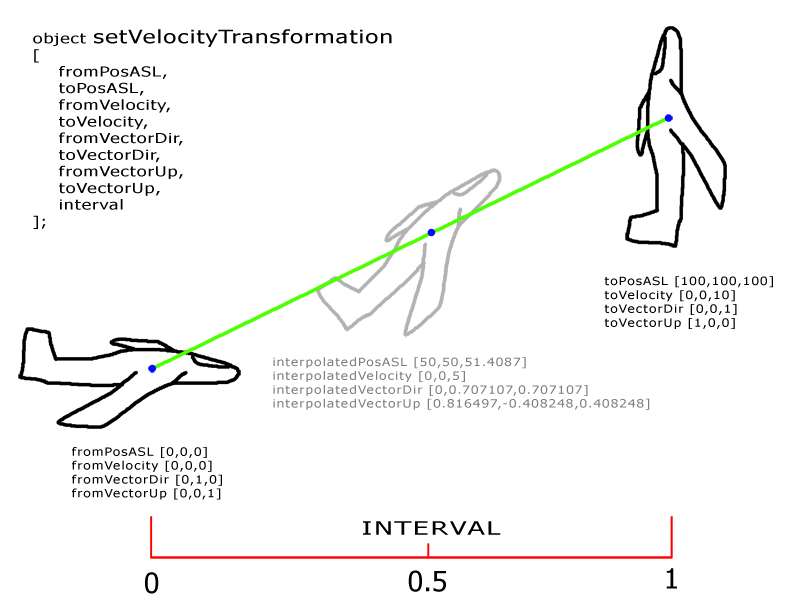 little raptor
yeah the order has to be changed so it doesn't exit early...
winter rose
I'll dig one out and tell you ^^ that or I'll make multiple passes, that can do too
little raptor
winter rose
I'll dig one out and tell you ^^ that or I'll make multiple passes, that can do ...
I made one more change. I guess it works now?
winter rose
little raptor
I guess you're searching. rn it exits early because of `[0-9]+`. use this instea...
this one? negative
see https://regex101.com/r/9z6VTt/2
little raptor
winter rose
this one? negative
see https://regex101.com/r/9z6VTt/2
(?:\$|0x)[0-9a-f]+|[0-9]+?\.{0,1}[0-9]*?e[-+]{0,1}[0-9]+|[0-9]+?\.[0-9]*|[0-9]*?\.[0-9]+|[0-9]+
wrote it the dirty way 😅
winter rose
if the stupid way works, it's not stupid!
little raptor
wait that misses one case 😅
.5e1
this fixes it:
(?:\$|0x)[0-9a-f]+|(?:[0-9]+?\.[0-9]*|[0-9]*?\.[0-9]+|[0-9]+)(?:e[-+]{0,1}[0-9]+){0,1}
btw you can also add this your test:
.254e-1
+- after e should be detected too (which they are with that)
 crimson lichen
hi
guys i got a problem
i want spawn things on my server arma 3
i use command but when i press exec nothing spawn on me
copper raven
what command are you talking about?
crimson lichen
// Run via debug console and execute local
// Crate with 100 supplies spawn at player position.
[] call F_createCrate;
// Crate with 100 ammo spawn at player position.
[KP_liberation_ammo_crate] call F_createCrate;
// Crate with 100 fuel spawn at player position.
[KP_liberation_fuel_crate] call F_createCrate;
this ones
crimson lichen
is say true
copper raven
so it's undefined
crimson lichen
How do I define it?
copper raven
how am i supposed to know? 😄 you have to write it! 😄
crimson lichen
mmm idk thanks for helping me i will tell that guy turn on my server and do config
copper raven
chilly bronze
<@!207463802999013377> i've tried that, however, it does more harm than good. AI...
i don't think there is any other way, maybe limit their speed?
winter rose
little raptor
wait that misses one case 😅
.5e1
this fixes it:
```sqf
(?:\$|0x)[0-9a-f]+|(?:[...
(nitpicking: {0,1} → ?)
winter rose
wat
 distant oyster
crimson lichen
// Run via debug console and execute local
// Crate with 100 supplies spawn at ...
distant oyster
crimson lichen
// Run via debug console and execute local
// Crate with 100 supplies spawn at ...
instead of F_createCrate try KPLIB_fnc_createCrate
little raptor
winter rose
_wat_
can you show what you meant?! 😅
winter rose
(?:\$|0x)[0-9a-f]+|(?:[0-9]+?\.[0-9]*|[0-9]*?\.[0-9]+|[0-9]+)(?:e[-+]{0,1}[0-9]+){0,1}
↓
(?:\$|0x)[0-9a-f]+|(?:[0-9]+?\.[0-9]*|[0-9]*?\.[0-9]+|[0-9]+)(?:e[-+]?[0-9]+)?
? is {0,1} afaik
winter rose
little raptor
can you show what you meant?! 😅
and so far it works well
https://regex101.com/r/zPzbhq/1
copper raven
winter rose
`?` is `{0,1}` afaik
it is that yes
little raptor
winter rose
`?` is `{0,1}` afaik
oh I'd forgotten this
spark turret
can i put code in a hashmap to simulate methods?
rather, how do i use and call this code then? [input] call (map get "myCode"); ?
copper raven
yes and yes
 mental wren
spark turret
rather, how do i use and call this code then? [input] call (map get "myCode"); ?
mental wren
spark turret
rather, how do i use and call this code then? [input] call (map get "myCode"); ?
why not use functions?
spark turret
bc i want objects
hushed tendon
Like passing objects as parameters?
 ivory lake
Does anyone know if there's an eventhandler or other means to detect when dragging a vehicle over another vehicle in 3den?
IE: for ViV
I know there's Dragged3DEN but that only returns the object being dragged
ivory lake
well if anyone else wants this for some reason you can combined dragged3den and get3denmouseover
spark turret
hushed tendon
Like passing objects as parameters?
simulating objects with fields and methods, for having more organized and reusable
code
im using the BIs_fnc_taskDefend to make a group of AI hang around and patrol, how do i have them snap out of it and return to normal behaviour?
huh wierd, the taskDefend is not even a loop, it runs once.
hm hm
granite sky
Definitely a read-the-source case :P
spark turret
okay: the dudes that sit down get a "doStop" order, to get them back to normal use "doFollow"
ebon citrus
spark turret
bc i want objects
Functions can be used in the same way. Lose code just makes your mission more vulnerable and less organized
fair drum
does __has_include require the full mission path? or can I use your typical local path?
opal zephyr
Does anyone know how to use the 3rd party Script Profiler? I cant seem to get it to connect
little raptor
fair drum
does `__has_include` require the full mission path? or can I use your typical lo...
it's exactly like include
fair drum
opal zephyr
Does anyone know how to use the 3rd party Script Profiler? I cant seem to get it...
opal zephyr
thanks ill check it out
noble zealot
There is any way to get all submunitions of a ammo when the ammo is triggered?
For example for some Arty ammo like mines.
little raptor
noble zealot
There is any way to get all submunitions of a ammo when the ammo is triggered?
not right now
in dev branch yes
or Arma 3 v2.10
spark turret
im struggling to tell AI to disembark if they are cargo, and then properly test if any are still sittin gas cargo.
=> waituntil all units are not cargo anymore.
any help?
this fires immediatly
    _loaded = ((_unit get "units") select {-1 != ((vehicle _x) getCargoIndex _x)});
    diag_log ["disembark units: ",_loaded];
    _loaded orderGetIn false;
    //send smallest group on patrol
    [_unit,_marker] spawn { //delayed idle to give enough time for disembark
        params ["_unit","_marker"];
        _counter = 0;
        _loaded = [];
        waitUntil {
            sleep 3;
            _loaded = ((_unit get "units") select {-1 != ((vehicle _x) getCargoIndex _x)});
            _counter > 30 || (count _loaded) <= 0;
        };
        diag_log ["loaded",_loaded];
        assert ((count _loaded) == 0);
they do disembark, but the waitUntil fires early
fair drum
are you working with individual units in their own groups? or one large group of units?
spark turret
the latter. i have whole groups loaded onto trucks that are driven by another group
little raptor
spark turret
this fires immediatly
```sqf
_loaded = ((_unit get "units") select {-1 != (...
are you even sure your "units" array is correct?
spark turret
im using a 30 seconds delay now 🤷♂️ im not in a hurry and all other checks just fail.
yeah am positive. it seems that immediatly after the "disembark" order was given, the unit is considedern "not cargo" anymore
little raptor
spark turret
yeah am positive. it seems that immediatly after the "disembark" order was given...
why don't you just check !(_x in _vehicle)?
fair drum
curious, why are you using hashmaps in this instead of grabbing the units through the object itself with other commands?
spark turret
bc the hashmap represents a bigger, military "unit" made of multiple groups
im trying to get the whole unit to embark troops, transport to target, disembark cargo.
to reinforce a checkpoint f.e.
its kinda working, but not as easy as i hoped
qrf_unit_disembarkCargo = {
    params ["_unit","_eject","_onlyCargo"];
    _loaded = ((_unit get "units") select {!_onlyCargo || "cargo" in assignedVehicleRole _x});
    //diag_log ["disembark units: ",_loaded];
    _loaded orderGetIn false;
    if (_eject) then {
        {_x action ["eject",vehicle _x]} forEach _loaded;
    };
    count _loaded;
};
this seems to work nicely. very nice: ai remembers what role they had in the vehicle, if you call "orderGetIn true" it goes back to the same spot.
 fading magnet
When a mission starts, do all the other SQF files in root will be compiled too? or I have to do it manually?
I have one file for all Global variables to be using on other SQF files, but I want to know if that file automatically will be compiled in start of mission
hushed tendon
fading magnet
When a mission starts, do all the other SQF files in root will be compiled too? ...
No they won’t be compiled automatically. You can either use the functions library or use ‘compile preprocessfilelineNumbers’ as an alternative. ExecVM can also be used but it’s best for one time uses
Check these out on the wiki for more info
fading magnet
much obliged :))
 patent lava
can i access the values in mission.sqm from sqf?
like getting the author, briefingname
fair drum
patent lava
like getting the author, briefingname
grab these from the description.ext file by using missionConfigFile in your mission
patent lava
but that means i have to enter the author and briefingname in the description.ext too right?
fair drum
Yes
patent lava
im trying to prevent having to enter that information twice
fair drum
Which you should be doing anyways
still forum
in 2.10 there is a way, currently there is none
patent lava
your suggestion is how i have it implemented now, but if you want to change the mission name you'll have to change it in two places
still forum
you can save your mission.sqm unbinarized, and #include it into your description.ext, then you can read stuff inside mission, via description.ext because description.ext has a copy of it all
patent lava
oh that's awesome
fair drum
still forum
in 2.10 there is a way, currently there is none
Linky?
still forum
not yet on wiki
clever radish
Have anyone tried making a script which detects if the player shoots without a suppresor, selects nearEntities and creating a waypoint to players location where shots were fired?
or know any posts anywhere / discussions? Tried searching Google, found nothing really
patent lava
hallow mortar
Some of them you can.
<https://community.bistudio.com/wiki/briefingName>
<https:...
yeah, i just did some testing and it seems to only work for description.ext, even though it says 3den attributes should also work
for example i set the title under attributes -> general -> presentation, which should be IntelBriefingName
but then getMissionConfigValue "IntelBriefingName" returns nothing
open fractal
clever radish
Have anyone tried making a script which detects if the player shoots without a s...
open fractal
actually firedNear is fairly limiting in distance, you might want to run a check if the player is using a suppressor with a "Fired" EH
ebon citrus
clever radish
Have anyone tried making a script which detects if the player shoots without a s...
yes
brazen lagoon
any suggestions on how to get a picture of a unit? for a shop UI.
is editorPreview the best choice?
(in the config)
ebon citrus
What kind of object?
@brazen lagoon hey, did you just bail?

No, seriously
I am EAGER to help
But i need you here
There is a better way if youre interested
Ok, if it helps you at all, you could take a look here for previewing models of objects:
https://community.bistudio.com/wiki/DialogControls-Objects
For list icons, i recommend simplified icons instead of screenshots/editorpreviews
brazen lagoon
like just a guy
ebon citrus
A man
brazen lagoon
CT_OBJECT is cool, will look at this
ebon citrus
Dont
Waste of your time
Create the unit locally and preview it in a separate space
You can probably use a camera to pip to a texture you use in your itnerface
brazen lagoon
that's what this shop script does for vehicles
ebon citrus
Or set the player to the camera
brazen lagoon
so maybe ill do that yeah
im prob gonna just use the editor preview for a quick hack if that works it works if not ill bother with something more complex later
ebon citrus
Not everyone bothers making editor oreviews
brazen lagoon
yeah if it doesnt exist thats whatever
ebon citrus
And theyre not always super accurate
I routinely set my unit editor oreviews to batman on a bicycle just because the scope doesnt cover the editor
But yeah, let me know if you find some invwntive cool way
And best of luck to you
❤️
I hope i was of help
 zealous marlin
hello, Im trying to add some weapons to the caesar btt, but it isn't working. I'm useing the "this addWeapon" command but it doesn't seem to work. It does work with already armed vehicles such as the pawnee though.
nevermind, i managed to add the weapons, but the weapon info box at the top right of the screen isnt showing up. how do I add it?
 keen trout
if i concatenate a string and variable would it be something like this:```sqf
money = 0;
hint "You gained" + str money + "money";
//My way
money = 0;
hint format ["You gained %1 money", money];

//Your way correctly
money = 0;
hint ("You gained " + str money + " money");
 craggy lagoon
schadler17 has a very nice script posted up on the forums to restrict weapons to a player classname posted back in 2016.
https://forums.bohemia.net/forums/topic/186196-restrict-weapons-and-gear-to-certain-units/
I'm wondering if someone could help me change it a bit so that it's not using the classname but rather a getvariable true or false check along with the defined weapons? I just don't know how the getvariable would or could be added to it.
fair drum
craggy lagoon
schadler17 has a very nice script posted up on the forums to restrict weapons to...
are your units grabbing things from containers?
cause you can skip most of this and just make a "take" event handler
craggy lagoon
Does that work with the Ace Arsenal?
fair drum
no. for ace arsenal, its better to restrict items to the arsenal itself
craggy lagoon
But I need to be able to allow some players access to items.
craggy lagoon
Ok thanks!!
fair drum
@craggy lagoon this is an example of something I did last year with ace arsenal. it has to do with using the locality argument with their functions
the snippet (its part of a larger file):
https://sqfbin.com/ijayojegaxiziniciqab
craggy lagoon
Thank you very much, I will check this out now.
fair drum
basically you can have a different array of available items in the arsenal for each client
keen trout
fair drum
```sqf
//My way
money = 0;
hint format ["You gained %1 money", money];
//Your w...
oh okay thats sweet thank you, learnt something new!
keen trout
fair drum
basically you can have a different array of available items in the arsenal for e...
whats the ```sqf
%1
format ["%1 %2 %3", thing1, thing2, thing3]
etc
 dusk sage
Why would you use format for that though
fair drum
not saying you should, simply saying it exists
keen trout
also another question
xp=xp+random 3;
how would i random it into an int?
because i get float values for the random
0-3
for example xp = 0.3423532
fair drum
floor or ceil
keen trout
floor is rounding?>
fair drum
not quite, it selects the next lowest integer. so 4.1 = 4, 4.8 = 4
keen trout
oh okay
fair drum
ceil is the opposite
keen trout
so into that statement i've made would it be something like
damn it im thinking of java way
but ill write it anyway
veil(xp)=xp+random 3;
hmmmm no probably not lol
xp=xp+random 3;
floor xp;
xp = xp + (floor (random 3))
you can also use round if you need
dusk sage
depends on your use case
keen trout
is there a way i can do new line for hints?
fair drum
\n i believe
keen trout
okay
fair drum
you can also just use structured text instead too
keen trout
dusk sage
depends on your use case
it wouldn't matter to much i'm just looking at random numbers
keen trout
fair drum
you can also just use structured text instead too
oh?
keen trout
fair drum
`\n` i believe
yeah thats right
keen trout
fair drum
you can also just use structured text instead too
with structured text are you able to change the format of the lines? for example left to right or middle ?
fair drum
keen trout
with structured text are you able to change the format of the lines? for example...
fair drum
keen trout
with structured text are you able to change the format of the lines? for example...
expvar = 10;
hint parseText format ["<t align='center'>Current EXP</t><br/><t align='center'>%1</t>", expVar];
oh thanks alot i was also researching it :DDD thats very helpful
keen trout
fair drum
```sqf
expvar = 10;
hint parseText format ["<t align='center'>Current EXP</t><br...
this ones a difficult one and more of a general question
addMissionEventHandler ["EntityKilled",{

params ["_killed", "_killer", "_instigator"];

if (isPlayer _instigator AND side group _killed isEqualTo east AND _killed isEqualTo man1) then {

xp=xp+(round (random 3));
gold=gold+(round(random 5));
// hint message
hintSilent format ["Loot obtained!\n You gained %1 xp \n You gained %2 gold", xp,gold];
};

}];
because i'm using a modded weapon it wont register that i've killed him
if i use a vanilla gun it'll register it and work fine
is there a way around it?
fair drum
does this modded weapon use bullets and the games standard simulation?
or is it something weird like a laser gun
keen trout
nah its a melee pack
fair drum
the one by webknight?
fair drum
yeah that's his
keen trout
yeah that mod is pretty funky
fair drum
he has a custom handler for his melee system. you can reach him here for that question...
https://discord.gg/8cuR34GY
open fractal
_tank addEventHandler ["GetOut", {
    _this spawn ART_fnc_gotOut;
}];
systemChat "gotOut";
params ["_vehicle", "_role", "_unit", "_turret"];
if (crew _vehicle != []) exitWith {};
private _countDown = (side _unit) spawn {
    private _side = _this;
    for "_i" from 20 to 0 do {
        private _message = format ["Abandoning Tank: %1", _i];
        _message remoteExec ["hint",_side];
        sleep 1;
        if _i < 6 then {
            "beep_strobe" remoteExec ["playSound"];
        };
    };
    if (crew _vehicle == []) then {
        _side call ART_fnc_tankLost;
    };
};
waitUntil {crew _vehicle != []};
terminate _countDown;
hintSilent "";
I'm a bit confused why this function isn't working. The eventhandler fires but nothing happens with the gotOut function. I feel like I'm missing something important
no systemchat
fair drum
where are you defining this function? and are you sure it exists?
open fractal
description.ext
class CfgFunctions
{
    class ART
    {
        class TANKvTANK
        {
            class gotOut{};
            class resetTanks{};
            class revealTank{};
            class spawnTank{};
            class startBattle{};
            class tankLost{};
        };
    };
};
fn_gotOut.sqf
fair drum
in the root folder?
open fractal
it's set up the same way as the functions that work
Functions\TANKvTANK\fn_gotOut.sqf
fair drum
can you type in game
isNil "ART_fnc_gotOut"
open fractal
yeah i got false for another function
fair drum
well there's your problem 😉
open fractal
I think the mission just never saved
thanks
I forgot you could isNil test a function like that
working now btw
keen trout
so say i've got variable a and b in 1.sqf and i've got a MissionEventHandler that uses variable a and b in 2.sqf how do i get the variables to communicate
oh if variable a and b are private variables i mean
fair drum
you feed the variables from 1 to 2 when you call 2
fair drum
//First file
[_var1, _var2] execVM "file2.sqf"
//  ^arguments
//Second file
params ["_var1", "_var2"];  //can be named whatever you want, its going to grab the first argument and second argument from above
//         ^parameters
thats what params is doing, its looking for the arguments from the call
keen trout
yeah i did similar
// file 1
null = [var] execVM "file2.sqf"
// file 2
_myArguements = (this select 0);
would this work too?
or just don't worry about that
idk that was off youtube video
your one makes heaps more sense for me because i'm new to sqf
fair drum
//file1.sqf
["apple", "pear", "nut"] execVM "file2.sqf"
//file2.sqf
params ["_breakfast", "_lunch", "_dinner"];
hint _breakfast; //returns "apple"
hint _lunch; //returns "pear"
hint _dinner; //returns "nut"