#arma3_scripting
1 messages · Page 202 of 1
 edgy dune
 round hazel
 granite sky
<@697082966358097961> What's in the RSCs?
granite sky
<@697082966358097961> What's in the RSCs?
class RscTitles {
    class cameraOverlay {
        idd = -1;
        fadeIn = 0.0;
        fadeOut = 0.0;
        duration = 10e10;

        class controls {
            class overlay {
                access = 0;
                type = 0;
                idc = -1;
                style = 48;

                x = safeZoneX;
                y = safeZoneY;
                w = safeZoneW;
                h = safeZoneH;

                colorBackground[] = {0,0,0,0};
                colorText[] = {1,1,1,1};
                font = "TahomaB";
                sizeEx = 0;
                lineSpacing = 0;
                text = "images\cameraOverlay.paa";
                fixedWidth = 0;
                shadow = 0;
             };
        };
    };
    class cameraOverlay2 {
        idd = -1;
        fadeIn = 0.0;
        fadeOut = 0.0;
        duration = 10e10;

        class controls {
            class overlay {
                access = 0;
                type = 0;
                idc = -1;
                style = 48;

                x = safeZoneX;
                y = safeZoneY;
                w = safeZoneW;
                h = safeZoneH;

                colorBackground[] = {0,0,0,0};
                colorText[] = {1,1,1,1};
                font = "TahomaB";
                sizeEx = 0;
                lineSpacing = 0;
                text = "images\cameraOverlay2.paa";
                fixedWidth = 0;
                shadow = 0;
             };
        };
    };

    class Default
        {
            idd = -1;
            fadein = 0;
            fadeout = 0;
            duration = 0;
        };
    };
I tested it without the RSCs or the "Bro_Camcorder" check and it works fine.
Maybe you have some other code fighting with it.
Previous version of the same thing maybe.
round hazel
I'll go ahead and take a look, see what I can find. Thanks for all your help dude, i really appreciate it!
round hazel
granite sky
I tested it without the RSCs or the "Bro_Camcorder" check and it works fine.
Bit of a funky one, but I went for a shower, came back, and it fixed itself. No clue why, but I'll give you the credit lmao
 tropic nimbus
Question for those who use handledamage, is anyone else seeing odd damage numbers when hitting close to the pelvis area? im seeing a reduction of damage that cant be explained
 thin fox
big 🍆
 opal zephyr
Does anyone know of a way to change the visual name of an ai unit? When I look at a unit it shows "Ammo Bearer" for example, but I want this to show something else
granite sky
I think that one's only from config.
 radiant lark
Theres a guy who can lag my server quite easily with those network messages, idk what those mean but he spams that a lot:
Server: Object 12:15010 not found (message Type_128)
Server: Object 12:15011 not found (message Type_134)
Server: Object 12:15012 not found (message Type_128)
Server: Object 12:15013 not found (message Type_134)```This will eventually force you into restarting the server, because it really is unplayable with that amount of lag.
granite sky
It's not necessarily anything to do with those particular messages.
radiant lark
Scripts.txt, nor any battleye filter will tell anything
My last resource could be CfgDisabledCommands, which can be bypassed by client 😂
The deal is, how come server gets that network message but it doesn't make a detailed log out of it? How can I track and filter that?
opal zephyr
granite sky
I think that one's only from config.
Damn, thats too bad. I tried every function I could find online but none of em worked. I appreciate the second confirmation :)
granite sky
BI won't tell us what message IDs are for "security" reasons. You can trial-and-error some of them but it's kinda hard work.
They change with each Arma version.
radiant lark
Anything serverside to try and log or prevent those messages from comming thru and lagging my server?
granite sky
It's not necessarily those messages that are lagging the server.
What's the story here though? Like what's special about this person?
radiant lark
Idk he just discovered what seems to be a sqf injector or a pbo hider and he comes to the server and ruins it for everyone
granite sky
Ban him?
radiant lark
granite sky
It's not necessarily those messages that are lagging the server.
Yes, but it's not those 4 messages
It's 15000 messages
It's a spam which consists of only that
granite sky
If someone's intentionally DoSing your server then the only solution you're gonna have for that is preventing them from connecting.
radiant lark
granite sky
Ban him?
Yeah then he does a little ban evasion and gets back to work, I could ban him and permanently ban him, but I feel like fixing serverside would be more proper
Well that DDoS comes from scripting, which is the thing that I do not like
granite sky
If they have a working script injector then you can't do anything about that.
They might just be adding and deleting objects, which would be murderous for performance and I don't think there's any way to block it.
radiant lark
I cannot believe I cannot do anything, as a server, to blacklist specific scripting messages that come onto my server in a form of spam
Like, I get that local commands stay local
But come on, my man broadcasting 15000 messages
radiant lark
granite sky
They might just be adding and deleting objects, which would be murderous for per...
createVehicle filter stays empty
granite sky
What's that, a battleye thing?
radiant lark
yes
granite sky
I can't even find the docs for that anymore. I think the only link was on the forums.
 old owl
I miss BI forums 
 dusk gust
radiant lark
Theres a guy who can lag my server quite easily with those network messages, idk...
dusk gust
radiant lark
Theres a guy who can lag my server quite easily with those network messages, idk...
Are there any specific side effects other than the server lag?
dusk gust
radiant lark
Theres a guy who can lag my server quite easily with those network messages, idk...
Could utilize the -netLog server parameter or something a little more detailed like -networkDiagInterval=5
https://community.bistudio.com/wiki/Arma_3:_Startup_Parameters#networkDiagInterval
These will log all the clients sending out network messages. Should help you identify which client is doing it, and would also help if you were to try to figure out what he's doing.
I'd probably be able to help a bit more if I had more info on what kind of server you run and what can be blocked or not.
It's very possible you also have execution exploits in your mission and thats how he's executing things instead of a script injector.
radiant lark
dusk gust
Are there any specific side effects other than the server lag?
No, apparently not
radiant lark
dusk gust
Could utilize the `-netLog` server parameter or something a little more detailed...
Aight ill get back to you tomorrow, ty
 grim cliff
im having a problem with a mod that i am making:
the game loads, THIS mod works, but any other mod that is loaded ceases to function.
Additionally: all entries in the escape menu under options are gone, besides the addon options from CBA
Mods: CBA_A3, Enhanced Movement, MY MOD.
i suspect there is an issue in either the config.cpp or the functions.hpp files.
Any idea what i did wrong?

 warm hedge
- MyAddon name is not good. Put an unique name
- requiredAddons is always required to fill
- Comment out the include to check who is the faulty
grim cliff
if i comment out the #include that would make the mod not function though, right?
warm hedge
That is the point
grim cliff
warm hedge
- MyAddon name is not good. Put an unique name
- requiredAddons is always requir...
can i just remove the required addons line and have it work? or should i point to something arbitrary like the base game or sonething?
warm hedge
"Always required to fill" I said, check #arma3_config pinned posts
grim cliff
warm hedge
That is the point
Commented #include "functions.hpp" line. appears to have allowed other mods to load proper.
so issue is in functinos.hpp?
warm hedge
Or the functions within
grim cliff
like a syntax error?
all of the brackest are closed, each function class ends with ;, is postinit = 0; allowed in the class myFunctionNameHere { ... }; ????
warm hedge
That is not what I suggested. The contents in these functions maybe somewhat wrong
I don't know further at this point as I don't have much info
grim cliff
what information do you need?
warm hedge
How it is interfering the menu, how it supposed to work, how is your current config, what are these functions, how CfgFunctions does look in in-game config viewer, etc
granite sky
postInit functions are called serially, so if they don't exit then they can block postInit functions from other mods.
I'm not sure if postInit=0 is legal syntax and I don't know why you're doing it.
but I would guess it's the postInit=1 functions that are the problem.
grim cliff
could have been both. removed postinit = 0, pushed EOF call to while loop in one of the postinit files into 0 spawn {call *myLoop*};.
Problem Solved!
Thank you @granite sky! Thank you @warm hedge!
 harsh bloom
What do you guys think would be better for memory? Having a trigger pretend to be a minefield or having a trigger disable and enable mines when someone comes near?
I always hear people complain about mines using up resources so i feel like these might be a alternative.
For the fake mine field maybe i could have a random timer that only count down while they are in motion, when it hits zero check if they are still inside then blow them up.
Just spitballing before i try anything
 cosmic lichen
Afaik mines can't really be disabled. Even if simulation is off the AI still calculates them.
harsh bloom
I guess that makes sense. I would assume disasbled and hidden makes no difference to that?
cosmic lichen
But I don't thing it makes a huge difference as long as you don't overdo it with the mine count.
cosmic lichen
harsh bloom
I guess that makes sense. I would assume disasbled and hidden makes no differenc...
At least that's what I remember from our testing.
There were always mine related calculations in the profiler
harsh bloom
Ive been hanging with a few OP makers and they were super anal about never placing mines ever because "objects bad"
cosmic lichen
You can easily profile that if you want so see what's being slow.
harsh bloom
What do you think about the trigger idea? Where it basically just pretends ot be a mine field.
I havent messed with actually trying to make the script yet
cosmic lichen
You can do that but usually mines are visible if the players are careful so it might be a bit mean to just blow them up
harsh bloom
Only time i would really need to use mines is as area denial.
cosmic lichen
Then go for it.
harsh bloom
New question. Anyone come up with a way to prevent AI from trying to path or drive through an area?
Someone told me just have a trigger disable their AI if they enter, but thats stupid.
cosmic lichen
How large is the area?
harsh bloom
I just had a section of forest and rocks built into a custom map and the AI keep trying to drive through it and getting stuck
cosmic lichen
There are some objects that ai avoids I think the wrench is one of them
You can place a few and try that.
harsh bloom
Really?
harsh bloom
I guess i can try that.
How would i go about scripting that? I havent seen any examples online yet. Other than "on active disable move"
If it was a source game i could just delete the nav mesh in that zone
cosmic lichen
When they enter the area give them a doMove order somewhere else.
But not clue how good that works.
cosmic lichen
harsh bloom
If it was a source game i could just delete the nav mesh in that zone
Yeah,that's sadly not possible.
grim cliff
could a hashmap be used for storing mine types and positions? i have read in places that they are faster than regular arrays...
just tossing this out there, because i have plans for my server as well.
harsh bloom
cosmic lichen
When they enter the area give them a doMove order somewhere else.
That would kinda work, but would be kinda jank if they are on guard and are trying to respond to players
harsh bloom
grim cliff
could a hashmap be used for storing mine types and positions? i have read in pla...
I remember reading somewhere generally deleting and spawning objects is worse than having them just sit there.
Lag spikes
grim cliff
i would imagine, my server does that too with Loot crates, but i havent seen it.
cosmic lichen
I don't think the hashmap approach would be faster.
You need an inArea check on all players and then place the mine and do that for all mines.
harsh bloom
Has anyone experimented with making a huge dummy item that prevents pathing but has no actual collisions?
Ive never done any asset modding for arma so im just spitballing.
cosmic lichen
No clue.
harsh bloom
I guess i can ask in #arma3_model
grim cliff
cosmic lichen
I don't think the hashmap approach would be faster.
if i had mines all over the map area that i wanted denied, wouldn't it be more preformance relative, rather than spawn relative? could a player even handle that many vehicles while loading?
 spiral canyon
Is there a way to fire a trigger from a addAction? I have a addAction on a laptop and after the audio file plays I want to trigger a task to be added.
harsh bloom
Any idea if i just placed a huge dock section or something then disable it if that would stop the AI from trying to path there?
spiral canyon
harsh bloom
Any idea if i just placed a huge dock section or something then disable it if th...
AI are dumb and will walk through objects. They only really see the pathways setup for them and if they can't get to one, they just walk though objects. They don't really care about geometry.
harsh bloom
spiral canyon
Is there a way to fire a trigger from a addAction? I have a addAction on a lapto...
Can you set a value to true, then have that value in the Active section instead of "this"?
 pallid palm
maybe you can put some razer wire around the Area and make it take no Damage
harsh bloom
hmmm, i could try something like that. But thats a lot of objects
pallid palm
the only way i have been able to stop Ai is by razer wire
with no Damage
this allowDamage false; in the init of the razer wire
pallid palm
i dont have any wrenches where do i get them
harsh bloom
I think he means the prop, which should just be a tiny wrench
I think i saw one
Dont have eden open at the moment
pallid palm
is that in vanilla Arma 3
harsh bloom
I would think so?
pallid palm
hmm ok
grim cliff
how soon will the ismultiplayer command return true on a dedicated server?
use case: preinit in a serverside only mod.
harsh bloom
Could just have a script on all playables set a variable like "num_players" +1 when they load.
And run off of that if its >1
harsh bloom
grim cliff
how soon will the `ismultiplayer` command return true on a dedicated server?
us...
also probably only arma4
grim cliff
harsh bloom
also probably only arma4
HUH? ismulitpayer command was introduced in arma 3 v0.50....
 hallow mortar
grim cliff
how soon will the `ismultiplayer` command return true on a dedicated server?
us...
hallow mortar
grim cliff
how soon will the `ismultiplayer` command return true on a dedicated server?
us...
I don't see any indication that it's delayed at all.
It's pretty easy to test if you have access to a server though
hallow mortar
harsh bloom
when they will fix it
It's not broken, they're asking about timings within the initialisation process
grim cliff
have access to a server, but there are players on and im not that rude.
harsh bloom
Ooh, like a literal "when"
I read it as "this function always returns false, when will this be fixed"
my bad
grim cliff
my bad should have wroded that better. i have my baby sleeping on me so im typing one handed
 tender fossil
Does anyone have experience/knowledge of this in Arma 3 instead? I guess it can't be that much different between A2 and A3
 still forum
I haven't heard about mines being a performance problem.
And they're quite efficient last I checked.
 fair drum
grim cliff
could a hashmap be used for storing mine types and positions? i have read in pla...
fair drum
grim cliff
could a hashmap be used for storing mine types and positions? i have read in pla...
Hashmaps are faster if you use the system as it's intended, quick lookups. If you iterate over them like an array, it's better to use an array.
 hushed turtle
What are mine types?
 atomic niche
hushed turtle
What are mine types?
atomic niche
hushed turtle
What are mine types?
mine types?
ah related to the question above
probably just mine(explosives) classnames and their pos
 vapid scarab
Is there a way to get the status of an arma 3 server from some sqf command?
Like the same information that is shown in the server browseR?
atomic niche
vapid scarab
Like the same information that is shown in the server browseR?
https://community.bistudio.com/wiki/getServerInfo
should show most of it
vapid scarab
What about that of a server you are not connected to?
tender fossil
Maybe this helps too? https://community.bistudio.com/wiki/getClientStateNumber
tender fossil
vapid scarab
What about that of a server you are not connected to?
I guess you would need an extension for that
granite sky
still forum
I haven't heard about mines being a performance problem.
And they're quite effic...
IIRC I spawned 1000 basic antipersonnel mines well outside draw distance and they halved the frame-rate.
tender fossil
Can confirm that high number of mines will lag Arma 2 server too 😄
atomic niche
vapid scarab
What about that of a server you are not connected to?
You can use the steam server list api to retrieve most information, but won't work in sqf directly
vapid scarab
Right, still need a dll extension. Thanks for the reminder about that.
granite sky
I would guess that each mine is individually checking for nearby objects. Although given that there was literally one entity in the mission it still seemed a bit much.
still forum
Sounds like something I could use a ticket for to analyze 😄
 regal kraken
Hi, I was wondering if there was a way to limit how many times a script can be called?
I have a basic case script that allows you to 'buy' a artillery nest, but I dont want it to be triggerable again after purchase.
I was going to do some really basic stuff with setvariables with it going from 1 to 0 then just checking the number. but I know theres probably a more.. scripting way.. of that method lol
 winter rose
regal kraken
Hi, I was wondering if there was a way to limit how many times a script can be c...
winter rose
regal kraken
Hi, I was wondering if there was a way to limit how many times a script can be c...
you can, you could have a variable that if it reaches 0, removes the action or whatever 🙂
it's not that much complex than that 😄
regal kraken
yeah.. I think i'm thinking it should be more complicated than it should
Cheers lol
winter rose
beware of where you store it, as if local, in MP you may be able to disconnect/reconnect and regain your 3× A164 supports
regal kraken
winter rose
you can, you could have a variable that if it reaches 0, removes the action or w...
Worked like a charm! but the stuff i'm doing is on a dedicated server so now I have another issue 😅 usual of course
I made a GUI for building a base,
i've basically got the FOB sitting there premade and hidden, so I thought using -objectname- hideobjectglobal false; would work. When i exec it the global exec on the debug - works great,
so i moved to remote exec - works in singleplayer and listen fine, but dedi it doesnt work
action = "[[2, player], 'scripts\fob\fob2_builder_script.sqf'] remoteExec ['execVM']";```

thats what i've got in the action for the GUI

and inside the case script, I have this for unhiding the objects:
```sqf
hint "Upgrade: Artillery Nest being Constructed";
fob2_arty setVariable ["Base", 0, true];
for "_i" from 1 to 21 do
{
private _obj = missionNamespace getVariable [format ["fob_tosh_arty%1", _i], objNull];
if (!isNull _obj) then {_obj hideObjectGlobal false;sleep 0.2;};
};```is this going to be something as simple as adding a 2 to the remote exec or am i going to have to turn this into a function?
Thanks in advance!
old owl
regal kraken
I made a GUI for building a base,
i've basically got the FOB sitting there prem...
Headed out the door so can't give you an answer to your actual question yet but if your mission is intended to be made public I would read this as execVM, spawn, call, etc you do not wanna have whitelisted for cheater purposes:
https://community.bistudio.com/wiki/Arma_3:_CfgRemoteExec
If you're intending this to be a private or friends only server or something feel free to disregard too- just figured I'd send if it helps 🙂
regal kraken
Yeah its just for friends and stuff, I'm not that confident on a public release just yet haha
Appreicate the fast feedback though! cheers mate!
hushed turtle
regal kraken
I made a GUI for building a base,
i've basically got the FOB sitting there prem...
hint is local and as such it needs to be executed for each player locally. Rest of the code should just run on server
It would work with 2 added into remoteExec, but only player who hosted listen server would get the hint
regal kraken
hushed turtle
`hint` is local and as such it needs to be executed for each player locally. Res...
i knew a 2 would be involved! thanks mate!
grim cliff
i have a question about the "onuserconnected" mission event handler. the BIKI says the wehn paired with the getuserinfo command i can track users from a very eary point of joining the server.
the event handler receives the network id, and the client state number and word, but getuserinfo takes the playerid.
my question here: is the playerid and the network id the same? will info = getuserinfo _networkid; work in the context of the "onuserconnected" event handler?
granite sky
They're all the directPlay ID.
machine ID (eg from owner) you'd get from the second parameter of getUserInfo.
radiant lark
Hey in line with current convo, can I remotely execute code on the OnUserConnected owner?
Cannot test rn, not on PC
fair drum
what is your intention? that would fire before the user has even selected a role
radiant lark
fair drum
what is your intention? that would fire before the user has even selected a role
Fu**in ban cheaters before they even get a glimpse of any explodable player
Hahahahaha
Soon as they join they better be back in lobby
I do PlayerConnected but he manages to snuck some code in before he is gone
granite sky
you have the machine ID, so you should be able to remoteExec code.
granite sky
Bear in mind that your remoteExec might still be joining a long queue.
radiant lark
Alright
dusk gust
radiant lark
Hey in line with current convo, can I remotely execute code on the OnUserConnect...
Yes this works
 sage marsh
Is there a way to add foliage to a bald spot left after i hide a map native building?
 hallow mortar
If you're using a mod set that includes placeable plants, then yes. Otherwise no, not really.
You could try using some dirt decals instead so it looks better as bare ground
warm hedge
createSimpleObject maybe
hallow mortar
warm hedge
createSimpleObject maybe
I think that would make it unaffected by wind/etc., might look a bit odd
warm hedge
But that's the only reliable option for vanilla game
 drowsy mica
Trying to make a bannerlord formation system so you can control ai (mostly webknight melee ai) and do formations and such and just listen to orders overall. How cooked am I in trying to do this? Have no idea how to start and could use the help 😅
hallow mortar
warm hedge
But that's the only reliable option for vanilla game
Well that's why I suggested using the dirt decals as an alternative. Achieves the same purpose (disguising the missing vegetation) without the limitations.
atomic niche
sage marsh
Is there a way to add foliage to a bald spot left after i hide a map native buil...
You can try making the hide object a lot smaller and only cover the exact spot where the building's center is, it will hide the building but leave all the surrounding stuff ah yeah grass is unaffected by hide, its just empty
sage marsh
I mean i want it to delete everything but the grass
And the grass is not affected by the hide terrain module
Anyways i already figured to just dirt patches on it
 sage heath
hi, so messing around with Pooks SAM pack, the mod has a script that stows the vertical launch tubes of the S-300.
// Stow launch tubes

_vehicle = _this;

// prep
(driver _vehicle) action ["engineOff", _vehicle];
(driver _vehicle) disableAI "MOVE";
(driver _vehicle) disableAI "TARGET";

// store fuel while animations process
_vehicle SetVariable ["SA10VehFuel", Fuel _vehicle, true];
publicVariable "SA10VehFuel";
_vehicle SetFuel 0.0;

// 30 seconds to stow launch tubes
_vehicle animate ["elevator", 0];
sleep 3;
_vehicle animate ["hydraulic_up", 0.25];
_vehicle animate ["piston_out", 0.45];
sleep 0.5;
_vehicle animate ["hydraulic_up", 0.5];
_vehicle animate ["rack", 1];
_vehicle animate ["piston_out", 0.4];
sleep 0.5;
_vehicle animate ["hydraulic_up", 0.25];
_vehicle animate ["rack", 0.6];
_vehicle animate ["piston_out", 0.35];
sleep 1;
_vehicle animate ["hydraulic_up", 0];
_vehicle animate ["rack", 0];
_vehicle animate ["piston_out", 0];
_vehicle animate ["mast", 0];
sleep 8;
(driver _vehicle) enableAI "TARGET";
(driver _vehicle) enableAI "MOVE";

_vehicle SetFuel (_vehicle GetVariable ["SA10VehFuel", 1]),
_vehicle SetVariable ["SA10VehFuel", 0, true];
I want to execute this sqf on 4 vehicles, without having to take command of it myself
my idea is to add this as a function in description.ext, and write something like
[] spawn {
 {
  sleep (random 5);
  [_x] remoteExec ["stow5P85",_x];
 } forEach [s3001,s3002,s3003,s3004];

};```but sadly, not working 🙁
winter rose
I believe "stow5P85" is not a registered function
sage heath
oh i know why! this is my cfg functions
class CfgFunctions
{
class TNRGN
{
class functions
{
file = "functions";
class missileStrike{};
class missileStrike2{};
class missileStrike3{};
class missileStrike4{};
class wr_vic_shoot{};
class stow5P85{};
};
};
};
forgot TNRGN 🙁
winter rose
+_fnc_
sage heath
so, I tried this
["s3001","s3002","s3003","s3004"] spawn TNRGN_fnc_stow5P85;```
and
```sqf
[] spawn {
 {
  sleep (random 5);
  [_x] remoteExec ["TNRGN_fnc_stow5P85",_x];
 } forEach [s3001,s3002,s3003,s3004];

};```
still nothing.

I also added a hint in the first few lines of the sqf file to see where the problem is, and I'm not seeing the hintso I think I'm just executing this wrong
the way the script is suppose to work in the mod is, through an add action that only a playable character can use, and that's about all I can say
winter rose
// Stow launch tubes

_vehicle = _this;
```replace this with ```sqf
params ["_vehicle"];
alrighty, I'll give this a try. if you don't mind explaining, I'm trying to learn scripting, what does this do exactly? and what do you think the root of the problem is?
sage heath
it should be. here's my cfgFunctions
class CfgFunctions
{
  class TNRGN
  {
    class functions
    {
      file = "functions";
      class missileStrike{};
      class missileStrike2{};
      class missileStrike3{};
      class missileStrike4{};
      class wr_vic_shoot{};
      class stow5P85{};
    };
  };
};```the other scripts work
and stow5P85 is in the same folder as the other ones
winter rose
the best way to find out is to try vs guessing ^^
warm hedge
Can you check the function in FUnctions Viewer
winter rose
like, try in the fnc viewer and try calling it locally first
sage heath
ah, honestly, didn't know you could do that so oof.
so here's what it looks like in game

also other files have their scripts, this ones just blank
so, huh
 stable dune
sage heath
ah, honestly, didn't know you could do that so oof.
so here's what it looks like...
stable dune
sage heath
ah, honestly, didn't know you could do that so oof.
so here's what it looks like...
Are you sure you have correct file that you have edited and saved?
remove current , create new, add your stuff, save it.
sage heath
alright I've tried it, and yeah still blank, I exited and restarted 3den too
hallow mortar
Are you sure the file path and name are correct? The game is looking for <missionfolder>\functions\fn_stow5P85.sqf.
 sharp grotto
Wrong discord, this is for Arma 3.
winter rose
@dreamy hornet SQF and Enforce Script are two very different languages, really
 dreamy hornet
Yes, I know, but maybe someone here can help me because hardly anyone in the DayZ community will help because they only sell the tanks as mods, just like police cars. That's why I've already made my own police cars with sound and light. Now I want to make tanks. @winter rose
winter rose
have you tried DayZ's scripting channel though?
…you left the DayZ server in 2024, c'm'on.

 modern osprey
Please help me with some advice.
I need to track the destruction of a vehicle.
But due to the fact that the Killed handler is called where the machine is local, I don't really know how to do it better.
I would like to go through all the equipment in the mission at launch and use remoteExec with JIP to call the destruction handler for it.
But I'm afraid that JIP will be clogged with function calls for equipment that has already been destroyed.
winter rose
modern osprey
Please help me with some advice.
I need to track the destruction of a vehicle.
...
addMPEventHandler MPKilled?
 meager granite
modern osprey
Please help me with some advice.
I need to track the destruction of a vehicle.
...
meager granite
modern osprey
Please help me with some advice.
I need to track the destruction of a vehicle.
...
Where do you really need to know when its killed? Server?
If everywhere then MPKilled could be a good fit.
modern osprey
Thanks for the tip MPKilled. I'll try to use it.
fair drum
Or entity killed as well for mission event handlers
 exotic gyro
If you only need to know on the server, a cba server event from a killed EH could work.
 ionic merlin
could I perhaps get some help attaching this banner to the Land Rover, its going everywhere but where I want it 
vehicle = LandRover02
banner = test02
here's where I'm at currently;
test02 attachTo [LandRover02, [1.18, -0.30, 0.50]];
 hallow mortar
Your code is essentially correct. The coordinates are a 3D offset relative to the model origin. The units are in metres. You'll just need to tune it carefully.
If you want to change the attached object's rotation, you'll need to use setDir (2D rotation only) or setVectorDir / setVectorDirAndUp (3D rotation) after attaching it.
ionic merlin
how does the setDir and setVectorDir work? I know very little about scripting XD
hallow mortar
https://community.bistudio.com/wiki/setDir
setDir takes a direction in degrees. After attaching, the direction becomes relative (0 degrees is forward relative to the parent object).
https://community.bistudio.com/wiki/setVectorDir
setVectorDir takes a 3D direction vector. After attaching, the vector becomes relative to the parent object.
ionic merlin
👀 its facing the correct direction now! now to figure out the correct x,y,z
hallow mortar
Doing attachTo again on the same objects overwrites any previous attachment, so you can just stand there with the debug console doing trial-and-error until it's right. Slightly tedious but not too hard.
ionic merlin
oh. so I can just use the debug menu in game for testing?
oml I wish I had known this earlier XD
GOT IT!
many thanks Nikko 🙏
radiant lark
radiant lark
Hey in line with current convo, can I remotely execute code on the OnUserConnect...
This is not possible. Player can be remotely executed code from, probably, "GAME LOADED" and onwards. By the time you can send the client code to run. It can send code replies back
ionic merlin
hey @hallow mortar sorry for the ping - I have another question, how would I get the scale of an item to stay the same when testing the placement as zeus? for example when doing the banner I have it set to 0.5 but when I paste the same script in but with a new x,y,z it changes the scale back to 1
hallow mortar
You can't. All you can do is immediately reapply the desired scale. e.g.
_object attachTo [_otherObject];
_object setObjectScale 0.5;```
Object scaling is _barely_ supported in the engine, and generally, any time you forcibly change an object's position or orientation, its scale will reset. High-simulation objects like units will also actively reset their scale and need to be handled every frame.I see, once again many thanks- also just to clarify on what you mentioned about units... are you saying I can change the scale of units 👀 if some oml that can make for some funny haha moments XD
 tulip ridge
- Don't use another mod's prefix, you should be using your own
- You should just edit the condition to be false instead of tryijg to delete it. Alternatively, you could just edit the existing actions instead of hiding the old ones and making new
Actually there's a better option, you can just hook into the event for tapping someone's shoulder and not have to overwrite the actions at all
~~https://github.com/acemod/ACE3/blob/master/addons/interaction/functions/fnc_tapShoulder.sqf#L28~~
Nevermind, that actually doesn't pass the player who tapped their shoulder, which you use

GitHub
Open-source realism mod for Arma 3. Contribute to acemod/ACE3 development by creating an account on GitHub.
Pr up for it though, so you could overwrite it for now and then switch to using the event if/when it's merged
GitHub
When merged this pull request will:
Add _unit to the tap shoulder event
IMPORTANT
If the contribution affects the documentation, please include your changes in this pull request so the documenta...
stable dune
Was testing, now you deleted content XD
fair drum
fixing possible issue
one sec
Interesting...
Original issue I faced. Find if two arrays have the same elements that occur the same amount of times. They can be in any order so you can't use isEqualTo. Was originally just going to sort the arrays first, but its pretty dang slow when you have a lot of elements. So the hashmap method looks much faster.
// Test data
private _testArray1 = [];
for "_i" from 1 to 5000 do {
    _testArray1 append [
        "30Rnd_556x45_Stanag",
        "FirstAidKit",
        "SmokeShell",
        "16Rnd_9x21_Mag"
    ];
};
private _testArray2 = +_testArray1;

_testArray1 = _testArray1 call BIS_fnc_arrayShuffle;
_testArray2 = _testArray2 call BIS_fnc_arrayShuffle;

// HashMap method
private _timeHash = diag_tickTime;
private _count1 = createHashMap;
{ _count1 set [_x, (_count1 getOrDefault [_x, 0]) + 1] } forEach _testArray1;
private _count2 = createHashMap;
{ _count2 set [_x, (_count2 getOrDefault [_x, 0]) + 1] } forEach _testArray2;
private _allKeys = (keys _count1) + (keys _count2);
private _isEqual = true;
{
    if ((_count1 getOrDefault [_x, 0]) != (_count2 getOrDefault [_x, 0])) exitWith {
        _isEqual = false;
    };
} forEach _allKeys;
_timeHash = diag_tickTime - _timeHash;

// Sort Command
private _arr1Copy = +_testArray1;
private _arr2Copy = +_testArray2;

private _timeSort = diag_tickTime;
_arr1Copy sort true;
_arr2Copy sort true;
private _isEqualSort = _arr1Copy isEqualTo _arr2Copy;
_timeSort = diag_tickTime - _timeSort;

[_timeHash * 1000, _timeSort * 1000];
Results: [13.0005,1118]
Hashmap = 13.0005
Sort Command = 1118
yeah see if this is along the right track, accidentally had the key arrays intersecting instead of adding together
stable dune
fair drum
Interesting...
Original issue I faced. Find if two arrays have the same element...
// Test data
private _testArray1 = [];
for "_i" from 1 to 5000 do {
    _testArray1 append [
        "30Rnd_556x45_Stanag",
        "FirstAidKit",
        "SmokeShell",
        "16Rnd_9x21_Mag"
    ];
};
private _testArray2 = +_testArray1;

_testArray1 = _testArray1 call BIS_fnc_arrayShuffle;
_testArray2 = _testArray2 call BIS_fnc_arrayShuffle;
//_testArray2 append ["testForFalse"];

// HashMap method
private _timeHash = diag_tickTime;
private _count1 = createHashMap;
{ _count1 set [_x, (_count1 getOrDefault [_x, 0]) + 1] } forEach _testArray1;
private _count2 = createHashMap;
{ _count2 set [_x, (_count2 getOrDefault [_x, 0]) + 1] } forEach _testArray2;
private _allKeys = (keys _count1) + (keys _count2);

private _isEqual = true;
{
    if ((_count1 getOrDefault [_x, 0]) != (_count2 getOrDefault [_x, 0])) exitWith {
        _isEqual = false;
    };
} forEach _allKeys;
_timeHash = diag_tickTime - _timeHash;

// Sort Command
private _arr1Copy = +_testArray1;
private _arr2Copy = +_testArray2;

private _timeSort = diag_tickTime;
_arr1Copy sort true;
_arr2Copy sort true;
private _isEqualSort = _arr1Copy isEqualTo _arr2Copy;
_timeSort = diag_tickTime - _timeSort;

private _selectArr1 = +_testArray1;
private _selectArr2 = +_testArray2;
private _selectTime = diag_tickTime;
private _return = true;
{
    private _index = _selectArr1 find _x;
    if (_index == -1) exitWith
    {
        _return = false;
    };
} forEach _selectArr2;
private _selectTime = diag_tickTime - _selectTime;


[_timeHash * 1000,_isEqual, _timeSort * 1000,_isEqualSort, _selectTime * 1000,_return];
[
  13.9999,true,
  1258,true,
  13.9999,true
]
so the hash method absolutely crushes the competition lol
btw, for your select testing, you need to put the tick time start after the array copy.
fair drum
its assumed you'll have two different arrays to start in other code
meager granite
Can't you just do ARRAY - ARRAY?
meager granite
// Test data
private _testArray = [];
for "_i" from 1 to 5000 do {
    _testArray append [
         "30Rnd_556x45_Stanag"
        ,"FirstAidKit"
        ,"SmokeShell"
        ,"16Rnd_9x21_Mag"
    ];
};
testArray1 = +_testArray call BIS_fnc_arrayShuffle;
testArray2 = +_testArray call BIS_fnc_arrayShuffle;
//testArray2 set [-1, "testForFalse"];

// HashMap method
f1 = {
    private _arr1Copy = +testArray1;
    private _arr2Copy = +testArray2;

    private _count1 = createHashMap;
    { _count1 set [_x, (_count1 getOrDefault [_x, 0]) + 1] } forEach _arr1Copy;
    private _count2 = createHashMap;
    { _count2 set [_x, (_count2 getOrDefault [_x, 0]) + 1] } forEach _arr2Copy;
    private _allKeys = (keys _count1) + (keys _count2);

    private _isEqual = true;
    {
        if ((_count1 getOrDefault [_x, 0]) != (_count2 getOrDefault [_x, 0])) exitWith {
            _isEqual = false;
        };
    } forEach _allKeys;

    _isEqual;
};

// Sort command
f2 = {
    private _arr1Copy = +testArray1;
    private _arr2Copy = +testArray2;

    private _timeSort = diag_tickTime;
    _arr1Copy sort true;
    _arr2Copy sort true;
    _arr1Copy isEqualTo _arr2Copy;
};

// Select method
f3 = {
    private _arr1Copy = +testArray1;
    private _arr2Copy = +testArray2;

    private _return = true;
    {
        private _index = _arr1Copy find _x;
        if (_index == -1) exitWith {
            _return = false;
        };
    } forEach _arr2Copy;
    _return;
};

// Array minus method
f4 = {
    private _arr1Copy = +testArray1;
    private _arr2Copy = +testArray2;

    count(_arr1Copy - _arr2Copy) == 0 && {count(_arr2Copy - _arr1Copy) == 0};
};

[
     call f1
    ,diag_codePerformance [{call f1}]
    ,call f2
    ,diag_codePerformance [{call f2}]
    ,call f3
    ,diag_codePerformance [{call f3}]
    ,call f4
    ,diag_codePerformance [{call f4}]
]
```=>
`[false,[15.7529,64],false,[1013.19,1],false,[14.9231,68],false,[3.32401,301]]`
`[true,[15.3496,66],true,[984.205,2],true,[14.2654,71],true,[2.9919,335]]`Best case ("testForFalse" at index 0 instead of end):
[false,[15.4434,65],false,[1008.63,1],false,[1.91139,524],false,[3.48934,287]]
stable dune
nice
meager granite
I just realized that f3:select/find method wont work, it doesn't check for equal amounts of strings
stable dune
True.
So it should check the count of elements and after that check with a bigger array.~
It should be check both ways. Not good.
But that minus is a pretty fast and simple way to do it.
Does it minus all the same kind of type, like is thay reverse of interselect from array?
private _array1 = [1, 2, 3, 4];
private _array2 = [3, 4, 5, 6];
private _result = _array1 arrayIntersect _array2; // _result is [3, 4]
I think so. From my understanding - returns an array with all common elements removed where as arrayIntersect returns only the common elements. I think arrayIntersecct will always remove nil values regardless so not sure if they are completely reverse of one another
stable dune
meager granite
I just realized that f3:select/find method wont work, it doesn't check for equal...
findIf goes ? but any way , this is slower rather array - array
//Array findIf method

f5 = {
    private _arr1Copy = +testArray1;
    private _arr2Copy = +testArray2;
    _arr1Copy findIf {!(_x in _arr2Copy)} == -1 && {_arr2Copy findIf {!(_x in _arr1Copy)} == -1}
};
So after many attempts to try get my stuff to be global, somebody that can actually code insisted it must be made into a function - but even though its HideObjectGlobal, its now only doing it to whoever called it. I read up a little bit about it, i'm guessing because these fucntions haven't been declared in the CfgFunctions in the description is the reason why its local and not global?
meager granite
old owl
I think so. From my understanding `-` returns an array with all common elements ...
Oh yeah minus also removes duplicates
So then only f1 and f2 do it right
pallid palm
Hello all" e'm i Correct when i say we don't need to remoteExec globalChat
stable dune
pallid palm
Hello all" e'm i Correct when i say we don't need to remoteExec glo...
Types text to the global radio channel. The text will be visible only on the PC where command was executed. If you need the message to show on all computers, you have to execute it globally (see remoteExec).
pallid palm
copy that m8 thx again
@stable dune
is this correct ?```sqf
[format ["%1 Only Team Leader Can Call Chopper Commands", name _player]] remoteExec ["globalChat", 0];
If it's not, wiki lies to us
old owl

You do not need false for JIP as that will also be it's default but that isn't really realevent tbh
pallid palm
oh nice thx m8
stable dune
pallid palm
oh nice thx m8
and if you want
[format ["%1  Only Team Leader Can Chopper Commands", name _player]] remoteExec ["globalChat"]; //not ideal - the function will still run on the dedicated server for nothing
[format ["%1  Only Team Leader Can Chopper Commands", name _player]] remoteExec ["globalChat",[0, -2] select isDedicated];    // ideal - the dedicated server will not run the code, a player-hosted server will
#example 6 -> Multiplayer Scripting "performance trick" from -> https://community.bistudio.com/wiki/remoteExec
pallid palm
oh wow cool awsome man
old owl
Or alternatively
[0, -2] select hasInterface
Although isDedicated is probably better as I imagine it would exclude headless clients
Not sure why we don't use that more over hasInterface tbh
Not that we use headless clients either but still
pallid palm
i see thx guys @stable dune @old owl
so that will still run on hosted server right ?
old owl
old owl
Although `isDedicated` is probably better as I imagine it would exclude headless...
Oh. Actually appears I may be wrong here. Looks like hasInterface would not be true for a headless client?
old owl
pallid palm
so that will still run on hosted server right ?
The idea behind what Prisoner sent is that it won't execute code on server unless you yourself is server (A.K.A player hosted mission). Just prevents unnecessary use of server resources in a live environment. Good for stuff like hints where it only needs to be shown while the player isServer 🙂
 next gust
Hey everyone.
we use the following code to enable players to construct an ACE medical facility on the fly. It works almost all the time, but sometimes it seems createVehicle here https://github.com/TacticalTrainingTeam/ttt_a3/blob/7b36e0c55bc57b564e3b78fc0be761e97b86d46d/addons/medic_backpack/functions/fnc_planeConstruct.sqf#L19 seems to fail silenty and the object is not actually created (or created somewhere where the players cant see it, like underground?)
Any ideas or suggestions to improve the code to make it more robust and prevent this from happening?
GitHub
The custom unit modifcation for the Tactical Training Team - TacticalTrainingTeam/ttt_a3
 sturdy sage
Well first thing i notice is that you do a setDir, but no setPos after it. Dir changes are not broadcast so it will only have local effect. Doing a setPos after a setDir fixes that.
I would log the object after creation and its position. Then you can check where it was created. If it just silently fails you will see it in your log message. If it gets created somewhere unexpected (0,0,0) you can also see that there.
next gust
alright. thanks for the input!
sturdy sage
findEmptyPosition can fail, then it returns an empty array.
You could include an if statement checking if the position is just an empty array and print an error or warning.
I would print a warning if you have fallback
An error if its a hard failure state for the function.
Not sure what createVehicle does if it just gets an empty array as position. I would assume it would end up at [0,0,0] or error 🤷
winter rose
stable dune
If it's not, wiki lies to us
how dare thee!
stable dune
winter rose
_how dare thee!_
Luckily for us (luckily for me), the wiki didn't lie!
thin fox
Like I've said, blame Lou 😆
fair drum
meager granite
Can't you just do `ARRAY - ARRAY`?
Was sleeping while you guys were chatting. Yeah I need to keep the duplicates so I can't do minus.
winter rose
thin fox
Like I've said, blame Lou 😆
the meme shalt live on
hushed turtle
fair drum
Was sleeping while you guys were chatting. Yeah I need to keep the duplicates so...
Is there issue with newArray = array1 - array2? array1 and array2 should stay as untouched. Don't they?
hallow mortar
The original brief specifies that it's necessary to detect whether the two arrays have the same quantity of the items within them (e.g. not just if both arrays contain "FirstAidKit", but specifically whether both arrays contain the same number of instances of "FirstAidKit"). Using - doesn't help with this, because it removes all duplicates even if they're distributed differently between the two arrays. Checking the results of - can tell you whether both arrays contained at least one instance of the same items, but not whether they both contained the same number of duplicate instances of the same items.
 scenic shard
Im trying to script some fake mortar strikes, the overall logic works well but i have some minor thinks left.
First I would like to remove the damage from the explosion, if possible. right now I use _ammoClassname createVehicle _randomPosAroundTarget; to spawn a HelicopterExploSmall object.
I assume I can't add my own CfgAmmo without making a proper mod? so is there any way to remove the damage once it is spawned, or maybe some other "dummy" explosion classname exists?
lastly I would like a way to change the position "_randomPosAroundTarget" I get from BIS_fnc_randomPos so that it points to PositionAGLS instead, so the explosion is spawned on roofs and rocks instead of the ground inside.
anyone got any tips for these?
fair drum
scenic shard
Im trying to script some fake mortar strikes, the overall logic works well but i...
the preferred way is to make a mod with a round that does no damage. but on the script side of things, you can add a handleDamage event to every unit that checks for that projectile (the spall and explosion) and if it matches the mortar projectile, return no damage.
and for the position issue, its better to get the random position, then set the z value to something high, then add negative vertical velocity to the round to simulate it starting in the air, then slamming into whatever is below it
scenic shard
ill try that last part but not sure if HelicopterExploSmall is a projectile, i could change it if i manage to get the damage thing working i guess, the reason i used it was the relative small damage range
is there some event that can be added to the projectile instead? I would prefer if it did no damage to buildings etc as well, so that would mean a lot of events
winter rose
iirc you can spawn a shell on the floor then move it immediately after; I don't remember which way, if pos 1 has the damage and pos 2 the effects, or the other way around
fair drum
I just do
private _pos = [[_area]] call BIS_fnc_randomPos;
_pos set [2, 1000];

private _round = createVehicle [_shell, _pos];
_round setVelocity [0, 0, -1000];
or whatever
thin fox
scenic shard
is there some event that can be added to the projectile instead? I would prefer ...
fair drum
i mean, you could delete the projectile after it explodes I guess with that. handleDamage gives you more control over what you want to take damage though. Say you want to protect some objects but not others.
edit: well you could probably do hitEntity and hitSelection checks.
Haven't really messed with it. I just make a new projectile that does no damage on the mod side of things lol
scenic shard
Yea that is probably the best, but would prefer to not add extra dependencies for ppl to download if I can get away with it
thin fox
I wish we had a MEH to track down damages like handleDamage
 austere tartan
https://www.youtube.com/watch?v=fSOA869YKjM
quick question about this video. At 4:04 he explains how to let a player respawn with a custom loadout. But I want to know that if I change the playable ai's variable to P3 in my server and script P3 into that folders he mentioned, will it work? I know it was made for players but will it work for playable ai?

This is an Arma 3 Eden editor tutorial on how to ensure players keep their custom loadouts on respawn.
Link below is to the new file.
Dropbox link to SQFs:
https://www.dropbox.com/s/jsv4zcs624606pg/Respawn_with_custom_loadout_files.zip?dl=0
fair drum
@meager granite
Remember last year-ish?
Did we ever get a better way of doing this yet?
https://github.com/hypoxia125/Carrier-Strike/blob/378e77e67df67d87acaaf5df79f99f55fd3878c1/addons/game/functions/fn_PlayerEvents.sqf#L10-L29
https://github.com/hypoxia125/Carrier-Strike/blob/378e77e67df67d87acaaf5df79f99f55fd3878c1/addons/game/CBA_EventHandlers.sqf#L11-L13
https://github.com/hypoxia125/Carrier-Strike/blob/378e77e67df67d87acaaf5df79f99f55fd3878c1/addons/game/functions/fn_ReactorShotSimInit.sqf
fair drum
austere tartan
https://www.youtube.com/watch?v=fSOA869YKjM
quick question about this video. At...
try your theory first, you'll learn more than us just telling you yes or no. come back when you are absolutely stuck.
meager granite
fair drum
<@107672558320496640>
Remember last year-ish?
Did we ever get a better way of ...
We have https://community.bistudio.com/wiki/getShotInfo now, maybe you can improve with that
austere tartan
fair drum
try your theory first, you'll learn more than us just telling you yes or no. com...
Alright i will try. Thanks bro. I will let you know 😁
 steel marten
Hello, how can I get position of any place without buildings at 50 meters radius? I try to create structure with multiple objects by BIS_fnc_objectsMapper, but it spawn, for example, at road between houses.
scenic shard
steel marten
Hello, how can I get position of any place without buildings at 50 meters radius...
this should work for you:
https://community.bistudio.com/wiki/BIS_fnc_randomPos
or use random together with getPos alternative syntax, and do checks manually with https://community.bistudio.com/wiki/nearestObject
if it must be exactly 50m
steel marten
scenic shard
this should work for you:
https://community.bistudio.com/wiki/BIS_fnc_randomPos
Ok, thanks you for answer.
I wrote that:
private _targetSafePos = [[[_targetPos, 350]], ["water"], { !(isOnRoad _this) }] call BIS_fnc_randomPos;
But I think It's not enough. How can I check in code block { ... } at third argument for function about buildings on radius?
steel marten
scenic shard
or use random together with getPos alternative syntax, and do checks manually wi...
Oh, thanks, I didn't notice the message while I was writing my own.
 blissful current
Hey ya'll it's been a while. Trying to get back into scripting. I'm trying to read stuff I wrote 5 months ago and even with my notes I'm a little lost, haha. Im trying to organize my code so I can re-read it until I understand.
Can I get some recommendations on how to break sections of code apart so I can find at a glace what I'm looking for? I need something that catches my eye as I'm scrolling. Right now I have this but im sure there are prettier ways to do this:
///////////////////////////////////////////////////////
///////////////////////////////////////////////////////
// holdAction that does XYZ, etc , etc
///////////////////////////////////////////////////////
///////////////////////////////////////////////////////
generally I just write a simple comment line in some important parts of the code
winter rose
as a good rule of thumb: write code in a clear manner, and use comments to say why something was done this way (not to tell what the script does)
blissful current
I have like 7 holdActions and they are pretty long. So long that I can't see the whole thing on one page in VScode. So I need a way to scroll through them fast to see which one is which, if that makes any sense. Also to keep me from editing the wrong one.
thin fox
blissful current
I have like 7 holdActions and they are pretty long. So long that I can't see the...
there are some code pattern that you can learn to get your code cleaner
blissful current
thin fox
there are some code pattern that you can learn to get your code cleaner
Yeah I think for sure I'm not optimized, but I gotta work with my current skill level. crawl > walk > run
winter rose
blissful current
I have like 7 holdActions and they are pretty long. So long that I can't see the...
VSCode allows you to minimise blocks
thin fox
also is good to separate your code into chunks/blocks, like this example (well I think my example is a good one 🤣 )
 blissful current
thin fox
also is good to separate your code into chunks/blocks, like this example (well I...
blissful current
thin fox
also is good to separate your code into chunks/blocks, like this example (well I...
Yes I like this. I try to do this as well.
scenic shard
would help to see the current code to offer tips, i just use notepad++ for arma scripts and even that is readable. but if you have VS Code you have even more things you can do
blissful current
I'lll try to post mine but I might hit character limit.
thin fox
blissful current
I'lll try to post mine but I might hit character limit.
send the file if you want
blissful current
Yeah it's too big for discord I think.
blissful current
This is an example of a holdAction. It's uses RNG to determine success on an action. Each object in my mission has a percent modifier for different chances of success.
So instead of writing one holdAction for 10 objects I have to write 5 holdActions and just change the percent modifier for each object (really 2 objects), if that makes sense.
steel marten
scenic shard
or use random together with getPos alternative syntax, and do checks manually wi...
Thanks for the help. Having figured it out, I wrote this:
private _targetSafePos = [[[_targetPos, 500]], ["water"], { count (nearestObjects [_this, ["House", "Building"], 50]) == 0 }] call BIS_fnc_randomPos;
And it works as I need it to.
scenic shard
blissful current
So instead of writing one holdAction for 10 objects I have to write 5 holdAction...
do they all do the same thing, just different success chance? why did it go from 10 to 5 and not 1?
blissful current
scenic shard
do they all do the same thing, just different success chance? why did it go from...
like this:
(obj 1, 2) //hold action
(obj 3, 4) //hold action
(obj 5, 6) //hold action
(obj 7, 8) //hold action
(obj 9, 10) //hold action
Yeah they all do the same thing. Only difference is the percent modifier.
scenic shard
take modifier and object as parameter to the script instead. and call for each obj
blissful current
I think I understand the general idea with that but I dont have the specific knowledge to implement it.
thin fox
blissful current
I think I understand the general idea with that but I dont have the specific kno...
create a main script and take the objects as an argument to call it
scenic shard
blissful current
I think I understand the general idea with that but I dont have the specific kno...
here is some info about it:
https://community.bistudio.com/wiki/params
basically put params["_object", "_multiplier"]; at the top of your script.
then call it with [intel1, 5] execVM "myscript.sqf" or call/spawn if you made it a function
blissful current
Hmm, so do I put the holdAction in it's own .sqf?
scenic shard
just create a new textfile and give it the .sqf extension
blissful current
Oh yeah this is for MP too so would I need to remoteexec instead of execVM?
scenic shard
depends on how you build it, where you execute it etc
if it is in the initbox of the editor or the init.sqf it will run on all machines already for example
blissful current
Cool. I'll try messing around with it. Thanks!
scenic shard
winter rose
iirc you can spawn a shell on the floor then move it immediately after; I don't ...
do you remember anything more regarding this? i tried spawning on target and moving, spawning at [0,0,0] and moving to target, moving it from inside various EHs. tried different munitions etc.
some just disappears, other detonate, some i trigger with setDamage, but in the end damage and visuals are always in the same spot.
hallow mortar
It's generally preferred to use a function rather than execVM - it's more efficient, can be used with call if a return is needed, and is easier to remoteExec if needed. https://community.bistudio.com/wiki/Arma_3:_Functions_Library
winter rose
scenic shard
do you remember anything more regarding this? i tried spawning on target and mov...
nope sorry, try perhaps
isNil {
  triggerAmmo _bomb;
  deleteVehicle _bomb;
};
For organization I'm a large fan of using a switch statement to separate actions within a system opposed to having multiple files. For example:
#define MODE_ACTION_HOLD 0
#define MODE_ACTION_AMBUSH 1

params [
    ["_mode", -1, [0]]
];

switch _mode do {
    case MODE_ACTION_HOLD: {};
    case MODE_ACTION_AMBUSH: {};
    default {};
};
Preprocessor commands like #define are also really great at denoting file constants (things that are never gonna be variable to change). Could be MAX_DISTANCE, SPAWN_RATE or EVENT_TIME or something.
Also not to say having different files for different functions for a system is even a bad way to go. Just comes down to personal preference :)
scenic shard
winter rose
nope sorry, try perhaps
```sqf
isNil {
triggerAmmo _bomb;
deleteVehicle _bom...
did not work unfortunately, explosion did not have time to show. but i did learn something new with the isNil {code} syntax 🙂
hushed turtle
blissful current
I have like 7 holdActions and they are pretty long. So long that I can't see the...
Sometimes I create heading preceded by empty lines to divide long code like:
// Code


///////////////
//  HEADING  //
///////////////

// Code
You can also use functions or split code into multiple files and include them with #include.
cosmic lichen
You can also use the bookmark extension for vs code, that one is very handy.
tulip ridge
If a script is long enough to need whole headings for sections, split it into a different function
fair drum
Write your scripts via speech to text. No keyboard allowed.
 fallen locust
you cant really override that action tbh you will need to change IDC of that control
 queen cargo
actually grim ...
only thing you need to do, is making sure the action gets set each time you access the ESC menu
had a code snippet for that once ... but that got deleted ages ago
😃
 hollow lantern
comment "Copy selected object and move it on the X-Axis by its width 30 times";
_obj = get3DENSelected "object" select 0; _pos = getPos _obj; _rot = _obj get3DENAttribute "rotation" select 0; _bbox = boundingBoxReal _obj; _xSize = abs((_bbox select 1 select 0) - (_bbox select 0 select 0)); for "_i" from 1 to 30 do { _newPos = [(_pos select 0) + _xSize, _pos select 1, _pos select 2]; _newObj = create3DENEntity ["Object", typeOf _obj, _newPos]; _pos = getPos _newObj; };```

This is a small code I have, however it only works when the objects Z rotation is 0. I'm struggling to make this rotation-aware, could someone give me any hints? Otherwise the code works finecomment "Copy selected object and move it on the X-Axis by its width 30 times";
_obj = get3DENSelected "object" select 0;
_pos = getPos _obj;
_rot = _obj get3DENAttribute "rotation" select 0;
_bbox = boundingBoxReal _obj;
_xSize = abs((_bbox select 1 select 0) - (_bbox select 0 select 0));
for "_i" from 1 to 30 do {
_newPos = [(_pos select 0) + _xSize, _pos select 1, _pos select 2];
_newObj = create3DENEntity ["Object", typeOf _obj, _newPos];
_pos = getPos _newObj;
};
Same code without any fixing,
Just easier read.
winter rose
// Copy selected object and move it on the X-Axis by its width 30 times
private _obj = get3DENSelected "object" select 0;
private _bbox = boundingBoxReal _obj;
private _xSize = abs((_bbox select 1 select 0) - (_bbox select 0 select 0));
private _type = typeOf _obj;

for "_i" from 1 to 30 do
{
    // reusing _obj
    _obj = create3DENEntity ["Object", _type, _obj getRelPos [_xSize, 90]];
};
``` @hollow lanterndon't forget to set rotation too
warm hedge
The usage of comment suggests it is a Eden attribute, so I'd leave it as is instead of two slashes
 pure igloo
wow long time hows everyone doing?
hollow lantern
also the code doesn't seem quite to work as expected. The object is placed completely off.
Original object position: [7912.54,7506.47,0]
The copied object now is at: [7881.28,7329.26,0]
However only the X-Axis would've changed in that scenario
winter rose
it is rotation-aware, it goes "to the right" of the object
hollow lantern
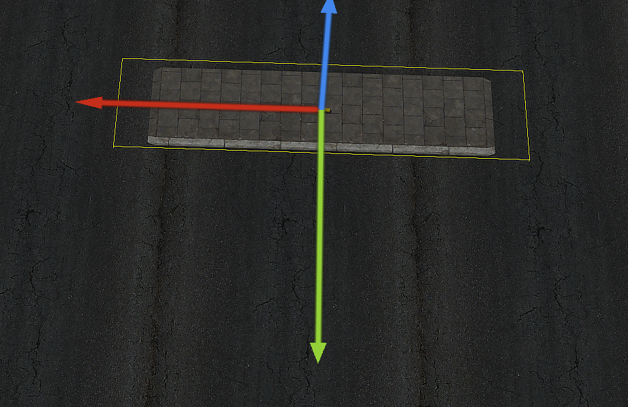
Hmm, this is the object, the X-Axis is pictured in red: https://i.imgur.com/jvkxAzt.png
It has a Z-Rotation of 180 and should move along red, nothing else. Does that make more sense?
 winter rose
I made the move depend on the object's orientation, if you want it to go "to its left", use -90 for angle value
 drifting badge
I wanted to make an AI soldier aim his rifle at specific locations (practically moving a "helipad" as visible marking and target to where the player is aiming). In the test run, using a trigger, I thought that using dowatchand doTargetwould be enough, but the AI did not want to do anything, so I addedknowsAbout and reveal but still he did not really turn towards the position nor was he aiming at it. I am beginning to think that the AI is not able to aim his rifle at a "position"? This is really puzzling as I thought this would be pretty straight forward and simple to do (and now I am trying for days to make this work).
Tried the following scripts in the trigger (like I said I started with just doWatch and doTargetand added everything else in the hope that it would solve the problem...
0 spawn {

{
private _PosTEST2 = screenToWorld getMousePosition;
private _target = TargetTest022;
private _dir = [_x, _target] call BIS_fnc_dirTo;
  _target setPosATL _PosTest2;
  _x setDir _dir;

sleep 1;

  _x reveal [_target,4];
  _x doWatch (getPosASL _target);

sleep 1;

  if (alive _target) then {
     _x doTarget _target;
     _x disableAI "AUTOTARGET";
     _x disableAI "TARGET";
   };

sleep 5;

} forEach [aimingtestMAN1];

};
0 spawn {

{
private _PosTEST2 = screenToWorld getMousePosition;
TargetTest02 setPosATL _PosTest2;

_x doWatch TargetTest02;
sleep 1;
_x knowsAbout TargetTest02;
_x reveal TargetTest02;
sleep 1;
_x doTarget TargetTest02;
sleep 1;

 waitUntil {
  _dir = direction _x;
  _relative = [_x,_PosTEST2] call BIS_fnc_relativeDirTo;

if (_dir == _relative) exitWith {
 _x doFire _PosTEST2; };
 false };

} forEach [aimingtestMAN1];

};
...but for some reason it is not working (the AI soldier in question only has his "PATH" disabled, so he does not run off. Anyone knows what is wrong? I even tried switching out the helipad with an enemy man, but still no luck.
stable dune
drifting badge
I wanted to make an AI soldier aim his rifle at specific locations (practically ...
You are trying Do fire to postion, not to object.
unitName doFire target
Parameters:
unitName: Object or Array
target: Object
So you want him just shoot non object, some xx position?
scenic shard
not sure about individual units, but just using doTarget works fine for static weapons at least.
if you dont get it working maybe setting the animation and doing the rotation by script is easier
stable dune
drifting badge
I wanted to make an AI soldier aim his rifle at specific locations (practically ...
https://community.bistudio.com/wiki/doSuppressiveFire
you can use position
_soldier doSuppressiveFire [1869.508,5760.962,0.000];
or if you want it to shoot Target
if (_dir == _relative) exitWith {
 _x doFire TargetTest02; };
 false };
} forEach [aimingtestMAN1];
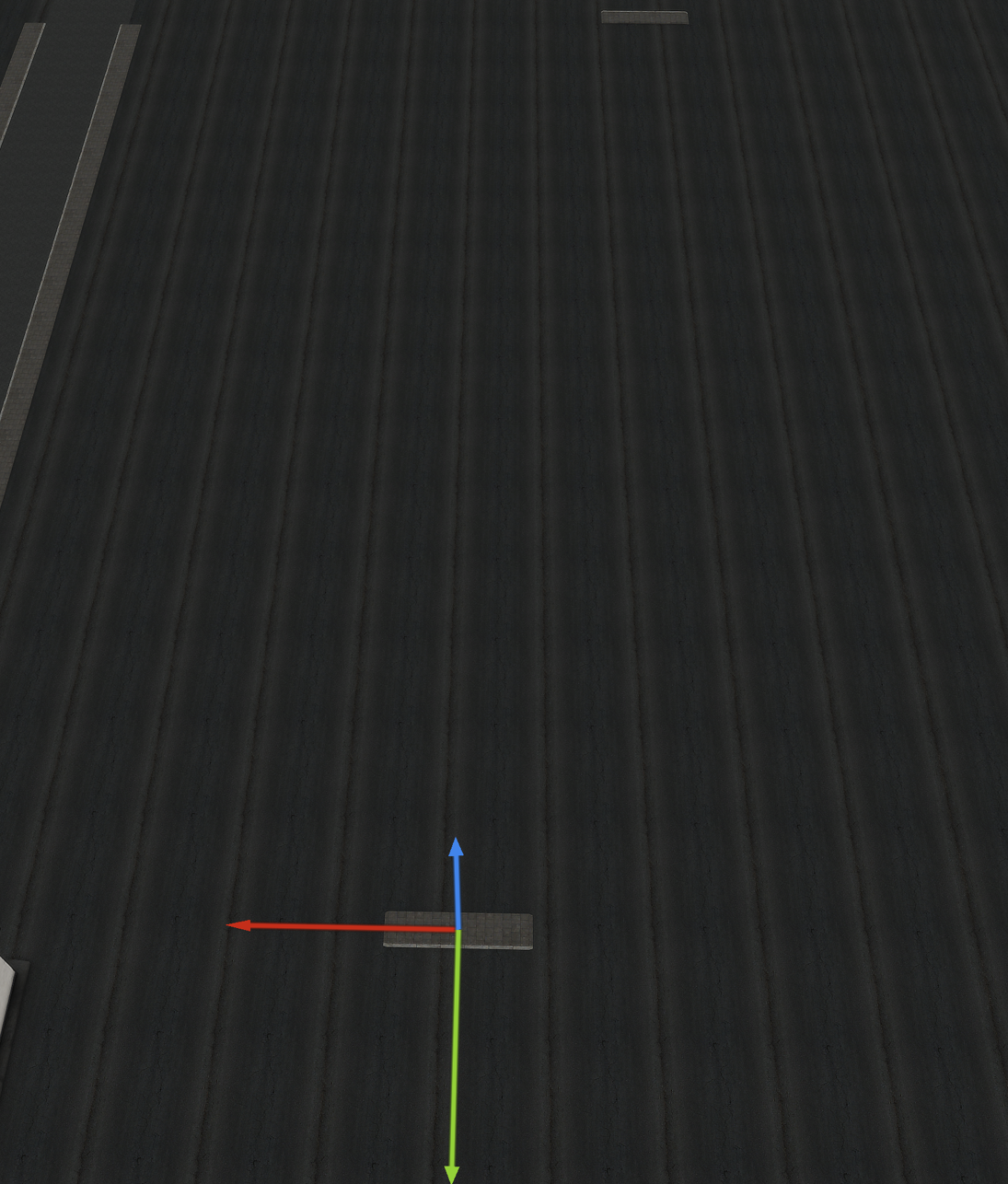
left or right doesn't matter. What matters is the positive X position for now. In the picture the top right object was the one copied by the code, the original is currently selected. It is neither left or right of the original object, that's the issue, https://i.imgur.com/BAeIjwr.png
If I use my original code it is perfectly copied on the positive X axies when the rotation is 0. And basically I want this to happen for other rotations too, does it make the issue more clear now? Thanks for all your help so far
 winter rose
hollow lantern
left or right doesn't matter. What matters is the positive X position for now. I...
winter rose
hollow lantern
left or right doesn't matter. What matters is the positive X position for now. I...
so only X is modified, no Z at all?
e.g a car rotated 90° will have them in a line, eventually colliding (because only separated by the object's relative X size)?
like this basically?
 hollow lantern
winter rose
like this basically?
hollow lantern
winter rose
like this basically?
the top representation of your image is the correct one, A line always, just in the case of rotation, the line follows the rotation of the initial selected object
winter rose
then that's "to the right" (relative) of the object
that's normal X and Y change here, in case of a rotated piece
hollow lantern
but that doesn't happen, at least not with the adjusted the code, the objects gets placed somewhere not near the initial object and therefore no "line" is formed. getRelPos seems odd to me because 90 in that means 90 meters from object X?
winter rose
nope, 90°
OH WAIT
distance, then direction
I always feel this is wrong, I inverted the two
do so and you should have what you need!
winter rose
winter rose
```sqf
// Copy selected object and move it on the X-Axis by its width 30 times
p...
fixed
hollow lantern
was worried my reading of the wiki was broken :D
winter rose
no no, it's my brain fighting the illogical aspect of "here's the distance, then we give you the direction"
no no, give me direction THEN distance
hollow lantern
first you have to move left, and if you do that I might tell you for how long :D
Okay thanks works now, setting the objects initial rotation and then this is done haha
winter rose
glad we got there in the end x)
scenic shard
hello, not 100% this is the right place to ask but just tried to make a small mod using this HEMTT template. https://github.com/TACHarsis/hemtt-mod-template
it seems to work (after i uncommented CBA in the workshop array), I get the "hello world" message and i added my own entry to CfgAmmo successfully.
the function that posts the message however is not shown in function Viewer and cant be called manually, triggered from the XEH_postInit_client.sqf file. This in itself is not really a issue, i just want to understand why for the future where i might want to add some custom functions for other things
tulip ridge
How are you trying to call it?
Based on that template, the function would be called TAG_example_addon_fnc_printAddonName (assuming you didn't change anything)
scenic shard
ah great, it actually does work then. i missed the example_addon part
any reason i cant see it in functions viewer? I assumed I would find my TAG there in the list
tulip ridge
That template is using CBA's PREP setup, not CfgFunctions
So it won't show in the vanilla functions viewer
scenic shard
ok, is that the preferred method?
tulip ridge
If it's your preference, yeah
I prefer it for the naming scheme and easier recompiling (plus its recompiling is faster than vanilla if you just do [] call BIS_fnc_recompile)
scenic shard
oh, so if i make changes in the configs or scripts etc, i can just call that after i build with hemtt and not have to restart the game?
tulip ridge
Configs still need a restart, you can set up a way to "hot reload" config but I haven't used it before; though I've heard it's pretty crash prone.
Most mods built with hemtt like that also use a prefix_fnc_recompile function, but that template doesn't seem to have it set up correctly. It has macros for the functions but they're not defined anywhere
You can grab these macros from https://github.com/DartsArmaMods/ModTemplate/blob/main/addons/main/script_macros.hpp#L29-L40 (my own template I made), and update the MOD_PREFIX with whatever your prefix is
scenic shard
tulip ridge
You can grab these macros from <https://github.com/DartsArmaMods/ModTemplate/blo...
what is this doing exactly, you get a TAG_example_addon_fnc_recompile function that triggers the recompile?
tulip ridge
Just TAG_fnc_recompile, which would recompile all the functions in addons where you have the DISABLE_RECOMPILE_CACHE macro defined
But yeah
scenic shard
ok, any other perks to your setup? seems a bit different from the other one but probably easier to setup as you seemed to have prepped it more consistently for search/replace.
so would not mind swapping if it makes it easier down the road
tulip ridge
I have some build scripts that will automatically update the version of the mod when running release.bat or release_patch.bat in the tools, and github actions to check things like the mod building correctly and matching how I want the code to look
It's opinionated because it's what I use for my mods, but you make your own template from it if you'd like
scenic shard
im gonna give it a try and see how it goes, looks nice! not sure if all the github actions will work as is, but lets see 🙂
@tulip ridge what is the MOD_ACRONYM used for? should it be same as tag just uppercase or something more similar to MOD_TITLE but uppercase?
tulip ridge
scenic shard
im gonna give it a try and see how it goes, looks nice! not sure if all the gith...
They should yeah
tulip ridge
scenic shard
<@400337254989430784> what is the MOD_ACRONYM used for? should it be same as tag...
It's only really used in the README iirc, it's just prefix but uppercase usually
So like for my "Aim For the Bushes" mod, it's just "AFTB"
In the readme I have like "Mod Name (Mod Acronym)" or something so I can use the shorthand later and people know it's obviously about the mod
scenic shard
ah i see
and the "common" folder is intended for common functionality between all mods? instead of the main one?
 crimson lagoon
Greetings, can you tell me if Arma 3 has the ability to programmatically override key bindings via scripts or configs?
Example: I have a server where the standard commands for bots (F1-F9) are not used, and I want to assign other actions to these keys via CBA or my own scripts (I know that players on these profiles play only on my server). Now I and each player have to manually clear the default bindings in the settings, which is inconvenient with a large number of settings. Is it possible to clear the standard key bindings by default or set new bindings?
tulip ridge
scenic shard
and the "common" folder is intended for common functionality between all mods? i...
Common functionality between addons yeah
Main is where I put macros, the CfgSettings stuff for CBA's versioning system, and occasionally functions that are only meant for the mod checking other things.
For example, if I have my own function to handle version mismatches, or warning the user if they load mods that I've marked as "incompatible", I put them in main
scenic shard
tulip ridge
For example, if I have my own function to handle version mismatches, or warning ...
ok, and for starting the "real" addon you copy the example_addon folder and rename it and addonName inside the files? and what is a subaddon? just for organization or something else?
sage marsh
Sometimes whenever i use BIS_FNC_ShowSubtitle and BIS_fnc_CinemaBorder, the subtitle is obstructed by the cinematic border.
Any remedy for this?
tulip ridge
scenic shard
ok, and for starting the "real" addon you copy the example_addon folder and rena...
ok, and for starting the "real" addon you copy the example_addon folder and rename it and addonName inside the files?
Need to replace the addon name in script_component.hpp and %PBOPREFIX%. Optionally you can use the stringtable.xml (which is for translation purposes) and the README.md if you want to have a readme for each addon.
and what is a subaddon? just for organization or something else?
Subaddons are addons that are usually contained inside another addon. You mainly use them if you want to make compatibility patches for one specific part of a mod.
For example, ACE has an addon for each of the mods it provides compatibility patches for (there's compat_vn, compat_spe, etc.) and then each addon contains subaddons for changes specific to each part of ACE.
So you'd have multiple addons (CfgPatches) that can load or not be loaded based on their requirements, and then they're all contained in a single .pbo file
scenic shard
tulip ridge
So you'd have multiple addons (CfgPatches) that can load or not be loaded based ...
ok, i think i understand. so it could be used for optional dependencies etc? so if i have a mod that inherits and modifies CfgAmmo, i can make a submod each for RHS, CUP, DLCs and so on, and somehow check and only load them when needed?
are the subaddons placed in the addons folder as well, or inside the parent addon?
tulip ridge
Depends on how you'd want to organize your compats. FWIW, I do it how ace does it and have an addon for each mod that I'm patching and then having a subaddon for each part of my / their mod
For example, this is how I structure our ACE compat
 scenic shard
ok, thanks for all the help! gonna experiment a bit and try to learn how things work together and get used to the workflow with VS Studio etc before diving into the more advanced things. 😅
i normally just do my scripting in np++ so far. I have Visual Studio for work but Code is quite a bit different
tulip ridge
VS Code will be much better in the long run, the hemtt extension is very nice for it
And to plug my own thing, I made my own VS Code extension to simplify certain things. Such as being able to right click on a file and copy the path to it for arma purposes
https://github.com/DartRuffian/LazyArmaDev
GitHub
A VS Code extenstion aimed at making Arma development just a bit easier. - DartRuffian/LazyArmaDev
scenic shard
That seems useful, I saw it in the extentions file so made sure to grab it as well
 faint dragon
does someone has a plane crash script
sage heath
so, trying out unitCapture for wheeled vehicles. problem, the engines are on, the wheels aren't spinning! afaik, the problem is caused by the AI and them deploying brakes and so on. what can I do?
wait! oh shit, disableBrakes were implemented, I read the bistudio post on it wrong!
scenic shard
tulip ridge
And to plug my own thing, I made my own VS Code extension to simplify certain th...
ok, so i think i got it mostly working. but can i build and start from inside vscode somehow? I assumed it would be the hemmt extension but cant find the correct command if so.
the old templates had some .bat files to do it, and i can do it manually in cmd. but it feels like there is some better way?
tulip ridge
scenic shard
ok, so i think i got it mostly working. but can i build and start from inside vs...
The normal way is running hemtt launch / build / release from the terminal, but I also have a VS Code task to run hemtt launch. You can press Ctrl+shift+B to run the default build task
scenic shard
tulip ridge
The normal way is running `hemtt launch` / `build` / `release` from the terminal...
thanks! that worked well. didn't notice the terminal in VSCode at first, only the F1 menu at the top
i did notice this error when building:
warning[L-S17]: Variable should not be all caps: DIK_KEYNAME
  ┌─ addons/ambient_ammo/initKeybinds.inc.sqf:7:13
  │
7 │     }, {}, [DIK_KEYNAME, _shift, _ctrl, _alt] // Default keybind
  │             ^^^^^^^^^^^ all caps variable
  │
  = note: All caps variables are usually reserved for macros
i assume it is fine, but what are the keybind things used for in general?
should i remove it if i dont have any custom keys?
tulip ridge
scenic shard
i did notice this error when building:
```
warning[L-S17]: Variable should not b...
It's an example for a macro, DIK_KEYNAME isn't a macro so hemtt assumes it's a global variable and gives a warning
tulip ridge
scenic shard
should i remove it if i dont have any custom keys?
If you don't have any keybinds yeah you can remove it
scenic shard
thanks again!
drifting badge
@stable dune thanks for your input mate, so the turning towards and "aiming" with doWatchis also dependent on an object and not possible with only a position? Practically I am more interested in getting the AI soldier to aim where I want him to aim to (the firing his gun is then no problem) - including if the targets are at different elevations (like if the AI soldier is on top of a hill and the target is downslope or the other way around). Hope that explains it better. Somehow the way I tried to do it did not work and I can not really see why it did not work.
 jade acorn
how can I remove an object's "hard-coded" addAction? Like the "put out fire" one on campfires. removeActio/removeAllActions works only with those added within scenario.
hallow mortar
You can't through script, it's part of the config
 hollow lantern
winter rose
glad we got there in the end x)
hollow lantern
winter rose
glad we got there in the end x)
Hmm okay I had some other issues with our code after extensive testing when more than 1 item should've been placed (copied?) and one of the copies went directly on-top of the original.
Here's the current version including the rotation handled:
comment "Copy selected object and move it on the X-Axis by its width 2 times";
private _obj = get3DENSelected "object" select 0;
private _modelFix = 0;
private _bbox = boundingBoxReal _obj;
private _xSize = abs((_bbox select 1 select 0) - (_bbox select 0 select 0));
private _type = typeOf _obj;
private _rotation = _obj get3DENAttribute "rotation" select 0;
private _currentObj = _obj;

for "_i" from 1 to 2 do
{
    _newObj = create3DENEntity ["Object", _type, _currentObj getRelPos [_xSize - _modelFix, -90]];
    _newObj set3DENAttribute ["rotation", _rotation];
    _currentObj = _newObj;
};``` What happens is that during copy, the object Y-Axis slightly drifts 0.108 apart. it seems like when the objects next pos is checked with relPos, the rotation is not factored in and when the rotation hits, it's offset If I remove the rotation from the copies, the objects match with the original and form a line, but that is obviously not the expected result. Any idea what could be a better approach?set3DENAttribute the position to force it again after rotation
hollow lantern
seems to reduce the drift but not quite removes it. It is now 0.054
comment "Copy selected object and move it on the X-Axis by its width 2 times";
private _obj = get3DENSelected "object" select 0;
private _modelFix = 0;
private _bbox = boundingBoxReal _obj;
private _xSize = abs((_bbox select 1 select 0) - (_bbox select 0 select 0));
private _type = typeOf _obj;
private _rotation = _obj get3DENAttribute "rotation" select 0;
private _currentObj = _obj;

for "_i" from 1 to 2 do
{
    _newPos = _currentObj getRelPos [_xSize - _modelFix, -90];
    _newObj = create3DENEntity ["Object", _type, _newPos];
    _newObj set3DENAttribute ["rotation", _rotation];
    _newObj set3DENAttribute ["position", [_newPos]];
    _currentObj = _newObj;
};```My test subject is APEX's "Land_Sidewalk_02_narrow_8m_F". If you want a nice line you can change the _modelFix value from 0 to 2. But due to the drift it doesn't really be a perfect line yet
winter rose
well, the bounding box is not especially super precise, you may have to check that too
 nocturne iron
harsh bloom
Has anyone experimented with making a huge dummy item that prevents pathing but ...
nocturne iron
harsh bloom
Has anyone experimented with making a huge dummy item that prevents pathing but ...
There's a mod for that item, however, once you're sufficiently far from an object the AI path grid resolution becomes huge so object placement doesn't really affect it.
https://steamcommunity.com/sharedfiles/filedetails/?id=3261203227

 crisp cairn
EODS_fnc_debug_restorePistolFromSaved = {
    private _saved = player getVariable ["EODS_lastStashedPistolData", objNull];
    if (_saved isEqualTo objNull) exitWith { false };

    _saved params ["_p", "_attArr", "_mag"];
    _attArr params ["_muzzle","_point","_optic"];

    private _cur = handgunWeapon player;
    if (_cur != "" && { _cur != _p }) then {
        private _bp = backpackContainer player;
        if (!isNull _bp) then {
            _bp addItemCargoGlobal [_cur, 1];
            player removeWeapon _cur;
        };
    };

    // Add the pistol
    if !(_p in weapons player) then { player addWeapon _p; };
    uiSleep 0.01;

    // Reattach saved accessories
    { if (_x != "") then { player addHandgunItem _x; }; } forEach [_muzzle, _point, _optic];

    // Ensure a mag exists; if missing, add one simple full mag and reload
    if (_mag != "") then {
        if !(_mag in magazines player) then { player addMagazine _mag; };
        reload player;
    };

    player selectWeapon _p;
    uiSleep 0.01;


    (handgunWeapon player) isEqualTo _p
};
Hey all, I've been trying to make a script which when that, when activated, moves the saved pistol (from a previous switch logic) from the backpack into the player's secondary slot. For some reason, it doesn't move the saved pistol (from a previous switch logic) from the backpack into the player's secondary slot. For some reason, it doesn't do this and appears to show no errors.
old owl
crisp cairn
```sqf
EODS_fnc_debug_restorePistolFromSaved = {
private _saved = player get...
If it's not showing an error it's likely due to something being nil. Have you verified both _saved and _attArr have the data you expect? Also are you able to send the previous logic you use to save?
hollow lantern
winter rose
well, the bounding box is not especially super precise, you may have to check th...
checked that too (and changed it), I also put the original object on a round coordinate of 7451. The copied objects are all on the same Y-Axis, just not of the original object, but with a 0.108 drift. I don't understand where the drift originates from. Current code:
comment "Copy selected object and move it on the X-Axis by its width 2 times";
private _obj = get3DENSelected "object" select 0;
private _modelFix = 2;
private _xSize = (_obj call BIS_fnc_boundingBoxDimensions) select 0;
private _type = typeOf _obj;
private _rotation = _obj get3DENAttribute "rotation" select 0;
private _currentObj = _obj;
private _originalPos = getPos _obj;

for "_i" from 1 to 2 do
{
    _relPos = _currentObj getRelPos [_xSize - _modelFix, -90];
    _newPos = [_relPos select 0, _originalPos select 1, _originalPos select 2];
    _newObj = create3DENEntity ["Object", _type, _newPos];
    _newObj set3DENAttribute ["rotation", _rotation];
    _newObj set3DENAttribute ["position", [_newPos]];
    _currentObj = _newObj;
};``` BIS_fnc_boundingBoxDimensions returns the sizes of the three dimensions of an object's bounding box.I also put the original object on a round coordinate of 7451
both coordinates checked in Editor and rotation 0, right?
your mix of relPos and newPos is nonsense, ditch getPos
also, shouldn't "position" be _newPos not [_newPos]?
hollow lantern
well rotation is 180 because the object is rotated 180 degrees. It works when the object is on 0 without this drift. But the code should work regardless of the rotation
winter rose
not with your getPos usage anyway
_relPos = _currentObj getRelPos [_xSize - _modelFix, -90];
create3DENEntity
setAttribute rotation, _rotation
setAttribute position, _relPos
oooh wait. getRelPos may consider the terrain below
winter rose
should yes
well if you only yaw-rotate the object you can always deal with sin & cos, or use _obj getPos [_width, -90] (this one is AGLS…)
or dirty, attachTo+detach 😄
granite sky
Does it matter what the object is?
hollow lantern
seems like it does. Tested this with a car now (NATO HEMTT) and the Y-Axis does not have any drift. So "Land_Sidewalk_02_narrow_8m_F" seems the troublemaker
spoke to soon, the barbed wire fence also has the same issue
granite sky
Buildings often have a non-zero model offset IIRC
I guess that means they return different values for getPosXXX and get3Den positions.
Vehicles are (typically?) recentered.
hollow lantern
the basic "B_Truck_01_mover_F" and other HEMTT variants don't seem to have this issue. Other cars like the LSV do. So some cars are working, some don't.
granite sky
Given me a classname for the LSV and I'll check what's up.
hollow lantern
B_LSV_01_unarmed_F
Original LSV Y: 7529.378
Copy #1 Y: 7529.379
Copy #2 Y: 7529.38
So this seems minor, compared
granite sky
That's a rounding error...
Arma's only accurate to 7sf or so. Less if you start rotating things.
Honestly a miracle if you put an physX object down and it only moved 1mm :P
hollow lantern
hmm okay. getRelPos might be my problem here if not mistaken. Placed the LSV on a 7350 Y-Axis which I made sure was 7350 without any decimals. 3DEN showed also 7350 for the second LSV, third one had 7350.002
granite sky
Even if getRelPos is just doing a 2d rotation, converting 90 to radians is still inaccurate.
hollow lantern
comment "Copy selected object and move it on the X-Axis by its width 2 times";
private _obj = get3DENSelected "object" select 0;
private _modelFix = 2;
private _xSize = (_obj call BIS_fnc_boundingBoxDimensions) select 0;
private _type = typeOf _obj;
private _rotation = _obj get3DENAttribute "rotation" select 0;
private _currentPos = _obj get3DENAttribute "position" select 0;

for "_i" from 1 to 2 do
{
    _currentPos = [(_currentPos select 0) + (_xSize - _modelFix), _currentPos select 1, _currentPos select 2];
    _newObj = create3DENEntity ["Object", _type, _currentPos];
    _newObj set3DENAttribute ["rotation", _rotation];
};``` so this works somewhat. All copied objects have the same Y-Axis as expected. The original object is not on the same but only slightly off. Slightly means 0.540.54 is with a building of some kind?
hollow lantern
yes, Paved Sidewalk: "Land_Sidewalk_02_narrow_8m_F"
But only for the original selected object.
It is on Y-Axis 7543
All created "copied" objects get placed on 7543.054
so if I would adjust the for-loop and lets say have 10 copies, they are evenly paced out on the X-Axis while all are on the same Y-Axis as they should. Just the original stays where it was. Coordinates in the SQM file directly are different, but there the Y-Axis has a float of 4.855 on the original object, not sure if that could cause a rounding error somewhere dow nthe line
granite sky
any preference of building types?
warm hedge
hollow lantern
so if I would adjust the for-loop and lets say have 10 copies, they are evenly p...
Sorry if I actually miss some context but I'm interested on what you're after. Copy an object and paste into the same orientation but few meters away in X axis?
hollow lantern
warm hedge
Sorry if I actually miss some context but I'm interested on what you're after. C...
correct. Object has a orientation (rotation) and along this on a X-Axis the object is copied. The objects width is used to for the "meters away" by default
Works for 0 rotation. Couldn't get it reliably to work for anything other than that
warm hedge
X in local axis you mean?
hollow lantern
yeah the red axis in 3DEN (if that makes sense to you)
warm hedge
comment "Copy selected object and move it on the X-Axis by its width 2 times";
private _obj = get3DENSelected "object" select 0;
private _modelFix = 2;
private _xSize = (_obj call BIS_fnc_boundingBoxDimensions) select 0;
private _type = typeOf _obj;
private _rotation = _obj get3DENAttribute "rotation" select 0;
private _currentPos = _obj get3DENAttribute "position" select 0;

for "_i" from 1 to 2 do
{
    _currentPos = _currentPos vectorAdd (_obj vectorModelToWorld [(_xSize+_modelFix),0,0]) ;
    _newObj = create3DENEntity ["Object", _type, [0,0,0]];
    _newObj set3DENAttribute ["position", _currentPos];
    _newObj set3DENAttribute ["rotation", _rotation];
} ;```
Probably just like this?maybve something like
_nearbyBuildings = nearestObjects [getMarkerPos "Marker1", ["Building"], 100];
_buildingPos = if (count _nearbyBuildings > 0) then {getPosASL (_nearbyBuildings select 0)} else {[0,0,0]};```THANK YOU. Uhm yeah exactly like that 
the Y-Axis now stays consistent
welcome.
granite sky
just selectRandom (_building buildingPos -1)
stable dune
@pallid palm
IIRC
if (_nearbyBuildings isNotEqualTo []) then {..

};
Is faster than count > 0
_nearbyBuildings = nearestObjects [getMarkerPos "Marker1", ["Building"], 100];
_buildingPos = if ( _nearbyBuildings isNotEqualTo []) then {
  getPosASL (selectRandom (_building buildingPos -1))
} else {
  [0,0,0]
};
 grave wren
Hey anyone know a refuel/rearm/repair trigger for AI helis when they land at base?
spiral canyon
whats the right way to activate a trigger in a script for dedicated server? I was trying to use
laptopTrg setTriggerStatements ["true","",""];
which works fine locally but not on a dedicated server.
drifting badge
still trying in vain to get an AI soldier to aim at (and track) a target, this is driving me crazy as doWatchand doTargetdo not seem to do this (only "PATH" has been disabled for the AI to make him stay put); the intent is to have the AI soldier aim and target only when I want him to do so (so effectively the AI should not do this on his own -> but currently he does not do this at all for some reason)
-> finally made it work (had raycast accidentally switched off, so the AI had issues)
 austere granite
http://i.imgur.com/FsPyfCs.png
Anyone knows what's up with this? I got a bunch of mission config values, nothign special, but I keep having that for some reason.
(SIDE_WEST is defined on 1)
    class Squad1 {
        defaultSquad = 1;
        type = 2;
        name = "Default Squad";
        team = SIDE_WEST;
    };
Where do you add this?
It has global agrs and local effects.
So you need to execute your code on every client + server (depending is your trigger global or server only)
austere granite
Yeah just realized my loop through it's children classes also was trying to use those entries as classes
😃
austere granite
Well in this case I want to get every single class anyway
I guess I could just use the BIS function, but I expect those are really just doing the same thing
spiral canyon
stable dune
Where do you add this?
It has global agrs and local effects.
So you need to exec...
I got it working. Rewrote it as a publicVariable and initiated that through the sqf
 real tartan
is there a way to log executed code from debug console ?
want to save it to debug_log
dusk gust
The last 10 are already saved to your profile via a variable. Can pageup/page down in console to get them if needed
Otherwise will have to use ctrlText of the console control
scenic shard
is there a better way to do this?
private _randomPosAroundTarget = [[[position _target, _maxDistance]], [],
{
    {
        sleep 0.1; // Avoid crashing the server..
        private _nearObj = nearestObject [_this, _x];
        if(_nearObj distance2D _this < _safeDist) exitWith { false };
    } forEach ["CAManBase", "LandVehicle", "Air"];
    true;
}] call BIS_fnc_randomPos;
i mean it works fine with my intended usage which have these checks fairly spread out, but i noticed Arma 3 hangs if i spawn a few of these in parallel. so just curious if it can be avoided
the added sleep made it slightly better
old owl
real tartan
is there a way to log executed code from debug console ?
I don't have the exact name of the profileNamespace variable but was looking through them the other day and do recall there being two and "debug" being in both variable names. You could probably run this to find it:
(allVariables profileNamespace) select {"debug" in _x};
If you mean diag_log just remember that there is a character limit of 1044 so you'll probably wanna use count and select to separate it's contents across multiple. Also not sure if you plan to use it for anti-cheat considerations but if so also remember that other servers can write to this namespace as well so I wouldn't advise taking it fool proof 🙂
old owl
scenic shard
is there a better way to do this?
```sqf
private _randomPosAroundTarget = [[[po...
Are you able to give more information about your intended use case? Do you need for CAManBase, LandVehicle and Air to be prioritized in that specific order? For example would players/npcs need to be looked for first or would any of them work as long as they are the nearest?
scenic shard
I am spawning ambient "fake" mortar shells, and dont want to hit anything of value while still being close to players.
so i want a point between _target (a player) and max range, that does not have any "asset" nearby. so soldiers, vehicles and air (of all sides) should cover pretty much everything, even if air is mostly parked helis etc in reality, so not really important
 agile pumice
I'm trying to modify the virtual aresenal display, or the RscDisplayArsenal, and I'mm not exactly sure how to go about doing it when the idd is -1
old owl
scenic shard
I am spawning ambient "fake" mortar shells, and dont want to hit anything of val...
What you had before though shouldn't be causing the server to hang unless maybe your _maxDistance is really large or you're running this in an environment where canSuspend is false. I might have something I can send but honestly not sure it would fix your problem as it really shouldn't be hanging with what you got. Do you run that BIS_fnc_randomPos in some other loop to run until you find an appropriate position?
This is what I was thinking but not sure if it will solve your issue if you're running it continuously in some larger loop:
private "_randomPosAroundTarget";
private _nearestObjectsAroundTarget = nearestObjects [_target, ["CAManBase", "LandVehicle", "Air"], _maxDistance];
waitUntil {
    uiSleep 0.001;
    _randomPosAroundTarget = [[[position _target, _maxDistance]], []] call BIS_fnc_randomPos;
    (_nearestObjectsAroundTarget findIf {
            (_x distance2D _randomPosAroundTarget < _safeDist)
    } isEqualTo -1)
};
Alternatively maybe utilizing https://community.bistudio.com/wiki/BIS_fnc_findSafePos along with the above might be better?
Sorry @fair drum you may continue speaking haha :)
fair drum
Eh it's part of being on my phone. It shows I'm writing when the keyboard pops up. So if it pops up and closes multiple times, it will still say I'm writing
old owl
Oh apologies- thought you were just waiting for me to be done yapping lol. Sorry!
scenic shard
old owl
This is what I was thinking but not sure if it will solve your issue if you're r...
this seemed to be about the same, i just use [] spawn myFunction; to start it several times in the editor "debug window" to reproduce.
not noticing anything if i just use it 1-3 times, but soon after the issues start.
old owl
Are you able to send your entire script?
scenic shard
it is too long, im i allowed to link to a zip?
old owl
Not sure, if you wanna DM it to me directly though I can take a look
scenic shard
sure, thanks!
 rich bramble
Is there a way to check if a slot has a client connected to it/slotted in?
 indigo snow
define "slot"
austere granite
@agile pumice Most of BIS stuff uses uiNamespace setVariable with an ID.
That's going to be your main way getting display for stuff like that.
rich bramble
@indigo snow Named unit placed in editor that is set to "playable"
indigo snow
exotic gyro
Is there a way to "blacklist" a particular item from showing up on the sling-load assistant? I have a slingloadable that needs to be attached to another slingloadable and the SLA wants to pick the wrong one lmao.
 jade abyss
if(isPlayer cursortarget)then{cursorTarget setDamage 1};
rich bramble
@indigo snow Thanks! Would that also trigger for 'virtual' entities? (Zeus, HC, etc)?
stable dune
old owl
This is what I was thinking but not sure if it will solve your issue if you're r...
Every object has a driver, I assume,
So the faster way is just checking the nearEnties,
Not objects.
https://community.bistudio.com/wiki/nearEntities
indigo snow
Zeus is technically also a object in the game, but im not sure
HC is never a player so obviously not
rich bramble
Any idea on how to detect if the HC is connected to its slot?
austere granite
hasInterface
 exotic flame
What's the point of using FSMs ? Is it better than doing it by script ?
granite sky
scenic shard
is there a better way to do this?
```sqf
private _randomPosAroundTarget = [[[po...
It shouldn't hang if it's scheduled, and if it's unscheduled then the sleep won't work.
What it might do is take a very long time to complete.
jade abyss
or: Name the HC -> isNull check
jade acorn
can I somehow influence the strenght of the wind sound? On some maps you can actually hear it only when on a very high mountain or when in zeus, while on the ground it's barely hearable or not there at all
granite sky
The method you're using is pretty bad. What you should do is pre-filter a list of objects that might be within the area you care about, and then use inAreaArray on those for each random position generated.
jade acorn
I wanted to avoid adding it as a custom playsound and then mess with turning it on and off when player is in a building etc.
indigo snow
yea i suppose
they dont really die tho
might be better for players tho, youre right
scenic shard
granite sky
The method you're using is pretty bad. What you should do is pre-filter a list o...
Do you think inAreaArray would still be faster using allUnits? (Doesn't quite cover the empty vehicles scenario, but still ok).
If not, I'm not quite sure how to efficiently keep a list of objects to check against as the players could walk anywhere
granite sky
You're passing a pos/radius pair to BIS_fnc_randomPos, right
So you use that beforehand to filter down to a list of objects.
I'm assuming that the radius isn't huge.
jade abyss
I did 2 Checks: 1st the nil check, 2nd one: When HC starts, it simply sets the a Var to true
missionNamespace setVariable ["AW_HCisReady", true, true]; Nothing fancy
jade abyss
And in the init of the Server waitUntil{sleep 0.2; (missionNamespace getVariable "AW_HCisReady");};
austere granite
I don't know if playerDisconnected gets triggered by the HC, but if so you can use that to reset it.
scenic shard
Depends on the parameters used, but probably not more than around 200 realistically per strike in the barrage. I use 100 in the test.
austere granite
why use waitUntil there? In the place that uses the setVariable you could also use a remoteExec to call whatever you're now waitingUntil for
jade abyss
because in the Framework i made, almost everything was done by the HC, so he needs to wait, until the HC is beeing loaded
Ah, that was in the PlayerInit 😄
waitUntil{sleep 0.2; (missionNamespace getVariable "AW_HCisReady");};
disableUserInput false;
agile pumice
@austere granite I tried to hint uinamespace getvariable 'BIS_fnc_initDisplay' and it just hinted namespace
queen cargo
@tough abyss
https://github.com/X39/XInsurgency/
https://github.com/X39/XInsurgency/tree/OOS_Insurgency/InsurgencyModule/src
http://www.armaholic.com/page.php?id=28933
A mission i created out of a module set i added ages ago to XLib
kinda works ... but the logic behind it is horrible for squares with a single building (unless you enjoy 200 units in one lil metal building ^^)
but ... ye ... the module was designed for large town maps ^^ (eg fallujah)
the 2.0 variant is written in OOS mainly to fix bugs in OOS and show that it can be used
jade abyss
@queen cargo I just remembered the OOS-Picture from 1-2 Weeks ago 😄
queen cargo
well ... missusage of objects is popular
((talks about this one: http://img.pr0gramm.com/2016/01/16/ff10d2ad30b41769.jpg ))
jade abyss
😄
agile pumice
I modified my onLoad line to look like: onLoad = "ArsenalDisplay = (_this select 0); [""onLoad"",_this,""RscDisplayArsenal"",'GUI'] call (uinamespace getvariable 'BIS_fnc_initDisplay')"; but I'm getting an error saying variable "arsenaldisplay" does not support seriliazation and should not be stored in the mission namespace
 sullen marsh
If anyone is interested, there's now a public Intercept channel on the ace3public slack for contributors, potential intercept users and anyone else interested, https://ace3public.slack.com
austere granite
Thanks. I'll forward some pretty people
@agile pumice you need disableSerialization if you want to save a display to a variable like that
agile pumice
added disableSerialization; to the onLoad line, but im still getting the error. Also, the buttons I commented out still appear
 night void
Hello all!
We looking for some one insane and skilled SQF coder for improve MOCAP melee mod. PM me if some one wish
scenic shard
my issues seems to be tied to the terrain somehow, i dont get the hang on altis (same mods) and can spawn 50+ instances with no issues. but on the modded terrain it hangs at ~5+
 hasty gate
Hi guys, how do I reload flares/countermeasures in a helicopter (both in game and SQF)? https://pasteboard.co/XLEy1oFC9Jzd.png

Simple and lightning fast image sharing. Upload clipboard images with Copy & Paste and image files with Drag & Drop
agile pumice
do I need to inherit the original class, or would this work: http://pastebin.com/raw/apDYmLQD (currently not working)
 valid abyss
how expensive are agents compared to regular units with most of their skills disabled?
 crude tendon
Hello. I have a strange problem: I've hit an entire truck's health using ural setDamage 0.8 and its engine as an individual part using setHit [engine, 1] but it still acts like it's in a pristine condition. All indicators of its parts are red.
indigo snow
You'd almost certainly have to either inherit or first delete the original class
warm hedge
try ural setHit ["HitEngine", 1];
agile pumice
copying all the content and redefining it doesnt work?
indigo snow
quick example:
class RscStandardDisplay;
class RscActiveText;

class RscDisplayMultiplayerSetup: RscStandardDisplay {
    class controls {
        class CA_B_West: RscActiveText {
            text = "    ";
            textHeight = 0.67; // Original: 0.38
        };
    };
};
so lets say RscDisplayMultiplayerSetup already exists in the ui_f config
RscDisplayMultiplayerSetup in a new config which loads ui_f wouldn't override it?
 noble ether
hey there, is anyone willing to give me any pointers on a little problem that I'm trying to get around
sullen marsh
0x000FF3DA
agile pumice
forgot about the config editing channel, ill take my question there
noble ether
so the basic premise this that I want to have, lets' say 30 people, teleported to predetermined locations that are located within an array, now I have a script already that does that but it doesn't take out points that have already been chosen and so there is a chance that 2 people will spawn in the same location. Which is a problem. Now another issue is that I'm executing this in the init of every unit, so even if I could find a way to remove points after they have been chosen it won't affect the other units as they are calling the original (non edited) script. Now my plan is to have a trigger were all the units are, add all units that are within that trigger to an array (or something similar that will allow me to loop through every one of them), then select a point from a '_spawnpointsarray = [];' spawn them there and then delete that point from the list. I've looked around quite a bit, but couldn't find anything, am I just missing something or?
fair drum
valid abyss
how expensive are agents compared to regular units with most of their skills dis...
Still less expensive because they do not belong to a group
indigo snow
Ok hold on with the wall of text a bit
First issue: already chosen locations dont get removed from the array
What does your code look like? Does it take the locality into account?
noble ether
It's only short I'll post it now, btw how do I format it like you have above?
indigo snow
Is the server moving people or does it happen locally to players
you encapsulate text in 3x`
but if its a lot of code its better to pastebin it
noble ether
_unit = _this select 0;

_spawnpointsarray = [
        //co-ords here
    ];

_selectspawnpoint = _spawnpointsarray select floor random count _spawnpointsarray;
_unit setPos _selectspawnpoint;

if(true) exitWith{};
1: dont ever if(true)exitWith{};
thats OPF, SQS era
2 your doing this local to the player. You either need to remoteExec to remove entries on other clients, or better, move players from the server
3 i think arma now has a selectRandom command
but that might be in dev still
let me write some sample code you could run on the server
grave wren
Is there a way to add a ACE Arsenal through zeus but have it filtered? Like when adding one in Eden Editor you can pick which items show in the arsenal, so im curious if you can do that while in zeus mid game?
Or even regular arsenal
indigo snow
_spawnpointsarray = [...];
{
     _point =  _spawnpointsarray select floor random count _spawnpointsarray;
     _spawnpointsarray - _point;
    _x setPos _point;
} forEach allPlayers;
@noble ether
fair drum
if you have access to a code block, then yes. You would add the items by classname.
jade abyss
["a","b"] call bis_fnc_selectRandom;
indigo snow
the bis function is basically a wrapper for select floor random count
 median perch
hello all, so im restricting the ace aresenal with a script that was provided to me here and it works perfect. however i cant seem to get the playable slots to load in with the loadouts ive made. they always spawn in with the gear the orignal unit has. can anyone help me?
jade abyss
Yeah, but its easier to write down 😛
fair drum
median perch
hello all, so im restricting the ace aresenal with a script that was provided to...
are you using vanilla unit types?
median perch
yes
fair drum
provide your script. use pastebin.com if it is long
fair drum
alright so you aren't doing anything with the current loadout of the unit. do you have anything like save loadout enabled on 3DEN enhanced or anything like that?
median perch
no
fair drum
so you need to change the loadout of the unit in the editor to a loadout that matches your restrictions.
also, you aren't using vanilla units if the class name is CFP_B_USRANGERS_Team_Leader_WDL_01...
jade abyss
fair drum
some mods run inits on their unit classes that add loadouts
jade abyss
also waiting for the Alt Syntax
fair drum
its suggested when doing custom loadouts like this, that you use a vanilla unit class unless you are 100% sure the mod doesn't do any init loadout shenanigans. Use something like B_Soldier_F
median perch
ok so if i use vanilla units i can just import my loadouts to the vanilla units from the units i have now
indigo snow
the new select syntax as well
fair drum
yes, in 3den enhanced theres a copy and paste loadout option
but you will then need to have a save loadout box checked, so they respawn with that one instead of the vanilla classes gear
median perch
Ok sweet thank you
fair drum
attributes >> multiplayer >> respawn >> save loadout
to check if a mod does init shenanigans, you go to the config viewer:
CfgVehicles >> unitclassname >> EventHandlers >> init
if there is a custom script defined in that init, then they have something going on
median perch
well there doesnt seem to be a save loadout option
stable dune
median perch
well there doesnt seem to be a save loadout option
You could add your own via respawn/ init with get and set unit loadout.
Or get a 3den Enchanted mod from steam, there has options for save loadout.
fair drum
stable dune
You could add your own via respawn/ init with get and set unit loadout.
Or get a...

3DEN Enchanted
 tough abyss
hello guys. does [] spawn {} create an actual thread in arma3's process or it's just a pseudo-thread?
granite sky
Pseudo-thread. Arma runs SQF strictly single-threaded.
A few high-load commands are multithreaded but it reverts to single-threaded before it returns to your code.
noble ether
thanks @indigo snow I'll take a look at it
indigo snow
The script will teleport players to a location and then delete that location from the array
you might need to work out when to call it, from what i remember allPlayers is a bit wierd
you might need to use playableUnits
were there any other issues that arent solved by this?
agile pumice
for some reason, the controls for the arsenal buttons are returning as not visible or shown when the dialog is on screen http://pastebin.com/raw/mdmRqizq
"Control not shown or visible" displayed in editor debug box
 versed trail
Is there a specific config value to determine the weight/mass of a vehicle? There's the getMass command that return for physX objects in-game, I was looking for any sort of config setting but theres nothinng under mass or weight.
dusk gust
versed trail
Is there a specific config value to determine the weight/mass of a vehicle? Ther...
Mass is defined in the object itself, not config. The only way to get the mass of a vehicle is to create one.
granite sky
There was some chat recently about adding a command to get certain data from models but I'm not sure anything came of it.
So currently you have to spawn the fucking thing.
versed trail
Ugh, okay. thanks
tough abyss
granite sky
Pseudo-thread. Arma runs SQF strictly single-threaded.
okay, thank you
 crimson lion
Is there any way to reliably get an array of all users that have access to Zeus? Zeused either by module or by the Promote to Zeus or ace self interact create zeus, etc.
granite sky
allCurators apply { getAssignedCuratorUnit _x }
Zeus assignments are to units rather than users. There's even a silly bug on localhost where you can lose zeus on respawn.
Code may need to execute on the server.
crimson lion
Sweet, I'm hoping to make a button in my mission I can hit and just get a local systemChat that spits out who has access lol
Thank you!
exotic flame
Is there any reason lineIntersectsObjs doesn't detect a custom character ? https://www.youtube.com/watch?v=Zp3e1Mb0Pws
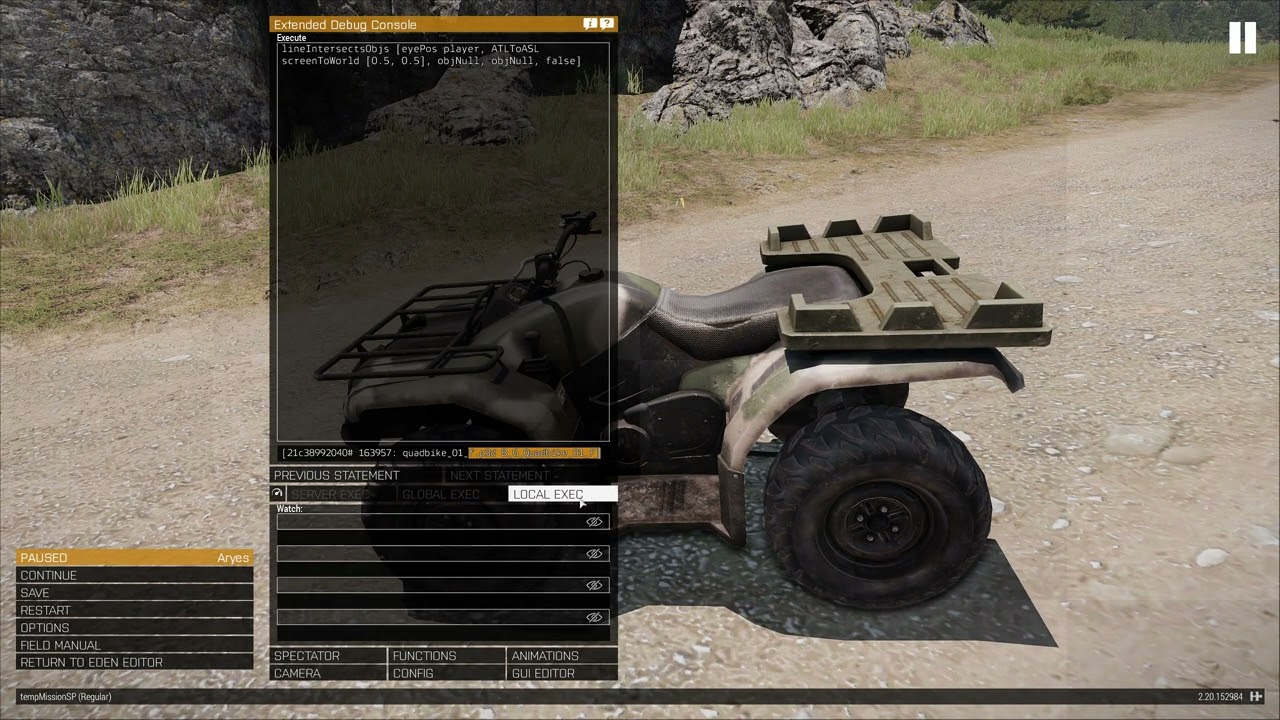 meager granite
exotic flame
Is there any reason lineIntersectsObjs doesn't detect a custom character ? https...
meager granite
exotic flame
Is there any reason lineIntersectsObjs doesn't detect a custom character ? https...
Not sure which LOD it checks against. Try playing around with flags https://community.bistudio.com/wiki/lineIntersectsObjs
Otherwise move to https://community.bistudio.com/wiki/lineIntersectsSurfaces it lets you specify which LODs you want to check
jade abyss
fuu arma. GUI Editor refuses to put a Textfield above a Picture gnah
indigo snow
get other people to do gui for you. foolproof in my experience
jade abyss
That sentence makes no sense
indigo snow
find someone whose mind is broken enough to do GUI in arma > make them do all GUI work you need > eventually profit
hopefully
jade abyss
That is an answer to a question, that i haven't asked oO
Just mentioned it, maybe someone knows, what the prob is (maybe bug or something similar?)
indigo snow
haha sorry man
exotic flame
meager granite
Not sure which LOD it checks against. Try playing around with flags https://comm...
It doesn't change anything, something definitely wrong with my horse but i don't know what. The horse has geometry and firegeometry
I just noticed lineIntersectsSurfaces [eyePos player, ATLToASL screenToWorld [0.5, 0.5], player, objNull, false, 1,"FIRE"] does intersect the horse but only if i look around the arms
if i look somewhere else it doesn't work
yet if i shoot the horse with a rifle it works everywhere
the most surprising thing to me is that lineIntersectsSurfaces [eyePos player, ATLToASL screenToWorld [0.5, 0.5], player, objNull, false, 1,"GEOM"] only works on the same part of the horse but the horse geometry has nothing in common with the fire geometry

 meager granite
Might be better to ask in #arma3_model I'm not good with that to advise
still forum
exotic flame
What's the point of using FSMs ? Is it better than doing it by script ?
That question doesn't quite make sense.
FSMs are script.
The point of FSM's is that they are FSM's. Finite State Machines. For when you.. need Finite State Machines.
still forum
tough abyss
hello guys. does [] spawn {} create an actual thread in arma3's process or it's ...
Its a real thread in Arma's scripting virtual machine. And the whole virtual machine runs on a single Real-CPU thread.
Its a thread by the definition of a thread, not a "pseudo thread"
tough abyss
still forum
Its a real thread in Arma's scripting virtual machine. And the whole virtual mac...
if it is a virtual thread in a real thread in OS doesnt that mean it is a pseudo thread?
still forum
Its a real thread in the scheduler. Just not the operating system scheduler. A different one
Also called green thread, but still a thread https://en.wikipedia.org/wiki/Green_thread
 hearty plover
The scheduler has efficiency issues, and the FSM's condition checks are performed every frame.
exotic flame
still forum
That question doesn't quite make sense.
FSMs are script.
The point of FSM's is ...
My bad, i had a wrong understanding of FSMs
exotic flame
meager granite
Might be better to ask in <#105462541215358976> I'm not good with that to advise
I managed to get lineIntersectSurfaces working, i forgot the camo selection in the fire geometry lod. But no way to have lineIntersectsObj working
meager granite
@still forum What LOD does lineIntersectsObjs checks? No info on wiki either
 gentle zenith
Was there an update in the past few months that changed the name of magazines, removing the capital R from 'Rnd' so it's now lowercase?
For example, I can give ammo to somebody named '30Rnd_762x39_AK12_Arid_Mag_Tracer_F', however, if I check it 'currentMagazine player', it will return '30rnd_762x39_AK12_Arid_Mag_Tracer_F' with a lowercase 'r'...
🤔
queen cargo
@jade abyss the order ... its always ordering problem
jade abyss
Nah
queen cargo
creating UIs is simple @indigo snow
just ... time intensive
jade abyss
I moved it around like a retard, its ignoring it
still forum
meager granite
<@90532520101183488> What LOD does `lineIntersectsObjs` checks? No info on wiki ...
Same as lineIntersect, View+None
meager granite
exotic flame
And that's exactly what's missing - "View Geometry" LOD
jade abyss
Picture -> Works. Text -> nope
queen cargo
well ... in worst case: there is always Plan Z
jade abyss
It was always behind the Picture, no matter if i moved it above or below the Pic. Strange behaviour
I just used Picture for now^^
queen cargo
boring ... recreate the TextBox using a label and some weirdo SQF magic
 hidden pasture
Hi! Could anyone please help me set up Spectator in my MP mission?
I'm trying to set it up so there's no respawn. On player death, the player should be moved to the Spectator interface.
I've tried a lot of different combinations in the mission (in description.ext and onPlayerKilled.sqf) but none work. Either the spectator interface is opened briefly and then the player respawns on his death location, or he's just respawned as a seagull which I don't want.
queen cargo
OnKeyPress and various other ctrl commands are your friend ❤
jade abyss
With CtrlCreate -> It works flawlessly 😛
queen cargo
as i said
jade abyss
But in GUI Editor -> Nope, fuck u user.
queen cargo
ordering problem
jade abyss
odfbnghposbhdgsh X
stable dune
queen cargo
the GUI editor is gibberishy gibberish
queen cargo
quite sure it not even takes the actual order you set via CTRL+L in account
hidden pasture
stable dune
https://community.bistudio.com/wiki/Arma_3:_End_Game_Spectator_Mode#Spectate_Whe...
Thanks, I've tried that, but that doesn't do what I need. I don't want the player to respawn after death, so I can't really use respawn = 3; as suggested.
jade abyss
It does
queen cargo
in the end, the config that comes out is the important part
jade abyss
played alot around with it, when i re-arranged the Gearmenu
thin fox
hidden pasture
Thanks, I've tried that, but that doesn't do what I need. I don't want the playe...
You can use any type of respawn and still make this work
as alternative, once the player respawn you can move/teleport them to a random place in your map (like in the corner of it) and activate the spectador mode
it's simple, just create a onPlayerKilled.sqf file and put this code: ["Initialize", [player, [], true]] call BIS_fnc_EGSpectator;
this is what I use in my one-life events
hidden pasture
thin fox
it's simple, just create a `onPlayerKilled.sqf` file and put this code: `["Initi...
It does not work for me unfortunately. E.g. when I use respawn = 0 and put this into onPlayerKilled.sqf, I still only get a seagull interface.
hidden pasture
thin fox
this is what I use in my one-life events
Do you have some mission code publicly so I could check what I'm doing wrong, please?
thin fox
hidden pasture
It does not work for me unfortunately. E.g. when I use `respawn = 0` and put thi...
so scratch what I said about "any respawn", use the normal respawn (3)
hidden pasture
When I execute the script from the console before dying, it works fine. But when my player dies, it just spawns the seagull and the script does nothing.
hidden pasture
thin fox
so scratch what I said about "any respawn", use the normal respawn (3)
Yeah, it works then, but how do you deal with the respawning? Do you just set a very high respawnDelay to make sure it's single life only?
thin fox
hidden pasture
Yeah, it works then, but how do you deal with the respawning? Do you just set a ...
just move/teleport the respawned player outside of the map if you so worried about this
any case the player is considered dead and cannot play anymore once the spectador mode is on lol
These are the description.ext options I got for my one-life events
respawnonstart = 0;
respawn = 3;
respawnButton = 0;
respawnDialog = 0;

disabledAI = 1;

respawnTemplates[] = {};
Thanks! I'll try that.
thin fox
hidden pasture
Thanks! I'll try that.
do something like this in the onPlayerKilled.sqf player setPosATL [9999,9999,0];; lol
hidden pasture
thin fox
any case the player is considered dead and cannot play anymore once the spectado...
That doesn't seem to be the case for me.
With respawn = 3, the player dies, spectator interface is opened and after the respawn delay, the player is respawned at the place of his death, the spectator interface is closed (even though I didn't include the termination in onPlayerRespawn.sqf and he's considered alive by all the logic again 🙁
thin fox
hidden pasture
That doesn't seem to be the case for me.
With `respawn = 3`, the player dies, s...
hmmm let me check that
I have this in the initPlayerLocal.sqf
// Spectador mode configuration
player setVariable ["AllowAi", false]; //Can the player view AI units
player setVariable ["AllowFreeCamera", true]; //Is free camera allowed
player setVariable ["Allow3PPCamera", true]; //Is third person camera allowed
player setVariable ["ShowFocusInfo", false]; //Will the focus info widget be shown if a player selects an entity
player setVariable ["ShowCameraButtons", true]; //Will camera buttons be shown. These allow to change camera mode, same as pressing "space". Keep in mind that these buttons overlap with the respawn UI
player setVariable ["ShowControlsHelper", true]; //Should control hints be shown. Be aware that pressing "F1" will not bring them up any longer if disabled
player setVariable ["ShowHeader", true]; //Should mission time be shown at the top
player setVariable ["ShowLists", true]; //Should entity and location lists be shown
player setVariable ["WhitelistedSides", ["WEST"]]; //Which sides can be watched
Just a pretty strange behaviour of the GUI-Editor... gnah.. stupid thingy
hidden pasture
thin fox
I have this in the `initPlayerLocal.sqf`
```sqf
// Spectador mode configuration
...
Yeah, the same is in my mission
thin fox
hidden pasture
Yeah, the same is in my mission
did you check the multiplayer attributes in the editor?
regal kraken
Been looking at the Revive handlers on the wiki
https://community.bistudio.com/wiki/BIS_fnc_reviveEhHandleHeal
Is there a event handler for handling when a player revives another player? got a money system on the map and I want to reward people for reviving other players, can't seem to find anything on it though
hidden pasture
thin fox
did you check the multiplayer attributes in the editor?
Yeah, I have Respawn type "Switch to Spectator" and Rulesets only "Spectator"
Which ones do you use?
thin fox
I would need to check that, but from what I remember it should work
queen cargo
in a far far far far far away future
thin fox
hidden pasture
Which ones do you use?
remove those options and just put "Select respawn position", the rest the description.ext should handle it
I think it's replacing the function so it calls off when the player respawns
hidden pasture
I think I found the problem. It seems that the respawns don't work well when there's only one player on the server with the rest being playable AIs
thin fox
hidden pasture
I think I found the problem. It seems that the respawns don't work well when the...
this should be tested in dedi to make sure
hidden pasture
I connected with a second instance and now the Spectator works perfectly. I just set respawn = 1; in description.ext, no other changes seem to have been needed.
 harsh vine
regal kraken
Been looking at the Revive handlers on the wiki
https://community.bistudio.com/w...
harsh vine
regal kraken
Been looking at the Revive handlers on the wiki
https://community.bistudio.com/w...
https://community.bistudio.com/wiki/Arma_3:_Event_Handlers HandleHeal , maybe.🤷♂️
hidden pasture
thin fox
this should be tested in dedi to make sure
Yeah, did that but with just the AIs enabled, not with a second actual player. Didn't think of that 🤦♂️
Anyway, thanks so much for your help!
pallid palm
//im the master at Spectator he he :)
//here you go
//in the onPlayerKilled.sqf
// Initialize Spectator
["Initialize",[player,[east,west,independent,civilian],true,true,true,false,true,false,false,true]] call BIS_fnc_EGSpectator;

//in the onPlayerRespawn.sqf
// Terminate Spectator
["Terminate"] call BIS_fnc_EGSpectator;
🙂
exotic gyro
Having a weird thing where a playsound3d will work when it's executed manually on the server but not though a server event that I do know is executing. Also works with the event in single player (ie, I am the server) but not on dedi.
Only thing I can think of is a say3d at the same time or some weird thing if MP vs sp execution order for init.sqf
exotic flame
meager granite
And that's exactly what's missing - "View Geometry" LOD
I duplicated the Fire Geometry LOD and made a View Geometry from it in order to test, it doesn't change anything. I think i'll just go with lineIntersectsSurfaces
regal kraken
harsh vine
https://community.bistudio.com/wiki/Arma_3:_Event_Handlers HandleHeal , maybe.�...
you know what way you stare at something for so long and then somebody just.. shows you it 😅 Cheers man
 signal drum
How can I find out the number of a specific control in a display? I'd like to deactivate/remove the close button on the strategic map (https://community.bistudio.com/wiki/BIS_fnc_strategicMapOpen) so the player is forced to select a location on it.
 little raptor
signal drum
How can I find out the number of a specific control in a display? I'd like to de...
little raptor
signal drum
How can I find out the number of a specific control in a display? I'd like to de...
there are many ways:
- find the config and dig thru that
- add a mouse event like MouseDown that prints the ctrl id to every ctrl, and click on that ctrl
- loop thru the AABB of every ctrl and test against the mouse pos
signal drum
Ah, I was already looking for the config but couldn't find it initially, I'll take a closer look
Thanks!
signal drum
Alright, I've managed to find and hide the button, but you can still close the map with escape. I've already tried removing all "keyDown" events from both the display and the control and it didn't seem to do anything 
thin fox
signal drum
Alright, I've managed to find and hide the button, but you can still close the m...
signal drum
It's not the normal map, it's the "strategic map"
Looks like this:

Usually there's a close button at the bottom left which I already hid, but the escape key still closes the menu
stable dune
You can add own
From r3vo
To prevent a display from getting closed by pressing ESC, add the following event handler.
#include "\a3\ui_f\hpp\definedikcodes.inc"
_display displayAddEventHandler ["KeyDown",
{
    params ["", "_key"];
    _key == DIK_ESC; // ESC pressed while dialog is open, overwrite default behaviour
}];```yeah just be careful with it 😆
signal drum
Oh, that looks interesting, but I did try something very similar and that didn't work
Lemme try this real quick
valid abyss
apologies to interrupt but i just had a quick query. Is there any way to get AI to run through fire without stopping? ive set their courage and spotting to 0, disabled most of their skills but pretty much as soon as they get shot at they stand in place, ive also tried to use doMove but that didnt do anything either.
thin fox
valid abyss
apologies to interrupt but i just had a quick query. Is there any way to get AI ...
did you try putting them in Careless behaviour?
signal drum
valid abyss
apologies to interrupt but i just had a quick query. Is there any way to get AI ...
Have you tried setting them to aware/careless?
Cheers @thin fox
signal drum
stable dune
You can add own
From r3vo
To prevent a display from getting closed by pressing E...
This didn't work sadly 🙁
thin fox
signal drum
This didn't work sadly 🙁
really? this usually works for anything lol
valid abyss
thin fox
did you try putting them in Careless behaviour?
yep, tried setting them to safe, careless and aware. Ive also set their speed so they are always sprinting but they still stop as soon as they are contacted by enemy
signal drum
Could it be because the event handler is actually on the ctrl instead of the display?
thin fox
signal drum
Could it be because the event handler is actually on the ctrl instead of the dis...
try ctrl
but get the right control
real tartan
I have player that is setCaptive to true, and have NATO uav terminal in inventory.
I can open terminal, but I can't connect to Blufor UAV flying around
when I setCaptive to false, then I am able to connect to Blufor UAV.
any way to connect to NATO uav while set as captive ?
thin fox
valid abyss
yep, tried setting them to safe, careless and aware. Ive also set their speed so...
in careless mode they shouldn't stop for nothing, are you using AI mods?
valid abyss
thin fox
in careless mode they shouldn't stop for nothing, are you using AI mods?
nope, ive tested it only with zeus enhanced
signal drum
This is how my code currently looks:
_ctrl = _mapDisplay displayCtrl 2;
_ctrl ctrlShow false;

#include "\a3\ui_f\hpp\definedikcodes.inc"

_mapDisplay displayAddEventHandler ["KeyDown",
{
    params ["", "_key"];
    _key == DIK_ESC; // ESC pressed while dialog is open, overwrite default behaviour
}];

_ctrl ctrlAddEventHandler ["KeyDown",
{
    params ["", "_key"];
    _key == DIK_ESC; // ESC pressed while dialog is open, overwrite default behaviour
}];

_ctrl ctrlAddEventHandler ["ButtonDown",
{
    params ["", "_key"];
    _key == DIK_ESC; // ESC pressed while dialog is open, overwrite default behaviour
}];
Yet escape still closes the map 🙁
thin fox
signal drum
This is how my code currently looks:
```_mapDisplay = [_display, _centerOfMap, _...
did you try with _mapDisplay in the displayAddEH before?
like alone
signal drum
I get the button from the map display and it hides with _ctrl ctrlShow false; so it must be the correct display
Oh yeah I had it on its own as well, didn't help
Was the first thing I tried actually
thin fox
can you test those event handlers with a systemChat check?
signal drum
Yeah, can do
_ctrl = _mapDisplay displayCtrl 2;
_ctrl ctrlShow false;

#include "\a3\ui_f\hpp\definedikcodes.inc"

_mapDisplay displayAddEventHandler ["KeyDown",
{
    params ["", "_key"];
    _key == DIK_ESC; // ESC pressed while dialog is open, overwrite default behaviour
    systemChat "display esc pressed";
}];

_ctrl ctrlAddEventHandler ["KeyDown",
{
    params ["", "_key"];
    _key == DIK_ESC; // ESC pressed while dialog is open, overwrite default behaviour
    systemChat "ctrl esc button pressed";
}];

_ctrl ctrlAddEventHandler ["ButtonDown",
{
    params ["", "_key"];
    _key == DIK_ESC; // ESC pressed while dialog is open, overwrite default behaviour
    systemChat "ctrl esc key pressed";
}];

So it's safe to say that the control event handler does nothing
I'm stumped
thin fox
signal drum
So it's safe to say that the control event handler does nothing
I have this in one of my respawn scripts, give it a try
_display displayAddEventHandler ["KeyDown", {(_this select 1) isEqualTo 1}];
wonder why the Prisoner example didn't work, maybe the defined key is wrong?
signal drum
I have no clue
blissful current
Why does this trigger condition only work if I remove the !alive portion? If I separate it into two triggers it works fine. It would be nice to keep it one trigger though.
(missionNamespace getVariable ["waitpass", false]) ||
(missionNamespace getVariable ["waitfail", false]) ||
(!alive patrolboat);
(is patrolboat existing from the beginning of the mission?)
blissful current
winter rose
(is `patrolboat` existing from the beginning of the mission?)
Nope! It was before, but I must have deleted it and replaced it with a new one a while ago without thinking.
winter rose
so I believe there is your answer: unknown variable = wrong condition = ded trigger
 raw vapor
Can anyone show or tell me some of the best ways to have ambient civilians in multi-player that doesn't choke the server to death?
I don't ask for much. Occasional parked cars, wandering NPC, every now and then a car that drives through the area and deletes itself after a while. Ideally without exploding or crashing and the driver bailing out and the car then never being deleted.
Antistasi does it well for example.
Just dudes walking around with the occasional car drive through.
And it all self cleans.
granite sky
It's kinda expensive, even what we do.
meager granite
The best way? Pre-calculate as much as possible, like parked cars locations, civilian spawn locations and paths, only do stuff around players, do managed checks and calculations so performance cost is evenly spread out instead of having bursts of it.
Pretty complex but not impossible
hearty plover
You can assign ownership of civilians to nearby clients
and transfer nearby entities to them.
Have clients report their average FPS over a certain period to determine the maximum load each client can handle.
If a client's FPS is too low, transfer its entities to others,
or locally hide some objects that are outside the client's view distance.
round hazel
Hey folks, anyone know of a quick and easy way to switch a player's variable when they enter a trigger and change it back when they leave? Ideally to work on a dedicated server, and switch the variable of only the players that enter/leave the trigger
thin fox
round hazel
Hey folks, anyone know of a quick and easy way to switch a player's variable whe...
idk what are u trying to achieve, but this command should work for you https://community.bistudio.com/wiki/setVariable
round hazel
Sorry, I should have given more context
Two tics
On a Activated when Any Player Present I have this script (in the activation field);
_players = thisList select {isPlayer _x};
{ _x setVariable ["ghostLocation", "safeHouseSpectral", false];} forEach _players;
{ _x setVariable ["realLocation", "safeHouseReal", false];} forEach _players;
{ _x setVariable ["playJumpscare", ["safeHouseSpectral","ON"], false];} forEach _players;
And in the 'Deactivation' field;
{ _x setVariable ["ghostLocation", "", false];} forEach AllPlayers;
{ _x setVariable ["realLocation", "", false];} forEach AllPlayers;
However I forsee this causing issues, as it will only change the variables back to their original state if All players have left (If i understand the trigger correctly)
tulip ridge
as it will only change the variables back to their original state if All players have left
No, that resets the variables for all players when anything leaves
Also false is the default value for setVariable's third parameter, you don't need to include it
round hazel
tulip ridge
> as it will only change the variables back to their original state if All playe...
Ah, gotcha. How can I reset it for only the player that has left?
round hazel
tulip ridge
Also `false` is the default value for setVariable's third parameter, you don't n...
Gotcha, thanks!
tulip ridge
Would need to check if the deactivation field has a thisList property like the activation one does
If it doesn't, you could just keep your own list as a global variable (probably either mission namespace or on the trigger itself) with the players in it
hallow mortar
Set the condition code to player in thisList and make sure the trigger is not set to server only, and set the variable on just player rather than all players
round hazel
hallow mortar
Set the condition code to `player in thisList` and make sure the trigger is not ...
Much obliged, I'll give it a test
round hazel
hallow mortar
Set the condition code to `player in thisList` and make sure the trigger is not ...
Hang on, player is null on a dedicated server, right?
hallow mortar
round hazel
Hang on, player is null on a dedicated server, right?
It's null when the code is executed on the DS machine. It still works for code that's executed on clients...like code executed by the local copy of a trigger that exists on every machine
Triggers (that aren't server-only) exist separately on all clients, running their condition and activation code locally to their own machine. So each machine's trigger will activate and deactivate based on their own local player.
round hazel
hallow mortar
Triggers (that aren't server-only) exist separately on all clients, running thei...
You learn something new every day! Much obliged! (Edit: Seems to work beautifully!)



 west portal
How could I attach a waypoint to an AI like in the eden editor? I've used addWaypoint, but I can only think of updating the setWaypointPosition every couple seconds
 echo cloud
would anyone be able to point me in the right direction to writing an eventhandler which would undo or stop someone from picking up a specific piece of gear from a corpse? or just from touching that item at all
exotic flame
echo cloud
would anyone be able to point me in the right direction to writing an eventhandl...
echo cloud
yessir I had started with that and identified an example item, including the unlink function to remove it from the players inventory, but it still gets picked up to begin with - I've got a bunch of modded units who are robots and I dont want players taking their uniforms off and revealing their human nature
exotic flame
echo cloud
yessir I had started with that and identified an example item, including the unl...
then deactivate the inventory for the corpses
echo cloud
would that still allow them to be lootcrate looted of their non-blacklisted items?
otherwise sounds like my best bet
granite sky
what's a lootcrate? :P
echo cloud
antistasi func
granite sky
Antistasi is not going to care about your restrictions.
exotic flame
granite sky
what's a lootcrate? :P
he wants people to be able to grab only whitelisted items
echo cloud
granite sky
Antistasi is not going to care about your restrictions.
that would be ideal
exotic flame
but i'm afraid you need to recode the inventoryu for that....
echo cloud
antistasi has its own blacklist which will avoid picking up the items I tell it not to
exotic flame
echo cloud
antistasi has its own blacklist which will avoid picking up the items I tell it ...
create a feedback ticket, that would indeed be a good feature to add
echo cloud
how would I go about deactivating corpse inventory like you suggested initially?
granite sky
Antistasi specifically won't touch uniforms anyway.
granite sky
lockInventory command
exotic flame
echo cloud
how would I go about deactivating corpse inventory like you suggested initially?
    params ["_unit", "_killer", "_instigator", "_useEffects"];
        _unit lockInventory true;
}];```thank you for the spoonfeed
granite sky
It's local effect so that won't work.
echo cloud

granite sky
You need to run it on every client.
echo cloud
I was going to go look for an equivalent to onPlayerKilled
because it needs to happen to the enemy AI fac units
granite sky
EntityKilled is often the best because it runs wherever you add it.
echo cloud
sounds like the ticket, with a blufor condition
granite sky
(mission event handler)
exotic flame
echo cloud
I was going to go look for an equivalent to onPlayerKilled
    params ["_unit", "_killer", "_instigator", "_useEffects"];
        _unit lockInventory true;
        (backpackContainer _unit) lockInventory true;
}];``` Maybe its better this wayI'm away to read up on lockInventory and experiment, thank you two gentlemen
hearty plover
When the ContainerOpened event triggers, maybe we can disable certain controls in the equipment UI to achieve this?
echo cloud
I wouldn't mind disabling the changing of vest, unif, helmet equipment altogether outside of a heavily modded method
which is already implemented
addMissionEventHandler ["EntityKilled", {
params ["_killed", "_killer", "_instigator"];
_killed lockInventory true;
}];
this worked perfectly when placed within init.sqf, stopped me meddling with the uniform or helmet or vest, but could take the weapon and contents of those
granite sky
When a unit is killed, their primary and secondary weapons are moved into simulated weapon holder containers.
getCorpseWeaponHolders can get those, although I'm not sure on the timing or locality.
hushed turtle
granite sky
When a unit is killed, their primary and secondary weapons are moved into simula...
I find it strange how weapons at corpses move the first time you open inventory, because it can cause them to drop through celling/floor and become unreachable
blissful current
If I use a holdAction Icon with the file path old man does that mean it will create a dependency and players must own that DLC to view the icon?
hallow mortar
Old Man isn't a DLC that you have to buy
blissful current
Oh nice! So I should be good then!
granite sky
Not even sure which one it's in. You can uninstall the DLCs from steam but it's pretty rare to do that because it kills your MP compatibility.
drifting badge
Is any alive querry "instant" or is it connected with the AI leader of a group "realizing" a soldier under his command got killed and only triggers then? Instinct tells me it would be something that is instant and not connected to the leader, but I rather check with you guys.
tulip ridge
Instant
 versed belfry
Uhhh quick question. I think I already know the answer but I am triple checking.
Would it be a horrible idea to give 4000 objects in a mission each a unique variable name?
Context:
I am trying to make most mission objects Local Only but I also wanna handle deletion of specific areas as players leave them to maximize performance and I feel like this might be the worst way to do it.
old owl
Creating all of your map objects locally based off of proximity is a great idea but I wouldn't advise giving them unique variable names. It would be better if you exported all of the data from your SQM and then did createSimpleObject or createVehicleLocal accordingly
exotic gyro
...Purely for your own sanity? Horrible idea
(you could also sync them all to a trigger and use synchronizedObjects)
versed belfry
exotic gyro
(you could also sync them all to a trigger and use synchronizedObjects)
I wanna ask if that works on local objectgs but is there a way to mass sync objects?
exotic gyro
versed belfry
I wanna ask if that works on local objectgs but is there a way to mass sync obje...
It does work on local objects because triggers are evaluated locally. You'd probably want to just select em in 3den, right click, sync to the trigger
versed belfry
old owl
Creating all of your map objects locally based off of proximity is a great idea ...
Well I am not creating them based on proximity, everything is already created, I am just handling deletion as players advance.
versed belfry
exotic gyro
It does work on local objects because triggers are evaluated locally. You'd prob...
Yep thank God
Was not gonna sit there syncing each object manually
Thankfully a simple right click does the job
old owl
versed belfry
Well I am not creating them based on proximity, everything is already created, I...
I'm not sure I'd bother with triggers than. Depends on what your mission looks like but if there is a next phase you could just trigger delete based off of that instead
versed belfry
Now I am not sure if this is the right channel to ask but since it is on the same topic.
I am curious what saves more performance, using simple objects or local only objects that get deleted as players advance.
exotic gyro
the trigger is Purely so you can have a list without making them all gvar's lol
exotic gyro
versed belfry
Now I am not sure if this is the right channel to ask but since it is on the sam...
All I got is "It Depends"
versed belfry
exotic gyro
the trigger is Purely so you can have a list without making them all gvar's lol
Yea seems like the smartest way to go about it if I go with local objects
old owl
Afaik createSimpleObject is best and createVehicleLocal is best runner up
Can't remember why but probably something simulation or physics related
exotic gyro
There are some objects that lose performance when converted to a simple object for reasons
But at this point it's really splitting hairs
versed belfry
I know simple is better than rven no simulation if I remember that chart correctly.
But yea I was curious which would be better.
old owl
Huh, honestly haven't heard of that
versed belfry
versed belfry
old owl
Huh, honestly haven't heard of that
Performance section of the wiki page above
old owl
On my phone but does it mention that there are objects which are more performant created as non simple objects? I understand you can't create every object as a simple object, but seems like all benchmarks show it faster according to that graph right?
versed belfry
old owl
On my phone but does it mention that there are objects which are more performant...
Simple objects is the best option for performance according to the graph
The thing is I was trying to figure out if somehow local only can be even better
That said I think you might be able to create objects as simple objets via script if not doable via the editor checkbox
old owl
You definitely can and that's where createSimpleObject would come in. When I said I hadn't heard of that earlier I was replying to Jenna. Not to even discredit what she said as that could very well be but just have never heard it being less performant before. Although maybe perhaps in a modded environment it could be or something?
Our mission doesn't require any client side mods and utilizes almost zero AI so I'm sure there's a lot of stuff in regards to those topics I just don't know about
versed belfry
Yea, honestly I have multiple options here and I might go with the simplest one first of sticking to disabling simulation if it can't be turned into a simple object via the editor.
If during our QA perfromance suffers in any way I can try scripted simple objects or local objects deletion
regal kraken
messing with eventhandlers, is it possible to do exitwith in them? or will it sitll execute the entire code? if not, can i do a switch do?
old owl
You can do an exitWith provided it meets the expected return of the event handler. For example pretty sure keyDown requires a bool iirc. Same goes for anything else like a switch, you just need to ensure that is the result of the main script scope (if I am explaining that right)
dusk gust
I've noticed with some event handlers using exitWith has issues. Will recommend using a switch case if needed
It has been a while though since I've tried using them, so maybe that's fixed?
tulip ridge
You can use them fine, unless there's some specific ones with issues
 graceful meteor
I'm kinda new to Eden and all the options in it. This might be dumb, or non existent, but is there a script to have something rename itself. I want to make a rifle group, give the squad itself a variable name, and a script to rename itself, so I can save it as a composition and can place it in any mission with the name I want it to have without rewriting names every time I use that comp.
fair drum
when you mean rename, you mean change its variable reference? or the callsign name
graceful meteor
fair drum
when you mean rename, you mean change its variable reference? or the callsign na...
Sorry, that wasn't clear. I mean give it a variable name so the script can change the call sign name of the group with that variable name
fair drum
so to clarify,
you are making a custom composition
you want this composition to have "myVariable" available at mission start so that you can run a script in init
?
or
you are making a custom composition
you want the 3DEN attribute variable to be filled with "myVariable" when that composition is created
you want "myVariable" available in the editor so you can manipulate it easier
?
graceful meteor
fair drum
so to clarify,
you are making a custom composition
you want this composition to...
My goal is to give a playable rifle group(there will be several) a variable name, for example VIK01, and script to rename its own call sign, for example viking 1-1. I will probably copy that process to the lead of the group too, so it shows in the lobby correctly, and will also do this to a few AI groups. If it is possible, they should show up on the map that way too, I would think.
fair drum
graceful meteor
My goal is to give a playable rifle group(there will be several) a variable name...
Lobby group names won't change in vanilla. You have to use CBA with rifle1@myGroupName in the Role Description attribute (CBA parses it)
this is because CBA actually overwrites the lobby in simplest terms
graceful meteor
fair drum
Lobby group names won't change in vanilla. You have to use CBA with `rifle1@myGr...
We do use CBA, and I do have lobby manager. I was just hoping for a comp I could drag and drop whenever I start a new mission
fair drum
Compositions save the 3den attributes when you save them. So if you had a callsign/role description, it would bring those in
graceful meteor
I'm playing with high command modules, so the player group and AI groups are getting kinda up there.
When I drag a comp into the world it says something like alpha 2-4 for the groups
fair drum
I see, I was wrong about it saving that particular attribute then. So you'll have to edit the attribute itself using set3DENAttribute alongside the 3den event handler OnEditableEntityAdded. Its gonna be messy.
i'll have to mess with it for a second, but I have the right path for you
graceful meteor
Yeah, I get it. But there's more than me making missions it'd be awesome to upload a comp everyone can use as a template, and standardize the mission basics
fair drum
I'll be in the think tank for a bit. Don't think someone has wanted this yet, so it may or may not get done tonight as its almost 11pm
graceful meteor
fair drum
I'll be in the think tank for a bit. Don't think someone has wanted this yet, so...
I appreciate you for giving me the time. I work till 330am. I forget I'm not normal, lol. Thank you
fair drum
graceful meteor
I appreciate you for giving me the time. I work till 330am. I forget I'm not nor...
hyp_AutoGroupIDAndRoles_Handle = add3DENEventHandler ["OnEditableEntityAdded", {
    params ["_entity"];

    if !(_entity isEqualType grpNull) exitWith {};

    // Can't run on the same frame, stuff doesn't populate
    _this spawn {
        params ["_entity"];

        sleep 0.5;

        private _varName = (_entity get3DENAttribute "Name") param [0, ""];
        if (_varName == "") exitWith {};
        _entity set3DENAttribute ["groupID", _varName];

        {
            private _unit3DEN = _x;
            private _roleDescription = (_unit3DEN get3DENAttribute "description") param [0, ""];
            private _split = _roleDescription splitString "@";
            if (count _split > 2) then { diag_log format["AutoGroupIDAndRoles | Too Many @ in RoleDescription: %1", count _split]; continue };
            _split set [1, _varName];
            private _newRole = _split joinString "@";
            _unit3DEN set3DENAttribute ["description", _newRole];
        } forEach units _entity;
    };
}];
// to disable
remove3DENEventHandler ["OnEditableEntityAdded", hyp_AutoGroupIDAndRoles_Handle];
this will make it so that any group composition placed down (really, any entity placed down but that's what filters are for), it takes the group variable that was in the composition, and makes that the groupID. It also takes all units and automatically adds @myGroupNameWhatever to the end of the role description for the lobby.
graceful meteor
fair drum
```sqf
hyp_AutoGroupIDAndRoles_Handle = add3DENEventHandler ["OnEditableEntityAd...
OMG, thank you so much. I'll play with this as soon as I get home. You sir, are amazing
pallid palm
yes: Hypoxic is Amazing: hes Awsome:
signal drum
Sorry if this is a beginner question, but I'm having the hardest time creating a zeus game master module for the host/logged in admin via script
Currently trying this:
gm setvariable ["owner","#adminLogged"];
publicVariable "gm"; ```I also have ACE in my mod list and I know they have a function for it but I struggle to figure out the function name
stable dune
signal drum
Currently trying this:
```gm = createVehicle ["ModuleCurator_F", [0, 90, 90],[],...
https://community.bistudio.com/wiki/Modules#Create_a_Module_by_Script
A module can be created using createUnit (do not use createVehicle or createAgent).
signal drum
Oooo that is a very valuable page, thanks!
stable dune
And Ace has a server side cba event ->
https://github.com/acemod/ACE3/blob/b25c48c515cae92304a5d59fb6fb241ac6c1e6d9/addons/zeus/XEH_postInit.sqf#L51-L71
signal drum
stable dune
And Ace has a server side cba event ->
<https://github.com/acemod/ACE3/blob/b25c...
I was looking at this but I'm having trouble finding out what the QGVAR is and how to use it from my script