#arma3_scripting
1 messages · Page 183 of 1
 velvet knoll
 little raptor
What do you want the unit for? If you just want a "dummy" without AI you can use createVehicleLocal
 clever relic
Hey yall. So im working with vehicle respawn module. Can anyone explain to me how does that "expressions" tab work on it? What is the correct syntax for it. Can i basically run any scripts on it? What would be the right syntax for using it? I'm trying to use it to clear the vehicle inventory, and spawn with different looks. That last part i've managed, but adding removeAllItems _newVehicle just doesn't seem to be working.
I've got the code here, is there some specific way i should post it, or can i just paste it right here?
It's funny how this excat same thing has been asked on forums, but i jsut cant access it :D
 tulip ridge
You can just paste it in a code block in discord
E.g.
```sqf
Code
```
little raptor
clever relic
It's funny how this excat same thing has been asked on forums, but i jsut cant a...
Forums are down at the moment
clever relic
params ["_newVehicle","_oldVehicle"];
[
    _newVehicle,
    ["Black",1],        ["HideDoor1",0,"HideDoor2",1,"HideDoor3",0,"HideDoor4",1]]  call BIS_fnc_initVehicle;
Yea, that's not hard to figure out when googling this stuff :D
tulip ridge
clever relic
Hey yall. So im working with vehicle respawn module. Can anyone explain to me ho...
Your issue is probably that you need https://community.bistudio.com/wiki/clearItemCargoGlobal, not removeAllItems
And the weapon, magazine, and backpack variants
clever relic
is this the right format for it?
params ["_newVehicle","_oldVehicle"]; clearItemCargoGlobal _newVehicle;
That is excatly what I've on my expressions, but still that just respawns the car with all the inventory.
And I've tried looking at wiki, but there is not much info on how that vehicle respawn module works, thats why I wasnt sure of the syntax
tulip ridge
Are you calling it before or after BIS_fnc_initVehicle
Never used it, but it might do some inventory stuff
clever relic
I tried it basically every way. Before, after, without it. Didn't work. Whats interesting though, is that clearWeaponCargo removes all the weapons from the cargo, but nothing else(obviously), but all the other clearXXXCargo don't work at all. Doesnt matter if global or not
As i fucking wrote it out, it came to me. You need to remove items, weapons and magazines all differently. I was using that removeItem, which was only removing FAK's. But if I use clearMagazineCargo, it basically clears the prowler inventory, since its mostly magazines(PCML ammo, grenades etc.)
params ["_newVehicle","_oldVehicle"];   [   _newVehicle,   ["Black",1],    ["HideDoor1",0,"HideDoor2",1,"HideDoor3",0,"HideDoor4",1]  ] call BIS_fnc_initVehicle;
clearMagazineCargoGlobal _newVehicle;
clearItemCargoGlobal _newVehicle;
clearWeaponCargoGlobal _newVehicle;
I'm putting this here if someone ever runs into same problem as me. This spawns a completely empty Prowler with few modifications made to it(If you use that code in the respawn module expressions).
 gloomy cloud
Does anyone know why my action does not get deleted?
_caller addAction ["Action1",
{
    params ["_target", "_caller", "_actionId", "_arguments"];
    _caller removeAction 1;
}];
 proven charm
probably because its not #1 try using the _actionId instead
gloomy cloud
oh you are rigth thanks
 twin moon
Would it be possible to setup a script that only shows stuff like units / Entities to certain players sorta like how you can play music to Sides / Teams / Players
Idealy also setup so that entity targets "Also only sees specific player"
tulip ridge
twin moon
Would it be possible to setup a script that only shows stuff like units / Entiti...
For the player's side, just create the unit like normal and then hide it for players who shouldn't see it
Not sure about the AI's side, that'd probably be more tricky but I don't do much AI scripting
 grizzled grove
If I understand correctly, Optics UI are not active displays natively, hence no possible to retrive directly the renage reading? - thus in the punisher, you create by script a new UI to ba able to retrive the value, right? that is quite hardcore scripting...
 pallid palm
hello all Arma3 m8s: Is there a simple way to Repack Mags , With out using a Mod, or having a 562 line script. ?, there must be a way,
 granite sky
You can probably write it a bit shorter than that, but magazine mangling is not easy.
Consider that removeMagazine(Global) can't specify which magazine to remove, only the classname.
pallid palm
@granite sky i was just thinking that cool m8 thxs you
i also remember theres away to count the bullets in all the mags, in your invetory
but i forget what it was now darnet
tulip ridge
There's also https://community.bistudio.com/wiki/magazinesDetail which gives more info, but requires you to do some searching in the return to get the ammo counts
pallid palm
cool thx @tulip ridge
 errant iron
I was looking for a way to know when the mission's initial loading screen completes so my advanced hint doesn't show up too early and hides itself before the player can see it. Is checking BIS_fnc_startLoadingScreen_ids the normal way to do that, or is there a more conventional method? sqf private _timeout = diag_tickTime + 60; waitUntil { uiSleep 1; isNil "BIS_fnc_startLoadingScreen_ids" || {count BIS_fnc_startLoadingScreen_ids < 1 || {diag_tickTime > _timeout}} };
 foggy stratus
errant iron
I was looking for a way to know when the mission's initial loading screen comple...
foggy stratus
errant iron
I was looking for a way to know when the mission's initial loading screen comple...
I just grokked it, and got 2 possible solutions:
waitUntil { !isNull player && { progressLoadingScreen 1; true } }; hint "Mission loading screen has completed!";
and...
waitUntil { !isLoading }; hint "Mission loading screen has completed!";
granite sky
Both of these are hallucinations :P
progressLoadingScreen exists but it's a setter, not a getter.
foggy stratus
haha! I've actually had great luck with it in the last few weeks. 4 out of 5 code presented worked for me.
granite sky
It's garbage-in-garbage-out really. If there's an established good way to do something then it's easy for AIs. If everyone is using their own unproven jank method then you're not gonna get a good answer.
 fleet sand
This is what i use in InitPlayerLocal.sqf @errant iron
if (!hasInterface) exitWith {};
player setVariable ["LEG_PlayerLoaded", false, true];
addMissionEventHandler ["PreloadFinished",
{
  player setVariable ["LEG_PlayerLoaded", true, true];
}];

enableSaving [false, false];

waitUntil {player getVariable "LEG_PlayerLoaded"};
 hazy temple
@winged thistle I added -filePatching and that worked! Thanks anyway!
errant iron
fleet sand
This is what i use in InitPlayerLocal.sqf <@153551102443257856>
```sqf
if (!has...
oh neat, seems to work reliably enough for the advanced hint
though curiously it doesn't seem reliable with systemChat, so i guess that's still disabled for a bit longer
 zealous arrow
pigneedle are you setting that value on client or server?
errant iron
tested both with a dedicated server, PreloadFinished waited until just before the loading screen disappeared like usual, while BIS_fnc_startLoadingScreen_ids got cleared too early
 harsh nebula
Hello everyone! My friend and I have created a script to manage weather and time. There are probably similar solutions out there, but without the forum available, we figured it out on our own. We developed it because, in BTC missions, non-admin users couldn’t manage these functions. If it can be useful to anyone, the code is on GitHub. https://github.com/sarteko
 pallid palm
removed so it don''t mess people up
pallid palm
oh yeah thats the name of my truck
it stands for Troup Transport Truck
but can be any Name
ofcorse i know you know that
 thin fox
🤔
 warm hedge
What on Earth is that lines
tulip ridge
pallid palm
oh yeah thats the name of my truck
You're assigning those variables to a string, not an object
 hallow mortar
I assume that was meant as a response to this: #arma3_scripting message
But I don't get why, because a) they already solved it and b) their solution was better
pallid palm
whats that again Dart ? im not sure what you mean
in the mission the name of my Object is TTT
warm hedge
 winter rose
I iz confused by
```sqf
newVehicle = "TTT";
OldVehicle = "TTT";
```I guess
winter rose
I iz confused by
```sqf
newVehicle = "TTT";
OldVehicle = "TTT";
```I guess
These lines are totally nonsense. Also hard to see the context you tried to make
pallid palm
but why is it nonsense
warm hedge
Because these lines do nothing. String does also nothing to do with later lines
tulip ridge
pallid palm
but why is it nonsense
An object's variable name is a global variable, to use it you can just use it directly, e.g. typeOf TTT.
The first two lines create new global variables that are both just the string "TTT", not the object named TTT in the editor
pallid palm
oh ok i see thxs you Dart
hallow mortar
You could use the string with getVariable, as that accepts strings to find varnames, but...you don't, you just define those variables and never use them. Harmless, but also pointless.
pallid palm
copy that thx @hallow mortar
hallow mortar
The other person's solution uses the auto-generated variables from the respawn module, which refer to the specific vehicle that respawned, rather than hardcoding a reference to a global variable name. So it's more dynamic and easier to use with different vehicles.
pallid palm
so what would i put in the expression line of a Vehicle Respawn Module to have this happen correctly
for some reason it works i dont know why
thin fox
I don't remember if the respawned vehicle gets the same name... if it does, that's why it works
pallid palm
it does
hallow mortar
It works, it's just a suboptimal way of doing it, with some useless lines and a lack of flexibility
You can keep using it if you like, but it would be better to try to understand where it can be improved and why
pallid palm
well i want to be optimal what code would i use ?
thin fox
hallow mortar
The other person's solution uses the auto-generated variables from the respawn m...
.
pallid palm
i want to understand where it can be improved and why
hallow mortar
Here's the other person's correct solution again for reference: #arma3_scripting message
You might not need BIS_fnc_initVehicle for your purposes, and there might be other things you want to add. The important things are:
- not defining variables containing useless strings that are never used anyway
- using
paramsto retrieve the auto-generated references provided by the respawn module
pallid palm
ahhh ok i see i get right on that
thin fox
hover your mouse in the "expression" of the respawn module
you can retrieve two variables, get those using params or select
pallid palm
ok cool thx man Awsome
ill see what i can come up with
is this better Awsome Arma 3 m8s
params ["_newVehicle","_oldVehicle"];

clearMagazineCargoGlobal _newVehicle;
clearWeaponCargoGlobal _newVehicle;
clearItemCargoGlobal _newVehicle;
clearBackpackCargoGlobal _newVehicle;
ok
how does the Modual know what the name of the new vehicle is
see the new truck must have a name so i can use it as a mobile respawn Viehicle
hallow mortar
It doesn't matter to the module what the name is. It's not referenced by name, it's referenced by an Object data type reference - an internal reference within the game engine's memory.
If the vehicle (or unit) has a variable name set in the Editor, that's automatically updated when it respawns. You don't need to manually do anything. The new vehicle will continue to use the old name.
pallid palm
oh cool nice i did not know that
thx you so much @hallow mortar
man that so Awsome
i love you guys
thx so much all you guys for Helping me i really A-per-she-ate-it !,
where would my woundering brain be with out you guys
so this is what iv come up with
params ["_newVehicle","_oldVehicle"];

[_newVehicle, ["<t color='#FF1111'>Teleport To Base</t>", "Scripts\TeleportToMarker.sqf","",1,false,true,"","(_target distance _this) < 5"]] remoteExec ["addAction", 0, true];

clearMagazineCargoGlobal _newVehicle;
clearWeaponCargoGlobal _newVehicle;
clearItemCargoGlobal _newVehicle;
clearBackpackCargoGlobal _newVehicle;
You can always use sleep after waitUntil. InitPlayerLocal runs in scedueld env so that works.
pallid palm
oh hell yeah, it works Awsome thxs So Much guys, totaly Awsome, Wow, So cool, thx again all you wounderful people for helping me
@hallow mortar @tulip ridge @warm hedge @winter rose @thin fox
 gusty dawn
Hello i'm a new on here i don't know anything about script on arma 3
i'm sorry for my knowledge and my language skill.
now i have some problem about How to kick \ ban player in arma 3 by useing script to check the user is on the list i trying to searching data on youtube, internet, Ai Research i found notthing and now im here to ask if anyone know please tell me and if can't do plase tell me.
i will leave my code in below it is basic to check user is in the list but i dont know to kick/ban.
im trying to use remoteExec, serverCommand and anything it can't kick
private systemChat "Checking player on database . . .";

private _player_uid = getPlayerUID player;
private _player_steam_profile = profileNameSteam;

systemChat format ["Player: %1 is connecting . . .", _player_steam_profile];
systemChat format ["Player: %1 -> %2.", _player_steam_profile, _player_uid];

// โหลดรายการแบนจากไฟล์
// Load list of ban from file
private _check_ban_list =  preprocessFileLineNumbers "Database\banlist.txt";

// ตรวจสอบว่า UID อยู่ในรายการแบนหรือไม่
// Check uid to see if it is in the ban list
private _isBanned = _check_ban_list find _player_uid;


if (_check_ban_list find _player_uid >= 0) then {
    private _reason = "Player is in ban list.";
    systemChat format ["Player: %1 is banned from this server -> %2", _player_steam_profile, _reason];


} else {
    systemChat format ["Player: %1 connection is accepted.", _player_steam_profile];
    systemChat format ["Player: %1 connected.", _player_steam_profile];
};

private systemChat "Ban system init done.";
thank you.
 open hollow
why no just ban him in the server and thats it
afaik you dont even need to have him connected, with just #ban <uid> is enough
gusty dawn
I understand that I can use the ban command from the server itself (but I have to ban people manually). I need to verify who entered before banning them since the list is quite long, so I went this route. I can't edit the ban.txt file while the server is running, so I use a script instead.
errant iron
fleet sand
You can always use sleep after waitUntil. InitPlayerLocal runs in scedueld env ...
i put the entire hint inside the preload event anyway since it doesn't depend on anything else in the file
fleet sand
errant iron
i put the entire hint inside the preload event anyway since it doesn't depend on...
You dont need to put any code in preload execpt the variable so you can do something like this:
if (!hasInterface) exitWith {};
player setVariable ["LEG_PlayerLoaded", false, true];
addMissionEventHandler ["PreloadFinished",
{
  player setVariable ["LEG_PlayerLoaded", true, true];
}];

enableSaving [false, false];

waitUntil {player getVariable "LEG_PlayerLoaded"};

sleep 5; // extra delay if you want:

hint "this is my hint"; // run code below this
I get what you mean, I just don't see it being necessary if I can write it like this: sqf addMissionEventHandler ["PreloadFinished", { removeMissionEventHandler [_thisEvent, _thisEventHandler]; [["WHF", "Intro"], 15, nil, 35, nil, true, true] spawn BIS_fnc_advHint; 0 spawn {sleep 0.5; systemChat "Finished initialization"}; }];
pallid palm
scripting is like GOLF for me, i fail more then i succeed
no wounder i like it so much
 split scarab
Anyone know what's wrong here? Went into a workshop map, looked at a tower and used copyToClipboard str (cursorObject) in the debug console which gave: 1d1b3783750# 20993: ttowerbig_2_f.p3d Land_TTowerBig_2_F
How come this works alive (cursorObject)
but alive (objectFromNetId "20993") does not?
I wanna tie an objective to complete when the tower is destroyed or severely damaged
 stable dune
split scarab
Anyone know what's wrong here? Went into a workshop map, looked at a tower and u...
stable dune
split scarab
Anyone know what's wrong here? Went into a workshop map, looked at a tower and u...
There is command to get netId
netId objOrGroup
so copyToClipboard (netId cursorObject)
split scarab
Gotcha, I'm assuming it's the long number that's the ID then? 1:-1956374015
hallow mortar
No, it's the whole thing
stable dune
owner:uniqueid
And from example
objectFromNetId "2:3"
So it should be whole
split scarab
Ah my bad, and will the tower always have this ID, like if I decided to run the mission on a dedicated server later?
hallow mortar
Unknown but likely not. I wouldn't rely on it.
split scarab
Damn, got any idea for how to detect when this specific tower is destroyed then?
Maybe something like "object Land_TTowerBig_2_F" within the trigger radius or something?
hallow mortar
If it's an Editor-placed object, give it a variable name and refer to that.
If it's a terrain object, try https://community.bistudio.com/wiki/nearestTerrainObjects.
 still forum
terrain object is guaranteed to have same ID, until someone updates/edits the terrain
but objectFromNetId might return null if the terrain object is not streamed in (far away)
So when you want to check for destroyed, you'd have to differentiate between "dead" and "not there"
split scarab
I managed with this damage nearestObject [getPos thisTrigger, "Land_TTowerBig_2_F"] >= 0.25; as the condition on a trigger
little raptor
split scarab
I managed with this `damage nearestObject [getPos thisTrigger, "Land_TTowerBig_2...
You can just do getPosWorld thisTrigger nearestObject "20993" to get that exact object
(and yes, don't use getPos)
 bold rivet
Is there a way to fire a mortar without a gunner in it? I want to make a auto-firing mortar script, but i cant find the right command for it.
If i use this script it only fires automatic as soon as i enter the mortar.
_mortar setVariable ["AutoFireOn", false, true];

[_mortar, ["<t color='#0094FF'>Toggle Auto-Fire</t>", {
    params ["_mortar", "_target", "_caller"];

    private _currentState = _mortar getVariable ["AutoFireOn", false];
    _mortar setVariable ["AutoFireOn", !_currentState, true];

    [_mortar] spawn {
        params ["_mortar"];

        while { _mortar getVariable ["AutoFireOn", false] } do {
            private _ammo = magazinesAmmo _mortar;
            if (count _ammo > 0) then {
                sleep 0.5;
                _mortar fire (weapons _mortar select 0);
            };

        };

    };
}, nil, 1.5, true, true, "", "(_this distance _target) > 1.1 && (_this distance _target) < 2.5"]] remoteExec ["addAction", 0, true];
Prefix your global variables
 real tartan
is there a glob* function that I can get list of all files in folder in SQF ?
tulip ridge
*.sqf?
real tartan
yes
tulip ridge
Oh do you mean the command to actually get them, not the pattern itself?
real tartan
yes, get list of files
tulip ridge
It only works for addons, so missions wouldn't be checked
I don't think there's anything to get all files in a mission folder
Well, a mission folder in an addon would work obviously
 tender fossil
real tartan
is there a `glob*` function that I can **get list of all files in folder** in SQ...
tender fossil
real tartan
is there a `glob*` function that I can **get list of all files in folder** in SQ...
Python? Or
Oh, I think I misunderstood you. So you want to do a recursive search with SQF instead of recursive search of SQF files, right?
tender fossil
real tartan
is there a `glob*` function that I can **get list of all files in folder** in SQ...
Just in case example with Python: ```python
import glob
sqfFiles = glob.glob("path/to/main_directory/**/*.sqf", recursive=True)
print(sqfFiles)
in SQF
Not sqf files
 daring cave
Is there a way to reference event handler params in a sqf file?
I've got this in a units init
this addEventHandler ["Hit", { params ["_unit", "", "", "_instigator"]; _unit setUnconscious true; _unit allowDamage false; _unit setCaptive true; _handle = _unit execVM "e_hit.sqf";}];
I have an sqf file that I'd like to enact scripts on the unit that gets hit
the sqf script
sleep 5; _unit setUnconscious false; sleep 1; _unit switchMove "passenger_flatground_3_Idle";
I've also noticed the hit event handler doesn't work if I disable damage before hand
hallow mortar
Use params, _this select ..., or _this to access anything you've passed into the SQF file as an argument, in this case the contents of _unit, exactly the same as you use it to access the EH's parameters.
In this case, you've only passed a single thing rather than an array of things, so using _this directly will do.
daring cave
if it's a body shot, they survive, if it's a head shot they die regardless
daring cave
hallow mortar
Use `params`, `_this select ...`, or `_this` to access anything you've passed in...
that worked thankfully
hallow mortar
daring cave
I've also noticed the hit event handler doesn't work if I disable damage before ...
You might want a HandleDamage EH instead
-> not because it works better with damage disabled, but because you can simply nullify the damage within the EH itself
daring cave
Any idea how I can create a count that can add or subtract via a script? Like let's say I have 20 rifleman who are invincible, they do a surrender animation when hit via the hit event handler, when the event handler plays I'd like it to subtract 1 from the count and when the count reaches zero or maybe less than 2 it activates a trigger?
Or a live display counter via hint ""; that shows how many times the player has been hit
I'd check the forums but they've been down forever
granite sky
Make an initServer.sqf that creates a global variable and sets it appropriately. Reduce it each time your hit EH fires on a new unit (might need to set a variable on a the unit, unless there's something else to determine previous hits).
bold rivet
Is there a way to use a while loop on a scripted pub zeus server?
Because currently i just keep getting kicked from battleye
daring cave
I have a script for a tank that fires its main gun at a bunch of randomly defined targets, but it keeps giving me invalid number in expression. Any idea what's wrong?
while {true} do { sleep (16 + random 60); _randtar = ["tar1", "tar2", "tar3", "tar4", "tar5", "tar6", "tar7", "tar8", "tar9"] call BIS_fnc_selectRandom; tank1 doWatch _randtar; waitUntil { tank1 aimedAtTarget [ _randtar] > 0 }; sleep (3 + random 3); tank1 fireAtTarget [ _randtar, "rhs_weap_2a46m_5"]; }:
tulip ridge
You need three backticks for code blocks
```sqf
Code
```
}:
You're using a colon as a semi-colon
granite sky
After that, the array of targets contains strings, not object references, so it won't work with any of the functions you're using it for.
should probably be using the same weapon for aimedAtTarget, but otherwise I'd expect it to do something.
tulip ridge
_randtar = ["tar1", "tar2", "tar3", "tar4", "tar5", "tar6", "tar7", "tar8", "tar9"] call BIS_fnc_selectRandom;
Just useselectRandom, commands will be faster than a function.private _randTar = selectRandom [...];
 tepid trail
who wants a FLAK script?
daring cave
tulip ridge
> `}:`
You're using a colon as a semi-colon
oops
 spiral canyon
Im using ACE and have a trigger that deals damage _unit setDamage [damage _unit + 0.1]; but I dont get anything on the ACE damage or any notification that Im getting damaged. In Zeus I can see the damage is being applied. Does anyone know of a way to get the damage to show your getting hurt?
spiral canyon
granite sky
<@337026438203047938>
https://ace3.acemod.org/wiki/functions/medical#ace_medica...
Any idea how to make it continually give damage while in the trigger zone and not just each time a player enters it?
granite sky
Don't use a trigger. Write a client-side script instead.
 meager granite
It can be done with a trigger that adds and removes per frame handler
Though triggers usually add more issues and confusion to novice scripters (and me)
 mint flame
Is it possible to change the camo of a modded tank by using camo texture of another tank ? Via script
warm hedge
setObjectTexture
 formal grail
When playing around with laserTarget, I found a less reliable but seemingly more performant way of finding out whose laser target is on the map. Instead of iterating through every possible unit/vehicle/turret in the game and matching laserTarget, it's faster to simply get the owner of the laser on the server (with the owner command), find the player owner that matches, and there's the answer. Probably only works in mp/dedicated.
meager granite
formal grail
When playing around with laserTarget, I found a less reliable but seemingly more...
AI can lase too, this wont work reliably for MP games with AI units
formal grail
meager granite
AI can lase too, this wont work reliably for MP games with AI units
Ah, like I said, there are cases it wouldn't work reliably. In my case, it works fine because all AI units in my mission are either part of a player group or I don't want to show their laser names.
meager granite
I wonder if laser stores what vehicle it was fired from
If it does, objectParent should return it
Both getShotParents and objectParent return null now
formal grail
meager granite
Both `getShotParents` and `objectParent` return null now
Yup I believe there was a feedback tracker when I made the more reliable version of this a while ago.
meager granite
Personally I do an each frame check checking if laserTarget returns anything for player unit, player vehicle and player connected UAV
If its a new laser target, setVariable an info block about it
Could be expanded to do this check on AI too but its gonna need some optimization to only check units that can lase at all (have laser designator or in vehicle with laser designator)
Still a crutch
formal grail
meager granite
Personally I do an each frame check checking if `laserTarget` returns anything f...
Used to do that, except on entity create instead of oneachframe. There were a few bugs. I think on some helo turrets it doesn't work
meager granite
I'd post my code but it uses a ton of my functions all over the place
100% reliable though
// Params: Entity
// Returns: Nothing
both_func_vehicles_checkForLasers = {
    private _unit = _this;
    private _vehicle = objectParent _unit;

    // Лазер юнита
    if(alive laserTarget _unit) then {
        if(both_vehicles_allLaserTargets pushBackUnique laserTarget _unit >= 0) then {
            private _vehicle = _unit;
            private _laser = laserTarget _unit;
            private _weapon = currentWeapon _unit;
            call both_infunc_vehicles_checkForLasers_addNewLaser;
        };
    };

    // Лазер техники
    if(_vehicle != _unit) then {
        // Свое место
        private _turret = _vehicle unitTurret _unit;
        private _laser = _vehicle laserTarget _turret;
        if(alive _laser) then both_infunc_vehicles_checkForLasers_checkVehicleLaser;

        // Ручной режим огня (Если юнит на месте откуда можно использовать Manual Fire)
        if(isManualFire _vehicle && {_vehicle call both_func_vehicles_getPrimaryObserverTurret isEqualTo _turret}) then {
            private _turret = _vehicle call both_func_vehicles_getPrimaryTurret;
            private _laser = _vehicle laserTarget _turret;
            if(alive _laser) then both_infunc_vehicles_checkForLasers_checkVehicleLaser;
        };
    };

    // Лазер БПЛА
    if(alive getConnectedUAVUnit _unit) then {
        private _uav_unit = getConnectedUAVUnit _unit;
        //if(!local _uav_unit) exitWith {};
        private _vehicle = objectParent _uav_unit;

        // Свой лазер
        private _turret = _vehicle unitTurret _uav_unit;
        private _laser = _vehicle laserTarget _turret;
        if(alive _laser) then both_infunc_vehicles_checkForLasers_checkVehicleLaser;

        // Лазер с ручного режима огня
        if(isManualFire _vehicle && {_vehicle call both_func_vehicles_getPrimaryObserverTurret isEqualTo _turret}) then {
            private _turret = _vehicle call both_func_vehicles_getPrimaryTurret;
            private _laser = _vehicle laserTarget _turret;
            if(alive _laser) then both_infunc_vehicles_checkForLasers_checkVehicleLaser;
        };
    };
};
```Main function in case anybody wants an idea, covers player, player vehicle and player uav, including cases where you can lase through manual fireplayer call both_func_vehicles_checkForLasers each frame
formal grail
Ah manual fire
That's probably it.
Here's the feedback tracker: https://feedback.bistudio.com/T163593
meager granite
Just had a look at my function year later and it can be optimized a small bit, but whatever
 elfin comet
I run a doStop this; on init for some AI to hold them in a formation. I have a trigger setup with {x doFollow leader x} forEach thisList; so that is supposed to allow the units to start moving again so that the mission can continue but when I activate the trigger, the units shout the orders like they are about to move, yet they don't start moving to the waypoint they just called out.
Is doFollow not the right command for this or is there a better way to accomplish this than using doStop at all?
meager granite
elfin comet
I run a `doStop this;` on init for some AI to hold them in a formation. I have a...
Wiki says doFollow should be the right command
Also is your game MP? Doing doStop this in init might not be the best idea as later joining player will execute init fields again and stop your units
elfin comet
Currently just testing in SP, but noted as I'll (hopefully) be running the mission with some lads at some point.
meager granite
Easy fix would be if(isServer) then {doStop this} so only server stops the units at the beginning of the game (server can't rejoin itself to run this again)
Also is your code exactly {x doFollow leader x} forEach thisList; ?
The variable should be _x, not x
elfin comet
Even with the underscore, they are still determined to not want to move :(
meager granite
Post exact code
Also trigger settings
https://community.bistudio.com/wiki/doFollow
says local argument, so it could be locality issue
elfin comet
On each unit:
if(isServer) then {doStop this}```

On the Trigger (OnActivation):
```sql
{_x doFollow leader _x} forEach thisList;```

I'll get a picture setup, but permissions don't allow it to be posted directly. It'll be a sec for the trigger settings.Briefly, it's a Skip Waypoint set to activate on Radio Alpha set to skip some hold waypoints for the involved groups.
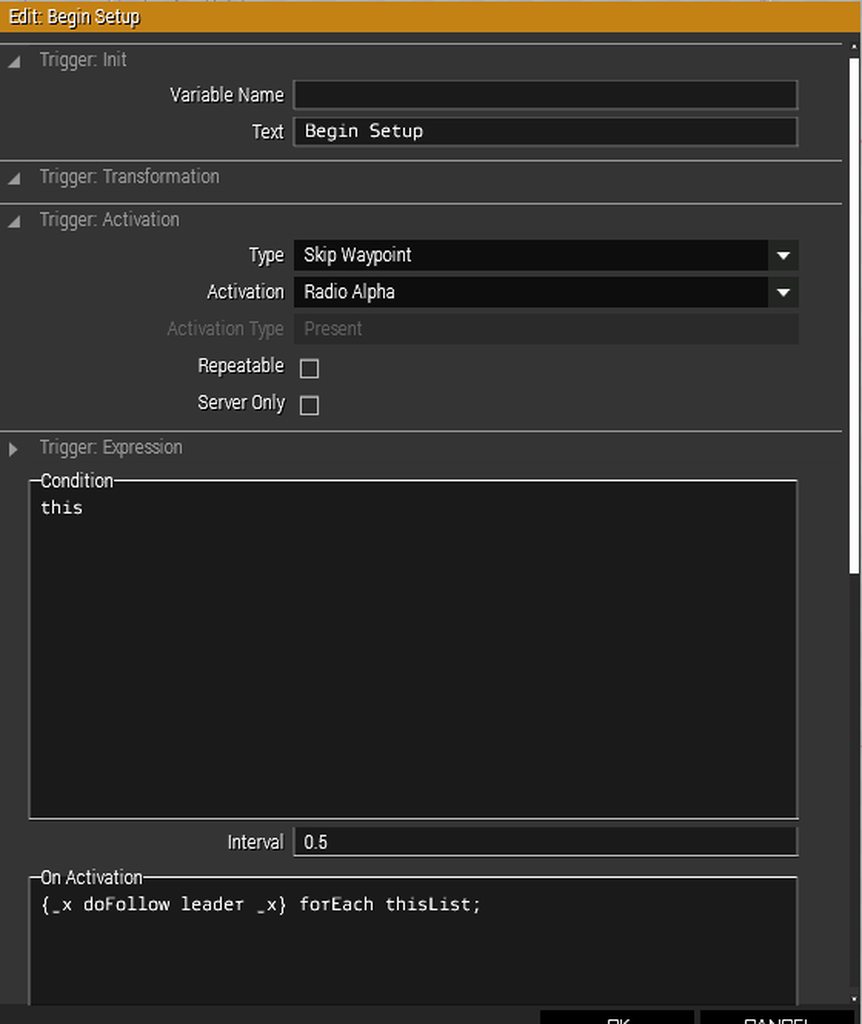 meager granite
Are you sure thisList has proper units there? Add systemChat str ["doFollow for: ", thisList] for chat debug output into OnActivation.
Also, could Skip Waypoint be messing with it? Try with simplier trigger?
elfin comet
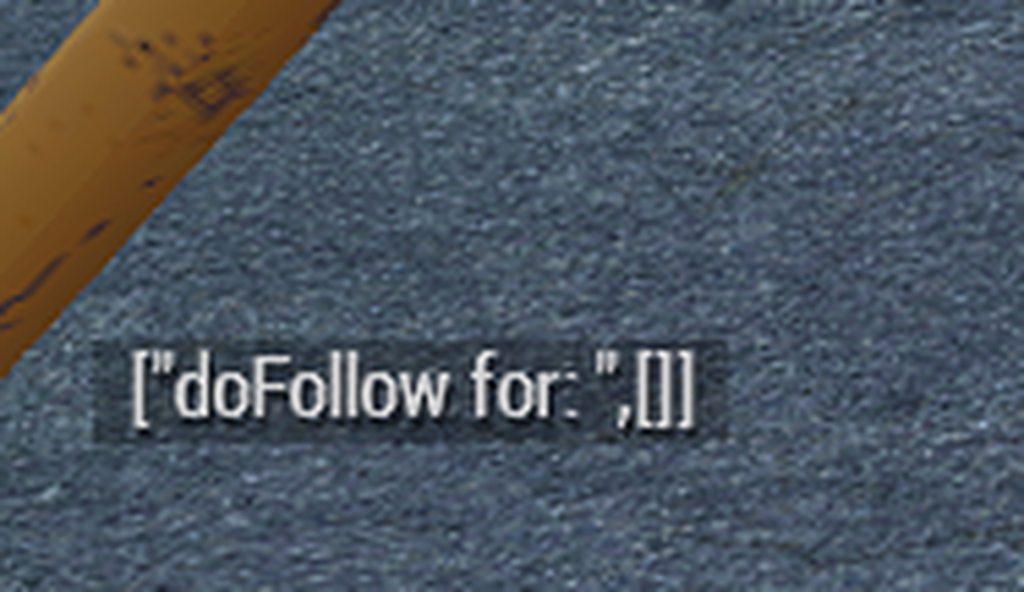
I'll double check to ensure the trigger is actually touching the floor.
Ok. Trigger is actually touching the floor.
elfin comet
meager granite
Also, could `Skip Waypoint` be messing with it? Try with simplier trigger?
It's probably the Radio alpha that is messing it up since that is what usually indicate that it should be looking for Blufor/Opfor/etc.
elfin comet
meager granite
Also, could `Skip Waypoint` be messing with it? Try with simplier trigger?
Yeah, Splitting it out so that there are 2 triggers allows it to work correctly. 1 to allow me to use the Radio Alpha to start their movement from formation, the other to actually run the code to allow the movement when the first trigger activates.
 sly mango
How do I use a trigger to make a car explode like in the "old man" dlc. ( I'm very new at scripting)
 serene grove
I've started tinkering around with making my own scenarios, right now the hang up I'm on is setting up a trigger for the end mission module
My scenario has three tasks to complete, which once done the team have to go back to their fob to end the mission, So i'm trying to set up a trigger that checks if all three tasks are completed and the team have entered a specified area
pallid palm
@sly mango that depends if you want a Fake bomb that just exploads or a real bomb that would kill you
if you want a real bomb you must make a EventHandler
sly mango
pallid palm
<@472935036912533505> that depends if you want a Fake bomb that just exploads o...
One that would kill you once activated just like in "old man'' mission where you park a car next to the police station then activate it to explode from a safe distance.
pallid palm
well i dont have old man DLC
pallid palm
nope
sly mango
Ah.
pallid palm
no mods and no DLC here
warm hedge
You can createVehicle a bomb (eg Bo_Mk82 IIRC)
sly mango
I see.
pallid palm
can call it from a radio trigger also
i would just make a EventHandler
can you open up the Old Man DLC and see how they did it
thats a way also
hallow mortar
Unless you want the car to explode when it's destroyed by some other means, or when someone gets in it or something, an EH is probably not the right way of doing it.
pallid palm
agree
hallow mortar
You could use a trigger with radio activation (player uses the Support menu to set it off) or you could script an action menu (scroll wheel menu) action to set it off.
It depends exactly how you want the player to interact with it.
Do you want the player to have to "set up" the bomb on the car, or do you want it to be "pre-loaded" and they just have to get it in position?
pallid palm
dam @hallow mortar your Awsome
hallow mortar
Multiplayer vs singleplayer is another important consideration - things have to be done differently when you're dealing with multiple machines and players.
serene grove
I hope that all the work I put in so far isn't all for nothing if it doesn't work in multiplayer
pallid palm
you and me both m8 lol
hallow mortar
serene grove
I hope that all the work I put in so far isn't all for nothing if it doesn't wor...
Well, it depends what you've done already :U
Except for very complex systems, usually the basic principle is the same and it just needs some light rearranging to work in MP. But it really depends.
serene grove
I'll find out first hand soon enough, got some friends to do a test run of it
Only thing I really want done before it is having the mission complete screen show up, but no matter what sorta fix i find online it ain't workin
It either gets set off immediately on spawn or doesn't go off at all XD
hallow mortar
hallow mortar
You could use a trigger with radio activation (player uses the Support menu to s...
Simple example of an action menu action to set off the bomb on a car of the missionmaker's choice, for singleplayer. Place in init.sqf in the mission folder.
player addAction [
    "Set off bomb",
    {
        params ["_target", "_caller", "_actionID", "_arguments"];

        private _position = getPosATL _arguments;
        private _bomb = createVehicle ["Bo_Mk82", _position, [], 0, "CAN_COLLIDE"];
        triggerAmmo _bomb;
        hint "Bomb detonated!";
        _target removeAction _actionID;
    },
    my_car_bomb,
    1.5,
    false
];```Unfortunately it's really hard to troubleshoot without knowing exactly how you've done it so far. There's a lot of different potential ways it could be going wrong, because there's so many different potential ways to implement it.
pallid palm
//the commands for mission win and fail are
//mission suceed
["end1"] remoteExec ["BIS_fnc_endMission"];

//mission fail
["end2", false] remoteExec ["BIS_fnc_endMission"];
Well i can tell you what i had last time
using the knowledge i figured out for setting up task completion triggers, i thought i could set it up like
Commstowertask "Succeeded";
followed by the other two tasks
but that does nothing XD
pallid palm
check my post here #arma3_scenario message
serene grove
I know i need to have a trigger that looks for when those three tasks are done, and when the team returns to a specific spot at the FOB, i just have no clue how to actually put that together
serene grove
pallid palm
check my post here https://discord.com/channels/105462288051380224/1054632443107...
Do i put that in the trigger??
serene grove
Even reading it slowly won't help my dumb ass brain XD
Coding to me is always gobbldygoock
pallid palm
it says in the post what you can do
you can put the 2 commands in a trigger yes
//the commands for mission win and fail are
//mission suceed
["end1"] remoteExec ["BIS_fnc_endMission"];

//mission fail
["end2", false] remoteExec ["BIS_fnc_endMission"];
Yeah i put the first half of it in a trigger, works perfectly now XD
Just means I'll need to make sure the team don't enter the command tent XD
Cheers tho!
pallid palm
you need 2 triggers 1 for win and 1 for fail
hallow mortar
serene grove
Just means I'll need to make sure the team don't enter the command tent XD
Does "the team" mean all the players in the mission, and only players (not counting AI)?
hallow mortar
Yes, but do you want it to wait for all the players in the mission, or are there multiple teams / is "only some of the players" also accepted?
serene grove
I didn't think of that
It's just gonna be a team of four, If i can set it up to wait until all four of us are within the specified area that would be sweet
pallid palm
when you get this right yu'll say wow that was easy
serene grove
I said that earlier when i was trying to set up a radio tower destroy task
I was about to ask about all four of em being there but seems you are already sending the answer XD
hallow mortar
Trigger condition field, trigger set to Any Player Present, trigger area is the area you want all the players to be in to end the mission
private _tasksDone = (["task1", "task2", "task3"] findIf { !(_x call BIS_fnc_taskCompleted) }) < 0;

_tasksDone && {(count thisList) >= count (playableUnits + switchableUnits)};```I'm guessing the top part goes in condition?
hallow mortar
No, all of it goes in the condition
hallow mortar
Actually there is a small edge case where it will activate the trigger if the tasks are done and all the players are dead 🤔
hallow mortar
serene grove
with the private part yeah?
Yes, literally all of it
serene grove
hallow mortar
Actually there is a small edge case where it will activate the trigger if the ta...
That's one one to win i guess XD
serene grove
hallow mortar
Yes, literally all of it
Cheers mate
hallow mortar
The same, but will only activate if at least 1 player is actually in the trigger area (fixes the edge case):
private _tasksDone = (["task1", "task2", "task3"] findIf { !(_x call BIS_fnc_taskCompleted) }) < 0;

_tasksDone && {(count thisList > 0) && {(count thisList) >= count (playableUnits + switchableUnits)}};```There are a few different ways you could rearrange the logic of those checks, and you could add more conditions and stuff.
pallid palm
so the state of the trigger should be (None) is that correct @hallow mortar
serene grove
Alright, I've typed that all in, now to test it
hallow mortar
pallid palm
so the state of the trigger should be (None) is that correct <@13767207282121113...
trigger set to Any Player Present
pallid palm
copy that
serene grove
So it seems to not be doing anything after all three tasks are completed
pallid palm
did you go in the trigger
serene grove
Yeah i set up the trigger how Nikko showed
I swapped out task1 and so on to the actual names of the tasks
hallow mortar
if you're testing in SP, then your AI teammates (the ones that will be players) will be counted because they are "playable units"
pallid palm
so you completed all tasks and walked in the trigger
serene grove
yeap
private _tasksDone = (["commtowertask", "eliminateofficertask", "intelgrabtask"] findIf { !(_x call BIS_fnc_taskCompleted) }) < 0;
that should still work yeah?
hallow mortar
That won't work
hallow mortar
my tank got vapourised by a Maus because I was typing SQF instead of paying attention :)
pallid palm
lol nice
serene grove
Even tho the tasks are done and I'm standing in the trigger area, it's not actually triggering, or atleast not from what i can see
even using zeus to move the otehr three ai teammates into the tent doesn't do anything
pallid palm
did you make the trigger all players or Any Player Present like Nikko said
serene grove
Yes
hallow mortar
Did you put anything in the trigger activation field to prove it's activated?
serene grove
I'm not sure what you mean
hallow mortar
serene grove
even using zeus to move the otehr three ai teammates into the tent doesn't do an...
For future testing, you must do this, because they are playable units and will be counted by the condition
serene grove
Trigger activation is currently set to
Type None
Activation Any Player
Activation type Present
hallow mortar
serene grove
I'm not sure what you mean
Does the trigger actually do anything?
You have the Condition field (where this code goes), the On Activation field, and the On Deactivation field. If this is a new trigger and you've left the On Activation field empty, then the trigger will activate but it won't do anything, so you won't know it's activated.
serene grove
No, Condition has the thing ya sent
Activation has the remoteExec function
Could it be that nothing is reporting the tasks as done?
The way i set up the radio tower task trigger is this
Condition
!alive myTower1
On Activation
commtowertask = ["commtowertask", "SUCCEEDED",true] spawn BIS_fnc_taskSetState;
pallid palm
can you post a pic of your trigger
serene grove
the end mission tirgger? sure
A picture of its Atrributes or a pic of where it is and what it looks like?
serene grove
So you mean the attributes XD
pallid palm
the open up trigger
hallow mortar
serene grove
Condition
!alive myTower1
On Activation
commtowertask = ["commtowertask", "SUCC...
That looks mostly correct, assuming myTower1 is a real object which is then destroyed. You don't need commtowertask =, but it's just useless and not harmful.
You should use call instead of spawn, but I don't think that will actually prevent it from working.
You've set it to show a hint when the task is complete, so you should be able to tell if the task is being completed.
serene grove
 pallid palm
there we go
serene grove
Yeah me and my partner found that out about the whole task = thing, i just forgot to clean that task trigger up XD
serene grove
To me it seems like it doesn't know the tasks are done, but I don't really know what I'm doing XD
hallow mortar
There are of course two other tasks, and all the tasks are required for trigger activation, so we'll need to check those too
serene grove
I'll grab their triggers
hallow mortar
serene grove
To me it seems like it doesn't know the tasks are done, but I don't really know ...
There should be a tasks tab in the briefing that shows the current state of all tasks, and like I said, it should be showing a hint when the task gets completed
pallid palm
all tasks must be in that trigger
serene grove
They are
serene grove

I am very lucky, my partner gave me it when they bought a new one XD
That's the second trigger
There's the last trigger
 pallid palm
well i dont know enought to help you as i see it sorry m8 Nikko is the best
but i tryed
serene grove
It's all good mate, the help is appreciated
I'm just hoping that this scenario is okay XD
pallid palm
i understand m8 its nice when everything works correct
hallow mortar
Those seem correct in themselves (except use call instead of spawn), but the second one is a little bit opaque, because it's relying on the variable intelgrab, which is coming from somewhere else
serene grove
Also please ignore that the officer is named Usama
hallow mortar
Do you know where that variable is being set?
serene grove
Yeah
theres a laptop in the building that has a hold function on it
once the intel is grabbed
the trigger gets set off
that one took me 9 hours of tinkering to get it to work
Like bashing my head against the wall
pallid palm
is that all lol
serene grove
I just couldn't figure out how to get it to work
pallid palm
it took me 9000 hrs to learn this stuff lol
serene grove
especially since the way that a youtuber did it didn't work at all
hallow mortar
That's not super surprising
serene grove
Everything else besides the coding stuff worked tho
pallid palm
dont do youtube Do Nikko
serene grove
only reason i got helicopter being able to go from point A to pick people up then to point B to drop em off was because of him XD
hallow mortar
Is intelgrab mentioned anywhere else at all, other than in that holdAction and in this trigger?
pallid palm
yes Nikko is the best and he's nice to people also,
serene grove
Agreed
hallow mortar
Then the variable is probably not defined until the holdAction sets it to true, which means up until then, the trigger is trying to access it and getting an undefined variable error (this is bad). This could be blocking it completely.
Try replacing intelgrab in the trigger with this:
missionNamespace getVariable ["intelgrab", false];```
This means that if the variable is undefined when the trigger tries to access it, instead of pooping itself, it will just treat it as if it was defined as `false` - much safer.HOWEVER
You could just complete the task from the holdAction directly, instead of going through the intermediary step of a trigger.
hallow mortar
Yup
serene grove
So instead of having in code complete
intelgrab = true;
publicvariable "intelgrab";
I put
["intelgrabtask", "SUCCEEDED",true] spawn BIS_fnc_taskSetState;
hallow mortar
call instead of spawn, but yes
serene grove
I'll have to keep that in mind for next time XD
pallid palm
thats what i always say lol
serene grove
So now just doing the intel grab should just do what the trigger was doing, that saves me a bit of a headache XD
Changed spawn to call in the triggers too
pallid palm
yes we dont like headaches, even tho i never had a headache, yet in my entier life
serene grove
I'll test it now and see if that fixed it
And yes, the Officer is call Usama cause i accidently made him look like Osama
 jaunty pine
Thanks didnt even see that chat, eyes skipped right over it
Will remove that message, thanks
serene grove
Same problem Nikko
hallow mortar
Did you get any hints when you did the things to complete the tasks?
serene grove
As in the thing pops up saying they are done?
hallow mortar
Yeah
serene grove
Yeap
pallid palm
maybe see what the RPT says ?
pallid palm
RPT file
serene grove
No clue what that is
pallid palm
C:\Users\your name\AppData\Local\Arma 3
hallow mortar
It's a log file where the game records all the interesting (and many uninteresting) things it's thinking about.
https://community.bistudio.com/wiki/Crash_Files
pallid palm
interesting (and many uninteresting lol yes agree lol
serene grove
Open in notepad?
hallow mortar
Yeah, but we can probably troubleshoot this a bit easier. It's probably just a logic flaw rather than something that will show up in the RPT file.
serene grove
Looking at that file makes my brain hurt
pallid palm
join the brain hurt club lol
hallow mortar
In the end trigger, take out the second paragraph and put it to one side. Leave the first bit. Replace the second bit with just _tasksDone
That means the trigger will activate when all the tasks are done, regardless of what's going on with the players. This is just a troubleshooting step to narrow down where the problem is.
serene grove
Take out everything but _tasksdone on the second paragraph
hallow mortar
serene grove
Looking at that file makes my brain hurt
The vast majority of what's recorded in the RPT is absolutely useless, so don't worry about it
pallid palm
yes i go right to the bottom of the RPT file
serene grove
Yeap as soon as the last task was done, the mission complete screen showed up
pallid palm
ahhhh
hallow mortar
Alright, so the problem is with the player-counting code. That should make it easier to figure out.
pallid palm
are your players named ? like p1 p2 p3 p4 and so on
serene grove
Do i need to change those??
pallid palm
no
hallow mortar
It is possible to just count them by name, but it's usually better to use a dynamic method, so you don't have to update it later if you add more players or use different names.
serene grove
Fair point
I am planning to make another scenario after this one to be a continuation of this current one, so that would make sense
being able to use code again would be nice XD
hallow mortar
I can't actually see where the flaw in the counting logic is 🤔 it seems like it should work, to me.
Let's try it bit by bit.
_tasksDone && {count thisList > 0}```That should make the trigger activate when all the tasks are done and any player steps into the trigger
serene grove
Time to kill Usama with a mortar strick for the ninth time
pallid palm
lol
hallow mortar
Actually we know the tasks part works, so we can just cut that out entirely for now and save him from some pain. We're only testing the player-counting.
serene grove
AS soon as i entered the tent after finished the tasks, the mission completed came up
pallid palm
cool
serene grove
So that part works
pallid palm
so both parts work then
hallow mortar
It's probably just some stupid order of operations thing
serene grove
If we end up not being able to figure it out, I'm happy with it just doing what it's doing now, atleast it works XD
hallow mortar
Actually, just to check - you've got the 4 playable units in your team. Do you have any other playable units in the scenario (marked playable in their attributes, appear on the slotting screen when you select Play in MP)?
serene grove
Nope just those four
pallid palm
for me i only use the briefing to explain tasks and then i do the ending thingy
serene grove
Since i only have like four or so friends who actually play XD
work lives makes it hard to get a time we all agree on, used to have a group of 12 but things went sour in a game of antistasi
pallid palm
i can believe that
serene grove
I also found it hard to make any friends who are in the same timezone as me so XD
pallid palm
what time zone is that m8
serene grove
I always forget it one sec XD
pallid palm
well its 8:11 am here
pallid palm
oh shite lol
pallid palm
so your ready for bed right
serene grove
I'll shank ya
pallid palm
lol hahahah nice
serene grove
But yeah, only four playable characters are available
I made sure to make only those four be the ones you can play as, since the point of the scenario is like a small team of special forces going in to weaken the enemy
pallid palm
i asked this lady if she wanted a Australian kiss, and she said whats a Australian kiss
and i said same as a french kiss but only down under
hallow mortar
Okay, make your trigger condition this (copy+paste so no typing errors):
private _tasksDone = (["intelgrabtask", "commtowertask", "eliminatedofficertask"] findIf {
    !(_x call BIS_fnc_taskCompleted)
}) < 0;

_tasksDone && {
    this && {
        (count thisList) >= count (playableUnits + switchableUnits)
    };
};```
It's only a very slight rephrasing of the original, but......all the logic checks out to me, so I don't even know.
Make sure you're putting yourself, and all of the other playable units, into the trigger area at the same time.They have to all be in it at the same time. They don't have to all enter at the exact same moment, but they have to all be there.
serene grove
oh thats fair
I was thinking they all had to be in at the exact same time
like all at once
Dropped a howitzer on Usama this time XD
hallow mortar
oh I know what it fucking is
the trigger's basic condition is checking for players, so thisList only includes you. The scripted condition is comparing that to playable units, which includes the other teammates.
So thisList will never contain as many units as playableUnits + switchableUnits
serene grove
Ooooh
pallid palm
nice
hallow mortar
So this condition will work in MP, where the teammates are all also players. But it won't work in SP.
pallid palm
when Kikko talks its like EF Hutton eveyone lisstens
serene grove
I don't know who that is
pallid palm
lol
hallow mortar
serene grove
So it should work all good on the day i test it?
Yes, if all the teammates are either players, dead, or turned off from the slotting screen.
pallid palm
it was a finance compey
serene grove
Sweet
hallow mortar
It's also possible to make this work properly in SP, I just need a minute to work out the logic
serene grove
Oh i'm happy with it only working in multiplayer
I'm currently launching it in multiplayer to test it
pallid palm
i was wounding if you were testing it in MP
serene grove
I uh
pallid palm
but what do i know not much
hallow mortar
That's not my fault :U
pallid palm
lol
serene grove
Now i don't have the loadout i was supposed to start with XD
pallid palm
oh boy here we go he he yeah Arma 3
serene grove
I also now can't access the supports i set up
Guessing cause I'm not the playable character i was supposed to be
hallow mortar
Some things don't get automatically transferred to the new unit when respawning. Not surprised supports are one of them, that system barely works anyway
That being said, dying instantly isn't exactly normal behaviour. You'll want to look into that
hallow mortar
That's not connected to the specific unit you're playing as
serene grove
Fug
hallow mortar
Did you turn off the AI teammates from the slotting screen? If you left them on, they'll still be AI, and getting in the way of the trigger, since they're playable but not players
serene grove
I turned ai off in the settings
I think the respawn thing is killing me XD
Disabling respawns fixed the dying on spawn XD
serene grove
I'm using quite a few mods
hallow mortar
serene grove
Disabling respawns fixed the dying on spawn XD
I have no idea how your respawn system is set up, so can't offer much advice on that
I'm gonna go make lunch while you figure out how to stop exploding
serene grove
I followed Useless Fodders way of doing it
And the end mission thing is still not working
even tho i am actually the squad lead and didn't die this time
pallid palm
Fodders he was a good guy
pallid palm
do you have a onplayerrespawn sqf in your mission folder
serene grove
and in the multiplayer attributes, i had respawn on custom position, then select respawn position and show respawn counter
I don't know what that is
pallid palm
oh my really
pallid palm
ahh ok so goole onplayerrespawn.sqf arma 3
serene grove
I might just remove the ability to respawn if it's just gonna kill me all the time XD
and may just revert back to the previous code that worked for the end mission trigger
pallid palm
that should not happen
hallow mortar
You shouldn't really need an onPlayerRespawn.sqf unless you want to do more advanced stuff. You don't need it to avoid being killed instantly by the respawn system; something else is going on.
Make sure your respawn position is in a safe place, not clipped into an object or under the terrain, and not at a lethal height above the ground
I am absolutely losing it with this player-counting stuff. The logic absolutely checks out as far as I can see - if you're the only living playable unit, all the tasks are complete, and you're in the trigger, it should work.
serene grove
I made sure it was above the ground
and even moved the playable characters
still died on start
Just hear a gorey death and start at a respawn screen
hallow mortar
In the respawn settings in the Editor, do you have "respawn on start" turned on? (If it's not an option at all there, that's fine)
hallow mortar
Maybe not rulesets specifically, but where all the other respawn options are, if it's an option at all
serene grove
I don't see that as an option
hallow mortar
Does your mission have a description.ext file?
pallid palm
do you have a Description.ext file in your mission folder
serene grove
Whats that
pallid palm
oops lol
serene grove
how would i find that out?
hallow mortar
It'll be in the mission folder, where it's saved
If you didn't create or add one, and you started from a blank Editor mission rather than any kind of template, then you don't have one
hallow mortar
That's fine then
serene grove
Since i went to the editor, then clicked on the map i wanted and that was it
hallow mortar
The reason I asked is because that's a mission config file where respawn-on-start could be turned on. But if you don't have one then that's not the source of the issue.
I'm gonna have to say that this could be a mod issue, because immediate violent death is not how the respawn system normally works
pallid palm
yeah to me the Description.ext file is like a settings file
pallid palm
omg 56 mods wow lol
serene grove
and to do that i'd have to either shut down arma 3 to look at it on hte launcher or got through the steam workshop
pallid palm
well i know some have 156 mods so omg
serene grove
I can send em on over but i'd prefer to not bog down the chat with a list XD
pallid palm
no no its ok
serene grove
Seems having it set to custom position is what's killing me, as setting it to switch to group member had me spawn in just fine
pallid palm
if i was you i would disable all mods and build a mission from scrach to learn what files i need and how to use the editer
serene grove
a lil too late now XD
hallow mortar
I need to finish something else first, but in about 15 minutes I'll crack open the editor and really dig into this, because something really doesn't add up here
serene grove
The scenario is almost finished XD
I just need it to do end mission and not kill us on spawn and its done
I really don't want to sit around and do this all over again with all my mods uninstalled
pallid palm
some times a scenario is never finished cuz the more you learn the more you fix he he
serene grove
Fuck it no respawns XD
serene grove
hallow mortar
I need to finish something else first, but in about 15 minutes I'll crack open t...
All good mate
serene grove
That's what i meant lol
pallid palm
oh ok
so really m8 i would disable all mods and learn what files i need to make a basic mission and do the Editer totoreals
if you realy want to learn that is
serene grove
I'll do that for the next one, but i ain't remaking this scenario XD
pallid palm
yeah right put this one aside and do as i asked and yu'll thank me in the future
but after Nikko helps you on this one
like do you know how to place a man or soldier down on the map in the editer @serene grove
just one of the things yu'll need to learn
yu'll find its awsome fun building your own mission from scrach
hallow mortar
Sorry, did you really just ask someone who has almost finished making a mission whether they know how to place a unit?
 stoic crescent
Hey folks!
I'm trying to create a multiplayer mission, where ACE3 arsenal will open as soon as player gets into mission. I've created initPlayerLocal.sqf and wrote this simple code:
while {!hasInterface &&  alive player} do {
    sleep 1;
    hint 'we are in the loop';
};

hint "we are out of the loop";

// Open ACE3 Virtual Arsenal for the player
[player, player, true] call ace_arsenal_fnc_openBox```

for whatever reason, it only works when i put a sleep before opening the arsenal. Can anyone suggest me a way to avoid using sleep, because it's a bad practice and unreliableyeah she just started yester day you read right
hallow mortar
pallid palm
yeah she just started yester day you read right
You understand that we are trying to solve problems that involve units she has placed in the mission?
pallid palm
well it seems to me that this was a ready made mission
serene grove
I started from scratch
pallid palm
oh ok ididnt know that
 cosmic lichen
stoic crescent
Hey folks!
I'm trying to create a multiplayer mission, where ACE3 arsenal will o...
cosmic lichen
stoic crescent
Hey folks!
I'm trying to create a multiplayer mission, where ACE3 arsenal will o...
waitUntil {!isNull player};
try that.
pallid palm
you had said you started yesterday so i was thinking well you know
tulip ridge
Extra }
hallow mortar
stoic crescent
Hey folks!
I'm trying to create a multiplayer mission, where ACE3 arsenal will o...
There's nothing wrong with using sleep, especially for something simple like this.
Your initial loop doesn't make much sense though.
hasInterface is for determining whether the current game instance is capable of having an interface - whether it's a player client, or a dedicated server with no display.
alive player doesn't make sense in this context...I don't want to get too deep into it, just do what R3vo said.
cosmic lichen
Since you are using ace you could also use CBA_fnc_waitUntilAndExecute.
hallow mortar
R3vo, now you're here, could I get a little insight check on something, please?
private _tasksDone = (["intelgrabtask", "commtowertask", "eliminatedofficertask"] findIf {
    !(_x call BIS_fnc_taskCompleted)
}) < 0;

_tasksDone && {
    this && {
        (count thisList) >= count (playableUnits + switchableUnits)
    };
};```
This code, in an Any Player Present trigger, _should_ activate the trigger when those tasks are done _and_ the only playable unit is in the trigger area, right?
The issue we are finding is that the task completion/detection works, but the playable unit detection does not. I've just tested it in the Editor myself in an empty mission, and it works for me. The logic makes sense to me. What am I missing?you must be really super smart, and good, to make a hole mission in one day, and just started yesterday @serene grove
stoic crescent
cosmic lichen
```sqf
waitUntil {!isNull player};
```
try that.
sadly, nope
but this works:
sleep 1;
[player, player, true] call ace_arsenal_fnc_openBox```

trying to avoid sleep, but if i hit the wall will leave it there I thinkmaybe ace_arsenal_fnc_openBox is nil?
stoic crescent
will try in a moment
cosmic lichen
[
    {
        !isNull player
    },
    {
        [
            {
                [player, player, true] call ace_arsenal_fnc_openBox;
            },
            [],
            0.05
        ] call CBA_fnc_waitAndExecute;
    }
] call CBA_fnc_waitUntilAndExecute;
This works for me
It seems it needs a delay for some reason, otherwise it prints "Cannot open arsenal"
stoic crescent
@proven charm it's wierd to me.
this doesn't work
hint "player exists";


waitUntil { !(isNil "ace_arsenal_fnc_openBox") };
hint "function exists";

[player, player, true] call ace_arsenal_fnc_openBox ;```

adding sleep 1 after waitUntil {!isNull player}; makes it work 😬yeah it does work with sleep for me as well, but I want to avoid that
cosmic lichen
[
    {
        !isNull (findDisplay 46) || time > 1
    },
    {
        [player, player, true] call ace_arsenal_fnc_openBox;
    }
] call CBA_fnc_waitUntilAndExecute;
This works.
It's because the function needs the display otherwise it exits
stoic crescent
do you mind me asking what does "function needs the display" mean? 😬
cosmic lichen
findDisplay 46 gets the main display that displays everything like hud etc.
ACE creates the Arsenal display on top of that by default.
While the player variable might already be initialized, the display might not be.
stoic crescent
so correct me if I'm wrong:
player is initialized, functions exists, but untill display is not - it wont work?
cosmic lichen
yes
stoic crescent
thank you, wouldn't figure this out on my own for sure
cosmic lichen
Well, tbh, your sleep solution is totally fine.
It just duck a bit deeper because I wanted to know why it fails.
 zealous rampart
hey guys i have a question so im trying to run my custom made mission on my server and i cant seem to connect to the game it keeps sending me back to the to the role selection and i keep getting this error No entry '.model' does anyone know how i can fix this issue?
hallow mortar
Usually that means an incorrect classname being used with a script command like createVehicle, addMagazine etc
zealous rampart
@hallow mortar is there a way you can help me with finding out the issue and im thinking it has to do with the sky diving script i set up maybe because i deleted the plane from the mission editor ill try that and see if it works
open hollow
https://community.bistudio.com/wiki/inputAction
this works on a remote unit?
i mean i can know what input is being using by a player from the server, or another player?
proven charm
im pretty sure that only works on client
tulip ridge
Yeah it only returns a value for the client you call it on
stoic crescent
hey again, I'm trying to make it so the lamp can be turned on or off through the action.
I've put a camping lamp on a table (Land_Camping_Light_F), added action to Init field: this addAction ["Turn Off", "scripts\lanternOff.sqf"];
lanternOff.sqf:
private ["_target","_caller","_id","_pos","_dir","_asl"];

_target = _this select 0; _caller = _this select 1; _id = _this Select 2;

// getting rotation vectors
_vDir = vectorDir _target;
_vUp = vectorUp _target;

// getting lamp position
_pos = getPos _target;

// deleting the "turned on" lamp
deleteVehicle _target;

// creating a new lamp that is "turned on" (Land_Camping_Light_off_F) at previously copied position
_target = createVehicle ["Land_Camping_Light_off_F", _pos, [], 0, "CAN_COLLIDE"];

// setting rotation vectors to a newly created lamp
_target setVectorDirAndUp [_vDir, _vUp];

// adding action to newly created lamp, so we can turn it on
_target addAction ["Turn On", "scripts\lanternOn.sqf"];
lanternOn.sqf :
private ["_target","_caller","_id","_pos","_dir","_asl"];

_target = _this select 0; _caller = _this select 1; _id = _this select 2;

_vDir = vectorDir _target;
_vUp = vectorUp _target;

_pos = getPos _target;

deleteVehicle _target;

_target = createVehicle ["Land_Camping_Light_F", _pos, [], 0, "CAN_COLLIDE"];
_target setVectorDirAndUp [_vDir, _vUp];

_target addAction ["Turn Off", "scripts\lanternOff.sqf"];
Lamp successfully turns on/off, but it goes flying all over the place. Something is wrong when I'm copying/applying position, but I don't understand what. Could someone point me to the right direction please?
 drowsy geyser
instead of deleting/creating a new light everytime just use switchLight command
stoic crescent
 drowsy geyser
_target addAction
[
    "Toggle light",    // title
    {
        params ["_target", "_caller", "_actionId", "_arguments"]; // script
        if (lightIsOn _target == "ON") then
        {
            _target switchLight "OFF";
        }
        else
        {
            _target switchLight "ON";
        };
    },
    nil,        // arguments
    1.5,        // priority
    true,        // showWindow
    true,        // hideOnUse
    "",            // shortcut
    "true",        // condition
    50,            // radius
    false,        // unconscious
    "",            // selection
    ""            // memoryPoint
];
Thank you! This is way cleaner and actually checks if it's on or off rather than assuming that it's on from the start
tepid trail
Hello my fellow scripting brothers
stoic crescent
hey
tepid trail
i have a question
so i want to place a AI inside a plane but with animations
like what if i want to make this soldier to get up at a certain time
the certain time thing might be used by a trigger
but i was also wonder how do i turn on certain lights and turn off certain lights
daring cave
Not sure what's wrong here, I don't understand strings or arrays or any of that. I'm trying to spawn explosions in an area that simulates artillery
while {true} do { sleep (5 + random 5); _randomSpot = ["amb_art1","amb_art2","amb_art3","amb_art4","amb_art5"] call BIS_fnc_selectRandom; _relpos = _randomSpot getRelPos [(1 + random 150), (random 360)]; _artie = createVehicle ["M_Titan_AP", _relpos, [], 0, "CAN_COLLIDE"]; };
Still trying to learn what this all does
 iron swan
Sorry if this is a necropost here, but do you know if this issue is known/being addressed at any point? I'm seeing it become more and more prominent.
daring cave
I've also noticed spawning Sh_155mm_AMOS doesn't detonate unlike other spawned ordinances
Which would optimally be the artillery shell I'd like to spawn but I'm using M_Titan_AP as a stand in
 smoky storm
daring cave
Not sure what's wrong here, I don't understand strings or arrays or any of that....
smoky storm
daring cave
Not sure what's wrong here, I don't understand strings or arrays or any of that....
I'm new to scripting, but does the condition in the while have to be an equation, not an expression, as in should it be while {true == true}?
Nah, I answered my own question, that's not correct. Which might be your prob, because that loop is going to spam massive and prolly crash the game. I just tested the basic loop by spawning trucks and immediate crash. (Nvrm, your sleep would stop the spam that crashed my game)
stable dune
drowsy geyser
```sqf
_target addAction
[
"Toggle light", // title
{
params ...
target switchLight ["ON", "OFF"] select lightIsOn _target;
edited. wrongly define, and dont know is this even slower than if else, maaybe.
private _state = lightIsOn _target;
private _value = ["ON","OFF"] select _state;
_target switchLight _value;
Same result with if else
If false , select 0 == "ON",
If true, select 1 == "OFF"
daring cave
smoky storm
I'm new to scripting, but does the condition in the while have to be an equation...
I've used {true} before and it worked
also if I change _relpos to something like amb_art1 in _artie = createVehicle ["M_Titan_AP", _relpos, [], 0, "CAN_COLLIDE"]; it works
I think _relpos is an array and it doesn't like arrays in there for some reason
smoky storm
daring cave
also if I change `_relpos` to something like `amb_art1` in `_artie = createVehic...
What are those amb_art1/2/3/4/5? Markers?
warm hedge
iron swan
Sorry if this is a necropost here, but do you know if this issue is known/being ...
Who knows, I'm not the one who fix this
iron swan
warm hedge
Who knows, I'm not the one who fix this
Oh I know that, I more meant if you'd heard anything about that bug being acknowledged by a dev or something. Sorry
warm hedge
Actually I recall I did not submit a ticket because I was not really certain of this potential issue exists becsuse I or my PC being somehow crazy
little raptor
stable dune
~~target switchLight ["ON", "OFF"] select lightIsOn _target;~~
edited. wrongly d...
this is wrong because of the order of precedence (first switchLight runs then select)
tepid trail
call{[] spawn { sleep 45; this attachTo [plane5,[-2.7,6,-1]];};}
i have a error
can anyone help me?
I'm attaching fire on a plane but i want it to appear at a certain time
but the problem is that it has a error and i dont know how to fix it
its my first time using sleep
granite sky
This is too many brackets for one line of code.
this doesn't exist within the spawn. I'm not sure what it's supposed to be.
tepid trail
granite sky
`this` doesn't exist within the spawn. I'm not sure what it's supposed to be.
its to attach a SFX to a plane
if i just putt his attachTo [plane5,[-2.7,6,-1]]
then it works fine
but when i put the extra stuff
granite sky
If it's code executed from an editor edit box then probably just:
this spawn {
  sleep 45;
  _this attachTo [plane5,[-2.7,6,-1]];
};
then it doesn't
granite sky
The outer call doesn't do anything, and you need to pass this into the spawn as the parameter.
tepid trail
oh
im still learning SQF scripting
thank you
but i have a question
why does "this" needs a "_"
but there is "this" without "_"
granite sky
Ok, so spawn actually creates a separate code context that runs later. None of the variables outside the spawn exist within it.
What we're doing here is passing in this as a parameter. Inside the spawn, the parameter is referenced by _this.
The editor box is the odd one out here. Inbuilt magic variables in SQF mostly have the underscore.
Hence in a for loop you have _x and _forEachIndex.
SQF is a mess of stuff created over a long period, so it has some inconsistencies.
tepid trail
My father who does programming and scripting for living and there are some parts that he just understand why it made like that
granite sky
They can't sanitize it because it'd break all the older code.
granite sky
It's generally the editor magic variables that lack the underscore. Init boxes, waypoint scripts, trigger scripts...
 granite sky
complete(?) list anyway: https://community.bistudio.com/wiki/Magic_Variables
smoky storm
Im making a "pick up the item quick or lose" situation. I have an intel item on a table (the old phone model), named phone1. I have a trigger that actives when the player is inside, activation field is execVM "secretary.sqf". Inside the sqf is the following:
while { alive phone1 } do
{
    if ( _t < 1 ) then
    {
        endMission "LOSER";
    }
    else
    {
        while { _t > 0 } do
            {
            _t = _t - 1;
            sleep 1;
            hintSilent format ["Take the secretary's phone before he calls the police!\n\n You have %1 seconds!", _t];
            };
    };
};
hintSilent "Situation avoided.";```

My problem is that when I pickup the phone, my timer in the hint keeps running. When it hits zero, it does stop, and the game does not end. But I want the timer to stop as soon as the phone1 is dead and then display the success hint.Any help?
warm hedge
Try isNull instead of alive
granite sky
Nah, the logic's fucked.
warm hedge
Oh well yes
smoky storm
Yeah, I figured, but I tried redoing it by starting with an If and that was worse than this
granite sky
private _t = 15;
while { alive phone1 and _t > 0 } do
{
    hintSilent format ["Take the secretary's phone before he calls the police!\n\n You have %1 seconds!", _t];
    _t = _t - 1;
    sleep 1;
};

if (alive phone1) exitWith {
  endMission "LOSER";
};
hintSilent "Situation avoided.";
Should move the tick hintsilent above the sleep too.
(aesthetic only. It's a second off as written)
smoky storm
Oh right, I noticed that, too thanks
does the exitWith after the if just act like the then-else without using then-else?
I should just read the doc on exitWith first, I haven't used that before
granite sky
Kinda. It exits the scope, so the hintSilent on the end won't run.
You can do an if/then/else instead if you like.
smoky storm
I'm not so picky lol
Thanks for your help
I'll read a bit before I ask another question
Okay, I think I'm confused because it looks lke the exitWith condition is outside the do {}. Am I misreading the formatting?
granite sky
The condition? The if (alive phone1)?
smoky storm
Right
granite sky
if and while are inconsistent. if takes a bool, while takes code that returns a bool.
smoky storm
I see. I think I don't yet understand how scope works
If someone asked me, I'd say the scope of the while...do stopped when the do {} closed, which here would be at sleep 1;
granite sky
You can actually skip the brackets on the if entirely here, but that looks weird so we don't do it :P
granite sky
smoky storm
If someone asked me, I'd say the scope of the while...do stopped when the do {} ...
correct.
The condition at the end happens after the while exits.
smoky storm
So does the while exit every time it completes a do?
granite sky
You're hitting the limitations of english here
while CODE1 do CODE2. Runs CODE1, if it returns true, run CODE2 and then repeat, otherwise continue.
smoky storm
And by continue, does that mean the code below the do is not executed until CODE1 is false?
granite sky
Correct.
Uh,
Probably no?
The if (alive phone1) part isn't executed until the while completes.
smoky storm
Let me try another way. When either the phone dies or _t < 0, the while is complete, and the script moves on to the if, and the if evaluates the reason why the while ended (from our perspective, it's not like the if knows anything about what came before). The if is not actually related to the while at all.
granite sky
It's run after the while completes.
granite sky
This is often the best way to write this sort of stuff in SQF because it's annoying to break out of multiple levels of scope. So you exit the while loop and then check what the exit reason was.
In another language you might just have something like this within the while loop:
if (!alive phone1) then {
  endMission "LOSER";
  return
};
But SQF doesn't have a return. There's breakOut but it's ugly.
Logic is wrong there but you get the idea.
smoky storm
Oh wow, the Biki for breakOut makes it look like a nightmare
daring cave
Is there a way to run a script only after a player is loaded in in multiplayer?
I have a fade in from black with into text but it all plays while there's a loading screen
spiral canyon
is there a code I can put in an object init field where if named object dies, it deletes its self?
Im trying to do this without a trigger.
I have a object attached to a unit and want that object to be deleted when the unit dies.
granite sky
killed EH + deleteVehicle.
You'll need a reference to the object setVariable'd on the unit.
Can't be more specific without knowing when/where the object is created.
spiral canyon
would be hopefully made into a composition I can place down in Zeus
granite sky
I'm not sure how compositions work.
spiral canyon
well if the code is saved on the object and you save as a composition in Eden, should be able to place one down and the code be intact
granite sky
I guess you can hope the object's already attached to the unit, and use attachedObjects to find it from the unit's init script.
spiral canyon
the object attaching to the unit has this code
[this, objectName] call BIS_fnc_attachToRelative;
granite sky
Ah, no then.
But in that case you can probably do the setVariable in that script instead.
or use attachedObjects in the killed EH.
spiral canyon
so deleteVehicle attachedObjects; ?
granite sky
attachedObjects returns an array.
Depends if there are any other potential attached objects that you'd want to keep.
hazy temple
Im getting a weird error in my logs when i tried to add the mas vehicles, weapons and uniforms into exile mod... any idea of what it can be?
meager granite
daring cave
I have a fade in from black with into text but it all plays while there's a load...
I'm actually not sure what's the definitive way to check that first initial loading is complete 🤔
PreloadFinished?
waitUntil {!isNull player};
addMissionEventHandler["PreloadFinished", {
    // fade in here

    removeMissionEventHandler [_thisEvent, _thisEventHandler];
}];
Something like this?
Looks like that's what I use myself with PreloadFinished
granite sky
This event handler also fires on client after user closes the main map.
wat
hazy temple
8:08:58 Error position: <_hitpoints;
if (_debugMarkers) then
{
_d>
8:08:58 Error Undefined variable in expression: _hitpoints
8:08:58 File mpmissions__cur_mp.Chernarus\ExileServer_world_spawnVehicles.sqf, line 53
8:08:58 Cannot create non-ai vehicle B_mas_usd_Offroad_02_armed_F,
8:08:58 Error in expression <x, random _maximumDamage];
};
}
forEach _hitpoints;
if (_debugMarkers) then
{
_d>
meager granite
You had preloading screen after closing the map which often resulted in you crashing a jet or a helicopter if it took too long for no reason
Guess it still does it internally except ends instantly
daring cave
meager granite
You had preloading screen after closing the map which often resulted in you cras...
Yeah it's super annoying when I load into a hot area where combat starts immediately or I use a fade in from black effect on mission start
daring cave
meager granite
```sqf
waitUntil {!isNull player};
addMissionEventHandler["PreloadFinished", {
...
should I throw this in initPlayerLocal.sqf?
meager granite
I guess so
 unreal wharf
I need help on getting a chemical detector script to work.
The script in question-
if (!hasInterface) exitWith {};

params ["_object", "_maxDistance", ["_minDistance", 0], ["_condition", {true}]];

"ChemicalDetector" cutRsc ["RscWeaponChemicalDetector", "PLAIN", 1, false];

private _ui = uiNamespace getVariable "RscWeaponChemicalDetector";
private _ctrl = _ui displayCtrl 101;

_maxDistance = _maxDistance - _minDistance;

while _condition do {
    private _distance = ((player distance _object) - _minDistance) max 0;

    private _threat = ((1 - (_distance/_maxDistance)) max 0) min 1;
    _ctrl ctrlAnimateModel ["Threat_Level_Source", [_threat, 2] call BIS_fnc_cutDecimals, true];

    uiSleep 1;
};
And the resulting error in the RPT log.
23:53:09   Error position: <while _condition do {
private _distance >
23:53:09   Error while: Type Bool, expected code
23:53:09 File C:\Users\jzpel\Documents\Arma 3 - Other Profiles\Jzpelaez\missions\DISON%20WW2.tem_vinjesvingen\chemicalDetector.sqf..., line 12
23:53:09 Error in expression <istance = _maxDistance - _minDistance;

while _condition do {
private _distance >
23:53:09   Error position: <while _condition do {
private _distance >
23:53:09   Error while: Type Bool, expected code
23:53:09 File C:\Users\jzpel\Documents\Arma 3 - Other Profiles\Jzpelaez\missions\DISON%20WW2.tem_vinjesvingen\chemicalDetector.sqf..., line 12
23:53:09 Error in expression <istance = _maxDistance - _minDistance;

while _condition do {
private _distance >
23:53:09   Error position: <while _condition do {
private _distance >
23:53:09   Error while: Type Bool, expected code
23:53:09 File C:\Users\jzpel\Documents\Arma 3 - Other Profiles\Jzpelaez\missions\DISON%20WW2.tem_vinjesvingen\chemicalDetector.sqf..., line 12
Either _maxDistance or _minDistance being boolean instead of a number
unreal wharf
I figured out the issue- it was with the while condition.
if (!hasInterface) exitWith {};

params ["_object", "_maxDistance", ["_minDistance", 0], ["_condition", {true}]];

"ChemicalDetector" cutRsc ["RscWeaponChemicalDetector", "PLAIN", 1, false];

private _ui = uiNamespace getVariable "RscWeaponChemicalDetector";
private _ctrl = _ui displayCtrl 101;

_maxDistance = _maxDistance - _minDistance;

while {_condition == true} do {
    private _distance = ((player distance _object) - _minDistance) max 0;

    private _threat = ((1 - (_distance/_maxDistance)) max 0) min 1;
    _ctrl ctrlAnimateModel ["Threat_Level_Source", [_threat, 2] call BIS_fnc_cutDecimals, true];

    uiSleep 1;
};
I set the condition for the while loop to make sure it executed when its value was true.
hallow mortar
You don't need == true. If it is true then... it's true, you don't need to return true if it's true, that's redundant.
The problem was that it was a "naked" boolean, when while requires {code}
unreal wharf
Now the display actually shows a value- (0 to 1, with decimals), as opposed to reading 0.00.

 hallow mortar
You don't need `== true`. If it is true then... it's true, you don't need to ret...
hallow mortar
hallow mortar
You don't need `== true`. If it is true then... it's true, you don't need to ret...
{_condition} would have been fine
warm hedge
But _condition is already {true} ?
unreal wharf
hallow mortar
`{_condition}` would have been fine
I'll try that to compare then, if it'll let me reduce on character count.
hallow mortar
warm hedge
But `_condition` is already `{true}` ?
Only if it's not specifically passed as an argument
hallow mortar
But that's a good point - make the condition {code} before you pass it
unreal wharf
It's already declared to have a true value in the params.
warm hedge
true is not {true}
unreal wharf
hallow mortar
But that's a good point - make the condition {code} _before_ you pass it
Yeah, the boolean being 'naked' was the issue.
hallow mortar
What I said before wasn't entirely correct, because it introduces a potential conflict - if the condition is specified when you call the script, then the fix works, but if it isn't specified, then the default value for _condition used by params will be used - and that's already {code}. This would result in the condition being {{true}}, which is too many {}.
You need to make sure it's consistent, so EITHER:
- make the condition
{code}before passing it to this script, and leave it as just_conditionforwhile
OR - make it
{_condition}for thewhile, and remove the {} from the default value.
The first option is probably the correct one for your usage, because it means the condition will be kept as code and then evaluated live by while, rather than being evaluated once at the start and letting that one result be used by while.
unreal wharf
I'm not quite sure what you mean here.
hallow mortar
e.g.
[ ... , {alive player}] execVM "chemicaldetector.sqf";
// ...
params [ ... , ["_condition", {true}]];

while _condition do { ...```If you do this (which is the second option):
[ ... , alive player] execVM "chemicaldetector.sqf";
// ...
params [ ... , ["_condition", true]];

while {_condition} do { ...```
Then the condition will be only evaluated once, right at the start before the script even begins, and `while` will just use the original result of that one check forever, never checking again whether it's still correctAnd if you do this (which is what I originally said):
[ ... , true] execVM "chemicaldetector.sqf";
// ...
params [ ... , ["_condition", {true}]];

while {_condition} do { ...```
then as long as you do pass a specified bool 4th argument, then it's fine, but if that 4th argument isn't specified and the default value is used, you now have double {} and that doesn't work.Second usage would be fine for my needs. I just need the detector to act as a "hot cold" meter for distance to an object. I don't need it to be constantly checking it I don't think.
The next main issue for me now is that it does not seem to work for multiple objects.
That, is likely a more complex issue than just fixing a minor syntax error.
hallow mortar
unreal wharf
Second usage would be fine for my needs. I just need the detector to act as a "h...
The second usage means it is completely impossible to stop the while loop, because it never re-checks its exit condition
In that case you might as well not even bother having the condition as a parameter, and just hardcode it to true
unreal wharf
The script calls for this to be executed inside initPlayerLocal.sqf. This is what designates an object to be tracked by the chemicaldetector.sqf. First value is the variable name given to the object, second value is the maximum distance at which it is detected- IE when the detector will start incrementing up from 0, third value is the minimum distance, so the distance from the object at which the meter will max out at 1.
[object1, 500, 1, true] execVM "chemicalDetector.sqf";
[object1_1, 500, 1, true] execVM "chemicalDetector.sqf";```However, it seems the second object is not detected, as getting closer to it will not tick up the meter.
So that's my next hurdle, getting it to work for multiple objects simultaneously.
warm hedge
You need to rewrite some codes to accept multiple objects to process in ONE script, not parallel ones
unreal wharf
warm hedge
You need to rewrite some codes to accept multiple objects to process in ONE scri...
I see. I don't have the foggiest idea of how I would do that.
warm hedge
private _closest = 999; // placeholder not to bug it
_objects apply {_closest = _closest min (player distance _x)};```some ideaWould this be appended somewhere in the chemicalDetector.sqf, or the localPlayer one?
warm hedge
Former
unreal wharf
warm hedge
Former
Okay.
Looking at the documentation for apply on the wiki, it requires an array, if I'm understanding correctly.
Array size being however many objects I want detectable.
From what I can see, the way you have it set up, and how apply works, when it goes through the distances to the objects, it'll also update the stored value it has for the different object distances?
Looks like it works as its own iterator as well.
warm hedge
Let's say if you put [object_1,object_2,object_3] into _objects. It won't care how many you've put. Just apply will iterate them all
unreal wharf
warm hedge
Let's say if you put `[object_1,object_2,object_3]` into `_objects`. It won't ca...
So, something like
_objects = [object1, object2, object3]; //array of arbitrary size

while {_condition} do {
 private _closest = 999; // placeholder not to bug it
 _objects apply {_closest = _closest min (player distance _x)};
 _object = _closest;
 uiSleep 1;
};
?
warm hedge
What _object = _closest supposed to achieve
unreal wharf
Makes sure that _object, which is what the existing code of the script tracks the distance of, is set as the one that the player has closest proximity to.
_object being set in the params of the original script.
Because _object refers to what the variable name for the object is in the initPlayerLocal.sqf is. And that needs to then be rewritten to support the data being in a list of multiple ones- so presumably a 2d array if I'm understanding.
warm hedge
No. That is not how it works. _closest there is just a number. Similar point with yoursqf private _distance = ((player distance _object) - _minDistance) max 0;
unreal wharf
Okay, I think I understand. In your example, you had it _objects apply..., which led me to believe you were introducting another variable different from _object
warm hedge
It is? Or, just naming convention
unreal wharf
Well, it's _object in the original script, and you had put _objects in your example for the apply.
warm hedge
Because it's just a plural word for it being an array
 native hemlock
Usually "Cannot create non-ai vehicle" comes from trying to spawn something that doesn't exist, so make sure that is the right class name
unreal wharf
Is there a way to actually do a 2D array, or do I need to set it up with sub arrays?
unreal wharf
Well, how am I supposed to have the script determine which object is closer in order to track that one?
warm hedge
Why? I thought what you need is a number, not an object
unreal wharf
Since the way it is in the initPlayerLocal.sqf, it's only ever sending the information of one item at a time.
initPlayerLocal.sqf
[object, maxDistance, minDistance, condition] execVM "chemicalDetector.sqf";```This is what calls the script, remember? It's only ever sending in the information of the one object.
warm hedge
You don't remember that I said you want to tweak the script so it will accept an array of objects
unreal wharf
Yes, but it's also requesting 3 other parameters associated with the object.
warm hedge
And an array takes one element
Do you know you can do:
[[object_1,object_2,object_3],100,10,{true}] execVM "chemicalDetector.sqf"```No, I didn't, because I don't exactly know how to script.
That, and that way it only has the same distances for all objects.
I want the option available to give the objects different detection ranges- and further down the line I want to make it so it'll actually take into account the strength of the signal, and not just the raw distance alone.
 south swan
then store them as private _objects = [[object1, 100, 10], [object2, 500], [object3, 200]]; or something and calculate the signal strength in your loop 
unreal wharf
warm hedge
Do you know you can do:
```sqf
[[object_1,object_2,object_3],100,10,{true}] exec...
Will have to go on this route though in the immediate short term though.
if (!hasInterface) exitWith {};

params ["_objects", "_maxDistance", ["_minDistance", 0], ["_condition", true]];

"ChemicalDetector" cutRsc ["RscWeaponChemicalDetector", "PLAIN", 1, false];

private _ui = uiNamespace getVariable "RscWeaponChemicalDetector";
private _ctrl = _ui displayCtrl 101;

while {_condition} do {
 private _closest = 999;
 _objects apply {_closest = _closest min (player distance _x)};
 _object = _closest;

 _maxDistance = _maxDistance - _minDistance;

  while {_condition} do {
   private _distance = ((player distance _object) - _minDistance) max 0;

   private _threat = ((1 - (_distance/_maxDistance)) max 0) min 1;
   _ctrl ctrlAnimateModel ["Threat_Level_Source", [_threat, 2] call BIS_fnc_cutDecimals, true];

  };
  uiSleep 1;
};
On the surface, does this seem like it would work? I'll test it later, but it's late and I don't want to look at Arma anymore for the night.
south swan
https://community.bistudio.com/wiki/linearConversion should work for one-command, well, conversion from "distance between X and Y" to "signal strength between 0 and 1" 🧠
unreal wharf
south swan
<https://community.bistudio.com/wiki/linearConversion> should work for one-comma...
Will keep this in mind, thanks.
hazy temple
@native hemlock Yeah thats it, i was using some outdated classnames... thank you!
stable dune
i would say toFixed is faster than call function, and it "rounds"
2.34 toFixed 1; // "2.3"
2.35 toFixed 1; // "2.4"
123 toFixed 2; // "123.00"
and seems in BIS_fnc_cutDesimal has info ->
Function that rounds specified number to specified amount of decimals.
Arma 3
Use** toFixed** instead.
_ctrl ctrlAnimateModel ["Threat_Level_Source", parseNumber (_threat toFixed 2), true];
why even bother to cut decimals from ctrlAnimateModel input, though?
also, String is not a Number 🙃
hallow mortar
south swan
why even bother to cut decimals from `ctrlAnimateModel` input, though?
This is for the BI Chemical Detector model. It looks like this animation source is for controlling a numerical display on the model. I don't know exactly how the thing works, but it might be that the displayed number is tied directly to the animation phase, so if you want to display a number with fewer decimal places, you need to input that.
stable dune
south swan
also, String is not a Number 🙃
True, it need parse.
Didn't look return.
south swan
stable dune
True, it need parse.
Didn't look return.
btw, BIS_fnc_cutDecimals is literally parseNumber (_this#0 toFixed _this#1) 🤣
stable dune
south swan
btw, `BIS_fnc_cutDecimals` is literally `parseNumber (_this#0 toFixed _this#1)` ...
hah! nice
 shell scroll
Hi! Is there a way to convert the ACE IR laser? I'll explain better: I would like to modify the laser so that it doesn't see the whole beam but only the point. How could I do it?
 dire island
I have a script that loops across all objects in a layer and hides/unhides them. It works fine on SP and local MP, but doesn't work on dedicated server. I have tried both
        _x hideObjectGlobal true;
    } forEach ((getMissionLayerEntities "STRIGRP_DEMO") select 0);``` and
```    {
        [_x,true] remoteExec ["hideObjectGlobal",0];
} forEach ((getMissionLayerEntities "STRIGRP_DEMO") select 0);``` both with the same results. Is this an issue with the mission layers not being preserved with characters? I've successfully used a similar script for inert objects (craters and stuff) on the same dedicated server previously.Where is this code being executed?
You're using two commands with specific locality requirements.
https://community.bistudio.com/wiki/hideObjectGlobal
https://community.bistudio.com/wiki/getMissionLayerEntities
Both of these commands must be executed on the server and only the server. You need to make sure your script is only running on the server - for example, by using initServer.sqf, a server-only trigger, or remoteExec from a single other machine using target 2.
dire island
I'm executing it from the code field of an addAction, which I'm guessing is run on the client of the dude who pushes the button? I could remoteExec the hideObjectGlobal to the server, but how can I remoteExec getMissionEntities? Might something like the following work?```
_entities = ["STRIGRP_DEMO"] remoteExec ["getMissionLayerEntities", 2];
{
[_x,true] remoteExec ["hideObjectGlobal",2];
} forEach _entities;
Define a function, and then remoteExec that
But yes, addActions will run on the machine that used the action
Define your function using: https://community.bistudio.com/wiki/Arma_3:_Functions_Library
Then just run this from your action:
[] remoteExec ["TAG_fnc_hideObjects", 2];
 maiden geyser
yo guys is there a command for money ?
hallow mortar
Arma 3 doesn't have any money system built in, so...no.
If you're using a scripted system, then it probably has some way to add money by changing variables or using one of its functions, but that very much depends on the specific system in question.
maiden geyser
is it possible to use cheatengine ?
or is there a way that i can get a lot of money ?
hallow mortar
If you're trying to cheat on a multiplayer server, I will not help you.
If you're trying to cheat in singleplayer, again, it depends on the system you're using. There are many scripted game modes and missions that have money systems, and they're all custom-built and implemented in different ways. There is no universal answer.
maiden geyser
well i play solo on lan server
elfin comet
Would there be a way to make some objects immune to bullet damage but still susceptible to explosions?
little raptor
Yes, using handleDamage event handler
maiden geyser
hallow mortar
If you're trying to cheat on a multiplayer server, I will not help you.
If you'r...
i play sp on a lan serv if you could help me pls
hallow mortar
maiden geyser
i play sp on a lan serv if you could help me pls
Did you read the second half of my message?
maiden geyser
hallow mortar
Did you read the second half of my message?
yeah i did but wich type of missions ?
hallow mortar
maiden geyser
yeah i did but wich type of missions ?
I have no idea what mission you're playing. I have no idea what money system you're trying to use. It is impossible for anyone to help you, without knowing which mission or game mode you're playing. There is no "one single money system" that everything uses. "How do I get money?" is a question with a million possible answers.
Arma 3, in itself, does not have a concept of money. There is no such thing in the game engine. Every time someone wants a money system, to make a mission or game mode, they build their own custom scripted system to use. And they're all different.
Imagine asking "how do I get money in Unreal Engine?" instead of specifying which game you're talking about.
dire island
does anyone know of a way to insert a linebreak in the onLoadMission text in description.ext? Line1\nLine2 displays "Line1\nLine2"
proven charm
https://community.bistudio.com/wiki/lineBreak or just type <br/>
serene grove
I've realised in the scenario I've made that the mag repack mod isn't activating, I'm guessing I'm missing somethign somewhere but have no clue what
 worldly granite
Could i get a hand with figuring some code out.
Im working on a mission where my players are destroying a ship casuing a massive explosion. I got the part where the Explosion goes off but I cant figure out how to delete the ship when things goes off. In the editor it spawns as 1 entity but when the game starts it splits into all its smaller parts so im at a loss
 old owl
Hi guys! Network question regarding marker commands. Say I have code like this:
private _groupMarker = createMarkerLocal ["GroupMarker", player, 3];
_groupMarker setMarkerColorLocal "ColorBlue";
_groupMarker setMarkerShapeLocal "ELLIPSE";
_groupMarker setMarkerText "Group Position";
When setMarkerText broadcasts the marker, will it only broadcast to the channel specified in createMarkerLocal or will it be global regardless of a specified channel? Also same question for if I were to do this:
deleteMarker _groupMarker;`
Just wanna make sure what I am doing is performant for network 🙂
serene grove
Nevermind, seems for some reason the mod got removed from my list
still forum
old owl
Hi guys! Network question regarding marker commands. Say I have code like this:
...
channel
old owl
still forum
channel
Yay awesome, thank you!
proven charm
@worldly granite which ship? you can probably find some create/delete functions for that from the function viewer
proven charm
never heard of that one
old owl
worldly granite
Could i get a hand with figuring some code out.
Im working on a mission where m...
A lot of larger objects are actually multiple objects. You can identify their different class name by using a command like typeOf cursorObject. For example, a large hospital that also consists of multiple objects could be done like this 🙂
private _hospitalParts = ["Land_Hospital_side1_F", "Land_Hospital_side2_F", "Land_Hospital_main_F"];
{
  if (typeOf _x in _hospitalParts) then {
    deleteVehicle _x;
  };
} forEach nearestObjects [someNearbyObjOrPos, [], 300];
For this script, I'm lost on how to get the result for which object is closest to the player.
Intent is for it to run through all the items in the _objects sub array, as defined in initPlayerLocal.sqf, determine which one is closest to the player, and then use the actual object name to be input when obtaining _distance.
chemicalDetector.sqf
if (!hasInterface) exitWith {};

params ["_objects", "_maxDistance", ["_minDistance", 0], ["_condition", true]];

"ChemicalDetector" cutRsc ["RscWeaponChemicalDetector", "PLAIN", 1, false];

private _ui = uiNamespace getVariable "RscWeaponChemicalDetector";
private _ctrl = _ui displayCtrl 101;

_maxDistance = _maxDistance - _minDistance;

while {_condition} do {
 private _closest = 999;

 _objects apply {_closest = _closest min (player distance _x)};

 private _object = _objects;


 private _distance = ((player distance _object) - _minDistance) max 0;

 private _threat = ((1 - (_distance/_maxDistance)) max 0) min 1;
 _ctrl ctrlAnimateModel ["Threat_Level_Source", [_threat, 2] call BIS_fnc_cutDecimals, true];

 uiSleep 1;
};
initPlayerLocal.sqf
[[object_1,object_2],100,10,true] execVM "chemicalDetector.sqf"
why?
unreal wharf
Why what?
south swan
why calculate the closest distance again when you already have it in _closest variable?
unreal wharf
I'm just trying to get this to have the closest object to the player be what is used for the detector readout calculation. By default, it doesn't work for multiple objects.
south swan
bruh
unreal wharf
I'm working off an existing script, and trying to modify it so it will work with multiple objects, as it only accepts one.
south swan
Once again. _objects apply {_closest = _closest min (player distance _x)} means that _closest already contains the distance.
unreal wharf
The reason I'm doing it this way is because I don't want to rewrite the portion of the script that I started with, because I'm not knowledgeable enough to rewrite it to take this into account.
So, unless you'd like to actually rewrite the code for me, I just need to know how to pull out the object name of the one that's closest, so I can have that get plugged into the preexisting script.
Is it the ideal way to run the code? No. But I wouldn't have a clue on how to get it to be the ideal way. I'm trying to jury rig something that's functional for what I need on a short time period.
So, once the distances to the player for all the objects in the array are compared, how would I be able to extract the name of the object that was found to be closest to the player at the time, and have that pass through into the next part of the script.
granite sky
This is actually one of the most slow/annoying things to do in SQF. The basic method is that you store the closest object as well as the closest distance when you do the loop.
But that's too complex a loop to be optimized by simpleVM so it's kinda shitty.
So for example:
params ["_objects"];
private _minDist = 1e8;
private _closest = objNull;
{
  private _dist = _x distance2d player;
  if (_dist < _minDist) then {
    _minDist = _dist;
    _closest = _x;
  };
} forEach _objects;
Then there's also this abomination:
params ["_objects"];
private _distances = _objects apply { _x distance2d player };
private _closest = _objects select (_distances find selectMin _distances);
 wild sinew
guys i need a quick help of how to setup a int for say3d with addaction
like turn on and off a radio
 stone vigil
hello yall, what is the best way to spawn a wildfire from a destroyed vic. Im making a mp mission where the players with plant and detonate explosives on a static ship at night to “sink” it. My plan was to add a quad bike on the ship and when it exploded it would spawn/ edit the intensity of wildfire modules. How would i script that or is there a better (low frame cost) way to show the ship has been exploded
 sand summit
does anyone have a solution to pausing a script when it's run in an unscheduled environment?
i'm trying to have a script be run, engage some screen effects, wait a bit, then run another segment of the script
granite sky
Why is it running in an unscheduled environment?
warm hedge
Or why you need to suspend anyways?
 remote trail
if I wanted to disable AI until players reach a trigger what code would I use?
granite sky
remote trail
I figured it out thanks
 nimble monolith
Someone knows the code to animate that progress bar?

 ancient gull
nimble monolith
Someone knows the code to animate that progress bar?
ancient gull
nimble monolith
Someone knows the code to animate that progress bar?
RuggedTerminal_02_communications_F is the object
warm hedge
terminal animateSource ['Progress_source',100,true]; // 0 to 100```I put that in the init of the object and by default in the editor it has 0 and does not appear at 100 when starting the mission.
nimble monolith
warm hedge
```sqf
terminal animateSource ['Progress_source',100,true]; // 0 to 100```
terminal its the variable name of my terminal?
warm hedge
Yes
nimble monolith
thx
 ancient gull
warm hedge
```sqf
terminal animateSource ['Progress_source',100,true]; // 0 to 100```
ancient gull
warm hedge
```sqf
terminal animateSource ['Progress_source',100,true]; // 0 to 100```
How did you know this? Is it in the wiki or something?
warm hedge
Config Viewer
ancient gull
ª, thank you
 hidden patio
Wondering how I can make a light source that changes as a mission goes on
Seems like the tutorial only works for one-and-done scripts. Ideally I'd like to make a function that changes the light brightness.
hidden patio
warm hedge
https://community.bistudio.com/wiki/Light_Source_Tutorial
I tried that, but I'm having trouble changing and removing them.
I'm trying to make a mission where there'll be a bunch of light fuckery going on. Brighter, darker, off, on, in response to player actions. I think if I wasn't limited by private's code scope limitation I'd be okay but I'm not sure how to make a light not limited by that
The ideal would be a script run off initplayerlocal to initialize the lights then use a function to modify each light. I'm just... not sure how to do that.
warm hedge
A light is just an object. You can assign a variable so you can use it
 abstract kettle
Does anyone know how to disable the AccTime feature in the SP mission?
 quick peak
Hi is it possible to delete particles that are already created? i mean for example smoke that is already in the air
proven charm
abstract kettle
Does anyone know how to disable the AccTime feature in the SP mission?
i guess you could create script that calls setAccTime 1 to keep it at default. or play in MP 🙂
abstract kettle
proven charm
i guess you could create script that calls setAccTime 1 to keep it at default. o...
I'm looking for the best possible way how to do the first option, of course.
Edit: Nevermind, it's done.
 astral bone
Sanity check for if A: This will work and B: if there's something glaringly obvious I'm missing
I got objects that are various sized, and when scaled in 3DEN, they'll end up floating
Scale set to 0.5, 3DEN height is 0

private _objs = get3DENSelected "object";
{
    private _oScale = (_x get3DENAttribute "ENH_objectScaling") # 0;
    _x setObjectScale (_oScale);
    private _pos = getPosASL _x;
    _x setObjectScale 1;
    private _pos2 = getPosASL _x;
    private _pos3 = ASLToAGL (_pos2 vectorDiff _pos);
    _pos set [2,_pos3 # 2];
    _x set3DENAttribute ["Position",_pos];
    _x setObjectScale _oScale;
}forEach _objs;```
This should work as a fix, no?Originally I was just gonna get the obj ATL, set height to 0 (it's not when doing "getPosATL") then setting the ATL. That worked visually, but then it didn't sync with 3DEN. So, just convert from ATL to ASL, ASL to AGL, right? But then it just kept being set to 0 height, no matter what, and thus no change
So yea, this is me making sure it's not like "It'll work, but then it'll shove it into next week on the X axis" or something xD
(Also, 0.5 is exagerated for debug purposes, and the code does seem to work)
nimble monolith
Is there a way of turning on damage for non-damage objects?
split scarab
Anyone got any pointers for how to achieve the following? (Perhaps which events/function names that'd be useful?)
(Multiplayer, respawns enabled with spawnpoint/loadout picking)
BLUFOR - zero respawns and forced to spectators upon death
OPFOR - infinite respawns with 30 spawn timer
Been playing around with the following mission settings and:
onPlayerKilled.sqf:
if (side player == west) then {
    sleep(5);
    [player, true] call BIS_fnc_respawnSpectator;
};
but it doesn't seem to work (blufor isn't forced to spectator and has infinite respawns)
 proven charm
idk but maybe this helps: https://community.bistudio.com/wiki/Arma_3:_End_Game_Spectator_Mode (notice different spectator function)
stable dune
split scarab
Been playing around with the following mission settings and:
onPlayerKilled.sqf:...
You should use side group player to be sure it returns west.
proven charm
ACE spectator cool, maybe go with that?
zealous rampart
I was able to fix the no entry ‘ .model’ error 👌🏾
tender fossil
Is onMapSingleClick bugged (I know it's old stuff)? When I test MP mission on a local server, it works, but on dedicated server it simply refuses to work
granite sky
It's a local command. It works.
Antistasi still uses it in like 10 different places :P
tender fossil
I'm using it in init.sqf, but it works only on local server
Trying to put it to initPlayerLocal.sqf now...
Lol, works now... I wonder why, init.sqf should be run on the clients too, no?
 sharp grotto
probably too early, Exile also adds it postInit
tulip ridge
tender fossil
Lol, works now... I wonder why, `init.sqf` should be run on the clients too, no?
What rabito said, onMapSingleClick only allows a single instance of it, later ones will remove previous ones
tender fossil
Rip. Learned it the hard way I guess 😄
granite sky
You know about the mission event handler version, right
tender fossil
MapSingleClick? Yeah, just dealing with some legacy code
 regal kraken
thats funny, i was just about to ask about MapSingleClick.. only my issue is that when used on a dedicated server, it seems to activate per player rather than just once
onMapSingleClick
        {
            onMapSingleClick {};
            _helipad = "HeliHEmpty" createVehicle _pos;

            //HELICOPTER
            _group1 = [getMarkerPos "AI_SPAWN2", WEST,["B_G_Soldier_unarmed_F","B_G_Soldier_unarmed_F"]] call BIS_fnc_spawnGroup;
            {deleteVehicle _x} forEach nearestObjects [spawn_protector_helicopter_ai, ["all"], 6];
            _vehiclespawn = createVehicle ["rhs_uh1h_hidf_unarmed", getMarkerPos "helicopter_ai_spawn", [], 0, "FLY"];
            {_x moveIndriver _vehiclespawn} forEach units leader _group1;
            {_x moveIngunner _vehiclespawn} forEach units _group1;

            //GROUP
            _group2 = [getMarkerPos "AI_SPAWN2", WEST,["rhsgref_hidf_squadleader", "rhsgref_hidf_machinegunner", "rhsgref_hidf_machinegunner_assist", "rhsgref_hidf_grenadier_m79", "rhsgref_hidf_machinegunner", "rhsgref_hidf_machinegunner_assist", "rhsgref_hidf_grenadier_m79", "rhsgref_hidf_rifleman_m72"]] call BIS_fnc_spawnGroup;
            {_x moveInAny _vehiclespawn} forEach units _group2;
            _group2_lead = leader _group2;

            _waypoint1 = _group1 addWaypoint [getPosASL _helipad, 1];
            _waypoint1 setWaypointType "TR UNLOAD";
            _waypoint2 = _group1 addWaypoint [getPosASL kill_airborne, 1];
            _waypoint2 setWaypointType "MOVE";
            _waypoint2 setWaypointStatements ["true", "cleanUpveh = vehicle leader this; {deleteVehicle _x} forEach crew cleanUpveh + [cleanUpveh]; deleteGroup this;"];

            _Group_HC_S = _group3 createUnit ["HighCommandSubordinate", [0, 0, 0], [], 0, "NONE"];
            _group2_lead synchronizeObjectsAdd [_Group_HC_S];
            HIGH_COMMAND synchronizeObjectsAdd [_Group_HC_S];
            player hcSetGroup [_group3];
};```now this worked great, Click on the map - helicopter spawns, drops off troops - takes itself to the backrooms and deletes. however - on the dedicated server, it spawned 4 times, and there was 4 players - the helicopter also seem'd to just land on target, but the other 3 landedanywhere.. so I thought it might have been triggered (it uses the holdaction to trigger it) then other players might have clicked for the results but i have no idea why it duplicated
cosmic lichen
How did you add it?
regal kraken
cosmic lichen
How did you add it?
added to a tablet on the map using the folllowing
call
{
[
this,
"Airborne Insertion: $2500",
"\a3\ui_f\data\IGUI\Cfg\simpleTasks\types\meet_ca.paa",
"\a3\ui_f\data\IGUI\Cfg\simpleTasks\types\use_ca.paa",
"true",
"true",
{hint "Shop Status: Loading..."},
{},
{hint "Shop Status: Complete";[[player], "scripts\Airborne_insertion.sqf"] remoteExec ["execVM"];},
{hint "Shop Status: Interrupted"},
[],
2,
nil,
false,
false
] call BIS_fnc_holdActionAdd;
 this setVariable ["R3F_LOG_disabled", true];
}; ```wow let me just lay that out better
cosmic lichen
Isnt remoteExcec by default global?
You would need to only call the code on the server.
stable dune
regal kraken
wow let me just lay that out better
"scripts\Airborne_insertion.sqf"] remoteExec ["execVM"]
this part will broadcast it for every client + server.
So just
execVM "scripts\Airborne_insertion.sqf"
will do it only on client who uses addaction
cosmic lichen
Also that call in the beginning has no purpose.
stable dune
aaand if only on server like R3vo said
"scripts\Airborne_insertion.sqf"] remoteExec ["execVM",2]
2 -> target -> 2 == server
But you need modify you script if you only execute that on server, because you need pass player in params to script
regal kraken
Thanks R3vo and Prisoner
you know now that I've posted it on the scripting channel in arma, i now see that it says 'Call {bla bla bla} call BIS_fnc_holdActionAdd;
that's pure laziness on my part, i basically was trying to get stuff working previously with spawning AI, that one worked and I've quickly used it forgetting about the global effects of it
meager granite
RE JIP not being reliable is annoying as hell, I was using public variable before that and it was full reliable (or at least magnitude more reliable)
No repro of course, but it happens fairly often for me
tender fossil
meager granite
RE JIP not being reliable is annoying as hell, I was using public variable befor...
Ugh, really?
meager granite
tender fossil
Ugh, really?
Only happens on round restart so if you're not restarting your mission you could be safe. Though we had reports of players under bad VPNs randomly not receive REs and even PVs joining much later too.
tender fossil
Well, restarting every few hours most likely, like four times a day
meager granite
Server restart should be fine. Round restart could be problematic.
tender fossil
Ah you meant that, I see
meager granite
We do have few quirks though, no lobby wait timer, auto pressing briefing "continue" button, so it could be contributing to that
Either way, just had a case where it happened reliably on the server, PVs are received fine, REs are all missing until you go back to lobby and join again
formal grail
Found an odd bug in BIS_fnc_inAngleSector:
It seems like, in some cases, the vectorCos command results in 1.00000000???, a floating point error, and then since it executes acos on the result of that vectorCos, it outputs NaN, and then the function results false even if the parameters should return true.
For example:
[[11640.47070312500000000000,11906.11328125000000000000,0.00000000000000000000], 36.14050674438476562500, 180, [15170.92187500000000000000,16739.11914062500000000000,0.00000000000000000000]] call BIS_fnc_inAngleSector;  // return false
[[11640.47070312500000000000,11906.11328125000000000000,0.00000000000000000000], 36.140, 180, [15170.92187500000000000000,16739.11914062500000000000,0.00000000000000000000]] call BIS_fnc_inAngleSector;  // returns true
[[11640.47070312500000000000,11906.11328125000000000000,0.00000000000000000000], 36.141, 180, [15170.92187500000000000000,16739.11914062500000000000,0.00000000000000000000]] call BIS_fnc_inAngleSector;  // returns true
Only number changed in there is the second parameter.
meager granite
meager granite
RE JIP not being reliable is annoying as hell, I was using public variable befor...
Managed to repro locally, narrowing it down
Key is -autoInit and Persistent = 1
more narrowing, no high ping needed
 modern osprey
I am creating a spotlight from CUP through createVehicle, how do I make the "On spotlight" action work
meager granite
    _ctrl_line ctrlSetStructuredText _text;
    private _line_width = ctrlTextWidth _ctrl_line + KILLFEED_WIDTH_EPSILON;
    if(!finite _line_width) then {
        diag_log text format ["ctrl_line = %1", _ctrl_line];
        diag_log text format ["line_width = %1", _line_width];
        diag_log text format ["ctrlTextWidth ctrl_line = %1", ctrlTextWidth _ctrl_line];
        diag_log text format ["ctrlTextWidth ctrl_line + EPSILON = %1", ctrlTextWidth _ctrl_line + KILLFEED_WIDTH_EPSILON];
    };
```=>
10:58:22 ctrl_line = Control #-1
10:58:22 line_width = -nan(ind)
10:58:22 ctrlTextWidth ctrl_line = 0.255849
10:58:22 ctrlTextWidth ctrl_line + EPSILON = 0.256849

What the hell is going on?
#define KILLFEED_WIDTH_EPSILON 0.001
First ctrlTextWidth right after ctrlSetStructuredText has tiny chance to return non-finite number
formal grail
That's the second time I've seen -nan(ind) today.
meager granite
But next ctrlTextWidths right after that are fine
formal grail
Doesn't seem related though. Try printing your numbers with <num> toFixed 20
 hushed turtle
Aren't there () missing?
formal grail
If that was the case it should fail deterministically
meager granite
hushed turtle
Aren't there `()` missing?
After finite? Arma commands don't need brackets.
formal grail
Try printing (ctrlTextWidth _ctrl_line) toFixed 20 and see if it is returning the same answer each time.
meager granite
It will probably error out with toFixed expecting Number instead of NaN