#arma3_scripting
1 messages · Page 152 of 1
 warm hedge
 winter rose
the message just above has your name and an arobase along it, that's why
warm hedge
I see
 brittle minnow
warm hedge
Why did I got a ping
brittle minnow
warm hedge
Why did I got a ping
I was wondering if you could help me with this.
#arma3_scripting message
warm hedge
And I still don't really know why I was specifically pinged
brittle minnow
I recognized you from the workshop, Nice mods by the way.
Experienced mod devs are usually are powerful in coding
So that's that
 opal zephyr
@brittle minnow Use getObjectTextures (assuming they have hidden selections) and getTextureInfo to get the avg rgba
brittle minnow
opal zephyr
<@487639237441617933> Use `getObjectTextures` (assuming they have hidden selecti...
I'm already using it:
{
    if (_x != "") then {
        _uniArr pushBack ((getTextureInfo _x)#2);
    };
} forEach (getObjectTextures player);
I've also used getText to get the texture from the config but that returns a empty array.
 tulip ridge
Weapon and helmet, no.
You might be able to do the vest with (vestContainer _someUnit) setObjectTexture [...]
opal zephyr
brittle minnow
I've also used `getText` to get the texture from the config but that returns a e...
If getText is returning empty then you either have the wrong config path or the item doesnt have hiddenselections (which means you cant do anything about it)
tulip ridge
Likely the former, it should be something like: getArray (configFile >> "CfgWeapons" >> vest _unit >> "hiddenSelectionsTextures")
brittle minnow
tulip ridge
Weapon and helmet, no.
You might be able to do the vest with `(vestContainer _so...
It returns an empty array
tulip ridge
setObjectTexture doesn't have a return
opal zephyr
How are you getting the _vest classname?
You need to be checking the for the uniformModel of the vest in iteminfo since the base model is likely just the inventory items model and not the visual one. The visual one will have a similar name but will be in cfgVehicles
brittle minnow
tulip ridge
Likely the former, it should be something like: `getArray (configFile >> "CfgWea...
this one returns a empty string, weird becuase I can get displayname with this:
getText (configFile >> "CfgWeapons" >> vest player >> "displayName")
// Returns "Carrier Lite (Green)"
Open the config viewer in game, and search your class name. Then look at its itemInfo section
 stable dune
tulip ridge
Likely the former, it should be something like: `getArray (configFile >> "CfgWea...
stable dune
tulip ridge
Likely the former, it should be something like: `getArray (configFile >> "CfgWea...
GetArray?
tulip ridge
brittle minnow
this one returns a empty string, weird becuase I can get `displayname` with this...
Meant to put getArray, my mistake
tulip ridge
stable dune
GetArray?
Copy/pasted, didn't notice
brittle minnow
opal zephyr
Open the config viewer in game, and search your class name. Then look at its ite...
V_PlateCarrier1_rgr has a texture:
hiddenSelectionsTextures[] = {"\A3\Characters_F_Exp\Vests\Data\V_PlateCarrier1_rgr_noflag_F_co.paa"};
opal zephyr
Really? Im looking at the config for it right now and it doesnt have any
brittle minnow
opal zephyr
Really? Im looking at the config for it right now and it doesnt have any
look in cfgWeapons, not the cfgVehicles

 faint burrow
brittle minnow
I'm already using it:
```
{
if (_x != "") then {
_uniArr pushBack ((...
faint burrow
brittle minnow
I'm already using it:
```
{
if (_x != "") then {
_uniArr pushBack ((...
_uniArr = ((getObjectTextures player) select { _x != "" }) apply { (getTextureInfo _x) # 2 };
^only gets the uniform
faint burrow
That's just "optimization" tip.
brittle minnow
opal zephyr
Well that's strange.
 opal zephyr
Yours is using a different addon as its source, super weird
tulip ridge
opal zephyr
You're looking at a different class
opal zephyr
I was looking at this V_PlateCarrier1_rgr, looks like theyre looking at the noflag version
tulip ridge
V_PlateCarrier_rgr_**noflag**_F versus V_PlateCarrier_rgr
opal zephyr
ya they just sent the wrong classname, all good
brittle minnow
My bad, Sorry
brittle minnow
tulip ridge
Likely the former, it should be something like: `getArray (configFile >> "CfgWea...
I've tested it with the correct name and it's working, tnx bud
Much obliged y'all
 tough abyss
How come when checking in debug (side player) it says LOGIC in the watch field, but when using an if statement to check side player == LOGIC it doesnt work.
I am in a spectator slot.
I resorted to doing this for the time being: if ((!IsDedicated || !IsServer) && (Side Player != WEST && Side Player != RESISTANCE)) exitWith {
 vapid scarab
Is there a way to disable people from dragging the map around in the map screen?
I want to lock the map in place to focus on custom "objective" markers.
.
Also, there is a this thing https://community.bistudio.com/wiki/BIS_fnc_strategicMapOpen
Im trying to figure out where the map image comes from.
Anyone got an idea for me?
 eternal spruce
how do i remove the ammo/ammo count on the pylon of an aircraft, this is what I've used but it doesn't seems to work
F16 setAmmoOnPylon ["pylon1",0]; F16 setAmmoOnPylon ["pylon2",0]; F16 setAmmoOnPylon ["pylon3",0]; F16 setAmmoOnPylon ["pylon6",0]; F16 setAmmoOnPylon ["pylon8",0]; F16 setAmmoOnPylon ["pylon9",0]; F16 setAmmoOnPylon ["pylon10",0];
I'm not trying to use the regular method in the object's attribute and change the pylons because if I use that method whenever I try to add them back the ordinance just float under the wing of the aircraft
 granite sky
What do you mean by "doesn't seem to work"?
 blissful current
I am playing the base campgain and I noticed that there are different chat subtitles. There is what I assume to be sidechat because its the blue I'm used to seeing. In the game options you can toggle this to be displayed or not. And independent from that chat is the white colored subtitle chat that has its own toggle in the game options. What chat is this? It's not group chat because that's green. It's not sidechat because thats blue and has it's own toggle. What side chat is this white one that gets it's own toggle in the game options?

 winter rose
Global chat or Direct chat, indeed
warm hedge
Or somewhat bikb magic
blissful current
The globalchat wiki says its for multiplayer. This is the one from the campaign that works with the toggle for subtitles in the game options menu?
warm hedge
You can use it in SP anyways. I don't think it can.do the chat message like campaign do
It would say "BLUFOR: bra bra" etc
winter rose
blissful current
The `globalchat` wiki says its for multiplayer. This is the one from the campaig...
then it is "direct chat", which I believe was happening in direct, not over the radio?
blissful current
winter rose
then it is "direct chat", which I believe was happening in direct, not over the ...
This one isn't over the radio. Yeah good distinction. Because the over the radio stuff has it's own toggle in the game options Radio Subtitles. I'm looking for the non radio one which the toggle just says Subtitles. I did a search on the wiki for DirectChat but it didn't pull up anything. Would it be called something else?
winter rose
what do you want to achieve?
blissful current
This but if you disable radio subtitles it still stays on the screen.

white in color and is only used for non radio communication subtitles.
winter rose
you want to disable these subtitles?
warm hedge
Maybe disable Kerry - Move Up but not that
blissful current
More simply: I want to do what the campaign does.
What the campaign does: sidechat for radio messages. some other form for in person dialogue.
How I know that these 2 are different: There are two different toggles for subtitles in the options menu.
Does that make sense?
tulip ridge
Just look at the mission pbos
warm hedge
They are most likely done by bikbs
blissful current
What is a bikbs? You can unpbo the missions??
eternal spruce
@granite sky the ammo is still visible on the pylons, nothing changed
faint burrow
blissful current
What is a bikbs? You can unpbo the missions??
What is a bikbs?
https://community.bistudio.com/wiki/Conversations
You can unpbo the missions??
Yes.
tulip ridge
blissful current
What is a bikbs? You can unpbo the missions??
Yes, just like any other (non-encrypted) pbo
You can use something like PBO Manager to do so
blissful current
faint burrow
> What is a bikbs?
https://community.bistudio.com/wiki/Conversations
> You can ...
Wow that looks... advanced... Is there a go to person in the community that has done this stuff?
faint burrow
Don't know.
 formal grail
eternal spruce
<@194200392089862145> the ammo is still visible on the pylons, nothing changed
formal grail
eternal spruce
<@194200392089862145> the ammo is still visible on the pylons, nothing changed
The pylons are finnicky in my experience. You might need to remove the magazines and weapons rather than simply setting ammo count to zero.
This is how I did it recently to remove weapons that are empty.
https://github.com/Gamer-Dad/warlordsredux.altis/blob/wells_test_server/scripts/WLM/functions/fn_applyPylonOwner.sqf
{
    private _turret = _x;
    private _weaponsInTurret = _asset weaponsTurret _turret;
    private _existingMagazines = _asset magazinesTurret [_turret, true];
    {
        private _weapon = _x;
        private _compatibleMagazines = compatibleMagazines _weapon;

        private _deleteWeapon = true;
        {
            if (_x in _compatibleMagazines) then {
                _deleteWeapon = false;
            };
        } forEach _existingMagazines;

        if (_deleteWeapon) then {
            _asset removeWeaponTurret [_weapon, _turret];
        };
    } forEach _weaponsInTurret;
} forEach _assetTurrets;
And you have to make sure to do this on the owner machine, I think.
warm hedge
blissful current
Wow that looks... advanced... Is there a go to person in the community that has ...
What about just BIS_fnc_showSubtitle?
blissful current
warm hedge
What about just `BIS_fnc_showSubtitle`?
That is my backup. I would rather have the subtitles on the left like radio subs for a cleaner presentation. But beggars cant be choosers!
warm hedge
I see
blissful current
warm hedge
I see
Confirmed! This video shows some basic usage of the bikb and gives me a direction to head in. Thanks yall!
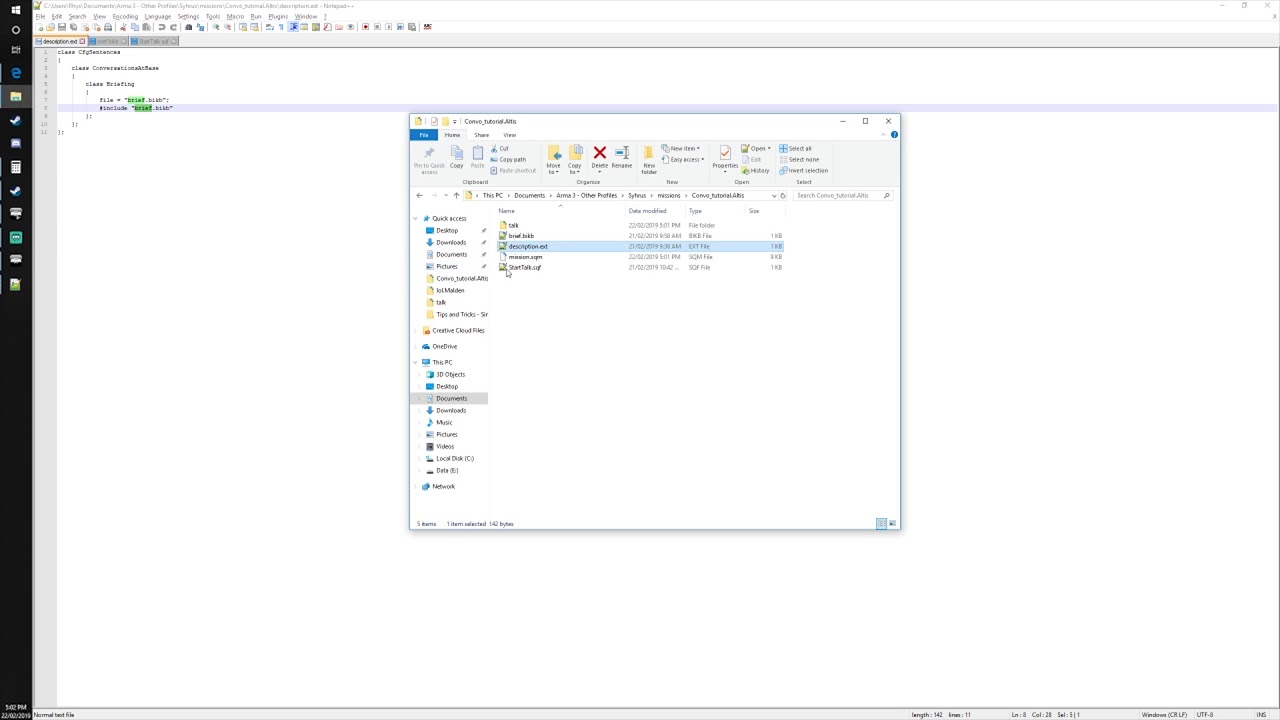
Check out my Patreon: https://patreon.com/user?u=5391037
Facebook: https://www.facebook.com/MilsimSyhrus/
Example mission:
http://www.mediafire.com/file/1abb44egibclpbq/Convo_tutorial.Altis.zip/file
 jade acorn
can I close the left/right panels of Zeus interface with a script? Mission starts in the Zeus view and I'd like to collapse both columns automatically, and then expand them after certain time (if player doesn't do that themselves)
 still forum
@grizzled cliff A Main cause for a common compiler crash is compiling with /GL and /O2 or /Ox set.. i disabled /GL and it fixed it this time.. maybe just luck
eternal spruce
@formal grail I'm gonna give this a try
 ornate whale
How to pass multiple values into a function from a config class? So that the params are one array, not an array inside an array. As it is now, it passes [[0.66, 0.95]], which I don't want.
class Difficulty
{
    title = "Difficulty (enemy skill)";
    texts[] = { "Hard difficulty (80%)", "Challenging difficulty (66%) (Recommended)", "Normal difficulty (50%)"};
    values[] = { [0.8, 1], [0.66, 0.95], [0.5, 0.7] };
    default = [0.66, 0.95];
    file = "Functions\Mission\fn_setAISkill.sqf";
 };
"[0.66, 0.95]" as a string surely
My recollection is that for various reasons, nothing is practical there except integer values, so you have to put the arrays into the code that reads it instead.
If strings do work then I guess you could use toArray
 grizzled cliff
nah it was a clear and obviously syntax fuckup
you cant just put random words after a constructor
😛
the search and replace stripped out val( )
and just left what was inside the ( )
eternal spruce
How do I remove the missiles/bombs from the pylons


To look like the last images, no missiles just the rails on the aircraft


 timid zealot
@tough abyss Because the debug grabbed the name of the side, and the command for that side is actually sideLogic https://community.bistudio.com/wiki/sideLogic
tough abyss
ahh, cheers @tough abyss
warm hedge
Set ammo amount 0
vapid scarab
is there a way to disable dragging the main map?
and is there a function for moving a player's map view to a specific position?
tulip ridge
vapid scarab
and is there a function for moving a player's map view to a specific position?
https://community.bistudio.com/wiki/lookAtPos might be what you're looking for, although I swear there was a different command too
tulip ridge
vapid scarab
is there a way to disable dragging the main map?
Are you just trying to lock the map in a certain spot?
 versed belfry
Hello again :D
I come bearing yet another question. Is there a way to figure out the side of the unit that was just killed using entityKilled mission event handler?
addMissionEventHandler ["EntityKilled", {
    params ["_unit", "_killer", "_instigator", "_useEffects"];

    systemChat str(_unit);
    systemChat str(side _unit);
    systemChat str(_killer);
    systemChat str(side _killer);
    }];
This is what I have currently and the side of _unit shows as civilian when it is triggered, and I assume that is because it's dead.
granite sky
side group _unit
versed belfry
granite sky
`side group _unit`
Seems to work, thank you.
vapid scarab
tulip ridge
Are you just trying to lock the map in a certain spot?
Im making a fancy briefing tool. Got the map lock down. Found a function called mapAnimAdd.
Doing this to test it:
[] spawn {

waitUntil { visibleMap };
sleep 1;
mapAnimAdd [5, 0.05, [2000, 12000]];

};
It does not acvtually move the map though...?
versed belfry
I am writing a script to let the AI open fire if the players open fire on them first and I have a feeling nested forEach loops is not a great approach, anyone able to give me a second opinion on this?
addMissionEventHandler ["EntityKilled", {
    params ["_unit", "_killer", "_instigator", "_useEffects"];

    if ((side group _unit == WEST) && (side group _killer == EAST)) then {
        [] spawn {
            {
                private _AIlayer = (getMissionLayerEntities _x) select 2;
                {
                    _x setCombatMode "YELLOW";

                    {
                        _x setUnitCombatMode "YELLOW";
                    } forEach units _x;

                    sleep 0.1;
                } forEach _AIlayer;
            } forEach ["UNA Comms Delta Garrison AI", "Tazzarine UNA Aid Convoy", "UNA Comms Delta Convoy", "Tazzarine Patrol AI", "Tazzarine UNA AI"];
        };
    };
}];
 indigo snow
side player isEqualTo sideLogic; str side player == "LOGIC";
tough abyss
Thanks @indigo snow
 cosmic lichen
If it works it works 
granite sky
I wouldn't even bother with the spawn. Setting combat mode on a couple hundred units isn't gonna take long.
I guess the worst thing here is that it'll do it more than once, because you're not uninstalling the EH after the first qualifying kill.
faint burrow
ornate whale
How to pass multiple values into a function from a config class? So that the par...
https://community.bistudio.com/wiki/Mission_Parameters:
Mission parameters are integer values
versed belfry
granite sky
I guess the worst thing here is that it'll do it more than once, because you're ...
Oh yea, I should do that...
jade acorn
jade acorn
can I close the left/right panels of Zeus interface with a script? Mission start...
bump, I need an adult
warm hedge
I was an employee at random company and it was 9AM to me, what do you expect?
I think it is defined in relatively scripted way
 ivory lake
['toggleTree',_this + [false],''] call RscDisplayCurator_script;
may do something
probably best to just be brave and dig into the curator functions
there's also this
_sidebarShow = missionnamespace getvariable ["RscDisplayCurator_sidebarShow",[true,true]];
warm hedge
with uiNamespace do {
  ["toggleTree",[findDisplay 312 displayCtrl 16104,false],''] call RscDisplayCurator_script;
}```Works, ctrl can be 16104 or 16105it was 2AM for me, I did not expect anything
 flint topaz
Can you run getVariable or similar in description.ext to set settings based on uinamespace or profilenamespace
I’m trying to set autoassignslots to 1 sometimes (based on a condition)
faint burrow
ornate whale
Do you know why https://community.bistudio.com/wiki/BIS_fnc_holdActionAdd function doesn't work when I use _this or _caller in the conditionShow expression?
warm hedge
Share your code
ornate whale
[
    transformer1,
    "Kill Transformer",
    "\a3\ui_f\data\IGUI\Cfg\holdactions\holdAction_connect_ca.paa",
    "\a3\ui_f\data\IGUI\Cfg\holdactions\holdAction_connect_ca.paa",
    "(_this distance _target < 3)",
    "(_caller distance _target < 3)",
    { hint "Started!" },
    { systemChat "Tick!" },
    { transformer1 setDamage 1 },
    { hint "End!" },
    [], 10, nil, true, false
] call BIS_fnc_holdActionAdd;
When I use player instead of _this, it works. Standing right next to the object.
warm hedge
Are you sure you're close enough
ornate whale
warm hedge
Are you sure you're close enough
OK, the center of the object is probably somewhere above the terrain, its the distance.
eternal spruce
warm hedge
Set ammo amount 0
@warm hedge i used F16 setVehicleAmmo 0; and nothing happened however i controlled a player and went inside the vehicle and used Vehicle player setVehicleAmmo 0; and it removed the ammunition, so how do I implement this on an empty vehicle?
faint burrow
eternal spruce
@faint burrow i used this [F16_218, 0] remoteExec ['setVehicleAmmo',0]; still nothing but with vehicle player it removed the ammo
faint burrow
[F16_218, 0] remoteExec ["setVehicleAmmo", F16_218];
I ran it and got back an error

 winter rose
looks like F16_218 is not defined 😬 ?
eternal spruce
you mean the variable name doesn't exist?
faint burrow
What returns isNil "F16_218"?
eternal spruce
F16_218 value was returned as true
faint burrow
F16_218 has bool value?
eternal spruce
@faint burrow yea it's true
faint burrow
Should be object.
eternal spruce
what do you mean?
winter rose
F16_218 should be of type Object because you want it to target the plane
if isNil "F16_218" returns true, then the variable F16_218 is undefined
eternal spruce
Ok firstly I need to apologize for not being knowledgeable, my question is what makes a variable undefined and how do you define it and @winter rose you said
F16_218should be of typeObjectbecause you want it to target the plane. are you referring to this:https://community.bistudio.com/wiki/BIS_fnc_objectType
winter rose
eternal spruce
Ok firstly I need to apologize for not being knowledgeable, my question is what ...
nope, nope
and no need to apologise for not knowing! 😊
where do you define F16_218? e.g F16_218 = thisVehicle, or naming an Eden Editor plane F16_218?
eternal spruce
So i did give it F16_218 the variable in the editor then i verified that the variable name is in fact true by using isNil { player getVariable "F16_218" }; which did give me a returned value of being true.
Now the problem at hand here is getting the pylons on the Aircraft to be empty but have the rails attached. This was easily done by
presetting the loadout on the pylons through the editor - playing the scenario - used Zeus and remove the ammunition from the object. After doing that i did get the desired visual results on the object so that is why i was asking how to do this without going through all those extra steps and have it done immediately after playing the scenario? I used this ["F16_218", 0] remoteExec ["setVehicleAmmo", "F16_218"]; but like i said nothing happened. Did I do something wrong here?
stable dune
eternal spruce
So i did give it `F16_218` the variable in the editor then i verified that the v...
You have quoted variables,
Should be without quotes.
With quotes your variable is string.
So remove "" from your "F16_218" --> F16_218
faint burrow
After doing that i did get the desired visual results on the object so that is why i was asking how to do this without going through all those extra steps and have it done immediately after playing the scenario?
Place this in airplane Init field:
if (!(local this)) exitWith { };

{
    this removeWeapon (getText (configFile >> "CfgMagazines" >> _x >> "pylonWeapon"));
} forEach (getPylonMagazines this);
Oh no @stable dune it is without quoted vairables but i was getting an error error type any, expected number, side, object, group, string
 south swan
wat
eternal spruce
Sorry, I got this error message
 south swan
where does F16_218 variable name come from?
eternal spruce
I named it in the editor
south swan
post the screenshot of where you've named it, please
eternal spruce
 south swan
mighty fun stuff
does scrolling a bit down to "Object: States" and setting "Ammunition" to 0 maybe produce the desired result?
faint burrow
eternal spruce
Did the init code help?
south swan
also, huh?
 eternal spruce
Oh shit my bad guys i saw the real problem, simply my incomitance. Look on the screenshot again and you'll see the variable name is F16C_218 and not F16_218 that was the original variable name but when @winter rose asked if it was defined i thought that it meant the name was Vname was incorrect so i changed it. Sorry for waisting you're time guys
@faint burrow yea i realized last minute
south swan
also, to double down on no-scripting ammunition slider:

 winter rose
all good, rubber-ducking at it once again ^^
eternal spruce
@south swan That was my first solution but it didn't change so i was wondering if it was a mod affecting it. However thank you all again for helping me this [F16C_218, 0] remoteExec ["setVehicleAmmo", F16C_218]; did in fact worked.
How do i learn more on coding, do i need to go to college? i have a very hectic work schedule, I'm in the Navy so i'm gone at sea most of the time and some websites are blocked on the computers if we even have internet at all, any reccomendations?
 hallow mortar
eternal spruce
So i did give it `F16_218` the variable in the editor then i verified that the v...
hallow mortar
eternal spruce
So i did give it `F16_218` the variable in the editor then i verified that the v...
So i did give it
F16_218the variable in the editor then i verified that the variable name is in fact true by usingisNil { player getVariable "F16_218" };which did give me a returned value of beingtrue.
That's not how that works.
That code doesn't check if "the variable name is true". That code returns true if the variable is NIL (undefined). That's whatisNilmeans. That code is for checking "is this nil". If it returns true then you have given it an undefined variable to check.
hallow mortar
That too
 idle remnant
Does anyone else have issues with assignTeam randomly losing track/forgetting and returning players back to default colour?
 pastel pier
I am trying to play a sound from my mod. I added the sound in cfgSounds. When i use the console i can play the sound but when i put the same code in my mod it doesn't play. What could i be doing wrong?
class CfgSounds
{
    class DBSC_cruise_control_activated
    {
        name = "cruise_control_activated";
        sound[] = {"darkbelg_speed_control\cruise_control_activated.ogg", 5, 1, 10};
        titles[] = {0, "Cruise control activated"};
        forceTitles = 1;
        titlesStructured = 1;
    };

    class DBSC_cruise_control_deactivated
    {
        name = "cruise_control_deactivated";
        sound[] = {"darkbelg_speed_control\cruise_control_deactivated.ogg", 5, 1, 10};
        titles[] = {0, "Cruise control deactivated"};
        forceTitles = 1;
        titlesStructured = 1;
    };
};
playSound "DBSC_cruise_control_deactivated";
opal zephyr
Should be sound name, not class name according to wiki
hallow mortar
It means the classname. The name string is a display name used in the UI; it's not used in scripts.
pastel pier
It's driving me crazy there is no error the sound can't be found. Can a sound be to short?
Or what is the expecteed location?
formal grail
There seems to be a quirk with ppEffectCreate, where if you try to create a second PP on the same priority, it will only fail with -1 IF the second PP is a different post process type.
So this fails as expected:
_handle = ppEffectCreate ["filmGrain", 2000];
_handle2 = ppEffectCreate ["colorCorrection", 2000];
[_handle, _handle2] // [795, -1]
BUT this will actually unexpectedly "work":
_handle = ppEffectCreate ["filmGrain", 2000];
_handle2 = ppEffectCreate ["filmGrain", 2000];
[_handle, _handle2] // this returns something like [795, 795]
This is problematic if you want to create two post processing "layers" of the same post process, because if you create two in two separate env, you think you're good, but they're actually shared. So if you go ahead and destroy one, the other's gone too.
Anyway, my solution for this is:
    private _priority = missionNamespace getVariable ["filmGrainPriority", 2000];
    _filmGrain = ppEffectCreate ["filmGrain", _priority];
    _filmGrain ppEffectAdjust [1, 0];
    _filmGrain ppEffectEnable false;
    _filmGrain ppEffectForceInNVG true;
    _filmGrain ppEffectCommit 0;
    missionNamespace setVariable ["filmGrainPriority", _priority + 1];
Not sure if that'll create other problems but it seems to work🤞
 tawdry kettle
Hello, there is a mod or a script that exists to test the lods of distances but close, like being able to select lod 2 and have the ability to walk around the model in game
jade acorn
is there an EH for player opening Zeus interface? I noticed BIS_fnc_setCuratorVisionModes has to be set each time player goes back to the interface. My first thought was to have it in onEachFrame EH but unfortunately this produced NVG sound each time it's executed (even with 0 fadeSound 0) and now my ears hurt. I tried adding it to the Example 3 from here https://community.bistudio.com/wiki/openCuratorInterface but if there's a significant delay between pressing the button and seeing the interface, BIS_fnc_setCuratorVisionModes executes before it should
blissful current
I'm not sure what I've messed up in my mission but I cant enter vehicles or open the arsenal in SP but it works fine in MP. Any ideas lol?
hallow mortar
jade acorn
is there an EH for player opening Zeus interface? I noticed `BIS_fnc_setCuratorV...
I don't think there's a specific EH for it. A UserAction EH might be a bit cleaner than the inputAction approach, but it'd probably still have the same timing issue.
Possibly one of these two EHs followed by a waitUntil the curator interface display exists?
jade acorn
I'll try the KeyDown EH with waitUntil then, thanks
do you know if CBA has something for it?
faint burrow
jade acorn
faint burrow
Try this: https://community.bistudio.com/wiki/Arma_3:_Scripted_Event_Handlers#Mo...
this seems to be for remote control only so would fix only half of the issue, because I have to cover the going back to and from player unit
faint burrow
hallow mortar
Which of those do you imagine would cover the "opened or closed curator interface" event?
faint burrow
The last one I guess.
hallow mortar
That's for when a curator module is assigned to a player, i.e. the act of granting them zeus powers to begin with.
faint burrow
jade acorn
not sure if this one would work, but CBA has their own DisplayHandler EH so perhaps I could write my own https://cbateam.github.io/CBA_A3/docs/files/events/fnc_addDisplayHandler-sqf.html
hmm but it seems to rely on key presses too...
tulip ridge
jade acorn
is there an EH for player opening Zeus interface? I noticed `BIS_fnc_setCuratorV...
Feature camera player eh
https://cbateam.github.io/CBA_A3/docs/files/events/fnc_addPlayerEventHandler-sqf.html
Just check if the given feature camera is "curator"
jade acorn
will try that out rq
_id = ["featureCamera", { _result = [] call CBA_fnc_getActiveFeatureCamera;
    if (_result == "Curator") then {
    [zeus,[-1]] call BIS_fnc_setCuratorVisionModes;};
}] call CBA_fnc_addPlayerEventHandler;``` wrote something like this and works, although if I start spamming the Zeus interface button, it does not trigger but I guess that's just because it's not an engine EHIs that not also what you wanted?
You wouldn't want to play the sound/change vision mode if someone quickly entered and exited zeus
jade acorn
I don't think I expressed this anywhere, except that I got earraped while trying to get this to work
I'll just hope player won't be spamming the buttons to omit the EH
tulip ridge
It should get triggered when curatorCamera is no longer null
https://github.com/CBATeam/CBA_A3/blob/8d54f3166f35c90bc2889cc2682374466d988133/addons/common/XEH_preInit.sqf#L27
GitHub
Community Base Addons for Arma 3. Contribute to CBATeam/CBA_A3 development by creating an account on GitHub.
I'd imagine that even when you spammed it, curatorCamera should exist
jade acorn
I could try checking for display instead of camera then although I am pretty sure camera is created before the UI, too
but for now I think I'll stick to what I have lol
is there a fadeX command for UI sounds? Just so I could get rid of that NVG click :D
blissful current
Speaking of CBA. Any idea what this error is?
 warm hedge
It's not about script. It's about missing addon/Mod
hallow mortar
JAM_VN is the addon within CBA that handles Joint Magazine Wells for SOG Prairie Fire content. This means that whoever made this mission did it with CBA loaded, and presumably also with SOGPF loaded since JAM_VN doesn't load itself if SOGPF isn't present. You're missing one or both of them.
blissful current
I reinstalled the CBA mod on the server and it fixed it
is there a way to delay this trigger condition in the editor? When I try to play on the dedicated server the condition Is immediately met before players spawn in it seems. And the activation of this trigger is to end the mission which is what happens on mission load.
(count ((units group player) select {alive _x}) == 0)```you could throw in a time > xxx
Or check that there are units of some kind within the group, although that might never trigger if everyone disconnects rather than dying.
grizzled cliff
woot, Intercept no longer requires Detours. Linux compatability is much closer now. 😄
Nor is it doing any Windows API specific memory searches.
hallow mortar
You could use the trigger timeout conditions (right at the bottom) - set it so the condition needs to be true for a reasonable time before it can activate.
 neon plaza
Trying to get this script to work from the start of the mission.
showHUD [
    true, // scriptedHUD
    false, // info
    true, // radar
    true, // compass
    true, // direction
    true, // menu
    true, // group
    true, // cursors
    true, // panels
    false, // kills
    true  // showIcon3D
];
How would I place this In the description folder?
hallow mortar
There is no such thing as a description folder.
You can place it in the description.ext file by formatting it as described here: https://community.bistudio.com/wiki/Description.ext#showHUD
That will enforce it and prevent the showHUD command from working in mission scripts.
Alternatively, you can place it in the init.sqf file, formatted as you have it already. Using that method allows the showHUD command to be used again later in the mission.
neon plaza
hallow mortar
There is no such thing as a description folder.
You can place it in the `descrip...
I tried placing It In the init.sqf and I had no results. Could It be the formating?
I just placed It
showHUD [
    true, // scriptedHUD
    false, // info
    true, // radar
    true, // compass
    true, // direction
    true, // menu
    true, // group
    true, // cursors
    true, // panels
    false, // kills
    true  // showIcon3D
];
I just placed It In the Init file like this
hallow mortar
The formatting is correct if you put it as you have it there.
Make sure your init.sqf is actually init.sqf and not init.sqf.txt.
If that still doesn't work, try adding sleep 0.1; before it.
neon plaza
Thank you. I will try this now.
Also Nikko Is there a script I can use to remove AI bodies the moment they die?
I have this for players
hallow mortar
hallow mortar
The formatting is correct if you put it as you have it there.
Make sure your `in...
Note that this command allows the various HUD elements to be shown, but it doesn't force them to be shown. For example, it will allow you to open the info panels (e.g. GPS) but it doesn't automatically make them appear.
neon plaza
//initPlayerLocal.sqf:

player addEventHandler ["Respawn",{

    params ["_newObject","_oldObject"];
    deleteVehicle _oldObject;

}];
Trying to also make It so It removes AI bodies as well.
hallow mortar
That specific script won't work for AI because they don't respawn.
neon plaza
I have been trying to find something but can not.
If anyone has a simple script to just remove AI dead bodies every 1 second.
Also the line of code did not take. I will add the sleep before hand.
hallow mortar
Try this in initServer.sqf:
addMissionEventHandler ["EntityKilled",{
  params ["_unit"];
  if !(_unit isKindOf "CAManBase") exitWith{};
  if !(isPlayer [_unit]) then {
    deleteVehicle _unit;
  };
}];```
If you remove the isPlayer check then this can take care of both AI and players at the same time, although it will happen at the moment of _death_ and not when they respawn.I will give this a try.
I am testing the sleep 0.1;
neon plaza
hallow mortar
The formatting is correct if you put it as you have it there.
Make sure your `in...
Adding the sleep made It work. Thank you. I will also try the second line of code.
neon plaza
hallow mortar
Try this in `initServer.sqf`:
```sqf
addMissionEventHandler ["EntityKilled",{
...
Do I need to make a IntiServer file? I do not see that here.
hallow mortar
If there isn't one, you need to create one, otherwise you can't put the code in it.
neon plaza
already done. Testing
neon plaza
hallow mortar
If there isn't one, you need to create one, otherwise you can't put the code in ...
Lol I have to be careful what I ask for. The moment the AI are killed they do not fall to the ground. They vanish. Anyway we can have It so that they de spawn after 1 second or 2?
hallow mortar
addMissionEventHandler ["EntityKilled",{
  params ["_unit"];
  if !(_unit isKindOf "CAManBase") exitWith{};
  if !(isPlayer [_unit]) then {
    _unit spawn {
      sleep 2;
      deleteVehicle _this;
    };
  };
}];```Awesome I will try this
neon plaza
hallow mortar
```sqf
addMissionEventHandler ["EntityKilled",{
params ["_unit"];
if !(_unit...
That worked perfect.
neon plaza
hallow mortar
```sqf
addMissionEventHandler ["EntityKilled",{
params ["_unit"];
if !(_unit...
And last project for my night. I am trying to add a warning to this so everytime this script activates It will read "All mines have been cleared from server!!!"
[]Spawn{
    sleep 3600;

    _mines = nearestMines [[worldSize/2,worldSize/2], [], sqrt 2 / 2 * worldSize, false, true];
    {
        deleteVehicle _x;
    }forEach _mines;
};
You can use systemChat "..." for something basic, just keep in mind it's local, so it needs to be run on each client you want.
 frail vault
I am not sure if anyone has any idea but
I am trying to prevent players from opening inventory of dead enemy ai's
{if (!isPlayer _x) then {_x addEventHandler ["killed" { removeAllWeapons _this select 0; removeAllItems _this select 0; removeAllAssignedItems _this select 0; removeBackpack _this select 0; }]}} forEach allUnits;
I found this script, but it just deletes everything.
Is there a way to just prevent people from opening OPFOR inventory if you are BLUFOR?
formal grail
frail vault
I am not sure if anyone has any idea but
I am trying to prevent players from ope...
Returning true in the InventoryOpened EH seems to do it.
player addEventHandler ["InventoryOpened", {
    params ["_unit", "_container"];
    side _unit == west && side group _container == east
}];
Replace player with whoever you want to prohibit, or run it on all clients.
 fair drum
might need to add in a check for the connected weapon holder
formal grail
That's the side group thing.
frail vault
honestly i want to do this for everyone
So that no one from BLUFOR can open up OPFOR or INDFOR
Let me give that a try with added guer
Thanks!
formal grail
Then you can change that to:
player addEventHandler ["InventoryOpened", {
    params ["_unit", "_container"];
    side _unit != side group _container
}];
I think there is a problem with that in that it'll still allow rearming at someone's dead body, but you can prevent that too via one of these:
inGameUISetEventHandler ["Action", "_this # 2 == 'Rearm'"];
sorry false alarm, that does work!
formal grail
Nice! You might want to test that more. I just wrote that off the top of my head. There's quite a few ways that restricting inventory can break. In the past, it's one of the more common exploit routes that people have in MP missions.
frail vault
i am testing it, but at the sametime i am going more into it looking into deleting weapons that drop as well with
deleteVehicle (nearestObject [_killed, "WeaponHolderSimulated"]);
this is the code i cobbled together from going online
Player addEventHandler["inventoryOpened", {
  params["_plyr", "_cont"];
  [_plyr, _cont] spawn
  {
    params["_plyr", "_cont"];
    waitUntil{!isnull findDisplay 602};
    if (!isNull _cont && (cursorTarget distanceSqr _plyr < 16) && {!(_cont isKindOf "ReammoBox_F" or [ _cont, true ] call BIS_fnc_objectSide isEqualTo WEST) && !(_cont isKindOf "groundWeaponHolder")})
      then
      {
        (findDisplay 602) closeDisplay 2
      }
  }
}];

inGameUISetEventHandler["action", " _cont = _this select 0; _act = _this select 3;
                        if (_act in['Rearm', 'TakeWeapon', 'Gear', 'Inventory'] && (cursorTarget distanceSqr player < 16) && {!(_cont isKindOf 'ReammoBox_F' or [ _cont, true ] call BIS_fnc_objectSide isEqualTo WEST) && !(_cont isKindOf 'groundWeaponHolder')}) then { true } else { false } "
];

addMissionEventHandler ["EntityKilled", {

    params ["_killed", "_killer", "_instigator"];

    if (isPlayer _killed) exitWith {};
    if !(_killed isKindOf "Man") exitWith {};

    if ((side _this == east) then {
    removeAllWeapons _killed;
    removeAllItems _killed;
    deleteVehicle(nearestObject[_killed, "WeaponHolderSimulated"]);
  }

}];
and while it prevents players from opening the inventory, it doesn't delete weapons.
Any ideas or suggestions?
formal grail
frail vault
this is the code i cobbled together from going online
```cpp
Player addEventHan...
Turn on show script errors, because I'm almost certain that script breaks at some point. For example, side _this in the last event handler should trip up the typesystem.
granite sky
It might not. Unscheduled code doesn't report nil reference errors.
So the if statement just gets silently skipped.
formal grail
It should report syntatic type errors like this one because the compiler should trip up, not at runtime
granite sky
It just hits the _this and ignores everything else IME
hmm
I guess there is a _this
formal grail
Anyway, this is probably closer to what you want @frail vault :
addMissionEventHandler ["EntityKilled", {
    params ["_killed", "_killer", "_instigator"];
    if (side group _killed == east) then {
        removeAllWeapons _killed;
        removeAllItems _killed;
        deleteVehicle (nearestObject [_killed, "WeaponHolderSimulated"]);
    };
}];
Yeah, it should err out there in a way you can see unless it's run remotely
frail vault
let me give it a shot!
granite sky
Actually never mind, the brackets were completely fucked there :P
formal grail
That too.
granite sky
Note that units can drop two weapon holders (primary, secondary), so you might need to delete two of them.
frail vault
doesn't removeAllWeapons remove both primary and secondary?
granite sky
removeAllWeapons doesn't remove either of them.
just the handgun, usually. The primary and secondary are dropped into simulated weapon holders, hence the end part.
2.18 adds getCorpseWeaponHolders
frail vault
i will look into that, thanks
 edgy dune
Anyways to change the position/direction of a pip screen with scripts for class RenderTargets?
basically I got a PIP for a helicopter where initiall its looking forward, I wanted to have an action that changes it to look backwards.
I could do model cfg animationSource but maybe a better way?
still forum
formal grail
It should report syntatic type errors like this one because the compiler should ...
It's a dynamically typed language. The compiler doesn't know what type is gonna be there.
 last cave
I can't understand why my soldiers are screaming about cover...
jade acorn
Would be easier yo help if you shared full code
Bandaid solution could be disabling radio protocol for them
So they just get mute
last cave
Shutting them up does not solve the cause of the screaming.
jade acorn
Then my first message stands
last cave
problem is
_group setFormation "FILE";
_group setBehaviour "Aware";
_group setSpeedMode "NORMAL";
{

_x disableAI "COVER";
_x disableAI "AUTOCOMBAT";
_x setSkill ["aimingSpeed", 0.33];
_x setSkill ["spotDistance", 0.33];
_x setSkill ["spotTime", 0.33];
_x setSkill ["aimingAccuracy", 0.2];
_x setSkill ["aimingShake", 0.1];
_x setSkill ["commanding", 1.0];
_x setSkill ["courage", 1];

}foreach units _group;
i remove this code and no listen screams.
After _x disableAI "COVER";
they start screaming...
Nice AI 🙂
jade acorn
Are they actually in aware behaviour, not combat in that video?
Your code suggests otherwise but fsms are still executed
last cave
I add
_x disableAI "COVER" for units and again listen screams
hallow mortar
ornate whale
Are all weather commands setWind, fog, rain, gusts etc. synced with clients? Or do I really need to remoteExec some of them. Thank you
faint burrow
Check BIKI.
tulip ridge
ornate whale
Are all weather commands setWind, fog, rain, gusts etc. synced with clients? Or ...
Check the BIKI, most weather commands will need to be executed on the server, for example:
https://community.bistudio.com/wiki/setFog
 pure hawk
Hi guys, I am Adham I am new here and I like creating missions but I don't know how I can use scrip so I want to ask you if you know any scrip tutorial that can help me improving my missions
fair drum
pure hawk
Hi guys, I am Adham I am new here and I like creating missions but I don't know ...
you're gonna have a read a bunch
blissful current
Is there way to remove these yellow task icons from the map via difficultly settings? You see, I want them there for if players need some help in locating the objective. But personally I like to turn them off for immersion. I've turned all the difficulty stuff to hide or whatever but these icons are still on my map.
 faint burrow
ornate whale
blissful current
Is there way to remove these yellow task icons from the map via difficultly sett...
faint burrow
ornate whale
blissful current
Is there way to remove these yellow task icons from the map via difficultly sett...
If you place it in Eden, you can open the Task Create module and choose Disabled under Destination option.
But those options in Description.ext did not work for me.
blissful current
ornate whale
If you place it in Eden, you can open the Task Create module and choose Disabled...
I dont want it disabled because some players might like to use it. Im just wondering if there is a difficulty option that turns them off. taskManagement_markers2D = 0; seems to have no effect.
fair drum
no there is not a difficulty option that turns them off. you would have to script on the local task to check for a difficulty option selection, then either change the destination to objNull or whatever you want based on that. you would use the local task commands, not the task functions (those are global). good luck.
 nocturne tartan
Looking for help with some SQF and Config files for a mod
I got a good chunk of it down, but I cannot seem to get CBA settings put in properly
Trying to add Addon settings for the server and clients to adjust
tulip ridge
nocturne tartan
Looking for help with some SQF and Config files for a mod
I got a good chunk of...
Settings should be added in preInit, you can do it pretty easily with CBA's extended event handlers:
class Extended_PreInit_EventHandlers {
    class TAG_yourAddonName {
        init = "call 'path\to\your\XEH_preInit.sqf";
    };
};
Apologies, to clarify, I need to make a new SQF called "XEH_preInit"?
Then add that code to the previous SQF or the config?
tulip ridge
XEH_preInit is just tradition, you could call it whatever you want
nocturne tartan
Aye, Though I apologize, I am still quite lost
tulip ridge
-
Add the
Extended_PreInit_EventHandlersclass I showed in your addon's config. It could either be in theconfig.cppdirectly or included in another file. -
Change
TAG_yourAddonNameto be the name of your addon (the class in CfgPatches). -
Change the file path to the file you want to be called during pre init.
 jade acorn
is there a version of center-screen hintC or guiMessage that would work while in Zeus? First does not trigger, 2nd closes the Zeus interface to be displayed
 proven charm
jade acorn
is there a version of center-screen hintC or guiMessage that would work while in...
proven charm
jade acorn
is there a version of center-screen hintC or guiMessage that would work while in...
try BIS_fnc_guiMessage
jade acorn
guiMessage closes the Zeus interface to be displayed
proven charm
oh
proven charm
what if you define the parent? https://community.bistudio.com/wiki/BIS_fnc_guiMessage
jade acorn
you mean leave parent as-is and useParentBox set to true?
proven charm
i mean making zeus GUI the parent
jade acorn
["Text", "Header", true, false, findDisplay 312, true, true] call BIS_fnc_guiMessage;``` seems to work, thanks!almost works, the pause parameter doesn't really pause the game but message is displayed and that's all I wanted
proven charm
cant pause in MP?
jade acorn
actually I can, it just seems inconsistent
blissful current
I have this in a trigger condition field:
(count ((units group player) select {alive _x}) == 0)```
It checks to see if all players are dead. When it returns true then the Activation field calls end mission.
But its doing something unexpected. It ends the mission directly on mission start. So I thought maybe it was just running before the players spawned in.

So then I added to the condition `triggeractivated XYZ` which is a blurfor present trigger that happens like 1 minute after mission start. But when plays enter the trigger the mission promptly ends. The player is clearly alive. Is there something I've overlooked in the code?It ends the mission directly on mission start. So I thought maybe it was just running before the players spawned in.
If you spawn units after the mission has started, then you should "activate" the trigger after units spawning.
blissful current
faint burrow
> It ends the mission directly on mission start. So I thought maybe it was just ...
They spawn in directly respawnOnStart = 0;
faint burrow
Try to change to -1.
proven charm
quick fix for that would be use time > 60 in the condition but idk how your mission is setup so it might not work
faint burrow
Need the trigger settings screenshot.
blissful current
proven charm
quick fix for that would be use time > 60 in the condition but idk how your miss...
I no longer think it's time related. Like I said I gated it behind another trigger that players have to reach allow the condition to become true.
blissful current
faint burrow
Try to change to *-1*.
Trying now.
stable dune
blissful current
I have this in a trigger condition field:
```sqf
(count ((units group player) se...
blissful current
stable dune
better is
```sqf
(units group player) findIf {alive _x} == -1
```
<https://commu...
This does the same thing.

Would the Server Only tick be a problem?
faint burrow
There is no player on server side!
stable dune
private _players = allPlayers select {!(_x isKindOf "VirtualMan_F")};
_players findIf {alive _x} == -1
More precisely, player is not defined on server side.
blissful current
Oh man I already got bit by this one before. Guess I don't learn too quick.
blissful current
stable dune
```sqf
private _players = allPlayers select {!(_x isKindOf "VirtualMan_F")};
_pl...
What is this? What is VirtualMan?
stable dune
But there is bis_players function too.
https://community.bistudio.com/wiki/BIS_fnc_listPlayers
faint burrow
You can sync the trigger with player and use this activation condition:
_players = units ((synchronizedObjects thisTrigger) param [0, objNull]);

(_players findIf { alive _x }) < 0
If I have 8 playable units I should sync each of them correct?
blissful current
Copy. And what if the group leader slot is not chosen. Would it not work in that case?
faint burrow
Check it. Otherwise sync all units and change the condition.
blissful current
Thanks for the help yall! 🫡
 foggy hedge
Anyone know if there's a nice and simple script for dynamically spawning walls around an area (i.e. creating a boxed in arena, for example). This seems common and useful enough for there to be a popular solution, but I haven't found one.
 fierce canyon
hey im trying to get the ai to not path, ive tried some stuff but i need help with this script: this disableAI "PATH"; i get invalid number in exspression
as an error
faint burrow
Provide the full error message from RPT file.
fierce canyon
faint burrow
Provide the full error message from RPT file.
 stable dune
Take ` ` away
faint burrow
Yes, remove backticks.
fierce canyon
the space?
stable dune
That is discord code block, and you have copied with `
fierce canyon
oh
faint burrow
Also I'm not sure that the code will work for composition.
 umbral condor
Is there a script I can input to make AI, and more specifically civilians, wander freely?
I want to make a city feel alive without issuing a thousand manual commands
faint burrow
There is Civilian Presence module.
 opaque ravine
whats yalls take on something like the halo hologram ability? is that possible in arma if you make a copy of the player and then have it run in the direction the player is facing?
umbral condor
faint burrow
There is Civilian Presence module.
Is there a way to customize these civilians?
faint burrow
Don't know.
tulip ridge
opaque ravine
whats yalls take on something like the halo hologram ability? is that possible i...
You could theoretically spawn a new unit, give them the same loadout / identity of the player, and then calculate some position for them to run to while hiding the player
opaque ravine
I think that would be cool.
 crimson cedar
Is there a way for me to arm a few IEDs inside Zeus and have them all bearing the same code to detonate so I can call a cellphone once and have them all explode?
tulip ridge
crimson cedar
Is there a way for me to arm a few IEDs inside Zeus and have them all bearing th...
If you mean for ACE Explosives, since vanilla Arma 3 doesn't have explosive codes, you'd be better off making a thread in the help-ace3 channel in the ace discord
https://acemod.org/discord
crimson cedar
thanks!
blissful current
Is there a limit to how many arsenals can be in a mission or something? I frequently have an issue where I dont get the action menu selection for arsenal despite being right next to it. Seems to be kinda random if it will pop up or not.
 manic sigil
Shouldn't be, unless you're creating an ungodly number of them. Some objects can be more finnicky than others about AddAction hitboxes.
hallow mortar
Keep in mind that the accessibility radius for actions, including the action to open the arsenal, is calculated from the object's centre, not its surface. The default arsenal adding thing doesn't give you control over the radius, so for larger objects it can be smaller than would be ideal.
If you want more control over the radius, you can make your own action that runs BIS_fnc_Arsenal in Open mode, rather than relying on the default action added by BI.
manic sigil
Okay, function called by player in a small (2 player, or solo) coop scenario, creates trigger that waits for the caller to enter the area + be touching the ground + be still. Been tinkering with it for a bit but going to bed, would appreciate some thoughts on how to streamline it.
 high tendon
Where would one go within a PBO to make the radar system on an aircraft larger?Most aircraft radars only reach out to 16km and Id like to make it reach out further to do BVR engagements. Im currently searching on the wiki and going thru various thread to findout how to do this.
hallow mortar
You need to make a config mod that changes the vehicle's sensor component config.
https://community.bistudio.com/wiki/Arma_3:_Sensors_Config_Reference
#arma3_config
formal grail
Ok, I finally figured out how to get custom groups/squads voice working so they can talk in the same chat without running up against the ~10 built-in custom radio channel limit and without using regular groups. There's a bit of jank wrt talker name display but it seems to work.
Does anyone know if it's possible to modify built-in GUIs that aren't exposed as variables? I just want to hide an element.
warm hedge
What it does mean? What GUI? What element? What variable?
formal grail
When someone talks, I want to hide their name.
According to the IDD list, I believe that's idd=55
warm hedge
Talk what? Talker name?
formal grail
Yeah.
warm hedge
What it is?
formal grail
class RscDisplayVoiceChat
{
    class controls
    {
        class Background: RscText
        {
            colorBackground[]=
            {
                "(profilenamespace getvariable ['IGUI_BCG_RGB_R',0])",
                "(profilenamespace getvariable ['IGUI_BCG_RGB_G',1])",
                "(profilenamespace getvariable ['IGUI_BCG_RGB_B',1])",
                "(profilenamespace getvariable ['IGUI_BCG_RGB_A',0.8])"
            };
            x="SafeZoneX";
            y="(SafeZoneH + SafeZoneY) - 0.034";
            w=0.0255;
            h=0.034000002;
        };
        class Picture: RscPicture
        {
            idc=101;
            text="\A3\ui_f\data\igui\rscingameui\rscdisplayvoicechat\microphone_ca.paa";
            colorText[]={1,1,1,1};
            x="SafeZoneX + 0.00525";
            y="(SafeZoneH + SafeZoneY) - 0.025 - 0.0045";
            w=0.018750001;
            h=0.025;
        };
    };
};
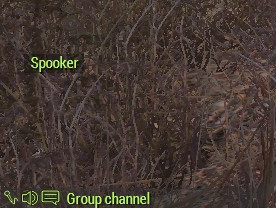
When they talk, one of these seems to get created, right below your text chat.
I want to hide it.
I tried to get it directly by trawling through uiNamespace, but I can't find a variable corresponding to it.
warm hedge
Clarify. Do you use setSpeaker to set AI voice?
formal grail
No, this isn't AI voice. This is: when someone speaks through voice chat, it shows up on the screen like this: https://i.imgur.com/6oXpMii.png (the top one showing the name)
And I want to remove or modify that element.
 warm hedge
Okay I think I mixed up something then
I don't think it is anyhow possible through scripting. Maybe a Mod can
formal grail
Too bad. I've tried modifying other parts of the UI before, like the radar, and it seems like you can only read from them.
But here, I can't even find it.
warm hedge
That is what I implied. A Mod can change config. Script can't
formal grail
Even though I can see part of its construction code
Well I don't want to change the config. I just want to do ctrlSetShow 0 on it or something
warm hedge
Maybe maybe not. But if it is possible, it would be janky enough
formal grail
Or set its alpha to zero. If there's some code rapidly refreshing in the background to set its color, I might be able to get away with just setting its alpha.
That was the thought anyway
 neat shadow
player addEventHandler ["Respawn", {
// Retrieve the unit that has respawned
_unit = _this select 0;
// Check the type of the unit and set respawn position accordingly
switch (typeOf _unit) do {
    case "B_Soldier_af": {
        // If the unit is of class B_Soldier_af, set respawn position based on specific markers
        if (isEqualTo _unit getVariable ["customRespawn", false]) then {
            _unit setPos (getMarkerPos "Bandit Infantry"); // Or any specific marker for this class
        } else {
            _unit setPos (getMarkerPos "Bandit Infantry"); // Default marker for this class
        };
    };
    case "B_Officer_F": {
        // If the unit is of class B_Officer_F, set respawn position to "Outlaw"
        _unit setPos (getMarkerPos "Outlaw");
    };
    // Add more cases for other unit classes if needed
    default {
        // Default respawn behavior if the unit class doesn't match any case
        _unit setPos (getMarkerPos "Bandit Infantry"); // Fallback marker
    };
};
}];
Im currently working on making certain respawns that are tied to specific slots/groups. This is what im working with ive tried a few other variations. im currentley or well was trying to follow the discussion in this:
https://forums.bohemia.net/forums/topic/173169-specific-respawn-points-for-specific-squadsunits/
But ive had no such luck. anyone got any advice? or an easier way to do this 😭
Bohemia Interactive Forums
Im building a multi-task Co-Op mission involving several squads with different roles such as; CAS Jet Pilots Fighter Jet Pilots Fireteam Squads Recon Squads Each group has its own squad that spawn in different locations. I want players to be able to respawn as many times as theyd like, so basical...
warm hedge
!code
 wicked roostBOT
How to use SQF syntax highlighting in Discord
```sqf
// your code here
hint "good!";
```
↓
// your code here
hint "good!";
And what is your issue
neat shadow
- im apparentley too dumb to even understand this rn^
and 2. my main issue is that this is basically the only guide on the bohemia forums for this type of things. And from what im understanding is that ive followed the small guide they posted. It does not work and i was seeing if anyone else has done this/knows how to fix it
warm hedge
I'm asking how it is not working
neat shadow
ahhh
so what its doing is exactly nothing, i have approximatley 4 respawns with different position names, and each have a different variable name.
Example: I want my pilots to spawn at the airfield and my GI to spawn at the barracks. The script in using in the inti file (the above) is basically doing nothing at all and everyone can spawn at every respawn
the goal of the script is to restrict it to unit class specific spawns
such as "B_Soldier_af" if i had done the above right, could be set to ONLY spawn in the barracks
warm hedge
case "EXAMPLE": { This is where you put the desired class
neat shadow
i removed the names on purpse as to not cause confusion
neat shadow
yea but ive given up on directly following the code from the post, and using chat gpt to see if it could magically point somethin out which is how ive gotten all these extra lines'
 naive holly
hi does anyone know this script? I don't know where to write this part to change the background


GitHub
Adds ID cards / passports to the game that can be checked/shown with ACE Interaction. - gruppe-adler/grad-passport
 weak obsidian
I'm trying to create a ground weaponholder to display some missiles for an ammo area for a gunship - somehow nothing seems to work - magazine_Missile_AGM_02_x1, PylonRack_Missile_AGM_02_x1 or PylonMissile_Missile_AGM_02_x1. How do I simply put down one or multiple Macer missiles on the ground? Do I have to createSimpleObject?
Feels like I'm not using the correct classnames but I can't find anyhting else for the Macers
warm hedge
Why you pinged mods
hallow mortar
weak obsidian
I'm trying to create a ground weaponholder to display some missiles for an ammo ...
Yes, createSimpleObject is the way to go.
Vehicle weapons and ammo don't work the same way as infantry equipment.
weak obsidian
ok. Then I'll need to find the p3D of that thing ... lucky me I got some time this sunday 😄
hallow mortar
You can look it up in the Config Viewer in the Editor, under CfgMagazines or CfgAmmo (if the model isn't in the CfgMagazines entry, you can find the ammo classname there to look it up in CfgAmmo). Don't forget to use Advanced Developer Tools for a much better config viewer.
ornate whale
Why doesn't this work?
    #define TEST_VAR(STR, STR2) testVar = [STR, STR2];
    TEST_VAR ("Ha", "Ha")
It works with one string, but not two. Every time I place a string next to a comma, it fails to preprocess it correctly.
weak obsidian
Sorry for the follow up @hallow mortar Advanced Developer Tools .. is a mod or a setting?
hallow mortar
weak obsidian
Sorry for the follow up <@137672072821211136> Advanced Developer Tools .. is a m...
weak obsidian
Like CBA adds and advanced debug console?
proven charm
ornate whale
Why doesn't this work?
```sqf
#define TEST_VAR(STR, STR2) testVar = [STR, ST...
not sure but **str **is a command so try with different name
stable dune
ornate whale
Why doesn't this work?
```sqf
#define TEST_VAR(STR, STR2) testVar = [STR, ST...
    #define TEST_VAR(STR,STR2) testVar = [STR, STR2];
    TEST_VAR("Ha","Ha")

Without spaces it works.
ornate whale
stable dune
```sqf
#define TEST_VAR(STR,STR2) testVar = [STR, STR2];
TEST_VAR("Ha","...
I made a space there. lol
ornate whale
Is it possible to keep the hash in the string?
#define COLOR '#22FF22'
testVar = TOSTRING(COLOR);
What I get is "'22FF22'".
 placid root
hey:) i am trying to optimise my group spawning script. the problem ist that when you spawn a group and another one right afer it they end up spawning in one another. i "fixed" the problem by first spawning a dummy vehicle since the createvehicle most of the times looks for a empty space. the prblem is my method works for 2-3 mech groups then it gets messy...
do you guys know a better method?
jade acorn
couldn't you append the hash symbol afterwards?
ornate whale
Not sure what you mean.
placid root
the paramter are spawnposition, how many infantry groups, how many motorised groups , hjow many mechenised groups
jade acorn
you can use the insert command to insert the # symbol to your preprocessed variable value
append was a wrong word I guess
placid root
the scripts gives those group an area to patrol and returns an array of all the groups spawned [[inf],[mot],[mech]]
tulip ridge
ornate whale
Is it possible to keep the hash in the string?
```sqf
#define COLOR '#22FF22'
te...
# is a preprocessor to wrap a value in quotes
You could try doing \# but I doubt that will work
ornate whale
tulip ridge
`#` is a preprocessor to wrap a value in quotes
This does nothing unfortunately.
ornate whale
jade acorn
you can use the `insert` command to insert the # symbol to your preprocessed var...
I solved it like this. I would love to see a simpler solution.
#define TOSTRING(S) #S
#define STRUCT(S) <t color='%1'>S</t>
#define TITLE(S, C) format [TOSTRING(STRUCT(S)), C]
#define COLOR "#22FF22"
testVar = TITLE(Hello World, COLOR);

 languid tundra
How does random [min, mid, max] exactly work? I'm trying to come up with something equivalent for Reforger.
We have normal distribution, but for that you have to pass the variance and I'm also not sure how min/max would be enforced.
 rich frost
is initServer.sqf being executing during singleplayer?
hallow mortar
Yes. In SP you are considered to be the server.
hallow mortar
languid tundra
How does `random [min, mid, max]` exactly work? I'm trying to come up with somet...
https://community.bistudio.com/wiki/random
It's described as using a Gaussian distribution.
granite sky
Technically, it is a rescaled Bates distribution with n = 4
languid tundra
hallow mortar
<https://community.bistudio.com/wiki/random>
It's described as using a Gaussian ...
Normal distribution is just a different name for Gaussian distribution 😅
languid tundra
granite sky
> Technically, it is a rescaled Bates distribution with n = 4
Thanks, this is what I was looking for 👍
jade acorn
I'm trying to figure out a fog of war system for Zeus as simple as possible. If I hideObject an opfor unit, how can I check if it's within the blufor AI view cone? knowsAbout won't work in this case
proven charm
jade acorn
I'm trying to figure out a fog of war system for Zeus as simple as possible. If ...
you can use the line intersect commands for that (to see if anything is obstructing the view) https://community.bistudio.com/wiki/lineIntersects
jade acorn
_unit enableSimulation false;
faint burrow
flint topaz
just a warning object inits run once per machine already, so you will run switchMove on each client for as many clients connect to the server due to using remoteExec
jade acorn
if this is for a multiplayer environment then use the enableSimulationGlobal. You did not specify in what environment you're working. If you apply the animation first, then disable simulation and then add damage to the unit, it should stay in that anim. How to have it written correctly in multiplayer environment is up to you tho
is this a multiplayer mission or not?
then the other one, but read Jerry's message too. If you keep this in unit init you'll execute this code every time a player joins
granite sky
Probably neither is correct.
you need the switchMove to happen on each machine before the enableSimulation.
I'm not even sure that's possible.
oh, lots of things are impossible.
jade acorn
*in multiplayer
granite sky
actually I think you could do it with AnimChanged.
Or animStateChanged. I don't understand the animation system enough to know the difference.
ornate whale
Anim state changed fires when anim starts and ends.
Telling you the beginning of a new animation and when it stops.
AnimChanged is the same, but it tells you only the start of a sequence.
faint burrow
Try this:
if (!(local this)) exitWith { };

this spawn {
    _this switchMove "Acts_StaticDeath_04";
    _this enableSimulation false;
};
Why are you spawning that
faint burrow
Just to make it work.
tulip ridge
Not what I'm referering to, I mean the spawn command
tulip ridge
faint burrow
Just to make it work.
What about it requires to be scheduled
Granted init is already scheduled anyway, but there's not a reason to wrap it in a spawn
faint burrow
tulip ridge
What about it requires to be scheduled
Maybe.
faint burrow
tulip ridge
Granted init is already scheduled anyway, but there's not a reason to wrap it in...
But without spawn it doesn't work.
What do you mean?
I've provided the code which immediately applies the animation.
ornate whale
I don't catch here, what is your exact probelm at this point?
With the this enableSimulation false, that can freeze it. You just have to pause at the right moment.
The static poses are made for being played in a loop, so you don't need to disable the simulation though.
opal zephyr
setAnimSpeedCoef 0 will pause it too, and it should keep its collisions and such
_this setAnimSpeedCoef 0; after the switchmove
ornate whale
What is the trigger doing there? It unhides the models?
Just use a command in the trigger itself.
body hideObject false in the onAction field in the trigger.
//Init for body
_this switchMove "Acts_StaticDeath_04";
_this enableSimulation false;
//... whatever you have here
_this hideObject true; //Hide the body on start.

//OnAction for the trigger
body hideObject false; //Unhide the body.
this does not do the job?
ornate whale
I tried both animations with switchMove command, and they work perfectly fine. Body is lying on the ground not moving. When I enable simulation, his head moves, thats all. It is static, so it should stay looped. Even if it has 3 seconds in length, it can loop automatically (any ambient animation works like that).
Have you removed those two modules (hide)?
Well, thats to be expected.
Its either alive and animating, or dead.
I am really not sure what you are trying to do here. 😄 Move is an AI feature, it does nothing to the ragdoll..
No.
If you disable damage, it will take no damage, thus, can not die and go ragdoll.
If you disable simulation, it can take damage, but will not transition to ragdoll.
Do not kill it. 😄
Good question. I don't know. 😄
You can do this to make it dead, posing (not animating) and lootable:
this setDamage 1;
this enableSimulation false;
this switchMove "Acts_StaticDeath_04";
But since it is in a dead state, I am not sure what the game will do with the object (deleted after some time etc)..
 tight cloak
think its the 1am syndrome but im just trying to grab entities made by the fortification tool (trenches etc) and the trigger to detect them is:
{_x isKindOf "static"} count thislist == 2;
as its activation. doesnt fire so im missing something probably obvious
manic sigil
tight cloak
think its the 1am syndrome but im just trying to grab entities made by the forti...
Random guess because I feel like this happens to me too, but wouldnt you need to wrap the count half in (...) == 2?
manic sigil
I was gonna suggest testing with typeOf, but then remembered those are Different Things in a way Im too scared to ask about 😅
tulip ridge
tight cloak
think its the 1am syndrome but im just trying to grab entities made by the forti...
Are you just trying to track objects placed with ACE Fortify?
tight cloak
tulip ridge
Are you just trying to track objects placed with ACE Fortify?
yeah pretty much
using spearhead assets but still same ole ace fortify
just trying to mark an objective as "done" when enough objects have been placed
tulip ridge
There's a CBA event for when an object is placed, just add an event handler to the server to track the objects. You could put this in like an initServer.sqf or something
TAG_objectsInTrigger = [];
["acex_fortify_objectPlaced", {
    params ["_unit", "_side", "_newObject"];
    if (...) then {
        TAG_objectsInTrigger pushBack [_newObject];
    };
}] call CBA_fnc_addEventHandler;
As for actually checking if the object is in the trigger's radius, there is https://community.bistudio.com/wiki/BIS_fnc_inTrigger which sounds like it fits
tight cloak
there are two triggers with the setup and i was hoping for something a lil more lightweight
tulip ridge
A single CBA event handler is very lightweight
tulip ridge
If you can setVariable on a trigger, you could just save the object array to that
vapid scarab
tight cloak
there are two triggers with the setup and i was hoping for something a lil more ...
Are you able to use a trigger as a namespace?
tight cloak
yeah you can store variables on triggers why?
tulip ridge
Then yeah just save the objects array to it, then just check the number of objects in the array
tight cloak
tulip ridge
If you can `setVariable` on a trigger, you could just save the object array to t...
i guess, seems weird as i expected this to be about 1-2 lines of code
tight cloak
tulip ridge
Then yeah just save the objects array to it, then just check the number of objec...
seems to be the way. thanks for the help
crimson cedar
How can I make a trigger only activate if you enter it with the required item (Putting Ex "ACE_Cellphone" in items player;) just makes it so that when you pick up the item regardless of where you are the trigger will activate
vapid scarab
crimson cedar
How can I make a trigger only activate if you enter it with the required item (P...
player in thisList and { "ACE_Cellphone" in items player; }
crimson cedar
vapid scarab
```player in thisList and { "ACE_Cellphone" in items player; }```
I'm lost as to why its not triggering now (I have the correct item now)
 vapid scarab
I have a suspicion. un momento
vapid scarab
It didnt work. And then after using BIS functions, i walked it back to this and it worked 🙃

it should work.
is this supposed to run on the server?
crimson cedar
Ideally yes
vapid scarab
Select server only.
new condition
_condition = false;
{
 _player = _x;
 if ([_player, "ACE_Cellphone"] call bis_fnc_hasItem) exitWith {
  _condition = true;
 };
} forEach thisList;
_condition;
Why are you making a global variable for a bomb, and then immediately changing it to another object?
crimson cedar
I have honestly no idea why I just watched a tutorial on YT and that's how he did it (I mean it works!)
tulip ridge
If you don't need to do anything with the bomb after it's made, just remove the bomb = part
tulip ridge
vapid scarab
Select server only.
new condition
```
_condition = false;
{
_player = _x;
if ...
Just use [_x, "ACE_Cellphone"] call ace_common_fnc_hasItem, there's not a need for the _player = _x line
vapid scarab
not worth an @. I always var my _x in forEach.
tulip ridge
Or Bran if you only want to check players, isPlayer _x and {[_x, "ACE_Cellphone] call ace_common_fnc_hasItem}
fair drum
i feel like i should make a full 2024 tutorial because holy crap the video tutorials out there are garbage
just read the wiki
tulip ridge
That's how it is in a decade old game
fair drum
 vapid scarab
@crimson cedar
{
 _player = _x;
 if ([_player, "ACE_Cellphone"] call bis_fnc_hasItem) exitWith {
  true;
 };
 false;
} forEach thisList;
I forgot exitWith breaks out of forEach.
vapid scarab
yup. But last var is returned from forEach.
crimson cedar
I think the original script works but something else is fucking with it one sec
vapid scarab
SQF 🙃
vapid scarab
no it wont. not on the server, and everyone will be a able to trigger it on clients
crimson cedar
aka player in thisList and { "ACE_Cellphone" in items player; }
The reason it doesn't work is because I'm in a helicopter
I don't understand why
but when I'm flying through with a heli it doesn't trigger on foot it triggers
maybe and hear me out I have no fucking idea what I'm doing maybe it thinks my inventory doesn't exist since I'm in the heli so the only thing that counts is the heli's inventory?????
vapid scarab
You have get the crew of the vehicle.
{
 _player = _x;
 if ([_player, "ACE_Cellphone"] call bis_fnc_hasItem) exitWith {
  true;
 };
 false;
} forEach (flatten (thisList apply { if (([_x] call bis_fnc_objectType) select 0 isEqualTo "Vehicle") then {
 crew _x select { isPlayer _x };
} else {
 _x;
} }));
Make sure to select server only
crimson cedar
Condition: Type Nothing, Expected Bool is the error I'm getting
vapid scarab
oh dur. Empty list....
crimson cedar
There we go figured it out thanks!
vapid scarab
cools
 gusty walrus
could use https://community.bistudio.com/wiki/findEmptyPosition or https://community.bistudio.com/wiki/BIS_fnc_findSafePos to select a good area
 formal stirrup
Is there a way to get only one person's cursorObject?
Or rather a specific person no matter who its running on
warm hedge
I'd ask "why you want that" before my solution
formal stirrup
Trying to make a turret lookAt a player's cursor object
But only when they have the controller variable
I have the tracking down, but it defaults to my cursor no matter what
warm hedge
Because cursorObject can only return locally. Which means if you run in your computer, it runs only in your computer. If you really want to get remote player's cursorObject, remoteExec or some way to transfer
If this is what you mean
formal stirrup
If I were to remoteExec, would it be [_unit] remoteExec ["cursorObject"];
warm hedge
No
cursorObject runs without any arguments. You need some workaround like, send that player a command: do cursorObject, store return variable, transfer that variable to the desired player
granite sky
You could probably get an approximation with eyeDirection etc, but it won't be accurate.
formal stirrup
That could work, but I didnt want it to track all the time. Only swap when specific objects are detected
gusty walrus
but first use https://community.bistudio.com/wiki/params
warm hedge
Nobody said you need to run it frequently
granite sky
Sounds like you're better off continuously monitoring the cursorObject on the client side and sending updates to the turret owner as necessary.
formal stirrup
Well I got this to work, [typeOf CursorObject] remoteExec ["hint", _this];
Just gonna save the cursorObject to a variable like you suggested
granite sky
It doesn't. The typeof cursorObject runs on the client that executes the command.
formal stirrup
When called on the unit, it only displayed his object and the hint to him
Nothing appeared for me
formal stirrup
Doesnt seem to be, Im staring at a turret and its displaying a building for him
gusty walrus
_this select makes one of the guys in here very upset
formal stirrup
Well it did work until I put it into the onEachFrame, the variables are being set, but also being set to both of our things it almost seems like, it swaps between the 2 while looking at it
 little raptor
You put a remoteExec in onEachFrame?! 
formal stirrup
Not worrying about performace atm, just trying to get it to work.
little raptor
formal stirrup
Just gonna save the cursorObject to a variable like you suggested
You don't need to save it into a variable. You can just send the target as an argument to a function that does whatever you want
Like [cursorTarget] remoteExec ["My_fnc_lookAt", myTurretAI] (which should be executed on whichever player whose cursorTarget you need)
formal stirrup
I didnt even think of using a custom function, good idea
myTurretAI refers to the turret or the person whos target I need
little raptor
turret. it requests the function to be executed on whichever computer the myTurretAI object belongs to
the remoteExec itself is executed by the player whose cursorTarget you need
manic sigil
Im using bis_fnc_randomPos but its giving me a headache... despite the parameters giving useable locations most of the time, looking at it run still throws [0,0]s, which kinda sucks when it spawns my enemies 16km away at the shame corner.
[nil, ["water"], {(_this distance player) < 300}] call BIS_fnc_randomPos;
Try example 5: https://community.bistudio.com/wiki/BIS_fnc_randomPos
manic sigil
... you can absolutely give it a center and radius, can't you.
Bluh.
Ah well, i also just found findsafepos, so i have a good bit of rewriting to do 😅
 digital rover
There's also https://community.bistudio.com/wiki/findEmptyPosition which might be faster
manic sigil
That might be, but I appreciate safepos' slope option.
Im making a basic helicopter course, so making a random LZ with some troops to pick up and enemies attacking to spice it up. While it may be called multiple times through the playtime, it wouldnt be run more than the once per instance, so speed isnt too necessary.
 sharp grotto
digital rover
There's also https://community.bistudio.com/wiki/findEmptyPosition which might b...
sharp grotto
digital rover
There's also https://community.bistudio.com/wiki/findEmptyPosition which might b...
It doesn't work reliably tho, i tried to use it to avoid spawning stuff inside building and rocks
Still gives out positions that are not safe 
manic sigil
sharp grotto
It doesn't work reliably tho, i tried to use it to avoid spawning stuff inside b...
I saw that in the comments for safePos too, something about it counting roads and trails if you have object radius detection on, but if you dont, itll ignore structures sometimes. My current method (randompos with less than 10 objects nearby) has been working pretty well so far in my testing, but once or twice has given me a cliff face to deal with xD
sharp grotto
Just always make sure to check for [0,0] / [0,0,0] positions and/or repeat the position finding part
manic sigil
Yeah, Ill have to work that in if it keeps giving me trouble.
But the actual LZ marks have been consistently correct, so using them as center,radius for other randomPos calls should be fine.
 junior moat
anyone know why this wont work?
pos = [getMarkerPos area_marker, 255, 245, 2, 0, 0.5, 0, [], [0,0]] call BIS_fnc_findSafePos;
_this select 1 setPos pos;
this script runs when a player activates an action on an object.
just doesnt seem to work. doesnt know what the second line means
 faint burrow
The error message describes the cause.
faint burrow
It's hard to say without the full source code.
junior moat
faint burrow
It's hard to say without the full source code.
that literally is all of the code
theres those two lines and then an add action on the cube

i know its something to do with this but the wiki is terrible and doesnt explain how to use these at all anywhere
 faint burrow
junior moat
faint burrow
junior moat
Try to pass _this directly into your script.
junior moat
as an arguement?
faint burrow
Yes.
junior moat
like this??
 faint burrow
Or replace {...} with the path to the script.
junior moat
youre reacting with 🤦 as if thats not what you just asked me to do dude
faint burrow
Because this is incorrect.
junior moat
i mean you told me to pass _this as an arguement and thats what ive done, and it didnt work
faint burrow
I wrote to pass _this to the script, not to the addAction command.
Anyway, use this better option: #arma3_scripting message
junior moat
faint burrow
Or replace `{...}` with the path to the script.
replace it with just the path to the script?
faint burrow
Yes, as BIKI says.
junior moat
i dont get an error message anymore and nothing happens
faint burrow
Debug your script.
junior moat
its not activating the script anymore
this is the addaction script. it no longer activates the other script when i select it
 faint burrow
OMG, I asked to replace {...}, including brackets!
junior moat
you never said to replace the brackets aswell, maybe be more specifc next time instead of getting annoyed when i do as you ask??
faint burrow
Maybe read carefully my suggestions?
And remove _this from the list of args to addAction.
And next time send the code as text, not as a picture, then I would send a specific piece of code that needs to be replaced.
jade acorn
!code
wicked roostBOT
How to use SQF syntax highlighting in Discord
```sqf
// your code here
hint "good!";
```
↓
// your code here
hint "good!";
and use this ^
manic sigil
@junior moat https://community.bistudio.com/wiki/execVM , Example 3 is relevant
faint burrow
No need to use execVM! Better to just pass the path to the script!
manic sigil
faint burrow
No need to use `execVM`! Better to just pass the path to the script!
Yes, I mean better still to make it a function. But theyre obviously still pretty new to scripting; its important that they see what works, and then how to make it better.
(Recursive betters)
stable dune
junior moat
you never said to replace the brackets aswell, maybe be more specifc next time i...
this addAction ["Teleport", "scripts/teleport.sqf"];
Passing the path to the script is the solution!
ornate whale
Is there any way how to make a unit levitate without disabling simulation, or how to attach a unit to an object, and keep the unit's animation (action or move) running? E.g. when I want to place a unit on an object that has no collision LOD set up. Thank you
 modern agate
Anyone know if there is a way to get another faction to have the distant VC jungle talking you can hear in SOG PF
proven charm
ornate whale
Is there any way how to make a unit levitate without disabling simulation, or ho...
one way use setposATL on the unit in eachFrame EH https://community.bistudio.com/wiki/Arma_3:_Mission_Event_Handlers#EachFrame
ornate whale
proven charm
one way use setposATL on the unit in eachFrame EH https://community.bistudio.co...
I wonder if this is the way how @warm hedge does it in his Artwork Supporter mod.
 tender fossil
It says on the systemChat BIKI page that the effect of the command is local, but when I test the following code in dedicated server (in loopback mode, i.e. two separate clients) I get the result in the screenshot. What's wrong?
private _systemChatMessage = format ["%1 has been killed by %2! They have been rewarded $%3.", _unit, _killer, _bounty];

[_systemChatMessage] remoteExec ["sniper_fnc_sendSystemChat"];
sniper_fnc_sendSystemChat: ```sqf
params ["_message"];
systemChat _message;
 ornate whale
I bet that the function you call does the remote thing too or something. If you do _systemChatMessage remoteExec ["systemChat", 0]; from any of the machines, it will display once on all of them.
tender fossil
ornate whale
I bet that the function you call does the remote thing too or something. If you ...
The function contents are in the message, no remoteExec there
faint burrow
Where remoteExec is called?
south swan
inb4 "MPKilled" EH 🍿
tender fossil
Pfft, thanks for rubber ducking! I called the original code with 0 as param instead of 2 😄
[name _unit, name _killer, _bounty] remoteExec ["sniper_fnc_playerKilledServer", 0];
systemChat has local effect, so it should be called on each PCs.
tender fossil
Yeah, I just accidentally called the function that remote executes the systemChat from each client and server, which resulted in the duplication. It works now
ornate whale
proven charm
one way use setposATL on the unit in eachFrame EH https://community.bistudio.co...
After inspecting some functions, it seems that BIS does this by attaching the unit to a logic entity, which works fine. And they manually create snap points for individual object classes (like chairs, boxes...), so the function knows where to place the unit.
proven charm
good to hear you found a way. had bit trouble with highcommand markers because of that stuff though
grizzled cliff
its not just timing, it also guarantees that they will be only local to the scope of the function, which is really important
it saves you from having to do selects and a private statement
local variable corruption is extremely dangerous in SQF because it is so easy to do
ornate whale
Is it possible that obj1pos vectorDiff obj2pos (ASL) gives a different result than obj2 worldToModel obj1pos? Thank you
It seems like object position is something different from model center (position).
south swan
inb4 you rotate obj2 
ornate whale
horizontally its aligned with sea now
south swan
on the more positive note: sqf [ getPosASL obj1 vectorDiff getPosASL obj2, obj2 worldToModel ASLToAGL getPosASL obj1 ] seem to return the same to me

at least with simple objects
and with obj2 having 0 rotation on all axes
"simple objects" as in "sphere props", not as Arma Simple Objects.
And with more complex ones, like B_Radar_System_01_F and B_Plane_CAS_01_dynamicLoadout_F to be exact, it breaks. 
granite sky
south swan
and with `obj2` having 0 rotation on all axes
Kind of a key point there....
ornate whale
I am kinda confused. I test it like this. I am making a script for ambient animation with object snapping. The script is almost done, but I struggle to find a way to match the positioning command getPos, ATL/ASL, worldToModel, attachTo with regards to the offset.
granite sky
But yeah, even with identity orientation, model center isn't necessarily the same as object position from various other commands. Depends on the object. I forget the pattern.
ornate whale
The unit lying there is placed in Eden, I get its position and then I try to calculate the offset from the bed, so i can save it as a preset for this specific object, but every time I apply that offset the unit is placed differently.
south swan
prop1 is red. prop2 is blue.
AGLToASL modelToWorld [0,0,0] doesn't match getPosASL, so i guess model positions don't mix with any others
 ornate whale
So, I guess that the best solution may be to manually adjust the offset preset.
I tried to calculate the offset first by diffing the positions and then by the worldToModel, but when I get to the point of using attachTo, none of those two offsets were correct. 😄
ornate whale
granite sky
But yeah, even with identity orientation, model center isn't necessarily the sam...
Do you know if attachTo calculates its offset related to object position or model center?
granite sky
Not off the top of my head, no.
"Object position" isn't a fixed Z value anyway, IIRC
getPosASL and getPosWorld return different Z values for vehicles, for example.
None of this is documented so you just have to try different stuff for your use case and see what works.
ornate whale
granite sky
Not off the top of my head, no.
This is weird as hell, now i tried to calculate the offset throug modelToWorld (against its model center), and then by subtracting the object positions, it returned the same vector [-0.261719,-0.302734,0.392303], but when I apply it to attachTo, it is placed differently. 😄 I am clueless.
tender fossil
21:41:17 Flushing file C:\Users\Armadev\AppData\Local\Arma 3\MPMissionsCache\__cur_mp.pbo not possible - still open
Any way to get rid of this error without restarting all clients when testing mission on dedicated server in loopback mode? It's getting a bit annoying having to restart the clients after every change to code, as it slows down the process significantly 😅
granite sky
Nah, server just over-locks. Dedmen has been looking into it at some points.
tender fossil

ornate whale
granite sky
None of this is documented so you just have to try different stuff for your use ...
So I figured out how to make it work. Now I would like to make it work with the rotation. Can you give me a hint? Is it even possible with the commands mentioned earlier?
granite sky
What exactly are you trying to do?
ornate whale
I would like to rotate the unit so he is sitting on the board.
granite sky
with attachment or not?
ornate whale
I think with attachment is the only way.
granite sky
With attachment you should be able to simply use a fixed offset value.
If you mean that you need it to move smoothly until it's in the correct position then that's a much harder problem.
ornate whale
granite sky
If you mean that you need it to move smoothly until it's in the correct position...
OK, now I just need to know how to copy the base object rotations.
So I can apply it to the logic entity which is used as the anchor for attaching
granite sky
why not attach to the actual object?
granite sky
oh, because of update rate, right
Not sure whether a logic object works. Do they even have vectorUp?
ornate whale
logic works
granite sky
otherwise just setVectorDirAndUp
Two vectors is enough. They implicitly specify the third.
ornate whale
granite sky
Two vectors is enough. They implicitly specify the third.
Thanks for your help.
 broken forge
It's been awhile since I created functions within a mission directory and I'm wondering if it's possible to utilize the category within the calling of the function or how to do so:
class CfgFunctions
{
    class TAG
    {
        class Category
        {
            class functionName {};
        };
    };
};
i.e. [] call TAG_Category_functionName;
edgy dune
is it possible with scripts to set the triggerTime for submuntion ammo?
granite sky
The category is ignored but you can build the category into the tag.
broken forge
Thanks for the reply, that helped me remember what I did before with the usage of the tag
sharp grotto
You can also be lazy/fast and do that inside initplayerlocal.sqf / init.sqf / initsever.sqf
// Define functions
{
    missionNamespace setVariable [(_x #0), compileScript [_x #1]];
} forEach
[
    ["XYZ_fnc_ABC","Code\XYZ_fnc_ABC.sqf"],
    ["XYZ_fnc_DEF","Code\XYZ_fnc_DEF.sqf"]
];
Almost never touched CfgFunctions in all my years with arma 😅
fair drum
guess you never needed pre/post init flags then
vapid scarab
sharp grotto
You can also be lazy/fast and do that inside initplayerlocal.sqf / init.sqf / in...
I have never touched execVM. I use some alias scripts, and he onyl execVMs, and I have converted all of them to CfgFunctions.
tender fossil
broken forge
It's been awhile since I created functions within a mission directory and I'm wo...
Shameless self promo: you can do that with my CfgFunctions generator extension for VS Code (or alternatively a Python script, but it hasn't been updated recently). It supports adding a category to a function based on the name of subfolder where the function is located at.
Example: functions\exampleFolder\yourCategory\fn_exampleFunction.sqf; gets turned into hpp class CfgFunctions { class yourTag { class exampleFolder { class yourCategory_exampleFunction { file = "functions\exampleFolder\yourCategory\fn_exampleFunction.sqf"; }; }; }; }; automatically. So you call the function in script e.g. like this: sqf [] call yourTag_fnc_yourCategory_exampleFunction; The extension is still in progress and has some rough code that I haven't changed yet, but it's already very usable. You can install the extension via VS Code extension marketplace (for free) by searching with keyword SQF in the extension search
PreInit and postInit are supported too
 meager granite
ornate whale
Is it possible that `obj1pos vectorDiff obj2pos` (ASL) gives a different result ...
meager granite
ornate whale
Is it possible that `obj1pos vectorDiff obj2pos` (ASL) gives a different result ...
You probably already got an answer but ASL/ATL uses World XY and Placing Point Z (https://community.bistudio.com/wiki/getModelInfo has full placing point)
vapid scarab
tender fossil
Shameless self promo: you can do that with my CfgFunctions generator extension f...
Shameless competetive self promo:
https://github.com/BAXENdev/armacategoriesgenerator

GitHub
Contribute to BAXENdev/armacategoriesgenerator development by creating an account on GitHub.
 velvet merlin
did you find the source/solution/workaround for this?
(!(_x in playableUnits)) before deleteVehicle?
meager granite
velvet merlin
did you find the source/solution/workaround for this?
I did, it turned out to be my issue triggering this bug the end.
velvet merlin
or automatically body removal can lead to that?
meager granite
When you have a proper player unit you won't be able to delete them anyway, I just noticed that my script suddenly started deleting "live" dead players.
velvet merlin
i see it happening in a custom Tank TDM (probably coding error) but also in WLs
meager granite
If you do setPlayerRespawnTime and selectPlayer you might end up with a bug like this
sharp grotto
vapid scarab
I have never touched execVM. I use some alias scripts, and he onyl execVMs, and ...
That's different tho, this does almost the same as CfgFunctions ^^
ExecVM compiles the code everytime.
proven charm
is it possible to know if player respawn by clicking the respawn button and not because he died? if this is not possible (or difficult) maybe we could get event handler that tells this?
proven charm
thx for the tip
proven charm
proven charm
is it possible to know if player respawn by clicking the respawn button and not ...
its actually not the respawn button that needs to be checked but the confirmation button for the respawn. now I wonder where the code for that might be
flint topaz
proven charm
its actually not the respawn button that needs to be checked but the confirmatio...
I believe confirmation messages are using https://community.bistudio.com/wiki/BIS_fnc_guiMessage
proven charm
flint topaz
I believe confirmation messages are using https://community.bistudio.com/wiki/BI...
yep probably, but where the calling code is, is the question
 rigid prawn
Anyone know if it's possible to turn off the night vision from disappearing in vehicles?
rigid prawn
faint burrow
https://community.bistudio.com/wiki/disableNVGEquipment ?
Is this something that needs to be done for every vehicle in mission?
faint burrow
Yes, it disables or enables NVG only for one vehicle.
hallow mortar
Can you clarify what currently happens, and what you want to happen? The phrasing of your question is a bit ambiguous
If you mean that the physical model for the unit's personal NVG is hidden when in a vehicle - currently there is no way to control this. If such an option is ever added, it will likely be part of the vehicle's config. Monitor these tickets for any future updates on that: https://feedback.bistudio.com/T138738 https://feedback.bistudio.com/T157752
rigid prawn
hallow mortar
If you mean that the physical model for the unit's personal NVG is hidden when i...
Yes this is what I was talking about thank you
 tribal lark
how performance intensive is createTrigger? I may be using it a decent amount on a dedicated server so just wanted to check
jade acorn
"decent amount" has no definition so how can we know?
if you don't add any custom parameters, one trigger does a check every 0.5s. It matters what does it check for.
tribal lark
true sorry I just woke up. Somewhere from 3-10 times within 2 hours, checking if players are not present within 200m ish.
hallow mortar
That's perfectly fine
tribal lark
ty
 dense dust
Hey new here, looking to change this fallujah mission into a Black Hawk Down mission. All the vehicles are Marine. Just looking for some help.
ornate whale
Is executing a command or a function with an undefined/undecalred variable the equivalent of passing a nil argument?
Like [10, nil, player] commandName; <-> [10, varName, player] commandName; with varName being the undeclared, if the 2nd param is OPTIONAL.
proven charm
ornate whale
Is executing a command or a function with an undefined/undecalred variable the e...
dont know what you mean by optional but yeah they would be the same
ornate whale
I am doing some input validation, and I want to make it in line with how the BIs commands and fncs work. Thx
 valid abyss
hey im trying store data into nested arrays but i cant pull the data from the nested array, does anyone have any ideas on how to fix this?
dat_faction_equipment.sqf
Faction_Gear = [ [ "survivor", [the arrays were too big so i emptied them for this message], [], [], [], [], [], [] ] ];
how im getting the data:
[0,this] call fnc_faction_equip;
fnc_faction_equip:
_gearType = _this select 0; _unit = _this select 1; _equipment = Faction_Gear select 0;
the return value of _equipment is the entirety of Faction_Gear and idk why
hallow mortar
ornate whale
I am doing some input validation, and I want to make it in line with how the BIs...
Use params with the default value, expected data types etc stuff
ornate whale
hallow mortar
Use `params` with the default value, expected data types etc stuff
There is a problem that when I want users to be able to skip params with nil or do something based on what they provide, params is not enough as I understand.
hallow mortar
If nil is passed then I believe the default value will be applied. Making that a safe way to skip a parameter is just a matter of having good defaults.
If you want to do something different for various possible values of a parameter, then an if or switch structure is probably what you need.
faint burrow
hallow mortar
You can use BIS_fnc_error to display a more elaborate error message.
faint burrow
params [
    ["_unit", objNull, [objNull]],
    ["_anim", "", [""]],
    ["_attachObject", objNull, [objNull]],
    ["_offset", [], [[]], [2]]
];

if (isNull _unit) exitWith {
    systemChat "unit wrong";

    false
};
if (_anim == "") exitWith {
    systemChat "anim wrong";

    false
};
if (isNull _attachObject) exitWith {
    systemChat "wrong attach object";

    false
};

private _params = [_unit];

if (_offset isEqualTypeAll 0) then {
    _params pushBack _offset;
};

_unit playMove _anim;
_attachObject attachTo _params;

true
You don't necessarily need to get super complex with error messages though. A type validation script error caused by params is a perfectly adequate warning to the user that they're doing something wrong; you can leave it to them to figure out which of their passed arguments was wrong, as long as you provide documentation of what's correct.
faint burrow
It's even possible to check _offset using https://community.bistudio.com/wiki/isEqualTypeAll command.
opal zephyr
valid abyss
hey im trying store data into nested arrays but i cant pull the data from the ne...
Its because its double nested. Use _this select 0 as your base array and select deeper from there. Your array possible selections are like this Faction_Gear>0>0-7
valid abyss
opal zephyr
Its because its double nested. Use `_this select 0` as your base array and selec...
that worked, thanks!
 weary pasture
Hey guys
I'm trying to get AI helo transport to work on KP Liberation.
In the editor I have the helo, the crew, the modules and the syncs all set up. In play>play MP testing it works perfectly. When implemented on the server, the support menu is empty.
Anyone happen to know if maybe I have to add a script somewhere in the KP Lib files for this to work?
vapid scarab
Hey, I have this mod:
https://steamcommunity.com/sharedfiles/filedetails/?id=3053334491
I left a config bug in a prior update, but patched it. I have someone who is now trying to download the mod. When I redownload the mod, it downloads the current. When the server downloads the mod, it downloads the current one. When my friend the downloads the mod, it downloads the previous version with issue which causes a crash on startup.
Does anyone know what might fix this issue?
 manic sigil
{_x addeventhandler ["getoutman",{params ["_unit"]; [_unit] spawn {params ["_unit"]; sleep 5; deletevehicle _unit};}];} foreach units _NATOgroup;
It's just flat deleting everyone as soon as it runs, which I mean still kind works but isn't as cinematic. Something about the deletevehicle _unit not being defined, which I'm not sure why.
 celest vale
Anyone know how I can achieve an airburst smoke effect or at least have a rapidly billowing smoke effect?
Context:
The enemy is going to breach a mine wire obstacle in an open field. The players have a good 3-5 minutes to kill the enemy before they initiate the breech but on trigger, I want to activate an “artillery smoke mission” that rapidly obscures the obstacle (and gives me a chance as Zeus to use our MICLIC mod to fully breach the obstacle).
Ideal: white phosphorus airburst smoke
Most reasonable: the smoke screen launched by vehicles (which works better than hand thrown or 40mm smoke shells)
 kindred zephyr
celest vale
Anyone know how I can achieve an airburst smoke effect or at least have a rapidl...
kindred zephyr
celest vale
Anyone know how I can achieve an airburst smoke effect or at least have a rapidl...
 warped hound
im not sure what channel to ask this in but if i wanted to have the screen on a laptop in arma show a recorded video would that be possible?
i know there are other screens in the game that do it so i was curious if a laptop could
flint topaz
warped hound
i know there are other screens in the game that do it so i was curious if a lapt...
yes it can
warped hound
cool cool thank you!
 wind flax
Does anyone know of a way to disable the ambient head turning, and looking around while in first person?
Attempting to attach something to a person's head, and it's shifting around ambiently while they are not looking in that direction
 true aspen
Hi again, sorry for the noobie question but is it a reasonable solution to assign a variable like
tasksCompleted=0
and then on each task completed trigger do
tasksCompleted = taskCompleted + 1
in order to check via an object activation if there are enough objectives completed to end a mission using a script that decides to do so?
I wanted my players to talk to an npc after completing objectives to trigger the mission end
idk if it can be that simple tbh
tulip ridge
true aspen
I wanted my players to talk to an npc after completing objectives to trigger the...
It could be yeah, but something to you'll need to think about is how that number should be synced across machines.
If you tracked the value for each player, if someone joins later it would be different for each person. So you need to store the value on the server's side
fair drum
// number comparison
{_x call BIS_fnc_taskCompleted} count ["task_1", "task_2", "task_3"] >= SOMENUMBERHERE;

// all tasks completed
["task_1", "task_2", "task_3"] findIf {!(_x call BIS_fnc_taskCompleted)} == -1;

// no tasks completed
["task_1", "task_2", "task_3"] findIf {_x call BIS_fnc_taskCompleted} == -1;
Also global variables (variables without a leading underscore), should have a TAG, or identifier specific to you.
true aspen
tulip ridge
Also global variables (variables without a leading underscore), should have a TA...
oh yah i do all my globals with elec_xxxx
true aspen
fair drum
```sqf
// number comparison
{_x call BIS_fnc_taskCompleted} count ["task_1", "ta...
well this is handy
of course there had to be a simpler solution than mine :p appreciate it tons
tulip ridge
There usually is, it's the way of programming
true aspen
thanks a lott both :)
 drifting girder
quick question for the scripting folks: i've got this eventHandler set up here on a flagpole
this addEventHandler ["FiredNear", { ["flareFlag", "zeus", 2, "hgun_Pistol_Signal_F", "6Rnd_RedSignal_F"]; deleteVehicle flareCan}];
which is working, but triggers regardless of whether I fire the flare pistol or my primary weapon, an M16. Is there a parameter I'm missing that limits what gun it recognizes as being fired?
fair drum
drifting girder
quick question for the scripting folks: i've got this eventHandler set up here o...
first lets write this out in a better format:
this addEventHandler ["FiredNear", {
        ["flareFlag", "zeus",  2, "hgun_Pistol_Signal_F", "6Rnd_RedSignal_F"]; // <- problem #1
        deleteVehicle flareCan
}];
your array line does nothing. its just declaring an array and not saving it or doing anything with it. what is that array anyways? cfgMagazine classes?
your event handler is just nonsense in its current state.
drifting girder
following the BIStudio wiki, my array line includes the parameters it outlines in the eventHandler example (unit, firer, distance, weapon, i don't include muzzle or mode, and ammo) though I guess it's all redundant?
fair drum
compare your code again to the wiki
look specifically at the params command, which is missing
fair drum
you also need to look at the syntax of params cause even if you add it, it ain't gonna do what you think its gonna do. you need to change that whole array
try to understand what params is doing
make some edits and post your changes again and lets see what you figured out
drifting girder
in this scenario what i understand it's a list of things you pick from in the event handler
but I'm struggling to understand how exactly that's necessary when all the conditions need to be met to activate the event
fair drum
that's not what params does in its definition. what it is doing, is that the engine is firing and is passing a bunch of things you can use to the event handler. this is stored in _this however, when you use params, its goes through _this and assigns private local variables for you to use. Therefore:
private _unit = _this select 0;
private _firer = _this select 1;
// etc
is the same as:
params ["_unit", "_firer"];
equivalents in your own custom scripts:
["apple", "_celery"] call {
    params ["_fruit", "_veg"];

    hint _fruit; // shows apple
    hint _veg; // shows celery
};
so what you need as the base line to work with things in your event handler is
this addEventHandler ["FiredNear", {
    params ["_unit", "_firer", "_distance", "_weapon", "_muzzle", "_mode", "_ammo", "_gunner"];

    // now we can do stuff here
}];
i see
and in the main action part i can write conditions according to _unit, _firer etc. ?
fair drum
yes, so _unit is the object you added the event handler to. if this is confusing due to you adding it to a flag pole, you can change this to _flagpole in the params array instead of _unit
it will reference the same object. name doesn't matter
so now you have:
this addEventHandler ["FiredNear", {
    params ["_flagpole", "_firer", "_distance", "_weapon", "_muzzle", "_mode", "_ammo", "_gunner"];

    // now we can do stuff here
}];
call it _booger for all i care lol
drifting girder
what i'm most concerned about is the flare gun, which is meant to be fired near the flagpole to send a signal to allied AIs to begin an advance
so in the do stuff part, i just need to find how to recognize when that weapon is being fired
fair drum
well you have index 3, _weapon, that can help you with that (indexes are always on a 0 count bases in sqf, counting starts with 0 - so really its the 4th parameter)
so do you know the classname of the flare gun you want to check?
drifting girder
hgun_Pistol_Signal_F
fair drum
so how can we combine:
_weapon with hgun_Pistol_Signal_F using a comparison if statement?
we should check to see if _weapon is the same as hgun_Pistol_Signal_F right? so how do you think we can do that
drifting girder
if (_weapon == hgun_Pistol_Signal_F) then {deleteVehicle flareCan} else {hint "incorrect weapon"}
please forgive me it's been nearly a decade since i took computer science in HS
fair drum
you are so close. = means to assign to, not compare
drifting girder
shoot i always mixed up = and ==
fair drum
there you go
so write it up and post it. there is one more thing we have to do after you have all that
also, what is flareCan anyways
drifting girder
it's a can of franta i have placed next to the flagpole so i can physically see if the handler is activated
i know i can do it with systemchat but it's just what i do
fair drum
mk, write up the whole event handler so far
drifting girder
`this addEventHandler ["FiredNear", {
params ["_flagpole", "_firer", "_distance", "_weapon", "_muzzle", "_mode", "_ammo", "_gunner"];
_flagpole = flareFlag;
_firer = zeus;
_distance = 2;
_weapon = hgun_Pistol_Signal_F;
if (_weapon == hgun_Pistol_Signal_F) then {deleteVehicle flareCan} else {hint "incorrect weapon"}
}
];`
fair drum
nope
if you are adding this event handler to the flag pole, then its ALREADY assigned to _flagpole in this case
you don't have to reassign it
firer is ALSO already given to you
and the weapon
so i want you to do this...
flareFlag addEventHandler ["FiredNear", {
    params ["_unit", "_firer", "_distance", "_weapon", "_muzzle", "_mode", "_ammo", "_gunner"];

    systemChat str _unit;
    systemChat str _firer;
    systemChat str _distance;
    systemchat str _weapon;
}];
put that into your debug and see what the messages show when you shoot near the flag. notice that stuff is already assigned to those variables
drifting girder
side note i guess if i want it to be within a certain distance, i'll need to include something where if _distance =< 2 something happens
fair drum
yes, and you'll need to add a check to see if the person firing is the person you want firing
etc etc
but don't assign anything
if you get to the point where you say screw it, just write it for me, just say so
drifting girder
the debug posts:
fair drum
just paste, execute, close menu, then shoot near flag
drifting girder
flareFlag
zeus
13.53
"hgun_Pistol_Signal_F"```good, so you know those are ALREADY in _unit (_flagpole for you), _firer, _distance, and _weapon
so do your comparisons
drifting girder
i'm opening up a notepad hold on
fair drum
you should be using vscode/notepad++
drifting girder
flareFlag addEventHandler ["FiredNear", {
    params ["_unit", "_firer", "_distance", "_weapon", "_muzzle", "_mode", "_ammo", "_gunner"];

    if ((_unit == flareFlag) && (_firer == zeus) && (_distance =< 5) && (_weapon == "hgun_Pistol_Signal_F")) then{
        deleteVehicle flareCan;
        hint "it works!";
    } else {
        hint "it doesn't work :(";
    }

}];
badda bing you got something now. some considerations.
1.) we don't need a comparison for flareFlag as we know that is always going to be what that is since you are adding the event to that object already
2.) if you are going to put this into the init box of the object, then you will need a filter since the init boxes are global (you can also use this in the init box to refer to that object):
if (isServer) then {
    this addEventHandler ["FiredNear", {
        //blah blahh
    };
};
3.) we need a way to stop the event handler from firing after it does what you want it to. as of now, as long as that flagpole is alive, its gonna keep firing for every shot for every person. we can do this with:
if (/*blah*/) then {
    // blah blah blah
    _flareflag removeEventHandler [_thisEvent, _thisEventHandler];
};
4.) considering doing guard clauses (early exits) for code readability:
if (_firer != zeus) exitWith {};
if (_distance >= 5) exitWith {};
if (_weapon != "hgun_Pistol_Signal_F") exitWith {};

// do what you want here
deleteVehicle flarecan;
that's what i was missing
fair drum
also make sure your comparisons are correct. =< is not the same as <=
drifting girder
=< is equal to or less than no?
fair drum
we want "less than or equal to" not "equal to or less than"
drifting girder
also it's throwing at me that i'm missing parentheses in my if statements?
ahh yep
fair drum
reads like how they taught you in math basics
gotta go to bed, but this is what it would look like with all the suggestions and guard clauses (spoiler for when you want to look):
||
// Added to flagpole's init box
if (isServer) then {
    this addEventHandler ["FiredNear", {
        params ["_flagpole", "_firer", "_distance", "_weapon", "_muzzle", "_mode", "_ammo", "_gunner"];

        if (_firer != zeus) exitWith {};
        if (_distance > 5) exitWith {};
        if (_weapon != "hgun_Pistol_Signal_F") exitWith {};

        deleteVehicle flareCan;
        _flagpole removeEventHandler [_thisEvent, _thisEventHandler];
    }];
};
||
drifting girder
thanks for all the help man, apologies for being really dense 😵💫
tulip ridge
fair drum
badda bing you got something now. some considerations.
1.) we don't need a comp...
if (_firer != zeus) exitWith {};
if (_distance >= 5) exitWith {};
if (_weapon != "hgun_Pistol_Signal_F") exitWith {};
You could just use a single if for that:
if (_firer != zeus or {_distance >= 5} or {_weapon != "hgun_Pistol_Signal_F"}) exitWith {}
Also why check the weapon itself and not just the ammo type?
drifting girder
so instead do _ammo != "6Rnd_RedSignal_F"?
tulip ridge
More flexible that way
Also to explain that if condition, the extra braces are for "lazy evaluation".
Arma will essentially immediately run code in parenthesis, while adding braces around the other checks will skip extra conditions if there's no way they could be true.
Example:
false and {false}; // This second condition will never run, because the first condition is false in an and check.
false or {true}; // First condition is false, but still check second
true or {false};; // Second condition will never run because first condition is true
It's not always worth it, since Arma will create a new CODE type with the condition inside of it, which sometimes may take longer than just running the condition on it's own.
It is useful for function calls though, since they will usually take longer to execute.
https://community.bistudio.com/wiki/Code_Optimisation#Lazy_Evaluation
 dim kelp
When I log in to my server, I get this error. How can I solve it? you were deletected by spyglass anticheat
ıf you were not cheating then you have nothing to worry about. ınnocent players are sometimes caught by the anticheat. ıf you believe this is a mistake report this to an admin.
 red compass
I'm trying to script a rope connection between 2 players, for ACRE2's shared radios.
https://github.com/IDI-Systems/acre2/pull/1290/files#diff-c356bc3df9ea31f08822ee86ef43ec5fd2c4e10e829e4a6cc379679f42ff7853
The script is run locally by one of the players initiating the "wire" connection, creates 2 helper (createVehicle) objects that are attachToed to each player, then runs ropeCreate and ropeAttachTo to attach the rope from one helper object to the other. All of those functions supposedly have global effect (except for ropeAttachTo which doesn't specify it).
The issue is that the rope is not visually equal for both players in DS multiplayer.
The player who created the helper objects and the rope will see the rope correctly. Meanwhile the other player, while seeing the attached helpers correctly (when they are not hidden) and tracking movement of the entity they are attached to, will see the rope frozen in place somewhere in between, like in the second screenshot.
I've also tried running the entire script on the server, but it will still cause the player with the "fromObject" helper to not see the rope correctly.

 proven charm
dim kelp
When I log in to my server, I get this error. How can I solve it? you were delet...
south swan
proven charm
dim kelp
When I log in to my server, I get this error. How can I solve it? you were delet...
south swan

you can't doublequote inside double quotes
either "['eliminate1', 'Succeeded'] call BIS_fnc_taskSetState;" or toString {["eliminate1", "Succeeded"] call BIS_fnc_taskSetState;}
faint burrow
_triggerElim1 setTriggerStatements ([
    { !(alive terrorist1_1) },
    { ["eliminate1", "Succeeded"] call BIS_fnc_taskSetState; },
    { ["eliminate1", "Failed"] call BIS_fnc_taskSetState; }
] apply { toString _x });
 cobalt path
Question, I am trying to make a sniper shot script. Do the bullet crack sound, set ace damage to the head, use command to kill the dude.
However I tried to do _this setVelocity [10, 0, 0];
And for some reason AI still just collapses, it doesn't feel like it died from "force"
south swan
you probably need https://community.bistudio.com/wiki/addForce
stable dune
You should share your full content, rip off it doesn't tell nothing.
And where and when you want it to get forced, after it hits?
stable dune
south swan
you probably need <https://community.bistudio.com/wiki/addForce> <:blobdoggoshru...
Well this one is nice.
Didn't know this exists
 undone flower
What could possibly cause this?
Mod works on Singleplayer ✅
Mod works on Multiplayer ✅
- Mod works for server owner/Host: yes
- Mod works for clients: yes
Mod works on dedicated server ❌ - Mod works for server owner/Client from the same machine: NO
- Mod works for clients: yes
My function [_muzzle, _weapon, _unit, _magazine] FABHH_fnc_infAmmoInf_delayedAddMagazine behaves correctly for all clients BUT the server owner
the parameters are passed down from a Fired event handler
south swan
south swan
you probably need <https://community.bistudio.com/wiki/addForce> <:blobdoggoshru...
"dedicated server" "server owner" wat
undone flower
south swan
"dedicated server" "server owner" wat
correct, the dedicated server is self-hosted on the same machine
the mod fails to work correctly only for the server owner
which connects to the dedicated server through their own machine
since it is self hosted
formal grail
undone flower
correct, the dedicated server is self-hosted on the same machine
So you're saying the command is not behaving correctly on the client that is also on the machine that is hosting the dedicated server
?
undone flower
formal grail
So you're saying the command is not behaving correctly on the client that is als...
yes, the client and dedicated server share the same machine
clients from different machines have the mod work properly
cobalt path
south swan
Works like a god damn charm
But now my question would be, can I randomise the direction?
south swan
why not
cobalt path
would I just use random command?
formal grail
undone flower
clients from different machines have the mod work properly
If what you're saying is accurate, that is odd because the client on the machine hosting the server, if it's a dedicated server, should not be different from the other clients.
It could be something with the rest of the script, for example, something to do with timing/latency at a guess?
south swan
maybe someting like bob addForce [bob vectorModelToWorld ([0,0,0] getPos [200, random 360]), bob selectionPosition "head"];, where random 360 randomizes the direction and 200 is the magnitude of force
south swan
undone flower
yes, the client and dedicated server share the same machine
do the dedi server and local client share the mod folder or have separate copies?
undone flower
south swan
do the dedi server and local client share the mod folder or have separate copies...
separate I believe. @acoustic verge can explain more
undone flower
formal grail
If what you're saying is accurate, that is odd because the client on the machine...
unlikely, the script is quite fast. None of the paramaters are nil https://github.com/FabrizioTavares/MMI/blob/main/src/MagicMagInf/addons/functions/fn_infAmmoInf_DelayedAddMagazine.sqf

GitHub
Magic Mag: Vehicles is an Add-on for the game Arma 3 by Bohemia Interactive. - FabrizioTavares/MMI
lines 20 through 42 do not work
44 onwards works
which means _unit is not Nil
FABHH_mmi_debugMessages is a True bool that SHOULD work but doesn't?
south swan
and where is it set to true?
undone flower
south swan
and where is it set to true?
CBA settings menu, it is True because other debug messages from the other scripts work
tulip ridge
undone flower
CBA settings menu, it is True because other debug messages from the other script...
Your setting is wrong, you're setting the default value to be an array of false
[
  "Test_Setting_1", "CHECKBOX",
  ["-test checkbox-", "-tooltip-"],
  "My Category",
  true
] call CBA_fnc_addSetting;
https://cbateam.github.io/CBA_A3/docs/files/settings/fnc_addSetting-sqf.html
undone flower
tulip ridge
Your setting is wrong, you're setting the default value to be an array of `false...
I don't think that changes anything in sqf
tulip ridge
It does
[false] and false are two different things.
// Okay
if (false) then {
};

// Error: There is no syntax for if <ARRAY>
if ([false]) then {
};

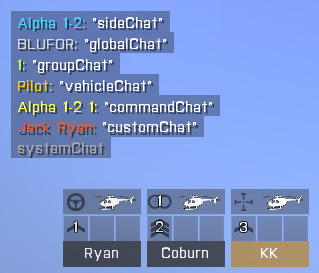
 undone flower
What could possibly cause this?
Mod works on Singleplayer ✅
Mod works on Multip...
undone flower
undone flower
What could possibly cause this?
Mod works on Singleplayer ✅
Mod works on Multip...
this also does not solves this problem
CBA must also automatically parse unary arrays as a variable
tulip ridge
Yes, because CBA tries to account for bad code
Doesn't mean you should do it
https://github.com/CBATeam/CBA_A3/blob/master/addons/settings/fnc_init.sqf#L94
GitHub
Community Base Addons for Arma 3. Contribute to CBATeam/CBA_A3 development by creating an account on GitHub.
granite sky
I don't see an entry point for this code. The postInit is just CBA settings.
undone flower
granite sky
I don't see an entry point for this code. The postInit is just CBA settings.
the entry point is the loading and reloading of the scripts inside each setting
CBA executes every script inside the settings on postInit and setting change
south swan
undone flower
south swan
prolly here <https://github.com/FabrizioTavares/MMI/blob/28baf10bb8f5b053f7fbe57...
not that, as the PlaySound3D command works
lines 20-42 are completelly skipped for some reason
south swan
no delay as well?
undone flower
the sleep command works as intended
south swan
and does the mag get added?
undone flower
important to note that I guess
undone flower
south swan
and does the mag get added?
it does for clients in different machines
but when it's the host in the same machine as the dedicated server, it does not
granite sky
undone flower
the `sleep` command works as intended
but the sleep command is on line 26 and you said lines 20-42 are completely skipped?
undone flower
granite sky
but the sleep command is on line 26 and you said lines 20-42 are completely skip...
yeah my bad on that. It's the only scripting command that works in these lines
and the addMagazine command of course doesn't works
nothing encased in the if statements work pretty much
the function works as intended if executed locally by passing each parameter manually:
[currentMuzzle Player, currentWeapon Player, Player, currentMagazine Player] spawn FABHH_fnc_infAmmoInf_delayedAddMagazine
granite sky
Isn't the code supposed to run only on AIs?
undone flower
granite sky
Isn't the code supposed to run only on AIs?
it works for both AIs and Players
granite sky
oh, you have multiple.
So what's the test case?
You have multiple ways of adding these event handlers on multiple unit types.
undone flower
players and AI share the same code. the only difference is that if the unit is an AI it will run an extra check to see if it can't fire and force a reload. the mystery is how the mod works as expected in every other case (SP, MP, Dedi clients) but not on the dedicated server host specifically
granite sky
Is there better documentation for CBA_fnc_addSetting anywhere?
I can't see what the execution locality of _script is here, which seems kinda critical.
undone flower
granite sky
I can't see what the execution locality of _script is here, which seems kinda cr...
GitHub
Community Base Addons for Arma 3. Contribute to CBATeam/CBA_A3 development by creating an account on GitHub.
granite sky
yeah but then you have to go search their codebase for the sodding event name
south swan
so, the question moved from "why doesn't it work for this specific client?" to "how the whack it works for everybody else?"?
undone flower
I would've preferred if the mod just outright broke for everyone
south swan
does not work for non-server player in my testing
sound seemingly gets played server-side, but has global effect
addMagazine has local effect, so no mag added
and i say that after seeing debug message show on server screen when the client finishes his mag
and i don't see EH getting added client-side anywere in the code. And i don't see addon settings client-side
undone flower
south swan
does not work for non-server player in my testing <:blobdoggoshruggoogly:7481240...
did you download the workshop version? I believe the one in the github is somewhat out of date
south swan
i got the pbo from the github repo, yes
undone flower
even if addMagazine has wrong locality
doesn't explains how the debug messages don't fire
south swan
it does fire. On the server
at least once per weapon
and then server tries to add magazine to non-local unit and spazzes out with unsynced inventory states
undone flower
so the solution is AddMagazineGlobal?
south swan
probably
right now the server reports the remote player as having 4 30 rnd 6.5x39 mags when the remote inventory shows none
same problem with GroundHolder created at full inventory. Magazine only shows up on the server
 undone flower
south swan
same problem with GroundHolder created at full inventory. Magazine only shows up...
undone flower
south swan
same problem with GroundHolder created at full inventory. Magazine only shows up...
nice finds
so, from what I've understood:
AddMagazine -> AddMagazineGlobal
AddMagazineCargo -> AddMagazineCargoGlobal
 silent latch
undone flower
What could possibly cause this?
Mod works on Singleplayer ✅
Mod works on Multip...
silent latch
undone flower
What could possibly cause this?
Mod works on Singleplayer ✅
Mod works on Multip...
did you download arma 3 server from the steam client thing?
or is arma 3 server in ur arma 3 directory?
 acoustic verge
i just noticed i got booped here separate mod copies for client and dedicated host
undone flower
{
_x addEventHandler ["Killed"....
} forEach terroristgroup1
faint burrow
Yea, event handlers should be added once.
sharp grotto
And you cant just change the params like that
this addEventHandler ["Killed", {
    params ["_unit", "_killer", "_instigator", "_useEffects"]; // <- These are "pre-defined" (including their order)
}];
https://community.bistudio.com/wiki/Arma_3:_Event_Handlers#Killed
faint burrow
However, it's possible to use any convenient names.
fair drum
south swan
you can't doublequote inside double quotes <:blobdoggoshruggoogly:74812404802571...
 tulip ridge
But you can double double quote
systemChat "Boom, ""double quotes"" in double quotes";
params ["_unit", "", "_instigator"];
Or just... leave them and not use them? You never know if you need to go back to that code block and use the input for something.
faint burrow
No.
sharp grotto
depends on your scripts/needs
faint burrow
BIKI contains all the info: https://community.bistudio.com/wiki/params
Please these articles carefully:
https://community.bistudio.com/wiki/params
https://community.bistudio.com/wiki/if
hallow mortar
params creates local variables - variables confined to the current specific instance of the script. This is good, but it means the variables must be prefixed with _, both in the params call itself and when you reference them later.
Also, params is used, in this case, for interpreting the special information generated by the event handler. https://community.bistudio.com/wiki/Arma_3:_Event_Handlers#Killed
So here, when you use params, it's going to try to parse an array composed of a reference to the unit that just died, a reference to the person who killed them, a reference to the unit that gave the order, and a boolean (true/false) that tells you whether destruction effects were turned on for the death event. In that order.
If there's a global variable called aliveTerrorists1, you don't need to use params for it (it's a global variable that's available everywhere) and in fact you can't, because it's not one of the arguments passed to the event handler when it fires - params can't see it.
Let's try to demonstrate how params works, using an example outside of an EH so it's a bit clearer.
["someText",55,variableName] spawn { // pass arguments into the new scope
  systemChat str _this; // prints ["someText",55,<whatever variableName contains>]
  params ["_argument0", "_iContainNumber", "_mystery"]; // interprets the passed arguments, in order
  systemChat _argument0; // prints "someText"
  systemChat str (_this select 1); // prints 55
  systemChat variableName; // prints <whatever variableName contains> - it's a global variable!
};```
If you want to skip an argument in the passed array, but _do_ want to use an argument that comes after it, you can skip it with `""`. If you want to skip an argument at the _end_ of the array, just ignore it entirely. In the example, if we only wanted to use `"someText"`, our `params` would look like this: `params ["_argument0"];`No, you can work with global variables in an EH, provided that's what you actually want to do. What I'm saying is that params is not for global variables. It can interpret a global variable into a set of local variables, if the global variable is an array, but the variables produced by params are always local variables.
someGlobalVar = [1,2,3];
someGlobalVar params ["_one","_two","_three"]; // valid
// ====
params ["someGlobalVar"]; // NOT valid - params only produces local variables```if terrorists1Count != 0 then {
// ...
} else { };```
When using `if`, it's best to use `()` to force the condition to be evaluated in the right order. You can get away with some simple conditions not using `()`, but it's risky if you have multiple things in the condition.
Also, `else` is not required. You only need that if you actually want to do something in the else case. If it's going to be empty just skip it.
```sqf
if (terrorists1Count != 0) then {
// ...
};```It depends on the code.
You can pass a global variable in like that, if you don't want to hardcode it into the new scope. For example, if you're making a reusable function, you often want it to only use local variables internally, so it can be used for multiple purposes without being tied to a specific global variable. However, because global variables are...global, they're available in any script anyway. So if you do want to hardcode a reference to a specific global variable, you don't need to pass it as an argument.
In the case of (most) event handlers, you can't actually pass anything as arguments. _this, the array containing passed arguments, which is what params interprets, is automatically generated by the event handler. Exactly what _this contains depends on the specific type of EH.