#arma3_scripting
1 messages · Page 149 of 1
 young current
 winter rose

 sleek pike
and do i just place the script in here
 young current
no
winter rose
 sleek pike
im new to arma scrips ive been playing vanaila for 8 years 😭 ive never done this before
winter rose
sleek pike
im new to arma scrips ive been playing vanaila for 8 years 😭 ive never done thi...
you need to create a mission, and in this mission directory create an init.sqf file
you cannot use this in any mission you want
sleek pike
ive had them on my charter for years (i just need the new verision in other collors)
 young current
you have had what for years?
sleek pike
the nvg's that go on your head and are full screen and also do flir
young current
Im not quite sure what the problem is then
sleek pike
they throw me out of a car or helicopter due to a bug that they hav and i need the new ones. and i got them from someone else and i dont know how to do it....
young current
so you are not playing vanilla at all
sleek pike
its vanila game no mods. just scrips, i just dont know how to use them
young current
its not vanilla if its scripty hacks.
but that one cant be used unless you make a custom mission anyway 
sleek pike
q, wen i save a mission why does it not pop up here

 winter rose
sleek pike
q, wen i save a mission why does it not pop up here
winter rose
sleek pike
q, wen i save a mission why does it not pop up here
it goes to your Documents
you can click "browse directory" in Eden Editor
 bleak nebula
sleek pike
its vanila game no mods. just scrips, i just dont know how to use them
bleak nebula
sleek pike
its vanila game no mods. just scrips, i just dont know how to use them
I think the ones you are referring to are part of ace mod
 hallow mortar
There is one vanilla set of secret fullscreen NVGs - green vision, uses the sand-coloured NVG model. The only other vanilla fullscreen NVG options are the Jet Pilot helmet and the Special Purpose helmet, which have them built-in. Any other type of fullscreen NVG is part of a mod and not vanilla.
That script isn't an equippable set of NVGs, it's a script that detects the NVG keypress and forces the NVG effect on you. In order to use it you need to build it into a mission or have access to the debug console.
 ornate whale
Is it possible that some lods for hand placed buildings in Eden are not initialized (ready to be used when the missions starts - during init.sqf) ?
I have a function that finds some doors and exit points and places units there:. It works from debug console, but not from init or postInit files.
 kindred zephyr
I believe objects are fully initialized before init sqf runs lol skimmed through ~hand placed~ nvm
 opal zephyr
ornate whale
Is it possible that some lods for hand placed buildings in Eden are not initiali...
opal zephyr
ornate whale
Is it possible that some lods for hand placed buildings in Eden are not initiali...
The lods themselves, unlikely. Its possible the object isnt loaded yet. Try doing a waitUntil {!isNull _object}
or print the object and see if its valid
ornate whale
opal zephyr
The lods themselves, unlikely. Its possible the object isnt loaded yet. Try doin...
Will try. It's weird cause I don't get any errors, but any calls after that don't get called, so there must be some problem that halts init.sqf. Also I have a if isNil exit in place, but it passes this check.
 spiral canyon
How would I go about scripting Web Knights zombies to use the tracker in SOG?
 worthy thorn
hello, is this where i ask a question related to triggers?
worthy thorn
Ok
So this is a bit of a noob question, I only recently started scripting instead of playing multiplayer, but is there a way to make a car bomb where a trigger spawns an explosive and immediately detonates it?
I asked the same question in the subreddit
I’m also not looking for setdamage on the car bc I find that the explosion isn’t very strong
 granite sky
Usually you spawn in an explosive charge (eg. vanilla satchel charge) and then run setDamage 1 on it.
private _bomb = "SatchelCharge_Remote_Ammo_Scripted" createVehicle (getPosATL _vehicle);
_bomb setDamage 1;
I'm not sure exactly what sort of items this works on. I found a mortar shell didn't explode with setDamage 1, but if you spawned it in with a little downward velocity then it worked fine.
 stable dune
 dark flower

 modern osprey
Is it possible to get the value of a variable using its name as a string?
For example, I have a variable of the form:
Module_var_Array = [1,2,3,4,5]
I get the name of the variable using:
_name = "Module";
_var = format ["%1_var_Array", _name];
How can I get the value of a variable, knowing its name, which lies in the variable _var?
 little raptor
modern osprey
Is it possible to get the value of a variable using its name as a string?
For e...
little raptor
modern osprey
Is it possible to get the value of a variable using its name as a string?
For e...
missionNamespace getVariable "name"
But this variable was not created in the mission namespace.
Or any global variables created using
VAR_Example = 10;
get into the mission namespace?
 south swan
all global variables go to missionNamespace by default
unless you've done something like with uiNamespace do { // code here }, i suppose
modern osprey
Thanks
 indigo wolf
this not work i try but vehicle still goes red in maaws
 warm hedge
HandleDamage returns the total damage, not added damage
So it's not that simple, not hard anyways
I recalled I posted such concept in this server
little raptor
warm hedge
HandleDamage returns the total damage, not added damage
True but if it didn't work for him using that code it definitely won't work with the correct version either 😅
If you do 0.2*totalDamage you're actually healing the vehicle 
 tough abyss
Hello, good evening, could someone help me know where I could find a menu like this, about how to buy cars and so on?
indigo wolf
yes i see this happen when i use maaws to hit second time it heal vehicle and third time it heals even more and becomes god
south swan
good old ```sqf
private _oldDamage = _unit getHitIndex _hitIndex;
private _newDamage = _damage - _oldDamage;
_oldDamage + 0.5 * _newDamage;
Yeah. What you should do instead is get the "dealt damage" by subtracting the new damage from previous damage
Then multiply that by your factor
Then add it to previous damage and return it
little raptor
south swan
good old ```sqf
private _oldDamage = _unit getHitIndex _hitIndex;
private _newDa...
Also check if hitIndex is negative
 meager granite
tough abyss
Hello, good evening, could someone help me know where I could find a menu like t...
meager granite
tough abyss
Hello, good evening, could someone help me know where I could find a menu like t...
This one is custom written, you can make a basic version of it with ListNBox
south swan
inb4 linearConversion [0, 1, 0.2, _damage, _unit getHitIndex _hitIndex]; for increased one-lineniness
south swan
little raptor
Also check if hitIndex is negative
private _oldDamage = if (_hitIndex isNotEqualTo -1) then {_unit getHitIndex _hitIndex} else {damage _unit};
private _newDamage = _damage - _oldDamage;
_oldDamage + 0.5 * _newDamage;``` And how would I do that, I don't know anything about programming and stuff bro...
meager granite
tough abyss
And how would I do that, I don't know anything about programming and stuff bro.....
You'll need to learn it, even if there is a ready menu you'll need to integrate it into your mission too
winter rose
@shut swan Hi, please use English, thanks 😉
 faint burrow
tough abyss
And how would I do that, I don't know anything about programming and stuff bro.....
faint burrow
tough abyss
And how would I do that, I don't know anything about programming and stuff bro.....
https://community.bistudio.com/wiki/Category:GUI_Topics -- good luck.
tough abyss
meager granite
You'll need to learn it, even if there is a ready menu you'll need to integrate ...
And where would I learn it? I would also like to know how to enter it on my server.
tough abyss
faint burrow
https://community.bistudio.com/wiki/Category:GUI_Topics -- good luck.
Thanks
indigo wolf
south swan
```sqf
private _oldDamage = if (_hitIndex isNotEqualTo -1) then {_unit getHitInd...
i try this and i try this code https://forums.bohemia.net/forums/topic/205515-handledamage-event-handler-explained/?do=findComment&comment=3464929 and even with 0.01 the vehicle go red with maaws, i use rhs vehicle
Bohemia Interactive Forums
43 minutes ago, dwringer said: Since youre reducing it anyway theres no real difference between that and (_previousDamage + ((_newDamage * 0.7) min 0.7)), but in the latter case its more clear at a glance (IMHO) what the final damage cap is. I suppose its just a stylistic choice more than anythin...
south swan
and what are the resulting damage numbers returned by, say, getAllHitPointsDamage _vehicle? 
indigo wolf
"[[""hithull"",""hitengine"",""hitfuel"",""hitltrack"",""hitrtrack"",""hitera_l_1"",""hitera_r_1"",""hitturret"",""hitgun"",""#l svetlo"",""#l svetlo 2"",""#p svetlo"",""#p svetlo 2""],[""telo"",""motor"",""motor"",""pas_l"",""pas_p"",""era_l_hp"",""era_r_hp"",""vez"",""zbran"",""l svetlo"",""l svetlo 2"",""p svetlo"",""p svetlo 2""],[0.89,1,0.6,0.1006,0.101149,0,0,0.655328,1,0.000467219,0.000461081,0.000514696,0.000511824]]"
exact coide i run sqf this addEventHandler ["HandleDamage", { params ["_unit", "_selection", "_damage", "_source", "_projectile", "_hitIndex", "_instigator", "_hitPoint", "_directHit", "_context"]; private _oldDamage = if (_hitIndex isNotEqualTo -1) then {_unit getHitIndex _hitIndex} else {damage _unit}; private _newDamage = _damage - _oldDamage; _oldDamage + 0.01 * _newDamage; }];
 finite bone
indigo wolf
exact coide i run ```sqf
this addEventHandler ["HandleDamage", {
params ["_u...
finite bone
indigo wolf
exact coide i run ```sqf
this addEventHandler ["HandleDamage", {
params ["_u...
If you want an absolute horrendous (but working) way of doing this:
private _hp_curr_vic = (1 / 25);
_this setVariable ["vic1_dam_total", 0];
_this setVariable ["vic1_dam_incr", _hp_curr_vic];
_this removeAllEventHandlers "hit";
_this addEventHandler ["Hit", {
_unit=_this#0;
_curr_dam = (_unit getVariable "vic1_dam_total")+(_unit getVariable "vic1_dam_incr"); _unit setVariable ["vic1_dam_total", _curr_dam];if ((_unit getVariable "vic1_dam_total")>0.5) then {
_unit setDamage _curr_dam;
};
}];
_this removeAllEventHandlers "Handledamage";
_this addEventHandler ["Handledamage", {
0
}];``` meager granite
indigo wolf
exact coide i run ```sqf
this addEventHandler ["HandleDamage", {
params ["_u...
meager granite
indigo wolf
exact coide i run ```sqf
this addEventHandler ["HandleDamage", {
params ["_u...
This looks correct, are you sure you're attaching it to the right vehicle?
And there are no other scripts doing stuff like removeAllEventHandlers or something
Add logging to RPT
this addEventHandler ["HandleDamage", {
    params ["_unit", "_selection", "_damage", "_source", "_projectile", "_hitIndex", "_instigator", "_hitPoint", "_directHit", "_context"];
    private _oldDamage = if (_hitIndex isNotEqualTo -1) then {_unit getHitIndex _hitIndex} else {damage _unit};
    private _newDamage = _damage - _oldDamage;
    diag_log format ["Damage changed for %1, _hitIndex=%2, from %3 to %4", _unit, _hitIndex, _newDamage, 0.01 * _newDamage];
    _oldDamage + 0.01 * _newDamage;
}];
"Damage changed for B Bravo 2-3:1 (Meth), _hitIndex=-1, from 0.0257788 to 0.000257788"
"Damage changed for B Bravo 2-3:1 (Meth), _hitIndex=3, from 0.0990476 to 0.000990476"
"Damage changed for B Bravo 2-3:1 (Meth), _hitIndex=7, from 0.012381 to 0.00012381"
"Damage changed for B Bravo 2-3:1 (Meth), _hitIndex=8, from 0.0309524 to 0.000309524"
"Damage changed for B Bravo 2-3:1 (Meth), _hitIndex=9, from 0.375972 to 0.00375972"
"Damage changed for B Bravo 2-3:1 (Meth), _hitIndex=10, from 0.38552 to 0.00385519"
"Damage changed for B Bravo 2-3:1 (Meth), _hitIndex=11, from 0.254322 to 0.00254322"
"Damage changed for B Bravo 2-3:1 (Meth), _hitIndex=12, from 0.266205 to 0.00266205"
"Damage changed for B Bravo 2-3:1 (Meth), _hitIndex=-1, from 0 to 0"
"Damage changed for B Bravo 2-3:1 (Meth), _hitIndex=-1, from 0.0597188 to 0.000597188"
"Damage changed for B Bravo 2-3:1 (Meth), _hitIndex=0, from 0.303074 to 0.00303074"
"Damage changed for B Bravo 2-3:1 (Meth), _hitIndex=7, from 0.0127517 to 0.000127517"
"Damage changed for B Bravo 2-3:1 (Meth), _hitIndex=9, from 0.212037 to 0.00212037"
"Damage changed for B Bravo 2-3:1 (Meth), _hitIndex=10, from 0.217421 to 0.00217421"```Did vehicle end up being fine?
indigo wolf
most of the things are red except for hull and vehicle is not moving
little raptor
What if you return 0?
Does it still get damaged?
If so it's probably because the damage is scripted
indigo wolf
Oh yes its still being damaged even with sqf this addEventHandler ["HandleDamage", {0}];
indigo wolf
finite bone
If you want an absolute horrendous (but working) way of doing this:
```sqf
priva...
somehow this works
indigo wolf
oh kurwa it is indeed
indigo wolf
meager granite
```sqf
this addEventHandler ["HandleDamage", {
params ["_unit", "_selection"...
adding removeEventHandlers before this works fine thanks a lot
 vast horizon
Hello, could someone help me to edit DRO files to allow for factions without men/infantry units to be selected?
I need to use certain factions from the RHS Russian Forces mod.
worthy thorn
granite sky
Usually you spawn in an explosive charge (eg. vanilla satchel charge) and then r...
Ok, but is there a way to spawn the explosive in with a name? Sorry for the noob question, I couldn’t find the answer online
worthy thorn
Sorry, variable name
worthy thorn
Of the explosive
granite sky
In that case it's already spawned?
worthy thorn
Ok
granite sky
So all you'd need to do is MyExplosiveVar setDamage 1
worthy thorn
Oooohh ok, and is the explosive variable name set when you summon it?
worthy thorn
granite sky
```sqf
private _bomb = "SatchelCharge_Remote_Ammo_Scripted" createVehicle (getPo...
Like, where is it in this?
granite sky
Ok, let's go back to the start:
So this is a bit of a noob question, I only recently started scripting instead of playing multiplayer, but is there a way to make a car bomb where a trigger spawns an explosive and immediately detonates it?
What do you actually have at the moment?
A car? A trigger? A bomb?
None of the above? :P
 turbid nymph
that seems to have fixed it thx so much!
ornate whale
How can I make a unit face a direction? When I use setDir, he always turns back to whatever he looked at? lookAt?
faint burrow
Check examples and notes of setDir command.
 woeful swan
Hey so I am looking to see if someone who is decent at coding in Arma 3 can help my group out. We are using a new medical system and We are trying to add in various medications based on templates of meds already within the game. Would someone be able to DM me so you can help us look through the files. We spent like 13 hours about a week previously and was able to find where in the files everything is made, but it just does not come up in the ACE arsenal and we have no idea why
 open hollow
i want to do this kind of markers, any ideas on how to start?
https://cdn.discordapp.com/attachments/900594155208708147/1263213903467249777/image.png?ex=66996b1f&is=6698199f&hm=ce672941238c323f832f443655c91c7c7f6994a5d20de54d82c850d0045a6432&
my initial idea was to use drawicon3d to the letter of the sector, and then use drawTriangles but im not sure yet how to draw that triangles.
maybe create a control, and using the tringles in there?

 velvet merlin
is there a way to disable respawn for playable AI?
seems https://community.bistudio.com/wiki/setPlayerRespawnTime is only for player/clients
only way i can see would be: addMissionEventHandler ["EntityRespawned", + if (not (isPlayer _x)) then {_x setDamage 1;};
but thats super bad
open hollow
velvet merlin
only way i can see would be: `addMissionEventHandler ["EntityRespawned",` + `if ...
maybe hidding it ? and when a player takes control of it unhide it?
velvet merlin
bad if a player is GL
open hollow
GL?
 tight cloak
anyone got a way of essentially locking the movement of an object to a plane? allowing it to move freely x,y but be locked on its z?
winter rose
tight cloak
anyone got a way of essentially locking the movement of an object to a plane? al...
onEachFrame + setPosWorld, depending on what you want
if an air vehicle, you won't prevent it from nosediving unless setting its vectorUp
tight cloak
im already using on eachframe, im assuimg then im just gonna have to do some math that compares the position of the object to the "plane" z height and using setPosWorld
winter rose
tight cloak
im already using on eachframe, im assuimg then im just gonna have to do some mat...
or just grab the Z to wherever it is and use it, no?
theObjZ = getPosWorld theObj select 2;
onEachFrame {
  private _pos = getPosWorld theObj;
  _pos set [2, theObjZ];
  theObj setPosWorld _pos;
};
```or something like thatill give it a whirl
winter rose
fixed, remove the first private at the beginning @tight cloak
tight cloak
its all good, i already caught that
tight cloak
winter rose
```sqf
theObjZ = getPosWorld theObj select 2;
onEachFrame {
private _pos = get...
_testing = addMissionEventHandler ["EachFrame",
{
    _PlaneLock = vehicles inAreaArray runway;
    theObjZ = getPosWorld runway select 2;
    {
    if (_x isKindOf "plane") then {
        private _pos = getPosWorld _x;
        _pos set [2, theObjZ];
        _x setPosWorld _pos;
        systemchat format ["%1",_x];
    };
    }foreach _PlaneLock;
}];
here is the second issue, its an aircraft
the z lock works but its now completely stuck in place just like my last attempt

the reason im doing this is because i made a huge flying heli carrier out of the USS freedom that has a cockpit and flies, i was hoping to just make a simple bootleg system that lets planes land on it when it levels out for RRR so i dont have to get anymore creative that i already have.
the other option is i remove the attach system i have for the static components and isntead set their position constantly to be relative as if they were attached to maintain their collision
the mod WMO allows players to walk freely upon the deck, aircraft fall the moment the setup function is run
i guess i could just make a simple keybinding system to just vectoradd...
winter rose
what is the end goal?
tight cloak
i have big flying carrier, id like players in planes to be able to land on said carrier when it stops to repair, rearm and refuel etc
plane to land on this is the goal
im currently using an incredibly flat trigger that encompasses the carriers runway to serve as the "plane" at which aircraft get z locked when they land
also serves as an easy method to fetch landed / landing planes
what currently happens :/
winter rose
tight cloak
what currently happens :/
ah yes, grab the velocity before and apply it after
winter rose
yeah, because you cannot touch anything while flying 😅
tight cloak
this is the now situation, still got my speed. just in one spot still

    if (_x isKindOf "plane") then {
        _vel = velocity _x;
        private _pos = getPosWorld _x;
        _pos set [2, theObjZ];
        _x setPosWorld _pos;
        systemchat format ["%1",_x];
        _x setVelocity _vel;
    };
    }foreach _PlaneLock;
you could also
private _velocity = velocity _vehicle;
if ((_velocity select 2) < 0) then
{
  _velocity set [2, 0]; // up/down velocity
  _vehicle setVelocity _velocity;
};
```perhapsor along, idk
tight cloak
the result is an ice skating plane
winter rose
niceee
tight cloak
might add a speed bleeder. but then how to know if landing or taking off~?
 keen stream
http://i.imgur.com/Sj7NUXy.png <-- Spawn script gone wild... This explained why the server lagged.
 torn solstice
Im trying to whitelist a spawn point for a specific group. After respawning, I expect there to show the "BLACK SITE" spawn point for members of the "redacted" group only. The spawn point does not show after respawning. Is that because of the deleteVehicle?
//Whitelist Respawn location
//add to init of object.
//make sure group is named "redacted"
if (isServer) then {
[redacted,getPosATL this,"BLACK SITE"] call BIS_fnc_addRespawnPosition;
deleteVehicle this;
};
Does anyone already know a script made to spawn vehicles, just to configure the cars?
warm hedge
createVehicle to spawn an object. Not sure what is configure cars mean
tough abyss
Yes, get a script that, with a bot, can select the vehicle you want to spawn.
type like that
warm hedge
It's not that simple
tough abyss
So how could I find one, I don't know how to script hehe
warm hedge
Learn to script. Learn to make GUIs. Learn to combine them all. Months or years of struggle
tough abyss
Thanks broh
meager granite
tight cloak
might add a speed bleeder. but then how to know if landing or taking off~?
Apply it once, after plane stops disable it. Enable back when plane leaves the trigger
worthy thorn
Figured out how to do the car bomb thing, thanks to the dude who helped
 royal quartz
HI guys quick question on the addAction function, im using the showWindow parameter to show the title parameter in the center of the players screen when looking at the object. And its working but it only shows the image in my title not the text and the image.
The priority is the highest of all the actions on the object the action was added too as per the showWindow requirement. Im aware there is no code or anything currently. I have tested all that and it works as I want, I just need to solve the issue with the text not showing next to the symbol. As you can see the photo it shows properly in the list in the top right but not in the center of the screen.
[ResupplyBox, ["<t>Resupply</t> <img size='2' image='\a3\ui_f\data\IGUI\Cfg\Actions\reammo_ca'/>",{},nil,100,true,true,"","true",3]] remoteExec ["addAction", 0, true];

 radiant minnow
can anyone help me, new to coding and im trying to make a trigger activate a search for an item in a given storage container, get the count of how many are there and times that by 2.5 and set that value as a variable to get used in a hint and to be added to other variables with values later.
PublicVariable "payout_1";{
payout_1 = [getItemCargo "goldDrop_1"] find kindof (Item_Money_Stack, *2.5);
hint "you banked" getVariable ("payout_1") "Million $";
};
this is basically what ive got so far and to no avail
tried adding count command but no difference and the getItemCargo already gets the count
 mystic scarab
Are the paths to Crossroads voice lines from Air Control in the Reaction Forces DLC available anywhere?
south swan
radiant minnow
PublicVariable "payout_1";{
payout_1 = [getItemCargo "goldDrop_1"] find kind...
i'd suggest you to start with reading https://community.bistudio.com/wiki/Introduction_to_Arma_Scripting. Whatever you've posted is not even close to working SQF code
radiant minnow
already did that and crossed refrenced with other codes online and thier similer, some dude used
"Item_ID" in (ItemCargo cargoVariable); just to check if an item was in the container so i cant be that far off
meager granite
royal quartz
HI guys quick question on the `addAction` function, im using the `showWindow` pa...
Not exactly sure but you can edit popup text with https://community.bistudio.com/wiki/setUserActionText
Maybe the engine strips the text or something?
radiant minnow
i was hoping someone could write the proper form of what im trying so i can see the differnce and have something more concrete to go off for future ettempts
meager granite
private _stacks_count = {_x == "Item_Money_Stack"} count itemCargo goldDrop_1;
itemCargo ENTITY returns array of strings of classes, CODE count ARRAY return number of matching conditions in the CODE
Open wiki for each command to learn more
radiant minnow
now im making this multiplayer do i need every variable to be public or can things be private and converted to public after execution? couldnt find anything on that and thank you btw
meager granite
Read the introduction articles to understand what's going on
Multiplayer locality is a bit complicated topic. Triggers are global, means each client does their own condition code execution and their own activation code execution, unless you tick "Server only" checkbox
If you store your money on clients, you can either:
- Have each client do their own calculation but make sure they don't do it for remote players
- Have server do the calculation and send the value to appropriate client (with
publicVariablefor example)
royal quartz
meager granite
Not exactly sure but you can edit popup text with https://community.bistudio.com...
Yeah ive played with that alot too hoping it would help as on that function page there is a picture that shows text displaying in the center of the screen. And there is a example of using it but it dosnt work anymore! So I assume in some update it got updated to strip text
image for reference
and code.
_id = billboard addAction ["Some Action", {}];
billboard setUserActionText [
    _id,
    "Some Action",
    "<t color='#ff0000'>Background-----------------</t><br>Multiline<br>Multiline<br>Multiline<br>. . .",
    "<t color='#00ff00'>-----------------Foreground</t>"
];
 meager granite
royal quartz
Yeah ive played with that alot too hoping it would help as on that function page...
meager granite
royal quartz
Yeah ive played with that alot too hoping it would help as on that function page...
player addAction ["<t>Resupply</t> <img size='2' image='\a3\ui_f\data\IGUI\Cfg\Actions\reammo_ca'/>", {}]

Shows full text properly for me
south swan
royal quartz
it also looks like it's trying in this screenshot? Icon is noticeably moved to the left of screen center.
 royal quartz
south swan
it also looks like it's trying in this screenshot? Icon is noticeably moved to t...
royal quartz
south swan
it also looks like it's trying in this screenshot? Icon is noticeably moved to t...
yeah I noticed that almost like its hiding the text
but its just has no alpha
meager granite
Try without the mods? Maybe this display/control has weird/missing font set to it?
Thus the invisible text
royal quartz
meager granite
```sqf
player addAction ["<t>Resupply</t> <img size='2' image='\a3\ui_f\data\IGU...
ah you ran it on the player though not an object I wonder if thats the difference. Also I remeber a while ago getting different results in a eden mp hosted environment and a actual hosted server
meager granite
Shouldn't be different between player and object, my bet is on mod messing up the font for control that shows action text in the middle of the screen
radiant minnow
meager granite
Multiplayer locality is a bit complicated topic. Triggers are global, means each...
yeah im trying to keep it as simple as possible, only been using triggers for everything only issue ive had so for is this and possibly adding the total at end game as im assuming im gonna have to learn nil/null better since theres 3 possible drop spots and only 2 of the 3 variables might exist since a trigger never set it on activation
meager granite
Try
[ResupplyBox, ["<t font='RobotoCondensed'>Resupply</t> <img size='2' image='\a3\ui_f\data\IGUI\Cfg\Actions\reammo_ca'/>",{},nil,100,true,true,"","true",3]] remoteExec ["addAction", 0, true];
okay, yeah it rings a bell when I tested just with CBA, Ace and my mod (needed them for dependencies) it worked yesterday but doing the same test erlier it was broken
royal quartz
meager granite
Try
```sqf
[ResupplyBox, ["<t font='RobotoCondensed'>Resupply</t> <img size='2' ...
will do now just loading up again
south swan
ACE  Vanilla actions
royal quartz
meager granite
Try
```sqf
[ResupplyBox, ["<t font='RobotoCondensed'>Resupply</t> <img size='2' ...
your a genius. Its an issue with whatevr font gets changed somehow by a mod. This works
ive been trying to figure this out for hours thank you 😄 I had just given up and was going to push an update to my mod when you started typing haha.
is RobotoCondensed the default arma menu font do you know?
meager granite
Yes
royal quartz
sweet. Ill add this change and finally push my update thanks alot!
meager granite
royal quartz
ive been trying to figure this out for hours thank you 😄 I had just given up an...
getText(configFile >> "CfgInGameUI" >> "DefaultAction" >> "font")
This could be where this default font is stored
tight cloak
meager granite
Apply it once, after plane stops disable it. Enable back when plane leaves the t...
how does that work with MP considerations in mind, multiple planes and all
ornate whale
How is Enfusion different from A3 in terms of scripting language and overall capabilities? Do you think it makes sense to learn the new engine? Thx
south swan
enfusion is 98% different
meager granite
tight cloak
how does that work with MP considerations in mind, multiple planes and all
Store the flag on each plane
winter rose
ornate whale
How is Enfusion different from A3 in terms of scripting language and overall cap...
you can see https://community.bistudio.com/wiki/Arma_Reforger:From_SQF_to_Enforce_Script
the language is entirely different, it is object-oriented now
ornate whale
And does it make sense to move to Enfusion engine from the modders perspective, what are your thoughts? Thx
south swan
A3 is not eternal 🤷♂️ And scripting-wise i doubt A4 would return to SQF
 cyan dust
Is there a way to createDisplay on top of another display without disabling that 'other' display in the process?  I'm trying
private _customUI = _inventoryDisplay createDisplay "inventoryUIadditions";
but alas...
royal quartz
meager granite
`getText(configFile >> "CfgInGameUI" >> "DefaultAction" >> "font")`
oh sweet, are you suggesting to write code to pull that font and use it? Or just for information purposes? Well managed to push the fix to my mod with some other extra bits so thanks for the help! Ill go sleep now 4am coding over xD
 cosmic lichen
cyan dust
Is there a way to `createDisplay` on top of another display without disabling th...
cosmic lichen
cyan dust
Is there a way to `createDisplay` on top of another display without disabling th...
Don't use a display but a controls group and add it to the original display with ctrlCreate
cyan dust
cosmic lichen
Don't use a display but a controls group and add it to the original display with...
Yeah, that's one way to do it, but it's sooo tedious
So I thought maybe there is a simpler way (especially since I already marked it up in GUI editor)
Thanks.
 still forum
ornate whale
And does it make sense to move to Enfusion engine from the modders perspective, ...
still forum
ornate whale
And does it make sense to move to Enfusion engine from the modders perspective, ...
If you want to play Reforger, or prepare for Arma 4. Then you have no choice but to switch.
Is it really about sense?
cyan dust
still forum
If you want to play Reforger, or prepare for Arma 4. Then you have no choice but...
Btw, why didn't you guys just adopt C# or Java for the matter? Why creating your own language again?
still forum
Enforce Script is basically as old as SQF
Why make something new, from scratch, now. If you already have something that works well.
Plus if you use someone elses solution, and need to make changes to it, you might be blocked because their stuff is not your stuff.
If you have your own you could do anything with it that you need
cosmic lichen
If you know c# you will have an easy time getting into Enscript.
And If you learn Enscript first you will have a decent foundation for c#
still forum
C# sounds like a nice idea.
And surely it would work well on Windows.
And then.... You want to run your game on xbox, and playstation, and switch, and linux, and mac and arm or risc...
winter rose
libs exist 😄
still forum
For some platforms yes
south swan
reforger switch version cinematic 2.4fps 
winter rose
but language-wise, implementing "our own version" of C# could have been a thing yes, but it would have moved away and not evolved along C# v99+
meager granite
royal quartz
oh sweet, are you suggesting to write code to pull that font and use it? Or just...
At least check what it returns with all your mods
Then figure which changes it
meager granite
still forum
Enforce Script is basically as old as SQF
Could've kept SQF, got rid of legacy crap and remade command groups from scratch 
 digital rover
Sqf has awful syntax and limited useful data structures, is really really slow, and static analysis beyond syntax checking is pretty much impossible.
I actually do like SQF for what it is... It is very powerful whilst being easy to use, but the "legacy crap" is literally the entire language.
Not that I like Enforce either, the barrier to entry seems a bit too high for newbs to use (especially for mission scripts) but hopefully the tooling is better in time for A4.
Also SQF does lambda functions better than any other language change my mind
south swan
mandatory LISP joke
winter rose
digital rover
Also SQF does lambda functions better than any other language change my mind
won't try to!
winter rose
digital rover
Sqf has awful syntax and limited useful data structures, is really really slow, ...
the tooling/libraries is one of our concerns too; same a Scenario Framework, BI should be able to provide a more easy-to-use API
inb4 SQFUtils.setDammage(myEntity, 1);
digital rover
Id actually like python mission scripts but I have bad taste 😂
kindred zephyr
the nice thing about enscript is that you could virtually do your own wrappers for any type of language you want since its more direct in-engine interaction
and just called them as methods basically, free commands
you could end up making an esoteric wrapper and just type MOO to code
still forum
You can do the same in SQF because you have Extensions which could parse anything and convert it to anything else. And do that asynchronously with close to zero or very low performance impact if you wanted to.
But in Enforce Script, so far, you don't have extensions, in any of the currently available games
kindred zephyr
but a wrapper within a wrapper seems not that useful, its more about the sake of accessibility/convenience in the end
ornate whale
kindred zephyr
the nice thing about enscript is that you could virtually do your own wrappers f...
You say that Enforce let you manipulate the game on a lower level than SQF?
still forum
It does
because lots more things are written in script. Most of the game logic is in script. And everything in script can be edited/touched
kindred zephyr
i havent manipulated it myself, but it does looks like a more direct approach to actual coding
south swan
and then you suddenly have 15 BaseEventHandlers declared on an entity that only lists 11 in the editor
ornate whale
still forum
because lots more things are written in script. Most of the game logic is in scr...
Can you give some examples, please?
kindred zephyr
thats the nicer thing about having a more strict environment, you will fail less while achieving more with less hacky methods
still forum
The inventory for example. Is afaik like 90% in script.
Meaning you can do massive changes somewhat easily, like adding an extra main weapon slot, or wearing a second backpack on the front.
In Arma 3, the inventory is 90+% in engine.
You can move some UI elements around, but that's about it
ornate whale
kindred zephyr
thats the nicer thing about having a more strict environment, you will fail less...
I like the syntax of Enforce better just by checking the biki page
south swan
kindred zephyr
thats the nicer thing about having a more strict environment, you will fail less...
except the "fail less while achieving more" part seems to be largely counteracted by the language not being tightly coupled to the engine anymore
ornate whale
south swan
except the "fail less while achieving more" part seems to be largely counteracte...
I would say it's more about the system you are controlling with the scripting language than the lang itself.
south swan
player as command vs GetGame().GetPlayerController().GetControlledEntity()
velocity _projectile vs ProjectileMoveComponent.Cast(entity.FindComponent(ProjectileMoveComponent)).GetVelocity()
it's just difficult for me to wrap my brain around enfusion
kindred zephyr
in the end it will largely depend on how much time you are willing to spend both familiarizing yourself with the language and its structure
that why a lot of people said that it will be easier for coding backgrounds to approach this language rather to have keywords, which in the end can be created by 3rd parties for anyone to use, its a more familiar approach to something that is more likely to be used outside of just enscript itself and viceversa
 sullen sigil
its a more powerful coding language but its not a good language for people getting into modding
not a3 related anyway
ornate whale
kindred zephyr
that why a lot of people said that it will be easier for coding backgrounds to a...
What I find the worst about A3 language and the engine is that its high level commands sit on top of a big black box (the game code) that you have to test and try over and over to find even the smallest quirk or bug to create a solution for anything. But maybe that's just my experience.
sullen sigil
i have never once had to do that
the only time the engine has caused issues for me i complained enough to dedmen and he got leopard to add the angular velocity commands so i could do it
kindred zephyr
for what it is, sqf is pretty powerful and user oriented. I dont think besides BI anyone else provides such a powerful game personalization tool
sullen sigil
game engine limitation is such a common scapegoat for lazy modders and is only true in about 5% of instances it is used
kindred zephyr
well, if such were the case tools like cba wouldn't exist, they are there because people needed workarounds
ornate whale
sullen sigil
game engine limitation is such a common scapegoat for lazy modders and is only t...
I don't think it's necessarily limiting, but tedious to work with at times
sullen sigil
kindred zephyr
well, if such were the case tools like cba wouldn't exist, they are there becaus...
theyre conveniences; 80% of the stuff in cba is in the base game now
AR also needs a CBA but nobody CBA!
kindred zephyr
They are conveniences now, yes
sullen sigil
as well as being able to avoid the scheduler
 pulsar tide
Anyone know is there is a way to script the Land_Ind_IlluminantTower to turn on at night?
 manic kettle
sullen sigil
game engine limitation is such a common scapegoat for lazy modders and is only t...
manic kettle
sullen sigil
game engine limitation is such a common scapegoat for lazy modders and is only t...
Kjws size matters has entered the chat...
kindred zephyr
do anyone happen to know if the residual logic objects that were created when using attachTo and listed in spectator mode are still being listed?
Iirc at some point in the past year there was a conversation about that but tbh I dont remember how it ended.
hallow mortar
I don't remember anything about attachTo causing logics. Some functions might, particularly BIS_fnc_ambientAnim
kindred zephyr
ah yes, then that must be it
kindred zephyr
hallow mortar
I don't remember anything about attachTo causing logics. Some functions might, p...
Actually, you are the source of where I heard it from haha
 stone escarp
I'm looking for help creating a script that will create a popup for players joining my server, I want to avoid the popup going to every player every time someone connects. Any ideas?
granite sky
Easiest to just put it in initPlayerLocal, unless you need to pass some data from the server.
stone escarp
I'll give that a try
granite sky
CfgFunctions postInit would also work, I guess.
 fossil hamlet
@keen stream That's a lot of units spawning in there ;-) We had a guy in our group work on a mission, which all looked good in preview, but he forgot locality, and that just made the units multiply when spawning. Made for an interesting and quite tense mission, albeit with a lot of lag :-)
keen stream
Yeah, localities are always the best.. :)
 flint topaz
Does anybody know what RscDisplay this would be either the IDD or it's full name I need?
https://imgur.com/a/9Jw3Y0e
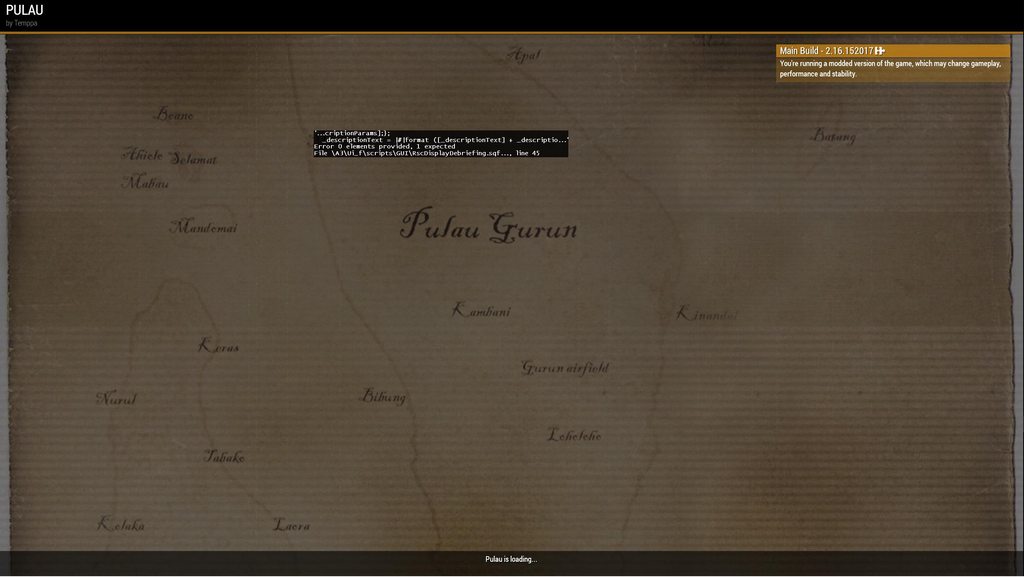
 proven charm
flint topaz
Does anybody know what RscDisplay this would be either the IDD or it's full name...
proven charm
flint topaz
Does anybody know what RscDisplay this would be either the IDD or it's full name...
debriefing... IDD_DEBRIEFING 50 https://community.bistudio.com/wiki/Arma_3:_IDD_List
cosmic lichen
flint topaz
Does anybody know what RscDisplay this would be either the IDD or it's full name...
This is a known error on profiling. Ignore it for now
flint topaz
Yeah nw the error I'm ignoring. I was just curious what the background RscDisplay is
cosmic lichen
RscDisplayLoading?
flint topaz
That seems to be the display just before
I did need that one though for what I'm doing
 gleaming rivet
@pulsar tide look in the config editor, it should have something somewhere to enable its lights.
royal quartz
meager granite
At least check what it returns with all your mods
ah okay yeah ill have a look when there all loaded, I guess you find that threw the config viewer or function viewer?
like just in eden
and it should show what value it has or?
 spiral temple
If I do _myArray params["_myVar1", "", "_myVar3"]; then the data, which should be _myVar2 is getting ignored, right?
hallow mortar
Yes
 tranquil nymph
I should really take a look at BIs spectator and gut it out
but, that requires downloading the dev branch :P
 nocturne bluff
My bet is that is shiet
But ya know im mean
Its pretty much zeus - editing power
opal zephyr
Does anyone have much experience with setObjectScale? The wiki says its awful to use onEachFrame in mp, but I'm curious if this is because of the command itself or the network usage of sending this across the network... I would be using a onEachFrame local to the client and scaling a simple object also local to the client. There isnt any network traffic like this
warm hedge
Simple Object does not require to run each frame
opal zephyr
It does if its being moved
warm hedge
Rescale upon move then
opal zephyr
Its getting moved every frame, it needs to be scaled every frame
warm hedge
I see
opal zephyr
It says it only takes 0.0003ms to run, which is pretty quick by itself
I'm just not sure if in multiplayer it will try and send something over the network even if it doesnt need to
I guess I can just try it and see
 vocal valley
Can someone please help me with an addaction? Just want to use this menu to create a simple download data button from a laptop
 opal zephyr
Put the underscore before "caller"
Actually, just put '(_caller distance _this) <1' in the condition box
The if is unnecessary
vocal valley
gotcha, okay - are the Hints correctly formated?
vocal valley
opal zephyr
Actually, just put '(_caller distance _this) <1' in the condition box
this didnt work
opal zephyr
ok, then _caller and _this probably arent valid
vocal valley
alright - anything else I should try?
opal zephyr
it looks like it should be _target not _caller
try that, if it still doesnt work then you'll need to use params
vocal valley
ill probably just scrap the idea if that doesnt work - this is getting too complicated
yeah that didnt work either
opal zephyr
Are you sure you're less than a meter away from it? thats a pretty small distance
vocal valley
i changed that to 2 for the sake of science and yeah I was right on top of it
getting a script error when loading into the mission
opal zephyr
whats the error
also, just using the default "true" in the conditionShow would work, it might have some internal stuff handling the distance by default
vocal valley
yeah but then you can activate the hold action from any distance if youre looking at the target - which is dumb
like not even the hints are working and im literally copy pasting from the fucking BI wiki
scripting is so frustrating and I hope its a thing of the past in Arma 4/built into the editor
opal zephyr
opal zephyr
Does anyone have much experience with `setObjectScale`? The wiki says its awful ...
I've tried this and it appears to not have any affect on the servers fps or in/out packet sizes. This was a small test though, just putting it here for others in the future
 broken forge
I'm a little confused on why my remoteExec is not working when testing a framework I've been developing. The server has the server and database framework I've created, while the client has the client framework, within this framework anything that calls to the database framework doesn't seem to execute or return anything to the client. The server is able to connect to the extension and pull data from it but not the client when using remoteExec.
 sharp grotto
broken forge
I'm a little confused on why my `remoteExec` is not working when testing a frame...
sharp grotto
broken forge
I'm a little confused on why my `remoteExec` is not working when testing a frame...
You remoteExec from client to server and expect the client to get the data ? Do i understand that correctly
If so, you need a extra step!
Client sends request -> Server pulls data -> server sends data to client via remoteExec/remoteExecCall
granite sky
To put it another way, remoteExec doesn't return data. It just puts a message into the network stack and returns immediately to the script it was called from.
broken forge
The function it calls is to a task scheduler that takes the arguments passed then calls to my extension which then returns the data pulled from the DB to the client function that requires the data. Net id of player is one of the arguments and it's supposed get the player object from the net id and send that to the client framework function that was specified that is also specified. But I don't see any logs from the task scheduler or extension that gets generated when pulling and sending data to the client framework just the server framework
 rough ginkgo
Is there a script that disables texture error pop ups?
granite sky
@broken forge If you don't know what's breaking in a complicated system, log every step.
broken forge
Everything is logged, lol, but that's the problem none of what gets logged is logging client side for me when hosting a dedicated server. Just the dedicated server stuff, same logs that would be generated and much more if I was hosting it via in game
granite sky
well, diag_log just writes to the local RPT...
but you can remoteExec it to the server.
broken forge
I'll try that after work tomorrow and see what it spits out, hopefully that'll answer my question
sharp grotto
Just check client rpt
%userprofile%\AppData\Local\Arma 3\
add diag_log to the client function, remoteExec on server, check if it fires, then validate the data etc
granite sky
yeah for testing ideally you just read the client RPT.
remoteExecing is for when you want to log client errors to the server in actual usage.
tranquil nymph
I'd settle for that, it sounds operable and since it's integrated into the game directly its more convenient for mission makers
Plus being zeus-like means consistent UX
Best case scenario it's flexible enough on its own merits, second best it's hackable enough to achieve the same thing, worst case it's neither
 unreal wharf
Is there a means of making it so an object is locally hidden? Rather, hidden for a specific user?
The goal in mind is that there is a platform that players will be on, but they will also be entering a composition that is present under this platform. I want to simply visually hide the platform for myself as Zeus, without it being hidden for the players, as they will be on this platform frequently while simultaneously being in the composition below it.
That way I can see the composition below it, without globally hiding the platform and thus causing its model and collision to be absent for players.
south swan
still forum
opal zephyr
Its getting moved every frame, it needs to be scaled every frame
Is it an option to attachTo it to some dummy object, and move that instead?
Attached objects don't loose the scale when parent moves
 drowsy magnet
@still forum would it be possible to add a setFreeLook command? there is a command to check if free look is enabled https://community.bistudio.com/wiki/freeLook
still forum
probably
drowsy magnet
still forum
probably
that would be epic if so
drowsy magnet
still forum
probably
Also, if you or someone with gui object knowledge can help, I've been struggling with this control type for a few weeks. My object's x, y position seems to get further from the center of the object the further it is from the center of the screen... my object is at z = 0.25 or 1/4 meters from the screen, what is the logic behind this, like how can I get the center of the gui object in gui cordinates? I restrict the scale of the object to small interface cause it gets way to large or small otherwise...
// Adjust screwdriver scale regardless of interface size
private _screw_driver_object_scale = 0.55 / (getResolution select 5);
_screw_driver_object ctrlSetModelScale _screw_driver_object_scale;
// Update the screwdriver's position - [x, z, y] according to wiki
_screw_driver_object ctrlSetPosition [_screw_driver_position_x, _screw_driver_position_z, _screw_driver_position_y];
// DEBUG - center on position using half of the width and height (center of screen)
(ctrlPosition debug_control_01) params ["_", "_", "_debug_control_01_width", "_debug_control_01_height"];
debug_control_01 ctrlSetPosition [_screw_driver_tip_position_x - (_debug_control_01_width / 2), _screw_driver_tip_position_y - (_debug_control_01_height / 2)];
debug_control_01 ctrlCommit 0;

// DEBUG - center on position using half of the width and height (screw driver position)
(ctrlPosition debug_control_02) params ["_", "_", "_debug_control_02_width", "_debug_control_02_height"];
debug_control_02 ctrlSetPosition [_screw_driver_position_x - (_debug_control_02_width / 2), _screw_driver_position_y - (_debug_control_02_height / 2)];
debug_control_02 ctrlCommit 0;

 still forum
¯_(ツ)_/¯
drowsy magnet
still forum
¯\_(ツ)_/¯
can i get more help than that or an @ to someone who would know? lol
still forum
no
drowsy magnet
i see why game is $3 now 
warm hedge
Nobody is very dedicated to solve a very specific issue
drowsy magnet
gui objects not being centered on their position doesnt seem that specific but ig
flint topaz
They are centered fine
I’ve used maths to make a UI show an FOF radar perfectly fine
 ivory lake
theyre based on model center iirc so if the model is offcenter in the p3d then they're gonna be off center
broken forge
sharp grotto
add diag_log to the client function, remoteExec on server, check if it fires, th...
I've looked and the diag_log isn't showing up on the client side from the function like it's supposed to, I'll have to check through everything again once I get home
still forum
If it doesn't show at all, then it doesn't execute
broken forge
Yep, and that's what is confusing me, because I believe I'm using remoteExec properly, I'll have to look through everything again and check what is going on
flint topaz
My only thought is your server doesn’t have the function you are trying to call. So it’s never returning data back to the client
drowsy magnet
broken forge
The function it calls is to a task scheduler that takes the arguments passed the...
[netId player, {format ["%1", objectFromNetId _this] remoteExec ["hint", objectFromNetId _this]}] remoteExec ["call", 2];
This works fine which is what you described essentially, unless you actually need to send player object back to a client function just use remoteExecutedOwner to send back the data (even objectFromNetId remoteExecutedOwner). Possibly just error in https://community.bistudio.com/wiki/Arma_3:_CfgRemoteExec as well
opal zephyr
still forum
Is it an option to attachTo it to some dummy object, and move that instead?
Atta...
I find using attachTo reduces my framerate significantly and isnt practical for the number of objects im using. While running setObjectSize eachframe may not be ideal, its still more performative
flint topaz
Strange, I don't know your context, but I agree with Dedmen. PerFrame is concerning
opal zephyr
I'm attaching objects to the player, if I were to use the attachTo command then the objects simulation rates would match the player characters, which is much too high. My frame rate cuts in half with like 15-25 objects attached. This is not acceptable, therefore adjusting the position of the objects manually on each frame is much more performative. Adding a 0.0003ms call to this existing onEachFrame stack has zero affect on my fps, and the server ignores it since both parties of the setObjectSize are local and exist only on the client
meager granite
Create dummy with low sim rate and attach everything to it
Move dummy each frame
Bonus feature: Dummy can be local so you can shift offset individually per client with no overhead, update position with variable rate depending on distance to camera
opal zephyr
Would need multiple dummy's per user (up to 20) this already goes into the zone of too many attachTo's to affect framerate. I'll try a test today that does what you said, but I am not confident in its results
As a note, my current system is pretty performative and is not an issue, I was just looking for extra info on how setObjectScale worked in mp
granite sky
What sort of objects are you attaching here?
opal zephyr
They're simple objects, if you mean what kind, pretty much anything
sullen sigil
i dont have any bad performance hit with capital ships and that can get >200 objects attached in the same scene so...
still forum
You're stretching the limits of Arma 😆
sullen sigil
still forum
You're stretching the limits of Arma 😆
youve told me its impossible about 5 times now and i still prove you wrong every time
 meager smelt
Hi folks
Has anyone stumbled upon a script where you can addaction to an object for helo[spawned in] to swoop in and slingload it
And for it to have like mapclick function to where you want it dropped off?
opal zephyr
meager smelt
Hi folks
Has anyone stumbled upon a script where you can addaction to an object...
Thats a pretty complex set of things. I don't know of any existing public scripts that do that by themselves
open hollow
@still forum its posible to add the posibility of using drawArrow, drawEllipse,drawIcon ,drawLine,drawPolygon,drawRectangle,drawTriangle in a different control than rscmap and with relative cordenates? 
still forum
no
 solar geode
Does anyone know if that little hook object at the end of slingload ropes has a dedicated classname?
 frail igloo
I'm trying to set a task to complete once certain players are in it, can I get some help? This is what I've tried in the conditions field of a trigger:
player1, player2, player3, player4 in humvee2;
faint burrow
You should check if any player is in vehicle using https://community.bistudio.com/wiki/findIf.
hallow mortar
findIf is useful for checking for any player in the list is in the vehicle. If you want some or all of the players to be in it, try count.
faint burrow
If you want some or all of the players to be in it, try
count.
([player1, player2, player3, player4] findIf { !(_x in humvee2) }) < 0
thanks, this is what I was looking for
solar geode
Yes it does, if anyone else is wondering, it's "RopeEnd".
Ropes are "RopeSegment".
Would be nice if they let us create ropes with custom objects for rope segments.
 fallen locust
Or filter for it in deleteVehicle
filter in deleteVehicle.txt
//new 7 ""
sling load a car
crash the heli while slingloading
have fun kicking a whole serevr
gg
deleteVehicle log
just gives netID
 blissful current
Can I get some help with this script please? I get an error for missing bracket related to the third line:
player addAction [
    "<t color='#FFFF00'>Radio for Extraction</t>",
    "ExtractVariable = false; publicVariable "ExtractVariable";",
    nil,
    8,
    false,
    true,
    "",
    "ExtractVariable"
];```It wont throw an error if I use it without the publicVariable portion.
Which leads me to think that it has something to do with the quotations that I am using.
stable dune
player addAction [
    "<t color='#FFFF00'>Radio for Extraction</t>",
    {
      ExtractVariable = false; publicVariable "ExtractVariable";
    },
    nil,
    8,
    false,
    true,
    "",
    "ExtractVariable"
];
I get an error for missing bracket
Next time provide the full error message from RPT file.
blissful current
Okay so if I'm understanding that means that multiple strings need to be in braces?
faint burrow
Braces? I see only quotes, single or double.
blissful current
prisoner posted a corrected example with braces
faint burrow
He posted another variant. According to the BIKI ( https://community.bistudio.com/wiki/addAction ),
script: String or Code - either path to the script file, relative to the mission folder or string with code or the actual script code.
This variant should also work:
player addAction [
    "<t color='#FFFF00'>Radio for Extraction</t>",
    "ExtractVariable = false; publicVariable ""ExtractVariable"";",
    nil,
    8,
    false,
    true,
    "",
    "ExtractVariable"
];
Read this article: #arma3_scripting message
blissful current
I read that when you linked it first but it went over my head for sure. I am noticing in your example the use for more quotes though. So I do see the difference if I dont quite understand it.
faint burrow
You can't use the same quotes for nested strings.
blissful current
nested means strings within strings right?
faint burrow
Yes.
blissful current
Therefore in your example you used double quotes like this: " "
right next to each other I mean
that encapsulate the code
faint burrow
Correct, in accordance to the article.
blissful current
Can I have some help understanding the "Server Only" checkbox in the trigger field in the editor?
Currently I have a trigger area that is activated by blurfor present. It works as intended UNTIL a player JIPs. No matter how many players JIP that trigger will activate again and again. (repeatable is NOT checked btw).
So out of curiosty I set the trigger to "Server Only". Now the trigger can only be activated once as I intended. I have NO idea why this works but it does. JIP players cannot reactivate the trigger!
Can someone please explain what is going on behind the scenes to make this happen? I'm happy to have it working the way I want but I just don't understand why it works.
 fair drum
blissful current
Can I have some help understanding the "Server Only" checkbox in the trigger fie...
fair drum
blissful current
Can I have some help understanding the "Server Only" checkbox in the trigger fie...
when server only is UNCHECKED, the trigger is created on each machine, each time the game inits for each client. With server only, it only is created on the server. It doesn't exist on any clients. With that in mind though, you have to change your activation code to reflect being only on the server.
blissful current
fair drum
when server only is UNCHECKED, the trigger is created on each machine, each time...
Hmm Ok that kinda makes sense to me. Because players are global they can still walk into the trigger zone on the server. What does this mean:
With that in mind though, you have to change your activation code to reflect being only on the server.
I dont know what an activation code is. I think thats the key to me understanding that sentence
fair drum
blissful current
I dont know what an activation code is. I think thats the key to me understandin...

any code in there, the environment changes based on server only
blissful current
Ohhh Ok I see. So "hint" wouldn't show up if it's server only. I would have to remoteExec that. Wow so that means I would have to do that for basically anything I want the players experience, right?
fair drum
depends what environment you want to pick and how you plan it. you can do either or for most ideas.
fair drum
blissful current
Ohhh Ok I see. So "hint" wouldn't show up if it's server only. I would have to r...
correct, in this case, hint with server only wouldn't show to any remote clients (meaning non server). You have to remoteExec or use CBA events.
blissful current
How would a Server Only trigger that is connected to a task module behave? Would it only create that task on the server or all players?
fair drum
task modules use the task framework which doesn't care what machine its run on. its effects are global.
blissful current
Is that framework the same as the editor placed modules?
blissful current
Awesome thanks for the tutoring. Another question then. I have this publicvariable that skips a waypoint. (the variable is in the condition field of the trigger)
ChopperLZ = true; publicVariable "ChopperLZ";
It works fine but I was wondering if the publicVariable portion of the above code was redundant since triggers are global. Maybe I didn't need to add that.
And now I'm also wondering if I should set that trigger to server only since, "why have it on all clients". But its all working as intended so maybe "If it aint broke don't fix it."
fair drum
blissful current
Awesome thanks for the tutoring. Another question then. I have this publicvariab...
should transition to using:
missionNamespace setVariable ["ChopperLZ", true, true]
My undertanding is they both do the same thing. What is better about the one above?
fair drum
i think its just cleaner
blissful current
I see that last true there is JIP friendly. I like that. My understanding is that publicVar also go into a JIP stack too.
blissful current
what does the middle value true do? the wiki says value but Im not quite understanding that it means
fair drum
except it combines both publicVariable with publicVariableClient and publicVariableServer so that's nice (read the last parameter)
fair drum
blissful current
what does the middle value true do? the wiki says value but Im not quite underst...
middle value is whatever value you are assigning:
missionNamespace setVariable ["myVariableNumber", 3, true];
missionNamespace setVariable ["myVariableBool", false, true];
missionNamespace setVariable ["myVariableString", "value", true];
Hmmm so you are assigning the variable a variable? Im confused as to why thats needed?
blissful current
missionNamespace setVariable ["ChopperLZ", 3, true]
What does the 3 mean in this example?
blissful current
oh wow so true doesn't mean anything then? It's arbitrary? I thought it was litteraly "turning the variable on"
fair drum
nah. its purely just
missionNamespace setVariable ["myVariableName", <myVariableValueHere>, <whereToSendVariable>];
true for the last parameter just means make it public to everyone + JIP
blissful current
Wow my mind is blown. crazy.
fair drum
you can send specific variables to specific clients using the last parameter as well which is where you start to see the combination of publicVariableClient in it
missionNamespace setVariable ["Fox_RespawnTime", 30, owner HypoxicUnit];
missionNamespace setVariable ["Fox_RespawnTime", 20, owner FoxUnit];
now the variable Fox_RespawnTime are different for me and you
blissful current
I think I kinda see that. Is Unit on the wiki or is that another predefined variable?
fair drum
its just what i decided to name it. its like using the object unit i'm playing as, whatever variable that is
standby, gotta 💩
blissful current
but functionally the two units you made up are the different publicvariableclients I guess?
fair drum
blissful current
but functionally the two units you made up are the different publicvariableclien...
They are different objects. Like heli_1
Whatever variable you are using to represent that object.
blissful current
This is my attempt to convert the code over to the "cleaner" format.
player addAction [
    "<t color='#FFFF00'>Radio for Extraction</t>",
    {
    missionNamespace setVariable ["ExtractAction", false, true];
    missionNamespace setVariable ["ChopperLZ", true, true];
    missionNamespace setVariable ["RTBAction", true, true];
    },
    nil,
    8,
    false,
    true,
    "",
    "ExtractAction"
];
Holy crap it works in the editor. I got it first try without errors. It broke something in the mission though. Ill investigate.
Got it fully working now. Wow thanks for the help. That is indeed much cleaner!
fair drum
eventually you'll start writing everything on the server except for UI/Sounds to offload work from the clients
blissful current
I have noticed my mission doesn't run very well. Is that because of all the triggers? Or maybe the biggest culprit is the AI's or object clutter?
I have that addAction above in playerLocal.init. Should I be putting it in Serverinit to offload work on the clients?
fair drum
blissful current
I have noticed my mission doesn't run very well. Is that because of all the trig...
depends. how many objects do you have?
fair drum
blissful current
I have that addAction above in playerLocal.init. Should I be putting it in Serve...
no, actions are considered UI and should be run locally
blissful current
Oh so so many. I was trying to make a village looked lived in so a put clutter EVERYWHERE.
cars, trash, wrenches and tools, personal items, etc. Probably at least 50 of them total
It just felt so bare when it was a blank slate village
fair drum
and did you make any of these objects simpleobjects?
blissful current
No they all have simulation on
fair drum
looks like you got some work to do
 fair drum
also, you don't need 200 objects to show that a location is a hospital ya know?
like a bed here, a bed there, some basic clutter
players care more about performance than looks
blissful current
Good point. I was going for immersion but there's nothing immersive about 30fps
Does hiding and unhiding AI with the modules help that performance? I was guessing no since I read that the AI isn't simulated until the player is within a certain distance. This might be misinfo tho.
fair drum
minimally compared to simple objects
blissful current
I appreciate the help Hypoxic. I'm headed to bed. Catch you later.
 silent latch
still forum
The inventory for example. Is afaik like 90% in script.
Meaning you can do massi...
silent latch
still forum
The inventory for example. Is afaik like 90% in script.
Meaning you can do massi...
 broken forge
When using publicVariable if I were to set a new value for that variable would I need to use the publicVariable again to update it? If so that may be the reason I'm having issues with getting a function of mine to continue with loading the player?
granite sky
Yes, publicVariable is a one-time broadcast.
It doesn't "make a variable public". It just sends out a message with the current variable name and value.
An extra non-obvious note: If you publicVariable the same var multiple times in a single frame, it will send all of the updates to each connected client.
broken forge
The server setup has a variable that is set to true when loading has finished. I then have a variable that is set in the client framework on when the loading of the player's arsenal is completed. When using publicVariable within the client framework like that will it then overwrite all the other connected clients? If so then I should probably use player setVariable for that?
granite sky
or publicVariableClient, or a targeted remoteExec.
The remoteExec is usually the correct choice.
opal zephyr
Is there a way to disable or enable nvg's visibility effects through sqf?
Not the color or filmgrain or lens texture, the actual increase in brightness that lets you see in the dark
warm hedge
Nope
opal zephyr
Darn, thanks. Looks like I'll have to simulate the nvg effect from scratch then
silent latch
opal zephyr
Is there a way to disable or enable nvg's visibility effects through sqf?
Not th...
are you talking about just making it possible to see more in the night? because if so its possible and polpox is just feeding you misinformation
proven charm
can you disable entire side in mission lobby , so that the slots cannot be taken?
meager granite
proven charm
can you disable entire side in mission lobby , so that the slots cannot be taken...
No\
proven charm
meager granite
No\
gui hacking then it is 😄
meager granite
Speaking of which, maybe you can mod-script disable clicking on sides and slots or something
Or do what I did, ditch engine lobby and make your own within mission
proven charm
I already have kick script for invalid side
meager granite
Brain-derped "clicking" as "kicking"
Meant ctrlEnable false on engine lobby controls in hope to forbid joining certain sides
proven charm
oh yes I was thinking of that
proven charm
humm I located the guerilla button but for some reason i cant disable it. everything else works like putting text above it 🙂
meager granite
proven charm
humm I located the guerilla button but for some reason i cant disable it. everyt...
Create a fake one, move real one outside of the screen
The Arma way!
meager granite
I think you can press several buttons at once if you have hidden one behind shown one
There was some issue along these lines
Or it was the wrong one was ended up being pressed
If there are issues, move it away
proven charm
ok thx for the info
now I just need a way to let client know if those slots are ok to join. is there any server-client communication via script possible in the lobby?
opal zephyr
silent latch
are you talking about just making it possible to see more in the night? because ...
More specifically I wanted to have nods on but disable the improved visibility at night. And I doubt Polpox is feeding me mis-information, atleast intentionally
warm hedge
Okay I guess I don't know what improved visibility means then
opal zephyr
I'm talking about how night vision can see at night
thats not done through a ppeffect or anything, its something else, I want to disable it on nvg's
granite sky
proven charm
can you disable entire side in mission lobby , so that the slots cannot be taken...
It only shows sides that have playable units, doesn't it?
proven charm
granite sky
It only shows sides that have playable units, doesn't it?
sure
cyan dust
Good day. Is there a way to get containers that are opened in inventory other than storing arguments of "InventoryOpened" handler? If say, we do have access to inventory display with findDisplay 602 ?
 spring escarp
can anyone help me get a teleporter set up in eden editor?
spring escarp
ty
fair drum
cyan dust
Good day. Is there a way to get containers that are opened in inventory other th...
i mean, this is the preferred way. are you having trouble using it?
cyan dust
fair drum
<https://youtu.be/unQzzPXbrcg>
offtop: I f*kn lost it on Staff Sergeant Addams AI voice 😂
cyan dust
fair drum
i mean, this is the preferred way. are you having trouble using it?
No troubles, just didn't want to spaghettify my code even more, though there may be some uiVariable or something (I checked with debugger and couldn't find anything related)
spring escarp
how do i set a destination for the teleporter it ddint say in the video
fair drum
spring escarp
how do i set a destination for the teleporter it ddint say in the video
think of it as a network, rather than start and end
just add another register somewhere else and try it out
spring escarp
if im making a mission in the singleplayer editor can i use it in multiplayer cause i saved it and i cant find the scenario i just made
nvm figured it out
 serene sentinel
Can someone tell me, can i make key bind in zeus so that when I click on a unit and push bind button, a script is applied to it?
proven charm
serene sentinel
Can someone tell me, can i make key bind in zeus so that when I click on a unit ...
one way to do it: ```sqf
findDisplay 312 displayAddEventHandler ["KeyDown"
 drowsy geyser
Is it somehow possible to make a player invisible with hideObject and prevent him from going through objects?
 umbral condor
Anyone familiar with a script to set AI to become Alert and Open Fire upon players hitting a trigger? I have to segment AI hostility for a map I'm designing due to the structure not being fully recognized by AI
kindred zephyr
drowsy geyser
Is it somehow possible to make a player invisible with hideObject and prevent hi...
Unlikely, as Hideobject hides all the lods in a p3d model, that includes geometry
open hollow
still forum
no
ok then
 blissful current
This is a script I'm using that detects purple smoke grenades from the CDLC SOGPF and tries to make them plume infinitely. The idea is to replace the grenade with the smoke module. In practice on a dedicated server what happens is the smoke grenade gets deleted (I think is supposed to happen) but the smoke emitter is never spawned. This works in SP but not on dedicated server. Does anyone see any errors that might stand out?
params ["_player", "_didJIP"];

if (isNil "mission_SmokeinLZArea") then {
    _player addEventHandler ["FiredMan", {
        params ["_unit", "_weapon", "_muzzle", "_mode", "_ammo", "_magazine", "_projectile", "_vehicle"];
        if !isNil "mission_SmokeinLZArea" exitWith {
            _unit removeEventHandler [_thisEvent, _thisEventHandler];
        };
        if (_weapon == "Throw" && {_magazine == "vn_m18_purple_mag"} && {_unit inArea "marker_1_lzArea"}) then {
            [_projectile] spawn {
                params ["_thrownSmoke"];
                waitUntil {uiSleep 1; abs speed _thrownSmoke == 0};
                if !(_thrownSmoke inArea "marker_1_lzArea") exitWith {};
                missionNamespace setVariable ["mission_SmokeinLZArea", true, true];
                private _smokeEmitter = "ModuleSmoke_F" createVehicleLocal getPos _thrownSmoke;
                _smokeEmitter setVariable ["repeat", 1];
                _smokeEmitter setVariable ["type", "SmokeShellPurple"];
                deleteVehicle _thrownSmoke;
            };
        };
    }];
};
maybe dont work because the locality of the Module, that code is executed in the PC of the one who throwed the smoke.
have you tryed to create it with createvehicle instaed of createvehiclelocal? or create it in the server ( remote execute it)
blissful current
This was written by someone who has amuch better grasp of scripting that I do. I don't really understand much of what is written just the concept. But I'm willing to try different things. So for your idea about remoteExec. Are you suggesting that I somehow remoteExec the whole script?
fair drum
@blissful current you can probably use modules enhanced smoke effect to get infinite smoke
shameless plug
open hollow
blissful current
This was written by someone who has amuch better grasp of scripting that I do. ...
no, remote exec the creation of the modelueSmoke, but since i dont know how the script in the moduleSmote_f work... im not sure
maybe try to get the function in the module to see how it work ( i cant do it since i dont have SOG installed)
blissful current
Yeah I've used the module to spawn the smoke in the vicinity before. Uts kinda jank though because if one player throws a smoke then another plume (the module) pops in a nearby location. Its a fallback option.
meager granite
blissful current
This is a script I'm using that detects purple smoke grenades from the CDLC SOGP...
Where this script is placed?
 ripe sapphire
https://community.bistudio.com/wiki/add3DENConnection
can anyone verify if this command works?
i tried to group units but it doesnt seem to work
warm hedge
How is your code anyways
ripe sapphire
https://community.bistudio.com/wiki/get3DENConnections
this command also doesnt return the type as stated in the wiki, only returns the unit
get3DENConnections 51
returns [O Alpha 1-1]
ripe sapphire
warm hedge
How is your code anyways
It can accept Objects/Groups/whatever instead of Numbers too, so you can make it sure you are referring to them
ripe sapphire
it doesnt work either
i used log eden entity IDs on the unit which gives those numbers
so its definitely the right units
ripe sapphire
ripe sapphire
```sqf
get3DENConnections 51
```
returns [O Alpha 1-1]
this one also returns incorrectly as its supposed to be a 2 element array
drowsy geyser
kindred zephyr
Unlikely, as Hideobject hides all the lods in a p3d model, that includes geometr...
Is that intentional? If so, what is the reason for this?
 prime aspen
Hello, I made a script that attaches a rope to a memory of a model, which is animated. When I put the memory in the command to create the rope, arma 3 instantly crashes and closes.
If I place the string at [0,0,0], the string is created and everything goes well.
Could anyone help me?
Knowing that I tested by modifying the name of the memories, deleting them and recreating them on OB
ropeDP = ropeCreate [_vehicle, "crochet1_memory", veh1dp, [0, 0, 0], 20, [], ["RopeEnd", [0, 0, -1]],"Rope_DEP"];```After further testing, when the memory is not animated, everything works
stable dune
prime aspen
After further testing, when the memory is not animated, everything works
Maybe you could create helper that you attach to your vehicle animated mempoint and attach your rope to helper.
Like ace does
https://github.com/acemod/ACE3/blob/master/addons/fastroping/functions/fnc_deployRopes.sqf
Not sure does that work but always you can try
fair drum
ripe sapphire
this one also returns incorrectly as its supposed to be a 2 element array
I use get3DENConnections.
Look through my various module functions to see what I did.
ripe sapphire
fair drum
I use get3DENConnections.
Look through my various module functions to see what ...
yeah it seems to work for sync, set random start and set waypoint but not groups
i need to script the grouping of 3den entities
blissful current
I am trying to build a very simple question and answer dialogue with an NPC. I know how to do the basics by using an addAction that will remoteExec a script to play for all clients. The exchange looks like this:
Q: How are you?
A: I am doing well.
To make it as realistic as possible I want to use say3D to position the audio from the player and the NPC.
The trick is, how do I make sure that audio is played specifically from the player that used the addAction and not one of the other players in the area?
For example I could do this but it would play the sound for every player:
player say3D "playerquestion";
I could do this but it would play the sound for player_1, who might not have been the player that actually asked the question:
player_1 say3D "playerquestion";
So I am looking for a solution that will play the sound for the player that actually asks the question. Does this make sense what I am trying to explain?
fair drum
blissful current
I am trying to build a very simple question and answer dialogue with an NPC. I k...
the action is local, therefore, using a local command such as say3d inside of it will only play for that person that did the action
npcthing say3D "playerquestion"
you can test all of this stuff by turning off battleeye, clicking play again to start a second client, then local hosting on the first client
blissful current
fair drum
the action is local, therefore, using a local command such as `say3d` inside of ...
This will be remoteExec so that all players can hear the conversation.
fair drum
i thought you said you only wanted the specific player to hear it. So now what I'm getting is that you want the audio to be heard by the people near the npc, and everyone else just to see the subtitles?
blissful current
fair drum
i thought you said you only wanted the specific player to hear it. So now what I...
I said I wanted a specific player to SAY it. (the player who initiates the addAction) So yes you understand now what I am trying to do.
fair drum
blissful current
I said I wanted a specific player to SAY it. (the player who initiates the addAc...
so you use:
params ["_target", "_caller", "_actionID", "_args"];

// make the "caller" - person that did the action (aka - _this select 1), say your thingy on all machines using say3D
[_caller, "playerquestion"] remoteExec ["say3D"];
Hmm OK I am seeing some new code for me here. I've messed around with remoteExec a bit so I think I got that part. I havent done anything with underscores yet though.
let me see if there is a wiki on _caller
fair drum
i have to go do some shopping for meal prep, but when i get back, I can go over params with you
_caller is unimportant, as it can be anything. i could have said _booger and it would do the same thing
its the indexes that matter (positions in the array)
blissful current
Ok understood. I'll go do some chores. Please ping me when you are availible. I would love to understand more about this params
fair drum
read over this while im gone
blissful current
copy that
 safe coral
is there a way to stop the radio channels from changing after death.
So when someone sets them at the beginning of the game and they die and respawn they don't change
fair drum
safe coral
is there a way to stop the radio channels from changing after death.
So when som...
 tough abyss
How do I change flag textures with the in-game flag models added by mods because it says that the flag texture is not found and the flag becomes invisible.
IDK if I can exchange flag textures between in-game flags or it would only work if I have to drag an extra flag texture into the mission file
hallow mortar
It should be doable (as long as the mod is currently loaded) but you have to make sure the file path is correct
For mission files the path is relative to the mission folder, but for files in mods you have to use the complete path including addon names and the path within the addon
fair drum
@blissful current ok im back. made some delectable chicken marsala for this week lol
blissful current
fair drum
<@222891980991102976> ok im back. made some delectable chicken marsala for this ...
Nice! I mealprepped chickpea marsala a few weeks ago with jasmine rice 🔥
blissful current
So most went over my head but I think I got a couple concepts out of it.
- Global variables can exist with deferent values on different clients. To make them all the same you need to "broadcast" it.
- Local variables have an underscore and need to have private written before it or its possible it could somehow be overwritten
fair drum
Local variables have an underscore and need to have private written before it or its possible it could somehow be overwritten
only when defining that variable for the scope. once its defined, you don't use private
so do you know what parameters and arguments are?
blissful current
No but I do see them mentioned on the addAction wiki. I presume that this is how it will be possible to tell which player does the talking to the NPC
fair drum
blissful current
No but I do see them mentioned on the addAction wiki. I presume that this is how...
A parameter is a variable named in the function or method definition. It acts as a placeholder for the data the function will use. An argument is the actual value that is passed to the function or method when it is called.
for example:
SQF
// Defining the function - in this example, its defining it in this script globally. Ideally, you would use CfgFunctions instead.
TAG_MyFunction = {
    params ["_item", "_count"]; // These are parameters, its a private local variable that is created that accepts an argument

    private _string = format["You have %2 of %1!", _item, _count];
    systemChat _string;
};

// Using the function
["Apples", 5] call TAG_MyFunction; // ["Apples", 5] are your arguments that will be put into _item and _count respectively. Depending on the index of placement (position in the array)
C#
// Defining the method
void MyFunction(string item, int count) // These are the parameters
{
    string text = $"You have {count} of {item}!";
    Console.WriteLine(text);
};

// Using the method
MyFunction("Apples", 5); // These are the arguments
One moment while I try to digest this
The bottom example is C-Sharp right? So I can disregard that for now right?
fair drum
yeah im just showing these terms apply throughout multiple languages
blissful current
I will ignore that for now since it's difficult enough with just the SQF for me. I can see some of how the top might work. Particularly the part where the index placement directly corresponds to the params. The middle section looks to somehow print a system chat message regarding the quantity of apples you have.
fair drum
the big thing is that you can put in whatever you want in the arguments (types depending) and the function will give you the same type of response. this makes it so you only have to write one function, for many iterations of uses
blissful current
Okay I think I get that. It could be x, y, z. Doesn't have to be apples or 5 or whatever. The system chat will print whatever you place as an argument.
So if you have 3 or 4 params that would mean you could use 3 or 4 arguments as well.
Okay so it's very flexible as how many arguments you want to make.
fair drum
ill give you some more examples in a sec. currently setting up to do some sous vide
blissful current
No worries. I appreciate the help. In the meantime I will show you my progress on the addAction. This however doesn't indentify the person who activated the action. I've also received so advice to use playSound3D instead because its global. I have tried to use it before but couldn't get it to function because the get mission path doesn't work. But thats something I can move onto later once I understand how to use params.
NPC addAction [
    "<t color='#FFFF00'>Talk to NPC</t>",
    {
    missionNamespace setVariable ["ActionTalkToNPC", false, true]; //disables addAction
    [player, "playerquestion"] remoteExec ["say3D"]; //plays sound from all players
    sleep 5; //lets the file finish before playing the next sound file
    [NPC, "NPCAnswer"] remoteExec ["say3D"]; //NPC response
    },
    nil,
    8,
    false,
    true,
    "",
    "ActionTalkToNPC" //makes action available
];
Don't forget to check #arma3_cooking or #reforger_cooking for more info on that
fair drum
hallow mortar
Don't forget to check `#arma3_cooking` or `#reforger_cooking` for more info on t...
do we have a food channel? if not we should
hallow mortar
In this server? It'd just be nothing but steve1989 videos
fair drum
blissful current
So if you have 3 or 4 params that would mean you could use 3 or 4 arguments as w...
lets make a function that creates a smoke grenade of a given color (I think you asked a question about that earlier):
FOX_SmokeSpawn = compileFinal {
    params [
        ["_position", [0,0,0], [[]]],  //Now this param only takes an array, defaults to [0,0,0]
        ["_color", "white", [""]]      //Now this param only takes a string and defaults to "white"
    ];

    private _class = switch toLowerANSI _color do {
        case "white": {"SmokeShell"};
        case "blue": {"SmokeShellBlue"};
        case "green": {"SmokeShellGreen"};
        case "orange": {"SmokeShellOrange"};
        case "purple": {"SmokeShellPurple"};
        case "red": {"SmokeShellRed"};
        case "yellow": {"SmokeShellYellow"};
        default {"SmokeShell"};
    };

    private _shell = createVehicle [_class, _position, [], 0, "NONE"];

    // returns the shell object for you after
    _shell
};
Now we can use it:
[[100,100,0], "red"] call FOX_SmokeSpawn;
[[200,200,0], "purple"] call FOX_SmokeSpawn;
obviously, you could do all of this inline using just createVehicle but its just an example to show params/args
blissful current
Hmm let's see if I understand. The numbers in the left bracket are XYZ coordinates correct? The color in the next index chooses which case color to use.
fair drum
correct, because _position is in index 0 and _color is in index 1. So when you call the function, your position data has to be in index 0 and color data in index 1
blissful current
Nice OK I got that 😮
fair drum
so if we go back to your action, you notice on the wiki it gives you some parameters to use in your code block right?
blissful current
yeah
fair drum
typically we use params ["_target", "_caller", "_actionID", "_args"]
these are given to you by the game engine to use in your action
except _args that you define right after the code block
but you could use... params ["_object", "_person", "_actionID", "_args"] if you wanted
or whatever
fair drum
the index/position is the important thing
hallow mortar
params ["_param1","_param2","_param3","_param4"]
fair drum
params ["_red", "_yellow", "_black", "_white"]
prime aspen
stable dune
Maybe you could create helper that you attach to your vehicle animated mempoint ...
That work thks !
fair drum
params [
    ["_red", 0, [-1]],
    ["_number", "orange", [""]],
];
or use mass chaos lol
but seriously, just name them what you are comfortable in using
blissful current
See I was assuming they were like defined things Bohemia made for us or something. But I get that it's variables now. Right?
fair drum
fair drum
blissful current
See I was assuming they were like defined things Bohemia made for us or somethin...
the things in those variables are given to you by the engine in this addaction instance. the variable name is not.
fair drum
they give the arguments, you give the parameters
and say i make a function for you to use. i make the parameters, you give the arguments
blissful current
The wiki says _caller is "Object - the unit that activated the action". But I could call it booger and as long as it's in the second index it does the same thing.
fair drum
yes, _booger would then be a variable that CONTAINS an OBJECT
hallow mortar
Parameters are variables whose value is dynamically defined based on what you (or BI) pass to the code. So instead of hardcoding a value, you're basically saying "<varname> = whatever param 3 is".
blissful current
contains, yes, I need to remember that phrasing
fair drum
hardcoding is making a function that only does one very specific thing and has no flexibility. we typically don't want that. we want to be able to reduce the lines of code we make by making our functions flexible
blissful current
Seems perfectly reasonable.
Okay so how does this look?
NPC addAction [
    "<t color='#FFFF00'>Talk to NPC</t>",
    {
    params ["_target", "_caller", "_actionID", "_args"]; //needed for finding player that made the action
    missionNamespace setVariable ["ActionTalkToNPC", false, true]; //disables addAction
    [_caller, "playerquestion"] remoteExec ["say3D"]; //plays sound from _caller
    sleep 5; //lets the file finish before playing the next sound file
    [NPC, "NPCAnswer"] remoteExec ["say3D"]; //NPC response
    },
    nil,
    8,
    false,
    true,
    "",
    "ActionTalkToNPC" //makes action available
];
typically, you have your params at the start of a block. next, do you know what scheduled vs unscheduled code is in Arma?
blissful current
Maybe this should point to a SQF file instead? Cause it could get pretty busy if I wanted to add more?
fair drum
in addAction you are lucking out because the code block already runs in scheduled. but its something to think about
blissful current
fair drum
typically, you have your params at the start of a block. next, do you know what ...
No but from the sound it makes me think that its how the engine processes the code and in what order
fair drum
and yes, start to divide your stuff into files for organization.
blissful current
For example I am familiar that iniServer is ran on mission start.
fair drum
the scheduler is similar to a thread. it allows you to pat your head and rub your belly at the same time, rather than pat your head, then rub your belly in sequence.
blissful current
Got it
fair drum
in unscheduled space, we can't use things like sleep because we can't pause the main thread, it has to keep going in sequence, every frame. but if we spawn or execVM something, it moves it to the scheduler which allows you to pause things so that the main thread can keep going
hallow mortar
blissful current
Sounds like the two are run in tandem then. One that allows for pausing of the thread and one that doesnt.
But this counters my understanding that the code is only run once at mission start. I thought that there is a giant code file that is ran then the mission starts but now that I think about that how can that be because players can interact with the code so in a sense it is constantly being read.
fair drum
because somewhere on the main thread of the game in the underlying code, init.sqf is being spawned (in scheduled space) and a tree branch is created off the main thread.
blissful current
So that means that all these little SQFs I've made for various things are running in a scheduled environment.
fair drum
depends, as with everything. have some fun going through and seeing when you are in scheduled vs when you aren't by using canSuspend
for very time critical things, you want to jump into unscheduled space because its super accurate on timing. for example, ACE pretty much only uses unscheduled space for its calculations.
but since you can't easily sleep, you have to do frame timing manipulation
blissful current
Wow that's definitely out of my scope. I'm just over hear trying to use addaction 🤣
But its very impressive that people have this level of knowledge!
 restive topaz
Running into a issue with CfgDebriefing and trying to overwrite the loser class. I'm following the example template shown on the wiki for CfgDebriefing (https://community.bistudio.com/wiki/Arma_3:_Debriefing), but instead of running the proper loser debreif, it just says "YOUR SIDE HAS WON" with no further details. Am I missing something? I can link my Description.ext if that would help.
fair drum
restive topaz
Running into a issue with CfgDebriefing and trying to overwrite the loser class....
link it. pastebin or whatever
restive topaz
blissful current
fair drum
you can test all of this stuff by turning off battleeye, clicking play again to ...
Can you explain this process a little more? I am currently using a laptop to run a dedicated server to test my mission. Would it be easier to do this process you have mentioned?
fair drum
restive topaz
what is whitespace...
gonna have to reformat this so i can read it better lol
restive topaz
Willco.
Pastebin
Pastebin.com is the number one paste tool since 2002. Pastebin is a website where you can store text online for a set period of time.
fair drum
blissful current
Can you explain this process a little more? I am currently using a laptop to run...
yes, on your main rig, without the game open, just launcher. turn off battle eye. start the game. when the button pops up again, hit it again. two clients will open on your machine.
you can then alt tab between them
you test things remote on the remote client to see if they are working
 scarlet tree
restive topaz
Running into a issue with CfgDebriefing and trying to overwrite the loser class....
scarlet tree
restive topaz
Running into a issue with CfgDebriefing and trying to overwrite the loser class....
How do you call it
restive topaz
scarlet tree
How do you call it
I dont? I got the other one to operate on end1 by just putting that in the .ext. Hopefully this can be similiar.
scarlet tree
I mean what triggers the end, is it a command, a function ... ?
blissful current
fair drum
you test things remote on the remote client to see if they are working
The remote client is the one that DOESNT host the mission correct?
fair drum
blissful current
The remote client is the one that DOESNT host the mission correct?
yes. remember, the host is the server as well, so hes gonna see everything regardless.
restive topaz
scarlet tree
I mean what triggers the end, is it a command, a function ... ?
Oh, I see. End1 was tied to a trigger. Lose will hopefully be out of tickets.
Just want it to replace the default lose debrief that occurs when all players dead and no more tickets.
fair drum
do the ticket detection yourself, then call BIS_fnc_endMission with your custom end type
restive topaz
Gotcha, I'll look into how to make that happen, thanks! (Arma FNG here)
scarlet tree
And to save you some gray hairs, evaluate tickets server-side and remoteExec the BIS_fnc_endMission
blissful current
@fair drum I got it working in a basic state right now. Thanks for helping with the fundamentals!
restive topaz
Is there any chance that a trigger condition attached to a End Scenario module could do the same job? Is that horribly inefficient? Scrambling around to find a good condition for it.
fair drum
restive topaz
Is there any chance that a trigger condition attached to a End Scenario module c...
[west] call BIS_fnc_respawnTickets <= 0
I'm trying to get playSound3D to work since its supposedly global effect but this example from the wiki doesnt work
playSound3D [getMissionPath "mySound.ogg", player]; // to play a mission directory sound
This! That could work, just gotta make it 1 or something so it doesn't do the incorrect default loser debrief. Shame that must have gotten removed.
fair drum
blissful current
I'm trying to get playSound3D to work since its supposedly global effect but thi...
you just have a sound sitting in the mission folder named mySound.ogg? not in a secondary folder or anything?
blissful current
I think cause the getmissionpath is different from my mission path.
So I put my exact path in there and it works BUT
when i export the mision file it no longer works
fair drum
it won't work on someone elses computer
blissful current
yep
exactly
So how can I get around that issue to have it play the file for everyone?
fair drum
player is also different for every machine btw.
so its going to put it on the client that executed playSound3D in your example
not every player's unit
blissful current
Yeah I was thinking of using the _caller there like you explained before
fair drum
you need it to be directional if you are just using the player's unit?
i mean its right on top of you
blissful current
playSound3D ["C:\Users\danny\OneDrive\Documents\Arma 3 - Other Profiles\FoxClubNiner\mpmissions\ORB%20-%20COOP.Cam_Lao_Nam\sound\infill1.ogg", _caller];

    ```
This is what I use that works on the coputer that has the file.no, you use getMissionPath
and yes, in the context of the action, you would use _caller
blissful current
getmissionpath doesnt work for me unfortunantley
I think since my path differs from that generic one
fair drum
getMissionPath "sound\infill1.ogg"
blissful current
interesting let me try that
fair drum
remember, the mission path is to the ROOT folder of the mission (where the mission.sqm is). you have your sound in ROOT\sound
blissful current
nice it works! previously i tried getMissionPath "infill1.ogg" thanks you! Guess it needs that root\sound is the key
 grizzled cliff
finally done with school for the quarter, can finally throw myself back into Intercept full time. :P
blissful current
I am trying to get this sound file to play louder in game. It is loud as hell in Audacity so I don't think that is the issue.
playSound3D [getMissionPath "sound\answer1.ogg", Rankin];
According to the wiki the 5th position does volume up to value of 5. But I don't need to put anything in the 3rd and 4th index so how would I write it? This example gives errors:
playSound3D [getMissionPath "sound\answer1.ogg", Rankin, "", "", "5"];
Use default values from wiki article
 fallow pawn
Use the default values as showed in the wiki
blissful current
Unfortunately it appears the default value for the 4th index overwrites the sound postion (2nd index).
playSound3D [getMissionPath "sound\answer1.ogg", Rankin, false, [0,0,0], 5];
I just tested this in game. The default value of [0,0,0] overwrites "Rankin". So the sound won't play from that object (Rankin).
There appears to be a note about using GetPosASL for that parameter. Tomorrow I will try that.
 charred monolith
blissful current
I just tested this in game. The default value of [0,0,0] overwrites "Rankin". So...
charred monolith
blissful current
I just tested this in game. The default value of [0,0,0] overwrites "Rankin". So...
Just replace [0,0,0] with Rankin, it will just emit the sound at Rankin position all the times
stable dune
Because
soundPosition:
Array format PositionASL - (Optional, default [0,0,0]) position for sound emitter, overrides soundSource
 lime rapids
what software do you guys recommend for modifying pbo's? got a new pc and cant remember name of what i used
warm hedge
What, why you need to modifying PBO itself?
lime rapids
warm hedge
What, why you need to modifying PBO itself?
just need to depbo a pbo not really modifying
warm hedge
depbo
You literally answered yourself
hallow mortar
charred monolith
Just replace [0,0,0] with Rankin, it will just emit the sound at Rankin position...
Do not directly use an object for the second position parameter for playSound3D. See the warning about that on the wiki page - you must use getPosASL _object otherwise it will try to use the wrong position format
charred monolith
hallow mortar
Do _not_ directly use an object for the second position parameter for playSound3...
Weird if I remember I've never used getPosASL and I've never had the problem. (I might be wrong I don't remember my script exactly)
But a the end your right ! Thanks for the clarification.
proven charm
is it possible to use semicolon in __EVAL? I had to use __EXEC workaround to get it working. this wont compile because of the ; test = __EVAL("test;")
discord being messy
faint burrow
Bohemia Interactive Forums
I have a build script where Im trying to generate some UI classes and attaching some handlers to them using macros. #include BIS_Defaults.hpp #include Font_Definitions.hpp #include Color_Definitions.hpp #include Template_Default_Definitions.hpp // ************* MACROS ****************************...
proven charm
faint burrow
https://forums.bohemia.net/forums/topic/202262-combining-two-macros-together-to-...
linking to my own thread 🙂 but the question is not the same
faint burrow
But I provided direct link to the post having solution.
proven charm
i need to work with __EVAL and that doesnt like semicolons - thats the problem
even they would be in string
faint burrow
OK,
test = __EVAL(format ["test%1", toString [59]]);
ah nice , that works 🙂
ty
i was hoping for macros only solution but that's one way
or just __EVAL("test " + (toString [59]) ); think i will go with that
blissful current
Is there a way to change this name "Captain" to something else? Or maybe it's hard coded? I tried renaming the object and identity but that didn't do anything.
 warm hedge
Not by script
blissful current
Does your reply insinuate another method then?
warm hedge
Yes, a Mod can do
proven charm
warm hedge
Yes, a Mod can do
but you have to go edit all the classes you want changed? 🤔
fair drum
Yes, unless it doesn't modify it's parent which then you just do the parent
 fickle hedge
I want to restrict the use of 3rd person camera so that it is only available in base (Like, within 100meter of an object) and while in vehicles
Anyone got a similar script?
blissful current
I found this https://community.bistudio.com/wiki/drawIcon3D and thought maybe it could be use to display a different "name" for a character? Has anyone tried this?
fair drum
blissful current
I found this https://community.bistudio.com/wiki/drawIcon3D and thought maybe it...
Yes, but you then still have the old one too
blissful current
Ahhh got it. I have some POWs in my mission but when you look at them it says Captain or Medic. I thought it would be cool to change the name to POW. But I dont really want to have mods attached to my mission so it might be time to abandon the idea.
 tired cargo
Hi guys!
Do I missed something?
 tired cargo
warm hedge
What do you mean miss
tired cargo
warm hedge
What do you mean miss
I have an error in the game because of this script. When I write just title and script, which I want to run - ok, but I need custom radius, not default
warm hedge
What error
 warm hedge
You have one true that is not valid there
You have one true that should be a string
Check BIKI's Example 4
blissful current
hallow mortar
Do _not_ directly use an object for the second position parameter for playSound3...
I've testing this out and although the get position works there are some unintended consequences with it or maybe playSound3D as a whole (I'm not sure which).
Namely, the sound source isn't attached to the object, it simply plays where the object is at the time of initiation. So in my case if the player(object) that has his character speaking moves to a different location, he will leave the "area" which is playing the sound of him speaking. So you end up with situation where there is sound from the character speaking in a spot that he is no longer at.
I'm just doing short little convos with an NPC so I shouldn't expect it to break immersion too often. But I think that say3D is superior now to playSound3D because that one allows the sound to follow the object. But you do have to remoteExec say3D for multiplayer as well as define the sound as a class which is extra work.
And after typing this I do now see a note by Killzone_Kid from 2014 explaining this issue. 🤦
hallow mortar
Yeah that's just how the command works.
say3D has position following, but also it must be attached to an object, and an object can only say one thing at a time. So there's ups and downs to each and it depends what you need.
blissful current
Can I please have some advice converting this working code to remoteExec?
_caller say3D ["question1", 100];
This is my first attempt but no sound is played and no error messages appear.
[_caller, "question1", 100] remoteExec ["say3D"];
[_left, _right] remoteExec ["command"];
_left say3D _right;
_caller say3D ["question1",100];
[_caller, ["question1",100]] remoteExec ["say3D"];```Would you mind explaining what is going on here? This looks more complicated that my previous successes of using remoteExec.
hallow mortar
The last line is the only one you actually need. The others are explanatory.
south swan
that's the logic chain of how to come up with remoteExec command
hallow mortar
remoteExec is formatted like this:
[_left, _right] remoteExec ["command"];
say3D is formatted like this:
_left say3D _right;```
Your formulation of say3D looks like this:
```sqf
_caller say3D ["question1",100];
following the previously established logic, when converted to remoteExec it will look like this:
[_caller, ["question1",100]] remoteExec ["say3D"];```Given this format for remoteExec:
[_left, _right] remoteExec ["command"];```
- `_left` is `_caller`
- `_right` is `["question1", 100]`
- `"command"` is `"say3D"`Oh wow that makes a ton of sense. This will help convert these much faster!
Is there a way to save you post for me to view as reference later? In discord I mean. Like a bookmark of sorts.
hallow mortar
No, but there's already a pinned post in this channel that explains much the same thing
faint burrow
Examples on BIKI ( https://community.bistudio.com/wiki/remoteExec ) already explain that.
 raw jasper
does anyone know if there is a way to stop a given side from targeting a given unit? like ignoreTarget but for an entire side
south swan
just one side or would making unit not targetable with setCaptive do?
raw jasper
south swan
just one side or would making unit not targetable with `setCaptive` do?
would setCaptive force the unit into the surrended animation? sorry if thats a dumb question I'm not very experienced with arma scripting
south swan
no, it wouldn't play any animations. See https://community.bistudio.com/wiki/setCaptive
raw jasper
south swan
no, it wouldn't play any animations. See <https://community.bistudio.com/wiki/se...
ah nice, thank you ❤️
winter rose
raw jasper
does anyone know if there is a way to stop a given side from targeting a given u...
https://community.bistudio.com/wiki/setFriend can help too!
 lethal cave
@grizzled cliff good luck
blissful current
I'm having an issue with the setFace command. My goal is to have each player have a specific face. It actually works fine as long as everyone starts the mission at the same time. But if a player leaves the game then returns, their face is reset with their profile face.
I have this in the object init:
if (isServer) then { [scout, "vn_b_vietnamese_01_02_face_04"] remoteExec ["setFace", 0, scout] };
When is the object init ran? Maybe if I put this code in initPlayerlocal it would fix that since it runs whenever a player connects?
faint burrow
Try to pass true instead of the 2nd scout. Or, I think this is a better way, set face inside initPlayerLocal.sqf.
granite sky
It's possible that the scout object hasn't been created at the point when the JIP remoteExec runs.
Other option is that you're using scout as a JIP ID elsewhere. Only the last one is stored.
If you're working with players then initPlayerLocal is an option with much clearer logic.
blissful current
Thanks for the info. I will try these options now.
south swan
Does the player-object JIP queue get cleared on said player disconnect? Or maybe the code doesn't get executed on other clients the second time. Or some other cute misinteraction
 drowsy mica
I don’t know much about scripting but is there a simple script to increase a units max health? (Using ace) that I can put in its init?
granite sky
south swan
Does the player-object JIP queue get cleared on said player disconnect? Or maybe...
Well, in this case the object would get cleared unless the mission has AI enabled.
Reconnecting player would get a different object. Not sure how that works with object init scripts.
blissful current
In my case when a player exits an AI takes over.
Is there a way to copy this info in the editor so I don't have to commit it to memory then type it?
 blissful current
faint burrow
Try to pass `true` instead of the 2nd `scout`. Or, I think this is a better way,...
blissful current
faint burrow
Try to pass `true` instead of the 2nd `scout`. Or, I think this is a better way,...
So now I have this in the initPlayerlocal but it doesn't overwrite the profile face. It seems pretty striaght forward too. Remoteexec the face, send it to all clients, JIP compat set to true. Perhaps the isServer is the issue? Since the client isn't the server maybe these changes only happen on the server and that's why I cant see?
if (isServer) then { [scout, "vn_b_vietnamese_01_02_face_04"] remoteExec ["setFace", 0, true] };
Perhaps the isServer is the issue?
You're right.
stable dune
blissful current
So now I have this in the ``initPlayerlocal`` but it doesn't overwrite the profi...
Example from wiki:
set face
if (isServer) then { [_unit, "AsianHead_A3_02"] remoteExec ["setFace", 0, _unit] };
/* if the unit is created later in the game. However this will work only with stock faces, when player joins with a custom face into this unit,
all current players need to be force updated to the desired face as custom face overwrites current face. Use BIS_fnc_setIdenity for persistent identity.*/
Hmm I'm not quite getting the example.
hallow mortar
stable dune
Example from wiki:
set face
```sqf
if (isServer) then { [_unit, "AsianHead_A3_0...
I wouldn't suggest using the unit itself as the JIP queue tag, because only one thing in the JIP queue can use any given object - if anything else does a remoteExec that uses the unit as the JIP tag, it will overwrite whatever was in the queue with that unit before that
Probably best to just use true and let the gods sort it out
blissful current
Any ideas of what I could try to get it working?
if (hasInterface) then { [scout, "vn_b_vietnamese_01_02_face_04"] remoteExec ["setFace", 0, true] };
hasinterface seems interesting. It says in the exeample it will run on all clients. I'll try this now.
blissful current
stable dune
Example from wiki:
set face
```sqf
if (isServer) then { [_unit, "AsianHead_A3_0...
Are you suggesting that I need to use setIdentity instead?
stable dune
Only way how I did all work was
Like with setName
#arma3_scenario message
fair drum
@blissful current what mod/dlc is that face from?
blissful current
fair drum
<@222891980991102976> what mod/dlc is that face from?
It's from the SOGPF CDLC. It's what I'm making my mission for. And I've made some progress after a few hours stuck on this issue. One sec.
Okay I've got it working with one caveat:
initPlayerlocal.sqf:
[scout_4, "vn_o_vietnamese_01_01_face_04"] remoteExec ["setFace", 0, true];
Thats all you need. No isServer or whatever. I tried the example on the wiki but they dont work. But this does. With one caveat. If the player dies they respawn WITH their profile face. LOL crap. So my next idea is to put that same remoteExec code in onPlayerRespawn and see what happens.
If that doesn't work maybe there is a way to "save" the player face they had much like I "save" the player loadout when they die.
Yep that did it! Just add the above code to onPlayerRespawn.sqf and when the player respawns they will retain their face. There is a brief second where you can see the change happen in real time but it's not that noticeable. And shouldn't ruin immersion too much.
@stable dune I got it working without creating the class like you did. See above.
fair drum
yeah? you put that exact code into onPlayerRespawn.sqf?
blissful current
Yes
fair drum
what could be an issue with what you just did?
what if I'm scout_3 and i respawn?
onPlayerRespawn.sqf still fires for me too
blissful current
Increased network traffic could be an issue?
fair drum
well if I'm scout_3, why am I dictating what is happening to scout_4? probably should add a filter to bypass the command if the player isn't scout_4. see what I'm getting at?
and lets say you have 100 players that all die at the same time and respawn. thats gonna be 100 settings of scout_4's face over the network (sent to 100 players, so really 100*100 traffics)
blissful current
Wow thanks for bringing that to my attention.
I have no idea how to write a "bypass command". Mind pointing me in the right direction?
fair drum
find a way to check if the local player object is the same as scout_4
blissful current
I don't know how to write if and then statements but would that apply here? Something in OnPlayerRespawn if scout_4 then remoteExec the face command?
fair drum
if then is getting warmer
blissful current
Ive heard of if else but idk the difference
flint topaz
if(player != scout_4) exitWith {};
fair drum
don't feed it to him, hes one of the few that has actually been learning this week
blissful current
Trust me idk what he posted
fair drum
and using exitWith removes everything else past that point if hes gonna use the rest of the file for other stuff, so it might not be applicable.
blissful current
Thanks for the help. the only one I dont quite get is exit with
flint topaz
I’ll leave it to hypoxic to explain
fair drum
exitWith immediately stops the current scope (in this use, the entire onPlayerRespawn.sqf) and executes the code within it (a lot of times, its an empty block). It depends on usage.
exitWiths are great for filtering out the whole file/function against accidental calls that you don't want to happen. say for example, you want a script only run by the server, no matter if even a client accidentally calls it
if (!isServer) exitWith {};

// code below will only run on the server
they are also good at exiting the current scope. see an alternative to the switch statement here:
private _color = call {
    if (_conditionForRed) exitWith {"red"};
    if (_conditionForBlue) exitWith {"blue"};
    if (_conditionForGreen) exitWith {"green"};
}:

_color // returns a string of a color depending on the condition
etc etc.
however, because of how it is exiting early, you have to be careful if you want something to run after it that doesn't apply to its condition. in those cases, its better to use an if then
if (isServer) then {
    systemChat "I'm the Server!";
} else {
    systemChat "I'm a Client!";
};
systemChat "I'm a connected machine!";
Holy info dump Batman gimmie sec to parse through this.
fair drum
so some examples of the few options you have:
if (player isEqualTo scout_4) then {
    // do something
};

// do something regardless
or
if (player isNotEqualTo scout_4) exitWith {};

// nothing down here will fire if its not scout 4
Oh wow so it basically stops the code. Any lines below exit with dont get ran
Hmm but you color example has lots of exit withs
So maybe it doesnt run anything after the braces }; ?
fair drum
private _color = "ColorWhite";
switch toLowerANSI _userSelection do {
    case "red": {_color = "ColorRed"};
    case "blue": {_color = "ColorBlue"};
    case "green": {_color = "ColorGreen"};
    default {};
};
is the same as
private _color = call {
    if (_userSelection == "red") exitWith {"ColorRed"};
    if (_userSelection == "blue") exitWith {"ColorBlue"};
    if (_userSelection == "green") exitWith {"ColorGreen"};
    "ColorWhite"
};
Okay I think if I understand this correctly then exit with would not be ideal because there are actually EIGHT players for my mission. So if were to use your bottom example: The top exit with would cancel out the bottom SEVEN exit withs.
fair drum
blissful current
Okay I think if I understand this correctly then exit with would not be ideal be...
no, think of it this way...
blissful current
Meaning that I need to remoteExec EIGHT player possibilities of death, thus needing to reapply the faces I want.
fair drum
lets say your file does this in order:
1.) change the face of the player depending on unit
2.) change the loadout of the unit
3.) change the position of the unit
if you do a exitWith on part 1, part 2 and part 3 will never happen to the other people vs a if then which allows part 1 to be skipped, but still access part 2 and 3
blissful current
So if then is more picky choosey and exit with is better at big negations so to speak
I think I kinda get it. Let me try to put it into practice. Example:
player setUnitLoadout(player getVariable["Saved_Loadout",[]]);
[command, "vn_b_LivonianHead_8_06"] remoteExec ["setFace", 0, true];
[scout, "vn_o_vietnamese_01_01_face_04"] remoteExec ["setFace", 0, true];
This is my current onplayer respawn. There are only 2 player here at the moment. This will grow to 8 total. I will try to convert now:
blissful current
if (player isEqualTo scout) then {
[scout, "vn_o_vietnamese_01_01_face_04"] remoteExec ["setFace", 0, true];
};

if (player isEqualTo command) then {
[command, "vn_b_LivonianHead_8_06"] remoteExec ["setFace", 0, true];
};

player setUnitLoadout(player getVariable["Saved_Loadout",[]]);
This way the loadout is applied for any player. Also on the remoteExec is ran only for the player that is repawning.
fair drum
yuppers
but instead of using scout and command in the remoteexec, you can use player. up to you. since you are defining player for the remoteExec from that machine
but lets take it to the next step. lets do a switch. this will be your starting code:
private _face = switch true do {
    case // fill here
    case // fill here
    default // fill here
};
[player, _face] remoteExec ["setFace", 0, true];
Holy crap I just wrote my first if then statement 😮 .
I havent check it in editor yet though
Okay now I will attempt the next exercise
This one is harder for me:
- I dont see how it will choose the correct face for the player that died.
- I dont know what default is or would be.
private _face = switch true do {
    case "vn_b_LivonianHead_8_06";
    case "vn_o_vietnamese_01_01_face_04";
    default // no idea
};
[player, _face] remoteExec ["setFace", 0, true];
when you are using true for the switch condition, the cases must be conditions themselves
each case also needs a {} with the provided string to store into _face
blissful current
private _face = switch true do {
    case {
    if (player isEqualTo command) then {
    [command, "vn_o_vietnamese_01_01_face_04"] remoteExec ["setFace", 0, true]
    }
    };

    case {
    if (player isEqualTo scout) then {
    [scout, "vn_o_vietnamese_01_01_face_04"] remoteExec ["setFace", 0, true]
    }
    };
    default // no idea
};
[player, _face] remoteExec ["setFace", 0, true];
relook at the switch and case wiki pages
you are pretty far off, in both syntax and application
blissful current
Dang and also just tested my if then in the editor and it wouldn't reapply the faces...😥
fair drum
don't feel like you have to do the challenge for your application. just something to ponder
fair drum
blissful current
Dang and also just tested my if then in the editor and it wouldn't reapply the f...
what was your final? didn't see if you changed anything
blissful current
onPLayerrespawn:
if (player isEqualTo scout) then {
[scout, "vn_o_vietnamese_01_01_face_04"] remoteExec ["setFace", 0, true];
};

if (player isEqualTo command) then {
[command, "vn_b_LivonianHead_8_06"] remoteExec ["setFace", 0, true];
};

player setUnitLoadout(player getVariable["Saved_Loadout",[]]);
onplayerkilled:
player setVariable["Saved_Loadout", getUnitLoadout player];
give me a few, dinner
fair drum
blissful current
``onPLayerrespawn:``
```sqf
if (player isEqualTo scout) then {
[scout, "vn_o_vie...
params ["_newUnit", "_oldUnit", "_respawn", "_respawnDelay"];

if (!isNil "scout" && {_newUnit isEqualTo scout}) then {
    [_newUnit, "vn_o_vietnamese_01_01_face_04"] remoteExec ["setFace", 0, _newUnit];
};
if (!isNil "command" && {_newUnit isEqualTo command}) then {
    [_newUnit, "vn_b_LivonianHead_8_06"] remoteExec ["setFace", 0, _newUnit];
};

private _loadout = player getVariable ["Saved_Loadout", []];
_newUnit setUnitLoadout _loadout;
modified - works for me
had to bring in the engine arguments for the new unit being created
you have to have the nil check in case that unit isn't selected/exists at the point of execution
blissful current
Let me see what is changed from mine
fair drum
but this was also just onPlayerRespawn.sqf with respawnOnStart = 1 and respawnTemplates[] = {"MenuPosition"}; in description.ext
blissful current
Ok so the if statement is checking that scout is defined AND that the respawned player is scout THEN its remoteExecing the face AND the loadout?
fair drum
1.) check if scout exists - if it does, then continue to the next part of the condition (thats what the lazy evaluation does {}) refer to the wiki on lazy eval. if not, then fail the condition and don't even check the second part (because the second part will error if it is nil)
2.) remote the face
3.) set the loadout
lots of languages have lazy eval built in:
false and true doesn't even evaluate true because the first part is false. making it so that the statement is always false
sqf is one that you have to tell it to do lazy evaluation, otherwise, even if the first part of the statement is false, its still going to try the other parts of the statement
blissful current
Why didn't the one I wrote work though?
fair drum
do you have script errors turned on? (in the launcher)
fair drum
it could have been a couple of things. player could have still been referencing the dead unit, not the new one. or scout or command didn't exist, it errored, and exited early
blissful current
I now have checked the box for "show script errors" in the parameter section of the launcher
Your code doesnt work for me either. And you tested it so something is up here
fair drum
tested with 2 clients, with rpt logging
blissful current
Could it be my multiplayer respawn settings? I have it set to 5 seconds repawn to make testing easier. I remember one tell if it was less than 5 secs then it wouldnt apply the new loadout.
fair drum
i used 3
fair drum
is it just the loadout that isn't working?
side note, in the future, i know that things might take a while for you to figure out, especially by just letting you figure it out with guidance instead of giving an answer. make a thread with your question to keep the chat out of the main thread.
gleaming rivet
Aye. We're all anxious.
flint topaz
fair drum
```sqf
params ["_newUnit", "_oldUnit", "_respawn", "_respawnDelay"];
if (!isNil...
Nice use of lazy evaluation, not sure what setUnitLoadout does when it’s provided an empty array, I assume it just silent fails in which case clean code
winter rose
flint topaz
Nice use of lazy evaluation, not sure what setUnitLoadout does when it’s provide...
it clears the loadout iirc?
flint topaz
Yeah that was the other thought in which case you should check for empty array and silent fail yourself
tired cargo
Is it possible to check the end of the say3D ?
tired cargo
tired cargo
Is it possible to check the end of the say3D ?
You call so many times the sound, and these sounds line up and repeat one after another
fair drum
flint topaz
Nice use of lazy evaluation, not sure what setUnitLoadout does when it’s provide...
Yes it silent fails instead of making your character naked. (You use the config of empty load out to do that)
The whole 100 message thread came down to him testing things wrong. There never was a problem.
 haughty timber
Hello, how do I make addMissionEventHandler "entitycreated" exclude player units?
I'm running a script that adds money to every unit except the player, but it keeps adding money to the player too whenever the player respawns
Also, I need this to work in Dedicated
Here is my code
    params ["_entity"];
    if (_entity != player) then {
    private _randomMoney = floor random [50, 120, 1000];
    [_entity, _randomMoney] call grad_moneymenu_fnc_setFunds };
}];```isPlayer
haughty timber
Where do I put isPlayer?
winter rose
on top of your head in the code, instead of player check?


 granite sky
Parsing failure, probably bracket related.
winter rose
bad
addMissionEventHandler ["EntityCreated", {
    params ["_entity"];
    if (_entity != player) then {
    private _randomMoney = floor random [50, 120, 1000];
    [_entity, _randomMoney] call grad_moneymenu_fnc_setFunds };
}];
good```sqf
addMissionEventHandler ["EntityCreated", {
params ["_entity"];
if (not isPlayer _entity) then
{
private _randomMoney = floor random [50, 120, 1000];
[_entity, _randomMoney] call grad_moneymenu_fnc_setFunds;
};
}];
You could perhaps save some performance by first checking whether the entity is a person at all (e.g. if !(_entity isKindOf "CAManBase") exitWith {}; ) as entityCreated fires on creation of a wide variety of different entity types, most of which the setFunds function is probably unnecessary for.
haughty timber
Thanks!
haughty timber
On another note, why do I get duplicate actions on dedicated?
stable dune
haughty timber
On another note, why do I get duplicate actions on dedicated?
addAction? Or what do you mean?
If addaction, how do you call it?
haughty timber
This is the action
// Withdraw $1k
[
    bank_laptop,                                            // Object the action is attached to
    "Withdraw $1k",                                        // Title of the action
    "modules\grad-moneymenu\data\moneyIcon.paa",    // Idle icon shown on screen
    "modules\grad-moneymenu\data\moneyIcon.paa",    // Progress icon shown on screen
    "_this distance _target < 3",                        // Condition for the action to be shown
    "_caller distance _target < 3",                        // Condition for the action to progress
    {},                                                    // Code executed when action starts
    {},                                                    // Code executed on every progress tick
    { _this execVM "scripts\withdraw_1k.sqf"},                // Code executed on completion
    {},                                                    // Code executed on interrupted
    [],                                                    // Arguments passed to the scripts as _this select 3
    1,                                                    // Action duration in seconds
    3,                                                    // Priority
    false,                                                // Remove on completion
    false                                                // Show in unconscious state
] remoteExec ["BIS_fnc_holdActionAdd", 0, bank_laptop]; // MP compatible implementation```Here's the "withdraw_1k.sqf"
if (dmpCVP > 1) then {

    dmpCVP = (dmpCVP - 1);
    [player, 1000] call grad_moneymenu_fnc_addFunds;
    playSound "sonicring";
    hintSilent "You withdrew $1000";
    [format ["%1 withdrew $1000 from Company Assets", profileName]] remoteExec ["systemChat", 0, false];
    }
//If you don't have enough money, it doesn't do anything
    else {

    hint "You don't have enough money";

};```Init field gets executed on every client
every client runs remoteExec ["BIS_fnc_holdActionAdd" adding an action to everybody on the server
hallow mortar
I suspect you're running that action-adding code in init.sqf or something like that - a script which is executed on all machines. So all machines are running that code, and each of them is broadcasting the holdActionAdd to all the other machines because of remoteExec
haughty timber
I'm running it on an action called "withdraw_actions.sqf" which is execVM'd on the init.sqf
south swan
well, there you go
hallow mortar
Quick options:
- don't remoteExec it
changeadd anisDedicatedtoisServerisServercheck for the holdAction remoteExec- use initServer.sqf instead
granite sky
The isDedicated check is only applying to the waitUntil, not the holdAction remoteExec.
hallow mortar
granite sky
The isDedicated check is only applying to the waitUntil, not the holdAction remo...
and now we see why indentation matters :U
 last tapir
hey guys, how is it going? quick question here:
is there a way for me to identify map objects reliably?
i am trying to make a script for fuel shortage where fuel in a persistent mission starts depleting. i wanted this to be as much as plug and play as possible, without placing custom objects (pumps) in editor. I came with the idea of basically verifying which pump is the player trying to refuel, and search for it in DB. if the pump does not exist in DB i would create a new role, and fill with the maximum amount configured, then subtract what player is fueling. If it exists just get the amount that player is refueling.
the problem is, i dont think that i can count with netID for this, because server has restarts also i am not sure if object id is the same for each restart and each client.
What reference for the object would be recomended in this case?
granite sky
I never found a good way. We store them by object position.
last tapir
granite sky
I never found a good way. We store them by object position.
that was my second guess LOL
@granite sky do you go with position2d?
granite sky
Not sure off the top of my head.
last tapir
@granite sky, just for feedback... @sharp grotto suggested me with netID, and we tested. at least for vanilla map objects (no editor placed) netID seem to be reliable. his server an my server use the same map, one specific pump in his server had the same netID that it had on my server... so... different server, diferent mission files, different clients, netID persisted the same
dont know if its reliable as well with custom map objects, because if you update your mission they could change (maybe?)
granite sky
Is there a netID -> object command then?
faint burrow
granite sky
ah yeah, even getting extended to SP in 2.18
tired cargo
Hi guys!
I need an advice: I made a radio on a base, from which the sound comes. But I can't decide, how to do it better. On the one side make a sound to all clients together ( global effect ), or make this sound for each clients separately ( local effect )
Nearby the radio are standing the AI soldiers, which have possibility talk to the players, but in this case, I made this sounds with local effect, for the best effect, because if each player will talk to AI solders, there will be a lot of noise - Is it right decision ?
Multiplayer mission
 willow shore
Is it possible to add an inventory to a module?
warm hedge
...What sense?
willow shore
E.g. Add the Eden inventory attribute in boxes and vehicles but for a custom module.
warm hedge
Well still, what it does mean? What is your goal?
willow shore
In the Eden Editor, certain objects, such as boxes or vehicles, have an inventory widget, where you can modify the inventory of the said object, I was wondering whether it was possible to have this widget for a custom module, and reference this inventory with getItemCargo for example.
Just curious if its possible.
still forum
The inventory edit UI is scripted.
So yes you can script your own too
willow shore
still forum
The inventory edit UI is scripted.
So yes you can script your own too
Thank you, is there documentation anywhere for it? My google search sucks and doesnt give any good results
still forum
I don't think so
You could just look at the existing attributes in config viewer, and see how they do it
and copy that
willow shore
Thank you for the fast responses, will try that out!
fallow pawn
tired cargo
Hi guys!
I need an advice: I made a radio on a base, from which the sound comes...
Sounds ok to me
blissful current
As I learn more about event scripts I'm starting to think more about what code to put where. Right now I have a lot of addactions in initPlayerLocal because I like that its JIP friendly. But the thing is most of my addActions need a global variable to be displayed. So with that in mind I suppose I could place all those addAction in initServer and it would works the same right? (Since JIP players will get the global variable in their JIP stack when they join) Is there "best" SQF to place them in?
proven charm
addAction doesnt work in server
blissful current
So not only do the different SQFs have different execution times but ceratin code will/wont work in them?
blissful current
Ah so in my example would there be a reason to place addActions in init vs initPlayerLocal?
proven charm
initPlayerLocal because addAction only works in client
blissful current
Maybye Im missunderstanding but you just said that init does both client and server
blissful current
So initPlayerLocal is super clients friendly so to speak.
proven charm
yep
hallow mortar
init.sqf is a perfectly fine place to put addActions - it's "more optimal" to only do it on clients, but it won't break anything if addAction runs on the server too, the command will just be ignored
 timber shore
Alright need some help
blissful current
https://community.bistudio.com/wiki/BIS_fnc_fadeEffect
I've been messing around with this one but it has a fade volume built into it which I dont like. Is there another command to get this fade in screen blur effect?
kindred zephyr
cutRsc probably
fair drum
Or doing your own post processing fade
blissful current
This is what I put together. I really like it except I wish having the blur in effect
cuttext ["", "BLACK FADED", 60]; //starts with black screen
sleep 3; //pause before starting typetext
[] spawn vn_ms_fnc_sfx_typeText; //message
sleep 19; //pause to finish message while screen is black
cuttext ["", "BLACK IN", 6]; //fades in from black.
Does anyone know how to copy the code of a script to the clipboard? I assume Leopard's advanced dev tools does a version of this for the functions viewer, I just cant figure out how to replicate it, specifically with a script referenced by file path
winter rose
opal zephyr
Does anyone know how to copy the code of a script to the clipboard? I assume Leo...
copyToClipboard?
loadFile
opal zephyr
aha, loadFile is what I wanted, thankyou!
tired cargo
Hi guys!
Question: How Can I get addAction ID, if I use remoteExec with addAction ?
winter rose
tired cargo
Hi guys!
Question: How Can I get addAction ID, if I use remoteExec with addActi...
you don't (the id may be different on each machine)
you store it locally 😉
tired cargo
winter rose
you don't (the id may be different on each machine)
you store it locally 😉
I make a system, in which player can unload/load supply in a truck
But the problem is that addAction has local effect. When player use addAction "Unload supply", supply unload on the ground and addAction changes to "Load supply". So, if one player use "Unload supply", another player wont have "Load supply", but player, which performed the action, will have action "Load supply", because he used this action ( local effect )
hallow mortar
Make a function that does addAction and stores the action ID locally, and remoteExec that function, rather than remoteExecing addAction itself directly
timber shore
started out with this, not exactly what I want but it worked to a certain extent, it only it only ran when the object was there, it only ran within 7metres but the _rnd1 always didn't work... it seemed to always = 0.