#arma3_scripting
1 messages · Page 136 of 1
 meager granite
 cobalt path
"Error invalid number in expression"
 frail vault
it worked! thank you so much
 hallow mortar
"FORM" isn't one of the listed placement types
cobalt path
hallow mortar
"FORM" isn't one of the listed placement types
0 is placement, Form is under special
hallow mortar
0 is placement radius, "FORM" is placement type
cobalt path
oh
hallow mortar
and "FORM" is not one of the listed types. I see it there in that example but it's not in the actual list. Try it with one of the listed types and see if that changes anything.
hallow mortar
It's the quotes around the string
cobalt path
tbh all I want is to spawn an vr entity and attach it to a player, older code I got was
mfaicharacter1 = "B_Soldier_VR_F" createUnit [position player, group player];
mfaicharacter1 enableSimulation false;
mfaicharacter1 attachTo [player, [0, 0, 1],"lefthand"];
mfaicharacter1 setObjectScale 0.1;
But issue with it is that everying starting enablesim, doesnt work, because entity isnt assighed "mfaicharacter1" variable
cobalt path
hallow mortar
It's the quotes around the string
I know
hallow mortar
They're not generic ", they're fancy start/end quotes and the game doesn't recognise them
cobalt path
hallow mortar
They're not generic `"`, they're fancy start/end quotes and the game doesn't rec...
oh, fair enough maybe thats the issue than
hallow mortar
The classname string I mean
hallow mortar
Does it work with the "FORM" placement type now?
cobalt path
hallow mortar
Does it work with the "FORM" placement type now?
yup
 dreamy vault
Hi, does anyone know what the class name of the marker in the picture is called? Intended for players map marker...

 cosmic lichen
CfgVehicleIcons I believe
 glacial trout
tasks in my mission are working in singleplayer but on my dedicated server the tasks are not working
any advice?
i just have a trigger with this: !alive offroad_1
 fair drum
whats your full set up with tasks? post your scripts/modules/triggers
 loud nebula
I have a question. Does anyone know how to make the Crater Props created by explosions from artillery or other items permanent? I am trying to run tests on spread and such, but them decaying away prevents me from actually retaining a full set of data.
 cedar bay
yeah but not to map wrp placed objects, only editor placed ones 😦
i've made nice wall torches...... yet they fail to light up , only if you place them in eden.
 gilded vault
Hi, I'm quite new to scripting and I'm trying to use a trigger to have all units which enter the trigger's space climb up a specified ladder. I've already succeeded in getting units with a preset variable to get up the ladder, but now I'm trying to figure out how to get non-named units (since the operation will include zeus-spawned units) to do the same. I've considered using setvariable (as I understand it should name the unit with a variable) to name the units in a second, larger trigger before they enter the actual ladder trigger, but I thought that might cause issues if multiple units enter at the same time. Would anyone have any ideas on how to make a trigger affect all units within them regardless of whether they have a variable name or not?
Current script used:
(unit name) action ["ladderUp", (Ladder), 0, 0];
 oblique arrow
mhh the trigger should provide all objects in its area in an array called thisList, might work to use that to make any units in that go up the ladder
however gotta be careful to not execute the code for a unit multiple times, which could break things I guess
gilded vault
oblique arrow
mhh the trigger should provide all objects in its area in an array called thisLi...
Would you mind walking me through how to set up an array? Would I have to include a list of variables that the script uses, or would the function automatically assign a sequential variable?
oblique arrow
check the tooltip on the 'on activation' field of your trigger, that explains a bit
the trigger should provide the thisList trigger automatically, then you can do something like (written from top of head, not tested)
{
  if(_x isKindOf "Man") then
  {
    _x action ["ladderUp", (Ladder), 0, 0];
  };
} forEach thisList;
note that _x is a fancy magic variable that is the object/array entry/etc. that the foreach is currently checking
note that that code currently doesnt include any checking of wether a unit is already doing the action
gilded vault
I see. I'm trying my best to understand what the code does. Again, I am very new to this so there's no guarantee I'll get anywhere. Thank you for helping in any case. I'll give your code a test and see
Since it doesn't check to see if units are on the ladder I expect maybe if multiple units jump in the trigger they'll just all restart the process of climbing, but that's better than what I have now
oblique arrow
gilded vault
I see. I'm trying my best to understand what the code does. Again, I am very new...
no worries everyone has to start somewhere 😄
just looked and couldnt find a way to check what action a unit is doing right now so thats annoying 🤔
gilded vault
oblique arrow
no worries everyone has to start somewhere 😄
Thank you. I was honestly surprised that units couldn't climb ladders using purely waypoints
oblique arrow
Ah changed typeOf to isKindOf, that should do the thingy more better-ish
gilded vault
let me give it a go
oblique arrow
gilded vault
Thank you. I was honestly surprised that units couldn't climb ladders using pure...
🤔 you might be able to use a scripted waypoint for AI to have them execute the action, however that wouldnt work great with zeus placed units since you'd have to add the code ont he go (if zeus units even have scripted waypoints)
gilded vault
oblique arrow
🤔 you might be able to use a scripted waypoint for AI to have them execute the ...
Oh, I meant something even more basic. Like literally zeus+right click. Through trying to do all this, I learned that buildings in A3 need to have their own paths for AI to move through them properly.
oblique arrow
gilded vault
Oh, I meant something even more basic. Like literally zeus+right click. Through ...
Yeep sadly its not that simple with stuff like ladders
gilded vault
yup.
gilded vault
oblique arrow
the trigger should provide the thisList trigger automatically, then you can do s...
So I tried this code. For some reason, it's telling me that (as I understand) the first part of the code checking if the variable is a "man", is expecting a bool, but got something else. I don't understand why since "if" expressions should return a bool afaik.
oblique arrow
should be fixed
thats a good thing to be aware of, if you use the wrong brackets for stuff arma gets angry
gilded vault
What's the right syntax for brackets?
oblique arrow
if you're checking stuff its (), so if(true)
if you're doing code its {}, so {doCoolThings} foreach
i forget a lot though, best bet if you're not sure is to just go look at the wiki https://community.bistudio.com/wiki/if
which you'll propably be doing a lot of anyways, its a very nice resource
gilded vault
I'll refer to that in the future, thanks.
oblique arrow

i feel like I check it every other line of code I write 😄 , so definetly dont be aware of using it
gilded vault
oblique arrow
if you're checking stuff its (), so if(true)
if you're doing code its {}, so {do...
Just to clarify, {} is if you want it to do something, but () is comparing values?
oblique arrow
I think so, yes
gilded vault
Cool
oblique arrow
() is conditions in general, not just comparing values, but ye
gilded vault
oblique arrow
() is conditions in general, not just comparing values, but ye
Understood.
Alright
So now it's doing something weird.
Your fix worked, but for some reason even though it's the same ladderup action in the script, the AI no longer climbs up, and just gets stuck in the ladder pose
I thought it might have been because it's a repeatable trigger
So I turned that off, but it's still doing it.
oblique arrow
Hmmm 🤔
I'm actually not sure why thats happening 😅 , I'll try looking around the wiki, maybe someone else has an idea later
gilded vault
Yeah, it's strange. I'll keep trying things, but getting it to this stage was already a breakthrough. Thank you for getting me this far. If you do happen to find something, please let me know.
 gilded vault
I will
Wait no
I found where I screwed up I think
Yup it was completely me
I screwed up by forgetting to rename (ladder) to the actual ladder varaible
Your code works perfectly fine for what it intends to do
Sorry if this caused any grief
oblique arrow
 good to hear!
gilded vault
I'm going to test what happens when I send multiple units at the ladder. Maybe it just works fine the way it is
It does not reset AI already on the ladder
It actually just works perfectly.
oblique arrow
Huh interesting 😄
gilded vault
Thank you. You've just made my op concept work
 gilded vault
Yes. I turned it back to repeatable
So anyone in that area will get up the ladder and can do so repeatedly
With multiple AI at a time
oblique arrow
Ooh ok yeah sounds good
Well good to hear it works
Just be aware that I dont really know anything about how the actions work, so there might be problems with it I dont know about
gilded vault
I'm just happy it works. The only issue I foresee is if zeus sends too many AI at the ladder and someone gets stuck inside, which would clog the trigger.
But I'm just going to work with it as is, since I'm going to oversee the operation
For context, it's operators protecting a shipment from people trying to board their ship.
oblique arrow
it might be a good idea to lower the trigger interval a bit, so it doesnt try getting people on the ladder too often
gilded vault
For this context, I think it's actually okay. As long as an AI remains in a trigger using "present" condition, it should just remain activated and not repeat unless it's cleared of the objects activating it, right?
oblique arrow
I think so, yes
gilded vault
Assuming it is the case, I'm actually more worried about one AI getting up the ladder, falling, and then his buddies can't get up the ladder because the trigger is stuck on and can't activate
But I'll specifically be looking out for that though
But now I'm rambling
Again, thank you
oblique arrow
meager granite
cedar bay
yeah but not to map wrp placed objects, only editor placed ones 😦
I have no idea how mapping works, but doesn't it allow you to place proper objects? Buildings end up as proper objects with classnames and such, aren't they?
 warm hedge
@coarse obsidian You can't use inline link formatting.
 coarse obsidian
I noticed  but also I'm not at my PC and realized if people gave me any answers I couldn't act on them until tomorrow anyway so... I'll just wait until tomorrow
warm hedge
Just leave your Q so you won't waste your time
You can leave it so someone in the other side of the Earth can help you
coarse obsidian
fair enough
I've been trying to set up a function library as part of my existing mod for my group for MP missions. I've been following the guide on the wiki (https://community.bistudio.com/wiki/Arma_3:_Functions_Library) but despite having the same structure as detailed there in the CfgFunctions my functions don't seem to get called at all. When I manually call one from the console I don't get any errors, just zero output. As far as I can tell I'm doing everything right.
some examples of my current setup (ignore the 1stMEU stuff we override their splash screen for our small private OPTRE group)


I've also tried not having the file attribute and naming the file fn_letterbox.sqf, and I've tried calling it via call PF_fnc_letterbox, using uiNamespace, and execVM with the same (non) results
warm hedge
Any error messages like file not found?
warm hedge
Just in case you don't have a error suppressor Mod?
coarse obsidian
even if the entire script is just something basic like hint "hello world"
coarse obsidian
warm hedge
Just in case you don't have a error suppressor Mod?
pretty sure not but I'll double check tomorrow. the only thing close I have is "an empty mod called utes" or whatever it is
warm hedge
Also I'd double check if your PBO is actually loaded
coarse obsidian
it is for sure because it also contains other changes that are present (the aforementioned splash screen override)
I also cleared the dist folder entirely before rebuilding in case it was weird caching, and verified that it is building successfully
meager granite
CfgAmmo simulation usage in vanilla, in case somebody cares:
shotbullet           111
shotmissile          85
shotshell            81
shotmine             45
shotsmokex           41
shotsubmunitions     35
shotdeploy           25
shotilluminating     23
shotrocket           12
shotdirectionalbomb  6
shotcm               5
shotnvgmarker        4
shotgrenade          4
shotspread           3
shotboundingmine     3
shotsmoke            2
shottimebomb         1
shotlaser            1
laserdesignate       1
 crude flame
i just need help waiting a certain time
 manic kettle
coarse obsidian
some examples of my current setup (ignore the 1stMEU stuff we override their spl...
manic kettle
coarse obsidian
some examples of my current setup (ignore the 1stMEU stuff we override their spl...
This is a mod yeah? P sure it should be file= "\pf_core..."
"pf_core" wouldn't find the file
crude flame
manic kettle
This is a mod yeah? P sure it should be file= "\pf_core\..."
"pf_core\" wouldn't...
hey would you know how to do a delay in the code of a trigger?
like it plays a rwr sound then 3 seconds later it explodes
manic kettle
Trigger code is unscheduled, you can't use delays in it.
To do so you need to use spawn, like so
[_argument] spawn {params["_arg"]; sleep 3; yourcodehere}
crude flame
manic kettle
Trigger code is unscheduled, you can't use delays in it.
To do so you need to u...
can i just use spawn{}?
manic kettle
If you don't have any arguments yeah
crude flame
["1", true, 5] call BIS_fnc_blackOut;
sleep 10;
["1", true, 5] call BIS_fnc_blackIn;};
``` where is the missing ;can you spot the missing ;
in the thing on the top
because i cant
 stable dune
0 spawn {
   call {
       heli1 setDammage 1;
   };
   ["1", true, 5] call  BIS_fnc_blackOut;
    sleep 10;
    ["1", true, 5] call BIS_fnc_blackIn;
};
There you can see
Before 1st black out call.
call { ... } <--- here is missing
crude flame
stable dune
Before 1st black out call.
call { ... } <--- here is missing
there is that and i copy pasted that and added that and it still isnt working
stable dune
crude flame
there is that and i copy pasted that and added that and it still isnt working
Now if you copy, I added that missing one there.
crude flame
stable dune
Now if you copy, I added that missing one there.
i did still not
it still throws that ones missing

ok its actually a editor error
cosmic lichen
0 Spawn....
stable dune
crude flame
Spawn need args.
and when you dont have any args.
add 0 before spawn:
0 spawn {
   heli1 setDammage 1;
   ["1", true, 5] call  BIS_fnc_blackOut;
   sleep 10;
   ["1", true, 5] call BIS_fnc_blackIn;
};
What's the call for?
crude flame
it was a editor error i closed the thing and reopened and the error disappered
crude flame
cosmic lichen
What's the call for?
blowing up the helicopter]
cosmic lichen
The call is not needed.
crude flame
now i need to find the missile incomming sound
hallow mortar
You can just do heli1 setDamage 1 without the use of the call command.
And it was not just an Editor error, you do need to provide a left argument to spawn, even if it's just a dummy 0.
crude flame
does anyone know the missile inbound sound
"a3\sounds_f\vehicles\air\heli_light_01\warning.wss"
dosnt work
hallow mortar
Depending on what command you're using to play it, you need to use a CfgSounds class, not the file path
playSound3D and playSoundUI can use file paths, but others require a CfgSounds class. You can check the existing CfgSounds to see if there's already one that suits you, or define your own in description.ext
crude flame
hallow mortar
Depending on what command you're using to play it, you need to use a CfgSounds c...
i cant find a cfg sound list
hallow mortar
Open the Config Viewer from the Editor Tools menu and navigate to CfgSounds in the left panel.
If you don't have it already, I suggest using the Advanced Developer Tools mod - it makes browsing the config much more pleasant and also allows you to preview sound files from config
crude flame
hallow mortar
Open the Config Viewer from the Editor Tools menu and navigate to CfgSounds in t...
where would the weapon sounds be?
hallow mortar
Weapon sounds usually aren't in CfgSounds - the weapon sound setups reference them directly by file path.
I think they can be found in CfgSoundSets but I'm not 100% on that.
 oblique anchor
yo is this the place to talk about mod extensions (dlls?)
 winter rose
more or less, but rather less than more
I would recommend perhaps #arma3_tools if it is DLL code-related, and here if it is about using the extension
 opal zephyr
Does anyone know why diag_log might not be working when im playing on a dedicated server? I have it being remoteExec'd from the server onto my client. It logs correctly from a locally hosted server but not a dedicated one. (It doesn't log in the server rpt either)
fair drum
meager granite
`CfgAmmo` simulation usage in vanilla, in case somebody cares:
```
shotbullet ...
What's the one for the simunitions like in the first part of contact?
 buoyant hound
hey,what code i can use to arm spawned civilians with 3 random gun and also vests
mp dedicated server
hallow mortar
fair drum
What's the one for the simunitions like in the first part of contact?
They're just shotBullet with some submunitions stuff
meager granite
fair drum
What's the one for the simunitions like in the first part of contact?
Its used in a lot of projectiles
Didn't play Contact to tell
 granite sky
opal zephyr
Does anyone know why diag_log might not be working when im playing on a dedicate...
granite sky
opal zephyr
Does anyone know why diag_log might not be working when im playing on a dedicate...
Show your remoteExec call.
opal zephyr
granite sky
Show your remoteExec call.
This executes on the server
[getUserInfo (getPlayerID _x)] remoteExec ["J3FF_fnc_Display", _x];
_x is players.
and then in the display code its just the diag
granite sky
Well, error is elsewhere.
opal zephyr
The whole code isnt long, I can send it, one moment
Actually, could it be that im using postInit in my function that starts all this?

within the postInit.sqf it spawns the 2 tests
opal zephyr
I tried using cba's event handler postinit system to no avail either. Ill post code
Pastebin
Pastebin.com is the number one paste tool since 2002. Pastebin is a website where you can store text online for a set period of time.
hallow mortar
Have you tried adding diag_logs to the serverside code to prove it is running and is aware of all the necessary player information at that stage? It could be that server postInit is still before the player objects are initialised and inhabited by their players
opal zephyr
Shouldnt the fact that its looping mean that even if it wasnt valid the first few times it would eventually send info?
hallow mortar
I wrote that before you posted the code showing it was looping 🤷
it's probably worth checking anyway since there don't seem to be any other obvious solutions
opal zephyr
Alright, I'll give that a try later, thanks
 little raptor
buoyant hound
hey,what code i can use to arm spawned civilians with 3 random gun and also ves...
little raptor
buoyant hound
hey,what code i can use to arm spawned civilians with 3 random gun and also ves...
How do you spawn them?
loud nebula
I am trying to see how cluster mines are deposited over an area for debug purposes. I found this script, but I am unable to get it to work for some reason.
{
playerSide revealMine _x;
player reveal _x;
}
little raptor
loud nebula
I am trying to see how cluster mines are deposited over an area for debug purpos...
The code is incomplete
Also whether the mine shows depends on difficulty settings
loud nebula
I figured I was missing something
I did check and confirm that i can see mines in difficulty, I just need for the mines to be visible on the map
little raptor
onEachFrame {

{
  drawIcon3D
    [
        "\a3\ui_f\data\IGUI\Cfg\Radar\radar_ca.paa",
        [1,0,0,1],
        ASLtoAGL getPosASL _x,
        20,
        20,
        0,
        str _forEachIndex
  ]
} forEach allMines
}
Is that being run on an initial start of a mission or is it for being executed in the middle of the mission
little raptor
loud nebula
I did check and confirm that i can see mines in difficulty, I just need for the ...
Just add forEach allMines after the }
little raptor
loud nebula
Is that being run on an initial start of a mission or is it for being executed i...
Run it via debug console when mission is running
It shows them using icons in the world, not map
Regardless of difficulty settings
loud nebula
Thank you.
 vast plume
I can't seem to get two players becoming zeus for the same team. Is it possible?
granite sky
You need two curator modules.
opal zephyr
hallow mortar
Have you tried adding diag_logs to the serverside code to prove it is running an...
I gave this suggestion a try, and the postInit file isnt even running.
crude flame
how do i define my own sound?
opal zephyr
I feel like im going crazy, I've done this exact thing multiple times before and its worked flawlessly, I just want to run code on the server when I join it.
In my config I use postInit=1 within the function (this runs locally on the client when I join).
Within that script there is a spawn and inside it is a remoteExec with a target of 0 for the server. This code being remoteexec'd then has a remoteexec systemchat for everything, which should be displaying. It is not, ANY suggestions would be greatly appreciated
opal zephyr
crude flame
how do i define my own sound?
crude flame
how do we see if a player is inside a vehcile (i looked and couldnt find) and also open doors of vehciles
fair drum
_unit in _vehicle
opal zephyr
or objectParent if you want to check if theyre in a vehicle in general
 ornate whale
I have a spawning function, should I use something like this in case the createUnit does not spawn the unit for some reason? I don´t want the script to halt because of that.
if ( !isNil {_unit} ) then
{
  _unit setSkill random skill;
};
!isNull _unit
ornate whale
warm hedge
!isNull _unit
My mistake, but I am asking more about if it is necesary to do these type of checks. I find out that sometimes commands work with wrong or undefined operands and sometimes not.
warm hedge
If the _unit is a return value of createUnit, will be objNull which is still valid to use in setSkill etc. Unless you do something, it's not really necessary IMO
buoyant hound
any script for ai units they talk to eachother when you are near them and you can hear theyr sound aswell
anyone have simples?
oblique anchor
Yo, anyone knows what function I need to use to load a loadout of this type to someone:
[[["JCA_arifle_M4A4_VFG_black_F","","JCA_acc_DualMount_black_Pointer","Tier1_MicroT2_Leap_Black",["rhs_mag_30Rnd_556x45_M855A1_PMAG",30],[],"JCA_bipod_04_black"],[],["Tier1_P320_TB","Tier1_TiRant9S","Tier1_DBALPL_FL","Tier1_MRDS",[]]]]
I basically have a variable that this is it's value and I want to load it to someone but I couldnt figure out which I use
 modern osprey
Tell me please. are EH deleted after the player's death? Or can they be added only 1 time during player initialization?
 proven charm
oblique anchor
Yo, anyone knows what function I need to use to load a loadout of this type to s...
hallow mortar
modern osprey
Tell me please. are EH deleted after the player's death? Or can they be added on...
proven charm
oblique anchor
Yo, anyone knows what function I need to use to load a loadout of this type to s...
hallow mortar
modern osprey
Tell me please. are EH deleted after the player's death? Or can they be added on...
EHs are persistent across respawns, as are variables in the unit's namespace
modern osprey
hallow mortar
EHs are persistent across respawns, as are variables in the unit's namespace
this is strange, because when I tested it, I hung an EH on the player, which, when triggered, output the value of the time function to hint.
at each death, this value was output, despite the fact that EH was added only once
But UI EH is alive the whole game session, right?
warm hedge
Depends on your context. What did you do
modern osprey
warm hedge
Depends on your context. What did you do
In the editor, I created a mission with an objection at the place of death.
I hung this EH through the console:
player addEventHandler ["Respawn", {hint str time}]
event handlers are kept on respawning units yes
 still forum
BIS_fnc_codePerformance is also meh.
I wrote a better script once, that also shows relative measurements #community_wiki message
And also since recently the measurement has alot higher precision.
modern osprey
winter rose
event handlers are kept on respawning units yes
a brain explosion. there is different information in different sources
hallow mortar
modern osprey
this is strange, because when I tested it, I hung an EH on the player, which, wh...
That is consistent with what I said - EHs ARE persistent
oblique anchor
Yo, I have a PlayerConnected event handler in a server side script. What keyword do I use to access the player that triggered it.
For example I want to setUnitLoadout on him once he joins. I'm confused if I'm supposed to user player? or generally how the script supposed to look like
 tender fossil
oblique anchor
Yo, I have a PlayerConnected event handler in a server side script. What keyword...
tender fossil
oblique anchor
Yo, I have a PlayerConnected event handler in a server side script. What keyword...
Check the params of the event handler: https://community.bistudio.com/wiki/Arma_3:_Mission_Event_Handlers#PlayerConnected - there's _owner parameter. Using that parameter, you can remote exec the code you want on the player (see e.g. https://community.bistudio.com/wiki/remoteExec )
 bleak gulch
still forum
BIS_fnc_codePerformance is also meh.
I wrote a better script once, that also sho...
bleak gulch
still forum
BIS_fnc_codePerformance is also meh.
I wrote a better script once, that also sho...
appreciated, it's definitely nicer than having absolute hardware-dependent numbers
We need to take into account the effect of relative error in measurement of lower values are higher especially on the edge cases, when overhead and limited accuracy of the float / double and internal timer takes effect.
oblique anchor
params ["_id", "_uid", "_name", "_jip", "_owner", "_idstr"];

diag_log ["Setting loadout: ", _owner];
[[
    ["arifle_MX_ACO_pointer_F","","acc_pointer_IR","optic_Aco",[],[],""],
    [],
    ["hgun_P07_F","","","",["16Rnd_9x21_Mag",16],[],""],
    ["U_B_CombatUniform_mcam",[["30Rnd_65x39_caseless_mag",2,1]]],
    ["V_PlateCarrier1_rgr",[]],
    ["B_AssaultPack_mcamo_Ammo",[]],
    "H_HelmetB_grass","",[],["ItemMap","","ItemRadio","ItemCompass","ItemWatch","NVGoggles"]
]] remoteExec["setUnitLoadout", _owner];
``` This is an event handler of PlayerConnected. I'm attempting to run it and the setUnitloadout doesn't seem to set anything. Anyone has any clue why?does it even fire on the client? the "Setting loadout:" message in diag_log?
bleak gulch
nvm ok
as a test I recommend you to exec diag_log on client side then try to exec setUnitLoadout locally, then diag_log the client object (it must not be NULL)
owner is ID
take it into account, if you exec setUnitLoadout before player variable inited, setUnitLoadout will fail
oblique anchor
so technically how can I i get this to work?
I couldn't really figure out how to execute code on client from server side
bleak gulch
as simple solution you need to exec wrapper function which WAITS until player is NOT NULL and then set the loadlout
oblique anchor
I need it in a seperate file or smthing?
im pretty clueless about scripting. I'm more of a programming dude
oblique anchor
bleak gulch
ehm... it's the same... well.
I'm making a server side mod which it's main part is a dll. I finished the dll pretty swiftly but I'm having a trouble making the script to set the loadout
lol
bleak gulch
PlayerConnected EH triggered before the player's unit is initialized, so when you send a command to set the gear, player doesn't have a "body" or the unit under control
in this case we have to ensure PLAYER is actually initialized, right?
bleak gulch
so the simple solution can be:
- Write the functions which wait for the player init, something like this
fnc_InitLoadout =
{
    waitUntil {sleep 0.1; (!isNull player) && {local player}};

    // set loadout here
};
- and call fnc_InitLoadout on the client instead of setLoadOut
also
another solution is server side
allPlayers have all units controlled by the player, right? So when someone connected, you can exctract his object from allPlayer by ID
oblique anchor
fnc_InitLoadout =
{
    waitUntil {sleep 0.1; (!isNull player) && {local player}};

    private _loadout = getUnitLoadout player;
    _loadout#5 set [0,"B_Bergen_mcamo_F"];
    player setUnitLoadout _loadout;
};

params ["_id", "_uid", "_name", "_jip", "_owner", "_idstr"];

[] remoteExec["fnc_InitLoadout", _owner];

``` something like that in the `fn_eh_connected.sqf`yeah something like that. Also add diag_log in the function to make sure it's really called on the client
diag_log "[fnc_InitLoadout] Start";
waitUntil {...};
diag_log (format ["[fnc_InitLoadout] player var init: %1", player)];
if diag_log is ran on client where am i supposed to see the report?
oblique anchor
yea but its ran on the server
technically
wait ill send the entire code now
fnc_InitLoadout =
{
    diag_log "[fnc_InitLoadout] Start";

    waitUntil {sleep 0.1; (!isNull player) && {local player}};
    diag_log (format ["[fnc_InitLoadout] player var init: %1", player)];

    private _loadout = getUnitLoadout player;
    _loadout#5 set [0,"B_Bergen_mcamo_F"];
    player setUnitLoadout _loadout;
};


diag_log ["I CONNECTEDD"];

params ["_id", "_uid", "_name", "_jip", "_owner", "_idstr"];

private _loadout = [":GET_LOADOUT:",
                    ["Medic"]
                    ] call armacommander_fnc_extension;
"HII" remoteExec ["hint", _owner];

diag_log ["Before ", _owner];
[] remoteExec["fnc_InitLoadout", _owner];

diag_log ["Set the loadout on him"];
player on a dedicated server is… objNull
bleak gulch
that function will run on the client
winter rose
if the function runs on client, it's fine
bleak gulch
but as a test u can run it on listenserver
winter rose
but you cannot declare a function in a script file server-side only, it has to be declared on client as well
oblique anchor
btw if i do hint with remotexec i do see it
bleak gulch
because hint doesn't interact with player var
if it's possible you can test the code on the listenserver, it should work
client + server (or hosted server)
and sure it's only as an option. In my projects I always make kind of login procedure with initializing all vars, checking pre conditions and other stuff before the actual code can use the variables like player or resources like display 46
["line 1", "line 2"] remoteExec ["BIS_fnc_infoText"];
it's from the BIS Wiki
"BIS_fnc_infoText" is the function name
oblique anchor
bleak gulch
```sqf
["line 1", "line 2"] remoteExec ["BIS_fnc_infoText"];
```
Dont u need to specify the client you remoteExec on?
bleak gulch
yes you need
[] remoteExec["fnc_InitLoadout", _owner];
is ok. If you're unsure, make all stuff step-by-step.
- Create a function with just diag_log, test
- Create add waitUntil, test
- Add loadout code, test
oblique anchor
fnc_InitLoadout =
{
    diag_log "[fnc_InitLoadout] Start";

    waitUntil {sleep 0.1; (!isNull player) && {local player}};
    diag_log (format ["[fnc_InitLoadout] player var init: %1", player]);

    private _loadout = getUnitLoadout player;
    _loadout#5 set [0,"B_Bergen_mcamo_F"];
    player setUnitLoadout _loadout;
};


diag_log ["I CONNECTEDD"];

params ["_id", "_uid", "_name", "_jip", "_owner", "_idstr"];

private _loadout = [":GET_LOADOUT:",
                    ["Medic"]
                    ] call armacommander_fnc_extension;
"HII" remoteExec ["hint", _owner];

diag_log ["Before ", _owner];
[] remoteExec["fnc_InitLoadout", _owner];

diag_log ["Set the loadout on him"];
I see [fnc_InitLoadout] Start in the rpt. but the next diag_log
doesnt print
so its stuck there
btw the hint does print for me on screen
so im confused whats the problem
bleak gulch
hint and fnc_InitLoadout are different entities, hint is a command, fnc_InitLoadout is a function (a variable with type "CODE"). Okay. That's not big deal... Just remove everything from fnc_InitLoadout but the single line
diag_log "fnc_InitLoadout called succesfully";
and check
oh
I forgot
are you sure fnc_InitLoadout is really defined?
oblique anchor
 bleak gulch
good so it executes
oblique anchor
ya
bleak gulch
so, waitUntil is a problem
oblique anchor
but the diag_log (format ["[fnc_InitLoadout] player var init: %1", player]); doesnt print
so its stuck there
it ain't getting player
bleak gulch
hm
ok, can you just comment waitUntil?
//waitUntil {sleep 0.1; (!isNull player) && {local player}};
the next message must be logged in .RPT
and we expect something like that:
[fnc_InitLoadout] player var init: nullobj
bleak gulch
exactly
bleak gulch
alright, so waitUntil is working properly not allowing to go until player is not null. The question - why player is null, right?
oblique anchor
yap
that's what im confused about xd
hmmm
wait
remoteExec is running with parameter 2
which is server side only
bleak gulch
If you're connecting with the actual client your mission must have player controlled slot
oblique anchor
ammmm so make sense
this line is running with _owner = 2 [] remoteExec["fnc_InitLoadout", _owner];
I want _owner to be the user id connecting
oblique anchor
bleak gulch
If you're connecting with the actual client your mission must have player contro...
kk ill check it
bleak gulch
oblique anchor
kk ill check it
you have ID=2 for the connected client?
oblique anchor
ya seems like it
params ["_id", "_uid", "_name", "_jip", "_owner", "_idstr"]; the _owner here is 2
bleak gulch
hm
oblique anchor
It ran twice
winter rose
oblique anchor
Dont u need to specify the client you remoteExec on?
you don't, if you want to send to everyone
bleak gulch
yo check server-side and client-siode
oblique anchor
nah mb I see remote exec also ran with id 4
bleak gulch
take into account you have to check client's .RPT
oblique anchor
where is it located?
bleak gulch
same folder
it just called differently
I bet you opened server's log and see the message for the server
which connected to itself
this event handler fires even for the server 🙂
from the wiki:
If dedicated server was started without '-autoInit' option and this EH was created on server, on first GUI client this EH also fires against server, but after first client. In mission's initServer.sqf:
so it's not a problem for us
we just need to catch the message for the client
as I understand you started the dedicated server and started client as separate process?
or is it listen server?
oblique anchor
bleak gulch
as I understand you started the dedicated server and started client as separate ...
yea
client is from arma launcher
bleak gulch
if you unsure is your client fires the EH you can add diag message, something like this:
addMissionEventHandler ["PlayerConnected",
{
    diag_log "PlayerConnected EH fired!";
    diag_log (str _this);
}];
on the server side sure.
It will log all connections
bleak gulch
id 4 is your client
oblique anchor
yap
bleak gulch
good
add the line to your fnc_InitLoadout function
if (isDedicated) exitWith
{
    diag_log "[fnc_InitLoadout] function called for the dedicated server. SKIPPING.";
};
["ID Executed for is: ",4]
["Set the loadout on him"]
Mission id: 2a9d66107de3ccff900f91f3d62833ffbe0c7570
["I CONNECTEDD"]
["ID Executed for is: ",2]
["Set the loadout on him"]
"[fnc_InitLoadout] Start"
good
bleak gulch
oh
oblique anchor
u see when its 2 the fnc_Initloadout is printed
but for 4 it isnt
can it be printed somewhere else?
oblique anchor
which function?
bleak gulch
fnc_InitLoadout
oblique anchor
no
in fn_eh_connected.sqf
this is my init
addMissionEventHandler["PlayerConnected", {
    _this call armacommander_fnc_eh_connected;
}];
init.sqf ```sqf
addMissionEventHandler["PlayerConnected", {
_this call armacommander_fnc_eh_connected;
}];
fn_eh_connected.sqf
```sqf
fnc_InitLoadout =
{
    hint "[fnc_InitLoadout] Start";

    waitUntil {sleep 0.1; (!isNull player) && {local player}};
    hint (format ["[fnc_InitLoadout] player var init: %1", player]);

    private _loadout = getUnitLoadout player;
    _loadout#5 set [0,"B_Bergen_mcamo_F"];
    player setUnitLoadout _loadout;
};


diag_log ["I CONNECTEDD"];

params ["_id", "_uid", "_name", "_jip", "_owner", "_idstr"];

private _loadout = [":GET_LOADOUT:",
                    ["Medic"]
                    ] call armacommander_fnc_extension;

diag_log ["ID Executed for is: ", _owner];
[] remoteExec["fnc_InitLoadout", _owner];

diag_log ["Set the loadout on him"];
Ok, let me explain. You need to put the code into separate file called like fn_eh_connected.sqf then add the function to the CfgFunctions to init at the preInit stage
set proper prefix and make it final
then the file will be transformed into the function with the name armacommander_fnc_InitLoadout
so basically we have the situation where you have single file for the server and client
that code is a mess
steps
- Create fn_eh_initLoadout.sqf
- Add the code to the file (just simple diag_log "initLoadout called";)
- Declare the function in CfgFunctions, it must be in preInit. Otherwise the server will call the function which is not even exists (non properly inited)
server remoteExec'ing the initLoadout which is nil
is it mission or the addon?
oblique anchor
bleak gulch
is it mission or the addon?
addon
bleak gulch
in description.ext declare your function
class CfgFunctions
{
    class armacommander
    {
        class MyCategory
        {
            class initLoadout {};
        };
    };
};
same, if it's an addon, add function to CfgFunctions
oblique anchor
kk
ornate whale
I used this as an inspiration, do I have to cite it or provide a backlink or something, since it is under LGPL3 license? Thanks
 void swift
is there anyway with vanilla scripting to force AI to disenage and retreat to a set waypoint?
proven charm
void swift
is there anyway with vanilla scripting to force AI to disenage and retreat to a ...
should be doable with https://community.bistudio.com/wiki/setCombatMode "BLUE" mode
or with https://community.bistudio.com/wiki/setWaypointCombatMode also "BLUE"
maybe use https://community.bistudio.com/wiki/setBehaviour too
granite sky
I found disableAI "TARGET" helped a lot for getting them to do a plausible retreat. That was still yellow + aware (also disabled autocombat) though.
 digital rover
I need to mirror a vectorDirAndUp in the x axis, the y axis and both the xy axis (so I have 4 possible permutations). How could I do this?
_vectorDirAndUp = [vectorDir _obj, vectorUp _obj];
_vectorDirAndUpFlipX = _vectorDirAndUp apply {..?};
_vectorDirAndUpFlipY = _vectorDirAndUp apply {..?};
_vectorDirAndUpFlipXY = _vectorDirAndUp apply {..?};
Importantly, I'm not rotating.
 wild canyon
{
if (alive _x && (count (crew _x)) == 0) then {
deleteVehicle _x;
}
} forEach vehicles;
Is that a correct way of using crew?
 sullen sigil
... isEqualTo [] is usually faster
digital rover
You are using crew correctly, but keep in mind that will count dead crew too
wild canyon
digital rover
You are using crew correctly, but keep in mind that will count dead crew too
Yeah not a problem, crew gets ejected when dying anyway
wild canyon
sullen sigil
`... isEqualTo []` is usually faster
Thankss
sullen sigil
wild canyon
Yeah not a problem, crew gets ejected when dying anyway
wait is the reverse an ace feature
little raptor
digital rover
I need to mirror a vectorDirAndUp in the x axis, the y axis and both the xy axis...
You can mirror by keeping specific components intact and negating the rest
e.g. to mirror about x axis, keep x constant and negate y and z
To mirror about the x=0 plane, keep y and z constant and negate x
etc. etc.
digital rover
Yes, but I can't find the right combo to mirror an up vector about the z axis
Because it isn't the same as a direction vector
mirroring a dir vector about the x axis is as simple as _new = [-(old#0, _old#1, _old#2];
nvm figured it out, the terms are swapped for an up
so it's
// Flip about x axis
private _dir = _dirAndUp#0;
private _up = _dirAndUp#1;
private _dirNew = [-(_dir#0), _dir#1, _dir#2];
private _upNew = [_up#0, -(_up#1), _up#2];
Up and dir are both mirrored the same way
Aside is not (you have to obtain it using cross, if you need it)
digital rover
Doesn't seem to be.
little raptor
Then you probably don't mean "mirroring"
little raptor
digital rover
so it's
```sqf
// Flip about x axis
private _dir = _dirAndUp#0;
private _up = _...
It's very easy to prove this is wrong
If up dot dir was previously 0 (as they should be), by negating the same components, the dot would still be 0
But using what you wrote they may not be
digital rover
Yeah it isn't working correctly, however neither does
// Flip about x axis
private _dir = _dirAndUp#0;
private _up = _dirAndUp#1;
private _dirNew = [-(_dir#0), _dir#1, _dir#2];
private _upNew = [-(_up#0), _up#1, _up#2];
I'm asking what the correct combo is for each permutation
little raptor
Do you want to mirror about an axis or plane?
digital rover
plane
digital rover
That's what I'm trying to do, but the above is giving obviously wrong results
little raptor
idk it looks correct to me
For y=0 plane you negate y
For x and y at the same time, you negate both x and y 
little raptor
can you show a screenshot of the result? (And what you expect it to be)
digital rover
and swapping around which negates where are both wrong
little raptor
Maybe you're talking about 90 degree rotations about Z axis, not mirroring
What I said is correct for mirroring
digital rover
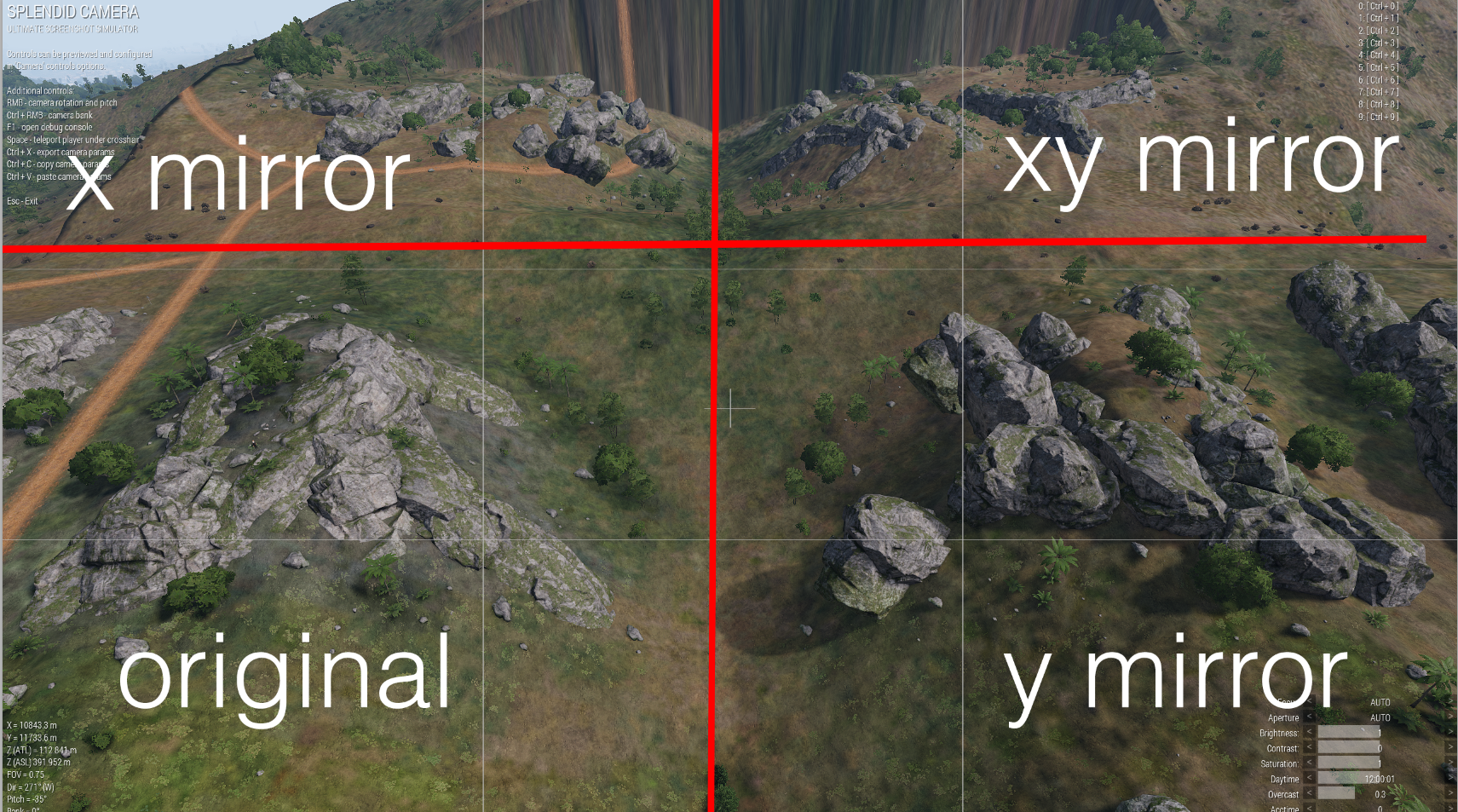
maybe I do want rotation for the vectors and to only mirror th e coordinates or sometihng
In this pic the xy mirror is correct, but I can't get the x or y mirror to be correct
private _objects = nearestTerrainObjects [_pos, [], _size*2, false, true] inAreaArray _area;
private _objectData = _objects apply {
    private _obj = _x;
    private _relPos = (getPosWorld _obj) vectorDiff _posNew;
    private _dirAndUp = [vectorDir _obj, VectorUp _obj];
    private _class = typeOf _obj;
    private _isSimple = _class == "";
    if (_isSimple) then {
        _class = (getModelInfo _obj)#1;
    };
    private _scale = getObjectScale _obj;

    [_relPos, _dirAndUp, _class, _isSimple, _scale]
};
private _objectsDataFlipX = _objectData apply {
    _x params ["_relPos", "_dirAndUp", "_class", "_isSimple", "_scale"];
    private _newPos = +_relPos;
    _newPos set [0, -(_relPos#0)];
    private _dir = _dirAndUp#0;
    private _up = _dirAndUp#1;

    private _dirNew = [-(_dir#0), _dir#1, _dir#2];
    private _upNew = [-(_up#0), _up#1, _up#2];
    [_newPos, [_dirNew, _upNew], _class, _isSimple, _scale]
};
private _objectsDataFlipY = _objectData apply {
    _x params ["_relPos", "_dirAndUp", "_class", "_isSimple", "_scale"];
    private _newPos = +_relPos;
    _newPos set [1, -(_relPos#1)];
    private _dir = _dirAndUp#0;
    private _up = _dirAndUp#1;
    private _dirNew = [_dir#0, -(_dir#1), _dir#2];
    private _upNew = [_up#0, -(_up#1), _up#2];
    [_newPos, [_dirNew, _upNew], _class, _isSimple, _scale]
};
private _objectsDataFlipXY = _objectData apply {
    _x params ["_relPos", "_dirAndUp", "_class", "_isSimple", "_scale"];
    private _newPos = +_relPos;
    _newPos set [0, -(_relPos#0)];
    _newPos set [1, -(_relPos#1)];
    private _dir = _dirAndUp#0;
    private _up = _dirAndUp#1;
    private _dirNew = [-(_dir#0), -(_dir#1), _dir#2];
    private _upNew = [-(_up#0), -(_up#1), _up#2];
    [_newPos, [_dirNew, _upNew], _class, _isSimple, _scale]
};
Full flip code
Alright the above is working now despite not before
Thanks for your help anyway, seems to be working now
 vital tangle
Hey guys
I'm running Antistasi and I'm hoping someone will be able to help me out with a script.
{
if (side _x isEqualTo EAST) then
{
_x addEventHandler ["Killed", {
_kiamarker = createMarker ["KIA", (getPos (_this select 0))];
_kiamarker setMarkerShape "ICON";
_kiamarker setMarkerType "kia";
_kiamarker setMarkerColor "ColorRed";
"KIA" setMarkerText "EKIA";
}];
};
} forEach allUnits;
This one works fine no dramas at all.
But I can't make the map show more then 1 marker this way, and then trying to get it to update after the next kill.
What I'm trying to achieve is let's say I take on a town and kill all the occupants. Then I want my map to show that so there could be say 20 people that I could now loot and the map is showing me where they are exactly.
Then after say 10 minutes they disappear.
Is this even possible??
sullen sigil
!code
 wicked roostBOT
How to use SQF syntax highlighting in Discord
```sqf
// your code here
hint "good!";
```
↓
// your code here
hint "good!";
please i beg
granite sky
Markers need to have unique names.
 gentle zenith
Hey, today I come with an issue that often occurs when repairing a Kajman, or Blackfoot.
If one of the above helicopters is landed, while quite damaged, then repaired (basically vehicle setDamage 0), it's very common for the helicopter to fly off into the sunset, as if it's clipped with the ground or something.
Is this a known issue? Are there any practical fixes? Or is this unheard of and somehow restricted to my server only?
meager granite
You probably do more than just setDamage 0
gentle zenith
meager granite
You probably do more than just `setDamage 0`
It really is 🙄
I'll wait till I can replicate it myself, player's keep giving me videos of them repairing them and they bounce away, it only happens to those two types of choppers.
Not 100% sure what's damaged/repairing or who the vehicle is local to yet, those are things I'll try to figure out
meager granite
The only thing that comes to mind is gear opening causing that, once helicopter is repaired?
gentle zenith
meager granite
The only thing that comes to mind is gear opening causing that, once helicopter ...
Good point, I'll test that, thanks
 hasty current
There a way to change the font an rsc control uses without defining a new class? Like, through a set command of some sort
I have a listbox I want to put a monospaced font on so I can have columns without using a table
Oh nevermind, a friend I'd messaged earlier just came online and told me about ctrlSetFont. Timing!
hallow mortar
For future reference: https://community.bistudio.com/wiki/Category:Command_Group:_GUI_Control
buoyant hound
hi,Anyone work with eos script?
warm hedge
What is eos
winter rose
End Of Support 😂
vital tangle
So this is feedback I got from someone else.
Would this work?
I'm not home currently so I can't check as of yet
    if (isServer) then {
        addMissionEventHandler ["EntityKilled", {
            params ["_unit", "_killer", "_instigator", "_useEffects"];

            // filter out not applicable
            if !(_unit isKindOf "CAManBase") exitWith {};
            if !(side group _unit isEqualTo east) exitWith {};

            // individualize the marker name
            private _markerName = format["EKIA_%1", _unit];
            private _marker = createMarker [_markerName, (getPosATL _unit)];

            // make local changes to marker (reduces network usage)
            _marker setMarkerShapeLocal "ICON";
            _marker setMarkerTypeLocal "kia";
            _marker setMarkerColorLocal "ColorRed";

            // on last marker setting, send through network using global command
            _marker setMarkerText "EKIA";

            // make them disappear after ~10 min
            [_markerName] spawn {
                params ["_markerName"];
                sleep (60 * 10);

                deleteMarker _markerName
            };
        }];
    };
` not '???
Where abouts?
Yeah I forgot the bottom ones haha thanks
vital tangle
Oh haha right that makes sense haha
vital tangle
And to change the scale to half I would put that code in after the colour code?
 distant mountain
hey, im getting a weird error i cant seem to resolve myself,

when connecting, the server tells me i have a semicolon where a = should be at line 5 in my description.ext, but i cant seem to figure out where that is
still forum
You shouldn't have a semicolon behind your #include
It shouldn't be a = either though
You can easily check by opening your mission in editor, and running in debug console
preprocessFileLineNumbers "description.ext"
That will show you how your final description.ext will look like after the include and macros were resolved
distant mountain
i tried to make the code simpler, do you mind having a look over this really quick?
 cosmic lichen
fences need to contain objects not strings.
You can use missionNamespace and getVariable to get the object represented by the strings
distant mountain
so its not, "fence1" rather its "Land_PipeWall_concretel_8m_F" correct?
but i still seem to have a syntax issue somewhere
cosmic lichen
No
I am on my phone. Maybe someone else can write an example on how to get the actual objects.
still forum
distant mountain
You cannot include a script into a config
winter rose
also _removalDuration is not provided to the spawned thread
meager granite
addAction makes no sense either
 meager granite
_removalDuration smells of ChatGPT 👃
winter rose
yeah wth is this xD
distant mountain
meager granite
`_removalDuration` smells of ChatGPT 👃
Yeah it is, i just needed a script that removes 4 objects for a short duration but i was unable to find any premade script. Im sadly not very skilled enough to make my own scripts from scratch :/
meager granite
ChatGPT sucks at SQF and borderline unable to produce anything working.
distant mountain
What a bummer, do you have anything lying around in can easily repurpose for the task of hiding 4 objects temporarily? Like, any team should always have the action „hide barriers“ and if they click it, it should hide 4 objects for 10 seconds
Id be really grateful if you could help me with this please
distant mountain
Yes, and the variable names are fence1 to 4
meager granite
Should it hide it only for them or for everyone?
distant mountain
Just everyone
 flint topaz
[] spawn {
private _fences = [fence1,fence2,fence3,fence4];
{_x hideObjectGlobal true;} forEach _fences;
uiSleep 10;
{_x hideObjectGlobal false;} forEach _fences;
};
Just put this within your action and put the action code on whatever you want to to control the system
You might want a check to ensure the gate isn’t already open, so people can’t spam the code
meager granite
hideObjectGlobal is SE though
flint topaz
Ahh just remoteExec then
meager granite
distant mountain
What a bummer, do you have anything lying around in can easily repurpose for the...
init.sqf:
fencesToHide = [fence1, fence2, fence3, fence4];
addFenceHidingAction = {
    _this addAction ["Hide fences", {
        {
            0 spawn {
                {_x hideObjectGlobal true} forEach fencesToHide;
                sleep 10;
                {_x hideObjectGlobal false} forEach fencesToHide;
            };
        } remoteExecCall ["call", 2];
    }, nil, 1.5, false, true, "", "fencesToHide findIf {!isObjectHidden _x} >= 0"];
};

0 spawn {
    waitUntil {player == player};
    player setVariable ["fenceHidingActionID", player call addFenceHidingAction];
    player addEventHandler ["Respawn", {
        params ["_unit", "_corpse"];
        _corpse removeAction (_corpse getVariable "fenceHidingActionID");
        _unit setVariable ["fenceHidingActionID", _unit call addFenceHidingAction];
    }];
};
Didn't test, could work
distant mountain
Thanks alot, i will test that asap when i get home in about 30 min
flint topaz
meager granite
`init.sqf`:
```sqf
fencesToHide = [fence1, fence2, fence3, fence4];
addFenceHid...
Don’t need to use “spawn” if you are using remoteExec as it’s already scheduled reference remoteExecCall
winter rose
meager granite
flint topaz
Don’t need to use “spawn” if you are using remoteExec as it’s already scheduled ...
I guess, had remoteExecCall there originally. Not much difference either way.
distant mountain
winter rose
_also https://discord.com/channels/105462288051380224/105462984087728128/1083756...
Oh sorry i did not see that, my apologies
flint topaz
meager granite
I guess, had `remoteExecCall` there originally. Not much difference either way.
Just would cause double scheduled threads “call” would only have one scheduled thread
But it’s negligible for what he’s doing
 rich frost
for a stringtable.xml to work (mod) i just need to add the file on root of the addonfolder and thats it? no #include or sth needed?
little raptor
Yeah
wild canyon
is there a way to Disable eject when handcuffed for altis life?
winter rose
lockCargo eventually
 sharp grotto
wild canyon
is there a way to Disable eject when handcuffed for altis life?
sharp grotto
wild canyon
is there a way to Disable eject when handcuffed for altis life?
Or block the eject action if handcuffed via
inGameUISetEventHandler ["Action", "_this call fnc_OnAction"];```
by returning true inside your fnc_OnAction.
<https://community.bistudio.com/wiki/inGameUISetEventHandler>will the init.sqf initialise itself just like the description.ext? or do i have to #INCLUDE init.sqf?
meager granite
distant mountain
will the init.sqf initialise itself just like the description.ext? or do i have ...
sharp grotto
distant mountain
will the init.sqf initialise itself just like the description.ext? or do i have ...
Yes it will, no include needed.
meager granite
It will be called by the game
distant mountain
meager granite
https://community.bistudio.com/wiki/Event_Scripts
thats a really helpful page, thank u
distant mountain
meager granite
`init.sqf`:
```sqf
fencesToHide = [fence1, fence2, fence3, fence4];
addFenceHid...
using this code, i now seem to have a "respawn" button, but nothing else i dont know what i am doing wrong here
meager granite
Do you not have the action in scroll wheel menu?
distant mountain
i do not have a remove fence action, or anything resembling that action
meager granite
Make sure you have all 4 fences in the game
Action shows only if all 4 that are in array are present in the game
fencesToHide = [fence1, fence2, fence3, fence4]; - you must have all 4 with these exact names
one missing and action will never show up
or modify the list if you have less fences


 meager granite
Oh you can't pass nil as priority into addAction to use default priority
so it errors out
I recommend starting the game with errors showing, you'd see the message then
Modified my code above
distant mountain
"show scripterrors" ?
winter rose
meager granite
Oh you can't pass `nil` as `priority` into `addAction` to use default priority
yep, functions's nil usage is guaranteed, not commands's
distant mountain
Yeah, now the action is visible, sadly its not removing said fences

this is the output of the Console
meager granite
Modified the code once more
distant mountain
do you mind explaning what happend here? just for my knowledge / personal development
meager granite
remoteExec was not calling the code in scheduled thread (where you can suspend the script with sleep) but in unscheduled where whole code must be executed in a single frame
I expected remoteExec ["call" to spawn a scheduled thread but looks like it does an unscheduled call
Now it is remoteExecCall ["spawn and spawn is a command to created a scheduled thread directly
distant mountain
well, i updated the code, and its now not longer throwing a error, but the fence is refusing to get hidden
 meager granite

Does spawn even work with remoteExec and remoteExecCall?
{systemChat str 123} remoteExec ["spawn", 2];
{systemChat str 123} remoteExecCall ["spawn", 2];
do nothing
meager granite
distant mountain
well, i updated the code, and its now not longer throwing a error, but the fence...
Modified the code for you once more
Now it does unscheduled call that spawns a thread in the code itself rather than directly in RE command
distant mountain
i just gotta say that im really thankful for your help samatra
You did it 
thank you, its working now
meager granite
👏
wild canyon
sharp grotto
Or block the eject action if handcuffed via
```sqf
inGameUISetEventHandler ["Ac...
And where should I place this snippet?
vital tangle
So turns out this one does work.
if (isServer) then {
        addMissionEventHandler ["EntityKilled", {
            params ["_unit", "_killer", "_instigator", "_useEffects"];

            // filter out not applicable
            if !(_unit isKindOf "CAManBase") exitWith {};
            if !(side group _unit isEqualTo east) exitWith {};

            // individualize the marker name
            private _markerName = format["EKIA_%1", _unit];
            private _marker = createMarker [_markerName, (getPosATL _unit)];

            // make local changes to marker (reduces network usage)
            _marker setMarkerShapeLocal "ICON";
            _marker setMarkerTypeLocal "kia";
            _marker setMarkerColorLocal "ColorRed";

            // on last marker setting, send through network using global command
            _marker setMarkerText "EKIA";

            // make them disappear after ~10 min
            [_markerName] spawn {
                params ["_markerName"];
                sleep (60 * 10);

                deleteMarker _markerName
            };
        }];
    };
If I wanted to have it do the same for the West Side would this be the set up?
distant mountain
meager granite
Modified the code for you once more
hey, just a quick question, whenever i die, the option "hide fences" is completly gone
meager granite
distant mountain
hey, just a quick question, whenever i die, the option "hide fences" is completl...
Strange, it should add it again, there is "Respawn" event handler that does that
Sure you don't mess with Respawn event handlers elsewhere?
distant mountain
nope not in script, i have respawn markers on the map
meager granite
Oh I messed up and typed addAction instead of addEventHandler for respawn 
Updated the code once more
distant mountain
is it possible to make a Action that kills / respawns the player immediatly? or how would i accomplish that myself?
 sullen badge
Hello!
I'm a bit out of my depth here, but I have this script that I can run in an init field of a vehicle to give it a ACRE radio rack. Now, this works fine when I'm testing the mission in the editor, however on my dedicated server it only works every now and then. I don't know why. I figured maybe it's a timing issue? I was wondering if someone here could help me rewrite this script so that I could for example put it in a trigger to run for the vehicle in question, in stead of in the init field?
winter rose
please use pastebin thanks
sullen badge
winter rose
please use pastebin thanks
Sorry! Here is the pastebin link: https://pastebin.com/GbT9kYRK
Pastebin
Pastebin.com is the number one paste tool since 2002. Pastebin is a website where you can store text online for a set period of time.
distant mountain
@meager granite hey, im really thankful for the script you written for me, i have 2 questions tho. could you please help me out with turning stamina off? i dont know how to implement this line of code into the .init you created for me (picture one) and the other question would be if you could put in a button to simply kill/respawn all players
 meager granite
Put it after player setVariable and _unit setVariable inside Respawn
Inside respawn you'll need to use _unit instead of player
You need to use _unit from EH arguments instead of player because there is a tiny chance player might not be updated yet and it will point to old dead player unit.
_unit is always new player unit
distant mountain
since you said, "after" player setVariable, im guessing like this?
 meager granite
After as in next new line
You current code can work too but you don't have _unit initialized inside Respawn
params ["_unit", "_corpse"] does that (turns _this arguments into variables)
 meager granite
It wont but you're doing it wrong, you don't need 3 event handlers
Think what you're doing, you first need to change your stamina stuff for just loaded player and then after they respawn
distant mountain
ok, im trying to do my best now, and i'll come here with the code after, just give me a sec

does this make sense? or am i getting something wrong?
meager granite
Yes, but you also need that for player outside of Respawn
Also read the wiki for commands you use
setCustomAimCoef takes number, not code
distant mountain
meager granite
Yes, but you also need that for `player` outside of `Respawn`
am i not doing that in line 4&5?
meager granite
Oh, missed that. This needs to be after waitUntil
waitUntil {player == player} or waitUntil {!isNull player} like you had it in your original code piece are there to make sure player finished loading inside init.sqf
otherwise your code run before that and nothing will happen (player will return null)
distant mountain
would it work like this?
 meager granite
yes
distant mountain
cool, that wasnt that hard apart from having some headaches
now for the hard part, how would i put in a button, that teleports OR kills all players to their respective spawn? whatever is easier to script?
meager granite
Have an object, addAction to it that does something
 drowsy geyser
private _fnc_flattenTerrain =
{
    params ["_start", "_a", "_b", "_h"];
    private _newPositions = [];

    for "_xStep" from 0 to _a do
    {
        for "_yStep" from 0 to _b do
        {
            private _newHeight = _start vectorAdd [_xStep, _yStep, 0];
            _newHeight set [2, _h];
            _newPositions pushBack _newHeight;
        };
    };

    _newPositions;
};

private _desiredTerrainHeight = 150;
private _positionsAndHeights = [getPosWorld player, 50, 50, _desiredTerrainHeight] call _fnc_flattenTerrain;
setTerrainHeight [_positionsAndHeights, true];
How would i make the Code above work so that it only changes the Terrain inside a trigger?
meager granite
drowsy geyser
```sqf
private _fnc_flattenTerrain =
{
params ["_start", "_a", "_b", "_h"];
...
Feed positions and trigger into https://community.bistudio.com/wiki/inArea to check
Or all positions at once for a bulk check with inAreaArray
distant mountain
meager granite
yes
yeah so the stamina thing works perfectly fine now, but i cant get the respawn / teleport thing to work
meager granite
post code
distant mountain
one sec i loaded a backup
meager granite
!code
wicked roostBOT
How to use SQF syntax highlighting in Discord
```sqf
// your code here
hint "good!";
```
↓
// your code here
hint "good!";
oh thats a cool feature
fencesToHide = [fence1, fence2, fence3, fence4];
addFenceHidingAction = {
    _this addAction ["Hide fences", {
        {
            0 spawn {
                {_x hideObjectGlobal true} forEach fencesToHide;
                sleep 10;
                {_x hideObjectGlobal false} forEach fencesToHide;
            };
        } remoteExecCall ["call", 2];
    }, nil, 1.5, false, true, "", "fencesToHide findIf {!isObjectHidden _x} >= 0"];
};

addAction [blue_teleport, {blue_teleport;}, [], 2, false, true];

blue_teleport = {
  _bluefor_spawn = getPos respawn_west;
  _blueplayer = bluefor;

  {_x setPos _spawnPosition]} forEach _blueplayer;
};

0 spawn {
    waitUntil {player == player};
    player enableStamina false;
    player setCustomAimCoef 0;
    player setVariable ["fenceHidingActionID", player call addFenceHidingAction];
    player addEventHandler ["Respawn", {
        params ["_unit", "_corpse"];
        _corpse removeAction (_corpse getVariable "fenceHidingActionID");
        _unit setVariable ["fenceHidingActionID", _unit call addFenceHidingAction];
        _unit enableStamina false;
        _unit setCustomAimCoef 0;
    }];
};
*code is partially from google AI
meager granite
Dont bother with AIs, they can't do SQF
Learn how stuff works to do it yourself
distant mountain
meager granite
Dont bother with AIs, they can't do SQF
the ai wrote it, and i tried to implement it, but it resulted in a semicolon error somewhere somhow
meager granite
AI wont help you, only make it worse. You'll need to learn it yourself.
distant mountain

distant mountain
how can i get the coordinates of the marker with the variable name "marker_2" ?
 bleak mural
are there any script commands to FORCE crew to remain in vehicle?
im aware 3DEN enhanced has this feature
it actually handles disembarking when vehicle is damaged
my issue is odd in that crew bail when vehicle is still healthy(90% health even) they then get back in(but usually die before being able to)
meager granite
distant mountain
how can i get the coordinates of the marker with the variable name "marker_2" ?
bleak mural
vanilla vehicles show this behaviour,even the pawnee
the crew are also vanilla classes
bleak mural
meager granite
https://discord.com/channels/105462288051380224/105462984087728128/1232700579407...
if i found sth i wouldnt be asking here but thanks
meager granite
bleak mural
if i found sth i wouldnt be asking here but thanks
Wasn't replying to you
bleak mural
id like to know what causes this behaviour anyway
bleak mural
meager granite
Wasn't replying to you
sorry i thought you were
meager granite
I guess you want this https://community.bistudio.com/wiki/allowCrewInImmobile ?
There is also engine behaviour when vehicle is about to blow up it ejects everyone
granite sky
Otherwise allowCrewInImmobile works pretty well IME
bleak mural
isnt that command what 3den uses?
granite sky
There was some chat about upside-down vehicles. I forget the outcome.
I wouldn't know what 3den uses.
bleak mural
my vehicle crew and vehicle have event handlers for damage i suspect this is causing the issue
i think the lead crew member might be ordering the subordinate out to heal
need to test more
bleak mural
granite sky
There was some chat about upside-down vehicles. I forget the outcome.
vehcile crewss upside down or drowning ignore the typical disembark when damaged issue
they have different exit behaviour
also i wanted to ask because i cant find fog altitude info
using this ```sqf
[selectRandom [0,0.1,0.15,0.2,0.3,0,0,0,0]] call BIS_fnc_setFog;
i set my fog to a relatively light,small random setting
issue is,fog "altitude" sometimes gets bad when i start a mission and seems to multiply the fog to make it look like a setting of 1
and way to limit it?
proven charm
bleak mural
are there any script commands to FORCE crew to remain in vehicle?
tried this one (Alt Syntax): https://community.bistudio.com/wiki/allowCrewInImmobile ?
 hollow quest
Hi there everyone
Could any please help me how to remove the truck tent -the correct init command please-
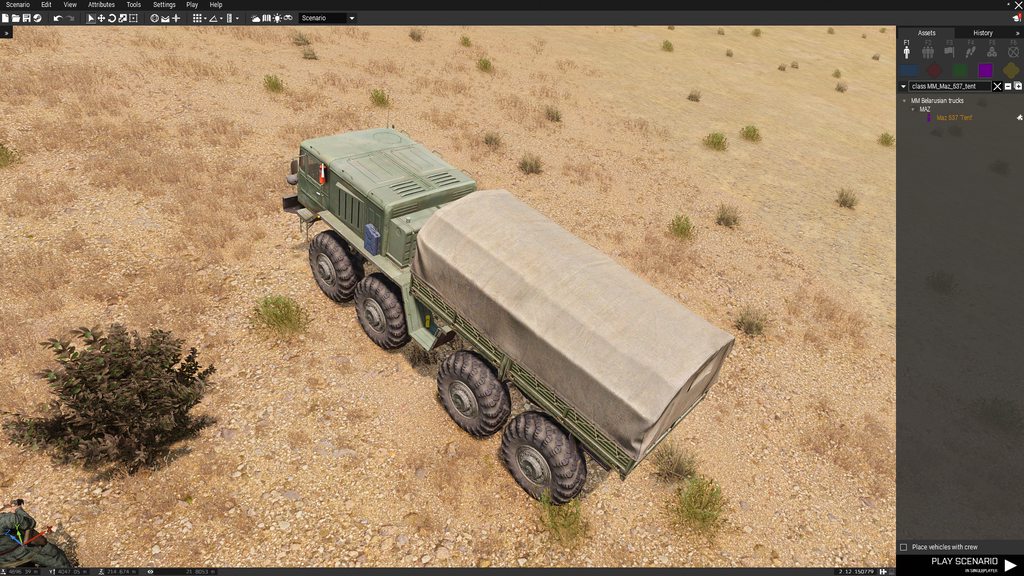
Thank you in advance
I’ve tried the animate, animate source command but not working
This animate [“hidetent” , 1, ];
I think I’ve missing something!
meager granite
hollow quest
https://imgur.com/a/MMUCoJF
Find this vehicle in config viewer and check AnimationSources
If there is a class with animation, you can use it. If there is no, then you can't
 raw meteor
what is the best way to to check for an undefined var?
im trying to set a players tfar radio but using there call
(call TFAR_fnc_activeLrRadio)
returns nothing if there is no lr
hallow mortar
isNil, usually
raw meteor
hallow mortar
`isNil`, usually
isNil returns nothing
hallow mortar
raw meteor
isNil returns nothing
isNil never returns Nothing unless given an invalid syntax. It will be either True or False or something was done wrong.
if (isNil {call TFAR_fnc_activeLrRadio}) then { systemChat "No radio!" };```ok thank you i see i was checking the result var not the call its self and forgetting the {}
hallow mortar
have to say, not a huge fan of getter functions that can return Nothing. At least return an empty of the same type as a real return so you don't cause a script error :U
 turbid nymph
Im using a mod called ZHC to offload my ai units to 2 headless clients on my server right now. Im having an issue though. I give them scripted behaviour to make them follow players or make aircraft land at places and drop off units but they seem to not work after a bit during ops. They work fine locally when im hosting with eden but on my dedicated box they seem to break at some point. For example, the aircraft will stand still in the air when im trying to have it land somewhere. Im thinking it could be an issue with ai being offloaded to the headless while a script is running on them. Anyone got any ideas / have had similar experiences?
All the units with scripts that break are units that were offloaded
distant mountain
!code
wicked roostBOT
How to use SQF syntax highlighting in Discord
```sqf
// your code here
hint "good!";
```
↓
// your code here
hint "good!";
Hey, im trying to get this code to work to be able to jump but something is again not working with this
private["_unit", "_vel", "_dir", "_v1", "_v2", "_anim", "_oldpos"];
_unit = [_this, 0, objNull, [objNull]] call BIS_fnc_param;
_oldpos = getPosATL _unit;
if (isNull _unit) exitWith {};
if (animationState _unit == "AovrPercMrunSrasWrflDf") exitWith {};
if (local _unit) then {
    _v1 = 3.82;
    _v2 = .4;
    _dir = direction player;
    _vel = velocity _unit;
    _unit setVelocity[(_vel select 0) + (sin _dir * _v2), (_vel select 1) + (cos _dir * _v2), (_vel select 2) + _v1];
};
_anim = animationState _unit;
_unit switchMove "AovrPercMrunSrasWrflDf";
if (local _unit) then {
    waitUntil {
        if ((getPos _unit select 2) > 4) then {
            _unit setposATL _oldpos;
            _unit setVelocity[0, 0, 0];
        };
        animationState _unit != "AovrPercMrunSrasWrflDf"
    };
    _unit switchMove _anim;
};
 ivory marsh
Hello guys, I want to make AI enemy planes attack ground units. I tried to make a destroy waypoint and to put air to surface weapon & bombs in the plane, but the plane doesn't attack. I think I need to reveal the position of my troops to the plane to make it attack, how can I do that please ?
 elder fox
shoutout to @unique sundial for making this 😄
http://killzonekid.com/arma-scripting-tutorials-uav-r2t-and-pip/
 granite sky
ivory marsh
Hello guys, I want to make AI enemy planes attack ground units. I tried to make ...
granite sky
ivory marsh
Hello guys, I want to make AI enemy planes attack ground units. I tried to make ...
It's the reveal command, but it doesn't help much. Even with a good view and full reveal, many fixed-wing aircraft won't attack reliably.
The RHS A-10 took about 10 passes to kill a wide open stationary vehicle last time I tested.
bleak mural
proven charm
tried this one (Alt Syntax): https://community.bistudio.com/wiki/allowCrewInImmo...
i have already. i tested if issue is related to a heal order,it isnt. all i can say is using EH to handle damage on crew and/or vehicle causes this behaviour but im unable to nail down why
 high vigil
deleteVehicle not working on remote projectile, anyone else seen that ?
hallow mortar
Most small projectiles have separate copies on each client so they can be simulated (for visual purposes - only the owner's copy counts for damage) at the required speed without network trouble getting in the way
vital tangle
@fair drum
Didnt even realise I was in the other channel.
Yeah I did just copy and paste what you had worked out.
Ill jumping on now to test it out
high vigil
hallow mortar
Most small projectiles have separate copies on each client so they can be simula...
i tried remoteexeccall to owner of projectile but got error that i passed null
hallow mortar
The different copies are local-only objects. The ID of the object for any given shot can be different on different clients, and each client only knows about their own copy.
meager granite
high vigil
**deleteVehicle** not working on remote projectile, anyone else seen that ?
What projectile was it?
getText(configOf _projectile >> "simulation")
hallow mortar
You can usually use getShotParents to find the shooter and target them.
high vigil
meager granite
What projectile was it?
Mortars so far
hallow mortar
when I was doing APS, I found the only reliable way to do it, even for things you'd think of as global like shells and missiles, is to delete it shooter-side from a reference found on the shooter's machine.
high vigil
hallow mortar
when I was doing APS, I found the only reliable way to do it, even for things yo...
Thanks for info I’ll see if I can make it work
 ruby bronze
Is it possible to detect an item in a player's inventory while they're in a vehicle? I have a trigger condition of:
"ACE_Cellphone" in items player && player in thisList
And it works, but not while the player is in a vehicle.
 lunar mountain
AI stuff again: Is there any possible reason why a couple of move waypoint (cycle at end) works in single player, but on dedicated server they just wait 1-2 min before moving to the next waypoint? So they should automatically move towards the next waypoint, but on dedicated server it isn't happening.
hallow mortar
It's not items that's the problem there
Try formatting it like this:
("ACE_Cellphone" in items player) && {vehicle player in thisList}```- actually reverse that for better performance
(vehicle player in thisList) && {"ACE_Cellphone" in items player}```imagine writing something correctly the first time 🙃

 buoyant hound
hi,ineed yourhelp
there i want to play a sound in task complate , i use trigger and set tesk state and in second line exec playsound cmd,
but last night i just confused in a situation,i find some ogg file to use for task complate sound,which play good in windows music player, but when i add it to my mission cfgsound part , game wont detect target sound file(check in trigger sound&music part).
configs done properly but game still not detect sound file
even with open another mission and run the main mission later
even i exit editor and recheck ,but still not work
class CfgSounds
{
class wolf1
{
name = ""; // display name
sound[] = { "fx\wolf1.ogg", 1, 1, 100 };
// file, volume, pitch, maxDistance
titles[] = { 0, "" };
};
};
simple config
i use musics too , class names showed in trigger sound part but this task complate sound are main problem for me in dedicate server
hallow mortar
buoyant hound
class CfgSounds
{
class wolf1
{
name = ""; ...
You should give it a display name that's not an empty string, probably
 hasty crystal
Hey there wise people, I am making a mission and have a error message that shows up every time I start the mission (First Image). I am using map object as intel using the Hold Action script (Second Image) to set DT_OBJ1_Complete = true. Then there is a trigger (Third Image) which activates on DT_OBJ1_Complete == true this is synced to a task complete.
This error message disappears once the intel hold action is finished and the task completes. So everthing works fine in the end but i want to get rid of the annoying message. 🙂


 cosmic lichen
The variable is undefined before it turns true. Make sure to define it first or use getVariable with default value in the waitUntil
hasty crystal
By define it first. Would setting it to false from the start work?
Also I dont understand the waitUntil part as I dont see waitUntil in any of the 'code' I wrote.
hallow mortar
The trigger is using it internally to...wait until...the condition returns true
hasty crystal
ok thanks
bleak gulch
meager granite
AI wont help you, only make it worse. You'll need to learn it yourself.
This!
there is no reason to use this weird expression comparing bool with true / false to return bool.
waitUntil {DT_OBJ1_Complete};
is enough
personally as a user i dislike using any kind of loops including waitUntil without delay even if they are in scheduled environment
waitUntil {sleep 1.0928; DT_OBJ1_Complete};
DT_OBJ1_Complete must be declared / defined before you can use it in global space. preInit is a good place for that purpose.
in addition to this avoid
private _result = if (some_condition) {true} else {false};
use
private _result = (some_condition);
it's ternary operator equivalent
C++
bool result = some_condition;
int result2 = some_condition ? 1 : 0;
Alright and do you have a script to make our positions revealed all the time for the enemy planes?
bleak gulch
well, you can make a loop which reveals your target units every 10 seconds for example, or reveals if knowsAbout < 4;
terminate loop when the CAS plane destroyed or you decided to stop the bombing
bleak gulch
hasty crystal
By define it first. Would setting it to false from the start work?
https://community.bistudio.com/wiki/Initialisation_Order
You need to put that variable into XEH_preInit.sqf and in the CfgFunctions in the description.ext set preInit = 1;
ivory marsh
bleak gulch
well, you can make a loop which reveals your target units every 10 seconds for e...
im really sorry im new at scripting in arma
Can you give me an example of a script with the enemy plane named "plane1" and the player being revealed?
bleak gulch
hm
while {alive plane1} do
{
    {
        plane1 reveal _x;
    } forEach allPlayers;
    sleep 30;
};
reveals the targets (units controlled by the players) to the plane1 every 30 seconds.
ivory marsh
bleak gulch
reveals the targets (units controlled by the players) to the plane1 every 30 sec...
alr thx you !!
ivory marsh
bleak gulch
hm
it says "error suspending not allowed in this context" I'm using the code in the debug console
bleak gulch
it is not supposed to be used in the Debug Console
because the code in the debug console is executed in non-scheduled environment
if you want to try from the console use this version:
0 spawn
{
    while {alive plane1} do
    {
        {
            plane1 reveal _x;
        } forEach allPlayers;
        sleep 30;
    };
};
(tldr, in some context you can stop the code using sleep and some others, some context can't and it tries to execute everything in one frame; Debug Console is latter)
ivory marsh
bleak gulch
https://community.bistudio.com/wiki/Scheduler
alr thx you man, so the code reveals my position to enemies aircraft ?
bleak gulch
ivory marsh
alr thx you man, so the code reveals my position to enemies aircraft ?
yes
ivory marsh
bleak gulch
yes
alr thx and another question do you know what types of weapons do I need to load aircraft with to make them attack infantry?
bleak gulch
ivory marsh
alr thx and another question do you know what types of weapons do I need to load...
can't say anything about that because 1. You didn't specify the aircraft 2. I don't know 3. You can experiment 🙂 But I bet it's not anti-tank missiles.
ivory marsh
bleak gulch
can't say anything about that because 1. You didn't specify the aircraft 2. I do...
Alr thx you !
hasty crystal
bleak gulch
https://community.bistudio.com/wiki/Initialisation_Order
You need to put that va...
Thanks for the help, didnt quite do it how you did, but it worked. Just set the variable in init.sqf. 🙂
bleak gulch
hasty crystal
Thanks for the help, didnt quite do it how you did, but it worked. Just set the ...
Keep in mind init.sqf is NOT executed BEFORE init field in the 3DEN editor. As I told, if you have something like this in the init field:
this hideObject doHide;
it will fail because doHide variable is not defined yet.
hasty crystal
Does that still stand when running it from a dedicated server?
bleak gulch
depends on luck (performance), but it's very unreliable
to ensure the things will work properly you must define the variable in the preInit stage
are you making a mission?
hasty crystal
Yeah
Thinking about it now I probably should have put this in the editor channel. Lol
bleak gulch
in the description.ext you have to define CfgFunctions. It's pretty easy.
description.ext:
class CfgFunctions
{
    class DaxtorT // Tag
    {
        class MyInitFunctions // Category
        {
            file = "functions"; // Path (optional)
            class myPreInitFunction // Func name
            {
                preInit = 1; // preInit attribute
            };

            class myPostInitFunction
            {
                postInit = 1; // postInit attribute
            };
        };
    };
};
<YOUR_MISSION_ROOT_DIR>\functions\fn_myPreInitFunction.sqf:
yourVariable = false; // or true, or any default value
<YOUR_MISSION_ROOT_DIR>\functions\fn_myPostInitFunction.sqf:
yourVariable2 = false; // or true, or any default value
Two functions will be generated:
DaxtorT_fnc_myPreInitFunction
DaxtorT_fnc_myPostInitFunction
Now yourVariable is defined and available in the init field and won't cause errors like Undefined variable blah-blag-blah
bleak gulch
@hasty crystal ^
File fn_myPreInitFunction.sqf will be compiled and finalized to DaxtorT_fnc_myPreInitFunction and then executed at preInit stage automatically by the game engine.
Added postInit routine (just in case)
hasty crystal
Damn thats alot to read. I’m not able to try it out tonight but thanks.
bleak mural
are there any modifications that can be done to "enableAttack"? by default its set to true,setting it to false prevents group leaders issuing individual attack / target orders. AI act pretty good with it on,they move,flank and occasionally enter a building with enemy inside...
now the issue: if you have an enemy group in a bunker or building where the enable attack group knows about and an order was given to attack said enemy, but the group also are in process of multiple wp's, the group leader will issue attack orders,then he proceeds on the wp. Leaving any subordinate at the position trying to kill the enemy leader issued attack order to
this results in fragmented groups.
trying to find a middle ground https://community.bistudio.com/wiki/enableAttack
above issue is very bad if garrisoned enemies are unreachable,untargetable,and never leave their garrison. attacking group will remain indefinetly attempting to follow group leaders attack commands
proven charm
@bleak mural why not just call the enableAttack command when at the last WP?
bleak mural
proven charm
<@368621495695704064> why not just call the enableAttack command when at the las...
its a fully dynamic scenario where AI are 100% autonomous, tasked with a zone clearence with enemy positions completely random
regardless, im settling with disabling attck on all units(friendly)
tested with units on a Guard wp and they perform just as good. more cohesive,and still reactive
proven charm
@bleak mural sounds cool
proven charm
i dont get it, why this code doesnt loop? ```sqf
while { true } do
{
hintSilent format["time: %1", time];
};
hint "DONE";
(Run from debug console)
digital rover
proven charm
i dont get it, why this code doesnt loop? ```sqf
while { true } do
{
hintSilent...
Because it is unscheduled, the loop will only run 10,000 times at a maximum. If you run it scheduled it will never complete
fair drum
Debug by default is unscheduled. Run ADT to have access to direct scheduling scripts. Or if not, encase the code in a spawn.
proven charm
@Seb ah yes makes sense, thx 🙂
warm hedge
Basically it is very easy to make the game freeze, there is a hardcoded cap
proven charm
did not know loops have a maximum iterations, I thought it would get stuck there
i was actually debugging another phenomenon when you put sleep to that loop you get error but after that arma lags... like as if the maximum iters protection doesnt work in that case
while { true } do
{
 hintSilent format["time: %1", time];
 sleep 1;
};
``` Huge lagIt lags because it writes 10000 errors into RPT
because you can't sleep in unscheduled
proven charm
uugh ok so the lag should go away then :/
digital rover
fyi:
Unscheduled: code executes in 1 frame, game will freeze until it completes
Scheduled: code can take multiple frames to complete, game won't freeze.
proven charm
well maybe theres is opportunity for the devs to get rid of that lag due to the logging (if somehow possible, print only once)
digital rover
Writing files so a slow process. Don't write code that causes errors so it doesn't need to write them
proven charm
i'll do my best not to 🙂
still , devs might have some ideas how to get rid of the spam
granite sky
Nah, you might want your script to spam sometimes for debug reasons. If it spams unintentionally then that's your problem.
proven charm
not to disable all login just keep it at one message
meager granite
proven charm
not to disable all login just keep it at one message
Add your own check not to log same thing within same frame
diagLogAntiSpam = {
    if(rptLogsFrame get _this == diag_frameno) exitWith {};
    diag_log _this;
    rptLogsFrame set [_this, diag_frameno]
};
rptLogsFrame = createHashMap;

for "_i" from 1 to 100 do {
    "test" call diagLogAntiSpam;
};
will only with with supported hashmap keys types though
proven charm
thx Sa-Matra but my concern was more in those bugs I dont see coming 😬 (The ones raised by the engine)
meager granite
There is already some logic that stops repeated spam messages
granite sky
Engine messages, yeah. I don't think it covers script errors though.
meager granite
2024/02/11, 8:57:36 Error: EntityAI SubSkeleton index was not initialized properly (repeated 293x in the last 60sec)
Yeah, engine stuff
proven charm
meager granite
There is already some logic that stops repeated spam messages
yeah i assume so
granite sky
I guess it's a fair point that the antispam probably should cover repeated script errors.
meager granite

granite sky
I normally consider that sort of RPT bloat a strong encouragement to fix shit :P
meager granite
granite sky
I normally consider that sort of RPT bloat a strong encouragement to fix shit :P
Yep, if it spams so much its time to fix it
proven charm
if you ever get back to the code before your Harddisk dies due to the spam 😄
still forum
digital rover
Writing files so a slow process. Don't write code that causes errors so it doesn...
It doesn't write to file. That is async.
So it won't lag because of that. Maybe there is some other error processing that is expensive (building the message to be logged)
still forum
proven charm
still , devs might have some ideas how to get rid of the spam
Yeah. We ban everyone who makes such errors.
digital rover
Fair enough, point still stands though.
fair drum
proven charm
did not know loops have a maximum iterations, I thought it would get stuck ther...
Only on unscheduled do they have a max. Scheduled, that will keep going.
fair drum
meager granite
Add your own check not to log same thing within same frame
You've always had the best logging I've seen here. You should build a guide/repo on it for the wiki.
bleak gulch
proven charm
i dont get it, why this code doesnt loop? ```sqf
while { true } do
{
hintSilent...
if you really need fast logger it's better to implement it using STL (cout, printf, etc) on C/C++ and callExtension. As @still forum told, the actual disk writes are async and don't commit at the same time as log line issued.
still forum
He never asked for a fast logger though :U
meager granite
fair drum
You've always had the best logging I've seen here. You should build a guide/repo...
both_func_dbg_strObj = {
    format ["%1 (%2)", _this, typeOf _this];
};

both_func_dbg_strObjArr = {
    _this apply {if(_x isEqualType objNull) then {_x call both_func_dbg_strObj} else {if(_x isEqualType []) then {_x call both_func_dbg_strObjArr} else {_x}}};
};
unless you mean that hashmap with indentations
bleak gulch
digital rover
Fair enough, point still stands though.
Well. When I roam through the public servers sometimes (on practice very often :)) I get script errors right from the start at the mission loading. Back in the days I tried to contact the admins and report the issues. I still remember how some of them gave me an advice to turn -showScriptErrors off in order to "fix" the errors.
Another way to fix the errors is to use black duct tape to cover top of the screen.
wild canyon
how can i remove the inventory action from an object
is it with lockInventory
or is that only for vehicles
wild canyon
hallow mortar
`lockInventory` is what you want
thanks g
 vital silo
Hi, is it possible to change a player's name via script in multiplayer?
proven charm
vital silo
Hi, is it possible to change a player's name via script in multiplayer?
probably not because wiki says setName only works in single player. but you could try it: https://community.bistudio.com/wiki/setName
meager granite
vital silo
Hi, is it possible to change a player's name via script in multiplayer?
no
 olive parrot
so i want AI to destroy a certain objective using waypoints, what script would i use to accomplish this?
like an object or enemy
proven charm
olive parrot
so i want AI to destroy a certain objective using waypoints, what script would i...
destroy waypoint? sorry dont use much wps
olive parrot
yea, that one, i have to put it on top of the thing i want destroyed right?
proven charm
yes i think so
 mental badger
Hi all, i have a question, i trying add a custom sound like a radio chatter in my campaign, and this looks like this [document] and this is mission files, when i re-open my mission i see a error " File C:\My Documents\Arma 3\missions\radio-per.chernarus_summer\description.ext, line 21: /CfgSounds.radio: Member already defined.
What does it means? And is anythyng wrong with my description.ext?

 proven charm
mental badger
Hi all, i have a question, i trying add a custom sound like a radio chatter in m...
proven charm
mental badger
Hi all, i have a question, i trying add a custom sound like a radio chatter in m...
you have the class named "radio" twice. you can only have one. so you can change it to "radio2" etc
mental badger
proven charm
you have the class named "radio" twice. you can only have one. so you can change...
oh, and the problem issue will be over?
proven charm
should fix the "Member already defined." error yes
mental badger
proven charm
should fix the "Member already defined." error yes
now there are a different problem, pic
 hallow mortar
Both those classes have exactly the same properties and reference exactly the same file. Do you actually even need both of them?
mental badger
hallow mortar
Both those classes have exactly the same properties and reference exactly the sa...
i just want a trigger with sound of radio chatter, thats all what i need, i watched a russian guides and english, everyone have a two class of sound, and i don't know why
proven charm
you are also missing } on the lower class
mental badger
proven charm
you are also missing } on the lower class
where exactly? can you show me?
hallow mortar
mental badger
i just want a trigger with sound of radio chatter, thats all what i need, i watc...
Either they're not very smart, or it's just to demonstrate how to make multiple classes in case you want multiple sounds
proven charm
mental badger
where exactly? can you show me?
should be second last line.
hallow mortar
A { must always have a corresponding } (usually a }; actually). Count your { and see which doesn't have a partner.
mental badger
proven charm
should be second last line.
like this?
 proven charm
yea
mental badger
okay i will try it if it works
hallow mortar
Functionally yes, but for clarity it should be in line* with the { under class radio2 above it. Doesn't make a difference to how it works, but it does make it easier to read.
* I mean horizontal alignment, not literally on the same line of code
mental badger
proven charm
yea
okay it opened with 0 errors, thank yall for help
mental badger
proven charm
yea
sooo, i see it in trigger menu but when i go in trigger it does not work, what's the problem?
@hallow mortar
like it doesn't play in preview menu in trigger
aand when i listened in folder menu this !marina.ogg soundfile, it worked perfectly, but in the game there is no sound for chatter
hallow mortar
Restart the Editor
mental badger
hallow mortar
Restart the Editor
and the problem will be solved?
hallow mortar
Oh also, if you have it in the sound or music folder inside your mission folder, you need to include that in the file path, otherwise the game won't know where to look
mental badger
hallow mortar
Oh also, if you have it in the `sound` or `music` folder inside your mission fol...
could you give me an example?
like i have a 2 folders sound and music
 hallow mortar
class radio
{
  name = "$chatter";
  sound[] = {"sound\!marina.ogg", 1, 1.0};
  titles[] = {};
};```i will try it
hallow mortar
The sound[] property is the path to the file within the mission folder. If you don't specify a subfolder, the game just looks in the root mission folder. Since there is no !marina.ogg in the root mission folder, it doesn't find it. If the file is in a subfolder, you need to include that in the file path.
mental badger
hallow mortar
The `sound[]` property is the path to the file within the mission folder. If you...
soo i replaced it like your example, now i restart the editor right?
hallow mortar
You might need to. You can try it without restarting first, if you like, then if it doesn't work, restart it.
mental badger
okay i will try without restarting it
there are another problem

i just replace chatter2 and placed your example, and replaced the name of !marina to sound1 and sound2

okay i fixed the issue with line 21 but sound is not working
hallow mortar
Did you change the name of the sound file itself as well? The path in sound[] must match the actual path exactly.
Also, let's just get rid of that second class entirely, it's not helping.
mental badger
hallow mortar
Did you change the name of the sound file itself as well? The path in `sound[]` ...
i don't changed the folder "sound", i changed the OGG name thats all
okay, i will delete second class
soo, it looks like this
 hallow mortar
Here it is with cleaned-up alignment. It's much easier to read when everything is properly lined up.
class CfgSounds
{
  sounds[] = {};
  class radio2
  {
    name = "$chatter";
    sound[] = {"sound\sound2.ogg", 1, 1.0};
    titles[] = {};
  };
};```
I also changed the top-level `sounds[]` to be empty. You _don't_ have to put anything in it, it's not required, and if you put stuff in it that's wrong (like putting in `radio` when your class is actually `radio2`) could confuse the game.okay, i will replace it and watch if it work
thank you it worked, also how many hz i need to place in audiacity?
hallow mortar
I don't think it matters.
mental badger
also i wanted a 3d sound, it stop working when you are out of the trigger zone also it in full volume
i will drop a vid with it
hallow mortar
No video required, I know how it works
hallow mortar
wait for me to finish typing :U
In order to do this, you'll need to stop using the trigger Sound field, and use script commands instead.
You can use playSound3D to make a fully 3D sound - it will fade as you get further from the source position, and get louder as you get closer.
Alternatively, you can use playSound to make a sound that isn't actually 3D, so it will always be present at the same volume and doesn't have a spatial position, but can be fully stopped when you leave the area. That second option is more complex.
mental badger
thank you
mental badger
hallow mortar
In order to do this, you'll need to stop using the trigger Sound field, and use ...
where exactly i need to type a "playSound3D" in condition right?
hallow mortar
No. The Condition field is for...the condition that must be true in order for the trigger to activate. It's a check. If you put the playSound3D in there, it would be executed constantly, because the condition code is being run all the time to see if it returns true.
You need to use the On Activation field.
 hallow mortar
You can't just put literally only playSound3D. It needs the rest of the arguments that tell the command which sound to play and where to play it.
 hallow mortar
.wss is a sound file format. Arma supports multiple formats; your .ogg files are fine.
mental badger
nah it does not works..
i typed in activation this
playSound3D [getMissionPath "sound2.ogg", player]; // to play a mission directory sound
but it does not works
hallow mortar
Because you're missing the sound folder in the file path again
getMissionPath returns the root mission folder. If you want to look in a specific subfolder inside the mission folder, you have to specify that.
mental badger
oh soo i replace the missionpath on folder sound and it will work? And one more question, can i do a 3d sound in description.ext?
 hallow mortar
No, don't replace getMissionPath. You need that as well. getMissionPath gets you to the root folder, and then you have to go from there.
getMissionPath "sound\sound2.ogg"
mental badger
and sorry for too many questions and for misunderstanding, im new in modding and my english is not that good
okay so i replaced this but the sound is not a 3d

it like im listening a radio chatter in headphone
hallow mortar
You need to specify a position for the 3D sound to come from
I'm actually surprised it worked at all without one, that's not an optional parameter
mental badger
a.. could you give me an example for that? i properly don't understand
hallow mortar
Syntax:
playSound3D [filename, soundSource, isInside, soundPosition, volume, soundPitch, distance, offset, local]
playSound3D [
  getMissionPath "sound\sound2.ogg",
  player,
  false,
  getPosASL player,
  1,
  1.0,
  200
];```
(you can write that all on one line as well, I just made it multiple lines so it's easier to read)
The first parameter is the file path, we've covered that.
The second parameter is the source object. Whichever object is given here, is where the sound comes from, _unless_ it's overwritten by the later positIon parameter. (The command is badly-designed.)
The third parameter is whether to process the sound like it's inside a building. We could do stuff with that, but I'm just leaving it false for now.
The fourth parameter is the source position. This overwrites the earlier source object parameter. The difference is that this parameter can use a 3D position coordinate (like `[500,500,2]`) instead of only being able to use an object's position. With this parameter, the source can be _anywhere_, not just where an object is. The position must be in ASL (Above Sea Level) format.
The fifth and sixth parameters are the volume and pitch. Nothing fancy.
The seventh parameter is the maximum distance. Outside this radius from the source, the sound can't be heard. Inside this radius, it gets louder the closer you are. It's in metres.
There are a couple of other parameters but they're not important.That example uses the player's position (at the time the code is executed) as the source position. You can change that with the fourth parameter. For example, if you want it to come from the trigger centre, use getPosASL thisTrigger instead. You could also use any other object's ASL position, or specify an arbitrary position coordinate.
mental badger
hallow mortar
> Syntax:
> playSound3D [filename, soundSource, isInside, soundPosition, volume,...
which one is regulating a volume?
because im in 10 meters away from radio and its above 20% volume
i can record and drop it if it needs
hallow mortar
Volume is the fifth parameter, as described. In the example it's set to 1 (normal volume). The maximum is 10.
The radius affects the apparent volume. With a 200-metre radius, it will be at maximum volume for a longer distance from the source, because it needs to stay loud for longer to reach 200 metres.
Also, remember that the example uses the player's position. If you didn't change that, then the sound is coming from wherever you were standing when the code was executed, not from the radio.
mental badger
hallow mortar
Also, remember that the example uses the player's position. If you didn't change...
how attach a sound to the a radio?
i want a realistic sound you know?
hallow mortar
If the radio is not moving, then use getPosASL whateverYourRadioObjectVariableNameIs instead of getPosASL player.
If the radio is moving, then things get complicated.
mental badger
hallow mortar
If the radio is not moving, then use `getPosASL whateverYourRadioObjectVariableN...
i just place it and dont know how to freeze it
hallow mortar
If the radio is moving, then we can't use playSound3D. playSound3D only works with a single position. If you give it an object as the source, it just uses the object's position at the moment the code was executed; it's not attached to the object.
Instead, we would need to use say3D (https://community.bistudio.com/wiki/say3D). say3D attaches the sound to the object, but it can only work with objects, not positions, and an object can only be emitting one say3D sound at a time.
hallow mortar
mental badger
i just place it and dont know how to freeze it
Changing it to a Simple Object or turning off Enable Simulation, in its Editor attributes (double-click on the object) would do it, if you don't want it to move.
Note that the problem is if it is moving, not if it can move. If it can move, but will never move, because nothing will happen to it to push it around, then using playSound3D is fine. The sound isn't technically attached to the object, but no one will notice.
mental badger
okay, thank you very much for help, also sorry for too many questions!
 faint oasis
Hi, i have a question ? Is it possible to disable the kind of autopilot that is turned on while in multiplayer, while using a gui when inside a plane ?
winter rose
no
faint oasis
winter rose
no
oh ok but it is what ? a sort of auto pilot ? because the ingame map doesn't have that apparently
hallow mortar
I don't think it's an intentional system. It's just one of those quirks of how stuff works (or doesn't) in Arma.
the game just goes "oh I'm not receiving flight control inputs any more, time to FREAK OUT"
faint oasis
hallow mortar
the game just goes "oh I'm not receiving flight control inputs any more, time to...
oh ok but how the ingame map is doing ? Because when you open the map, it seems to be normal.
hallow mortar
The map doesn't actually take over movement controls. You can still move with the map open (at least until you hit something...)
mental badger
@hallow mortar Hey nik, i have another question, i wanted to add a russian radio chatter and i didnt do anything wrong but in trigger menu i can't see a sound file.. could you help me again?
 faint oasis
hallow mortar
The map doesn't actually take over movement controls. You can still move with th...
faint oasis
hallow mortar
The map doesn't actually take over movement controls. You can still move with th...
oh ok, i forgot that, so if i'm using a command like "createdisplay" on the display 46, it should be good right ?
hallow mortar
mental badger
<@137672072821211136> Hey nik, i have another question, i wanted to add a russia...
your } are out of position
mental badger
hallow mortar
your `}` are out of position
under titles?
hallow mortar
The }; that should end the radio2 class has migrated to the end of the radio3 class
mental badger
hallow mortar
The `};` that should end the `radio2` class has migrated to the end of the `radi...
like this?
 hallow mortar
mental badger
like this?
hallow mortar
mental badger
like this?
You have correctly removed the extra } from after radio3, but you have not put it back where it belongs after radio2.
It needs to go like this:
class radio2
{
 // stuff here
};
class radio3
{
  // stuff here
};```The { and }; mark the start and end of the class. If the class doesn't end where it's supposed to - before the next class starts - the game gets confused.
mental badger
hallow mortar
It needs to go like this:
```cpp
class radio2
{
// stuff here
};
class radio3
{...
do i need an extra "};"? covered with blue

in arma it seems as a error in line 17 like "missing ]"
hallow mortar
mental badger
do i need an extra "};"? covered with blue
The one you've marked there is correct. That one ends the overall CfgSounds class. Its partner is at the top.
mental badger
and how it will work in multiplayer? Do i need to drop an ogg files to people or what?
hallow mortar
Everything in the mission folder is packed into the mission PBO when you export it.
hallow mortar
Yes, but creating an addon and referencing files in it is a fairly complex process. I'm not in a position to explain it in detail.
hallow mortar
Here's a start: https://community.bistudio.com/wiki/Arma_3:_Creating_an_Addon
I'm sure there are other guides available too. You could try searching.
mental badger
hallow mortar
Here's a start: <https://community.bistudio.com/wiki/Arma_3:_Creating_an_Addon>
...
this is a guidance of sound addon creating right?
hallow mortar
It's not specific. The general principles of how an addon works apply to all addons.
mental badger
ok ty
 manic flame
Any recommendations for serverside data storage for multiple users?
I originally intended to use something like FileXT but after a quick talk with the developer I realized it would be very conditoning performance wise.
warm hedge
Why don't you use a trigger?
I don't know why you want to make a trigger via script too
 tame bison
warm hedge
I don't know why you want to make a trigger via script too
tame bison
warm hedge
I don't know why you want to make a trigger via script too
to run on a dedicated server
buoyant hound
bleak gulch
```sqf
while {alive plane1} do
{
{
plane1 reveal _x;
} forEach a...
hey,if i use this code with adding side units on the trigger area ,will this reveal, locate enemys on map too?
tame bison
warm hedge
I don't know why you want to make a trigger via script too
thanks, figured it out, lol))
bleak gulch
buoyant hound
hey,if i use this code with adding side units on the trigger area ,will this rev...
I am not sure I correctly understand the question. This code reveals the enemies only for the plane1 and only units controlled by the player(s). In short: plane1 knows about all players.
If you want to reveal players not only for the plane1 but also for another AI groups, the algorythm should be changed. But as I said I am not sure what exactly you want to do. Can you be a little more specific?
 deft zealot
Is it still possible to move non-DLC-owners into pilot slot of taru via SQF?
bleak gulch
In order to reveal the players to all AI units, we need second loop which runs through the AI group leaders. It's O(n^2) job but at least you don't need to apply reveal command to the each AI unit individually.
 red matrix
how can I make a script to set up defult radio channels as well as which one is active and which one has what ear selected for TFAR?
warm hedge
tame bison
thanks, figured it out, lol))
For the future reference don't remove youe question and post your self answered solution.
 tight cloak
whats the best approach for attaching objects to follow the rotation of a turrets weapon?
eg a praetorians barrel
without completely screwing up their existing rotation
im aware of attach to limitations with rotating objects but is there a way around it?
warm hedge
What does it mean by without part and limitation you mean? Also attachTo have a way to follow bone rotation?
tight cloak
warm hedge
What does it mean by without part and limitation you mean? Also attachTo have a ...
its alot of objects so its abit difficult to use attachto (Atleast to my knowledge).
ive also found the issue isnt entirely an attachto issue. for some reason Everything gets attached to the turret
{
[_x, john] call BIS_fnc_attachToRelative;
} forEach (8 allObjects 0) inAreaArray testingtrigger;
``` is the only attach im using at this moment. id have a guess its because im grabbing everythingthe trigger however isnt that big
warm hedge
I'm not sure I understand your answer. What do you expect from the code and what you got?
tight cloak
So my setup is two triggers containing objects all to be attached to a turret. Im using inAreaArray to run them through a for each attachto. However, for some reason the code snippet above is attaching everything including outside the triggers to the objects
Something I've never seen before, but I've also not used inAreaArray to attach objects
Once this strange hurdle is crossed I can figure out how to attach all the other objects to the barrel
granite sky
The code has what looks like a clear precedence error?
You need brackets around the inAreaArray, otherwise the forEach runs first.
 brave venture
Thank you. I finally got back around to this. That got it to appear in the correct spot. Do I need to do anything different for converting the dir & up vectors to selection coords as well?
little raptor
brave venture
Thank you. I finally got back around to this. That got it to appear in the corre...
Just set _diff equal to dir/up in model coords
(in other words, no need for the vectorDiff)
buoyant hound
bleak gulch
I am not sure I correctly understand the question. This code reveals the enemies...
i want to code some thing like warlord sector scan.
it will show red dot on map for each enemy unit in specific area for few secs
 faint trout
Heya all, is there any was to prevent people getting damage from walking at Objects. I am using ACE Medical which could effect some stuff.
fixed it...
for me the Object had some velocity (velocity _object) which can be fixed by setting the Velocity to complete zero with:
_object setVelocity [0,0,0];
 lethal heath
hi guys, i need help with a mission scenario I am making. I want to spawn in VR guys that the players can wound to practice their medical skills. I had the idea of spawning in VR guys of the enemy faction with a button trigger. However, the problem I am having difficulty with is disabling their AI after they spawn. I want to VR guys to seem basically like training maniqans, not running around screaming "we're under attack!"
I had the idea of using disableAI after the main trigger is set off with a count down trigger. I just dont know a script that affects only the AI in a particular area.
any advice would be helpful, thank you very much.
proven charm
lethal heath
hi guys, i need help with a mission scenario I am making. I want to spawn in VR ...
unit disableAI "MOVE" ?
lethal heath
yes basically
but i dont know how to make it affect AI in an area they just spawned in
my idea is to put an area trigger down that activates two seconds after the spawn button brings the ai into the area. The area trigger just disables the AI in the 10m by 10m area the vr characters spawn in
proven charm
how do you create the AIs?


 proven charm
placed the AIs in eden?
lethal heath
I didnt place any objectvehicle npcs in this shoothouse course i made. You go up to an object, it has two options, one of which spawns in the AI on the given waypoints and markers (see first picture). The spawn commands are in the bottom right picture that i am using
so there are technically no NPCs in the shoothouse before they spawn
proven charm
ok so basically you need sqf { _x disableAI "MOVE"; } foreach (units groupNameHere);
lot of code in one place though
proven charm
yes
proven charm
id put it in init.sqf . create functions that calls the code