#arma3_scripting
1 messages · Page 122 of 1
 half sapphire
ah well, managed to do with a global var for the mem pos. not "ideal". if anyone knows how to pass those args, i'd be interested to know.
 spice remnant
anyone have a script to add flares countermeasures to an Mi-8?
 meager granite
spice remnant
anyone have a script to add flares countermeasures to an Mi-8?
meager granite
spice remnant
anyone have a script to add flares countermeasures to an Mi-8?
Find class name for countermeasures weapon and magazine, then add them with addMagazineTurret and addWeaponTurret ([-1] for pilot seat)
 calm yarrow
Trying to get an AI to move to the nearestenemy though I can't get it to function. If can someone help
AI is set on careless and it works when set on player
though it only targets the player
 proven charm
calm yarrow
Trying to get an AI to move to the nearestenemy though I can't get it to functio...
proven charm
calm yarrow
Trying to get an AI to move to the nearestenemy though I can't get it to functio...
you can use this function to make the AI move but it only moves if it knows the location of the enemy: ```sqf
gotoNearestEnemy =
{
params ["_unit"];
private _nearest = _unit findNearestEnemy _unit;
if(!isnull _nearest) then
{
hint "moving"; // Debug
_unit domove (getposATL _nearest);
};
};
then you call it like ```sqf
mover call gotoNearestEnemy
I’ll try this tomorrow and let you know, thank you
o
Last thing
What’s the difference between moveto and gomove
proven charm
the wiki explains that
calm yarrow
Alr ty
 still forum
But why, every client can see the delete.. there is no reason to try to broadcast
 warped hornet
Hello, did you end up with a nice solution for detecting if its a preview? If so would it be possible to see it?
 digital hollow
warped hornet
Hello, did you end up with a nice solution for detecting if its a preview? If so...
digital hollow
warped hornet
Hello, did you end up with a nice solution for detecting if its a preview? If so...
Ah, I ended up just checking for the variables zen_placement_object
 grizzled vapor
Hello! newcomer here: would it be possible to add a server side event handler to create marker / delete marker events? (I've seen the client sent workarounds)
meager granite
grizzled vapor
Hello! newcomer here: would it be possible to add a server side event handler to...
grizzled vapor
I kid you not: I've been looking for those for more than a hour but ended up with KK's old posts & some forum submissions. Thank you & sorry.
spice remnant
meager granite
Find class name for countermeasures weapon and magazine, then add them with `add...
I’m pretty new to this, so I need to find the name of the flares?
grizzled vapor
Ah only issue is it doesnt have the parameters of who is the one who deleted said marker (so request modified: would it be possible to extend said events with the event originator? )
 hallow mortar
spice remnant
I’m pretty new to this, so I need to find the name of the flares?
hallow mortar
spice remnant
I’m pretty new to this, so I need to find the name of the flares?
You need to find the classname of the flare launcher weapon, and the flare magazine that fits it. You can find them in the Arma 3 Assets list on the wiki, under Vehicle Weapons; in the in-game Config Viewer under CfgWeapons and CfgMagazines; or by inspecting the config of a vehicle that has them by default, by looking for its Weapons[] and Magazines[] properties.
Basically, place a Ghosthawk or something, rightclick -> inspect in config viewer, scroll down to magazines and weapons
 little raptor
grizzled vapor
Ah only issue is it doesnt have the parameters of who is the one who deleted sa...
little raptor
grizzled vapor
Ah only issue is it doesnt have the parameters of who is the one who deleted sa...
make a ticket on feedback tracker
spice remnant
hallow mortar
You need to find the classname of the flare launcher weapon, and the flare magaz...
Gotcha I’ll try it out tonight, thanks for the info!
grizzled vapor
little raptor
make a ticket on feedback tracker
Here is what I've written up:
https://feedback.bistudio.com/T178348
little raptor
grizzled vapor
Here is what I've written up:
https://feedback.bistudio.com/T178348
by "owner" you mean "deleter"?
hallow mortar
Dare I suggest both owner and deleter?
grizzled vapor
little raptor
by "owner" you mean "deleter"?
yes exactly
the asset owner/creator is stored in the marker object itself already so it would be redundant
hallow mortar
grizzled vapor
the asset owner/creator is stored in the marker object itself already so it woul...
The object that's just been deleted...?
little raptor
I wonder if there should be a markerOwner command instead?
little raptor
grizzled vapor
the asset owner/creator is stored in the marker object itself already so it woul...
makers are not objects tho
they're strings
hallow mortar
little raptor
I wonder if there should be a `markerOwner` command instead?
I was surprised to discover that there isn't, so yes there probably should.
I think the owner should be available in the EH as well though, not instead. markerOwner would cover the Updated EH, but not Deleted (because it's been deleted)
hallow mortar
Well, it doesn't say that 🤷
I don't think it would be bad to include it anyway for convenience and consistency with markerCreated.
little raptor
grizzled vapor
yes exactly
for consistency it'll only return the deleter when using map/curator. when deleted by scripting commands deleteMarker and deleteMarkerLocal the deleter will be objNull
grizzled vapor
Cool.
Would it be possible to deny deletion if the return value is false?
so basically a reject delete?
(otherwise we can of course just re-create marker based on params so its cool both ways)
current problem: some idiots are deleting the markers and there is no easy way to even log those actions.
little raptor
grizzled vapor
Would it be possible to deny deletion if the return value is false?
due to backward compatibility, no
grizzled vapor
Sure, forgot about that. Cool either way
Thank you for the awesome fast response 🙂
 glad walrus
Hi there! I'm having an issue with some scripting/trigger on the editor.
- Expected result: Have an OPFOR squad spawn and auto-garrison a placed structure (Military Tower) when players activate the trigger.
- Actual results:
a) Troops spawn but they don't enter the building.
b) Troops spawn and the building disappears
I don't want to spawn them and then using ZEN in game to garrison them. Here's the code i'm using (please, script noob here, ^.^")
Group1 = [getmarkerpos "mark", east, ["EMP_Recon_Squad_Lead", "EMP_Recon_Team_Lead", "EMP_Recon_Paramedic", "EMP_Recon_Marksman", "EMP_Recon_Grenadier", "EMP_Recon_Demo_Specialist", "EMP_Recon_LAT","EMP_Recon_LMG"]] call BIS_fnc_SpawnGroup; building = nearestBuilding (getmarkerpos "mark"); [building, Group1] call ARES_fnc_GarrisonNearest;
Any tips/ideas/feedback?
little raptor
the building disappears
what now?!
script noob here
for starters, don't use global vars unless you need them outside the current running script
to make local vars, prefix them with_
_Group1 = ...
_building = ...
they don't enter the building
make sure the building exists at all:
systemChat str [_building, _group1];
OK, will try with the suggestions, thanks! Keep you posted
Still the building dissapears when the script runs... weird...
The building I'm using is a "Land_Cargo_Tower_V3_F" with this code:
_Group1 = [getmarkerpos "mark", east, ["EMP_Recon_Squad_Lead", "EMP_Recon_Team_Lead", "EMP_Recon_Paramedic", "EMP_Recon_Marksman", "EMP_Recon_Grenadier", "EMP_Recon_Demo_Specialist", "EMP_Recon_LAT","EMP_Recon_LMG"]] call BIS_fnc_SpawnGroup; _building = nearestBuilding (getmarkerpos "mark"); systemChat str [_building, _group1]; [_building, _Group1] call ARES_fnc_GarrisonNearest;
Both the marker and the tower are next to each other... Could that be the issue?
little raptor
glad walrus
Still the building dissapears when the script runs... weird...
The building I'm...
what I don't understand is how that building could disappear. there's nothing in your code that could do that at least. remove the last line (the function call) and see if the building still disappears
also run the code and tell me what the systemChat shows
 drifting sky
On a dedicated server, after we edit a mission and reupload it to the server with the same name, players who then try to join that mission are kicked with the message that they're using modified mission files. Is there any way to avoid this apart from us giving the revised mission a different name?
grizzled vapor
& tell the players to delete missioncache
drifting sky
I intend to make a server side mod for a mission, which will contain all the mission code to run on the server. Are there any particular gotcha's I need to know about before setting about doing this?
 granite sky
Is this for hiding the code or what?
drifting sky
hiding the code plus reducing mission file size for clients
granite sky
I guess you'd need to avoid the mission having a direct dependency on the mod, because clients need to run without it.
but otherwise yeah, just call the functions.
drifting sky
Actually, I can't figure out this very first basic step. When launching through the game launcher, how do I enable a mod that is located in the game's root directory?
hallow mortar
The mod should be in the ManualMods folder inside the game folder
If it's not auto-detected by being there, try the "Add local mod" button at the top of the Mods tab
drifting sky
In cfgfunctions, can I define a file path to a file located in a folder one level up from the addons folder?
@Something >> Functions >> somefile.sqf
calm yarrow
proven charm
you can use this function to make the AI move but it only moves if it knows the ...
 hallow mortar
calm yarrow
hallow mortar
calm yarrow
// comments don't work in Editor code fields, because those don't go through the preprocessor that would remove them
calm yarrow
hallow mortar
`// comments` don't work in Editor code fields, because those don't go through t...
wdym?
hallow mortar
sleep 1;
hint "here is some code for the game to read";
// now here is a comment for you to read
systemChat "more code"; // and another comment
Comments are placed in code to explain to a human reader what it does. In SQF, comments are prefixed with //, or enclosed in /* comment */. These symbols tell the preprocessor to strip out the comment before giving it to the game to execute, because human-readable comments would be nonsense to the game.
However, the preprocessor does not preprocess code in Editor code fields, like the object init field you're currently working with, so the comments are still there when the game reads the code, and it gets confused.
drifting sky
drifting sky
In cfgfunctions, can I define a file path to a file located in a folder one leve...
I had to enable filepatching for this to work.
Is there any good reason why I shouldn't enable filepatching on a multiplayer dedicated server?
drifting sky
How do I use a macro definition to replace a string segment inside of a string literal?
calm yarrow
params ["_unit"];
[]spawn {
    while {true} do {
sleep 6;
Monkey domove (getpos Monkey findnearestenemy entities [["SoldierWB"], [], false, true]);
    };
};```

 crude sky
Leopard, thanks. It seems to work. I had a followup question - the code you wrote there, do I need to make sure it turns off? Or is it already set to only activate when a unit spawns? I am unfamiliar with scripting, trying to find the answer myself but I wanted to nip in the bud a risk that it keeps calculating the script long after the unit is spawned. I can't assume it does as the uniform changes only once. But I wanted to make sure before my players go "omg why is the framerate dying".
Tenatively testing it and I am not seeing any issues
calm yarrow
@granite sky trying to make the AI not just go for the player, that’s where I’m confused
Simplified domove getpos player works
But I want it to target everything else
granite sky
There's no direct command to get the nearest object out of a list of objects.
If the objects you want monkey to attack are enemies of it then findNearestEnemy is fine.
Monkey doMove getPosATL (Monkey findNearestEnemy Monkey)
If more than one object is found they will be ordered by proximity, the closest one will be first in the array
You should read the wiki :/
hallow mortar
If you do have an unordered list in a future application, you can use https://community.bistudio.com/wiki/BIS_fnc_nearestPosition
calm yarrow
granite sky
`Monkey doMove getPosATL (Monkey findNearestEnemy Monkey)`
what I wanted and works 
 dry mesa
Anybody knows of a script that reveals all players approximate location, for example using a circle and the player not being in the center?
 warm hedge
Best: CfgFunctions
Still works: urAwesomeFnc = compile preprocessFile "haha.sqf"
Pls no: execVM ing everything
IMO
warm hedge
dry mesa
Anybody knows of a script that reveals all players approximate location, for exa...
So reveal player's pos in a big circle marker, but not center is where they are, and let players to guess from the vague marker?
warm hedge
thePlayer getPos [random 100, random 360]can find a pos, but up to 100m away- Create marker, or if there already is, move it and adjust size accordingly
warm hedge
spawn itself is not bad too, if you know what's the diff with call or exexVM
Scheduler is the biggest difference
Look it up in BIKI
Also one reason why execVM is pls no, it compiles the script everytime it is called. If it is frequently called, you know, it requires to do the same compile
If it is called only once, maybe not too bad
Yes you're true
spice remnant
Am I missing something or typed this in wrong to add these flares to an Mi-8?

It worked!
warm hedge
I'm not sure if - is a character you can use in a variable
granite sky
It is most certainly not.
drifting sky
Is there any way to browse all function names by their full name? Including tags?
granite sky
If they're registered in CfgFunctions, I guess.
Although I'm not sure what exactly function viewer is missing for you.
 real tartan
there is EH that trigger when player enters curator interface https://community.bistudio.com/wiki/Arma_3:_Event_Handlers#CuratorObjectRegistered
is there an EH for when player leaves curator interface ?
warm hedge
Probably you can use display EH
drifting sky
Is there any way to force reloading of a specific mod? Either between missions, or on mission start or restart?
warm hedge
Force reload as in?
drifting sky
I'm trying to arrange it so that I can make changes to certain files in an addon, and reload the addon so that those changes are reflected in the game, without having to restart the game.
I'm currently doing something like this using file patching. However, I'm interested if there is a way to reload all contents of a pbo addon so that I don't have to use file patching.
warm hedge
If the intention is just to debug, check #arma3_config 's pinned
real tartan
warm hedge
Probably you can use display EH
you would not know _display uid ?
warm hedge
idd = 312 I think
warm hedge
I thought your goal is to detect if it is closed not to close
drifting sky
By the way, can anybody tell me if there are reasons not to allow file patching on a multiplayer server? Performance or security reasons for example.
real tartan
warm hedge
I thought your goal is to detect if it is closed not to close
detect, yes
warm hedge
Mainly security
warm hedge
real tartan
detect, yes
drifting sky
warm hedge
Mainly security
Do you know where I can find further information about what kinds of security issues could be related to file patching?
warm hedge
Can't quite tell more than “it can be a threat”
drifting sky
Is file patching only a problem when it is allowed by the client? Or also if it is allowed on the server?
still forum
little raptor
I wonder if there should be a `markerOwner` command instead?
No need, marker owner is already contained inside the markers name, you can just parse it out.
Or rather the "creator" of the marker.
There is no "owner" of a marker
still forum
grizzled vapor
current problem: some idiots are deleting the markers and there is no easy way t...
There is. Even before the Marker eventhandlers that was possible. Which you have found in KK's blog.
https://github.com/WolfCorps/gf_scripts/blob/master/addons/gf_scripts/functions/fn_setMarkerEventHandlers.sqf
It is not "easy" though, or well depends on how well you know Arma.
Basically just detect when someone presses the DELETE key on a marker. Done.
And with the new marker EH's its even easier
https://community.bistudio.com/wiki/Arma_3:_Mission_Event_Handlers#MarkerDeleted
Second parameter, local. if _local is true, that means the EH got triggered on the machine that deleted the marker. Meaning the deleter is player. So problem solved. You just remoteExec from there, to print a message on the Admins machine
 tall lark
how can i show the mini map when you get in the car
 willow shore
So I noticed you can set custom modules to have canSetArea = 1 but is there any use to this? I tried using player inArea moduleObject but it doesn't seem to work. Am I using this incorrectly? or just misunderstanding.
 cosmic lichen
This property enables the area widgets for Eden Editor if I am not mistaken.
inArea doesn't work with modules. You can use BIS fnc getArea first I believe.
 magic isle
is there a way to make a task created with BIS_fnc_taskCreate have a different description depending on which side a player is on?
 stable dune
magic isle
is there a way to make a task created with BIS_fnc_taskCreate have a different d...
stable dune
magic isle
is there a way to make a task created with BIS_fnc_taskCreate have a different d...
You could define your description with a switch case.
https://community.bistudio.com/wiki/switch
private _color = switch (side player) do
{
    case west: { "ColorGreen" };
    case east: { "ColorRed" };
};
sorry i meant something else but i think i found a solution kek
 fair drum
willow shore
So I noticed you can set custom modules to have `canSetArea = 1` but is there an...
fair drum
willow shore
So I noticed you can set custom modules to have `canSetArea = 1` but is there an...
These are for when the module functions within the editor itself.
isEden = 1
Example of how to use it:
https://github.com/hypoxia125/Modules-Enhanced/blob/main/addons%2Fmodules%2Fmodules%2FmoduleCommunicationJammer.hpp
And
Basically the area is saved in the ObjectArea variable on the module itself (only after mission init. If in editor, you have to use the modules 3den attributes). You need to pull it from that first.
 keen rain
Question dumb but let's say I want some structures to be permanent. Do I make them in editor and then add them on my map while they're doing the mission or?
I've realized there was a map cap, thus why asking.
fair drum
Do you mean permanent as in can't be damaged? Or not able to be modified by Zeus? Etc
Or do you mean permanent as in it's there no matter what mission is run?
keen rain
fair drum
Do you mean permanent as in can't be damaged? Or not able to be modified by Zeus...
Cannot be modified by Zeus and doesn't hit the entity cap for buildings.
I ask this because I've seen some of the placeables I made for my people to find out literally disappear.
 dark ivy
Hey, I have a script that executes in init.sqf and for some reason it's executed twice, but in the init field of an object the same script is only executed once. How can I have that script run from init.sqf once?
fair drum
dark ivy
Hey, I have a script that executes in init.sqf and for some reason it's executed...
Post the script
fair drum
keen rain
I ask this because I've seen some of the placeables I made for my people to find...
So you're the fps murderer! Have you tried making them simple objects and using the model path instead?
proven charm
dark ivy
Hey, I have a script that executes in init.sqf and for some reason it's executed...
MP or SP?
keen rain
fair drum
So you're the fps murderer! Have you tried making them simple objects and using ...
Elaborate? ^-^"
dark ivy
proven charm
MP or SP?
Dedicated server
I'll post it in two parts, I can't post the entire thing
proven charm
dark ivy
Dedicated server
yeah i think init.sqf is run for every client and the server
dark ivy
I thought so too, so I had it run from initServer.sqf just now and had the same issue
I got this from github but had it slightly adapted to my needs
crew Sphinx joinSilent createGroup blufor;
group Sphinx setGroupID ["Sphinx"];
_configDrone = {
    _configDrone = _this select 1;
    _handleDrone = _this select 2;

    Sphinx addAction ["<t color='#008000'>Resupply drone</t>", {
        params ["_target", "_caller", "_actionId", "_arguments"];

        _hasF1 = [_caller, 'rhs_mag_f1'] call BIS_fnc_hasItem;
        if(_hasF1) then {
            if(_hasF1) then {
            _caller removeItem "rhs_mag_f1";
            };

            _configDrone = (_this select 3) select 0;
            _handleDrone = (_this select 3) select 1;

            _target removeAction _actionId;
            [_target, _configDrone, _handleDrone] spawn _handleDrone;
        }
        else {
            _id = owner _caller;
            ["You don't have any F-1 grenades!)"] remoteExec ["hint", _id];
        };
    }, [_configDrone, _handleDrone], 2, true, true, "", "!(_this in _target)", 5];
};```_handleDrone = {
_configDrone = _this select 1;
_handleDrone = _this select 2;
_gren = createSimpleObject ["rhsgref\addons\rhsgref_weapons\grenades\frag_F1", [0,0,0]];
_gren attachTo [Sphinx, [0,0,-0.2]];
Sphinx setVariable ["grenade", _gren];
{
Sphinx addAction ["<t color='#FF0000'>Drop grenade</t>", {
params ["_target", "_caller", "_actionId", "_arguments"];
_configDrone = (_this select 3) select 0;
_handleDrone = (_this select 3) select 1;
_gren = Sphinx getVariable ["grenade", objNull];
detach _gren;
deleteVehicle _gren;
SphinxVelocity = velocity Sphinx;
_pos = _target modelToWorld [0,0,-0.15];
_gren = "Grenade" createvehicle _pos;
_gren setVectorDirandUp [[0,0,-1],[0.1,0.1,1]];
_gren setVelocity [SphinxVelocity select 0, SphinxVelocity select 1,-1];
{
Sphinx removeAction _actionId;
} forEach [gunner Sphinx, driver Sphinx];
[Sphinx, _configDrone, _handleDrone] spawn _configDrone;
}, [_configDrone, _handleDrone]];
} forEach [gunner Sphinx, driver Sphinx];
};
[Sphinx, _configDrone, _handleDrone] spawn _handleDrone;
Uhhh, this might not be an initialization thing, I just put it in the init field of a drone and it executed twice
 winter rose
even joining ones
dark ivy
Okay, but even if I move that to initServer.sqf it still executes twice
I can't for the life of me figure out why, initServer should only be running stuff once
winter rose
it does
hallow mortar
You're doing forEach [gunner sphinx, driver sphinx];
That's two units so it happens twice
dark ivy
God I'm so dumb
Why did I even leave that there, the AL-6 doesn't even have a gunner seat...
I'll test it in a moment
cosmic lichen
If you execute that in initServer.sqf it will not work in MP
dark ivy
I have it in init.sqf right now, but out of curiosity, why wouldn't it? I'm not remotely decent with coding, Zeusing and mission-making are more of my thing
cosmic lichen
The action is only available to the client it was added on.
In SP this doesn't matter. In Hosted, only the host could see this action, on a dedicated server, no player will see it
dark ivy
Oh, right, addAction works only locally
It works! Thank you so much guys, I appreciate it
grizzled vapor
still forum
There is. Even before the Marker eventhandlers that was possible. Which you have...
While of course its "doable" its a dirty hack: sending messages to the server about info it already knows.
keen rain
fair drum
So you're the fps murderer! Have you tried making them simple objects and using ...
Simple objects I could but what is model path?
fair drum
keen rain
Simple objects I could but what is model path?
Sorry was at work.
1.) Place your objects in the editor
2.) Select your objects
3.) Use get3DENSelected to grab those objects for scripting
4.) Gather the object position, direction/vectorDir, and vectorUp using 3den attributes
5.) Gather the model path for the objects
5.) Store them all in a data array
6.) Delete those objects from the editor after you have the data
7.) In mission init, build your objects using createSimpleObject (which needs the model path).
Edit: syntax 2 of createSimpleObject lets you use the class name instead
keen rain
fair drum
Sorry was at work.
1.) Place your objects in the editor
2.) Select your objects...
I see, thank you
proven charm
can you detect if weapon has magnifying or "regular" scope ?
winter rose
proven charm
can you detect if weapon has magnifying or "regular" scope ?
you can detect if it has a scope
then maybe go to the config see the scope's magnification
proven charm
well I got this ```sqf
getnumber(configfile >> "CfgWeapons" >> (primaryWeaponItems player # 2) >> "distanceZoomMax")
but i forgot some weapons have two scopes.... not sure what to with that
fair drum
params [
    ["_class", "", [""]]
];

private _minZoom = 999;
{
    _minZoom = _minZoom min (getNumber (_x >> "opticsZoomMin"));
} forEach configProperties [configFile >> "CfgWeapons" >> _class >> "ItemInfo" >> "OpticsModes"];

// return
(0.25 / _minZoom)
can you know which scope player is using?
thx OpticsModes is the way. thats one problem solved 🙂
cosmic lichen
Does anyone know if there is a "flag" to check if a scenario was restarted in SP, for example by hitting the "Restart" button in the main menu?
granite sky
Given the channel, I feel like the advice should be to just make one.
 velvet merlin
@cosmic lichen tried any EHs yet? (ie loaded) or difference in time or diag_tickTime
restart certainly handles UI/dialogs differently - might be a way to check values/findDisplay different to normal mission start
may also return a different flow
maybe PlayerConnected/PlayerDisconnected is worth a try if they do anything in SP
tall lark
with this code how can i change the esc menu looking like default do you get what i mean ?
 viral birch
Anyone know how to specifically target and hide this message from chat? Files F:\SteamLibrary\steamapps\common\Arma 3\expansion\addons\props_f_exp.pbo are not signed by a key accepted by this server. To play on this server, remove listed files or install additional accepted keys.
We banned some players back in July and they have been spamming our server with toxic user names on Connect for several consecutive hours straight over the past few months. We had to create a custom chat handler to hide any message related to them so it doesn't overwhelm chat. However, they've just discovered that if they throw 'toxic_file_name.pbo' into their Arma 3 expansion folders, those messages get through so they've been spamming us on/off for the past 18hrs or so.
Are they considered separate from system chat channel 16?
warm hedge
Besides the pbo you mean here is just a vanilla pbo, I think you can intercept such messages via this: https://community.bistudio.com/wiki/Arma_3:_Mission_Event_Handlers#HandleChatMessage
viral birch
Yeah, we are already using the HandleChatMessage event handler. I tried including if ("Files " in _text) since the message will always contain "Files " at the beginning, but that didn't seem to work. I am curious if it might be a different chatMessageType compared to other messages (ie: connecting, has modified data, etc.)?
warm hedge
Oh found out BIKI is missing one return value but last value _this#11 can help you
viral birch
warm hedge
Oh found out BIKI is missing one return value but last value `_this#11` can help...
I don't understand. What is _this#11? Is that something you can link me to? 😅
warm hedge
Equivalent with _this select 11
warm hedge
And see if it satisfies your goal
viral birch
Sounds good. 👍 I'll give it a shot on a restart tonight. If it doesn't work, I'll reply and let you know. Thanks for the help!
 molten yacht
So I have a problem
I want to addaction but the condition would need a getVariable
but a getVariable requires I use quotes
can I use single quotes somewhere instead?
either on the getvariable or on the condition strong
stable dune
' '
Or double quotes
""""
In quote.
Condition = "_target getVariable ['yourVar',false]";
....Invalid number in expression? Wtf?
this addAction [Start Targets,
{{[_x] execVM '\FM_Blinktroll\scripts\TargetMove.sqf';} forEach RifleRangeMovingTargets;
_target setVariable["TargetsEnabled",true,true];},
nil, 1.5, true, true, "", "this getVariable['TargetsEnabled',false];", 5];```all of those numbers should be fine....
....Oh I'm dummy
I didn't quote the title string
Okay we're good
thanks prisoner, you're great
 limber panther
Hello!
I would like to ask about the following script:
https://community.bistudio.com/wiki/deleteVehicle
I would like to use it to delete a vehicle but by the time it gets deleted, there's a chance that the vehicle still may have a crew inside, either AI or players. The red box says: Use deleteVehicleCrew to delete units that are in a vehicle! Do not use this command for a vehicle's crew members as it may lead to all sorts of bugs and ghost objects left on the map. I don't really need to do anything with those AIs or players inside, i just want that vehicle gone. Is it ok to use this script? Should i avoid it? Or take any precautionary measures? Thank you.
warm hedge
AFAIK deleteVehicle will only delete the vehicle, crews are not going to be removed upon. deleteVehicleCrew before that will do the trick
limber panther
warm hedge
AFAIK `deleteVehicle` will only delete the vehicle, crews are not going to be re...
but i don't really want to delete the crew, just the vehicle
warm hedge
To make it sure moveOut for every crew there before deleting vehicle may do
limber panther
most likely there won't be anyone sitting inside by the time it gets deleted but you never know, someone might sneak in
limber panther
warm hedge
To make it sure `moveOut` for every crew there before deleting vehicle may do
sounds like a good idea, thank you
One more question, is it ok to use deleteVehicle on a UAV? Or should i use deleteVehicleCrew first on that? UAV crew confuses me
warm hedge
UAV crews are basically same thing
limber panther
warm hedge
UAV crews are basically same thing
i've been always using just deleteVehicle on its own for UAV and it worked without a problem but now i'm not sure if i accidentally created a bunch of ghosted glitched crew AIs
 vapid scarab
Im looking for some cool mission tool ideas or scripts to include in a mission. Does anyone have any suggestions? (open ended)
fair drum
flatulence
hallow mortar
I sometimes like to include a few physics props (sportsballs, buckets, bricks) with an action to throw or kick them (addForce)
molten yacht
Hmm, it's doing the thing again.
this addAction ["Show Targets", {{[_x, false] remoteExec ["hideObjectGlobal", 2]} forEach synchronizedObjects;}, nil, 1, true, true, "", "true", 5];

this addAction ["Hide Targets", {{[_x, true] remoteExec ["hideObjectGlobal", 2]} forEach synchronizedObjects;}, nil, 2, true, true, "", "true", 5];
Invalid number in expression. But where?
Also, with the Respawn Vehicle Module - are the variable names for the vehicles literally <newVehicle> or is it newVehicle
hallow mortar
synchronizedObjects requires a unit or similar object as its right argument, but none is provided in this code
hallow mortar
It won't be this in addAction code
molten yacht
... _target, isn't it?
hallow mortar
https://community.bistudio.com/wiki/addAction
It will be a _this select <number> or use params to parse it with readable names
molten yacht
oh hm
hallow mortar
Pre-named variables are provided in the condition code, and in the code arguments for BIS_fnc_holdActionAdd, but not the action code
molten yacht
hallow mortar
<https://community.bistudio.com/wiki/addAction>
It will be a `_this select <numb...
so
{{[_x, false] remoteExec ["hideObjectGlobal", 2]} forEach synchronizedObjects _this select 0;}```
gives me back "type array, expected object"I assume I've misread and somehow 0 is not target
hallow mortar
No, 0 is target
fair drum
molten yacht
Also, with the Respawn Vehicle Module - are the variable names for the vehicles ...
you have to use
_this execVM "somepath/somefile.sqf"
// or
_this call TAG_fnc_someFunction
and inside of the file you use:
params ["_newVehicle", "_oldVehicle"];
or you can just write the script inline using:
params ["_newVehicle", "_oldVehicle"]; // some code here
ok, I see
can I only grab newvehicle? I don't need old
Also this addaction and the vehicle thing are two different monsters
hallow mortar
molten yacht
so
```sqf
{{[_x, false] remoteExec ["hideObjectGlobal", 2]} forEach synchronize...
Try (_this select 0). I think it's order of precedence and it's seeing synchronizedObjects _this .... select 0
warm hedge
https://dontasktoask.com . If we have no info there is nothing we can help

 crisp storm
I didn't mean to come off as that, my bad I'll do my best to put it into words here, and not sound like a prick.
I'm trying to get sound .ogg files to work in game, did the code in the description.ext file following some templates I had lying around, the code being:
class CfgSounds
{
sounds[] = {};
class rename
{
name = "rename";
sound[] = {"sound\rename.ogg", 1,1};
titles[] = {};
};
};
and I'm getting errors about .cfg sounds already being defined, when I get rid of the cfg sounds, it starts yelling at me that shit's missing, I put them back, it yells at me that they're already defined and I don't need them, I'm also trying to set up some subtitles to go along with them, that codeing being this:
class Sound
{
name = "SoundName";
sound[] = {"folder\sound.ogg", 5, 1, 100};
titles[] = {0, "SUBTITLES HERE"};
};
and it keeps telling me something about missing another ; even though there's like three or four of them in there, following up in a line of code. I don't know what I'm doing wrong
I hope I'm not coming off as dickish with this one, This is my first time actually coming on here and asking for legitimate help, cause me trying to figure it out on my own and brute force it is not good for my health :/
fair drum
not that you did it intentionally, its just one of those things that can improve your questions' chances of being answered, rather than being ignored.
crisp storm
fair, thanks
crisp storm
crisp storm
I didn't mean to come off as that, my bad I'll do my best to put it into words h...
and to continue, I have multiple .ogg files I'm trying to play at various triggers, and I copy pasted the code several times and am just renaming it to whatever the file is as well.
fair drum
whats in your full description.ext, use pastebin if its long. another thing, use discords code formatting (just use hpp for configs):
 crisp storm
it's a vey long list of code that I can't post here without it looking like a massive wall of text, and I'm sorry if I sound dumb for asking this but, what's pastebin? I'm not a coder :/
warm hedge
pastebin is just a text paster website
crisp storm
I see, well I posted it there, as I stated earlier, it's a long wall of text, and I don't wanna be a bother with posting it all here on discord:
Pastebin
Pastebin.com is the number one paste tool since 2002. Pastebin is a website where you can store text online for a set period of time.
granite sky
limber panther
i've been always using just deleteVehicle on its own for UAV and it worked witho...
Yes, that's exactly what it does.
warm hedge
crisp storm
I see, well I posted it there, as I stated earlier, it's a long wall of text, an...
You have bunch of CfgSounds which you can't. Instead:```cpp
class CfgSounds
{
sounds[] = {};
class yourSound1
{
/*
whatever in it
/
};
class yourSound2
{
/
whatever in it
*/
};
// and so fourth
};
https://community.bistudio.com/wiki/inGameUISetEventHandler
Note that this is a non-stackable event handler; unlike other EHs, only one of each type of this can exist at a time. No stackable version currently exists.
Well the person that was a reply to deleted their message 🤷
crisp storm
warm hedge
You have bunch of CfgSounds which you can't. Instead:```cpp
class CfgSounds
{
...
Oh, it goes like that...I see, god I feel like a fucking idiot, thanks for clearing that up with me.
 wind flax
hallow mortar
Well the person that was a reply to deleted their message 🤷
wind flax
hallow mortar
Well the person that was a reply to deleted their message 🤷
Was to me, and I found the answer to my quetion lol. I was trying to add it via CBA keybinds
had to read their documentation a bit more
warm hedge
There is no reason to remove your question because you just got your answer yourself
https://community.bistudio.com/wiki/addUserActionEventHandler
This too though
limber panther
granite sky
Yes, that's exactly what it does.
allright, so is it correct this way? ```sqf
_camera = player getVariable ["fw_cam_operator", objNull];
if (!isNull _camera) then {
deleteVehicleCrew _camera;
deleteVehicle _camera;
};
Since some fairly recent patch I've never had a problem just using deleteVehicle on crew.
I'm not happy with deleteVehicleCrew because it doesn't describe what happens in any of its non-ideal cases.
fair drum
I use deleteVehicle for the crew as well
willow shore
fair drum
Basically the area is saved in the `ObjectArea` variable on the module itself (o...
Yep perfect thank you.
 sage marsh
Hello, sorry for using images but does anyone know how to make this?

It's like a " Go code" using the radio
 upbeat hill
Hi im trying to get a video to play in a certain position on the screen but i cant resize or move it anywhere on the screen it ive tried but can't work it out would appreciate some help if someone could explain how i would go about doing this and help me out heres my current code
_size = 5;
_video = ["media\test.ogv", _size] spawn BIS_fnc_playVideo;
cosmic lichen
_size need to be array
["_screenSize", [safeZoneX, safeZoneY, safeZoneW, safeZoneH], [[]]],
cosmic lichen
sage marsh
Hello, sorry for using images but does anyone know how to make this?
BIS_fnc_showNotification
However, that's just the notification itself. The code is done differently. Probably via communication menu.
sage marsh
cosmic lichen
However, that's just the notification itself. The code is done differently. Prob...
This is what i'm looking for
Thank you so much
upbeat hill
cosmic lichen
_size need to be array
> ["_screenSize", [safeZoneX, safeZoneY, safeZoneW, safeZ...
Thank you, If i wanted to resize it i would do this right?
["_screenSize", [safeZoneX + 0.5, safeZoneY, safeZoneW, safeZoneH], [[]]],
i see thank you does resolution of the video matter. Because when ever i try to resize it does not resize at all.
_video = ["media\Test.ogv", ["_screenSize", [safeZoneX +0.5,safeZoneY,safeZoneW,safeZoneH],
[[]]]]
spawn BIS_fnc_playVideo;
cosmic lichen
[
  "A3\Missions_F_EPA\video\A_in_intro.ogv",
  [
    safezoneX,
    safezoneY,
    80 * pixelGrid * pixelW,
    45 * pixelGrid * pixelH
  ]
] spawn BIS_fnc_playVideo;
this is for a video with 16:9 ratio
If the size doesn't have the same aspect ratio as the video file, black bars will be added
So video will never be stretched
safezoneW / pixelW
horizontal pixels
@upbeat hill Does that help you?
upbeat hill
Yea that was very helpful thank you
was wondering about the black bars so it was nice knowing the reason
cosmic lichen
https://community.bistudio.com/wiki/BIS_fnc_playVideo
I have updated the biki with that information
proven charm
can you you detect which rifle scope is the player looking thru? In case there are two scopes
i need to know which scope the player is currently using
winter rose
proven charm
can you you detect which rifle scope is the player looking thru? In case there a...
I believe you cannot
winter rose
in the event of a scope having an "in" and "over" view I believe is what they mean
negative
proven charm
stable dune
<https://community.bistudio.com/wiki/Arma_3:_Event_Handlers#OpticsModeChanged>
...
this looks like just what I need. thx guys!
i did
yea no proplem there, thx
proven charm
one thing that doesnt add up though is that the "distanceZoomMax" value is 2000 but I can actually set the scope distance only to 1600m
 patent sparrow
Hello, two stupid questions I think. First would be how is it possible to create titles and possibly spaces within the lobby parameters (I tried a bit myself in description.ext but nothing worked)? Second, is there a vanilla audio that is recommended for holdAction progression?
proven charm
patent sparrow
Hello, two stupid questions I think. First would be how is it possible to create...
please show your lobby code
patent sparrow
https://imgur.com/bmzhzZ5 Hello gencoder8, preferences for players in the lobby and so the code in the description.ext are the classic ones, this is a pic of what I intended to achieve
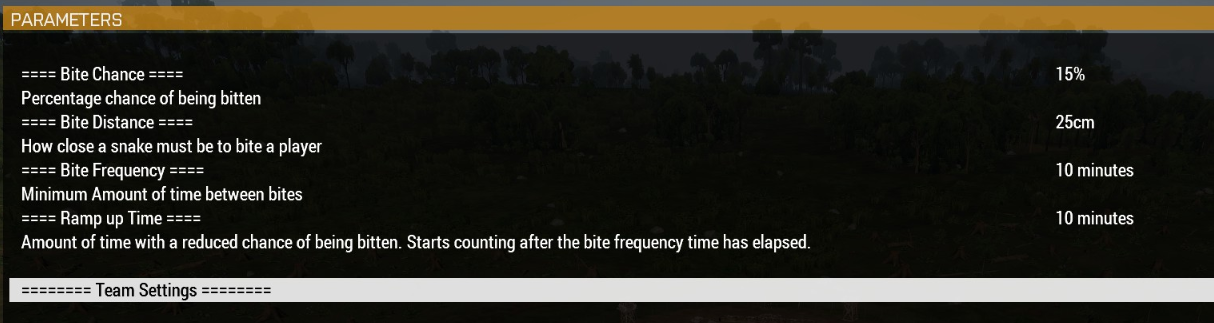 proven charm
dont know what you want exactly. maybe this helps: https://community.bistudio.com/wiki/Mission_Parameters
patent sparrow
https://imgur.com/IrGVzvm this instead is how it is set up in my desc
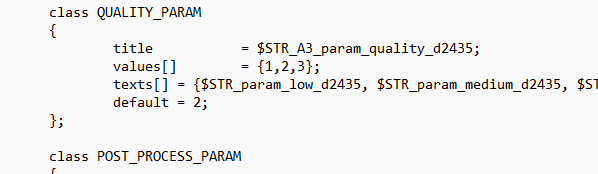 patent sparrow
proven charm
dont know what you want exactly. maybe this helps: https://community.bistudio.co...
patent sparrow
proven charm
dont know what you want exactly. maybe this helps: https://community.bistudio.co...
Thanks, I've looked around but I can't really find an explanation of how this can be done. Parameters clearly work and everything is set properly. I was just looking for a way to place some titles, descriptions etc. there
proven charm
you mean the === titles === ?
patent sparrow
Yeah kinda like titles, spaces, descriptions.
proven charm
idk whats the problem , right now you are reading the title from stringtable
patent sparrow
So you say it is set directly so from the stringtable. I think I have tried this before without succeeding, but I will try to make it work, thanks for the input
proven charm
it doesnt have to be
patent sparrow
No apparently it's not with stringtable. There are spaces between one preference and another in the pic I showed of MikeForce, which cannot be selected, as well as the titles. Those are just text, but in the description.ext so far I'm only able to use selectable preferences, without vertical spaces between one and the other, or titles.
hallow mortar
You can make a blank param class with no options or "" options that don't do anything. It'll still be "selectable" but it won't matter
patent sparrow
Thanks NikkoJT yeah you're right, that is what I have been able to do so far. It would be nice to know if there is precisely another way
 manic sigil
Wrapping my head around profileNameSpace.
So its a persistent namespace that you can set and get variables to; does that mean you could set someones loadout to a profilenamespace variable, then in a different scenario, restore that loadout?
proven charm
manic sigil
Wrapping my head around profileNameSpace.
So its a persistent namespace that yo...
yep
manic sigil
And that information persists until its overwritten or the file erased?
Neat.
hallow mortar
Only use it as much as you need to, though. It's written to a file on disk, shared by all uses of profileNamespace, and the bigger that file is, the slower it gets to work with.
magic isle
is there any info somewhere about formatting task descriptions
i see some tasks have some text highlighted with yellow
warm hedge
magic isle
thanks
patent sparrow
Hi Polpox, any suggestions about what I was looking for?
 cedar blaze
Hello. How can i check ai skill and precision of unit in front of me?
proven charm
cedar blaze
Hello. How can i check ai skill and precision of unit in front of me?
cursortarget & https://community.bistudio.com/wiki/skill
tall lark
guys were am i going wrong here ``` sqf
if (isDedicated) exitWith {};
waitUntil {!isNull player};
if (playerSide != west) then {
player addEventHandler ["Fired", {
private _position = position player;
    {
        if (_position distance getMarkerPos (_x select 0) < _x select 1) then {
            // Spawn a smoke grenade at the player's position
            _smokeGrenade = "SmokeShell" createVehicle _position;
            // Set the smoke grenade to activate after a short delay (adjust as needed)
            _smokeGrenade setVehicleInit "this allowDamage false; this enableSimulation false; this addAction ['Detonate Smoke', {deleteVehicle _this;}, [], 1.5, true, false, '', 'player distance _target < 5'];";
            // Display the warning message
            hint parseText format["<t color='#FFFFFF'><t align='center'><t size='1'>YOU ARE IN A<br/><t color='#FF0000'><t size ='2.5'<t align='center'>Safe Zone<br/><t color='#FFFFFF'><t align='center'><t size='1.5'>No Violence<br/><t color='#FFFFFF'><t align='center'><t size='1.5'>No KnockOuts<br/><t color='#FFFFFF'><t align='center'><t size='1.5'>No Robbing<br/><t color='#FFFFFF'><t align='center'><t size='1.5'>No Stealing<br/><t color='#FFFFFF'><t align='center'><t size='1.5'>No Trolling<br/><t color='#FFCC00'><t align='center'><t size='1'>"];
        };
    } forEach SAFETY_ZONES;
}];
};```
cedar blaze
proven charm
cursortarget & https://community.bistudio.com/wiki/skill
oooooooooooooooh, yes it's perfect! thank you! I didn't know about this method
tall lark
i what it to drop a smoke grenade when the safe zone is trigged
hallow mortar
tall lark
guys were am i going wrong here ``` sqf
if (isDedicated) exitWith {};
waitUntil...
Well, for one thing you can use player inArea "markername" to more easily determine when the player is in the zone
tall lark
#define MESSAGE "This is a SAFE ZONE - No Stealing, No Knocking Out, NO SHOOTING, No VDM - You have been warned"
You can do these as preprocessor macros, I guess, but...why not use normal variables?
 sullen sigil
manic sigil
And that information persists until its overwritten or the file erased?
Neat.
sullen sigil
manic sigil
And that information persists until its overwritten or the file erased?
Neat.
or until it corrupts which is what usually happens
 sharp grotto
sullen sigil
or until it corrupts which is what usually happens
sharp grotto
sullen sigil
or until it corrupts which is what usually happens
Never happened to me in years of doing arma stuff.
sullen sigil
happens often when people are daft with how much they write to profilenamespace
glad walrus
Hi there! I'm having an issue with some scripting/trigger on the editor.
Expected result: Have an OPFOR squad spawn and auto-garrison a placed structure (Military Tower) when players activate the trigger.
Actual results:
a) Troops spawn but they don't enter the building.
b) Troops spawn and the building disappears
I don't want to spawn them and then using ZEN in game to garrison them. Here's the code i'm using (please, script noob here, ^.^")
The building I'm using is a "Land_Cargo_Tower_V3_F" with this code:
_Group1 = [getmarkerpos "mark", east, ["EMP_Recon_Squad_Lead", "EMP_Recon_Team_Lead", "EMP_Recon_Paramedic", "EMP_Recon_Marksman", "EMP_Recon_Grenadier", "EMP_Recon_Demo_Specialist", "EMP_Recon_LAT","EMP_Recon_LMG"]] call BIS_fnc_SpawnGroup; _building = nearestBuilding (getmarkerpos "mark"); systemChat str [_building, _group1]; [_building, _Group1] call ARES_fnc_GarrisonNearest;
Both the marker and the tower are next to each other... Could that be the issue?
Any tips/ideas/feedback? @little raptor, I tried what you told me here (removing the last line and checking the response on the chat)
The chat shows [tower, 0 Alpha 3-2]. Tower didn't dissapear tho... probably something related to the last line?
This is getting on my nerves  🤣
🤣
 left iron
is there a way to force a repeatable trigger to sleep without adjusting sqf files or activation interval?
 cold pagoda
Question, this is what I have so far:
content = [
["rhs_mag_30Rnd_556x45_M855A1_Stanag","rhsusf_100Rnd_556x45_soft_pouch","rhsusf_100Rnd_762x51","rhsusf_5Rnd_00Buck","rhs_m136_mag","rhs_mag_M433_HEDP","rhs_mag_M441_HE","rhs_mag_m714_White","rhs_mag_m662_red","rhs_mag_m67","rhs_mag_m18_green","rhs_mag_m18_red","rhs_mag_an_m8hc"],
[75,11,11,20,2,20,10,8,4,10,4,4,10]
];
[] spawn {
{
hint format ["%1 | %2", _x select 0, _x select 1];
sleep 2
} foreach content
}```
I need to copy the contents of one vehicle and then apply it to another. It will only iterate the first array and then the second array separately instead of together. How can I fix this? opal zephyr
your forEach statement should only run twice, once for all the rhs mags and then once for the numbers, it sees 2 arrays as being in content and therefore only runs for those 2
fair drum
cold pagoda
Question, this is what I have so far:
```sqf
content = [
["rhs_mag_30Rnd_556...
if !(local _myVehicle) exitWith {};

private _inventory = [
    ["rhs_mag_30Rnd_556x45_M855A1_Stanag", 75],
    ["rhsusf_100Rnd_556x45_soft_pouch", 11],
    ["rhsusf_100Rnd_762x51", 11],
    ["rhsusf_5Rnd_00Buck", 20],
    ["rhs_m136_mag", 2],
    ["rhs_mag_M433_HEDP", 20],
    ["rhs_mag_M441_HE", 10],
    ["rhs_mag_m714_White", 8],
    ["rhs_mag_m662_red", 4],
    ["rhs_mag_m67", 10],
    ["rhs_mag_m18_green", 4],
    ["rhs_mag_m18_red", 4],
    ["rhs_mag_an_m8hc", 10]
];

{
    _x params ["_item", "_count"];

    _myVehicle addItemCargoGlobal [_item, _count];
} forEach _inventory;
 empty leaf
Hey guys I am wanting to make a change to this mod, but am unsure where to start
https://github.com/BrettMayson/ArmaRadio/tree/c7c12890d48ca3058a088d2c5bc81e72bdbfa5d9
This mod enables the use of real radio stations in game, works great except for when you go unconscious (with ace), the music still plays quite loudly.
Ace has a way of changing volumes normally but I think that as the stream audio is not really audio within the game it doesn't get included.
Would there be a way of 'tagging' this music as radio/audio sounds so that it would be included in ace's volume control?
(deleted and moved to correct channel)

GitHub
Contribute to BrettMayson/ArmaRadio development by creating an account on GitHub.
fair drum
empty leaf
Hey guys I am wanting to make a change to this mod, but am unsure where to start...
are you aware of how github works? you can fork the entire project and change what you want
you can even upload your changes to the original and if they are approved, will be put right in
also, brett is very active on the ACE discord if you want to just talk to him
left iron
the trigger timer bit isnt working out. Is it possible to instead set them all to be single use, and have a global sqf run on a timer to reset them all?
for context: these triggers call SQFs that handle both loot and enemy spawning. naturally i dont want either trigger to continuously activate while a play is in the area (the activation condition) but i also dont want them to be abusable by the player leaving 5 ft and walking back in to spawn fresh loot. im unsure what the best route to attack that would be though
fair drum
how about not using a trigger at all?
empty leaf
Thanks Hypoxic, I am aware of how it works. I was wondering in particular how technically this could be done (And if its worth considering)
fair drum
left iron
what would i tie the sqfs to instead?
you just build the whole script within itself and use the areas for the checks. you can use just a default trigger to grab areas.
fair drum
empty leaf
Thanks Hypoxic, I am aware of how it works. I was wondering in particular how te...
oh thats probably a question for brett. head over to the ACE discord and ask him
still forum
empty leaf
Hey guys I am wanting to make a change to this mod, but am unsure where to start...
Depends how the audio is played.
Though knowing how Arma's audio works, it will not be using Arma's audio system at all. So probably not
empty leaf
Thanks Dedmen, I was thinking of maybe getting it to check for if a player is unconscious (ace) and dividing the volume by 4 or something.
left iron
fair drum
you just build the whole script within itself and use the areas for the checks. ...
that seems smarter but also like a large expansion of the scope of my SQFs...
still forum
https://github.com/BrettMayson/ArmaRadio/blob/c7c12890d48ca3058a088d2c5bc81e72bdbfa5d9/addons/manager/functions/fnc_volume.sqf There is already a function to set the volume
you need to call that when player goes unconscious or wakes up
I don't know what you'd send as "_source" there, gain is the volume
empty leaf
something like
    [QGVAR(volume), {
        params ["_id", "_gain"];
        private _unit = call CBA_fnc_currentUnit; // Get the current player unit

        // Check if the player is unconscious and adjust the volume
        if (IS_UNCONSCIOUS(_unit)) then {
            _gain = _gain * 0.25; // Reduce the volume to a quarter
        };

        EXT callExtension ["source:gain", [_id, _gain]];
    }] call CBA_fnc_addEventHandler;

    [FUNC(tick)] call CBA_fnc_addPerFrameHandler;
    [FUNC(heartbeat), 0.75] call CBA_fnc_addPerFrameHandler;
to add to
https://github.com/BrettMayson/ArmaRadio/blob/main/addons/manager/XEH_postInit.sqf maybe? I've been playing around with it but haven't got anything working just yet
GitHub
Contribute to BrettMayson/ArmaRadio development by creating an account on GitHub.
fair drum
left iron
that seems smarter but also like a large expansion of the scope of my SQFs...
i think it would be worth it in your context. you can do a lot more customization.
post what you have so far if you want on pastebin or w/e
left iron
im basically brand new to sqf/programming so customization scares me rn 😬
sure, ill post it here, 1 sec
////itemList.sqf/////[_markerPos]execVM "itemList.sqf";

// Define the item sets
private _itemSets = [

     ["arifle_AKS_F", 3, "30Rnd_545x39_Mag_Tracer_F",2],
    ["rhs_weap_akmn", 3, "rhs_30Rnd_762x39mm_bakelite",3],
    ["arifle_Mk20_plain_f", 3, "30Rnd_556x45_Stanag",3],
    ["rhs_weap_g36c", 3, "rhssaf_30rnd_556x45_Tracers_G36",3],
    ["rhs_weap_hk416d145", 3, "rhs_mag_30Rnd_556x45_Mk318_Stanag",3],
    ["rhs_weap_m14", 3, "rhsusf_20Rnd_762x51_m62_Mag", 4],
    ["rhs_weap_m249_light_S", 3, "rhsusf_100Rnd_556x45_mixed_soft_pouch",5],
    ["rhs_weap_M590_8RD", 5, "rhsusf_5rnd_00Buck",2],
    ["SMG_05_F", 3, "30Rnd_9x21_Mag_SMG_02_Tracer_Red",2],
    ["rhsusf_weap_glock17g4", 3, "rhsusf_mag_17Rnd_9x19_JHP",1],
    ["hgun_Pistol_heavy_01_F", 3, "11Rnd_45ACP_Mag",1],
    ["hgun_Pistol_01_F", 4, "10Rnd_9x21_Mag",1],
    ["launch_RPG7_F", 2, "RPG7_F",5]


];

_markerPos = _this select 0;
private _randomSetNF = [];
// Randomly choose an item set
while {_randomSetNF isEqualTo []} do {

_randomSetNF = _itemSets select {_num=round(random[1,2,5]);
(_x select 3)isEqualTo _num;};

} ;
//_randomSetNF = _itemSets select {_num=round(random[1,2,5]);
//(_x select 3)isEqualTo _num;};
_randomSet = selectRandom _randomSetNF;

// Spawn container for loot, make this apply to containers within a specific town via semi-unique triggers calling the SQF
_lootbox = createVehicle ["Box_IDAP_AmmoOrd_F", _markerPos];

clearWeaponCargoGlobal _lootbox;

clearMagazineCargoGlobal _lootbox;

clearItemCargoGlobal _lootbox;

clearBackpackCargoGlobal _lootbox;
systemChat str _randomSetNF;


// Spawn the selected item set
 _wpn = _lootbox addWeaponCargoGlobal [(_randomSet select 0), 1];

// Add magazines to the spawned unit
 _lootbox addMagazineCargoGlobal [(_randomSet select 2), (_randomSet select 1)];
this one is the basis for item spawning. the upper area defines item sets, then selects one on a random weighted basis which get loaded into crates that are spawned in lower in the script.
_townCenter = _this select 0; //_townCenter is a trigger object to pass to the SQF
_buildings = nearestTerrainObjects [_townCenter, ["HOUSE","BUILDING","FUELSTATION","CHAPEL","CHURCH"], 50,false];
_buildingNumber = count _buildings;
    hint str _buildingNumber;
     {

        //"Sign_Arrow_F" createVehicle getPos _x; //makes red arrows on all buildings
        _mark = createMarker [(str (random 9000)), getPos _x]; //places maerker on locations
        //_mark setMarkerType "hd_dot"; //makes black dot on locations
        //_mark setMarkerText (str (typeOf _x)); //labels the marker on the map with class name


    }forEach _buildings;

    {

        _lootTrigger = createTrigger ["EmptyDetector", getPos _x];
        "Sign_Arrow_F" createVehicle getPos _lootTrigger;
        _lootTrigger setTriggerStatements ["true", "[getPos thisTrigger] execVM ""itemList.sqf"";", "hint ""trigger off"";"];

    }forEach _buildings;


    ```
i set up "town area triggers" within specific areas, they all call this one to find out how many buildings are within the applicable area and then for each of those creates a trigger that calls the 1st script
////spawnZombies.sqf///[position, thisTrigger]execVM "spawnZombies.sqf";

        _pos = _this select 0; //this defines the _pos variable and selects the first object of an array defined in this script

        _triggerObject = _this select 1; //defines _triggerObject then sets it as the second element of the array here


        _zomNum = _triggerObject getVariable ["zomCount",15]; //this tell the _zomNum variable that ?zomcount" will be 15, and does
                                                            //something with _triggerObject that i dont understand

        private _gArray = [];

                    _guys = allUnits select {(typeName(_x getVariable["zom",false]))isEqualTo "ARRAY"}; //this selects all people who are zombies
                                                                                                        //and adds them to an array

                    if ((count _guys)> 0)then{    //if the number of guys is bigger than 0 then


                    {

                    if ((_x getVariable["zom",[0,0,0]])isEqualTo _pos)then { //i dont understand this part at all, does
                                                                                //this decides what position each zombie spawned at

                    _gArray pushBack _x;

                    };///end inner if

                    }forEach _guys;

                    };///end if


                if ((count _gArray)> 0)exitWith {hint "exit";};


_unitClasses = [

"Zombie_O_Crawler_Civ",
"Zombie_O_Shambler_Civ",
"Zombie_O_RA_Civ",
"Zombie_O_RC_Civ",
"Zombie_O_Walker_Civ"


            ];


                        _NewGrp = createGroup East;

                    for [{ _i = 0 }, { _i < _zomNum }, { _i = _i + 1 }] do {

         private "_newUnitId";

   _newUnitId =  _NewGrp createUnit [(selectRandom _unitClasses), (_pos getPos [(random 50),(random 360)]),[], 5,"NONE"];

    {_x addCuratorEditableObjects [[_newUnitId], false];}forEach allCurators;

        _newUnitId setVariable ["zom",_pos,true];

                    };///end for loop
this is called by a trigger meant for spawning zombies. it tries to spawn 15 zombies (not a number im attached to, just an initial one for testing) and then counts the amount within the trigger area and stores that number so if you walk off they can be despawned and respawned
it works in combination with this:
////despawnZombies.sqf/////[thisTrigger]execVM "despawnZombies.sqf";


        _triggerObject = _this select 0;

                    _guysNF = allUnits select {(typeName(_x getVariable["zom",false]))isEqualTo "ARRAY"};

                _guys = _guysNF select {(_x getVariable["zom",(str[0,0,0])])isEqualTo (getPos _triggerObject)};


                    _zomNum = count _guys;

                        _triggerObject setVariable ["zomCount",_zomNum,true];

                        {

                        if ((getPos _x) inArea _triggerObject)then{

                        deleteVehicle _x;

                        }else {    _x setVariable ["zom",false,true];};

                        }forEach _guys;

```im already aware selectRandomWeighted will probably make the itemList.sqf less finicky
but im trying to get the foundation for everything set before i do any optimizing or making things pretty
because thatl be a journey in itself for me
keen rain
Can we make Simple Objects into Physical objects
winter rose
no
fair drum
@left iron so in the end, what you'll do is take each of these sqf files and turn them into inline functions (or if you want them global, function library). You'll then create your while loop that does the checks and executes these functions when needed, thus not using a trigger. These don't seem like time sensitive things so they won't need to be accurate down to the frame so you don't have to mess with frame handling, just stay in the scheduled environment
left iron
that does make sense
 celest rivet
Has anyone made an SQF syntax highlighter for Obsidian.md?
drifting sky
Is there any way to tell if a non guided projectile (bullet, rocket, grenade), is able to reach a target, before attempting to fire it?
warm hedge
I'm not going to say there is none. But hard for sure. This old post may help
https://forums.bohemia.net/forums/topic/211628-need-little-help-to-make-a-ballistic-mod/?tab=comments#comment-3247432
Bohemia Interactive Forums
Hi, Im making a firing table mod without ACE (so with the vanilla Arma 3 ballistic) using Mildots. Anyone knows how to calculate the ballistic on vanilla ? For example: initspeed=900; airFriction=-0.00085; Targets Range: 750 meters Question 1: Whats the equation to know the bullet drop in cm ? (i...
drifting sky
Why do hint or hintsilent pose a security risk on multiplayer missions?
warm hedge
Who said so/what makes your question
drifting sky
I'm looking at examples of other multiplayer missions, and they are disabling hint and hintsilent along with other commands, in CfgDisabledCommands. But they are doing it without comment.
warm hedge
Then either ask that author of the example or show us which one it is
drifting sky
In a function that is included in a mission, can I call a function that only exists in a server mod, if the call to that function is guarded by an if (isserver) statement?
warm hedge
Maybe
 acoustic abyss
warm hedge
Maybe
acoustic abyss
warm hedge
Maybe
I've a different question on the mods you recently posted. Are any of the default fonts fixed width?
warm hedge
I think you should've not to reply to a reply post that is very irrelevant. If you mean you want a monospace font, just look up here: https://community.bistudio.com/wiki/FXY_File_Format#Available_Fonts
acoustic abyss
I apologize for intruding on the existing conversation. Will simply @ you instead next time.
real tartan
are event handler names caseSensitive ?
warm hedge
No
drifting sky
when respawning at a marker using the built in at-base respawn system, does it space players out when they respawn, or just pile them all on top of each other?
 spiral narwhal
Is there a script command to see how much space is left inside a container? Haven't found anything along those lines on the wiki
Nevermind, I just did... load
drifting sky
What happens to a local event handler attached to a unit that a player controls, if they leave the game? Presumably, that event handler would disappear since it only exists on the player's machine.
 torpid gate
Hello everyone! Can anyone suggest if it is possible to combine waitUntil and spawn. That is, if one script spawn my_fnc for example, the code continues to execute?
meager granite
drifting sky
What happens to a local event handler attached to a unit that a player controls,...
I don't think it will fire if you exit properly, but you can test it. Certainly won't fire if say game crashes.
meager granite
torpid gate
Hello everyone! Can anyone suggest if it is possible to combine ``waitUntil`` an...
Can you elaborate more? If you spawn a thread, your current thread keeps going already
torpid gate
meager granite
Can you elaborate more? If you spawn a thread, your current thread keeps going a...
In one of the mods has spawn fnc and I want that when the spawn fnc of this mod was launched in parallel with it ran and my script, but I still do not understand how to do it
meager granite
torpid gate
In one of the mods has ``spawn fnc`` and I want that when the ``spawn fnc`` of t...
I still don't get it and how it related to waitUntil. Do you want to know when this function was spawn'ed to run yours alongside it?
torpid gate
meager granite
I still don't get it and how it related to `waitUntil`. Do you want to know when...
yes
meager granite
The best way would be to start yours on same event and conditions as your original one
Or mod the mod to have that code spawn your function too
torpid gate
meager granite
Or mod the mod to have that code spawn your function too
Oh, I see, I'll try other ways then. Thanks for your help anyway!
 unreal wharf
I'm currently trying to make it so two different objects are attached to each other. At the same time, both objects are able to be carried via an ACE function.
The issue I'm encountering is that when you pick up one object, it seems to cancel out any scripts on the other object in question.
The functions I'm running in the Init expression.
"testCube1" -
[testCube2,this] call BIS_fnc_attachToRelative;
[this, true, [0, 2, 0], 0] call ace_dragging_fnc_setCarryable;
"testCube2" -
[testCube1,this] call BIS_fnc_attachToRelative;
[this, true, [0, 2, 0], 0] call ace_dragging_fnc_setCarryable;
So, upon loading in:
I can successfully carry cube 1, and cube 2 will stay attached, moving relative to how cube 1 moves.
If I pick up cube 2 and then drop it, and then go to pick up cube 1, cube 2 is no longer attached to it.
If we go back to initialization, if I pick up cube 2, cube 1 is not attached to it.
So the issue is also that on initializing, cube 2 is tied to cube 1, but the opposite is not true.
I assume I might have to utilize a trigger to run it as a constantly refreshing script, but it'd likely have the same issue in where cube 2 doesn't have cube 1 attached to it, due to some kind of prioritization.
Also of note, if I could leave the attach function out of cube 2- everything proceeds fine when I pick up cube 1. However, if I go to pick up cube 2, it'll cancel out the attach function on cube 1. Or maybe it makes the object no longer recognizeable for the function, I'm unsure.
keen rain
winter rose
no
In that case.
Is there a way to increase the limit of buildings structures as Zeus?
I'm not a fps killer, just a town builder.
 woeful light
Is a pistol holster function scripted by chance?
 formal stirrup
Is it possible to either attach an object to the zeus cursor, Or return the position of the cursor?
proven charm
formal stirrup
Is it possible to either attach an object to the zeus cursor, Or return the posi...
formal stirrup
Well its in the right direction but for some reason getMousePosition is returning a bool?
proven charm
did u try sqf getMousePosition params ["_mouseX", "_mouseY"];
formal stirrup
Yes, it seems putting it in a variable returns true
Even creating a vehicle using the two you sent makes the vehicle variable a bool
_vehicle = "Land_HelipadEmpty_F" createVehiclelocal screenToWorld getMousePosition params ["_mouseX", "_mouseY"]; Makes it spawn the vehicle on the correct position, but now if i try deleteVehicle _vehicle; it returns that _vehicle is a bool and cant be deleted
hallow mortar
If you do this:
_var = getMousePosition params ["_mouseX", "_mouseY"];```
then `_var` will contain `true` because that's what `params` returns - success or failure of doing the thing it does.
If you just want to store both the x and y coordinates, as originally returned, in one array in a variable, then do this:
```sqf
_var = getMousePosition;```
The function of `params` is to interpret arrays into variables containing their component elements. It just creates the variables `_mouseX` and `_mouseY`, containing the 0 and 1 elements of the original array. Those variables are then available to use - `params` does not return them, it just makes them.Would be helpful to put a comment on the wiki page about that
hallow mortar
You can suggest clarifications in #community_wiki . On the other hand, both the command itself and the given example are pretty simple. It's usually recommended to read the example and understand what it does, and not just copy it.
celest rivet
Hey John, thank you for your response, and I do use VS Code with @willow basin syntax highlighter (open to alternative extensions) but am also intent on using Obsidian.md for project documentation.
Fortunately, it turns out Obsidian.md uses PrimeJS which already supports SQF but only shows up in the read (not edit) view, which is fine for our use https://prismjs.com/#supported-languages
tall lark
how do you add rvmat and p3d in a mission file with out a mod ... only asking as i seen it ?
fair drum
tall lark
how do you add rvmat and p3d in a mission file with out a mod ... only asking as...
what do you want to do with it?
fair drum
in what instance have you seen someone add a model to a mission without a mod? I believe you can only do it with simple objects.
hallow mortar
Simple object would be good enough probably; the lights themselves could be created with scripted lightpoints. However, the createSimpleObject syntax needed for mission models doesn't allow them to be textured. Also, model files are pretty big and it's not an especially awesome idea to put them in missions, because of the download times.
The light bar model may have its own p3d model in the files - I think some Virtual Garage items do - in which case you could create it as a simple object without needing to include it in the mission file. I can't verify whether that's true right now though.
tall lark
it is a Simple object like glass.rvmat and led.p3d and lightbar.p3d
hallow mortar
Please don't DM me. The discussion is in this channel.
It doesn't matter what specific model you're trying to use.
If you want to use an external model imported via a mission file: this may be possible, by creating it as a simple object (https://community.bistudio.com/wiki/createSimpleObject), but you need to read that page and be aware of the limitations and how it works. I would not recommend doing this, because model files are quite large, and the larger the mission file is, the longer it takes for players to download it from the server.
There may be a file you can use that's already in the game, so no one has to download it. But you will need to find that out yourself, or get someone else to look if you don't know how.
hallow mortar
For params default values, is it possible to use an earlier param as the default value for a later one? For example:
params ["_definitelyPresent",["_optional",_definitelyPresent]];``` winter briar
Its there any perfomance impact if i decide to store the variables in a scripted location instead of the missionNamespace?
warm hedge
What do you mean by scripted location
hallow mortar
I don't see why there would be any performance impact. It's just another namespace.
I suppose there might be some impact if you create a huge number of locations, in general, but it should be pretty easy to not do that.
warm hedge
Pretty much same answer. Maybe a lil bit different but I don't see there would be a big impact unless you store millions of things
winter briar
ok cool ty
 stray flame
Hey if I were to ask about PC stuff and arma, what channel would be best suited for that?
warm hedge
Urm... do you mean #hardware_vs_arma ?
stray flame
Your message just says "no acsess"
warm hedge
 grizzled vapor
Hey! I guess this must have been discussed a thousand times, but: is there a good way to get a players battleye id? For now my messy way to achieve this is sending a hardcoded servercommand ##beclient players and scrape it for the specific player via a chatmessagehandler. Is there a better/proper way to do this?
 gleaming oriole
Heyho, does someone know how to delete an action created in ACE?
I'm talking about ace_interact_menu_fnc_createAction
Apparently there is no ace_interact_menu_fnc_removeAction or ace_interact_menu_fnc_deleteAction 😅
https://ace3.acemod.org/wiki/framework/interactionmenu-framework#31-fnc_createaction
 sullen sigil
https://github.com/acemod/ACE3/blob/master/addons/interact_menu/functions/fnc_removeActionFromObject.sqf
https://github.com/acemod/ACE3/blob/master/addons/interact_menu/functions/fnc_removeActionFromClass.sqf

GitHub
Open-source realism mod for Arma 3. Contribute to acemod/ACE3 development by creating an account on GitHub.
GitHub
Open-source realism mod for Arma 3. Contribute to acemod/ACE3 development by creating an account on GitHub.
gleaming oriole
That's not the same thing
gleaming oriole
I already looked at it and it's not what I'm asking for
 dreamy kestrel
Q: on ctrlAddEventHandler for map control "Draw" events, or just such events in general, and the magic vars.
_thisEventHandler and _this are fairly self explanatory. what is _thisEvent, analog to the handler (name) given? might be even more self documenting if that was event, IMO, just to clarify.
https://community.bistudio.com/wiki/ctrlAddEventHandler
thanks...
hallow mortar
dreamy kestrel
Q: on `ctrlAddEventHandler` for map control `"Draw"` events, or just such events...
As described, _thisEvent is the type of ctrl EH, in your case "Draw"
gleaming oriole
gleaming oriole
I already looked at it and it's not what I'm asking for
For example adding a loadout via the ace interaction menu:
_action = ["Bw_IdZ_F_Grenadier","Grenadier","",{_handle = execVM "Loadouts\Bw\Flecktarn\Bw_IdZ_F_Grenadier.sqf";},{true},{}, [0,0,0], 100] call ace_interact_menu_fnc_createAction;
[Notepad, 0, ["ACE_MainActions", "Bw_IdZ_F_menu", "Bw_IdZ_F_standard_menu"], _action] call ace_interact_menu_fnc_addActionToObject;
With ace_interact_menu_fnc_removeActionFromObject I can remove the menus Bw_IdZ_F_menu and Bw_IdZ_F_standard_menu but I can't remove the actual loadout Bw_IdZ_F_Grenadier
[Notepad, 0, ["ACE_MainActions", "Bw_IdZ_F_menu"]] call ace_interact_menu_fnc_removeActionFromObject;
[Notepad, 0, ["ACE_MainActions", "Bw_IdZ_F_menu", "Bw_IdZ_F_standard_menu"]] call ace_interact_menu_fnc_removeActionFromObject;
For example this does not work, that's why I'm looking for something like ace_interact_menu_fnc_removeAction which does not exist
[Notepad, 0, ["ACE_MainActions", "Bw_IdZ_F_menu", "Bw_IdZ_F_standard_menu", "Bw_IdZ_F_Grenadier"]] call ace_interact_menu_fnc_removeActionFromObject;
You don't need to delete a created action, because "creating" an ACE action doesn't actually create any kind of permanent thing. It just processes your provided parameters into the correct array format to pass to one of the addActionTo functions. You can see it here: https://github.com/acemod/ACE3/blob/master/addons/interact_menu/functions/fnc_createAction.sqf all it does is insert default values for anything you didn't provide, then return an array.
So removeActionFrom functions are where you need to be looking. I don't know exactly why that's not working currently, though.
dreamy kestrel
hallow mortar
As described, `_thisEvent` is the type of ctrl EH, in your case `"Draw"`
maybe I am misreading handler then...
handler: String - handler name, see User Interface Event Handlers
Why would you be misreading it?
hallow mortar
You can easily test it:
findDisplay 46 displayAddEventHandler ["KeyDown",{
  systemChat _thisEvent;
}];```
(it's the same for ctrlAddEventHandler, I just don't recall any ctrl IDs off the top of my head to add it to)can the non-first/current vehicle magazine be non full?
like as infantry you can pick up half/partially full mags
yet in the vehicle only the current can be, right?
 spark turret
whats the most reliable way to make an AI unit (tank) shoot at something, ideally a position or an invisible CA_target?
in my experience its very difficult to get controlled firing..
proven charm
spark turret
whats the most reliable way to make an AI unit (tank) shoot at something, ideall...
IDK but have you tried https://community.bistudio.com/wiki/doFire ?
 elder fox
hello everyone, i am having a problem that makes absolutely no sense to me at all:
i have re-written an old script of mine, it was meant to be put inside of a mission file, so i made it into a mod that can be loaded using the launcher. in its config.cpp i have defined a few functions ( CfgFunctions ) to make the mod work......
here is the strange part: in the 3Den editor, EVERYTHING works absolutely fantastic. no issues at all. but as soon as i load the Old Man scenario, my entire addon including the CfgFunctions is IGNORED. all the functions are Nil. i have no clue why. i thought that using the CfgFunctions method would compile those functions on mission start ( like the Wiki says )........... however, if i go to the functions viewer while playing the Old Man scenario, i can see all of the functions in there....... but they are never compiled. i am entirely confused. i would appreciate it if there is someone who can help me out here.
cosmic lichen
Can you post the config.cpp?
elder fox
cosmic lichen
Can you post the config.cpp?
here it is
it makes no sense to me why this works fine in 3Den but none of it in an actual mission like Old Man.
cosmic lichen
Have you tested it by exporting a mission to Singleplayer yourself?
Just to make sure its noch Oldman causing issues
elder fox
cosmic lichen
Have you tested it by exporting a mission to Singleplayer yourself?
no i have not yet done that. i will do that now.
elder fox
cosmic lichen
Have you tested it by exporting a mission to Singleplayer yourself?
ok i have tested that just now. everything works fine.
i am using the Single Player Cheat Menu in the Old Man scenario to get rid of those annoying duplicating radios. so for some reason that mod does work............
cosmic lichen
Don't see anything wrong in your config.
Are the variables available in uiNamespace?
With variables I mean functions.
elder fox
cosmic lichen
Are the variables available in uiNamespace?
negative.
cosmic lichen
So it works in all other missions but not Old Man. Weird.
warm hedge
One thing I would imagine is, are you loading a Old Man game or restarted your Old Man
elder fox
warm hedge
One thing I would imagine is, are you loading a Old Man game or restarted your O...
loading. resuming.
warm hedge
This could be why
elder fox
why? i also started using the cheat menu after starting the scenario.
warm hedge
postInit happens when a mission start
cosmic lichen
Good point.
elder fox
warm hedge
`postInit` happens when a mission start
oh...... i see.......
cosmic lichen
But the functions should still be compiled
elder fox
cosmic lichen
But the functions should still be compiled
true.
elder fox
cosmic lichen
Are the variables available in uiNamespace?
i said they were missing from uiNamespace. i rechecked. they are there.
so the question is: why is postInit broken in the Old Man scenario? is there some sort of "anti-hack" in there that simply deletes all global variables that are from something other than the scenario or base game?
ok so i went and manually defined all the functions as global variables and now the script works............... but that means i need to do that every single time i play........
winter rose
because you are loading a save apparently yeah
elder fox
winter rose
because you are loading a save apparently yeah
yes.
but what makes no sense is that the "simple single player cheat menu" works just fine, even when resuming........ go figure
warm hedge
SSPCM may doesn't use CfgFunctions
elder fox
it does
warm hedge
If so you ALREADY have SSPCM is loaded in your saved game, your functions aren't
I'm 98% sure it is because your game is not reloaded but loaded from save
elder fox
i started Old Man without any mods. i added SSPCM later.
but what i can see in the pbo of SSPCM is a "manualInit.sqf" and it literally forEaches all its functions and compiles them..................
the question is: where and what calls manualInit......
warm hedge
Doesn't SSPCM require a manual button click to initialize?
elder fox
it does.
warm hedge
Then it does call that
elder fox
warm hedge
Then it does call that
any call to it is nowhere to be found. it is a mystery to me.
warm hedge
action = "0 call (uiNamespace getVariable 'BRG_fnc_manaulInit'); hint 'SSPCM loading...';";
elder fox
warm hedge
`action = "0 call (uiNamespace getVariable 'BRG_fnc_manaulInit'); hint 'SSPCM lo...
wait............. i was unable to find it because it had a damn typo in it? wow
well now i know why that stuff works....... i need some janky workaround to get it to execute.........
elder fox
for some reason, after manually defining the functions into a global variable using the debug console while in the Old Man scenario, they all "stick". even after restarting the game.
however, postInit or preInit are still broken.
confirmed just now: arma will never use postInit or preInit when resuming a mission.
i confirmed it by creating a new mission in the editor, exporting it to singleplayer, start it, save it, resume it, and voila: no postInit or preInit execution.
dreamy kestrel
Q: about drawing shapes on a map control, is that a client side issue? or can it be done on the server?
 digital rover
dreamy kestrel
Q: about drawing shapes on a map control, is that a client side issue? or can it...
digital rover
dreamy kestrel
Q: about drawing shapes on a map control, is that a client side issue? or can it...
Per frame per client. Don't remote exec a draw call, have a script running on every client to draw whatever you want.
dreamy kestrel
digital rover
Per frame per client. Don't remote exec a draw call, have a script running on ev...
that would make a bit better sense wouldn't it. thank you for the insights.
vapid scarab
You will do that with ctrlAddEventHandler, the Draw event, and the drawIcon script command. I'm going to assume this can only be done client side. What you could do is have a list of markers that your script draws, and have a script called through remoteExec that adds or removes markers.
vapid scarab
dreamy kestrel
Q: about drawing shapes on a map control, is that a client side issue? or can it...
^
 jade acorn
https://community.bistudio.com/wiki/Post_Process_Effects#Resolution how do I make this effect permanent? The example goes way over my head. I've seen color correction pp enabled in three lines but this:
ppEffectCreate ["Resolution", 15];
"Resolution" ppEffectAdjust [400];
"Resolution" ppEffectCommit 0;
"Resolution" ppEffectEnable true;``` wouldnt work, so do I need to spawn it or what?disregard, figured it out, handles are truly required elements
dreamy kestrel
vapid scarab
You will do that with `ctrlAddEventHandler`, the `Draw` event, and the `drawIcon...
yeah I was thinking about the staging issue, either in a published variable, or that. thanks...
 tidal ferry
Hey- so quick question
With explosives charges in Arma 3, is there any way to check the exact yield of the charge?
I'm doing an inventory of things in our mod and I'm trying to figure out how to get that information to put in on a spreadsheet
hallow mortar
You can get its hit and indirectHit and...whatever the splash radius is called, indirectHitRange ?? from its CfgAmmo config. These are arbitrarily defined numbers and don't translate to any real-world measurement of yield, but between them you can get an idea of how things perform relative to each other.
warm hedge
Well when they decided to do so is probably more than two decades ago, I cannot really blame current devs but legacy engine
What you will see in A4 is most likely implemented into AR already, terms of tech of course
Can agree but I think you will get the idea how better A4 is by playing/browsing AR modding scene
More like what RV offers is pretty limited, after they never considered OFP is a moddable game before they knew that
sullen sigil
A3 engine is plenty flexible, just old
old just like PBR, which enfusion is only just introducing to the arma franchise 🙃
drifting sky
In CfgRemoteExec, do the functions that are allowed have to be functions that are defined in cfgFunctions, or can they be functions that are defined in code as well?
meager granite
drifting sky
In CfgRemoteExec, do the functions that are allowed have to be functions that ar...
No they don't have to be, CfgFunctions is just a function organizer helper construct
Personally I don't use it at all
drifting sky
meager granite
Personally I don't use it at all
The wiki does say something about possible performance bonuses when using cfgFunctions. Know anything about what those bonuses might be?
meager granite
drifting sky
The wiki does say something about possible performance bonuses when using cfgFun...
"Useful to reduce the performance overhead or if custom debug system is used."?
 dense stream
Hi there ! 👋
I'm struggling with this Altis Life script :
life_fnc_PhysicalInventory = {
    _idc = (_this select 0);
    _selectedIndex = _this select 1;

    _data = format ["%1",lbData [_idc, _selectedIndex]];
    _text = format ["%1",lbText [_idc, _selectedIndex]];
    _value = format ["%1",lbValue [_idc, _selectedIndex]];

    switch (_data) do
    {
        case "Chemlight_blue": {hint "OK"}; //spawn life_fnc_DrinkWater
        default {};
    };

    false
};

while {true} do {
    waituntil {!(isnull (findDisplay 602))};
    ((findDisplay 602) displayCtrl 638) ctrlSetEventHandler ["LBDblClick", "_this call life_fnc_PhysicalInventory"];
    ((findDisplay 602) displayCtrl 633) ctrlSetEventHandler ["LBDblClick", "_this call life_fnc_PhysicalInventory"];
    ((findDisplay 602) displayCtrl 619) ctrlSetEventHandler ["LBDblClick", "_this call life_fnc_PhysicalInventory"];
    waituntil {isnull (findDisplay 602)};
};
I want to be able to double click on certains types of items in my inventory, so, I can drink water, or eat food
Of course it's not working, I wouldn't ask for help here if it was working as weel as intended :/
I've tryed a lot of things, nothing work ...
Can someone please give me a little hint I'm about to delet this script
meager granite
Add systemChat/hint/diag_log at various stages of your script to figure out what's wrong
stable dune
dense stream
Hi there ! 👋
I'm struggling with this Altis Life script :
```sqf
life_fnc_Ph...
You could use inventory opened eh.
And you need get ctrlIDC of to get correct value to lbData , lbText and lbValue.
Like.
life_fnc_PhysicalInventory = {
    systemChat format ["PhysicalInventory this: %1",_this];
    params ["_idc","_selectedIndex"];
    private _ctrlIDC = ctrlIDC _idc;
    _data = format ["%1",lbData [_ctrlIDC, _selectedIndex]];
    _text = format ["%1",lbText [_ctrlIDC, _selectedIndex]];
    _value = format ["%1",lbValue [_ctrlIDC, _selectedIndex]];
    systemChat format ["PhysicalInventory data: %1, text: %2, value %3",_data,_text,_value];
    switch (_data) do
    {
        case "Chemlight_blue": {hint "OK"}; //spawn life_fnc_DrinkWater
        default {};
    };
    false;
};

player addEventHandler ["InventoryOpened", {
    _this spawn {
        waituntil {!(isnull (findDisplay 602))};
        ((findDisplay 602) displayCtrl 638) ctrlAddEventHandler ["LBDblClick", "_this call life_fnc_PhysicalInventory"];
        ((findDisplay 602) displayCtrl 633) ctrlAddEventHandler ["LBDblClick", "_this call life_fnc_PhysicalInventory"];
        ((findDisplay 602) displayCtrl 619) ctrlAddEventHandler ["LBDblClick", "_this call life_fnc_PhysicalInventory"];
    };
}];
Not sure do you need remove ctrl eventhandlers (or does those destroy when display closes)
proven charm
what would be the best way to optimize this code so that arma wont freeze (which is happening right now, on Altis map) ```sqf
pickSomeRoads =
{
params ["_roads","_aboveDist"];
private _roads2 = [];
{
private _thisRoad = _x;
private _roadPos = getposATL _thisRoad;
private _has = false;
// Check if there is road near to _roadPos in the list
{
if(((getposATL _x) distance2D _roadPos) < _aboveDist) exitWith
{
_has = true;
};
} foreach _roads2;
if(!_has) then // Add only if enough distance to other roads
{
_roads2 pushback _thisRoad;
};
} foreach _roads;
_roads2
};
[([0,0,0] nearRoads 1e10), 100] call pickSomeRoads; // pick some of the roads, not all of them
your are taking all roads.
([0,0,0] nearRoads 1e10) <<--
From position 0,0,0 , distance 10,000,000,000 .
so yes. It will return all roads.
What you are trying to achieve?
proven charm
yes I know, I want to cover the whole island but I dont want so big road array for performance reasons so Im filtering out some roads
this operation is done only once at mission start (and the road array is created)
meager granite
Lets make a chart of stupidest and most useless scripting commands
I'll start:
WFSideText
captiveNum
stable dune
proven charm
this operation is done only once at mission start (and the road array is created...
pickSomeRoads =
{
    params ["_roads","_aboveDist"];
    private _roads2 = [];
    {
        private _thisRoad = _x;
        private _roadPos = getRoadInfo _thisRoad #6;
        if(_roads2 findIf {_roadPos distance2d _x < _aboveDist} == -1) then
        {
            _roads2 pushBackUnique _thisRoad;
        };
    } foreach _roads;
    diag_log format ["roads count: %1, roads2 count %2",count _roads, count _roads2];
    //_roads2
    {
        private _name = str _forEachIndex;
        private _pos = getRoadInfo _x #6;
        private _marker = createMarker [_name,_pos];
        _marker setMarkerType "mil_dot";
    } forEach _roads2;

};
private _pos = [worldSize / 2, worldSize / 2];
private _range = worldSize * sqrt 2 / 2;
[_pos nearRoads _range, 200] call pickSomeRoads; // pick some of the roads, not all of them

 grizzled cliff
oh this is a good list
cause i need sqf functions to abuse and i want ones that are totally not used often
im abusing cadetMode at the moment haha
to save gamestate each frame
proven charm
@stable dune thx man, have you tested that on altis? I figured a fast way to do this, not sure if its faster than your implementation: ```sqf
pickSomeRoadsOpt =
{
params ["_roads","_aboveDist"];
private _retRoads = [];
private _i = 0;
while { (_i < (count _roads)) } do
{
_rp = _roads # _i;
_retRoads pushback _rp;
_mrk = createMarker [format["rp%1",_rp], getposATL _rp];
_mrk setMarkercolor "ColorYellow";
_mrk setMarkerShape "ICON";
_mrk setMarkerType "hd_dot";
_i = _i + (ceil (random 25));
};
_retRoads
};
Terrible indentation just makes your code hard to read.
You are sending 4 map markers with the way you're setting up the marker (to fix, make all EXCEPT the last one be *Local)
Your original code made distance checks.
prisoner's did too.
Your last one doesn't.
What's your intention with the code. Do you want even coverage, or just some random roads?
proven charm
still forum
Your original code made distance checks.
prisoner's did too.
Your last one doesn...
yea I forgot the _aboveDist there, it isnt used anymore. To my surprise my code does even distribution of the roads
its for my FOB AI build script, i want FOBs near roads but I dont want to loop thru 60k of roads but a smaller road array
stable dune
proven charm
yea I forgot the _aboveDist there, it isnt used anymore. To my surprise my code ...
i doenst even distribution of the roads .
because you are selecting random road from array of all roads.
 proven charm
even enough I mean
 keen stream
Wut?
grizzled cliff
who are you wutting at?
 viscid laurel
anyone know why I'm getting an error with this script?
squad = [
    "O_Soldier_F",
    "O_Soldier_AR_F",
    "O_Soldier_M_F",
    "O_Soldier_SL_F",
    "O_medic_F",
    "O_engineer_F"
];

spawnPoints = [
    "ms1",
    "ms1_1",
    "ms1_2",
    "ms1_3",
    "ms1_4",
    "ms1_5",
    "ms1_6",
    "ms1_7",
    "ms1_8",
    "ms1_9",
    "ms1_10",
    "ms1_11",
    "ms1_12",
    "ms1_13",
    "ms1_14",
    "ms1_15",
    "ms1_16",
    "ms1_17",
    "ms1_18",
    "ms1_19",
    "ms1_20"
];

// Loop through each spawn point
{
    // Generate a random number (0 or 1) to decide whether to spawn enemies
    if ((random 2) == 0) then {
        // Spawn enemies at the current spawn point
        MolosDefence = [getMarkerPos _x, EAST, squad] call BIS_fnc_spawnGroup;
    }
} forEach spawnPoints;

["TaskSucceeded", ["", "Molos Active AO"]] call BIS_fnc_showNotification;
invalid number in expression
I'm trying to define a unit, and their spawn points so they are spawning around an AO with a 50% chance of being there.
stable dune
random 2 return value between 0.-1.99,
https://community.bistudio.com/wiki/random
So use
((selectRandom [0,1] ) == 1)
//Or
(random 1 > 0.5)
//Or
(floor (random 2) == 1)
thanks but tried all 3 and its still not working
 wind hedge
viscid laurel
thanks but tried all 3 and its still not working
wind hedge
viscid laurel
thanks but tried all 3 and its still not working
If you change the sqf if ((random) == 0) then { to
if (true) then { ``` do the groups spawn in all the spawnpoints?Because if they don't then the problem is elsewhere in the script
viscid laurel
its still the same error with that 
wind hedge
viscid laurel
its still the same error with that <:think_turtle:700311400094105672>
Where are you running the code from and what exactly says the error, it should give you more info like which line and some context of where the error starts
viscid laurel
well it wont let me hit ok on the trigger
I'm just using 3den
it says invalid number in expression
stable dune
What you have in trigger cond
viscid laurel
this
stable dune
You need delete // , so all comment lines,
if you are using in trigger
viscid laurel
set to any player present
😅 ah thanks think that fixed
Yep they spawned in thanks for the help
dreamy kestrel
Q: hashValue what is it based upon, variables, state, etc? does it ever change, for an OBJECT for instance.
dreamy kestrel
dreamy kestrel
Q: `hashValue` what is it based upon, variables, state, etc? does it ever change...
if it is reliable, does not mutate, for example, might like to lean on it as a HASHMAP key.
 kindred zephyr
Hello Hivemind,
I'm having a bit of a tough time trying to extrapolate the logic that I'm currently using for my spawn system in order to accommodate into a grid-based spawn instead as I want to compare effectivity and performance. However, due to my lack of knowledge in this kind of systems I feel like I'm missing context.
Im using a rather simple method for spawning:
_currentUnitSpawned = _enemyGroup createUnit ["o_survivor_F", (_targetCreator getRelPos [random [(_spawnDistance / 3), (_spawnDistance / 1.5), (_spawnDistance)], random 360]), [], 50, "NONE"];
Evaluate if the unit is inside water and then calculating an actual safe position in another section using the BIS_fnc_FindsafePos managing a marginally smaller distance than the actual ones used to calculate the initial spawn position distance from players. If it doesn't find a suitable position, the unit will be deleted. I understand that by doing this, I'm possibly duplicating the execution time according to the unit being inside or not in the water bodies/ocean. I also understand that using FindSafePos for the actual initial positioning of the unit is more expensive than first placing it and the finding a safe position due to the distances it tries to cover.
When trying to extrapolate this to a grid-based spawn and do some brainstorming, I'm assuming the following:
- That once I have a desired grid of possible areas and blacklisted areas (no ocean/ponds) I can totally ditch the safe-zone finding logic per unit bases, and this is only get done once per session since its intended to be usable in multiple maps.
- When a player is inside any cell of the grid, I have to calculate adjacent cells in a spilling-like manner in order to stablish my minimum and maximum spawn distance. (The equivalent of getRelPos but with extra steps?)
- When I determine my valid spawn cells, I have to determine a randomized spawn position inside of those zones? (again using getRelPos inside each cell?)
Is this the correct approach to moving into a grid based system?
I'm missing additional steps?
Won't at least the way I describe it, be more performance intensive overall than the original method?
Im just trying to figure out how to move forward with this, insight would be really useful as I have no idea how this kind of systems works.
 grand idol
Is there any benefit in compiling functions within an addon's config file:
class CfgFunctions {
    class BSF_Server {
        class Utils {
        file = "BSF_Server\Functions\Utils";
            class someFunction {};
            class someOtherFunction {};
        };};};// stacked for brevity in post
vs. via bootstrap:
class CfgFunctions {
    class BSF_Server {
        class Bootstrap {
            file = "BSF_Server\bootstrap";
            class preInit {
                preInit = 1;
            };
            class postInit {
                postInit = 1;
            };};};}; // stacked for brevity in post

{
    _code = '';
    _function = _x select 0;
    _file = _x select 1;
    _code = compileFinal (preprocessFileLineNumbers _file);
    missionNamespace setVariable [_function, _code];
}
forEach
[
    ['BSF_Server_someFunction','BSF_Server\code\BSF_Server_someFunction.sqf'],
    ['BSF_Server_someOtherFunction','BSF_Server\code\BSF_Server_someOtherFunction.sqf']
];
I find the later easier to organize for my workflow.
cosmic lichen
Whatever works for you. CfgFunctions is the default approacht and recommended but if you know what you are doing to can use your system.
I guess for beginners CfgFunctions is easier as it takes care of compiling final, uiNamespace and missionNamespace variables for functions etc.
you can check out initFunctions.sqf to see what the functions library does.
grand idol
Ok, thanks.
little raptor
grand idol
Is there any benefit in compiling functions within an addon's config file:
```sq...
well you will lose some features, such as _fnc_scriptname
grand idol
little raptor
well you will lose some features, such as `_fnc_scriptname`
I saw that in the Wiki but didn't see that it did anything other than just compiling the code. Does it do more than that?
little raptor
it did anything other than just compiling the code
"it" being...?
grand idol
I mean, what features will I lose? What would _fnc_scriptname do that I wouldn't gain from the 2nd method I mentioned? I've come to a fork in the road where I need to go one way or the other. The 2nd method jives with my brainwaves better, but I don't want to shoot myself in the foot by commiting to it.
little raptor
it's nothing special. it just gives you the function name. but if you don't need it then you can go with your 2nd method
also cfg functions are compileFinaled. you're doing compile
still forum
dreamy kestrel
Q: `hashValue` what is it based upon, variables, state, etc? does it ever change...
for object it uses the object's ID. Which is stable
still forum
grand idol
Is there any benefit in compiling functions within an addon's config file:
```sq...
compileScript would be the new way to compile.
Which CfgFunctions does because we keep it up to date. But you would need to manually update. Though its ulikely that more changes
CfgFunctions supports script recompile, mid-mission via BIS_fnc_recompile
Your stuff can too, but you'd have to write the code for that yourself
CfgFunctions show up in function viewer.
Your stuff can too, but you'd have to write the code for that yourself
I personally most commonly use the CBA-style setup. Which is basically your bootstrap thing.
sharp grotto
That's what i also use for a while now, never bothered with the CfgFunctions system.
Easy to use, flexible and for me more intuitive/less "complicated" to work with.
private ['_code', '_function', '_file'];
{
    _code = '';
    _function = _x select 0;
    _file = _x select 1;
    _code = compileScript [_file];
    missionNamespace setVariable [_function, _code];
}
forEach
[
    ["ExileClient_util_CheckIfCopilot","Exile_Client_Code\ExileClient_util_CheckIfCopilot.sqf"],
    ["ExileClient_util_HolsterWeaponClean","Exile_Client_Code\ExileClient_util_HolsterWeaponClean.sqf"]
];
The private, and all these variables could go away for more performance.
I assume performance was the intention there, because otherwise it would just use params
 delicate hedge
if i define a script in cfgFunction, is it executes already, so i dont need to call it? or i need?
i mean like when u set somewhere in config a variable, which u get in this script, do i need to call it?
little raptor
if you set one of the preInit/preStart/postInit properties, yes
 ocean yarrow
Anyone able to help with getting a script to run only on the server (or otherwise to prevent multiple execution in multiplayer?)
I tried using the isServer check, but the issue appears to persist regardless - on each vehicle init, the objects that are attachto'd to the main vic spawn multiple times - sometimes as many times as the amount of players in the MP session (e.g 2 players + server = 3 spawns) or sometimes even more.
I believe remoteexec or execVM are the correct methods to use here, but I couldn't figure out how to pass the '_this select 0;' argument using them.
Example of a script im using:
OAF_fnc_LFSV_Init = {
_relpos = _MRAP getRelPos [5, 90];
_turret = "I_LT_01_Cannon_F" createVehicle _relpos;
_turret attachTo [_MRAP, [0.302246,-2.22168,0.580989]];
_turret addMagazineTurret ["60Rnd_20mm_HE_shells", [0]];
_turret addMagazineTurret ["60Rnd_20mm_AP_shells", [0]];
_turret addMagazineTurret ["200Rnd_762x51_Belt_Yellow", [0]];
_turret addMagazineTurret ["200Rnd_762x51_Belt_Yellow", [0]];
_turret setObjectTextureGlobal [0, ""];
_turret setObjectTextureGlobal [1,"a3\armor_f_tank\lt_01\data\lt_01_cannon_olive_co.paa"];
_turret setObjectTextureGlobal [2, ""];
_turret setObjectTextureGlobal [3, ""];
_turret lockDriver true;
_turret allowCrewInImmobile true;
group _MRAP addvehicle _turret;
_MRAP addMagazineTurret ["SmokeLauncherMag", [-1]];
_MRAP addWeaponTurret ["SmokeLauncher", [-1]];
// _MRAP addEventHandler ["killed", "deleteVehicle _turret20;"];
_driver = assignedDriver _MRAP;
"OAF_Core_Motorized_Rifleman" createUnit [_relpos, group _driver, "myUnit = this"];
myUnit moveInGunner _turret;
myUnit assignAsTurret [_turret, [0]];
myUnit assignAsGunner _turret;
};
if (isServer) call OAF_fnc_LFSV_Init;```

and executing it on init (CfgVehicles):
```class EventHandlers
    {
        init = "_this execvm '\OAF2\Addons\OAF_Core\Data\Script\Capral\LFSV.sqf';";
};```I don't understand this part
delicate hedge
little raptor
I don't understand this part
i mean i set a variable in object attributes (in editor), and then i want to get this variable in script, when game starts and execute it using this var
little raptor
ocean yarrow
Anyone able to help with getting a script to run only on the server (or otherwis...
SQF needs then (it's if ... then not just if)
also that script is... bad to say the least
ocean yarrow
little raptor
SQF needs `then` (it's `if ... then` not just `if`)
Oh.
How the hell is it working then?
ocean yarrow
little raptor
also that script is... bad to say the least
I know.
ocean yarrow
ocean yarrow
Oh.
How the hell is it working then?
"working" as in actually executing instead of failing on init
little raptor
ocean yarrow
Oh.
How the hell is it working then?
well the game runs your call to get its return
little raptor
yes. if BOOL returns a hidden type called IF
it doesn't do anything without then (it's IF then CODE that does the branching, not the if)
ocean yarrow
I just copied example 1 from this page to be honest: https://community.bistudio.com/wiki/isServer
but the following notes by Killzone Kid actually use then
little raptor
exitWith is similar to then (IF exitWith CODE)
ocean yarrow
makes sense I guess
little raptor
also you might want to swap your execVM with function call for better performance init = "call my_fnc_initMyVehicle"
also execVM is scheduled, so there's no telling when your init runs (it could be 1...n frame later)
ocean yarrow
I'd need to define the function in CfgFunctions in my config right
little raptor
yes
ocean yarrow
alright, I'll try it out
little raptor
ocean yarrow
Anyone able to help with getting a script to run only on the server (or otherwis...
if (!isServer) exitWith {};
params ["_MRAP"];
_relpos = _MRAP getRelPos [5, 90];
_turret = "I_LT_01_Cannon_F" createVehicle _relpos;
_turret attachTo [_MRAP, [0.302246,-2.22168,0.580989]];
_turret addMagazineTurret ["60Rnd_20mm_HE_shells", [0]];
_turret addMagazineTurret ["60Rnd_20mm_AP_shells", [0]];
_turret addMagazineTurret ["200Rnd_762x51_Belt_Yellow", [0]];
_turret addMagazineTurret ["200Rnd_762x51_Belt_Yellow", [0]];
_turret setObjectTextureGlobal [0, ""];
_turret setObjectTextureGlobal [1,"a3\armor_f_tank\lt_01\data\lt_01_cannon_olive_co.paa"];
_turret setObjectTextureGlobal [2, ""];
_turret setObjectTextureGlobal [3, ""];
_turret lockDriver true;
_turret allowCrewInImmobile true;
group _MRAP addvehicle _turret;
_MRAP addMagazineTurret ["SmokeLauncherMag", [-1]];
_MRAP addWeaponTurret ["SmokeLauncher", [-1]];
// _MRAP addEventHandler ["killed", "deleteVehicle _turret20;"];
_driver = assignedDriver _MRAP;
_myUnit = group _driver createUnit ["OAF_Core_Motorized_Rifleman", _relpos, [], 0, "NONE"];
_myUnit moveInGunner _turret;
_myUnit assignAsTurret [_turret, [0]];
_myUnit assignAsGunner _turret;
I'm not sure what MRAP is tho but if it's a vehicle then using group _MRAP is probably wrong (if vehicle is empty)
ocean yarrow
_MRAP is the base vehicle the _turret vehicle is attached to
If the vehicle spawns empty then there's no AI group to add the vehicle to anyway, and if there is then the "turret" (or an untextured Nyx if you will) gets added to the group which the MRAP crew belongs to
This as well as assignAsGunner was added in to prevent the turret's gunner from being ordered by the SL to exit his (seemingly immobile, as it's missing a driver) vehicle and then to enter the MRAP in order to move. Although I'll admit im not sure which of the commands actually pulled it off - but suffice to say, they don't get out anymore.
Thanks for the assist - I'll likely be back here soon enough with more bad scripting (or on the config channel with clearly no idea how to make configs)
 warm coral
_action = ["MineCopper","Mine copper","iconpickaxe.paa",{
    params ["_target", "_player", "_params"];

    workVariable = true;

    while {workVariable == true} do {
        _randomSound = selectRandom [
        "pick1",
        "pick2",
        "pick3"
        ];

        _randomWait = selectRandom [1, 2, 3];

        [_target, [_randomSound, 1000]] remoteExec ["say3D"];

        sleep _randomWait;
    };

    [300, [],
        {
            // code finish
            Hint "Finished!";

            workVariable = false;

            _target hideObjectGlobal true;

        },
        {
            // code fail
            hint "Stopped mining";

            workVariable = false;

        }, "Mining copper"] call ace_common_fnc_progressBar;

    },{true},{},[parameters], [0,0,0], 100] call ace_interact_menu_fnc_createAction;
[this, 0, [], _action] call ace_interact_menu_fnc_addActionToObject;```im new to loops
somehow i did something that managed to freeze and crash my game
seems like the part before the sleep was being spammed as well
little raptor
I don't think ACE actions can be suspended
dreamy kestrel
little raptor
I don't think ACE actions can be suspended
and besides which, the generally suggest actions be short, sweet, succinct. do the action and get on.
 winged jasper
Hey guys, I need a script that spawns a grenade on players body upon death (Using ace medical mod)
manic sigil
winged jasper
Hey guys, I need a script that spawns a grenade on players body upon death (Usin...
Dead is dead, look to https://community.bistudio.com/wiki/Arma_3:_Event_Handlers#Killed
wind hedge
Guys, I am using this sqf { _index_GM = _list_GM lbAdd name _x; _list_GM lbSetData[ _index_GM, _x call BIS_fnc_objectVar ]; private _rankTexture = [_x,"texture"] call BIS_fnc_rankParams; _list_GM lbSetPicture [_index_GM, _rankTexture]; // Valmont } forEach allPlayers;
With great result: https://i.ibb.co/X2wgCG2/newInv1.png

But now I want a similar command to ```sqf
_rankTexture = [_x,"texture"] call BIS_fnc_rankParams;
But for the Unit's face picture paa file
But I don't know if something like ```sqf
_facePictureTexture = [_x,"texture"] call BIS_fnc_unitFaceParams;
Exists?I've looked everywhere but can't find a way...
 candid sun
breakTo
hallow mortar
Faces don't really have usable face preview pics. Even in the Editor face selection it's just the unwrapped head texture and it's basically unrecognisable other than overall skin tone.
wind hedge
hallow mortar
Faces don't really have usable face preview pics. Even in the Editor face select...
It is sad to hear that, but oh well, thank you for clearing that up!
 hallow mortar
You can get the classname and get it from that by config lookup, for configured insignia: https://community.bistudio.com/wiki/BIS_fnc_getUnitInsignia
I don't know about squad.xml / A3 Units insignias.
Well, yes, it's a basic tool. You want to do something for an array of things, you need forEach. There's nothing wrong with that. That's sort of like saying if is a workhorse for pretty much all scripts - it is....and?
 hushed mulch
Morning All
drifting sky
I'm looking to make a vehicle locked in multiplayer. But I see that setVehicleLock takes only local argument. How can I make sure that under any circumstances, all units (including players) will be ejected from the vehicle, and the vehicle locked?
hushed mulch
Sorry to bother but can I ask you guys some questions about getting scripts to work together
hallow mortar
it's LA but GE. You just need to remoteExec it to where the vehicle is local (using the vehicle as the remoteExec target) and it will be locked for everyone.
For ejection use moveOut.
drifting sky
hallow mortar
it's LA but GE. You just need to remoteExec it to where the vehicle is local (us...
Couldn't that fail in case the machine where the vehicle is local disconnects before processing the remote ex?
is there any way to force locality of a vehicle (meaning a drivable vehicle) onto the server? For example, by kicking out all units inside of it?
hallow mortar
the driver will retain locality after being kicked out if no one else takes it; you can force transfer with uhhhhh setOwner?
drifting sky
by the way, thw wiki doesn't seem to say if action getout has to be done locally or not
hallow mortar
drifting sky
do you know if there is a way to force units out of a vehicle that works non-locally?
seems to take a local argument
hallow mortar
moveOut is global argument, global effect
You can also remoteExec it if you would like to be sure.
drifting sky
looks like moveOut works globally
hallow mortar
Expansion: they were asking about https://community.bistudio.com/wiki/Arma_3:_Actions#GetOut. As noted on the action page, this is a GA/GE action.
You can use unassignVehicle to prevent this.
Note that this can only be executed on the server.
Because there isn't an alternative, short of just deleting the AI?
If you're immediately locking the vehicle after booting everyone out, the AI might not be able to get back in anyway.
drifting sky
I've got a vehicle that I need to sometimes restrict any players or AI from getting inside of, and kick them out if they are inside.
hallow mortar
drifting sky
Couldn't that fail in case the machine where the vehicle is local disconnects be...
I don't know if there's any special handling for preventing that in the engine. It seems like a fairly unlikely occurrence, though. Like, not likely enough that anyone else seems to have needed a workaround for it.
If you're concerned, you could remoteExec setVehicleLock to everyone. It's a little extra traffic but it won't break anything by being executed everywhere.
drifting sky
By the way, does "LOCKEDPLAYER" lock ONLY players out? Or lock players in addition to AI out?
hallow mortar
drifting sky
By the way, does "LOCKEDPLAYER" lock ONLY players out? Or lock players in addit...
Only players. That's the difference between Locked, which affects both players and AI, and Locked For Players, which affects only players.
drifting sky
Is there a function which kicks units out of a vehicle, works for both player and ai, has global argument and effect, works immediately, and also works no matter the lock state of the vehicle?
maybe locking the vehicle is overcomplicating this. Is there a way to disable a vehicle from moving?
hallow mortar
drifting sky
Is there a function which kicks units out of a vehicle, works for both player an...
Not all in one command.
You could pretty easily make a function to do that, though. e.g.
params ["_vehicle"];
_vehicle lock false;
{
  moveOut _x
} forEach (crew _vehicle);
_vehicle lock true;

// =====
[_vehicle] remoteExec ["saucer_fnc_kickEveryone",_vehicle];```- setHitPointDamage on the engine (can be repaired)
- setFuel (can be refuelled)
- disableSimulation (odd effects if people are inside it)
- attachTo
drifting sky
hallow mortar
Not all in one command.
You could pretty easily make a function to do that, thou...
The problem with that is the vehicle could have different locality than the crew. Meaning the vehicle won't necessarily be unlocked yet before trying to move the crew out.
hallow mortar
drifting sky
The problem with that is the vehicle could have different locality than the crew...
With the function being executed on the machine where the vehicle is local (see remoteExec), both the lock and moveOut commands are originating on the same machine, so they will be executed - and broadcast - in the correct order.
drifting sky
hallow mortar
With the function being executed on the machine where the vehicle is local (see ...
doesn't move out have to be local to the unit being moved out?
hallow mortar
 drifting sky
ok... so it only needs to be executed on the machine where the vehicle is located.
hallow mortar
drifting sky
ok... so it only needs to be executed on the machine where the vehicle is locate...
Global Argument, Global Effect means it can be executed anywhere.
The function I posted needs to be executed where the vehicle is local because of lock being Local Argument, and it then makes sense to do everything on the same machine.
You might also like to set the vehicle's velocity to [0,0,0] first, so it doesn't roll over anyone being moved out.
drifting sky
by the way, when sending units as arguments over remote exec, it is fine just to use the unit object, rather than the netid, right?
hallow mortar
Yes
 boreal parcel
man I miss arma 3 scripting/modding
fair drum
terrible, but well documented. i'd do more reforger stuff if it was better documented but I got to wait
candid sun
people use breakTo?! can you show me an example?
hushed mulch
Basically I have 4 scripts that I want to run at once.
Its a nuke script
a Geiger and a EPM
Sorry and radiation
I only want the EPM to work once and the Radiation and Geiger to run constantly
When i set it into a trigger i couldnt get it to activate
Currently I have the nuke going off on a init with a bomb script but its the rest thats throwing me
grizzled cliff
sorry that is a bit confusing kora...
@candid sun
scopeName "mainScope";
for {
    for {
        for {
            if(someCondition) breakTo "mainScope";
breaking out of really deep loops
or other blocks
hushed mulch
@grizzled cliff Should I explain what I want to happen. Would that be easier. Sorry I am still learning so I find it hard to explain.
 solar geode
I'm pretty sure captiveNum is frequently used as a way to define/get the captivity reasons.
addLiveStats is probably the most useless command. :P
If it even exists anymore.
hushed mulch
@grizzled cliff if you also want I can paste the SQF in
grizzled cliff
i actually need to go to bed, but im sure other people can help you... remember spawn and loops are probably your friend here, though i might be totally wrong. :P
hushed mulch
KK
Sleep well man
or lady
So anyone else wanna dive into the Madness that I call my miind
grizzled cliff
thanks, id advise just posting the code to pastebin and hoping someone takes an interest in help tonight :P
hushed mulch
I shall do that.
boreal parcel
Mm maybe but tbh I'm having a stroke and struggling to learn the enfusion scripting with it's zero documentation.
I was able to teach myself any and everything I needed to do whatever the hell I wanted in A3 even if it was stupid. Now I'm struggling to place markers on the map
 wild canyon
Hello, im trying to make a simple debug script that when I use my numpads it dumps the vehicle class names into the .rpt (trying to)
The class names dont actually seeem to be going into my rpt.
Any help is appriciated, im not a developer, just trying to make my life easier by making arrays instead of typing them one by one:
[] spawn
{
    waitUntil {!isNull(findDisplay 46)};

    (findDisplay 46) displayAddEventHandler ["KeyDown",
    {
        if(_this select 1 == 0x47) // NUMPAD 7
        then
        {
            myarray pushBack ((getDescription(cursorTarget)) select 0 );
        };

        if(_this select 1 == 0x48) // NUMPAD 8
        then
        {
            diag_log '----- Class Names [array] -------------->>>>>';
            diag_log myarray;
            diag_log '----- Class Names [list] -------------->>>>>';
            {diag_log _x;} forEach myarray;
            myarray = [];
            hint "Class list and array have been saved.";
        };
    }];
};```Define you array outside of Eventhandler.
myarray = [];
And remove from inside of Eventhandler
myarray = [];
And dialog you can dialog array
_array = [1, "foo", player, "bar"];
diag_log _array; // Creates one entry of e.g. [1,"foo",B Alpha 1-1:1 (Player Name),"bar"]
 polar belfry
if I make a composition with scripts can I call them while being zeus
the composition checks if players are in a plane over the air space and spawn a cruise missile that breaks and releases aim-9s
I want to make the composition so it can be placed by zeus and then fire once only. It's for a server I'm in
ocean yarrow
polar belfry
if I make a composition with scripts can I call them while being zeus
Yes, if the description.ext file of the mission contains this line: zeusCompositionScriptLevel = 2;
polar belfry
So I just make the composition scripts to fire once and as long as that line is in description.ext they will work
hallow mortar
Keep in mind that the locality of init scripts is different between the Editor and Zeus.
When placed in the Editor, code in init fields is executed on all machines. When placed in Zeus, it's only executed on the machine that placed the object.
 onyx gust
I have a custom ogg audio file I want to tether to a radio with an addaction command (so players can turn it on or off). What’s the best way to do so? Please send me any script 🙂
 exotic flax
onyx gust
I have a custom ogg audio file I want to tether to a radio with an addaction co...
hallow mortar
exotic flax
onyx gust
I have a custom ogg audio file I want to tether to a radio with an addaction co...
hallow mortar
You'll also want https://community.bistudio.com/wiki/stopSound if you want the sound to stop playing immediately, rather than waiting for the current loop to end
 analog mulch
for the heli ammo drop module, how to replace the default crate with a custom one i edited its contents in and put next to the heli
 open hollow
someone done the resize thing of superliminal?
i was trying to do it for fun, but im not sure how is made lol
candid sun
kora pastebin what you've got so far and explain what you're trying to achieve, can guarantee one of the geniuses in here will be able to help
woops, didn't scroll down and see nou had said the same thing lol
viscid laurel
can someone help here with createVehicle crew? I got example 2 working kinda close to what I want but the vehicles are still not spawning with full crew
keen rain
Does anyone know where to put the "zeusCompositionScriptLevel = 2;" command in the server.cfg ?
hallow mortar
Anywhere that's not inside another setting class.
Yes, but you might want to change your password now you've posted it online
keen rain
Yup... doing that
a bad play from my side
Thank ye mate
I'll probably work on missions that triggers aautomatically when my group reaches certain areas.
 naive needle
would addUniform on a local vehicle create any net traffic? I would assume not, but just asking just in case
hallow mortar
On a vehicle (I assume you mean unit, can't addUniform to true vehicles) that is local to the current machine but exists globally? It will need to synchronise across the network, so there will be a message sent to inform other machines that the uniform has changed, so they can display it properly. Nothing to be concerned about though.
On a unit that only exists on the current machine (via createVehicleLocal)? I would assume no traffic but I'm dubious about whether it will work at all; units should not be created with createVehicleLocal, and what happens when you do that can be unpredictable.
naive needle
yea Local Unit via createVehicleUnit and no its just local
I want to use it for clothing menu that the player create a camera in the air infront of the local unit
instead of tping the unit up and then causing network traffic
I guess I need an answer from an dev if it causes net traffic
molten yacht
For a script to act on "In this array, but also in this area" - as in, if you're on the list but not in the area, you're unaffected - what's the right combo of commands to use?
hallow mortar
inAreaArray, probably
 jaunty drift
http://pastebin.com/ is what they meant by pastebin
molten yacht
That's just "in area", though. How do I check it against the second list?
hallow mortar
it's not just in area. It returns things that are in the area and in the provided array.
_myList = [obj1, obj2, obj3]; // here is your list of potential things
_thingsToWorkOn = _myList inAreaArray [player, 50, 50]; // here is your list of potential things that are in the area
{
  systemChat name _x
} forEach _thingsToWorkOn; // now you can do stuff to them
 finite bone
How do I ensure that an AI is forcefully stuck to its turret (can turn and aim to shoot) and will not get out of it? Disabling PATH makes the AI to leave turret
 steep lagoon
finite bone
How do I ensure that an AI is forcefully stuck to its turret (can turn and aim t...
steep lagoon
finite bone
How do I ensure that an AI is forcefully stuck to its turret (can turn and aim t...
Vehicle settings and force to stay inside?
hallow mortar
finite bone
How do I ensure that an AI is forcefully stuck to its turret (can turn and aim t...
Try lockTurret
vapid scarab
in an addon, is there a way to add a setting to arma without using CBA?
drifting sky
Is there any way to draw text in 3d with vertical alignment of the text?
hushed mulch
I know the program. but was wondering if there was a place to put the links to my pastebin
Or just wait and when asked offer
 round scroll
Kora: just put it in this chat
drifting sky
is there any way to stop a vehicle from being able to move besdies disabling simulation?
does a vehicle locality transfer immediately back to the server when the driver gets out of it?
 shut carbon
remove gas
granite sky
drifting sky
does a vehicle locality transfer immediately back to the server when the driver ...
No, generally things keep their locality unless it's changed or has to change (eg. client disconnecting)
drifting sky
The wiki doesn't say whether arguments for some commands are local or global. Example: "speed". Is it safe to assume it works with global arguments?
shut carbon
drifting sky
is there any way to stop a vehicle from being able to move besdies disabling sim...
disableAI maybe
granite sky
@drifting sky For that one, yes.
drifting sky
granite sky
<@403020027659419669> For that one, yes.
does that work if a player is driving the vehicle?
granite sky
Are you using it on the vehicle or the player?
speed's a bit odd on units because there are some moving animations that count as speed 0. I doubt there's much local/remote difference there though.
meager granite
drifting sky
Is there any way to draw text in 3d with vertical alignment of the text?
No easy way. Why do you need it anyway?
drifting sky
meager granite
No easy way. Why do you need it anyway?
putting text labels in 3d above certain positions or objects
meager granite
drifting sky
putting text labels in 3d above certain positions or objects
- Render text into texture with ui2texture
- Display that rendered text at needed angle as picture with
ctrlSetAngleand also render that into texture with ui2texture - Then use that final textre with
drawIcon3dor your own control
Possible but very complicated
You can pre-render a text of any complexity into a texture to quickly display it later
Actually step 1 can be done with another procedual texture: https://community.bistudio.com/wiki/Procedural_Textures#Text
hallow mortar
How 3D do you want?
If we're talking like perspective and stuff, then Sa-Matra's solution, or procedural texture onto a User Texture object.
If you just want a 3D position and the text can be non-3D in itself, drawIcon3D alone will do it.
polar belfry
hello how can I make stuff spawn above an entity like the entity is a plane or something and want to spawn stuff 50m abovr it
hallow mortar
private _oldPos = getPosATL _vehicle;
private _newPos = _oldPos vectorAdd [0,0,50];
private _created = createVehicle ["classname", _newPos, ... ];```+setPosATL
polar belfry
so on this here
    _position set [2,3000];
    _missileDir = _position vectorFromTo getPosATL vehicle player;
    _missile = createVehicle ["ammo_Missile_rim162", _position, [], 0, "CAN_COLLIDE"];
    _missile setVectorDirAndUp [_missileDir, [0,0,-1]];

    [_missile, vehicle player] spawn {
    params ["_missile", "_tgt"];
    sleep 0.1;
    _missile setMissileTarget _tgt;   ```
It would be
private _position = vehicle player getRelPos [900,200];
private _oldPos = getPosATL _vehicle;
private _newPos = _oldPos vectorAdd [0,0,50];
_missileDir = _position vectorFromTo getPosATL vehicle player;
_missile = createVehicle ["ammo_Missile_rim162", _position, [], 0, "CAN_COLLIDE"];
_missile setVectorDirAndUp [_missileDir, [0,0,-1]];
[_missile, vehicle player] spawn {
params ["_missile", "_tgt"];
sleep 0.1;
_missile setMissileTarget _tgt;
No, not exactly like that, you need to change the variables to match the ones you're actually using. Here you're getting a position 50 metres above an undefined variable, and never referring to it again.
polar belfry
so replace _position with _newpos
hallow mortar
little raptor
+setPosATL
That shouldn't be needed unless it's something that floats, according to the documentation anyway
hallow mortar
polar belfry
so replace _position with _newpos
Or the other way around if that's easier. You also need to either define _vehicle, or change it to be a reference to the vehicle you actually want the position to be relative to.
You still have that getRelPos in there, I don't know exactly how you want to include that if at all. At the moment you seem to be either only using that position, or overwriting it with the 50-metres-above position.
polar belfry
it's any player vehicle that is a plane
I make additions to my shinfaxi script
I'll post sqf bin
hallow mortar
polar belfry
it's any player vehicle that is a plane
OK great, you still need to define that in the code, not to me so the game knows where to get the position from
polar belfry
Pastebin
Pastebin.com is the number one paste tool since 2002. Pastebin is a website where you can store text online for a set period of time.
sqfbin doesn't work for me so I used pastebin
this is my old shinfaxi script but I made it so the zeus can call it on demand instead of having intervals
drifting sky
Is this a valid combination of waituntil, isnil, and exitwith?
    sleep 0.5;
    isnil {
        if (some_condition) exitWith {true;};
        if (some_other_condition) exitWith {
            do_some_stuff
            true;
        };
    };
};```I'm intending for the exitWith { ... true }; to break out of the waitUntil
meager granite
it is
You'll need a bool return after all these conditions though
false; or something
so your isnil returns something if no conditions are met
drifting sky
it's not enough that the last statement inside the if brackets was true?
polar belfry
 private _oldPos = getPosATL vehicle player;
    private _newPos = _oldPos vectorAdd [0,0,600];
    private _position = vehicle player getRelPos [900,200];
    _position set [2, _newpos];
    _missileDir = _position vectorFromTo getPosATL vehicle player;
    _missile = createVehicle ["ammo_Missile_rim162", _position , [], 0, "CAN_COLLIDE"];
    _missile setVectorDirAndUp [_missileDir, [0,0,-1]];```
Would this be correctthis was
_position set [2, 3000];
drifting sky
meager granite
so your `isnil` returns something if no conditions are met
Oh I understand now.
    sleep 0.5;
    isnil {
        if (some_condition) exitWith {true;};
        if (some_other_condition) exitWith {
            do_some_stuff
            true;
        };
        false;
    };
};```private _newPos = _oldPos vectorAdd [0,0,600];
private _position = vehicle player getRelPos [900,200];
_position set [2, _newpos];```
This will not work. You are taking a position `[x, y, z]` which is 900 metres from the player's vehicle at 200 degrees. You are then setting its 3rd element to...another position. Final result: `[x, y, [x, y, z]]` - not a valid position.Yes
polar belfry
yea got expected value got array error
hallow mortar
What I'm guessing from this is that you don't want a position 50 metres above the vehicle, you want a position 50 metres above another position 900 metres away.
polar belfry
yea
hallow mortar
private _position = vehicle player getRelPos [900,200];
private _newPos = _position vectorAdd [0,0,600];
// now create your stuff using _newPos```It really helps if you say what you actually want to begin with, FYI.
polar belfry
hallow mortar
```sqf
private _position = vehicle player getRelPos [900,200];
private _newPos =...
so that can spawn a missile 900m away and 600m up from the position of the player plane right aiming at it
I have the spawning to work
grand idol
Is there a way to get the session ID of a client based on the player object or netID? I'm atempting to modify an existing server-side script that receives the player object as a parameter. I'd like to send a network message to trigger a client-side script. Using the session ID is the only way that I have done it . Or maybe there's a different route that doesn't require the session ID? I logged these on my player to see wha the difference is between different IDs:
21:55:36 "_player: R SnowNet:1"
21:55:36 "netId _player: 2:6301"
21:55:36 "_sessionID: yndhnqdn"
to trigger client-side scripts you use remoteExec
grand idol
fair drum
to trigger client-side scripts you use `remoteExec`
But targeting what, specifically?
hallow mortar
Any object that's local to that machine. Or 0 for all machines, or -2 for not server, or an array of things to target multiple machines...
fair drum
or groups, or an array of things, etc, etc. look at the wiki page
grand idol
Ok, I haven't used that much but can see on the wiki that it's the direction that I need. Thanks.
drifting sky
Is it possible to define a GUI dialogue menu in code? If not, is there any way to define a menu with a variable number of buttons based on various circumstances?
drifting sky
I'm just beggining to look into GUI stuff, so I'm not sure what I mean exactly. Other than I need a menu that can be defined during the mission, because it will need a variable number of buttons.
warm hedge
Well as you can imagine, you can dynamically generate control via ctrlCreate
hallow mortar
You can make the basic setup of your GUI in config, then resize it / hide buttons as needed with commands. Or define template classes for buttons etc that you then create, position, name etc as needed.
Depending on what you need to show a variable number of, you could also make dropdowns or listboxes, which are (relatively) easy to add or remove items from.
drifting sky
I'm struggling to find a sqf command which allows a display to be movable by the player. Is there one?
warm hedge
It is not a command but config
https://community.bistudio.com/wiki/Arma:_GUI_Configuration#Controls
moving should handle that
meager granite
drifting sky
I'm struggling to find a sqf command which allows a display to be movable by the...
movingEnable = 1 in display, then moving = 1 in which controls should be a handle for moving the display
these are config values, not commands
drifting sky
with ctrlSetPosition, is there a way to right align the control with the right edge of the screen?
meager granite
drifting sky
with ctrlSetPosition, is there a way to right align the control with the right e...
Sure, calculate X and W yourself
X = Right X - W
with Right X being whatever you want right edge to be
SafeZoneX + SafeZoneW being right edge of the screen of a main monitor
SafeZoneXAbs + safeZoneWAbs to also account for multi-monitor setup
drifting sky
k, thanks!
keen rain
Anyone know how to get a task to remove itself from the task bar once it's completed ?
drifting sky
Once defining the position for the congrolGroup, something like:
_ctrlGroup ctrlSetPosition [SafeZoneX + 0.8SafeZoneW , SafeZoneY + 0.0SafeZoneH, 0.25SafeZoneW, 1.0SafeZoneH];
I don't seem to be able to correctly set the position and size of a control within that controlGroup, using the same method.
meager granite
positions inside groups are relative to the group, not whole UI
drifting sky
The position of controls appears to be relative to the control group, but the size of the control is not relative to the control group, but is still measured in screen space. Is that correct?
drifting sky
but the size of the control is still in screen space?
meager granite
Yes
drifting sky
k, thanks again!
willow shore
I've made a mod with custom units and they show up successfully in the editor, I was wondering if there was any documentation on how to add squads for the faction etc.? There's almost nothing I can find on the wiki about it.
warm hedge
If you mean a group as in set of units that can be placed in Eden by F2 mode, CfgGroups. It's a #arma3_config topic though
willow shore
warm hedge
If you mean a group as in set of units that can be placed in Eden by F2 mode, C...
perfect thanks! apologies didn't mean to put it in the wrong place 😅
drifting sky
With the RscMapControl gui control object, is it possible to detect when the user has clicked on a marker, or to check if they've clicked anywhere on the map?
warm hedge
drifting sky
I've already tried adding that event handler direclty to the map control. Clicking the map has no effect.
    player sidechat "MAP CLICK";
}];```Look bottom part of the article
When using the event names via GUI scripting commands (e.g ctrlAddEventHandler, displayAddEventHandler), the prefix "on" in the name must be removed (e.g. ButtonDown instead of onButtonDown)!
drifting sky
Ok, well the event works. However, the coordiantes provided don't seem to be map coordinates.
 queen junco
Hey, I seem to struggle a bit with the playMove and playMoveNow commands. This is what I got:
[_obj , "Acts_Stunned_Unconscious"] remoteExec ["switchMove", _obj];
[_obj, "Acts_CivilInjuredHead_1"] remoteExec ["playMove", _obj];
[_obj, "Acts_Flashes_Recovery_2"] remoteExec ["playMove", _obj];
Idea is to list those animations after another. But only switchMove seems to work.
warm hedge
They cannot be playMove'd to animate/transit smoothly because they're not configured to be connected
warm hedge
We really cannot have comprehensive list which is connected to which
queen junco
Of course not. But it would be nice to have a hint that informs that you cant just connect two random animations.
warm hedge
Mayhaps 🤔
queen junco
spend like 2h trying to figure out if I am just to stupid to use the command
sharp grotto
grand idol
Is there a way to get the session ID of a client based on the player object or n...
Since you use Exile you can just do this
[_victim, "freeRequest", [""]] call ExileServer_system_network_send_to;
This would call the client function "ExileClient_object_handcuffs_network_freeRequest" on the client that owns _victim.
class freeRequest
{
        module = "object_handcuffs";
        parameters[] = {"STRING"};
};
Just need to make a new function with the same naming convention and a CfgNetworkMessages entry in your server/mission config.
"ExileClient_object_YourModuleName_network_YourFunctionName"
drifting sky
Is it possible to calculate how big an Icon Marker is on the map, in meters?
 dire star
Anyone know how do i scaleObject for multiplayer?
warm hedge
It already is GE
dire star
but it's not working i tried on dedicated
stable dune
dire star
Anyone know how do i scaleObject for multiplayer?
https://community.bistudio.com/wiki/setObjectScale
object: Object - must be either an attached object or Simple Object - see Example 3
dire star
So there's no way i can scale a trench to be smaller
warm hedge
Just use Simple Object if is a static object
 pliant stream
surely you can add new ones @grizzled cliff they're probably all in a dynamic data structure, no?
stable dune
dire star
i can't make it
Did you try ?
Hide original, create simple object position of original, scale simple object.
kindred zephyr
keen rain
Anyone know how to get a task to remove itself from the task bar once it's compl...
you could try using BIS_fnc_deleteTask manually
keen rain
kindred zephyr
you could try using BIS_fnc_deleteTask manually
https://community.bistudio.com/...
Thank you !
 nocturne bluff
If i remember correcty they are compiled to a static table at start
keen rain
When I try to place a composition as ZEUS, it tells me "One or more entities in the composition are not compatible and were skipped"
queen junco
Is it possible to access sounds from a mod to play them via playSound? what path would I have to use?
meager granite
queen junco
Is it possible to access sounds from a mod to play them via *playSound*? what pa...
absolute path to the file
prefix/dirs/file.wss\ogg
queen junco
Alright. Thx 👍
pliant stream
you mean compile time? if it's dynamically allocated table you can change it
polar belfry
btw can you delete a trigger like deleting an entity
deletevehicle _triggername
like this
real tartan
should CuratorObjectPlaced event handler trigger on "all players", only assigned player to curator or everybody ( server + all players )
 barren surge
Anyone that could help me with an issue I’m having? It involves sitting in a chair that I’ve attached to a van
still forum
if you need an own function you could use callExtension anyway
pliant stream
yeah it'll require care but it would be possible
yeah @still forum true but the interface on that is pretty clunky..
polar belfry
what's the issue?
hallow mortar
polar belfry
deletevehicle _triggername
like this
Yes
barren surge
I’ve attached a chair to the back of a van using attachto relative I want to be able to have players interact with the chair and sit in it in the van, im using ace so the sit anim is there already but the character sits too low and clips through the floor of the vehicle. Is there something I could do to adjust the seated postition?
steep lagoon
How do I get these two arguments to work as a single one? So a trigger is activated only when intel1 and intel2 is dead.
 meager granite
&&
steep lagoon
inside an if?
meager granite
!alive intel1 && !alive intel2
steep lagoon
Thanks
polar belfry
btw
private _newPos = _position vectorAdd [0,0,1000];```how can I make the position be directly above the player vehicle by 1km
hallow mortar
That's exactly what the code did when I showed it to you the first time...
private _position = (getPosATL vehicle player) vectorAdd [0,0,1000];```
Warning: know the difference between getPosATL and getPosASL, use the appropriate one for what you want to use the final position for steady minnow
Hello everyone.I'm trying to create a mission, with the movement of AI. The unit should start moving and get to the checkpoint.At the same time, he must approach a certain object in a dense manner and install a disruptive charge.I use the command to move the unit
bot doMove (position Wall);
The unit arrives at the position, but does not come close to the wall, but stops one and a half meters from it.Is there a way around this problem.Tell me please.
manic sigil
steady minnow
Hello everyone.I'm trying to create a mission, with the movement of AI. The unit...
First thought; force the unit to face the desired destination, then playMove "AmovPercMwlkSnonWnonDf" with a waitUntil it's at the more precise position you want.
Second thought, easier to implement; 1.5m is close enough, just snap them to position to run the action - you can drive yourself insane trying to make everything 100% accurate.
steady minnow
manic sigil
First thought; force the unit to face the desired destination, then playMove "Am...
When using orders in the group panel in the game, you order the unit to approach the commander and point the point exactly next to you.The unit comes so close that it's amazing.But you just send it to the position with a script, it always goes to the wrong place.
steady minnow
manic sigil
First thought; force the unit to face the desired destination, then playMove "Am...
Is it really possible to make a unit ignore the physics of other objects so that it does not notice them?
polar belfry
[thisTrigger] spawn {
  if (( getposatl vehicle player) select 2 > 500) then{
    private _position = vehicle player getRelPos [150,200];
    private _newPos = _position vectorAdd [0,0,20];
    _missileDir = _newpos vectorFromTo getPosATL vehicle player;
    _missile = createVehicle ["vn_bomb_15000_blu82_dc_ammo", _newpos, [], 0, "CAN_COLLIDE"];
    _missile setVectorDirAndUp [_missileDir, [0,0,-1]];
    [_missile, vehicle player] spawn {
    params ["_missile", "_tgt"];
    sleep 0.1;
    _missile setMissileTarget _tgt;
          };
    }else{};
}```
where in here can I put this command
triggerammo _missile;
To make it so it blows up 20m above the player planeWhat effect are you trying to achieve?
polar belfry
I am trying to make it so if a pilot is over 500m high a bomb will spawn at 20 m above him and then will instantly detonate
I am trying to imitate the shinfaxi from ace combat 5
players will be warned by the Zeus
manic sigil
Is the bomb necessary?
Is the bomb Interesting?
Does the physical object of the bomb spark joy?
manic sigil
if (player above 500) then {create bomb inside player and detonate}
Substitute '20m above player' if so desired, but the point is trying to guide a munition is going to be waaaaaay more effort than you're going to get enjoyment out of.
 open flume
So i have a multipart object that im attempting to hide, it spawns as a single object like ships but is actually made up of multiple. so the normal Hide module does work on it
how would i go about that?
manic sigil
open flume
So i have a multipart object that im attempting to hide, it spawns as a single o...
Nominally, put this hideobjectglobal true inside each object's Init.
With a bit more complexity, pick a point near the center of the object, and execute something like {_x hideObjectGlobal true} foreach nearestobjects [referencePointPosition, [], radiusThatCoversEverything]. That would be easier to execute and undo with the same script but false'd.
polar belfry
manic sigil
if (player above 500) then {create bomb inside player and detonate}
[thisTrigger] spawn {
  if (( getposatl vehicle player) select 2 > 500) then{
    private _position = vehicle player getRelPos [150,200];
    private _newPos = _position vectorAdd [0,0,20];
    _missileDir = _newpos vectorFromTo getPosATL vehicle player;
    _missile = createVehicle ["vn_bomb_15000_blu82_dc_ammo", _newpos, [], 0, "CAN_COLLIDE"];
  triggerammo _missile;
    }else{};
}```
Would this workYou Don't need to use global hide in init. If you don't execute only on server.
manic sigil
polar belfry
```sqf
[thisTrigger] spawn {
if (( getposatl vehicle player) select 2 > 500...
Looks like it would, but there's only one way to find out - throw it in the editor and test it.
manic sigil
stable dune
You Don't need to use global hide in init. If you don't execute only on server.
True, but without being sure what environment it's being run it, it seems like a safer bet 😛
open flume
manic sigil
Nominally, put ```this hideobjectglobal true``` inside each object's Init.
With...
the second works amazing, i tried the first one but the objects that spawn with the "central object" arent attacked nor show up in eden so idk how i could edit the init.
pliant stream
any suggestions on how to best test if an object is colliding with any other object (not including the ground)?
 fallen locust
lineInteresect is only way if im not mistaken
pliant stream
yeah line tracing is what i'm using right now with a bunch of memorypoints in the model
polar belfry
So I tried this
https://pastebin.com/wDZdBP7d
And the bomb blew up at 1000m I wanted it to but the blast was in the sky and the was a smoke plume directly on the ground below the blast
Pastebin
Pastebin.com is the number one paste tool since 2002. Pastebin is a website where you can store text online for a set period of time.
 steady minnow
Help solve the problem with the unit that should come close to the wall.The problem is the following.Unit when using the command
bot domove getpos wall
He goes to the wall but stops in front of it at a distance of 1.5- 1.7 meters and nothing can be done about it.Then, I got the idea that the bot is programmatically forbidden to collide with any object.And I decided to disable the simulation of the object with which the unit interacts.In the attributes of the "wall" object, I manually turned off its simulation and checked the script.The unit went straight ahead without hindrance and stood in the middle of the wall, as if it were not there.I was glad that everything worked out, because that's what I needed.I decided to disable the wall simulation in the script and check if everything works.Imagine my surprise when nothing happened.I've tried a lot of commands
wall allowDammage false;
wall enableSimulation false;
wall enableSimulationGlobal false;
wall enableDynamicSimulation true;...........
none of them completely disables the simulation, the script does not work.I don't know how to solve this problem anymore.Help who knows what's going on here.I am grateful in advance.
I tried this command too, it didn't help
bot disableCollisionWith Wall;
Use bot disableAI "move" instead
And then move it manually using playMoveNow like someone showed you before
There is no other way
steady minnow
little raptor
Use `bot disableAI "move"` instead
So there is no way to disable simulation and Disable script collision?
steady minnow
a check mark in the attributes turns everything off .So everything should work programmatically.Just how to find out what kind of script uses the atrebut menu and what exactly it disables.
steady minnow
little raptor
disabling simulation doesn't stop collision
How then to freeze the object, but at the same time so that it can be seen.?
objectName hideObject true;
It hides and freezes , but they stop seeing it too.How can I make it visible when this team is working?
drifting sky
Concerning DrawIcon's parameter which governs the size of the icon.
I've found a way to convert betwen the value provided to that parameter, and the apparent size of the icon in the world, in meters.
But something I'm still not sure about is what the connection is between that parameter, and the actual size of the icon as it appears on screen.
Will the same "size" value always result in an icon that appears the same size (relative to the screen)? On every machine?
polar belfry
where I write the call
meager granite
drifting sky
Concerning DrawIcon's parameter which governs the size of the icon.
I've found ...
if you mean drawIcon3d, iirc its UI size
so it will change depending on UI size setting in options
You can screenshot it, change resolutions and see how it behaves
meager granite
polar belfry
So I tried this
https://pastebin.com/wDZdBP7d
And the bomb blew up at 1000m I w...
Arma effect issue, this explosion was made to play on the ground.
 pulsar bluff
do we know if vehicles default center of mass to [0,0,0]?
or do some vehicles start with different center of mass
drifting sky
With a display created using createDisplay, is there a way to stop the player closing it using ESC key?
Nevermind, problem was exitwith didn't seem to override keydown event correctly. If,then works though.
meager granite
drifting sky
Nevermind, problem was exitwith didn't seem to override keydown event correctly....
Yeah, if you exitWith a top most scope, it doesn't return anything to the event handler
hallow mortar
pulsar bluff
do we know if vehicles default center of mass to [0,0,0]?
I'm pretty sure centre of mass is determined by the actual distribution of PhysX mass. That's why Hunters are so top-heavy, for example.
granite sky
Vehicle models typically do get recentered on loading though.
I'm not sure whether that's to centre of mass or geometry centre.
steady minnow
little raptor
disabling simulation doesn't stop collision
The problem has been solved.If anyone is interested.The entire simulation of any object stops working if it is created simple.
brustver_sablon_stena = createSimpleObject ["Wall_d_f", position player];
Bots completely ignore this object and walk through it.
 wicked sparrow
I wanna add a "nvg" that is just a basic armband but with normal nvg functionality. Everything works from moddel.cfg to name but I can't get the texture to show up. Does hiddenselectiontexture not work in weapon hpp? What do I need to define the texture paa? I searched a bit through a bunch of forums and BI Docs but I can not find any evidence of being able to specify a texture in cfg weapons. maybe some of you can help.
 warm hedge
You need to specify correct hiddenSelections, also it's a #arma3_config topic
 cobalt path
Question, how do I make this not local
_uv80 addAction ["<t color='#FFFFFF'>Spotlight",
    {
        params ["_uv80"];

        if
        (
        isNull(_uv80 getVariable ["marki_var_spotlight", objNull])
        )
        then
        {
        _mf_spotlight = "#lightreflector" createVehicleLocal [0,0,0];

        _uv80 setVariable ["marki_var_spotlight",_mf_spotlight,true];

        _mf_spotlight attachTo [_uv80, [0,6,-0.8], "light_l"];
        _vector3D = [[[0,1,0],[0,0,1]], 0, -45, 0] call BIS_fnc_transformVectorDirAndUp;
        _mf_spotlight setVectorDirAndUp _vector3D;
        _mf_spotlight setLightColor [1,1,1];
        _mf_spotlight setLightAmbient [1,1,1];
        _mf_spotlight setLightIntensity 1e6;
        _mf_spotlight setLightConePars [60,10,1];
        }
        else
        {
        _currentVTOLVehicleSpotlight = _uv80 getVariable ["marki_var_spotlight",objNull];
        deleteVehicle _currentVTOLVehicleSpotlight;
        };

        },
        [], 0.1, true, true, "", "_this == driver _target"];
        _uv80 setVariable ["marki_var_spotlight_aa", 1];
    };
can I just put variable123 = { everything after "then"}; and remoteExec [variable123, 0, true]
but than I assume deleteVehicle will also need a seperate variable234 = {deletevehicle blabla};?
little raptor
cobalt path
can I just put variable123 = { everything after "then"}; and remoteExec [variabl...
no
your light is local
you have to create a light for each client
cobalt path
oh shit it is
how would I go about that? from what I saw online I need to use remoteexec?
cobalt path
Soo I essentially put functionname = {_uv80 addAction ["<t col......}; and than remoteExec [functionname, 0, true] after all of that
ocean yarrow
little raptor
```sqf
if (!isServer) exitWith {};
params ["_MRAP"];
_relpos = _MRAP getRelPos [...
Okay im still having problems with getting it running on server...
What I found:
Switching out execVM for call works just fine in singleplayer, but in multiplayer results in the _turret vehicle spawning in the bottom-left corner of the map and not getting attached to _MRAP at all. No crew is created.
If I stick to execVM, using if (!isServer) exitWith {}; successfully prevents the creation of a duplicate vehicle, however, the gunner (myUnit) will either spawn next to the vehicle and not get moved into _turret, or will not spawn at all in some cases.
I've also experimented with combining both the function call method and the execVM method with using remoteExec* to run the commands, both serverside only and on all machines, but to no avail(still worked perfectly in singleplayer, though. sucks that this is the opposite of what I want to achieve...)
*also tried remoteExecCall - this continued to work in SP, but would not run the script at all on dedicated server. Not even spawning the vehicle in the corner.
I've gone through dozens of iterations now and even ended up symlinking my project folder with the dedicated server so I can re-launch with updated versions faster... Im too stupid for this.
upbeat hill
Hi when you play a video on the screen is it possible to play Videos that don't have backgrounds or backgrounds that are transparent?
winter rose
upbeat hill
Hi when you play a video on the screen is it possible to play Videos that don't ...
Nope
onyx gust
exotic flax
https://community.bistudio.com/wiki/addAction
+
https://community.bistudio.com/w...
Just got this, thank you very much!
 amber basalt
What is the most simple way of removing "scalar NaN" values from this array?
Debug info [_votes] [[0,scalar NaN]]
sharp grotto
amber basalt
What is the most simple way of removing "scalar NaN" values from this array?
``D...
Don't put it there in the first place 
amber basalt
sharp grotto
Don't put it there in the first place <:pikachusurprised:865680284641001502>
Ik, but working with a bit more complicated codebase right now where this fix would be good enough to fix the issue. So I'm asking what is the most efficient way to do it?
grand idol
Can operators be used in switch cases like:
_var = 0;
    switch (_var) do
    {
        case (_var == 0)                  : { systemChat "A";};
        case ((_var > 0) && (_var < 5))   : { systemChat "B";};
        case (_var > 5)                   : { systemChat "C";};
        default                             { systemChat "Default";};
    };
Or do we just use nested IF statements?