#arma3_scripting
1 messages · Page 28 of 1
 jade acorn
 blazing zodiac
jade acorn
do you get any on-screen error or in rpt?
blazing zodiac
jade acorn
do you get any on-screen error or in rpt?
I do not
 wind flax
Hey guys, what's the best way to escape characters? For example
_path = "\NAV\";
_path
Would return "AV", I'd want it to return "\NAV", what's the best way to do this?
 open fractal
wind flax
Hey guys, what's the best way to escape characters? For example
```sqf
_path = "...
open fractal
wind flax
Hey guys, what's the best way to escape characters? For example
```sqf
_path = "...
you can always use format and input a string
I just tested your code, it returns "\NAV\", are you sure you need to modify your string?
wind flax
Yeah
open fractal
can you give a better example?
wind flax
Slides_fnc_next = {
    params ["_object", "_total", "_prefix"];

    _currentPage = _object getVariable "page";
    if (_currentPage >= _total) exitWith {};

    _currentPage = _currentPage + 1;
    _path = _prefix + (str _currentPage) + ".jpg";

    _object setObjectTextureGlobal[0, (str _path)];
    _object setVariable["path", _currentPage];
};
I'm writing a simple slideshow script (ACE one won't work well, lots of slides)
Idea is to pass the object (where to set the texture), the total amount of slides, and the file path for the images.
All the images are numbered based on the order they should be (1.jpg, 2.jpg, 3.jpg, etc).
open fractal
you've isolated that _prefix is not returning what you input?
_prefix = "images\";
[_prefix] call {
  (_this # 0) + "1" + ".jpg";
};
``` returns `"images\1.jpg"`likewise for "images\slideshow\1.jpg"
wind flax
Fixed it
Using str is what was causing it
So instead of
_object setObjectTextureGlobal[0, (str _path)];
Should just be:
_object setObjectTextureGlobal[0, (_path)];
yeah
open fractal
 _prefix = "images\";
format ["%1%2%3", _prefix, 1 ,".jpg"];
``` `format` is cleaner imoit'll still work but it's condensed and less messy yk
_path = format ["%1%2%3", _prefix, _currentpage, ".jpg"];
``` cuts out the need for `str` operator when constructing your pathHaha, that's what I did for the addAction
_object = class_screen;
_total = 21;
_prefix = format["\%1\%2", "PboName", "Path\To\Files\"];
[_object, _total, _prefix] remoteExec ["Slides_fnc_next"];
Needs some cleaning up for sure.
Thanks for the help
 finite bone
Is it possible to save an entire code into a variable - that can be actively called for execution?
 untold copper
finite bone
Is it possible to save an entire code into a variable - that can be actively cal...
finite bone
untold copper
finite bone
Is it possible to save an entire code into a variable - that can be actively cal...
finite bone
Yea, but what if I want to have a 'dynamic' function
Kind of like preProcessFileNumbers but without the file, in game, dynamically, in real-esque time
untold copper
finite bone
Kind of like preProcessFileNumbers but without the file, in game, dynamically, i...
It's preprocessFileLineNumbers and you've lost me.
finite bone
Consider this - https://community.bistudio.com/wiki/BIS_fnc_showAANArticle and https://community.bistudio.com/wiki/createDiaryRecord
I want to create a diary record which calls actual function whenever I click it.
This works in a standard way.
Now, if I want to have the same but with values for the AANArticle all entered dynamically (in game) - how'd I achieve this?
Assume I already have the necessary data in various variables (like _title, _box, _meta etc) - I want to execute the function with this data and have it create a diary record that will call this function
Essentially this example ```sqf
TAG_fnc_myArticle = {
[
[
["title", "My Article"],
["text", "Flavour text"]
]
] call BIS_fnc_showAANArticle
};
player createDiaryRecord ["diary", ["articles", "<execute expression='[] call TAG_fnc_myArticle'>My Article 1</execute>"]];
is it even possible?
 granite sky
well, that's not really hardcoded?
you are free to change the value of TAG_fnc_myArticle at any point.
It's what you said, just some code stored in a variable.
finite bone
If I execute the article twice wouldn't the expression call the most recent one?
finite bone
TAG_fnc_myArticle = {
    [
        [
            ["title", _title],
            ["text", _text]
        ]
    ] call BIS_fnc_showAANArticle
};

player createDiaryRecord ["diary", ["articles", "<execute expression='[] call TAG_fnc_myArticle'>Article 1</execute>"]];
Lets run two test cases:
TC (A): _title = "A" and _text = "A" and call it "Article 1"
TC (B): _title = "B" and _text = "B" and call it "Article 2"
once these two statements are executed one after each other, regardless of what TC (A) had, when the player clicks on Article 1 or Article 2, it will display the values of TC (B) since they both refer the same function TAG_fnc_myArticle
or im completely confused and wrong about how the linking between <execute expression= and createDiaryRecord works
untold copper
Away from Arma so can't play around.
You can use arguments / parameters with a function but I'm not sure you can call / spawn functions within execute expression.
Set up a test function and try to execute it from the diary.
TAG_fnc_test = { hint str time; };

player createDiaryRecord ["Diary", ["Execute","<execute expression='call TAG_fnc_test;'>TEST ME ONE</execute>"], taskNull, "", false];
player createDiaryRecord ["Diary", ["Execute","<execute expression='hint ""W0rD!"";'>TEST ME TWO</execute>"], taskNull, "", false];
player createDiaryRecord ["Diary", ["Execute","<execute expression='hint format [''Hello, %1!'', name player];'>TEST ME THREE</execute>"], taskNull, "", false];
It may not work but... That is progress.
Wait a minute.
I just checked out the BIKI for BIS_fnc_showAANArticle.
TAG_fnc_myArticle =
{
    params ["_title", "_text"]
    [
        [
            ["title", _title],
            ["text", _text]
        ]
    ] call BIS_fnc_showAANArticle
};

player createDiaryRecord
[
    "diary",
    [
        "articles",
        "<execute expression='['Fake News', 'Arma IV drops next week.'] call TAG_fnc_myArticle'>My Article 1</execute>"
    ]
];
I'm guessing you want more articles added throughout the mission. Is that right?
EDIT: Can you check if the above works?
finite bone
The diary with 'articles' is created in an empty box
finite bone
untold copper
Away from Arma so can't play around.
You can use arguments / parameters with a f...
One and Two works - Three does not.
Its basically an empty record - no info/title
untold copper
finite bone
One and Two works - Three does not.
Aye. I just used that as a test before I realised that you can use functions in execute expression ( I hope ).
Did you test the latest test example?
finite bone
untold copper
Wait a minute.
I just checked out the BIKI for BIS_fnc_showAANArticle.
```sqf
T...
same as Test Me Three
Can't upload images here oof...
untold copper
finite bone
same as Test Me Three
Ach! I'm out of ideas until I can get to Arma tomorrow.
untold copper
finite bone
Can't upload images here oof...
You can't?
How about imgur links?
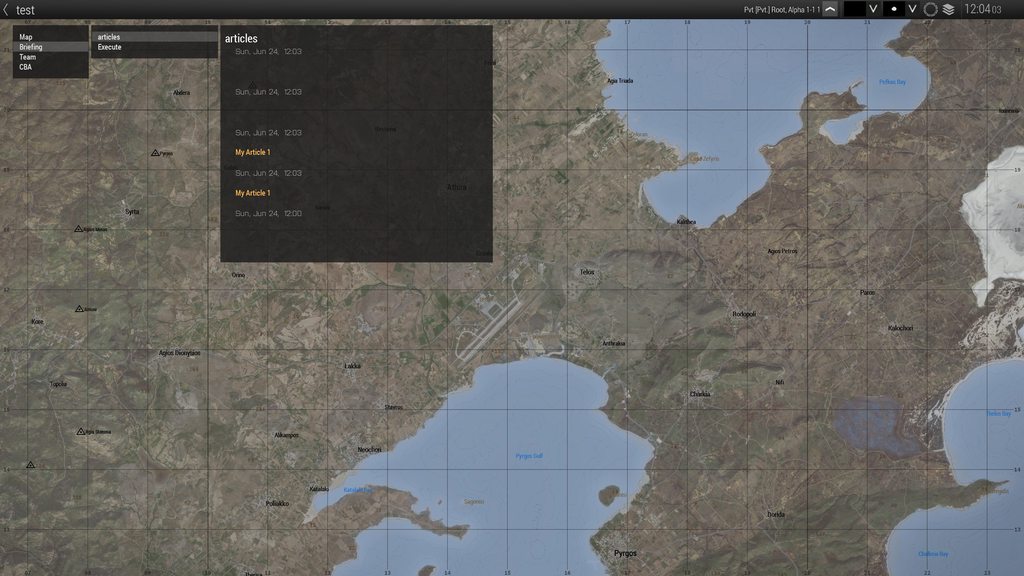 finite bone
https://imgur.com/a/TE64Z4D
finite bone
finite bone
https://imgur.com/a/TE64Z4D
Those blank spots are the ones with arguments passed in the function
finite bone
untold copper
Wait a minute.
I just checked out the BIKI for BIS_fnc_showAANArticle.
```sqf
T...
So I was thinking, instead of calling the function in this example, how about i just paste the entire code in it
untold copper
Do you mean the BIS_fnc_showAANArticle function?
Are you wanting the article to show up on missions start? And, Do you need more articles to show up later?
finite bone
and it works 
player createDiaryRecord
[
    "diary",
    [
        "test",
        "<execute expression='[[[""title"", ""test""],[""title"", ""test""]]] call BIS_fnc_showAANArticle'>My Article 1</execute>"
    ]
];
I got this working too
Had to substitute single " / single ' to double " quotes
TAG_fnc_myArticle =
{
    params ["_title", "_text"];
    [
        [
            ["title", _title],
            ["text", _text]
        ]
    ] call BIS_fnc_showAANArticle
};

player createDiaryRecord
[
    "diary",
    [
        "articles",
        "<execute expression='[""Fake News"", ""Arma IV drops next week.""] call TAG_fnc_myArticle'>My Article 69</execute>"
    ]
];
Ugh... Apostrophes, quotations, semicolons, square and curly brackets will be the death of me!
Sorry for holding up your progress.
finite bone
Now the next problem - cant pass variables inside the expression
""Fake News"" works but _variable1 does not 😂
untold copper
finite bone
``""Fake News""`` works but ``_variable1`` does not 😂
Try a global variable.
finite bone
like the function is being called, but its not printing any values
untold copper
I'm off to sleep. Good luck.
finite bone
thanks a lot and good night
finite bone
untold copper
Try a global variable.
Solved it by using global variables too! thanks!
 mighty bronze
Hello, is there an easy way to set respawn points base on units? for example, tanks crews respawn on diferent position than infantery. I am doing a DM and I dont want riflemans useing t72
finite bone
Are the models of your tank crews different from the other infantry? If so, you can separate them by typeOf function
Else, if your tank crews are under their own 'groups' then you can separate them by groups.
finite bone
what is the current code that you have?
mighty bronze
Code? I am useing the respawn module
finite bone
If you are using the standard vanilla respawn module in zeus, the its not possible in separating them unless you add in some custom code/function
mighty bronze
Just different units
finite bone
do they have a unique gear (helmet, vest, backpacks), naming scheme
finite bone
then you can accomplish it by adding a trigger in the respawn area to automatically 'teleport/move' tank crews to different position by comparing the unique gear they have against infantry
mighty bronze
And how I do that?
finite bone
what is the unique helmet / vest the tank crews would be wearing?
mighty bronze
uk3cb_ard_b_h_crew_cap
finite bone
.
0. Grab the coordinates of the location you want played to be teleported to. [ Right-click on the area > Log > Log position to clipboard ]. Save it handy.
- Create/Determine a detection zone in the respawn area (say 25x25m)
- Use the 'Triggers' menu (press F3) and place one trigger with the determined 'detection' zone done in Step 1.
- Set
TypetoNone. - Set
ActivationtoAny Playeror as per your requirement. - Set
Activation TypetoPresent - Check / Enable
Repeatable - Uncheck / Disable
Server Only - In the
Conditionsbox typethis - In the
On Activationbox type:
if (headgear player == "uk3cb_ard_b_h_crew_cap") then { player setPosATL "your coordinates here" };
```10. Click ok.Alternatively, you can paste this in your On Activation field:
{ if (headgear _x == "uk3cb_ard_b_h_crew_cap") then { _x setPosATL [14640.5,16762.5,0] }; } forEach thisList;
Thanks
finite bone
corrected a mistake
mighty bronze
It worked perfect, thank you very much
Question: this will teleport just the player inside the trigger or the whole tank unit? I just want to teleport the guy inside trigger
The crewman that die and repawned
finite bone
I'd highly recommend you split the condition and activation. Here is a more 'safe' code as it does not accidentally teleport wrong players.
Condition box:
this && player in thisList && headgear player == "uk3cb_ard_b_h_crew_cap"
On Activation box:
player setPosATL [14640.5,16762.5,0]
This will teleport any/all players matching the condition box. Which in the case above is a player, currently inside the trigger area (thisList) wearing the headgear of uk3cb_ard_b_h_crew_cap.
mighty bronze
Perfect
And by the whole team teleporting in the same coord, they dont bug and die in a big explosion, correct? lol
finite bone
finite bone
```sqf
TAG_fnc_myArticle = {
[
[
["title", _title],
...
@untold copper - (For when you are back) - My initial theory holds true. The memory swap overwrites previous changes so any old change is rewritten. Hopefully I can figure out the dynamic variable naming and passing it through without needing to utilize 128 gigs of ram . Moreover, the Article Name cannot be parsed as a variable since its converting the variable name to string.
finite bone
mighty bronze
And by the whole team teleporting in the same coord, they dont bug and die in a ...
They wont. But if you want to be extra careful, add in random in the position.
For example, change:
player setPosATL [14640.5,16762.5,0]
``` to ```sqf
player setPosATL [14640.5 + random (20),16762.5 + random (20), 0]
``` and they will spawn randomly in a 20x20 gridI have this:
if (isNil "TEST_markerIndex") then { TEST_markerIndex = 0 };
testTitle = format ["TEST_TITLE_%1", TEST_markerIndex];
TEST_markerIndex = TEST_markerIndex + 1;
``` I'm trying to achieve different strings/data stored with different variables created using the snippet above - which I can then call anytime to provide that data.
i.e., I want
``testTitle`` or ``TEST_TITLE_1`` to store the string "asdasdasd"
``testTitle`` or ``TEST_TITLE_2`` to store the string "hdffjfdhdfhf"
``testTitle`` or ``TEST_TITLE_3`` to store the string "kfdgjdsftsd"
How'd I go about this? south swan
Check https://community.bistudio.com/wiki/getVariable and specifically example 3
finite bone
But my varies do not exist prior to my dynamic creation
south swan
https://community.bistudio.com/wiki/setVariable is exactly 1 click away 🤷♂️
finite bone
I saw that (especially Example 5) in getVariable (which is same as Ex. 4 in setVariable) - i had a dilemma with that and call compile
 warm hedge
I got it! The command to get such display it is uinamespace getvariable "IGUI_displays" not allDisplays nor findDisplay
CC. @copper raven
 proven charm
worth a ticket?
warm hedge
Every airports/runways in vanilla A3 only accepts planes from south
proven charm
warm hedge
Every airports/runways in vanilla A3 only accepts planes from south
really, that explains it...
warm hedge
Which is, you know, a strange limitation
proven charm
yeah
I wanted to write an air traffic control script but I guess it's not possible then
proven charm
well i could just check for airfields on top of the plane Y axle and if none are found then pick the closest , maybe this is how the engine chooses it as well?
warm hedge
https://community.bistudio.com/wiki/landAt
Probably this is what you want to use?
proven charm
warm hedge
https://community.bistudio.com/wiki/landAt
Probably this is what you want to use...
i think its for AI only
warm hedge
Aha, I think I get your situation
 solid ocean
hey peeps, im making a mission where in theres a town that needs to be taken but the town is cutoff by a river and the only bridge into town has been destroyed.
i was going to make it so that my engineers can build a bridge to bridge the gap. I figure i can hide some bridge components and then when they interact with it once the interaction is complete the bridge will be un hidden. thus looking like theyve "built it".
Only thing which is stumping me is i dont know how to implement add action into this
 frank mango
solid ocean
hey peeps, im making a mission where in theres a town that needs to be taken but...
frank mango
solid ocean
hey peeps, im making a mission where in theres a town that needs to be taken but...
addaction "run bridge repair script" ?
solid ocean
frank mango
addaction "run bridge repair script" ?
thats the simple part, i meant how can i change the interaction time etc.
Sorry i didnt put that in my first message
 hallow mortar
 kindred zephyr
Hey guys,
Is there any documentation in regards of how quickly is defaultAction (FIRE) is executed after pressing the button that executes it?
I was wondering this, since FIRED and FIREDNEAR event handlers activate a bit too late to what I wish to do.
Alternatively, is there any way to detect the firing action both for non local and local players as well as the AI before it executes, or to be more concise, before the gunshot sound is made?
I got a function going already that does this but its a bit unreliable, as it seems that the evaluation onEachFrame and the execution itself on the script is not fast enough when looking for the defaulAction > 0
hallow mortar
.....How much faster are you looking to get? I'm pretty sure Fired is about as fast as is possible, and it's very fast.
You could try a userActionEventHandler listening for defaultAction, but no guarantees this will be faster than Fired
solid ocean
so im having some trouble with my HoldAction sqf:
[laptop,
"Raise Bridge",
"\a3\ui_f\data\igui\cfg\holdactions\holdaction_connect_ca.paa",
"\a3\ui_f\data\igui\cfg\holdactions\holdaction_connect_ca.paa",
"player distance laptop > 5",
"player distance laptop > 3",
{},
{},
{this {Br1 hideObject false;Br2 hideObject false;Br3 hideObject false;Br4 hideObject false;Br5 hideObject false;Br6 hideObject false;Br7 hideObject false;},
{["task1","canceled"] call bis_fnc_tasksetstate},
[],
5,
0,
true,
false]
remoteexec ["bis_fnc_holdactionadd", 0, laptop];
This is the script in using but nothing is happening and im stumped as to why.
hallow mortar
!code
 wicked roostBOT
How to use SQF syntax highlighting in Discord
```sqf
// your code here
hint "good!";
```
↓
// your code here
hint "good!";
{this {Br1 hideObject false;Br2 hideObject false;Br3 hideObject false;Br4 hideObject false;Br5 hideObject false;Br6 hideObject false;Br7 hideObject false;},```
This is probably the issue. You can't use `this` here and anyway it's not doing anything. (and **an improperly closed {}**)
Try this for that line instead:
```sqf
{
  {
    [_x,false] remoteExec ["hideObjectGlobal",2];
  } forEach [br1,br2,br3,br4,br5,br6,br7];
},```ok
right now the objects are hidden i want them to be revealed at the end of this will this code do this?
hallow mortar
https://community.bistudio.com/wiki/hideObjectGlobal
Syntax: object hideObjectGlobal hidden
Parameters:
object: Object
hidden: Boolean - true → hidden; false → visible
kindred zephyr
hallow mortar
.....How much faster are you looking to get? I'm pretty sure `Fired` is about as...
to be more concise, before the gunshot sound is made. The thing is that Fired executes after the action is finished, not during it :C. I need to execute a script before the sound for the gunfire is made, as there is a code im trying to exec asap in there. As mentioned, Im doing an evaluation per frame to check on the activation of defaultAction, but the code is not fast enough to exec before the gunshot itself. Think about the LAxemann mod for "environment ducking" but im doing the opposite.
solid ocean
hallow mortar
<https://community.bistudio.com/wiki/hideObjectGlobal>
> Syntax: object hideObj...
sorry ive just read through it now im guessing [_x, false] means it will be revealed my apologies
hallow mortar
kindred zephyr
to be more concise, before the gunshot sound is made. The thing is that Fired ex...
I'm not sure that this is something that's going to be possible with scripting. There might be something you can do with config or sound controller modding but I don't know how far that goes.
 true frigate
Hey! Pretty simple question,
I'm just making a script to remove any NVG items from the player. I've got a list of any possible types that we use, but I'm not too sure on how I'd make it check through the list. I imagined it would look something like this, but I'm not 100% sure. Thanks 🙂
_nvgTypes = [
"CUP_NVG_1PN138",
"CUP_NVG_1PN138_Hide",
"CUP_NVG_PVS15_black",
"CUP_NVG_PVS15_green"
];

{
   {_x unassignItem;
    _x removeItem;} forEach allPlayers;
} forEach _nvgTypes;```I know think I'd need something after unassignItem and removeItem, but I'm not sure what it would be. I couldn't just use _nvgTypes
kindred zephyr
hallow mortar
I'm not sure that this is something that's going to be possible with scripting. ...
ah, that was my assumption. Thanks
hallow mortar
true frigate
Hey! Pretty simple question,
I'm just making a script to remove any NVG items f...
Don't use a prescriptive list, just use the return from hmd.
{
  _x unlinkItem (hmd _x);
} forEach allPlayers;```Ah, I didn't know that existed! That makes this a lot simpler! 🙂
hallow mortar
Oh, that wouldn't account for nvgs they're not wearing. One sec
Okay, two options. The first one uses the item's config to guess whether it's an NVG. This should automatically get all NVGs, but it might also get mod items that go in the NVG slot but aren't NVGs (I've seen it happen...)
Second one just gets whatever you tell it to.
{
  _x unlinkItem (hmd _x);
  {
    // Simulation type seems to be the most reliable way of detecting NVGs
    private _simType = getText (configFile >> "CfgVehicles" >> _x >> "Simulation");
    if (_simType == "NVGoggles") then {
      removeItem _x;
    };
  } forEach items _x;
} forEach allPlayers;```
```sqf
_nvgTypes = [
  "CUP_NVG_1PN138",
  "CUP_NVG_1PN138_Hide",
  "CUP_NVG_PVS15_black",
  "CUP_NVG_PVS15_green"
];
{
  {
    if (_x in _nvgTypes) then {
      removeItem _x;
    };
  } forEach items _x;
} forEach allPlayers;```Ah awesome, thanks a ton! 
finite bone
finite bone
```sqf
TAG_fnc_myArticle =
{
params ["_title", "_text"];
[
[
...
private _temp1 = "Title 1";
private _temp2 = "Sub-Title 1";
if (isNil "NEWS_markerIndex") then { NEWS_markerIndex = 0 };
NEWS_markerIndex = NEWS_markerIndex + 1;
missionNamespace setVariable [("NEWS_TITLE_" + str (NEWS_markerIndex)), _temp1];
missionNamespace setVariable [("NEWS_BODY_" + str (NEWS_markerIndex)), _temp2];
player createDiaryRecord
[
"diary",
[
"News Article",
"<execute expression='
[] spawn
{
disableSerialization;
[
[
[""title"",(""NEWS_TITLE_"" + str (NEWS_markerIndex))],
[""text"",(""NEWS_BODY_"" + str (NEWS_markerIndex))]
],findDisplay 46,true
] call bis_fnc_showAANArticle;
}
'>Article 1</execute>"
]
];
``` And so there seems to be a problem - not with the code but with the execution flow.
Regardless of what value the ``NEWS_markerIndex`` passes on, the script still refers to the most recent executed title and text.
i.e. - When executed first, the variables ``NEWS_TITLE_1`` and ``NEWS_BODY_1`` both get set to ``Title 1``" and ``Sub-Title 1`` and executed/saved accordingly through the ``createDiaryRecord`` function.
Now, when the second execution happens, ``NEWS_TITLE_2`` and ``NEWS_BODY_2`` gets set to ``Title 2`` and ``Sub-Title 2`` and executed/saved accordingly through the ``createDiaryRecord`` function.
However, when checking the diary entry of the first execution, it has been replaced by the entries of the next/recent execution. copper raven
warm hedge
I got it! The command to get such display it is `uinamespace getvariable "IGUI_d...
copper raven
warm hedge
I got it! The command to get such display it is `uinamespace getvariable "IGUI_d...
yeah, it was in igui displays 👍
 indigo wolf
Hi! Quick question, is there a way to receive number of arguments dynamically? I'm trying to remoteExec to another sqf but the number of arguments might differ each execution.
Would if (isNil (_this select x)) work to check/verify if extra arguments exist?
 astral bone
looks into params. I think it might be of interest?
lets ya tell if it's allowed to be ObjNull (not there) or not. Plus, can say "It needs to be an array or a number, otherwise invalid call" and such
What would I use addWeaponCargo for? As opposed to addWeaponCargoGlobal, that is.
indigo wolf
params ["_var_a", "_var_b", "_var_c", "_var_d", "_var_e"];
```so would this accept any amount of arguments passed between a through e without throwing errors?yes
all params does is assigns values
[1,2,3] params ["_one", "_two", "_three"]
astral bone
it also lets you say if the function accepts certain datatypes, default datatypes
[variableName, defaultValue, expectedDataTypes, expectedArrayCount]
indigo wolf
[1,2,3] params ["_one", "_two", "_three"];
[1,2]   params ["_one", "_two", "_three"];
``` would these both work on the same paramsare you in a function?
indigo wolf
my idea is to initialize params with max arguments that can be passed from another sqf via remoteExec and then proceed executing the intended script based on the params passed
astral bone
[1, 2, 3] call {
    private ["_one", "_two", "_three"];
    _one = _this select 0;
    _two = _this select 1;
    _three = _this select 2;
    // ...
};

// Same as above, only using params
[1, 2, 3] call {
    params ["_one", "_two", "_three"];
    // ...
};
lemme get something else
[1, 2] call {
    if (!params ["_var1", "_var2", ["_var3", true, [true]]]) exitWith {
        hint str [_var1, _var2, _var3];
    };
};
// The hint shows [1,2,true]
// Script exits, default value was used due to missing value

[1, 2, 3] call {
    if (!params ["_var1", "_var2", ["_var3", true, [true]]]) exitWith {
        hint str [_var1, _var2, _var3];
    };
};
// The hint shows [1,2,true]
// Script exits, default value was used due incorrect value type
[1, "ok", [1, 2, 3]] call {
    if (!params [
        ["_var1", 0, [0]],
        ["_var2", "", [""]],
        ["_var3", [0,0,0], [[], objNull, 0], [2,3]]
    ]) exitWith {};
    hint "ok";
};
// Passes validation

[1, 2, [3, 4, 5]] call {
    if (!params ["_var1", "_var2", ["_var3", [], [[], objNull, 0], 0]]) exitWith {};
    hint "ok";
};
// Fails, because passed array is expected to be of 0 length, i.e. empty
you can find this on the wiki by the way
astral bone
astral bone
https://community.bistudio.com/wiki/params
see this link
indigo wolf
yea i saw that but my question is a little different thats not explained in the examples
astral bone
default Values?
indigo wolf
indigo wolf
```sqf
[1,2,3] params ["_one", "_two", "_three"];
[1,2] params ["_one", "_two"...
will line 2 work
astral bone
If you tell it to use a default value, yes
astral bone
astral bone
```sqf
[1, 2] call {
if (!params ["_var1", "_var2", ["_var3", true, [true]]]...
see here
indigo wolf
ah so a default value has to be forced
otherwise dynamic arguments cant be initialized without throwing errors
astral bone
Yes. Can make the value it looks for be objNull tho
indigo wolf
cool i learnt something new 👍 thanks
astral bone
Making it have a default value and/or making it accept objNull can both work to accept a 'blank' argument
default value means if it doesn't match what you expect, it will make it be a predefined value. Allowing you to avoid having to do a nil check and if nil, make it be a value.
indigo wolf
now the question of how to make it ObjNull
astral bone
where
 winter rose
];
astral bone
Lou leads me to beleive that is correct, although it has a syntax error :P
winter rose
params [
  ["_varname", defaultValue]
];
ah yes syntaxes
astral bone
yea, they want it so defaultValue is set to "objNull"
indigo wolf
params ["_var1", "_var2", ["_var3", objNull]];
now this should accept values of either 2 arguments (and make the 3rd one as objnull) or 3 arguments as they are sent correct?
winter rose
yup
indigo wolf
thanks a lot!
finite bone
finite bone
```sqf
private _temp1 = "Title 1";
private _temp2 = "Sub-Title 1";
if (isNil "NE...
So how do we store/retrieve something dynamically when its also being executed
that whole execution flow is messing up my mind
astral bone
wait huh?
Yes, why is my loadout array 10 long-
OH WAIT b/c the unit loadout page has 0 as the primary weapon 😅
finite bone
finite bone
```sqf
private _temp1 = "Title 1";
private _temp2 = "Sub-Title 1";
if (isNil "NE...
ok im totally lost on this one and need some advanced/expert guidance in pointing the right direction
for some reason this does not work the way it should be - or ive configured something wrong and blaming it on the processor
finite bone
yes
winter rose
and you are calling the global in the code
you are not using the value at the time of code creation
finite bone
the idea being, I create a variable dynamically (based on the number of executions) and then assign the values to them - which is then passed to the code as variables - then executed
astral bone
What you want to do, I believe, is exit the string
"
[""title"",(""NEWS_TITLE_"" + " + str (NEWS_markerIndex) + ")],
"
ignore the 1st and 2nd line, needed it to be a string :P
_array = [["First Aid Kit",3]];
{
  _unit addWeaponCargoGlobal _x;
} forEach _array;
I tihnk that'll work
winter rose
"First Aid Kit"? really?
astral bone
ahem hem hem
i- i might want to use 'FirstAidKit'
winter rose
try without spaces 🙃
astral bone
xD
winter rose
yeah 😄
astral bone
I realized that as you said it.
and now, once this works, I have a random loadout script :D
It can probably be better, but ya know xD
there ain't a way to use hashMap get key and have key be non-case sensitive right?
astral bone
i am just curious b/c I am dumb and I can see myself not storing the key as lowercase xD
I have the get going to lowercase though.
_loadout = ratchet_loadoutLoadoutHashmap get (toLower _occupation);
hmm- still nothing being added-
astral bone
I am setting, but it's a one time set.
copper raven
print _occupation
astral bone
Basically, just need a static table
err
_loadouts = createHashMapFromArray [
  ["miner",[
    [], // Primary Weapons - ["arifle_MX_ACO_pointer_F","","acc_pointer_IR","optic_Aco",[],[],""]
    [], // Launcher Weapons
    [], // Handgun
    [["U_C_ConstructionCoverall_Black_F",[]]], // Uniforms
    [["V_Safety_orange_F",[]],["V_Safety_yellow_F",[]]], // Vest
    [["B_LegStrapBag_coyote_F",[]]], // Bag
    ["H_Construction_headset_orange_F","H_Construction_basic_orange_F","H_Construction_headset_orange_F","H_Construction_basic_orange_F","H_Construction_headset_yellow_F"], // Helmet
    ["G_Respirator_white_F"], // Facewear
    [], // Binocs (See Weapon)
    [], // Assigned Items (Map,GPS,Radio,Compass,Watch,NVG
    [["FirstAidKit",3]] // Inventory Items.
  ]]
];

_loadouts;
I can see myself accidently making "miner" be "Miner" then tearing my hair out for a day trying to figure out why it won't work xD
does it take a moment before setting a loadout and being able to add items to the stuff?
copper raven
and where are you storing the result of this?
copper raven
of the code
copper raven
its a local variable
astral bone
it's being set to ratchet_loadoutLoadoutHashmap
if (isNil "ratchet_loadoutLoadoutHashmap") then { ratchet_loadoutLoadoutHashmap = [true] call ratchet_internal_fnc_initLoadouts;
};
_output = [[],[],[],[],[],[],"","",[],["","","","","",""]];
_loadout = ratchet_loadoutLoadoutHashmap get (toLower _occupation);```yeah, how?
copper raven
diag_log ["_occupation", _occupation] somewhere and check rpt
astral bone
_unit setUnitLoadout _output;
{
    _unit addWeaponCargoGlobal _x;
} forEach (_loadout select 10);
no, it's working, I am just curious if I can make the get be non-case sensitive
astral bone
astral bone
```sqf
_unit setUnitLoadout _output;
{
_unit addWeaponCargoGlobal _x;
} for...
this ain't tho :P
copper raven
select 10?
astral bone
select 10th item
copper raven
yes i know, but the hashmap you sent, select 10 gives you an empty array
astral bone
no?
copper raven
?
astral bone
array's start at 0 :P
copper raven
dude i know
copper raven
astral bone
```sqf
_loadouts = createHashMapFromArray [
["miner",[
[], // Primary Weap...
what you sent here, is what i mean
the only value there is, select 10 is an empty array
astral bone
_loadout = ratchet_loadoutLoadoutHashmap get "miner";
_loadout select 10;```
in debug console gives `[["FirstAidKit",3]]`oh you had the comment there, hard to read lines on phone (the weapons one)
copper raven
astral bone
```sqf
_loadout = ratchet_loadoutLoadoutHashmap get "miner";
_loadout select 10;...
should be addItemCargoGlobal for FAKs
astral bone
... oh...
If I put a weapon into the inventory items, would is still add it?
or a magazine
copper raven
should work
copper raven
wiki says that addItemCargoGlobal works with everything but backpacks 
copper raven
astral bone
restart gets rid of global var's or no?
yes
(the missionNamespace ones)
finite bone
astral bone
```sqf
"
[""title"",(""NEWS_TITLE_"" + " + str (NEWS_markerIndex) + ")],
"
```
Tried all variations - no go
astral bone
huh?
finite bone
your code threw generic expression error - i tried to convert it to string - started displaying the whole expression as the title, like, NEWS_TITLE + str (NEWS_markerIndex) +
astral bone
well, my code was to show that you need to exit from the string
copper raven
it has missmatched quotes
astral bone
 tough abyss
`+ " +`
tough abyss
`+ " +`
yea, but the first plus is in the string
tough abyss
right, mismatched one is at the end
finite bone
exactly
astral bone
ih
oh*
[""title"",(""NEWS_TITLE_"" + str ("" + NEWS_markerIndex + ""))],
what about this-
hallow mortar
You can use ' for an inner layer of quotes instead of having to double up ". It'll help you keep track
finite bone
astral bone
`[""title"",(""NEWS_TITLE_"" + str ("" + NEWS_markerIndex + ""))], `
what about ...
tried before - converts to string - output = NEWS_TITLE_" + NEWS_markerIndex + "
tough abyss
[""title"", ""NEWS_TITLE_"" + str NEWS_markerIndex],
astral bone
[""title"",("+ (NEWS_TITLE_ + str (NEWS_markerIndex)) + "))],
wait the parenthatis might be wrong
tough abyss
I don't see why the parentheses spam is necessary
astral bone
[""title"",("+ (NEWSTITLE + str (NEWS_markerIndex)) + ")],
it helps me with pemdas xD
finite bone
tough abyss
`[""title"", ""NEWS_TITLE_"" + str NEWS_markerIndex],`
returns the variable name as string - instead of its value
astral bone
astral bone
```sqf
[""title"",("+ (NEWSTITLE + str (NEWS_markerIndex)) + ")],
```
try this
wait
tough abyss
finite bone
returns the variable name as string - instead of its value
Did you try it or is that just what happened before?
finite bone
I executed it now
tough abyss

finite bone
astral bone
```sqf
[""title"",("+ (NEWSTITLE + str (NEWS_markerIndex)) + ")],
```
Does not work - Ref- #arma3_scripting message
tough abyss
This isn't an issue with precedence then
otherwise + (str NEWS_markerIndex) would work
finite bone
Yea
astral bone
astral bone
```sqf
[""title"",("+ (NEWSTITLE + str (NEWS_markerIndex)) + ")],
```
[""title"",("+ (missionNamespace getVariable ("NEWS_TITLE_" + str (NEWS_markerIndex))) + ")],
agh wait
[""title"",("+ (missionNamespace getVariable ("NEWS_TITLE_" + str (NEWS_markerIndex))) + ")],
I think that should work
finite bone
The only way I could make it work is actually storing in hardcoded values
astral bone
astral bone
` [""title"",("+ (missionNamespace getVariable ("NEWS_TITLE_" + str (NEWS_marke...
what about this
finite bone
missing a parenthesis
finite bone
i tried to dig further as to whats causing this - any code executed does not get stored in any way unless its hardcoded
so unless a definite string is passed, any subsequent executions will overwrite previous calls too
astral bone
Lou you able to help?
missionNamespace setVariable ["NEWS_TITLE_1","hello my darling"];
_cheese = " [""title"",("+  (missionNamespace getVariable ("NEWS_TITLE_" + str (1))) + ")],";
hint (_cheese);```Seems to boil down to the execution context of <execute expression=
of which I am sadly not familiar
astral bone
you need to completely exit the string so the (missionNamespace getVariable ("NEWS_TITLE_" + str (1))) is outside of a string completely
astral bone
no, you want to have the value of it at that moment be apart of the string
hallow mortar
why not use format instead of this hellish abuse of +
tough abyss
it would be the value of it at the moment, assuming the expression is compiled in place
astral bone
no, he wants it so when the string is being made, it uses the variable at that time
tough abyss
yes I know
finite bone
at this point, im like, hardcap the number of possible executions to 5 and use switch case to copy paste the code over and over
astral bone
I'd suggest taking a break
finite bone
guaranteed to work as intended (as ive tried it out of chaos)
astral bone
maybe use that, then come back tomorrow
tough abyss
private _temp1 = "Title 1";
private _temp2 = "Sub-Title 1";
if (isNil "NEWS_markerIndex") then { NEWS_markerIndex = 0 };
NEWS_markerIndex = NEWS_markerIndex + 1;
missionNamespace setVariable [("NEWS_TITLE_" + str (NEWS_markerIndex)), _temp1];
missionNamespace setVariable [("NEWS_BODY_" + str (NEWS_markerIndex)), _temp2];
player createDiaryRecord
[
    "diary",
    [
        "News Article",
        [] call {
          [] spawn {
                  disableSerialization;
                  [
                      [
                          ["title", format ["NEWS_TITLE_%1", NEWS_markerIndex]],
                          ["text", format ["NEWS_BODY_%1", NEWS_markerIndex]]
                      ],findDisplay 46,true
                  ] call bis_fnc_showAANArticle;
          };
          "Article 1"
        }
    ]
];
How about this
finite bone
Working code (using copy/paste and switch) - https://sqfbin.com/ebezoxarakudepuwijor
finite bone
tough abyss
```sqf
private _temp1 = "Title 1";
private _temp2 = "Sub-Title 1";
if (isNil "NE...
Error at L17 [""title"",(""NEWS_TITLE_"" + str (NEWS_markerIndex))], - Missing a ]
finite bone
works but the values are wrong
its displaying the variable name instead of its value
finite bone
it seems that any kind of string manipulation within the <execute expression:' block seems futile
tough abyss
player createDiaryRecord
[
    "diary",
    [
        "News Article",
        [] call {
          [] spawn {
                  disableSerialization;
                  [
                      [
                          ["title", missionNamespace getVariable (format ["NEWS_TITLE_%1", NEWS_markerIndex])],
                          ["text", missionNamespace getVariable (format ["NEWS_BODY_%1", NEWS_markerIndex])]
                      ],findDisplay 46,true
                  ] call bis_fnc_showAANArticle;
          };
          "Article 1"
        }
    ]
];
that should do the trick
oops actually
there, parentheses fixed
...and fixed again
finite bone
Title and Body are empty
finite bone
we all are so no worries xd
tough abyss
player createDiaryRecord
[
    "diary",
    [
        "News Article",
        NEWS_markerIndex call {
          _this spawn {
                  disableSerialization;
                  [
                      [
                          ["title", missionNamespace getVariable (format ["NEWS_TITLE_%1", _this])],
                          ["text", missionNamespace getVariable (format ["NEWS_BODY_%1", _this])]
                      ],findDisplay 46,true
                  ] call bis_fnc_showAANArticle;
          };
          "Article 1"
        }
    ]
];
NEWS_markerIndex needed to be passed as param
give that a shot
finite bone
still empty
tough abyss
are the NEWS_TITLE and NEWS_BODY vars in missionNamespace?
finite bone
yes
private _temp1 = "Title 1";
private _temp2 = "Sub-Title 1";
if (isNil "NEWS_markerIndex") then { NEWS_markerIndex = 0 };
NEWS_markerIndex = NEWS_markerIndex + 1;
missionNamespace setVariable [("NEWS_TITLE_" + str (NEWS_markerIndex)), _temp1];
missionNamespace setVariable [("NEWS_BODY_" + str (NEWS_markerIndex)), _temp2];
player createDiaryRecord
[
    "diary",
    [
        "News Article",
        [NEWS_markerIndex] call {
          _this spawn {
                  disableSerialization;
                  [
                      [
                          ["title", missionNamespace getVariable (format ["NEWS_TITLE_%1", _this#0])],
                          ["text", missionNamespace getVariable (format ["NEWS_BODY_%1", _this#0])]
                      ],findDisplay 46,true
                  ] call bis_fnc_showAANArticle;
          };
          "Article 1"
        }
    ]
];
a workaround to this would be to use pointers/call by reference to another variable - but then again lies the problem of overwriting previous calls
finite bone
tough abyss
```sqf
player createDiaryRecord
[
"diary",
[
"News Article",
...
It WORKS!
tough abyss
Haha nice
finite bone
now to convert it to an actual diary record with <execute expression:'
Ah yes, now back to the original conflict of - overwrites
private _temp1 = "Title 1";
private _temp2 = "Sub-Title 1";
if (isNil "NEWS_markerIndex") then { NEWS_markerIndex = 0 };
NEWS_markerIndex = NEWS_markerIndex + 1;
missionNamespace setVariable [("NEWS_TITLE_" + str (NEWS_markerIndex)), _temp1];
missionNamespace setVariable [("NEWS_BODY_" + str (NEWS_markerIndex)), _temp2];
player createDiaryRecord
[
    "diary",
    [
        "News Article",
        "<execute expression='
        [NEWS_markerIndex] spawn
        {
            disableSerialization;
            [
              [
              [""title"", missionNamespace getVariable (format [""NEWS_TITLE_%1"", _this#0])],
              [""text"", missionNamespace getVariable (format [""NEWS_BODY_%1"", _this#0])]
              ],findDisplay 46,true
             ] call bis_fnc_showAANArticle;
        }
                '>Article</execute>"
    ]
];
Hm? What's going on w/ overwrites?
finite bone
When I execute the same code with different values for _temp1 and _temp2 - it also affects the previously executed values of _temp
First Execution Values (say Article 1) -
_temp1 = "Title 1";
_temp2 = "Body 1";
NEWS_markerIndex = 1;
``` Output - ```
Title 1
Body 1```

Second Execution Values (say Article 2) -
```sqf
_temp1 = "Title 2";
_temp2 = "Body 2";
NEWS_markerIndex = 2;
``` Output - ```
Title 2
Body 2```

However, Article 1 also displays output of Article 2 instead of its own (which should be ``Title 1`` and ``Body 1``)It seems like when clicking on the link after these have been executed - the script executes it again and fetches the most recent/last values of 'NEWS_markerIndex'
finite bone
tough abyss
Show me how you're executing both though
Literally the above code twice but different values for _temp1 and _temp2
tough abyss
Sounds about right
Think I can fix that in a few
Is there an ammo in game that I can use to make a laser gun? I am thinking something like this https://en.m.wikipedia.org/wiki/Personnel_halting_and_stimulation_response_rifle
But lethal

The personnel halting and stimulation response rifle (PHASR) is a prototype non-lethal laser dazzler developed by the Air Force Research Laboratory's Directed Energy Directorate, U.S. Department of Defense. Its purpose is to temporarily disorient and blind a target. Blinding laser weapons have been tested in the past, but were banned under the 1...
finite bone
tough abyss
Is there an ammo in game that I can use to make a laser gun? I am thinking somet...
There is an aliens mod in the workshop that uses laser weapons
You can probably use that - but its heavily custom scripted
tough abyss
finite bone
There is an aliens mod in the workshop that uses laser weapons
Can you link it?
finite bone
 tough abyss
Problem is I would rather not plagiarize someone else's work
frank mango
tough abyss
Problem is I would rather not plagiarize someone else's work
use the mod as a dependency then?
and inherit the ammo for use in your own weapon system?
tough abyss
Or have dependencies,
Is there anything in base game that is close enough?
It doesn't have to blind enemies,
Just kill them, and be invisible, no recoil, very little bullet drop
finite bone
An idea would be to use the Laser (ref IR laser if you are looking for laser light) and then use getDir and deal damage
tough abyss
Would probably be easiest to just learn ammo configging tbh
tough abyss
tough abyss
Would probably be easiest to just learn ammo configging tbh
Where can I start?
Not very hard
Look at the CfgAmmo reference on the biki and look how other mods do things
finite bone
tough abyss
Where can I start?
The best way to learn something is reverse engineering something you know
tough abyss
finite bone
https://community.bistudio.com/wiki/CfgAmmo_Config_Reference
Thank you
private _temp1 = "Title 1";
private _temp2 = "Sub-Title 1";
if (isNil "NEWS_markerIndex") then { NEWS_markerIndex = 0 };
NEWS_markerIndex = NEWS_markerIndex + 1;
missionNamespace setVariable [("NEWS_TITLE_" + str (NEWS_markerIndex)), _temp1];
missionNamespace setVariable [("NEWS_BODY_" + str (NEWS_markerIndex)), _temp2];
player createDiaryRecord
[
    "diary",
    [
        "News Article",
        format ["<execute expression='
        [] spawn
        {
            disableSerialization;
            [
              [
              [""title"", %1],
              [""text"", %2]
              ],findDisplay 46,true
             ] call bis_fnc_showAANArticle;
        }
                '>Article</execute>", missionNamespace getVariable (format ["NEWS_TITLE_%1", NEWS_markerIndex]), missionNamespace getVariable (format ["NEWS_BODY_%1", NEWS_markerIndex])]
    ]
];
@finite bone This should fix it
*now
can cut it down a lot if you just get rid of the variables though (if you don't need them somewhere else)
i.e.
private _temp1 = "Title 1";
private _temp2 = "Sub-Title 1";
player createDiaryRecord
[
    "diary",
    [
        "News Article",
        format ["<execute expression='
        [] spawn
        {
            disableSerialization;
            [
              [
              [""title"", ""%1""],
              [""text"", ""%2""]
              ],findDisplay 46,true
             ] call bis_fnc_showAANArticle;
        }
                '>Article</execute>", _temp1, _temp2]
    ]
];
              ["title", Title 1],
              ["text", Sub-Title 1]>
23:53:51   Error position: <1],
              ["text", Sub-Title 1]>
23:53:51 Error Missing ]```oh lol let me fix that
finite bone
tough abyss
```sqf
private _temp1 = "Title 1";
private _temp2 = "Sub-Title 1";
player create...
ooh i like this very very much
tough abyss
fixed
finite bone
especially the fact that i have around 20 variables per execution xd
tough abyss
cleanest would be no variables, just
player createDiaryRecord
[
    "diary",
    [
        "News Article",
        format ["<execute expression='
        [] spawn
        {
            disableSerialization;
            [
              [
              [""title"", ""%1""],
              [""text"", ""%2""]
              ],findDisplay 46,true
             ] call bis_fnc_showAANArticle;
        }
                '>Article</execute>", "TITLE", "SUBTITLE"]
    ]
];
thanks a lot,, you've been of tremendous help
tough abyss
no problem, glad I could help and remembered how to program
also would probably be helpful for you to make a function to generate articles, i.e.
PEPE_fnc_createArticle = {
  params["_title", "_subtitle"];
  player createDiaryRecord
  [
      "diary",
      [
          "News Article",
          format ["<execute expression='
          [] spawn
          {
              disableSerialization;
              [
                [
                [""title"", ""%1""],
                [""text"", ""%2""]
                ],findDisplay 46,true
               ] call bis_fnc_showAANArticle;
          }
                  '>Article</execute>", _title, _subtitle]
      ]
  ];
};
but depends on how often you'll be needing to do it
finite bone
I'm creating a zeus module centered around this function
where absolutely everything is customizable
tough abyss
then functions are probably a good idea
you'll probably want to learn how to use CfgFunctions if you don't already know
finite bone
oh yea
mighty bronze
Hello, is there any command or script to make players inside a zone not taking damage? Is for a mission deathmatch, and I wont both sides spawn zones to be safe zones.
tough abyss
mighty bronze
Hello, is there any command or script to make players inside a zone not taking d...
arma deathmatch? I might be interested in that
finite bone
mighty bronze
Hello, is there any command or script to make players inside a zone not taking d...
Do you have a trigger setup?
Use this as ref - #arma3_scripting message
mighty bronze
Hello, yes I have the trigger, all I need is the code
finite bone
Here:
Condition box:
this && player in thisList
On Activation box:
player setdamage 0; // Use this if you also want to heal.
player allowDamage false;
On Deactivation box:
player allowDamage true;
Make sure its set to Repeatable
mighty bronze
Thankyou, and it will work for only the players inside, correct?
finite bone
yes
tough abyss
I'm attempting to add water bottles to a water bottle pallet that doesn't have an inventory. To do this I have two boxes, one named waterpallet (which is the pallet of water bottles) and one box named water (the box with the water bottles in it)
This is my code in the init box of the water pallet:
{water setPos position (_this select 1);
(_this select 1) action ["Gear", water]},[], 6, true, true, "", "(_this distance _target)<1.5"];```

Currently, the water pallet has no interaction. The addAction command appears to do nothing. It does not add an action to the pallet.Depending on how big the pallet is, it's possible your 1.5 radius check isn't wide enough
also I'd recommend just using the radius param for a distance check rather than making it an expression
I'll up it to 3 and see if it works then
Yes that now works
Now to hide the box that spawns in lmao
 hasty current
Is it possible to set a unit's hands' positions via scripting using the game's IK system? I know it uses IK for drivewheel rotation when in vehicles (and possibly also for pedals), but I don't know if that system is accessible through scripting in any way.
 midnight niche
not at my pc at the moment, can you somehow inverse BIS_fnc_findOverwatch to find a lowpoint? or is there another similar command?
granite sky
The BIS_fnc_ stuff is functions, not commands. So you can just take the code and modify it.
see the functions viewer on the escape menu.
 worthy igloo
does _x setskill ["courage",1]; effect morale
 modern agate
Any idea on a getting a tracer module to work off a trigger, idk if ive missed an obvious solution but i cant find any clear answers
worthy igloo
modern agate
Any idea on a getting a tracer module to work off a trigger, idk if ive missed a...
place and invisible dude and have him shoot in the air with infinite ammo
pretty sure thats how the module one works
modern agate
worthy igloo
place and invisible dude and have him shoot in the air with infinite ammo
aight
worthy igloo
[] spawn {
waitUntil {morale _x <= -0.1 && _x call BIS_fnc_enemyDetected};
sleep random 10;
_x action ["Eject", vehicle _x];
_x playmove "AmovPercMstpSsurWnonDnon";
_x disableAI "ANIM";
_x setcaptive true;
};
``` y this get error granite sky
_x isn't defined there. It's a spawn.
worthy igloo
granite sky
_x isn't defined there. It's a spawn.
               {
                _x allowFleeing 0;
                _x disableAI "FSM";
                _x setskill ["aimingAccuracy",0.31];
                _x setskill ["commanding",1];
                _x setskill ["aimingShake",1];
                _x setskill ["aimingSpeed",0.35];
                _x setskill ["spotDistance",1];
                _x setskill ["spotTime",0.66];
                _x setskill ["endurance",1];
                _x setskill ["general",1];
                _x setskill ["reloadSpeed",1];
                [] spawn {
                waitUntil {morale _x <= -0.1 && _x call BIS_fnc_enemyDetected};
                sleep random 10;
                _x action ["Eject", vehicle _x];
                _x playmove "AmovPercMstpSsurWnonDnon";
                _x disableAI "ANIM";
                _x setcaptive true;
                };
                _x setVariable ["MAZ_fnc_SkillSet",true];
               } forEach (allUnits select {side _x isEqualTo east AND !(_x getVariable ["MAZ_fnc_SkillSet",false])});
thats the full code
south swan
_x still isn't defined inside spawn, because it spawns a separate threadtask
use sqf [_x] spawn { // to pass _x into the spawned task params ["_x"]; // to name the passed value _x inside the task //whatever code }; 🤷♂️
 cyan dust
south swan
use ```sqf
[_x] spawn { // to pass _x into the spawned task
params ["_x"]; // to...
cyan dust
south swan
use ```sqf
[_x] spawn { // to pass _x into the spawned task
params ["_x"]; // to...
There is no need for additional array and params actually
_x spawn {
private _x = _this;
...
};
i'd say sticking to arrays and param is a good practice in general. And performance cost is 0.7 microsecond (as in 0.0007 ms) on my machine. Completely neglectable.
worthy igloo
                [
                    _x,
                    "Tag n Bag",
                    "\a3\ui_f\data\IGUI\Cfg\holdactions\holdAction_secure_ca.paa",
                    "\a3\ui_f\data\IGUI\Cfg\holdactions\holdAction_secure_ca.paa",
                    "_this distance _target < 3",
                    "_caller distance _target < 3",
                    {},
                    {},
                    {_x switchMove "Acts_ExecutionVictim_Loop"; sleep 2; deleteVehicle _x;},
                    {},
                    [],
                    3,
                    0,
                    true,
                    false
                ] remoteExec ["BIS_fnc_holdActionAdd", 0, _x];
``` how do I pass _x for the switchmovepolitely ask _x to behave
worthy igloo
winter rose
hint: _arguments_ 😉
so I put _x in arguments then _this select 3 instead of _x in the script?
winter rose
use params
worthy igloo
got it
proven charm
can you create virtually non-existent unit/object to be used with the chat commands?
I tried createUnit "sideLogic" but that didnt work
south swan
_emptyLogic = (createGroup sideLogic) createUnit ["Logic", [1,2,3], [], 0, "NONE"]; 🤷♂️
proven charm
south swan
`_emptyLogic = (createGroup sideLogic) createUnit ["Logic", [1,2,3], [], 0, "NON...
ah thanks it was "Logic"
 open hollow
kindred zephyr
ah, that was my assumption. Thanks
open hollow
kindred zephyr
ah, that was my assumption. Thanks
you want to "increase" the volume when a shot fired, so its more hearable i suppose.
Maybe the work arround this is the other way, you make the sound when other fires, i dont know if its posible to supress the gunshot, but you can make your "own" gunshot sound locally on each player arround
kindred zephyr
open hollow
you want to "increase" the volume when a shot fired, so its more hearable i supp...
Ty I already found a way to do what i required (which was indeed supressing), its for the emulation of dynamic low-pass filters on certain headwear.
 chrome hinge
Greetings everyone, im having trouble getting BIS_marta_mainscope setVariable ["duration", 30]; command to work. I have tried placing this piece of code on mission init, military symbols module init, individual soldier init and have trie it in form (group group1) setVariable ["duration", 30]; But i dont seem to get it to work, there have been few forum posts about this and none of them seemed to gain solution to the problem. Could anyone point out what im doing wrong here?
winter rose
chrome hinge
Greetings everyone, im having trouble getting BIS_marta_mainscope setVariable ["...
iirc, name your module BIS_marta_mainscope
chrome hinge
thanks! now it started to react but threw some error at me. maybe ill get forward from here
proven charm
is it bad idea to use radio Channel for client side only? i want to display message on each client at a time. which mean I need to add all players to the channel but call customChat only on one client at a time
like send message from base to just one client via customchat
winter rose
why a custom channel?
proven charm
because its cool 😎
south swan
also, you don't have any way to send a message to more than one user with one command anyways 🤷♂️
proven charm
south swan
also, you don't have any way to send a message to more than one user with one co...
yes
south swan
given that all chat commands are local effect and stuff
proven charm
yea i was just thinking if it's bad for performance to have everybody registered to same channel.. even enemies
hallow mortar
Why would that be bad for performance?
proven charm
idk 🙂
proven charm
alright i will then just use what I have now. thx guys 🙂
hallow mortar
Custom channel does have the benefit of letting you control the colour and how the callsign is displayed
proven charm
that's why I wanted to use it
hallow mortar
There's not really any downside to using a custom channel beyond the work of setting it up. If you've added the units to it properly it just behaves like any other channel. The locality of customChat is no different to e.g. sideChat - local effect, so it's very easy to only show messages on certain clients, with that being the default behaviour of the command.
 drowsy geyser
im trying to execute a code after all players fully loaded the mission and are in game but i have troubles to get it work,
because as soon as the first player loaded the mission, the code is executed for him.
initPlayerLocal.sqf:
player setVariable ["TAG_playerLoaded", false, true];
addMissionEventHandler ["PreloadFinished",
{
  player setVariable ["TAG_playerLoaded", true, true];
}];
init.sqf
player setAnimSpeedCoef 0;
cutText ["", "BLACK FADED",9999];
_msg1 = "msg1" call BIS_fnc_rscLayer;
["<t size='0.8' shadow = '2' font='EtelkaMonospaceProBold' color='#FFFFFF'>Loading... Please Wait</t>",-1,-1,999,1,0,_msg1] spawn BIS_fnc_dynamicText;

waitUntil {({_x getVariable ["TAG_playerLoaded", true]} count allPlayers) == count allPlayers};

sleep 2;
cutText ["", "BLACK IN",1];
player setAnimSpeedCoef 1;
_msg1 cutFadeOut 0.5;
there's no way you can tell all players have joined, there can always be more joiners
hallow mortar
Your getVariable is assuming each player's variable is true if not set, so if that hasn't propagated across the network yet it will assume they've finished loading even if they haven't.
drowsy geyser
proven charm
there's no way you can tell all players have joined, there can always be more jo...
makes sense xD
drowsy geyser
hallow mortar
Your getVariable is assuming each player's variable is true if not set, so if th...
hmm, i have set the variable in initplayerlocal or no?
south swan
inb4 initPlayerServer
hallow mortar
Yes, so the local client knows about its own variable, but the variables for remote clients may not be immediately available, due to network conditions/different speeds of loading
The waitUntil is happening basically as soon as the local client starts running init.sqf. There's no guarantee that other clients have finished their own initPlayerLocal.sqf, or finished sending their variables over the network, at that time - and if they haven't, the waitUntil will return true and go ahead.
If it were me, I would add a sleep 0.01; right before the waitUntil, which would force it to only even start being evaluated once the player has left the briefing phase and entered the game.
(And I would also assume false in the getVariable, for safety)
Also I don't think there's any reason these script pieces need to be separated between init.sqf and initPlayerLocal.sqf. They could both go in initPlayerLocal.sqf.
drowsy geyser
did what you said but unfortunately it didn't work.
 cobalt path
is there a way to rearm, repair and refuel an aircraft on trigger? I want players to fly though a trigger and have their aircraft patched up
hasty current
hasty current
Is it possible to set a unit's hands' positions via scripting using the game's I...
Anyone?
granite sky
As far as I know, all you can do with script is switch between predefined animations.
not my thing though.
@drowsy geyser So what's your case here? You have a bunch of players assigned to roles in the lobby, and you want to know when they've all finished connecting?
drowsy geyser
exactly
south swan
i've seen things like "10 minute warmup time on mission start with admin/zeus having "+5 minutes" and "start now" buttons" 🤷♂️
granite sky
The trouble is that there's no command that gives you a client list.
Only player objects, which are generated late in the connection process.
You could experiment with the onUserConnected and onPlayerConnected mission event handlers, but I don't know if they fire reliably in that situation.
 real tartan
I am trying to set player setOxygenRemaining 0.5; to drown player, but if he got V_RebreatherB, setOxygenRemaining does not have effect. Is there a way to force player to drown without removing vest (V_RebreatherB) ?
granite sky
well, you could just kill them :P
real tartan
I want to see them suffer ^_^
granite sky
You could make a vest in config that looks like the same but has no rebreather capabilities, and then they couldn't tell.
real tartan
that would require creating a mod, need script option
drowsy geyser
maybe a while loop and decrease oxygen?
real tartan
drowsy geyser
maybe a while loop and decrease oxygen?
I already mentioned that, this does not work. I decreased their oxygen to 0, but if they have rebreather, they still live
jade acorn
real tartan
I am trying to set `player setOxygenRemaining 0.5;` to drown player, but if he g...
iirc the damage vignette and sounds are visible and hearable underwater, so maybe set their damage to 0.5 and increase it overtime? additionally with some choking sound played on loop
real tartan
any idea where should I search for those drowning effects? want to use vanilla effects
jade acorn
A3\sounds_f\characters\human-sfx
maybe something will fit your needs, if not then perhaps you could try a vignette effect similar to what ace shows when you're unconscious, so a big black vignette growing depending on how close you're to be ded
south swan
_i1 and i1 are different things
and you can run thisList joinSilent i1, because thisList is already an array 🤷♂️
jade acorn
how would I go about adding additional arguments through function params? I have a function with loop
while {alive _unit && isNil "GF_KillBreathingFog"}```
and I would like to pass an optional argument to it: `&& !(goggles _unit == "gm_gc_army_facewear_schm41m")`what's wrong with sqf while {alive _unit && isNil "GF_KillBreathingFog" && !(goggles _unit == "gm_gc_army_facewear_schm41m")}?
jade acorn
units may have different goggles
south swan
[_unit, _gogglesClass] spawn {
params ["_unit", "_gogglesClass"];
while {alive _unit && isNil "GF_KillBreathingFog" && ! (goggles _unit == "_gogglesClass")};
// whatever
};
``` 🤷♂️if I don't add anything to _gogglesClass it won't work on units without goggles, so that's not perfect at all I think
I'll just make another function then
south swan
[_unit, _gogglesClass] spawn {
params ["_unit", ["_gogglesClass", "", [""]]];
private _noClass = _gogglesClass isEqualTo "";
while {
alive _unit &&
isNil "GF_KillBreathingFog" &&
(_noClass || {!(goggles _unit == "_gogglesClass")})};
};``` 🤷♂️ pulsar pewter
south swan
`_i1` and `i1` are different things
and you can run `thisList joinSilent i1`, be...
pulsar pewter
south swan
`_i1` and `i1` are different things
and you can run `thisList joinSilent i1`, be...
Thanks!
So, my trigger to have any player that wanders into its area join a different side's group works (currently just have, as suggested, thisList joinSilent i1)
I now want to see if I can make it so that the player rejoins their previous group, whatever that was, when they leave the trigger area. Any suggestions, by chance?
Happy to figure it out on my own, just looking for some pointers or suggestions! Thanks!
south swan
save the old group (and side) with player setVariable ["TAG_oldGroup", [group player, side group player]]; before joining them to their new group;
When they need to re-join, run something like sqf player getVariable ["TAG_oldGroup", [grpNull, civilian]] params ["_oldGroup", "_oldSide"]; if (isNull _oldGroup) then {_oldGroup = createGroup _oldSide}; // if the old group is deleted - create a new one for the same side [player] joinSilent _oldGroup;
pulsar pewter
Oh, that makes sense. I had the general idea, but wasn't sure how to save the old group, so what I was trying definitely wasn't working! Thanks a lot!
 stable dune
south swan
```sqf
[_unit, _gogglesClass] spawn {
params ["_unit", ["_gogglesClass", "", [...
stable dune
south swan
```sqf
[_unit, _gogglesClass] spawn {
params ["_unit", ["_gogglesClass", "", [...
Just to ask and learn why there is an empty "" and an empty [""], does this check both? array and just string?
["_gogglesClass", "", [""]]
I know that copy pasting is an easy way to do without knowing what you are doing.
hallow mortar
stable dune
Just to ask and learn why there is an empty "" and an empty [""], does this chec...
https://community.bistudio.com/wiki/params
See the parameters section for a full explanation. This code describes a default value "" and an array of accepted data types [""]. This means that if the value either is not passed into the script, or is not of data type String, params will make _gogglesClass contain "".
cobalt path
question, is there a way to spawn a cruise missile as object? So it could just sit there on the ground for example?
open fractal
createSimpleObject
blazing zodiac
can we get the local player from the machine network ID somehow?
granite sky
by searching allPlayers, I guess.
 pulsar bluff
@blazing zodiac https://community.bistudio.com/wiki/getUserInfo
south swan
doesn't seem to take the owner network ID as an input though
granite sky
@drowsy geyser From this I just found allUsers. You could combine that with getUserInfo to do what you want. Probably.
drowsy geyser
Thank you,I will try that.
finite bone
Little late but you could also try this - https://community.bistudio.com/wiki/getClientStateNumber @drowsy geyser
stable dune
hi, is there command to check is player using UAV ? I mean i want disable ability to open another GUI when player using UAV drone
finite bone
stable dune
hi, is there command to check is player using UAV ? I mean i want disable abilit...
drowsy geyser
finite bone
Little late but you could also try this - https://community.bistudio.com/wiki/ge...
I tried this once but it didn't work, maybe i used it wrong
stable dune
finite bone
https://community.bistudio.com/wiki/uavControl
How this return true for unit ? I mean how to get boolean to condiotion via this?
hallow mortar
if (!isNull getConnectedUAVUnit _unit) then { ...
finite bone
stable dune
How this return true for unit ? I mean how to get boolean to condiotion via this...
You can either assign a variable and then compare it with the 2nd parameters, like ex:
private _tempvar = UAVControl uavname;
if (((_tempvar select 0 ) != objNull ) and ((_tempvar select 1) != "")) then
{
hint format ["its being controlled by player";
};```

Alternatively, you can use https://community.bistudio.com/wiki/getConnectedUAV which is much simpler
getConnectedUAV returns the UAV linked to the terminal even when it's not in use
south swan
stable dune
hi, is there command to check is player using UAV ? I mean i want disable abilit...
private _control = UAVControl _UAV;
private _index = _control find player;
if (_index > -1 && {_control select (_index + 1) isNotEqualTo ""}) then {
  hint "Player is actively controlling some slot of this specific UAV";
};```check against getConnectedUAV player if the intent isn't including this being a one specific UAV
stable dune
Thanks, i will test these out
south swan
although unitIsUAV cameraOn seems to work okay as well while being way more direct 🤔
except when player is being a passenger in the Stomper 
real tartan
is there a way to differentiate that player is in lake/pond or sea/ocean ?
true frigate
When using [this] call BIS_fnc_replaceWithSimpleObject; are AI able to "see" through the object?
winter rose
real tartan
is there a way to differentiate that player is in lake/pond or sea/ocean ?
getPosASL
warm hedge
true frigate
When using `[this] call BIS_fnc_replaceWithSimpleObject;` are AI able to "see" t...
No
true frigate
That's interesting, maybe they're able to see through some of the default rocks in game. I've made this compound and they're constantly shooting at the player position through the walls
south swan
with vanilla buildings?
real tartan
winter rose
`getPosASL`
that only tell me if I am under/over water level, looking for way to see difference between fresh water and sea water
true frigate
real tartan
that only tell me if I am under/over water level, looking for way to see differe...
getPosASL, if = 0, probably sea water, unless the fresh water is at sea level
winter rose
real tartan
that only tell me if I am under/over water level, looking for way to see differe...
ASL is above SEA level
south swan
and the "fresh water" bodies have their surface above the seal level, i assume?
real tartan
so you are saying that there is no lake under sea level
true frigate
Well that would be the sea
winter rose
see?
real tartan
what if I am diving in lake, how would I know if I am in sea water or fresh water ? both can be under sea level
how would I know I am swimming in river/lake and not sea ?
warm hedge
Probably by checking the command getPosASLW
real tartan
check if getPosASLW and getPosASL difference is 0 == fresh water ?
true frigate
Height = getPosASLW player select 2; would show the current vertical pos of the player from sea level including waves
warm hedge
Check if getPosASLW select 2 == 0
true frigate
Beat you to it 😄
But it took me 5 minutes to test because I wasn't sure if it would work and I was being dumb
warm hedge
I actually don't really know if it does so
real tartan
this will still can give me false positive if you dive in lake
real tartan
*any
true frigate
I don't doubt some maps probably have lakes like that, but for most maps, lakes would most likely flow from uphill, so it may be rare
warm hedge
It's a sea
real tartan
a VERY SMALL sea
warm hedge
Yes, it is
real tartan
need to check, but in Chernarus, there are ponds at sea level ( near Kamino )
warm hedge
I do not know what is your definition of a sea and a pond
true frigate
Try something like this
height = getPosASLW player select 2;
heightCheck = if (Height <= 0) then {"Player is in salt water"} else {"Player is in fresh water"};
hint str heightCheck;```It would work if the player is in a lake above sea level, but for ones that are near or below it, it may fall apart
real tartan
I would still need to check on surface
warm hedge
Actually, the only proper water source in Arma 3 is just sea that at height = 0
Everything else is really fake one
true frigate
I think some maps have additional sources, and some are even functional, but yeah its usually that
true frigate
iirc, these are just the default maps that have been "moved down"
So technically, sea level should be true to those maps
warm hedge
No, the sea level can be adjusted, not the terrain
warm hedge
(Official) Terrain height cannot be adjusted so far
winter rose
real tartan
what if I am diving in lake, how would I know if I am in sea water or fresh wate...
you cannot have a pond below sea level
sea is everywhere under the terrain
ASL is sea level, so you can't have sea below sea level
hallow mortar
Arma 3 doesn't distinguish between "fresh" and "sea" water. There's just one big water plane across the whole map. Sometimes the map maker dips into it to make ponds or rivers; sometimes they use it to make sea. There isn't really a way to determine which, on an engine level - it's subjective, not mechanically defined.
The only other possibility for water is an artificial pond object. These are sometimes used on mod or CDLC maps to create water above the map sea level. One could assume that these are always fresh water, but the engine doesn't make this distinction and the map maker could use them to represent the sea if they wanted.
real tartan
so ugly solution would be to place markers on "lakes" on map and do surfaceIsWater and inArea check
winter rose
…what are you trying to do, what is your use case
real tartan
calculate pressure in sea or lake
winter rose
so you have a 3D world position for that, correct?
real tartan
yes, based on player position
winter rose
private _isInLake = surfaceIsWater _posASL && { _posASL select 2 > 0 };
```ta-daaa{
_x createDiaryRecord
[
"diary",
[
_diary_title,
format ["<execute expression='
[] spawn
{
disableSerialization;
[
[
[""title"", ""%1""],
[""meta"",[""%2"",""%3"",""%4""]],
[""textbold"",""%5""],
[""image"",[""%6"",""%7""]],
[""text"",""%8""],
[""textlocked"",[""%9"",""%10""]],
[""author"",[""%11"",""%12""]]
],findDisplay 46,true
] call bis_fnc_showAANArticle;
}
'>""AAN Article""</execute>", _title, _editor, _new_date, _timezone, _subhead, _main_img, _main_img_desc, _body, _body_locked, _lock_msg, _editor_img, _editor_info]
]
];
} forEach ((call CBA_fnc_players) select {(side _x) in _sides || {(group _x) in _groups} || {_x in _players}});
``` This code executes without error - however, its displaying it like this - https://imgur.com/a/TE64Z4D (the two blanks in the top)pinging @tough abyss since he was kind enough to help me earlier
true frigate
winter rose
```sqf
private _isInLake = surfaceIsWater _posASL && { _posASL select 2 > 0 };
`...
Whoa, surfaceIsWater is a thing? How do you find these?
Wait, nvm, Bohemia
winter rose
winter rose
true frigate
Wait, nvm, Bohemia
↑ 😄
true frigate
Is it just burned into your memory at this point? 😄
winter rose
winter rose
true frigate
Is it just burned into your memory at this point? 😄
yes
I do SQF since 2002 🙂
warm hedge
LIAR
winter rose
SQS/SQF, okaaay 😛
true frigate
I started last year and I still get confused on what Local and Global is sometimes 
warm hedge
LESS LIAR NOW
winter rose
true frigate
I started last year and I still get confused on what Local and Global is sometim...
that's not a problem! you can click on aL/eG etc icons to get an explanation 🙂
true frigate
Here's me thinking SQF was an actual language like Python, C++ or something, then said that I was using it to my friends who actually code/script and they all turn around like:
"Dafuq is that?"
south swan
it is an actual language. Turing-full and stuff.
true frigate
I mean, not just inside of ArmA
south swan
except the language is primitive and there's a whole lot of commands
winter rose
warm hedge
*LESS LIAR NOW*
NOT LIAR!!! SQF was introduced in OFP:R 1.85, and 1.85 was released on October 2002 😄
true frigate
true frigate
I mean, not just inside of ArmA
Whats the word I'm looking for, universal?
south swan
general-purpose, maybe
warm hedge
winter rose
NOT LIAR!!! SQF was introduced in OFP:R 1.85, and 1.85 was released on October 2...
I said LESS 
true frigate
Sounds more appropriate for a coding language
south swan
no, it's not. Although there is at least one outside-of-the-game implementation of SQF VM 🤣
true frigate
I think it'd be really funny one day, if someone tried to ping Lou, and it went to me because they press enter too soon.
It's only a matter of time 👀
Unless his always appears on top of mine in the list because roles
Anyway, off topic, back to scripting.
How in the hell do you navigate this? Ctrl + F? 😄
https://community.bistudio.com/wiki/Category:Arma_3:_Scripting_Commands
warm hedge
We all do! 😄
 warm zenith
As a lot of SQF is 🍝 code it's easier to navigate when you are fluent in Italian.
winter rose
true frigate
Anyway, off topic, back to scripting.
How in the hell do you navigate this? Ctr...
Ctrl+F, or search field (always top-right of the wiki)
you can also use scripting command groups
true frigate
I've used the search field before, but the best thing about Ctrl F is that you can search for anything inside of that term, whereas you kind of have to know what you're searching for with the field
stable dune
finite bone
```sqf
{
_x createDiaryRecord
[
"diary",
[
_...
Have you checked does it work for just test forEach call CBA_fnc_players, because i gave some values to your all 12 variables and it works on me.
So maybe you havent define all correclty or you forEach doesn't work correclty
true frigate
Take surfaceIsWater for example, using the search field you get a load of results for "water" but it doesn't show up and can be difficult to locate
copper raven
finite bone
```sqf
{
_x createDiaryRecord
[
"diary",
[
_...
what changes between the diaries? you aren't changing any variables in your code, or is that not the exact code? whatever you're trying to format it might be breaking the thing
true frigate
But with Ctrl F you search for water on that page and get 2 results
winter rose
true frigate
I've used the search field before, but the best thing about Ctrl F is that you c...
I use Ctrl+F myself
the search bar is useful if you are looking for alike terms, e.g lakes, water, ocean, sea etc
copper raven
true frigate
Here's me thinking SQF was an actual language like Python, C++ or something, the...
it's a simple math expression based language (3 operators and literals), very easy to use once you get used to it
finite bone
stable dune
Have you checked does it work for just test `forEach call CBA_fnc_players`, beca...
think the forEach call might be the cause of the issue - regular execution works fine
south swan
are you trying to create an entry on every player's machine, or are you trying to create an entry on your machine for every player that fits the requirements?
finite bone
This is the whole code - https://sqfbin.com/inokoyacaselabajijip - minus the part where i declared variables based on user input (all variables are properly defined and works as intended, since the regular BIS_fnc_showAANArticle call works fine
finite bone
south swan
are you trying to create an entry on every player's machine, or are you trying t...
a bit of both - trying to create a diary for all players that are either in _sides or _groups or _players variables
copper raven
are you running this server side?
finite bone
i tried modifying Line 8 with player instead of _x - nada
finite bone
copper raven
which makes no sense
now that i think about it- yea
solid ocean
so im trying to do a script where in an ambush occurs after a trigger goes off: this is what ive got so far but nothing happens heres the script:
!code
wicked roostBOT
How to use SQF syntax highlighting in Discord
```sqf
// your code here
hint "good!";
```
↓
// your code here
hint "good!";
if (_x side == east) then enableSimulation true;
 if (_x side == east) then hideObject false;
 acoustic berry
Can anyone help with the AI & knowsAbout? I was experimenting with some stuff (like playing around with the undercover system found in Antistasi and Vindicta) and it seems like it's impossible to hide from the AI. I did a couple tests, where I would hide in a building and shoot a couple shots at a group of AIs that are a few hundred meters away, and immediately close the door and lay down. Then later I sprinted down a few hundred more meters away into another building and laid down with the doors closed, and the AI would always sit at a value of 4, even though they had never spotted me, they all have perfect knowledge. I tried waiting 15ish minutes and the value never dropped from 4 for the entire squad.
Is there something I'm missing, or is the AI just omniscent?
warm hedge
solid ocean
```
if (_x side == east) then enableSimulation true;
if (_x side == east) then...
Fogiv me since I'm drunk too much so if I'm misunderstood something your... intention but
if (side _x == east) then {_x enableSimulation true; _x hideObject false};```Don't forget you can look up commands on the wiki to see the correct syntax, e.g.
https://community.bistudio.com/wiki/enableSimulation
Syntax: entity enableSimulation state
drowsy geyser
granite sky
<@907174594589364234> From this I just found `allUsers`. You could combine that ...
idk why, but i did this and it works, i guess the game waits until the unit is a player and that happens after the mission is loaded
waitUntil {count allUnits isEqualTo count allPlayers};
cobalt path
open fractal
createSimpleObject
I still need to get the model class name from somewhere
hallow mortar
It'll be in cfgAmmo
I actually know this one since I did it in a mission not too long ago, one sec
"A3\Weapons_F_Destroyer\Ammo\Missile_Cruise_01_F"
cobalt path
I wonder if I can spawn it using "create3DENEntity"
hallow mortar
When it comes to positioning the object, keep in mind that for many models, the forward direction of the model is not what you'd expect by looking at it
hallow mortar
cobalt path
I wonder if I can spawn it using "create3DENEntity"
Highly unlikely, create3DENEntity requires a classname, not a model path, and it doesn't look in CfgAmmo
 steady matrix
So - I am working on a name generation script, which pulls from a list of a total of 500 first name combinations for male characters, and a total list of 2000 surnames... which gives me exactly 1 million possible unique combinations for US/American names. I decided to test it, and this is the first name it generates....

 naive needle
The script wants to tell you something
 dreamy kestrel
Q: re: setting variables on target machines...
_object setVariable ["variable", true, 2];
That lands on the server only? Or is the local machine also included?
Elaborating a bit, true for pub argument would be overkill. I just want it set on 'local' (i.e. client) and server machines.
Thanks...
granite sky
I figured that as server-only, so I used this for local + server:
_object setVariable ["variable", true, [2, clientOwner]]
Not sure if I tested 2-only though.
Firing up the DS is a bit of a pain.
south swan
you can always fire up two clients with battleye disabled
dreamy kestrel
granite sky
Firing up the DS is a bit of a pain.
yeah agreed, but it could make sense
 sullen sigil
Not really a scripting question but does anyone have a definitive answer as to what the difference between simulation enabled and disabled objects are from a network pov?
dreamy kestrel
sullen sigil
Not *really* a scripting question but does anyone have a definitive answer as to...
You mean starting with the docs? https://community.bistudio.com/wiki/enableSimulation
Locality i.e. MP v SP may be a question as well, i.e. https://community.bistudio.com/wiki/enableSimulationGlobal
sullen sigil
I mean how often does an object update the network shits if its simulation is disabled versus enabled
pulsar pewter
Hey all! Quick question:
Creating a little script that adds an action to an object; for the script, I want the script to give the player a weapon. addItemToUniform won't work because the weapon doesn't fit the player's inventory, and they'll be starting without vest/packpack. What command should I be looking at instead? Is there anything that creates the object and has player equip it directly?
granite sky
addWeapon?
pulsar pewter
omg Im an idiot. Forgot about that command...
was just focusing on the addItemToX variants...
granite sky
There are also at least two ways to overstuff a container, I think.
pulsar pewter
Might be! But at least teh addItemToUniform commands, the BI wiki says that if the item doesn't fit the inventory, command gets ignored.
granite sky
You can get the container with uniformContainer, and IIRC you can then overstuff that.
Also now you can use setMaxLoad, although it's server-only.
pulsar pewter
Ah, gotcha. Will look into that just to learn how it works, though addWeapon fits what I need thsi time. Thanks John!
granite sky
If you're working with players with no storage, also note that addPrimaryWeaponItem can be used to add a magazine to the weapon.
dreamy kestrel
granite sky
I figured that as server-only, so I used this for local + server:
`_object setVa...
maybe with a _pub arrayIntersect _pub in the event client is the server i.e. [2, 2]
copper raven
granite sky
Not sure if I tested 2-only though.
2 only = server only
granite sky
Tested?
granite sky
👍
drowsy geyser
drowsy geyser
idk why, but i did this and it works, i guess the game waits until the unit is a...
actually this is even better:
waitUntil {count allUsers isEqualTo count allPlayers};
proven charm
drowsy geyser
actually this is even better:
`waitUntil {count allUsers isEqualTo count allPlay...
Idk if that code is very safe to use as it might get stuck there if some changes happen in the player roster...
dreamy kestrel
drowsy geyser
actually this is even better:
`waitUntil {count allUsers isEqualTo count allPlay...
what does that account for, joined players? new joins? slotted vs not slotted? perhaps also admin or headless clients...
granite sky
allUsers should be all clients connected to the server (probably including the host for localhost?). allPlayers would be all units assigned to a client, which is late in the connection process.
 wild lance
I want to know where should i start to learn arma 3 scripting if you guys don't mind
winter rose
wild lance
I want to know where should i start to learn arma 3 scripting if you guys don't ...
https://community.bistudio.com/wiki/Introduction_to_Arma_Scripting
and the linked pages in there - of course, any questions belong here 🙂
wild lance
winter rose
https://community.bistudio.com/wiki/Introduction_to_Arma_Scripting
and the linke...
Will do thanks alot!
 tropic mirage
steady matrix
So - I am working on a name generation script, which pulls from a list of a tota...
tropic mirage
steady matrix
So - I am working on a name generation script, which pulls from a list of a tota...
thats like one in a million!
wild lance
I've read the whole beginner post what should i do next?
hallow mortar
I'd recommend finding a reasonably small objective that you want to achieve, and trying to figure out how to do it. It's usually not practical to "just learn everything", you should have a focus to launch from.
dreamy kestrel
Is there no way to get the current action text but to keep track of a separate variable on player? Approaching whether to update setUserActionText, for instance. Thanks...
dreamy kestrel
hallow mortar
I'd recommend finding a reasonably small objective that you want to achieve, and...
I agree... Usually I like to approach things, learn just what you need to know, and maybe 1-2 levels beyond that for additional insights.
wild lance
hallow mortar
I'd recommend finding a reasonably small objective that you want to achieve, and...
any recommendations on kind of objective?
hallow mortar
Well, I mean...what do you want to do? It should be something you're interested in, ideally. Just don't pick something huge and ridiculously complex. No one makes an ACE competitor on their first day.
dreamy kestrel
wild lance
any recommendations on kind of objective?
it is your vision; what do you want to accomplish...
dreamy kestrel
hallow mortar
Well, I mean...what do you want to do? It should be something you're interested ...
right, or a CBA, whatever, for that matter...
dreamy kestrel
dreamy kestrel
Is there no way to get the _current action text_ but to keep track of a _separat...
corollary to that, is it reasonable to expect action text can be set during the condition callback itself? or do I need to think about a separately running utility function for that? i.e. condition responds true/false, and regardless side effect updates the action text.
wild lance
hallow mortar
Well, I mean...what do you want to do? It should be something you're interested ...
I want to do something like a auto zeroing for scope
whenever i aim some where it does the zeroing automatic
hallow mortar
If you want to make a new specific scope type that does it inherently, that will be quite complex and requires making a mod. So, step 1 there would be to learn how to work with item configs - how to make a new scope type, essentially - and then after you've got that, try to figure out how to do automatic zeroing. You should look into how existing scopes work, particularly ones that have rangefinders like the Nightstalker, and how zeroing works in Arma.
Or, to put it another way, you've picked something that may seem basic if you don't know anything about how Arma works, but you actually need to know a lot about how Arma works in order to do it.
wild lance
hallow mortar
If you want to make a new specific scope type that does it inherently, that will...
Thanks alot man!
finite bone
Is there a way to grab all entities in a defined 3d area? Think of a floating cube like dimensions.
I'm not sure how I can use nearEntities in this case
open fractal
finite bone
I'm not sure how I can use ``nearEntities`` in this case
you can take the pool of entities and filter it down with inAreaArray using a rectangle as the input if there's no way to do it directly
finite bone
b: Number - y axis (y / 2)``` what do these mean in the syntax?oh wait its a range?
+/- 'a' from the defined position?
open fractal
private _center = [0,0,0] //object or array
private _radius = 10;
private _angle = 0;
private _nearEntites = _center nearEntities _radius;
private _cubeEntities = _nearEntities inAreaArray [_center, _radius, _radius, _angle, true, _radius];
_cubeEntities;
``` from my understanding this should return all entities detected by `nearEntities` within a cubic areaI've been wrong before though
wait i'm wrong the sphere will be smaller than the cube in this case
ask pythagoras
finite bone
_nearbyunits = allUnits select {(vehicle _x isKindOf "Air") || (_x isKindOf "CAManBase")} inAreaArray [(getPosATL _enemy_hq), _defense_range, _defense_range, 0, false, 50];
``` So this should return all units in a 3d space defined by the ranges of the defense systems ``_defense_range`` yea?hmm but the allUnits seems off...
open fractal
idk if elements returned by allUnits will ever be under "Air"
you might need to do vehicle _x instead of _x
finite bone
edited it
 sharp grotto
Any way to disable the auto refuelling near fuel trucks without completely disabling the FuelCargo system (obj setFuelCargo 0) ? 🤔
finite bone
open fractal
idk if elements returned by `allUnits` will ever be under "Air"
the code works, but returns individual units inside the vehicle and not the vehicle itself
open fractal
that's what allUnits is for
(allUnits apply {vehicle _x}) select {...}
this is running multiple operations on a potentially large array so it may be slow
finite bone
im going to split that into two - allUnits for players and vehicle for vics
_nearbyunits = allUnits select {(vehicle _x isKindOf "Air") || (_x isKindOf "CAManBase")} inAreaArray [(getPosATL _enemy_hq), _defense_range, _defense_range, 0, false, 50];
_nearbyvehicles = vehicles select { _x isKindOf "Air" } inAreaArray [(getPosATL _enemy_hq), _defense_range, _defense_range, 0, false, 50];
vehicles will return every CfgVehicles entity iirc
it'll work just fyi it can be a lot of processing
it's also redundant
and only collects vehicles local to the client
wait
"available to current client"
i think I misread
finite bone
maybe a temporary range using nearEntities followed by inAreaArray as per ur first example?
should'nt tax performance much
open fractal
that's what I'd do, just increase the radius of the sphere to encompass the entire cube
open fractal
open fractal
```sqf
private _center = [0,0,0] //object or array
private _radius = 10;
private...
like this just use a larger radius for nearEntities
finite bone
Did twice the radius for nearEntities and my helicopter is not being picked up... hmm.... fixed it - had a check issue on my part
 shut reef
Is it not possible to get mouse/key events from a render2texture UI element, or am I just missing some switch somewhere?
wild lance
I am willing to learn arma 3 scripting if somebody can help i would really appreciate that!
I've read the bohemia tutorial and i am still kinda lost
warm hedge
What you want to do?
wild lance
So i kinda need a helping hand to help step by step if possible
wild lance
warm hedge
What you want to do?
what are my options?
warm hedge
Well... without knowing what exactly is your goal, can't say really
warm hedge
In-game item? That can be mounted on a rifle?
warm hedge
So that's a “yes”?
wild lance
Yes
warm hedge
Then head to #arma3_config , it is none of the scripting job
wild lance
Thanks, but what is scripting job?
warm hedge
Script does in-game thing, mission thing, basically uses what the game offers
Config adds what the game offers
(slightly broken explanation, yes. It's hard to explain)
wild lance
warm hedge
Script does in-game thing, mission thing, basically uses what the game offers
Co...
I got it thanks for your time
 sturdy delta
remoteExec [RadioHQ addAction ["Send a RifleSquad to Hell", "scripts\sendRifle.sqf"]];
does anything look wrong about this?
do i just need to "remoteExec" the script or must the script contain "remoteExec" commands aswell?
copper raven
check the pins
sturdy delta
very thanks
copper raven
how are you testing it?
there can be many reasons
check that stuff is defined and that the script runs
diag_log "sending updates";
[] remoteExec ["BIS_fnc_WL2_clientFundsUpdate", -2];
diag_log text format ["updating %1", getPlayerUID player];
private _uid = getPlayerUID player;
private _playerCurrentAmount = player getVariable ["BIS_WL_funds", 0];
...
etc
worthy igloo
usti hlavne is the memory point for where most things turrets are facing but its not for the qilins how would I get that one
sturdy delta
_this = "cwr3_b_m939_open" createvehicle (getPosATL spawn1);
so i spawned a Truck wich is called "_this" but when i try to execute
deleteVehicle _this; in the debug console, it wont work and i get https://i.imgur.com/pCdp2IO.png
thanks for any help


 winter rose
sturdy delta
```_this = "cwr3_b_m939_open" createvehicle (getPosATL spawn1);```
so i spawned ...
winter rose
sturdy delta
```_this = "cwr3_b_m939_open" createvehicle (getPosATL spawn1);```
so i spawned ...
try to name it _createdVehicle
sturdy delta
I did, now i dont get the error message, but the vehicle wont disapear either 😦
i now did
_createdVehicle = "cwr3_b_m939_open" createvehicle (getPosATL spawn1);
and then
deleteVehicle _createdVehicle; but the vehicle wont disapear, i did this earlier on a plane, i wonder why it wont do an this truck 🤔
winter rose
you are most likely not running this code in the same scope
sturdy delta
ok thanks, got to figure out how to get it into the same "scope" i guess
hallow mortar
https://community.bistudio.com/wiki/Variables#Scopes
https://community.bistudio.com/wiki/Magic_Variables (why you couldn't use _this)
sturdy delta
hallow mortar
<https://community.bistudio.com/wiki/Variables#Scopes>
<https://community.bistud...
very thanks!
winter rose
sturdy delta
ok thanks, got to figure out how to get it into the same "scope" i guess
if you do not know what a scope is, don't hesitate to ask
if you want to post your code, either use ```sqf Discord formatting, or if it is a big chunk (please try to simplify it though) use https://sqfbin.com/
sturdy delta
thanks for beeing that kind, i dont knew if i was just too newbish to be in here and ask noob questions allday long
winter rose
newbie is newcomer, noob is someone who refuses to acknowledge he doesn't know everything 😉
you are welcome here, no problem!
sturdy delta
however ive been trying to make a script that makes some Rifleman get into their truck then drive somewhere, get out and after the next waypoint delete the truck. (so you can just do this over and over again without creating a truck cementary at some point 😄
well it all works fine except deleting the truck
private ["_createdVehicle", "_mygroup", "_wp1", "_wp2", "_wp3", "_wp4"];

_createdVehicle = "cwr3_b_m939_open" createvehicle (getPosATL spawn1);
_createdVehicle setDir 180;
_mygroup = [getPosATL spawn1, west, ["cwr3_b_soldier82", "cwr3_b_soldier82", "cwr3_b_soldier82", "cwr3_b_soldier82", "cwr3_b_soldier82", "cwr3_b_soldier82"]] call BIS_fnc_spawnGroup;
_mygroup addVehicle _createdVehicle;


_wp2 = _mygroup addWaypoint [getmarkerpos "wp1", 0];
_wp2 setWaypointType "GETOUT";
_wp2 setWaypointBehaviour"AWARE";


_wp3 = _mygroup addWaypoint [getmarkerpos "wp3",0];
_wp3 setWaypointStatements ["true", "hint 'check'; deleteVehicle _createdVehicle"];

_wp4 = _mygroup addWaypoint [getmarkerpos "obj1",0];
_wp4 setWaypointType "SAD";```

maybe you have a clue, the [hint 'check'] does work but [deleteVehicle _createdVehicle] does notThe activation statement of _wp3 is a different scope to the main script, so the local variable _createdVehicle is not available there
sturdy delta
and also i wonder if that all will work as intendet in multiplayer if its just gets triggered like that
[RadioHQ,["Send RifleSquad to Hell", "scripts\sendRifle.sqf"]] remoteExec ["addAction", 2];
sturdy delta
hallow mortar
The activation statement of `_wp3` is a different scope to the main script, so t...
interresting, i wonder what i can do know 🤔
hallow mortar
hallow mortar
The activation statement of `_wp3` is a different scope to the main script, so t...
It would be best to handle the deletion in the main script rather than trying to put it in the waypoint statements - perhaps by using a waitUntil to check if the group is near wp3
sturdy delta
nice, "waitUntil" seems tobe a very powerful tool i didnt see first, thanks @hallow mortar
i still wonder if all that will work multiplayer, probably have to find out the hard way 😄
hallow mortar
Well remoteExecing addAction with the target set to 2 won't work, because 2 is the server. That will cause the action to only be added on the server (which, if it's a dedicated server, can't use actions at all) and not any of the clients.
sturdy delta
ah yeah i should make some logic that determines the players number and inserts there before the action gets added i guess...
pulsar pewter
Hey all! So, I'm trying to setup a trigger so that, when it's activated, all the members of a group will randomly get assigned to either blufor/independent.
The process I was thinking was the following:
- Create array with all the units I want included (they're not all actually in the same group, for other reasons I can't get past)
- Then, have a forEach script applying to all members of that Array.
- Have a script that randomly selects 1 or 2 (using [1, 2] call BIS_fnc_randomInt) and then a pair of If, then statements: if 1, then joinSilent w1 (for joining the western group), if 2 then joinSilent i1 (for joining the independent group)
Question is: what exactly does step 3 look like? Do I need to set a variable for the BIS_fnc_randomInt, then do if _x==1, etc? Still fairly new to scripting, so although I have the general idea, not super sure of exact specifics
sturdy delta
it WORKS now thanks to everyone!
private ["_createdVehicle", "_mygroup", "_wp1", "_wp2", "_wp3", "_wp4"];

_createdVehicle = "cwr3_b_m939_open" createvehicle (getPosATL spawn1);
_createdVehicle setDir 180;
_mygroup = [getPosATL spawn1, west, ["cwr3_b_soldier82", "cwr3_b_soldier82", "cwr3_b_soldier82", "cwr3_b_soldier82", "cwr3_b_soldier82", "cwr3_b_soldier82"]] call BIS_fnc_spawnGroup;
_mygroup addVehicle _createdVehicle;


_wp2 = _mygroup addWaypoint [getmarkerpos "wp1", 0];
_wp2 setWaypointType "GETOUT";
_wp2 setWaypointBehaviour"AWARE";


_wp3 = _mygroup addWaypoint [getmarkerpos "wp3",0];
_wp3 setWaypointStatements ["true", "hint 'check'"];


_wp4 = _mygroup addWaypoint [getmarkerpos "obj1",0];
_wp4 setWaypointType "SAD";
waitUntil {getpos _createdVehicle inArea [getmarkerpos "wp1", 10, 10, 0, false, -1]};
sleep 30;
deleteVehicle _createdVehicle;```if (random 1 < 0.5) then
{
// join group 1
}
else
{
// join group 2
};
Oh duh. I'm dumb. hahahahahaha that's way easier. Thanks Lou!
copper raven
sturdy delta
it WORKS now thanks to everyone!
```scriptName "sendRifle";
private ["_create...
private ["_createdVehicle", "_mygroup", "_wp1", "_wp2", "_wp3", "_wp4"]; you can type private inline with the assignment, private _createdVehicle = "cwr3_b_m939_open" createvehicle (getPosATL spawn1);
dreamy kestrel
Bah this may be an elementary issue... considering addAction, the condition, the special variables in particular. If I do something like invoke a compiled function, "[] call MY_canDo", let's say, seems to be a different thing than if I respond with a string condition. Not sure quite what the difference is. _target, _this, etc, do not seem to be treated the same.
Or would I be better served to relay the special variables to the function via the condition and not expect a special contextual variable, i.e. "[_target, _this] call MY_canDo"?
dreamy kestrel
dreamy kestrel
Bah this may be an elementary issue... considering `addAction`, the `condition`,...
hmm I think I may see what is going on... _this is being hijacked by the functional context. Literally seen as [] rather than any caller. so it seems like my conclusion may be on target.
dreamy kestrel
dreamy kestrel
hmm I think I may see what is going on... `_this` is being hijacked by the funct...
or could I say also, "call MY_canDo" for the same effect
south swan
special variables are only accessible inside the condition itself, not inside anything it calls 🤷♂️ or are they
copper raven
south swan
~~special variables are only accessible inside the condition itself, not inside ...
huh? no, you sure?
south swan
okay, i'm wrong in assuming the game defaults to private.
copper raven
call doesn't do anything special
it's same as if true then { }, just creates a new scope and executes some code in it, whatever locals were defined in the parent scope are accessible with no issue
south swan
wait, privates are fed into the child context/scope as well
copper raven
private just says, assign this variable to this scope, don't look at parent scopes if it was defined previously or no
dreamy kestrel
copper raven
`private` just says, assign this variable to this scope, don't look at parent sc...
most of the time they do... _this is kind of a black sheep in that context, though.
copper raven
it's not
dreamy kestrel
anyway, I relay _target _this in the string condition, and that fixed it
copper raven
if you use binary call, the left argument is assigned into _this in the scope it creates
dreamy kestrel
try it.
_this = player;
[] call { _this isEqualTo player; }
// I think it yields 'false' why because the code sees '_this = []'
5 call {
  hint str _this;
};
call {
  private _this = 5;
  hint str _this;
}
they both do the same thing
yes? that's what im saying?
copper raven
copper raven
if you use binary `call`, the left argument is assigned into `_this` in the scop...
^
dreamy kestrel
right but remember my question revolved around _this special variable in the string condition. _this = [] is not the same thing. i.e. [] call ... not call ...
copper raven
what condition are you talking about?
dreamy kestrel
addAction see OP
copper raven
dreamy kestrel
right but remember my question revolved around `_this` special variable in the s...
it is the same thing, what? except in a binary variant the engine makes the assignment
dreamy kestrel
no it is not the same thing, literally caller i.e. player, not [] as seen by the function
copper raven
copper raven
```sqf
5 call {
hint str _this;
};
call {
private _this = 5;
hint str _thi...
are you telling me this code doesn't do the same thing?
dreamy kestrel
anyway, follow the bouncing balls there. I got it sorted.
dreamy kestrel
copper raven
are you telling me this code doesn't do the same thing?
exactly what I am telling you. my example above is closer to the case in question.
copper raven
it is the same thing, what? except in a binary variant the engine makes the assignment
copper raven
yes? what about it?
it's a binary call, you're passing an empty array as left argument, the engine creates a scope, sets _this to [] and runs the code you passed
which is equal to
call {
  private _this = [];
  _this isEqualTo player;
}
What does that mean??!?!?
dreamy kestrel
hallow mortar
What does that _mean??!?!?_
I tried, really I did. from the OP to the short snippet example. that was the crux of the issue. does not phase him.
hallow mortar
I'll be honest, the way you phrase things usually makes it very difficult to follow what you're saying. It's hard to describe why, but it's very...overcomplicated? I really struggle with figuring out what your messages mean.
dreamy kestrel
hallow mortar
I'll be honest, the way you phrase things usually makes it very difficult to fol...
what was complicated about the OP?
hallow mortar
I feel like the question is probably not complicated, but your phrasing, the way you have asked the question, makes it difficult for me to figure out what it actually is. Almost all your messages are like this. I'm not trying to be mean, only factual, but it does make it difficult to help you.
dreamy kestrel
hallow mortar
I feel like the question is probably not complicated, but your phrasing, the way...
still nothing specific about 'what' was so complicated
hallow mortar
I did say originally that it was hard to describe. I'm not a professor of linguistics, I can't really dissect it. All I can give you is "the phrasing is difficult to follow". Again, I'm not trying to have a go at you, I'm just trying to explain why people may have trouble understanding what you're saying.
dreamy kestrel
alright well moving on. appreciate the feedback.
winter rose
1 call {
  isNil "_this"; // false
  hint str _this; // 1

  call { // no arguments? it takes the _this from the scope above
    isNil "_this"; // false
    hint str _this; // 1

    3 call {
      isNil "_this"; // false
      hint str _this; // 3

      _this = 4;
      call {
        isNil "_this"; // false
        hint str _this; // 4
      };
    };
  };
};
```@dreamy kestrelagain not what I was after... this is closer to what I was sorting out.
#arma3_scripting message
tough abyss
dreamy kestrel
try it.
```sqf
_this = player;
[] call { _this isEqualTo player; }
// I think it...
Don't see why this is surprising at all, [] becomes the value of _this in the called scope
which is exactly to be expected per the functionality of call
and the special _this value of the condition string gets passed by default if unary call is used, which is also to be expected
TEST_FNC = {
  hint str _this;
  true
};

cube addAction ["action", {}, [], 5, true, true, "", "[_this, _target, _originalTarget, _actionID] call TEST_FNC"];
result:
[player, cube, cube, 0]
cube addAction ["action", {}, [], 5, true, true, "", "call TEST_FNC"];
result:
player
sullen sigil
Is there a scripting command to setVelocity in the direction of another object? i.e I want to setVelocity of object 1 at Xm/s in the direction of object 2
tough abyss
@sullen sigil
No, but you can use this
KJW_fnc_SetVelocityToward = {
  params [["_obj1", objNull, [objNull]], ["_obj2", objNull, [objNull]], ["_vel", 0, [0]]];
  _obj1 setVelocity ((getPosWorld _obj1 vectorFromTo getPosWorld _obj2) vectorMultiply _vel);
};
[player, box, 5] call KJW_fnc_SetVelocityToward will set player's velocity toward box at 5 m/s
sullen sigil
tough abyss
`[player, box, 5] call KJW_fnc_SetVelocityToward` will set `player`'s velocity t...
You are a legend, thank you 🙂
tough abyss
No problem
sullen sigil
tough abyss
<@451847101798678550>
No, but you can use this
```sqf
KJW_fnc_SetVelocityToward ...
Would it not need to get pos for both objects in vectorFromTo?
as it takes the positions
tough abyss
Yup no worries
 azure steppe
hello comrades!!!
I throw you a doubt, to see if you can shed some light (I anticipate that I am null with all this and I end up getting things based on trial and error), thanks in advance!!!!
I'm with a script in an addon that I'm modifying to open doors by kicking... I want to make it more interesting by changing the sound that is reproduced depending on the material of the kicked door... ("metal" or "wood"), I know that objects usually have materials and other characteristics like the noise they make when they are hit or when they receive a bullet... maybe that's the way it goes.
Does anyone have any idea how to do it?
At the end of the script _select_door is used to name the door (and make it open)... I guess you can take the material out of " _select_door", no???? thanks!
 ember pier
I try to make a scroll menu action that produces a random sound from a list when activated. I have my sound files in the folder 'sfx' in the mission directory
This is my description.ext;
onLoadName        = "Taunt Test";

class CfgSFX
{
    class taunt_aus
    {
        sound01[] = {"\sfx\aus1.ogg", db-10, 1.0, 1000, 0.2, 0, 15, 30};
        sound02[] = {"\sfx\aus2.ogg", db-10, 1.0, 1000, 0.2, 0, 15, 30};
        sound03[] = {"\sfx\aus3.ogg", db-10, 1.0, 1000, 0.2, 0, 15, 30};
        sound04[] = {"\sfx\aus4.ogg", db-10, 1.0, 1000, 0.2, 0, 15, 30};
        sound05[] = {"\sfx\aus5.ogg", db-10, 1.0, 1000, 0.2, 0, 15, 30};
        sound06[] = {"\sfx\aus6.ogg", db-10, 1.0, 1000, 0.2, 0, 15, 30};
        sound07[] = {"\sfx\aus7.ogg", db-10, 1.0, 1000, 0.2, 0, 15, 30};
        sound08[] = {"\sfx\aus8.ogg", db-10, 1.0, 1000, 0.2, 0, 15, 30};
        sound09[] = {"\sfx\aus9.ogg", db-10, 1.0, 1000, 0.2, 0, 15, 30};
        sound10[] = {"\sfx\aus10.ogg", db-10, 1.0, 1000, 0.2, 0, 15, 30};
        sound11[] = {"\sfx\aus11.ogg", db-10, 1.0, 1000, 0.2, 0, 15, 30};
        sound12[] = {"\sfx\aus12.ogg", db-10, 1.0, 1000, 0.2, 0, 15, 30};
        sound13[] = {"\sfx\aus13.ogg", db-10, 1.0, 1000, 0.2, 0, 15, 30};
        sound14[] = {"\sfx\aus14.ogg", db-10, 1.0, 1000, 0.2, 0, 15, 30};
        sound15[] = {"\sfx\aus15.ogg", db-10, 1.0, 1000, 0.2, 0, 15, 30};
        taunt_aus[] = {sound01, sound02, sound03, sound04, sound05, sound06, sound07, sound08, sound09, sound10, sound11, sound12, sound13, sound14, sound15};
        empty[] = {"", 0, 0, 0, 0, 0, 0, 0};
    };
};```

This is in the init of the player character;
```this addAction ["Taunt", {player say3D "taunt_aus"}];```

However, when I activate the action, it gives the error 'Sound taunt_aus not found'

What did I do wrong?say3D uses cfgSounds, not cfgSFX
ember pier
hallow mortar
say3D uses cfgSounds, not cfgSFX
I tried to change that but it didn’t work
Or does CfgSounds not support a list of files from which one is picked like CfgSFX?
hallow mortar
It does not.
You can define each sound separately and use selectRandom to pick a sound name from an array.
ember pier
Ah ok
A potential issue I just spotted is that I did not use getMissionPath, would that matter if I tried to use a function that worked with SFX?
Not the issue now but in other cases
hallow mortar
- you don't need getMissionPath in the config [in description.ext], it automatically looks there
- if the command takes a config class, you don't need it because you're not specifying a path, you're specifying a class name
- if the command takes a file path, you don't need CfgSFX, but you may or may not need getMissionPath, check the command's wiki page
sullen sigil
tough abyss
<@451847101798678550>
No, but you can use this
```sqf
KJW_fnc_SetVelocityToward ...
This would need to be remoteExec on MP, right?
If being executed on a different unit than the player
tough abyss
If you're doing it on anything non- local, yes
I could just change it to handle that case though
One moment
@sullen sigil
KJW_fnc_SetVelocityToward = {
  params [["_obj1", objNull, [objNull]], ["_obj2", objNull, [objNull]], ["_vel", 0, [0]]];
 [_obj1, (getPosWorld _obj1 vectorFromTo getPosWorld _obj2) vectorMultiply _vel] remoteExec ["setVelocity", _obj1];
};
the devil works hard but sysroot works harder -- thanks again man
That'd be more optimised than doing a remoteExec on the entire function for each unit, right?
sullen sigil
thanks, making gravity and antigravity grenades 🙂
sullen sigil
i submitted a feedback tracker request for a way to alter gravity with sqf btw, dont know if you saw
sullen sigil
ya fair -- i did briefly look at physx documentation though and it looked complicated for in-progress alteration so i asked for cfgworlds entry failing that too 🙂
tough abyss
Yeah I mean there's plenty of ways to implement it, I have my doubts it's terribly difficult
sullen sigil
just looked like you'd have to mess around with every object in the scene so 🤷
either way ive no real idea how it works, hopefully we'll get gravity stuff at some point though
hasty current
Is there any way to create a render texture dynamically through a script and then get the graphics API handle of that texture?
sullen sigil
tough abyss
<@451847101798678550>
```sqf
KJW_fnc_SetVelocityToward = {
params [["_obj1", o...
Okay, got another issue with this now, and that is that other units don't seem to be falling where they land..?
Any clue what could be causing it?
(They teleport to a different position upon landing)
tough abyss
Hm
Try this out
KJW_fnc_SetVelocityToward = {
  params [["_obj1", objNull, [objNull]], ["_obj2", objNull, [objNull]], ["_vel", 0, [0]]];
  private _newVel = (getPosWorld _obj1 vectorFromTo getPosWorld _obj2) vectorMultiply _vel;
  if !(local _obj1) then {
    [_obj1, _newVel] remoteExec ["setVelocity", _obj1];
  } else {
    _obj1 setVelocity _newVel;
  };
};
Creating a render texture dynamically is doable, don't think you can get the graphics API handle, though.
finite bone
whats the best way to waituntil a code is complete? like ```sqf
waitUntil { {[_x, false] remoteExec ["allowDamage"]} forEach _nearunits };
If it's a remoteExec then you'd need to explicitly send information back.
hasty current
tough abyss
Creating a render texture dynamically is doable, don't think you can get the gra...
Sad
Good to know that first part though, thanks
Might still be able to figure something out..
sullen sigil
tough abyss
```sqf
KJW_fnc_SetVelocityToward = {
params [["_obj1", objNull, [objNull]], ["...
Nope, doesn't seem to have fixed it
Or actually has it
One moment
Nope, it hasn't
Same issue as before with no change
finite bone
granite sky
If it's a remoteExec then you'd need to explicitly send information back.
hmm - im trying to make a non-lethal mortar function - i tried setting allowDamage to false but it didn't work - thought it was an execution timing issue
any alternatives on how it can be achieved?
granite sky
you mean other than making a non-lethal mortar? :P
finite bone
xD
finite bone
granite sky
you mean other than making a non-lethal mortar? :P
Its not really a mortar but a shell being dropped
{[_x, false] remoteExec ["allowDamage"]} forEach _objectsInRange;
_round_hit = _round_type createVehicle _random_position;
[_round_hit, -90, 0] call BIS_fnc_setPitchBank;
_round_hit setVelocity [0,0,-100];
{[_x, true] remoteExec ["allowDamage"]} forEach _objectsInRange;
You're spawning it some distance above?
finite bone
ye like 2 meters above - just for the effect
warm hedge
Easiest way is make a Mod so there is a mortar config with no damage, but I know it wouldn't be the choice
granite sky
Everything else is horrible. You can install a HandleDamage which gives you a bit more precision, but it still has locality/timing issues and I'm not sure if it's possible to identify the damage source here.
sullen sigil
You could just have a deleted EH for the projectile and disable damage for a half second or so?
warm hedge
The horrible and best way I can think is just make particles, sounds and camera shakes so you can mimic it
granite sky
I'm not even sure how allowDamage works. Might need to execute locally to the target and then propagate to the locality of the projectile, and those propagations are often very slow.
But maybe it just needs to apply locally to the target, in which case remoteExecCall plus a delay of a second or two should be reliable.
or at least, reliable enough :P
tough abyss
sullen sigil
Nope, doesn't seem to have fixed it
Can I see how you're running the function?
granite sky
Shouldn't be spamming them globally then though. More like this:
{[_x, false] remoteExecCall ["allowDamage", _x]} forEach _objectsInRange;
It's near on 4am here so I'm heading to bed, but essentially just in a forEach nearestObjects for all men in 10m radius of the grenade inside a deleted eh inside a fired eh
tough abyss
I see. No worries. Ping me again tomorrow or whenever and I can try to help you out more.
sullen sigil
Ya, will do man, thanks for the help 🙂
tough abyss
No problem
finite bone
granite sky
Shouldn't be spamming them globally then though. More like this:
```sqf
{[_x, fa...
its still causing timing issues - maybe an extra sleep would help?
granite sky
I said you'd need a delay of a second or two.
This is the best case scenario. I don't know how allowDamage works. There are multiple possibilities.
tough abyss
I'd go with your original idea of waiting until the remote clients are synced
it's not terribly difficult to implement
granite sky
Well, easiest is if allowDamage has to propagate back to the damage source anyway...
because then you can just scan the objects for isDamageAllowed.
but this might be much slower than required.
finite bone
granite sky
I said you'd need a delay of a second or two.
Even with 2 seconds delay and just 1 unit inside the field, its not working (hmmm)....
granite sky
Have you confirmed that your _objectsInRange calc is working?
finite bone
debugging atm
tough abyss
probably overkill but here
SYNC_FNC_UNLOCK = {
  params ["_mutex"];
  _mutex setVariable ["SYNC_LOCKED", false, true];
};

SYNC_FNC_EXEC_AND_LOCK = {
  params ["_mutex", "_params", ["_code", {}, [{}]]];
  if !([_mutex] call SYNC_FNC_LOCKED) then {
    _params call _code;
    _mutex setVariable ["SYNC_LOCKED", true, true];
  }
};

SYNC_FNC_LOCKED = {
  params ["_mutex"];
  _mutex getVariable ["SYNC_LOCKED", false];
};

SYNC_FNC_ALL_LOCKED = {
  params ["_mutexes"];
  (count (_mutexes select {[_x] call SYNC_FNC_LOCKED})) == (count _mutexes);
};

{
  [_x, _x, {_this allowDamage false}] remoteExec ["SYNC_FNC_EXEC_AND_LOCK", _x];
} forEach _objectsInRange;
waitUntil {sleep 0.1; [_objectsInRange] call SYNC_FNC_ALL_LOCKED};
{
  [_x] call SYNC_FNC_UNLOCK;
} forEach _objectsInRange;
_round_hit = _round_type createVehicle _random_position;
[_round_hit, -90, 0] call BIS_fnc_setPitchBank;
_round_hit setVelocity [0,0,-100];
{[_x, true] remoteExec ["allowDamage"]} forEach _objectsInRange;
you'd need to define the SYNC functions somewhere that all clients have them, though
ideally CfgFunctions
finite bone
granite sky
Have you confirmed that your _objectsInRange calc is working?
nope - maybe the range is too low for the mortar?
granite sky
You never pasted that part of your code, so I have no idea what range you're using.
finite bone
just realized
finite bone
tough abyss
probably overkill but here
```sqf
SYNC_FNC_UNLOCK = {
params ["_mutex"];
_mu...
wow that is indeed an overkill - will try that Soon™️ thanks btw 
_cfgRange = getNumber (configfile >> "CfgAmmo" >> _ground_type >> "indirectHitRange");
diag_log format ["CFG Range: %1", _cfgRange];
_objectsInRange = allUnits inAreaArray [_rel_Pos, _cfgRange * 2, _cfgRange * 2];
diag_log format ["Objects In Range: %1", _objectsInRange];
{_x allowDamage false;} forEach _objectsInRange;
sleep _ground_speed;
_bomb = _ground_type createVehicle _rel_Pos;
[_bomb, -90, 0] call BIS_fnc_setPitchBank;
_bomb setVelocity [0,0,-100];
{_x allowDamage true;} forEach _objectsInRange;
So for an 82mm Mortar Shell - CFG Range = 8 // This way the _objectsInRange should cover 16x16
granite sky
I'm pretty sure that those can damage stuff beyond 8m.
Might be some sort of exponential scale, like 8m => half damage, 16 => quarter damage.
tough abyss
Had to make a small edit to my code btw, will want to grab the new one if you copied it somewhere already
finite bone
will do
finite bone
granite sky
I'm pretty sure that those can damage stuff beyond 8m.
tried it with range of 500m and still nope
tough abyss
What are your diag_logs showing
finite bone
10:48:58 "Range: 100"
10:49:10 "Nearby Units: []"
10:49:12 "Nearby Units: [2178a001090# 1780167: b_soldier_01.p3d]"
10:49:13 "Nearby Units: [B Alpha 1-2:1]"
10:49:13 Ragdoll - loading of ragdoll source "Soldier" started.
10:49:13 Ragdoll - loading of ragdoll source "Soldier" finished successfully.
10:49:14 "Nearby Units: [B Alpha 1-2:1]"
i used this and still nothing
finite bone
tough abyss
has your code changed?
while {(fake_artillery) and (!isNull _art_object_name)} do
{
    sleep _ground_speed;

    _rel_Pos= [getPos _art_object_name,random _range_art, random 360] call BIS_fnc_relPos;

    if (_sound_only) then
    {
        _art_object setPos _rel_Pos;
        _ground_sound = ["explosion_1","explosion_2","explosion_3","explosion_4"] call BIS_fnc_selectRandom;
        _art_object say3D [_ground_sound,2000];
    } else
    {
        if !(_islethal) then
        {
            _bomb = _ground_type createVehicle _rel_Pos;
            [_bomb, -90, 0] call BIS_fnc_setPitchBank;
            _bomb setVelocity [0,0,-100];
        } else
        {
            _nearbyunits = (_rel_Pos nearEntities [["CAManBase", "LandVehicle"], (_range_art + 5)]) inAreaArray [_rel_Pos, _range_art, _range_art, 0, false, 10];
            diag_log format ["Nearby Units: %1", _nearbyunits];

            {
                [_x, _x, {_this allowDamage false}] remoteExec ["SYNC_FNC_EXEC_AND_LOCK", _x];
            } forEach _nearbyunits;
            waitUntil {sleep 0.1; [_nearbyunits] call SYNC_FNC_ALL_LOCKED};
            {
                [_x] call SYNC_FNC_UNLOCK;
            } forEach _nearbyunits;

            _bomb = _ground_type createVehicle _rel_Pos;
            [_bomb, -90, 0] call BIS_fnc_setPitchBank;
            _bomb setVelocity [0,0,-100];
            {[_x, true] remoteExec ["allowDamage"]} forEach _nearbyunits;
        };
    };
};
ooooh boy
finite bone
_nearbyunits = (_rel_Pos nearEntities [["CAManBase", "LandVehicle"], (_range_art + 5)]) inAreaArray [_rel_Pos, _range_art, _range_art, 0, false, 10];
diag_log format ["Nearby Units: %1", _nearbyunits];
{_x allowDamage false;} forEach _nearbyunits;
_bomb = _ground_type createVehicle _rel_Pos;
[_bomb, -90, 0] call BIS_fnc_setPitchBank;
_bomb setVelocity [0,0,-100];
{_x allowDamage true;} forEach _nearbyunits;
``` also tried this for no effecthm
while {fake_artillery && {!isNull _art_object_name}} do
{
    sleep _ground_speed;

    _rel_Pos = _art_object_name getPos [random _range_art, random 360];

    if (_sound_only) then
    {
        _art_object setPos _rel_Pos;
        _ground_sound = selectRandom ["explosion_1","explosion_2","explosion_3","explosion_4"];
        _art_object say3D [_ground_sound, 2000];
    } else
    {
        if !(_islethal) then
        {
            _bomb = _ground_type createVehicle _rel_Pos;
            [_bomb, -90, 0] call BIS_fnc_setPitchBank;
            _bomb setVelocity [0,0,-100];
        } else
        {
            _nearbyunits = (_rel_Pos nearEntities [["CAManBase", "LandVehicle"], (_range_art + 5)]) inAreaArray [_rel_Pos, _range_art, _range_art, 0, false, 10];
            diag_log format ["Nearby Units: %1", _nearbyunits];

            {
                [_x, _x, {_this allowDamage false}] remoteExec ["SYNC_FNC_EXEC_AND_LOCK", _x];
            } forEach _nearbyunits;
            waitUntil {sleep 0.1; [_nearbyunits] call SYNC_FNC_ALL_LOCKED};
            {
                [_x] call SYNC_FNC_UNLOCK;
            } forEach _nearbyunits;

            _bomb = _ground_type createVehicle _rel_Pos;
            [_bomb, -90, 0] call BIS_fnc_setPitchBank;
            _bomb setVelocity [0,0,-100];
            {[_x, true] remoteExec ["allowDamage"]} forEach _nearbyunits;
        };
    };
};
improved the code a bit for you
might work differently
did you define the SYNC functions in CfgFunctions?
finite bone
#include "\battle_functions.hpp"
tough abyss
Is that in the sqf file?
finite bone
this one yes