#arma3_scripting
1 messages · Page 8 of 1
 granite sky
And if it's confusing then it's probably not wrong where you think it's wrong :P
 winter rose
"executed on the server level"
you run it multiple times on the server then
 manic sigil
Should have been just the once - though to be fair, it's a friend hosting so dunno if he multi-clicked.
 ashen hawk
YES
@granite sky you pointed me in the right direction, it saved
i still need to fix that code spaghetti but at least it now saves, thanks a lot man
manic sigil
Dang... worked with testing just the helipad portion, then we tried the whole thing again and got nesting trucks T_T Aight, I'll have to make a loopback server and test it a little more.
 versed belfry
Hello, question:
When I use
HVT_1 switchMove "Acts_JetsMarshallingStop_loop";
The unit gets out of the animation after 1 second for some reason, is there a way to make it stay in the animation until it is tied up by ACE?
 hallow mortar
Probably best to remoteExec the command to ensure it runs on all the necessary machines. Per the wiki page, the animation change will only be temporary if the command isn't run where the unit is local.
You can also try HVT_1 disableAI "ANIM" to prevent the unit from deciding to do something else.
 open fractal
The unit gets out of the animation after 1 second
per wiki:
When the argument is remote, the animation change on the executing PC is only temporary.
I secondremoteExechere. Since it takes a local argument you can reference the unit object i.e. ```sqf
[HVT_1,"Acts_JetsMarshallingStop_loop"] remoteExec ["switchMove",HVT_1];
if you are testing in SP this is not the issue though @versed belfry
versed belfry
open fractal
if you are testing in SP this is not the issue though <@320739533417218048>
I was testing in SP, will test all of those tho just to be sure
open fractal
remoteExec will just yield the same result in SP
versed belfry
Will try local host and when I have the time dedicated server
open fractal
introducing the MP aspect shouldn't fix anything if it doesn't work in SP
versed belfry
Fair tho I've got nothing better to try beside the solutions above
so might as well try something
 tough abyss
[HVT_1,"Acts_JetsMarshallingStop_loop"] remoteExec ["switchMove",HVT_1];
[HVT_1,"Acts_JetsMarshallingStop_loop"] remoteExec ["playMoveNow",HVT_1];
^ this could also be worth a try
versed belfry
winter rose
have you tried switchMove and "anim" disable as suggested?
Yep trying right now, seems to work, just need to check if the tied up animation will also work.
It works :D
Thanks a lot ^_^
 storm arch
I have a simple script where I am trying to figure out function libraries, and I have functions.hpp file and a description.ext file set up, and in the main file I have fn_tdm.sqf. I want to figure out how to call this file, so in the my functions file I have class CfgFunctions { class tdm{}; };. I think this will work bc it doesnt come up with error file not found 🤔 . When I use [] spawn TAG_fnc_tdm; it comes back undefined? Any idea? I am very new so if I am missing something dumb dont feel bad to call it out
 copper raven
storm arch
I have a simple script where I am trying to figure out function libraries, and I...
copper raven
storm arch
I have a simple script where I am trying to figure out function libraries, and I...
your structure is invalid, see example https://community.bistudio.com/wiki/Arma_3:_Functions_Library#Function_Declaration
storm arch
Do you need a class TAG and class description for it to not be invalid?
copper raven
yes, otherwise nothing will load
substitute the tag with your own tag https://community.bistudio.com/wiki/OFPEC_tags
storm arch
Script functions\TAG\fn_Category.sqf not found - Returns when I rename the inner class to class tdm {};
copper raven
from description.ext: <ROOT>\Functions\Category\fn_functionName.sqf
either adapt the folder structure, or you can provide your own with the file attribute, https://community.bistudio.com/wiki/Arma_3:_Functions_Library#Attributes
copper raven
storm arch
Script functions\TAG\fn_Category.sqf not found - Returns when I rename the inner...
how does your config look? it seems wrong from that error message
copper raven
description.ext i meant
copper raven
and functions.hpp, contains what you just sent?
storm arch
yes the first one I can resend it
copper raven
so you end up having, class CfgFunctions into class CfgFunctions
remove this class, and leave the include
storm arch
Comes back with the same error as before
copper raven
did you reload the mission?
also is it exactly the same error? it should show correct path atleast now
storm arch
different -> script functions\Category\fn_tdm.sqf not found
copper raven
yeah, so now as i've said previously, you either adapt your folder structure, or in the category class specify it explicitly with file = "myfolder"
the implicit path is root directory (where your description.ext is)/functions/CategoryName (the one you specify in the class declaration, inside the tag class)/fn_functionName.sqf (in this case fn_tdm.sqf)
storm arch
So I made a folder called functions and included file = "functions"; and it worked out! Thank you so much for bearing with me @copper raven
 runic quest
Is there any code to verify the integrity of pbo? Some cheaters cheat by tampering with the pbo of the arma3 ontology.
I want to verify by executing code (similar to right-clicking on the launcher to verify game integrity)
copper raven
well all you can verify is a checksum, that's about it (done by the server anyway iirc)
unless you have a reference pbo then you can compare the binary i guess (nevermind i missread what you wrote)
(that's obviously outside sqf)
copper raven
don't post those links here
runic quest
ok
 young current
correct. those dont belong here. you can however report such things to BI support email
 open hollow
im trying to ban a player via script if reconects too many times
im using a connected evenhandler
addMissionEventHandler ["PlayerConnected", {
 params ["_id", "_uid", "_name", "_jip", "_owner", "_idstr"];
and using the _idstr value in:
_serverCommandPw serverCommand (format ["#exec ban %1", _idstr])
on the console i have this log:
Successfull attempt to execute serverCommand '#exec ban 1658287821' by server.
But for some reason it doesnt ban the player, #kick with uid seems to work fine but cant meke it work with ban
already tryed with:
id uid name and idstr
copper raven
open hollow
im trying to ban a player via script if reconects too many times
im using a con...
try string and use uid
format ["#exec ban ""%1""", _uid]
edited, missed the hash
copper raven
open hollow
ok... now... where is ban.txt lol
should be in the battleye folder iirc
open hollow
its on profile folder 😄
young current
banned yourself? 😅
 lavish ocean
open hollow
ok... now... where is ban.txt lol
lavish ocean
open hollow
ok... now... where is ban.txt lol
it's more effective use kick instead of the ban ... if you use battleye or not, just set the kicktimeout to missionend or serverrestart
open hollow
lavish ocean
it's more effective use kick instead of the ban ... if you use battleye or not, ...
i dont use battleeye, but this is for isolated events, so it wont be a problem.
ppl keep connecting after its kicked for bad connection so... i ended up with the jammer
lavish ocean
well that's even more useful for you
https://community.bistudio.com/wiki/Arma_3:_Server_Config_File check kickTimeout you can ensure they will not be able reconnect for e.g. 3 minutes
open hollow
yea, that timeout will be better for sure
lavish ocean
the advantage is it works like #lock for the userID, so it's not tanking server
 pulsar bluff
is it possible to get the contents of editor object init field with script?
 little raptor
pulsar bluff
is it possible to get the contents of editor object init field with script?
little raptor
pulsar bluff
is it possible to get the contents of editor object init field with script?
if mission.sqm is not binarized you can parse it manually and read it
after v2.10 update you can just use loadConfig
 fierce marlin
Hey, sorry for the simple noob Q;
I was wondering how to pass a var from one script to another, neither of which calls the other.
Two scripts being called from Activation / Deactivation of a trigger, generating random RGB values on the first, need them in the second.
Both scripts are just changing the texture of another object, if I can store the value in that object as raw data that will work.
 sharp grotto
fierce marlin
Hey, sorry for the simple noob Q;
I was wondering how to pass a var from one scr...
sharp grotto
fierce marlin
Hey, sorry for the simple noob Q;
I was wondering how to pass a var from one scr...
If it's local on a client you could use global variables or like you said store data on the object via setvariable.
sharp grotto
If it's all done on the server you can also use global variables on the server or other stuff like the different namespaces
fierce marlin
I'm not familiar with namespaces, but I couldn't use a glovar here because there's more than 1 of the trigger+object I'm making and they need to work independently / each have unique random RGB data
 still forum
@runic quest if youw ant to prevent cheating, turn on battleye
sharp grotto
fierce marlin
I'm not familiar with namespaces, but I couldn't use a glovar here because there...
Yea then use setvariable, easiest way.
fierce marlin
rgr, thanks again!
 honest carbon
hi how do i fix white screen slideshow that is not showing the actual images
winter rose
honest carbon
hi how do i fix white screen slideshow that is not showing the actual images
¯_(ツ)_/¯
moar details please! ^^
honest carbon
hold on wanted to show what in game is like and regular and its uninstalled itself
winter rose
how do you use them? where do you set them up?
honest carbon
winter rose
how do you use them? where do you set them up?
everything is set up on eden and im using it as a campaign brief
winter rose
by script?
honest carbon
by the module for ace
 magic locust
buttonSetAction doesn't seem to be working on my RscButtonMenu, Is there a different function or am I just not doing this correctly?
buttonSetAction [127, "[] spawn client_fnc_createNewCharacter;"];
do you have the control's reference?
magic locust
What do you mean by that? Sorry
winter rose
I wonder where do you run this code, if you can add code to UI config, etc
magic locust
I figured it out there now, Sorry to bother!
winter rose
a mistake somewhere?
magic locust
Yep, wrong IDC, that was from a test init.sqf in an editor mission from local. Forgot to update when I moved to the server!
winter rose
ah ok ^^ good catch!
magic locust
Is it allowed to send decently long issues in here or should I pastebin it?
winter rose
magic locust
Is it allowed to send decently long issues in here or should I pastebin it?
magic locust
Everything is laid out in there,
the db cannot call compile it due to the error at the top
and I know the code is horrendous, definitely cleaning this up after lol
manic sigil
Alright, no more exploding trucks or !exploding helipads, for the moment.
Next challenge, getting my addActions to fire properly in a multiplayer setting.
winter rose
magic locust
the db cannot call compile it due to the error at the top
9:30:23 Error in expression <[1,[["76561198119367976",""XTW5554"",100.00,2000.00,"Wayne Payne"]]
``` the `""string""` thingthats just how the DB pulls it, I have no clue how to fix it from the inserting side...
the citizenid was added recently, before all of this worked fine,
winter rose
does it happen to be for a l*fe server?
if so, check their discord (listed in #channel_invites_list)
magic locust
_shopname = format["%1's Store", _name];
used to be:
_shopname = format["%1's Store", name _player];

_statuses = [[0,0,0,0,0,0,0,0,0,0,0,0,0,0,0,0,0,0],100,100,100,0,0,0,[0,0,0,0,0,0,0,0,0,0,0],[0,0,0,0,0,0,0,0,0,0,0,0,0,0,0,0,0,0,0,0,0,0,0,0,0,0,0,0,0,0],0,[0,0,0,0,0],["nobody",0,"no reason","NO DATE"],[_citizenid,"0"],0];

used to be
_statuses = [[0,0,0,0,0,0,0,0,0,0,0,0,0,0,0,0,0,0],100,100,100,0,0,0,[0,0,0,0,0,0,0,0,0,0,0],[0,0,0,0,0,0,0,0,0,0,0,0,0,0,0,0,0,0,0,0,0,0,0,0,0,0,0,0,0,0],0,[0,0,0,0,0],["nobody",0,"no reason","NO DATE"],[_uid,"0"],0];
its not Altis Life RPG, its a different base...
its written off of rpframework, which hasnt been touched in years
Im just completely lost here, :/
winter rose
hi lost, I'm dad!
winter rose
that's database, ask rpframework something? with a bit of luck, even a l*fe server may know
magic locust
yeah worth a shot, thank you
sharp grotto
magic locust
yeah worth a shot, thank you
Scrap getunitloadout, it can't detect used magainzes properly if you have more than two used magazines. So free ammo for the player 😅
magic locust
Will do, thank you
granite sky
Anyone aware of any common functionality (CBA/ACE/RHS or core Arma) that creates objects of type Logic with arbitrary locations and sides?
winter rose
granite sky
Anyone aware of any common functionality (CBA/ACE/RHS or core Arma) that creates...
…createUnit?
granite sky
I mean stuff that's actually using it. We have some odd Logics popping up and I'm pretty sure it's nothing in our code.
hallow mortar
bis_fnc_ambientAnim does it
If you're using a Zeus mod like ZEN or Achilles that might also use logics for some things
winter rose
hallow mortar
bis_fnc_ambientAnim does it
yep, and I intend to have it use only ONE logic for all anims soon\™ (most likely… 2.12 if it happens)
hallow mortar
Oh, that'll be fantastic
winter rose
I swear that yes indeed
hallow mortar
Any chance you could touch on this while you're in there? :D https://feedback.bistudio.com/T164264
winter rose
might even use that opportunity to add animation presets too, if we could use some new ones
winter rose
hallow mortar
Any chance you could touch on this while you're in there? :D <https://feedback.b...
ye
hallow mortar
Nice
granite sky
hmm, there is one use of ambientAnimCombat deep in the codebase :P
Doesn't look like it's called though.
We have a lot of code that's basically checking whether there are units of a particular side within a radius. I'd rather not have to do a select { typeOf _x == "Logic" } on all of them.
 cosmic lichen
winter rose
yep, and I intend to have it use only ONE logic for all anims soon\™ (most likel...
cosmic lichen
winter rose
yep, and I intend to have it use only ONE logic for all anims soon\™ (most likel...
So you actually wrote some code for arma 😄
winter rose
cosmic lichen
So you actually wrote some code for arma 😄
I wrote my own (hopefully future) BIS_fnc yes
and for perf reasons, I have a better version of BIS_fnc_ambientAnim using setPosWorld and only one Logic object to lock this
cosmic lichen
I hope you wrote it from scratch.
winter rose
I believe I did (from scratch, not the artisanal version :-p)
that or I rewrote so much that it's not even the same thing anyway 😄 but ofc still takes the same parameters etc
winter rose
I am sad you even asked 😎 😉
winter rose
cosmic lichen
Why same parameter?
to improve the performance of missions using it
cosmic lichen
if you break something.... 🔨
winter rose
I want to fix functions, I won't be adding any new ones for now (afaik)
if I can add stuff though, it's open bar! 😛
cosmic lichen
Not sure you can actually "fix" that function with all the hardcoded offsets
or did you add like all other "sittable" items with offsets?
winter rose
(it is not confirmed yet but) I could add more offsets etc!
I at least fixed the "1 anim = 1 Logic" which is actually QUITE helpful (and iirc already used in my LM_CAAS mission ;-)
winter rose
it is made so to ensure the unit does not move away (pushed by a vehicle, sitting on a chair, etc)
cosmic lichen
I know. 🙂
 drifting portal
is there an easy way to hide a vehicle's muzzle flash when its turned into a simple object?
cosmic lichen
Yes, check the biki
_tank hideSelection ["zasleh", true];
_tank hideSelection ["zasleh2", true];
This is the muzzle flash
Not sure if it's called that way for all vehicles though, probably not
drifting portal
cosmic lichen
Not sure if it's called that way for all vehicles though, probably not
yeah it didn't work, I thought there is like a way to get a list of animations responsible for the flash?
or selections? idk what causes the flash on the simple objects
cosmic lichen
You can get all selections with selectionNames, but that's not really helpful.
I wonder if the BIS_fnc functions handle muzzle flashes
drifting portal
cosmic lichen
I wonder if the BIS_fnc functions handle muzzle flashes
still doesn't help much
because we don't know the selections
cosmic lichen
Would need to check simple object data in the object. Perhaps selections to be hidden are defined int here.
little raptor
drifting portal
is there an easy way to hide a vehicle's muzzle flash when its turned into a sim...
vehicle muzzle flashes are animations
you can hide it by setting the animation phase to 0 (or was it 1?)
drifting portal
little raptor
vehicle muzzle flashes are animations
you can hide it by setting the animation p...
yeah but is there a way to filter these animations?
little raptor
drifting portal
yeah but is there a way to filter these animations?
check the config
drifting portal
little raptor
check the config
I'm looking at the properties
but I can't find an array that has to do with animations?
To be honest I'm very clueless about animations and their phases, so I'm probably looking for the wrong thing
little raptor
then find the muzzle flash
_cfg >> "Turrets" >> _turretName >> "selectionFireAnim"
hide it with this
drifting portal
It works
But
If its a tank
It will have the commander HMG firing too
Went i to the tank's config
Under turrets, there is only mainturret
There is no commander turret?
drifting portal
So how do I find its
selectionFireAnim property?
For the sub turret
Nvm found it
alright another question so I can finialize this, best way to snap the simple object to the ground?
of course we will use _Object setVectorUp surfaceNormal position _Object; to help with that
winter rose
_object setPos getPos _object;
```_the trap is setup, let's see if he bites_quick hide
winter rose
drifting portal
alright another question so I can finialize this, best way to snap the simple ob...
see https://community.bistudio.com/wiki/Arma_3:_Simple_Objects#Scripted_Framework ?
BIS_fnc_createSimpleObject
or manually
BIS_fnc_simpleObjectData
BIS_fnc_adjustSimpleObject
drifting portal
they say these should not be used in MP?
winter rose
where, beside BIS_fnc_replaceWithSimpleObject?
drifting portal
winter rose
where, beside `BIS_fnc_replaceWithSimpleObject`?
well I guess that's right
but how would BIS_fnc_adjustSimpleObject help me avoid floating objects?
winter rose
use the create fnc?
drifting portal
i will check how they set the simple object position in that function
winter rose
they use BIS_fnc_simpleObjectData return value 🙃
drifting portal
drifting portal
i will check how they set the simple object position in that function
hm nothing much, I guess I will put it in the floating object init
drifting portal
winter rose
they use `BIS_fnc_simpleObjectData` return value 🙃
yeah I tried using the function with the object
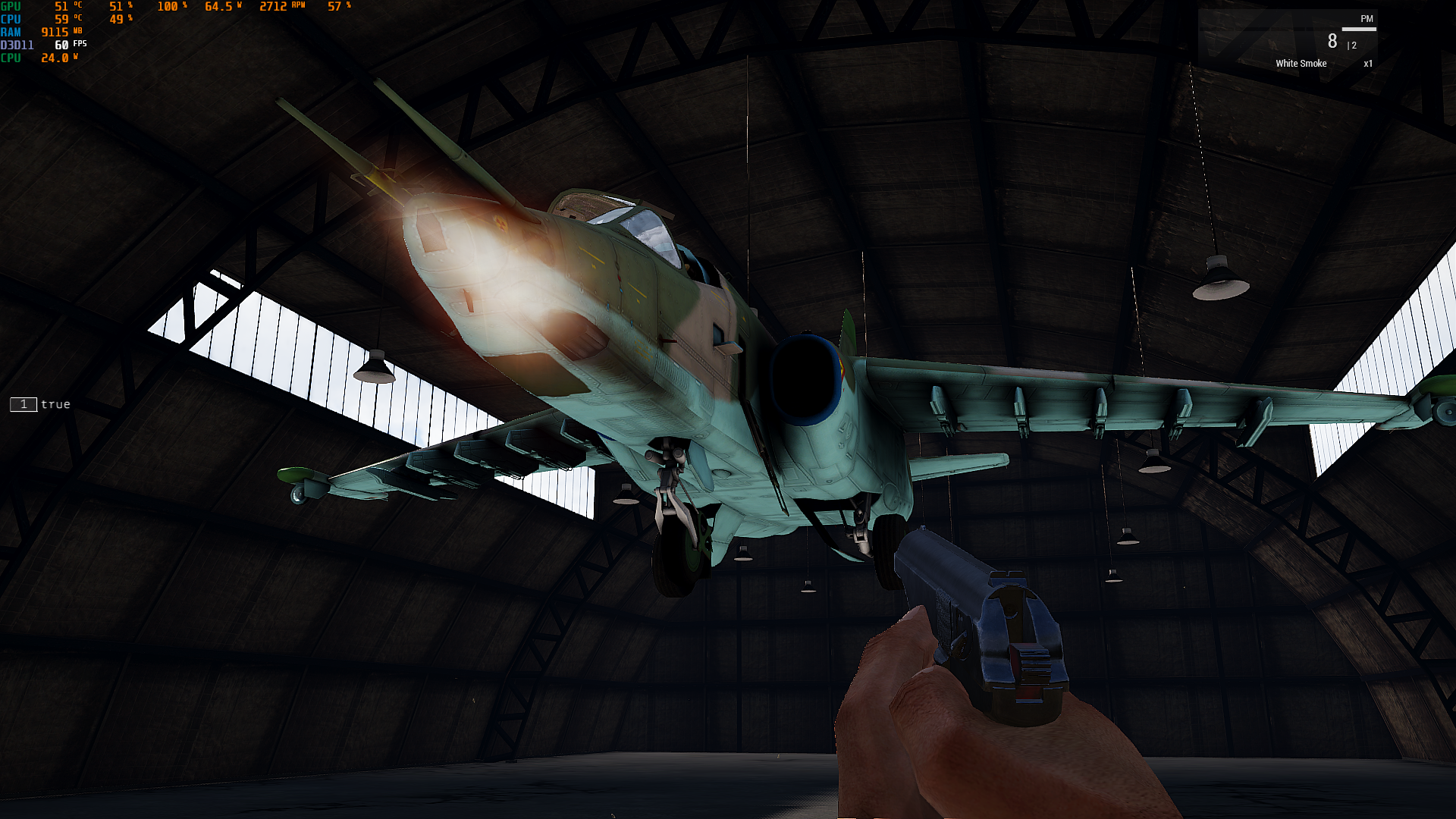
[typeof this, getPosWorld this, getDir this] call BIS_fnc_createSimpleObject
it floats
winter rose
yep
drifting portal
this also happens with the bar gate from vanilla arma 3
granite sky
What does boundingCenter return for these things?
drifting portal
granite sky
What does boundingCenter return for these things?
[0.00160265,0.0532498,0.500746]
For the plane?
drifting portal
yes
granite sky
Yeah no idea then.
winter rose
not a vanilla asset though 🙃 so try in a vanilla context to be sure to at least script it right 🙂
drifting portal
winter rose
not a vanilla asset though 🙃 so try in a vanilla context to be sure to at least...
I tried the bar gate
and H block watchtower
winter rose
then fix the code 😄
drifting portal
winter rose
then fix the code 😄
tried it with BIS_fnc_createSimpleObject
the bar gate floats
winter rose
you may have wrong value input, what do I know
drifting portal
drifting portal
```sqf
[typeof this, getPosWorld this, getDir this] call BIS_fnc_createSimpleObj...
This one
winter rose
[typeOf this, getPosWorld this, getDir this] call BIS_fnc_createSimpleObject
```meh
try```sqf
["wantedType", getPosWorld _helipad, 45] call BIS_fnc_createSimpleObject;
It works but why does it work?
drifting portal
little raptor
```sqf
_cfg >> "Turrets" >> _turretName >> "selectionFireAnim"
```
this doesn't work for planes?
little raptor
drifting portal
this doesn't work for planes?
it works for everything
you should also check the main config
for driver
drifting portal
little raptor
it works for everything
the plane has no turrets configuration
drifting portal
little raptor
for driver
can you write a path?
winter rose
drifting portal
It works but why does it work?
wrong something 😄
little raptor
drifting portal
can you write a path?
I said main config
_cfg >> "selectionFireAnim"
oh alright thanks
manic sigil
Hrn... my scripted trigger keeps resetting it's statements to ["true","",""] :c
 proven charm
manic sigil
Hrn... my scripted trigger keeps resetting it's statements to ["true","",""] :c
proven charm
manic sigil
Hrn... my scripted trigger keeps resetting it's statements to ["true","",""] :c
how's your code?
are multiple ctrlCommits a bad thing?
proven charm
it says all that? 😄
winter rose
IDk, you tell me 😜
https://community.bistudio.com/wiki/ctrlCommit
winter rose
well, no, no problem doing so 🙂
why, what would you fear?
proven charm
I fear the control would go crazy, if I call ctrlCommit before another ctrlCommit has finished
drifting portal
proven charm
are multiple ctrlCommits a bad thing?
https://sqf.fini.dev/convert
uses them quite a lot if you use the "hpp to sqf" conversion option, so I don't think they are bad
SQF Converter. The best Arma 3 SQF tools out there!
drifting portal
proven charm
I fear the control would go crazy, if I call ctrlCommit before another ctrlCommi...
ah Idk about that
winter rose
drifting portal
https://sqf.fini.dev/convert
uses them quite a lot if you use the "hpp to sqf" c...
empty code!
proven charm
I should test that in the editor but got lazy 😁
little raptor
proven charm
I fear the control would go crazy, if I call ctrlCommit before another ctrlCommi...
no
proven charm
great thx leo 🙂
 quiet geyser
Does anyone here have much experience with particles/Blastcore? I love Blastcore's smoke/fire effects when a vehicle is destroyed, and want to use that effect for some burning oil wells that are a) permanent for as long as the mission is running, and b) visible from further away/larger (that one's less required). Does anyone know a good way to attach this effect to another object/play with the parameters on it?
 livid wraith
probably not what you're looking for, but this will give you a basic idea of how to build your own emitter script -> https://community.bistudio.com/wiki/Particles_Tutorial
livid wraith
are projectiles that are launched from multi-tube launchers removed or moved from the muzzle position after launch ?
the projectile always seem to originate at the same position when drawn in a fired EH, but the actual missile flies away from a different slot. very noticeable on Cheetah and Tigris
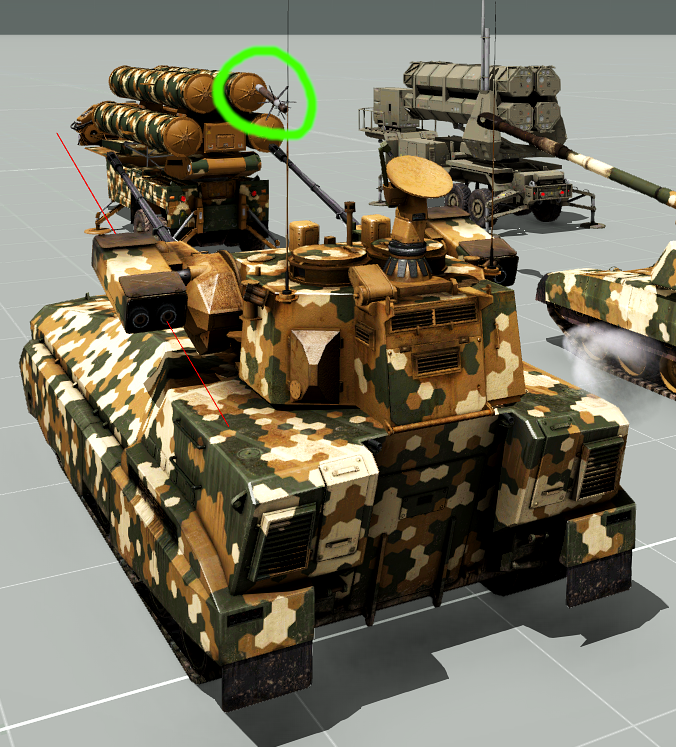
red is the actual projectile position and direction drawn from the fired EH, but it's actually "launched" from the right bay ....
 meager granite
I think there is a script that runs on fired event that adjusts missile position
livid wraith
i'll adjust my EH a bit and track it the first 10 frames and see what happens
meager granite
fired = "[_this select 0,_this select 6,'missile_move','MissileBase'] call BIS_fnc_missileLaunchPositionFix; _this call (uinamespace getvariable 'BIS_fnc_effectFired');";
RHS BM-21 probably works differently because it's made out of 40 pylons :P
livid wraith
interesting, didn't even think of looking at the vehicle if it had any magic done on it. TY 👍
open hollow
open hollow
im trying to ban a player via script if reconects too many times
im using a con...
i noticed somethinig, i try to track the times a client connects to the server, but noticed that Mission Event Handler "PlayerConnected", is executed every time the player goes from roleselection to the mission...
if i abort -> select a role -> continue , the event handler code is executed, how i can filter that, and only count it when a player is connected ?
granite sky
what does "connected" mean to you here?
open hollow
granite sky
what does "connected" mean to you here?
when a player join the server
there is a new eh for that  https://community.bistudio.com/wiki/Arma_3:_Mission_Event_Handlers#OnUserConnected
granite sky
I mean, they're already connected to the server when they're in role selection...
open hollow
granite sky
I mean, they're already connected to the server when they're in role selection.....
yea, but i want to count how many times you join the server, and not how many times you change slots borting and selecting a new role.
"PlayerConnected" eh is triggered when you join the mission, not when you join the server, ill try with "onUserConnected"
granite sky
onUserConnected triggers earlier than onPlayerConnected, I think.
open hollow
yea, that might be a problem, but nothing that a waituntil cant do 😄 ( inside a spawn)
granite sky
spawn + getClientState I guess, yeah
I might be misreading you anyway. If the goal is to trigger once when the player first reaches the role selection screen and not again until disconnected, onUserConnected should be ideal.
 half monolith
does anyone have experience with the preprocessor commands ?
#if __has_include("\z\ace\addons\main\script_component.hpp")
// File exists! Do something with it
#endif
im trying to setup a file to load a config if 2 if statements are true
I was wondering if i could use
_count_
and if the count reaches desired # load the desired config.
maybe there would be a better way to do it , im not sure.
tough abyss
@half monolith ```cpp
#if CONDITION_1 && CONDITION_2
// load config here
#endif
ty 🙂
would i need brackets at all ?
#if __has_include("\z\ace\addons\main\script_component.hpp") && __has_include("\z\ace\addons\main\script_component.hpp")
// File exists! Do something with it
#endif
this is basically what im trying to do if i am able to use multiple conditions i wasnt aware && was an option !!
tough abyss
You don't need parentheses if that's what you mean
half monolith
the way i have done it above is throwing an error to load the mission in editor.
should i define vars instead ?
tough abyss
Hm
half monolith
&encountered instead of =
half monolith
thanks for your time
little raptor
half monolith
ty 🙂
would i need brackets at all ?
```
#if __has_include("\z\ace\addons\mai...
preprocessor command cannot be multiline
you need to escape it with \
half monolith
in the file it is one line this is just how discord made it
this is beyond sqf lol.. seems only few know it
little raptor
ok. try wrapping the whole condition in ()
tough abyss
Weird, I'm getting issues with #if as well
little raptor
if it still doesn't work then maybe Arma doesn't support it
break it into multiple ifs
#if cond1
#if cond2

#endif
#endif
#if __has_include\z\ace\addons\main\script_component.hpp")
#__count__
#include "acestuff.cpp"
#endif
#if __has_include("\z\rhs\addons\stringtable.xml")
#include "rhsstuff.cpp"
#__count__
#__count__
#endif

#if __count__ = 1
//load ace arsenal

else
//load rhs arsenal
#endif
#if __count__ = 3
//load combined arsenal
endif
this was my idea, but i have no idea if this is how count is used
tough abyss
just this isn't working for me
#if __has_include("\z\ace\addons\main\script_component.hpp")
#define HAS_INCLUDE true
#endif
mikeros explodes
tough abyss
I'll see
little raptor
half monolith
```
#if __has_include\z\ace\addons\main\script_component.hpp")
#__count__
#inclu...
#if __has_include\z\ace\addons\main\script_component.hpp")
also that's wrong anyway
#if __count__ = 1
so is this
tough abyss
I guess && isn't supported in #if after all, huh
I'd break it into multiple #ifs as leopard suggested
seems mikeros, my version at least, thinks #if isn't even a valid preprocessor macro
little raptor
yeah like I said it's old
half monolith
little raptor
break it into multiple `if`s
```sqf
#if cond1
#if cond2
#endif
#endif
```
this "Seems" to be working but i do not have everything loaded to fully check it, i have just used the same file 2x.
i really appreciate the help guys, was stumped on this , hopefully this will be the answer
tough abyss
Ah I see, #if was only added to the BIKI in feb. 2021, makes sense
and yeah that should work fine
assuming no errors elsewhere
half monolith
it loaded and ran fine with the includes i have and the two ifs on top of each other so i assume its good, but this is arma
if i can get this to work i can remove it as a param in the lobby hopefully
for reference does anyone know how count works in these files ?
granite sky
You mean __COUNTER__?
open fractal
I'm trying to populate the map with old blood pools, but I also need to resize with setObjectScale, so I tried to create simple objects with the model and texture of the blood pools. Here's the issue:
private _model = "a3\props_f_orange\humanitarian\garbage\bloodpool_01_large_f.p3d"; //model path returned by getModelInfo
private _texture = [0, "a3\props_f_orange\humanitarian\garbage\data\bloodpool_large_old_ca.paa"]; //texture path returned by getObjectTextures
private _crater = createSimpleObject [_model, [0,0,0]];
_crater setObjectTextureGlobal _texture;
_crater setPosASL _posASL;
_crater setDir (random 360);
_crater setObjectScale (0.4 + random 0.2);
setObjectTextureGlobal doesn't seem to have any effect and it always creates a "new" looking blood pool. I don't want it to explicitly look like blood, I want the dark splotch of the old blood texture. Is my method just not going to work?
["a3\props_f_orange\humanitarian\garbage\data\bloodpool_large_old_ca.paa"] this is the getObjectTextures return
 distant egret
open fractal
I'm trying to populate the map with old blood pools, but I also need to resize w...
distant egret
open fractal
I'm trying to populate the map with old blood pools, but I also need to resize w...
Use alternative syntax. First one can't be retextured.
copper raven
little raptor
break it into multiple `if`s
```sqf
#if cond1
#if cond2
#endif
#endif
```
that won't work unless it got fixed, or i think it was #ifdef 
open fractal
distant egret
Use alternative syntax. First one can't be retextured.
what alt syntax?
open fractal
oh perfect thank you
 faint oasis
Hi, can we disable the "onsingleclick" on the map to order "moveto" pos ? Because when i'm using the map and i'm commander it is always sending a "Move" order so it's annoying
open fractal
private _agent = createAgent [typeOf _realUnit, _pos, [], 0, "CAN_COLLIDE"];
_agent spawn {
  while {alive _this} do {
    sleep 0.5;
    _this moveTo (getPosATL player);
  };
};
``` is this incorrect? Why is the agent not moving?Alright, just starting to dip my toes into proper Addon making.
I've taken my project thus far, split the whole sordid stack into proper fn_ files, and generated a config.cpp. However, for the life of me, I can't seem to get it to register where the files are; every build I've tried has ended with 'Script addons\functions\fn_AirborneTrigger.sqf not found', and the config viewer populated with blank classes.
tough abyss
@manic sigil How is your CfgFunctions set up?
manic sigil
tough abyss
<@154683750045712384> How is your `CfgFunctions` set up?
To shorthand it;
class cfgFunctions
{
    class SRD
    {

        class functions
            {
                file="addons\functions";
            class AirborneTrigger;
            }
        }
}
The addon folder is only about that complex; @MFAIO\addons\functions is where the files are all located, save for config in addons.
tough abyss
try this
class CfgFunctions
{
    class SRD
    {
        class functions
        {
            tag="SRD";
            file="\addons\functions";
            class AirborneTrigger;
        };
    };
};
No dice :/
I even commented out the other functions; if I can get even one working, I'll at least be on the right track.
tough abyss
Hmm
manic sigil
Just to be clear and sure; the file in @MFAIO\addons\functions is named 'fn_AirborneTrigger.sqf'
granite sky
missing the {} after the function name.
Although I have no idea if that's strictly required.
manic sigil
I had one previously, with description = "what the function does" and preInit = 1;
Same result.
granite sky
I think you're a folder short though. The standard addon setup is @modname\addons\addonname\functions, with a CfgFunctions inside each addonname folder and a path starting at functions.
each addonname folder gets compiled to a PBO and so the structure remains the same.
manic sigil
Sounds arbitrary, but who am I to judge? So I need to fit another step in, ala @MFAIO\addons\newFolderHere\functions?
tough abyss
That could be the problem
 agile cargo
is it possible to make the weaponInfo and stanceIndicator settings client side somehow?
they are set in the server settings
manic sigil
granite sky
I think you're a folder short though. The standard addon setup is @modname\addon...
Hrn, well, at least I know that it's registering my different PBO updates. When you say a CfgFunctions inside each folder, do you mean a whole CfgFunctions.cpp/hpp, or just a class level in the config.cpp?
 opal zephyr
Is there an accurate way to determine the size of an explosion?
Right now im getting the explosion using nearestObject with the filter of #explosion
Or really any information about the explosion I guess
manic sigil
Finally T_T
class CfgFunctions
{
    class SRD
    {
     tag="SRD";
        class functions
        {

            file="@MFAIO\addons\Reinforce\functions";
            class AirborneTrigger;
        };
    };
};
Im guessing pushing to PBO is supposed to be a last step, since it takes way longer to test changes?
granite sky
If you enable filepatching then it doesn't make a lot of difference.
As long as you don't need to add a file or change config anyway.
manic sigil
Oh? With filepatching, do I just recompile in the config viewer?
granite sky
I don't know. I just restart the mission which automatically recompiles.
It's a lot faster than restarting Arma at least.
manic sigil
As Ive experienced t_t
open fractal
How do I prevent a unit from getting in/out of a vehicle on its own? Disabled ai "ALL" and it still jumps in a seat when I bring it near a vehicle it's assigned to
disabling simulation helps but then animations don't work
it also gets out when shot at
no ai mods
tough abyss
could lock the vehicle
then unlock when you actually want it to get in/out
there might be a better way though, dunno
open fractal
I'm trying to have the player pick up the unit, place it in a vehicle, and drive away
the issue is the unit jumps back in whenever it's unloaded
using my own script not ace or anything
tough abyss
perhaps unassignVehicle
tough abyss
no problem
proven charm
can you make button the default button so that it accepts enter press?
or do I just use event handler?
proven charm
Found it! shortcuts[] = {DIK_RETURN,DIK_NUMPADENTER}; 😃
 distant oyster
manic sigil
Oh? With filepatching, do I just recompile in the config viewer?
distant oyster
manic sigil
Oh? With filepatching, do I just recompile in the config viewer?
you probably mean functions viewer?
recompiling functions in an addon is sadly not that easy. the functions path is baked into the pbo which you would have to rebuild for which you would have to restart the game. but you could just symlink your functions folder to a new empty mission and recompile from there. for that you need a description.ext with the following line: allowFunctionsRecompile = 1;. Now you can recompile using the mission path like so:
TAG_fnc_fncName = compileScript ["functions\fn_fncName.sqf"];
 crude vigil
distant oyster
recompiling functions in an addon is sadly not that easy. the functions path is ...
crude vigil
distant oyster
recompiling functions in an addon is sadly not that easy. the functions path is ...
Afaik, this solution does not even benefit from -filePatching as local missions should not be requiring that. If you have -filePatching, you can simply put your folder(source folder) with corresponding file path relative to Arma 3 root folder(so I put my non-pboed versions into arma 3 root using symlink[you can just have original there, matter of preference]) and all the changes I made is directly updated into Functions Viewer. allowFunctionsRecompile = 1 allows me to recompile using the buttons in Functions Viewer or I can also use BIS_fnc_recompile if I am too lazy to do it for each test. Therefore I do not really see the point of symlinking to a mission as well as compileScript usage as well as the usage of compileScript line. Thus I believe it is in fact easy to recompile functions in an addon. 😁
manic sigil
distant oyster
you probably mean functions viewer?
Yes, of course T_T
I got it figured, at least for now; unpacked my files into a singular mission so I can easily edit and tinker, packing is a finalizing action.
I'm trying to use the select {_x > #} on an array of arrays, passing a variable (which is a number) to #, but it's just not taking :/
    RecruitCount = ([typeOf _helicopter,true] call bis_fnc_crewCount) - (count crew _helicopter);
    spawnArray =
        [
            ["vn_b_men_army_16", _helicopter, "AB"],
            ["vn_b_men_army_06", _helicopter, "AB"],
            ["vn_b_men_army_07", _helicopter, "AB"],
            ["vn_b_men_army_10", _helicopter, "AB"],
            ["vn_b_men_army_12", _helicopter, "AB"],
            ["vn_b_men_army_09", _helicopter, "AB"],
            ["vn_b_men_army_03", _helicopter, "AB"],
            ["vn_b_men_army_16", _helicopter, "AB"],
            ["vn_b_men_army_06", _helicopter, "AB"],
            ["vn_b_men_army_07", _helicopter, "AB"]
        ];

filteredSpawnArray = spawnArray select {_x > recruitCount-1}
Or if there's some way to iterate down the spawnArray for recruitCount number of times, that'd work too.
little raptor
manic sigil
I'm trying to use the select {_x > #} on an array of arrays, passing a variable...
idk what that's supposed to mean
_x is an array
so _x > _number is meaningless
spawnArray select {_x > recruitCount-1}
do you mean you want to selectrecruitCountitems of the array?
as in recruitCount times?
manic sigil
Yeah, in the Array article they have an example of using select {_x >3} to parse every element from select 3 and up.
Buuuuut reading the Select article, I found a much better solution of just select [0, recruitCount]
little raptor
manic sigil
Yeah, in the Array article they have an example of using select {_x >3} to parse...
an example of using select {_x >3} to parse every element from select 3 and up.
that's not what it meant
manic sigil
I guess :/
little raptor
it meant select every _x that is > 3
manic sigil
...
little raptor
it had nothing to do with index
manic sigil
aw feck yeah that tracks
manic sigil
It's a search function, ah.
little raptor
filter
manic sigil
Yeah, that.
proven charm
can you make control initially invisible via some config class property?
little raptor
fade
proven charm
little raptor
fade
ah, Im using ctrlShow in script but that probably isn't same as fade?
 kindred zephyr
Hello, I have a doubt maybe any of you could answer.
Can "DefaultAction" be used with the
Action
command or the only alternative to this is using
player Action ["UseWeapon", player, player, 0];
```? warm hedge
What's the goal for you?
winter rose
@kindred zephyr↑
kindred zephyr
warm hedge
What's the goal for you?
make the player shoot without the user input at set times.
but I just found that
player fire (currentMuzzle player);
works for what i was looking for.
 rough summit
i need focus player's map, when he open it on specific position (marker), how can i do it?
winter rose
rough summit
i need focus player's map, when he open it on specific position (marker), how ca...
what do you mean by "focus player's map"?
rough summit
Center on marker
For example, my position on right upper corner
But when i open map, it zoom and center on specific position
Marker, for example
winter rose
using the Map event handler
https://community.bistudio.com/wiki/Arma_3:_Mission_Event_Handlers#Map
you can do things
rough summit
Im found it, but i have no idea how can i catch map ctrl
https://community.bistudio.com/wiki/ctrlMapSetPosition
I know about EH. My trouble in understanging, which commands i need to use for focusing map 🙂
winter rose
ah! then, to get the map, use findDisplay 12
then use mapAnimAdd and mapAnimCommit
https://community.bistudio.com/wiki/mapAnimAdd
https://community.bistudio.com/wiki/mapAnimCommit
rough summit
k, let me try
winter rose
wait, actually mapAnimAdd etc does not need the display at all 😁
rough summit
It works, thanks for help
winter rose
w/ pleasure!
 hasty gate
Does sqf say3d function attach created sound to the object? https://community.bistudio.com/wiki/say3D If not, what is the best way to play 3d sound attached to an object (to simulate sound generated by the object like a vehicle engine)
rough summit
hasty gate
Does sqf say3d function attach created sound to the object? https://community.bi...
Yes
But if u attach say3d to ur radio, u can't stop music without deleting object
The best way - creating invisible helipad and attach it to ur radio, after that attach say3d to ur helipad
hasty gate
I think now you can delete a sound, because now say3d does return a sound object
hasty gate
thanks anyway
there is one more thing, can this really only play a single sound from single source?
does it also mean it will stop the sound currently playing?
open fractal
you have to create multiple objects if you want to play multiple sounds at the same time
https://community.bistudio.com/wiki/say3D see example 2
(you don't need to use an invisible helipad)
still forum
half monolith
ty 🙂
would i need brackets at all ?
```
#if __has_include("\z\ace\addons\mai...
Well && is not a thing, so you not being aware of it makes sense.
still forum
tough abyss
just this isn't working for me
```cpp
#if __has_include("\z\ace\addons\main\scri...
Well of course mikero explodes. Mikero doesn't know what mod you may have potentially maybe loaded at some arbitrary time later in some other program. It can't binarize that
nested if's is the way to go
granite sky
I figured if you're using __has_include on external mods then the idea is not to binarize.
still forum
yeah binarizing and trying to do runtime checks doesn't make sense together
 coarse dragon
class CfgSounds
{

    class longone
    {
      name = "longone";
      sound[] = {"sounds\longone.ogg", 1.8,1};
      titles[] = {0,""};
    };
    class fear-not-brothers
    {
      name = "fear-not-brothers";
      sound[] = {"sounds\fear-not-brothers.ogg", 1,1};
      titles[] = {0,""};
    };
};
whats wrong with this? im getting odd errors
still forum
- not allowed
coarse dragon
still forum
`-` not allowed
thank you 🙂
coarse dragon
is there a script that make AI pilots just do a transport unload 100% of the time regardless of nukes dragons and shit flying at em ect.
ive done autotarget combat ect turned off
ffs they just land for 1 sec and take off agin
this was working 40 mins ago i dont understand why
why the hell are they just tapping the floor then taking off
12 hours wasted ffs
granite sky
Did you give them a transport unload waypoint?
coarse dragon
yea
i dont understand this,,, they where working fine, then i moved it like 1cm back down, and they have the invis heli pad ect
open fractal
I had this working earlier, so I feel like I'm missing something obvious. Helicopter should be tailing whoever is carrying hostage until it dies, but the helicopter just hovers downward to its flyInHeight and doesn't move.
finalHeli enableSimulationGlobal true;
finalHeli hideObjectGlobal false;
finalHeli flyInHeight 50;
finalHeli setPilotLight true;
{
    _x setCombatMode "GREEN";
    _x disableAI "LIGHTS";
    _x disableAI "AUTOCOMBAT";
} forEach crew finalHeli;

0 spawn {
    while {alive finalHeli} do {
        driver finalHeli doMove (getPosATL vehicle hostage);
        sleep 1;
        systemChat "Final heli move order";
    };
};
``` here's the setup. any ideas?getPosATL vehicle hostage definitely returns a position
and finalHeli is defined
I also tried replacing driver with crew since it takes an array as well
resolved, helicopter can adjust to flyInHeight without pilot simulation enabled
winter rose
I am not sure I understood the problem or the solution 😄
open fractal
I was duped into thinking the helicopter pilot's simulation was enabled because the helicopter changed altitude to meet the flyInHeight threshold, so I just manually enabled simulation
tough abyss
still forum
Well of course mikero explodes. Mikero doesn't know what mod you may have potent...
Makes sense, I hadn't considered the binarization aspect at the time. It was just meant to be test of #if, not code I'd actually use in a mod.
half monolith
so the nested ifs did work and i am using has_include but it didnt work as desired. its basically my description file and it throws error because it sees too many class arsenalconfigs
i ended up putting the if statements right in the arsenal for weapons backbacks items and mags, for each class.
it works for all mods concerned.
i did pack it with mikeroo it did take a minute..
it works dedicated as well
-Z=[i].wss,[i].ogg,[i].jpg,[i].sq* -X=*.txt -M -N -P
those are my packing params.
now someone can tell me why its a bad idea 🙂
winter rose
that would be… not scripting 🙂
manic sigil
open fractal
I had this working earlier, so I feel like I'm missing something obvious. Helico...
granite sky
setMass propagation somehow so slow that it's much faster to remoteExec the damned thing.
One of those "why the hell is ACE doing that... oh".
tough abyss
hello people very good evening by chance you know some script to create a garbage box to put equipment inside and disappear
winter rose
tough abyss
hello people very good evening by chance you know some script to create a garbag...
Yes sir!
You should use the ContainerClosed event handler 🙂
PS: don't crosspost, thanks
tough abyss
winter rose
Yes sir!
You should use the ContainerClosed event handler 🙂
PS: ***don't*** cr...
sorry for the spam and in the form of a script how would it be to put it inside a box or another item you want
 pseudo ridge
Can i create with Arma 3 script a PIP camera and a PIP monitor that shows what the camera is seeing?
pseudo ridge
tough abyss
sorry for the spam and in the form of a script how would it be to put it inside ...
As i understand you can use any box. Then you just put items inside it, when you close the box inside items disappears.
The ContainerClosed event handler can be used to delete items when the container (the box) is closed by player.
tough abyss
pseudo ridge
Can i create with Arma 3 script a PIP camera and a PIP monitor that shows what t...
Yes
Just need to use a render texture on the monitor that links to the PIP camera
pseudo ridge
There is any game vanilla object that already have it?
tough abyss
 south swan
pseudo ridge
Can i create with Arma 3 script a PIP camera and a PIP monitor that shows what t...
south swan
pseudo ridge
Can i create with Arma 3 script a PIP camera and a PIP monitor that shows what t...
also this, i suppose (although i don't know if things have changed since KK posted that) http://killzonekid.com/arma-scripting-tutorials-uav-r2t-and-pip/
pseudo ridge
Amazing! Thanks @south swan !
still forum
half monolith
so the nested ifs did work and i am using has_include but it didnt work as d...
If it says you have duplicate classes, the tool is either bad or you indeed have multiple classes.
Could post your config in #arma3_config
But i heard mikero doesn't support #if? So its probably bad tools fault
But was workaround, just don't have multiple classes, put the if inside the class
 echo swan
how would i place the playSound3Ds position
 desert palm
whats the line to put in the config to make a the dress thermal proof? can anyone send me the wiki of that, trying to work on smth
little raptor
echo swan
how would i place the playSound3Ds position
better use say3D
but if you still want to use playSound3D, place an object in 3DEN, select it, then open the console and run this:
getPosWorld (get3DENSelected "object"#0)
afaik it's not something you put in config. it depends on the materials that are linked to the model
south swan
https://community.bistudio.com/wiki/setObjectMaterial though 🤔 If the custom texture can be applied to hiddenSelection, then can the custom material be as well?
it seems to work with the vanilla rvmat files, applying the vest rvmat onto the person makes their uniform have funny texture in visual and no thermal signature in TI
seems to work on my machine. I've copied the vanilla uniform rvmat to my mission folder, changed the texture in StageTI block to "#(argb,8,8,3)color(0,0,0,0)", applied that in-game with setObjectMaterial and got myself a normal-looking uniform that's black in TI
south swan
desert palm
whats the line to put in the config to make a the dress thermal proof? can anyon...
- You would need to have unpacked game files.
- Make sure the uniform has a hiddenSelection (i.e. with
getObjectMaterials _unithttps://community.bistudio.com/wiki/getObjectMaterials, the returned array shouldn't be empty). - Find a proper .rvmat file (i.e.
"a3\characters_f\blufor\data\clothing1.rvmat"seems to be it for the BLUFOR units i check). I'm not sure if there is a proper way of finding the exact thing, though. Maybe starting with the location of textures listed ingetObjectTextures _unitwould work. - Make a copy of the .rvmat file in your mission folder.
- Open the freshly made copy, find
class StageTIpart in it and change the contents totexture="#(argb,8,8,3)color(0,0,0,0)";. - In-game run
_unit setObjectMaterialGlobal [0, "clothing_noTI.rvmat"](with"clothing_noTI.rvmat"being the name of edited .rvmat file).
Wiki pages to read: https://community.bistudio.com/wiki/setObjectMaterialGlobal, https://community.bistudio.com/wiki/Thermal_Imaging_Maps, https://community.bistudio.com/wiki/Procedural_Textures#Color, https://community.bistudio.com/wiki/Super_shader
rough summit
How can i remove messages like "idunnoplayer connected" from systemchat?
warm hedge
rough summit
thanks
sharp grotto
rough summit
How can i remove messages like "idunnoplayer connected" from systemchat?
Not the best code but works 🐰
addMissionEventHandler ["HandleChatMessage", {

    params ["_channel", "", "", "_text"];
    _ltxt = toLower _text;
    if(_channel == 16) then
    {
        {
            if(_ltxt find _x > -1)exitWith{true};

        } forEach [

            [localize "STR_MP_CONNECTION_LOOSING", " "] call BIS_fnc_splitString select 3,
            [localize "STR_MP_VALIDERROR_2", " "] call BIS_fnc_splitString select 2,
            [localize "str_mp_connect", " "] call BIS_fnc_splitString select 2,
            [localize "str_mp_connecting", " "] call BIS_fnc_splitString select 2,
            [localize "str_mp_disconnect", " "] call BIS_fnc_splitString select 2
        ];
    };

}];
not all objects support hidden selections materials
such as Viper/CTRG units
little raptor
rough summit
How can i remove messages like "idunnoplayer connected" from systemchat?
clearRadio if you mean clear the chat
south swan
little raptor
not all objects support hidden selections materials
i've just tried and "O_V_Soldier_Exp_hex_F" does, though
as in applying aaa setObjectMaterial [0, "a3\characters_f\blufor\data\clothing1.rvmat"] makes it shine in TI :3
half monolith
still forum
If it says you have duplicate classes, the tool is either bad or you indeed have...
no
winter rose
half monolith
no
more details pls
also not #arma3_scripting so go there → #arma3_config
half monolith
winter rose
more details pls
also not <#105462984087728128> so go there → <#1221214447033384...
ill post something this afternoon, if you dont mind looking. things "work" but, mikeroos didnt like it.
packed under protest, but no error.
winter rose
I am no mod maker, only scripter/mission maker I'm afraid ^^
winter rose
no need for mikero tools packing then, just save with Eden?
half monolith
ive never tried editor pbo.
i like the compression with mikero
winter rose
try it then.
half monolith
🙂 i will
ill show a config in the other channel in a bit
proven charm
I have question about ending mission. this is the code I have: ```sqf
["Victory"] remoteExecCall ["BIS_fnc_endMission", _side];
// Rest will lose
{
["Defeat"] remoteExecCall ["BIS_fnc_endMission", _x];
} foreach _eneSides;
["Victory"] remoteExecCall ["BIS_fnc_endMission", 2]; // End game, must have end type specified
is that the correct way to end mission? I was thinking of putting something else for the server than "Victory"
winter rose
victory should ideally be detected server-side
you can set whatever you want on the server… but keep in mind that a server can also be a player 🙂
(also ↓)
 wicked roostBOT
How to use SQF syntax highlighting in Discord
```sqf
// your code here
hint "good!";
```
↓
// your code here
hint "good!";
it's all server code. When I put "Victory" for server (target 2) i think it may make all clients to end in "Victory"
winter rose
if it is server-side, don't remote exec on the server? 🤨
it is just one extra step for nothing?
proven charm
winter rose
it is just one extra step for nothing?
oh yeah good point have to change that
winter rose
["Victory"] remoteExecCall ["BIS_fnc_endMission", _side]; // winners
["Defeat"] remoteExecCall ["BIS_fnc_endMission", _eneSides]; // losers

if (isDedicated) then
{
  ["ServerEnd"] call BIS_fnc_endMission;
};
@proven charm ↑
proven charm
is ServerEnd special end for the server? i was thinking how to make it so that ending mission in dedicated wont effect client endings
winter rose
no, define one in your Cfg
or use "Victory", whatever floats your goat 🐐
proven charm
and it doesnt affect clients?
winter rose
no
proven charm
great, i will take your word for it 😄
winter rose
I learn from the mistakes other people make following my advices
proven charm
thx 🙂
pseudo ridge
@tough abyss when/if you have the time 🤓
Can't use camSetFov / camCommit or camPrepareFov / camCommitPrepared on PIP cameras? There is no change on zoom.
little raptor
pseudo ridge
<@456226577798135808> when/if you have the time 🤓
Can't use **camSetFov / camC...
you can
south swan
can confirm, works on my machine.
tough abyss
Can also confirm it should work
little raptor
well there's no reason it shouldn't. "PiP" is just a framebuffer
tough abyss
Indeed
pseudo ridge
Thanks, i must be doing something wrong.
tough abyss
Though the last time I checked the "aspect ratio" setting for r2t is broken for some reason
So that's fun
Then again so is a lot of the procedural texture stuff
 unborn bronze
Hey! Anyone would be familiar with a way to make a drone class harder to spot for AI?
manic sigil
How hard are you talking? Just 'easier to sneak around', or 'will not notice at all?'
unborn bronze
I'm looking for the former but I'd settle for the latter 😛
winter rose
you can either setCaptive (they will eventually notice it and look at it, but never consider it an enemy)
or use setUnitTrait for camouflage (IF it works for vehicles 😬)
unborn bronze
Ah totally didn't even consider setcaptive
Will tell you guys if unit traits are effective
manic sigil
Didnt know about setUnitTraits, but was thinking setCaptive, maybe with a proximity trigger to keep anyone from being cheeky if they realize the power they wield.
tough abyss
hideObjectGlobal will make it pretty hard to spot :P
I mean you DID say you'd settle for them not noticing at all so...
unborn bronze
traits don't work, captive does. I think no one is surprised but thought someone might wanna know 
winter rose
thanks for confirming 👍
manic sigil
"Man, moving things to functions is going great, but it keeps throwing errors about undefined variables everywhere it didnt before, I should ask if anyone has any tips on how to avoid it."
...
"Maybe 'don't preinit your functions if theyre not supposed to run independently'."
winter rose
"don't split what is supposed to be together?" :p
 sullen sigil
hello my fellows has anyone got a clue how to find where the impact of a projectile landed (grenade launcher shell probs)
winter rose
don't ammo have event handlers now or is it 2.10?
sullen sigil
i believe thats in 2.10 but im probably wrong
winter rose
indeed
 sullen sigil
yeah just found that too
im trying to find the position of where a GL shell landed so i can set the players velocity for some arbitrary number in that direction
south swan
hmmm, i wonder if when i find a projectile via "Fired" EH and add a "Deleted" EH for it - would the second one fire properly?
winter rose
what about "Hit"/"HitPart" EH @sullen sigil
from what I think I understood, you don't want to add an event handler on all ammo, you want to know "by what and where the player has been injured"?
sullen sigil
nope, GL shell fired from player's launcher (will probably be custom gl shell) which lands and players velocity is set in that direction
basically a grappling hook
winter rose
…ah
in the future please do tell when you plan "away from the usual features" kind of things 😄
winter rose
I would say wait for 2.10 (or dev in DevBranch) because you need precision for that (that, or… use an awful onEachFrame 😬)
sullen sigil
HitPart would be what I want wouldn't it be as that returns bullet impact right
for when 2.10
manic sigil
winter rose
"don't split what is supposed to be together?" :p
Be fair, it all works as intended, just doesnt like being told to find a vehicle that doesnt exist yet 🙃
sullen sigil
Is it not possible to fire a vehicle or something 🤔
winter rose
sullen sigil
`HitPart` would be what I want wouldn't it be as that returns bullet impact righ...
I heard end of this month
sullen sigil
I need to create a rope from the player to that direction so I'll need a vehicle at some point anyway
winter rose
sullen sigil
Is it not possible to fire a vehicle or something 🤔
use the fired EH, replace ammo with your own object that is not an ammo, reuse the same velocity, ????, profit?
sullen sigil
and then just figure out how to attachto wherever it collides with an object/terrain or something?
or would i want to freeze it when its velocity reaches 0 or something
winter rose
something like that, the old and ugly onEachFrame
or, dev in Dev and wait for a month to release
 winter rose
sullen sigil
wait thats 2.10
winter rose
sullen sigil
wait thats 2.10
HitPart is 2.10?
ah, the Projectile one, yes
are you releasing tomorrow that you cannot wait?
sullen sigil
no i just have an incredible amount of free time right now
winter rose
then go Dev? 😄
you'll be ready for the future and won't dev twice
unless you absolutely don't want to miss 1 week of public release then want to rewrite everything once again 😄
south swan
old and ugly waitUntil is fun :3
sullen sigil
i think it'll probably be easiest if i just do it in dev branch for what im trying to do
sharp grotto
What would be they DIk keycode for "CTRL + P", i can't find anything or any explanation how to calculate it 🤔
winter rose
don't you try override the DLC popup 😄
sharp grotto
winter rose
don't you try override the DLC popup 😄
Not my goal, i have a function where players can share notes and that's on CTRL + P.
So i want to display the proper keycode in a keybinds menu
https://gyazo.com/e19eb6cf036e62458b5cddb720a45507
I realised you could combine them because there is this "0x1D130023" for CTRL + H.
 south swan
inb4 in-game matrix printer
sullen sigil
i dont need to switch out of dev branch if i want to go play on multiplayer right
winter rose
sullen sigil
i dont need to switch out of dev branch if i want to go play on multiplayer righ...
you do
sullen sigil
sadness
winter rose
https://dev.arma3.com/dev-branch
Multiplayer is not compatible with main branch. You will not be able to play on main branch servers, thus restricting you to a smaller range of testing servers.

Arma 3
Experience true combat gameplay in a massive military sandbox. Authentic, diverse, open - Arma 3 sends you to war.
sullen sigil
time to force everyone in my unit to start using dev branch
winter rose
but you can have both parallel with some SteamAPI magic I don't know
sullen sigil
its fine i'll just end up forgetting every time
winter rose
manic sigil
sullen sigil
i think it'll probably be easiest if i just do it in dev branch for what im tryi...
Dumb question im sure, but how absolutely necessary is it for your grappling hook to have ballistic physics?
sullen sigil
how can you get less necessary than completely unecessary
it just needs to be fired from a GL
winter rose
sullen sigil
it just needs to be fired from a GL
then fire and trace a straight line with lineIntersect commands? 😄
manic sigil
Custom blank ammo, onFired, move to cursorobject sort of thing?
Not cursorobject but i cant recall the proper command for 'where you are aiming'
winter rose
sharp grotto
https://gyazo.com/e19eb6cf036e62458b5cddb720a45507
I realised you could combine ...
winter rose
manic sigil
Not cursorobject but i cant recall the proper command for 'where you are aiming'
not screenToWorld either
lineIntersectsSurfaces
sullen sigil
having the actual gl projectile still "launch"/be visible would be nice but its not the end of the world if it doesnt
sullen sigil
manic sigil
Custom blank ammo, onFired, move to cursorobject sort of thing?
more thinking setvelocity in the direction of the "end" so that you've got momentum but effectively yes
I'm using CBA so I can use the invisible target vehicle for attaching the rope to and such
manic sigil
Yeah, that looks about right, I tinkered with it all of once when I was prototyping a shoulder-mounted grenade launcher/power armor type thing.
sullen sigil
I'm unsure how I'm going to manage the precision part though
sullen sigil

I've managed to attach a vehicle to any projectile but it's offset and I'm also 90% sure this is an awful way of doing it
hallow mortar
winter rose
see https://community.bistudio.com/wiki/Game_Updater
Did this ever get fixed to work with Steam Guard?
winter rose
no idea
sullen sigil
for the HitPart EH I want to add that to the projectile don't I as that gets damaged upon impact?
winter rose
use Deleted if you go for the projectile EH
sullen sigil
so I want to grab the position, freeze the vehicle and set its position to the position returned in Deleted right
winter rose
I guess?
sullen sigil
goated
then rope create and setvelocity in that direction
this is easier than i thought
sullen sigil
coolbeans now for the physics
does anyone know how to get rid of the initial funkiness
with collisions
tough abyss
Define initial funkiness and post your code
sullen sigil
sullen sigil
https://cdn.discordapp.com/attachments/553916726496985090/1007323273668862043/Ar...
here
im not doing anything script wise to cause the movement
player addEventHandler ["Fired", {
    params ["_unit", "_weapon", "_muzzle", "_mode", "_ammo", "_magazine", "_projectile", "_gunner"];
    if (_magazine isEqualTo "OPTRE_3Rnd_Smoke_Grenade_shell") then {
    _projectile addEventHandler ["Deleted", {
    params ["_entity"];
    _entityPos = getPos _entity;
    _Handler = createVehicle ["CBA_B_InvisibleTargetVehicle", position _entity];
    _Handler setPos _entityPos;
    player allowDamage false;
    _daRope = ropeCreate [_Handler, [0,0,0], player, [0,0,0],500];
    ropeUnwind [_daRope, 20, 5]
        }];
    };
}];```slightly changed the code but it still behaves the same
tough abyss
First thing is for the love of all that is holy do not use getPos or position
tough abyss
Or setPos
You should use either ATL, ASL, or World positioning based on what the commands you're using expect
In your case
createVehicle expects ATL positioning
So use getPosATL
And setPosATL
sullen sigil
and replace position with getPosATL too right
tough abyss
Not sure why you even have that to be honest
When _entityPos already has the same value
tough abyss
Good
And if it still acts weird it's probably due to your rope commands
In which case you'll need to tweak them
sullen sigil
you can but it gets funky
tough abyss
I imagine physX isn't fond of it yeah
tough abyss
Either way the getPos/setPos thing is important to remember for the future
For almost all intents and purposes they are not the correct commands to use for positioning
sullen sigil
yeah youve already told me when i was making my voice activated mines i was just being dumb
tough abyss
No worries
sullen sigil
i cannot put a sleep command between the rope being made and it being shortened
welp
sullen sigil
still complaining suspending not allowed in this context
_handle = 0 spawn {
player addEventHandler ["Fired", {
    params ["_unit", "_weapon", "_muzzle", "_mode", "_ammo", "_magazine", "_projectile", "_gunner"];
    if (_magazine isEqualTo "OPTRE_3Rnd_Smoke_Grenade_shell") then {
    _projectile addEventHandler ["Deleted", {
    params ["_entity"];
    _entityPos = getPosATL _entity;
    _Handler = createVehicle ["CBA_B_InvisibleTargetVehicle", _entityPos];
    _Handler setPosATL _entityPos;
    player allowDamage false;
    _daRope = ropeCreate [_Handler, [0,0,0], player, [0,0,0],50];
    sleep 3;
    ropeUnwind [_daRope, 5, 5]
        }];
    };
}];
};``` updated codeyou need to spawn inside the EH, not when you add the EH
hallow mortar
after the params and then you need to pass the params to the spawn as arguments (another params inside the spawn) as well
tough abyss
Right at the beginning of the deleted event handler
Do _this spawn {
Then params in that
Code in most event handlers automatically runs unscheduled
Meaning the spawn has to be in the actual event handler to make it scheduled
sullen sigil
player addEventHandler ["Fired", {
    params ["_unit", "_weapon", "_muzzle", "_mode", "_ammo", "_magazine", "_projectile", "_gunner"];
    if (_magazine isEqualTo "OPTRE_3Rnd_Smoke_Grenade_shell") then {
    _projectile addEventHandler ["Deleted", {
    _this spawn {
    params ["_entity"];
    _entityPos = getPosATL _entity;
    _Handler = createVehicle ["CBA_B_InvisibleTargetVehicle", _entityPos];
    _Handler setPosATL _entityPos;
    player allowDamage false;
    _daRope = ropeCreate [_Handler, [0,0,0], player, [0,0,0],50];
    sleep 3;
    ropeUnwind [_daRope, 5, 5]
            };
        }];
    };
}];``` so like that rightYup
sullen sigil
roger
hallow mortar
You should indent the code inside the Deleted EH by another layer, to make it easier to read
sullen sigil
unsure if the sleep is working one moment
sullen sigil
hallow mortar
You should indent the code inside the Deleted EH by another layer, to make it ea...
im working on the debug console right now so its a bit of a pain
i probably shouldnt be doing that
ah yeah funkiness isnt caused by shortening the rope like i thought
it still happens
tough abyss
Could largely be due to the fact that units in arma are kinda psuedo-physX objects and not true physX
Hence dragging them with a rope is a bit weird
What you could do is reel the player in with setVelocityTransformation instead of actually relying on the rope
And just use the rope as a visual effect
sullen sigil
i dont know how to disable the rope physics
tough abyss
Me neither but perhaps you don't need to
sullen sigil
ive seen things like this done before with the actual ropes as their physics so i think its just working around arma funkiness somehow
granite sky
I think the normal method is to attach a helper object to units and attach the rope to that, but whether that enables pulling units with a rope is another matter.
sullen sigil
i'll give something like that a go one moment
granite sky
setVelocityTransformation + visual rope sounds like a good plan here.
sullen sigil
i'll try the attaching method for the sake of it
tough abyss
Alternatively simply fling the player so quickly to their destination that they can't even see that no rope was involved :)
sullen sigil
i was thinking that initially but i want a slower ascent
tough abyss
Understandable, mostly sarcasm
 tough abyss
Lolwut
sullen sigil
yeah
my thoughts exactly 😂
i'll try set it to one just placed in eden

works fine
hallow mortar
If the cone is attached to the player then yeah, it won't be moved by the rope, because it's under the player's physics authority
sullen sigil
can i attach the player to the cone instead
hallow mortar
Yes
sullen sigil

works much better but the player cant move or anything so
time to use an onEachFrame to set the players pos to the cone's pos
hallow mortar
I mean unless you really need them to be able to do stuff mid-flight, just detach them once they're within x metres of the target position/when x seconds have passed, and they'll be able to move again
rough summit
showMarkerNameFunction = {
    if (!visibleMap) exitWith {};

    private _display = findDisplay 12;
    private _mapCtrl = _display displayCtrl 51;

    waitUntil { (markerType (ctrlMapMouseOver (_mapCtrl) select 1)) != "" && (markerType (ctrlMapMouseOver (_mapCtrl) select 1)) != "empty"};

    hint str ( markerType (ctrlMapMouseOver (_mapCtrl) select 1));

    waitUntil { (markerType (ctrlMapMouseOver (_mapCtrl) select 1)) == "" || (markerType (ctrlMapMouseOver (_mapCtrl) select 1)) != "empty"};

    [] spawn showMarkerNameFunction;
};
Whats wrong? No errors, just code wont work
sullen sigil
hallow mortar
I mean unless you really need them to be able to do stuff mid-flight, just detac...
I do indeed want them to be able to do stuff mid-flight
tough abyss
@rough summit where is it running from and why is it calling itself recursively
rough summit
Running after map opening
rough summit
before visiblemap check
sleep 3
So, recursively, because after first cursor on marker hover i need to hint different marker
without map reopening
tough abyss
Why not just start a loop upon map opening that terminates upon closing
This is not proper usage of recursion
sullen sigil
is using distance a sin as well or is that fine
tough abyss
No that's fine just make sure you need scalar distance and not vector
sullen sigil
roger doger
rough summit
tough abyss
Why not just start a loop upon map opening that terminates upon closing
I dont want to rehint same marker name
If u still hover cursor on marker u gets a ton hints
tough abyss
I don't see how looping would cause that any more than your current solution
Your current code is basically just a less efficient loop that clogs up the call stack
sullen sigil
should i also be concerned about the auto offset with attachTo being weird or is it normal
rough summit
What is your decision?
tough abyss
My decision is that you should use a loop rather than recursion and show me what the debug console code you're running is
@sullen sigil That's normal
rough summit
showMarkerNameFunction = {
    openMap true;

    sleep 3;

    if (!visibleMap) exitWith {};

    private _display = findDisplay 12;
    private _mapCtrl = _display displayCtrl 51;

    waitUntil {(markerType (ctrlMapMouseOver (_mapCtrl) select 1)) != "" && (markerType (ctrlMapMouseOver (_mapCtrl) select 1)) != "empty"};

    hint str (markerType (ctrlMapMouseOver (_mapCtrl) select 1));

    waitUntil {(markerType (ctrlMapMouseOver (_mapCtrl) select 1)) == "" || (markerType (ctrlMapMouseOver (_mapCtrl) select 1)) != "empty"};

    [] spawn showMarkerNameFunction;
};
My debug console code
tough abyss
@sullen sigil anything that suspends needs to be scheduled
sullen sigil
roger
rough summit
Nvm, i found my trouble
tough abyss
Did you?
south swan
as in: not actually calling it at all?
rough summit
i forget spawn function with loop 😄
tough abyss
I think looping it when it's already recursing on itself is redundant
In fact you may well forkbomb your game
Either loop it internally or externally
And get rid of the recursion
rough summit
I dont understand how can i do this
How u can create repeatable hint for different markers without loop?
tough abyss
I'm not telling you to not loop it
rough summit
while {visibleMap}?
tough abyss
I'm telling you to use an actual proper while loop instead of having the function call itself
I can't help much in terms of actually writing code since I'm on mobile atm
And I don't know enough about your use case to suggest how to do it in detail
sullen sigil
talking of loops i think ive done a boo boo with my waitUntil
ropeUnwind [_daRope, 20, 2];
            _RopeLength = ropeLength _daRope;
            waitUntil { _RopeLength < 3};
            ropeDestroy _daRope;
``` heres the snippet related to itoh i thought it was updating when it called
tough abyss
Before the check
tough abyss
Not the destroy
But the variable sure
Only the code in the waitUntil gets run every check
sullen sigil
roger
tough abyss
Just make sure it still ends with the condition
tough abyss
Also keep in mind
If you're not gonna use that ropeLength var for anything else you should probably just use the length command in the check directly
Will optimize the waitUntil a bit
sullen sigil
not sure what you mean by that
south swan
saves a fraction of millisecond on every run
sullen sigil
oh as in dont have _RopeLength at all?
south swan
ye, waitUntil {ropeLength _daRope < 3}; No variable assignments = no wasted microseconds
sullen sigil
roger doger
for some reason thats making the rope spawn at debug
cone
never mind thats a mod conflict
no its not wtf
sprinting at all makes you and the cone go to debug
tough abyss
At the end of the day it's more about code cleanliness than micro-optimization
But an optimization nonetheless
As for the sprinting thing
sullen sigil
i think it might be sprinting before the EH is passed
nope just sprinting at all
its spawning the cone at the debug corner i think
no its attaching to the debug corner rather than the position of the impacted shell
player addEventHandler ["Fired", {
    params ["_unit", "_weapon", "_muzzle", "_mode", "_ammo", "_magazine", "_projectile", "_gunner"];
    if (_magazine isEqualTo "OPTRE_3Rnd_Smoke_Grenade_shell") then {
      _projectile addEventHandler ["Deleted", {
          _this spawn {
          params ["_entity"];
            _entityPos = getPosATL _entity;
            _Handler = createVehicle ["CBA_B_InvisibleTargetVehicle", _entityPos];
            _Handler setPosATL _entityPos;
            _playerPos = getPosATL player;
            player allowDamage false;
            _ConeBoi = createVehicle ["RoadCone_F", _playerPos];
            _InitialRopeLength = player distance _entityPos;
            player attachTo [_ConeBoi, [0,0,0]];
            _daRope = ropeCreate [_Handler, [0,0,0], _ConeBoi, [0,0,0],_InitialRopeLength+10];
            ropeUnwind [_daRope, 20, 2];
            waitUntil {_RopeLength = ropeLength _daRope; _RopeLength == 2};
            sleep 8;
            detach player;
            ropeDestroy _daRope;
            deleteVehicle _ConeBoi;
          };
        }];
    };
}];
``` thats the latest version of the scripti should probably take another punt at indentation on that one moment
nope thats indented fine afaik
its not doing it when i dont move sometimes too wtf
hallow mortar
insert a systemChat str _entity and systemChat str _entityPos in the Deleted EH after those things are defined and see what it says
sullen sigil
wait its not because the params are above the spawn is it?
hallow mortar
No, the only param you're referencing inside the spawn is being passed into it using the _this and second params
sullen sigil
hallow mortar
insert a `systemChat str _entity` and `systemChat str _entityPos` in the Deleted...
<NULL-object> and [0,0,0]
hallow mortar
is this happening every time you try or only sometimes?
hallow mortar
It's possible that sometimes the projectile has already been deleted by the time you get around to referencing it
Try putting the getPosATL outside the spawn (but still inside the Deleted EH) and then passing that into the spawn
That way it will be done a little faster
sullen sigil
so have "_entityPos" inside of the params right?
south swan
and still in the unscheduled
hallow mortar
_projectile addEventHandler ["Deleted", {
          _entityPos = getPosATL _this select 0;
          [_entityPos] spawn {
params ["_entityPos"];```gotchu ty
doesnt return an array but i can just use _entity with params ["_entity"] before, right?
hallow mortar
What?
sullen sigil
it expects a string for _this select 0 but the EH only returns _entity
its fine the rope bit is working now time to stress test
it seems to be working
tough abyss
_this select 0 is the exact same as the first variable set by params
params just maps _this indices onto private variables
sullen sigil
its working all good now, just needs refinement and such
as for how to do that refinement.... im not sure
 ember wing
I want a menu or script I can place in a entity to act as a recruitment point for AI squad members , like how KP liberations does it. Does anyone have an idea or a script I could use for our community?
tough abyss
I mean that could be something as simple as an addAction or as complex as a custom gui
sullen sigil
how on earth do i pass a local variable through an EH
little raptor
sullen sigil
how on earth do i pass a local variable through an EH
setVariable
if mission EH then its args
sullen sigil
does that not make it global
little raptor
does what make what global? 
sullen sigil
setVariable make the variable global
little raptor
it depends on what you set the var on
sullen sigil
im just trying to pass a rope name through an EH
little raptor
what EH?
sullen sigil
Deleted
little raptor
use setVariable then
_obj setVariable ["someVar", _var];
_obj addEventHandler ["Deleted", {
  params ["_obj"];
  _var = _obj getVariable ["someVar", 0];
}];
where is params ["_obj"] coming from
oh wait im blind
forgot you can do that
doesnt seem to work
player addEventHandler ["Fired", {
    params ["_unit", "_weapon", "_muzzle", "_mode", "_ammo", "_magazine", "_projectile", "_gunner"];
    if (_magazine isEqualTo "OPTRE_3Rnd_Smoke_Grenade_shell") then {
    _playerOrigin = getPosATL player;
    _playerOriginPos = createVehicle ["CBA_B_InvisibleTargetVehicle", _playerOrigin];
    _projectileRope = ropeCreate [_playerOriginPos, [0,0,0], _projectile, [0,0,0], 50];
    _projectile setVariable ["_ddd", _projectileRope];
        _projectile addEventHandler ["Deleted", {
          params ["_entity", "_projectile"];
          _projectileRope = _projectile getVariable ["_ddd",0];
          ropeDestroy _projectileRope;
relevant bit of code
little raptor
sullen sigil
```sqf
player addEventHandler ["Fired", {
params ["_unit", "_weapon", "_muzz...
params ["_entity", "_projectile"];
where did you even get _projectile from?
Deleted EH only has 1 params
also are you running v2.10+?
sullen sigil
yes i am
hold on im confused for this one second
how are you using _obj before _obj is brought as a param
im confused
sullen sigil
i need it as _entity for later on
little raptor
then use _entity instead
sullen sigil
oh ADT is throwing a false error
player addEventHandler ["Fired", {
    params ["_unit", "_weapon", "_muzzle", "_mode", "_ammo", "_magazine", "_projectile", "_gunner"];
    if (_magazine isEqualTo "OPTRE_3Rnd_Smoke_Grenade_shell") then {
    _playerOrigin = getPosATL player;
    _playerOriginPos = createVehicle ["CBA_B_InvisibleTargetVehicle", _playerOrigin];
    _projectileRope = ropeCreate [_playerOriginPos, [0,0,0], _projectile, [0,0,0], 50];
    _entity setVariable ["_ddd", _projectileRope];
        _projectile addEventHandler ["Deleted", {
          params ["_entity"];
          _projectileRope = _entity getVariable ["_ddd",0];
          ropeDestroy _projectileRope;```
its complaining that its a number not an objectmy mod never throws errors
sullen sigil
does your mod have better config viewer
little raptor
ADT is my mod


 little raptor
it's right
_entity is not defined
_projectile setVariable ["_ddd", _projectileRope];
        _projectile addEventHandler ["Deleted", {
          params ["_entity"];
          _projectileRope = _entity getVariable ["_ddd", objNull];
          ropeDestroy _projectileRope;
oh i made a mistake before
its working now 😄
my bad
now i need to figure out why this cone isnt spawning on my position
seems to be spawning off to one side
little raptor
sullen sigil
seems to be spawning off to one side
that's due to createVehicle
sullen sigil
wait itll probably fix when i switch it to the target thing
no it didnt
bruh
meh i'll just set pos manually
tough abyss
ADT looks pretty neat, alas I've not used it yet
sullen sigil
hello its me again how do i make a script end if a criteria is not met
hallow mortar
if !(your_criteria_here) exitWith {};
coarse dragon
anyknow know this code?
this setPos [_pos select 0,_pos select 1,(_pos select 2) + 7000];
ah so not terminate
hallow mortar
exitWith is for the current script scope, terminate is for another script you've saved the handle of
open fractal
coarse dragon
anyknow know this code?
```sqd
this setPos [_pos select 0,_pos select 1,(_pos s...
looks like bad code
hallow mortar
coarse dragon
anyknow know this code?
```sqd
this setPos [_pos select 0,_pos select 1,(_pos s...
_pos = getPosASL this;
_newPos = _pos vectorAdd [0,0,7000];
this setPosASL _newPos```Looks like someone didn't know about vectorAdd lol
open fractal
don't use setPos unless you need PositionAGLS (niche)
sullen sigil
is there a way to hide physx objects or does hideObject work on them too
wiki is unclear
tough abyss
hideObject will work
sullen sigil
🐐
hallow mortar
Don't forget that hideObjectGlobal must be executed only on the server. Executing it only elsewhere, or executing it elsewhere and on the server, will not work.
coarse dragon
hallow mortar
```sqf
_pos = getPosASL this;
_newPos = _pos vectorAdd [0,0,7000];
this setPosAS...
epp how do i fill it out correctly?
sullen sigil
its removing the collisions
tough abyss
Don't use setPos unless you're competent enough with SQF to explain in intricate detail the difference between all of the different positioning types and are able to explain why your specific use case requires positionAGLS
sullen sigil
hallow mortar
Don't forget that `hideObjectGlobal` must be executed _only_ on the server. Exec...
honestly when it comes to localisation im a moron
none of this is mp tested yet
hallow mortar
coarse dragon
epp how do i fill it out correctly?
Assuming you want it to fulfil its original purpose (moving an object 7000 metres into the air) just replace this with the variable name of the object. If you want it to do something else, it would be useful to know what.
coarse dragon
its a drop ship for space marines
open fractal
are you using the wiki
hallow mortar
This is a fairly simple piece of code and you should be able to figure out how it works by quickly looking up the commands used on the wiki.
coarse dragon
im a very simple person. but thanks for the help 🙂
hallow mortar
coarse dragon
its a drop ship for space marines
This piece of code alone is not a dropship for space marines, and I do not know how it fits into the larger system of a dropship for space marines. I cannot build a dropship for space marines for you, and I cannot troubleshoot such a system based only on this piece of code.
All this does is take an object and add 7000 metres to its altitude.
sullen sigil
anyone aware of how to hide an object but retain its collisions
tough abyss
Doesn't work like that
hallow mortar
sullen sigil
anyone aware of how to hide an object but retain its collisions
The best you can do is use setObjectTexture or setObjectMaterial on it (with an invisble texture/material)
tough abyss
Hiding objects effectively stops rendering them including their collisions
sullen sigil
i hope cones have hiddenselections
unless theres base game invisible objects
surely
open fractal
you can potentially make your own if this is for an addon
coarse dragon
can it be used in a trigger?
sullen sigil
open fractal
you can potentially make your own if this is for an addon
needs to just have physx and be invisible
open fractal
coarse dragon
can it be used in a trigger?
idk much about modding in objects but can't you use the cone as a base?
hallow mortar
coarse dragon
can it be used in a trigger?
The code mentioned before? Yes, but you must make sure the trigger only triggers once (e.g. server-only trigger) otherwise the altitude will be 7000 x number_of_connected_machines in multiplayer
sullen sigil
ARGB refers to transparency doesnt it
hallow mortar
Alpha (transparency), red, green, blue
sullen sigil
ok so i want to set alpha to maximum transparency then
hallow mortar
A can sometimes be brightness though, setting it to 0 doesn't necessarily make it invisible
hallow mortar
For procedural textures it's ARGB
tough abyss
Ah right
sullen sigil
its referred to ARGB in the code I think but is actually written as RGBA
either way i'll figure it out
coarse dragon
this spawn {sleep 1; _this spawn WBK_DropPodLaunchSequance;};
thats another code but it starts instantly
hallow mortar
sullen sigil
its referred to ARGB in the code I think but is actually written as RGBA
That is in fact correct
But if you can apply a texture, just do setObjectTexture [0,""]. No texture means invisible
hallow mortar
You can always try something that isn't a cone. There are plenty of small PhysX objects in Arma.
tough abyss
Doesn't work in MP
sullen sigil
aaa
tough abyss
And isn't really meant for use outside of 3DEN
hallow mortar
It does work in MP but only in very specific circumstances (i.e. not these circumstances)
sullen sigil
i know it works in some instances
hallow mortar
Yeah, you can do it to simple objects, but you have to remoteExec the hell out of it
sullen sigil
ive got huge doors that were rescaled but im not sure how
tough abyss
If it requires like an onEachFrame remoteExec I don't count that as working
That's just a kludge
hallow mortar
It only requires onEachFrame if the object is mobile. If it's just a static object that doesn't move or anything you only need to do it once. It's fine for props, floors, walls etc.
tough abyss
Fair enough
I do hope we eventually get stable object scaling supported
Has quite a few possibilities
hallow mortar
Almost certainly never going to happen in A3. setObjectScale is the extent of that initiative. It is a native feature in Reforger/A4 though.
sullen sigil
theres a tiny portable radio which i could try and just put inside of the player
hallow mortar
I was thinking you could find an object that responds more helpfully to setObjectTexture. Then you won't have to worry about hiding it.
sullen sigil
how on earth do i add 1 meter in the Z direction to a variable