#arma3_model
1 messages · Page 174 of 1
 twilit depot
 sturdy parcel
(shows how much model making I do!!!) 😋
 stuck oyster
Snipping tool @sturdy parcel
 flat breach
So wait, what does land_decal do
stuck oyster
puts the object into road/decal draw stage
flat breach
That means nothing to me but ok
stuck oyster

tells game engine to draw the object on same pass as roads and other decals of same type
I do not know how to give any more meaningful answer
sturdy parcel
yes, it can do this because roads are only 2 dimensional and the decal will 'follow the terrain'. which, is rather klever of bis
as for what a 'land' decal does, vs a decal, prolly that's what it means
twilit depot
its old but useful tech
stuck oyster
the on surface vertex property makes it hug the ground
twilit depot
i was missing that part ^
sturdy parcel
me too
stuck oyster
the land_Decal just affects the draw stage
Id assume the road draw stage makes it more performant
flat breach
Rufht ok
stuck oyster
but it also suffers from the road draw distance
sturdy parcel
example of the property= please
sturdy parcel
bloody excellent. thank you. it goes in my proProject testing
twilit depot
determines importance on the rendering of objects
smaller the value, sooner objects disappear
stuck oyster
land_decal is not mandatory to use though
twilit depot
well, i was just going on what examples i could find so thats where i started in that regard, only person i know that's done what im trying to do is blud and i dont wanna bother him
google led me to his original post about it on BI forums :^)
 leaden sun
does the smaller number also effect LOD transition?
stuck oyster
no there is a different named property for that
 molten fractal
Does the amount of separate materials used in a model affect performance in any discernible way?
 drowsy sail
Anybody knowledgeable in blender able to tell me why my model looks distorted in bulldozer? (images for context):
The blender section is flat with all of the vertices aligned: https://imgur.com/u6v5fqb
The render in bulldozer looks very different: https://imgur.com/f6gIUMW
stuck oyster
your shading is set up wrong.
you need to use sharp and soft edges
i wager you have it set in sharp draw mode in Blender
drowsy sail
stuck oyster
your shading is set up wrong.
I've heard that before, though I must say I'm not exactly sure what it means.
Are there any guides that you're aware of? Or at least some indication as to what I can google 😆
stuck oyster
use smooth draw and autocalc sharp edges and\or manually mark shapr edges
looking up these things should get you going 👆
drowsy sail
Cool, thanks. I do actually already have the sharps marked, but that gets the original result
Version with sharps marked: https://imgur.com/tOOOguX
drowsy sail
stuck oyster
yes
Okay, thanks for you help 👍 I'll see about squaring that away
Anyone managed to get A3 Toolbox working on Blender 2.9? All of the guides are like 2.7
drowsy sail
Interesting, I can't get the ArmA 3 object properties to show
Addon is enabled
Page 6 of: http://jannesilt.kapsi.fi/User Guide.pdf
stuck oyster
what version of the toolbox do you have?
 stuck oyster
also you probably would want the most recent commited version from here

you may need to unzip it manually over the current install of the plugin
as git zop download adds a folder to it
 gusty girder
Question, what stops wheels turning on a vehicle?
My model's wheels won't turn ingame or even react for steering
stuck oyster
no correct animations set up
or the mesh is included in multiple animated selections
only 1 selection is allowed
gusty girder
Ok cool, got a guide or link that can give more info on how to set this up?
 round bloom
Any idea please why a heli with buoyancy landing floats can land, but within a few seconds gets pulled to one side and under the water?
 charred bolt
Have you given it a Geometry Buoyancy LOD?
gusty girder
How do I setup the animations to get these wheels to spin?
charred bolt
Download the Arma 3 Samples (free) on Steam, and look at the model and code in Arma 3 Samples\Addons\Test_Car_01
gusty girder
Ok thank you
gusty girder
Are bones under Memory or LOD, in Object Builder?
 inland pawn
gusty girder
Are bones under Memory or LOD, in Object Builder?
inland pawn
gusty girder
Are bones under Memory or LOD, in Object Builder?
Have you ever done custom vehicles before?
drowsy sail
Okay - so I got A3 Toolbox for blender configured and I can now export .p3d after fixing my ngons. Next snag; Despite being in exactly the same position in blender, when I export my model to the .p3d and open it in object builder, my geometry LOD and main model are offset from each other?! For some reason the geometry is off to the left of the main model position instead of in exactly the same position?
drowsy sail
Additionally, any idea why my scaling-down of the model doesn't appear to be getting reflected in object builder? It seems to always be the same size
drowsy sail
FIXED: If anyone else has the same issue. Select all of your objects then Object ---> Apply ---> All transformations
I don't quite understand the full nuance of it, but basically it syncs all of the local transformations to the global space
 broken glade
What is the best way to model the fire geo lod from vehicles?
stuck oyster
drowsy sail
FIXED: If anyone else has the same issue. Select all of your objects then Object...
P3d export exports the object in its edit space in offset to its origin. (yellow dot) if origin is not at world 0.0.0 then it will not export at that location.
 gloomy hemlock
Is it possible to model boobs or are the models usually shaped as a man?
To specify what im looking for is some japanese civilian models. And i would like male and female ones.
What would i need to let them look like females? A new face i suppose. Clothing with boobies. And maybe even a character model that hasnt the arms and legs of a standard soldier that trains half of the time.
So my question is what do i need to get all of this?
 jaunty wagon
I could use some help guys. I personally can't model, so I could use some help learning and some extra people to help me make something. It will mostly be aircraft for this part, especially fixed wings.
charred bolt
Making a vehicle from scratch for Arma is likely to take several hundred hours or more, so it's unlikely you'll find someone to hold your hand through the whole process.
Start small to build your skills. Download free Blender and watch youtube tutorials on how to start making 3d models.
Make a small prop, like a cargo container and get that in game. Then try something slightly more complicated.
jaunty wagon
Alright. I’ve got blender and have tried static props. I’m just looking for the outside right now. Not terribly detailed at the moment, just the basic airframe shape
charred bolt
Most artists find a blueprint of the vehicle and place that in their Blender scene, so they can get the basic shape and scale of their prototype correct.
jaunty wagon
Okay. How do I trace it from that?
jaunty wagon
Alright thanks!
inland pawn
jaunty wagon
I could use some help guys. I personally can't model, so I could use some help l...
Start with the Blender donut tutorial
 white jay
is there a way to fetch the exact position/rotation of a vertex? for example to position a pistol proxy on a bunch of different models more easily
 vital geyser
white jay
is there a way to fetch the exact position/rotation of a vertex? for example to ...
vital geyser
white jay
is there a way to fetch the exact position/rotation of a vertex? for example to ...
not really sure what ur asking, if you select a vertex in OB and hit shift + e you can open up the XYZ position
leaden sun
white jay
Why doesn't blender show the armatools tab in the materials?
Make sure the mesh is set to an "arms object" then the texture/rvmat line will appear in material
stuck oyster
gloomy hemlock
To specify what im looking for is some japanese civilian models. And i would lik...
https://forums.bohemia.net/forums/topic/187155-wip-female-base-model-project/ you can read on the challenges of making custom sized character here.
Bohemia Interactive Forums
Greetings! Id like to introduce a personal project of mine that I have wanted to start for a while now and finally today got around it. I call her the Frankensteins Bride. This is my take on a female character base for Arma 3 since it is something still not officially available and something I wa...
white jay
vital geyser
not really sure what ur asking, if you select a vertex in OB and hit shift + e y...
that's what I was looking for! thank you!
 stoic steeple
Hello everyone, is there anyone here who designs weapons for Arma 3? I have a couple of questions about creating textures. And I would be glad if any of you answered them for me.
 marsh canyon
Better to leave your exact question
gloomy hemlock
stuck oyster
https://forums.bohemia.net/forums/topic/187155-wip-female-base-model-project/ yo...
Yeah so i read through the full thread.
First of all. Thats awesome man. Seriously its looking great.
So if i understood it right. If i want to get a working woman model it would be better to wait until you publish that great mod and then using that as the base for making different clothing and/or different models to let her look the way i would like to (japanese in my case)?
stuck oyster
Well if you want a different sized character. You can make female character that fits the ArmaMan shape but in your case it may not be what you are after.
You could also make your own animation set but that might not be the best use of time.
gusty girder
Ok so I've got to the model.cfg file just having a little trouble with how to assign everything for the model, got a basic idea
Also the sample files are really out of date
gloomy hemlock
stuck oyster
Well if you want a different sized character. You can make female character that...
Great. Then i will be waiting for your mod.
As i understood the thread the mod would be kind of open towards use for other mods right?
And yes we are aiming on doing japanese civilians and probs mainly to make it as immersive as possible so i suppose a kind of different sized woman would be much more realistic
But thanks for that information. Looking toward your mods release
stuck oyster
gusty girder
Ok so I've got to the model.cfg file just having a little trouble with how to as...
Samples have the right gist in them and the connection between the cfgmodels class name and P3d name is show.
Wiki about animations explains it too.
stuck oyster
gloomy hemlock
But thanks for that information. Looking toward your mods release
Yeah aim is to make it more widely usable so everyone does not need to invent the wheel again. There are still number of animations I need to fix before it works without bad glitching and then I hope to find some community involvement to adjust the rest.
And to come up with ne characters and gear as only weapons can be made usable by multiple different character types
gloomy hemlock
stuck oyster
Yeah aim is to make it more widely usable so everyone does not need to invent th...
Thats really cool. Do you also provide the community with the 3d models so they can make uniforms and so on?
Oh and do you have some patreon or something so i may support you? Im sadly not into modeling or something so i suppose thats the main way to support people :]
stuck oyster
I'll provide at least a sample model that can be used to match weighting. And I have couple of community makers who have promised models too. And all A2 women have been set up to work too so I will include those.
Don't have patron or such though. Maybe one day I'll set up one. 😅
 sleek estuary
Hello! Anyone know a good way or tutorials to start implementing a 3d model into arma. Links to any guides or things like that? Help is appreciated ❤️
A tank in my case
stuck oyster
usually its recommened to start studying the sample models (arma 3 samples on steam) and read the wiki
also its bad idea to start with something as complex as a tank
start with a simplbe box or other prop and get that in game first
 median bough
@sleek estuary
have a look here
https://forums.bohemia.net/forums/topic/207631-from-blender-to-arma-3-complete-process-tutorial/
Bohemia Interactive Forums
Hello, As I had many requests, I did this all-in-one tutorial I am sharing today. I hope it will be helpful to you. All important stages are available in videos description. I will try to make more tutorials in the future, so dont hesitate to guide me to parts of the videos that were not explaine...
gusty girder
Ok, so I have it working but my car is sagging on the Right front wheel
gusty girder
The only thing I can think of is something is up with my model
gloomy hemlock
another model question right here. im interested into getting a kind of custom-modeled weapon, in fact something like a custom model for an ACP-C2 and an MX. I would like to use the config data and all of that that was there before but im not sure about the requirements for such a weapon model.
I would like them to have all the possibilities the original models had like adding scopes and all of that.
so my question is. what its important to know and to do while making those models?
marsh canyon
If you don't need to think about configs (just to replace the models) Arma 3 Samples have the great reference to learn how those weapons models work
gloomy hemlock
i dont know anything about modeling stuff and i need that for a model maker maybe. so if i leave the configs as they are as long as for example the trigger and the magazine slot are at the same position there shouldnt be aproblem with it?
marsh canyon
The model defines like, where the bullet starts, where it goes, where the camera goes when you aim down sight, almost every “position” things
Of course, the shape itself too
gloomy hemlock
does the model itself needs some configuration or is all that configuration apart of the model and the model is mostly how it will look like and not how it will work like? sorry if i maybe ask stupid things i have no real clue of this topic
stuck oyster
moving parts need correct names to connect with animation configs
marsh canyon
Better to just head to Arma 3 Samples, it explains everything you need
stuck oyster
basically all models in Arma have same rules
however you wont be able to just replace a model of a weapon
gloomy hemlock
ok so if i need a weapon model i should rather ask some arma guy instead of any internet blender guy?
stuck oyster
as the model.cfg config for animations is tied to P3D
so it will need to be recreated to fit your model
marsh canyon
Arma models aren't really done by super generic ways
stuck oyster
internet Blender guy can make the model for sure
but he encoding part into the game is a whole another thing
gloomy hemlock
stuck oyster
but he encoding part into the game is a whole another thing
is that part much work?
marsh canyon
What HG said. There's no bones in like fbx does, but somehow it is defined in a text file
#20CenturyAncient
gloomy hemlock
hm. i guess i wont be getting a new weapon in the closer future
stuck oyster
you could start exploring the encoding part and do it yourself
marsh canyon
But anyways nothing can be done by a minute of learn
gloomy hemlock
i have seriously no idea on how that works, but i also planned on trying myself in terrain-making at the end of the year when im finally able to afford a good computer
marsh canyon
And some of your braincells
gloomy hemlock
but im proud of my nice hair
marsh canyon
Oh, you don't mean I'm bald rn
stuck oyster
its a sacrifice
gloomy hemlock
hm. guess ill have to ask my gf first
marsh canyon
#greenfist
stuck oyster
well sure you can make arrangement where she is the one pulling your hair when needed
gloomy hemlock
nah shes making the food. i dont want no food
stuck oyster
Encoding also will require a bit of 3D work in the Armas Object Builder
marsh canyon
Anyways what we said. You'll need your hair, time, braincells and some of computers to make something in Arma
stuck oyster
mainly to set up memorypoints and other technical LODs
gloomy hemlock
a bit like rigging a character model?
stuck oyster
a bit
gloomy hemlock
hm
stuck oyster
but just a 🤏
marsh canyon
No Arma weapons/vehicles/others has no actual bone but strangely complex something!
stuck oyster
its a class defined procedural skeleton
marsh canyon
Kinda lied, but you should to think like that. You can't animate something just like what Blender can do
gloomy hemlock
im seriously thinking hard right now what to do. arma is awesome and so on and nearly everything you can make can be pretty nice but i cant do everything since everything needs like 5 years of work to get good at. not even talked about standard 3d modeling via blender. you know i want to do some of that but i guess if i will try to much at once all of it will fail
marsh canyon
Fortunately, you're talking to one of the legendary modder there
gloomy hemlock
You or HoGo? From what i see you both are doing really awesome stuff
stuck oyster
took me about 6 months to get things rolling properly back in the day when I started
few years makes things easier for sure
but big projects like what you are doing just require a lot of hours to accomplish
but that applies to any game engine in the scale of things what you want to do
gloomy hemlock
hm ok. yeah i suppose i will think about my prioritizing and decide which thing i will learn then.
is there maybe some way thats kind of better? like learning thing a, then thing b which is a with extra steps or something like that?
stuck oyster
starting from smaller and simpler things is usually the way to go
doing something unspecific just to get the hang of stuff
gloomy hemlock
ok thank you
now my last question for today i suppose. do building models need lots of configuration?
stuck oyster
depends what kind of interactive features you want on them
gloomy hemlock
doors
i want a school
so literally just a big house with many doors and many rooms
stuck oyster
then there is some config work to be done
Its not really possible to say how much since you dont really have any baseline to compare with 😅
gloomy hemlock
baseline?
stuck oyster
in configs
since you are not familiar with them
but also pretty good way to start is to not think about time at all
time or amount of work is irrelevant
if you want something to be done
gloomy hemlock
haha yeah. the point is that i want this to be done by i dont know any modeler out there but since its not allowed to pay a guy for arma configs its pretty hard to find someone doing something just by good will especially if its either much or hard work
stuck oyster
Im gonna be honest that this kind of projects usually require the project head to dig in deep into the making part in whatever way they can. In your case its likely the configs and encoding
gloomy hemlock
hm ok
stuck oyster
Like my case of wanting to create huge scifi mod. I had some hobby background in modeling but I needed to learn a lot more on that department along config work and how to make terrains to get it going.
gloomy hemlock
yeah thanks for all those explanations
broken glade
Is there a vehicle get out point that can be assigned?
stuck oyster
yes
broken glade
where can i find more about it? find nothing with google 🧐
charred bolt
Example
memoryPointsGetInDriverDir = "pos_driver_dir";```
https://community.bistudio.com/wiki/CfgVehicles_Config_Referencethank you
 still prairie
hi i'm trying to make my shadow lod for my weapon but do u have any tips to "close" my model in blender ?
cause in O2 it doesn't work very well
 polar fiber
Recommend simply box-modelling a simple silhouette of the weapon rather than trying to convert your resLOD model to a svlod
polar fiber
Yeah but you can clean up corners and stuff merging verts
shadow LOD wants to be a simple as you can reasonably make it. Things like concave holes and lots of teeth for picatinny rails aren't really needed
still prairie
but the proportion must be the same ?
polar fiber
Yeah, just trace around the resLOD
still prairie
ok i will do that thanks
 errant forge
Who here is able to help me or explain to me how I could make my own costum tank helmet skin
stuck oyster
skin as in textures or skin as in model?
leaden sun
We call the texture skin because that is what it acts like, but when we remove it why do we not call it skinning
 fierce dagger
using the blender tools, am I able to set the mass? Or do I need to do that in object builder?
trying to keep my pipeline out of objectbuilder as much as I can
stuck oyster
you can yes
fierce dagger
should it be done as a named property, or is there a special field for it? Sorry for the dumb questions, I can't seem to find it in the Blender UI 😅
stuck oyster
youll need a geometry lod selected and there should be extra tool buttons for the mass setting in the tools shelf
fierce dagger
it seems to be missing (I expect it to be where the resolution LOD field to be?) I'll try reinstalling the toolbox later, but for now I have to open object builder anyways to set texture paths correctly
thanks for the help!
 fierce dagger
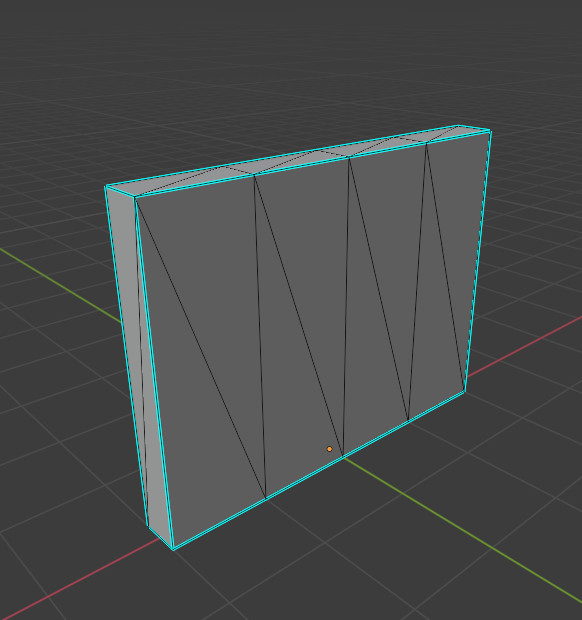
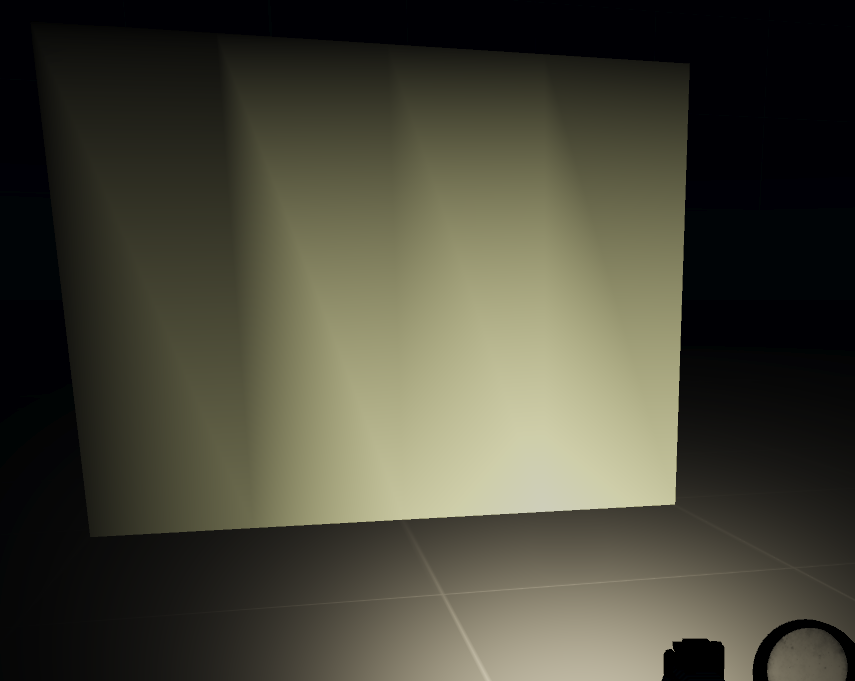
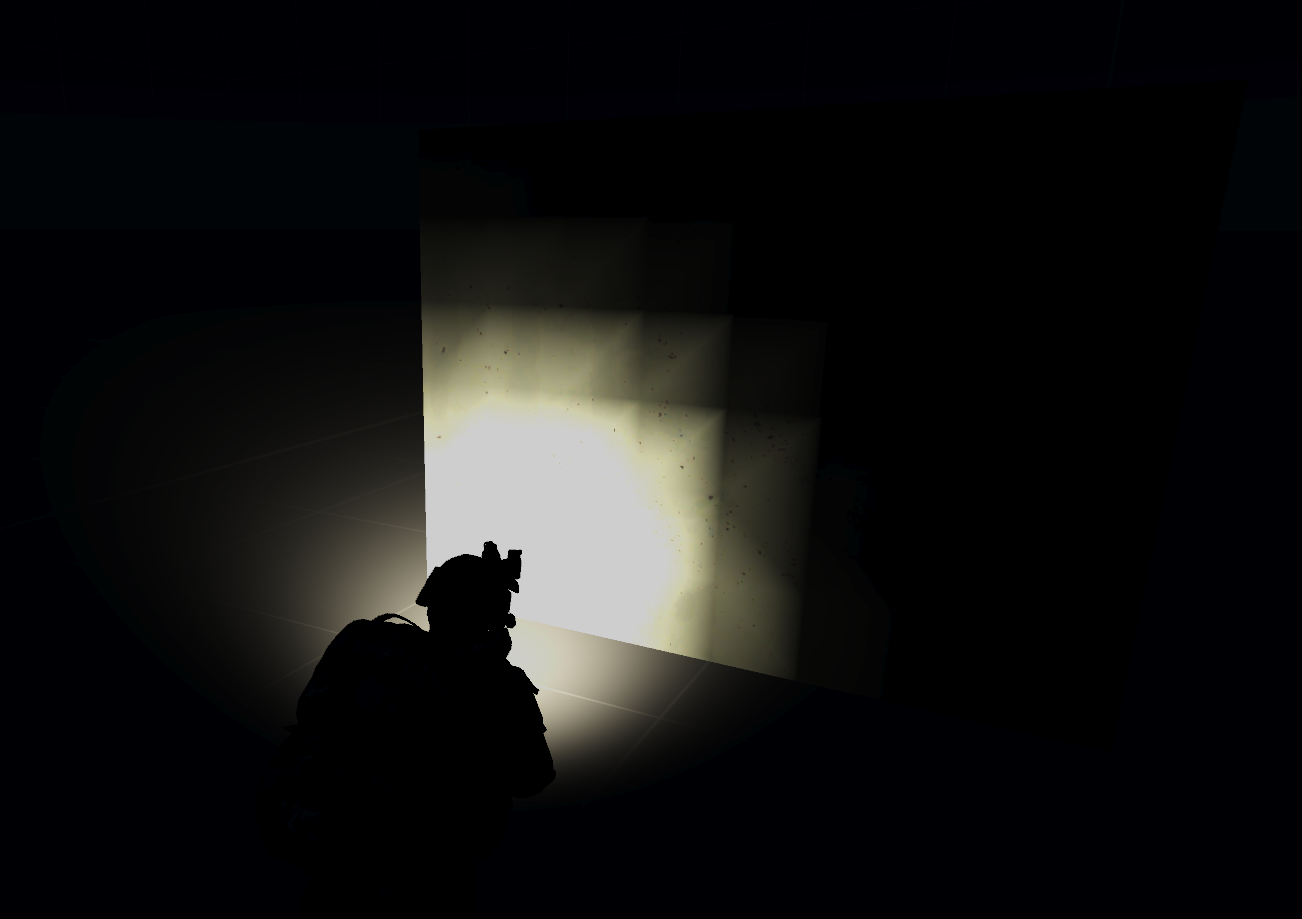
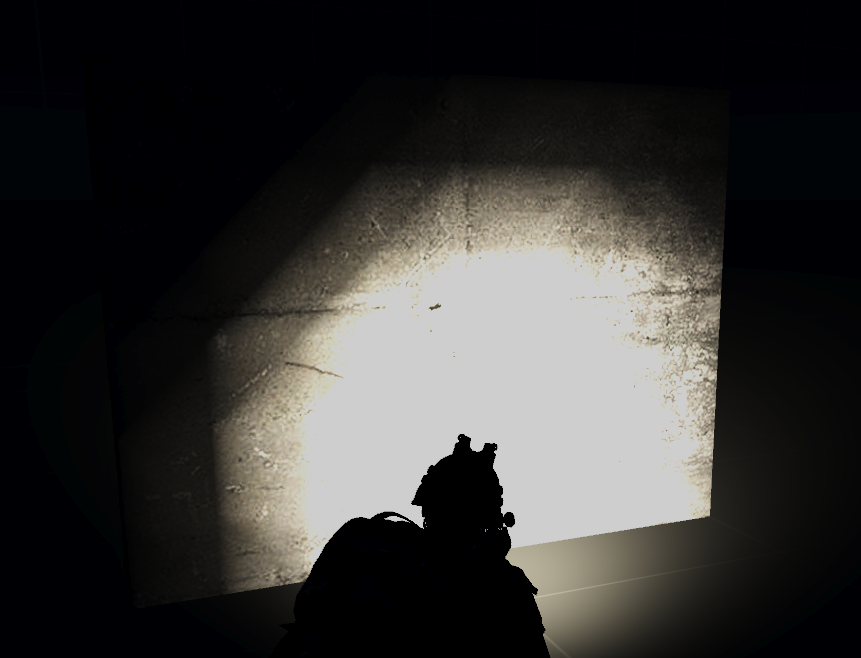
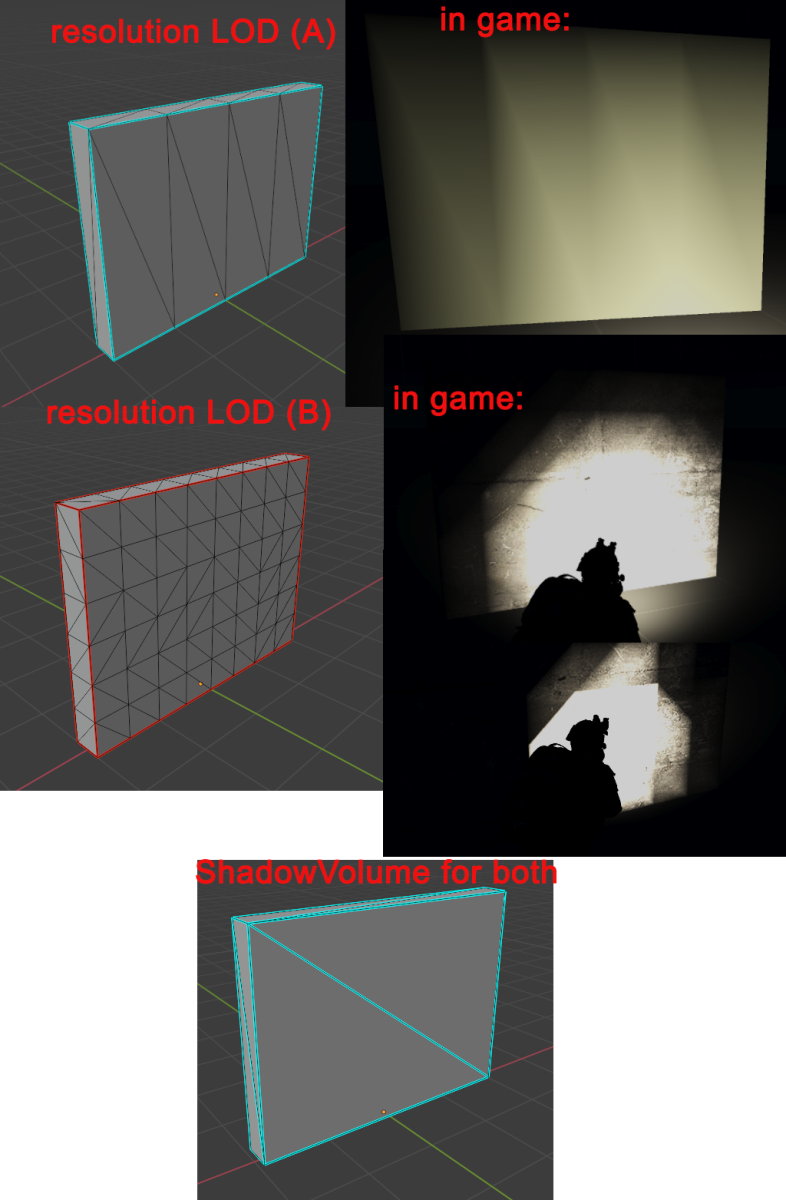
I've got an issue I've been unable to solve, flashlights being funky on custom object:
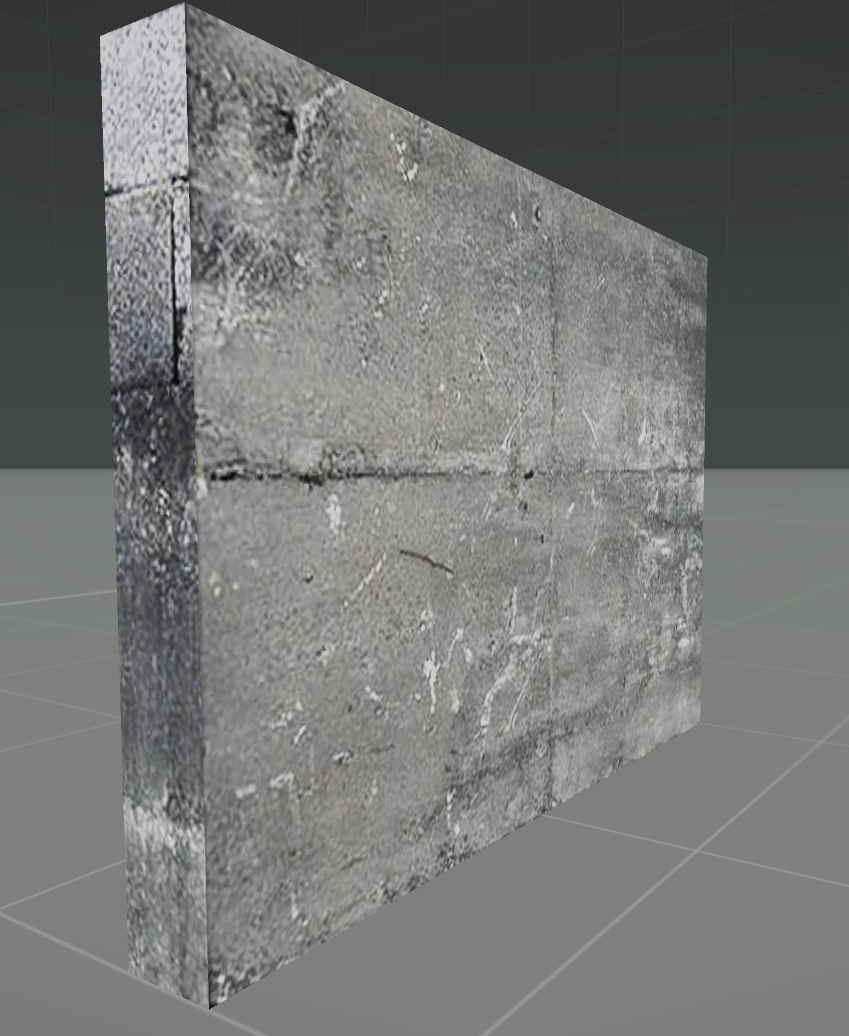
object: https://i.gyazo.com/d7b03e9f202bb15e448cf8ef9838da7a.png
in game: https://i.gyazo.com/f00c221b98c47b8e8046791f2533c6ed.png
Haven't found much about this through googling, but searching through this channel had led me to potential fixes like:
- basing rvmat off of the
default_super.rvmatfound indata_f - increasing amount of polys (since the lighting is a vertex shader), which results in: https://i.gyazo.com/004eaf3900a2f2515a149ffafcba67e2.png
- add
renderFlags[] = {AlwaysInShadow};at top of rvmat
none of which I've had any luck with.
Do I just need a higher resolution model?
stuck oyster
have you actually applied your new rvmat to it
does it have textures? or just procedural colors?
stuck oyster
possibly
the render flag you should not be needing
also if you apply just the default rvmat
how does that look
without any customization
fierce dagger
i will test again but iirc it is the same
yeah still getting the same issue
i will try creating an AO map and see if that has any effect
fierce dagger
_co
stuck oyster
does the file have any transparency?
fierce dagger
nope
stuck oyster
does it have alpha channel?
fierce dagger
i am using the file concrete1_sea_pier_co.paa and its _nohq from structures_f\data\concrete
as well as one of the detail maps from data_f
since my object is just a wall and this is sort of a trial run
stuck oyster
does your object have a shadow lod?
fierce dagger
yes, triangulated and slightly smaller than the resolution lod
fierce dagger
stuck oyster
have you actually applied your new rvmat to it
question on this, I have been applying the rvmat through the blender toolbox on my resolution LOD. I assume that it is applying correctly but havent investigated
stuck oyster
And you have repacked the pbo after that?
fierce dagger
also checked with an AO map applied via rvmat
fierce dagger
stuck oyster
And you have repacked the pbo after that?
yes
stuck oyster
What does it look like with no material or rvmat applied?
stuck oyster
Does the object have sharp or smooth edges?
fierce dagger
sharp only on the edges of the box, not inside the faces
round bloom
@fierce dagger is there a reason you have those lines? If there is no need for them to be there I'd suggest cleaning them up since it looks like it's just a rectangle so shouldn't need them. If they are required just check those faces are smooth shaded.
stuck oyster
@fierce dagger is the model unwrapped?
as I just noticed the ingame pic does not have any texture on it properly. just a color
fierce dagger
round bloom
<@!198562406283083776> is there a reason you have those lines? If there is no ne...
I started with a simple rectangle for each face, the problem was shining a flashlight on the center would cause odd lighting behavior at the vertexes. My thought was vertex shader --> more vertices = smoother shadows? but that does not seem to be the case.
I am new to working in 3D, I will look into smooth shading, see if that has an effect
round bloom
For something as simple as a cube or rectangle extra lines aren't going to impact shadows that much
fierce dagger
stuck oyster
<@!198562406283083776> is the model unwrapped?
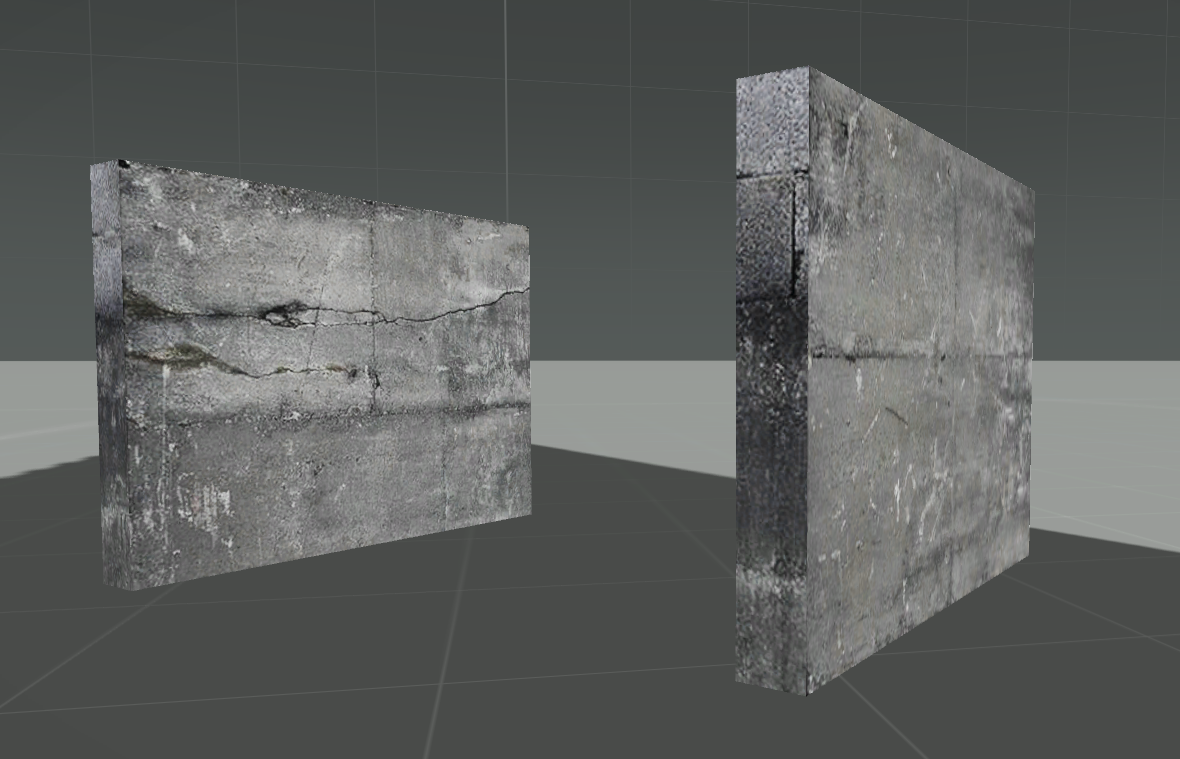
it is unwrapped (albeit hastily). each edge of the cuboid is marked as a seem. My bad, the pics I shared earlier were right after I increased the polycount of the mesh and forgot to unwrap. Textured example: https://i.gyazo.com/472a6ffaa4130030813fe703d1936e89.png
round bloom
Plus if you're using a shadow lod, the view lod verts won't change anything
fierce dagger
round bloom
For something as simple as a cube or rectangle extra lines aren't going to impac...
unfortunately its not the shadowlod, I tried that first. It seems shining a flashlight at an object just impacts how much light the engine renders on the object, and that's based off of the resolution lod.
round bloom
fierce dagger
unfortunately its not the shadowlod, I tried that first. It seems shining a flas...
Thats not the case, it works off the shadow lod to decide how to cast shadows, if a texture is applied it uses the AHD/ADSHQ to decide how to reflect light from it, the resolution lod by default is only to show you the object nothing more
Also always test objects on real maps not the VR one, it's got a scuffed day/night thing that I know impacts lights, I assume it's probably also going to effect flashlights
fierce dagger
round bloom
Thats not the case, it works off the shadow lod to decide how to cast shadows, i...
I think we are talking about different things. I don't have any issues with the object casting shadows, just lighting issues when you shine a flashlight at it. I don't know how much flashlights interact with arma's shadows, but from testing, the resolution LOD is responsible for drawing light on the object when a flashlight is shined on it (or some other LOD I don't have that defaults to using the resolution LOD). See here: https://i.gyazo.com/2e30f7281bb0fb83110e18236b3d0010.png , I've altered the resolution LOD only and left shadowvolume untouched, and the lighting/shading artifacts follow the edges of the resolution LOD.
I tried turning on smooth shading on the cuboid's faces and got no luck unfortunately
round bloom
I know it uses shadow lod for how to cast shadows from torch, I'd assumed the same was true for reflections. If that's not the case, the VR map issue for lighting I mentioned is still true
Give it a go on Altis or Stratis see if it still does it
leaden sun
What rvmat are you using exactly?
the shader determines the surface, it looks like you're using per vertex as opposed to per pixel
fierce dagger
I'm using an rvmat thats copied directly from default_super.rvmat found in data_f, just pointing to my own normal, detail, and AO map
aside from the stages, these were the default values which I have not touched:
ambient[]={1,1,1,1};
diffuse[]={1,1,1,1};
forcedDiffuse[]={0,0,0,1};
emmisive[]={0,0,0,0};
specular[]={1,1,1,1};
specularPower=30;
PixelShaderID="Super";
VertexShaderID="Super";
 fair estuary
Hello all! Not super familiar with 3D modeling but very PC literate and looking to start a small project. However, I was hoping to get verification that it is even possible before investing the time/money.
I would like to purchase a tobacco pipe model from Sketchfab, get it all setup/converted/manipulated for use with the ArmA 3 mod Immersive Cigs, and then offer the addition to the mod author.
Would an FBX file from Sketchfab be a viable starting point for a simple game asset?
leaden sun
How very peculiar.... for the heck of it, what happens if you use a different rvmat?
yes FBX format can be imported into object builder, which is what you'll be using for the final stage to get the model in
fair estuary
leaden sun
yes FBX format can be imported into object builder, which is what you'll be usin...
Perfect, that confirmation is exactly what I was looking for. Thank you!
leaden sun
just be mindful of the scale, if the object is too small when imported then it likely needs to be scaled 100x and if it's the opposite, .1
fierce dagger
leaden sun
How very peculiar.... for the heck of it, what happens if you use a different rv...
I will check with a few different of the default ones
leaden sun
@fierce dagger Do this for a quick test, open the rvmat in the material editor and assign blank textures to the shader slots, that way it narrows things down more
fierce dagger
not familiar with the material editor. Is there a specific tool for editing rvmats? I have been using notepad++
leaden sun
Whever your steam library is located-
Steam\steamapps\common\Arma 3 Tools\ObjectBuilder
You'll see a exe called "MatEditor.exe" This is the dedicated tool yes, however be mindful that it will erase some lines, mainly TI.
I recommend you save a backup of the original material, then open one of them with this program. You can then go the individual shader textures, click the drop down menu where the texture would be, select "Color Texture", and lastly click the correct button.
Do this on all textures (except the last two stages leave that alone) and it will assign a default color.
fierce dagger
will do, need to familiarize myself with this UI
leaden sun
Also do you have any named properties in your LOD's?
fierce dagger
only in geometry
leaden sun
and which flag is that?
fierce dagger
Prefershadowvolume = 0
sbsource = shadowvolume
shadow = hybrid
shadowbufferlod = 0
sbsource shadowVolume
prefershadowvolume 1
try these alone then add "lodnoshadow 1" to the vislods
fierce dagger
will do
also, is there a way to force a _CO map via the rvmat? I'm wondering if my issue is that somehow my rvmat is not being applied. Like if I provide no texture and instead rely on material only
leaden sun
_Co is separate from rvmat outside of multi material, otherwise it's applied via object builder
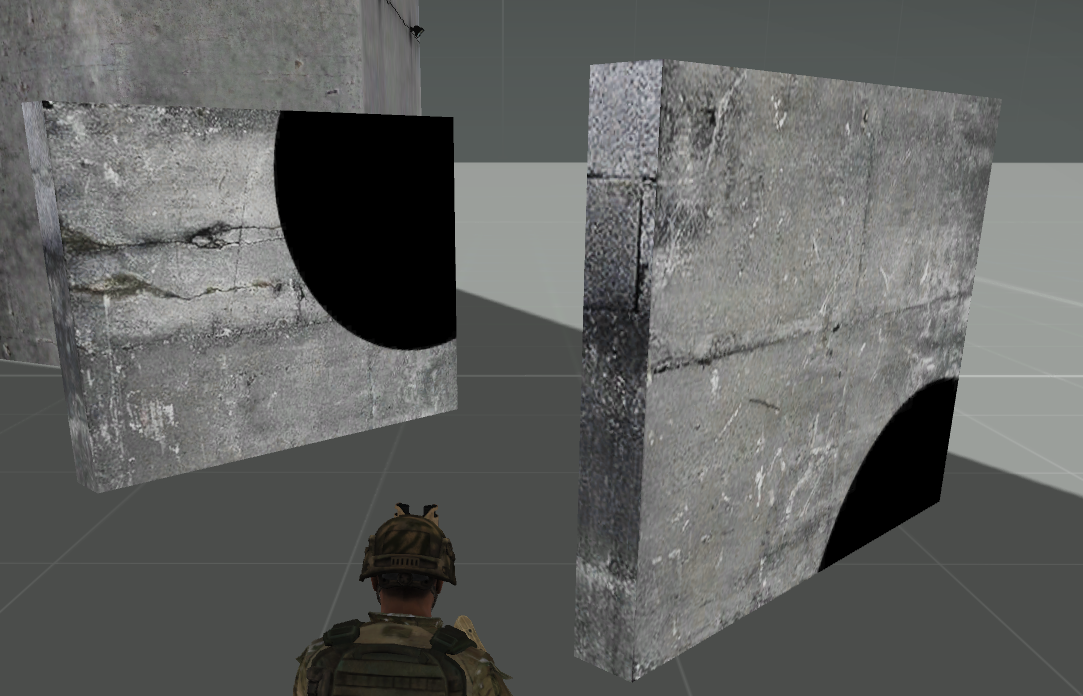
You could also add a big glaring shape to tell if it's working. A triangle in the normal map, a black circle in the AO, etc.
fierce dagger
that was a good idea
i dont think my rvmat is being applied
something like this for an _as texture: https://i.gyazo.com/653c5796129c49b3f38976b832264377.png
should be visible on here right? https://i.gyazo.com/92c6ff97826dc6cee160a7e43bc98078.jpg
leaden sun
Not necessarily, not at that level of grey. Make the circle pure 0 0 0 black then set something beside it so it casts a shadow over the object, a black hole should appear
fierce dagger
https://i.gyazo.com/b8681236488dd95d071d4a18e7a55205.png all black, no holes
leaden sun
yep that suggests the rvmat isn't taking, might it be pathed incorrectly?
or perhaps the tool you are using is evicting the rvmat
fierce dagger
i've been using hemtt to build, it is including the rvmats and I've been able to successfully change materials of existing objects via retexturing before while building with hemtt. I even tried sourcing the rvmats from a3\data_f on my P: drive, with seemingly no effect so I'm hoping its not my work environment
maybe i have something wrong in my config.cpp or model.cfg that is preventing the rvmat from taking, since from blender/objectbuilder side seems fine
thank you for the help in narrowing it down @leaden sun
i've learned some stuff from this troubleshooting
🙂
leaden sun
You're welcome, I'm afraid beyond this point exceeds my knowledge, I hope the answer is revealed.
stuck oyster
fierce dagger
```
Prefershadowvolume = 0
sbsource = shadowvolume
shadow = hybrid
shadowbufferl...
how did you come by these geometry named properties?
Id remove all of them
also what program did you pack the pbo with?
fierce dagger
Prefershadowvolume and sbsource are from the Test_House_01_F.p3d sample, the other two are from a BI forum thread I can't find anymore troubleshooting shadow issues. I slapped them on in an attempt to fix things and forgot to remove them when they didnt work
fierce dagger
stuck oyster
also what program did you pack the pbo with?
i've had no problems with it in the past, though I also haven't used it to pack anything with .p3ds
stuck oyster
could be it does not overwrite your changes or some such
you could try clearing the P:\Temp\ folder
fierce dagger
ok, now that I know what to google for I have turned up this BI Forum thread with identical problems to me.
Culprit is HEMTT and how it handles paths when binarizing vs how arma expects paths to be.
including this for anyone searching this channel in the future looking for solutions:
Problem: HEMTT failing to properly include .rvmats when binarizing .p3ds
BI Forum thread: https://forums.bohemia.net/forums/topic/229065-texture-problems/?do=findComment&comment=3406584
HEMTT issue with potential fixes: https://github.com/BrettMayson/HEMTT/issues/321
thank you everyone for the help troubleshooting!
 warm spindle
Hello i a have a weird glitch on my helmet model , it creates a small black rim around the helmet when i focus it with the A3 camera,any idea what might be causing it ?
inland pawn
RVMat?
 woeful viper
black black or "in shadow" black ?
fierce dagger
@leaden sun you can't believe how happy i am to see these dumb circles
https://i.gyazo.com/d05d15f1ab218b2e7baae444fd0e907b.png
leaden sun
Oh that joy is definitely relateable
stuck oyster
@fierce dagger btw for building parts like walls a multimaterial rvmat shader is usually used
fierce dagger
gotcha, I will look into it
warm spindle
woeful viper
black black or "in shadow" black ?
Like a halo blackish spots around the helmet
white jay
@warm spindle maybe your texture doesn't bleed over uv edges?
If your texture stops right at the edge of your uvs, it will leave a hard crust of background color
Make your texture bleed over the uvs like 4-8 pixels
stuck oyster
Or shadow lod is bleeding through
 tropic jewel
I have just updated Mikero's tools and I can no longer Crunch files https://i.imgur.com/M77faTB.png I havent changed any settings since the update, any ideas as to why this would happen and how to fix so I can test my models in game
warm spindle
stuck oyster
Or shadow lod is bleeding through
how exactly do i stop that cause i have no what you mean!
stuck oyster
perhaps link up a picture of what is happening. Cant really guess what you need to do without knowing what happens
warm spindle
stuck oyster
perhaps link up a picture of what is happening. Cant really guess what you need ...
i will as soon as i get home
woeful viper
warm spindle
Like a halo blackish spots around the helmet
black black -> pure black. If its not pure black, but just "darker texture" then its shadow.
 gusty torrent
I am looking for help to animate a selection in OB around a custom axis (two mem points). Is there a method to do it? I know I can animate it this way using model.cfg but need it for OB... The two mem points are not located along any default axis, ie. XYZ.
 heady oak
So the two nem point are the axis or should every point be his own axis? Because if you open bulldozer from OB it load the model cfg and you see your animation
gusty torrent
the two mem points are a rotation axis for a selection
tbh, never used model cfg editor from inside OB 😦
heady oak
Then model cfg should work. But I never used a axis with offset angle from xyz coordination. I have to test it later. And I edit the cfg with notepad next to OB
Notepad++
gusty torrent
I need to animate the selection to a position that'll become a start position for the selection for further model.cfg work
I do use Notepad++ too, just need kinda 3D gizmo for the selection, I was surprised to see there is no such thing in OB...
heady oak
So a stacked animation?
gusty torrent
not really, just the landing gear in a plane is in wierd retracted position that I want it to be open to work with PhysX mem points. It has kinda combined XYZ axis of its rotation
I cannot use typical "Use pin" and X or Z axis to animate that precisely as I need.
Maybe some OB script exist to facilitate such work?
stuck oyster
You can't animate inside ob
gusty torrent
Allright 🙂 I need to "rotate" that
stuck oyster
Preferably work that kind of things in some more advanced 3d program
To save yourself from headache
gusty torrent
Yeah, I know I can export, work on that in 3d max and import again. just thought there IS some solution to the problem
heady oak
My first guess, I'm not a pro is to define multiple axis points and stagger the selection and maybe build a skeleton
stuck oyster
Well it's possible but explaining it takes more time than doing export import
OB is a bit old and cryptic
And people complain about blender ui
gusty torrent
Hyh... yeah
heady oak
I used skeleton for my models because it moves the children axis etc with the parent animation
stuck oyster
heady oak
I used skeleton for my models because it moves the children axis etc with the pa...
Yeah that's good way to verify parts can move right
gusty torrent
Hm, I do have Preview for that in OB?
heady oak
Like a door I did. The handle is parent of the door itself and when the door is open it still move the handle down when I close it and the original axis is waz off its original position
It also moves all section from the other LODs so the open door can't be shoot through and you can throw grenades through the open door
And yes you can preview when you load bulldozer and move the mouse wheel
From OB
stuck oyster
heady oak
Like a door I did. The handle is parent of the door itself and when the door is ...
But that's just normal model.Cfg stuff
gusty torrent
Wierd. You mean "skeleton" like for RTM animations? Or skeleton (chained bones) in model.cfg?
stuck oyster
Nonono
heady oak
I'm talking about the skeleton from model cfg.
gusty torrent
Ah, ok. I do that stuff for more than 6 years 🙂
heady oak
The rtm stuff Is my next step to learn
gusty torrent
Good. Anyway, it seems I have to export/import the selection than
stuck oyster
It's easiest way
gusty torrent
It seems so, thanks gents
heady oak
OB is kinda odd. I do everything in blender and notepad and use OB just to save it one time so it doesn't screw the packing process
Only texturing I still do in OB
gusty torrent
Yeah, I just imported a model directly into the OB and re-applied the textures
stuck oyster
Why do you do textures in OB?
heady oak
Because I'm lasy and my thing I did where really basic stuff
 heady oak
I know blender can do everything
gusty torrent
Even basic stuff looks much better in Substance Painter
heady oak
But for the next thing my crane project I will do it in blender
gusty torrent
@stuck oyster @heady oak
I found it. There is indeed a custom 3D working gizmo in OB.
Points -> Transform 3D -> Show local axis/Edit local axis
I just need to figure out how it works.
Most likely a stuff related to man-class skeleton
stuck oyster
😅
round bloom
if you use hiddenselectionmaterial to change an rvmat, should it also change to the MC on the new rvmat? I've got some weird issues that the material is showing as changed when I get material of the cursorObject, but the MC doesn't update
stuck oyster
hiddenselectionMaterial change is buggy and works only with materials the original model is binarized with
so if you want swappable materials you need to have all of them present somewhere on the model
for example different material on each res lod
@round bloom
afaik you cant properly swap them to completely new ones
 blissful spire
so my model that i have works fine, outside of the passenger camera. whats the easiest way to fix it?
im assuming im missing a mem point for the camera
as its currently looking just under my turret cap. Will add that i have a View Cargo LOD now, which moved the camera from between the turret and the hull to below the vehicle
round bloom
stuck oyster
afaik you cant properly swap them to completely new ones
Yikes, even if it’s already in the PBO?
polar fiber
They work fairly reliably on weapons but everything else no, they rarely work unless you have a setup like goat mentioned
vehicles you can use the materials[] part of texturesources and BIS_fnc_initVehicle, since that changes the material by setobjectmaterials script command at init
fair estuary
Going to have to be "that guy" and ask a very silly question... 🙂 I am obviously missing something and Google has not provided me an answer as to what.
I am attempting to make a tobacco pipe item as an addition to the amazing Immersive Cigs mod, so that I can then offer it to the mod creator for use. I got the FBX file from Sketchfab, imported it into Object Builder, scaled it, applied the texture and successfully added it to the mod. However, the item appears on the ground when it is equipped. How does on go about getting a model to appear correctly in relation to the character?
I've raised the model on the Y axis in OB, but still spawning on the ground.
stuck oyster
you would likely need to create it as headgear
if you want it to be "wearable"
so it will need model.cfg set up for wearable stuff and correct selection name/bone weighting in the object
fair estuary
The cigs from the mod are facewear, and I simply created a new class off the same model. (The programming side I understand well)
stuck oyster
then you are missing the model.cfg and weighting selections
those are the things that connect the 3d mesh to the animations that move the character
no connection -> spawn at feet
stuck oyster
do also make sure that the original models license allows this kind of use
so you wont accidentally get the immersion sig guys into trouble
fair estuary
Free for any use with attribution
 forest igloo
Does anyone by any chance know why scroll wheel options would be located at the center of a model- all while the mem points are at the proper positions in OB?
warm spindle
would anyone pelase be willing to take a look at my helmet model(already in the game) and let my know if i did something wrong.?
cause i am having trouble with the shadows
stuck oyster
forest igloo
Does anyone by any chance know why scroll wheel options would be located at the ...
Typo?
stuck oyster
warm spindle
would anyone pelase be willing to take a look at my helmet model(already in the ...
Still waiting to see the picture of the problem
warm spindle
@stuck oyster #screenshots_arma message
stuck oyster
Link does not work. Don't link to a message. Copy the link to the picture
stuck oyster
This works but I don't know where the problem is. Please take a closeup pic of the problem or mark it.
warm spindle
Only a part of the helmet focuses
stuck oyster
I thought you asked about shadows
Did you try to take similar picture but with vanilla helmet yet?
To see if it focuses same way?
Or did you try to use different focus settings?
Or different angle
warm spindle
The picture was taken by ZFXF apparently other helmet models worked fine and only that one did it
Shadows are another issue i have in general with my helmets ,specifically a sort of mirage effect on them(kinda like the surface is moving)
stuck oyster
You likely have alpha transparency in the texture even though its CO or you are using CA for some reason. This mkes the engine think the model is transparent when it's supposed to be solid
warm spindle
I am using CA.
warm spindle
Ahh okay ill switch over to CO then, i am using substance painter to paint the model btw
Ahh okay i didnt know that
stuck oyster
Does not matter what makes the texture
Well other than some programs might add alpha channel where it's not needed
Transparent parts in between uv mapping counts too
warm spindle
Ahh okay is there a way to convert from CA to CO within the .paa file?
warm spindle
You mean the .CO of file used?
stuck oyster
Whatever you save from substance
That you then convert to paa
Is the source texture
warm spindle
Ahh okay then ,ill test converting to Co then and see if it fixes it got an initial test , also should i have LodNoshadows in the model settings ?
stuck oyster
No don't think you should
warm spindle
Ahh okay and what value should i have for shadowvolume ? 1000 or 0
warm spindle
Ahh good i got that right at least :)
Thanks a lot for the help ,hopefully it will work
stuck oyster
👍
 runic flare
 desert notch
runic flare
https://i.imgur.com/ppgd4YB.png
Wut?
desert notch
runic flare
https://i.imgur.com/ppgd4YB.png
Wut?
what are you trying to do?
runic flare
Weight automation, copy lod 2 weight to lod1
stuck oyster
I'd recommend using more advanced programs for weighting.
 hoary knoll
so i got a model that does not orientate correctly when spawned. i defined 3 points as LandContact LOD so they form a plane together
however the object spawns in a completely different orientation, acting like the LandContact is not there
the object is rather simple, so i dont have a model.cfg. this should not matter right?
inland pawn
hoary knoll
so i got a model that does not orientate correctly when spawned. i defined 3 poi...
If it isn’t facing the correct way, you’ll need to rotate it in object builder/blender
hoary knoll
i tried using the same model for CfgMagazines and CfgVehicles
but it ignores landcontact as magazine so you have to rotate it so it faces along the z axis
i ended up making two models instead
stuck oyster
cfgmagazine behavior is like that. its not a "vehicle object", its an item
and items visible in game world are actually placed inside a "groundholder" object
so yes what you did is the proper way to make props that are not vehicles
hoary knoll
i knew all that
i still expected the object to be placed correctly if you createVehicle it, since a plane with 3 points makes the placement clear
so i thought it should work making as single object rotated for the magazine with a landcontact for the vehicle version
 silver zenith
I noticed buildings use different shadows from props
https://i.imgur.com/zqvc7gg.png
how do I make those shadows?
stuck oyster
buildings are very often made to use the sbSource = visualex that casts shadows from the res lods
the caveat is soft edged shadows (personally I dont mind)
so they dont need shadowlod at all
inland pawn
silver zenith
I noticed buildings use different shadows from props
https://i.imgur.com/zqvc7gg...
Funny thing Sanchez, that photo you posted on Imgur, it asked me if I was 18
Apparently shadows aren’t appropriate
silver zenith
stuck oyster
the caveat is soft edged shadows (personally I dont mind)
oh I see
apparently actual shadowlods don't cast shadows on yourself when in first person, visualex on the contrary does
is it on purpose?
stuck oyster
there was a trick for that too
but buildings dont have first person view so what are you talking about exactly?
silver zenith
I mean when I'm walking inside a building in first person
you don't see the shadow on your rifle and your body
stuck oyster
you should 🤔
silver zenith
stuck oyster
you should 🤔
sent an example in DMs
what could cause that?
stuck oyster
what shader does it use?
 gusty parrot
Hello,
I wanted to convert .paa into jpg or png so i tryed using TextView 2 from A3Tools but i can't manage using it, is it really possible ?
desert notch
gusty parrot
Hello,
I wanted to convert .paa into jpg or png so i tryed using TextView 2 from...
you should use image to paa
or if it's difficult for you, use gruppe adler's web version
gusty parrot
no, i want the revert way, paa to jpg
there is no export option in TextView
maybe it's on purpose i guess
desert notch
gusty parrot
no, i want the revert way, paa to jpg
for both you can use image2paa and gruppe adler's site
they're both 2 way converters
silver zenith
stuck oyster
what shader does it use?
super
gloomy hemlock
is it possible to use .obj files for arma?
 bold flare
it is possible to convert .obj to a format that you use for arma, yes
gloomy hemlock
ok thanks
silver zenith
stuck oyster
what shader does it use?
is there a different shader for buildings?
stuck oyster
well commonly large stuff use multimaterial but that should not matter in this
place down a vanilla building next to it and see if that behaves the same
stuck oyster
does it have outside surface at all?
that could be it
you may need to enclose it in a box
silver zenith
it doesn't
its a tunnel
I guess I'll have to make an outer layer
or duplicate and flip it
but the box would be better for performance
another question
path lods
can AI walk between "in" verts?
silver zenith
oh I see thanks
stuck oyster
the paths do need to connect to the terrain ground occasionally
to ground them into the navigation path system thingy
stuck oyster
not that I know of
silver zenith
oh nice
was getting worried
would be cool if toolbox had a "create in verts" and "create pos verts" like it does for geometry
 silver zenith
is that just you or every OB has that?
stuck oyster
mmm tdont remember what it has for default
I have extended package someone shared way back
might have been reyhard maybe
 marble ravine
Quick question, how do you use the texture renaming tool in OB with masking to e.g. replace all instances of
x\bla\data -> z\yup\data?
figured it out, you just do:
x\bla\data\* -> z\yup\data\*
stuck oyster
that yes
 storm wedge
Anyone think they can help me with this issue?
Same CA texture, 2 different sections, one ends up rendering the rest of the model behind it no issue but the other greys it out
https://cdn.discordapp.com/attachments/787769442372550676/900515156705038376/unknown.png
stuck oyster
you need to do alpha sorting in OB
storm wedge
awesome thank you!
gloomy hemlock
could anyone help me. i found some awesome models online but im not sure if they can be used within arma or not and if yes, maybe the amount of work needed until its game-ready. i would be happy if someone could dm me so i can send a link to the models
stuck oyster
Can't you post the link here?
gloomy hemlock
ah nice thought this wasnt possible
also maybe this one since its from another guy
stuck oyster
all of this is quite a lot of work
only the last one might be relativley simple but it too might not actually fit the arma mans size
so basically if you have to ask how much work these are to put in, its A LOT
ptoblem with the full uniforms is that they dont match arma man shape and dont seem to contain game usable lowpoly models
so for someone starting out, we talk in hundreds of hours
buying a model is not really a shortcut unless its fully gameready and compatible with the game you have
gloomy hemlock
@stuck oyster thanks for that explanations. would this be easier when done with weapon, vehicle and maybe house models? like they usually dont have to fit perfectly on anything like it is with clothing. i found for example 2 free to use models for a weapon and a tank (apart from the fact that its usually a shit ton of work to config all that tank stuff)
also talking about low poly for arma. what is some poly count that is good? or does this also depends on the model?
stuck oyster
depends on the model yeah and in those buying something that is not 100% suitable is again not a shortcut
especially if you are not fully certain what you would need to do to make them work
you can not skip the learning by buying models
gloomy hemlock
stuck oyster
depends on the model yeah and in those buying something that is not 100% suitabl...
yeah both models would be free to use and i do have someone who would remodel them to make them more fitting to the 2035 setting. i also have another guy who makes the configs for that afterwards so was asking.
those would be the tank models
https://sketchfab.com/3d-models/stb-1-b0f59399010542ae90a2aa9bd5b21e53
https://sketchfab.com/3d-models/type-74-main-battle-tank-toshueyi-da308db0300c49f1a65ce1104cbc59cc
and this would be the one for the gun
https://sketchfab.com/3d-models/howa-type-20-50b429a92fa54e86a666b4f0ba549fcb
and especially for the tank my model maker would add the interior and also design the tank more modern (like angular design and so on)
do you think there would be any problems then?
(besides the common stuff that happens when you do anything arma related)
stuck oyster
I think you would need to ask the guy whose making you stuff if these are the kind they can work with
nobody else can answer for them
I think there will be huge amount of problems with bought assets
as generally their quality can be verty inconsistent and not near game ready
cheap usually means problems
but high price does not guarantee quality either
gloomy hemlock
Ok thanks
stuck oyster
your arma toolbox is not configured right with o2script path
and you have modeled it likw that
as in you have inverted faces on it due to not turning backface culling on in blender
faces have front and back and Arma renders only the front
white jay
oohh i see, got it thank you! ❤️
heady oak
Sometimes I hate arma. It took me around an hour to figure out why my model is not rendered properly after my animation... I moved a section downwards to far. Is there any other way than place a single vertex somewhere around the position where your animation ends?
 runic plover
heady oak
Sometimes I hate arma. It took me around an hour to figure out why my model is n...
runic plover
heady oak
Sometimes I hate arma. It took me around an hour to figure out why my model is n...
Where do you check it?
heady oak
Ingame editor from arma
runic plover
Try it in buldozer
heady oak
I got it working now but technically for our server I testing some elevator ideas. When I move the floor to far down depending on the view angle the whole object disappear
runic plover
You can work 1:1 in buldozer to fix and fit your rotation or translation animation
heady oak
The animation is fine I figured out when you move sections to far away this issue happens. Same for firegeometry. You can magically shoot through your object.
More then 3m what I figured out
runic plover
Ah now i get what you mean.. i had this issue too with my gate i did
But i fixed it
Lemme check how i did it was some months ago
heady oak
I placed in every lod a single vertex and it works, but is there a other solution or I'm missing something while modeling
So if you place the model in eden editor the yellow box around your object is now way bigger then the object itself
runic plover
Send me a PM
heady oak
I'm at my pc in 15 min, I send you some pics what I did
runic plover
Alright ✌
stuck oyster
you cant make very huge objects without them dissapearing from view when the model center gets too far from view
also you cant animate geometry beyond objects bounds
heady oak
Ah okay the it's what I thought I have to extend the object bounds
stuck oyster
so if your thingy is bigger than 50x50 meters you need to split it up into parts
heady oak
Its 12x12x6
stuck oyster
also you can define accurate translation distance with axis memorypoints
2 points define the direction
heady oak
I did this
stuck oyster
and the distance between the points define how much offset from 0 to 1 is
but only for animation type "translation"
translationX Y Z always have 0-1 offset be 1 meter
(and offset 2) would be 2x the distance between axis points
or 2 meters
heady oak
This is all set up but I didn't know that if you go to far away from your object bounds you have problems. I thought if you move res physics and fire lod the bound extend




 heady oak
I made them bigger, thought game do some voodoo and knows when your animation goes out of it.
stuck oyster

without seeing what you are actually trying to do cant say more
but sounds like you are trying to animate it beyond the bounds of the model space
heady oak
It's exactly what you posted above
stuck oyster
game does no voodoo
you must do the voodoo
elevators generally work very poorly
because of these limitations
runic plover
stuck oyster
im again the only one which doesnt get this artwork HG did 
stuck oyster
👓
heady oak
For persons it works now but for vehicle we have to do some scripting
heady oak
My model is in the idle position and the animation extend things. That's why it get out of bounds
stuck oyster
well you need either model it in the extended position first and then animate it back in with animation source initPhase
or increase the bounds
no other way
stuck oyster
maybe it was not enough then.
heady oak
Anything works except cars. But I will figure it out.
stuck oyster
if you tell what you are exactly trying to do perhaps solutions can be suggested
runic plover
heady oak
Anything works except cars. But I will figure it out.
GeometryPhys, and do not add mass on it
stuck oyster
Its always weird how people keep these things secret
heady oak
There is no mass
stuck oyster
no mass = no collision
runic plover
heady oak
No mass on geo physics lod the other one has 2500kg
make it 25'000 as test
mass should be more than car's weight
heady oak
Mass is not a big deal. It's for exile. It will me a static object
stuck oyster
but what is it that you are making
and what is it supposed to do exactly
context is important
heady oak
People build bases on our server, sometime in the air with ramps and my thought was to do a elevator as a gimmick
runic plover
so this exile game mode doing fortress and base stuff
And you can lift up/down soldiers/characters but no vehicles?
stuck oyster
how far up does the lift go
heady oak
9m
stuck oyster
how fast is it?
heady oak
30 sec ani time
so 10seconds per floor
one floor is 3 m heigh in our building system
stuck oyster
you might need to make it slower later.
how did you make it taller?
what lod size did you increase
heady oak
ah i cant upload it here... one momemnt
the floor moves down 9m, i increased the resolution, geometry, geometry physx, firegeometry, roadway lod
runic plover
if soldiers work and vehicles not
make the bottom part thicker, and add more mass to it
heady oak
yeah my problem is the floor size from other parts are 25cm thick
stuck oyster
Id recommend increasing height up
not down
the geometry can be thicker
especially for the elevator floor
25cm should work
heady oak
i will test it but other existing parts in our building system are 25cm thick so i have some limits
heady oak
a floor is 6x6x0.25m a wall is 3x6x0.25
it should fit inside a base
and match with other building objects
stuck oyster
you cant really drive under it
runic plover
geometry is invisible and if you make it thicker downside noone will notice
heady oak
hm thats a good idea its meant to be placed in around 10m height
stuck oyster
does every geometry lod part have that
heady oak
yep every moving part is a named section copied to all loods except memory and landcontact
stuck oyster
and is the componen valid convex
heady oak
yup
stuck oyster
you have componentXX names in res lods too?
stuck oyster
that was not what I was asking
but was going to ask next
now does the elevator selection also have a componentXX selection
as it needs both
componentXXX for collsion, bone name selection for animation
heady oak
ehm its one object so i did componenct convex etc in OB for the lods
stuck oyster
so there is only the elevator floor component?
runic plover
as example Geometry Lod
 stuck oyster
dis
heady oak
one sec pic incomeing
stuck oyster
also make sure the part is indeed convex and closed
as sometimes the automation can mess it up
OB- structure menu has checks for convex and closed
stuck oyster
oof that geomery lod and all those tube shapes
stuck oyster
they should be simpler
heady oak
i didnt changed them to cubes yet
runic plover
why you dont do one square for the bottom part of elevator instead of that many parts
stuck oyster
also can you highlitght the component that is the elevator floor
from the component selections
heady oak
heady oak
the whole lod im in has 0 mass, its the geometry physx lod im in
stuck oyster
no physX
heady oak
as i understood the phsx lod is that vehcile see the object and will stop if the touch it, the geometry lod is for other objects, or im wrong
runic plover
28kg is low for it im sure
stuck oyster
Idd add more mass to the part just to be sure
heady oak
i can drive cars on the extracted floor, but if i start the animation the floor clip trough the car and the car is floating until i jump in (behaviour inside EDEN)
when i jump in, the car explode and the wrack is moving up
stuck oyster
eden but live game right?
heady oak
eden as startet scenario where i can move as a solider
stuck oyster
k
heady oak
maybe the weight of the floor, a soilder is sometimes lagging behind while moving up
heady oak
30sec for 9m elevation
heady oak
hm i have a script to simulatio a upward moving for vehicles, but it would be great if it works with the model itself
runic plover
did you made the roadway part a little bit higher than the geometry part?
stuck oyster
it also could be you got something running that disables the vehicles simulation once you get out of it
heady oak
only the border is angled so you move up a slope
stuck oyster
which could explain what is happening
heady oak
the model itself works only with model cfg and config.cpp without any external scripts used
stuck oyster
do you know if there are any "performance enhancements" there that could disable the car simulation
and can you test it without any other mods
heady oak
in EDEN not that i know, on our server where its not testet yet we partitial simulate objects
only 500m around people and on clients sometimes
stuck oyster
could be something similar happening
stuck oyster
mods could have same kinds of features build in that would run in eden too
or in eden preview
heady oak
one last question, for this not very highly detailed object is it bad to let the "cylinder" stay inside the geometry lods?
stuck oyster
yes
heady oak
okay i will change them to cubes
oh wait one note the physx geometry lod is slightly upscaled then the geometry lod
in blender when i use S for scale its 1.005
 robust lark
hey, I'm trying to port the oil pump from A2 myself (vez_ropa) into A3 and I can't get the object to reproduce sound nor animate, does anyone have a clue how I could get it to work? I do have the config, the .wss sound and the .rtm animation but for some reason I can't get it to work, I can load the object in TB/Buldozer and pack it ingame but it's static.
stuck oyster
it has rtm animation? 
using rtms on non characters is mysterious art on its own. pretty much undocumented feature
My guess is that it would be faster to either set up animations in model.cfg for it or if its not suitable for such making new one
sound stuff also has changed a lot since A2 so you wont get the A2 configs to work
marble ravine
I'm currently trying to get physx to work for the first time ever on a Car. After adding the LOD and the Config Values from the samples. My vehicle now interprets all turning commands, so left and right and the mouse turning as TURN LEFT. any idea what I might have screwed up?
 carmine spruce
Looking for someone who can rig armors & unfiroms in game. Is this where i would look, if not can someone direct me to location?
 sharp coral
carmine spruce
Looking for someone who can rig armors & unfiroms in game. Is this where i would...
sharp coral
carmine spruce
Looking for someone who can rig armors & unfiroms in game. Is this where i would...
You can use #creators_recruiting for finding suitable people.
molten fractal
Are hiddenSelections still loaded by the game when not in use?
carmine spruce
@sharp coral thank you sir
 gray siren
Hey, is it possible to use a 3d modeled tank track or just a simple one?
robust lark
stuck oyster
sound stuff also has changed a lot since A2 so you wont get the A2 configs to wo...
yeah, I did just try to go with the A2 config it came with and replacing the paths to point correctly but I guess it's defunct now. I've no idea how to translate/port it over but I'll see what I can do, thanks for the pointers.
and yeah it had an .rtm animation from the sample files IIRC
stuck oyster
they might also be destruction animations
as rtms can be used for that
but in case you have no previous experience with that I would strongly advice using just normal destruction stuff
marble ravine
I am currently porting an arma 2 model and sometimes (an every increasing amount of times) when starting arma 3 it crashes and I get this.
https://ibb.co/myYhQSp
Accompanied by an AMD popup telling me my graphics driver just freaked. Have I screwed the pooch somewhere?
stuck oyster
most of the time stuff in the A2 models, configs and rvmats is outdated so direct ports wont work
 oak lintel
is it possible to do the rotation in the model.cfg with a random comand to execute?
i placed my object on the terrain builder and need for my custom model random open/close
stuck oyster
There is a separate system for that in the config.cpp class for that object. Off the top of my head don't remember what it is called.
oak lintel
I try it with the eventhandler in the object (config.cpp) and a script. But this worked only in eden and gamestart. :/
stuck oyster
Not eventhandler. There is another thing but you need to find a vanilla building that uses it and check out its config.
oak lintel
Vanilla buildings doesn’t have a random function with random open/close doors with TB placed objects. I think…
stuck oyster
I'm pretty sure some of them do
charred bolt
Maybe one of these animationSources?
timeRndOffset objRandom userPositionHashedInit
stuck oyster
No there's config entry for it, those could not be then controlled by player afterwards. There is a thing that makes some doors and gates and such partially open.
oak lintel
hmm
stuck oyster
but Im not a config-google 😛
oak lintel
thats it i think:
{
source="userPositionHashedInit";
initPhaseArray[]={0,0.75,1,1};
animPeriod=1;
sound="FenceGateDoorsSound";
soundPosition="Door_1_trigger";
};
yes thats probably it
 sinful pilot
I have an object and a backpack models (p3d). Is here anyone that can help me to merge them in backpack with object? I will add his name in the thanks mod section. Please contact me
 junior nacelle
Not sure if this is going to be the right channel but it seems that my model when textured and in game the shadow seems to be inversed. As in the brightest part is black and the what is meant to be the darkest has the texture fine. I am still fairly new and have no idea what I am doing that much.
nvm me it was an rvmat issue with file pathing
molten fractal
Are hiddenSelections still loaded by the game when not in use?
stuck oyster
what do you mean by not in use?
molten fractal
Hidden. Are the polys still loaded by the engine?
stuck oyster
mm well I suppose they are. the texture is just transparent
or not sure what you mean
as hiddenselections mean texture swapping
not hiding parts
or if hiddenselection is not defined in config it uses the default texture
or perhaps you are confusing the model.cfg hiding animation and hiddenSelection section that can be set up for texture changing
molten fractal
Yeah, I mean not applying a texture to a hidden selection. That makes it transparent then?
stuck oyster
no, that makes it use the original texture from p3d
p3d must always have correct type of texture as default
and rvmat
otherwise things go badly
stuck oyster
hiddenSelections is not a good way to make a lot of hideable parts for variation or whatnot
its better to have such in separate p3ds
heady oak
And hide section oft your model itself? I did it in small use. Like a upgraded wall which get a additional armor (hidden part of my model, geometry, fire geometry etc)
stuck oyster
non character models can utilize the model.cfg hide animations
as only the model.cfg animation can affect also shadow and geometry
heady oak
Yeah that's what I did for my non char things, for me it's the simplest solution.
marble ravine
I have a vehicle I'm working on that has white triangles, just like proxies, appear at a certain distance away from them. I assume one of the LODs has broken proxies?
stuck oyster
possibly
marble ravine
any easy way to verify? Buldozer doesn't show any issues
ow never mind was looking at the wrong LOD. Yup broken proxies.
silver zenith
I have a problem where a custom made blood pool object I made with alpha turns everything behid of it invisible
I tried alpha sorting the blood pool on top but it didn't work
whats causing it?
sharp coral
did you check the config for blood pools objects from Laws of war?
silver zenith
doubt its config related
bold flare
sounds like Alpha sorting or rvmat issue
marble ravine
After importing a model into blender and exporting it out again to object builder use the ArmaToolkit , my model has become severely metallic and now reflects the skybox. Any Ideas what causes it?
stuck oyster
pictures?
marble ravine
huh, played some war thunder and now it fixed itself? fine by me
I'll get a picture of it if it happens again.
silver zenith
bold flare
sounds like Alpha sorting or rvmat issue
tried to sort alpha but didn't work
even tried moving the blood pool on top of everything (alpha wise) but nope
stuck oyster
got a picture?
 rough idol
silver zenith
I have a problem where a custom made blood pool object I made with alpha turns e...
rough idol
silver zenith
I have a problem where a custom made blood pool object I made with alpha turns e...
have you tried yet forcenotalpha=1 in geometry LOD?
silver zenith
rough idol
have you tried yet forcenotalpha=1 in geometry LOD?
wouldn't that remove alpha entirely?
its a blood pool object much similar to the laws of war blood poola
so there is plenty of alpha
rough idol
it will move it to different render pass
alpha sorting in model will not necessarily help with alpha sorting between objects, since it's using different logic. In general, bigger objects are rendered on top of smaller objects
 silent prairie
is it possible to use object builder to view the named selections of binarized p3d files? I want to get the names of memory points on certain vehicles
rough idol
https://odolconverter.bytex.digital/ you can use this tool or Eliteness from mikero tool suite
 silk atlas
Not sure if this fell into #arma3_texture or here but how can I make a transparent polygon which I can see particle effects through them?
silent prairie
rough idol
https://odolconverter.bytex.digital/ you can use this tool or Eliteness from mik...
thanks
stuck oyster
silk atlas
Not sure if this fell into <#105781923573456896> or here but how can I make a tr...
Alpha channel transparency in the texture and appropriate rvmat assigned to the polygon.
Like how windows are.
silk atlas
I believe it has proper CA tex in it. So RVMAT issue?
gloomy hemlock
not sure if thats the rightchannel but i guess yes.
im planning a mod containing an asian faction. therefore i would need some asian faces as well as maybe some custom men aswell. is there anything where all the important stuff about this is?
like the answer to questions how for example its working that characters get the right faces, how faces are even made and all of that stuff?
stuck oyster
there is pretty much nothing written down about that
gloomy hemlock
oh. are there maybe any people here that know how to do something like this? i prefer not to have any dependency in my mod later so i would like to add that
stuck oyster
there probably are but you are serving yourself a way too big slice of cake right now trying to set up everything at once
that does not work
you start from stuff that has documentation, get that working
and on that road you are likely to learn something about how the configs and stuff works
gloomy hemlock
ok thanks. so i will do equipment and all of that first
stuck oyster
and you can then apply that knowledge to figure out how other, less documented stuff is done
and ask more specific questions when you cant advance
instead of a questions like how to build a car from 0 in real life
this is something a lot of people fall on when starting out so dont worry about it
but yes starting from small chunk is the way to go
gloomy hemlock
yeah ok. i guess doing new faces could maybe be kind of similar to retexturing a uniform or something
stuck oyster
no
gloomy hemlock
ok but yeah ill bear your words in mind then and start with the other stuff like weapons and equipment first
stuck oyster
in case you need the face models too that is pretty much its own discipline in 3D work
stuck oyster
That does not really tell me much, but alrihto.
gloomy hemlock
oh
stuck oyster
sounds like you want to do something massive
gloomy hemlock
basically a new full faction
stuck oyster
so expect to invest the next 5 years on that
gloomy hemlock
yeah i know that this will need lot of time and money
stuck oyster
depends how much you learn to make yourself
most successful mods are made by hobby enthusiasts
money plays only small part in paying for software licenses
gloomy hemlock
never got to really be able to do anything good in blender so i basically need the models for everything
im trying to get myself into all that config stuff
stuck oyster
lets say next 7 years then and you start a vigorious blender practice regiment
gloomy hemlock
lol
stuck oyster
but also its always possible to attract other makers to your project
but its not something that is guaranteed to happen
gloomy hemlock
yeah sure and since im a totally newbie in mod making atm this isnt going to happen in the next time
stuck oyster
but if you can handle the config part it might be stronger base to attract someone with the modeling skills
in the end modding is very rewarding hobby
but it can be very tedious and time consuming in between the start and making something work
gloomy hemlock
stuck oyster
but it can be very tedious and time consuming in between the start and making so...
i guess since arma 4 might be a thing at least getting a base knowledge about modding at all would be good
stuck oyster
the principles are likely going to be same yes and understanding how it works now will likely help to understand how its done then
gloomy hemlock
yeah then i will try to get at least that. its kinda sad there is no real date for arma 4 so i dont know what would even be useful to do and what not until then
stuck oyster
model source file can always be upgraded to whatever new tech allows
configs and scripts are likely all lost and non transferable
gloomy hemlock
yeah thats sad. would be nice if it was easier upgradable tho but i understand that a completely new engine doesnt give that possibility
stuck oyster
knowlege and understanding on how config stuff in general works will help to learn the new things
not really sad. there is a good chance there are more possibilities to do stuff
no point then in transferring old limited stuff
gloomy hemlock
sure. but i guess there will be a lot of cool stuff that maybe cant get upgraded in any way. like maps. i really love the stuff icebreaker and temppa are doing there
stuck oyster
you are wrong about that
theres plenty to upgrade in map tech
but again source files on those can be upgraded too
gloomy hemlock
oh ok that would be great
then i would like to see if taunus became playable now
i also would love to see the dlcs and cdlcs being upgraded. and i hope we dont get a new setting but expand the existing one
stuck oyster
dont get too hung up with the old stuff
gloomy hemlock
too late for that
stuck oyster
and upgrade does pretty much mean near total remake so its not something that happens by snap of fingers
you should focus on your own project and not worry about the future mods
 small olive
what is the use for "reversed" named property?
stuck oyster
I dont think it has been documented anywhere.
Never had to use it myself so I doubt it has any use in normal workflow
possibly it can make use of models that are set up to face wrong front direction
small olive
ok thanks
small olive
about physx,
when I increase the sprungmass for the wheel it's trying to move upward, when I decrease it's trying to move downward
doesn't it need to be opposite? otherwise I have something wrong with my physx set up I suppose
charred bolt
small olive
about physx,
when I increase the sprungmass for the wheel it's trying to move up...
You want your model.cfg animation to use
offset1 = maxCompression x damper axis length```
where maxDroop and maxCompression are set in the class Wheel parameters (in metres).

It's often convenient to set the damper axis length to 1.0m in the Memory LOD to simplify, so that
offset0 = -maxDroop and offset1 = maxCompression

In Buldozer, you want the wheels to move upwards with increasing values of the damper animationSource. If they move down instead, check the +- on the model.cfg animation (as mentioned above) and if still wrong, swap the damper axis points.

For a vehicle with CofG at model centre and evenly distributed mass over all weight bearing wheels, SprungMass should be the weight of your vehicle (from the mass assigned in the Geometry LOD) divided by the number of weight bearing wheels. So if you had a mass of 10,000kg and 4 wheels, sprungMass = 2500.I'm trying to setup a set of armor plates that are safe from RHS .50 BMG or even vanilla .50 Cals. But the fire Geometry needs to be extremely thick to prevent penetration with armour.rvmat right now
Am I using the the wrong penetration type?
stuck oyster
likely
armour.rvmat calculates the stopping power from the actual thickness of the geometry component
also how are your hitpoints set up?
assuming this is for a vehicle?
marble ravine
stuck oyster
also how are your hitpoints set up?
Yeah the hitpoints are bad, (Arma 2 Ikarus) but the problem isn't damage to the vehicle right now, the bullet will go straight through the plating and kill the passenger before jolly well exiting out the other side.
I have a working setup but the thickness of the plates is making it impossible to fire closely past the vehicle.
marble ravine
if using the blender protractor is a good enough tool to measure, I need a 35 cm thick plate to stop a non-AP 50 CAL round. That should be overkill but its just enough.
stuck oyster
perhaps the 50cal shots have been set up in accordance of the more powerful real life counterpart
you could try changing the penetration material to one of the plate_XXX types
marble ravine
I thought the plates only made sense to downscale the armor?
stuck oyster
no if you use like 100mm plate on a very thin part it will still have stopping power of 100mm plate
charred bolt
something like 40mm plate armor rvmat will do ok
marble ravine
https://community.bistudio.com/wiki/LOD#Fire_Geometry
here its written that only downscaling armour works? Error in the wiki?
stuck oyster
just for parts below 10mm thickness
marble ravine
Example2: A component representing an armorpiece with a thickness of 50mm is modelled in the Fire Geometry. If we apply armour_plate_100mm.rvmat it will behave like a 50mm thick armorpanel (modelled thickness is lower than defined thickness). If we apply armour_plate_30mm.rvmat, it will behave like a 30mm thick armorpanel (defined thickness is lower than modelled thickness)?
marble ravine
modeled plate: 80mm
RVMAT: armour_plate_250mm
7.62mm: NO PENETRATION
12.7mm: NO PENETRATION
14.7mm: NO PENETRATION
40mm: yeah this goes straight through
Seems like the wiki is indeed wrong
charred bolt
I've always assumed that if the bisurf parameters that accompany a penetration rvmat include a thickness value (such as with the armour_plate_xmm) then it over-rides any actual thickness of the component piece. Armour_plate penetration rvmat's are generally the most consistent way to go with vehicle fire geo's imo.
stuck oyster
same
marble ravine
seems like that is true
charred bolt
You can check what's going on exactly in the bisurf files P:\a3\data_f\Penetration
marble ravine
did that immediately when you mentioned the surface files.
huh, seems rather easy to create on my self
charred bolt
Yes probably so, although I must confess to being lazy and using BIS provided rvmat's most of the time, as the differences are unlikely to be noticeable.
marble ravine
I don't like adding files myself either if there are vanilla options available
charred bolt
Bigger improvements, particularly for tanks, can be had by getting a good understanding of the armorComponent system introduced with tanks dlc
charred bolt
yeah, basically replaces the old FG/Hitpoint system with FG components
again, not particularly well explained in the docs, so experimenting is needed
be aware that HP's are still needed for non-penetrating explosive damage
marble ravine
makes sense, I'll look at this for the anti-HEAT protection. Didn't know arma had engine based SLAT armor
charred bolt
If you haven't already done so, I'd recommend you use the development branch and then have use of the ballistic tracing, fire geometry visualisation and hitpoint damage reporting systems for testing.
marble ravine
already use ballistic tracing, the normal branch function. But I'll look into the dev branch for the hit point damage reporting. Thanks for mentioning it.
charred bolt
diag_toggle "shots";
diag_toggle "hitpoints";
diag_drawmode "FireGeometry";
marble ravine
Thanks.
 bright echo
stuck oyster
no if you use like 100mm plate on a very thin part it will still have stopping p...
bright echo
stuck oyster
no if you use like 100mm plate on a very thin part it will still have stopping p...
I've had the opposite experience
arma would use whatevers smaller, the modelled geometry or the bisurf/rvmat
current release version of IFA3 is an example of that as a fair few of our tanks were built with the idea that it would use the rvmat size but it most certainly didn't, had to remodel/enlarge a bunch of geo to fix it
small olive
charred bolt
You want your model.cfg animation to use
```offset0 = -maxDroop x damper axis l...
thanks for your informative reply!
by the way it's an aircraft model and the mass distribution is currently like this with 1200 kg of mass: https://prnt.sc/1xl66aw in that case, what should be the mass distribution ratio? also I've tried with new maxCompression and maxDroop after setting up the axises, model.cfg values as you said, all of the damper values shows about 0.5 (front damper mostly about 0.45 to 0.5, main gear 0.5 to 0.6) and the aircraft is shaking. Also I putted a heavy box to the top of the aircraft in-game and the values started to increase which is means animations work fine I suppose.
charred bolt
Weight distribution in your Geo model looks sensible, although you might need to shift it forward slightly to keep the nose down.
Perhaps try something like 20% (front), 40%/40% (mains) for sprungMass.
Bouncing could be a number of things, but check
- sum of sprungMass on the 3 wheels = Geo LOD mass
- springStrength is at least 25x sprungMass (up to 100x)
- springDamperRate is between 1 and 2 times SQR(sprungMass x springStrength)
gloomy hemlock
if i have weapon models for example. whats maybe a number of polygons i should try to avoid in order to keep the performance and stuff?
gloomy hemlock
found a pistol and an assoult gun with both like 87k polys and think thats maybe kind of much tho
stuck oyster
thats about what a tank with interior has
so kinda yes
it is very rare to find gameready models online
for free at least
stuck oyster
but buying model "gameready" does note necessarily mean its ready for some specific game
so money is not universal problem solver in that either
gloomy hemlock
sure i have someone that would help me get those into arma
stuck oyster
there is quite a lot in that gun that would preferably be in textures
you would again need to consult your helper if they can work with this kind of thing
gloomy hemlock
stuck oyster
there is quite a lot in that gun that would preferably be in textures
yeah i guess for example not having that detailed grip would save a lot of polygons