#arma3_model
1 messages · Page 168 of 1
 runic plover
runic plover
runic plover
Memorypoints are also on the correct positions and same for the land contacts incl named selections?
 inland pawn
Yes. Everything is as it should be
Yet when I press any movement keys inside the vehicle, nothing happens
Which is
Puzzling
runic plover
But turret works? You can turn turret?
runic plover
How much Mass you gave to it completly if you select whole Geometry?
runic plover
Hmm
 stuck oyster
try raising the main body geometry blobs in both geom and physx lods like 1 meter
Sentry might be on to something with the touching ground
stuck oyster
this the geometry?
inland pawn
Yes
stuck oyster
yeah no tracks
your track geometry is holding you down
the physX wheels are simulated
inland pawn
So, remove the tracks from Geo or just remove the weight from them
stuck oyster
or wait
actually since you have seaprate physx lod that should overwrite the geometry lod for physics stuff
raise the physX lod 1 meter
inland pawn
I have Geo and Geo Phys
stuck oyster
yep
the raise is just test
also its possible your damper direction is wrong and the dampers pull you down
inland pawn
Does the move tool in OBJ Builder go by meters?
stuck oyster
not by default
1 grid is meter
you can set the move, scale and rotate tool to work in inceremnts in the settings
but the transformation dialog tools are pretty simple
stuck oyster
yeh
inland pawn
Set that to /1?
 runic plover
The Geometry has to hit the ground (tracks)
GeometryPhys has to be higher of the tracks
Like the A3 example does
 old gulch
Hi, I did the geo and geophys. Trust me, it's higher. Thomas, double-check the mass on the geophys.
runic plover
Geophys = no mass, has to be set to 0
inland pawn
0
stuck oyster
and could try geom mass of like 1000
old gulch
It was exported from blender with Arma 3 toolbox and errored out.
old gulch
I did set the geophys mass to 1, and it exported fine
stuck oyster
when it errors it may not be able to write the file correctly
inland pawn
That error might be why?
old gulch
I re-exported afterwards
old gulch
No, I just re-exported like I usually do. It doesn't lock the file for me.
Never had an issue doing that
runic plover
Just as test, go back to the start.
You can try to use the arma 3 samples tank model and try it with your config and model.cfg if it works ingame. Sometimes you have to go 2 steps back to come 1 step forward
runic plover
If it wont work, something with config or model.cfg is wrong. Because the A3 sample model works i already tested 2 weeks ago
 olive rampart
yeah im stumped. NO clue why my character cant get in as copilot on my helicopter. only options are pilot, and get in back. apollo looked at it, changed some things around, but i still cant get in. if i spawn it in with crew from editor, copilot appears...but i cant physically get in it as copilot
runic plover
inland pawn
It was that the Geo Phys didnt have the same components as Geo
Still some stuff to do like adjust tracks with wheels / dampers so your tracks wont move subterran while breaking tank 😏
runic plover
Sure, to have the base working is most important, after that you can go for the details and improvements 👍
stuck oyster
olive rampart
yeah im stumped. NO clue why my character cant get in as copilot on my helicopte...
do you have these in your memory lod?
 olive rampart
yes i do
stuck oyster
perhaps their position need to be altered
olive rampart
in almost identical spot on opposide side of driver positions and those work....from anywhere pretty much lol
im assuming its something in config more than likely.
 severe swift
would there be any reason in the model that an objects position is [0, 0, 0] when it clearly isnt?
olive rampart
autocenter 0?
severe swift
nevermind, arma was messing up
 charred bolt
@olive rampart To be clear, I showed you a fix for the specific issue of why your cargo passengers were not showing up in the back. I didn't complete your helicopter! There are many many other issues for you to continue working on.
As to why your copilot cannot get in, your memory point naming is incorrect:
{
  class CopilotTurret: CopilotTurret
  {
    ...
    memoryPointsGetInCargo = "pos copilot";
    memoryPointsGetInCargoDir = "pos copilot dir";
    ...```
change to :
memoryPointsGetInCargo = "pos gunner";
memoryPointsGetInCargoDir = "pos gunner dir";```
That was done longe before I posted. And was also part of my original issue. It wasn’t only cargo. But I was able to get into the seat before the fix and now there’s no option. Gunner position was changed right after you changed the other part. It’s not that section that’s the issue
 livid canyon
Why would a selection shrink or distort as it's being animated?
 polar fiber
Because it's weighed to two or more bones
livid canyon
"Stretcher_Rack", "",
"Stretcher_Rack_Frame", "",
"StretcherB", "Stretcher_Rack_Frame",
"StretcherT", "Stretcher_Rack_Frame",
B and T are the moving selections, Frame is the still part, and Rack contains everything for hiding
Should B and T be based on Rack instead of Frame?
polar fiber
Select StretcherB in OB, right click on the named selections window and choose "Weights"
It will tell you all the selections those verts are weighed to
If any of them are weighed to both StretcherB and any of the above bones, that's where the problem lies
livid canyon
Yup. Everything was 100% of everything else. Trying with:
Frame: 50% of whole
B and T each 25% of whole
 silver zenith
anyone knows why water ponds objects reflection moves so fast?
is it related to the terrain waves setting or something?
stuck oyster
@livid canyon if you want partial weighting you will need to adjust the modelcfg skeletons isdiscreet value
stuck oyster
silver zenith
anyone knows why water ponds objects reflection moves so fast?
is it related to ...
Because the calm water shader is not very good.
silver zenith
is it the only water shader out there?
silver zenith
I'd be fine with just a texture honestly
just need it for scenery
 serene sparrow
Don't know if this is the correct channel to ask but how do I make my model stay connected to my head when its idle/when its running. It currently does this: https://www.danielsma.host/i/3iZLvquxAc.png.
It also doesn't stay connected to the head when the player crouches/runs/prones.
Its is connected to head in object builder.
this is what it looks like in my object builder: https://www.danielsma.host/i/YMOmNlZXKR.png
I need it to look like this: https://www.danielsma.host/i/HK8E0DZe5q.png
?
stuck oyster
if it is already fully part of the head selection, you likely are missing model.cfg setup for the object
serene sparrow
My model.cfg is setup.
I am pretty sure its the issue with the bottom two links.
Mine doesnt have those blue lines coming from it.
stuck oyster
blue lines?
oh the normals
where was the object made?
and how did you get it to OB?
serene sparrow
blender arma 3 toolbox
stuck oyster
those dont really have anything to do with the animation part
right
so your toolbox is likely not set up with O2Script path in its settings
and it does not export the vertex normals right
or you exported a model with -1 scale
stuck oyster
you navigate to OB installation folder and select the exe there
O2script.exe or some such
stuck oyster
is it part of any other selection?
is your model.cfg copy from the sample character model.cfg
serene sparrow
I assume you are talking about the vertex groups? IE: attached to the head
stuck oyster
yes
serene sparrow
Its only attached to the head.
I am going to double check to make sure the model.cfg is the same.
stuck oyster
do you have a class for your headgear object in you modle.cfg
serene sparrow
class A3_headgear_example: ArmaMan {};
Are you talking about this
at the bottom?
stuck oyster
yes
serene sparrow
So I need to replace the "A3_headgear_example" with the class in my config?
stuck oyster
the name of the class must match with the p3d name
serene sparrow
oh p3d name okay
I am loading up to see if its working. If this isn't the fix is it possible the problem is coming from the config file.
stuck oyster
if the item is defined as headgear item there is nothing else in config that affects how it is "worn" on the character
thats all p3d and model.cfg
serene sparrow
Ok my helmet moves with the direction of the head but its on the guys crotch now.
I know the issue I forgot to put autocenter 0 on the geo
Thanks for the help 
stuck oyster

serene sparrow
Okay I finally was able to test it and now my helmet is at 2x the height of the character. Is this because my weight painting? I weight painted LOD 1 but not LOD 2,3 and they seem to be fine.
stuck oyster
no
perhaps your lod1 object does not have its center point in correct position
as in [0,0,0]
centerpoint/ origin point
as the p3d exporter exports the mesh relative to the models origin
which in turn needs to be in [0,0,0] for it to export like you see it
 serene sparrow
stuck oyster
serene sparrow
stuck oyster
as the mesh relativity to the origin is same
serene sparrow
So this should be good?
stuck oyster
you sure your active objects center is there too?
serene sparrow
Yeah they are all 0,0,0
stuck oyster

usually the active shows on top

this is 2 objects selected

check that your first lods center is not somewhere here
or set 3D cursor to 0,0,0
and set all selected objects origin to cursor
stuck oyster
no light one
serene sparrow
Yeah all the origins are at the light
stuck oyster
how are you packing it?
serene sparrow
pboProject
stuck oyster
I did actually run into similar sounding issue with my mech legs in the picture there
try updating the mikero tools
serene sparrow
ok
Another question.
Does it matter that my LOD1 is weightpainted?
Or does it not effect it
Look at that there is a update for mikero
stuck oyster
how does weightpainted differ from the other lods?
all of them should be part of head selection
assuming you want it to move with the head
serene sparrow
You know how in blender the weightpaint is red and then not weightpainted is blue.
only my LOD1 is painted red.
Is that a issue
stuck oyster
sounds somewhat weird
however it does not matter how the vertex group weight is assigned
by painting or just adding the verticles to the group at 100% value
its the same
but all things to move with the animations they need to be part of the animated selections
ah
but now I know
you have modeled it like the character is standing on 0 level
where the characters default pose is not that
 stuck oyster
 serene sparrow
Time to find another fbx of an arma character.
stuck oyster
and for those wondering. this is not infact a rude picture
protip
import the p3d
of the sample man
and if you want detailed head to go with it import the BUST.p3d form the templateRTM folder
or use Macsers Armarig
serene sparrow
The reason my character was there is that I was doing static animations.
And my character was through the floor so I said just drag it up.
And I used that as a base.
stuck oyster
that would explain it
also animations need to be done so that the center point is at 0,0,0
you then animate it up
stuck oyster
you may have wrong shadow lod type
stuck oyster
yeh I think you want stencil shadow
shadow volume lods are used for the soft edge "lower quality" shadows
serene sparrow
Makes sense
stuck oyster
in OB they all are shadwoVolume
but there the resolution of them matters
so Stencil is res 0 and volume is res 10
etc
stuck oyster
yes
looks like your shadow lod is not closed
requirements are closed, triangulated and all hard edges
stuck oyster
no
you need to make the shadow mesh properly
find non closed works only on simple things
form how much strech you have there I can see the lod is not made right
there is no automation for that
serene sparrow
Ok I see
 blissful spire
is there an easy way to fix forearm nonsense? https://imgur.com/a/uzwrA64 like this? Some of the guns work fine, others don't. im assuming this is from the hand RTMs being weird on the non-DLC weapons
its acting like its not actually rotating on the forearm bone
stuck oyster
Yeah some vanilla animations don't make use of the forearm roll.
Don't think anything can be done unless you replace the animation
blissful spire
stuck oyster
Don't think anything can be done unless you replace the animation
Thats what i thought. Thanks.
stuck oyster
I've ran I to same thing with my armored characters.
 small olive
how can i make my own modelOptics? https://prnt.sc/12qbftx
https://prnt.sc/12qbjc9
i don't know much about what is this reticle_tws.p3d looks like, all i know it's a texture assigned 2d planes model but i don't know the dimensions etc.
old gulch
Hey, so I've got a FFV seat that's also detecting as a cargo seat. I need to have both FFV seats and cargo seats, though specifically located at different proxies. Any suggestions?
old gulch
Nevermind, I got it!
stuck oyster
yes thats the way to do it!
 white jay
Anyone have a tutorial on importing blender models into Arma 3? I am kinda new.
Sorry if it is a stupid question
stuck oyster
there is a Blender to Arma video series by ElTyranos
which covers a lot of stuff
perhaps not everything, but might be helpful
white jay
Thank you for the tip!
stuck oyster
then there is stuff written all over the BI forums
get the modeling and texturing part down first though
just in general that is
white jay
Got that under control. Just need to figure out a way to import into arma 3 and actually be able to see my model etc
serene sparrow
Whats the proxy path for hands in a uniform
 frosty rain
stuck oyster
hands are part of the mesh
frosty rain
stuck oyster
hands are part of the mesh
How do the hands change color when selecting different characters?
 jolly mist
has anyone here had success with custom flag models? definitely feel like im missing something crucial to getting this to work
stuck oyster
@frosty rain the mesh has identity selection that the engine knows to swap texture on
when in doubt, check the sample character
@jolly mist yes
frosty rain
Oh that’s cool
jolly mist
stuck oyster
<@!168798053547900929> yes
would you be able to provide sample of the config / model.cfg / p3d itself? I cant tell what im missing here but the cloth isnt simulated at all
stuck oyster
dont think I have the test files anymore. was just a very basic setup using the A2 sample flag as a base
main thing was theres selections of rigid and clothy flowy parts
and those selection names are defined in the flags config
jolly mist
oh so is it the same exact config in A3 as it is in A2? some reason i thought some stuff changed there
stuck oyster
well you can easily read the A3 configs if you have P drive and development environment set up
stuck oyster
@last island hello, you may point such questions to #arma3_scenario
this channel tackles 3D model making stuff
 last island
@stuck oyster my bad thanks
 tulip portal
im trying to fix an AFM on a mod when afm is in use it take quick steady damage across all components simultaneously
i have an older fm file that didnt blow up & replacing it didnt fix it, so i think its a model issuie
any idea help would be appreciated
stuck oyster
if its model issue and you are not the maker of the mod then you have next to no chances to fix that @tulip portal
tulip portal
one of the other devs did something to fix the bone structor then the issuie came to be
looking at older versions the issuie was there but hardly noticable
but we cant just undo what we fixed
stuck oyster
Are you the original makers of the model?
tulip portal
no its a community mod that has been around since arma 2
stuck oyster
Sounds messy 
 wet nova
I do have a question maybe questionable
But is there a guide on how to import other games models in ArmA?
stuck oyster
no and that is most of the time forbidden
wet nova
I just wanna take pictures
wet nova
I see
frosty rain
wet nova
I do have a question maybe questionable
maybe
wet nova
frosty rain
*maybe*
Dude I'm quite new on modding, I've seen xcom 2 workshop with very particular models and wondered
stuck oyster
what other games modding communities do is their business
we endorse making new things
instead of taking other peoples work
frosty rain
wet nova
Dude I'm quite new on modding, I've seen xcom 2 workshop with very particular mo...
You're good man, it's just sometimes people try to steal stuff and pass it off as theirs, etc, props to you for actually asking. Hopefully you don't go down that path 
wet nova
frosty rain
You're good man, it's just sometimes people try to steal stuff and pass it off a...
Nah I'm good still studying 3d modelling hope to end my course soon
olive rampart
is there any guide/documentation on setting up flares for a helicopter?
 muted prairie
for named selection vertices for AI path LODs (i.e. posXX and inXX) should they start off numbered as 00 or 01, or does this not matter? just want to double check
stuck oyster
There is a o2script to automatically name them
frosty rain
So I am doing a building with multiple floors, each floor is it’s own p3d. How would I make it so if a player is for example on the 3rd floor the other floors/rest of the building don’t render? Could Geometric Occluders do something like this?
stuck oyster
possibly
runic plover

 merry gorge
is there a way to flip an inverted face in OB?
 quick terrace
yes
 winged jay
I have a huge shadow offset in my shadowlod. how can i fix it?
stuck oyster
Make better fitting shadow lod?
winged jay
the lod is not the problem, i already did a new one multiple times
silver zenith
unapplied transform pheraps?
stuck oyster
Pictures could indeed help.
winged jay
i cant post any
 marsh canyon
imgur
stuck oyster
You can post links
stuck oyster
Why fbx?
winged jay
idk
stuck oyster
Why not toolbox and export to p3d
winged jay
i had problems open p3ds
 woeful viper
like what? objectbuilder crashing?
winged jay
cant open file
stuck oyster
P3d you exported with toolbox?
winged jay
yes
stuck oyster
then you just did not use it right.
winged jay
unable to load file
stuck oyster
you likely exported just empty file
you need to have "arma properties" enabled on your lod object
only then does it get written into p3d
as I recall OB buldzoer does not even draw shadowlod by default
your model there might have inverted faces
quick terrace
blender exports weirdly the FBX files
stuck oyster
that too
quick terrace
because FBX is autodesk
also, OB also imports FBX pretty weirdly
especially if it has more than a single UV set
winged jay
i also get an error, when i apply arma object properties an try to export
inland pawn
What is the error
stuck oyster
you probably have not triangulated your model
winged jay
contains n-gons
stuck oyster
means you need to triangulate it
inland pawn
Scale it?
stuck oyster
you must not scale things in blenders object mode
or if you do, you must apply the scale first into the object
so that its 1,1,1
winged jay
ty
stuck oyster
It think that stands for the fbx export too
winged jay
unfortunately it hasn't fixed the offset 😦
runic plover
winged jay
unfortunately it hasn't fixed the offset 😦
FBX is mostly like
If you import in OB, set the import scale to 0.01
winged jay
the import is not the cause
runic plover
Any pic of your problem?
stuck oyster
can you screenshot your model in blender?
winged jay
sure
stuck oyster
and how does the shadow lod and res lod look like
and have you set up the 02script.exe path in your toolbox addon settings?
stuck oyster
can you show them together?
stuck oyster
are both of their scale 1,1,1?
winged jay
yes
stuck oyster
and are both their origin at 0,0,0
winged jay
yes
stuck oyster
and the o2script exe path is set up?
stuck oyster
because thats what writes the p3d properly
quick terrace
...
winged jay
i mean idk if i have it set up
stuck oyster
you dont
if you dont know
if the path in the addon properties is empty
its not set up
you can find it in your ObjectBuidlers folder
and what you are seeing in OB is not shadowlod
its messed up vertex normals
because o2script path is not set up
small olive
winged jay
yes
i don't think your origin is at 0,0,0 https://prnt.sc/12xfyvs you should press ctrl+a and apply transforms to make it centered
 round bloom
Is there any docs out there on how to do building lights? Can't seem to find one clear source to explain how to do it
stuck oyster
no
winged jay
is there a proper guide on how to setup?
stuck oyster
put the o2script.exe path into the line and save blender preferences
winged jay
ok i got it setup
stuck oyster
now export again and see if it looks right
winged jay
it doesn't look right 😫
frosty rain
winged jay
it doesn't look right 😫
is your shadow lod closed, triangulated and all edges sharp?
also are you 1000% sure your shadow lod is inside the object?
winged jay
yes
 winged jay
it looks normal
stuck oyster
do you have rvmat on it?
winged jay
no
winged jay
i don't want to do that
 median bough
why?
quick terrace
then figure it out on your own ¯_(ツ)_/¯
median bough
no worries, HG always gives a share of the revenue he makes when selling models from small modders who send him files for error checking 😉
frosty rain
winged jay
i don't want to do that
You don’t want other people to have your cylinder with 2 extrusions? 
winged jay
i mean, he has it now
median bough
👍
stuck oyster
@winged jay it does seem to look completely fine to me
 winged jay
inside
winged jay
sorry
stuck oyster
looks to be fine on the inside too as far as I can tell
winged jay
can you make a pic?
stuck oyster


shadow casting dissabled
and and I think normally shadow casting is disabled in buldozer
 winged jay
the problem is that the shadow casts is broken inside the shell. that looks bad when it lies on the ground
stuck oyster
theres 2 things happening in that I belive
there is the round shading and the cast shadow
and they may look like they conflict someitmes
like in the pic with the cast shadow text
ther casting starts from a little different location
but that is just how the engine works
winged jay
ty
 steep plinth
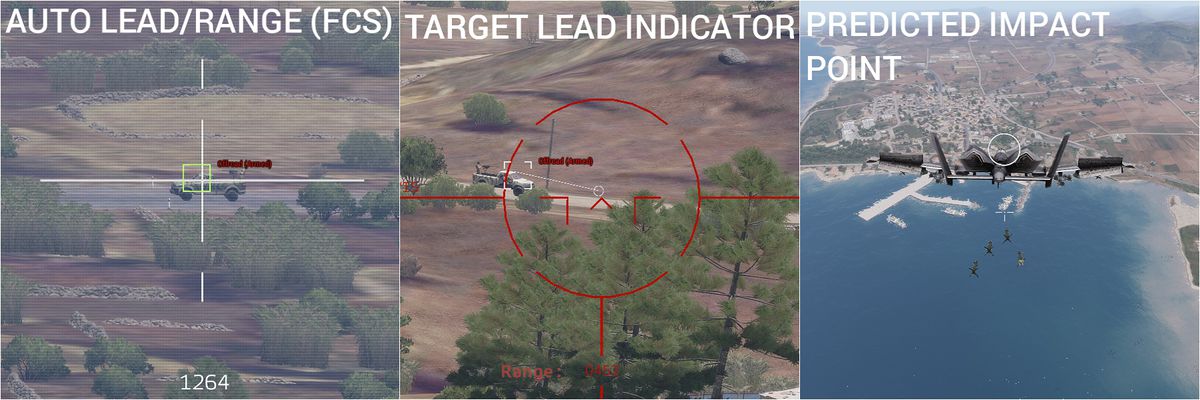
hi, how can we enable the "Predicted Impact Point" on a bomb ?
 desert notch


 small olive
just config
 devout locust
Hi, Im new to modding and was wondering if it would be possible for someone to point me in the direction of what might be causing an issue I am having. I have gotten a model in game but the texture only seems to apply to the LODs and even then its morphed, but everything seems fine in object builder ?
 inland pawn
Could be that something on your model is borked
As for textures
That should just be, E, then assign your CO textures
devout locust
Thanks by E do you mean ctrl + A then E and setting the co + rvmat
stuck oyster
Id higly recommend setting up the source model for all textures and correct weighting
in case you still need to revisit it later
devout locust
Thanks , I will keep fiddling with it , maybe go back to blender and clean it up a bit
devout locust
I ended up pasting the paths into object builder (E); the textures don't show up in bulldozer but do in game
Thanks for the help
stuck oyster
wrong P drive or no P drive set up at all
inland pawn
That’ll do it
stuck oyster
or OB texture path not set up right to start from P:\
devout locust
The path I use is P:\Pilot\Pilot Helmet\Data\head_CA.paa
I think I have P setup but its working fine now
Thanks for all your help
stuck oyster
p3d texture or material paths must never have P:\ in them
and well no other engine file path as well
inland pawn
When you assign textures, OBJ Builder should automatically omit the drive prefix
devout locust
Yeah , in rvmat and in obj builder I removed the P but when using the file selector it removed everything prior to head_CA.paa
It also just shows the white model like the pic but in bulldozer yet the properly textured model in game. Also lods still weird but I fix that another time. Seriously thanks for the help, my process atm is mostly trial and error
stuck oyster
trial and error will not work right if tools are not correctly set up
I know you are itching to get you stuff in game and all that
but you will be constantly fighting and uphill battle if the tools and development environment are not right
round bloom
Any clues please as to why arma 3 would have this odd issue with lighting points? https://gyazo.com/4dc2c67985ff3135ee3df3a6d0c3e7d6
It looks fine from outside through the glass but it goes dark as soon as you step inside
The light point is inside
I've tried removing RVMATs to test, removed shadow LOD etc all still to the same result
round bloom
I assumed that but I remvoed them all to test it
marsh canyon
Pretty sure it is a HDR
round bloom
eh?
marsh canyon
Sorry meant Aperture. The eyeball aperture simulation, not something related to the model
Guess so
round bloom
Just part of a mod pack, no other buildings in it have this issue
stuck oyster
I dont even dare ask more.
mod packs cant really be debugged
and life mod packs even less
round bloom
Like I said though no other buildings in it have any issues with this, it's something in this specific pbo I assume but no idea what
I'll even test running it on it's own and probably get the same result
frosty rain
@round bloom try loading it solo
round bloom
Tried it on it's own and same issue
And not sure what you mean @stuck oyster with that lol, it's my own building going into a pack not that I'm changing someone else's thing
 bitter kite
hey what do the different colors mean on these parts? https://imgur.com/gallery/U8BfaCF
the belt from that moves ingame which is what im also trying to do on the new weapon system but i dont understand how it was setup
or what it is
 vital geyser
round bloom
Any clues please as to why arma 3 would have this odd issue with lighting points...
vital geyser
round bloom
Any clues please as to why arma 3 would have this odd issue with lighting points...
Are you testing on vr map?
that is usually the issue for strange lighting
vital geyser
No problem, I've wasted hours testing lights on the vr map
bitter kite
Hmm im assuming thats how the effect is done where the belt will follow the gun when its turned?
small olive
bitter kite
hey what do the different colors mean on these parts? https://imgur.com/gallery/...
that photo gave me inspiration for adding animation to my aircraft that is bend the wings at high G-forces 😄
runic plover
bitter kite
Hmm im assuming thats how the effect is done where the belt will follow the gun ...
no thats done with the skeletonbones hirarchy
stuck oyster
well the partial weighting plays a part in that too
the ends move with different bones and the middle part partially with both
or more
round bloom
A mask (in eyewear slot) should just need a Head selection defined to attach correctly to the face right? I'm following based off the example headwear p3d and it's not attaching to the head/face at all
stuck oyster
it should follow the head
face naturally follows the head too
but also has facial expression bones/selections
round bloom
Right now it's not attaching anywhere remotely close to the head area
stuck oyster
you are probably missing some step
 marsh nacelle
Im trying to make a building model (Right now just a room but hopefully later on a fully enterable apartment complex or some such) and I just don't know where to go I guess. I tried looking up guides and either they didn't explain exactly what needs to be done, or just did a small segment of it. Does anybody have a complete guide I could use like the one's you'd find for terrains or is willing to teach me?
runic plover
@marsh nacelle the Arma 3 Samples so have a example of a house + how to make ruins of it too. You may check it
frosty rain
marsh nacelle
Im trying to make a building model (Right now just a room but hopefully later on...
vital geyser
marsh nacelle
Im trying to make a building model (Right now just a room but hopefully later on...
If you want to learn blender this is a good start
https://www.youtube.com/watch?v=Hf2esGA7vCc&list=PLGxQHIZUvoZvJEXRP3v0UPZNrwHpZYSgn
vital geyser
round bloom
Right now it's not attaching anywhere remotely close to the head area
Maybe on of these? missing named properties, not in correct position or broken model.cfg.
Like sentry just said, its always good to check arma samples when your learning
round bloom
I am going off the sample template, not many named selections on the tempalate but I did replicate them and I used the example model.cfg too so that shouldn't be broken
vital geyser
round bloom
I am going off the sample template, not many named selections on the tempalate b...
Named properties?
round bloom
vital geyser
Named properties?
Got them set the same as the samples
small olive
@round bloom where is your facewear appearing in game?
round bloom
Initially well above the head, tried moving it down and now it isn't showing even if I put it back up where it was
stuck oyster
Sound like you may have modeled it in wrong place
Or possibly if you use Blender you have not set the object origin to 0,0,0 coordinates
stuck oyster
marsh nacelle
Im trying to make a building model (Right now just a room but hopefully later on...
There are no complete guides really. First part is to just learn how to model stuff and then how to texture stuff.
After you understand how those work figuring out the Arma specific details become a lot simpler
 broken abyss
What's a good poly count for the 1st vis lod of a 2x2m boulder
stuck oyster
Yeah you can do a lot with 500 already
 ivory grove
I'm making a vehicle for arma 3 and i'm having a problem where object builder seems to be recalculating normal's when i save
Before Saving: https://gyazo.com/4a4694ba5570fce0b6d7a8eebad53a6b
After Saving: https://gyazo.com/bd41642b7dd6eb0126fd322178f14942
Mesh is fully triangulated
Does anyone know if i can stop that from happening or fix it in some other way?
stuck oyster
Do you have hard edges set there?
Did you model it in OB?
If not, what's your process of export/import to OB
ivory grove
stuck oyster
Do you have hard edges set there?
No, (assuming hard is the same as sharp) because doing that also seems to also recalculate the normals
No
I made it in blender and Exported as Obj and imported to OB
runic plover
you can export it as .p3d file with the Arma3 Toolbox for Blender
ivory grove
I've tried that and it doesn't seems to export any normal information and makes all the normals default to pointing down, so they have to be recalculated as well. I have already been exporting as p3d and using edge split on sharp edges as a work around but, in blender i have some custom normals which seem to be at least initially exported and imported when using obj.
stuck oyster
are you trying to have custom normals there?
If I recall right OB has quite a bit of trouble with those
ivory grove
yeah, i just thought as i could see them in bulldozer there might be some way to actually get them in game
stuck oyster
you could try locking the normals in OB after import
just dont ask how that is done. Its been years since I messed with that 😄
@shrewd jay Did you have any success with the toolbox and custom normal export? I remember you once talking about that being problematic
ivory grove
Thanks, ill see if i can find that
 shrewd jay
stuck oyster
<@!94831167240409088> Did you have any success with the toolbox and custom norma...
shrewd jay
stuck oyster
<@!94831167240409088> Did you have any success with the toolbox and custom norma...
I did some experimenting, and I thought it should have worked but it didnt. It wasnt a high priority so I didn't really look any further...
stuck oyster
alrgihto
not many use cases I suppose
trees and plants might be the biggest thing that could use it.
ivory grove
I found something called fixed (locked normal) and the custom normals seem to still be there in bulldozer after saving, ill try importing it into the game to see if it works there.
It seems to work, but only when there it sun light shining on it, but this seems to also be happening to all the normals not just the customs ones.
With sun light: https://gyazo.com/01d54c779aea0f0cd4b90d6785d9d2ca
Without sun light: https://gyazo.com/cdde83fae4a84f06cee17ea03f86e581
Is there a fix for normals seeming not working in the dark?
stuck oyster
do you have normalmap on it?
I thnk you would get better resutls on that surface without custom norrmals nad just smooth and sharp edges
ivory grove
Having no custom normals and using sharp edges and Adding textures and an rvmat does make it less noticeable but it still seems to be there.
stuck oyster
that may be baking issue on your normalmap
ivory grove
i assumed as it is there both with and without a normalmap that would not be the cause. And it doesnt happen in substance painter or blender
stuck oyster
ah alright understood you saw it only after rvmat
can you show how you got the sharp edges set up?
in Blender and in OB
ivory grove
This is what it looks like in blender: https://gyazo.com/f707a6403b09615ab8216c99d1ed6795
For object builder i don't manually setup each sharp edge instead i apply an edge split modifier in blender for each sharp edge, as exporting as a p3d seems to not save where sharp edges are. Exporting as an obj does but does not save named selections and proxies which i would, if possible, rather not setup in OB.
stuck oyster
are you still exporting as OBJ?
since you dont use teh custom normals anymore you might get better luck with the toolbox p3d export
you dont need the split modifier either, just sharp edges in right place and it should export right
ivory grove
No im using p3d now. The p3d export seems to be correctly adding the sharps as well, but it still seems to be having the same issue, with normals in shadow seemingly not working.
In Light: https://gyazo.com/e0c2cc9fc8d0123803277a3ee9da0db3
Not In Light: https://gyazo.com/7a4bea8c04c39f485e36b9dd4bb36644
(I switched to a different model as its a better example and it seems to be the same issue)
Thanks a lot for helping with this.
stuck oyster
so this is with normalmap applied in rvmat yes?
ivory grove
yes
stuck oyster
can you try neutral procedural one
texture = "#(argb,8,8,3)color(0.5,0.5,1,1,NOHQ)";
also is your normalmap made in Y- space?
since arma uses Y- normalmaps
ivory grove
how would i know if it is Y-?
in the project settings for substance painter i have set the normal map format as DirectX so i think it is Y-
For the procedural normal it seems to still have the issue.
With light: https://gyazo.com/8e6ad5e460ba80de50fce8f2e1d3ddf5
Without light: https://gyazo.com/8fa628f513cfdae51f32fa6cdeb4f620
stuck oyster
next up try with procedural AS
you are using super shader yes?
class Stage4
{
texture = "#(argb,8,8,3)color(1.0,1.0,1.0,1.0,AS)";
uvSource = "tex";
class uvTransform
{
aside[] = {1.0,0.0,0.0};
up[] = {0.0,1.0,0.0};
dir[] = {0.0,0.0,0.0};
pos[] = {0.0,0.0,0.0};
};
};
median bough
!code
 whole dawnBOT
How to use SQF syntax highlighting in Discord
```sqf
// your code here
hint "good!";
```
↓
// your code here
hint "good!";
😛
frosty rain
whole dawn

 warm spindle
hello people i am trying to make a series of low poli rc vehicels for arma 3 starting with a simple rc car and eventually making tanks , helicopters and planes
but i have no idea how to begin implementation, i already have a simple model , are there any good videos about vehicle modeling for arma and especially drones , or even better if anyone is willing to sit down with me and teach me that would be even better!
stuck oyster
There is a blender to Arma YouTube series that could have some pointers in it. Basic concept is same with all types of objects.
There are very little in exact "how to do X" type videos.
warm spindle
I have already watched the "zero to hero" video and managed to get several headgear in the game but i have no idea what else is needed for vehicles
quick terrace
for modelling purposes, it doesn't matter what software or method you are using as long as it is game ready model
for everything else arma related, best bet is to start from some existing stuff
 ivory scaffold
hey guys quick question does arma 3 toolbox is supported in blender 2.93?
 kind lion
sorry for digging this up, how does the emissive texture work? i guess it has an EM extension, does it behave like a normal CA texture otherwise?
 bold flare
I don't know if it has full alpha or 1 bit alpha.
Never tried that
but atleast like a CO
kind lion
no luck so far 🤔 guess i'll have to go scavenging through TKOH for some examples
bold flare
using SuperExt shader?
kind lion
yes
doesnt seem like its doing anything, either with procedural or a texture made by me
bold flare
show rvmat
kind lion
Pastebin
Pastebin.com is the number one paste tool since 2002. Pastebin is a website where you can store text online for a set period of time.
Will upload the texture in a sec
bold flare
You have too many uvTransforms I think? Or thats exactly the limit?
Might have to use texGen's
bold flare
There is a limited number of uvTransforms you can have
I know that SuperExt with all uvTransforms set is too many
so you need to use texGen's instead
like with multimat
kind lion
i dont need those transforms, i just copypasted that bit from elsewhere
bold flare
You need some uvTransforms
but you can just reuse one TexGen
Well thats pretty bad because I have both texGen and uvTransform.
But if you use texGen, the uvTransform classes inside the stages are ignored
kind lion
ok thats clearer now, i didnt understand what you meant with texgens 😄
will give it a try now
it works but it's rather faint
thanks
kind lion
it seems the emissive map just fetches the colors from the CO map and makes them glow like a mask, rather than doing its own thing with separate custom colors in rgb channels and emissive values in alpha


the emissive here is just full black/white, but the dot on top of the radio emits red color, same as in the CO map
kind lion
hmmm think i found a bug, the normal map doesnt work with superext
Pastebin
Pastebin.com is the number one paste tool since 2002. Pastebin is a website where you can store text online for a set period of time.
ivory scaffold
hey guys a quick question, can i do that in blender? (look at the screenshot)
https://prnt.sc/1331ymq
frosty rain
ivory scaffold
hey guys a quick question, can i do that in blender? (look at the screenshot)
ht...
Yes, you need the Arma Toolbox Plugin
stuck oyster
ivory scaffold
hey guys quick question does arma 3 toolbox is supported in blender 2.93?
Yes
ivory scaffold
i do have the toolbox addon
ivory scaffold
frosty rain
Yes, you need the Arma Toolbox Plugin
i have arma 3 toolbox addon, but i cant find this option
frosty rain
ivory scaffold
i have arma 3 toolbox addon, but i cant find this option
Make sure your LOD is set to geometry
Option should be on the vertex groups tab
ivory scaffold
Oh ok, Thank you man!
 tight fractal
I need to remove the head from a uniform, the head itself is being called in a proxy or a memory?
and which name aswell?
marsh nacelle
When making LODs in blender from the sample I imported, will they still work if I group different stuff into different collections? Theres are a lot of meshes that are being used and having them all in one collection not really organized is a pain in the ass
stuck oyster
if you are using latest arma toolbox it does have the ability to combine all same lod level objects into 1 on export
otherwise, no
marsh nacelle
What do you mean by lod level? Sorry I'm new to this
stuck oyster
resolution 0, 1 ,2, geometry etc
Id recommend exploring the basic stuff first before starting to do splitting and other advanced stuff
for example, make a simple cube object with textures set up and collision and shadow lod set up so that everything works on export
marsh nacelle
Gotcha alright thanks I'll try that out
marsh nacelle
Right yeah crawl walk run and all that
stuck oyster
Indeed indeed
ivory scaffold
hey guys i have a little problem, i made a simple model with 4k tris and 2k texture, and when i get close to the model arma is crashing with this error code (look screenshot)
https://prnt.sc/134b720
and also im playing on ultra res
any idea?
ivory scaffold
nvm found what was the problem
warm spindle
hey i am making a toy xwing model potentially for arma but have no idea how to implement it, is anyone interested in implementing it ?
 kind nacelle
warm spindle
hey i am making a toy xwing model potentially for arma but have no idea how to i...
kind nacelle
warm spindle
hey i am making a toy xwing model potentially for arma but have no idea how to i...
Star wars stuff is banned as per rules fyi
woeful viper
more like, the IP holder of star wars does not want star wars mods, and therefore its not allowed (rather than BI having a peeve with star wars content)...
tight fractal
stuck oyster
what uniform is it?
its an alien uniform
kind nacelle
woeful viper
more like, the IP holder of star wars does not want star wars mods, and therefor...
Yes, same info more words
woeful viper
except the blame is on disney, not on bi
woeful viper
you didnt, but the average reader would
kind nacelle
Fair enough
warm spindle
@kind nacelle ahh thats unfortunate , espesially considering that its something based on the xwing and not actually a 1to1 copy
kind nacelle
Well I'm just warning you
stuck oyster
@warm spindle if its your original design and not just xwing with some thingy added to it should be fine.
Regarding the implementation, you are quite likely on your own. There are far more modelerd out there than people who do encoding (or both) and making an aircraft fly nice is not a small feat.
So you have some learning to do in the near future.
Don't worry though, with some patience and time you can learn it.
warm spindle
Thanks for the encouragement honestly though at this point i am debating learning to iplement it to arma or learning how to use unity and make a separate game 😂
stuck oyster
well if its space craft and you want space flying, then the latter might be better option
warm spindle
Its not just that i have created an ec car a few days ago and have been trying to understand hiw to get it in the game ever since but even after finding a decent tutorial i am not sure its worth the time implementing it in arma or learning to actually make a game
stuck oyster
learning to make a game will take somewhat longer I believe
but its up to you what you want to pursue
white jay
Regarding that Spaceship, how much different would a newly created vehicle have to be to NOT create IP problems? If, just hypothetically, the Z-95 would never have been invented/designed, would it count as Violation of IP because it is similar to the X-Wing? ( This is a general question, not related to those specific models or that specific topic, i am just using that as an example )
 random bolt
first project and working on a custom weapon, does anyone have a comprehensive guide to modding in general (theres alot of terminology i dont quite get) and more specifically right now, blender to object builder?
I have a model rn, and just working on getting it ready for ob, following the el tyranos tutorial atm but stuck on stuff like the rv material
havent even thought about cfgs or whatever yet
marsh nacelle
random bolt
first project and working on a custom weapon, does anyone have a comprehensive g...
Im learning as well but from what I've found, make sure you have VS code to read the cfgs, sqfs, cpps, and all the other text files. Also, make sure you download Arma 3 Samples in the steam tools section cause it has a bunch of shit with explanations in the actual files.
These probably helped me the most at this point:
https://community.bistudio.com/wiki/LOD
https://community.bistudio.com/wiki/Model_Config
https://community.bistudio.com/wiki/Model_Config#AnimationSources
https://forums.bohemia.net/forums/topic/151777-tutorial-simple-re-texturing-guide-from-start-to-finish/
https://community.bistudio.com/wiki/P3D_File_Format_-_MLOD
https://www.youtube.com/watch?v=WaQElVHtu5Y&ab_channel=EgilBallestad
https://www.youtube.com/watch?v=tzzgMlJ6HGw&ab_channel=ChaosToasterHH
https://www.youtube.com/watch?v=vgymTnhZqWs&list=PLKCLIs1vgjwRdrAoJKzRmkKvcpVwnK2TK&index=3&ab_channel=EgilBallestad
About a tutorial, I haven't found one yet that covers everything I need personally (I'm trying to make a building) but you might be able to find specific tutorials to your issues
From what I've interpreted, the config.cpp is what tells the game to do with all the models and everything it has, the model.cfg applies animations onto a specific model, rvmats control variables such as how metallic or rough the surface is, paa files are what you use for textures and different maps, and then you import those all into object builder. Still trying to figure out how everything works in object builder so im blank from there lmao
kind nacelle
white jay
Regarding that Spaceship, how much different would a newly created vehicle have ...
No such thing as clear cut rules on this topic, it's al relative and depends on context
stuck oyster
marsh nacelle
From what I've interpreted, the config.cpp is what tells the game to do with all...
Not metallic /rough. Arma does not not have PBR so it's very important to understand the difference.
Arma shaders use older specular/Gloss workflow which is not 1:1 compatible with pbr metallic/rough
marsh nacelle
stuck oyster
Not metallic /rough. Arma does not not have PBR so it's very important to unders...
Oh gotcha alright thats good to know thanks
ivory grove
stuck oyster
next up try with procedural AS
Yes i am using super shader.
This is with procedural as and nohq
With light: https://gyazo.com/593ed09b38a29f2d9e8118620253533a
Without light: https://gyazo.com/2f273c4503a3c4581f1863245c07302b
and sorry for the late reply.
stuck oyster
seems like no change there
these were all sharp edges yes?

ist that whole cylinder same uv island?
and is all vertextes there merged so there are no separate parts on the curve
ivory grove
The single piece looks like this: https://gyazo.com/76266acb0ca21167653e6192947e774c
It with the rest of the mesh: https://gyazo.com/54b083134826d9637877901ea5c36180
There are seams where the sharps are marked and all vertextes are merged
stuck oyster
odd that it shades like that then :L
ivory grove
Yeah, strange it only happens when its in the dark.
It does have 4k textures, ive seen people saying they can cause issues, could it be that.
stuck oyster
not that kind I believe
ivory grove
Maybe upping the amount of sides on the cylinder could make it less noticeable?
silver zenith
weird so it becomes sharp when in shadow?
maybe custom split normal data?
ivory grove
How would i do that or fix that?
silver zenith
not sure if thats actually the problem I'm just a beginner
https://i.imgur.com/NE7iqCS.png
 ivory grove
Ill try that but, object builder seems to automatically recalculate normal's anyway so i'm not sure normal's are transferred from blender to OB
polar fiber
Does your ambient occlusion map have any visible banding along edges?
stuck oyster
should not be caused be AO since the last image is with procedural AS and NO
polar fiber
What if you change SSAO settings in the game?
Wondering if it's just the way the dynamic ao is calculated on the mesh
ivory grove
Ill try changing that now
and just in case this is the AS map for that part of the mesh: https://gyazo.com/31ff865df18bbdf520d023bac745b59d
Disabling AO does seem to work.
With AO HBAO+ Strong: https://gyazo.com/c6a53131a9a00f8b6182ef7faf24d192
With AO Disabled: https://gyazo.com/e0ccb1ad523259a876f1cc823e45ee97
stuck oyster
yeh looks like its just how the AO is drawn then
you could try it on different map too
terrain lighting can vary
ivory grove
I just tried it on stratis and it seems to look pretty much the same as in VR
stuck oyster
then looks to be just as how the engine draws it
ivory grove
Is there some way to fix this?
this seems to happen, to varying degrees, to all the models i've made in arma, could it be possible im missing some step, or making some mistake that's causing this?
marsh nacelle
How would I make an LOD in blender? I've been reading the wiki and supposedly it's simply naming them. I've named them but I wanna just make sure.
Also, how would I make different resolution LODs? That wasn't really explained the best. Do I name them differently or what
stuck oyster
If you use Blender Arma Toolbox it has a specific setting you set for object to be of any lod type
other than that FBX might carry over lod types in object naming
but I would not recommend it
the toolbox and p3d export is the way to go
wiki itself does not go into detail on how to do this stuff in X program
for the reason there being way too many programs that all do things differently
 orchid spruce
how do I set up a reflex sight on a vehicle, something like sights on old planes? where there's a glass plane that you look through and see a holographic like reticule?
I tried to just put a simple plane behind the glass and tried applying a vanilla holo sight texture and material, it shows up like you would expect, but it moves all weird
if I'm not using sight view, it's somewhere way off center
stuck oyster
needs correct materials and the old tube method
orchid spruce
and if I use sight view it just moves all weird
when I aim up and down it moves more up and down and it doesn't move left or right at all
how are plane HUDs done?
stuck oyster
well Im fairly certain gunner sights cant be made like that
orchid spruce
but it's done on planes
stuck oyster
this is for a turret?
orchid spruce
yes
stuck oyster
well maybe it can work. but im sceptical
orchid spruce
why would it be different than plane HUDs? it's the same thing of seeing a holographic reticule through a plane of glass
stuck oyster
idk
orchid spruce
shouldn't the same method as holographic sights on guns are done work for this?
stuck oyster
no
the attachment sights received a new material that the holo effect is made with but the vehicle ones cant use it
dont know why.
polar fiber
Yeah, doesn't work on vehicles. Your options are either using the old tube method from before the shader was added, as shown here https://community.bistudio.com/wiki/Arma_3:_Weapon_Collimator_Sights or make an MFD
marsh nacelle
stuck oyster
If you use Blender Arma Toolbox it has a specific setting you set for object to ...
Awesome thank you. I was looking at a few tutorials and saw that and wondered how tf they do that lol
random bolt
marsh nacelle
Im learning as well but from what I've found, make sure you have VS code to read...
thanks a ton
marsh nacelle
random bolt
thanks a ton
for sure
frosty rain
Do uv animations only work on vehicles or can it be used on props, like a tv? 
marsh canyon
Yes, props are vehicles also, tho
frosty rain
Oh yeah I’m stupid myb lol
Does it also use sourceadress=loop to do a looping animation when placed in eden?
stuck oyster
yes
well depending what the source is
sourceAdress only defines how it plays
not when it plays
frosty rain
I’d need source=time too right
stuck oyster
if you want it to play constantly, yes
frosty rain
Alrighty, will test
frosty rain
class UVAnimations
{
    class lcd_anim
    {
        type=translation;
        source=time;
        sourceAddress=loop;
        section=camo;
        minValue=0;
        maxValue=10;
        offset0[]={0,0};
        offset1[]={0,10};
    };
};``` So this is my config for the UVAnim, am I missing something? It's not workingDo I have to have something on my model.cfg?
Nvm it finally worked
 rough idol
orchid spruce
I tried to just put a simple plane behind the glass and tried applying a vanilla...
rough idol
orchid spruce
I tried to just put a simple plane behind the glass and tried applying a vanilla...
you have to put that holo to proxy - otherwise it's not going to work. I guess it's caused by rotation of scopes on weapon vs rotation of vehicles
orchid spruce
you mean like, make a separate model that just has the plane with the sight texture at 0,0,0 and then make it a proxy?
rough idol
here is holo sight that I've used on ZU-23. That large box is there to force higher position in alpha sorting hierarchy (bigger alpha objects are rendered on top of smaller alpha objects)

notice that proxy is rotated by 90 degrees - that's due to fact how weapon scopes are aligned
orchid spruce
alright, I will try that, thanks
I guess the holo sight shader is somehow calculated in its local model space
 honest herald
Hi, I need help: I created an object in the game, which is posed in editor, it works perfectly. I would like to know I can give it a simulation (like the boxes of weapons), so that it falls when it is in height and that nothing holds it back for example.
stuck oyster
it needs to have thingX simulation type and properly set up geometry/physX geometry
orchid spruce
@rough idol did you do any alpha sorting in the p3d that has the sight?
I put in my sight geometry with my texture into that p3d and gave it a vanilla collimator rvmat, put the proxy in my model but it's just not visible
rough idol
orchid spruce
I put in my sight geometry with my texture into that p3d and gave it a vanilla c...
how its not visible? are you sure your collimator is properly attached to gun bone?
\a3\Weapons_F\acc\acco_dcl_120_F
you can try if its some issue with your proxy by using vanilla scope
orchid spruce
yeah the proxy does appear, I tried just putting some other texture on it and it was visible
I must have messed something up before, now I just took your p3d without any changes, applied some vanilla reticule texture and material to it and it does show up
I'll just swap it to my texture then and hopefully it works
orchid spruce
alright now it's mostly working, only issue now is when aim up past a certain point, the reticule just disappears
actually, it also disappears when I rotate left or right past a certain amount
almost like it disappears once it moves too far away from its starting point
oh, do I need to make that box bigger?
rough idol
Depends how big is your vehicle
orchid spruce
it's not big, but it does rotate 360 degrees and 90 degrees up
increasing the size of the box didn't seem to help
I thought that was it because when I get out of the vehicle and look from outside, the reticule is still visible in those cases
and the 0 LOD box is much bigger
but now I made the viewpilot one almost as big as the 0 one and it didn't seem to change anything, it still disappears at the same time
orchid spruce
if it's not the box size then I don't understand why the reticule remains visible in outside view but disappears when viewed from inside
stuck oyster
probably related to the collimator shader
since its all static there anyway, why does it need to be collimator?
orchid spruce
cause it's meant to be a reflector sight
stuck oyster
yes but does it add anything to it if you are not really using the visual effect anyway
orchid spruce
it looks cooler
I would also think it's some shader limitation, but looking at the vehicle from outside, the reticule is always visible without problems
so I don't get why it only becomes an issue in first person
it seems to work just fine on the new RHS ZU-23
the sight is always visible
runic plover
Try to move it a bit away to get a little bit distance
orchid spruce
just noticed a weird thing, when it disappears, if I move the head close towards it, the reticule reappears if the view clips into the glass plane that is in front of it
so it's acting like the glass geometry is covering it up somehow
 tidal monolith
Is this the right chat to ask about uniform patches?
orchid spruce
it definitely is looking like the glass object somehow starts blocking the reticule at a certain point, that's really weird
stuck oyster
tidal monolith
Is this the right chat to ask about uniform patches?
Possibly
tidal monolith
I have two I need made👉👈 @stuck oyster
orchid spruce
yeah if I remove the glass geometry then the reticule is completely fine and does not even disappear
@rough idol what kind of texture and material did you use in the ZU for the glass that is in front of the reticule proxy?
 inner fjord
Hey folks, I'm having a weird issue I've never run into before. Looking at my model in bulldozer it looks like the normal map has been applied incorrectly, and there are tons of shading issues. Any idea what could cause this?
small olive
inner fjord
Hey folks, I'm having a weird issue I've never run into before. Looking at my mo...
any screenshots?
 inner fjord
https://i.imgur.com/ICN0cdt.png
inner fjord
inner fjord
https://i.imgur.com/ICN0cdt.png
Thats in Blender, you can see the normal details.
 inner fjord
https://i.imgur.com/E3CYDxQ.png
inner fjord
inner fjord
https://i.imgur.com/E3CYDxQ.png
In Bulldozer...
small olive
you should check paths on your rvmat, looks like you didn't define normal map in rvmat
inner fjord
small olive
you should check paths on your rvmat, looks like you didn't define normal map in...
Thanks, It was a really dumb mistake by me. I use a prefix infront of my projects. And this project almost shared the exact name with another. So I totally missed that my rvmat paths where linked to a totally different p3d.
white jay
Hello, does anyone know whether it's possible to use insignia selection on a vest?
polar fiber
No, it's not possible to have dynamic textures on vests
tidal monolith
Is there anyone who can help me make a patch?
white jay
Ah, what a shame.
Hm, is Blood not dynamically applied? Maybe you could hijack that system in some way?
rough idol
orchid spruce
<@!105548653594193920> what kind of texture and material did you use in the ZU f...
material is same as base body and texture is procedural #(argb,8,8,3)color(0,0.0235294,0.0235294,0.3,ca)
it looks like it's going out of the vehicle bounding box
if its multi turret vehicle, make sure that bounding box is big enough for gun movement
also, if you are using translated, english names for selections, you might also need to change in cfg name of the gun bounding box extender
orchid spruce
@rough idol I don't think it is a bounding box issue, from looking in zeus that part remains well within the bounding box the whole time, it really seems like it's something weird going on with the glass geometry if it somehow ends up suddenly obstructing the reticule at those times
rough idol
it's reticle btw 😛
orchid spruce
did you do any alpha sorting with the reticle or glass?
also I like how discord doesn't know that "reticle" is a word
orchid spruce
I guess my problem was the glass geometry
it was a object with some thickness, I made it into just a flat single sided one and now it doesn't disappear anymore
olive rampart
how would i change the "angle" on my pilot and copilot sticks so they dont go straight up and down, but pull forward and backward like its supposed too
            class stick_pilot_dive_01 // cyclic
            {
                type = "rotationX";
                source = "cyclicForward";
                axis = "stick_pilot_joint";
                selection = "stick_pilot";
                minValue = -0.499999;
                maxValue = 0.499999;
                angle0 = STICK_ANGLE / 3;
                angle1 = - STICK_ANGLE / 3;
            };
            class stick_pilot_dive_02: stick_pilot_dive_01 {minValue = -0.849999; maxValue = -0.5; angle0 = STICK_ANGLE / 3; angle1 = 0;};
            class stick_pilot_dive_03: stick_pilot_dive_01 {minValue = -1; maxValue = -0.85; angle0 = STICK_ANGLE / 3; angle1 = 0;};
            class stick_pilot_dive_04: stick_pilot_dive_01 {minValue = 0.5; maxValue = 0.849999; angle0 = 0; angle1 = - STICK_ANGLE / 3;};
            class stick_pilot_dive_05: stick_pilot_dive_01 {minValue = 0.85; maxValue = 1; angle0 = 0; angle1 = - STICK_ANGLE / 3;};

            class stick_pilot_bank_01: stick_pilot_dive_01
            {
                type = "rotationZ";
                source = "cyclicAside";
                angle0 =  STICK_ANGLE / 3;
                angle1 = - STICK_ANGLE / 3;
};```Are memory points able to be animated?
olive rampart
uhhhhh
stuck oyster
rotation# (X Y Z) types only rotate around those axis
olive rampart
yeah and its not working lol
stuck oyster
you cant alter that
olive rampart
what can i look into that would help me fix it then?
stuck oyster
use the non defined type and make axis memorypoints
olive rampart
i have axis memory points
stuck oyster
they are not used
olive rampart
pilot and copilot stick axis's
frosty rain
olive rampart
model.cfg handles that. so yes
I mean as in changing the memory point’s position, so if I had 2 mem points defining the axis of a translation can i use that to move another unrelated memory point?
olive rampart
i get that. so what can i look into to help me change my model.cfg to use the correct animations for the axis points?
stuck oyster
I dunno
 stuck oyster
quite likely
polar fiber
frosty rain
Are memory points able to be animated?
Depends what the memory point is for. You should be able to move axis memory points for animation, optics and weapon firing but things like memory points for marker lights and particles will continue to spawn the effects from the position they were modelled
frosty rain
polar fiber
Depends what the memory point is for. You should be able to move axis memory poi...
Perfect, thanks!
 vernal geode
Hi I have 2 very small questions using the Arma 3 toolbox in Blender how do I setup the "View Pilot" LOD and the "Geometry" LOD ?
small olive
vernal geode
Hi I have 2 very small questions using the Arma 3 toolbox in Blender how do I se...
select your object and tick the Arma Object Properties, after that select the LOD type from there: https://prnt.sc/13bbom3
oh sorry, my mouse icon didn't appear on the screenshot https://prnt.sc/13bbspn
vernal geode
@small olive So that didn't necessarily answer my question as I know where it is but once I select the view pilot LOD how do I set it up as I want to hide the object in this view
I am trying to setup view pilot LOD for headgear so when I enter a vehicle the "headgear" model isn't displayed
stuck oyster
thats not possible
small olive
headgear will be still visible
stuck oyster
you would have to make the vehicle remove headgear
pilot lod in headgear meas the first person view
not vehicle view
there is no ready mechanic in game to hide headgear when in vehicle
vernal geode
@stuck oyster First person view "View pilot" is what I am looking to setup so my headgear doesn't block my 1st person view
vernal geode
To keep it straightforward I want to create an empty "View Pilot" LOD in Blender how do I do that?
stuck oyster
well you cant I suppose
that you may need to do in OB
or create empty object and set that as the view lod
vernal geode
@stuck oyster Ok that 2nd option is what I am trying to do create an empty object and set it as the view lod
stuck oyster
or make a normal object, set that as viewlod and merge all verticles into 1 at 0,0,0
 snow bloom
Hello there!
Im learning retexturing for our unit AUX mod i need someone to help me that when i try to extract the 3CB mod pbo file the PBO manager does not want to Extract it, other than that it works fine on other things im trying to basically have few customs edits on uniforms/Equipments for our unit contributors.
stuck oyster
@snow bloom ask only on 1 channel please
snow bloom
Sorry g my bad. I was confused
vernal geode
Hi I have a question is there a way to get object builder or Oxygen 2 to use more ram as I have object that requires a lot of ram despite being a small object (Object is a hair object)
 molten fractal
snow bloom
Hello there!
Im learning retexturing for our unit AUX mod i need someone to hel...
molten fractal
snow bloom
Hello there!
Im learning retexturing for our unit AUX mod i need someone to hel...
Does it give any error messages? I know 3CB obfuscates some of their PBOs.
frosty rain
vernal geode
Hi I have a question is there a way to get object builder or Oxygen 2 to use mor...
I don't think you can force a program to use more ram, why would you want it to use more ram?
vernal geode
@frosty rain To allow Object Builder to import my p3d file as the p3d file is large despite only being a hair object
frosty rain
vernal geode
<@!762700926183145472> To allow Object Builder to import my p3d file as the p3d ...
well if it's not even letting you import it wouldn't be very smart to force it to accept it, limits are there for a reason
how high poly is it?
vernal geode
From Blender: Verts 34,343,707 Faces: 32,8666,744 Tris: 65,7333,488 (If you creating hair technically this is a normal count)
median bough
o_O
frosty rain
that is absolutely not a normal count lol
median bough
try smth around 6-10k for hair
yours is not gonna work for arma
even 6k seems too much
frosty rain
I was given a 60k vertices hair model and I got stutters while wearing it
you can't even render that many polygons at the same time in arma lol
vernal geode
@frosty rain Even with 128GB ram as while its a large count I got a lot of ram for it to run also got an 8gb Vram Graphics card
frosty rain
vernal geode
<@!762700926183145472> Even with 128GB ram as while its a large count I got a lo...
that doesn't matter at all, it's the engine that will limit you
to give you an example
unreal engine 4 is a decently recent engine, and it handles about 1-5 million polygons in a frame
rv4 is a 7? year old engine and you're asking it to render 13 times as many polygons lol
median bough
a little older, but you'Re still right
stuck oyster
@vernal geode that is just insane xD
frosty rain
65 million polygons is movie scene type shit lol
stuck oyster
you are doing this completely wrong
you will need to learn how to do low poly hair
and Im hoping you are not going to argue about this. 
frosty rain

vernal geode
so my next option is to decimate (which is used to decrease the polycount) the object any suggestions on decimating without completely losing symmetry in blender?
stuck oyster
no
decimate will not help you
your method of hair creation is not right for games
frosty rain
vernal geode
so my next option is to decimate (which is used to decrease the polycount) the o...
stuck oyster
seems to cover the concept 👆
vernal geode
@stuck oyster This covers the standard concept for the hair type what I am looking to create is a custom cornrow hair object which uses planes and scalp hair (which are used in games) what I don't know is how to do it while keeping it a low poly
frosty rain
vernal geode
<@!150949769953411072> This covers the standard concept for the hair type what I...
you can probably do that with the technique showed in the video
stuck oyster
well I dont know how you should do it exactlty, but your method is not at all correct
you could maybe get best results by low poly bumps on the head and baked texture
vernal geode
@stuck oyster Well at least I know what my limit of poly is around 10K which I still think is low but ok. However I don't think I did it wrong as I followed tutorials for this hair type I just made my own custom version of it
vernal geode
@stuck oyster But isn't grass or water in games much higher?
frosty rain
vernal geode
<@!150949769953411072> But isn't grass or water in games much higher?
grass and stuff is made with planes and transparent textures
like the video
stuck oyster
and other games do things differently anyway
it is what it is
normally arma characters have hair only on texture
vernal geode
@stuck oyster I have considered that but I don't know how to create a texture for hair out of my model
frosty rain
vernal geode
<@!150949769953411072> I have considered that but I don't know how to create a t...
This is the perfect time to learn 
stuck oyster

snow bloom
molten fractal
Does it give any error messages? I know 3CB obfuscates some of their PBOs.
Yes. Its like the file may be corrupted or jas unknown format
stuck oyster
Like I said, you need to ask the 3CB team
orchid spruce
3cb PBOs are all obfuscated, you are not going to be able to extract them
quick terrace
@vernal geodeto put things in perspective, miller's hair model is somewhere under 1000 verts irc
same principle can be applied to A3 just as well
https://i.pinimg.com/originals/fb/3a/af/fb3aafe0a71ffb7d2b187b9779127346.jpg


 modern patrol
Hello everyone. I've been using OB from the days of OFP, yet, I just couldn't ever sit down and finish learning how to go from step one to finish. I actually can model in Modo, Blender, and OB, preferring OB due to the fact that I can get precise measurements (at least I am comfortable with it) I have a maintenance platform that I'm working on (a static model) and am attempting to move on to creating the Geo LOD. After finding Non-closed areas, I'm finding that many of my intersections of my model can't be closed unless I remodel the area. https://postimg.cc/dL2rcnHv][img]https://i.postimg.cc/dL2rcnHv/Main-Plat1.jpg


 feral cave
Hey all ive been working on trying to make my own tracked UGV such as the one in contact, though ive learned since contact is binarized and hidden from my directory i cant really see how contact was able to put tracks correctly onto a ugv
so ive got the turret mostly functional, the tracks do spin, the axels/gears spin, but it really really wonky to drive
would love some assistance in trying to make it function properly
 polar fiber
Pretty sure you just configure it like a normal tank (which there is an example of)
stuck oyster
you will need to completely make the shadowlod from 0
there is no automatic way to make it properly
snow bloom
im trying to make mod for my unit, i have the Png/paa files (got from someplace) edited them Ik how to make addon and stuff but IDK how to make them appear on game I want someone to help me personally PLEASE
stuck oyster
well if you dont make the parts closed naturally they are not closed
you should just make it from simple boxes

you dont make it from the visual mesh
that is way too detailed
compare to shadow lods in the samples
modern patrol
you can close the model via the Shadow LOD and not the 0.000 LOD? Just clarifying
I was trying to cut down on faces and verts, having to make my model from simple boxes from the very beginning will almost double my verts/faces probably
stuck oyster
dont try to use the close tool
it does not work correctly
shadow lod is best to make from simple shapes
modern patrol
ok, thanks
@stuck oyster were you able to look at my pic of the platform I created by chance?
kind nacelle
the links are messed up
so you have to manually edit them to be able to view the image
warm spindle
hello i am getting a weird shadow texture on my helmet, basicly weird wavy lines that move when i look around
any idea what might be causing it ?
small olive
warm spindle
any idea what might be causing it ?
can you post a screenshot?
stuck oyster
@modern patrol no the links dont work
