#arma3_model
1 messages · Page 166 of 1
 polar fiber
the _ca.paa and all .paa assigned to the muzzle flash model by .rvmat need to be accessible from P:\ drive. Including any Arma 3 game files
 rain solar
Is someone able to assist with my cannot open object error? I exported them from blender to p3d using arma toolbox.. so idk what is causing it
 stuck oyster
is the exported p3d 0 bytes in size?
rain solar
7 kb
stuck oyster
sounds like it probalby did not export anything
rain solar
It has it's vertex group set, texture is set to the correct .paa, rvmat is set to the actual rvmat.
 pastel oyster
polar fiber
the _ca.paa and all .paa assigned to the muzzle flash model by .rvmat need to be...
pastel oyster
polar fiber
the _ca.paa and all .paa assigned to the muzzle flash model by .rvmat need to be...
Path
P:\test_rk62m1\Muzzleflash
contents: https://cdn.discordapp.com/attachments/524960828139765761/829436965027708988/unknown.png
Textures in the model: https://cdn.discordapp.com/attachments/524960828139765761/829437542835159050/unknown.png
How it looks in bulldozer: https://cdn.discordapp.com/attachments/524960828139765761/829437831825981481/unknown.png
rain solar
It exported it, loading it up in object builder shows my model
stuck oyster
oh I though the error came up in object builder
pastel oyster
and the Arma 3 game files are in my bulldozer too.. I think
stuck oyster
rain solar
It exported it, loading it up in object builder shows my model
then your config and/or P drive setup is just wrong
stuck oyster
@pastel oyster something in your setup is not right if OB shows the paths as red
rain solar
model = "<Addon Source>\_ammo\data\ibl_laser_small_green.p3d";
Do I call the model correctly?
pastel oyster
Hmm, makes sense - somehow "red = bad" didn't cross my mind))
rain solar
Ignore the "<Addon Source>" part
stuck oyster
:L
pastel oyster
What could it be then? Screenshots provided seem to show that all is setup "correct"
stuck oyster
what do you pack it with?
@rain solar addon source part could be faulty
Im not too keen on going further with secret projects
dont especially want to help with anything that isnt kosher
rain solar
    class IBL_generic_aircraft_laser_cannon_green_ammo: IBL_generic_aircraft_laser_gun_red_ammo
    {
        hit = 400;
        indirectHit = 200;
        indirectHitRange = 0;
        caliber = 1;
        explosive = 0.6;
        model = "IBL_Vehicle_Weapons\_ammo\data\ibl_laser_small_green.p3d";
    };
All I know is that when I go in game and place the actual vehicle. It pops up an error message "Cannot Open Object ibl_vehicle_weapons_ammo\data\ibl_laser_small_green.p3d"
Wouldn't worry about it being an illegal project. I made the models myself, and all it really is, is just a laser bolt
rain solar
Sorry, force of habit of working with other people, they weren't really trust worthy 😅
PBO Manager
pastel oyster
pastel oyster
What could it be then? Screenshots provided seem to show that all is setup "corr...
adding a forward slash makes the text black instead of read, I will see if that fixes it
rain solar
Oh?
rain solar
What should I use then? PBOProject or Addon Builder?
stuck oyster
pboProject is the only one that will tell you where you make mistakes
Id recommend it
rain solar
I had issues with pboProject because it calls errors where the addon is calling to other classes of dependent mods
stuck oyster
but AB can work too if you feed it 100% correct stuff
well then you have problems you need to solve
isntead of using tools that "dont tell you where you make errors"
rain solar
Hm, okie. I'll use PBOProject and see what the output log tells me
stuck oyster
for pboProject to make sure your file paths are correct, you also need to have those file in correct paths on your P drive
inheriting from other classes is not an issue though
although you will need to have the original mod referred in the requriedAddons array so that your mod is loaded after it and can actually access the files
stuck oyster
there is unfortunately lot of misinformation about this going around
and bad practices used
pastel oyster
Would using Arma tools' addon builder be consider as such?)
stuck oyster
Personally I would yes.
I dont know very many people that make error free files that it would process correctly
pastel oyster
I guess I am special then, I've been using it this whole time
stuck oyster
well it does not tell you if you have errors
pastel oyster
I just never managed to get PBOProject to work
Aye, I find all the errors through RPT's
stuck oyster
who knows what you have packed in then
pastel oyster
(Atleast I think I find all the errors)
stuck oyster
some
I mean sure pboProject probably does not find everything
but it does find most things
 molten fractal
Learning how to properly pack with pboProject really saved me hours in my workflow.
pastel oyster
pastel oyster
adding a forward slash makes the text black instead of read, I will see if that ...
Didn't fix it - texture simply missing
So rather than being cursed black - it's blank white
pastel oyster
https://cdn.discordapp.com/attachments/705630725113905162/829435772545400893/unknown.png
this looks like a paa issue rather than rvmat, but I'll try it regardless, tomorrow. Will comment results
 runic plover
pastel oyster
https://cdn.discordapp.com/attachments/705630725113905162/829435772545400893/unk...
runic plover
pastel oyster
https://cdn.discordapp.com/attachments/705630725113905162/829435772545400893/unk...
Is it a own fire texture?
pastel oyster
runic plover
Is it a own fire texture?
wdym own?
as in it's own? If so - yes, Muzzle_flash_3prong.p3d from NIArms
I am attempting to make it separate from NIArms so it doesn't have any dependencies
runic plover
Ending of the texture name with _ca.paa at least? (Prefix)
pastel oyster
pastel oyster
Path
`P:\test_rk62m1\Muzzleflash`
contents: https://cdn.discordapp.com/attachmen...
Screenshots of the stuff here^
'contents' shows that all used textures end as such
runic plover
Ok in bulldozer it works
Have you checked your rvmat file if a texture could be missed which you dont have ingame but in P drive?
If all paths to textures are avaiable also ingame and not what you got in P drive.
Im not sure but for me it looks like in your rvmat file is a texture ingame probably missed, which you have in P drive.
So in Bulldozer it works but ingame it doesnt. Normaly it should work ingame when it works in the viewer
pastel oyster
The RVMATs are rather "empty" as said before:```sqf
class StageTI
{
texture="a3\data_f\default_hot_ti_ca.paa";
};
ambient[]={0.99,0.27,0.02,0.8};
diffuse[]={0.99,0.27,0.02,1};
forcedDiffuse[]={0.99,0.27,0.02,1};
emmisive[]={25000,20000,15000,1};
specular[]={0,0,0,0};
specularPower=0;
renderFlags[]=
{
"NoZWrite",
"NoAlphaWrite",
"AddBlend"
};
PixelShaderID="Normal";
VertexShaderID="Basic";
Since they are straight from the NIArms source files - with no changes made, I'd assume they would work
But I still am not very good w understanding RVMATs, so I'm unsure what I would need to change if that above is incorrect
(that one is how all 3 RVMATs look, just w few numbers switched around)
pastel oyster
runic plover
Im not sure but for me it looks like in your rvmat file is a texture ingame prob...
Also I've had it in the past where a texture was completely fine in bulldozer - but all kinds of fucked in game, after a few days of doing all kinds of advanced stuff I found out that flipping it upside down fixed it..
(and yes, I tried it here)
runic plover
Also tried Recalculate Normals? (Select whole Modelparts and F5)
pastel oyster
No, will try that tmrw too then
 white jay
anyone know which LOD does grass cutting around an object?
I need to make mine bigger so I don't have grass clipping through my small objects
 strong plaza
pretty sure that's the geo lod
white jay
kk I'll try that
white jay
yup that worked
 gaunt cobalt
stuck oyster
gaunt cobalt
stuck oyster
Works alright! Thats about the only way to make it if its not sunken into with a dug in hole in the terrain
 full grove
anyone know which proxy is the standing driver for the assault boat?
 median bough
proxy is "driver" and the standing is defined by animation
if i'm not mistaken
lemme check something real quick
full grove
Oh sorry I've never had to do proxies and its my first time touching them
median bough
we have it set up a little differently with the CUP RHIB, but that's basically how it's done
full grove
Okay thats so weird idk why the sample boat proxies are pathed then
median bough
what's the path?
full grove
proxy:\A3\Data_f\proxies\driver_mid01\Driver.001
median bough
use this then \a3\data_f\proxies\Assault_boat\Driver.p3d
do you have a3 extracted to your p: drive?
full grove
yep
median bough
good. it's easier to find proxy paths then if you want to / need to switch them
full grove
thanks for the help man I was getting confused for a sec
median bough
no problem
 carmine ether
Hello everyone, where can I get the tutorial of particle making?
 carmine ether
yeah very thank you
pastel oyster
runic plover
Also tried Recalculate Normals? (Select whole Modelparts and F5)
Seems it worked like a charm, ty alot!)
https://cdn.discordapp.com/attachments/524960828139765761/829701595297742908/unknown.png
What exactly does 'recalculating normals' do?
So I can figure out when to use it in the future (or just press F5 every time I save)
runic plover
pastel oyster
Seems it worked like a charm, ty alot!)
https://cdn.discordapp.com/attachments/5...
nice!
you can notice it when you use OB and DX mode, when everything is so darkish. when you press F5 its getting brighter at all (how it has to be)
glad it worked 👍
 clever ibex
hi ALL so in object builder the materials list is listing all red textures even though every texture exists in the pdrive.. is there some setting or something to make it black again when it finds the actual textures? or is my obj just corrupted somehow?
runic plover
clever ibex
hi ALL so in object builder the materials list is listing all red textures even ...
mine are also red but in bulldozer they work and ingame they also work
clever ibex
yea but mine used to be black when it found the paths so u can tell what its found and what it hasn't but now it isn't... was a very useful thing to have honestly..
rain solar
stuck oyster
for pboProject to make sure your file paths are correct, you also need to have t...
Thanks for the help, I managed to fix my issues because of that, but my properties also has trailing spaces for autocenter and lodnoshadow. That also got me messed up 😅, but other than that, you helped a lot. Much appreciated! 😄
stuck oyster
clever ibex
yea but mine used to be black when it found the paths so u can tell what its fou...
OB settings - path to textures = P:\
then it reads paths correctly
 inland pawn
PiP is working fine. A tiny issue has popped up that the PiP camera is looking down instead of straight ahead https://imgur.com/wQz8q2i
https://imgur.com/XDN0JHx Here is the pip memory points
stuck oyster
perhaps you have a typo
inland pawn
Hmmmm, messed with the memory point and it seems that it was "too low" so it was looking down
rain solar
22:30:44 Warning Message: Cannot open object ibl_vehicle_weapons\_ammo\data\laser_small_green.p3d
And back to square one 😄
stuck oyster
P:\ibl_vehicle_weapons_ammo\data\laser_small_green.p3d?
rain solar
So instead of
    class IBL_generic_aircraft_laser_cannon_green_ammo: IBL_generic_aircraft_laser_gun_red_ammo
    {
        hit = 400;
        indirectHit = 200;
        indirectHitRange = 0;
        caliber = 1;
        explosive = 0.6;
        model = "IBL_Vehicle_Weapons\_ammo\data\laser_small_green.p3d";
    };
You want me to try?
    class IBL_generic_aircraft_laser_cannon_green_ammo: IBL_generic_aircraft_laser_gun_red_ammo
    {
        hit = 400;
        indirectHit = 200;
        indirectHitRange = 0;
        caliber = 1;
        explosive = 0.6;
        model = "P:\IBL_Vehicle_Weapons\_ammo\data\laser_small_green.p3d";
    };
Because it can find the model, just refuses to open it
I would use dep3d to fix it, but have no idea how to use dep3d
rain solar
Yes
well no
The path is "P:\IBL_Vehicle_Weapons_ammo\data\laser_small_green.p3d"
fuck
tried to copy and past xD
There is a \ between the ibl vehicle weapons and _ammo
stuck oyster
typo = wrong path = error
rain solar
IBL_Vehicle_Weapons\_ammo\data\laser_small_green.p3d
right typo in the question
but the point was that you dont have it deep in some other folder structure
so next up the p3d is your own made?
but you cant open it?
rain solar
🤷♂️ I can open it in Blender and Object Builder, and see the model in those two
But it just refuses in arma
stuck oyster
do you use pboPrefix file?
rain solar
Considering I am confused on what that is
Just googled it, would that be useful for me?
rain solar
I have a config.cpp for that folder, and another in the _ammo folder that is a root
stuck oyster
which folder are you packing
rain solar
The master folder "IBL_Vehicle_Weapons"
stuck oyster
that should work then
rain solar
I am being left more questions than answers in my mind 😖 | Should I check out the #arma3_config and ask for help there?
rain solar
Ye
stuck oyster
if you unpack the pbo, is the file there and is the folder structure correct?
stuck oyster
and if you move the p3d to the vehicle_weapons folder and change the path and try that does it work then?
and are you sure you are running the updated pbo?
rain solar
I just bought Mikero's tools and ran the AIO installer and it updated all my stuff, so I would hope so
stuck oyster
and try cleaning up the P:\temp\ibl_vehicles_weapons folder before packing to make sure there is no leftover files there
no running the pbo in ARma
rain solar
Oh yeah, I always update the PBO in the mod folder before I run the game
Umm, so now I'm getting errors for missing files again from the dependent mods? Altho they are in the P: Drive?
At this point, I should fix that and just restart
rain solar
Because I'm getting a
rapWarning: **********missing file(s)***************
P:\IBL_Vehicle_Weapons\IBL_Vehicle_Weapons\_ammo\config.cpp circa Line 122: OPTRE_weapons\Aircraft\500lb_bomb_fly.p3d
P:\IBL_Vehicle_Weapons\IBL_Vehicle_Weapons\_ammo\config.cpp circa Line 146: IBL_Vehicle_Weapons\_ammo\data\laser_small_red.p3d
P:\IBL_Vehicle_Weapons\IBL_Vehicle_Weapons\_ammo\config.cpp circa Line 377: IBL_Vehicle_Weapons\_ammo\data\laser_small_blue.p3d
P:\IBL_Vehicle_Weapons\IBL_Vehicle_Weapons\_ammo\config.cpp circa Line 382: IBL_Vehicle_Weapons\_ammo\data\laser_small_purple.p3d
P:\IBL_Vehicle_Weapons\IBL_Vehicle_Weapons\_ammo\config.cpp circa Line 392: IBL_Vehicle_Weapons\_ammo\data\laser_big_blue.p3d
P:\IBL_Vehicle_Weapons\IBL_Vehicle_Weapons\_ammo\config.cpp circa Line 444: IBL_Vehicle_Weapons\_ammo\data\laser_small_blue.p3d
P:\IBL_Vehicle_Weapons\IBL_Vehicle_Weapons\_ammo\config.cpp circa Line 453: IBL_Vehicle_Weapons\_ammo\data\laser_small_red.p3d
P:\IBL_Vehicle_Weapons\IBL_Vehicle_Weapons\_ammo\config.cpp circa Line 462: IBL_Vehicle_Weapons\_ammo\data\laser_small_green.p3d
P:\IBL_Vehicle_Weapons\IBL_Vehicle_Weapons\_ammo\config.cpp circa Line 471: IBL_Vehicle_Weapons\_ammo\data\laser_medium_purple.p3d
P:\IBL_Vehicle_Weapons\IBL_Vehicle_Weapons\_ammo\config.cpp circa Line 490: IBL_Vehicle_Weapons\_ammo\data\laser_small_green.p3d
P:\IBL_Vehicle_Weapons\IBL_Vehicle_Weapons\_ammo\config.cpp circa Line 509: IBL_Vehicle_Weapons\_ammo\data\laser_small_blue.p3d
rapWarning: **********missing file(s)***************
Tho my p3ds are in the data folder, and the @Operation TREBUCHET is in the P Drive, so it should be able to find them from the folder?
I have no idea how to set up references 😅
stuck oyster
why does your ammo folder have _ in the front?
it probably does nothing
but its a bit odd choice
rain solar
Oh? That was how I was told to set it up from the head dev .-.
rain solar
Lemme see if that affects anything xD
stuck oyster
look at the paths
rain solar
?
stuck oyster
what is different?
rain solar
Other than the P: drive being set, and the config.cpp being outside the data folder?
stuck oyster
 rain solar
fffffffff
 rain solar
rapWarning: **********missing file(s)***************
P:\IBL_Vehicle_Weapons\IBL_Vehicle_Weapons\_ammo\config.cpp circa Line 122: OPTRE_weapons\Aircraft\500lb_bomb_fly.p3d
P:\IBL_Vehicle_Weapons\IBL_Vehicle_Weapons\_ammo\config.cpp circa Line 146: IBL_Vehicle_Weapons\_ammo\data\laser_small_red.p3d
P:\IBL_Vehicle_Weapons\IBL_Vehicle_Weapons\_ammo\config.cpp circa Line 377: IBL_Vehicle_Weapons\_ammo\data\laser_small_blue.p3d
P:\IBL_Vehicle_Weapons\IBL_Vehicle_Weapons\_ammo\config.cpp circa Line 382: IBL_Vehicle_Weapons\_ammo\data\laser_small_purple.p3d
P:\IBL_Vehicle_Weapons\IBL_Vehicle_Weapons\_ammo\config.cpp circa Line 392: IBL_Vehicle_Weapons\_ammo\data\laser_big_blue.p3d
P:\IBL_Vehicle_Weapons\IBL_Vehicle_Weapons\_ammo\config.cpp circa Line 444: IBL_Vehicle_Weapons\_ammo\data\laser_small_blue.p3d
P:\IBL_Vehicle_Weapons\IBL_Vehicle_Weapons\_ammo\config.cpp circa Line 453: IBL_Vehicle_Weapons\_ammo\data\laser_small_red.p3d
P:\IBL_Vehicle_Weapons\IBL_Vehicle_Weapons\_ammo\config.cpp circa Line 462: IBL_Vehicle_Weapons\_ammo\data\laser_small_green.p3d
P:\IBL_Vehicle_Weapons\IBL_Vehicle_Weapons\_ammo\config.cpp circa Line 471: IBL_Vehicle_Weapons\_ammo\data\laser_medium_purple.p3d
P:\IBL_Vehicle_Weapons\IBL_Vehicle_Weapons\_ammo\config.cpp circa Line 490: IBL_Vehicle_Weapons\_ammo\data\laser_small_green.p3d
P:\IBL_Vehicle_Weapons\IBL_Vehicle_Weapons\_ammo\config.cpp circa Line 509: IBL_Vehicle_Weapons\_ammo\data\laser_small_blue.p3d
rapWarning: **********missing file(s)***************
``` nopeWait
did I mess up again
stuck oyster
 rain solar
I think I did
stuck oyster
check your folders if you have a pboprefix file there somewhere
rain solar
I think the issue is that I have the Master folder inside of a Master Master folder named the same thing 😭
rain solar
P:\IBL_Vehicle_Weapons\IBL_Vehicle_Weapons
well there you go
rain solar
I've been editing inside of the extracted PBO folder 😭
stuck oyster
you then did not answer right when I asked
😛
you can take a permament marker and write this stuff on your monitor so you remember
rain solar
Lmao
rapWarning: **********missing file(s)***************
P:\IBL_Vehicle_Weapons\_ammo\config.cpp circa Line 122: OPTRE_weapons\Aircraft\500lb_bomb_fly.p3d
rapWarning: **********missing file(s)***************
Now I just gotta fix the dependency folder
Wondering if I got it set up right or not, what I did was go into the Arma 3 launcher, find operation treb, viewed in local files to get sent to !Workshop, and just copied that folder and pasted it in the P: drive
Wrong I assume?
inland pawn
Do you have PBOManager?
rain solar
Yes, but HorribleGoat said to not pack it that way
stuck oyster
mikeros toolset comes with extractPbo
inland pawn
But, that error is happening because you dont have the p3d in your P: drive
stuck oyster
best to not mention that even. people get funny ideas that it works for something else too.
rain solar
So it isn't because the file is named "@Operation TREBUCHET"? I'm just using it as a dependency and don't really want to extract any of their pbos .-.
Wanna keep those to stay nice and tight where they are xD
rain solar
I have the @Operation TREBUCHET, which has a addon in it called "OPTRE_weapons" and in the Aircraft folder the .p3d is there
stuck oyster
no
rain solar
?
rain solar
Oh, I am an idiot then
stuck oyster
like A3 data is extracted
or well you can make dummy placeholder files
but then you are responsible that the paths are in fact correct
and for example texture files need to be really present if used in p3d
as certain properties from the texture get saved into it on binarization
rain solar
So instead of the file path being "P:@Operation TREBUCHET\addons\OPTRE_weapons\Aircraft\500lb_bomb_fly.p3d"
what would it be?
inland pawn
Toss line 122 in #arma3_config. You may not need to use the p3d
And the lines around it
rain solar
kk
 rich frost
I can't remember how I did it, but on one of the models I've been working on, with solid fill faces on, some of the faces for my geo lod are a solid gray color while others are the pink and white checkerboard. Is there an actual difference between these two appearances in practice or are they just a visual change to designate a selected option?
 quick terrace
checkerboard shows uvw coordinates
carmine ether
Hello, everyone. I would like to ask if I have made a building model with rotation animation. Can I upload it after making rotation in C4D?
quick terrace
can you upload what?
animations are done in model.cfg
afaik there is no such exporting option from C4D directly to arma's model.cfg via any sort of 3rd party plug-ins
so no
 wild aurora
I'm assuming this is the right channel, is it possible I can sit in a chat with someone later (2000EST) and be told where I did the stupid on an insignia mod I'm working on? Trying to make it for my unit so individual squads and roles can get their own Insignias while still rocking the Unit patch.
stuck oyster
Are you sure you can do such a thing?
because I dont think you can.
or well depends what the uniform is configured with
if uniform has a clan patch, that is where the unit patch goes on
and then the insignia patch is what you can set up in config
if its just config mod, then #arma3_config is where you can explain your problem and post link to your pastebin.com config
 vast juniper
is it possible to have one p3d with several objects and config it so only certain objects are visible to create variations of the one p3d?
median bough
kind of... with hide animations
like adding benches to the little bird or removing them
vast juniper
thanks, ill have to look into hide animations and see if i can figure something out. Appreciate the tip
 lusty plover
[#Solved] Hello everyone, i am currently working on a big ball which is aroung 50m from the center on each side but for some reason only 180° degress of the Fire Geometry works, does anyone know why it couldn't work? (i placed several Boxes, so that you cant shoot through the inside or the Outside.)
Imagine that every Face of the Ball is a box
polar fiber
So it's 100m in total diameter? That's too big. Geometry limit is ~50m total length but depends on terrain cell size IIRC
lusty plover
so not even when i place so many small boxes as i did, it won't work?
i dont understand why half of them are working, its like on the other half only those who are higher then 3m work
stuck oyster
@vast juniper it can be quite buggy in times, I would not recommend it
how many components do you have?
@lusty plover
lusty plover
@stuck oyster around 363. But i scaled it smaller and now its working. Sadly but it is working.
stuck oyster
Right, then it was just the good old size limit.
runic plover
The good 20years old bu..feature 🤣
stuck oyster
You typoed feature😋
runic plover
Yes 😜
 burnt axle
Hey, could someone help me with my model? The texture isn't loading on other people's machines.
This is the source for the mod: https://www.mediafire.com/file/po8dwobjsyrah46/ThomasTheTankDestroyer.zip/file
stuck oyster
@burnt axle you mean like it does not work in game? Please provide proper explanation of the issue.
burnt axle
yeah
On my pc, I can see the texture in game, on my friends with the mod loaded, they canty
stuck oyster
Well that likely means the setup is messed up.
Do you have P drive and the dev tools properly set up?
burnt axle
yes
stuck oyster
Did you pack with pboproject?
burnt axle
No, it doesn't work on my pc
stuck oyster
Then what did you use?
burnt axle
ARMA tools pbo builder
stuck oyster
You should look into fixing that "not working" part with pboproject. It is the only tool that helps you with error checking.
burnt axle
Yeah, the installer is kinda broken and mikero started insulting someone who brought it up on the forum, so i decided to leave it
It was something to do with it setting the path incorrectly
Just sent it to a friend with correct PBO setup, I get these errors:
Thomas A-10\ThomasTheTankDestroyer\config.cpp circa Line 25: ThomasTheTankDestroyer\data\thomas.p3d
Thomas A-10\ThomasTheTankDestroyer\config.cpp circa Line 32: ThomasTheTankDestroyer\data\common1.paa
You could try the new AIO installer
burnt axle
burnt axle
Just sent it to a friend with correct PBO setup, I get these errors:
```sqf
Thom...
These files are not missing, they are in the project
stuck oyster
Well looks like there are errors in there so they are likely what breaks it in game.
burnt axle
yeah
but the problem is that they do exist in that filepath
oh no
I am a moron
I used \ as opposed to / in the config, and \ is an escape character
stuck oyster
You usually don't have anything in the front of a path
Also your texture file does not seem to have proper name suffix.
burnt axle
.paa?
stuck oyster
_co/_ca/etc
burnt axle
I don't know what that means, sorry
I've never seen those used before, are they just convention or do I need them?
stuck oyster
All vanilla textures have them
They dictate what texture type the file is so the paa conversion is done by correct conversion rules
burnt axle
So which would I use for my custom texture for my model?
stuck oyster
I dunno. Depends what type it is. There is a wiki page for them
burnt axle
WHAT
WHY
WHY
Opened the model in object builder, did nothing and saved
and now all of the missing references are gone and my friend's pboproject compiled it
stuck oyster

burnt axle
Thanks for the help @stuck oyster , I don't think I would have got this done without you tbh
stuck oyster
You would have. It would have take just a bit more time. 
stuck oyster
It gets easier after a year or two of modding. 🤪
burnt axle
I spend a lot of time modding other games, arma's lack of documentation and good tools makes arma modding a lot harder though
mmm
even though it compiled, the model doesnt appear now
burnt axle
I think PBOproject is corrupting the p3d file
because i unpacked the pbo and the p3d couldnt be opened in ibject builder, and it gives me the error could not load data/thomas.p3d
white jay
do decals need the Land_xxxx designation?
I think I did everything else right, I got class land_decal in named properties and the surface type set to decal
and the class in the config is Static
stuck oyster
@burnt axle that is normal. Properly packed P3d gets binarized and is not openable anymore
white jay
I solved the problem in regards to the decal, I deleted the geometry lod and gave the named properties to resolution 1
followed this tutorial
https://youtu.be/RWe-WpL6yhs
stuck oyster
👌
burnt axle
stuck oyster
<@447679319058153482> that is normal. Properly packed P3d gets binarized and is ...
But it doesnt open in game either
stuck oyster
well as you can see its not looking for it in correct path
burnt axle
Yeah, not sure why it won't load
Because if I change the path I get an error for it not existing
stuck oyster
something about your setup is messed up. what it is, I cant say off the top of my head
Im no too fond of your folder structure. I prefer to set up mine like A3 does.
so perhaps you have something extra happening somewhere
a3 style = project folder(a3)\pboFolder\(pd3s & configs here)\data\(textures,materials etc here)
burnt axle
yeah I'm not sure man
carmine ether
Hello, can I make the DAYZ model in the same way that I made the ARMA model and use it?
 steel vector
I believe the workflow is the same for DayZ, but you might get a better answer on the DayZ Discord
 last fable
Hello, how can I open a p3d file with blender
quick terrace
what p3d?
stuck oyster
Depends on the p3d. binarized p3d can not be opened
as in p3ds from the game file or mods are not editable and it is also strictly against the rules
last fable
https://we.tl/t-EaxiTPpYGg this p3d
stuck oyster
no idea where you got that from
but if you did not make it
I dont think you should be opening it
last fable
but blender should be able to open pd3 for me?
last fable
No, But I got permission from the owner to edit it
stuck oyster
well if the owner does not send you the original one then you can edit it
my suggestion. learn from making new things.
last fable
that's what I want to do in the enrollment it puts by Colombian I want to put it by medel
so i learn
stuck oyster
now you lost me?
runic plover
last fable
that's what I want to do in the enrollment it puts by Colombian I want to put it...
Steam Workshop Arma 3 Samples
p3d's to learn and experiment with
And install arma 3 tools for blender to get p3d's imported and exported
median bough
As far as I know you can not open P3d files in blender, just export blender files to P3D
(with the arma toolbox)
 rotund ocean
You can import p3d into blender, as long as they are not binarized. Using the Toolbox.
runic plover
median bough
So, same as OB then
mostly yeah. but I do all my stuff in OB (dont hate me 🤣 )
median bough
i am the last to judge anyone... i created (create) models in sketchup 🤣
 vagrant monolith
When modeling new vehicles, trucks particularily, do I need to model the drivetrain/shock absorbers aswell?
runic plover
vagrant monolith
When modeling new vehicles, trucks particularily, do I need to model the drivetr...
some kind of stuff is needed yeah.. like the wheels you have to define or it wont drive and will stuck on its geometry
runic plover
median bough
i am the last to judge anyone... i created (create) models in sketchup 🤣
I dont know sketchup 😅
stuck oyster
@vagrant monolith you dont "have" to model them, depends what kind of details you want to add
but also some things are difficult to animate in the somewhat limited damper/suspension setup vehicles have
Arma3 vanilla vehicles are good reference on what works
median bough
runic plover
I dont know sketchup 😅
you missed out on nothing 😄
quick terrace
median bough
i am the last to judge anyone... i created (create) models in sketchup 🤣
i judge you for that
median bough
schuddup 😄
vagrant monolith
stuck oyster
<@!113364155620151296> you dont "have" to model them, depends what kind of detai...
I guess I'll have to go to eden editor and flip some vehicles for reference xD
stuck oyster
👍
 terse scroll
Hey! I am having an issue with ProxyRetex & the hitpoints visual system. In my wreck LOD I have proxies that need to change texture based on the selexted skin, and also have sub-sections of that skin for hitpoints visuals.
For example, my selection name for my skin is "skin" and the subsection for the fuselage is "skin_fuse", as defined in the hitpoints:
class HitPoints
{
    class HitHull
    {
        armor = 999;
        material = 51;
        name = "fuselage";
        passthrough = 1;
        visual = "skin_fuse";
        explosionShielding = 3;
        convexComponent = "fuselage";
        radius = 0.01;
        depends = "Total";
    };
};
In my cfgNonAiVehicles I defined the following:
class CfgNonAIVehicles
{
    class ProxyRetex;
    class Proxyfza_ah64db2_wreck: ProxyRetex
    {
        hiddenSelections[] = { "skin", "skin_fuse" };
        model = "\fza_ah64_us\prx\fza_ah64db2_wreck.p3d";
    };
};
When I do this, the texture goes transparent, likely because "skin_fuse" is not a hidden selection, it is only a section used by the damage system. However, if I change that array to just { "skin" }; as it would be in the hiddenselections order in cfgvehicles, the damage material overlay does not occur (I have the material triplet defined.
//In cfgvehicles
class Damage
{
    tex[] = {
        "fza_ah64_us\tex\ex\rtrs_co.paa",
        "fza_ah64_us\tex\dam\mdam_Rtrs_co.paa",
        "fza_ah64_us\tex\dam\hdam_Rtrs_co.paa"
    };
    mat[] = {
        "fza_ah64_us\mat\body.rvmat",
        "fza_ah64_us\mat\body_damage.rvmat",
        "fza_ah64_us\mat\body_damage.rvmat"
    };
};
Does anyone know what I'm doing wrong?
 hardy oar
Hey guys, noticing my optics (Made exactly the same as described in the collimator sight guide https://community.bistudio.com/wiki/Arma_3:_Weapon_Collimator_Sights) are having some funky issues with alphas from time to time, displaying the tube containing the reticule. In normal use it is not present, however it will occasionally be seen when occupying certain vehicles.
Not my screenshot, this is from a user of the mod. I'm aware the user is using some questionable mods, usually I would ignore bug reports from these sorts of users however I have noticed this myself running only my mod only sitting in the rear seats of the vanilla game van. https://media.discordapp.net/attachments/638928940123291648/830584611158884352/unknown.png?width=942&height=529
Any ideas? As I said, for all other intents and purposes it works fine just see it in some weird vehicles from time to time.
polar fiber
That method for making collimating sights on attachments is outdated
polar fiber
There’s a shader you apply to a reticle plane in the sight. The BI sample models has a simple example of a 3D optic. There’s a red dot type optic on top
See the setup for the holosight part
Only need to use the old tube method for collimator sights that are physically built into a weapon or vehicle like the gl sights on the vanilla MX rifle. On proxied sights, the shader works
hardy oar
Sweet
carmine ether
Does Arma 3D now support Blender2.92?
stuck oyster
Do you mean the Arma Toolbox addon? @carmine ether
carmine ether
yes
stuck oyster
Did you check the github for it?
carmine ether
I'll try it again
stuck oyster
It may be the 2.92 version is not yet public
carmine ether
ok
stuck oyster
You can also ask @shrewd jay 😋
 shrewd jay
The current version on github should work with 2.92. If in doubt, download the repository and use that
stuck oyster
@shrewd jay ❤️
 round bloom
How can you correctly set units up with 3ds max to not need to fiddle with scaling on import to 3ds Max? I've got 3ds max set up for meters, and I thought the average height for the characters is 1.8m. based on this I'd got a model object that should go up waist height, but seems far below?
stuck oyster
what format are you exporting from max?
if I recall right correct export and import settings need to be used.
a Max user would have to clarify what those are though
round bloom
Tried a few formats to see which may work, for OBJ I've set scale to 1.0 so it should be accurate, .3ds doesn't give any export options to change
Though just dug in with FBX and I've found an option, it was defaulting to inches not meters
 frosty rain
round bloom
How can you correctly set units up with 3ds max to not need to fiddle with scali...
frosty rain
round bloom
How can you correctly set units up with 3ds max to not need to fiddle with scali...
Not sure how it works in 3DS but have you freezed transformations/applied scale properties for the object before exporting?
round bloom
frosty rain
Not sure how it works in 3DS but have you freezed transformations/applied scale ...
Ohh hello there Myke, I'll take a look at that thanks 🙂
quick terrace
round bloom
How can you correctly set units up with 3ds max to not need to fiddle with scali...
you need to set the system units, not display units
resetting transforms happens on its own with some exporter file options
but it is always better to manually reset xform
white jay
what is the model file in this game like what would say a helmet be classed as file wise i was told it was a .pbo is that true? or is that not how it works
rotund ocean
models are p3d
stuck oyster
pbo is the game file package all mod/addon files are packed into
 olive rampart
are there any examples of weapons for arma 3? i've been modding and making weapons for a long time for dayz and would like to convert them to arma 3
stuck oyster
Arma 3 samples on Steam have example weapon
olive rampart
sweet. just need to see if the selections are the same, and what armas config is compared to dayz
stuck oyster
dont jinx it
 ocean patio
So I'm trying to make an LMG that inherits from and uses the same animations as the Mk200. But! I need a model.cfg that, well, works. The Arma 3 Samples has a test weapon whose model.cfg is, quite frankly, completely broken. It doesn't even compile unedited, and when I tried to fix it it just wouldn't work.
So I thought: well, why not just use the Mk200's config? After all, it's the same memory point names and same animations file. Nope! EULA wouldn't let me even if there was a tool capable of doing it.
Suffice it to say, I'm lost on what to do next. I've got a (I think) fully done P3D, I'm starting to work on the CfgWeapons for it in the mean time, but any help with this would be highly appreciated.
tl;dr: Making LMG that uses Mk200 anims and inherits from it. Need a model.cfg to go along with it, but have no functioning cfg to base mine on/edit from. What do?
stuck oyster
@ocean patio that is not quite possible
all model.cfg animations are very specific to the p3d they are animating
so the model cfg for th MK200 would not work for your weapon unless it by some miracle is exactly same size and has all of its parts in exactly same positions
ocean patio
Oh..
stuck oyster
so what you need, is to learn how model.cfg works
the wiki page called "how to animate a model" gets into the basics pretty well
you could for example start with animating the trigger with correct source
and then build more
but copypasting model.cfg is rarely anykind of success
so Id advice starting from 0
first define your skeleton and the trigger bone in it
then the modelcfg class and first animation in it
ocean patio
Is there any way to export it from some program? I'm using Blender 2.79 for making the model, then model viewer for stuff like muzzleflash proxies and LOD types
I'll have to give that wiki page a good look once I get home
stuck oyster
for this kind of thing the written model.cfg is the best way to go.
you can preview the modelcfg animations in OB buldozer
ocean patio
Alright, thanks! I'll give it a shot these next few days and come back if I hit a wall again. Hopefully it'll work tho)
stuck oyster
start simple, dont try to get it all done at once
ocean patio
Noted
 wispy pendant
So Ive been trying to put together a uniform and for some reason when I put it on my entire body becomes transparent and it gives me some random arms that cover that come with the head I use
anybody know why that might happen
I think its giving me the arms that I are used as a place holder in the model maker
stuck oyster
no idea what its supposed to look like
so hard to say
Id strongly recommend using vanilla heads and gear when developing and turning off all other mods so that they dont bring in problems
wispy pendant
this only happened once I put in my model CFG like the uniform was there and everything but now its just not there at all
and the arm that i used as the place holder in the model maker is vanilla and is fine but ive seen that done with alot of uniforms but when they are equipped its overidden by the arms of that specific head
 marsh canyon
You'll need some tools for Blender but that's okay
Search "ArmaToolBox Blender" by yourself
If you prefer the boring 1h video, that's the way to go
Yes
Don't ask me how to use. I'm not that dedicated modeller
frosty rain
have you made anything on blender before or is it like your first time
if you haven't i'd highly suggest learning the basics of modelling and texturing before attempting any arma stuff
stuck oyster
@white jay you will want the latest version for the toolbox from github.
Also what @frosty rain said is true, you will want to spend some time (weeks,months) on learning how modeling is done and how texturing works before you dive into making anything specific
frosty rain
weeks, months, years, decades 😂
stuck oyster
new skills usually take some time
wispy pendant
@stuck oyster to cirlce back to the uniform convo its supposed to look like this https://i.gyazo.com/thumb/1200/92ea6058b46d54fdaff3318e30a1f9ba-png.jpg but it looks like this https://gyazo.com/d1d8e9c2222ce7e16711faf5a13c2465 in game
stuck oyster
possibly bad pathing and textures are not found.
Do you have P drive set up properly and are you using Mikeros PboProject to pack your pbo?
wispy pendant
yessir and when I packed it I had no errors
what I did was leave it all and without pathing directly to the uniform and instead I used hidden selections
and it worked fine because when I didnt have my model cfg in because I forgot it the uniform looked exactly like in the model viewer just it was like stuck in the ground
stuck oyster
but the p3d does have some textures assigned yes?
wispy pendant
only the arms
wispy pendant
ok gotcha
stuck oyster
as textures and materials used bake data into the p3d on binarization
wispy pendant
ill try that
wispy pendant
ok so the uniform is working now and I deleted the place holder arms in hopes of getting them to go away but now its this
but when I go into first person I have arms
stuck oyster
they are not placeholder arms
they are the arms of that uniform
and they take on the identity texture from the identity you use
and you have them in first person because you did not delete them from the first person lod
wispy pendant
so how would I make it so I see the arms that are linked with the head
stuck oyster
heads dont have arms linked to them?
wispy pendant
custom tats and things like that
stuck oyster
if the identity textures have them, those arms will change to those
assuming you set them up right
as in copied them with all the relevant selections from the sample character
wispy pendant
it is possible i messed it up because I do keep getting an error when I use them but it hasnt been an issue with any other uniforms
wispy pendant
https://gyazo.com/fcd536e7bd147ce886e1562a03d0fd7d thats the error but its never given me issues with any uniforms
i can use the tats on any uniform but this one
stuck oyster
yeeeh your configs are breaking something for sure
you probably are overwriting some vanilla configs
this kind of things should always be taken care of the first time they happen
wispy pendant
I just never thought to much of it because it works perfectly fine
wispy pendant
very true
stuck oyster
also it might hide other error messages
which is why all errors must be solved
otherwise you are just building on burning sack of poop
and at some point you will have to step on it
wispy pendant
https://gyazo.com/17ea42db12fb7b0293d08544f9ecf62b well if this head is made correctly wouldnt this be an issue with the uni config?
stuck oyster
I dunno really. something you have made breaks it.
wispy pendant
can I throw the config in here so you can take a look to see if its something I did wrong ther
stuck oyster
sorry I suspect you got a huge config file since you said you have multiple unforms
so no thanks. I'll pass 
wispy pendant
no its just one uni
i wanna make more uniforms and I have more ideas but as of rn i only got this one so sorry for the miscommunication there
its only like 50 something lines
stuck oyster
well at the moment I dont have time
you can still drop it here in case someone else pops around and can check it out
but config debugging is one of my least favorite things to do, I got enough of that with my own stuff.
wispy pendant
if I had the knowledge to give answers ab congifs it would probably be my least favorite aswell
imma just go ahead and drop it down in configs with a quick brief so hopefully that will be more benneficial since they wouldnt have to re read all this
stuck oyster
well I took a quick peek anyawy. and that config does not seem to have anything to do with faces or even fully the uniform you are working on.
thats just a config for the item
wispy pendant
its what I have to get the uniform in the game and from what ive seen from other configs it seems to be the layout others use
stuck oyster
oh yeh the cfgvehicle part was there above, managed just scroll past that
wispy pendant
or am i missing something that would make if a complete uniform
inland pawn
Would it be fine to have this be the wheel_1_1_damper selection? I'd like the hide selection to move with the damper but they move separately
runic plover
wheel_1_1 is anway bound with damper so you dont have to select the wheel mesh too with the wheel_1_1_damper. Or you will get errors in the binlog pboProject
And you can test what you do
While open Buldozer, press "Enter" and switch trough the animation sources, with mousewheel you can play the animation you have selected.
So you can work more precise
 eager grove
https://gsquare.artstation.com/projects/YRroY#top
So I've found this and now I really, really wish I knew this guy's contact information.
A few images later, I'm noticing that the engine bay (or whatever it's called) is too wide and both sides have air intakes when there should only be one.
quick terrace
@eager grove ???
 tacit onyx
Hello, what might make loaded ViV cargo invisible when sat inside a turret position of the transporting vehicle?
polar fiber
It's not invisible, it's just rendered outside the vehicle. Game limitation
tacit onyx
ah, ok, thanks
lusty plover
Hello,
I have a problemt with the RVMAT on my Fire Geometry, it alaways shows the Dirt Impact and didnt matter to changed the RVMAT to a3\data_f\penetration\metal.rvmat.
Does anyone know what i'm doing wrong?
stuck oyster
are you packing the model correctly and actually running the new version of it?
lusty plover
you mean create in blender and Save it in OB? Then yes
stuck oyster
no sorry, I dont do private help.
but sounds like you need to set up your modding development environment properly
you probably are packing with pboManager too?
lusty plover
no i am using Addon Builder from A3 Tools
stuck oyster
well at least that is closer to good thing.
Arma Terrain Documentation
heres easy steps to do the basic setup
the rest of the tutorial is for terrains
but the tools and dev stuff is same for everything
lusty plover
oke thank you.
But about my problem: Could the Addon Builder be the reason why it doesnt work?
stuck oyster
your lack of proper setup is likely the problem
and addon builder just packs a pbo
it does not care about your errors
so you may have any number of things wrong in there
lusty plover
i thought i just go in OB >> Select all (Fire Geometry) >> E >> and then apply the rvmat i want, in my case a3\data_f\penetration\metal.rvmat.
stuck oyster
yeah that should be it
but your tools are not set up correctly
so anything can happen and go wrong
lusty plover
oh ok thank you i will try to get my setup working
lusty plover
@stuck oyster Is it normal that my anti virus software says its a virus?
stuck oyster
no, but some can flag it as false positive
lusty plover
i am getting errors as hell, cant even install a single of those programs
"Error Opening File for writing"
round bloom
What's the width of a A3 character these days?
ocean patio
What are common causes of Binarise crashing on a P3D file?
ocean patio
Okay, that got fixed by saving the P3D (which had been exported from Blender directly) with OB. Odd but fine by me
 thin wigeon
I know there's a lower limit of approx 0.5m thickness for Geom LOD, but I'm trying to model a 5m long low brick wall that's about 0.3m high and 0.2m thick - in other words, a proper size for the bricks. Leaving the Geom LOD at this dimension, vehicles will happily go over the "bump" and recognise it but characters just go through it like it's invisible. I tried cheating by extending the LOD downwards to make it 1m but it didn't make any difference. If I make the LOD 0.5m thick and 0.5m high, then vehicles are hovering over it, but it does stop players. What's the right way to model this, so it can be hidden behind by a player and used as a bullet stop, or is this just a limitation of the engine and that's why there are no low brick walls in game?
thin wigeon
ocean patio
Okay, that got fixed by saving the P3D (which had been exported from Blender dir...
I've had occasions where blender exports a P3D that won't open in OB, but if I just reexport without even quitting it's all fine. So maybe opening it first in OB and resaving possibly can save you some time by doing that in your workflow.
stuck oyster
30cm tall thing would not stop anyone on foot?
it probably needs to be taller to block character
also was it editor placed or terrain placed?
@thin wigeon
also there is no 0.5m thickness limit to block characters
thin wigeon
stuck oyster
30cm tall thing would not stop anyone on foot?
I tried it Ed3n based, do you think it would behave different in TB? Yes, it is strange, I have another fence that's no more than 10cm thick and that works OK, but it is 1m high. My problem was I was trying to use this low wall as something to lie down and hide behind, but nothing seems to stop you crawling through it either. If I made the LOD taller, then vehicles going over it look really odd. I'm trying to find something that works for player or vehicle.
stuck oyster
crawling that height should prevent I think
thin wigeon
It's sharp edges, single closed box and has a Component01 - but the player just goes through it like butter. Vehicles OTOH work fine, you can see the tyre going up and over it.
thin wigeon
stuck oyster
crawling that height should prevent I think
What height, 30cm?
stuck oyster
yea
the prone geometry blob is pretty squished

works fine
cant crawl through
thin wigeon
ahh, only (big?) differences I can see here is LOD 0 is split up (might just be for textures tho) and there is a roadway face defined on the top.. I wonder...
Thanks for that, am transplanting the info into my model as we speak 🙂
oo, and the mass is set to 10000.000 - mine is 100 - I thought it was kg... you don't think...
stuck oyster
the mass is in kg but for anything that is not a vehicle I just throw in some huge numer to make sure all components are covered with enough mass
and yes the vis is split because procedural colors
thin wigeon
well, it fixed it! now, I'm not sure which 'it' had the most impact there, but talking of, it now stops bullets too. I'm not going to question it any further, I'll just make sure I do the same thing for every future wall I build. BI's wiki does throw a curve ball on this topic tho, https://community.bistudio.com/wiki/LOD on geom says "Geometry objects should have a thickness of at least 0.5 meters in order to work properly. " and it certainly seemed to be that way for me - it's either the mass or the roadway clinched it.
goat_sacrifice++; // thanks again for saving my sanity!
stuck oyster
🐐
🌋
runic plover
stuck oyster
Press C while you do this
Somehow there is a bug then 😝
ocean patio
I'm getting memed.
So yesterday I finally got the M249 I've been working on these past two weeks to load in game with all animations and stuff (thanks for all the help with that btw \♥️), but the muzzleflash wasn't working. So I said, y'know what, that's good enough, and moved onto an MP5SD with an underbarrel GL. Got it working perfectly as intended and in a tiny fraction of the time (now that I know what I'm doing), and also figured out what was wrong with the M249's muzzleflash. So I then spent a few hours basically redoing the M249 but using the method I used for the MP5, and hey, the muzzleflash works now!
Great! Right? Buuuut now the feed tray cover and the bullets won't move nor hide themselves when they should. Magazine still works and moves around/gets hidden as intended, just the ammo belt and feed tray cover don't. Model CFG did get changed a bit but nothing that'd make that stuff not work, at least not that I can think of. Most I did was change some memory=0s to memory=1s and then reverted it barely an hour later. All the vertex groups still line up. bullet001 and bullet001 up to bullet010, and the feedtray_cover is called feedtray_cover. It even says in the Model Config Editor in OB that the feedtray cover is tied to the animations and vice versa! It doesn't make any sense.
Here's the model.cfg https://pastebin.com/8RQUCCea
And here's the P3D file itself https://drive.google.com/file/d/1xDPLfUWusOslD_5G3kiWEwrq24NuIEv_/view?usp=sharing
Either I'm missing something obvious, or the Arma Tools for Blender 2.79 just don't work as well as they should. Considering I have to open the P3D and save it with OB after exporting it, I imagine it's the latter case. Any ideas on what can cause this.. abnormal behaviour? Here's a video demonstrating the issue: https://youtu.be/umVQoUeJ4rA (volume warning, gunshots are quite loud)
 woeful viper
Check if the animation works in buldozer. If it does, its probably due to an animationsource not being correctly named.
Some animation sources for handweapons have index https://community.bistudio.com/wiki/Model_Config#Animation_sources
Maybe you have the wrong index, or you have no index at all?
Do you pack with addonbuilder?
ocean patio
woeful viper
Do you pack with addonbuilder?
Negative, pboProject
woeful viper
aight
ocean patio
I'll have to set buldozer up since I've only recently come back to Arma 3 modding so there's still stuff that needs to be installed and all, gimme a moment
Are the animation sources case sensitive?
woeful viper
im not sure honestly (probably not), but i would for safety always use it as described under the biki link
ocean patio
woeful viper
Check if the animation works in buldozer. If it does, its probably due to an ani...
Hey, so Buldozer won't open. I tried fiddling with the SAW for another hour to see if I could get lucky and have it work again but no dice. So I went and installed Buldozer using Arma 3 Tools. Howoever, when I try to start it, it opens up an error message saying Configuration file not found. The config file is there and I've ran the Configurator. All the files Buldozer needs are in the P drive. Do I need to restart my computer or something?
Doesn't seem to be a common issue either seeing as there's only one relevant Google result for the error and the responses don't provide any solutions
I'm starting to think I'm just cursed...
Or maybe there's a config file from a PBO that wasn't extracted and should've been?
woeful viper
its the usual arma pains. what config does it say is missing
ocean patio
That's all the error says. Just "Configuration file was not found"
I'm gonna try re-extracting game data to see if it fixes it
woeful viper
buldozer also creates .rpt files in the usual place, maybe check the rpt on what it says
ocean patio
Checking... nothing
stuck oyster
the ArmaTools setup method for P drive and buldozer is a bit buggy in win10
Id recommend using the Mikero tools package since you already have it to set up the stuff
though your current setup will now interfere with that
ocean patio
that's what I'm afraid of, breaking something that's currently working by doing that
ocean patio
Man this is taking a while. Any of you with buldozer willing to test the anims?
 terse sail
hey guys, wheres the naming rules for objects for arma 3 mods?
stuck oyster
theres no rules for that
but commonly accepted convention is modtag_yourthingie
do make your filenames unique to your project
ocean patio
ocean patio
I'm gonna try re-extracting game data to see if it fixes it
welp, that did nothing
Aaaaaaa
ocean patio
So the animation sources are all correct, Buldozer won't work, and it was working before I fixed the muzzleflash by adding the proxy to vertex group zasleh. Magazine works but not bullets or feed tray cover. Everything looks fine in OB and the model.cfg looks right and proper (and is still the exact same as it was yesterday when it was working). Any other ideas?
stuck oyster
the muzzleflash proxy should be part of the namedselection named same as what you have define to be muzzleflash selection in the config
oh wait
what is the question?
ocean patio
ocean patio
I'm getting memed.
So yesterday I finally got the M249 I've been working on the...
Uhh I explain it better in this message, but this video should give you a good idea of what the problem is https://youtu.be/umVQoUeJ4rA
stuck oyster
well basically you should just fix your tools first and then you can finish it quite easily when you can preview the different parts.
ocean patio
Basically, after I did that with naming the proxy zasleh (which is what I'd set as selection fire anim and in the sections), most of the mempoints decided to commit not alive and cease working - except the magazine, which for some strange reason still works normally.
stuck oyster
well you have some issue in the model.cfg
but if you are serious about modding and want to do it, you should spend the effort to set up the tools in a way it works
so you can do this for the next thing you are making too
ocean patio
sigh Yeah, you're right
The second part, at least, the first one I'm still iffy about since that same cfg was working before. But yeah. Should I just run Mikero's P drive thingy, move stuff over to the new P drive, and then delete the old one? Or should I overwrite the current P drive?
stuck oyster
yes well you did some change that broke it
mikeros P drive can be pointed mount P drive from the same folder it is mounted now from
or more over the simple mapdisk.bat that the guide I recall I linked you instructs you to make can be pointed to that directory
ocean patio
You might've linked it to me last year (back when I was trying to make a terrain), but that was ages ago and by now I've forgotten pretty much everything
What's the guide again?
stuck oyster
there are links on the Terrain channels pinned messages
ocean patio
Alright, thanks!
ocean patio
Well, that was a waste of.. Christ, 3 hours. Now it's just timing out instead of crying about a config file that's clearly there. https://cdn.discordapp.com/attachments/244119488826441729/832417526209445949/unknown.png
I think I'm just gonna do the whole Blender->P3D process for that gun from scratch. Yeah, I'll lose all the retopo and UV work that I did on it, and I'll lose a LOT of tiny adjustments that I did to stuff like sights and of course the damned memory points, but it's better than leaving it broken or quitting entirely.
Thanks for trying to help, and I'm sorry we couldn't make it work :P hopefully the rest of the mod will go smoother than this - I did start with the two most complicated/non-traditional weapons for this reason. Start with the hard stuff, learn from it, then fly through all the much easier stuff like pistols, uniforms and vests.
Really though, thanks for all the help. You're all amazing \♥️
stuck oyster
well model selections, model.cfg and config.cpp are the components of that thing
so those are what you need to look at
and maybe do again
making the mesh again is overreaction
but also I would start from something simpler as a test
so that you are familiar with all the parts
you are kind jumping into very deep end by doing a weapon as your first thing
molten fractal
What's the recommended item to start with? Helmet?
stuck oyster
a box
ocean patio
Holy shit, Buldozer just opened almost 40 minutes after Object Builder told it to open. And now it's working fine. I-I don't even- okay. Well, the animations are working in Buldozer, so now we know it really is the config that's to blame. I'm gonna try different indexes first, then move onto case sensitivity tests if that doesn't work, and finally changing the sources entirely until something works.
ocean patio
Do I have to have an index for animation sources?
stuck oyster
do you have multiple muzzles?
stuck oyster
then it whould work without indexes
ocean patio
Well, there goes my only lead, then. Uh... maybe if I set memory to 1 on all the ones that aren't working?
That didn't do anything either. Shit!
stuck oyster
are some of your moving parts part of 2 animated selections
as they can be part of only 1
ocean patio
Animated? No. Bullet001's geometry for example is only in 'camo' and 'Bullet001'
Just ran the "find first point with >3 weights" tool and it said there are none, so yeah, beyond a shadow of a doubt
stuck oyster
yes but I was asking about 2 weights
anyway. I know this is frustrating but you will get there in time.
modding takes patience.
so just take a break, breath, do something else for a bit. Then come back at it again
ocean patio
Will do
olive rampart
anyone done any weapons for dayz that could answer a few questions for me about converting mine to arma? like a few of the different selections that i found in that arma 3 samples. or the fact that the samples dont show the magazine as a proxy, so thats confusing me on how to do mine.
median bough
dayz questions are better asked on the dayz discord
olive rampart
read it again
im trying to convert some already imported weapons to arma. meaning i need to learn waht the difference in selections and how the magazine is done compared to what im used too
i was looking for someone who had done them for both dayz and arma that could help me for a few, or someone in general to answer the questions.
 livid canyon
Is it possible to animate parts of a proxy'd selection, and not as a whole?
ocean patio
I FIXED IT! @stuck oyster Remember how I said the issue started after I made the MP5SD? So, the cause of the issue was that I forgot to change the MP5's skeleton's name! So it ended up overwriting the M249's. All I had to do to fix it was change its skeleton to a different name and bam problem solved. So now you know: if a config looks right, if a P3D looks right, and half the skeleton is working while the other half isn't, ask if the person has any other model.cfgs in that same PBO that might have a conflicting skeleton name. Now it works perfectly and I'm SO happyy
polar fiber
@livid canyon no
 hoary knoll
trying to get wheels to be replaced by broken ones on a model in arma 2
added a selection wheel_1_1_hide that is the wheel in pristine condition
and wheel_1_1_unhide that is the a proxy to the broken wheel
the pristine wheel gets hidden when the damage goes up, but the broken one is always visible, even when not damaged
any ideas why the problem might be?
like the proxy for the broken wheels needs to be hidden, but isnt
stuck oyster
Possibly you have it in many animated selections
hoary knoll
there is the proxy itself and wheel_1_1_unhide
so technically its twice in the lod
dont see a way to do that differently tho
hmm i got it, i think i copied the proxy into the selection instead of referencing it, pretty weird in oxygen
round bloom
So I'm not sure if this is me missing something obvious in 3DS max exports or in ObjectBuilder import, but currently I can import this item
However it looks like this in OB https://i.gyazo.com/7f763e682d56510a5108c6572f04da44.png
All I've done is delete a poly (which was squares), and then capped it into one
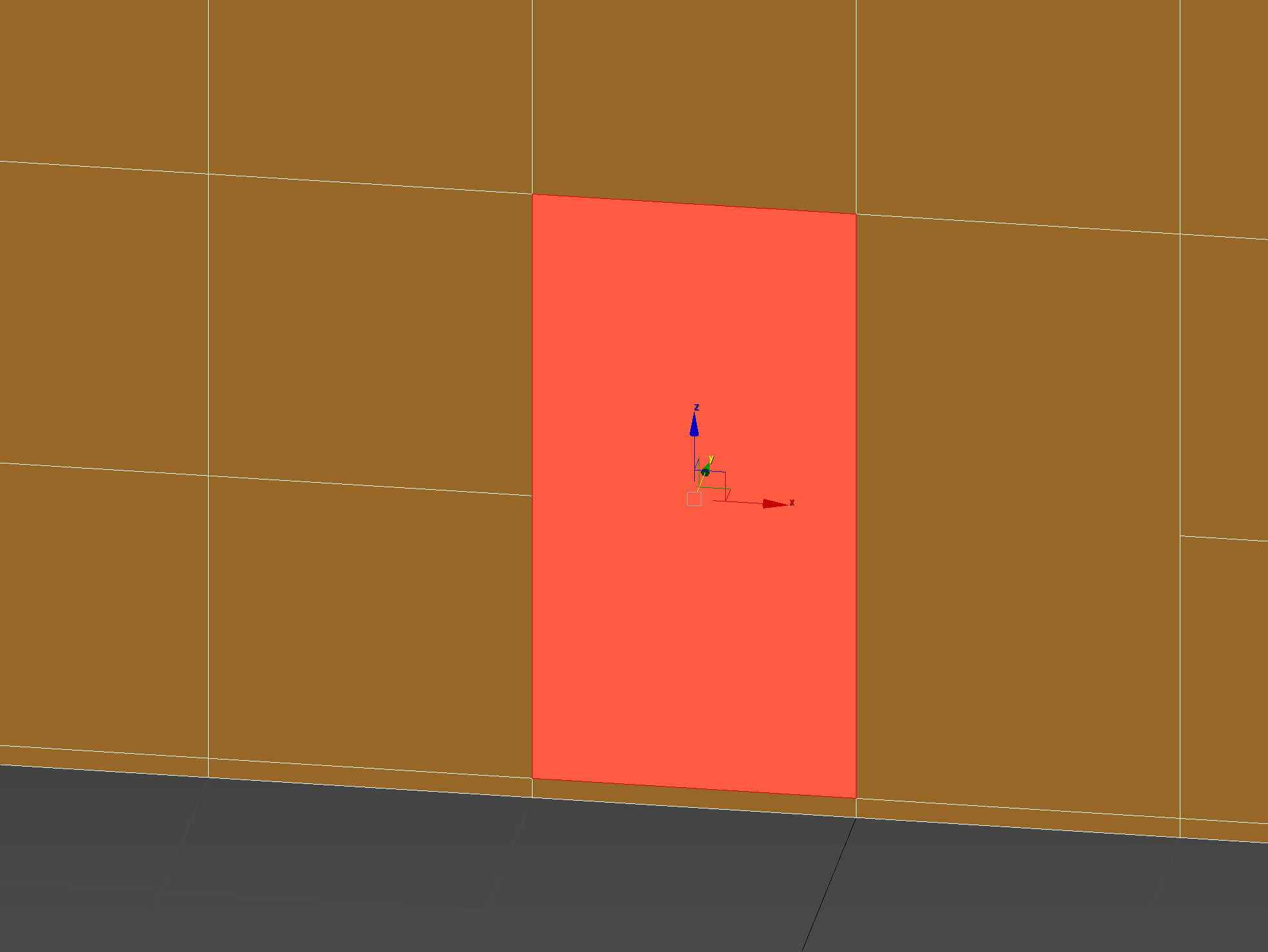
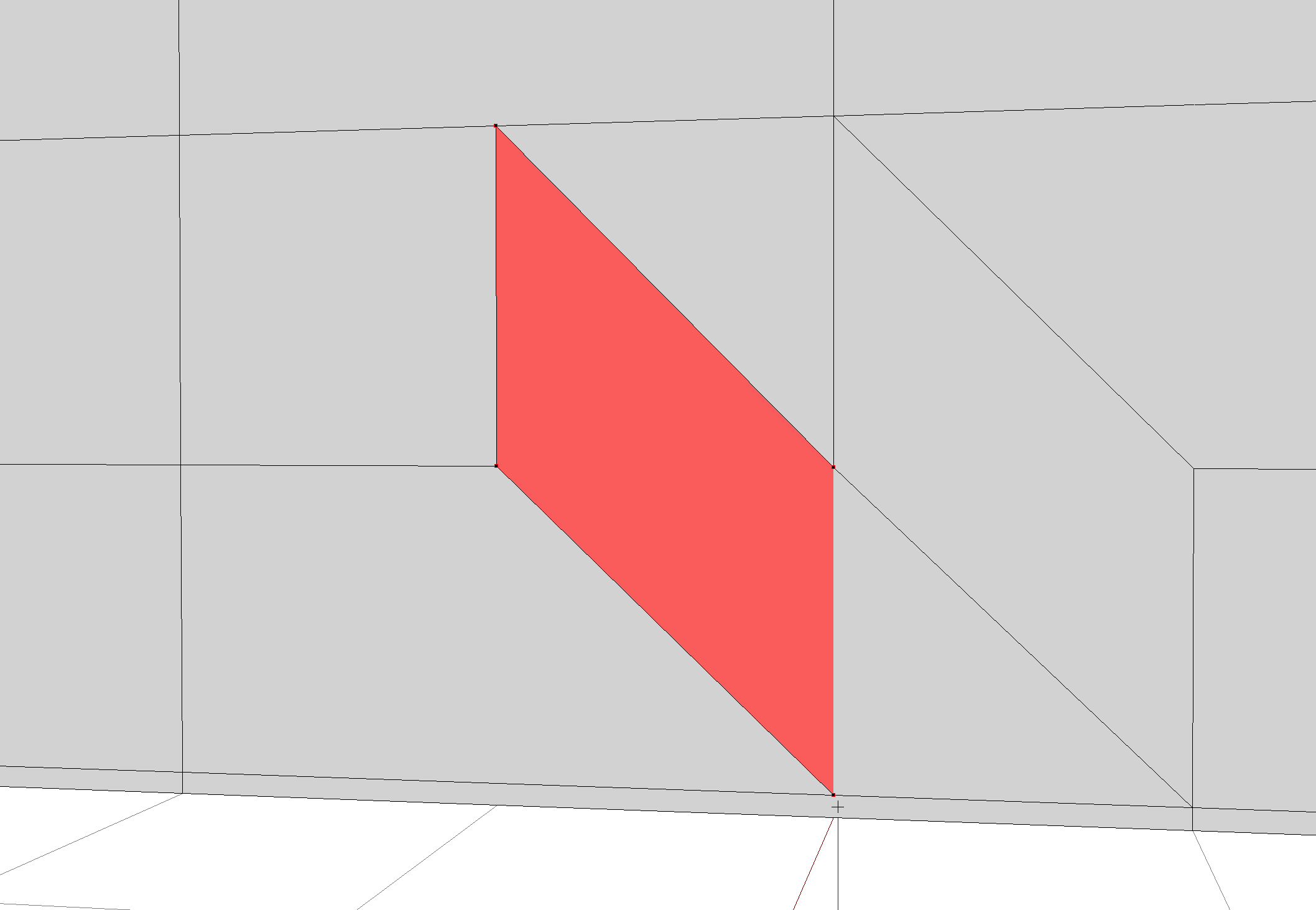
polar fiber
N-gons aren't supported (by any game really). Only triangles and quads
round bloom
That's the point though, their shouldn't be any from what I'm seeing
polar fiber
The highlighted face in your 3DS max viewport has 5 sides by the looks, as does the one to its immediate right
round bloom
It's got 4? It's a rectangle?
polar fiber
The left side of the rectangle has a vertex in the middle splitting it into 2 edges instead of one




 white jay
question, i'm really new to modeling, aka i've never done it, and im having trouble getting my pbo into a png... what do i do lol
white jay
just trying to remodel somethings, add a logo on to textures that already exist
like i said, idk what im doing and the tutorials that i've watched are pretty shitty and old lol
stuck oyster
you cant edit existing stuff
you will have to learn how to do stuff from the beginning
and even if you could edit stuff, you have to first learn how to do stuff from the beginning
@white jay
olive rampart
anyone that could explain to me how the magazines work for arma 3? im used to making the magazine a proxy and its own item for in game spawning. but in the arma 3 samples, it doesnt show it as a proxy. do i just leave the magazine attached to the weapon? how would i make it take different magazines that way?
median bough
i'm not even sure if the sample models are updated to mag proxies and mag wells
stuck oyster
no they are not
olive rampart
so thats helpful lol
stuck oyster
they work like any proxy
olive rampart
want to use the guns i did for dayz in arma. so, is there an updated sample somewhere i could get ahold of?
stuck oyster
you define the proxy for it, put it in correct place and thats where it draws the magazine model
no
there may be some text about it on the BI forums
or one of the devreps it was announced in
or even on the wiki
olive rampart
i know how to do guns for dayz, was hoping it was similar.
median bough
stuck oyster
it probably is
olive rampart
would bolt_catch be my "charging" that i've already done? where it cocks the gun?
or is that more a bolt release?
stuck oyster
those things are not in Arma
or well I suppose they can be part of reload animation
or magazine reload
olive rampart
so when what exactly would the bolt_catch be?
stuck oyster
but Arma has simpler bolt functionality
olive rampart
hard to see without textures for the gun sample
stuck oyster
I dunno.
olive rampart
i see bolt...got that. its the bolt catch im lost on, never seen it
dayz didnt have it lol
stuck oyster
oh I thought that was yours
olive rampart
no, bolt_catch is in the sample, but i cant tell exactly which piece it would actually be
in dayz i have boltrelease, charging, and bolt
stuck oyster
well different weapons have different kinds of parts
olive rampart
well, its more on charging and bolt...boltrelease is extra
stuck oyster
and there is no set naming convention either
you can choose how you name your selections as long as you set up the model and configs correctly
so look at the sample as reference
olive rampart
i know that....but its a matter of knowing what those pieces are before i start renaming
stuck oyster
but there is no need to copy it 1:1
you dont need to rename anyting
in your model
olive rampart
im used to certain selections, so im trying to figure out what what those go too
you arent understanding what im saying.
stuck oyster
you just write the configs around the names in your weapon
possibly not
but if you open the model in OB

they are these bits
olive rampart
i know that....but without being able to see that gun, i cant tell what that actually is
is it charging handles, just the bolt walls, idk
stuck oyster
looks to be the charging handle
ocean patio
bolt catch is the little lever that holds the bolt in place when it has to stay open
olive rampart
thats what i was thinking. but wasnt sure
ok
so boltrelease for my dayz conversion
ocean patio
Probably
stuck oyster
but it should not matter anyway, your weapon might have totally different kind of bolt action
ocean patio
Try it and see if it works! Experimentation is key
stuck oyster
so those parts may not match at all what you have
olive rampart
yeah thats the trouble with the ONE sample.
trying to convert an MCR Saw at the moment
stuck oyster
ok so
you are way over thinking this
you dont need 1:1 sample
you just need to make sure your model.cfg config is set up with correct animation source to play the animations for your guns parts
olive rampart
i know i dont need 1:1. but in dayz, it requires certain selections in the model, model.cfg, and the config for it to work without crashing
1:1 or not, im trying to make sure i HAVE the correct selections to make a gun work
stuck oyster
yes well that is basically the same in Arma
there is wikipages for the available animation sources
they are likely very similar to what is in DayZ
olive rampart
https://prnt.sc/11lcbqi
this is how the gun would be set up in dayz
stuck oyster
so what you need to do is check out the available animation sources in the wiki and see if those match with what you have now
olive rampart
bolt, charging, magazine, and trigger are the mains
stuck oyster
the naming of those selections does not really mean anything
olive rampart
yeah im looking for the pages now
olive rampart
whats the easiest way to test things in game? dayz had "offline mode"
stuck oyster
pack pbo, run pbo as mod, run editor and place down unit that has your weapon configured on it OR use the virutal arsenal to preview the weapon
you can forget all those hacky offline mode stuff that DayZ has
😛
olive rampart
haha ok
 dusky grotto
Any one knows a way to export multiple object from blender with the position and the object names. To import it as lbt into terrain builder? So that u can model a river in blender and split it into parts export it and import it into terrain builder with the exact coordinates?
stuck oyster
there are no public solutions for that
dusky grotto
ok thank you 🙂
olive rampart
is there a list of what memory points mean what? theres twice as many in arma than im used too haha. dont know what OP is, im assuming optic? just makes no sense on placement of them. its off to the side
ocean patio
I think op is GL
There's a lot of stuff in Arma that's in czech so some names are weird, like zasleh or the two hlavnes
stuck oyster
olive rampart
is there a list of what memory points mean what? theres twice as many in arma th...
no list but most of them are defined in the configs
so you just need to make the config to figure out what points you need
dusky grotto
i found a solution my self now 🙂
its not the right format yet but if anyones intrested
import bpy
context = bpy.context

def sfmt(s):
    return f"{s :10s}"

def vfmt(vec):
    return ", ".join(f"{v : 10.4f}" for v in vec)

for obj in sorted(context.selected_objects, key=lambda o: o.name):
    output = ",".join((
            sfmt(obj.name),
            vfmt(obj.location),
            vfmt(obj.rotation_euler),
            ))
    print(output)
thats a py script for blender to export marked objects locations
stuck oyster
yeah that how it about starts
you will have to figure out the object rotation matrix conversion though
although if you dont rotate the pieces then you can export just 0s as rotation
dusky grotto
true, thats some try and error. But i think with an colored object its easy to find out
dusky grotto
yes
also true^^
Leberkas  ,    0.0000,     2.0201,     2.0100,   -0.4649,     0.1345,    -0.2776
BennisObject1,    0.0000,     0.0000,     0.0000,    0.0000,     0.0000,     0.0000
Leberkas  ,    0.0000,     2.0201,     2.0100,   -0.4649,     0.1345,    -0.2776
LuggesObject1,   -1.3488,     0.2652,     2.0343,    0.0000,     0.0000,     0.0000
The out put looks promising already
dusky grotto
i think its great to make a water simulation in blender and export that to make realistic dynamic water
stuck oyster
it can work if you dont make too steep rivers
steep ones may look odd and work poorly
Id recommend 1-2 degrees inclines at most
I've been experimenting with that too
dusky grotto
yes. But with a nice waterflow map it may can be stronger
stuck oyster
though not with particle water
dusky grotto
ah ok
stuck oyster
more just object placement itself
dusky grotto
ive made some water fall that did not look to bad^^
stuck oyster

Example how Blender can be used for Arma terrain making and object Placement.
A python script reads the Blender object transformations and translates those into Arma/Terrain Builder importable format.
Each Blender object also have a dummy Arma classname parameter added so that the exporter knows what Arma object name to give them.
dusky grotto
very nice u already have a working solution^^
stuck oyster
though it only works if you use fully custom models you can properly see in Blender
yeh it has seemed to work so far
but Im not 100% confident with it so its not public
dusky grotto
ok i see
stuck oyster
and I dont have time to teach how its used
but its quite similar to what you already started
dusky grotto
😄
ok ty for showcasing urs than. I think it wont be to hard to make it work, thanks to the blender community
stuck oyster
it did take a about a year to figure out the rotations
well not full time of course
dusky grotto
ok maybe i dont see the problem than
stuck oyster
but the occasional jab at the issue and learning how it works
TB uses different coordinate space
so rotations in Blender wont match straight what they are in TB
if you intend to use the calmwater shader though that wont be a problem
dusky grotto
ouh ok i see
stuck oyster
since you cant rotate the objects that use it
stuck oyster
also you cant use same object twice with the calmwater shader
stuck oyster
do throw some WIP shots at our way!
nice to have others use Blender too for Terrain Making
dusky grotto
yea i will for sure. I just dont know when i will have the time for it. I hope soon 😄
stuck oyster
do you btw have carved rivers already on the terrain or will you shape them according to the flow map you make?
dusky grotto
i have rivers already but i placed water planes by hand. And i want to make them better with this solution
Also planing to make some more little rivers in the future
in the end arma 4 will have a build in solution for such things i could imagine
stuck oyster
hopefully xD
https://cdn.discordapp.com/attachments/331868308112408576/622644769708834826/unknown.png
https://cdn.discordapp.com/attachments/331868308112408576/622645489728225281/unknown.png
https://cdn.discordapp.com/attachments/331868308112408576/622646850763227154/unknown.png


for inspiration @dusky grotto Blender can be very cool tool for terrain making

New buildingblocks in game environment testing.
Also FPS live counter for those asking how well it runs.
Bear in mind these are all unoptimized assets.
also all of this is placed in blender 😄
eager grove
stuck oyster
https://www.youtube.com/watch?v=9xFs4sJa-mE
Tuuube
stuck oyster
eager grove
Tuuube
❓ 

eager grove
stuck oyster
❓ <:green_question:729821987610034226> <:blue_question:729821922065383465>
Tube 🤷♂️
stuck oyster
does that mean something?
dusky grotto
very nice @stuck oyster 😄
frosty rain
stuck oyster
https://www.youtube.com/watch?v=9xFs4sJa-mE
that is awesome
olive rampart
what exactly is a "shadowvolume" lod? and how do i go about making one?
is it just a distance lod?
eager grove
stuck oyster
does that mean something?
It's a noun describing a long circular form. Like the ones that dominated the architecture in the video you posted.
round bloom
Is there any logical reason ObjectBuilder (or 3Ds Max) would ignore a texture on export/import?
I've got this in 3DS:
https://i.gyazo.com/571855f0b48be0fe41589e52d3f1e764.png
However on import to ObjectBuilder it's only picking up on 2 of the 3 textures
Ignore me I'm thick and forgot to rename the material name in 3ds
stuck oyster
@eager grove please no spam on channels.
@round bloom Im not quite sure if you are doing texturing correctly there
round bloom
stuck oyster
<@!107895076696383488> Im not quite sure if you are doing texturing correctly th...
I'm just putting out some test textures to see how something can look, they do the job for now
frosty rain
round bloom
I'm just putting out some test textures to see how something can look, they do t...
you can't texture for arma like that, you need to basically plug the textures into rvmats/shaders
 radiant dirge
Someone know why buckshot is spawning not at the same location than the others bullets pls ? http://image.noelshack.com/fichiers/2021/15/7/1618714272-20210418044323-1.jpg
http://image.noelshack.com/fichiers/2021/15/7/1618714272-20210418044313-1.jpg

 stuck oyster
perhaps faulty submunition config
stuck oyster
so when you say other ammo, what other ammo does it shoot?
stuck oyster
have you tested how they behave on vanilla shotguns?
radiant dirge
Ok thx forget that I find why ^^' @stuck oyster
stuck oyster
why?
stuck oyster
there may be a bit of offset in the submunition config then
but then again.. why does it even matter
after all. it is a shotgun
it goes BOM-<
marsh canyon
Not sure if it's for #arma3_texture or here, and out of curiosity for my possible future content, but is it even possible to cast a shadow to a polygon that has a texture with alpha? By any rvmat magic or something?
olive rampart
so does arma 3 not use stuff like "boundingbox_min" and max, or ce_radius or center for spawning purposes? dont see anything in the model other than "autocenter" that tells it how to spawn. just curious as im trying to learn.
stuck oyster
nope
olive rampart
so on say a magazine, theres no memory lod? or what would go in that? theres no magazine example in the samples.
theres a bipod, but i dont think it would be set up the same
stuck oyster
what goes into the memorylod depends on what you animate on it If I remember right
if the mag proxy was animateable that is
olive rampart
its just a magazine, so i dont believe it animated? i've never animated one for anything i've done, but i've never done one for arma.
just didnt know if i needed a memory lod at all since theres no "spawning" points, and not animated.
stuck oyster
if no memorypoints are present, no need for the lod
polar fiber
Proxy models spawn from the 90-degree corner of proxy triangle on the weapon. As long as you have autocenter 0, the grid origin of the proxy object will align to that triangle in the target object
And there are several dowloadable proxy magazine examples on that biki page. Links at the bottom
olive rampart
I’m actually surprised at how different arma and dayz are in this. Using pretty much all the same tools, for essentially a different engine
It’s a nice little learning curve.
stuck oyster
DayZ is modified A2 with added enfusion elements. A3 is modified A2 but to little different direction.
olive rampart
I know. I was just talking about how the objects are set up using the same tools. I do assets for multiple games, always interesting to learn a new one and see how many times I accidentally use a step from another game lol
stuck oyster
Yeah some design choices are indeed quite different.
olive rampart
i still dont understand what a "Shadow Volume" lod is, or how to go about doing one. the model used in the samples has absolutely no detail in the mesh, so it damn near looks like its nothing but geo boxes when its not.
stuck oyster
have you read the LOD page in wiki?
olive rampart
yes and still confusing. but my object builder is having issues, assuming its because i use dayz and arma for OB. any way someone could give me the external viewer line for arma? mine keeps resetting to dayz and erroring out
stuck oyster
yes I think it needs some extra steps to have both toolsets running at the same time
olive rampart
yup, now both are telling me that buldozer isnt present, to run devp, which says its outdated and then cant open the files lol
frosty rain
olive rampart
i still dont understand what a "Shadow Volume" lod is, or how to go about doing ...
The Shadow Volume lod defines where the game casts the shadows from, it has to be closed, sharp edges and triangulated
"Shadow LOD should be simplified compared to resolution LOD, but can be more detailed then Geometry/Fire Geometry LOD. Shadow LOD must be slightly shrinked compared to resolution LOD"
olive rampart
I know. I read that part. But it still confuses me because I’ve never done one. Is there a quick and dirty way to learn it? Can I take geo lod or res and take down the poly count or something? Never had to make one of these lods for anything. Dayz doesn’t use it haha.
frosty rain
uhh i mean you can use the geo as a base
but you'd have to make it smaller than the resolution lod and probably add more detail
stuck oyster
quick and dirty does not really happen in Arma modding
there isnt really anything special to it, its just modeling a simple mesh that looks about like the object you are making
polar fiber
Simple box modelling something to fit the silhouette of a weapon is usually much quicker than trying to reduce the details in the resLOD model in my experience
runic plover
polar fiber
Simple box modelling something to fit the silhouette of a weapon is usually much...
Same opinion
polar fiber
And you don't have to worry about crap like having textures and camo selections accidentally assigned in the SVLOD and causing issues
stuck oyster
true
ocean patio
If I'm making a custom laser sight, do I put the starting and direction mempoints in the weapon model, or in the laser sight's model?
ocean patio
Yeah, it was confusing me since the sample's model has them on the gun. Thanks
stuck oyster
you can have them integrated too
ocean patio
faair
 dusk topaz
Has anyone Ever got a Custom
Named property
Map entry
to work
for example Map Hedgehog
ocean patio
stuck oyster
in the sights model
Laser dir goes behind laser pos, right? Or in front?
Idk if the calc for the direction vector is pos - dir or dir - pos
stuck oyster
depends how you set them up in the config
ocean patio
irLaserEnd = "laser dir";```directly copied from the sample to be sure
If the direction is irLaserPos - irLaserEnd, it goes in back, if the opposite then the opposite, but I've no idea which is the case
ocean patio
Sad! But okay
polar fiber
You would think so. But for reasons known only to BI, the laser dir memory point is supposed to point backwards
woeful viper
same as muzzle...
ocean patio
muzzle? you mean usti and konec hlavne
woeful viper
yeah muzzleend and muzzlepos / gunBeg and gunEnd on turret
 bright echo
god that always messes me up
inland pawn
I remember my first encounter with usti and konec. I ended up switching the two
konec is first, followed by what direction(usti)
median bough
jup, this czechs out
ocean patio
I will kill you for that pun
median bough
get in line and wait your turn 😉
molten fractal
Do model optics for an NVG require a model.cfg? I'm looking at the ACE one and just want to replace the NGV overlay. Could that be done through just a simple change to the texture and texture path?
 stuck oyster
replace it with what?
if you edit that file, it will break the mod and render it unusable
molten fractal
replace the NVG optic texture with my own
stuck oyster
what you need to do is make a patch addon
then again you likely wont be able to join servers that dont accept it
molten fractal
Of course. This is something my unit will use.
stuck oyster
well you will still want to make a patch addon and not mess with the actual ACE
as that will render ACE incopatbile everywhere else
molten fractal
Yeah, so would I repack the ACE model with the replaced texture path?
The model is unbinarized and I got it off the source on github.
stuck oyster
no dont repack ace
thats just completely unnecessary
you can make a patch mod that loads after ace and replaces whatever config line it is to use that overlay with one that points to your new overlay
molten fractal
Sorry, that is what I am doing. Just repacking the NVG optic model itself with the texture path replaced.
- the config to replace it of course
stuck oyster
try it out
molten fractal
Alright, here is my config.cpp
{
    class 17th_NVG
    {
        name = "17th NVG (Dev)";
        author = "Aiglos_";
        units[] = {};
        weapons[] = {};
        requiredAddons[] = {"rhsusf_c_troops", "ace_compat_rhs_usf3"};
    };
};
class CfgWeapons
{
    class rhsusf_ANPVS_15;
    class 17BN_ANPVS15: rhsusf_ANPVS_15
    {
        scopeArsenal = 2;
        scope = 2;
        displayName = "[17BN] AN/PVS-15";
        modelOptics "\17BNDEV\17th_NVG\17BN_dualnvg_optic.p3d";
    };
};```
And it is throwing this error when packing:
`In File 17BNDEV\17th_NVG\config.cpp: circa Line 20 Expected ]={`
I've looked at it already and I cannot find what is wrong with it.fuck
wait
Missing = 🤦♂️
There we go
stuck oyster
👌
stuck oyster
Character Size comparison.
 marsh canyon
Armed Avengers, ArmA
 silver zenith
Big man! 200 meters east
 fierce rain
Hello, i don't know id this is the right tab for my problem but maybe someone can help me. I gut a building that is not throwing shadows and also dose not block them from passing trough walls. I got a Screenshot of the Problem. I placed a NPC on the first floor and its shadow is being coasted on the ground floors wall. https://prnt.sc/11r67xh
stuck oyster
you probably dont have shadow lod for it or or you have wrong kind of shader/texture combo for the main building making it "transparent"
fierce rain
i think i didnt got the shadow lod
stuck oyster
you can also try using the sbSource = visualEx named property for res lod cast shadows
fierce rain
im a bit confused.
fierce rain
stuck oyster
you can also try using the sbSource = visualEx named property for res lod cast s...
what dose sbSource = visualEx mean