#arma3_model
1 messages · Page 105 of 1
 lapis goblet
lapis goblet
lapis goblet
is there a way to export a p3d back to blender, keeping dimensions intact?
3DS seems to be working nicely but the dimensions are way off
lapis goblet
ok nvm, using arma 3 tools for blender you can actually import from p3d
 stuck oyster
👆 👌
 cinder pivot
can you make FFV seats out of any old seating position? or do they have to be FFV specific - like it seems the legs of the unit are stationary and the body moves
 elder cloud
Hello guys
I want to get into arma 3 modding
And im new
I want to ask about importing car model into arma3
I work in 3ds max
Should i assign bones in 3ds max?
Or from arma 3 modding tool
 outer condor
@tom#5817 the first question is always in here: for a LIFE mod or not? 😛
elder cloud
Any mod
 bold flare
IMO the first question is "where did you get that car model from?"
elder cloud
I made it
bold flare
If you are new then starting with a car is by far the worst thing you can do
do something simple first
then slowly go further
outer condor
i think there is some old goods from RHS/PuFu about max-arma pipeline
bold flare
Do you think Cars are the most complicated objects to make? I guess only helicopter might be harder
outer condor
Modding Toolbox for 3ds Max
http://www.armaholic.com/page.php?id=6891
i think its outdated by now but you could ask SA or PuFu
elder cloud
Someone told me i dont need to assign bones in 3ds max
I can assign them in object builder
Is that right ?
Or no
outer condor
maybe useful
https://www.youtube.com/watch?v=I9AvsMfh90Q
https://forums.bistudio.com/forums/topic/145965-animations-and-3ds-max/
https://forums.bistudio.com/forums/topic/174301-getting-a-3d-modelobject-into-arma-3-arma-3-modeling-tut-for-noobs/
Bohemia Interactive Forums
I would like to import animations from 3ds max to arma. I saw this script: http://sandro-de-parma.narod.ru/OFP/ to export .rtm, but I don't know how to inst...
Bohemia Interactive Forums
This is a very basic tutorial showing how to get a basic model into Arma 3.
Required Programs
Arma 3 (Obviously...)
Arma 3 Tools
If you don't know how to...
elder cloud
Thx
 civic stratus
Is anyone familiar with the conditions in which a model won't display in the buldozer window?
I have some p3d's that show and others that don't, and I'm kind of confused and frustrated
I have to select the model to see it in the buldozer window
bold flare
Well if the normals are the wrong way the model will be invisible and not show
civic stratus
@bold flare pressing f5 to recalculate should fix that, no?
bold flare
I don't think so. It shouldn't be able to magically fix that as you might intend to do it like that. And it can't read your mind+
civic stratus
they look proper in the 3d preview
viewing with direct3d
i tried sharpening edges and fiddling with all the buldozer masking options
i can't figure it out =/
 foggy finch
sure they arent hidden?
select the mesh and iirc in the edit menu you can hide/unhide stuff
 brazen prairie
That worked for me might want to try @civic stratus
Step 1: Select the model(ctrl+a)
Step 2: Go in points on the top bar then select transform 2d then click mirior x
Step 3: Select your model(ctrl+a) then inverse (ctrl+w)
Step 4: Click Rotate on the toolbar XValue 0, YValue 180, ZValue 0 then hit preview then ok
 polar fiber
looks like @foggy finch you doing the L121 muzzle brake as well?
foggy finch
the round one?
polar fiber
yeah, was the typical brake on UK ones
foggy finch
I was planning to yeah, was gonna do the eotech+mount and the long scope
probs do the NV+mount for those too
quite a few accessories for it
polar fiber
this eotech mount? https://i.imgur.com/tAgii1Y.jpg
never really understood why those are so high
foggy finch
yeah
because they use em for anti-smuggling firing from a helo
that pic actually could be inside a helo going by how everything is strapped in
polar fiber
it's inside a ship ready to load it all up on the Lynx. You can see parts of the M3M on the right as well
polar fiber
rifle above comes with a suppressor too. https://i.imgur.com/K6nFIyJ.jpg Something I didn't know they had
foggy finch
yeah
thats a beast of a can haha
there is this version also
which looks integrally supressed
polar fiber
That was the original heavy barrel AFAIK
foggy finch
ahh, that'd explain it
those are some good pics of the wear zones too, thanks for those dude
they'll come in handly when i get it to lp
civic stratus
@brazen prairie did not resolve the issue
 pseudo elbow
What can cause selection to shrink on rotation?
Along with rotating by the axis it shrinks in size and I can't figure out why. Any ideas?
 white jay
If you can figure it out will be nice to know, encountered similar issue with the arma2 crane rotation
pseudo elbow
I'm editing ACR Mi-17 model and its holographic display shrinks during rotation. If I copy it from Mi-8MTV3 from A2, same skeleton and selection names, it rotates just fine.
white jay
Try check if the selection has points defined for another selection / bone etc
Just revisited the a2 crane and got it to rotate corrrectly, that was its issue
pseudo elbow
Yeah seems to be other selection affecting this, gonna try to pin point it now
Deleted everything but one selection and it stopped shrinking, thanks for advice
white jay
Hi, it's probably a pretty stupid question, but how can I know that in Blender I scale the objects for the right scale of ArmA?
So they are at the same size as I want them to be in the game.
 tacit karma
Not sure if its the same than in max, but general scale to meter and unit scale to 1 unit = 1 cm
lapis goblet
just to be on the safe side set your units to meter (so that you can check sizes), and remember to apply scale and rotation when you export to p3d
(ctrl-a)
white jay
Thanks
Do you know how to perform a loop cut on both sides of a mesh?
I'm trying to make a space for a window but it just cuts the front face and the back remains untouched.
bold flare
Just make a temp mesh and use a boolean operator?
white jay
Um ok I will try that
bold flare
That is what I always do when I need a basic hole
 dusk frost
Hey guys, what can i do if i have a selection when i click check faces? I cant start buldozer with my model
stuck oyster
- fix buldozer
- explain more about your problem
dusk frost
Faces/Textures
In general it is also a good idea to test for any illegal/dead textures via

Structure | Check Faces
This is from the community wiki and i have done this and i get a selection if i click it. I think these things are broken
stuck oyster
well do the selected faces have valid textures?
dusk frost
And the selection is named like that: * Cannot generate ST coordinates
stuck oyster
I think that refers to bad uvmapping
dusk frost
I havent applied any textures yet
stuck oyster
example: start empty OB and create a single cube mesh into it.
run the check face and notice it does nothing
then open uv editor and delete some part of the autogenerated uv
then run check face again
so it should mean non uvmapped surfaces
dusk frost
okay, i will try that
outer condor
anyone remember C130J_static_EP1 from OA?
is it mergely different config (type house) or also the model adjusted in some form
stuck oyster
Arma2 Air_E pbo has C130 folder that contains both C130J.p3d and C130J_Static.p3d
config however only has a simple config for the plane
in that folder at least
@oak lintel what effect do you mean exactly?
 oak lintel
particel effect from collision > Vehicle vs. Trailer
stuck oyster
you might be able to set the colliding pieces to have different surface material but not 100 sure if that works
you doing a geometry pin and hole trailer?
oak lintel
yeah thats my plan
stuck oyster
that has been tried before too but it also has issues
it for example does not work with AI
oak lintel
i dont need it for AI
stuck oyster
when the truck and trailer go out of view the collision model get simplified and the trailer falls off
oak lintel
okay i try it but the particel damage effect is lame
stuck oyster
you can set different surface material for the geometry components for the pin and hole
that could help
oak lintel
dont work 
stuck oyster
what kind of effect do you see exactly?
oak lintel
default effect. I think is broken metal
 rough idol
try adding those components to driveOnComponents[] array
 lime nebula
I don't think it's possible reyhard because his trailer is inside another model, i think
stuck oyster
2 separate models dragged by geometry
 wraith tendon
Yeah, Pin&Hole "kinda" works, but there is still the UberHandbreak and the PhysX, that "stops working", when you are too far away
IF that could be solved -> Truck&Trailer could be easily doable
rough idol
trailer is most likely defined as a vehicle too
so both vehicles need to use driveOnComponent for contact points
bold flare
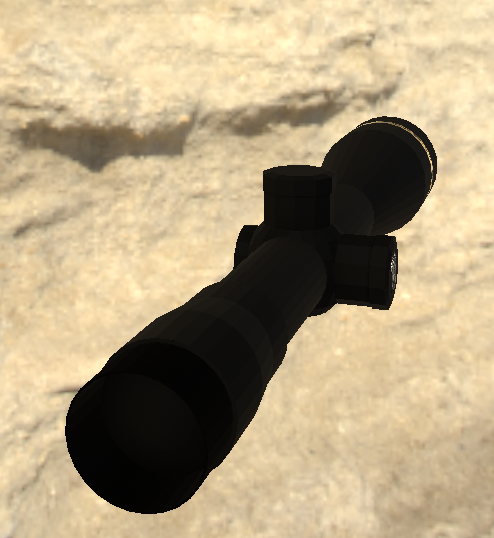
@foggy finch Looks kinda similear to my https://dedmen.de/sharex/Substance Painter 2_2017-12-12_20-45-41.png
Wow that's a really bad screenshot...
That's a Leupold VX-6HD My first try at making a scope
foggy finch
yeah different scope, mine is a Schmidt & Bender 3-12x50 PM II
bold flare
How many segments would you use for your tube cylinder when you import it into the Game?
I wanted to be on the save side for my scope and went too far and ruined it :x I probably used <100 segments
I guess the answer is probably it doesn't really matter as only the first-person model would be so high poly. And as you only have on of them on the scene.
bold flare
I was talking about the number of segments on the cylinder? Are you sure? 48 sounds really low. I thought people would use more.
 twin urchin
imho you can make 48 for 1st lod and more for pilot view
because thats only what one guy can see
oak lintel
truck&trailer is not the best options with ropes ^^....
@rough idol: what you mean with "driveOnComponents[] array" and "driveOnComponents"
?
oak lintel
merci 😉
 crystal talon
Hello everyone, At this moment i have created a flashlight and a weapon. However my flashlight has a gap. How can i attach it directly to the weapon?
Is that a memory point or?
bold flare
Afaik the attachment point is 0,0,0 in your flashlight model
crystal talon
https://ibb.co/cF6B9w This is the result i have atm on 0,0,0.
bold flare
If it's the same on other weapons then just artifically move it further down
crystal talon
The gap is away now but https://ibb.co/df3PUw the light itself is above it haha
bold flare
Well that's mempoint I guess 😄
crystal talon
Yeah i think so, i will look into it thx
 glossy plank
Hi, do someone has fix the probleme since the last time ? https://feedback.bistudio.com/T127168
glossy plank
:/
polar fiber
@bold flare I only ever use 32-48 sides on the pilot view for my scopes
and try to reduce it after the eyepiece
bold flare
But that's visible right? I want a smooth-ish scope even if only in pilot.
Like obviously not 200 segments or such. Does anything speak against it besides performance? I don't intend to use multimaterial so it should still be quite cheap to draw I'd think
polar fiber
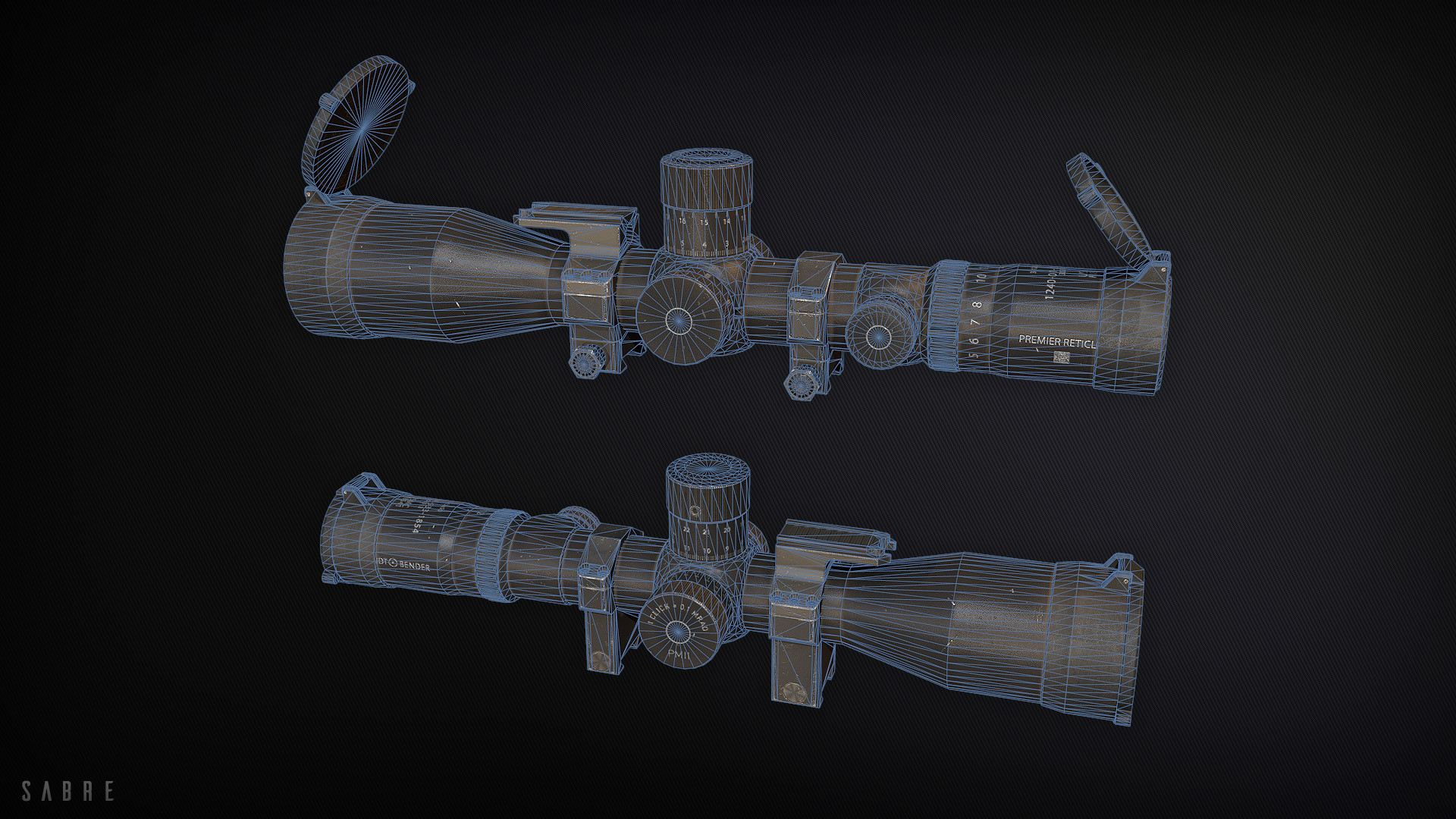
In fact I did the same scope as Uro is doing. On this, only the rubber eyepiece and the very end piece of the scope tube is 48 sided. In the middle everything is necked down to 24 sides https://i.imgur.com/mcBLzf3.png
US version I did for RHS, showing wireframe https://cdnb.artstation.com/p/assets/images/images/003/480/649/large/shaun-young-m85414.jpg?1474162826 textures are by Sabre and pic is from his artstation account
can see there how the polycount is reduced on cylinder sides that don't form the silhouette
bold flare
As I see that now I really wonder how much segments I used that it looks so terrible.
Your first picture looks perfectly smooth
Oh! Sharp edges. That probably has something to do with that right?
 past edge
yes, you'll want the cylinder to be smooth 😛
polar fiber
well yeah, you only really want sharp edges where there's a large change in the normal angle that might cause weird lighting https://i.imgur.com/4GkosAg.png
and mine has a normal map baked from high poly to smooth over some of the corners
but that wouldn't really affect the roundness of the model's silhouette
bold flare
How did you make that normalmap? What tool can do that?
And sharp edges was then definetly my mistake why it looked soooo horrible..
That's what I was intending to do. Make it low poly and then use a normal map to make it look good enough. But I kinda have no Idea how to do that 😄
past edge
personally I bake my normal maps in Substance Painter using the "match by name" feature, it's useful for those juicy details such as extra rounded bits: https://cdn.discordapp.com/attachments/293157245682843650/382971297845477377/unknown.png
bold flare
Soo much new stuff to try out now :3
polar fiber
premise of it is using subdivisions and mesh smooth in your modelling program to round off the corners to produce a HP model, then baking those edges to the low poly game model https://cdn.tutsplus.com/cg/uploads/legacy/000_QuickTips/024_Understanding_Support_Edges/Preview.jpg https://i.pinimg.com/originals/91/79/b6/9179b6f6c1ae14ecc5d0b979c38042d3.jpg
foggy finch
im gonna need a bigger scope @polar fiber :p
polar fiber
I did a bigger one too (left) 😆 : http://da12thmonkey.rkslstudios.info/A3/AttachmentsPack/Promo/V2/V2_promo.png
foggy finch
oh nice, i was looking at doing those too haha
but first im gonna do the nv bracket and scope for this gun
its more important 😃
polar fiber
I really should update that mod. I've had an Eotech 552 finished for it forever, but wanted to finish the 6x ACOG I did as well. I only finished the US version of the ACOG for RHS so far
that was like 18 months ago
 cobalt panther
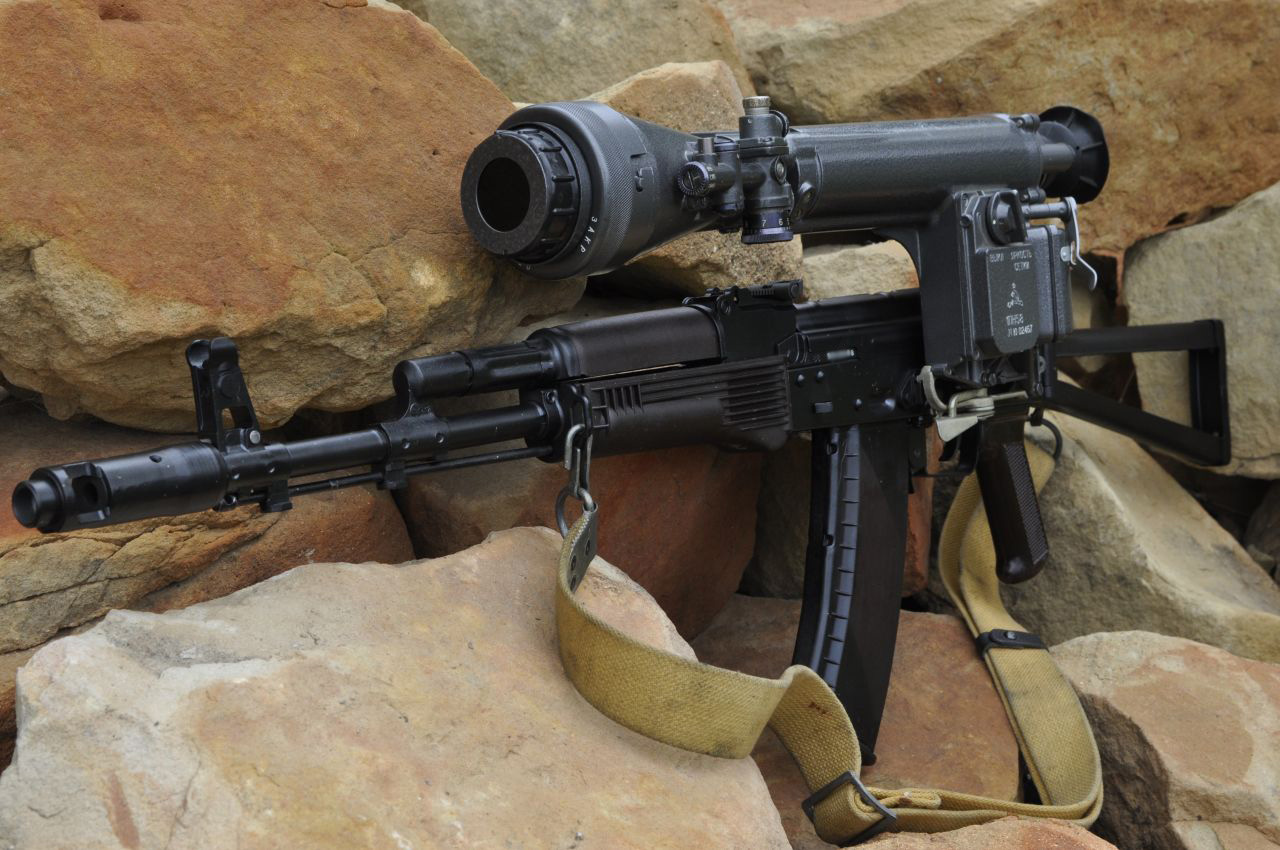
Those are baby scopes, make this http://zenphotos.net/zenphotos/file/Online/SVD/1988Izzy/1PN58_1988IzzyAKS74_Front.JPG
 twin urchin
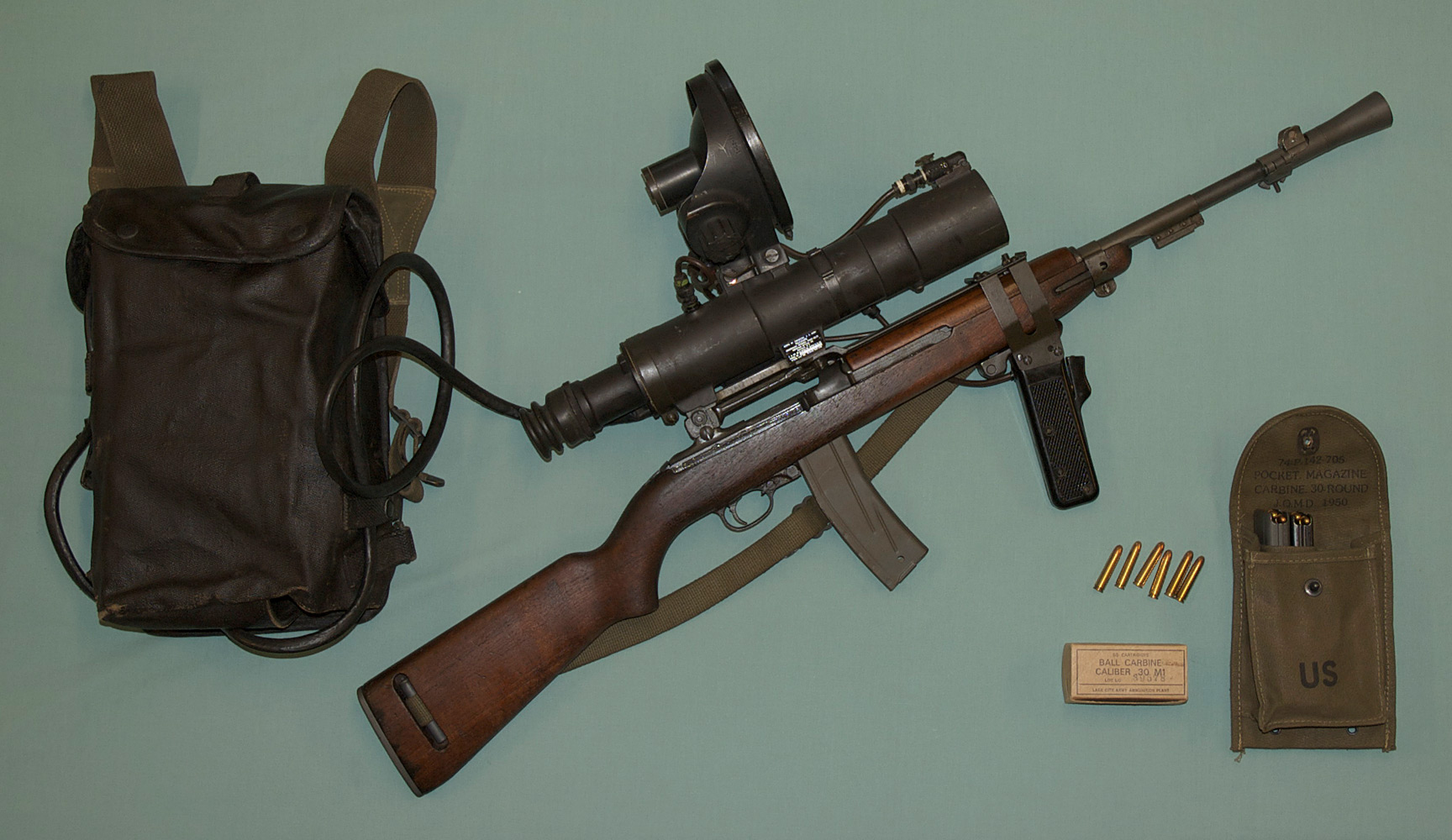
soviet NV scope , i wonder if RHS has that
cobalt panther
I don't think I've seen it, saw it crop up on Tarkov the other day, I was like.... wooooooot the fuck is that?
looks like a beast
polar fiber
We don't. The guy who made our AK-74M in the past, made this one for EFT https://www.artstation.com/artwork/lvzBo
cobalt panther
Yea there you go
twin urchin
back in the day NV scopes were huge mainly in 60-80s
cobalt panther
Are they not used so much these days?
twin urchin
these bigs ones , nah - there much better options now
cobalt panther
ah yea, I just meant NV in general
twin urchin
NV scopes are still used , even mainly NV adpaters in front of the main sniper scope
 woeful viper
what? impractical? dont be ridiculous... this is as compact as anybody needs it... https://upload.wikimedia.org/wikipedia/commons/3/3d/M3_Sniperscope.jpg
crystal talon
To position a flashlight attachment. Do i need to change the position in the .p3d or a memory point . If i need to use a point could somebody help me out with it 😃
stuck oyster
you need to position the attachment proxy
in the weapon p3d
the 90degree corner is the 0,0,0 of your attachment p3d
polar fiber
most BIS flashlight attachments aren't aligned with 0,0,0 though
they're offset
it's a pain in the arse to position them
best to position your proxy in the weapon so that the BIS attachments fit, then move the attachment model in its .p3d to replicate that position
stuck oyster
well he had his own attachment
polar fiber
yeah, but I guess he'd like it to be compatible with Joint Rails or something?
stuck oyster
true @da12thMonkey#2096 good point
crystal talon
Mhhm i see, thank you very much. I opened the drawing (other dev makes the .p3d models) and it looks like the proxy for flashlight/laser is too high
So when lowered it will work as intended
polar fiber
https://www.dropbox.com/s/70ylnhrfcpzydk2/Rail_Align.p3d?dl=0 for educational purposes, this is where the rail slot shape is on BIS' DBAL laser pointer
so if you try to line the attachment point on your model up with that, it should fit most weapons
crystal talon
thx
 warm trench
I've been working on a weapon mod that's largely finished. However, one thing that I'm stuck with is that I've got all the animations working for the weapon for the user of the weapon but in multiplayer, only some of the animations show for other players looking at the weapon. The ones that specifically don't work use "zeroing.1" and "reloadmagazine2" as the sources.
Is there something obvious / a nice trick that I'm missing here?
warm trench
Not particularly. It's basically re-load and sight animations for a UGL. I've largely copied the Vanilla SPAR model.cfg which uses "reloadmagazine2" and seems to work in multiplayer. (Thanks for the quick reply, by the way!)
stuck oyster
everyone in the server have the addon?
warm trench
Yep. So they all see the rifle and you see the hand animation for the UGL reload. Just not the UGL components move itself. All the other animations (like bolt movement, lock open, main mag reload etc.) all are visible in MP.
twin urchin
maybe those doesnt sync in MP , dunno test that with vanilla GL
polar fiber
and they all have the exact same version of the mod?
no chance of a skeleton name conflict with another addon?
twin urchin
because i know arma beraly synced weapon anims via MP
but that fixed for some time ago
warm trench
All have the same version and yes, you do see those animations with the vanilla SPAR in multiplayer. Good shout on the skeleton bone names - I'll check I've called them something unlikely to be used elsewhere. But just going for a PC re-boot now. Big ARMA shunt that seems to have wiped out most of my PC!
Hmmmm. pretty obscure bone names in the skeleton so unlikely (but not impossible) that's the issue.
warm trench
yep - should be. But I could make it even more obscure just to make sure!
warm trench
Actually, it does not have my tag on it but it's a bit of a long winded name so I was thinking about just tagging it to be sure. This mod originally started before I reallised the importance of that and I've obviously not 'corrected' all areas yet! Yes - pboproject for packing
stuck oyster
do you have custom animations for the character in the same folder?
or do you use just the vanilla reload animations?
warm trench
Not 100% sure I know what you mean. No custom hand animations - just use the Vanilla ones. If that's what you meant but sorry if I've answered the wrong question!
warm trench
yes
And it's specifically only the anims with those sources. All other are seen in MP
stuck oyster
Could be some sort of MP incompatibility then
very unfortunate
any other addons active?
warm trench
Many!
warm trench
Yeah - understood. Might try that after we finish training this evening. At least it sounds like I've missed anything silly / simple!
stuck oyster
yeah let us know how it goes without any other mods
warm trench
Will do. Many thanks for the quick replies!
Interesting - we've just done a test and it does seem to work this evening but only when re-loading if there's already a round in the camber. Most odd! But I might have an idea what's causing this....
I think I might have another animation that I'm not 100% sure is working once the UGL is fired. (I'm trying to hide the round itself in the UGL - but the barrel is dark so hard to tell whether this is working or not!)
stuck oyster
does it then matter 😄
warm trench
It's much harder to test things in MP. You need a willing volunteer!
stuck oyster
that indeed
warm trench
Not sure I can explain why the animation on "zeroing.1" does not work though but will try to get a volunteer later this evening for more testing.
stuck oyster
and it does work with vanilla weapons
warm trench
Not checked the zeroing.1 with vanilla - just the reloadmagazine2. Will check that too when I get a chance & volunteers
stuck oyster
zeroing especially may not transfer over mp
warm trench
Yes - very believeable given that with rifles, those changes would be tiny
warm trench
For the UGL, yes. But I'm not that upset if that doesn't work. It was more the reload that bugged me!
oak lintel
because of trailer:
When i drive forward with my trailer, my trailers wheels turn. But over 10mph, my wheels stop.
When i drive backward, my wheels turn correctly. someone knows how is the problem?
stuck oyster
The engine may have hardcoded handbrake that goes on
I think it was mentioned a while ago
I think it only works if theres no one in the vehicle
like how cars dont roll down hill if youre not in them
but you could perhaps make a fake AI dirver that "keeps the engine running"
it would be invisible and would not actually drive the vehicle
oak lintel
no, then my first trailer went that too. only I forgot where the problem was
differentialType="front_open"; he makes the wheels open
 median bough
@wraith tendon might know what it is. Iirc he has some experience with trailers
wraith tendon
I like 🍌
wraith tendon

 tulip beacon
guys, what can cause tank track texture animation to not work?
 halcyon wren
Missing .rvmat
tulip beacon
what rvmat does it require?
halcyon wren
just any really.
tulip beacon
hmm
halcyon wren
Not sure if it was fixed now for tanks DLC, but it used to be (probably still is) one of the silly undocumented engine-quirks that tank tracks only animate if they also have a valid .rvmat assinged.
wraith tendon
😂 rly?
halcyon wren
Hah. So its still a bug. 😄
stuck oyster
its a feature
oak lintel
thx. wheels work.
crystal talon
Arma 3 custom flashlight and custom weapon and proxy (light source) keeps disapearing when standing still. If i start walking it pop ups again.
Tried to move it around, but that doenst help really, it only shows up in certain poses
stuck oyster
got pics/video?
stuck oyster
perhaps the light point is inside the flashlight and the model gets in the way
crystal talon
That's what i thought but placing the flashlight on like 40 cm to the left doesnt fix it
stuck oyster
not the flashlight
the memorypoint
or yeah that would likely fix it
unless it goes iside the weapon
stuck oyster
I assume it does not happen with vanilla flashlights
crystal talon
Lemme check that
Oke vanilla has no problem, i will check the p3d again. I suppose it's a LOD or something
crystal talon
0.000 to 5.000 and a view point
Every lod has a side proxy foe the flash/laser attachment
stuck oyster
how about the flashlight?
crystal talon
It's working 😉
crystal talon
I delete all the proxy's for flash/laser
Then added them again and it magically worked, however i already did that like 4 times.
Well you gotta love arma ahha
woeful viper
@stuck oyster model blocking light... pft what are you dreaming man? Arma has neutrino lighting technology - it goes through pratically everythin unhindered
stuck oyster
not the light but the flare
crystal talon
Well don't know how you meant that @X3KJ, but thank you for your help @stuck oyster
 sonic valve
Theory question, could you make a model that is just fire geo?
sonic valve
Couple applications,
- You could use it to overlap objects that normally not dustructable. Allowing you to script some semi-realism way of caculating destruction to said objects.
- You could implement a Trophy style system, attaching it to tanks.
Assuming both would be possible.
stuck oyster
Im not 100 sure how firegeo behaves without valid geometrylod but sure you should try
without geometry lod you can just walk through objects
but they do remain destructible so I would guess with firegeo and hitpoints you might as well succeed
pseudo elbow
How far away weapon cursor is drawn from the camera?
Trying to match holographic sight with ui cursor
twin urchin
for what reason?
pseudo elbow
To make holographic sight at least as accurate as cursor
twin urchin
if your eye position is correct with reticle of your holo , then weapon cursor will be accurate too
also i think the weapon crosshair never been 1:1 accurate
crystal talon
The flashlight works flawless but the laser looks like this https://ibb.co/idWBUw
I have already moved it to see if it was stuck but that doenst fix it
crystal talon
Someon know something, i have placed in the memory lod the mem points
stuck oyster
whats the problem exactly? the pic does not tell much as there is no comparison to working one
crystal talon
The default laser emits a laser beam, and this one which is just a standard configuration is a ir dot
crystal talon
Oke, i have checked other configs didnt see anything specific
I will look into some more
stuck oyster
you could try inheriting straight from one of the vanilla ones
crystal talon
That's what i did indeed, i noticed that other laser attachments have the same config
crystal talon
irLaserPos = "laser pos";
irLaserEnd = "laser dir";
If you mean those yes
Or do you mean laser pos and laser dir on the p3d for the laser itself or the weapon?
stuck oyster
those for the attachment
the weapon should not need any if it does not have one built in
do you have space in the names?
between laser and pos
those are from your config?
crystal talon
yes
stuck oyster
It may be the game does not like spaces in names
commonly that has been bad
so either laserpos or laser_pos
crystal talon
I will remove the spaces indeed
crystal talon
Oke well the spaces seems to be a part of the problem, i find it odd because the default configs uses spaces xD
foggy finch
WIP - been working on the secondary mount and nv scope: http://imagizer.imageshack.us/a/img924/3896/irGTRi.png
woeful viper
may just be perspective, but it looks as if there was a heigth offset between both
foggy finch
the nv scope sits that high on my reference photo
crystal talon
Oke got the laser working perfect, how can i outline it with the crosshair?
stuck oyster
what do you mean
crystal talon
When i enable the crosshair it works fine, but it slowly goes too much to the right
lemme make a photo
stuck oyster
the laser will always be in offset because its in different position than the barrel where the crosshair is calculated from
crystal talon
Mhhm yes indeed, so stupid off me -_-
lime nebula
It's possible to fake a bouding box ? I have a models without res lods, and i want being able to place it in eden
cinder pivot
Could try making 8 verts for corners with no faces
stuck oyster
@lime nebula out of curiosity why do you have objects without anything visual in them?
lime nebula
Memory point object for some sounds
I want to place env sounds, at certain point of my map. So creating an object with only a memory point
stuck oyster
I see
well you could give them visual lod for placing them
and then just remove it before release
add a box in 0.00
and delete after
lime nebula
Yeah, i will try andrew things first and after yeah that was my idea
woeful viper
i understand the pain, i hate doing organic stuff as well. Looks good though
 tall zephyr
idk XD
wraith tendon
Just simply ask the Question.
tall zephyr
where can i find a good tutorial of how to make a building on blender and export to arma 3
i was searching for days, but i didnt find nothing recent
woeful viper
wat
wraith tendon
Make the building first, then search for "Arma 3 import blender" ?!
woeful viper
how did you search? googled "i want to make building with red roof and three doors, round windows in blender and import in arma" ?
tall zephyr
make buildings for arma 3
bold flare
Look for how to make buildings first. Then look how to import buildings into Arma
And you don't need recent stuff for the importing stuff. 5 year old tutorials are just fine
tall zephyr
@bold flare thanks
bold flare
5 seconds googling I found https://www.youtube.com/watch?v=FnGPwkRAdPw But I don't know if that's any good
Even using Blender
woeful viper
but it doesnt have a red roof. Wrong tutorial.
wraith tendon
😂
bold flare
A wed woof? Awoooo
wraith tendon

cinder pivot
thats not a good tutorial
 ebon abyss
for helicopter to land on helipad, does the p3d need any specific properties or is it config.cpp related?
I have what I believe is arma(1) helipad sample model, it only has geometry class "vehicle" and in arma3 bis configs I could not see anything helos landing specific, and my helo wont land on this object. if I switch the object to land_helipadempty_f then helo lands nicely.
ebon abyss
nope. I looked the bis config and it was HeliH: NonStrategic odd one, didnt find any other reference to "HeliH". hum.
rough idol
seems like that's the culprit then. I guess object need to inherit from HeliH in order to be recognized as helipad
ebon abyss
alright I'll look into it again, thanks, will let you know how it turns out.
 analog sand
Hey Guys, since the last A3 Update we have a problem with our Axe and Pickaxe, does someone have a solution for this problem? http://91.121.77.68/nextcloud/index.php/s/WCdhXzhxyeKmaTf
13:04:07 Warning Message: Embedded skeleton Weapon in 'a3\weapons_f\data\zaslehsdl_proxy.p3d' has different [ bones count ] in different p3d files. Skeleton/model 'dg_a3\axt\model\standart\dg_axt_holz_1_f.p3d' will probably not work correctly. So it is our first Secondary Weapon Model, i am only a scripting dude, so if someone can help me it will be nice
ebon abyss
HorribleGoat: do you have experience doing shadows, shadowvolume stuff?
stuck oyster
some
ebon abyss
I have my old info back from arma(1) era. so I went and googled "arma 3 shadows modeling tutorial" and was all smiley faces seeing our own tutorial page as the first hit, until I realized... it is pretty much the only viable hit. how come there are no shadow tutorials for arma3, or is it really just the same as in it has ever been?
stuck oyster
pretty much the same ye
very simple version of the model
and the shadow mesh should be kept inside the res lod or it will show through
there are new methods of shadowing tho
stuck oyster
like projecting straight from the reslod
no shadowlod needed
I think that makes the bit smooth edged shadows
ebon abyss
hmm new, isnt that just leaving out LODNoShadow = 1 heh?
stuck oyster
no normaly reslod would produce pretty broken shadow usually
+I think its pretty performance heavy
the other method afaik does it lighter
ebon abyss
shadowvolumes are more focused yeah, I would need to re-read our own tutorial for the specs. I checked some arma3 sample models and noticed that I think those specs have doubled, didnt write anything down so cant remember.
stuck oyster
generally speaking processing power has increased which allows for more complex models
ebon abyss
our tutorial page says max poly count is about 1000, but not sure I think I saw the arma3 sample models having like 2000, do you know if this or "standard" of doing this has changed?
if there are any changes, real changes for arma3 use, I definitely would like to write updated page. I think many people wont even look links for ofp/arma when they are googling arma3, at least I wont heh, well ok I do look what the initial link description is but yeah.
woeful viper
ebon abyss
yup same old info.
 bleak tangle
According to Eliteness, some of the rifles added in Apex have 3k+ verts in their most detailed shadow LODs, but it drops into the low hundreds for their second shadow LOD
ebon abyss
oh, quite increase then.
bleak tangle
there are new methods of shadowing tho
He is probably referring to the named property in the geometry LOD sbsource=visualex. While there has been no official documentation on what it does, my best guess is that it's what BI was referring to in this sitrep https://dev.arma3.com/post/sitrep-00138
They will be able to use a technology that generates shadows of objects on-the-fly based on the shape of a resolution LOD.
From the dump I just did, there are 717 models in A3 now using visualex, and here is a list of them https://pastebin.com/TrrnP5Ht
The majority of objects on that list are ones from Apex. However, BI went back and added that named property to some of the vanilla A3 models, where I'm guessing they had shadow issues but couldn't be bothered/have the time to fix the shadow LOD manually
Hopefully we can convince @slate epoch or @rough idol to get some documentation on visualex, or at least some more information on when it should be used
ebon abyss
yeah would be great.
bleak tangle
There were a few buildings in CUP that had shadow issues, so I took the lazy approach and used visualex and here are the before and after results https://imgur.com/a/4vw1X
Only problem though is that visualex creates "banding" in some situations
On a building in Takistan: https://i.gyazo.com/241ea023801998c84221b3bbd9287301.jpg
On a A3 building: https://i.gyazo.com/9009a21ad6fe10b52c414251078358a7.jpg
pseudo elbow
What defines center for the 3rd person camera in the model?
pseudo elbow
Or config entry, thought maybe it had to do with bounding box or something
wraith tendon
🤔 hmmm
bleak tangle
On second thought, that's probably not helpful, since that'll likely be the camera's position relative to the center of the model
wraith tendon
Yeah, that was the one i had in mind, but couldn't remember the name
@bleak tangle
Yeah, from ModelCenter.
@pseudo elbow Was it that, what you were searching for?
pseudo elbow

red spheres are getPosATL and modelToWorld [0,0,0] positions while camera is clearly at very front of the vehicle
Its not origin in O2 either
pseudo elbow
Yes
cinder pivot
If you have files for a2 samples/aplsa files I think the white skoda had the configs in for a different camera position, if not I can check what they are in a bit when I get home for you @pseudo elbow
cinder pivot
If that doesnt do the trick I think there was also a setting to set based on model position to set it
pseudo elbow
So, turns out "zamerny" is hardcoded memory point name for camera center
Used as any shape center, also apparently used as aiming point for AI
cinder pivot
So did that do anything for you
pseudo elbow
Yes, it worked
Changed lock on center too


OA though, not sure if this is still true for A3, but most likely it is
cinder pivot
👍
 agile flint
@bleak tangle With your VisualX testing did you still need a shadowLod? Or did the game just generate shadows based on the lod mesh?
bleak tangle
No, it doesn't seem like it's necessary. An example is the super market on Malden (a3\structures_f_argo\Commercial\Supermarket_01\Supermarket_01_malden_F.p3d), it uses sbsource=visualex and doesn't have any shadow LODs. I think there are some more examples with Tanoa buildings but this is just one I had in front of me
ebon abyss
sounds too good to be true 😉
agile flint
Music to my ears!
haha
Sounds great though, sounds like it can come in handy indeed, just need that documentation like you said
white jay
Any critiques or tips would be appreciated, I haven't applied much normals at all, and still need to join a ton of faces to lower face count. But it's coming along.
agile flint
Are the blinds on the windows a mesh or texture?
Dumb question thats a texture
Looks really good though
lapis goblet
A question for game designers in general: where do you buy your models? I don't understand why very popular websites such as turbosquid don't even allow you to search by models with LOD already done for you. AFAIK all engines require LODS, and most of the time you don't need to have a gazillion poly count for a chair. So... where do you go?
 onyx barn
Most make them...
lapis goblet
that is really weird though
there are thousands of models for thousands of different usages but... gamers, no, we need to have ourown model for everything?...
Simple example: I want a humvee in my game. On turbosquid: $200-500 for models with almost 1 million polygons. Useless for a game
white jay
_scar pretty sure unreal add the ability to generate lods awhile ago
bold flare
Can confirm that
lapis goblet
yes they do have automated generation of lods
but still, manual ones are generally much better, and also, why the $500 for 1 million polygons...?
Also, thinking about Arma obviously
 terse elm
its costs that due the time/skill needed to make such a model
pay peanuts, dont expect much
lapis goblet
Oh don't get me wrong: I COMPLETELY understand and accept those costs. My point is that there does not seem to be a lot of models targeted for GAMES in comparison to ones for all the other usages
terse elm
but games is a broad spectrum
lapis goblet
Mike this has nothing to do. I'm not a cheapo complaining about costs, I spend way more for that
lapis goblet
Can you please tell me one game that would require a humvee with 1 million polygons?
terse elm
cinematics
bold flare
Battlefield -3 probably
lapis goblet
really
white jay
You can also spend time reducing poly count for objects etc and make up your own lods etc
terse elm
i doubt the models used in BF are millions of polys
id imagine use in cinematics is a justifible use
bold flare
That's why I said BF -3. BF 1 doesn't use that high poly stuff ofc
And.. You can always reduce polycount easily. But it's hard to increase it if you need more
lapis goblet
well... easily, it depends. UV gets f&*ed up rather quickly, for instance.
terse elm
depends on game/engine
but prices on models on thoses sights can differ due to resaleability
lapis goblet
Another example: still on turbosquid there's no "low poly" search.
cinder pivot
Scar, if you are looking at models also check out cgtrader - lower priced things because creators have better % off each sale, higher poly stuff is better because you can lower it down for arma
lapis goblet
You can only do so by typing it in and hoping that the modeler put it in the description
cinder pivot
Try cgtrader, has low poly search, asset pack search etc
lapis goblet
I was told to pay attention to cgtrader because of many models on there being "kindly lended" from other games, but maybe this is not true
terse elm
unfortunately its like a roulette
lapis goblet
yeah ok, don't like risking a roulette when I always want to do things properly
median bough
ripped stuff also came up on turbosquit, but was removed pretty fast
cinder pivot
You can have that on other sites, as long as you look for what you are buying and not buy from the guy who only sells a few really good things for cheap
lapis goblet
ok, it's sensible advice
cinder pivot
You also wont be able to find something that works 100% out of the drop for arma.. best to know a bit of 3d modeling to fix up the meshes before they work with what you need
lapis goblet
Oh I know about modeling (not an expert) but I do have already my models in arma
tacit karma
@lapis goblet Rendering, as a highpoly for a base as lowpoly, movies....
theres enough of use for highpoly models
another good page is cgtraders
dont trust what you here about the page, is just bs
lapis goblet
i know there are good usages for hi poly 😃
twin urchin
is there a list of opticsPPEffects that can be used?
 livid plover
is there any tutorial how to convert clothing, uniform to Arma3? I have used this but it's terrible. https://community.bistudio.com/wiki/Arma_3_Modding_Characters
onyx barn
yes, there's a better one, wait a sec
https://community.bistudio.com/wiki/Arma_3_Characters_And_Gear_Encoding_Guide#Character_configuration
as a complement, there might be more ressources available
also see the pinned messages
livid plover
Yeah but this is about config not converting model to arma3, object builder...
stuck oyster
there is sample character in the arma samples
your models topology must be similar to it and it has to be weighted the same way
median bough
@livid plover
Maybe you can find something in this video tutorial
http://wiki.cup-arma3.org/index.php?title=From_2_to_3_Infantry
 vernal lynx
I keep getting this on a specific model
c:\w\dev\futura\lib\simul.cpp(5379)(func: Entity::SetEPEMass) [AssertRLS] MainThread=6428 Object LIB_LCM3 can't have zero or negative mass! ww2\assets_m\vehicles\boats_m\ww2_lcm3.p3d Object LIB_LCM3 can't have zero or negative mass! ww2\assets_m\vehicles\boats_m\ww2_lcm3.p3d
I have the same model duplicated, and it works fine
the duplicated model has an inherited config, a few change on geometry lod but nothing major
tried to regenerate completly the geometry lod, erased mass, reset it, still having this issue
stuck oyster
should work yes
perhaps it does not update in packing right
have you tried deleting its temp files
vernal lynx
yeah going to try this way
that's weird tho since pboproject returns the build log
some edges were not converted to sharp by the convexcomponent script, maybe this
edit : that was not it
cinder pivot
select it all and set to 0 then back to mass?
vernal lynx
already did
did not help
I litteray took it from another model that works and removed geo lod first
and it did not make it D:
 sharp halo
Hi there , Is there a possibilty to import smoohting groups from 3ds Max to Blender?
 vernal osprey
Blender supports smoothing groups
 lusty ginkgo
So I am making some variants of my sidewalk model for the specific needs of whatever region they are in, and I ran into a small issue with the preview updating in OB. For example, when I rotated the model 90 degrees, it updated, but when I went back and fourth in the history window it wouldn't reverse the changes. Sometimes it does, but then when I reapply the change by selecting in the history window, it won't update. The model seems to update to it's proper appearance sometimes for no obvious reason. It does this in both of the render modes in all different views. Any idea what this could be? If it isn't a problem with my OB setup, I suspect I might have RAM issues
Come to think of it, I had a very similar issue in PS recently as well, where changing the brightness of a layer would work but the changes wouldn't always apply. And when they do, undoing the changes doesn't visibly change anything
 static fulcrum
@lusty ginkgo get that sometimes too though
ebon abyss
use moveObject
rough idol
@twin urchin you can use "Named Selection" o2 script in oxygen
twin urchin
hmm ok , good to know
stuck oyster
or run replace in files in notepad++
twin urchin
thats a good idea too
bold flare
you | geo add lod! object to
 lunar plover
what lod? my english is bad 😦
bold flare
Your Geometry LOD is missing
lunar plover
how can i add it LOD ?
bold flare
Just like how you added the View LOD
lunar plover
do you have a video tutorial
bold flare
No. But I'm sure Google can help you with that
lunar plover
I do a little research. Thank you. 😃
vernal lynx
Hey there ! Again a brainfuck issue !
proxy and holster have the very same weight !
cinder pivot
whats the issue?
vernal lynx
obviously the gun doesnt move the same way as the holster despite it has the very wame weights
cinder pivot
could it be a proxy positioning issue? you could try using the actual makerov to see if it has any differences in movement
thats what it seems to me
stuck oyster
chuul! 👍
white jay
Sorry about the spastic camera angles, I have no clue wtf I'm doing.
agile flint
When it comes to vehicle based grenade smoke launchers, I'm guessing I need an actual projectile in the launcher to be able to have it physically shoot out?
outer condor
@TinyRick#4801 looking good mate 😃 what project are you involved in if you dont mind asking, or doing also a terrain with custom objects?
tacit karma
Not sure if I already posted it here, but the Formula Arma car is shaping up 😛 https://www.youtube.com/watch?v=ibGqjq2a1ZI
crystal talon
Could somebody help me out with the reticle for my scope? How to make it see through?
tacit karma
@crystal talon what exactly do you mean by that? because the 2d reticle is something else than a 3d reticle
crystal talon
I actually have no clue where to start with the reticle hehe
It's my first time looking at a scope mode hehe
tacit karma
what scope is it?
tacit karma
oh that is simple
all you need is a _ca texture with a small dot in the center that is place inside the sight
crystal talon
Could you maybe help me out with that texture, of have somewhere documentation on how to make that. Texture is going oke, but _ca texture things doenst ring a bell 😃
tacit karma
there should be a sample I think
stuck oyster
@crystal talon _CA is the suffix for RGB textures with alpha channel
yourreticletexture_CA.paa
crystal talon
oke lemme check if i can find that sample somewhere 😃
stuck oyster
all the arma reticle textures are in the unpacked A3 files
you could even us one of them
tacit karma
he sure can
theres a point holo texture in it
P:\a3\weapons_f\acc\data\collimdot_dot_red_ca.paa
tacit karma
can also use the collimdot.rvmat for it
crystal talon
Thx i will check it out asap
cinder pivot
@tacit karma to get your “gear” did you use the gear animation source ? Does that accurately work?
Thought it was only 0 and 1
-1*
tacit karma
np
theres a lot of trickery in there. like the rpm gauge is just a quad behind a modeled foreground where the two right verts are animated to move
and the LEDs are just hiding and unhiding
cinder pivot
The fine details make it work haha
Bet you have a nice selection count there 😉
Lots of little stuff
The rpm is cool, didnt see that first viewing
tacit karma
temperatures have to be a bar or something as well.
only rpm and speed I can make as actual numbers unfortunately
rough idol
custom mfd values could be always scripted
polar fiber
Is MFD able to rotate with the steering wheel?
tacit karma
yup
polar fiber
I mean specifically the drawn class mfd stuff reyhard was talking about. Not just your modelled/animated mfd
though I suppose your spd readout is class mfd?
rough idol
indeed - mfd is rotating with i.e. turrets of new apc interiors
stuck oyster
uuuh cool!!
tacit karma
true, completely forgot about that 😄
 manic owl
gonna ask for your help really quick guys.. google didnt turn up anything useful
Embedded skeleton OFP2_ManSkeleton in 'a3\characters_f_bootcamp\common\vr_soldier_f.p3d' has different [ bone name ] in different p3d files. Skeleton/model 'my_path_and_model.p3d' will probably not work correctly.

Error: Skeleton of the head a3\characters_f\heads\m_white_01.p3d doesn't match the skeleton of the corresponding body my_path_and_model.p3d
What do these two buddy mean, whats their cause? They turned up with the lastest ArmA update
bold flare
That error seems to be pretty rare though. that's the third time I see somebody mention it
manic owl
I doubt the mentioned skeletons or models have changed lately, so thats why I am wondering
white jay
Because arma added that warning/check in before christmas, before it was only in arma diag exe
manic owl
ahh ok. Well the character still gets completly messed up ingame
before the patch it was working just fine..
white jay
Well you were lucky then
You can't have 2 different skeletons with same name
You admin/play Exile right ? This error is why Hatchback gets screwed up on Exile randomly
manic owl
nope, dont wanna deal with exile
white jay
Werid Exile has senfo person that was active on thier forums 😛
manic owl
That was a while ago
bold flare
One guy told me yesterday about that with a TFAR backpack. If the model is faulty I would expect more guys to notice and report that.
Maybe it's only with the VR dude?
manic owl
or as you correctly stated: was active
bold flare
I saw that error 3 times and everytime it's the vr_soldier
white jay
You can use mikero tools or t_d website to extract the skeleton to compare differences
manic owl
good idea, will do that!
manic owl
indeed, most of the names in vr_soldier are all lowercase while the ones in my OFP stuff are starting with upper letters
copied them over, got it to work!
thanks for the quick responses!
bold flare
Is the issue only with vr soldier?
Wouldn't making it lowercase then break it for every other soldier that has them uppercase?
manic owl
its basically only happening when "my" character model is spawned.
I assume vr_soldier ist just the first one it finds to compare it to
white jay
@outer condor Making a terrain of New Orleans, making tons of custom houses and buildings aswell.
wraith tendon
@safe ether it's enough to post it in one Channel.
 fallen quiver
Does anyone know how to add the option to make a weapon both semi and fully automatic? Semi is working for me, just cant figure out how to do auto
stuck oyster
it needs another firemode defined
you can check any similar weapons config in configviewer
fallen quiver
Also having another issue, my muzzleFlash doesn't show up in game, but it does in buldozer
stuck oyster
that needs a model cfg animation class
fallen quiver
Already has one
stuck oyster
and it works in buldozer?
stuck oyster
do you have the selection (Zhasleh/muzzleflash/whatever you use) in model.cfg your weapon class sections [] array?
selectionFireAnim = "muzzleFlash"; and this in your config.cpp class
crystal talon
I tried some combination and things, but the red dot.paa wont show. Short version= Collimator side doenst work, and i dont know where to look at atm
stuck oyster
you sure the face is in right direction?
have you unwrapped the mesh so that the sight texture is on it
crystal talon
Sometimes complaining here works haha, red dot and my glass is working. Everything is up and running!
stuck oyster
👌
white jay
https://imgur.com/a/e38nw So most of the normals are applied, after I bake it I think I'll be finished. As far as my first house model learning completley from scratch I don't think it's terrible, room for plenty of improvement, but I'm just hoping to figure out how to get it in game now, I'll focus on cleaning everything up for my next one.. If anyone knows some good info for me to look into it to get this baby in game, it would be much appreciated.
cinder pivot
Looks good!
tacit karma
@white jay one Improvement: Try to use shingles on the verticle edges of the roof to mask the seams
something like this https://i.ytimg.com/vi/NYDDw19btag/maxresdefault.jpg
otherwise, it does look pretty decent
oak lintel
and pls make the rain pipe round. 😮 and on the roof a rain pipe too
wraith tendon
doors are a bit narrow, or?
 strong plaza
also extrude the concrete base further down into the ground so there won't be any gaps between the building and the ground on sloped terrain
 knotty forum
anyone have a link to a resource to start doing this? had a look on youtube and was watching a series about it but seems it was taken down by the poster
bold flare
"this" as in making 3D models? or "this" as in importing them into Arma? or "this" as in some very specific model related thing?
knotty forum
sorry should of specified, the processes of getting model content into arma 3 such as buildings or props
i have experiance with some modeling software
bold flare
You export as .obj or .fbx (I use fbx personally) and then import that into Object Builder using File->Import.
That's what I can immediatly say.. Rest.. Uh.. I know there are wiki pages but not.... Oh
check pinned items in this channel. There are some links. maybe they help. I guess we should pin some more helpful resources like that building import guide from ofpwiki
 quick terrace
lol
knotty forum
ok thanks i was going off of a youtube series i found awhile back for doing all this but agian its sadly gone, and kinda took a break for a bit
quick terrace
god i should really write down a buidling tut this year
ofpwiki @bold flare , rly/
white jay
Moreso a link or tut on writing Cinfog.CPP and all that shit necessary for the coding. I followed an OBJ Builder tutorial from youtube and pretty much got that down, it's more so the configs that basically leave me at a brick wall. I'll extrude that base and round them pipes out. As far as the doors are concerned, shotgun houses down here in Nola vary wildly with the way they are constructed and sometimes have super skinny doors.
Config.cpp*
 waxen quiver
I think it an cool house. Will it have an interior?
Also, what are your toughts on this one:
white jay
Sadly no. Most of the houses I'm going to build are exterior only based on the fact that I'm going to chrun out at least 250 different variants and I will need to do so because of performance issues.
sonic valve
Inquiry on random thoughts. Why exactly has it been so difficult for arma modders to add a new mesh such as a female model to Arma 3? Just going through, it seems like BI gives us a skelton sample to use.
polar fiber
because you have to remake all the animations if you use a new skeleton
sonic valve
No way of just assigning and using the same naming convention?
Or let me rephrase that. You can't simply scale the male skeleton to what you need?
polar fiber
no
since rtm animations are AFAIK based on coordinates of the joints
if you make the skele smaller, as soon as you apply a .rtm it will stretch the model to fit the original coordinate space
 glad pagoda
you could reuse the arma animations but you will need to debin them and then convert each animation to the new skeleton. Alot of work.
currently doing that for a custom model.
quick terrace
@Skyllio#5776 really? how do you do that if you don't mind me asking
sonic valve
Well I see you have a 40k logo so I'm hoping it's for that?
glad pagoda
I just used dertm from mikero tools to debin the rtm, then in blender i just import the animation to my new skeleton which has the same bone names and structure. It the skeleton is similar the animation should look alright most of the time.
yeah working on the new ork model
sonic valve
Nice, I was thinking of that.
glad pagoda
here's a early version with some bugs
sonic valve
I haven't made a full charicter for arma, but too me it feels wierd that no sulution exist when all animations are is cordinates.
glad pagoda
have to adjust most of the animations though since the ork is bigger
sonic valve
Yea, but it's a good start. I always felt lack of scaled charicters, and proper laser mechanics were the main hold back of a good 40k mod
Any plans to deal with hitboxes and the fact orks won't be able to fit inside a normal human house?
glad pagoda
I'm going to make the geo lod small enough so this ork model can fit into the houses. the other two sizes won't fit in though.
quick terrace
ahh so you import the animation file to a new skeleton via blender, wasn't aware that this was possible
i did make a new skeleton myself for a much smaller skeleton
but then i had to redo all the animations for all stances due to different joint positions which is not worth the time
agile flint
Love how the Ork is so brutish yet when it walks with no weapon in hands its real casual haha
quick terrace
weird thing is i was sure RTM anims cannot really be exported since, afaik, it is a matrices file that defines transformation based on word location of joints points
sonic valve
But that is what made it feel wierd to me.
Ultimatly you just turn it into raw data in blender.
Back when I did other game mods for animation. You could just grab all the keys and just move it to the right, left, ect. The animation is fine becuase your globally applying the change.
glad pagoda
not sure how it works, but I used this blender addon to import them
https://github.com/4d4a5852/rtm_import
median bough
can't the blender tools from alwarren also import RTMs?
quick terrace
yeah ok, not a blender user myself, does that importer runs how? imports a keyed animation file to an existing skeleton, as long as the bone naming is correct?
does that work if the size of thing is way different (longer bones, different joint position etc)?
glad pagoda
yeah that how it works i believe. Yeah it will works with different bone lengths and such, i tested on an eldar model which is taller than the normals arma model.
but might need some adjustments to it
alwarren arma toolbox only exports rtm's
polar fiber
I knew there were .rtm importers around, but I thought they didn't work with the animation rigs in a way where you could modify the anim other than doing basic transformation similar to animating shit in O2
glad pagoda
also had to use an older version of pboproject to binerize the animations. animations would go all over the place if i used the new version
quick terrace
i guess i'll need to give it a try then, because from what i know about how rtm is done, what you are saying shouldn't really work directly
because the joins are not linked
glad pagoda
yeah a skeleton with longer bones should work. i was testing with a few different skeletons with different bone lengths.
quick terrace
rtm only keeps joint poistion (world XYZ pos)
if you change the joins position, a rtm anim will not work
sonic valve
But he is essentually making new ones from what I undestand. He is just exporting the animations to blender as a template.
I assume when he ports it back the game it just uses that current xyz data.
quick terrace
@sonic valve i do understand that, what i don't understand though is if i had a kid's skeleton, that is 50% in size of the male skeleton, with most animation files, minus .rtm, the size of the skeleton shouldn't matter, because the bones are linked and whatever not
for rtm, the joins are not part of a skeleton rig, driven by DK/IK whatever
they are point positions in world space
in any case, we should move to #arma3_animation, and i most likely need to give it a try
and, afaik, there is just a couple of rigs that are compatible with blender, macser's beeing one of these
maybe he created a new one/edited the existing one, i don't know
sonic valve
Maybe I'm just picturing it diffrently becuase it makes sense to me >.<
glad pagoda
Horriblegoat gave us a copy of his skeleton that he was using. Then i just made mine similar to his for my model.
sonic valve
Who would I contact if I have stuff to donate to the 40k mod? I have a small collection of modeled 40k buildings. Like Bastions, Barricades, ect
glad pagoda
@sonic valve best place would probably be here, and message E_50_Panzer.
woeful viper
@stuck oyster has made a batch converter for vanilla animations to target new skeletons
@sonic valve or here 😛 https://discord.gg/RzFdgFG
stuck oyster
@woeful viper alredy put down some links at #arma3_animation
woeful viper
yeah i saw... too late. Thats what you get when you read one after the other









 wraith tendon
DrawLine or "native engine bullets"?
waxen quiver
Very nicely done
rough idol
Long translation?
rough idol
now I see that there are also EffectFly particles used too 😉
wraith tendon
ah
stuck oyster
Long translation only
but separate object for the beams
so that the pilotview lasers work right and dont cut 2through" stuff
theres stream of engine bullets that I intend to use for hit/damage calculation
but the effect is very hacky fake 😄
rough idol
you can try effectFly too
I got something almost identical to your 2nd screen with just particle effects
it was working pretty nice with 1 beam but 4 of them could hit particle limit though
stuck oyster
yeah I was sceptical that particles could work in this case because of the limits
the second pic is bit blurry because how the material glows agains sky
so it causes flicker on the beam
and the beam is like 1cm thick anyway
crystal talon
@stuck oyster Are you building a mech warrior?
woeful viper
@rough idol unless its possible to make very long particles that exactly face along the direction of the shot
 violet vale
So quick question - I'm modeling a peice of scuba gear for a custom mod, and I got all the wiehgt painting properly
how do I get the oxygen tubes to bend and stretch?
if anyone's confused, its kind of like a pilots helmet tube
tacit karma
also weighting
tacit karma
some other parts of the mask that has weight = 1 anyway
violet vale
So make it 50/50
tacit karma
no you have to weight each vertex according to how much it needs to move
tacit karma
well good luck then.
violet vale
thanks
 whole hill
Hello all I'm sorry in advance for my bad English.
I don't no i'm in the good section
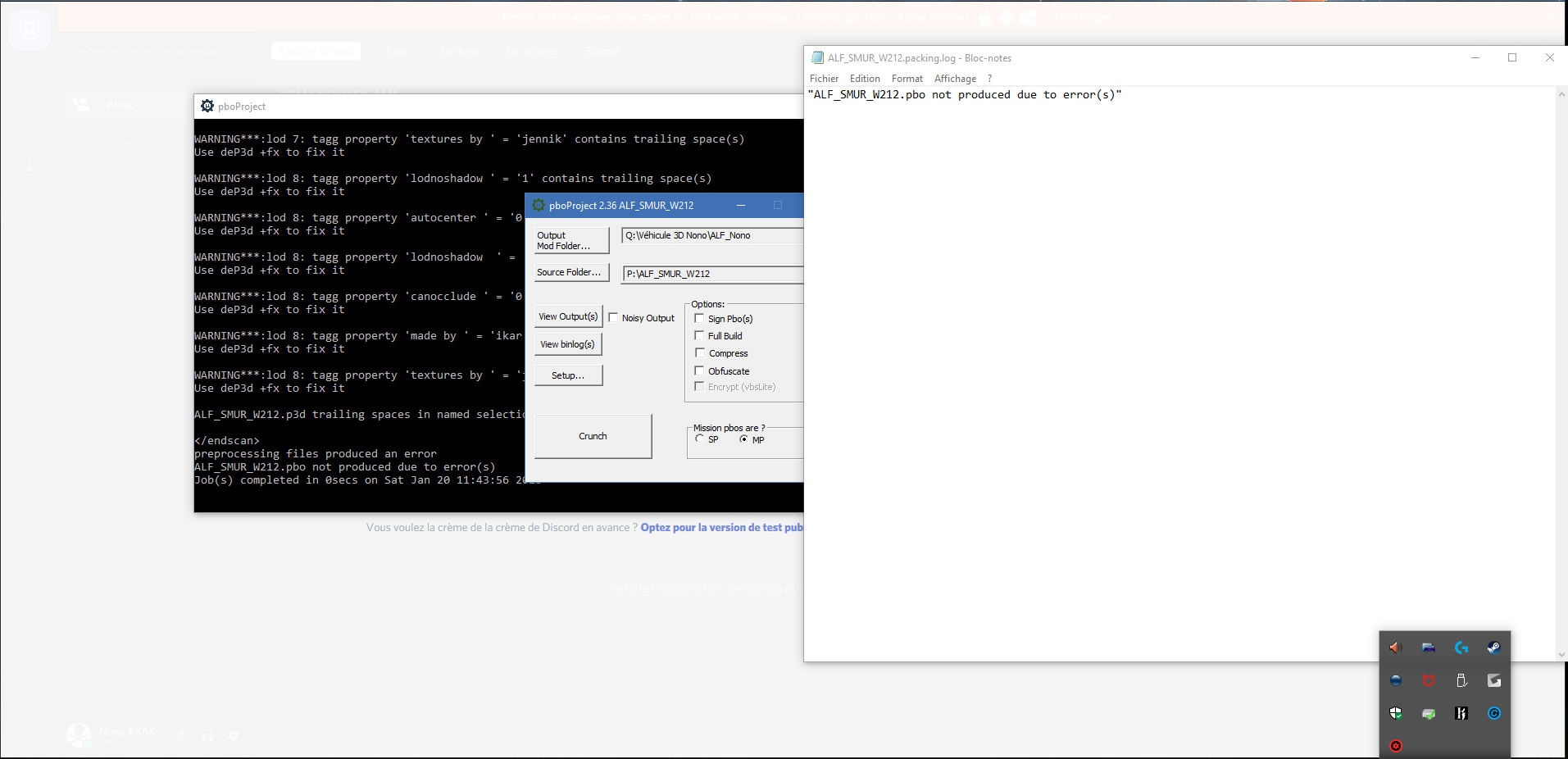
I have a problem when I want to binarise my model (car).
PBO Project show me the following errors : https://www.dropbox.com/s/gjar97seoca3qpa/Warning.txt?dl=0
When I open "view Output(s)" of PBO Project, I have this message : "ALF_SMUR_W212.pbo not produced due to error(s)" https://i.gyazo.com/7e486c96c2ea77e6be0e64e263cc9789.png
Do you need something else to help me?
 lime nebula
Check "noisy output" and send us the new "view output"
stuck oyster
have you written named proteprties like "propertyname = 1" because that would not be right
named property has 2 values, the class where you put its name and the value where you put the value of the class
 daring solstice
Hello everyone!
I am a new model maker(ish)
I have been trying to import a model to Arma but am unsure of how to do it, I have the textures and Materials down (I think)
I have been doing this all on my own pretty much so I am unsure if I did it right and what to do next.
I am porting in Wolfenstein uniform models to Arma 3 and have been unsure if I am doing it right or not.
Anyone think they could help/give tips?
daring solstice
.-.
twin urchin
yes , this isnt Gmod you know
stuck oyster
@daring solstice As you may have noticed we here dont take content theft lightly. If youre interested in 3dmodelling and all that I would suggest you get familiar with your chosen 3d modeling program and get into making your own content.
daring solstice
I'm not trying to make a profit off of this, i just was wanting it so me and a few friends could make some fun scenarios...
stuck oyster
its not about profit. its about principle of not taking someone elses work.
woeful viper
^without their permission
median bough
I'm not trying to make a profit off of this, i just was wanting it so me and a few friends could make some fun scenarios...
it's still theft. don't expect help here
daring solstice
So what now? i just scrap what i did?
bold flare
Yes
daring solstice
I feel a bit bummed, I worked on this for awhile resizing it and all but I see where you all are coming from.
bold flare
We could tell you how to get a model in game and stuff. But that's useless as you can't use your model anyway
foggy finch
 median bough
sweet!
 hallow turtle
that looks pretty cool Uro
foggy finch
thanks - I have the other muzzle done too, just not in this render, bipod n scopes next 😃
polar fiber
Mk211 for the M107
foggy finch
yeah shooting some ais atm 😄
foggy finch
yeah pretty similar
guess there's no way to delay the explosion until after the penetration for example shooting house walls etc, else you'd have already done it
white jay
I'm getting much better results with Cycles when doing texturing rather than Blender Render. Should I just use nodes in BR or is it worth the effort using Cycles for Arma.
polar fiber
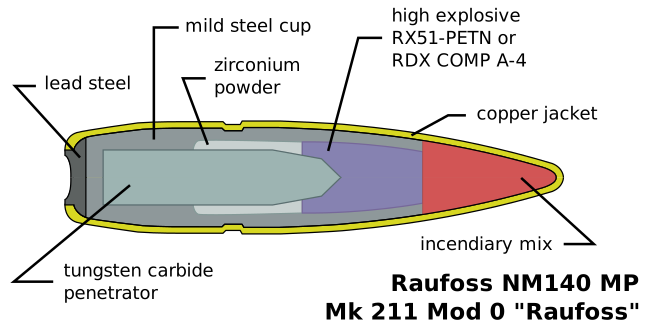
I thought the explosion occurs on impact (point detonating). The penetrator is set behind the RDX https://upload.wikimedia.org/wikipedia/commons/0/06/Raufoss_NM140_MP_(en).svg
 woeful viper
almost any explosive ammo for ground usage has a very tiny delay - so that it does not harmlessly explode in front of a very thin sheet of metal, but behind it
foggy finch
yeah which by design is long enough a delay for the fuse to fire after penetration has occured, resulting in explosive/incentiary damage. for example shooting a light armoured vehicle and disabling the vehicle and it's occupants through fragmentation once the bullet has passed through the armour.
white jay
https://imgur.com/a/EytdX Fuck yeah cycles ftw
foggy finch
how wide are the doors? they look pretty narrow
white jay
Picture is on an angle so they look smaller than they are. Some doors on shotgun houses are pretty narrow to begin with though.
woeful viper
thats not due to the angle. they are narrow, or they are insanely high
 dreamy lagoon
how do i change the particle effect when a bullet hits my object?
bold flare
The material on your GEO/fire geo lod
stuck oyster
👆 Fast learner! 👌 👍 💪
dreamy lagoon
😄
foggy finch
@slender river can you cleanse this spammer from our lives?
twin urchin
fecking cross posting
foggy finch
i'd just outright ban him for spamming, but im a dick like that.
twin urchin
yeah almost on channels ffs
quick terrace
@fluid ocean ^^
 obsidian forum
Greetings,
Is there a setting for adding an outline of a building in the 2d map?
no/yes - with a pointer to how is enough for me.
tulip beacon
named property map=house
obsidian forum
Will that make an actual outline or just a bounding box? The buildings 2d visualisation is a square while the original model is u-shaped.
tulip beacon
bounding box, probably you can create custom icon
obsidian forum
I did some experiments with Icons, but then I will have to "activate" the model so that it can be interacted with while editing the mission.
obsidian forum
I read somewhere about contour data, is there somewhere the rules for this kind of data is described?
stuck oyster
@obsidian forum Arma does only the bounding box representation of an object on the map, if you want U shape you need to split the object in 3 parts. What do you mean by contour data? the interwall of contour lines on the map or what? All that is generated from the heightmap as far as I know.
obsidian forum
I read somewhere some time ago about a named property->map=building outline, this parameter required contour data to make it work. If I remember correctly at al.
stuck oyster
I could be wrong but I dont thing that has been for Arma.
 meager anchor
I have a problem with a uniform model I've got to work in the game, where when equpped it causes my pistol to become invisible. Any ideas?
polar fiber
missing proxy?
stuck oyster
Anyone know if thermal texture can be made look like its always hot
on a static object
twin urchin
@stuck oyster set it like always white?
stuck oyster
yes always white @twin urchin currently inherits from class house @tacit karma
so far have been able to make it always black in thermal
(whiteHot)
which is rather odd xD
twin urchin
when you set TI as a white texture , it is still black?
stuck oyster
yes the TI texture is all white, saved with _TI and I got pretty high values in the model.cfg temperature values
twin urchin
did you tried it without TI if tha changes anything?
stuck oyster
started with that but it did not seem to do anything. I've done this before somewhere but cant find the test file.
polar fiber
what's in your alpha channel?
rough idol
TI stage is not working for objects
TI is generated from CO map where white colours are treated as hot and black ones as cold
tacit karma
ah yeah totally forgot that lol
stuck oyster
did not however get it to show up white even with just plain white texture
can probably turn it into a vehicle though so that might work
stuck oyster
ok so making my fake laser object a tank and turning its engine on via script I get the lasers to glow
hallow turtle
What kind of wizard shit is this?
stuck oyster
I paid #350 to the ferryman
hallow turtle
😱
hallow turtle
Wow
stuck oyster
The torso animates with 124 bones of which about half is for the arm movement and weapon alignment 😄
 hollow fulcrum
geezus man, awesome stuff though 👍
median bough
I paid #350 to the ferryman
you fool... one coin is enough.... tststs
😄
@stuck oyster
stuck oyster
not for lasers
rough idol
Watch out for bone limit then
Reached it few times recently - it's 255 bones per model
agile flint
Cant you just range the laser like a normal weapon/
?
That could adjust convergence accordingly?
foggy finch
im wondering wth you were rigging that had 255+ bones
rough idol
MiG-29 😉 nozzle alone used ~80 bones
foggy finch
jeez
rough idol
T-72 Kontakt-1 ERA was also pretty heavy for arma
 rough idol
and from official content Xian reached bone limit too due to rocket MFD icons in cockpit pre dynamic loadout MFDs
foggy finch
ah yeah i forget that the mfd's use em

got the aw50/l121a1 in arma now, just need to tweak position n make custom reload anims
also found that a3/data_f/proxies/muzzle_flash_GM6.p3d has missing textures
twin urchin
speaking of bipods , you can somehow tweak the values how the bipod can turn meaning the angles?
or it is hardcoded?
foggy finch
think they are hardcoded, only thing in the rifle_base_f classes i can find relative to bipod n pivot is the bipod named selection itself deployedPivot = ""bipod";
stuck oyster
@rough idol yeah Im aware of the limit. Got most of the moving parts done already so can use the rest for some fancy stuff.
 peak gull
Hey
im looking for hardcore experienced model maker
i need small help/tip with model.cfg
Any1 have 3mins to spare?
stuck oyster
best to drop yer issue here and usually someone can help
peak gull
Im trying to make Rifle, with specific part (selection on it)
this part has to rotare, just rotate.
All the time, from equip to drop it.
And i cant solve it with model.cfg, im not sure if its even possible
woeful viper
80 bones for engines? wat...
stuck oyster
you could try giving it animationsource = "time"
stuck oyster
source yes
peak gull
in samples i saw source