#arma3_model
1 messages · Page 89 of 1
 wraith tendon
 stuck oyster
which reminds me I gotta update all kinds of landing gear sequences and whatnot at some point.
wraith tendon
Was pretty nice, to do smooth Animations, with only 1 command executed.
https://youtu.be/WWaGPzZkfws?t=1m32s

Fits better:
https://www.youtube.com/watch?v=puTmAh62xxw
 fervent steppe
cool
reminds me of the shed i did that. you can look yourself in if your not careful lol
 fluid ocean
Bet thats a pain in the backside
fervent steppe
not that one lol
fluid ocean
oh 😏
wraith tendon
^^
 terse elm
hi guys anyone know how i can turn this window on? iv looked everywhere but to no avail https://images-ext-2.discordapp.net/eyJ1cmwiOiJodHRwOi8vaS5pbWd1ci5jb20vRlA5a01vay5qcGcifQ.biovoaucv3WbadEZ2B9aHwgEvUI?width=759&height=441
in OB
 frank helm
when you say turn it on??😊
terse elm
yeah i cloes it when i firts installed, apparently there is no way to turn it back on
 polar fiber
Same
terse elm
ad12monkey have u made a character before?
dont supose u know which format to export a weighted character?
polar fiber
Never made a character. But .fbx I guess?
wraith tendon
kk @cinder pivot
 cinder pivot
@wraith tendon did you have like a button you pressed (like e for most games) to control all actions?
wraith tendon
Yes
I am currently fiddling around with an extended Version, wich i will implement in a small GameMode i am currently fiddling with in Coop with a nice Mod =}
cinder pivot
Sweeto
wraith tendon
(mostly just to show how easy it could be in Arma^^)
cinder pivot
Yea, would be nice to press a button for doors
wraith tendon
Thats already easy to do
taken out from my KeyHandler
http://pastebin.com/uva6RFta

Watch the Door -> Press Button -> Execute that Code -> Done.
Using that code since... erm... idk. About 1 1/2 - 2 Years or so
(animateSource was added later, before it was a simple "animate")
cinder pivot
It can be coded for individual mods, but a universal thing would be awesome
wraith tendon
For Doors? You can use that on any Door, wich uses the Standard Naming
Just add a simple "keyDown" Eventhanlder that executes that code on Btn "whatever". Thats it
cinder pivot
Yea but doors that dont, external mods etc would be cool for base arma or something
wraith tendon
If they use the standardNaming -> Works (wich most Mods did. If not -> Pff, noobs 😄 )
 halcyon wren
@terse elm Import characters into OB using FBX. Make sure your character model is skinned with a skin modifier, else the weighting doesnt export. (Its an FBX thing)
That window you seek is Window -> Animation IIRC. It used to be bound to a hotkey: Shift + F2, but is no longer.
Ah no, it is not "Window -> Animation". 😮
You may be able to bring it back using regEdit and changing the flag for "firstRun" again.
terse elm
@halcyon wren does the modifier have to be collapsed? Also is there anything I need to make sure is tucked in the fbx export settings?
halcyon wren
What tool are you using? 😄
terse elm
3dsmax
halcyon wren
Urgh, max... Uhm. During export as fbx, have you enabled deformations and skins?
 ebon abyss
Mondkalb what modeling tool do you use btw?
halcyon wren
I've gotten to like Blender for 3d modeling, its very stable and not a bitch most of the time. 😃
If it did FBIK and wouldn hack the FBX export it would be even better.
 mental wadi
Hello. How can I adnust the waterline when making a boat/ship ? I tried to do it with the mass in geo lod but didnt work.
frank helm
Start with the res lod and move everything down slightly in that lod. Then go to each lod and line them all up.
I assume the water line would be where the grid lays in the view ports. It's ground level for land objects.
terse elm
@halcyon wren thx for that il try it tonight when I get home for work, may I contact you direct for further advice later if I'm still having issues?
mental wadi
@frank helm Thanks but didnt work :(
frank helm
Never worked on ships. Have you looked at the samples?
frank helm
This is one of the samples, the red lines horizontal must be the waterline. So adjusting the reslod up or down and then making the rest fit must be the way to go? IDK, like I said I haven't worked on boats.
can someone remind me on the face limit for an aircraft please?
18000 too much! right?
stuck oyster
nah
frank helm
?? it's not too much or you can't remind me?
stuck oyster
not too much. I think 20-30k has been thrown around as recommended limit
hard limit is in its millions/billions
frank helm
oh right! that does surprise me.
stuck oyster
something like that anyway
frank helm
I may have been misinformed in the past then. For some reason I had "nothing over 10000 and I should be fine" going through my head
stuck oyster
A2 times probably
polar fiber
18k is decent but it'll probably be more with missiles and stuff proxied on
frank helm
no this is not really a fighter jet as such. It can be modified, which it has in RL but for what I am doing I don't need the missiles and guns stuff.
polar fiber
as for boats floating: IIRC, adjusting the size of the buoyancy LOD affects their draft
 white jay
Hey everyone. Anyone knows a website where I can learn to move objects from blender and object builder into arma 3?
terse elm
@mental wadi is a mixture of setting ur weight in the geometry lod and the volume of your buoyancy lod Iv found when doing boats
mental wadi
Ok Thanks I'll check that
white jay
@stuck oyster thanks
stuck oyster
@white jay also check out FHQ toolbox for blender. Theres a release topic for it on the forums with addtitional info and many answered questions.
frank helm
YouTube has a 5 episode tutorial on the blender arma toolkit. If you can stay awake for 5 hours or so that might help. I personally find quick 3-5 min tuts on how to's easier to follow.
 oblique vapor
no
 tacit shard
Is there anyway to edit the proxies directory once I have placed it? Mikeros tools doesnt allow me to pack it with the P:\ (I imagine for a good reason)
polar fiber
rename
tacit shard
cheers got it done now
terse elm
Made the new british army webbing http://i.imgur.com/aGnWj7a.jpg


Making the body armour to go with it
cinder pivot
anyone know why my object would be dissapearing at a certain angle?
white jay
animated?
cinder pivot
yea @white jay
white jay
like a gate?
cinder pivot
A trapdoor hatch, think of like rust
terse elm
u got all ur geo, fire geo shadow lod in ect?
cinder pivot


the second image is if I just move my camera down
basically when I cut out the top square, it flashes invisible
white jay
is that ladder a standalone object?
stuck oyster
if you animate stuff beyound the original bounding box of an object the mesh disappears
or at least it does not affect its visibility
so you will need to increase the bounding box size
by for example adding few memorypoints that define new bounds
white jay
^
cinder pivot
how can I do that? basically stretch out the box with memory points?
white jay
sry forgot to say that 😄 was talking something else 😄
wraith tendon
Just add Memory Points
"Insert" in the MemoryLOD
about 2-3m away from the outsideborder of your model, on the XYZ Axis
stuck oyster
no problem, well add it to your tab.
cinder pivot
crap, Dscha was supposed to pay that for me already
stuck oyster
no he's been billing all kinds of crap on it.
wraith tendon
Me? Paying your bills? pff, you owe me alot, Mr.
cinder pivot
😄


still cuts off
no matter what range I am at, if I move my camera down so that the top floor isn't visible
it can flash out the ladder
wraith tendon
Place a Memory Point at the Position, where the Ladder ends.
AH! wait! Iirc it was in one of the Resolution LOD
(or was it GEO? ffs.. can't remember)
cinder pivot
there is a memory point past where it ends
trying a point in res lod
@wraith tendon that was it haha
litterally added a point down far on res lod
now it works, thanks 😃
wraith tendon
Told ya
cinder pivot
guess arma had rendering problems because no part of the object is that low
it just animates down there
or something
wraith tendon
Its not a "real" prob, tbh
cinder pivot
well, it works as intended, just gave me troubles
wraith tendon
Its more like a "I don't see that Model anymore, since i only use the StandardStart of the Model, without any Animations"
cinder pivot
yea
 foggy finch

 umbral plume
that's yuuuuge
foggy finch
it will be composed of only 4 unique models snapped together in-game, because lod limits, uv space etc 😃
foggy finch
yeah, transition from ground tier to upper via built in ramp
pretty hard to show all the stuff in pics
have a few minor things to edit, like railings
then off to texture mobile and multi-mat city
wraith tendon
Also add Garison Positions, pls, thx
wraith tendon
😄
fervent steppe
@cinder pivot your ladders moves?
white jay
Hey anyone. Do you know where I can find some vehicles for the cops? I want a Ford Explorer and more
foggy finch
at the cop shop.
white jay
I mean where I can find free models
foggy finch
no such thing as free models unless you mean stolen, in which case your in the wrong place
polar fiber
this is model makers
foggy finch
^^
white jay
Yes that was only a question. I make models to but I ask to for free models
foggy finch
why not make your own then
white jay
I make my own but I ask for free to. Is that a problem to ask for?
foggy finch
this is a channel for model creation and usage within game mods
its not a medium for asking for models
white jay
Okay sorry for my question.
foggy finch
we help each other out with modelling stuff, show off our wip stuff and discuss arma modeling
fluid ocean
@PhilGalou#8946 "Free models" more often than not are STOLEN models.
 formal vapor
@white jay I apologize for everyone's remarks here. They may not understand your intention. Lets me clarify.
Step 1. Download blender. step 2. Make cop car. step 3. Ta Da!!!
You have a free model!
cinder pivot
^^ its model makers not model takers
@M1lkm8n#8907 yea it folds down but I will have to make a hacky solution to work correctly.. Lol
fluid ocean
@Tim B#5638 I do not need you to apologise for me. My statement was quite clear, as was Phil's.
 desert sequoia
Hey everyone, I still have an active questions regarding models and PATH LODs, we have faced a problem that when putting two models with PATHs together (a building composition, like Kavala hospital on Altis) - the AI fails to move between these two parts of building. Is this problem which is possible to solve?
stuck oyster
@desert sequoia do you have proper entry/exit points at the end of the paths on both buildings? and are they overlapping on both objects
formal vapor
@fluid ocean I hope you realize that was sarcasm.
fluid ocean
sarcasm doesnt translate well via txt, thats why many use <sarcasm> or similar to convey expressions
wraith tendon
Or use stuff like: Oh yeah, that was very "helpful"
desert sequoia
@stuck oyster which LOD it is? unfortunately I am zero in modelling and need to transfer it to our team of artists who do not speak english :(
First attempt was just to overlap PATH lods - but that did not work
white jay
@cinder pivot how did you go about removing the ladder option?
cinder pivot
@white jay I am still trying things, worse comes to it, probably creating an invisible ladder that I can create
wraith tendon
iirc you can't move the Entry/Exit Points of the Ladder.
white jay
milk is after it for quite some time, and i have to look into something similar soon
white jay
And the character will face straight up like on a normal ladder 😛
fluid ocean
really? Damn
white jay
What did you had in mind?
desert sequoia
guess, he wishes a climder to hang under such ladder
fluid ocean
not under. OK, say a 55 deg ladder 😉
cinder pivot
@M1lkm8n#8907 yo sick add me on myspace lets talk about them - www.myspace.com/andrew
fervent steppe
🤔
fluid ocean
yeah, naw Bro
cinder pivot
Lol
stuck oyster
@desert sequoia I've made mine like this https://www.dropbox.com/s/sywcigbmpi3id62/Pathlods_01.jpg?dl=0 these are two adjacent pieces of a large hangar and the entry is from the bottom where there is many entry "fans" and the ones in the middle and top are path exits inside the hangar from one piece to the next. What I noticed was that the inside path lod has to go outside the geometry so it works. Though Im not 100% sure about that, its at least how I got it to work.
 desert sequoia
@stuck oyster thanks, I was able to discuss it with the team, and indeed the models did not have proper overlapping entry point, after fixing it - everything worked like a charm
stuck oyster
excellent!
white jay
@stuck oyster afaik the pathlod should always be floating between 0 and 0.5m above the ground
what you describe with the geo lod is probably the reason for that
 oak lintel
huhu,
i try to make for my vehicle a Wreck. i create a Wreck LOD and my wreck model is a proxy.
But what now? Need to define in model.cfg or vehicle class? I search in the samples, but i dont found any define of that proxy
 spiral void
I'm making a tree. When transferring (vertex) normals in Maya and then bringing the mesh into OB the new transferred normals seem to be gone, as if OB regenerated the normals. Does anyone know what is happening here?
 bleak flame
OB likes to randomly mess with your vertex normals because it's terrible.
what file format are you using? if you can get it into OB with the right normals at first, you can lock them
spiral void
FBX
bleak flame
try fbx 2006.11 if you can
spiral void
At the moment I suspect it's on the problem is on Maya end though. A flag regarding tangents on export was set to false. Currently testing this
ah ok
spiral void
nah dident work
smart 😃
do you think I should use fbx 2006 even if latest also works (at least regarding normals)?
bleak flame
up to you. I never had anything but 2006 work
spiral void
yeah ok
so the problem is in OB
OBJ works but then I won't get the textures sorted out for me
 echo rain
@spiral void sounds interesting! any pictures? i remember mikebart doing similar things back in arma 2. i could dig up a link if you want. i think he used maya too, but he might have ended up using lightmaps. can't remember
on that link scroll down to "links"
some forums threads there
spiral void
thanks!
Yeah, for him it just seem to work though 😛 I'll try an import to arma using a OBJ export (which works)
it's just that I'll have to do all the file paths myself
echo rain
hm. what was that txt import again? maybe that works. that 3ds max plugin
is for characters iirc but maybe it's good for this too
spiral void
But im using Maya
so even worse.. when copy-pasting the tree (with correct normals and material setups) from on OB to another, the normals gets regenerated again
echo rain
yea but others could help you export. although it might be OB that fucks it either way
oak lintel
huhu,
i try to make for my vehicle a Wreck. i create a Wreck LOD and my wreck model is a proxy.
But what now? Need to define in model.cfg or vehicle class? I search in the samples, but i dont found any define of that proxy
polar fiber
triangulate before exporting from Maya and then lock normals when you import it in to ObjectBuilder (through Shift+E vertex properties menu) if they are custom normals
I use maya all the time and never have issues with fbx export so long as it's triangulated before exporting
stuck oyster
@oak lintel Im not sure if the wreck LOD is actually used anymore. Check the ingame config viewer for how the vanilla vehicles are configged for wrecks
oak lintel
Ok you have right.
spiral void
@polar fiber Ok! It is already triangulated
oak lintel
@stuck oyster: works.... only need destrType = "DestructWreck";
and he spawnt the proxy WRECK LOD after damage 1
stuck oyster
excellent
white jay
Hey! Have anyone tried to make a glass texture with a supershader by adjusting the alpha channel? Im just experimenting but i tought it could be kinda cool to apply normal maps and such.
 thorny rapids
daily wip pics: http://imgur.com/a/eeQRg
spiral void
nomnomnom
echo rain
@thorny rapids looks great 👍🏻
fervent steppe
@white jay by any chance is your name Dave?
white jay
No it's Lars
white jay
Nah not yet but will do soon
 stuck oyster
was there a Mikero tool that could batch run a named property into multiple p3ds?
 rapid yacht
i thought ide get back into a bit of vehicle modding, ive got it ingame, but whever i press play it just flips and bounces around. any ideas?
stuck oyster
broken physx config
wraith tendon
Also possible:
No Weight assigned
Memory Points wrong assigned
rapid yacht
i dont have wheel_x_x_damper at all, coz i have no suspension, would that do it?
foggy finch
@stuck oyster dep3d can do some stuff, mostly named property related
more info in the docs
stuck oyster
thanks @foggy finch
foggy finch
np man
cinder pivot
Weight, physx wheel positions geom glitching
rapid yacht
weight: 5000
so probs not that
geom glitching?
http://pastebin.com/SAaEskwp that is my physx.hpp
umbral plume
I've had a similar problem with dampers not being set right
wraith tendon
Yep, Damper missconfigured on your Dildozer.
rapid yacht
ok, i got it working
but the back is about a meter of the ground, any ideas on that one?
stuck oyster
Probably still issue with the physx dampers and wheels.
 agile flint
Does anyone here know how to make suspension independant of each other?
I.e in this gif, as you can see the front suspension contracts when the back wheels hit the 'ground'
Is it possible to have each react to the ground independently?
stuck oyster
@agile flint Check model.cfg wikipage for animation sourcers! There may have been one for front and back dampers.
agile flint
@stuck oyster I changed from 'altRadar' to 'altBaro' and well it doesnt work, the wheels are half underground and the dampers dont actually damper
stuck oyster
aaaaa ooh ok so its like fake suspension then?
 woeful viper
you can make physx wheels for planes now as far as i remember, including dampers
agile flint
I guess so @stuck oyster ? @woeful viper I've been trying to do that all day but I dont actually know how to do it
polar fiber
@agile flint BIS are adding physX suspension for aircraft for the Jets DLC I think. Not sure if it's in 1.68 already. altRadar/altBaro use the height that the aircraft is flying so all wheels will get the same controller value at the same time
think the new stuff is using the damper source
Define an animationSource in the config.cpp for each wheel to use in the model.cfg with class mySourceName {source = damper; wheel = physXWheelName;};
configuring the physX wheel is the more in-depth shit though. I'm not too sure how that's done
boudaries, damping rates etc. etc.
agile flint
@polar fiber Cheers for the info mate appreciate it! Yea, they added PhysX suspension to the Ceasna light aircraft though that has such small landing gears its hard to tell how it actually works. I'm sure it will get introduced to all aircraft but this time its too hard to tell. I'm also hoping that BI will eventually release some documentation on how to implement it for aircraft.
I'll look into the example you provided, I understand it looking at i now but probably wont when I get around to actually implementing it
So for example, I just made ------ class LG_1 {source = gear_1_damper; wheel = Wheel_1;}; -------- Would I then change the 'source="wheel";' in the model config with the class name I just made?
polar fiber
source wheel is what makes them spin. You can have independant wheels as well AFAIK e.g. class myWheelSourceName {source = wheel; wheel = physXWheelName;}; same as in the above example, but derived from the wheel source instead of damper
your altradar/altbaro sourced anims are what you'll want to replace with the damper-sourced anims
class LG_1 {source = gear_1_damper; wheel = Wheel_1;}; wont work because gear_1_damper isn't a hardcoded anim source for your custom LG_1 animation source name to receive any control value from the engine
making custom animation source names you have to use one of the hardcoded sources from https://community.bistudio.com/wiki/Model_Config#Animation_sources
like if you're doing a scripted anim, you'd use source = user, and then apply a scripted condition or trigger
agile flint
Yep I think I get ya now. So I've got these 2 now from what you've said
class LG_1 {source = damper; wheel = Wheel_1;}; --------------------------------------- class W_1 {source = wheel; wheel = Wheel_1;};
First being the 'damper' obviously and 2nd being the avtual hweel
polar fiber
yep, then you need to set up your physX wheels and add them to the driveOnComponent[] array
polar fiber
class wheels stuff. There is some model things you need like memory points for the centre and boundary and the name of the bone
agile flint
Ahh yep cool cool yeah I've seen a bit of that with the BI config
I'll look into it some more. However thankyou very much for the help, really appreciate it
polar fiber
I'm just reading through the changes reyhard did to the RHS Raptor. Should thank him
agile flint
I'm guessing these are recent changes? Or not yet release stuff?
As obviously most of these changes are Dev Branchy stuff
Also Da12th, I'm guessing the following - boundary = "Wheel_2_rim"; - is the memory point for the outer rim of the wheel, i.e like right on the edge where it would touch the ground?
polar fiber
I think they must be on 1.68, because apparently our A-10's taxiing was fucked. I assume because of inherited stuff from the Wipeout
i.e. inheriting physX memory points that weren't in the model, or lacking the defined driveoncomponents
and yea, physX calculates the radius of the wheel from those two memory points at the boundary and centre
agile flint
I have noticing taxing in this game is dodgy. As in the aircraft doesnt turn from the front wheel like it does IRl, it slides the body around to turn it, so wheel move sideways.. looks really dodgy
Awesome thanks for that. I'll add that now and see how I go 😃
Well I applied some changes and well, the wheels dont move and the damper is rock solid haha. So I've obvously done something wrong
oak lintel
Hey im again =D
When my Vehicle explode and he spawned my wreck is the firegeometry and the geoemetry LOD bugged.
Only with Proxy in wreck LOD. He doesnt work correctly....
I have tested my wreck only with config and place in editor > works great. (shadow,resolution,geometry,firegeometry and so)
anyone idea?
white jay
Hey guys
I have been modeling for the past 2 months, static objects only. I am feeling fit now and want to move towards moving things like cars. I had help from a friend of mine who showed me the mesh things and memory lods (i use blender and then object builder) though i cba to always ask him and him to run off from me xD would someone mind linking me to an actual usefull video which tells you what you should do or would someone mind helping me out?
oak lintel
https://www.youtube.com/watch?v=F0rIRCkaPnk&t=417s all parts. good luck!
white jay
He/She doesn't explain it to my understanding xD
I will need luck though haha. My issue with his/her way of making tuts is how inprecise he/she is and thats something i hate 😄
I am as far as when you highlight each tire and assign them to each vertex group.
oak lintel
arma 3 samples
white jay
Looked at those aswell. Im looking for either someone or a premare tutorial which lets me write down what i'll need to do. Thats the same way how I got the hang of static modeling (very very easy) but still
spiral void
You told me a couple of things earlier about importing custom normals in FBX file into OB. Have you tried this at some point? I used OBJ as a workaround but now I need the FBX again because OBJ doesn't hold multiple UV sets.
@polar fiber
Or if anyone else knows for that matter 😃
polar fiber
I think Pufu once told me there's an issue with exporting the normals on models with multiple UV sets
spiral void
aha ok
 cedar rock
Am I able to make a whole new base charcter using the arma 3 sample model?
stuck oyster
yes
cedar rock
alright thankyou, just wanted to make sure before i start on it, is it as simple as looking at the sample or are there hidden things i need to know?
stuck oyster
well have you done rigged humanoid characters before?
cedar rock
its not rigged quite yet, still working on texturing it
stuck oyster
as long as its same size as the Armaman it should work
cedar rock
well, its a female character so it is shorter. Can't i just make a whole new skeleton and just add like F_ to all the names?
stuck oyster
well the man animations wont work with different sized skeleton
I actually have a conversion process in the making but it will still be some time before thats done.
Arma animations do not scale
in engine
cedar rock
but if i make this new character it will allow me to be that character without having any clothes on correct?
and i can wear clothes i make for it
stuck oyster
yes
cedar rock
okay so, ill just have to redo all the animations?
stuck oyster
if you want to
theres about 2000 of them
theres quite a bit of talk about it in the #arma3_animation
depends how fast you need it, you could wait for my female animation set to be done.
though my skeleton might not be the same size as yours
so theres that
if you got more questions regarding the animations, thats the best place for them
cedar rock
okay but the cfgheadgear and all of that other than the charc=acter what is that doing?
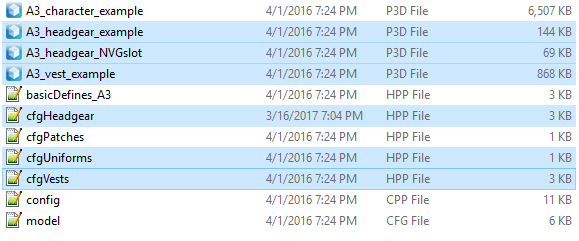
the highlited ones
stuck oyster
got any guesses?
cedar rock
i'd say tells where the different asscesories go, but not seeing proxys to those in the model
stuck oyster
those define classes for different types of gear yes, they are ingluded in the main config and separated as .hpp for easier access to them
cedar rock
but if im not making any i can get rid of it for now?
stuck oyster
I suggest you experiment with just simple test man addon to figure out what everything does
would not recommend you lose anything as you might need them later
uniform you will need in anycase
making different sized female unit is pretty much diving to the deep end of Arma character modding with couple of buckets of concrete as shoes
so start with the sampleman to learn what goes where.
cedar rock
alright thank you
stuck oyster
there might be some useful info here: https://community.bistudio.com/wiki/Arma_3_Modding_Characters
and google is your friend too.
if you got any pics of your character I might be able to tell you if it fits with my skeleton
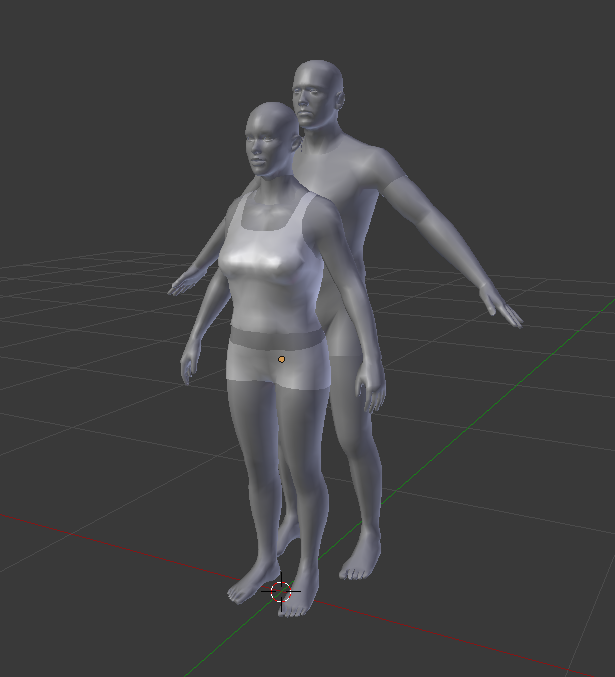 white jay
hello i edited modle and the model works but when i have done my edit it takes a long time to load mission and also to spawn object it takes like 15-30 seconds before its there
woeful viper
binarize it. it compresses everything
 lavish mountain
Is it possible to alter the center of gravity of a vehicle ingame?
I mean for the physx settings aswell...
Or are those given and not changable?
stuck oyster
dont think it is The mass distribution of the vehicle determines the center of gravity.
lavish mountain
So if for instance we are to load a vehicle, we can only do so without altering the center of gravity?
stuck oyster
yes I think it wont alter it.
Could be wrong but any attach to thing I've ever done has never affected weight and I think all vehicle loading things rely on the same mechanics.
stuck oyster
that is true. The physX attachment in sling loading takes account weight and lift power
cinder pivot
Yups
lavish mountain
Can we trick other vehicles into slingloading?
stuck oyster
might be better if you tell us what you want to do
polar fiber
vehicle-in-vehicle (setvehiclecargo) adds weight though AFAIK
polar fiber
Can see the physX suspension compressing on the RHS MRZR when you load ammo boxes in the back
Is mentioned: https://community.bistudio.com/wiki/Arma_3_Vehicle_in_Vehicle_Transport#Transport.2Ftransported_vehicles_and_parameters mass of loaded vehicle(s) is added to transport vehicle
agile flint
@polar fiber 'Mass of loaded weight is added to transport vehicle' I wonder if its possible in some way or another to do that for ordnance on aircraft.... hmm
polar fiber
can have multiple load points. Dunno if they can be animated or hidden - never tried
can wholly disable the ability of the vehicle to transport with enableVehicleCargo and tie the true/false statement to an animation state as well though I imagine
lavish mountain
Thx
polar fiber
Main limitations of VIV are that you can only have one cargo area - so no multi-tiered cargo ships, and objects don't stack. And the issues with pilot view rendering, which also affect attachTo IIRC
fervent steppe
😮 when did petyr baelish join
lavish mountain
Thats a bummer
I should have vocalised my question differently aswell. I see stability is only done by the physx lod on ships. The inputs you can give for stability are not that much
So having ships list when doing cargo loading gets impossible I guess
fluid ocean
thats asking alot, but I see where youre going with it.
No different than reballasting
or shifting fuel fore or aft / Port or Starboard
But, iirc, it can be scripted.
lavish mountain
That would be amazing...
 cedar coral
I am in OB and setting up the textures via the face properties. Is it possible to set emissive values on a given face directly? That is not using the reference to the material rvmat file. such as emissive[]={0,0,0,0}; ?
cedar coral
Thanks, much appreciated!
tacit shard
Is there a way to define what editor category your editor sub categories come under without making it part of a seperate config.cpp? I think default ARMA does it through $str and I couldnt find it on the documentation for Editor categories.
Basically I want to define say 3 editor categories and then more sub categories for each of these, but I cant find a way to define what category each subcat should go in
polar fiber
editorCategory = or faction = depending on what kind of object it is
echo rain
do i have to do anything to get FBX import to show up? haven't opened OB in a while and now it's gone
got it...DLL folder path needs to be set in OB options
 barren halo
ma dudes when i try to pack my car into a pbo it throws up the error that the proxy p3d's i have are unrecognised but i had recently packed it up without any issues before it
tacit shard
cheers da12thmonket
 zenith crescent
any ideas for how to make a sound emit from a train and change based on it's speed?
was thinking about using say3d in a loop and play a few different sounds based on the speed of the train
and only play the sound if the player is within x meter of the source
stuck oyster
@zenith crescent Awesomesauce with the trains! I might come poke your brain when we get our monorail set up. For your question the guys at #arma3_audio may know more!
cinder pivot
@zenith crescent say3d is only local. If you want MP sounds you would need something else
wraith tendon
Wasn't Say3D that sound, that doesn't move?
So it only plays, where it starts (no Position change)
cinder pivot
You could also change the sound vol based on speed
zenith crescent
@stuck oyster Monorail would be awesome. Trying to put together a collection of trains + tracks that are published as an optional client-side addon and are compatible with ATS.
Got a few already from @orchid arch : https://postimg.org/image/3th526757/
lavish mountain
Taviana with trains is the best I think
Only other issue I have with the map is the amount of abandoned stuff on it. Without it the map would be way cooler
zenith crescent
Are there already tracks on that map?
lavish mountain
Quite an amount
And train stations
However IIRC, they are not all properly done
cinder pivot
Stuff all over the map + its not allowed on A3
lavish mountain
Oh lol
Good to know
OK read the interwebs about it, the IP owner is not ok with the arma port as it was apperantly without his permission...
Well there goes one dream... and another lesson for everyone here to ask before using anyone elses IP or beter, dont use anyones IP at all...
stuck oyster
@zenith crescent we tested one with physx car way back. Runs the track quite nice, but far from perfect. xD Your method is much nicer.
zenith crescent
tried it on MP yet?
stuck oyster
that video is recorded in mp
its just a car
rigged the wheels so it hugs the rail from all directions 😄
pretty much nothing that would make it unfit for mp
except maybe for physx mishaps. 😄
but it seemed to be quite steady
Been long time since we made any progress with it as its just a map gimmick
agile flint
Bumpy fuckin ride fellas
And yes something is wrong but I dont know how to fix it haha
 agile flint
Good point, I should release it like that then haha
cinder pivot
Looks like land contacts are messed up or the physx bump coef
agile flint
@cinder pivot Its defintely something to do with the PhysX stuff. As prior to adding it ot the aircraft the land contact stuff was perfectly fine
cinder pivot
@agile flint is the land contact lod and the damper on the wheels at the same height ?
agile flint
@cinder pivot in O2 the suspension is fully up not fully extended out? Is that what you're asking
cinder pivot
no just where the memory points are
agile flint
They're where the wheels are in O2, so fully up rather than fully down
Firewill told me to fully extend the damper in O2 and then move everything to there but I dont know how to do that in O2 cause I am noob haha
i.e here is the land contact stuff - https://gyazo.com/a89438fbd4d8b3731527d64d5688645f
cinder pivot
Looks fine, what about memory?
 shell magnet
anyone have any good sample to do a motorbike on arma 3 please ?
 quick terrace
not for stolen assets nope
white jay
There is a basic example on the forums somewhere for arma3 motorbike
Not sure if its any good etc
fluid ocean
I miss the old motorcycles
fervent steppe
I have a motorbike fully configed if you want
fluid ocean
Donate to CUP 😉
cinder pivot
@M1lkm8n#8907 does it drive all wonky? Last I tried Bikes it was like this, could barely drive
zenith crescent
How do I change the path where an object appears in the eden editor's assets > props section?
wraith tendon
☝ Was searching the same, thx. o7
for example, the entrys of Land_Sun_chair_F in the config.cpp:
        editorCategory = "EdCat_Furniture";
        editorSubcategory = "EdSubcat_Beach";
        vehicleClass = "Tents";```
( `P:\a3\structures_f\Civ\Camping\config.cpp` - Line 849 )thanks!
rapid yacht
http://i.imgur.com/bYqswom.jpg cant see to get those back wheels to be on the ground
 cinder pivot
Hey @zenith crescent how did you do your modular ladder script? Was it done doing the LadderUp and LadderDown actions?
Gonna try that action for my ladder
zenith crescent
oh gosh, I don't remember
I think it was playing some custom actions and adjusting the position of the player
cinder pivot
I figured, you went with the ropes instead
zenith crescent
and then it generate the ladder dynamically from a few different smaller objects.
agile flint
@cinder pivot Memory points are the same. Everything was working fine prior to the PhysX suspension, after I added that it does whatw as in the gif.
 vale berry
https://youtu.be/9a9EI_U8Vf4 Well I have no idea what to do now^^
wraith tendon
Make Tofu.
 tacit karma
@wraith tendon wrong https://www.youtube.com/watch?v=tJ7r4mmsrMI
wraith tendon
😂
quick terrace
i am away for 10 days and this place turn to shit...well done lads well done 😉
wraith tendon
We did our best.
fervent steppe
Lol
 blissful fulcrum
hello i have a problem with som of my objects getting destroyed when run over it doesnt happen when shot or exploded by fx a grenande only when run over by cars
stuck oyster
Thats default behaviour of certain types of objects like fences, walls and lampost. Are they map placed objects or scenario objects?
 zenith gazelle
Hi there @stuck oyster, well the objects is placed on the terrain builder, so placed on the map.
I'm working with fammatt 😃
stuck oyster
this is what you need to set for them
and preferably also make sure you have right destruction type for them in their config.cpp
zenith gazelle
Well we had tried to use destructType="DestructNo"; and destrType="DestructNo";
Here is a exsample of the code. https://pastebin.com/0NUKhY8a
They are falling over like a tree and do not just keep the position when you drive over them. Maybe they are in the wrong section I dont know either do he. This is our first object 😃
stuck oyster
do you have the named property in the models geometry LOD?
also you should set more armor to them
zenith gazelle
@blissful fulcrum Can you answer this one 😄
blissful fulcrum
no i do not to my knowledge how do i set or find that 😃
 outer condor
semi on-topic - anyone knows what happend with Trixie? did he just left Arma 2-3 years go?
 civic stratus
reinstalled my arma3tools, can't get rid of the "External Viewer: Attach failed. No viewer found." And google isn't being of much help
 flat flare
How different are arma 2 cars from arma 3? I've done arma 3 cars for a while now and I plan on doing some for arma 2 and was wondering what would be different
stuck oyster
no physx, other than that not much difference
flat flare
thought so
Should I use an arma 2 model cfg or will the arma 3 one work? Any difference? Also I remember selections being in Czech but will it work if I put english ones?
stuck oyster
There may be some animation sources that A2 lacks, other than that if your model is configured for ceraint selection/section names it should work
flat flare
Allright thanks for the help
fervent steppe
@zenith gazelle the engine has no idea what is destrType = destructno
You need to either define what destructno is or use 0 which is actually how the engine is coded for a non damageable model
civic stratus
does buldozer work with the 64bit dll's?
stuck oyster
I run Terrain Builder buldozer from Arma3_64bit exe
but I think OB buldozer didnt lauch with that
civic stratus
I used the arma3tools to install buldozer
thi s is the second time I've verifie d the game cache, and both times it failed to validate files
 bleak tangle
Have you run Buldozer configurator and then "Install Buldozer"?
civic stratus
yes
although i Installed buldozer before running the configurator
Reinstalled the tools to no avail
I used mikero's arma3p
bleak tangle
Did you read the message at the end of Arma3P?
civic stratus
the one that prompts you to press k?
stuck oyster
you may have noticed it says it removes buldozer exe and that you should set up your Object Builder and Terrain Builder to use Arma3 exe as buldozer
civic stratus
I don't recall that bit, and the buldozer.exe wasn't removed
i tried copying my arma3.exe over and renaming it also
stuck oyster
no no
you path the settings in the programs to your steam folder
no need to fiddle with copying stuff
echo rain
getting a bunch of missing dlls when starting OB. should i use the arma folder as DLL path? beacuse i'd rather not mess with my p drive. haven't changed it in ages since it worked well. didn't have a need for buldozer though. just packing
stuck oyster
Y:\Steam\steamapps\common\Arma 3 Tools\ObjectBuilder```path to BZ and path to DLL
in Object Builder
stuck oyster
no problem!
civic stratus
I was hoping your solution would fix my viewer issue as well horriblegoat
Basically for me, pointing to buldozer in my pdrive (that arma3tools installed), I get attach failed, but when I point to the arma3 folder, I get cannot create viewer
stuck oyster
and you dll path is correct?
civic stratus
copied and pasted the file path
civic stratus
my machine
stuck oyster
oh good
civic stratus
give me more credit than that 😛
stuck oyster
😛
civic stratus
i just updated some mikerotools
so I'm gonna give arma3p another go
and get back to you whether its working or not
civic stratus
maybe I should install the tools again and just mount the drive and do the rest with mikerotools
stuck oyster
worth a shot I guess. 😬 hard to say as I never had any problems but still so many got issues like yours but also for many different reasons
civic stratus
Alright so I noticed the part where it said it would remove buldozer.exe from p 😛
pressed k to set objectbuilder to the a3 directory, but it didn't
set it manually to "E:\Games\Steam\steamapps\common\Arma 3\arma3.exe" -buldozer -nosteam -name=Buldozer -window -noLand -exThreads=0 -noLogs -noAsserts and receiving unable to create viewer
stuck oyster
you got the rest of the path there too?
X:\Steam\steamapps\common\Arma 3\Arma3.exe -buldozer -nosteam -name=Buldozer -window -noLand -exThreads=0 -noLogs -noAsserts -cfg=p:\buldozer.cfg
civic stratus
I removed the -cfg because it doesn't exist
stuck oyster
try without the quotes
the buldozer.cfg removal is ok it seems. I reverts to A3 settings then I think
civic stratus
there's a space in the path, shouldn't the quotes be there?
stuck oyster
usually yes
civic stratus
yeah, no change
stuck oyster
k
just that mine works without quotes
and you got the dll path to your arma 3 tools folder?
stuck oyster
😄
civic stratus
Well thanks anyways for trying to help
shell magnet
hey guys i have a problem with my shadowvolume, anyone can help me please ?
flat flare
Whats wrong?
Make sure you select the entire model and go to Structure/Triangulate () and Surfaces/Sharp Edge (U).
Also make sure all the points/faces are closed in the shadow lod
agile flint
Incoming another Petyr Baelish how the fuck do I fix this question.
So I've double checked, land contacts are all where they should me, lods where they should be, in other words everything is where it should be. However the gif above still happens regardless of what I change
I managed to fix the inverted damper and bouncing when on the ground, but I dont have any idea on how to fix this
cinder pivot
@agile flint lower or raise the spring compression in physx configs
agile flint
Would that be model cfg or general cfg? in the general one I have..
sprungMass = 5334;
springStrength = 1200234;
springDamperRate = 128025;
zenith gazelle
@fervent steppe So where do you put this "0". Instead of destructno? destrType = 0;
We are both new to this 3d modeling world. And its kind of a close forum, no tutorial that are directly telling us this is how you do a 3dmodel to not take any damage at all.
zenith gazelle
Well if I understand this right after found a bistudio wiki about damage. DestructNo means that it will make the object invulnerable to weapons. And that wokrs. Its only if a car, airplane, heli and so on. A vehicle that drove over it, it fall over like a tree. Is that something we need to apply though objectbuilder and if so, how and where. Or is it armo that is too low?
tacit shard
Hey,
So a while back I had this issue where if I used Mikero's ARMA3P to extract the game data it would give me this error: https://gyazo.com/2e022f279853d827fc6a979626bba98f
so I ended out just using the bohemia game data extractor from arma3Tools and went on fine. A week or two ago I bought mikero's tools and decided to try the ARMA3P from the purchased versions, and it all worked fine as my p drive was mounted and all that, but I turned my PC of last night booted it up this morning and once again had that error (https://gyazo.com/2e022f279853d827fc6a979626bba98f) Has anyone else had this issue?
Also if this isn't the right place to put it please let me know, and if any extra information is needed I can give it. - Thanks
fervent steppe
@zenith gazelle do you have any named properties in the list in object builder? And if so what are they?
zenith gazelle
You mean in the LOD box or? 😄
fervent steppe
I mean in object builder there is panel called named properties
What do you have listed there?
Screenshot who be nice if you can
fervent steppe
Go to windows and make sure it's on
fervent steppe
Ok. Right click and put damage = no
fervent steppe
Value = no
zenith gazelle
zenith gazelle
yup ofc 😃
fervent steppe
Can I see it 😃
zenith gazelle
If something have been writed wierd tell us and we will learn from that 😃 @blissful fulcrum and I, is really new to modeling 😄
fervent steppe
Looks ok to me
zenith gazelle
Great I will try it out thanks for the kind help 😃
fervent steppe
No problem
tacit shard
Hey so to my issue earlier about the ARMA3Tools not being able to mount P drive after using Arma3P I have mounted the P drive by doing subst P: "C:\Program Files (x86)\SSDSteam\steamapps\common\Arma 3 Tools\WorkDrive" In CMD and setting it up to do this through a bat file on start up, however is this a permenant work around? Or does the ARMA3Tools P drive do additional commands that will affect the way my P drive works?
blissful fulcrum
hey @fervent steppe me and @zenith gazelle tried what you said and it is still not working here is a picture so you can see the problem http://imgur.com/a/M7zCE this is whats happen when you run it over 😃
and i have put property name in all 3 lods
bleak tangle
@tacit shard are you mounting the P drive to use the WorkDrive directory from within your Arma 3 Tools? If so, I'd advise against doing that.
I'm fairly certain both Arma 3 Tools and Arma3P won't let you extract game data if your P drive is setup to use the Arma 3 Tools directory, but I'm not quite sure if it would stop you from using a different directory within your Arma 3 Tools.
tacit shard
Right yes, I am using the default WorkDrive folder inside the arma3Tools directory
So I should create a different folder?
bleak tangle
Yes, outside of your Arma 3 Tools directory
tacit shard
Right ok, so create one im my Documents directory? would that be ok
Also my issue isnt extracting game data
after I extract it with arma3P I can no longer mount my P drive
bleak tangle
Yes, and I even think the Arma 3 Tools default location is Documents\Arma 3 Projects
tacit shard
ok
bleak tangle
I have it setup to mount my P drive on computer startup. It was awhile ago that I set it up, but I believe I did it through one of the options in Arma 3 Tools
tacit shard
yer I have that to
bleak tangle
I suspect not being able to mount the P drive has to do with it being in the Arma 3 Tools directory
tacit shard
ok I will set it up to use a different directory now and give that a shot
thanks for the help so far
tacit shard
@bleak tangle sorry to tag you, but you said the default directory is the arma 3 Projects in the Documents folder, is that where I should be mounting my P drive from?
bleak tangle
@blissful fulcrum A few things to check.
-
What are you packing this PBO with? If the answer is Addon Builder, try the clear temp option, and also consider getting pboProject. My guess is that Addon Builder is the issue here and it's using an older version of the config or model.
-
You're inheriting from
Static, but don't have anything in yourrequiredAddonsthat loadsStatic. So you need to find out whereStaticis initially defined, and add theCfgPatchesofStaticto therequiredAddonsof yourCfgPatches. There are a few possible ways to find that. Option one, if you have all of the game data extracted on your P drive, you can use something like notepad++ (or another text editor) to search inP:\a3forclass Static:. You'll probably get more than one entry, so you'd need to figure out where it's initially defined. Option two, while loaded in-game you can execute (local exec) the following in the debug console.
_addons = configSourceAddonList (configFile >> "CfgVehicles" >> "Static");
copyToClipboard str _addons;
configSourceAddonList returns an array of addons (CfgPatches) in which the given config class is defined. It should list the CfgPatches in the order that they're defined, so the left most one should be the first place where Static is modified, so you can add that to your requiredAddons. You may need some of the other entries as well depending on if Static is modified in multiple places, but I'd have to check that myself.
- Check that your config values are getting set correctly in game. One way (probably more tedious) to check that is through the config browser. While loaded in-game you can access the config browser from hitting escape and selecting the "config" option towards the bottom below the debug console, then navigating to
CfgVehiclesfrom the options on the left, and then the name of your object. Option two (the easiest) is to use one of the Arma 3 Utilities (https://community.bistudio.com/wiki/Arma_3_Utilities) options that was added in 1.68. To access Arma 3 Utilities you'll want to typeutils 2into the debug console and then execute it. You should see something like this https://community.bistudio.com/wikidata/images/2/26/PrintConfig.jpg
You'll then want to enterCfgVehicles/theNameOfYourClass.
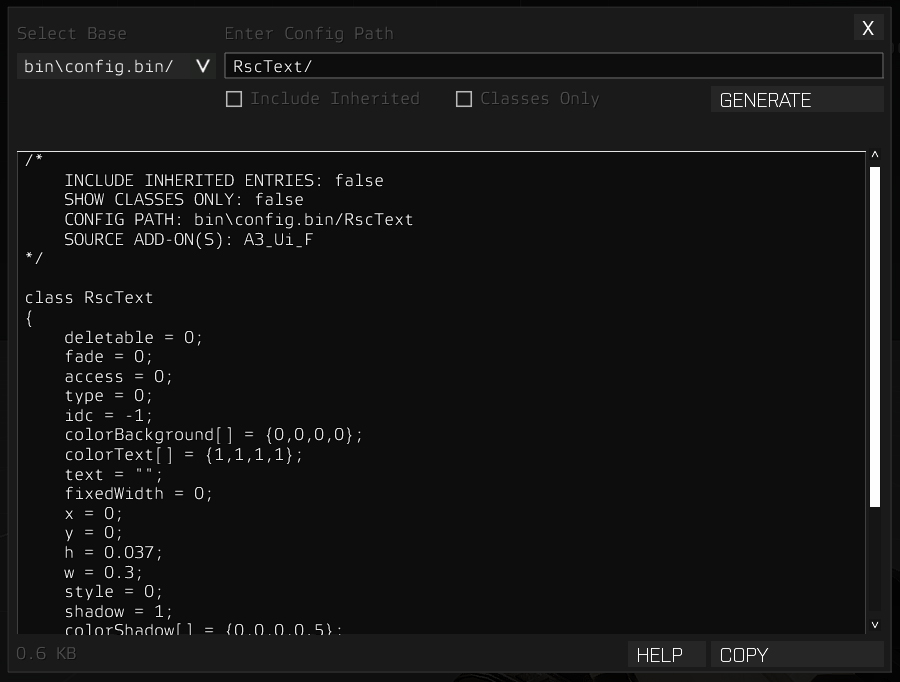
@tacit shard No worries. You can mount it from that directory, but you don't have to. I think mine is mounting from something like E:\ArmaWork
tacit shard
Ok thank you. I am going to have to reinstall ARMA 3 Tools first because the mount tool still doesnt work even of the new directory so will reinstall then mount of that directory.
bleak tangle
Tools reinstall shouldn't really be necessary, just verify the integrity of game cache. Then run Arma 3 Tools to accept the license and from within the options of Arma 3 Tools you can set which directory you will use for your P drive
zenith gazelle
@bleak tangle Thanks for the long messages and you trying to help Fammatt and me. Well I had now packed with pboprojecter from mikeo and I located it in the A3U - http://prntscr.com/eqdg6h
As you can see in the picture the sidewalk still getting tilted on the side like a tree.
As I said earlier, we both a new to this. So properly there is a code error. This is oure first out of 6 models. All of them is different sidewalks. We only have this problem now. They do not fall on the side if they get hit by a explosive or shots. Only when you drive over them or land on them with a heli
Do it need some mass too?
nvm that message he already had added that 😛
wraith tendon
no mass = You can walkt trough it
zenith gazelle
He just told me that too xD
wraith tendon
kk
zenith gazelle
But thanks anyway 😃
wraith tendon
yepyep
bleak tangle
How much mass did he add? And could you take a screenshot of the geometry LOD with the named properties showing in Object Builder (I'm not sure why you or him are using Oxygen 2)
zenith gazelle
Oxygen 2 just the defult program it get open with 😃 We both using object builder thought arma 3 tools
bleak tangle
The named property should be damage = no, not damage = 0
zenith gazelle
oh okay got told that earlier properly a mistake 😃 I will edit that and try again. Thanks
Still get damaged and rotate 90 degress
Do I need to pack a new terrain builder project if I edit a 3d object?
stuck oyster
have you repacked the terrain with the updated p3d?
zenith gazelle
nope that was what I asked if I need to do that 😄
bleak tangle
I don't think that's needed, but I'm nearly out of ideas so you might as well
zenith gazelle
Well if it help penny you can get the test product files and look. But I like to learn though process. But Im out of things too. Tried a lot and looking though a lot of other addons from arma 3 to learn how to write config files and look at 3d models
I will try the terrain thing
bleak tangle
My next suggestion is to delete everything in the geometry LOD, so it's just. Then add a RoadWay LOD
Here is an example of an A2 sidewalk https://drive.google.com/file/d/0BwA-UohiwA7CQk4zSUNWWnh3RDA/view?usp=sharing
Memory LOD shouldn't be an issue, and either should LandContact
 mental matrix
Anyone know if there's an actual suicide bomb vest around somewhere?
zenith gazelle
okay I will try that 😃
tacit shard
Is there a specific reason when Mikeros ARMA3P unpacks the game it puts everything in read only mode?
flat flare
@agile flint It would be in your physx file or if you see it in your general config then edit that one
fervent steppe
Hehe penny you beat me to it. I would inherit from class house. Not static
It's a wall right?
 stable dirge
@outer condor regarding Trixie. Assuming no one already answered. Yes. Sadly left for personal reasons. SJ
oblique vapor
Hey guys, I have been getting some reports that some flares on aggregated reflectors doesn't work anymore on 64bits versions
Like some guy have a vehicle, his flares work on 32bits but not in 64bits. Any clues about that ?
outer condor
@serjames#9030 thanks for the info!
desert sequoia
Guys, need an advise. one of your modellers has decided to build a small FOB in one model, instead of modelling every prop separately, what are the cons and pros for such approach? Thank you
desert sequoia
but if less?
quick terrace
should work...but then again it is always better to simply have the stuff done properly from the get go
even if he modeled everything together he can export it / split it in parts
tacit shard
Thanks @bleak tangle btw your solution worked, P drive mounts fine now
now just gotta figure out why its not able to load any of my textures
bleak tangle
You may need to put P:\ in for the "Path for textures" in the OB options
tacit shard
oh that might work, I had to remove it from the actual model because obviously mikeros doesnt let you pack with P: (which obviously is a good thing lol) but I didnt realise that was an option
will try that now thanks
that worked once again thank you so much for the help Pennyworth
bleak tangle
👍
tacit shard
sound0[] = {"\cgrr\rr_data\data\Metal_GarageDoor_01.wav",1,1,100}; does anyone know what these 3 values do on the end? (This is under DoorMovement in CfgAnimationSourceSounds) Couldnt see anything on the bis wiki but might be being blind
bleak tangle
Pretty sure it's volume, pitch, distance
// filename, volume, pitch, distance
sound[] = {"fx\wolf1.ogg", 1, 1, 100};
Yes. I don't know any distance in Arma that isn't meters
tacit shard
For some reason mine is in feet and miles and NM (whatever that is) and I cant change it back anywhere
so when I want to zero my scope 100m is like 328ft or something
formal vapor
What are the only name properties I should have for a uniform .p3d? My BDUs always lag more than the next uniform 😦
bleak tangle
It's unlikely that a named property would cause that. The biggest factors on FPS will probably be very complex shadow LOD > section count > vert count
formal vapor
The shadow LOD? My old nemesis returns....
bleak tangle
What kind of vert/count does your shadow LOD have?
formal vapor
The shadow LOD is 633 verts, 1246 tris
I actually have a bunch of random name properties that makes no sense. I'm gonna delete all of them except LODNoShadow = 1 and see if that helps
bleak tangle
Yeah that's a decent shadow LOD, lower than A3 units from what I can tell as well
formal vapor
It has to be the name properties. I'll test that
bleak tangle
Here are the named properties for all of the Apex characters and equipment https://pastebin.com/Mh2ud53t
 errant pumice
hey guys, need help
bleak tangle
Lod 14:    1.0
  lodnoshadow=1
how do I add a new door to an existing camo selection?
forgot to select one door to be the part of the hiddenselection
bleak tangle
Look for the number after :
formal vapor
ok yea I see
wraith tendon
@errant pumice Select NamedSelection -> Ctrl + Mouse to mark the new Points, you wanna add -> RightClick on the namedSelection -> "Redefine"
errant pumice
thanks!
formal vapor
I can not get my wound textures for my BDUs to work even if my life depended on it. If I had a beer bottle I'd throw it at my monitors 😩
class Wounds
{
tex[] = {};
mat[] =
{
"us_military_uniforms\textures\uniform_bdu.rvmat",
"us_military_uniforms\textures\uniform_bdu_w.rvmat",
"us_military_uniforms\textures\uniform_bdu_w.rvmat"
};
};
Is there anything I'm doing wrong? The game keeps saying it can't find the .rvmat but I've check for the 534th time to make sure all the paths are correct. Any ideas?
polar fiber
does the model.cfg have the wound sections defined?
echo rain
is one grid square in OB/O2 one meter?
quick terrace
y
formal vapor
@polar fiber Not entirely too sure what you mean. I can post a link to the model.cfg and config if you will be so helpful to glance over it
I do have the "injury_body", "injury_legs", and "injury_arms" in the model.cfg and model .p3d if that's what you mean
I meant "injury_hands"
polar fiber
Yeah, I meant those
rapid yacht
has anyone here ever made a wetsuit?
formal vapor
as far as I can tell they're set up right. When ever I shoot my character in game the rvmats of the sections I shoot, arms, legs and body, seem to disappear but the wound rvmat doesn't
quick terrace
post the model.cfg in a pastebin
 tight stream
Hey guys I need a little help, I think I have a problem with the model of a plane, when I start the engines it sits on his back and start jumping on the rear wheels. I have this problem only with the tanker version of this plane, the other two models are working good. Someone have any idea? here are 2 pics of the problem http://it.tinypic.com/m/juv86o/4 http://it.tinypic.com/m/juv86p/4
All of the 3 planes are using the same geometry LOD and the same base class in the config. In flight all works perfectly.
tacit shard
Does anyone know what the text singular is for in a config.cpp? I have seen people use it and set it the same as there displayName e.g
displayName = "name 01";
textSingular = "name 01";
polar fiber
Maybe how it shows up in AI target reports since there's textPlural too
tacit shard
ah that could be right
@tight stream make sure you have your land contact points placed correctly, and that the mass is evenly distributed across the plane
tight stream
@tacit shard the mass is correct I think, the geometry Lod is the same for all the 3 versions, but only this One have the problem, same for the contact points... However I will try to add some more mass in the front part
formal vapor
@quick terrace https://pastebin.com/gjZwgKYF
spiral void
can anyone tell me why this happens?
object is 2 sided in BD but not in OB or Maya (where it was created). Vertex normals also flips when moving the camera slightly.
http://imgur.com/a/SdbzZ
cinder pivot
@spiral void save beforehand here, what results does mirror x give you in 2d settings?
spiral void
@cinder pivot 2d settings?
ah transform2d?
that didn't work.. however, the problem only occurs in BD, not in game so I guess I can live with it 😃
cinder pivot
Would have been news to me that you could have double sideded faces in arma lol
spiral void
hehe
civic stratus
@anyone who uses Pbo Project, ever get stuck on "BIS Binarize..." stage when crunching?
halcyon wren
@TimB try a leading slash in the class wounds array. I remember that there was some funkyness here that it either MUST HAVE a leading slash, or MUST NOT HAVE a leading slash. Cant check my data here to confirm, tho...
civic stratus
could my binarize.exe be broken in some way? Or possibly a corrupt P:\bin ? Even addon buildier gets stuck on binarizing
white jay
i'd say more likely that the data you are trying to binarise is corrupt
quick terrace
^ + use pboproject will tell you what is corrupt, or at least if the config is buggered and at what specific line it halts
civic stratus
yep
white jay
all up to date?
civic stratus
just updated a few days ago
white jay
what are you trying to binarise?
civic stratus
yeah, latest version
white jay
models?
terrains?
animations?
civic stratus
models
a2 models
some tracks, some train cars and a locomotive
for the ATS project
its just models, textures, configs and a few model.cfgs
I believe I've fixed all the errors (because pbo project stopped reporting them), but i can't get it to complete the binarization stage (or to my knolwegde, start it at all)
looks like there's a new depbo update though
i doubt that'll fix it
quick terrace
did you clear your temp before the last attempt?
civic stratus
I've cleared the temp folder so many times by now I couldn't tell you how many times I've done it
civic stratus
I shall do it again
for science
yeah, I dunno. I'll prob just go to sleep and dream about it working
feel free to msg me with suggestions
o7
quick terrace
tbh i would check once if the builder actually works
as in try to build something you know it used to build correctly
stuck oyster
You could also try packing few assets separately if some work and others dont
could narrow it down
tacit shard
Just going back to what was said earlier, while ik you cant have double sided faces in most lods, I remember reading somewhere you can have double-sided faces in the shadow LOD? Is that right?
tacit shard
Is it just me or is the grid in 3dsMax really small?
polar fiber
well seeing as you can edit the grid size and units, I dare say it's just you
civic stratus
Well, it appears this is a config issue so I'll continue there
white jay
Hey everyone my terrain builder loads but I get these error messages are they of concern? http://puu.sh/v8LpY/4b7b681342.png and http://puu.sh/v8LrI/c52a026548.png

 stuck oyster
All error messages are of concern. You have not installed everything right if you get any.
stuck oyster
Hard to say. Have you followed any tutorials/guides to set up your tools?
 spark fable
hey guys quick question, im pretty new to arma modelling (not modelling in general) and im having an error when im trying to import some static building pieces, when i drag it out in the eden editor i get an error saying "no entry \config.bin/** ** **/damage.tex" i cannot find any reference on the net using google fu that points to any reference to damage.tex. is this a problem with my config file or the model so you think? im not looking for hand holding im just confused to shit to what is going wrong 😛
stuck oyster
How have you packed it as .pbo? Sounds like a config problem.
spark fable
using addon builder, my friend said i should use mikero's tools instead to pack pbo's, guess ill have another try at the config, do you know if the sample configs are up to date as ive been using those as templates?
stuck oyster
Sample configs should work yes and your friend is correct in using Mikeros tools. Addon builder does not stop packing broken configs where Mikeros PboProject stops and can usually point you to the error. Of course it cant fix everything but its much better than AB. Your error could relate to a damage texture entry that you have not set up correctly. Would start by checking what "damage" stuff you have in yours.
spark fable
hey man, thanks for the info about mikeros tools, i thought addon builder was a bit too easy, you know for a horrible goat youre pretty helpful, cheers dude!
stuck oyster
No problem.
civic stratus
is it normal for binarise to freeze when packing a pbo with binarised rvmats?
stuck oyster
Save it by another name. For some reason it cant access the file in question
Its either open in somewhere else or just stuck in memory.
Np. That happens from time to time
 coarse roost
hello all, pls help !!! Carrier Sao Paulo, in real time it is not possible to rotate. Can someone help me?http://prntscr.com/esd65o
stuck oyster
do you have the carrier object selected or the rifleman inside it?
what have you packed it with? probably bad pathing.
coarse roost
@stuck oyster yes
coarse roost
no
stuck oyster
is it your model or from some addon?
coarse roost
@stuck oyster Correction, I can move, and rotate but it is not possible to preview this action in the editor before the preview
stuck oyster
Save and load. If its made from pieces like the other aircraftcarriers that is how it works
coarse roost
@stuck oyster Brazilian Arme Forces http://steamcommunity.com/sharedfiles/filedetails/?id=504306716
stuck oyster
the pieces are glued together with attach to script I believe and that is how it behaves in Eden.
also #arma3_scenario is perhaps better channel to ask as you are just using an addon, not making one.
coarse roost
@stuck oyster I retired to fix 3d model
stuck oyster
Its not model problem.
thats just how its made
and how Eden works with attachTo scripts.
coarse roost
@stuck oyster Author of Nimitz provided permission to use scripts. I did test with nimitz I see that it is possible to rotate and move, but with São Paulo I do not even have a result
stuck oyster
@dark temple you most likely have errors in there as Addon Builder does not report much anything.
@coarse roost I would turn to the Nimitz author with this as he/they know how it is supposed to be done.
well as it says you dont have memorypoint for driver get in direction.
probably not but with AddonBuilder you wont catch the errors
PboProject is recommended tool
from Mikero
search the BIForums for his thread
coarse roost
@stuck oyster There is no lod of memori or proxy for driver in this model, just lod 1,000, geometry
stuck oyster
its the only tool that can help you catch errors
was talking to Thurston there
Your problem @coarse roost is very special case as aircraft carriers are more from the advanced end of assets to make so I really would recommend you talk to the Nimitz maker for help.
coarse roost
@stuck oyster Ok, thank
stuck oyster
you need to install all the Mikeros tools
well that would be the easiest solution
except of course the linux package
try running the updater
bleak tangle
So when you run pboProject it says it can't find DePBO64.dll?
stuck oyster
are you running it as administrator btw?
stuck oyster
dont run as administrator
 distant pier
Can you physically find the dll in your files?
Do you need a copy?
As soon as my gf gets done playing league I'll get it for ya.
stuck oyster
@distant pier youre running free tools right?
distant pier
Yes
distant pier
Were you running antivirus during install?
Idk, I've had mine for awhile.
If I'm not mistaken I had to download the dll separately.
Oh okay.
I think it was down for me too and I had to find someone else's personal archive.
I'm pretty sure it took a week of searching or so.
I'm pretty sure I do.
Does anyone have a ground vehicle they wouldn't mind letting me try to port to SA?
stuck oyster
also @sturdy parcel might want to know the DL link is down.
distant pier
@stuck oyster Know of anyone who has made a vehicle they wouldn't mind sharing?
stuck oyster
try the a3 sample one?
distant pier
I'm not sure if I can legally port BI Arma 3 content to SA.
I know.
Gf is still playing league.
I don't want to go off a "pretty sure" haha
distant pier
@dark temple make sure to right click and unblock
Mikero\DePboTools\bin
np
have fun
not a problem
bleak tangle
Are you sure you downloaded and installed everything? I literally went through this yesterday with his free tools and got no errors like this. Delete the C:\Program Files (x86)\Mikero\DePboTools\bin\DePbo64.dll he just gave you, and run DePbo.5.66.0.14.Installer.exe again. You should see DePbo64.dll appear in that folder again
 sturdy parcel
also @sturdy parcel might want to know the DL link is down.
works here.
bleak tangle
It would appear you hadn't run that installer then
sturdy parcel
my tools take no prisoners. they will not make a faulty pbo under any circumstances and expect errors to be fixed right then and there rather than the tedious process of load game, fail, load game fail,,,,,
nope. it's all in the documentation that accompany my tools
start programs->mikero->depboTools->extensive bedtime reading.
your first url only has advertising. no errors mentioned.
that
cinder pivot
Is your a3 tools installed as well as drive mounted
sturdy parcel
that's because you chose to igmore the warning message when you installed depbo.installer OR you are running as admin
running as admin is an accident waiting to happen, and my tools explicily refuse to work in that mode.
plus your p: drive for an admin is no the same as a mere mortal (generally)
well the error message says it all.
windows OS has a bug with their SetPath dos command . if it exceeds 1024 chars it will wipe out your environ string.
you have to set your PATH= for your environ. how to do that differs on each release of windoze. there are others here much better informed than i am, who can help you with this.
in win7 it's my computer->right click properties->advanced system settings->Environ Variables
PATH=
;add it to the pathS that are displayed;
bleak tangle
Click the start menu
Type Environment Variables.
Select Edit the system environment variables from the list.
In the window that pops up, click the Environment Variables button on the bottom right.
In the window that pops up, select Path from the list of System Variables at the bottom, then click Edit below that.
Click the New button, then enter the path to your Mikero\DePboTools\bin directory, which will be something like C:\Program Files (x86)\Mikero\DePboTools\bin.
Hit Ok to close each window.
new environs only become active on the next instance of a dos prompt.. you may have to restart pboProject
faling that. paste what you edited.
sturdy parcel
😎
cinder pivot
Thought pboproject did that
civic stratus
thanks pufu, you saved me a load of headache
civic stratus
model.cfg question, how do I set the init angle?
source: https://pastebin.com/raw/CJL330bB
I want the default position to be 0, not -15
civic stratus
not really what I was intending
civic stratus
sorry, i didn't mean "defaukt" in that way
wraith tendon
YOu want to keep that -15 -> +15 Angle, but the "start" should be at rad 0?
civic stratus
I'm not using proper terms
I'm imagining 0 as the middle angle
where -15 and +15 are the extremes
wraith tendon
So when you place the Model, it should be rad 0 ?
wraith tendon
class AnimationSources: Animationsources
{
class MyAnim { initPhase = 0.5; };
Like that? (config.cpp)
wraith tendon
Not sure if Bulldozer loads the config.cpp of a building, can't tell.
But ingame -> it starts at rad 0
until you animate it
wraith tendon
Invoice comes later this day.
quick terrace
😉
if i would have pushed an invoice each time i have helped someone since 2007 when i got into arma modding, now i wouldn't need to go to work 😉
wraith tendon
Yeah, we would be rich.
woeful viper
i should publish my findings in papers and charge for them, likey every other scientist...
quantum mechanics ... pfft childsplay. If you want to try something hard, try and find out how the damage and bullet simulation works in detail
there are no nobel prize winners in arma-sciences yet, quite disrespectful of the world
 rough idol
Added: A new diag_resetshapes script command is now available in the Diagnostics Exe
wraith tendon
Whats does it do? (Yeah, i read the name^^)
rough idol
you need though to rest mission or create new vehicle to see change
wraith tendon
Still better than restarting the game.
rough idol
yup
I'm using variant of that script to quickly test stuff
ctrl+1 & you have restarted object 😉
 somber nimbus
Is there a mod/modder who has or can make an actual juggernaut suit with armor cuz I can't find any
stuck oyster
whats a juggernaut suit?
woeful viper
there is barely any scifi / fantasy / non-21st century stuff for arma. Juggernaut suit (whatever that is) sounds like it falls under that category, so no, doesnt exist.
stuck oyster
^^
polar fiber
Bomb disposal suit I assume. There's one in Specter's mod
stuck oyster
oooh yeah that
somber nimbus
sorry
that's what i mean
just I need an EOD suit that has good armor value for a juggernaut loadout for my unit
woeful viper
with machegun and rocketlauncher and the largest backpack there exists?
stuck oyster
@somber nimbus Dont think there is one though. Excpet that one da12thMonkey suggested.
somber nimbus
pretty much @woeful viper
 reef flint
Hey, if I would want to get into model making for arma 3, make like a p3d. How would I go about doing that?
Any quick start tips?
polar fiber
Choose your software 3D Studio Max, Maya, Blender, Modo etc. and follow tutorials - there are many. Making a .p3d is the least of your concerns if you're new to modelling
bleak tangle
On dev branch with arma3diag https://community.bistudio.com/wiki/diag_resetShapes
oblique vapor
😍
reef flint
i've done some 3d modeling before
right now im interested in how to do a p3d
ive been using sketchup, maya and blender
oblique vapor
Did you check for any tutorial on youtube ? Even ArmA 2's are still relevant
reef flint
No I did not, but I will do it now! @oblique vapor
zenith crescent
Any tricks for changing a p3d's texture / material directories easily?
Found a little rename tool in OB, but it's still kinda painful
Looks like OB used to have a script "AutoRepath"
guess it's gone
bleak tangle
Some of Mikeros tools can do that as well, but it's probably only in the subscriber version
ebon abyss
for years moveobject was The tool for that, unfortunately its now only in the pay tools. if you have the latest non-pay moveobject, it still works fine.
zenith crescent
free version still hosted anywhere?
ebon abyss
I haven't searched, so dunno.
zenith crescent
Found another way
luckily the references to texture and material paths are stored in plain text inside of the p3d file. A simple find/replace using this tool http://gnuwin32.sourceforge.net/packages/gsar.htm did the trick
ebon abyss
hex edit replace?
ebon abyss
dunno what that gsar does but what I understand simple hex edit doesnt work as the texture paths+filenames arent always the same length. but maybe I'm wrong.
polar fiber
Think he's doing it on a MLOD model since he mentioned looking at the Mas Texture and Materials Renaming
I think the path length only matters on ODOL
quick terrace
yes ^
zenith crescent
yeah mlods
well, about to try the models it out in game - we'll see how successful this was 😃
stuck oyster
unbinarized .pd3s can be opened up with notepad++ and the replace tool can be used to rename paths. even on multiple files in folder(s)
wraith tendon
grepWin also. Changed ~2-300 Files in one run (as long as you disabled UTF-8 treating)
zenith crescent
I created a little cmd line script if anyone wants it that works with the gsar tool. Essentially does a find/replace recursively through all folders in a directory.
then you can just execute: updatePaths.cmd oldpath/ a/new/path/
to do the find/replace
wraith tendon
Why not post it in the Forums? Some might need it.
tacit shard
https://gyazo.com/0d4fdf6a24e04e21fa21bb458339323b Hey so im looking into making roads and have been looking at some road p3ds, does anyone know what these memory points mean?