#arma3_model
1 messages · Page 83 of 1
 wraith tendon
getText(configFile >> path >> bla.paa) <- ?
 white relic
anyone know how to scale checker map in 3ds >?? as all i seee is that https://cdn.discordapp.com/attachments/264753400170807317/272574620467462144/Untitled.jpg
white relic
question is how to make it better ? because uvs are taking whole area if its about uv size
wraith tendon
Why not reduce the whole model?
I mean, you have to resize it (when importing to O2) anyway oO
white relic
@wraith tendon i cant resize it as its made to scale and it will be made from 3 separate parts
 foggy finch
oh you mean on the objects
wraith tendon
meh
foggy finch
you need to uvmap your object to fit the uv coordinates you want it to use, you will probably have to scale/resize them.
white relic
yeah just one thing if i scale uv polygons then checker map gets bigger :/
 cinder pivot
@wraith tendon I still dont get what you mean, I would simply hide something via animation if I was wanting to remove it
wraith tendon
InventoryItem
 tacit shard
Hey, I had a question about the ViewGeometry LOD
I think I remember being told thatr ViewGeometry was what 'blocks' the AI's vision so basically I would use it to tell them what they can and cant see through in my mesh, however I also believe I remember reading that ViewGeometry is what tells the engine not to render buildings through it, so if I was inside a building that has view geoemtry properly configured it wouldnt be rendering stuff that you cannot see
So my question is what actually does it do?
 quick terrace
view geometry only affects what parts the AI can see
it has nothing to do with occlusion culling
tacit shard
ok thanks
 fervent steppe
Hey @quick terrace . Did it used to prior to the release of the geometry occlusion...I vaguely remember testing it were I made a solid "block" over a doorway and when you would walk in and turn around everything in the landscape would disappear
quick terrace
hm, does it work the same way now with geo occluders?
fervent steppe
Honestly i haven't experimented with them yet as I haven't really been around the last few months. I'm started to get back into it 😃
 woeful viper
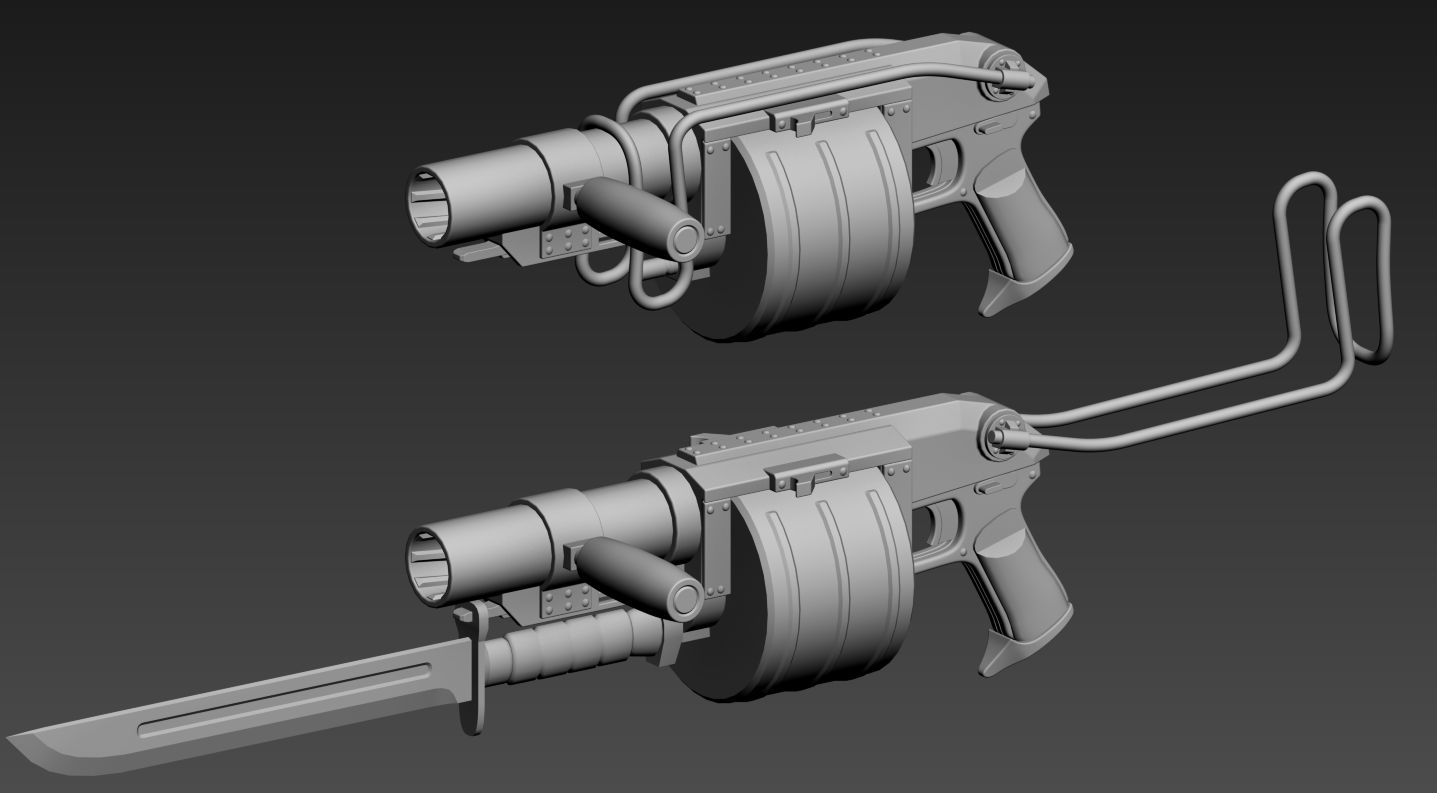
dakka http://abload.de/img/bowipa6j33.png wip
 halcyon wren
Im curious: are there official canon resources as to how a Bolter is suppposed to look, or are you just going by approximation from a minifigure?
 cursive sleet
Nice work @quick terrace is that HP?
woeful viper
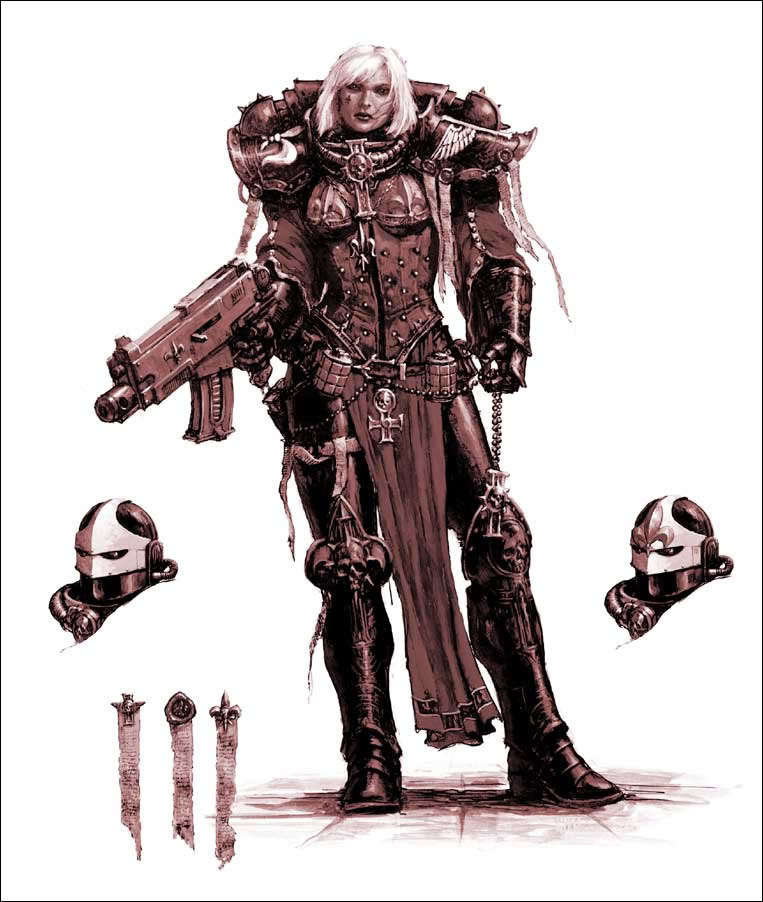
@Mondkalb#6985 there is artwork and there are the miniatures. And since the 2D artists usually just eyeball it, all look slightly different. They only have the chunky proportions and the short muzzle in common. In lore there are multiple "patterns" (designs) and you can make up your own as well.
i modelled it after this https://abload.de/img/sisterjij5p.jpg, and adjusted proportions to fit the ammo and fit into human hands
quick terrace
@cursive sleet no thats lp baked
tacit shard
@quick terrace what program are these screenshots from?
woeful viper
also wip http://abload.de/img/glwipcrkfe.png
foggy finch
delicious AK's are delicious +1 @quick terrace
@woeful viper those look awesome too,. I remember all those figurines from when I was a teenager 👍
woeful viper
if you still have them, they are worth even more now 😄
foggy finch
I'd have to check in my parents attic,. probably have some stuff there
woeful viper
@tacit shard 3DO (model viewer for DDO / NDO)
which is basically a customized/ lightweight version of marmoset toolbag (or at least was... maybe they have their own now)
quick terrace
@tacit shard marmoset
woeful viper
is the latest 3DO still based on toolbag, or is that rewritten now?
quick terrace
i think it is still based on marmo
woeful viper
does DDO feature procedural texture creation by now (like legacy dDo?) ...
so far im still using legacy dDo
quick terrace
define procedural tex creation
 short wraith
is it possible to change the path for maybe 80 textures to another path, without chaning every texture path seperatly?
 bleak tangle
Where are the texture paths set? One of mikero's tools has the ability to do that, but depending on the file type you could do it with OB, or a text editing program
short wraith
there set inside of the model (p3d), set to a downloader folder... don't want to change all of them by hand again...
cinder pivot
OB, Tools> mass texture and material rename
short wraith
80 textures... I need a big beer... oh wait, my fridge is emty.... nooo so many texture paths... 😩 😓
white relic
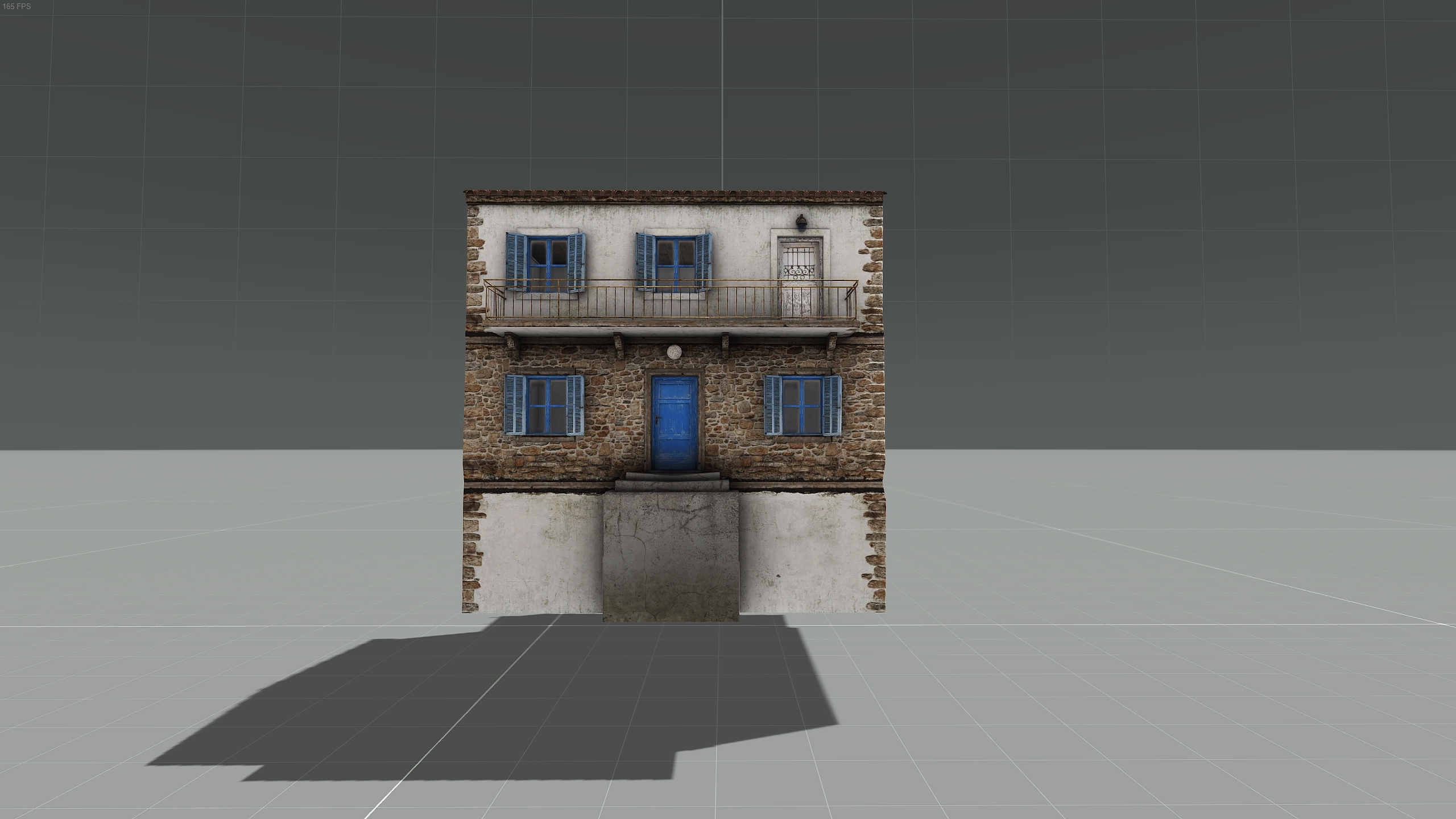
here is my WIP (1.5 milion polys reduced to 24k, but will it be good for arma ?? )https://cdn.discordapp.com/attachments/256937236661010432/272508469486026753/HP18.jpg
wraith tendon
Right House - Bottom - Looks/Feels like the foundation is missing
short wraith
@white relic 24 k will be work fine, my ship has around 200k-300k
bleak tangle
I was confused by your usage of the word fundament, so I googled it, TIL it's another word for foundation and something else
fun·da·ment
ˈfəndəmənt/Submit
noun
    1. the foundation or basis of something.
    2. humorous
        a person's buttocks.
24k is more than fine, just keep the section count low
white relic
i assume it wont be an issue especially i need to make those 3 parts separate i guess just not sure how 😄
wraith tendon
@bleak tangle Yeah, i edited it to Foundation. German: Fundament = Foundation
white relic
@wraith tendon it was rendered a bit above ground level as well fundation has been increased
 lavish mountain
Soo Dscha we are neigbours...
white relic
in polish fundament means fundament 😄 so i understood 😄
wraith tendon
😄
lavish mountain
Dutch aswell
wraith tendon
wait a moment
@white relic Could you do me a favor and just pull the bottom of the right house about 1m downwards?
white relic
its already done 😃 i have shitty render from 3ds max if you want 😄
lavish mountain
I think all the houses are floating
wraith tendon
Sure, lemme see it
white relic
wraith tendon
Yeah, better
lavish mountain
Hmm, this one has no rooftiles, those generated or modeled diferently?
white relic
@lavish mountain roof tiles were kept for high poly only for arma i will sort them out using normal map
bleak tangle
You could still give it a little bigger of a foundation. Here is an example https://i.gyazo.com/7c16fee48b3aa6643143c8e178977747.jpg but a majority of the A3 buildings will have large foundations as well.
wraith tendon
For placing that stuff on a slope
white relic
luckily i dont have lot of slopes on my map 😄
lavish mountain
I added fundament to my english vocabulary now... Cant wait to tell my boss he can kiss my fundament
white relic
hahahah
woeful viper
@quick terrace boils down to creating masks based on algorithms rather than using existing maps, basically.
which is what dDo did/does
 tacit karma
@woeful viper @quick terrace afair, it is based on unity.
woeful viper
huh?
tacit karma
3Do
woeful viper
ah ok. i was at procedural texturing in my mind ^^
tacit karma
🤦
bleak tangle
@quick terrace @fervent steppe There is a small amount of occlusion even if the object doesn't have use geometric occluders, but I think you only see it from thick pieces of view geometry.
Without occluder: http://i.imgur.com/1hl2L42.jpg It occludes one large distant building and some trees from the hill on the left
With occluder: http://i.imgur.com/Qi02mdW.jpg Occludes so many things
woeful viper
well without occluder it would likely depend on the geoLOD settings (canocclude canbeoccluded) in the individual models
bleak tangle
That is probably a factor, but I'm about 90% about the view geometry can still occlude things without using geometric occluders. Both only seem to apply to objects placed in the WRP, so it's quite hard to notice. I'm packing a building now to test it, but I remember there being a building on Altis (pre-geometric occluders) that had some of its glass in the view geometry, and you could see it occluding distant objects
fervent steppe
Yea. That makes sense.
bleak tangle
AI also wouldn't be able to see through it. I sadly can't replicate it now with thick windows though for some reason though
 polar fiber
Made an ARDEC flash-hider to refresh my memory of modelling proboolean workflow before I attempt to do other shit http://i.imgur.com/oRdXKG7.png
polar fiber
Would be a 3 if I used SP2 instead of Quixel?
quick terrace
maybe
cannot guarantee it
and if i knew you used quixel, it would have been lower, but now it is too late
polar fiber
I know. It was unprofessional of me
quick terrace
😃 i shouldn't have expected da12thmonkey and professional in the same sentence to begin with
so it is all good 😛
fervent steppe
It's all twisted
And does it have a bullet button? Cause that's what makes it fire with a 30 round clip
quick terrace
oi, no trolling monkey please !
fervent steppe
😂
woeful viper
pufu is just jealous
quick terrace
indeed he is !
one cannot troll wip stuff without ahowing wip stuff
so @fervent steppe you're excused
fervent steppe
Apparently the internal mechanisms of a rifle mean nothing 😂
It's all about dat button
quick terrace
yeah i can assure you that moneky being in rhs and all
surely thought about the button
we aiming for authenticity and all that
fervent steppe
😂
quick terrace
he simply made a mistake of not showing it in that picture of his
so your excused once again please
woeful viper
what about the depressed trigger though?
your ak look like they had happy triggers...
quick terrace
ak is a funny gun yes
woeful viper
jeez... looks like another wave of the typical kind of "RP/Life" guys spilled over into the BIF modding section... more people to add to the ignore list -.-
cinder pivot
is there a way to view length ingame in OB?
like for the 50meter limit, is there an easy-ish way to tell something?
fervent steppe
You could come back to skype kj...we don't have that problem there 😂
 median bough
he said the "S"-Word 😄
fervent steppe
Lol
 pseudo elbow
I was wondering if there is an easy way to move entire model and lods to adjust where model's origin is?
halcyon wren
O2 Script.
pseudo elbow
Thanks, I'll look into it
polar fiber
Not easier to just activate pin at grid origin (Shift+C) and then open the transformations window (the ones that look like little yellow squares) with "centre to pin" and "apply to all LODs" checked?
tacit karma
Even old assets get a revamp https://abload.de/img/screenshot060snu4t.png https://abload.de/img/screenshot061wvuiw.png
 stuck oyster
👌
wraith tendon
MM1?
 smoky nimbus
Are smoke grenades from vehicle smokelaunchers shot from a memory point or just generally the center of a vehicle?
woeful viper
no they are scripted (you can define angle and amount, and are distributed equally)
not sure if you can change that, but i wouldnt think so - likely hardcoded
i've seen custom smoke launchers though (TPz Fuchs for A2 had pretty impressive custom smoke system)
smoky nimbus
Hmm, I have the config entries in place but after I deleted some memory points (and maybe some selections) the launchers seemed to stop working.
Or it actually could have been something I deleted in the model.cfg
I don't quite remember.
woeful viper
rpt messages?
smoky nimbus
Smart lad! Lets have a looksie.
woeful viper
no not smart, just experienced 😄
smoky nimbus
Doesn't seem to say anything unfortunately.
Did find some other stuff to fix though so that's nice.
 inner lark
Hey guys, I seem to be having an issue with getting my wheels to spin when driving, its weird they work when im using simulation "car" but when I use "carx" they dont spin. Everything else works i.e steering wheel and the direction of the wheels. Im using all the stuff from the samples, anyone got any ideas what might be causing this?
 umbral plume
@inner lark so enabling physx is doing something, does your car at least move with carx?
umbral plume
First I should ask if you are packing with pboproject. If not you should definitely set it up and figure out how to use it as it will generally find you common errors.
Other than that I would just say to double check your physx lod and model.cfg for your wheels and their axis
If you need more useful tips I would post your config and model.cfg in pastebin and link it here. As well ask a picture to your memory points.
 mighty bane
😂
white relic
hello all just sharing facebook page for all arma modders feel free to join https://www.facebook.com/Arma-modders-203415156796860/?view_public_for=203415156796860
quick terrace
- that is a dead link
- that is the reason for such a page?
fervent steppe
To get your ip and passcode....duh 😂
lavish mountain
And name and jobs
Girlfriends, sisters,
nah... I like hiding behind my little nickname
wraith tendon
Some ppl still use Facebook? 😄
umbral plume
some people still use myspace 🤢
wraith tendon
Nah rly, i meant for serious stuff oO
fervent steppe
Facebook is nothing but advertisements now. And for some reason they keep showing me male enhancement adds. Damn you zuckerberg!!!!! 😢
 white jay
is milk not enough enhancement for you? 😄
wraith tendon
Dunno^^ Deleted my Account about 4-5 Years ago, too much bullshit from ppl with an IQ of a stone (sry stones)
fervent steppe
Hahahhaha. That is very true
wraith tendon
Hey, when you end up deleting "friends" you know for some years, because you cannot see/read/listen to there bullshit anymore -> No need for Fagbook anymore 😄
lavish mountain
I use FB for reunion purposes, but tbh I am fed up with people beeing very bussy showing others how good their life is which is actualy horrible as their only purpose is to make pictures to prove they have a good life
I mean you get them on vacation all the time the only FFin thing they are doing is making selfies and pictures to show others how great their vacation is
They dont enjoy any of it
Sorry </ragemode>
wraith tendon
Or they just wanna show, how much fun they have? And in reality: They have fun?
anyway, #offtopic_arma
white relic
Agree too much drama out there, page was removed and instead of it closed group was created. Luke you said guys not everyone use facebook but not all of us use discord either so i think its a good alternative.
bleak tangle
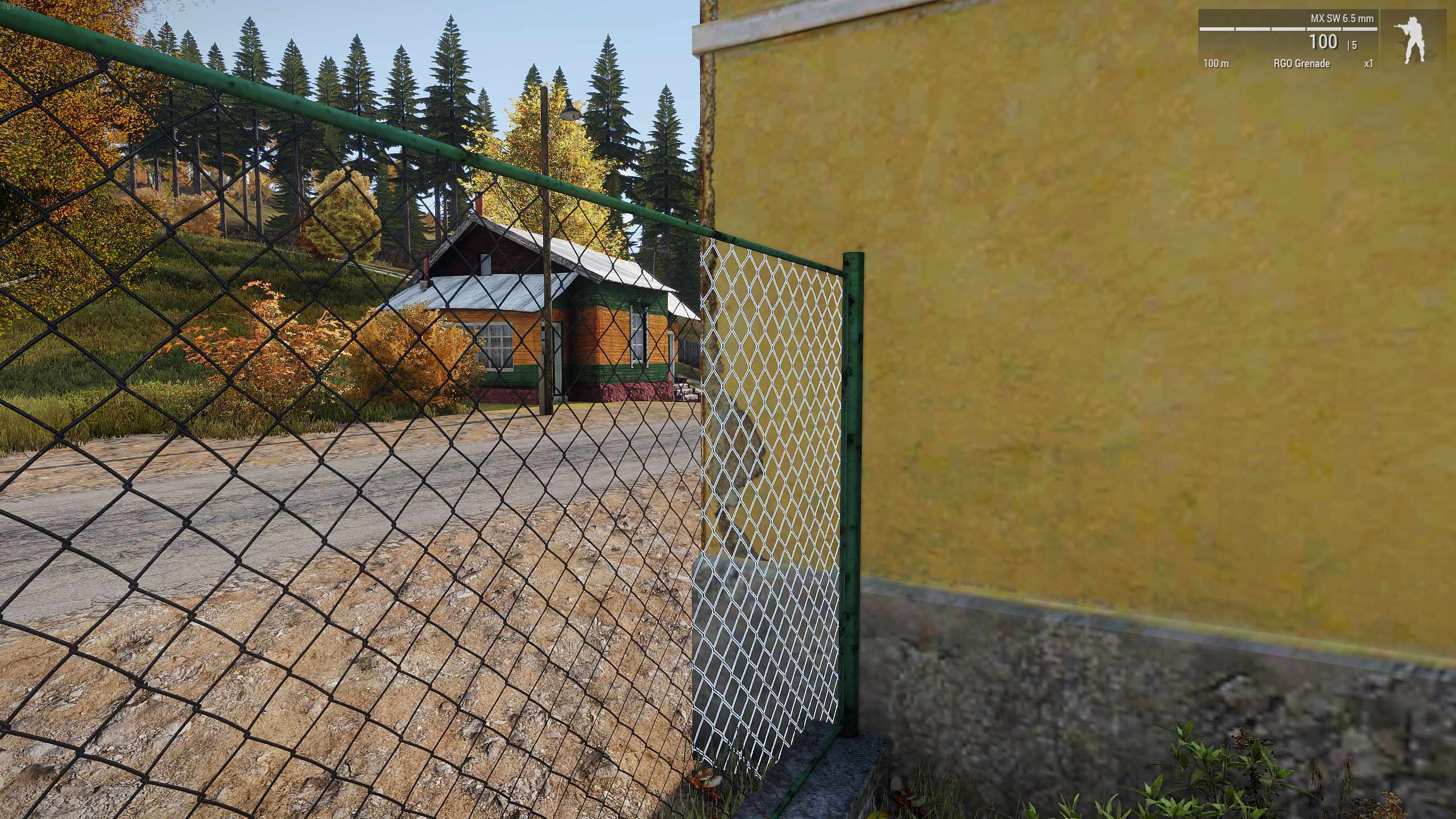
Anyone know what causes this? https://i.gyazo.com/aa8e39907bdedc6826a4081e25a814e9.jpg
I added forceNotAlpha = 1 to the fence, but for some reason this building didn't like that. I've looked in other places on the map, and from what I can tell, this is the only place it's happening. So my assumption is that it's something wrong with the building, rather than the fence. The RVMAT being used at the corner of the house is a pretty plain multimat
polar fiber
the faces with the fence links have been "move top"-ed?
is an alpha sorting issue by the looks
pseudo elbow
How model center is defined in O2?
The center what would be modelToWorld [0,0,0] in the game
@polar fiber I followed your advice and it moved the whole thing properly just like I need it, but [0,0,0] is still not where I expect it in the game
polar fiber
centre can depend on whether you have autocenter 0 or 1 in named properties. Vehicles shouldn't have autocenter 0 though
pseudo elbow
This is what I have in oxygen:
http://i.imgur.com/VgJI03g.png

I assume [0,0,0] should be in vision station
while in game its here:
http://images.akamai.steamusercontent.com/ugc/100604131783069482/FB0CC2512A933AD7A7BC0EB93B9DD61C5B8B2607/
 polar fiber
centre is the middle of the bounding box usually
why do you want it on the eo turret though?
pseudo elbow
OA has engine limitation with planes always beaming laser target from [0,0,0]
And I'm trying to fix MQ9 reaper by having entire model start from where laser should be fired from
polar fiber
oh, I was thinking it was for A3 or something, but turrets on planes aren't very well supported in A2 so I suppose I see what you mean
pseudo elbow
Yeah planes are hardcoded to always fire laser target from [0,0,0] instead of weapon center, like helicopters in OA do
Moving [0,0,0] to supposed laser start point will be the only way to fix this
polar fiber
you might have to increase the bounding box size by putting some memory point way out front then
wraith tendon
☝ correcto mundo
pseudo elbow
interestingly my manipulations with moving all LODs did change center position a little

This is where center was in original model, bit lower than what I got
wraith tendon
The Center of the model is the where the Grids cross (x,y,z) in O2
pseudo elbow
Well I thought that too and moved model so grid would start from vision station in front of the plane
wraith tendon
There should be an option to move the whole model around (in each LOD)
wraith tendon
Can you show me a pic of O2?
thx 😄
Ha 😄
Let me guess: AutoCenter <- ?
in erm.. i think GeoLod
or memory
pseudo elbow
should I look for it in model.cfg?
wraith tendon
In the model
pseudo elbow
I'm absolute zero with modelling in Arma to guess
pseudo elbow
Yes
wraith tendon
wait, lemma start my tools (i hope they still work)
Ctrl + 1
Press it a few times and check, if a Window pops up/vanishes
Inside that (prolly in Geo or Memory Lod) there is an should be an entry named "Autocenter"
pseudo elbow
Nope, only "lodNoShadow" in some
pseudo elbow
From sample models
wraith tendon
Name?
pseudo elbow
did text seach in .p3d itself, no matches for "center"
name of the model?
MQ9PredatorB.p3d
wraith tendon
mom
pseudo elbow
Also
autocenter is CfgVehicles config entry
and it is set to 1 for reaper
should I try setting it to 0?

Result of your model
Trying setting autocenter to 0
wraith tendon
In CfgVehicles? I am pretty sure, its inside the model. Strange
Proxy model must have geometry property autocenter = 0 otherwise 0.0.0 axis of the inserted model will not be correct.```
https://community.bistudio.com/wiki/Oxygen_2_-_ManualProgress!
wraith tendon
=}
 wraith tendon
Inside the Config? I am confused
pseudo elbow
Yes, CfgVehicles

Laser now almost works like it should
just need to fine-tune the offset
and fix sights station
wraith tendon
erm, try flying first
Oh yeah, there is also "autocenter" in CfgVehicles oO Why inside the model AND config?
https://community.bistudio.com/wiki/CfgVehicles_Config_Reference#autocenter
pseudo elbow
I guess it might be easier to just increase bounding box then
pseudo elbow
No I didn't do anything, only this shift to make grid start from vision station and that's it
wraith tendon
hm, strange.
pseudo elbow
 wraith tendon
New Drone. Now with detachable Rotor.
(Yeah, BoundingBox might be the better solution 😄 )
pseudo elbow
It goes into second stage, shoots off the rotor and becomes solid-propellant rocket
wraith tendon
Kinda like a V2 then?
pseudo elbow
apparently autocenter can be in model too
I wonder if it overrides cfgvehicles settings
wraith tendon
imho, it should do it.
pseudo elbow
where should I add it though?
wraith tendon
GeoLod
Ctrl + 1 -->> in that window -> RightClick -> New -> Top: autocenter bottom: 1
pseudo elbow
Geometry?
wraith tendon
Yep
pseudo elbow
nope, nothing changed 😦
wraith tendon
hm
pseudo elbow
autocenter is still 1 in the CfgVehicles
wraith tendon
So in the model and in Vehicles its 1? And if you change it inside the cfg to 0?
pseudo elbow
0 in model and 0 in config?
Probably will end up being the same as before
I assume 0 is default for model
wraith tendon
nah, 1 in model, 0 in config
wraith tendon
😄
pseudo elbow
Yeah it went fubar again

differently though, last time turret was not offset this much
wraith tendon
and if you switch it?
that... erm.. looks interesting 😄
+What about the wheels?
They are on top instead of...
Oh, they are animated, right?
Or were the static? (haven't looked at the cfg)
pseudo elbow
Yes, animated
wraith tendon
Okay, explains alot

 wraith tendon
And you got your center. Does it fly as before?
pseudo elbow
It flies at it should now, all proxies and rotating parts are normal
wraith tendon
guuud
pseudo elbow
Gonna do all the tests to make sure nothing else broke but I am so relieved to finally have it fixed, thanks a lot for guiding me
wraith tendon
np, yw
pseudo elbow
Having a problem with clan sign always showing default BI squad texture, I guess something is missing in model.cfg's sections?
Can I just add "clan" and "clan_sign" into sections, does order matter?
wraith tendon
<-- can't remember anymore, too long ago what needed to be done for the clan signs.
But logical wise, it should.
pseudo elbow
Added it into end of sections[] list and it worked fine






 wraith tendon
8 years, thats a new record
No wait, item-removal from Vehicles would be the highest Record!1oneeleven
btw. is the Kamaz still odd in A2? Can't remember (iirc the had a tendency to lean to the erm... i think right, when you stand behind it)
pseudo elbow
Can't recall this problem about it
wraith tendon
Or was it A3? hm
pseudo elbow
I wonder if its possible to fix terrible handling of Quads in OA
wraith tendon
Ah! When i ported the Kamaz from A2 to A3, it was leaning to the right in A3.
pseudo elbow
So they would stop jumping around on ground and flying into the air on bridges
wraith tendon
Don't think so, the distance betweens the wheels is too narrow
pseudo elbow
Is there a way to manually input point position?
Move is relative, can I set absolute position in O2?
pseudo elbow
I mean manually input coordinates
 ebon abyss
@halcyon wren have you released MBG Buildings two and three for arma3 as I cant find anything with google?
halcyon wren
No. Its just working through cup magic. I only ever released the african buildings for A3 during its alpha.
wraith tendon
@pseudo elbow Select a point and press Ctrl (or Shift) + E
cinder pivot
what was the property to base shadows off of visual LODs?
 echo rain
hey guys. be so kind take a look that thread to see if you can help. i don't think he is on either skype or discord. but he's been really helpful to the community with insight and actual resources to work with. thx!
wraith tendon
Counterpart to HeadlessClient?
smoky nimbus
This guy right here.
wraith tendon
just out of curiousity: Why A2?
smoky nimbus
Groan.
echo rain
oh dude. i think he even still does stuff for ofp. just help if you can. he made that awesome blender rig everyone is using.
smoky nimbus
Isn't that Alwarren?
fervent steppe
@cinder pivot for what type of model?
quick terrace
@cinder pivot sbsource=visual
note that sbsource triggers shadow buffer not stencil shadow
fervent steppe
Check this out. It has detailed information about the lods. I looked it over. Everything should be fine in arma even tho it is technically for vbs
fervent steppe
Damn that's a nice one. I haven't seen that part of the document. Cool
I wonder what the difference is in using the new occluders vs the old way via the view geo lod
As in effectiveness
foggy finch
pennyworth has been experimenting with them
I also prefer vbs docs, usually only hit the biki/forums when I need to find something vague
fervent steppe
Also I thought I saw someone in here saying they use forcenotalpha but that appears to be obsolete and is now handled by the rvmats
fervent steppe
Ah.
I tried to add the lod that clips the ground geometry out of the way for underground stuff but unfortunately that didn't make it into a3 😂
foggy finch
yeah
I did manage to get the player body under the terrain surface
the player camera seems to be hard coded into not breaching the terrain surface, for obvious non-glitchyness

hehe
thats -5m under terrain surface
fervent steppe
Lol. When did you do that 😂
foggy finch
ehm like a week ago maybe, I was re-running through old test models
 foggy finch
yeah, I have some neat ideas for it,. but there would be no sure-fire way to implement them under a terrain and get the alignment right
since object snapping is x/y and not x/y/z
fervent steppe
Yea true. But I'm sure if they added it people would still take advantage of it and make some cool stuff
foggy finch
oh definately
fervent steppe
@echo rain I'm gonna try rigging up this forklift I have with the crane script and see how it works 😂
Which btw. I got the thing working again lol
foggy finch
anyways they have much more important stuff to fix before they go adding more vbs tech,. like the pond shaders everlong fight with fog
fervent steppe
I just need to figure out the best what to get a ladder to work with the model since the model is classed as a tank
@foggy finch shakes fist at pond objects
they work great other then the fog...have you seen my YouTube videos lol
foggy finch
hehe I think we've both wasted enough time trying to fix em model/texture side by now
fervent steppe
Subs work in them lol
foggy finch
yeah
I made some awesome looking clear-water ponds till you caught the suns reflection in them, just didnt look right having this huge bright yellow orb reflecting on water through fog
fervent steppe
Yea it doesn't look right using the regular water shader
foggy finch
I even tried dayz ponds pre & post enfusion, same issue within arma
bleak tangle
Geometric occluders are extremely effective, but I can't prove proxy occluders work
cinder pivot
@M1lkm8n#8907 @quick terrace thanks for the links and info, its for a building
It wont be as clean or nice as regular shadows im guessing but I dont want to rebuild it for shadows because of open faces
fervent steppe
@bleak tangle yes but how much more so then the old way of doing it...because technicaly the old way the whole view geolod acted as a occluder if im not mistaken
bleak tangle
For a building I think sbsource=visualex would be better
cinder pivot
Ill give it a shot
Iirc reading its a bit off and fuzzy? But better then no shadows or broken ones
bleak tangle
Where did you see that? I haven't heard of anyone playing with it other than me, but I'd love to see what other's thoughts are
fervent steppe
for a building i would say to use the shadowvolume lod and make one
cinder pivot
Ill try and let you know my findings either way
cinder pivot
The visual LOD my teammate split the interior off from the exterior to make it so that we could use multimasks
So its basically half and half empty faces
bleak tangle
I noticed some shadow LOD issues with a few buildings on Takistan, so I thought I'd experiment with it.
If you hover over the image it shows the image using visualex http://screenshotcomparison.com/comparison/194845/picture:0
One issue it does introduce though is the shadow "banding" https://i.gyazo.com/241ea023801998c84221b3bbd9287301.jpg
In case that screen shot comparison site is being weird here are the images in one album http://imgur.com/a/4vw1X
I was curious how much BIS used it with Apex content, so I used dep3d to dump all of the name properties, and then searched for visualex and this was the result:
a3\props_f_exp (50 hits)
a3\rocks_f_exp (33 hits)
a3\structures_f_exp (426 hits)
a3\vegetation_f_exp (12 hits)
a3\weapons_f_exp (3 hits)
The 3 "hits" in weapons_f_exp are apparently for ERCO, but that's it
cinder pivot
So I suppose I could try a merge near
That might have been it or older
Idr but ill see what happens when I test it later tonight or tomorrow
fervent steppe
wish they would documnet what it actually does
bleak tangle
Yeah not a word about what it does or how to use it. The best part is they talked about something like this in a sitrep over a year ago, but never gave any followup
https://dev.arma3.com/post/sitrep-00138
Our programmers have decided to make the lives of content creators easier, mainly for those creating new models. They will be able to use a technology that generates shadows of objects on-the-fly based on the shape of a resolution LOD.
oh so i wonder if you use that named property and you no longer have to create a shadowlod..because it creates one via the res lod?
lol would be nice to get some confirmation tho LOL
bleak tangle
It's weird, the Apex content is inconsistent when it is used. Like sometimes they'll have preferShadowVolume=0 and sbsource=visualex, and sometimes they'll still have shadow LODs in the model
fervent steppe
lol
eh lets use some ofp stuff here and some a3 stuff here
its a free for all lol
bleak tangle
Maybe they could be poked for more information about it. I don't understand why they'd dangle it in front of our face and then never mention it again
Here is the named properties and list of LODs for the directories I mentioned http://pastebin.com/xCDZ13Rs
I didn't filter out models without visualex though so the list is very long
fervent steppe
lol someone just posted in the model forum about aquiring fake passports hahahah
they are a team of professionals lol
bleak tangle
Slum_01_F.p3d
    Lod 6:    1e+013 Geometry
        prefershadowvolume=0
        sbsource=visualex
    Lod 7:    10010.0 ShadowVolume 10
    Lod 8:    10000.0 ShadowVolume 0

Shed_06_ruins_F.p3d //no shadow LODs
Lod 3:    1e+013 Geometry
    prefershadowvolume=0
    sbsource=visualex
¯_(ツ)_/¯
fervent steppe
weird
bleak tangle
They also don't all have prefershadowvolume, and you'd expect them to if that property actually did something here
fervent steppe
yea lol
bleak tangle
Oh and about occluders...
I took some images comparing before and after occluders on Chernarus. Running the debugging tool I'm using definitely hurts FPS a little, but it's still easy to compare before and after the geometric occluders
http://imgur.com/a/hkD0S
fervent steppe
oh yea i saw those! nice!
bleak tangle
It's tough to say how tangible the difference will be for gameplay, as in these situations I chose to look at a wall directly where I knew occluders would be
fervent steppe
hmm
 bright kraken
thought I'd share a quick few renders of my latest model 😃 https://imgur.com/a/WcNfD
and this quick screenshot of it in game (scope is a maxi-kite as opposed to the TA648, as thats not in game... Yet) https://cdn.pbrd.co/images/qtkV1FUZf.png

open to criticism if anybody has any 😃
lavish mountain
Chrome does not have enough resources to display this page, (Kidding aside, looks good)
wraith tendon
i added some options 😄
bleak tangle
It's very pretty
 fluid ocean
@bright kraken It looks good. But, I'm biased and I think that there are already too many M-4's ¯_(ツ)_/¯
bright kraken
Good job it's not an M4 then 😉
fervent steppe
ar-15
cinder pivot
@bleak tangle so you put the sbsource in geometry LOD? Or visual
bleak tangle
Geometry
cinder pivot
Buying arma documentation pls
Should I then leave shadowlod blank or not have one at all? I guess I can try both..
bleak tangle
Yeah I think anything would work. One day I'll test that and if preferShadowVolume does anything when using sbsource=visualex
cinder pivot
Sounds good
bright kraken
Yeah it is 😃 thanks!
pseudo elbow
I have
                minValue="-rad 10";
                maxValue="rad 130";
                angle0="0";
                angle1="rad 130";
values in CfgModels / Animations for my turret, how to I calculate minElev and maxElev for CfgVehicles turret config?
halcyon wren
Keep your model cfg at full DOF for each
then just limit it in config
                maxValue = "rad +360";

                angle0 = "rad -360";
angle1 = "rad +360";```maxElev = 65;
initElev = 0;
minTurn = -132;
maxTurn = 132;
initTurn = 0;```Aha, got it, thanks
I have my "pilotview" memory point under the vehicle yet in game camera is inside the vehicle, what could be wrong here? I have no unit animation proxies anywhere
I've got same values as in @halcyon wren example and my elevation controls are inverted, but turning are fine
I guess I can just invert maingun angle0 and angle1 values but I'd like to know why it happens
I'm also looking into MQ9 Reaper setup and its pretty much the same yet all controls are fine
 terse elm
@rain karma what mod is it for? my milsim are desperate for someone to make one haha
smoky nimbus
@terse elm Fairly sure 3cb has one.
halcyon wren
I guess I can just invert maingun angle0 and angle1 values but I'd like to know why it happens
If you are using axis memory points, the order of vertices defines the rotation
CCW or CW depending
pseudo elbow
I do, how do I make sure I've got the right order? Select one point, then next one?
halcyon wren
Just select both and rotate by 180
For buildings this can be used to make the model.cfg better. just have one door rotation defined with 0 -> 120° (or whatever you pick)
and then just adjust the axis memory points to be upside down if the opening direction needs to be flipped
pseudo elbow
Thanks! It helped
I expected axis to be just a center between selection points and rotation direction defined purely in config
halcyon wren
if you use rotationX, rotationY and rotationZ instead of rotation, then the axis is fixed to this, and only the origin needs to be specified.
pseudo elbow
center and well... axis
halcyon wren
The origin is afaik always selection center/mean
quick terrace
it's based on vertex order - irc first added vert is center, the next is axis
halcyon wren
(if no origin is defined)
polar fiber
If the axis isn't a simple X/Y/Z-aligned axis you can also flip an axis by selecting points and scaling -1,-1,-1. Or selecting both points, opening the vertex properties (Shift+E), choose the vertex with the lower index number (first value on the left in the table), Press the "Create Selection" button to isolate that vertex and then cut and paste it back in to the model so that it now has a higher vertex index number than the other vert in the axis pair
pseudo elbow
I rotated them 180 by Y and it all works great now
pseudo elbow
Does sections order matters? I added "clan" and "clan_sign" into sections, clan selection disappeared and doesn't work when you're in vehicle while clan_sign did not. Just added these two into reaper's sections worked and both worked fine
bright kraken
@terse elm @smoky nimbus yes, we (3CB) do currently have an L129A1 in our weapons back, this one will replace that at some point in the future, probably not in the next hotfix, but sometime after that 😃
smoky nimbus
@bright kraken That's pretty amazing. Did you guys by any chance have a LAW 80 on the planning too? :p
bright kraken
its not something that's on the cards at the moment as far as I'm aware, can always be looked at/added to the backlog if we deem it something that's worthwhile.
smoky nimbus
It would fit the 1990s esque smocks that you guys brought out a while ago.
I don't mean to impose anything though :p
bright kraken
its cool haha, I'll add it to the list of things to be discussed 😃
 cinder pivot
All caps because its a big rocket launcher
terse elm
No it's all caps because MATADOR is an acronym
polar fiber
ASM
bright kraken
Very nice!
tacit shard
Does anyone know if im correct in this:
With the way proxies work If I am proxying an object in that has say 4 resolution lods and the model that proxies it has say 7 then If I was to place the proxy in res 1-4 but after 5 it doesnt proxy, would the object dissaper completely (This is what I want to happen as its furniture for a building that after a certain range will become irrelivant
stuck oyster
If theres no proxy in the last Lods they shouldnt load. So yes Id assume you are thinking it right.
woeful viper
what i've seen so far is that proxies switch res LOD independantly of visual LOD (based on their size mostly). Which is usefull (e.g. detailed Commander MG on tank can be reduced far earlier than tank itself). But if a res LOD has no proxy in it, it will not display the proxy at all.
cinder pivot
In practice the only interior I keep on building objects is the first LODs
Then no more proxies/interior objects unless they can be seen from farther
Not sure how useful that is but thats how I go at it
stuck oyster
👍 Seems like a good practice @cinder pivot
tacit shard
thanks for the info guys!
pseudo elbow
I have
memoryPointDriverOptics = "pilotview";
in vehicle console with pilotview memory point properly setup in the model yet driver's camera is always in [0,0,0] of the vehicle. What could be wrong?
stuck oyster
do you mean the first person view or the opticsview?
pseudo elbow
hm, good question, I indeed have driverForceOptics set to 1
I guess camera should be in memoryPointDriverOptics all the time then?
driverOpticsModel is set to ""
does it mean that since there is no optics it shows supposed first person view?
stuck oyster
no opticsmodel is just the overlay it slaps on the view
or wait
did it have to have empty optics model to work
worth to try I.
pseudo elbow
Checking other vehicles, optics model is set to "" as well
I also noticed that for a moment when you get into vehicle you see camera in correct position
Then it switches into [0,0,0]
stuck oyster
is there a driver/pilot proxy in there?
pseudo elbow
No
stuck oyster
that might also be a cause
pseudo elbow
Well its UAV, it should have no driver proxy
stuck oyster
it might be a engine requirement
otherwise it places the driver point of view in 0,0,0 I think
I think its the firegeo lod where it needs one at least
even a UAV has a pilot
its just not your regular unit
pseudo elbow
How can I have driver proxy without actually showing anything?
stuck oyster
in the firegeo lod
and also at least the default arma UAV operator character is invisible
wraith tendon
Wasn't there an LOD with ViewPilot (or ViewCargo if pilot not given)
pseudo elbow
Still can't figure it out
Checked Reaper model, it doesn't use pilotview memory point for driver too
original Pchela UAV model had pilot proxy but it ended up with you seeing yourself sitting in the air
wraith tendon
- Does the "driverview" point exist (in Memory iirc)?
2.a Try to add another Point and name him "TestPoint" pls
2.b modifiy the config tomemoryPointDriverOptics = "TestPoint";
pseudo elbow
pilotview exists in memory lod, and confirms with selectionPosition tests, memoryPointDriverOptics set to "pilotview"
Tried another memory point, same result
I guess I'll have to add pilot proxy, but can I hide it so you couldn't see yourself?
pseudo elbow
Well, I'm still stuck, I either have:
- Camera at [0,0,0] if there is no crew proxy for driver
- Camera at eyes of driver crew proxy
in all cases memoryPointDriverOptics is ignored
pseudo elbow
Maybe there is driver proxy that hides unit body? Or config value to hide it?
pseudo elbow
Had some progress, you must have driverOpticsModel defined to valid model otherwise you never can get into optics and memoryPointDriverOptics and driverForceOptics are simply ignored
stuck oyster
@pseudo elbow is your UAV for A3? all sides have invisible UAV_Driver/gunner unit that is palced in the vehicle and operates it
Also dont place proxies in view lods
just in the firegeometry lod
wraith tendon
A2
+Why no Proxys in View LOD? oO Makes no sense. If you are in the Cargo with somebody, you need to see him, or do i forgot something there?
stuck oyster
Oh A2.. Riight. Id guess there might not be a default UAV driver in there. But yeah I no proxies in viewlods since it is UAV (Unmanned...) so that whatever character is put in to run it does not show.
Or am I missing something obvious? 😮
stuck oyster
For some reason I've been under the impression that its the firegeometry where the proxy is necessary. 😄 Could be wrong though.
wraith tendon
It is also necessary! Otherwise you couldn't hit the "Cargo"
But i believe it has nothing to do with the CamLocation
wraith tendon
I am pretty sure, the answer is: Banana.
Nah, i guess there is something i forgot and miss all the time 😄
cinder pivot
RoadWay lod is planes only correct?
white jay
can also be closed geometry
cinder pivot
@bleak tangle using sbsource = visualx http://i.imgur.com/iW2QHw1.jpg

seems to be working well 😄 thanks
bleak tangle
Nice. It definitely seems to be useful. My only issue with it is the "banding", and I just don't know if there is any additional performance cost
halcyon wren
If it casts from the resolution lod, then a performance hit is very likely.
cinder pivot
im not seeing any banding yet
quick terrace
no2 performance hit after section count is the shadow lod
svlod should be, in general under 3000 verts
so +1 on @halcyon wren
cinder pivot
well I will only be having 1 or 2 of these on map so I'm not too worried about big hits
but I'll keep it on notice
quick terrace
i am not talking about yourself here, i am giving free tips
what ones does with it doesn't really interests me anymore
😉
cinder pivot
😛 well thanks for the help either way
when did you notice banding on your tests?
was the sun at a certain point like right above?
quick terrace
you talking to me?
cinder pivot
yea
quick terrace
from my own experience with a proper SVLod you don't have that issue
and the basic 3 lods i always do is res lod 0, geo and svlod
i don't even open buldozer till then
bleak tangle
I would think visualex is better then visual
quick terrace
most likely yes
cinder pivot
thats what I am working with
quick terrace
as far as i know, visualex was meant to be a svlod replacement of sorts
as in, why the fuck does one needs a separate shadowlod for shadows
which is fair
cinder pivot
lol
quick terrace
the underbelly difference between the 2 eludes me in any case
cinder pivot
well thanks to you three for input and help as well 😃
back to Object builder dungeon
 bleak tangle
Precisely
fervent steppe
I stole that from lappi 😂
bleak tangle
Who stole it from me 😛
fervent steppe
Bahahahhahah
bleak tangle
And I'm not sure who I stole it from
fervent steppe
Is that a racing sim?
woeful viper
wait, didnt BI release a dev log how they implemented shadow stuff from res LOD which does not cost as much performance as shadow LOD even, but is less precise (more blurry?) Or am i mixing things up?
fervent steppe
You mean the the latest and greatest are ripped into arma without permission
bleak tangle
https://dev.arma3.com/post/sitrep-00138
Our programmers have decided to make the lives of content creators easier, mainly for those creating new models. They will be able to use a technology that generates shadows of objects on-the-fly based on the shape of a resolution LOD.
I haven't seen anything about it other than this
fervent steppe
Ok so take buildings and place 30 down with the visualex vs 30 of the same with just the regular shadow lod?
And see if there is a difference in performance
bleak tangle
I guess
fervent steppe
I don't know how else to test is
quick terrace
@bleak tangle yeah that ended up...like nope
fervent steppe
Lol
quick terrace
@fervent steppe get some milk in the mix while you're at it
but yes +1
do ze test
bleak tangle
I can't decide if they forgot about it, or if there is another reason behind why it hasn't been mentioned since. You'd think they'd go to extra lengths to promote something that "makes the lives of content creators easier"
fervent steppe
That's what you'd think 😂
But I think they like watching us suffer 👹
Theyre masochists
bleak tangle
This was in a sitrep 5 weeks later and might be what @woeful viper was referring to
One change in 1.56 is to disable stencil shadows in the Video Options, and to replace the lowest quality setting with lower quality shadow buffer shadows. Programming Lead Ondřej Martinák shines a light on this tweak: "Stencil shadows are still present in the game for certain objects (characters and vehicles). The reason is that they look better in some circumstances such as first-person view. We have removed the option to force stencil shadows for all objects as it didn't help performance nor quality (which it did in the past). This removal also allows us to automatically generate shadow LODs (using shadow maps) for objects. This lets us speed up building art production, and might help community terrain creators in a similar way."
did that happen so far?
doubt it
and fuck if the shadowlod is the time consumer thing, let's be honest about it
woeful viper
indeed, thats what i remembered
 azure talon
alright
woeful viper
its like always with these new technologies... if you dont write it down immediately in biki or somewhere safe it's gone and forgotten
i resorted to preemptively update biki when it wasnt even in stable yet ^^
especially the little things
like "abs" for simple equations for example...
bleak tangle
I just have trouble wrapping my head around some of these things. Sometimes BI does a great job of documenting things. Other times we only learn of new things because of people breaking the EULA to get information
woeful viper
`do you have an example?
bleak tangle
Of what part of my statement?
woeful viper
the new feature that needs eula breaking for info?
bleak tangle
visualex
woeful viper
visualex, like, visual experimental?
bleak tangle
Someone else might have known about it, but I hadn't heard of it till I went looking through Apex content
quick terrace
yeah i guess that is what it stands for
woeful viper
because then it doesnt surprise me that they dont tell anyone
bleak tangle
So experimental that they included it on 500+ Apex models?
quick terrace
i sort of recently (last year) actually got what RVMAT actually stands for, i always assumed it was RV engine MATerial
woeful viper
ok, didnt know that
quick terrace
it isn't
woeful viper
(i meant the 500+ apex models)
quick terrace
it stands for RV Material & ATtributes
azure talon
Can you transalte in German ?
woeful viper
im sure germans can
quick terrace
let me put it this way: if you'd see the internal bi docs, you wouldn't be surprise stuff doesn't get moved over to public biki
bleak tangle
I'm sure T_D and ianbanks also have contributed a lot of information from "EULA breaking activities"
woeful viper
documentation (especially if its "just" for third parties) requires high discipline
"yeah i add it later" ... but then you always have stuff to do... and then you forget about it
quick terrace
yeah well, i have an active biki account, i think i have used it twice since 2007
so i know how that goes
woeful viper
see?
quick terrace
and once it was simply a mistake i corrected rather than write up a complete page by myself
haven't tried recently to search using biki engine, but i can only assume is just as bad as it used to, in the meantime i use google for that
woeful viper
yeah true that... then again, wikipedia itself will resort to google searching in future and bin their own search functionality from what ive heard
azure talon
Guys just a kick one, why are u so active on this chat ?
woeful viper
haha ok...
my money is on that the wiki search hasnt changed since 6 years either xD
azure talon
@quick terrace i beg your pardon ?
quick terrace
@azure talon you're pardoned
azure talon
@quick terrace should i be mercyful ?
bleak tangle
I don't think I've ever used the wikis search option, always filtering it with google
quick terrace
@azure talon oh lord please be
woeful viper
why are u so active on this chat
because we felt unobserved. Not anymore, as you have likely noticed...
halcyon wren
.rvmat - I wish the extension was correctly named .headache
Is there actually any other engine out there using the "specular map diffuse inverse" approach?
quick terrace
+1 please BI, stop thinking like engineers in this case, get some tech artists in, and figure out a way to make shaders work intuitively and across the board
@halcyon wren - not sure what you mean by diffuse inverse
ahh cock SMDI?
quick terrace
ahhh, not that i know of
the weirdest engine about these sort was/is cryengine if i am not mistaken
woeful viper
its all good, we have reyhard and kllrt now as tech artists^^
they will fix it 😛
<<no pressure
halcyon wren
Throw human suffering at the problem until solved? 😄
 dense steeple
Is it possible to set a texture for an item model? (Might not make sense, give me a sec) ```SQF
class BH_Radio: Radio
{
displayName = "Radio";
count = 1;
class ItemInfo
{
allowedSlots[] = {701,801,901};
mass = 5;
scope = 0;
type = 620;
uniformModel = "\A3\Weapons_F\Items\Toolkit";
};
model = "\BH_Items\Models\Radio\Radio_1.p3d";
picture = "\BH_Items\Data\BH_Radio.paa";
descriptionShort = "Radio";
};
@woeful viper all kidding asside, they might (at least reyhard has a high chance to get some done), but surely not under the hood
i am pushing for that mag proxy for instance
@dense steeple only if you set hiddenSelections
in modelcfg
woeful viper
rhs infiltrated the HQ, ready to strike
woeful viper
*again
quick terrace
that ^
dense steeple
K, thanks for the help, I only do vehicles and other than that stick to scripting and terrain creation, I'm not the best with assets. 😛
wraith tendon
Since A2? Soo... why A3 not better yet? 😄
halcyon wren
Hah. Just be glad Futura never happened. 😄
wraith tendon
Oh my
quick terrace
@wraith tendon - i said BI not Arma....
wraith tendon
Thats sad
woeful viper
"not best with assetts" "only do vehicles" ... hm hm look look what we have here.
wraith tendon
A life'r 😄
woeful viper
already blocked from previous suspicious activity as well...
bleak tangle
I think fixing that kind of stuff is beyond their job description
woeful viper
yeah maybe, but in smaller companies you do stuff according to your abilities often, not (just) necessarily what the paper says
wraith tendon
Most likely would endup with a complete rewrite
quick terrace
well, here's hoping for PBR in enfussion
wraith tendon
hmm, i can't imagine having pbr in Arma ayntime
woeful viper
they would have to rework all textures and materials... not going to happen
even with lightupdate they struggle, due to inconsistencies between individual assetts
halcyon wren
Thats what they should do, yes.
wraith tendon
Yerp, that also
halcyon wren
But ever wondered what these weirdo scripts in texview were used for?
Black magic scripts to generate smdi and whatnot.
It was to .rvmatify all the OFP assets for OFP:Elite
quick terrace
ahh yeah
halcyon wren
Drag -> Drop -> What could go wrong
woeful viper
that explains a lot
woeful viper
especially if you create it by filtering and inverting and whatnot the diffuse...
quick terrace
the o2 scripts on the other hand are pretty handy
some are actually really usefull for cleanups
halcyon wren
o2script for life!
wraith tendon
masochist
halcyon wren
Im still super sad that V3 script was removed from V4 (now Terrainbuilder)
woeful viper
never used o2script - any example use cases?
halcyon wren
mass file rename
wraith tendon
wut?
halcyon wren
But essentially it does everything O2 does
wraith tendon
Even Path?
wraith tendon
Okay, i always did that with notepadd ++ 😄
or grepWin (when there was more then 2 files)
halcyon wren
"Oh no! We need to move all the gunner, driver, commander and crew proxies to the crew anim's pelvis bone position. And then move all crew anims back by this offset"
Basically my sanity depended on o2 script being up to the task.
wraith tendon
hmmmmm
halcyon wren
All this just so effin dogs could get into cars and not clip that horribly through the roof. Poor rex still has his ears outside in some cars. 😄
woeful viper
lol... i would have been like "fuck that dog..."
wraith tendon
I don't like where this convo is moving to
halcyon wren
But yeh, try O2Script. its a godsend. Syntax is basically sqs/sqf
wraith tendon
iirc it was sqs based (same as TB)
halcyon wren
It feels like an in-between thing. sqs syntax, but sqf functions.
wraith tendon
oh god, its inbred
woeful viper
good to know that there is an option when i discover that my custom namingschemes have failed me and i need to go back to cursed czenglish
wraith tendon
Thx to Arma, i am constantly confused if its called "Damage" or "Dammage"
halcyon wren
Speaking of unconfirmed file extension meanings.
My money is on:
.sqs = sequence script
.sqf = sequence functions
but I'm also kinda for "script queued statements/functions"
wraith tendon
StatusQuoFunction?
quick terrace
@woeful viper http://www.urbandictionary.com/define.php?term=Czechlish
Urban Dictionary
- A hilarious dialect of English spoken principally by native Czech speakers. It differs from standard English by the omission of mandatory articl...
halcyon wren
In the end its problably half czech half slovak, like all of Arma1's art assets 😄
@woeful viper .bio2s can also handle mass selection renaming, (proxy repathing), etc
quick terrace
with some exceptions (muzzles and whatever else) most do run in english these days
woeful viper
but memorypoints and stuff not
halcyon wren
a great checkall.bio2s should be even with the tools and its a good tool to just see what your asset misses in o2 (extra UV sets, nonsense selection names, excessive section count)
quick terrace
some do, some don't
halcyon wren
I was under the impression that hardcoded selection names were gone with A3. Now you can config everything as needed.
quick terrace
@halcyon wren is there a place that develops on .bio2s?
woeful viper
it propably took me 10h to find what was causing me so much grief with my vehicles aiming improperly and having shit at wrong places....
memoryPointAim = "zamerny"; <- that little cunt
quick terrace
still some stuff is, like ejection ports and some other stuff
wraith tendon
@halcyon wren Some stuff should stay as it is. Don't make it harder for some scripter 😛
woeful viper
@halcyon wren yes for the most part. But you have to be extremely thourough (dissecting all base classes and chaning it) and i would not be susprised if there was still some forgotten hard coded functionality that still relies on fixed names...
@wraith tendon if you script stuff via such predetermined names you are not better than BIS (actually worse, because they changed it now) 😛
woeful viper
i revoke your right to complain about BIS practices 😄
wraith tendon
Force me!
^^
But what i meant was: Naming parts the same, in every model (e.g. door_01 instead of door_front etc)
woeful viper
door_01 is very non-descriptive though. But yes, good naming schemes help, even for animations and config...
halcyon wren
is there a place that develops on .bio2s?
What do you mean?
quick terrace
as in more info about what i can do with it
bleak tangle
Mikero claimed that T_D understand its better than BIS
halcyon wren
Ooofff... its really a niche thing. Generally put: it is 1:1 O2, but without GUI
The comref should be in the tools installation. Browsing that alone will give you an idea about what it can do.
bleak tangle
There is a command reference and some example scripts in Arma 3 Tools\ObjectBuilder\O2Scripts
quick terrace
so in theory the commands are actually o2 commands
except unlike max/maya i don't have a sniffer
halcyon wren
Yes. Its a lot of O2 specific commans.
quick terrace
ahh shit, forgot about the comref
halcyon wren
/Steam/steamapps/common/Arma%203%20Tools/ObjectBuilder/O2Scripts/ComRef/comref.html
quick terrace
yeah yeah, i have use and actually edited some of these script for my own liking @bleak tangle
yeah yeah i remember it was a comref
nevermind nevermind
like for instance UV removal (that get copy pasted from one p3d to another like cancer)
halcyon wren
Yes. O2script would be the way to automate it.
You can just do it as drag-drop .bat
so its useful to integrate into automation pipeline
quick terrace
yeah, i started using these 3 months ago, created my own .bat to run multiple cleanups
we still need to figure out a way to get it into our server batch process some way
halcyon wren
p:\tools\oxygen\O2Script.exe P:\some\path\script.bio2s %1
The parameters can be accessed in o2script.
_this or this, not sure which one right now 😄
pseudo elbow
I have old A2 model and recompiled one from Sample Models, there should be transparent glass on laser marker station but on my model it appears as 100% black texture. Both models use identical paths to textures and materials, something must be wrong with the model, can somebody hint me?

http://i.imgur.com/bSuryQH.jpg
Face properties in O2


Interestingly it appears properly when viewed in Buldozer:
http://i.imgur.com/yYd1RCF.jpg


Would could be wrong?
pseudo elbow
Tried inverting faces, sorting, different settings in face properties, debinarizing old A2 model to see what's there (seem to be identical to what I have), no result, still 100% black texture 🙄 🔫
white relic
hmm i think little bit overdosed polygons 😄 https://cdn.discordapp.com/attachments/204150378307125249/274853769160687616/scout6.jpg
 pseudo elbow
Can I ask noob question? Say I have model.cfg for my model, with
    class Plane;
    class Pchela1T: Plane
    {
        isDiscrete=0;
        skeletonInherit="Plane";
in it. Question is: Where do I get this base Plane class? BinPBO seem to throw errors if I just reference it, I guess I supposed to have all these base classes like Plane defined somewhere?
halcyon wren
Thats a great question actually. It's different from config files.
model.cfg is like config space, but local to your project folder (which is normally P:\ and specified in binarize/binmake/cfgconvert)
the model.cfg can be anywhere in the folder structure, and if it is higher up, it is ready to be referenced
so for example for my characters I have
P:\myProject\model.cfg
This contains the OFP2Man skeleton and cfgModels definition for characters
then in P:\myProject\some\folder\path\characters\model.cfg I just do this:
{
class myProject_characterbase;
class myProject_myDude1 : myProject_characterbase {};
class myProject_myVest1 : myProject_characterbase {};```
Same for vehicles and anything really that needs model.cfg files. wispy orchid
@pseudo elbow on the black texture issue, is the glass maybe part of a selection that is defined as hiddenselection in config.cpp and overwritten there?
on the model.cfg, I have no idea where to get the Plane model and skeleton config from. Maybe use the a2 sample model.cfg and extract it from there? I only transplanted 'Rotation' yet, that worked fine
pseudo elbow
@halcyon wren Where can I extract these base model.cfg's from?
@wispy orchid setObjectTexture [0, ""] leaves out glass part
halcyon wren
The APL released A2 sources should contain all you'd need.
pseudo elbow
Where transparency is usually defined? Material? Texture? Some model settings?
wispy orchid
what's the name of the texture? _ca is transparent, _co hopefully not
halcyon wren
If the model face was binarized with a 1bit alpha texture, it will always only do 1bit alpha.
1bit alpha = _co
8bit alpha = _ca
wispy orchid
for the inverse situation for removing transparency from a vehicle camo, I had some success with changing face order (move to top) on the model. Not sure if that may help here or not
pseudo elbow
ca\air2\pchela1t\data\pchela1t_alpha_ca.paa
halcyon wren
The face order is an issue, too. The alpha bug very much still exists. Always adjust your alpha surfaces to the top in inverse order that they are seen.
the .rvmat can help here too with forcing specific draw passes (7 in total exist, iirc) But draw passes and all that are very seldom an issue with vehicles.
pseudo elbow
I tried setting procedural half-transparent texture and faces now appear transparent in game
What I wonder is why old A2 model uses exactly the same texture and appears transparent in game, my changed model also appears properly transparent in buldozer, yet black in game
halcyon wren
check the .rpt for missing files. could be the .paa or .rvmat are missing
pseudo elbow
Nope, no errors
So for BinPBO to see all inheriting model.cfg's I can pretty much just copy entire APL into root of P drive?
So instead of using that 50% transparent texture I just used procedural one
Is this a good practice to use procedural textures on models?
Finally works now:
http://images.akamai.steamusercontent.com/ugc/92723206593238503/22CD8660DF47571BD9533E05FEF19400AF877DEA/

Used #(argb,8,8,3)color(0,0,0,0.5)
 zenith crescent
Any recommendations for finding the coordinates (model coordinates) at a specific point on a vanilla object? I know how to find them in-game. Any tools outside of the game that can help?
bleak tangle
Could you give an example of what kind of memory point you're looking for? You'd have to run every model through this manually, but it should show the placement correctly https://forums.bistudio.com/topic/192472-beta-odol-web-converter-debinarize-p3ds-for-educational-purposes/
zenith crescent
Not looking for an existing memory point position - looking to find a position so I can use it in a script
For instance, would like to find the exact positions of the ends of the train tracks
been using the lineIntersectsSurface function in-game to find the model positions I want, but it's kind of tedious.
bleak tangle
Oh sorry, I misunderstood. Is this for Tanoa train tracks? If so, that seems like the best way. You might be able to use them bounding box edge for some, but that's probably too inconsistent to use universally
zenith crescent
ok thanks! yeah - for this addon I'm working on: https://forums.bistudio.com/topic/201762-tanoa-trains/
 timber cobalt
Hi guys.
What am I missing when my proxy pilot isn't showing?
All I see is an empty seat. This is the proxy I try to use(have tried several).
proxy:a3\data_f\proxies\pilot_heli_attack_01\pilot
bleak tangle
It isn't showing up in buldozer or in game?
timber cobalt
ingame
timber cobalt
found it. Got help from HorribleGoat 😁
cinder pivot
why do house objects need a physX lod?
im looking at BI samples and the physx is more complex then the geometry, I thought it was supposed to be the other way around
bleak tangle
I personally don't think they need a PhysX LOD, but I'd be interested to hear other's opinions. PhysX collisions are supposed to be more "realistic", but are computationally more expensive, so I'm not sure what benefit there is for having it on static objects like buildings. I think it makes sense on objects vehicles might drive into (signs, vegetation, etc)
halcyon wren
The point of the PX lod is to have it as an exceptionally simple geo lod used explicitly for physics simulation.
Characters are not physX, so collisions between Units and Buildings uses the GEO lod. Vehicle <-> Vehicle collisons will use PX lod if available, otherwise fall back onto Geo lod
PX lods in buildings is indeed strange, but it may be purely so that Vehicles <-> building collisions are fine. however I doubt that PX <-> nonPX objects can interact using the nonPX's PX lod. However, it could be possible. 😄
lavish mountain
Just out of curiocity, are the helicopter and airplane physics done by Physx?
bleak tangle
BIS is inconsistent with how often they use PhysX LODs on buildings
halcyon wren
Not necessarily unintended.
If PX and Geo lod would be 1:1, no need to duplicate the geo lod into PX lod
foggy finch
iirc structures need px lod, else stuff like nades will go through
bleak tangle
Those collide with normal geometry
halcyon wren
It should do that. The special geo lods all fall back onto GEO lod if they dont exist. I.e if you have no view geo lod, then regular geo lod is used for the purpose of view geo simulation.
bleak tangle
I believe it's that grenades are PhysX objects, so they can collide with both
foggy finch
could be something like that, been a while since i went into the guts of it
I just generally give my stuff full sets of lods
bleak tangle
No Apex vegetation has a PhysX LOD, and 168/907 structures have a PhysX LOD
cinder pivot
I just tested with no PhysX LOD and grenades work fine
also crashing into it works fine
odd
bleak tangle
Yeah that's expected
foggy finch
since physx calculations are more computationally expensive, it makes sense to have a physx lod. a much more simple version of the geometry lod, else the engine will fall back to the geometry lod, which is more complex if the px lod is not present
cinder pivot
yea but I am looking at the samples for houses and its the opposite, the physX lod is more detailed
foggy finch
no idea, I was generalising ^^ 😃
cinder pivot
yea I know, but its just BI being BI or im not really sure
foggy finch
or those samples need updated
halcyon wren
Perhaps the samples are really just working bases to learn from, and not a demo of best practises.
umbral plume
yeah I still can't figure out how to get my car to react to water without floating.....
looked at the sample as best I could
cinder pivot
gah now I can't get that fire inside building muffle
bleak tangle
Probably not using the correct texture on the roadway LOD
fervent steppe
Check the textures in a3/data_f/surfaces I believe is the path
cinder pivot
yep, got it working 😄 thanks both
wispy orchid
the gear action menu entry for a CH-53 helicopter is not showing up in Unsung. The source = gear is used in model.cfg and the 'gear' animation in buldozer works. Any ideas what might be wrong?
polar fiber
Does it have gearRetracting = 1;?
wispy orchid
no, isn't that a config.cpp thing?
@polar fiber right on the money, works great, thanks!
 runic iris
Anyone have experience with planes? My plane slows down extremely slowly and I cant figure out how to change any sort of brake coefficient or anything similar
pseudo elbow
How important texHeaders.bin is? At the moment I compile my addon with BinPBO and then simply take .p3d model from it and recompile addon my own way
wraith tendon
afaik its been generate automaticly (but: Is it even used)
pseudo elbow
For some reason BinPBO doesn't see p: drive, reboot didn't help, admin rights didn't help
Found few threads on forums, no definitive solution (other than to keep creating p drive)
Anybody experienced anything similar?
cinder pivot
So it only is seen when creating the drive for the first time?
pseudo elbow
No, it never sees it
It just suddenly stopped while I was changing source directory
When I press "Select" there is no drive in the list
cinder pivot
Have you tried the mirrored folder?
Im not sure if that would work but its worth a shot, past reinstall binpbo, but why are you using that and not like pboproject?
pseudo elbow
You mean directory that is binded to p drive?
Yes it works just fine
I'm building for OA
fervent steppe
Pboproject works for everything from ofp-vbs
fervent steppe
I think the single most important thing about pboproject is that unlike binpbo/addonmaker it will not let you build a pbo if there are any errors. So that means less time pulling your hair out and more time doing other stuff 😀
wispy orchid
but for the painful first week(s) where you hunt down all the missing files and such 😃
anyway, agreed, it's a great tool that is very useful!
bleak tangle
@cunning temple You can just change the path for the texture and leave the RVMAT pointing to CUP.
 cunning temple
@bleak tangle Thanks for the reply! Was hoping it would be like that, but just wanted to make sure before changing a load of signs. Then finding out it was wrong lol
wispy orchid
what might be the reason for the tail rotor of a helicopter getting damaged after a few spins? It happens on the Unsung CH-54. I moved the geo lod to edit lod, still gets damaged. I moved the mala vrtule* selections 1 meter to the side, still gets stuck
cinder pivot
+1 to what @M1lkm8n#8907 said, I love pboprojects error catching, at first it is maddening but it helps a lot. @pseudo elbow I would give it a try if possible
bleak tangle
I don't know if that's viable for packing A2 addons. It would very likely use an incompatible P3D format
Hmm, but changing the engine selected in pboProject would probably solve that 🤦
polar fiber
there's a settings option for building Arrowhead .pbos. I assume it automatically tells BinMake to set rules for Type 50-60-odd ODOL (or whatever the last A2 .p3d format was)
fervent steppe
^^
white relic
guys is it possible to create gps on one of displays inside car ? just like camera views in some vehicles ? ( not static but working just like map )
polar fiber
in the model itself? not really
Some plane addons have map displays, but they only work on specific islands and don't show small detail necessary for roads etc. on gps
You can configure cars to have a GPS UI display though
white relic
ok thx
 hard flume
I think I saw this in a video but can't seem to find it again or find it on the BI pages. In OB, how do you show the primary layer while working in the other layers, like geo? Thanks.
wraith tendon
But you can have the Yellow Lines of another LOD
stuck oyster
Was it right mouse click on LODs and theres a show this as background or something like that?
wraith tendon
Yeah, something like that
quick terrace
if i hear layers again...
 reef jewel
layers
stuck oyster
All these layers and I just woke up. Got confused.. 😝
 oblique vapor
Can anyone give me back the RV Quixel preset please ? I've lost it >.>
polar fiber
oblique vapor
Thanks ♥
 rotund laurel
any idea how to fix this : https://cdn.discordapp.com/attachments/273590250344022016/275727360597426176/unknown.png
 bright kraken
I assume there is no way that that preset/info could be used to help with stuff in/or from SP?
 oak lintel
Guys, need a building more as a geometry for servers?
when i die on a building in the editor is all fine. But i fall on the Server to the terrain ground.
Helicopter Exploded is ok and dont glitch to the ground. only a player after die
 ocean oyster
Yo guys i'm new to addon making and model making in general and I wonder if anyone could help me out on this error I keep getting in pbo project " @liferp\addons\liferp_speedbump\liferp_speedbump.p3d: error P3D: unknown odol format " This happens whenever I try to pack my map but I assume it's a model error. If anyone can help me out if would be great.
quick terrace
the problem lies here:
@liferp
lavish mountain
HAhahahahahaahhaa
bright kraken
https://3cbmod.wordpress.com/category/news/in-development/ head here for a couple of teasers on one of the things we've been working on 😃
foggy finch
nice scopes
 polar jackal
I better hurry up animating the thing 😛
hard flume
Thanks for the info and calibration.
hard flume
So I found the options and turned on View background LOD but nothing seems to have changed.
cinder pivot
It should show the res 0 or 1 lod in split view only, not 3d view @hard flume
hard flume
ah, there it is. thank you! is there any way to chagne the color?
cinder pivot
From the yellow? Im not sure on that myself, sorry
hard flume
yes. that's ok, thanks.
is there a way to change the background color from white to something else?
wraith tendon
check the O2 settings, if it isn't in there -> Then not
polar fiber
I think you can change the viewport background colour in the View menu somewhere
hard flume
figured it out. File-Options-Backgourn color (duh!!!!) Thanks!!!
then restart the program to take affect
@cinder pivot going under File-Options and selecting View bgrnd LOD in 3D Preview put the yellow lines in the 3D window.
 weary karma
Hello guys! I am pretty new to Arma modding. I tried to port Lee Enfield from Arma 2 to Arma 3. I set proxies (i think they are somewhat wrong but working), configured rvmats etc. I got it working in game but i have problems. First one is, i can see muzzle flash with weapons model, second one is when shooting bolt doesnt move (is it correct word for it i dont know) . Sorry for bad English and really looking for help from you guys!
 outer condor
@weary karma best join the CUP discord for this specific model
Complete overview of Arma 3 models with PhysX LOD or not:
https://docs.google.com/spreadsheets/d/1aYlD8ZOF7VEVllPsXeG-7EHDMRw0HkfTFw88eaoCUig/edit#gid=0
is there some consensus when an object, vegetation (tree, bush) and house is to have a PhysX LOD?
ie: most tress have one for A3, but none in APEX

Google Docs
Sheet1 p:\ a3\ soft_f\ MRAP_02\ MRAP_02_unarmed_F. p3d, Lod 5:, 4e+ 013 physx p:\ a3\ soft_f\ MRAP_02\ Damage_lod1_F. p3d p:\ a3\ soft_f\ MRAP_02\ MRAP_02_hmg_F. p3d, Lod 5:, 4e+ 013 physx p:\ a3\ soft_f\ MRAP_02\ View_F. p3d p:\ a3\ soft_f\ MRAP_02\ MRAP_02_gmg_F. p3d, Lod 5:, 4e+ 013 phys...
weary karma
I think its about model.cfg, and i dont know how to write model.cfg. Is Arma 3 samples any help ?
 hollow fulcrum
@outer condor huh, that is interesting regarding the trees and APEX (i honestly haven't looked at vegetation in APEX. i would have assumed almost all structrures/trees and the like would have them.). In general if you're going to be tossing nades inside a structure, it needs a physxLod (couple other reasons, but thats a big one.). If it's non-enterable, then chances are much higher it's not needed.
I'll have to look at APEX vegetation foo later, cuz now I'm curious how that works regarding collision. (perhaps the engine is substituting geoLod on those? hrmm..)
@weary karma if you're going to be tinkering with things, it is highly recommended you take a good look at the samples. they are fairly robust these days, and generally have proper config layouts.
outer condor
@hollow fulcrum my understanding was that you need a PhysX LOD for proper PhysX vs PhysX interaction (grenade as you mentioned, but also vehicles, and thus objects, vegetation, buildings)
hollow fulcrum
that is how i understand it.
cinder pivot
I dont understand though, I tested grenades in a building w/o physx and they worked fine
Maybe there is better simulation if it had physx?
hollow fulcrum
it is possible it rolls back to the basic simulation i suppose. that would be 'new' to me. but not outside the realm of possibilities i suppose. i wouldn't say im up-to-date as it were. they be doing lots of things these days.
not hard to test either way.
hollow fulcrum
might be LOD substitution though, the engine does that a fair bit already. which would also make sense with tress.
cinder pivot
Yea that could be true as well
hollow fulcrum
ie.. it's taking the geoLod and using it. like it will take the resLod for shadows and so on..
i'll have to look this evening. (getting stares from the woman currently ... back to work i must go.) 👀
bleak tangle
Hmm I never thought to check if they added only added PhysX to buildings that are enterable. If no PhysX LODs is present then it should use the normal geometry. Maybe the grenade collisions with normal geometry are bad in comparison to the PhysX collisions. Guess I'll have to play around with it later
white jay
maybe player ragdolls have to do with it too
hollow fulcrum
that is certainly physx based. there are a few things that have to be looked at, but you can fairly safely classify it as enterable/non-enterable foo for the most part.
pretty sure ragdoll goes stupid without proper physxLods. (you die inside the bounds of the structure or wuteva)
white jay
@bleak tangle iirc there is a function provided by BI to check if a building is entrable
polar fiber
There's a fair amount of unused prototyping stuff in the A3 models. Perhaps at one point it was just necessary to have a PhysX LOD and the engine would not substitute to Geometry for calculations
hollow fulcrum
this seems like the most logical scenario to me. certainly accounts for most things.
polar fiber
The other is that there may just be no further mesh optimisation potential to make the PhysX LOD discernable different to the Geo on the Apex stuff. They are supposed to be even more simple than the standard Geometry after all, but if Geo is as optimised as possible without borking some PhysX collisions, there's not much point to moving it to another LOD
bleak tangle
I'm not sure if I know why you mean. If they were the exact same, wouldn't only using a geometry LOD result in you not having PhysX collisions at all with that object? The thing I want to know is if there is logic behind not using a PhysX LOD in some cases, or if it was just restricted by time
hollow fulcrum
Sure, the logic simply revolves around phsyx interaction. if it's not required (think small closed shack), then I would not expect them to be there. that being said, it seems to me something else has changed since beta/initial release. which seemingly indicates some LOD substitution, and i would expect that to be 'class' based at the engine level. which in practice, if true, would seemingly negate the need for those now on particular 'classes' of foo.
polar fiber
Well that's based on the observation made above that buildings etc. seem to do PhysX collision with objects like grenades regardless of whether they have their on PhysX LOD themselves
hollow fulcrum
(needs testing, honestly)
polar fiber
I know for vehicles, things wont collide unless they're part of PhysX though
bleak tangle
Well I don't think grenade's colliding with normal geometry is a "PhysX" collision. My understanding was that there are normal collisions and then there are PhysX collisions. PhysX collisions would be more "accurate", but computationally more expensive.
hollow fulcrum
this is true @bleak tangle
bleak tangle
I could be wrong though. What I'll test later is if grenades act differently when colliding with a building with/without PhysX. My guess is that grenades tend to just "drop" when they collide with normal geometry, but would carry a more expected trajectory when colliding with PhysX.
hollow fulcrum
that is how it worked previously.
bleak tangle
A shitty image I found of what I'd expect from the trajectory of a grenade on a building with PhysX https://www.safaribooksonline.com/library/view/html5-canvas/9781449308032/httpatomoreillycomsourceoreillyimages831158.png
 hollow fulcrum
it is really a matter of determining what is going to be going up against what (class vs. class), and what is the desired effect. it would be nice to generalize it all, but it just doesn't work out that way. as there are a few edge cases as it were, outside of enterable/non-enterable.
but if nades are actually bouncing down stairs and the like without physx lods, or bouncing off trees ... that makes me wonder about LOD play.
again though, ragdoll as @white jay mentioned, is for sure a thing.