#arma3_model
1 messages · Page 65 of 1
 obtuse rain
obtuse rain
obtuse rain
One of them is the dud hospital (https://www.youtube.com/watch?v=9HpmWevA-gA&nohtml5=False), do you happen to have the .p3d name?
 hollow talon
hospital_f.p3d, hospital_main_f.p3d
obtuse rain
Yeah, hospital_f.p3d is the dud one I think.
This is from hospital_main_f.p3d: http://pastebin.com/S15ZuVq8
hollow talon
thanks
when I get back from work I'll take a look at it and see if I can get my elevator door geometry to work again
obtuse rain
The X-Cam map had an elevator, by the way, you might be able to hunt down where that model came from and check with the author if you're still having issues.
aaaSubscriber.htm in http://dev.withsix.com/projects/mikero-pbodll/files will fix the ODOL error too by the way. 😉
 thorn spire
Whats wrong with this topology
Cant get my head round it
Should I just weld the crotch area
Lol
Fixed it
 flat moss
Yeah, for anyone else's future reference: couple of 5-vertex polygons in the middle.
 cosmic stream
Update on my building : smal sneakpeak from maya viewport : https://www.youtube.com/watch?v=vUPGL3Zexu4
cosmic stream
the ground of the floor zero you mean ?
 quick terrace
top floor terrace
it is a minimum of 25-30 cms if it is not walkable, more if it is
cosmic stream
oh, yup, That's what I've done for the roof of my first building, so players don't fall
quick terrace
yeah not only that, i am talking from a legal pov 😉
i'm an architect me, just saying...:P
also, you can save some polys here and there,
also, just for "realism sake"
there is always some sort of plinth (usually same material floors) between floor and walls
if it is plasterboards, then you have other options as well 😃
overall really nice, i also have some plans for buildings, but sometimes it gets really nasty to work on the same shit when that's what i do at the office as well 😃
cosmic stream
hehe, you are right, i'll try to add a small wall for terrace
for plinths, I plan to add some others details such as pipe, vents , etc... some small details that wont affect the geo lods
buildings are not really fun to make : mostly the same repetitive task again and again
quick terrace
yeah but i already have a ton of buildings and plans already made
cosmic stream
for what mod ?
quick terrace
for work 😃
cosmic stream
Oh, you work for BI ?
quick terrace
i did/do yes, but not that work i am talking about 😃
quick terrace
my own 😉
thorn spire
Looks great @cosmic stream
No balconies though :D... Would really like to do some scandic buildings. Been gathering blueprints from web
cosmic stream
Thanks Anndy, what you mean by scandic ? (never heard of this word and google isn't helping me that much :D)
quick terrace
nordic / scandinavian buildings
 halcyon wren
wooo, more people finally making buildings! 😃
Whats really needed though is furniture. Seems like Altis and Startis missed out on Ikea entirely.
cosmic stream
Opteryx have made a lots of furniture that he can load throught proxies, I've thought of making some but it's already time consuming that I prefer to focus on building and gameplay inside ^^
quick terrace
in order to allow both the ai and humans to navigate buildings, you need bigger than rl rooms
issue with it relates to geo lod once again
 frozen stirrup
@cosmic stream Are you making buildings for a specific purpose or within a certain architectural theme?
 wraith tendon
@halcyon wren Better not... Also thinking about Performance... meh...
halcyon wren
Proxies are instanced if they exist more than once in the same model, so it's not a super big deal.
Yeh, room architecture changes for A3, you'll basically have to make doorways barrier free. I used to stick to 1.10m width and 2.3-2.4m height IIRC.
cosmic stream
@frozen stirrup I'm doing this for me and for the community. I just want to make buildings with interesting interior gameplay, and if possible for SWAT / terrorist hunt missions 😉
thorn spire
@cosmic stream Yeap what Pufu said, particalry Finnish houses.
frozen stirrup
@cosmic stream That is pretty cool.
 tribal vigil
@cosmic stream nice one, is that the coast guard office I was on about ? 😄
(just checked a video) yes it is!
cosmic stream
it is 😃 Kind of, i just took the visual style and added my special recipe
if I had props , would be better, but Arma engine sin't unity one
tribal vigil
it looks damn good tho 😃
hollow talon
Ugh, BIS!!! why did you have to break the geometry system for custom made addons with type translation animation? (shock) 😱
I've tried everything, and no luck!!!
 dim cargo
I have a question about collision meshes and making it to where the door opens when a key is pressed
Oops wrong chat
cosmic stream
@past canopy yup, that's was the main inspiration for this building.
 thorn geyser
Hey guys, I have a question out of curiosity. Would a biped skeleton work for ArmA 3? 😃
And also. My xenomorph is almost similar to the A3 human skeleton (the only differences are the 6 fingers and tail), and I am wondering if there's some way I can make it work with the A3 skeleton? (If there is a way to make the tail constantly ragdoll, that would also be awesome)
quick terrace
biped might work, just check how it gets exported as fbx bones
halcyon wren
A custom skeleton can contain any setup really. You are trying to re-use existing animations by targeting the A3 Soldier skeleton?
 vivid bane
@dim cargo I think I'd be right in saying that it had nothing to do with anything in the model itself, you can manipulate doors etc via script though, you'd need a custom "KeyDown" EventHandler to do it
thorn geyser
@halcyon wren If it is possible, yes (Although, if I manage to get it to work with the A3 animations, then the human characters would have to walk as xenos. So I guess I'll just create my own then 😂 ). But it would be even more amazing if I can have the tail ragdoll on certain animations. 😃
thorn geyser
Also. I want to avoid the issue of resizing a model with animations on import in OB. So what scale should I have for my character in 3DS Max? (The Xenomorph is a little bigger than the A3 character, according to the films)
 white jay
Import the arma 3 sample character into your scene and use it as a reference
thorn geyser
@thorn spire , nice!
Also guys, quick question. How would I link/connect my bones to another? (e.g. link the leg to the pelvis). I have used Bone Editing Tools to connect one bone to another, but not sure if it is the correct method. - Thanks 😃
And also, would this method speed up the time to animate my Xenomorph's tail? https://www.youtube.com/watch?v=rkpKZGcbxB0
halcyon wren
Animating the tail... depends on what you want to achieve. I'd make it a phsyics "dangling" object that is driven by the first bone connected to the pelvis. You'd have to bake that entire animation, I doubt you could use the ragdoll sim for a single limb in arma3
thorn geyser
yeah.
I managed to find a solution, by adding an IK Solver (HI Solver, I think) from the tip to the start of the tail (bends like a tail, but might need more IK solvers).
halcyon wren
You working in Blender?
halcyon wren
Spline IK might be a way to go. I made snake anims using spline IK and a nurbs curve as path. Try making the IK target follow a curve in the shape of an infinity symbol. That may yield some loopable results. Also, tweak them f-curves 😃
thorn geyser
Nice, I'll try that tonight with that option to see if I can get a better result 😄
halcyon wren
You'll likely experience trouble with the direction change of the tail. Compare it to a pendulum swinging to the peak and then back. Also, this should problably go to #arma3_animation 😄
thorn geyser
Alright cool 😄
 honest galleon
Did the samples models folder in the A3 tools dir go walk about?
mine is no longer there
 unborn widget
rolled into the Arma 3 Samples package
 polar fiber
honest galleon
polar fiber
honest galleon
thaaank you
attempting to calculate the backpack alignment in game again, need character model as reference... preparing myself for much agro
quick terrace
@honest galleon what's wrong with the one from \SteamLibrary\SteamApps\common\Arma 3 Samples\Addons\Test_Character_01\
honest galleon
nothing, i just didn't have the samples checked out yet
i was looking in the tools dir
where they used to be
quick terrace
yeah they were moved some time ago from the tools instalation
 timber cobalt
Is it possible to make giants i A3? say if I were to scale up a regular soldier to be 10m tall. Would that work? Anybody tried this before?
halcyon wren
Won't work. The anims will not deal with it.
timber cobalt
so, I would have to make a soldier from scratch with all animations etc?
halcyon wren
If you scale a character model by 100%, you can re-use the same skeleton hierarchy, but you will require a new cfgMoves that reference .rtm files which contain data that has been "offset" to match the 100% increase.
timber cobalt
ok
halcyon wren
It can be done fairly easy with a bit of O2 script and batch processing.
timber cobalt
Ok good to know that its possible
 civic stratus
if I want to add mass to the front of an object, would this be the right way to do it?
cursortarget setCenterOfMass [(getCenterOfMass cursortarget select 0) - 1, getCenterOfMass cursortarget select 1, getCenterOfMass cursortarget select 2];
 bleak tangle
In response to the now deleted comment about translating doors not working, here is a working translating door in response to that https://drive.google.com/open?id=0BwA-UohiwA7CNW1PRXBfY0U2LW8
Maybe translationx is broken, but translation works perfectly fine
civic stratus
i don't have the source to compare at this time
vivid bane
Hey, I'm having some issues with what I presume is geom on my model, In-game I'm currently able to vault into my object, heres a screen of my geo lod in OB, in case theres any issues anyone can spot http://puu.sh/ojvzU/d59f838bd2.png
bleak tangle
Mass
Do the checks for non-closed, non-convexities and using find components probably wouldn't hurt
vivid bane
Mass is at 5000, I haven't selected the objects in the LOD but I may assure you it is at 5k, Im still picking this all up but I presume highlighting it all in one and setting mass to 5k isnt what I should be doing?
bleak tangle
That'll probably just split the mass across the components
I don't know about it determines ratios for those things though
But for the purpose of your issue it shouldn't be the issue
Your geometry probably shouldn't be triangulated either
vivid bane
This looking better? http://puu.sh/ojwym/76dc802bce.png
Didn't realise that convex hull would un-triangulate it
bleak tangle
Yeah the component convex hull can work
vivid bane
Did not realise that, I can fix some of my other "broken" objects too
I'll test this out quickly
bleak tangle
Whenever I've had things that had no collision it was always solved by finding non-closed, non-convexities, adding mass, or adding components
vivid bane
You can walk into it and you do collide however running vault allows you to glitch inside
bleak tangle
Through the walls or the window?
vivid bane
Anywhere but its easier through the window as its just an open hole
bleak tangle
Are all of your walls rectangles?
Or do you have some that are planes?
Because things need to have a thickness for geometry
vivid bane
I honestly couldn't tell you that, I'm not clued in on the modelling process, I'm just the only person with any clue on what does what in OB to some extent
bleak tangle
I'm pretty sure this wall is a plane (no thickness) https://gyazo.com/ca066774ebebd809e52e2c71b1a67478
vivid bane
Thats a thick box if you look further along the front of the hut you can see the opposite edge of it
Top-down view
hollow talon
@bleak tangle thanks, I'll take a look, I deleted my spam, had a bit of an attitude there when I did that.
bleak tangle
I don't think it is, what happens if you select this vertex? https://gyazo.com/2a7e530703e91da84de4c905e9c1ae01
vivid bane
bleak tangle
Ah so it is, so everything is closed and convex?
vivid bane
Now it is, I'm going to test it out shortly
hollow talon
@bleak tangle where does statement = "this animate ['Door_1A_rot', 0]; this animate ['Door_1B_rot', 0];"; come from?
it's not defined in the model itself? is that an engine requirement?
bleak tangle
Door_1A_rot is in the model.cfg under animations
The _rot suffix is bad naming convention for that though as it's not rotating
hollow talon
oh, I see it now, does it have to have an _rot at the end of it in the model for it to work in-game?
bleak tangle
No that shouldn't matter, it's just how BIS names their doors in the samples
hollow talon
would you possibly be able to look at my model?
 last spindle
@vivid bane what is the thickness of the walls? do a quick measure
hollow talon
does the minValue go side by side with offset0? As in I have offset0=-1.1; so does offset0 have to equal -1.1?
last spindle
below a width of 0.5m you will not be able the guarantee that you can never glitch through it, 0.2-0.25m is usually enough to stop vaulting through, but it may be possible to find extreme edge cases where an animation will still get you through the wall
anything below 0.15m i think it is possible to vault into it from memory of working on houses
vivid bane
I'd say around 30 cm but its not a now and then thing, its guarantee'd run up to it, vault and you're through
 fast topaz
how can I animate antennas deforming when driving
to simulate real antenna behaviour lol
last spindle
you cant. you can do crappy hacky things like connect them to the suspension and steeringwheel
hollow talon
@bleak tangle thanks for your example, I've been able to get the sliding doors to work once again. And sorry BI and the ArmA Community for my spamming I did last night in both the skype and discord channels. I was very irritated with not being able to get the doors to work correctly. I was able to delete the spam in discord, but wasn't able to do so on skype, again I'm sorry for the spam last night.
civic stratus
Glad to hear it wasnt a bug, but modder ineptitude 😛
civic stratus
Where can I find a template for simple diffuse, normal and specular map stages
Can I just remove the stage with SMDI if I don't have an appropriate smdi map, and then reorder the stages that come after, or does each stage expect certain attributes?
polar fiber
Supershader expects every stage. If you don't have a particular map, write a procedural texture in its place
civic stratus
super shader might not be what I want then
polar fiber
well the only other vertex shader listed that supports normal map and specular map is NormalMapSpecularThroughNoFade, which is a special shader for trees https://community.bistudio.com/wiki/ArmA:_RVMAT#Render_flags
civic stratus
Nvm I managed to get something half decent, thank you
was intimidated by procedural textures
I'm not sure if this is right but this is my stage 5's texture path
texture = "#(argb,8,8,3)color(1,1,1,1,SMDI)";
I'm probably wrong but it doesnt look half bad
polar fiber
1,0,1,1 is probably better for you to start with, for the base glossiness. And if you need it to be more intense, increase the G value
civic stratus
no green?
polar fiber
sorry, I meant 0.5
that'll give you the average pink value you see in plain _smdi textures
white is when you have the full intense shine so is normally used for picking out details
civic stratus
thats better thanks
polar fiber
but the intensity will be determined by your specular[]={R,G,B,A} array anyway. The G channel acts as a per-pixel scalar to that
civic stratus
how about specularPower?
polar fiber
the B channel in the SMDI scales that
civic stratus
ah, alright
polar fiber
but it's only one value, so it's easier to keep B at 1 in the procedural and tweak the specularPower itself
where if you're trying to scale the specular[]= array you have to adjust 3 values, so it's easier to just adjust the G in the procedural
 wind belfry
what proxies do i need for a scope?`
quick terrace
in the weapon p3d? \a3\data_f\proxies\weapon_slots\top
wind belfry
thanks!
 round bloom
Anyone know how to fix a .obj being flipped when imported to OB? As an example when I import a belt the holster is on the wrong side and so is every other part of it
polar fiber
select the invert X-axis option in the .obj importer in O2. It's a pretty common thing.
round bloom
ty, why the hell does it reverse X-axis
polar fiber
Fuck knows. It just does. Most people only notice that their face normals get flipped, because they have a model that's symmetrical. So on the forums you see a lot of advise to just press W to reverse the faces after using .obj export, but checking the Invert X option is the real solution to it
fast topaz
any idea why I can't open the p3d I export with blender in OB? or better question: why does it have 0 KB?
quick terrace
do not export as p3d?
fast topaz
i am actually looking for a way to keep the sharp edges I got through the edgesplit modifier
even if I apply the modifier it doesn't work O.o
 celest arch
you have to set each mesh as a lod
either resolution lods or other lods,giveme a second for a screenshot
celest arch
did you set the path to o2script.exe?
also, what version of blender and toolbox u running?
celest arch
that means you are exporting a shitload of polies arent you?
fast topaz
30000 vertices
fast topaz
yeah it's mostly because of my workflow
I make ONE model+
and then delete parts for each lod
so these 30k are like 1.000 and View Pilot combined
celest arch
ah kk
split em up in blender already
assign various lods there, named selections, it works very well
 cedar rock
Anyone have a good link to modeling start to finish? I had one that was over an hour long video but I lost it.
 past canopy
Caiden is back
this dude mentioned Caiden and refers to him being in charge of things or at least above the admins: https://www.twitch.tv/darkerx/v/61246561
unborn widget
Well, on the flip side, the site looks pretty
but yeah, content makers be ready to get out the stinger strips.
round bloom
@past canopy about ten years late to that news but sure 😃
past canopy
He should make a discord, I'm sure he'd have a ball on here.
Tons of content he can anticipate stealing.
 oblique vapor
lol
 woeful viper
propably already has, like many scummy life server owners. Tis why i'm very selective in who i help.
round bloom
@past canopy I was permed from A3L for pointing out that him threatening to sue people streaming Fakeside servers was hypocritical as shit 😃
past canopy
He's just a kid who doesn't understand how anything legal works. Albeit a smart kid who made thousands of dollars off of unsuspecting naive newcomers to Arma.
halcyon wren
I know a handful of great content makers who stopped public releases because of the giant change in community mentality that these parasites made happen. Before them, there was a sense of "good faith" in the community between creators and users. These people introduced "abusers", which toppled the balance that was established in the early OFP days.
last spindle
🤔
wraith tendon
And i can agree with most of them. Why should i release some work, for free, when some other retards gets money for it?
frozen stirrup
Because people in this community have always understood that mutual sharing provides the greatest total benefit. Without mutual help of those that create content, and tutorials that help those new to creating content with getting it started, there would be no ArmA modding scene, its what has made this community great since OFP. Unfortunately some people seem to forget that too easily.
wraith tendon
money money money money money money money money money money money
fast topaz
what is the best way to model a shadow lod for a vehicle?
quick terrace
it needs to be inside the main mesh. it also all meshes needs to be closed, faces triangulated and sharped edged
it is also advisable to heep it as close as 1000 vertices as possible
fast topaz
do I need to make shadows for the vehicle walls or can I make a lod for the vehicle as a whole?
better asked: do I need to include my interior into the shadow lod?
quick terrace
and under 3000
polar fiber
doesn't need to be convex, but concave details don't always show particularly well anyway unless they're quite large, so sometimes it's easier to just "blank over" small holes and stuff
fast topaz
ok thanks 😃
for some reason my wheel shadows are weird
even though they only are cylinders lol
the easiest object doesn't work
fast topaz
yeah I'll make a picture real quick
fast topaz
this is what I mean
wait I guess I found it lol
yeah I forgot to triangulate the cylinders -.-
thorn geyser
Structures >> / Triangulate
cosmic stream
Hey, do you know if it's possible to load proxy like breakable glass in a .p3d ? I manage to have a single model glass, that I tried to call as a proxy in another .p3d but it only show the "0.000 resolution"... If it manageable, i plan to make a proxy door and load it several time in each building ... So, anyone tried ? Or knows anything that can help me ?
white jay
afaik you cant animate a model inside a proxy just the proxy itself
and every proxy you have will add to the section count in your model which makes it less performant.
you would be better served if you have the door and window model in your building p3d and copy move it to the wanted locations
cosmic stream
:/ That's was i feared
hum, do you know a way to optimize that very time consuming task that is hidding animation in O2 ?
for a building with +40 windows
white jay
i think you could have a macron in the config.cpp and in the model.cfg
isn't there one in the sample building?
cosmic stream
There is one, but still, I have to manually name all glass show/hidden selections, + geometries, etc...
Not really straight forward and very time consuming
right now, I spend 3 days modeling and 2 weeks configuring stuff
white jay
just create one set completly with named selections and copy paste, i think in the end you can just rename the named selections one by one
yea well, welcome to arma... 😄
cosmic stream
🤓 i would pay for a dlc of upgraded tools and support for some new tech
white jay
if you work with blender you could arrange all your lods and named selections in blender and export a p3d directly from it with the arma 3 toolbox (not sure about the name^^)
quick terrace
it is the same with any other software, minus the fact that you export directly as p3d, so it takes a bit more time. but surely not 1 week
cosmic stream
Well, if you know what you are doing and have some support, maybe not, but for an amateur modder, honestly this is silly. 3 hours I'm trying to have my windows breakable in game, I copied the House sample but couldn't have it working... I managed to have "clean" windows shown, but couldn't get the "damaged windows" to unhide and break... At this point I desesperatly looking for someone to check my files and tell me what is wrong.
Rpt spams :
"19:17:43 Warning Message: No entry 'bin\config.bin/CfgVehicles/building_02/HitPoints/Hitzone_1_hitpoint.name'.
19:17:43 Warning Message: '/' is not a value
19:17:43 class HitPoints::Glass_9_hitpoint not found in building_02"
for all hitpoints from 9 to 41 count
wraith tendon
name = not given /assigned
Example:
class HitPoints
{
    class HitGlass1
    {
        name = "glass1";
        visual = "glass1";
        armor = 0.1;
        material = -1;
        passThrough = 0;
        explosionShielding = 2;
    };
};
@cosmic stream
cosmic stream
in config.cpp ?
I can't find this line in the sample house files.
I have a new line now :
20:26:44 class HitPoints::Glass_10_hitpoint not found in building_02
20:26:44 unable to connect anim. source "Hit" to hitpoint "Glass_10_hitpoint" in building_02
cosmic stream
seems like i have an error with the config_macro_glass.hpp : it is displayed like that =
class BrokenGlass1
{
simulation = "particles";
type = "BrokenGlass1ND";
position = Glass_##glassID##_effects;
intensity = 0.15000001;
interval = 1;
lifeTime = 0.05;
}; \
and I tried to add some glass from 2 to 41 :
class BrokenGlass2S: BrokenGlass1 { type = "BrokenGlass2SD"; };
class BrokenGlass3S: BrokenGlass1 { type = "BrokenGlass3SD"; }; \
Could that be causing this error : "ErrorMessage: File EMOGLOBINSKY\em_buildings\config.cpp, line 498: /cfgVehicles/building_02/HitPoints/Glass_1_hitpoint/DestructionEffects.BrokenGlass1: Member already defined. " ?
bleak tangle
It would probably be easier if you put the whole config on pastebin for us to see
cosmic stream
http://pastebin.com/3w2AfxAR : macro_glass.hpp
http://pastebin.com/T0j26aPu : config.cpp
http://pastebin.com/y4P1vXxL : model.cfg
not sure it can really help you
bleak tangle
So just as a recap...
In the model
1) Every window in the resolution LODs should have a Glass_x_hide and a Glass_x_unhide which are two separate sections with no vertices shared, located in the same place on the mesh. The Glass_x_hide is the glass you are able to see initially and the Glass_x_unhide is shown when the window is damaged. So the Glass_x_hide section has your default window texture and Glass_x_unhide as the broken window texture.
2) If you want the geometry from that window to be gone when it is destroyed you should add that Glass_x_hide to the geometry LOD.
3) In the memory LOD you should have a single vertex for each Glass_x_effects.
4) In the hit-points LOD you should have a set of vertexes named Glass_x for each window.
5) In the fire geometry each window should have a Glass_x_hide selection.
In the model.cfg
1) There should be an entry for YourHouse_skeleton in the CfgSkeletons, in the skeleton bones each Glass_x_hide and Glass_x_unhide should be defined. If you have a door that contains glass the Glass_x, Glass_x_hide, Glass_x_unhide, and Glass_x_effects should all have that Door_x as their parent.
2) In the CfgModels you should have an entry for YourHouse (matching your p3d named). In the skeletonName property you should have skeletonName = "YourHouse_skeleton";.
3) In the sections[] you should have each Glass_x_hide defined.
4) In the Animations you should have an entry for every Glass_x_hide and Glass_x_unhide. The source is the Glass_x_source which is defined in the config.cpp, and the selection is the name of the entry you are making (i.e. Glass_x_hide, Glass_x_unhide, etc)
In the config.cpp
1) For your Land_YourHouse you should have a HitPoints entry which contains your hit points. Assuming you are using the config_macros_glass you should have those entires here such as NORMAL_GLASS_HITPOINT(8,0.01,0.175), if you place a semicolon after this pboProject might get mad at you.
2) In the AnimationSources you should have an entry as Glass_x_source for all windows, with their hitpoint being the corresponding Glass_x_hitpoint, which is defined by the glass macro.
I'll take a look at the configs now. One thing I'm not sure about though is if you use the glass macro from the sample, you may need to also use the same number of hitpoints as the ample uses
bleak tangle
@cosmic stream I'm in a numbered list kind of mood so here are some general things from those configs.
1) No need to define the whole world on lines 21-27, this can be simplified to something like this
class House; class House_F: House { class DestructionEffects; }; class Land_YourTag_mansion01: House_F { ...rest of config
2) Your building class names should all begin with Land_, they may work currently but if they were placed in a terrain they wouldn't.
3) The class names should include your tag to prevent conflicts.
So an example combining those two things, in your config.cpp you would have Land_em_mansion_01, the p3d model would then be called em_mansion_01, and in the model cfg your entry in CfgSkeletons would be em_mansion_01_skeleton and then in CfgModels as em_mansion_01.
The entry in CfgModels should always match the name of the p3d, and whatever comes after Land_ should also match the p3d name.
In respect to the glass errors, from lines 502-509 you have defined the Glass_1_hitpoint to Glass_8_hitpoint using the glass macro, so the Glass_9_hitpoint through Glass_41_hitpoint are not defined. It might be more simple for the time being if you keep the config_macros_glass.hpp as it is in the samples, you've added way more destruction effects than are needed.
It's a bit tedious to copy and paste all of those entries and increment the number by 1, so if you are using notepad++ you can use the column editor to do it for you. You can see an example of this in the first 45 seconds of this video https://youtu.be/1p7rMCGt_30. Hopefully that video doesn't show up with a large preview in this channel.
quick terrace
@bleak tangle 👍 great detailed post
wraith tendon
@bleak tangle Sweeet N++ Function oO Didn't knew, it does exist.
bleak tangle
Yeah I sadly only found out about that feature a couple of weeks ago, so much time wasted copy and pasting :(.
Thanks PuFu, I might clean it up a little and throw it on the forums or wiki with samples and pictures since there doesn't seem to be a ton of info out there on it. That way people can also add/correct things as they see fit.
cosmic stream
Sadly, All i'm reading right now is already done (as I copied the sample file), except for the glass_macro that I didn't understand right and the "Land_" naming tag.
Thanks for the detailled explaination.
I think I've found the issue : NORMAL_GLASS_HITPOINT(8,0.01,0.175) the "8" needs to be my range windows from 1 to 41. Will try that, revert the glass_macro to the sample's one and see if it works ! :p
cosmic stream
well, at least my addon is compiling and game launching, but still no breakable glass... damn
cosmic stream
NVM, it is working, but I have to use an armored vehicle with big caliber to break it XD
cosmic stream
Any idea why I need 200 bullets of the heaviest gun on armored vehicles to destroy glasses ? I checked everywhere it could be class "armor" below 0.01 but nothing change.
bleak tangle
How thick is the window in the fire geometry and what material are you using?
Also how many vertexes make up that piece of glass and are they definitely all selected in that corresponding Glass_x?
While looking at the building you can also execute this command https://community.bistudio.com/wiki/getAllHitPointsDamage using cursorTarget as the object while you're looking at it. You'll have to figure out which window you are shooting but that should tell you the damage to that specific part. So you can see whether it's a problem with not dealing enough damage with each shot, or the bullet not hitting a hit point
cosmic stream
I copied the sample : almost same thickness for geom "Glass_x", I never manipulate the command system in Arma : how is it supppose to work ? Let's say I'm ingame, I type "getAllHitPointsDamage cursorTarget" facing the glass and that's all ?
And rvmat on fire_geom = a3\data_f\penetration\glass_plate.rvmat, same as sample...
bleak tangle
You would have to throw a "hint str" in front of the getAllHitPointsDamage cursorTarget for it to appear in the top right.
We can rule out the thickness of the fire geometry being the issue if you are using glass_plate, since that ignores the thickness of the component and uses a predefined thickness in the plate material which is usually 30 mm.
I'm unfortunately not at my computer so I can't write something that'll make the output of that command look nicer. For simplicity sake it may be easiest if you shoot the Glass_1 section so when you look at the output of that command it's the first index in each array
Also, do you have an armor value for the building and if so what is it? If you don't, try matching the value from the sample building, as from my understanding the armor value for that window is the buildings armor value multiplied by that hit points armor
cosmic stream
armor set to 20000 on em_building_02 indeed, i'll pack and see if that change anything
OMFG it's working !
Thanks so much for all your time, really appreciate your teaching !
bleak tangle
Awesome! I was just about out of ideas 😛 I'm glad I could help and like I said last night, I'll try and make a detailed post on the wiki/forums about this since information is a bit scattered.
cosmic stream
he he, It's not easy for an art guy to understand what each line and class is doing, you were a great help !
Now i have to figure out why the whole building fall appart after 200 bullets XD
bleak tangle
Do you have a damaged model of the building or did it do a generic sinking into the ground? Do you have any other hit points in the building? Did it collapse after all windows were shot or just after shooting the building?
cosmic stream
It just sinks into the ground (I don't want it to be destroyed at all)... First time I notice, I thought it was once every windows was down, but after further test it's also when the armor value is broken. With a value of 300 armor, it takes 3 shots to explode a windows and several mortars to wipe the buliding.
 crimson zodiac
Hi sorry to interrupt, but could anyone please tell me how I could add texture to a custom p3d model?
cosmic stream
Sure, you need either a rvmat (press E in ObjectBuilder to assign) or a texture : https://forums.bistudio.com/topic/76031-using-the-super-shader-rvmat-material/ check here
crimson zodiac
Thank you 😃
bleak tangle
I'm not too familiar with the actual building destruction but I'll check it out when I'm home in a few hours. In the meanwhile you could try adding destrType = "DestructNo"; to the config, I'm not sure if that'll have an effect on the glass destruction though.
Did you have any other hit points on the building? One thing I'm not sure about is if there are only window hit points defined and all of them are destroyed if that causes the while building to be destroyed. The windows should have a passthrough of 0, which from my understanding should mean that damage to the window does not pass on damage to the building.
cosmic stream
In macro_glass, windws are passthrough=0
I'll try the "DestructNo" value later
Time to add doors 😃
fast topaz
what's the best way to make hitpoints for a vehicle?
quick terrace
 gilded ibex
Anyone know how to make a vehicle to stop the distruct animation only. I have made a car trailer, when the geo lod trailer (pin) enters the slot on the mover, the sprays of damage appears. I have tried collisionEffect = ""; which did not fix the issue
quick terrace
you mean the particle effects?
gilded ibex
yeah thats right
wraith tendon
condition = "( ((this animationPhase 'GateOpen') < 0.5) && ((this getVariable ['bis_disabled_Door_1',0]) != 1) )";
missing ( and )
civic stratus
that wasn't the reason, I have to look at the door's axis points to get the action
sorry, fixed gyazo image
I have to look at either axis point on the side slol
wraith tendon
So like the A3 Gates before (just accessible, when haveing the cursor at a GeoLod Part)
civic stratus
I'm not folllowing, sorry
wraith tendon
iirc, there was(?) a prob with the "fence"gates. So just get the option, when watching at the bars.
erm... i hope you get me^^
civic stratus
its not an issue of point at "empty space" if thats what you mean
I'm actually relaying this info from a friend 😛
wraith tendon
Just found that Vid:
https://www.youtube.com/watch?v=HwFdHQa5FRM


 thorn geyser
maybe have the character that opened the door/gate play an animation? That might work.
fast topaz
is there a way to visualize hitpoints ingame?
thorn spire
Virtual Reality?
fast topaz
for vehicles?
celest arch
Virtual garage inside the arsenal
fast topaz
how can I do that?
polar fiber
There's a diagnostics .exe that comes with the dev branch, where you can display hitpoint info https://community.bistudio.com/wiki/Arma_3_Diagnostics_Exe
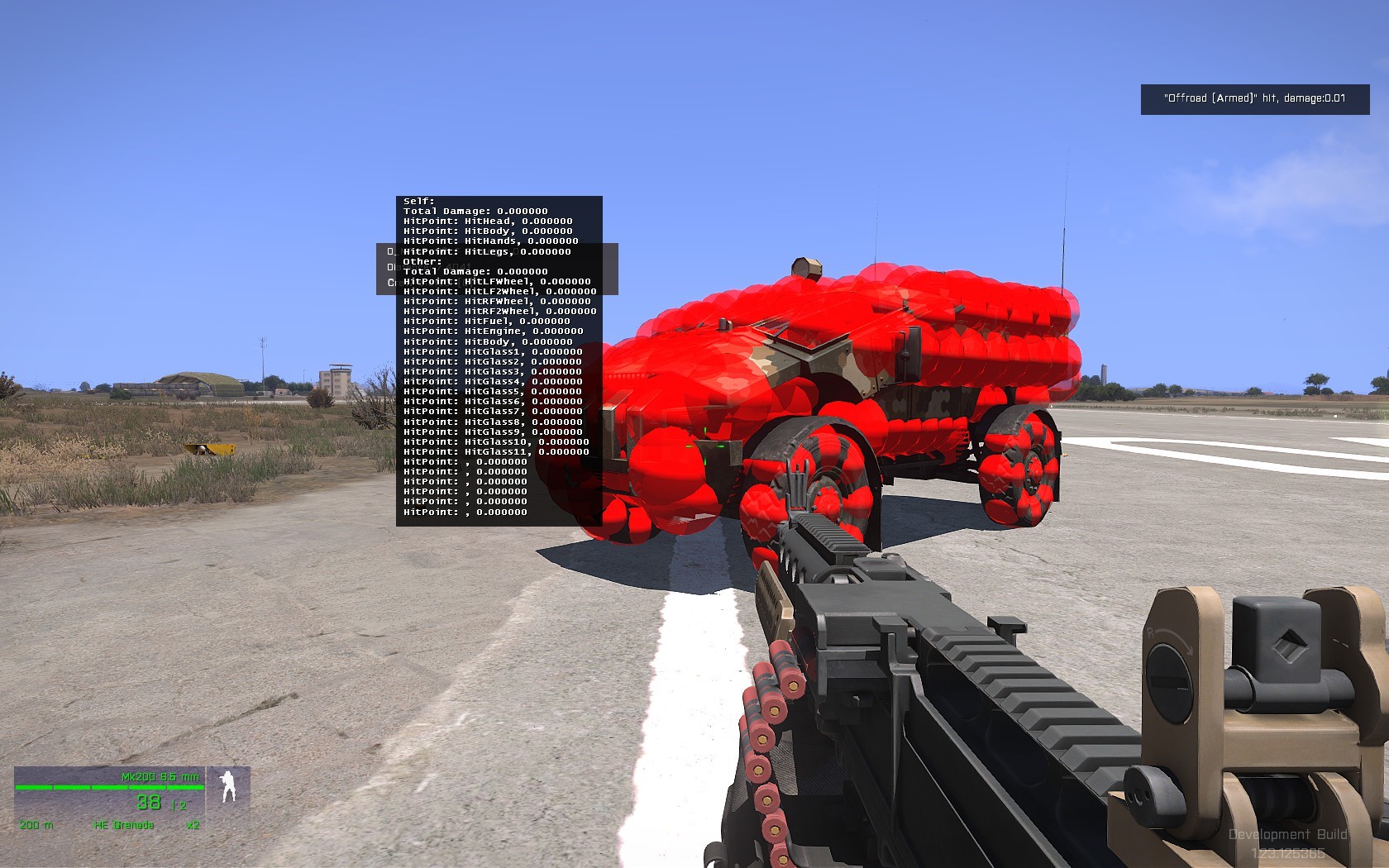 fast topaz
hmmm thank you 😄 unfortunately I'm not able to download the dev branch because my internet won't make it until this evening where I need to play a mission but what am I forgetting if my car isn't getting damaged at all?
I have fire geo, hit points
class HitPoints in config.cpp
wraith tendon
sry @civic stratus went to sleep 😉
oblique vapor
Hey buddies, can someone help me with uniform rigging ? I have my uniform set up, I did basic weighting in O2, but it's crap. I'm not used to this arma skeleton nor rigging in general, does someone has some tips / free time for this ?
quick terrace
tips: use a proper software for weights (as in anything but o2)
use the FBX BI provided
for characters
oblique vapor
Thanks
wraith tendon
Okay, what could be the reason, that a bigger model "disappears", when the center is out of sight? (Rest WOULD be still visible, but just... yeah... its gone).
frozen stirrup
there used to be the 50mx50mx50m size limit for large objects that has been named since OFP, dunno if it still applies in A3
 carmine gull
apparently the limit @frozen stirrup describes is in the horizontal; I've heard conflicting reports about how 'fixed' or not it is in A3
bleak tangle
@wraith tendon View geometry?
frozen stirrup
In some threads people wrote that is is now 80x80x80 ms
wraith tendon
@bleak tangle Is it needed? idk, haven't done modelstuff in a while. Gonna add it, then trying it.
bleak tangle
Well if you only had a geometry LOD it should use that a view geometry
bleak tangle
But now that I'm messing around with it, I can't get the results I was expecting
I tried making a large object with a very small view geometry and wasn't able to get it to disappear. But I was placing it in the editor and I have a feeling the occluding works differently for terrain objects vs editor placed objects
cosmic stream
Hello guys, I just uploaded a first early work in progress version of my addon Em_Buildings, you can download it here : http://steamcommunity.com/sharedfiles/filedetails/?id=671539540 with currently only 2 buildings
You can place them in Eden editor right now (haven't check for Zeus, might need some more config)
cosmic stream
you can load them in Eden editor, em_mansion_01 (in empty / village / structures), em_mansion_01_reversed and em_building_02
tribal vigil
looks great so far @cosmic stream 😃
any idea what the next building is gonna be ? 😉
cosmic stream
maybe an hospital
quick terrace
tried to spawn them and didn't work, i'll see if i can add them manually
hence why i asked
cosmic stream
not that advanced into modding to know what you are trying to do 😄
quick terrace
don't worry about it
a few things to consider:
- box_mc.paa is missing - seen you had a look at that mc in my example. most likely left over
cosmic stream
yeah, don't know why it says that
quick terrace
building 02 ^
cosmic stream
not using it, i should just delete the example folders
cosmic stream
I'll check
quick terrace
no matter if you deleted it or not (the actual folder), it is linked someplace
cosmic stream
I think it's because I have my addon and you example in same folder
so even if i added the folders into exclusion list, they somehow are used in texheader.bin
but i'll checked building_02
cosmic stream
which ones ?
quick terrace
also, AO is way to big (spread), the tex res seems to be to low res (running it on ultra)
and it might be good to prep all your textures for vis upgrade
cosmic stream
really strange :/
cosmic stream
the Ao is 3 1024
quick terrace
no, when you bake it, is way to spread out
quick terrace
do you have a shadow lod?
cosmic stream
not for the building_02
quick terrace
it doesn't seem you have for the mansion either
i know i am running dev branch, but doesn't change the fact
cosmic stream
walls are casting shadows...
but i agree that the render of shadows casted on are strange too, very bright
cosmic stream
thanks for the screen, I have no idea why .paa texture are not packed
and for windows, I haven't found how to lower the armor value without lowering whole building value (class armor is multiplying, Penny said)
cosmic stream
No, i don't plan to make one
cosmic stream
Hum, I don't have any, I just thought by default the building sinks into ground if once armor is breached
I mean I don't think I have one
cosmic stream
oh thanks, i will try
cosmic stream
@quick terrace I tested my addon from steam workshop, and I'm seen my textures everywhere... The pbo from steam and the one from my workfile are exact same size.
quick terrace
i'll recheck then
cosmic stream
I also have shadow in (but I know I have warning in RPT rasying too many vertices or smt)
I'll come back tomorow, thanks again for the support, really appreciate to learn here
++
 noble veldt
does anyone have experience with geometry and roadway LODs?
i have a couple of models that refuse to work properly in-game, especially with player collision

the problem is, that you can run through parts of the model, but only when the model itself is rotated (dir != 0)
i made sure, that
All components are named ComponentXX
It has no de-generated faces
It has no non-convexities
All components are set to autocenter=0
All components are closed
It is pre-triagulated
All components have a mass in the geometry LOD
All surface normals are sharpened
It has correct roadway LOD surface textures
It has correct fire LOD surface materials
No faces are flipped
i have wasted 13 hours on this already. i cannot figure out why arma thinks that a player can run through parts of a single box
it literally just is a box
any help would be highly appreciated 😃
also, no errors in RPT or during binarization process
i dont know if it helps, but the place where the player can run through the box has also no collisions in the fire LOD
you can shoot through the model at this spots
oblique vapor
Have you tried deleting the collision mesh you have and create a simple box using Object Builder and see what happens ?
noble veldt
yes
in fact, the geometry LOD is just a box 😦
but i have found someone else from Arma: Resist who had the exact same problem
writing a forum post atm
he didnt mention a solution though
it is extremely weird
oblique vapor
Have you convex triangulated your geometries meshes under OB ?
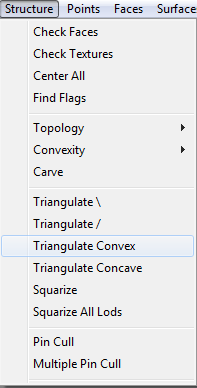
Also, does your Geometry LOD has correct mass setted-up ?

 loud wadi
Does anyone have or know where I can get ObjectMover from mikeros tools?
bleak tangle
The subscriber version of his tools 😛
I know it use to be on the public version but it looks like he made it exlcusive
bleak tangle
If it's only a couple of things I'll do it for you, but I'm not volunteering to spend the rest of my life doing so
loud wadi
pm'ed! 😃 Thanks
 spare violet
Does anyone know how to make a skin for http://www.gameready3d.com/3d-Model-010416TRUK-Detail If someone could teach me how or tell me that would be awesome!
cosmic stream
@quick terrace I tried "damage=no" and "dammage=no", but nothing worked, buildings are still sinking even when I have no armor
white jay
Finally found time and motivation to continue the ILBE Assault pack with SINGCARS radio http://i.imgur.com/i8NsLM0.png


Textures are placeholders
quick terrace
@cosmic stream no idea atm
noble veldt
@oblique vapor yes and yes
it is extremely weird that the player can run through this box only when the model is rotated via setDir
noble veldt
i have now created a box in object builder
triangulated it properly
copied it to geometry and fire and shadow lod
same result
rage quit incoming 😄

oh lord...
noble veldt
yepp, fuck this shit. i am quitting this crap now
 native garnet
@noble veldt Eichi: it is extremely weird that the player can run through this box only when the model is rotated via setDir I've had something similar in a object someone quickly made for me to stop only bullets (As a base protection box)... worked fine when it was between certain directions either north and south. When it was facing east or west it wouldn't stop bullets 😄
I think that was related to the size of the object though, but it seems like it's something similar to this
noble veldt
its is driving me crazy
i have also tried making the box larger
even 5m thickness doesnt change a thing 😦
oblique vapor
The beautiful joy of ArmA 3 Modding
noble veldt
you say it
i must be doing something wrong, but there is no way to find out. i have made sure everything is correct according to the docs
compared it with similar models
showed it to three people
the amount of time wasted on this is just hilarious. its a stupid box
the artwork took us 30 minutes to create
now it takes 16 hours to get it into arma. still not working as it should
native garnet
Arma modding, where super complex stuff somehow magically works but the basic stuff you spend hours on for no real reason
noble veldt
just for fun, it took us exactly 20 seconds to get it to work in our other project
drag and drop. gg done
this really requires a pain compensation fund 😄
cosmic stream
I feel you, so many thing that can make you stop... Keep going, you'll find maybe a solution soon or late. Maybe check property name in ObjectBuilder, I read somewhere that some property are required (for example, map=house and class=house are required to have door and windows animations)
And I have been a unity user for 3+ years now, so i totally understand your distress
noble veldt
A: "hey! what have you done today?" B: "well, i have painted my windows, did the regular garden stuff, been to the car wash, cooked a nice dinner and made my family happy. and you?" A: "well, i am failing to get a fucking box to work in a video game."
 keen tundra
#ArmaDrama 😃
noble veldt
dear players, please stop rotating your base parts in the future. only build in 90° angles or others can run through your walls
argh
oblique vapor
That's insane
oblique vapor
How is your model.cfg done ? Might be selections or model.cfg
I don't really know what causes this so I randomly throw things to look at because that's bizarre
noble veldt
i dont use a model.cfg for that one
but i think i have identified the issue
not 100% sure though
its the memory LOD fucking up the bounding box of the model
if i just create a stupid box in resolution, fire, shadow and geometry it doesnt work
if i add an empty memory lod, it doesnt work
if i add a vertex to the memory lod, it doesnt work
if i add two vertices to the memory lod, it works
WHAT
THE
HELL
the boundingBoxReal command is also fucked if there is no memory LOD
noble veldt
its just the most unlogical thing ever
vivid bane
Hey guys, anyone able to point out what'd be causing this? the proxies casting shadows that is http://puu.sh/ounCG/e36684c9b4.png

Excuse the green 😄
quick terrace
it is not the proxies causing the shadows but the triangle proxy representation
do you have textures assigned to these?
or proc colors?
 wise coral
did you copy and paste a bunch of properties to the shadowvolume?
Hey guys I'm looking at the headgear sample and i have the p3d working but unfortunately it doesnt move with the head of the player. It just stays static. What am I missing ?
bleak tangle
Head as a named selection and then an entry in the model.cfg as thep3dname: ArmaMan{};, like the sample has
And the head named selection should have the vertices selected that should move with the player's head
wise coral
got it! thanks pennyworth
wise coral
secondly is there a way I can fit the helmet on the player in buldozer rather than packing and starting the game?
bleak tangle
Best way I've found to do that is to grab one of the LODs from the character example that has a head and bring it into the headgear, then align it with that head and delete it once you are done
wise coral
good idea
civic stratus
how do I select all components in the component window in object builder?
cosmic stream
shift clic ?
round bloom
@civic stratus as @cosmic stream said, just click on the first one then hold shift whilst you click on the last one
civic stratus
thanks
civic stratus
is it possible to do a massive split topology in object builder?
ive got 80 faces or so and I just wanna split em all
thorn geyser
Not sure. I do that you can do a splice cut in 3DS Max, but so far I haven't come across something like that, yet. :thinking:
wraith tendon
gnaahhhhh...
Y u model always dissapear, when i dont look at you
canOcclude & canbeoccluded (in Geo + ViewGeo) is already added. Is there anything else i miss?
nvm... added single points further outside (ViewLOD), works now -.-
white jay
Does anyone know what is going on here? https://www.youtube.com/watch?v=0ZWSfx14Whk&feature=youtu.be
Those weird shadows on the backpack
civic stratus
looks like an rvmat issue
white jay
The model looks just fine in object builder
*buldozer
allright it also looks fine in any other map than virtual reality?!
polar fiber
Might be because the textures aren't properly named
these exist for a reason: https://community.bistudio.com/wiki/ArmA:_Texture_Naming_Rules
civic stratus
that wouldnt explain why it only happens in the VR map
are you simulating some kind of reflection?
like a silver chrome or something?
polar fiber
looked like the unit's AO passing through the backpack to me
that happens if the _co isn't properly formatted
polar fiber
shouldn't be 32-bit if it's saved as _co.tga anyway - the tools automatically convert the alpha to 1-bit so long as it has the _co suffix on the filename before converting to .paa. I always save my _co from photoshop as 32-bit even if it doesn't have an alpha, and let Image2Paa make the 24-bit .paa under conversion
quick terrace
i am aware the tools convert as they should if the suffixes are correct
that said i am not sure how it was converted 😛 and yes, i've seen this before
polar fiber
Ah yeah, I suppose there could be people still converting using something like the .paa plugin for PS even though it's been incorrectly formatting .paa files for like 7 years now 😄
quick terrace
or manually converting via textools and choosing the wrong compression
last spindle
usually happens if there is an alpha channel in one the the textures that should never have alpha, normally, the NOHQ, but also SMDI
white jay
Finished http://i.imgur.com/bviESrC.png


This was my first Substance Painter project. Very pleased with the software. Makes your work that much easier.
cosmic stream
new wip : http://i.imgur.com/Zah4QpG.jpg
Still looking for help about forbiding destruction (and sinking) and a missing ghost texture in some p3d that I can't find in any LODs... If you have an idea, tag me 😉
 quick terrace
i will have a look tommorow, send me the p3d file in PM @cosmic stream
white jay
Hey guys I have another question. How do I aplly a hiddenselection texture on my LOD2?
I'm an idiot nvm 😃
cosmic stream
https://forums.bistudio.com/topic/143493-em-buildings-new-buildings/?p=3016086 update on my addon, fixed several bugs, added a small building done in less than 3 days (routine ftw !)
I still have issue with destruction (grrrrr) and a weird UV problem, a texture seems to clamp (=no repeat itself only in y), will upload some pic tomorow
civic stratus
Looking good 😃
Was hoping someone could point me to a guide for destructable windows?
wraith tendon
@civic stratus Samples.
The House Sample works (at least, last time i checked) with a proper Explaination
bleak tangle
I'll send you the message I typed in here for Emoglobinsky, like I said then, I plan on adding it to the wiki
wraith tendon
lmao @quick terrace (Rope Thread in BI-Forums :D)
civic stratus
time for some updated samples me thinks
cosmic stream
The house covers pretty much everything need to start learning : windows animation (break), door anim (opening), shadow, geometry (fire, view), hit points and memory points (for actions, ladders, triggers, etc), destruction (ruine)
But it requires to beg the elders for their unvaluable knowledge ! :p A lot of stuff isn't written in a single place and you'll have to google search intensively and guess/try a lot
civic stratus
I managed to nail down most of it
sample's using window_set_ca.tga and destruct_full_window_set_ca.tga for glass dmg
nvm, changed to .paa and its good
wtf is up with my glass? Faces are moved to top with sharp edges:
https://gyazo.com/a794a0c139f6b8e4aae64fafb39459e6
https://gyazo.com/fb584ec4f709f710330033b60dc592ee
https://gyazo.com/f596c55f619510c703ca499806c9c262
civic stratus
i set it up the same way the sample is =/
cosmic stream
you assigned rvmat AND texture ?
civic stratus
yes
civic stratus
cosmic stream
a3\structures_f\data\windows\window_set_ca.paa
a3\structures_f\data\windows\window_set.rvmat
unhide selection :
a3\structures_f\data\windows\destruct_full_window_set_ca.paa
a3\structures_f\data\windows\destruct_full_window_set.rvmat
cosmic stream
did you extraded "data_f" folder in P:\A3
cosmic stream
lol, of course you have to uvmap glasses 😄
civic stratus
used mikeros a3p tool just recently
would the rvmat not select the coords for random effect?
cosmic stream
the texture is an atlas of 5 different glasses
that way you can always find a glass texture that suits your 3d model
wraith tendon
erm... is the door wide enough?
cosmic stream
I've found a quick trick in maya to add all those windows very quickly, I might record a video for my next building. It takes less than 1 hour to create windows and import them correctly on OB
civic stratus
Can I view window dmg in buldozer?
cosmic stream
yes, If you correctly wrote config.cpp and model.cfg for your model
you can press enter to cycle the animations of your model and scroll mouse up/down to play your anim between 0-1 (0=clean, 1= damaged)
civic stratus
well I thought I did but https://gyazo.com/a130d8de49d5ba1b9cdbe3fe1ae4690f
cosmic stream
in this lod, check that you have Glass_1_hide and Glass_1_unhide selections
and check what vertices are in each selection
civic stratus
all the selections are setup https://gyazo.com/9ad346dc7b881fc21796e88fd98518bc
8 points and 2 faces per
cosmic stream
this looks wrong
you need 2 selections : Glass_1_hide for clean state, and Glass_1_unhide for damaged state (animation hide first, and show sedond)
cosmic stream
when u scroll in buldozer, do you see an animation ?
civic stratus
yes
all my windows destruct, but they spawn this black triangle to the center of the model
cosmic stream
the macro_glass.cpp is just a script that say :
NORMAL_GLASS_HITPOINT(1,0.01,0.175)
NORMAL_GLASS_HITPOINT(2,0.01,0.175)
NORMAL_GLASS_HITPOINT(3,0.01,0.175)
NORMAL_GLASS_HITPOINT(4,0.01,0.175)
NORMAL_GLASS_HITPOINT(1,0.01,0.175) = grab that macro script for a normal glass ( with ID glass_1_hide, with armor 0.01, with hitpoint radius 0.0175)
So you don't have to touch this macro file, but add as many line as you have windows in your config.cpp
civic stratus
Id rather not use the macro file if a3 isnt using it
well i guess its fucked the other way anyways
so its not the macros
cosmic stream
yeah, i think it's a selection issue
civic stratus
would you care to take a look?
cosmic stream
sure, send me your folder
civic stratus
anyone have issues with uv's being rescaled under certain conditions? My UV is being scaled down in my 0 lod, but the exact same object copied to a new lod works fine
This is the 0 lod: https://gyazo.com/5066171868ee8be0c46a4e52fe96c4ca
This is the new lod with just the door (and glass) copied: https://gyazo.com/2fe7e05521cc1e0430aab87aabdb1304
cosmic stream
I checked his model, make no sense : the same faces, copied from a lod to another haven't the same uv mapping. Haven't seen that before ^^
civic stratus
:<
wind belfry
is it possible to move model to certain coordinates in Object builder?
polar fiber
It's possible to move individual verts to a specific coordinate. To offset a whole model to a specific point though I think you'd have to do a bit of maths
cosmic stream
can someone explain me how to have my own cfgvehicleclass for my addon ? right now, everything is listed under "structure / village" and i would like to have something like "structure / em_buildings"
class CfgVehicleClasses
{
class Em_Building_class
{
displayName = "Em building v0.2";
};
};
class cfgVehicles {
class Land_em_building_02: TargetGrenade {
vehicleClass= "Em_Building_class";
not doing anything
polar fiber
In eden editor?
It uses class CfgEditorCategories and CfgEditorSubcategories instead of factions and vehicle class now
 dark cobalt
does anyone have a model of the hunter or a jltv?
I want to make a hunter like vehicle, with the actual manned 50 cal on the top instead of the remote controlled one
thorn geyser
This is not a request channel. If you want to create another version of the Hunter, then you are better off requesting special permission from the Bohemia Interactive developers.
dark cobalt
roger, id be surprised if they give that out
quick terrace
which you won't get btw, they don't give out sources
civic stratus
Would someone like to take up the challenge of diagnosing my damage glass problem? I described it yesterday
cosmic stream
have you tried deleting those polygons, make a fresh model in a new doc and reimport ?
civic stratus
i tried deleting the door1 from lod 0 and copying from lod 1 back to 0
i didnt reimport the geometry compltely, no
would be a lot of effort to rescale
but im headed to bed again so ill try again later
cosmic stream
just delete the mesh windows that have issues
no neeed to reimport all your object
 terse elm
Latest WIP http://i.imgur.com/rohTLWh.png, come on guys get ur WIPS out!!!!

 tacit karma
@terse elm http://abload.de/img/screenshot002kgs4q.jpg
 terse elm
Very nice @tacit karma looks familiar haha, @past canopy not really part of any team atm, doing a bit for 2017 mod and helping a few friends set something up, the rifle started as a personal development project, but might end up making a little WW2 pack as I'm very fond of the genre
tacit karma
Thanks
I'm modeling after blueprints
also I am doing it very slowly but with a lot of care
terse elm
couldnt find any decent blue prints
did mine all of refrencing rom images
u done the receiver yet?
 tacit karma
yep
terse elm
call me sad but the bit im most looking forward to doing is making it go ping when the magazine is empty
tacit karma
lol
cosmic stream
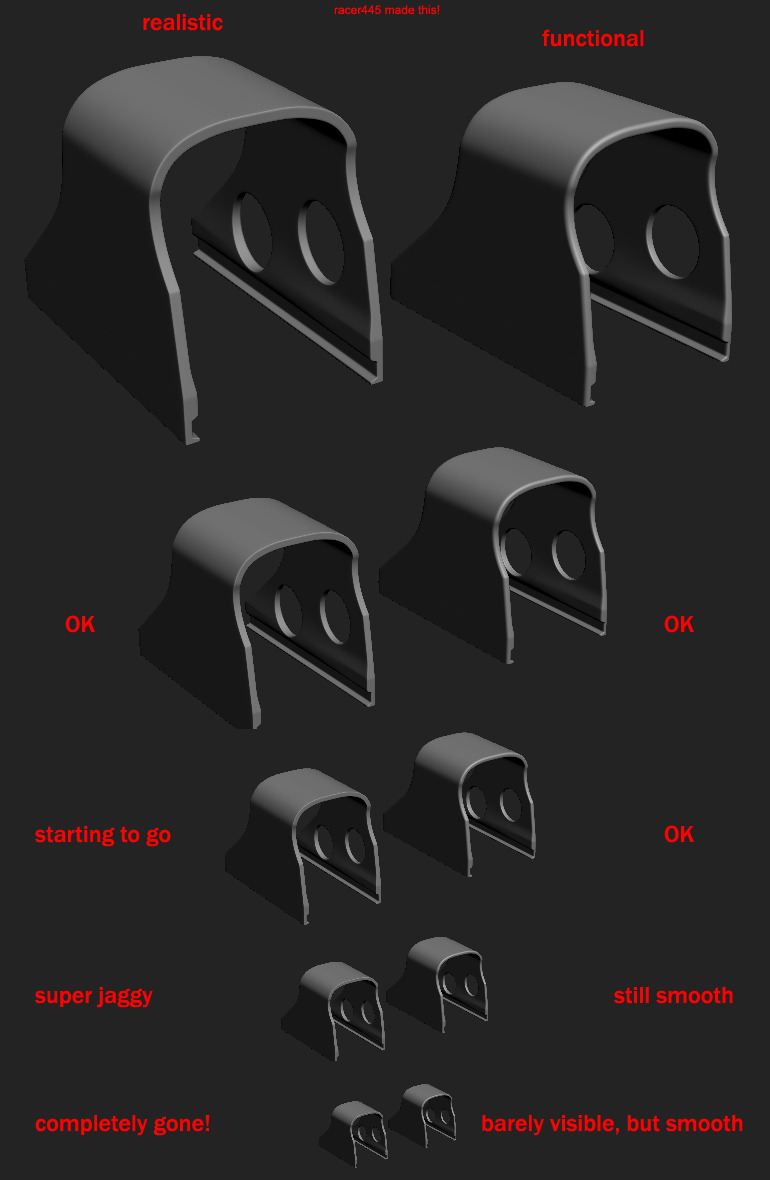
@terse elm hey nice model, i think you should smoother the edges, it will render better when you'll bake normalmap
terse elm
thx, it needs a once over as theres a bit of pinching going on in certain areas
im still new to hard surface moddelling so im gunna make mistakes/find better ways of doing things
cosmic stream
http://wiki.polycount.com/w/images/8/85/Normal_edge_thickness.jpg check this image
 celest arch


 tacit karma


 noble veldt
10:10 would hire 😃
tacit karma
thanks
terse elm
Looking good red
 queen estuary
anyone willing to help me setup my buldozer
 slate epoch
quick terrace
slate epoch
quick terrace
@slate epoch Pron!
 sullen oasis
hey guys does anyone know how to fix the "External Viewer: Unable To Create" problem of buldozer in oxygen 2?
wind belfry
@sullen oasis see that you have P drive mounted and that you have installed buldozer
sullen oasis
ok I have
 rich scroll
what's the general workflow for retexturing a vanilla A3 building? and is this a #arma3_texture question?
quick terrace
you cannot retexture a vanilla A3 building
rich scroll
whaaaaat
when i signed up for arma 3 modding they assured me that nearly anything is possible
what about inheriting from an existing A3 building and doing a new version with an altered texture, possible?
quick terrace
you haven't signed up for A3 modding mate...not one is forcing it uppon you
sure, everything is possible as long as you do it from scratch
buildings don't have hidden selection sets
mainly because they use multimats
but that said, they don't use hiddenMaterials either (which is broken either way)
rich scroll
so would it be something like: copy rvmat and relevant textures from a structures*.pbo, write a class inheriting from original object, but then what? can't you only assign a model's materials when the file is unbinarised?
rich scroll
oh thanks very much, that simple yeah?
is that the only one solution though, there's no cfg based way to do such a thing?
polar fiber
hiddenSelectionsMaterials[] in the config is supposed to do that. Though there does seem to be an issue with it on some types of models where the game wont load the .rvmat
quick terrace
afaik, there are no set selections for the buildings
without named selection there is no way to use that
rich scroll
i can't get set or getObjectMaterial to work with any buildings
quick terrace
i have already told you that you won't be able to retexture buildings, have i not
rich scroll
oh right. no you kind of just pasted a link to a function on the wiki and sneered at me a bit
but thanks anyway
quick terrace
i said that if a building would have these sets ready, you COULD change the multimat and hence the textures
oblique vapor
Question here: is it possible to provide protection using backpacks ? Like the vests does, armor values on hitpoints infos
Nor fire geometry protection, I don't know how this could work
oblique vapor
Adding armor_plate100mm.rvmat on the Fire Geometry doesn't seem to work, nor adding armor to the backpack in configs
woeful viper
there is no fire geometry for vests and i highly doubt for backbacks either
oblique vapor
Vests are under cfgWeapons, Backpacks tho are under cfgVehicles, basically setting Armor and a proper Fire Geo would make it a protection
But no
celest arch
Hello gentlemen, I have a problem with the cargo of my vehicle
Cargo proxies 1, 2, 4, 5 are regular passengers
proxies 3 and 6 are FFV turrets
for some reason, in game I can enter proxy 3 turret but also proxy 3 passenger seat
any idea how to prevent a cargo proxy ID from becoming a passenger seat and force it as turret only?
transportSoldier=6;
cargoProxyIndexes[] = {1,2,3,4,5,6}; maybe removing them from that array? just checking in game
bleak tangle
That might do it, the offroad has
transportSoldier = 1;
cargoProxyIndexes[] = {1};
getInProxyOrder[] = {1,2,3,4,5};
so for the offroad, the only passenger is the acrtual front passenger
others count as turrets
yes I adjusted transportSoldier and its fine now, thanks 😉
tacit karma
@hollow fulcrum http://imgur.com/a/TQUlK
 hollow fulcrum
f'n sweet! one of my all time favorite weapons. 👍
tacit karma
thanks
hollow fulcrum
the rest of you lazy wankers better get to it! 😄
woeful viper
... ashamed to say, but i got nothing. slacked off... and distracted with stuffs. including http://abload.de/img/inhalt1hjux6.jpg and http://abload.de/img/9780080942537whur7.jpg


trying to create a realistic drive model for tracked vehicles using multi body simulation
hollow fulcrum
hahaha, hey buddy! looks like you're in deep 😆
woeful viper
i've had enough of wonky nvidia cars disguised as tanks 😄
hollow fulcrum
@woeful viper lol, i kinda figured it was physx frustration driven. i'll be waiting on the new book on 'how to make physx act properly'.
woeful viper
without custom drive model (either with or without physx) tanks will never behave properly. Just using car simulation and adding wheels cant fix the fundamental issues.
there are some things that could help modders to make it a bit easier to get the best out of the flawed drive model though
hollow fulcrum
im happy to lash out at those responsible if needed.
woeful viper
not yet - i first need cooperation...xD
hollow fulcrum
😆
tacit karma
there are some things that could help modders to make it a bit easier to get the best out of the flawed drive model though
I can only advise taking a look at that simplistic physX I made a while ago. Simple to say: it basically copies the standard behavior of electrical engines with one or max. two gears
woeful viper
if you want to have a moving vehicle by any means possible... ok. Not if you want to have good simulation and realistic behaviour however.
i tried the RHS tanks where it was implemented like this, it is putting me off. Other people may not care, i do.
tacit karma
good simulation =/= tankX 😛
It's the best you can do without having a too much fucked up physics
woeful viper
thats not true
the only main fuckery regarding gearbox and engine is the clutch, and that can be mitigated to a certain extend by giving more torque at idle rpm. Cutting out all gears is 2 steps backwards imo. By that you even degrade the sound simulation
It takes less time to set up, certainly. But it's by no means better.
hollow fulcrum
lets see.. where is @terse elm ? he's usually doing something useful and has porn for me i know..
hollow fulcrum
deliver the porn, or else!
hollow fulcrum
❣ thanks buddy!
polar fiber
Is that a coke can muzzle-brake? ;0
wait, no, it's got a fucking spatula bipod - that's even more amazing
celest arch
I call intellectual property for that crutch 😛
 jaunty rune
how well does substance painter work in the context of arma, thinking of bitting the bullet and investing
hollow fulcrum
meh.. it's worthwhile. there are some community addons that make working with ArmA foo easier also. (related to substance)
jaunty rune
so far what im seeing is that it makes it alot easier to make a better texture faster
life mods could take lessions
hollow fulcrum
well, there are a number of programs that make 'making textures' easier. the two i use the most are QuixelSuite/Substance. both are effective.
honestly, if you're not that familiar with things. QuixelSuite might be a better route for you. And if the money is of concern, you'd probably get better use out of it. granted i'm slightly biased.
past canopy
@jaunty rune if you use it properly it is extremely helpful in any setting
quixel v substance is pretty balanced at this point
Quixel: UI is bad, textures and materials are incredible and 3D viewport window is great.
Substance: UI is bad but not as much as quixel, textures and materials are not remotely as nice as quixel, 3D viewport is good but not as nice as quixel imo, it makes up for it by being super helpful for baking and having an extensive substance/material library for free online where everyone can upload stuff so I would say that is slightly better than the limited selection quixel has.
All in all they are basically really similar at this point and so if you cant afford substance I would go with quixel, or you are very good with photoshop go with quixel. Either way you should have photoshop (though it isnt required for substance) and a basic understanding of how baking, normals and texturing works.
fwiw I own both and use both for different purposes, though most of my work is done using substance
celest arch
I use Quixel, but yeah there's pros and cons
one big pro is @last spindle 's RV4 calibration for quixel
on the other side, Substance integrates pretty well with gametextures.com materials, adding them in quixel is not fast at all
plus I never managed to import the height map in quixel, maybe someone could shine some knowledge upon me
quick terrace
@celest arch / @last spindle is that RV4 exporter just an export, or does i callibrate textures for RV lighting condition just as well. The one i have tried was simply making SMDI texture automaticaly from spec and gloss map using them as channels, same for AO to AS
last spindle
no calibration, it just does the basics to turn PBR into RV4 compatible
i have being using them straight in the engine though, with a default RVMAT i have and just mess with the rvmat a little bit if needed
celest arch
yeah same, some work is needed but it works great
an rv4 3do preset would be amazing
quick terrace
that's something it would be indeed lovely: 1:1 (or closer than current) visual to RV engine would be indeed a real PLUS
not sure if it is possible though
that said, one would wait for the vis upgrade bound to happen in 1.60 or later to do that
celest arch
yeah thats what I meant
quick terrace
[2:46 PM] P1NGA: i have being using them straight in the engine though, with a default RVMAT i have and just mess with the rvmat a little bit if needed
yeah i am aware, i just create the SMDI manually since i do some changes to these textures before i turn them into channels
woeful viper
i think kiory raised the issue in quixel's channels, but RV engine is just too insignificant for any tool developer to seriously consider it xD
quick terrace
yeah, but at least some direction towards how to do it would be indeed lovely
hollow fulcrum
i'd have to harass the quixel guys to see where things are at currently. but last i heard, the intent on the quixel side is to open up 3DO (in an opensource manner). i wouldn't be surprised if they've formed a private group for that already. at a minimum they are very open to helping do what we need to do. i've had very specific conversations with them regarding RV. hopefully it all works out at the end of the day.
for what it's worth there is also a plugin/extension for substance. mr. rampling put that together some time ago. granted i've never found the time to play with it properly, i know a few guys find it really useful.
quick terrace
do harass!
fast topaz
how are brakelights on vehicles working?
oblique vapor
@fast topaz This is something you set up in the model.cfg of your car. When you hit the brakes, it unhides the selection of your brakelights. Take a look at these files :
Also, you should take a look at the Arma 3 Car Sample, everything is detailed
fast topaz
ah thank you
so I guess in order to have an emissive effect on my lights I need to apply a fitting rvmat to them?
oblique vapor
Yes
One would just copy/paste the breaklights faces, apply a glowing RVMAT to these and add these to the proper selection
fast topaz
it seems like brakelights are no brakelights
or am I doing something wrong
they are instantly lighted as soon as I turn on the lights at night
terse elm
then u have the wrong selection name
oblique vapor
There are that kind of lights that turns on when you activate the lights (it's on all cars), then you have brakes lights
fast topaz
i thought brzdove means something like brake lol
the selection is called brzdove svetlo
hollow fulcrum
once you're familiar with how it all works, feel free to rename things. 😉
oblique vapor
I don't understand why an internationally modded game has still some Czech in it
hollow fulcrum
so quiet in here, you guys must have worked yourselves to death..
i haven't done much, remodelled a hull yesterday. maybe get around to painting things today. https://gyazo.com/4e79b0dede16c42e12b8000a95f96d5f
last spindle
Quite is good, quite means work is happening
hollow fulcrum
i have seen no evidence of work happening!
last spindle
super secrets
cosmic stream
jesus, i can't figure out why textures and rvmats are so bright : http://i.imgur.com/8cet3dv.jpg i just copied rvmats from A3 (you can see 2 LOD in this image)

LOD rvmat : http://pastebin.com/pH3XcD6r
reso 0 leaves / branch rvmat : http://pastebin.com/zszbu3KG
hollow fulcrum
looks almost like they are 'emitting' light.
hollow fulcrum
👏 Pufu wins
quick terrace
might be wrong here, but i really doubt BI uses emissive RVMATs for their vegetation
cosmic stream
well, at least that's what contain the rvmat the sample tree was using
hollow fulcrum
in the Armaverse, sample files should never be considered 'working examples'.
i haven't mucked about with plants in years. they are probably the most special of the special BIS children. and while nothing would suprise me, i also doubt they use emissivity in those mats.
bleak tangle
They seem to be using similar values in the rest of the trees, t_pinuss2s_b_f has emmisive[] = {1.3,1.2,1.0,0.5};
quick terrace
then i really have no idea
hollow fulcrum
if i recall correctly, the model itself has to be setup properly also. i want to say there are important named properties and the like. wish i could be more useful, but all i can think of at the moment.
and shadowLods are particular maybe? meh.. (plants are evil.)
cosmic stream
i copied properties from sample too
my shadowlod is'nt working btw, no idea why : triangulated, hard edge, etc...
wraith tendon
everything closed?
cosmic stream
yep
cosmic stream
In can even preview it in res 1
wraith tendon
There was something, that i always forgot... hmpf... i need to write it down one day...
hollow fulcrum
since the rest of you have failed us in recent days, i've been staying up late the last couple nights.. doing all kinds of unruly things. after much sweating and screaming, finally got something worth capturing. Some medium speed, mild drag, porn:
https://gyazo.com/f34d66660862017b921c4ea09bd5575f
https://gyazo.com/3b824218208d4f2a2c4681b01ebfb98e
https://gyazo.com/93e28a2d63344dbe039029176644fc4e
last spindle
caught up in a Musket Model Off on another discord atm
cosmic stream
btw, you were right : sample tree isn't fully working . But at least, it's not self illuminated. And shadows are strange.
So i really don't know what's im doing wrong (my textures are still looking very bright / illuminated), shadows still not showing (close geom, hard edge, triangulated, no textures, no uv ((excepts for leaves in special lod))
polar fiber
Do BIS trees have any special properties turned on in the Face Properties window? 'always in shadow' etc? I assume your .rvmat has the same render flags and the model has the same named properties like hybrid shadows etc.
cosmic stream
I don't know how t ocheck faces properties :/
wraith tendon
" E "
polar fiber
E for face properties (it's where you assign textures) and Shift+E for vertex properties (tells you coordinates and allows you to move points to specific places, also allows you to lock normals etc.)
cosmic stream
oh, those properties, well, haven't found anything. I have the exact same settings as the sample one
hollow fulcrum
☕
 zenith quartz
Did you check the a2 veg?
last spindle
Whisky in that coffee?
woeful viper
there is no guarantee that samples are 100% correct... just saying
quick terrace
well, one can pack these samples and see if they work corectly
oblique vapor
Samples are not correct I'm affraid
This more looks like a .pdf converted to a .p3d than anything else
white jay
@obtuse rain did experiment with veg recentely, he said the sample tree is missing a lot of stuff.
he surly has some info for you
woeful viper
you can use eliteness from mikero to check flags, lod composition etc (just not view the model) on actual tree models
obtuse rain
It's missing LOD's, which for plants is a pain since LOD'ing of plants is atypical.
cosmic stream
yeah i noticed the missing lods... But without proper doc, it's hard to find or understand what is not working
 fluid ocean
@hollow fulcrum damn that SOCR looks sexy! A twin 50 sure would look nice back aft!
hollow fulcrum
@fluid ocean thanks buddy! it wont have a twin .50, but it will have a .50 in the rear. a pair of mini-guns up front, and a pair of twin M240's in the mid 😉
actually forgot to do the mounts so meh.. do those a bit later in the day hopefully. then i might actually paint it. added a few more things.
 plush coral
awesome model
hollow fulcrum
all that is around 21k, and i have not removed any edges. so it'll probably trim down 3-5k.
console is around 10k alone currently. but thats intentional.
 near fjord
Hey, switching over from C4d to 3ds max. Any suggestions on the best version(ie year)?
I hated c4d r13 so much compared to 12
quick terrace
best max will always (or almost always) be the last release
although there certain issues with amd gpu drivers in 2017
near fjord
Ah cool. Ill go with 2016 to be safe.
A few years ago maxon decided to change a bunch of the keyboard shortcuts and changed some of the menus. Was a real pain
Dont try to fix what aint broken
quick terrace
same goes for max, they sort of made some of the default keybinds
work the same across
that said, my 2015 custom keybinds works just fine in 2017
and you can toggle between default and custom
 tranquil moth
guys could anyone help me with the custom model shadows? i did a model from scratch in blender, everything works perfectly, geometry, hitpoints n stuff, everything is fine but shadows, they keep glitching and i can see em through other objects aswell, now i guess that's cuz a model itself made in blender and it's a competabillity issue but i really need it to work soo i came here and yes, i've googled it but had no results
plush coral
hi Forward, are you using a shadow LOD or are you letting the engine render your model with soft shadows?
polar fiber
shadow model must be closed (no holes in mesh, all vertexes welded), must be trinagulated and must have hard edges
plush coral
^
Also, are you using the ArmA Toolbox for Blender?
I know some things don't export correctly from it
tranquil moth
yes, i am using 2 lods actually
plush coral
such as normals
tranquil moth
yes i do use a toolbox
plush coral
do you want stencil shadows or would you prefer soft shadows?
because the engine applies soft shadows if no shadow LOD is present, may look better and should fix your shadow issue as well
tranquil moth
hmm is there an easy way to make shadows without using stencil ones? i'm confused, i'm kinda new to modeling 😄
tranquil moth
really? huh
plush coral
At least that's what I noticed
I'm a beginner with the whole modeling scene though, so take what I say with a grain of salt
tranquil moth
i keep the LODNoShadow on the distance views right?
plush coral
these are just things I've noticed through trial and error
tranquil moth
yeah ikr i've made a model using only blender and bohemia samples
polar fiber
depends on the object. shadowbuffer generally doesn't look good on units, weapons and vehicles in first person views
quick terrace
zoo, you are really writting down just hits and miss
polar fiber
stencil shadows are better for those types of things
tranquil moth
the model is extremely, how do you say it, spiky, so i can't make simple stencil LODS
plush coral
My apologies then
quick terrace
there will be a shadow generated from first view lod if lodnoshadow named pref is bot there
that said, there are artefacts
plush coral
It's a bit hard to find up-to-date documentation on this stuff
quick terrace
and there are other ways
to deal with softshadows
using svlods
plus the performance is gonna take a beat
@tranquil moth can you post an image?
of your vis err
quick terrace
there is no such thing
the svlod is the same
rendering the shadow (soft or hard) depends on names properties
the rules for svlods remain: triangulated, hard edged, closed geo
lodnoshadow named prop should only be present in your visual lods
tranquil moth
yeah, i see lol, aight let me make a screenshot, may i contact you in pm?
tranquil moth
@quick terrace did you get em?
quick terrace
i told you that i was on the phone...
hollow fulcrum
if there is no shadowLod the engine will default to attempting to use the geoLod for shadows.
hollow fulcrum
since when?
quick terrace
there are meshes that have really primitive geo lods
there are also meshes without geo lod
i guess since some time now
hollow fulcrum
my understanding is that if no shadowLod it defaults first to geoLod, i believe it will do res lod now, but i think it's still secondary. i might be wrong.
hollow fulcrum
been years since i did. either way, peoples should have proper shadowLods