#arma3_model
1 messages · Page 59 of 1
 wraith tendon
 dusky dragon
my last word (for now): the Banter was strong tonight
 thorn geyser
I would really like to see all the models you are working on, especially the removed ones on that Thread. 😉
 white jay
Lol, on a banter note, happy to be a banter bag anytime, hit me up 😉 When your feeling bored. You can always rip the shit out of me i can take it ;). But although i do value that it takes time to model, i think you guys are obviously too high caliber and i don't look to pay for a modeler. Not currently anyway, maybe in time
thorn geyser
shouldn't be too hard to show some sneak peaks, can it? 😃
 quick terrace
also, it is always better so simply be open and truthfully about it
when you ask for it
white jay
Sorry Rawner, i'm disregarding any of your comments, no offence
thorn geyser
So no sneak peak models? 😦
white jay
Yeah i see that now, But usually where ever i go i have to have a barrier ready , there is alot of other chat gorups out there that share your feelings on life mods. So usually justification is needed to such chats before they cconsider letting me speak
quick terrace
and just to make it clear - i wouldn't take your money, nor do i need any of that, i have my work plate full anyways.
thorn geyser
C'mon, just one little new model you guys are making, please?!? 😉
quick terrace
the question was there because if you can put a correct price on something, you can translate that in value
wraith tendon
@white jay Then again: If you would have argued, and proofed it -> Nothing would have happend. We are talking normal now (Okay, except @thorn geyser 😛 ), or?
quick terrace
and that means using other people's work without permission makes it easier to tell where you are in terms of theft = a game car model is anywhere between 1200-2000$ depending on detail.
thorn geyser
Well I'll shut up if he shows a model other than the traffic light and the bridge 😉
white jay
Lol, on a side note- Dscha, i do think you look a bit like Robbie Williams 😉
wraith tendon
More like Pennywise
white jay
lol
thorn geyser
@white jay so if you refuse to show me any models, then I presume you ripped them. 😉
wraith tendon
@thorn geyser ....
quick terrace
pick me pick me
dusky dragon
@wraith tendon you perhpas
dusky dragon
*perhpas
thorn geyser
I'd rip my abs if I did anything like that 😉
dusky dragon
AHAHAH LMAO
 thorn spire
dusky dragon
thorn spire
dusky dragon
that guy looks like Jamie Fox
wraith tendon
oh boy
dusky dragon
😄
 umbral shuttle
per the wiki here
https://community.bistudio.com/wiki/Arma_3:_Scope_3D
wats the purpose of the black tunnel?
the front/rear shadow I get does the cool parallax effect, the fake lens is to show the glass. but I dont get what the black tunnel does couldnt I just texture the inside of the scope fully black?
 opaque jolt
umbral shuttle
per the wiki here
https://community.bistudio.com/wiki/Arma_3:_Scope_3D
wats the ...
opaque jolt
umbral shuttle
per the wiki here
https://community.bistudio.com/wiki/Arma_3:_Scope_3D
wats the ...
The black tunnel is the interior of your scope; if it wasn’t there, you’d see backface culling
Theoretically speaking, if you’ve already got the interior of your scope modelled, all you have to do is assign black to those faces
umbral shuttle
opaque jolt
The black tunnel is the interior of your scope; if it wasn’t there, you’d see ba...
yeah my model right now has interior faces, so I wouldnt need the tunnel then?
opaque jolt
As I understand it, yes
umbral shuttle
okay cool thaks 
opaque jolt
I still recommend texturing those faces as just straight black, mostly because I can’t think of any scopes off the top of my head where you can see details between the lenses
Aside from the reticle ofc
umbral shuttle
opaque jolt
I still recommend texturing those faces as just straight black, mostly because I...
oh yea I got that area masked off to be fully black
opaque jolt
remember your RVmat as well
iirc, there's a way to just assign a solid colour to a face
thorn spire
Bet all the donation takers are like that... Note.. Im not supporter of semitism
Well donations are for people who give them... Meant people who just exploit 😄
Hey in Max im stuck in the viewport where it display vertex all the time
How to get rid of that
quick terrace
img
 vital lagoonBOT
This feature is being reconstructed.
thorn spire
 sour bough
If I have multiple magazine proxies on a weapon, will that duplicate the magazine on each proxy? (This is the intended effect, doing it so we can animate individual shells in a rotary grenade launcher and have them be proxy'd)
 stuck oyster
sour bough
If I have multiple magazine proxies on a weapon, will that duplicate the magazin...
stuck oyster
sour bough
If I have multiple magazine proxies on a weapon, will that duplicate the magazin...
Hand held weapon?
Magazine proxy is single proxy per muzzle
I don't think you can have many per muzzle
Shells would be mesh and they all would be present in the magazine model
Not separate entities
sour bough
stuck oyster
Hand held weapon?
Yeah, think M32 rotary grenade launcher. Not a huge deal to just have them be mesh and not have different ammo types shown visually.
stuck oyster
sour bough
Yeah, think M32 rotary grenade launcher. Not a huge deal to just have them be me...
well you cant really have different ammo types in a single magazine
sour bough
stuck oyster
well you cant really have different ammo types in a single magazine
yeah, but in order to animate single shells, I'd need the magazine model to be single-shell rather than all of em lined up to fit in the cylinders. So visually different loads would need to be multi-proxy to have the right number.
stuck oyster
sour bough
yeah, but in order to animate single shells, I'd need the magazine model to be s...
no? the magazine proxy can contain separate shells that can be individually animated
but just as pure mesh, not proxies within the magazine proxy
just like you have say a belt or see through bullet magazine that animates
sour bough
stuck oyster
no? the magazine proxy can contain separate shells that can be individually anim...
Wait, you can animate inside of the mag proxy?
stuck oyster
yes
quick terrace
hmmm....it shouldn't happen unless you have certain modifiers in your stack
make sure you have no selection in your top modif in the stack
thorn spire
rgr
 pulsar escarp
HowTo question: I have a particle effect script, I want that particle effect script to fire from the weapon, would I have a EVH onFired and attachTo the weapon? or is there another way? #flamethrower
opaque jolt
isn't that how one of the belt-fed LMGs works; animating the magazine?
thorn spire
Maybe ask on #arma3_scripting
sour bough
I could've sworn that's not a mag proxy but rather part of the weapon model
opaque jolt
Yeah, belt mags are kinda gun-specific, I wouldn’t be surprised
 fervent steppe
Oh what I miss 😱
 woeful viper
a lot of dodging questions, thats for sure
fervent steppe
I noticed. I wanted to go back and read it all but "ain't nobody got time for that" lol
woeful viper
you wouldnt be any the wiser if you did
 fallen compass
Where can I find out what I need to create a vest, uniform, helmet, etc.? Clothing items
 north sundial
Arma 3 samples on steam is the best place to start, then searching this discord for the tips and tricks imo
If you have any questions after that fire them away in the appropriate channel
fallen compass
Is there anyone who knows about this and is Spanish?
hay alguien aca que sepa español que sepa moddear?, escribir al md
 marsh canyon
No, this server speaks English and only
opaque jolt
fallen compass
Where can I find out what I need to create a vest, uniform, helmet, etc.? Clothi...
As Kenny said, reverse engineer the samples; I recommend MrClock’s Object Builder addon for importing, exporting, and setting up P3Ds
Outside of that, learning how to make game-ready models if you don’t already know will help you understand what you need for an import
For that I recommend avoiding instagram slop, and learning how to manipulate vertexes with the translate, rotate and scale tools as well as the 3D cursor; make a model vertex by vertex, then learn shortcuts afterwards
Maybe start with something that has a lot of straight lines rather than something with a lot of curvature, like a firearm for example
stuck oyster
Yeah forget anything Arma and first learn 3d modeling
 south badge
Yeah he should start with the easy part 
opaque jolt
south badge
Yeah he should start with the easy part <:yoba_zampolit:749885285843861536>
PFFFTTT
Highkey
Tbh though, making assets from scratch is so much more satisfying than stuff bought off sketchfab, at least in my experience
Not that I get to do it all that often anymore, but such is life
Forget the UMP-45; if Blender is a toolbox, why not use it to make a UMP-7.62?
 gilded bane
Holy fuck I missed a good grilling 😭
son got made
@white jay I don't think people have a 'problem' with life mods at all. I'm working on one and we don't get much controversy because we try stay as true as possible. That's what people around here don't like.
I know about 99% that our models aren't ripped though, Because they are all Australian for one, and all purchased from Humster.
Given to us from a very very nice GTA IV community ♥♥
 tulip narwhal
Hi, one little question about start modeling, it is true that we should model using quads in blender, but before importing the model into the p3d, it is better for the virtual reality engine to convert the model faces from quads to triangles?
Thank you.
opaque jolt
Ctrl+t is your friend, yes
north sundial
opaque jolt
Ctrl+t is your friend, yes
Use a triangulate modifier not Ctrl t
Non destructive modelling is your best friend
north sundial
tulip narwhal
Hi, one little question about start modeling, it is true that we should model us...
You can do quads for most lods, the shadow lods require triangulation, I don’t think others do
south badge
north sundial
Use a triangulate modifier not Ctrl t
Have I been doing it wrong the whole time? 
opaque jolt
north sundial
Non destructive modelling is your best friend
You still have to apply the modifier to the mesh anyways; I don’t see the point
north sundial
But If you use the triangulate modifier you can set the minimum sides to 5 so it catches all your ngons and tick keep normals
north sundial
opaque jolt
You still have to apply the modifier to the mesh anyways; I don’t see the point
When you export there’s an option to apply modifiers on export which only applies them to the temporary exported model, not your original
opaque jolt
Imo, A high poly is one thing, but a low poly is relatively easy to spot-fix
Besides, I wouldn’t call triangulation “destructive modelling,” it’s just visualizing what the computer already does to quads
If you know how to read it, there’s no problem
north sundial
It causes problems for loop selection and other modifiers like bevel etc
It’s easier to keep your models mostly tri free while working on them
If you wish to make it harder on yourself for no real benefit by having the triangulation applied manually, that’s your choice. I’m just offering up my experience that it’s easier to work with when you use a modifier
opaque jolt
I tend to see modifiers as means to an end to achieve a shape; I’d rather do the QC myself so I know it gets done right
Sometimes you want things to triangulate a certain way rather than what the computer thinks you want
north sundial
If that’s the way you wish to work, no problem.
opaque jolt
Hey, when I first started, I started out placing vertexes and then manually drawing faces and edges lol
I’d still recommend it tbh, I see a lot of new modellers overlap edges and verts without realizing
tulip narwhal
Thank you all
stuck oyster
tulip narwhal
Hi, one little question about start modeling, it is true that we should model us...
Triangulation is better done before texturing as otherwise you may end up with deforming textures If triangulation goes the other way
But yes the mentioned triangulation modifier is good way to keep quads present if you need to alter the model
tulip narwhal
so process will be something like:
- Blender : Model in quads.
- Substance painter 3d: create textures from blender model before triangulation.
- Export from blender applying triangulation modifier
- Import in object builder ... (from here on , I'm confident).
thanks
stuck oyster
tulip narwhal
so process will be something like:
- Blender : Model in quads.
- Substance pain...
Model in quads, uv mapping, in blender
Add triangulation modifier, Export as fbx to substance for texturing (export applies modifier)
The add textures back in to blender, set up everything Arma export related and export as p3d to be put into arma
opaque jolt
Don’t forget vertex grouping
stuck oyster
tulip narwhal
ctr+m
?
stuck oyster
opaque jolt
Don’t forget vertex grouping
I'd assume that's part of the modeling in blender step. But yes it is important.
tulip narwhal
sorry wrong shortcut.
opaque jolt
stuck oyster
I'd assume that's part of the modeling in blender step. But yes it is important.
I generally get the mesh and UV done first, then weight paint/vertex group
For character models especially, having textures to give visual feedback about how the mesh is warping can really help when it comes to feathering things out
tulip narwhal
I not going to reach that far... I'm really nooby at modeling, lest's stick to something easy at the begining, like a box or barrel 😅
again, thank you all.
opaque jolt
Nah
Jump in the deep end
Model a cyborg with all kinds of pipes and cables and really in-depth hair and a beard
this is not legal advice
 reef gate
Would it be feasible to make a mod where you have a Toyota helix and you can bolt on different armour plates to up armour it, either in vehicle customisation or by using ACE interact to physically attach plates at different points?
opaque jolt
If you’re thinking of something like My Summer Car, mayybeee?
the model would be the biggest bottleneck for that I think
reef gate
opaque jolt
the model would be the biggest bottleneck for that I think
I’m like 70% done with the Toyota model.
I was thinking of using a similar system to replacing wheels in ACE, however I’m not sure if the armour plates would actually be able to provide armour
opaque jolt
That I’m not sure about, but it’s certainly possible wrt visually
reef gate
Okay cheers, my plan is to finish the base Toyota, then make a version with each plate combo
Would doing it via vehicle customisation be more optimised than attach to?
opaque jolt
That would be outside my perview
 cunning temple
tulip narwhal
I not going to reach that far... I'm really nooby at modeling, lest's stick to s...
cunning temple
tulip narwhal
I not going to reach that far... I'm really nooby at modeling, lest's stick to s...
If you doing buildings, you will want to be using multimaterial https://community.bistudio.com/wiki/Multimaterial
stuck oyster
reef gate
Would doing it via vehicle customisation be more optimised than attach to?
It can be done with model cfg animated hiding of parts in vehicle garage menu.
Visual and geometry mesh can both be manipulated
reef gate
stuck oyster
Visual and geometry mesh can both be manipulated
Oh perfect, what about the fireLOD?
reef gate
Oh okay perfect
Would it be possible to do this for weapon customisation? Like putting different weapons on the back of the technical down the road?
fallen compass
Does anyone know why this is happening to me?

 last spindle
$750......wow someone is sitting back with a scotch at the moment enjoying life
stuck oyster
reef gate
Would it be possible to do this for weapon customisation? Like putting different...
gets a lot more difficult. for weappons I would do model variants
fallen compass
fallen compass
Does anyone know why this is happening to me?
.
opaque jolt
fallen compass
Does anyone know why this is happening to me?
looks like a combination of bad alignment in the P3D and no weight painting/vertex grouping
stuck oyster
👆 this
fallen compass
But he already has mass.
 stuck oyster
fallen compass
But he already has mass.
stuck oyster
fallen compass
But he already has mass.
mass isnt a thing. it needs vertex group weighting to fit the skeleton animations
fallen compass
stuck oyster
mass isnt a thing. it needs vertex group weighting to fit the skeleton animation...
You already have them
 opaque jolt
fallen compass
You already have them
opaque jolt
fallen compass
You already have them
Turn on weight painting mode and scroll through that list
stuck oyster
it has same requirements as headgear, which are listed on a pinned message
fallen compass
stuck oyster
it has same requirements as headgear, which are listed on a pinned message
in which one?
fallen compass
opaque jolt
Turn on weight painting mode and scroll through that list
Yeah?
opaque jolt
fallen compass
Yeah?
Is it all blue?
stuck oyster
fallen compass
in which one?
scrroll the pins to find headhear requirements
fallen compass
opaque jolt
Is it all blue?
 fallen compass
stuck oyster
this is something else
fallen compass
stuck oyster
this is something else
That's what they told me.
stuck oyster
well it is possible someone told you wrong
opaque jolt
I’m away from my laptop atm; Goat is correct
fallen compass
and?
stuck oyster
look up weightpainting tutorials
fallen compass
So what should I show them?
fallen compass
Ujum
stuck oyster
youll have to learn all the basic 3d modeling things
before you can make game models
fallen compass
stuck oyster
youll have to learn all the basic 3d modeling things
Yes, but let me show you my model so you know exactly what it has.
stuck oyster
since you dont know what weightpainting is, you dont have it
so thats what the problem is
you are tryign to jump ahead before learning the basics
that is a no no
fallen compass
Which section is it in? This one?
stuck oyster
:L
fallen compass
stuck oyster
:L
Bro, I'm not using my own model, it's someone else's and I'm supposed to already have it.
stuck oyster
Bro thats not a shortcut
if you dont know how to do things, you have to learn
also wheres the model from?
stuck oyster
cant just take someone elses models without permission
we have 0 tolerance for ripping/stealing
fallen compass
stuck oyster
we have 0 tolerance for ripping/stealing
Bro, it's a private mod from a chill friend
 stuck oyster
fallen compass
Bro, it's a private mod from a chill friend
stuck oyster
fallen compass
Bro, it's a private mod from a chill friend
so if its taken from some game that will get you banned
0 tolerance for that shit bro
fallen compass
stuck oyster
0 tolerance for that shit bro
Relax, bro, I just want to see how the mods are formed or structured.
Then I'll make one from scratch.
Now I'm basing it mostly on the example given by Arma 3.
stuck oyster
fallen compass
Relax, bro, I just want to see how the mods are formed or structured.
no
if its taken from some other game like how pretty much all "private mods from chill friend" are
you wont get any help with it
and if you continue working with it here, that leads to ban
you have been warned
and thats the only warning you get
last spindle
http://i.imgur.com/FnrtFUY.png added a vert grip, el cheapo laser module
 shut jungle
pboProject is giving me "odol sphere is not a float" on an old ass model lol, what do I do now?
stuck oyster
shut jungle
pboProject is giving me "odol sphere is not a float" on an old ass model lol, wh...
is it model you made and have source for?
odol refers to binarized model. you typically dont pack such
shut jungle
it seems to be MLOD, at least that's what it says when I open it on notepad and check the text
shut jungle
stuck oyster
is it model you made and have source for?
No I do not have source, its just me trying to optimize and saving space on mods by deleting unused files, but this one seems to have been packed with smth else than pboProject
A3OB wont work either when I run it on binarize
stuck oyster
shut jungle
No I do not have source, its just me trying to optimize and saving space on mods...
thats not really a thing. you dont repack mods like that
shut jungle
oh, well, I am saving up plenty of space
I just delete all of the textures and files and run pboproject so it tells me the dependencies of everything
stuck oyster
do you release those mods?
shut jungle
I get to exclude all the garbage
stuck oyster
we dont really support that kind of stuff
its not part of "making something workflow"
shut jungle
stuck oyster
do you release those mods?
If it helps people then hell yea
stuck oyster
shut jungle
If it helps people then hell yea
that is bannable in most cases
since you are likely breaking the licensing of the original mods
 finite stump
Can decals have surface noise?
finite stump
And how do you get decals to remove the grass below them when placed?
 green wasp
Hey do any of yall lovely people know how to make head models for arma 3? I got one commissioned but i dont know how to import it or mod it in
I have no idea where to start
quick terrace
@last spindle - nice, very nice
what is the mesh for? is the the zenitco AK rail?
ahhh, it isn't...:) nice HP either way
last spindle
last spindle
in the interest of transparency, it is a shared project, so im not exactly sure what was used as the base before it was given to me, but im sure it was a variant of AKM
quick terrace
yeah, no worries, is just that the base model has slight innacuracies, noticeble only if you really look for these, and only by someone who knows AKs (used own and modelled some)
last spindle
yeah that is what im trying to iron out of it now
quick terrace
want a quick list?
stuck oyster
finite stump
Can decals have surface noise?
depends on the rvmat used
stuck oyster
finite stump
And how do you get decals to remove the grass below them when placed?
roadway lod in the p3d
stuck oyster
green wasp
Hey do any of yall lovely people know how to make head models for arma 3? I got ...
its not really documented process so it is a bit difficult.
opaque jolt
stuck oyster
its not really documented process so it is a bit difficult.
Is there an example in samples?
green wasp
stuck oyster
its not really documented process so it is a bit difficult.
Yeah I've been searching online but there's only vague snippets I can find
stuck oyster
green wasp
Yeah I've been searching online but there's only vague snippets I can find
it expects understanding of how the game config works and how the arma models work so the process of importing something else that is maybe simpler or more documented can be derived to the subject of a new head
quick terrace
- sight leaf (the dents for adjusting zeroing are on the left side, and only on the left side)
- front sight, not sure what that is, but it is something closer to AK74 than AKM
- muzzle break is needs aditional details, grooves and ridges. It is also too wide and the barrell cleaning rod is to short
- the space between the sights group (the leaf sight part) and the gas tube is too long
just checked the AK74 muzzle break doesn't fit on the AKM fillet, but it does on the AK103 (which is basically an AK74M with 7.62)
 foggy finch
@last spindle wow awesome work
 wheat shoal
First time modelling a character and so far I've come out with this -
http://i.imgur.com/bd6z1nF.jpg
http://i.imgur.com/rRtVmUd.png
last spindle
ahahaha, im watching The Patriot right now while modelling, funny coincidence i guess
 obsidian sphinx
Okay...I've discovered some interesting behaviour with my projects. The Zeus preview of the object looks fine, the icon gets placed where I want the item to be, and then it ends up offset and weirdly angled like it's trying to conform to some invisible shape. Now these just have the 0 LOD and no others, mostly because I'm not entirely sure how to organise those in Blender, would that be the reason for it or is it just because of the groundholder and there's nothing I can do about it?
 fervent steppe
@gilded bane <<<I know about 99% that our models aren't ripped though, Because they are all Australian for one, and all purchased from Humster.
And the other 1%? That still doesn't make it ok. A ripped model is a ripped model. It still Doesn't make it ok if you make the other 99 models yourself.
gilded bane
I meant to say, I was 99% Sure haha not that 99% are ripped.
As they come, our models bare no resemblence to any other game I've seen ever.
But yeah, Sorry for the confusion.
fervent steppe
Oh
gilded bane
That's a bit of a lie actually, Our models are from a modded LCPD:FR Community hosted out of New Zealand (NZ Virtual I think it is?), Their team makes the models more 'game friendly' from what I can tell. But the original source of the vehicles is in fact Humster.
The Models were given to us to support our project, from the very kind crew over there. They've sunk a lot of money into their project and were kind enough to let us have em free of charge
 dusk frost
in terms of the blender addons for this, which of "Arma: Toolbox" or "Arma 3 Object Builder" is more recent?
marsh canyon
I believe OB is
dusk frost
ty
foggy finch
I'd be careful with which models your using, whether they'd sunk a lot of time/effort/money into thier project or not, some of the credits in some of the vehicle mods they have clearly state that items such as vehicle interiors were taken from other IP and edited to fit the model
cunning temple
dusk frost
in terms of the blender addons for this, which of "Arma: Toolbox" or "Arma 3 Obj...
OB also has some checks it lets you run, which is helpful for us noobs lol
Also has video guides https://www.youtube.com/@mrcmodding/videos
woeful viper
"we are totally legit" ... yeah i heard that before. Nice try
fervent steppe
Lol
woeful viper
i wish there was a way to flag life people and their kind, so that you know when to ask for paycheck for your advise
fervent steppe
Hehe
wraith tendon
ey @woeful viper Thats rude! I want some exceptions 😛
 crimson zodiac
Hey guys, is there any way to add gloves to a certain uniform? (More specifically the Rangemaster uniform)
umbral shuttle
do helmets need geo lod?
and is an empty geo lod the same as not having a geo lod?
 charred bolt
umbral shuttle
do helmets need geo lod?
charred bolt
umbral shuttle
do helmets need geo lod?
Sample headgear has a Geo LOD but it's empty. Can't comment on whether that's correct or not. Even if not used for collision/fire geo, it may be needed for the LOD properties (autcenter, prefershadowvolume).
umbral shuttle
charred bolt
Sample headgear has a Geo LOD but it's empty. Can't comment on whether that's co...
ah okay, if I dont have autocenter property, what is the assumed value?
charred bolt
umbral shuttle
ah okay, if I dont have autocenter property, what is the assumed value?
You will need to put autocenter = 0, as is required for proxies too.
But don't use autocenter = anything else, including 1, on any other p3d's. It's a horrible mess.
umbral shuttle
charred bolt
You will need to put autocenter = 0, as is required for proxies too.
But don't u...
ah okay, is there a case where I should do = 1 outside of proxies?
props maybe?
charred bolt
Answered in my previous post
umbral shuttle
charred bolt
Answered in my previous post
okay so no use case wats so ever for autocenter 1 cool, I might have accidently use that in the past  and spent time wondering why something was off
very cool ty
 rapid tree
Hello i have a question.
Is it possible to hide/show sections for a weapon using animationsource in config, like you could do with vehicles
For example im trying to have a weapon with foregrip and withoit foregrip, but i dont want them to be a separate p3d. So id like the non-foregrip version to have the foregrip hidden via animationsource in config with a diffrent handanim assigned
south badge
Is there any animationSource for the vanilla vehicle smoke launcher?

 indigo mountain
south badge
Is there any animationSource for the vanilla vehicle smoke launcher?
indigo mountain
south badge
Is there any animationSource for the vanilla vehicle smoke launcher?
It's scripted so I'd assume no
stuck oyster
rapid tree
Hello i have a question.
Is it possible to hide/show sections for a weapon usi...
no
you need different models
(too many variants is a thing)
rapid tree
alright thanks
indigo mountain
RHS does theirs by just having two versions of the weapon that are swapped with a script.
So you have gun A, but when you attach a grip (bipod attachment) to it, it gets replaced with gun B instead with a different handanim
 obtuse rain
Maybe by doing a dodgy with some other uniform item (e.g. headgear that adds gloves). But there's no clean way.
 fluid copper
Is there a limit to how many tris the model viewer can handle? I have an object with 200k and opening the model viewer causes Object Builder to crash and the model never loads
I get an error window but I cant find where the logs are dumped for it
stuck oyster
thats around the limits yeah
charred bolt
Somewhere around 120-150k usually
If you're working on a big model that gets cut down (optimised) later, but want to check textures/animations as you go, copy/paste parts of it into an Edit LOD with less polys, and open buldozer with that.
 oblique vapor
Hello guys ! Anyone else has their models compiled with Type 70 using pboProject and not being useable in-game ?
 civic stratus
Morning all
Was hoping someone would know something about getting lamps to work on a binarized map
my geometry lod has the class value streetlamp in the geo lod's named properties
the light works in game, but not after placed on a map and binarized
my light inherits Lamps_base_F
i dont have a model.cfg for it, as there are no animations
config: http://pastebin.com/raw/HseqMpER
oblique vapor
I'm the only having Type 70 .p3d compiling problems ?
foggy finch
you can define points in a hitpoint LOD and put them in the cfgmodels in a model cfg, if you want your lights shootable
Sam, no just had those too
are you using dev branch tools?
oblique vapor
Yes
foggy finch
switch back to stable and try it
foggy finch
they pushed new p3d types to dev branch, which I believe will only work with new rc candidate
nope still switching branches
😄
foggy finch
yeah
im updating my dev branch a3 though 😄
stable tools fixes this issue apparently
just asked in a3 terrain skype group
oblique vapor
Glad to hear it, it came out of nowhere and got stuck
Gonna test it
Yep, it works fine.
Thanks @foggy finch !
foggy finch
np
oblique vapor
Does anyone know how to remove the flash effect from a weapon ? Not talking about the muzzleflash, talking about the emitting light. A weapon that doesn't use bullets and emmits light is pretty odd
fervent steppe
@foggy finch what the heck is Streetlamp=a2 ?
civic stratus
i think he was trying to say the property was for arma2
foggy finch
cool 😃 afaik housesimulated only works for light animation types, havent got round to testing with anything more yet
fervent steppe
I believe they need to be tga
civic stratus
yeah, just verified that
 carmine gull
so then a PAA has to be converted to TGA if I wanted the model to appear textured in OB and not just as a grayscale thing with Buldozer needed for viewing the texture
civic stratus
yeah
ive been going back and forth between my buldozer and my uv editor to get a brick wall the right size
its been 2 days of hell
fervent steppe
Why not view it in buldozer?
 lofty comet
Hello,
I’m having an issue with a custom Arma 3 headgear addon.
The helmet works locally – I can see it on my character, it appears correctly in Arsenal, and there are no errors on my side.
However, other players cannot see the helmet and is white for them
 thorn geyser
Lol :joy:
lofty comet
lofty comet
Hello,
I’m having an issue with a custom Arma 3 headgear addon.
The helmet wor...
fervent steppe
I have three screens. Had 5 but it was too many and I didn't feel like buying that big monitor stand for them
foggy finch
have 2, need 3rd, but need new gfx card first
matrox just premiered a card that can do 9 screens, any configuration, can double em up for more prformance
😄
fervent steppe
Wow
 subtle bison
does anyone know if MarkerLight animation source reacts to blinking lights?
foggy finch
meant more for tv walls for cctv / multi-screen enviroments like news rooms etc
foggy finch
i still have my 650ti boost sc
😄
wanna get a 900 series but next gen is round the corner so ill wait
fervent steppe
Yea at this point hold out a little longer
My buddy just built a pc. Two 980s in sli
I am a little jealous lol
foggy finch
got everything else in my pc souped up, next step after new gfx with be a refresh of mobo/ram
fervent steppe
If I didn't have kids and a wife 😃
foggy finch
yeah a friend of mine just had a triple 980, liquid cooled system
fervent steppe
Wow
foggy finch
purely for vr and playing ED
cost him like 3k
crazy fool could have built it for half that
fervent steppe
Yea I had a liquid cooled everything before. It was a pita. Now I only liquid cool my cpu with the closed loop htc system
foggy finch
yeah I have a hydro for cpu, 4770k sitting at 4.2ghz without burning it up
fervent steppe
I had two video card liquid cooled and my cpu and the north bridge.
foggy finch
lol
fervent steppe
But the thermaltake system kept needing the liquid added every so many months. It was annoying
Tho it did keep everything very cooll
foggy finch
my house has air reciruclation, have my air exhausts next to the intake for that, why waste energy huh? 😄
fervent steppe
I don't think the thing went over 38 under load
foggy finch
yeah the corsair hydro keeps my cpu and case temps way low
and a side-effect is probably dropping the ambient air temps to my gpu
foggy finch
and cooler and you could chill your beer on it 😛
foggy finch
hehe
fervent steppe
With nitrogen
foggy finch
yeah
fervent steppe
Was pretty cool
foggy finch
the extreme oc people use nitro
I dont know about you but seeing lumps of ice over a mobo wouldnt make me keep to use it
fervent steppe
Yea. That's too much. I liquid cool my stuff but I really don't overclock it
For the extra 5fps I really don't see much of a point
foggy finch
I just oc'd my cpu because arma
fervent steppe
Now on the cooling factor...the cooler you keep it the longer it will last
foggy finch
true
have house temps locked in at ~21c, pc is sitting at 33c atm, no cpu load atm, goes colder with load 😄
(I set the fans to go batshit crazy under load)
fervent steppe
Hehe
fervent steppe
Yea video card make a ton of noise lol
charred bolt
subtle bison
does anyone know if `MarkerLight` animation source reacts to blinking lights?
Yes they do. Used them on aircraft for anti-collision lights.
subtle bison
hm. only on vehicles? I tried to use it on a static / house, but couldn't get it to work
charred bolt
Only vehicles as far as I know.
subtle bison
oh well
I tried to fake it with an animation.. Just move it underground 😄 but you would see the transition. not great
charred bolt
subtle bison
I tried to fake it with an animation.. Just move it underground 😄 but you would...
Although just found class Land_BuoyBig_F which has a blinking MarkerLights
subtle bison
with glow plane?
charred bolt
subtle bison
with glow plane?
You mean an emissive? No idea, didn't look at the model, just the config.
subtle bison
yeah, it has. i just checked ingame. will investigate further

this is exactly what i need
ok, i see why
simulation = "shipX";
charred bolt
Invoice to the usual address? 😉
subtle bison
not sure if it's good to make the object a ship
not sure if it'll hurt the game tho
charred bolt
Usual thinking is that if BI do it, we can do it - under similar circumstances and scales
It might be shipx because it has to float too
subtle bison
let's make a copy of the config and turn it into a different thing
charred bolt
            {
                class Light_1_source
                {
                    source = "MarkerLight";
                    markerLight = "Light_1";
                };
            };
            class MarkerLights
            {
                class Light_1
                {
                    color[] = {1, 1, 1};
                    ambient[] = {0.01, 0.01, 0.01};
                    intensity = 1000;
                    name = "Light_1_pos";
                    blinking = 1;
                    blinkingPattern[] = {0.25, 1};
                    blinkingPatternGuarantee = 1;
                    useFlare = 1;
                    flareSize = 1.5;
                    flareMaxDistance = 1500;
                    activeLight = 1;
                    dayLight = 0;
                    drawLight = 0;
                    class Attenuation
                    {
                        start = 0;
                        constant = 0;
                        linear = 10;
                        quadratic = 60;
                        hardLimitStart = 3;
                        hardLimitEnd = 4;
                    };
                };
};``` subtle bison
ok yeah. house buoy also works. so the issue must be on my side.
north sundial
class AnimationSources
{
class Lights_1_source
{
source = "MarkerLight";
markerLight = "MarkerLight_1"; // must match name in MarkerLights{}
};
};
aggregateReflectors[] = {{"MarkerLight_1","MarkerLight_2","MarkerLight_3"}};
class MarkerLights
{
class MarkerLight_1
{
color[] = {1.0,0.0,0.0};
ambient[] = {0.01,0.0,0.0};
intensity = 1000;
name = "MarkerLight_1_pos";
useFlare = 1;
flareSize = 0.2;
flareMaxDistance = 100;
activeLight = 1;
blinking = 1;
blinkingStartsOn = 0;
blinkingPattern[] = {0.5,1.5};
blinkingPatternGuarantee = 1;
dayLight = 1;
drawLight = 0;
class Attenuation
{
start = 0;
constant = 10;
linear = 6;
quadratic = 4;
hardLimitStart = 12;
hardLimitEnd = 15;
};
};
class MarkerLight_2: MarkerLight_1
{
name = "MarkerLight_2_pos";
};
class MarkerLight_3: MarkerLight_1
{
name = "MarkerLight_3_pos";
flareSize = 0.1;
blinking = 0;
dayLight = 0;
};
};
Can’t quite do the formatting on my phone
But hopefully it helps
subtle bison
alright. as usual the issue was something really stupid. i didn't know that i need to define a source animation in class animationsources
thanks for the pointers
wheat shoal
should I bake my AO into my diffuse or use the AS in super shader instead?
woeful viper
matter of preference, one does not prevent the other
 dusty basalt
Hey all, how detailed are your shadow volumes? Im making a weapon attachment and Im wondering how detailed it should be
obtuse rain
If you bake it purely into the ambient shadow map things tend to look flat when there is no ambient (e.g., night).
If you use an _ads instead of an _as you can use the blue channel to modulate the diffuse light, too.
The non-specular lighting in super shader is basically (ambient_light * _ads.green + diffuse_light * _ads.blue) * _co
stuck oyster
dusty basalt
Hey all, how detailed are your shadow volumes? Im making a weapon attachment and...
Simple box for simple thing like that
 steep crest
Is it possible to make a car fly by creating a config that mirrors the sample but referencing a car model? I can make the vehicle make noise, but there is no thrust or turning. Does the model need specific named memory points or accurate aerodynamics?
*the plane sample
 winged basin
How can I make sure a weapon model is properly aligned with an animation and has the proper scale? Couldn't find an RTM import option in blender and I'm a dummy with Object Builder
marsh canyon
If you done it properly, it is usually aligned already. At this point, what is "not aligned" you mean
winged basin
marsh canyon
If you done it properly, it is usually aligned already. At this point, what is "...
Model position is off in relation to the character's hand
Too further back and a bit to the right
I mostly did the scale and position by guesstimating, but it didn't work that well
marsh canyon
How do you make handanim?
winged basin
It's a revolver, so I'm just using the vanilla ones for now
I used the sample weapon to try and align the grip, but failed to realize the sample being a rifle would be aligned for the rifle HandAnim
marsh canyon
So... you are making a handanim for a pistol?
winged basin
Making a weapon and failing to align it with the animation
But I'm not really sure how to load the rtm to make sure the scale and position of the model are correct
marsh canyon
I expected a yes or no, I assume yes
HandAnim for pistol is a very very special case and you cannot expect it to work very precisely
You need to align the model to the right spot, via just adjusting the position of the model
Instead of struggle to make a pistol handanim
If you cannot adjust the weapon model pos, make sure you have autocenter 0
winged basin
Sorry, bit late so my brain is running on fumes
Im not trying to make an anim, but instead trying to load the anim I'm using so I can figure out where to position the model
Unless there is a better way to know where to correctly line the model with the anim
marsh canyon
marsh canyon
So... you are making ~~a handanim for~~ a pistol?
Well I miswrote here so disregard handanim part of this post
Pistol is glued to right hand
And if you edit P3D, pack PBO, relaunch Arma, test as the current workflow, yes there is a better workflow
Check my pinned post about it
winged basin
I'll give it a try, thank you
stuck oyster
winged basin
I'll give it a try, thank you
Due to the mentioned pistol being glued to the right hand it always moves with it. In comparison with the weapon and launcher that are free moving and can be animated more freely.
We might have the pistol distance offset mentioned somewhere in the discord history here
 plain star
idk if this is a model or a texture thing but ... anyone know why there is no shadow on the zulu? the shadow LOD is casting on the ground an everything else but no shadow in itself
 stuck oyster
likely texture/material thing
plain star
stuck oyster
likely texture/material thing
thank you... ill repost there
winged basin
stuck oyster
Due to the mentioned pistol being glued to the right hand it always moves with i...
Couldn't find the offset value, but I got it lined up well enough by loading a vanilla pistol into blender and using that as a ref
 south badge
Uhm, if I´d technically have an FFV player turret inside a closed vehicle with the option to open/close a small hatch to shoot through would I run into issues with the weapon colliding with the interior walls of the vehicle?
The hatch is quite small, so the angles for the player to shoot through would be very limited, so I am wondering if this is something even worth pursuing or whether it would just be too much trouble? As in if it would cause the player´s weapon to clip through the vehicle or something.
Per default the player would also have to be sitting facing forwards, and in order to shoot he´d have to rotate 90 degrees to the side.
charred bolt
south badge
Uhm, if I´d technically have an FFV player turret inside a closed vehicle with t...
Use class Turnin and class TurnOut to limit the range in which the player can point and fire his weapon.
Example
{
    limitsArrayTop[] = {{8.9375, -94.3700}, {24.1614, -58.1521}, {30.6118, 10.1725}, {18.2058, 62.2316}};
    limitsArrayBottom[] = {{-13.1616, -87.0410}, {-12.6736, -63.0200}, {-15.6524, 35.1051}, {-14.0015, 54.2137}};
};
class TurnOut: TurnIn {};```
Use this to get the coordinates:
https://community.bistudio.com/wiki/diag_recordTurretLimits
rapid tree
@charred bolt Sorry for the ping, but i know you are very good with vehicles
Do i really have to adjust the Geometry weights for a car to go faster or does it work with some config parameters ?
charred bolt
Set the Geometry LOD mass to the correct value (kg).
No wheels or any other components in the wheels position in the Geometry Phys LOD.
maxSpeed
enginePower
peakTorque
engineMOI
dampingRateFullThrottle
torqueCurve[]
gearboxRatios[]
transmissionRatios[]
dampingRate (set to 1 for carx)
rapid tree
Thank you very much Apollo
oblique vapor
@tacit karma Overlapping UVs ?
 tacit karma
no, wrong normal directiom
oblique vapor
Have you checked your smoothing groups ?
white jay
@gilded bane "I know about 99% that our models aren't ripped though, Because they are all Australian for one, and all purchased from Humster.
Given to us from a very very nice GTA IV community ♥♥ " This is where my problems started. My original models were to come from a GTA IV community - Double doppler. But there is no saying where they got the models from
woeful viper
@tacit karma Could be a cage error.
fervent steppe
<<<Is it possible to make a car fly by creating a config that mirrors the sample but referencing a car model? I can make the vehicle make noise, but there is no thrust or turning. Does the model need specific named memory points or accurate aerodynamics?
Sure I made a crane drive able with no wheels just by defining where they should be
woeful viper
@tacit karma did you triangulate before using push modifiers for the cage? If you have n-gons this can happen very quickly
tacit karma
As said, wrong normal direct 😉
woeful viper
so you fixed it now?
quick terrace
he did yes
 bright elbow
Any idea where I could find documentation on creating a helicopter mod in arma 3 after it's been modeled and rigged in another software?
stuck oyster
bright elbow
Any idea where I could find documentation on creating a helicopter mod in arma 3...
You wont find straight documentation for that specifically
you should start practice implementation from something simpler
just basic mod structure to get simple config built
first simple object into game
etc
bright elbow
model.cfg?
bright elbow
stuck oyster
but not the first thing you need to learn
I might've done something similar when I made a faction mod. But I used drongo's config generator.
stuck oyster
bright elbow
I might've done something similar when I made a faction mod. But I used drongo's...
well youll have to still learn config properly without generators
bright elbow
So, I make a p3d file for a 3d model and make a config that references it?
nvm I found a guide
stuck oyster
there are arma3 samples on steam you can use as reference
the contain most of basic parts you would need
helicotper just is one of the most complex vehicles you could make which is why I recommend doing smaller steps first
 pallid nexus
@reef gate
Two things you can try to fix your model
Add the Triangulate modifier to everything in Blender, that way the model getting exported is already triangulated
The 3d print toolbox addon (https://extensions.blender.org/add-ons/print3d-toolbox/) has some checking tools that could help with the non-contiguous issues (and a make manifold tool that might help)
This is an iso-sphere with 2 edges split, found the split edges fine

And can select the non-manifold elements
reef gate
pallid nexus
<@456503697342464001>
Two things you can try to fix your model
Add the Triangul...
I don’t understand what’s an ngon though
Like I remodelled it so many times
And it’s still throwing up error messages
pallid nexus
reef gate
I don’t understand what’s an ngon though
Someplace there's a polygon with 5 or more edges (or 4 or more, depending on the LOD, some need strict triangulation)
The Triangulate modifier will just make everything triangles non-destructively
Select by trait, using edge count > 3 should find any non-triangles
Same thing for finding non-quad n-gons
reef gate
I have
Multiple times
Alls good
Object builder isn’t letting me export it
Please take a look yourself
pallid nexus
Checked the model from #arma3_config
You need to re-read the requirements for the LODs
Fire Geometry and Geometry are bit of a mess and need remaking
Probably the same for Geometry PhysX
Both need to be closed and convex https://community.bistudio.com/wiki/LOD#Geometry
If it can't be convex, then it needs to be broken into components
Possibly more work is required as well
pallid nexus
reef gate
Please take a look yourself
Was already looking :)
This is the output from the Object Builder validation on the Geometry LOD
Validating Geometry
        Warnings are errors
        RULESET: LOD - Generic
                ERROR: mesh has n-gons
        RULESET: LOD - Geometry subtype
                ERROR: mesh is not contiguous
                ERROR: mesh has no component selections
                ERROR: mesh is not convex
                WARNING: mesh is not triangulated (convexity is not definite)
        Validation FAILED
The model has issues
Largely looks decent, but the LODs need work
You are also missing a few LODs for final export
ShadowVolume in particular
I can't check the proxies, since I haven't done enough with them myself to know if it's right
reef gate
I just want to get it in game
And fix it from there
I’ve been trying for like a year
pallid nexus
It's close
For the Geometry LODs, you can either fit simple blocks around it, or break it into nearly convex pieces and convex hull each piece
Fire Geometry is for bullet impacts
Geometry is for regular collisions
Geometry PhysX is for PhysX collisions
ShadowVolume just needs to be complicated enough for the silhouette
The point clouds and memory points probably need some work, but I've done very little and can't help much with those
Here's HorribleGoat's explanation of the Geo LODs
#arma3_model message
reef gate
Why isn’t the resolution LOD exporting either?
I know I’ve done the fire geo correctly
What does it mean by convex pieces?
pallid nexus
No hollows,
Every line between two points on the surface is completely inside the model
The overall model you have is definitely not convex
The convex hull tool in the mesh tools can give you an idea of what's convex and what's not
pallid nexus
reef gate
Wdym inside the model?
Basically this in 3 dimensions: https://mathworld.wolfram.com/Convex.html
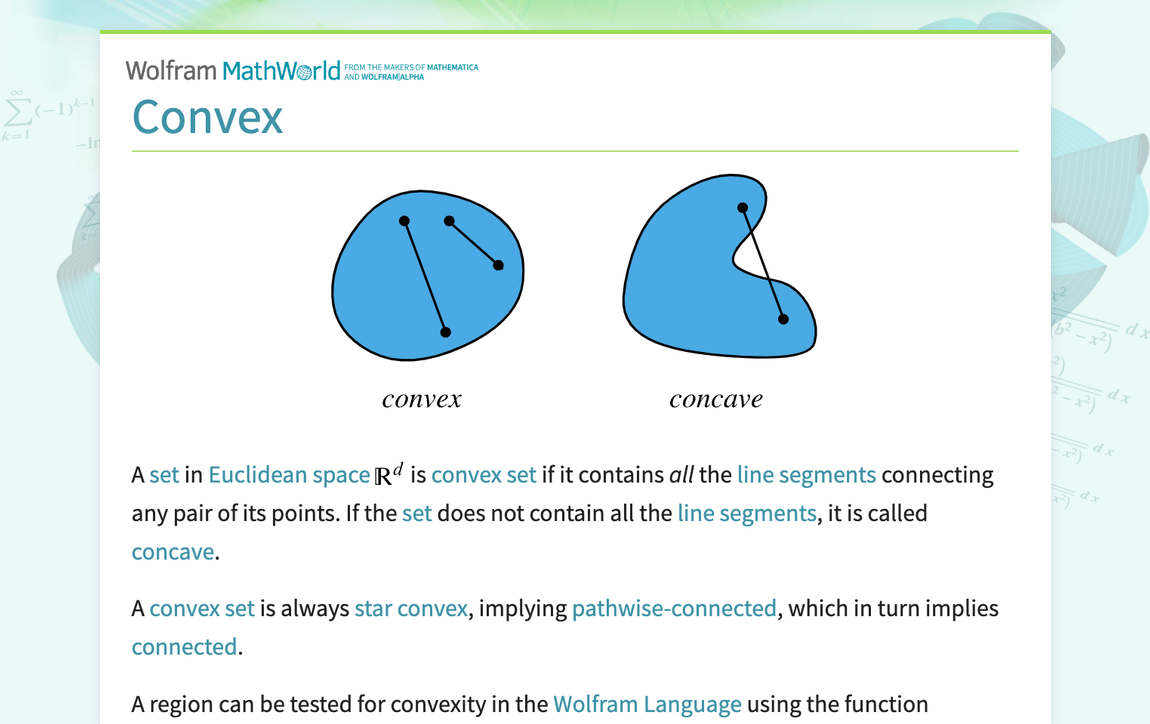
A set in Euclidean space R^d is convex set if it contains all the line segments connecting any pair of its points. If the set does not contain all the line segments, it is called concave. A convex set is always star convex, implying pathwise-connected, which in turn implies connected. A region can be tested for convexity in the Wolfram Language ...
This might help a bit
Just a simple example of the convex and concave triangulation of a quad that isn't flat
Both objects have appropriate names
 cunning ibex
Is there any way to make the launcher's missiles lock on to the infantry?
 uneven nexus
Greetings, Does anyone have any good tutorials for implementing a custom helmet into ARMA 3?
 plush trail
question how to have all 4 views on at the same time
similar to this

so far I managed to get two
 stuck oyster
plush trail
so far I managed to get two
stuck oyster
plush trail
so far I managed to get two
Window menu on top toolbar
 runic plover
plush trail
question how to have all 4 views on at the same time
runic plover
plush trail
question how to have all 4 views on at the same time
F9
tacit karma
http://abload.de/img/rhs_promo_perst1iknbpm7.jpg (The barrel mount was stolen from Pufu)
 leaden tapir
p3d
woeful viper
that a laser?
 copper hull
Hi everyone,
Does anyone know how to import a simple prefabricated 3D model from Blender into Arma 3? It would just be a basic decorative object, no colors or textures needed.
For example, a sofa, even if it just appears white.
copper hull
copper hull
Hi everyone,
Does anyone know how to import a simple prefabricated 3D model from...
Then, in the game, I want to spawn it from the yellow Eden Editor icon as a prop.
In short, I just want to learn how to import an FBX object from Blender into Arma 3, even if it’s just the default cube that appears when you start Blender.
I want to transfer this from Blender to Arma 3.

Thanks to everyone.
north sundial
@gleaming tusk did a tutorial for that exact thing https://m.youtube.com/watch?v=dS4jfLNckos

super simple tutorial that covers the basics of how to do this without the arma toolbox plugin for blender!
Arma 3 toolbox:
https://github.com/AlwarrenSidh/ArmAToolbox/releases/tag/v3.0.4-alpha
here is a video from a nice feller that covers how to install it:
https://youtu.be/mLSDFUXHQ-Q
It just makes things far easier, being able to export as...
I’m sure there are others on YouTube too
copper hull
north sundial
<@174265997883211780> did a tutorial for that exact thing https://m.youtube.com/...
Thanks very much
 short marsh
Hi, I'm trying to get my glass on my helicopters to break and stuff, especially when it's shot at, and when I slam it too hard on the ground. I see the stock helos do it, and thought I had a way to do it, but any guidance on what I have to do to setup the model (I have it in the config already) so it can break and the like.
In essence I want them to react like the stock helos.
short marsh
I got no help from the Arma 3 Sample Test Heli so that's why I'm asking
reef gate
short marsh
Hi, I'm trying to get my glass on my helicopters to break and stuff, especially ...
From what I could tell it’s a damage state for the hull
Typically just the texture is changed
But I think you can have a different model
short marsh
Uh huh
reef gate
I know one of the Vietnam bombers in prairie fire does it
short marsh
Yeah but do I set it up in the model, or specify which glass is which in the Fire Geometry?
Like in the 0.00 LOD I have it the same as the Fire Geometry?
short marsh
Okay
short marsh
Okay thanks, I'll go over this stuff then
charred bolt
LOD 0 / View Cargo / View Pilot
Name the glass mesh example glass1
Also give it a second selection name hit_glass1
Assign a material yourVehicle_glass.rvmat
HitPoints LOD
Place one or two hitpoints spaced across the centre of the glass. Name them hit_glass1_point
Fire Geometry LOD
Make a piece of mesh for the window (closed, convex, named ComponentX)
Give it a glass penetration material (rvmat)
Name it glass1
Also name it hit_glass1
In Config.cpp
{
    class hitGlass1
    {
        source = "Hit";
        hitpoint = "hitGlass1";
        raw = 1;
    };
};```
```class HitPoints: HitPoints
{
    class hitGlass1
    {
        armor = 0.2;
        armorComponent = "hit_glass1";
        explosionShielding = 2;
        material = -1;
        minimalHit = 0;
        name = "hit_glass1_point";
        radius = 0.20;
        passThrough = 0;
        visual = "hit_glass1";
    };
};```
```class Damage
{
    tex[] = {};
    mat[] =
    {
        "yourTag\vehicle\data\yourVehicle_glass.rvmat",
        "yourTag\vehicle\data\yourVehicle_glass_damage.rvmat",
        "yourTag\vehicle\data\yourVehicle_glass_damage.rvmat"
    };
};```

**In model.cfg**
```skeletonBones[] =
{
   "glass1",    ""
};```

```sections[] =
{
   "hit_glass1"
};```

```class glass1_hide
{
    source = "hitGlass1";
    type = "hide";
    selection = "glass1";
    minValue = 0;
    maxValue = 1;
    hideValue = 0.99;
};```See post above...
The glass will tinkle when hit (Fire Geometry material).
It will take damage when bullets penetrate or from indirect sources (Hitpoint LOD and class Hitpoints).
When it reaches 50% damage level, it's material will swap from yourVehicle_glass.rvmat to yourVehicle_glass_damage.rvmat (class Damage) using the section hit_glass1.
At 99% damage it will disappear (hitGlass animationSource, feeds into model.cfg hide animation glass1_hide acting on skeleton bone glass1)
short marsh
charred bolt
**LOD 0 / View Cargo / View Pilot**
Name the glass mesh example `glass1`
Also g...
Got it all, thanks muchly for this
short marsh
charred bolt
See post above...
The glass will tinkle when hit (Fire Geometry material).
It w...
Gotcha
short marsh
charred bolt
See post above...
The glass will tinkle when hit (Fire Geometry material).
It w...
Does this go in the helicopter's entry in the model.cfg. or the animations for the general stuff?
{
    source = "hitGlass1";
    type = "hide";
    selection = "glass1";
    minValue = 0;
    maxValue = 1;
    hideValue = 0.99;
};```I'm not sure what "general stuff" is.
Your skeleton and animations for the helicopter need to go inside the helicopter class.
short marsh
charred bolt
I'm not sure what "general stuff" is.
Your skeleton and animations for the helic...
The "general stuff is like the animations that are "outside" of the individual helicopter's animations, such as this area:
    ```class ej_Helicopter: Vehicle
    {

            htMin = 60;
            htMax = 1800;
            afMax = 200;
            mfMax = 100;
            mFact = 0;
            tBody = 0;  ```
None of that thermal code should be in the model.cfg file at all. It belongs in config.cpp. BI made an error with this and everyone blindly copies it.
short marsh
Okay whatever, but that area is where I should put the above class glass_1_hide though right?
I'll rectify the thermal stuff later on
charred bolt
Before answering that, do you know what is meant by "class inheritance"?
charred bolt
Well I have already answered that question, but more widely, your question doesn't really make sense.
short marsh
Okay thanks
charred bolt
If by placing it in this other place, it does not get inherited into your helicopter, then no, it's incorrect.
If you are setting it up, so that it will be inherited, then it doesn't matter, and it can go either place.
But unless you are working on multiple helicopters, it's making the model.cfg needlessly complex.
short marsh
Okay'
I do have multiple helicopters, so I'm making it complex then
Needlessly apparently
But appreciated
charred bolt
Yes, almost certainly needlessly more complex than it should be, usually due to misunderstanding of how class inheritance works, particularly in model.cfg.
short marsh
Okay
charred bolt
For example, if you have 2 helicopters that share some animations, the simplest is
class my_first_helicopter: my_helicopter_base {first helicopter skeleton & anims};
class my_second_helicopter: my_helicopter_base {second helicopter skeleton & anims};```
All this extra `default`, `vehicle`, `helicopter` etc classes do nothing for you.Okay
charred bolt
Obviously I've paraphrased code, it can't just be cut and paste.
short marsh
Right
stuck oyster
model.cfg inheritance does not always like changes later on.
for example you cant change skeleton bone parents if they are inherited
short marsh
Uh huh
stuck oyster
well good luck then
short marsh
Thanks'
charred bolt
So when you ask which class should the glass animation go in, it's either my_helicopter_base if it's shared, or one of the other two if specific. But in no instance would it be fully outside of helicopter (or it's inheritance) as then it would do nothing.
short marsh
I see, that makes more sense now
I didn't know you could cut some stuff out though, would clean up my .cfg a bit
charred bolt
You generally can't cut things out (as in delete inherited things) as HG just said. But if they occur in multiple places you can move them to a single prior base class so that they are inherited later on.
sour bough
For pylons:
So far, I've had to hide each individual munition with an animation source (ammo or revolving, same deal). Using eliteness to look at vanilla ones, I don't see that animation source or even a model.cfg binned into the P3d. Is there something I'm missing to make the missiles hide properly? They're proxied like the vanilla ones.
 bright echo
vanilla has them like missile pods/racks
so the missiles are a proxy inside the missile pod proxy
to give an example
class CfgNonAIVehicles
{
    class ProxyWeapon;

    class ProxySPE_T27_Dummy: ProxyWeapon
    {
        model = "\WW2\SPE_Assets_m\Vehicles\Misc_m\SPE_T27_Dummy.p3d";
        simulation = "pylonpod";
    };
    class ProxySPE_M8_Loaded: ProxyWeapon
    {
        model = "\WW2\SPE_Assets_m\Vehicles\Misc_m\SPE_M8_Loaded.p3d";
        simulation = "maverickweapon";
    };
};
T27_Dummy is the rocket pod/rack
and m8_loaded is the actual rocket
doing it this way means the rocket/missile/whatever will 'launch' from the sub-proxy position too
as a result you dont need to hide them with animations as the proxy just becomes empty
sour bough
I'll try that, thanks!
My 32-munition pylons for a bomb bay thank you o7
bright echo
it can be a bit of trial and error it look awhile for me to get them to work had a lot of invisible rockets etc
https://community.bistudio.com/wiki/Arma_3:_Vehicle_Loadouts this is also missing a lot of proper info for like the cfgammo side of things
like proxyShape needs to be the model you want to use
and i think needs to be defined in nonaivehicles
hmm, no only if you use them in the model they need to be defined there
sour bough
Yeah the stuff I have works but the hiding and whatnot needed to be done stupidly
This should just be a config change
inshallah we will carpet bomb them with hand grenades
pylon weapon proxying in the regular hand grenade onto a quad rack in rows would go so hard
indigo mountain
Not arma specific (but will be for arma) but running into an issue with a subdivide modifier creating these weird edges
Turned the subdivide up to 5 to really show it

 stuck oyster
maybe loose geometry in there
try select vertices in that area and use merge nearest
indigo mountain
I did, it had cleaned up some areas but those ones still remained
stuck oyster
indigo mountain
I did, it had cleaned up some areas but those ones still remained
maybe there is some face inside
that connects all of those parts
there isnt really any other option but open edges/unwelded vertices
or some hidden/unseen face that connects all the not working bits
indigo mountain
If I only delete faces I do have the extra part in the bottom left, would that point to an extra face?

When selecting all the faces I don't see anything extra
stuck oyster
does the thing also have internal surface?
try turn backface culling on
or the face direction setting
indigo mountain
Yeah its faces that are going the wrong way
 indigo mountain
Should they be all blue or red, not sure which color is inside or out
stuck oyster
blue is front of a face
red backface
and backface typically is not rendered in games
Arma 3 included
quick terrace
yes
oblique vapor
Does anyone know how to remove the light effect from a weapon ? Like not the actual muzzleFlash, but the emitted light.
quick terrace
not sure but i would look at the way thr muzzle flash is done and defined
the proxy^
oblique vapor
I found this: laserMuzzleIntensity = 0; but doesn't seem to work
Well, looks like fireLightIntensity = 0; fixed it !
short marsh
I've had this issue with my Formation Lights on my helicopters. It works, so there's no need to worry about that, but the issue since 2.20 or 2.18 is that they only work in the daytime. What I'm asking is what should I put for code in the model.cfg so it works only in the night, since currently it works as intended in the daytime, and not the night, where it is more practical for it to work, for player usability and such. Here is the code I'm using right now. What change do I need to make to make it work at night, like it's supposed to?
        ```class FormationLights : Rotation
        {
            type="hide";
            source="user";
            selection="Lights_green";
            minValue = 0.0;
            maxValue = 1.0;
            HideValue = 0.5;
        };```
Formation lights for helicopters should be handled by config code and memory points
class MarkerLights
Any way, assuming you want to ignore that and do it your way,
first off, why are you inheriting from a "rotation" class? Get rid of that, it does nothing.
Second, selection = "lights_green"; implies perhaps an emissive mesh face that will be hidden, as hiding Class Reflectors only moves them to the model origin.
Third, the source = user; implies that you have an animationSource set-up in config.cpp called user, which I don't expect you do.
You have several choices for manual or semi-auto hiding of emissive mesh faces:
- userAction manually switching a config animationSource
- assign the emissive to
podsvit pristrojuwhich would be hidden when the engine is off or in the day (selectionDashboard = "podsvit pristroju";)
short marsh
Okay yeah it's an Animation Source selected by the scroll wheel if that helps.
So in essence I do have a selection that is enabled/disabled by the scroll wheel menu
charred bolt
What is the selection? Is it an emissive mesh face?
short marsh
Yeah, it's just a geometry that has the face for the lights
On top of the non-emissive color
So in the named selections, I would use podsvit pristroju?
charred bolt
{
    class lights_green_hide
    {
        source = "user";
        animPeriod = 0.001;
        initPhase = 0;
    };
};```

A UserAction class which allows the player to switch on the light  (set `lights_green_hide` to phase 1)

```class lights_green_hide
{
   type = "hide";
   source = "user";
   selection = "lights_green";
   minValue = 0.0;
   maxValue = 1.0;
   hideValue = 1;
};```
and `lights_green` set up as a bone in skeletonsThat will be fully manual, irrespective of day or night.
short marsh
Nice
charred bolt
But you'll get much better results with class MarkerLights.
short marsh
Okay
charred bolt
Those emissives won't be visible at any decent distance and aren't actual light sources, whereas the marker lights are both clear and glowing. It's what they're designed for.
short marsh
Well they're more for close up seeing rather than bright flashing lights that you get with Collision Lights. It's more subdued but more tactical for night use, such as formation flying, not so much to show where you're at, like the regualar lights do
charred bolt
They might be ok for that, yes.
Assigning them to podsvit pristroju in Object Builder (and make sure that is also in model.cfg sections[] ) might work semi-autonomously at night with engine on, not requiring an animationSource, a UserAction or any bone/animation in model.cfg.
Depends if you want them manually switchable.
short marsh
I'll think on that, it's more for a player function rather than for AI, because the AI will normally have their own formation and such
charred bolt
It's nothing related to AI. Simply, formation lights come on automatically at night, or can be switched on/off by player manually.
short marsh
Oh okay
 flint vapor
Hey guys and gals. If one was to get started making models and textures for Arma 3 where would you start? I have some loose understanding of digital sculpting but thats about it.
stuck oyster
flint vapor
Hey guys and gals. If one was to get started making models and textures for Arma...
forget arma and just focus on basic 3d techniques
modeling, uvmapping, texturing, highpoly/lowpoly baking
stuff like that
the arma specifics open up relatively easy once you have basics down
flint vapor
Where is a good place to start with all that for someone with absolutely no clue? lol
stuck oyster
flint vapor
Where is a good place to start with all that for someone with absolutely no clue...
get blender, look up basic blender tutorials on youtube
as part of learning using internet searching will be essential skill so best to work on that too
this is a complex but rewarding thing you want to learn so be ready to make mistakes and learn from them
flint vapor
Okie dokes
 cedar garden
Is there a way to get translationY to go down/negative values? I've tried a few different options, but using negative values doesn't work.
stuck oyster
cedar garden
Is there a way to get `translationY` to go down/negative values? I've tried a fe...
offset0 = 0 offset1 = -1
but typically its recommended to use "translation" type and use memorypoints to define the travel axis direction
cedar garden
I've tried using offset, didn't work for me
I could try switching to translation though
 low hedge
Working on a vehicle, and weirdly enough the shadows only appear if two of the vehicle are visible/on screen at the same time, does anyone know this issue?

 stuck oyster
low hedge
Working on a vehicle, and weirdly enough the shadows only appear if two of the v...
stuck oyster
low hedge
Working on a vehicle, and weirdly enough the shadows only appear if two of the v...
you messed up shadow lod
probably have hiddenselections defined in it
make shadowlod properly
 marsh canyon
Workthought, to be done after I'm home, and sanity check: is it possible to have shadow volume that does soft shadow, but zero visual LOD, so basically an invisible P3D that only cast softshadow?
north sundial
I don’t see why that wouldn’t work
marsh canyon
My point is basically I'm understanding that SV does only cast hardshadow, unless I miss something. Quick search about it suggests me visualex may do it, but it does seem to relevant with visual LOD
charred bolt
Visualex soft shadow is generated from the res LOD, so if res LOD is empty I'd expect no shadow. Have never tested to see if shadow dynamically changes as res LOD does though.
marsh canyon
It actually works fine. One sanity check more... can we have a shadow that casts less shadow? I guess that's a no, since I've never seen it before
Basically I'm trying to PoC'ing a smoke that casts shadow

It uses a noise texture for now, but doesn't look so nice anyways
stuck oyster
marsh canyon
It actually works fine. One sanity check more... can we have a shadow that casts...
Dont think thats possible. As far as I can remember shadow cut is at 50% alpha and shadow is either on or off.
bright echo
i thougth I had seen transparency in the shadow lod of like a tree but I might be thinking of view geo
stuck oyster
Thats view geometry thing yeah
 plush forge
@stuck oyster
Quick theory crafting, ever tried to make an automatic door for a building? Think there is even a way of feeding an appropriate condition to the useraction(?) class.
stuck oyster
plush forge
<@150949769953411072>
Quick theory crafting, ever tried to make an automatic do...
but yes user action condition can work
plush forge
Interestingggg.
I was mostly guessing that appropriate code could go in the condition field for the user-action class. Not sure if there is anywhere else you could do it. But would sure be interested if there is a reliable way of getting something like that.
 round vault
Anyone here able to help me figure out the basics to making custom shirts? i just want to add logos etc to uniforms i already have if thats possible any help or guidance is appreciated
stuck oyster
round vault
Anyone here able to help me figure out the basics to making custom shirts? i jus...
so what are your skills in this subject? if youhave uniforms already where are they from?
round vault
Im completely ignorant
like basically no knowledge i have slight knowledge of blender but nothing extreme
round vault
stuck oyster
so what are your skills in this subject? if youhave uniforms already where are t...
but i pick things up quickly which is nice but i just dont know where to start and the unis i have are from a mod
stuck oyster
round vault
but i pick things up quickly which is nice but i just dont know where to start a...
you cant take someone elses models. thats the first thing to learn (unless explicit permission)
round vault

how much work is that gonna take to make a crye g3 LOL
just pants only im just trying to make custom shirts so the dudes have casuals to wear running houses etc
stuck oyster
round vault
how much work is that gonna take to make a crye g3 LOL
from 0 knowing nothing.
few months
retexturing is possible if a mod is made for that
but that does not alter the model
and sometimes you just have to make do with what is already made
round vault
stuck oyster
and sometimes you just have to make do with what is already made
but if i cant steal how am i supposed to do that LMAO i just wanna retexture stuff
not trying to actually 3d model stuff as that would take me forever to even learn in the first place i just want to retexture a basic g3 uniform with a tshirt so i can put my own logos on the shirts etc to make personal stuff for my guys
stuck oyster
round vault
but if i cant steal how am i supposed to do that LMAO i just wanna retexture stu...
retexturing is done by painting new texture file and putting that and config that points the assets class to use the new texture into a mod
only the texture and config
you dont touch models in retexturing
and OF THE COURSE YOU **CAN NOT **STEAL
like wtf
round vault
stuck oyster
and OF THE COURSE YOU **CAN NOT **STEAL
hey man game is game
stuck oyster
!ban @round vault 0 wanting to steal models
 high scarabBOT
stuck oyster
!ban <@1430170561035636828> 0 wanting to steal models
high scarabBOT
stuck oyster
!ban <@1430170561035636828> 0 wanting to steal models
*PewPewPew!!*
RIP @round vault
 icy dirge
Hey guys! i got this problem with my Door_1_trigger, i can open the door but when i wanna close it the action point doesn't show up..
fervent steppe
Code is probably wrong. Can you pastebin the config?
 sullen jasper
I have a question when my head is missing in game what should i do?
I tried to make a uniform but
missing head
fervent steppe
north sundial
sullen jasper
missing head
Missing the head proxy?
icy dirge
Thanks @fervent steppe got it working now! 😄
fervent steppe
Welcome
 coarse cairn
Got a question regarding vehicle modelling. Is there a recommended vertices count that you should aim to stay under?
stuck oyster
coarse cairn
Got a question regarding vehicle modelling. Is there a recommended vertices coun...
it varies depending on the complexity of the vehicle and if there are interiors
lets say stay under 100k (triangles)
coarse cairn
Alright, thanks
marsh canyon
Though you can't see the polycount you can check how dense the poly on an object are
Using Dev-Branch's diag exe
sullen jasper
north sundial
Missing the head proxy?
View pilot
stuck oyster
you would have to do retexturing
as in paint over the existing texture to add your details and the pack that new texture with new config into a new pbo
 fallow palm
Hey guys do u guys happen to know what this error is when importing arma3 p3d to blender?
 stuck oyster
fallow palm
Hey guys do u guys happen to know what this error is when importing arma3 p3d to...
stuck oyster
fallow palm
Hey guys do u guys happen to know what this error is when importing arma3 p3d to...
it means you cant take binarized models
its model making not model taking
fallow palm
stuck oyster
it means you cant take binarized models
Right, if im trying to edit a model, what should i do to before i put it into blender?
stuck oyster
fallow palm
Right, if im trying to edit a model, what should i do to before i put it into bl...
You cant edit a model
unless you have source file
which you dont have
 copper scarab
What's the best way to weight paint in blender for A3 models? I've been scaling uniforms to the character sample and weight transferring but the shoulders/armpits always look jank as all heck
 gentle merlin
copper scarab
What's the best way to weight paint in blender for A3 models? I've been scaling ...
gentle merlin
copper scarab
What's the best way to weight paint in blender for A3 models? I've been scaling ...
By weight painting 😄
You have a brush - and multiple options for falloff, intensity, and application type
gentle merlin
Make sure youre in weight paint mode and not edit mode
copper scarab
was hoping there was a quickfix but i'll just do it the normal way xD
gentle merlin
Yeeah there really isnt a shortcut without either addons or... well... you already tried data transfer
There is for example autorig plugin which has an auto weight that works much better than the built in auto weight, especially its voxel based variant, but that would still require setup and likely rearranging the bone orientations
But even then youll have to clean up 90% of the time - In short - weight painting is a bitch
copper scarab
I didn't mind it in 3DS, but maybe i'm just being biased
It's 4 bones per vertex in A3 right?
gentle merlin
I mean blender can do it the same way 3dsmax can in edit mode
gentle merlin
copper scarab
It's 4 bones per vertex in A3 right?
Err... i think its 3 actually
gentle merlin
Cant recall, been a while, but pretty sure its 3
copper scarab
Just trying to avoid this stuff ^
 gentle merlin
Oh yah
Stick to 3 tbh, its also good practice not to oversaturate a vertex with bones
gentle merlin
💪
 tribal pivot
How can I animate the door opening for sliding door like in the supermarket, where the door has two "wings"? I'm trying to set the max Value to negative value but this does not work.
class openMainDoor1 { type = "translationZ"; source = "openMainDoor"; selection = "door1"; memory = 0; minValue = 0; maxValue = 0.8; }; class openMainDoor2 { type = "translationZ"; source = "openMainDoor"; selection = "door2"; memory = 0; minValue = 0; maxValue = -0.8; };
stuck oyster
tribal pivot
How can I animate the door opening for sliding door like in the supermarket, whe...
use translate and memorypoint axis to define the direction
also min max value is the animations playback value, not the translation distance
offest0 and offset1 are the values for distance
(wiki for model.cfg is recommended read)
tribal pivot
Yes, I'm jumping between sites and tried a lot of options but nothing stuck. I will try your solution, thanks
stuck oyster
you will typically want the defautl min/max value of 0/1
unless you know why you change that
tribal pivot
In theory it changed the animation, so when I set it to 2, I was able to move the doors by 2 meters max instead of 1
But thanks to you now I know that it's improper usage and probably will behave differently in the game itself
stuck oyster
I mean yea sure but just not the right way 😅
tribal pivot
Your solution worked perfectly, thanks!
stuck oyster
as was expected 😅
rapid tree
copper scarab
Just trying to avoid this stuff ^
Modular Soldier V2 i see
copper scarab
Huh?
civic stratus
Anyone wanna help me make this thing work? http://steamcommunity.com/sharedfiles/filedetails/?id=406934806
it doesnt need to walk, im fine with it sliding
i just need some help configuring turrets/weapons
 ocean swift
hi chaps, can anyone advise me on a model.cfg. im getting that it cannot have externs. basically is a modified version of detagamers chinooks but the model.cfg is pretty much the same as it was. create a base class then at the end link the models to it but reading though i reading its requred to be indviually definded now
civic stratus
@ocean swift pastebin please?
ocean swift
ok 2 secs
its an arma 2 port
im being told this is the old way
class CfgModels
{
class Default;
class StaticWeapon;
class Weapon;
class SSQN_L119A1_BaseModel: Weapon
{
    BLURB
}
};
this is the new way
class CfgModels
{
class SSQN_L119A1_BaseModel
{
BLURB
}
};
 brave ruin
@civic stratus May want to talk to gmwo if he's still around. He's the guy behind the Wander Panzer's which sort of walked. https://forums.bistudio.com/topic/167035-wander-panzerwap-mod-for-arma3/
Plus still had turreted weapons and such.
fallen compass
Hi, I have a question. Is it possible to modify a 3D model of a face? For example, to make it fatter or thinner? But with the purpose of modifying the model.
marsh canyon
Arma 3 Samples have a head model
fallen compass
marsh canyon
Arma 3 Samples have a head model
Yes, I tried it, but the model doesn't change even though it changes on the bulldozer.
marsh canyon
Then you didn't applied the change in game?
fallen compass
marsh canyon
Then you didn't applied the change in game?
Well, I packaged it with the PBO project and nothing.
xd
 marsh canyon
Because you didn't write a config to apply it properly?
We can't tell anymore than that without knowing what exactly you are trying and did
fallen compass
marsh canyon
We can't tell anymore than that without knowing what exactly you are trying and ...
I'll send you the config
 marsh canyon
You did not do anything with your "new" model
CfgVehicles is unrelated, IIRC CfgHeads define the head model, CfgFaces define the texture and material that can be applied to it
fallen compass
What could I do?
marsh canyon
Read vanilla config to find some clue
fallen compass
marsh canyon
Read vanilla config to find some clue
in?
marsh canyon
DefaultHead_A3 is vanilla head model
marsh canyon
fallen compass
in?
?
fallen compass
marsh canyon
DefaultHead_A3 is vanilla head model
So you're saying that if that's the default model, no matter what I do, the default will take over?
marsh canyon
Yes because you set it so
 marsh canyon
If you mean in CfgFaces, do like that, and define the head in CfgHeads (or similar name, can't remember rn)
fallen compass
I put that there.
marsh canyon
My reply has a sentence after "and", so I'm suggesting
fallen compass
eh?
marsh canyon
?
marsh canyon
marsh canyon
If you mean in CfgFaces, do like that, and define the head in CfgHeads (or simil...
You replied to my first part, but not my last
fallen compass
marsh canyon
If you mean in CfgFaces, do like that, and define the head in CfgHeads (or simil...
ahh
I don't have cfgHead in the config
marsh canyon
Search through the vanilla config and see how it is structured
fallen compass
The sample character from Arma 3?
indigo mountain
No
Use the in-game config viewer to look at the CfgFaces class
marsh canyon
Can't guarantee how it is actually working rn
But what you've done is not completed, that's the point
indigo mountain
CfgFaces is texture/material, CfgHeads is model basically like you said
marsh canyon
Oki
indigo mountain
fallen compass
90% faceType is not a thing
Faces are done through identityTypes
fallen compass
 fallen compass
indigo mountain
90% `faceType` is not a thing
Faces are done through identityTypes
fallen compass
indigo mountain
90% `faceType` is not a thing
Faces are done through identityTypes
ok?
marsh canyon
If you don't understand something, say specifically so. "ok?" does not tell us anything
fallen compass
marsh canyon
If you don't understand something, say specifically so. "ok?" does not tell us a...
I'm sorry, I mean that I'm paying attention.
indigo mountain
Still missing the identityTypes in the unit
Not sure what B_Soldier_F uses by default but you also probably want to add your head to its own type as well (e.g. {"Head_Nato", "Poseidon_Head"})
And then adding identityTypes[] = {"Poseidon_Head"} in the unit config. You'll need to add stuff for the languages as well
fallen compass
No, I don't really know much.
fallen compass
indigo mountain
Still missing the identityTypes in the unit
Not sure what B_Soldier_F uses by de...
I think I was able to put it there
 marsh canyon
You also want to define identityTypes in CfgVehicles part
fallen compass
marsh canyon
You also want to define identityTypes in CfgVehicles part
Can?
marsh canyon
?
indigo mountain
Yeah identityTypes is kind of weird
IdentityTypes in face, facewear, and languages add themselves to a "pool" of stuff; then in unit config, identityTypes just pulls stuff from those specific pools you list.
At least from my understanding


 indigo mountain
Yeah that looks right
Can drop the faceType though
civic stratus
@ocean swift I think this bit is your problem
class CfgModels
{
class Vehicle;
the class Vehicle is your issue
ocean swift
ok well removed the class vehicle and removed the inhgertance after that as get the same error
inheritance **
civic stratus
class CfgSkeletons
{
class Vehicle;
ocean swift
oh bugger yep that was at the top
ok removed all class vehicle class and inheritence and same error
updated pastebin
does the class helicopter do the same?
 jaunty rune
anyone got any tips for making a refrance image still show in wire frame in max?
ocean swift
thanks for the help Eagledude, removed rotation and inheritance further down same error
woeful viper
you still can have those base classes. You just shouldnt rely on stuff defined outside of your model.cfg if you can help it
as long as your inheritance is correct there is no problem with a "vehicle" or "helicopter" class (it's just redundant if it has nothing in it)
@jaunty rune apply a material with some transparency to your mesh, so you can see through it
or use alt+x to make semi-transparent grey
civic stratus
I think this last bit might be your issue
class BAF_CH_47F_HC2_M240 : CH_47F_Base {};
class BAF_CH_47F_HC2_RAMP : CH_47F_Base {};
class BAF_CH_47F_HC2_UNARMED : CH_47F_Base {};
tribal pivot
I'm trying to set up my breakable glass in my p3d building, but for sure I'm missing something . I copied most of my config from sample building from Arma 3 Samples and my custom config works with sample model, but does not with my custom model. I created visual, geometry, fire geometry, hit-points and memory LODs and then in the vertex groups I marked all components like it was done in the sample. Is there anything additional that needs to be added to the blender model to be exported properly?
When I shoot at my widnows in game,there's no collision and the bullets are just flying through the window without any sound or particles
charred bolt
tribal pivot
I'm trying to set up my breakable glass in my p3d building, but for sure I'm mis...
In your Fire Geometry LOD, you should have the windows as mesh,
All objects
- closed
- convex
- with a penetration material (glass for the windows)
- selection names "ComponentXXX" replacing XXX with sequential numbering from 001 upwards
tribal pivot
Just re-checked and my FG LOD checks all the points mentioned. All normals outside, only cube shapes, triangulated, Components automatically generated by blender, Pen material applied
 charred bolt
tribal pivot
Just re-checked and my FG LOD checks all the points mentioned. All normals outsi...
charred bolt
tribal pivot
Just re-checked and my FG LOD checks all the points mentioned. All normals outsi...
After you export to p3d, open it up in Object Builder and validate the Fire Geometry using OB's built in tools.
 tribal pivot
Checked, and there are no mistakes in the mesh
charred bolt
I'm not an expert on buildings per se, but are there some Geometry LOD properties which might disable simulation or ability to take damage?
tribal pivot
I do not think so. My other fire geometries are working just fine - when I shoot them they leave a trace and make sound. The only ones that are not working are related to the glass (4 on top of the image)
charred bolt
For example, do you have these set in the Geometry LOD?
 tribal pivot
I did try that but without results. I'm not sure if that's on my side, but I do not see "house" in the property "map" in the autocompletion from blender arma tools. I will try to set it up again
Oh, I had sbsource set to shadowvolume. If the shadow was not large enough, could that have created issue?
charred bolt
tribal pivot
Oh, I had sbsource set to shadowvolume. If the shadow was not large enough, coul...
Wouldn't think so, no.
charred bolt
tribal pivot
I did try that but without results. I'm not sure if that's on my side, but I do ...
If you want to dm me the p3d (or just the p3d Fire Geo LOD), I can double-check it for you.
tribal pivot
Sure, I will send it in a moment
tribal pivot
Update: I managed to fix it with help from Apollo. The issue was that my Fire Geometry had no named components for the geometry of the windows. After regenerating names, everything started working properly
fallen compass
One question: if I want to add knee pads to my vest model, do I have to select them with "Leftleg" and "RightLeg"?
north sundial
If you mean weight them then yes
umbral shuttle
are res lods supposed to start at 0 or 1?
stuck oyster
umbral shuttle
are res lods supposed to start at 0 or 1?
Typically 0 but it does not matter.
The numbers are not important, just that they are in order
1, 4, 6, 8,9 works
umbral shuttle
stuck oyster
Typically 0 but it does not matter.
Okay cool, and say on a proxy lets say my model has 5 res lods, does the proxy also need 5? what happens if proxy is less or more?
stuck oyster
Yes it'll need 5
umbral shuttle
oooof its kinda hard to make res lods for a 500 poly object
stuck oyster
umbral shuttle
Okay cool, and say on a proxy lets say my model has 5 res lods, does the proxy a...
Proxies have limited draw distance so they might get culled from rendering earlier
Especially if there are a lot of proxies in view
umbral shuttle
what does that mean culled from rendering earlier?
stuck oyster
That they might not draw
umbral shuttle
oh okay
stuck oyster
umbral shuttle
oooof its kinda hard to make res lods for a 500 poly object
Well it probably will work with just the 1 too
umbral shuttle
stuck oyster
Well it probably will work with just the 1 too
oh okay, so just make like 1-2 I guess, load in game and see if it works and no problems I guess?
stuck oyster
umbral shuttle
oh okay, so just make like 1-2 I guess, load in game and see if it works and no ...
Yep
umbral shuttle
stuck oyster
Yep
I love it XD I should ahhhh keep track of how long I spend looking at loading screen
 cedar jacinth
umbral shuttle
I love it XD I should ahhhh keep track of how long I spend looking at loading sc...
cedar jacinth
umbral shuttle
I love it XD I should ahhhh keep track of how long I spend looking at loading sc...
With modern SSD‘s and about 60gb of mods i usually only take about 27 secs to main menu and to the virtual range about 12 secs, so does not take too long when its less mods.
umbral shuttle
cedar jacinth
With modern SSD‘s and about 60gb of mods i usually only take about 27 secs to ma...
oh yea but thats 40 seconds of life gone 
cedar jacinth
Trueeee… but thats modding 😉
Reforger got a bit easier 😛
north sundial
@umbral shuttle you should also consider if the proxy would be seen past certain distances, for example if it was a missile on a wing of a plane.
Would it really be visible after say the 2nd or 3rd res lod? If not then just don’t include the proxy on the planes next res lod
umbral shuttle
north sundial
<@256255391543853067> you should also consider if the proxy would be seen past c...
Actually not that part more so the pylon it self. I did try that tho not putting the missile on the last res lod but I could tell when it goes to that res lod
At ~100 meters it was noticeable
umbral shuttle
north sundial
Or eye I guess in this case
yes very fun aspect
could be also my pc bad idk
 toxic needle
hi im planning to make an Object 640 mod but im not sure wheter the model i ll buy has an interior would it be possible for me to use the Varsuk's interior from vanilla with permission from a BI developer of crs
stuck oyster
toxic needle
hi im planning to make an Object 640 mod but im not sure wheter the model i ll b...
no, the Arma3 models are not available for such.
you can check out public release datapack Arma2 sample models though
but basically
and I'll be honest here.
You should learn 3d modeling if you intend to do complex addons like that
toxic needle
stuck oyster
and I'll be honest here.
You should learn 3d modeling if you intend to do compl...
yes i do know 3D modelling but i was hoping i could save some time since im making a t-72A model rn and im also working on other mods but hnx for your time
stuck oyster
toxic needle
yes i do know 3D modelling but i was hoping i could save some time since im maki...
it may be good to keep focus on those other things first. otherwise you find yourself spread too thin.
toxic needle
stuck oyster
it may be good to keep focus on those other things first. otherwise you find you...
btw id u wanna use the t-72 model in any of your mods hit me up
this is it
 stuck oyster
I do a bit different kinds of mods myself. but the model looks nice.
 analog garden
has anyone set up submarine LODs
currently i have it "working" but it just sinks instead of doing the submersible thing, and it cant rise back up 😭
 tribal rain
so i have a question for yall pertaining to weight painting?
Obviously weightpainting is a pretty broad topic so i wont ask people to give me a full on 1:1 lesson here aint nobody got time for that but what i wanna know is just the fundamentals:
I.e.
Whats the point of weight painting? (the why)
Weight Painting vs Automatic Transfer - the secrets no one tells you.
Pitfalls to avoid.
Important things to remember.
If anyones got any solid videos regarding to this id be supergrateful. as far as i can tell also it doesnt need to be Arma 3 related only i believe this is a blender wide skill so its like universal.
The reasons for it is ive got some pretty funky looking stretching and stuff going on with some of my models and i know its a weight paint issue but everytime i try and "Fix" the issue its like somethings not right i feel like im just trying to throw paint at a wall and hoping it sticks.
Any help peeps? 🙏 ❤️


 marsh canyon
- Weight paint is to paint weight. Weight, in this context, defines the bone influences in a vertex, so the entire model
- Transfer then tweak
- Just practice, learn to other weights
- Pull enough hairs to gitgud
I would ask how it does look in Blender
I cannot tell what are face and shoulder issues btw
 tacit hull
@analog garden maybe you can use ```sqf
setCenterOfMass
maybe can ues "setCenterOfMass" to make it look like the SUB is doing the submersible thing: and then restore the mass back to default
after it is at the depth you want
i do this in a scripting: looks so cool
analog garden
tacit hull
maybe can ues "setCenterOfMass" to make it look like the SUB is doing the su...
yeah so I want something working without having to script it in bc it is possible to have a submersible 😭
bright echo
analog garden
currently i have it "working" but it just sinks instead of doing the submersible...
i havent but my guess is the sub has to work as a boat first aka the buoyancy is large enough volume to account for the mass
stuck oyster
tribal rain
so i have a question for yall pertaining to weight painting?
Obviously weightpa...
weightpainting is also connected to the topology of your mesh. if you have very different shaped joints for example they wont deform quite the same way as vanilla joints at same weighting.
you can get Macsers Armarig to use as movement/weighting test reference straight in Blender
what it looks like should correspond to what it ends up looking like in game