#arma3_model
1 messages · Page 36 of 1
 white oak
init, postinit, postreset and local are bust
trying to find a way to fire an event handler when the terrain is loaded
 subtle bison
make a script that always runs on mission start and then add your conditions, etc which will add the EH
white oak
subtle bison
make a script that always runs on mission start and then add your conditions, et...
Is there a version of onmissionstart.sqf for terrains?
subtle bison
no, you have to run the script at all times and then use conditions to determine when to stop and when to do what you want it to do
it's done via cfgfunctions, not in mission files or something
white oak
I see
subtle bison
better to ask in scripting category about it tho. very unrelated to model making
white oak
yeah fairs, this started as having eventhandlers on objects baked to terrain first hence why here
end goal was to see if it'd be possible to have particle effects from terrain objects but guess thats a bust
 reef gate
How do vehicle interiors work? I’m assuming it’s not just putting stuff inside the model. Is it like a separate model or something?
white oak
reef gate
How do vehicle interiors work? I’m assuming it’s not just putting stuff inside t...
Its all in the same model file but they are placed in different LODs for each seat (Driver, Gunner, Commander, Cargo)
https://community.bistudio.com/wiki/LOD#View_-_Cargo
reef gate
Ohh really?
When I model the interior do I actually have it put it inside the vehicle?
white oak
technically not since resolution LOD does not render in 1st person you can have a view lod that doesn't actually fit inside the model itself
but that just complicates your work and people do sense scale of things quite well it turns out
vehicles aren't my forte so this is second hand info, apparently the common practice is to fully model the 1st resolution incl interiors
then to chop up the model to the bits which can be seen from the seat positions to view lods
reef gate
white oak
technically not since resolution LOD does not render in 1st person you can have ...
Ohh that’s smart
How many LOD’s do you need for vehicles/ objects? Is it like 2-3
reef gate
white oak
technically not since resolution LOD does not render in 1st person you can have ...
So you could theoretically make a tardis
white oak
reef gate
How many LOD’s do you need for vehicles/ objects? Is it like 2-3
You need enough lods to end up with 1000 or so faces in your last, halving the face count at each step
 grizzled halo
reef gate
How many LOD’s do you need for vehicles/ objects? Is it like 2-3
grizzled halo
reef gate
How many LOD’s do you need for vehicles/ objects? Is it like 2-3
depending on poly count, up to 10
some people might suggest more, but being realistic the deformation on distance might be too massive if you pretend to go lower than %20 of your original geometry for visual lods
 wind cedar
Anyone interested In making a high quality m4a5 or m110a1 model
 charred bolt
grizzled halo
depending on poly count, up to 10
charred bolt
grizzled halo
depending on poly count, up to 10
As Ken says, you should end up with around 1k faces on the last resolution LOD, having halved them down at each step.
1k, 2k, 4k, 8k, 16k, 32k, 64k, (128k!)
Therefore 7 resolution LOD's is the usual amount for a detailed modern vehicle, potentially 8 LOD's if you've gone overboard. But never 10, or more.
Of course, there are also View Pilot, View Cargo (multi), View Gunner, SV0, SV10, Geo, Geo Phys, Geo Buoyancy, Memory, LandContact, HitPoints, View Geo, Fire Geo, Custom SV LOD's which might also be present.
grizzled halo
Is there actually known precisely at what point lods begin to change?
I must imagine it has to be formulaic depending on object view distance, but is there like an actual formula/number somewhere?
I can imagine halving faces each lod comes as a standard for ease of use and uniformity across mods and models, but wouldn't it be preferred to instead have an exponential decrease in order to minimize block versions being visible?
Something in the likes of
128k > 115k> 90k > 60k > 25k > 10k > 2k > 1k?
You still maintain visual fidelity on closer distances while still decreasing performance drag on further distanced.
Maybe some mods already do it that way, who knows
white oak
grizzled halo
Is there actually known precisely at what point lods begin to change?
I must ima...
Not a formulaic approach
Engine decides to switch LODs on many factors
the engine commonly just skips your first res if you have more than 50k faces in it
charred bolt
The game engine expects 50% reduction per LOD (of vertex normals), don't try messing with it.
What LOD it shows depends on each players PC.
grizzled halo
charred bolt
The game engine expects 50% reduction per LOD (of vertex normals), don't try mes...
does it actually expect the 50% reduction?
Wiki only mentions it as a common practice
Arma 3 example:
Model Data res 1 res 2 res 3 res 4 res 5 res 6
T-100 Varsuk Points 27600 18400 11500 5100 2500 800
Faces 14100 9100 5500 2300 1200 350
Sections 12 12 12 12 11 7A common practice is to half the polygon amount for the next lower resolution LOD by ~2.
But then there also this
The switching of different resolution LOD happens automatically, based on various factors / in-game conditions (e.g. view-distance, number of objects, video quality, CPU utilization, etc.). In Arma 3 the number of the resolution LOD has no impact and there is no way to specify which LOD is to be used at which range. The algorithm needs enough different resolution LOD to be effective. Therefore the modeller needs to provide multiple resolution LOD with different polygon-density. They should be ordered according to their polygon count (highest polycount has number 0 (or 1), second highest one number 1(or 2) and so on).
Which might mean there is decreased effectivity on reducing polycount exponentially too.
Cannot find anything related to the first lod being skipped if polycount is higher than an specific number, but I guess that must be performances-on-pc related then.
reef gate
Is it possible to make damage cause a change in the mesh rather than just the texture
For example if the wing/ fuselage or a plane gets hit can you give it physical holes/ rips in the airframe
 fluid copper
I don't know for sure but probably, similarly to how wheels hide when destroyed, you could likely hide and then show a new mesh with holes in it for wing damage
charred bolt
reef gate
For example if the wing/ fuselage or a plane gets hit can you give it physical h...
Yes absolutely.
Hide animations based on damaged hitpoints and also damage effects, such as flames/smoke/sparks.
 analog garden
reef gate
For example if the wing/ fuselage or a plane gets hit can you give it physical h...
analog garden
reef gate
For example if the wing/ fuselage or a plane gets hit can you give it physical h...
sounds like a lot of polygons 
fluid copper
charred bolt
Yes absolutely.
Hide animations based on damaged hitpoints and also damage effec...
I wonder why more devs dont do this, would be a nice touch on vehicles. Obviously it comes with a solid chunk of extra work, but still
 ruby ether
any tips on how to make a mod for some custom patches i wanna use in game?
analog garden
fluid copper
I wonder why more devs dont do this, would be a nice touch on vehicles. Obviousl...
tbh it sounds like a really quick way to make something unoptimized
fluid copper
analog garden
tbh it sounds like a really quick way to make something unoptimized
Eh I disagree, I don't see it adding more then say 1000 total verts for an entire vehicles worth of damage (maybe 1.5k) and it would only be visible in the first 2 lods or so
fluid copper
I don't think you would, the interiors of the hole can just use part of the base texture set, just leave a corner of your texture for it or something
 stuck oyster
fluid copper
I wonder why more devs dont do this, would be a nice touch on vehicles. Obviousl...
stuck oyster
fluid copper
I wonder why more devs dont do this, would be a nice touch on vehicles. Obviousl...
you have answered your own question
😅
making a vehicle with alllll the bells and whistles it can have is huge amount of work
both modeling and encoding wise
most developers cant do all of it alone
charred bolt
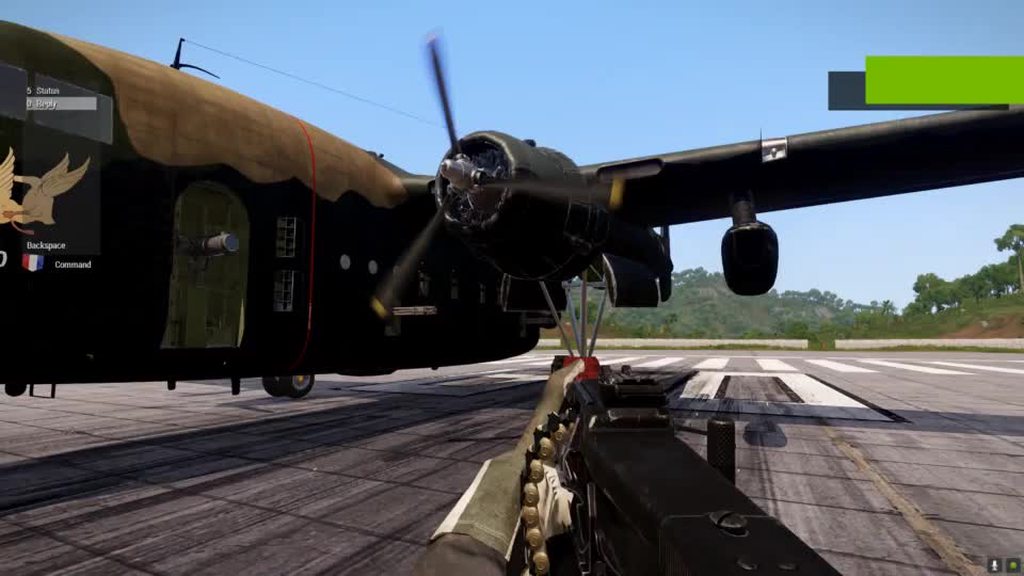
Example of damage animation and effects when one engine damaged on Nickel Steel AC-119:
https://imgur.com/J6l7N2k
 polar fiber
There's also a limit on how many bones you can have on a vehicle, so hiding every little bits and pieces can cause problems
fluid copper
Requires just the right amount of self hatred
wind cedar
is anyone open to making an m110a1 mod for me?
 marsh canyon
 finite stump
Is it better to have glass be a box or just a plane?
analog garden
finite stump
Is it better to have glass be a box or just a plane?
either works
if it's a box
just do NoZWrite shader flag
finite stump
analog garden
just do NoZWrite shader flag
What do I put in the { } ? Is that pointing to the object that is textured or the texture itself?
stuck oyster
finite stump
Is it better to have glass be a box or just a plane?
Plane if you don't need to see the sides
sides planes if you want it to seem thicker
Or we'll 2 planes if you want it to have 2 sides
analog garden
finite stump
What do I put in the { } ? Is that pointing to the object that is textured or th...
Rvmat
 waxen moon
I have a friend that has some quality models/tex's /addons.Some he has paidd money for the source.Pro stuff he makes.BUT, very reluctant to upload due to ppl stealing.Is there any way to scure them properly so that dont get stolen if he uploads to steam?
fluid copper
waxen moon
I have a friend that has some quality models/tex's /addons.Some he has paidd mon...
Currently the best way to lock a pbo is to use obfuscation. The only current method to do this well is with Mikero's paid tools, which can be found here https://bytex.market/products/item/weodpphdknnzm70o0h8q/Mikero's Dos Tools
waxen moon
Thank you!! I will pass on the info.👍🏻
 runic plover
charred bolt
Example of damage animation and effects when one engine damaged on Nickel Steel ...
runic plover
charred bolt
Example of damage animation and effects when one engine damaged on Nickel Steel ...
Is it now fixed such damage effects turn with turret or other kind of rotation/translation animations? Or still not possible
analog garden
waxen moon
I have a friend that has some quality models/tex's /addons.Some he has paidd mon...
nothing
obfuscation can be easily removed 💀
it's not even worth it unless you obfuscate with some private program, a quick google search shows u how many people have deobfuscated mikeros already
fluid copper
analog garden
it's not even worth it unless you obfuscate with some private program, a quick g...
? Many people claim to have done it, and sure I imagine some have, but there are no easily accessible methods that are publicly known to deobfuscate a mikero pbo. Do you know of one?
analog garden
ive watched someone do it i have no clue how they did
ik u can deobfuscate missions super easily just by using the copy to clipboard sqf function
fluid copper
We're talking about accessing models and textures, neither of which can be extracted from anything other than the pbo
stuck oyster
Let's not get distracted with talking how to do that
fluid copper
roger roger
analog garden
fluid copper
We're talking about accessing models and textures, neither of which can be extra...
ye, me too
analog garden
stuck oyster
Let's not get distracted with talking how to do that
im not sharing how anyone did it im just aware it can be done 💀
stuck oyster
Yeah just bit preemptive guidance
analog garden
fair
fluid copper
stuck oyster
Let's not get distracted with talking how to do that
Out of curiosity alone, mikero's obfuscation is a third party thing and isnt included in the copyright and reverse engineering laws that arma's content is protected under right? Or does it technically classify since arma also uses obfuscation
analog garden
not under copyright it's an independent program iirc
mikeros might have it's own copyright tho for that
that's more of an #other_ip_topics tho
fluid copper
true
analog garden
all in all
obfuscation is just annoying and doesnt really prevent any file stealing
just makes it more annoying if someone is trying to add a retexture to their own mod
or want to inherit stuff
charred bolt
analog garden
or want to inherit stuff
How does obfuscating, in your mind, make inheriting stuff more difficult?
Configs are fully exposed in-game using the config viewer.
If the author wants to allow retextures, they will probably provide texture templates.
It's certain that obfuscation will be "annoying" to thieves attempting to steal IP.
analog garden
charred bolt
How does obfuscating, in your mind, make inheriting stuff more difficult?
Config...
cuz most people just use mikeros to open it in file explorer instead of looking in game tbh
i hate the in game browser personally 💀
fluid copper
analog garden
i hate the in game browser personally 💀
Use the advanced dev tools one
 woven pendant
Hello, is there any documentation regarding the export of textures from Substance Painter? What channels are supported and more?
stuck oyster
woven pendant
Hello, is there any documentation regarding the export of textures from Substanc...
pinned messages on #arma3_texture has some resources I recall
 bright zodiac
does anyone know where i can get a jpc vest example/sample from so i can import it into Object Builder?
 lone robin
Hello everyone, Ive returned with my biweekly rookie issue. Im running into the issue where ther glass for my window is barely transparent and also doesnt show any of the details the actual texture has [Left Photo], Ive quadrouple checked face orientation, Ive moved glass faces to top. The picture on the right is another building using the same exact texture/rvmat so I know that it works. Any help would be greatly appreciated,


 wise coral
pennyworth: that worked great. thank you for linking me that.
stuck oyster
bright zodiac
does anyone know where i can get a jpc vest example/sample from so i can import ...
There is a vest sample in arma3 samples, but technically there isn't really much you can see in one thta would help you to make your own
stuck oyster
lone robin
Hello everyone, Ive returned with my biweekly rookie issue. Im running into the ...
Is the image original named with _CA suffix before converting to PAA? Is it made with alpha channel?
Read your question again, the left picture can not be same texture and material
Are they assigned directly on the model or applied via hiddenselection?
bright zodiac
stuck oyster
There is a vest sample in arma3 samples, but technically there isn't really much...
any suggestions?
stuck oyster
bright zodiac
any suggestions?
For what? 
lone robin
stuck oyster
Read your question again, the left picture can not be same texture and material
Texture/material is the vanilla window_set. The path is correct, they are assigned directly on the model. I have 2 other buildings that use that texture/material and have had no issue with those.
stuck oyster
lone robin
Texture/material is the vanilla window_set. The path is correct, they are assign...
But it really looks like something else. 
any chance you have hiddenselections on it to change it
lone robin
stuck oyster
any chance you have hiddenselections on it to change it
No I don’t even have a model.cfg for it yet, I was just testing the materials to see how they looked which for some reason the glass texture doesn’t want to work. Would the amount of sections have something to do with it ?
stuck oyster
lone robin
No I don’t even have a model.cfg for it yet, I was just testing the materials to...
Maybe if you had like thousands or something over board
Do you check the paths in OB?
 muted tapir
are animation types in model.cfg supposed to be in quotes or not?
in the samples they are without quotes while the wiki has them wrapped in quotes
marsh canyon
Both can work
lone robin
stuck oyster
Do you check the paths in OB?
Ive got 6 sections so I guess thats not it. The paths in blender and OB are correct so I'm stumped
charred bolt
lone robin
Ive got 6 sections so I guess thats not it. The paths in blender and OB are corr...
If you look from inside of the building outwards, does it look ok?
lone robin
charred bolt
If you look from inside of the building outwards, does it look ok?
No it’s still the same semi transparent mesh as the outside
charred bolt
Are there any named selections associated with the glass faces? (copy and paste the glass only into a new LOD, or look at "weights" for named selections)
lone robin
charred bolt
Are there any named selections associated with the glass faces? (copy and paste ...
They work on their own, I have them named Glass_1_hide thru 10

 honest herald
Hello, we have imported our own walls onto our map.
When they are broken, they rotate, which is present as a base
Do you have a solution to change the direction of rotation, to make it lying down instead?
 charred bolt
You mean when you paste the glass into a new LOD on their own, they display ok?
lone robin
charred bolt
You mean when you paste the glass into a new LOD on their own, they display ok?
Yes
charred bolt
So probably is a face sort issue then.
Is each window made up of two planes, one inside, the other outside?
lone robin
charred bolt
So probably is a face sort issue then.
Is each window made up of two planes, one...
Yes just two planes with correct face orientation, I’ve been selecting them and and moving to top but that hasn’t worked but maybe I’m doing that wrong
charred bolt
Ok, you need to bring the outside panes above the inside panes, separately.
As an experiment, try removing the inside pane and see if the glass displays correctly in the wall from the outside
stuck oyster
honest herald
Hello, we have imported our own walls onto our map.
When they are broken, they r...
you need to set correct damage named property for them
and then they need to be mod modeled in correct orientation
named properties have a wiki page you can check out
if I recall right it may have been "wall" you want to use
honest herald
stuck oyster
if I recall right it may have been "wall" you want to use
I actually put "wall" in the named properties damage
Is there no way to change the direction of rotation?
Because we have placed more than 8000 walls on the map and if we modify the rotation everything will have to be modified x)
honest herald
It’s true that we were a little stupid lol
Too bad for us x)
stuck oyster
your walls should be made to:
- use slopelandcontact placement mode
- wall dammage
- correct orientation.
if you have 1. done right
you could just add 90 degree yaw on all walls in relative mode
(relativer mode has small tickboc in object properties)
and you can select by template in the template library
 honest herald
I'll talk to whoever manages the map
Thanks for the help
lone robin
charred bolt
Ok, you need to bring the outside panes above the inside panes, separately.
As a...
current state of the glass after all of that. Move outside faces to top hasnt done anything
 charred bolt
lone robin
current state of the glass after all of that. Move outside faces to top hasnt do...
charred bolt
lone robin
current state of the glass after all of that. Move outside faces to top hasnt do...
DM me the files if you like
lone robin
charred bolt
DM me the files if you like
Do you want the .blend or p3d ?
charred bolt
p3d, texture, rvmat
lone robin
charred bolt
p3d, texture, rvmat
of the whole building or just windows ?
charred bolt
Well as it works with just the windows, that wouldn't be any use would it, lol. The whole thing, that is currently broken.
charred bolt
Fixed - window glass UV map was assigned on the wrong UV set
lone robin
Addendum to that, object was assigned to UV set 0 in Blender but obviously wasnt working. Just re-exported from blender but had the windows as the active selection upon export and everything is working as it should. Goofy shiz
stuck oyster
lone robin
Addendum to that, object was assigned to UV set 0 in Blender but obviously wasnt...
If you have split lods into multiple objects and they get combined on export, all their uvset names must match. Otherwise on combine each set keeps it's name and becomes separate uv sets in p3d
 obtuse rain
Yay for FBX, my tangent space "n" is pointing into the object.
obtuse rain
Seems O2 is exporting inverted normals.
 woeful viper
just recalc normals...
obtuse rain
Nah, will just avoid using O2 to export FBX's.
Was sitting there trying to figure out why the Fresnel preview looked so weird. 😃
 tribal rain
encountering an error when i try and pack am i using the wrong proxies or something?
 white oak
its telling you exactly whats wrong
did you not unpack the game files to your pdrive
tribal rain
no?
stuck oyster
pboProject can verify the paths you are using only if the corresponding files exist in right place in P drive
tribal rain
stuck oyster
pboProject can verify the paths you are using only if the corresponding files ex...
i have an a3 folder setup so i need to do this then.
Anyways so ive managed to get it working ish
its in game now but i the weapon wont fire?
 obtuse rain
I had numerous references for this but by the time I finished they were all gone: http://imgur.com/Me1q6z1
 tulip portal
so iv been looking around for how to set mass on a model, i have an apache model, comparable to the blackfoot, i need a mass value to start messing with stuff, and it seems its not tied to any partiular unit of measurement
white oak
tulip portal
so iv been looking around for how to set mass on a model, i have an apache model...
Its in kilos
fluid copper
I don't think it is, it might be comparable to kg, but I believe its a unique unit of measurement
charred bolt
The mass in the Geometry LOD is in kg.
Item Info mass in config is the one which has no specific units, being a combination of weight/volume/awkwardness.
white oak
charred bolt
The mass in the Geometry LOD is in kg.
Item Info mass in config is the one which...
Afaik the config mass is in imperial for some reason
For gear that is
charred bolt
As I said, it's not in any unit, but is a relative number only, if we're talking about the same thing.
 blissful spire
Anyone have a clue as to why my editor placeable prop seems to not be showing properly outside of the shadow LOD? It works fine in the arsenal and if placed then picked up via unit, does give the weapon properly
 charred bolt
blissful spire
Anyone have a clue as to why my editor placeable prop seems to not be showing pr...
charred bolt
blissful spire
Anyone have a clue as to why my editor placeable prop seems to not be showing pr...
Are you packing the pbo with a tool such as mikero's pboProject which will tell you if there is an error?
Have you checked your RPT log for messages?
blissful spire
charred bolt
Are you packing the pbo with a tool such as mikero's pboProject which will tell ...
Yes to pboproject, which isnt kicking me anything that i can see
theres nothing in the logs that i can see
If i swap to using the entries for the placeable MX it works correctly
charred bolt
"entries" as in config code? Can you show what works and what doesn't?
blissful spire
wait one
    class Weapon_arifle_AK12_F;
    class DST_Weapons_PlaceableWeapon_RifleBase: Weapon_arifle_AK12_F
    {
        editorCategory="";
        class TransportMagazines{};
        class TransportWeapons{};
    };
    class DST_Rifle_Vanguard_PlaceableWeapon: DST_Weapons_PlaceableWeapon_RifleBase
    {
        displayName = "$STR_DSA_Weapon_Rifle_Vanguard";
        editorCategory = "DSA_EditorPlaceable";
        class TransportWeapons
        {
            class handGun
            {
                weapon = "DST_Rifle_Vanguard_F";
                count = 1;
            };
        };
        class TransportMagazines
        {
            class handGunMagazine
            {
                magazine = "30Rnd_65x39_caseless_mag";
                count = 1;
            };
        };
    };
```This is the config for the placeable weapon im using class DST_Rifle_Vanguard_PlaceableWeapon: DST_Weapons_PlaceableWeapon_RifleBase
{
displayName = "$STR_DSA_Weapon_Rifle_Vanguard";
editorCategory = "DSA_EditorPlaceable";
class TransportWeapons
{
class arifle_MX_F
{
weapon = "arifle_MX_F";
count = 1;
};
};
class TransportMagazines
{
class 30Rnd_65x39_caseless_mag
{
magazine = "30Rnd_65x39_caseless_mag";
count = 1;
};
};
};
```If i swap to this, it correctly shows the MX model on the grounddoes your weapon model have resolution lods?
blissful spire
Yeah, has... LOD 1, View Pilot, ShadowVolume, Geo, Geo Buoyancy, mem and View Geo
stuck oyster
does it have default textures assigned on the p3d?
blissful spire
For both Lod 1 and view pilot yeah
that was my first thought was its a texture issue
 4:44:00: Warning: dst_weapons\rifles\vanguard\vanguard.p3d:1 Stage 1 has no texture to retrieve format from (while generating ST coordinates)
 4:44:00: Warning: dst_weapons\rifles\vanguard\vanguard.p3d:1 Stage 1 has no texture to retrieve format from (while generating ST coordinates)
 4:44:00: Warning: dst_weapons\rifles\vanguard\vanguard.p3d:VIEW_PILOT Stage 1 has no texture to retrieve format from (while generating ST coordinates)
 4:44:00: Warning: dst_weapons\rifles\vanguard\vanguard.p3d:VIEW_PILOT Stage 1 has no texture to retrieve format from (while generating ST coordinates)
 4:44:00: Warning: dst_weapons\rifles\vanguard\vanguard.p3d:VIEW_PILOT Stage 1 has no texture to retrieve format from (while generating ST coordinates)
 4:44:00: Warning: dst_weapons\rifles\vanguard\vanguard.p3d:VIEW_PILOT Stage 1 has no texture to retrieve format from (while generating ST coordinates)
 4:44:00: Warning: dst_weapons\rifles\vanguard\vanguard.p3d:VIEW_PILOT Stage 1 has no texture to retrieve format from (while generating ST coordinates)
 4:44:00: Collimator info for shape "???" can not be properly initialized - collimator is probably not planar.
 4:44:00: Collimator info for shape "???" can not be properly initialized - collimator is probably not planar.
 4:44:00: Collimator info for shape "???" can not be properly initialized - collimator is probably not planar.
 4:44:00: Too detailed shadow lod in dst_weapons\rifles\vanguard\vanguard.p3d (0:1.000000 : 4187) - shadows disabled
```Only thing that comes up is this in the .bin logwhich i know i need to fix the shadow. i think its just not set to shadow 1
stuck oyster
what named properties have you given it in the geometry lod?
blissful spire
geo only has the magazine outside of the components
stuck oyster
not named selections, named properties
charred bolt
He means LOD properties
blissful spire
ohh hang on
stuck oyster
like autocenter etc
blissful spire
just autocenter = 0
which is why im really confused since it seems like its showing the shadow
charred bolt
What's the config for the class DST_Rifle_Vanguard_F?
blissful spire
pretty much copy/paste of the MX with minor changes like textures and model paths
    class DST_Rifle_Vanguard_F: DST_Rifle_Vanguard_Base_F
    {
        author = "mjr121";
        baseWeapon = "DST_Rifle_Vanguard_F";
        scope = 2;
        displayName = "$STR_DSA_Weapon_Rifle_Vanguard";
        hiddenSelections[] = {"camo","camo1"};
        hiddenSelectionsTextures[] = {
            "\dst_weapons\rifles\vanguard\data\camo_co.paa",
            "\dst_weapons\rifles\vanguard\data\camo1_co.paa"
        };
        model = "\DST_Weapons\Rifles\Vanguard\vanguard.p3d";
        reloadAction = "GestureReloadMXCompact";
        picture = "\A3\weapons_F\Rifles\MX\data\UI\gear_mx_cqc_X_CA.paa";
        UiPicture = "\A3\weapons_f\data\UI\icon_regular_CA.paa";
        handAnim[] = {"OFP2_ManSkeleton","\A3\Weapons_F\Rifles\MX\data\Anim\MX_cqc.rtm"};
        class WeaponSlotsInfo: WeaponSlotsInfo
        {
            class MuzzleSlot: MuzzleSlot
            {
                iconPosition[] = {0.0,0.4};
            };
            class CowsSlot: CowsSlot
            {
                iconPosition[] = {0.5,0.3};
            };
            class PointerSlot: PointerSlot
            {
                iconPosition[] = {0.2,0.4};
            };
            class UnderBarrelSlot: UnderBarrelSlot
            {
                iconPosition[] = {0.2, 0.7};
                iconScale = 0.2;
            };
            mass = 80;
        };
        inertia = 0.4;
        aimTransitionSpeed = 1.2;
        dexterity = 1.6;
        initSpeed = 720;
        recoil = "recoil_mxc";
        maxZeroing = 800;
        class ItemInfo
        {
            priority = 1;
        };
        descriptionShort = "";
        class Single: Single
        {
            dispersion = 0.00116;
            minRange = 2;
            minRangeProbab = 0.3;
            midRange = 150;
            midRangeProbab = 0.7;
            maxRange = 350;
            maxRangeProbab = 0.1;
        };
        class FullAuto: FullAuto
        {
            dispersion = 0.00116;
            minRange = 0;
            minRangeProbab = 0.9;
            midRange = 15;
            midRangeProbab = 0.7;
            maxRange = 30;
            maxRangeProbab = 0.1;
            aiRateOfFire = 1e-06;
        };
        class fullauto_medium: fullauto_medium
        {
            dispersion = 0.00116;
            showToPlayer = 0;
            burst = 3;
            aiBurstTerminable = 1;
            minRange = 2;
            minRangeProbab = 0.5;
            midRange = 75;
            midRangeProbab = 0.7;
            maxRange = 100;
            maxRangeProbab = 0.05;
            aiRateOfFire = 2.0;
            aiRateOfFireDistance = 200;
        };
        class single_medium_optics1: single_medium_optics1
        {
            dispersion = 0.00116;
            requiredOpticType = 1;
            minRange = 2;
            minRangeProbab = 0.2;
            midRange = 350;
            midRangeProbab = 0.7;
            maxRange = 500;
            maxRangeProbab = 0.3;
            aiRateOfFire = 5.0;
            aiRateOfFireDistance = 500;
        };
        class single_medium_optics2: single_medium_optics1
        {
            requiredOpticType = 2;
            minRange = 100;
            minRangeProbab = 0.1;
            midRange = 400;
            midRangeProbab = 0.6;
            maxRange = 700;
            maxRangeProbab = 0.05;
            aiRateOfFire = 7;
            aiRateOfFireDistance = 700;
        };
        aiDispersionCoefY = 6.0;
        aiDispersionCoefX = 4.0;
    };
comment out the hiddenSelections for a test
blissful spire
weapon functions as it should with attachments, animations etc etc
give me 5 to pack and test
blissful spire
charred bolt
comment out the hiddenSelections for a test
Negative, still only shows what im assuming is the shadow only. Arsenal test is good still
charred bolt
Change model = "\DST_Weapons\Rifles\Vanguard\vanguard.p3d"; to
model = "\A3\Weapons_F\Rifles\MX\MX_F.p3d";?
charred bolt
So it's likely to be something in the model
blissful spire
im just not sure what though
charred bolt
Check Object Builder can see all the textures and materials
blissful spire
everythings been assigned though
stuck oyster
do the textures work in buldozer?
charred bolt
textures end in _co suffix and are powers of 2 (ie 1024x1024)?
blissful spire
textures are 2048x2048, afaik they work in buldozer
charred bolt
Can you show the LOD window from Object Builder?
blissful spire
which LOD? Res?
charred bolt
This one
 blissful spire
stuck oyster
do the textures work in buldozer?
blissful spire
stuck oyster
do the textures work in buldozer?
Textures work in buldozer, just checked
 charred bolt
It'll be 1. Just wanted to check you didn't have anything weird or additional res LOD's
blissful spire
thats what i thought
charred bolt
With LOD 1 selected, can you show this window?
 blissful spire
Ive never looked at this window, the "Not Mapped" are the proxies. double checked
 charred bolt
Those textures/rvmats are not found
They need to be "green", not with question marks
blissful spire
is it supposed to be
dst_weapons\rifles\vanguard\data\camo_co.paa
or
P:\DST_Weapons\Rifles\Vanguard\data\camo_CO.paa
i know to see the texture in OB its the bottom one
charred bolt
 blissful spire
So the P:\ is okay to have in the path when i go to pack it?
charred bolt
In the "rename reference" box, yes. Try it, and see if OB shows a green mark for found.
charred bolt
Yes - use those settings, save p3d, rebuild
remembering to change back the model entry in config
pboProject should have thrown errors at you though - you don't have all error checking switched off?
 charred bolt
seems fine
blissful spire
Q - I set the texture and materials to use the P:\ at the front of the path, and now pboproject is kickings errors stating they dont exist
charred bolt
show this window again after the changes
#arma3_model message
blissful spire
missing file P:\a3\weapons_f\acc\data\colimglass.rvmat in \DST_Weapons\Rifles\Vanguard\vanguard.p3d
missing file P:\DST_Weapons\Rifles\Vanguard\data\camo.rvmat in \DST_Weapons\Rifles\Vanguard\vanguard.p3d
missing file P:\DST_Weapons\Rifles\Vanguard\data\camo1.rvmat in \DST_Weapons\Rifles\Vanguard\vanguard.p3d
missing file P:\DST_Weapons\Rifles\Vanguard\data\magazine.rvmat in \DST_Weapons\Rifles\Vanguard\vanguard.p3d
missing file P:\a3\weapons_f\acc\data\collimdot_cshader.rvmat in \DST_Weapons\Rifles\Vanguard\vanguard.p3d
missing file P:\a3\weapons_f\acc\Data\eo_glass_ca.paa in \DST_Weapons\Rifles\Vanguard\vanguard.p3d
missing file P:\DST_Weapons\Rifles\Vanguard\data\camo_CO.paa in \DST_Weapons\Rifles\Vanguard\vanguard.p3d
missing file P:\DST_Weapons\Rifles\Vanguard\data\camo1_CO.paa in \DST_Weapons\Rifles\Vanguard\vanguard.p3d
missing file P:\DST_Weapons\Rifles\Vanguard\data\magazine_CO.paa in \DST_Weapons\Rifles\Vanguard\vanguard.p3d
missing file P:\a3\weapons_f\acc\data\collimdot_eo_red_ca.paa in \DST_Weapons\Rifles\Vanguard\vanguard.p3d
missing file P:\a3\weapons_f\acc\data\collimdot_circle_red_ca.paa in \DST_Weapons\Rifles\Vanguard\vanguard.p3d
 charred bolt
your rvmat file references are broken
blissful spire
i dont know why, those files exist in the P drive
charred bolt
sorry, not the rvmat's themselves, but the maps to nohq, ao, smdi etc inside the rvmats
blissful spire
do they also need the P:\ appended in the rvmat files themselves?
or just in the resource window
charred bolt
No, like this
 blissful spire
class Stage1
{
    texture = "DST_Weapons\Rifles\Vanguard\data\camo_nohq.paa";
    uvSource = "tex";
    class uvTransform
    {
        aside[] = {1,0,0};
        up[] = {0,1,0};
        dir[] = {0,0,1};
        pos[] = {0,0,0};
    };
};
```Thats how i have itIf i omit the P:\ in the paths it will pack without issues
charred bolt
check those files exist where it says
blissful spire
They do
 charred bolt
You should be seeing these green marks on the external dependancies in OB if you've got it right
 blissful spire
Yeah i dont have those
but the files exist in the folder, and they packed before. which is why im confused
Ah, there we go. apparently i didnt have my buldozer settings done
blissful spire
charred bolt
You should be seeing these green marks on the external dependancies in OB if you...
I got the links set properly and they are showing green checks and blue circles but its still not showing anything but the shadowlod in game
stuck oyster
you need to set texture path in OB settings as P:\
blissful spire
Yeah i didnt do that before, its set now
stuck oyster
👍
blissful spire
still having the shadow issue of the model not showing as an editorplaceable prop
 dawn vessel
If I wanted a sphere to have both it's outside and inside faces visible (so if you entered it you would still see it around me) how would I do this I am very new to blender and importing objects into arma, but familiar with general config and SQF scripting
I have got arma 3 toolbox for blender installed if that helps
white oak
dawn vessel
If I wanted a sphere to have both it's outside and inside faces visible (so if y...
You need to have both an inside and outside face
 inner dust

 mossy mulch
has anybody experienced HBAO+ causing the topology of the model to become really noticeable? HDAO makes it look fine but as soon as I enable HBAO+ ambient occlusion i can see basically every triangle when it gets ambient occluded (by backpacks when aiming down sights etc)
have tried subdividing further - same issue just with more triangles visible lol
muted tapir
yup i noticed that once too
mossy mulch
did you ever find a fix for it? massive pain in the ass
(happens without an rvmat applied too)
muted tapir
nope, didnt try to either tho
mossy mulch
oh lmao
analog garden
mossy mulch
has anybody experienced HBAO+ causing the topology of the model to become *reall...
engine bug iirc
i deadass just dont ever use hbao 💀
mossy mulch
is it actually
mossy mulch
yeah
it happens mostly on somewhat low poly parts of the model but meh
i will OPT TO BELIEVE YOU
stuck oyster
mossy mulch
has anybody experienced HBAO+ causing the topology of the model to become *reall...
got a picture?
 thorn spire
Now I know how to make miself xmas money
 last spindle
sell body, if fail, sell body parts
thorn spire
Take scripts and other dev addons (with permission?) and charge 30usd for alpha
Call it New
I wanna have digging mod
To use 2hr mission time just to dig trenches
And complain to PL
Thats the life mod I need in Armaverse
last spindle
'There was some controvesry with caiden, calling people ****** and ******. But overall they seem like pretty nice people' lol this commentry surley is a joke
last spindle
yeah $30 so they can take all the kids xmas money, and then disappear in 6 months time to start again next xmas with a new name
thorn spire
Would be the first time in life.. See what I did there
Its sad really
They basically just want money for that GUI
Lolled at that Advanced flight model part
 honest atlas
Hello, I'm new to modding and I want to know how to extract 3D models from vanilla Arma 3 so I can retexture some uniforms. Can someone help me and explain how to do this?
last spindle
i didnt get that far, more important shit to do
last spindle
work is over for me until next year :p
fluid copper
honest atlas
Hello, I'm new to modding and I want to know how to extract 3D models from vanil...
You cannot. They are unable to be opened. Retexturing will need to be done with soley the texture file
 foggy finch
@white jay digging trenches isnt that much fun 😛
last spindle
you get a entrencing tool in Squad, i was disappointed you cant use it to just dig randomly or as a weapon though
last spindle
take it to the frontlines with your squad?
woeful viper
take your squad to the frontlines with it ?
last spindle
^
foggy finch
take out the front lines with it*
woeful viper
budget cuts y know...
about that video - it's just unbelievable that people believe almost everything self-procclaimed "devs " stuff down their throat
foggy finch
a lot of those youtubers had a bit of a quietdown on that mod after the debate(forums et al) about it, even mr 1080p hinted at some underhand stuff going on so he quit videoing it
woeful viper
reading the comments on it though, at least the majority of people seem to know how the shitty life mods operate by now...
stuck oyster
honest atlas
Hello, I'm new to modding and I want to know how to extract 3D models from vanil...
Retexturing is done by painting a new texture in your choice of image editor/painter (gimp, photoshop, ms paint, etc)
It does not involve the 3d models and techniques of 3d model creation.
woeful viper
i knew it! there was a post from a liar on modding forum a while ago who claimed all new all selfmade content, then posted some shitty video showing off some lambo and other shit. Obviously lambo was stolen. Just checked AAND of course it was project life
thorn spire
I dont understand how that doesnt break EULA
last spindle
yeah that was the one from Forza i think, the Forza model had a very obvious shading glitch on the rear, and low and behold the A3 one they made themselves had the exact same shading artifact in the same place
foggy finch
yeah
I do see why BI are trying to find middle ground with life mods, the kids love them and the a3 streams in twitch are full of life mods
maybe more milsim groups should stream and push that side of the game
after all BI are a games company, they need sales to continue development
tribal rain
so ive got my gun "in game" but the model is not actually showing?

whats the usual cause of this model config issue right?
stuck oyster
probably some issue with pathing/folder structure inside your pbo
stuck oyster
tribal rain
so ive got my gun "**in game**" but the model is not actually showing?
you are not papafox though are you 😅
tribal rain
 tribal rain
stuck oyster
just in disguise then
tribal rain
stuck oyster
just in disguise then
new unit, new me
 sour bough
tribal rain
so ive got my gun "**in game**" but the model is not actually showing?
sour bough
tribal rain
so ive got my gun "**in game**" but the model is not actually showing?
I just noticed
You should prefix your classnames
tribal rain
sour bough
I just noticed
You should prefix your classnames
ive added those now, testing
woeful viper
that was the post
http://abload.de/img/2015-05-2421_24_18-arhbxoy.png
note the "skilled modellers" and "all custom content"
from the video http://abload.de/img/shadingerror2qwbvb.png ; forza mesh: http://abload.de/img/forzalamboeox6j.png
just in case anyone wants to utilize it against them in some way 😄
 snow gulch
last spindle
snow gulch
last spindle
im suprised they atleast flipped the normal ...... atleast
ahahahah ...... probably is no normal .......
woeful viper
that's just straight from rip off exporter to arma... no textures, just solid colors. That's why everything they have looks like bad toys.
@foggy finch BI already do the middle ground... tanoa specifically will be with both in mind from the get go, at least from what they said.
i do not think that milsim streamers would have big success outside of those that already watch milsim/ "serious arma" stuff. Those "mainstream streamers/youtubers" are popular because of kids and kids like wacky stuff (apparently)
tribal rain
so ive looked into this some more and apparently this is an issue but ive got no idea what the actually problem is
it saying that something is missing yet in the model config its all declared.
 woeful viper
However, i think if BI could come up with a CTI warfare mission with persistent characters/progress or something along those lines, i'm sure it would be alot more popular. Persistent missions are 'the shit' now i feel
marsh canyon
If that error is shown, it does mean your config is not declaring everything it requires. You need to post your config if you want to let us troubleshoot
tribal rain
wilco
class CfgSkeletons
{
    class Skeleton
    {
        isDiscrete=0;
        skeletonInherit="";
        skeletonBones[]={"trigger", "", "needle", "", "bolt_catch", "", "hide", "", "mag", "hide", "safety", "", "muzzleflash", "", "op", "", "foresight", "", "backsight", "", "cylinder", "",};
    };
};

class CfgModels
{
    class XC_LASHMG
    {
        htMin=0;
        htMax=0;
        afMax=0;
        mfMax=0;
        mFact=0;
        tBody=0;
        skeletonName="Skeleton";
        sectionsInherit="";
        sections[]={"mag", "camo", "muzzleflash"};

        class Animations
        {
          class magazine_reload_start
    {
    file = "\XcomProps\Weapons\MG_reload.rtm";
    selection = "mag";
    interpolateTo[] = {"magazine_reload_part1", "magazine_hide"};
    };

            class magazine_hide
            {
                type="hide";
                source="reloadmagazine";
                selection="mag";
                sourceAddress="clamp";
                minPhase=0;
                maxPhase=1;
                minValue=0;
                maxValue=1;
                memory=0;
                hideValue=0.435;
                unHideValue=0.725;
            };
            class magazine_reload_part1
            {
                type="translation";
                source="reloadmagazine";
                selection="mag";
                sourceAddress="clamp";
                minPhase=0.4;
                maxPhase=0.435;
                minValue=0.4;
                maxValue=0.435;
                memory=0;
                offset0=0;
                offset1=-3;
            };
            class magazine_reload_part2
            {
                type="translation";
                source="reloadmagazine";
                selection="mag";
                sourceAddress="clamp";
                minPhase=0.745;
                maxPhase=0.77;
                minValue=0.745;
                maxValue=0.77;
                memory=0;
                offset0=0;
                offset1=3;
            };
            class no_magazine
            {
                type="hide";
                source="hasmagazine";
                selection="mag";
                sourceAddress="clamp";
                minPhase=0;
                maxPhase=1;
                minValue=0;
                maxValue=1;
                memory=0;
                hideValue=0.5;
                unHideValue=0.83;
            };
            class muzzleflashrot
            {
                type="rotationX";
                source="ammorandom";
                selection="muzzleflash";
                sourceAddress="loop";
                minPhase=0;
                maxPhase=4;
                minValue=0;
                maxValue=4;
                memory=0;
                angle0=0;
                angle1=0;
            };
            class cannon_spin
            {
                type="rotation";
                source="revolving";
                selection="canon";
                sourceAddress="clamp";
                minPhase=0;
                maxPhase=1;
                minValue=0;
                maxValue=1;
                memory=0;
                angle0=0;
                angle1=360;
            };
        };
    };
};
I don't see magazine_reload
magazine_reload_start, what is your intentions there? I see that has no valid value
stuck oyster
tribal rain
```
class CfgSkeletons
{
class Skeleton
{
isDiscrete=0;
...

this dont belong here at all
tribal rain
damn gpt lied to me again lol
stuck oyster
its ban if you use chatgpt for this anymore 😠
marsh canyon
Don't ChatGPT it. Never
stuck oyster
learn it 😅
marsh canyon
Remove that part
tribal rain
stuck oyster
learn it 😅
 stuck oyster
(chatgp isnt part of any learning process)
model.cfg structure is documented on the wiki
and with the weapons sample it should be pretty simple to replicate working structure
when you do things
tribal rain
youd think 😅
stuck oyster
add 1 thing at a time
test
once it works
add next
dont try to do it all at once
that leads to frustration and failure
marsh canyon
And harder to debug too
stuck oyster
you got to break the process apart into manageable chunks so you dont get overwhelmed
this is what we tell pretty much everyone who start xD
people try to be way too fast at the beginning
 stuck oyster
exactly
tribal rain
ok serious question now im going to stop using humor to deflect
 tribal rain
ive got a massive and i mean huge phonebook thick book on C++ coding would that be useful here only asking as i know yes arma uses C++ but i dont want to put my nose in a book if its going to get me nowhere.
Especially as my dsylexic ass struggles to read as is
stuck oyster
arma config is similar
but not exactly same
so what you might use from there is some basic structure stuff and syntax
but writing config is not coding
tribal rain
so ill put it in metaphorical terms itd be like learning the difference betwen an automatic car and a manual both are cars they both drive but they do it different?
stuck oyster
with C++ you make the car and the way its driven. with config you give the car a name and color
tribal rain
ok that makes sense
i think what im doing here beyond the obvious of trying to fly when i cant even walk is do a gun that is a bit overly complicated atm.
I mean the thing has a rotating barrel for petes sake so i might try swapping out to one of my more simple weapons like an AR and see if i can get that working instead, can always return to this once ive got that working.
At the moment this is just annoying and frustrating me especially as like you guys said its hard to troubleshoot and google only has so many answers + as is the way with anything on the internet must ask the right question or you might as well not have the password.
stuck oyster
you can keep the weapon
and its features
just add one of them at a time
it will work in game without any fancy things too
then once that is done you can add the fancy stuff
step at a time
and the amount of steps dont really matter
tribal rain
like it does work (kinda sorta)
its in game it shoots it kills things albeit the bullets wildly off target to the actual firing point but then again its hard to aim when your guy is holding "nothing" 😅
stuck oyster
yeh
Id say zip up a backup
and then strip the model.cfg to only the bare root level parts
or well basically you dont even need it if you dont add any animations or sections
so for debug you might as well remove the model.cfg completely
and pack that up to see if that makes any difference
if it does not we can try to think of next thing you can remove/reduce to test if that is the culprit
 stuck oyster
also make sure you got error messages on in the launcher so you might catch some clues when you run it
tribal rain
literally just cut the model cfg out and put it in a different folder somewhere else in my pc
stuck oyster
yea thats fine
tribal rain
alright tho, cool thats progress at least.
Im going to take your advice and do that tommorow its 2am where i am cheers for the advice as usual amigo.
you too @marsh canyon 🫡
blissful spire
blissful spire
Anyone have a clue as to why my editor placeable prop seems to not be showing pr...
Okay, so i confirmed it is showing the shadowlod in game by removing it and repacking. Any clue as to why it wouldnt be showing the res lod?
stuck oyster
oh yeah did you already reduce the shadowlod to be simpler?
empty it and put simple cube in it crom the create menu
just for testing purposes
blissful spire
that, i havent done. but i did just remove it completely to test
stuck oyster
putting in a cube will show if it changes properly
blissful spire
give me a moment
blissful spire
stuck oyster
empty it and put simple cube in it crom the create menu
Yeah, it changed

im at a loss lol
blissful spire
Tried adding more res LODs (2-6) without luck, same with adding lodnoshadow = 1 to res and view lods
charred bolt
blissful spire
Yeah, it changed
What does your cube UV look like?
Did you set a procedural texture?
blissful spire
charred bolt
What does your cube UV look like?
Did you set a procedural texture?
cube is just the cube created by OB when you use the create > cube button so no idea, pretty sure it has no texture
charred bolt
blissful spire
cube is just the cube created by OB when you use the create > cube button so no ...
Assign this to the cube's faces texture: #(argb,8,8,3)color(1,0,0,1.0,co) and check in game
blissful spire
charred bolt
Assign this to the cube's faces texture: `#(argb,8,8,3)color(1,0,0,1.0,co)` and ...
assuming this is putting the cube in the shadowlod then nothing has changed
charred bolt
In the shadow LOD? No, thought you were trying to get it to show in the res LOD, LOD 1
blissful spire
I am trying to get the res lod to show, hang on
Okay cube works
but not the original model
charred bolt
So now with your original model in res LOD 1, replace the texture with the procedural you just used on the cube - see if it now shows as a red object
blissful spire
negative, that didnt work although let me pull the hiddentexture entries from the config that the editorplacable class is using
charred bolt
dm me the files if you wish
blissful spire
charred bolt
dm me the files if you wish
DM incoming in a few minutes with the zip
 carmine gull
To use 2hr mission time just to dig trenches
Now now, if the trenches actually worked that'd be something...
charred bolt
Found a fix for mjr121's issue with invisible weapon on ground last night - he should update with details.
 dire spruce
Hi all, I'm trying to reskin a uniform. Right now I have it work but I need to reference the model in the original mod. What I want to do is have the paa in my mod and change the reference in the p3d file to myMod\data and not theOtherMod\data. However when I open the p3d (with Blender or Object builder), when I save it back (even if I don't do any changes to it) I lose the animations (it's just T posing in the arsenal) and the model is from the waist down under ground. I've been told that I needed to put the weight on it but it still there from the original. Then I was told I needed a model.cfg file. I added that (even if the original mod doesn't have one) and I still have the same problem. Any idea why I loose these?
marsh canyon
If you're after a retex, why you need to have a P3D
stuck oyster
dire spruce
Hi all, I'm trying to reskin a uniform. Right now I have it work but I need to r...
where did you get the model?
dire spruce
marsh canyon
If you're after a retex, why you need to have a P3D
I need to be able to had vertex groups and we might need to do some tweeking on the model eventually to have dynamic patches. And for some add reasons we get a confl1ct on the server with another mod (That I need to investigate as I didn't do that mod but someone else on th egroup did) So I want to stream line it as much as possible.
stuck oyster
dire spruce
I need to be able to had vertex groups and we might need to do some tweeking on ...
retexturing typically does not involve 3d models
so again
where did you get it
dire spruce
stuck oyster
where did you get the model?
The models are from th eoriginal mod. (the author gave me the go to do this)
dire spruce
i have the p3d form the mod we are in contact with them.
stuck oyster
little sus. but ok. I dont know why you would need weighting or anything like that for retexturing then
retexturing like mentioned above typically means painting new texture in image editor/painter
dire spruce
Like I said, just opening the p3d in blender or OB and saving it i sbreaking the thing
marsh canyon
Well that usually doesn't belong to the word “reskin”
stuck oyster
which brings us to the question of, how much you know of 3d modeling
dire spruce
We are doing several skin and want to be able to have a menu to choose the skin rather than having 5 instance in th earsenal menu
stuck oyster
ok. thats a whole different topic though
dire spruce
stuck oyster
you just dont know what you see
Well I do know that the head is in place and the body half into the ground and that it's T posing and doesn't have animation.
dire spruce
stuck oyster
which brings us to the question of, how much you know of 3d modeling
I'm more use to parametric modeling. My first attemps at "moding" a model
stuck oyster
retexturing would use the original mod
stuck oyster
dire spruce
I'm more use to parametric modeling. My first attemps at "moding" a model
then you need to step back from this
marsh canyon
marsh canyon
Well that usually doesn't belong to the word “reskin”
I would ask this again. Are you "reskin" aka "retexture" it? Or making a tweaked model?
stuck oyster
and start from something simpler
dire spruce
stuck oyster
ok. thats a whole different topic though
for the menu I'm good alreay doing it for patches
stuck oyster
still it is whole different topic from the modeling issue
dire spruce
stuck oyster
you are repacking the model?
I'll give you that on
stuck oyster
and I think Im going to require some proof of you having permission to re release the model
you can DM that over
dire spruce
I'm not the one talking to the original modder, one of my squad member is but I'll try to get what he got.
carmine gull
It gets worse: I think someone made a third-party BISim subsidiary TerraSim developed some more capability for placing 'em when using TerraTools, using what I presume to be existing VBS3 two sets of trench segment models or imported models
thorn spire
Mm
Ive created them by basically cutting hole in terrain
Then dropping them in
Still no dynamic creation for players
subtle bison
can anyone tell me if there was a way to do weapon animations depending on if the player is in scope mode or not?
could swear that i've read about this at some point, but maybe it was just a dream
hm. seems to be isADS, but it's not on the wiki
stuck oyster
@turbid cove can we get that added pls
stuck oyster
I mean Lexx could be making elaborate joke
stuck oyster
subtle bison
do i look like i do jokes
 stuck oyster
subtle bison
already tested it ingame btw. works perfect
stuck oyster
subtle bison
already tested it ingame btw. works perfect
excellent!!
sour bough
:)!!!!!!
stuck oyster
still cant animate the optics proxies though
subtle bison
can't have everything
stuck oyster
Id suppose variant swapping would be an option
sour bough
Gonna make my gun smile at me when I ads
blissful spire
charred bolt
Found a fix for mjr121's issue with invisible weapon on ground last night - he s...
If your having issues with your Res lods not showing for editorplaceable props, check your RVMATs. My issue was using collimdot_cshader.rvmat to make my red dot glow. Swapping to a3\data_f\Lights\Car_PanelsRed.rvmat apparently works just as well. Many thanks to Apollo for taking the time to work it out with me.
 wind belfry
I have a big question about exporting my vests to Arma 3, can someone help me? I would appreciate it very much
What I don't know is going to pbo, and I don't know how to map my entire vest hehe
wind belfry
Arma 3
 turbid cove
subtle bison
do i look like i do jokes
turbid cove
subtle bison
do i look like i do jokes
you're a cat
with a stache
stuck oyster
wind belfry
I have a big question about exporting my vests to Arma 3, can someone help me? I...
did you make the vest? and how much experience do you have in 3d modeling?
 lusty ginkgo
What controls decal order?
0 and >1 only seem to work for elements that are part of the same model
stuck oyster
lusty ginkgo
What controls decal order?
decals as in mesh decals?
on a another model
or ground decals?
lusty ginkgo
ground decals
lusty ginkgo
like what controls which decal appears on top of another decal. the ones I am using are "on surface" in the properties so they appear above roads
yeah they don't have that named property
stuck oyster
so you making the old style vertex property on surface draw
if I remember right placement height plays a part in arranging those
at least in terrain builder
for land_decal type there does not seem to be any way to control it
maybe mesh height in the model could play some part but I dont think there is any concrete data on that
lusty ginkgo
yeah
I don't remember exactly the reasons I went with that but probably for precise placement. The land-decals need to be refreshed with the roads to update in buldozer iirc
but the ones I have with the vertex property definitely stack, I'm just not sure what determines the order. They don't merge in the same weird way that road shapes with the same order number do
object placement height seems to have no affect
any idea how on surface above surface and below surface work?
stuck oyster
it might be the placement height only worked in live game then. the vertex flags may be the only way to control it then.
lusty ginkgo
stuck oyster
it might be the placement height only worked in live game then. the vertex flags...
what vertex flags?
stuck oyster
yhe onsurface abovesurface and belowsurface stuff
lusty ginkgo
what do they do
stuck oyster
well its a old draw order setup Id suppose
in this case its probably "in relation" to the terrain surface it gets draped on
I dont think any vanilla thing uses it though.
and dont recall if we had documentation for them even way before in Arma2 times
lusty ginkgo
I have tried them in the past and they didn't seem to make any difference visually
I could try and see if they have any effect on the order
stuck oyster
its been a while since I messed with them and cant rememeber what results I had 😅
I did make the burned ground and embers decals on surface type for SOGPF
for longer draw distance
the embers do draw on top nicely 😅

but I cant say I recall why
the embers mesh is above the 0 height though


and now im just goofing around when I was supposed to do stuff
 lusty ginkgo
looks like orange spray paint exploded when you do it like that lol
is it just the mesh height or are there other changes you made?
lusty ginkgo
ok. thanks for all the help
woeful viper
just let him build a wall/ramp thing. It's just easier.
rebaked the hull for some smaller details... had to spend the whole day fixing render errors. What a waste of time that was >.< should have just painted the details in and called it a day. need to u´pload something to feel like i've accomplished something ... http://abload.de/img/2015-12-19_00001eysgw.jpg
wind belfry
Y Look, a friend gave me the vest, I just added patches, it's ready, I just want to add it to Arma3, oh and also the texture mapping, the vest came with its png texture, but without the ones from my patch and I want to add them, I mean make a new png texture with everything you add
stuck oyster
wind belfry
Y Look, a friend gave me the vest, I just added patches, it's ready, I just want...
not too promising. so where did your friend get it
mainly I ask because I dont want to waste time helping if the model is ripped from some game
lusty ginkgo
has the brick house enoch model always had an upstairs window missing
like the frame is there but it's just bricks lol
stuck oyster
I think so
wind belfry
He made it from scratch, his server is from GTA, something well known, Tamaulipas Belico, and he gave me the vests and their textures, but I added things to the vest, I mean patches and all that, and I want to make all of that into a single texture.
mossy mulch
lusty ginkgo
has the brick house enoch model always had an upstairs window missing
yeah it was a common thing in europe that houses would brick their windows up to avoid paying window tax
stuck oyster
wind belfry
He made it from scratch, his server is from GTA, something well known, Tamaulipa...
Gta modding scene is very known for ripping though so are you sure it's self made?
white oak
stuck oyster
Gta modding scene is very known for ripping though so are you sure it's self mad...
GTARP is where most lifers went so wouldn't surprise me
reef gate
is it possible to have an object with cloth physics
I want to make a VS-17 panel and have the guy be able to wave it around, does that all have to be animated or can i put physics on it in game
 ocean mantle

 pallid island
have you checked both UV maps?
stuck oyster
reef gate
I want to make a VS-17 panel and have the guy be able to wave it around, does th...
no physics unless you manage do do some trickery with flags
little bit unlikely to work
 kind arch
Anybody can explain me how can i make missile launch from "pylons" on my IFV from correct position. I mean when u launch the missile. it starts from missile place, not from a default missile_move point
reef gate
stuck oyster
no physics unless you manage do do some trickery with flags
that's what i was going to do
stuck oyster
It is likely going to be more difficult than what its worth as a feature 😅
analog garden
if you have an object too big for arma, what's the best solution to split it into different pieces
last spindle
yeah but VBS3 trenches are abit whack, they are trenches though
stuck oyster
analog garden
if you have an object too big for arma, what's the best solution to split it int...
I dont think theres any one fits all solution
what kind of object is it?
where would seams be easiest to cut?
analog garden
stuck oyster
where would seams be easiest to cut?
it's a big boat with a helipad 💀
im going to try just splitting it down the row in 4 pieces
it's not the coordinates of the p3d that fucks the geometry it's the actual units of length it is right?
stuck oyster
analog garden
it's not the coordinates of the p3d that fucks the geometry it's the actual unit...
yes the overall size is the issue
analog garden
is there any like object that shows the size
stuck oyster
now I dont follow
analog garden
so
arma has a max size for a p3d to work with geo
is there any objects that are like just before that max size?
to compare to
analog garden
how do i look at that in blender tho that's what im tryna figure out
or is the meters measurement there accurate?
stuck oyster
 stuck oyster
analog garden
or is the meters measurement there accurate?
stuck oyster
analog garden
or is the meters measurement there accurate?
yes 1 blender unit/meter is 1 meter in game
lusty ginkgo
stuck oyster
just mesh height as far as I can tell
After a bit of testing this doesn't appear to be correct
It seemed to work for me at first but it looks like that was just coincidental. The mesh height doesn't consistently determine the draw order
stuck oyster
Maybe I just got lucky 🤔
lusty ginkgo
it seemed to work for some models but then not for one
I don't get it
I wouldn't expect the order to change between buldozer sessions but maybe it does
white oak
Autocenter perhaps?
Also if you're talking about 2 different decals being drawn on top of each other you need to set Z ordering for both decals in OB
And then place them with a Z axis order
lusty ginkgo
could you elaborate?
white oak
Ie the runway tarmac and the threshold lines have Z ordering so when you're baking them to map you set the tarmac at Z = 0 and the threshold lines at Z = 0.1
lusty ginkgo
that only works for decals that are part of the same mesh
do you mean the named selection?
white oak
No there was a checkbox in OB, can't show it atm as I'm about 1000km from my pc
lusty ginkgo
a checkbox where
there's z bias in face properties
that only has 3 options though. nothing in vertex properties
white oak
lusty ginkgo
there's z bias in face properties
That should be it
To be clear I'm assuming you are trying to stack 2 different decal objects right
Not 2 faces in the same object
lusty ginkgo
yeah two separate objects
white oak
Set Z bias to true on both decals
white oak
Well set one to low and other to high, see where you end up
lusty ginkgo
where does the 0 and 0.1 come in
white oak
Well the way I thought it used to work was that you set a Z(height) value for the decal in TB and the game ordered decals according to that
It may still be the case mind you so try that out aswell with two decals of same Zbias
lusty ginkgo
try that where, though
white oak
lusty ginkgo
try that where, though
Bake different test cases to the map
Z-Bias does not work consistently in eden so testing there is moot
Make 3 decals, 3 squares of different colours for example
set Zbias for one to high and other two to low
and then test different configs
Hi-Lo at same and different heights
Lo-Lo at same and different heights
Relentless experimentation persists where documentation lacks
charred bolt
z bias none/low/medium/high is currently broken in Object Builder - you can set what you like, but when you re-examine it later, it's either none or high iirc.
lusty ginkgo
I'm not in game, only in buldozer
I need it to work there too anyway so baking and testing in game wouldn't really help
class = land_decal in geo properties is what the apex runways use, along with the >0 >1 etc named selections.
those aren't ideal either because performance and also there's no live update inside buldozer. Position chances only appear when you refresh the roads
scale changes too.
I guess I'll try the above surface and below surface options but those aren't ideal either considering that's only 3 layers
stuck oyster
Humm
one thing I've done is use drawImportance named property in the burned ground and in the embers
in the burned decal its 4, in embers its 10
this is meant to make them draw further in view
but I wonder if it might affect their draw order too?
it may be there is no solution for this though
lusty ginkgo
nah there are too many "no solution for x" problems with a3 there can't possibly be another
 formal halo
I've got this tank with rotating left and right side cannons, for some reason the memory points for the dir on each side don't seem to move with the barrel of the gun. I've tried parenting them to the bone in the skeleton, assigning them to the barrel vertex group, changing memoryPointGun[] to memoryPointGun in an attempt to see if it was that and no dice. Its curious because the main cannon is working fine, has anyone run into this before?

 west haven
hey real quick, when a grenade is thrown in arma 3 do they have a separate model or remove the lever/spoon etc?
 white oak
You can have different models for inventory and thrown defined in config but I don't recall anyone doing it
As you're essentially doubling your filesize for a hard to notice detail
white oak
Sounds a bit on the higher end but I haven't done many weapons so take that with a bit of salt
Also don't do distance lods as the game immediately goes to the lowest lod no matger what with thrown weapons
west haven
the rifles I've done were 15k, the handgun im working on is about 7k
stuck oyster
with good lods should be fine
but yeah its bit high end
nearly all vanilla long weapons are sub 10k
handguns below 5k
west haven
i did forgor how much my rifle was
lemme doublecheck
yeah 14k for my rifle
grenade is 2.7k
 fluid copper
Keep in mind how far away the user will normally be when they view this item, things like the grooves on the sides, the circle on the top on the side, the indent on the handle all could be on a normal map, the vortexing ring on the top and the grenade itself look pretty subdived as well imo
west haven
 last spindle
yeah they are......i know that guy, not personally, but i remember he posted the Foxhound he has on his profile there on polycount and asked for a critique and some guy just kept giving him shit for how long it took, and just wouldnt let it go, i remembered that post, sort of turned me off ever posting on polycount
wind belfry
stuck oyster
Gta modding scene is very known for ripping though so are you sure it's self mad...
Hey
I just want to know how I convert my vest to PBO hehe
stuck oyster
wind belfry
I just want to know how I convert my vest to PBO hehe
well good luck. I dont like to help with sketchy models
wind belfry
bro, it's already complete, I just don't know how to export it to arma 3 haha
@stuck oyster
marsh canyon
Complete or not is not what HG is wondering. HG is saying he doesn't want to help you when it could be a ripped model
 stuck oyster
west haven
god, so much work left to go on this bad boy
stuck oyster
west haven
god, so much work left to go on this bad boy
Looking good!
For Arma purposes you'll want to bake that 3d track into a texture that can be used on a simpler tube track
west haven
Yeah i was thinkin that
analog garden
you have an absolute path set for the texture is one issue I see
 rapid tree
analog garden
you have an absolute path set for the texture is one issue I see
rapid tree
analog garden
you have an absolute path set for the texture is one issue I see
i always do it like this and never had problems
analog garden
rapid tree
i always do it like this and never had problems
yeah idk then looks like an issue of materials from the export log
rapid tree
analog garden
yeah idk then looks like an issue of materials from the export log
i changed the paths but still same issue
fixed. a post from @stuck oyster helped me, i had one empty material file with no corresponding textures to it
analog garden
ahhh
 candid python
i really want some make scp props or is there one out there?
turbid cove
stuck oyster
<@137855151120711680> can we get that added pls
no
(please remind me next week or maybe @rough idol in #community_wiki , you or @subtle bison ^^)
white oak
was it possible to put a p3d in a mission file?
pallid island
only for createSimpleObject purposes, iirc
stuck oyster
☝️ This
white oak
Alright that can do, was there anything specific that needs to be done other than the simpleobject class?
 glad niche
Hello guys
stuck oyster
white oak
Alright that can do, was there anything specific that needs to be done other tha...
no class, no config
it can be only used through simple object script
white oak
oh so just have the p3d and put it down with a simple object script
glad niche
I am new to the model maker, what are the best steps to learn?
I need to the config template
white oak
glad niche
I am new to the model maker, what are the best steps to learn?
I need to the con...
Can you make models with blender or similar program
If not learn those first
then you can follow the arma 3 samples
white oak
stuck oyster
ye
In that case can the p3d use relative paths for the texture/material?
glad niche
thank you Horrible
stuck oyster
white oak
In that case can the p3d use relative paths for the texture/material?
dont know
maybe
 pastel cradle
Hi, I get an error when I try to package my model.
The only thing pboProject tells me is this: "model.cfgs for this pbo have errors"
Anyone who can help? Or should I ask in config makers?
charred bolt
pastel cradle
It looks like you have duplicate class CfgSkeletons and perhaps should get rid of the first one, assuming that you are trying to animate a weapon and not a person.

You can delete this section which does not belong in model.cfg

Remove the last comma in your skeleton - usually pboProject would warn you of this error unless you have turned it off.
 pastel cradle
Thanks, I'll give it a try
pastel cradle
charred bolt
Remove the last comma in your skeleton - usually pboProject would warn you of th...
It seems to be working, in part. Now the game just closes and gives me an Exception code: "C00000FD STACK_OVERFLOW at 32C368C2" when I pick up the weapon
charred bolt
What version of pboProject are you using and do you have the default errors/warnings switched on to prevent it packing when something is not right?
pastel cradle
3.16
charred bolt
Latest free is 3.91 I believe - try updating tools to get more error reporting.
pastel cradle
charred bolt
Latest free is 3.91 I believe - try updating tools to get more error reporting.
Okay i updatede it
Here's the bin.log
stripping ""P:\temp\RDF_M60E6.bin.log""
=== Binarize start: mbg_m60e6_hand.rtm ===
22:41:12: Warning: memory usage limited by a page file. Current limit 17548 MB, wanted 24450 MB.
22:41:12: Increasing your page file size might improve game performance.
22:41:12: No speaker configuration found.
22:41:12: PhysX3 SDK Init started ...
22:41:12: PhysX3 SDK Init ended.
22:41:12: <anim = "RDF\RDF_Royal_Danish_Forces\addons\RDF_M60E6\data\anims\mbg_m60e6_hand.rtm">

22:41:12: </anim>

22:41:12: Extensions:
=== Binarize end: mbg_m60e6_hand.rtm ===

=== Binarize start: mbg_m60e6.p3d ===
22:41:11: Warning: memory usage limited by a page file. Current limit 17558 MB, wanted 24450 MB.
22:41:11: Increasing your page file size might improve game performance.
22:41:12: No speaker configuration found.
22:41:12: PhysX3 SDK Init started ...
22:41:12: PhysX3 SDK Init ended.
22:41:12: Convert model RDF\RDF_Royal_Danish_Forces\addons\RDF_M60E6\mbg_m60e6.p3d -> P:\temp\RDF\RDF_Royal_Danish_Forces\addons\RDF_M60E6\mbg_m60e6.p3d

22:41:12: <model = "RDF\RDF_Royal_Danish_Forces\addons\RDF_M60E6\mbg_m60e6.p3d">

22:41:12: rdf\rdf_royal_danish_forces\addons\rdf_m60e6\mbg_m60e6.p3d:1: Bad proxy object definition proxy:\a3\data_f\proxies\muzzle_flash\mf_machinegun_mk32.001
22:41:12: rdf\rdf_royal_danish_forces\addons\rdf_m60e6\mbg_m60e6.p3d:1: Bad proxy object definition proxy:\a3\data_f\proxies\muzzle_flash\mf_machinegun_mk32.001
22:41:12: Warning: special LOD contains 2nd UV set.
22:41:13: Warning: rdf\rdf_royal_danish_forces\addons\rdf_m60e6\mbg_m60e6.p3d:20003 Section without material is in shape with ST coordinates
22:41:13: </model>

22:41:13: Extensions:
=== Binarize end: mbg_m60e6.p3d ===
model.cfg CgfModels class name does not match the p3d name?
pastel cradle
Does it need to?
pastel cradle
charred bolt
Also those `Bad proxy object definition` warnings look important
Thanks, I'll look into it tomorrow
glad niche

What is causing this error, guys?
i need help
thanks for help
class CfgPatches
{
class Test_House_01
{
requiredAddons[] = {"A3_Structures_F"};
requiredVersion = 0.1;
units[] =
{
"Land_Test_House_01_F",
};
weapons[] = {};
};
};
class CfgVehicles
{
// Parent class declarations
class House;
class House_F: House
{
class DestructionEffects;
};
class Ruins_F;
class Land_Test_House_01_F: House_F
{
scope = 2; // 2 = public = shown in editor
displayName = "momo"; // Name in editor
model[] = {"tutbuild\addons\Test_House_01_F.p3d"}; // Path to model
hiddenSelectionsTextures[]= {"tutbuild\addons\data\Test_House_01_F_co.paa"};
hiddenSelectionsMaterialss[]= {"tutbuild\addons\data\Test_House_01_F.rvmat"};
vehicleClass = Structures; // category in editor; "Structures" value is a class defined in CfgVehicleClasses
mapSize = 20.27; // Scale of icon in editor
cost = 40000; // Score penalty for destroying the house
};
};
glad niche
?
marsh canyon
pboProject points you have an error in that P3D not your config
glad niche
aha
marsh canyon
I don't know what you've done to that Sample P3D so...
glad niche
 glad niche
marsh canyon
I don't know what you've done to that Sample P3D so...
glad niche
marsh canyon
I don't know what you've done to that Sample P3D so...
I added new tixture to test opject house, the problem is in the creating the rvmat file!
I don't know how to edit the opject texture
 molten crane
What causes this misalignment? It occurs with every file I open in OB
 lusty ginkgo
Ok, so above surface and below surface vertex properties for surface decal objects simply break the object and it acts as a normal flat plain and does not stick to the terrain surface
lusty ginkgo
also z-bias is either None or High. When applying Medium or Low it automatically switches to High. So it's either at the highest or disabled.
lusty ginkgo
molten crane
What causes this misalignment? It occurs with every file I open in OB
Ob needs to be full screen
Resizing the window or the viewport does this
lusty ginkgo
Seems land_decals only break in buldozer when you load the roads. After that they stop updating among a few other visual glitches
I need to be able to move, scale, and rotate the decals in real time in buldozer. I need to be able to do this WHILE the roads are loaded. I need to be able to control the order they appear reliably. And it really does appear that none of that is possible all at once
charred bolt
lusty ginkgo
also z-bias is either `None` or `High`. When applying `Medium` or `Low` it autom...
lusty ginkgo
charred bolt
https://discord.com/channels/105462288051380224/105462541215358976/1276648356671...
That was a reply to me
Like a few days ago
stuck oyster
lusty ginkgo
Seems land_decals only break in buldozer when you load the roads. After that th...
They should not stop updating.
 faint sage
when i build my sight mod it turns black like this any solutions?
 lusty ginkgo
stuck oyster
They should not stop updating.
lusty ginkgo
stuck oyster
They should not stop updating.
Well, they do. Same happens in game with eden. You need to reload a mission if you place such an object to see it's location appear. Same thing with clutter cutter objects.
In buldozer changes are only reflected when you reload the roads. This has always been the case IIRC, part of the reason I don't use land decal objects
stuck oyster
lusty ginkgo
In buldozer changes are only reflected when you reload the roads. This has alway...
for buldozer that is the case yeah. in game I think they should just move around. 🤔
since land_decal object is rendered on road draw pass
grizzled halo
faint sage
when i build my sight mod it turns black like this any solutions?
texture in lense not _CA, alpha sorting, internal geometry being in the way.
Lots of possibilities
 raw beacon
Anybody know what error might cause a plane/heli to not spawn with engine on when its spawned in the sky? I have an aircraft the just plummets to the ground if i spawn it anywhere but on land
analog garden
charred bolt
Yes, but I've forgotten the reason... hope that helps
lmao
charred bolt
raw beacon
Anybody know what error might cause a plane/heli to not spawn with engine on whe...
Remembered it... do you have a Roadway LOD? - in my tests they break engine-on mid-air spawning.
mossy mulch
yes they do
raw beacon
Not always but seems you need to have auto center = 0 to stop this from happening
lusty ginkgo
stuck oyster
for buldozer that is the case yeah. in game I think they should just move around...
They update only once in game iirc. Only when the editor is loaded or a mission
lusty ginkgo
I did test every combo of z-bias and surface property. Only on surface works and the order changes on each launch of buldozer. This includes mesh height and object height as well.
so no solution exists, definitevly


 white oak
where did you get this model?
white oak
they're the LODs of the model
the numbered one is the resolution lod, the one thats visible in game
other ones are the technical LODs thats needed for model function, collisions/shadows/AI etc
you can read about them here
https://community.bistudio.com/wiki/LOD
glad niche
Thank you very much. Is there an explanatory video for this?
It is difficult for understand how to use it correctly.
stuck oyster
you will likely need to spend few weeks learning all the things
it wont happen fast
 severe dirge

Making a cash note ingame but when i drop the CfgWeapon item on the ground it lays on its side. How do I have it lay down on its side properly?
 severe dirge
it be the only way.
 worldly knoll
severe dirge
https://cdn.discordapp.com/attachments/731028520872181761/1278462743891935232/im...
worldly knoll
severe dirge
https://cdn.discordapp.com/attachments/731028520872181761/1278462743891935232/im...
You could make a LandContact LOD for it.
worldly knoll
Uhh... no I don't think so.
severe dirge
yeah it always sits on its side for the landContact, works for the static prop model just fine
but the minute i use CfgWeapons or CfgMagazines it treats it as a different orientation
worldly knoll
Do you have a geometry LOD with autocenter 0?
worldly knoll
Yeah. It's a wild guess, but might help.
Wait, do you have a geometry LOD to begin with?
stuck oyster
severe dirge
is that normal?
yes
dropped items are not independent
they are contained inside a "ground holder" object
as proxies
only way is to rotate it in the model
severe dirge
ah this is what you were saying, apologies thought this was a separate added consideration; i'll make a rotated drop variant o.o thanks for all the info folks ❤️
white oak
Future reference for making buildings
Building fire geometry for window needs glass_plate.rvmat
using other glass types prevent AI from shooting glass
charred bolt
white oak
Future reference for making buildings
Building fire geometry for window needs gl...
It may be more a case that if the AI can't penetrate the window material with the weapon that it is holding, it won't bother shooting.
Hence using an armoured "bullet-proof" glass rvmat results in them not shooting when using the usual 5.56/7.62mm weapons, but perhaps if they were equipped with a .50cal or sitting behind a large calibre static, it would be a different case.
(Supposition, not tested)
white oak
charred bolt
It may be more a case that if the AI can't penetrate the window material with th...
That might be the case, AI still tracks through the window
 hard oasis
is there a faster way to get precision on a UGL other than just keep trying to position the eye position and closing the mod everytime?
hard oasis
Ok, using source=zeroing.1 i can alter the animation of the UGL sight
Is it possible to make so when i change back to the weapon aka zeroing.0, the animation on the zeroing.1 goes back to angle 0? i'm dealing with a rifle that has a UGL sight on top of it next to where a top laser would mount, and using source=weaponMuzzle doesn't quite work because at 400m and 500m the sight will be point at the weapon
analog garden
so
this ugly ass ambient occlusion acne that happens with HBAO+ on a decal plane, is there any solution or do i just cry myself to sleep
 stuck oyster
analog garden
so
this ugly ass ambient occlusion acne that happens with HBAO+ on a decal plane...
stuck oyster
analog garden
so
this ugly ass ambient occlusion acne that happens with HBAO+ on a decal plane...
Make it 1%transparent
 round bloom
In Object Builder despite having "View background LOD" enabled I can't see the background LOD's when in the memory section, its a problem because I am trying to map the memory for a gun
woeful viper
I dont think we should support this endeavour...
stuck oyster
analog garden
?
like 0.99 in substance painter
Probably
object detection inside Arma3 or external program?
Can you explain more about what you try to do?
And why
 kind lion
👀
stuck oyster
You'll have to contact BI legal department for permission for such
We can't help you with such
Also such real life applications have quite lethal uses so I doubt many would be comfortable helping you even if you get cleared to use arma like that.
You can report such videos to BI legal department in the same mail. Such use may be prohibited by the game EULA
reef gate
I made my first building for arma!

I still need to tidy it up but is there anything glaring that would stop it from translating into the game properly?


 subtle bison
does anyone know if it's possible to build more complex damper/suspension animations for tracked vehicles?
the "damper" source apparently only works for y translation and not rotations
white oak
reef gate
I still need to tidy it up but is there anything glaring that would stop it from...
Hard to tell from those alone
 steel vector
Why not just use scripts to "find" and "identify" the objects? It's relatively simple and far less suspicious 😉
woeful viper
subtle bison
does anyone know if it's possible to build more complex damper/suspension animat...
do you have an example of a suspension type you want?
if it involves inverse kinematics you would have to "bake" it yourself into the model.cfg by multiple animations (nightmarish)
subtle bison
something like this. the up/down movement is fine ofc, but the piston behind the wheel needs extra rotations at the top and bottom

without rotation, this will happen
 reef gate
thaats pretty sick icl
woeful viper
Animating the damper "proper properly" would need inverse kinematics. You could reduce the "kink" of the damper by a little bit better weightpainting (but it still looks kind of whack). That rotation wouldnt work is strange, but i never tried using rotations. What happens if you have a normal damper animation (transition) that works in the expected way, but in addition another animation with rotation?
stuck oyster
The damper memorypoints need translation animation on Y but visual parts can do anything you like I think
 bright echo
subtle bison
the "damper" source apparently only works for y translation and not rotations
bright echo
subtle bison
the "damper" source apparently only works for y translation and not rotations
we use rotations in spearhead like the halftrack suspension
subtle bison
problem is, i encoded it already with rotation, but ingame the rotations dont play at all
in buldozer it works fine
bright echo
are you just using the damper animation source
subtle bison
yea
stuck oyster
They should 
bright echo
you want to use an animation source linked to damper instead
subtle bison
any example?
bright echo
            class Damper_1_2_source
            {
                source = "damper";
                wheel = "Wheel_1_2";
            };
``` config cppmodel cfg the source would be Damper_1_2_source
bright echo
otherwise you're limited to one animation per wheel
and for complex suspensions thats not gonna work
subtle bison
ok that makes sense
stuck oyster

subtle bison
gonna test and report back
works perfect. big thanks. was already trying to come up with an alternative plan. thankfully don't have to downgrade now
 split seal
steel vector
Why not just use scripts to "find" and "identify" the objects? It's relatively s...
split seal
steel vector
Why not just use scripts to "find" and "identify" the objects? It's relatively s...
Because this is an undergraduate capstone project. It has to fulfill some requirements in various fields such as computer vision, path planning and control. As for the suspicious part, in the real world things don't work the way they do in Arma, Arma doesn't have the noise factors that exist in the real world, so flying and controlling a drone is too simple. One of the reasons I preferred this project was the relative ease of control. But after the comments, I decided to continue with autonomous driving. Even if it is unlikely that I will be the first to do such a project in Arma, it is still a dangerous possibility. For this reason, I am deleting the project details with your permission in order not to affect anyone. Good day to everyone.
white oak
I mean best of luck with your studies and all
But sanest engineering undergrad right there
analog garden
woeful viper
I dont think we should support this endeavour...
what?
analog garden
stuck oyster
Probably
yeah no it helped but didnt fix it 100% 
woeful viper
analog garden
what?
this was in reference to a now deleted message from someone else
reef gate

This is where I’m at in Modelling my first building
I’ve also modelled the plant, plant pot, black pole and the streetlight in the back
This is with them hidden
 reef gate
I’m implementing that now
 quick terrace
shouldn't work that way
last spindle
it is visible in other LODs?
 bold flare
FYI for people who make character (I assume also uniforms?) models.
Something about geometries, which would only apply if you based your work on old samples: #dev_rc_branch message
stuck oyster
bold flare
FYI for people who make character (I assume also uniforms?) models.
Something ab...
does this have any relation to the geometry size limit of approximately 2 meters height?
bold flare
Don't know 😄
Don't think so, this was about damage (larger objects get different damage than smaller objects)
 candid mason
Does anyone know if there's a limit to how many "in" points to have in pathsLOD/?
Also, can anyone link me to a tutorial / explain "mesh collectors" to me with the blender toolbox?
round bloom
Never mind I managed to fix it suddenly by restarting pc
On a side note does anyone know a skeleton for a pistol?
woeful viper
its not any different to rifles...
round bloom
I thought the rifle ones would of hand different hand positions?
woeful viper
what#s that to do with model.cfg / skeleton?
round bloom
Ignore me I guess, I am being derpy
where in a config.cpp do you define which slot a weapon is in (primary or secondary)
woeful viper
you do it by inheriting from some pistol base class ... unless you want to dig in those and find the specific token for whatever reason
round bloom
Currently have this issue: http://i.imgur.com/bDhDbej.jpg

I am guessing this is problem with my model cfg?
foggy finch
lol
round bloom
@woeful viper my love, any idea how to fix this? http://i.imgur.com/bDhDbej.jpg
woeful viper
i cant give you the love you want... i can only give answers
and that would be to fix the handanim by placing the hand bones relative to the position of the pistol proxy
round bloom
Talk to me like a simple minded person. Oh wait, I am.
woeful viper
your handanimation is fucked up. fix it.
😛
or you chose a wrong handanim (e.g. one for a rifle/smg)
round bloom
I used "handanim[] = {"OFP2_ManSkeleton", "\A3\Weapons_F\Pistols\rook40\data\Anim\Rook40.rtm"};" for the config.cpp
Anything wrong with this? http://pastebin.com/PpLdTBS4 (Bare in mind I am a simple, derpy indervidual)
woeful viper
in that case your pistol class doesnt inherit from a pistol i assume?
well that's the skeleton/model.cfg. It doesnt play any role in handanimation / the slots you put your weapon in
round bloom
Was making sure nothing was wrong in it at all bae
woeful viper
model.cfg for weapons is only for animating the weapon itself, nothing else.
woeful viper
candid mason
Does anyone know if there's a limit to how many "in" points to have in pathsLOD/...
do you have some kind of open plaza model in mind with "near unlimited" entry points? I'm not aware of a limit, but i can imagine that AI path finding will cost more performance, if you have alot of "in" points... that said, if the sample house is representative of all houses with that "entry path-LOD umbrella" i suppose having many "in" in total in the level is not such a severe constraint, that it seriously hurts.
Delete the Animation {}; line for the glock17 class if you don't add anything. If you want to keep it you need Animation: Animation {}; unless you want to overwrite the entire base's animation in glock17
round bloom
Here is the config.cpp, I changed it to inherit from a base pistol but I can't seem to fix the issue in the picture I showed before http://pastebin.com/PS34RVNN
stuck oyster
candid mason
Also, can anyone link me to a tutorial / explain "mesh collectors" to me with th...
if you cant find any on the github then there isnt any. 😅
stuck oyster
candid mason
Does anyone know if there's a limit to how many "in" points to have in pathsLOD/...
is there a problem you have with them or just figuring out a design?
woeful viper
first of all, delete all the crap that you don't what it is for
candid mason
I'm figuring out a design / wanting to know the limit
As for mesh collectors, hm, that sucks
woeful viper
all that stuff is already defined in base classes somewhere, so you don't need to clutter your config with it and possibly mess something up by wrong values
also, in case BI changes something, to base classes, you will have to change little to nothing. If you put all that crap in your pistol config however, you would have to do every change yourself
round bloom
To be fair I did not right the initial version of the config with all that stuff
I will work on it later, I am off to bed, thanks for the help bae.
stuck oyster
candid mason
I'm figuring out a design / wanting to know the limit
Well one technical limit will be 2048 as thats how many selections you can have in a lod
dont recall anyone mentioning ever that they reached a limit
candid mason
ok that's way more than I thought
stuck oyster
I've had maybe 20 in points on a building at some point
candid mason
I read the github for mesh collectors, seems ok
I'm just trying to figure out how best to make a building and am just now learning about object parenting
hopefully object parenting works ok for combining things
I really wish I could auto-generate geometry
out of X components
which is why I was wondering about mesh collectors
stuck oyster
there stuff you can do in blender with python
but honestly generated components rarely are very good
especially with buildings you want them to be accurate
stuck oyster
candid mason
I'm just trying to figure out how best to make a building and am just now learni...
I might add that even a large building would likely have something like 4-5 doors as typical maximum
rapid tree
subtle bison
any example?
interesting to see an cdlc developer here in need of help
subtle bison
there's lots of cdlc developers around here
fastest way to solve certain issues is to.. just ask about it
rapid tree
subtle bison
there's lots of cdlc developers around here
i know but it was the first time i saw one calling for help, i thought you have direct contact to bi if you need help
rapid tree
subtle bison
fastest way to solve certain issues is to.. just ask about it
yeah, glad you got it working
subtle bison
even BI has barely people who still remember a3 at this point 😄
that said, not everything i'm working on has to be cdlc related 😄
rapid tree
subtle bison
that said, not everything i'm working on has to be cdlc related 😄
shame i was excited its for a cdlc 😦
 pale valley
question! how do I make my reticle less transparent? also the eye relief is a bit unforgiving.. how do I rectify these? I think its a model problem over a texture problem - as I keep messing about with "-- alpha00_ScopeShadow", "-- alpha01_ScopeReticle" & "-- alpha02_ScopeShadowInverted" which harbours differing results - but not really what I'm after... for reference, how it's set up & what its doing..

 stuck oyster
Id guess typically that is just done with single texture that shows as open/closed hole as you want
you dont necessarily need to make it realistic "physically" since the eyes/first person view dont really work like real eyes anyway
pale valley
apologies- I dont understand
stuck oyster
dont put in these parts at all
 pale valley
understood - removing the "shadow" parts rather understandably removes the eye relief effect - however the middle one, my "-- alpha01_ScopeReticle" is the reticle, what would I do about that?
stuck oyster
you can also play with their distances to get the visual look you want
they dont have to be realistic distances or sizes
as long as it looks like you want
rapid tree
can someone tell me why this happens ? its not alpha sorting i already tried that
 stuck oyster
usually that is related to alpha sorting
rapid tree
stuck oyster
usually that is related to alpha sorting
the rotor blur is made via proxy, do i have to put the rotor blur selection on top, or in the proxy model ?
rapid tree
when i make it without proxy it works fine... the main rotor is without proxy
 rapid tree
yes as stated i tried that, but it works now when i make the rotorblur not as proxy
stuck oyster
typically rotor blur is set as proxy to combat this issue
perhaps you have not correct kind of color texture on the hull
say if it has transparency in it
 short marsh
Having this issue with pylon weapon mounting on the pylon. The pylon proxy is seated correctly, but this happens. Do I need to put autocenter=1 or something? or is it something else?
 stuck oyster
short marsh
Having this issue with pylon weapon mounting on the pylon. The pylon proxy is se...
stuck oyster
short marsh
Having this issue with pylon weapon mounting on the pylon. The pylon proxy is se...
anything used as a proxy needs to have autocenter=0
short marsh
Okay, thanks
stuck oyster
if you dont have that set, this kind of behavior could fit
short marsh
Okay I'm sure that'll fit it
rapid tree
stuck oyster
perhaps you have not correct kind of color texture on the hull
i have a _co on the hull
stuck oyster
but does the _Co texture have alpha channel?
rapid tree
oh wait the base texture of the hull do have some transparent spaces
like the glass is in the co texture
rapid tree
i know but the modeler who made the model for me made it like that, i do use a seperate glass texture and rvmat
stuck oyster
well you got to remove transparency from the main _CO texture anyway then
rapid tree
since i retextured it already its not there anymore
rapid tree
not anymore no
stuck oyster
In case you have not I would still double check.
but anyway thats all I got
(texture can have alpha channel even if there is no transparency)
rapid tree
i opened it in ps and it does not show an alpha channel
but is rotorblur without proxy bad ?
stuck oyster
well no if it works and dont cause any other issues
rapid tree
stuck oyster
well no if it works and dont cause any other issues
alright thanks for the help as always 😄
stuck oyster
there is a sample holosight in the arma3 samples you can use as reference
what you experience is probably lack of autocenter = 0 named property, or just bad positioning in the attachments model
 alpine matrix
anyone have a moment to help me sort out my mirror? Its just black but i copied the left mirror setup for it


basically the same setup as the working mirror aside from memory point names, and config references.
stuck oyster
is the right mirror unwrapped the same way?
alpine matrix
stuck oyster
is the right mirror unwrapped the same way?
yes, at first it was working but the view was messed up(assuming because it was using the left mirror information)
subtle bison
correct rendertarget name in config and model file?
bboxes setup correctly?
not mirrored or wrong order
stuck oyster
I guess check again 😅
subtle bison
and there is no mesh behind the pipscreen that could "clip" over it?
is point position and direction correct?
subtle bison
well, that's all there is to check i guess
somewhere there is an error
maybe a typo or something
alpine matrix


( thought it was CASE sensitive for the references for the BBoxes but it doesnt appear to be)
 subtle bison
ok then i'm out of ideas :p
alpine matrix


only noticable difference is the capaitals
but it worked for me regardless on the left mirror(s)
subtle bison
and you are sure the uv map is correct?
alpine matrix
yes
subtle bison
last time this happened to me was when my bounding box was pointing the wrong way
alpine matrix
uhhhhh
subtle bison
that's all i could come up with now
alpine matrix
that might be good to check lol
im pretty sure i flipped it
the correct orientation
stuck oyster
could try cameraviewLeft and cameraviewRight classes?
in case they need to be unique for some reason
nah disregard that
vanilla is same as yours
alpine matrix
yeah was gonna say, the samples are the same